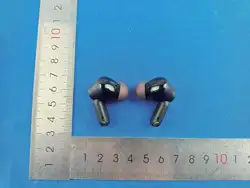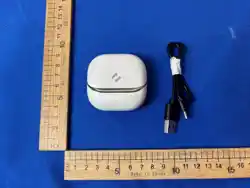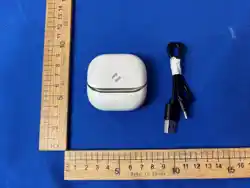
Model: TT-BH088
TaoTronics SoundLiberty 88
True Wireless Stereo Earbuds
User Guide
04-23-2020
TT-BH088_V1.4
E-mail:
support@taotronics.com
Manufacturer: Shenzhen NearbyExpress Technology Development Co.,Ltd.
Address: Floor 7, Building E, Galaxy World Phase II, Shenzhen, China
Learn more about the EU Declaration of Conformity:
https://www.taotronics.com/pages/user-manual
MANUFACTURER
www.taotronics.com
MADE IN CHINA

CONTENTS
English
Deutsch
Français
Español
Italiano
日本語
01-11
12-24
25-37
38-51
52-64
65-76
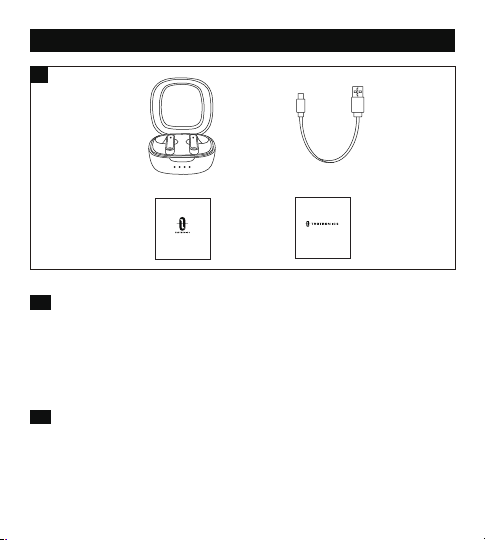
PACKAGE CONTENTS (Fig. 1)
v TaoTronics True Wireless Stereo Earbuds (TT-BH088)
w 1 x USB-C Charging Cable
x 1 x User Guide
y 1 x Quick Start Guide
v w
x
EN
1
y
v Taotronics True Wireless Stereo-Kopfhörer (TT-BH088)
w 1 x USB-C Ladekabel
x 1 x Bedienungsanleitung
y 1 x Schnellstart-Anleitung
DE
v TaoTronics Écouteurs Bluetooth Sans Fil (TT-BH088)
w 1 x Câble de Charge USB-C
x 1 x Manuel de l'Utilisateur
y 1 x Guide de Démarrage Rapide
FR
v Auriculares Inalámbricos Estéreo TaoTronics (TT-BH088)
w 1 x Cable de Carga USB-C
x 1 x Manual de Usuario
y 1 x Guía de Inicio Rápido
ES
v Auricolari Stereo True Wireless Stereo TaoTronics (TT-BH088)
w 1 x Cavo di Ricarica USB-C
x 1 x Manuale Utente
y 1 x Manuale di Avvio Rapido
IT
v TaoTronics完全ワイヤレスステレオイヤフォン(TT-BH088)
w 1xUSB-C充電ケーブル
x 1x取扱説明書
y 1xクイックスタートガイド
JP
User Guide
Quick Start Guide

PACKAGE CONTENTS (Fig. 1)
v TaoTronics True Wireless Stereo Earbuds (TT-BH088)
w 1 x USB-C Charging Cable
x 1 x User Guide
y 1 x Quick Start Guide
v w
x
EN
1
y
v Taotronics True Wireless Stereo-Kopfhörer (TT-BH088)
w 1 x USB-C Ladekabel
x 1 x Bedienungsanleitung
y 1 x Schnellstart-Anleitung
DE
v TaoTronics Écouteurs Bluetooth Sans Fil (TT-BH088)
w 1 x Câble de Charge USB-C
x 1 x Manuel de l'Utilisateur
y 1 x Guide de Démarrage Rapide
FR
v Auriculares Inalámbricos Estéreo TaoTronics (TT-BH088)
w 1 x Cable de Carga USB-C
x 1 x Manual de Usuario
y 1 x Guía de Inicio Rápido
ES
v Auricolari Stereo True Wireless Stereo TaoTronics (TT-BH088)
w 1 x Cavo di Ricarica USB-C
x 1 x Manuale Utente
y 1 x Manuale di Avvio Rapido
IT
v TaoTronics完全ワイヤレスステレオイヤフォン(TT-BH088)
w 1xUSB-C充電ケーブル
x 1x取扱説明書
y 1xクイックスタートガイド
JP
User Guide
Quick Start Guide
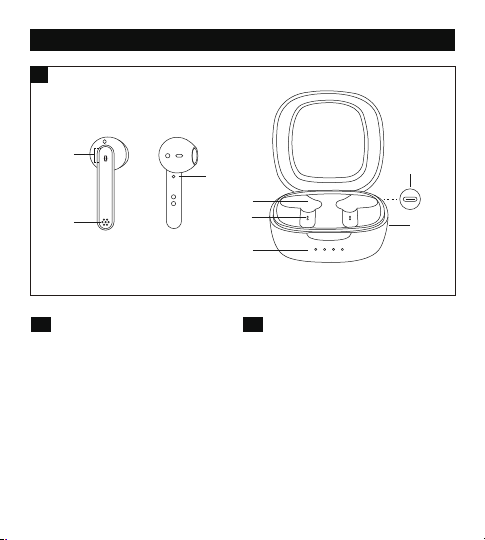
PRODUCT DIAGRAM (Fig. 2)
2
v
w
x
z
{
|
}
v Multifunction Touch Control
w Microphone
x LED Indicator
y Charging Contacts
z Charging Slot
{ Charging Indicator
| Charging Case
} USB-C Charging Port
EN
v Multifunktions-Touch-Steuerung
w Mikrofon
x LED-Anzeige
y Ladekontakte
z Ladeschacht
{ Ladeanzeige
| Ladehülle
} USB-C-Ladeanschluss
DE
v Multifonction Touche Tactile
w Microphone
x Voyant à LED
y Contacts de Charge
z Slot de Charge
{ Voyant de Charge
| Boîtier de Charge
} Port de Charge USB-C
FR
v Control Táctil Multifunción
w Micrófono
x Indicador LED
y Contactos de Carga
z Ranura de Carga
{ Indicador de Carga
| Estuche de Carga
} Puerto de Carga USB-C
ES
v Controllo Touch Multifunzione
w Microfono
x Indicatore LED
y Charging Contacts
z Slot per la Ricarica
{ Indicatore di Ricarica
| Custodia per la Ricarica
} Porta di Ricarica USB-C
IT
①多機能タッチコントロール
②マイク
③LEDインジケーター
④充電接続部
⑤充電スロット
⑥充電インジケーター
⑦充電ケース
⑧USB-C充電ポート
JP
L
y

PRODUCT DIAGRAM (Fig. 2)
2
v
w
x
z
{
|
}
v Multifunction Touch Control
w Microphone
x LED Indicator
y Charging Contacts
z Charging Slot
{ Charging Indicator
| Charging Case
} USB-C Charging Port
EN
v Multifunktions-Touch-Steuerung
w Mikrofon
x LED-Anzeige
y Ladekontakte
z Ladeschacht
{ Ladeanzeige
| Ladehülle
} USB-C-Ladeanschluss
DE
v Multifonction Touche Tactile
w Microphone
x Voyant à LED
y Contacts de Charge
z Slot de Charge
{ Voyant de Charge
| Boîtier de Charge
} Port de Charge USB-C
FR
v Control Táctil Multifunción
w Micrófono
x Indicador LED
y Contactos de Carga
z Ranura de Carga
{ Indicador de Carga
| Estuche de Carga
} Puerto de Carga USB-C
ES
v Controllo Touch Multifunzione
w Microfono
x Indicatore LED
y Charging Contacts
z Slot per la Ricarica
{ Indicatore di Ricarica
| Custodia per la Ricarica
} Porta di Ricarica USB-C
IT
①多機能タッチコントロール
②マイク
③LEDインジケーター
④充電接続部
⑤充電スロット
⑥充電インジケーター
⑦充電ケース
⑧USB-C充電ポート
JP
L
y

01 02
EN
IMPORTANT SAFETY INSTRUCTIONS
Please read the instructions thoroughly before using this product and retain it
for future reference.
Hearing Safety
• Do not wear earbuds with high volume for a long time to avoid damaging
your hearing.
• Set the earbuds to low volume before you put them on, then increase the
volume gradually as per your preference.
• Do not set volume too high to stay aware of your surroundings.
• Please refer to local laws and regulations if you want to answer phone calls
via this device during driving.
• For your safety, avoid distraction from music or phone calls when you are
driving or doing other activities with potential dangers.
Warning: Please set the volume to proper level to avoid hearing damages.
Caution
• Do not expose this product to high temperatures.
• Do not immerse the earbuds into water or expose them to humidity for a
long time.
• Do not clean the product with detergent containing alcohol, ammonia,
benzene or abrasives.
• Avoid dropping.
• Place the earbuds back into the charging case when not in use and keep it
away from children and pets to avoid choking hazard.
• Unauthorized disassembly of any parts of this product is forbidden, which
may cause fire hazard, warranty voidance, and/or property loss.
• Close attention is needed when using near children.
• Keep the charging case away from water, rain or any other liquid.
• Don’t use the product in thunderstorm to avoid malfunction or electric
shock.
• Always ask a professional technician or authorized personnel for repair.
This product contains lithium battery. Never expose it to excessive heat
such as direct sunlight or fire to avoid explosion.
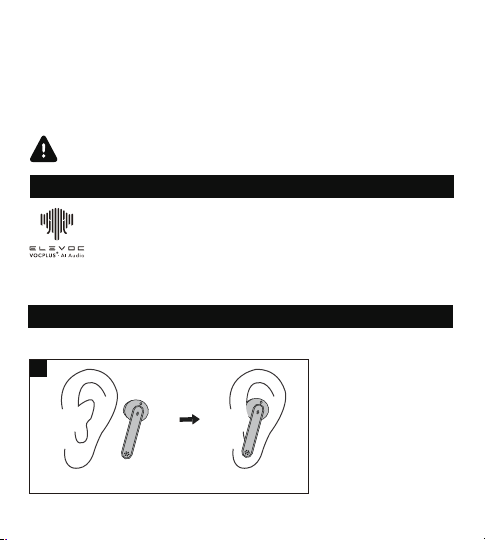
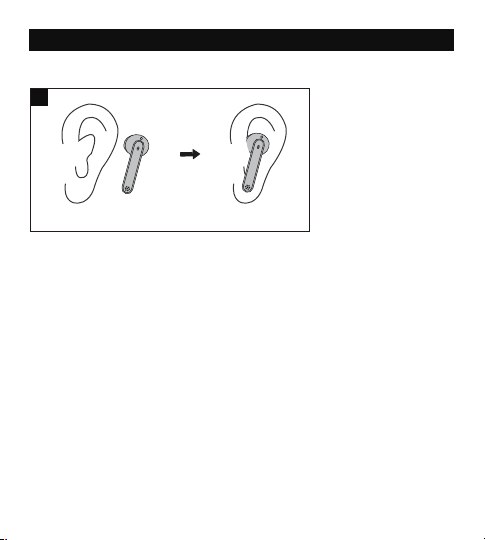
WEAR YOUR EARBUDS
Please wear the earbuds as shown below (Fig. 3).
Pictures only for reference.
3
① ②
SMART AI NOISE REDUCTION TECHNOLOGY FOR CLEAR CALLS
Elevoc Vocplus is a DNN-based noise reduction technology that
can extract your speech intelligently and make your caller hear
your clear voice by removing background noises.
01 02
EN
IMPORTANT SAFETY INSTRUCTIONS
Please read the instructions thoroughly before using this product and retain it
for future reference.
Hearing Safety
• Do not wear earbuds with high volume for a long time to avoid damaging
your hearing.
• Set the earbuds to low volume before you put them on, then increase the
volume gradually as per your preference.
• Do not set volume too high to stay aware of your surroundings.
• Please refer to local laws and regulations if you want to answer phone calls
via this device during driving.
• For your safety, avoid distraction from music or phone calls when you are
driving or doing other activities with potential dangers.
Warning: Please set the volume to proper level to avoid hearing damages.
Caution
• Do not expose this product to high temperatures.
• Do not immerse the earbuds into water or expose them to humidity for a
long time.
• Do not clean the product with detergent containing alcohol, ammonia,
benzene or abrasives.
• Avoid dropping.
• Place the earbuds back into the charging case when not in use and keep it
away from children and pets to avoid choking hazard.
• Unauthorized disassembly of any parts of this product is forbidden, which
may cause fire hazard, warranty voidance, and/or property loss.
• Close attention is needed when using near children.
• Keep the charging case away from water, rain or any other liquid.
• Don’t use the product in thunderstorm to avoid malfunction or electric
shock.
• Always ask a professional technician or authorized personnel for repair.
This product contains lithium battery. Never expose it to excessive heat
such as direct sunlight or fire to avoid explosion.
WEAR YOUR EARBUDS
Please wear the earbuds as shown below (Fig. 3).
Pictures only for reference.
3
① ②
SMART AI NOISE REDUCTION TECHNOLOGY FOR CLEAR CALLS
Elevoc Vocplus is a DNN-based noise reduction technology that
can extract your speech intelligently and make your caller hear
your clear voice by removing background noises.
03 04
USING YOUR EARBUDS
Charging
Charging the Earbuds
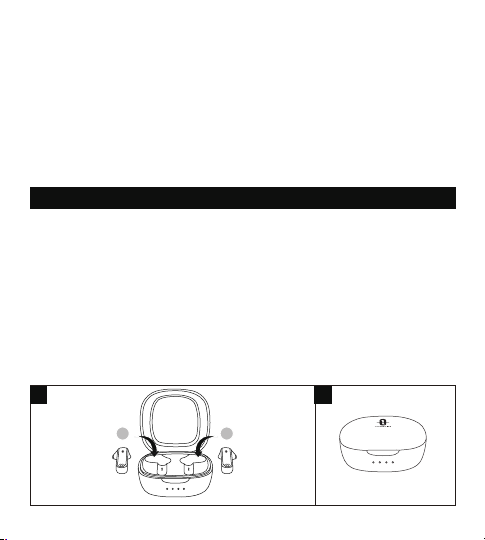
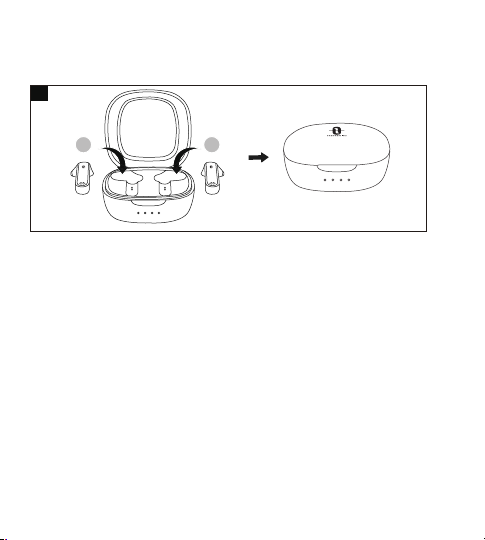
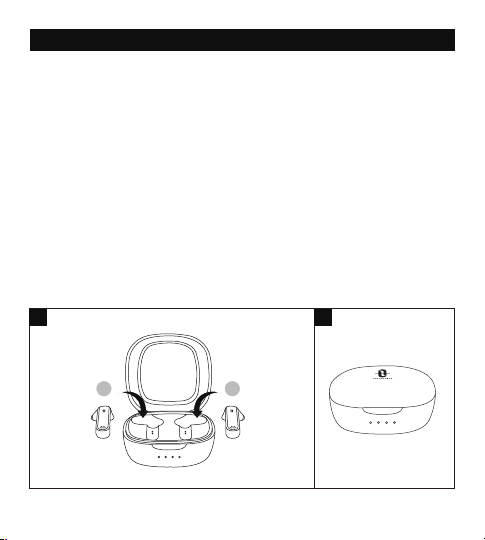
1. Put the earbuds into the charging case as per the L (left) and R (right) marks (Fig. 4).
2. Cover the lid and charging will start automatically (Fig. 5).
Note:
• Please fully charge the earbuds when using them for the first time.
• When battery is low, a “Battery low” voice prompt will be heard (if you are wearing
the earbuds). Please charge it in time or the earbuds will turn off automatically
around 10 minutes later.
• Charge the earbuds at least once every 3 months when not using for a long time.
Charging the Charging Case
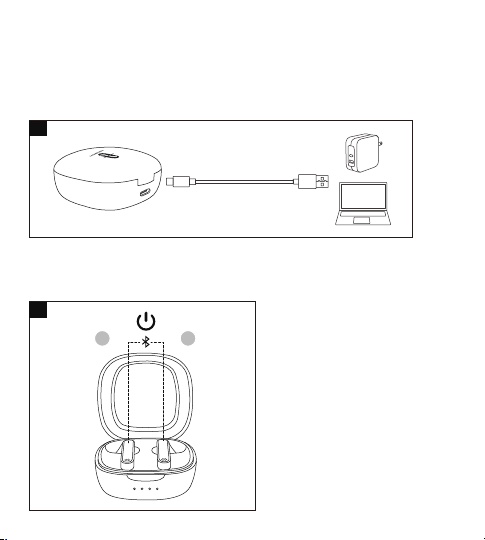
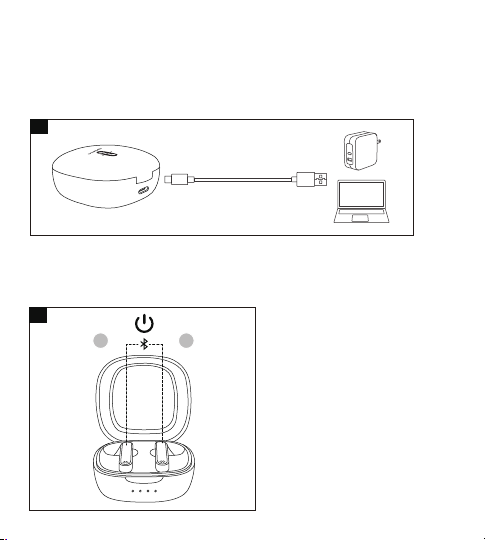
1. Connect the charging port with any USB charging adapter or active
computer USB port (Fig. 6).
2. The four charging indicators will light up progressively.
Note: Unplug the charging cable (timely) when fully charged.
Power On (Fig. 7)
Uncover the lid and they will power on automatically.
4 5
7
6
Bluetooth Caution
• When the device is connected wirelessly to another device, place the two
devices close to each other to achieve their normal functionalities and avoid
possible signal interference.
• The maximum effective Bluetooth range may vary with the environmental
circumstances.
• When using a wireless connection, make sure there are no obstacles
between the two devices. Obstacles including walls and fences may shorten
the effective range.
L R
L R
03 04
USING YOUR EARBUDS
Charging
Charging the Earbuds
1. Put the earbuds into the charging case as per the L (left) and R (right) marks (Fig. 4).
2. Cover the lid and charging will start automatically (Fig. 5).
Note:
• Please fully charge the earbuds when using them for the first time.
• When battery is low, a “Battery low” voice prompt will be heard (if you are wearing
the earbuds). Please charge it in time or the earbuds will turn off automatically
around 10 minutes later.
• Charge the earbuds at least once every 3 months when not using for a long time.
Charging the Charging Case
1. Connect the charging port with any USB charging adapter or active
computer USB port (Fig. 6).
2. The four charging indicators will light up progressively.
Note: Unplug the charging cable (timely) when fully charged.
Power On (Fig. 7)
Uncover the lid and they will power on automatically.
4 5
7
6
Bluetooth Caution
• When the device is connected wirelessly to another device, place the two
devices close to each other to achieve their normal functionalities and avoid
possible signal interference.
• The maximum effective Bluetooth range may vary with the environmental
circumstances.
• When using a wireless connection, make sure there are no obstacles
between the two devices. Obstacles including walls and fences may shorten
the effective range.
L R
L R
05 06
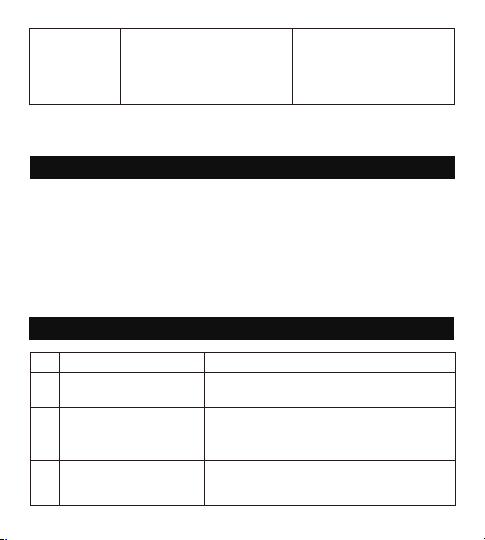
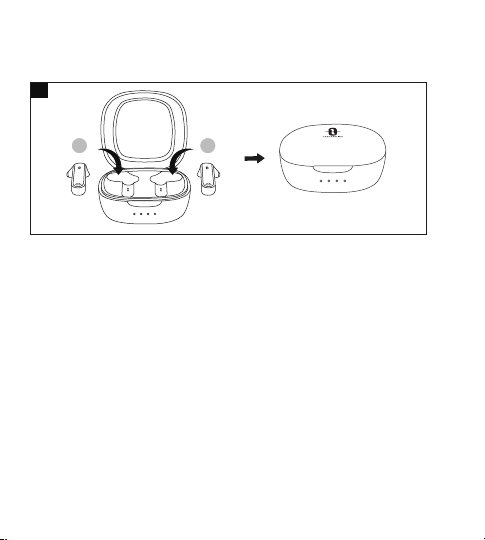
Power Off (Fig. 8)
Put the earbuds into the charging case and close the lid, they will turn off
automatically.
Pairing
• You can use one earbud or both earbuds as per your preference. Please
refer to the corresponding pairing instructions.
• Before pairing, please turn off other Bluetooth devices and place the device
to be connected close to the earbuds.
• When the earbuds are disconnected from your device for more than 10
minutes, they will turn off automatically.
Couple Earbuds Mode
1. Uncover the lid to turn on the earbuds, they will connect with each other
automatically. The LED indicators on both earbuds will flash quickly in
white indicating the earbuds are in pairing mode now.
2. Turn on the Bluetooth function on your device and search for nearby
devices. Find “TAOTRONICS SoundLiberty 88” in the searching results, tap
on the name to connect.
3. Once connected, the LED indicators on both earbuds will turn off.
Note:
• The earbuds can remember the devices paired previously, and will attempt
to pair with the last connected device. If re-pairing failed, the earbuds will
enter pairing mode.
• It is not recommended to wear the two earbuds on different people. If
necessary, please keep the two earbuds close to each other in couple
earbuds mode.
Single Earbud Mode
Single Earbud Mode is available only when the earbuds have been paired
with your device in Couple Earbuds Mode.
1. Take out one earbud from the charging case, and make sure the other one
is placed in the charging case and the lid is covered.
2. It will try to pair with the last paired device in Couple Earbuds Mode. Once
connected, the LED indicator on the earbud will turn off.
3. If pairing failed, re-pair both earbuds with your Bluetooth® device first as
instructed in “Couple Earbuds Mode” section.
Note:
If you want to change to couple mode, simply take out the other earbud
from the charging case, they will pair with each other automatically.
Clear Pairing List
If you failed to pair your device with the earbuds, please clear the pairing
history as instructed below:
1. If you have paired your device with the earbuds before, remove
"TAOTRONICS SoundLiberty 88" from the Bluetooth device list first.
2. Take out one of the earbuds, and make sure the other one is placed in the
charging case and the lid is covered. Wear the earbud, press and hold the
Multifunction Touch Control of the earbud for 10 seconds until a toot sound
8
is heard. The pairing history is then cleared with the earbud off.
3. Uncover the lid, take out the other earbud, press and hold its Multifunction
Touch Control for 10 seconds until a toot sound is heard. The pairing history
is then cleared with the earbud off.
4. Put both earbuds back into the charging case, close the lid, then uncover it
to re-pair with your Bluetooth® device as instructed in “Pairing” section.
Note:
If you want to pair the earbuds with another device when you have already
paired them with a device, deactivate the Bluetooth function on the paired
device or clear “TAOTRONICS SoundLiberty 88” from its Bluetooth list. Restore
the earbuds to factory settings as instructed above if pairing failed.
L R

05 06
Power Off (Fig. 8)
Put the earbuds into the charging case and close the lid, they will turn off
automatically.
Pairing
• You can use one earbud or both earbuds as per your preference. Please
refer to the corresponding pairing instructions.
• Before pairing, please turn off other Bluetooth devices and place the device
to be connected close to the earbuds.
• When the earbuds are disconnected from your device for more than 10
minutes, they will turn off automatically.
Couple Earbuds Mode
1. Uncover the lid to turn on the earbuds, they will connect with each other
automatically. The LED indicators on both earbuds will flash quickly in
white indicating the earbuds are in pairing mode now.
2. Turn on the Bluetooth function on your device and search for nearby
devices. Find “TAOTRONICS SoundLiberty 88” in the searching results, tap
on the name to connect.
3. Once connected, the LED indicators on both earbuds will turn off.
Note:
• The earbuds can remember the devices paired previously, and will attempt
to pair with the last connected device. If re-pairing failed, the earbuds will
enter pairing mode.
• It is not recommended to wear the two earbuds on different people. If
necessary, please keep the two earbuds close to each other in couple
earbuds mode.
Single Earbud Mode
Single Earbud Mode is available only when the earbuds have been paired
with your device in Couple Earbuds Mode.
1. Take out one earbud from the charging case, and make sure the other one
is placed in the charging case and the lid is covered.
2. It will try to pair with the last paired device in Couple Earbuds Mode. Once
connected, the LED indicator on the earbud will turn off.
3. If pairing failed, re-pair both earbuds with your Bluetooth® device first as
instructed in “Couple Earbuds Mode” section.
Note:
If you want to change to couple mode, simply take out the other earbud
from the charging case, they will pair with each other automatically.
Clear Pairing List
If you failed to pair your device with the earbuds, please clear the pairing
history as instructed below:
1. If you have paired your device with the earbuds before, remove
"TAOTRONICS SoundLiberty 88" from the Bluetooth device list first.
2. Take out one of the earbuds, and make sure the other one is placed in the
charging case and the lid is covered. Wear the earbud, press and hold the
Multifunction Touch Control of the earbud for 10 seconds until a toot sound
8
is heard. The pairing history is then cleared with the earbud off.
3. Uncover the lid, take out the other earbud, press and hold its Multifunction
Touch Control for 10 seconds until a toot sound is heard. The pairing history
is then cleared with the earbud off.
4. Put both earbuds back into the charging case, close the lid, then uncover it
to re-pair with your Bluetooth® device as instructed in “Pairing” section.
Note:
If you want to pair the earbuds with another device when you have already
paired them with a device, deactivate the Bluetooth function on the paired
device or clear “TAOTRONICS SoundLiberty 88” from its Bluetooth list. Restore
the earbuds to factory settings as instructed above if pairing failed.
L R

07 08
Pairing
• You can use one earbud or both earbuds as per your preference. Please
refer to the corresponding pairing instructions.
• Before pairing, please turn off other Bluetooth devices and place the device
to be connected close to the earbuds.
• When the earbuds are disconnected from your device for more than 10
minutes, they will turn off automatically.
Couple Earbuds Mode
1. Uncover the lid to turn on the earbuds, they will connect with each other
automatically. The LED indicators on both earbuds will flash quickly in
white indicating the earbuds are in pairing mode now.
2. Turn on the Bluetooth function on your device and search for nearby
devices. Find “TAOTRONICS SoundLiberty 88” in the searching results, tap
on the name to connect.
3. Once connected, the LED indicators on both earbuds will turn off.
Note:
• The earbuds can remember the devices paired previously, and will attempt
to pair with the last connected device. If re-pairing failed, the earbuds will
enter pairing mode.
• It is not recommended to wear the two earbuds on different people. If
necessary, please keep the two earbuds close to each other in couple
earbuds mode.
Single Earbud Mode
Single Earbud Mode is available only when the earbuds have been paired
with your device in Couple Earbuds Mode.
1. Take out one earbud from the charging case, and make sure the other one
is placed in the charging case and the lid is covered.
2. It will try to pair with the last paired device in Couple Earbuds Mode. Once
connected, the LED indicator on the earbud will turn off.
3. If pairing failed, re-pair both earbuds with your Bluetooth® device first as
instructed in “Couple Earbuds Mode” section.
Note:
If you want to change to couple mode, simply take out the other earbud
from the charging case, they will pair with each other automatically.
Clear Pairing List
If you failed to pair your device with the earbuds, please clear the pairing
history as instructed below:
1. If you have paired your device with the earbuds before, remove
"TAOTRONICS SoundLiberty 88" from the Bluetooth device list first.
2. Take out one of the earbuds, and make sure the other one is placed in the
charging case and the lid is covered. Wear the earbud, press and hold the
Multifunction Touch Control of the earbud for 10 seconds until a toot sound
OPERATION AND FUNCTIONS
Tap the Touch Control on the
right earbud three times
• Tap the Touch Control on
either of the earbuds once
• Put on both earbuds
Tap the Touch Control on the
left earbud three times
Tap and hold the Touch
Control on either of the
earbuds for 2 seconds
Tap the Touch Control on
either of the earbuds twice
Next Track
Previous Track
Answer Phone
Call
Decline an
Incoming Call
Hang up
Phone Call
/
/
/
/
Call rejected
is heard. The pairing history is then cleared with the earbud off.
3. Uncover the lid, take out the other earbud, press and hold its Multifunction
Touch Control for 10 seconds until a toot sound is heard. The pairing history
is then cleared with the earbud off.
4. Put both earbuds back into the charging case, close the lid, then uncover it
to re-pair with your Bluetooth® device as instructed in “Pairing” section.
Note:
If you want to pair the earbuds with another device when you have already
paired them with a device, deactivate the Bluetooth function on the paired
device or clear “TAOTRONICS SoundLiberty 88” from its Bluetooth list. Restore
the earbuds to factory settings as instructed above if pairing failed.
Function
Play / Pause
Operation
• Tap the Touch Control on either
of the earbuds twice under music
• Put on / take off the earbuds
Tap and hold the Touch Control
on the right earbud for more
than 3 seconds
Tap and hold the Touch Control
on the left earbud for more
than 3 seconds
Volume +
Volume -
Voice Prompt
/
/
Toots when highest setting
is reached
Clear Pairing
List
Refer to the “Clear Pairing
List” section
/
Go into Pairing
Mode
Successfully
paired with
your device
Refer to the “Pairing” section
/
Pairing
Connected
Turn On / Off
Voice Control
When paired successfully,
tap and hold the Touch
Control on either of the
earbuds for 2 seconds until a
beep is heard
Toot

07 08
Pairing
• You can use one earbud or both earbuds as per your preference. Please
refer to the corresponding pairing instructions.
• Before pairing, please turn off other Bluetooth devices and place the device
to be connected close to the earbuds.
• When the earbuds are disconnected from your device for more than 10
minutes, they will turn off automatically.
Couple Earbuds Mode
1. Uncover the lid to turn on the earbuds, they will connect with each other
automatically. The LED indicators on both earbuds will flash quickly in
white indicating the earbuds are in pairing mode now.
2. Turn on the Bluetooth function on your device and search for nearby
devices. Find “TAOTRONICS SoundLiberty 88” in the searching results, tap
on the name to connect.
3. Once connected, the LED indicators on both earbuds will turn off.
Note:
• The earbuds can remember the devices paired previously, and will attempt
to pair with the last connected device. If re-pairing failed, the earbuds will
enter pairing mode.
• It is not recommended to wear the two earbuds on different people. If
necessary, please keep the two earbuds close to each other in couple
earbuds mode.
Single Earbud Mode
Single Earbud Mode is available only when the earbuds have been paired
with your device in Couple Earbuds Mode.
1. Take out one earbud from the charging case, and make sure the other one
is placed in the charging case and the lid is covered.
2. It will try to pair with the last paired device in Couple Earbuds Mode. Once
connected, the LED indicator on the earbud will turn off.
3. If pairing failed, re-pair both earbuds with your Bluetooth® device first as
instructed in “Couple Earbuds Mode” section.
Note:
If you want to change to couple mode, simply take out the other earbud
from the charging case, they will pair with each other automatically.
Clear Pairing List
If you failed to pair your device with the earbuds, please clear the pairing
history as instructed below:
1. If you have paired your device with the earbuds before, remove
"TAOTRONICS SoundLiberty 88" from the Bluetooth device list first.
2. Take out one of the earbuds, and make sure the other one is placed in the
charging case and the lid is covered. Wear the earbud, press and hold the
Multifunction Touch Control of the earbud for 10 seconds until a toot sound
OPERATION AND FUNCTIONS
Tap the Touch Control on the
right earbud three times
• Tap the Touch Control on
either of the earbuds once
• Put on both earbuds
Tap the Touch Control on the
left earbud three times
Tap and hold the Touch
Control on either of the
earbuds for 2 seconds
Tap the Touch Control on
either of the earbuds twice
Next Track
Previous Track
Answer Phone
Call
Decline an
Incoming Call
Hang up
Phone Call
/
/
/
/
Call rejected
is heard. The pairing history is then cleared with the earbud off.
3. Uncover the lid, take out the other earbud, press and hold its Multifunction
Touch Control for 10 seconds until a toot sound is heard. The pairing history
is then cleared with the earbud off.
4. Put both earbuds back into the charging case, close the lid, then uncover it
to re-pair with your Bluetooth® device as instructed in “Pairing” section.
Note:
If you want to pair the earbuds with another device when you have already
paired them with a device, deactivate the Bluetooth function on the paired
device or clear “TAOTRONICS SoundLiberty 88” from its Bluetooth list. Restore
the earbuds to factory settings as instructed above if pairing failed.
Function
Play / Pause
Operation
• Tap the Touch Control on either
of the earbuds twice under music
• Put on / take off the earbuds
Tap and hold the Touch Control
on the right earbud for more
than 3 seconds
Tap and hold the Touch Control
on the left earbud for more
than 3 seconds
Volume +
Volume -
Voice Prompt
/
/
Toots when highest setting
is reached
Clear Pairing
List
Refer to the “Clear Pairing
List” section
/
Go into Pairing
Mode
Successfully
paired with
your device
Refer to the “Pairing” section
/
Pairing
Connected
Turn On / Off
Voice Control
When paired successfully,
tap and hold the Touch
Control on either of the
earbuds for 2 seconds until a
beep is heard
Toot
09 10
CLEANING AND MAINTENANCE
1. Clean the earbuds and the charging case on a regular basis.
2. Use dry and soft cotton cloth to wipe the unit.
Note: Do not insert anything into the product.
3. Keep away from sharp objects to avoid scratches.
4. Put the unit in a dry and shady place if it is to be idle for a long time.
5. Do not clean the product with detergent or chemicals.
Bluetooth out
of Range /
Failed to pair
with your device
/ Disconnected
Note: The Multifunction Touch Control is available only when you are wearing
the earbuds.
Can’t find
“TAOTRONICS
SoundLiberty 88” in the
Bluetooth device list
The earbuds reconnected with previously
paired device automatically:
• Deactivate the Bluetooth function of
previously paired device or clear
“TAOTRONICS SoundLiberty 88” from
its Bluetooth device list, and then
search again
• Put the device to be connected close to
the earbuds
4
Failed to pair the
earbuds with your
device
• Turn on the device and activate its
Bluetooth function before pairing
• Bring the earbuds into pairing mode
as instructed in the “Pairing” section
5
7
6
No sound in one of the
earbuds in couple
earbuds mode
Place both earbuds back to the charging
case then take them out, they will pair
with each other automatically. If pairing
failed, restore them back to the factory
settings as instructed in the “Clear Pairing
List” section
TROUBLESHOOTING
No. Problem Solution
Failed to turn on the
earbuds
Earbuds low battery, please charge them
1
Failed to charge the
earbuds
• Place the earbuds into the charging
case properly
• Make sure the charging case is charged fully
2
Can’t charge the
charging case
Make sure the charging cable is intact
and plugged in properly
3
Failed to use a
single earbud
• As instructed in Single Earbud Mode,
make sure both earbuds are paired with
your device first.
• Then follow the steps to pair the single
(left or right) earbud with your device.
• Once paired, you can freely use the
single (left or right) earbud.

09 10
CLEANING AND MAINTENANCE
1. Clean the earbuds and the charging case on a regular basis.
2. Use dry and soft cotton cloth to wipe the unit.
Note: Do not insert anything into the product.
3. Keep away from sharp objects to avoid scratches.
4. Put the unit in a dry and shady place if it is to be idle for a long time.
5. Do not clean the product with detergent or chemicals.
Bluetooth out
of Range /
Failed to pair
with your device
/ Disconnected
Note: The Multifunction Touch Control is available only when you are wearing
the earbuds.
Can’t find
“TAOTRONICS
SoundLiberty 88” in the
Bluetooth device list
The earbuds reconnected with previously
paired device automatically:
• Deactivate the Bluetooth function of
previously paired device or clear
“TAOTRONICS SoundLiberty 88” from
its Bluetooth device list, and then
search again
• Put the device to be connected close to
the earbuds
4
Failed to pair the
earbuds with your
device
• Turn on the device and activate its
Bluetooth function before pairing
• Bring the earbuds into pairing mode
as instructed in the “Pairing” section
5
7
6
No sound in one of the
earbuds in couple
earbuds mode
Place both earbuds back to the charging
case then take them out, they will pair
with each other automatically. If pairing
failed, restore them back to the factory
settings as instructed in the “Clear Pairing
List” section
TROUBLESHOOTING
No. Problem Solution
Failed to turn on the
earbuds
Earbuds low battery, please charge them
1
Failed to charge the
earbuds
• Place the earbuds into the charging
case properly
• Make sure the charging case is charged fully
2
Can’t charge the
charging case
Make sure the charging cable is intact
and plugged in properly
3
Failed to use a
single earbud
• As instructed in Single Earbud Mode,
make sure both earbuds are paired with
your device first.
• Then follow the steps to pair the single
(left or right) earbud with your device.
• Once paired, you can freely use the
single (left or right) earbud.

11 12
8 Poor sound quality
• Wear the earbuds properly and keep
them close to each other.
• Place the connected device close to the
earbuds or remove the obstacles
between them
• Clear the debris on the earbuds
9 Unstable connection
• Keep the earbuds close to your
Bluetooth device
• The effective distance may shorten with
obstacles in the way
• Turn off other Bluetooth devices to
decrease the interference
10
Can’t hear the other party
during a phone call
Set the volume to higher level
11
The other party can’t hear your
voice during a phone call
Free the built-in microphone of any
covers
12
Multifunction Touch
control of the
earbuds is unresponsive
Place the two earbuds into the charging
case and cover the lid, disconnect the
Bluetooth connection. Uncover the lid to
turn on the earbuds and pair again.
WARRANTY AND SERVICE
If any problems occur, please contact the TaoTronics Customer Care Centre
via the contact information listed in this User Guide.
DE
WICHTIGE SICHERHEITSHINWEISE
Bitte lesen Sie sich die Anleitung sorgfältig durch, bevor Sie das Produkt
benutzen, und bewahren Sie sie zur künftigen Bezugnahme gut auf.
Gehörschutz
• Um Gehörschäden zu vermeiden, sollte man Kopfhörer nicht über längere
Zeit bei hoher Lautstärke tragen.
• Regeln Sie die Kopfhörer-Lautstärke herunter, bevor Sie sie aufsetzen, und
erhöhen Sie die Lautstärke dann schrittweise nach Bedarf.
• Sie sollten die Lautstärke nicht zu stark erhöhen, damit Sie Ihre Umgebung
weiterhin wahrnehmen.
• Bitte achten Sie auf lokale Gesetze und Richtlinien, wenn Sie während des
Autofahrens Telefonate über dieses Gerät führen wollen.
• Zu Ihrer eigenen Sicherheit sollten Sie Ablenkungen durch Musik oder
Telefonate beim Fahren oder anderen Aktivitäten, die mögliche Gefahren
bergen, meiden.
Warnung: Bitte stellen Sie die Lautstärke richtig ein, um Gehörschäden zu
vermeiden.
Achtung
• Setzen Sie dieses Produkt keinen hohen Temperaturen aus.
• Tauchen Sie die Kopfhörer nicht unter Wasser und setzen Sie sie nicht über
längere Zeit Feuchtigkeit aus.
• Reinigen Sie das Produkt nicht mit Reinigungsmitteln, die Alkohol,
Ammoniak, Benzol oder Schleifkörper enthalten.
• Lassen Sie das Produkt nicht herunterfallen.
• Legen Sie die Kopfhörer wieder in die Ladehülle, wenn Sie sie nicht
benutzen, und halten Sie sie von Kindern und Haustieren fern, damit sie
nicht verschluckt werden.
• Um Brandgefahr, Garantieausfall und/oder Vermögensschaden zu
vermeiden, sollten Sie dieses Produkt weder auseinanderbauen noch selbst
reparieren.
• Bei Verwendung in der Nähe von Kindern ist Vorsicht geboten.
• Schützen Sie die Ladehülle vor Regen, Wasser und anderen Flüssigkeiten.
• Verwenden Sie dieses Produkt nicht bei Gewitter, damit es nicht zu
Fehlfunktion oder Stromschlägen kommt.
• Suchen Sie bezüglich Reparaturen stets professionelle Techniker oder
autorisiertes Personal auf.

11 12
8 Poor sound quality
• Wear the earbuds properly and keep
them close to each other.
• Place the connected device close to the
earbuds or remove the obstacles
between them
• Clear the debris on the earbuds
9 Unstable connection
• Keep the earbuds close to your
Bluetooth device
• The effective distance may shorten with
obstacles in the way
• Turn off other Bluetooth devices to
decrease the interference
10
Can’t hear the other party
during a phone call
Set the volume to higher level
11
The other party can’t hear your
voice during a phone call
Free the built-in microphone of any
covers
12
Multifunction Touch
control of the
earbuds is unresponsive
Place the two earbuds into the charging
case and cover the lid, disconnect the
Bluetooth connection. Uncover the lid to
turn on the earbuds and pair again.
WARRANTY AND SERVICE
If any problems occur, please contact the TaoTronics Customer Care Centre
via the contact information listed in this User Guide.
DE
WICHTIGE SICHERHEITSHINWEISE
Bitte lesen Sie sich die Anleitung sorgfältig durch, bevor Sie das Produkt
benutzen, und bewahren Sie sie zur künftigen Bezugnahme gut auf.
Gehörschutz
• Um Gehörschäden zu vermeiden, sollte man Kopfhörer nicht über längere
Zeit bei hoher Lautstärke tragen.
• Regeln Sie die Kopfhörer-Lautstärke herunter, bevor Sie sie aufsetzen, und
erhöhen Sie die Lautstärke dann schrittweise nach Bedarf.
• Sie sollten die Lautstärke nicht zu stark erhöhen, damit Sie Ihre Umgebung
weiterhin wahrnehmen.
• Bitte achten Sie auf lokale Gesetze und Richtlinien, wenn Sie während des
Autofahrens Telefonate über dieses Gerät führen wollen.
• Zu Ihrer eigenen Sicherheit sollten Sie Ablenkungen durch Musik oder
Telefonate beim Fahren oder anderen Aktivitäten, die mögliche Gefahren
bergen, meiden.
Warnung: Bitte stellen Sie die Lautstärke richtig ein, um Gehörschäden zu
vermeiden.
Achtung
• Setzen Sie dieses Produkt keinen hohen Temperaturen aus.
• Tauchen Sie die Kopfhörer nicht unter Wasser und setzen Sie sie nicht über
längere Zeit Feuchtigkeit aus.
• Reinigen Sie das Produkt nicht mit Reinigungsmitteln, die Alkohol,
Ammoniak, Benzol oder Schleifkörper enthalten.
• Lassen Sie das Produkt nicht herunterfallen.
• Legen Sie die Kopfhörer wieder in die Ladehülle, wenn Sie sie nicht
benutzen, und halten Sie sie von Kindern und Haustieren fern, damit sie
nicht verschluckt werden.
• Um Brandgefahr, Garantieausfall und/oder Vermögensschaden zu
vermeiden, sollten Sie dieses Produkt weder auseinanderbauen noch selbst
reparieren.
• Bei Verwendung in der Nähe von Kindern ist Vorsicht geboten.
• Schützen Sie die Ladehülle vor Regen, Wasser und anderen Flüssigkeiten.
• Verwenden Sie dieses Produkt nicht bei Gewitter, damit es nicht zu
Fehlfunktion oder Stromschlägen kommt.
• Suchen Sie bezüglich Reparaturen stets professionelle Techniker oder
autorisiertes Personal auf.
13 14
Bitte lesen Sie sich die Anleitung sorgfältig durch, bevor Sie das Produkt
benutzen, und bewahren Sie sie zur künftigen Bezugnahme gut auf.
Gehörschutz
• Um Gehörschäden zu vermeiden, sollte man Kopfhörer nicht über längere
Zeit bei hoher Lautstärke tragen.
• Regeln Sie die Kopfhörer-Lautstärke herunter, bevor Sie sie aufsetzen, und
erhöhen Sie die Lautstärke dann schrittweise nach Bedarf.
• Sie sollten die Lautstärke nicht zu stark erhöhen, damit Sie Ihre Umgebung
weiterhin wahrnehmen.
• Bitte achten Sie auf lokale Gesetze und Richtlinien, wenn Sie während des
Autofahrens Telefonate über dieses Gerät führen wollen.
• Zu Ihrer eigenen Sicherheit sollten Sie Ablenkungen durch Musik oder
Telefonate beim Fahren oder anderen Aktivitäten, die mögliche Gefahren
bergen, meiden.
Warnung: Bitte stellen Sie die Lautstärke richtig ein, um Gehörschäden zu
vermeiden.
Achtung
• Setzen Sie dieses Produkt keinen hohen Temperaturen aus.
• Tauchen Sie die Kopfhörer nicht unter Wasser und setzen Sie sie nicht über
längere Zeit Feuchtigkeit aus.
• Reinigen Sie das Produkt nicht mit Reinigungsmitteln, die Alkohol,
Ammoniak, Benzol oder Schleifkörper enthalten.
• Lassen Sie das Produkt nicht herunterfallen.
• Legen Sie die Kopfhörer wieder in die Ladehülle, wenn Sie sie nicht
benutzen, und halten Sie sie von Kindern und Haustieren fern, damit sie
nicht verschluckt werden.
• Um Brandgefahr, Garantieausfall und/oder Vermögensschaden zu
vermeiden, sollten Sie dieses Produkt weder auseinanderbauen noch selbst
reparieren.
• Bei Verwendung in der Nähe von Kindern ist Vorsicht geboten.
• Schützen Sie die Ladehülle vor Regen, Wasser und anderen Flüssigkeiten.
• Verwenden Sie dieses Produkt nicht bei Gewitter, damit es nicht zu
Fehlfunktion oder Stromschlägen kommt.
• Suchen Sie bezüglich Reparaturen stets professionelle Techniker oder
autorisiertes Personal auf.
Dieses Produkt enthält Lithium-Akkus. Setzen Sie das Produkt keiner
übermäßigen Hitze wie langfristiger direkter Sonneneinstrahlung oder
Feuer aus, da dies Explosionsgefahr birgt.
TRAGEN IHRER OHRHÖRER
Tragen Sie die Ohrhörer bitte wie unten gezeigt (Bild 3).
Die Bilder dienen nur als Referenz.
Achtung Bluetooth
• Wenn das Gerät kabellos mit einem anderen Gerät verbunden ist, sollten
sich beide Geräte nah beieinander befinden, um ihre normale Funktional-
ität zu gewährleisten und mögliche Signalstörungen zu vermeiden.
• Die maximale Bluetooth-Funktionsreichweite sich je nach Umgebung
ändern kann.
• Wenn Sie eine kabellose Verbindung nutzen, sollten sich zwischen den
beiden Geräten keine Hindernisse befinden. Hindernisse, einschließlich
Wände und Zäune,können die Funktionsreichweite mindern.
3
① ②
SMART AI NOISE REDUCTION TECHNOLOGY FÜR KLARE ANRUFE
Elevoc Vocplus ist eine DNN-basierte Rauschunterdrückungs-
technologie, mit der Sie Ihre Sprache intelligent extrahieren
und Ihren Anrufer Ihre klare Stimme hören lassen können,
indem Sie Hintergrundgeräusche entfernen.
13 14
Bitte lesen Sie sich die Anleitung sorgfältig durch, bevor Sie das Produkt
benutzen, und bewahren Sie sie zur künftigen Bezugnahme gut auf.
Gehörschutz
• Um Gehörschäden zu vermeiden, sollte man Kopfhörer nicht über längere
Zeit bei hoher Lautstärke tragen.
• Regeln Sie die Kopfhörer-Lautstärke herunter, bevor Sie sie aufsetzen, und
erhöhen Sie die Lautstärke dann schrittweise nach Bedarf.
• Sie sollten die Lautstärke nicht zu stark erhöhen, damit Sie Ihre Umgebung
weiterhin wahrnehmen.
• Bitte achten Sie auf lokale Gesetze und Richtlinien, wenn Sie während des
Autofahrens Telefonate über dieses Gerät führen wollen.
• Zu Ihrer eigenen Sicherheit sollten Sie Ablenkungen durch Musik oder
Telefonate beim Fahren oder anderen Aktivitäten, die mögliche Gefahren
bergen, meiden.
Warnung: Bitte stellen Sie die Lautstärke richtig ein, um Gehörschäden zu
vermeiden.
Achtung
• Setzen Sie dieses Produkt keinen hohen Temperaturen aus.
• Tauchen Sie die Kopfhörer nicht unter Wasser und setzen Sie sie nicht über
längere Zeit Feuchtigkeit aus.
• Reinigen Sie das Produkt nicht mit Reinigungsmitteln, die Alkohol,
Ammoniak, Benzol oder Schleifkörper enthalten.
• Lassen Sie das Produkt nicht herunterfallen.
• Legen Sie die Kopfhörer wieder in die Ladehülle, wenn Sie sie nicht
benutzen, und halten Sie sie von Kindern und Haustieren fern, damit sie
nicht verschluckt werden.
• Um Brandgefahr, Garantieausfall und/oder Vermögensschaden zu
vermeiden, sollten Sie dieses Produkt weder auseinanderbauen noch selbst
reparieren.
• Bei Verwendung in der Nähe von Kindern ist Vorsicht geboten.
• Schützen Sie die Ladehülle vor Regen, Wasser und anderen Flüssigkeiten.
• Verwenden Sie dieses Produkt nicht bei Gewitter, damit es nicht zu
Fehlfunktion oder Stromschlägen kommt.
• Suchen Sie bezüglich Reparaturen stets professionelle Techniker oder
autorisiertes Personal auf.
Dieses Produkt enthält Lithium-Akkus. Setzen Sie das Produkt keiner
übermäßigen Hitze wie langfristiger direkter Sonneneinstrahlung oder
Feuer aus, da dies Explosionsgefahr birgt.
TRAGEN IHRER OHRHÖRER
Tragen Sie die Ohrhörer bitte wie unten gezeigt (Bild 3).
Die Bilder dienen nur als Referenz.
Achtung Bluetooth
• Wenn das Gerät kabellos mit einem anderen Gerät verbunden ist, sollten
sich beide Geräte nah beieinander befinden, um ihre normale Funktional-
ität zu gewährleisten und mögliche Signalstörungen zu vermeiden.
• Die maximale Bluetooth-Funktionsreichweite sich je nach Umgebung
ändern kann.
• Wenn Sie eine kabellose Verbindung nutzen, sollten sich zwischen den
beiden Geräten keine Hindernisse befinden. Hindernisse, einschließlich
Wände und Zäune,können die Funktionsreichweite mindern.
3
① ②
SMART AI NOISE REDUCTION TECHNOLOGY FÜR KLARE ANRUFE
Elevoc Vocplus ist eine DNN-basierte Rauschunterdrückungs-
technologie, mit der Sie Ihre Sprache intelligent extrahieren
und Ihren Anrufer Ihre klare Stimme hören lassen können,
indem Sie Hintergrundgeräusche entfernen.
15 16
VERWENDUNG IHRER OHRHÖRER
Ladevorgang
Laden der Ohrhörer
1. Legen Sie die Ohrhörer entsprechend der Markierungen L (links) und R
(rechts) in die Ladehülle (Bild 4).
2. Sobald Sie den Deckel schließen, beginnt der Ladevorgang automatisch
(Bild 5).
Anmerkung:
• Bitte laden Sie die Ohrhörer vollständig auf, wenn Sie sie zum ersten Mal
benutzen.
• Wenn der Akkustand niedrig ist, ertönt die Ansage "Battery low" (wenn Sie die
Ohrhörer tragen). Wenn Sie die Ohrhörer nicht rechtzeitig aufladen, schalten
Sie sich etwa 10 Minuten später automatisch ab.
• Laden Sie die Ohrhörer mindestens alle 3 Monate auf, wenn Sie sie längere
Zeit nicht benutzen.
Laden der Ladehülle
1. Schließen Sie den Ladeanschluss an einem beliebigen USB-Ladeadapter
oder einem aktiven Computer-USB-Anschluss an (Bild 6).
2. Die vier Ladelämpchen leuchten dann schrittweise auf.
Anmerkung: Ziehen Sie das Ladekabel nach vollständigem Laden ab.
Einschalten (Bild 7)
Öffnen Sie den Deckel und sie schalten sich automatisch ein.
4 5
L R
6
7
L R
15 16
VERWENDUNG IHRER OHRHÖRER
Ladevorgang
Laden der Ohrhörer
1. Legen Sie die Ohrhörer entsprechend der Markierungen L (links) und R
(rechts) in die Ladehülle (Bild 4).
2. Sobald Sie den Deckel schließen, beginnt der Ladevorgang automatisch
(Bild 5).
Anmerkung:
• Bitte laden Sie die Ohrhörer vollständig auf, wenn Sie sie zum ersten Mal
benutzen.
• Wenn der Akkustand niedrig ist, ertönt die Ansage "Battery low" (wenn Sie die
Ohrhörer tragen). Wenn Sie die Ohrhörer nicht rechtzeitig aufladen, schalten
Sie sich etwa 10 Minuten später automatisch ab.
• Laden Sie die Ohrhörer mindestens alle 3 Monate auf, wenn Sie sie längere
Zeit nicht benutzen.
Laden der Ladehülle
1. Schließen Sie den Ladeanschluss an einem beliebigen USB-Ladeadapter
oder einem aktiven Computer-USB-Anschluss an (Bild 6).
2. Die vier Ladelämpchen leuchten dann schrittweise auf.
Anmerkung: Ziehen Sie das Ladekabel nach vollständigem Laden ab.
Einschalten (Bild 7)
Öffnen Sie den Deckel und sie schalten sich automatisch ein.
4 5
L R
6
7
L R
17 18
Ausschalten (Bild 8)
Legen Sie die Ohrhörer in die Ladehülle und schließen Sie den Deckel, ,
schalten sie sich automatisch aus.
Koppeln
• Sie können einen oder beide Ohrhörer verwenden, ganz wie Sie wollen.
Bitte beachten Sie die jeweiligen Kopplungshinweise.
• Schalten Sie andere Bluetooth-Geräte vor dem Koppeln aus und legen Sie
das zu verbindende Gerät nah an die Ohrhörer.
• Wenn die Ohrhörer über 10 Minuten von Ihrem Gerät getrennt sind,
schalten Sie sich automatisch ab.
Paarmodus der Ohrhörer
1. Wenn Sie den Deckel öffnen, um die Ohrhörer einzuschalten, verbinden
sich die beiden automatisch miteinander.
2. Die LED-Anzeigen beider Ohrhörer blinken schnell weiß, um anzuzeigen,
dass sich die Ohrhörer jetzt im Kopplungsmodus befinden.
3. Schalten Sie die Bluetooth-Funktion Ihres Geräts ein und suchen Sie nach
Geräten in der Nähe. Suchen Sie in den Suchergebnissen nach “
TAOTRONICS SoundLiberty 88” und tippen Sie zum Verbinden auf den
Namen.
4. Sobald verbunden, die LED-Anzeigen auf beiden Ohrhörern erlöschen.
Anmerkung:
• Die Ohrhörer können sich zuvor gekoppelte Geräte merken und versuchen,
sich mit dem zuletzt verbundenen Gerät zu verbinden. Sollte diese
Verbindung fehlschlagen, wechseln die Ohrhörer in den Kopplungsmodus.
• Es wird nicht empfohlen, die zwei Ohrhörer auf zwei verschiedene Personen
aufzuteilen. Falls doch nötig, halten Sie die beiden Ohrhörer im Paarmodus
der Ohrhörer nahe beieinander.
Einzel-Ohrhörer-Modus
Der Einzel-Ohrhörer-Modus ist nur verfügbar, wenn die Ohrhörer im Paar-
Ohrhörer-Modus mit Ihrem Gerät gekoppelt wurden.
1. Nehmen Sie einen Ohrhörer aus der Ladehülle und achten Sie darauf, dass
der andere in der Ladehülle liegt und dass der Deckel geschlossen ist.
2. Es wird versucht, das zuletzt gekoppelte Gerät im Pair Earbuds-Modus zu
koppeln. Sobald die Verbindung hergestellt ist, die LED-Anzeigen auf
beiden Ohrhörern erlöschen.
3. Wenn das Pairing fehlgeschlagen ist, koppeln Sie zunächst beide Ohrhörer
erneut mit Ihrem Bluetooth®-Gerät, wie im Abschnitt “ Paarmodus der
Ohrhörer” beschrieben.
Anmerkung:
Wenn Sie in den Paarmodus wechseln möchten, nehmen Sie einfach den
anderen Ohrhörer aus der Ladehülle. Die beiden koppeln sich dann
automatisch.
Bereinigen der Kopplungsliste
Sollte das Koppeln Ihres Geräts mit den Ohrhörern fehlgeschlagen sein,
bereinigen Sie den Kopplungsverlauf bitte wie unten beschrieben:
1. Wenn Sie Ihr Gerät bereits vorher einmal mit den Ohrhörern gekoppelt haben,
entfernen Sie "TAOTRONICS SoundLiberty 88" zuerst aus der Bluetooth-Geräteliste.
2. Nehmen Sie einen der Ohrhörer heraus. Der andere Ohrhörer sollte sich dabei
bei geschlossenem Deckel im Ladegehäuse befinden. Tragen Sie den
Ohrhörer und halten Sie die Multifunktions-Touchsteuerung des Ohrhörers 10
Sekunden lang gedrückt, bis ein "Tut"-Signal ertönt. Der Kopplungsverlauf wird
dann bei ausgeschaltetem Ohrhörer gelöscht.
3. Öffnen Sie den Deckel, nehmen Sie den anderen Ohrhörer heraus und halten
Sie die Multifutnkions-Touchsteuerung 10 Sekunden lang gedrückt, bis ein
"Tut"-Signal ertönt. Der Kopplungsverlauf wird dann bei ausgeschaltetem
Ohrhörer gelöscht.
4. Legen Sie beide Ohrhörer zurück ins Ladegehäuse, schließen Sie den Deckel
und öffnen Sie ihn dann wieder, um die Ohrhörer wie im Kapitel "Koppeln"
beschrieben erneut mit Ihrem Bluetooth®-Gerät zu koppeln.
Anmerkung:
Falls Sie die Ohrhörer mit einem anderen Gerät koppeln wollen, wenn diese
bereits mit einem Gerät gekoppelt sind, deaktivieren Sie die Bluetooth-
Funktion auf dem gekoppelten Gerät oder löschen Sie "TAOTRONICS
SoundLiberty 88" aus dessen Bluetooth-Liste. Setzen Sie die Ohrhörer wie
oben beschrieben auf Werkseinstellungen zurück, wenn das
Koppeln fehlschlägt.
8
L R

17 18
Ausschalten (Bild 8)
Legen Sie die Ohrhörer in die Ladehülle und schließen Sie den Deckel, ,
schalten sie sich automatisch aus.
Koppeln
• Sie können einen oder beide Ohrhörer verwenden, ganz wie Sie wollen.
Bitte beachten Sie die jeweiligen Kopplungshinweise.
• Schalten Sie andere Bluetooth-Geräte vor dem Koppeln aus und legen Sie
das zu verbindende Gerät nah an die Ohrhörer.
• Wenn die Ohrhörer über 10 Minuten von Ihrem Gerät getrennt sind,
schalten Sie sich automatisch ab.
Paarmodus der Ohrhörer
1. Wenn Sie den Deckel öffnen, um die Ohrhörer einzuschalten, verbinden
sich die beiden automatisch miteinander.
2. Die LED-Anzeigen beider Ohrhörer blinken schnell weiß, um anzuzeigen,
dass sich die Ohrhörer jetzt im Kopplungsmodus befinden.
3. Schalten Sie die Bluetooth-Funktion Ihres Geräts ein und suchen Sie nach
Geräten in der Nähe. Suchen Sie in den Suchergebnissen nach “
TAOTRONICS SoundLiberty 88” und tippen Sie zum Verbinden auf den
Namen.
4. Sobald verbunden, die LED-Anzeigen auf beiden Ohrhörern erlöschen.
Anmerkung:
• Die Ohrhörer können sich zuvor gekoppelte Geräte merken und versuchen,
sich mit dem zuletzt verbundenen Gerät zu verbinden. Sollte diese
Verbindung fehlschlagen, wechseln die Ohrhörer in den Kopplungsmodus.
• Es wird nicht empfohlen, die zwei Ohrhörer auf zwei verschiedene Personen
aufzuteilen. Falls doch nötig, halten Sie die beiden Ohrhörer im Paarmodus
der Ohrhörer nahe beieinander.
Einzel-Ohrhörer-Modus
Der Einzel-Ohrhörer-Modus ist nur verfügbar, wenn die Ohrhörer im Paar-
Ohrhörer-Modus mit Ihrem Gerät gekoppelt wurden.
1. Nehmen Sie einen Ohrhörer aus der Ladehülle und achten Sie darauf, dass
der andere in der Ladehülle liegt und dass der Deckel geschlossen ist.
2. Es wird versucht, das zuletzt gekoppelte Gerät im Pair Earbuds-Modus zu
koppeln. Sobald die Verbindung hergestellt ist, die LED-Anzeigen auf
beiden Ohrhörern erlöschen.
3. Wenn das Pairing fehlgeschlagen ist, koppeln Sie zunächst beide Ohrhörer
erneut mit Ihrem Bluetooth®-Gerät, wie im Abschnitt “ Paarmodus der
Ohrhörer” beschrieben.
Anmerkung:
Wenn Sie in den Paarmodus wechseln möchten, nehmen Sie einfach den
anderen Ohrhörer aus der Ladehülle. Die beiden koppeln sich dann
automatisch.
Bereinigen der Kopplungsliste
Sollte das Koppeln Ihres Geräts mit den Ohrhörern fehlgeschlagen sein,
bereinigen Sie den Kopplungsverlauf bitte wie unten beschrieben:
1. Wenn Sie Ihr Gerät bereits vorher einmal mit den Ohrhörern gekoppelt haben,
entfernen Sie "TAOTRONICS SoundLiberty 88" zuerst aus der Bluetooth-Geräteliste.
2. Nehmen Sie einen der Ohrhörer heraus. Der andere Ohrhörer sollte sich dabei
bei geschlossenem Deckel im Ladegehäuse befinden. Tragen Sie den
Ohrhörer und halten Sie die Multifunktions-Touchsteuerung des Ohrhörers 10
Sekunden lang gedrückt, bis ein "Tut"-Signal ertönt. Der Kopplungsverlauf wird
dann bei ausgeschaltetem Ohrhörer gelöscht.
3. Öffnen Sie den Deckel, nehmen Sie den anderen Ohrhörer heraus und halten
Sie die Multifutnkions-Touchsteuerung 10 Sekunden lang gedrückt, bis ein
"Tut"-Signal ertönt. Der Kopplungsverlauf wird dann bei ausgeschaltetem
Ohrhörer gelöscht.
4. Legen Sie beide Ohrhörer zurück ins Ladegehäuse, schließen Sie den Deckel
und öffnen Sie ihn dann wieder, um die Ohrhörer wie im Kapitel "Koppeln"
beschrieben erneut mit Ihrem Bluetooth®-Gerät zu koppeln.
Anmerkung:
Falls Sie die Ohrhörer mit einem anderen Gerät koppeln wollen, wenn diese
bereits mit einem Gerät gekoppelt sind, deaktivieren Sie die Bluetooth-
Funktion auf dem gekoppelten Gerät oder löschen Sie "TAOTRONICS
SoundLiberty 88" aus dessen Bluetooth-Liste. Setzen Sie die Ohrhörer wie
oben beschrieben auf Werkseinstellungen zurück, wenn das
Koppeln fehlschlägt.
8
L R

19 20
Koppeln
• Sie können einen oder beide Ohrhörer verwenden, ganz wie Sie wollen.
Bitte beachten Sie die jeweiligen Kopplungshinweise.
• Schalten Sie andere Bluetooth-Geräte vor dem Koppeln aus und legen Sie
das zu verbindende Gerät nah an die Ohrhörer.
• Wenn die Ohrhörer über 10 Minuten von Ihrem Gerät getrennt sind,
schalten Sie sich automatisch ab.
Paarmodus der Ohrhörer
1. Wenn Sie den Deckel öffnen, um die Ohrhörer einzuschalten, verbinden
sich die beiden automatisch miteinander.
2. Die LED-Anzeigen beider Ohrhörer blinken schnell weiß, um anzuzeigen,
dass sich die Ohrhörer jetzt im Kopplungsmodus befinden.
3. Schalten Sie die Bluetooth-Funktion Ihres Geräts ein und suchen Sie nach
Geräten in der Nähe. Suchen Sie in den Suchergebnissen nach “
TAOTRONICS SoundLiberty 88” und tippen Sie zum Verbinden auf den
Namen.
4. Sobald verbunden, die LED-Anzeigen auf beiden Ohrhörern erlöschen.
Anmerkung:
• Die Ohrhörer können sich zuvor gekoppelte Geräte merken und versuchen,
sich mit dem zuletzt verbundenen Gerät zu verbinden. Sollte diese
Verbindung fehlschlagen, wechseln die Ohrhörer in den Kopplungsmodus.
• Es wird nicht empfohlen, die zwei Ohrhörer auf zwei verschiedene Personen
aufzuteilen. Falls doch nötig, halten Sie die beiden Ohrhörer im Paarmodus
der Ohrhörer nahe beieinander.
Einzel-Ohrhörer-Modus
Der Einzel-Ohrhörer-Modus ist nur verfügbar, wenn die Ohrhörer im Paar-
Ohrhörer-Modus mit Ihrem Gerät gekoppelt wurden.
1. Nehmen Sie einen Ohrhörer aus der Ladehülle und achten Sie darauf, dass
der andere in der Ladehülle liegt und dass der Deckel geschlossen ist.
2. Es wird versucht, das zuletzt gekoppelte Gerät im Pair Earbuds-Modus zu
koppeln. Sobald die Verbindung hergestellt ist, die LED-Anzeigen auf
beiden Ohrhörern erlöschen.
3. Wenn das Pairing fehlgeschlagen ist, koppeln Sie zunächst beide Ohrhörer
erneut mit Ihrem Bluetooth®-Gerät, wie im Abschnitt “ Paarmodus der
Ohrhörer” beschrieben.
Anmerkung:
Wenn Sie in den Paarmodus wechseln möchten, nehmen Sie einfach den
anderen Ohrhörer aus der Ladehülle. Die beiden koppeln sich dann
automatisch.
Bereinigen der Kopplungsliste
Sollte das Koppeln Ihres Geräts mit den Ohrhörern fehlgeschlagen sein,
bereinigen Sie den Kopplungsverlauf bitte wie unten beschrieben:
1. Wenn Sie Ihr Gerät bereits vorher einmal mit den Ohrhörern gekoppelt haben,
entfernen Sie "TAOTRONICS SoundLiberty 88" zuerst aus der Bluetooth-Geräteliste.
2. Nehmen Sie einen der Ohrhörer heraus. Der andere Ohrhörer sollte sich dabei
bei geschlossenem Deckel im Ladegehäuse befinden. Tragen Sie den
Ohrhörer und halten Sie die Multifunktions-Touchsteuerung des Ohrhörers 10
Sekunden lang gedrückt, bis ein "Tut"-Signal ertönt. Der Kopplungsverlauf wird
dann bei ausgeschaltetem Ohrhörer gelöscht.
3. Öffnen Sie den Deckel, nehmen Sie den anderen Ohrhörer heraus und halten
Sie die Multifutnkions-Touchsteuerung 10 Sekunden lang gedrückt, bis ein
"Tut"-Signal ertönt. Der Kopplungsverlauf wird dann bei ausgeschaltetem
Ohrhörer gelöscht.
4. Legen Sie beide Ohrhörer zurück ins Ladegehäuse, schließen Sie den Deckel
und öffnen Sie ihn dann wieder, um die Ohrhörer wie im Kapitel "Koppeln"
beschrieben erneut mit Ihrem Bluetooth®-Gerät zu koppeln.
Anmerkung:
Falls Sie die Ohrhörer mit einem anderen Gerät koppeln wollen, wenn diese
bereits mit einem Gerät gekoppelt sind, deaktivieren Sie die Bluetooth-
Funktion auf dem gekoppelten Gerät oder löschen Sie "TAOTRONICS
SoundLiberty 88" aus dessen Bluetooth-Liste. Setzen Sie die Ohrhörer wie
oben beschrieben auf Werkseinstellungen zurück, wenn das
Koppeln fehlschlägt.
BEDIENUNG UND FUNKTIONEN
Funktion
Wiedergabe /
Pause
Bedienung
• Tippen Sie zweimal auf die Touch-
steuerung auf einem der Ohrhörer
• Einsetzen / Abnehmen der Ohrhörer
Halten Sie die Touch-Steuerung auf dem
rechten Ohrhörer länger als 3 Sekunden
gedrückt
Halten Sie die Touch-Steuerung auf dem
linken Ohrhörer länger als 3 Sekunden
gedrückt
Tippen Sie dreimal auf die Touch-
steuerung am rechten Ohrhörer
Tippen Sie dreimal auf die Touch-
steuerung am linken Ohrhörer
Lautstärke +
Lautstärke -
Nächstes Lied
Vorheriges
Lied
Sprachhinweis
/
Tuten beim Erreichen der
höchsten Einstellung
/
/
/
• Tippen Sie die Touch-Steuerung auf
einem der Ohrhörer einmal an
• Setzen Sie beide Ohrhörer ein
Tippen und halten Sie die Touch-
steuerung an einem der beiden
Ohrhörern für 2 Sekunden
Auf Anruf
antworten
Eingehenden
Anruf abweisen
Auflegen
Tippen Sie die Touch-Steuerung
auf einem der Ohrhörer
zweimal an
Anruf abgelehnt
/
/

19 20
Koppeln
• Sie können einen oder beide Ohrhörer verwenden, ganz wie Sie wollen.
Bitte beachten Sie die jeweiligen Kopplungshinweise.
• Schalten Sie andere Bluetooth-Geräte vor dem Koppeln aus und legen Sie
das zu verbindende Gerät nah an die Ohrhörer.
• Wenn die Ohrhörer über 10 Minuten von Ihrem Gerät getrennt sind,
schalten Sie sich automatisch ab.
Paarmodus der Ohrhörer
1. Wenn Sie den Deckel öffnen, um die Ohrhörer einzuschalten, verbinden
sich die beiden automatisch miteinander.
2. Die LED-Anzeigen beider Ohrhörer blinken schnell weiß, um anzuzeigen,
dass sich die Ohrhörer jetzt im Kopplungsmodus befinden.
3. Schalten Sie die Bluetooth-Funktion Ihres Geräts ein und suchen Sie nach
Geräten in der Nähe. Suchen Sie in den Suchergebnissen nach “
TAOTRONICS SoundLiberty 88” und tippen Sie zum Verbinden auf den
Namen.
4. Sobald verbunden, die LED-Anzeigen auf beiden Ohrhörern erlöschen.
Anmerkung:
• Die Ohrhörer können sich zuvor gekoppelte Geräte merken und versuchen,
sich mit dem zuletzt verbundenen Gerät zu verbinden. Sollte diese
Verbindung fehlschlagen, wechseln die Ohrhörer in den Kopplungsmodus.
• Es wird nicht empfohlen, die zwei Ohrhörer auf zwei verschiedene Personen
aufzuteilen. Falls doch nötig, halten Sie die beiden Ohrhörer im Paarmodus
der Ohrhörer nahe beieinander.
Einzel-Ohrhörer-Modus
Der Einzel-Ohrhörer-Modus ist nur verfügbar, wenn die Ohrhörer im Paar-
Ohrhörer-Modus mit Ihrem Gerät gekoppelt wurden.
1. Nehmen Sie einen Ohrhörer aus der Ladehülle und achten Sie darauf, dass
der andere in der Ladehülle liegt und dass der Deckel geschlossen ist.
2. Es wird versucht, das zuletzt gekoppelte Gerät im Pair Earbuds-Modus zu
koppeln. Sobald die Verbindung hergestellt ist, die LED-Anzeigen auf
beiden Ohrhörern erlöschen.
3. Wenn das Pairing fehlgeschlagen ist, koppeln Sie zunächst beide Ohrhörer
erneut mit Ihrem Bluetooth®-Gerät, wie im Abschnitt “ Paarmodus der
Ohrhörer” beschrieben.
Anmerkung:
Wenn Sie in den Paarmodus wechseln möchten, nehmen Sie einfach den
anderen Ohrhörer aus der Ladehülle. Die beiden koppeln sich dann
automatisch.
Bereinigen der Kopplungsliste
Sollte das Koppeln Ihres Geräts mit den Ohrhörern fehlgeschlagen sein,
bereinigen Sie den Kopplungsverlauf bitte wie unten beschrieben:
1. Wenn Sie Ihr Gerät bereits vorher einmal mit den Ohrhörern gekoppelt haben,
entfernen Sie "TAOTRONICS SoundLiberty 88" zuerst aus der Bluetooth-Geräteliste.
2. Nehmen Sie einen der Ohrhörer heraus. Der andere Ohrhörer sollte sich dabei
bei geschlossenem Deckel im Ladegehäuse befinden. Tragen Sie den
Ohrhörer und halten Sie die Multifunktions-Touchsteuerung des Ohrhörers 10
Sekunden lang gedrückt, bis ein "Tut"-Signal ertönt. Der Kopplungsverlauf wird
dann bei ausgeschaltetem Ohrhörer gelöscht.
3. Öffnen Sie den Deckel, nehmen Sie den anderen Ohrhörer heraus und halten
Sie die Multifutnkions-Touchsteuerung 10 Sekunden lang gedrückt, bis ein
"Tut"-Signal ertönt. Der Kopplungsverlauf wird dann bei ausgeschaltetem
Ohrhörer gelöscht.
4. Legen Sie beide Ohrhörer zurück ins Ladegehäuse, schließen Sie den Deckel
und öffnen Sie ihn dann wieder, um die Ohrhörer wie im Kapitel "Koppeln"
beschrieben erneut mit Ihrem Bluetooth®-Gerät zu koppeln.
Anmerkung:
Falls Sie die Ohrhörer mit einem anderen Gerät koppeln wollen, wenn diese
bereits mit einem Gerät gekoppelt sind, deaktivieren Sie die Bluetooth-
Funktion auf dem gekoppelten Gerät oder löschen Sie "TAOTRONICS
SoundLiberty 88" aus dessen Bluetooth-Liste. Setzen Sie die Ohrhörer wie
oben beschrieben auf Werkseinstellungen zurück, wenn das
Koppeln fehlschlägt.
BEDIENUNG UND FUNKTIONEN
Funktion
Wiedergabe /
Pause
Bedienung
• Tippen Sie zweimal auf die Touch-
steuerung auf einem der Ohrhörer
• Einsetzen / Abnehmen der Ohrhörer
Halten Sie die Touch-Steuerung auf dem
rechten Ohrhörer länger als 3 Sekunden
gedrückt
Halten Sie die Touch-Steuerung auf dem
linken Ohrhörer länger als 3 Sekunden
gedrückt
Tippen Sie dreimal auf die Touch-
steuerung am rechten Ohrhörer
Tippen Sie dreimal auf die Touch-
steuerung am linken Ohrhörer
Lautstärke +
Lautstärke -
Nächstes Lied
Vorheriges
Lied
Sprachhinweis
/
Tuten beim Erreichen der
höchsten Einstellung
/
/
/
• Tippen Sie die Touch-Steuerung auf
einem der Ohrhörer einmal an
• Setzen Sie beide Ohrhörer ein
Tippen und halten Sie die Touch-
steuerung an einem der beiden
Ohrhörern für 2 Sekunden
Auf Anruf
antworten
Eingehenden
Anruf abweisen
Auflegen
Tippen Sie die Touch-Steuerung
auf einem der Ohrhörer
zweimal an
Anruf abgelehnt
/
/

Bluetooth
außer
Reichweite /
Koppeln mit
Gerät
fehlgeschlagen
21 22
Sprachs-
teuerung ein- /
ausschalten
Wenn Sie das Koppeln erfolgreich
durchgeführt haben, halten Sie die
Touch-steuerung an einem der
Ohrhörern 2 Sekunden lang
gedrückt, bis Sie einen Piepton
hören
Tuten
REINIGUNG UND PFLEGE
1. Reinigen Sie die Ohrhörer und die Ladehülle regelmäßig.
2. Verwenden Sie ein trockenes und weiches Baumwolltuch, um das Gerät
Bereinigen der
Kopplungsliste
Sehen Sie sich hierzu das
Kapitel " Bereinigen der
Kopplungsliste" an
/
In den
Kopplung-
smodus
wechseln
Erfolgreich mit
Gerät
gekoppelt
Sehen Sie sich hierzu das
Kapitel "Koppeln" an
/
/
Koppeln
Connected
Disconnected
Anmerkung: Die Multifunktions-Touch-Steuerung steht nur zur Verfügung,
während Sie die Ohrhörer tragen.
No. Problem Lösung
Einschalten der Ohrhörer
fehlgeschlagen
Niedriger Akkustand der Ohrhörer, bitte
laden Sie sie auf
1
Aufladen der Ohrhörer
fehlgeschlagen
• Legen Sie die Ohrhörer korrekt in die
Ladehülle
• Stellen Sie sicher, dass die Ladehülle
vollständig geladen ist
2
Aufladen der Ladehülle
nicht möglich
Stellen Sie sicher, dass das Ladekabel
intakt und richtig eingesteckt ist
3
PROBLEMLÖSUNG
abzuwischen.Anmerkung: Stecken Sie nichts in das Produkt.
3. Schützen Sie es vor scharfkantigen Gegenständen, um Kratzer zu vermeiden.
4. Lagern Sie das Gerät an einem trockenen und schattigen Ort, wenn Sie es
längere Zeit nicht benutzen.
5. Reinigen Sie das Produkt nicht mit Reinigungsmitteln oder Chemikalien.
“TAOTRONICS
SoundLiberty 88”
befindet sich nicht in der
Bluetooth-Geräteliste
Die Ohrhörer haben sich automatisch mit
einem schon einmal gekoppelten Gerät
verbunden:
• Deaktivieren Sie die Bluetooth-Funktion
des vorher gekoppelten Geräts oder
löschen Sie “TAOTRONICS SoundLiberty
88” aus dessen Bluetooth-Geräteliste
und suchen Sie dann erneut
• Legen Sie das zu verbindende Gerät nah
an die Ohrhörer
4
Bluetooth
außer
Reichweite /
Koppeln mit
Gerät
fehlgeschlagen
21 22
Sprachs-
teuerung ein- /
ausschalten
Wenn Sie das Koppeln erfolgreich
durchgeführt haben, halten Sie die
Touch-steuerung an einem der
Ohrhörern 2 Sekunden lang
gedrückt, bis Sie einen Piepton
hören
Tuten
REINIGUNG UND PFLEGE
1. Reinigen Sie die Ohrhörer und die Ladehülle regelmäßig.
2. Verwenden Sie ein trockenes und weiches Baumwolltuch, um das Gerät
Bereinigen der
Kopplungsliste
Sehen Sie sich hierzu das
Kapitel " Bereinigen der
Kopplungsliste" an
/
In den
Kopplung-
smodus
wechseln
Erfolgreich mit
Gerät
gekoppelt
Sehen Sie sich hierzu das
Kapitel "Koppeln" an
/
/
Koppeln
Connected
Disconnected
Anmerkung: Die Multifunktions-Touch-Steuerung steht nur zur Verfügung,
während Sie die Ohrhörer tragen.
No. Problem Lösung
Einschalten der Ohrhörer
fehlgeschlagen
Niedriger Akkustand der Ohrhörer, bitte
laden Sie sie auf
1
Aufladen der Ohrhörer
fehlgeschlagen
• Legen Sie die Ohrhörer korrekt in die
Ladehülle
• Stellen Sie sicher, dass die Ladehülle
vollständig geladen ist
2
Aufladen der Ladehülle
nicht möglich
Stellen Sie sicher, dass das Ladekabel
intakt und richtig eingesteckt ist
3
PROBLEMLÖSUNG
abzuwischen.Anmerkung: Stecken Sie nichts in das Produkt.
3. Schützen Sie es vor scharfkantigen Gegenständen, um Kratzer zu vermeiden.
4. Lagern Sie das Gerät an einem trockenen und schattigen Ort, wenn Sie es
längere Zeit nicht benutzen.
5. Reinigen Sie das Produkt nicht mit Reinigungsmitteln oder Chemikalien.
“TAOTRONICS
SoundLiberty 88”
befindet sich nicht in der
Bluetooth-Geräteliste
Die Ohrhörer haben sich automatisch mit
einem schon einmal gekoppelten Gerät
verbunden:
• Deaktivieren Sie die Bluetooth-Funktion
des vorher gekoppelten Geräts oder
löschen Sie “TAOTRONICS SoundLiberty
88” aus dessen Bluetooth-Geräteliste
und suchen Sie dann erneut
• Legen Sie das zu verbindende Gerät nah
an die Ohrhörer
4

23 24
Koppeln der Ohrhörer
mit Ihrem Gerät
fehlgeschlagen
• Schalten Sie das Gerät und dessen
Bluetooth-Funktion vor dem Koppeln ein
• Versetzen Sie die Ohrhörer wie im Kapitel
"Koppeln" beschrieben in den
Kopplungsmodus
5
7
6
Kein Ton auf einem der
Ohrhörer im Paarmodus
Legen Sie beide Ohrhörer in die Ladehülle
zurück und nehmen Sie sie wieder heraus;
sie koppeln sich automatisch miteinander.
Sollte das Koppeln fehlschlagen, setzen Sie
sie wie im Kapitel "Bereinigen der
Kopplungsliste" zurück
8 Schlechte Soundqualität
• Tragen Sie die Ohrhörer richtig und halten
Sie sie näher zusammen.
• Verringern Sie die Distanz zwischen
verbundenem Gerät und Ohrhörern oder
entfernen Sie Hindernisse dazwischen
• Reinigen Sie die Ohrhörer von
Verschmutzungen
9 Instabile Verbindung
• Lassen Sie die Ohrhörer nah bei Ihrem
Bluetooth-Gerät
• Hindernisse können die
Funktionsreichweite reduzieren
• Schalten Sie andere Bluetooth-Geräte
aus, um Störsignalen vorzubeugen
10
Gesprächspartner bei
Telefonaten nicht hörbar
Erhöhen Sie die Lautstärke
11
Gesprächspartner kann
bei Telefonaten Ihre
Stimme nicht hören
Nehmen Sie jegliche Bedeckungen vom
integrierten Mikrofon
12
Die Touch-Steuerung der
Ohrhörer reagiert nicht
Legen Sie die beiden Ohrhörer in die
Ladehülle, schließen Sie den Deckel und
trennen Sie die Bluetooth-Verbindung.
Öffnen Sie den Deckel, um die Ohrhörer
wieder einzuschalten und zu koppeln
GARANTIE UND SERVICE
Sollten Probleme auftreten, kontaktieren Sie bitte das TaoTronics Kundenser-
vice-Center mithilfe der Kontaktdetails in dieser Bedienungsanleitung.
Verwendung eines
einzelnen Ohrhörers
funktioniert nicht
• Achten Sie, wie im "Einzel-Ohrhörer-
Modus" beschrieben, darauf, dass zuerst
beide Ohrhörer mit Ihrem Gerät
gekoppelt sind.
• Befolgen Sie dann die Schritte, um den
einzelnen (linken oder rechten) Ohrhörer
mit Ihrem Gerät zu koppeln.
• Nach dem Koppeln können Sie den
einzelnen (linken oder rechten) Ohrhörer
uneingeschränkt benutzen.

23 24
Koppeln der Ohrhörer
mit Ihrem Gerät
fehlgeschlagen
• Schalten Sie das Gerät und dessen
Bluetooth-Funktion vor dem Koppeln ein
• Versetzen Sie die Ohrhörer wie im Kapitel
"Koppeln" beschrieben in den
Kopplungsmodus
5
7
6
Kein Ton auf einem der
Ohrhörer im Paarmodus
Legen Sie beide Ohrhörer in die Ladehülle
zurück und nehmen Sie sie wieder heraus;
sie koppeln sich automatisch miteinander.
Sollte das Koppeln fehlschlagen, setzen Sie
sie wie im Kapitel "Bereinigen der
Kopplungsliste" zurück
8 Schlechte Soundqualität
• Tragen Sie die Ohrhörer richtig und halten
Sie sie näher zusammen.
• Verringern Sie die Distanz zwischen
verbundenem Gerät und Ohrhörern oder
entfernen Sie Hindernisse dazwischen
• Reinigen Sie die Ohrhörer von
Verschmutzungen
9 Instabile Verbindung
• Lassen Sie die Ohrhörer nah bei Ihrem
Bluetooth-Gerät
• Hindernisse können die
Funktionsreichweite reduzieren
• Schalten Sie andere Bluetooth-Geräte
aus, um Störsignalen vorzubeugen
10
Gesprächspartner bei
Telefonaten nicht hörbar
Erhöhen Sie die Lautstärke
11
Gesprächspartner kann
bei Telefonaten Ihre
Stimme nicht hören
Nehmen Sie jegliche Bedeckungen vom
integrierten Mikrofon
12
Die Touch-Steuerung der
Ohrhörer reagiert nicht
Legen Sie die beiden Ohrhörer in die
Ladehülle, schließen Sie den Deckel und
trennen Sie die Bluetooth-Verbindung.
Öffnen Sie den Deckel, um die Ohrhörer
wieder einzuschalten und zu koppeln
GARANTIE UND SERVICE
Sollten Probleme auftreten, kontaktieren Sie bitte das TaoTronics Kundenser-
vice-Center mithilfe der Kontaktdetails in dieser Bedienungsanleitung.
Verwendung eines
einzelnen Ohrhörers
funktioniert nicht
• Achten Sie, wie im "Einzel-Ohrhörer-
Modus" beschrieben, darauf, dass zuerst
beide Ohrhörer mit Ihrem Gerät
gekoppelt sind.
• Befolgen Sie dann die Schritte, um den
einzelnen (linken oder rechten) Ohrhörer
mit Ihrem Gerät zu koppeln.
• Nach dem Koppeln können Sie den
einzelnen (linken oder rechten) Ohrhörer
uneingeschränkt benutzen.

25 26
FR
CONSIGNES DE SÉCURITÉ IMPORTANTES
Veuillez lire attentivement les instructions avant d’utiliser ce produit et les
conserver pour référence ultérieure.
Sécurité Auditive
• Ne portez pas les écouteurs à un volume élevé pendant une longue
période, pour éviter d’endommager votre ouïe.
• Réglez les écouteurs sur un volume faible avant de les mettre en place, puis
augmentez progressivement le volume selon votre préférence.
• Ne réglez pas le volume trop haut pour rester conscient de votre
environnement.
• Veuillez vous référer aux lois et règlements locaux si vous voulez répondre
aux appels téléphoniques via ce dispositif pendant que vous conduisez.
• Pour votre sécurité, évitez de vous laisser distraire par la musique ou les
appels téléphoniques lorsque vous conduisez ou que vous effectuez
d'autres activités comportant des dangers potentiels.
Avertissement: Veuillez régler le volume au niveau approprié pour éviter des
dommages auditifs.
Précautions
• N’exposez pas ce produit à des températures élevées.
• Ne plongez pas les écouteurs dans l'eau et ne les exposez pas à l'humidité
pendant une longue période.
• Ne nettoyez pas le produit avec un détergent contenant de l'alcool, de
l'ammoniac, du benzène ou des abrasifs.
• Évitez de les faire tomber.
• Replacez les oreillettes dans le boîtier de chargement lorsque vous ne les
utilisez pas et gardez-les hors de portée des enfants et des animaux
domestiques pour éviter tout risque d'étouffement.
• Ne démontez pas et ne réparez pas ce produit afin d' éviter les risques
d'incendie,d’annulation de garantie et/ou la perte de biens.
• Une attention particulière est nécessaire lors de l'utilisation près d’enfants.
• Gardez le boîtier de charge à l’abri de l’eau, de la pluie, ou de tout autre
liquide.
• N'utilisez pas le produit en cas d'orage pour éviter un dysfonctionnement
ou un choc électrique.
• Adressez-vous toujours à un technicien professionnel ou à du personnel
autorisé de une réparation.
Ce produit contient une batterie au lithium. Ne l'exposez jamais à une
chaleur excessive, telle qu'une conservation à la lumière directe du
soleil ou au feu, pour éviter les explosions.
TECHNOLOGIE DE RÉDUCTION DU BRUIT AI INTELLIGENT POUR
DES APPELS CLAIRS
Elevoc Vocplus est une technologie de réduction du bruit
basée sur DNN qui peut extraire votre discours intelligem-
ment et faire entendre votre interlocuteur à votre voix claire
en supprimant les bruits de fond.
25 26
FR
CONSIGNES DE SÉCURITÉ IMPORTANTES
Veuillez lire attentivement les instructions avant d’utiliser ce produit et les
conserver pour référence ultérieure.
Sécurité Auditive
• Ne portez pas les écouteurs à un volume élevé pendant une longue
période, pour éviter d’endommager votre ouïe.
• Réglez les écouteurs sur un volume faible avant de les mettre en place, puis
augmentez progressivement le volume selon votre préférence.
• Ne réglez pas le volume trop haut pour rester conscient de votre
environnement.
• Veuillez vous référer aux lois et règlements locaux si vous voulez répondre
aux appels téléphoniques via ce dispositif pendant que vous conduisez.
• Pour votre sécurité, évitez de vous laisser distraire par la musique ou les
appels téléphoniques lorsque vous conduisez ou que vous effectuez
d'autres activités comportant des dangers potentiels.
Avertissement: Veuillez régler le volume au niveau approprié pour éviter des
dommages auditifs.
Précautions
• N’exposez pas ce produit à des températures élevées.
• Ne plongez pas les écouteurs dans l'eau et ne les exposez pas à l'humidité
pendant une longue période.
• Ne nettoyez pas le produit avec un détergent contenant de l'alcool, de
l'ammoniac, du benzène ou des abrasifs.
• Évitez de les faire tomber.
• Replacez les oreillettes dans le boîtier de chargement lorsque vous ne les
utilisez pas et gardez-les hors de portée des enfants et des animaux
domestiques pour éviter tout risque d'étouffement.
• Ne démontez pas et ne réparez pas ce produit afin d' éviter les risques
d'incendie,d’annulation de garantie et/ou la perte de biens.
• Une attention particulière est nécessaire lors de l'utilisation près d’enfants.
• Gardez le boîtier de charge à l’abri de l’eau, de la pluie, ou de tout autre
liquide.
• N'utilisez pas le produit en cas d'orage pour éviter un dysfonctionnement
ou un choc électrique.
• Adressez-vous toujours à un technicien professionnel ou à du personnel
autorisé de une réparation.
Ce produit contient une batterie au lithium. Ne l'exposez jamais à une
chaleur excessive, telle qu'une conservation à la lumière directe du
soleil ou au feu, pour éviter les explosions.
TECHNOLOGIE DE RÉDUCTION DU BRUIT AI INTELLIGENT POUR
DES APPELS CLAIRS
Elevoc Vocplus est une technologie de réduction du bruit
basée sur DNN qui peut extraire votre discours intelligem-
ment et faire entendre votre interlocuteur à votre voix claire
en supprimant les bruits de fond.
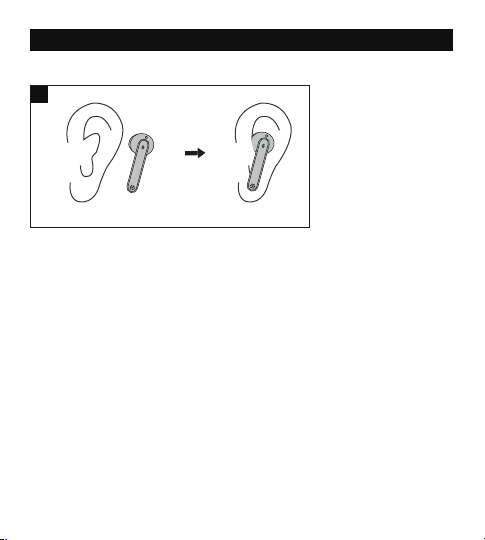
27 28
Veuillez porter les oreillettes comme indiqué ci-dessous (Fig. 3).
Photo uniquement pour illustration.
Précautions Bluetooth
• Quand le périphérique est connecté sans fil à un autre périphérique, placez
les deux appareils à proximité l'un de l'autre, pour qu’ils fonctionnent
normalement et pour éviter toute interférence de signal.
• La portée Bluetooth efficace maximale peut varier en fonction des conditions
environnementales.
• Lors de l'utilisation d'une connexion sans fil, assurez-vous qu'il n'y a pas
d'obstacle entre les deux appareils. Les obstacles, incluant les murs et les
clôtures, peuvent réduire la portée efficace.
UTILISER VOS ÉCOUTEURS
Chargement
Charger les Oreillettes
1. Placez les oreillettes dans le boîtier de chargement conformément aux
repères L (gauche) et R (droite) (Fig. 4).
2. Fermez le couvercle et la charge va démarrer automatiquement(Fig. 5).
Note:
• Veuillez charger complètement les oreillettes lors de leur première
utilisation.
• En cas de batterie faible, un message vocal « Battery low » sera entendu (si
vous portez les écouteurs). Veuillez les charger rapidement, sinon les
écouteurs s'éteindront automatiquement environ 10 minutes plus tard.
• Chargez les oreillettes au moins une fois tous les 3 mois si vous ne les
utilisez pas pendant une longue période.
3
① ②
4 5
L R
PORT VOS ÉCOUTEURS
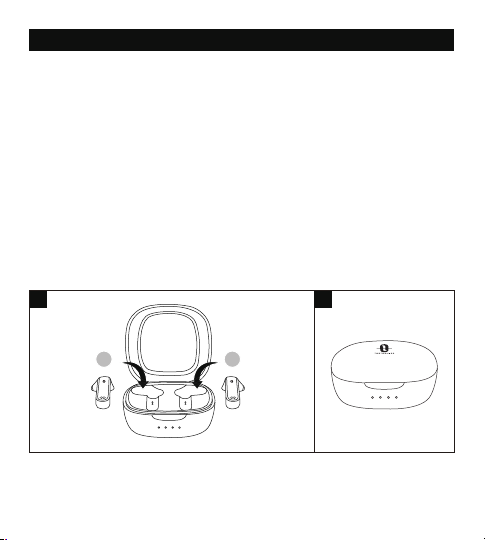
27 28
Veuillez porter les oreillettes comme indiqué ci-dessous (Fig. 3).
Photo uniquement pour illustration.
Précautions Bluetooth
• Quand le périphérique est connecté sans fil à un autre périphérique, placez
les deux appareils à proximité l'un de l'autre, pour qu’ils fonctionnent
normalement et pour éviter toute interférence de signal.
• La portée Bluetooth efficace maximale peut varier en fonction des conditions
environnementales.
• Lors de l'utilisation d'une connexion sans fil, assurez-vous qu'il n'y a pas
d'obstacle entre les deux appareils. Les obstacles, incluant les murs et les
clôtures, peuvent réduire la portée efficace.
UTILISER VOS ÉCOUTEURS
Chargement
Charger les Oreillettes
1. Placez les oreillettes dans le boîtier de chargement conformément aux
repères L (gauche) et R (droite) (Fig. 4).
2. Fermez le couvercle et la charge va démarrer automatiquement(Fig. 5).
Note:
• Veuillez charger complètement les oreillettes lors de leur première
utilisation.
• En cas de batterie faible, un message vocal « Battery low » sera entendu (si
vous portez les écouteurs). Veuillez les charger rapidement, sinon les
écouteurs s'éteindront automatiquement environ 10 minutes plus tard.
• Chargez les oreillettes au moins une fois tous les 3 mois si vous ne les
utilisez pas pendant une longue période.
3
① ②
4 5
L R
PORT VOS ÉCOUTEURS
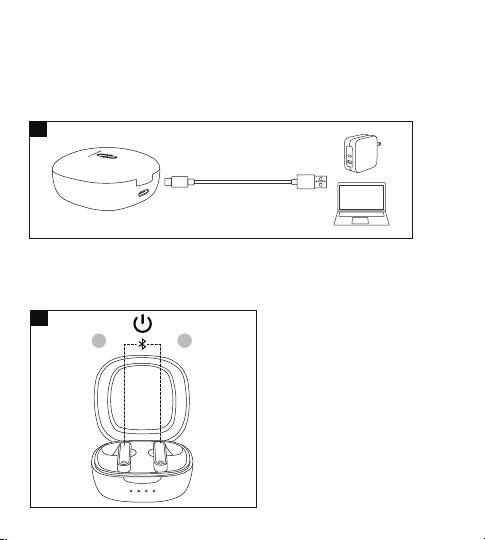
29 30
de la recherche et cliquez dessus pour établir la connexion.
3. Une fois connectés, les voyants d’état des deux écouteurs s'éteignent.
Note:
• Les écouteurs peuvent se souvenir des appareils appairés précédemment
et tenteront de s'appairer avec le dernier appareil connecté. Si le
ré-appairage échoue, les écouteurs passent en mode d'appairage.
• Il n’est pas recommandé de partager les oreillettes entre différentes
personnes. Si nécessaire, veuillez garder les deux écouteurs proches l'un
de l'autre en mode Double Écouteurs.
Mode Simple Écouteur
Le Mode Simple Écouteur n’est disponible que lorsque les oreillettes ont été
appariées avec votre appareil en Mode Double Écouteurs.
1. Retirez un écouteur du boîtier de charge et assurez-vous que le second est
dans le boîtier avec le couvercle fermé.
2. Il essaiera de coupler le dernier appareil couplé en mode Couple. Une
fois connecté, le voyant à LED s'éteignent.
3. En cas d'échec de la liaison, reconnectez d'abord les deux écouteurs à
votre périphérique Bluetooth® comme indiqué dans la section «Mode
Double Écouteurs».
Note:
Si vous souhaitez passer en mode double écouteurs, retirez simplement
l'autre écouteur du boîtier de charge et ils se coupleront automatiquement.
Effacer La Liste de Couplages
Si vous n’arrivez pas à coupler les écouteurs à votre appareil, veuillez effacer
l’historique de couplage en suivant les instructions ci-dessous :
1. Si vous avez déjà appairé votre appareil avec les écouteurs, retirez d'abord
"TAOTRONICS SoundLiberty 88" de la liste des appareils Bluetooth.
2. Retirez l'un des écouteurs et assurez-vous que l'autre est placé dans le
boîtier de chargement et que le couvercle est fermé. Portez l'écouteur,
appuyez et maintenez la commande tactile multifonctions de l'écouteur
pendant 10 secondes jusqu'à ce qu'un bip sonore se fasse entendre.
L'historique des appariements est alors effacé lorsque l'écouteur est éteint.
3. Ouvrez le couvercle, retirez l'autre écouteur, appuyez sur la commande
tactile multifonctions de l'écouteur et maintenez-la enfoncée pendant 10
secondes jusqu'à ce que vous entendiez un bip sonore. L'historique des
appariements est alors effacé lorsque l'écouteur est éteint.
4. Replacez les deux écouteurs dans le boîtier de chargement, fermez le
couvercle, puis rouvrez-le pour les appairer à nouveau avec votre appareil
Bluetooth®, comme indiqué dans la section "Couplage".
Note:
Si vous souhaitez coupler les écouteurs avec un autre appareil alors que vous
les avez déjà associées à un appareil, désactivez la fonction Bluetooth sur
l'appareil connecté, ou supprimez « TAOTRONICS SoundLiberty 88 » de sa
liste de périphériques Bluetooth. Restaurer les écouteurs aux paramètres
d'usine comme indiqué ci-dessus en cas d'échec de couplage.
Charger le Boîtier
1. Connectez le port de charge avec n'importe quel adaptateur de charge
USB ou un port USB d'ordinateur actif (Fig. 6).
2. Les quatre voyants de charges’allumeront progressivement.
Note: Débranchez le câble une fois la charge terminée.
Marche (Fig. 7)
Ouvrez le couvercle et elles s’allumeront automatiquement.
Arrêt (Fig. 8)
Placez les écouteurs dans le boîtier de charge et puis fermez le couvercle,
elles s’éteindront automatiquement.
Couplage
• Vous pouvez utiliser un écouteur ou les deux, suivant votre préférence.
Veuillez vous référer aux instructions de couplage correspondantes.
• Avant le couplage, veuillez éteindre les autres appareils Bluetooth et placer
l’appareil à connecter près des écouteurs.
• Si les écouteurs sont déconnectés de votre appareil pendant plus de 10
minutes, ils s'éteignent automatiquement.
Mode Double Écouteurs
1. Ouvrez le couvercle pour allumer les écouteurs, ils vont automatiquement
se connecter l’un à l’autre. Les témoins LED sur les deux écouteurs
clignoteront rapidement en blanc indiquant que les écouteurs sont en
mode appairage.
2. Activez la fonction Bluetooth sur votre appareil et cherchez les connexions
à proximité. Localisez « TAOTRONICS SoundLiberty 88 » dans les résultats
6
7
8
L R
L R
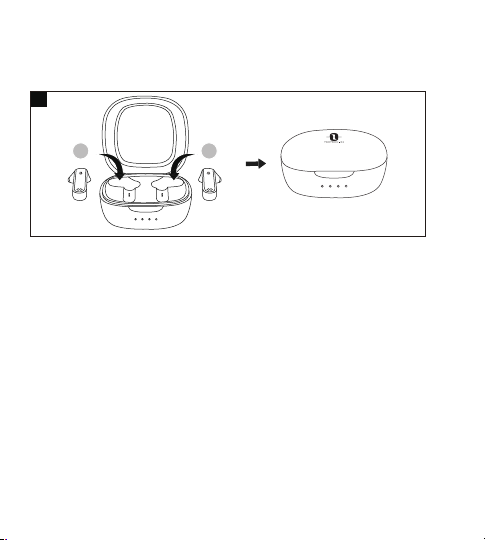
29 30
de la recherche et cliquez dessus pour établir la connexion.
3. Une fois connectés, les voyants d’état des deux écouteurs s'éteignent.
Note:
• Les écouteurs peuvent se souvenir des appareils appairés précédemment
et tenteront de s'appairer avec le dernier appareil connecté. Si le
ré-appairage échoue, les écouteurs passent en mode d'appairage.
• Il n’est pas recommandé de partager les oreillettes entre différentes
personnes. Si nécessaire, veuillez garder les deux écouteurs proches l'un
de l'autre en mode Double Écouteurs.
Mode Simple Écouteur
Le Mode Simple Écouteur n’est disponible que lorsque les oreillettes ont été
appariées avec votre appareil en Mode Double Écouteurs.
1. Retirez un écouteur du boîtier de charge et assurez-vous que le second est
dans le boîtier avec le couvercle fermé.
2. Il essaiera de coupler le dernier appareil couplé en mode Couple. Une
fois connecté, le voyant à LED s'éteignent.
3. En cas d'échec de la liaison, reconnectez d'abord les deux écouteurs à
votre périphérique Bluetooth® comme indiqué dans la section «Mode
Double Écouteurs».
Note:
Si vous souhaitez passer en mode double écouteurs, retirez simplement
l'autre écouteur du boîtier de charge et ils se coupleront automatiquement.
Effacer La Liste de Couplages
Si vous n’arrivez pas à coupler les écouteurs à votre appareil, veuillez effacer
l’historique de couplage en suivant les instructions ci-dessous :
1. Si vous avez déjà appairé votre appareil avec les écouteurs, retirez d'abord
"TAOTRONICS SoundLiberty 88" de la liste des appareils Bluetooth.
2. Retirez l'un des écouteurs et assurez-vous que l'autre est placé dans le
boîtier de chargement et que le couvercle est fermé. Portez l'écouteur,
appuyez et maintenez la commande tactile multifonctions de l'écouteur
pendant 10 secondes jusqu'à ce qu'un bip sonore se fasse entendre.
L'historique des appariements est alors effacé lorsque l'écouteur est éteint.
3. Ouvrez le couvercle, retirez l'autre écouteur, appuyez sur la commande
tactile multifonctions de l'écouteur et maintenez-la enfoncée pendant 10
secondes jusqu'à ce que vous entendiez un bip sonore. L'historique des
appariements est alors effacé lorsque l'écouteur est éteint.
4. Replacez les deux écouteurs dans le boîtier de chargement, fermez le
couvercle, puis rouvrez-le pour les appairer à nouveau avec votre appareil
Bluetooth®, comme indiqué dans la section "Couplage".
Note:
Si vous souhaitez coupler les écouteurs avec un autre appareil alors que vous
les avez déjà associées à un appareil, désactivez la fonction Bluetooth sur
l'appareil connecté, ou supprimez « TAOTRONICS SoundLiberty 88 » de sa
liste de périphériques Bluetooth. Restaurer les écouteurs aux paramètres
d'usine comme indiqué ci-dessus en cas d'échec de couplage.
Charger le Boîtier
1. Connectez le port de charge avec n'importe quel adaptateur de charge
USB ou un port USB d'ordinateur actif (Fig. 6).
2. Les quatre voyants de charges’allumeront progressivement.
Note: Débranchez le câble une fois la charge terminée.
Marche (Fig. 7)
Ouvrez le couvercle et elles s’allumeront automatiquement.
Arrêt (Fig. 8)
Placez les écouteurs dans le boîtier de charge et puis fermez le couvercle,
elles s’éteindront automatiquement.
Couplage
• Vous pouvez utiliser un écouteur ou les deux, suivant votre préférence.
Veuillez vous référer aux instructions de couplage correspondantes.
• Avant le couplage, veuillez éteindre les autres appareils Bluetooth et placer
l’appareil à connecter près des écouteurs.
• Si les écouteurs sont déconnectés de votre appareil pendant plus de 10
minutes, ils s'éteignent automatiquement.
Mode Double Écouteurs
1. Ouvrez le couvercle pour allumer les écouteurs, ils vont automatiquement
se connecter l’un à l’autre. Les témoins LED sur les deux écouteurs
clignoteront rapidement en blanc indiquant que les écouteurs sont en
mode appairage.
2. Activez la fonction Bluetooth sur votre appareil et cherchez les connexions
à proximité. Localisez « TAOTRONICS SoundLiberty 88 » dans les résultats
6
7
8
L R
L R

31 32
de la recherche et cliquez dessus pour établir la connexion.
3. Une fois connectés, les voyants d’état des deux écouteurs s'éteignent.
Note:
• Les écouteurs peuvent se souvenir des appareils appairés précédemment
et tenteront de s'appairer avec le dernier appareil connecté. Si le
ré-appairage échoue, les écouteurs passent en mode d'appairage.
• Il n’est pas recommandé de partager les oreillettes entre différentes
personnes. Si nécessaire, veuillez garder les deux écouteurs proches l'un
de l'autre en mode Double Écouteurs.
Mode Simple Écouteur
Le Mode Simple Écouteur n’est disponible que lorsque les oreillettes ont été
appariées avec votre appareil en Mode Double Écouteurs.
1. Retirez un écouteur du boîtier de charge et assurez-vous que le second est
dans le boîtier avec le couvercle fermé.
2. Il essaiera de coupler le dernier appareil couplé en mode Couple. Une
fois connecté, le voyant à LED s'éteignent.
3. En cas d'échec de la liaison, reconnectez d'abord les deux écouteurs à
votre périphérique Bluetooth® comme indiqué dans la section «Mode
Double Écouteurs».
Note:
Si vous souhaitez passer en mode double écouteurs, retirez simplement
l'autre écouteur du boîtier de charge et ils se coupleront automatiquement.
Effacer La Liste de Couplages
Si vous n’arrivez pas à coupler les écouteurs à votre appareil, veuillez effacer
l’historique de couplage en suivant les instructions ci-dessous :
1. Si vous avez déjà appairé votre appareil avec les écouteurs, retirez d'abord
"TAOTRONICS SoundLiberty 88" de la liste des appareils Bluetooth.
2. Retirez l'un des écouteurs et assurez-vous que l'autre est placé dans le
boîtier de chargement et que le couvercle est fermé. Portez l'écouteur,
appuyez et maintenez la commande tactile multifonctions de l'écouteur
pendant 10 secondes jusqu'à ce qu'un bip sonore se fasse entendre.
L'historique des appariements est alors effacé lorsque l'écouteur est éteint.
3. Ouvrez le couvercle, retirez l'autre écouteur, appuyez sur la commande
tactile multifonctions de l'écouteur et maintenez-la enfoncée pendant 10
secondes jusqu'à ce que vous entendiez un bip sonore. L'historique des
appariements est alors effacé lorsque l'écouteur est éteint.
4. Replacez les deux écouteurs dans le boîtier de chargement, fermez le
couvercle, puis rouvrez-le pour les appairer à nouveau avec votre appareil
Bluetooth®, comme indiqué dans la section "Couplage".
Note:
Si vous souhaitez coupler les écouteurs avec un autre appareil alors que vous
les avez déjà associées à un appareil, désactivez la fonction Bluetooth sur
l'appareil connecté, ou supprimez « TAOTRONICS SoundLiberty 88 » de sa
liste de périphériques Bluetooth. Restaurer les écouteurs aux paramètres
d'usine comme indiqué ci-dessus en cas d'échec de couplage.
Couplage
• Vous pouvez utiliser un écouteur ou les deux, suivant votre préférence.
Veuillez vous référer aux instructions de couplage correspondantes.
• Avant le couplage, veuillez éteindre les autres appareils Bluetooth et placer
l’appareil à connecter près des écouteurs.
• Si les écouteurs sont déconnectés de votre appareil pendant plus de 10
minutes, ils s'éteignent automatiquement.
Mode Double Écouteurs
1. Ouvrez le couvercle pour allumer les écouteurs, ils vont automatiquement
se connecter l’un à l’autre. Les témoins LED sur les deux écouteurs
clignoteront rapidement en blanc indiquant que les écouteurs sont en
mode appairage.
2. Activez la fonction Bluetooth sur votre appareil et cherchez les connexions
à proximité. Localisez « TAOTRONICS SoundLiberty 88 » dans les résultats

31 32
de la recherche et cliquez dessus pour établir la connexion.
3. Une fois connectés, les voyants d’état des deux écouteurs s'éteignent.
Note:
• Les écouteurs peuvent se souvenir des appareils appairés précédemment
et tenteront de s'appairer avec le dernier appareil connecté. Si le
ré-appairage échoue, les écouteurs passent en mode d'appairage.
• Il n’est pas recommandé de partager les oreillettes entre différentes
personnes. Si nécessaire, veuillez garder les deux écouteurs proches l'un
de l'autre en mode Double Écouteurs.
Mode Simple Écouteur
Le Mode Simple Écouteur n’est disponible que lorsque les oreillettes ont été
appariées avec votre appareil en Mode Double Écouteurs.
1. Retirez un écouteur du boîtier de charge et assurez-vous que le second est
dans le boîtier avec le couvercle fermé.
2. Il essaiera de coupler le dernier appareil couplé en mode Couple. Une
fois connecté, le voyant à LED s'éteignent.
3. En cas d'échec de la liaison, reconnectez d'abord les deux écouteurs à
votre périphérique Bluetooth® comme indiqué dans la section «Mode
Double Écouteurs».
Note:
Si vous souhaitez passer en mode double écouteurs, retirez simplement
l'autre écouteur du boîtier de charge et ils se coupleront automatiquement.
Effacer La Liste de Couplages
Si vous n’arrivez pas à coupler les écouteurs à votre appareil, veuillez effacer
l’historique de couplage en suivant les instructions ci-dessous :
1. Si vous avez déjà appairé votre appareil avec les écouteurs, retirez d'abord
"TAOTRONICS SoundLiberty 88" de la liste des appareils Bluetooth.
2. Retirez l'un des écouteurs et assurez-vous que l'autre est placé dans le
boîtier de chargement et que le couvercle est fermé. Portez l'écouteur,
appuyez et maintenez la commande tactile multifonctions de l'écouteur
pendant 10 secondes jusqu'à ce qu'un bip sonore se fasse entendre.
L'historique des appariements est alors effacé lorsque l'écouteur est éteint.
3. Ouvrez le couvercle, retirez l'autre écouteur, appuyez sur la commande
tactile multifonctions de l'écouteur et maintenez-la enfoncée pendant 10
secondes jusqu'à ce que vous entendiez un bip sonore. L'historique des
appariements est alors effacé lorsque l'écouteur est éteint.
4. Replacez les deux écouteurs dans le boîtier de chargement, fermez le
couvercle, puis rouvrez-le pour les appairer à nouveau avec votre appareil
Bluetooth®, comme indiqué dans la section "Couplage".
Note:
Si vous souhaitez coupler les écouteurs avec un autre appareil alors que vous
les avez déjà associées à un appareil, désactivez la fonction Bluetooth sur
l'appareil connecté, ou supprimez « TAOTRONICS SoundLiberty 88 » de sa
liste de périphériques Bluetooth. Restaurer les écouteurs aux paramètres
d'usine comme indiqué ci-dessus en cas d'échec de couplage.
Couplage
• Vous pouvez utiliser un écouteur ou les deux, suivant votre préférence.
Veuillez vous référer aux instructions de couplage correspondantes.
• Avant le couplage, veuillez éteindre les autres appareils Bluetooth et placer
l’appareil à connecter près des écouteurs.
• Si les écouteurs sont déconnectés de votre appareil pendant plus de 10
minutes, ils s'éteignent automatiquement.
Mode Double Écouteurs
1. Ouvrez le couvercle pour allumer les écouteurs, ils vont automatiquement
se connecter l’un à l’autre. Les témoins LED sur les deux écouteurs
clignoteront rapidement en blanc indiquant que les écouteurs sont en
mode appairage.
2. Activez la fonction Bluetooth sur votre appareil et cherchez les connexions
à proximité. Localisez « TAOTRONICS SoundLiberty 88 » dans les résultats

33 34
FONCTIONNEMENT
Fonction
Lecture /
Pause
Opération
• Appuyez deux fois sur la Touche
Tactile d'un des écouteurs
• Mettre / Enlever les écouteurs
Touchez et maintenez le bouton
de contrôle tactile sur l’écouteur
droit pendant plus de 3 secondes
Touchez et maintenez le bouton
de contrôle tactile sur l’écouteur
gauche pendant plus de 3 secondes
Appuyez trois fois sur la Touche
Tactile de l'écouteur droit
Appuyez trois fois sur la Touche
Tactile de l'écouteur gauche
• Appuyez une fois sur la
Touche Tactile d'un des
écouteurs
• Mettez les deux écouteurs
Appuyez sur la Touche Tactile
d'un des écouteurs pour
deux secondes
Volume +
Volume -
Piste Suivante
Piste
Précédente
Répondre un
Appel
Téléphonique
Raccrocher un
Appel
Téléphonique
Appuyez deux fois sur la
Touche Tactile d'un des
écouteurs
Activer /
Désactiver le
contrôle vocal
Refuser un
Appel Entrant
Lorsque le couplage est
réussie, maintenez la Touch
Tactile de l’une des oreillettes
pendant 2 secondes jusqu’à
ce que vous entendiez un bip
Message Vocal
/
Bip sonore quand le
niveau max est atteint
/
/
/
/
Appel rejeté
Toot
/
Effacer La
Liste de
Couplages
Consultez la section« Effacer
La Liste de Couplages »
Entrer en
Mode
Couplage
Couplé avec
succès à votre
appareil
Bluetooth hors
de portée /
Impossible de
se connecter
à votre appareil
Consultez la section
« Couplage »
/
/
Couplage
Connecté
Déconnecté
Note: Le bouton de contrôle tactile multifonction est disponible uniquement
lorsque vous portez les écouteurs.
/

33 34
FONCTIONNEMENT
Fonction
Lecture /
Pause
Opération
• Appuyez deux fois sur la Touche
Tactile d'un des écouteurs
• Mettre / Enlever les écouteurs
Touchez et maintenez le bouton
de contrôle tactile sur l’écouteur
droit pendant plus de 3 secondes
Touchez et maintenez le bouton
de contrôle tactile sur l’écouteur
gauche pendant plus de 3 secondes
Appuyez trois fois sur la Touche
Tactile de l'écouteur droit
Appuyez trois fois sur la Touche
Tactile de l'écouteur gauche
• Appuyez une fois sur la
Touche Tactile d'un des
écouteurs
• Mettez les deux écouteurs
Appuyez sur la Touche Tactile
d'un des écouteurs pour
deux secondes
Volume +
Volume -
Piste Suivante
Piste
Précédente
Répondre un
Appel
Téléphonique
Raccrocher un
Appel
Téléphonique
Appuyez deux fois sur la
Touche Tactile d'un des
écouteurs
Activer /
Désactiver le
contrôle vocal
Refuser un
Appel Entrant
Lorsque le couplage est
réussie, maintenez la Touch
Tactile de l’une des oreillettes
pendant 2 secondes jusqu’à
ce que vous entendiez un bip
Message Vocal
/
Bip sonore quand le
niveau max est atteint
/
/
/
/
Appel rejeté
Toot
/
Effacer La
Liste de
Couplages
Consultez la section« Effacer
La Liste de Couplages »
Entrer en
Mode
Couplage
Couplé avec
succès à votre
appareil
Bluetooth hors
de portée /
Impossible de
se connecter
à votre appareil
Consultez la section
« Couplage »
/
/
Couplage
Connecté
Déconnecté
Note: Le bouton de contrôle tactile multifonction est disponible uniquement
lorsque vous portez les écouteurs.
/
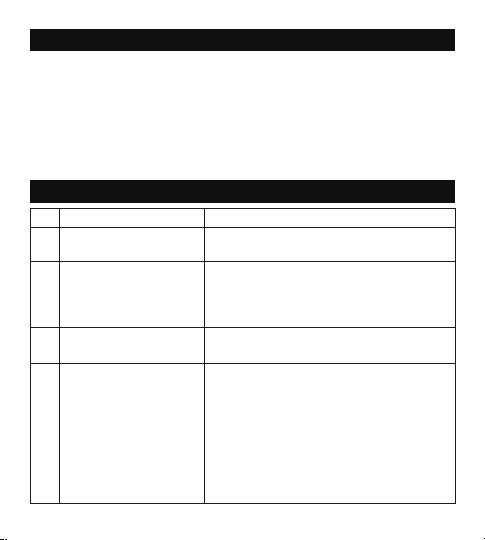
35 36
N° Problème Solution
Impossible d’allumer les
écouteurs
Batterie des écouteurs faible, veuillez les
recharger
1
Impossible de charger
les écouteurs
• Placez correctement les écouteurs dans
le boîtier de charge
• Assurez-vous que le boîtier de charge
est complètement chargé
2
Impossible de charger
le boîtier de charge
Assurez-vous que le câble de charge est
intact et correctement connecté
3
Impossible de trouver
« TAOTRONICS
SoundLiberty 88 » dans
la liste des
périphériques Bluetooth
Les écouteurs se sont reconnectés avec
un appareil précédemment couplé :
• Désactivez la fonction Bluetooth du
périphérique précédemment associé, ou
supprimez « TAOTRONICS SoundLiberty
88 » de la liste de périphériques Bluetooth,
puis effectuez une nouvelle recherche
• Placez l'appareil à connecter près des
écouteurs
4
Impossible de connecter
les écouteurs à votre
appareil
• Allumez l'appareil et activez sa fonction
Bluetooth avant le couplage
• Mettez les oreillettes en mode de couplage,
comme indiqué dans la section « Couplage »
5
DÉPANNAGE
6
Pas de son dans un des
écouteurs en mode
double écouteurs
Replacez les deux écouteurs dans le boîtier
de charge, puis ressortez-les, ils se coupleront
automatiquement. Si le couplage a échoué,
restaurez les paramètres d'usine comme
indiqué dans la section « Effacer La Liste de
Couplages »
NETTOYAGE ET MAINTENANCE
1. Nettoyez régulièrement les écouteurs et le boîtier de charge.
2. Utilisez un chiffon sec en coton doux pour essuyer l’appareil.
Nota: N'insérez rien dans le produit.
3. Tenir à l'écart des objets tranchants pour éviter les rayures.
4. Placez l'appareil dans un endroit sec et ombragé s'il doit rester inutilisé
pendant une longue période.
5. Ne nettoyez pas l’appareil avec du détergent ou des produits chimiques.
7
Mauvaise Qualité
Sonore
• Portez correctement les écouteurs et
gardez-les proches l’un de l’autre.
• Placez l'appareil connecté à proximité des
écouteurs, ou supprimez les obstacles qui
les séparent
• Nettoyez les saletés sur les écouteurs
8
Échec d'utilisation
d'un seul écouteur
• Tel qu'indiqué dans les consignes Mode
Simple Écouteur, assurez-vous d'abord que
les deux écouteurs soient appairés avec
votre appareil.
• Puis suivez les consignes pour appairer
l'écouteur unique (gauche ou droite) à
votre appareil.
• Une fois appairés, vous pouvez librement
utiliser l'écouteur unique (gauche ou droite).

35 36
N° Problème Solution
Impossible d’allumer les
écouteurs
Batterie des écouteurs faible, veuillez les
recharger
1
Impossible de charger
les écouteurs
• Placez correctement les écouteurs dans
le boîtier de charge
• Assurez-vous que le boîtier de charge
est complètement chargé
2
Impossible de charger
le boîtier de charge
Assurez-vous que le câble de charge est
intact et correctement connecté
3
Impossible de trouver
« TAOTRONICS
SoundLiberty 88 » dans
la liste des
périphériques Bluetooth
Les écouteurs se sont reconnectés avec
un appareil précédemment couplé :
• Désactivez la fonction Bluetooth du
périphérique précédemment associé, ou
supprimez « TAOTRONICS SoundLiberty
88 » de la liste de périphériques Bluetooth,
puis effectuez une nouvelle recherche
• Placez l'appareil à connecter près des
écouteurs
4
Impossible de connecter
les écouteurs à votre
appareil
• Allumez l'appareil et activez sa fonction
Bluetooth avant le couplage
• Mettez les oreillettes en mode de couplage,
comme indiqué dans la section « Couplage »
5
DÉPANNAGE
6
Pas de son dans un des
écouteurs en mode
double écouteurs
Replacez les deux écouteurs dans le boîtier
de charge, puis ressortez-les, ils se coupleront
automatiquement. Si le couplage a échoué,
restaurez les paramètres d'usine comme
indiqué dans la section « Effacer La Liste de
Couplages »
NETTOYAGE ET MAINTENANCE
1. Nettoyez régulièrement les écouteurs et le boîtier de charge.
2. Utilisez un chiffon sec en coton doux pour essuyer l’appareil.
Nota: N'insérez rien dans le produit.
3. Tenir à l'écart des objets tranchants pour éviter les rayures.
4. Placez l'appareil dans un endroit sec et ombragé s'il doit rester inutilisé
pendant une longue période.
5. Ne nettoyez pas l’appareil avec du détergent ou des produits chimiques.
7
Mauvaise Qualité
Sonore
• Portez correctement les écouteurs et
gardez-les proches l’un de l’autre.
• Placez l'appareil connecté à proximité des
écouteurs, ou supprimez les obstacles qui
les séparent
• Nettoyez les saletés sur les écouteurs
8
Échec d'utilisation
d'un seul écouteur
• Tel qu'indiqué dans les consignes Mode
Simple Écouteur, assurez-vous d'abord que
les deux écouteurs soient appairés avec
votre appareil.
• Puis suivez les consignes pour appairer
l'écouteur unique (gauche ou droite) à
votre appareil.
• Une fois appairés, vous pouvez librement
utiliser l'écouteur unique (gauche ou droite).

37 38
GARANTIE ET SERVICE
En cas de problème, veuillez contacter le Centre de Support Client TaoTronics
via les informations de contact listées dans le Guide d’Utilisation.
ES
INSTRUCCIONES DE PROTECCION IMPORTANTES
Por favor lea las instrucciones detenidamente Antes de usar este producto y
guárdelo para futuras referencias.
Protección Auditiva
• No use lo auriculares a un volumen alto por mucho tiempo para evitar
dañar sus oídos.
• Ajuste los auriculares a un volumen bajo antes de ponérselos, luego
aumente el volumen gradualmente según sus preferencias.
• No ajuste el volumen demasiado alto para mantenerse al tanto de su
entorno.
• Por favor revise las leyes y reglamentos locales si desea usar los auriculares
mientras maneja para responder llamadas.
• Para su protección, no deje que la música o las llamadas telefónicas lo
distraigan mientras conduce o realiza otras actividades con peligros
potenciales.
Advertencia: Ajuste el volumen a un nivel adecuado para evitar dañar sus
oídos.
Precaución
• No sumerja los auriculares en agua o exponga a la humedad por mucho
tiempo.
• No limpie el dispositivo con detergentes que contengan alcohol, amoníaco,
benceno o abrasivos.
• Evite dejar caer.
• Coloque los auriculares en el estuche de carga cuando no los este usando y
manténgalos alejado de niños y mascotas para evitar el riesgo de asfixia.
• No desarme o trate de reparar el dispositivo para evitar el riesgo de
incendio, nulidad de la garantía, y/o pérdida de propiedad.
• Preste mucha atención al usar el dispositivo cerca de niños.
• Mantenga el estuche de carga lejos de agua, lluvia o cualquier otro líquido.
• No utilice el dispositivo en una tormenta eléctrica para evitar un mal
funcionamiento o una descarga eléctrica.
• Siempre consulte a un técnico profesional o personal autorizado para su
reparación.
9 Connexion instable
• Gardez les écouteurs à proximité de votre
appareil Bluetooth
• La distance efficace peut être réduite par
des obstacles dans le chemin
• Éteignez les autres appareils Bluetooth
pour diminuer les interférences
10
Impossible d’entendre
l'autre interlocuteur
pendant un appel
téléphonique
Réglez le volume à un niveau plus élevé
L’autre interlocuteur
n’entend pas votre voix
lorsd’un appel
téléphonique.
Dégagez le micro intégré de toute
obstruction
12
Le contrôle tactile des
écouteurs ne
fonctionne pas
Placez les deux écouteurs dans le boîtier de
charge, fermez le couvercle et déconnectez la
liaison Bluetooth. Rouvrez le couvercle pour
rallumer les écouteurs et les coupler de
nouveau
11

37 38
GARANTIE ET SERVICE
En cas de problème, veuillez contacter le Centre de Support Client TaoTronics
via les informations de contact listées dans le Guide d’Utilisation.
ES
INSTRUCCIONES DE PROTECCION IMPORTANTES
Por favor lea las instrucciones detenidamente Antes de usar este producto y
guárdelo para futuras referencias.
Protección Auditiva
• No use lo auriculares a un volumen alto por mucho tiempo para evitar
dañar sus oídos.
• Ajuste los auriculares a un volumen bajo antes de ponérselos, luego
aumente el volumen gradualmente según sus preferencias.
• No ajuste el volumen demasiado alto para mantenerse al tanto de su
entorno.
• Por favor revise las leyes y reglamentos locales si desea usar los auriculares
mientras maneja para responder llamadas.
• Para su protección, no deje que la música o las llamadas telefónicas lo
distraigan mientras conduce o realiza otras actividades con peligros
potenciales.
Advertencia: Ajuste el volumen a un nivel adecuado para evitar dañar sus
oídos.
Precaución
• No sumerja los auriculares en agua o exponga a la humedad por mucho
tiempo.
• No limpie el dispositivo con detergentes que contengan alcohol, amoníaco,
benceno o abrasivos.
• Evite dejar caer.
• Coloque los auriculares en el estuche de carga cuando no los este usando y
manténgalos alejado de niños y mascotas para evitar el riesgo de asfixia.
• No desarme o trate de reparar el dispositivo para evitar el riesgo de
incendio, nulidad de la garantía, y/o pérdida de propiedad.
• Preste mucha atención al usar el dispositivo cerca de niños.
• Mantenga el estuche de carga lejos de agua, lluvia o cualquier otro líquido.
• No utilice el dispositivo en una tormenta eléctrica para evitar un mal
funcionamiento o una descarga eléctrica.
• Siempre consulte a un técnico profesional o personal autorizado para su
reparación.
9 Connexion instable
• Gardez les écouteurs à proximité de votre
appareil Bluetooth
• La distance efficace peut être réduite par
des obstacles dans le chemin
• Éteignez les autres appareils Bluetooth
pour diminuer les interférences
10
Impossible d’entendre
l'autre interlocuteur
pendant un appel
téléphonique
Réglez le volume à un niveau plus élevé
L’autre interlocuteur
n’entend pas votre voix
lorsd’un appel
téléphonique.
Dégagez le micro intégré de toute
obstruction
12
Le contrôle tactile des
écouteurs ne
fonctionne pas
Placez les deux écouteurs dans le boîtier de
charge, fermez le couvercle et déconnectez la
liaison Bluetooth. Rouvrez le couvercle pour
rallumer les écouteurs et les coupler de
nouveau
11
39 40
Por favor lea las instrucciones detenidamente Antes de usar este producto y
guárdelo para futuras referencias.
Protección Auditiva
• No use lo auriculares a un volumen alto por mucho tiempo para evitar
dañar sus oídos.
• Ajuste los auriculares a un volumen bajo antes de ponérselos, luego
aumente el volumen gradualmente según sus preferencias.
• No ajuste el volumen demasiado alto para mantenerse al tanto de su
entorno.
• Por favor revise las leyes y reglamentos locales si desea usar los auriculares
mientras maneja para responder llamadas.
• Para su protección, no deje que la música o las llamadas telefónicas lo
distraigan mientras conduce o realiza otras actividades con peligros
potenciales.
Advertencia: Ajuste el volumen a un nivel adecuado para evitar dañar sus
oídos.
Precaución
• No sumerja los auriculares en agua o exponga a la humedad por mucho
tiempo.
• No limpie el dispositivo con detergentes que contengan alcohol, amoníaco,
benceno o abrasivos.
• Evite dejar caer.
• Coloque los auriculares en el estuche de carga cuando no los este usando y
manténgalos alejado de niños y mascotas para evitar el riesgo de asfixia.
• No desarme o trate de reparar el dispositivo para evitar el riesgo de
incendio, nulidad de la garantía, y/o pérdida de propiedad.
• Preste mucha atención al usar el dispositivo cerca de niños.
• Mantenga el estuche de carga lejos de agua, lluvia o cualquier otro líquido.
• No utilice el dispositivo en una tormenta eléctrica para evitar un mal
funcionamiento o una descarga eléctrica.
• Siempre consulte a un técnico profesional o personal autorizado para su
reparación.
Este dispositivo contiene una batería de litio. Nunca lo exponga a un
calor excesivo, la luz solar directa o al fuego para evitar explosiones.
USAR SUS AURICULARES
Veuillez porter les oreillettes comme indiqué ci-dessous (Figura. 3).
Imágenes solo para referencia.
Precaución Bluetooth
• Cuando el dispositivo está conectado de forma inalámbrica a otro
dispositivo, coloque los dos dispositivos cerca uno del otro para tener sus
funcionalidades normales y evitar la posible interferencia de la señal.
• El alcance máximo efectivo de Bluetooth varia según las circunstancias
ambientales.
• Cuando utilice una conexión inalámbrica, asegúrese de que no haya
obstáculos entre los dos dispositivos. Los obstáculos INCLUYEN muros y
vallas que pueden acortar el alcance efectivo.
3
① ②
TECNOLOGÍA DE REDUCCIÓN DE RUIDO INTELIGENTE AI PARA
HACER LLAMADAS CLARAS
Elevoc Vocplus es una tecnología de reducción de ruido
basada en DNN que puede grabar su voz de manera
inteligente y hacer que su interlocutor pueda escuchar su
voz claramente al eliminar el ruido de fondo.
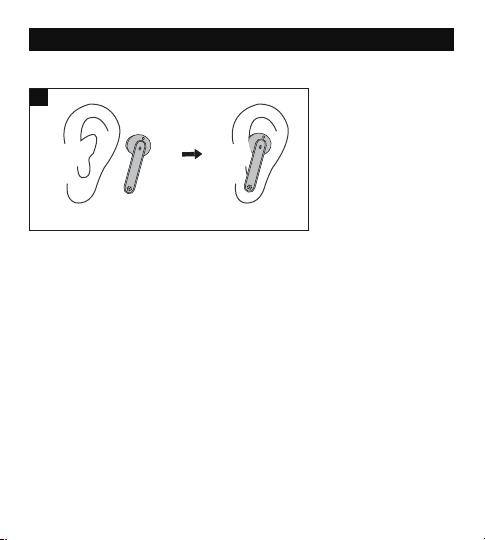
39 40
Por favor lea las instrucciones detenidamente Antes de usar este producto y
guárdelo para futuras referencias.
Protección Auditiva
• No use lo auriculares a un volumen alto por mucho tiempo para evitar
dañar sus oídos.
• Ajuste los auriculares a un volumen bajo antes de ponérselos, luego
aumente el volumen gradualmente según sus preferencias.
• No ajuste el volumen demasiado alto para mantenerse al tanto de su
entorno.
• Por favor revise las leyes y reglamentos locales si desea usar los auriculares
mientras maneja para responder llamadas.
• Para su protección, no deje que la música o las llamadas telefónicas lo
distraigan mientras conduce o realiza otras actividades con peligros
potenciales.
Advertencia: Ajuste el volumen a un nivel adecuado para evitar dañar sus
oídos.
Precaución
• No sumerja los auriculares en agua o exponga a la humedad por mucho
tiempo.
• No limpie el dispositivo con detergentes que contengan alcohol, amoníaco,
benceno o abrasivos.
• Evite dejar caer.
• Coloque los auriculares en el estuche de carga cuando no los este usando y
manténgalos alejado de niños y mascotas para evitar el riesgo de asfixia.
• No desarme o trate de reparar el dispositivo para evitar el riesgo de
incendio, nulidad de la garantía, y/o pérdida de propiedad.
• Preste mucha atención al usar el dispositivo cerca de niños.
• Mantenga el estuche de carga lejos de agua, lluvia o cualquier otro líquido.
• No utilice el dispositivo en una tormenta eléctrica para evitar un mal
funcionamiento o una descarga eléctrica.
• Siempre consulte a un técnico profesional o personal autorizado para su
reparación.
Este dispositivo contiene una batería de litio. Nunca lo exponga a un
calor excesivo, la luz solar directa o al fuego para evitar explosiones.
USAR SUS AURICULARES
Veuillez porter les oreillettes comme indiqué ci-dessous (Figura. 3).
Imágenes solo para referencia.
Precaución Bluetooth
• Cuando el dispositivo está conectado de forma inalámbrica a otro
dispositivo, coloque los dos dispositivos cerca uno del otro para tener sus
funcionalidades normales y evitar la posible interferencia de la señal.
• El alcance máximo efectivo de Bluetooth varia según las circunstancias
ambientales.
• Cuando utilice una conexión inalámbrica, asegúrese de que no haya
obstáculos entre los dos dispositivos. Los obstáculos INCLUYEN muros y
vallas que pueden acortar el alcance efectivo.
3
① ②
TECNOLOGÍA DE REDUCCIÓN DE RUIDO INTELIGENTE AI PARA
HACER LLAMADAS CLARAS
Elevoc Vocplus es una tecnología de reducción de ruido
basada en DNN que puede grabar su voz de manera
inteligente y hacer que su interlocutor pueda escuchar su
voz claramente al eliminar el ruido de fondo.
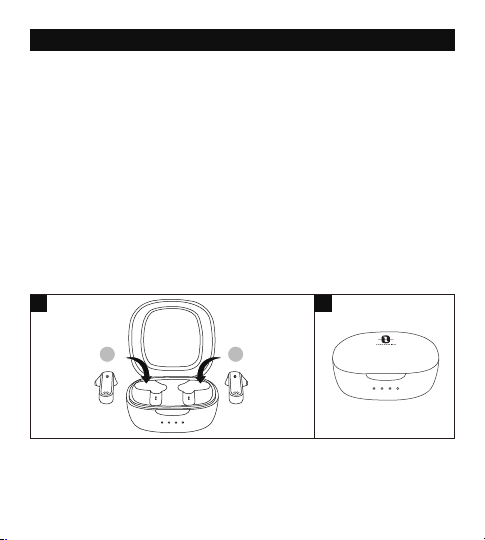
41 42
USO DE SUS AURICULARES
Carga
Carga de los Auriculares
1. Coloque los auriculares en el estuche de carga según las marcas L
(izquierda) y R (derecha) (Figura. 4).
2. Al cerrar la tapa la carga se iniciará automáticamente (Figura. 5).
Nota:
• Por favor, cargue completamente los auriculares cuando los use por
primera vez.
• Cuando el nivel de la batería esté bajo, escuchará una señal de voz de
"batería baja" (si está usando los auriculares). Cárguelo a tiempo o los
audífonos se apagarán automáticamente después de 10 minutos.
• Cargue los auriculares al menos una vez cada 3 meses si no los usa durante
mucho tiempo.
El estuche de carga
1. Conecte el puerto de carga con cualquier equipo activo puerto USB o
adaptador de carga USB (Figura. 6).
2. Los cuatro indicadores de carga se iluminarán progresivamente.
Nota: Desconecte el cable de carga cuando el estuche esté completamente
cargado.
Encender (Figura. 7)
Abrir la tapa y se encenderán automáticamente.
4 5
L R
6
7
L R
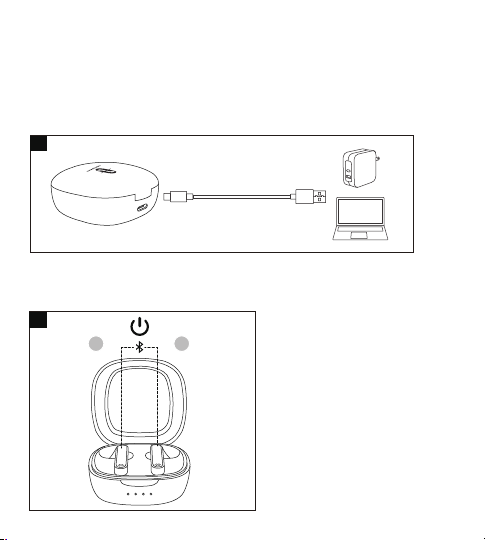
41 42
USO DE SUS AURICULARES
Carga
Carga de los Auriculares
1. Coloque los auriculares en el estuche de carga según las marcas L
(izquierda) y R (derecha) (Figura. 4).
2. Al cerrar la tapa la carga se iniciará automáticamente (Figura. 5).
Nota:
• Por favor, cargue completamente los auriculares cuando los use por
primera vez.
• Cuando el nivel de la batería esté bajo, escuchará una señal de voz de
"batería baja" (si está usando los auriculares). Cárguelo a tiempo o los
audífonos se apagarán automáticamente después de 10 minutos.
• Cargue los auriculares al menos una vez cada 3 meses si no los usa durante
mucho tiempo.
El estuche de carga
1. Conecte el puerto de carga con cualquier equipo activo puerto USB o
adaptador de carga USB (Figura. 6).
2. Los cuatro indicadores de carga se iluminarán progresivamente.
Nota: Desconecte el cable de carga cuando el estuche esté completamente
cargado.
Encender (Figura. 7)
Abrir la tapa y se encenderán automáticamente.
4 5
L R
6
7
L R
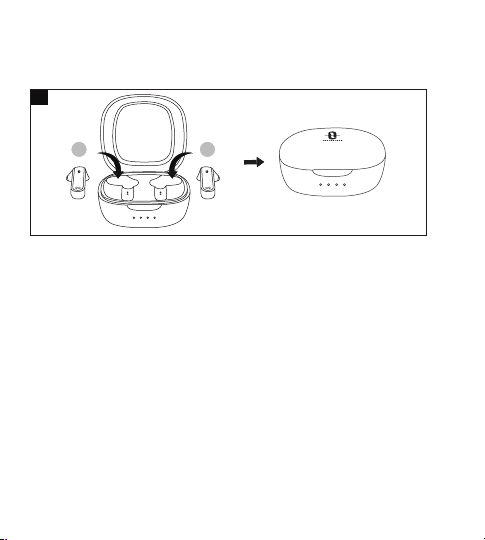
43 44
Apagar (Figura. 8)
Ponga los auriculares en el estuche de carga y cierre la tapa, se apagarán
automáticamente.
Emparejamiento
Puede utilizar un auricular solo o los dos juntos según su preferencia.
Por favor, consulte las instrucciones de emparejamiento correspondientes.
• Antes de emparejar, apague otros dispositivos Bluetooth y coloque el
dispositivo que se va a conectar cerca de los auriculares.
• Si los auriculares están desconectados de su dispositivo por más de 10
minutos, se apagarán automáticamente.
Modo De Emparejamiento Doble
1. Destape el estuche de carga para encender los auriculares, se conectan
entre sí automáticamente. Los indicadores LED de ambos auriculares
parpadean rápidamente, lo que indica que los auriculares están en modo
de emparejamiento.
2. Active la función Bluetooth de su dispositivo y busque dispositivos
cercanos. Se ve "TAOTRONICS SoundLiberty 88" en los resultados de
búsqueda, presiónelo para conectarse.
3. Una vez conectado, los indicadores de operación en ambos auriculares
se apagarán.
Notas:
• Los auriculares recuerdan los dispositivos emparejados recientes
e intentarán emparejarse al último dispositivo conectado. Si falla el
emparejamiento, los auriculares entrarán en modo de emparejamiento.
• No se recomienda usar los dos auriculares entre dos personas diferentes.
Si es necesario, mantenga los auriculares cerca uno del otro en el modo de
emparejamiento doble.
Modo De Auricular Individual
El modo de Auricular Individual está disponible sólo cuando los auriculares
se han emparejado con su dispositivo en el modo de Emparejamiento Doble.
1. Saque un auricular desde el estuche de carga y asegúrese de que el otro se
coloca en el estuche de carga y la tapa está cubierta.
2. Intentará emparejarse con el último dispositivo emparejado en el modo de
Emparejamiento Doble. Una vez conectado, el indicador LED se apagará.
3. Si falle el procedimiento de emparejamiento, volvería a emparejar ambos
auriculares con su dispositivo Bluetooth® primero como se indica en la
sección "Modo De Emparejamiento Doble".
Nota:
Si desea cambiar al modo de emparejamiento, simplemente saque el otro
auricular del estuche de carga, se emparejarán automáticamente.
Borrar Lista De Emparejamiento
Si usted no puede emparejar su dispositivo con los auriculares,borre el
historial de emparejamiento como se indica a continuación:
1. Si ha emparejado su dispositivo con los auriculares anteriormente, primero
elimine "TAOTRONICS SoundLiberty 88" de la lista de dispositivos Bluetooth.
2. Retire uno de los auriculares y asegúrese de que el otro esté dentro del
estuche de carga con la tapa puesta. Póngase el auricular y mantenga
presionado el Control Táctil Multifunción por 10 segundos hasta que se
escuche un sonido de pitido. El historial de emparejamiento se borra al
apagar el auricular.
3. Destape el estuche, saque el otro auricular, y mantenga presionado el
Control Táctil Multifunción por 10 segundos hasta que se escuche un
sonido de pitido. El historial de emparejamiento se borra al apagar
el auricular.
4. Vuelva a colocar ambos auriculares en el estuche de carga, cierre la tapa,
luego destape para volver a emparejar con su dispositivo Bluetooth® como
se indica en la sección de "Emparejamiento”.
Nota:
Si desea emparejar los auriculares con otro dispositivo, desactive la función
Bluetooth del dispositivo emparejado o borre "TAOTRONICS SoundLiberty
88" de la lista de dispositivos Bluetooth registrados. Restaure los auriculares
a la configuración de fábrica como se indicó anteriormente si el
emparejamiento falla.
8
L R

43 44
Apagar (Figura. 8)
Ponga los auriculares en el estuche de carga y cierre la tapa, se apagarán
automáticamente.
Emparejamiento
Puede utilizar un auricular solo o los dos juntos según su preferencia.
Por favor, consulte las instrucciones de emparejamiento correspondientes.
• Antes de emparejar, apague otros dispositivos Bluetooth y coloque el
dispositivo que se va a conectar cerca de los auriculares.
• Si los auriculares están desconectados de su dispositivo por más de 10
minutos, se apagarán automáticamente.
Modo De Emparejamiento Doble
1. Destape el estuche de carga para encender los auriculares, se conectan
entre sí automáticamente. Los indicadores LED de ambos auriculares
parpadean rápidamente, lo que indica que los auriculares están en modo
de emparejamiento.
2. Active la función Bluetooth de su dispositivo y busque dispositivos
cercanos. Se ve "TAOTRONICS SoundLiberty 88" en los resultados de
búsqueda, presiónelo para conectarse.
3. Una vez conectado, los indicadores de operación en ambos auriculares
se apagarán.
Notas:
• Los auriculares recuerdan los dispositivos emparejados recientes
e intentarán emparejarse al último dispositivo conectado. Si falla el
emparejamiento, los auriculares entrarán en modo de emparejamiento.
• No se recomienda usar los dos auriculares entre dos personas diferentes.
Si es necesario, mantenga los auriculares cerca uno del otro en el modo de
emparejamiento doble.
Modo De Auricular Individual
El modo de Auricular Individual está disponible sólo cuando los auriculares
se han emparejado con su dispositivo en el modo de Emparejamiento Doble.
1. Saque un auricular desde el estuche de carga y asegúrese de que el otro se
coloca en el estuche de carga y la tapa está cubierta.
2. Intentará emparejarse con el último dispositivo emparejado en el modo de
Emparejamiento Doble. Una vez conectado, el indicador LED se apagará.
3. Si falle el procedimiento de emparejamiento, volvería a emparejar ambos
auriculares con su dispositivo Bluetooth® primero como se indica en la
sección "Modo De Emparejamiento Doble".
Nota:
Si desea cambiar al modo de emparejamiento, simplemente saque el otro
auricular del estuche de carga, se emparejarán automáticamente.
Borrar Lista De Emparejamiento
Si usted no puede emparejar su dispositivo con los auriculares,borre el
historial de emparejamiento como se indica a continuación:
1. Si ha emparejado su dispositivo con los auriculares anteriormente, primero
elimine "TAOTRONICS SoundLiberty 88" de la lista de dispositivos Bluetooth.
2. Retire uno de los auriculares y asegúrese de que el otro esté dentro del
estuche de carga con la tapa puesta. Póngase el auricular y mantenga
presionado el Control Táctil Multifunción por 10 segundos hasta que se
escuche un sonido de pitido. El historial de emparejamiento se borra al
apagar el auricular.
3. Destape el estuche, saque el otro auricular, y mantenga presionado el
Control Táctil Multifunción por 10 segundos hasta que se escuche un
sonido de pitido. El historial de emparejamiento se borra al apagar
el auricular.
4. Vuelva a colocar ambos auriculares en el estuche de carga, cierre la tapa,
luego destape para volver a emparejar con su dispositivo Bluetooth® como
se indica en la sección de "Emparejamiento”.
Nota:
Si desea emparejar los auriculares con otro dispositivo, desactive la función
Bluetooth del dispositivo emparejado o borre "TAOTRONICS SoundLiberty
88" de la lista de dispositivos Bluetooth registrados. Restaure los auriculares
a la configuración de fábrica como se indicó anteriormente si el
emparejamiento falla.
8
L R

45 46
Emparejamiento
Puede utilizar un auricular solo o los dos juntos según su preferencia.
Por favor, consulte las instrucciones de emparejamiento correspondientes.
• Antes de emparejar, apague otros dispositivos Bluetooth y coloque el
dispositivo que se va a conectar cerca de los auriculares.
• Si los auriculares están desconectados de su dispositivo por más de 10
minutos, se apagarán automáticamente.
Modo De Emparejamiento Doble
1. Destape el estuche de carga para encender los auriculares, se conectan
entre sí automáticamente. Los indicadores LED de ambos auriculares
parpadean rápidamente, lo que indica que los auriculares están en modo
de emparejamiento.
2. Active la función Bluetooth de su dispositivo y busque dispositivos
cercanos. Se ve "TAOTRONICS SoundLiberty 88" en los resultados de
búsqueda, presiónelo para conectarse.
3. Una vez conectado, los indicadores de operación en ambos auriculares
se apagarán.
Notas:
• Los auriculares recuerdan los dispositivos emparejados recientes
e intentarán emparejarse al último dispositivo conectado. Si falla el
emparejamiento, los auriculares entrarán en modo de emparejamiento.
• No se recomienda usar los dos auriculares entre dos personas diferentes.
Si es necesario, mantenga los auriculares cerca uno del otro en el modo de
emparejamiento doble.
Modo De Auricular Individual
El modo de Auricular Individual está disponible sólo cuando los auriculares
se han emparejado con su dispositivo en el modo de Emparejamiento Doble.
1. Saque un auricular desde el estuche de carga y asegúrese de que el otro se
coloca en el estuche de carga y la tapa está cubierta.
2. Intentará emparejarse con el último dispositivo emparejado en el modo de
Emparejamiento Doble. Una vez conectado, el indicador LED se apagará.
3. Si falle el procedimiento de emparejamiento, volvería a emparejar ambos
auriculares con su dispositivo Bluetooth® primero como se indica en la
sección "Modo De Emparejamiento Doble".
Nota:
Si desea cambiar al modo de emparejamiento, simplemente saque el otro
auricular del estuche de carga, se emparejarán automáticamente.
Borrar Lista De Emparejamiento
Si usted no puede emparejar su dispositivo con los auriculares,borre el
historial de emparejamiento como se indica a continuación:
1. Si ha emparejado su dispositivo con los auriculares anteriormente, primero
elimine "TAOTRONICS SoundLiberty 88" de la lista de dispositivos Bluetooth.
2. Retire uno de los auriculares y asegúrese de que el otro esté dentro del
estuche de carga con la tapa puesta. Póngase el auricular y mantenga
presionado el Control Táctil Multifunción por 10 segundos hasta que se
escuche un sonido de pitido. El historial de emparejamiento se borra al
apagar el auricular.
3. Destape el estuche, saque el otro auricular, y mantenga presionado el
Control Táctil Multifunción por 10 segundos hasta que se escuche un
sonido de pitido. El historial de emparejamiento se borra al apagar
el auricular.
4. Vuelva a colocar ambos auriculares en el estuche de carga, cierre la tapa,
luego destape para volver a emparejar con su dispositivo Bluetooth® como
se indica en la sección de "Emparejamiento”.
Nota:
Si desea emparejar los auriculares con otro dispositivo, desactive la función
Bluetooth del dispositivo emparejado o borre "TAOTRONICS SoundLiberty
88" de la lista de dispositivos Bluetooth registrados. Restaure los auriculares
a la configuración de fábrica como se indicó anteriormente si el
emparejamiento falla.
FUNCIÓN Y OPERACIÓN
Función
Reproducir /
Pausar
Operación
• Presione el control táctil en
cualquiera de los auriculares
dos veces
• Poner/quitarse los auriculares
Mantenga presionado el Control
Táctil en el auricular derecho
durante más de 3 segundos
Mantenga presionado el Control
Táctil en el auricular izquierdo
durante más de 3 segundos
Presione el control táctil en el
auricular derecho tres veces
• Presione el control táctil en
cualquiera de los auriculares
una vez
• Póngase los dos auriculares
Presione el control táctil en el
auricular izquierdo tres veces
Mantenga presionado el
Control táctil en cualquiera
de los auriculares durante 2
segundos
Volumen +
Volumen -
Siguiente Pista
Pista Anterior
Responder
llamada
Telefónica
Rechazar
Llamada
Señal de Voz
/
Pita cuando se alcanza el
límite de volumen máximo
/
/
/
/
Llamada rechazada
Presione el control táctil en
cualquiera de los auriculares
dos veces
Colgar
llamada
Telefónica
/

45 46
Emparejamiento
Puede utilizar un auricular solo o los dos juntos según su preferencia.
Por favor, consulte las instrucciones de emparejamiento correspondientes.
• Antes de emparejar, apague otros dispositivos Bluetooth y coloque el
dispositivo que se va a conectar cerca de los auriculares.
• Si los auriculares están desconectados de su dispositivo por más de 10
minutos, se apagarán automáticamente.
Modo De Emparejamiento Doble
1. Destape el estuche de carga para encender los auriculares, se conectan
entre sí automáticamente. Los indicadores LED de ambos auriculares
parpadean rápidamente, lo que indica que los auriculares están en modo
de emparejamiento.
2. Active la función Bluetooth de su dispositivo y busque dispositivos
cercanos. Se ve "TAOTRONICS SoundLiberty 88" en los resultados de
búsqueda, presiónelo para conectarse.
3. Una vez conectado, los indicadores de operación en ambos auriculares
se apagarán.
Notas:
• Los auriculares recuerdan los dispositivos emparejados recientes
e intentarán emparejarse al último dispositivo conectado. Si falla el
emparejamiento, los auriculares entrarán en modo de emparejamiento.
• No se recomienda usar los dos auriculares entre dos personas diferentes.
Si es necesario, mantenga los auriculares cerca uno del otro en el modo de
emparejamiento doble.
Modo De Auricular Individual
El modo de Auricular Individual está disponible sólo cuando los auriculares
se han emparejado con su dispositivo en el modo de Emparejamiento Doble.
1. Saque un auricular desde el estuche de carga y asegúrese de que el otro se
coloca en el estuche de carga y la tapa está cubierta.
2. Intentará emparejarse con el último dispositivo emparejado en el modo de
Emparejamiento Doble. Una vez conectado, el indicador LED se apagará.
3. Si falle el procedimiento de emparejamiento, volvería a emparejar ambos
auriculares con su dispositivo Bluetooth® primero como se indica en la
sección "Modo De Emparejamiento Doble".
Nota:
Si desea cambiar al modo de emparejamiento, simplemente saque el otro
auricular del estuche de carga, se emparejarán automáticamente.
Borrar Lista De Emparejamiento
Si usted no puede emparejar su dispositivo con los auriculares,borre el
historial de emparejamiento como se indica a continuación:
1. Si ha emparejado su dispositivo con los auriculares anteriormente, primero
elimine "TAOTRONICS SoundLiberty 88" de la lista de dispositivos Bluetooth.
2. Retire uno de los auriculares y asegúrese de que el otro esté dentro del
estuche de carga con la tapa puesta. Póngase el auricular y mantenga
presionado el Control Táctil Multifunción por 10 segundos hasta que se
escuche un sonido de pitido. El historial de emparejamiento se borra al
apagar el auricular.
3. Destape el estuche, saque el otro auricular, y mantenga presionado el
Control Táctil Multifunción por 10 segundos hasta que se escuche un
sonido de pitido. El historial de emparejamiento se borra al apagar
el auricular.
4. Vuelva a colocar ambos auriculares en el estuche de carga, cierre la tapa,
luego destape para volver a emparejar con su dispositivo Bluetooth® como
se indica en la sección de "Emparejamiento”.
Nota:
Si desea emparejar los auriculares con otro dispositivo, desactive la función
Bluetooth del dispositivo emparejado o borre "TAOTRONICS SoundLiberty
88" de la lista de dispositivos Bluetooth registrados. Restaure los auriculares
a la configuración de fábrica como se indicó anteriormente si el
emparejamiento falla.
FUNCIÓN Y OPERACIÓN
Función
Reproducir /
Pausar
Operación
• Presione el control táctil en
cualquiera de los auriculares
dos veces
• Poner/quitarse los auriculares
Mantenga presionado el Control
Táctil en el auricular derecho
durante más de 3 segundos
Mantenga presionado el Control
Táctil en el auricular izquierdo
durante más de 3 segundos
Presione el control táctil en el
auricular derecho tres veces
• Presione el control táctil en
cualquiera de los auriculares
una vez
• Póngase los dos auriculares
Presione el control táctil en el
auricular izquierdo tres veces
Mantenga presionado el
Control táctil en cualquiera
de los auriculares durante 2
segundos
Volumen +
Volumen -
Siguiente Pista
Pista Anterior
Responder
llamada
Telefónica
Rechazar
Llamada
Señal de Voz
/
Pita cuando se alcanza el
límite de volumen máximo
/
/
/
/
Llamada rechazada
Presione el control táctil en
cualquiera de los auriculares
dos veces
Colgar
llamada
Telefónica
/

47 48
LIMPIEZA Y MANTENIMIENTO
1. Limpie los auriculares y el estuche de carga regularmente.
2. Use un paño de algodón suave y seco para limpiarlos.
Nota: No inserte nada en el dispositivo.
3. Mantenga alejado de objetos afilados para evitar arañazos.
4. Colóquelo en un lugar seco y sombreado si va a estar inactivo por
mucho tiempo.
5. No limpie el dispositivo con detergente o productos químicos.
Activar /
Desactivar el
Control por Voz
Cuando se empareja con
éxito, mantenga presionado
el control táctil en cualquiera
de los auriculares durante 2
segundos hasta que se
escuche un pitido
Pitido
Borrar Lista de
Empare-
jamiento
Entrar a Modo
de
Emparejamiento
Emparejamiento
exitoso
con su
Dispositivo
Consulte la sección "Borrar
Lista De Emparejamiento"
Consulte la sección de
“Emparejamiento”
/
/
Emparejando
Conectado
Nota: El Control Táctil Multifunción está disponible solo cuando lleva puesto
los auriculares.
Nº Problema Solución
No se encienden los
auriculares
La batería de los auriculares está baja,
por favor cárquelos
1
No se cargan los
auriculares
• Coloque los auriculares en el estuche
de carga correctamente
• Asegúrese de que el estuche de carga
esté completamente cargado
2
No se recarga el estuche
de carga
Asegúrese de que el cable de carga esté
intacto y enchufado correctamente
3
DÉPANNAGE
Bluetooth
Fuera de
Rango/ Falla de
conexión
/ Desconecte
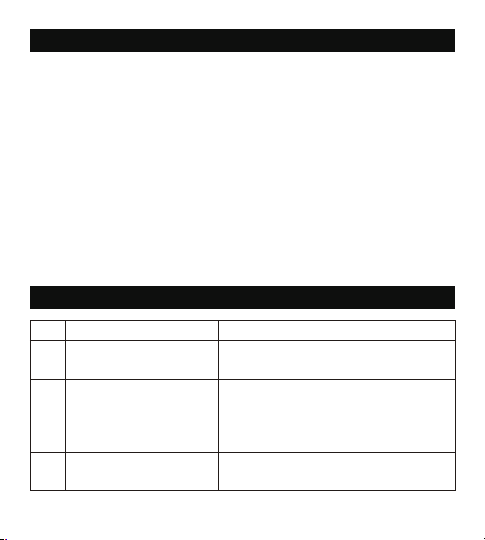
47 48
LIMPIEZA Y MANTENIMIENTO
1. Limpie los auriculares y el estuche de carga regularmente.
2. Use un paño de algodón suave y seco para limpiarlos.
Nota: No inserte nada en el dispositivo.
3. Mantenga alejado de objetos afilados para evitar arañazos.
4. Colóquelo en un lugar seco y sombreado si va a estar inactivo por
mucho tiempo.
5. No limpie el dispositivo con detergente o productos químicos.
Activar /
Desactivar el
Control por Voz
Cuando se empareja con
éxito, mantenga presionado
el control táctil en cualquiera
de los auriculares durante 2
segundos hasta que se
escuche un pitido
Pitido
Borrar Lista de
Empare-
jamiento
Entrar a Modo
de
Emparejamiento
Emparejamiento
exitoso
con su
Dispositivo
Consulte la sección "Borrar
Lista De Emparejamiento"
Consulte la sección de
“Emparejamiento”
/
/
Emparejando
Conectado
Nota: El Control Táctil Multifunción está disponible solo cuando lleva puesto
los auriculares.
Nº Problema Solución
No se encienden los
auriculares
La batería de los auriculares está baja,
por favor cárquelos
1
No se cargan los
auriculares
• Coloque los auriculares en el estuche
de carga correctamente
• Asegúrese de que el estuche de carga
esté completamente cargado
2
No se recarga el estuche
de carga
Asegúrese de que el cable de carga esté
intacto y enchufado correctamente
3
DÉPANNAGE
Bluetooth
Fuera de
Rango/ Falla de
conexión
/ Desconecte

49 50
8 Sonido de mala calidad
• Colóquese los auriculares correctamente
y manténgalos cerca uno del otro.
• Coloque el dispositivo emparejado cerca
de los auriculares o remueva obstáculos
entre ellos
• Asegúrese que los auriculares estén
limpios.
9 Conexión inestable
• Mantenga los auriculares cerca de su
dispositivo Bluetooth
• La distancia efectiva puede acortarse
debido a obstáculos.
• Desactive la función Bluetooth de otros
dispositivos para disminuir la interferencia
10
No se escucha a la otra
persona durante una
llamada telefónica
Ajuste el volumen a un nivel más alto
11
La otra parte no puede oír
su voz durante una
llamada telefónica
Asegúrese que el micrófono integrado
no esté cubierto
12
El control táctil de los
auriculares no responde
Coloque los dos auriculares dentro del
estuche de carga y cierre la cubierta.
Desconecte la conexión Bluetooth.
Destape el estuche para encender los
auriculares y emparejar nuevamente
No aparece
“TAOTRONICS
SoundLiberty 88”
en la lista de dispositivos
Bluetooth
Los auriculares se conectaron al
dispositvos emparejados anteriores de
forma automática:
• Desactive la función Bluetooth del
dispositivo previamente emparejado o
borre "TAOTRONICS SoundLiberty 88”de
su lista de dispositivos Bluetooth, y luego
vuelva a buscar
• Coloque el dispositivo al que se va a
conectar cerca de los auriculares
4
No se emparejan los
auriculares con el
dispositivo
• Encienda el dispositivo y active su
función Bluetooth antes de emparejar
• Inicie el modo de emparejamiento
como se indica en la sección
"Emparejamiento"
5
6
7
Un auricular no produce
sonido en modo de
auricular doble
Coloque ambos auriculares en el estuche
de carga y luego retírelos, se emparejarán
automáticamente. Si el emparejamiento
no es exitoso, restáurelos a la configuración
de fábrica como se indica en la sección
"Borrar Lista De Emparejamiento"
No se puede usar un
auricular solo
• Como se indica en el Modo de Auricular
Individual, asegúrese de que ambos auriculares
están emparejados con el dispositivo.
• Luego, siga los pasos para emparejar el auricular
único (izquierdo o derecho) con su dispositivo.
• Una vez emparejados, ya puede libremente
utilizar un auricular solo (izquierdo o derecho).

49 50
8 Sonido de mala calidad
• Colóquese los auriculares correctamente
y manténgalos cerca uno del otro.
• Coloque el dispositivo emparejado cerca
de los auriculares o remueva obstáculos
entre ellos
• Asegúrese que los auriculares estén
limpios.
9 Conexión inestable
• Mantenga los auriculares cerca de su
dispositivo Bluetooth
• La distancia efectiva puede acortarse
debido a obstáculos.
• Desactive la función Bluetooth de otros
dispositivos para disminuir la interferencia
10
No se escucha a la otra
persona durante una
llamada telefónica
Ajuste el volumen a un nivel más alto
11
La otra parte no puede oír
su voz durante una
llamada telefónica
Asegúrese que el micrófono integrado
no esté cubierto
12
El control táctil de los
auriculares no responde
Coloque los dos auriculares dentro del
estuche de carga y cierre la cubierta.
Desconecte la conexión Bluetooth.
Destape el estuche para encender los
auriculares y emparejar nuevamente
No aparece
“TAOTRONICS
SoundLiberty 88”
en la lista de dispositivos
Bluetooth
Los auriculares se conectaron al
dispositvos emparejados anteriores de
forma automática:
• Desactive la función Bluetooth del
dispositivo previamente emparejado o
borre "TAOTRONICS SoundLiberty 88”de
su lista de dispositivos Bluetooth, y luego
vuelva a buscar
• Coloque el dispositivo al que se va a
conectar cerca de los auriculares
4
No se emparejan los
auriculares con el
dispositivo
• Encienda el dispositivo y active su
función Bluetooth antes de emparejar
• Inicie el modo de emparejamiento
como se indica en la sección
"Emparejamiento"
5
6
7
Un auricular no produce
sonido en modo de
auricular doble
Coloque ambos auriculares en el estuche
de carga y luego retírelos, se emparejarán
automáticamente. Si el emparejamiento
no es exitoso, restáurelos a la configuración
de fábrica como se indica en la sección
"Borrar Lista De Emparejamiento"
No se puede usar un
auricular solo
• Como se indica en el Modo de Auricular
Individual, asegúrese de que ambos auriculares
están emparejados con el dispositivo.
• Luego, siga los pasos para emparejar el auricular
único (izquierdo o derecho) con su dispositivo.
• Una vez emparejados, ya puede libremente
utilizar un auricular solo (izquierdo o derecho).

51 52
GARANTÍA Y SERVICIO
Si ocurre algún problema, por favor contacte con el Centro de Atención al
Cliente de TaoTronics a través de la información de contacto señalada en esta
Guía de Usuario.
IT
IMPORTANTI ISTRUZIONI DI SICUREZZA
Si prega di leggere con attenzione le istruzioni prima di utilizzare questo
prodotto, e di conservarle per riferimento futuro.
Sicurezza nell’Ascolto
• Non indossare auricolari tenendoli ad alto volume per lunghi periodi di
tempo, per evitare danni all’udito.
• Impostare gli auricolari a basso volume prima di indossarlo, e aumentare
gradualmente il volume in base alle proprie necessità.
• Non impostare un volume troppo elevato per poter udire sempre ciò che
accade nei dintorni.
• Si prega di fare riferimento alle leggi e alle normative locali qualora si voglia
rispondere a chiamate in arrivo con questo dispositivo mentre si è alla
guida.
• Per la propria sicurezza, evitare distrazioni da musica o chiamate telefoniche
durante la guida o durante altre attività che possano presentare eventuali
rischi.
Attenzione: si prega di impostare volume ad un livello adeguato per evitare
danni all’udito.
Attenzione
• Non esporre questo prodotto ad elevate temperature.
• Non immergere gli auricolari in acqua o esporli ad umidità per lunghi
periodi di tempo.
• Non pulire il prodotto con detergenti che contengano alcol, ammoniaca,
benzene o abrasivi.
• Evitare di lasciar cadere.
• Collocare gli auricolari nella custodia per la ricarica quando non sono
utilizzati, e tenerli lontani dalla portata di bambini e animali domestici per
evitare il rischio di soffocamento.
• Non smontare né riparare questo prodotto per evitare il rischio di incendio,
l’annullamento della garanzia e/o la perdita di proprietà.
• È richiesta la massima attenzione quando il prodotto viene utilizzato vicino a
dei bambini.
• Tenere la custodia di ricarica lontana da acqua, pioggia o da altri liquidi.
• Non utilizzare il prodotto durante temporali per evitare malfunzionamenti o
shock elettrici.
• Per la riparazione, chiedere sempre l’intervento di un tecnico professionista
o di personale autorizzato.

51 52
GARANTÍA Y SERVICIO
Si ocurre algún problema, por favor contacte con el Centro de Atención al
Cliente de TaoTronics a través de la información de contacto señalada en esta
Guía de Usuario.
IT
IMPORTANTI ISTRUZIONI DI SICUREZZA
Si prega di leggere con attenzione le istruzioni prima di utilizzare questo
prodotto, e di conservarle per riferimento futuro.
Sicurezza nell’Ascolto
• Non indossare auricolari tenendoli ad alto volume per lunghi periodi di
tempo, per evitare danni all’udito.
• Impostare gli auricolari a basso volume prima di indossarlo, e aumentare
gradualmente il volume in base alle proprie necessità.
• Non impostare un volume troppo elevato per poter udire sempre ciò che
accade nei dintorni.
• Si prega di fare riferimento alle leggi e alle normative locali qualora si voglia
rispondere a chiamate in arrivo con questo dispositivo mentre si è alla
guida.
• Per la propria sicurezza, evitare distrazioni da musica o chiamate telefoniche
durante la guida o durante altre attività che possano presentare eventuali
rischi.
Attenzione: si prega di impostare volume ad un livello adeguato per evitare
danni all’udito.
Attenzione
• Non esporre questo prodotto ad elevate temperature.
• Non immergere gli auricolari in acqua o esporli ad umidità per lunghi
periodi di tempo.
• Non pulire il prodotto con detergenti che contengano alcol, ammoniaca,
benzene o abrasivi.
• Evitare di lasciar cadere.
• Collocare gli auricolari nella custodia per la ricarica quando non sono
utilizzati, e tenerli lontani dalla portata di bambini e animali domestici per
evitare il rischio di soffocamento.
• Non smontare né riparare questo prodotto per evitare il rischio di incendio,
l’annullamento della garanzia e/o la perdita di proprietà.
• È richiesta la massima attenzione quando il prodotto viene utilizzato vicino a
dei bambini.
• Tenere la custodia di ricarica lontana da acqua, pioggia o da altri liquidi.
• Non utilizzare il prodotto durante temporali per evitare malfunzionamenti o
shock elettrici.
• Per la riparazione, chiedere sempre l’intervento di un tecnico professionista
o di personale autorizzato.
53 54
Si prega di leggere con attenzione le istruzioni prima di utilizzare questo
prodotto, e di conservarle per riferimento futuro.
Sicurezza nell’Ascolto
• Non indossare auricolari tenendoli ad alto volume per lunghi periodi di
tempo, per evitare danni all’udito.
• Impostare gli auricolari a basso volume prima di indossarlo, e aumentare
gradualmente il volume in base alle proprie necessità.
• Non impostare un volume troppo elevato per poter udire sempre ciò che
accade nei dintorni.
• Si prega di fare riferimento alle leggi e alle normative locali qualora si voglia
rispondere a chiamate in arrivo con questo dispositivo mentre si è alla
guida.
• Per la propria sicurezza, evitare distrazioni da musica o chiamate telefoniche
durante la guida o durante altre attività che possano presentare eventuali
rischi.
Attenzione: si prega di impostare volume ad un livello adeguato per evitare
danni all’udito.
Attenzione
• Non esporre questo prodotto ad elevate temperature.
• Non immergere gli auricolari in acqua o esporli ad umidità per lunghi
periodi di tempo.
• Non pulire il prodotto con detergenti che contengano alcol, ammoniaca,
benzene o abrasivi.
• Evitare di lasciar cadere.
• Collocare gli auricolari nella custodia per la ricarica quando non sono
utilizzati, e tenerli lontani dalla portata di bambini e animali domestici per
evitare il rischio di soffocamento.
• Non smontare né riparare questo prodotto per evitare il rischio di incendio,
l’annullamento della garanzia e/o la perdita di proprietà.
• È richiesta la massima attenzione quando il prodotto viene utilizzato vicino a
dei bambini.
• Tenere la custodia di ricarica lontana da acqua, pioggia o da altri liquidi.
• Non utilizzare il prodotto durante temporali per evitare malfunzionamenti o
shock elettrici.
• Per la riparazione, chiedere sempre l’intervento di un tecnico professionista
o di personale autorizzato.
Questo prodotto contiene la batteria al litio. Non esporlo mai a calore
eccessivo, come luce diretta del sole o il fuoco per evitare esplosioni.
INDOSSARE DEGLI AURICOLARI
Si prega di indossare gli auricolari come mostrato sotto (Fig. 3).
Le immagini sono soltanto a scopo di riferimento.
Attenzione con il Bluetooth
• Quando il dispositivo è collegato senza fili ad un altro dispositivo, avvicinare
i due dispositivi per ottenere un funzionamento normale ed evitare
possibili interferenze nel segnale.
• Il raggio d’azione massimo del Bluetooth è variabile in funzione delle
condizioni ambientali.
• Durante l’utilizzo di una connessione senza fili, assicurarsi che non ci siano
ostacoli tra i due dispositivi. Gli ostacoli come muri e recinzioni possono
ridurre il raggio d’azione.
UTILIZZO DEGLI AURICOLARI
Ricarica
Ricaricare gli Auricolari
1. Collocare gli auricolari nella custodia di ricarica in base alle indicazioni L
(left, sinistra) e R (right, destra) (Fig. 4).
2. Coprire il coperchio e la ricarica inizierà automaticamente(Fig. 5).
Nota:
• Si prega di ricaricare completamente gli auricolari prima del primo utilizzo.
• Quando il livello della batteria è basso, e se si stanno indossando gli
auricolari, si sentirà un messaggio vocale “battery low” . Si prega di
ricaricare immediatamente, oppure gli auricolari si spegneranno
automaticamente nel giro di 10 minuti circa.
• Ricaricare gli auricolari almeno una volta ogni 3 mesi quando non vengono
utilizzati per lungo tempo.
3
① ②
TECNOLOGIA SMART AI DI RIDUZIONE DEL RUMORE PER
CHIAMATE CHIARE
Elevoc Vocplus è una tecnologia di riduzione del rumore
basata su DNN che può estrarre il tuo parlato in modo
intelligente e far sentire al chiamante la tua voce chiara
rimuovendo i rumori di fondo.
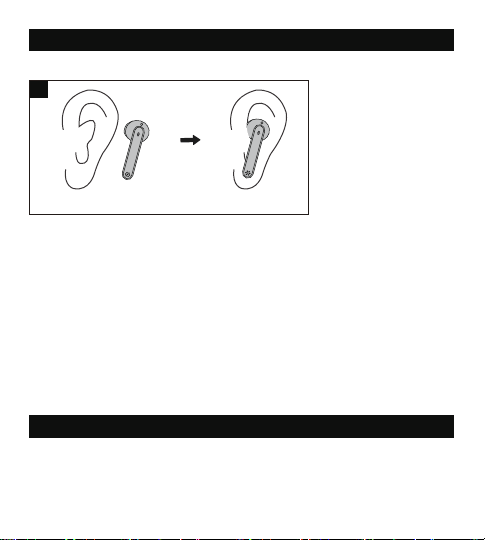
53 54
Si prega di leggere con attenzione le istruzioni prima di utilizzare questo
prodotto, e di conservarle per riferimento futuro.
Sicurezza nell’Ascolto
• Non indossare auricolari tenendoli ad alto volume per lunghi periodi di
tempo, per evitare danni all’udito.
• Impostare gli auricolari a basso volume prima di indossarlo, e aumentare
gradualmente il volume in base alle proprie necessità.
• Non impostare un volume troppo elevato per poter udire sempre ciò che
accade nei dintorni.
• Si prega di fare riferimento alle leggi e alle normative locali qualora si voglia
rispondere a chiamate in arrivo con questo dispositivo mentre si è alla
guida.
• Per la propria sicurezza, evitare distrazioni da musica o chiamate telefoniche
durante la guida o durante altre attività che possano presentare eventuali
rischi.
Attenzione: si prega di impostare volume ad un livello adeguato per evitare
danni all’udito.
Attenzione
• Non esporre questo prodotto ad elevate temperature.
• Non immergere gli auricolari in acqua o esporli ad umidità per lunghi
periodi di tempo.
• Non pulire il prodotto con detergenti che contengano alcol, ammoniaca,
benzene o abrasivi.
• Evitare di lasciar cadere.
• Collocare gli auricolari nella custodia per la ricarica quando non sono
utilizzati, e tenerli lontani dalla portata di bambini e animali domestici per
evitare il rischio di soffocamento.
• Non smontare né riparare questo prodotto per evitare il rischio di incendio,
l’annullamento della garanzia e/o la perdita di proprietà.
• È richiesta la massima attenzione quando il prodotto viene utilizzato vicino a
dei bambini.
• Tenere la custodia di ricarica lontana da acqua, pioggia o da altri liquidi.
• Non utilizzare il prodotto durante temporali per evitare malfunzionamenti o
shock elettrici.
• Per la riparazione, chiedere sempre l’intervento di un tecnico professionista
o di personale autorizzato.
Questo prodotto contiene la batteria al litio. Non esporlo mai a calore
eccessivo, come luce diretta del sole o il fuoco per evitare esplosioni.
INDOSSARE DEGLI AURICOLARI
Si prega di indossare gli auricolari come mostrato sotto (Fig. 3).
Le immagini sono soltanto a scopo di riferimento.
Attenzione con il Bluetooth
• Quando il dispositivo è collegato senza fili ad un altro dispositivo, avvicinare
i due dispositivi per ottenere un funzionamento normale ed evitare
possibili interferenze nel segnale.
• Il raggio d’azione massimo del Bluetooth è variabile in funzione delle
condizioni ambientali.
• Durante l’utilizzo di una connessione senza fili, assicurarsi che non ci siano
ostacoli tra i due dispositivi. Gli ostacoli come muri e recinzioni possono
ridurre il raggio d’azione.
UTILIZZO DEGLI AURICOLARI
Ricarica
Ricaricare gli Auricolari
1. Collocare gli auricolari nella custodia di ricarica in base alle indicazioni L
(left, sinistra) e R (right, destra) (Fig. 4).
2. Coprire il coperchio e la ricarica inizierà automaticamente(Fig. 5).
Nota:
• Si prega di ricaricare completamente gli auricolari prima del primo utilizzo.
• Quando il livello della batteria è basso, e se si stanno indossando gli
auricolari, si sentirà un messaggio vocale “battery low” . Si prega di
ricaricare immediatamente, oppure gli auricolari si spegneranno
automaticamente nel giro di 10 minuti circa.
• Ricaricare gli auricolari almeno una volta ogni 3 mesi quando non vengono
utilizzati per lungo tempo.
3
① ②
TECNOLOGIA SMART AI DI RIDUZIONE DEL RUMORE PER
CHIAMATE CHIARE
Elevoc Vocplus è una tecnologia di riduzione del rumore
basata su DNN che può estrarre il tuo parlato in modo
intelligente e far sentire al chiamante la tua voce chiara
rimuovendo i rumori di fondo.
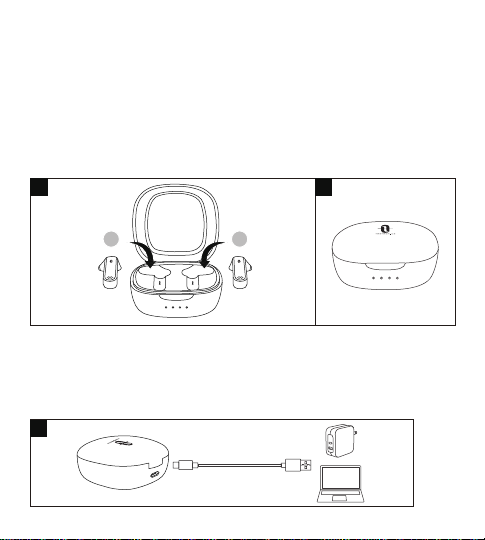
55 56
Ricarica
Ricaricare gli Auricolari
1. Collocare gli auricolari nella custodia di ricarica in base alle indicazioni L
(left, sinistra) e R (right, destra) (Fig. 4).
Ricaricare la Custodia
1. Collegare la porta di ricarica con qualsiasi adattatore di ricarica USB o con
una presa USB attiva di un computer (Fig. 6).
2. I quattro indicatori di ricarica si illumineranno progressivamente.
Nota: Disconnettere il cavo di ricarica una volta completata la ricarica.
Accensione ( Fig. 7 )
Scoprire il coperchio e si accenderanno automaticamente.
Spegnimento ( Fig. 8 )
Collocare gli auricolari nella custodia per la ricarica. Si spegneranno
automaticamente.
2. Coprire il coperchio e la ricarica inizierà automaticamente(Fig. 5).
Nota:
• Si prega di ricaricare completamente gli auricolari prima del primo utilizzo.
• Quando il livello della batteria è basso, e se si stanno indossando gli
auricolari, si sentirà un messaggio vocale “battery low” . Si prega di
ricaricare immediatamente, oppure gli auricolari si spegneranno
automaticamente nel giro di 10 minuti circa.
• Ricaricare gli auricolari almeno una volta ogni 3 mesi quando non vengono
utilizzati per lungo tempo.
4 5
L R
6
7
L R
8
L R
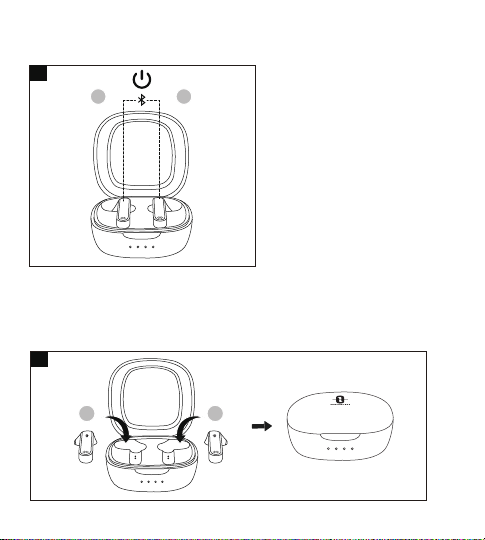
55 56
Ricarica
Ricaricare gli Auricolari
1. Collocare gli auricolari nella custodia di ricarica in base alle indicazioni L
(left, sinistra) e R (right, destra) (Fig. 4).
Ricaricare la Custodia
1. Collegare la porta di ricarica con qualsiasi adattatore di ricarica USB o con
una presa USB attiva di un computer (Fig. 6).
2. I quattro indicatori di ricarica si illumineranno progressivamente.
Nota: Disconnettere il cavo di ricarica una volta completata la ricarica.
Accensione ( Fig. 7 )
Scoprire il coperchio e si accenderanno automaticamente.
Spegnimento ( Fig. 8 )
Collocare gli auricolari nella custodia per la ricarica. Si spegneranno
automaticamente.
2. Coprire il coperchio e la ricarica inizierà automaticamente(Fig. 5).
Nota:
• Si prega di ricaricare completamente gli auricolari prima del primo utilizzo.
• Quando il livello della batteria è basso, e se si stanno indossando gli
auricolari, si sentirà un messaggio vocale “battery low” . Si prega di
ricaricare immediatamente, oppure gli auricolari si spegneranno
automaticamente nel giro di 10 minuti circa.
• Ricaricare gli auricolari almeno una volta ogni 3 mesi quando non vengono
utilizzati per lungo tempo.
4 5
L R
6
7
L R
8
L R

57 58
Accoppiamento
• È possibile utilizzare un auricolare o entrambi, a piacimento. Si prega di fare
riferimento alle relative istruzioni per l’accoppiamento.
• Prima dell’accoppiamento, si prega di spegnere eventuali altri dispositivi
Bluetooth nelle vicinanze e di collocare il dispositivo da collegare vicino agli
auricolari.
• Quando gli auricolari sono disconnessi dal dispositivo per più di 10 minuti,
essi si spegneranno automaticamente.
Modalità Due Auricolari
1. Togliere il coperchio per accendere gli auricolari, che si collegheranno
automaticamente uno all’altro. Gli indicatori LED su entrambi gli auricolari
lampeggeranno velocemente di bianco, ad indicare che sono in modalità
di accoppiamento.
2. Accendere la funzione Bluetooth sul proprio dispositivo e ricercare i
dispositivi nelle vicinanze. Trovare “TAOTRONICS SoundLiberty 88” nei
risultati di ricarca. Premere sul nome per collegare.
3. Una volta collegati, gli indicatori di funzionamento su entrambi gli auricolari
si spengono.
Nota:
• Gli auricolari sono in grado di ricordare i dispositivi ai quali sono stati
accoppiati in precedenza, e cercheranno di accoppiarsi con l’ultimo
dispositivo connesso. Se il ri-accoppiamento fallisce, gli auricolari entraranno
nella modalità di accoppiamento.
• Nono si consiglia di indossare i due auricolari su due persone diverse. Se
necessario, si prega di tenere i due auricolari vicini l’uno all’altro nella
modalità due auricolari in coppia.
Modalità Auricolare Singolo
Modalità Auricolari Singoli è disponibile solo quando gli auricolari sono stati
accopiati al dispositivo in Modalità Due Auricolari.
1. Estrarre uno degli auricolari dalla base di ricarica, assicurandosi che l’altro
sia nella base di ricarica e che il coperchio sia chiuso.
2. Proverà ad accoppiare con l'ultimo dispositivo accoppiato in Modalità Due
Cancellare lo Storico degli Accoppiamenti
Se non si è riusciti ad accoppiare il proprio dispositivo con gli auricolari, si
prega di cancellare lo storico degli accoppiamenti seguendo queste istruzioni:
1. Se il tuo dispositivo è già stato accoppiato in precedenza con gli auricolari,
per prima cosa rimuovi "TAOTRONICS SoundLiberty 88" dalla lista dei
dispositivi Bluetooth.
2. Estrai uno degli auricolari e assicurati che l’altro sia collocato nella base di
ricarica e che il coperchio sia chiuso. Indossa l’auricolare, premi e tieni
premuto il Pulsante Touch Multifunzione sull’auricolare per 10 secondi
finché non sentirai un bip. Lo storico degli accoppiamenti viene cancellato
e l’auricolare si spegne.
3. Apri il coperchio, estrai l’altro auricolare, premi e tieni premuto il suo
Pulsante Touch Multifunzione per 10 secondi finché non sentirai un bip. Lo
storico degli accoppiamenti viene cancellato e l’auricolare si spegne.
4. Rimetti entrambi gli auricolari nella base di ricarica, chiudi il coperchio e
riaprilo per riaccoppiare con il tuo dispositivo Bluetooth® come spiegato
nella sezione “Accoppiamento”.
Nota:
Se si desidera accoppiare gli auricolari con un altro dispositivo quando essi
sono già stati accoppiati ad un dispositivo, disattivare la funzione Bluetooth sul
dispositivo accoppiato o cancellare “TAOTRONICS SoundLiberty 88” dalla lista
dei suoi dispositivi Bluetooth. Ripristinare gli auricolari alle impostazioni di
fabbrica come sopra spiegato se l’accoppiamento non è andato a buon fine.
Auricolari. Una volta collegato, l'indicatore LED si spengono.
3. Se l'accoppiamento non è andato a buon fine, ricollegare entrambi gli
auricolari al dispositivo Bluetooth® come indicato nella sezione "Modalità
Due Auricolari".
Nota:
Se si desidera passare alla modalità Due Auricolari, è sufficiente estrarre
l’altro auricolare dalla custodia di ricarica, e i due auricolari si accoppieran
no automaticamente.

57 58
Accoppiamento
• È possibile utilizzare un auricolare o entrambi, a piacimento. Si prega di fare
riferimento alle relative istruzioni per l’accoppiamento.
• Prima dell’accoppiamento, si prega di spegnere eventuali altri dispositivi
Bluetooth nelle vicinanze e di collocare il dispositivo da collegare vicino agli
auricolari.
• Quando gli auricolari sono disconnessi dal dispositivo per più di 10 minuti,
essi si spegneranno automaticamente.
Modalità Due Auricolari
1. Togliere il coperchio per accendere gli auricolari, che si collegheranno
automaticamente uno all’altro. Gli indicatori LED su entrambi gli auricolari
lampeggeranno velocemente di bianco, ad indicare che sono in modalità
di accoppiamento.
2. Accendere la funzione Bluetooth sul proprio dispositivo e ricercare i
dispositivi nelle vicinanze. Trovare “TAOTRONICS SoundLiberty 88” nei
risultati di ricarca. Premere sul nome per collegare.
3. Una volta collegati, gli indicatori di funzionamento su entrambi gli auricolari
si spengono.
Nota:
• Gli auricolari sono in grado di ricordare i dispositivi ai quali sono stati
accoppiati in precedenza, e cercheranno di accoppiarsi con l’ultimo
dispositivo connesso. Se il ri-accoppiamento fallisce, gli auricolari entraranno
nella modalità di accoppiamento.
• Nono si consiglia di indossare i due auricolari su due persone diverse. Se
necessario, si prega di tenere i due auricolari vicini l’uno all’altro nella
modalità due auricolari in coppia.
Modalità Auricolare Singolo
Modalità Auricolari Singoli è disponibile solo quando gli auricolari sono stati
accopiati al dispositivo in Modalità Due Auricolari.
1. Estrarre uno degli auricolari dalla base di ricarica, assicurandosi che l’altro
sia nella base di ricarica e che il coperchio sia chiuso.
2. Proverà ad accoppiare con l'ultimo dispositivo accoppiato in Modalità Due
Cancellare lo Storico degli Accoppiamenti
Se non si è riusciti ad accoppiare il proprio dispositivo con gli auricolari, si
prega di cancellare lo storico degli accoppiamenti seguendo queste istruzioni:
1. Se il tuo dispositivo è già stato accoppiato in precedenza con gli auricolari,
per prima cosa rimuovi "TAOTRONICS SoundLiberty 88" dalla lista dei
dispositivi Bluetooth.
2. Estrai uno degli auricolari e assicurati che l’altro sia collocato nella base di
ricarica e che il coperchio sia chiuso. Indossa l’auricolare, premi e tieni
premuto il Pulsante Touch Multifunzione sull’auricolare per 10 secondi
finché non sentirai un bip. Lo storico degli accoppiamenti viene cancellato
e l’auricolare si spegne.
3. Apri il coperchio, estrai l’altro auricolare, premi e tieni premuto il suo
Pulsante Touch Multifunzione per 10 secondi finché non sentirai un bip. Lo
storico degli accoppiamenti viene cancellato e l’auricolare si spegne.
4. Rimetti entrambi gli auricolari nella base di ricarica, chiudi il coperchio e
riaprilo per riaccoppiare con il tuo dispositivo Bluetooth® come spiegato
nella sezione “Accoppiamento”.
Nota:
Se si desidera accoppiare gli auricolari con un altro dispositivo quando essi
sono già stati accoppiati ad un dispositivo, disattivare la funzione Bluetooth sul
dispositivo accoppiato o cancellare “TAOTRONICS SoundLiberty 88” dalla lista
dei suoi dispositivi Bluetooth. Ripristinare gli auricolari alle impostazioni di
fabbrica come sopra spiegato se l’accoppiamento non è andato a buon fine.
Auricolari. Una volta collegato, l'indicatore LED si spengono.
3. Se l'accoppiamento non è andato a buon fine, ricollegare entrambi gli
auricolari al dispositivo Bluetooth® come indicato nella sezione "Modalità
Due Auricolari".
Nota:
Se si desidera passare alla modalità Due Auricolari, è sufficiente estrarre
l’altro auricolare dalla custodia di ricarica, e i due auricolari si accoppieran
no automaticamente.

59 60
OPERAZIONI E FUNZIONI
Funzione
Riproduzione /
Pausa
Operazione
• Toccare il Touch Control su uno
dei auricolari due volte
• Mettere/Togliere gli auricolari
Premere e tenere premuto il
Controllo Touch sull’auricolare
destro per più di 3 secondi
Premere e tenere premuto il
Controllo Touch sull’auricolare
sinistro per più di 3 secondi
Toccare il Touch Control
sull'auricolare sinistro tre volte
• Toccare il Touch Control su
uno dei auricolari una volta
• Indossare entrambi gli auricolari
Toccare il Touch Control
sull'auricolare destro tre volte
Toccare il Touch Control su
uno dei auricolari due volte
Volume +
Volume -
Traccia
Precedente
Traccia
Seguente
Rispondere
alla telefonata
Attiva /
Disattiva il
Controllo
Vocale
Riagganciare
Telefonata
Rifiutare una
Chiamata in
Arrivo
Toccare e tenere premuto il
Touch Control su uno dei
auricolari per 2 secondi
Quando accoppiato con
successo, tenere premuto il
Touch Control su uno dei
auricolari per 2 secondi fino
a sentire un segnale acustico
Istruzione Vocale
/
Viene emesso un suono quando
viene raggiunto il valore più alto
/
/
/
/
Suono di Corno
Chiamata rifiutata
/
Cancellare lo
Storico degli
Accoppiamenti
Fare riferimento alla sezione
“Cancellare lo Storico degli
Accoppiamenti”
Andare in
Modalità
Accoppia-
mento
Accoppia-
mento
Avvenuto con
Successo
Bluetooth fuori
dal Raggio
d’azione /
Accoppiamento
col proprio
dispositivo
fallito
Fare riferimento alla sezione
“Accoppiamento”
/
/
/
Accopiamento
Connesso
Disconnesso
Nota: Il Controllo Touch Multifunzione è disponibile solo quando si indossano
gli auricolari.

59 60
OPERAZIONI E FUNZIONI
Funzione
Riproduzione /
Pausa
Operazione
• Toccare il Touch Control su uno
dei auricolari due volte
• Mettere/Togliere gli auricolari
Premere e tenere premuto il
Controllo Touch sull’auricolare
destro per più di 3 secondi
Premere e tenere premuto il
Controllo Touch sull’auricolare
sinistro per più di 3 secondi
Toccare il Touch Control
sull'auricolare sinistro tre volte
• Toccare il Touch Control su
uno dei auricolari una volta
• Indossare entrambi gli auricolari
Toccare il Touch Control
sull'auricolare destro tre volte
Toccare il Touch Control su
uno dei auricolari due volte
Volume +
Volume -
Traccia
Precedente
Traccia
Seguente
Rispondere
alla telefonata
Attiva /
Disattiva il
Controllo
Vocale
Riagganciare
Telefonata
Rifiutare una
Chiamata in
Arrivo
Toccare e tenere premuto il
Touch Control su uno dei
auricolari per 2 secondi
Quando accoppiato con
successo, tenere premuto il
Touch Control su uno dei
auricolari per 2 secondi fino
a sentire un segnale acustico
Istruzione Vocale
/
Viene emesso un suono quando
viene raggiunto il valore più alto
/
/
/
/
Suono di Corno
Chiamata rifiutata
/
Cancellare lo
Storico degli
Accoppiamenti
Fare riferimento alla sezione
“Cancellare lo Storico degli
Accoppiamenti”
Andare in
Modalità
Accoppia-
mento
Accoppia-
mento
Avvenuto con
Successo
Bluetooth fuori
dal Raggio
d’azione /
Accoppiamento
col proprio
dispositivo
fallito
Fare riferimento alla sezione
“Accoppiamento”
/
/
/
Accopiamento
Connesso
Disconnesso
Nota: Il Controllo Touch Multifunzione è disponibile solo quando si indossano
gli auricolari.

61 62
PULIZIA E MANUTENZIONE
1. Pulire regolarmente gli auricolari e la custodia per la ricarica.
2. Utilizzare un panno di cotone asciutto e morbido per pulire il dispositivo.
Nota: Non inserire nulla dentro al prodotto.
3. Tenere lontano da oggetti appuntiti per evitare graffi.
4. Collocare il dispositivo in un luogo fresco e asciutto se non utilizzato per
lungo tempo.
5. Non pulire il prodotto con detergenti o prodotti chimici.
Impossibile trovare
“TAOTRONICS
SoundLiberty 88”
nell’elenco dei
dispositivi Bluetooth
Gli auricolari hanno cercato di riconnettersi
automaticamente ad un dispositivo
accoppiato in precedenza:
• Disattivare la funzione Bluetooth sul
dispositivo accoppiato in precedenza o
eliminare “TAOTRONICS SoundLiberty 88”
dall’elenco dei dispositivi Bluetooth, quindi
ripetere la ricerca
• Collocare il dispositivo da collegare vicino
agli auricolari
4
Impossibile accoppiare
gli auricolari con il
dispositivo
• Accendere il dispositivo e attivare la sua
funzione Bluetooth prima di procedere
con l’accoppiamento
• Portare gli auricolari in modalità di
accoppiamento
5
6
N. Problema Soluzione
Gli auricolari non si
accendono
Basso livello della batteria degli auricolari,
si prega di ricaricarli
1
Impossibile ricaricare gli
auricolari
• Collocare correttamente gli auricolari
nella custodia per la ricarica
• Assicurarsi che la custodia per la ricarica
sia completamente ricaricata
2
Impossibile ricaricare la
custodia per la ricarica
Assicurarsi che il cavo della custodia per
la ricarica sia intatto e collegato
correttamente
3
SOLUZIONE DI PROBLEMI
Utilizzo come auricolare
singolo non riuscito
• Come spiegato nella Modalità Auricolare
Singolo, assicurarsi per prima cosa che
entrambi gli auricolari siano accoppiati
con il proprio dispositivo.
• Seguire quindi i passi indicati per
accoppiare l’auricolare singolo (sinistro
o destro) con il proprio dispositivo.
• Una volta effettuato l’accoppiamento, è
possibile utilizzare a piacimento
l’auricolare singolo (sinistro o destro).

61 62
PULIZIA E MANUTENZIONE
1. Pulire regolarmente gli auricolari e la custodia per la ricarica.
2. Utilizzare un panno di cotone asciutto e morbido per pulire il dispositivo.
Nota: Non inserire nulla dentro al prodotto.
3. Tenere lontano da oggetti appuntiti per evitare graffi.
4. Collocare il dispositivo in un luogo fresco e asciutto se non utilizzato per
lungo tempo.
5. Non pulire il prodotto con detergenti o prodotti chimici.
Impossibile trovare
“TAOTRONICS
SoundLiberty 88”
nell’elenco dei
dispositivi Bluetooth
Gli auricolari hanno cercato di riconnettersi
automaticamente ad un dispositivo
accoppiato in precedenza:
• Disattivare la funzione Bluetooth sul
dispositivo accoppiato in precedenza o
eliminare “TAOTRONICS SoundLiberty 88”
dall’elenco dei dispositivi Bluetooth, quindi
ripetere la ricerca
• Collocare il dispositivo da collegare vicino
agli auricolari
4
Impossibile accoppiare
gli auricolari con il
dispositivo
• Accendere il dispositivo e attivare la sua
funzione Bluetooth prima di procedere
con l’accoppiamento
• Portare gli auricolari in modalità di
accoppiamento
5
6
N. Problema Soluzione
Gli auricolari non si
accendono
Basso livello della batteria degli auricolari,
si prega di ricaricarli
1
Impossibile ricaricare gli
auricolari
• Collocare correttamente gli auricolari
nella custodia per la ricarica
• Assicurarsi che la custodia per la ricarica
sia completamente ricaricata
2
Impossibile ricaricare la
custodia per la ricarica
Assicurarsi che il cavo della custodia per
la ricarica sia intatto e collegato
correttamente
3
SOLUZIONE DI PROBLEMI
Utilizzo come auricolare
singolo non riuscito
• Come spiegato nella Modalità Auricolare
Singolo, assicurarsi per prima cosa che
entrambi gli auricolari siano accoppiati
con il proprio dispositivo.
• Seguire quindi i passi indicati per
accoppiare l’auricolare singolo (sinistro
o destro) con il proprio dispositivo.
• Una volta effettuato l’accoppiamento, è
possibile utilizzare a piacimento
l’auricolare singolo (sinistro o destro).

63 64
9
Connessione instabile
• Tenere gli auricolari vicini al dispositivo
Bluetooth
• La distanza effettiva può essere inferiore
se ci sono ostacoli nel mezzo
• Spegnere eventuali altri dispositivi
Bluetooth per ridurre le interferenze
10
Impossibile udire
l’interlocutore durante
una chiamata
Alzare il livello del volume
11
L’interlocutore non riesce
a sentire la voce di chi
parla durante una
chiamata
Fare attenzione a non coprire il microfono
integrato
12
Il controllo touch degli
auricolari non risponde
Collocare i due auricolari nella base di
ricarica e chiudere il coperchio.
Scollegare la connessione Bluetooth.
Aprire il coperchio per accendere gli
auricolari e accoppiare nuovamente
GARANZIA E ASSISTENZA
Per qualsiasi problema si prega di contattare il Centro di Assistenza Clienti
TaoTronics (vedi le informazioni di contatto elencate nel presente Manuale
Utente).
7
Non si sente alcun suono
in uno dei due auricolari
nella modalità Due
Auricolari
Rimettere entrambi gli auricolari nella
custodia per la ricarica ed estrarli
nuovamente. Essi si accoppieranno
automaticamente tra di loro. Se
l’accoppiamento non va a buon fine,
riportarli alle impostazioni di fabbrica
come spiegato nella sezione “Cancellare
lo Storico degli Accoppiamenti”
8
Qualità del suono
scadente
• Indossare correttamente gli auricolari e
tenerli l’uno vicino all’altro.
• Collocare il dispositivo connesso vicino
agli auricolari o rimuovere gli ostacoli
tra di essi
• Pulire eventuali tracce di sporco sugli
auricolari

63 64
9
Connessione instabile
• Tenere gli auricolari vicini al dispositivo
Bluetooth
• La distanza effettiva può essere inferiore
se ci sono ostacoli nel mezzo
• Spegnere eventuali altri dispositivi
Bluetooth per ridurre le interferenze
10
Impossibile udire
l’interlocutore durante
una chiamata
Alzare il livello del volume
11
L’interlocutore non riesce
a sentire la voce di chi
parla durante una
chiamata
Fare attenzione a non coprire il microfono
integrato
12
Il controllo touch degli
auricolari non risponde
Collocare i due auricolari nella base di
ricarica e chiudere il coperchio.
Scollegare la connessione Bluetooth.
Aprire il coperchio per accendere gli
auricolari e accoppiare nuovamente
GARANZIA E ASSISTENZA
Per qualsiasi problema si prega di contattare il Centro di Assistenza Clienti
TaoTronics (vedi le informazioni di contatto elencate nel presente Manuale
Utente).
7
Non si sente alcun suono
in uno dei due auricolari
nella modalità Due
Auricolari
Rimettere entrambi gli auricolari nella
custodia per la ricarica ed estrarli
nuovamente. Essi si accoppieranno
automaticamente tra di loro. Se
l’accoppiamento non va a buon fine,
riportarli alle impostazioni di fabbrica
come spiegato nella sezione “Cancellare
lo Storico degli Accoppiamenti”
8
Qualità del suono
scadente
• Indossare correttamente gli auricolari e
tenerli l’uno vicino all’altro.
• Collocare il dispositivo connesso vicino
agli auricolari o rimuovere gli ostacoli
tra di essi
• Pulire eventuali tracce di sporco sugli
auricolari

65 66
安全上のご注意
この取扱説明書では、本製品の使用方法や安全にお取扱いいただくための注意事
項を記載しております。ご使用の前によくご覧ください。読み終わったあともこの取
扱説明書は大切に保管してください。
ご注意
• 大音量で長時間イヤフォンをご利用にならないでください。聴覚に支障をきたす
ことがあります。
• イヤフォンを装着する際に音量を小さくして、装着後に徐々に音量の調整を行っ
てください。
• 周囲の音が聞こえなくなる程の音量でご利用になることは避けてください。
• 本製品を運転中の通話でご利用になる場合は、当該地の法律や規定を確認の上
ご利用ください。
• 運転や他の危険が伴う行為を行う際に、音楽を聴いたり、通話をしたりすることで
気を散らすことは、お避けください。
警告: 聴覚を損ねないよう、適切な音量でご利用ください。
警告
• 高温に晒さないでください。
• イヤフォンを水に浸したり、長い間湿度の高い環境に置いたりしないでください。
• 本製品にアルコール、アンモニア、ベンゼン、研磨剤を含む洗浄剤を使用しないで
ください。
• 使用していない場合は、イヤフォンを充電ケースに入れ、子供の手の届かないと
ころで保管してください。小さなお子様が口に入れると、窒息の恐れがあります。
• 本製品の分解や改造は、火災の恐れや保証の取り消しまたは製品破損の
可能性があるためお止めください。
この製品にはリチウム電池が含まれています。絶対に直射日光や火気のあ
るところで 保管しないでください。爆発の可能性があります。
JP
• お子様がご利用の際は、近くで監視が必要です。
• 充電ケースは、水・雨などの液体には近づけないでください。
• 雷雨の際のご利用は避けてください。製品の故障や電気ショックの可能性があり
ます。
• 修理は、必ず専門家または有資格者へご相談ください。
クリアコー ル向 けのスマートA Iノイズキャンセリング
Elevoc Vocplusは、DNNベースのノイズキャンセリングであり、電話通
話中の雑音除去し、周囲の騒音を消してクリアな音声を通話相手に伝
えることができるようにします。
65 66
安全上のご注意
この取扱説明書では、本製品の使用方法や安全にお取扱いいただくための注意事
項を記載しております。ご使用の前によくご覧ください。読み終わったあともこの取
扱説明書は大切に保管してください。
ご注意
• 大音量で長時間イヤフォンをご利用にならないでください。聴覚に支障をきたす
ことがあります。
• イヤフォンを装着する際に音量を小さくして、装着後に徐々に音量の調整を行っ
てください。
• 周囲の音が聞こえなくなる程の音量でご利用になることは避けてください。
• 本製品を運転中の通話でご利用になる場合は、当該地の法律や規定を確認の上
ご利用ください。
• 運転や他の危険が伴う行為を行う際に、音楽を聴いたり、通話をしたりすることで
気を散らすことは、お避けください。
警告: 聴覚を損ねないよう、適切な音量でご利用ください。
警告
• 高温に晒さないでください。
• イヤフォンを水に浸したり、長い間湿度の高い環境に置いたりしないでください。
• 本製品にアルコール、アンモニア、ベンゼン、研磨剤を含む洗浄剤を使用しないで
ください。
• 使用していない場合は、イヤフォンを充電ケースに入れ、子供の手の届かないと
ころで保管してください。小さなお子様が口に入れると、窒息の恐れがあります。
• 本製品の分解や改造は、火災の恐れや保証の取り消しまたは製品破損の
可能性があるためお止めください。
この製品にはリチウム電池が含まれています。絶対に直射日光や火気のあ
るところで 保管しないでください。爆発の可能性があります。
JP
• お子様がご利用の際は、近くで監視が必要です。
• 充電ケースは、水・雨などの液体には近づけないでください。
• 雷雨の際のご利用は避けてください。製品の故障や電気ショックの可能性があり
ます。
• 修理は、必ず専門家または有資格者へご相談ください。
クリアコー ル 向けのスマ ートA Iノイズキャンセリング
Elevoc Vocplusは、DNNベースのノイズキャンセリングであり、電話通
話中の雑音除去し、周囲の騒音を消してクリアな音声を通話相手に伝
えることができるようにします。
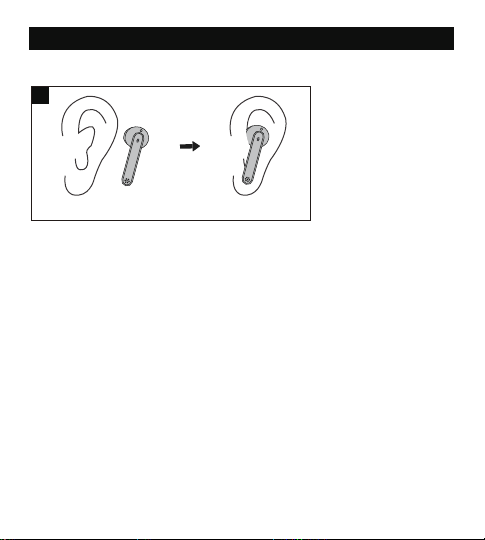
67 68
装着方法
図示のように、イヤフォンを装着します(図. 3)。
Bluetoothについての注意事項
• イヤフォンが他のデバイスと接続する際に、2つの機器を近くに置いてください。
距離が遠い場合は、シグナル妨害が起こることがあります。
• Bluetoothの最大有効範囲は、環境状況によって異なる場合があります。
• ワイヤレス接続を利用する場合、2つのデバイスの間に障害物がないことを確認
ください。壁やフェンスは有効範囲を狭める可能性があります。
使い方
充電
イヤフォン の 充 電
1. イヤフォンをL(左)、R(右)のマークに従ってそれぞれ充電ケースに入れます(図. 4)。
2. 蓋を閉めると自動的に充電が始まります(図. 5)。
ケースの充電
1. 充電ポートをUSB充電アダプターまたは電源の入ったコンピューターのUSBポ
ートに接続します(図. 6)
2. 4つの充電インジケーターが進行状況とともに光ります。
注 意:充電が完了したら充電ケーブルを外してください。
注意:
• イヤフォンを初めてご利用になる場合は、フル充電にしてからご利用ください。
• バッテリー残量が低くなると、「Low battery」という音声案内が聞こえます(イヤフ
ォンを装着している場合)。その後、10分以内に充電をしないとイヤフォンは自動
的に電源が切れます。
• 長期間イヤフォンを利用しない場合は、最低でも3ヶ月おきに充電してください。
3
① ②
4 5
L R
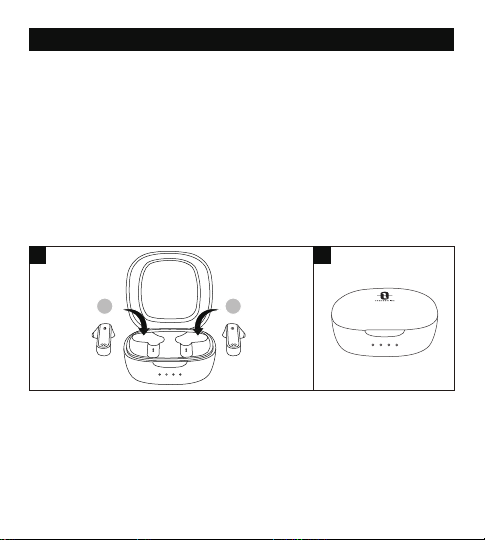
67 68
装着方法
図示のように、イヤフォンを装着します(図. 3)。
Bluetoothについての注意事項
• イヤフォンが他のデバイスと接続する際に、2つの機器を近くに置いてください。
距離が遠い場合は、シグナル妨害が起こることがあります。
• Bluetoothの最大有効範囲は、環境状況によって異なる場合があります。
• ワイヤレス接続を利用する場合、2つのデバイスの間に障害物がないことを確認
ください。壁やフェンスは有効範囲を狭める可能性があります。
使い方
充電
イヤフォン の 充 電
1. イヤフォンをL(左)、R(右)のマークに従ってそれぞれ充電ケースに入れます(図. 4)。
2. 蓋を閉めると自動的に充電が始まります(図. 5)。
ケースの充電
1. 充電ポートをUSB充電アダプターまたは電源の入ったコンピューターのUSBポ
ートに接続します(図. 6)
2. 4つの充電インジケーターが進行状況とともに光ります。
注 意:充電が完了したら充電ケーブルを外してください。
注意:
• イヤフォンを初めてご利用になる場合は、フル充電にしてからご利用ください。
• バッテリー残量が低くなると、「Low battery」という音声案内が聞こえます(イヤフ
ォンを装着している場合)。その後、10分以内に充電をしないとイヤフォンは自動
的に電源が切れます。
• 長期間イヤフォンを利用しない場合は、最低でも3ヶ月おきに充電してください。
3
① ②
4 5
L R
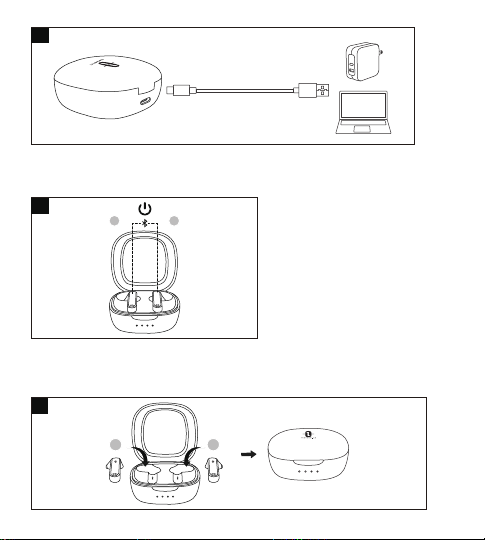
69 70
ペアリング
• お好みに合わせて、イヤフォンは2つまたは1つでもご利用いただけます。それぞ
れのペアリング設定をご参照ください。
• ペアリングをする前に、他のBluetoothデバイスの電源を切り、イヤフォンと接続
したいデバイスを近くに置いてください。
• イヤホンは10分以上対象ディバスと未接続されると、自動的にオフになります。
両 耳 モード
1. 蓋をあけるとイヤフォンがオンになり、イヤフォンはお互いに自動で接続されま
す。ペアリングモードの間、両方のイヤフォンのLEDインジケーターが白く素早く
点滅します。
2. ご利用の機器のBluetooth機能をオンにし、近くの機器を検索します。検索結果
から“TAOTRONICS SoundLiberty 88”を探し、名前をタップして接続します。
3. 接続されると、両方のイヤフォンのLEDインジケーターが消灯します。
注 意:
•
イヤフォンは、前回ペアリングを行った機器を記憶し、最後に接続された機器に接
続を試みます。もし再ペアリングができなかった場合、イヤフォンはペアリングモー
ドになります。
• 2つのイヤフォンを別々の人が1つずつ装着することは推奨しません。必要であ
れば、カップルイヤフォンモードでは、2つのイヤフォンは近くに置いてください。
片 耳 モード
片耳モードは、両耳モードでイヤフォンがデバイスとペアリングされた場合にのみ
使用できます。
1. 充電ケースからイヤフォンを1つだけ取り出し、もう片方のイヤフォンは充電ケ
ースに入ったままであることを確認し蓋をしめます。
2.両耳モードで最後にペアリングされたデバイスとのペアリングを試みます。 接続
されると、イヤフォンのLEDインジケーターが消灯します。
3.ペアリングが失敗した場合は、「両耳モードのペアリング」セクションの説明に従っ
て、イヤフォンをBluetooth®デバイスと再度ペアリングします。
注意:
両耳モードに変更したい場合は、充電ケースからもう1つのイヤフォンを取り出すと、
自動でペアリングを行います。
ペアリング履歴の消去
イヤフォンとご利用の機器のペアリングがうまく行えなかった場合、以下の手順でペ
アリング履歴を削除してください。
1.イヤフォンを以前ペアリングしたことがある場合、まずはBluetooth機器のリスト
から"TAOTRONICSSoundLiberty88"を削除します。
2.イヤフォンの片方を充電ケースに入れたまま、もう片方を取り出し、カバーを閉め
ます。取り出したイヤフォンを耳に装着し、ピーという音が聞こえるまで、多機能
タッチコントロールを10秒間程度長押しします。これでイヤフォンをオフにすると
履歴が消去されます。
3.カバーを開け、もう片方のイヤフォンも取り出し、ピーという音が聞こえるまで、多
機能タッチコントロールを10秒間程度長押しします。これでイヤフォンをオフにす
ると履歴が消去されます。
4.両方のイヤフォンを充電ケースへ戻し、カバーを閉めます。その後カバーを開け
て、“ペアリング ”の項目にある手順に従い、お使いのBluetooth®機器と再度ペアリ
ングを行ってください。
注 意:
すでに機器とペアリングしたイヤフォンを他の機器とペアリングしたい場合、ペアリ
ングした機器のBluetooth機能を無効にするか、そのリストから「TAOTRONICS
SoundLiberty88」を削除してください。ペアリングが行えない場合は、上記の「工場
出荷状態に戻す」の手順に従って初期状態に戻してください。
電源オフ(図.8)
イヤフォンを充電ケースに入れ、蓋を閉めます。自動的に電源がオフになります。
電源オン(図.7)
蓋を開くと自動的に電源がオンになります。
6
7
8
L R
L R

69 70
ペアリング
• お好みに合わせて、イヤフォンは2つまたは1つでもご利用いただけます。それぞ
れのペアリング設定をご参照ください。
• ペアリングをする前に、他のBluetoothデバイスの電源を切り、イヤフォンと接続
したいデバイスを近くに置いてください。
• イヤホンは10分以上対象ディバスと未接続されると、自動的にオフになります。
両 耳 モード
1. 蓋をあけるとイヤフォンがオンになり、イヤフォンはお互いに自動で接続されま
す。ペアリングモードの間、両方のイヤフォンのLEDインジケーターが白く素早く
点滅します。
2. ご利用の機器のBluetooth機能をオンにし、近くの機器を検索します。検索結果
から“TAOTRONICS SoundLiberty 88”を探し、名前をタップして接続します。
3. 接続されると、両方のイヤフォンのLEDインジケーターが消灯します。
注 意:
•
イヤフォンは、前回ペアリングを行った機器を記憶し、最後に接続された機器に接
続を試みます。もし再ペアリングができなかった場合、イヤフォンはペアリングモー
ドになります。
• 2つのイヤフォンを別々の人が1つずつ装着することは推奨しません。必要であ
れば、カップルイヤフォンモードでは、2つのイヤフォンは近くに置いてください。
片 耳 モード
片耳モードは、両耳モードでイヤフォンがデバイスとペアリングされた場合にのみ
使用できます。
1. 充電ケースからイヤフォンを1つだけ取り出し、もう片方のイヤフォンは充電ケ
ースに入ったままであることを確認し蓋をしめます。
2.両耳モードで最後にペアリングされたデバイスとのペアリングを試みます。 接続
されると、イヤフォンのLEDインジケーターが消灯します。
3.ペアリングが失敗した場合は、「両耳モードのペアリング」セクションの説明に従っ
て、イヤフォンをBluetooth®デバイスと再度ペアリングします。
注意:
両耳モードに変更したい場合は、充電ケースからもう1つのイヤフォンを取り出すと、
自動でペアリングを行います。
ペアリング履歴の消去
イヤフォンとご利用の機器のペアリングがうまく行えなかった場合、以下の手順でペ
アリング履歴を削除してください。
1.イヤフォンを以前ペアリングしたことがある場合、まずはBluetooth機器のリスト
から"TAOTRONICSSoundLiberty88"を削除します。
2.イヤフォンの片方を充電ケースに入れたまま、もう片方を取り出し、カバーを閉め
ます。取り出したイヤフォンを耳に装着し、ピーという音が聞こえるまで、多機能
タッチコントロールを10秒間程度長押しします。これでイヤフォンをオフにすると
履歴が消去されます。
3.カバーを開け、もう片方のイヤフォンも取り出し、ピーという音が聞こえるまで、多
機能タッチコントロールを10秒間程度長押しします。これでイヤフォンをオフにす
ると履歴が消去されます。
4.両方のイヤフォンを充電ケースへ戻し、カバーを閉めます。その後カバーを開け
て、“ペアリング ”の項目にある手順に従い、お使いのBluetooth®機器と再度ペアリ
ングを行ってください。
注 意:
すでに機器とペアリングしたイヤフォンを他の機器とペアリングしたい場合、ペアリ
ングした機器のBluetooth機能を無効にするか、そのリストから「TAOTRONICS
SoundLiberty88」を削除してください。ペアリングが行えない場合は、上記の「工場
出荷状態に戻す」の手順に従って初期状態に戻してください。
電源オフ(図.8)
イヤフォンを充電ケースに入れ、蓋を閉めます。自動的に電源がオフになります。
電源オン(図.7)
蓋を開くと自動的に電源がオンになります。
6
7
8
L R
L R

71 72
ペアリング
• お好みに合わせて、イヤフォンは2つまたは1つでもご利用いただけます。それぞ
れのペアリング設定をご参照ください。
• ペアリングをする前に、他のBluetoothデバイスの電源を切り、イヤフォンと接続
したいデバイスを近くに置いてください。
• イヤホンは10分以上対象ディバスと未接続されると、自動的にオフになります。
両 耳 モード
1. 蓋をあけるとイヤフォンがオンになり、イヤフォンはお互いに自動で接続されま
す。ペアリングモードの間、両方のイヤフォンのLEDインジケーターが白く素早く
点滅します。
2. ご利用の機器のBluetooth機能をオンにし、近くの機器を検索します。検索結果
から“TAOTRONICS SoundLiberty 88”を探し、名前をタップして接続します。
3. 接続されると、両方のイヤフォンのLEDインジケーターが消灯します。
注 意:
• イヤフォンは、前回ペアリングを行った機器を記憶し、最後に接続された機器に接
続を試みます。もし再ペアリングができなかった場合、イヤフォンはペアリングモー
ドになります。
• 2つのイヤフォンを別々の人が1つずつ装着することは推奨しません。必要であ
れば、カップルイヤフォンモードでは、2つのイヤフォンは近くに置いてください。
片 耳 モード
片耳モードは、両耳モードでイヤフォンがデバイスとペアリングされた場合にのみ
使用できます。
1. 充電ケースからイヤフォンを1つだけ取り出し、もう片方のイヤフォンは充電ケ
ースに入ったままであることを確認し蓋をしめます。
2.両耳モードで最後にペアリングされたデバイスとのペアリングを試みます。 接続
されると、イヤフォンのLEDインジケーターが消灯します。
3.ペアリングが失敗した場合は、「両耳モードのペアリング」セクションの説明に従っ
て、イヤフォンをBluetooth®デバイスと再度ペアリングします。
注意:
両耳モードに変更したい場合は、充電ケースからもう1つのイヤフォンを取り出すと、
自動でペアリングを行います。
ペアリング履歴の消去
イヤフォンとご利用の機器のペアリングがうまく行えなかった場合、以下の手順でペ
アリング履歴を削除してください。
1.イヤフォンを以前ペアリングしたことがある場合、まずはBluetooth機器のリスト
から"TAOTRONICSSoundLiberty88"を削除します。
2.イヤフォンの片方を充電ケースに入れたまま、もう片方を取り出し、カバーを閉め
ます。取り出したイヤフォンを耳に装着し、ピーという音が聞こえるまで、多機能
タッチコントロールを10秒間程度長押しします。これでイヤフォンをオフにすると
履歴が消去されます。
3.カバーを開け、もう片方のイヤフォンも取り出し、ピーという音が聞こえるまで、多
機能タッチコントロールを10秒間程度長押しします。これでイヤフォンをオフにす
ると履歴が消去されます。
4.両方のイヤフォンを充電ケースへ戻し、カバーを閉めます。その後カバーを開け
て、“ペアリング ”の項目にある手順に従い、お使いのBluetooth®機器と再度ペアリ
ングを行ってください。
注 意:
すでに機器とペアリングしたイヤフォンを他の機器とペアリングしたい場合、ペアリ
ングした機器のBluetooth機能を無効にするか、そのリストから「TAOTRONICS
SoundLiberty88」を削除してください。ペアリングが行えない場合は、上記の「工場
出荷状態に戻す」の手順に従って初期状態に戻してください。
操作と機能
機能
再生/
一時停止
操作
•左/右耳のタッチコントロール
を2回タップしてください
•イヤフォンを置く/外す
右のイヤフォンのタッチコントロー
ルを3秒間以上長押し
左のイヤフォンのタッチコントロー
ルを3秒間以上長押し
左耳のタッチコントロールを3
回タップしてください
•左/右耳のタッチコントロールを1
回タップしてください
•両方のイヤフォンを装着します
左/右耳のタッチコントロールを2
回タップしてください
右耳のタッチコントロールを3
回タップしてください
左/右耳のタッチコントロール
を2秒間長押ししてください
音量+
音量-
戻る
進む
通話応答
通話拒否
電話を切る
音声ガイド
/
音量が最大に達する
とビープ音がします。
/
/
/
/
拒否された通話
/

71 72
ペアリング
• お好みに合わせて、イヤフォンは2つまたは1つでもご利用いただけます。それぞ
れのペアリング設定をご参照ください。
• ペアリングをする前に、他のBluetoothデバイスの電源を切り、イヤフォンと接続
したいデバイスを近くに置いてください。
• イヤホンは10分以上対象ディバスと未接続されると、自動的にオフになります。
両 耳 モード
1. 蓋をあけるとイヤフォンがオンになり、イヤフォンはお互いに自動で接続されま
す。ペアリングモードの間、両方のイヤフォンのLEDインジケーターが白く素早く
点滅します。
2. ご利用の機器のBluetooth機能をオンにし、近くの機器を検索します。検索結果
から“TAOTRONICS SoundLiberty 88”を探し、名前をタップして接続します。
3. 接続されると、両方のイヤフォンのLEDインジケーターが消灯します。
注 意:
• イヤフォンは、前回ペアリングを行った機器を記憶し、最後に接続された機器に接
続を試みます。もし再ペアリングができなかった場合、イヤフォンはペアリングモー
ドになります。
• 2つのイヤフォンを別々の人が1つずつ装着することは推奨しません。必要であ
れば、カップルイヤフォンモードでは、2つのイヤフォンは近くに置いてください。
片 耳 モード
片耳モードは、両耳モードでイヤフォンがデバイスとペアリングされた場合にのみ
使用できます。
1. 充電ケースからイヤフォンを1つだけ取り出し、もう片方のイヤフォンは充電ケ
ースに入ったままであることを確認し蓋をしめます。
2.両耳モードで最後にペアリングされたデバイスとのペアリングを試みます。 接続
されると、イヤフォンのLEDインジケーターが消灯します。
3.ペアリングが失敗した場合は、「両耳モードのペアリング」セクションの説明に従っ
て、イヤフォンをBluetooth®デバイスと再度ペアリングします。
注意:
両耳モードに変更したい場合は、充電ケースからもう1つのイヤフォンを取り出すと、
自動でペアリングを行います。
ペアリング履歴の消去
イヤフォンとご利用の機器のペアリングがうまく行えなかった場合、以下の手順でペ
アリング履歴を削除してください。
1.イヤフォンを以前ペアリングしたことがある場合、まずはBluetooth機器のリスト
から"TAOTRONICSSoundLiberty88"を削除します。
2.イヤフォンの片方を充電ケースに入れたまま、もう片方を取り出し、カバーを閉め
ます。取り出したイヤフォンを耳に装着し、ピーという音が聞こえるまで、多機能
タッチコントロールを10秒間程度長押しします。これでイヤフォンをオフにすると
履歴が消去されます。
3.カバーを開け、もう片方のイヤフォンも取り出し、ピーという音が聞こえるまで、多
機能タッチコントロールを10秒間程度長押しします。これでイヤフォンをオフにす
ると履歴が消去されます。
4.両方のイヤフォンを充電ケースへ戻し、カバーを閉めます。その後カバーを開け
て、“ペアリング ”の項目にある手順に従い、お使いのBluetooth®機器と再度ペアリ
ングを行ってください。
注 意:
すでに機器とペアリングしたイヤフォンを他の機器とペアリングしたい場合、ペアリ
ングした機器のBluetooth機能を無効にするか、そのリストから「TAOTRONICS
SoundLiberty88」を削除してください。ペアリングが行えない場合は、上記の「工場
出荷状態に戻す」の手順に従って初期状態に戻してください。
操作と機能
機能
再生/
一時停止
操作
•左/右耳のタッチコントロール
を2回タップしてください
•イヤフォンを置く/外す
右のイヤフォンのタッチコントロー
ルを3秒間以上長押し
左のイヤフォンのタッチコントロー
ルを3秒間以上長押し
左耳のタッチコントロールを3
回タップしてください
•左/右耳のタッチコントロールを1
回タップしてください
•両方のイヤフォンを装着します
左/右耳のタッチコントロールを2
回タップしてください
右耳のタッチコントロールを3
回タップしてください
左/右耳のタッチコントロール
を2秒間長押ししてください
音量+
音量-
戻る
進む
通話応答
通話拒否
電話を切る
音声ガイド
/
音量が最大に達する
とビープ音がします。
/
/
/
/
拒否された通話
/

73 74
No. 問題 解決策
イヤフォンの電源が入ら
ない
イヤフォンの電池残量が低くなっています
1
イヤフォンが充電できない
充 電してくだ さ い
• 充電ケースにイヤフォンを正しく設置して
ください
• 充電ケースがフル充電であることを確認し
てください
2
充電ケースの充電ができ
ない
充電ケースに損傷がないか、きちんと繋がれ
ているか確認してください
3
Bluetooth機器のリストに
「TAOTRONICS
SoundLiberty 88」が 見
つからない。
イヤフォンは、前回ペアリングされた機器と自
動的に再接続されます
• 前回ペアリングされた機器のBluetooth機能
を無効にするか、リストから「TAOTRONICS
SoundLiberty 88」を削除してから、再度検
索してください
• イヤフォンの近くに機器を置いてください
4
対象デバイスとイヤフォン
のペアリングができない
• ペアリングする前に接続したい機器の電源
を入れ、Bluetooth機能を有効にしてください
• 「ペアリング」の章にある手順に従って、イヤ
フォンをペアリングモードにしてください
5
故障排除
クリーニング&メンテナンス
1. イヤフォンと充電ケースは定期的にクリーニングしてください。
2. 本体を掃除する際には、乾いた柔らかい布で拭き取ってください。
注意:製品に何かを挿入することはしないでください。
3. 傷を避けるために、尖ったものを近づけないでください。
4. 利用せず長時間置いておく場合は、湿度の低い日陰で保管してください。
5. クリーニングに、洗剤や化学薬品は使用しないでください。
ペアリング履歴
の削除
「ペアリング履歴の消去」をご
参 照くだ さ い
/
ペアリング モー
ド開始
機器とのペアリ
ング完了
Bluetooth範囲
外/機器とのペ
アリングに失敗
「ペアリング」をご参照ください
/
/
ペアリング
接続しました
切断されました
注 意:多機能タッチコントロールは、イヤフォンを装着している際のみ、利用可能です。
音 声コントロ ー
ルのオン/オフ
ペアリング完了後、左/右耳のタ
ッチコントロールを、ビープ音
が聞こえるまで2秒間長押しし
てくだ さい
ビープ音

73 74
No. 問題 解決策
イヤフォンの電源が入ら
ない
イヤフォンの電池残量が低くなっています
1
イヤフォンが充電できない
充 電してくだ さ い
• 充電ケースにイヤフォンを正しく設置して
ください
• 充電ケースがフル充電であることを確認し
てください
2
充電ケースの充電ができ
ない
充電ケースに損傷がないか、きちんと繋がれ
ているか確認してください
3
Bluetooth機器のリストに
「TAOTRONICS
SoundLiberty 88」が 見
つからない。
イヤフォンは、前回ペアリングされた機器と自
動的に再接続されます
• 前回ペアリングされた機器のBluetooth機能
を無効にするか、リストから「TAOTRONICS
SoundLiberty 88」を削除してから、再度検
索してください
• イヤフォンの近くに機器を置いてください
4
対象デバイスとイヤフォン
のペアリングができない
• ペアリングする前に接続したい機器の電源
を入れ、Bluetooth機能を有効にしてください
• 「ペアリング」の章にある手順に従って、イヤ
フォンをペアリングモードにしてください
5
故障排除
クリーニング&メンテナンス
1. イヤフォンと充電ケースは定期的にクリーニングしてください。
2. 本体を掃除する際には、乾いた柔らかい布で拭き取ってください。
注意:製品に何かを挿入することはしないでください。
3. 傷を避けるために、尖ったものを近づけないでください。
4. 利用せず長時間置いておく場合は、湿度の低い日陰で保管してください。
5. クリーニングに、洗剤や化学薬品は使用しないでください。
ペアリング履歴
の削除
「ペアリング履歴の消去」をご
参 照くだ さ い
/
ペアリング モー
ド開始
機器とのペアリ
ング完了
Bluetooth範囲
外/機器とのペ
アリングに失敗
「ペアリング」をご参照ください
/
/
ペアリング
接続しました
切断されました
注 意:多機能タッチコントロールは、イヤフォンを装着している際のみ、利用可能です。
音 声コントロ ー
ルのオン/オフ
ペアリング完了後、左/右耳のタ
ッチコントロールを、ビープ音
が聞こえるまで2秒間長押しし
てくだ さい
ビープ音

75 76
保証とサービス
何か問題が起こった場合は、ユーザーガイドに掲載されているのTaotronicsカスタ
マーセンターへご連絡ください。
11
通の際、自分の声が相手に
聞こえない
内蔵マイクに被さっているものを取り除いて
くだ さい
12
イヤフォンのタッチコントロ
ールが機能しない
両方のイヤフォンを充電ケースに戻して蓋を
し、Bluetooth接続を切断します。蓋を開け、
イヤフォンをオンにしてペアリングを再度行
います
7
6
両耳モードで片方のイヤ
フォンから音が聞こえない
両方のイヤフォンを一度充電ケースに戻し、
再度取り出すと自動的にペアリングが行われ
ます。ペアリングができない場合、「ペアリン
グ履歴の消去」の章にある手順に従い、元の
状態に戻してください
8
音質が悪い
• イヤフォンを正しく装着し、両イヤフォンの距
離 を 近くに 保ってくだ さ い
• 接続した機器をイヤフォンの近くに置き、
障害物を取り除いてください
• イヤフォンのゴミを取り除いてください
9
接続が不安定
• イヤフォンは、お使いのBluethooth機器
の近くに置いてください
• 障害物があると、作動距離が縮まる可能
性 があります
• 信号の妨げを減少するために、他の
Bluetooth機器の電源をお切りください
10
通話の際、相手の声が聞こ
えない
音量を上げてください
片方のイヤフォンでの利
用ができない
•片耳モードの項に説明があるように、まず
は両方のイヤフォンをご利用の機器とペ
アリングさせてください。
•その後、片方(右または左)のイヤフォンを
機器とペアリングさせます。
•ペアリングが完了すると、片方のイヤフォ
ンを自由にご利用いただけます。

75 76
保証とサービス
何か問題が起こった場合は、ユーザーガイドに掲載されているのTaotronicsカスタ
マーセンターへご連絡ください。
11
通の際、自分の声が相手に
聞こえない
内蔵マイクに被さっているものを取り除いて
くだ さい
12
イヤフォンのタッチコントロ
ールが機能しない
両方のイヤフォンを充電ケースに戻して蓋を
し、Bluetooth接続を切断します。蓋を開け、
イヤフォンをオンにしてペアリングを再度行
います
7
6
両耳モードで片方のイヤ
フォンから音が聞こえない
両方のイヤフォンを一度充電ケースに戻し、
再度取り出すと自動的にペアリングが行われ
ます。ペアリングができない場合、「ペアリン
グ履歴の消去」の章にある手順に従い、元の
状態に戻してください
8
音質が悪い
• イヤフォンを正しく装着し、両イヤフォンの距
離 を 近くに 保ってくだ さ い
• 接続した機器をイヤフォンの近くに置き、
障害物を取り除いてください
• イヤフォンのゴミを取り除いてください
9
接続が不安定
• イヤフォンは、お使いのBluethooth機器
の近くに置いてください
• 障害物があると、作動距離が縮まる可能
性 があります
• 信号の妨げを減少するために、他の
Bluetooth機器の電源をお切りください
10
通話の際、相手の声が聞こ
えない
音量を上げてください
片方のイヤフォンでの利
用ができない
•片耳モードの項に説明があるように、まず
は両方のイヤフォンをご利用の機器とペ
アリングさせてください。
•その後、片方(右または左)のイヤフォンを
機器とペアリングさせます。
•ペアリングが完了すると、片方のイヤフォ
ンを自由にご利用いただけます。

EN The Bluetooth
®
word mark and logos are
registered trademarks owned by the Bluetooth SIG, Inc. and
any use of such marks by Sunvalleytek International Inc. is under license.
Other trademarks and trade names are those of their respective owners.
DE Die Marke Bluetooth
®
und das Bluetooth Logo sind eingetragene
Markenzeichen der Bluetooth SIG, Inc. und jegliche Verwendung dieser
Marke durch Sunvalleytek International Inc. ist lizensiert. Die Rechte an
anderen Markenzeichen liegen beim jeweiligen Eigentümer.
FR Le terme et les logos Bluetooth
®
sont la propriété de Bluetooth SIG, Inc.
et toute utilisation de ces marques par Sunvalleytek International Inc. se fait
sous licence. Les autres désignations commerciales et marques mention-
nées sont détenues par leur propriétaire respectif.
ES La marca Bluetooth
®
y los logotipos son de propiedad de Bluetooth SIG,
Inc. y se encuentra autorizado cualquier uso de estas marcas por parte de
Sunvalleytek International Inc. Otras marcas y nombres comerciales son
aquellas de sus respectivos propietarios.
IT La parola e i loghi Bluetooth
®
sono marchi di fabbrica registrati di
proprietà di
Bluetooth SIG, Inc. e qualsiasi utilizzo di questi marchi da parte di
Sunvalleytek
International Inc. avviene su licenza. Gli altri marchi di fabbrica e nomi
commerciali appartengono ai rispettivi proprietari.
JP Bluetooth
®
のワードマークおよびロゴはBluetooth SIG, Inc.が所有する登録
商標であり 、Sunvalleytek International Inc.はこれらのマークおよびロゴをライ
センスに基づいて使用しています。その他の 商標およびトレードネームは、それぞ
れの所有者に帰属します。
NOTE: This equipment has been tested and found to comply with the limits
for a Class B digital device, pursuant to part 15 of the FCC Rules. These limits
are designed to provide reasonable protection against harmful interference
in a residential installation. This equipment generates uses and can radiate
radio frequency energy and, if not installed and used in accordance with the
instructions, may cause harmful interference to radio communications.
However, there is no guarantee that interference will not occur in a particular
installation. If this equipment does cause harmful interference to radio or
television reception, which can be determined by turning the equipment off
and on, the user is encouraged to try to correct the interference by one or
more of the following measures:
- Reorient or relocate the receiving antenna.
- Increase the separation between the equipment and receiver.
- Connect the equipment into an outlet on a circuit different from that to
which the receiver is connected.
- Consult the dealer or an experienced radio/TV technician for help
Changes or modifications not expressly approved by the party responsible
for compliance could void the user's authority to operate the equipment. This
device complies with Part 15 of the FCC Rules. Operation is subject to the
following two conditions:
(1) this device may not cause harmful interference, and(2) this device must
accept any interference received, including interference that may cause
undesired operation.

EN The Bluetooth
®
word mark and logos are
registered trademarks owned by the Bluetooth SIG, Inc. and
any use of such marks by Sunvalleytek International Inc. is under license.
Other trademarks and trade names are those of their respective owners.
DE Die Marke Bluetooth
®
und das Bluetooth Logo sind eingetragene
Markenzeichen der Bluetooth SIG, Inc. und jegliche Verwendung dieser
Marke durch Sunvalleytek International Inc. ist lizensiert. Die Rechte an
anderen Markenzeichen liegen beim jeweiligen Eigentümer.
FR Le terme et les logos Bluetooth
®
sont la propriété de Bluetooth SIG, Inc.
et toute utilisation de ces marques par Sunvalleytek International Inc. se fait
sous licence. Les autres désignations commerciales et marques mention-
nées sont détenues par leur propriétaire respectif.
ES La marca Bluetooth
®
y los logotipos son de propiedad de Bluetooth SIG,
Inc. y se encuentra autorizado cualquier uso de estas marcas por parte de
Sunvalleytek International Inc. Otras marcas y nombres comerciales son
aquellas de sus respectivos propietarios.
IT La parola e i loghi Bluetooth
®
sono marchi di fabbrica registrati di
proprietà di
Bluetooth SIG, Inc. e qualsiasi utilizzo di questi marchi da parte di
Sunvalleytek
International Inc. avviene su licenza. Gli altri marchi di fabbrica e nomi
commerciali appartengono ai rispettivi proprietari.
JP Bluetooth
®
のワードマークおよびロゴはBluetooth SIG, Inc.が所有する登録
商標であり 、Sunvalleytek International Inc.はこれらのマークおよびロゴをライ
センスに基づいて使用しています。その他の 商標およびトレードネームは、それぞ
れの所有者に帰属します。
NOTE: This equipment has been tested and found to comply with the limits
for a Class B digital device, pursuant to part 15 of the FCC Rules. These limits
are designed to provide reasonable protection against harmful interference
in a residential installation. This equipment generates uses and can radiate
radio frequency energy and, if not installed and used in accordance with the
instructions, may cause harmful interference to radio communications.
However, there is no guarantee that interference will not occur in a particular
installation. If this equipment does cause harmful interference to radio or
television reception, which can be determined by turning the equipment off
and on, the user is encouraged to try to correct the interference by one or
more of the following measures:
- Reorient or relocate the receiving antenna.
- Increase the separation between the equipment and receiver.
- Connect the equipment into an outlet on a circuit different from that to
which the receiver is connected.
- Consult the dealer or an experienced radio/TV technician for help
Changes or modifications not expressly approved by the party responsible
for compliance could void the user's authority to operate the equipment. This
device complies with Part 15 of the FCC Rules. Operation is subject to the
following two conditions:
(1) this device may not cause harmful interference, and(2) this device must
accept any interference received, including interference that may cause
undesired operation.

WEEE Compliance
Correct Disposal of This Product (Waste Electrical & Electronic Equipment)
(Applicable in countries with separate collection systems)
This marking on the product, accessories or literature indicates that the
product and its electronic accessories should not be disposed of with other
household waste at the end of their working life. To prevent possible harm to
the environment or human health from uncontrolled waste disposal, please
separate these items from other types of waste and recycle them responsibly
to promote the sustainable reuse of material resources. Household users
should contact either the retailer where they purchased this product, or their
local government office, for details of where and how they can take these
items for environmentally safe recycling. Business users should contact their
supplier and check the terms and conditions of the purchase contract. This
product and its electronic accessories should not be mixed with other
commercial wastes for disposal.
Model: TT-BH088
TaoTronics SoundLiberty 88
True Wireless Stereo Earbuds
User Guide
04-23-2020
TT-BH088_V1.4
E-mail:
Manufacturer: Shenzhen NearbyExpress Technology Development Co.,Ltd.
Address: Floor 7, Building E, Galaxy World Phase II, Shenzhen, China
Learn more about the EU Declaration of Conformity:
https://www.taotronics.com/pages/user-manual
MANUFACTURER
www.taotronics.com
MADE IN CHINA