http://www.lgservice.com
LG PACKAGEDTERMINAL
AIRCONDITIONER/HEATPUMP
OWNER'S MANUAL
Please read the operating instructions and safety precautions carefully
and thoroughly before installing and operating your air conditioner.
N
@
=insvaluable
:This manual
proper
improper
FOR YOUR RECORDS
Write the model and serial numbers here:
Model #
Serial #
You can find them on a label on the side of each unit.
Dealer's Name
Date Purchased
• Staple your receipt to this page in the event you need it
to prove date of purchase or for warranty issues.
READ THIS MANUAL
Inside you will find many helpful hints on how to use and
maintain your air conditioner properly. Just a little
preventive care on your part can save you a great deal of
time and money over the life of your air conditioner.
You'll find many answers to common problems in the chart
of troubleshooting tips. Ifyou review our chart of
Troubleshooting Tips first, you may not need to call for
service at all.
PRECAUTION
•Contact an authorized service technician for repair or
maintenance of this unit.
• Contact the installer for installation of this unit.
•The air conditioner is not intended for use by young
children or invalids without supervision.
•Young children should be supervised to ensure that
they do not play with the air conditioner.
• When the power cord is to be replaced, replacement
work shall be performed by authorized personnel
only using only genuine replacement parts.
• Installation work must be performed in accordance
with the National Electric Code by qualified and
authorized personnel only.
2 Room Air Conditioner
SafetyPrecautions
To prevent injury to the user or other people and property damage, the following instructions
must be followed.
• Incorrect operation due to ignoring instruction will cause harm or damage. The seriousness
isclassified by the following indications.
,j WARNING This symbol indicates the possibility of death or serious injury. (
CAUTION This symbol indicates the possibilityof injury or damagetoproperties only.
\
• Meanings of symbols used in this manual areas shown below.
Q Don't do this!
Be sure to follow the instruction,
Eg@
"N_2a
:L&
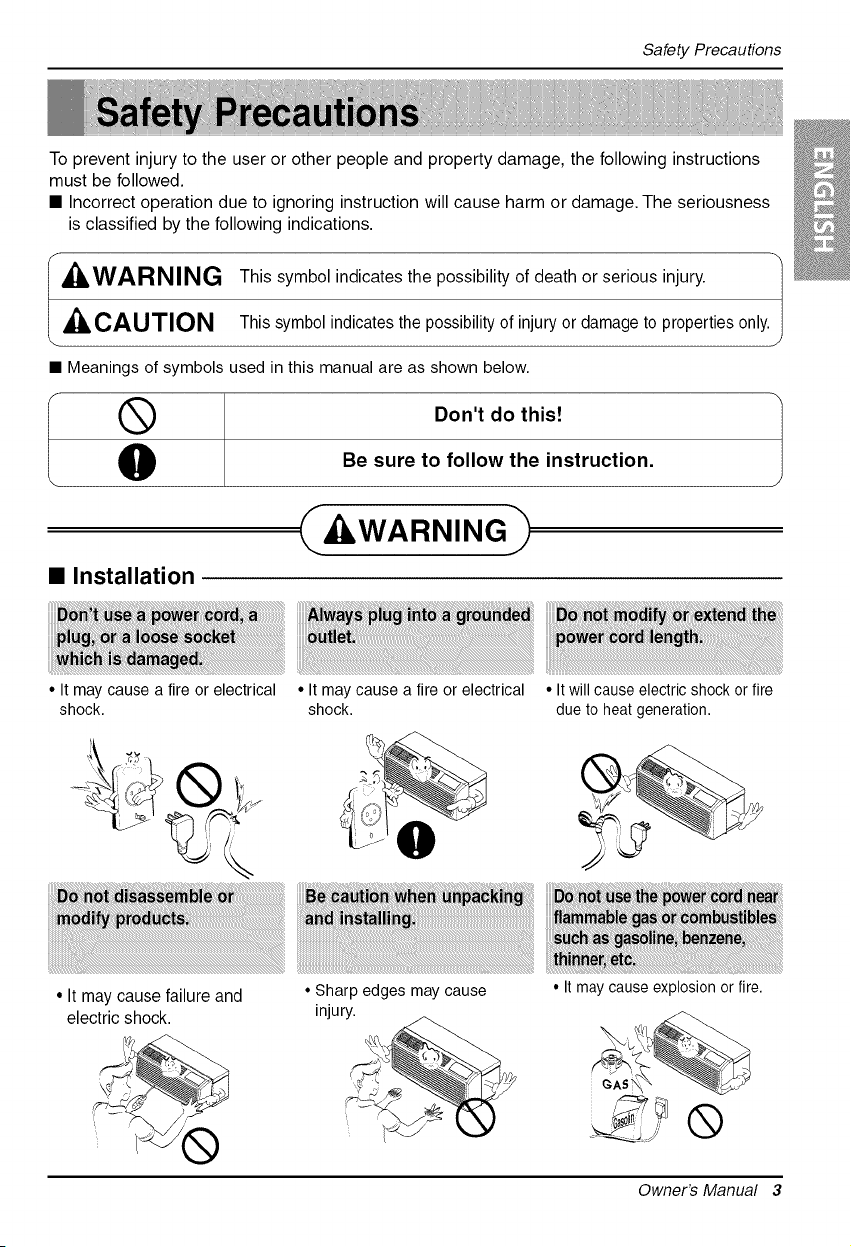
• Installation
A kWARNING
• It may cause a fireor electrical
shock.
•It may cause a fireor electrical
shock.
• Itwill cause electric shock or fire
due to heat generation.
• It maycausefailure and
electric shock.
•Sharp edgesmay cause
injury.
• Itmay cause explosion or fire.
Owner's Manual 3
SafetyPrecautions
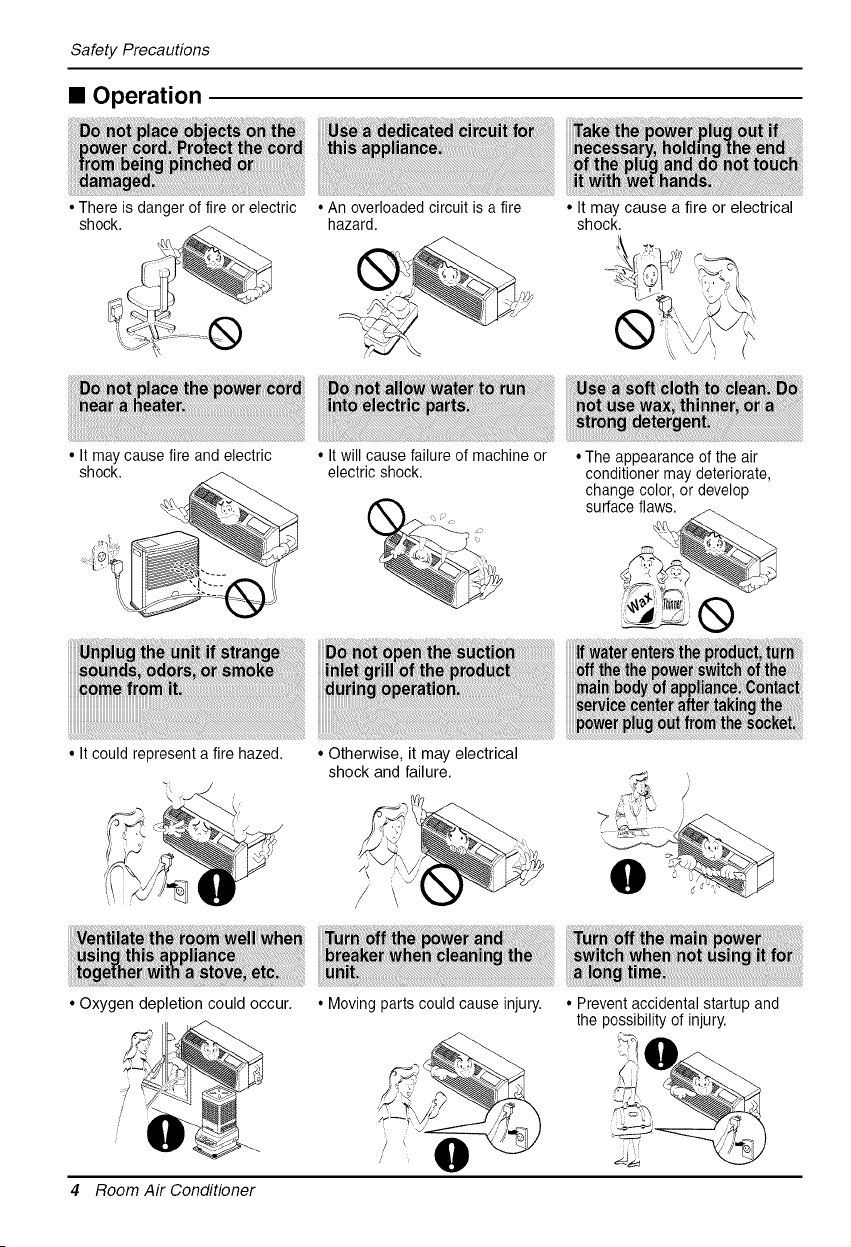
• Operation
• There isdanger of fire or electric
shock.
•Anoverloadedcircuit is a fire
hazard.
•It maycause afireor electrical
shock.
• Itmay cause fire and electric
shock.
• Itcould represent afire hazed.
• Itwill cause failure of machine or
electric shock.
• Otherwise, it may electrical
shock and failure.
• The appearance of the air
conditioner may deteriorate,
change color, or develop
surface fla___
• Oxygen depletion could occur.
/
/
• Moving parts could cause injury.
0
4 Room Air Conditioner
• Prevent accidental startup and
the possibility ofinjury.
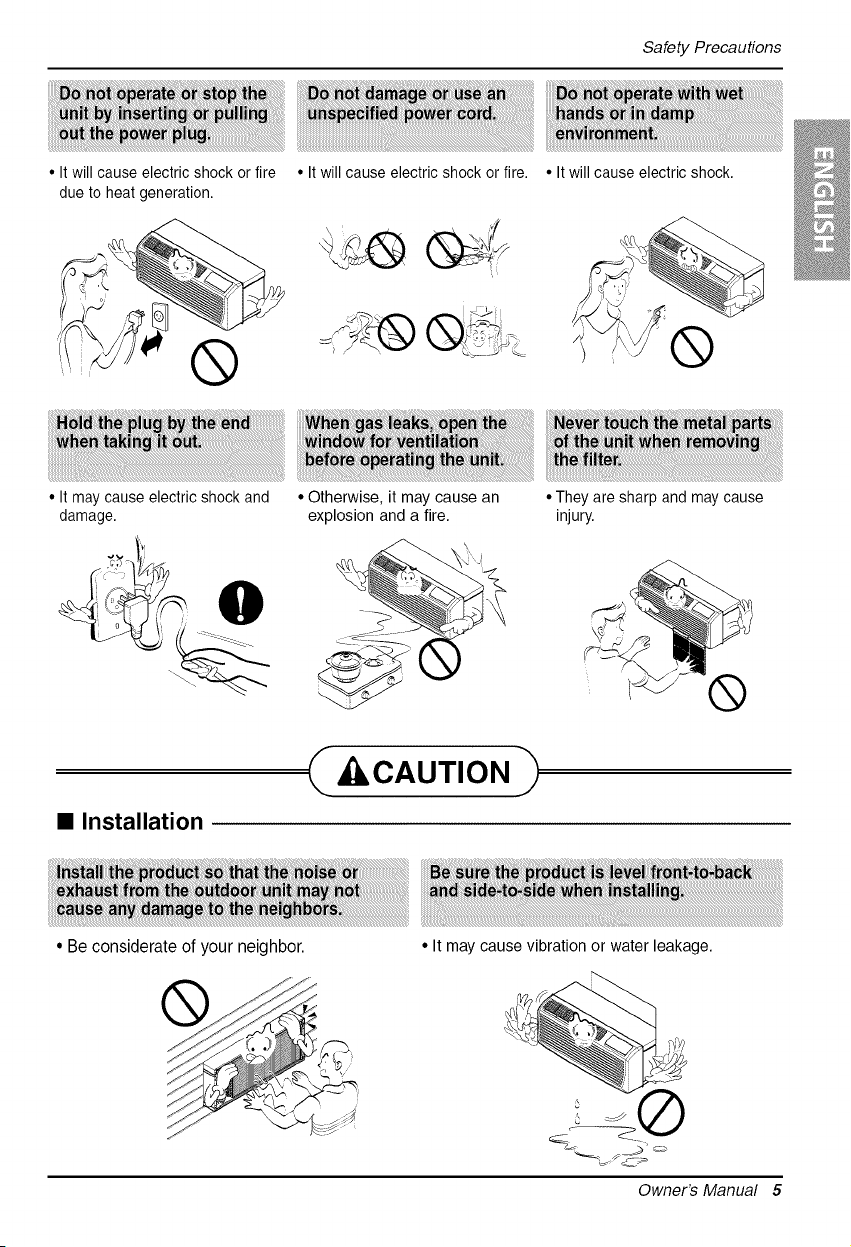
Safety Precautions
• Itwill cause electric shock or fire
due to heat generation.
®
• It may causeelectricshock and
damage.
• Itwill cause electric shock or fire.
• Otherwise, it may cause an
explosion and a fire.
• Itwill cause electric shock.
®
•They are sharpand maycause
injury.
@
®
• Installation
• Beconsiderate of your neighbor.
,_ CAUTION
• It may cause vibration or water leakage.
Owner's Manual 5
SafetyPrecautions
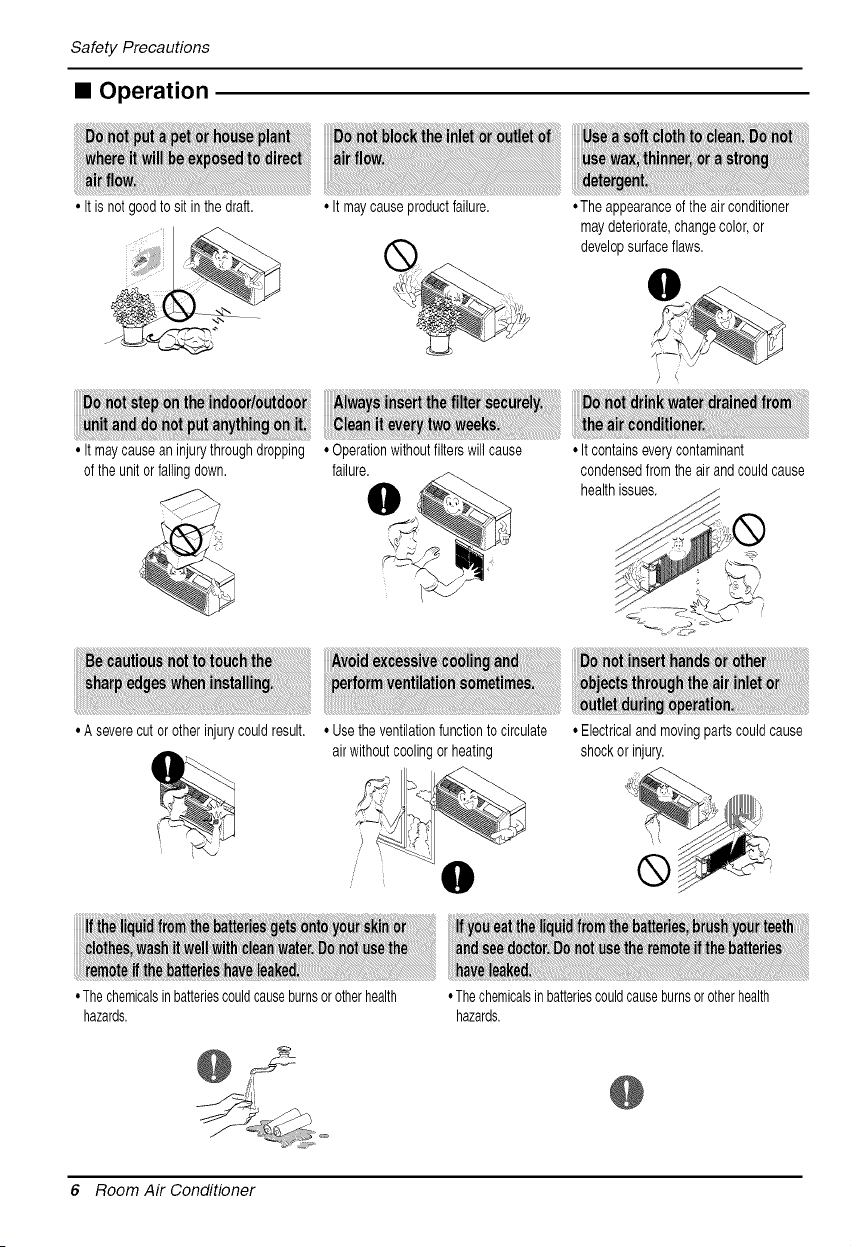
• Operation
, It isnotgoodtosit in thedraft. ° It may causeproductfailure. , The appearanceof theair conditioner
maydeteriorate,changecolor,or
developsurfaceflaws.
° It maycausean injurythroughdropping
ofthe unitorfallingdown.
° A severecutorotherinjurycouldresult.
°Operationwithoutfilterswillcause
failure.
°Usetheventilationfunctiontocirculate
airwithoutcoolingorheating
,It containseverycontaminant
condensedfromthe air andcouldcause
healthissues.
,Thechemicalsinbatteriescouldcauseburnsorotherhealth
hazards.
. Electricalandmovingpartscouldcause
shockor injury.
,Thechemicalsinbatteriescouldcauseburnsorotherhealth
hazards.
@
6 Room Air Conditioner
Be_ Ope_t_n
1. Contact an installation specialist for installation.
This is NOT a do-it-yourself project.
2. Plug in the power plug properly.
3. Use a dedicated circuit.
4. Do not use an extension cord. Consult a professional installer or electrician.
5. Do not start/stop operation by plugging/unplugging the power cord.
6. If the cord/plug is damaged, replace it with only an authorized replacement
part.
1. Being exposed to direct airflow for an extended period of time could be
hazardous to your health. Do not expose occupants, pets, or plants to direct
airflow for extended periods of time. Inother words, don't sit in the draft.
2. Due to the possibility of oxygen deficiency, ventilate the room when used
together with stoves or other heating devices.
3. Do not use this air conditioner for non-specified special purposes (e.g.
preserving precision devices, food, pets, plants, and art objects). Such usage
could damage the items.
1. Do not touch the metal parts of the unit when removing the filter. Injuries can
occur when handling sharp metal edges.
2. Do not use water to clean inside the air conditioner. Exposure to water can
destroy the insulation, leading to possible electric shock.
3. When cleaning the unit, first make sure that the power and breaker are turned
off. The fan rotates at a very high speed during operation. There is a
possibility of injury if the unit's power is accidentally triggered on while
cleaning inner parts of the unit.
For repair and maintenance, contact your authorized service dealer.
Owner's Manual 7
Introduction
This symbol alerts you to the risk of electric shock.
This symbol alerts you to hazards that could cause harm to
the air conditioner.
This symbol indicates special notes.
kWARNING
This appliance should be installed in accordance with the National Electric Code.
Expanded Metal Grille Should be applied for better performance in PTAC and PTHP Units.
For Installation purpose and better appearance Aluminium or Architectural grille can be applied in
PTAC and PTHP Units.
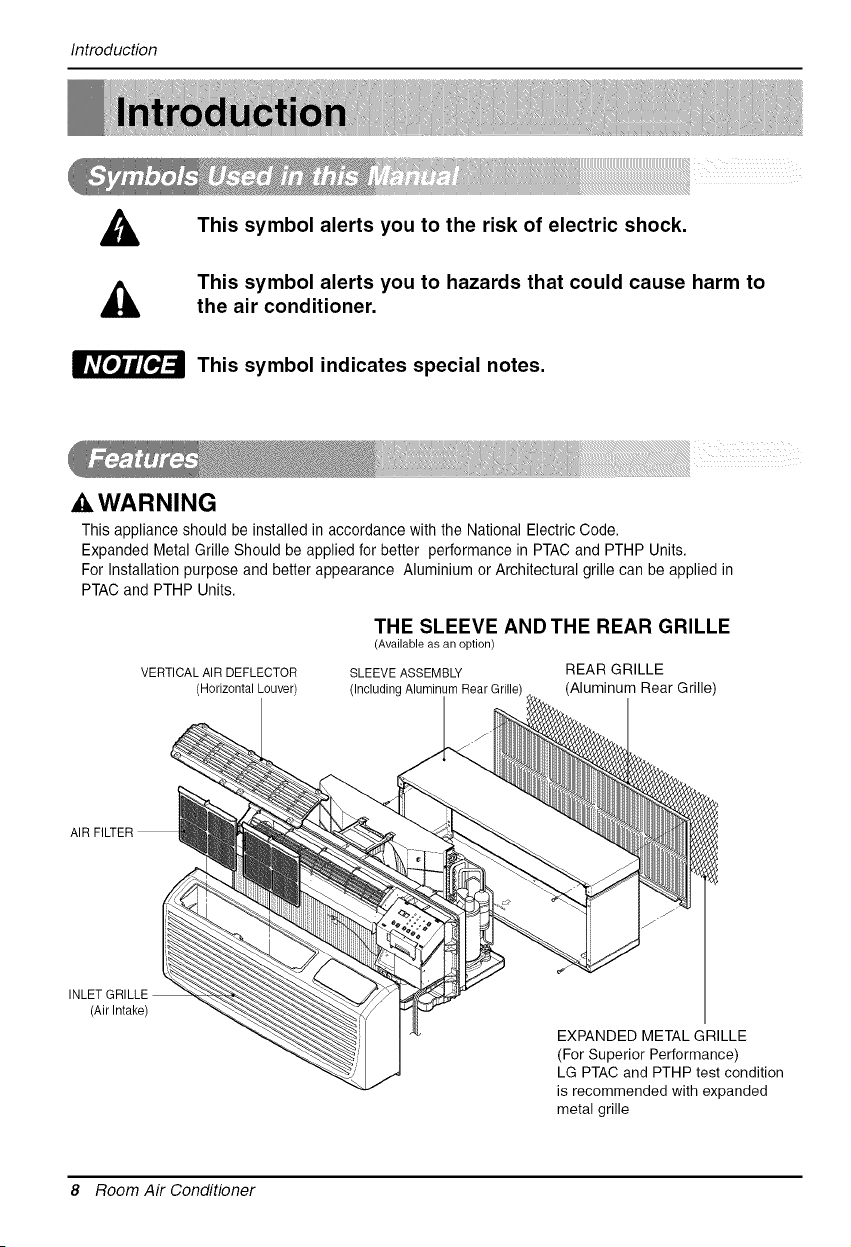
VERTICALAIR DEFLECTOR
(HorizontalLouver)
THE SLEEVE AND THE REAR GRILLE
(Available as an option)
SLEEVE ASSEMBLY REAR GRILLE
(IncludingAluminumRearGrille (Aluminum Rear Grille)
(AirIntake)
EXPANDED METAL GRILLE
(For Superior Performance)
LG PTAC and PTHP test condition
is recommended with expanded
metal grille
8 Room Air Conditioner
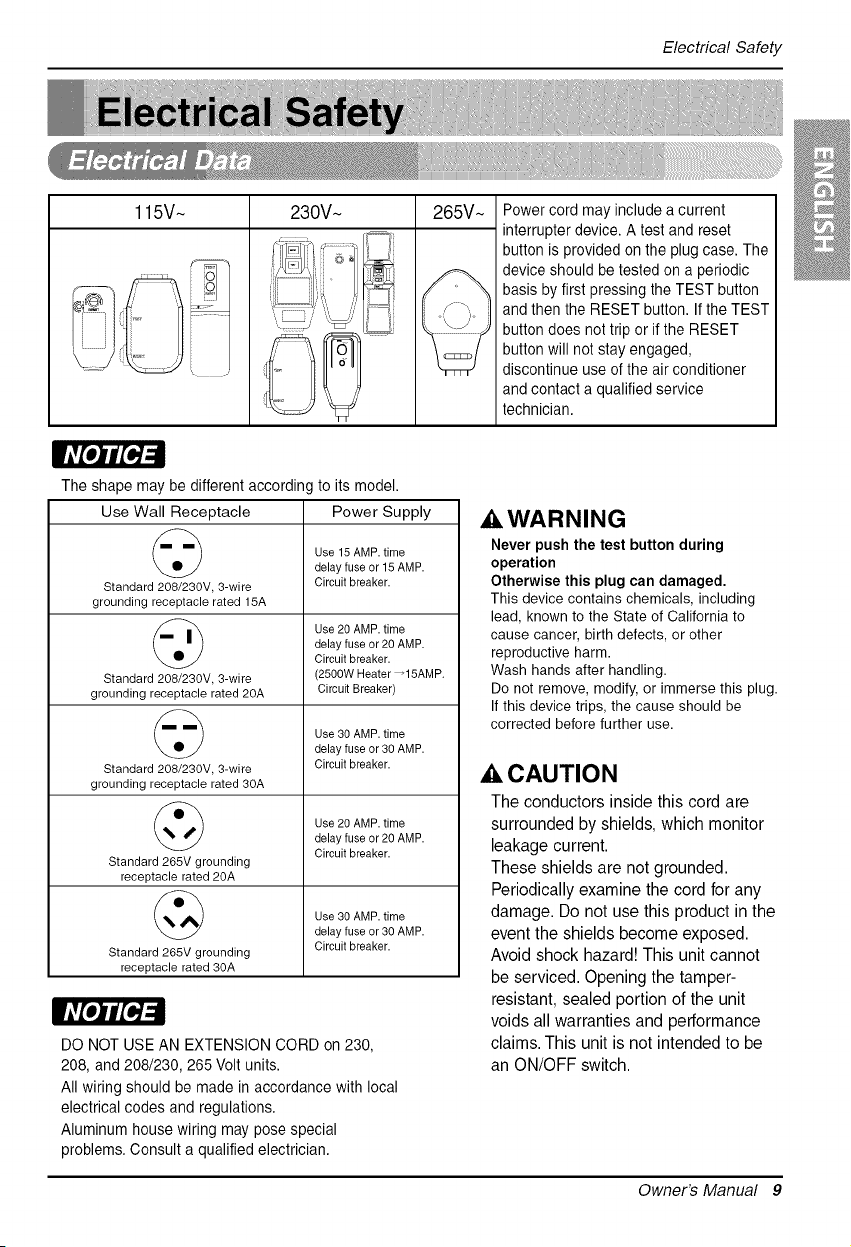
ElectricalSafety
115V~ 230V~ 265V~ Power cord may include acurrent
interrupter device. A test and reset
button isprovided on the plug case. The
device should be tested on aperiodic
basis by first pressing the TEST button
and then the RESET button. If the TEST
button does not trip orif the RESET
button will not stay engaged,
discontinue use ofthe air conditioner
and contact a qualified service
technician.
The shape may be different according to its model.
Use Wall Receptacle
Standard 208/230V, 3-wire
grounding receptacle rated 15A
Standard 208/230V, 3-wire
grounding receptaclerated 20A
Standard 208/230V, 3-wire
grounding receptacle rated 30A
Standard 265V grounding
receptaclerated20A
Standard 265V grounding
receptaclerated30A
Power Supply
Use 15AMP. time
delay fuse or 15AMP.
Circuit breaker.
Use 20 AMP. time
delay fuse or20 AMP.
Circuit breaker.
(2500W Heater _15AMP.
Circuit Breaker)
Use 30 AMP. time
delay fuse or30 AMP.
Circuit breaker.
Use 20 AMP. time
delay fuse or20 AMP.
Circuit breaker.
Use 30 AMP. time
delay fuse or30 AMP.
Circuit breaker.
DO NOT USE AN EXTENSION CORD on 230,
208, and 208/230, 265 Voltunits.
All wiring should be made in accordance with local
electrical codes and regulations.
Aluminum house wiring may pose special
problems. Consult a qualified electrician.
AWARNING
Never push the test button during
operation
Otherwise this plug can damaged,
Thisdevice contains chemicals, including
lead, knownto the State of California to
cause cancer, birth defects, or other
reproductive harm.
Washhands after handling.
Donot remove,modify, or immerse this plug.
Ifthis device trips, the cause should be
corrected before further use.
A CAUTION
The conductors inside this cord are
surrounded by shields, which monitor
leakage current.
These shields are not grounded.
Periodically examine the cord for any
damage. Do not use this product in the
event the shields become exposed.
Avoid shock hazard! This unit cannot
be serviced. Opening the tamper-
resistant, sealed portion of the unit
voids all warranties and performance
claims. This unit is not intended to be
an ON/OFF switch.
Owner's Manual 9
Electrical Safety
IMPORTANT
(PLEASE READ CAREFULLY)
FOR THE USER'S PERSONAL SAFETY, THIS
APPLIANCE MUST BE PROPERLY GROUNDED
The power cord of this appliance is equipped with a
three-prong (grounding) plug. Use this with a standard
three-slot (grounding) wall power outlet to minimize the
hazard of electric shock. The customer should have
the wall receptacle and circuit checked by a qualified
electrician to make sure the receptacle is properly
grounded.
DO NOT CUT OR REMOVE THE THIRD (GROUND)
PRONG FROM THE POWER PLUG.
A. SITUATIONS WHEN THE APPLIANCE WILL BE
DISCONNECTED OCCASIONALLY
Because of potential safety hazards, we strongly
discourage the use of an adapter plug. However, if you
wish to use an adapter, a TEMPORARY
CONNECTION may be made. Use UL-listed adapter,
available from most local hardware stores.
The large slot in the adapter must be aligned with the
large slot in the receptacle to assure a proper polarity
connection.
Ak CAUTION
Attaching the adapter ground terminal to the wall
receptacle cover screw does not ground the
appliance unless the cover screw is metal, and not
insulated, and the wall receptacle is grounded
through the house wiring. The customer should have
the circuit checked by a qualified electrician to make
sure the receptacle is properly grounded.
Disconnect the power cord from the adapter, using
one hand on each. Otherwise, the adapter ground
terminal might break. DO NOT USE the appliance with
a broken adapter plug.
B. SITUATIONS WHEN THE APPLIANCE WILL BE
DISCONNECTED OFTEN
Do not use an adapter plug in these situations.
Unplugging the power cord frequently can lead to an
eventual breakage of the ground terminal. The wall
power outlet should be replaced by a three-slot
(grounding) outlet instead.
USE OF EXTENSION CORDS
Because of potential safety hazards, we strongly
discourage the use of an extension cord. However, if
you wish to use an extension cord, use a CSA
certified/UL-listed 3-wire (grounding) extension cord.
10 Room Air Conditioner
CAUTION
Installation
• There are sharp edgesthat cancauseserious cuts.
• If the unit istobe installed closetothe seaside, itneeds
additionaltreatment on the heat exchanger.
• Whenlifting the airconditioner,it isHEAVY.
Use 2 peopleto lift.
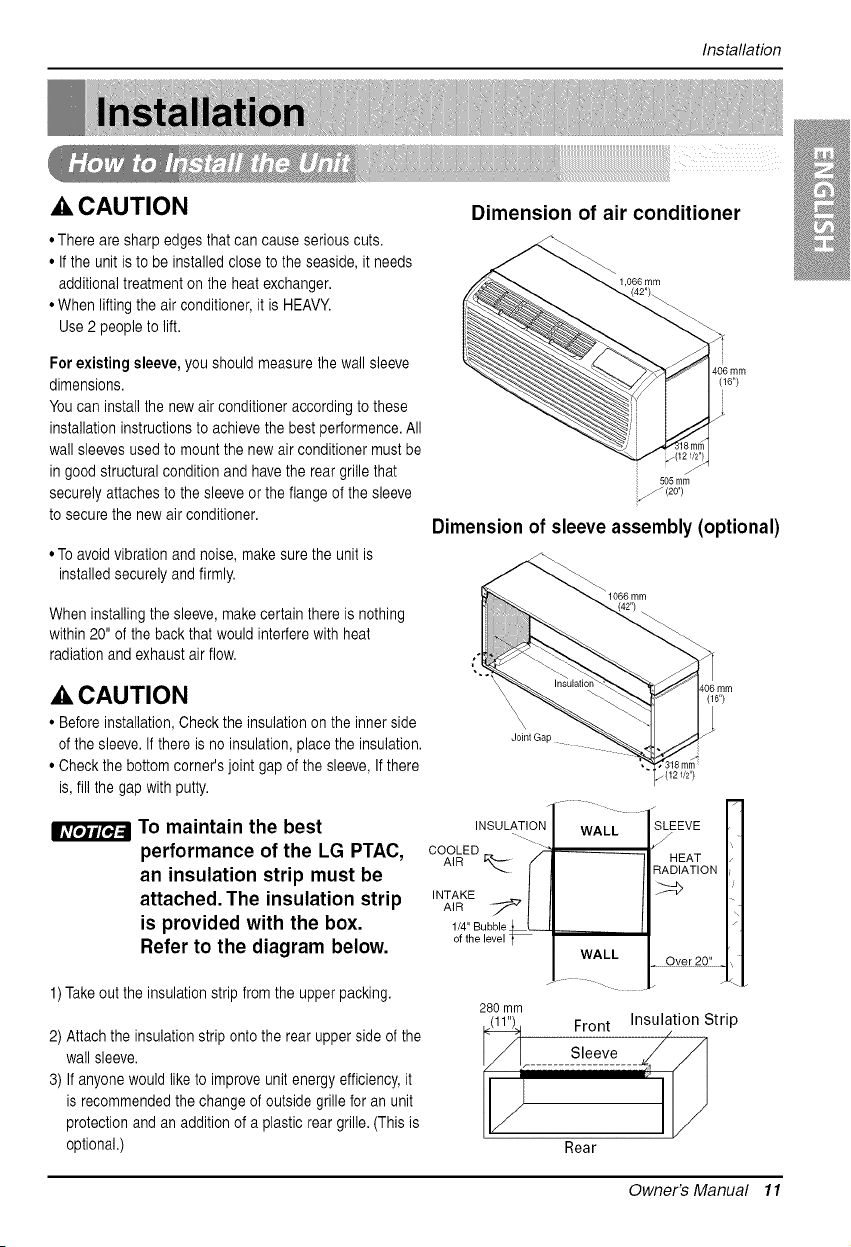
Dimension of air conditioner
1,066 mm
Forexisting sleeve, you should measurethe wallsleeve
dimensions.
You can installthe new air conditioner according to these
installationinstructions toachievethe bestperformence. All
wall sleeves usedto mountthe new air conditioner must be
in good structural conditionand havethe reargrillethat
securely attaches to the sleeveor the flange of the sleeve
tosecure the new air conditioner.
• Toavoid vibration and noise, makesure the unitis
installed securelyand firmly.
When installingthesleeve, makecertainthere isnothing
within20" of the back that would interfere with heat
radiationand exhaust air flow.
(16")
505mm
Dimension ofsleeveassembly (optional)
A CAUTION
• Before installation,Checkthe insulation on the inner side
ofthe sleeve.If there isno insulation, place the insulation.
• Check the bottom corner's jointgap of the sleeve,Ifthere
is,fill the gap with putty.
IfTt_'7/_ To maintain the best
performance ofthe LG PTAC,
an insulation strip must be
attached. The insulation strip
is provided with the box.
Refer to the diagram below.
1)Take out the insulation strip from the upper packing.
2) Attach the insulation stripontothe rear upper sideof the
wallsleeve.
3) If anyone would like to improveunitenergy efficiency,it
isrecommended the change of outside grille for an unit
protection and anaddition ofa plasticrear grille. (This is
optional.)
Joint Gap
.4
(121/2")
EEvE H
A'R r"I HEATH
'NT_K:u b[le_==_ B_AT' ON
ofthelevel * _ , Q_Ar_0" _?\1
280 mm
_. Front Insulation Strip
........
v IV
Rear
@
Owner's Manual 11
Installation
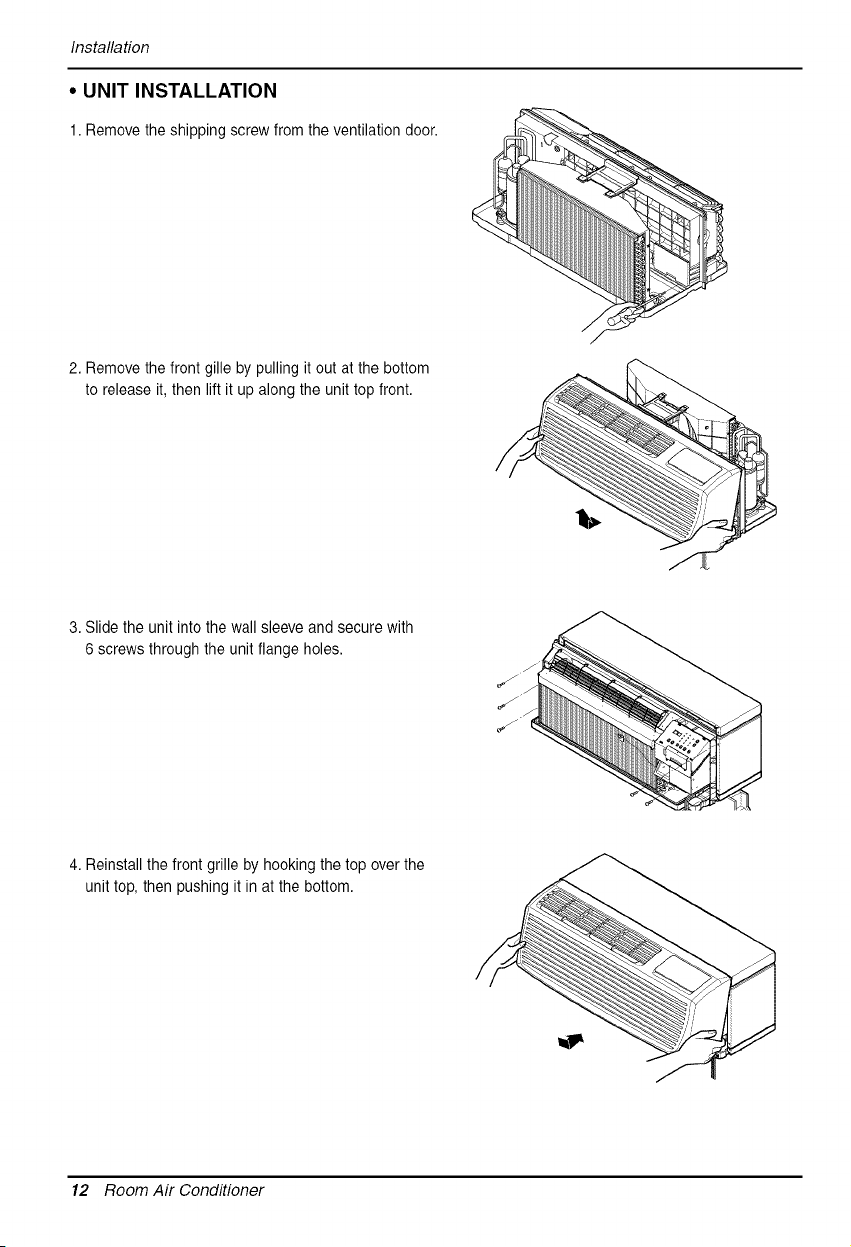
• UNIT INSTALLATION
1.Remove the shipping screw from the ventilation door.
2. Remove the front gille by pulling it out at the bottom
to release it,then lift it up along the unit top front.
3. Slide theunitinto thewallsleeve andsecure with
6 screws through theunitflangeholes.
4. Reinstall the front grille by hooking the top over the
unit top, then pushing it in at the bottom.
12 Room Air Conditioner
ControlLocations
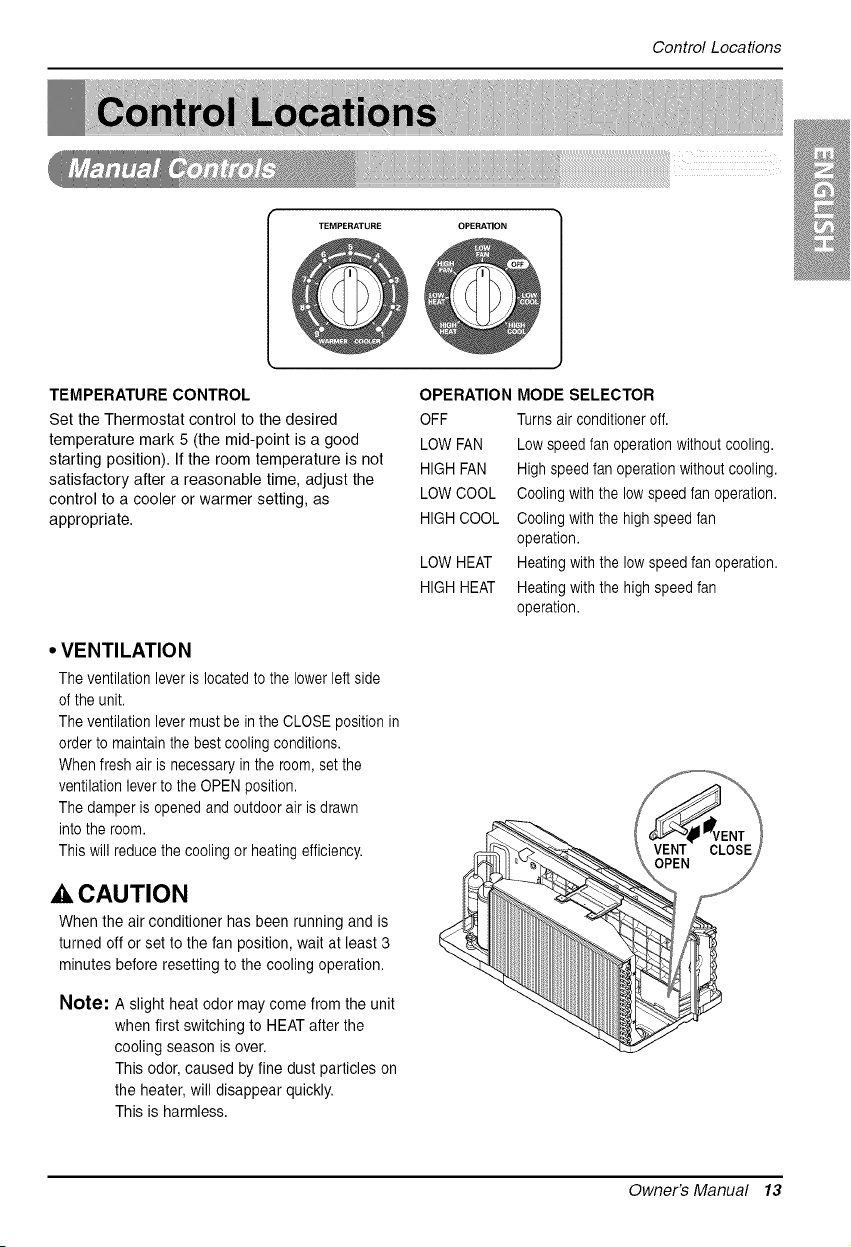
TEMPERATURE CONTROL
Set the Thermostat control to the desired
temperature mark 5(the mid-point is a good
starting position). If the room temperature is not
satisfactory after a reasonable time, adjust the
control to a cooler or warmer setting, as
appropriate.
• VENTILATION
Theventilation leveris located to the lower left side
ofthe unit.
Theventilation levermust be in the CLOSE position in
order tomaintainthebest coolingconditions.
Whenfresh air isnecessary in the room, set the
ventilation leverto the OPEN position.
Thedamper isopened and outdoor air isdrawn
intothe room.
Thiswill reducethecooling orheatingefficiency.
CAUTION
When the air conditioner has been running and is
turned off or set to the fan position, wait at least 3
minutes before resetting tothe cooling operation.
Note: A slight heat odor may come from the unit
when first switching to HEAT after the
cooling season is over.
This odor, caused by fine dust particles on
the heater, will disappear quickly.
This isharmless.
OPERATION MODE SELECTOR
OFF Turnsairconditioneroff.
LOWFAN Lowspeedfan operationwithout cooling.
HIGH FAN High speedfan operationwithout cooling.
LOWCOOL Cooling with the low speed fan operation.
HIGH COOL Cooling with the highspeed fan
operation.
LOWHEAT Heatingwith the low speedfan operation.
HIGH HEAT Heatingwith the high speedfan
operation.
Owner's Manual 13
ControlLocations
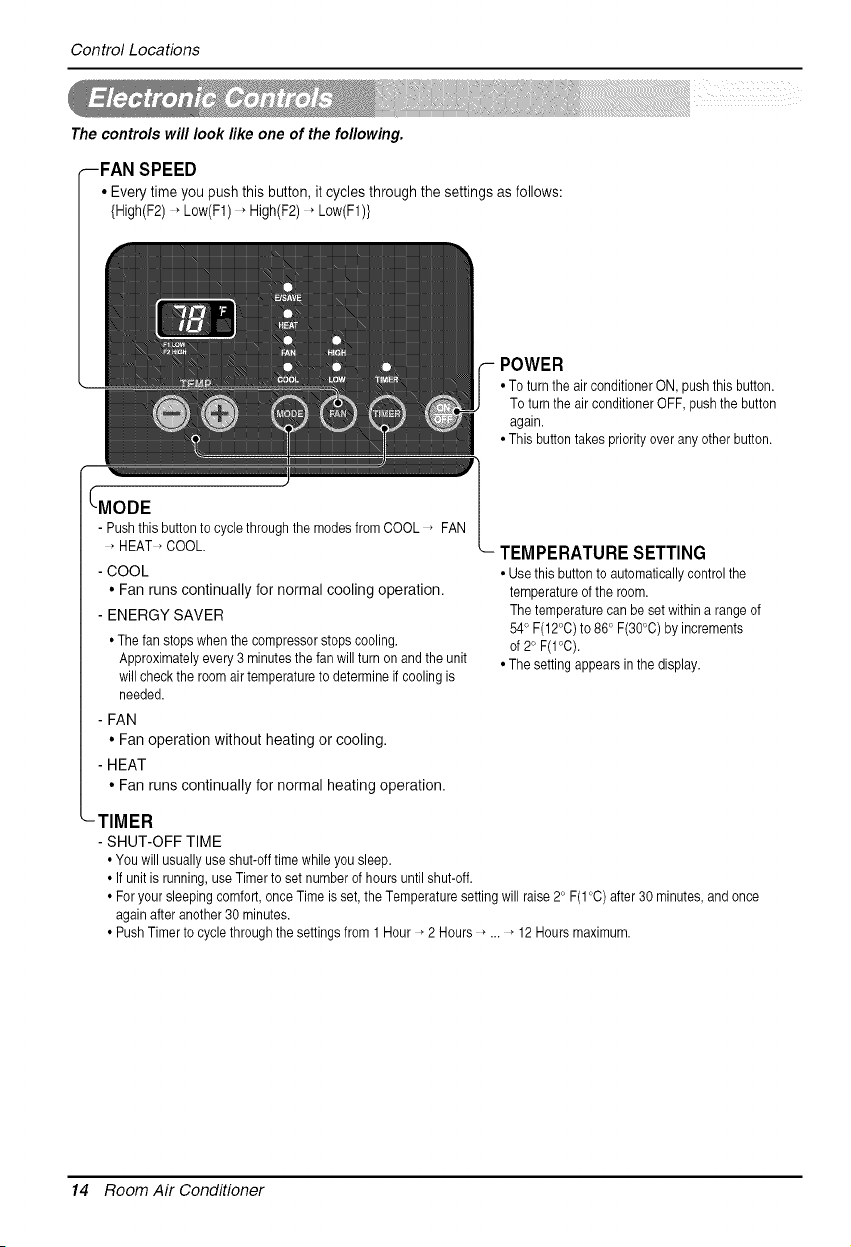
The controls will look like one of the following.
--FAN SPEED
• Every time you push this button, it cycles through the settings as follows:
{High(F2) , Low(F1) , High(F2) _Low(F1)}
POWER
•To turnthe air conditioner ON, push this button.
To turn the air conditioner OFF, push the button
again.
•This button takes priority over any other button.
- Pushthisbuttonto cyclethroughthemodesfromCOOL * FAN
• HEAT * COOL.
- COOL
• Fan runs continually for normal cooling operation.
- ENERGY SAVER
• The fanstopswhenthe compressorstopscooling.
Approximatelyevery3 minutesthefan willturnon andthe unit
will checkthe roomair temperatureto determineif coolingis
needed.
- FAN
• Fan operation without heating or cooling.
- HEAT
• Fan runs continually for normal heating operation.
TEMPERATURESETTING
•Usethis button to automatically control the
temperature of the room.
The temperature can besetwithin a rangeof
54° F(12°0)to 86 c F(30_C) byincrements
of 2° F(I°C).
•Thesetting appears in thedisplay.
-TIMER
- SHUT-OFF TIME
•You will usually use shut-off timewhile yousleep.
• Ifunit isrunning, use Timer to set number of hours until shut-off.
• For your sleeping comfort, once Time isset, the Temperature setting will raise 2°F(1 °C) after 30 minutes, and once
again after another 30 minutes.
• PushTimer to cycle through the settings from 1Hour *2 Hours * ... _12 Hours maximum.
14 Room Air Conditioner
ControlLocations
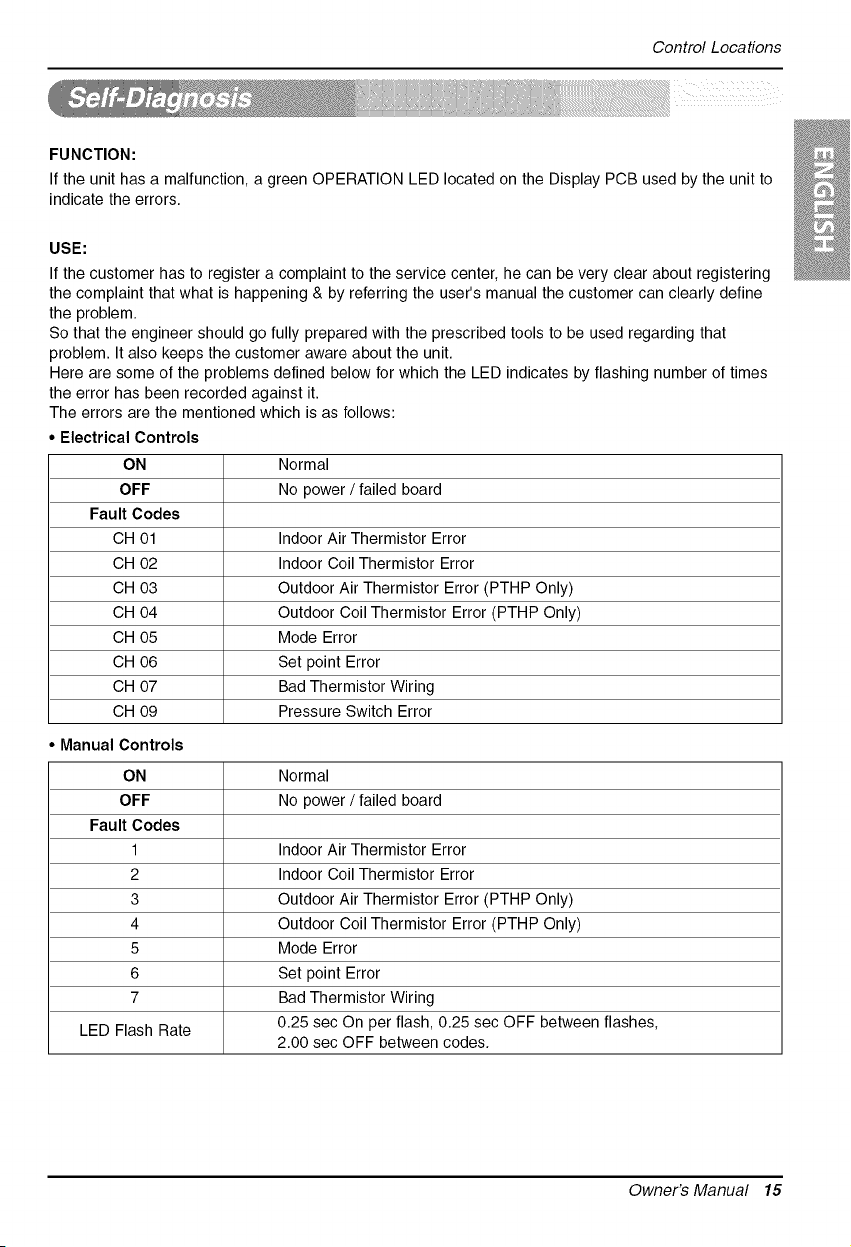
FUNCTION:
Ifthe unit has a malfunction, a green OPERATION LED located on the Display PCB used by the unit to
indicate the errors.
USE:
Ifthe customer has to register a complaint to the service center, he can bevery clear about registering
the complaint that what is happening & by referring the user's manual the customer can clearly define
the problem.
So that the engineer should go fully prepared with the prescribed tools to be used regarding that
problem. It also keeps the customer aware about the unit.
Here are some of the problems defined below for which the LED indicates by flashing number of times
the error has been recorded against it.
The errors are the mentioned which is as follows:
Normal
No power / failed board
Indoor Air Thermistor Error
Indoor Coil Thermistor Error
Outdoor Air Thermistor Error (PTHP Only)
Outdoor Coil Thermistor Error (PTHP Only)
Mode Error
Set point Error
Bad Thermistor Wiring
Pressure Switch Error
Normal
No power / failed board
Indoor Air Thermistor Error
Indoor Coil Thermistor Error
Outdoor Air Thermistor Error (PTHP Only)
Outdoor Coil Thermistor Error (PTHP Only)
Mode Error
Set point Error
Bad Thermistor Wiring
• Electrical Controls
ON
OFF
Fault Codes
CH 01
CH 02
CH 03
CH 04
CH 05
CH 06
CH 07
CH 09
• Manual Controls
ON
OFF
Fault Codes
1
2
3
4
5
6
7
LED Flash Rate 0.25 sec On per flash, 0.25 sec OFF between flashes,
2.00 sec OFF between codes.
@
Owner's Manual 15
ControlLocations
• REMOVING THE FRONT GRILLE
Additional controls are available after
removing the front grille and option
cover of control box.
To remove the front grille, pull out the
bottom of front grille and then lift up.
To replace the front grille, place the tabs
over the top of the unit and push the
bottom of front grille until the clips snap
into place.
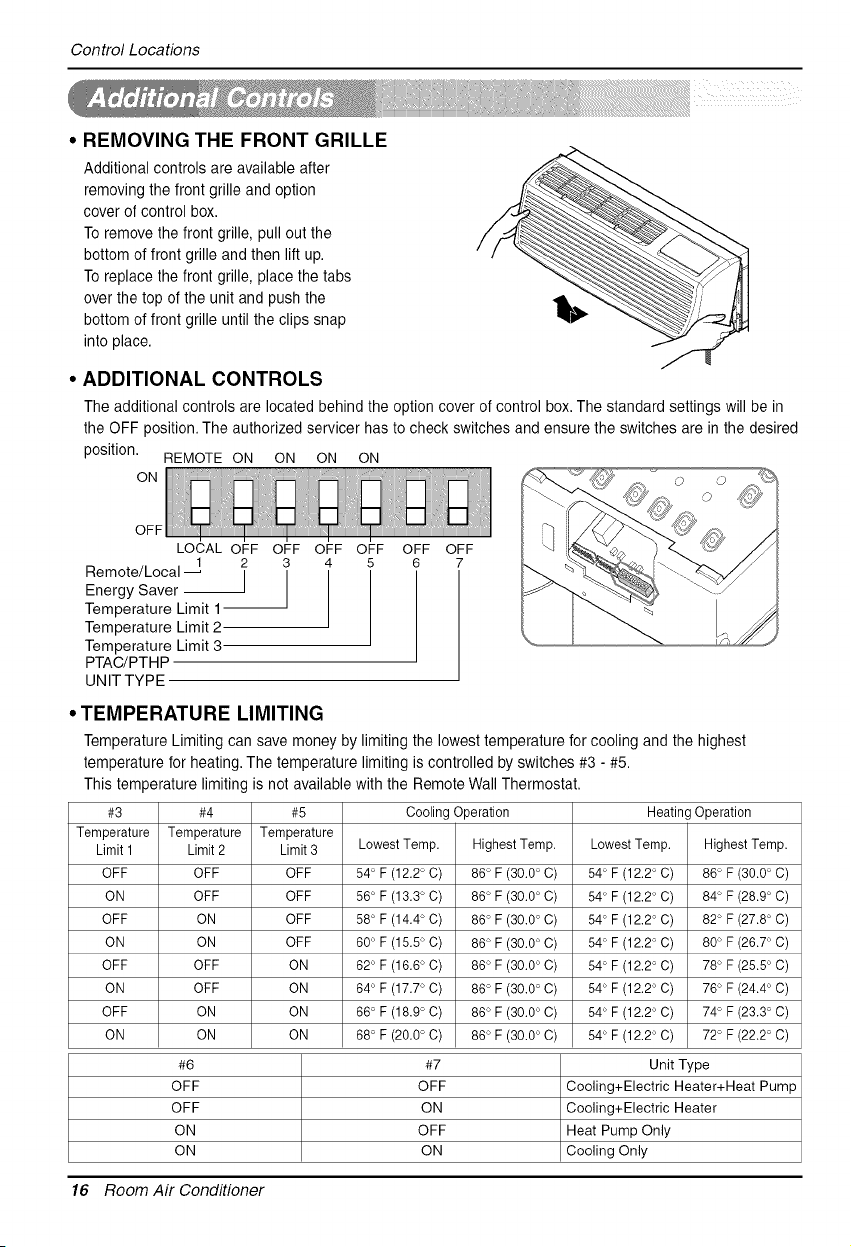
• ADDITIONAL CONTROLS
The additional controls are located behind the option cover of control box. The standard settings will be in
the OFF position. The authorized servicer has to check switches and ensure the switches are in the desired
position. REMOTE ON ON ON ON
ON
OFF OFF
©
©
OFF
LOCAL OFF
1 2
Remote/Local _ I
Energy Saver
Temperature Limit 1-
Temperature Limit 2
Temperature Limit 3
PTAC/PTHP
UNITTYPE
OFF OFF OFF
3 4 5
1
• TEMPERATURE LIMITING
Temperature Limiting can save money by limiting the lowest temperature for cooling and the highest
temperature for heating. The temperature limiting is controlled by switches #3 - #5.
This temperature limiting is not available with the Remote Wall Thermostat.
#3 #4 #5 Cooling Operation Heating Operation
Temperature Temperature Temperature
Limit 1 Limit 2 Limit 3 Lowest Temp. Highest Temp. Lowest Temp. Highest Temp.
OFF OFF OFF 64°F (12.2° C) 86° F (30.0°C) 54° F (12.2° C) 86° F (30.0°C)
ON OFF OFF 66°F (13.3° C) 86° F (30.0°C) 54° F (12.2° C) 84° F (28.9°C)
OFF ON OFF 68°F (14.4 °C) 86° F (30.0° C) 54° F (12.2° C) 82° F(27.8 °C)
ON ON OFF 60°F (16.6 °C) 86° F (30.0° C) 54° F (12.2° C) 80° F(26.7 °C)
OFF OFF ON 62°F (16.6° C) 86° F (30.0°C) 54° F (12.2° C) 78° F (26.5°C)
ON OFF ON 64°F (17.7° C) 86° F (30.0°C) 54° F (12.2° C) 76° F (24.4°C)
OFF ON ON 66°F (18.9° C) 86° F (30.0°C) 54° F (12.2° C) 74° F (23.3°C)
ON ON ON 68°F (20.0° C) 86° F (30.0°C) 54° F (12.2° C) 72° F (22.2°C)
#6 #7 Unit Type
OFF OFF Cooling+Electric Heater+Heat Pump
OFF ON Cooling+Electric Heater
ON OFF Heat Pump Only
ON ON Cooling Only
16 Room Air Conditioner
ControlLocations
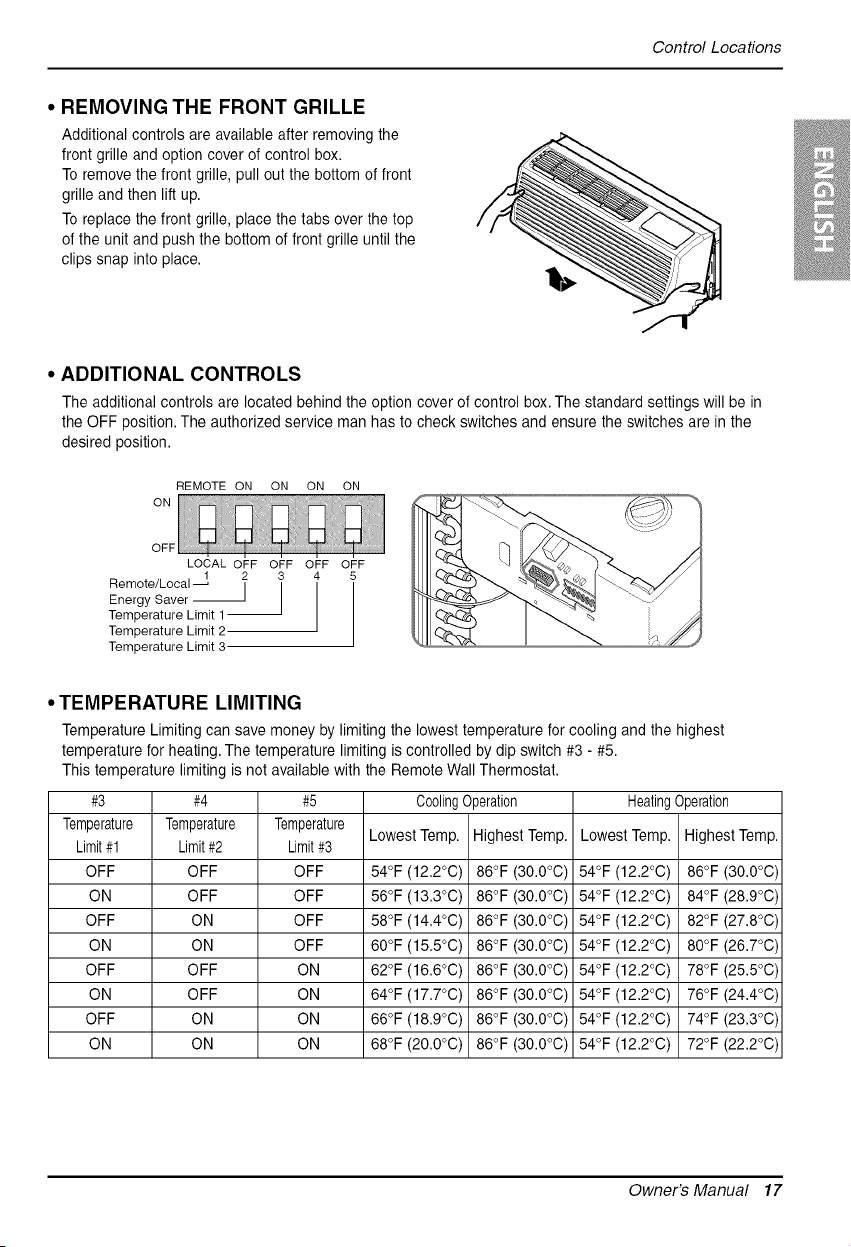
• REMOVING THE FRONT GRILLE
Additional controls are available after removing the
front grille and option cover ofcontrol box.
Toremove the front grille, pull out the bottom of front
grille and then lift up.
Toreplace the front grille, place the tabs overthe top
ofthe unit and push the bottom of front grille until the
clips snap into place.
@
• ADDITIONAL CONTROLS
The additional controls are located behind the option cover of control box. The standard settings will be in
the OFF position. The authorized service man has to check switches and ensure the switches are in the
desired position.
REMOTE ON ON ON ON
ON
OFF
LOCAL OFF OFF OFF OFF
Remote/Local _ 2 3 4
Energy Saver --]
Temperature Limit 1--
Temperature Limit 2
Temperature Limit 3
• TEMPERATURE LIMITING
Temperature Limiting can save money by limiting the lowest temperature for cooling and the highest
temperature for heating. The temperature limiting is controlled by dip switch #3 - #5.
This temperature limiting is not available with the Remote Wall Thermostat.
#3 #4 #5 CoolingOperation HeatingOperation
Temperature Temperature Temperature
Lowest Temp. Highest Temp. Lowest Temp. Highest Temp.
Limit#1 Limit#2 Limit#3
OFF OFF OFF 54°F (12.2°C) 86°F (30.0°C) 54°F (12.2°C) 86°F (30.0°C)
ON OFF OFF 56°F (13.3°C) 86°F (30.0°C) 54°F (12.2°C) 84°F (28.9°C)
OFF ON OFF 58°F (14.4°C) 86°F (30.0°C) 54°F (12.2°C) 82°F (27.8°C)
ON ON OFF 60°F (15.5°C) 86°F (30.0°C) 54°F (12.2°C) 80°F (26.7°C)
OFF OFF ON 62°F (16.6°C) 86°F (30.0°C) 54°F (12.2°C) 78°F (25.5°C)
ON OFF ON 64°F (17.7°C) 86°F (30.0°C) 54°F (12.2°C) 76°F (24.4°C)
OFF ON ON 66°F (18.9°C) 86°F (30.0°C) 54°F (12.2°C) 74°F (23.3°C)
ON ON ON 68°F (20.0°C) 86°F (30.0°C) 54°F (12.2°C) 72°F (22.2°C)
Owner's Manual 17
ControlLocations
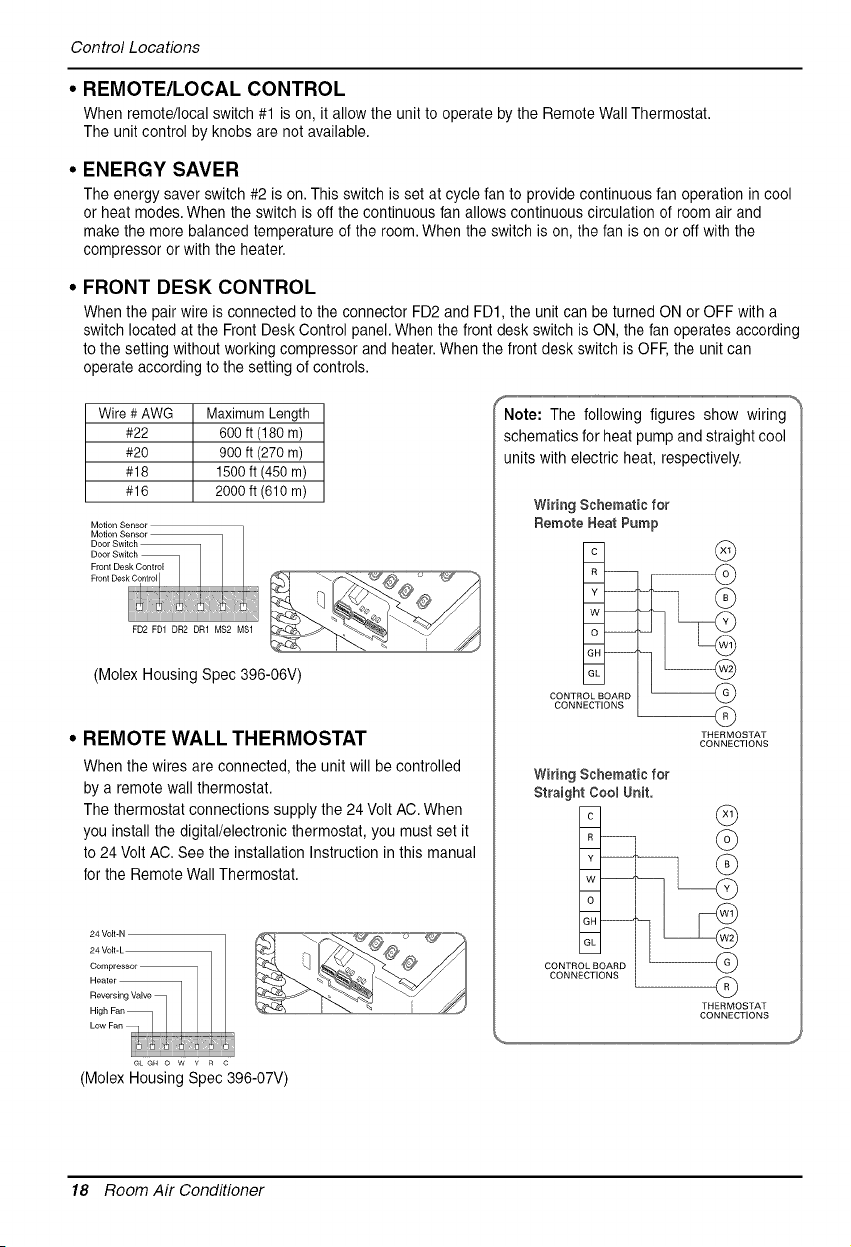
• REMOTE/LOCAL CONTROL
When remote/local switch #1 ison, it allow the unit to operate by the Remote Wall Thermostat.
The unit control by knobs are not available.
• ENERGY SAVER
The energy saver switch #2 is on. This switch isset at cycle fan to provide continuous fan operation in cool
or heat modes. When theswitch is off the continuous fan allows continuous circulation of room air and
make the more balanced temperature of the room.When the switch is on, the fan is on or offwith the
compressor orwith the heater.
• FRONT DESK CONTROL
When the pair wire isconnected to the connector FD2 and FD1, the unit can be turned ON or OFF with a
switch located atthe Front Desk Control panel. When the front desk switch is ON, the fan operates according
tothe setting without working compressor and heater. When the front desk switch isOFF,the unit can
operate according to the setting of controls.
Wire #AWG Maximum Length
#22 600 ft (180 m)
#20 900 ft (270 m)
#18 1500 ft (450 m)
#16 2000 ft (610 m)
Motion Sensor
Motion Sensor
Door Switch
Door Switch
Front Desk Control
F,o.,oos_
(Molex Housing Spec 396-06V)
• REMOTE WALL THERMOSTAT
When the wires areconnected, the unit will be controlled
by a remote wall thermostat.
The thermostat connections supply the 24 Volt AC. When
you install the digital/electronic thermostat, you must set it
to 24 VoltAC. See the installation Instruction in this manual
for the Remote Wall Thermostat.
f %
Note: The following figures show wiring
schematics for heat pump and straight cool
units with electric heat, respectively.
Wiring Schematic for
Remote Heat Pump
CONTROL BOARD
CONNECTIONS
G
G
THERMOSTAT
CONNECTIONS
m
C
R --
Y
W
O
GH
GL
CONTROL BOARD
CONNECTIONS
Wiring Schematic for
Straight CoomUnit.
G
@
@
THERMOSTAT
CONNECTIONS
GL GH 0 W Y R C
(Molex Housing Spec 396-07V)
18 Room Air Conditioner
ControlLocations
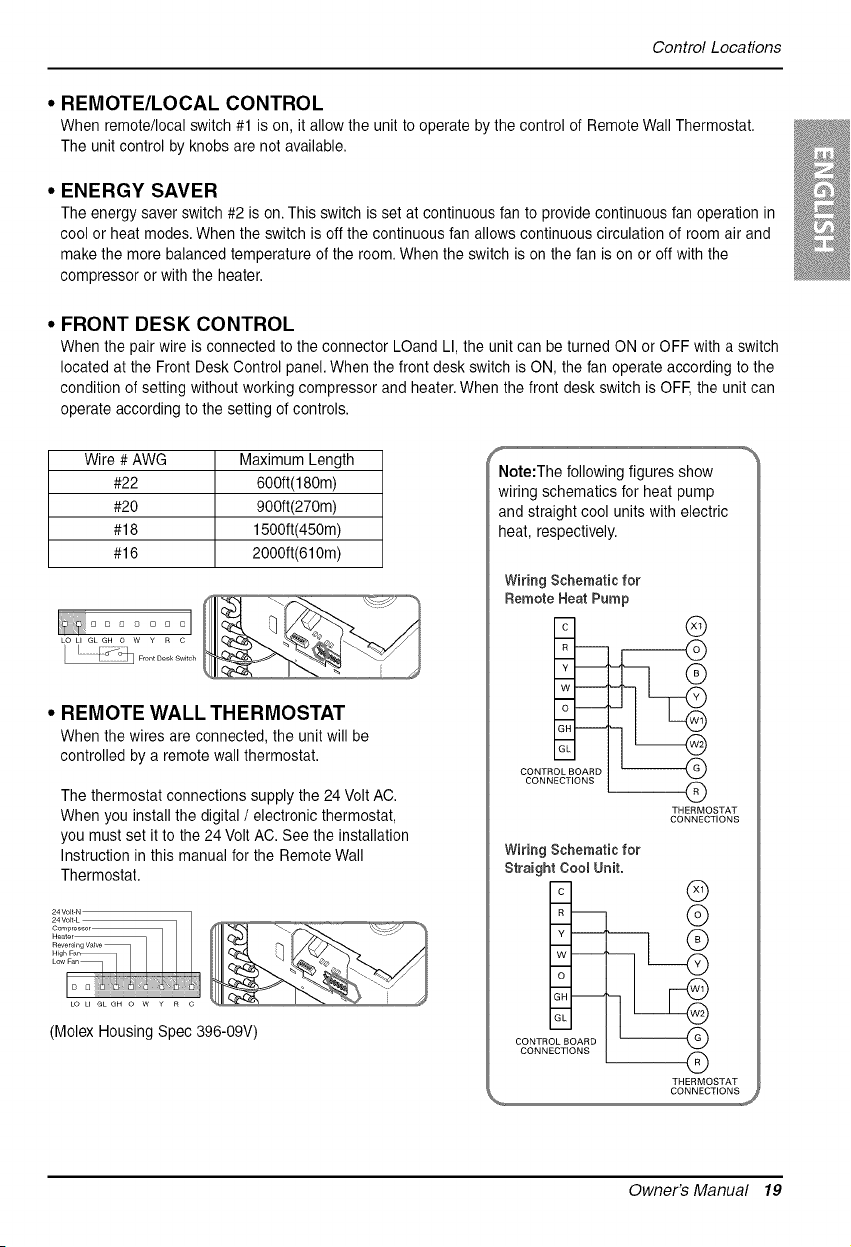
• REMOTE/LOCAL CONTROL
When remote/local switch #1 is on, it allow the unit to operate by the control of Remote Wall Thermostat.
The unit control by knobs are notavailable.
• ENERGY SAVER
The energy saver switch #2 is on. This switch isset atcontinuous fan to provide continuous fan operation in
cool or heat modes.When the switch isoff the continuous fan allows continuous circulation of room air and
make the more balanced temperature of the room. When the switch ison the fan ison or off with the
compressor or with the heater.
• FRONT DESK CONTROL
When the pair wire is connected to the connector LOand LI, the unit can be turned ON or OFF with a switch
located at the Front Desk Control panel.When the front desk switch is ON, the fan operate according to the
condition of setting without working compressor and heater. When the front desk switch is OFF,the unit can
operate according to the setting of controls.
Wire # AWG Maximum Length
#22 600ft(180m)
#20 900ft(270m)
#18 1500ft(450m)
#16 2000ft(610m)
I:! ....... I
• REMOTE WALL THERMOSTAT
When the wires are connected, the unit will be
controlled by aremote wallthermostat.
The thermostat connections supply the 24 VoltAC.
When you install the digital / electronic thermostat,
you must set it to the 24 VoltAC. See the installation
Instruction in this manual for the Remote Wall
Thermostat.
LO U GL GH O W Y R C
(Molex Housing Spec 396-09V)
f
Note:The following figures show
wiring schematics for heat pump
and straight cool units with electric
heat, respectively.
Wiring Schematic for
Remote Heat Pump
CONTROL BOARD
CONNECTIONS
®
--Q
THERMOSTAT
CONNECTIONS
m
c
R --
Y
w
GH
GL
CONTROLBOARD
CONNECTIONS
Wiring Schematic for
Straight CoomUnit.
@
@
Q
THERMOSTAT
CONNECTIONS
@
Owner's Manual 19
ControlLocations
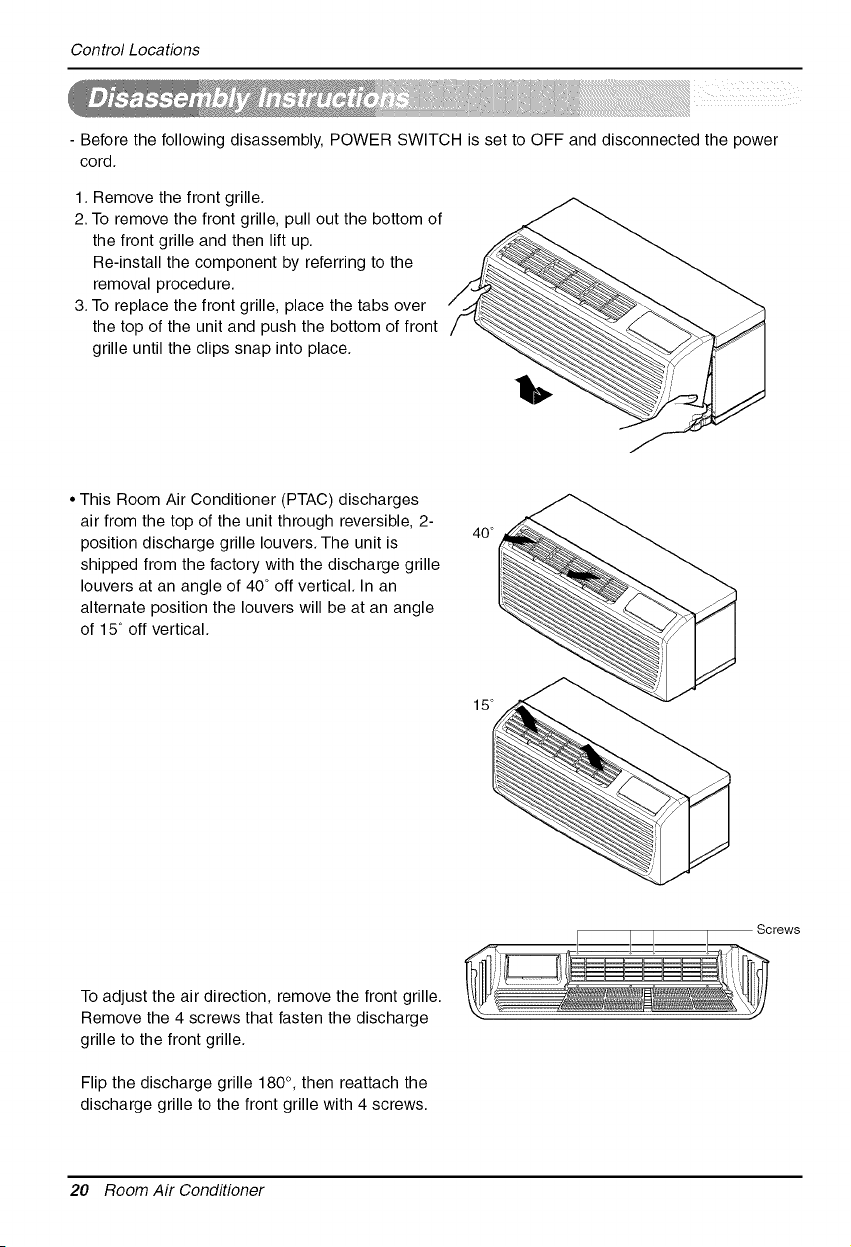
-Before the following disassembly, POWER SWITCH issetto OFF and disconnected the power
cord.
1. Remove the front grille.
2.To remove the front grille, pull out the bottom of
the front grille and then lift up.
Re-install the component by referring to the
removal procedure.
3.To replace the front grille, place the tabs over
the top of the unit and push the bottom of front
grille until the clips snap into place.
• This Room Air Conditioner (PTAC) discharges
air from the top of the unit through reversible, 2-
position discharge grille louvers. The unit is
shipped from the factory with the discharge grille
louvers at an angle of 40 ° off vertical. In an
alternate position the louvers will be at an angle
of 15 ° off vertical.
40 °
15 °
Screws
To adjust the air direction, remove the front grille.
Remove the 4 screws that fasten the discharge
grille to the front grille.
Flip the discharge grille 180 °, then reattach the
discharge grille to the front grille with 4 screws.
20 Room Air Conditioner
MaintenanceandService
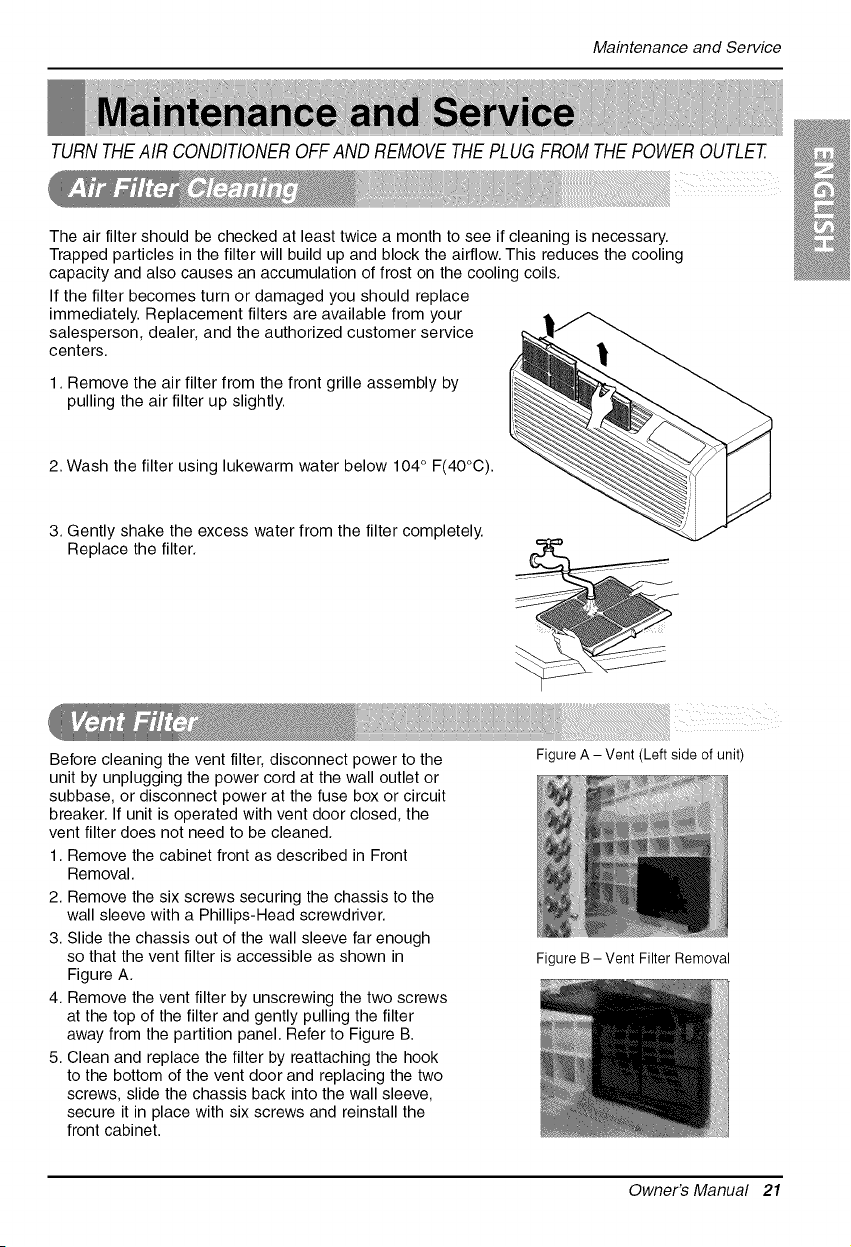
TURNTHEAIR CONDITIONEROFF ANDREMOVETHEPLUGFROMTHE POWEROUTLET.
The air filter should be checked at least twice a month to see if cleaning is necessary.
Trapped particles in the filter will build up and block the airflow. This reduces the cooling
capacity and also causes an accumulation of frost on the cooling coils.
Ifthe filter becomes turn or damaged you should replace
immediately. Replacement filters are available from your
salesperson, dealer, and the authorized customer service
centers.
1. Remove the air filter from the front grille assembly by
pulling the air filter up slightly.
2. Wash the filter using lukewarm water below 104 ° F(40°C).
3. Gently shake the excess water from the filter completely.
Replace the filter.
Before cleaning the vent filter, disconnect power to the
unit by unplugging the power cord at the wall outlet or
subbase, or disconnect power at the fuse box or circuit
breaker. If unit is operated with vent door closed, the
vent filter does not need to be cleaned.
1. Remove the cabinet front as described in Front
Removal.
2. Remove the six screws securing the chassis to the
wall sleeve with a Phillips-Head screwdriver.
3. Slide the chassis out of the wall sleeve far enough
so that the vent filter is accessible as shown in
Figure A.
4. Remove the vent filter by unscrewing the two screws
at the top of the filter and gently pulling the filter
away from the partition panel. Refer to Figure B.
5. Clean and replace the filter by reattaching the hook
to the bottom of the vent door and replacing the two
screws, slide the chassis back into the wall sleeve,
secure it in place with six screws and reinstall the
front cabinet.
Figure A - Vent (Left side of unit)
Figure B - Vent Filter Removal
Owner's Manual 21
MaintenanceandService
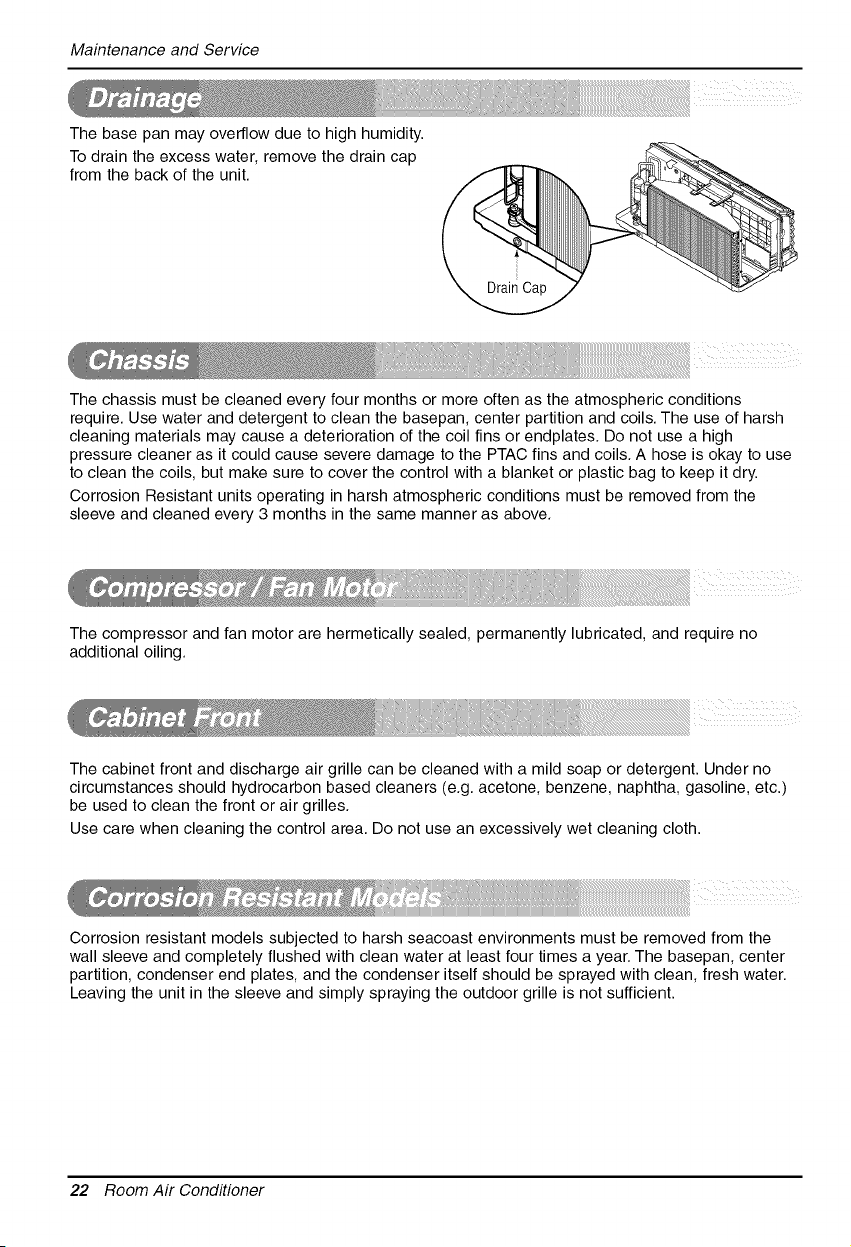
The base pan may overflow due to high humidity.
To drain the excess water, remove the drain cap
from the back of the unit.
The chassis must be cleaned every four months or more often as the atmospheric conditions
require. Use water and detergent to clean the basepan, center partition and coils. The use of harsh
cleaning materials may cause a deterioration of the coil fins or endplates. Do not use a high
pressure cleaner as it could cause severe damage to the PTAC fins and coils. A hose is okay to use
to clean the coils, but make sure to cover the control with a blanket or plastic bag to keep it dry.
Corrosion Resistant units operating in harsh atmospheric conditions must be removed from the
sleeve and cleaned every 3 months in the same manner as above.
The compressor and fan motor are hermetically sealed, permanently lubricated, and require no
additional oiling.
The cabinet front and discharge air grille can be cleaned with a mild soap or detergent. Under no
circumstances should hydrocarbon based cleaners (e.g. acetone, benzene, naphtha, gasoline, etc.)
be used to clean the front or air grilles.
Use care when cleaning the control area. Do not use an excessively wet cleaning cloth.
Corrosion resistant models subjected to harsh seacoast environments must be removed from the
wall sleeve and completely flushed with clean water at least four times a year. The basepan, center
partition, condenser end plates, and the condenser itself should be sprayed with clean, fresh water.
Leaving the unit in the sleeve and simply spraying the outdoor grille is not sufficient.
22 Room Air Conditioner
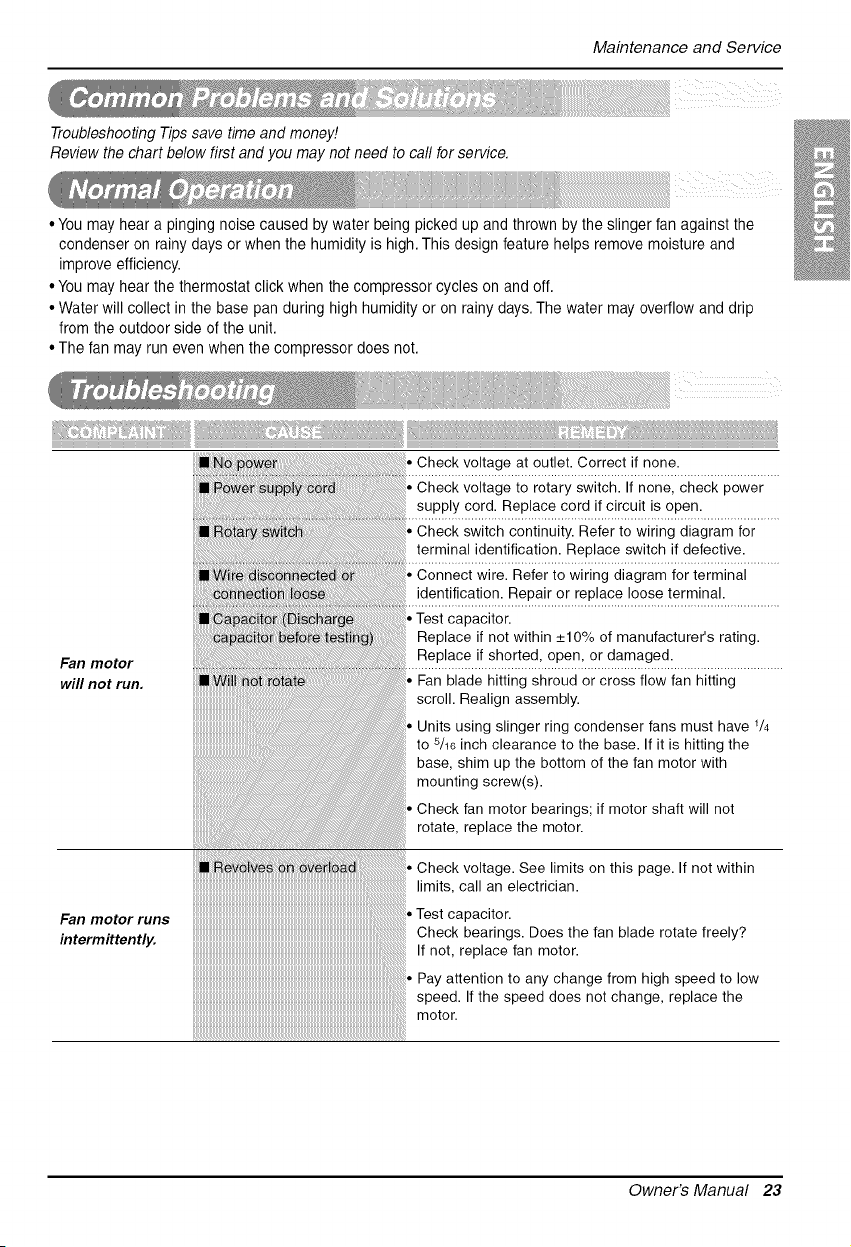
TroubleshootingTipssavetimeandmoney!
Reviewthechartbelowfirstandyoumaynotneedtocallforservice.
MaintenanceandService
• Youmay hear apinging noise caused by water being picked up and thrown by the slinger fan against the
condenser on rainy days or when the humidity is high.This design feature helps remove moisture and
improve efficiency.
• Youmay hear the thermostat click when the compressor cycles on and off.
• Water will collect in the base pan during high humidity or onrainy days. The water may overflow and drip
from the outdoor side of the unit.
• The fan may run even when the compressor does not.
dut_<_
Fan motor
will not run.
• Check voltage at outlet. Correct if none.
• Check voltage to rotary switch. If none, check power
supply cord. Replace cord if circuit is open.
• Check switch continuity. Refer to wiring diagram for
terminal identification. Replace switch if defective.
• Connect wire. Refer to wiring diagram for terminal
identification. Repair or replace loose terminal.
•Test capacitor.
Replace if not within +10% of manufacturer's rating.
Replace if shorted, open, or damaged.
• Fan blade hitting shroud or cross flow fan hitting
scroll. Realign assembly.
• Units using slinger ring condenser fans must have 1/4
to s/16 inch clearance to the base. If it is hitting the
base, shim up the bottom of the fan motor with
mounting screw(s).
• Check fan motor bearings; if motor shaft will not
rotate, replace the motor.
Fan motor runs
intermittently.
Owner's Manual 23
MaintenanceandService
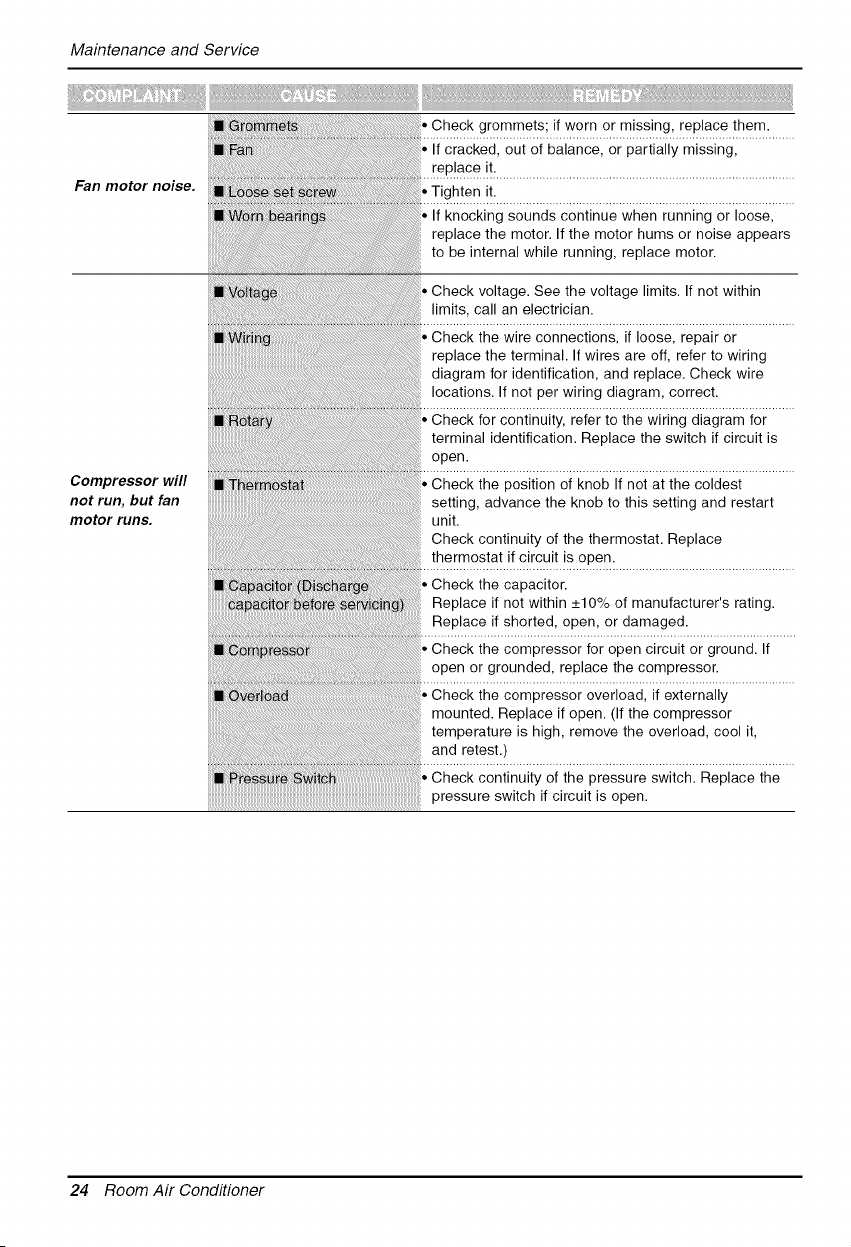
Fan motor noise.
Compressor will
not run, but fan
motor runs.
Check grommets; if worn or missing, replace them.
If cracked, out of balance, or partially missing,
replace it.
Tighten it.
• If knocking sounds continue when running or loose,
replace the motor. If the motor hums or noise appears
to be internal while running, replace motor.
Check voltage. See the voltage limits. If not within
limits, call an electrician.
Check the wire connections, if loose, repair or
replace the terminal. If wires are off, refer to wiring
diagram for identification, and replace. Check wire
locations. If not per wiring diagram, correct.
Check for continuity, refer to the wiring diagram for
terminal identification. Replace the switch if circuit is
open.
Check the position of knob If not at the coldest
setting, advance the knob to this setting and restart
unit.
Check continuity of the thermostat. Replace
thermostat if circuit is open.
Check the capacitor.
Replace if not within +10% of manufacturer's rating.
Replace if shorted, open, or damaged.
Check the compressor for open circuit or ground. If
open or grounded, replace the compressor.
Check the compressor overload, if externally
mounted. Replace if open. (If the compressor
temperature is high, remove the overload, cool it,
and retest.)
Check continuity of the pressure switch. Replace the
pressure switch if circuit is open.
24 Room Air Conditioner

MaintenanceandService
Compressor
cycles on
overload.
@
Insufficient
cooling or heating.
Excessive noise.
If restricted, clean or replace.
Close if open.
Determine if the unit is properly sized for the area to
be cooled.
Check the set screw or clamp. If loose or missing,
correct. If the blower or fan is hitting air guide,
rearrange the air handling parts.
Carefully rearrange tubing not to contact, compressor,
shroud, and barrier.
ROOM AIR CONDITIONER VOLTAGE LIMITS
NAME PLATE RATING MINIMUM MAXIMUM
208/230 V 187 V 253 V
265 V 239 V 292 V
Owner's Manual 25
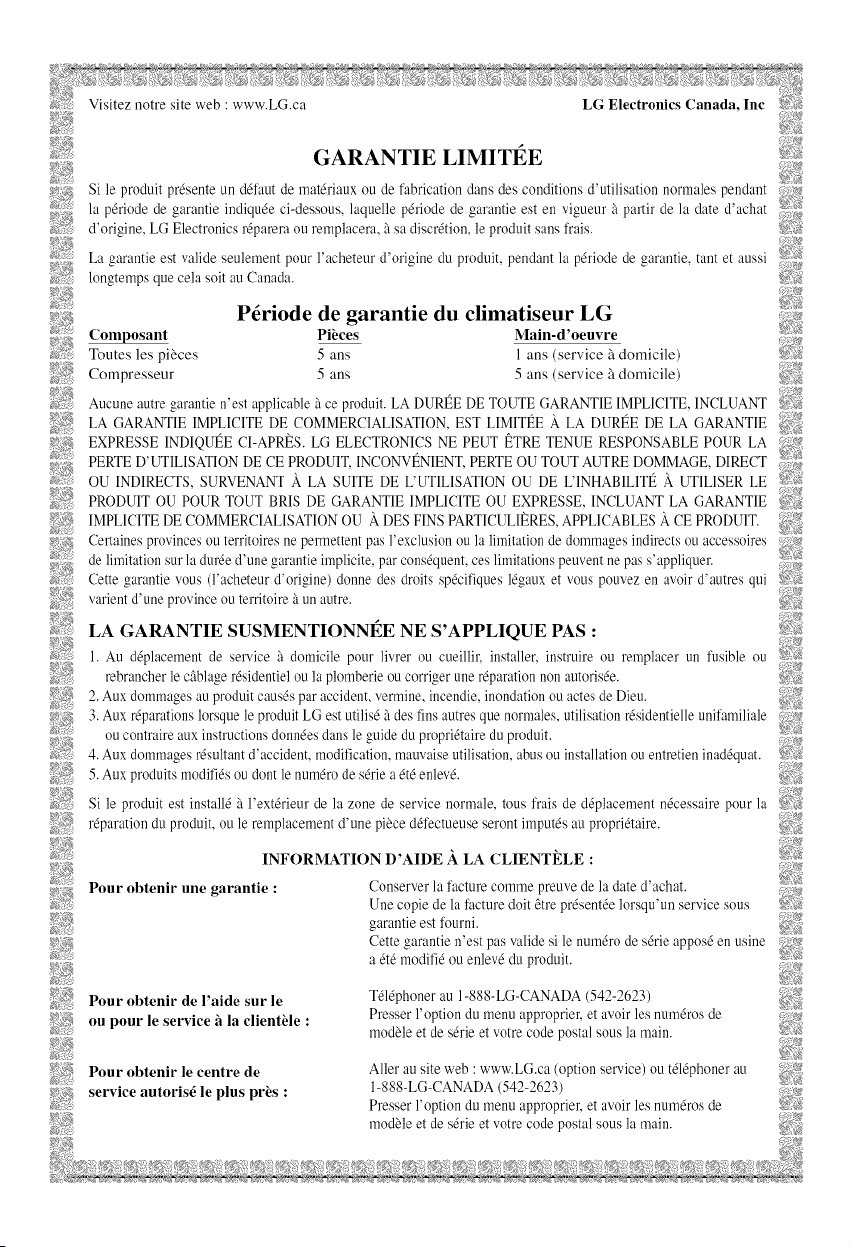
GARANTIE LIMITI_E
Si le produit pr_sente un d_faut de mat&iaux ou de fabrication dansdes conditions d'utilisation normales pendant _#,
la p_riode de garantie indiqu_e ci-dessous, laquelle p&iode de garantie est en vigueur glpartir de la date d'achat _::_A_;_
d'origine, LG Electronics r{parera ou remplacera, gtsa discretion, le produit sans frais. >gclg#
La garantie est valide seulement pour l'acheteur d'origine du produit, pendant lap_riode de garantie, rant et aussi ::_#_
longtemps que cela soit au Canada.
>,z_ P_riode de garantie du climatiseur LG
Composant Pii_ces Main-d'oeuvre
h_!% Toutes les pi_ces 5 arts I arts (service '5 domicile)
_!_,_#Compresseur 5 arts 5 arts (service '5domicile)
Aucune autre garantie n'est applicable ficeproduit. LADURI_E DE TOUTE GARANTIE IMPLICITE, INCLUANT N?_
LA GARANTIE IMPLICITE DE COMMERCIALISATION, EST LIMITt_EA. LA DURt_E DE LA GARANTIE '-_;:,
¢.x5.
_ EXPRESSE INDIQUt_E CI-APRI_S.LG ELECTRONICS NE PEUT I_TRE TENUE RESPONSABLE POUR LA :_:?:_
_:_5;_ PERTED'UTILISATION DECE PRODUIT, INCONVI_NIENT,PERTE OU TOUT AUTRE DOMMAGE, DIRECT _i'_
_:'_'_ OU INDIRECTS, SURVENANT X LA sUITE DE L'UTILISATION OU DE L'INHABILITI_ X UTILISER LE
_v_ PRODUIT OUPoUR TOUT BRIS DE GARANTIE IMPLICITE OU EXPRESSE, INCLUANT LA GARANTIE _:>,{_
:_:/!_5_IMPLICITE DECOMMERCIALISATION OU ADESFINSPARTICULIERES,APPLICABLES A CE PRODUIT.
:_>_,__ Certaines provincesou territoires ne permettent pas l'exclusion ou la limitationde dommages indirects ou accessoires
_> de limitationsurladur& d'une garantie implicite, par consequent,ces limitations peuvent ne pas s'appliquer.
_-_,
#,_:_: Cette garantie vous (l'acheteur d'origine) donne des droits sp_cifiques l_gaux et vous pouvez en avoird'autres qui >::_,,:_
_;_< varientd'une province outerritoireg_unautre.
LA GARANTIE SUSMENTIONNI_E NE S'APPLIQUE PAS :
,÷_..... ii!,N
>;a 1.Au d0placement de service g_domicile pour livrer ou cueillir, installer, instruire ou remplacer un fusible ou _:'<;_
rebrancher le cgblage r&identiel ou la plomberie ou corrigerune r_paration non autoris_e.
2.Auxdommagesau produitcauses par accident,vermine, incendie, inondation ou actes deDieu.
)f!_g 3.Auxr_parations lorsque le produit LGest utilis_ gtdesfns autres que normales,utilisation r&identielle unilhmiliale :_,;_>_
oucontraire aux instructions donnOes dans leguide du propriOtaireduproduit.
4.Auxdommagesr_sultant d'accident, modifcation, mauvaise utilisation, abus ou installationou entretien inadOquat.
>>:v_745.Aux produits modifiOsou dontlenumOrode sOriea_tOenle%.
2_'_! Si leproduit est install_ 5 l'ext&ieur de la zone de service normale, tous frais de d_placement n_cessaire pour la 5_,i_
i:_¢_i__ r_paration du produit, ou le remplacement d'une piece d_fectueuse seront imput& au propri_taire.
INFORMATION D'AIDE A. LA CLIENTELE :
Pour obtenir une garantie :
Conserver lafacture comme preuve de la date d'achat.
Une copie delafacture doit &trepresent& lorsqu'un service sous
garantie est fourni.
Cette _arantie n'est pasvalide si le num_ro de s6rie appos6 en usine _5_:¢,#
a_t_ modifi_ ou enlev_ du produit. Cv:"
Pour obtenir de l'aide sur le
ou pour le service h la clientlde :
T414phonerau 1-888-LG-CANADA (542-2623)
Presser l'option du menu approprier, etavoirles num_ros de
moduleet des4rie etvotre codepostal sous lamain.
Pour obtenir le centre de
service autoris_ le plus pri_s:
Aller au site web : www.LG.ca (option service) ou t_l_phoner au
1-888-LG-CANADA (542-2623)
Presserl'option dumenu approprier, et avoir les num_ms de
moduleet des&ie etvotre codepostal sous lamain.
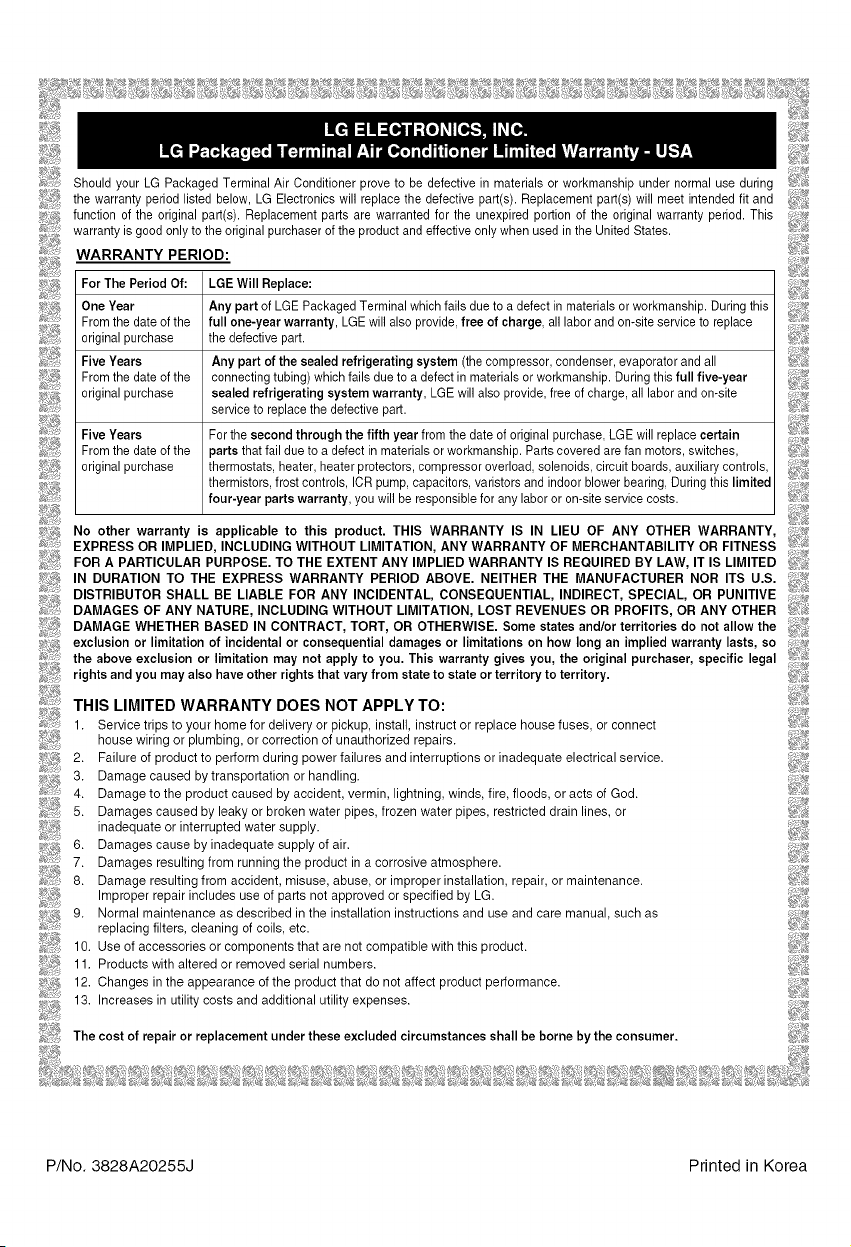
_J Should your LG Packaged TerminalAir Conditioner prove to be defective inmaterials or workmanship undernormal use during _iD
_ the warranty period listed below,LG Electronicswill replace the defective part(s). Replacement part(s)will meet intended fit and ,_
)_;_ function of the original part(s).Replacement parts are warranted for the unexpired portion of the original warranty period.This 77if_'
_:_ii:_(warranty isgood only to theoriginalpurchaser of the productand effective only when used in theUnitedStates _'F;_
WARRANTY PERIOD:
#_: For ThePeriod Of: LGEWill Replace: _z
Irne_Yi;rdate of the fAu_lY$$er.t°faLrGEaPaac_agLGdT]i_l inalwhich failsdueto adefectinmaterials orw°rkmanehip Duringth's ,'
7_4_;q -y y, ' leoprovide,free ofcharge, all laborand on-site service to replace _iI
original purchase thedefectivepart.
Five Years Any partof the sealedrefrigerating system(thecompressor,condenser, evaporator and all
_;;_;_J_From thedate of the connecting tubing)which fails due to adefectinmaterials orworkmanship. Duringthisfull five-year _!?!<#
..... _i_:Q_
__ original purchase sealed refrigerating system warranty, LGEwillalso provide,free of charge, all laborand on-site /¢_
_ service to replace the defective part.
;>._;::/ FnveYears For the second through the fifthyearfrom thedate of original purchase.LGEwillreplacecertain :;:#
g_5:_!_:Fromthedate of the partsthatfail due to adefect inmaterialsorworkmanship.Parts coveredarefan motors, switches, _:(i>
_
!!_!_ original purchase thermostats, heater heater protectors compressoroverload,solenoids circuit boards auxiliary controls
_4_;; thermistors,frost controls, ICRpump. capacntors,varistorsandindoor blowerbearing. DuringthusInmnted
_S_'J_;__._ four-year parts warranty youwill' be responsible for any labororon-site service costs. _?:_
No other warranty is applicable to this product. THIS WARRANTY IS IN LIEU OF ANY OTHER WARRANTY, i;_._i)'_
EXPRESS OR IMPLIED, INCLUDING WITHOUT LIMITATION, ANY WARRANTY OF MERCHANTABILITY OR FITNESS ;_:>;
FOR A PARTICULAR PURPOSE. TO THE EXTENT ANY IMPLIED WARRANTY IS REQUIRED BY LAW, IT IS LIMITED _:;!_
IN DURATION TO THE EXPRESS WARRANTY PERIOD ABOVE. NEITHER THE MANUFACTURER NOR ITS U.S. "_,iI_
DISTRIBUTOR SHALL BE LIABLE FOR ANY INCIDENTAL, CONSEQUENTIAL, INDIRECT, SPECIAL, OR PUNITIVE 7;i_
DAMAGES OF ANY NATURE, INCLUDING WITHOUT LIMITATION, LOST REVENUES OR PROFITS, ORANY OTHER _!i_;
_:)t_ DAMAGE WHETHER BASED IN CONTRACT, TORT, OR OTHERWISE. Some states and/or territories do net allow the f:!!_
exclusion or limitation of incidental or consequential damages or limitations on hew long an implied warranty lasts, so _,!3;+
the above exclusion or limitation may net apply to you. This warranty gives you, the original purchaser, specific legal d,_
rights and you may also have other rights that varyfrom state to state or territory to territory. _ik';iS
£2%
THIS LIMITED WARRANTY DOES NOT APPLY TO:
1. Service trips to your home for delivery or pickup, install, instruct or replace housefuses, orconnect
house wiring or plumbing, or correction of unauthorized repairs.
2. Failure of product to perform during power failures and interruptions or inadequate electrical service.
3. Damage caused bytransportation or handling.
4. Damage to the product caused byaccident, vermin, lightning, winds, fire, floods, or acts of God.
5. Damages caused by leaky or broken water pipes, frozen water pipes, restricted drain lines, or
inadequate or interrupted water supply.
6. Damages cause by inadequate supply of air.
7. Damages resulting from running the product in acorrosive atmosphere.
8. Damage resulting from accident, misuse, abuse, or improper installation, repair, or maintenance.
Improper repair includes use of parts notapproved or specified by LG.
g. Normal maintenance as described in the installation instructions and use and care manual, such as
replacing filters, cleaning of coils, etc.
10. Use of accessories or components that are notcompatible with this product.
11. Products with altered or removed serial numbers.
12. Changes in the appearance ofthe product that do not affect product performance.
13. Increases in utility costs and additional utility expenses.
_4_ The costof repair or replacement under these excluded circumstances shall be borne by the consumer.
P/No. 3828A20255J Printed in Korea

