USE CARE NUAL
TREAD AND SAVE THESE INSTRUCTIONS LL
ELECTRONIC CONTROL
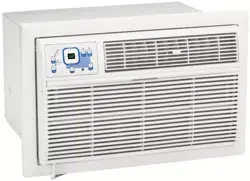
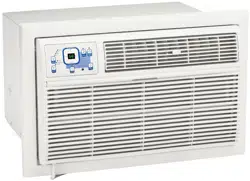
AIR CONDITIONER
P/N 220218A028
Z000705(En)-YaoKong 1 09/2/2005, 2:20 PM
ROOM AIR CONDITIONER WARRANTY
Yourproduct is protected by this warranty
Your appliance is warranted by Electrolux. Electrolux has authorized Frigidaire Consumer Services and their authorized servicers to pedorm service under this
warranty. Electrolux authorizes no one else to change or add to any of these obligations under this warranty. Any obligations for service and parts under this
warranty must be pedormed by Frigidaire Consumer Services or an authorized Frigidaire servicer.
WARRANTY FRmGmDAIRE,THROUGH roTS THE CONSUMER WILL BE RESPONSmBLE
PERmOD AUTHORmZED SERVmCERS, WILL: FOR:
FULL ONE-YEAR One year from original Pay all costs for repairing or replacing parts Costs of service calls that are listed under
WARRANTY purchase date. of this appliance which prove to be defective NORMAL RESPONSIBILITIES OF THE
in materials or workmanship. CONSUMER.*
LIMITED 2-S YEAR Second through fifth Repair or replace any parts in the Sealed Diagnostic costs and any removal,
WARRANTY (Sealed years from original Refrigeration System (compressor, transportation and reinstallation costs which
System) purchase date. condenser, evaporator and tubing) proves to are required because of service. Costs for
be defective in materials or workmanship, labor, parts and transportation other than with
respect to the Sealed Refrigeration System.
LIMITED WARRANTY Time periods listed All of the provisions of the full and limited Costs of the technician's travel to the home
(Applicable to the State above, warranties above and the exclusions listed and any costs for pick up and delivery of the
of Alaska) below apply, appliance required because of service.
*NORMAL
RESPONSiBiLiTiES OF
THE CONSUMER
EXCLUSIONS
IF YOU NEED SERVICE
This warranty applies only to products in ordinary household use, and the consumer is responsible for the items
listed below.
1. Proper use of the appliance in accordance with instructions provided with the product.
2. Proper installation by an authorized servicer in accordance with instructions provided with the appliance and inaccordance
with all local plumbing, electrical and/or gas codes.
3. Proper connection to a grounded power supply of sufficient voltage, replacement of blown fuses, repair of loose connections
or defects in house wiring.
4. Expenses for making the appliance accessible for servicing, such as removal of trim, cupboards, shelves, etc., which are
not a part of the appliance when it was shipped from the factory.
5. Damages to finish after installation.
8. Replacement of light bulbs and/or fluorescent tubes (on models with these features).
This warranty does not cover the following:
1. CONSEQUENTIAL OR INCIDENTAL DAMAGES SUCH AS PROPERTY DAMAGE AND INCIDENTAL EXPENSES
RESULTING FROM ANY BREACH OF THIS WRITTEN OR ANY IMPLIED WARRANTY. Note: Some states de not allow
the exclusion or limitation of incidental or consequential damages, so this limitation or exclusion may not apply to you.
2. Service calls which de not involve malfunction or defects in workmanship or material, or for appliances not in ordinary
household use. The consumer shall pay for such service calls.
3. Damages caused by services performed by persons other than authorized Frigidaire servicers; use of parts other than
Frigidaire Genuine Renewal Parts; obtained from persons other than such servicers; or external causes such as abuse,
misuse, inadequate power supply or acts of God.
4. Products with original serial numbers that have been removed or altered and cannot be readily determined.
Keep your bill of sale, delivery slip, or some other appropriate payment record. The date on the bill establishes the warranty
period should service be required. If service is performed, it is in your best interest to obtain and keep all receipts. This written
warranty gives you specific legal rights. You may also have other rights that vary from state to state. Service under this
warranty must be obtained by following these steps, in order:
1. Contact Frigidaire Consumer Services or an authorized Frigidaire servicer.
2. If there is a question as to where to obtain service, contact our Consumer Relations Department at:
Frigidaire
Re. Box 212378
Augusta, GA 30917
800-444=4944
CANADA
Electrolux Canada Group
8150 McLaughlin Road
Mississauga, Ontario L5R 4C2
1=866-213-9397
Product features or specifications as described or illustrated are subject to change without notice. All warranties are made by
Electrolux.
This warranty applies only in the 50 states of the U.S.A., Puerto Rico and Canada.
FOR SERVICE CALL 1=800=444=4944.
SZ000705(En)-YaoKong 2 09/2/2005, 2:20 PM
Product Registration Record Your Model and Serial Numbers
Record in the space provided below the model and serial numbers. On all models, the serial
plate is located on the outside of the cabinet.
Register Your Product
The self-addressed PRODUCT REGISTRATION CARD should be filled in completely, signed
and returned to the Frigidaire Company.
Contents
NOTE: This USE & CARE MANUAL
provides specific operating instructions
for your model. Use the room air
conditioner only as instructed in this USE
& CARE MANUAL. These instructions
are not meant to cover every possible
condition and situation that may occur.
Common sense and caution must be
practiced when installing, operating,
and maintaining any appliance.
2 Warranty
3 Product Registration
3 Normal Sounds
4 Important Safety instructions
5-10 Using Air Conditioner
5-10 Air Conditioner Features
11 Care and Cleaning
11 Energy Saving Ideas
12 Avoid Service Checklist
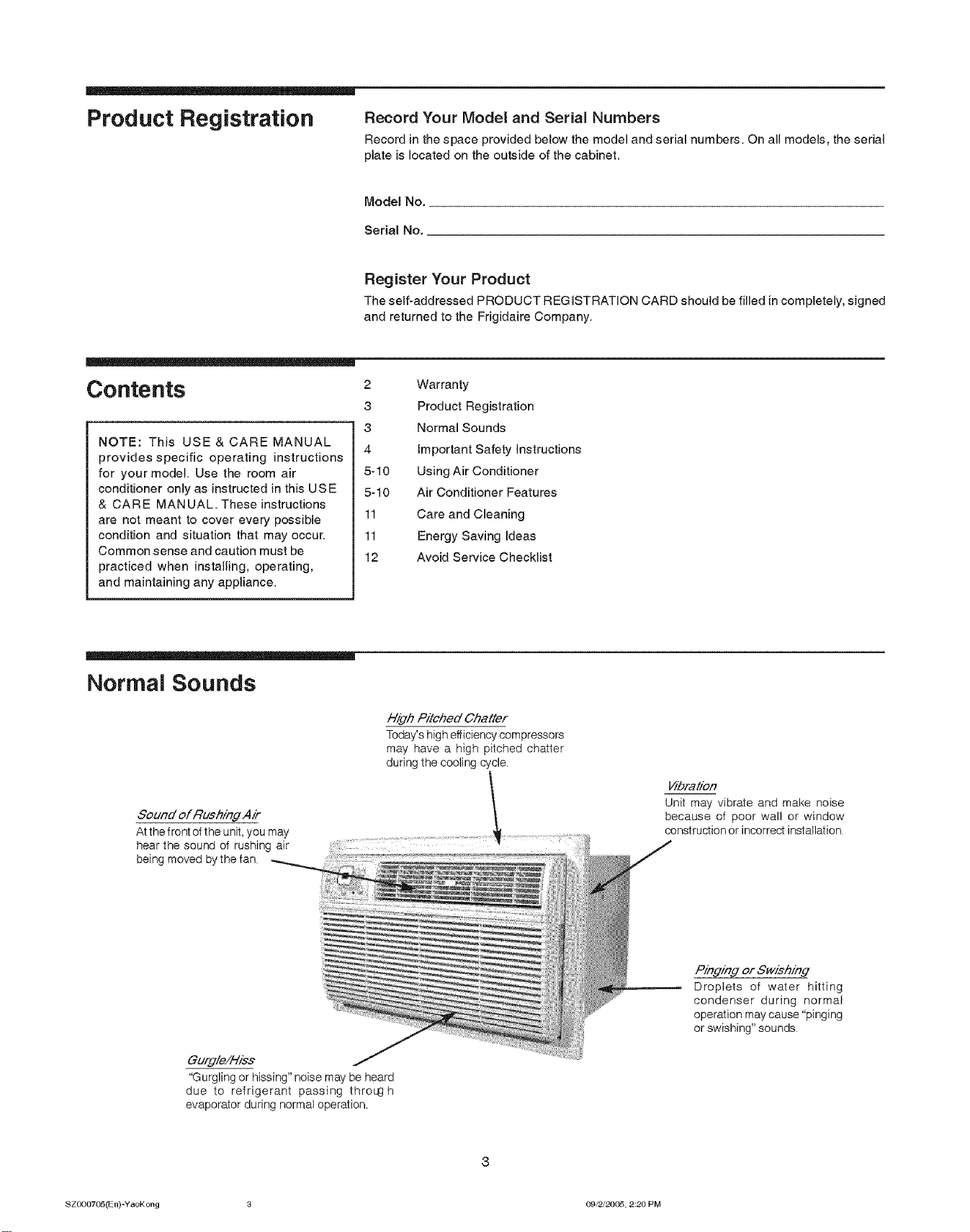
Normal Sounds
High Pitched Chatter
Today's high efficiency compressors
may have a high pitched chatter
during the cooling cycle.
Sound of RushindAir
At the front of the unit, you may
hear the sound of rushing air
being moved by the fan
Gurdle/Hies
"Gurgling or hissing" noise may be heard
due to refrigerant passing thresh
evaporator during normal operation.
_bratien
Unit may vibrate and make noise
because of poor wall or window
construction or incorrect installation
Pinging or Swishind
Droplets of water hitting
condenser during normal
operation may cause "pinging
or swishing" sounds.
ezoo07¢&5(En)-YaoKong 8 09/2J20(_5, 2:20 PM
important Safety
instructions
_N TE The power supply cord with
this air conditioner contains a current
detection device designed to reduce the risk
of fire.
Please refer to the section 'Operation of
Current Device' for details.
In the event that the power supply cord is
damaged, it cannot be repaired-it must be
replaced with a cord from the Product
Manufacturer.
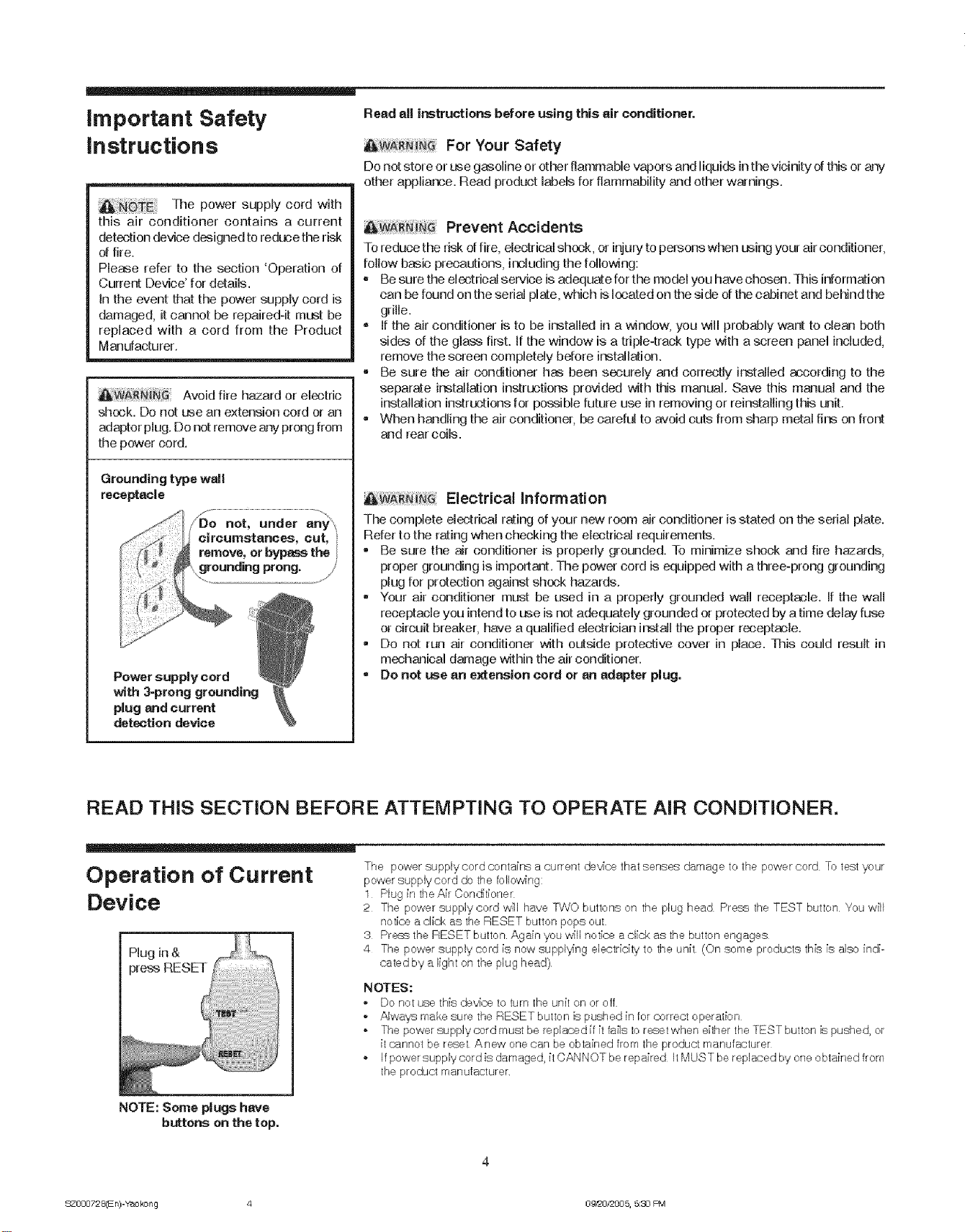
Avoid fire hazard or electric
shock. Do not use an extension cord or an
adaptor plug. Do not remove any prong from
the power cord.
Power supply cord
with 3-prong grounding
plug and current
detection device
Read eli ir_tructions before using this air conditioner.
For "four Safety
Do not store or ase gasoline or other flammable vapors and liquids in the vicinity of this or-ar_/
other appliance. Read product labels for flammability and other warnings.
Prevent Accidents
To reduce the risk offire, electrical shook, or injury to persons when using your air conditioner,
follow basic precautions> including the following:
-Be sure the electrical service is adequate for the model you have chosen. This information
can be found on the serial plate, which is located on the side of the cabinet and behind the
grille.
- tf the air conditioner is to be installed in a window>you will probably want to dean both
sides of the glass first. If the window is a triple-track type with a screen panel included,
remove the screen completely before installation.
• Be sure the air conditioner has been securely and correctly installed according to the
separate iastallation instructions provided with this manual. Save this manual and the
installation instructions for possible future use in removing or reinstalling this unit.
•When handling the air conditioner> be careful to avoid cuts from sharp metal fins on front
and rear coils.
Electrical information
The complete electrical rating of your new room air conditioner is stated on the serial plate.
Refer to the rating when checking the electrical requirements.
•Be sure the air conditioner is properly grounded. To minimize shock and fire hazards,
proper grounding is important. The power cord is equipped with a three-prong grounding
plug for protection against shook hazards.
-Your air conditioner must be used in a properly grounded wall receptacle. If the wall
receptacle you intend to use is not adequately grounded or protected by atime delay fuse
or circuit breaker, have a qualified electrician install the proper receptacle.
,Do not run air conditioner with outside protective cover in place. This could result in
mechanical damage within the air conditioner.
= De not L_e an e_ension cord or an adapter plug.
READ THIS SECTION BEFORE ATTEMPTING TO OPERATE AIR CONDITIONER.
Operation of Current
Device
Plug in &
preas RESET
NOTE: Some plugs have
buttons on the top.
The power supplycerd contains a current de,,a'cethat senses damage to the power cord To test your
power supply cord do the following:
1 Plug in the Air Conditioner
2 The power supplycerd w[ll have T;NO buttons on the plug head Press the TEST button You wilt
notice a click as the RESET button pops out
3 Press the RESET button Again you will notice a click as the button engages
4 The power supply cord [s now suppl'_ng electricity to the unit (On some products th[s [s also indi-
cated by a light on the plug head)
NOTES:
-Do net use this de'_ce te turn the unit en or-off
oAlwa,_s make sure the RESET button is pushed in Ier correct operation
- The power supply cord must be replaced [f[t fa[Is to reset when either the TEST button [s pushed, or
[t cannot be reset Anew one can be obtained from the product manufacturer
,If power supply cord is damaged, it CANNOT be repa[red It MUST be replaced by one obtained from
the product manutacturer
Q
S_O00728(En)-Ye, okong 4 0__0/=005, 5:30 F%q
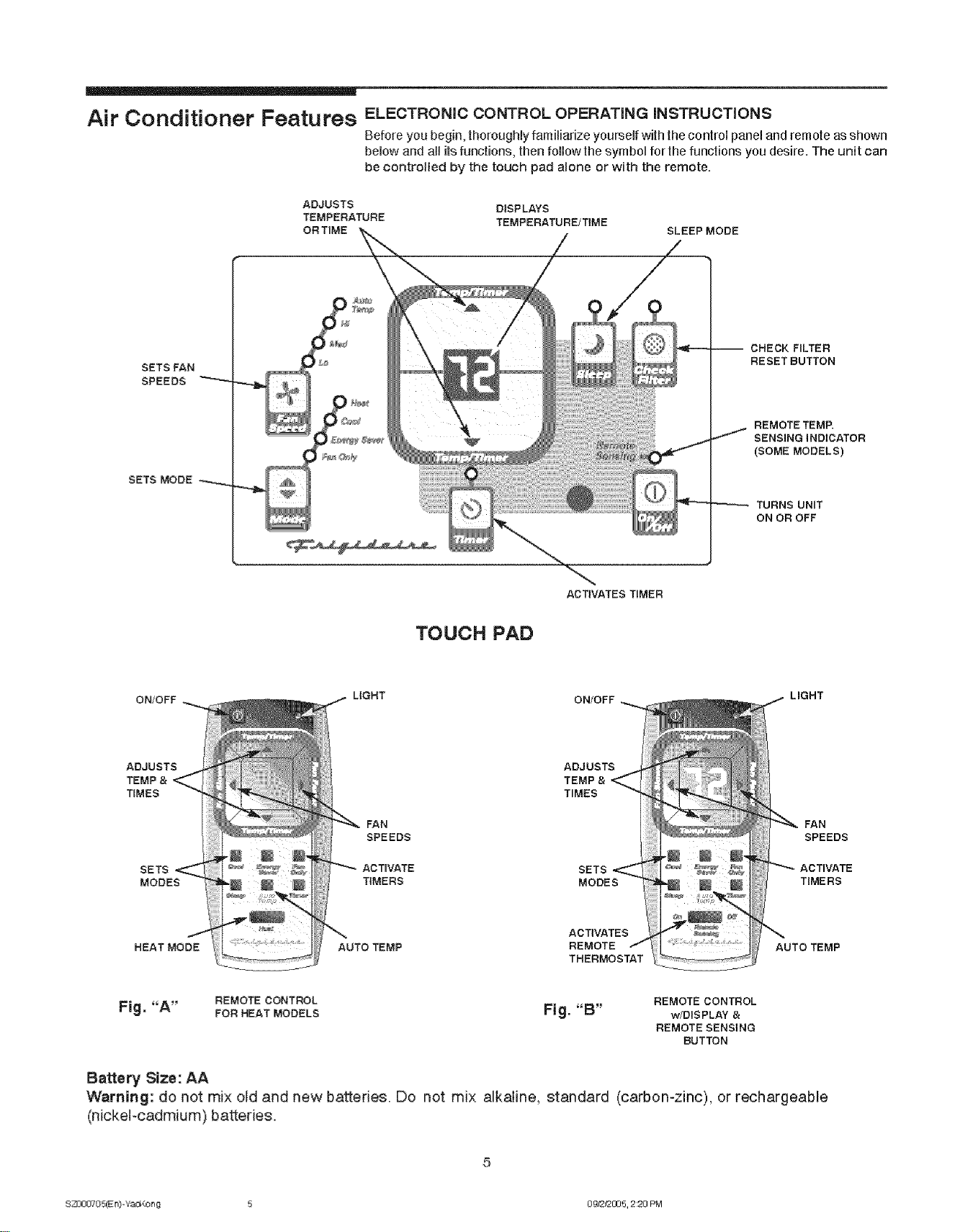
Air Conditioner Featu res ELECTRONICCONTROLOPERATINGiNSTRUCTIONS
Before you begin, thoroughly famifiarize yourself with the controi panel and remote as shown
below and all its functions, then follow the symbol for !he functions you desire. The unit can
be controlled by the touch pad alone or with the remote.
ADJUSTS DISPLAYS
TEMPERATURE TEMPERATURE/TIME
ORTIME SLEEP MODE
SETS FAN
SPEEDS
SETS MODE
-- CHECK FILTER
RESET BUTTON
REMOTE TEMP.
SENSING INDICATOR
(SOME MODELS)
TURNS UNIT
ON OR OFF
TOUCH PAD
ACTIVATES TIMER
ON/OFF LIGHT ON/OFF LIGHT
ADJUSTS
TEMP &
TIMES
SETS
MODES
HEAT MODE
ADJUSTS
TEMP &
TIMES
FAN FAN
SPEEDS SPEEDS
ACTIVATE SETS
TIMERS MODES TIMERS
ACTIVATES
AUTO TEMP REMOTE AUTO TEMP
THERMOSTAT
FIg."A" REMOTE CONTROL
FORHEATMODELS Fig."B" REMOTE CONTROL
w!DIS PLAY &
REMOTE SENSING
BUTTON
Battery Size: AA
Warning: do not mix old and new batteries. Do not mix alkaline, standard (carbon-zinc), or rechargeable
(nickel-cadmium) batteries.
S23300705(E n)-Ye_,_:_3n g 5 0 _2/2005, 2:20 PM
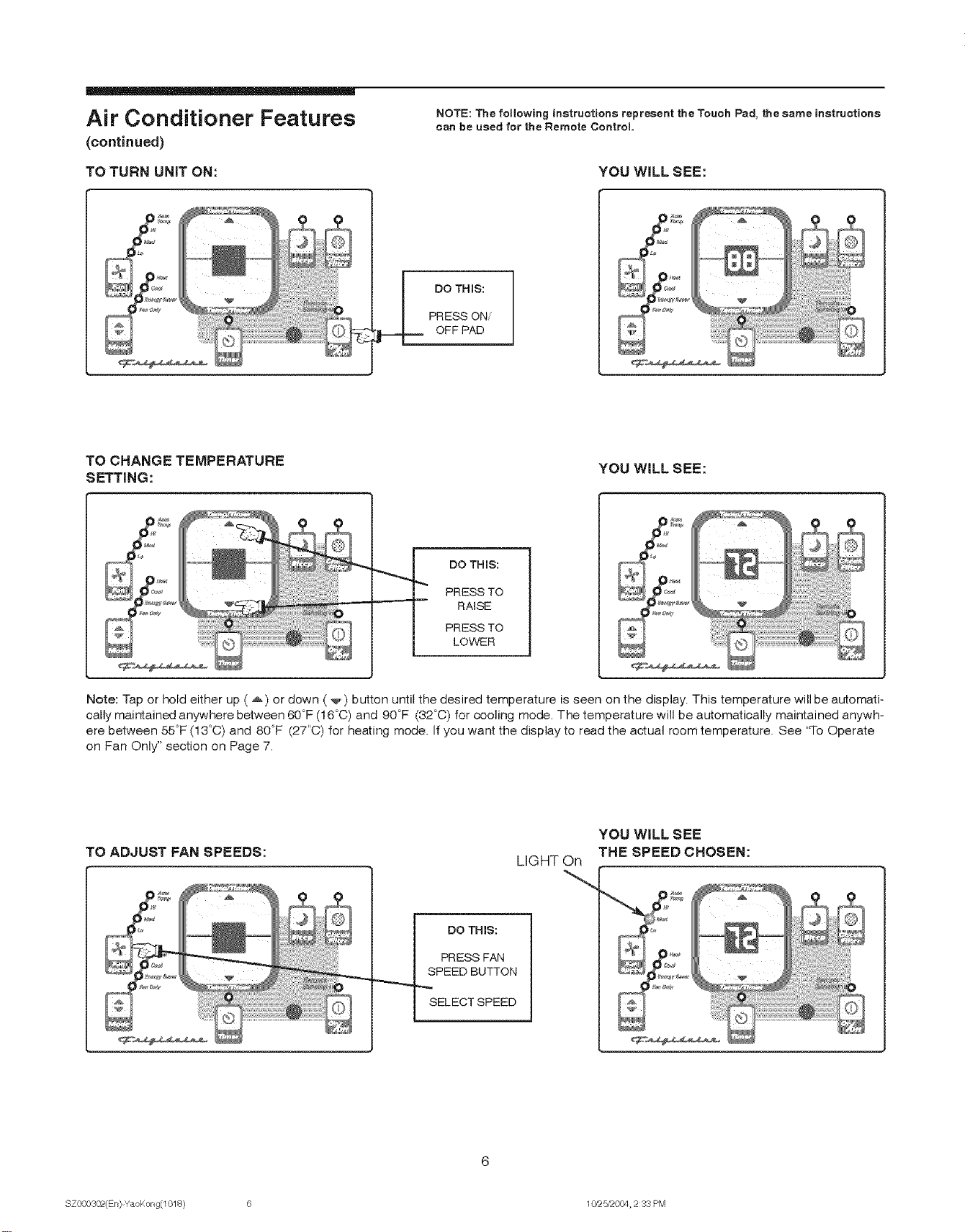
Air Conditioner Features
(continued)
TO TURN UNiT ON:
NOTE: The following instructions represent the Touch Pad, the same instructions
can be used for the Remote Control,
YOU WiLL SEE:
DO THINS:
PRESS ON/
OFF PAD
TO CHANGE TEMPERATURE
SETTING: YOU WiLL SEE:
DO THIS:
PRESS TO
RAISE
PRESS TO
LOWER
Note: Tap or hold either up (_) or down (_) button until the desired temperature is seen on the display. This temperature will be automati-
cally maintained anywhere between 60°F (16°C) and 90°F (32°C) for cooling mode. The temperature will be automatically maintained anywh-
ere between 55°F (13°C) and 80°F (27'C) for heating mode. If you want the display to read the actual room temperature. See 'q-o Operate
on Fan Only" section on Page 7.
TO ADJUST FAN SPEEDS:
DO THIS:
PRESS FAN
SPEED BUTTON
SELECTSPEED
LIGHT On
YOU WILLSEE
THE SPEED CHOSEN:
SZ000302(En)-YaoKong(1018) 6 10/£5/2004 2 33 PM
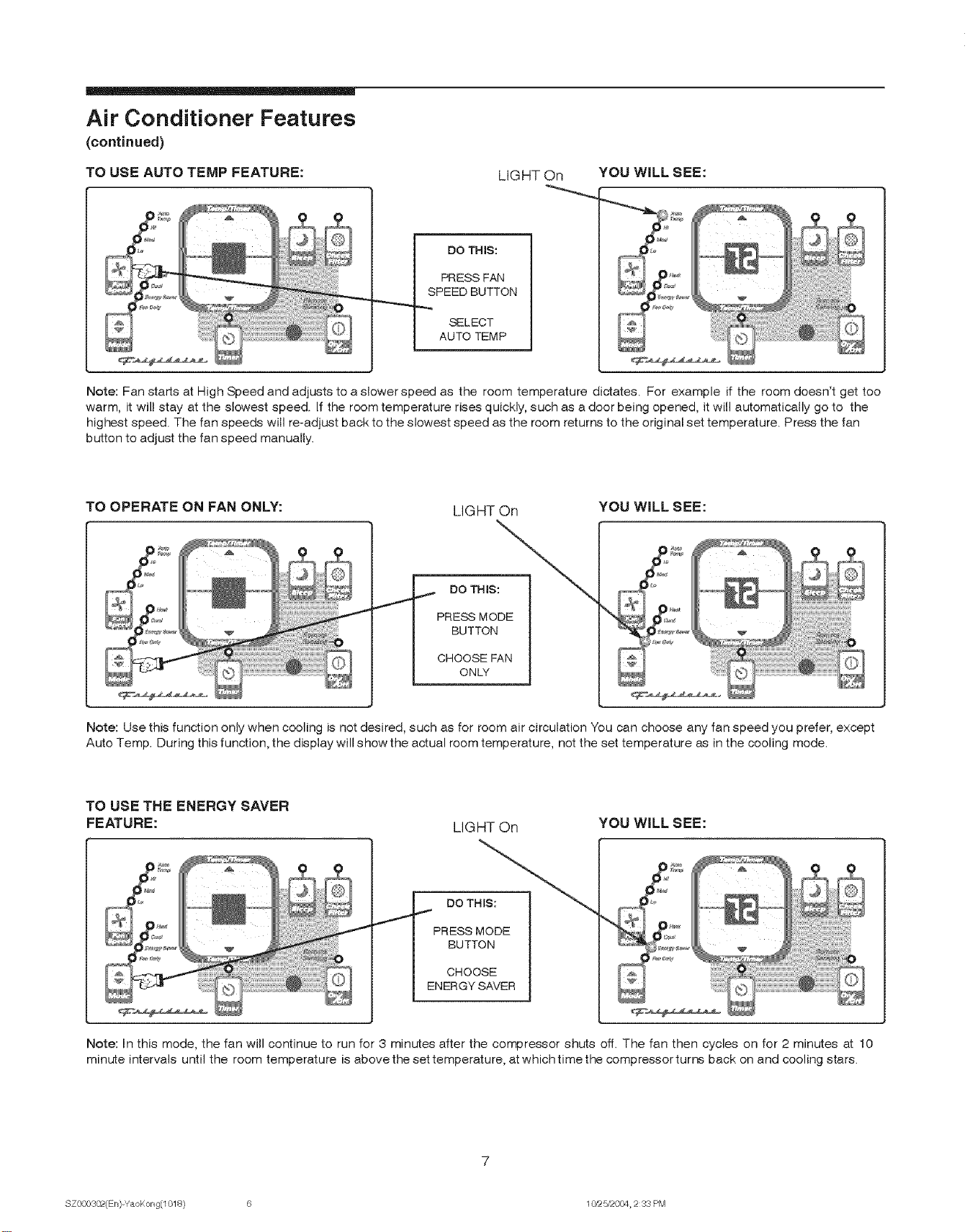
Air Conditioner Features
(continued)
TO USE AUTO TEMP FEATURE: LIGHT On
DO THIS:
PRESS FAN
SPEED BUTTON
SELECT
AUTO TEMP
YOU WILL SEE:
Note: Fan starts at High Speed and adjusts to a slower speed as the room temperature dictates. For example if the room doesn't get too
warm, it will stay at the slowest speed. If the room temperature rises quickly, such as a door being opened, it will automatically go to the
highest speed. The fan speeds will re-adjust back to the slowest speed as the room returns to the original set temperature. Press the fan
button to adjust the fan speed manually.
TO OPERATE ON FAN ONLY: LIGHT On YOU WiLL SEE:
DO THIS:
PRESS MODE
BUTTON
CHOOSE FAN
ONLY
Note: Use this function only when cooling is not desired, such as for room air circulation You can choose any fan speed you prefer, except
Auto Temp. During this function, the display will show the actual room temperature, not the set temperature as in the cooling mode.
TO USE THE ENERGY SAVER
FEATURE: LIGHT On YOU WILL SEE:
DO THIS:
PRESS MODE
BUTTON
CHOOSE
EN ERGY SAVER
Note: In this mode, the fan will continue to run for 3 minutes after the compressor shuts off. The fan then cycles on for 2 minutes at 10
minute intervals until the room temperature is abovethe set temperature, at whichtime the compressor turns back on and cooling stars.
SZ000302(En)-YaoKong(1018) 6 10/z5/2004 2 33 PM
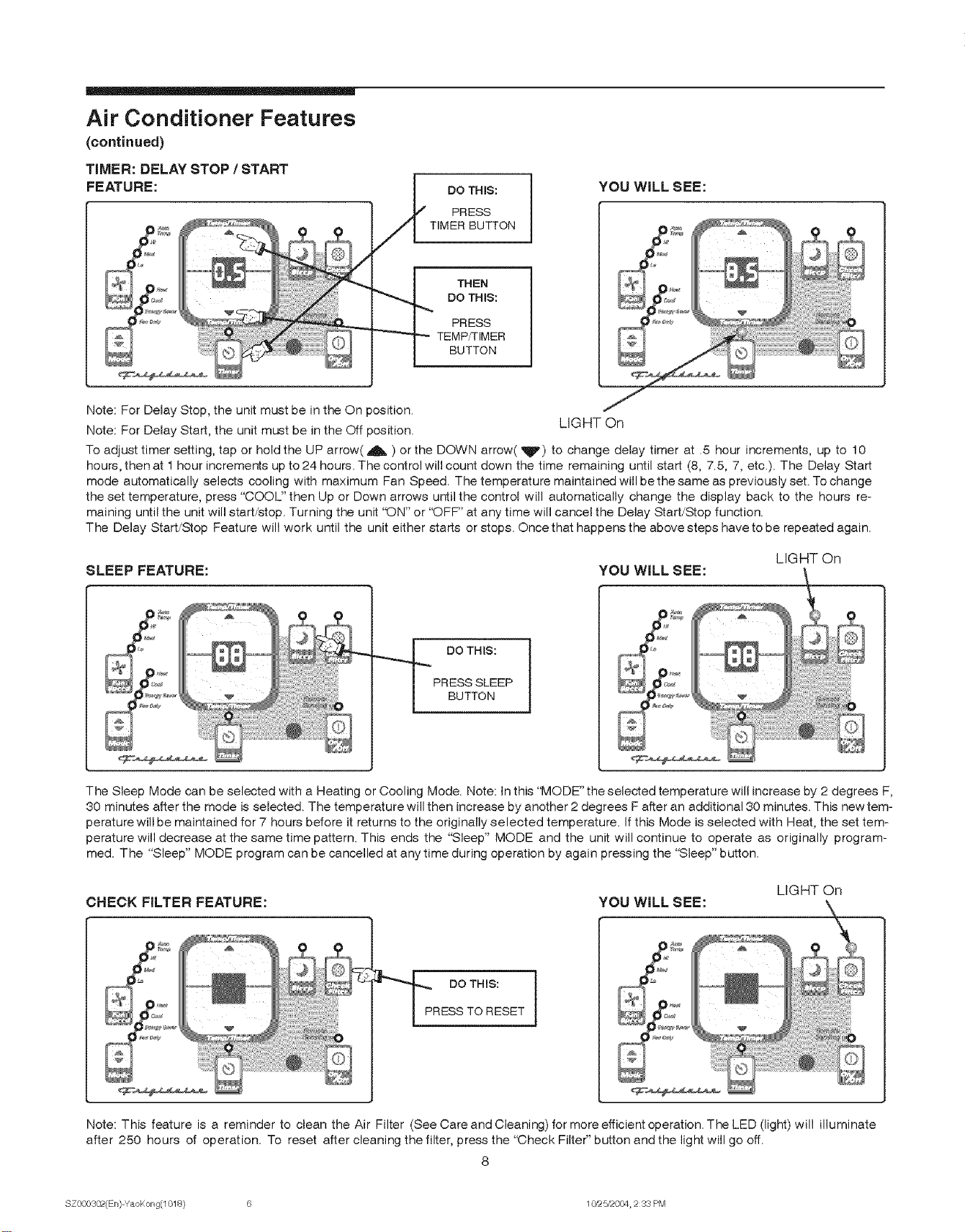
Air Conditioner Features
(continued)
TIMER: DELAY STOP /START
FEATURE: DO THIS:
PRESS
TIMER BUTTON
YOU WiLL SEE:
THEN
DO THIS:
PRESS
TEMP_IMER
BUTTON
Note: For Delay Stop, the unit must be in the On position. LIGHT On
Note: For Delay Start, the unit must be in the Off position.
To adjust timer setting, tap or hold the UP arrow( A ) or the DOWN arrow(It) to change delay timer at .5 hour increments, up to 10
hours, then at 1 hour incremer_s up to 24 hours. The control will count down the time remaining until start (8, 7.5, 7, etc.). The Delay Start
mode automatically selects cooling with maximum Fan Speed. The temperature maintained will be the same as previously set. To change
the set temperature, press "COOL" then Up or Down arrows ur_il the control will automatically change the display back to the hours re-
maining until the unit will start/stop. Turning the unit "ON" or "OFF" at any time will cancel the Delay Start!Stop function.
The Delay Start/Stop Feature will work until the unit either starts or stops. Once that happens the above steps have to be repeated again.
LIGHT On
SLEEP FEATURE: YOU WiLL SEE:
DO THIS:
PRESS SLEEP
BUTTON
The Sleep Mode can be selected with a Heating or Cooling Mode. Note: In this "MODE" the selected temperature will increase by 2 degrees F,
80 minutes after the mode is selected. The temperature will then increase by another 2 degrees F after an additional 80 minutes. This new tem-
perature will be maintained for 7 hours before it returns to the originally selected temperature. If this Mode is selected with Heat, the set tem-
perature will decrease at the same time pattern. This ends the "Sleep" MODE and the unit will continue to operate as originally program-
med. The "Sleep" MODE program can be cancelled at anytime during operation by again pressing the "Sleep" button.
CHECK FILTER FEATURE: YOU WiLL SEE: LIGHT On
DO THIS:
PRESS TO RESET
Note: This feature is a reminder to clean the Air Filter (See Care and Cleaning) for more efficient operation. The LED (light) will illuminate
after 250 hours of operation. To reset after cleaning the filter, press the "Check Filter" button and the light will go off.
8
SZ000302(En)-YaoKong(1018) 6 10/z5/2004 2 33 PM
Air Conditioner Features
(continued)
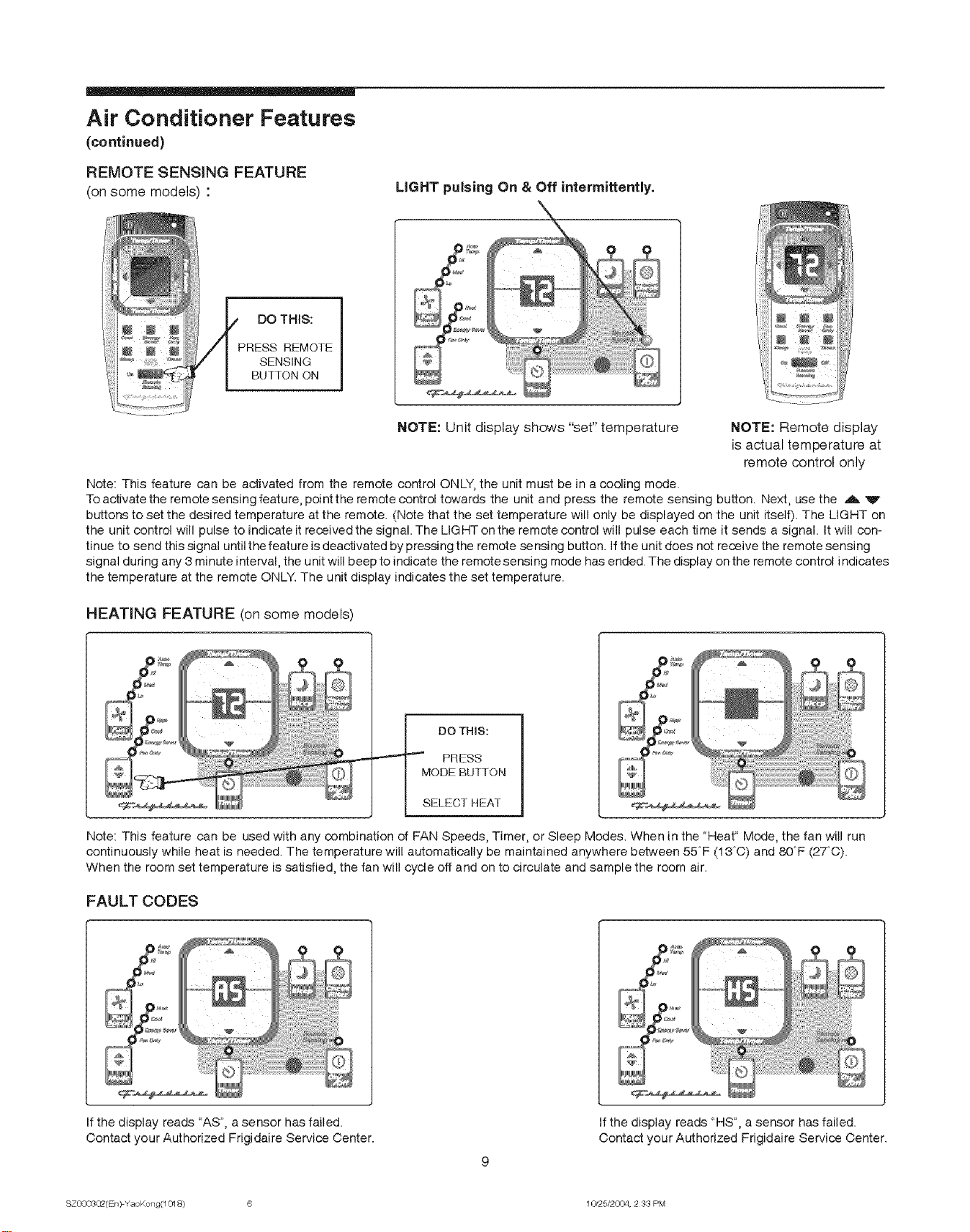
REMOTE SENSING FEATURE
(on some models) : LIGHT pulsing On & Off intermittently.
DO THIS:
PRESS REMOTE
SENSING
BUTTON ON
NOTE: Unit display shows "set" temperature NOTE: Remote display
is actual temperature at
remote control only
Note: This feature can be activated from the remote control ONLY, the unit must be in a cooling mode.
To activate the remote sensing feature, point the remote control towards the unit and press the remote sensing button. Next, use the ._, V
buttons to set the desired temperature at the remote. (Note that the set temperature will only be displayed on the unit itself). The LIGHT on
the unit control will pulse to indicate it received the signal. The LIG HT on the remote control will pulse each time it sends a signal. It will con-
tinue to send this signal until the feature is deactivated bypressing the remote sensing button. Ifthe unit does not receive the remote sensing
signal during any 3 minute interval, the unit will beep to indicate the remote sensing mode has ended. The display on the remote control indicates
the temperature at the remote ONLY. The unit display indicates the set temperature.
HEATING FEATURE (on some models)
DO THIS:
•"-""_"'_ PRESS
MODE BUTTON
SELECTHEAT
Note: This feature can be used with any combination of FAN Speeds, Timer, or Sleep Modes. When in the "Heat" Mode, the fan will run
continuously while heat is needed. The temperature will automatically be maintained anywhere between 55°F (18°O) and 80°F (27°0).
When the room set temperature is satisfied, the fan will cycle off and on to circulate and sample the room air.
FAULT CODES
If the display reads "AS", a sensor has failed.
Contact your Authorized Frigidaire Service Center. If the display reads "HS", a sensor has failed.
Contact your Authorized Frigidaire Service Center.
SZ0003Q_(EI 0 YaoKong(1018) 6 1C¢25/2004, 2 33 PM
Air Conditioner Features
(continued)
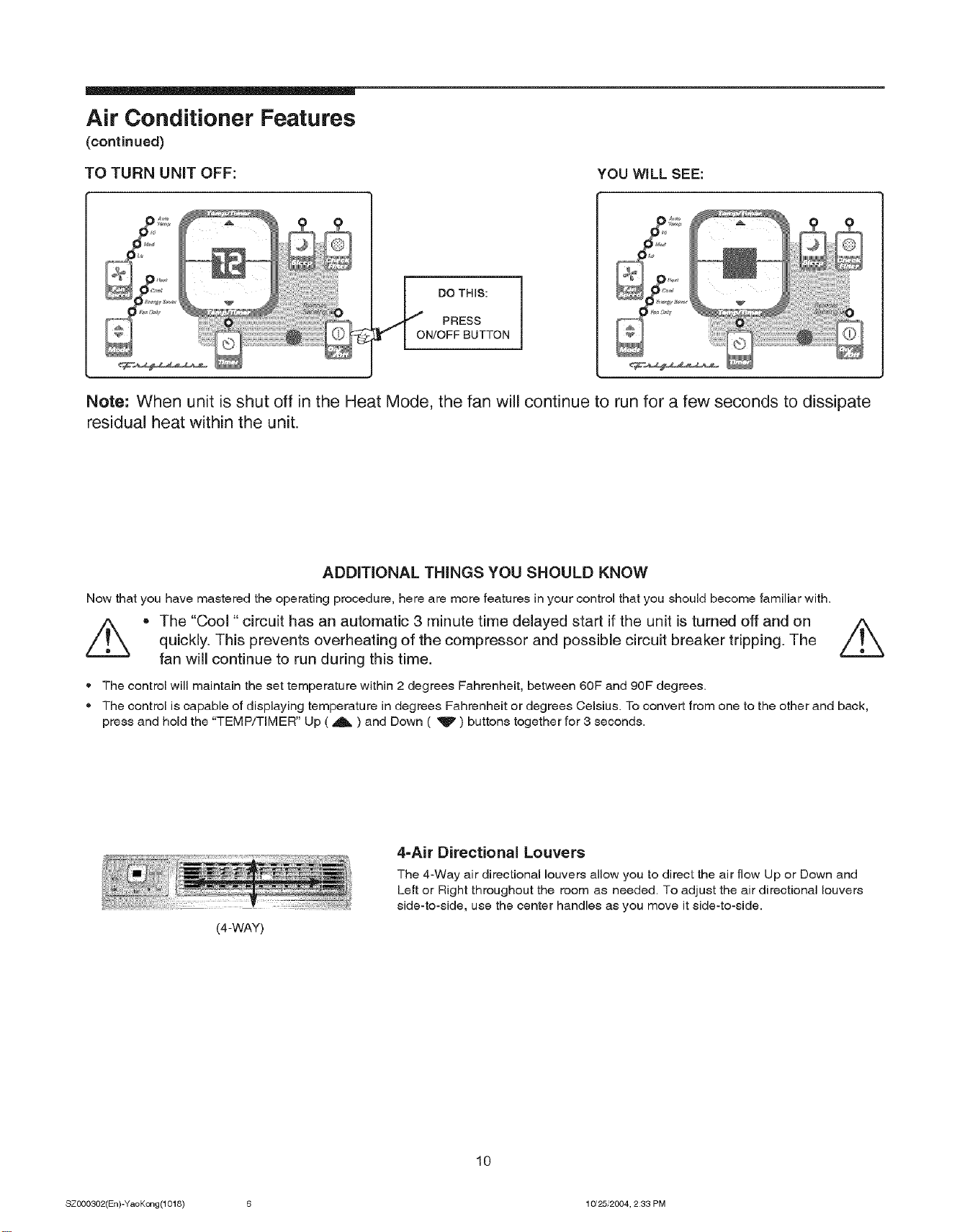
TO TURN UNiT OFF: YOU WILL SEE:
DO THIS:
PRESS
ON/OFF BUTTON
Note: When unit is shut off in the Heat Mode, the fan will continue to run for a few seconds to dissipate
residual heat within the unit.
ADDITIONAL THINGS YOU SHOULD KNOW
Now that you have mastered the operating procedure, here are more features in your control that you should become familiar with.
//_ , The "Cool "circuit has an automatic 3 minute time delayed start if the unit is turned off and on /_
quickly. This prevents overheating of the compressor and possible circuit breaker tripping. The
fan will continue to run during this time.
• The control will maintain the set temperature within 2 degrees Fahrenheit, between 60F and 90F degrees.
® The control is capable of displaying temperature in degrees Fahrenheit or degrees Celsius. To convert from one to the other and back,
press and hold the "TEMP/TIMER" Up ( A ) and Down ( _P' ) buttons together for 3 seconds.
(4-WAY)
4=Air Directional Louvers
The 4-Way air directional louvers allow you to direct the air flow Up or Down and
Left or Right throughout the room as needed. To adjust the air directional louvers
side-to-side, use the center handles as you move it side-to-side.
10
SZ000302(En)-YaoKc_lg(1018) 6 10/25,2004, 233 PM
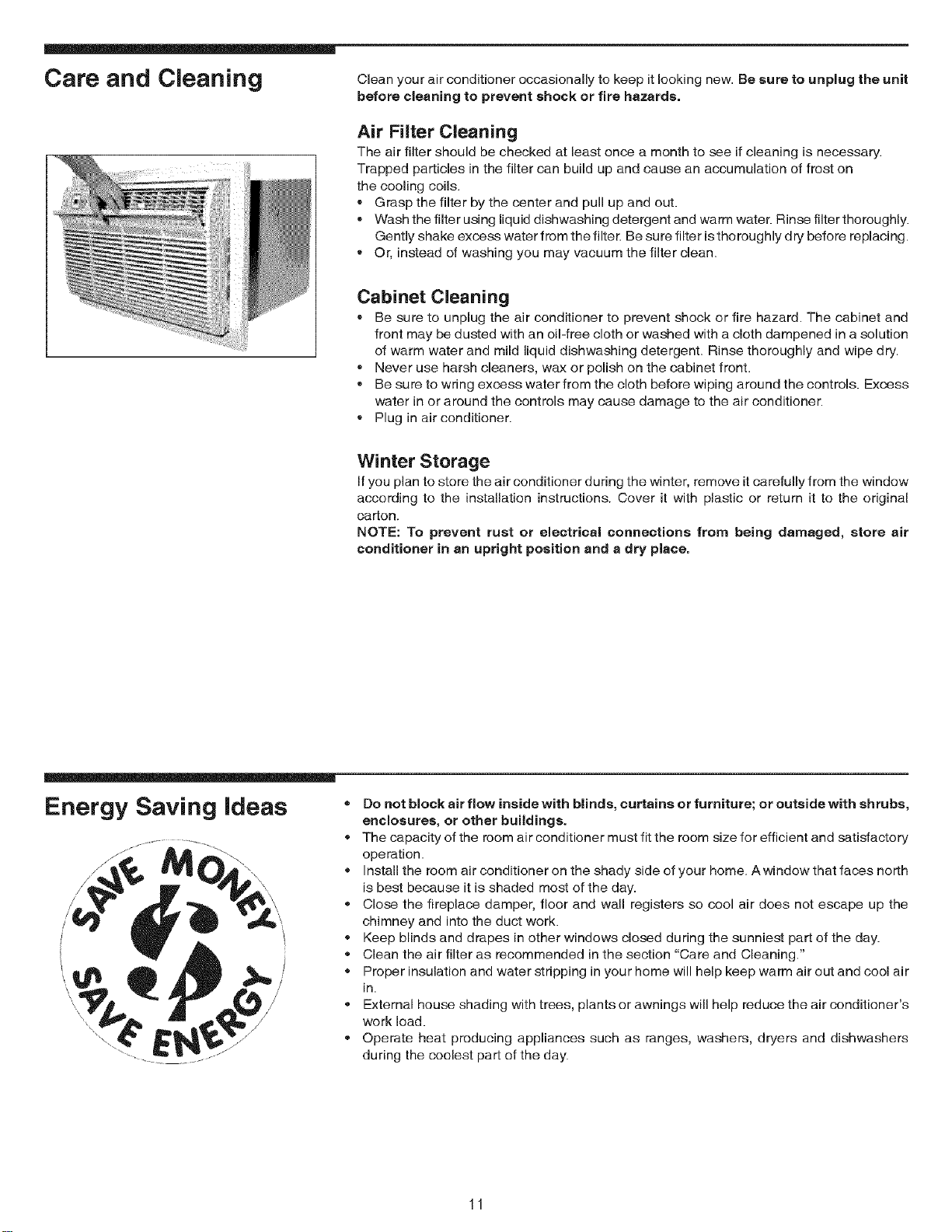
Care and Cleaning Clean your air conditioner occasionally to keep it looking new. Be sure to unplug the unit
before cleaning to prevent shock or fire hazards.
Air Filter Cleaning
The air filter should be checked at least once a month to see if cleaning is necessary.
Trapped particles in the filter can build up and cause an accumulation of frost on
the cooling coils.
•Grasp the filter by the center and pull up and out.
•Wash the filter using liquid dishwashing detergent and warm water. Rinse filter thoroughly.
Gently shake excess water from the filter. Be sure filter is thoroughly dry before replacing.
•Or, instead of washing you may vacuum the filter clean.
Cabinet Cleaning
•Be sure to unplug the air conditioner to prevent shock or fire hazard. The cabinet and
front may be dusted with an oil-free cloth or washed with a cloth dampened in a solution
of warm water and mild liquid diehwashing detergent. Rinse thoroughly and wipe dry.
•Never use harsh cleaners, wax or polish on the cabinet front.
•Be sure to wring excess water from the cloth before wiping around the controls. Exsess
water in or around the controls may cause damage to the air conditioner.
•Plug in air conditioner.
Winter Storage
If you plan to store the air conditioner during the winter, remove it carefully from the window
according to the installation instructions. Cover it with plastic or return it to the original
carton.
NOTE: To prevent rust or electrical connections from being damaged, store air
conditioner in an upright position and a dry place.
Energy Saving ideas
/
/
/
/
/
=Do not block air flow inside with blinds, curtains or furniture; or outside with shrubs,
enclosures, or other buildings.
®The capacity of the room air conditioner must fit the room size for efficient and satisfactory
operation.
®Install the room air conditioner on the shady side of your home. A window that faces north
is best because it is shaded most of the day.
®Close the fireplace damper, floor and wall registers so cool air does not escape up the
chimney and into the duct work.
®Keep blinds and drapes in other windows closed during the sunniest part of the day.
®Clean the air filter as recommended in the section "Care and Cleaning."
®Proper insulation and water stripping in your home will help keep warm air out and cool air
in.
•External house shading with trees, plants or awnings will help reduce the air conditioner's
work load.
.Operate heat producing appliances such as ranges, washers, dryers and dishwashers
during the coolest part of the day.
11
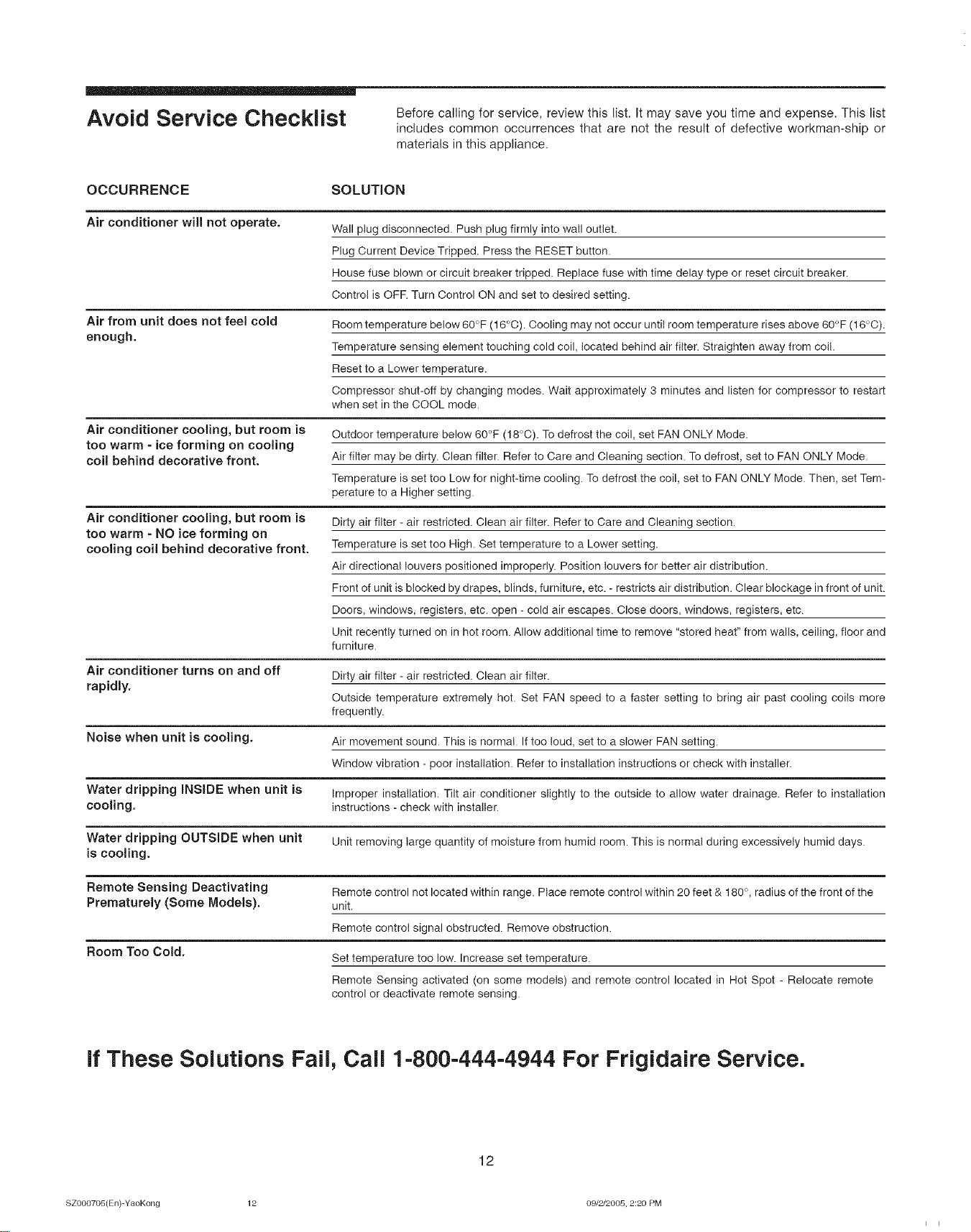
Avoid Service Checklist Before calling for service, review this list. It may save you time and expense. This list
includes common occurrences that are not the result of defective workman-ship or
materials in this appliance.
OCCURRENCE SOLUTION
Air conditioner will not operate.
Air from unit does not feel cold
enough.
Wall plug disconnected. Push plug firmly into wail outlet.
Plug Current Device Tripped. Press the RESET button.
House fuse blown or circuit breaker tripped. Replace fuse with time delay type or reset circuit breaker.
Control is OFF. Turn Control ON and set to desired setting.
Room temperature below 6O°F (16°0). Cooling may not occur until room temperature rises above 60°F (16°0).
Temperature sensing element touching cold coil, located behind air filter. Straighten away from coil.
Reset to a Lower temperature.
Compressor shut-off by changing modes. Wait approximately 3 minutes and listen for compressor to restart
when set in the COOL mode.
Air conditioner cooling, but room is
too warm -ice forming on cooling
coil behind decorative front.
Outdoor temperature below 60°F (18°C). To defrost the coil, set FAN ONLY Mode.
Air filter may be dirty. Clean filter. Refer to Care and Cleaning section. To defrost, set to FAN ONLY Mode.
Temperature is set too Low for night-time cooling. To defrost the coil, set to FAN ONLY Mode. Then, set Tem-
perature to a Higher setting.
Air conditioner cooling, but room is
too warm - NO ice forming on
cooling coil behind decorative front.
Dirty air filter - air restricted. Clean air filter. Refer to Care and Cleaning section.
Temperature is set too High. Set temperature to a Lower setting.
Air directional louvers positioned improperly. Position louvers for better air distribution.
Front of unit is blocked by drapes, blinds, furniture, etc. - restricts air distribution. Clear blockage in front of unit.
Doors, windows, registers, etc. open - cold air escapes. Close doors, windows, registers, etc.
Unit recently turned on in hot room. Allow additional time to remove "stored heat" from walls, ceiling, floor and
furniture.
Air conditioner turns on and off
rapidly. Dirty air filter - air restricted. Clean air filter.
Outside temperature extremely hot. Set FAN speed to a faster setting to bring air past cooling coils more
frequently.
Noise when unit is cooling. Air movement sound. This is normal. If too loud, set to a slower FAN setting.
Window vibration - poor installation. Refer to installation instructions or check with installer.
Water dripping INSIDE when unit is Improper installation. Tilt air conditioner slightly to the outside to allow water drainage. Refer to installation
cooling, instructions - check with installer.
Water dripping OUTSIDE when unit Unit removing large quantity of moisture from humid room. This is normal during excessively humid days.
is cooling.
Remote Sensing Deactivating Remote control not located within range. Place remote control within 20 feet & 180°, radius of the front of the
Prematurely (Some Models). unit.
Room Too Cold.
Remote control signal obstructed. Remove obstruction.
Set temperature too low. Increase set temperature.
Remote Sensing activated (on some models) and remote control located in Hot Spot - Relocate remote
control or deactivate remote sensing.
If These Solutions Fail, Call 1-800-444-4944 For Frigidaire Service.
12
SZO0070o(En)-YaoKong 12 09/2/2005, 2:20 PM