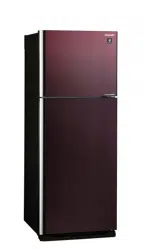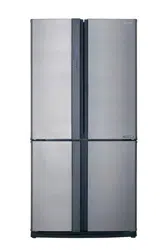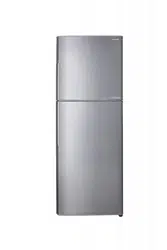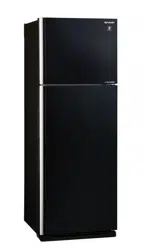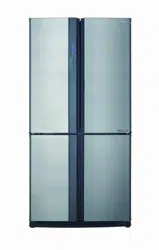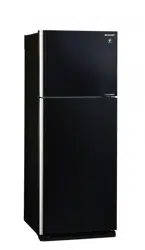

(Only for SJ-P498G, SJ-P598G, SJ-
PG35P, SJ-PG39P, SJ-FTG15BVP)
“Plasmacluster” and “Device of a
cluster of grapes” are trademarks of
Sharp Corporation.
ENGLISH
Refrigerator - Freezer
Operation manual
ʅɖˍǖܳ
ůĹdžΌ
Contents
• Safety information . . . . . . . . . . . . . . . . . . 3
• Installation. . . . . . . . . . . . . . . . . . . . . . . . . 5
• Description . . . . . . . . . . . . . . . . . . . . . . . . 6
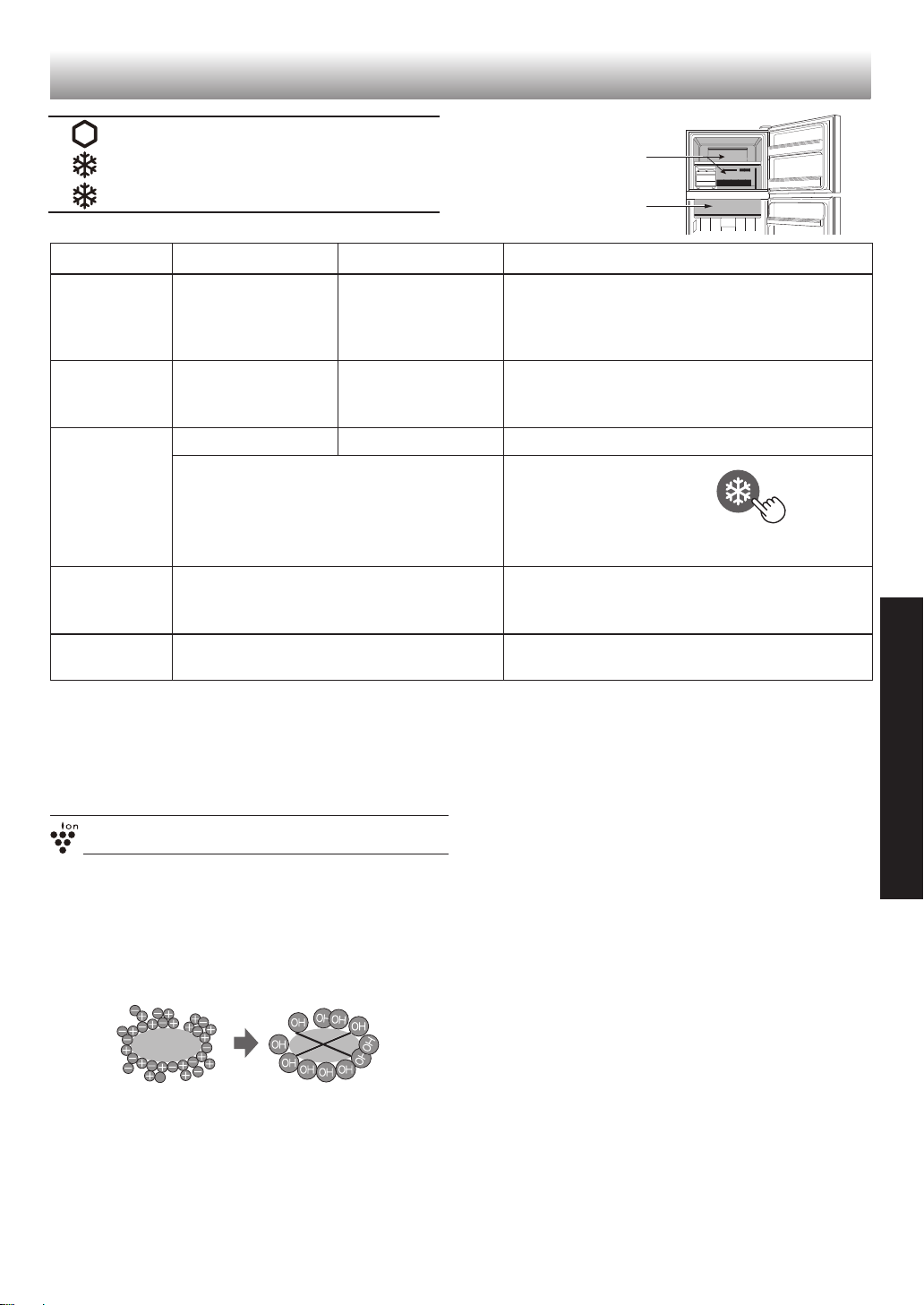
• Useful modes . . . . . . . . . . . . . . . . . . . . . . 7
• Control panel . . . . . . . . . . . . . . . . . . . . . . 8
• Storing food . . . . . . . . . . . . . . . . . . . . . . 10
• Care and cleaning. . . . . . . . . . . . . . . . . . 11
• Before you call for service . . . . . . . . . . . 12
ϝԊ
sȫƼNjƂּ . . . . . . . . . . . . . . . . . . . . . . 13
sȫ . . . . . . . . . . . . . . . . . . . . . . . . . . . . . 15
sˌʞǩ . . . . . . . . . . . . . . . . . . . . . . . . 16
sǮůβĨ . . . . . . . . . . . . . . . . . . . . . . . . . . 17
sߝǚذ . . . . . . . . . . . . . . . . . . . . . . . . . . 18
sηȞĀভԪ . . . . . . . . . . . . . . . . . . . . . . . . 20
sѵ . . . . . . . . . . . . . . . . . . . . . . . . . . . . . 21
sզƥǡĀحϲণз . . . . . . . . . . . . . . . . . 22
SJ-P498G
SJ-P598G
SJ-PG35P
SJ-PG39P
SJ-FTG15BVP
SJ-E438M
SJ-E538M
ġNJ
Refrigerant: R600a
Insulation blowing gas: Cyclopentane
خһོ졿4C
ӑɴţܴǬɄ졿տⅹἺ
SJ-P498G-K SJ-E438M-S
SJ-P498G-M SJ-E438M-K
SJ-P598G-K SJ-E538M-S
SJ-P598G-M SJ-E538M-K
SJ-PG35P-BK
SJ-PG35P-BR
SJ-PG39P-BK
SJ-PG39P-BR
SJ-FTG15BVP-BK
SJ-FTG15BVP-BR

3
ENGLISH
Household use only
Thank you very much for buying this SHARP product. Before using your SHARP
refrigerator, please read this operation manual to ensure that you gain the maximum
benefi t from it.
• This refrigerator is intended for making ice cubes, refrigerating and freezing food.
• This refrigerator is for household use only, with ambient temperature indicated in
the table. The climate class is specifi ed on the rating plate.
If the refrigerator operates out of range (ambient temperature range) of the climate
class which is rated for that model, it may not be able to maintain satisfactory
internal temperatures. If the refrigerator is used at colder temperatures, the
refrigerator will not be damaged up to a temperature of +5°C.
• The refrigerator should not be subjected to temperatures of -10°C or below for a
long period of time.
Refrigerant
This refrigerator contains fl ammable refrigerant (R600a:
isobutane) and insulation blowing gas (cyclopentane).
Observe the following rules to prevent ignition and
explosion.
■
Do not allow any pointed objects to have contact with
the refrigeration system. The refrigeration system
behind and inside the refrigerator contains refrigerant.
■
Do not use mechanical devices or other means to
accelerate the defrosting process. (This refrigerator
has adopted automatic defrosting system.)
■
Do not use electrical appliances inside the refrigerator.
■
Do not block the space around the refrigerator.
■
Do not use fl ammable sprays, such as spray paint
near the refrigerator.
■
Do not store fl ammable sprays, such as spray paint in
the refrigerator.
■
In the case of failure of the refrigeration system, do
not touch the wall socket and use open fl ames.
Open the window and let out the air from the room.
Then ask a service agent approved by SHARP for
service.
Installation
■
Do not install the refrigerator in a damp or wet
location. It may cause the damage to the insulation
or electrical leak. Dew may also appear on the outer
cabinet and it causes rust.
■
The refrigerator should be installed fl atly and fi rmly on
the fl oor.
Power cord, Plug, Socket
Read carefully the following rules to prevent electric
shock or fi re.
■
Connect the power plug into the wall socket fi rmly and
directly. Do not use an extension cord or adapter plug.
■
Connect the power plug to the socket with the required
rated voltage.
■
Connect the earth pin to the earth terminal properly.(3
pin plug region)
■
Connect the earth wire which is installed at the rear of
the product to the earth terminal properly.
(2 pin plug region)
■
Make sure to protect the power cord from being
damaged during installation or moving. If the power
plug or cord is loose, do not insert the power plug.
■
Do not touch the power plug with wet hands.
■
Disconnect from the main electricity supply by
removing the main plug from the socket.
Do not remove by pulling the power cord.
■
Dust deposited on the power plug may cause fire.
Wipe it off carefully.
■
Pull out the plug if the refrigerator is not used for a
long time.
■
If the fl exible supply cord is damaged, it must be
replaced by service agent approved by SHARP
because special cord is required.
In use
■
Do not store volatile and flammable materials such
as ether, petrol, propane gas, aerosol cans, adhesive
agents and pure alcohol etc. These materials are
easy to explode.
■
Do not store temperature-sensitive products such as
pharmaceutical products in the refrigerator.
There are high risks of changes in product quality.
■
Do not attempt to change or modify this refrigerator.
This may result in fi re, electric shock or injury.
■
Do not place any object on the top of refrigerator.
If the object falls down from the top, it may cause
injury.
■
Do not hit the glass doors hard. Otherwise, they may
break and cause physical injury.
<Only for SJ-P498G, SJ-P598G , SJ-PG35P, SJ-
PG39P, SJ-FTG15BVP>
■
This appliance can be used by children aged from 8
years or above and persons with reduced physical,
sensory or mental capabilities or lack of experience
and knowledge if they have been given supervision or
instruction concerning use of the appliance in a safe
way or understanding the hazards involved. Children
shall not play with the appliance. Cleaning and user
maintenance shall not be done by children without
supervision.
Climate
class
Acceptable range of
ambient temperature
SN +10°C to 32°C
N +16°C to 32°C
ST +16°C to 38°C
T +16°C to 43°C
Safety information
WARNING
This means that there are high risks of death or serious injury.
CAUTION
This means that there are high risks of material damage or personal injury.
WARNING
4
Care and Cleaning
■
Unplug the refrigerator fi rst to prevent electric shock.
■
Do not splash water directly on the outer cabinet or the
interior. This may lead to rusting and deterioration of
the electrical insulation.
Trouble
■
If you smell something burning, pull out the power plug
immediately. Then ask a service agent approved by
SHARP for service.
■
In case of gas leak, ventilate the area by opening
window. Do not touch the refrigerator or the power
socket.
Disposal
■
Ensure that the refrigerator presents no danger to
children while being stored until disposal. (e.g. remove
the door to prevent child entrapment.)
■
This refrigerator should be disposed appropriately.
Take the refrigerator to a professional recycling plant
for flammable refrigerant and insulation blowing
gases.
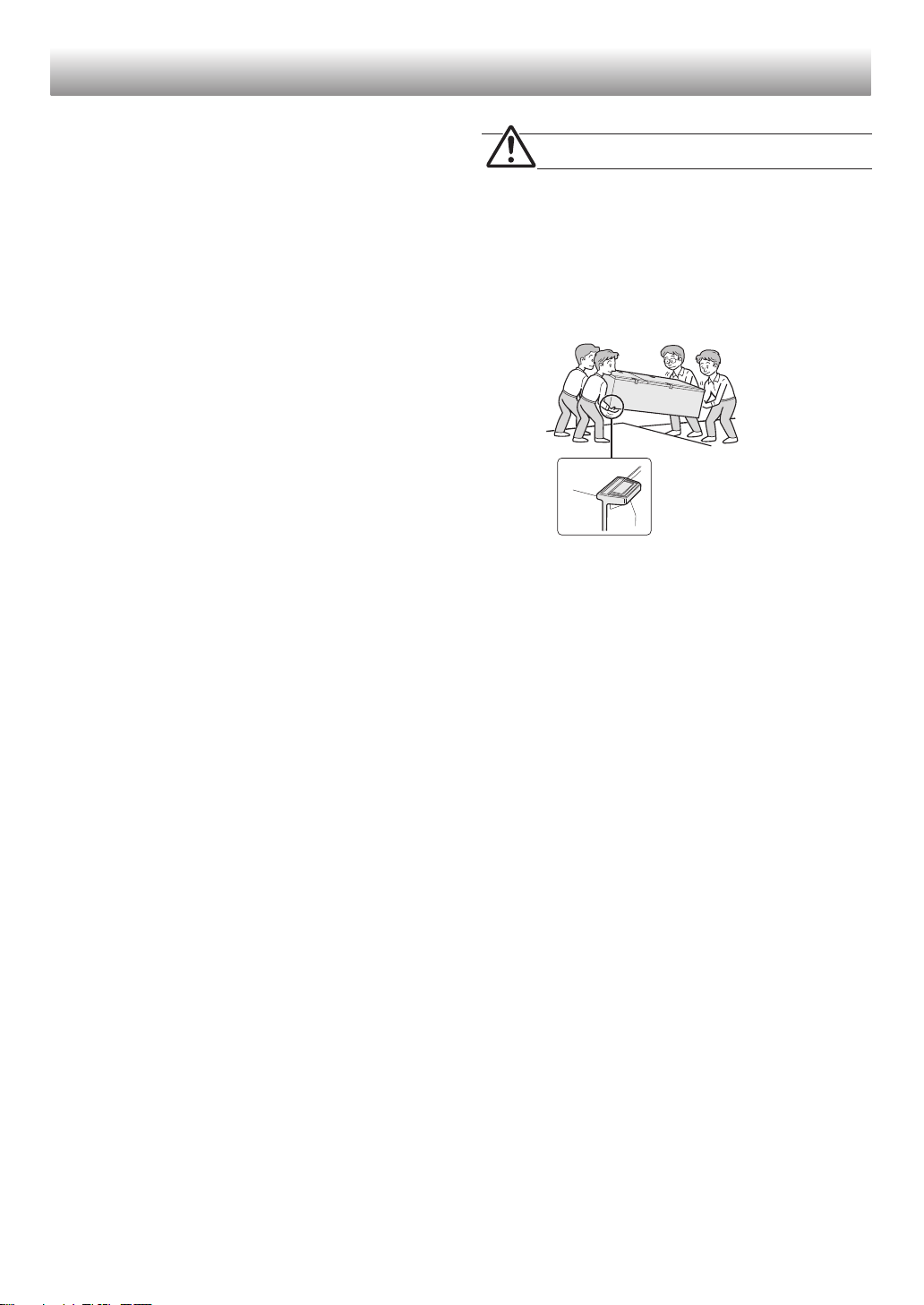
Transportation
■
When you install or move your refrigerator, use curing
mat to protect the fl oor from being damaged.
■
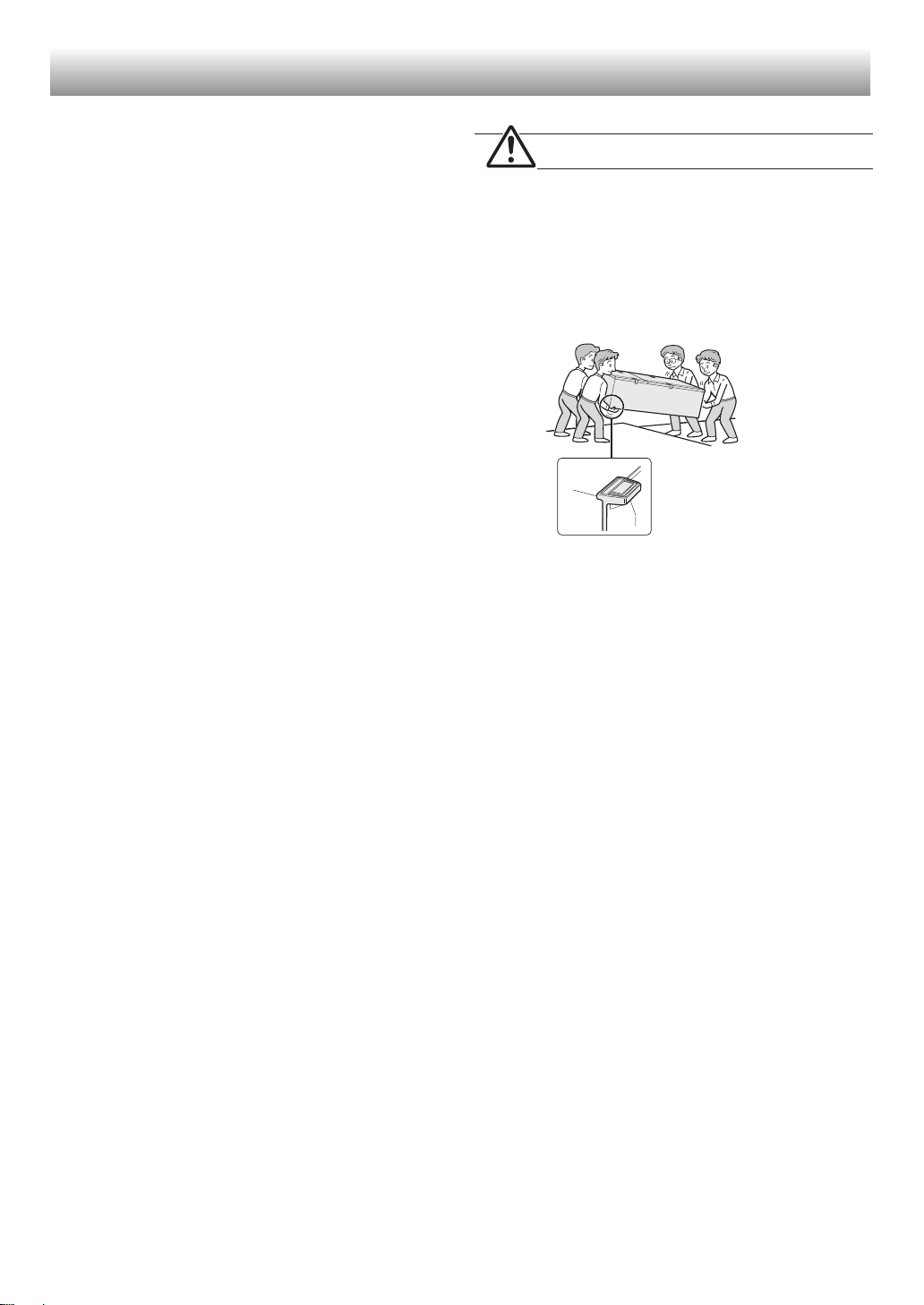
Carry the refrigerator by holding the handles located
on the rear and the feet of the bottom. If you lift up the
refrigerator improperly, it may cause injury.
CAUTION
In use
■
Do not touch the compressor unit or its peripheral
parts, as they become extremely hot during operation
and the metal edges may cause injury.
■
Do not touch foods or metal containers in the freezer
compartment with wet hands. This may cause
frostbite.
■
Do not place bottled drinks and cans in the freezer
compartment.
Especially “Express cool” is in operation, there is a
high risk that glass bottles may burst.
■
Do not use other than potable water to make ice
cubes.
■
Do not open or close the door when somebody put
a hand near the door. There is a risk that the other
people may catch their fi ngers in the door.
■
Do not put oversized object in the pockets of the door.
If the object falls down from the pockets, it may cause
injury.
■
Make sure to handle the glass shelves with care to
install or uninstall. If you drop the glass shelves, it
may break or cause injury.
Safety information
rear
5
ENGLISH
1
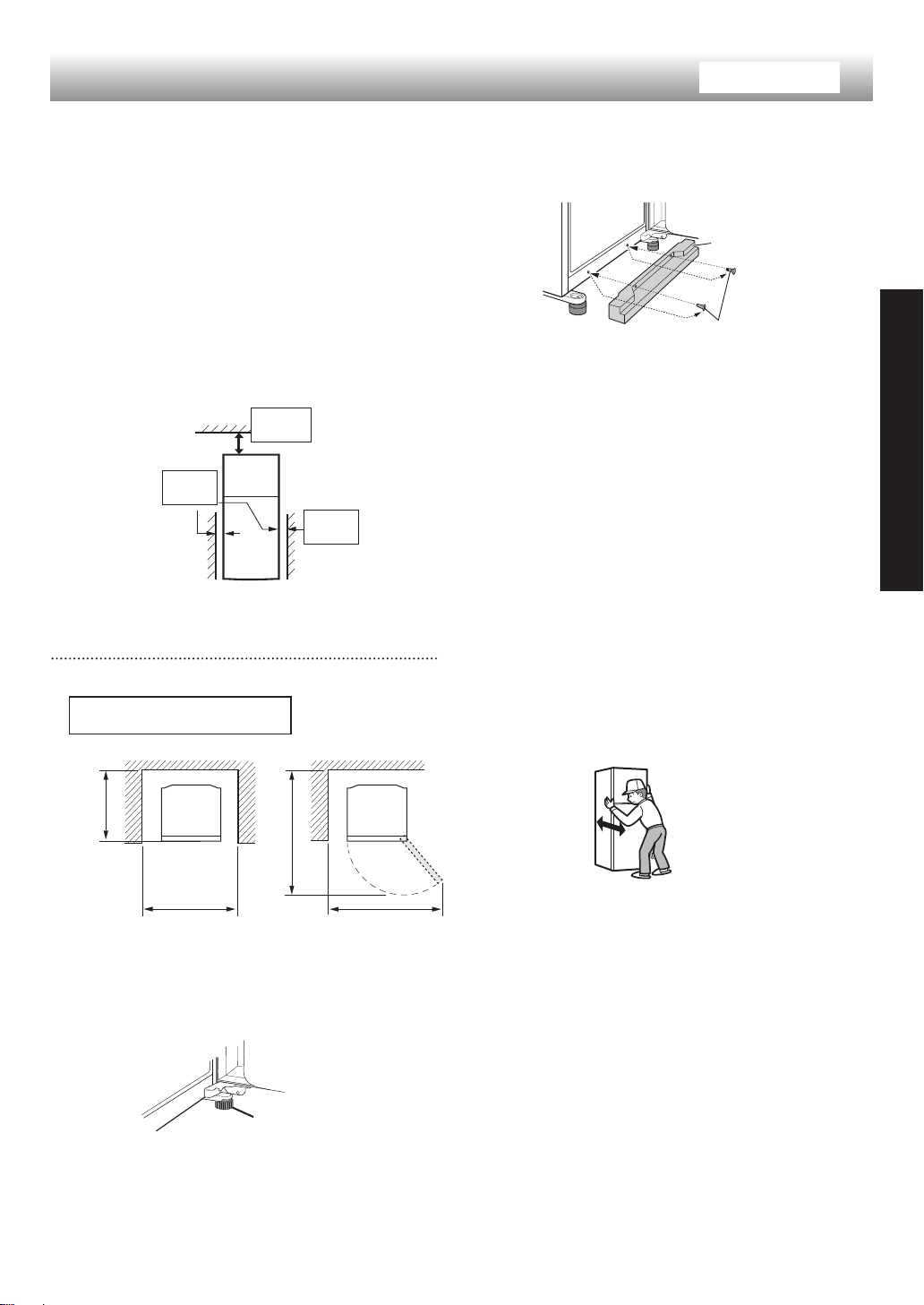
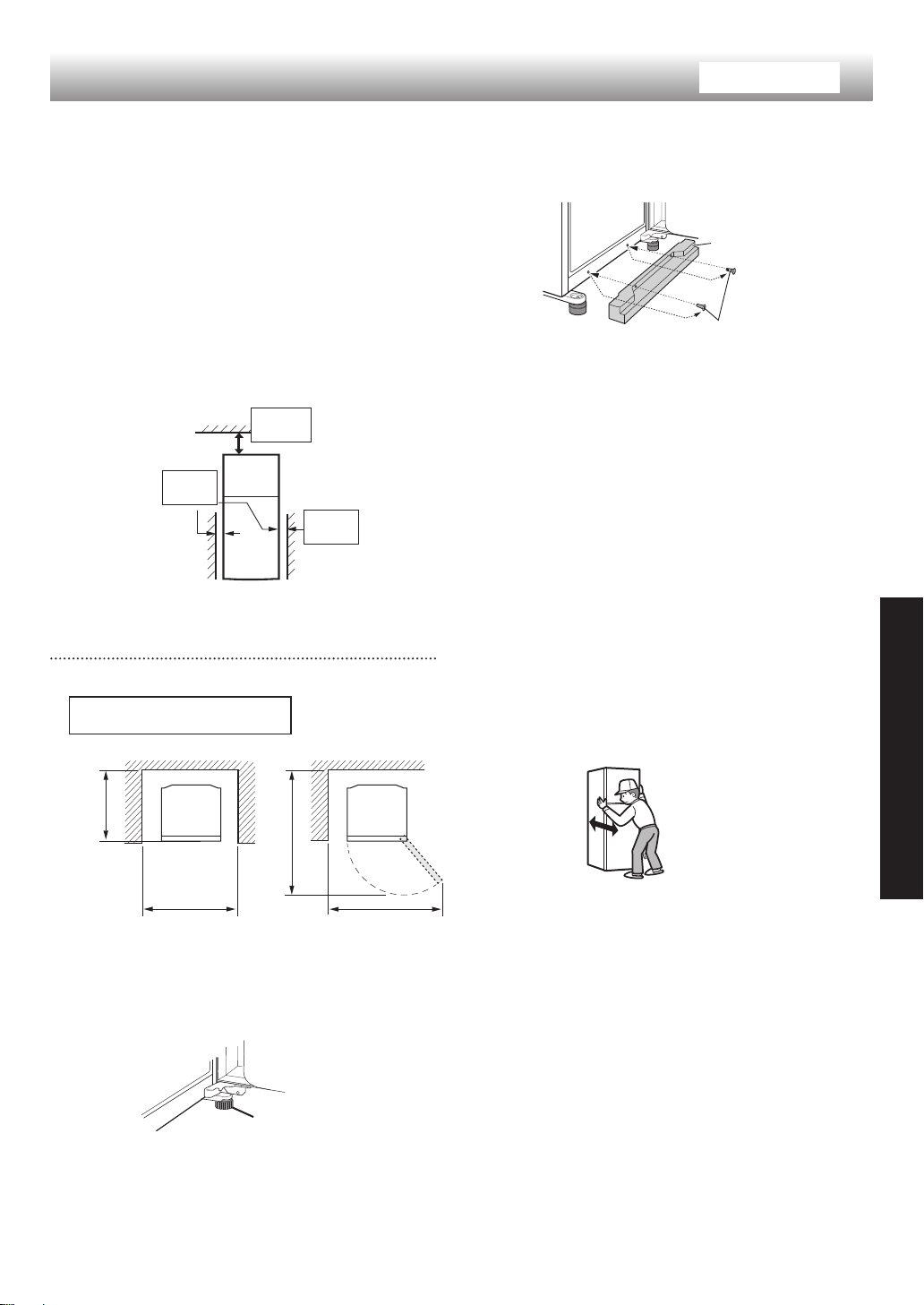
Keep adequate ventilation space around the
refrigerator.
• The picture shows the minimum required space
for installing the refrigerator. The measurement
condition of energy consumption is conducted
under a different space dimension.
• By keeping greater space, the refrigerator may
consume a less amount of power consumption.
• If use the refrigerator in the smaller space
dimension than pictured below, it may cause
temperature rise in the unit, loud noise and failure.
• The space between the rear of the refrigerator
and the wall should be 50mm or more, and less
than 75mm. If the space is wider than 75mm, you
may get injured by touching compressor and its
peripheral parts which are extremely hot during
the operation.
Overall space required in use
Installation
Free standing type
2
Use the two front adjustable feet to place the
refrigerator fl atly and fi rmly on the fl oor.
3
Remove the 2 screws of the lower part of the cabinet
and use these screws to set the foot cover.
(The foot cover is packed inside the refrigerator
compartment.)
Ԙ
Ԙ
ԙ
ԙ
Foot cover
Screw
(2 screws)
Casters are located on the bottom of the
refrigerator
• The casters allow the refrigerator to move back and
forth.
4
Connect the appliance via a correctly installed
socket.
Before using your refrigerator
• Clean the inside parts with a cloth soaked in warm
water.
• If you use soapy water to clean, wipe it off thoroughly
with water.
Note
• Place your refrigerator to access the plug.
• Keep your refrigerator out of direct sunlight and do not
place next to heat generating appliance.
• Do not place your refrigerator directly on the ground.
Insert suitable stand such as wooden board under the
refrigerator.
• When you insert the power plug with the door opened,
door alarm sounds but it is normal. This sound stops
after closing the door.
90mm
or more
60mm
or more
60mm
or more
728mm
1315 mm
760mm
Adjustable foot
1154 mm
Casters
SJ-P498G, SJ-E438M, SJ-PG35P: 2pcs.
SJ-P598G, SJ-E538M, SJ-PG39P, SJ-FTG15BVP: 4pcs.
6
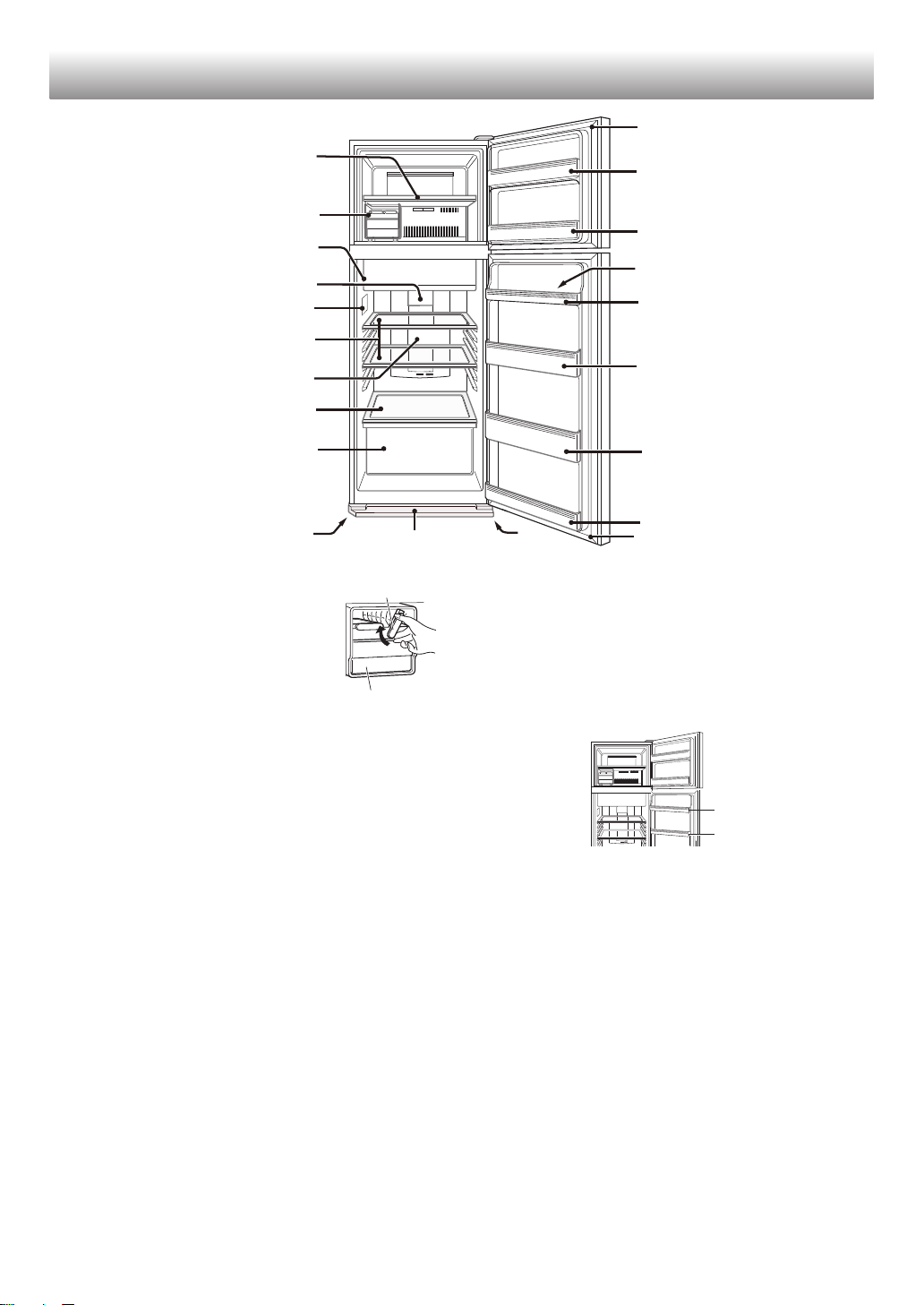
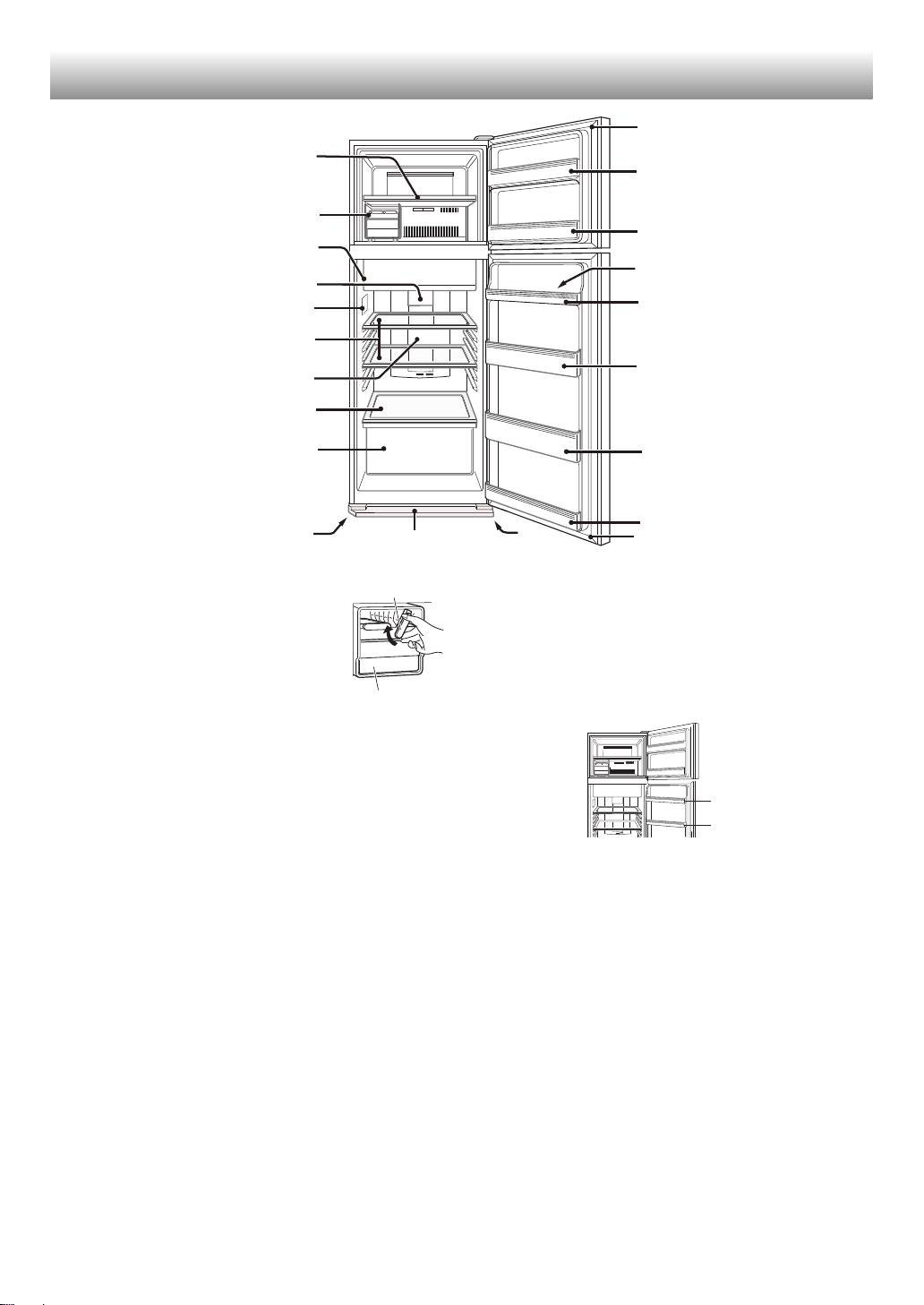
1. Freezer shelf
2. Movable ice maker
It is highly recommended to use
this ice maker as shown in the above
picture.
You can put the ice maker anywhere
in the freezer compartment.
1) Do not overfi ll the tray with water.
Otherwise the ice cubes will join together when
frozen.
2) When ice cubes are made, turn the lever
clockwise to put the ice into the ice cube box.
Note
• Make sure to place the ice maker fl atly not to spill
out the water from the ice tray.
• To prevent the ice cube box from being damaged,
do not pour oil into it or make ice in it.
3. Fresh case & door
4. Refrigerator light
5. Control panel
6. Refrigerator shelves
(2 pcs)
7. Hybrid cooling panel
The panel cools the refrigerator compartment
indirectly from the rear. In this way, food is cooled
gently without being exposed to cold air flow.
8. Fruit and vegetable shelf
9. Fruit and vegetable crisper
10. Adjustable foot
(2 pcs)
11. Foot cover
12. Magnetic door seal
(2 pcs)
13. Freezer door pocket
(2 pcs)
14. Egg pocket
SJ-P598G, SJ-E538M, SJ-PG39P, SJ-FTG15BVP : 1 pc
SJ-P498G, SJ-E498M, SJ-PG35P : 2 pcs
SJ-P498G, SJ-E438M, SJ-PG35P
14
14
15. Refrigerator pocket (Upper)
(Only for SJ-P598G, SJ-E538M, SJ-PG39P, SJ-FTG15BVP)
16. Egg holder
17. Bottle pocket
18. Refrigerator pocket (Bottom)
If you wish to store large items within your
refrigerator
• You may remove any shelves or any pockets
numbered1,2,3,6,9 in the picture above.
• Cooling performance is not infl uenced even if you use
the refrigerator in the above situation.
Deodorizing unit
Deodorizing catalyst is installed on the routes of cold air.
There is no need to operate and clean.
Description
1
2
3
4
5
6
7
8
9
10
01
11
12
13
13
16
14
15
17
18
12
Lever
Ice cube box
7
ENGLISH
Useful modes
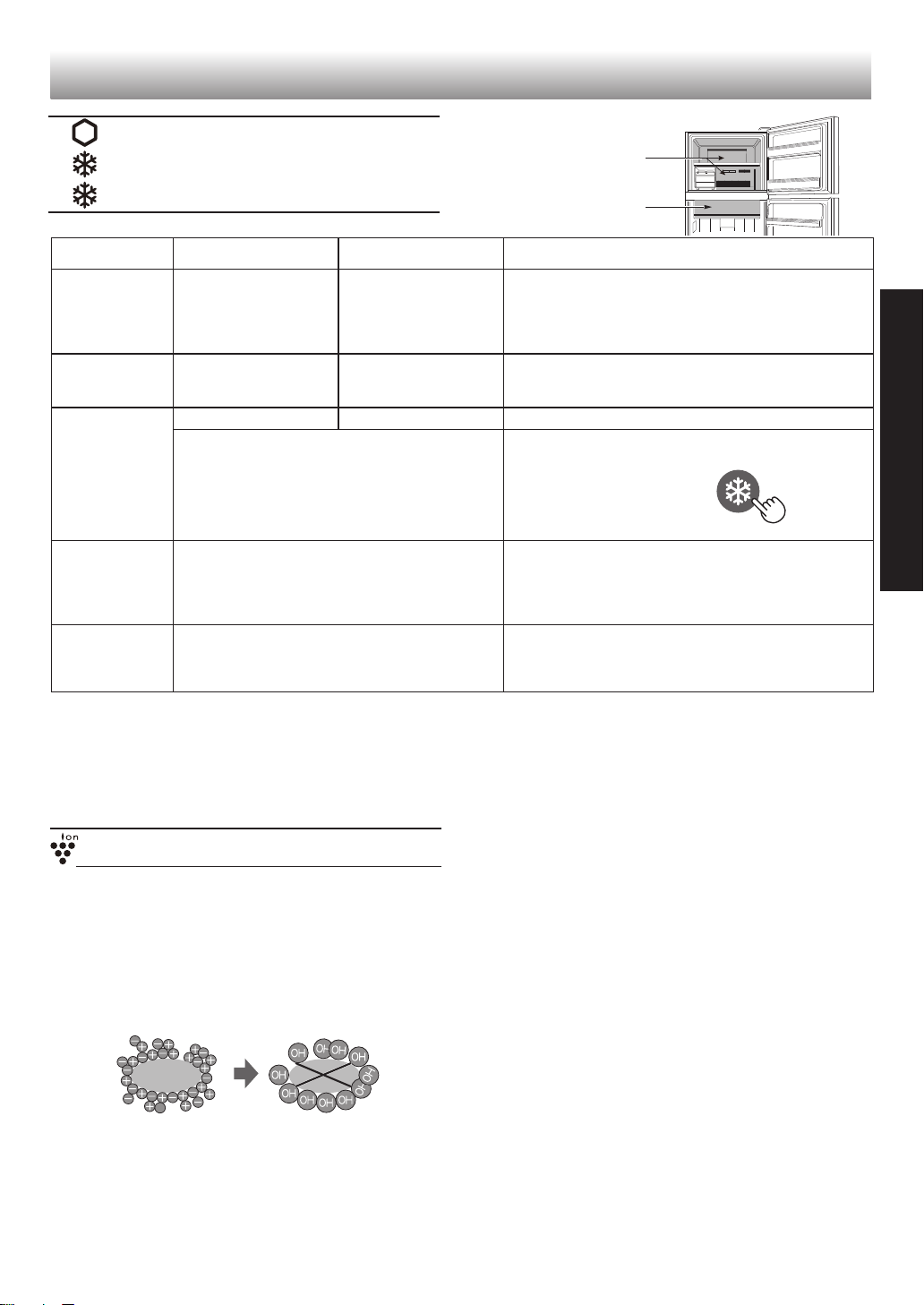
As for the operations, refer to chapter “Control panel”.
Extra cool
Express freezing
Express cool
Extra cool Express freezing Express cool
Feature This mode is to cool
beverages or foods to
ice-cold.
Note :
Food with high-
moisture may freeze.
This mode speeds up
the time to freeze food.
This mode is to cool beverages or foods quickly.
Point of use Fresh case Freezer compartment Freezer compartment
CAUTION :
Do not place glass bottles. There is a
high risk that they may burst.
Operating time 6 hours
*
1
2 hours
*
1
30 minutes
• This mode ends automatically.
• The alarm does not sound.
• This mode ends automatically.
• The alarm sounds.
To stop the alarm *
2
Press “Express
freezing” button.
After the
operation
completed
• There is no need for taking beverages or
foods out.
• Be sure to take the beverages and foods out when
the alarm sounds.
• If the beverages and foods are left in the freezer
compartment over approximately 30 minutes, they
may freeze.
At the time of
power failure
during the
operation
• This mode is automatically cancelled. • This mode is automatically restarted from the
previous state at the time of re-power.
*
1
It may take more time to complete if the operation
overlaps with defrosting. This mode starts after
defrosting is completed.
*
2
If you do not stop the alarm, it sounds 30 minutes
continuously.
Note
• Extra cool, Express freezing and Express cool are not
available at the same time while one of the modes is in
operation.
• Avoid opening the door as much as possible during the
operations of these modes.
Plasmacluster
(Only for SJ-P498G, SJ-P598G , SJ-PG35P, SJ-PG39P,
SJ-FTG15BVP)
The Plasmacluster automatically starts operating when
the refrigerator is powered on.
The ionizer inside your refrigerator releases clusters
of ions, which are collective masses of positive and
negative ions, into the refrigerator compartment.
These ion clusters inactivate airborne mold fungus.
Note
• There may be a slight odor in the refrigerator. This
is the smell of ozone generated by the ionizer. The
amount of ozone is minimum and quickly disappears in
the refrigerator.
mold
fungus
Freezer
compartment
Fresh case
8
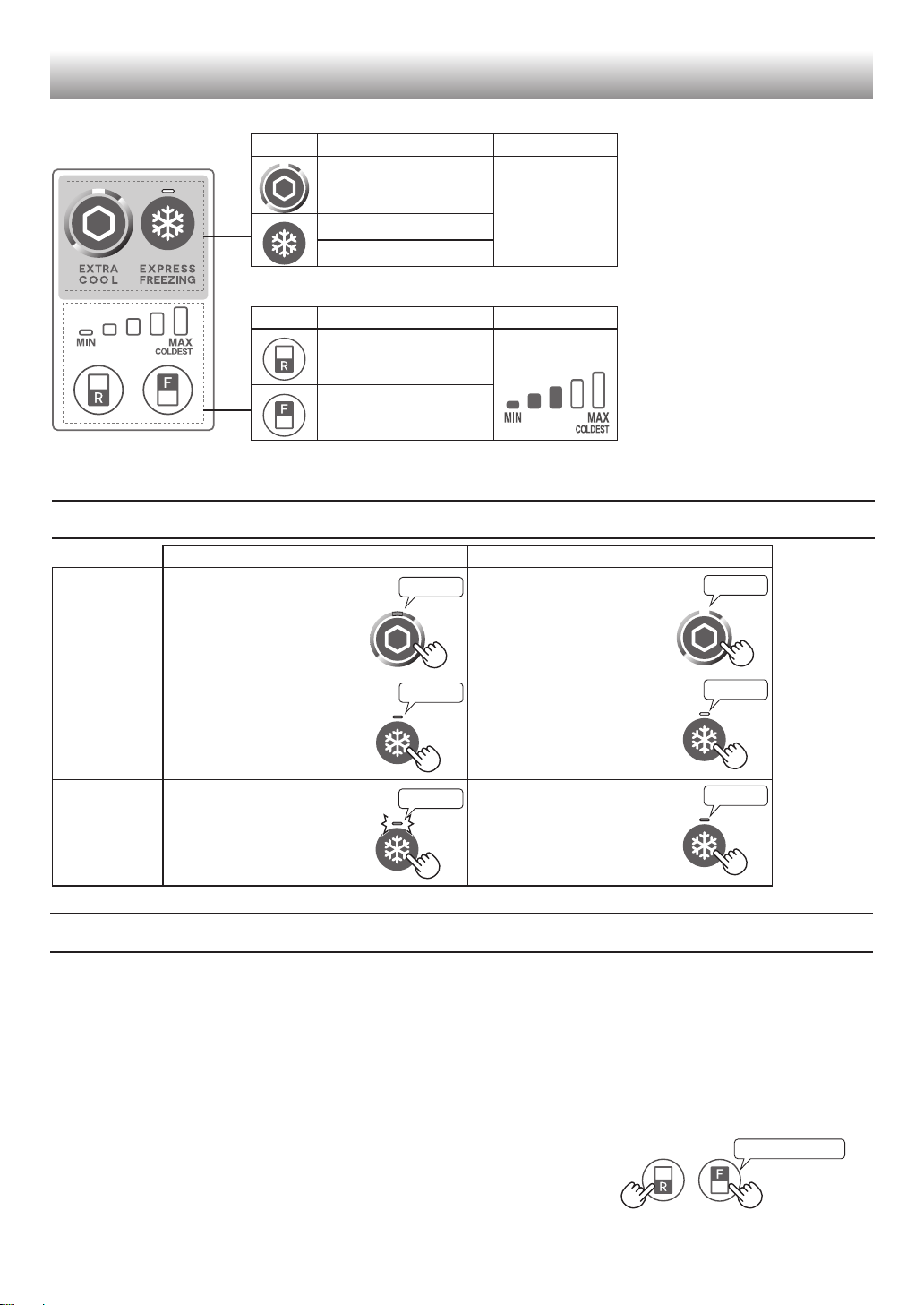
Control panel
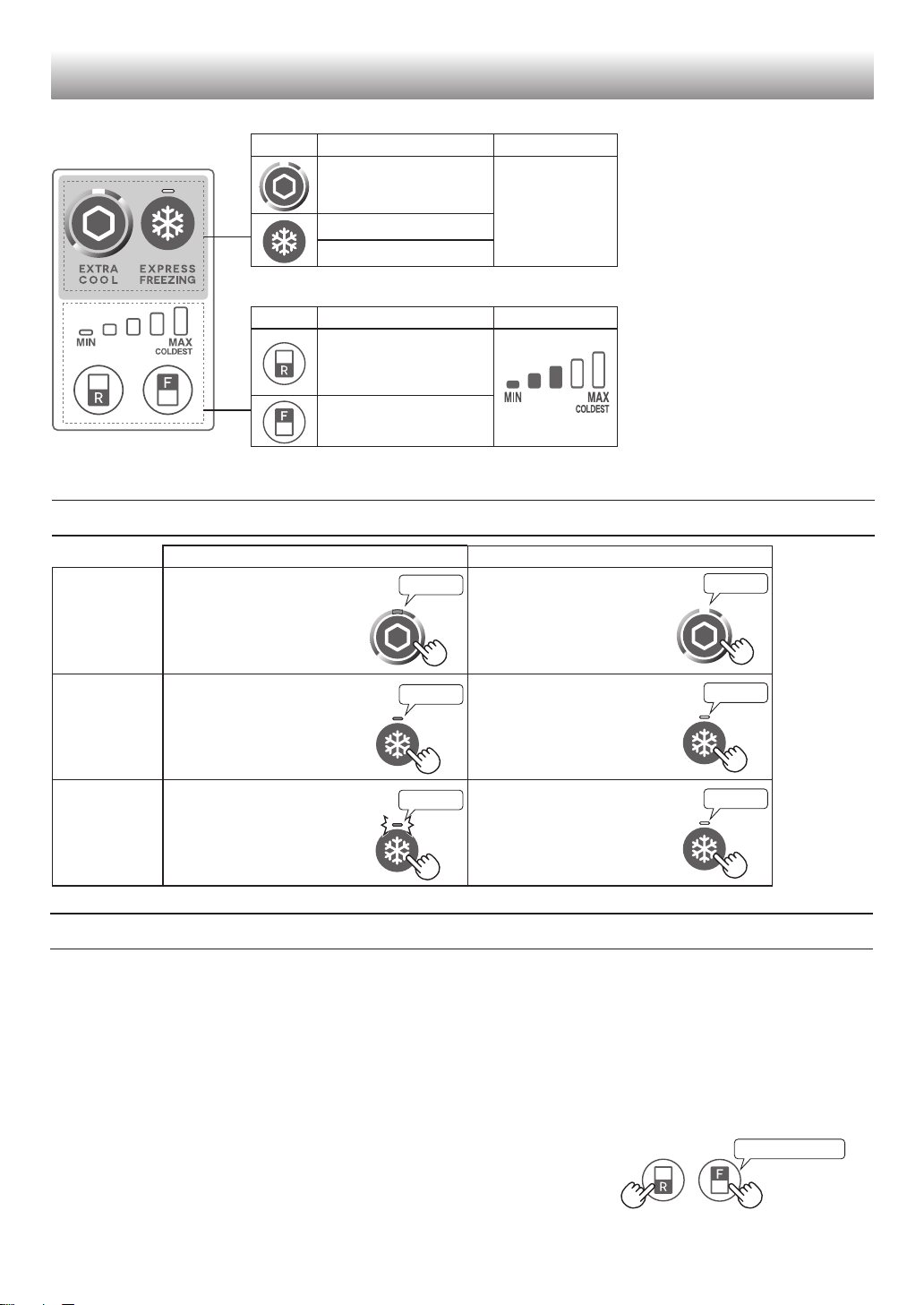
Start operation
Cancel operation
Extra cool
Press the mode button.
(Beep)
Press the mode button.
(Beep)
Express
freezing
Press the mode button.
(Beep)
Press the mode button.
(Beep)
Express cool
Press the mode button for
3 seconds or more.
(Beep, beep, beep)
Press the mode button.
(Beep)
Flashing
Note
• If you want to light up the
indicator, press “F” or “R” button.
Lighting
Lighting
Turn off
Turn off
Turn off
Beep beep beep
Operations of useful modes
Door Alarm
• When the refrigerator door is left open for over 1 minute, door alarm sounds once, and again after 1 minute.
• If the door is left open for approx. 3 minutes, the alarm sounds continuously.
• The alarm stops after closing the door.
If the door alarm does not stop
If the door alarm does not stop after closing all doors, it is a defect.
Contact the SHARP service center for service.
Method of stopping the door alarm temporarily
• Press “R” button and “F” button simultaneously and continuously for 3 seconds or more.
• The door alarm sounds again after approximately 2 days.
Useful modes
Button Meaning Default setting
Extra cool
OFF
Express freezing
Express cool
Controlling temperature
Button Meaning Default setting
Controlling
temperature
of Refrigerator
compartment
Controlling
temperature of
Freezer compartment
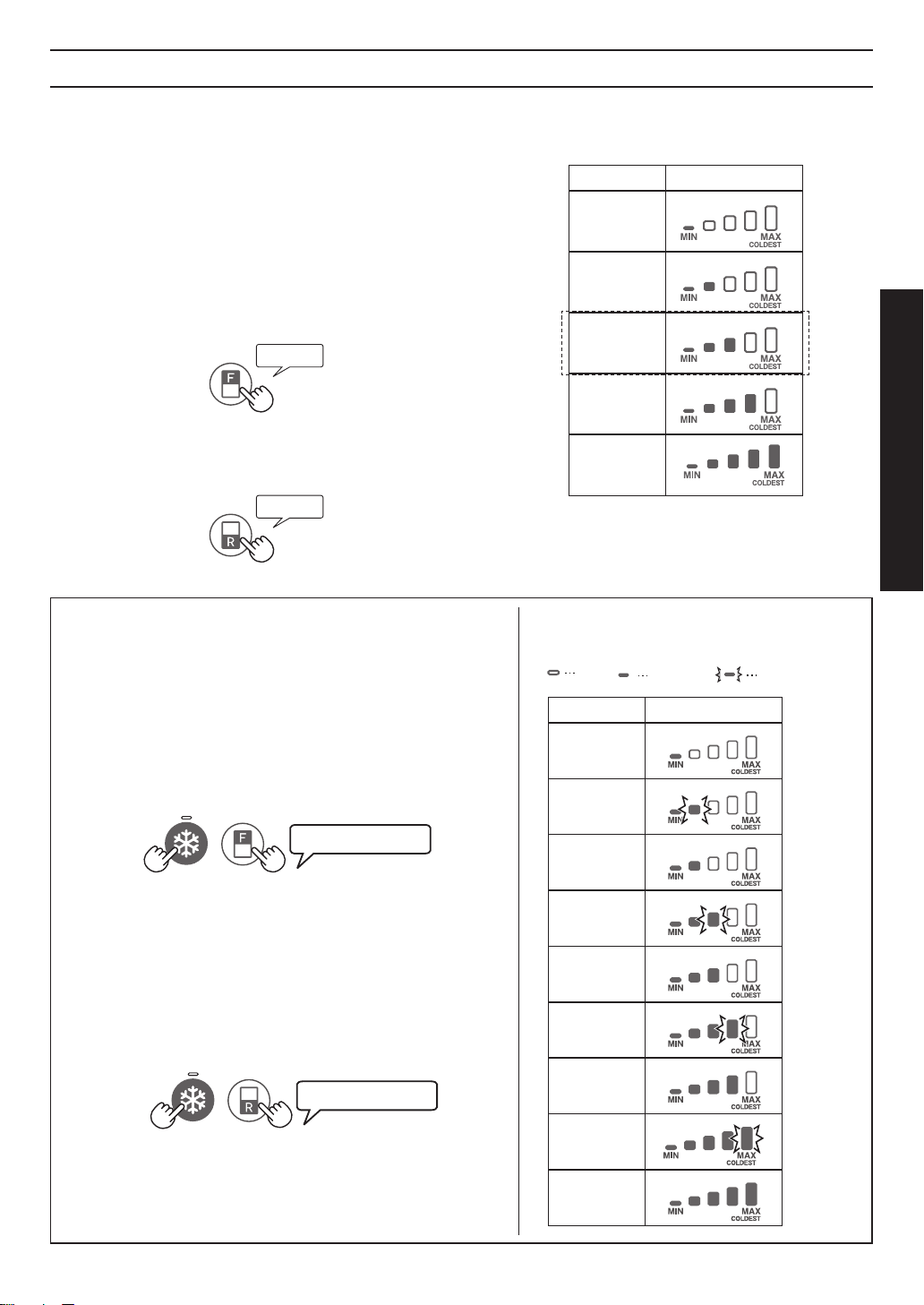
9
ENGLISH
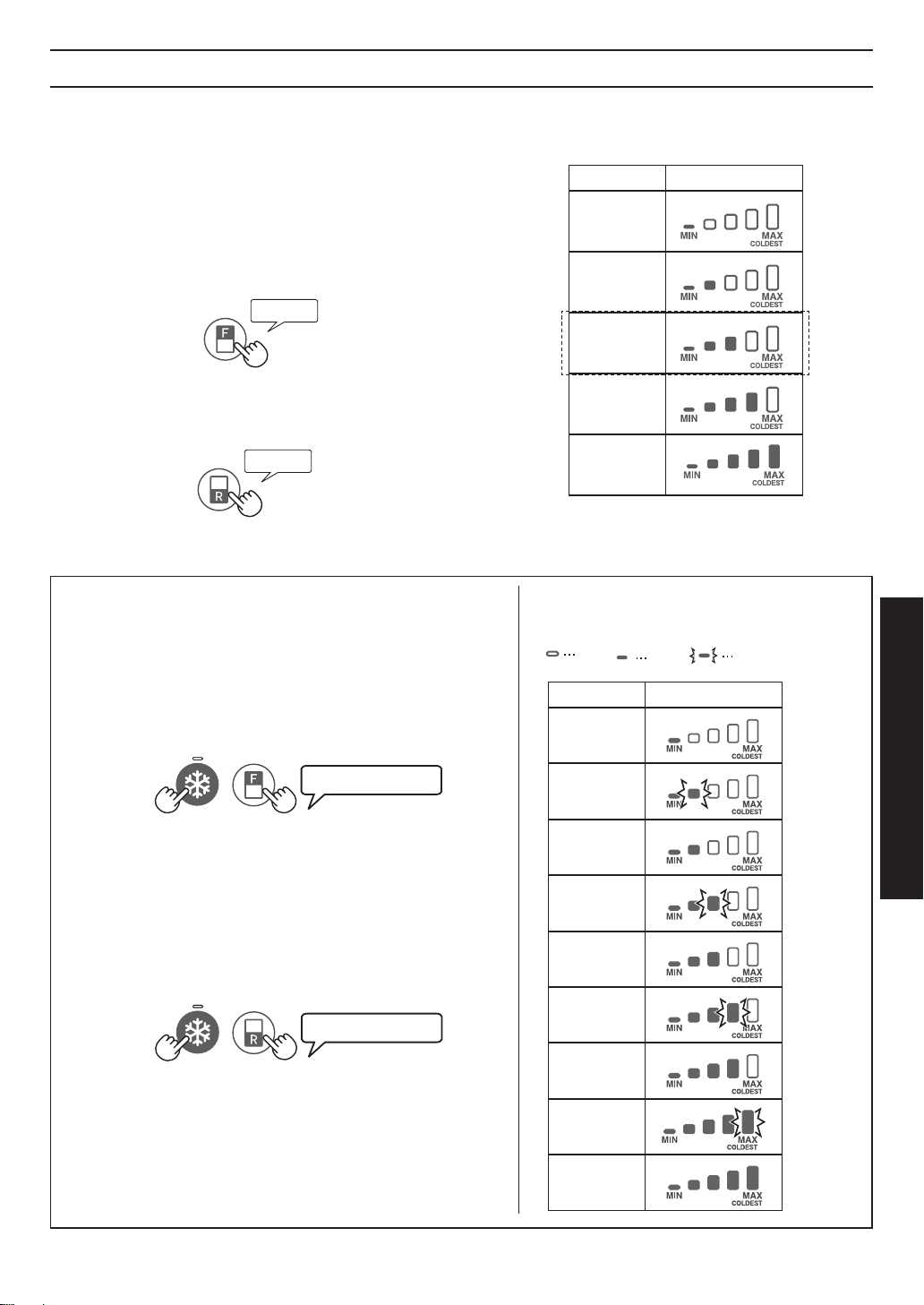
Controlling temperature
The refrigerator controls its temperature automatically. However, you can adjust the temperature as below.
How to check the current temperature
setting
The indicator lights up to show the current temperature
level by pressing “F” or “R” button.
Freezer compartment : Press “F” button.
Refrigerator compartment : Press “R” button.
Setting of Freezer/Refrigerator
compartment
Freezer compartment
1.
Press “F” button.
2.
Press “F” button to change the temperature level.
Refrigerator compartment
1.
Press “R” button.
2.
Press “R” button to change the temperature level.
• Temperature indicator changes as the picture below
(
3→4→5→1→2→3
) by pressing “F” or “R” button.
Note
• After adjusting the temperature level, the indicator
turns off approximately 5 seconds later.
• The temperature setting remains the same even after
power failure.
Advanced Setting of Freezer/Refrigerator
compartment
The temperature of refrigerator compartment and freezer
compartment can be adjusted in 9 levels (level
1
~
9
) by following
the steps
a
to
b
.
Freezer compartment
a.
Press “F” button fi rst. Hold down “F” button and then press
“Express freezing” button for 3 seconds or more.
The indicator returns to “Default setting”.
b.
Press “F” button to change the temperature level.
Follow the steps
a
to
b
if you want to adjust the temperature in 5
levels.
Refrigerator compartment
a.
Press “R” button fi rst. Hold down “R” button and then press
“Express freezing” button for 3 seconds or more.
The indicator returns to “Default setting”.
b.
Press “R” button to change the temperature level.
Follow the steps
a
to
b
if you want to adjust the temperature in 5
levels.
Beep beep beep
Beep beep beep
• Temperature indicator changes as the picture
below (
5→6→7→8→9→1→2→3→4→5
) by
pressing “F” or “R” button.
OFF Lighting Flashing
Beep
Beep
Level Indicator
1
2
3
4
5
Default setting
6
7
8
9
Level Indicator
1
2
3
Default setting
4
5
10
IN
OUT
Freezer
• Freeze small quantities of food at a time in order to
freeze them quickly.
• Food should be properly sealed tightly or covered .
• Place food in the freezer evenly.
• Label bags or containers to keep an inventory of
freezing food.
Refrigerator
Fruit / Vegetables
• Fruit and vegetables should be loosely enclosed in
a plastic material e.g. wrap, bags (do not seal) and
placed in the fruit and vegetable crisper to minimize
moisture loss.
• Fruits and vegetables which are easily effected by low
temperature should be stored in a cool place except
for the refrigerator.
Dairy Products & Eggs
• Most dairy products have their best-before date on
the outer packaging which informs the recommended
temperature and shelf life of the food.
• Eggs should be stored in the egg holder.
Meats / Fish / Poultry
• Place on a plate or a dish and cover with paper or
plastic wrap.
• For larger cuts of meat, fish, or poultry, place to the
rear of the shelves.
• Ensure all cooked food is wrapped securely or placed
in an airtight container.
• Fresh food (securely wrapped) should be stored in
limited time to prevent spoilage and badly affecting
other stored foods.
Advice for preventing dew or
frost inside the refrigerator
• Keep the door securely closed. If the food falls down,
it may cause a gap between the cabinet and the door.
Move it back to the shelf or the pocket.
• Open and close the door quickly as much as possible.
Dew or frost may appear if the door is left open for a
long period of time or opening and closing of the door
is very often.
• Stored items should be packed or sealed with such
as food containers or plastic wraps. (Especially food
with high-moisture)
Advice for storing food
• Evenly place the food on the shelves to allow the
cooling air to circulate efficiently.
• Hot food should be cooled before storing. Storing hot
food increases the temperature in the unit and the
risk of food spoilage.
• Do not block the outlet and inlet of the cool air
circulating circuit with food or containers; otherwise
the food is not be evenly cooled throughout the
refrigerator.
• Do not place food directly in front of cold air outlet.
This may lead to the food freezing.
• Ensure that the food is of the freshest possible quality to maximize the storage life of perishable food. The following
is a general guide to help promote longer food storage.
• Food has a limited storage life. Make sure not to exceed use-by date indicated by manufacturer.
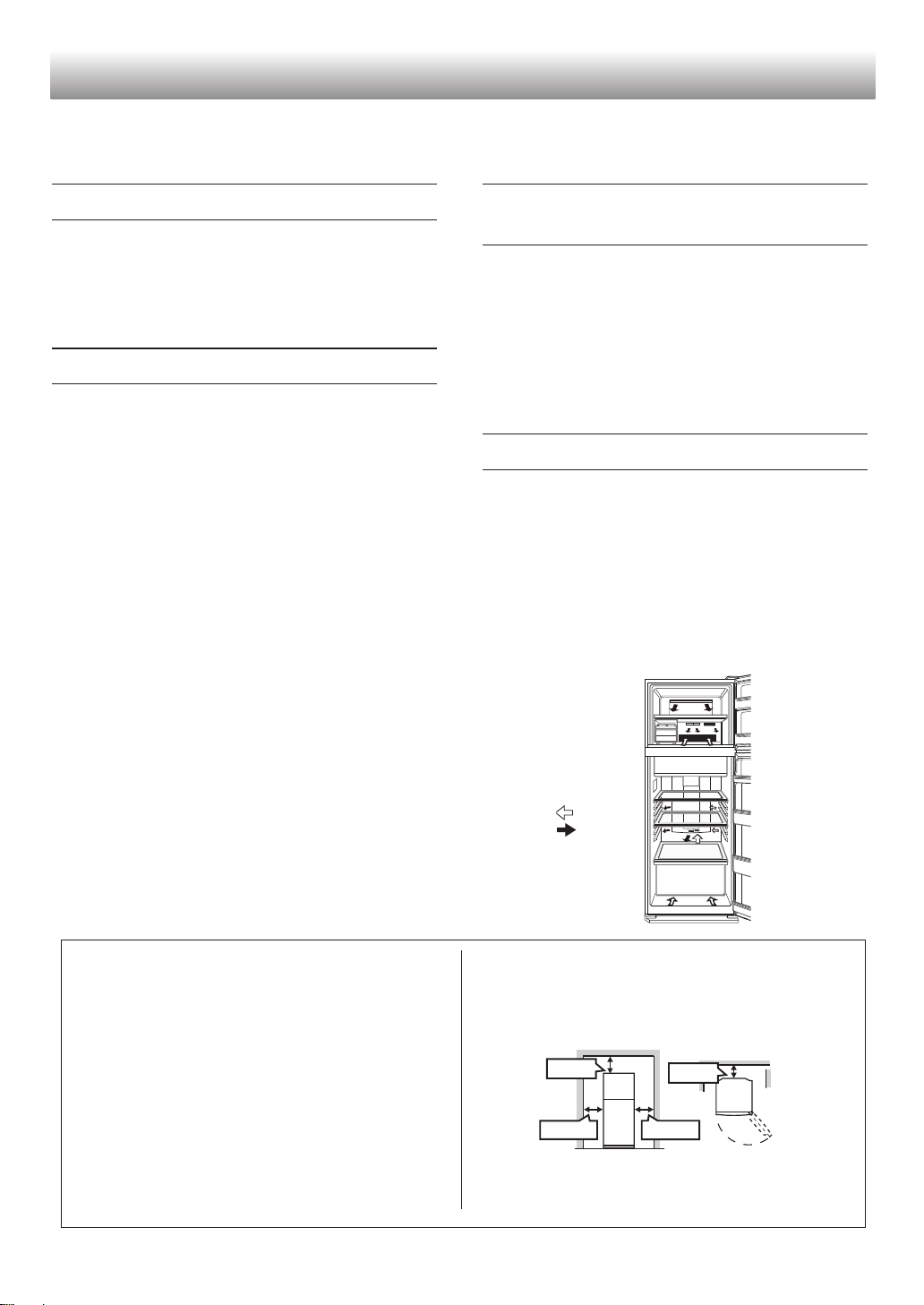
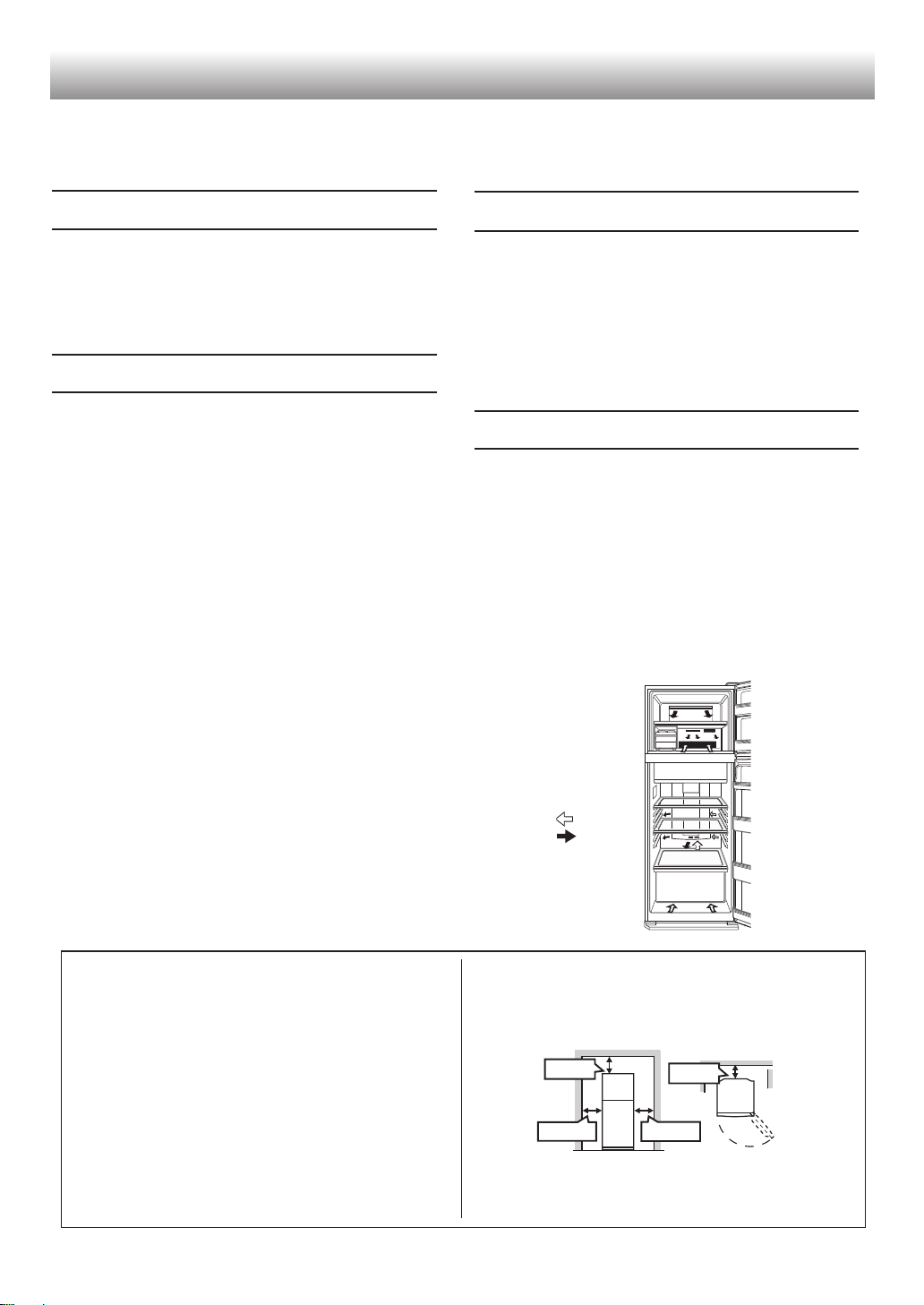
• The amount of energy consumption of this model is
measured as shown in the picture below.
Tips for saving energy
• Install the refrigerator in a well-ventilated area and
keep the space to ventilate.
• Keep your refrigerator out of direct sunlight and do
not place it next to heat generating appliance.
• Avoid opening the door as much as possible.
• Hot food should be cooled before storing.
• Place the food evenly on the shelves to allow the
cool air to circulate effi ciently.
Storing food
90 mm
300 mm
300 mm
50 mm
11
ENGLISH
Care and cleaning
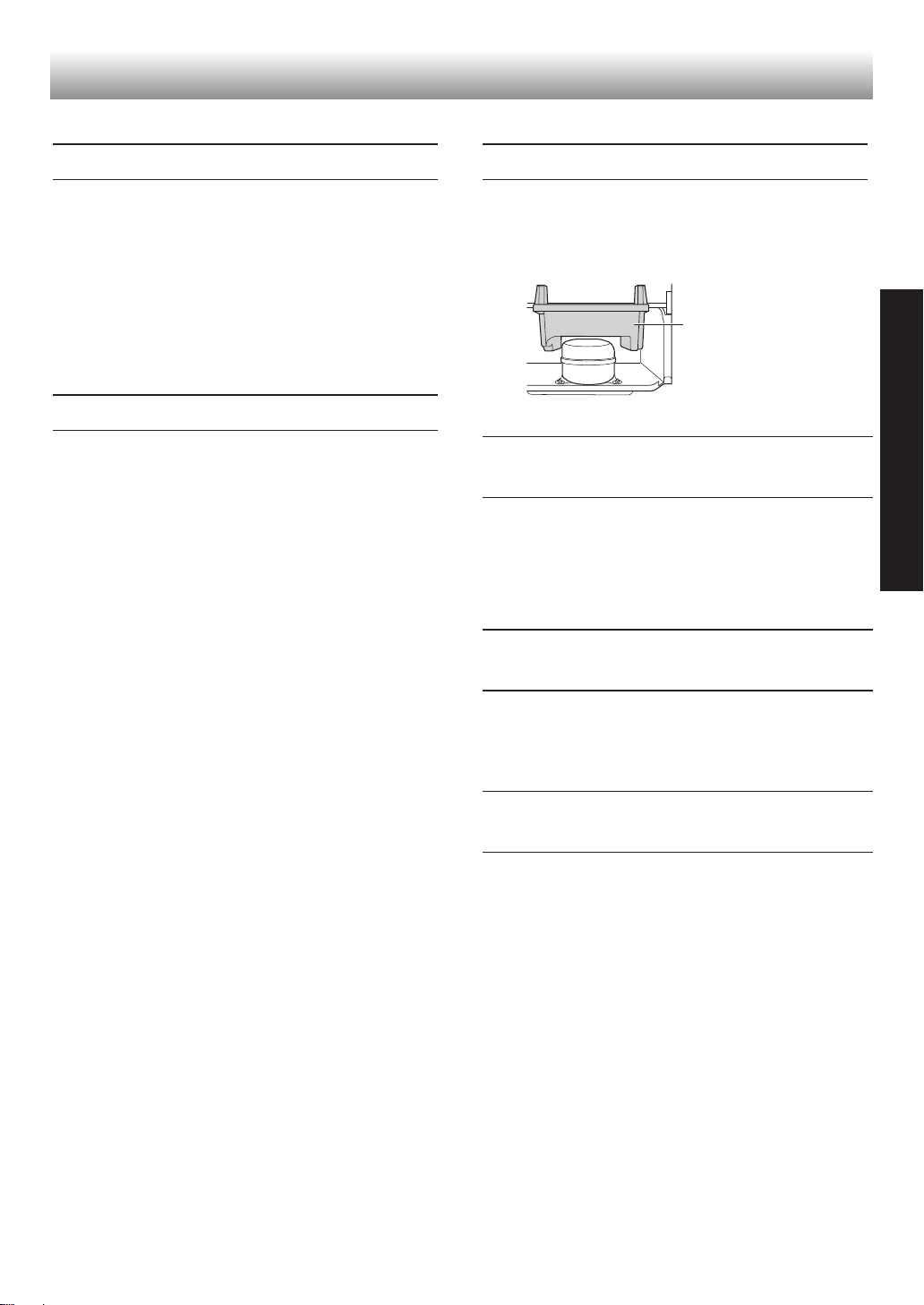
Evaporating pan
Important
Follow the tips below to prevent cracks on the
inner surfaces and plastic components
• Wipe out food oil adhered to plastic parts.
• Some household chemicals may cause damage, so
use only diluted washing-up liquid (soapy water).
• If undiluted detergent is used or soapy water is not
wiped off thoroughly, it may result in cracks of plastic
parts.
Cleaning
• Remove the accessories (e.g. shelves) from the
cabinet and the door. Wash them by warm soapy
dishwashing water. After that, rinse them in clean
water and dry. (Only fruit and vegetable shelf is not
removable)
• Clean the inside with a cloth soaked in warm soapy
dishwashing water. Then, use cold water to wipe off
soapy water thoroughly.
• Wipe the exterior with a soft cloth each time it gets
dirty.
• Clean the magnetic door seal with a toothbrush and
warm soapy dishwashing water.
• Wipe the control panel with a dry cloth.
Note
• Do not use heavy-duty cleansers or solvents (lacquer,
paint, polishing powder, benzine, boiled water, etc.)
which may cause damages.
• If you pull out the power plug once, wait 5 minutes at
least before connecting the power plug again.
• The glass shelves weigh approximately 2 kg each.
Hold them firmly when remove from the cabinet and
carry.
• Do not drop objects inside the refrigerator or strike the
inner wall. This may cause cracks to inner surface.
Before transporting
• Wipe up water in the evaporating pan. Before wiping
up the water, wait more than 1 hour after pulling out
the plug because refrigeration cycle equipment is
extremely hot. (The evaporating pan is located on the
rear of the product.)
Defrosting of the
cooling unit
• Defrosting is automatically operated by a unique
energy saving system. (Approx. once a day.) Ice
making takes time because the temperature inside
becomes slightly higher than usual during the
defrosting.
When the compartment
light is blown
• Contact the service agent approved by SHARP to
replace the light. The light is not to be replaced other
than by qualified service personnel.
Switching off your
refrigerator
If the refrigerator needs to be switched off for an
extended period, the following steps should be taken to
reduce the growth of mold
1. Remove all food.
2. Remove the power plug from the socket.
3. Clean and dry the interior thoroughly.
4. Keep all the doors open slightly for a few days to dry.
12
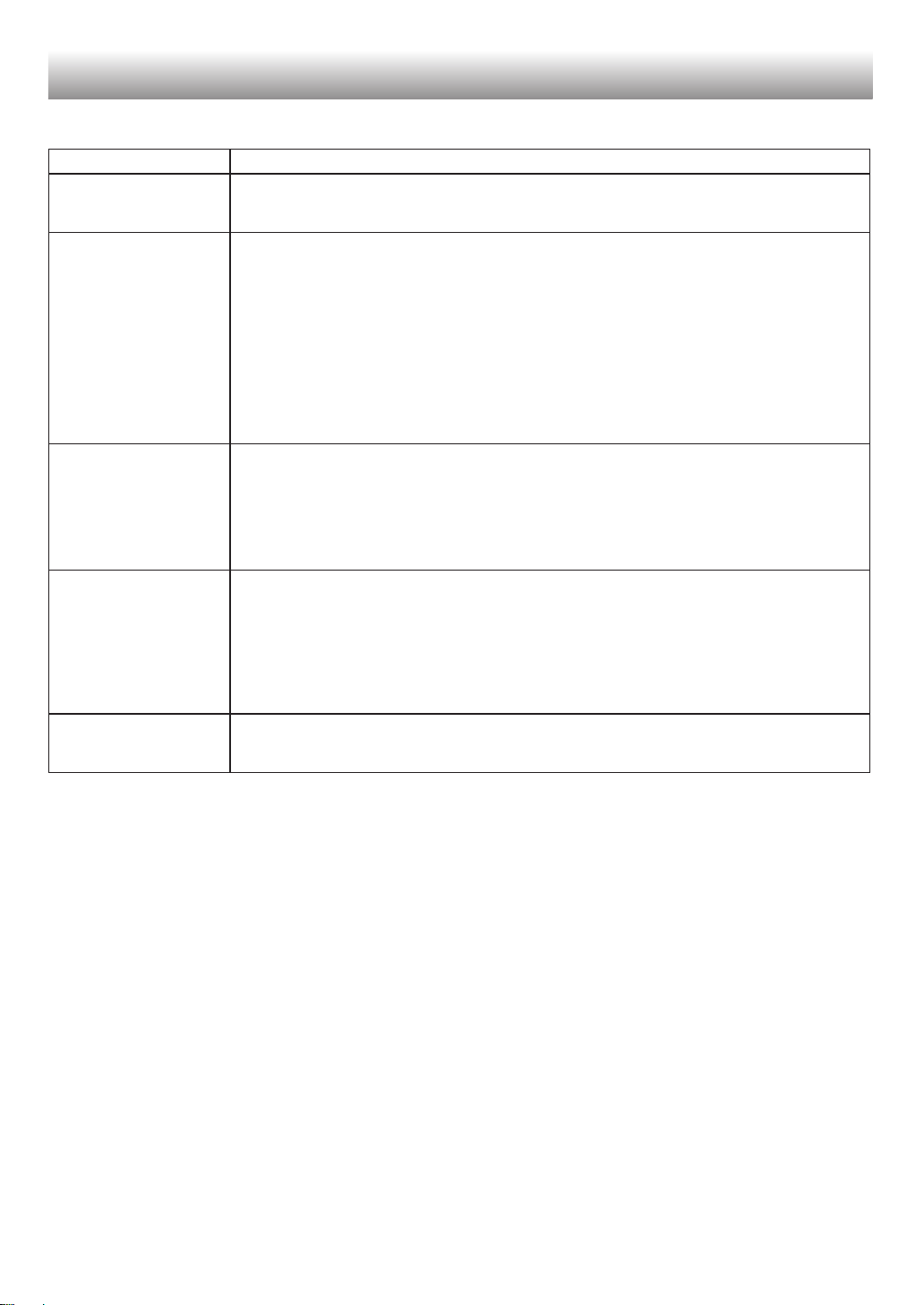
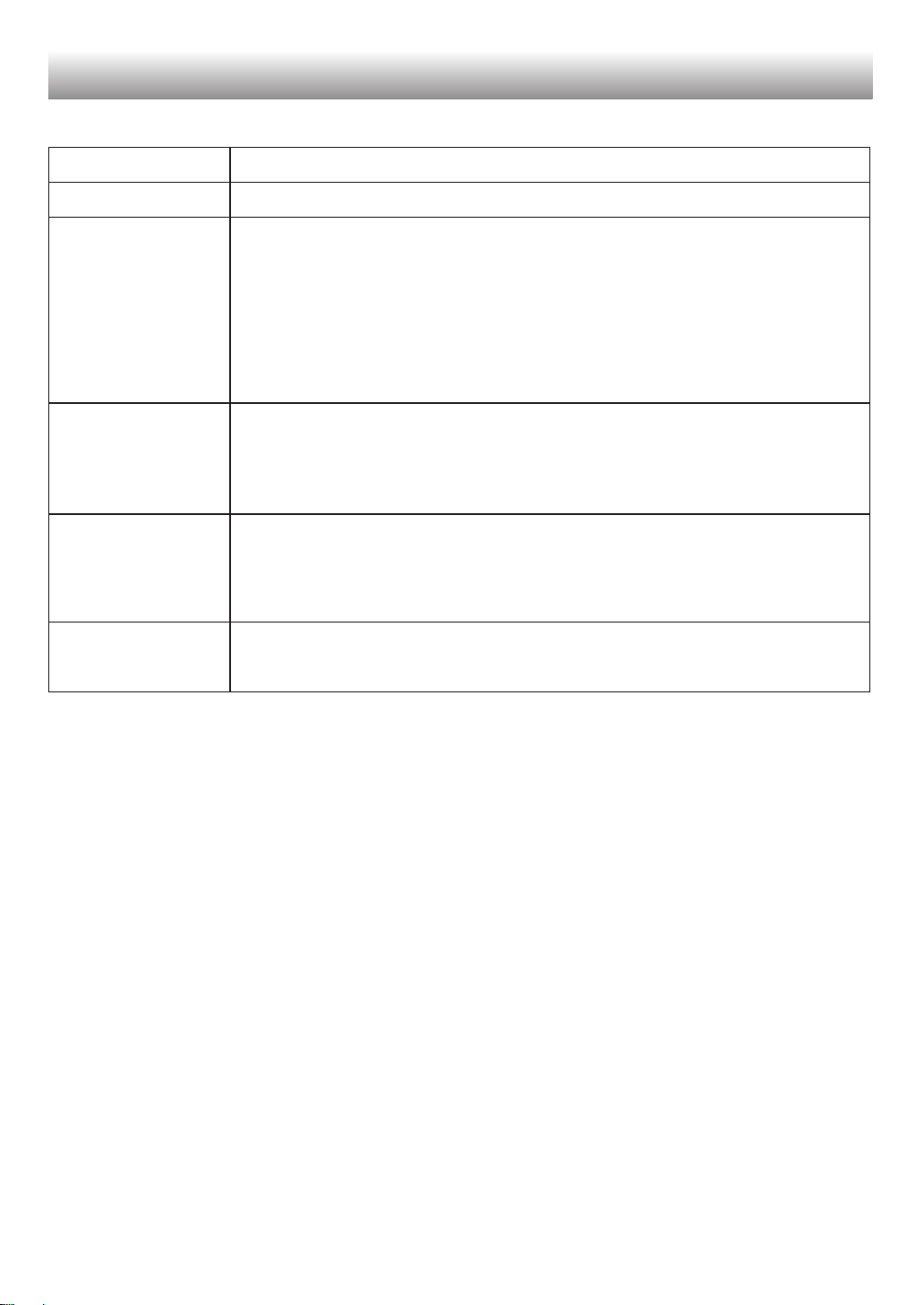
Before calling for service, check the following points.
Problem Solution
The outside of the
cabinet is hot when
touched.
It is normal. This is because of the hot pipe in the cabinet in order to prevent dew
generation.
Refrigerator makes loud
noise.
Following sounds are normal.
• The compressor makes loud noise when its operation starts
-- Sound becomes quieter after a while.
• The compressor makes loud noise once a day.
-- Operating sound is made immediately after automatic defrost operation of the cooling
unit.
• Sound of flowing fluid (gurgling sound, fizzing sound)
--It is caused by refrigerant fl owing in pipes(sound may become louder from time to
time).
• Cracking or crunching sound, squeaking sound
-- It is caused by expansion and construction of inner walls and internal parts during
cooling.
Frost or dew appears
inside or outside the
refrigerator.
This may occur in one of the following cases. Use a wet cloth for wiping frost and a dry
cloth for wiping dew.
• When the ambient humidity is high.
• When the door is frequently opened and closed.
• When food containing plenty of moisture are stored. (Wrapping is required.)
• This phenomenon will appear more or less depending on the season (rainy season,
season), habits of usage and environmental conditions of each house.
The food in the
refrigerator compartment
is frozen.
• Is the refrigerator operated for a long time with refrigerator temperature control set MAX
COLDEST?
-- Change the temperature control to the other setting.
• Is the refrigerator operated for a long time with freezer temperature control set MAX
COLDEST?
-- Change the temperature control to the other setting.
• If ambient temperature is low, food may freeze even if the refrigerator compartment is set
MIN.
Odors in the compartment. • Wrapping is required for the foods with strong odors.
• Deodorizing unit cannot remove all odors.
• Clean the inside periodically.
If you still require service
Refer to your nearest service agent approved by SHARP.
Before you call for service
13
ġNJ
ِՃǏŝů
ƗǷןɷ5*#42лȞ뼶ćů5*#42ǖܳƥǡ뼷ĦǷĨѾ֥ůǷǨן
ɷĀܳ뼷ɐࢅի୰քǕůĹdžΌ뼶
sǕܳĻůǏخǟܳՀ뼵һڅŠһഏηˀ뼶
sĒĊِܳՃǏŝů뼷ůܳĀտؗѹʇǢćȩϜġϴdž뼶ǬȊՏǢć
ԆײĘރիĹdž뼶
ƧưܳĀѹʇ׆쨞ցؗѽʇࣨ쨟ɸśą˾ՏǨӈĀǬȊDž뼷צĻĨƃ
ʑέNjĀʮˌѹʇ뼶ƧćֈһĀտؗѹʇĪůǕܳ뼷צտؗѹʇРĖ
삸ƷĨսăধܳ뼶
sܳćĂьǣIJǍʮă˅ɩĖ삸ͱŗĪĀѹʇ뼶
һƝ
ܳߒĈͲยخһོ쨞4C쨰ࡉࣼἺ쨟ŠӑɴţܴǬɄ
쨞տⅹἺ쨟뼶
Ħ֑ٜōΖŠڞଉ뼷ɐᆯࡳŗĪܩצ뼶
■ ɐ୫Ż௩ޔˀɄˈخһͶՓ뼶ܳʮˌӍŷ൫Ā
خһͶՓʮߒĈخһོ뼶
■ ɐ୫ůƭᅟѴѥͱȺŴƶКčȀэפ།ļԘ뼶쨞ˤܳ
Ǣ৸ůĢƘפ།ͶՓ뼶쨟
■ ɐ୫ćܳʮůǖ،뼶
■ ɐ୫௹ܳ׆ĀˬǍ뼶
■ ɐ୫ćܳઐ˥ůͲยȡ૦ฆོ뼷ૼƧ૦࿚뼷ۚצĻ
ĨĚٍ֠ڞଉͱΖฯ뼶
■ ɐ୫ԪǽͲย૦ฆོ뼷ૼƧćܳʮ૦࿚뼶
■ ƧưܳĀһ˃ͶՓśƌтච뼷ɐ୫ˈૻǖ۷
ǝ뼷ģ୫ůdžΖ뼶
ŧܢд뼷ˬǬȸʘ뼶ƔŷԔ5*#42ΗĻĀߊŷ
˖ӨġķɖDŽέզ뼶
ȫ
■ ɐ୫țܳѴٝćঃǬĠӍឆīĖnjĀŞƶ뼶ĒƠĚȁ
ӑ՚˫вƦٍ֠ǖ뼶ƦؼĈIJĚćܳʋ൫ʨ܋뼶
■ țܳჹŞȫćŞذĀnjːʞٝĘ뼶
ǖ۷ϟ뼷Ǻ뼷ǝ
Ħ֑ٜǖͱΖฯ뼷ɐࢅի୰քŗĪܩצ뼶
■ ˢˈțǖ۷ǺŞɌૻǖ۷ǝ뼶ɐ୫ů
ǣĀǖϟͱʼҖǺ뼶
■ țǖ۷ǺɌʸǭǖإđĀǝĘ뼶
■ ȢڪŞțˈŞգΨˈĖˈŞܸŔ뼶쨞טǺŞҞ쨟
■ ΨˈȺȫćлȞĀˈŞܸŔĀŷҏȋĀˈŞϟ뼶
쨞טǺŞҞ쨟
■ ڪćȫͱࡡƘļԘġ֔ǖ۷ᣓϟăɩধ뼶Ƨ
ưǖ۷Ǻͱǖ۷ϟśƌ۟ƘDžŰߨ뼷ɐ୫Ɍǖ۷
Ǻ뼶
■ ɐ୫ůঃƋˈǖ۷Ǻ뼶
■ śǖ۷ǺIJ뼷ɐăđŮӘʐǖ۷ϟ뼷˅˾΄ʐ
Ǻܸś뼶
■ ǖ۷ǺĘϕଝĄڇŐΖฯĀʅȁ뼶
ȁˤ뼷ɐIJ˩țȺࠚش뼶
■ ܳƧưǣIJǍăů뼷ɐțǺś뼶
■ ȁĦđກᣓϟ뼷ǨŗćĻഓفĀǖ۷ᣓϟধ
IJ뼷κݯύ5*#42ࣩѤĀ˖ӨͳȗĉƑҖᣓϟ뼶
ůġ
■ ɐ୫ভڅகţȡˀΘŠͲยȡˀΘ뼷ƧႨ⓬뼵ޱЅ뼵
ᢅἺ뼵ྀʸོ뼵ښႨྔDž뼶ˤˀΘĈڞଉƥ߭
ٖ뼶
■ ɐ୫ćܳʮভԪѹʇ઼ƗՏлȞ뼷ૼƧֳۺлȞ뼶
ۚצлȞԫĻĨĚȼΘ뼶
■ ɐ୫ϐܳ뼶
զȗڐĉ˳ŗʋĀĉ˳ഋŠզȗǕƭ뼷Ěٍ֠Ζ
ฯ뼵ǖŠɩ˻뼶
■ ɐ୫ćܳڊˌǽٝˀȞ뼶
ƧưˀȞȭܳڊˌҎҔ뼷ĻĨĚٍ֠ĉ˳ɩ˻뼶
■ ɐ୫ůƺරඌɟ뼶ۚצ뼷රඌɟĻĨĚۂߌ뼷֠
ٍǻɄɩ˻뼶
ՃǏ5,2)5,2)5,2)25,2)2
5,(6)$82
■ ˤܳҏʸίӍŗĘĀɰٿů뼶ćĈʸǖ،
ůȫƼĀટႹͱϱ֠Ӎąನćٖ߭ĀǡĪ뼷ˤܳ
ģҏʸǻɄ뼵ƗЋͱғƺƶǚĈܿౡĀචĉՂ뼵
ͱܿఆȠȯƾԤͱƢԹĀĉՂů뼶ٜŻɰٿʂ
ൂܳ뼶ćƃટႹĀŰߨĪ뼷ɰٿăīšܳɖ
DŽʓӍέզѵ뼶
ǬȊՏ ĻˈɩĀտؗѹʇ׆
50 삸`삸
0 삸`삸
56 삸`삸
6 삸`삸
ȫƼNjƂּ
ܔг
Ēȩdžٍ֠ǧ୬ͱȶ˻ĀɣٖňƬ뼶
ȫƼNjƂּ
Ēȩdžٍ֠ࠒնɩধͱĉ˳ɩ˻ĀɣٖňƬ뼶
ܔг
14
ѵ
■ Ħą֑ٜǖ뼷ϘϵҎܳĀǖ۷Ǻ뼶
■ ɐ୫ˢˈțnjೞćܳĀʮˌŠʋˌ뼶ĒƠĚٍ֠ŀự
Ӎӑ՚ȡĨĪܰ뼶
тච
■ ƧưǷշĖĈʀɞ౦ą뼷צӐśǖ۷Ǻ뼶Ɣŷ
Ԕ5*#42ΗĻĀߊŷ˖ӨġķɖDŽέզ뼶
■ пĂţŀူٞǬƂт뼷ɐ୫ůƋŅܳŠǺ뼷
đǙŧܢдʘɣ뼶
ܳĀȗ
■ ڪܳćԪǽIJăĚšɰٿҜŪٖ߭뼷ˢٍݻڟĦ
ٜ뼶쨞ૼƧ뼷Īܳɟ뼷֑ٜɰٿౡɌܑؗ뼶쨟
■ ɐჹڒȗܳ뼶ܳɐχʖˠĀĻยȡخһོӍ
ӑɴţܴǬɄնȗ뼶
ࢪ
■ ȫͱࡡƘܳIJ뼷ɐů֑֔ŗ֑ٜŞذɩধ뼶
■ ʐʞǏЪˌŷƶȇЪטĀdzƘܳ뼶ƧưŐܳ
ĀƶКăȋ뼷ĻĨĚٍ֠ĉ˳ɩ˻뼶
ȫƼNjƂּ
ůġ
■ ύǏإരƭ˲ʻͱȺʋ׆ˌɫć߽ǟļԘġțȼīο
˩Ƌ뼷ԮпăđŅ뼷ۚצ뼷țĚƻ˔՚
˻뼶
■ ăđůঃƋŅһഏبʮĀηȞŠخ،뼶ࣺĚ
ٍ֠Ƌഏ˻뼶
■ ɐ୫țӋͱ໌նǽɌһഏب뼶
ȎĄqŨэخһrβĨŧIJ뼷රඌӋԫĻĨĚڞ
ഛ뼶
■ ɐ୫ůůnjŗʋĀnjخǟܳՀ뼶
■ ćĈĉțƋǽćܳɟઐ˥IJ뼷ɐ୫ŧȯɟ뼶ԪćȺŴ
ĉĻĨĚƻܳɟపʐƋϱĀɣٖ뼶
■ ɐ୫ćܳɟĀܳ૿Ęǽٝഀ૭ļęĀˀȞ뼶Ƨư˾
ˀȞȭܳ૿ĘҎҔ뼷ĻĨĚٍ֠ĉ˳ɩ˻뼶
■ ڪćȫͱഋפරඌڜߑIJđྏȗරඌڜߑ뼶Ƨ
ưǷǽĪරඌڜߑ뼷ĻĨĚۂഛͱҜŪ˻ҳ뼶
ȫƼNjƂּ
Ӻǚ
15
ġNJ
1
ܳĀ׆˅ڪӖѾĀʘɣˬǍ뼶
sˤʍ׃ФąȫܳǨĀŕŇˬǍ뼶ćăǜĀ
ˬǍഀ૭ĪɖDŽĨ۷ϥഹԎʔʰɫ뼶
sܳ׆ĀˬǍɾę뼷ܳDŽIJĀഹǖʔɾ
Ň뼶
sƧưćŇǏĪʍǨԉФĀˬǍഀ૭ġůܳ뼷
ĻĨĚٍ֠ٝѹʇƬ뼵ᕒęӍтච뼶
sܳŷˌȇɄƥǍĀˬǍࡍ˅ĦęǏМ
ؼŇǏМ뼶ܼˤˬǍęǏМ뼷Н୫
ćDŽġļɴĀإരƭŗӍʋ׆ˌɫ뼷ŗыɩ
˻뼶
ůIJǨɻɄˬǍ
ȫ
њӐՏ
2
ɐϙůǡǚĀƨĊЭђט뼷țܳჹŞȫćŞذ
ĀnjːʞٝĘ뼶
3
ĪܳɄĪˌĀ۳ᅯԝ뼷ƔŷůĒȏᅯԝȫ
Ѵٝטࣥ뼶
쨞טࣥઐćһڅبġ뼶쨟
Ԙ
Ԙ
ԙ
ԙ
Эђטࣥ
ᅯԝ졭۳졮
טڿʞǏܳЪˌ
sࡡƘǪڿܳĻŗǡŷࡡƘ뼶
4
ۛļȢڪȫĀǝΨˈѴѥ뼶
ćůܳǡ
sůѹnj༝ܴļĀݜҘʓܳʮˌ뼶
sƧưůْઃ뼷ɐůnjોЪࠚҎҢْઃ뼶
ɐNj
sѴٝܳIJđ֥ŒҨজϔǏܻ뼶
sɐ୫țܳǽćїʾˢׯĀŞƶͱţɴƭ،Ā˔뼶
sɐ୫țܳˢˈǽćŞǚĘ뼶ɐćܳĪǚӂѥҏȋĀ
фǝ뼷Ƨ҂ذ뼶
sćǙŧܳɟĀޔѐĪɌǖ۷ܻIJ뼷ĚĈܳɟΣ
ܔ์ڔ뼷ȚĄĒăǏࡉ˩뼶ȯĘܳɟŷΣܔďĚӕ
ٜ뼶
М
ŗĘ
М
ŗĘ
М
ŗĘ
М
М
М
Эђט
М
ࡡƘǪڿ
5,2)5,'/5,2)2Ċ
5,2)5,'/5,2)25,(6)$82Ċ
16
һഏبַߑ
ĻࡡƘĀخܳƭ
ˑݰӚڰůĒĊخܳƭ뼷
ƧĘʍǨФ뼶
ǷĻŗțخܳƭǽćһഏبĀ
Şƶ뼶
ɐ୫ćܳϜġnj뼶
ۚצ뼷خŪĀܳĚΨʨćĂŐ뼶
ܳخŪŗŷ뼷ɐ܍؊IJ࣌ƶˋʼƘߝႳ뼷țܳԦ
ɖভܳ૿ʮ뼶
ɐNj
sӨκđțخܳƭːǽ뼷njăđȭܳϜġຯś뼶
sĦą֑ٜܳՀ૿ɩধ뼷ɐ୫ćȺġԦɌЅͱȀܳ뼶
ڧ 쨬ɟ
һڅبʮࠈ
ߝǚذ
һڅبַߑ
Ċ
ࣶʸһ˃ǚذ
ǕǚذȭŷˌǍˈŞܳһڅبȼױ뼶ĒĄĂƝһ
څηȞĀѹŠƶʑ뼷ăĚηȞݕ܋ćһǬȸƥġ뼶
njưŠീַ҅ߑ
njưŠീ҅ڧب
Эђט
Ċ
Эђטࣥ
ɟտ
Ċ
һഏبɟ
Ċ
ӳ
5,2)5,'/5,2)25,(6)$82Ċ
5,2)5,'/5,2)2Ċ
5,2)5,'/5,2)2
14
14
ܳ Ęˌ
ՃǏ5,2)5,'/5,2)25,(6)$82
ӳߑ
Ӌ
ܳ Ъˌ
ƧưĞđćܳʮভԪęՏˀȞ
sǷĻĨđĪĘʍġীĦ뼵뼵뼵뼵Āڜߑ
ͱᳳڅ،뼶
sǷćŗĘŰբġůܳ뼷Ⱥһ˃вĨăɩڔ뼶
ٝ
ǢƾțѴٝćһǬĀʘƅĘ뼶ăđɖDŽ߽ǟŠ
ʓ뼶
ˌʞǩ
1
2
3
4
5
6
7
8
9
10
01
11
12
13
13
16
14
15
17
18
12
ߝႳ
ভܳ
17
ġNJ
ǮůβĨ
ȯǏ߽ǟ뼷ɐз୰qߝǚذrˇ·뼶
ˑƺخһ
Ũэһഏ
Ũэخһ
ˑƺخһ Ũэһഏ Ũэخһ
Ž ĻŗůǕβĨțնͱ
ηȞһഏχܳһޔѐ뼶
ɐNjߒnjŒƬĀη
ȞĻĨĚഏʨ뼶
ĻŗůǕβĨȀэһഏ
ηȞ뼶
Ǖ٣КቍćŨэһ˃նͱηȞ뼶
˅ůʞٝ ڧ૿ һഏب һഏب
ȫƼNjƂּɐ୫ǽٝරඌӋ뼶රඌӋԫĻĨĚڞ
ഛ뼶
DŽIJǍ ŇIJ ŇIJ Œҙ
sǕβĨĚĢƘʨ뼶
sܔΣ،ăĚڔŐ뼶
sǕβĨĚĢƘʨ뼶
sܔΣ،ڔŐ뼶
ȯহܔΣ،
܍ĪqŨэһഏr܍ᔧ뼶
DŽʨŷ sƃțնͱηȞȾś뼶 sΣܔ،ڔŐIJ뼷ɐӨκȾśնŠηȞ뼶
sƧưțնͱηȞǽٝćһഏبɸļęકŒҙ뼷
նͱηȞĻĨĚʨܳ뼶
ܼć߽ǟʿǍţ
ŀאǖ
sǕβĨĚĢƘȾϥ sǖ۷ฎ֯ŷ뼷ǕβĨĚĢƘȶĤƘ뼷ฎ֯Ėƥǡ
Āޔѐ뼶
ȋǕβĨȇפ།βĨȶᚓIJ뼷ĻĨĚƑIJ뼶ȁĦǕβ
Ĩđćפ།ƥŷƘ뼶
Ƨưăȯহ˾ܔΣ،뼷ܔΣ،țτڔŒҙ뼶
ɐNj
sȋˑƺخһ뼵ŨэһഏŠŨэخһȺġĂĊβĨȢćDŽ
IJ뼷ԨʋĀβĨƃʑǜIJDŽ뼶
sȋĒȏβĨDŽƥIJ뼷ԃʔыŧɟ뼶
شŔ
ՃǏ5,2)5,2)5,2)25,2)25,
(6)$82
ȋܳʘǖIJ뼷شŔțĢƘɖɌʕǟޔѐ뼶
ܳʮĀŔлŀ،țˋһڅبࣴǽśشŔ뼶
شŔĄȢŔŠݹŔĀמʸɄ뼶
شŔĨăƜཏˬǬġʹᕡཕ뼶
ɐNj
sܳʮĻĨĈࡉ뼶ĒĄŔţŀ،лŀĀĀ
ƅ뼶ݦʇο˩Ň뼷ࣴǽĖܳʮĀĚೳэŒ
뼶
ᕡཕ
һഏب
ڧ
18
ߝǚذ
ŧ˧߽ǟ
ȾϥDŽ
ˑƺخһ
܍ĪβĨ܍ᔧ뼶
☲
܍ĪβĨ܍ᔧ뼶
☲
Ũэһഏ
܍ĪβĨ܍ᔧ뼶
☲
܍ĪβĨ܍ᔧ뼶
☲
Ũэخһ
܍ĪβĨ܍ᔧڀҙͱƑ
Ġ뼶
☲☲☲
܍ĪβĨ܍ᔧ뼶
☲
ࣆᙈ
ɐNj
sƧаŐϱФ،뼷ɐ܍Īq(r
ͱq4r܍ᔧ뼶
ࣆа
ࣆа
ȯহ
ȯহ
ȯহ
☲☲☲
ǮůβĨĀ߽ǟ
ɟΣܔ،
sȋܳŋĈȯহIJ뼷ɟܔΣ،țĚćŧɟŒҙŷڔŐ뼷թļŒҙŷǞơڔŐ뼶
sƧưɟŧޔѐךŒҙ뼷Σܔ،țĚΨτڔŐ뼶
sɟȯহŷ뼷ܔΣțӕٜ뼶
ƧưɟܔΣ،ăӕٜţśܔΣ
ƧưdzǨĈĀɟȯহŗŷ뼷ɟܔྡăӕٜţΣܔďĄĈܿఆ뼶
ɐȇـޏ˖ӨġķԔ뼶
ҽӕٜɟܔྡƶʑ
sǜIJ܍Īq4r܍ᔧŠq(r܍ᔧթτڀҙͱƑĠ뼶
sęךƨĐŗŷ뼷ɟܔྡćțˋŐč뼶
ǮůβĨ
܍ᔧ ߒץ չΗѴٝ
ˑƺخһ
ȯহ
Ũэһഏ
Ũэخһ
ѹʇЭ·
܍ᔧ ߒץ չΗѴٝ
һڅبĀѹʇЭ·
һഏبĀѹʇЭ·
19
ġNJ
ѹʇЭ·
ǕܳĚĢƘЭ·ѹʇ뼶ƧĈđ뼷Ļ܍ƧĪƶʑЭ·ѹʇ뼶
ƧণзȋǡѹʇѴٝ
܍Īq(rͱq4r܍ᔧŷ뼷ϱФ،аŐ뼷׃ФȋǡѹʇDž뼶
һഏب܍Īq(r܍ᔧ뼶
һڅب܍Īq4r܍ᔧ뼶
һഏبŠһڅبĀѴٝ
һഏب
1. ܍Īq(r܍ᔧ뼶
2. ܍Īq(r܍ᔧ뼷ŗϐȼѹʇDž뼶
һڅب
1. ܍Īq4r܍ᔧ뼶
2. ܍Īq4r܍ᔧ뼷ŗϐȼѹʇDž뼶
s܍Īq(rͱq4r܍ᔧŷ뼷ѹʇϱФ،ț܍Īʍ
쨞샆샆샆샆샆쨟ǨФȼ뼶
ɐNj
sЭђѹʇDžŷ뼷ϱФ،ęךڀҙŷȯহ뼶
sӕǖŷѹʇѴٝģĚŠӕǖǡĂٍ뼶
һഏبŠһڅبĀƬѴٝ
֭֫ŗĪϲበaĖb뼷һڅبŠһഏبĀѹʇĻ܍ĊDž
`čЭ·뼶
һഏب
a. Ϙϵ܍Īq(r܍ᔧ뼶܍ʐq(r܍ᔧĀǜIJ܍ĪqŨэһ
ഏr܍ᔧ뼷թڀҙͱƑĠ뼶
☲☲☲
ϱФ،ತƫχqչΗѴٝr뼶
b. ܍Īq(r܍ᔧ뼷ŗϐȼѹʇDž뼶
ƧưĞŗĊDžčЭ·ѹʇ뼷צ֭֫ϲበaĖbɖDŽ߽ǟ뼶
һڅب
a. Ϙϵ܍Īq4r܍ᔧ뼶܍ʐq4r܍ᔧĀǜIJ܍ĪqŨэһ
ഏr܍ᔧ뼷թڀҙͱƑĠ뼶
☲☲☲
ϱФ،ತƫχqչΗѴٝr뼶
b. ܍Īq4r܍ᔧ뼷ŗϐȼѹʇDž뼶
ƧưĞŗĊDžčЭ·ѹʇ뼷צ֭֫ϲበaĖbɖDŽ߽ǟ뼶
s܍Īq(rͱq4r܍ᔧŷ뼷ѹʇϱФ،ț܍
Īʍ쨞샆샆샆샆샆샆샆샆샆쨟Ǩ
Фȼ뼶
ȯহ ࣆа ࣆᙈ
☲
☲
Dž ϱФ،
չΗѴٝ
Dž ϱФ،
չΗѴٝ
20
ɖ
ś
һഏب
sܼđŨэһഏηȞ뼷ƲơĝκݯɹʔǽɌ뼶
sηȞ˅ɖDŽิȋݦ뼷đӵͱࣥӵ뼶
sțηȞߴŞǽɌһഏب뼶
sŔŠ،ĘđԆĘԆФ뼷թϴʓࡻһഏηȞĀʮ
뼶
ܳ
njư존ീ҅
sĦԃʔɹnjĀȸ˫뼷njưŠീ҅đůڧࡩӍ
Ŕ쨞ăˍ쨟ƥĀർ൵ΛΛĘ뼷թțȺǽ
Ɍീưڧبͱnjư૿ʮ뼶
sͲɩӢѹڔĀnjưŠീ҅˅ভԪćܳʋĀᘑ
ױ뼶
خȞŠ٬ӳ
sǵٯǨĈخȞĀʋĘĝԆĈҏȋĀԪѹʇ
ŠԪʿՃ뼶
sɐůʮĀӳߑԪ٬ӳ뼶
ѡ존ʶ존ሆѡ
sɐțȺǽć،Ę뼷թĘڧ뼶
sܼĄęՀĀѡ뼵ʶŠሆѡ뼷ɐțȺǽćַߑĀʮ൫뼶
sǢƾٺĀηȞӨݯůڧČ뼷ͱțȺǽćݦ
،ʮ뼶
sĤڧηˀ쨞ȫƼ쨟˅ćĈՃIJǍʮভԪ뼷ŗ֑
ٜȼΘӍߗȶڔȺŴভԪηˀ뼶
֑ٜܳʮˌʨnjͱʨ།ĀӚڰ
sɐჹڒȯČܳɟ뼶ƧưܳʮĀηȞҎҔ뼷ĻĨ
Ěٍ֠ܳɄŠɟƥǍ֜Ūᎇ뼶ɐțηȞǽƫ
ܳʮĀַߑͱܳ૿뼶
sԃĻĨŨэŞŧȯܳɟ뼶ƧưܳɟǣIJǍŧ
뼷ͱӥŞŧȯܳɟ뼷ďĻĨĚśƌ܋njͱ
ʨ།뼶
sভԪĀˀȞ˅ůηˀ໌ͱڧƥĀʀɞ
ͱݦČ뼶쨞ȎĄƬߒnjʔĀηˀ쨟
ӚڰভԪηˀ
sĦһǬ֥Œ౼տ뼷ɐțηȞߴŞǽćַߑĘ뼶
sɐțֈɴĀηȞױĪčŗŷ뼷ƷԪŐč뼶Ƨưț
ֈɴĀηȞǽɖܳ뼷ܳʮĀѹʇĚƬ뼷ĒƠ
ϰϰňͲٍ֠ηȞઈȼΘ뼶
sɐ୫ŻηȞŠ،വʐһǬ౼տĀśɣˍŠۃɌ
ˍ뼶ۚצ뼷ηȞďăĨߴŞһ˃뼶
sɐ୫ˢˈțηȞǽćһǬśɣˍ뼶ĒƠĚڇٍη
Ȟഏʨ뼶
sڪηˀȞΘŕĤڧ뼷ŗŕęՃʇŞǣͲઈηˀĀভԪЄ뼶ĪǚĦǣηȞԪʿՃĀҹđ뼷ĻࣂǷϦ
Ҩ뼶
sηˀĀভԪЄĈՃ뼶ڪηˀȞΘŕĤڧ뼷ŗŕęՃʇŞǣͲઈηˀĀভԪЄ뼶
sĒĊՏĀĨ۷ϥഹʔƧĪʍǨФ뼶
·ךĨʔĀቦɟ
sdzܳȫćʘɣݘČĀŞƶ뼷թʘɣ뼶
sɐ୫țܳǽćїʾˢׯĀŞƶͱţɴƭ،Ā
˔뼶
sԃʔыŧɟ뼶
sɐțֈɴĀηȞױĪčŗŷ뼷ƷԪŐč뼶
sĦһǬ֥Œ౼տ뼷ɐțηȞߴŞǽćַߑĘ뼶
ηȞĀভԪ
М
М М
М
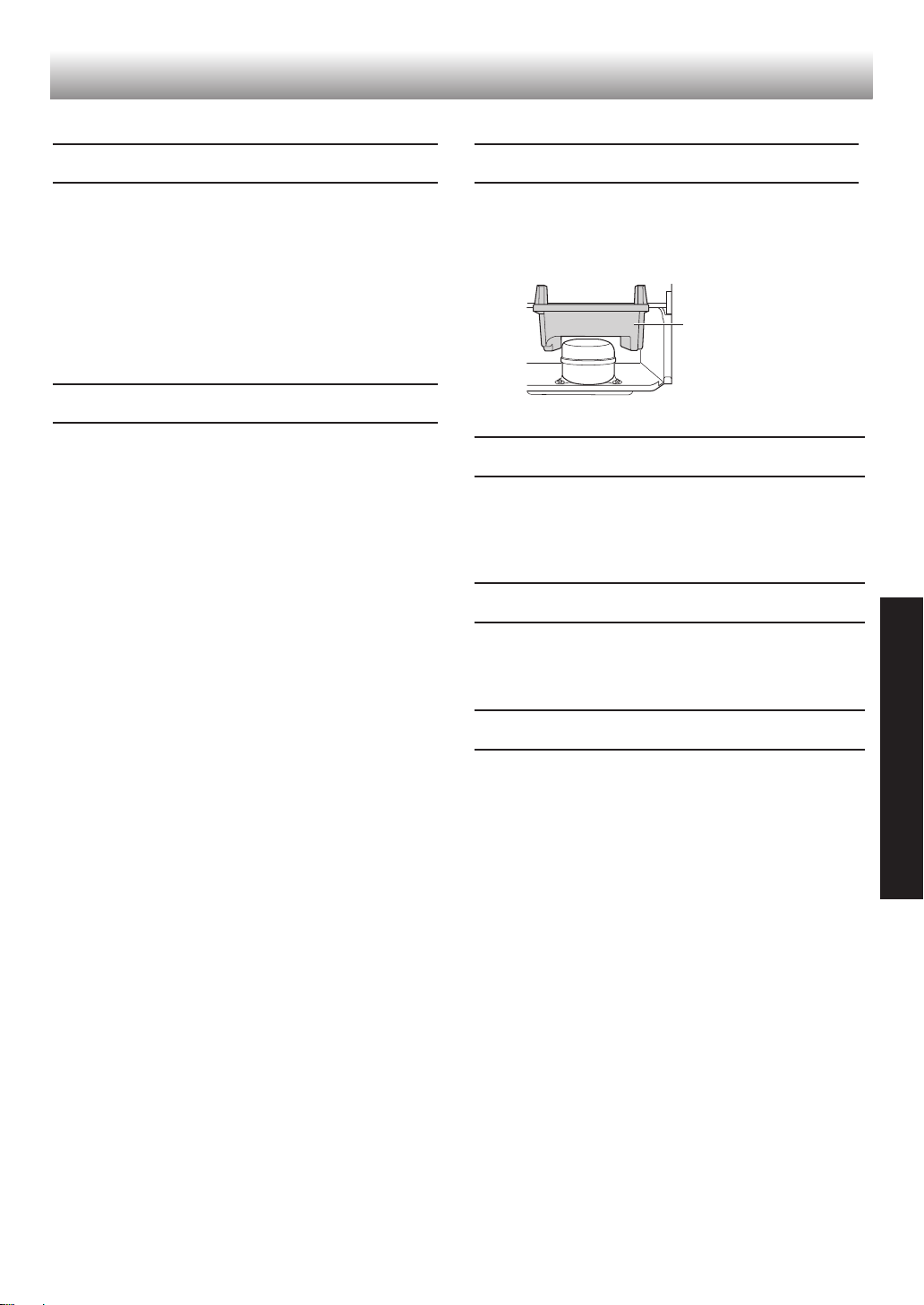
21
ġNJ
ѵ
ţַ
ȶđФ
ᆯ౼Īǚ݈Ղ뼷֑ٜʮˌȩǚȇർ൵ʻɫśƌഛൎ
sηůЅᅪĘർնˌɫIJ뼷ɐțƥࠚҎ뼶
sԚȏŝůƒҀᖠོĻĨĚٍ֠ܳধ˻뼷ȁƦŮ
ĨůશࣴļĀುӭůҀᖠོ쨞ْnj쨟뼶
sƧưůλશࣴĀҀོͱλોЪࠚشْnj뼷צ
ĈĻĨধܳĀർնˌɫ뼶
ʓ
sഋĪܳɄͱɟĘĀઐɫ뼷Ƨַߑ뼶ůѹnjŠು
ӭůҀᖠོʓҀ뼷Ɣŷ뼷ůnjҀʓթƥٹۛ뼶쨞
ŮĈnjưŠീַ҅ߑăĄĻƘКĀ쨟
sܳʮˌđů༝ܴćುӭůҀᖠོĀѹnjƏĀҘՀ
ࠚҀ뼶Ɣŷ뼷ůһnjțْnjોЪࠚٹش뼶
sܳĀʋ࿎ᅪĘᙓIJ뼷ɐů߃ݜĀҘՀࠚҀ뼶
sܳɟտđůುӭůҀᖠོĀѹnjŠ࠭ݨҀش뼶
sɐůٹҘࠚᓴߝǚذ뼶
ɐNj
sɐ୫ůˑƺʓོͱዳོ쨞Ѕ࿚뼵૰ն뼵ୋʾӻ뼵ޱ
Ѕ뼵njDž쨟뼷ۚצĻĨٍ֠ܳধ˻뼶
sĂśǖ۷Ǻ뼷ɐDžΰχɹŒҙƥŷǞȶĤˈʘ
ǖ۷뼶
sĂՀරඌַߑךȶMI뼶ȭʮ։śͱIJɐŇķ
뼶
sćܳʮɐ୫ˀɄҎҔ뼷ͱůˀɄˑݰʮૻ뼶ۚ
צĻĨٍ֠ʮૻۂഛ뼶
ƥǡ
sࠚᓴٹشţַƏĀnj뼶ࠚٹƥǡ뼷ɐӨκDžΰŇ
IJŗĘ뼷ƔŷśǺ뼷ȁĦخһ౼տѴѥĄο˩
ɴ뼶쨞ţַʞǏлȞĀӺǚ뼶쨟
šһ˃ٝɖDŽפ།ǟˠ
sǕܳۛļњĀ·ךĨ۷ͶՓ뼷ȥƼǮƌĢƘפ
།뼶쨞ęךĂĐĂơ뼶쨟خܳđIJǍ뼷ȁĦćפ།
ļԘġ뼷ʮˌĀѹʇĚȣː˩ලƬ뼶
ȋһڅبʮࠈধIJ
sɐԔ5*#42ΗĻĀߊŷ˖ӨġķƑҖʮࠈ뼶οʖ
ˠ˖Өĉ˳ăīƑҖʮࠈ뼶
НאܳĀǖ۷IJ
ƧưܳđǣIJǍȯহ뼷צ˅৸ȾŗĪϲበŗɹ
ᕡཕŀǣ
΄śǨĈηˀ뼶
ȭǝפǖ۷Ǻ뼶
ોЪʓթٹʮˌҞ뼶
ǨĈܳɟලŲŧǽǵĐɖDŽٹ뼶
22
զƥǡ뼷ɐšĪԉŞƶɖDŽণз뼶
ɜʛ š
ܳʋĈIJĚȼɴ뼶 Ēթοࡉ˩뼶ĒĄύǏʮĀɴϯŗ֑лŀ܋nj뼶
ܳĚţśňęĀᕒ뼶 ƥŷĀȢ˩뼶
sإരƭŧ˧ǟIJĚţśňęĀᕒ
ă΅ĚȼŇ뼶
sإരƭƲūĂơţśֈęᕒ
ćһ˃ٝĀĢƘפ།ǟˠƥŷ뼷ӐĚţśǟ뼶
sઃɄȸƘĀ쨞ᅡᆌ뼵쨟
ĒĄύǏһ˃ོćϯƅġȸƘҜŪĀ쨞ĻĨĚݏُȼīƑڔа쨟뼶
sሶ࿈ͱᘁཿ뼷ᘁᘁ
ĒĄύǏćһ˃ļԘġʮૻŠʮˌতɫĀᖬ႖ȇઔҜҜŪĀ뼶
ܳʮˌŠܳʋ൫ʨ།
ͱʨ܋뼶
ćĪԉŰ֜ĪĈĻĨţŀĒƝƌղ뼶ɐůঃҘࠚҎ།뼷ůٹҘࠚҎ܋뼶
s׆ѹʇֈƬIJ뼶
sӥŧܳɟIJ뼶
sܳʮԪǽnjŒֈĠĀηȞIJ뼶쨞ɐůڧĘ쨟
sĒĂƌղͱĠͱɹȾљǏՅ·쨞μՅ뼷Յ·쨟뼵ůϫڢŠƲĊӭঢ়Āտؗʰɫ뼶
һഏبʮĀηˀƻܳഏ뼶 sĄۚǣʿһڅبѹʇЭ·Ħ/#:%1.&'56ĀޔѐĪůܳ쨵
țѹʇЭ·ѴǭϐĦȺŴѴǭ뼶
sĄۚǣʿһഏبѹʇЭ·Ѵǭ/#:%1.&'56ĀޔѐĪůܳ쨵
țѹʇЭ·ѴǭϐĦȺŴѴǭ뼶
sćտؗѹʇֈӢIJ뼷țһڅبѹʇЭ·ߝĖ/+0뼷ηȞĈIJģĚƻഏʨ뼶
ܳʮˌĈࡉ뼶 sɐțǬֈˑĀηȞůڧࡩŐč뼶
sٝăĨŅҎǨĈࡉ뼶
sǭʿʓʮˌ뼶
ƾণзŷঞđզIJ
ɐȇď˥Ā5*#42ΗĻĀߊŷ˖Өġķઅ뼶
զƥǡĀحϲণз

TH
Printed in Thailand
TINS-B886CBRZ 18BF
1
SHARP CORPORATION