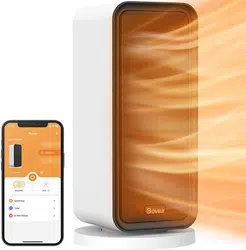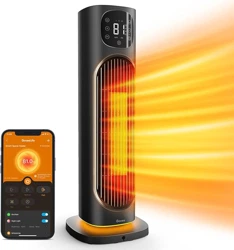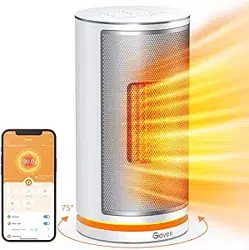
Govee Smart Heater
User Manual

Important Instructions
Specifications
Installing Your Heater
Getting to Know Your Smart Heater
Installation Steps
Using Your Smart Heater
Pairing Your Smart Heater with Govee Home App
Care & Maintenance
Troubleshooting
01
02
02
03
04
04
05
07
08
09
Package Includes
Table of Contents

01
IMPORTANT INSTRUCTIONS
SAVE THESE INSTRUCTIONS
When using electrical appliances, basic precautions should always be followed to reduce the risk of fire,
electric shock, and injury to persons, including the following:
Read all instructions before using this heater.
This heater is hot when in use. To avoid burns, do not let bare skin touch hot surfaces. Use
handles when moving this heater. Keep combustible materials, such as furniture, pillows,
bedding, papers, clothes, and curtains at least 3 feet (0.9 m) away from the front of the heater
and keep them away from the sides and rear.
Extreme caution is necessary when any heater is used by or near children or those in need of
assistance, especially whenever the heater is left operating and unattended.
Always unplug this heater from power when not in use.
Do not operate any heater with a damaged cord or plug or after the heater malfunctions, has
been dropped or damaged in any manner. Discard heater or return to authorized service
facility for examination and/or repair.
Do not use this heater outdoors.
This heater is not intended for use in bathrooms, laundry areas, and any similar humid indoor
environment. Never locate the heater where it may fall into a bathtub or other water containers.
Do not run the power cord under carpeting. Do not cover the cord with throw rugs, runners, or
similar coverings. Do not route the cord under furniture or appliances. Arrange the cord away
from high foot-traffic areas and where it will not be tripped over.
Always plug this heater directly into a wall outlet/receptacle. Never use it with an extension cord
or relocatable power tap (outlet/power strip). Plug the heater directly into a 120V wall outlet only.
Faulty wall outlet connections may cause the wall outlet to overheat. Be sure that the heater plug
fits tightly into the outlet before using. When using the heater, check to make sure the heater
plug is not overheating. If necessary, have a qualified electrician check or replace the wall outlet.
To disconnect the heater, turn controls off, then remove the plug from the outlet.
Do not insert or allow foreign objects to enter any ventilation or exhaust openings as this may
cause an electric shock, fire, or damage to the heater.
To prevent a possible fire, do not block the air intakes or exhaust outlets in any manner. Do not
use this heater on soft surfaces such as a bed, where openings may be blocked.
Heaters have hot and arcing or sparking parts inside. Do not use this heater in areas where
gasoline, paint, or flammable liquids are used or stored.
Use this heater only as described in this manual. Any other uses are not recommended and may
cause fire, electric shock, or injury to persons.
This heater can only be used when the ambient temperature is normal. When the heater detects
that the ambient temperature is too high, it will automatically shut down. Please inspect for any
objects on or adjacent to the heater that may cause high temperatures.

02
Package Includes
Item
Heater
User Manual
Quick Start Guide
Front Base
Rear Base
Quantity
1
1
1
1
1
Specifications
Power Input
Wattage
Connectivity
Oscillating Angle
Cord Length
120V~60Hz 1500W MAX
Wi-Fi or Bluetooth
80 Degrees
5.9ft / 1.8m
High: 1500W
Medium: 1000W
Low: 700W
03
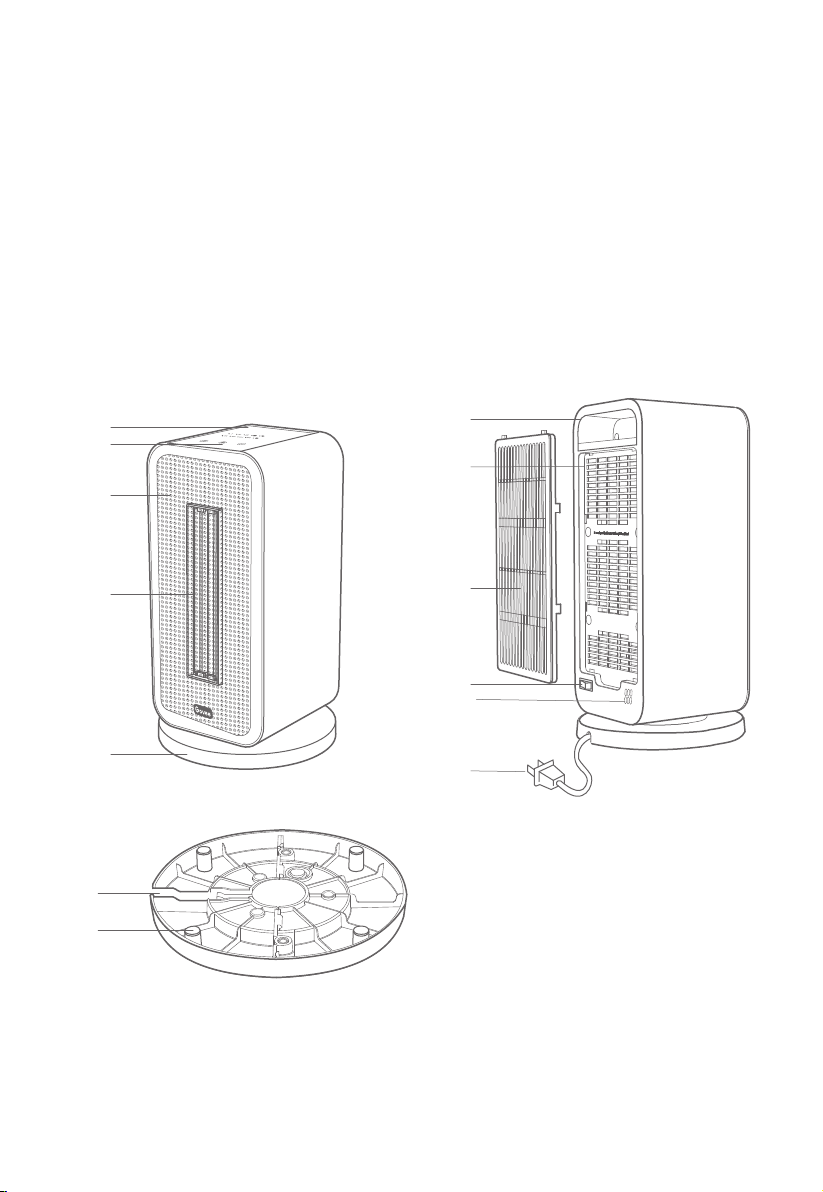
1. Panel
2. Buttons
3. Air Outlet
4. PTC Heating Component
5. Base
6. Handle
7. Air Inlet
8. Removable Filter
9. Power Switch
10. Temperature Sensor
11. Power Cord & Plug
12. Power Cord Slot
13. Pads
Getting to Know Your Smart Heater
Note: Adequate space has been left at
the base for smooth oscillation.
Therefore, it is normal if the heater
wobbles when pushed.
6
7
8
9
11
10
12
13
1
2
3
4
5
04
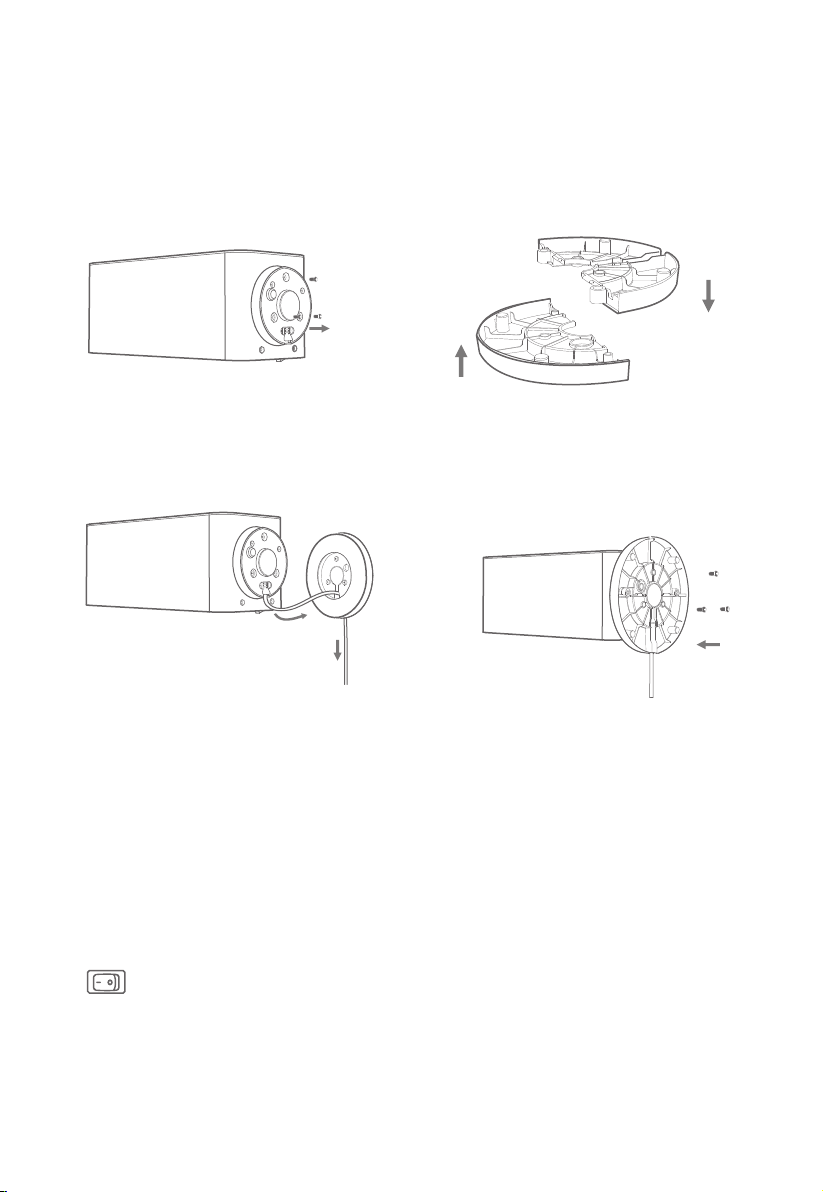
Installation Steps
Make sure the Wi-Fi signal is strong and stable in the current environment.
Only plug the heater directly into a 120V wall outlet. Do not use an extension cord.
Ensure the plug is firmly inserted into the outlet. An abnormal outlet connection may cause
overheating.
Place the heater on a firm, flat, and level surface free from obstructions and at least 3ft (1
meter) away from any wall or combustible materials.
Turn on the power switch on the back. Now your heater is ready for use!
1.
2.
3.
4.
5.
Installing Your Heater
Before You Install
① Use a Φ 5mm Phillips screwdriver to
remove the 3 black screws at the
bottom of the heater unit.
② Align the holes of the 2 base halves and
connect them together.
③ Thread the power cord through the base. ④ Align the base with the holes on the bottom
of the heater unit and attach by screwing in
the 3 black screws. Place the power cord into
the power cord slot.
05
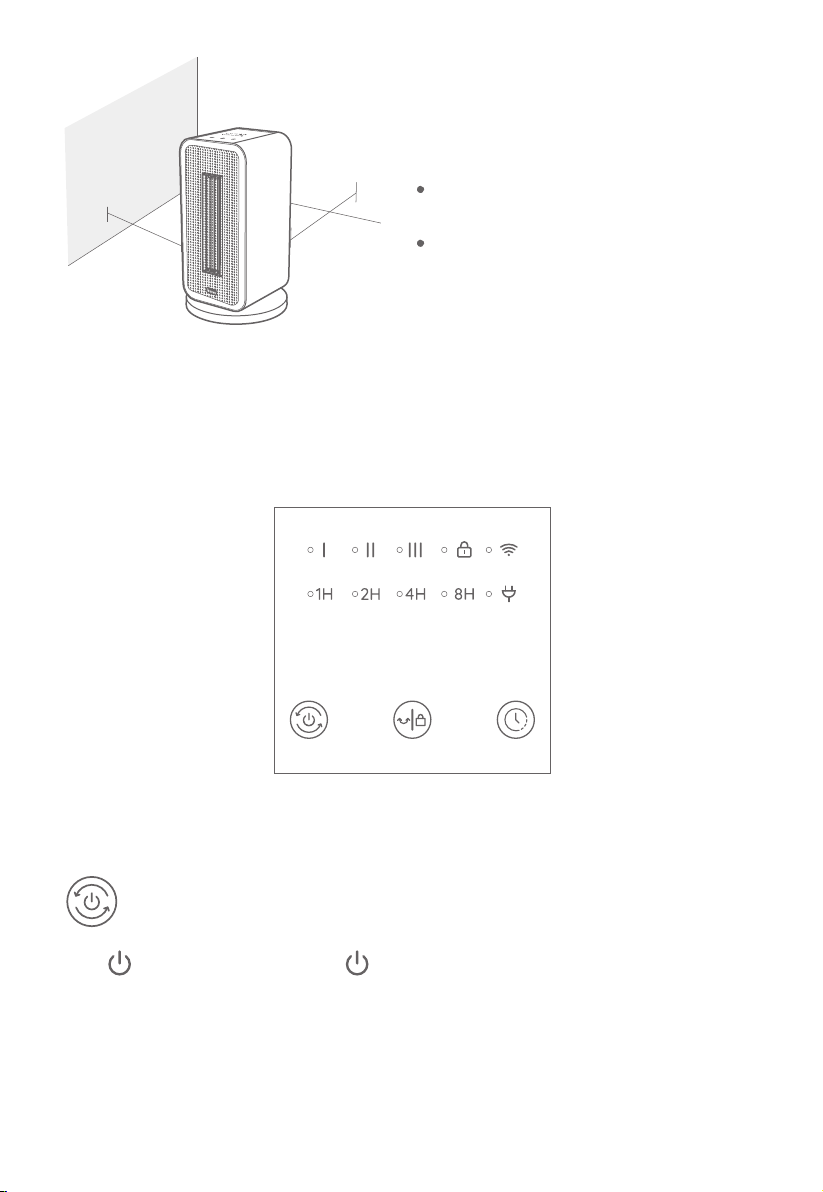
1.Button Functions
Power Button
Press to power on. Repeatedly press to cycle through heat settingsⅠ,Ⅱand Ⅲ. Long press
for 2 seconds to power o.
Note: The fan will continue working for 15 seconds after powering o to clear any residual heat.
Using Your Smart Heater
Note:
You can access additional features using Govee Home App.
3ft
3ft
Do not cover the heater with any cloth or
covering, especially over the air inlet and outlet.
Please check the plug and cord periodically for
signs of overheating or deformations.
Panel
06
Note:
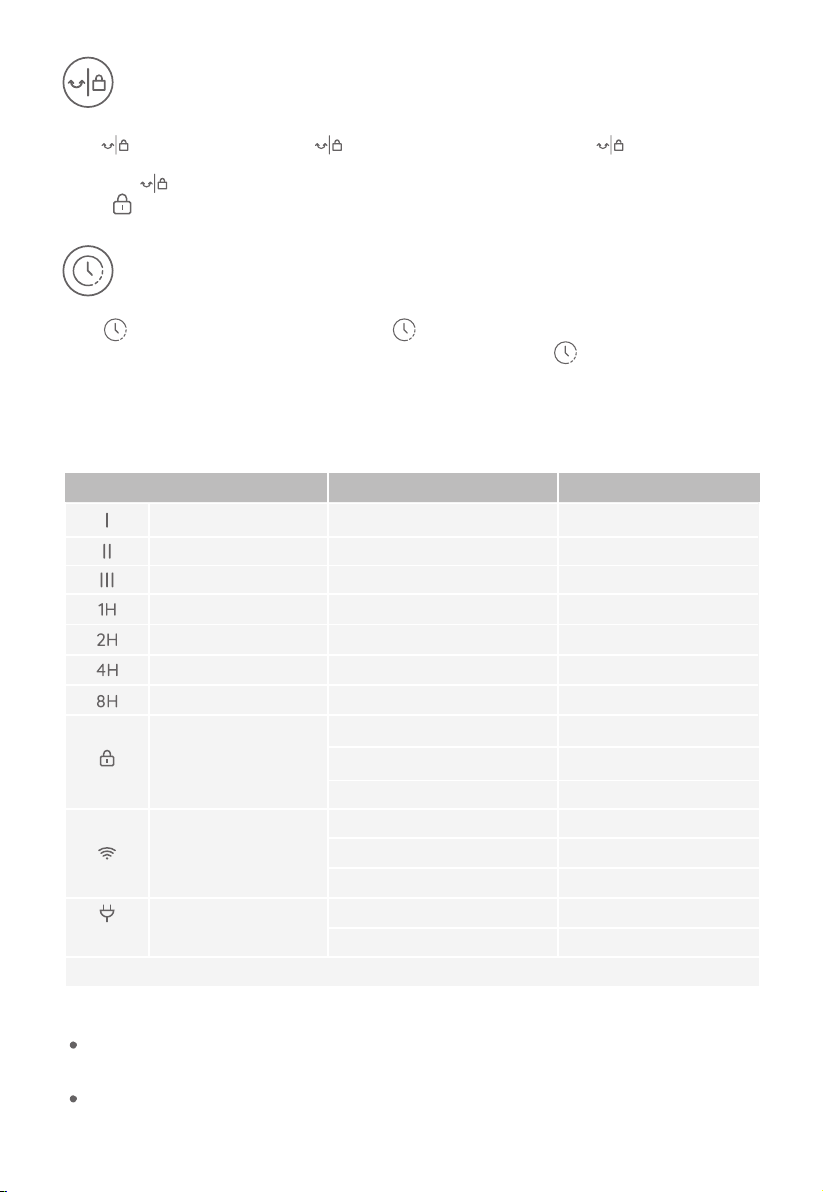
2.Indicator Light Status
Press to turn on oscillation. Press again to pause oscillation. Long press for 3 seconds to turn
on Lock Mode. When the lock is active, buttons on the panel will not respond when pressed.
Long press again for 3 seconds to turn o the Lock Mode.
Note: will ash when any other button is pressed to indicate the Lock is on.
Press to turn on the timer. Repeatedly press to cycle through the following timers: 1H, 2H, 4H, and
8H. The heater will automatically turn o when the time is up. Long press for 2 seconds to turn o the
timer.
Timer Button
Oscillation/Lock Button
Heat Setting Ⅰ
Heat Setting Ⅱ
Heat Setting Ⅲ
1H Timer
2H Timer
4H Timer
8H Timer
Low Heat Setting
Medium Heat Setting
High Heat Setting
Auto-o in 1 Hour
Auto-o in 2 Hours
Auto-o in 4 Hours
Auto-o in 8 Hours
Solid White
Solid White
Solid White
Solid White
Solid White
Solid White
Solid White
Indicator Working Status Light Status
Locked
Unlock
Locking Reminder
Wi-Fi Connection is Ready
Wi-Fi is Connecting
Wi-Fi is Connected
Power On
Tipped Over & Panel Touched
Overheating Protection
Solid White
Dim
Triple Flashes
Slow Flash with White
Quick Flash with White
Solid White
Solid Red
Triple Flashes
Triple Flashes
Lock
Power
Wi-Fi Connection
All Indicator Lights
1.Button Functions
According to related safety standards, the power indicator is required to light up when the heater is
plugged into power.
When the device is tipped over and any of its buttons are touched, it will beep 3 times to indicate that it
needs to be put upright immediately.

07
3. Other Functions
This heater will power off when the temperature exceeds 122°F (50°C). When powered off, the
heater will beep three times, and all the indicators will flash three times.
Dismiss Overheating Protection: When in Overheating Protection mode, unplug from power
and wait for 30 minutes for the heater to cool down before plugging back in. The heater will
automatically resume when it detects that the ambient temperature is lower than 122°F (50°C).
Memory Function
This heater will memorize the previous settings (speed, oscillation, Wi-Fi connection) when it is
powered off. The settings will be active again when this heater is turned on.
24-hour Automatic Shutdown
Overheating Protection
Tip-Over Protection
This heater will shut down automatically when it has been used for 24 hours straight in case
the user forgets to power it off.
When the heater is knocked over, it will power off and stop all functions.
Dismiss Tip-over : Place the heater on a flat, level, and sturdy surface, and while keeping it
upright, try using it again.
Thermostat Function
The heater will automatically adjust its speed level and switch on or off based on the target
temperature in order to maintain the ambient temperature.
Pairing Your Smart Heater the Govee
Home App
Due to ongoing updates and improvements, Govee Home App may be slightly different
than shown in the manual. In case of any differences, follow the in-app instructions.
Note:
Thermostat Mode can only be set up via the app.
The heater will automatically switch on when the ambient temperature is lower than the target
temperature once more.
The temperature detected by the built-in sensor can be checked via the app.
If paired with the heater, the thermo-hygrometer will detect more accurate ambient tempera-
ture so as to achieve the thermostat control with more accuracy. The thermo-hygrometer
should be placed within a distance of 20ft from the heater and near the human body. Avoid
placing it near the heater's air inlet or on the ground. The thermo-hygrometer needs to be
purchased separately.

08
Memory Function
24-hour Automatic Shutdown
Overheating Protection
Tip-Over Protection
Thermostat Function
To download Govee Home App, scan the QR code or search “Govee Home” in the Apple App
Store (iOS devices) or Google Play Store (Android devices).
1.
Care & Maintenance
Cleaning
Turn off the heater and then unplug it from power. Use only a soft cloth to wipe the outer
surfaces gently. Do not use any cleaning agents or detergents.
Never immerse the heater in water and allow water to drip into the motor housing. Be
careful not to get the heating element and switches wet.
The filter can be removed when cleaning. Dry the filter before installing it back in the heater.
The filter must be installed before using the heater.
To achieve the best performance, we suggest cleaning the heater at least once during the operating
season or before storing it when it will not be in use for a long period of time.
Maintenance
For storage, you may leave the heater covered to protect it from dust. Store it in a cool, dry
location and arrange the power cord away from high foot-traffic areas so that it will not be tripped
over or damaged.
Note: Do not allow water to infiltrate into the heater's interior as this could result in a fire or
electric shock hazard.
Note:
2.
3.
4.
Turn on your smartphone’s Bluetooth.
Open the Govee Home App, tap “+” icon in the top right corner and search “H7130”.
Tap the device icon and follow the on-screen instructions to complete pairing.
Choose to “Allow” all permissions when using Govee Home App for the first time. This app
will not record your personal device use.
You can use the Govee Home App to connect your smart heater to Amazon Alexa or Google
Assistant. Follow the in-app instructions to connect to your voice assistant.
Govee Home App is being continually updated and app features will be expanded.

09
Memory Function
24-hour Automatic Shutdown
Overheating Protection
Tip-Over Protection
Thermostat Function
Troubleshooting
For Smart Heater
Note: The troubleshooting section below is for solving frequently asked questions for the
heater unit. If your problem persists, please contact customer support.
Problem Possible Cause Solution
The plug of
the heater is
hot.
The heater
cannot be
turned on.
The power plug and the
outlet are not securely
connected.
Failed to supply power
to the heater. The
overheating protection
has been triggered.
The Tip-over and Motion
Protection has been
triggered.
The power switch on
the back is turned off.
Turn on the power switch on the back.
The oscillation
fails around
14℉(-10℃).
The characteristics of
grease in motor.
The Overheating
Protection has been
triggered.
Unplug from power and wait for 30
minutes for the heater to cool down
before plugging back in. The heater
will automatically turn on again when
the \surrounding temperature is
below 122℉(50℃).
Ensure your circuit breaker or fuse is
working properly. Unplug from the
outlet and cool it down. Check and
remove any objects on or adjacent to
the heater. Wait 30 minutes before
plugging the heater back in.
Securely reinsert the plug into the
socket. If necessary, you should have a
qualified electrician to check whether
the power plug prongs are intact.
Place the heater on a firm, flat, and
level surface free from obstructions.
Keep it upright and turn it on again.
The heater
suddenly
shuts down
when hot
air is coming
out.
Start the oscillation again after turning
on the heater for a while.

1. Cannot connect to the Govee Home App.
2. Cannot find the heater within the nearby Bluetooth devices list.
The heater may be connected with another smartphone. Disconnect it from the other
smartphone first.
3. The heater is offline.
For App & Connectivity
Make sure the Bluetooth of your smartphone is enabled and your smartphone is not connected
with other Bluetooth devices.
Enable the smartphone’s Location Services.
Try connecting with another smartphone.
Make sure your app is the latest version.
Make sure your smartphone is connected to the 2.4GHz network, and confirm the network is
working correctly.
Make sure the Wi-Fi password you entered is correct.
Shorten the distance between the heater, Wi-Fi router, and the smartphone.
Make sure your heater and the Wi-Fi router are located away from appliances that produce
electromagnetic radiation (e.g. microwave ovens, refrigerators, etc.).
If you are using a VPN, try turning it off and then connecting the heater. Disable portal
authentication for your Wi-Fi network. If portal authentication is enabled, this heater will not be
able to access your Wi-Fi network and setup will fail. Portal authentication means that you need
to sign in to your Wi-Fi network through a web page before you can use the Internet.
Make sure the heater is plugged in and powered on, then refresh “My Devices” in the Govee
Home app by swiping down on the screen.
Make sure your router is connected to the internet, and your phone’s network connection is
working.
If the Wi-Fi password has been changed, the heater will automatically go offline. Try connect-
ing it to the network again.
Delete the offline heater from the Govee Home App, then add and reconfigure the heater
again in the Govee Home App.
10
Memory Function
24-hour Automatic Shutdown
Overheating Protection
Tip-Over Protection
Thermostat Function

11
Memory Function
24-hour Automatic Shutdown
Overheating Protection
Tip-Over Protection
Thermostat Function
FCC Statement
This device complies with Part 15 of the FCC Rules. Operation is subject to the following two
conditions:
(1) this device may not cause harmful interference, and
(2) this device must accept any interference received, including interference that may cause
undesired operation.
Warning: Any Changes or modications not expressly approved by the party responsible for
compliance could void the user's authority to operate the equipment.
Note: This equipment has been tested and found to comply with the limits for a Class B digital
device, pursuant to Part 15 of the FCC Rules. These limits are designed to provide reasonable
protection against harmful interference in a residential installation.
This equipment generates uses and can radiate radio frequency energy and, if not installed
and used in accordance with the instructions, may cause harmful interference to radio
communications. However, there is no guarantee that interference will not occur in a
particular installation. If this equipment does cause harmful interference to radio or
television reception, which can be determined by turning the equipment o and on, the user
is encouraged to try to correct the interference by one or more of the following measures:
(1) Reorient or relocate the receiving antenna.
(2) Increase the separation between the equipment and receiver.
(3) Connect the equipment into an outlet on a circuit dierent from that to which the receiver
is connected.
(4) Consult the dealer or an experienced radio/TV technician for help.

Memory Function
24-hour Automatic Shutdown
Overheating Protection
Tip-Over Protection
Thermostat Function
FCC Radio Frequency Exposure Statement
The device has been evaluated to meet general RF exposure requirements. The device can
be used in fixed/mobile exposure condition. The min separation distance is 20cm.
FCC ID:2AQA6-H7130
The following importer is the responsible party
Name: GOVEE MOMENTS(US) TRADING LIMITED
Address: 13013 WESTERN AVE STE 5 BLUE ISLAND IL 60406-2448
Email: [email protected]
Contact information: https://www.govee.com/support
This device complies with Industry Canada licence-exempt RSS standard(s). Operation is subject
to the following two conditions:
(1) this device may not cause interference, and
(2) this device must accept any interference, including interference that may cause undesired
operation of the device."
Le présent appareil est conforme aux CNR d'Industrie Canada applicables aux appareils radio
exempts de licence. L'exploitation est autorisée aux deux conditions suivantes:
(1) l'appareil nedoit pas produire de brouillage, et
(2) l'utilisateur de l'appareil doit accepter tout brouillage radioélectrique subi, même si le
brouillage est susceptible d'en compromettre le fonctionnement.
This Class B digital apparatus complies with Canadian ICES-003.
Cet appareil numérique de la classe B est conforme à la norme NMB-003 du Canada.
IC RF Statement:
When using the product, maintain a distance of 20cm from the body to ensure compliance
with RF exposure requirements.
Lors de l'utilisation du produit, maintenez une distance de 20 cm du corps afin de vous
conformer aux exigences en matière d'exposition RF.
The Bluetooth® word mark and logos are registered trademarks owned by Bluetooth SIG,
Inc. and any use of such marks by Shenzhen Intellirocks Tech. Co., Ltd. is under license.
12

13
Customer Service
Warranty: 12-Month Limited Warranty
Support: Lifetime Technical Support
Email: [email protected]
Ocial Website: www.govee.com
@Govee.smarthome@Goveeocial
@govee.ocial
@govee_ocial
@Govee

www.govee.com
For FAQs and more information,
please visit: