Operating and installation
instructions
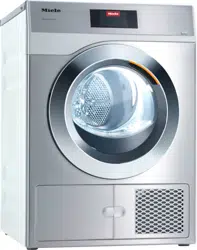
Heat-pump tumble dryer
It is essential to read these operating instructions before installing
and using the appliance. This prevents both personal injury and
damage to the appliance.
en-AU, NZ M.-Nr. 12 127 350

Contents
2
Caring for the environment ............................................................................. 7
Warning and Safety instructions ..................................................................... 8
Operating the tumble dryer .............................................................................. 21
Control panel....................................................................................................... 21
Sensors and touch display with sensor controls ................................................ 22
Main menu........................................................................................................... 22
Examples on how to operate the appliance........................................................ 23
Operating the laundrette version......................................................................... 25
Using for the first time ...................................................................................... 27
Switching on the tumble dryer ............................................................................ 27
Reference to external appliances........................................................................ 28
Setting the display brightness............................................................................. 28
Setting the date................................................................................................... 28
Selecting programme packages ......................................................................... 29
Completing the commissioning process............................................................. 30
1. Notes on correct laundry care ..................................................................... 31
Washing............................................................................................................... 31
Drying .................................................................................................................. 31
Care label symbols .............................................................................................. 31
2. Loading the tumble dryer ............................................................................. 32
Checking the socket for the fragrance flacon ................................................ 32
3. Selecting a programme ................................................................................ 33
Switching on the tumble dryer ............................................................................ 33
Selecting a programme ....................................................................................... 33
4. Selecting programme settings..................................................................... 34
Main menu for a programme............................................................................... 34
Selecting the drying level ............................................................................... 34
Selecting the duration (timed drying programmes) ....................................... 34
Selecting Extras................................................................................................... 35
Gentle tumble................................................................................................. 35
Anti-crease ..................................................................................................... 35
5. Starting a programme................................................................................... 36
6. End of programme - unloading the drum.................................................... 37
At the end of the programme .............................................................................. 37
Removing the laundry ......................................................................................... 37
Observing care instructions ................................................................................ 37

Contents
3
Timer................................................................................................................... 38
Programme chart .............................................................................................. 39
Label.................................................................................................................... 39
Programme packages ......................................................................................... 40
Standard.............................................................................................................. 40
Sport.................................................................................................................... 45
Soft furnishings ................................................................................................... 46
Hygiene ............................................................................................................... 47
WetCare............................................................................................................... 48
Flatwork............................................................................................................... 48
Special programmes ........................................................................................... 49
Changing the programme sequence............................................................... 50
Changing a programme after it has started ........................................................ 50
Cancelling a programme ..................................................................................... 50
Reselecting a cancelled programme.............................................................. 50
Adding or removing laundry ................................................................................ 50
Fragrance flacon................................................................................................ 51
Inserting a fragrance flacon................................................................................. 51
Opening the fragrance flacon.............................................................................. 53
Closing the fragrance flacon ............................................................................... 53
Removing/replacing the fragrance flacon ........................................................... 54
Cleaning and care ............................................................................................. 55
Cleaning interval.................................................................................................. 55
1. Cleaning the fluff filters............................................................................... 55
2. Cleaning the plinth filter.............................................................................. 56
3. Cleaning the bottom right grille/heat exchanger for heat dissipation ........ 57
Cleaning the filters............................................................................................... 58
Removing the fragrance flacon ...................................................................... 58
Removing visible fluff ..................................................................................... 58
Cleaning the fluff filters and air flow openings thoroughly ............................. 59
Cleaning the filter in the plinth............................................................................. 61
Removing the plinth filter ............................................................................... 61
Cleaning the plinth filter with water................................................................ 62
Replacing the plinth filter................................................................................ 62
Cleaning the filter insert (in the plinth)................................................................. 64
Removing the filter insert ............................................................................... 64
Checking the cooling fins on the heat exchanger .......................................... 65
Refitting the filter insert in the plinth............................................................... 66
Refitting the fluff filter in the plinth ...................................................................... 66
Cleaning and closing the fluff filter flap............................................................... 67

Contents
4
Cleaning the bottom right grille/heat exchanger ................................................. 68
Removing the grille......................................................................................... 68
Cleaning the cooling fins................................................................................ 69
Refitting the grille ........................................................................................... 69
Cleaning the dryer ............................................................................................... 70
Problem solving guide ...................................................................................... 71
Programme cancellation and fault messages in the display ............................... 71
Messages in the display...................................................................................... 74
Unsatisfactory drying result................................................................................. 76
The drying process takes a long time. ................................................................ 77
General problems with the tumble dryer ............................................................. 78
Regenerating the plinth filter ............................................................................... 79
Service................................................................................................................ 80
Contact in case of fault ....................................................................................... 80
Optional accessories........................................................................................... 80
Installation.......................................................................................................... 81
Front view............................................................................................................ 81
Rear view............................................................................................................. 82
Installation locations............................................................................................ 83
Side view ........................................................................................................ 83
Steel plinth...................................................................................................... 83
View from above............................................................................................. 83
Washer-dryer stack ........................................................................................ 83
Transporting the dryer to its installation site ....................................................... 84
Installation ........................................................................................................... 85
Downtime after installation............................................................................. 85
Levelling the dryer .......................................................................................... 85
Room ventilation ............................................................................................ 86
External control equipment ............................................................................ 86
Drain hose for condensed water ......................................................................... 87
Electrical connection ........................................................................................... 89
Technical data.................................................................................................... 90
Supervisor level ................................................................................................. 91
Opening the Supervisor level .............................................................................. 91
Access via code .................................................................................................. 91
Change code....................................................................................................... 91
Demo programme ............................................................................................... 91
Closing the settings menu................................................................................... 91

Contents
5
Controls / Display................................................................................................ 91
Language........................................................................................................ 91
Language entry .............................................................................................. 92
Set languages................................................................................................. 92
Display brightness.......................................................................................... 92
Time................................................................................................................ 93
Date ................................................................................................................ 93
Volume............................................................................................................ 93
Res. moisture display..................................................................................... 93
Visibility parameters ....................................................................................... 93
“Display” off status......................................................................................... 94
“Machine” off status....................................................................................... 94
Delay start ...................................................................................................... 94
Memory .......................................................................................................... 95
Temperature unit............................................................................................. 95
Weight unit ..................................................................................................... 95
Logo ............................................................................................................... 95
Supervisor code ............................................................................................. 95
Programme selection .......................................................................................... 96
Controls.......................................................................................................... 96
Programme packages .................................................................................... 97
Favourite programmes ................................................................................... 98
Special programmes ...................................................................................... 99
Sort programmes ........................................................................................... 100
Prog. colour allocation ................................................................................... 100
Process technology............................................................................................. 101
Anti-crease ..................................................................................................... 101
Drying levels ................................................................................................... 101
Further cooling ............................................................................................... 101
Cooling down temperature............................................................................. 101
Service................................................................................................................. 102
Clean out the airways..................................................................................... 102
Service interval ............................................................................................... 102
External applications ........................................................................................... 103
Peak load signal ............................................................................................. 103
Peak load prevention...................................................................................... 103
COM module selection................................................................................... 103
Availability of Miele digital products............................................................... 103
Wi-Fi / LAN ..................................................................................................... 104
Network time .................................................................................................. 105
Remote........................................................................................................... 105
Remote Update .............................................................................................. 106
SmartGrid ....................................................................................................... 106

Contents
6
Machine parameters............................................................................................ 107
Legal information............................................................................................ 107
Payment system.................................................................................................. 107
Settings for the payment system ................................................................... 107
F-back signal to pay system .......................................................................... 108
Payment system lock ..................................................................................... 108
Clear paid signal............................................................................................. 108
Debounce time ............................................................................................... 109
Pay system override time ............................................................................... 109
Duration Cool air ............................................................................................ 109
Duration Warm air........................................................................................... 109
FOC programmes........................................................................................... 109
Caring for the environment
7
Disposal of the packing
material
The transport and protective packaging
has been selected from materials which
are environmentally friendly for
disposal, and can normally be recycled.
Recycling the packaging reduces the
use of raw materials in the
manufacturing process and also
reduces the amount of waste in landfill
sites. Ensure that any plastic
wrappings, bags etc. are disposed of
safely and kept out of the reach of
babies and young children. Danger of
suffocation.
Disposing of your old
appliance
Electrical and electronic appliances
often contain valuable materials. They
also contain specific materials,
compounds and components, which
were essential for their correct function
and safety. These could be hazardous
to human health and to the environment
if disposed of with your domestic waste
or if handled incorrectly. Please do not,
therefore, dispose of your old appliance
with your household waste.
Please dispose of it at your local
community waste collection / recycling
centre for electrical and electronic
appliances. You are also responsible for
deleting any personal data that may be
stored on the appliance prior to
disposal. Please ensure that your old
appliance poses no risk to children
while being stored prior to disposal.
Warning and Safety instructions
8
It is essential to read these instructions.
This tumble dryer complies with all current local and national
safety requirements. However, inappropriate use can lead to
personal injury and damage to property.
Read the operating instructions carefully before using the tumble
dryer. They contain important information on safety, installation,
use and maintenance of the appliance. This prevents both
personal injury and damage to the tumble dryer.
In accordance with standard IEC60335-1, Miele expressly and
strongly advises that you read and follow the instructions in
“Installation”, as well as in the “Warning and Safety instructions”.
Miele cannot be held liable for injury or damage caused by non-
compliance with these instructions.
Keep these operating instructions in a safe place and pass them
on to any future owner.
When instructing other people how to use the tumble dryer, they
must be made aware of these Warning and Safety instructions.
Correct application
The dryer is intended exclusively for drying textiles washed in
water which have been labelled as suitable for tumble drying by the
manufacturer on the care label. Any other applications may be
dangerous. Miele cannot be held liable for damage resulting from
incorrect or improper use or operation.

Warning and Safety instructions
9
This tumble dryer is intended for commercial use in small
businesses, care homes, sports clubs, hospitals and other similar
commercial environments. This machine may also be operated by
lay persons in public areas such as laundrettes, communal laundry
rooms or similar.
This tumble dryer is also intended for use in domestic households
and in similar residential environments, for example by customers in
hotels, motels, bed and breakfasts and other related establishments.
This tumble dryer is not suitable for outdoor use.
This appliance is not intended for use by persons (including
children) with reduced physical, sensory or mental capabilities, or
lack of experience or knowledge, unless they are supervised whilst
using it or have been shown how to use it in a safe way and
understand and recognise the consequences of incorrect operation.
Young children must not be allowed to use this appliance.
Older children may only use the dryer if its operation has been
clearly explained to them and they are able to use it safely. They
must be able to understand and recognise the possible dangers
caused by incorrect operation.
Children must not be allowed to clean or maintain the tumble
dryer unsupervised.
Children should be supervised in the vicinity of the tumble dryer.
Do not allow them to play with the appliance.

Warning and Safety instructions
10
Technical safety
Before installing the dryer, check it for visible signs of damage.
Do not install or use a damaged appliance.
Do not make any alterations to the dryer, unless authorised to do
so by Miele.
Temporary or permanent operation with a self-sufficient or non-
mains synchronous energy supply system (e.g. isolated networks,
back-up systems) is possible. A requirement for the operation is that
the energy supply system complies with all current local and national
requirements that apply to stand-alone, solar and/or battery
systems.
The protective measures provided in the installation and in this Miele
product must also be assured in their function and operation in
isolated operation or in non-mains synchronous operation, or
replaced with equivalent measures in the installation.
Do not connect the dryer to the mains electricity supply by an
extension lead. Extension leads do not guarantee the required safety
of the appliance (e.g. danger of overheating).
If the electrical connection cable is faulty, it must only be replaced
by a Miele authorised service technician to protect the user from
danger.
The electrical safety of this appliance can only be guaranteed
when continuity is complete between it and an effective earthing
system. It is essential that this standard safety requirement is
observed and regularly tested. If in any doubt, have the electrical
installation inspected by a qualified electrician. Miele cannot be held
liable for the consequences of an inadequate earthing system (e.g.
electric shock).
Unauthorised repairs could result in unforeseen dangers for the
user, for which Miele cannot accept liability. Repairs must only be
carried out by a Miele authorised service technician, otherwise any
subsequent damage will not be covered by the warranty.

Warning and Safety instructions
11
Faulty components must only be replaced by genuine Miele
original spare parts. Miele can only guarantee the safety standards of
the machine when Miele replacement parts are used.
To ensure the correct performance of the tumble dryer and to
prevent malfunctions and fire hazards, it is important to carry out
maintenance on a regular basis.
In the event of a fault and for cleaning purposes, the tumble dryer
must be disconnected from the electricity supply. It is only
completely disconnected when:
- it is switched off at the wall socket or the plug is withdrawn, or
- the mains fuse is disconnected, or
- it is switched off at the mains circuit breaker.
For further information see “Installation - Electrical connection”.
This tumble dryer must not be installed and operated in mobile
locations (e.g. on a ship).
Please observe the instructions in “Installation” and “Technical
data”.
The electrical socket must be easily accessible so that the tumble
dryer can be disconnected from the electricity supply.
If the appliance is hard wired, adequate provision must be made
on site to switch off all poles to disconnect the tumble dryer from the
electricity supply. The means of disconnection must be incorporated
in the fixed wiring in accordance with the wiring rules.
The gap between the bottom of the tumble dryer and the floor
must not be blocked with plinth facings, deep pile carpet etc., which
would obstruct the openings. This would hinder a sufficient flow of
air to the tumble dryer.

Warning and Safety instructions
12
The appliance must not be installed behind a lockable door, a
sliding door or a door with a hinge on the opposite side to that of the
tumble dryer, in such a way that a full opening of the tumble dryer
door is restricted.
This tumble dryer is supplied with a special lamp to cope with
particular conditions (e.g. relating to temperature, moisture, chemical
resistance, abrasion resistance, and vibration). This special lamp
must only be used for the purpose for which it is intended. It is not
suitable for room lighting. Replacement lamps may only be fitted by
a Miele authorised technician or by Miele Professional Service.
Information on the heat pump and refrigerant
- This tumble dryer uses refrigerant gas which is not flammable and
not explosive.
- The humming noises caused by the heat pump during the drying
process are normal. They do not impair the correct functioning of
the dryer.
Damage to the tumble dryer by switching it on too soon.
This can damage the heat pump.
After setting up the tumble dryer, wait for at least one hour before
switching it on.
- This tumble dryer contains fluorinated greenhouse gases. They
are hermetically sealed.
Designation of refrigerant: R134a
Amount of refrigerant: 0.61 kg
Global warming potential of refrigerant: 1430 kg CO
2
e
Global warming potential of appliance: 872 kg CO
2
e
In areas which may be subject to infestation by cockroaches or
other vermin, pay particular attention to keeping the appliance and
its surroundings in a clean condition at all times. Any damage which
may be caused by cockroaches or other vermin will not be covered
by the warranty.
Warning and Safety instructions
13
Correct use
Warning: Risk of fire / Flammable materials.
To avoid the possible danger of fire, please read these warnings
carefully.
A clogged filter is a fire hazard!
The fluff filter must be cleaned after every programme.
The maximum load is 8kg (dry laundry). See the “Programme
chart” for the maximum recommended loads for individual
programmes.
Do not lean on the door. Otherwise, the tumble dryer may tip over,
causing injury to yourself or others.
Always close the door after use. This way you will avoid the
danger of
- children climbing into the tumble dryer or hiding things in it.
- pets or other small animals climbing into the tumble dryer.
Do not use a pressure washer or high-pressure hose to clean the
tumble dryer.

Warning and Safety instructions
14
Keep the room where the tumble dryer is located free from dust
and fluff. If the air that is taken into the machine contains dirt
particles, they can cause blockages. This can lead to faults and
create a fire hazard.

Warning and Safety instructions
15
The tumble dryer must not be used
- without the fluff filters and the filter in the plinth in place.
- without the bottom right grille fitted.
- if the fluff filters or the filter in the plinth are damaged in any way.
In case of damage, fluff filters and plinth filter must be replaced
immediately.
A damaged filter would cause an excessive build-up of fluff which in
turn would cause a fault.
To ensure problem-free operation of the dryer:
- Remove the fluff from the filter surfaces and the fluff filters after
every drying cycle.
- In addition, the fluff filters, filter surfaces, the grille at the bottom
right and the air passages must be cleaned when prompted by
the display.
Do not install the tumble dryer in a room where there is a risk of
frost. At temperatures around freezing point, the tumble dryer may
not be able to operate properly. There is a risk of damage if the
condensed water is allowed to freeze in the pump and drain hose.
The permitted room temperature is between 2°C and 35°C.
If the water is drained externally, make sure the drain hose is
secured against slipping, e.g. if you hang it in a laundry tub or
laundry trough.
Otherwise the hose may slip off and the condensation water flowing
out may cause damage.
Condensed water is not drinking water.
It can cause health problems in both people and animals if
consumed.

Warning and Safety instructions
16
To prevent the risk of fire, the following textiles must not be dried
in the tumble dryer:
- Items which have not been washed.
- Items, such as workwear, which have not been thoroughly
cleaned and are still soiled with grease, oil or other deposits (such
as cooking oils, cosmetics, lotions, etc.). If items have not been
thoroughly cleaned, there is a danger that they might ignite when
heated, even after they have been removed from the tumble dryer
at the end of the programme.
- Items (e.g. mops and floor cloths) that have been treated with
inflammable cleaning agents or which contain residues of
acetone, alcohol, benzene, petrol, kerosene, stain remover,
turpentine, wax and wax remover or other chemicals.
- Items which have been splashed with hair lacquer, hair spray, nail
varnish remover or similar substances.
When washing such heavily soiled items ensure that you use a
larger quantity of detergent and select a high temperature. If in
doubt, wash the items several times.
Oil-affected items can ignite spontaneously, especially when
exposed to heat sources such as in a tumble dryer.
The items become warm, causing an oxidation reaction in the oil.
Oxidation creates heat.
If the heat cannot escape, the items can become hot enough to
catch fire. Piling, stacking or storing oil-affected items can prevent
heat from escaping and so create a fire hazard.
If it is unavoidable that fabrics contaminated with vegetable or
cooking oil, or hair care products, be placed in a tumble dryer, they
should first be washed in hot water with extra detergent - this will
reduce, but not eliminate, the hazard.
Remove all items from pockets (e.g. lighters, matches).

Warning and Safety instructions
17
WARNING: Never switch the tumble dryer off before the end of
the drying programme unless all items are removed immediately and
spread out to cool down.
Fire hazard!
This tumble dryer must not be connected to a controllable socket
(e.g. a timer or a peak-load switch-off device).
The tumble dryer may only be operated with a peak-load device if
this is connected to the tumble dryer via the Miele XCI box and the
relevant settings have been configured on the tumble dryer.
There is a risk of the laundry self-igniting if the drying programme is
cancelled before the cooling phase has finished.
To prevent the risk of fire, the following textiles must never be
dried in the tumble dryer:
- Items which have been cleaned using industrial chemicals (e.g.
professional dry-cleaning agents).
- Fabrics which contain a large proportion of rubber, foam rubber or
rubber-like materials. For example, products made from latex
foam rubber, shower caps, waterproof textiles, rubberised articles
and items of clothing and pillows with foam rubber filling.
- Fabrics which contain padding or fillings which are damaged (e.g.
pillows, jackets). The filling could fall out and cause a fire.
The programme finishes when the cooling phase has been
completed. Many programmes are followed by a cooling phase to
ensure that the items are not too hot to handle when you remove
them (this also reduces the risk of the laundry self-igniting).
Make sure that you do not remove the laundry until the programme
has finished.

Warning and Safety instructions
18
Fabric softener and similar products must be used according to
the instructions on the manufacturer's packaging.
Do not store or use petrol, kerosene, paraffin or other flammable
substances near the dryer. Risk of fire and explosion!
Do not expose the dryer to air which contains chlorine, fluorine or
other solvent vapours. This contaminated air can cause a fire.
For appliance parts made from stainless steel:
Avoid contact between stainless steel surfaces and liquid detergents
or disinfecting agents containing chlorine or sodium hypochlorite.
These agents can cause corrosion on stainless steel.
Aggressive chlorine bleach vapours can also be corrosive.
Do not store open containers of these agents near the appliance.

Warning and Safety instructions
19
Using a fragrance flacon (optional accessory)
Only ever use original Miele fragrance flacons.
The fragrance flacon must be stored in its packaging so please
make sure you retain this.
Make sure that you always keep the fragrance flacon, or the fluff
filter with the flacon inserted in it, in a horizontal position when
carrying it, and do not tip or place it down on any surface. The
fragrance can leak.
Use an absorbent cloth immediately to wipe up any fragrance
which has run out of the flacon onto the floor, the dryer or any dryer
components (e.g. the fluff filter).
If fragrance which has run out of a flacon should come in contact
with the skin - wash the skin thoroughly with soap and water; come
in contact with the eyes - rinse the eyes with clean water for at least
15minutes; be swallowed - rinse out the mouth thoroughly with
clean water. Seek medical advice in the case of contact with the
eyes or if fragrance has been swallowed.
If fragrance which has run out of a flacon comes in contact with
clothing, change the clothing immediately. Wash the clothing or any
cloths used for mopping up fragrance thoroughly with plenty of
water and detergent.
There is the risk of fire or damage to the tumble dryer if the
following instructions are not observed:
- Never refill a flacon with fragrance.
- Never use a faulty fragrance flacon.
Dispose of an empty fragrance flacon with the household waste
and never use it for any other purpose.
Please also observe the information supplied with the fragrance
flacon.

Warning and Safety instructions
20
Accessories
Only use genuine Miele spare parts and accessories with this
machine.
If spare parts or accessories from other manufacturers are used, any
warranty, performance and product liability claims will be invalidated.
Miele tumble dryers and Miele washing machines can be installed
as a washer-dryer stack. This requires a Miele washer-dryer stacking
kit which can be purchased separately. Please ensure that the
washer-dryer stacking kit is suitable for your Miele tumble dryer and
your Miele washing machine.
If you order a plinth for this tumble dryer (available from Miele as
an optional accessory), make sure it is the correct one.
Miele cannot be held liable for damage caused by non-
compliance with these Warning and Safety instructions.
Operating the tumble dryer
21
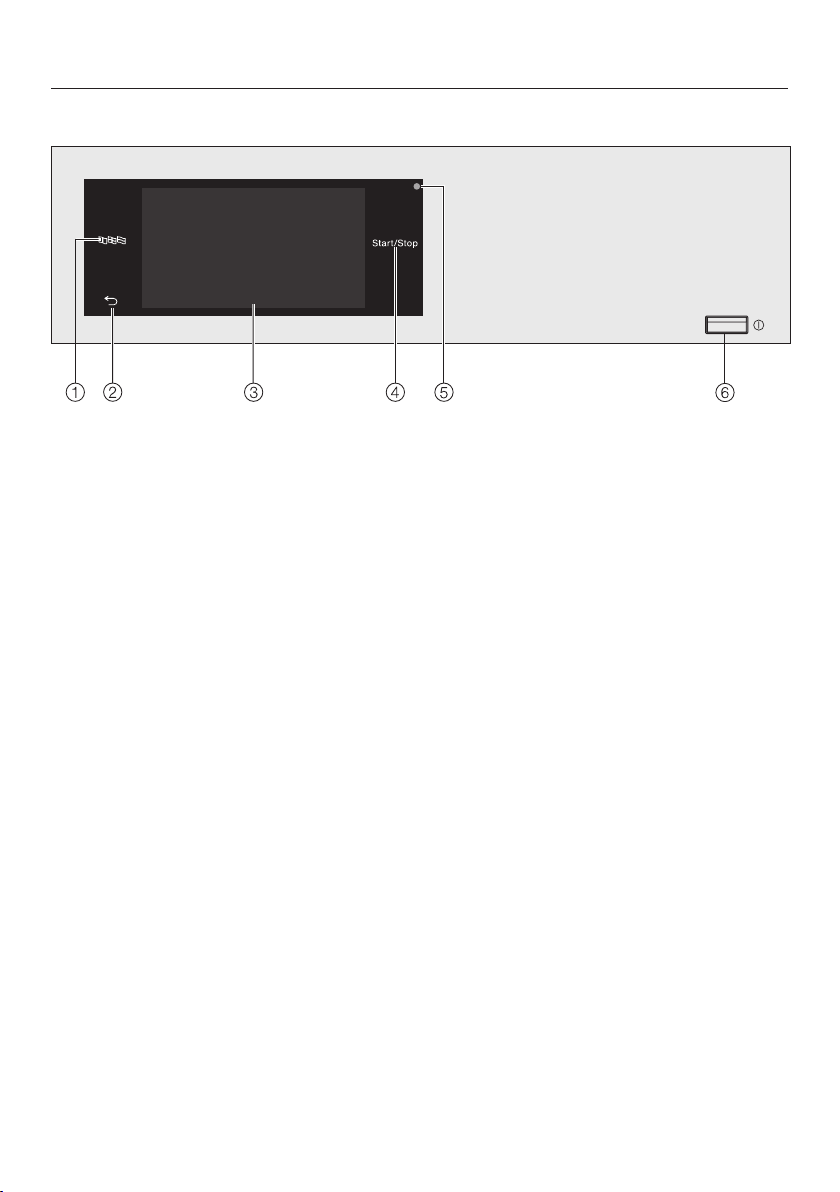
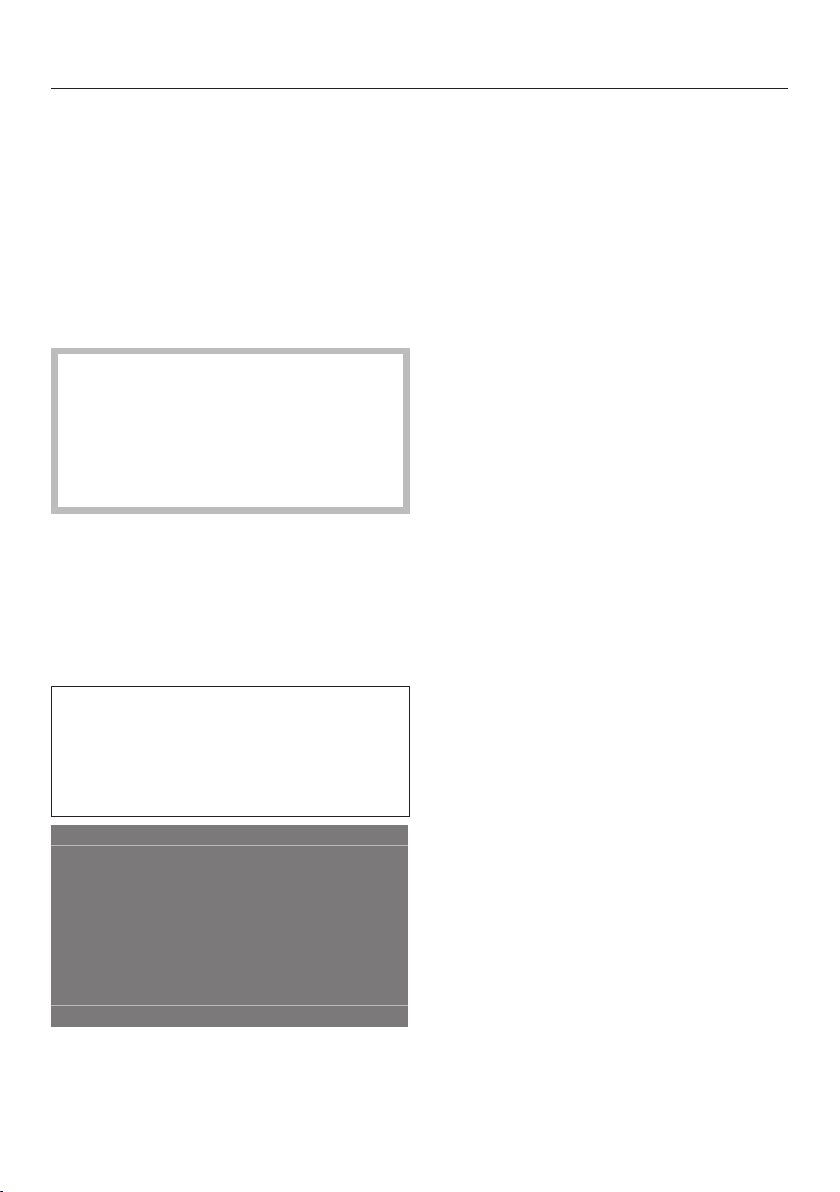
Control panel
a
Language sensor
For selecting the current user
language.
The supervisor language is displayed
again at the end of the programme.
b
Back sensor
Takes you back one level in the
menu.
c
Touch display
d
Start/Stop sensor
For starting the selected drying
programme and cancelling a
programme that has already started.
The programme selected can be
started as soon as the sensor starts
flashing.
e
Optical interface
For service technicians.
f
Button
For switching the tumble dryer on
and off. The tumble dryer switches
off automatically to save energy. This
occurs 15 minutes after the end of
the programme/anti-crease phase, or
after being switched on if no further
selection is made.
Operating the tumble dryer
22
Sensors and touch display with
sensor controls
The, andStart/Stopsensors
and the sensor controls in the display
react to finger contact. Every touch of
the sensors is confirmed by a keypad
tone. You can adjust the volume of the
keypad tone or switch it off (see
“Supervisor level”).
The control panel with the sensor
and the touch display can be
scratched by pointed or sharp
objects, e.g. pens.
Only touch the display with your
fingers.
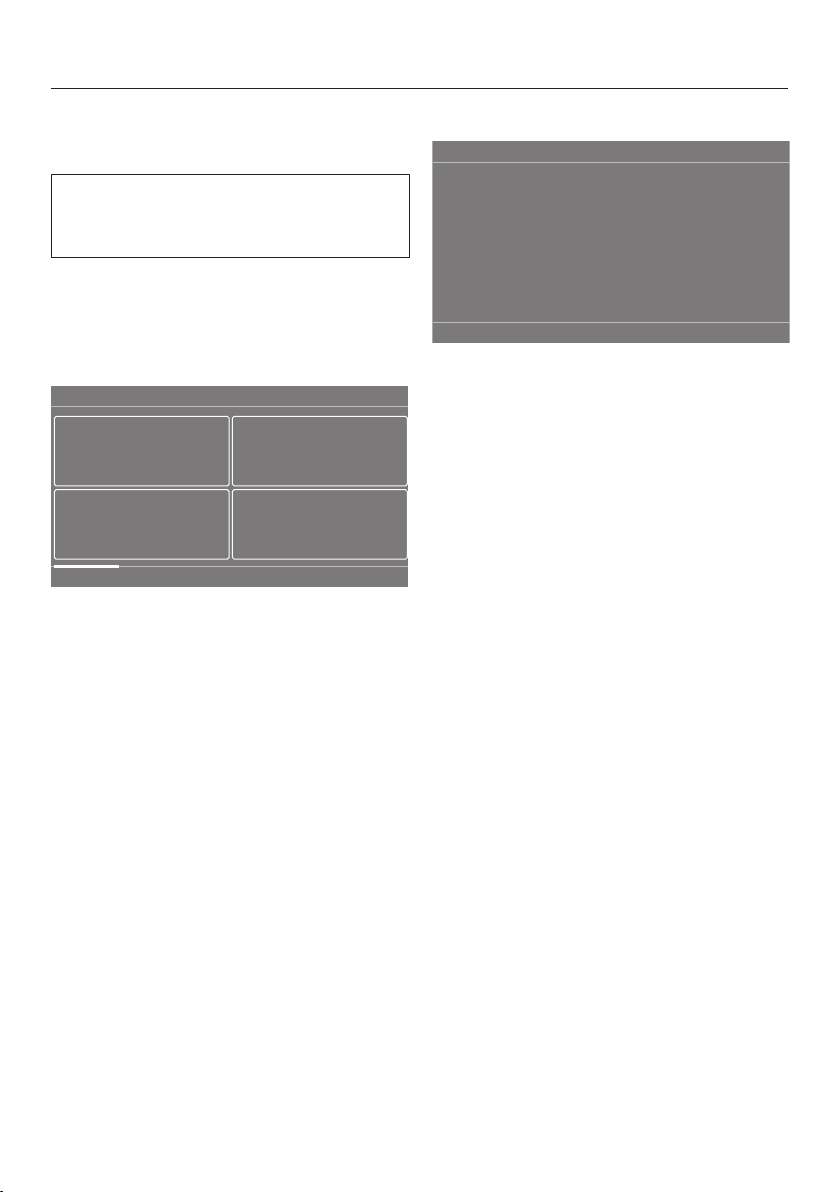
Main menu
After switching on the tumble dryer, the
main menu will appear in the display.
You can access all important submenus
from the main menu.
Touch the sensor at any time to
return to the main menu. Values that
have not yet been confirmed with the
OK sensor are not saved when you
return to the main menu.
11:02
Programmes Favourites Supervisor
Help
Programmes
For selecting drying programmes.
Favourites
For selecting one of 12 favourite drying
programmes which can be set up and
saved by the operator (see “Supervisor
level - Favourite programmes”).
Supervisor
You can alter the tumble dryer's
electronics to suit changing
requirements in the Supervisor level
(see “Supervisor level”).
Networking
If the tumble dryer is networked, the
symbol indicates the signal strength
of the network (SSID) to which it is
connected. Touch the symbol to display
the name of the network.
Help
You can display help to assist you with
the operation of the tumble dryer.

Operating the tumble dryer
23
Examples on how to operate
the appliance
Selection lists
Programme menu (single selection list)
11:02
ShirtsCottons Express
DenimDelicates
Programmes
Minimum iron
You can scroll to the right or the left by
swiping your finger across the screen.
To do this, place your finger on the
touch display and swipe it in the
direction you want.
The orange bar under the pictures
shows that there are further options to
choose from.
Touch a programme name to select the
drying programme.
The display will change to the standard
display for that programme.
Extras menu (multiple selection)
11:02
Gentle tumble
Anti-crease
Extras
OK
Touch one or several Extras to select
them.
Currently selected Extras are marked
orange.
To deselect an Extra, simply touch the
Extra again.
Use the OK sensor to activate the
selected Extras.
Setting numerical values
You can set numerical values in some
menus.
OK
12 00
11 59
10 58
13 01
14 02
Time
Enter the numbers by swiping upwards
or downwards. Place your finger on the
number that you want to change and
move your finger in the desired
direction. Use the OK sensor to accept
the set numerical value.

Operating the tumble dryer
24
Useful tip: For some settings,
depending on the value range and
increments, the value can also be set
using a numerical keypad. Briefly
touching the numbers will bring up the
numerical keypad. Once a valid number
has been entered, the OK sensor will be
highlighted green.
OK
12 00
11 59
10 58
13 01
14 02
Time
Briefly touch a number between the
two lines.
The numerical keypad will appear.
OK
12:00
3
4
21
Time
5 6
7
8
0
9
Touch the numbers and confirm with
OK.
Pull-down menu
The pull-down menu can be used to
display information, e.g. about a drying
programme.
11:02
Cottons
Status
Time left
h2:27
Drying
If an orange bar appears at the top of
the screen in the middle of the display,
you can open the pull-down menu.
Touch the bar and drag it down with
your finger on the display.
Exiting a menu
Touch the sensor to return to the
previous screen.
Entries made before this which have not
been confirmed withOK will not be
saved.
Help display
With some menus Help appears in the
bottom line of the display.
Touch the Helpsensor to display the
text.
Touch the Closesensor to return to
the previous screen.
Operating the tumble dryer
25
Operating the laundrette
version
The entry menu will vary depending on
the programming status (see
“Supervisor level - Controls”).
Shortcuts are the easiest way to
operate the machine. Operators cannot
change the preset programmes.
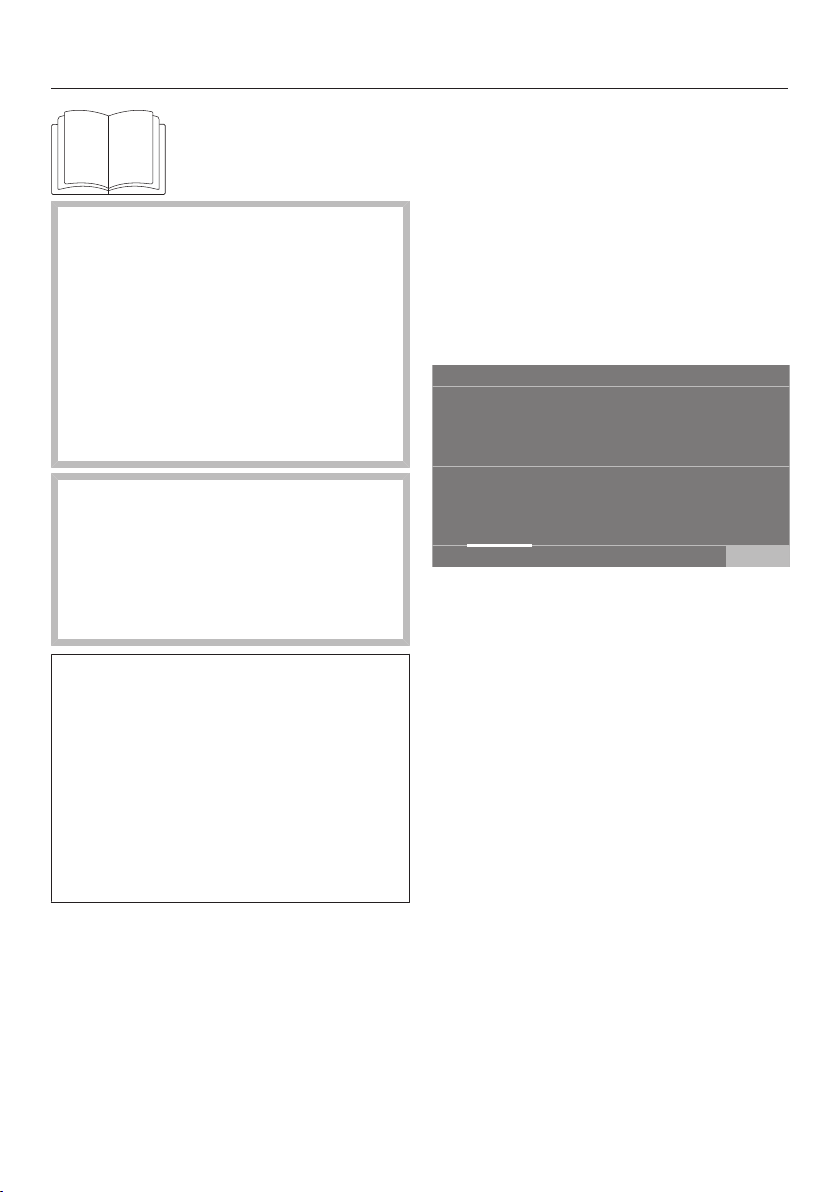
Launderette, basic
11:02
Help
Cottons
Delicates
Cottons
Cottons
A maximum of 12 and a minimum of
4programmes can be selected.
Depending on the setting at Supervisor
level, the programmes can be displayed
with or without a border.
Launderette Logo
11:02
Cottons
Help
Cottons Cottons
The first 3programmes can be selected
directly. Up to 9 more programmes can
be selected from the list.
Symbols in the display
Drying levels
Extra dry
Normal plus
Normal
Hand iron plus
Hand iron
Machine iron

Operating the tumble dryer
26
Launderette Logo int.
time/Launderette Logo ext. time
11:02
Help
4timed programmes with different
temperature levels are available for
selection.
- Temperature level cold
- Temperature level low
- Temperature level medium
- Temperature level high
Launderette Logo ext. time: the tumble
dryer only functions correctly when it
is provided with external time
information by an external unit.
Using for the first time
27
Risk of injury or damage to
property due to improper installation.
Improper installation of the tumble
dryer may result in personal injury or
damage to property.
Before using the tumble dryer for the
first time, make sure it has been
installed and connected correctly.
Please observe the instructions in
“Installation”.
Damage caused by switching the
appliance on too soon.
This can damage the heat pump.
After setting up the tumble dryer,
wait for at least one hour before
switching it on.
Follow all the steps required for initial
commissioning.
During the commissioning process,
you will need to define the settings for
daily use of the tumble dryer. Some of
the settings can only be configured
during the initial commissioning
process. After that, they must be
changed by Miele Professional
Service.
These settings are also described in
“Supervisor level”.
Switching on the tumble dryer
Press the button.
The welcome screen will light up.
Setting the display language
You will be asked to select the language
for the display. You can change the
language at any time (see “Supervisor
level - Language”).
deutsch
Language
OK
english (AU)
english (CA)
english (GB) español
english (US)
Scroll to the left or the right until the
language you want appears.
Touch the sensor for the required
language.
The selected language will be
highlighted in orange and the display
will change to the next setting.

Using for the first time
28
Reference to external
appliances
A reference to external hardware
appears.
Confirm with the OK sensor.
Connect the XCI box or XCI-AD
accessory unit before using the
appliance for the first time.
Alternatively, slide a communication
module into the slot on the back of the
tumble dryer. The dryer must be
disconnected from the power supply
for this process. Then start the
commissioning process.
Setting the display brightness
You will be asked to set the brightness
of the display.
OK
Display brightness
Darker Brighter
Touch the segment bar until you
reach the required level of brightness.
The selected brightness level will be
highlighted in orange.
Confirm with OK.
The display will change to the next
setting.
Setting the date
OK
Date
21
22
24
25
2023
2022
202123 July
August
September
June
May
2020
2019
Place your finger on the number to be
changed and move your finger in the
desired direction.
When all values have been set,
confirm with the OKsensor.
The display will change to the next
setting.

Using for the first time
29
Confirming the time query
The following query will appear in the
display:
Should the clock display not be shown?
Touch the Yes or No sensor.
If you select Yes, the system will skip
the Timesetting.
If you select No, the display will switch
to the Timesetting.
Setting the time of day
OK
12 00
11 59
10 58
13 01
14 02
Time
Place your finger on the number that
you want to change and move your
finger in the desired direction.
Confirm with the OK sensor.
The display will change to the next
setting.
Selecting programme
packages
You can select various programmes
from the programme packages.
Any programmes already active are
marked in orange.
11:02
Cottons Cottons Express
Cottons PRO Delicates
Programme packages
Label Standard
Minimum iron
OK
Scroll right until you reach a
programme that is not marked in
orange.
Touch the sensor for the desired
programme.
The selected programme is highlighted
in orange, which means active.
You can select further programmes.
Useful tip: You can deactivate a
selected programme by touching the
programme's sensor again.
Exception: The programmes
Cottons and CottonsPro cannot be
deactivated.
If you do not want to select any more
programmes, confirm with the OK
sensor.
The display will switch to the next
setting.

Using for the first time
30
Setting up a payment system
If you wish to set up a payment system,
read the chapter “Supervisor level -
Payment system”. These settings can
only be changed during the initial
commissioning process. If you wish to
change the settings later, please
contact Miele Professional Service.
If you do not wish to set up a payment
system, you can skip this step.
11:02
No payment
system
Payment system
OK
Programme
control
Timed
operation
Timed op. +
impul.counter
COM module
Touch the No payment system sensor.
The display will change to the next
setting.
Completing the commissioning
process
The commissioning process is
complete when a programme lasting
longer than 20minutes has been
carried out in full.
If the power is interrupted prior to the
start of the first drying programme
(e.g. if the machine is switched off
with the button), the initial
commissioning process can be
completed again. Once a drying
programme has been running for over
20minutes, the initial commissioning
process cannot be performed again.
Confirm with OK.
Touch the Programmes sensor in
the main menu.
11:02
Automatic
plus
Timed drying
warm air
Basket - Low
temperature
Microfibre
Timed drying
cool air
Basket
programme
Programmes
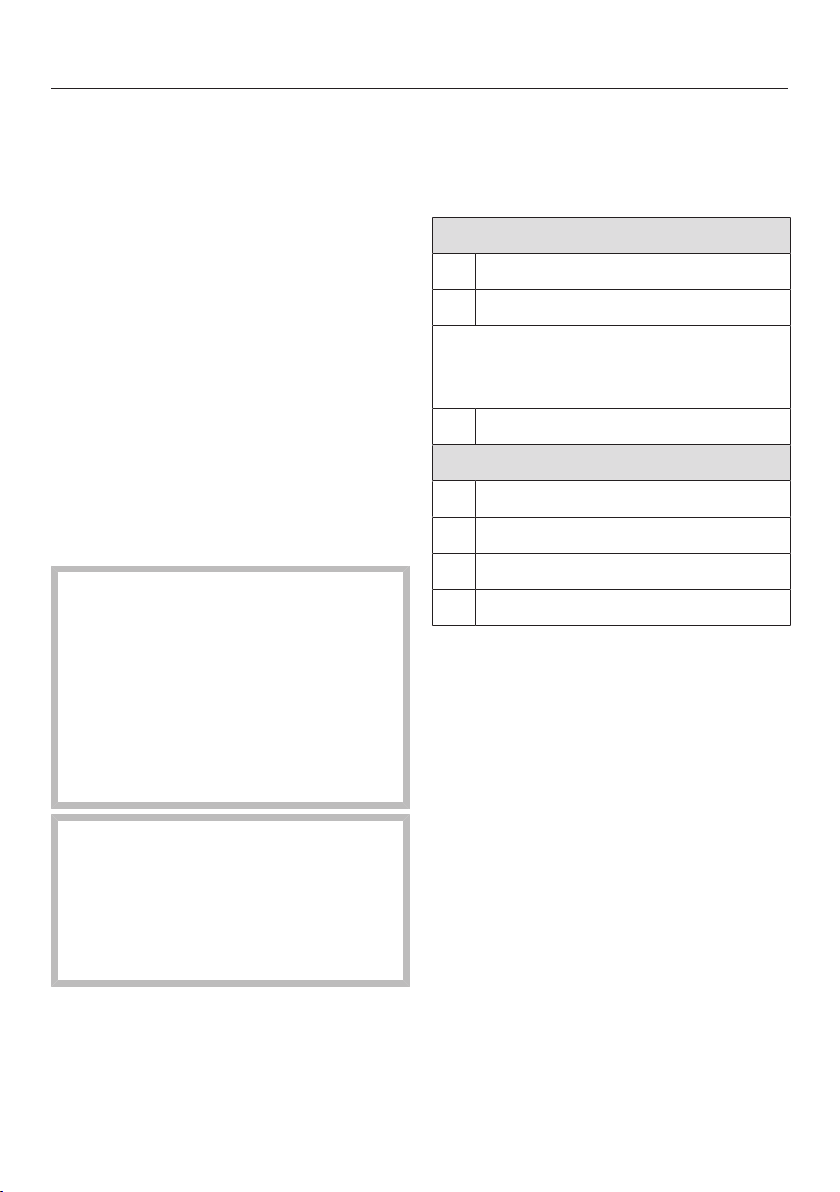
Select the Timed drying cool air
programme.
Touch the Duration sensor.
OK
00 20
02 59
01 58
01 21
02 22
Duration
h
11:02
Reset
Place your finger on the number that
you want to change and move your
finger in the desired direction.
Select a duration of 20 minutes.
Confirm with OK.
Touch the flashing Start/Stop sensor.
After the programme has finished, the
tumble dryer is ready for use.
1. Notes on correct laundry care
31
Washing
- Wash heavily soiled laundry
thoroughly. Ensure that you use
sufficient detergent and select a high
temperature. If in doubt, wash the
items several times.
- New, coloured items should be
washed thoroughly and separately.
Do not dry these garments together
with light coloured garments. There is
the risk of colours running and
discolouring other garments or even
plastic components in the tumble
dryer. Dark coloured fluff can also
settle on light coloured garments and
vice versa.
Drying
Damage due to foreign objects
which were not removed from the
laundry.
Foreign objects can melt, burn, or
explode.
Ensure that any foreign objects (e.g.
detergent dispensing balls, lighters,
etc.) have been removed from the
laundry.
Risk of fire due to incorrect use
and operation.
The laundry can burn and destroy
the dryer and the surroundings.
See “Warning and Safety
instructions” for further information.
- Check seams and stitching to ensure
that padding and linings are intact.
This way you can prevent fillings from
falling out, which could create a fire
hazard.
- Sew in or remove loosened
underwiring from bras.
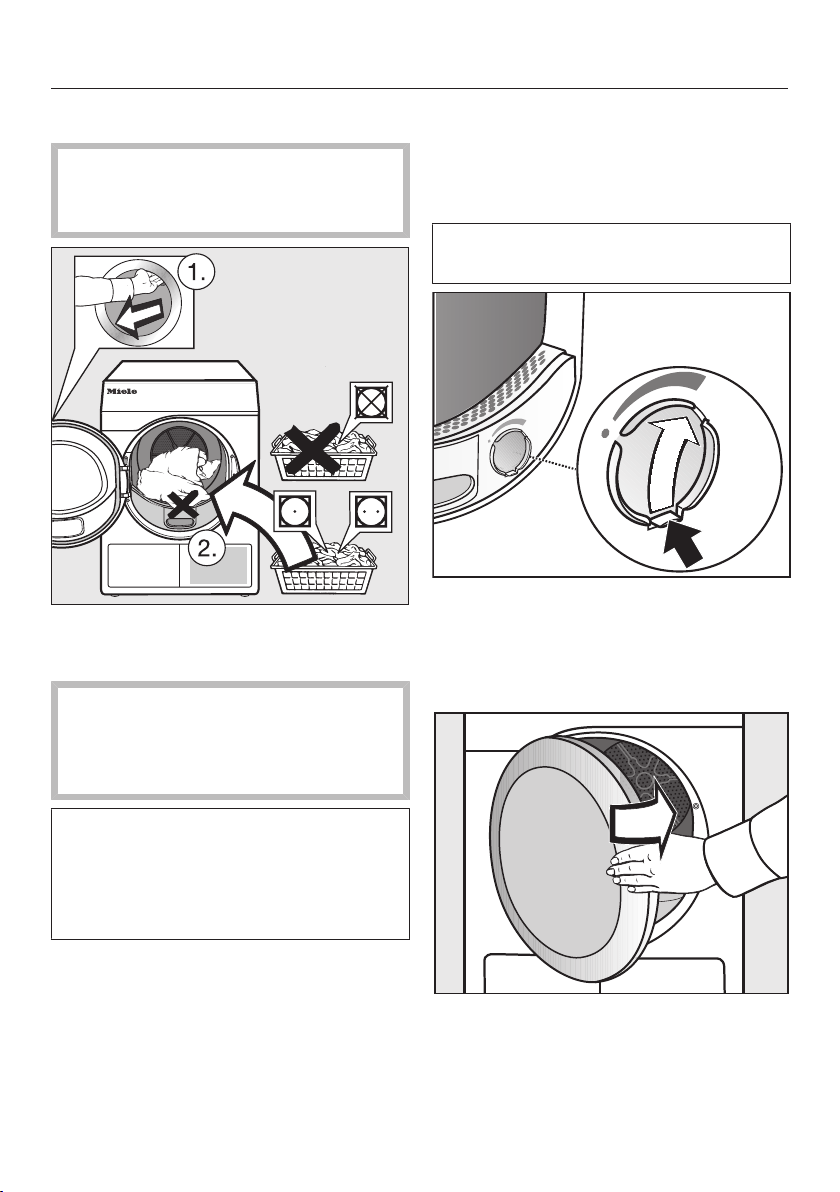
Care label symbols
Drying
normal/higher temperature*
reduced temperature*
* In this tumble dryer, items with these
symbols can be dried together thanks
to the gentle drying process.
Do not tumble dry
Ironing
very hot
hot
warm
Do not iron
2. Loading the tumble dryer
32
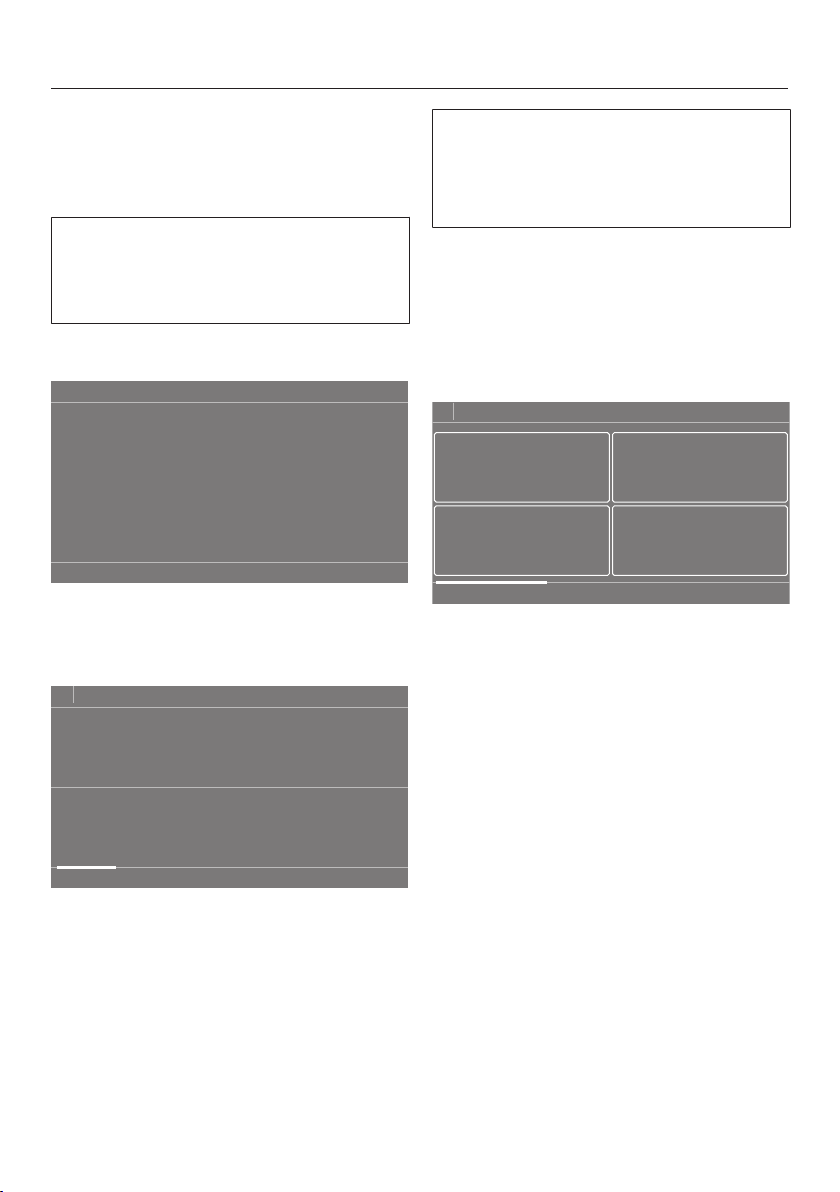
Loading the laundry
Textiles may be damaged.
Before loading the dryer, read “1.
Notes on correct laundry care”.
Open the door.
Load the laundry.
Textiles may be damaged.
When closing the door, make sure
that laundry does not get trapped in
the door opening.
Do not overload the drum.
Overloading can cause unnecessary
wear and tear to the laundry and give
a disappointing drying result. It can
also cause more creasing.
Checking the socket for the
fragrance flacon
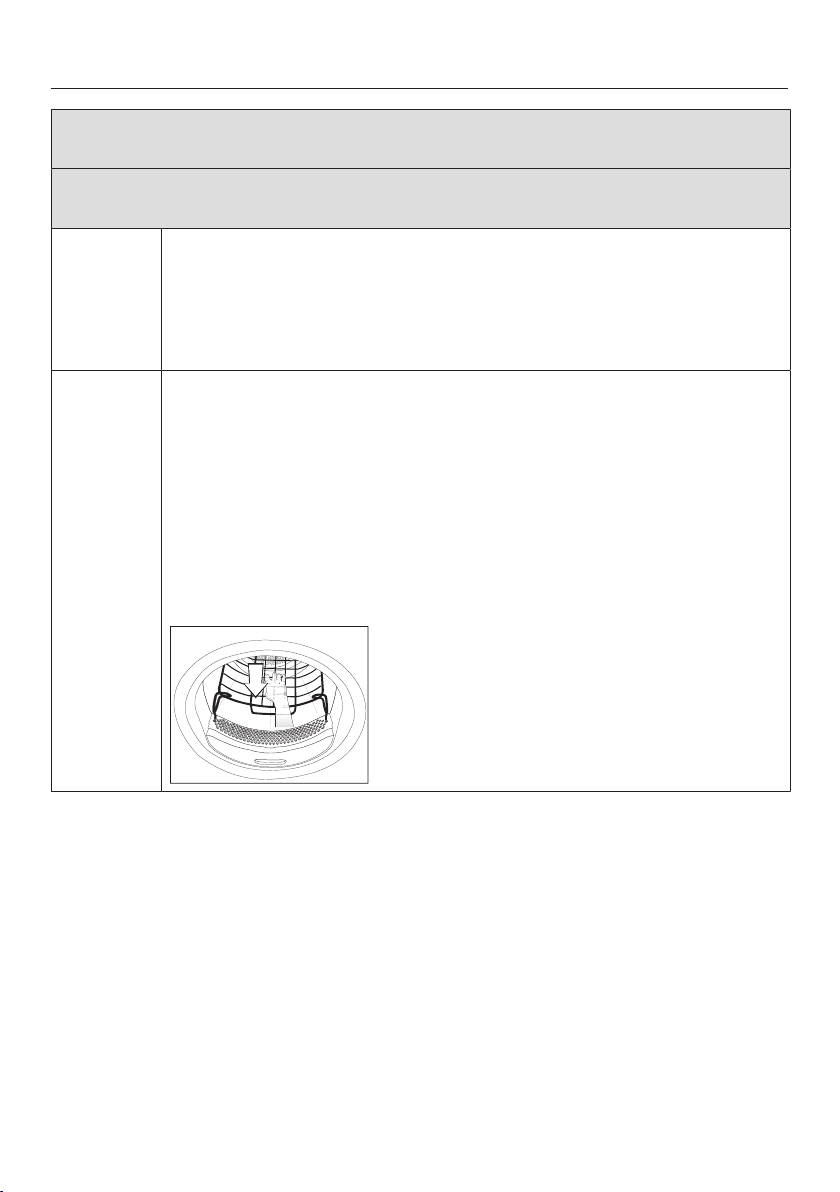
If you are not using a fragrance flacon,
check that the socket is closed.
See "Fragrance flacon" for information
on how to use fragrance flacons.
Push the tab down completely (see
arrow) so that the socket is closed.
Otherwise, fluff will accumulate here.
Closing the door
Shut the door with a gentle swing.
3. Selecting a programme
33
Switching on the tumble dryer
Press the button.
The interior drum lighting will come on.
The interior drum lighting will
automatically go out after a few
minutes and/or after the start of a
programme to save energy.
Selecting a programme
11:02
Programmes Favourites Supervisor
Help
There are different ways to select a
programme.
Touch the Programmessensor.
11:02
ShirtsCottons Express
DenimDelicates
Programmes
Minimum iron
Scroll to the right of the display until
the programme you want appears.
Touch the sensor for that programme.
The display will change to the standard
menu for that drying programme.
Alternatively you can select a
programme via Favourites*.
* The preset programmes
underFavourites cannot be changed.
Touch the Favouritessensor.
The programmes will appear in the
display. Symbols representing the
preset parameters (drying level, Extras
or times) are displayed underneath the
names of the programmes.
11:02
Cottons
Favourites
Delicates
Cottons
Cottons
Scroll to the right of the display until
the programme you want appears.
Touch the sensor for that programme.
The display will change to the standard
menu for that drying programme.

4. Selecting programme settings
34
Main menu for a programme
Selecting the drying level
The preset drying level can be
changed for many programmes.
Different drying levels are available
depending on the programme.
OK
Overview
not selected
Cottons
11:02
kg
Drying level
Extras
1:56h
Weight
Normal8.0
Touch the Drying level sensor.
The drying level selection menu opens.
11:02
Machine iron
Hand iron
plus
Normal plus
Hand iron Normal Extra dry
Drying levels
Touch the sensor for the required
drying level.
Selecting the duration (timed drying
programmes)
You can select the programme
duration yourself.*
* The time frame for selecting the
programme duration can be limited by
Miele Professional Service.
- Timed drying warm air = 0:20-2:00 h
- Timed drying cool air = 0:10-2:00 h
- Basket programme/Basket -Low
temperature = 0:20-1:30 h
- Time drying warm air hyg. = 0:50-2:00 h
OK
Overview
not selected
Timed drying
warm air
h0:20
11:02
Duration
Extras
h0:208.0 kg
Weight
Touch the Duration sensor.
The selection menu for setting the
duration opens.
OK
00 20
02 59
01 58
01 21
02 22
Duration
h
11:02
Reset
Select a duration.
Press OK when it is offered in the
display.

4. Selecting programme settings
35
Selecting Extras
The drying programmes can be
supplemented with various Extras.
OK
Overview
not selected
Cottons
11:02
kg
Drying level
Extras
1:56h
Weight
Normal8.0
Touch the Extras sensor.
11:02
Gentle tumble
Anti-crease
Extras
OK
Touch the sensor for the Extra you
want.
Press OK when it is offered in the
display.
The relevant symbol for the required
Extra or will light up.
Not all Extras can be selected with
every programme, only with those for
which it makes sense.
Gentle tumble
Sensitive items are dried with less
mechanical action (fewer drum
rotations).
Anti-crease
After the programme has finished, the
drum can be set to continue to rotate in
a certain rhythm, depending on the
selected programme. This helps to
prevent creasing after the programme
has ended.
The Anti-crease function is switched off
at the factory. It can be switched on in
the Supervisor level with a variable
duration of up to 12hours.

5. Starting a programme
36
Payment system
Useful tip: If your machine is
connected to a payment system, the
amount of payment required will appear
in the display.
Do not open the door or cancel the
programme once it has started.
Depending on the settings, credit with
the payment system may be lost if the
programme is cancelled.
Starting a programme
The programme can be started once
the Start/Stop sensor is flashing on and
off.
Touch the Start/Stop sensor.
If a delay start time has been selected,
this will count down in the display.
At the end of the delay start time or
immediately after the programme has
started, the programme duration will
appear in the display. The programme
sequence is also shown in the display.
Useful tip: You can use the pull-down
menu to display the selected
temperature, spin speed, and any
selected Extras.
Programme duration/estimated
time remaining
The programme duration depends on
the quantity of laundry, the type of
fabric and the residual moisture in the
laundry, and also the water hardness.
For this reason, the time left for the
drying level programmes may vary or
“jump”. The tumble dryer's electronic
control system adapts to these factors
and then adjusts the displayed duration
with increasing accuracy.
6. End of programme - unloading the drum
37
At the end of the programme
The laundry is cooled down shortly
before the end of the programme. The
laundry can then be removed.
- Finish lights up.
If Anti-crease * has been selected,
the drum will rotate in intervals. This
reduces creasing if the laundry cannot
be removed straight away.
The anti-crease function is switched off
at the factory.
The tumble dryer switches off
automatically 15 minutes after the end
of the programme.
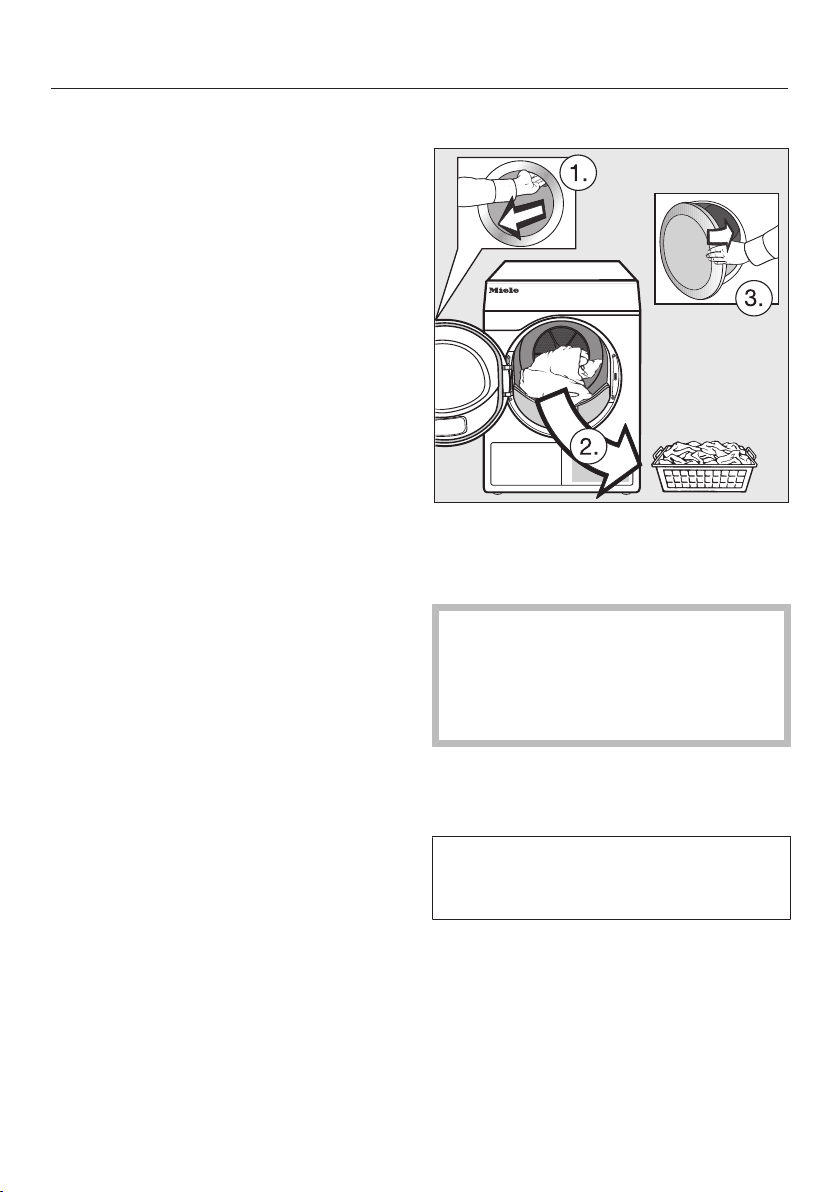
Removing the laundry
Open the door.
Make sure that you empty the drum
completely.
Items left in the dryer could be
damaged by overdrying when the
dryer is used the next time.
Always remove all items from the
drum.
Switch the tumble dryer off.
Observing care instructions
This tumble dryer requires regular
maintenance, particularly if it is used
on a continuous basis.
Useful tip: See “Cleaning and care”.
Read the section “Observing cleaning
intervals” first.

Timer
38
Delay start must be activated in the
Supervisor level so that the Timer can be
selected.
The Timer can be used to select the
time at which a programme starts or
finishes.
Setting the Timer
Touch the Timer sensor.
Select the Finish at, Start in or Start at
option.
Set the hours and the minutes and
confirm your entry with the OK
sensor.
Changing the Timer
The selected delay start time can be
changed before the programme starts.
Touch the , or sensor.
Change the time set and confirm with
the OK sensor.
Deleting the Timer
The selected delay start time can be
cancelled before the programme starts.
Touch the , or sensor.
The selected delay start time will
appear in the display.
Touch the Delete sensor.
Confirm with the OK sensor.
The selected delay start time is deleted.
Starting the Timer
Touch the Start/Stop sensor.
The door will lock and the time
remaining until the programme starts
will appear in the display.
After the programme has started, the
selected time can only be changed or
cancelled by interrupting the
programme.
The programme can be started
immediately at any time.
Touch the Start immediately sensor.
Programme chart
39
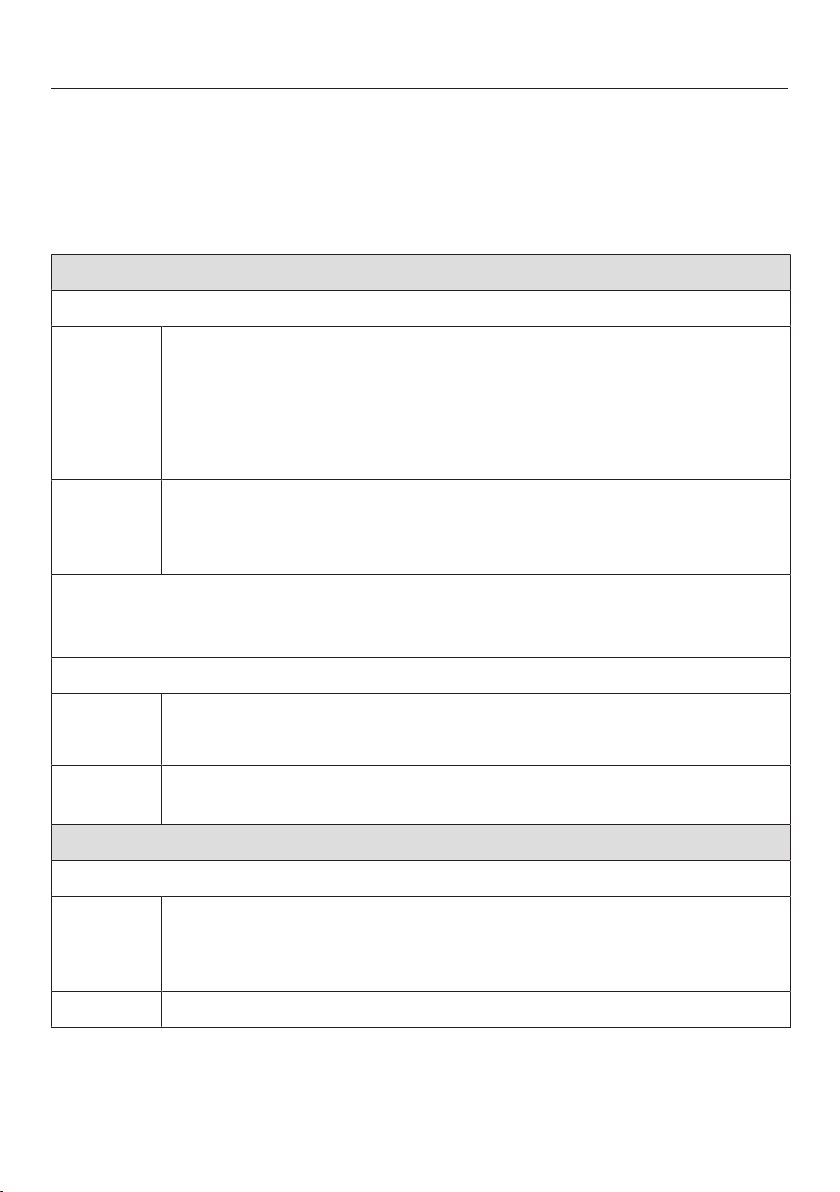
All weights marked with * are based on the weight of dry laundry.
Label
Cottons Max. load 8 kg*
Items Cotton items such as those described under Cottons Normal with
normal residual moisture.
Notes This programme only dries to the Normal level.
Cottons PRO Max. load 8 kg*
Items Cotton items such as those described under Cottons Normal with
normal residual moisture.
Notes This programme only dries to the Normal level.
Programme chart
40
Programme packages
You can select various programmes from the programme packages. The
programmes will be displayed in the programme list.
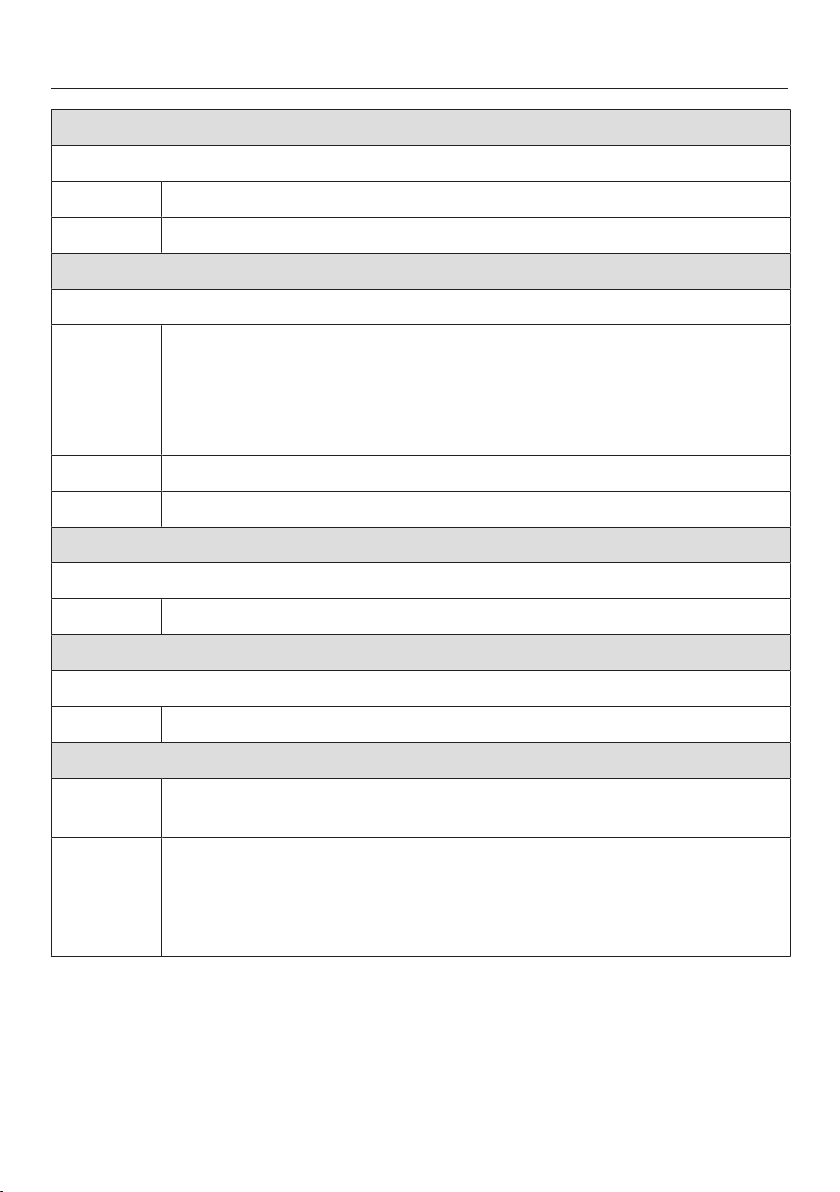
Standard
Cottons Max. load 8 kg*
Extra dry, Normal plus, Normal
Items - Single and multi-layered cotton fabrics.
- Towelling, bathrobes, T-shirts, underwear, jersey/terry bed linen,
baby clothes.
- Workwear, jackets, cotton blankets, aprons, tea towels, bed linen,
towels, overalls, table linen.
Notes - Select Extra dry for multi-layered and very thick fabrics.
- Do not use Extra dry for jersey fabrics (e.g. T-shirts, underwear,
baby clothes), as they have a tendency to shrink.
Using the Cottons Normal programme is recommended for a mixed cotton load
with normal residual moisture levels and is the programme used in energy
consumption tests according to AS/NZS 2442.
Handiron plus, Handiron, Machineiron
Items - Cotton and linen fabrics.
- Table linen, bed linen, or starched laundry.
Notes To prevent laundry from drying out, it should be rolled up until you
are ready for ironing.
Minimum iron Max. load 4 kg*
Normal plus, Normal, Hand iron
Items - Minimum iron items made of cotton, synthetic, or mixed fibre.
- Workwear, overalls, pullovers, dresses, trousers, leggings and ta-
ble linen.
Notes is selected automatically.
Programme chart
41
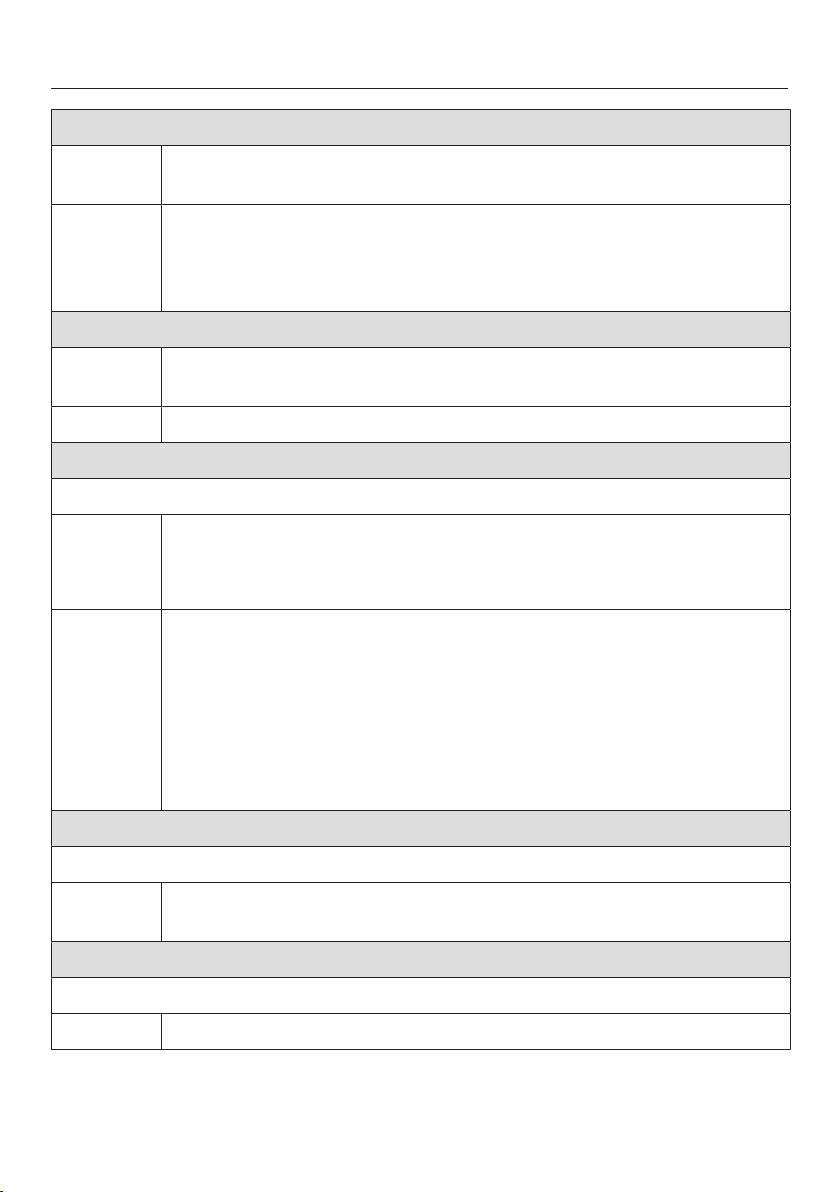
Express Max. load 4 kg*
Extradry, Normalplus, Normal, Handiron plus, Handiron, Machineiron
Items Hard-wearing textiles suitable for the Cottons programme.
Notes Shorter programme duration
Delicates Max. load 4 kg*
Normal plus, Normal, Hand iron plus
Items - Delicate items made of cotton, synthetic, or mixed fibre.
- Lightweight pullovers, dresses, trousers, overalls, table cloths,
shirts and blouses.
- Lingerie and appliquéd fabrics.
Notes Less creasing occurs in this programme.
Notes Reducing the load will further reduce creasing.
Shirts Max. load 2 kg*
Normal, Hand iron plus
Items Shirts and blouses.
Denim Max. load 3.5 kg*
Normal, Hand iron plus
Items Denim jackets, jeans, shirts, and skirts.
Woollens Max. load 2 kg*
Items Woollen garments and textiles containing wool blends, e.g.
pullovers, cardigans, stockings.
Notes - Wool and wool blend items are only fluffed up; they are not dried
completely.
- Remove items as soon as the programme has finished and leave
to finish drying at room temperature.
Programme chart
42
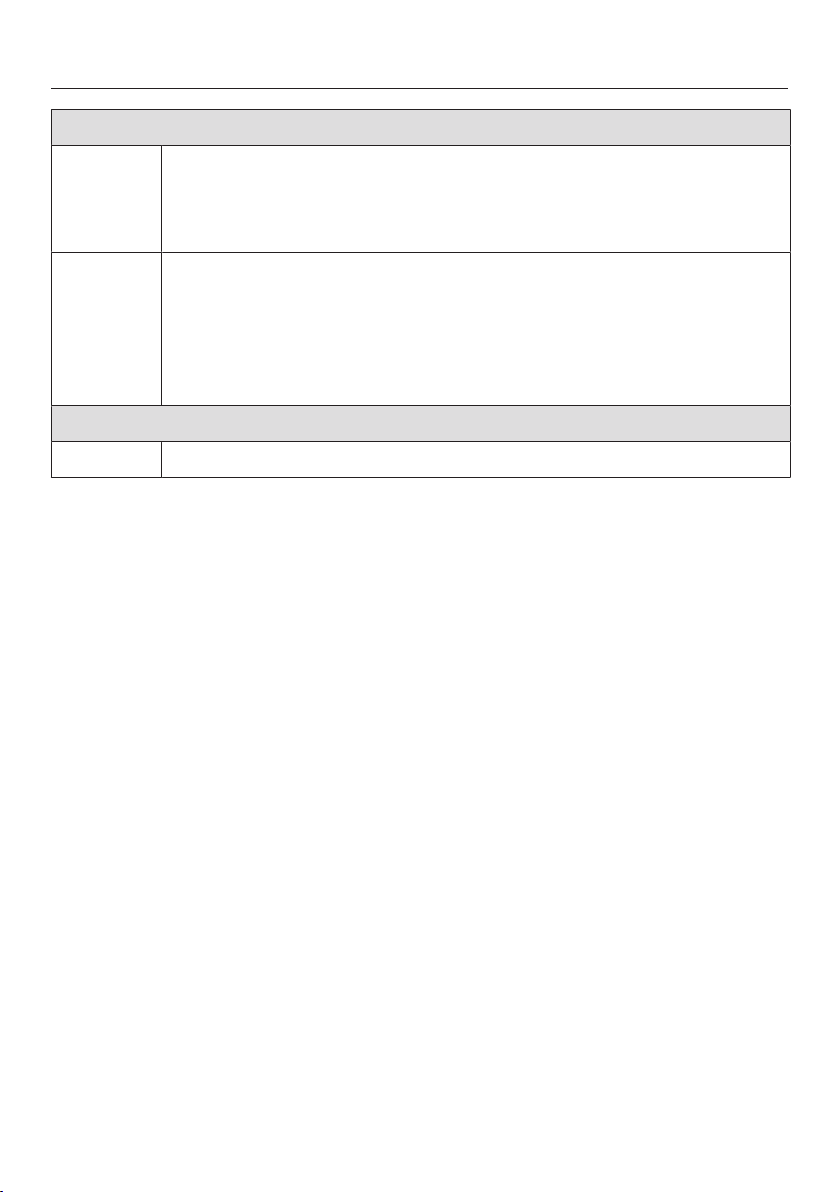
Silks Max. load 1 kg*
Items Silk garments which are suitable for drying in a tumble dryer, e.g.
blouses and shirts.
Notes - Programme for reduced creasing.
- Items are not dried completely.
- Remove garments as soon as the programme has finished.
Towelling Max. load 8 kg*
Items Large quantities of single-layered and multi-layered towelling items.
These include towels, bath robes, face washers, terry bed linen.
Notes This programme only dries to the Normal plus level.
Gentle smoothing Max. load 1 kg*
Normal, Hand iron plus
Items - Cotton and linen fabrics
- Minimum iron items made of cotton, synthetic or mixed fibre, e.g.
trousers, jackets, shirts.
Notes - This programme smooths out creasing caused during the spin
cycle in the washing machine.
- Items are not dried completely. Remove items as soon as the
programme has finished and leave to finish drying at room
temperature.
- Also suitable for dry laundry that is smoothed in a fixed time
interval.
Automatic plus Max. load 5 kg*
Normal plus, Normal, Hand iron plus
Items Mixed loads of garments suitable for the Cottons and Minimum iron
programmes.
Microfibre Max. load 7 kg*
Normal plus, Normal
Items Microfibre mops and cleaning cloths.
Programme chart
43
Timed drying warm air Max. load 8 kg*
Items - Jackets, sleeping bags, pillows and other down-filled items.
- Fabrics made up of multiple layers, e.g. heavy cotton table cloths.
- Individual items of laundry, e.g. towels, swimwear, tea towels.
Notes - For finishing drying multi-layered or voluminous items that dry
unevenly due to their composition.
- For drying a small number of individual garments.
- Do not select the longest drying time to start with. Check the
items as you are drying them to find the optimal time.
Timed drying cool air Max. load 8 kg*
Items Items which only need airing.
Programme chart
44
Basket programme Max. load for basket 3.5
kg
Basket - Low temperature Max. load for basket 3.5
kg
Textiles/
items
- It is essential to observe the information for the drying basket in
the operating instructions.
- Use this programme to dry or air items which are suitable for
drying in a tumble dryer but which are not suitable for drying using
mechanical action.
Notes - This programme may only be used with the Miele drying basket
(optional accessory) fitted.
- Select Basket - Low temperature for temperature-sensitive items.
- The dryer drum does not rotate.
- A satisfactory drying result cannot be achieved without the drying
basket.
- It is essential to observe the operating instructions for the drying
basket.
Programme chart
45
Sport
Sportswear Max. load 3 kg*
Items Sportswear which is suitable for drying in a tumble dryer.
Notes This programme only dries to the Normal level.
Outerwear Max. load 2.5 kg*
Normal, Hand iron plus
Items Outerwear which is suitable for drying in a tumble dryer.
Proofing Max. load 2.5 kg*
Items Microfibre fabric, ski wear, outerwear, fine close weave cotton
garments (poplin), or tablecloths which are suitable for drying in a
tumble dryer and have been treated to provide a water and dirt-
resistant finish.
Notes - This programme includes a proofing fixing phase.
- Only use proofing agents which are stated by the manufacturer as
being “suitable for use on membrane textiles”. These agents
contain fluorochemical compounds.
- Do not dry items which have been treated with proofing agents
containing paraffin. This substance is a fire hazard.
- This programme only dries to the Normal level.
Reactivation Max. load 2.5 kg*
Items Outerwear which is suitable for drying in a tumble dryer.
Notes - The drying process revitalises the fibres, which improves water-
repelling properties.
- This programme only dries to the Normal level.
Programme chart
46
Soft furnishings
Down bedding Max. load 2 kg*
Items Bedding suitable for tumble drying (duvets or pillows filled with
down or feathers).
Notes This programme only dries to the Normal level.
Notes Feathers are a natural product and may develop odours when
exposed to heat. Allow bedding to air outside the dryer after drying.
Synthetic bedding Max. load 2 kg*
Items Bedding suitable for tumble drying (duvets or pillows filled with
synthetic fillings).
Notes This programme only dries to the Normal level.
Large items Max. load 4 kg*
Normal plus, Normal, Hand iron, Machine iron
Items Hard-wearing, large textiles suitable for the Cottons programme.
These include day blankets, multi-layered covers, large voluminous
items.
Programme chart
47
Hygiene
In the hygiene programmes, items will be dried with a temperature that is
constant over an extended period (longer temperature holding time). This
temperature holding time kills off micro-organisms such as germs or dust mites
and reduces allergens in the laundry.
If a hygiene programme is cancelled early, micro-organisms will not be killed.
Do not interrupt the programme.
Cottons hygiene Max. load 4 kg*
Items Cotton or linen items that come into direct contact with the skin.
These include underwear, baby clothes, bed linen, towels,
bathrobes, spa towels and face washers.
Notes This programme only dries to the Normal level.
Minimum iron hygiene Max. load 4 kg*
Items - Minimum iron items made of cotton, synthetic, or mixed fibre.
- Workwear, overalls, pullovers, dresses, trousers, leggings and ta-
ble linen.
Notes This programme only dries to the Normal level.
Timed drying hygiene Max. load 4 kg*
Items - Jackets, sleeping bags, pillows and other voluminous items.
- Fabrics made up of multiple layers, e.g. heavy cotton table cloths.
- Individual items of laundry, e.g. towels, swimwear, tea towels.
Notes - For finishing drying multi-layered or voluminous items that dry
unevenly due to their composition.
- For drying a small number of individual garments.
- Do not select the longest drying time to start with. Check the
items as you are drying them to find the optimal time.
Programme chart
48
WetCare
WetCare sensitive Max. load 2.5 kg*
Items For non-washable outer garments.
Notes The garments are briefly dried and fluffed up.
WetCareSilks Max. load 2.5 kg*
Normal, Hand iron plus, Hand iron
Items For non-washable outer silk garments which crease easily.
WetCareintensive Max. load 2.5 kg*
Normal, Handiron, Handironplus, Machine iron
Items Washable outer garments.
Flatwork
Cottons 40% residual moisture Max. load 8 kg*
Cottons 25% residual moisture Max. load 8 kg*
Minimum iron 20% residual moisture Max. load 4 kg*
Items - Hotel, residential care or hospital laundry that requires further
processing (hand ironing, machine ironing, folding).
- This includes cottons and minimum iron fabrics, such as bedding
and table linen or towels.
Notes - The residual moistures is absorbed by the fabric fibres, which
makes them easier to smooth.
- These programmes only dry to the Machineiron level.
Notes - To prevent laundry from drying out, it should be rolled up until you
are ready for ironing.
- Shake the laundry before ironing.
Programme chart
49
Special programmes
You can put together 5 special
programmes and assign your own
programme names. Enter these into the
tables.
Load: maximum 8 kg (weight of dry
items)
Example
[Special programme 1]Dry+
Res. moisture programme
–
Final residual moisture
: - 6%
–
Extra drying time
: 30
min
–
Temperature
: 60
°C
(1)
-
-
-
-
-
-
-
(2)
-
-
-
-
-
-
-
(3)
-
-
-
-
-
-
-
(4)
-
-
-
-
-
-
-
(5)
-
-
-
-
-
-
-

Changing the programme sequence
50
Payment system
Opening the door or cancelling the
programme after it has started may
result in a loss of credit (depending on
the settings*).
* Either during the commissioning
process or subsequently by Miele
Professional Service, a time period can
be set during which a programme
change is permitted.
Changing a programme after it
has started
Programme selection is no longer
possible (protection against
unintentional changes). If you want to
select a new programme, you must first
cancel the running programme.
Risk of fire due to incorrect use
and operation.
The laundry can burn and destroy
the dryer and the surroundings.
See “Warning and Safety
instructions” for further information.
Cancelling a programme
Touch the Start/Stop sensor.
You will be asked in the display whether
you want to cancel the programme.
Touch the Yessensor.
Reselecting a cancelled programme
Open and close the door.
Select and start a new programme.
Adding or removing laundry
Open the door.
Risk of burning when touching
hot laundry in the drum.
You could burn yourself.
Let the laundry cool down and
remove it carefully.
Add or remove laundry.
Close the door.
Start the programme.
Interruption to the power
supply
If the power supply was interrupted
because the tumble dryer was switched
off with the button:
Switch the tumble dryer back on.
Touch the Start/Stop sensor.
If the programme was interrupted by a
power cut:
When power is restored, you need to
confirm with OK.
Touch the Start/Stop sensor.
Remaining programme time
Altering the programme sequence can
cause the programme duration shown
in the display to “jump”.
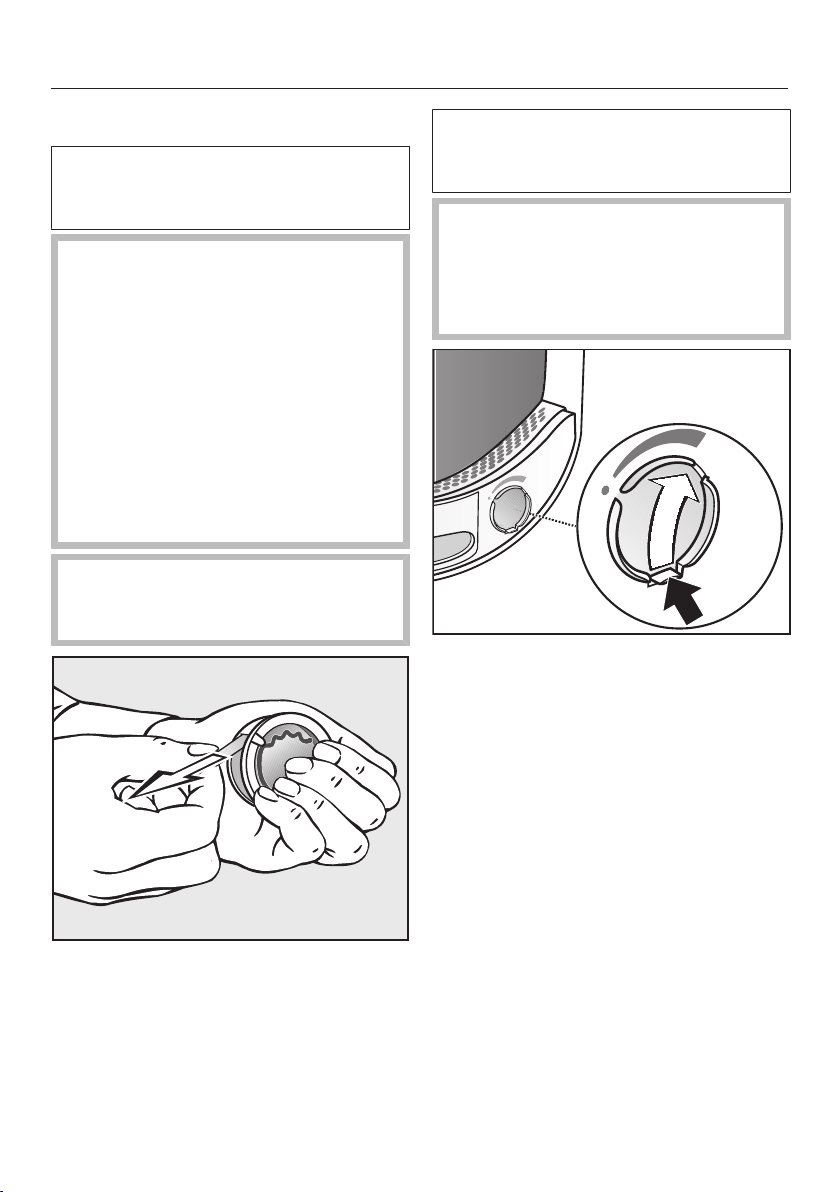
Fragrance flacon
51
Inserting a fragrance flacon
Fragrance flacons (optional
accessories) can be used to give your
laundry a pleasant scent.
Risk of fire and harm to health if
fragrance flacons are used
incorrectly.
Leaked fragrance can be harmful to
your health if it comes in contact
with the body. Leaked fragrance can
cause a fire.
Before using a fragrance flacon,
please read the section “Using a
fragrance flacon (optional
accessory)” in the Warning and
Safety instructions.
Only hold the fragrance flacon as
illustrated. Do not hold it at an angle
or tip it as the fragrance will leak out.
Hold the fragrance flacon securely so
that you do not open it by mistake.
Pull off the protective seal.
Open the door of the tumble dryer.
The fragrance flacon is inserted in the
upper fluff filter. The socket is next to
the recessed grip.
To prevent the accumulation of fluff,
the cover of the unused socket must
remain closed.
Push the tab of the cover all the way
down (see arrow).
Open the cover using the tab until the
tab is right at the top as shown.
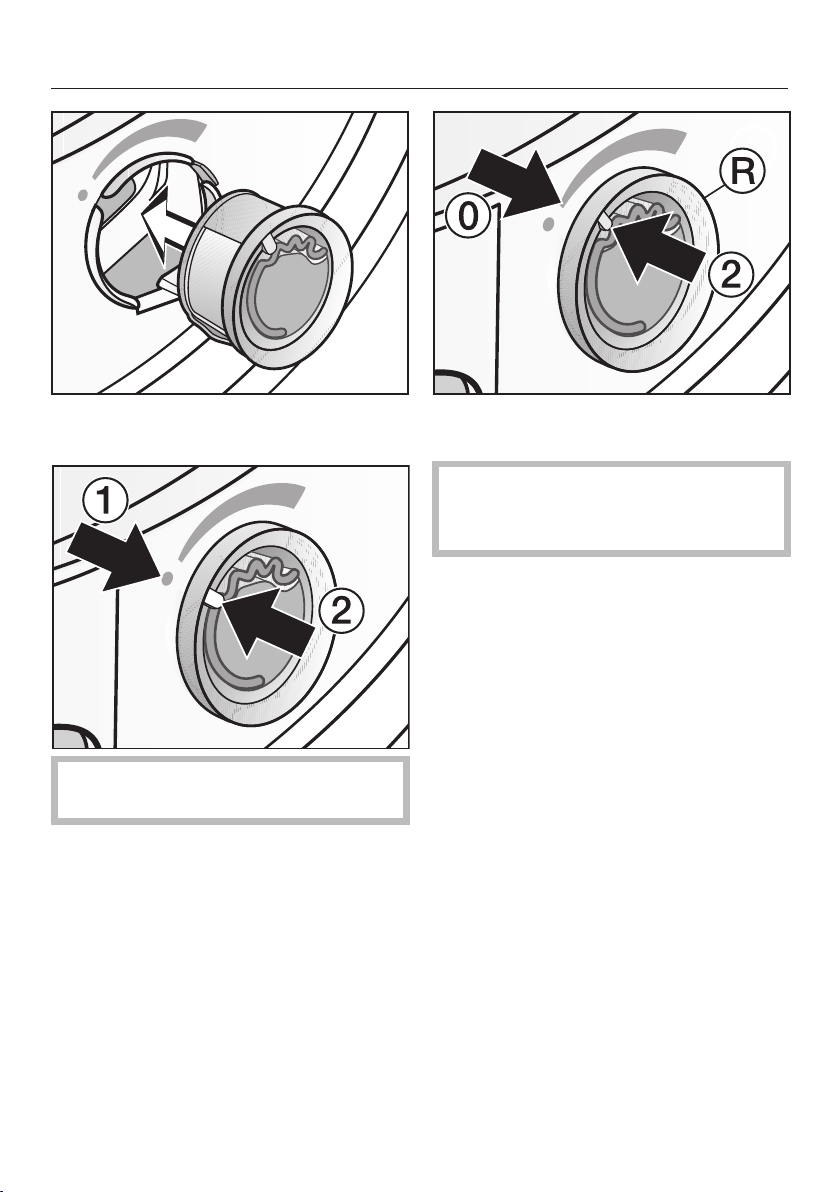
Fragrance flacon
52
Insert the fragrance flacon in the
opening as far as it will go.
Markers and must line up with
each other.
Turn the outer ring clockwise a
little.
The fragrance flacon can slip out.
Turn the outer ring so that markers
and line up.
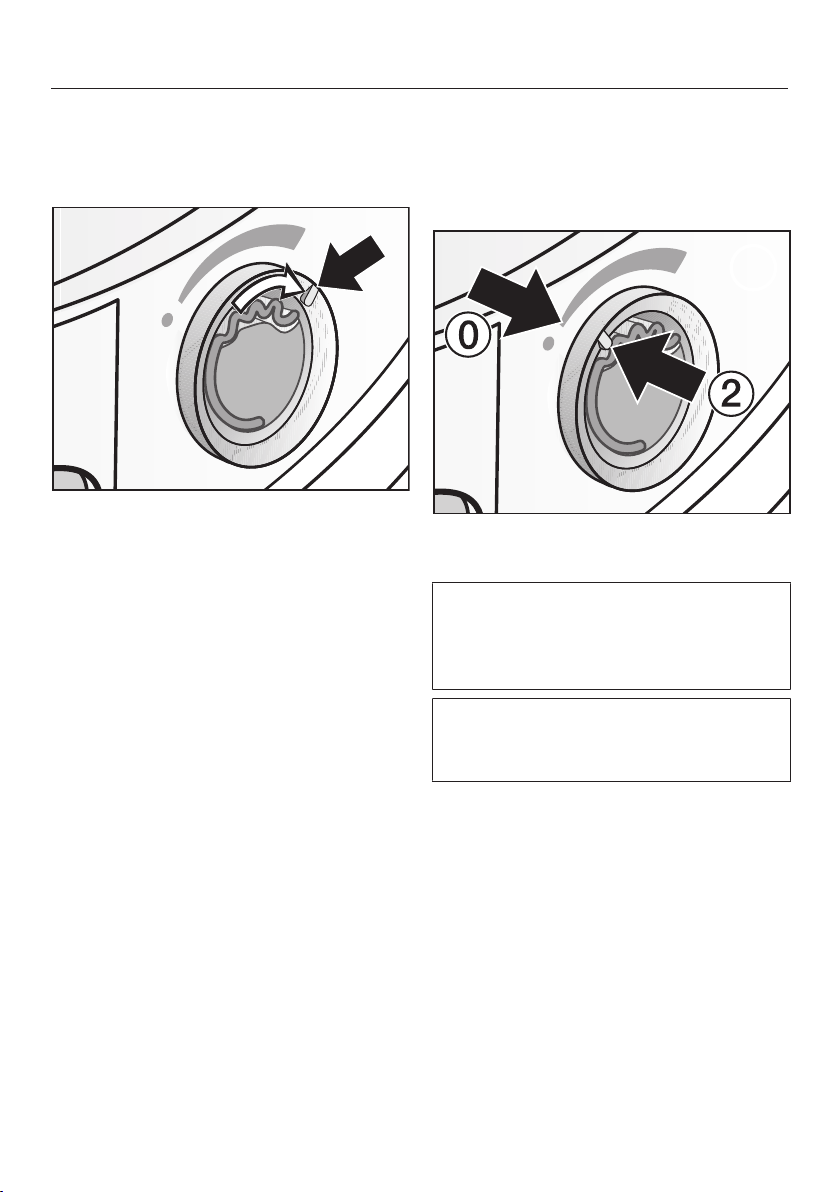
Fragrance flacon
53
Opening the fragrance flacon
Before drying, you can select the
intensity of the fragrance.
Turn the outer ring clockwise: the
further you open the fragrance flacon,
the more intense the fragrance.
The fragrance is only released into the
laundry effectively with damp laundry
and longer drying times with sufficient
heat transfer. The fragrance will also be
noticeable in the room air during the
drying process. Fragrance is generally
not released in the Timed drying cool air
programme.
Closing the fragrance flacon
After drying, the fragrance flacon should
be closed to prevent the fragrance from
escaping needlessly.
Turn the outer ring anti-clockwise
until marker b is in position _.
If you wish to dry without the
fragrance flacon: Remove the
fragrance flacon and store it in its
original packaging.
When the intensity of the fragrance is
no longer sufficient, replace the
fragrance flacon with a new one.
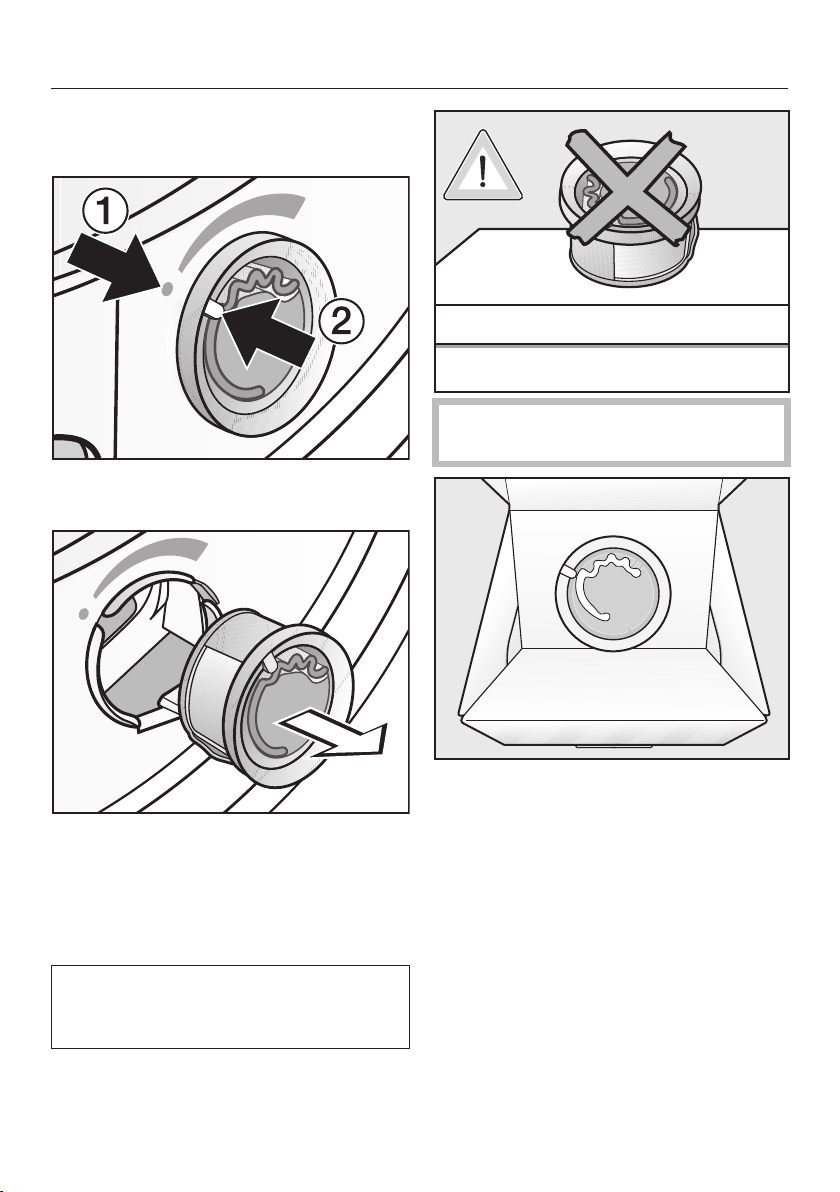
Fragrance flacon
54
Removing/replacing the
fragrance flacon
Turn the outer ring anti-clockwise
until markers a and b line up.
Replace the fragrance flacon with a
new one.
When not in use, you can store the
fragrance flacon in its original
packaging.
Fragrance flacons are available to
order from Miele or via the Miele
online shop (shop.miele.com).
Fragrance can leak. Do not lay the
fragrance flacon down.
- If you are keeping the fragrance
flacon in its original packaging, do
not store the packaging upright on its
edge or upside down. Otherwise, the
fragrance will leak out.
- Always store in a cool, dry place
away from direct sunlight.
- When purchasing new fragrance
flacons, only remove the protective
seal just before use.
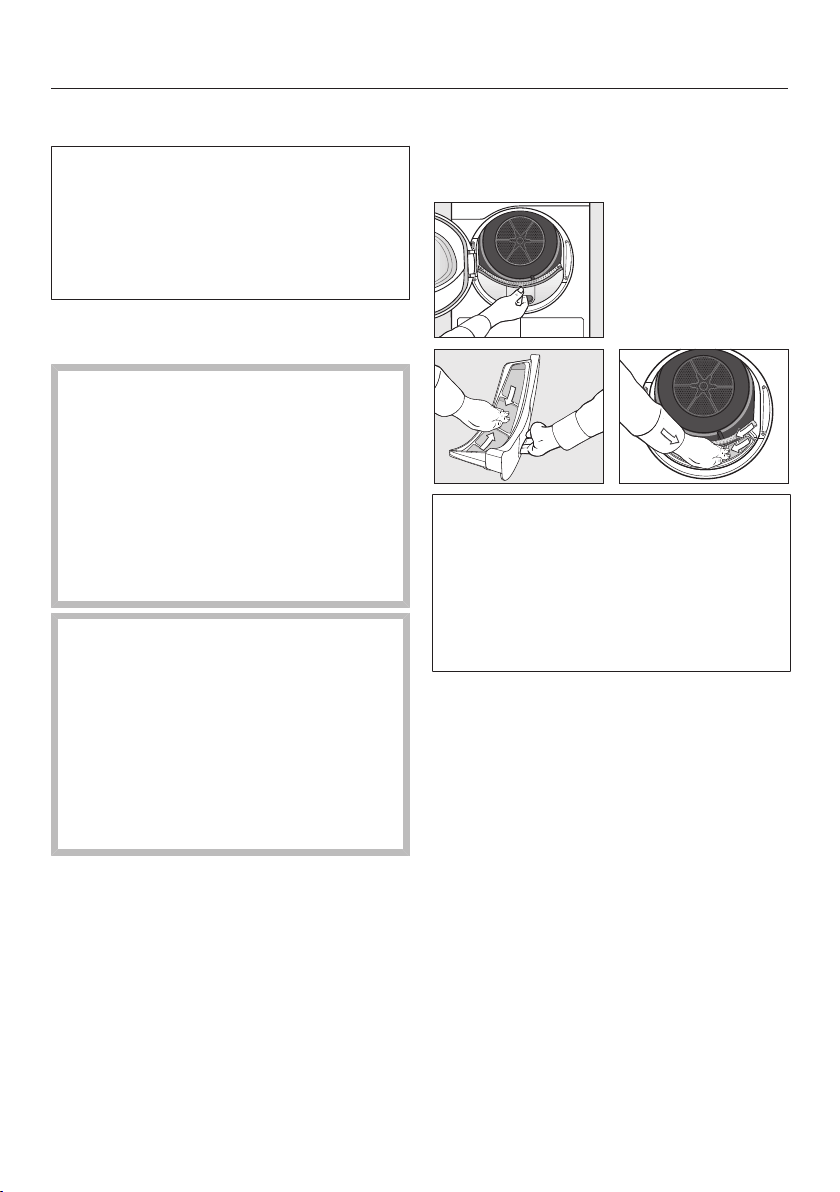
Cleaning and care
55
Cleaning interval
This tumble dryer is equipped with a
multi-stage filter system, which
consists of fluff filters (1.) and a filter in
the plinth (2.).
This filter system collects all fluff
generated during the drying process.
Failure to clean the filters regularly
could increase drying times.
Fire hazard due to irregular
maintenance.
Too many fluff deposits in the filter
system and tumble dryer pose a fire
hazard.
Check the filter system and the air
flow openings on a regular basis.
Clean the filters if you find any fluff
deposits.
Damage caused by a missing or
damaged filter system.
Too many fluff deposits in the filter
system and tumble dryer will
increase the risk of appliance
malfunctions and cause a fire hazard.
Never use the tumble dryer without
the filter system. Always replace a
damaged filter system immediately.
1. Cleaning the fluff filters
The fluff filters are located in the drum
loading area.
Always clean the appliance whenever
prompted to do so in the display.
Various messages can be displayed:
Clean the fluff filter and rinse the plinth
filter.
Rinse the fluff filter and plinth filter. Check
the airways.
To delete the message: touch the
OKsensor.
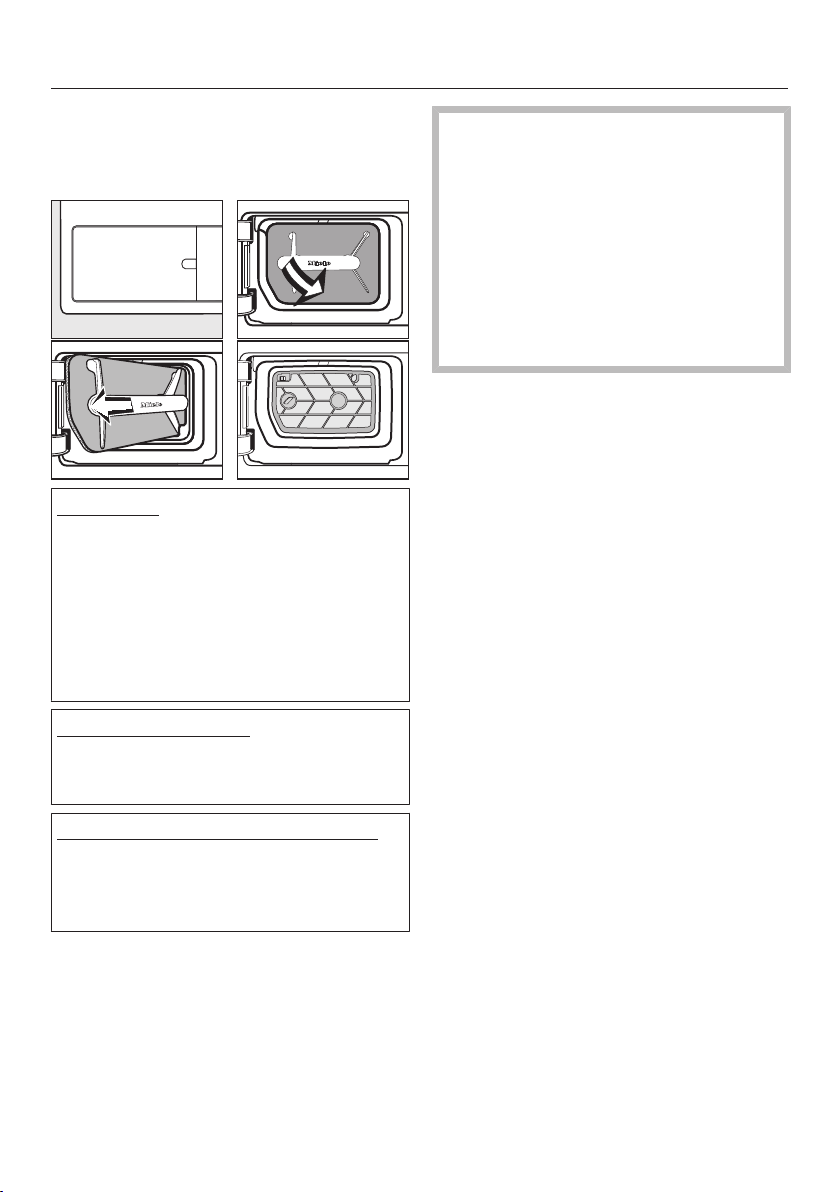
Cleaning and care
56
2. Cleaning the plinth filter
The filter in the plinth is behind the fluff
filter flap on the bottom left.
Normal use
Always clean the appliance whenever
prompted to do so in the display.
Various messages can be displayed:
Clean the fluff filter and rinse the plinth
filter.
Rinse the fluff filter and plinth filter. Check
the airways.
Continuous operation
Clean once a day and also when the
prompt appears in the display.
Cleaning the filter insert in the plinth
The filter insert is visible in the plinth
after removing the fluff filter. Clean the
filter insert as well.
To delete the message: touch the
OKsensor.
Damage caused by insufficient
cleaning or by operation with a worn,
damaged filter in the plinth.
There is insufficient flow of air and
heat exchange in the heat exchanger,
as it is clogged. This requires a visit
from Miele Professional Service.
This can be avoided by following the
advice in these operating
instructions.
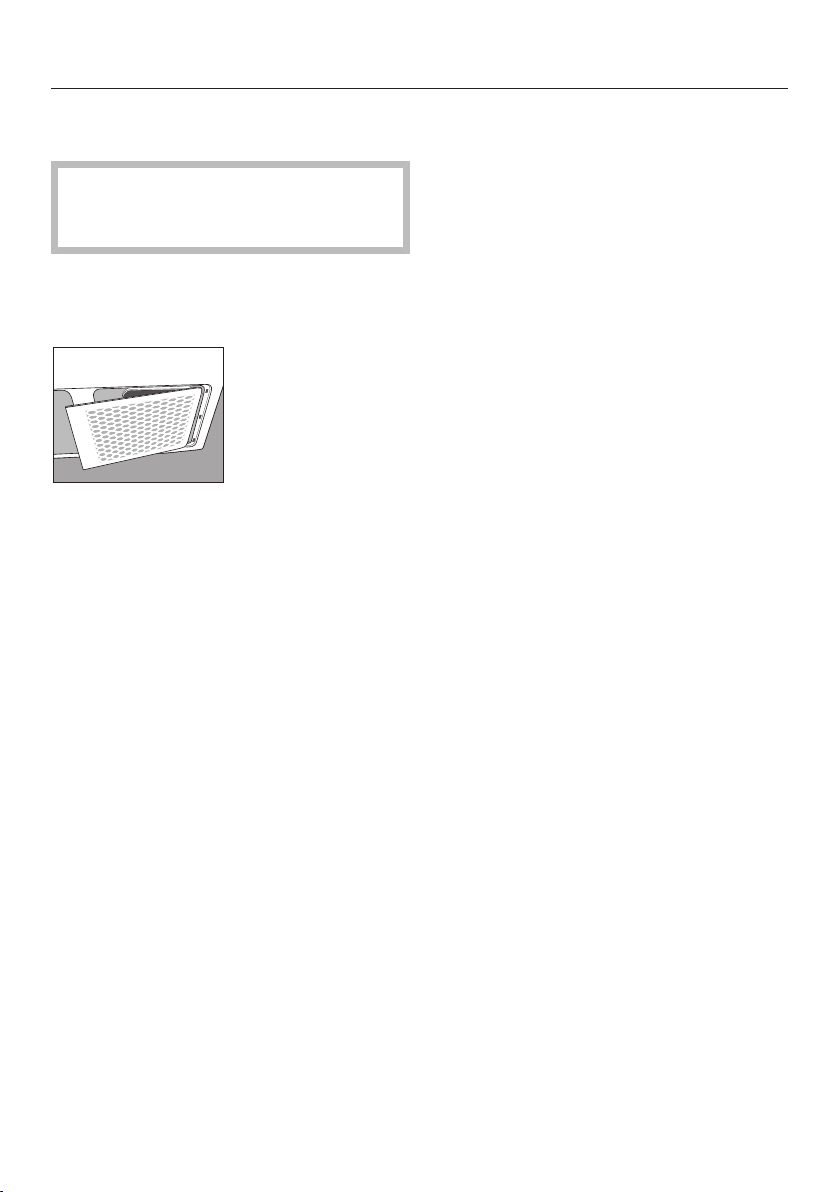
Cleaning and care
57
3. Cleaning the bottom right grille/
heat exchanger for heat dissipation
Clean only when Open bottom right
grille, clean the heat exchanger appears
in the display.
The bottom right grille can be removed.
It covers the heat exchanger for heat
dissipation.
Keep the room where the tumble
dryer is located free from dust and
fluff. Doing so will mean that you will
rarely have to clean the grille.
See "Cleaning the bottom right grille/
heat exchanger".
Check and clean the filter (in the
plinth) and the fluff filters.
To delete the message: touch the
OKsensor.
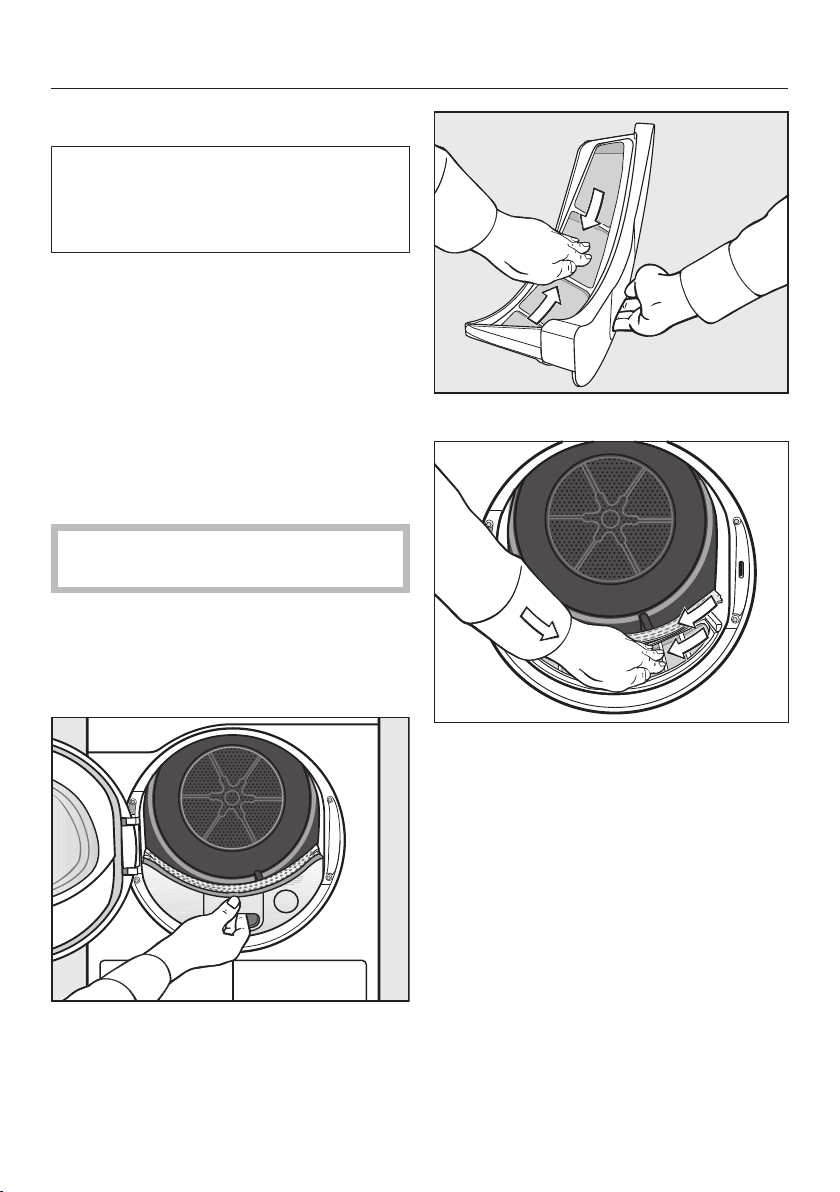
Cleaning and care
58
Cleaning the filters
This tumble dryer has 2 fluff filters in
the drum loading area. The upper and
lower fluff filters trap fluff produced
during the drying process.
Removing the fragrance flacon
The intensity of the fragrance will be
diminished if the fluff filters and the
plinth filter are not cleaned.
Remove the fragrance flacon as
described in “Removing/replacing the
fragrance flacon” under “Fragrance
flacons”.
Removing visible fluff
Remove any fluff after every drying
cycle.
Useful tip: You can also use a vacuum
cleaner so that you can remove the fluff
without touching it.
Open the door.
Pull the upper fluff filter forward to
remove it.
Remove the fluff (see arrows).
Remove the fluff (see arrows) from
the filter surface of all the fluff filters
and the perforated laundry deflector.
Push the upper fluff filter back in until
it clicks into position.
Close the door.
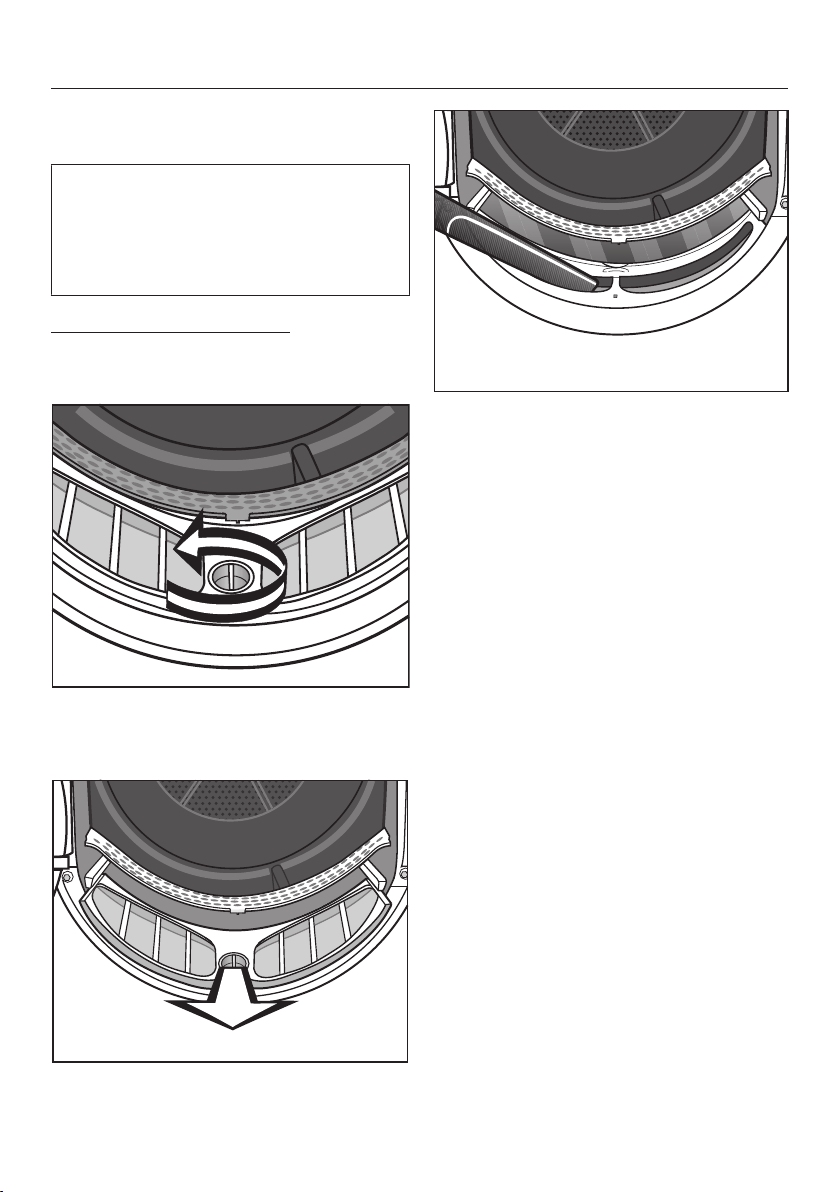
Cleaning and care
59
Cleaning the fluff filters and air flow
openings thoroughly
If the drying duration has become
longer or the surface of the filters is
visibly compacted with fluff, you
should carry out the following cleaning
procedure.
Cleaning the fluff filters dry
Pull the upper fluff filter forward to
remove it.
Turn the yellow dial on the lower fluff
filter in the direction of the arrow until
you hear it click.
Pull the fluff filter forward to remove
it.
Use a vacuum cleaner with a long
crevice nozzle attached to remove
any visible fluff from the upper air
flow openings.
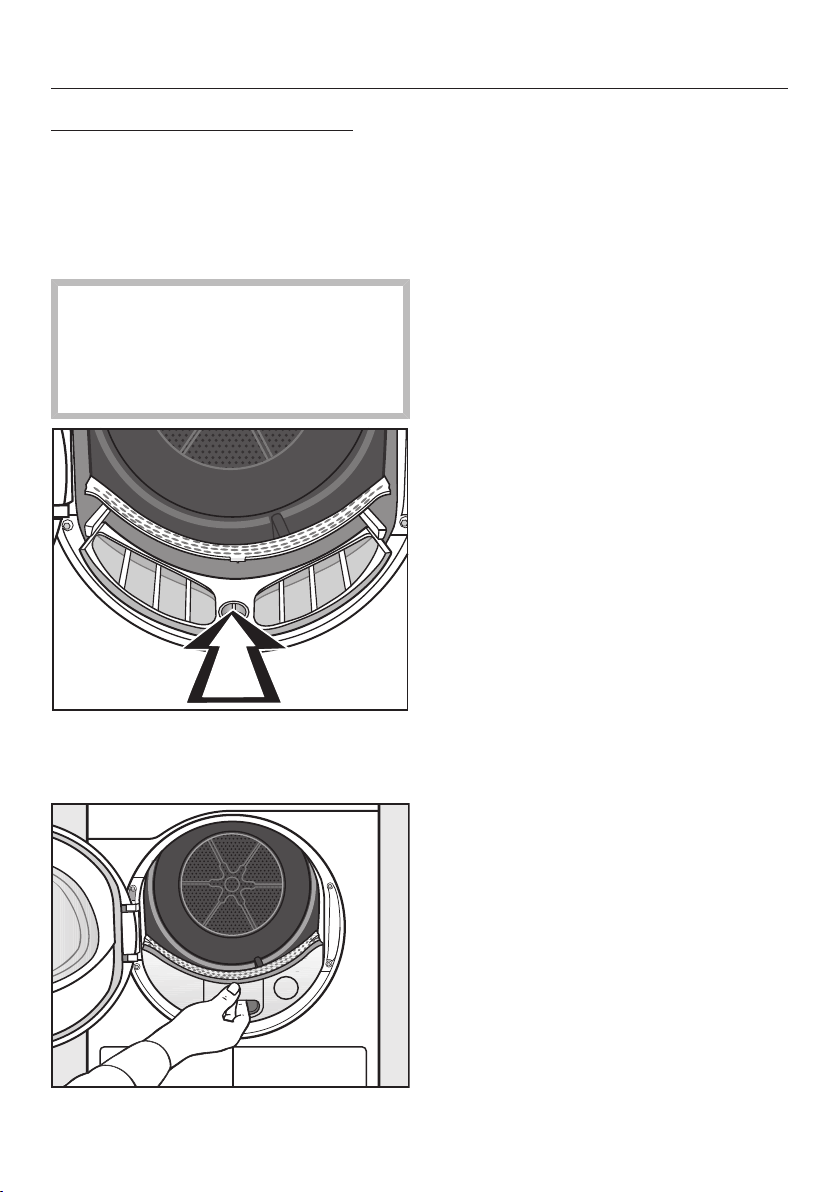
Cleaning and care
60
Cleaning the fluff filters with water
Rinse the filters with warm running
water.
Wipe the smooth plastic surfaces of
the fluff filters with a damp cloth to
clean them.
Ensure the filters are dry before
replacing them. Damp or wet filters
can cause operational faults.
Shake the fluff filters thoroughly and
then dry them carefully.
Push the lower fluff filter in
completely and lock it with the yellow
dial.
Push the upper fluff filter in
completely.
Close the door.
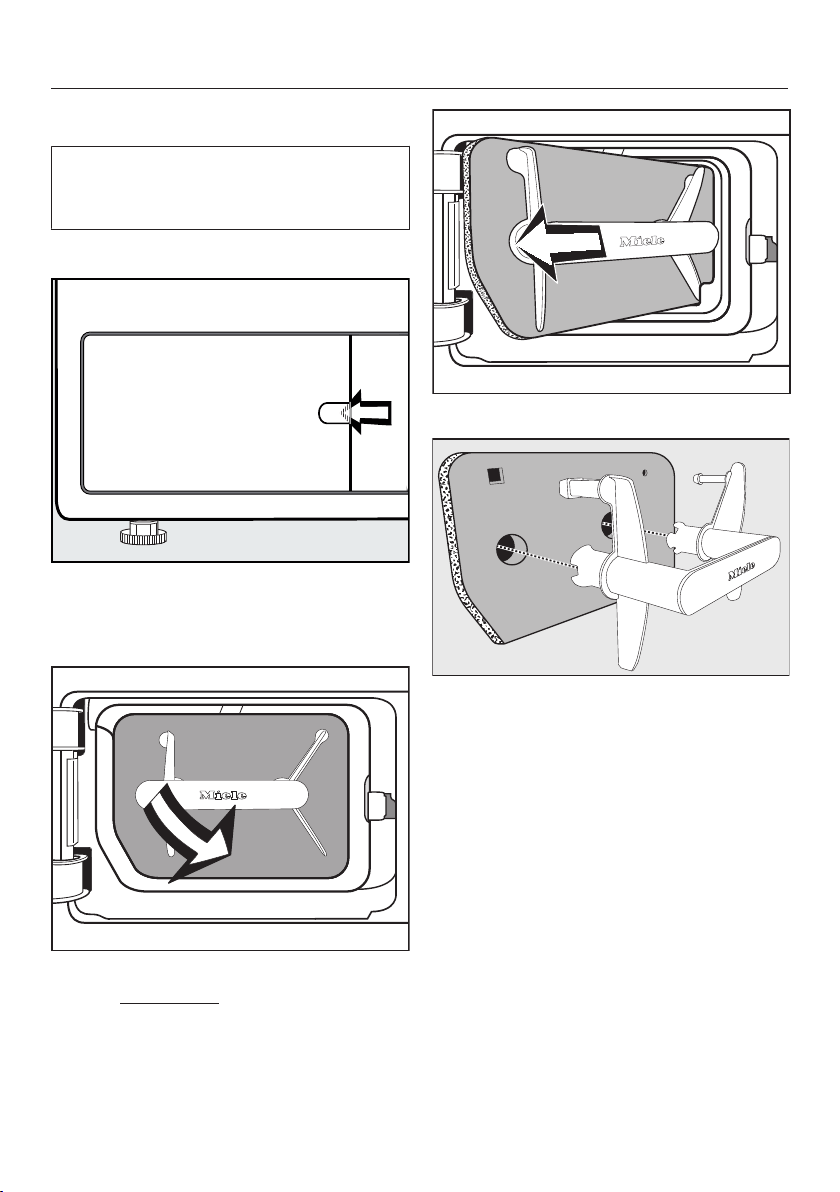
Cleaning and care
61
Cleaning the filter in the plinth
The fluff filter in the plinth collects finer
fluff, hair and detergent residues that
can penetrate the fluff filters.
Removing the plinth filter
Reach behind the catch with your
finger.
Open the fluff filter flap.
Use the handle to pull out the plinth
filter at an angle forwards and to the
right.
Pull the filter out at an angle.
Pull the handle out of the filter.
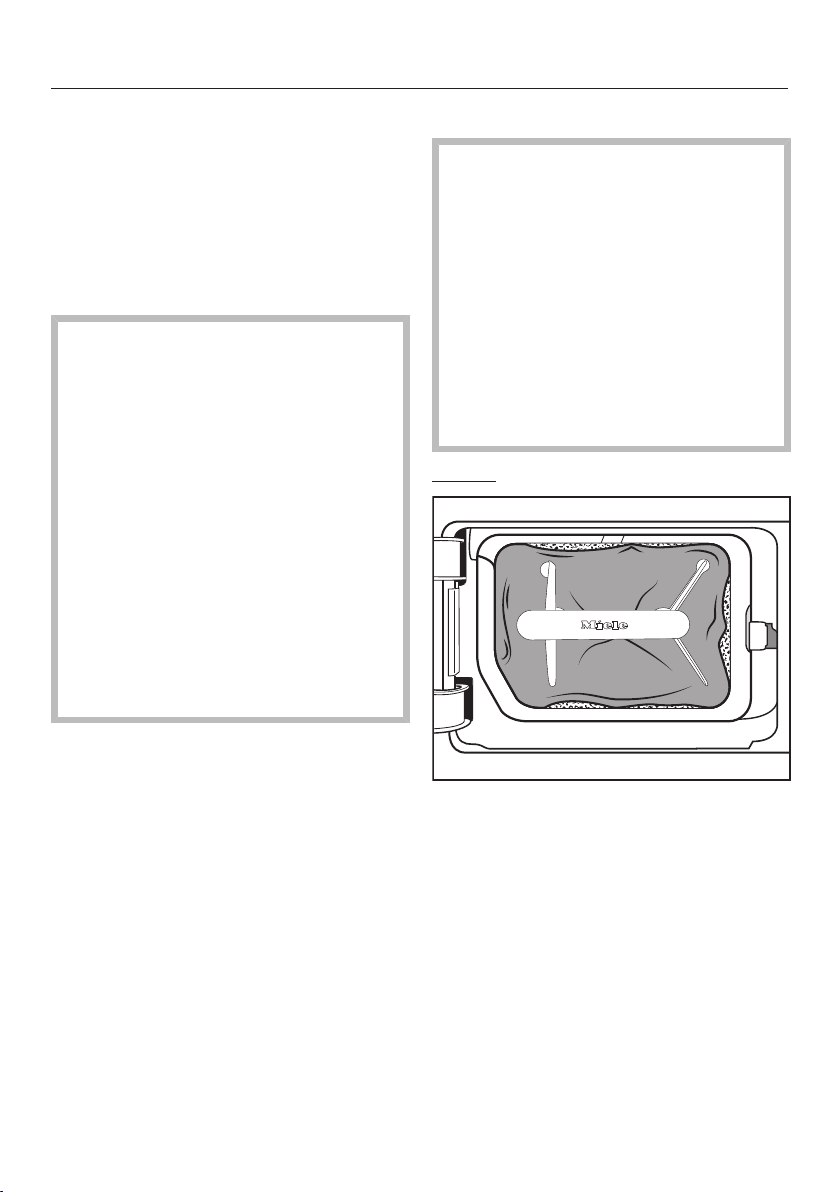
Cleaning and care
62
Cleaning the plinth filter with water
Clean the filter thoroughly under
running water.
Squeeze the filter very carefully
several times as you rinse it.
Rinse the filter until all visible residues
have been removed.
Damage caused by an
insufficiently cleaned or damaged
fluff filter.
If the filter has not been properly
cleaned or is damaged, the heat
exchanger will be clogged. There will
be an insufficient flow of air and heat
exchange in the heat exchanger. This
requires a visit from a Miele service
technician.
Before and after cleaning, check the
plinth filter in accordance with the
description in "Replacing the plinth
filter". The plinth filter must be
perfectly functional and undamaged
after cleaning.
Use a damp cloth to remove any fluff
from the handle.
Replacing the plinth filter
Filter wear caused by continuous
tumble dryer use.
If the tumble dryer is in continuous
use and is being cleaned frequently,
the plinth filter can begin to show
signs of wear after a while. This can
clog up the heat exchanger.
Replace the filter immediately
(replacement filters are available as
an optional accessory) if you see the
following signs of wear before or
after cleaning.
Poor fit
The edges of the filter do not sit
properly and the filter is deformed. Fluff
will blow into the heat exchanger
unfiltered through edges that do not sit
properly. This will cause a permanent
obstruction in the heat exchanger.
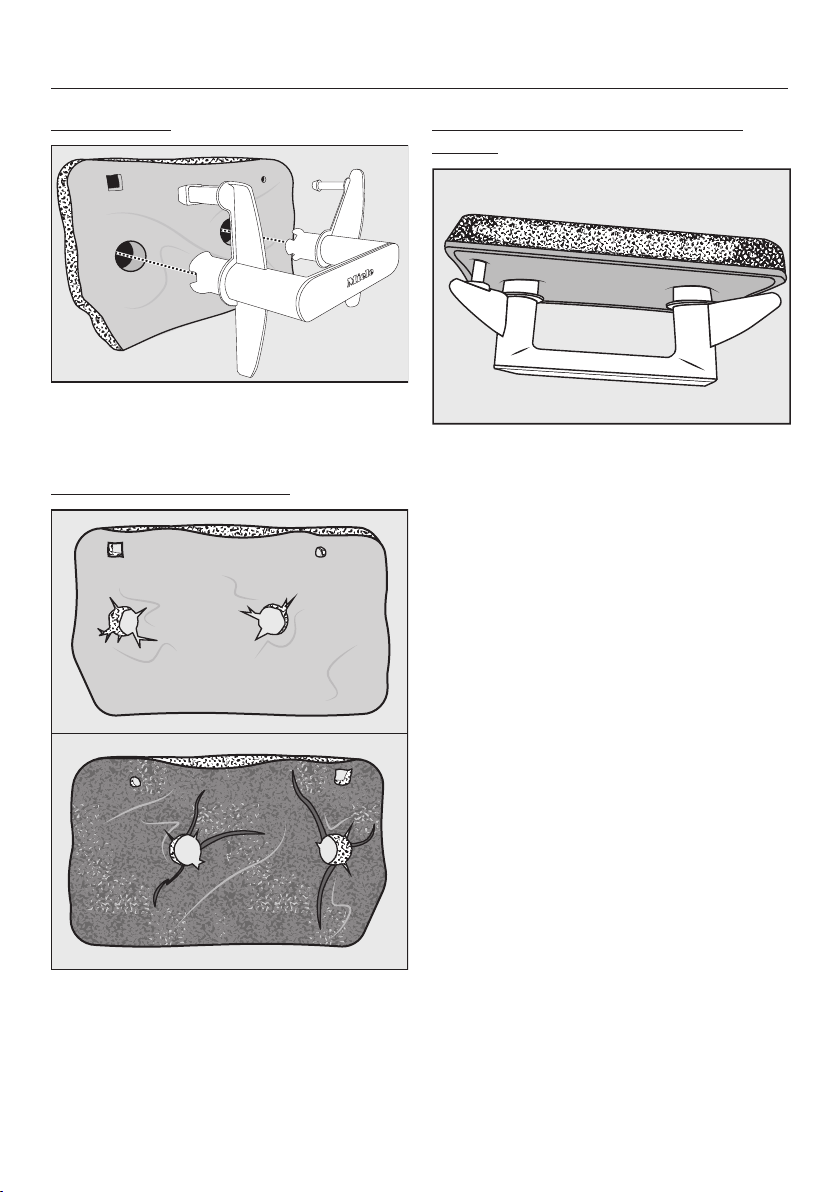
Cleaning and care
63
Deformations
Deformations indicate that the filter has
become blocked and worn by
continuous use.
Cracks, tears, indentations
Fluff will blow into the heat exchanger
unfiltered through cracks and tears and
will cause obstruction.
Deformations indicate that the filter has
become blocked and worn by
continuous use.
White residues or residues of other
colours
Residues arise from laundry fibres and
residues of detergent components
which can clog the filter. They can be
found on the front and side edges of
the filter. In extreme cases, they can
form stubborn crusts.
Residues are a sign that the filter no
longer has a snug fit at the sides, even
if it appears to be perfect – fluff is
getting in unfiltered at the edges.
If these residues appear on the filter
again soon after cleaning, it must be
replaced.
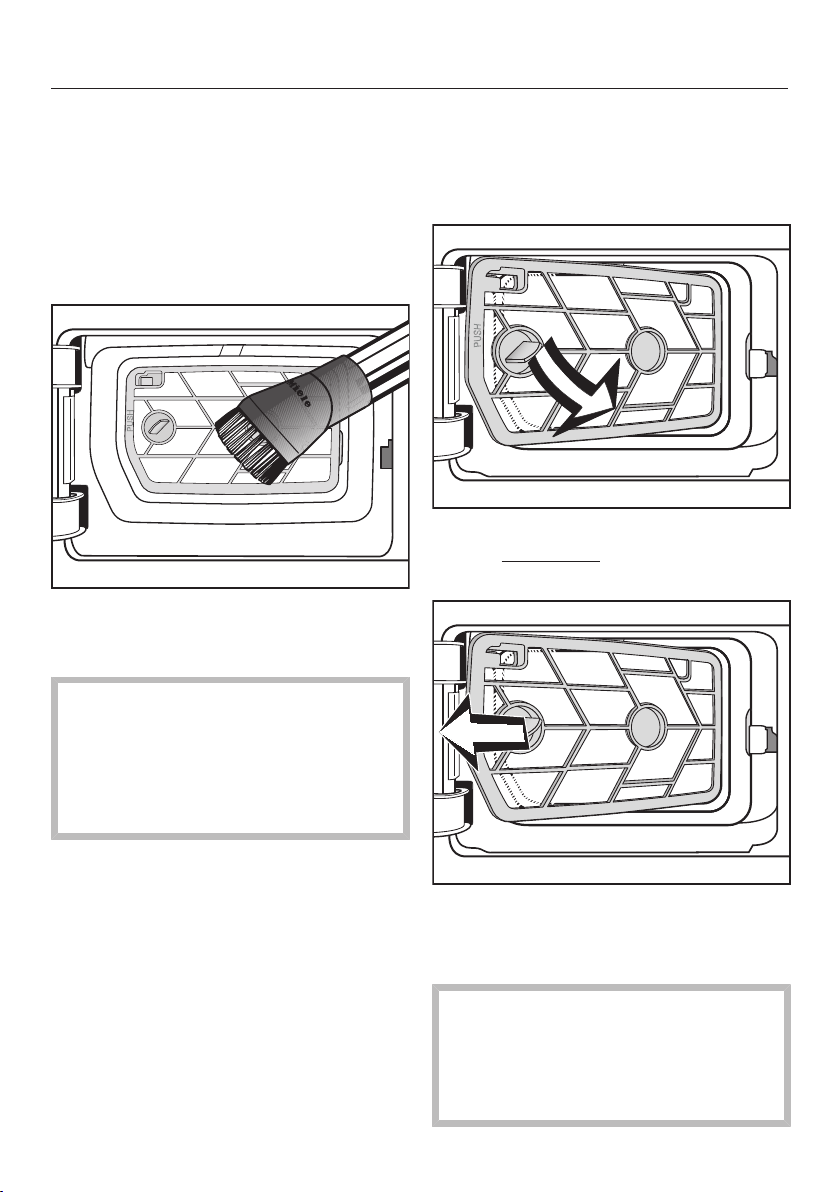
Cleaning and care
64
Cleaning the filter insert (in the
plinth)
The surface of the filter insert is visible
after removing the fluff filter (in the
plinth). This filter surface only needs to
be cleaned if there is a visible
accumulation of fluff.
Carefully vacuum up any visible fluff
or dirt. Use a suction brush or a
narrow crevice nozzle.
If there are visible blockages or other
residues after cleaning: Remove the
filter insert and clean it under running
water. If stubborn residues are not
removed, these can lead to faults
over time.
Removing the filter insert
If the filter insert is clogged up and
soiled, it must be removed and cleaned
under running water.
Use the handle to pull out the fluff
filter at an angle forwards and to the
right.
Pull the filter insert out at an angle.
Rinse the filter surface of the insert
under warm running water.
Ensure the fluff filter is dry before
replacing it. Damp or wet filters can
cause operational faults.
Shake the filter insert thoroughly and
then dry it carefully.
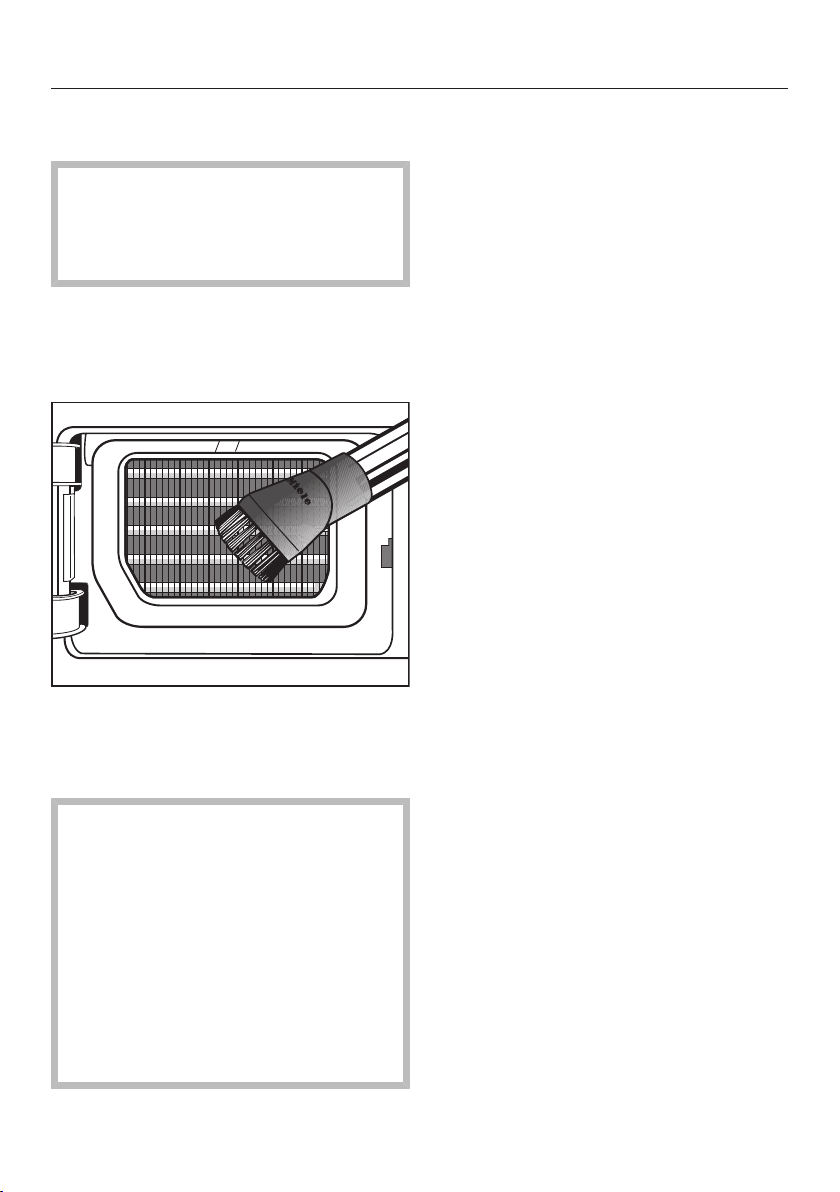
Cleaning and care
65
Checking the cooling fins on the heat
exchanger
Danger of injury caused by
touching the cooling fins.
You could cut yourself.
Do not touch the cooling fins.
After removing the filter insert, you will
see the cooling fins on the heat
exchanger. Check them for any
accumulation of fluff.
If you notice any visible soiling,
carefully vacuum it up with a vacuum
cleaner. Use a suction brush or a
narrow crevice nozzle.
Risk of damage if the cooling fins
are cleaned incorrectly.
The cooling fins can be damaged or
distorted. This would impair the
operational performance of the
tumble dryer.
Clean using a vacuum cleaner with a
dusting brush attached. Only pass
the vacuum cleaner dusting brush
over the fins lightly, without applying
any pressure.
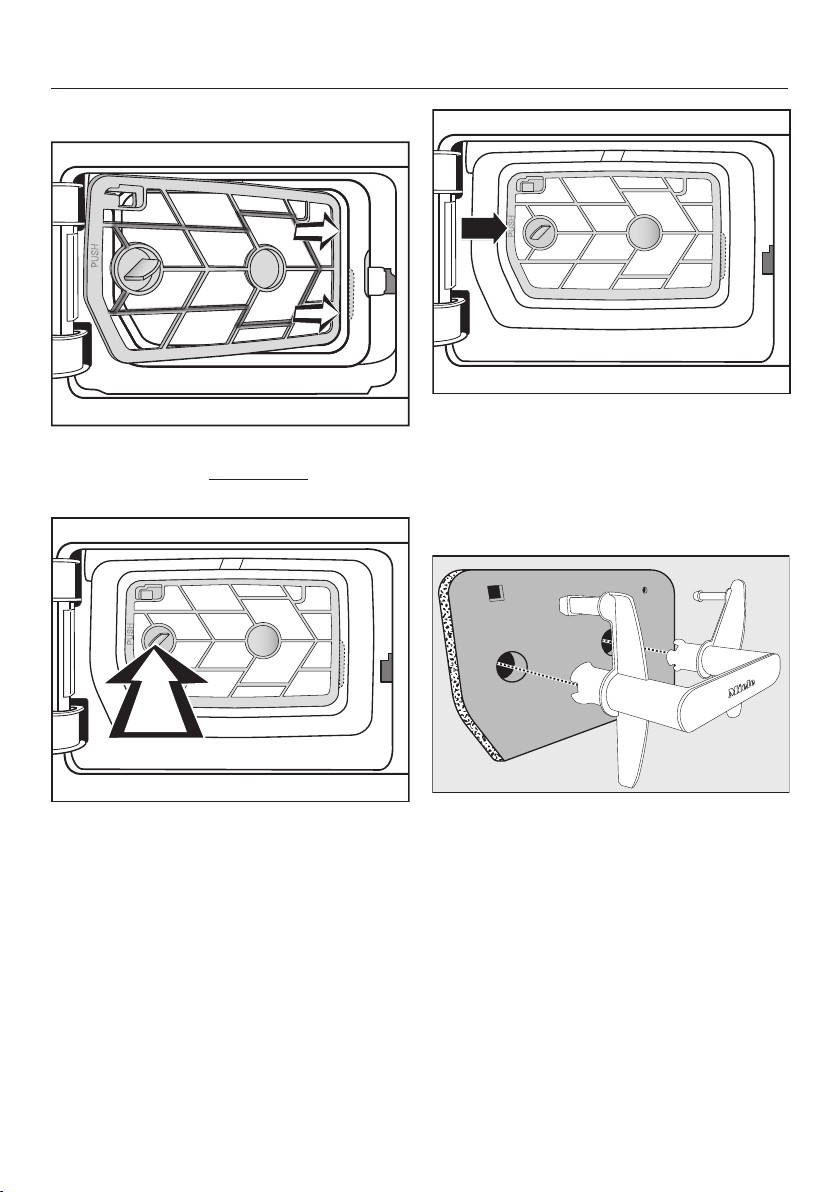
Cleaning and care
66
Refitting the filter insert in the plinth
Use the handle on the right to slide
the filter insert at an angle behind the
edge.
Then press the handle on the left
side until the filter is secured in
position.
Press the frame of the filter insert in
at the position marked PUSH until it
clicks into position.
Refitting the fluff filter in the
plinth
Fit the filter back on the handle. Make
sure it is the correct way round.
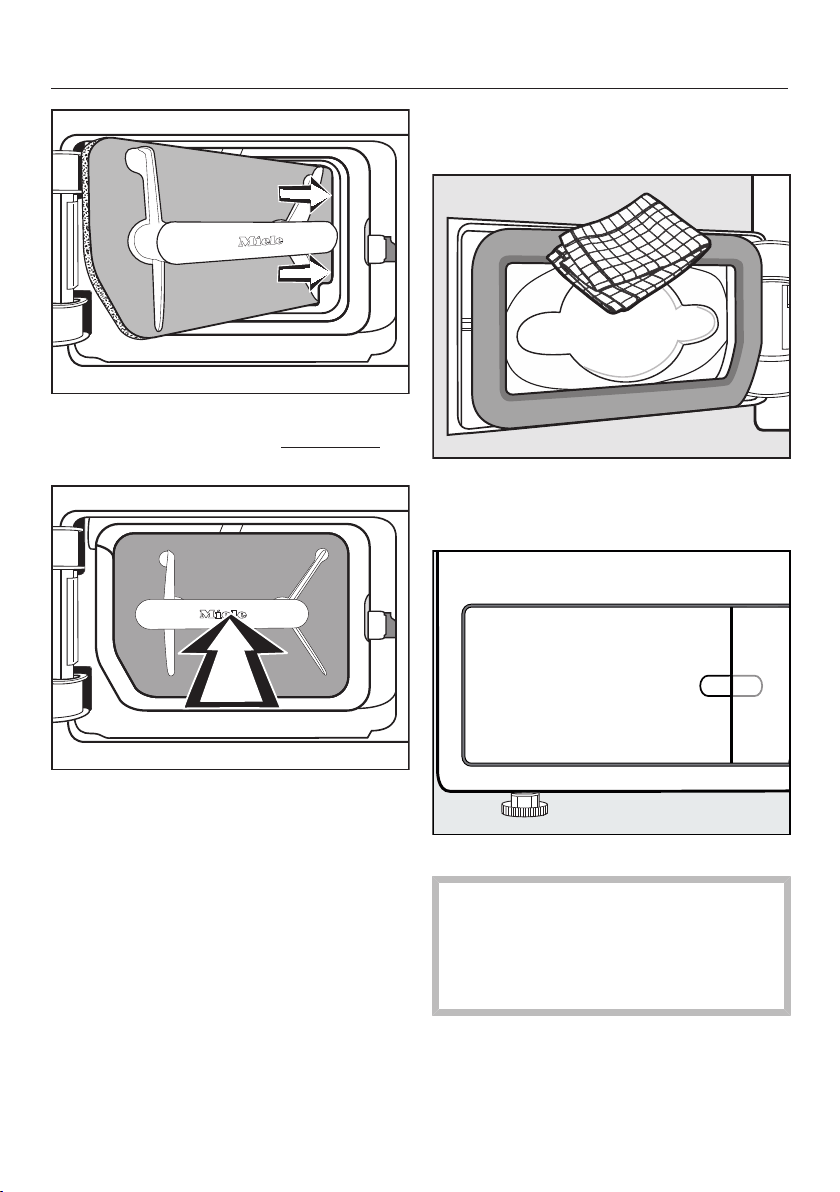
Cleaning and care
67
Use the handle to slide the filter
insert on the right side at an angle
behind the edge.
Then press on the handle until the
fluff filter is secured in position.
Cleaning and closing the fluff
filter flap
Use a damp cloth to remove any fluff.
Make sure that you do not damage
the rubber seal when doing this.
Close the fluff filter flap.
The plinth filter must be inserted and
the fluff filter flap must be closed to
ensure the system is correctly sealed
and that the tumble dryer will
function correctly.
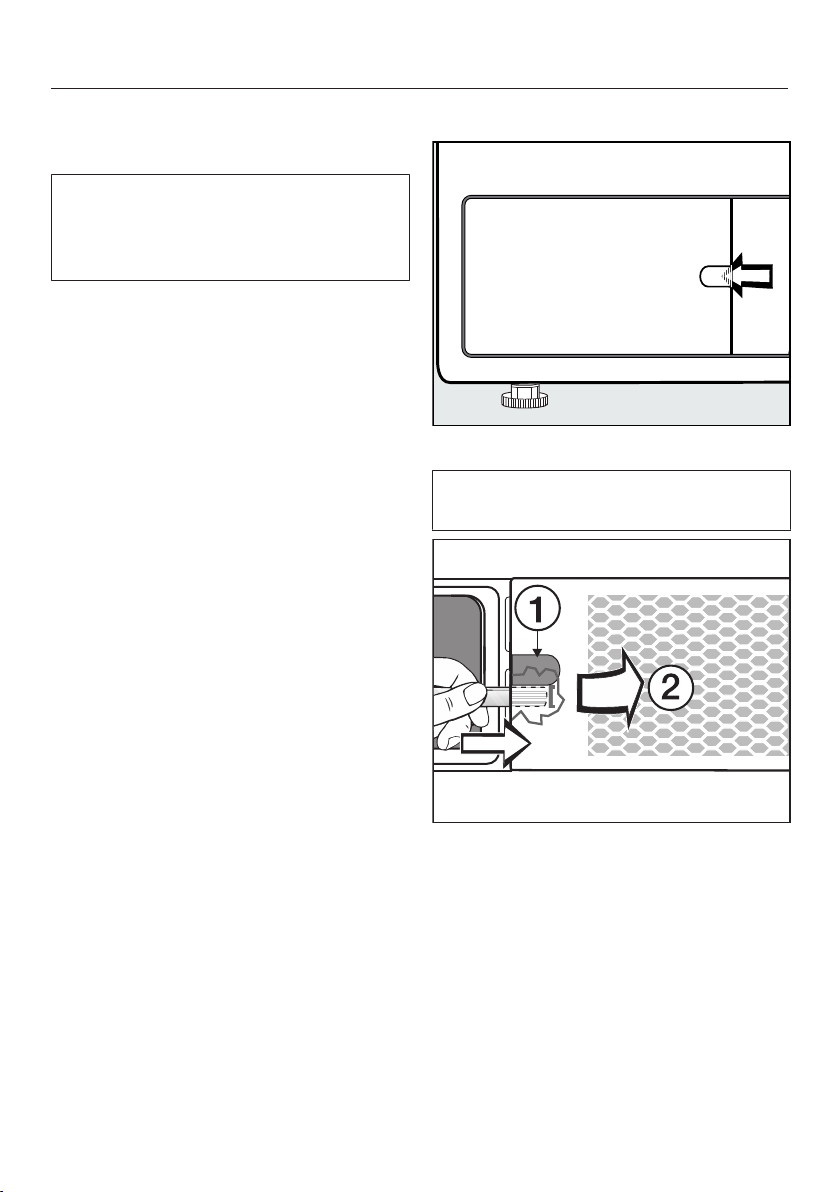
Cleaning and care
68
Cleaning the bottom right
grille/heat exchanger
The cooling fins of the heat exchanger
behind the grille can become blocked
with dust and dirt drawn in from the
surrounding area.
Removing the grille
Open the fluff filter flap.
Open the bottom right grille, e.g. using
a spoon handle.
Insert the spoon handle behind the
grille (under the recess ).
Press and lever the grille gently until it
opens on the left-hand side .
Open the grille from left to right and
pull it off forwards at an angle.
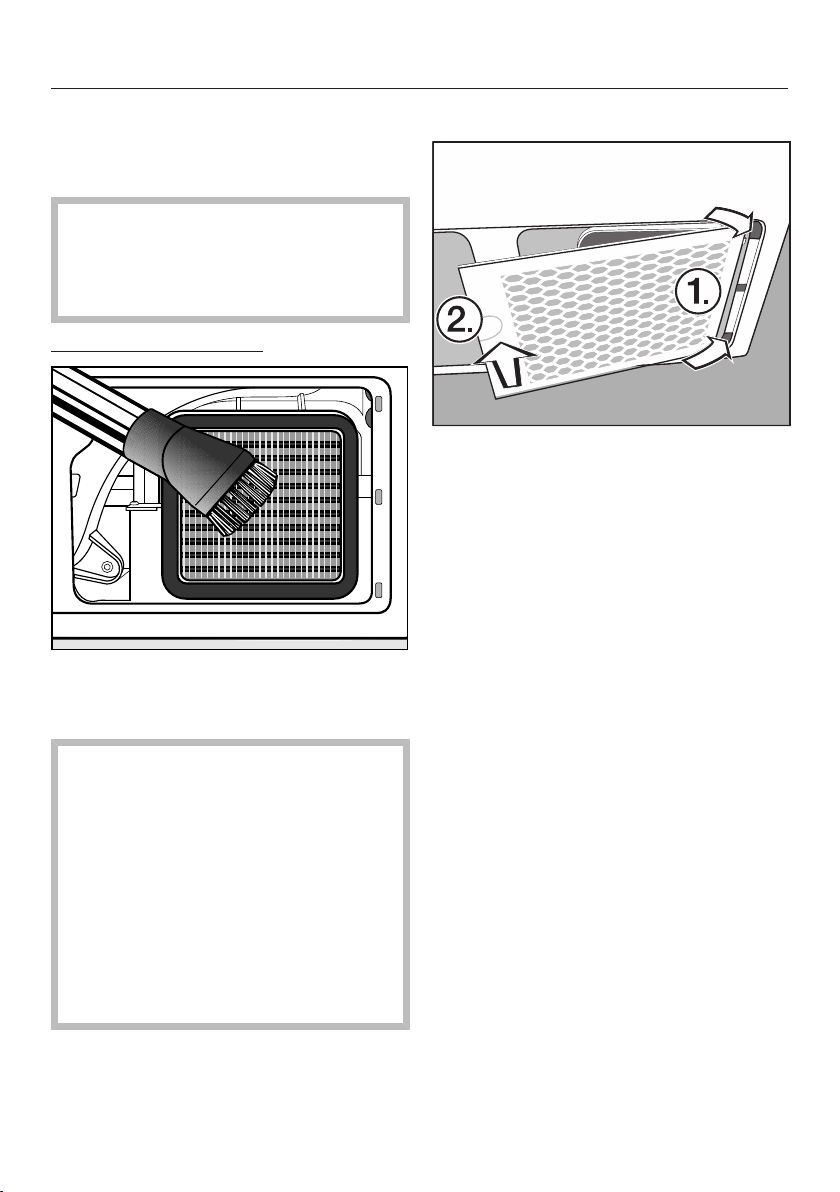
Cleaning and care
69
Cleaning the cooling fins
Check whether the cooling fins are
clogged.
Danger of injury caused by
touching the cooling fins.
You could cut yourself.
Do not touch the cooling fins.
If there is visible soiling:
Carefully vacuum up any visible fluff
or dirt. Use a suction brush or a
narrow crevice nozzle.
Risk of damage if the cooling fins
are cleaned incorrectly.
The cooling fins can be damaged or
distorted. This would impair the
operational performance of the
tumble dryer.
Clean using a vacuum cleaner with a
dusting brush attached. Only pass
the vacuum cleaner dusting brush
over the fins lightly, without applying
any pressure.
Refitting the grille
Insert the grille on the right side.
Press the grille down firmly on the left
side.
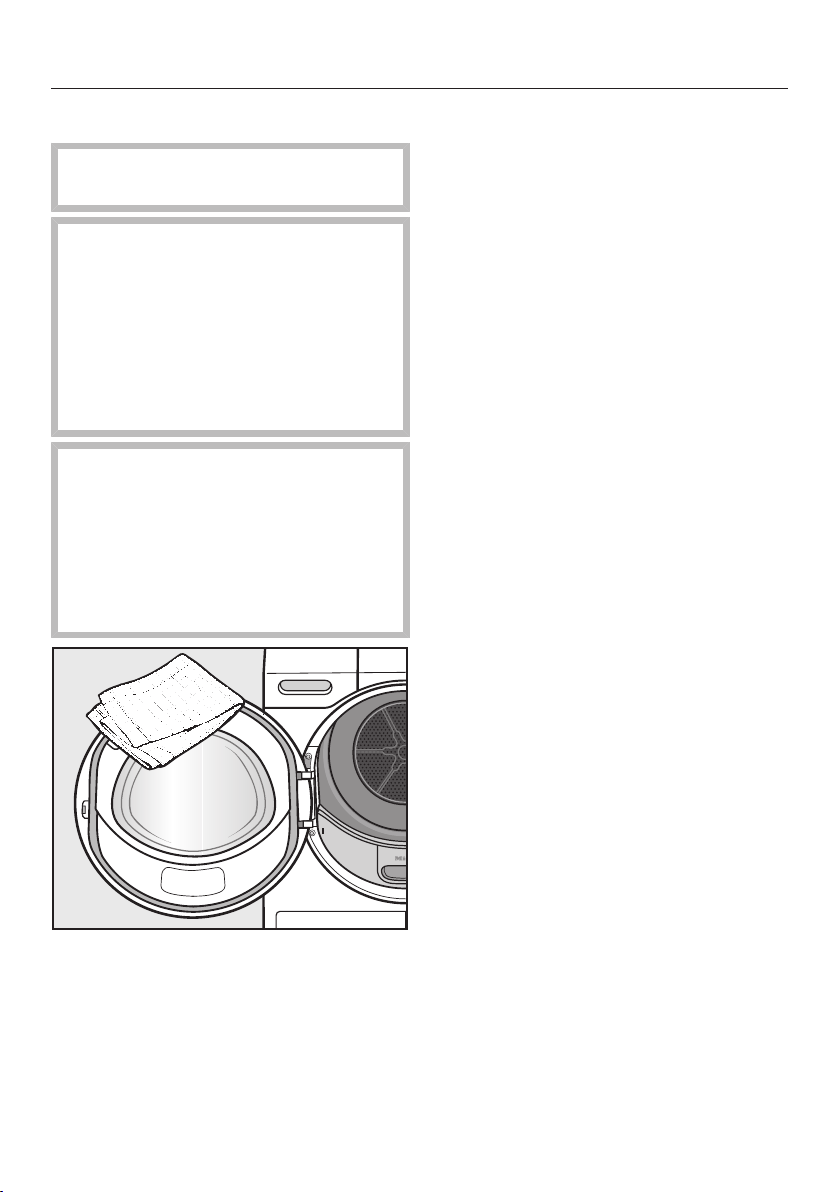
Cleaning and care
70
Cleaning the dryer
Disconnect the dryer from the
electricity supply.
Damage due to the use of
unsuitable care products.
Unsuitable care products can
damage plastic surfaces and other
parts.
Do not use solvents, abrasive
cleaners, glass cleaners or all-
purpose cleaners.
Risk of electric shock due to
water.
If water runs over or into the tumble
dryer, there is a risk of electric shock.
Never spray the tumble dryer with
water. Only ever clean the appliance
with a slightly damp, soft cloth.
Clean the dryer and the seal on the
inside of the door only with a slightly
damp, soft cloth and mild detergent
or soapy water.
Dry all parts with a soft cloth.
The drum and other stainless steel
parts can be cleaned with a suitable
stainless steel cleaner following the
manufacturer's instructions.
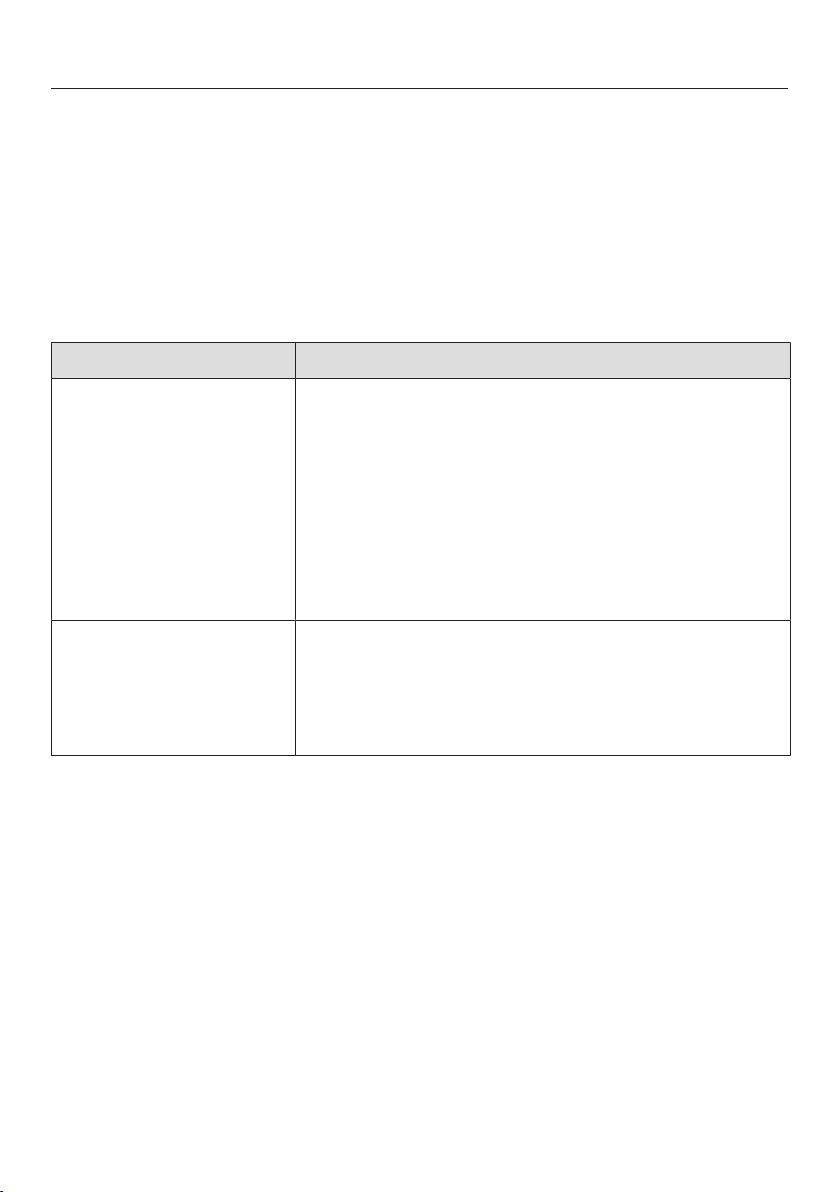
Problem solving guide
71
With the help of the following guide, minor faults in the performance of the
appliance, some of which may result from incorrect operation, can be remedied
without contacting Miele. This will save you time and money because you won't
need a service call.
Please note that a call-out charge will be applied to unnecessary service visits
where the problem could have been rectified as described in these operating
instructions.
Programme cancellation and fault messages in the display
Message Possible cause and remedy
The drum is empty
or the laundry is too
dry
In some programmes, if the drum has been
underloaded or is empty, the programme will be
cancelled. This can also happen if the items are
already dry. This is not a fault or a malfunction.
Open the door and check the laundry.
Add or remove laundry.
Close the door.
Start a drying programme.
Use the Warm air programme to dry individual items.
Obstruction
detected. Untangle
laundry and restart.
The laundry is unevenly distributed or has rolled up.
Open the door and loosen the laundry. Take out
some of the laundry.
Close the door.
Start a drying programme.

Problem solving guide
72
Message Possible cause and remedy
Rinse the fluff filter
and plinth filter.
Check the airways.
You have attempted to dry only a few items of
varying size.
A smaller item has been sucked into the loading area
in the door. It is clogging the holes in the laundry
deflector.
To delete the message: touch the OKsensor.
Open the tumble dryer door.
Remove the item that is blocking the holes.
Always dry small, individual items together with
larger items.
If you are able to exclude all this, the system has
been clogged by fluff or detergent residue.
The system is clogged by fluff or detergent residues.
Clean all fluff filters and airways.
Check whether the fluff filters in the drum loading
area and plinth are free from damage and in good
working order.
If you have removed the plinth filter, also check the
filter insert behind it. Clean the filter insert if
necessary.
If you have removed the filter insert, also check the
heat exchanger behind it. Clean the heat
exchanger if necessary.
Please see "Cleaning and care" for notes on
cleaning. Fluff filters that are damaged, misshapen or
can no longer be cleaned must be replaced with new
ones.
To delete the message: touch the OKsensor.
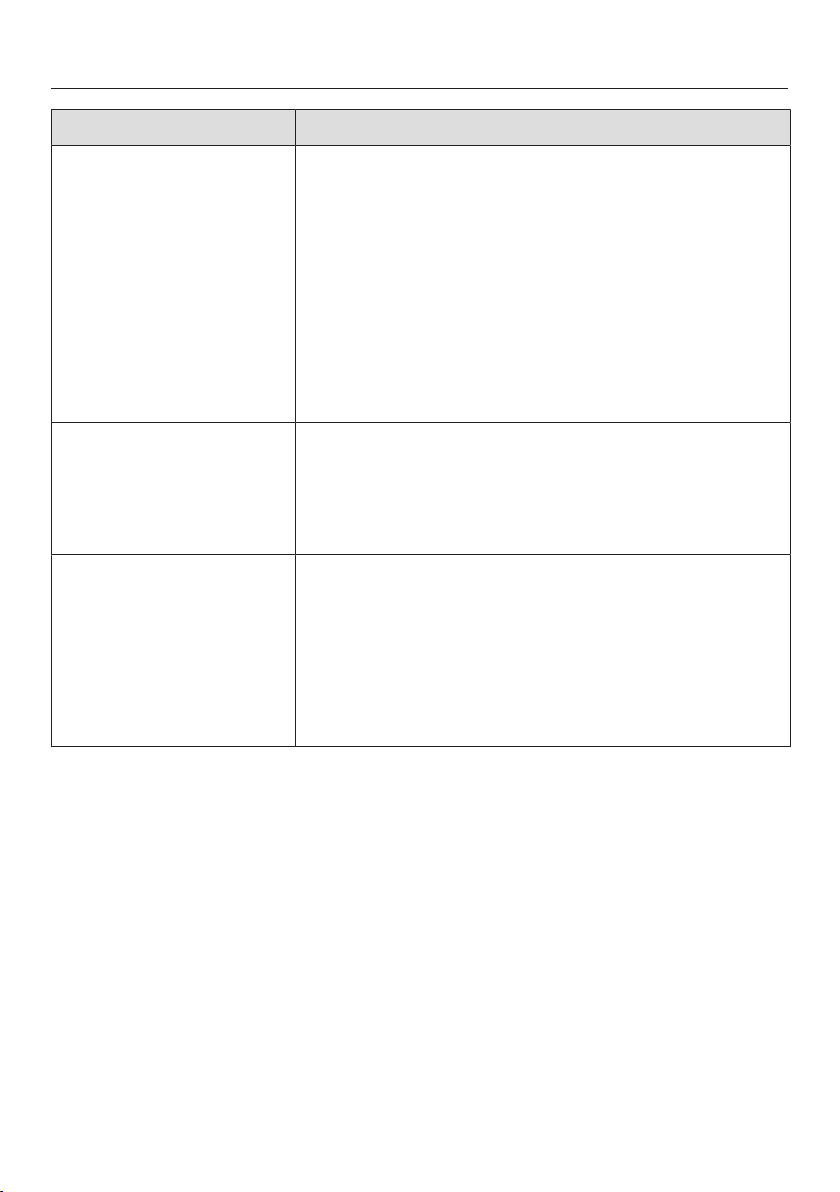
Problem solving guide
73
Message Possible cause and remedy
Rinse the fluff filter
and plinth filter.
Check the airways.
The plinth filter looks clean after thorough cleaning.
However, the programme is cancelled and the fault
message appears again. The reason for this is that
there is still underlying residue that cannot be
removed.
To delete the message: touch the OKsensor.
Replace the plinth filter with a new one.
You can regenerate the removed "old" plinth filter
in the washing machine. Follow the instructions in
"Problem solving guide - Regenerating the plinth
filter".
Check water
drainage
The condensate drain is faulty.
Check if the drain hose is in good working order
and not kinked.
To delete the message: open and close the door
while the dryer is switched on.
Fault F. If restart
fails, call Miele.
There is no obvious cause for the cancellation of the
programme.
Follow the prompt in the display.
Touch the OK sensor.
Start a drying programme.
If the programme terminates again with the same
error message, then there is a fault. Contact Miele.
Problem solving guide
74
Messages in the display
Message Possible cause and remedy
Open bottom right
grille, clean the heat
exchanger
The cooling fins of the heat exchanger behind the
grille may be blocked by dirt particles drawn in from
the surrounding area, and the air passages may be
blocked by fluff.
Clean the heat exchanger. See “Bottom right grille/
heat exchanger” in “Cleaning and care”.
Check and clean the filters in the drum loading
area and in the plinth.
To delete the message: touch the OKsensor.
Clean the fluff filter
and rinse the plinth
filter.
This information is displayed at the end of the
programme if the tumble dryer is not working
correctly or economically.
The fluff filters may be clogged.
Normally, all you have to do is clean the fluff
filters..
Also check the plinth filter and clean it if
necessary.
If you have removed the plinth filter, also check the
filter insert behind it. Clean the filter insert if
necessary.
Please see "Cleaning and care" for notes on
cleaning.
To delete the message: touch the OKsensor.
Plinth filter not fitted.
Please fit it.
The plinth filter has not been inserted.
Check the filter in the plinth.
Removing the filter during a drying programme will
result in the programme being cancelled.
Power outage.
Programme stopped.
There has been an interruption to the power supply.
When power is restored, you need to confirm with
OK.
Touch the Start/Stop sensor.

Problem solving guide
75
Message Possible cause and remedy
Finish/Cooling down There is no fault, but the drying process continues.
The laundry is still being cooled. The programme is
just about to end.
Either remove the laundry and spread it out to cool
down or leave it in the tumble dryer to cool down
during the cooling phase.
Problem solving guide
76
Unsatisfactory drying result
Problem Possible cause and remedy
The laundry is not
sufficiently dry.
The load consisted of different types of fabric.
Finish drying using the Timed drying warm air
programme.
Large items of laundry
have rolled up, causing
a problem. The
individual items of
laundry are still damp.
The laundry could not be untangled in the
programme you selected. Smaller items have rolled
up into one.
Untangle the laundry.
Select the Large items programme.
If the Large items programme does not appear in the
display for selection, you can activate it later.
How to activate a programme subsequently is
described in “Supervisor level – Opening the
Supervisor level” and “Programme selection/
Programme packages”.
Laundry or feather filled
pillows smell after
drying.
The laundry was washed with insufficient detergent.
Feathers are a natural product and may develop
odours when exposed to heat.
Laundry: Wash with sufficient detergent next time.
Pillows: Take out of the tumble dryer and aerate.
Items made of synthetic
fibres are charged with
static electricity after
drying.
Synthetic fibres tend to attract static charge.
Static charge can be reduced by adding fabric
softener to the final rinse in the washing
programme.
Fluff is caused by
tumble drying.
Fluff is principally the result of friction when garments
are being worn and to some extent when they are
being washed. Tumble drying hardly causes any fluff
to form.
Fluff is collected by the fluff filters and fine filters and
can easily be removed.
See “Cleaning and care”.
Problem solving guide
77
The drying process takes a long time.
Problem Possible cause and remedy
The drying process
goes on too long or
even switches off*.
The room in which the tumble dryer is located is too
warm.
Ventilate the room thoroughly.
Detergent residues, hair and fine fluff can clog the
filters.
Clean the fluff filters and the filter in the plinth. See
"Cleaning and care" for an in-depth description.
If you have removed the plinth filter, also check the
filter insert behind it. Clean it if necessary.
If you have removed the filter insert, also check the
heat exchanger behind it. Clean it if necessary.
The cooling fins behind the bottom right grille are
soiled.
Clean as described in "Cleaning and care - Bottom
right grille/heat exchanger".
The laundry is too damp.
Spin the laundry using a higher spin speed in the
washing machine.
The tumble dryer has been overloaded.
Do not exceed the maximum load for the
programme selected.
Metallic components, e.g. zippers, have prevented
the dryer from registering the correct moisture level.
Open any zips next time.
If the problem occurs again, dry these items using
the Timed drying warm air programme.
* Switch the tumble dryer off and on again after a short waiting period before
starting a new programme.
Problem solving guide
78
General problems with the tumble dryer
Problem Possible cause and remedy
You can hear buzzing or
humming operating
noises.
This is not a fault.
These noises are normal and caused by the
operation of the compressor (heat pump).
The interior drum
lighting does not come
on.
The drum lighting switches off automatically when
the door is closed.
To save energy, the drum lighting will switch off
after a few minutes if the door is left open for an
extended period.
The drum lighting will come on when the door is
opened if the tumble dryer is switched on.
The display is in a
different language.
A different language has been selected.
Set the language you want. The flag symbol
serves as a guide.

Problem solving guide
79
Regenerating the plinth filter
You can regenerate one or more dirty
plinth filters in the washing machine. In
this way, a plinth filter can be used
again for a reasonable period of time.
Wash one or more plinth filters
separately without garments. Do not
add laundry detergent.
Useful tip: Select a short wash
programme with a maximum
temperature of 40°C and a maximum
spin speed of 600 rpm.
Select for example the Separate
rinseprogramme.
After washing and spinning, you can
refit the plinth filter. You can continue to
use a regenerated plinth filter as long as
there are no signs of wear.
You can no longer use a regenerated
plinth filter if it shows signs of wear
or deformation.
See the information in “Cleaning and
care - Replacing the plinth filter”.
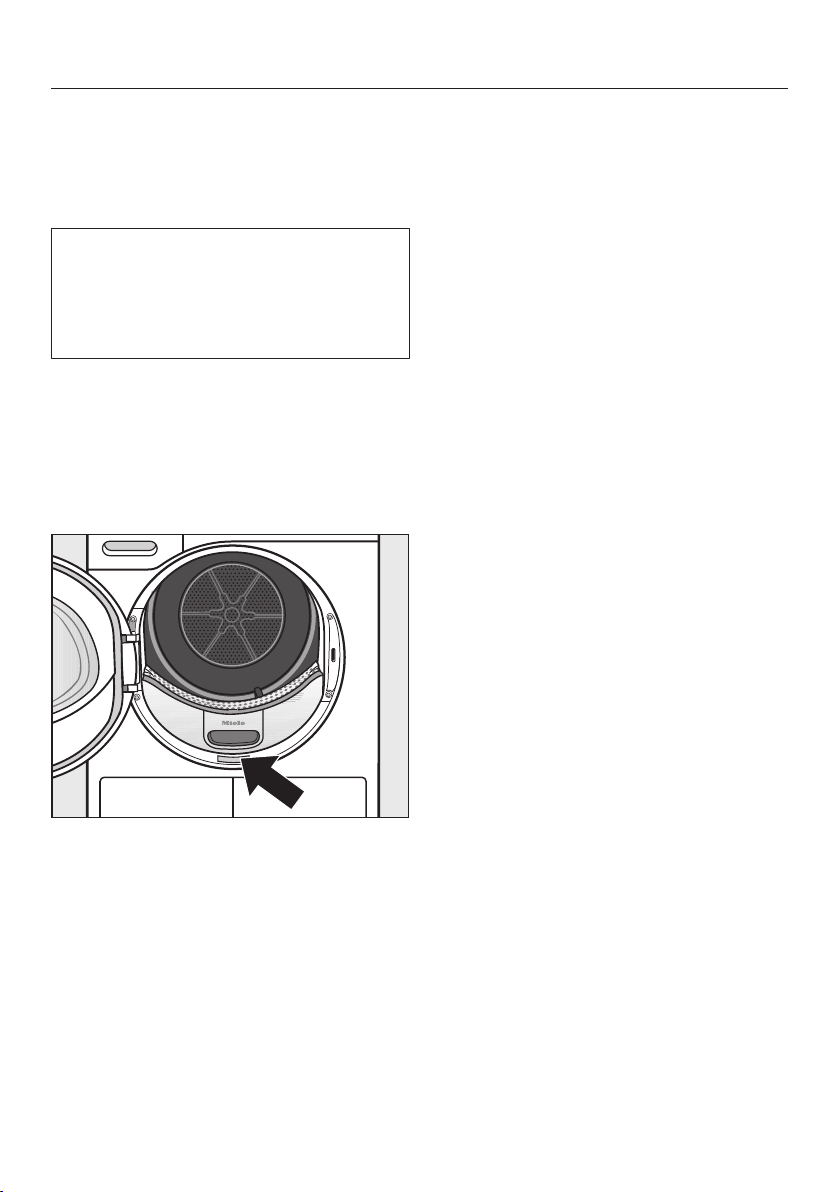
Service
80
Contact in case of fault
In the event of any faults which you
cannot remedy yourself, please contact
Miele Professional Service.
You can book a Miele customer
service call-out online at
www.miele.com.au/professional.
Contact information for Miele can be
found at the end of this booklet.
Please quote the model and serial
number of your appliance when
contacting Miele. This information can
be found on the data plate.
You can see the data plate when you
open the door of your tumble dryer:
Optional accessories
Optional accessories for this tumble
dryer are available from Miele (see
contact details at the back of these
instructions).
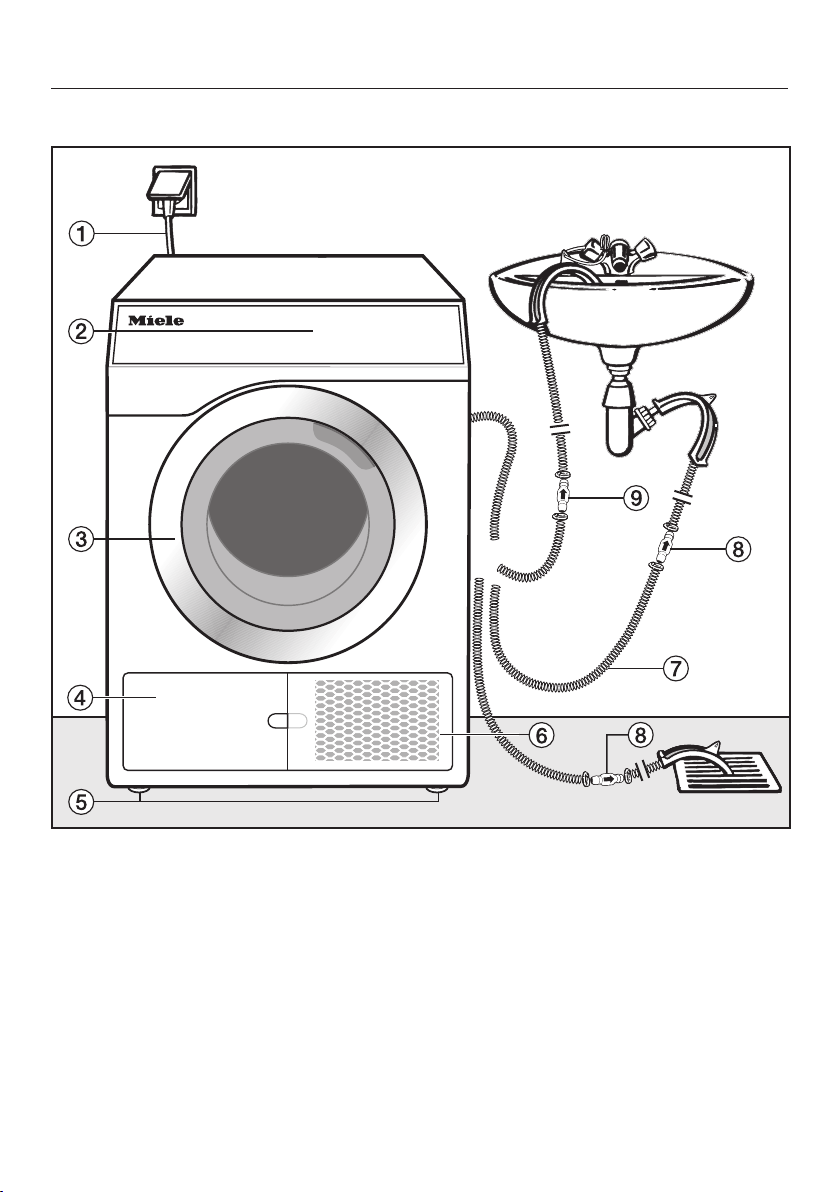
Installation
*INSTALLATION*
81
Front view
a
Mains connection cable
b
Control panel
c
Door
d
Fluff filter flap for the filter in the
plinth
– Open only when a prompt appears
in the display
e
4 height-adjustable screw feet
f
Bottom right grille = air cooling
opening
– Open only when a prompt appears
in the display
g
Drain hose for condensed water
h
Non-return valve, required
i
Non-return valve, recommended
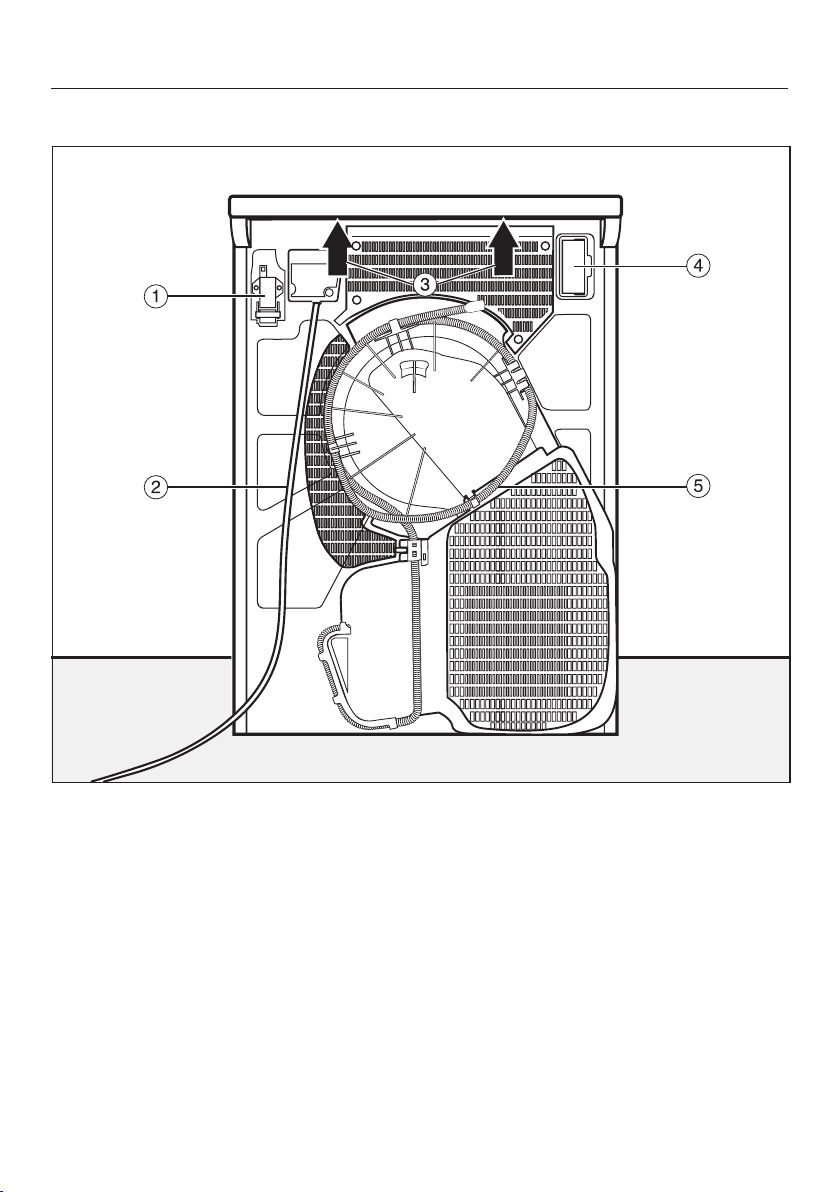
Installation
*INSTALLATION*
82
Rear view
a
Interface for communicating with
external devices
b
Mains connection cable
c
Protruding lid for holding the
appliance during transport
d
Module slot (for external
communication module)
e
Drain hose for condensed water
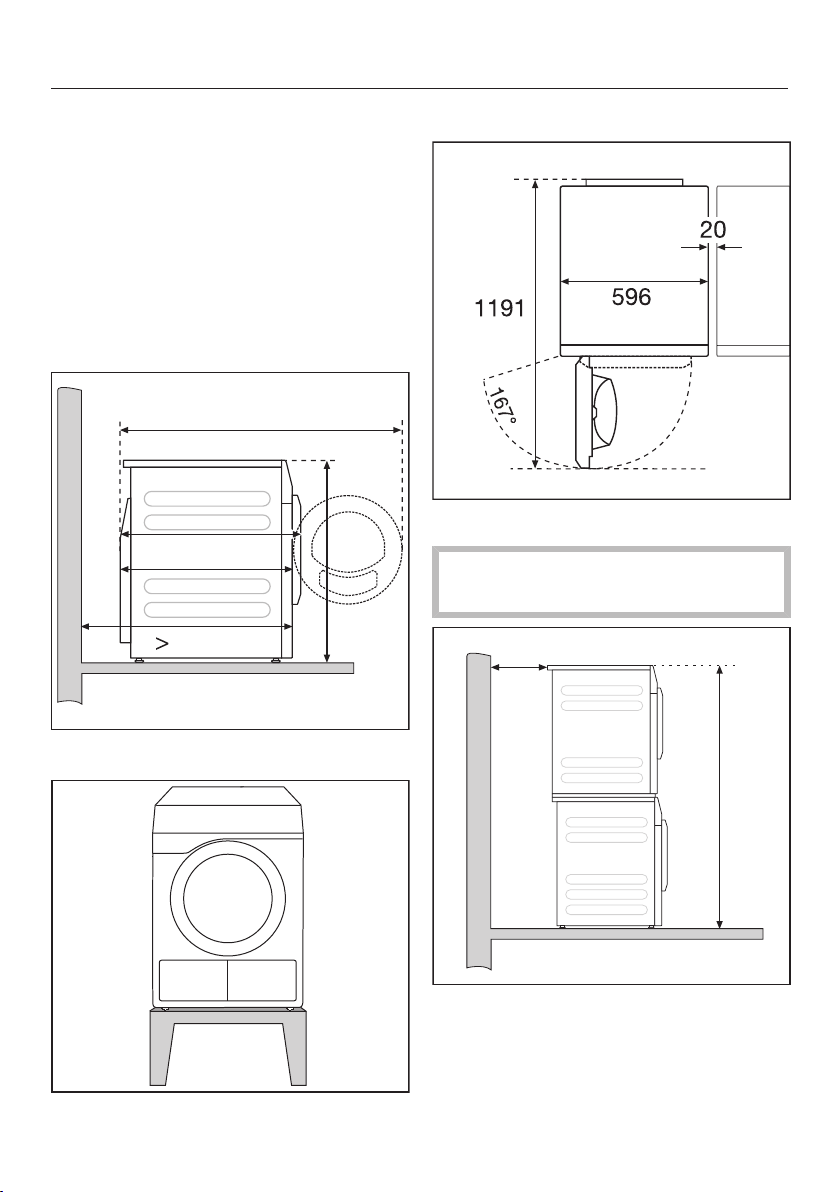
Installation
*INSTALLATION*
83
Installation locations
All measurements are in mm.
The distances between the machine
and the wall are recommended for
making service work easier. The
machine may be pushed against the
wall if installation conditions mean there
is limited space.
Side view
1191
777
850
737
1000
Steel plinth
Steel plinth* (open or closed bases)
View from above
Washer-dryer stack
Installing the washer-dryer stack
on a Miele plinth is not permitted.
min. 300
1702
A stacking kit* is required. This must be
fitted by a Miele authorised service
technician.
* Miele accessory available to order
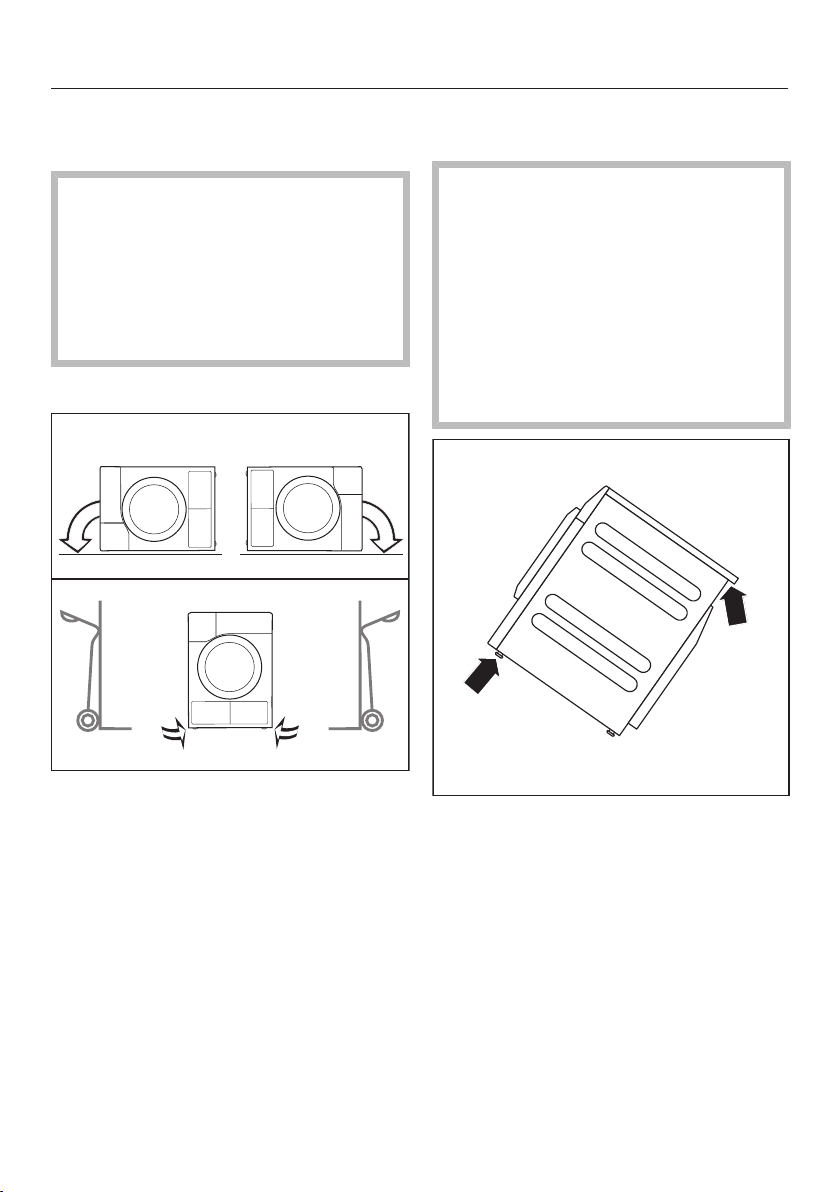
Installation
*INSTALLATION*
84
Transporting the dryer to its
installation site
Risk of damage from incorrect
transport.
If the tumble dryer tips over, there is
a danger of injury to people and
damage to property.
Ensure that the tumble dryer is stable
during transportation.
Transporting the tumble dryer
If the tumble dryer is being
transported horizontally, it must only
be tipped onto its left or right side.
If the tumble dryer is being
transported upright and you are using
a handcart or trolley, you must only
transport it with its left or right side
resting on the handcart or trolley.
Transporting the tumble dryer to its
installation site
Danger of injury due to
unsecured lid.
The rear attachment of the lid may
become brittle due to external
circumstances. There is a danger of
the lid being pulled off when carrying
the appliance.
Before carrying the appliance, check
that the lid is secure where it
protrudes at the back.
Carry the tumble dryer by the front
feet and by the lid where it protrudes
at the back of the appliance.
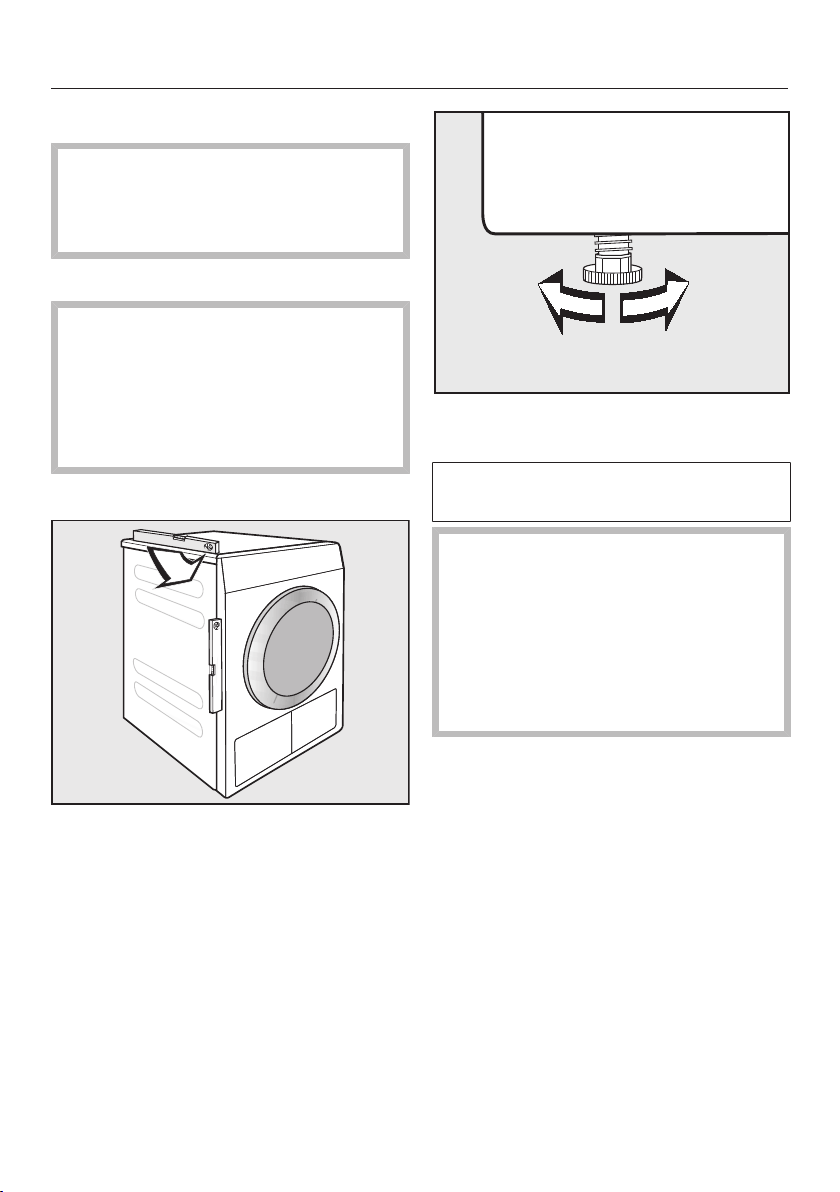
Installation
*INSTALLATION*
85
Installation
Ensure that no lockable door, sliding
door or a door hinged in the opposite
direction is installed in the pivoting
range of the dryer door.
Downtime after installation
Damage caused by switching the
appliance on too soon.
This can damage the heat pump.
After setting up the tumble dryer,
wait for at least one hour before
switching it on.
Levelling the dryer
The appliance must stand perfectly
level on all four feet to ensure safe and
proper operation.
The screw feet can be adjusted to
compensate for unevenness in the floor.
This tumble dryer is not suitable for
building under.
Never block the ventilation slots on
the tumble dryer. Do not block the
gap between the bottom of the
tumble dryer and the floor with plinth
boards, deep pile carpet etc. which
could obstruct the openings. This
would hinder a sufficient flow of air
to the tumble dryer.

Installation
*INSTALLATION*
86
Room ventilation
- Air drawn in for use in the drying
process will be warm when it is
expelled back into the room by the
tumble dryer. You must therefore
ensure that the room is sufficiently
ventilated, particularly if the
appliance is located in a small room.
- Make sure that the room temperature
is not too high. If there are other heat
producing appliances in the room in
which the dryer is located, make sure
the room is well ventilated and switch
the other appliances off, if possible.
Otherwise running times and energy
consumption could be increased.
External control equipment
An optional accessory unit has to be
purchased to set up a connection with
external systems:
- XCI box communication module
(e.gfor peak load control units or
payment systems)
- XCI-AD communication adapter (for
payment systems only)
Payment system
The dryer can be fitted with a payment
system (optional accessory). This must
be connected and programmed by a
Miele Professional Service technician.
Coins/tokens must be removed from
the coin box regularly. Otherwise, the
payment system will become blocked.
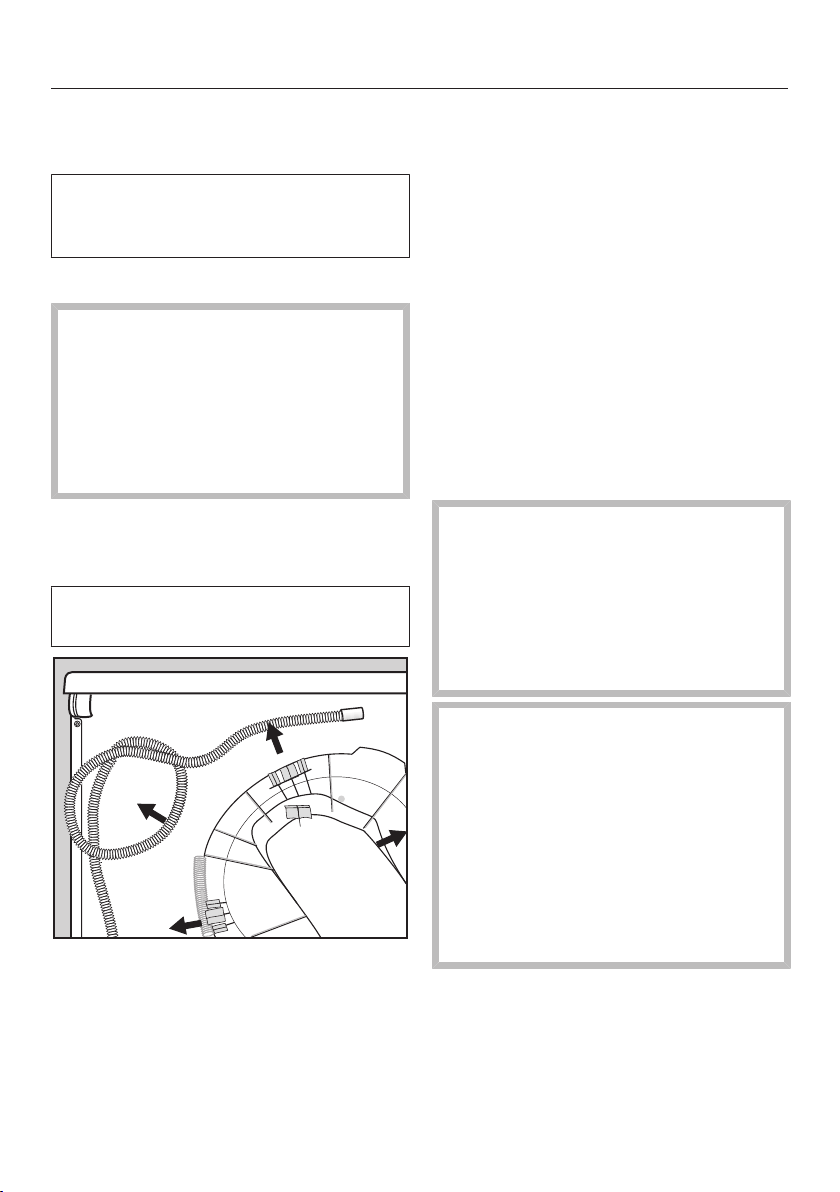
Installation
*INSTALLATION*
87
Drain hose for condensed
water
The condensed water is pumped away
through the drain hose which is
located at the back of the dryer.
Arranging the drain hose
Risk of damage to the drain hose
due to improper use.
The drain hose can be damaged and
may leak.
Do not pull on the drain hose and do
not stretch it or allow it to become
kinked.
Useful tip: Use the bow-shaped guide
to prevent the drain hose from
becoming kinked.
Drain hose length: 1400mm
Delivery head: 1000mm
Pull the drain hose out of the clips.
Drain hose connection options
Useful tip: Follow the warnings
regarding leakage or backflow of water
when selecting one of the following
connection options.
- Directed into a laundry tub or trough
- Connected securely to a floor drain
(gully)
- Connected directly to a laundry tub
or trough drain outlet
- Connection to a drainage system
already in use by another appliance,
e.g. a dishwasher or washing
machine
Risk of water damage.
Should the end of the hose come
loose, overflowing water can cause
damage.
Secure the drain hose carefully (e.g.
by tying it) to make sure it cannot
slip.
Danger of condensed water
backflow.
Water could flow back into the
tumble dryer or be drawn into it. The
tumble dryer will sustain damage
and water will leak out.
The non-return valve should be used
if the end of the hose is immersed in
water or mounted onto other water-
bearing connections.
A non-return valve kit is available as an
optional accessory for external
condensed water connections.
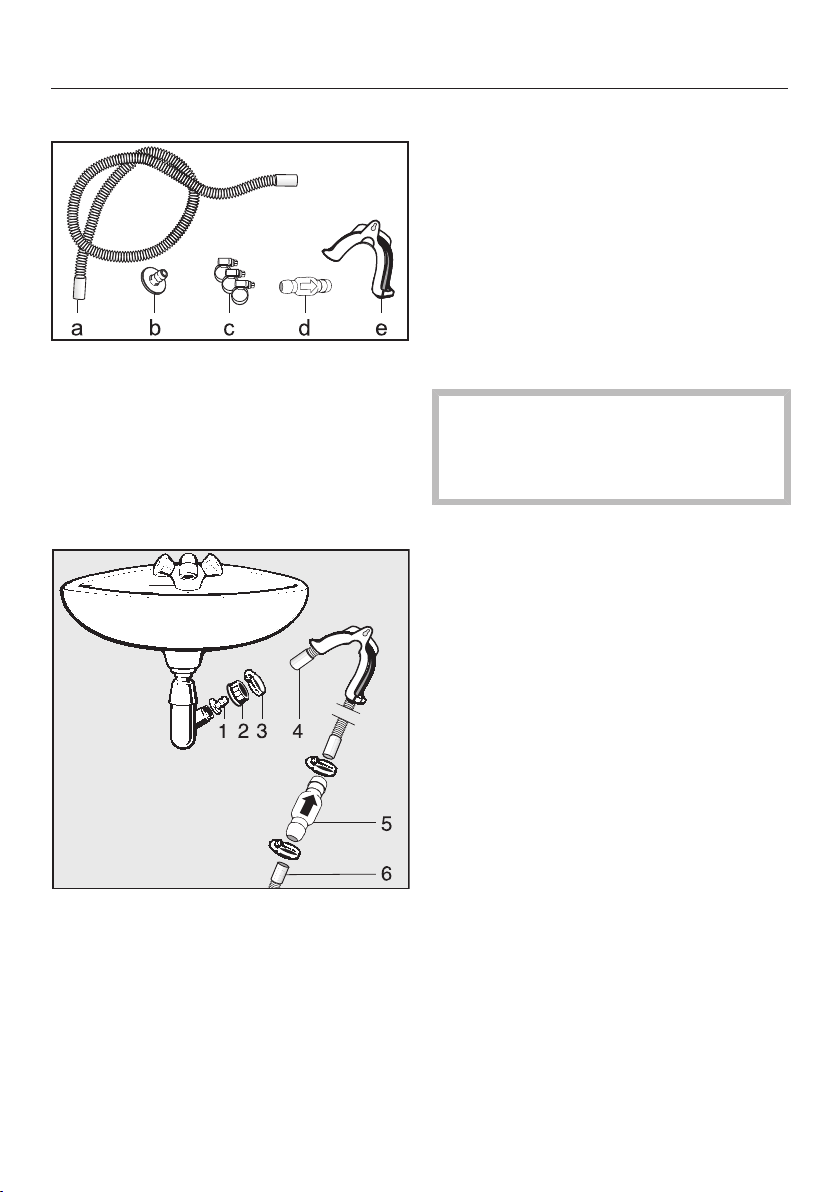
Installation
*INSTALLATION*
88
Drainage accessories, supplied
a. Hose extension
b. Adapter
c. Hose clips
d. Non-return valve
e. Hose holder
Example: Connected directly to a
laundry tub or trough drain outlet
1. Adapter
2. Washbasin nut
3. Hose clip
4. Hose extension
5. Non-return valve and hose clips
6. Tumble dryer drain hose
Fit the adapter 1 to the drain outlet
using the nut 2.
If this nut has a spacer you should
take the spacer out first.
Attach the end of the hose 4 to the
adapter 1.
Use a screwdriver to tighten the hose
clip 3 up close to the nut.
Fit the non-return valve 5 to the
tumble dryer drain hose 6.
The non-return valve 5 has to be
fitted so that the arrow points in the
direction of flow (i.e. towards the
laundry tub).
Secure the non-return valve using the
hose clips.

Installation
*INSTALLATION*
89
Electrical connection
This description applies to tumble
dryers both with and without a mains
plug.
The following applies to tumble dryers
with a mains plug:
- This tumble dryer is supplied with a
mains cable with moulded plug.
- The electrical socket must be easily
accessible so that the tumble dryer
can be disconnected from the
electricity supply.
Damage caused by incorrect
supply voltage.
The data plate indicates the nominal
power consumption and the
appropriate fuse rating.
Compare the specifications on the
data plate with those of the mains
electricity supply.
The dryer must only be connected to a
permanent electrical system that
conforms to the national and local
codes and regulations.
Do not connect the machine via an
extension lead or power board. They do
not guarantee the required safety of the
appliance (e.g. danger of overheating
and fire).
If the appliance is hard wired, an all-
pole disconnection must be provided
on site. The means of disconnection
must be incorporated in the fixed wiring
in accordance the the wiring rules.
When switched off, there must be an
all-pole contact gap of at least 3mm in
the isolator switch (including circuit
breakers, fuses, and relays according to
AS/NZS 3000). This connection must
be carried out by a qualified and
competent electrician.
The plug connector or isolator switch
should be easily accessible at all times.
Risk of electric shock!
If the dryer is disconnected from the
power supply, protective measures
must be taken to ensure that the
point of disconnection cannot
accidentally be switched on again.
Make sure the isolator is lockable or
the point of disconnection is
monitored at all times.
New connections, modifications to the
system, or servicing of the protective
conductor, including determining the
correct fuse rating, must be carried out
by a qualified and competent
electrician, as they are familiar with the
pertinent regulations and the specific
requirements of the electrical utility
company.
The dryer must not be connected to
devices such as timers which would
switch it off automatically.

Technical data
90
Height 850mm
Width 596mm
Width (for appliances with a stainless
steel lid)
605mm
Depth 777mm
Depth with door open 1191mm
Weight 72kg
Drum volume 130 l
Load size 8 kg (weight of dry laundry)
Hose length 1400mm
Length of connection cable 2000mm
Supply voltage See data plate on back of machine
Rated load See data plate on back of machine
Fuse rating See data plate on back of machine
Test certificates awarded See data plate on back of machine
LEDs Class 1
Designation of refrigerant R134a
Refrigerant quantity 0.61kg
Refrigerant global warming potential 1430 kg CO
2
e
Appliance global warming potential 872 kg CO
2
e
Max. floor load during operation 925 N
Product safety standard AS/NZS 60335
A-rated sound emissions L
pA
in
accordance with ENISO11204/11203
<70 dB re 20 μPa
Frequency band 2.4000GHz–2.4835GHz
Maximum transmission power <100mW
Supervisor level
91
Opening the Supervisor level
11:02
Programmes Favourites Supervisor
Help
Touching the sensor takes you to
the Supervisor level.
Access via code
A code is needed to access the
Supervisor level.
Factory default: the code is 000.
Change code
You can change the Supervisor level
access code to protect the tumble
dryer from unauthorised access.
Carefully enter a new code.
You will need to inform Miele if you
have forgotten your new code. Miele
will have to reset the code.
Make a note of your new code and
store it in a safe place.
Demo programme
In showrooms, a Demo programme
can be started with a simulation.
The programme does not start. The
operational sequence is simply a
simulation.
Useful tip: The Demo programme will
only be available if a drying programme
lasting more than 1hour has not been
carried out. After this, the Demo
programme will not be available.
Closing the settings menu
Touch the sensor.
The display will go back to the previous
menu level.
Touch the sensor.
The display will switch to the main
menu.
Controls / Display
Language
The display can be set to appear in
one of several different languages. To
select the language you want, go to
the Languagessubmenu.
You can change the language as
follows:
- Permanently: in the Supervisor level
(=“Supervisor language”).
- Only for the duration of the current
programme: via the sensor.
The supervisor language is displayed
again at the end of the programme.
Supervisor level
92
Language entry
The display can be set to one of
several different user languages. This
setting allows you to determine how
languages can be selected.
You can change the language as
follows:
International
6 languages are available. The
sensor is not active. Note the
settingSet languages.
Language setting
The sensor can be used to select
a language. All languages are available
(factory setting).
You can change the order of the first 4
languages. These slots are allocated to
the most commonly used languages.
Standard language
The user language cannot be changed.
The user language is the same as the
supervisor language. The sensor
is not active.
Set languages
The languages for the setting Language
entryInternationalcan be changed.
6 languages can be selected. All
languages are available.
If you wish to add a new language to
the language menu:
First select the language you want to
replace.
All available languages are displayed.
Select and confirm the language that
is to replace the previous language.
The new language will appear in the
place of the old one.
Display brightness
The brightness of the display can be
altered. The setting depends on the
various lighting conditions in the place
of installation.
- It can be set to one of 10 different
levels.
Supervisor level
93
Time
After selecting the clock format, you
can set the time of day.
Clock format
- Factory setting: 24-hour display
- 12-hour display
- No clock
Set
- The time can be set.
Date
The date can be set after selecting the
date format.
- Date format
The date can be shown starting with
the day, month, or year.
- Date
The date is set.
Volume
The volume for various signal tones
can be changed.
The volume can be changed.
- Finish tone
- Keypad tone
- Welcome tone
- Fault alarm
The acoustic signal that indicates a
fault can be switched off. The volume
cannot be changed for this.
Res. moisture display
In addition to displaying the drying
level, the residual moisture can also
be indicated as a percentage.
- Factory default: without percentages
- With percentages
Visibility parameters
Various parameters are offered/
displayed when a programme is
selected. You can decide which
parameters should not be displayed.
These parameters can then not be
edited during programme selection.
- Residual moisture
- Duration (only timed programmes)
- Load size
- Gentle tumble
- Anti-crease

Supervisor level
94
“Display” off status
The display switches off to save
energy; only the Start/Stopsensor
flashes slowly. This can be changed.
Changing this setting leads to increased
energy consumption.
- Off
Not switching off
- On (10 min.) Not curr.prog.
The display will remain on while the
programme is running but will go out
10minutes after the end of the
programme.
- Logo (10 min.) Not curr.prog.
The display will remain on while the
programme is running but the logo
will light up 10minutes after the end
of the programme.
- Factory setting: On after 10 min.
The display switches off after
10minutes.
- On (30 min.) Not curr.prog.
The display will remain on while the
programme is running but will go out
30minutes after the end of the
programme.
- Logo (30 min.) Not curr.prog.
The display will remain on while the
programme is running but the logo
lights up 30minutes after the end of
the programme.
- On after 30 min.
The display will go out after
30minutes.
“Machine” off status
In order to save energy, the tumble
dryer will switch off automatically after
the end of the programme or if no
further selection is made. This can be
changed.
Changing this setting leads to increased
energy consumption.
- Not switching off
- Factory setting: Switching off after
15minutes
- Switching off after 20 minutes
- Switching off after 30 minutes
Delay start
The delay start (Timer) can be
activated or deactivated.
- Factory setting: Off
- On
SmartStart (only available in selected
countries)
The function of Delay start changes
when the SmartGrid setting is
activated. The period of time in which
the drying programme will start
automatically is then shown in the
display: SmartStart by, SmartStart in,
or SmartFinish by.
The programme is started via an
external signal.
The time period can be defined up to
24hours. During this period, the tumble
dryer waits for an external signal. If no
signal is sent during the defined period,
Supervisor level
95
the tumble dryer starts the drying
programme once the defined period of
time has elapsed.
Memory
The tumble dryer saves the settings
that were last selected for a drying
programme (drying level and/or Extras,
or the duration for some programmes).
- Factory setting: Off
- On
Temperature unit
You can select the unit for the
temperature display.
- Factory setting: °C / Celsius
- °F / Fahrenheit
Weight unit
You can decide whether load
quantities are displayed in “kg” or “lb”.
- Factory setting: kg
- lb
Logo
You can choose whether the “Miele
Professional” logo or your own logo
appears in the display.
For the Controlssetting, the Launderette
Logo, Launderette Logo int. time, or the
Launderette Logo ext. time option must be
selected.
- Miele Professional logo
- Customer logo
- Marine logo
Supervisor code
You can change the Supervisor level
access code to protect the tumble
dryer from unauthorised access.
Enter the existing code.
Then enter your new code.
Supervisor level
96
Programme selection
Controls
You can select whether the tumble
dryer is operated as a “laundrette”
machine. Shortcuts are the easiest
way to operate the machine.
Operators cannot change the preset
programmes.
Useful tip: Start by configuring all
necessary settings and changes to the
tumble dryer before adjusting any of the
options below.
Caution: When activating any of
these options, the Supervisor level
will no longer be available.
You will no longer be able to access
the Supervisor level via the display.
Please follow the instructions below
if you wish to change any other
settings.
Opening the Supervisor level (laundrette
mode)
Switch the tumble dryer on and open
the dryer door.
Touch the Start/Stopsensor and
hold it down while carrying out
steps–.
Close the tumble dryer door.
Wait until the Start/Stopsensor,
which will now be flashing quickly,
lights up constantly...
...then release the Start/
Stopsensor.
- Standard
Factory setting: All (selected)
programmes are available.
- Launderette, basic
12 programmes are available.
Under Favourite programmes, you
can set which or how many
programmes can be selected/
modified.
- Launderette Logo
12 programmes are available.
Under Favourite programmes, you
can set which or how many
programmes can be selected/
modified.
The first 3 programmes can be
selected directly. The remaining
programmes are selected via another
list.
- Launderette Logo ext. time
4 timed programmes* with different
temperature levels are time-
controlled via an external payment
system. The maximum laundry
weight is 8kg.
The set value indicates the running
time and cannot be modified by the
user.
This option is only available with an
external payment system.
* The maximum running time is
specified during initial
commissioning.

Supervisor level
97
- Launderette Logo int. time
4 timed programmes* with different
temperature levels are time-
controlled via the tumble dryer
electronics. The maximum laundry
weight is 8kg.
The set value indicates the maximum
running time and can be modified by
the user.
* The maximum running time is
specified during initial
commissioning.
- External prog. selection
A communication module can be
used to select the programme from
an external terminal.
Programme packages
This allows you to specify the scope
of the tumble dryer programme. You
can select all of the programmes or
individual programmes from the
relevant programme packages.
The programme packages are
described in detail in the “Programme
chart”.

Supervisor level
98
Favourite programmes
After switching on, you can also select
a programme via: Favourites.
12 programmes can be stored as
favourite programmes based on your
own priorities and requirements.
These favourite programmes will also
be made available in the control options
- Launderette Logo
- Launderette, basic
You can specify the control options
under Controls.
Useful tip: You can assign a different
colour to each programme. In this case,
the Prog. colour allocationsetting must be
set to On.
Changing Favourite programmes
Select the programme you wish to
change or replace.
Confirm the programme or the setting
to be changed.
Another menu opens, enabling you to
select a new programme or change the
parameters.
Confirm with the Save sensor.
Your selection is now active.
Reducing the number of Favourite
programmes
You can reduce the number of Favourite
programmes by “deactivating” each
one individually.
Select the programme you wish to
deactivate.
Confirm the programme.
Select <empty> from the list instead of
a programme.
The selection in theFavourites and
the selection in the Launderette, basic
and Launderette Logo control option is
reduced.
Once a programme has been
deactivated,<empty> is displayed in
its place. You can add a programme
again at any time.
Changing the sequence of Favourite
programmes
You can change the sequence of
Favourite programmes by moving the
programmes around.
Touch the programme that you wish
to move.
An orange border appears around the
selected programme.
Touch the programme with your
finger and keep your finger pressed
down.
Drag the programme to the required
position.

Supervisor level
99
Special programmes
You can put together 5 special
residual moisture or time-controlled
programmes and assign your own
programme names.
First, enter the programme name.
Select the special programme you
want to change.
The Save asmenu opens.
Use the letters and symbols below
the line to enter the name.
Touch the Savesensor.
You can now enter the parameters for
aRes. moisture programmeorTimed
drying.
The 5 special programmes are pre-
programmed at the factory, see
“Supervisor level”. You can change
these special programmes.
The special programmes are added to
the programme packages. Enter the
names and settings of your special
programmes into the “Special
programmes” table at the end of the
“Programme chart”.
Res. moisture programme
- Final residual moisture:
-6%(dry) – 40%(damp)
- Extra drying time:
0 – 60minutes
- Temperature (Process air):
cold – 70°C
- Drum rotation main direction:
0 - 600 seconds
- Drum reversal:
0 - 600 seconds
- Holding phase
– Holding time:
0 – 60minutes
– Holding temperature (Process air):
cold – 70°C
- Cooling down temp. (Process air):
40 – 55°C
- Anti-crease
– Drum rotation main direction:
0 - 500 seconds
– Drum reversal:
0 - 500 seconds
– Pause:
100 - 3000 seconds
Timed drying
- Running time:
1 – 120minutes
- Temperature (Process air):
cold – 70°C
- Drum rotation main direction:
0 - 600 seconds
- Drum reversal:
0 - 600 seconds
- Cooling down temp. (Process air):
40 – 55°C
- Anti-crease
– Drum rotation main direction:
0 - 500 seconds
– Drum reversal:
0 - 500 seconds
– Pause:
100 - 3000 seconds

Supervisor level
100
Sort programmes
Programmes can be moved within the
programme list and in the Favourites
list.
- Factory setting: Off
- On
Select the “On” option.
Exit Supervisor level.
Select Programmes.
Touch the programme that you wish
to move.
An orange border appears around the
selected programme.
Touch the programme with your
finger and keep your finger pressed
down.
Drag the programme to the required
position.
Prog. colour allocation
You can assign a specific colour to a
favourite programme. In the list of
favourites, each favourite programme
is given a coloured frame, which can
be selected.
- Factory setting: Off
- On
Supervisor level
101
Process technology
Anti-crease
At the end of the programme, the
drum will continue to rotate at intervals
if the laundry is not removed
immediately.
Changing this setting leads to increased
energy consumption.
The setting can be switched off or
set to a time between 1and 12hours.
Factory setting: Off
Drying levels
Changing this setting leads to increased
energy consumption.
You can alter the drying levels for the
Cottons, Minimum iron, and Automatic
plus programmes.
They can be set to one of 7 different
levels.
Factory setting: Normal
The Machine irondrying level in the
Cottonsprogramme can be
individually adapted.
You can change the residual moisture in
this programme to one of 11 levels from
16% (drier) to 26% (damper).
Factory setting: 20%
Further cooling
Before the end of the programme, the
temperature of the dried laundry is
monitored and the cooling phase at
the end of the programme is extended
if necessary.
Changing this setting leads to increased
energy consumption.
- Factory setting: Off
- On
Cooling down temperature
The laundry will be cooled down
automatically before the end of the
programme. The automatic cooling-
down phase which takes place before
the end of a programme can be set at
a cooler level for all programmes. This
means that the cooling phase is
extended.
Changing this setting leads to increased
energy consumption.
The setting can be changed from 40°C–
55°C.
Factory setting: 55°C

Supervisor level
102
Service
Clean out the airways
The tumble dryer's electronics
calculate the degree at which fluff or
detergent residue in the fluff filters and
air ducts are impairing performance. A
message to check them appears. You
can decide at what level of fluff this
reminder should be displayed.
This prompt, which you can configure,
is displayed: Clean the fluff filter and rinse
the plinth filter.
- Off
The reminder does not appear.
However, if there is a very severe
blockage in the ducting, the
programme will be cancelled and the
reminder will appear in the display
regardless of this option.
- Heavy
The reminder only appears when
there is a heavy build-up of fluff.
- Factory setting: Normal
- Sensitive
The reminder appears when there is
only a small build-up of fluff.
Service interval
The tumble dryer shows a custom
message at a selected interval to
prompt you to undertake specific
maintenance tasks.
3 different messages can be created:
1/2/3. Each message is created in the
language and alphabet of the current
supervisor language.
Your message is displayed at the end of
the programme and can be
acknowledged with OK. The same
message appears at the end of the next
programme.
Settings
This setting allows you to determine the
interval (by hours or date) at which the
message appears.
- Factory setting: Off
- by time
You can select a time interval
between 1-9999 hours.
- by date
You can enter a date.
Message text
Enter your individual message text for
your planned maintenance work. You
can edit one, two, or all three of the
1/2/3 messages.
Reset display
The message will appear until the
display is permanently reset. The
message then only appears again when
the next interval is reached.

Supervisor level
103
External applications
Peak load signal
External hardware is connected via the
Miele XCI box.
The peak-load negotiation function
enables the tumble dryer to be
connected to an energy management
system. When a signal is registered,
the tumble dryer's heater is switched
off for a short period or the appliance
is prevented from being switched on.
The tumble dryer may only be
operated with a peak-load system if
this system is connected to the tumble
dryer via the Miele XCI Box.
- Factory setting: No function
- Peak load with 230 V
- Peak load with 0 V
- COM module
Peak load prevention
With this function, the application of a
hygiene programme is not amended
when a peak load signal is in place.
The heater stays switched on.
- Factory setting: Off
- On
COM module selection
This tumble dryer is equipped with an
integrated Wi-Fi module. However, the
tumble dryer can also be equipped
with an external module.
- Off
- Internal module (factory default)
The internal Wi-Fi module is used.
- External module
An XKMmodule or RS232module is
inserted into the module slot.
Availability of Miele digital products
The ability of Miele digital products
depends on the availability of the
services in your country.
The different services are not available
in all countries.
For information about availability,
please visit www.miele.com.

Supervisor level
104
Wi-Fi / LAN
Control the networking of your tumble
dryer.
- Setup
This message only appears if the
tumble dryer has not yet been
connected to a Wi-Fi network.
- Deactivate (visible when the network
is activated)
The network remains set up; the Wi-
Fi function is switched off.
- Activate (visible when the network is
deactivated)
The Wi-Fi function is reactivated.
- Connection status (visible when the
network is activated)
The following values are displayed:
– the quality of Wi-Fi reception
– the network name
– the IP address
- Reset (visible if set up)
Resets the Wi-Fi login (network) to
immediately re-establish a new
connection.
- Reset (visible if set up)
The network is no longer set up. To
use the network again, a new
connection must be established.
– The Wi-Fi is switched off.
– The Wi-Fi connection will be reset
to the factory default setting.
Wi-Fi setup
There are 2 possible connection
methods.
Via WPS
Activate the WPS function on your
router within 2minutes.
Useful tip: If the connection has not
been set up when the timeout has
finished counting down, repeat the
process.
Via Soft AP
Activate the function with the Miele
App on your smart device within
10minutes.
Useful tip: The App will guide you
through the remaining steps.

Supervisor level
105
Network time
The date and time can be
synchronised via the network.
- Off
The date and time are not
synchronised via the network.
- as a master
The machines are in a network but
are not connected to the internet.
One machine is declared as the
master and sends data to the slave
devices.
- as a slave
The machines are in a network with
internet connection. All machines are
configured as slaves. Data is
synchronised over the internet.
Remote
Programmes are selected on an
external terminal.
- Factory setting: On
- Off
Supervisor level
106
Remote Update
(only available in selected countries)
The RemoteUpdate function is used for
updating the software in your tumble
dryer.
RemoteUpdate is activated at the
factory.
If you do not install a RemoteUpdate,
you can continue to use your tumble
dryer in the usual way. However, Miele
recommends installing remote updates.
Activation
The RemoteUpdate menu option is
only displayed and can only be
selected if you have added your
tumble dryer to your Wi-Fi network.
Miele’s RemoteUpdate function can
only be used if the tumble dryer is
connected to a Wi-Fi network and you
have an account in the Miele
Professional App. The tumble dryer
must be registered in the App.
See the Miele Professional App for
terms and conditions of use.
Some software updates can only be
carried out by a Miele service
technician.
Running a RemoteUpdate
If a RemoteUpdate is available for your
tumble dryer, it will be displayed
automatically when the Supervisor level
is open.
You can choose to start the
RemoteUpdate immediately or wait until
later. If you select “Start later”, the
prompt to run the RemoteUpdate will
be displayed again the next time you
switch on the dryer.
The RemoteUpdate can take several
minutes.
Please note the following information
about the RemoteUpdate function:
- You will only receive a message when
a RemoteUpdate is available.
- Once a RemoteUpdate has been
installed, it cannot be undone.
- Do not switch off the tumble dryer
during a RemoteUpdate. Otherwise,
the RemoteUpdate will be aborted
and will not be installed.
SmartGrid
(only available in selected countries)
The SmartGrid setting is only visible if a
network has been set up and
activated. You can use this function to
integrate your tumble dryer into
building energy management systems.

Supervisor level
107
Machine parameters
Legal information
Open source licences
You can view information at this point.
Copyright and licences for operating
and control software
For the purpose of operating and
controlling the appliance, Miele uses
proprietary or third-party software that
is not covered by open source licensing
terms. These items of software/software
components are protected by
copyright. The copyright powers of
Miele and third parties must be
respected.
In addition, the appliance contains
software components which are
distributed under open source licensing
terms. You can access these open
source components along with the
associated copyright notices, copies of
the valid licensing terms and any further
information in the appliance under the
menu option Settings| Appliance
parameters| Legal information| Open
source licences. The liability and warranty
arrangements for the open source
licences displayed at this location only
apply in relation to the respective rights
holders.
Payment system
The XCI-AD or XCI box accessory unit
is required to connect a payment
system.
Settings for the payment system
If you wish to change the settings later,
please contact Miele.
You would like to connect a payment
system.
- No payment system
The next settings are skipped and
initial commissioning can be
completed.
- Programme operation
The machine is operated using a
payment system. The user purchases
a wash programme.
- Time operation
The tumble dryer is coin-operated
using a time meter. The user
purchases a time-controlled
programme.
- Timed operation with pulse counter
For payment systems where the
usage time is increased each time a
coin is inserted.
- COM module
The machine is operated by a central
control unit.

Supervisor level
108
F-back signal to pay system
Setting the feedback signal for the
payment system.
- Factory setting: Off
- At the end of the programme
The feedback signal is sent at the
end of the programme.
- Release of the start button
The feedback signal is sent when the
start button is released.
- Start and end of the programme
The feedback signal is sent at the
start and the end of the programme.
- During the running programme
The feedback signal is sent
continuously from the start until the
end of the programme.
- Process air temperature
The feedback signal is sent
dependent on the temperature if the
temperature of the process air is
equal to or higher than the set
temperature.
Payment system lock
To avoid tampering, a programme lock
can be set up in programme
operation. If the lock is applied, the
programme is interrupted and
payment credit is lost as soon as the
door is opened.
To offer the possibility to add laundry,
the time when the lock activates can be
adjusted.
- Factory setting: Off
- As soon as the programme starts
- 1-5 minutes after the start of the
programme
Clear paid signal
The “Paid” signal in coin mode can be
applied until the end of the
programme or discarded after
5minutes if the programme has not
been started.
- Factory setting: Off
- On
Supervisor level
109
Debounce time
In coin mode, the debounce time for
the minimum payment signal that
must be applied can be adjusted.
- Factory default: Short
For payment systems where the
falling coin generates the paid pulse.
- Long
For central control units on a 230V
basis.
Pay system override time
Setting the transition signal for the
payment system. Security time margin
to prevent the payment system being
tampered with.
The override time can be set or
switched off in increments of one
minute from 30minutes up to 4hours.
If the programme does not end within
the transition period, the setting in the
payment system is reset. The
programme is cancelled.
Factory setting: 3hours
Duration Cool air
The programme running time can be
adjusted.
A time of between 10minutes and
2hours can be set in five-minute
intervals.
Factory setting: 2hours
Duration Warm air
The programme running time can be
adjusted.
A time of between 20minutes and
2hours can be set in five-minute
intervals.
Factory setting: 2hours
FOC programmes
In coin mode, you can decide whether
the Timed drying cool air programme
can be used for free.
- Factory setting: Off
- On


Miele Australia Pty. Ltd.
ACN 005 635 398
ABN 96 005 635 398
Level 4, 141 Camberwell Road
Hawthorn East, VIC 3123
Telephone: 1300 731 411
Melbourne:
www.miele.com.au/professional
Miele New Zealand Limited
IRD 98 463 631
8 College Hill
Freemans Bay
Auckland 1011
New Zealand
Telephone:
www.miele.com.au/professional
0800 4 MIELE
(0800 464 353)
Miele Global Headquarters: Miele & Cie. KG
Carl-Miele-Straße 29, 33332 Gütersloh, Germany

M.-Nr. 12 127 350 / 00en-AU, NZ
PDR 908 HP