Makita SK700D / SK700GD

Overview
Ove rview
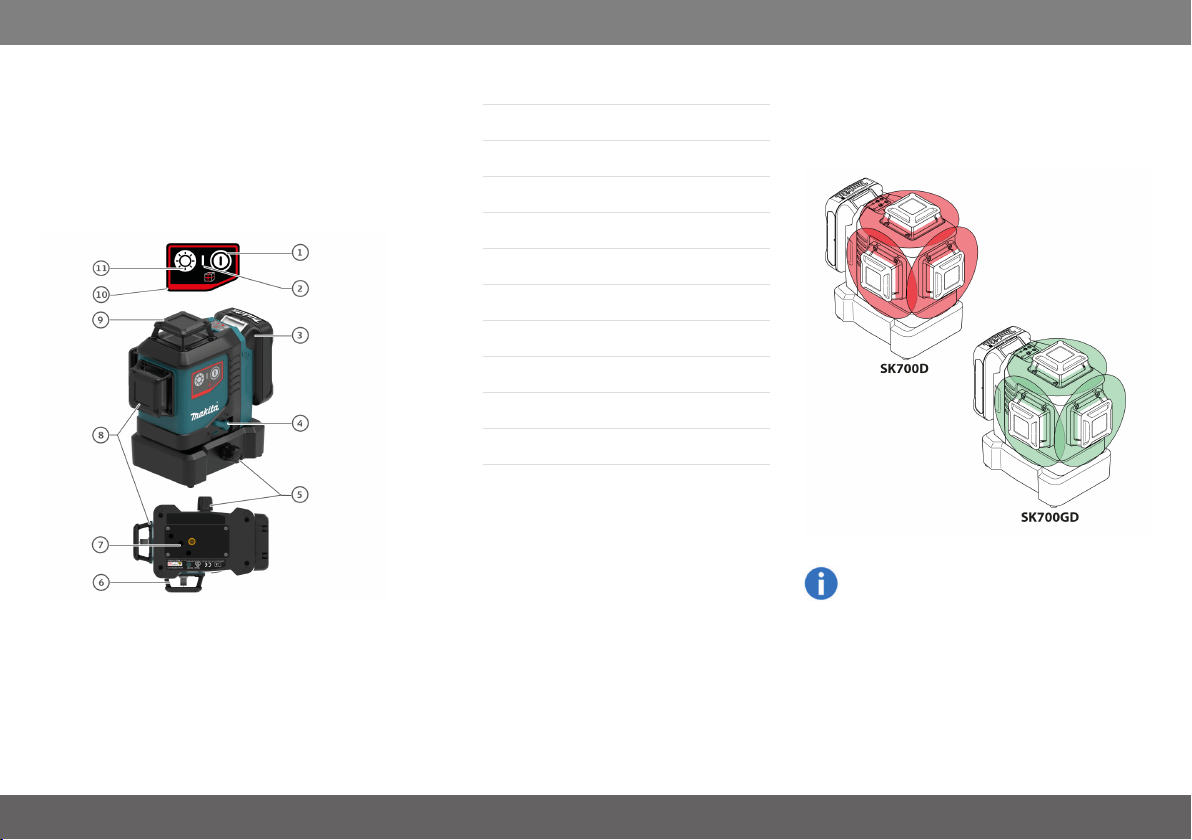
The Makita SK700D/SK700GD is a self-levelling
multifunctional laser. It combines the advantage of
three 360° line lasers in one tool and a fine adjust-
ment knob. It is a reliable precision laser for any
kind of tasks like precise framing, levelling, plumb-
ing, transfering and setting out right angles. It sup-
ports you on the job site with six intersection points
(front, back, right, left, up, down) which are
arranged precisely in 90° to each other.
1ON/OFF, Line beam mode selection
2Status LED
3Battery cartridge
4Levelling lock
5Fine adjustment knob
6Window of vertical line side
7Tripod thread 1/4"
8Window of vertical line front
9Window of horizontal line
10Keypad
11Brightness selection
There are 2 different types available:
l Makita SK700D (red laser)
l Makita SK700GD (green laser)
On all images in this document only the red
laser version is shown.
Makita SK700D/SK700GD
3

Technical data
Te chn ic aldata
Description SK700D SK700GD
Beam direction/fan angle 2 x Vertical 360°, 1 x Horizontal 360°
Intersection point direction Up, down, right, left, front, back
Range 25 m (82 ft)* 35 m (115 ft)*
Range with receiver 70 m (230 ft)**
Levelling accuracy ±0.2 mm/m = ±2.0 mm @ 10m (±0.002 in/ft = ±0.08 in @ 33ft)
Horizontal/Vertical line accuracy ±0.3 mm/m (±0.004 in/ft)
Self-levelling range ± 4°
Self-levelling time < 3 s
Out-of-level warning Yes - blink lines every 5 s
Levelling system Automatic, pendulum lockable
Laser type 630 - 645 nm, Class 2 (acc. IEC 60825-1) 510 - 530 nm, Class 2 (acc. IEC 60825-1)
Battery type CXT Battery cartridge BL1015/BL1016/BL1020B/BL1021B/BL1040B/BL1041B (10.8 V)
Operating time with Li-Ion battery ~ 8h (BL1015/BL1016)
~ 11h (BL1020B/BL1021B)
~ 22h (BL1040B/BL1041B)
~ 5h (BL1015/BL1016)
~ 7h (BL1020B/BL1021B)
~ 14h (BL1040B/BL1041B)
Automatic shut-off If activated 30 min (see Switching ON/OFF)
Instrument dimensions (L x W x H) 133 x 104 x 153 mm (5.24 x 4.09 x 6.02 in)
Weight with Li-Ion battery BL1040B/BL1041B 1155 g (2.55 lbs)
Net weight 780 g (1.72 lbs)
Operating temperature (instrument) -10…+50 °C (+14…+122 °F)
Storage temperature (instrument) -25…+70 °C (-13…+158 °F)
Laser line width at 5 m (16.4 ft) distance < 2 mm (<0.08 in)
Tripod thread 1/4’’ (+ 5/8’’ with adapter)
Pulse power for receiver Yes, auto
* depending on lighting conditions
** with Makita LDX1 laser receiver
Makita SK700D/SK700GD
4

Technical data
Please note the following:
l Due to our continuing program of
research and development, the spe-
cifications herein are subject to change
without notice.
l Specifications may differ from country
to country.
l The weight may differ depending on
the attachment(s), including the bat-
tery cartridge. The lightest and heav-
iest combination, according to EPTA-
Procedure 01/2014, are shown in the
table.
l Some of the battery cartridges listed
above may not be available depending
on your region of residence.
WARNING
Only use the battery cartridges listed above. Use
of any other battery cartridges may cause injury
and/or fire.
Makita SK700D/SK700GD
5
Instrument Set-up
Ins trumen tSe t-u p
Introduction
The safety instructions (see Safety Instruc-
tions) and the user manual should be read
through carefully before the product is used
for the first time.
The person responsible for the product must
ensure that all users understand these dir-
ections and adhere to them.
The symbols used have the following meanings:
WARNING
Indicates a potentially hazardous situation or an
unintended use which, if not avoided, will result in
death or serious injury.
CAUTION
Indicates a potentially hazardous situation or an
unintended use which, if not avoided, may result in
minor injury and/or appreciable material, financial
and environmental damage.
Important paragraphs which must be
adhered to in practice as they enable the
product to be used in a technically correct
and efficient manner.
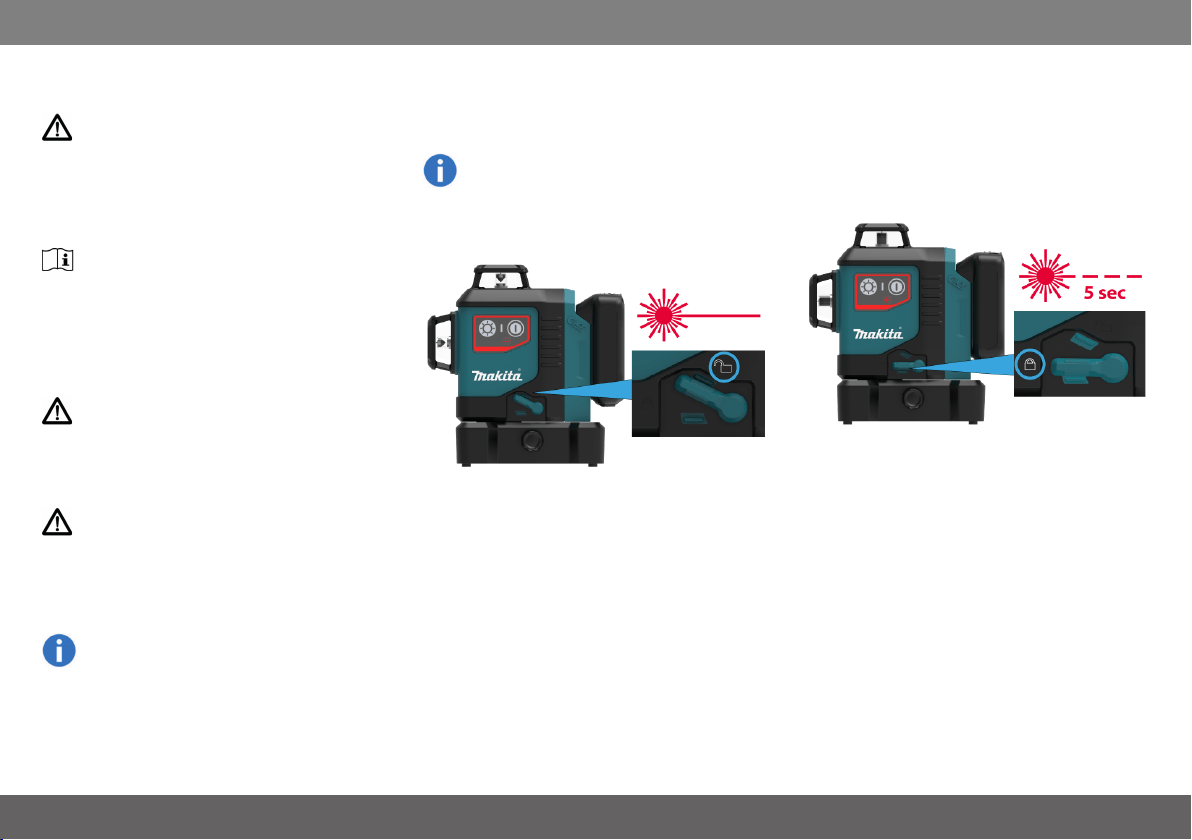
Levelling lock
Levelling unlocked
In the unlocked position the instrument auto-
matically levels itself within the specified inclin-
ation range. (See Technical data)
Levelling locked
Turn the levelling lock in order to transport or tilt
the instrument beyond the self-levelling range.
When locked, the pendulum is fixed and the self-
levelling function is deactivated. In this case the
laser blinks every 5 sec.
Makita SK700D/SK700GD
6
Instrument Set-up
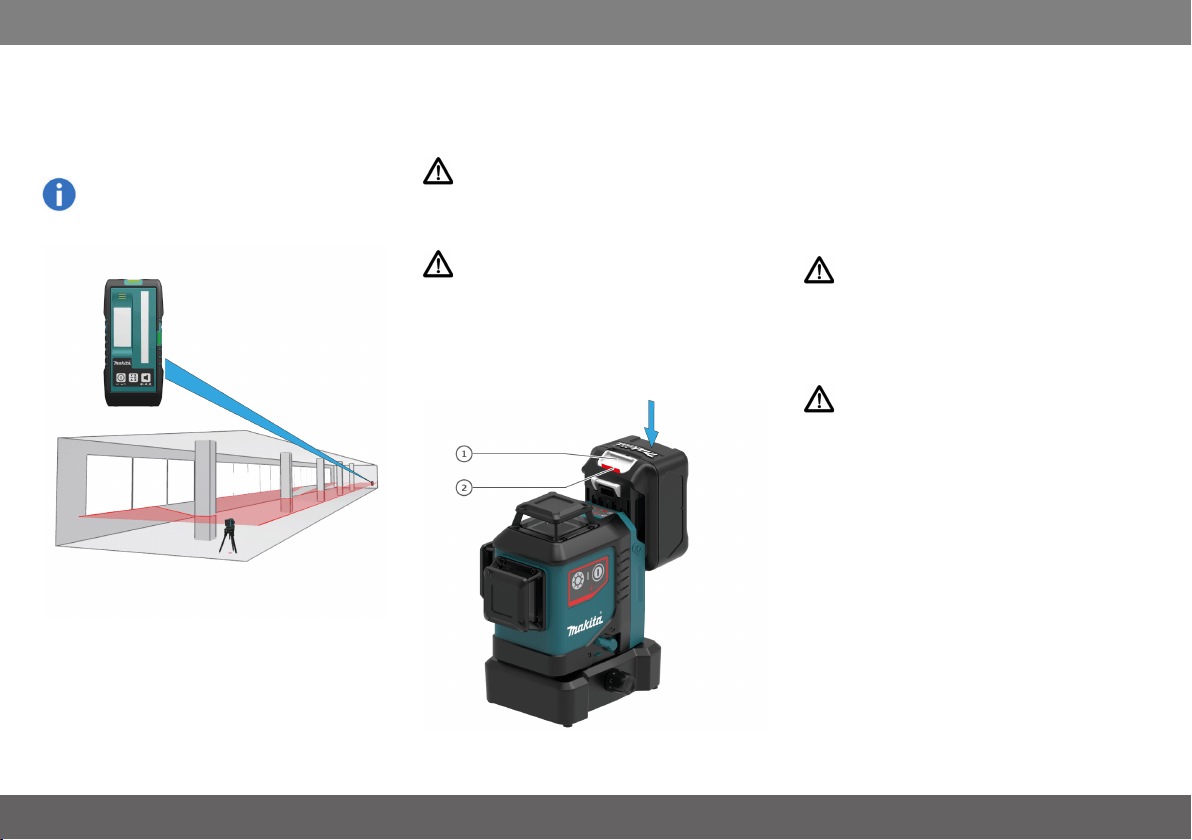
Laser receiver
To be able to detect the laser lines over long dis-
tances or in unfavourable lighting conditions, a
laser receiver can be used.
We recommend the Makita LDX1 laser
receiver.
Li-Ion battery
Installing or removing battery cartridge
CAUTION
Always switch off the tool before installing or
removing of the battery cartridge.
CAUTION
Hold the tool and the battery cartridge firmly when
installing or removing battery cartridge. Failure to
hold the tool and the battery cartridge firmly may
cause them to slip off your hands and result in dam-
age to the tool and battery cartridge and a per-
sonal injury.
To remove the battery cartridge, slide it from the
tool while sliding the button (1) on the front of the
cartridge.
To installthe battery cartridge, align the tongue on
the battery cartridge with the groove in the hous-
ing and slip it into place. Insert it all the way until it
locks in place with a little click. If you can see the
red indicator (2) on the upper side of the button, it
is not locked completely.
CAUTION
Always install the battery cartridge fully until the
red indicator cannot be seen. If not, it may acci-
dentally fall out of the tool, causing injury to you or
someone around you.
CAUTION
Do not install the battery cartridge forcibly. If the
cartridge does not slide in easily, it is not being
inserted correctly.
Makita SK700D/SK700GD
7
Instrument Set-up
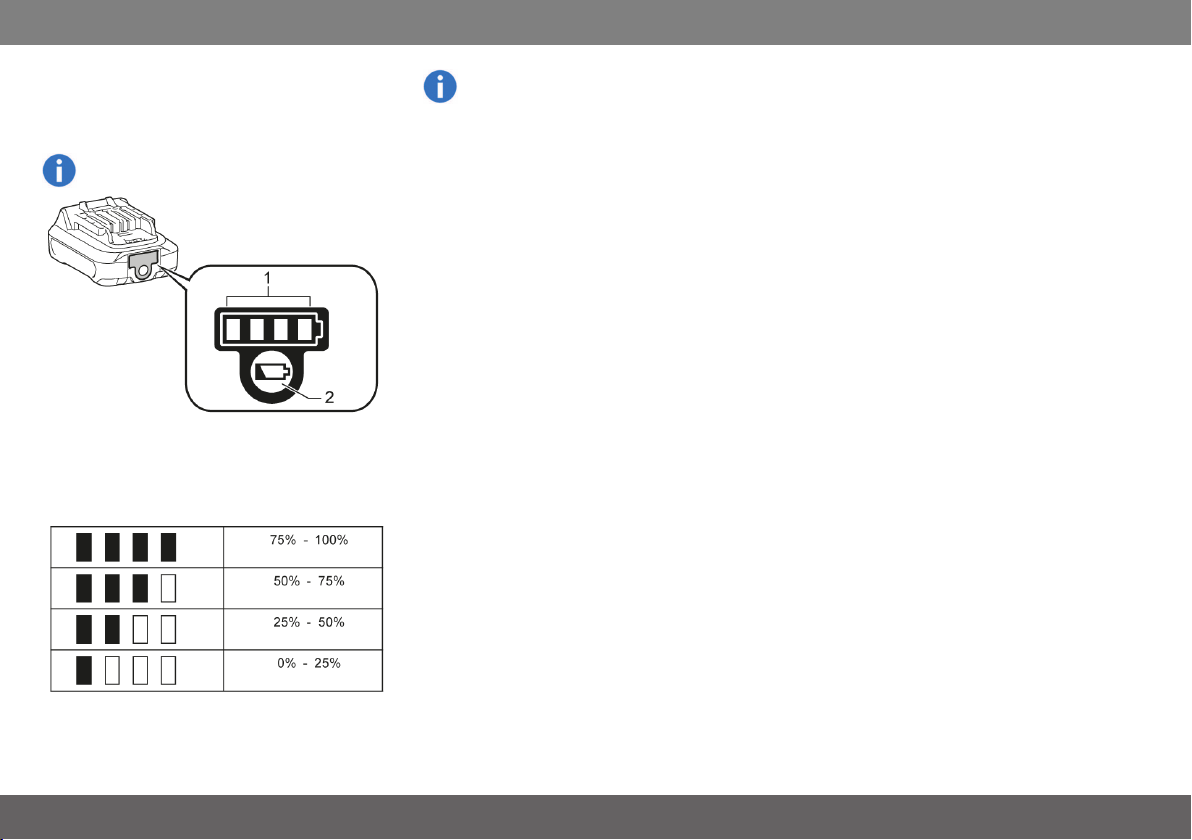
Makita CXT batteries
Indicating the remaining battery capacity
Only for battery cartridges with the indicator
Press the check button (2) on the battery cartridge
to indicate the remaining battery capacity. The
indicator lamps (1) light up for a few seconds and
show the remaining capacity:
Depending on the conditions of use and the
ambient temperature, the indication may dif-
fer slightly from the actual capacity.
Makita SK700D/SK700GD
8
Operations
Ope ration s
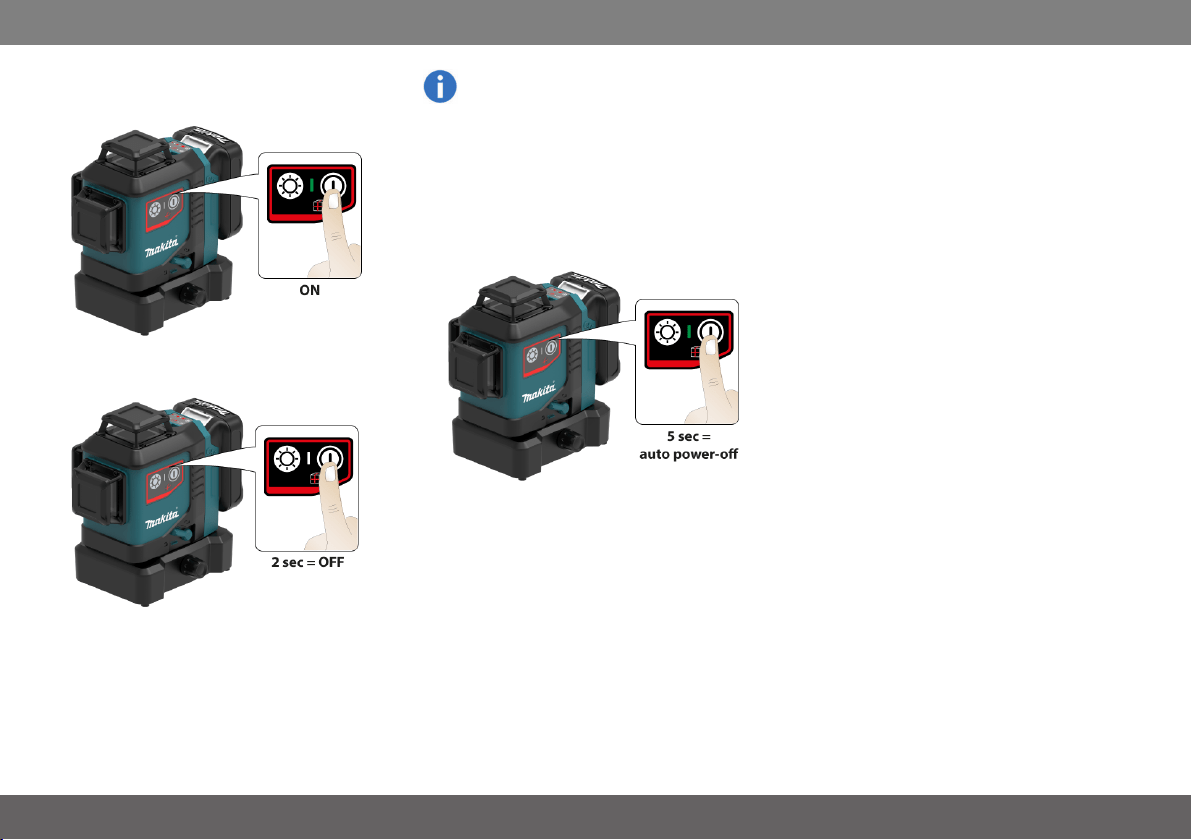
Switching ON/OFF
Auto power-off
Place the lock switch to the unlocked position
(see Levelling lock). To activate auto power-
off after 30 min operation press and hold the
ON button at start for 5 sec. The status LED
blinks 3 times in green colour. To deactivate
it again repeat the described steps until the
status LED blinks 3 times in red colour.
Makita SK700D/SK700GD
9
Operations
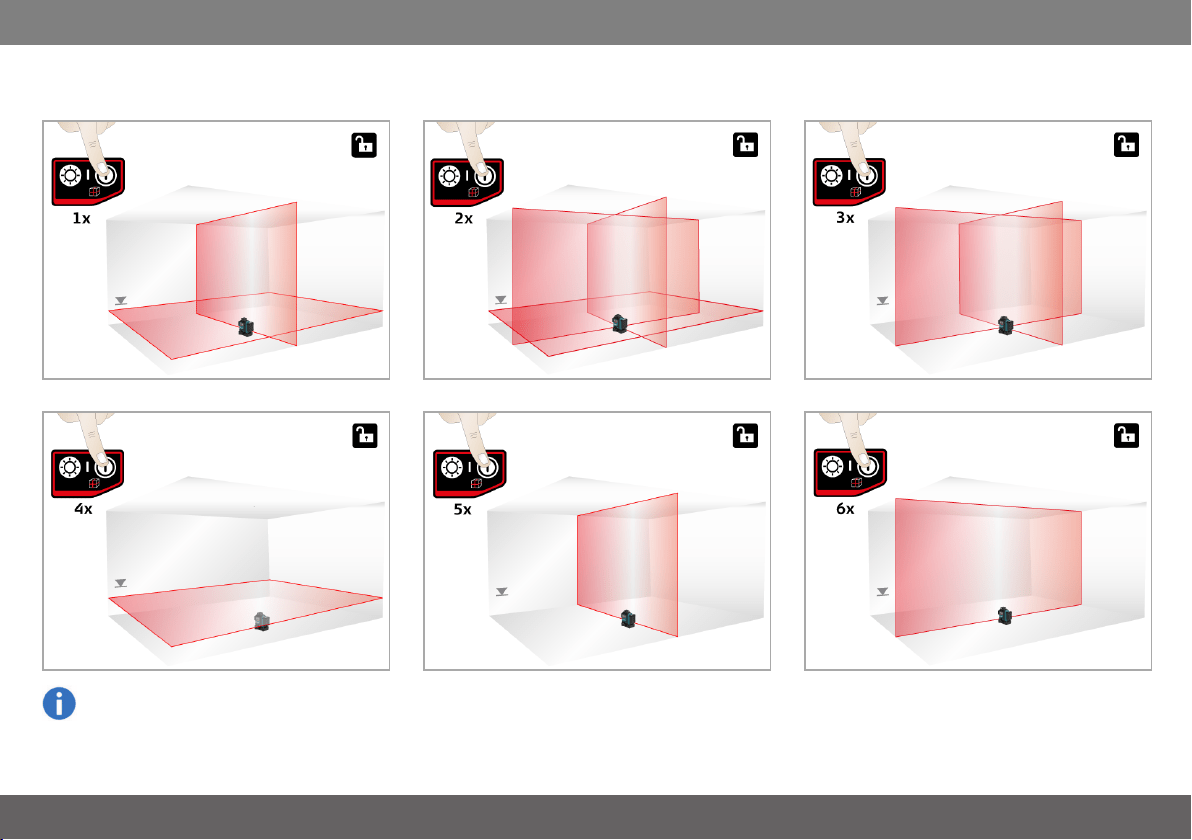
Functions with unlocked levelling
Laser on/Vertical and horizontal mode
Horizontal mode
Check if self-levelling is required and cor-
respondingly activated. (See Levelling lock
for details)
All on mode*
Vertical side mode
* In very hot environments it can be that maximum
two lines work simultaneously (see Message
Codes).
Layout mode
Vertical front mode
Makita SK700D/SK700GD
10
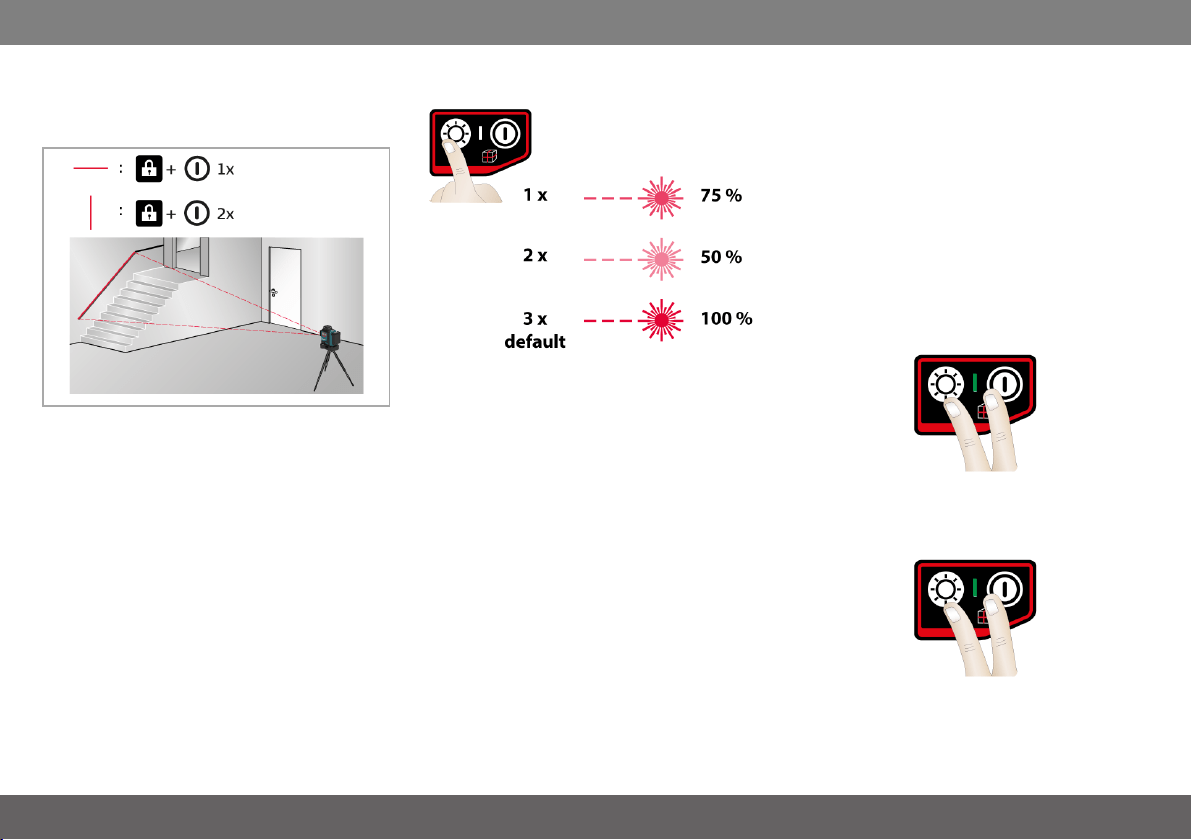
Operations
Functions with locked levelling
Activate levelling lock and press ON/OFF button
for tilt applications.
Switching brightness selection
l 1x: smaller line width
l 2x: smallest line width
l 3x: standard line width
Saving operating mode
Place the lock switch to the unlocked position (see
Levelling lock). To save the favourite operating
mode, press and hold the ON/OFF button and
brightness button during operation for 2 sec. The
status LED blinks 3 times in green colour. The
instrument has stored the line beam mode and
brightness to the memory and as the new default
mode. To reset the line beam mode and bright-
ness to factory settings, press and hold the
ON/OFF button and brightness button during
operation for 5 sec and wait until the status LED
blinks 3 times in red colour.
2 sec = save actual line beam mode and bright-
ness
5 sec = reset to factory settings
Makita SK700D/SK700GD
11
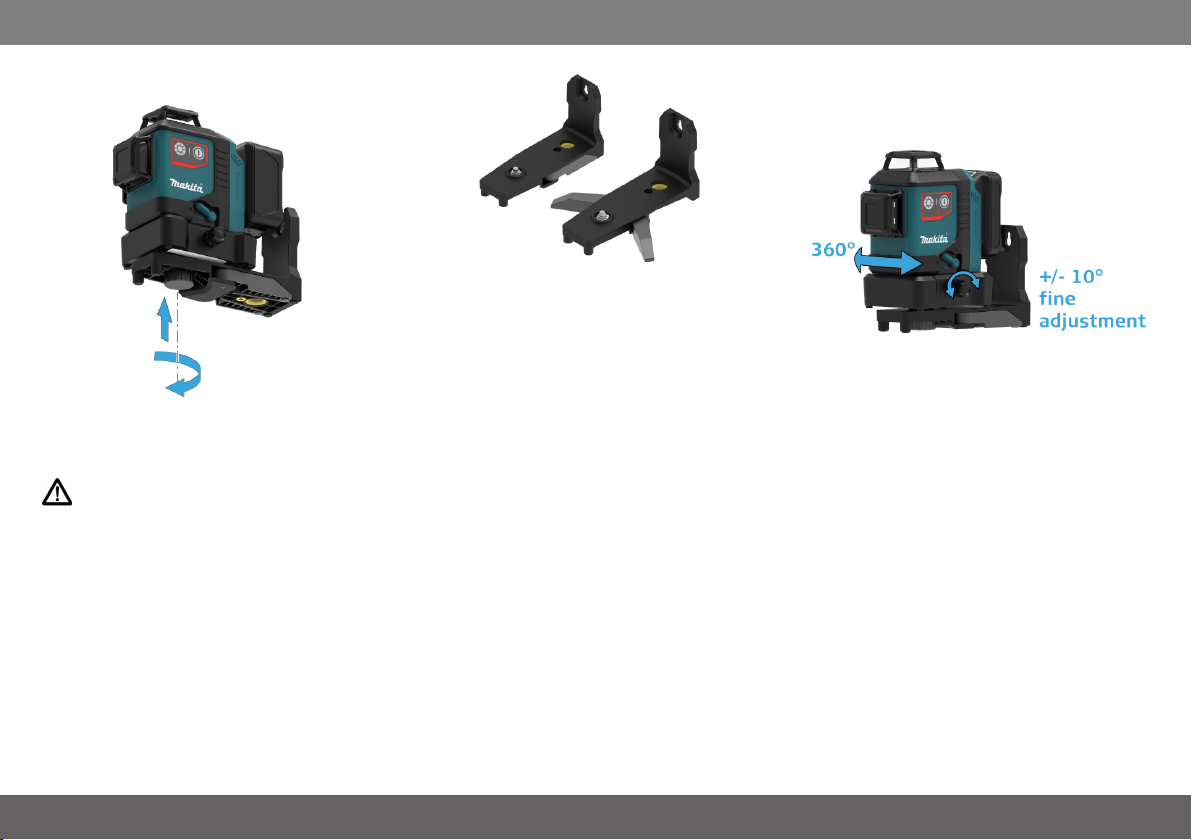
How to use the adapters and wall mount
How to us ethe ada pte rs and wallmou nt
Setup instrument to L-adapter
Mount the instrument with the screw on the L-
adapter surely.
CAUTION
Do not attach other than the following instruments
to L-adapter,
SK105D/SK105GD/SK106D/SK106GD/SK700D
/SK700GD
Swing out both supports to assure stable stand.
Alignment of vertical laser lines
Turn the instrument 360° to adjust the vertical line.
Use the fine adjustment knob and turn the instru-
ment around the vertical intersection / plumb point
within ± 10°.
Makita SK700D/SK700GD
12
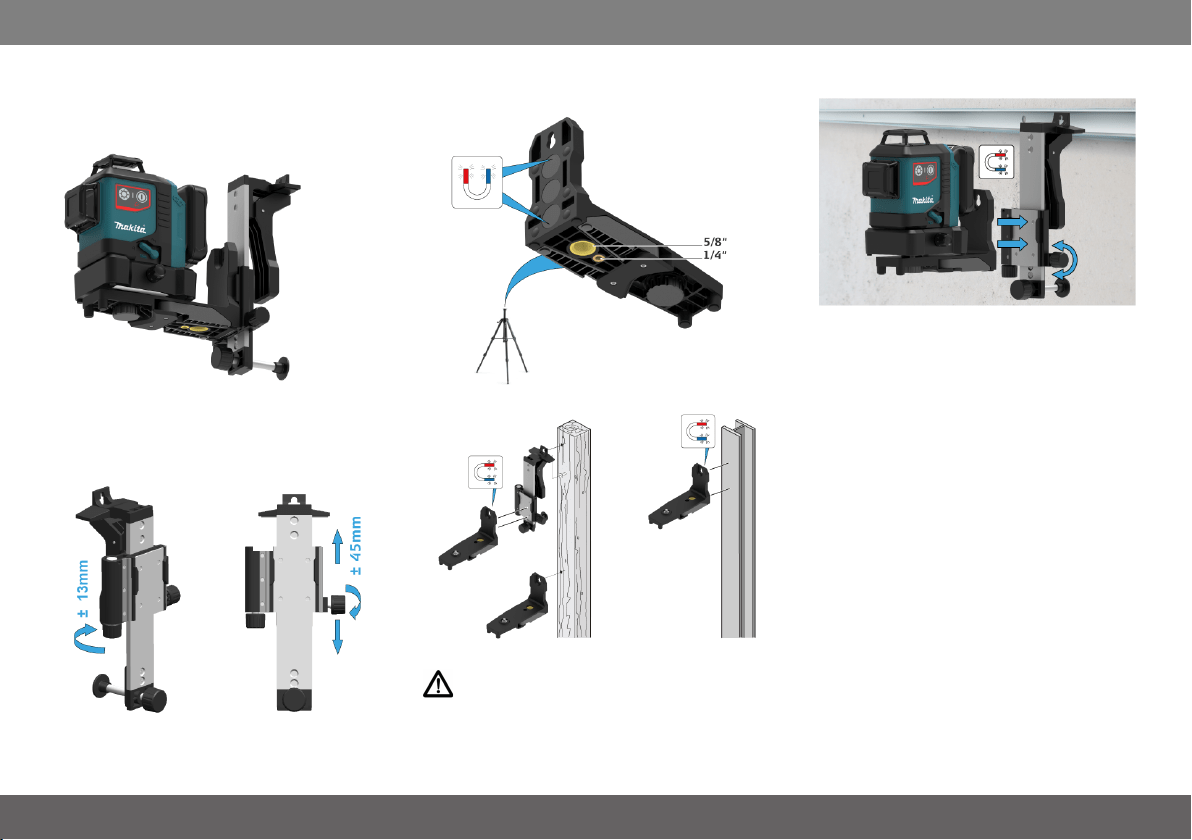
How to use the adapters and wall mount
Wall mount (optional accessory)
Alignment of horizontal laser lines
Turn the adjustment knob of the wall mount to fine
adjust the horizontal line to the desired reference
level.
Different fixing applications
CAUTION
Make sure that it is fixed well by screw or magnet
to prevent it from falling down.
Makita SK700D/SK700GD
13

Message Codes
Mes sa ge Cod es
Laser LED Cause Correction
ON/OFF lights red Instrument has low power Charge Li-Ion battery
ON/blinks lights orange Instrument is close to temperature limit. In
very hot environments it can be that maximum
two lines work simultaneously.
Cool down instrument
OFF blinks red Temperature alert Cool down or heat up instrument
blinks blinks red Instrument is out of self-levelling range Place the instrument almost horizontal and
self-levelling will start automatically
blinks lights red Instrument is out of self-levelling range and
has low power
Charge Li-Ion battery
blinks every 5 sec lights red Levelling lock is activated but instrument has
low power
Charge Li-Ion battery
blinks every 5 sec blinks green
Levelling lock is activated for working without
self-levelling
Makita SK700D/SK700GD
14
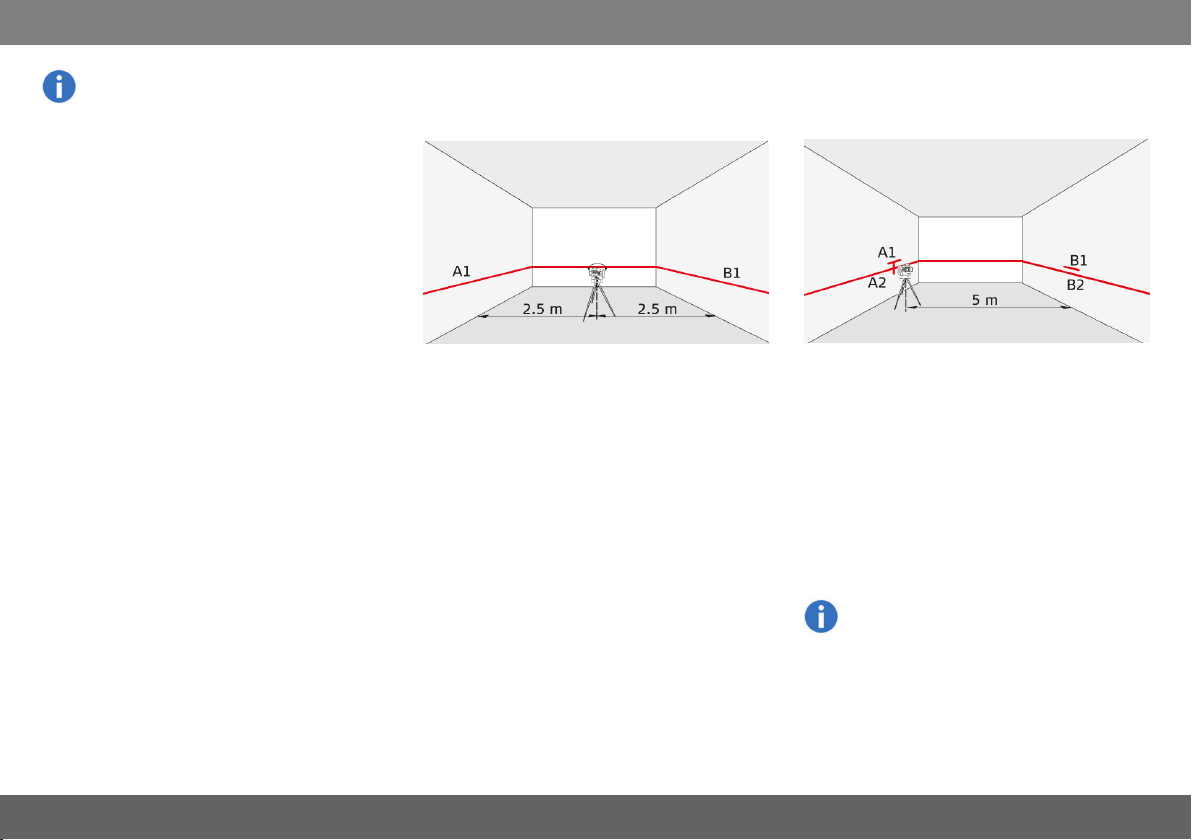
Accuracy Check
Ac curac yCh eck
Check the accuracy of your instrument reg-
ularly and particularly before important meas-
uring tasks. Check Levelling lock before
checking the accuracy.
Levelling
Checking the accuracy of the levelling
Set the instrument on a tripod half-way between
two walls (A+B) that are approx. 5 m apart. Place
the lock switch in the "Unlocked" position (see Lev-
elling lock). Direct the instrument at wallA and
switch on the instrument. Activate the horizontal
laser line or laser point and mark the position of
the line or the point on wall (A1). Rotate the instru-
ment by 180° and mark the horizontal laser line or
the laser point in exactly the same way on wall
(B1).
Then place the instrument at the same elevation
as close as possible to wall A and again mark the
horizontal laser line or the laser point on wallA
(A2). Rotate the instrument by 180° again and
mark the laser on wall B (B2). Measure the dis-
tances of the marked points A1-A2 and B1-B2.
Calculate the difference of the two meas-
urements.
|(A1 - A2) - (B1 - B2)| <=2 mm
If the difference does not exceed 2 mm, then the
instrument is within tolerance.
Should your instrument be outside of the spe-
cified tolerance, please contact a local dealer
or an authorised Makita distributor.
Makita SK700D/SK700GD
15
Accuracy Check
Vertical and horizontal line
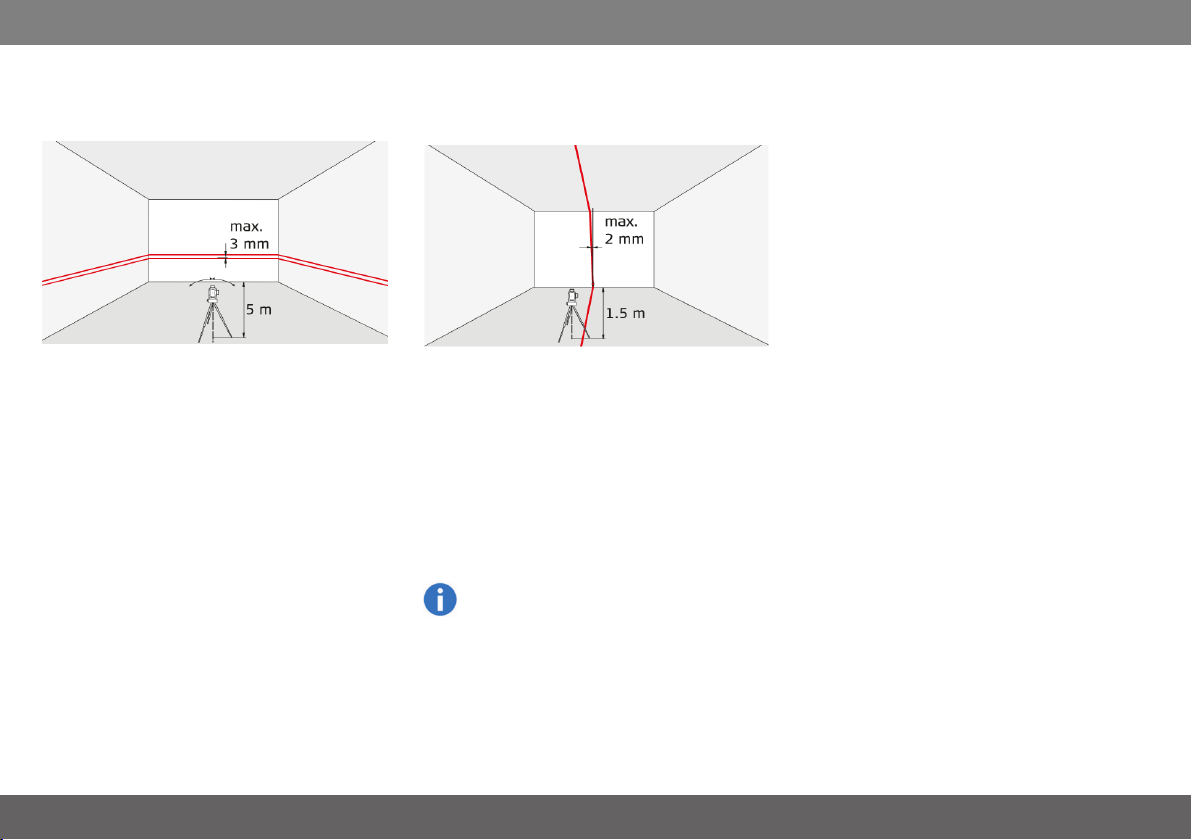
Checking the accuracy of the horizontal line
Place the lock switch in the "Unlocked" position
(see Levelling lock). Position the instrument
approx. 5 m away from the wall. Direct the instru-
ment at the wall and switch on. Activate the laser
line and mark the intersection point of laser
crosshairs on the wall. Swivel the instrument to the
right and then to the left. Observe the vertical devi-
ation of the horizontal line from the marking. If the
difference does not exceed 3 mm, then the instru-
ment is within tolerance.
Checking the accuracy of the vertical line
Place the lock switch in the "Unlocked" position
(see Levelling lock). As a reference, use a plumb-
bob and attach it as close as possible to an approx.
3 m high wall. Position the instrument at a distance
of approx. 1.5 m from the wallat an elevation of
approx. 1.5 m. Direct the instrument at the wall
and switch on. Rotate the instrument and align it
with the bottom of the plumb line. Now read off the
maximum deviation of the laser line from the top of
the plumb line. If the difference does not exceed 2
mm, then the instrument is within tolerance.
Should your instrument be outside of the spe-
cified tolerance, please contact a local dealer
or an authorised Makita distributor.
Makita SK700D/SK700GD
16
Accuracy Check
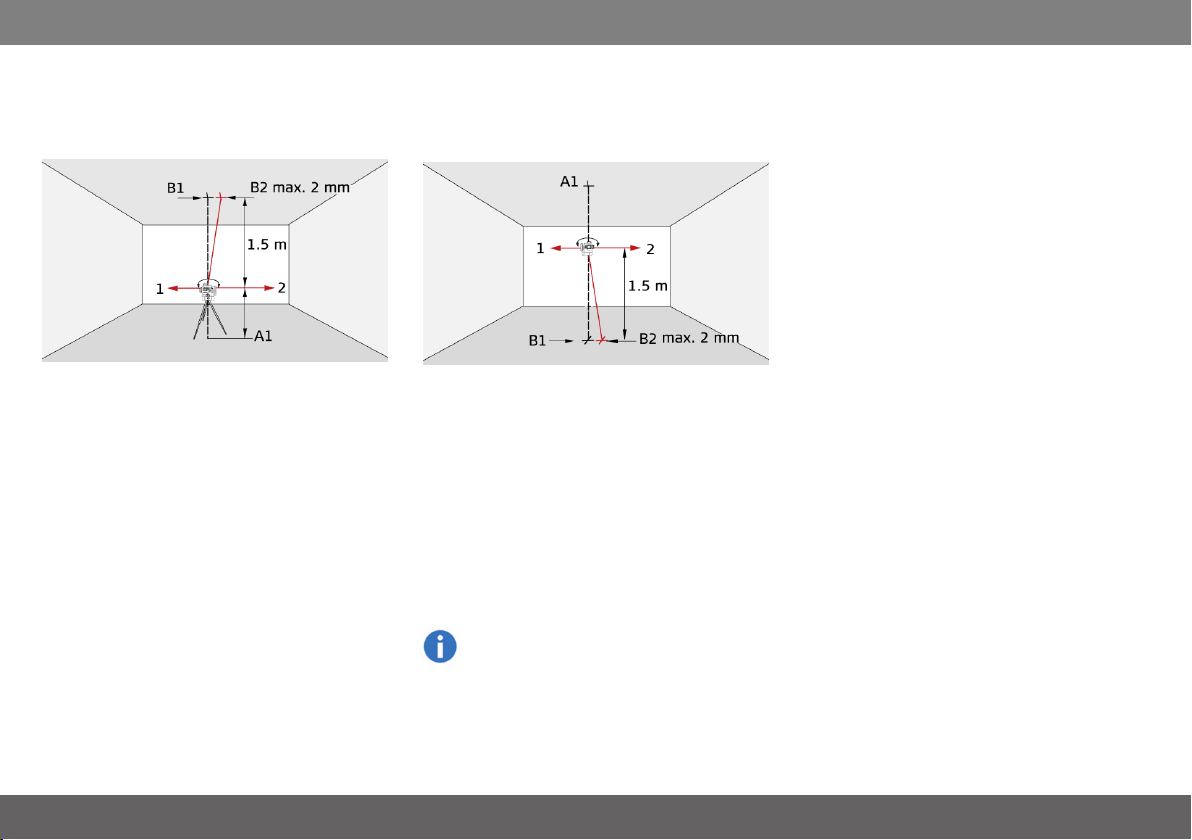
Vertical plumb/intersection points
Checking the accuracy of the upper plumb
intersection point:
Place the lock switch in the "Unlocked" position
(see Levelling lock). Set up the laser on its tripod
or wall mount bracket near point A1 at a minimum
distance of 1.5 m from point B1. The horizontal
laser is aligned in direction 1. Mark the laser points
A1 and B1 with a pin.
Rotate the instrument by 180° so that it points in
the opposite direction 2 to direction 1. Adjust the
instrument so that the laser beam hits point A1
exactly. If point B2 is no further than 2 mm away
from point B1, then the instrument is within tol-
erance.
Checking the accuracy of the lower plumb
intersection point:
Place the lock switch in the "Unlocked" position
(see Levelling lock). Set up the laser on its tripod
or wall mount bracket near point A1 at a minimum
distance of 1.5 m from point B1. The horizontal
laser is aligned in direction 1. Mark the laser points
A1 and B1 with a pin.
Rotate the instrument by 180° so that it points in
the opposite direction 2 to direction 1. Adjust the
instrument so that the laser beam hits point A1
exactly. If point B2 is no further than 2 mm away
from point B1, then the instrument is within tol-
erance.
Should your instrument be outside of the spe-
cified tolerance, please contact a local dealer
or an authorised Makita distributor.
Makita SK700D/SK700GD
17
Accuracy Check
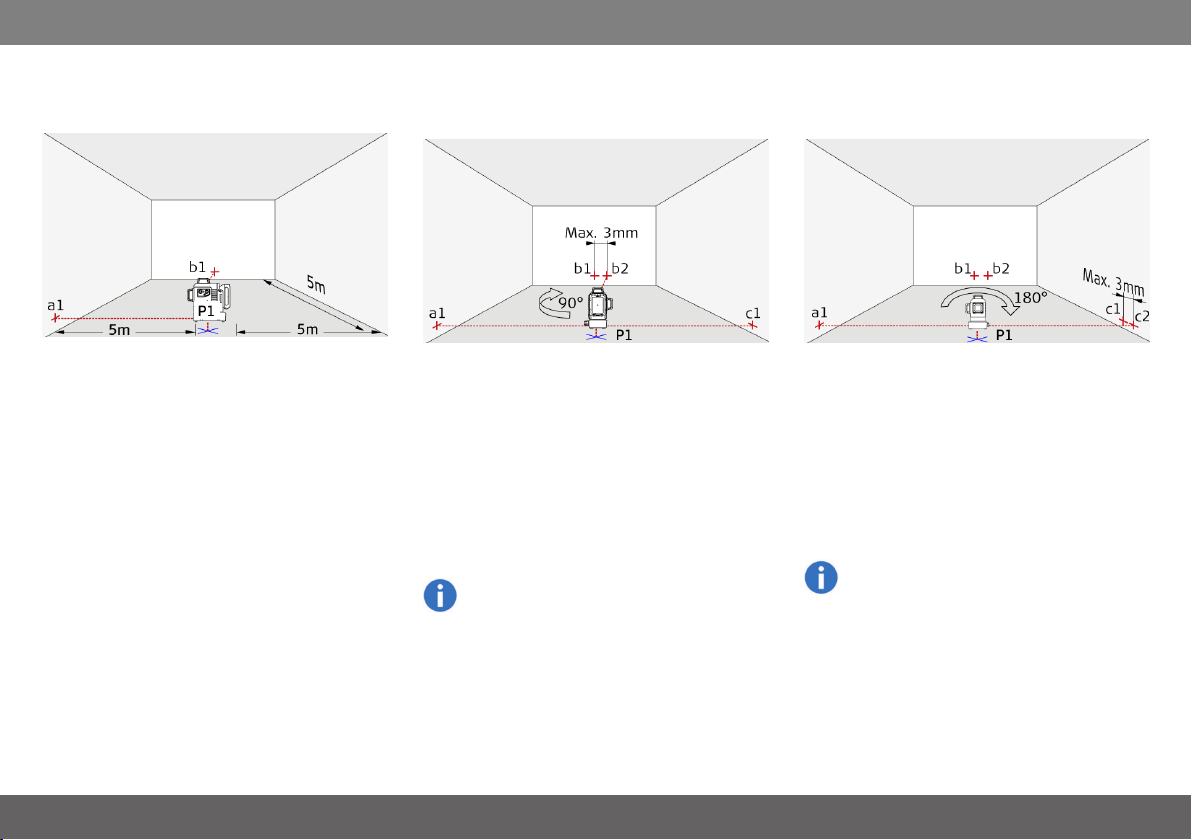
Perpendicularity horizontal inter-
section points
Place lock switch in "Unlocked" position (see Lev-
elling lock). Mark a reference point (P1) approx.
5m from the walls and position the lower plumb
intersection point exactly on it. Align the cross hair
to the left wall and mark the intersection point (a1)
approx. on the same hight like P1 to the wall.
Shortly after mark the right-hand perpendicular
beam (b1) on the front wall.
Then rotate the instrument exactly 90° clockwise
around the plumb intersection point P1 and pos-
ition the left-hand perpendicular intersection
beam to the existing reference point a1. Make
sure that the lower plumb intersection point is still
exactly on the reference P1. Check afterwards the
new reference point b2 with the old reference b1
on the front wall. The deviation between the two
points may be max. 3mm. Mark the new position
of the right-hand perpendicular beam to the right
wall with c1.
Should your instrument be outside of the spe-
cified tolerance, please contact a local dealer
or an authorised Makita distributor.
Afterwards, turn the instrument exactly 180°
around the plumb intersection point P1 and pos-
ition the right-hand perpendicular beam to the
existing reference point a1. Make sure that the
lower intersection plumb point is stillexactly on the
reference P1. Then mark the left-hand beam to
the right walland mark it with c2. Finally measure
the difference between the former reference point
c1 and the new point c2. The deviation may be
max. 3mm between these two points.
Should your instrument be outside of the spe-
cified tolerance, please contact a local dealer
or an authorised Makita distributor.
Makita SK700D/SK700GD
18

Care
Care
Never immerse the instrument in water. Wipe off
dirt with a damp soft cloth. Never use aggressive
cleaning agents or solvents. Treat the instrument
with the same care that you would apply to bin-
oculars or a camera. Dropping or violent shaking
of the instrument may damage it. Check the instru-
ment for any damage before using it. Check the
levelling accuracy of the instrument regularly.
To warranty the best precision and visibility please
clean the optics of your instrument regularly.
Therefore blow off the dust from the glasses
without touching the optics with your fingers. If
necessary use a damp soft cloth and a little bit of
pure alcohol.
To avoid wrong measurements also clean your
adapters regularly. This could be done also by the
proposed recommendation. Especially the inter-
face between the adapter and instrument should
always be clean to enable easy rotation. To clean
the magnetic surface you could use compressed
air or modelling clay.
If the equipment get wet always dry it (max.
70°C/158°F) before repacking it into the case.
Makita SK700D/SK700GD
19

Safety instructions
Sa fe ty in stru ctio ns
The person responsible for the instrument
must ensure that all users understand these
directions and adhere to them.
Areas of responsibility
Responsibilities of the manufacturer of the ori-
ginal equipment:
Makita Corporation Anjo, 3-11-8, Sumiyoshi-cho,
Aichi 446-8502, Japan
Makita, Jan-Baptist Vinkstraat 2, 3070, Belgium
Internet: www.makita.com
The company above is responsible for supplying
the product, including the User Manual in a com-
pletely safe condition.
The company above is not responsible for third
party accessories.
Responsibilities of the person in charge of the
instrument:
1. To understand the safety instructions on
the product and the instructions in the
User Manual.
2. To be familiar with local safety regulations
relating to accident prevention.
3. Always prevent access to the product by
unauthorised personnel.
Permitted use
1. Projection of horizontal and vertical laser
lines and laser points
Prohibited use
1. Using the product without instruction
2. Using outside the stated limits
3. Deactivation of safety systems and
removal of explanatory and hazard labels
4. Opening of the equipment by using tools
(screwdrivers, etc.)
5. Carrying out modification or conversion
of the product
6. Deliberate dazzling of third parties; also in
the dark
7. Inadequate safeguards at the surveying
site (e.g. when measuring on roads, con-
struction sites, etc.)
Hazards in use
WARNING
Watch out for erroneous measurements if the
instrument is defective or if it has been dropped or
has been misused or modified. Carry out periodic
test measurements. Particularly after the instru-
ment has been subject to abnormal use, and
before, during and after important meas-
urements.
CAUTION
Never attempt to repair the product yourself. In
case of damage, contact a local dealer.
WARNING
Changes or modifications not expressively
approved by Makita/manufacturer for compliance
could void the user´s authority to operate the
equipment.
CAUTION
Laser light is bright and blinding. Do not shine at
aircraft or vehicles at any distances.
WARNING
Makita Line Laser and L-adapter / PRO L-adapter
should not be used in the vicinity of pacemaker
because of integrated magnets which can affect
the function of the pacemaker.
Makita SK700D/SK700GD
20

Safety instructions
Battery tool use and care
1. Recharge only with the charger specified
by the manufacturer. A charger that is
suitable for one type of battery cartridge
may create a risk of fire when used with
another battery cartridge.
2. Use power tools only with specifically des-
ignated battery cartridges. Use of any
other battery cartridges may create a risk
of injury and fire.
3. When battery cartridge is not in use, keep
it away from other metal objects, like
paper clips, coins, keys, nails, screws or
other small metal objects, that can make
a connection from one terminal to
another. Shorting the battery terminals
together may cause burns or a fire.
4. Under abusive conditions, liquid may be
ejected from the battery; avoid contact. If
contact accidentally occurs, flush with
water. If liquid contacts eyes, additionally
seek medical help. Liquid ejected from
the battery may cause irritation or burns.
5. Do not use a battery cartridge or tool that
is damaged or modified. Damaged or
modified batteries may exhibit unpre-
dictable behaviour resulting in fire, explo-
sion or risk of injury.
6. Do not expose a battery cartridge or tool
to fire or excessive temperature. Expos-
ure to fire or temperature above 130 °C
may cause explosion.
7. Follow all charging instructions and do
not charge the battery cartridge or tool
outside the temperature range specified
in the instructions. Charging improperly
or at temperatures outside the specified
range may damage the battery and
increase the risk of fire.
Important safety instructions for battery cart-
ridge
1. Before using battery cartridge, read all
instructions and cautionary markings on
(1) battery charger, (2) battery, and (3)
product using battery.
2. Do not disassemble battery cartridge.
3. If operating time has become excessively
shorter, stop operating immediately. It
may result in a risk of overheating, pos-
sible burns and even an explosion.
4. If electrolyte gets into your eyes, rinse
them out with clear water and seek med-
ical attention right away. It may result in
loss of your eyesight.
5. Do not short the battery cartridge:
(1) Do not touch the terminals with any
conductive material.
(2) Avoid storing battery cartridge in a
container with other metal objects such
as nails, coins, etc.
(3) Do not expose battery cartridge to
water or rain. A battery short can cause a
large current flow, overheating, possible
burns and even a breakdown.
6. Do not store the battery cartridge in loc-
ations where the temperature may reach
or exceed 50 °C (122 °F).
7. Do not incinerate the battery cartridge
even if it is severely damaged or is
completely worn out. The battery cart-
ridge can explode in a fire.
8. Be careful not to drop or strike battery.
9. Do not use a damaged battery.
10. The contained lithium-ion batteries are
subject to the Dangerous Goods Legis-
lation requirements.
For commercial transports e.g. by third
parties, forwarding agents, special
requirement on packaging and labeling
must be observed.For preparation of the
item being shipped, consulting an expert
for hazardous material is required.
Please also observe possibly more
detailed national regulations.
Tape or mask off open contacts and pack
up the battery in such a manner that it can-
not move around in the packaging.
11. Follow your local regulations relating to
disposal of battery.
12. Use the batteries only with the products
specified by Makita. Installing the bat-
teries to non-compliant products may res-
ult in a fire, excessive heat, explosion, or
leak of electrolyte.
SAVE THESE INSTRUCTIONS.
Makita SK700D/SK700GD
21
Safety instructions
CAUTION
Only use genuine Makita batteries. Use of non-
genuine Makita batteries, or batteries that have
been altered, may result in the battery bursting
causing fires, personal injury and damage. It will
also void the Makita warranty for the Makita tool
and charger.
Tips for maintaining maximum battery life:
1. Charge the battery cartridge before com-
pletely discharged. Always stop tool oper-
ation and charge the battery cartridge
when you notice less tool power.
2. Never recharge a fully charged battery
cartridge. Overcharging shortens the bat-
tery service life.
3. Charge the battery cartridge with room
temperature at 10 °C - 40 °C (50 °F - 104
°F). Let a hot battery cartridge cool down
before charging it.
Limits of use
Refer to section Technical data. The instru-
ment is designed for use in areas per-
manently habitable for humans. Do not use
the product in explosion hazardous areas or
in aggressive environments.
Disposal
CAUTION
Flat batteries must not be disposed of with house-
hold waste. Care for the environment and take
them to the collection points provided in accord-
ance with national or local regulations.
The product must not be disposed with
household waste. Dispose of the product
appropriately in accordance with the national
regulations in force in your country. Adhere
to the national and country specific reg-
ulations.
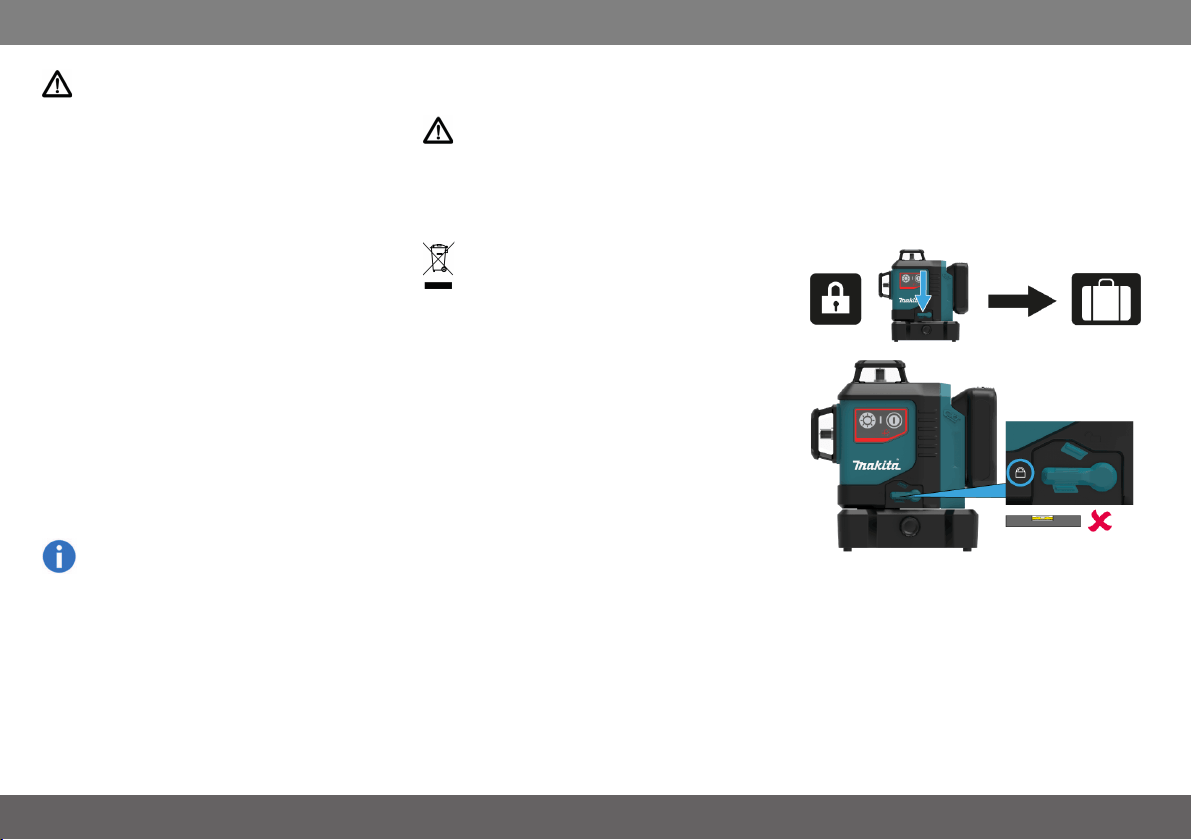
Transport
Transport of instrument
Always set the instrument in "Locked" position by
turning the lock switch when transporting the
instrument (see Levelling lock). Please use the ori-
ginal case or an equivalent packaging for trans-
porting and shipping your measuring instrument.
Makita SK700D/SK700GD
22

Safety instructions
Electromagnetic Compatibility
(EMC)
WARNING
The instrument conforms to the most stringent
requirements of the relevant standards and reg-
ulations. However, the possibility of causing inter-
ference in other instruments cannot be totally
excluded.
FCC statement (applicable in U.S.)
This equipment has been tested and found to com-
ply with the limits for a Class B digital instrument,
pursuant to part 15 of the FCC rules. These limits
are designed to provide reasonable protection
against harmful interference in a residential install-
ation. This equipment generates, uses and can
radiate radio frequency energy and, if not installed
and used in accordance with the instructions, may
cause harmful interference to radio com-
munications.
However, there is no guarantee that interference
will not occur in a particular installation. If this equip-
ment does cause harmful interference to radio or
television reception, which can be determined by
turning the equipment off and on, the user is
encouraged to try to correct the interference by
one or more of the following measures:
1. Reorient or relocate the receiving
antenna
2. Increase the separation between the
equipment and the receiver
3. Connect the equipment into an outlet on
a circuit different from that to which the
receiver is connected
4. Consult the dealer or an experienced radi-
o/TV technician for help
This instrument complies with part 15 of the FCC
rules. Operation is subjected to the following two
conditions:
1. This instrument may not cause harmful
interference, and
2. this instrument must accept any inter-
ference received, including interference
that may cause undesired operation.
ISED statement (applicable in Canada)
This instrument complies with Industry Canada
license-exempt RSS standard(s). Operation is
subjected to the following two conditions:
1. This instrument may not cause harmful
interference, and
2. this instrument must accept any inter-
ference received, including interference
that may cause undesired operation.
Makita SK700D/SK700GD
23
Safety instructions
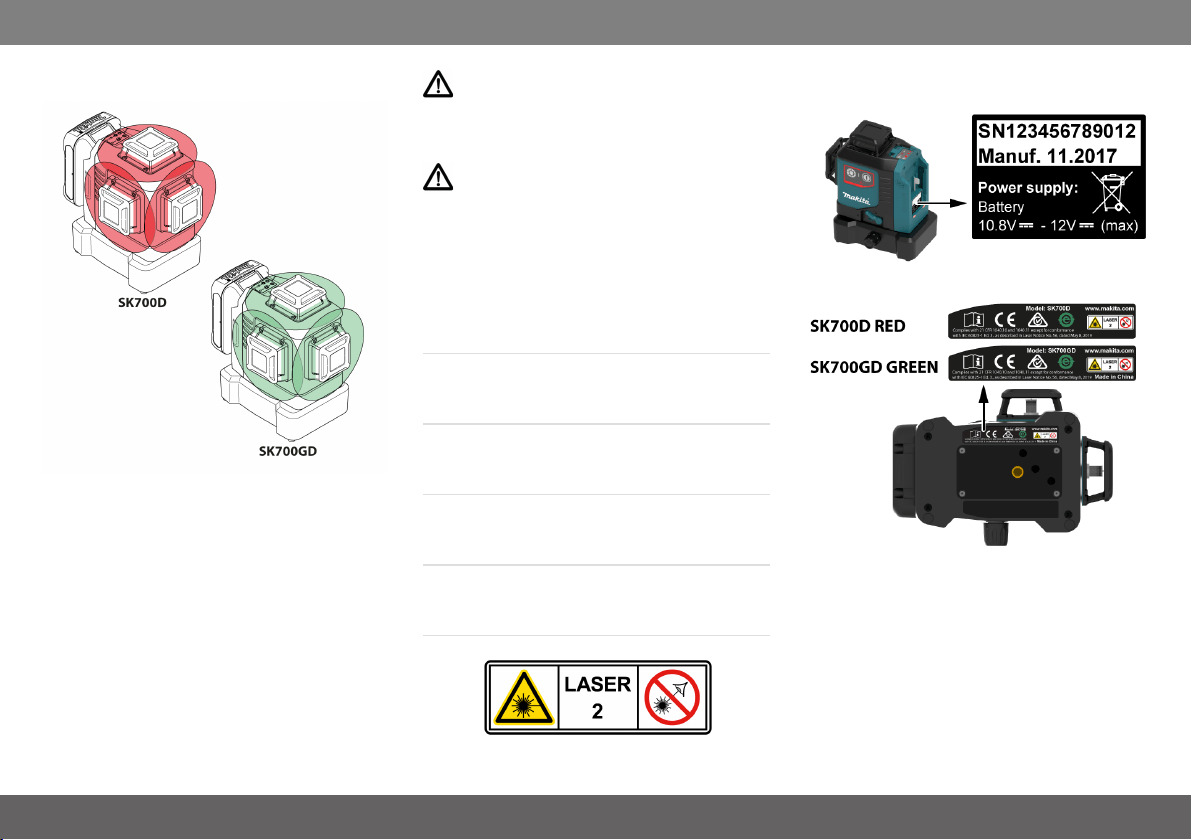
Laser classification
The instrument produces visible laser beams,
which are emitted from the instrument. It is a Class
2 laser product in accordance with:
l IEC60825-1 : 2014 „Radiation safety of
laser products“
Laser Class 2 products
Do not stare into the laser beam or direct it
towards other people unnecessarily. Eye pro-
tection is normally afforded by aversion responses
including the blink reflex.
WARNING
Looking directly into the beam with optical aids
(e.g. binoculars, telescopes) can be hazardous.
CAUTION
Looking into the laser beam may be hazardous to
the eyes.
Wavelength
SK700D red: 630 - 645 nm / SK700GD green:
510 - 530 nm
Maximum radiant output power for classification
<2 mW
Pulse duration
30 - 70 µs
Pulse repetition frequency
10 kHz
Beam divergence line
0.05 mrad * 360°
Labelling
Subject to change (drawings, descriptions and
technical data) without prior notice.
Makita SK700D/SK700GD
24

Optional accessories
Optio nalac ce ss ories
CAUTION
These accessories or attachments are recom-
mended for use with your Makita tool specified in
this manual. The use of any other accessories or
attachments might present a risk of injury to per-
sons. Only use accessory or attachment for its
stated purpose.
l Makita genuine battery and charger
l Laser Receiver LDX-1
l Wall mount
l ADP09
l Tripod
l Aluminium rod
l Laser viewing glass
If you need any assistance for more details
regarding these accessories, ask your local
Makita Service Center.
Makita SK700D/SK700GD
25