©
2023 Nikon Corporation
SB3E01(11)
7MM02111-01
En
• Read this document thoroughly before using the product.
• To ensure proper use of the product, be sure to read “For Your Safety” (page 4).
• After reading this document, keep it readily accessible for future reference.
Reference Guide
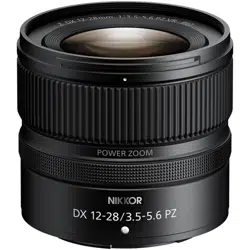
NIKKOR Z DX 12-28mm f/3.5-5.6 PZ VR

Table of Contents
Introduction
. . . . . . . . . . . . . . . . . . . . . . . . . . . . . . . . . . . . . . . . . . . . . . . . . . . . . 3
Before You Begin. . . . . . . . . . . . . . . . . . . . . . . . . . . . . . . . . . . . . . . . . . . . . . . . . . . . . . 3
ForYourSafety. . . . . . . . . . . . . . . . . . . . . . . . . . . . . . . . . . . . . . . . . . . . . . . . . . . . . . . . 4
Using the Lens. . . . . . . . . . . . . . . . . . . . . . . . . . . . . . . . . . . . . . . . . . . . . . . . . . . . 7
Parts of the Lens: Names and Functions. . . . . . . . . . . . . . . . . . . . . . . . . . . . . . . . . . 7
AttachmentandRemoval. . . . . . . . . . . . . . . . . . . . . . . . . . . . . . . . . . . . . . . . . . . . . . 11
Attaching and Removing Optional Lens Hoods. . . . . . . . . . . . . . . . . . . . . . . . . . . 14
Power Zoom. . . . . . . . . . . . . . . . . . . . . . . . . . . . . . . . . . . . . . . . . . . . . . . . . . . . . . . . . 16
Vibration Reduction (VR). . . . . . . . . . . . . . . . . . . . . . . . . . . . . . . . . . . . . . . . . . . . . . . 18
Cautions:TakingPhotographs. . . . . . . . . . . . . . . . . . . . . . . . . . . . . . . . . . . . . . . . . . 19
PrecautionsforUse. . . . . . . . . . . . . . . . . . . . . . . . . . . . . . . . . . . . . . . . . . . . . . . . . . . 20
Lens Maintenance. . . . . . . . . . . . . . . . . . . . . . . . . . . . . . . . . . . . . . . . . . . . . . . . . . . . 21
Technical Notes. . . . . . . . . . . . . . . . . . . . . . . . . . . . . . . . . . . . . . . . . . . . . . . . . . 22
Cameras with AF-Assist Illuminators. . . . . . . . . . . . . . . . . . . . . . . . . . . . . . . . . . . . . 22
UsingtheLensonCameraswithaBuilt-inFlash. . . . . . . . . . . . . . . . . . . . . . . . . . 23
Accessories. . . . . . . . . . . . . . . . . . . . . . . . . . . . . . . . . . . . . . . . . . . . . . . . . . . . . . . . . . 24
Specifications. . . . . . . . . . . . . . . . . . . . . . . . . . . . . . . . . . . . . . . . . . . . . . . . . . . . . . . . 25
Notices. . . . . . . . . . . . . . . . . . . . . . . . . . . . . . . . . . . . . . . . . . . . . . . . . . . . . . . . . . . . . . 27
2 Table of Contents

Introduction
Before Y
ou Begin
Before using this product, please read these instructions carefully. You will also
need to consult the documentation provided with the camera.
• This lens is intended exclusively for use with mirrorless cameras featuring a
Nikon Z mount.
• Updat
e the camera firmware to the latest version. With earlier versions, the
camera may fail to detect the lens correctly and some features may not be
available. The latest version of the camera firmware can be downloaded from
the Nikon Download Center at the URL below.
https://downloadcenter.nikonimglib.com/
No repr
oduction in any form of this document, in whole or in part (except
for brief quotation in critical articles or reviews), may be made without written
authorization from NIKON CORPORATION.
3 Before You Begin
ForYourSafety
To pr
event damage to property or injury to yourself or to others, read “For Your
Safety” in its entirety before using this product.
After reading these safety instructions, keep them readily accessible for future
reference.
WARNING: Failur
e to observe the precautions marked with this
icon could result in death or severe injury.
CAUTION: Failur
e to observe the precautions marked with this
icon could result in injury or property damage.
WARNING
Do not disassemble or modify this product. Do not touch internal parts
that become exposed as the r
esult o
f a fall or other accident.
Failure to observe these precautions could result in electric shock or other
injury.
Should you notice any abnormalities such as the product producing
smoke, heat, or unusual odors, immediately disconnect the camera power
source.
Continued operation could result in fire, burns or other injury.
Keep dry.Do not handle with wet hands.
Failure to observe these precautions could result in fire or electric shock.
Do not use this product in the presence of flammable dust or gas such as
propane, gasoline or aerosols.
Failure to observe this precaution could result in explosion or fire.
4 ForYourSafety
WARNING
Do not directly view the sun or other bright light source through the lens.
F
ailur
e to observe this precaution could result in visual impairment.
Keep this product out of reach of children.
Failure to observe this precaution could result in injury or product malfunction.
In addition, note that small parts constitute a choking hazard.
Should a child
swallow any part of this product, seek immediate medical attention.
Do not entangle, wrap or twist the straps around your neck.
Failur
e to observe this precaution could result in accidents.
Do not handle with bare hands in locations exposed to extremely high or
low temperatures.
Failure to observe this precaution could result in burns or frostbite.
5 ForYourSafety

CAUTION
Do not leave the lens pointed at the sun or other strong light sources.
Light focused by the lens could cause fir
e or damage t
o product’s internal parts.
When shooting backlit subjects, keep the sun well out of the frame. Sunlight
focused into the camera when the sun is close to the frame could cause fire.
Do not leave the product where it will be exposed to extremely high
temperatures for an extended period, such as in an enclosed automobile
or in direct sunlight.
Failure to observe this precaution could result in fire or product malfunction.
Do not transport cameras or lenses with tripods or similar accessories
attached.
Failure to observe this precaution could result in injury or product malfunction.
6 ForYourSafety
Using the Lens
Par
ts of the Lens: Names and Functions
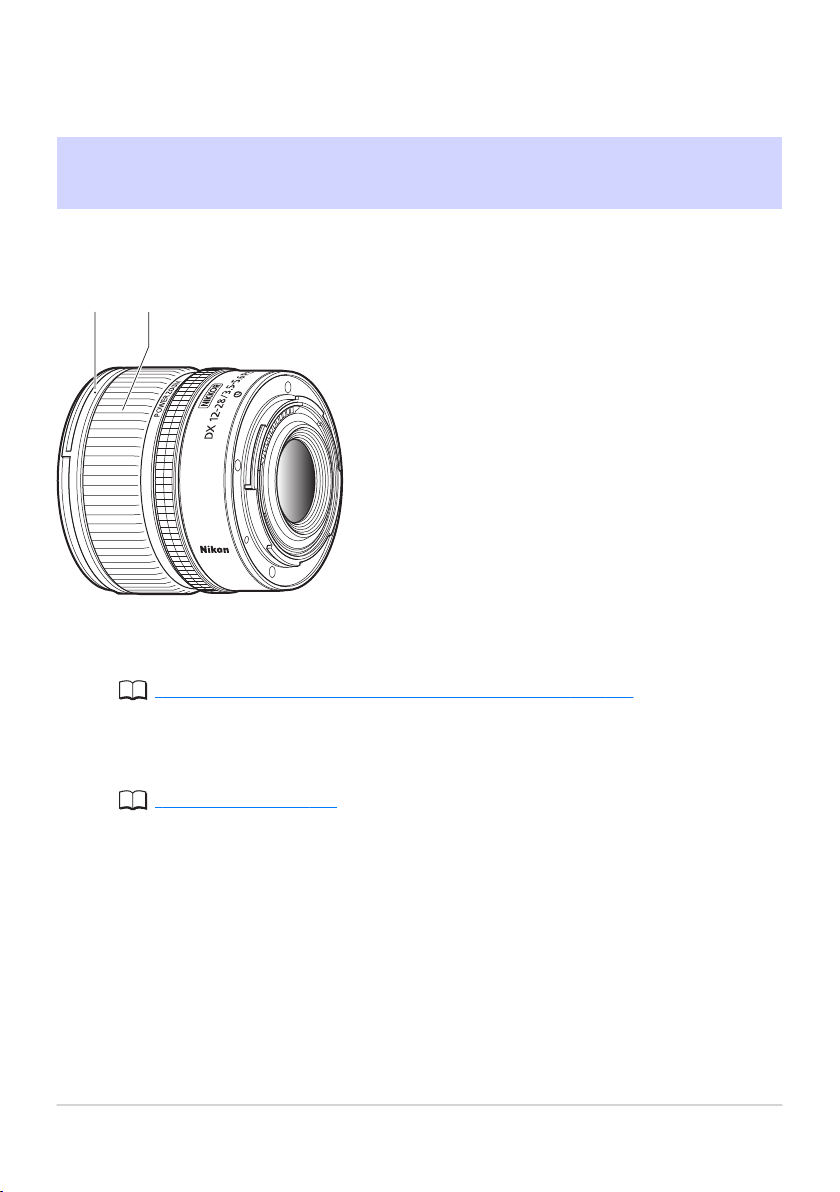
The parts of the lens are listed below.
1 2
Lens hood mounting mark
Use when attaching the lens hood.
“Attaching and Removing Optional Lens Hoods” (p.14)
Zoom r
ing
R
otate the ring to zoom in or out.
“Power Zoom” (p.16)
7
Parts of the Lens: Names and
Functions
1
2
4 5
3
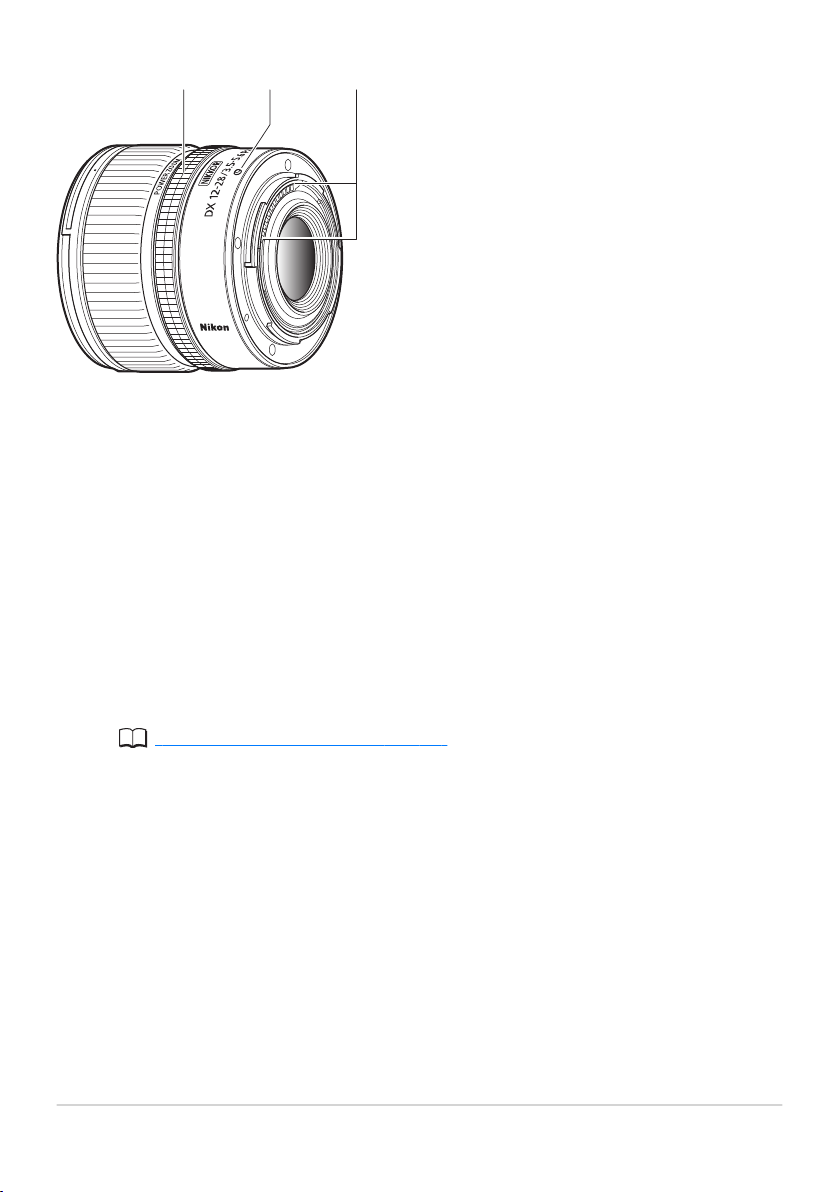
Control ring
• Autofocus mode selected:
Rotat
e the ring to adjust a setting such as [Focus (M/A)] or [Aperture]
assigned using the camera. For more information, see the description of
[Custom control assignment], [Custom controls], or [Custom controls
(shooting)] in the documentation provided with the camera.
• Manual focus mode selected:
Rotate the ring to focus.
Lens mounting mark
Use when mounting the lens on the camera.
“Attachment and Removal” (p.11)
CPU contacts
Used to transfer data t
o and from the camera.
8
Parts of the Lens: Names and
Functions
3
4
5
6 7
8
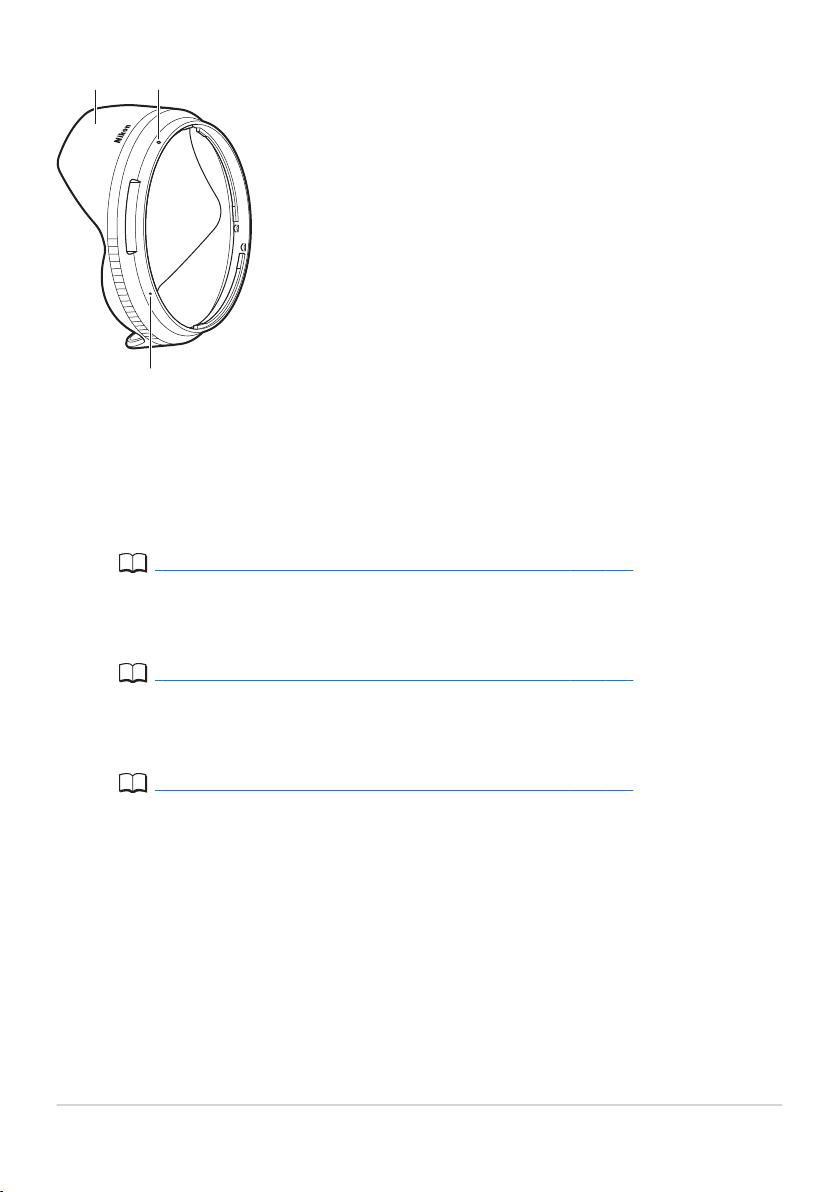
Lens hood
*
Lens hoods r
educe stray light that w
ould otherwise cause flare or ghosting.
They also serve to protect the lens.
Available separately.
“Attaching and Removing Optional Lens Hoods” (p.14)
Lens hood lock mark
Use when attaching the lens hood.
“Attaching and Removing Optional Lens Hoods” (p.14)
Lens hood alignment mark
Use when attaching the lens hood.
“Attaching and Removing Optional Lens Hoods” (p.14)
9
Parts of the Lens: Names and
Functions
6
*
7
8
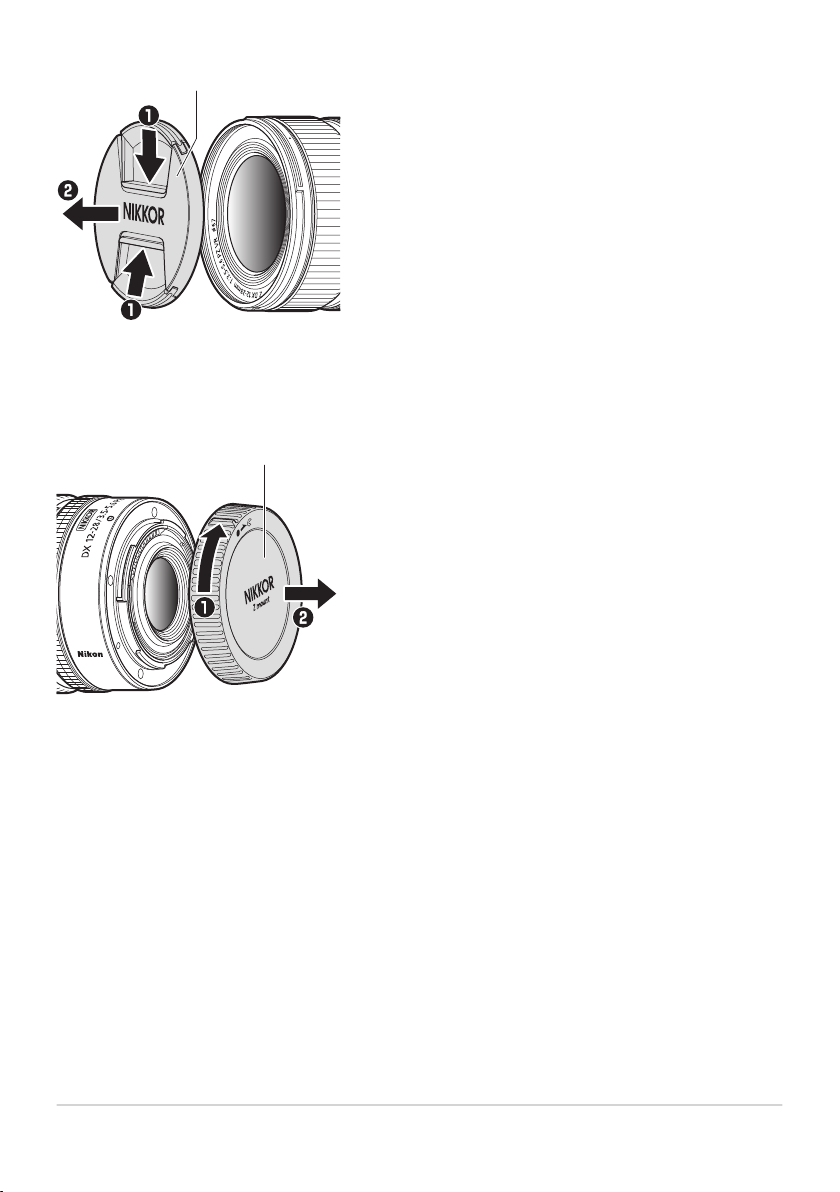
9
Lens cap (front cap)
10
Lens cap (rear cap)
10
Parts of the Lens: Names and
Functions
9
10
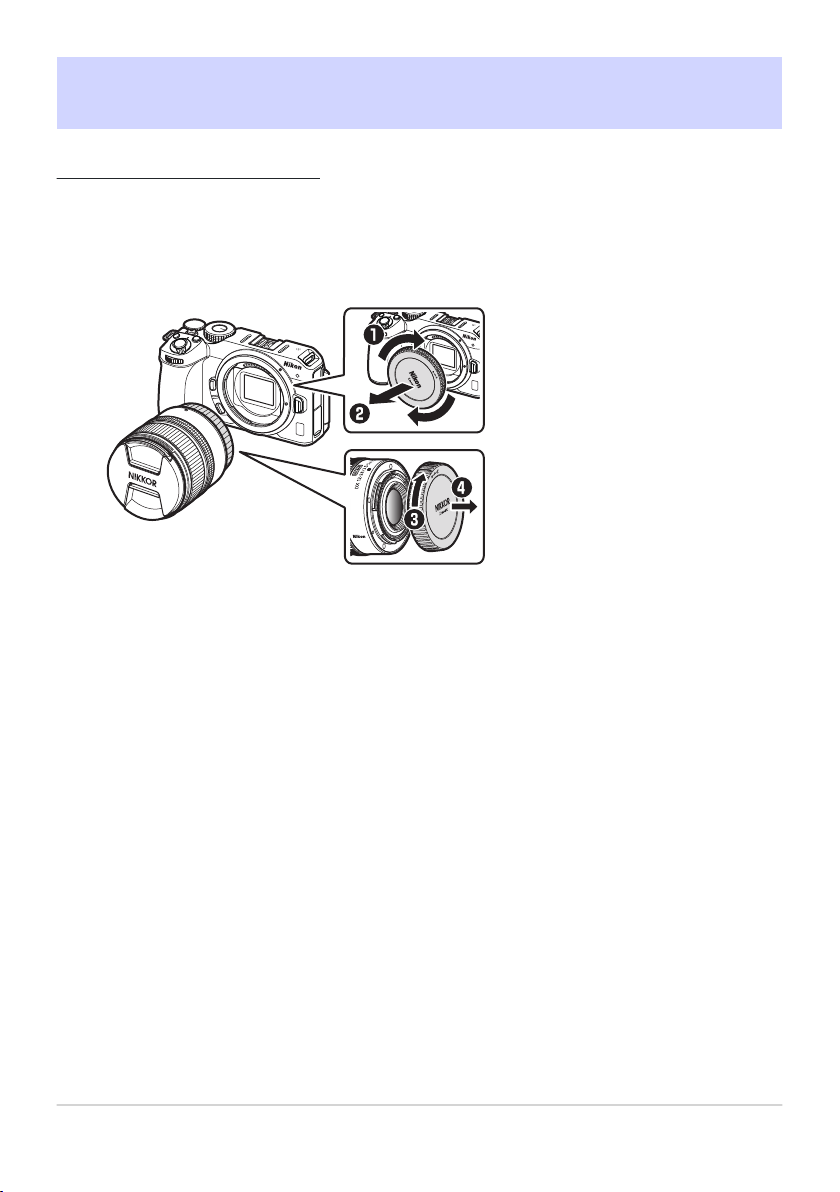
AttachmentandRemoval
Attaching the Lens
Tur
n the camera body off, remove the camera body cap,
and detach the rear lens cap.
11 AttachmentandRemoval
1.
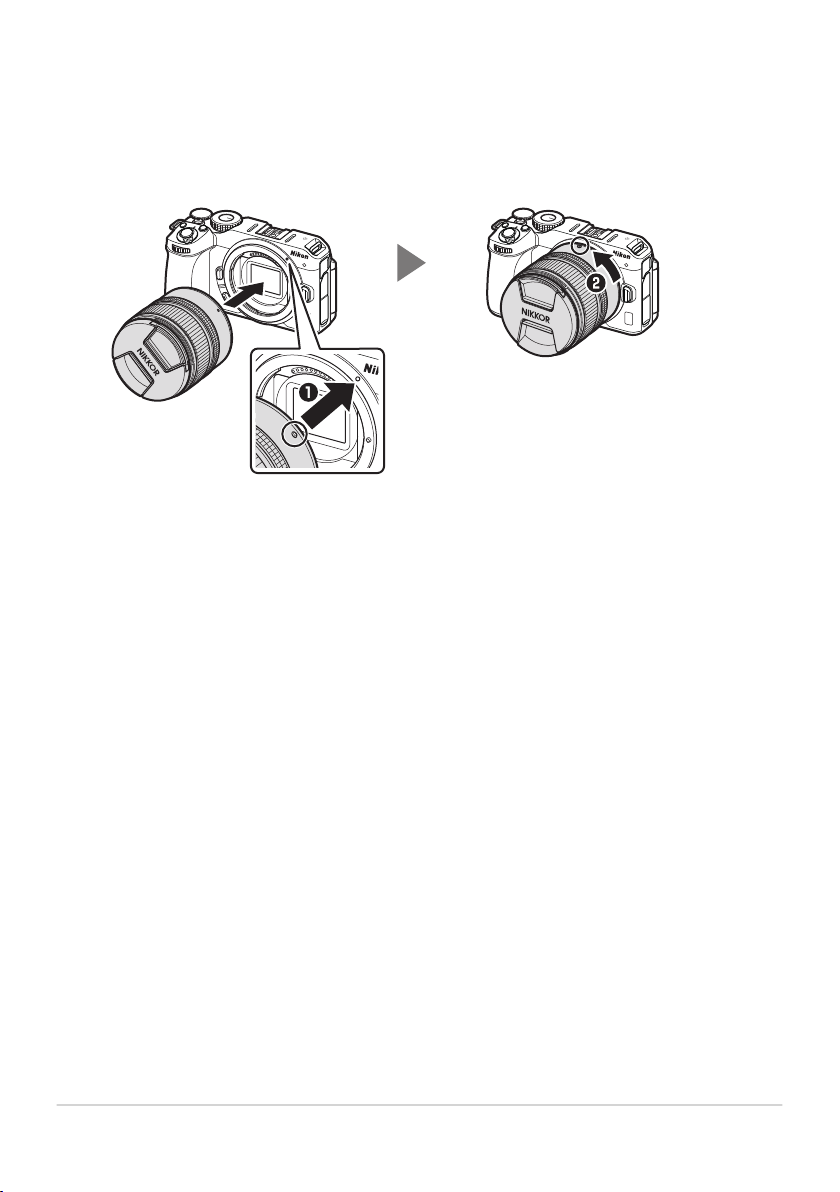
Position the lens on the camera body, keeping the
mounting mark on the lens aligned with the mounting
mark on the camera body (q), and then rotat
e the lens
in the direction shown (w) until it clicks into place.
12 AttachmentandRemoval
2.
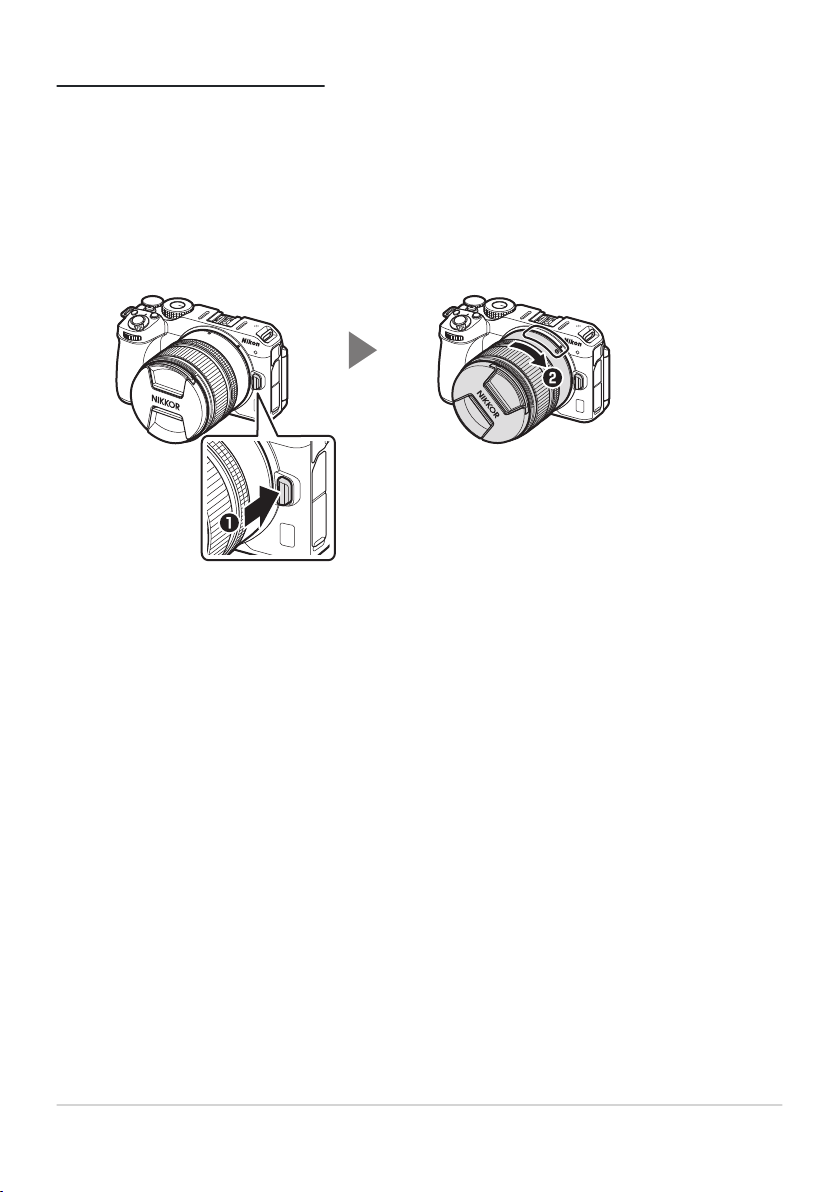
Removing the Lens
Tur
n the camera body off.
Press and hold the lens release button (q) while turning
the lens in the direction shown (w).
13 AttachmentandRemoval
1.
2.
Attaching and Removing Optional Lens
Hoods
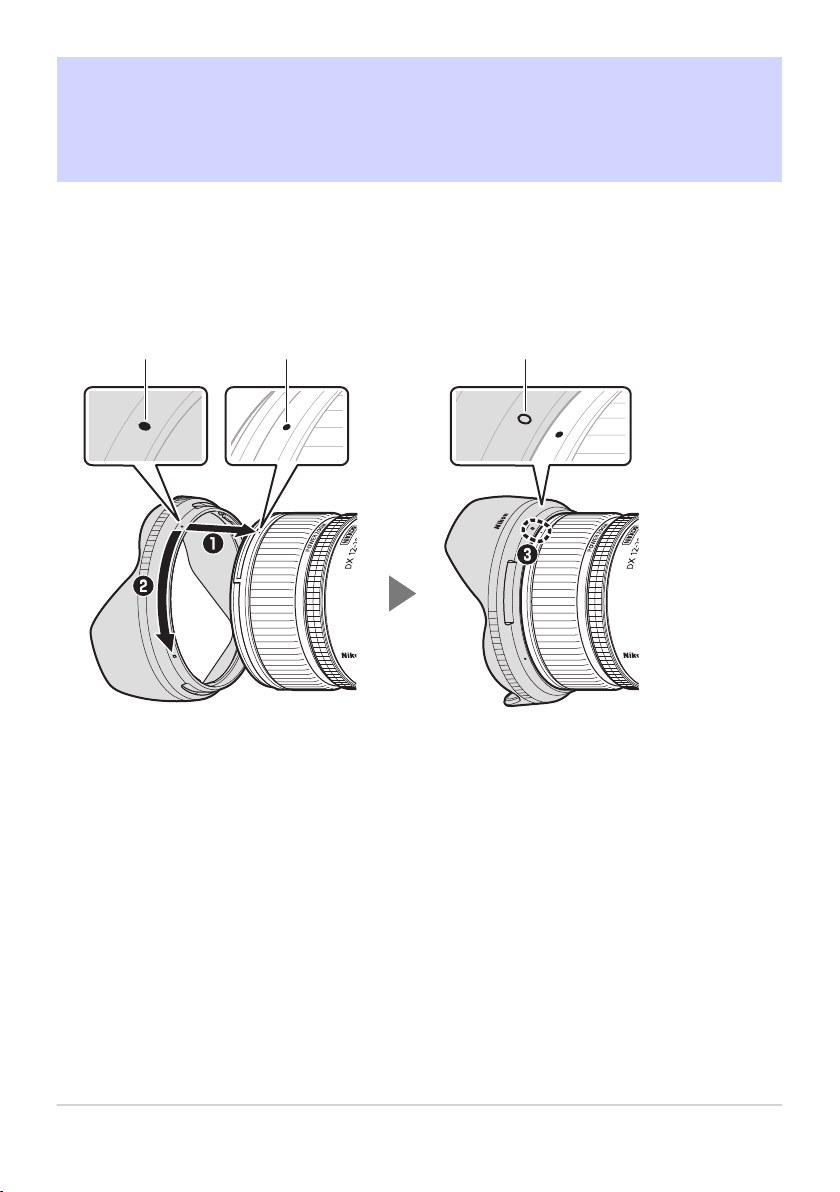
• Align the lens hood alignment mark with the lens hood mounting mark (q) and
then rotat
e the lens hood in the direction shown (w) until the mounting mark is
aligned with the lens hood lock mark (e).
1 2 3
Lens hood alignment mark
Lens hood mounting mark
L
ens hood lock mark
14
Attaching and Removing Optional
Lens Hoods
1
2
3
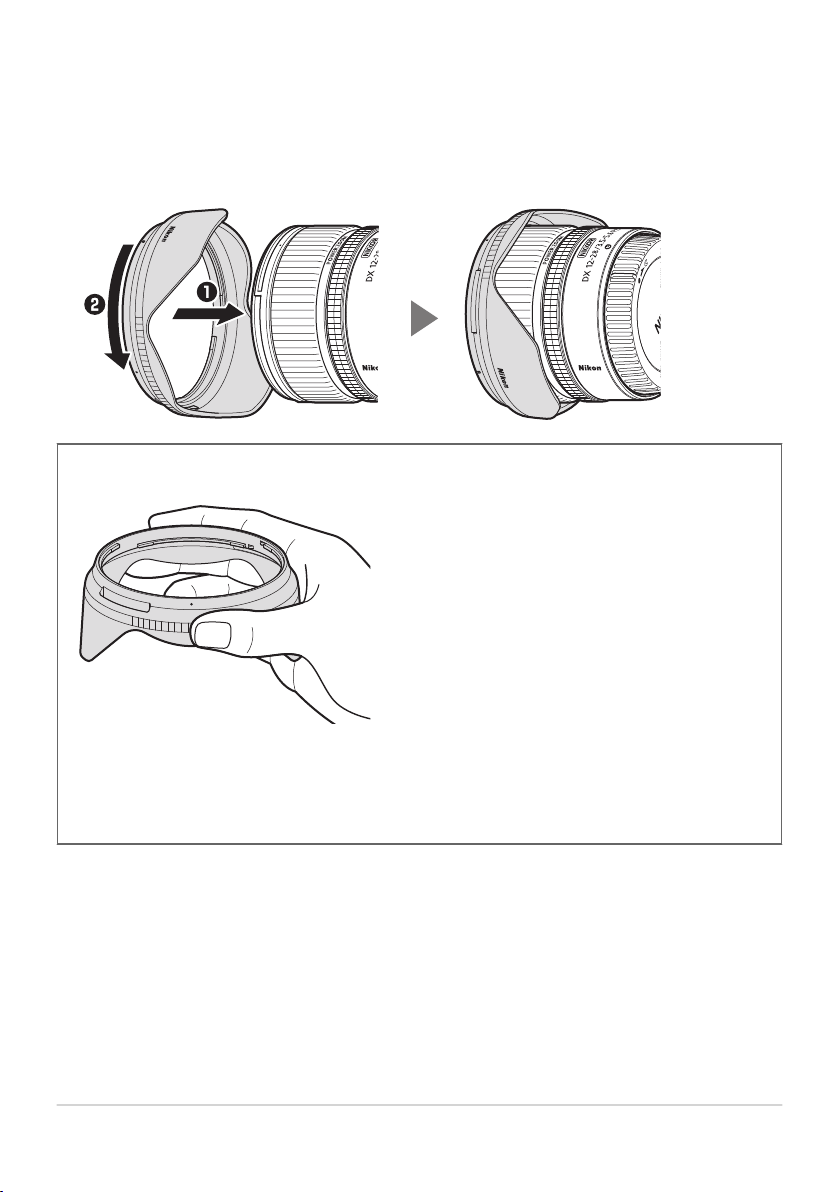
• Gripping the front too tightly makes the lens hood difficult to attach or remove.
When rotating the lens hood, hold it near the lens hood alignment mark (●).
• T
o remove the lens hood, reverse the above steps.
• The lens hood can be reversed and mounted on the lens when not in use.
DR
eversing the Lens Hood
Keeping your finger and thumb wrapped around the lens hood, gently grip the
knurled surface and r
otate the hood until it clicks into place in the reversed
position.
15
Attaching and Removing Optional
Lens Hoods
Power Zoom
The lens features pow
er zoom controlled via the zoom ring.
• When the lens is mounted on a compatible camera, power zoom also can be
perfor
med using:
camera controls assigned the power zoom role,
controls assigned the power zoom role on connected MC‑N10 remote grips,
if power zoom is assigned to the camera X and W buttons, the + and −
buttons on connected ML‑L7 remote controls, or
Nikon camera control software or apps that support power zoom.
• When the lens is mounted on a compatible camera, you can:
choose the speed at which the lens can be zoomed in and out using buttons
assigned the pow
er zoom role,
choose whether the last-selected zoom position is automatically restored
when the camera is turned on, and
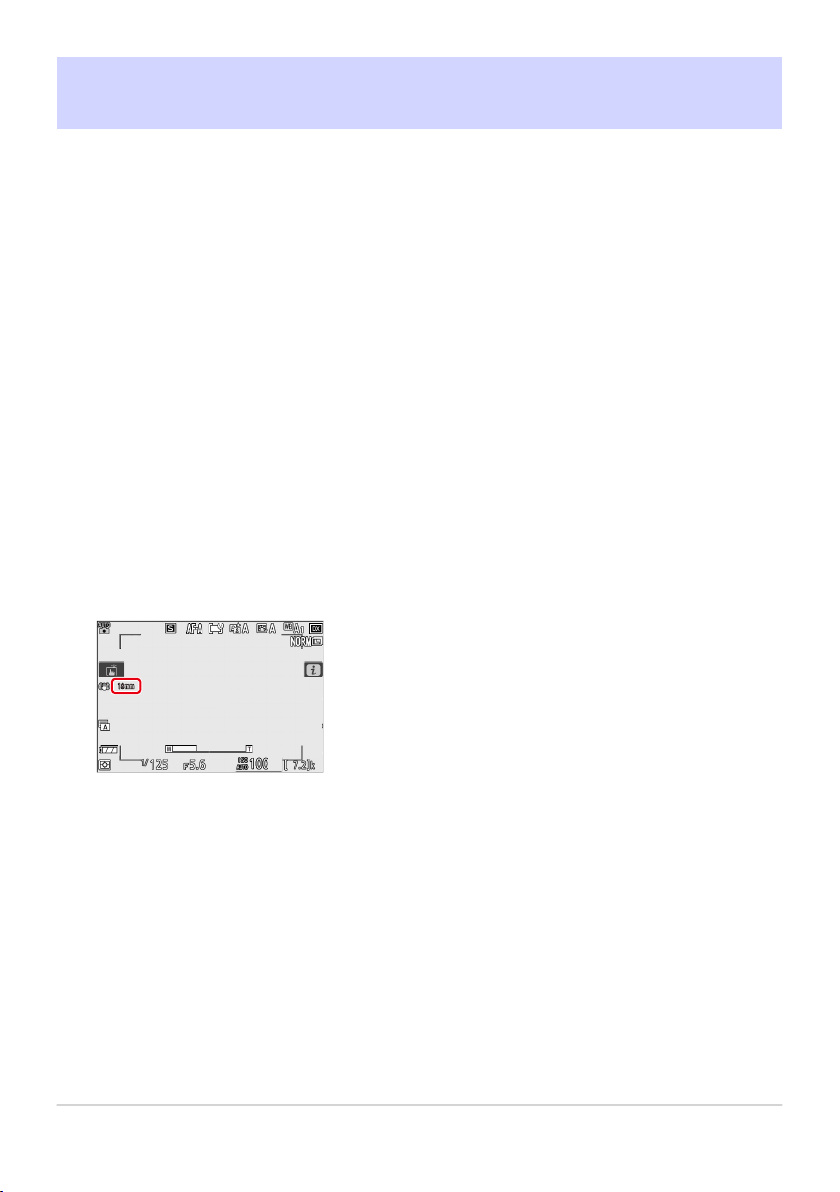
view the lens focal length in the camera shooting display.
Z30 shooting display shown.
• Noise from the lens during zoom may be audible in video footage. If desired,
the effect can be mitigat
ed by r
otating the zoom ring slowly. We recommend
that you choose slower zoom speeds when using buttons assigned the power
zoom role.
16 Power Zoom
-
-
-
-
-
-
-

• For more information on using power zoom, see the documentation for the
camera, sof
tware, or app in question.
• Be sure the camera firmware and all software and apps have been updated to
the latest version.
17 Power Zoom

Vibration Reduction (VR)
The lens supports vibration r
eduction. Vibration reduction settings can be
adjusted from the camera. See the documentation provided with the camera for
details.
Vibration reduction allows shutter speeds slower than would otherwise be the
case, expanding the range of shutter speeds available.
DVibration Reduction
• Due to the design of the vibration reduction system, the lens may rattle when
shaken. This does not indicat
e a malfunction.
• To reduce blur caused by tripod shake, select [Normal] or [Sport] for the
on-camera vibration reduction option when the camera is mounted on a
tripod. Note, however, that depending on the type of tripod and shooting
conditions, there may be cases in which [Off] is the preferred option.
• [Normal] or [Sport] is recommended when the camera is mounted on a
monopod.
18 Vibration Reduction (VR)

Cautions:TakingPhotographs
• The following restrictions apply when the lens is used with an FX-format
camera:
The camera will use the DX-for
mat image area, which reduces the number of
pixels recorded and the number of focus points.
The [Image Dust Off ref photo] option in the setup menu cannot be used.
• Videos shot with 1920× 1080 120p, 1920× 1080 100p, or 1920× 1080 slow-
motion selected for [Frame size/frame rate] in the movie shooting menu are
recorded at the following frame sizes and rates when the lens is mounted on a
Z6:
1920× 1080; 120p → 1920× 1080; 60p
1920× 1080; 100p → 1920× 1080; 50p
1920× 1080; 30p ×4 (slow-motion) → 1920× 1080; 30p
1920× 1080; 25p ×4 (slow-motion) → 1920× 1080; 25p
1920× 1080; 24p ×5 (slow-motion) → 1920× 1080; 24p
19 Cautions:TakingPhotographs
-
-
-
-
-
-
-

PrecautionsforUse
• Do not pick up or hold the lens or camera using only the lens caps or lens hood.
• Keep the CPU contacts clean.
• Reattach the lens caps when the lens is not in use.
• Do not leave the lens in humid locations or in locations in which it may be
exposed to moistur
e. Rusting of the internal mechanism can cause irreparable
damage.
• Do not leave the lens next to open flames or in other extremely hot locations.
Extreme heat could damage or warp the lens.
• Taking the lens from a warm to a cold environment or vice versa may cause
damaging condensation inside and outside the lens. Place the lens in a sealed
bag or plastic case before taking it across a temperature boundary. The lens
can be taken from the bag or case once it has had time to adjust to the new
temperature.
• We recommend that you place the lens in a case (available separately) to
protect it from scratches during transport.
• Keep credit cards and other such magnetic storage devices away from the
camera and lens. Data stored on the device could be corrupted.
20 PrecautionsforUse

Lens Maintenance
• Removing dust is normally sufficient to clean the glass surfaces of the lens.
• Smudges, fingerprints, and other oily stains can be removed using a soft, clean
cotton cloth or thir
d-party lens cleaning tissue lightly dampened with a small
amount of ethanol or third-party lens cleaner; clean from the center outwards
in a circular motion. Be sure to clean evenly and thoroughly without leaving
smears.
• Never use organic solvents such as paint thinner or benzene to clean the lens.
• Neutral Color (NC) filters (available separately) and the like can be used to
protect the front lens element.
• Do not store the lens in direct sunlight or with naphtha or camphor moth balls.
If the lens will not be used for an extended period, store it in a cool, dry location
to prevent mold and rust.
21 Lens Maintenance

Technical Notes
Cameras with AF-Assist Illuminator
s
The lens or lens hood may block the light from the camera AF-assist illuminator.
• For the information on using the lens with cameras that have built-in AF-assist
illuminator
s, visit the site below.
https://downloadcenter.nikonimglib.com/
22 Cameras with AF-Assist Illuminators

UsingtheLensonCameraswithaBuilt-
inFlash
Shadows will be visible in photos wher
e light from the built-in flash is obscured
by the lens or lens hood. Remove the lens hood before shooting. Note, however,
that depending on the distance to the subject and lens focal length, shadows may
appear even when the lens hood is removed.
• For information on the subject distances and focal lengths at which shadows
will not appear in photos tak
en with a built-in flash, visit the site below.
https://downloadcenter.nikonimglib.com/
23
UsingtheLensonCameraswithaBuilt-
inFlash
Accessories
Supplied Accessories
• LC-67B Lens Cap (front cap)
• LF-N1 Lens Cap (rear cap)
Other Compatible Accessories
• HB-112 Lens Hood
• CL-C4 Lens Case
• 67mm filters
Filters
• Use only one filter at a time.
• Remove the lens hood before attaching filters. You will also need to remove
the lens hood before r
otating circular polarizing filters.
24 Accessories

Specifications
Mount Nikon Z mount
Focal length 12 – 28mm
Maximum aperture f/3.5 – 5.6
Lens construction
12 elements in 11 groups (including 1 ED and 1
aspherical element)
Angle of view DX format: 99° – 53°
Focusing system Internal focusing system
Vibration reduction Lens shift using voice coil motor
s (VCMs)
Minimum focus
distance (measured
from focal plane)
0.19m (0.62ft) at all zoom positions
Maximum
reproduction ratio
0.21×
Diaphragm blades 7 (rounded diaphragm opening)
Aperture range
• 12 mm zoom position: f/3.5 – 16
• 28 mm zoom position: f/5.6 – 25
The value displayed at minimum aperture may vary
with the exposure increment selected on the camera.
Filter-attachment size 67mm (P= 0.75mm)
25 Specifications
*

Dimensions
(maximum
diameter×distance
t
o end of lens from
camera lens mount
flange)
Approx. 72mm× 63.5mm (2.9in.× 2.5in.)
Weight Approx. 205g (7.3oz)
• Throughout this document, “FX format” and “FX” are used in reference to an
angle of view equivalent to that of a 35 mm format (“full frame”) camera and
“DX format” and “DX” to an angle of view equivalent to that of an APS-C
camera.
• Nikon reserves the right to change the appearance, specifications, and
performance of this product at any time and without prior notice.
26 Specifications

Notices
Notices for Customers in the U.S.A.
This device complies with par
t 15 of the FCC Rules. Operation is subject to the
following two conditions: (1) this device may not cause harmful interference, and
(2) this device must accept any interference received, including interference that
may cause undesired operation.
Federal Communications Commission (FCC) Radio
Frequency Interference Statement
Note: This equipment has been tested and found to comply with the limits
for a Class B digital device, pursuant to part 15 of the FCC Rules. These
limits are designed to provide reasonable protection against harmful interference
in a residential installation. This equipment generates, uses and can radiate
radio frequency energy and, if not installed and used in accordance with the
instructions, may cause harmful interference to radio communications. However,
there is no guarantee that interference will not occur in a particular installation. If
this equipment does cause harmful interference to radio or television reception,
which can be determined by turning the equipment off and on, the user is
encouraged to try to correct the interference by one or more of the following
measures:
• Reorient or relocate the receiving antenna.
• Increase the separation between the equipment and receiver.
• Connect the equipment into an outlet on a circuit different from that to which
the receiver is connected.
• Consult the dealer or an experienced radio/TV technician for help.
27 Notices
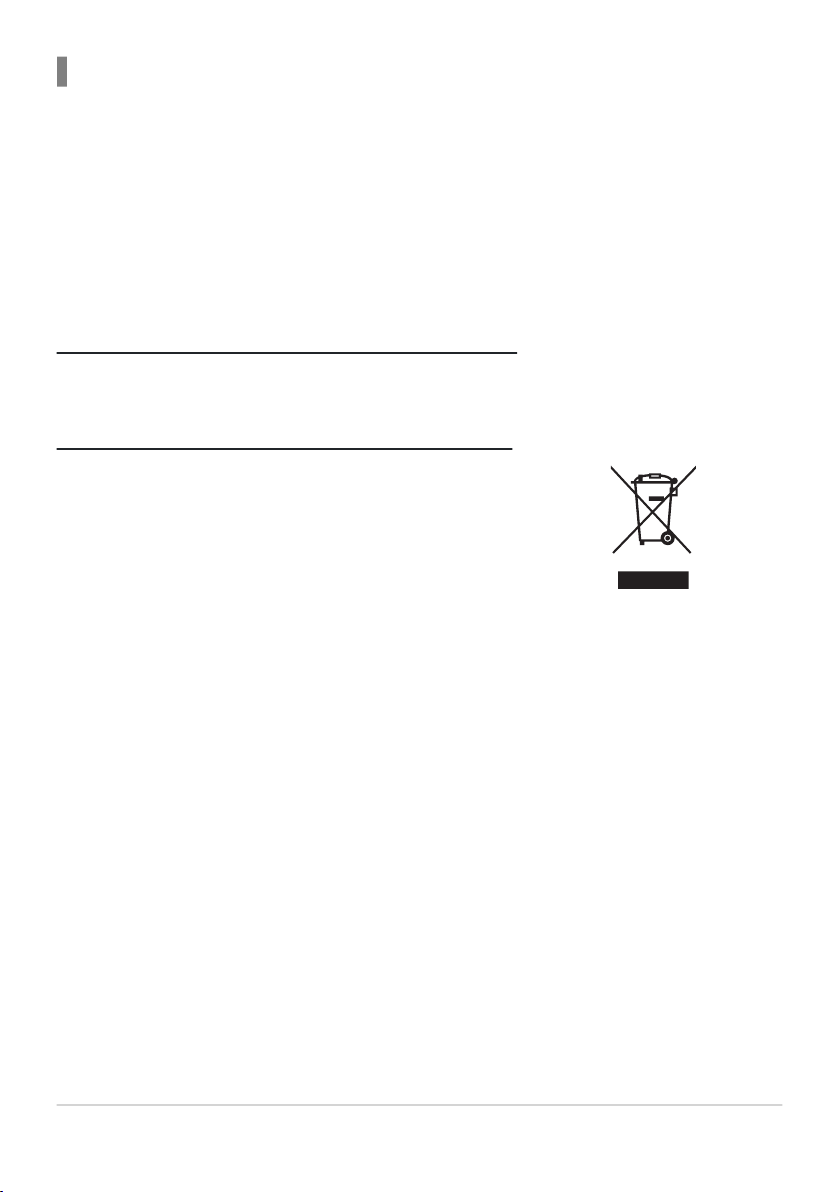
This symbol indicates that electrical and electronic
equipment is to be collect
ed separately.
CAUTIONS
●Modifications
The FC
C requires the user to be notified that any changes or modifications made
to this device that are not expressly approved by Nikon Corporation may void the
user’s authority to operate the equipment.
Nikon Inc., 1300 Walt Whitman Road, Melville, New York 11747-3064, U.S.A.
Tel.: 631-547-4200
Notices for Customers in Canada
CAN ICES-003 (B) / NMB-003 (B)
Notices for Customers in Europe
The following apply only to user
s in European countries:
• This product is designated for separate collection at an appropriate collection
point. Do not dispose of as household waste.
• Separate collection and recycling helps conserve natural resources and prevent
negative consequences for human health and the environment that might result
from incorrect disposal.
• For more information, contact the retailer or the local authorities in charge of
waste management.
28 Notices