
............ www.truemfg.com ............
TABLE OF CONTENTS
Safety Information
Safety Precautions 1
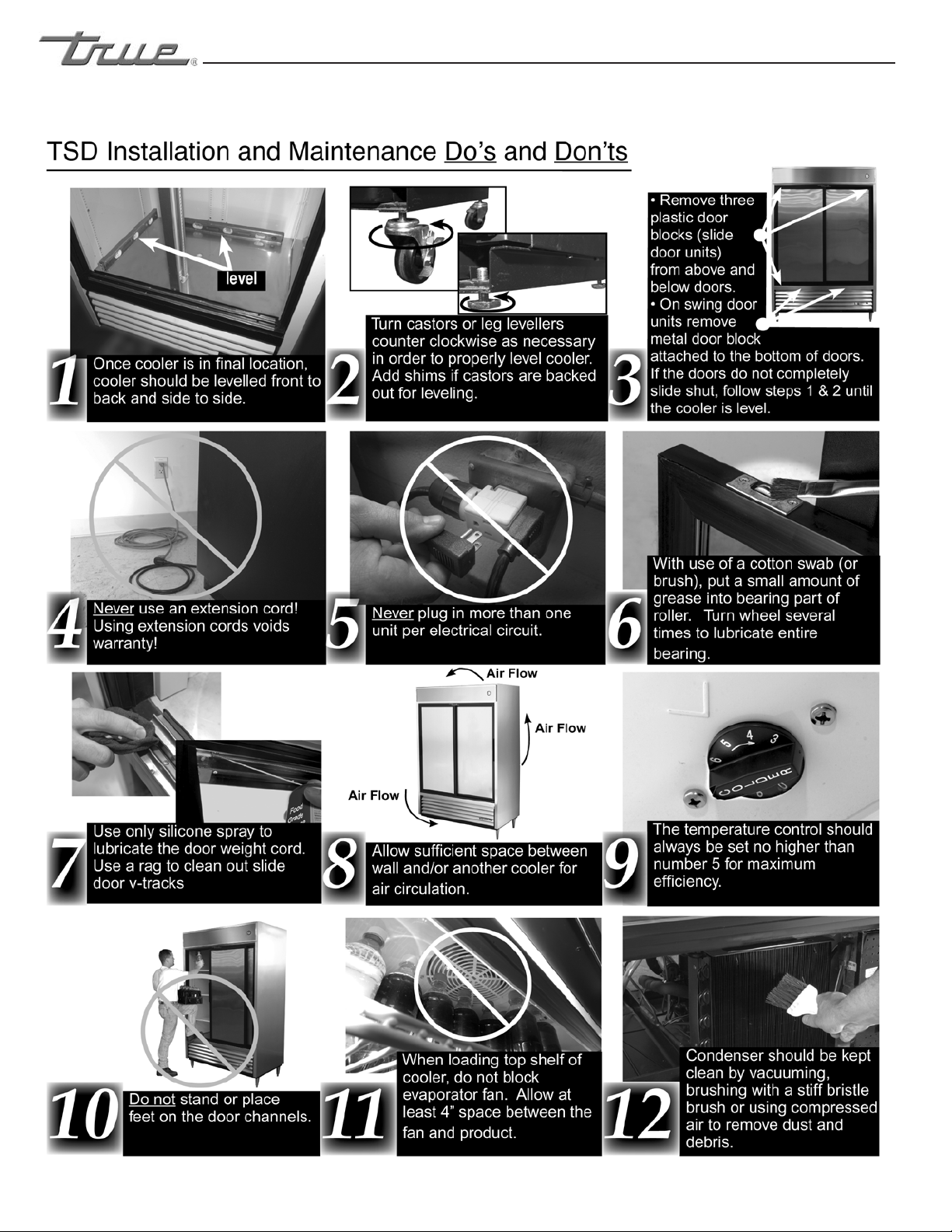
TSD Do’s and Don’ts 2
Proper Disposal 3
Connecting Electricity 4
Adapter Plugs 4
Installation / Operation Instructions
Ownership 5
Required Tools 5
Uncrating 5
Leveling Cabinet 6
Installation of Castors or Optional Legs 7
Installing Optional Castors on a T-12FG 8
Slide Door Operation Instructions 9
Wire Gauge Chart 10
Sealing Cabinet to Floor & Electrical Inst. 11
Start-up 12
LAE Temp Control 13-21
Shelving Install/Operation & Light Switches 22
Grasslin Defrost Timer (Freezer Units Only) 23
Temperature Control High Altituded Adjustment 24
Field Troubleshooting (Freezer Units Only) 25-26
Light Cover Install for T-12FG 27
Maintenance, Care & Cleaning
Cleaning Condenser Coil 28-29
Stainless Steel Equipment Care & Cleaning 30-31
Light Bulb Replacement 31
Warranty (U.S.A. & CANADA ONLY!) 32
INSTALLATION MANUAL FOR T-SERIES FREEZER /
REFRIGERATOR (SWING AND SLIDE DOOR)
T-SERIES
FREEZER / REFRIGERATOR SWING
& SLIDE DOOR
TRUE FOOD SERVICE EQUIPMENT, INC.
2001 East Terra Lane • O’Fallon, Missouri 63366-4434
(636)-240-2400 • FAX (636)272-2408 • INT’L FAX (636)272-7546 • (800)325-6152
Parts Department (800)424-TRUE • Parts Department FAX# (636)272-9471
CONGRATULATIONS!
You have just purchased the finest commercial
freezer / refrigerator available. You can expect many
years of trouble-free operation.
#897001 • RD • 4/13
*Spanish, German, French, Dutch, and Arabic versions included.
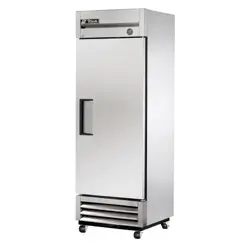
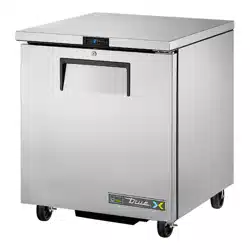
T-23
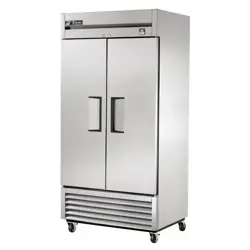
TSD-69
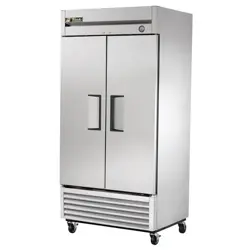
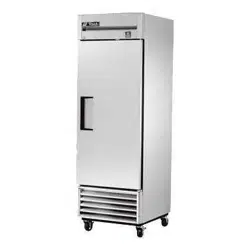
T-49
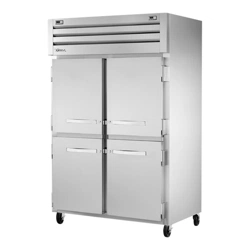
TSD-47G
............ www.truemfg.com ............
True Food Service Equipment, Inc.
............ www.truemfg.com ............
True Food Service Equipment, Inc.
1
1
............ www.truemfg.com ............
SAFETY INFORMATION
1
1
• This refrigerator must be properly installed
and located in accordance with the Installation
Instructions before it is used.
• Do not allow children to climb, stand or hang on the
shelves in the refrigerator. They could damage the
refrigerator and seriously injure themselves.
• Do not touch the cold surfaces in the freezer
compartment when hands are damp or wet. Skin
may stick to these extremely cold surfaces.
• Do not store or use gasoline or other flammable
vapors and liquids in the vicinity of this or any other
appliance.
• Keep fingers out of the “pinch point” areas;
clearances between the doors and between the doors
and cabinet are necessarily small; be careful closing
doors when children are in the area.
NOTE
We strongly recommend that any servicing be performed by
a qualified individual.
• Unplug the refrigerator before cleaning and
making repairs.
• Setting temperature controls to the 0 position does
not remove power to the light circuit, perimeter
heaters, or evaporator fans.
WARNING!
Use this appliance for its intended purpose as described
in this Owner Manual.
This cabinet contains fluorinated greenhouse gas covered by the Kyoto Protocol
(please refer to cabinet’s inner label for type and volume,
GWP of 134a= 1,300. R404a= 3,800).
How to Maintain Your Freezer
/ Refrigerator to Receive the Most
Efficient and Successful Operation
You have selected one of the finest commercial refrigeration units made. It is manufactured
under strict quality controls with only the best quality materials available. Your TRUE cooler
when properly maintained will give you many years of trouble-free service.
SAFETY PRECAUTIONS
When using electrical appliances, basic safety precautions should be followed, including the following:
............ www.truemfg.com ............
True Food Service Equipment, Inc.
2 2
............ www.truemfg.com ............
True Food Service Equipment, Inc.
3
3
SAFETY INFORMATION
PROPER DISPOSAL OF THE FREEZER /
REFRIGERATOR
DANGER!
RISK OF CHILD ENTRAPMENT
USE OF EXTENSION CORDS
NEVER USE AN EXTENSION CORD! TRUE will not warranty any refrigerator that has been connected to an extension cord.
Child entrapment and suffocation are not problems
of the past. Junked or abandoned refrigerators are still
dangerous… even if they will sit for “just a few days.” If
you are getting rid of your old refrigerator, please follow
the instructions below to help prevent accidents.
Before You Throw Away Your Old Refrigerator or
Freezer:
• Take off the doors.
• Leave the shelves in place so that children may not
easily climb inside.
Refrigerant Disposal
Your old refrigerator may have a cooling system
that uses “Ozone Depleting ” chemicals. If you are
throwing away your old refrigerator, make sure the
refrigerant is removed for proper disposal by a
qualified service technician. If you intentionally
release any refrigerants you can be subject to
fines and imprisonment under provisions of the
environmental regulations.
REPLACEMENT PARTS
• Componentpartsshallbereplacedwithlikecomponents.
• Servicingshallbedonebyauthorizedservicepersonnel,tominimizetheriskofpossibleignitionduetoincorrect
parts or improper service.
• Lampsmustbereplacedbyindenticallampsonly.
• Ifthesupplycordisdamaged,itmustbereplacedbyaspecialcordorassemblyavailablefromthemanufactureror
its service agent.
............ www.truemfg.com ............
True Food Service Equipment, Inc.
4 4
WARNING!
SAFETY INFORMATION
The power cord of this appliance is equipped with a
grounding plug which mates with a standard grounding wall
outlet to minimize the possibility of electric shock hazard from
this appliance.
Have the wall outlet and circuit checked by a qualified
electrician to make sure the outlet is properly grounded.
If the outlet is a standard 2-prong outlet, it is your personal
responsibility and obligation to have it replaced with the
properly grounded wall outlet.
The refrigerator should always be plugged into it’s own
individual electrical circuit, which has a voltage rating that
matches the rating plate.
This provides the best performance and also prevents
overloading building wiring circuits which could cause a fire
hazard from overheated wires.
Never unplug your refrigerator by pulling on the power cord.
Always grip plug firmly and pull straight out from the outlet.
Repair or replace immediately all power cords that have
become frayed or otherwise damaged. Do not use a cord that
shows cracks or abrasion damage along its length or at either
end.
When removing the refrigerator away from the wall, be
careful not to roll over or damage the power cord.
WIRING CONVERSION
At Receptacle Box
1. Turn breaker off
2. Disconnect all wires from receptacle
3. Insulate red wire (tape or wire nut)
4. Connect black, white, and green wires to 3
prong plug NEMA 5-20R per instructions
on receptacle
At Breaker Panel
1. With breaker turned off, remove wires
2. Remove double pole breaker
3. Install single pole breaker
4. Connect black wire to breaker
5. Insulate red wire
6. Turn breaker back on
HOW TO CONNECT ELECTRICITY
Do not, under any circumstances, cut or remove the ground prong from the power cord.
For personal safety, this appliance must be properly grounded.
USE OF ADAPTER PLUGS
NEVER USE AN ADAPTER PLUG! Because of potential safety hazards under certain conditions, we strongly recommend
against the use of an adapter plug.
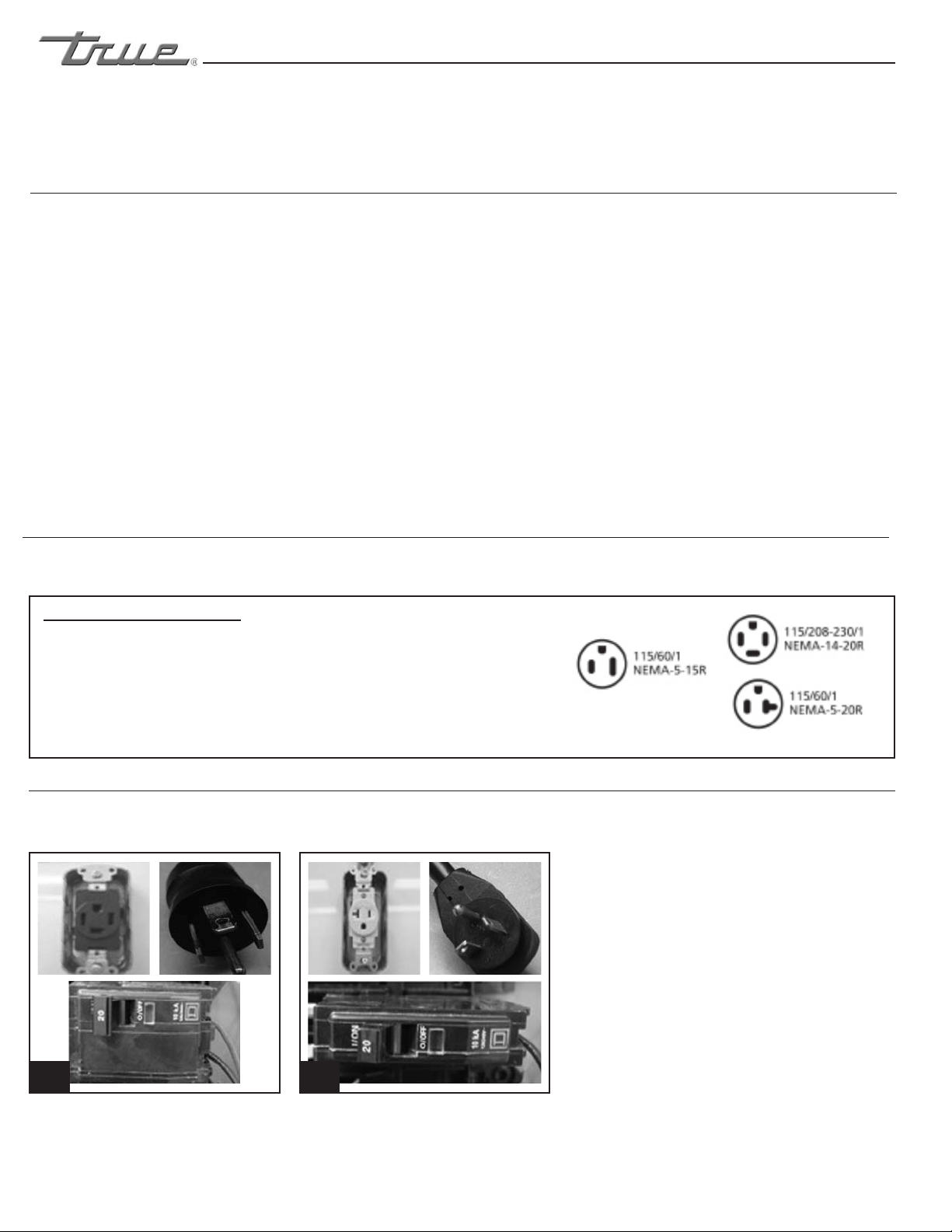
T-72F WIRING CHANGES (110V Application Only)
Previous design: 4 prong plug NEMA 14-20R - 4 wire circuit (see image 1).
Current design: 3 prong plug NEMA 5-20R - 3 wire circuit (see image 2).
(North America Use Only!)
NEMA plugs
1 2
NOTE: It is the customer’s responsibility to make sure receptacle wiring
meets all local electrical codes. TRUE recommends hiring a licensed qualified
electrician to make this change.
TRUE uses these types of plugs. If you do not have the right outlet have
a certified electrician install the correct power source. The incoming
power source to the cabinet including any adapters used must
have the adequate power available and must be properly grounded.
Only adapters listed with UL should be used.
............ www.truemfg.com ............
True Food Service Equipment, Inc.
5
5
INSTALLATION / OPERATION INSTRUCTIONS
To ensure that your unit works properly from the first
day, it must be installed properly. We highly recommend
a trained refrigeration mechanic and electrician install
your TRUE equipment. The cost of a professional
installation is money well spent.
Before you start to install your TRUE unit, carefully
inspect it for freight damage. If damage is discovered,
immediately file a claim with the delivery freight carrier.
TRUE is not responsible for damage incurred during
shipment.
OWNERSHIP
• Adjustable Wrench
• Phillips Head Screwdriver
• Level
REQUIRED TOOLS
NOTE
Units with a solar thermometer will experience a 15 second delay
after exposed to light before it reads the proper temperature.
The following procedure is recommended for uncrating the
unit:
A. Remove the outer packaging, (cardboard and bubbles or
styrofoam corners and clear plastic). Inspect for concealed
damage. Again, immediately file a claim with the freight
carrier if there is damage.
B. Move your unit as close to the final location as possible
before removing the wooden skid.
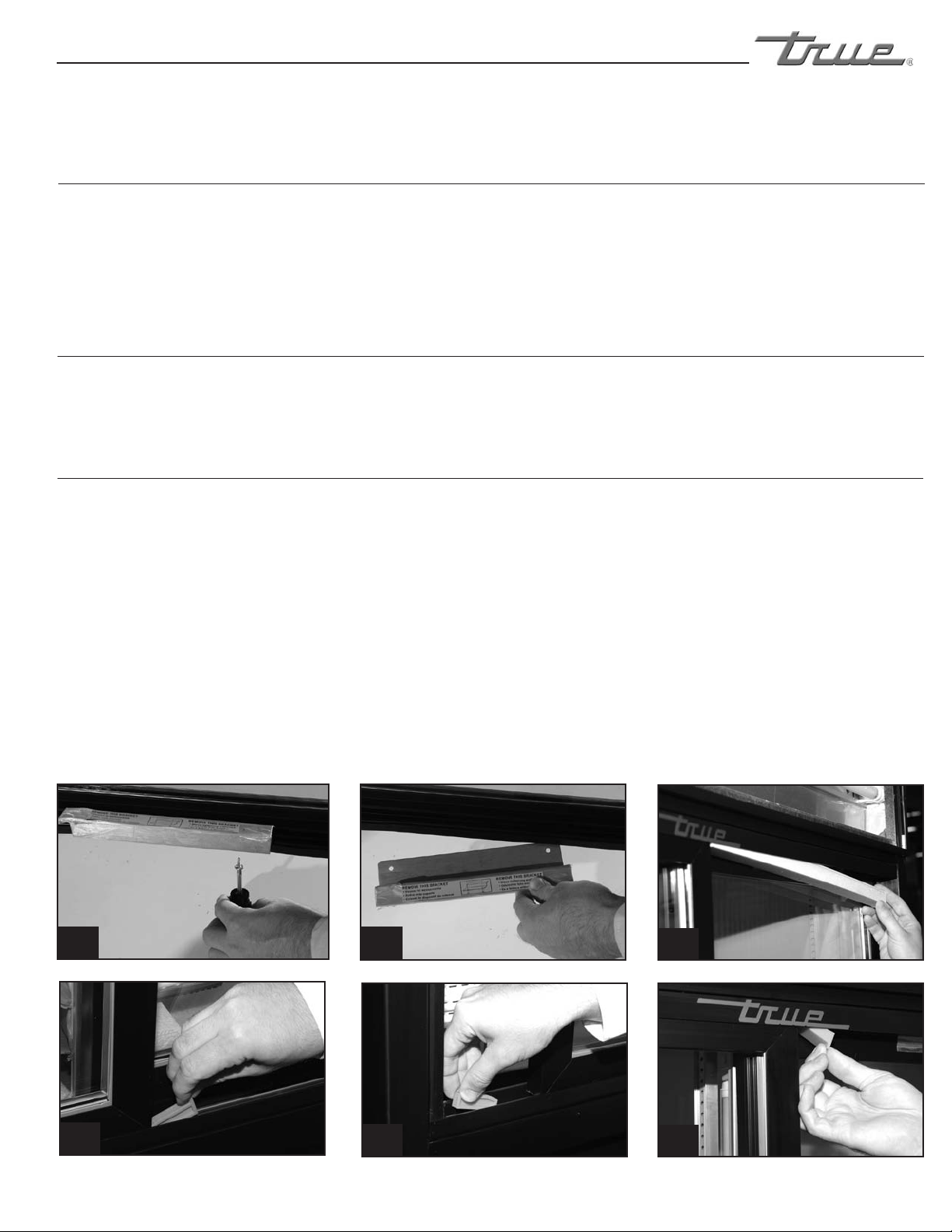
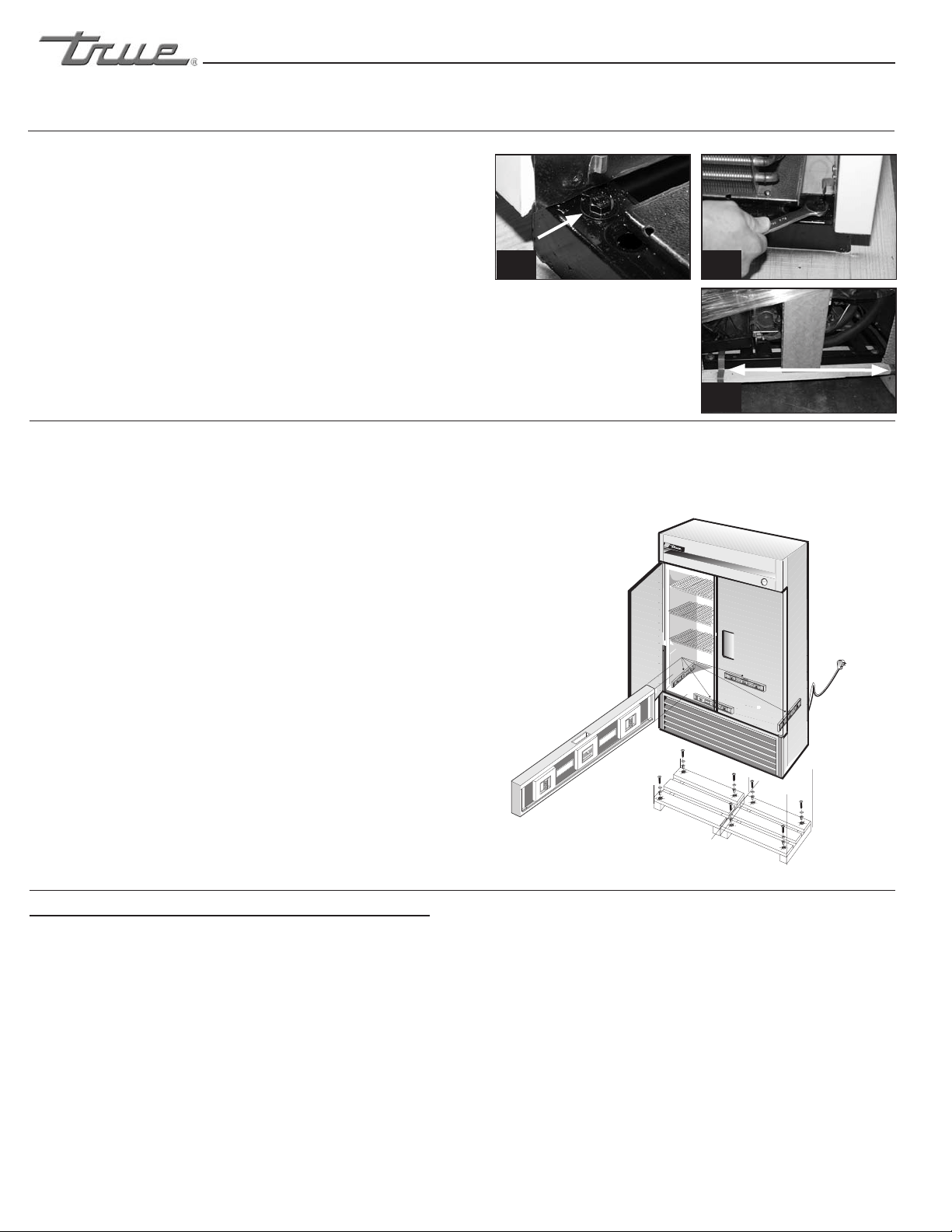
C. Remove door bracket on swinging glass door models (see
image 1-2). Sliding glass door models contain shipping
blocks (three for each door). Remove the two styrofoam
blocks taped to the top of the door tracks (see image 3).
The shipping blocks are orange in color and by opening
the door a little the blocks can be removed (see images
4-6). Do not throw the bracket or blocks away. For future
cabinet movement the bracket and blocks will need to be
installed so the glass door does not receive any damage.
(See image for bracket and shipping block removal)
NOTE
Keys for coolers with door locks are located in warranty packets.
UNCRATING
INSTALLATION / OPERATION INSTRUCTIONS
1 2
3
4
5
6
............ www.truemfg.com ............
True Food Service Equipment, Inc.
6 6
INSTALLATION / OPERATION INSTRUCTIONS
P
A. Set unit in its final location. Be sure there is adequate
ventilation in your room. Under extreme heat
conditions, (100°F+, 38°C+), you may want to install
an exhaust fan.
WARNING
Warranty is void if ventilation is insufficient.
B. Proper leveling of your TRUE cooler is critical to
operating success (for non-mobile models). Effective
condensate removal and door operation will be
effected by leveling.
C. The cooler should be leveled front to back and side
to side with a level.
D. Ensure that the drain hose or hoses are positioned in
the pan.
E. Free plug and cord from inside the lower rear of the
cooler (do not plug in).
F. The unit should be placed close enough to the
electrical supply so that extension cords are never
used.
WARNING
Cabinet warranties are void if OEM power cord is tampered
with. TRUE will not warranty any units that are connected to
an extension cord.
LEVELING
LOCATING
REMOTE UNITS (This section applies to remotes only!)
• Remotecabinetsmustbeorderedasremote.
We do not recommend converting from a
standard self contained to remote system.
• Allremotecabinetsmustbehardwired.
• Nocastorsavailable.
• Allremotecabinetscomestandardusing404A
refrigerant.
• Allremoteunitscomestandardwithexpansion
valve, liquid line solenoid, heated condensate
pan, and defrost timer when applicable.
• ContactTRUETechnicalServiceforBTU
requirements.
• Nowiringnecessarybetweencabinetand
condensing unit.
• Allremotecondensingunitspurchasedfrom
TRUE are 208/230 volts single phase.
If you have any questions regarding this section, please
call TRUE at 1-(800)-325-6152.
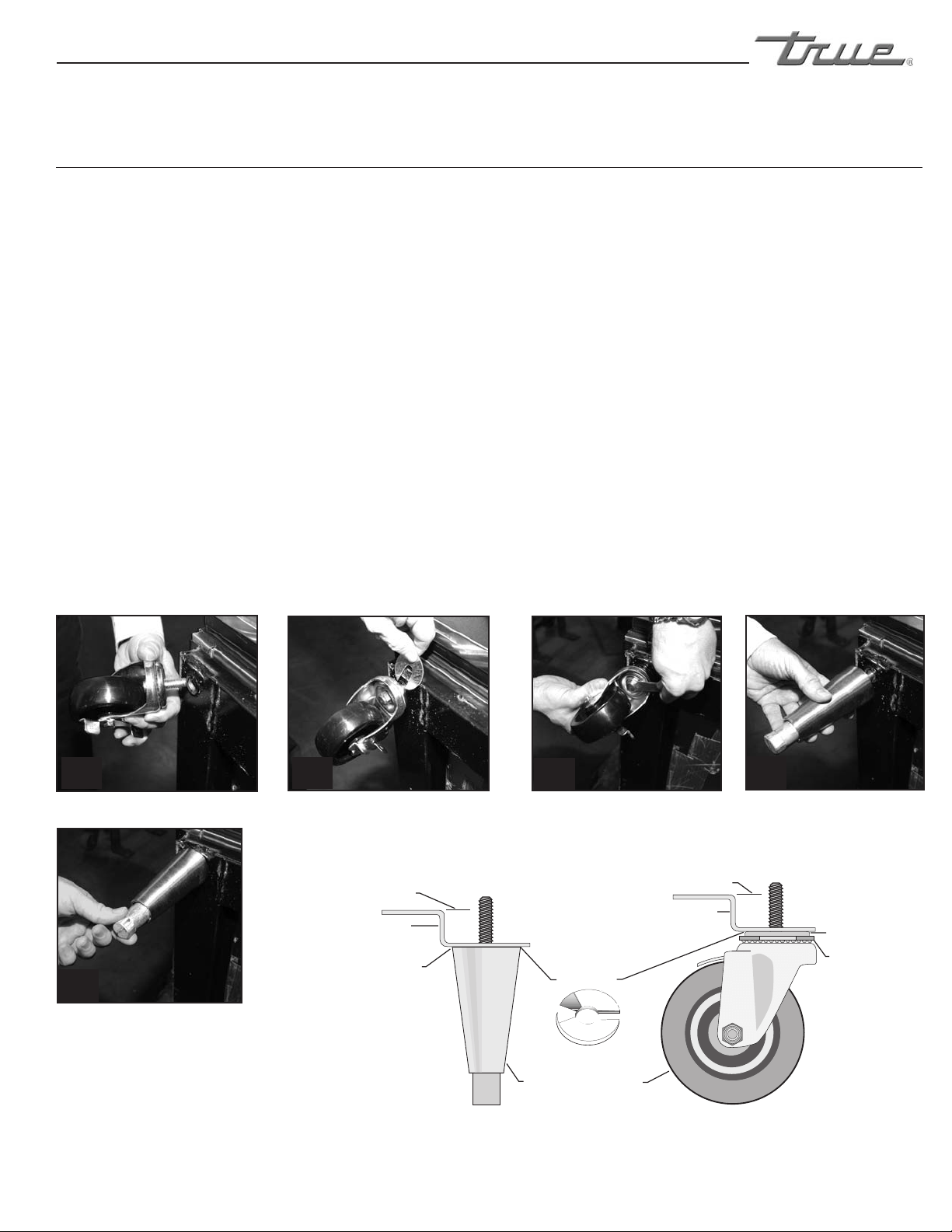
A. Remove louver from the front of cabinet (see page 17 for
louver grill removal / reinstallation) and backguard (if
applicable) from rear of cabinet.
B. Skid bolts are located in each of 4 corners inside cabinet
bottom. (See photo A).
C. Remove skid bolts. (See photo B).
D. Cut straps if applicable. (See photo C).
E. Carefully lift cabinet off of skid.
F. Applicance tested according to the climate classes 5 and 7
for temperature and relative humidity.
Removing skid from bottom
of cabinet.
A B
C
............ www.truemfg.com ............
True Food Service Equipment, Inc.
7
7
INSTALLATION / OPERATION INSTRUCTIONS
Rail End
Lower Rail
Assembly
Snug Fit
Here
Leveling Shim
CastorLeg
Bearing
Race
Lower Rail Assembly
Snug Fit
Here
Rail End
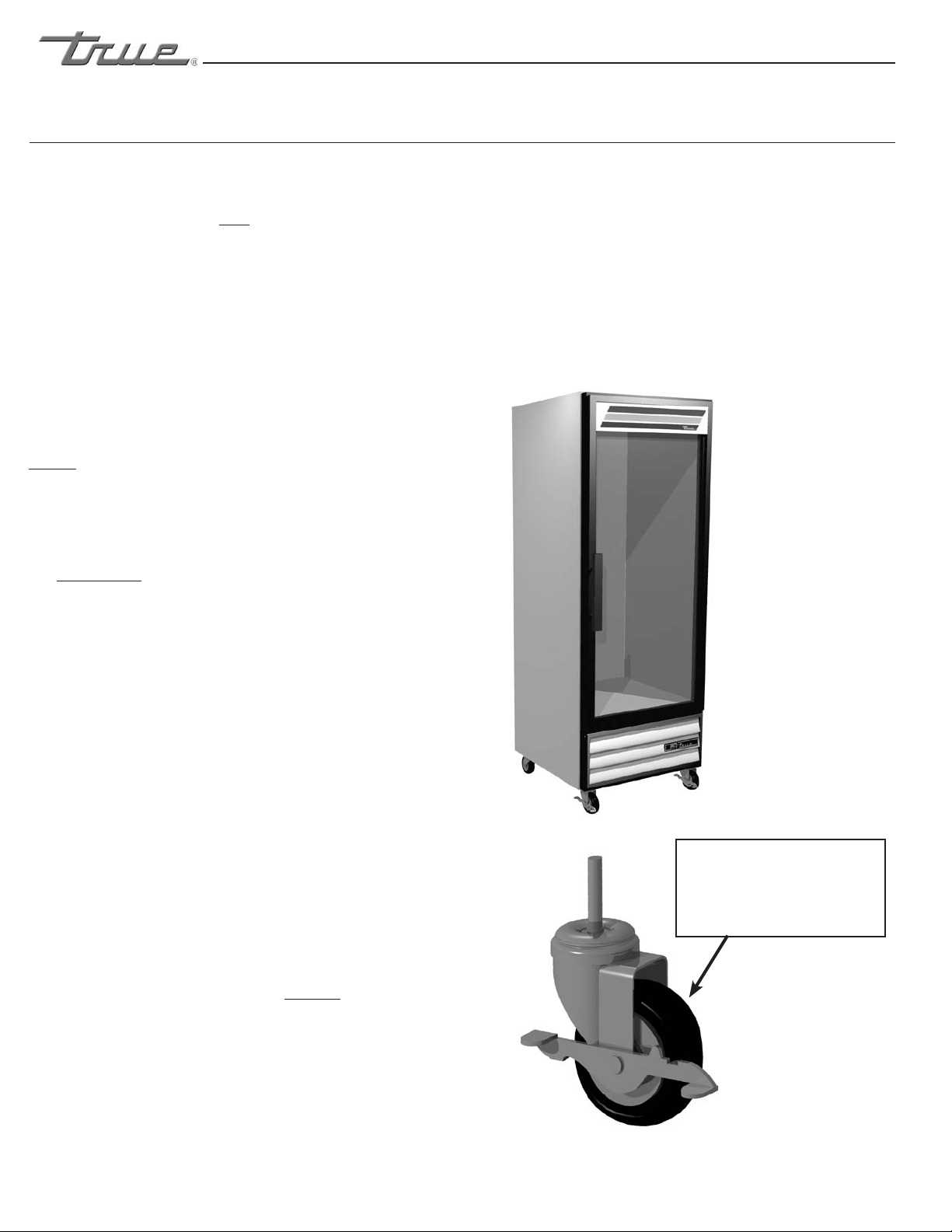
Thread castor into the underside of
cabinet frame rail.
Thread leg into cabinet bottom
frame rail.
The end of the leg is adjustable
to easy leveling.
Use the tool provided to tighten
the castor into place.
For leveling, insert the shim
between the castor and frame rail.
1
2
3
4
5
INSTALLATION OF CASTORS OR OPTIONAL LEGS
Important Safeguard for installation of leg/castor (Images 1-5 demonstrate procedure)
Securing Castors and Legs
To obtain maximum strength and stability of the unit,
it is important that you make sure each castor is secure.
Optional legs are hand-tightened securely against the
lower rail assembly see image 4-5. The bearing race on
the castor or the top edge of the leg must make firm
contact with the rail.
Unit leveling
Four leveling shims have been provided for leveling
castored units positioned on uneven floors. Shims must
be positioned between rail end and bearing race.
A. Turn the bearing race counter-clockwise until the
cabinet is level. Level front to back and side to side.
(diagonally)
B. Install the desired number of shims, making sure the
slot of the shim is in contact with the threaded stem
of the castor. (See image 2)
C. If more than one shim is used, turn the slot at a 90°
angle so they are not in line.
D. Turn the bearing race clockwise to tighten and secure
the castor by tightening the anchoring bolt with a
3/4 inch open-end wrench or the tool provided.
(See image 3)
CAUTION
To avoid damage to lower rail assembly, slowly raise unit to
upright position.
NOTE
Open holes located on the cross members of the frame rail
should be plugged before unit is in use.
............ www.truemfg.com ............
True Food Service Equipment, Inc.
8 8
Final Location
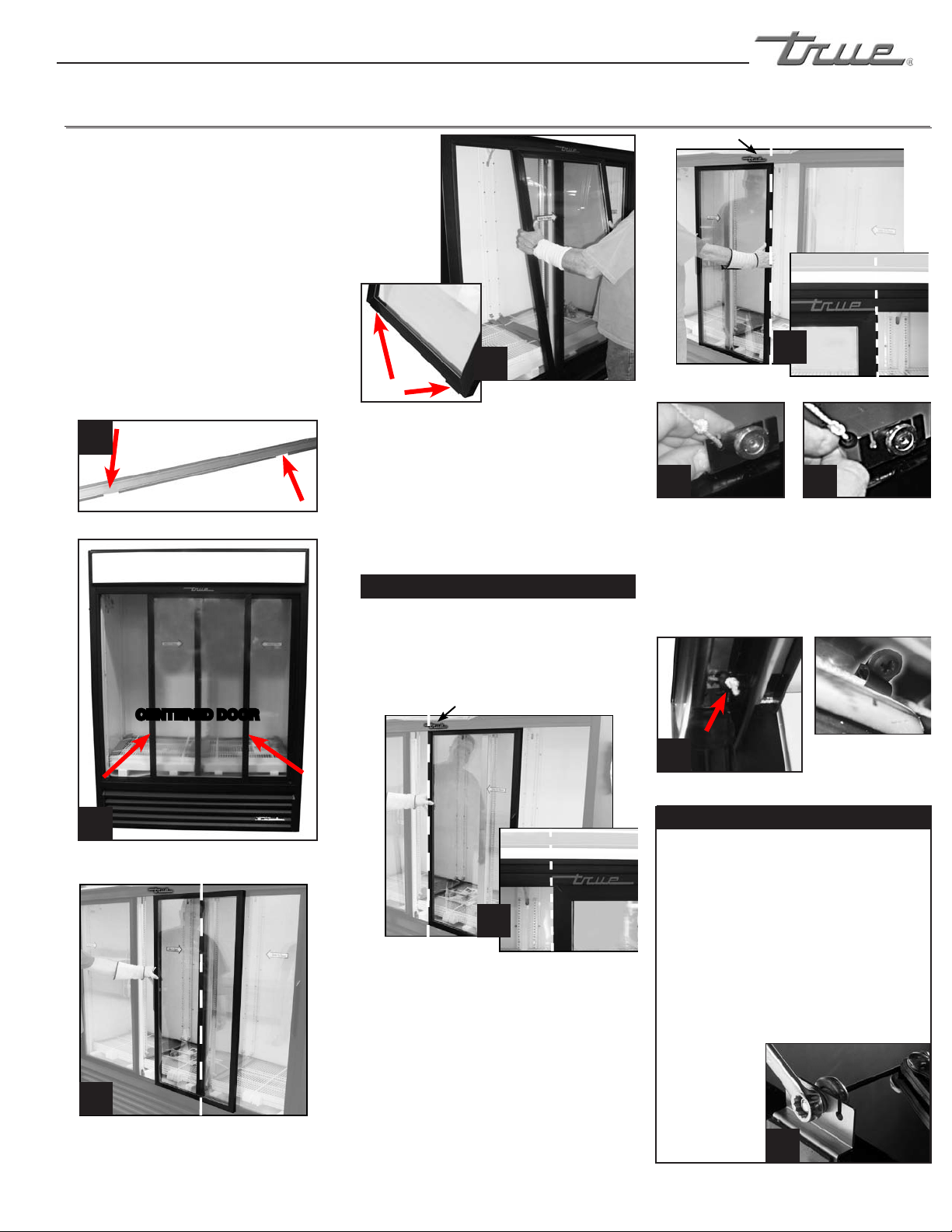
A. Place styrofoam corners behind cooler for cushion and
carefully tilt unit on it’s back.
B. Remove the louvered grill by removing four phillips-head
screws.
C. Remove the four bolts from the skid with an adjustable
wrench, and locate the four castors. Castors are placed
inside cooler, within the bubble wrap.
D. Install one castor in each of the four female threaded areas
as indicated.
NOTE
Two out of the four castors are designated with an “F” for front.
These are provided with hand-brakes. Position these castors in
FRONT of the unit.
E. When all castors have been threaded fully, replace grill
and lift unit; positioning it into its final location.
F. Ensure that the two front castors are positioned
FORWARD as illustrated and locked down with the
hand-brakes.
WARNING
Unit may tip forward if procedure “F” is not
strictly followed.
G. Units final location should be adequately ventilated.
Conditions where heat exceeds 100ºF require an exhaust
fan.
H. Ensure that the drain hose for hoses are positioned in the
pan.
I. Free plug and cord from inside the lower rear of the
cooler (Do Not Plug In.)
WARNING
Warranty is VOID if ventilation is insufficient.
J. The unit should be placed close enough to the electrical
supply so that extension cords are NEVER used.
WARNING
Cabinet warranties are void if OEM power cord is tampered with.
TRUE will not warranty any units that are connected to an exten-
sion cord.
K. Proper leveling of your TRUE cooler is critical to
operating success. Effective condensate removal and door
operation will be effected by leveling. Adjust castors or
add shims.
INSTALLING OPTIONAL CASTORS ON A T-12FG
INSTALLATION / OPERATION INSTRUCTIONS
POSITIONING OF THE
CASTOR IS CRITICAL.
ORIENT THE CASTOR IN
THE FORWARD POSITION
AS SHOWN
............ www.truemfg.com ............
True Food Service Equipment, Inc.
9
9
INSTALLATION / OPERATION INSTRUCTIONS
STEP 2
Using a 7/16” wrench or adjustable wrench and
1/8” allen wrench loosen roller and move
along slotted hole. After adjustment has been
made tighten the
roller into place.
See image 10.
TO ADJUST SLIDE DOOR
P-Clip keeps cord
in-place (prevents
cord damage).
(Three Door Units ONLY)
STEP 6
Remove door cord from roller bracket. The black
plastic tab holding the door cord slides out the
back. See images 7 & 8.
STEP 1
After cabinet is installed in a final location and
correctly leveled check for any openings when the
slide doors are completely closed. If there are
any gaps/openings between the closed doors
and cabinet, the doors will need to be
adjusted.
STEP 7
Let the door cord slowly retract back into the
door side channel. The knot tied at the end of
the door cord will keep the cord from retracting
all the way back into the door channel. See
image 9.
CENTER DOOR
(Three Door Units ONLY)
STEP 1
Before removing slide door do not use the side
latch. Tension on the door cord is needed to
execute these operation instructions. Doors can
not be removed unless placed in specific locations
stated in these instructions.
STEP 2
Two Door Units: Slide the front door so it is
centered on the cabinet. The door can not be
removed unless it is centered. See image 1 for
door channel openings and image 2 for
centering door.
Three Door Units: Slide the middle door to the
right side so the glass is centered with the left edge
of the right side door. See image 3.
(Two Door Units ONLY)
(Two Door Units ONLY)
CENTERED DOOR
(Three Door Units ONLY)
TRUE Logo
STEP 5
Slide left door to the right so right edge lines up
with the end of the TRUE Logo located at the
top of the door frame. See image 6. Then lift
door out of track same way as image 4.
STEP 4
Slide right door to the left so left edge lines up
with the left edge of TRUE Logo located above the
door. See image 5. Then lift door out of track
same way as image 4.
STEP 3
After centering the door lift it up and tilt top of
door towards the back of the unit so the rollers are
out of the top channel. Swing the bottom of the
door out of the bottom channel. Then remove the
door and set it down. See image 4.
(TWO DOOR UNITS SKIP TO STEP 6)
TRUE Logo
Gasket fasten to door bottom assures door will
remain in track when unit is placed on uneven
surface.
Door Cord
Knot
SLIDE DOORS
1
4
6
7
9
10
8
5
2
3

............ www.truemfg.com ............
True Food Service Equipment, Inc.
10 10
INSTALLATION / OPERATION INSTRUCTIONS
Wire Gauge for 2% Voltage Drop in Supply Circuits
115 Volt Distance In Feet To Center of Load
Amps 20 30 40 50 60 70 80 90 100 120 140 160
2 14 14 14 14 14 14 14 14 14 14 14 14
3 14 14 14 14 14 14 14 14 14 14 14 12
4 14 14 14 14 14 14 14 14 14 12 12 12
5 14 14 14 14 14 14 14 12 12 12 10 10
6 14 14 14 14 14 14 12 12 12 10 10 10
7 14 14 14 14 14 12 12 12 10 10 10 8
8 14 14 14 14 12 12 12 10 10 10 8 8
9 14 14 14 12 12 12 10 10 10 8 8 8
10 14 14 14 12 12 10 10 10 10 8 8 8
12 14 14 12 12 10 10 10 8 8 8 8 6
14 14 14 12 10 10 10 8 8 8 6 6 6
16 14 12 12 10 10 8 8 8 8 6 6 6
18 14 12 10 10 8 8 8 8 8 8 8 5
20 14 12 10 10 8 8 8 6 6 6 5 5
25 12 10 10 8 8 6 6 6 6 5 4 4
30 12 10 8 8 6 6 6 6 5 4 4 3
35 10 10 8 6 6 6 5 5 4 4 3 2
40 10 8 8 6 6 5 5 4 4 3 2 2
45 10 8 6 6 6 5 4 4 3 3 2 1
50 10 8 6 6 5 4 4 3 3 2 1 1
Wire Gauge for 2% Voltage Drop in Supply Circuits
230 Volts Distance In Feet To Center of Load
Amps 20 30 40 50 60 70 80 90 100 120 140 160
5 14 14 14 14 14 14 14 14 14 14 14 14
6 14 14 14 14 14 14 14 14 14 14 14 12
7 14 14 14 14 14 14 14 14 14 14 12 12
8 14 14 14 14 14 14 14 14 14 12 12 12
9 14 14 14 14 14 14 14 14 12 12 12 10
10 14 14 14 14 14 14 14 12 12 12 10 10
12 14 14 14 14 14 14 12 12 12 10 10 10
14 14 14 14 14 14 12 12 12 10 10 10 8
16 14 14 14 14 12 12 12 10 10 10 8 8
18 14 14 14 12 12 12 10 10 10 8 8 8
20 14 14 14 12 10 10 10 10 10 8 8 8
25 14 14 12 12 10 10 10 10 8 8 6 6
30 14 12 12 10 10 10 8 8 8 6 6 6
35 14 12 10 10 10 8 8 8 8 6 6 5
40 14 12 10 10 8 8 8 6 6 6 5 5
50 12 10 10 8 6 6 6 6 6 5 4 4
60 12 10 8 6 6 6 6 6 5 4 4 3
70 10 10 8 6 6 6 5 5 4 4 2 2
80 10 8 8 6 6 5 5 4 4 3 2 2
90 10 8 6 6 5 5 4 4 3 3 1 1
100 10 8 6 6 5 4 4 3 3 2 1 1
CONDUCTORS AND CIRCUITS
............ www.truemfg.com ............
True Food Service Equipment, Inc.
11
11
INSTALLATION / OPERATION INSTRUCTIONS
A. Before your new unit is connected to a power supply,
check the incoming voltage with a voltmeter. If
anything less than 100% of the rated voltage for
operation is noted, correct immediately.
B. All units are equipped with a service cord, and must
be powered at proper operating voltage at all times.
Refer to cabinet data plate for this voltage.
TRUE requires that a sole use circuit be dedicated for the
unit. Failure to do so voids warranty.
WARNING
Compressor warranties are void if compressor burns out
due to low voltage.
WARNING
Power supply cord ground should not be removed!
WARNING
Do not use electrical appliances inside the food storage
compartments of the appliances unless they are of the
type recommended by the manufacturer.
NOTE
To reference wiring diagram - Remove front louvered grill,
wiring diagram is positioned on the inside cabinet wall.
ELECTRICAL INSTRUCTIONS
Step 1 - Position Cabinet
Allow one inch between the wall and rear of the
refrigerator to assure proper ventilation. For freezers
3 inches between the wall and rear of the cabinet will
assure proper ventilation.
Step 2 - Level Cabinet
Cabinet should be level, side to side and front to back.
Place a carpenter’s level in the interior floor in four
places:
A. Position level in the inside floor of the unit near the
doors. (Level should be parallel to cabinet front).
Level cabinet.
B. Position level at the inside rear of cabinet. (Again
level should be placed parallel to cabinet back).
C. Perform similar procedures to steps a & b by placing
the level on inside floor (left and right sides - parallel
to the depth of the cooler). Level cabinet.
Step 3
Draw an outline on the base on the floor.
Step 4
Raise and block the front side of the cabinet.
Step 5
Apply a bead of “NSF Approved Sealant”, (see list
below), To floor on half inch inside the outline drawn.
The bead must be heavy enough to seal the entire cabinet
surface when it is down on the sealant.
Step 6
Raise and block the rear of the cabinet
Step 7
Apply sealant on floor as outline in Step 5. on other
three sides.
Step 8
Examine to see that cabinet is sealed to floor around
entire perimeter.
NOTE
Asphalt floors are very susceptible to chemical attack. A
layer of tape on the floor prior to applyingthe sealant will
protect the floor.
NSF Approved Sealants:
1. Minnesota Mining #ECU800 Caulk
2. Minnesota Mining #ECU2185 Caulk
3. Minnesota Mining #ECU1055 Bead
4. Minnesota Mining #ECU1202 Bead
5. Armstrong Cork - Rubber Caulk
6. Products Research Co. #5000 Rubber Caulk
7. G.E. Silicone Sealer
8. Dow Corning Silicone Sealer
SEALING CABINET TO FLOOR
............ www.truemfg.com ............
True Food Service Equipment, Inc.
12 12
INSTALLATION / OPERATION INSTRUCTIONS
A. The compressor is ready to operate. Plug in the
cooler.
B. Temperature control set at No. 4 position gives
refrigerators an approximate temperature of 35°F.
Allow unit to function several hours, completely
cooling cabinet before changing the control setting.
C. Excessive tampering with the control could lead to
service difficulties. Should it ever become necessary
to replace temperature control, be sure it is ordered
from your TRUE dealer or recommended service
agent.
D. Good air flow in your TRUE unit is critical. Be
careful to load product so that it neither presses
against the back wall, nor comes within four inches
of the evaporator housing. Refrigerated air off the
coil must circulate down the back wall.
NOTE
If the cooler is disconnected or shut off, wait five minutes
before starting again.
RECOMMENDATION
Before loading product we recommend you run your TRUE
unit empty for two to three days. This allows you to be sure
electrical wiring and installation are correct and no shipping
damage has occurred. Remember, our factory warranty
does not cover product loss!
REPLACEMENT PARTS
TRUE maintains a record of the cabinet serial number
for your cooler. If at any time during the life of your
cooler, a part is needed, you may obtain this part by
furnishing the model number and serial number to the
company from whom you purchased the cooler. Call
Toll-Free: (800)-424-TRUE (Direct to Parts Department).
(800)-325-6152 (U.S.A. & Canada only) or call:
(636)-240-2400.
STARTUP
WARNING
COMPRESSOR BAND MUST BE REMOVED BEFORE UNIT IS
CONNECTED TO POWER SUPPLY.
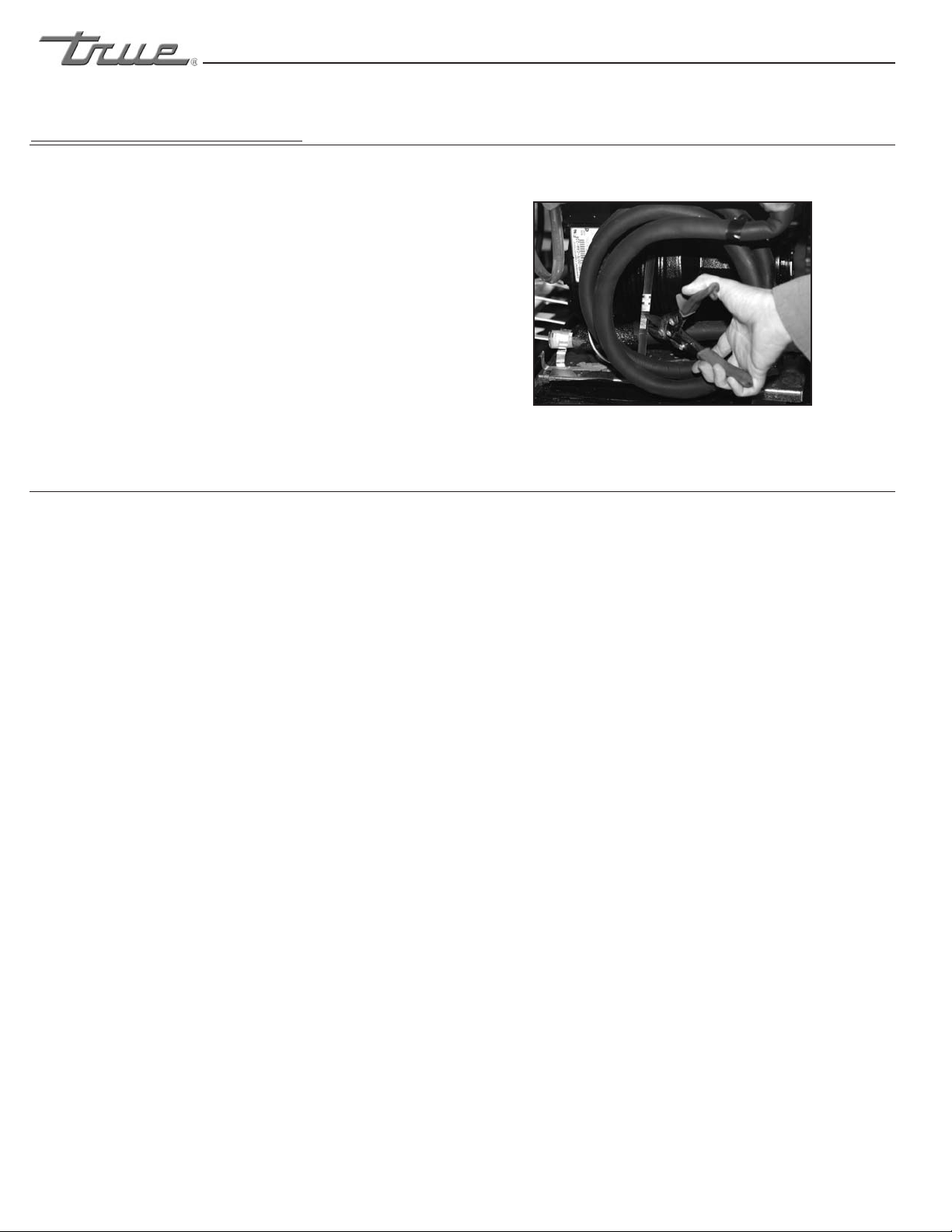
The metal band can be reached from the rear of the unit.
A pair of tin snips will cut through the band. Once the
band is located and removed. You may proceed with the
installation of your new equipment. (See image to the
right).
FREEZERS ONLY! (COMPRESSOR BAND REMOVAL)
PLEASE CHECK YOUR COMPRESSOR. IF THERE IS A SHIPPING BAND, PLEASE REMOVE.
Cutting band that is around compressor
............ www.truemfg.com ............
True Food Service Equipment, Inc.
13
13
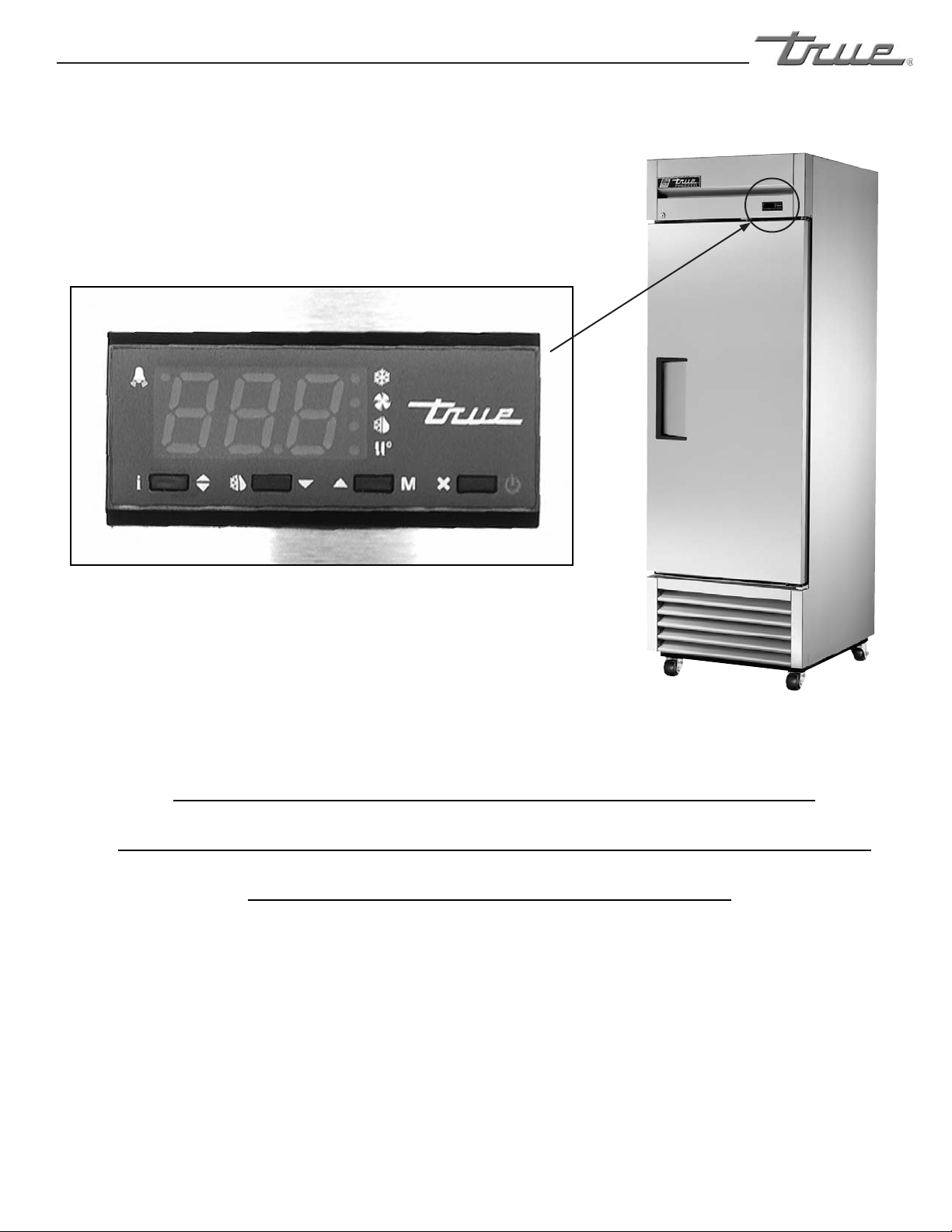
IF YOUR CABINET IS BUILT WITH THIS
TEMPERATURE CONTROL, PLEASE SEE THE
FOLLOWING INSTRUCTIONS.
............ www.truemfg.com ............
True Food Service Equipment, Inc.
14 14
LAE CONTROL
SEQUENCE OF OPERATION
1. Cabinet is plugged in.
a. Display will illuminate.
b. Interior light will illuminate on glass door models only. (If lights do not come on please see
instructions on following page(s).) Solid door cabinet lights are controlled by door switch.
2. After the LAE control preprogrammed time delay of 3 minutes, the compressor and evaporator fan(s) will start if
the control is calling for cooling.
a. Control may be already pre-programmed from the factory so at the start of every compressor cycle or
during a defrost cycle, the condenser fan(s) will reverse for 30 seconds to blow dirt off the condensing
coil.
3. The LAE control will cycle the compressor but may also cycle evaporator fan(s) on and off determined by the
Set-Point and Differential temperatures. (If the Set-Point needs to be changed due to conditions please see
instructions on the following page(s).)
a. The Set-Point is the preprogrammed temperature which shuts off the compressor.
b. The Differential is the preprogrammed temperature that is added to the Set-Point temperature that will
start the compressor.
Example: If the Set-Point is -9°F/-23°C and the Differential is 10°F/5°C
(Set-Point) -9°F + 10 (Differential) = 1°F
Or
(Set-Point) -23°C + 5 (Differential) = -18°C
The compressor and evaporator fan(s) will cycle off -9°F/-23°C
and back on at 1°F/-18°C
4. The LAE control may be preprogrammed to initiate defrost by interval or at specic times of day. (If additional
Defrost Intervals or Cycles are needed or a Manual Defrost is required due to conditions please see instruc-
tions on the following page(s).)
a. At this time the “dEF” will appear on the display and compressor will turn off until a preprogrammed
temperature or duration is reached. During this time for freezers only, evaporator fan(s) will also
turn off and the coil heater and drain tube heaters will also be energized.
b. After the preprogrammed temperature or duration for defrost has been reached there may be a short
delay for both the compressor and evaporator fans to restart. At this time “dEF” may still appear
on the display for a short time.
True Manufacturing recommends that ONLY the Set-Point and/or
Defrost Interval may be adjusted due to certain conditions.
This sequence is NOT model specific.
If you have any questions, please contact the Technical Service Department.
Phone: 800-325-6152 • Email: service@truemfg.com
............ www.truemfg.com ............
True Food Service Equipment, Inc.
15
15
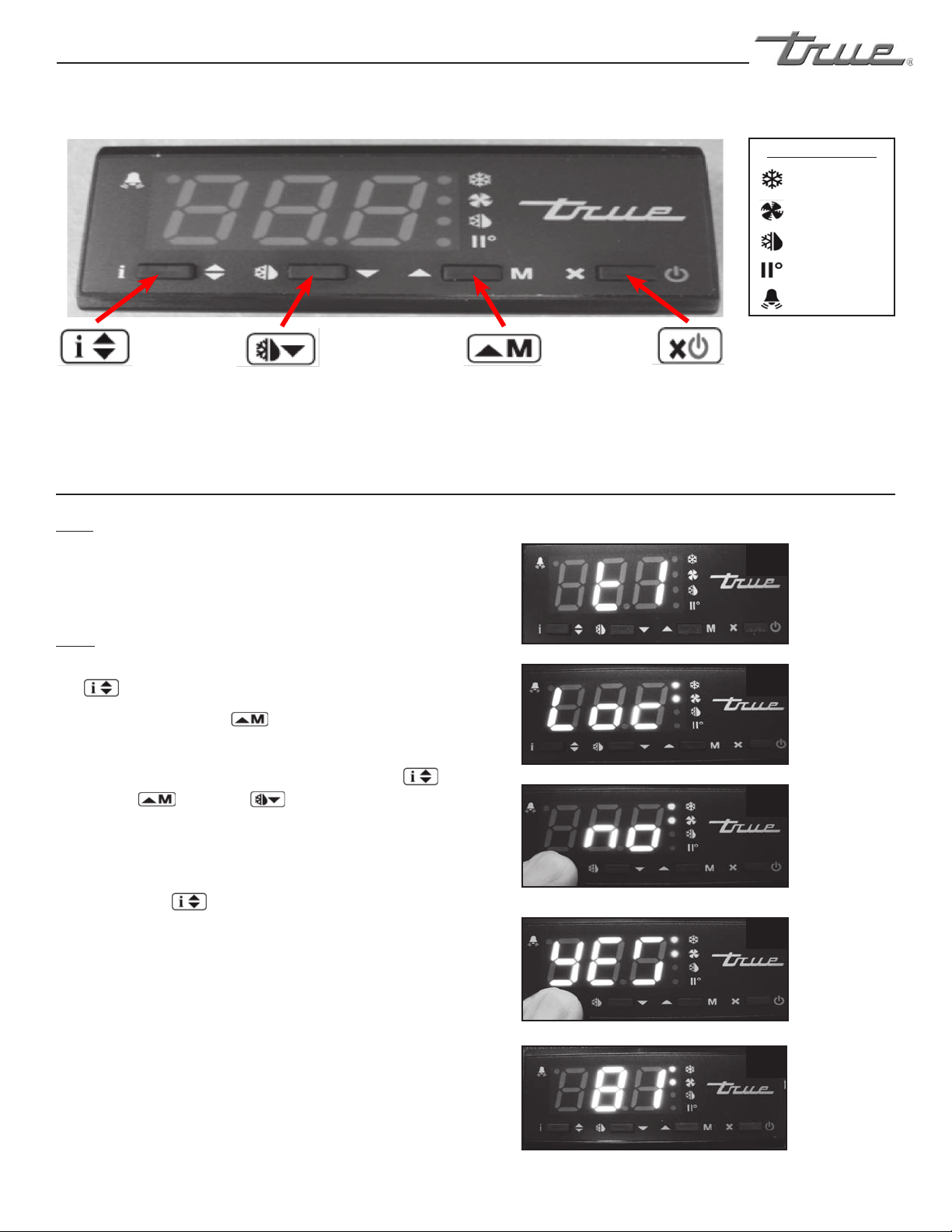
LOCKING & UNLOCKING LAE CONTROLLER
WHY:
LOCKING OF CONTROL IS NECESSARY TO PREVENT
CHANGES TO PROGRAM THAT MAY AFFECT CABINET
OPERATION
HOW:
A. To change lock setting press and release the info button
. “t1” will appear. See image 1.
Press the up button until “Loc” appears.
See image 2.
B. While pressing and holding the info button press
the up or down button to change the lock
settings. If “no” appears, the controller is unlocked. If “yes”
appears, the controller is locked. See images 3 and 4.
C. Once the lock setting has been set correctly release the
info button .
Wait 5 seconds for the display to show temperature.
See image 5.
1
2
5
LAE Electronic Control
Info/Set Point
Button
Manual Defrost/
Down Button
Manual Activation/
Up Button
Stand-By
Button
3
Image 3:
If “no” appears
on screen,
the controller
is unlocked.
4
Image 4:
If “yes” appears
on screen,
the controller
is locked.
Compressor
Running
Activation of 2nd
Parameter Set - NA
Alarm - NA
Cabinet in Defrost
Evaporator Fan
Running
LAE Control Icons
............ www.truemfg.com ............
True Food Service Equipment, Inc.
16 16
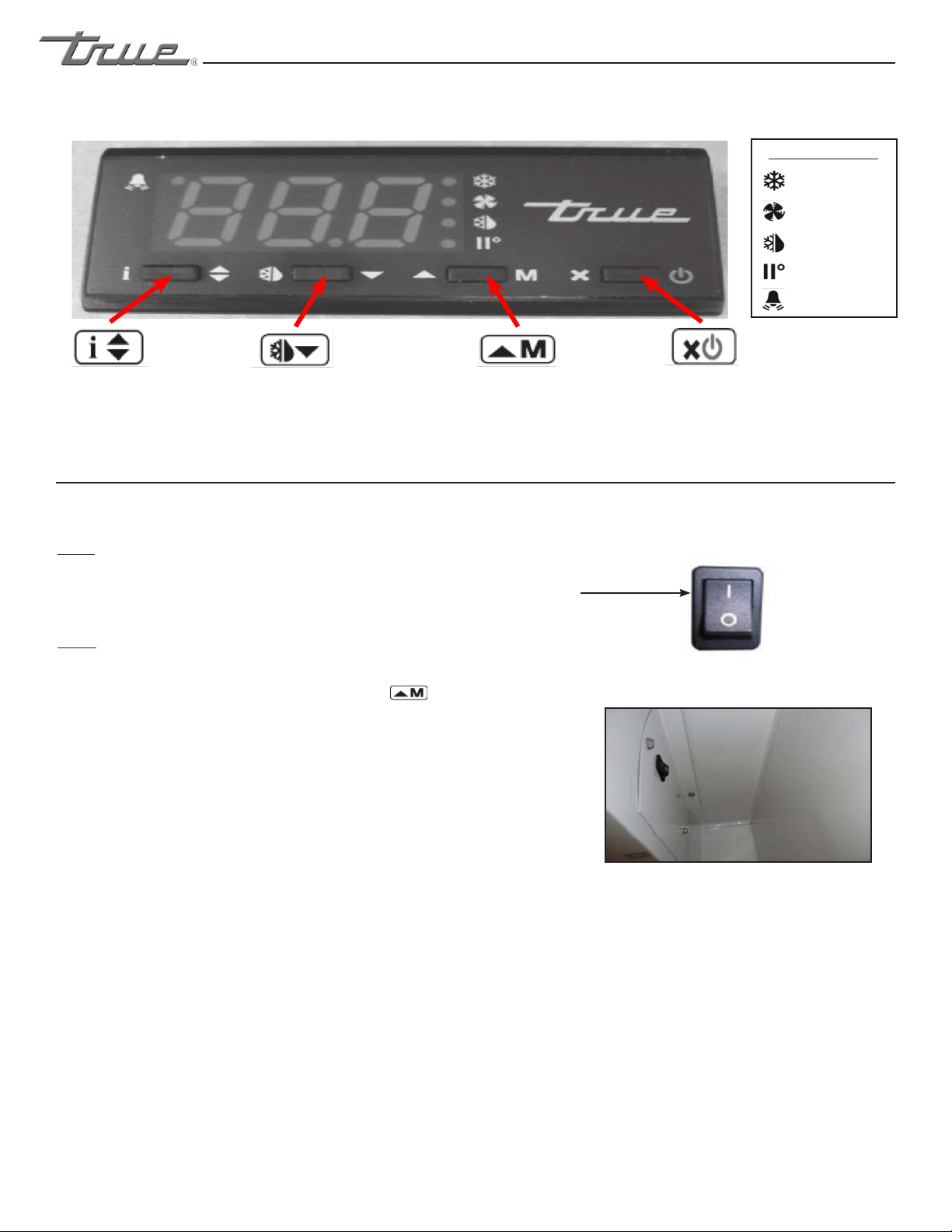
HOW TO TURN GLASS DOOR MODEL
LIGHTS ON/OFF
WHY:
LIGHT MAY BE CONTROLLED BY LAE CONTROLLER OR
INTERIOR LIGHT SWITCH.
HOW:
A. To control interior/sign lights by the LAE Controller,
press and release the “Manual Activation” button.
B. To control interior/sign lights by the interior door
switch, depress the rocker switch to the “ON” position.
Light Switch is located on inside top right of the
ceiling.
ON Position
(Solid Door models lights are controlled by a door switch)
May need to unlock control.
LAE Electronic Control
Info/Set Point
Button
Manual Defrost/
Down Button
Manual Activation/
Up Button
Stand-By
Button
Compressor
Running
Activation of 2nd
Parameter Set - NA
Alarm - NA
Cabinet in Defrost
Evaporator Fan
Running
LAE Control Icons
............ www.truemfg.com ............
True Food Service Equipment, Inc.
17
17
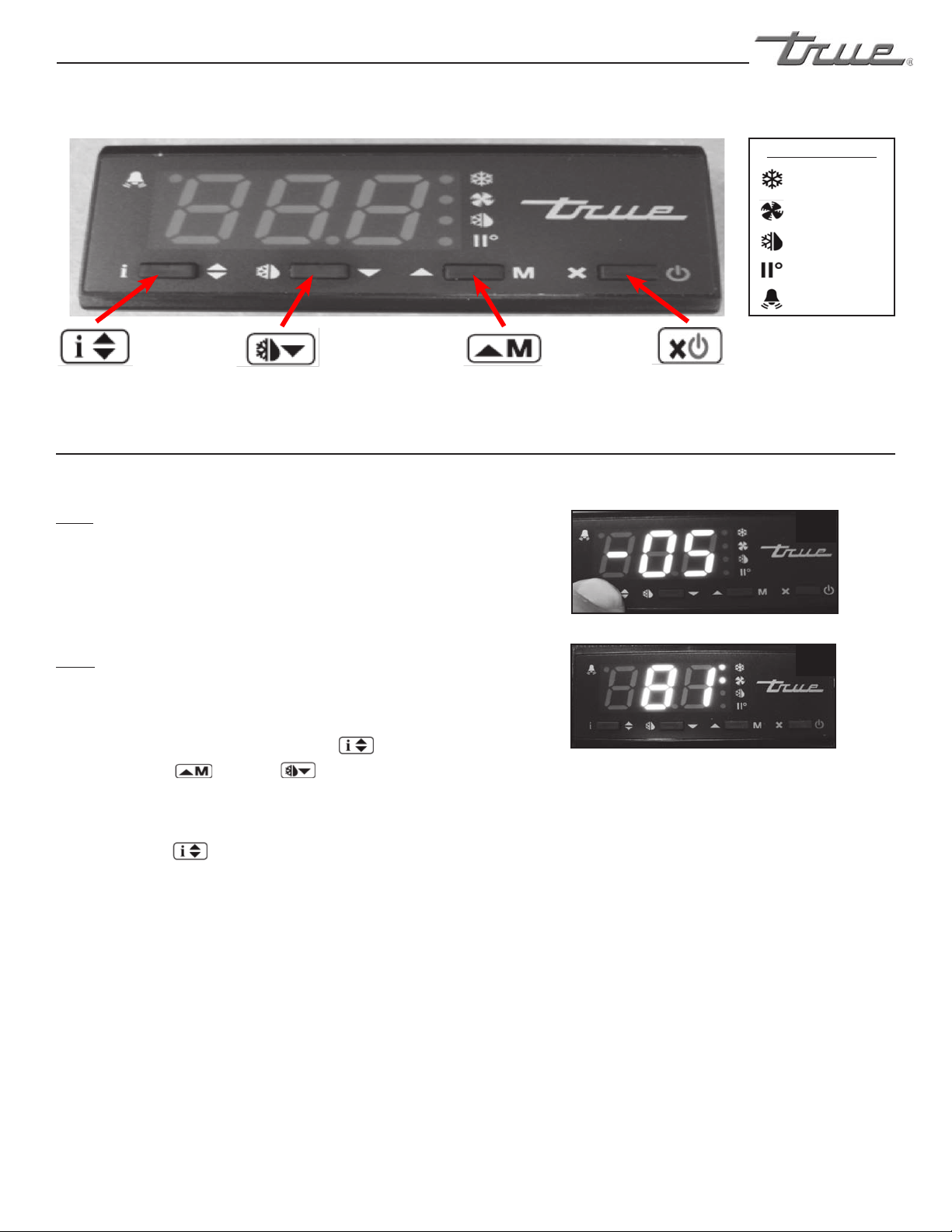
LAE Electronic Control
Info/Set Point
Button
Manual Defrost/
Down Button
Manual Activation/
Up Button
Stand-By
Button
1
2
Compressor
Running
Activation of 2nd
Parameter Set - NA
Alarm - NA
Cabinet in Defrost
Evaporator Fan
Running
LAE Control Icons
May need to unlock control.
WHY:
THE SET POINT IS THE TEMPERATURE AT WHICH THE
COMPRESSOR WILL SHUT OFF.
Please note that the “set point” IS NOT the cabinet
holding temperature.
HOW:
A. To see the set point, press and hold the info button.
See image 1.
B. While still holding the info button ,
press the up or down button to change
the “set point”.
C. Once the “set point” has been set correctly release the
info button .
e display will show temperature. See image 2.
HOW TO CHANGE THE “SET POINT”
............ www.truemfg.com ............
True Food Service Equipment, Inc.
18 18
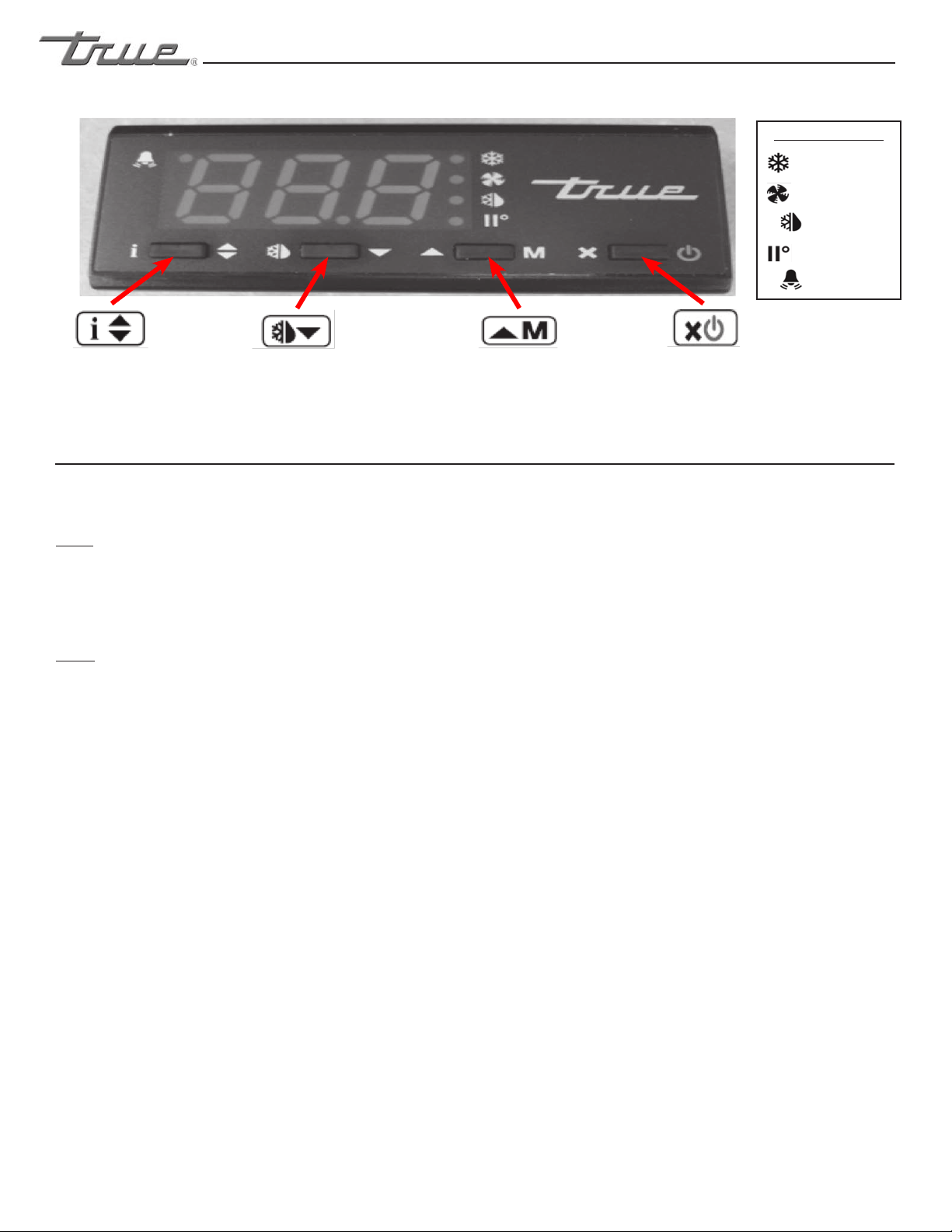
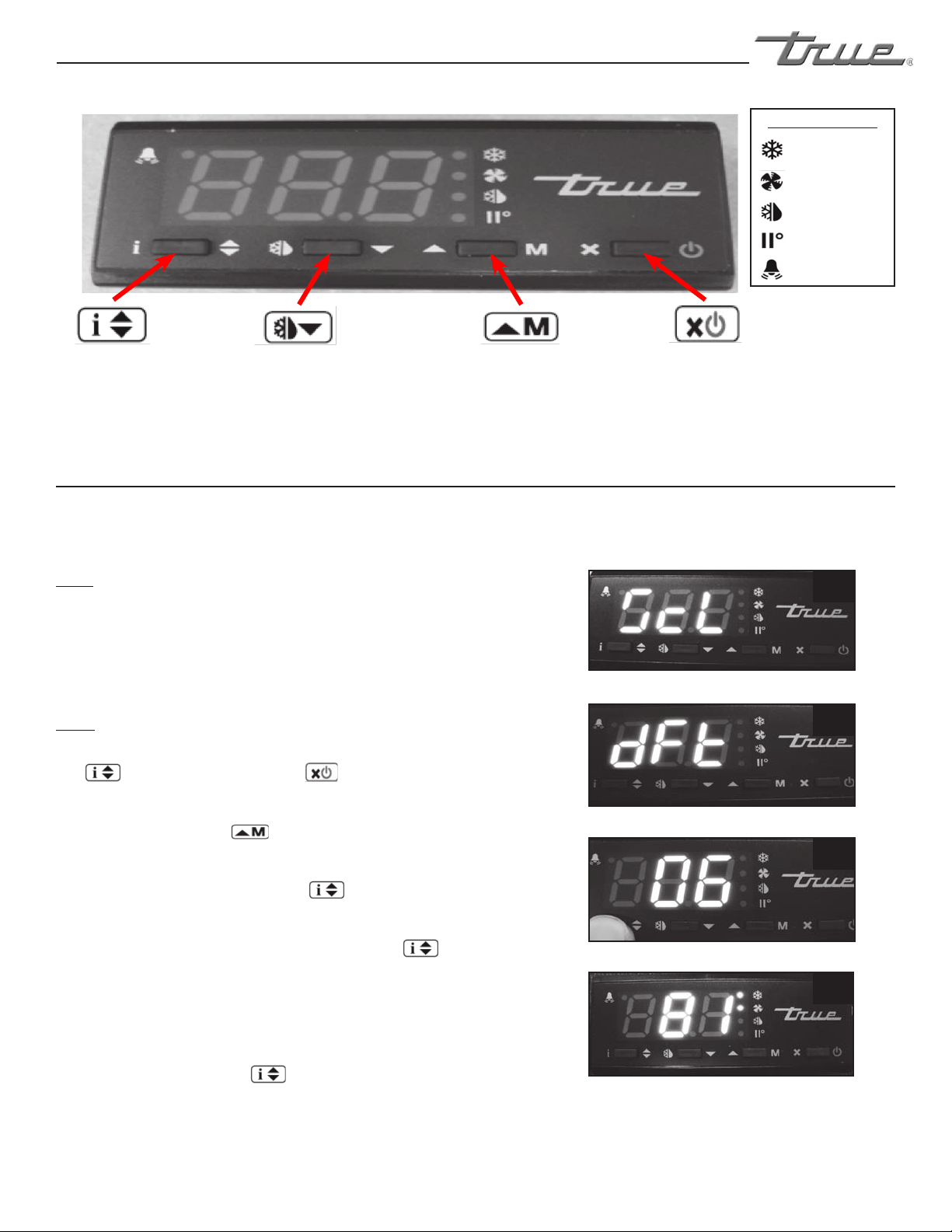
HOW TO INITIATE A MANUAL DEFROST
May need to unlock control.
WHY:
A ONE TIME ADDITIONAL DEFROST MAY BE NECESSARY
TO CLEAR ACCUMULATED FROST/ICE FROM EVAPORATOR
COIL.
HOW:
e method to initiate a manual defrost is determined by
the Defrost Mode Parameter “DTM” preprogrammed in
the controller.
A. REGULAR TIME DEFROST (TIM)
If controller is preprogrammed for “TIM”, press and
release the Manual Defrost button until “dEF” appears.
B. REAL TIME CLOCK (RTC)
If controller is preprogrammed for “RTC” press the and
hold the Manual Defrost button for 5 seconds until
“dh1” appears. Release the Manual Defrost button and
then press and hold for an additional 5 seconds until
“dEF” appears.
DEFROST WILL ONLY TERMINATE ONCE A SPECIFIC PRESET TEM-
PERATURE OR A PRESET TIME DURATION IS REACHED.
LAE Electronic Control
Info/Set Point
Button
Manual Defrost/
Down Button
Manual Activation/
Up Button
Stand-By
Button
Compressor
Running
Activation of 2nd
Parameter Set - NA
Alarm - NA
Cabinet in Defrost
Evaporator Fan
Running
LAE Control Icons
............ www.truemfg.com ............
True Food Service Equipment, Inc.
19
19
1
2
3
4
LAE Electronic Control
Info/Set Point
Button
Manual Defrost/
Down Button
Manual Activation/
Up Button
Stand-By
Button
Compressor
Running
Activation of 2nd
Parameter Set - NA
Alarm - NA
Cabinet in Defrost
Evaporator Fan
Running
LAE Control Icons
WHY:
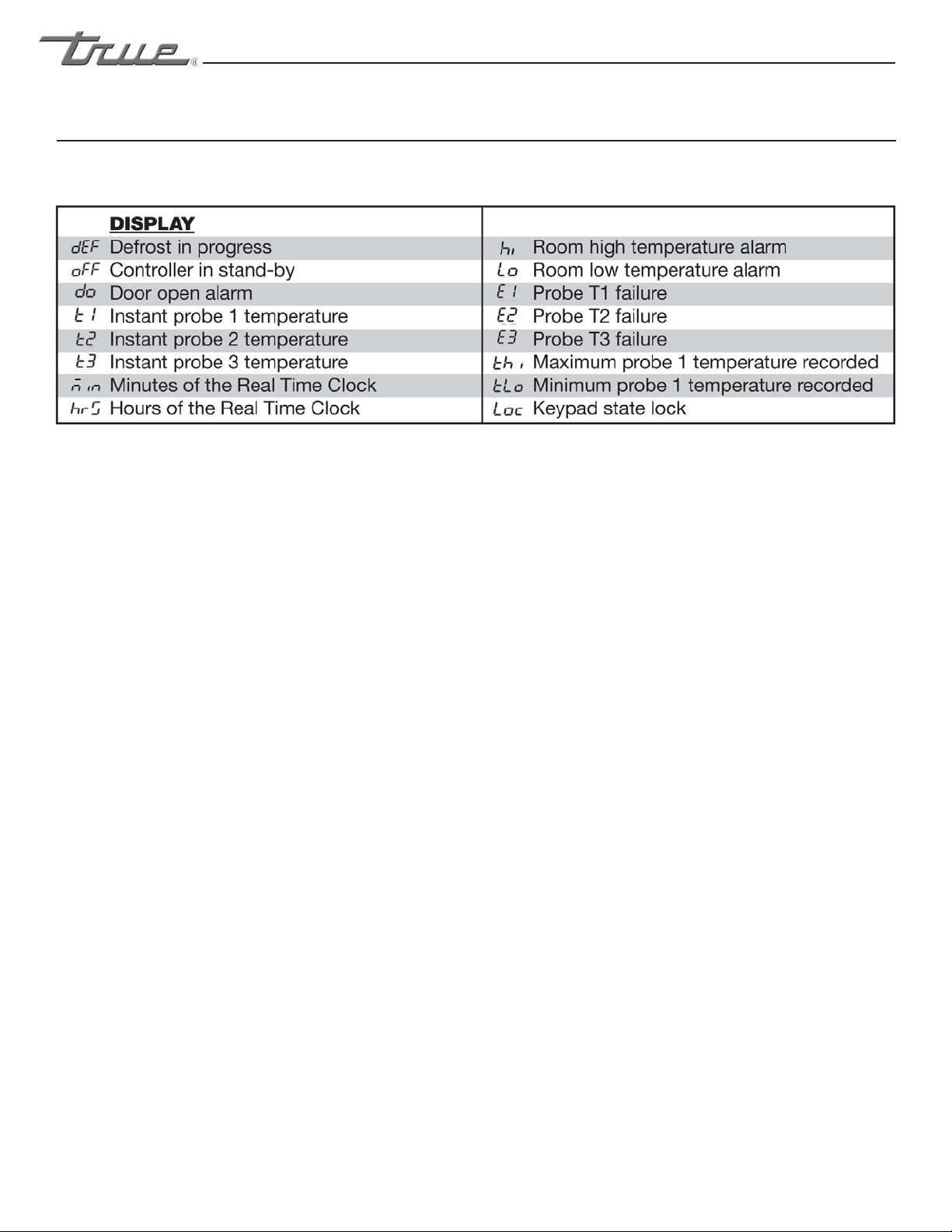
THE DEFROST INTERVAL IS THE TIME DURATION BETWEEN
DEFROST CYCLES.
The Defrost Interval time starts when the cabinet is supplied
power or after a manual defrost.
HOW:
A. To see the set point, press and hold the info button
and the stand-by button at the same time.
“ScL” will appear. See image 1.
B. Push the up button until “dFt” appears.
See image 2.
C. Press and hold the info button to see the
“defrost interval time”. See image 3.
D. While pressing and holding the info button ,
press the up or down button to change the “defrost
interval times” (higher the number the less frequent the
cabinet will defrost).
E. Once the “defrost interval time” has been changed,
release the info button .
Wait 30 seconds for the display to show temperature.
See image 4.
HOW TO CHANGE “DEFROST
INTERVALS”
May need to unlock control.
This can only be changed if defrost mode parameter “DFM” is set for “TIM”.
............ www.truemfg.com ............
True Food Service Equipment, Inc.
20 20
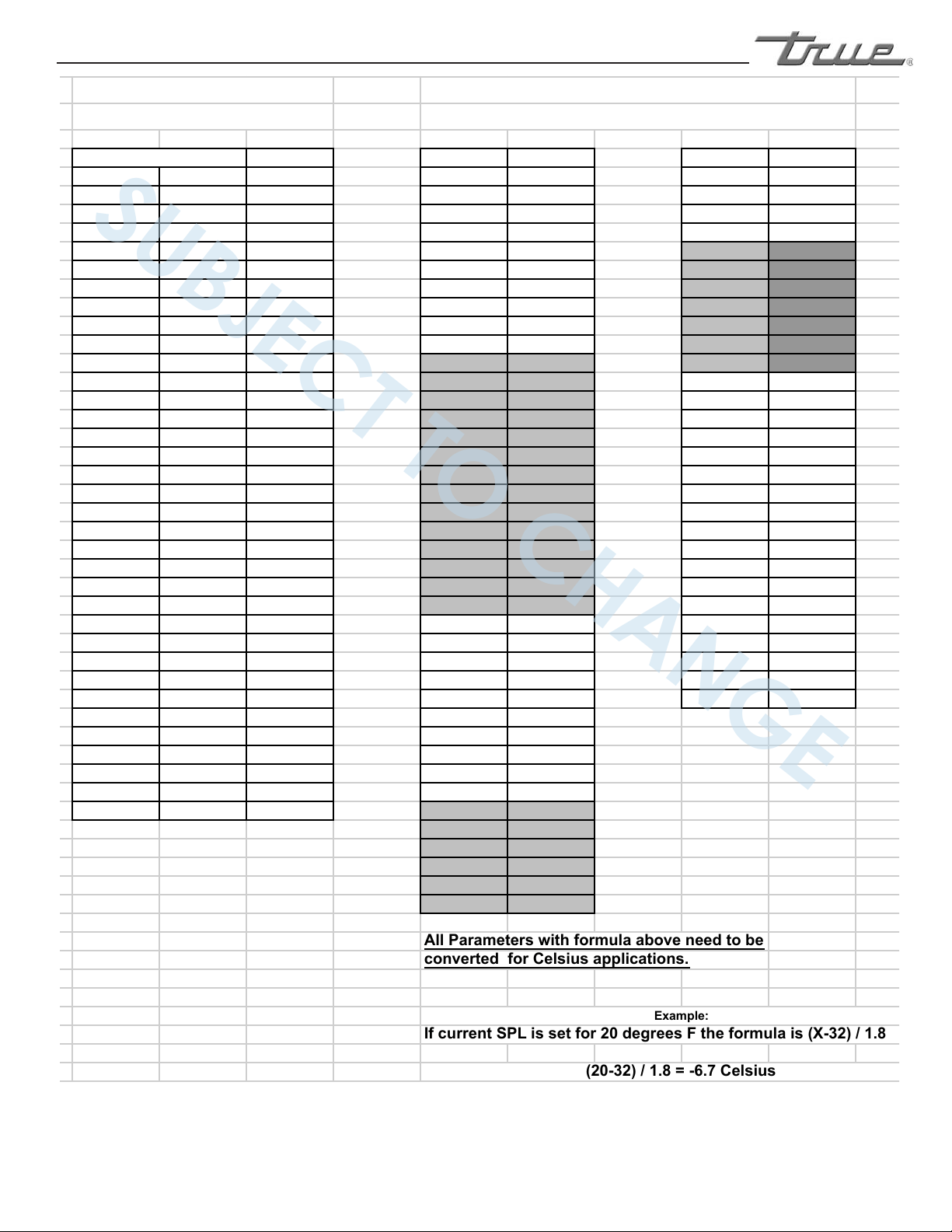
DISPLAY
............ www.truemfg.com ............
True Food Service Equipment, Inc.
21
21
K-ohm SCL 1C ADO
C F SPL
(X-32 ) / 1.8 AHM
-40 -40 195.652 SPH
(X-32) / 1.8 AHT (X-32) / 1.8
-35 -31 148.171 SP (X-32) / 1.8 ACC
-30 -22 113.347 C-H IISM
-25 -13 87.559 HYS
(X) / 1.8 IISL (X-32) / 1.8
-20 -4 68.237 CRT IISH (X-32) / 1.8
-15 5 53.650 CT1 IISP (X-32) / 1.8
-10 14 42.506 CT2 IIHY (X) / 1.8
-5 23 33.892 CSD IIFC
0 32 27.219 DFM HDS
5 41 22.021 DFT IIDF
10 50 17.926 DH1 SB
15 59 14.674 DH2 DS
20 68 12.081 DH3 DI2
25 77 10.000 DH4 STT
30 86 8.315 DH5 EDT
35 95 6.948 DH6 LSM
40 104 5.834 DLI
(X-32) / 1.8 OA1
45 113 4.917 DTO OA2
50 122 4.161 DTY 2CD
55 131 3.535 DPD INP
60 140 3.014 DRN OS1
(X) / 1.8
65 149 2.586 DDM T2
70 158 2.228 DDY OS2
(X) / 1.8
75 167 1.925 FID T3
80 176 1.669 FDD
(X-32) / 1.8 OS3 (X) / 1.8
85 185 1.452 FTO TLD
90 194 1.268 FCM SIM
95 203 1.145 FDT
(X) / 1.8 ADR
100 212 0.974 FDH
(X) / 1.8
105 221 0.858 FT1
110 230 0.758 FT2
115 239 0.671 FT3
120 248 0.596 ATM
125 257 0.531 ALA
(X-32) / 1.8
AHA (X-32) / 1.8
ALR (X) / 1.8
AHR (X) / 1.8
ATI
ATD
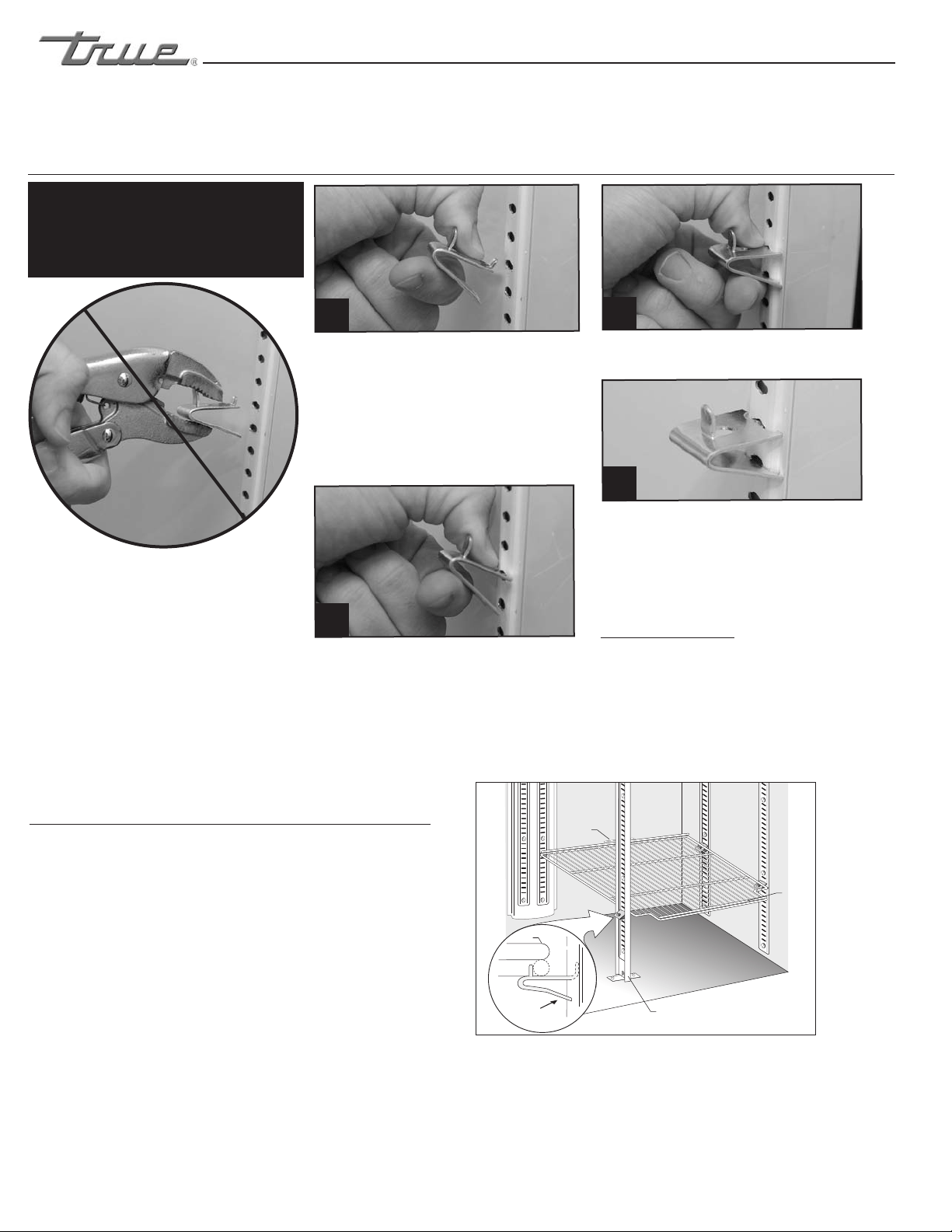
All Parameters with formula above need to be
converted for Celsius applications.
If current SPL is set for 20 degrees F the formula is (X-32) / 1.8
LAE Controller Parameter Settings
Resistance Readings
for LAE Probes
for Celsius
(20-32) / 1.8 = -6.7 Celsius
Example:
Temperaure
SUBJECT TO CHANGE
We want to make it very clear that all parameter set points on the LAE controller have been set at the factory to
optimize performance and adjusting any of these parameters in the field will affect the cabinet’s performance
and could void the Warranty.
............ www.truemfg.com ............
True Food Service Equipment, Inc.
22 22
SHELVING INSTALLATION / OPERATION &
LIGHT SWITCH LOCATION
INSTALLATION / OPERATION INSTRUCTIONS
SHELF & ORGANIZER INSTALLATION:
Step 1
A. Hook shelf clips onto shelf standards. (see illustration).
B. Position all four shelf clips equal in distance from the
floor for flat shelves.
WIRE SHELVES
Wire shelves are oriented so that cross support bars are facing down.
NOTE
T-Series models include an airflow guard on the rear of shelves to
maintain an air space at the rear of the cabinet. (see illustration).
Step 2
Place shelves on shelf clips making sure all corners are seated
properly.
LIGHT SWITCH LOCATION:
Light switch location depends upon the T-Series model. Most
T-Series models will have the light switch located inside the unit on
the right side of the ceiling. Most instances the switch is located next
to the temperature control. Some models have the switch located on
the right side of the evaporator housing along the interior ceiling.
Shelf
Clip
Shelf
Shelf
T-Series
& GDM-5
Airflow
Guard
Pillaster
WARNING
Do not use pliers or any crimping tools when
installing shelf clips. Altering shelf clips in any
way can lead to shelving instability.
For Proper Shelf Clip Installation Please
Read The Following Instructions.
Step 1
Install the top tab of the shelf clip into the
proper hole. Push up on the bottom of the
clip. (See image 1).
Step 2
Bottom tab of the shelf clip will fit tightly.
You may need to squeeze or twist the
bottom of the shelf clip to install. (See
image 2 & 3).
Step 3
After installation, the shelf clip will fit snug
into the shelf standard. e shelf clip should
not be loose or able to wiggle out of the
shelf standard.
Shelf Installation Tips
1. Install all the shelf clips before installing
the shelves.
2. Start at the bottom in terms of shelf
installation and work your way up.
3. Always lay the back of each shelf down
on the rear clips before the front.
(Installing top tab of shelf clip)
(Installing bottom of the shelf clip)
You may need to squeeze or twist the bottom
of the shelf clip to install)
(Shelf clip installation complete)
1
2
4
3
............ www.truemfg.com ............
True Food Service Equipment, Inc.
23
23
INSTALLATION / OPERATION INSTRUCTIONS
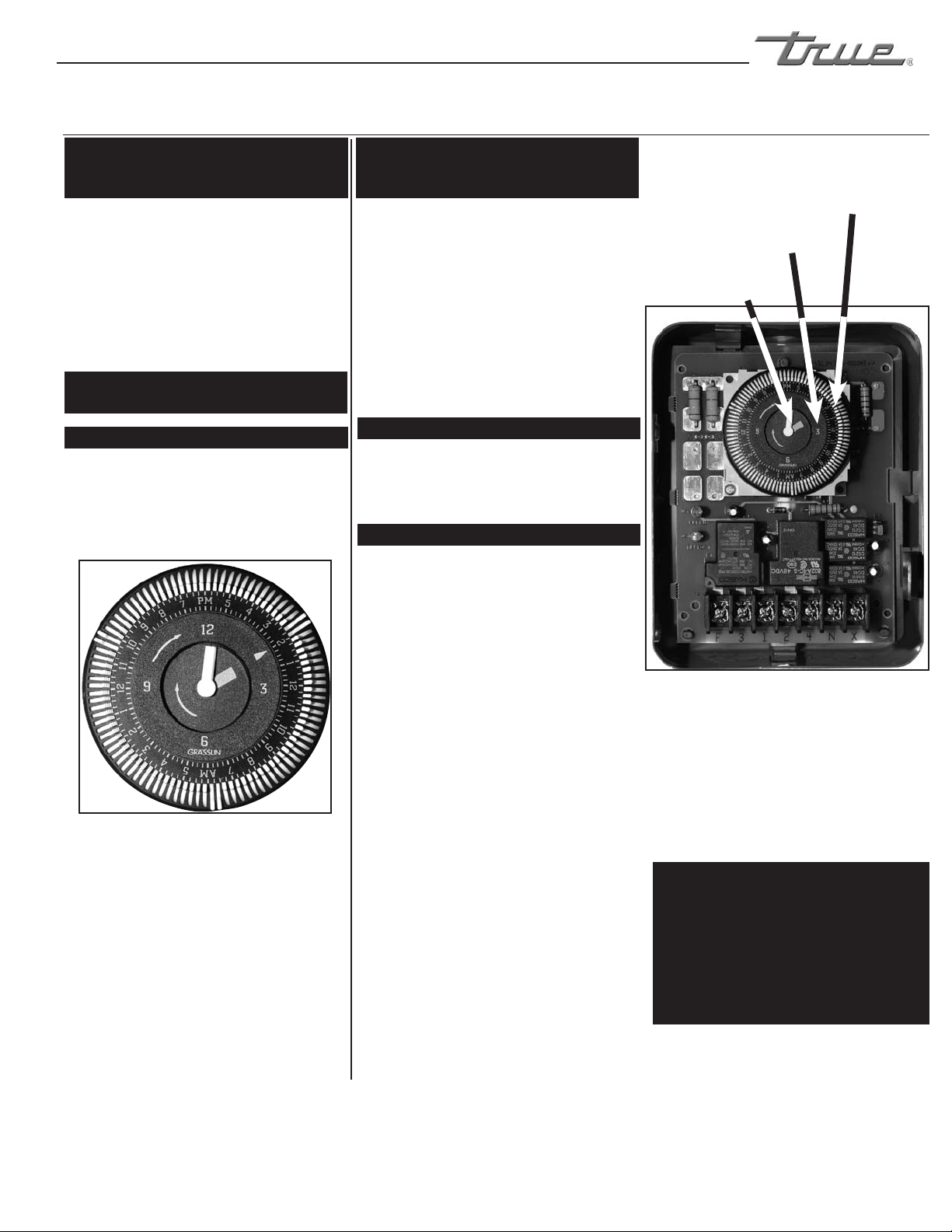
ALL OTHER UNITS.
Defrost System!
This defrost system is temperature
terminated, however the time clock has been
designed with a time termination back-up.
REQUIRED TOOLS:
• Phillips Screwdriver
• 1/4” Nut Driver or Socket
Locating The Defrost Timer:
See page 2 for removing louver grill
instructions.
Two Door Models:
Defrost timer is located in the middle of the
cabinet, behind the louvered grill. Timer is
mounted to the left of the centered ballast
box (Inside of gray timer box).
Three Door Models:
Defrost timer is located on the left upright
post behind the louvered grill (Inside of gray
timer box).
Setting the timer:
(UNPLUG UNIT FROM
POWER SUPPLY!)
DO NOT SET THE TIME BY
ROTATING THE “OUTER” DIAL.
Turn the minute hand clockwise until the
time of day on the outer dial is aligned with
the triangle marker on the inner dial (two
o’clock position).
The following procedure may be followed to
customize your needs.
STEP 1
In order to program the time to begin the
defrost cycle, flip the white tabs out to set the
defrost time. To eliminate a defrost time flip
the white tabs back toward the center of the
Defrost Timer.
NOTE
TRUE recommends a minimum 30 minute (2
tabs) defrost cycle three times per day.
(Except T-19F/19FZ/23F).
FREEZERS DEFROST TIME CLOCK OPERATION
Inner most dial.
Time of day.
Outer most dial.
White tabs represent
15 minutes of defrost
time.
Defrost Timer Box Image 1
All models except T-19F, T-19FZ, T-23F.
WARNING:
High usage, high temperature, and
high humidity may require additional
defrost settings per day. Once clock
is set & grill is correctly reinstalled
cabinet can be plugged in.
T-19F, T-19FZ, T-23F
Defrost System!
This defrost system is time initiated / time
terminated. The refrigeration system does not
restart until the defrost cycle has timed out.
REQUIRED TOOLS:
• PhillipsScrewdriver
• 1/4”NutDriverorSocket
Locating The Defrost Timer:
See page 2 for removing louver grill instructions.
* T-23F-2 / T-23DT Grill must be reattached
correctly for proper operation.
Single Door Models:
Defrost timer is located in the lower right corner
behind the louvered grill (inside galvanized
electrical box).
Factory setting 2 am, 8 am, 2 pm, 8 pm. 15
minutes in length. TRUE recommends maximum
15 minute defrost cycles & minimum 4 defrost
periods per day.
Setting the timer:
(UNPLUG UNIT FROM
POWER SUPPLY!)
DO NOT SET THE TIME BY
ROTATING THE “OUTER” DIAL.
Turn the minute hand clockwise until the time of
day on the outer dial is aligned with the triangle
marker on the inner dial (two o’clock position).
The following procedure may be followed to
customize your needs.
STEP 1
In order to program the time to begin the defrost
cycle, flip the white tabs out to set the defrost time.
To eliminate a defrost time flip the white tabs back
toward the center of the Defrost Timer.
Outer most dial. White tabs represent 15 minutes of
defrost time.
The white tabs located on the outmost area
of the time clock have been factory set for
(6:00 a.m., 2:00 p.m., and 10:00 p.m.).
Each tab represents 15 minutes of defrost
time. Notice that at each defrost time two
white tabs are set for 15 minutes each for a
total of 30 minutes of defrost.
............ www.truemfg.com ............
True Food Service Equipment, Inc.
24 24
INSTALLATION / OPERATION INSTRUCTIONS
TERMS:
Cut-out - Temperature sensed
by the controller that shuts the
compressor off.
Cut-in - Temperature sensed by the
controller that turns the compressor
on.
REQUIRED TOOLS
•PhillipsHeadScrewdriver
•5/64”or2mmAllenWrench
•T-7TorxWrench
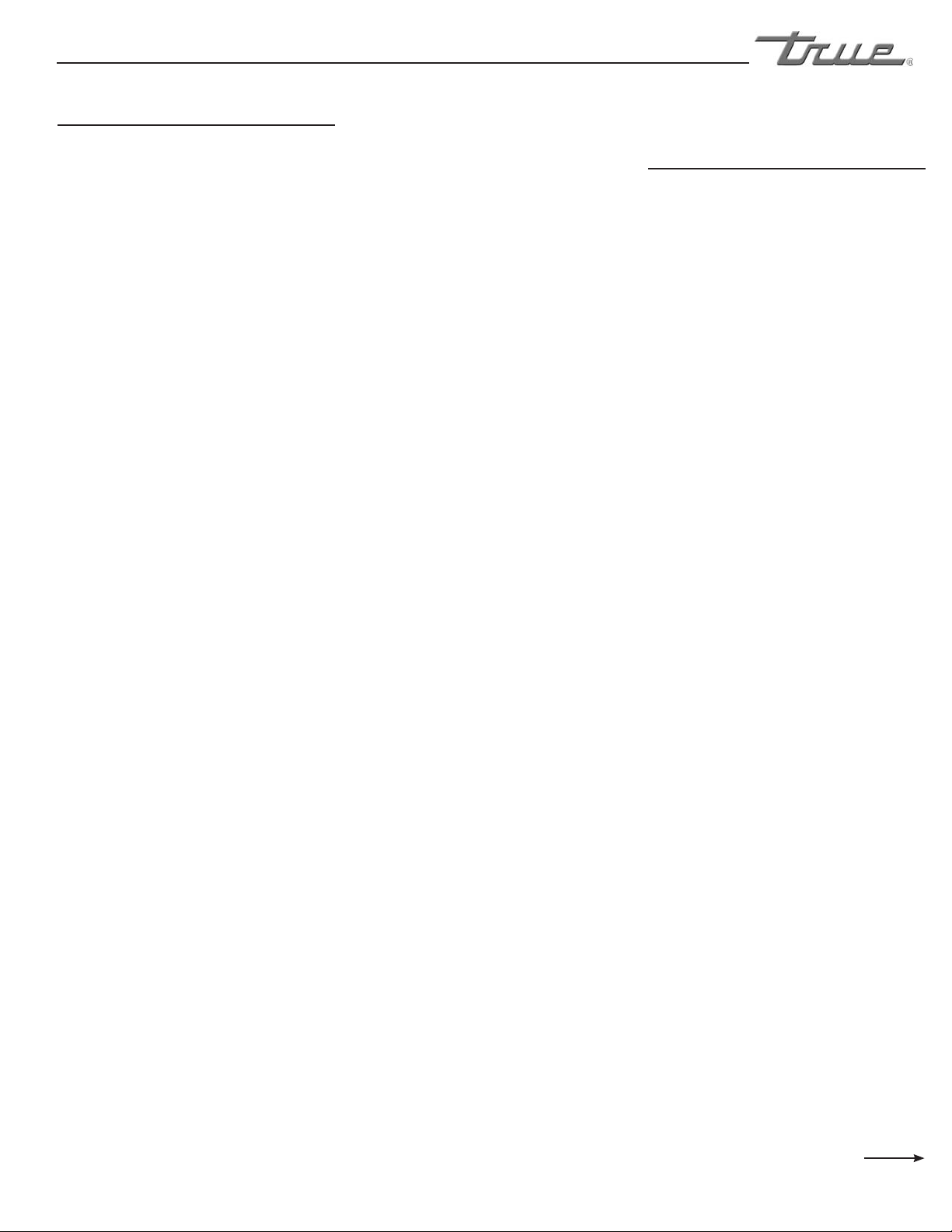
STEP 1
Unplug the cooler.
STEP 2
Remove the screws that secure the
temperature control to the inset box
lower left side of the cabinet (when
facing the front of the cabinet).
STEP 3
Pull out gently from cabinet.
STEP 4
For high elevation installations, it
may be necessary to “warm-up” the
set points. To make the adjustment,
insert the appropriate tool in each
adjustment screw and turn 1/4 of a
revolution clockwise (to the right).
This procedure will adjust both
the cut-in and cut-out about 2°F
warmer.
STEP 5
Make sure to reconnect the pink
wire to the proper spade
terminal when reinstalling.
NOTE
Mechanical temperature
controllers are affected when
functioning at high altitude. The
cut-in and cut-out
temperatures will be colder than
when the controller functions closer
to sea level.
Danfoss Temperature Control (High Altitude Only!)
Cut-out Adjustment Screw Allen (5/64”
or 2 mm) (clockwise for warmer)
Cut-in Adjustment Screw Torx (T-7)
(clockwise for warmer)
Compressor Connection (pink)
Compressor Connection (pink)
TEMPERATURE CONTROL ADJUSTMENT FOR
HIGH ALTITUDE ONLY!
............ www.truemfg.com ............
True Food Service Equipment, Inc.
25
25
INSTALLATION / OPERATION INSTRUCTIONS
IF THE COMPRESSOR WILL NOT RUN
1. If there is no voltage at the compressor
terminals, follow the wiring diagram
and check back from compressor to the
power supply to find where the circuit is
interrupted.
2. If power is available at the compressor
terminals, and the compressor does not
run, check the voltage at the compressor
terminals while attempting to start the
compressor.
If voltage at the compressor terminals is
below 90% of the nameplate voltage, it
is possible the motor may not develop
sufficient torque to start. Check to
determine if wire sizes are adequate,
electrical connections are loose, the
circuit is overloaded, or if the power
supply is inadequate.
3. On single phase compressors,
a defective capacitor or relay may
prevent the compressor starting. If the
compressor attempts to start but is
unable to do so, or if there is a humming
sound, check the relay to see if the relay
contacts are damaged or fused. The relay
points should be closed during the initial
starting cycle, but should open as the
compressor comes up to speed.
Remove the wires from the starting
relay and capacitors. Use a high voltage
ohmmeter to check for continuity
throughout the relay coil. Replace
the relay if there is not continuity.
Use an ohmmeter to check across the
relay contacts. Potential relay contacts
are normally closed when the relay is
not energized, current relay contacts
are normally open. If either gives an
incorrect reading, replace the relay.
Any capacitor found to be bulging,
leaking, or damaged should be replaced.
Make sure capacitors are discharged
before checking. Check for continuity
between each capacitor terminal and the
case. Continuity indicates a short, and
the capacitor should be replaced.
Substitute a “known to be good” start
capacitor if available. If compressor then
starts and runs properly, replace the
original start capacitor.
If a capacitor tester is not available, an
ohmmeter may be used to check run
and start capacitors for shorts or open
circuits. Use an ohmmeter set to its
highest resistance scale, and connect
prods to capacitor terminals.
a) With a good capacitor, the
indicator should first move zero, and
then gradually increase to infinity.
b) If there is no movement of the
ohmmeter indicator, an open circuit is
indicated.
c) If the ohmmeter indicator moves
to zero, and remains there or on a low
resistance reading, a short circuit is
indicated. Defective capacitors should be
replaced.
4. If the correct voltage is available
at the compressor terminals, and no
current is drawn, remove all wires from
the terminals and check for continuity
through the motor windings. On single
phase motor compressors, check for
continuity from terminals C to R, and
C to S. On compressors with line break
inherent protectors, an open overload
protector can cause a lack of continuity.
If the compressor is warm, wait one hour
for the compressor to cool and recheck.
If continuity cannot be established
through all motor windings, the
compressor should be replaced.
Check the motor for ground by means of
a continuity check between the common
terminal and the compressor shell. If
there is a ground, replace the compressor.
5. If the compressor has an external
protector, check for continuity through
the protector or protectors. All external
inherent protectors on compressors can
be replaced in the field.
IF THE MOTOR COMPRESSOR STARTS
BUT TRIPS REPEATEDLY ON THE
OVERLOAD PROTECTOR
1. Check the compressor suction and
discharge pressures while the compressor
is operating. Be sure the pressures are
within the limitations of the compressor.
If pressures are excessive it may be
necessary to clean the condenser, purge
air from the system, replace crankcase
pressure regulating valve.
An excessively low suction pressure may
indicate a loss of charge.
On units with no service gauge parts
where pressures can be checked, check
condenser to be sure it is clean and fan
is running. Excessive temperatures on
suction and discharge line may also
indicate abnormal operating conditions.
2. Check the line voltage at the motor
terminals while the compressor is
operating. The voltage should be within
10% of the nameplate voltage rating. If
outside those limits, the voltage supply
must be brought within the proper
range, or a motor compressor with
different electrical characteristics must be
used.
3. Check the amperage drawn while the
compressor is operating. Under normal
operating conditions, the amperage
drawn will seldom exceed 110% of the
nameplate amperage. High amperage
can be caused by low voltage, defective
running capacitors, or a defective starting
relay.
Continued on next page
............ www.truemfg.com ............
True Food Service Equipment, Inc.
26 26
INSTALLATION / OPERATION INSTRUCTIONS
4. If all operating conditions are
normal, the voltage supply at the
compressor terminals balanced and
within limits, the compressor crankcase
temperature within normal limits, and
the amperage drawn within the specified
range, the motor protector may be
defective, and should be replaced.
If the operating conditions are normal
and the compressor is running excessively
hot for no observable reason, or if the
amperage drawn is above the normal
range and sufficient to repeatedly trip the
protector, the compressor has internal
damage and should be replaced.
IF THE COMPRESSOR RUNS BUT WILL
NOT REFRIGERATE
1. Check the refrigerant charge. Check
the evaporator surface to determine
if it is evenly cold throughout, or if
partially starved. A lack of charge may
be indicated by light, fluffy frost at
the evaporator inlet. Add refrigerant if
necessary.
2. Check the compressor suction
pressure. An abnormally low pressure
may indicate a loss of refrigerant charge,
a malfunctioning capillary tube, a lack of
evaporator capacity possibly due to icing
or low air flow, or a restriction in the
system.
Often a restriction in a drier or strainer
can be identified by frost or a decrease
in temperature across the restriction due
to the pressure drop in the line. This
will be true only if liquid refrigerant is in
the line at the restricted point, since any
temperature change due to restriction
would be caused by the flashing of liquid
into vapor as the pressure changes.
Any abnormal restriction in the system
must be corrected.
3. Check the compressor discharge
pressure. An abnormally high discharge
pressure can cause a loss of capacity, and
can be caused by a dirty condenser, a
malfunctioning condenser fan, or air in
the system.
4. If the suction pressure is high,
and the evaporator and condenser
are functioning normally, check the
compressor amperage draw. An amperage
draw near or above the nameplate rating
indicates normal compressor or unit may
have damaged valves.
An amperage draw considerably below
the nameplate rating may indicate a
broken suction reed or broken
connecting rod in the compressor.
DIAGNOSIS AND REPLACEMENT OF
FREEZER CABINET COMPONENTS
1. Defrost Time Clock
A. Check timer motor to be sure
it runs.
B. Check contacts on the defrost
timer.
C. Check solenoid windings for
continuity to ensure contact
switching.
D. Check to be sure defrost
actuator pins are in proper
position.
E. Check all wires in the timer for
tightness to terminals and
broken wires.
2. Defrost Control On The
Evaporator Drain Pan
A. If the defrost time is always
35 minutes (or whatever duration the
elapsed time adjustment is set at) and
the fan motors do not delay after a
defrost cycle and it has been determined
that the solenoid in the defrost clock is
functioning, change the defrost control
in the evaporator compartment in
the top of the freezer. This control is
attached to the evaporator drain pan.
3. Coil Defrost Heater
A. Lower the evaporator cover.
Disconnect the coil heater by removing
the wire nuts at the point where the
heater joins the electrical circuit of the
freezer in the evaporator compartment.
Check heater for continuity with an
ohmmeter. If the heater is defective, cut
the bale wires holding the heater to the
coil and remove the heater. Replace with
a new heater using bale wires provided.
4. Drain Tube Heater
A. Lower the evaporator cover.
Disconnect the drain tube heater by
removing the wire nuts at the point
where the heater joins the electrical
circuit of the freezer in the evaporator
compartment. Check the drain tube
heater with an ohmmeter.
B. If the drain tube heater is
defective, disconnect the drain tube from
the rigid plastic drain, bend the tabs that
hold the evaporator drain pan to the
evaporator cover and raise the drain pan
so that the flexible heater is visible, pull
heater out of the plastic drain tube and
replace. Connect heater to the electrical
circuit in the evaporator compartment.
5. Cabinet Temperature
Control
A. Remove the two screws on the
right side of the evaporator housing that
holds the control mounting plate. Reach
behind the evaporator housing on the
control side of the cabinet and pull the
control bulb out of the receptacle in
the roof of the cabinet. Disconnect the
wires from the control. Check control for
continuity, replace if defective.
............ www.truemfg.com ............
True Food Service Equipment, Inc.
27
27
INSTALLATION / OPERATION INSTRUCTIONS
REQUIRED TOOLS
•none
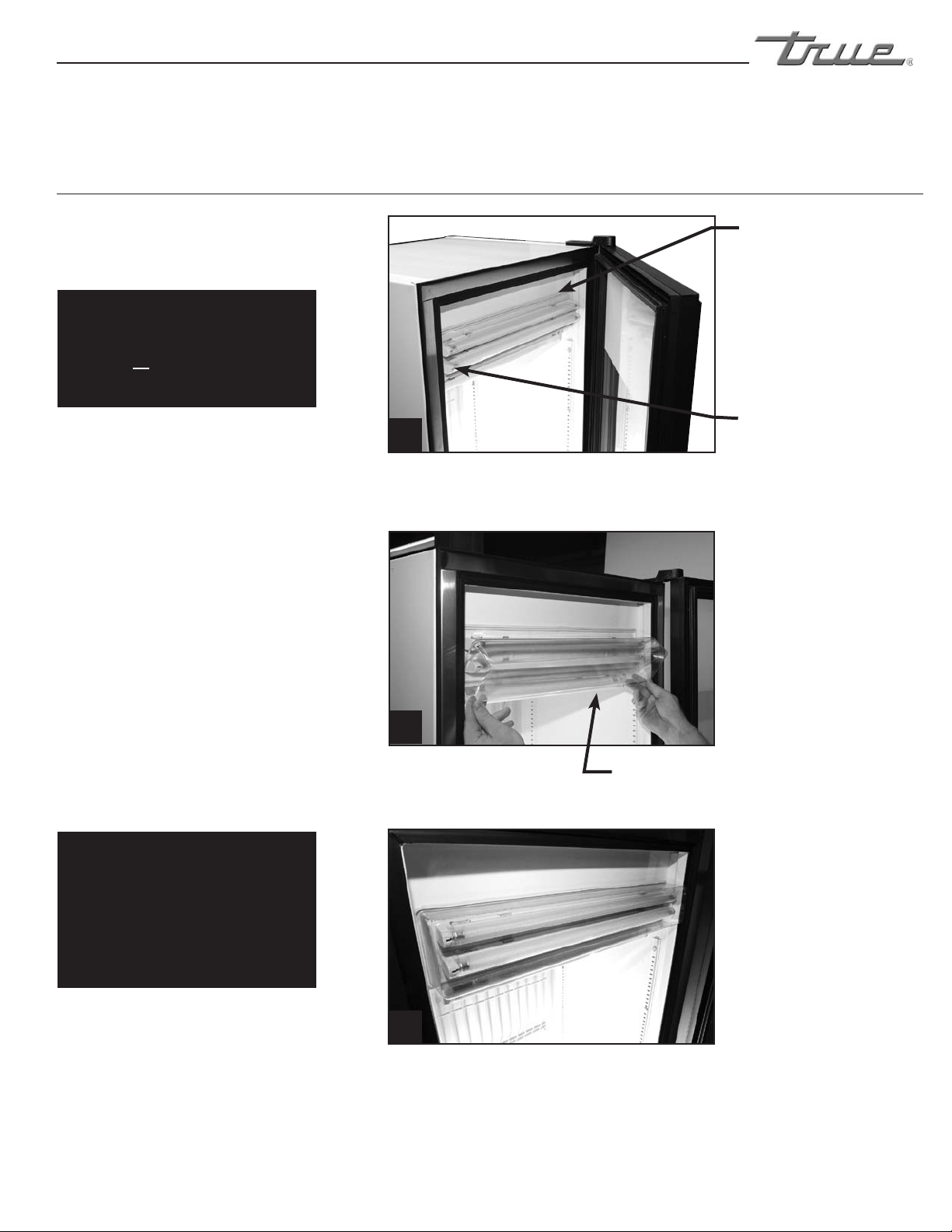
STEP 1
Locate rubber gasket behind lamp holder
mounted to evaporator housing. (See
Image 1).
STEP 2
Fit the bottom edge of the lamp cover
into the bottom groove of the rubber
gasket and rotate upwards while working
the edges into the rest of the rectangular
groove. (See Images 2-3).
(slide fingers underneath top edges of
rubber gasket and push rubber over the
top lip of the lamp shield)
STEP 3
Be sure lamp cover is seated properly in
rubber gasket.
- IMPORTANT -
Before replacing light cover
turn cabinet on and wait until it
reaches temperature.
NOTE
If cabinet is turned off and
interior allowed to warm up lamp
cover may become loose and
require reinstallation.
Follow directions above.
- IMPORTANT -
Before replacing light cover
turn cabinet on and wait until it
reaches temperature.
IMPORTANT
Before installing lamp cover turn
cabinet on and allow it to reach
temperature.
Rubber Gasket
Lamp Holder
Lamp Cover
Light Cover Installation for T-12FG
1
2
3
............ www.truemfg.com ............
True Food Service Equipment, Inc.
28 28
MAINTENANCE, CARE & CLEANING
REQUIRED TOOLS:
• PhillipsScrewdriver
• StiffBristleBrush
• AdjustableWrench
• AirTankorCO
2
Tank • VacuumCleaner
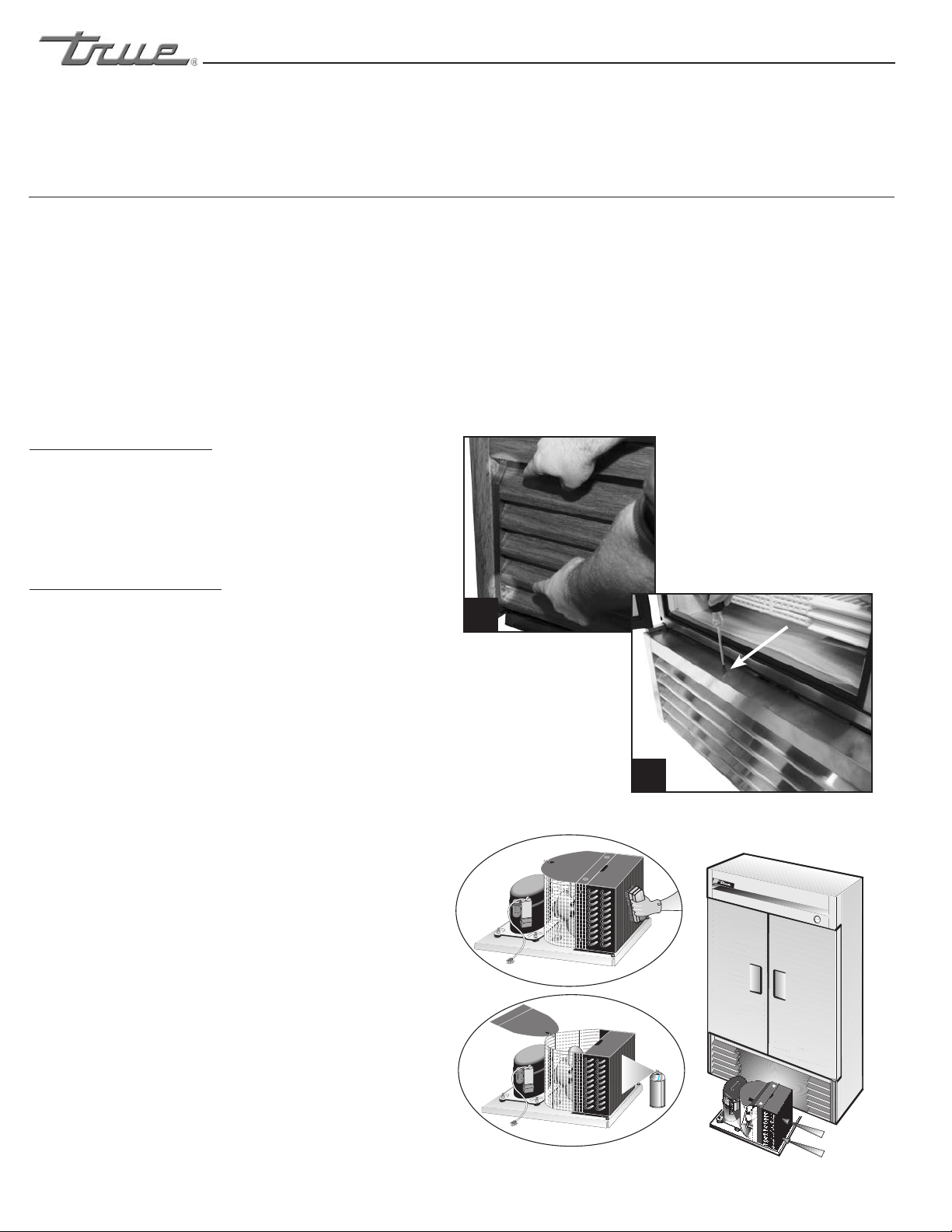
Step 1
Disconnect power to unit.
Step 2
SLIDE DOOR MODELS: (See Image 1)
Take off lower grill assembly by removing two (2) screws in
lower corners. (older models may have snap lock tabs instead
of screws).
Loosen screws holding the top pivot pins. Swing grill up and
remove frame hooks from pivot pins at top of louver.
SWING DOOR MODELS: (See Image 2)
Take off lower grill assembly by opening the door and
removing screws from the top of the louver grill. Some models
have a door light switch. Please use caution when removing
the grill on these models. Do not pinch wires. For reinstall,
reattach the grill to the magnets on front of the cabinet and
reinstall the screws on top of the grill.
Step 3
Remove bolts anchoring compressor assembly to frame rails
and carefully slide out. (tube connections are flexible)
Step 4
Clean off accumulated dirt from the condenser coil and the
fan with a stiff bristle brush.
Step 5
Lift cardboard cover above fan at plastic plugs and carefully
clean condenser coil and fan blades.
Step 6
INDOOR LOCATION:
After brushing condenser coil vacuum dirt from coil, and
interior floor.
OUTDOOR LOCATION:
(GDM-33, GDM-47, and GDM-49 only) After brushing
condenser coil blow CO
2
through condenser from fin side to
fan. (See Image 4.)
Step 7
Replace cardboard cover. Carefully slide compressor assembly
back into position and replace bolts.
Step 8
Reinstall louver assembly onto unit with appropriate fastener
and clips. Tighten all screws.
Step 9
Connect unit to power and check to see if compressor is
running.
MAINTENANCE, CARE & CLEANING
CLEANING THE CONDENSER COIL
When using electrical appliances, basic safety precautions should be followed, including the following:
P
NEPCO/CENTRALAB
1227-5
REMOVE COVER MAKE POWER CONNECTION
E. McCabe
Slide Door Models
Image 3.
Image 4.
Swing Door Models
1
2
............ www.truemfg.com ............
True Food Service Equipment, Inc.
29
29
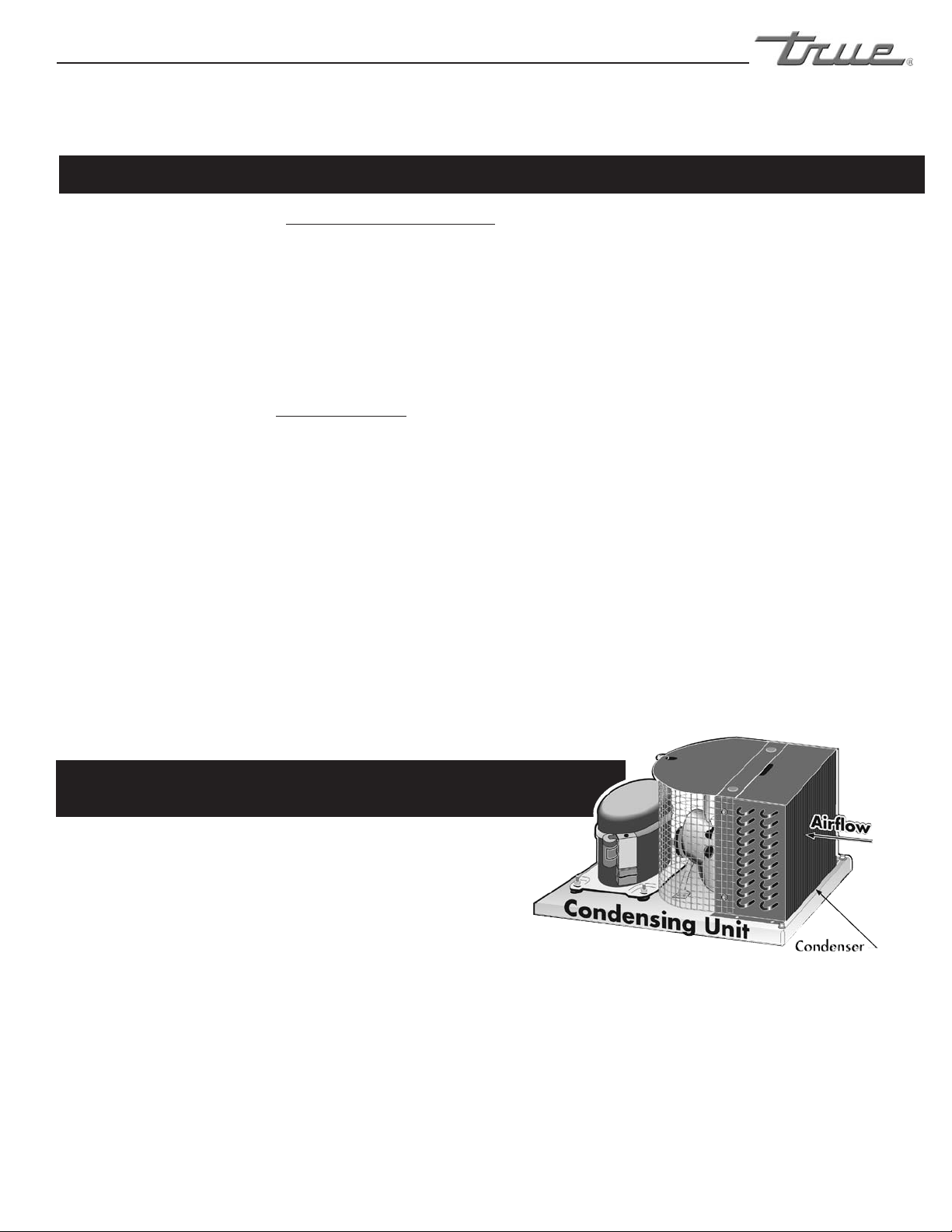
Condensers accumulate dirt and require cleaning every 30 days. Dirty condensers result in compressor failure, product loss,
and lost sales... which are not covered by warranty.
If you keep the Condenser clean you will minimize your service expense and lower your electrical costs. The Condenser
requires scheduled cleaning every thirty days or as needed.
Air is pulled through the Condenser continuously, along with dust, lint, grease, etc.
A dirty Condenser can result in NON-WARRANTEED part & Compressor Failures, Product Loss, and Lost Sales.
Proper cleaning involves removing dust from the Condenser. By using a soft brush, or vacuuming the Condenser with a shop
vac, or using CO2, nitrogen, or pressurized air.
If you cannot remove the dirt adequately, please call your refrigeration service company.
On most of the units the condenser is accessible in the rear of the unit. You must remove the cabinet grill to expose the
Condenser.
The Condenser looks like a group of vertical fins. You need to be able to see through the condenser for the unit to function at
maximum capacity. Do not place filter material in front of condensing coil. This material blocks air-flow to the coil similar to
having a dirty coil.
THE CLEANING OF THE CONDENSER IS NOT
COVERED BY THE WARRANTY!
HOW TO CLEAN THE CONDENSER:
1. Disconnect the electrical power to the unit.
2. Remove the louvered grill.
3. Vacuum or brush the dirt, lint, or debris from the finned condenser coil.
4. If you have a significant dirt build up you can blow out the condenser with compressed air.
(CAUTION MUST BE USED to avoid eye injury. Eye protection is recommended.)
5. When finished be sure to replace the louvered grill. The grill protects the condenser.
6. Reconnect the electrical power to the unit.
If you have any questions, please call TRUE Manufacturing at 636-240-2400 or 800-325-6152 and ask for the Service
Department. Service Department Availability Monday-Friday 7:30 a.m. to 6:00 p.m. and Saturday 8:00 a.m. to 12:00 p.m. CST.
MAINTENANCE, CARE & CLEANING
IMPORTANT WARRANTY INFORMATION
............ www.truemfg.com ............
True Food Service Equipment, Inc.
30 30
MAINTENANCE, CARE & CLEANING
CAUTION: Do not use any steel wool, abrasive or chlorine based products to clean stainless steel surfaces.
• Stainless Steel Opponents
There are three basic things which can break down your stainless steel’s passivity layer and allow corrosion to rear
its ugly head.
1) Scratches from wire brushes, scrapers, and steel pads are just a few examples of items that can be abrasive to
stainless steel’s surface.
2) Deposits left on your stainless steel can leave spots. You may have hard or soft water depending on what part of
the country you live in. Hard water can leave spots. Hard water that is heated can leave deposits if left to sit too
long. These deposits can cause the passive layer to break down and rust your stainless steel. All deposits left from
food prep or service should be removed as soon as possible.
3) Chlorides are present in table salt, food, and water. Household and industrial cleaners are the worst type of
chlorides to use.
• 8 steps that can help prevent rust on stainless steel:
1. Using the correct cleaning tools
Use non-abrasive tools when cleaning your stainless steel products. The stainless steel’s passive layer will not be
harmed by soft cloths and plastic scouring pads. Step 2 tells you how to find the polishing marks.
2. Cleaning along the polish lines
Polishing lines or “grain” are visible on some stainless steels. Always scrub parallel to visible lines on some stainless
steels. Use a plastic scouring pad or soft cloth when you cannot see the grain.
3. Use alkaline, alkaline chlorinated or non-chloride containing cleaners
While many traditional cleaners are loaded with chlorides, the industry is providing an ever increasing choice of
non-chloride cleaners. If you are not sure of your cleaner’s chloride content contact your cleaner supplier. If they
tell you that your present cleaner contains chlorides, ask if they have an alternative. Avoid cleaners containing
quaternary salts as they can attack stainless steel, causing pitting and rusting.
4. Water Treatment
To reduce deposits, soften the hard water when possible. Installation of certain filters can remove corrosive and
distasteful elements. Salts in a properly maintained water softener can be to your advantage. Contact a treatment
specialist if you are not sure of the proper water treatment.
5. Maintaining the cleanliness of your food equipment
Use cleaners at recommended strength (alkaline, alkaline chlorinated or non-chloride). Avoid build-up of hard
stains by cleaning frequently. When boiling water with your stainless steel equipment, the single most likely cause
of damage is chlorides in the water. Heating any cleaners containing chlorides will have the same damaging effects.
6. Rinse
When using chlorinated cleaners you must rinse and wipe dry immediately. It is better to wipe standing cleaning
agents and water as soon as possible. Allow the stainless steel equipment to air dry. Oxygen helps maintain the
passivity film on stainless steel.
7. Hydrochloric acid (muriatic acid) should never be used on stainless steel
8. Regularly restore/passivate stainless steel
Stainless Steel Equipment Care and Cleaning
............ www.truemfg.com ............
True Food Service Equipment, Inc.
31
31
MAINTENANCE, CARE & CLEANING
WARNING
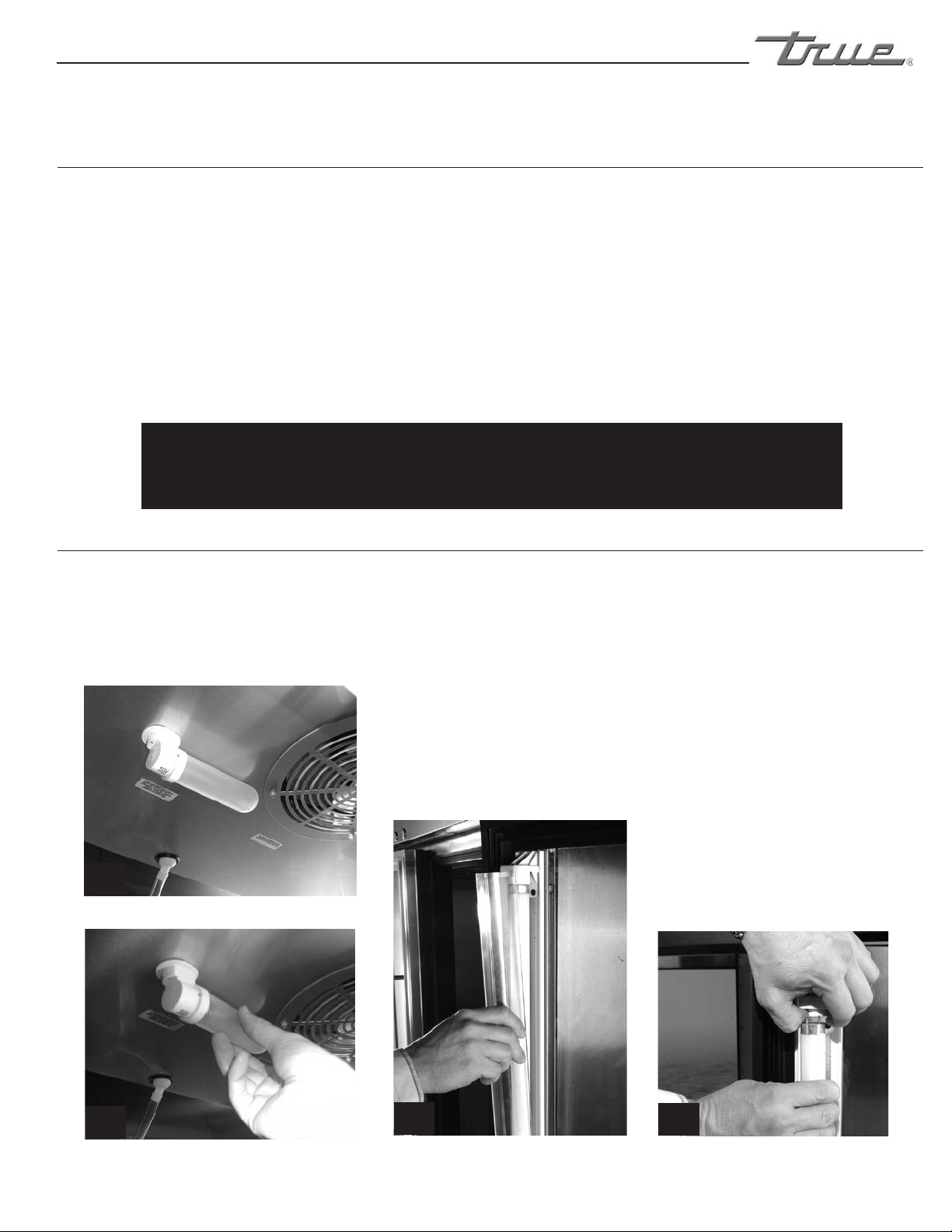
Disconnect power to cabinet before replacing light bulbs.
INTERIOR LIGHTS:
• Simply unscrew the light bulb(See Image 1 & 2).
IDL (INTEGRATED DOOR LIGHTING):
• Squeeze the plastic lampshield together and pull away
from the door (See Image 3).
• Push the bulb down while pulling the spring
activated lampholder up. This will give you enough
clearance to take the bulb out (See Image 4).
LIGHT BULB REPLACEMENT
IDL (Integrated Door Lighting)
3
4
IDL (Integrated Door Lighting) IDL (Integrated Door Lighting)
1
2
Interior Light
Interior Light
Recommended cleaners for certain situations / environments of stainless steel
A) Soap, ammonia and detergent medallion applied with a cloth or sponge can be used for routine
cleaning.
B) Arcal 20, Lac-O-Nu Ecoshine applied provides barrier film for fingerprints and smears.
C) Cameo, Talc, Zud First Impression is applied by rubbing in the direction of the polished lines for
stubborn stains and discoloring.
D) Easy-off and De-Grease It oven aid are excellent for removals on all finishes for grease-fatty acids,
blood and burnt-on foods.
E) Any good commercial detergent can be applied with a sponge or cloth to remove grease and oil.
F) Benefit, Super Sheen, Sheila Shine are good for restoration / passivation.
NOTE
The use of stainless steel cleaners or other such solvents is not
recommended on plastic parts. Warm soap and water will suffice.
Stainless Steel Equipment Care and Cleaning
WARRANTY INFORMATION (U.S.A & CANADA ONLY!)
T
RUE
R
EFRIGERATION
MADE IN
SINCE 1945
U.S.A.
®
THREE YEAR PARTS &LABOR WARRANTY
ADDITIONAL TWO YEAR COMPRESSOR WARRANTY
404A/134A COMPRESSOR WARRANTY
WARRANTY CLAIMS
WHAT IS NOT COVERED BY THIS WARRANTY
TRUE warrants to the original purchaser of every new TRUE refrigerated unit, the cabinet and all parts thereof, to be free from defects in
material or workmanship, under normal and proper use and maintenance service as specified by TRUE and upon proper installation and start-up in
accordance with the instruction packet supplied with each TRUE unit. TRUE’s obligation under this warranty is limited to a period of three (3) years
from the date of original installation or 39 months after shipment date from TRUE, whichever occurs first.
Any part covered under this warranty that are determined by TRUE to have been defective within three (3) years of original installation or
thirty-nine (39) months after shipment date from manufacturer, whichever occurs first, is limited to the repair or replacement, including labor charges,
of defective parts or assemblies. The labor warranty shall include standard straight time labor charges only and reasonable travel time, as determined
by TRUE.
Warranty does not cover standard wear parts which include door gaskets, incandescent bulbs or fluorescent bulbs. Warranty also does
not cover issues caused by improper installation or lack of basic preventative maintenance which includes regular cleaning of condenser coils.
In addition to the Three (3) year warranty stated above, TRUE warrants its hermetically and semi-hermetically sealed compressor to be free
from defects in both material and workmanship under normal and proper use and maintenance service for a period of two (2) additional years from the
date of original installation but not to exceed five (5) years and three (3) months after shipment from the manufacturer.
Compressors determined by TRUE to have been defective within this extended time period will, at TRUE’s option, be either repaired or
replaced with a compressor or compressor parts of similar design and capacity.
The two (2) year extended compressor warranty applies only to hermetically and semi-hermetically sealed parts of the compressor and
does not apply to any other parts or components, including, but not limited to: cabinet, paint finish, temperature control, refrigerant, metering device,
driers, motor starting equipment, fan assembly or any other electrical component, etcetera.
The two year compressor warranty detailed above will be voided if the following procedure is not carefully adhered to:
1. This system contains R404A or R134A refrigerant and polyol ester lubricant. The polyol ester lubricant has rapid moisture absorbing
qualities. If long exposure to the ambient conditions occur, the lubricant must be removed and replaced with new. For oil amounts and specifications
please call TRUE technical service department (800-325-6152). Failure to comply with recommended lubricant specification will void the compressor
warranty.
2. Drier replacement is very important and must be changed when a system is opened for servicing. A drier using XH-7 desiccant or an
exact replacement solid core drier must be used. The new drier must also be the same capacity as the drier being replaced.
3. Micron level vacuums must be achieved to insure low moisture levels in the system. 500 microns or lower must be obtained.
All claims for labor or parts must be made directly through TRUE. All claims should include: model number of the unit, the serial number of
the cabinet, proof of purchase, date of installation, and all pertinent information supporting the existence of the alleged defect.
In case of warranty compressor, the compressor model tag must be returned to TRUE along with above listed information.
Any action or breach of these warranty provisions must be commenced within one (1) year after that cause of action has occurred.
TRUE’s sole obligation under this warranty is limited to either repair or replacement of parts, subject to the additional limitations below. This
warranty neither assumes nor authorizes any person to assume obligations other than those expressly covered by this warranty.
NO CONSEQUENTIAL DAMAGES. TRUE IS NOT RESPONSIBLE FOR ECONOMIC LOSS; PROFIT LOSS; OR SPECIAL, INDIRECT, OR
CONSEQUENTIAL DAMAGES, INCLUDING WITHOUT LIMITATION, LOSSES OR DAMAGES ARISING FROM FOOD OR PRODUCT SPOILAGE CLAIMS
WHETHER OR NOT ON ACCOUNT OF REFRIGERATION FAILURE.
WARRANTY IS NOT TRANSFERABLE. This warranty is not assignable and applies only in favor of the original purchaser/user to whom
delivered. ANY SUCH ASSIGNMENT OR TRANSFER SHALL VOID THE WARRANTIES HEREIN MADE AND SHALL VOID ALL WARRANTIES, EXPRESS OR
IMPLIED, INCLUDING ANY WARRANTY OF MERCHANTABILITY OR FITNESS FOR A PARTICULAR PURPOSE.
IMPROPER USAGE. TRUE ASSUMES NO LIABILITY FOR PARTS OR LABOR COVERAGE FOR COMPONENT FAILURE OR OTHER DAMAGES
RESULTING FROM IMPROPER USAGE OR INSTALLATION OR FAILURE TO CLEAN AND/OR MAINTAIN PRODUCT AS SET FORTH IN THE WARRANTY
PACKET PROVIDED WITH THE UNIT.
RESIDENTIAL APPLICATIONS: TRUE assumes no liability for parts or labor coverage for component failure or other damages resulting from
installation in non-commercial or residential applications.
ALTERATION, NEGLECT, ABUSE, MISUSE, ACCIDENT, DAMAGE DURING TRANSIT OR INSTALLATION, FIRE, FLOOD, ACTS OF GOD. TRUE
is not responsible for the repair or replacement of any parts that TRUE determines have been subjected after the date of manufacture to alteration,
neglect, abuse, misuse, accident, damage during transit or installation, fire, flood, or act of God.
IMPROPER ELECTRICAL CONNECTIONS. TRUE IS NOT RESPONSIBLE FOR THE REPAIR OR REPLACEMENT OF FAILED OR DAMAGED
COMPONENTS RESULTING FROM INCORRECT SUPPLY VOLTAGE, THE USE OF EXTENSION CORDS, LOW VOLTAGE, OR UNSTABLE SUPPLY VOLTAGE.
NO IMPLIED WARRANTY OF MERCHANTABILITY OR FITNESS FOR A PARTICULAR PURPOSE: THERE ARE NO OTHER WARRANTIES,
EXPRESSED, IMPLIED OR STATUTORY, EXCEPT THE THREE (3) YEAR PARTS &LABOR WARRANTY AND THE ADDITIONAL TWO (2) YEAR COMPRESSOR
WARRANTY AS DESCRIBED ABOVE. THESE WARRANTIES ARE EXCLUSIVE AND IN LIEU OF ALL OTHER WARRANTIES, INCLUDING IMPLIED
WARRANTY AND MERCHANTABILITY OR FITNESS FOR A PARTICULAR PURPOSE. THERE ARE NO WARRANTIES WHICH EXTEND BEYOND THE
DESCRIPTION ON THE FACE HEREOF.
OUTSIDE U.S/CANADA.: This warranty does not apply to, and TRUE is not responsible for, any warranty claims made on products sold or
used outside the United States or Canada.
THIS WARRANTY ONLY APPLIES TO UNITS SHIPPED FROM TRUE’S MANUFACTURING FACILITIES AFTER JANUARY 1, 2013.
PRODUCT MUST BE PURCHASED IN THE COUNTRY WHERE SERVICE IS REQUESTED.