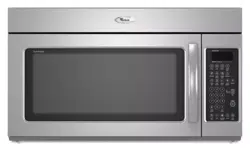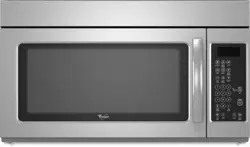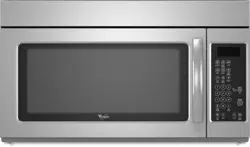

MICROWAVEHOOD
COMBINATION
For questions about features, operation/performance
parts, accessories or service, call: 1-800-253-1301.
or visit our website at...
www.whirlpool.com
Table of Contents ....................................... 2
Model GH9184XL
4619-652-61532/8184733
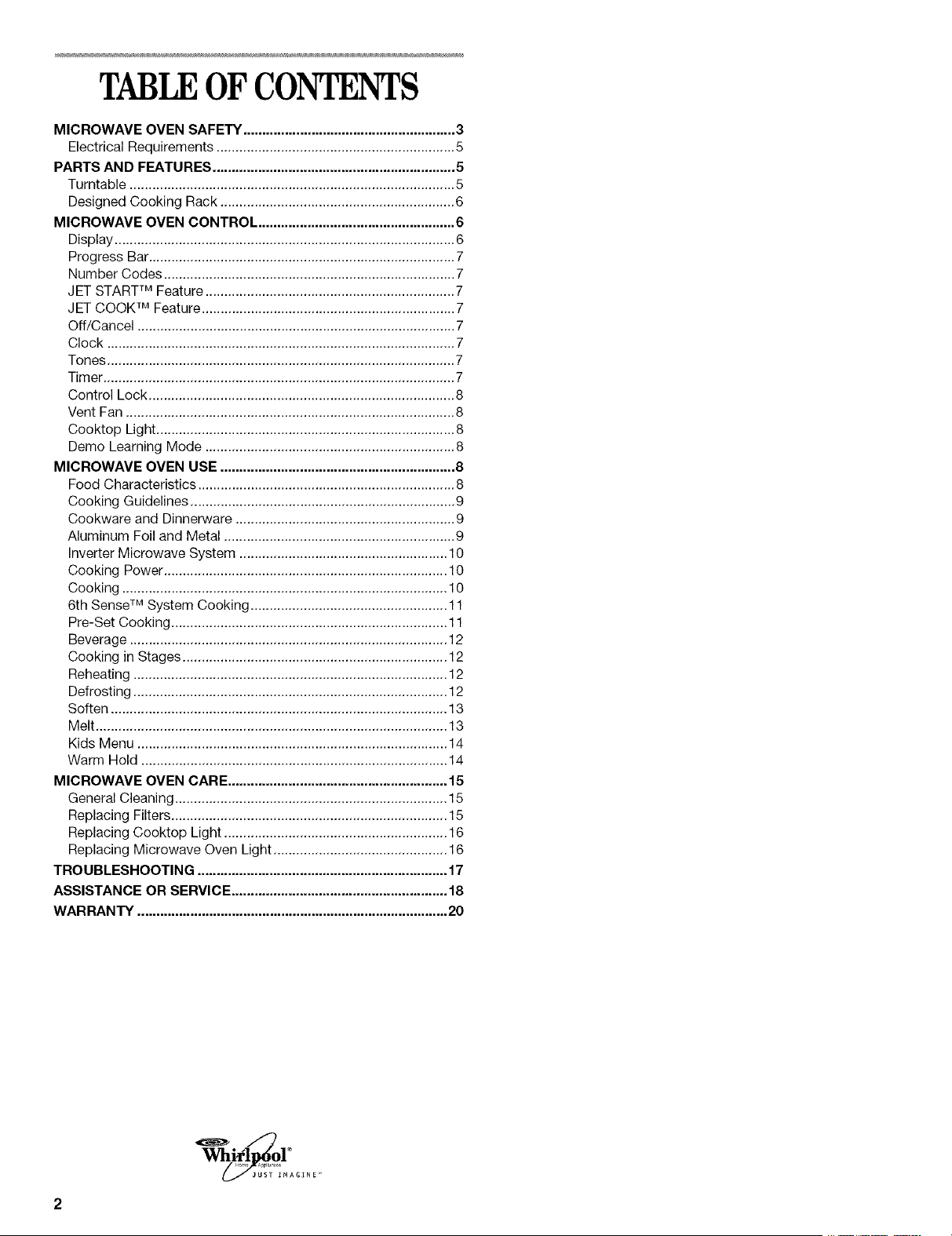
TABLEOF CONTENTS
MICROWAVE OVEN SAFETY ........................................................ 3
Electrical Requirements ............................................................... 5
PARTS AND FEATURES ................................................................ 5
Turntable ...................................................................................... 5
Designed Cooking Rack .............................................................. 6
MICROWAVE OVEN CONTROL .................................................... 6
Display .......................................................................................... 6
Progress Bar................................................................................. 7
Number Codes ............................................................................. 7
JET STARTTM Feature .................................................................. 7
JET COOK TM Feature ................................................................... 7
Off/Cancel .................................................................................... 7
Clock ............................................................................................ 7
Tones ............................................................................................ 7
Timer ............................................................................................. 7
Control Lock ................................................................................. 8
Vent Fan ....................................................................................... 8
Cooktop Light ............................................................................... 8
Demo Learning Mode .................................................................. 8
MICROWAVE OVEN USE .............................................................. 8
Food Characteristics .................................................................... 8
Cooking Guidelines ...................................................................... 9
Cookware and Dinnerware .......................................................... 9
Aluminum Foil and Metal ............................................................. 9
Inverter Microwave System ....................................................... 10
Cooking Power ........................................................................... 10
Cooking ...................................................................................... 10
6th SenseTM System Cooking .................................................... 11
Pre-Set Cooking ......................................................................... 11
Beverage .................................................................................... 12
Cooking in Stages ...................................................................... 12
Reheating ................................................................................... 12
Defrosting ................................................................................... 12
Soften ......................................................................................... 13
Melt ............................................................................................. 13
Kids Menu .................................................................................. 14
Warm Hold ................................................................................. 14
MICROWAVE OVEN CARE .......................................................... 15
General Cleaning ........................................................................ 15
Replacing Filters ......................................................................... 15
Replacing Cooktop Light ........................................................... 16
Replacing Microwave Oven Light .............................................. 16
TROUBLESHOOTING .................................................................. 17
ASSISTANCE OR SERVICE ......................................................... 18
WARRANTY .................................................................................. 20
MICROWAVEOVENSAFETY
Your safety and the safety of others are very important.
We have provided many important safety messages in this manual and on your appliance. Always read and obey all
safety messages.
This is the safety alert symbol.
This symbol alerts you to potential hazards that can kill or hurt you and others.
All safety messages will follow the safety alert symbol and either the word "DANGER" or
"WARNING." These words mean:
You can be killed or seriously injured if you don't
immediately follow instructions.
You can be killed or seriously injured if you don't
follow instructions.
All safety messages will tell you what the potential hazard is, tell you how to reduce the chance of injury, and tell you
what can happen if the instructions are not followed.
mMPORTANT SAFETY iNSTRUCTiONS
When using eUectrbaUappliances basic safety precautions shouUd be followed, incUuding the following:
WARNmNG: To reduce the risk of burns, eUectric _, Do not operate the microwave oven if it has a
shock, fire, injury to persons, or exposure to excessive
microwave energy:
_, Read all instructions before using the microwave
oven,
_, Read and follow the specific "PRECAUTIONS TO
AVOID POSSIBLE EXPOSURE TO EXCESSIVE
MICROWAVE ENERGY" found in this section.
_, The microwave oven must be grounded. Connect
only to properly grounded outlet. See "GROUNDING
INSTRUCTIONS" found in this section and in the pro-
vided Installation Instructions.
_, Install or locate the microwave oven only in
accordance with the provided Installation Instructions.
_, Some products such as whole eggs in the shell and
sealed containers - for example, closed glass jars -
may explode and should not be heated in the
microwave oven.
_, Use the microwave oven only for its intended use as
described in this manual. Do not use corrosive
chemicals or vapors in the microwave oven. This type
of oven is specifically designed to heat, cook, or dry
food. It is not designed for industrial or laboratory use.
m As with any appliance, close supervision is necessary
when used by children.
damaged cord or plug, if it is not working properly, or
if it has been damaged or dropped,
The microwave oven should be serviced only by
qualified service personnel, Call an authorized
service company for examination, repair, or
m
m
See door surface cleaning instructions in the
"Microwave Oven Care" section,
To reduce the risk of fire in the oven cavity:
- Do not overcook food, Carefully attend the
microwave oven if paper, plastic, or other
combustible materials are placed inside the oven
to facilitate cooking,
- Remove wire twist=ties from paper or plastic bags
before placing bags in oven,
- if materials inside the oven should ignite, keep oven
door closed, turn oven off, and disconnect the
power cord, or shut off power at the fuse or circuit
- Do not use the cavity for storage purposes. Do not
leave paper products, cooking utensils, or food in
the cavity when not in use.
SAVE THESE iNSTRUCTiONS
iMPORTANT SAFETY mNSTRUCTIONS
m Suitabb for use above both gas and ebctric cooking
equipment.
m Intended to be used above ranges with maximum
width of 36 inches.
m Cban Ventibfing Hoods Frequently - Grease shouid
not be allowed to accumuiate on hood or fiiter.
m Oversized foods or oversized meta] utensib shouid not
be inserted in the microwave oven as they may create
a fire or risk of ebctdc shock.
Do not clean with meta] scouring pads. Pieces can
burn off the pad and touch ebctricaH parts invoMng a
risk of ebctric shock.
Do not use paper products when appliance is operat-
ed in the "PAN BROWN" mode (on modeb with this
feature).
m Do not store any materials, other than manufacturer's
recommended accessories, in this oven when not in
use,
Do not store anything directly on top of the microwave
oven when the microwave oven is in operation.
,, When flaming foods under the hood, turn the fan on.
,, Use care when cleaning the vent-hood filter.
Corrosive cleaning agents, such as lye-based oven
cleaners, may damage the filter.
Do not cover or block any openings on the micro-
wave oven.
,, Do not store this microwave oven outdoors. Do not
use the microwave oven near water - for example,
near a kitchen sink, in a wet basement, or near a
swimming pool, and the like.
m Do not immerse cord or plug in water.
m Keep cord away from heated surfaces.
m Do not Metcord hang over edge of table or counter.
Do not mount over a sink.
m Do not cover racks or any other part of the oven with
metal foil. This wiii cause overheating of the oven.
SAVE THESE iNSTRUCTiONS
PRECAUTIONS TO AVOID POSSIBLE EXPOSURE TO
EXCESSIVE MICROWAVE ENERGY...
(a) Do not attempt to operate this oven with the door
open since open-door operation can result in
harmful exposure to microwave energy. It is
important not to defeat or tamper with the
safety interlocks.
(b) Do not place any object between the oven front
face and the door or allow soil or cleaner residue
to accumulate on sealing surfaces.
(c) Do not operate the oven if it is damaged. It is
particularly important that the oven door close
properly and that there is no damage to the:
(1) Door (bent),
(2) Hinges and latches (broken or loosened),
(3) Door seals and sealing surfaces.
(d) The oven should not be adjusted or repaired by
anyone except properly qualified service personnel.
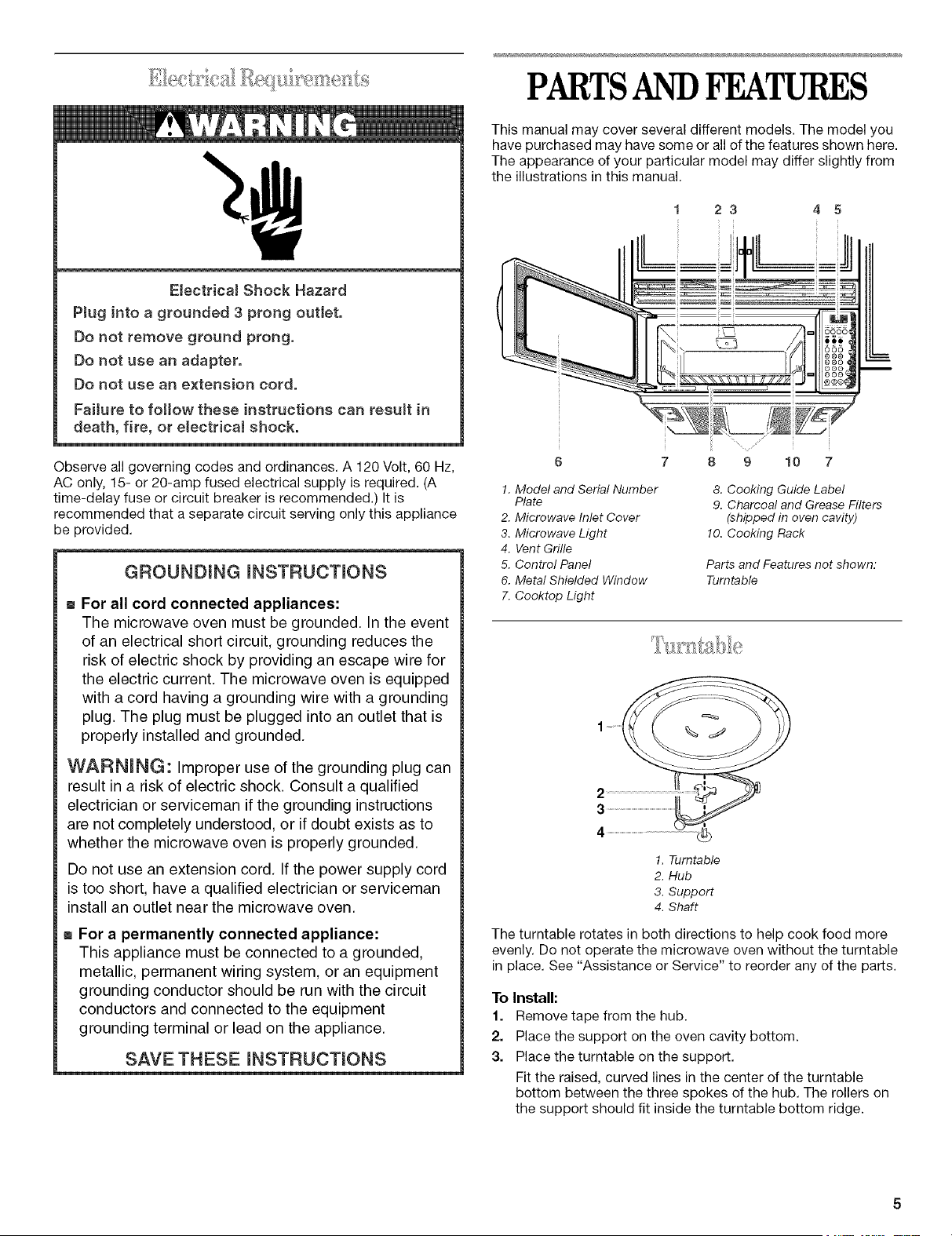
E(ectrica)ShockHazard
Plugintoagrounded3prongoutlet.
Donotremovegroundprong.
Donotuseanadapter.
Donotuseanextension cord.
Fa((ure to fo)(ow these instructions can resu)t in
death, fire, or e(ectricai shock.
Observe all governing codes and ordinances.A 120Volt, 60 Hz,
AC only, 15- or20-amp fused electrical supply is required.(A
time-delay fuse or circuit breaker isrecommended.) It is
recommended that a separate circuit serving only this appliance
be provided.
GROUNDING (NSTRUCT(ONS
m For all cord connected appliances:
The microwave oven must be grounded. In the event
of an electrical short circuit, grounding reduces the
risk of electric shock by providing an escape wire for
the electric current. The microwave oven is equipped
with a cord having a grounding wire with a grounding
plug. The plug must be plugged into an outlet that is
properly installed and grounded.
WARN(NG: Improper use of the grounding plug can
result in a risk of electric shock. Consult a qualified
electrician or serviceman if the grounding instructions
are not completely understood, or if doubt exists as to
whether the microwave oven is properly grounded.
Do not use an extension cord. If the power supply cord
is too short, have a qualified electrician or serviceman
install an outlet near the microwave oven.
m For a permanently connected appliance:
This appliance must be connected to a grounded,
metallic, permanent wiring system, or an equipment
grounding conductor should be run with the circuit
conductors and connected to the equipment
grounding terminal or lead on the appliance.
SAVE THESE (NSTRUCT(ONS
PARTSANDFFATURES
This manual may cover several different models. The model you
have purchased may have some or all of the features shown here.
The appearance of your particular model may differ slightly from
the illustrations in this manual.
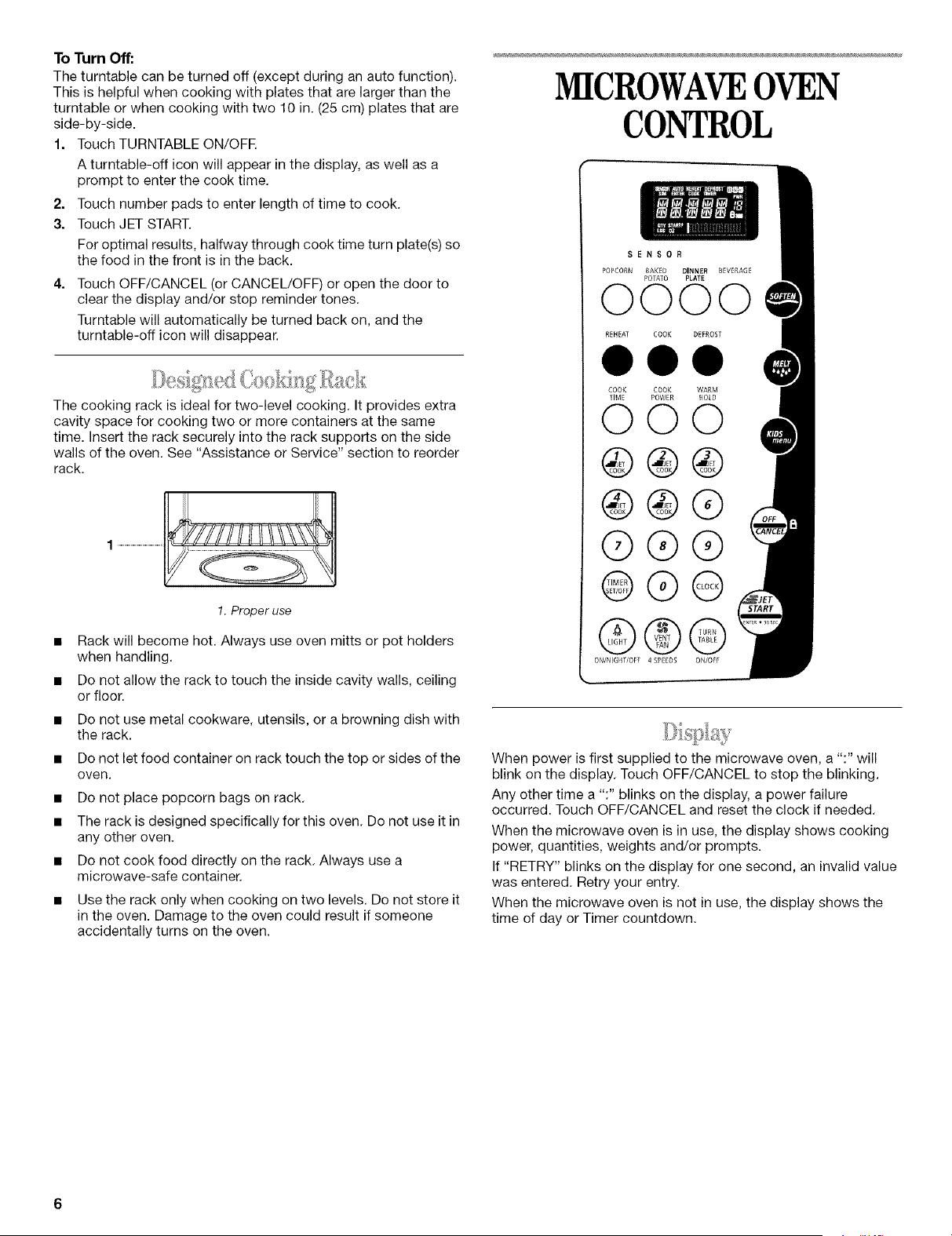
23 45
6 7 8 9 10
!. Model and Serial Number
Plate
2. Microwave Inlet Cover
3. Microwave Light
4. Vent Grille
5. Control Panel
6. Metal Shielded Window
7. Cooktop Light
8. Cooking Guide Label
9. Charcoal and Grease Filters
(shipped in oven cavity)
10. Cooking Rack
Parts and Features not shown:
Turntable
1. Turntable
2. Hub
3. Support
4. Shaft
Theturntable rotates in both directions to help cook food more
evenly.Do not operate the microwave ovenwithout the turntable
in place. See "Assistance or Service"to reorder any of the parts.
To Install:
1. Remove tape from the hub.
2. Place the support on the oven cavity bottom.
3. Place the turntable on the support.
Fit the raised, curved lines in the center of the turntable
bottom between the three spokes of the hub. The rollers on
the support should fit inside the turntable bottom ridge.
ToTurnOff:
Theturntablecanbeturnedoff(exceptduringanautofunction).
Thisishelpfulwhencookingwithplatesthatarelargerthanthe
turntableorwhencookingwithtwo10in.(25cm)platesthatare
side-by-side.
1. TouchTURNTABLEON/OFR
Aturntable-officonwillappearinthedisplay,aswellasa
prompttoenterthecooktime.
2,
3.
Touch number pads to enter length of time to cook.
Touch JET START.
For optimal results, halfway through cook time turn plate(s) so
the food in the front is in the back.
4,
Touch OFF/CANCEL (or CANCEL/OFF) or open the door to
clear the display and/or stop reminder tones.
Turntable will automatically be turned back on, and the
turntable-off icon will disappear.
The cooking rack is ideal for two-level cooking. It provides extra
cavity space for cooking two or more containers at the same
time. Insert the rack securely into the rack supports on the side
walls of the oven. See "Assistance or Service" section to reorder
rack.
!. Proper use
• Rack will become hot. Always use oven mitts or pot holders
when handling.
• Do not allow the rack to touch the inside cavity walls, ceiling
or floor.
• Do not use metal cookware, utensils, or a browning dish with
the rack.
• Do not let food container on rack touch the top or sides of the
oven.
• Do not place popcorn bags on rack.
• The rack is designed specifically for this oven. Do not use it in
any other oven.
• Do not cook food directly on the rack. Always use a
microwave-safe container.
• Use the rack only when cooking on two levels. Do not store it
in the oven. Damage to the oven could result if someone
accidentally turns on the oven.
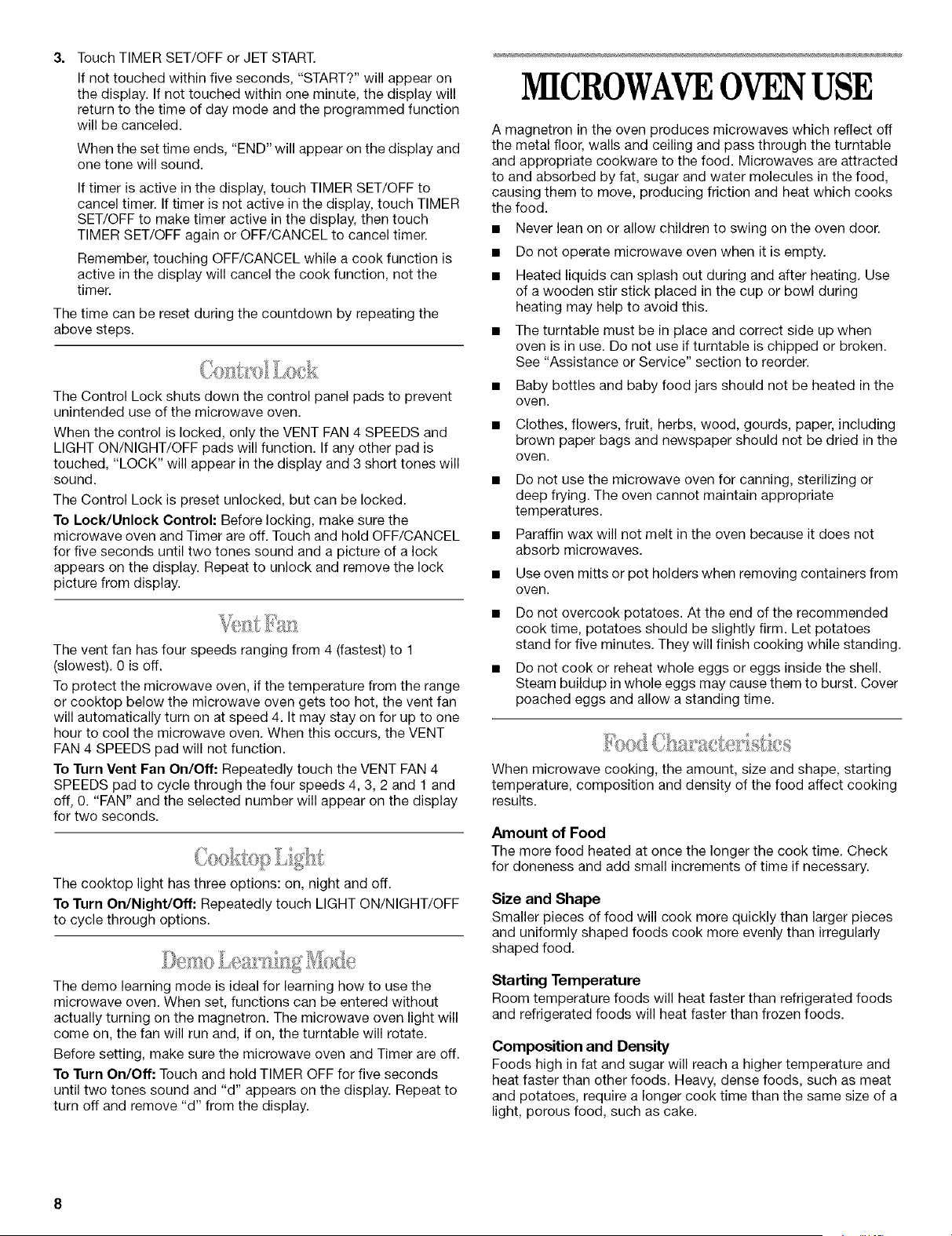
MICROWAVEOVEN
CONTROL
SENSOR
POPCOfiN _AKED DINNER BEVERAGE
POTATO PLATE
0000
REHEAT COOK DEFROST
000
COOK COOK WARM
TIME POWER HOlD
000
@®®
®®®
Q®®
©®@
©©Q
ON/NIGHT/OFI: 4 SPEEDS ON/OFf
/
When power is first supplied to the microwave oven, a ":" will
blink on the display. Touch OFF/CANCEL to stop the blinking.
Any other time a ":" blinks on the display, a power failure
occurred. Touch OFF/CANCEL and reset the clock if needed.
When the microwave oven is in use, the display shows cooking
power, quantities, weights and/or prompts.
If "RETRY" blinks on the display for one second, an invalid value
was entered. Retry your entry.
When the microwave oven is not in use, the display shows the
time of day or Timer countdown.

Theprogressbarisavisualpictureoftheestimatedrunningtime
ofacookingcycle.Itwillappearduringallcookcyclesexcept
WarmHold.Thelinesineachofthesegmentswilllightfromleft
torightasthetimenearstheend.Whenall15lines(allthree
segments)arelit,thecookingcycleiscompleted.
Themicrowaveovenispresetwithshortcutnumbercodes.A
numbercodeincludesoneormoreofthefollowing:cooking
power,cooktimeandfoodquantityorweight.Seethecode
chartsinthe"Cooking"and"Reheating"sectionsforadditional
information.
TheJETSTARTTM control will start any function. If not touched
within 5 seconds after touching a pad, "START?" will appear on
the display as a reminder. If not touched within 5 minutes after
touching a pad, the display will return to the time of day mode
and the programmed function will be canceled.
If cooking is interrupted, touching the JET START TM control will
resume the preset cycle.
The JET START TM control, touched by itself, will automatically
start the microwave oven for a 30 second cook time at 100%
cooking power.
The JET START TM control, touched while the microwave oven is
operating in any cook function, will add 30 seconds of cook time
at the cook power currently in use. Each touch of the JET
STARTTM console pad will add 30 additional seconds of cook
time.
The five JET COOK TM controls share function with the numerical
pads 1-5. When one of the 5 JET COOK TM controls is touched
(while no function is operating), the oven will begin cooking at
high power for 1-5 minutes, depending on which pad is touched.
After cooking begins, the JET COOK TM controls return to their
normal numerical pad function.
This is a 12-hour clock and does not show a.m. or p.m.
To Set:
Before setting, make sure the microwave oven and Timer are off.
1. Touch CLOCK.
2. Touch the number pads to set the time of day.
3. Touch CLOCK or JET START.
To Remove:
1. Touch CLOCK.
2. Touch 0.
3. Touch CLOCK.
The time will disappear and ":" will appear on the display.
Tones are audible signals, indicating the following:
One tone
• Valid pad touch (short tone)
• End of Timer countdown (long tone)
Two tones
• Reminder, repeat each minute after the end-of-cycle tones
• Function has been entered or exited
Three tones
• Invalid pad touch
Four tones
• End-of-cycle
All Tones
All of the preceding tones are preset on. All except the end of
Timer countdown can be turned off.
To Turn Off/On: Touch and hold the number pad [2] for five
seconds until two tones sound. Repeat to turn tones back on.
Valid Pad Touch Tones
The valid pad touch tones are preset on, but can be turned off.
To Turn Off/On: Touch and hold the number pad [1] for five
seconds or until two tones sound. Repeat to turn tones back on.
The OFF/CANCEL pad stops most functions except for the
Timer, Control Lock and Demo Learning Mode.
The microwave oven will also turn off when the door is opened.
Close the door and touch JET START to resume the cycle.
The Timer can be set in minutes and seconds, up to 99 minutes
99 seconds and counts down the set time. The Timer does not
start or stop the microwave oven.
When the Timer is in use, the microwave oven can also operate.
To see the time countdown for five seconds when the microwave
oven is in use, touch TIMER SET/OFF.
To Set:
1. Touch TIMER SET/OFF.
If no action is taken after one minute, the display will return to
the time of day mode.
2. Touch the number pads to set the length of time.
3= Touch TIMER SET/OFF or JET START.
If not touched within five seconds, "START?" will appear on
the display. If not touched within one minute, the display will
return to the time of day mode and the programmed function
will be canceled.
When the set time ends, "END" will appear on the display and
one tone will sound.
If timer is active in the display, touch TIMER SET/OFF to
cancel timer. If timer is not active in the display, touch TIMER
SET/OFF to make timer active in the display, then touch
TIMER SET/OFF again or OFF/CANCEL to cancel timer.
Remember, touching OFF/CANCEL while a cook function is
active in the display will cancel the cook function, not the
timer.
The time can be reset during the countdown by repeating the
above steps.
The Control Lock shuts down the control panel pads to prevent
unintended use of the microwave oven.
When the control is locked, only the VENT FAN 4 SPEEDS and
LIGHT ON/NIGHT/OFF pads will function. If any other pad is
touched, "LOCK" will appear in the display and 3 short tones will
sound.
The Control Lock is preset unlocked, but can be locked.
To Lock/Unlock Control: Before locking, make sure the
microwave oven and Timer are off. Touch and hold OFF/CANCEL
for five seconds until two tones sound and a picture of a lock
appears on the display. Repeat to unlock and remove the lock
picture from display.
The vent fan has four speeds ranging from 4 (fastest) to 1
(slowest). 0 is off.
To protect the microwave oven, if the temperature from the range
or cooktop below the microwave oven gets too hot, the vent fan
will automatically turn on at speed 4. It may stay on for up to one
hour to cool the microwave oven. When this occurs, the VENT
FAN 4 SPEEDS pad will not function.
To Turn Vent Fan On/Off: Repeatedly touch the VENT FAN 4
SPEEDS pad to cycle through the four speeds 4, 3, 2 and 1 and
off, 0. "FAN" and the selected number will appear on the display
for two seconds.
The cooktop light has three options: on, night and off.
To Turn On/Night/Off: Repeatedly touch LIGHT ON/NIGHT/OFF
to cycle through options.
The demo learning mode is ideal for learning how to use the
microwave oven. When set, functions can be entered without
actually turning on the magnetron. The microwave oven light will
come on, the fan will run and, if on, the turntable will rotate.
Before setting, make sure the microwave oven and Timer are off.
To Turn On/Off: Touch and hold TIMER OFF for five seconds
until two tones sound and "d" appears on the display. Repeat to
turn off and remove "d" from the display.
MICROWAVEOVENUSE
A magnetron in the oven produces microwaves which reflect off
the metal floor, walls and ceiling and pass through the turntable
and appropriate cookware to the food. Microwaves are attracted
to and absorbed by fat, sugar and water molecules in the food,
causing them to move, producing friction and heat which cooks
the food.
• Never lean on or allow children to swing on the oven door.
• Do not operate microwave oven when it is empty.
• Heated liquids can splash out during and after heating. Use
of a wooden stir stick placed in the cup or bowl during
heating may help to avoid this.
• The turntable must be in place and correct side up when
oven is in use. Do not use if turntable is chipped or broken.
See "Assistance or Service" section to reorder.
• Baby bottles and baby food jars should not be heated in the
oven.
• Clothes, flowers, fruit, herbs, wood, gourds, paper, including
brown paper bags and newspaper should not be dried in the
oven.
• Do not use the microwave oven for canning, sterilizing or
deep frying. The oven cannot maintain appropriate
temperatures.
• Paraffin wax will not melt in the oven because it does not
absorb microwaves.
• Use oven mitts or pot holders when removing containers from
oven.
• Do not overcook potatoes. At the end of the recommended
cook time, potatoes should be slightly firm. Let potatoes
stand for five minutes. They will finish cooking while standing.
• Do not cook or reheat whole eggs or eggs inside the shell.
Steam buildup in whole eggs may cause them to burst. Cover
poached eggs and allow a standing time.
When microwave cooking, the amount, size and shape, starting
temperature, composition and density of the food affect cooking
results.
Amount of Food
The more food heated at once the longer the cook time. Check
for doneness and add small increments of time if necessary.
Size and Shape
Smaller pieces of food will cook more quickly than larger pieces
and uniformly shaped foods cook more evenly than irregularly
shaped food.
Starting Temperature
Room temperature foods will heat faster than refrigerated foods
and refrigerated foods will heat faster than frozen foods.
Composition and Density
Foods high in fat and sugar will reach a higher temperature and
heat faster than other foods. Heavy, dense foods, such as meat
and potatoes, require a longer cook time than the same size of a
light, porous food, such as cake.
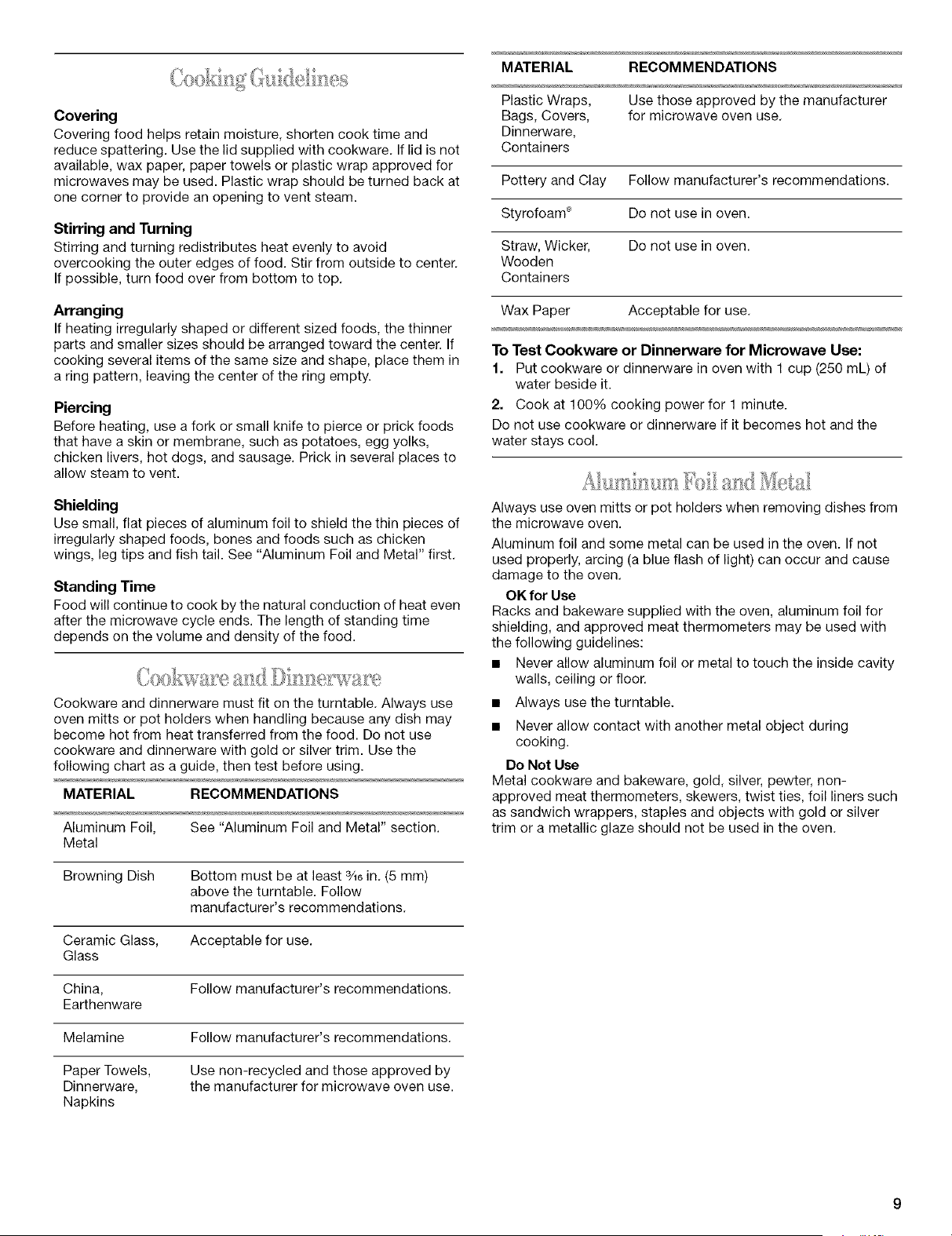
Covering
Covering food helps retain moisture, shorten cook time and
reduce spattering. Use the lid supplied with cookware. If lid is not
available, wax paper, paper towels or plastic wrap approved for
microwaves may be used. Plastic wrap should be turned back at
one corner to provide an opening to vent steam.
Stirring and Turning
Stirring and turning redistributes heat evenly to avoid
overcooking the outer edges of food. Stir from outside to center.
If possible, turn food over from bottom to top.
Arranging
If heating irregularly shaped or different sized foods, the thinner
parts and smaller sizes should be arranged toward the center. If
cooking several items of the same size and shape, place them in
a ring pattern, leaving the center of the ring empty.
Piercing
Before heating, use a fork or small knife to pierce or prick foods
that have a skin or membrane, such as potatoes, egg yolks,
chicken livers, hot dogs, and sausage. Prick in several places to
allow steam to vent.
Shielding
Use small, flat pieces of aluminum foil to shield the thin pieces of
irregularly shaped foods, bones and foods such as chicken
wings, leg tips and fish tail. See "Aluminum Foil and Metal" first.
Standing Time
Food will continue to cook by the natural conduction of heat even
after the microwave cycle ends. The length of standing time
depends on the volume and density of the food.
Cookware and dinnerware must fit on the turntable. Always use
oven mitts or pot holders when handling because any dish may
become hot from heat transferred from the food. Do not use
cookware and dinnerware with gold or silver trim. Use the
following chart as a guide, then test before using.
MATERIAL RECOMMENDATIONS
Aluminum Foil, See "Aluminum Foil and Metal" section.
Metal
Browning Dish Bottom must be at least 3_6in. (5 mm)
above the turntable. Follow
manufacturer's recommendations.
Ceramic Glass, Acceptable for use.
Glass
China, Follow manufacturer's recommendations.
Earthenware
Melamine Follow manufacturer's recommendations.
Paper Towels,
Dinnerware,
Napkins
Use non-recycled and those approved by
the manufacturer for microwave oven use.
MATERIAL RECOMMENDATIONS
Plastic Wraps, Use those approved by the manufacturer
Bags, Covers, for microwave oven use.
Dinnerware,
Containers
Pottery and Clay Follow manufacturer's recommendations.
Styrofoam '_ Do not use in oven.
Straw, Wicker, Do not use in oven.
Wooden
Containers
Wax Paper Acceptable for use.
To Test Cookware or Dinnerware for Microwave Use:
1. Put cookware or dinnerware in oven with 1 cup (250 mL) of
water beside it.
2. Cook at 100% cooking power for 1 minute.
Do not use cookware or dinnerware if it becomes hot and the
water stays cool.
Always use oven mitts or pot holders when removing dishes from
the microwave oven.
Aluminum foil and some metal can be used in the oven. If not
used properly, arcing (a blue flash of light) can occur and cause
damage to the oven.
OK for Use
Racks and bakeware supplied with the oven, aluminum foil for
shielding, and approved meat thermometers may be used with
the following guidelines:
• Never allow aluminum foil or metal to touch the inside cavity
walls, ceiling or floor.
• Always use the turntable.
• Never allow contact with another metal object during
cooking.
Do Not Use
Metal cookware and bakeware, gold, silver, pewter, non-
approved meat thermometers, skewers, twist ties, foil liners such
as sandwich wrappers, staples and objects with gold or silver
trim or a metallic glaze should not be used in the oven.
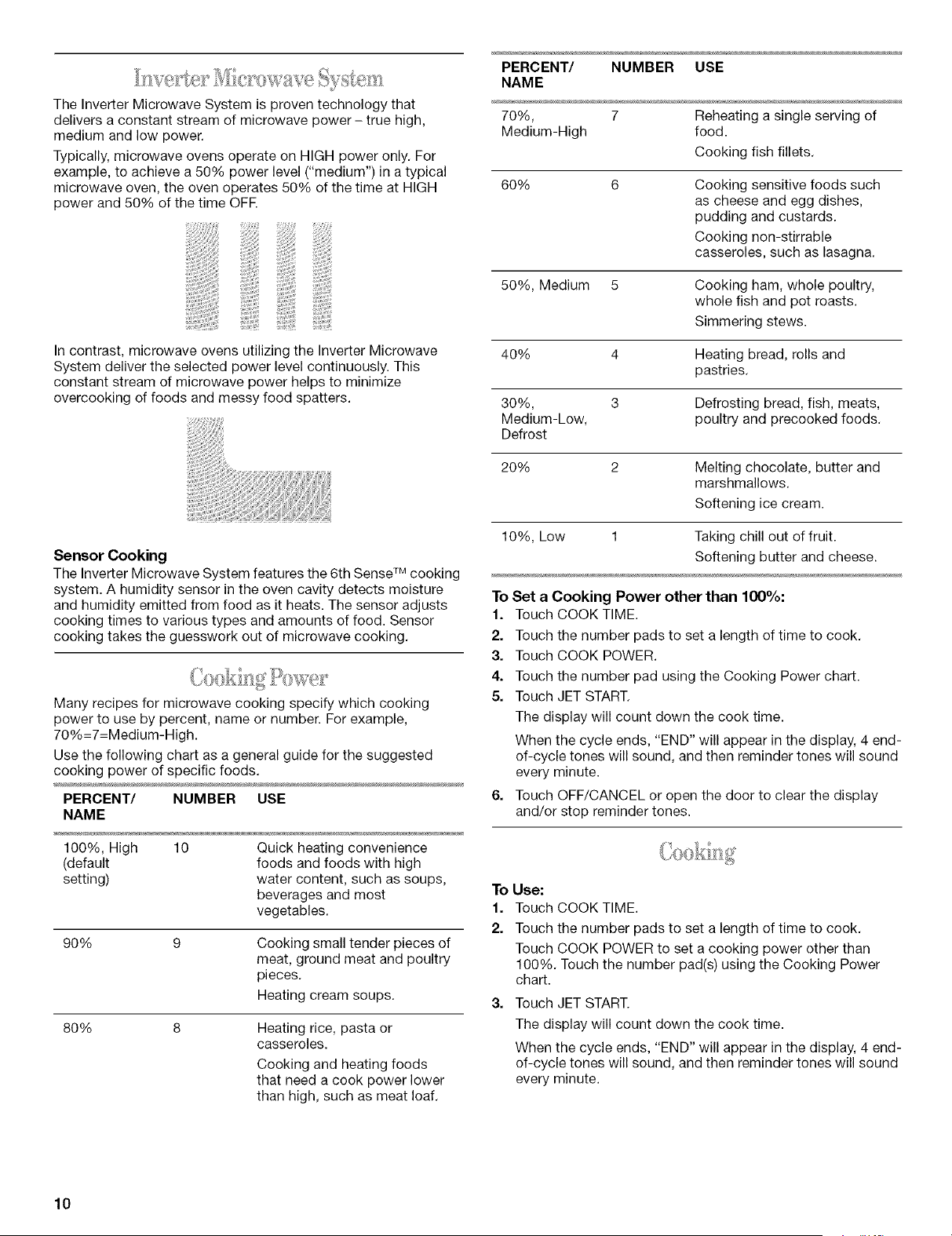
TheInverterMicrowaveSystemisproventechnologythat
deliversaconstantstreamofmicrowavepower- truehigh,
mediumandlowpower.
Typically,microwaveovensoperateonHIGHpoweronly.For
example,toachievea50%powerlevel("medium")inatypical
microwaveoven,theovenoperates50%ofthetimeatHIGH
powerand50%ofthetimeOFE
Incontrast,microwaveovensutilizingtheInverterMicrowave
Systemdelivertheselectedpowerlevelcontinuously.This
constantstreamofmicrowavepowerhelpstominimize
overcookingoffoodsandmessyfoodspatters.
Sensor Cooking
The Inverter Microwave System features the 6th Sense TM cooking
system. A humidity sensor in the oven cavity detects moisture
and humidity emitted from food as it heats. The sensor adjusts
cooking times to various types and amounts of food. Sensor
cooking takes the guesswork out of microwave cooking.
Many recipes for microwave cooking specify which cooking
power to use by percent, name or number. For example,
70%=7=Medium-High.
Use the following chart as a general guide for the suggested
cooking power of specific foods.
PERCENT/ NUMBER USE
NAME
100%, High 10 Quick heating convenience
(default foods and foods with high
setting) water content, such as soups,
beverages and most
vegetables.
90%
Cooking small tender pieces of
meat, ground meat and poultry
pieces.
Heating cream soups.
80%
Heating rice, pasta or
casseroles.
Cooking and heating foods
that need a cook power lower
than high, such as meat loaf.
PERCENT/ NUMBER USE
NAME
70%, 7 Reheating a single serving of
Medium-High food.
Cooking fish fillets.
60%
Cooking sensitive foods such
as cheese and egg dishes,
pudding and custards.
Cooking non-stirrable
casseroles, such as lasagna.
50%, Medium 5 Cooking ham, whole poultry,
whole fish and pot roasts.
Simmering stews.
40% 4 Heating bread, rolls and
pastries.
30%, 3 Defrosting bread, fish, meats,
Medium-Low, poultry and precooked foods.
Defrost
20% 2 Melting chocolate, butter and
marshmallows.
Softening ice cream.
10%, Low 1 Taking chill out of fruit.
Softening butter and cheese.
To Set a Cooking Power other than 100%:
1. Touch COOK TIME.
2. Touch the number pads to set a length of time to cook.
3. Touch COOK POWER.
4. Touch the number pad using the Cooking Power chart.
5. Touch JET START.
The display will count down the cook time.
When the cycle ends, "END" will appear in the display, 4 end-
of-cycle tones will sound, and then reminder tones will sound
every minute.
6. Touch OFF/CANCEL or open the door to clear the display
and/or stop reminder tones.
To Use:
1. Touch COOK TIME.
2. Touch the number pads to set a length of time to cook.
Touch COOK POWER to set a cooking power other than
100%. Touch the number pad(s) using the Cooking Power
chart.
3. Touch JET START.
The display will count down the cook time.
When the cycle ends, "END" will appear in the display, 4 end-
of-cycle tones will sound, and then reminder tones will sound
every minute.
10
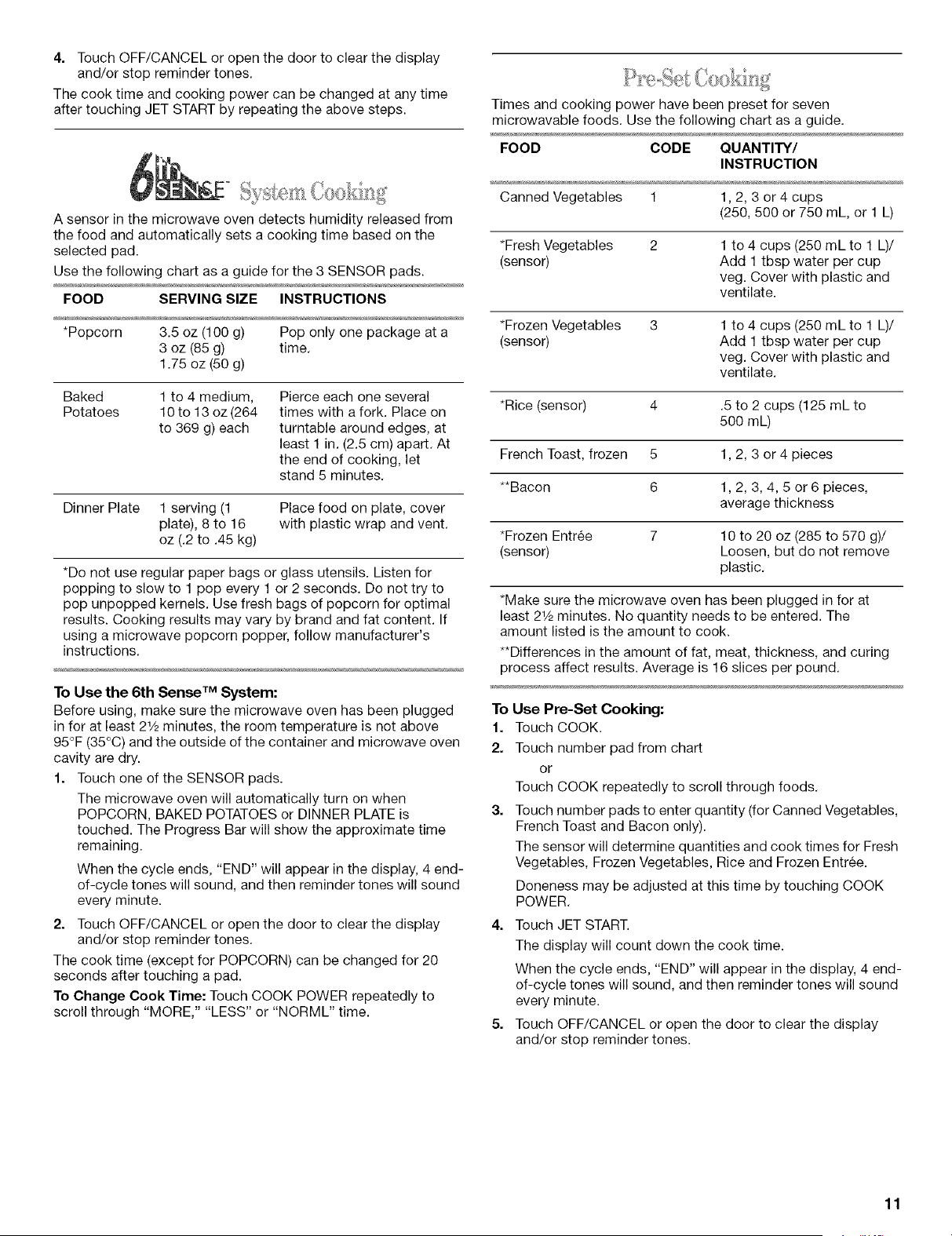
4. Touch OFF/CANCEL or open the door to clear the display
and/or stop reminder tones.
The cook time and cooking power can be changed at any time
after touching JET START by repeating the above steps.
A sensor in the microwave oven detects humidity released from
the food and automatically sets a cooking time based on the
selected pad.
Use the following chart as a guide for the 3 SENSOR pads.
FOOD SERVING SIZE INSTRUCTIONS
*Popcorn 3.5 oz (100 g) Pop only one package at a
3 oz (85 g) time.
1.75 oz (50 g)
Baked 1 to 4 medium,
Potatoes 10 to 13 oz (264
to 369 g) each
Pierce each one several
times with a fork. Place on
turntable around edges, at
least 1 in. (2.5 cm) apart. At
the end of cooking, let
stand 5 minutes.
Dinner Plate 1 serving (1 Place food on plate, cover
plate), 8 to 16 with plastic wrap and vent.
oz (.2 to .45 kg)
*Do not use regular paper bags or glass utensils. Listen for
popping to slow to 1 pop every 1 or 2 seconds. Do not try to
pop unpopped kernels. Use fresh bags of popcorn for optimal
results. Cooking results may vary by brand and fat content. If
using a microwave popcorn popper, follow manufacturer's
instructions.
To Use the 6th Sense TM System:
Before using, make sure the microwave oven has been plugged
in for at least 21/2minutes, the room temperature is not above
95°F (35°C) and the outside of the container and microwave oven
cavity are dry.
1. Touch one of the SENSOR pads.
The microwave oven will automatically turn on when
POPCORN, BAKED POTATOES or DINNER PLATE is
touched. The Progress Bar will show the approximate time
remaining.
When the cycle ends, "END" will appear in the display, 4 end-
of-cycle tones will sound, and then reminder tones will sound
every minute.
2. Touch OFF/CANCEL or open the door to clear the display
and/or stop reminder tones.
The cook time (except for POPCORN) can be changed for 20
seconds after touching a pad.
To Change Cook Time: Touch COOK POWER repeatedly to
scroll through "MORE," "LESS" or "NORML" time.
Times and cooking power have been preset for seven
microwavable foods. Use the following chart as a guide.
FOOD CODE QUANTITY/
INSTRUCTION
Canned Vegetables 1 1,2, 3 or 4 cups
(250, 500 or 750 mL, or 1 L)
*Fresh Vegetables 2 1to 4 cups (250 mL to 1 L)/
(sensor) Add 1tbsp water per cup
veg. Cover with plastic and
ventilate.
*Frozen Vegetables 3 1to 4 cups (250 mL to 1 L)/
(sensor) Add 1tbsp water per cup
veg. Cover with plastic and
ventilate.
*Rice (sensor) 4 .5 to 2 cups (125 mL to
500 mL)
French Toast, frozen 5 1,2, 3 or 4 pieces
**Bacon 6 1,2, 3, 4, 5 or 6 pieces,
average thickness
*Frozen Entree 7 10 to 20 oz (285 to 570 g)/
(sensor) Loosen, but do not remove
plastic.
*Make sure the microwave oven has been plugged in for at
least 21/2minutes. No quantity needs to be entered. The
amount listed is the amount to cook.
**Differences in the amount of fat, meat, thickness, and curing
process affect results. Average is 16 slices per pound.
To Use Pre-Set Cooking:
1. Touch COOK.
2. Touch number pad from chart
or
Touch COOK repeatedly to scroll through foods.
Touch number pads to enter quantity (for Canned Vegetables,
French Toast and Bacon only).
The sensor will determine quantities and cook times for Fresh
Vegetables, Frozen Vegetables, Rice and Frozen Entree.
Doneness may be adjusted at this time by touching COOK
POWER.
Touch JET START.
The display will count down the cook time.
When the cycle ends, "END" will appear in the display, 4 end-
of-cycle tones will sound, and then reminder tones will sound
every minute.
Touch OFF/CANCEL or open the door to clear the display
and/or stop reminder tones.
11
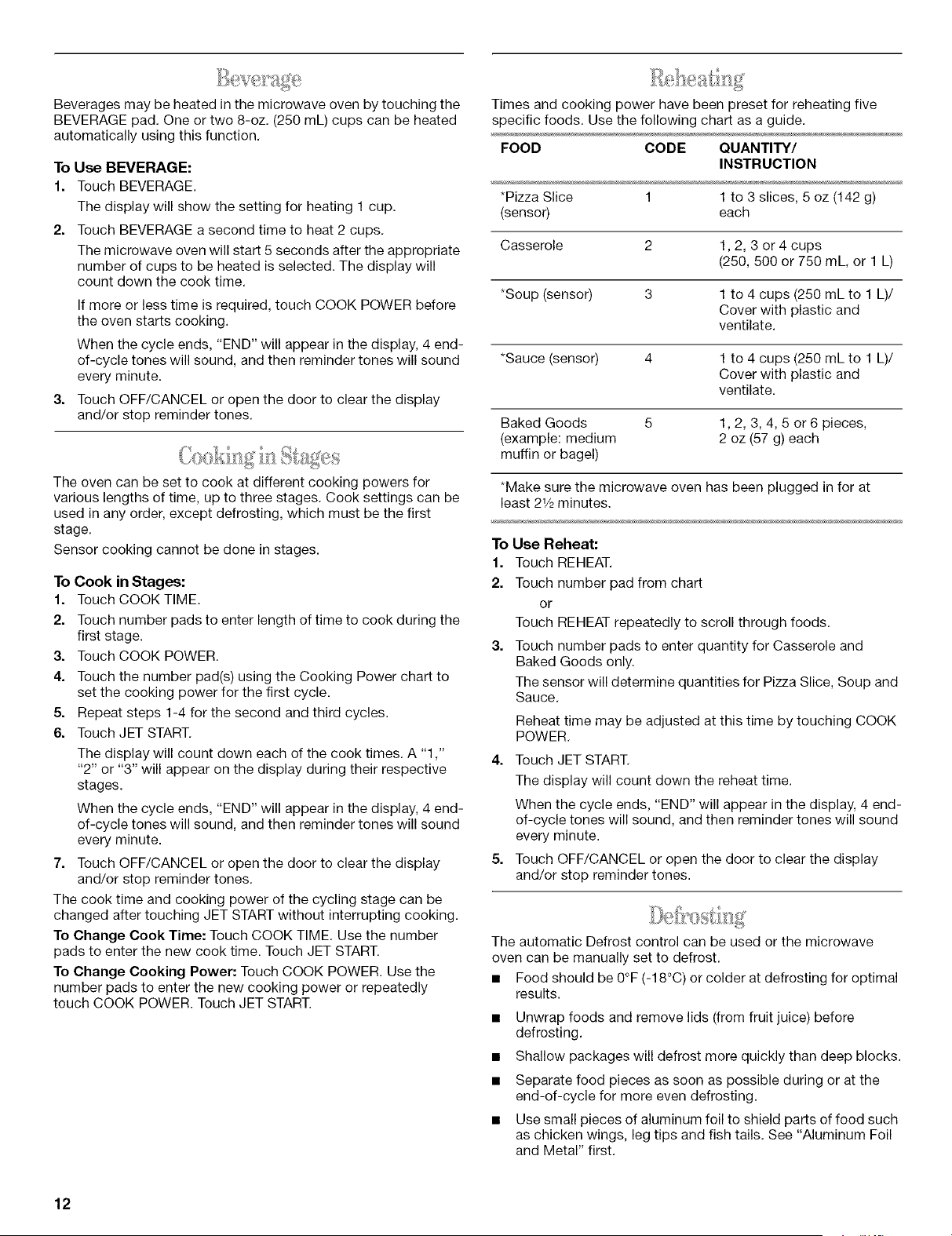
Beverages may be heated in the microwave oven by touching the
BEVERAGE pad. One or two 8-oz. (250 mL) cups can be heated
automatically using this function.
To Use BEVERAGE:
1. Touch BEVERAGE.
The display will show the setting for heating 1 cup.
2=
Touch BEVERAGE a second time to heat 2 cups.
The microwave oven will start 5 seconds after the appropriate
number of cups to be heated is selected. The display will
count down the cook time.
If more or less time is required, touch COOK POWER before
the oven starts cooking.
When the cycle ends, "END" will appear in the display, 4 end-
of-cycle tones will sound, and then reminder tones will sound
every minute.
3. Touch OFF/CANCEL or open the door to clear the display
and/or stop reminder tones.
The oven can be set to cook at different cooking powers for
various lengths of time, up to three stages. Cook settings can be
used in any order, except defrosting, which must be the first
stage.
Sensor cooking cannot be done in stages.
To Cook in Stages:
1. Touch COOK TIME.
2. Touch number pads to enter length of time to cook during the
first stage.
3. Touch COOK POWER.
4. Touch the number pad(s) using the Cooking Power chart to
set the cooking power for the first cycle.
5. Repeat steps 1-4 for the second and third cycles.
6. Touch JET START.
The display will count down each of the cook times. A "1 ,"
"2" or "3" will appear on the display during their respective
stages.
When the cycle ends, "END" will appear in the display, 4 end-
of-cycle tones will sound, and then reminder tones will sound
every minute.
7. Touch OFF/CANCEL or open the door to clear the display
and/or stop reminder tones.
The cook time and cooking power of the cycling stage can be
changed after touching JET START without interrupting cooking.
To Change Cook Time: Touch COOK TIME, Use the number
pads to enter the new cook time. Touch JET START.
To Change Cooking Power: Touch COOK POWER. Use the
number pads to enter the new cooking power or repeatedly
touch COOK POWER. Touch JET START.
Times and cooking power have been preset for reheating five
specific foods. Use the following chart as a guide.
FOOD CODE QUANTITY/
INSTRUCTION
*Pizza Slice 1 1 to 3 slices, 5 oz (142 g)
(sensor) each
Casserole 2 1,2, 3 or 4 cups
(250, 500 or 750 mL, or 1 L)
*Soup (sensor) 3 1 to 4 cups (250 mL to 1 L)/
Cover with plastic and
ventilate.
*Sauce (sensor) 4 1 to 4 cups (250 mL to 1 L)/
Cover with plastic and
ventilate.
Baked Goods 5 1, 2, 3, 4, 5 or 6 pieces,
(example: medium 2 oz (57 g) each
muffin or bagel)
*Make sure the microwave oven has been plugged in for at
least 21/2minutes.
To Use Reheat:
1. Touch REHEAT.
2. Touch number pad from chart
or
Touch REHEAT repeatedly to scroll through foods.
3. Touch number pads to enter quantity for Casserole and
Baked Goods only.
The sensor will determine quantities for Pizza Slice, Soup and
Sauce,
Reheat time may be adjusted at this time by touching COOK
POWER,
4. Touch JET START.
The display will count down the reheat time.
When the cycle ends, "END" will appear in the display, 4 end-
of-cycle tones will sound, and then reminder tones will sound
every minute.
5. Touch OFF/CANCEL or open the door to clear the display
and/or stop reminder tones.
The automatic Defrost control can be used or the microwave
oven can be manually set to defrost.
• Food should be 0°F (-18°C) or colder at defrosting for optimal
results.
• Unwrap foods and remove lids (from fruit juice) before
defrosting.
• Shallow packages will defrost more quickly than deep blocks.
• Separate food pieces as soon as possible during or at the
end-of-cycle for more even defrosting.
• Use small pieces of aluminum foil to shield parts of food such
as chicken wings, leg tips and fish tails. See "Aluminum Foil
and Metal" first.
12
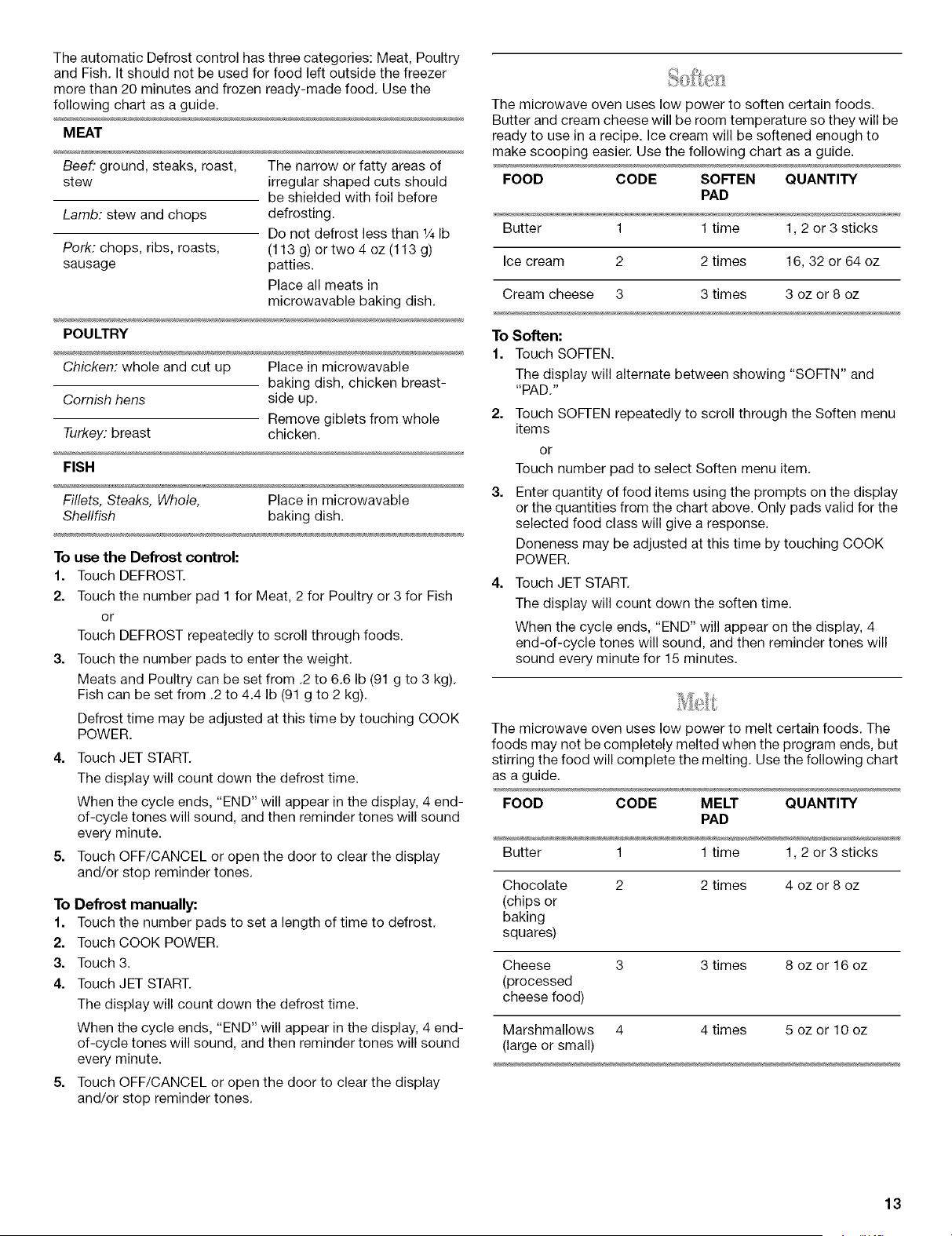
The automatic Defrost control has three categories: Meat, Poultry
and Fish. It should not be used for food left outside the freezer
more than 20 minutes and frozen ready-made food. Use the
following chart as a guide.
MEAT
Beef: ground, steaks, roast, The narrow or fatty areas of
stew irregular shaped cuts should
be shielded with foil before
Lamb: stew and chops defrosting.
Do not defrost less than 1/4Ib
Pork: chops, ribs, roasts, (113 g) or two 4 oz (113 g)
sausage patties.
Place all meats in
microwavable baking dish.
POULTRY
Chicken: whole and cut up Place in microwavable
baking dish, chicken breast-
Cornish hens side up.
Remove giblets from whole
Turkey: breast chicken.
FISH
Fillets, Steaks, Whole, Place in microwavable
Shellfish baking dish.
To use the Defrost control:
1. Touch DEFROST.
2. Touch the number pad 1 for Meat, 2 for Poultry or 3 for Fish
or
Touch DEFROST repeatedly to scroll through foods.
3. Touch the number pads to enter the weight.
Meats and Poultry can be set from .2 to 6.6 Ib (91 g to 3 kg).
Fish can be set from .2 to 4.4 Ib (91 g to 2 kg).
Defrost time may be adjusted at this time by touching COOK
POWER.
4. Touch JET START.
The display will count down the defrost time.
When the cycle ends, "END" will appear in the display, 4 end-
of-cycle tones will sound, and then reminder tones will sound
every minute.
5. Touch OFF/CANCEL or open the door to clear the display
and/or stop reminder tones.
To Defrost manually:
1. Touch the number pads to set a length of time to defrost.
2. Touch COOK POWER.
3. Touch 3.
4. Touch JET START.
The display will count down the defrost time.
When the cycle ends, "END" will appear in the display, 4 end-
of-cycle tones will sound, and then reminder tones will sound
every minute.
5. Touch OFF/CANCEL or open the door to clear the display
and/or stop reminder tones.
The microwave oven uses low power to soften certain foods.
Butter and cream cheese will be room temperature so they will be
ready to use in a recipe. Ice cream will be softened enough to
make scooping easier. Use the following chart as a guide.
FOOD CODE SOFTEN QUANTITY
PAD
Butter 1 1 time 1,2 or 3 sticks
Ice cream 2 2 times 16, 32 or 64 oz
Cream cheese 3 3 times 3 oz or 8 oz
To Soften:
1. Touch SOFTEN.
The display will alternate between showing "SOFTN" and
"PAD."
2. Touch SOFTEN repeatedly to scroll through the Soften menu
items
or
Touch number pad to select Soften menu item.
Enter quantity of food items using the prompts on the display
or the quantities from the chart above. Only pads valid for the
selected food class will give a response.
Doneness may be adjusted at this time by touching COOK
POWER.
4. Touch JET START.
The display will count down the soften time.
When the cycle ends, "END" will appear on the display, 4
end-of-cycle tones will sound, and then reminder tones will
sound every minute for 15 minutes.
The microwave oven uses low power to melt certain foods. The
foods may not be completely melted when the program ends, but
stirring the food will complete the melting. Use the following chart
as a guide.
FOOD CODE MELT QUANTITY
PAD
Butter 1 1 time 1,2 or 3 sticks
Chocolate
(chips or
baking
squares)
2 times 4 oz or 8 oz
Cheese 3 3 times 8 oz or 16 oz
(processed
cheese food)
Marshmallows 4 4 times 5 oz or 10 oz
(large or small)
13
To Melt:
1. Touch MELT.
The display will alternate between showing "MELT" and
"PAD."
2. Touch MELT repeatedly to scroll through the Melt menu items
or
Touch number pad to select Melt menu item.
3. Enter quantity of food items using the prompts on the display
or the quantities from the chart above, Only pads valid for the
selected food class will give a response.
Doneness may be adjusted at this time by touching COOK
POWER.
4. Touch JET START.
The display will count down the melt time.
When the cycle ends, "END" will appear on the display, 4
end-of-cycle tones will sound, and then reminder tones will
sound every minute for 15 minutes.
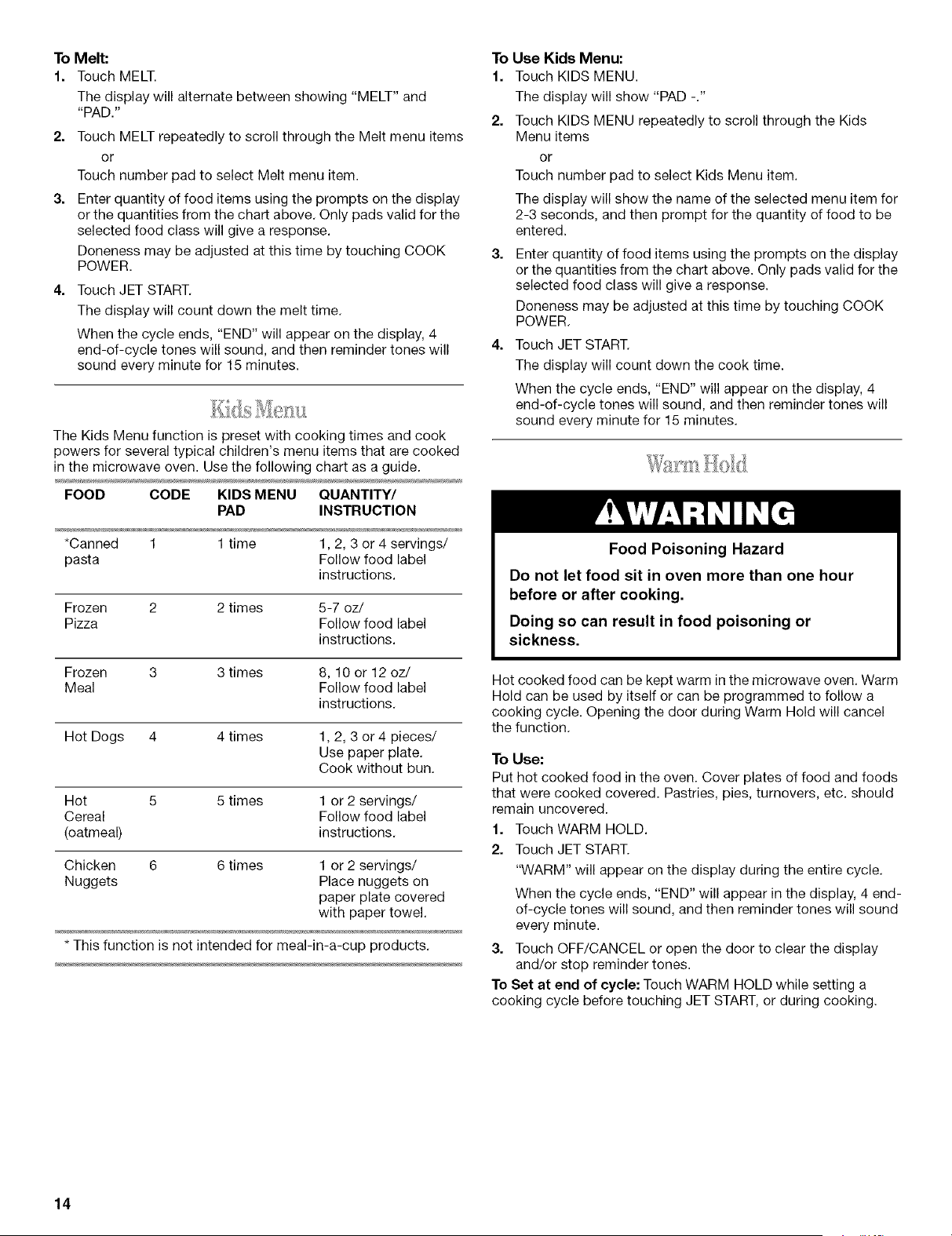
The Kids Menu function is preset with cooking times and cook
powers for several typical children's menu items that are cooked
in the microwave oven. Use the following chart as a guide.
FOOD CODE KIDS MENU QUANTITY/
PAD INSTRUCTION
*Canned 1 1 time 1,2, 3 or 4 servings/
pasta Follow food label
instructions.
Frozen 2 2 times 5-7 oz/
Pizza Follow food label
instructions.
Frozen 3 3 times 8, 10 or 12 oz/
Meal Follow food label
instructions.
Hot Dogs 4 4 times 1,2, 3 or 4 pieces/
Use paper plate.
Cook without bun.
Hot 5 5 times 1 or 2 servings/
Cereal Follow food label
(oatmeal) instructions.
Chicken 6 6 times 1 or 2 servings/
Nuggets Place nuggets on
paper plate covered
with paper towel.
* This function is not intended for meal-in-a-cup products.
To Use Kids Menu:
1. Touch KIDS MENU.
The display will show "PAD -."
2. Touch KIDS MENU repeatedly to scroll through the Kids
Menu items
or
Touch number pad to select Kids Menu item.
The display will show the name of the selected menu item for
2-3 seconds, and then prompt for the quantity of food to be
entered.
Enter quantity of food items using the prompts on the display
or the quantities from the chart above. Only pads valid for the
selected food class will give a response.
Doneness may be adjusted at this time by touching COOK
POWER.
4. Touch JET START.
The display will count down the cook time.
When the cycle ends, "END" will appear on the display, 4
end-of-cycle tones will sound, and then reminder tones will
sound every minute for 15 minutes.
Food Poisoning Hazard
Do not let food sit in oven more than one hour
before or after cooking.
Doing so can result in food poisoning or
sickness.
Hot cooked food can be kept warm in the microwave oven. Warm
Hold can be used by itself or can be programmed to follow a
cooking cycle. Opening the door during Warm Hold will cancel
the function.
To Use:
Put hot cooked food in the oven. Cover plates of food and foods
that were cooked covered. Pastries, pies, turnovers, etc. should
remain uncovered.
1. Touch WARM HOLD.
2. Touch JET START.
"WARM" will appear on the display during the entire cycle.
When the cycle ends, "END" will appear in the display, 4 end-
of-cycle tones will sound, and then reminder tones will sound
every minute.
3. Touch OFF/CANCEL or open the door to clear the display
and/or stop reminder tones.
To Set at end of cycle: Touch WARM HOLD while setting a
cooking cycle before touching JET START, or during cooking.
14
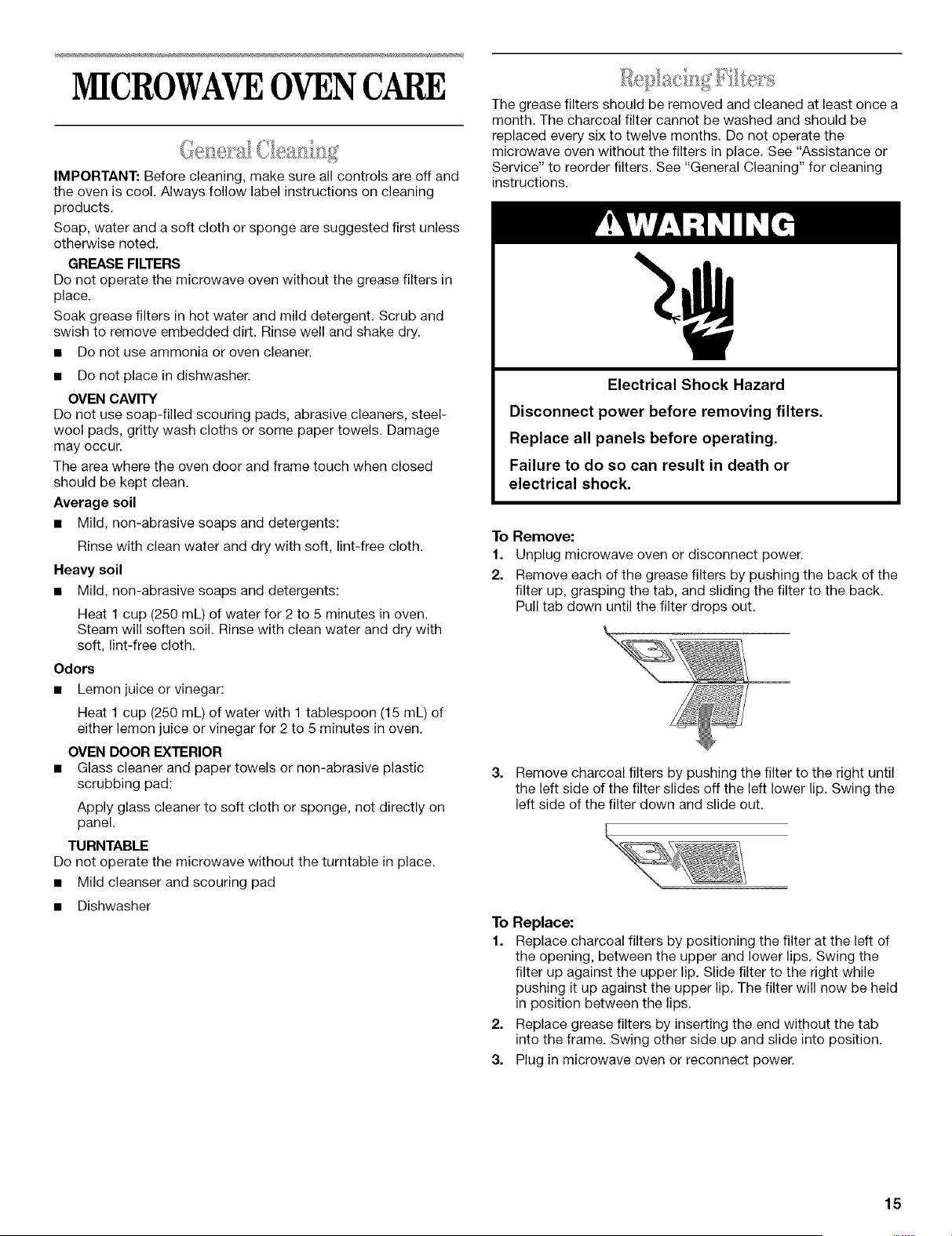
MICROWAVEOVENCARE
IMPORTANT: Before cleaning, make sure all controls are off and
the oven is cool. Always follow label instructions on cleaning
products.
Soap, water and a soft cloth or sponge are suggested first unless
otherwise noted.
GREASE FILTERS
Do not operate the microwave oven without the grease filters in
place.
Soak grease filters in hot water and mild detergent. Scrub and
swish to remove embedded dirt. Rinse well and shake dry.
• Do not use ammonia or oven cleaner.
• Do not place in dishwasher.
OVEN CAVITY
Do not use soap-filled scouring pads, abrasive cleaners, steel-
wool pads, gritty wash cloths or some paper towels. Damage
may occur.
The area where the oven door and frame touch when closed
should be kept clean.
Average soil
• Mild, non-abrasive soaps and detergents:
Rinse with clean water and dry with soft, lint-free cloth.
Heavy soil
• Mild, non-abrasive soaps and detergents:
Heat 1 cup (250 mL) of water for 2to 5 minutes in oven.
Steam will soften soil. Rinse with clean water and dry with
soft, lint-free cloth.
Odors
• Lemon juice or vinegar:
Heat 1 cup (250 mL) of water with 1 tablespoon (15 mL) of
either lemon juice or vinegar for 2 to 5 minutes in oven.
OVEN DOOR EXTERIOR
• Glass cleaner and paper towels or non-abrasive plastic
scrubbing pad:
Apply glass cleaner to soft cloth or sponge, not directly on
panel.
TURNTABLE
Do not operate the microwave without the turntable in place.
• Mild cleanser and scouring pad
• Dishwasher
The grease filters should be removed and cleaned at least once a
month. The charcoal filter cannot be washed and should be
replaced every six to twelve months. Do not operate the
microwave oven without the filters in place. See "Assistance or
Service" to reorder filters. See "General Cleaning" for cleaning
instructions.
Electrical Shock Hazard
Disconnect power before removing filters.
Replace all panels before operating.
Failure to do so can result in death or
electrical shock.
To Remove:
1. Unplug microwave oven or disconnect power.
2. Remove each of the grease filters by pushing the back of the
filter up, grasping the tab, and sliding the filter to the back.
Pull tab down until the filter drops out.
Remove charcoal filters by pushing the filter to the right until
the left side of the filter slides off the left lower lip. Swing the
left side of the filter down and slide out.
To Replace:
1. Replace charcoal filters by positioning the filter at the left of
the opening, between the upper and lower lips. Swing the
filter up against the upper lip. Slide filter to the right while
pushing it up against the upper lip. The filter will now be held
in position between the lips.
2. Replace grease filters by inserting the end without the tab
into the frame. Swing other side up and slide into position.
3. Plug in microwave oven or reconnect power.
15
I •
Iil.ilil (
.... £ ......... i_Q ........ I
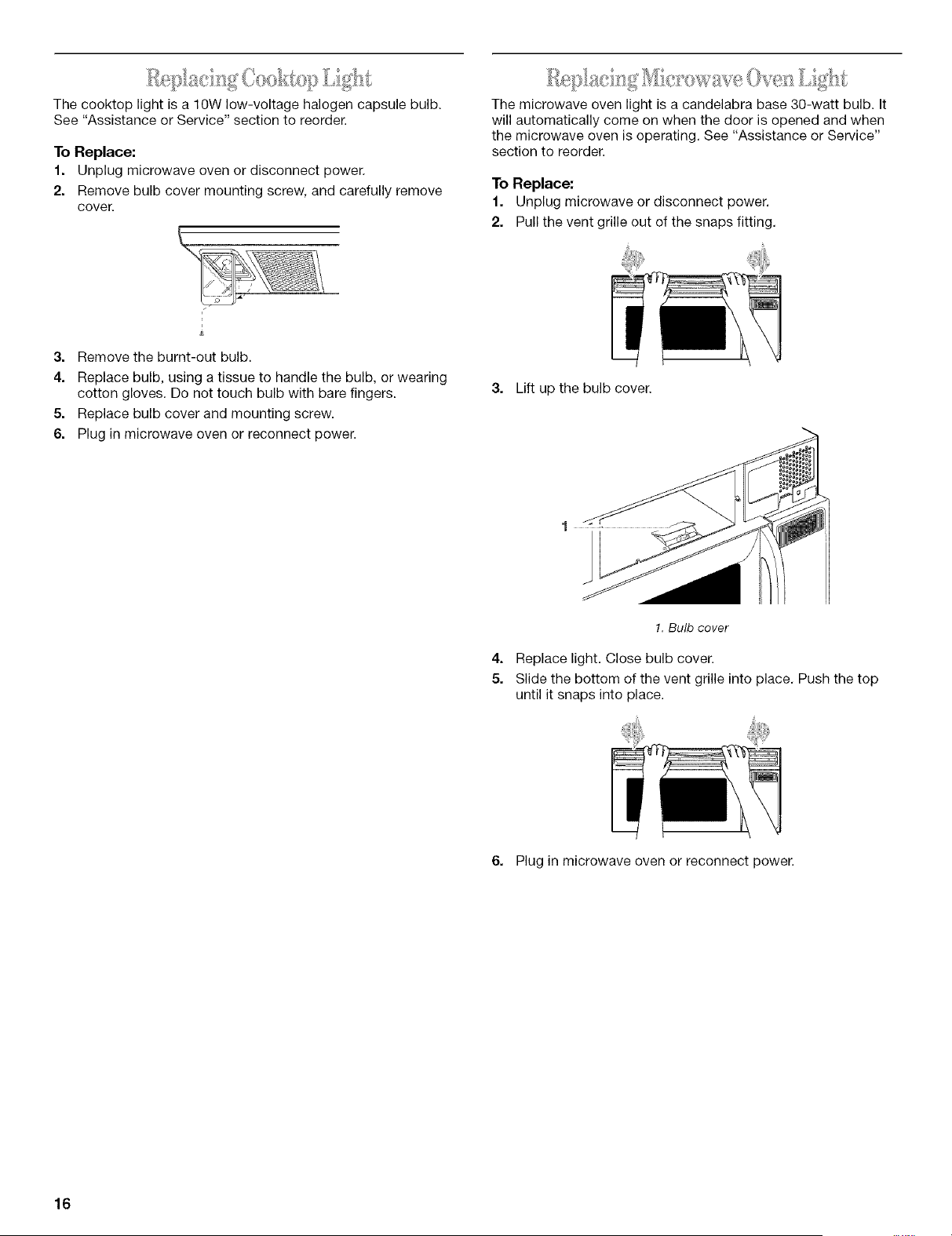
The cooktop light is a 10W low-voltage halogen capsule bulb.
See "Assistance or Service" section to reorder.
To Replace:
1. Unplug microwave oven or disconnect power.
2. Remove bulb cover mounting screw, and carefully remove
cover.
1/
The microwave oven light is a candelabra base 30-watt bulb. It
will automatically come on when the door is opened and when
the microwave oven is operating. See "Assistance or Service"
section to reorder.
To Replace:
1. Unplug microwave or disconnect power.
2. Pull the vent grille out of the snaps fitting,
3. Remove the burnt-out bulb.
4. Replace bulb, using a tissue to handle the bulb, or wearing
cotton gloves. Do not touch bulb with bare fingers.
5. Replace bulb cover and mounting screw.
6. Plug in microwave oven or reconnect power.
3. Lift up the bulb cover.
4=
5.
1.Bulb cover
Replace light. Close bulb cover.
Slide the bottom of the vent grille into place, Push the top
until it snaps into place.
6. Plug in microwave oven or reconnect power.
16
TROUBLESHOOTING
Try the solutions suggested here first in order to avoid the
cost of an unnecessary service call.
Nothing will operate
• Has a household fuse been blown or has the circuit
breaker been tripped?
Replace the fuse or reset the circuit.
• Is the appliance wired properly?
See Installation Instructions.
Oven will not operate
• Is the door completely closed?
Firmly close door.
• Is the electronic oven control set correctly?
See "Microwave Oven Control" section.
• On some models, is the Control Lock set?
See "Control Lock" section,
Is the magnetron working properly?
Heat 1 cup (250 mL) of cold water for 2 minutes at 100%
cooking power. If water does not heat, call for service. See
"Assistance or Service" section,
Oven makes humming noise
• This is normal and occurs when the power supply switches
the magnetron on and off.
Oven door looks wavy
• This is normal and will not affect performance,
Turntable will not operate
Is the turntable properly in place?
Make sure turntable is correct-side up and is sitting securely
on the turntable support.
Is the turntable support operating properly?
Remove turntable. Remove and replace turntable support,
Replace turntable, Put in 1 cup (250 mL) of water, then restart
oven. If still not working, call for service. See "Assistance or
Service" section. Do not operate the oven without turntable
and turntable support working properly.
Turntable rotates both directions
• This is normal and depends on motor rotation at beginning of
cycle.
Display shows messages
Is the display showing ":"?
There has been a power failure or the clock time has been
turned off. See "Display" section to clear display. See "Clock"
section to reset the clock or to turn it on,
• Is the display showing a letter followed by a number?
See "Display" section to clear. If it reappears, call for service.
See "Assistance or Service" section.
Display shows time countdown, but is not operating
• Is the Timer in use?
See "Timer" section.
• On some models, is the Demo Learning Mode in use?
See "Demo Learning Mode" section.
Tones are not sounding
• Aretones turned off?
See "Tones" section.
Steam is coming from the vent grille
• Some steam is normal.
Fan running slower than usual
• The oven has been stored in a cold area. The fan will run
slower until the oven warms up to normal room temperature,
Cooking times seem too long
• Is the cooking power set properly?
See "Cooking Power" section.
• Are large amounts of food being heated?
Larger amounts of food need longer cooking times,
Is the incoming voltage less than specified in "Microwave
Oven Safety"?
Have a qualified electrician check the electrical system in the
home.
Radio or TV Interference
• Is the microwave oven plugged into the same outlet?
Try a different outlet.
• Is the radio or TV receiver near the microwave oven?
Move the receiver away from the microwave oven, or adjust
the radio or TV antenna.
• Is the microwave oven door and sealing surfaces clean?
Make sure these areas are clean.
17
ASSISTANCEORSERVICE
Before calling for assistance or service, please check
"Troubleshooting." It may save you the cost of a service call. If
you still need help, follow the instructions below.
When calling, please know the purchase date and the complete
model and serial number of your appliance. This information will
help us to better respond to your request.
If you need replacement parts
If you need to order replacement parts, we recommend that you
only use FSP® replacement parts. FSP®replacement parts will fit
right and work right because they are made with the same
precision used to build every new WHIRLPOOL ®appliance.
To locate FSP®replacement parts in your area, call our Customer
Interaction Center telephone number or your nearest Whirlpool
designated service center.
Call the Whirlpool Customer Interaction Center
toll free: 1-800-253-1301.
Our consultants provide assistance with:
• Features and specifications on our full line of appliances.
• Installation information.
• Use and maintenance procedures.
• Accessory and repair parts sales.
• Specialized customer assistance (Spanish speaking, hearing
impaired, limited vision, etc.).
• Referrals to local dealers, repair parts distributors, and
service companies. Whirlpool designated service technicians
are trained to fulfill the product warranty and provide after-
warranty service, anywhere in the United States.
To locate the Whirlpool designated service company in your
area, you can also look in your telephone directory Yellow
Pages.
For further assistance
If you need further assistance, you can write to Whirlpool
Corporation with any questions or concerns at:
Whirlpool Brand Home Appliances
Customer Interaction Center
553 Benson Road
Benton Harbor, MI 49022-2692
Please include a daytime phone number in your correspondence.
Replacement Parts
Turntable
Part No. 4393751
Turntable Support
Part No. 8181402
Turntable Rollers
Part No. 4393861
Turntable Hub
Part No. 8183749
Cooking Rack
Part No. 8184052
Grease Filters
Part No. 8184001
Charcoal Filters
Part No. 8184002
Microwave Light Bulb
Part No. 8183993
Cooktop Halogen Bulb
Part No. 8169418
18
19
WH]RLPOOL®MICROWAVEHOODCOMBINATIONWARRANTY
ONE-YEAR FULL WARRANTY
For one year from the date of purchase, when this appliance is operated and maintained according to instructions attached to or
furnished with the product, Whirlpool Corporation will pay for FSP®replacement parts and repair labor to correct defects in materials or
workmanship. Service must be provided by a Whirlpool designated service company.
SECOND THROUGH FIFTH YEAR LIMITED WARRANTY ON MAGNETRON TUBE
In the second through fifth years from the date of purchase, when this appliance is operated and maintained according to instructions
attached to or furnished with the product, Whirlpool Corporation will pay for FSP®replacement parts for the microwave magnetron tube
if defective in materials or workmanship.
Whirlpool Corporation will not pay for:
1. Service calls to correct the installation of your appliance, to instruct you how to use your appliance, to replace house fuses or
correct house wiring, or to replace owner-accessible light bulbs and filters.
2. Repairs when your appliance is used in other than normal, single-family household use.
3. Pickup and delivery. Your appliance is designed to be repaired in the home.
4. Damage resulting from accident, alteration, misuse, abuse, fire, flood, improper installation, acts of God or use of products not
approved by Whirlpool Corporation.
5. Repairs to parts or systems resulting from unauthorized modifications made to the appliance.
6. Replacement parts or repair labor costs for units operated outside the United States.
7. Any labor costs during the limited warranty period.
WHIRLPOOL CORPORATION SHALL NOT BE LIABLE FOR INCIDENTAL OR CONSEQUENTIAL DAMAGES.
Some states do not allow the exclusion or limitation of incidental or consequential damages, so this exclusion or limitation may not
apply to you. This warranty gives you specific legal rights and you may also have other rights which may vary from state to state.
Outside the 50 United States, this warranty does not apply. Contact your authorized Whirlpool dealer to determine if another
warranty applies.
If you need service, first see the "Troubleshooting" section of this book. After checking "Troubleshooting," additional help can be found
by checking the "Assistance or Service" section or by calling the Whirlpool Customer Interaction Center, 1-800-253-1301 (toll-free),
from anywhere in the U.S.A.
5/00
Keep this book and your sales slip together for future
reference. You must provide proof of purchase or installation
date for in-warranty service.
Write down the following information about your appliance to
better help you obtain assistance or service if you ever need it.
You will need to know your complete model number and serial
number. You can find this information on the model and serial
number label/plate, located on your appliance as shown in the
"Parts and Features" section.
Dealer name
Address
Phone number
Model number
Serial number
Purchase date
4619-652-61532/8184733
© 2002 Whirlpool Corporation.
All rights reserved.
® Registered Trademark/TM Trademark of Whirlpool, U.S.A.
@Styrofoam is a Registered Trademark of The Dow Chemical Company.
5/02
Printed in U.S.A.