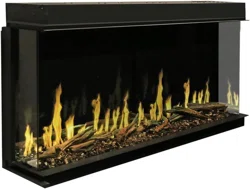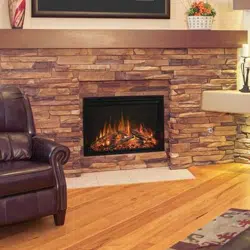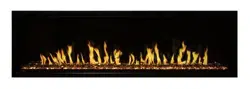
ORION SLIM WALL-MOUNT/RECESSED ELECTRIC FIREPLACE
Model #: …. OR52-SLIM … OR60-SLIM …. OR76-SLIM …. OR100-SLIM
OWNER’S MANUAL
AC 120V 60Hz 1465W (5000BTUs)

2
https://www.modernflames.com
• Read all instructions before installing or using this heater.
• Use a dedicated 20 Amp (or higher) breaker.
• This heater is hot when in use. To avoid burns, DO NOT let bare skin touch hot surfaces. If
provided, use handles when moving this heater. Keep combustible materials, such as furniture,
pillows, bedding, papers, clothes, and curtains at least 3 feet (0.9m) from the front of the heater
and keep them away from the sides and rear.
• Extreme caution is necessary when any heater is used by or near children or invalids and
whenever the heater is left operating and unattended.
• Do not operate any heater if it malfunctions. Disconnect power at service panel and have the
heater inspected by a reputable electrician before reusing.
• To disconnect the heater, turn the controls to off, and turn off power to the heater circuit at the
main disconnect panel (or operate internal disconnect switch if provided).
• Do not insert or allow foreign objects to enter any ventilation or exhaust opening as this may
cause an electric shock, fire, or damage the heater.
• To prevent a possible fire, do not block air intakes or exhaust in any manner.
• A heater has hot arcing or sparking parts inside. Do not use in areas where gasoline, paint,
flammable vapors, or liquids are used or stored.
• Use this heater only as described in this manual. Any other use not recommended by the
manufacturer may cause fire, electric shock, or injury to persons.
• This heater may include an audible or visual alarm to warn that parts of the heater are getting
excessively hot. If the alarm sounds (or illuminates), immediately turn the heater off and
inspect for any objects on or adjacent to the heater that may have blocked the airflow or
otherwise caused high temperatures to have occurred. DO NOT OPERATE THE HEATER
WITH THE ALARM SOUNDING (OR ILLUMINATING).
• ALWAYS plug heaters directly into a wall outlet/receptacle. NEVER use with an extension cord
or relocatable power tap (outlet/power strip).
• NEVER use this heater in bathrooms, laundry rooms, or any other location where the heater
could fall into a bathtub, pool, become damp, or come in contact with water.
• AVOID FIRE! Regularly inspect all air vents to make sure they are free from dust, lint, or other
blockage. Unplug the unit and clean with a vacuum ONLY. DO NOT rinse or get wet.
• ALWAYS mount to wall bracket before use. DO NOT set on the floor, or other surface, to use.
• NEVER use a wall mount bracket from another manufacturer.
• This product is not intended to be a primary heat source. It is for supplemental heat only.
• INDOOR use only! NEVER use this heater outdoors! Doing so may result in electric shock!

3
https://www.modernflames.com
• ALWAYS disconnect this unit from the power supply before performing any assembly,
cleaning, or before relocating the electric fireplace.
• NEVER leave this heater unattended. ALWAYS unplug this heater when not in use.
• ALWAYS store this heater in a dry location. NEVER use the fireplace if it has become wet.
• NEVER plug this heater into an outlet that is old, cracked, or has loose wires or connections.
Plugging this heater into a faulty outlet could result in electric arcing within the outlet that could
cause the outlet to overheat or catch fire.
• ALWAYS check your heater cord and plug connections with each use.
i) MAKE SURE the plug fits tightly in the outlet. Faulty wall outlet connections or loose
plugs can cause the outlet to overheat.
ii) Heaters draw more current than small appliances. Overheating may occur even if it has
not occurred with the use of other appliances.
iii) During use, check frequently to see if the plug outlet or face plate is HOT.
iv) If the outlet or face plate is HOT, discontinue use immediately and have a qualified
electrician inspect and/or replace the faulty outlets.
SAVE THESE INSTRUCTIONS

4
https://www.modernflames.com
Table of Contents
PREPARATION ................................................................................................................................................................................... 5
PARTS AND HARDWARE .................................................................................................................................................................... 5
DIMENSIONS AND SPECIFICATIONS ................................................................................................................................................... 6
PRODUCT DIMENSIONS ......................................................................................................................................................................... 6
INSTALLATION AND ASSEMBLY ......................................................................................................................................................... 6
FRONT GLASS REMOVAL/INSTALLATION ........................................................................................................................................... 7
WALL RECESSED FRAMING ................................................................................................................................................................ 8
FINISHED OPENING DIMENSIONS .......................................................................................................................................................... 8
WALL RECESSED INSTALLATION ......................................................................................................................................................... 9
WALL MOUNTED INSTALLATION ..................................................................................................................................................... 10
HARDWIRING INSTALLATION .......................................................................................................................................................... 11
DRIFTWOOD LOGS AND CRUSHED GLASS INSTALLATION ................................................................................................................ 12
OPERATION ..................................................................................................................................................................................... 13
Power .............................................................................................................................................................................................. 13
Master Power Switch ...................................................................................................................................................................... 13
OPERATION (CONTINUED) ............................................................................................................................................................... 14
Methods of Operation ..................................................................................................................................................................... 14
OPERATION – TOUCH CONTROL PANEL ........................................................................................................................................... 15
OPERATION – REMOTE CONTROL .................................................................................................................................................... 16
DOWNLOAD SMART PHONE APP ..................................................................................................................................................... 18
WI-FI – INITIAL LOG-IN..................................................................................................................................................................... 19
Add Manually .................................................................................................................................................................................. 20
Auto Scan ........................................................................................................................................................................................ 23
OPERATION – SMART PHONE APP ................................................................................................................................................... 26
HOME SCREEN ......................................................................................................................................................................................... 26
FLAME STYLE OPTIONS .............................................................................................................................................................................. 27
FLAME STYLE ONE/TWO/THREE COLOR MENU .............................................................................................................................................. 28
DOWNLIGHT MENU .................................................................................................................................................................................. 29
EMBER BED MENU ................................................................................................................................................................................... 30
HEATER MENU ........................................................................................................................................................................................ 31
TIMER MENU .......................................................................................................................................................................................... 32
WEEKLY PROGRAM SCHEDULE MENU .......................................................................................................................................................... 33
DAILY PROGRAM SCHEDULE MENU .............................................................................................................................................................. 34
OPERATION – IMPORTANT WARNINGS ........................................................................................................................................... 35
Remote Control Battery Information ............................................................................................................................................... 35
Temperature Limiting Control ......................................................................................................................................................... 35
CARE – CLEANING ............................................................................................................................................................................ 35
CARE – MAINTENANCE .................................................................................................................................................................... 36
Electrical and Moving Parts:............................................................................................................................................................ 36
Storage: ........................................................................................................................................................................................... 36
REPLACEMENT PARTS LIST............................................................................................................................................................... 37
TROUBLESHOOTING / FAQ .............................................................................................................................................................. 39
5
https://www.modernflames.com
Preparation
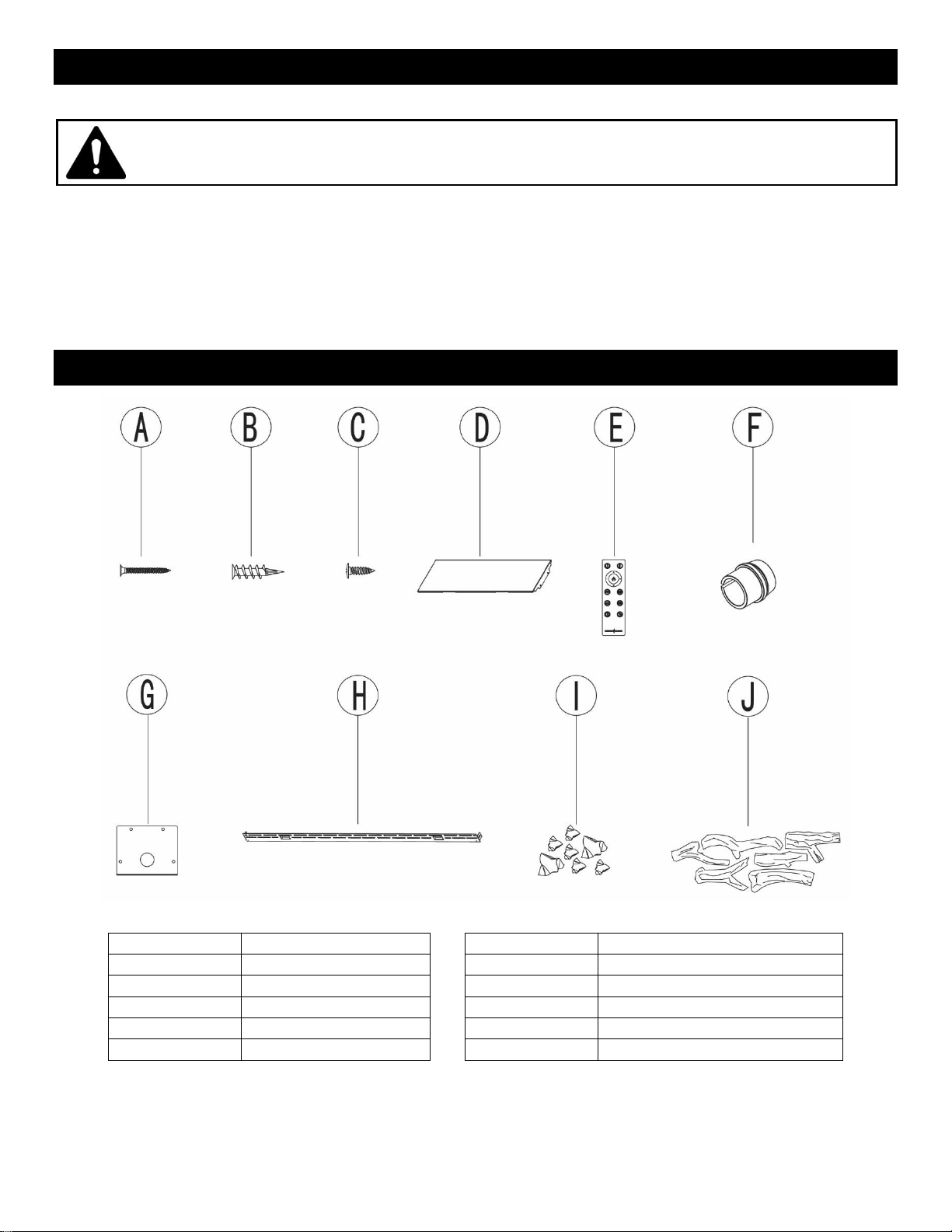
Remove all parts and hardware from the carton and place them on a clean, soft, dry surface. Parts
and assembly steps are grouped for wall-hanging or recessing use. Check the parts list to make sure
nothing is missing. Dispose of packaging materials properly. Please recycle whenever possible.
You will need the following tools (not included): Phillips screwdriver, stud finder, level, tape measure,
electric drill, 1/4” wood drill bit, hammer.
Parts and Hardware
PART NO.
DESCRIPTION
PART NO.
DESCRIPTION
A
Screws (Long)
F
Strain Relief
B
Drywall Anchor
G
Cover Plate
C
Screws (Short)
H
Wall Mount Bracket
D
Side Skirt
I
Crushed Glass
E
Remote Control
J
Driftwood Logs
This product includes a GLASS panel. Always use extreme caution when handling
glass. Failure to do so could result in personal injury or property damage.
6
https://www.modernflames.com
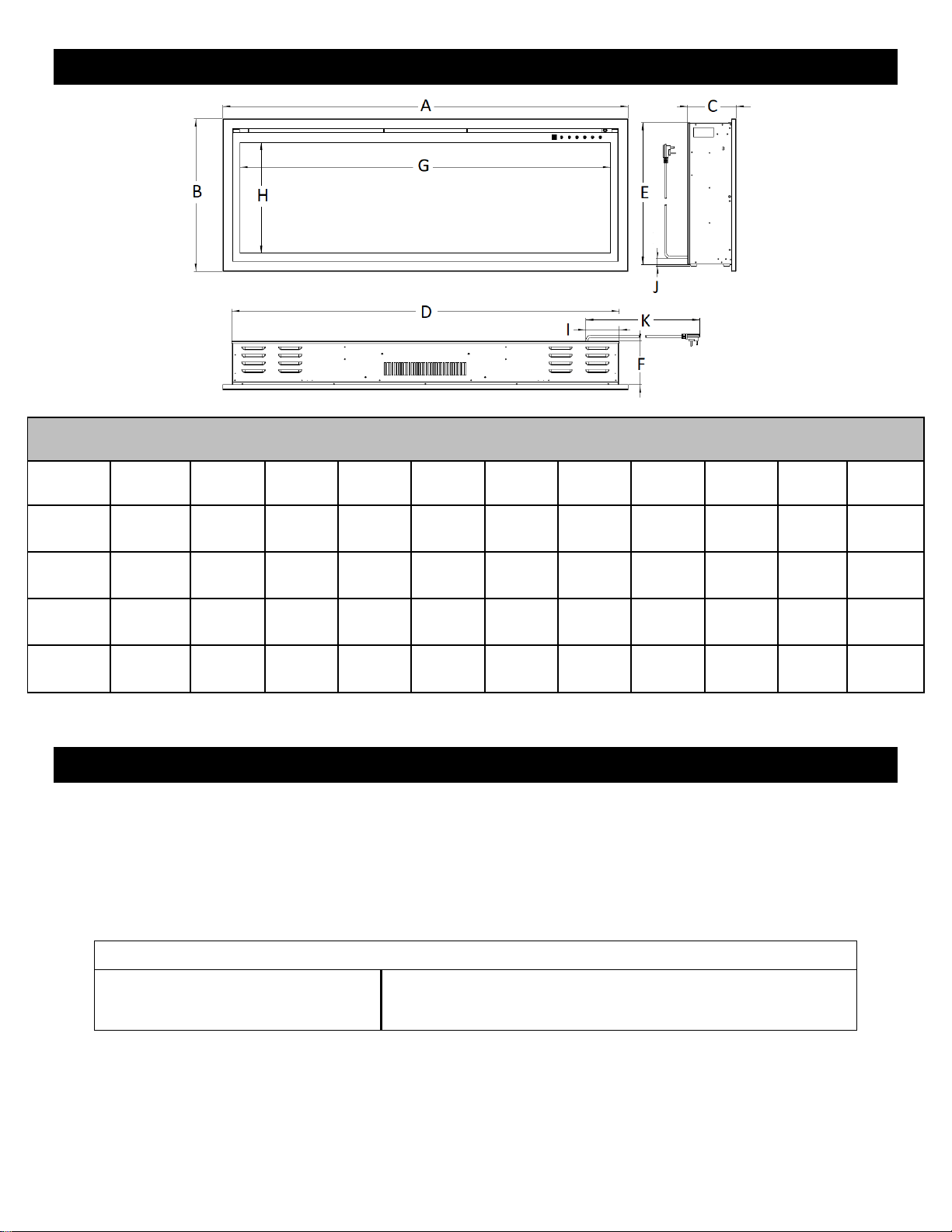
Dimensions and Specifications
PRODUCT DIMENSIONS
Model
Number
A
B
C
D
E
F
G
H
I
J
K
OR52-SLIM
52-3/8"
(1330mm)
19-5/8"
(499mm)
6-5/16"
(160mm)
50-1/4"
(1276mm)
18-3/4”
(476mm)
5-3/4"
(146mm)
47-7/8"
(1216mm)
14-3/8"
(364mm)
5"
(127mm)
3/8”
(10mm)
75"
(1905mm)
OR60-SLIM
60"
(1524mm)
19-5/8"
(499mm)
6-5/16"
(160mm)
58"
(1473mm)
18-3/4”
(476mm)
5-3/4"
(146mm)
55-1/2"
(1410mm)
14-3/8"
(364mm)
5"
(127mm)
3/8”
(10mm)
75"
(1905mm)
OR76-SLIM
76-5/8"
(1947mm)
19-5/8"
(499mm)
6-5/16"
(160mm)
74-5/8"
(1895mm)
18-3/4”
(476mm)
5-3/4"
(146mm)
72-3/16"
(1833mm)
14-3/8"
(364mm)
5"
(127mm)
3/8”
(10mm)
75"
(1905mm)
OR100-SLIM
101"
(2564mm)
19-5/8"
(499mm)
6-5/16"
(160mm)
98-7/8"
(2511mm)
18-3/4”
(476mm)
5-3/4"
(146mm)
96-7/16"
(2450mm)
14-3/8"
(364mm)
5"
(127mm)
3/8”
(10mm)
75"
(1905mm)
Installation and Assembly
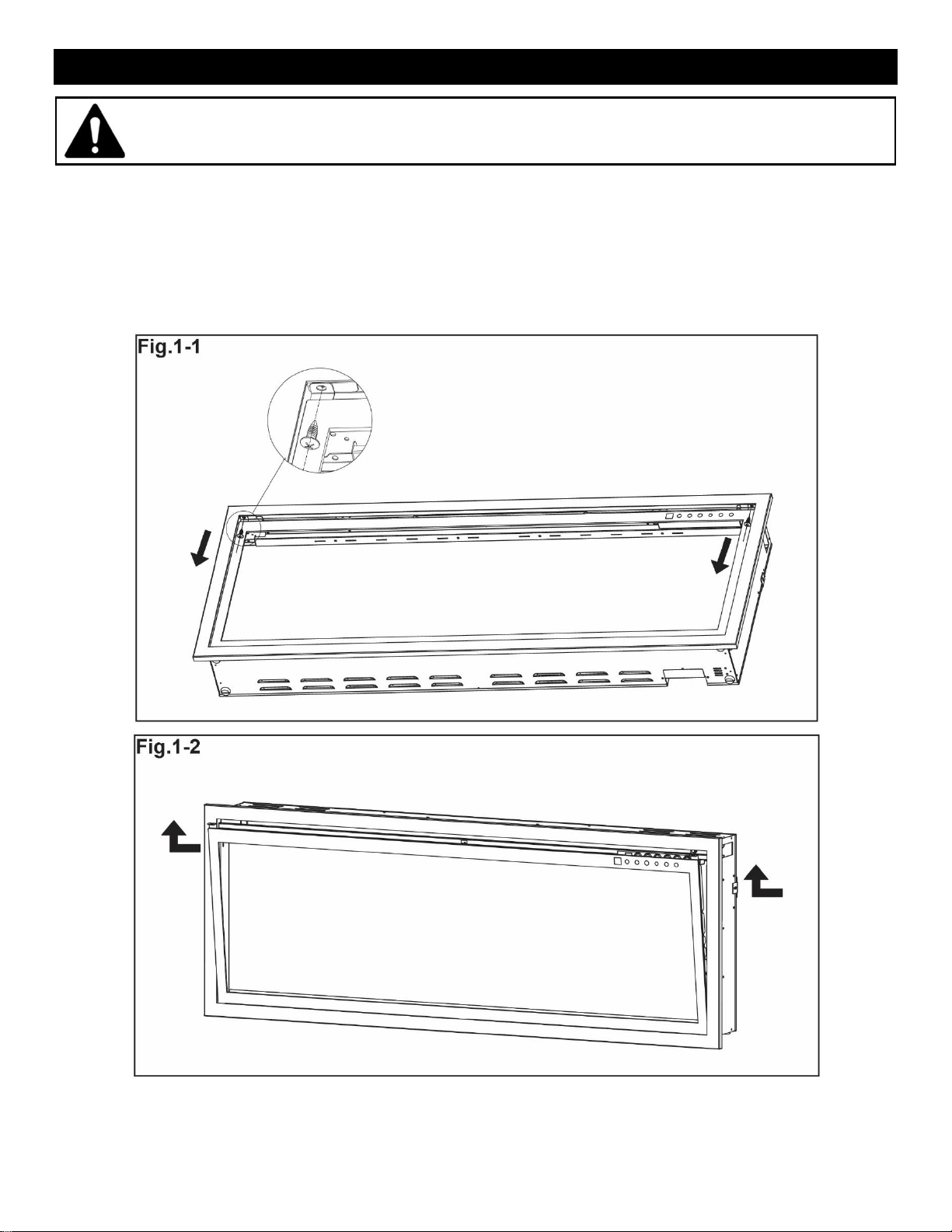
Your appliance is a wall-mounted, recessed, and/or mantel installed appliance. Select a suitable
location that is not susceptible to moisture and is away from drapes, furniture, and high traffic areas.
NOTE: Follow all National and local electrical codes.
MINIMUM CLEARANCE TO COMBUSTIBLES
Measurements are taken from the glass front.
Bottom……………………...0"
Sides………………………..0"
Back………………………...0"
Top (to mantel)………………………11.8" (300mm)
Top (to TV)…………………………...11.8" (300mm)
Top (to ceiling)……………………….11.8" (300mm)
7
https://www.modernflames.com
Front Glass Removal/Installation
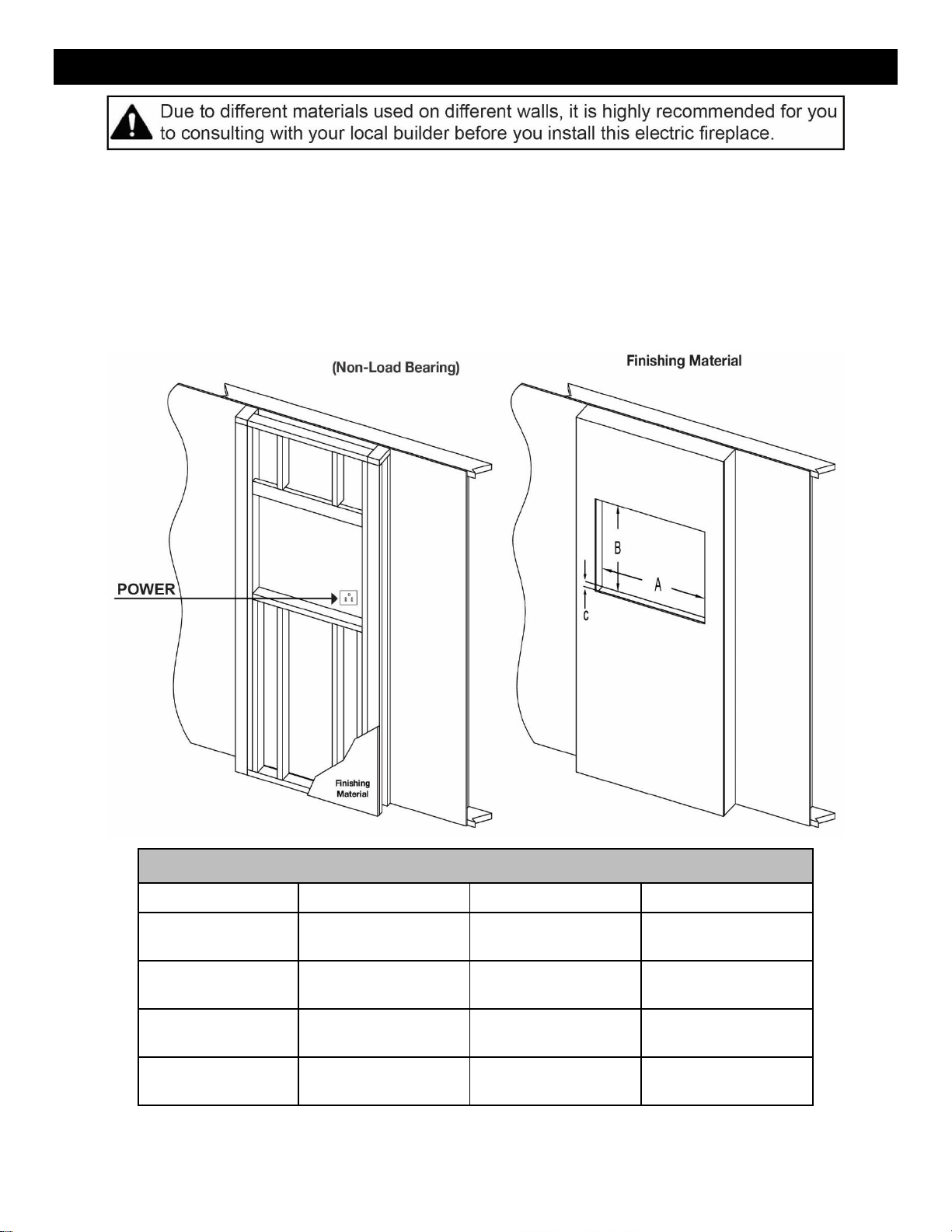
• With one hand on the front glass to prevent it from falling, remove the two screws (one per side) from
the side of the appliance (Fig. 1-1). Set the screws aside.
• Carefully lift the front glass up and away from the appliance (Fig. 1-2). Place it face down on a soft,
non-abrasive surface.
• Reverse these steps to re-install the front glass.
This product includes a GLASS panel. Always use extreme caution when handling
glass. Failure to do so could result in personal injury or property damage.
8
https://www.modernflames.com
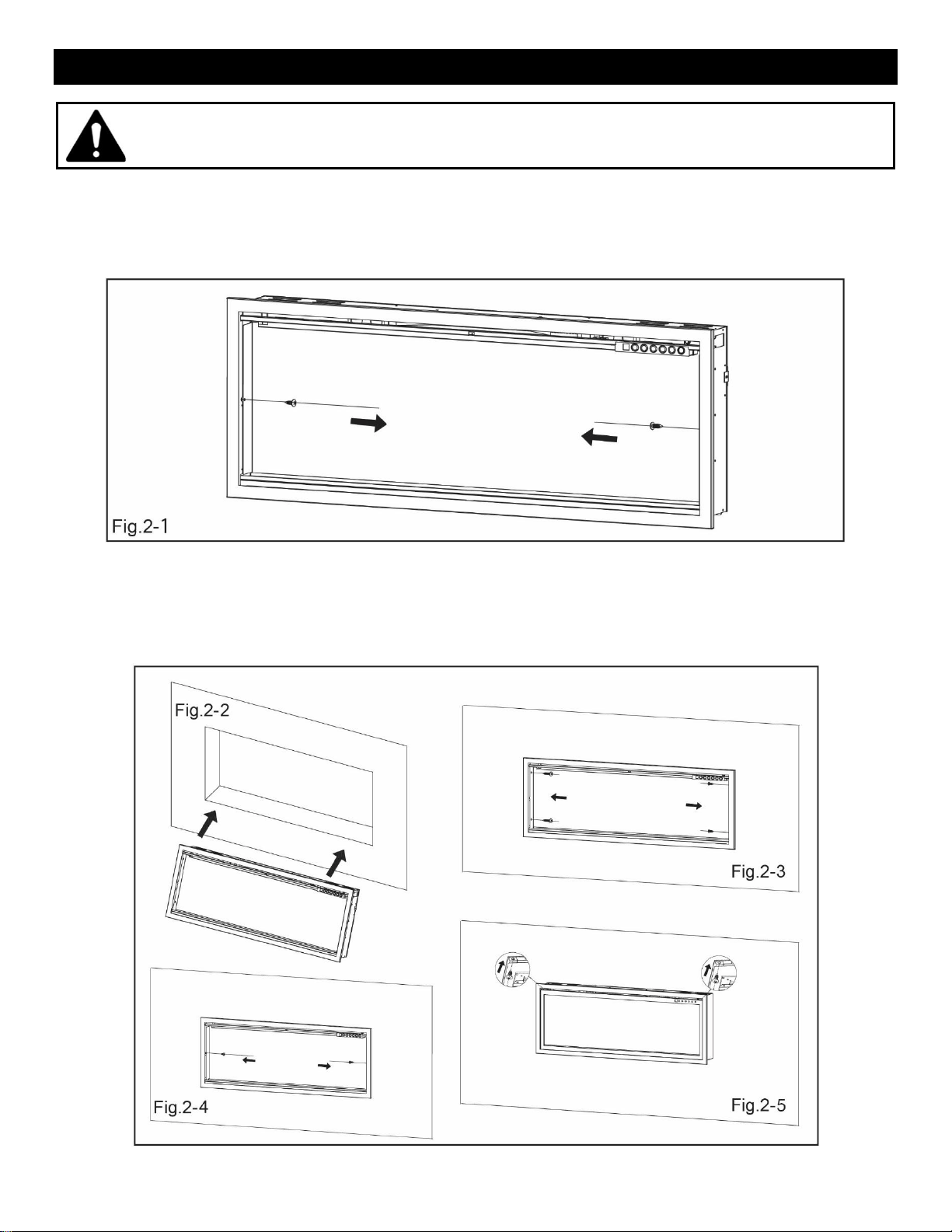
Wall Recessed Framing
• Select a location that is not prone to moisture and is located at least 36” (914mm) away from
combustible materials such as curtain drapes, furniture, bedding, paper, etc.
• Measure the appliance and create a rough-in frame with electrical (see below).
• Remove the front glass (see “Front Glass Removal / Installation” section).
• Hold the appliance up to ensure it will fit into the framing.
FINISHED OPENING DIMENSIONS
Model Number
A
B
C
OR52-SLIM
50-3/4"
(1289mm)
19-1/8"
(486mm)
6" min.
(152mm min.)
OR60-SLIM
58-1/2"
(1486mm)
19-1/8"
(486mm)
6" min.
(152mm min.)
OR76-SLIM
75-1/8"
(1908mm)
19-1/8"
(486mm)
6" min.
(152mm min.)
OR100-SLIM
99-1/2"
(2527mm)
19-1/8"
(486mm)
6" min.
(152mm min.)
9
https://www.modernflames.com
Wall Recessed Installation
• Remove power cord and complete hardwiring (see “Hardwiring Installation” section).
• Remove the two screws (one per side) from the inside of the appliance and remove the interior
walls. (Fig.2-1). Set the screws/walls aside.
• Insert the appliance into the openings (See “Finished Opening Dimensions”) (Fig.2-2) and then
secure it by installing 4 screws (supplied) into the slots on the insides (2 per side) (Fig.2-3).
• Next reinstall the two interior walls and two screws previously removed. (Fig.2-4).
• Re-install the front glass. (Fig.2-5)
This product includes a GLASS panel. Always use extreme caution when handling
glass. Failure to do so could result in personal injury or property damage.
10
https://www.modernflames.com
Wall Mounted Installation
NOTE: A dedicated 20 Amp (or higher) breaker is required.
• Select a location that is not prone to moisture and is located at least 36" (914mm) away from
combustible materials such as curtain drapes, furniture, bedding, paper, etc.
• Have two people hold the appliance against the wall to determine the final location.
• Place the unit face down on a soft, non-abrasive surface.
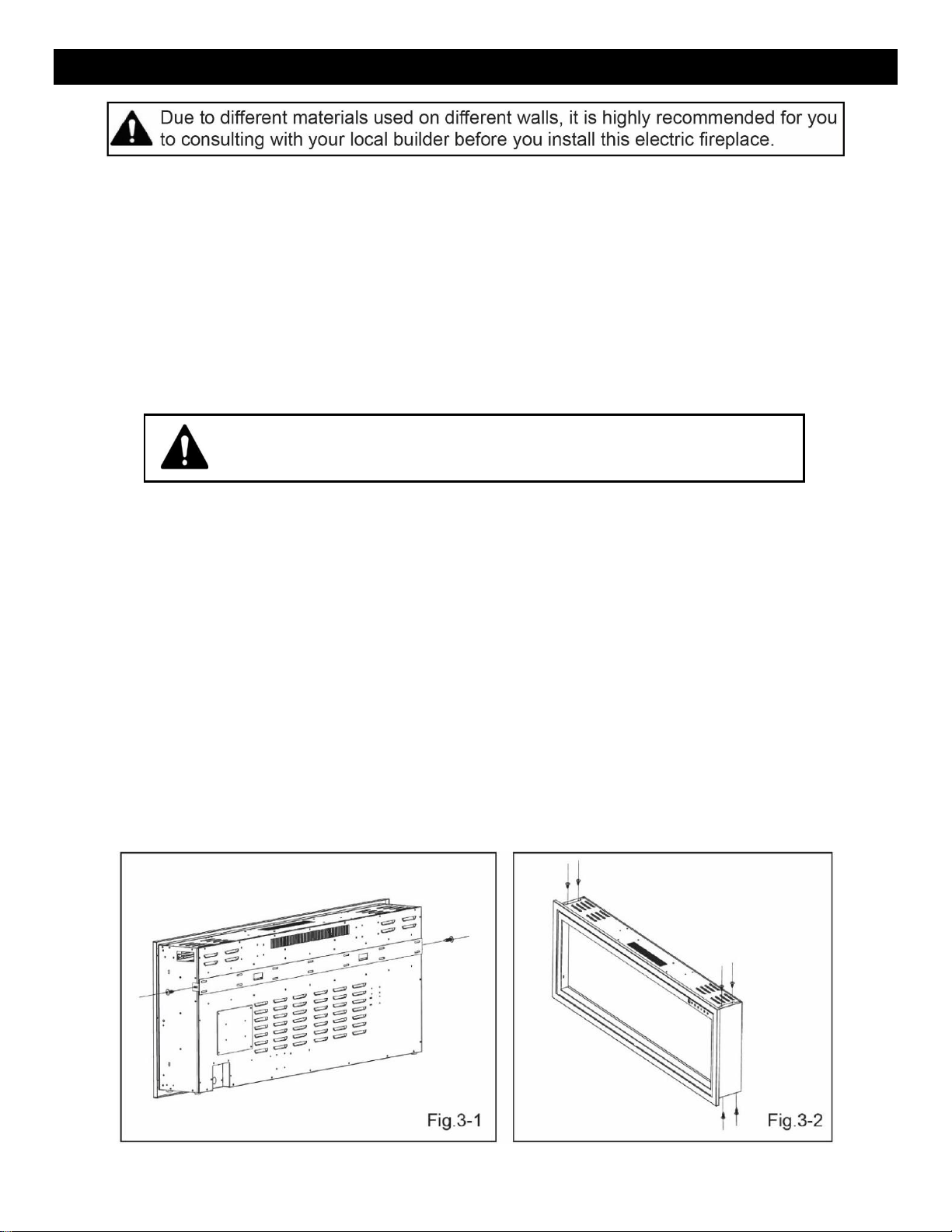
• Remove the wall bracket (H) from the back of the unit by removing the screws, see FIG. 3-1. Set
screws aside.
• After you have selected a suitable location for wall mounting, locate the studs on the wall. You
must be able to secure to a minimum of 2 studs for proper installation of the bracket.
• Using the wall bracket as a guide, mark the mounting hole locations.
• This bracket MUST have the hooks facing upward and be level.
• Additional support is provided by using the included wall anchors (B) between the studs.
• Additional wall anchors must be installed prior to the wall bracket being mounted.
i. To install additional wall anchors, pre-drill (optional) all locations with a 1/8" drill bit.
ii. Install the wall anchors with a Philips tip screwdriver.
• Install the wall bracket to the studs using #8 – 1-5/8" (A) screws and to the wall anchors with a
#8 – 1" screws (C).
• With the wall mounting bracket installed, have two people lift the appliance up and insert the two
hooks of the wall bracket into the two receiver slots on the back of the appliance.
• Re-insert the two screws that were removed previously.
• Check the appliance for stability ensuring the bracket will not pull free from the wall.
• Install the side skirt panels (D) to each side of firebox. FIG 3-2.
FAILURE TO DO SO CAN RESULT IN PERSONAL INJURY
AND/OR DAMAGE TO EQUIPMENT.
11
https://www.modernflames.com
Hardwiring Installation
If it is necessary to hardwire this appliance, a qualified electrician must remove the cord connection and
wire the appliance directly to the household wiring.
NOTE: A dedicated 20 Amp (or higher) breaker is required.
The appliance must be electrically connected and grounded in accordance with local codes. In the
absence of local codes, use the current CSA C22.1 Canadian Electrical Code in Canada or the current
ANSI/NFPA 70 National Electrical Code in the USA.
Note:
There are 3 wires from the appliance junction box: white (neutral), black (power L1), and green (ground) that
are connected to 120V power source (circuit breaker panel).
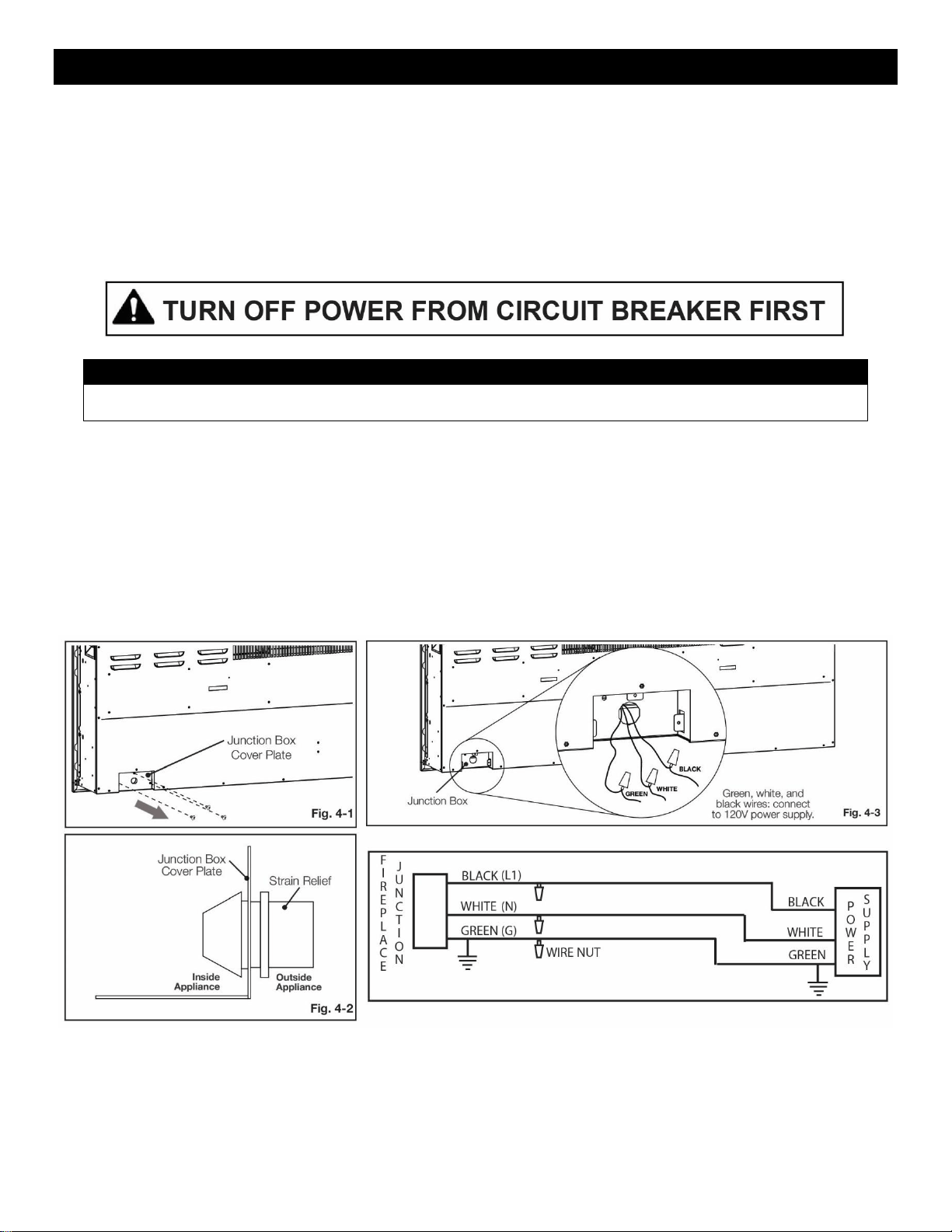
• Remove the 3 securing screws from the junction box cover plate, located on the bottom left-hand,
back-side of the appliance (Fig. 4-1).
• Install the strain relief to the junction box cover plate (located in hardware bag) (Fig. 4-2).
• Separate the black, white, and green wires that have the wire nuts on them.
• Remove all the wire nuts. Connect the green wire (G) to the supply ground wire, the white wire (N) to
the supply Neutral wire, and the black wire (L) to the supply L1 wire. (Fig. 4-3).
• Resecure the junction box cover plate using the 3 screws previously removed.
12
https://www.modernflames.com
Driftwood Logs and Crushed Glass Installation
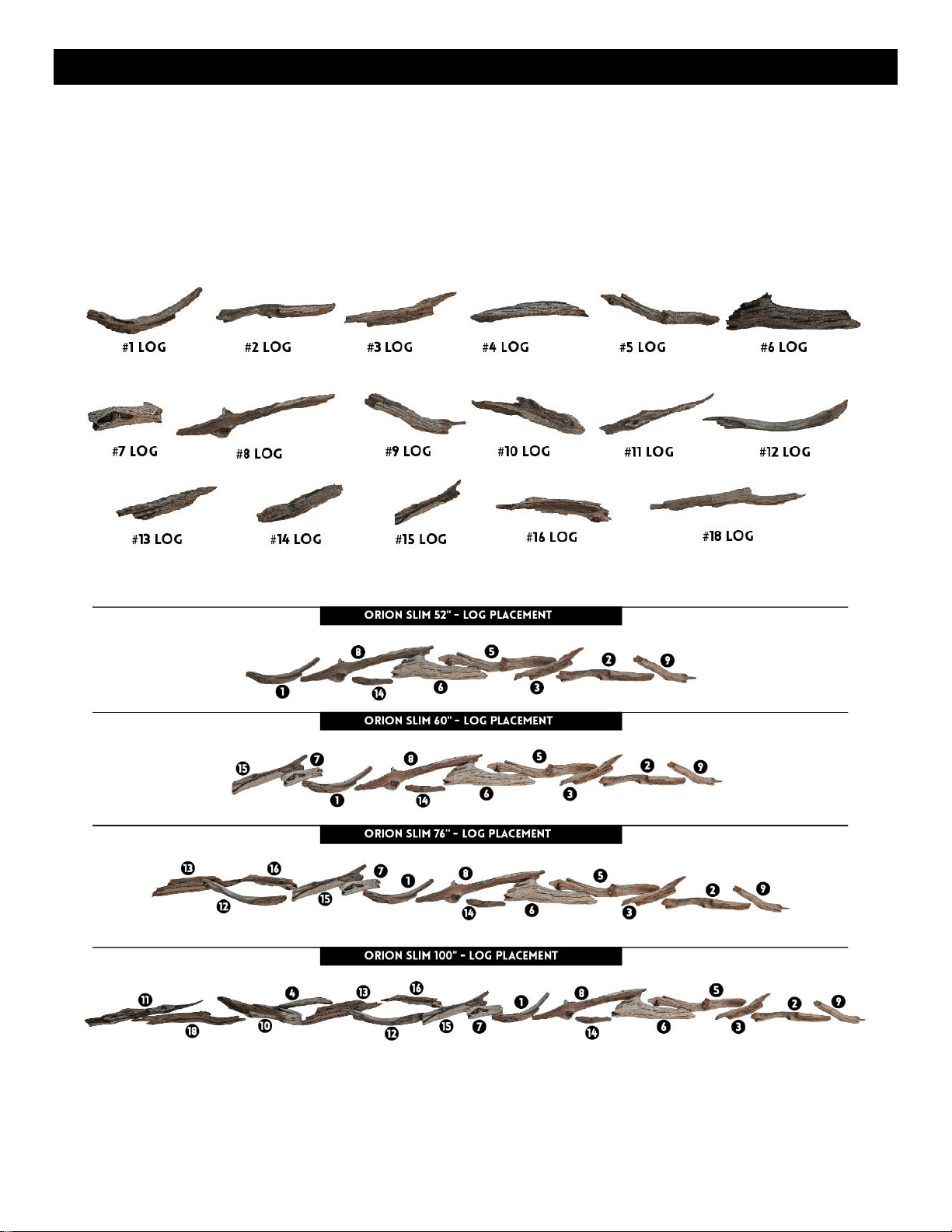
• Front glass must be removed and the appliance must be mounted in its final location before the
driftwood logs and crushed glass is installed.
• Install driftwood logs first, then add the crushed glass around logs.
• If crushed glass falls into the channel used by the front glass, preventing the front glass from being
installed, the channel can be cleared by sliding the crushed glass along the channel until it falls into
one of the cleanout slots.
• Photos below shows recommended log placement, but logs may be arranged to customer’s liking.
13
https://www.modernflames.com
Operation
Power
Plug the power cord into a dedicated 110~120 Volt 20 Amp grounded outlet (see IMPORTANT SAFETY
INFORMATION). Make sure the outlet is in good condition and the plug is not loose. NEVER exceed the
maximum amperage for the circuit. DO NOT plug other appliances into the same circuit.
Master Power Switch
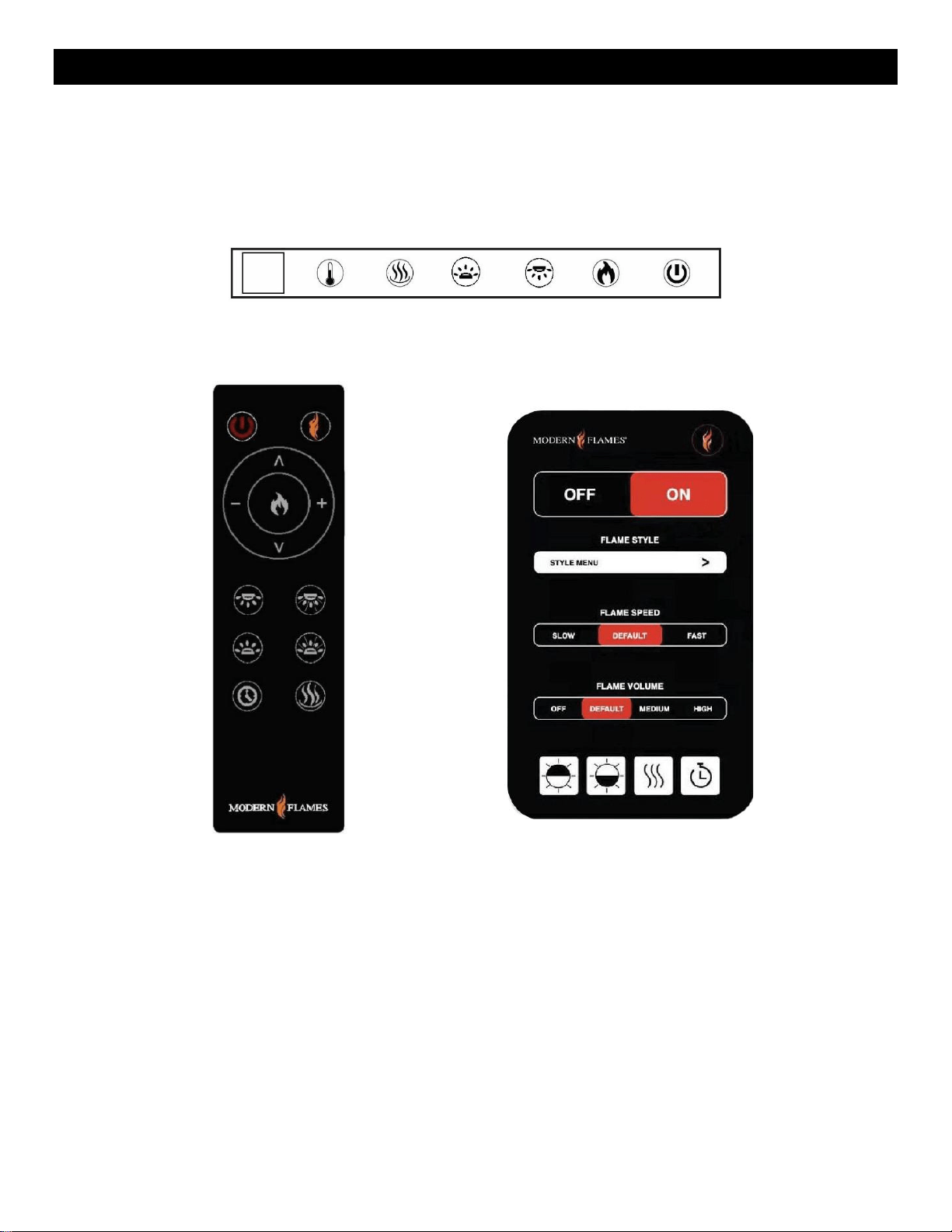
Located above the Touch Control Panel is the Master Power Switch. Ensure the rocker switch is pressed
in the “On” position prior to operating the fireplace.
Note: After resetting the Master Power Switch or from a loss of power, the fireplace takes 20-30 seconds
before the fireplace is fully booted and operational.
Pairing the Remote
• With the fireplace ON, press and hold the Power button for 5 seconds until you hear a beep from
the fireplace. “P1” will be shown on the display.
• Within 5 seconds of the fireplace beeping, repeatedly press the power button on the remote until
the fireplace beeps again.
• Pairing must be completed within 5 seconds or the fireplace pairing will time out of pairing mode.
Read and understand this entire owner’s manual, including all safety
information, before plugging in or using this product. Failure to do so
could result in electric shock, fire, serious injury, or death.
14
https://www.modernflames.com
Operation (Continued)
Methods of Operation
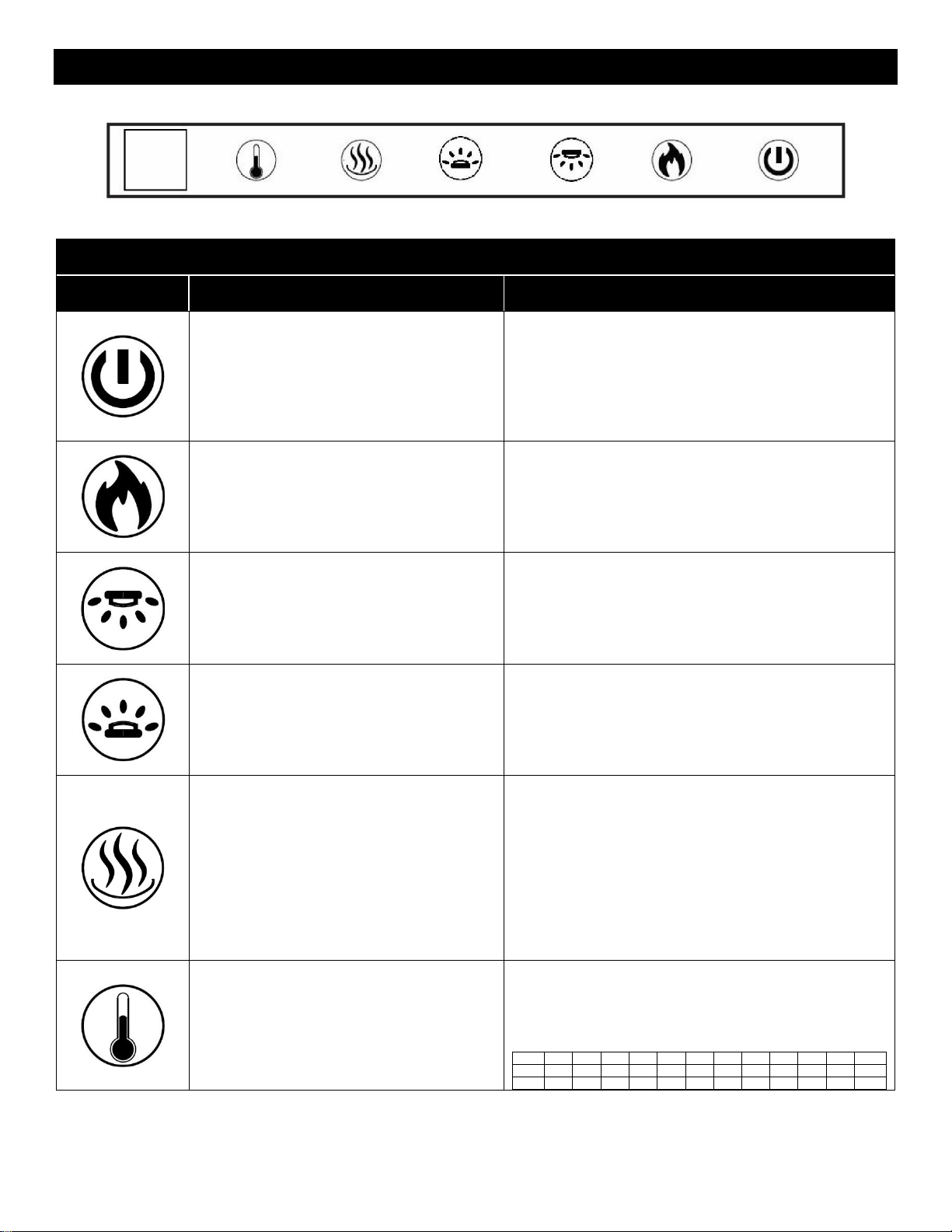
This electric fireplace can be operated by the TOUCH CONTROL PANEL located on the UPPER right
corner of the fireplace, by the battery-powered REMOTE CONTROL, or by the MODERN FLAMES APP
using a smart phone.
Touch Control Panel
Remote Control
Modern Flames App
15
https://www.modernflames.com
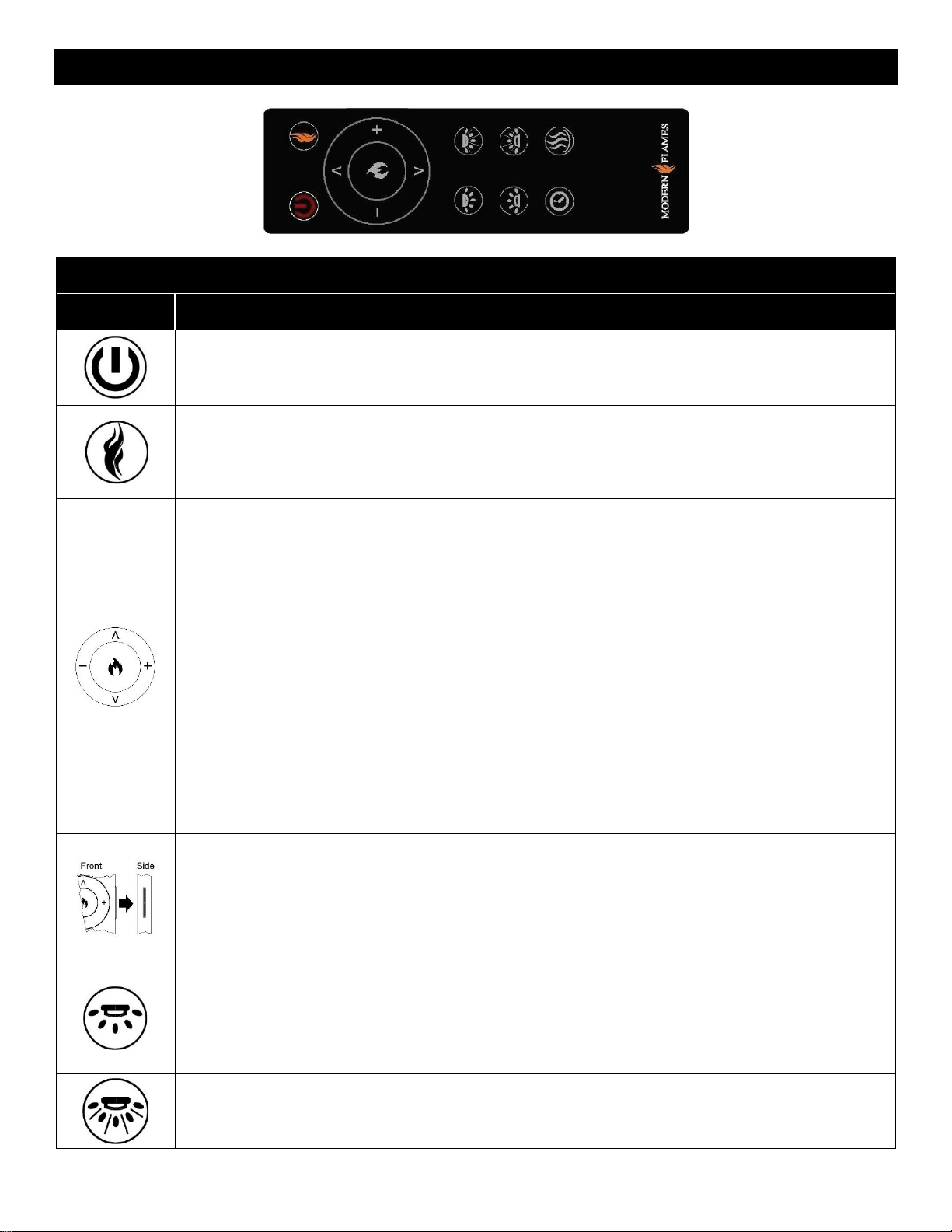
Operation – Touch Control Panel
Touch Panel Operation
Button
Function
Action
ON: Enables control panel functions. Turns
on flame.
OFF: Disables control panel functions.
Turns off flame.
1. Press once: Indicator light turns on. Power turns
on. All functions enabled.
2. Press again: Flame turns off. Unit goes to standby.
All functions turn off.
3. NOTE: Press and Hold for 5 seconds: Places
fireplace in remote paring mode. Displays P1 during
pairing
FLAME BUTTON: Changes between
flame presets.
NOTE: Color effect stays on until power
button is turned off.
This fireplace has memory function for
flame presets.
1. Press once: Flame color illuminates.
2. Press again until preset color is reached. In total,
three styles of flame with six colors for each flame.
NOTE: Press and hold for 5 seconds to start
connecting with App.
DOWNLIGHT BUTTON: Cycles down light
colors.
NOTE: Downlight color effect stays on until
power button is turned off.
This fireplace has memory function for
down light settings.
1. Press once: Cycle Down light.
2. Press again until desired color is reached. In total
ten colors and one fade mode.01-02-03-04-05-06-07-
08-09-10-11-00 (off)
NOTE: Press and hold for 5 seconds to turn on/off
night light mode.
MEDIA BED BUTTON: Cycles media bed
colors.
NOTE: Media bed color effect stays on
until power button is turned off.
This fireplace has memory function for
media bed settings.
1. Press once: Turns on ember bed.
2. Press again until desired color is reached. In total
ten colors and one fade mode.01-02-03-04-05-06-07-
08-09-10-11-00 (off).
HEATER BUTTON: Turns heater on and
off.
NOTE: The heater only works when the
flame is on. If the flame is off, the heater
will not turn on.
NOTE: To prevent overheating, the heater
fan will blow cool air for 8-10 seconds after
the heater turns off.
1. Press once: Turns the heater and blower on.
2. Press again until it cycles thru the heater settings.
Settings:
H0 - Heater and blower off
F – Fan only
H1 - Low Heater
H2 - High Heater
NOTE: Press and hold the heater button for 5
seconds to lock/unlock the heater and thermostat. H0
will be displayed when locked.
THERMOSTAT BUTTON: Turns heater on
/ off to maintain room at selected
temperature.
NOTE: Press the button for 5 seconds to
switch between °C and °F.
1. Press once: Touch-on control panel indicator
becomes active.
2. Press again until desired temperature is reached.
Digital display shows settings 0-10. Table shows
corresponding temperatures.
NO
0
1
2
3
4
5
6
7
8
9
10
NO
°C
20
21
22
23
24
25
26
27
28
29
30
°C
°F
68
70
72
74
76
78
80
82
84
86
88
°F
16
https://www.modernflames.com
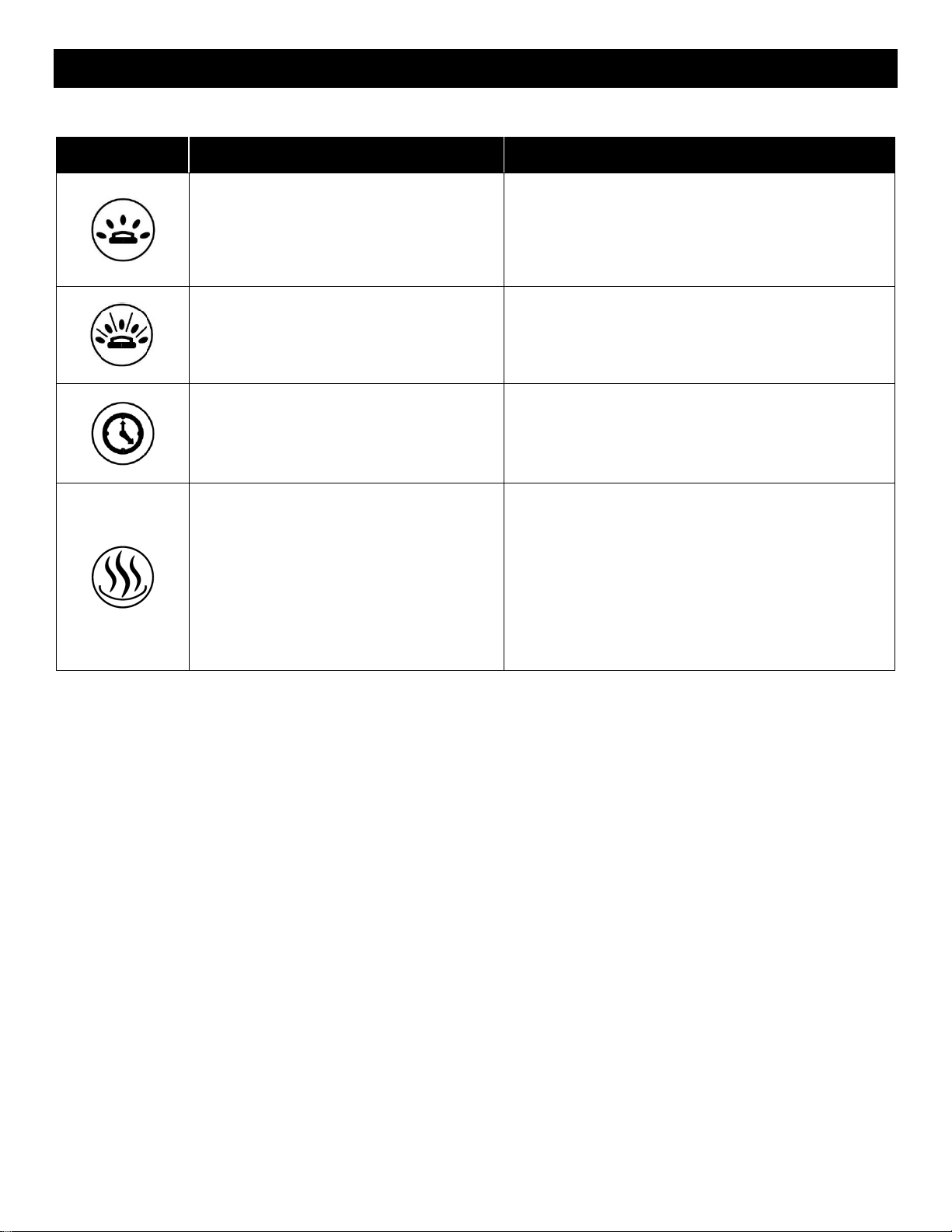
Operation – Remote Control
Remote Control Operation
Button
Function
Action
ON: Enables control panel functions.
Turns on flame.
OFF: Disables control panel functions.
Turns off flame.
1. Press once: Indicator light turns on. Power turns on. All
functions enabled.
2. Press again: Flame turns off. Unit goes to standby. All
functions turn off.
HOME BUTTON: Returns the fireplace
to the default color settings.
1. Press once: Flame video changes to flame style 1, color
yellow. Ember bed and down light changes to orange.
Flame speed changes to default and sound level changes
to low.
FLAME BUTTON: Cycles between
flame styles.
ʌ: Cycles up between preset of current
flame styles.
v: Cycles down between preset of
current flame styles.
+: Increases flame speed of current
flame style and color.
--: Decrease flame speed of current
flame style and color.
NOTE: This fireplace has memory
function for flame.
1. Press flame button once: Flame switches to next flame
style in the sequence.
2. Press flame button again until desired style is reached.
In total, three flame styles.
Note: Press and hold for 5 seconds enables Wi-Fi pairing
mode
3. Press ʌ once: Changes up to the next preset of current
flame style.
4. Press ʌ again until desired preset is selected from
1C-2C-3C-4C-5C-6C.
5. Press v once: Changes down to the next preset of
current flame style.
6. Press v again until desired preset is selected from
6C-5C-4C-3C-2C-1C.
7. Press + button to increase the flame speed.
Displayed: 01-02-03.
8. Press button to decrease the flame speed.
Displayed: 03-02-01.
AUDIO BUTTON: Raises and lowers
the audio from the fireplace.
1. Press once: Changes the volume level.
2. Press again cycles between volume settings.
Volume settings:
S0 - Off
S1 - Low
S2 - Medium
S3 - High
DOWNLIGHT BUTTON: Cycles down
light colors.
NOTE: Downlight color effect stays on
until power button is turned off.
This fireplace has memory function for
down light settings.
1. Press once: Cycle downlight.
2. Press again until desired color is reached. In total ten
colors and one fade mode.01-02-03-04-05-06-07-08-09-10-
11
NOTE: Press and hold for 5 seconds to turn on/off night
light mode.
DOWNLIGHT BRIGHTNESS BUTTON:
Makes downlight dimmer and brighter.
NOTE: LED down light brightness stays
on until power button is turned off.
1. Press once: Brightness becomes active.
2. Press again until desired setting is reached. In total 5
levels.
From L4 - L3 - L2 - L1 - L0 (off)
17
https://www.modernflames.com
Operation – Remote Control (Continued)
Button
Function
Action
MEDIA BED BUTTON: Cycles media bed
colors.
NOTE: Media bed color effect stays on
until power button is turned off.
This fireplace has memory function for
media bed settings.
1. Press once: Turns on ember bed.
2. Press again until desired color is reached. In total
ten colors and one fade mode.01-02-03-04-05-06-07-
08-09-10-11
MEDIA BRIGHTNESS BUTTON: Makes
media bed dimmer and brighter.
NOTE: LED media light brightness stays
on until power button is turned off.
1. Press once: Brightness becomes active.
2. Press again until desired setting is reached. In total
5 levels.
From E4 - E3 - E2 - E1 - E0 (off)
TIMER BUTTON: Controls timer settings
to turn off fireplace at selected time.
Settings range from 30 min to 8 hours.
1. Press once: Indicator light turns on. Timer defaults
to 0.5 hours.
2. Press again until desired setting is reached.
00(off)-30-1H-2H-3H-4H-5H-6H-7H-8H
HEATER BUTTON: Turns heater on and
off.
NOTE: The heater only works when the
flame is on. If the flame is off, the heater
will not turn on.
NOTE: To prevent overheating, the heater
fan will blow cool air for 8-10 seconds after
the heater turns off.
1. Press once: Turns the heater and blower on.
2. Pressing Additionally: Cycles thru heater settings.
Settings:
H0 - Heater and blower off
F – Fan only
H1 - Low Heater
H2 - High Heater
NOTE: Press and hold the heater button for 5
seconds to lock/unlock the heater and thermostat. H0
will be displayed when locked.
18
https://www.modernflames.com
Download Smart Phone App
Smart Phone App Connection
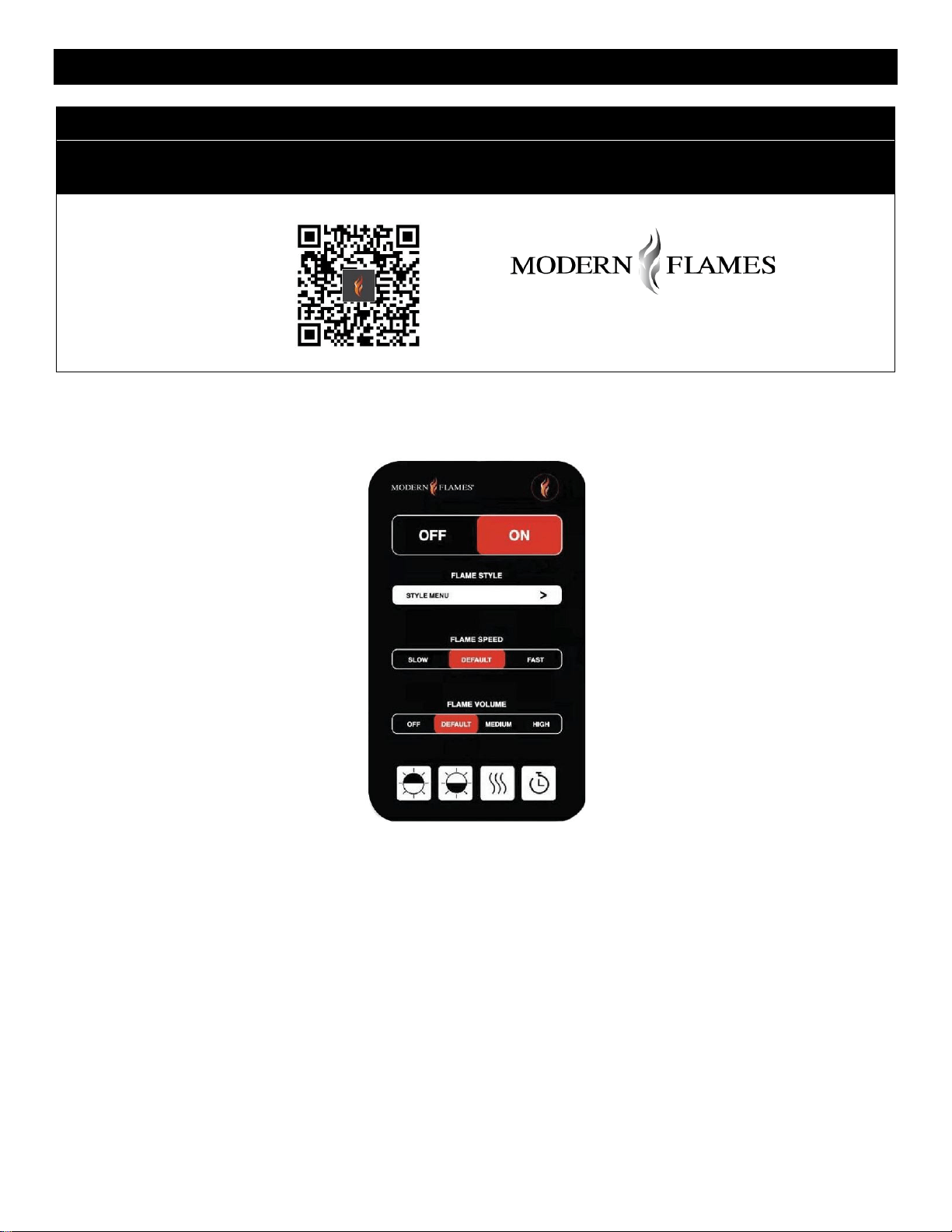
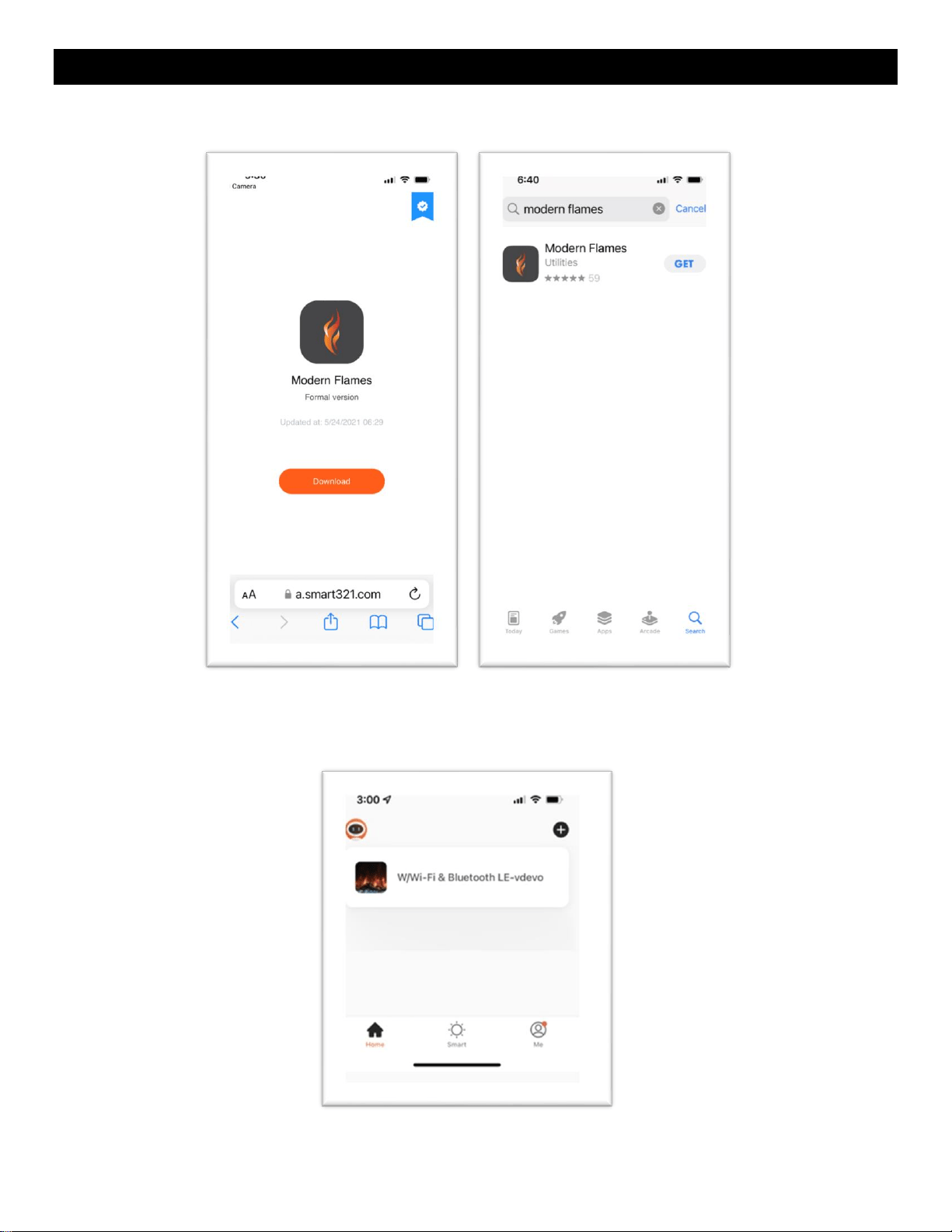
Note: Download the Modern Flames App from your App store before connecting
Download Mobile App
19
https://www.modernflames.com
Wi-Fi – Initial Log-in
• Search for and install the “Modern Flames” app from the Google Play or Apple App store or scan the
QR code on the previous page.
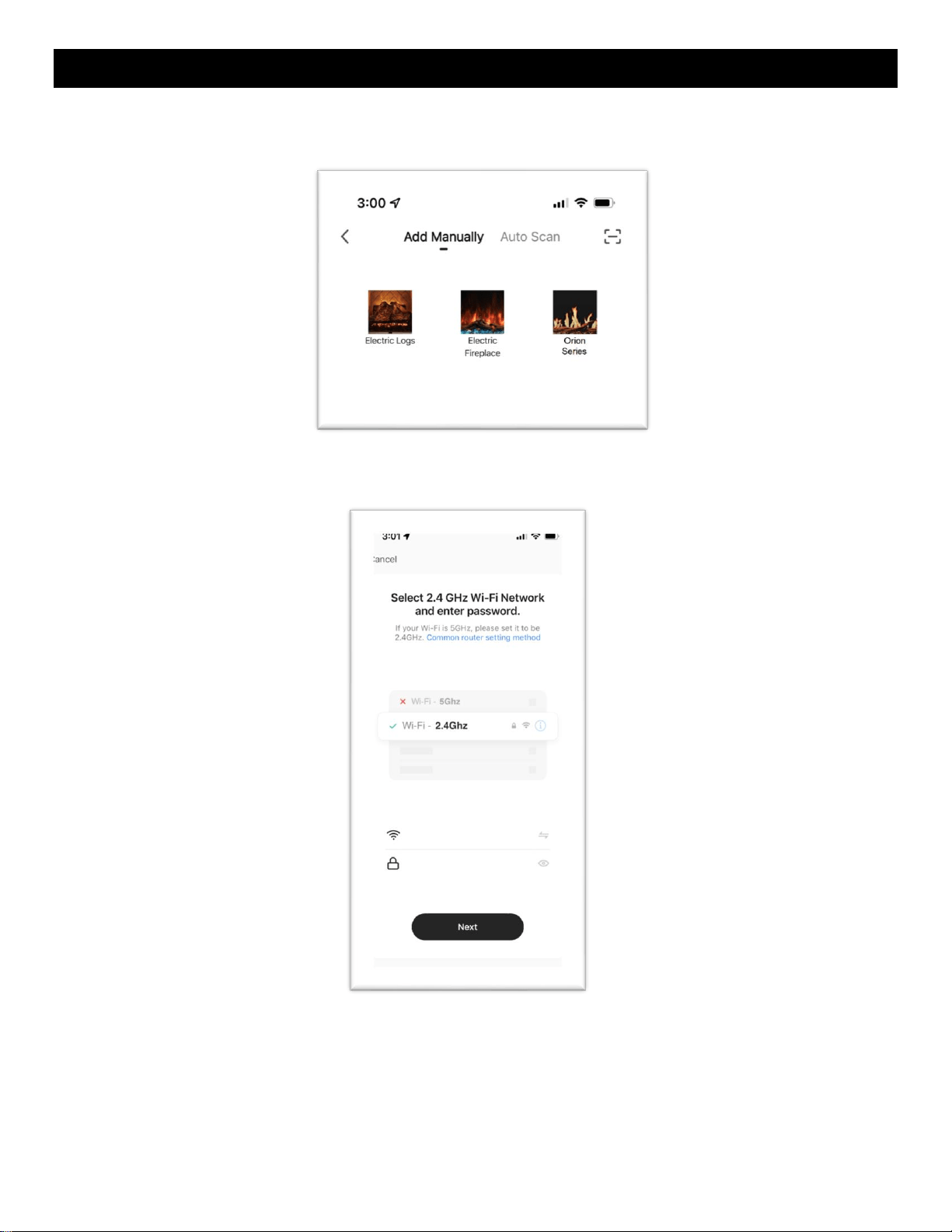
• After the App is installed, log in to the Modern Flames App. Must have Wi-Fi and Bluetooth enabled
on your smart phone.
• Once opened from the home page, select the add “+” symbol.
20
https://www.modernflames.com
Wi-Fi – Pairing
Add Manually
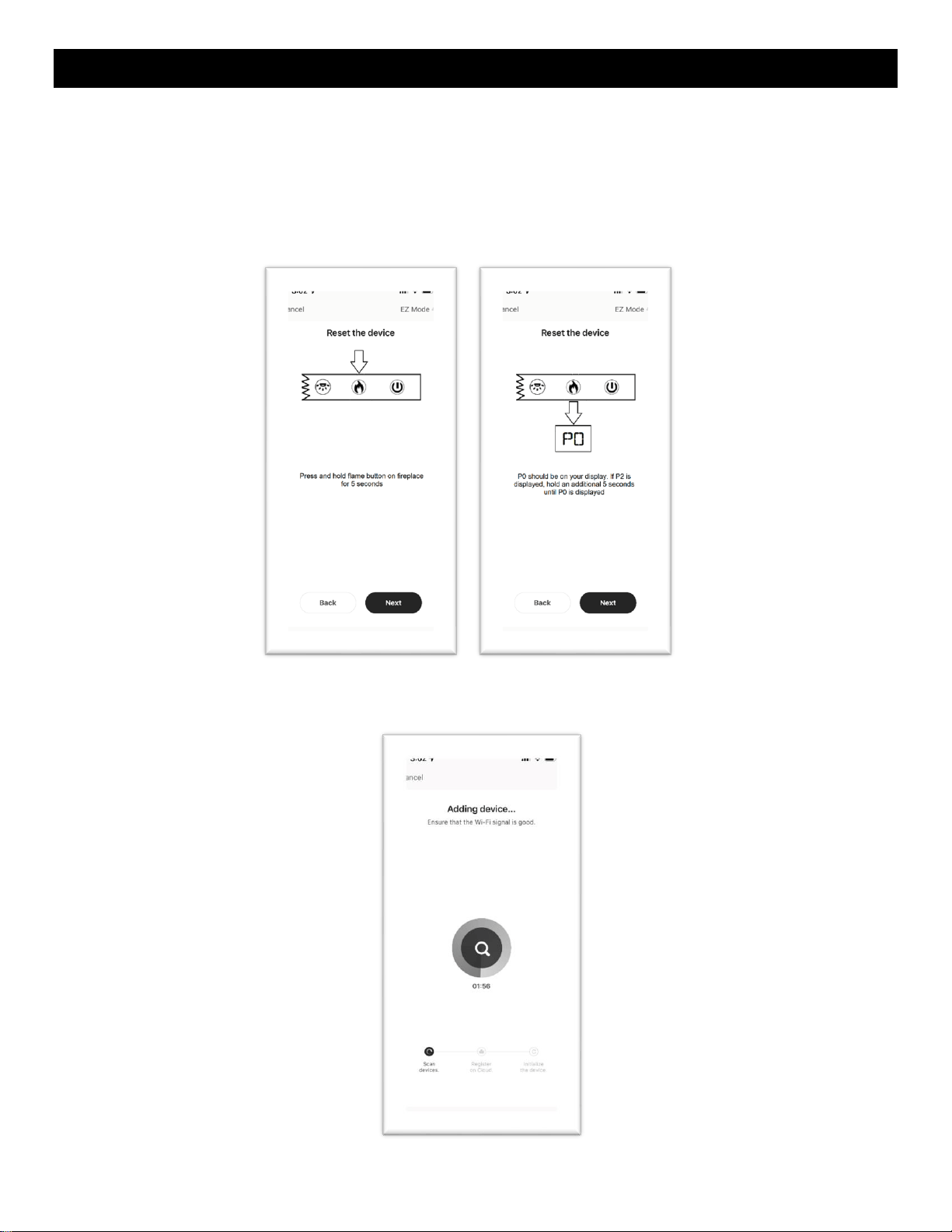
• Select the series of fireplace that will be paired with and follow the instructions.
• When pairing via Wi-Fi, the 2.4 GHz Wi-Fi signal must be used. Ensure the appropriate login
information is entered before continuing to the next step.
21
https://www.modernflames.com
Wi-Fi – Pairing (Continued)
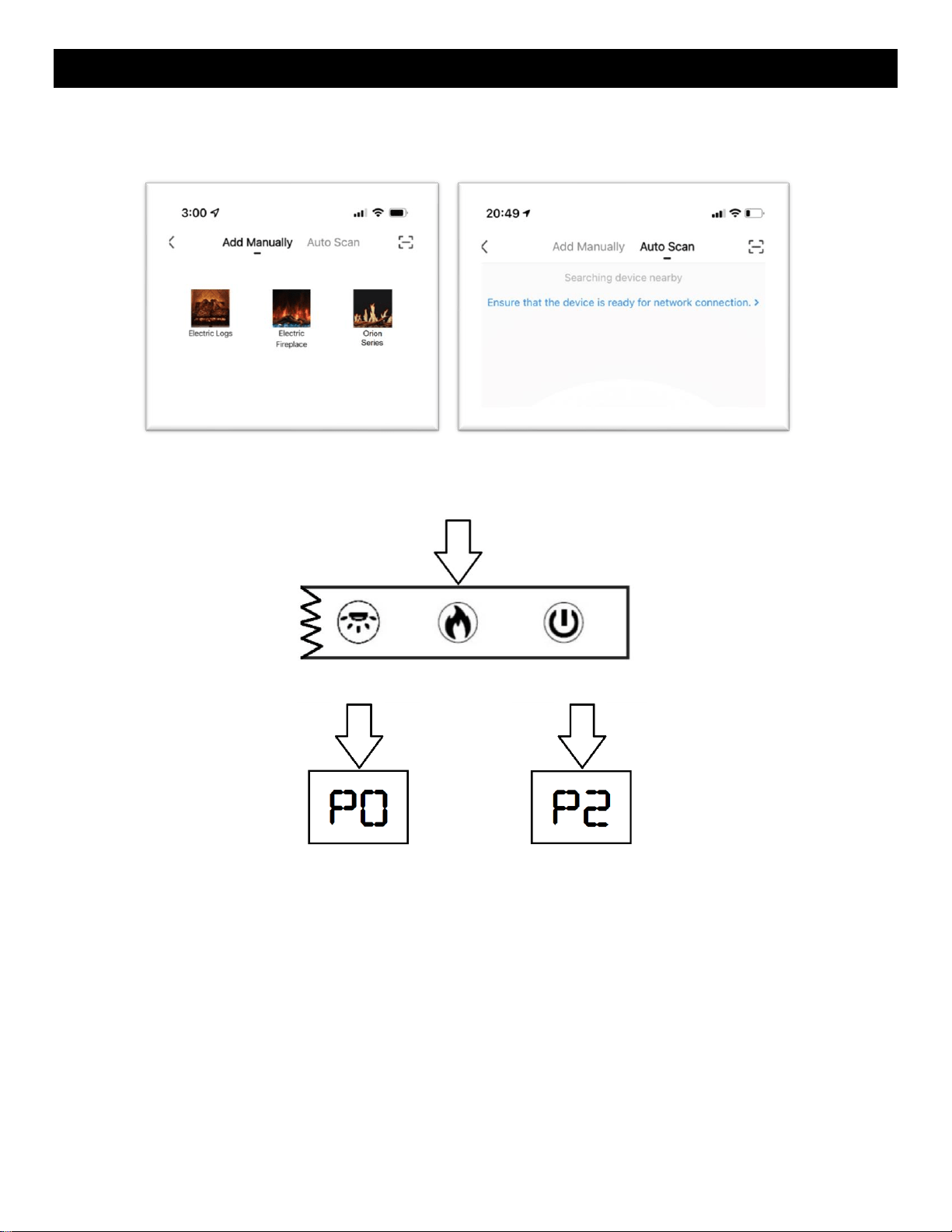
• Ensure the fireplace is ON.
• Hold the “Flame” button on the manual touch controls for 5 seconds.
i. In EZ Mode, the fireplace will display “P0”.
ii. In AP Mode, the fireplace will display “P2”
iii. Holding the flame button for an additional 5 seconds will cycle the fireplace between EZ
Mode and AP Mode.
• Device and APP should now begin to pair. Depending on Wi-Fi, this can take up to two minutes to
pair and may need to be repeated more than once.
22
https://www.modernflames.com
Wi-Fi – Pairing (Continued)
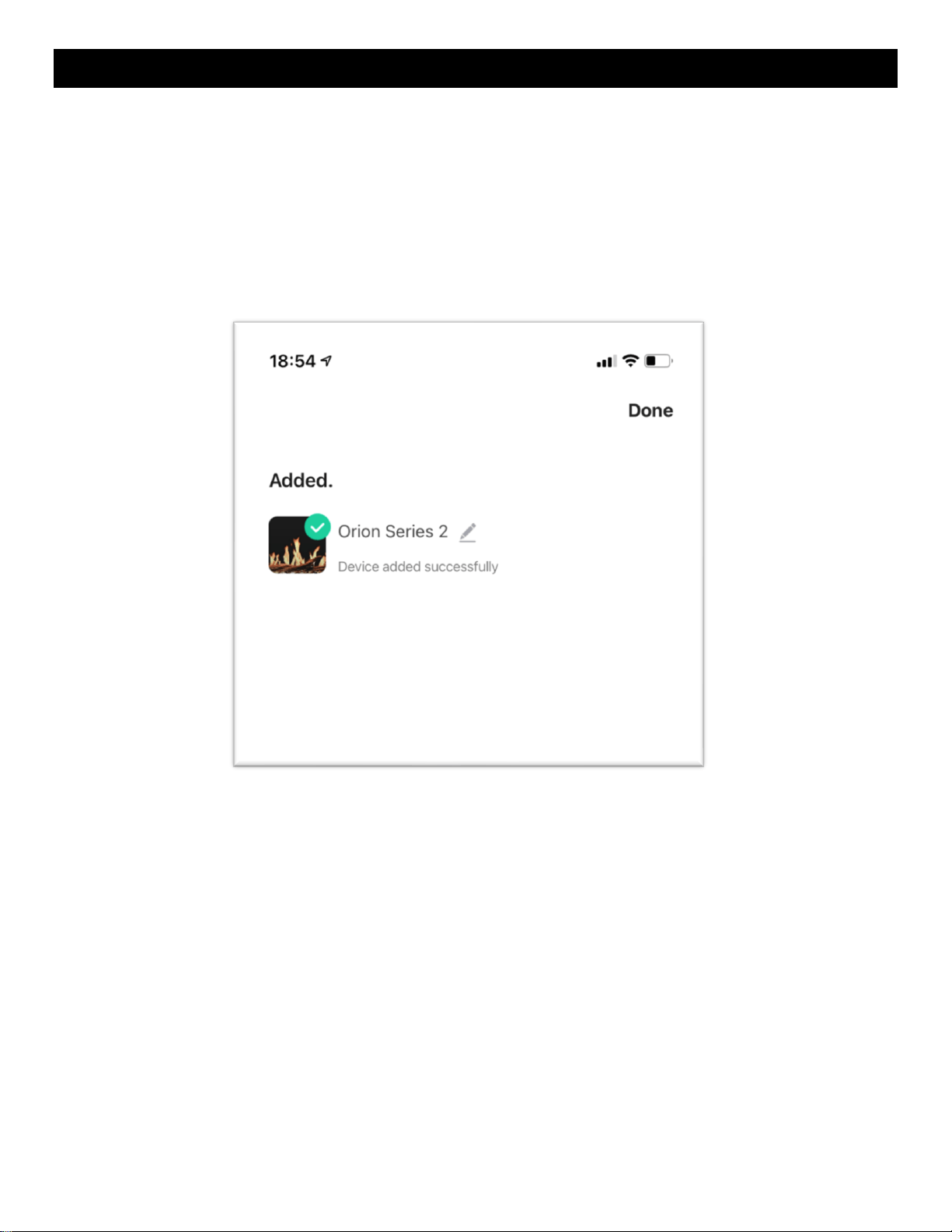
• The fireplace display will show “P4” and the downlight LEDs will blink green on a successful pair.
i. NOTE: Do not turn OFF or disconnect the fireplace from power while pairing the Wi-Fi or
performing updates. Failure to do so can result in damage to electrical components of the
fireplace. Damage as a result of this may not be covered under warranty. Questions or
assistance in pairing device, contact Modern Flames at
customerservice@modernflames.com or call (877) 246-9653 Monday-Friday, 8:00 am –
5:00 pm (MST).
23
https://www.modernflames.com
Wi-Fi – Pairing (Continued)
Auto Scan
• Select auto scan from the top of the App.
• On the fireplace touch controls, press and hold the “Flame” button for 5 seconds. The fireplace will
show either “P0” or “P2”. This will place the fireplace in pairing mode.
24
https://www.modernflames.com
Wi-Fi – Pairing (Continued)
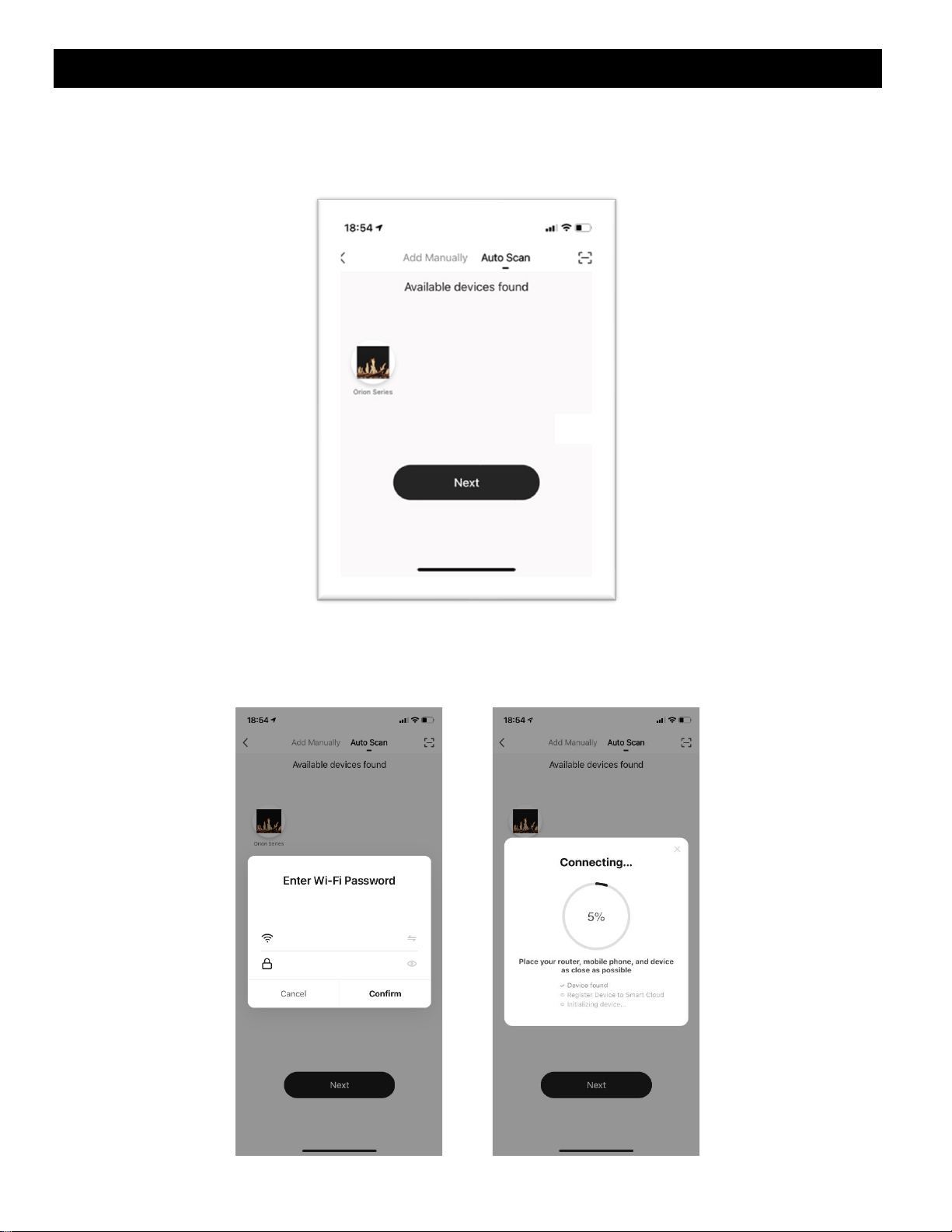
• Auto scan will search for available devices. Upon selecting the available fireplace, select the “Next”
button if the app does not proceed automatically. If the scan fails to find a fireplace, press and hold
the “Flame” button on the manual touch controls to switch pairing modes.
• Enter in the Wi-Fi information. The information must be entered to be able to proceed to the next
step.
• The App will begin connecting.
25
https://www.modernflames.com
Wi-Fi – Pairing (Continued)
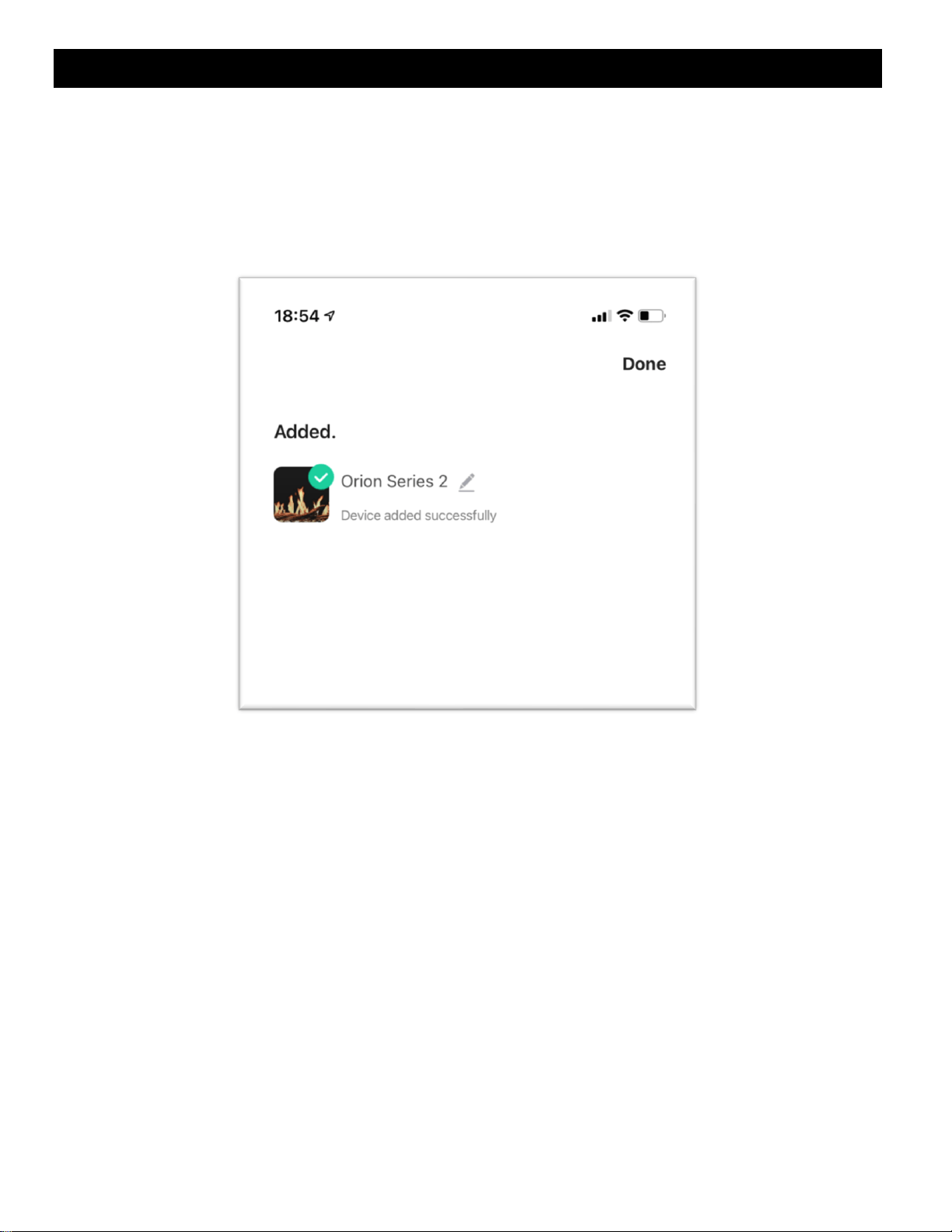
• The fireplace display will show “P4” and the downlight LEDs will blink green on a successful pair.
i. NOTE: Do not turn OFF or disconnect the fireplace from power while pairing the Wi-Fi or
performing updates. Failure to do so can result in damage to electrical components of the
fireplace. Damage as a result of this may not be covered under warranty. Questions or
assistance in pairing device, contact Modern Flames at
customerservice@modernflames.com or call (877) 246-9653 Monday-Friday, 8:00 am –
5:00 pm (MST).
26
https://www.modernflames.com
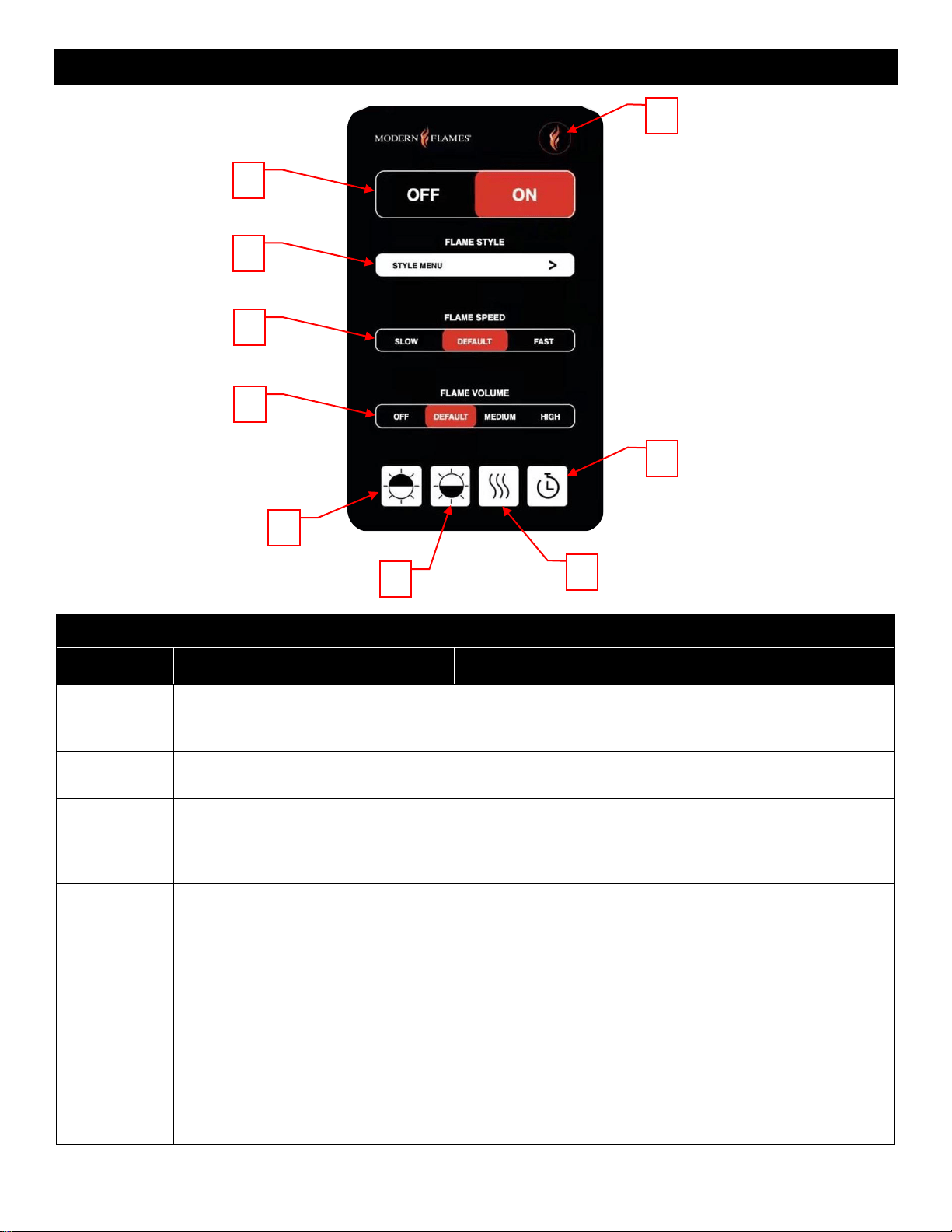
Operation – Smart Phone App
Home Screen
Button
Function
Action
1
Home Button: Returns the fireplace
to the default color settings.
1. Press once: Flame video changes to flame style 1, color
yellow. Ember bed and down light changes to orange. Flame
speed changes to default and sound level changes to low.
2
Power Off/On Slider: Turns the
fireplace off and on.
1. Slide to the Off position: Turns the fireplace OFF.
2. Slide to the On position: Turns the fireplace ON.
3
Flame Style: Opens flame style sub-
menu for selecting flame style and
color. 3 styles with 6 colors for each of
the styles.
1. Press once: Opens the flame style sub-menu page to
select a new flame style.
4
Flame Speed Slider: Changes the
flame speed of currently displayed
flame. Cycles between SLOW,
DEFAULT, and FAST.
1. Slide to the Slow position: Flame moves at the slowest
speed. Fireplace displays: 01
2. Slide to the Default position: Flame moves at the default
speed. Fireplace displays: 02
3. Slide to the Fast position: Flame moves at the fastest
speed. Fireplace displays: 03
5
Flame Volume Slider: Changes the
sound effect volume of the fireplace
between 4 different volumes. Can
cycle between OFF, DEFAULT,
MEDIUM, High.
1. Slide to the Off position: Sound effects are turned off.
Fireplace displays: S0
2. Slide to the default position: Sound effects are at the
lowest/default sound level. Fireplace displays: S1
3. Slide to the Medium position: Sound effects are at the
middle sound level. Fireplace displays: S2
4. Slide to the High position: Sound effects are at the
highest sound l evel. Fireplace displays: S3
1
2
3
4
5
9
8
7
6
27
https://www.modernflames.com
Operation – Smart Phone App (Continued)
Home Screen (Continued)
Button
Function
Action
6
Downlight Button: Opens the downlight
sub-menu.
1. Press once: Opens the downlight sub-menu page
to select new colors for downlighting.
7
Ember Bed Button: Opens the ember bed
sub-menu.
1. Press once: Opens the ember bed sub-menu page
to select new colors for the ember bed.
8
Heater Button: Opens the heater sub-
menu.
1. Press once: Opens a new page to make changes
to the heater settings.
9
Timer Button: Opens the timer sub-menu.
1. Press once: Opens the timer sub-menu for various
timer related functions.
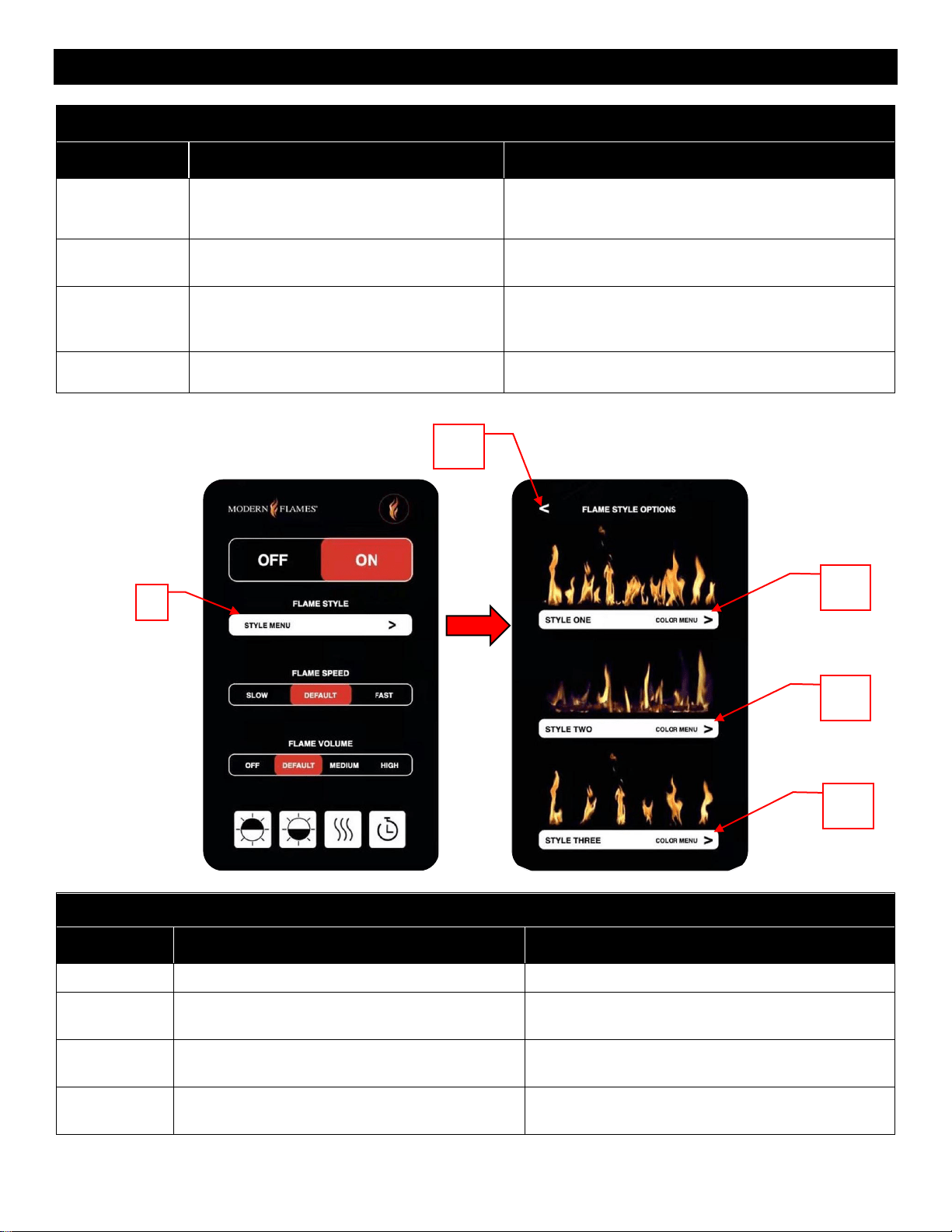
Flame Style Options
Button
Function
Action
3.1
Return Button: Returns to the previous page.
1. Press once: Returns to the previous page.
3.2
Style One Button: Opens the flame style one
sub-menu.
1. Press once: Opens the flame style one sub-
menu.
3.3
Style Two Button: Opens the flame style two
sub-menu.
1. Press once: Opens the flame style two sub-
menu.
3.4
Style Three Button: Opens the flame style
three sub-menu.
1. Press once: Opens the flame style two sub-
menu.
3
3.1
3.2
3.3
3.4
28
https://www.modernflames.com
Operation – Smart Phone App (Continued)
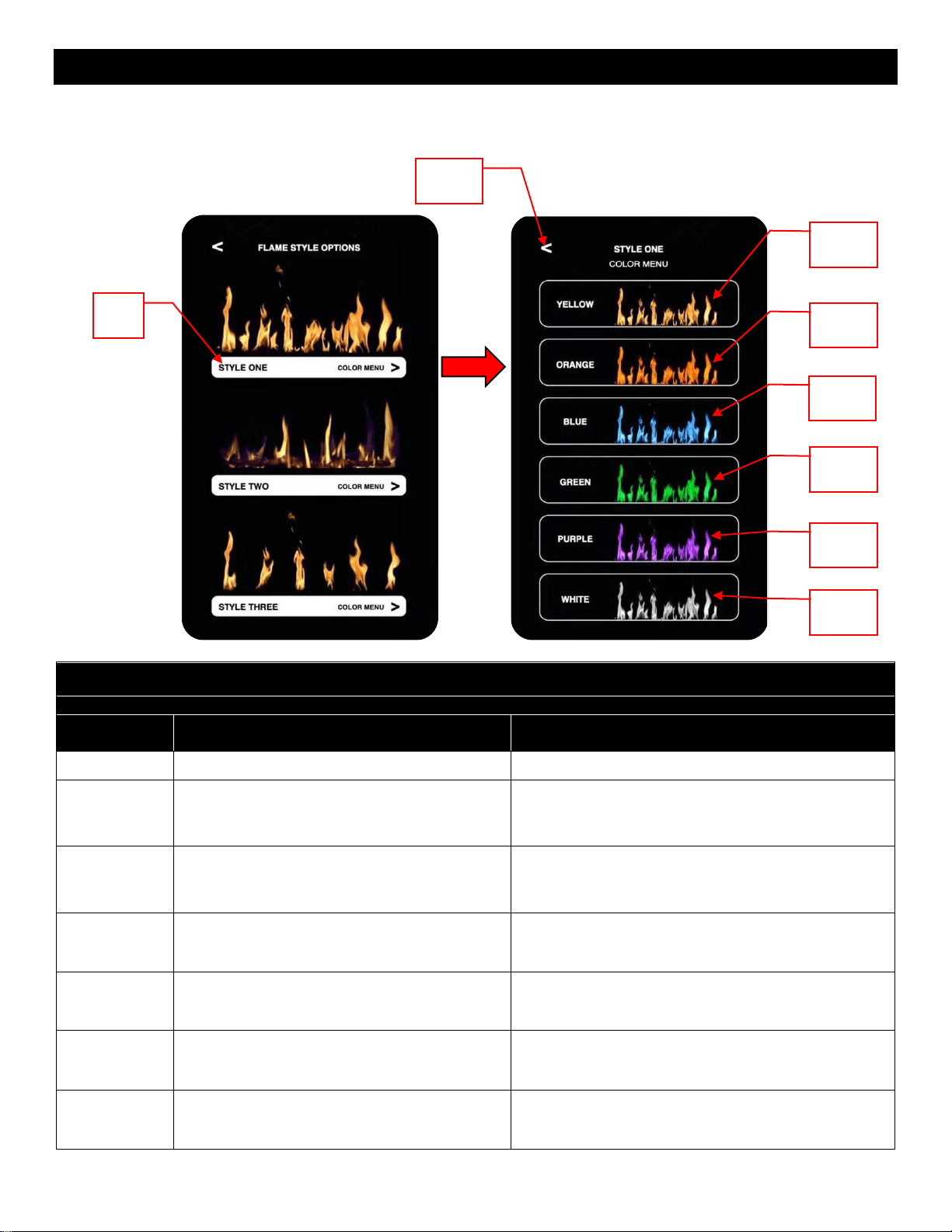
• 3.2 menu depicted. Functions and actions are the same for the 3.3 and 3.4 menu.
Flame Style One/Two/Three Color Menu
Note: Flame Style One (3.2), Two (3.3), and Three (3.4) all function the same as below
Button
Function
Action
3.2.1
Return Button: Returns to the previous page.
1. Press once: Returns to the previous page.
3.2.2
Yellow Flame Button: Changes the fireplace
to the Yellow flame.
1. Press once: Changes the fireplace to the Yellow
flame. Ember bed and downlighting change to the
designated preset.
3.2.3
Orange Flame Button: Changes the fireplace
to the Orange flame.
1. Press once: Changes the fireplace to the Orange
flame. Ember bed and downlighting change to the
designated preset.
3.2.4
Blue Flame Button: Changes the fireplace to
the Blue flame.
1. Press once: Changes the fireplace to the Blue
flame. Ember bed and downlighting change to the
designated preset.
3.2.5
Green Flame Button: Changes the fireplace
to the Green flame.
1. Press once: Changes the fireplace to the Green
flame. Ember bed and downlighting change to the
designated preset.
3.2.6
Purple Flame Button: Changes the fireplace
to the Purple flame.
1. Press once: Changes the fireplace to the Purple
flame. Ember bed and downlighting change to the
designated preset.
3.2.7
White Flame Button: Changes the fireplace
to the White flame.
1. Press once: Changes the fireplace to the White
flame. Ember bed and downlighting change to the
designated preset.
3.2.1
3.2.2
3.2.3
3.2.4
3.2.5
3.2.6
3.2.7
3.2
29
https://www.modernflames.com
Operation – Smart Phone App (Continued)
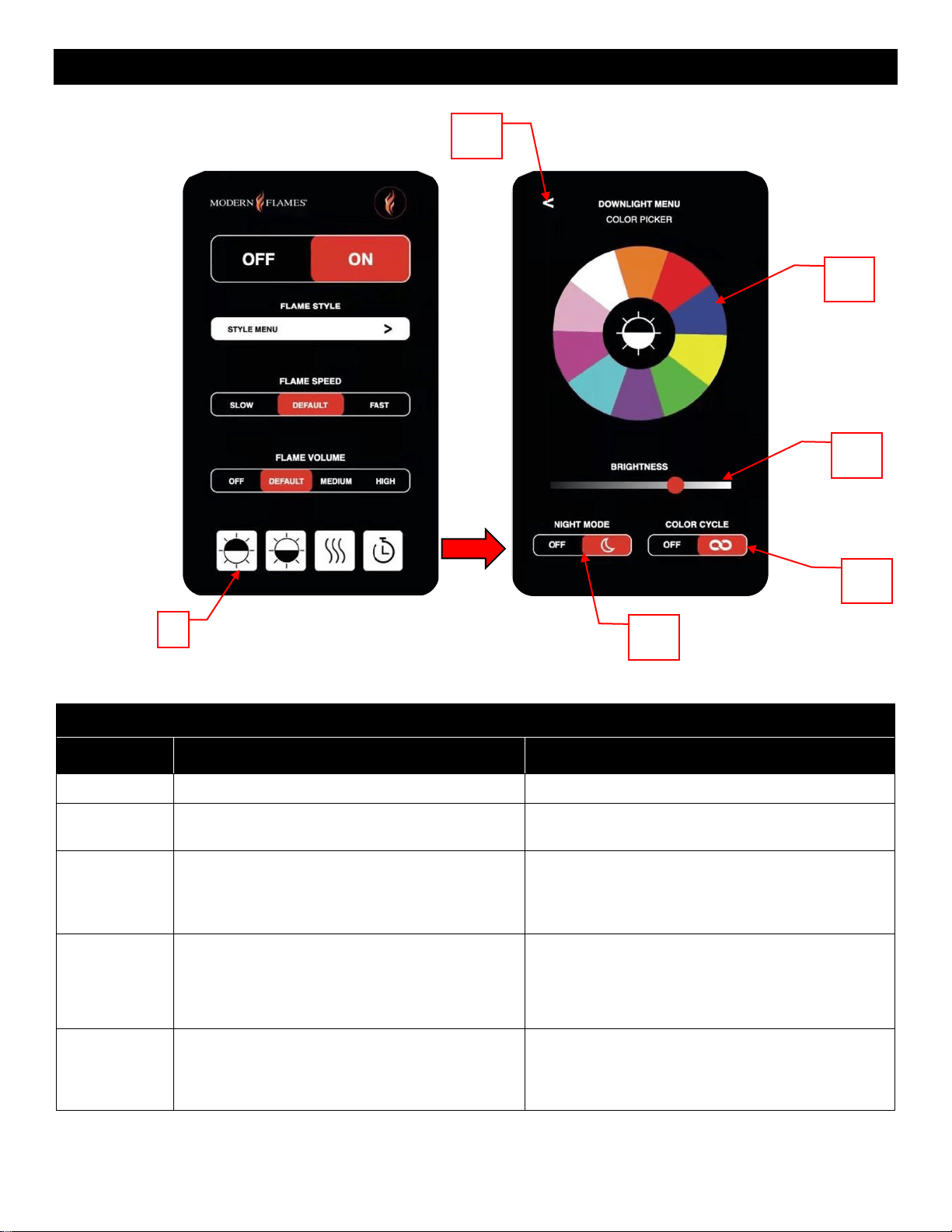
Downlight Menu
Button
Function
Action
6.1
Return Button: Returns to the previous page.
1. Press once: Returns to the previous page.
6.2
Color Wheel Button: Changes the color of the
downlight to the selected color.
1. Press once: Selecting a color, the downlight will
change to the selected color.
6.3
Brightness Slider: Changes the brightness of
the downlighting.
1. Sliding to the left/dark: Dims the brightness of
the downlight.
2. Sliding to the right/light: Brightens the
downlight.
6.4
Color Cycle Slider: Cycles the downlight colors
between all colors shown on the color wheel.
1. Slide to OFF position: Downlight stays a solid
color.
2. Slide to ON (Infinity) position: Downlight
cycles between the 10 colors shown on the color
wheel.
6.5
Night Mode Slider: Enables night light mode.
1. Slide to OFF position: Downlight is on and
fireplace functions like normal.
2. Slide to ON (Moon) position: Downlight is on
and all other functions of the fireplace are off.
6
6.2
6.3
6.4
6.5
6.1
30
https://www.modernflames.com
Operation – Smart Phone App (Continued)
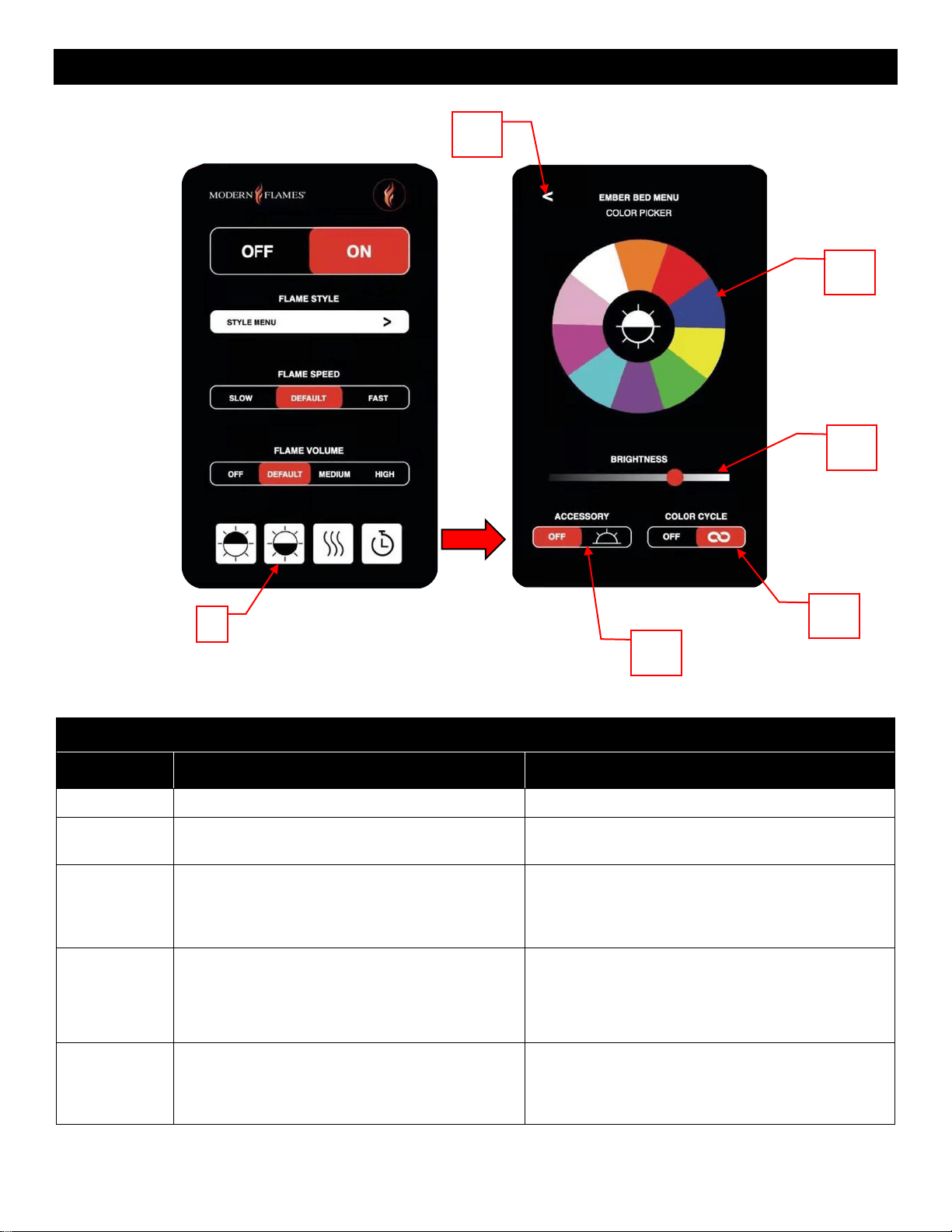
Ember Bed Menu
Button
Function
Action
7.1
Return Button: Returns to the previous page.
1. Press once: Returns to the previous page.
7.2
Color Wheel Button: Changes the color of the
ember bed to the selected color.
1. Press once: Selecting a color, the ember bed
will change to the selected color.
7.3
Brightness Slider: Changes the brightness of
the ember bed.
1. Sliding to the left/dark: Dims the brightness of
the ember bed.
2. Sliding to the right/light: Brightens the ember
bed.
7.4
Color Cycle Slider: Cycles the ember bed
colors between all colors shown on the color
wheel.
1. Slide to OFF position: Ember bed stays a solid
color.
2. Slide to ON (Infinity) position: Ember bed
cycles between all colors shown on the color
wheel.
7.5
Accessory Mode Slider: Enables ember bed
accessory.
Note: Not applicable to all models.
1. Slide to OFF position: Ember bed accessory is
off.
2. Slide to ON (Sun) position: Ember bed
accessory is on.
7
7.1
7.2
7.3
7.4
7.5
31
https://www.modernflames.com
Operation – Smart Phone App (Continued)
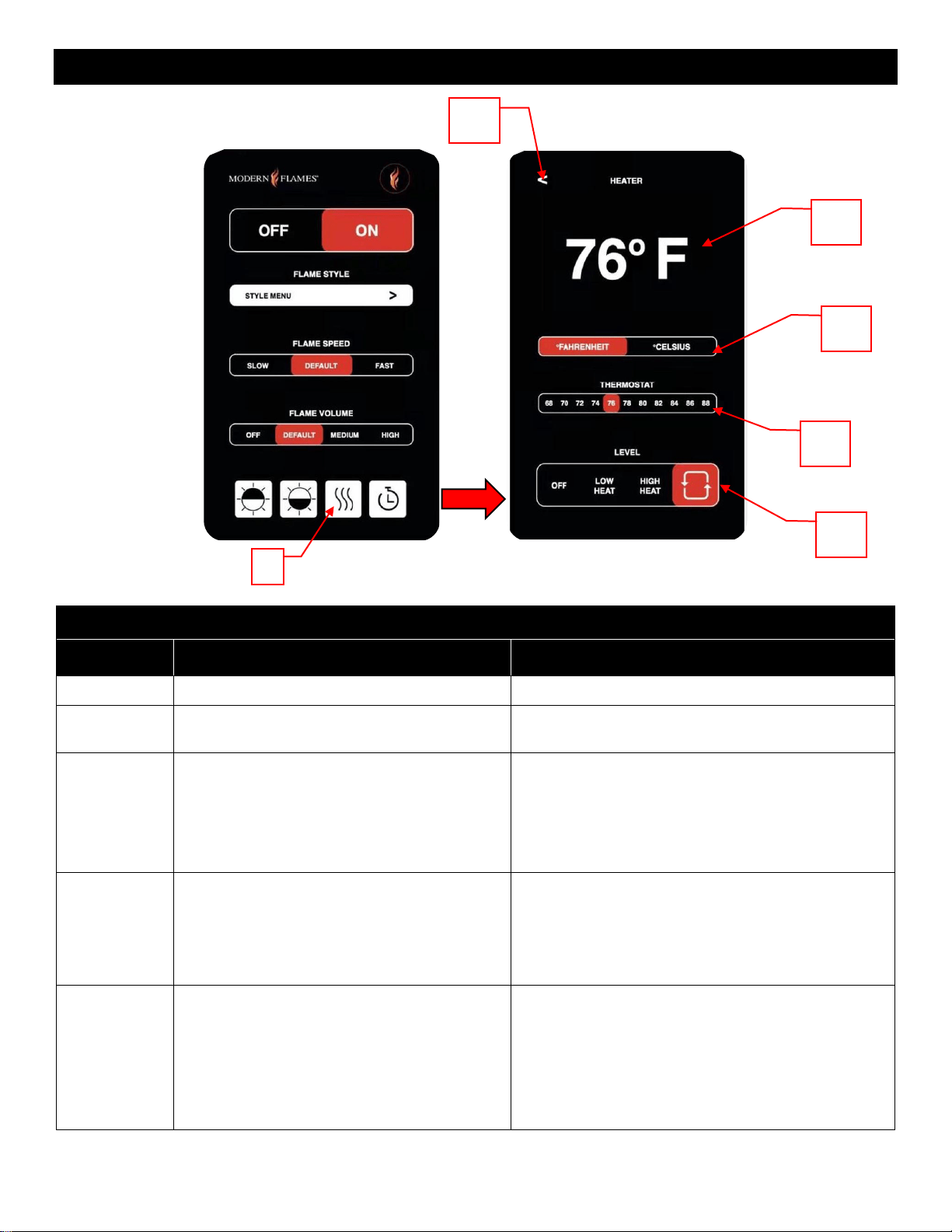
Heater Menu
Button
Function
Action
8.1
Return Button: Returns to the previous page.
1. Press once: Returns to the previous page.
8.2
Ambient Temperature: The fireplace ambient
air temperature reading.
1. Press once: No action.
8.3
Temperature Scale Slider: Changes
between Fahrenheit and Celsius.
1. Sliding to Fahrenheit: Changes the scale of the
ambient temperature, thermostat selector, and the
fireplace to Fahrenheit.
2. Sliding to Celsius: Changes the scale of the
ambient temperature, thermostat selector, and the
fireplace to Celsius.
8.4
Thermostat Temperature Slider: Changes
the thermostat value of the fireplace, enabling
or disabling the heater at the set temperature.
1. Slide to preset position: Changes the thermostat
to the selected number. Heater will turn on until the
ambient temperature reaches the selected
thermostat value. Heater will turn off once the
ambient temperature is equal to or greater than the
thermostat value.
8.5
Heat Output Slider: Changes whether the
heater is off, low heat, high heat, or
recirculation (fan only).
1. Slide to OFF position: The heater is off.
2. Slide to Low Heat position: The heater will run at
low power.
3. Slide to High Heat position: The heater will run
at high power.
4. Slide to Recirculation position: Fan is blowing to
recirculate the air. Heater is off.
8
8.1
8.2
8.3
8.4
8.5
32
https://www.modernflames.com
Operation – Smart Phone App (Continued)
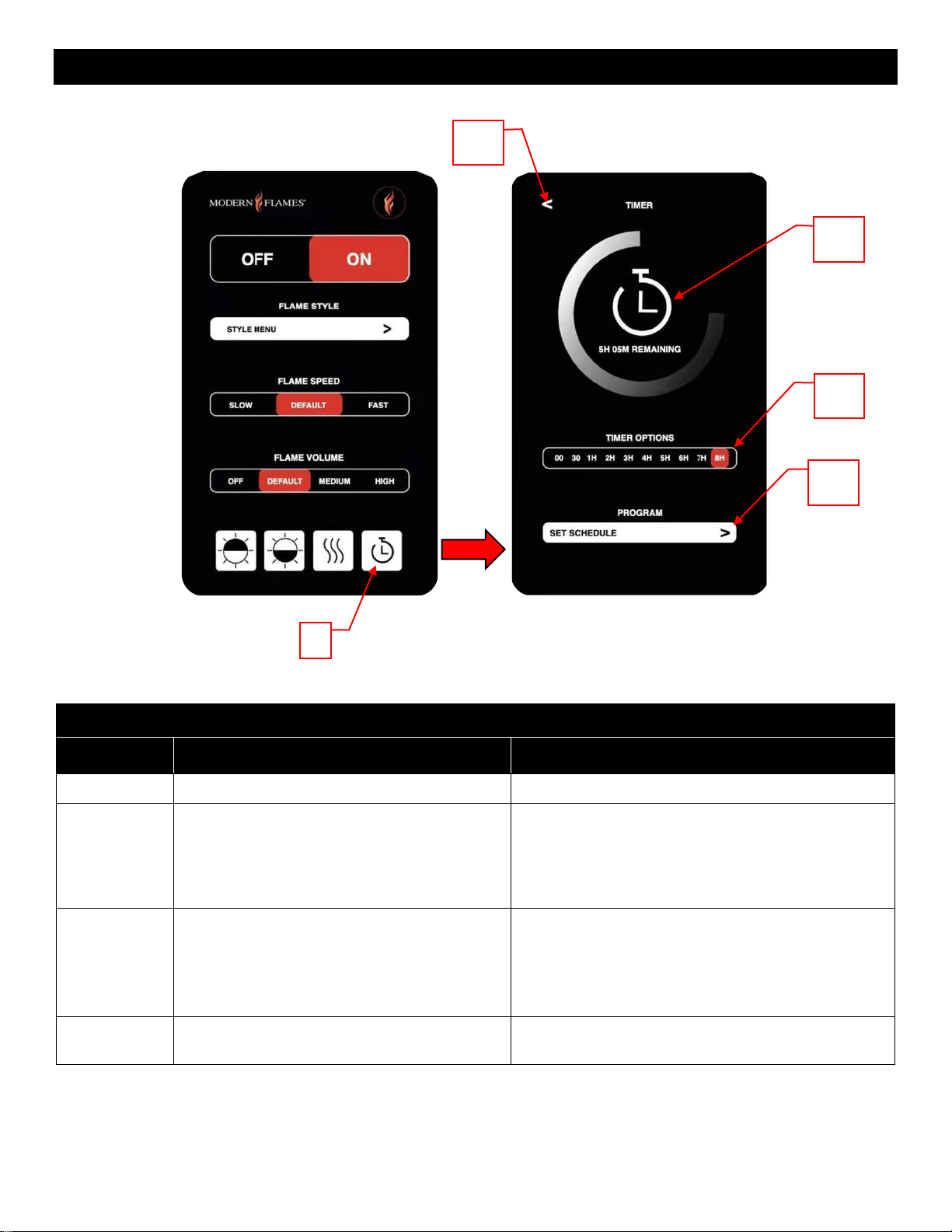
Timer Menu
Button
Function
Action
9.1
Return Button: Returns to the previous page.
1. Press once: Returns to the previous page.
9.2
Countdown Timer: Displays remaining time
left on the selected time. Shows OFF when
not in use.
NOTE: Fireplace will turn off once the timer
reaches zero.
1. Press once: No action.
9.3
Preset Timer Options: Changes the amount
of time for the fireplace to run before turning
off.
1. Slide to preset position: Changes the timer to
the selected number. The fireplace will turn off once
the timer reaches zero.
2. Sliding to 00 position: Turns the timer off. The
fireplace will stay on until the user manually turns off
the fireplace.
9.4
Weekly Program Schedule: Opens the
Weekly Program Schedule sub-menu.
1. Press once: Opens the Weekly Program
Schedule sub-menu.
9.1
9
9.2
9.3
9.4
33
https://www.modernflames.com
Operation – Smart Phone App (Continued)
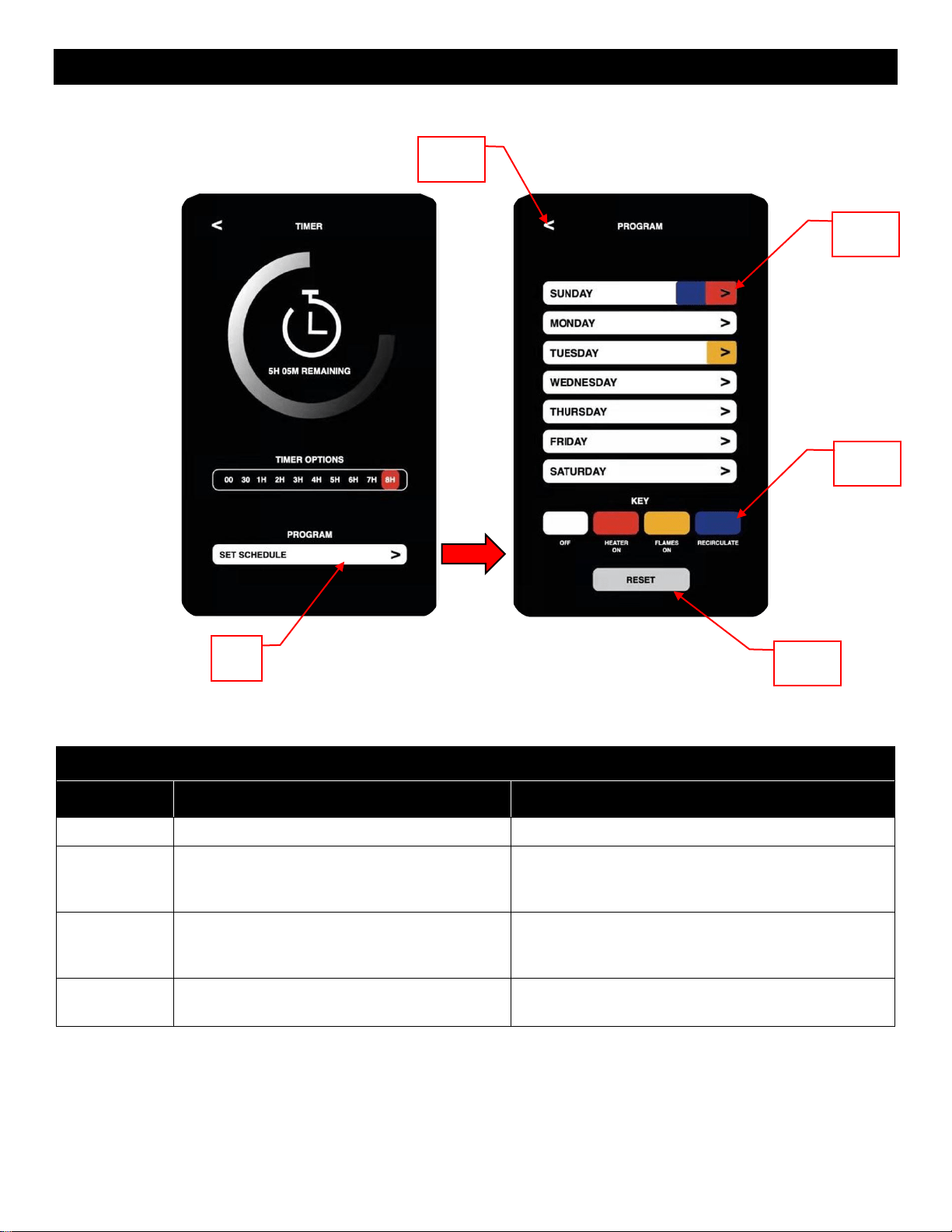
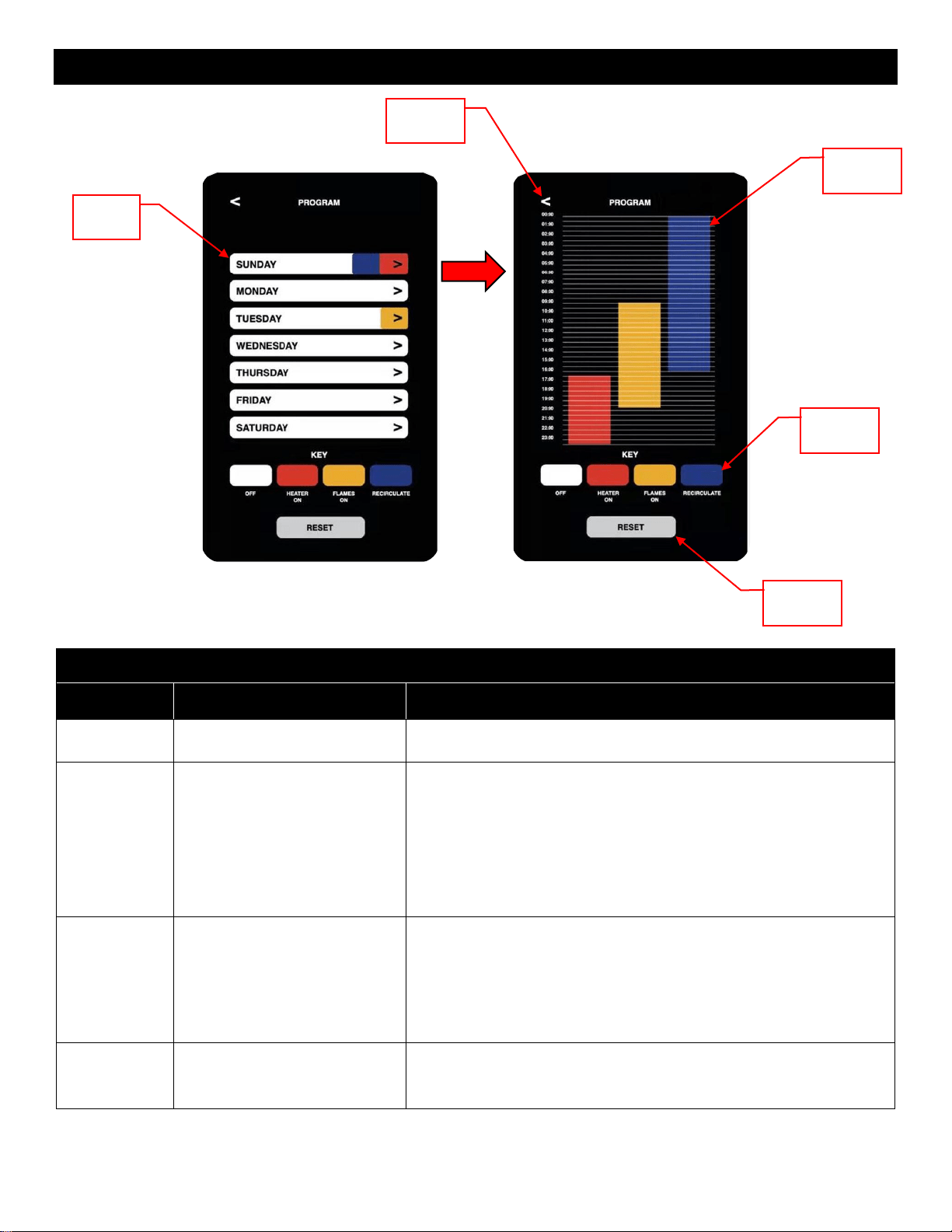
Weekly Program Schedule Menu
Button
Function
Action
9.4.1
Return Button: Returns to the previous page.
1. Press once: Returns to the previous page.
9.4.2
Programming Days: Displays if a day has a
program assigned to it. Selecting a day will
open that day’s sub-menu.
1. Press on a day once: Opens that day’s sub-
menu.
9.4.3
Color Key: Shows the meaning of the
different color codes used in the daily
programming.
1. Press once: No action.
9.4.4
Reset Button: Clears the programming from
ALL days.
1. Press once: Clears the programming from ALL
days. All days revert to default state.
9.4
9.4.2
9.4.1
9.4.3
9.4.4
34
https://www.modernflames.com
Operation – Smart Phone App (Continued)
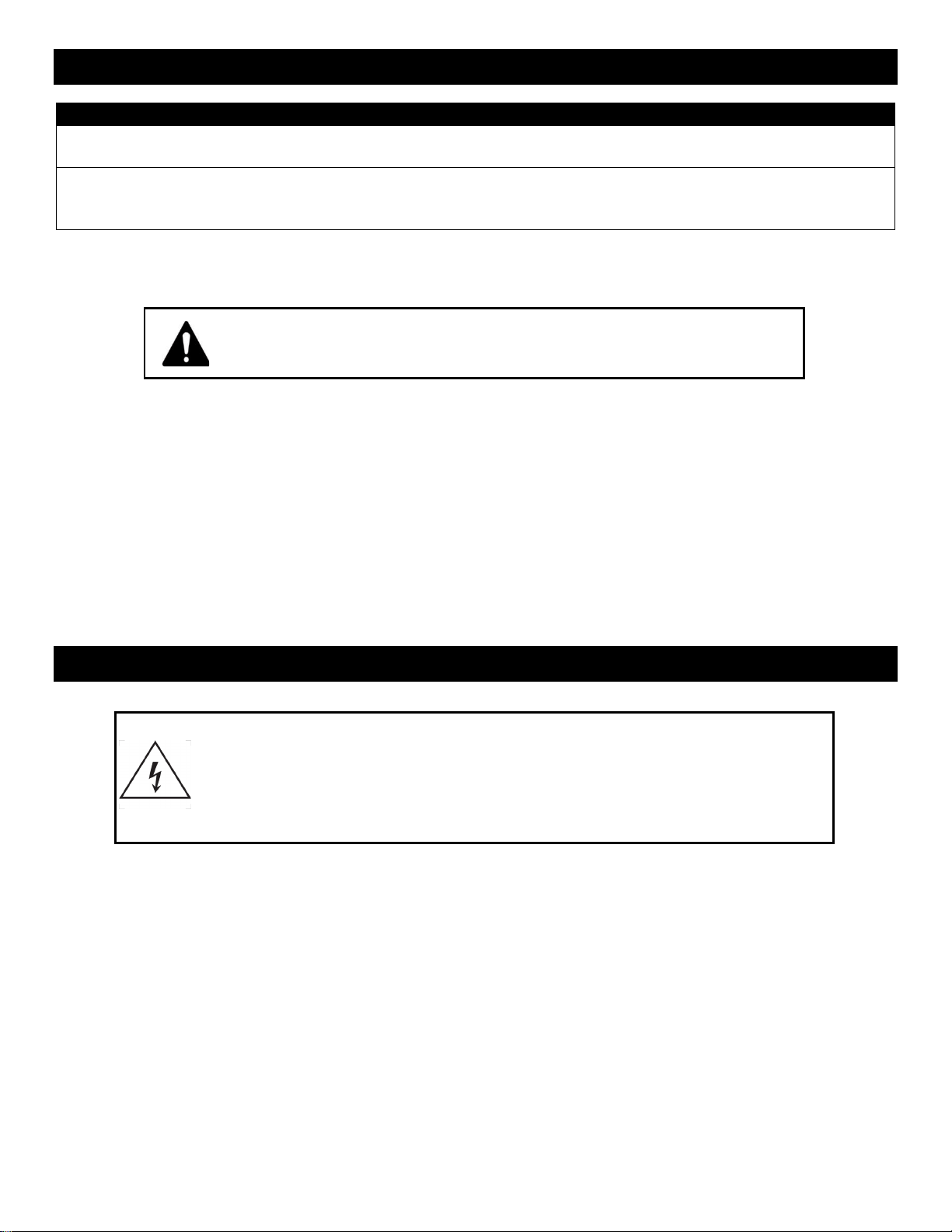
Daily Program Schedule Menu
Button
Function
Action
9.4.2.1
Return Button: Returns to the
previous page.
1. Press once: Returns to the previous page.
9.4.2.2
Individual Day
Programming: Shows the
programming for the selected
day. Allows for programming of
the selected day.
1. Highlight desired time frame: Applies desired function to
highlighted area.
Note: Must first select desired function from Color Key (9.4.2.3).
Note: Heater On and Recirculate can not be scheduled at the same
time.
Note: Off clears the selected programming.
Note: The app prevents from scheduling conflicting modes.
Note: Manual settings supersede programmed settings.
9.4.2.3
Color Key: Shows the
meaning of the different color
codes used in the daily
programming.
1. Press Off once: Allows to schedule the fireplace to turn off.
2. Press Heater On once: Allows to schedule the fireplace to turn
the heater on until the ambient air reaches or exceeds the
thermostat temperature.
3. Press Flames On once: Allows to schedule the flames to turn
on.
4. Press Recirculate once: Allows to schedule the recirculating air.
9.4.2.4
Reset Button: Clears the
programming from the whole
day.
1. Press once: Clears the programming from the whole day. The
day revert to default state.
9.4.2
9.4.2.1
9.4.2.2
9.4.2.3
9.4.2.4
35
https://www.modernflames.com
Operation – Important Warnings
Note:
When the heater is first turned on, a slight odor may be present. This is normal and should not occur
again unless the heater is not used for a long period of time.
To improve operation, aim the remote control at the front of the fireplace. Quickly pressing buttons on
the remote without allowing the fireplace to complete the previous operation may result in operational
errors. Allow the fireplace to complete each command before issuing another.
Remote Control Battery Information
• Remote control uses one CR2032 battery (Included)
Temperature Limiting Control
This heater is equipped with a Temperature Limiting Control. Should the heater reach an unsafe
temperature, the heater will automatically turn Off.
To Reset:
• Remove power from the fireplace. Wait 5 minutes.
o Unplug the fireplace or turn off the appropriate breaker at the circuit breaker box.
• Inspect the fireplace to ensure no vents are blocked or clogged with dust or lint. Using a vacuum
can help clear the areas if needed.
• Apply power to the fireplace.
• If problem continues, have the wiring and outlet inspected by a professional.
Care – Cleaning
Metal:
• Clean using a soft cloth, slightly dampened with soapy water.
• DO NOT use a brass polish or household cleaners as these products will damage the metal trim.
Glass:
• Use an ammonia-free glass cleaner sprayed onto a cloth or towel. Dry thoroughly with a paper towel or
lint-free cloth.
• DO NOT use abrasive cleansers, liquid sprays, or any cleaner that could scratch the surface.
Vents:
• Use a vacuum or duster to remove dust and dirt from the heater and vent areas.
Plastic:
• Wipe gently with a slightly damp cloth and a mild solution of dish soap and warm water.
• DO NOT use abrasive cleaners, liquid sprays, or any cleaner that could scratch the surface.
Never dispose of batteries in fire. Failure to observe this precaution
may result in an explosion. Dispose of batteries at your local
hazardous material processing center.
Always turn heater OFF and unplug power cord from the outlet before
cleaning, performing maintenance, or moving this fireplace. Failure to do so
could result in electric shock, fire, or personal injury.
Never immerse in water or spray with water. Doing so could result in electric
shock, fire, or personal injury.
36
https://www.modernflames.com
Care – Maintenance
Electrical and Moving Parts:
• The fan motors are lubricated at the factory and do not require additional lubrication.
• Electrical components are integrated into the fireplace and are not serviceable by the consumer.
Storage:
• Store the fireplace in a clean, dry place when not in use.
Risk of electric shock! Do not open any panels! No user-serviceable parts
inside!
Always turn the heater OFF and unplug power cord from the outlet before
cleaning, performing maintenance, or moving this fireplace. Failure to do so
could result in electric shock, fire, or personal injury.
WARNING! NO SERVICING
of the internal or electrical parts should
be performed by the consumer.
37
https://www.modernflames.com
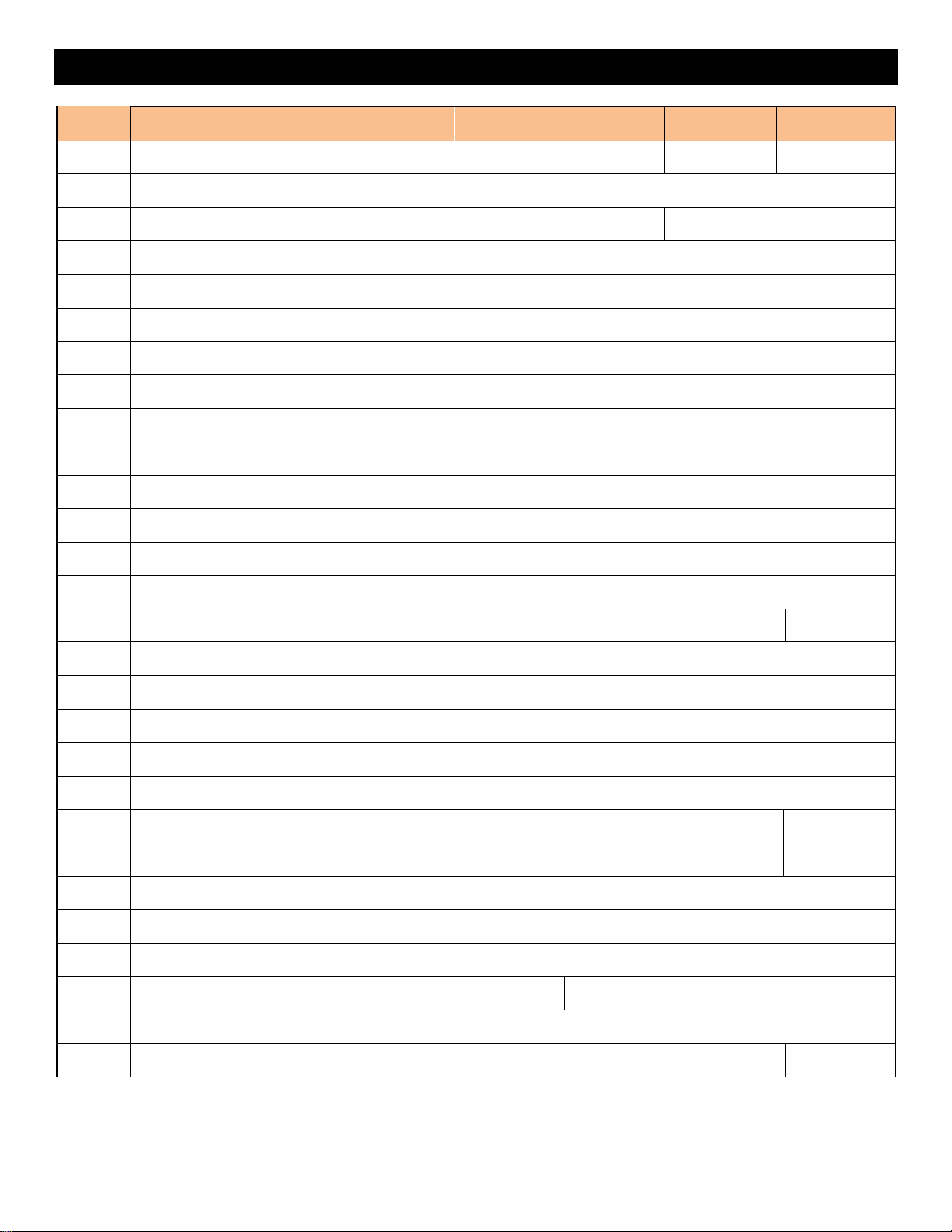
Replacement Parts List
REF.
SPARE PARTS, PART NUMBERS
OR52-Slim
OR60-Slim
OR76-Slim
OR100-Slim
1
Virtual Screen Back Plate
02-00496
02-00497
02-00498
02-00499
2
Virtual Screen
01-00100
3
Middle Virtual Support
02-00493
4
Top Virtual Support
02-00492
5
Bottom Virtual Support
02-00491
6
Side Virtual Support
02-00494
7
Touch-on Control Panel
01-00109
8
Mirror Glass, Displays
04-00038
04-00039
04-00040
04-00041
9
Bottom Glass Bracket
02-00474
02-00475
02-00476
02-00477
10
LED Downlight Bracket
02-00487
02-00488
02-00489
02-00490
11
Front Glass
04-00034
04-00035
04-00036
04-00037
12
Top Glass Bracket
02-00478
02-00479
02-00480
02-00481
13
Ember Bed Bracket
02-00482
02-00483
02-00484
02-00485
14
Interior Wall
02-00495
15
Touch-on Control Bracket
02-00486
16
Acrylic Ember Bed
03-00075
03-00076
03-00077
03-00078
17
Trim
02-00470
02-00471
02-00472
02-00473
18
LED Downlight Strip
01-00119
19
USB Receiver
01-00112
20
Main Power Switch
01-00113
21
LED Ember Bed Strip
01-00117
22
Internal Power Plate
02-00502
23
External Power Plate
02-00503
24
Side Skirt
02-00500
25
Processor Board
01-00103
26
Virtual Screen Drive Board
01-00101
27
Virtual Breakout Board
01-00102
28
Blower
01-00116
29
Heater Mount
02-00501
30
Speaker
01-00111
38
https://www.modernflames.com
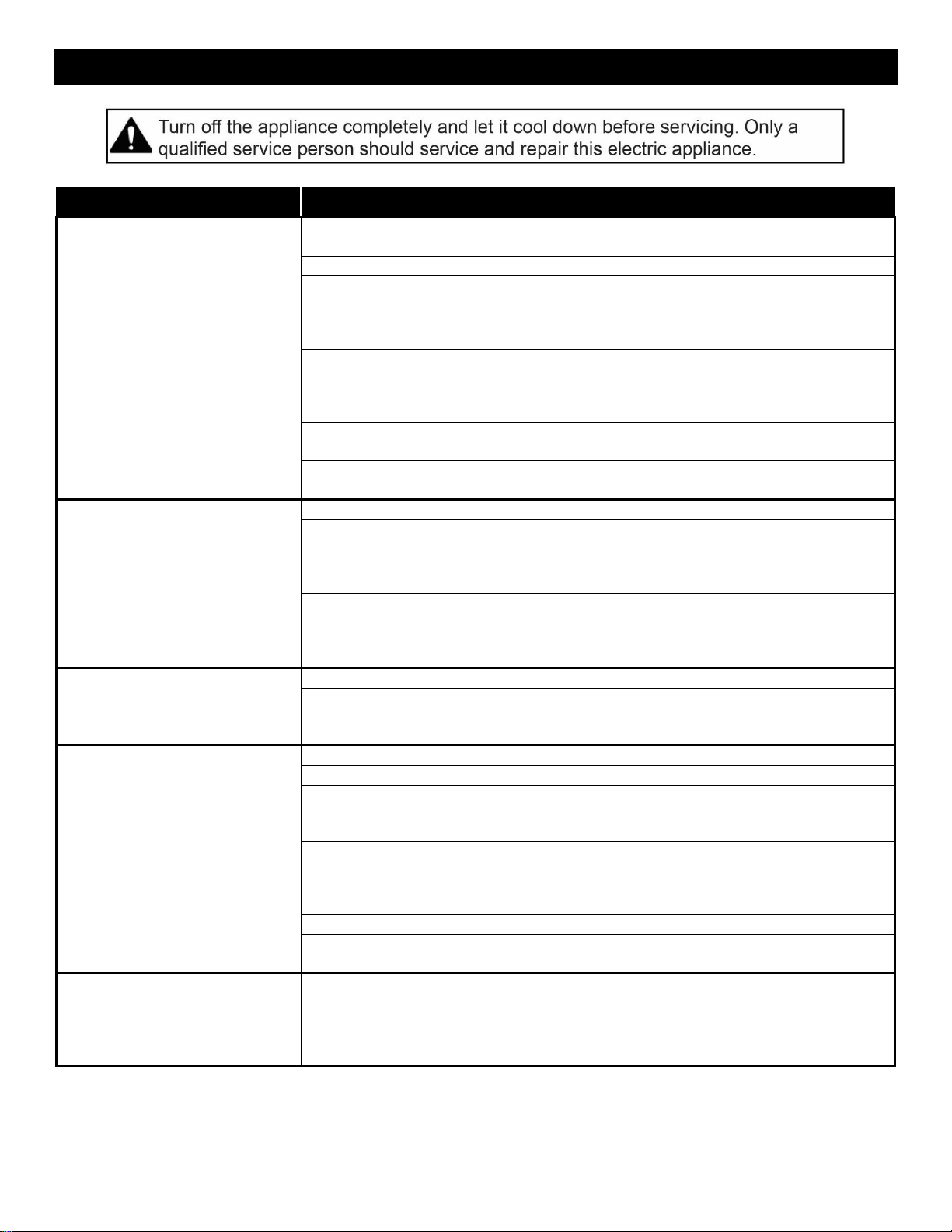
Replacement Parts List (Continued)
REF.
SPARE PARTS, PART NUMBERS
OR52-Slim
OR60-Slim
OR76-Slim
OR100-Slim
31
Wall Bracket (Rear)
02-00400
02-00401
02-00402
02-00403
32
Main Circuit Board
01-00106
33
Power Board
01-00104
01-00105
34
Thermostat
01-00121
35
Speaker Board
01-00107
36
Heater
01-00115
37
Remote
01-00110
38
Smoked Crushed Glass
04-00042
39
Hardware Kit
09-00007
40
Power Cord
01-00118
41
Memory Stick
01-00122
42
Log, Orion, 1
05-00065
43
Log, Orion, 2
05-00066
44
Log, Orion, 3
05-00067
45
Log, Orion, 4
N/A
05-00068
46
Log, Orion, 5
05-00069
47
Log, Orion, 6
05-00070
48
Log, Orion, 7
N/A
05-00071
49
Log, Orion, 8
05-00072
50
Log, Orion, 9
05-00073
51
Log, Orion, 10
N/A
05-00074
52
Log, Orion, 11
N/A
05-00075
53
Log, Orion, 12
N/A
05-00076
54
Log, Orion, 13
N/A
05-00077
55
Log, Orion, 14
05-00078
56
Log, Orion, 15
N/A
05-00079
57
Log, Orion, 16
N/A
05-00080
58
Log, Orion, 18
N/A
05-00082
39
https://www.modernflames.com
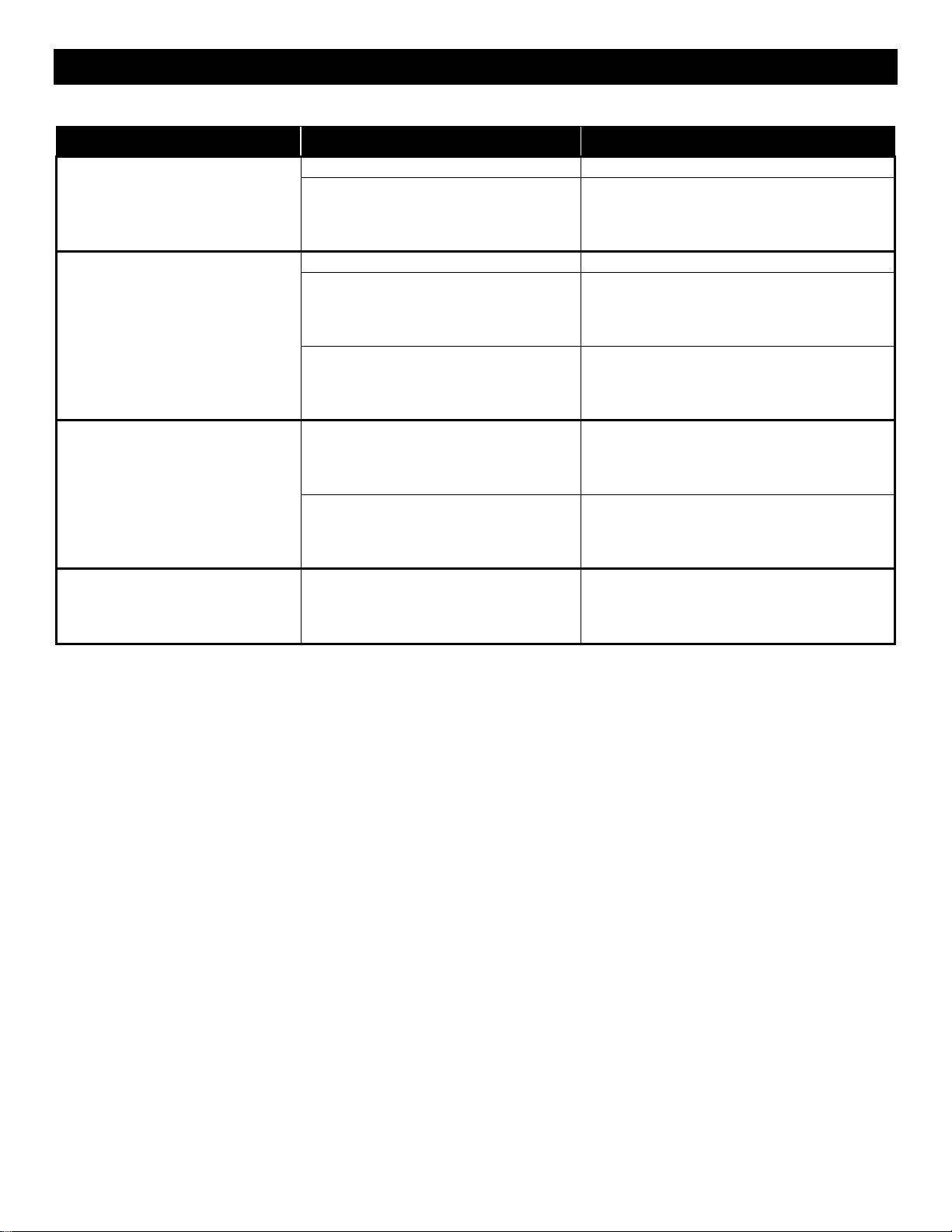
Troubleshooting / FAQ
Symptom
Problem
Solution
Fireplace will not come on when
power button/switch is put into
the ON position.
Appliance is not plugged into an
electrical outlet.
Check plug. Plug in the fireplace if
necessary.
Hardwire connections are not correct.
See “Hardwiring Installation” section.
Appliance has overheated and the
safety thermal switch has been
tripped.
Unplug power or turn off the circuit
breaker. Allow fireplace to cool for 15
minutes and then plug in the fireplace or
turn the breaker back on.
Main PCB board issue.
Inspect circuit boards for loose
connections or obvious damage. Call
Modern Flames Customer Service for
support (1-877-246-9353)
Fireplace has not fully turned on.
Allow 20-30 seconds for the fireplace to
fully turn on.
House circuit breaker not in “ON”
position.
Inspect circuit breaker. Turn breaker to
“ON” position.
Fireplace turns off and will not
turn on.
House circuit breaker has tripped.
Reset the house circuit breaker.
Fireplace’s fuse has blown.
Inspect circuit boards for loose
connections or obvious damage. Call
Modern Flames Customer Service for
support (1-877-246-9353)
Fireplace has overheated and the
safety thermal switch has tripped.
Unplug power or turn off the circuit
breaker. Allow fireplace to cool for 15
minutes and then plug in the fireplace or
turn the breaker back on.
Remote control does not work.
Low/dead batteries.
Replace the batteries in the remote control.
Remote receiver malfunction.
Ensure the remote receiver is not blocked.
Replace touch-on control panel if
necessary.
No warm air coming out of the
fireplace.
Heater setting is not selected.
See “Operation” section.
Heater has been locked out.
See “Operation” section.
Room temperature is higher than
fireplace setting (if not set to room
temperature).
Reset temperature setting.
Fireplace has overheated and safety
thermal switch has tripped.
Unplug power or turn off the circuit
breaker. Allow fireplace to cool for 15
minutes and then plug in the fireplace or
turn the breaker back on.
Hardwire connections are not correct.
See “Hardwiring Installation” section.
Heater issue.
Inspect the blower and heater. Replace if
necessary.
Heater shuts off automatically.
Room is too warm.
The heater has a built-in thermostat. It will
shut off automatically once the pre-set
temperature has been reached. It will turn
on automatically if the room temperature
drops below the pre-set temperature.
40
https://www.modernflames.com
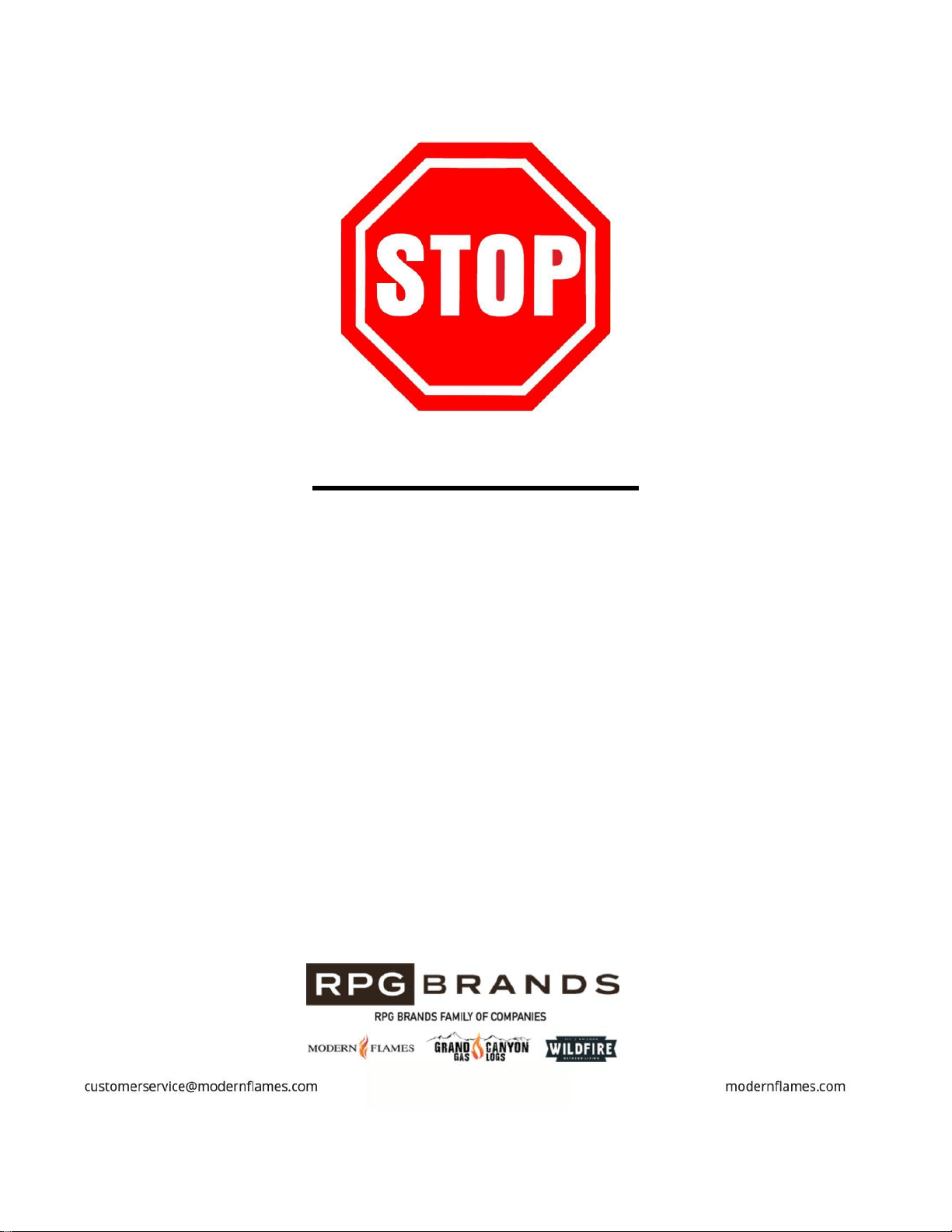
Troubleshooting / FAQ (Continued)
Symptom
Problem
Solution
Dim or no flame.
Flame LCD issue.
Inspect the LCD and replace if necessary.
Main PCB board issue.
Inspect circuit boards for loose
connections or obvious damage. Call
Modern Flames Customer Service for
support (1-877-246-9353)
Ember bed is dim or not glowing.
Brightness is not selected.
See “Operation” section.
Ember bed LED issue.
Inspect circuit boards for loose
connections or obvious damage. Call
Modern Flames Customer Service for
support (1-877-246-9353)
Main PCB board issue.
Inspect circuit boards for loose
connections or obvious damage. Call
Modern Flames Customer Service for
support (1-877-246-9353)
No difference from setting H1 to
H2.
Main PCB board issues.
Inspect circuit boards for loose
connections or obvious damage. Call
Modern Flames Customer Service for
support (1-877-246-9353)
Heating element issue.
Inspect circuit boards for loose
connections or obvious damage. Call
Modern Flames Customer Service for
support (1-877-246-9353)
Error code “E1”
Thermostat issue.
Inspect circuit boards for loose
connections or obvious damage. Call
Modern Flames Customer Service for
support (1-877-246-9353)
41
https://www.modernflames.com
DO NOT RETURN TO STORE!
CALL US FIRST
For immediate help with installation, product information or if your product
arrives damaged, please call our toll-free number at:
1-877-246-9353
(Monday – Friday, 8:00AM – 5:00PM, AZ Mountain Time)
Or email us at:
customerservice@modernflames.com
OUR STAFF IS READY TO PROVIDE ASSISTANCE