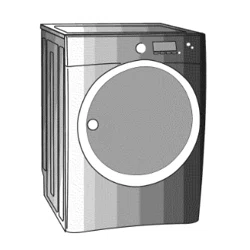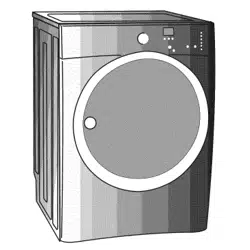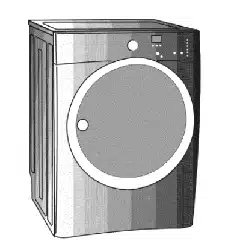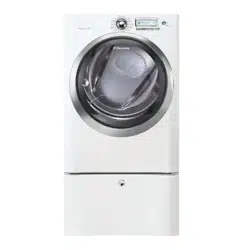
Use _ Care Guide
_Q-Touch TMFro_3t-Load Gas _ Electric [)_y'er
Guide d'utilisation et d'entretien
S_cheuse 5 gaz et 5 ]_]ectr_cit_ 5 chargeme_3t fro_3ta] _Q-Touch Mc
Guia de Uso y Cuidado
Secadora eKctr_ca y a gas de carga fro_3ta] _Q-Touch Mc
Finding Information
Please read and save this guide
Thank you for choosing Electrolux, the new premium brand in home appliances. This Use & Care Guide
is part of our commitment to customer satisfaction and product quality throughout the life of your new
appliance.
We view your purchase as the beginning of a relationship. To ensure our ability to continue serving you,
please use this page to record important product information.
Keep a record for quick reference
Purchase date
Electrolux model number
Electrolux serial number
For toll-free telephone support in the U.S. and Canada: 1-877-4ELECTROLUX {1-877-435-3287)
For online support and product information visit http://www.electroluxappliances.com
Table of contents
Finding information ......................................................... 2
SAFETY ..................................................................... 3-5
Features .......................................................................... 6
Operating instructions ............................................... 7-18
• Getting Started ........................................................... 7
Normal Operating Sounds .......................................... 7
Operating Your Dryer ............................................... 8-9
Cycle Selection .................................................... 10-12
Drying Temperature .................................................. 13
Dryness Level ........................................................... 14
Options ................................................................ 15-16
Dryer Features .......................................................... 17
Dryer Settings Chart ................................................. 18
Care & Cleaning ............................................................ 19
Solutions to Common Problems ............................. 20-21
Common Drying Problems ....................................... 20
Service Prevention Checklist .................................... 21
Warranty information .................................................... 22
©2008 Electrolux Major Appliances All rights reserved.
Safety
ImpoAant Safety Instructions
Recognize safety symbols, words and
labels
Your safety and the safety of others is very
important.
We have provided many important safety
messages in the Use and Care Guide, Installation
Instructions and on your appliance. Always read
and obey all safety messages.
Safety items throughout this manual are labeled
with a WARNING or CAUTION based on the risk
type as described below:
ik WARNING This symbol alerts you to situa-
tions that may cause serious body
harm, death or property damage.
/_k CAUTION This symbol alerts you to situa-
tions that may cause bodily injury
or property damage.
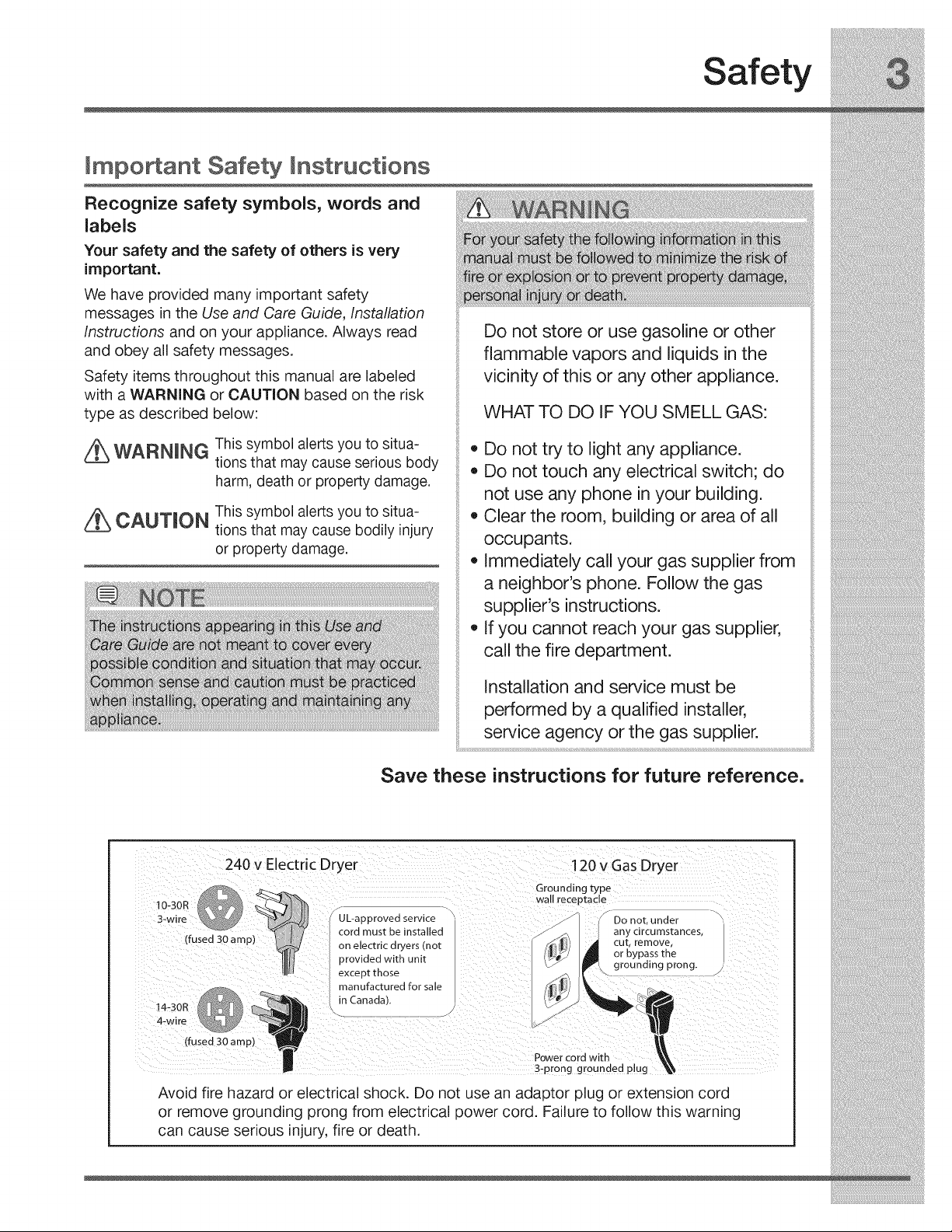
Do not store or use gasoline or other
flammable vapors and liquids in the
vicinity of this or any other appliance.
WHAT TO DO IF YOU SMELL GAS:
,, Do not try to light any appliance.
,, Do not touch any electrical switch; do
not use any phone in your building.
,, Clear the room, building or area of all
occupants.
,, Immediately call your gas supplier from
a neighbor's phone. Follow the gas
supplier's instructions.
,, If you cannot reach your gas supplier,
call the fire department.
Installation and service must be
performed by a qualified installer,
service agency or the gas supplier.
Save these instructions for future reference.
240 v Electric Dryer
I0-30R I_ _
3-wire
(fused 30 amp)
14-30R
4-wire
120 v Gas Dryer
(fused 30 amp)
Grounding type
wall receptacle
UL-approved service Do no[. under
any circumstances,
cord must be installed _
on electric dryers [no[ _/-_i[_.J cUt,orbypassrem°ve'the
provided with unit
except those ,,_'_'_q grounding
prong.
manufactured for sale
in Canada], _j
L_
Power cord with
3-prong grounded plug
Avoid fire hazard or electrical shock. Do not use an adaptor plug or extension cord
or remove grounding prong from electrical power cord. Failure to follow this warning
can cause serious injury, fire or death.
Safety
PREVENT FiRE
• Do not dry items that have been previously
cleaned in, soaked in, or spotted with gasoline,
cleaning solvents, kerosene, waxes, etc. Do not
store these items on or near the dryer. These
substances give off vapors that could ignite or
explode.
Do not place items exposed to cooking oils in
your dryer. Items contaminated with cooking oils
may contribute to a chemical reaction that could
cause a load to catch fire.
Do not dry articles containing rubber, plastic
or similar materials such as bras, galoshes,
bath mats, rugs, bibs, baby pants, plastic bags
and pillows that may melt or burn. Some rub-
ber materials, when heated, can under certain
circumstances produce fire by spontaneous
combustion.
Clean the lint screen before or after each load.
The interior of the dryer, lint screen housing and
exhaust duct should be cleaned approximately
every 18 months by qualified service personnel.
An excessive amount of lint build-up in these ar-
eas could result in inefficient drying and possible
fire. See Care and Cleaning.
• Do not operate the dryer if the lint screen is
blocked, damaged or missing. Fire hazard, over-
heating and damage to fabrics can occur.
Do not obstruct the flow of ventilating air. Do not
stack or place laundry or throw rugs against the
front or back of the dryer.
Do not spray any type of aerosol into, on or near
dryer at any time.
Do not use fabric softeners or products to elimi-
nate static unless recommended by the manu-
facturer of the fabric softener or product.
Do not continue to use the dryer if you hear
squeaking, grinding, rubbing or other unusual
noises. This could be a sign of mechanical
breakdown and lead to fire or serious injury.
Contact a qualified technician immediately.
Failure to comply with these warnings could
result in fire, explosion, serious bodily injury and/
or damage to the rubber or plastic parts of the
dryer.
PROTECT CHILDREN
Do not allow children to play on or in the dryer.
Close supervision of children is necessary when
the dryer is used near children. As children grow,
teach them the proper, safe use of all appliances.
Destroy the carton, plastic bag and other pack-
ing materials after the dryer is unpacked. Chil-
dren might use them for play. Cartons covered
with rugs, bedspreads or plastic sheets can
become airtight chambers.
Keep laundry products out of children's reach.
To prevent personal injury, observe all warnings
on product labels.
Before the dryer is removed from service or
discarded, remove the dryer door to prevent ac-
cidental entrapment.
Failure to comply with these warnings could
result in serious personal injuries.
Safety
important Safety instructions, continued
PREVENTINJURY
*To prevent shock hazard and assure stability
during operation, the dryer must be installed
and electrically grounded by a qualified service
person in accordance with local codes. Installa-
tion instructions are packed in the dryer for the
installer's reference. Refer to INSTALLATION
INSTRUCTIONS for detailed grounding proce-
dures. If the dryer is moved to a new location,
have it checked and reinstalled by a qualified
service person.
*To prevent personal injury or damage to the
dryer, the electrical power cord of a gas dryer
must be plugged into a properly grounded and
polarized 3-prong outlet. The third grounding
prong must never be removed. Never ground
the dryer to a gas pipe. Do not use an extension
cord or an adaptor plug.
*ALWAYS disconnect the dryer from the electrical
supply before attempting any service or clean-
ing. Failure to do so can result in electrical shock
or injury.
*Do not use any type spray cleanser when clean-
ing dryer interior. Hazardous fumes or electrical
shock could occur.
•To prevent injury,do not reach into the dryer
if the drum is moving. Wait until the dryer has
stopped completely before reaching into the
drum.
PREVENT iNJURY AND DAMAGE TO THE
DRYER
®
®
All repairs and servicing must be performed by
an authorized servicer unless specifically rec-
ommended in this Use & Care Guide. Use only
authorized factory parts.
Do not tamper with controls.
Do not install or store the dryer where it will be
exposed to the weather.
A thermal limiter switch automatically turns off
the motor in the unlikely event of an overheated
situation (electric dryers only). A service techni-
cian must replace the thermal limiter switch after
correcting the fault.
Failure to comply with these warnings could
result in serious personal injuries.

Touch=2=OpenTM
Cycle Selector LCD Display
Control Lock
Dual Stage,
Wide-Angle
Door Hinge
Theater=Style,
Luxury=LightingTM
ystem
Large Surface
Moisture Sensor
Door Strike
Reversible,
Open TM
Door System
/---
ExhaustChannel
Outlet
Gentle Tumble
Drying System
Touch-2=Open T_
Door Latch
Adjustable
Leveling Legs
Lint
Stacking Kit for Mounting
on Matching Washer
Touch.2.OpenTM
Latch Indicator
Collapsible
Drying Rack
Operating instructions
Getting Started
normal casual
towels _ c C_(_) fast
,dry
mixed _[_O O I_ delicate
Joad
heavy _ _ C _-_- touch
duty _' up
bulky/ _o _ time
bedding dry
,@
my time control
favorite dry lock
Temperature Dryness Options
O high
@ medium/high () max
O medium @ normal
C> low © less
© air O damp
add stearn _
1_) sanitize
This manual covers many models and not all cycles, options, or features listed are available on every model. Console shown
above for reference only. Your model may differ.
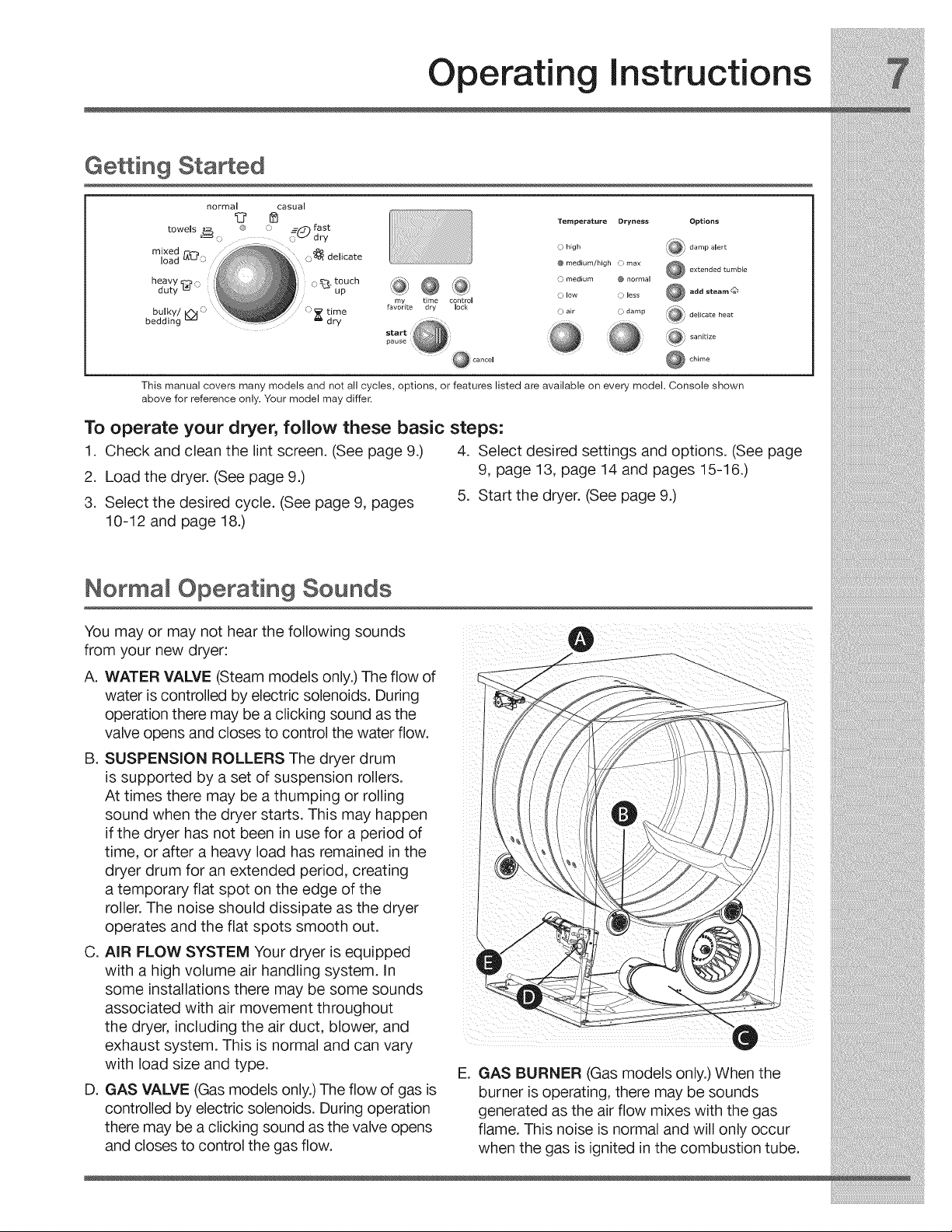
To operate your dryer, follow these basic steps:
1. Check and clean the lint screen. (See page 9.) 4. Select desired settings and options. (See page
2. Load the dryer. (See page 9.) 9, page 13, page 14 and pages 15-16.)
5. Start the dryer. (See page 9.)
3. Select the desired cycle. (See page 9, pages
10-12 and page 18.)
Normal Operating Sounds
You may or may not hear the following sounds
from your new dryer: O
A. WATER VALVE (Steam models only.) The flow of
water is controlled by electric solenoids. During
operation there may be a clicking sound as the
valve opens and closes to control the water flow.
B. SUSPENSION ROLLERS The dryer drum
is supported by a set of suspension rollers.
At times there may be a thumping or rolling
sound when the dryer starts. This may happen
if the dryer has not been in use for a period of
time, or after a heavy load has remained inthe
dryer drum for an extended period, creating
a temporary flat spot on the edge of the
roller. The noise should dissipate as the dryer
operates and the flat spots smooth out. f
k
C. AIR FLOW SYSTEM Your dryer is equipped
with a high volume air handling system. In
some installations there may be some sounds
associated with air movement throughout
the dryer, including the air duct, blower, and
exhaust system. This is normal and can vary
with load size and type.
D. GAS VALVE (Gas models only.) The flow of gas is
controlled by electric solenoids. During operation
there may be a clicking sound as the valve opens
and closes to control the gas flow.
E. GAS BURNER (Gas models only.) When the
burner is operating, there may be sounds
generated as the air flow mixes with the gas
flame. This noise is normal and will only occur
when the gas is ignited inthe combustion tube.
Operatin instructions
Operating Your Dryer
BEFORE USING YOUR DRYER
Read the important instructions in this section of
the Use and Care Guide before operating your
dryer.
OPERATING YOUR DRYER
1. Prepare load for drying.
Dry items of similar fabric, weight and con-
struction in the same load.
Separate dark items from light-colored items.
Separate items that shed lint from those that
attract lint.
=
3.
Check for stains which may not have been
removed in washing. Repeat stain removal
process and wash again before drying. Dryer
heat may permanently set some stains.
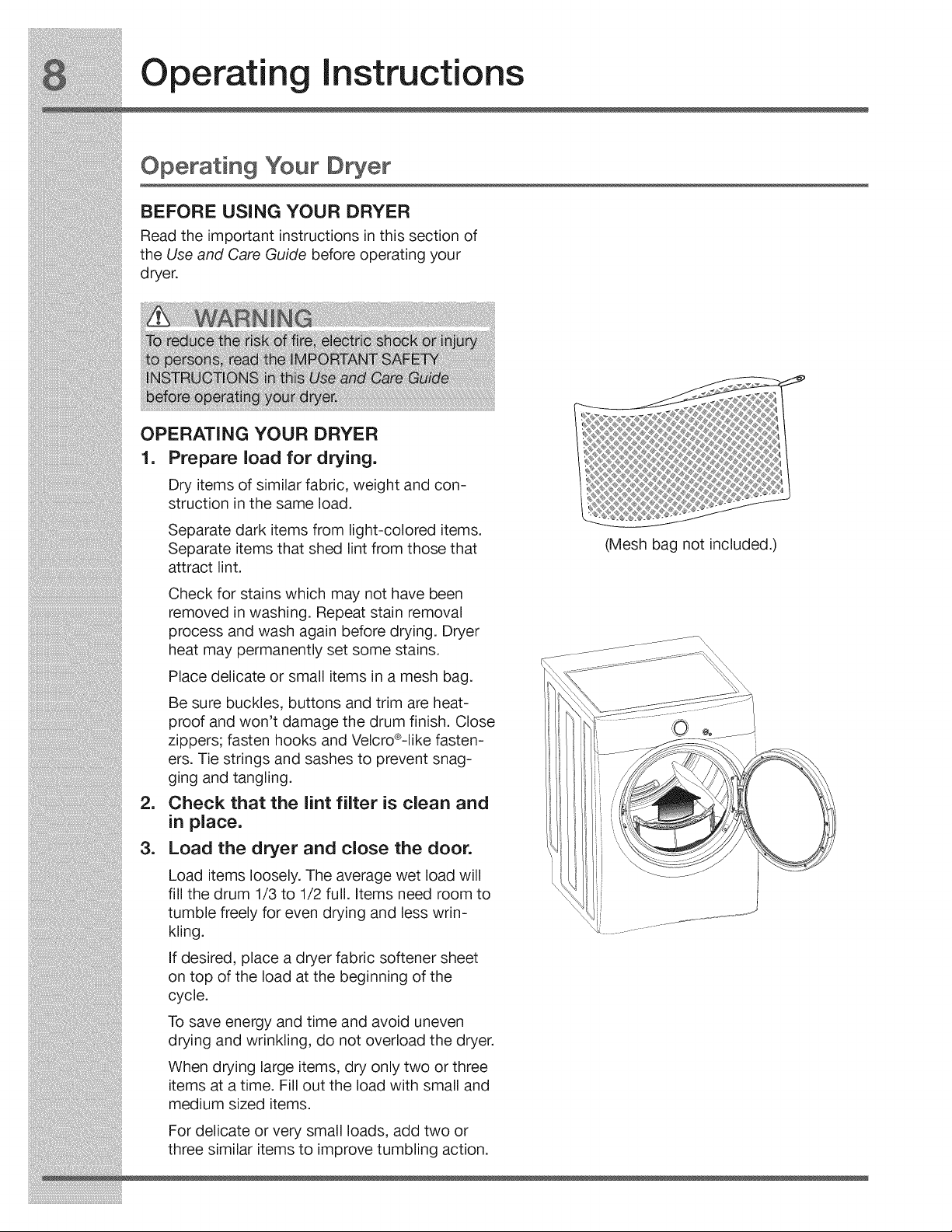
Place delicate or small items in a mesh bag.
Be sure buckles, buttons and trim are heat-
proof and won't damage the drum finish. Close
zippers; fasten hooks and Velcro®-Iike fasten-
ers. Tie strings and sashes to prevent snag-
ging and tangling.
Check that the lint filter is clean and
in place.
Load the dryer and close the door.
Load items loosely. The average wet load will
fill the drum 1/3 to 1/2 full. items need room to
tumble freely for even drying and less wrin-
kling.
If desired, place a dryer fabric softener sheet
on top of the load at the beginning of the
cycle.
To save energy and time and avoid uneven
drying and wrinkling, do not overload the dryer.
When drying large items, dry only two or three
items at a time. Fill out the load with small and
medium sized items.
For delicate or very small loads, add two or
three similar items to improve tumbling action.
Mesh bag not included.)
Operating Instructions
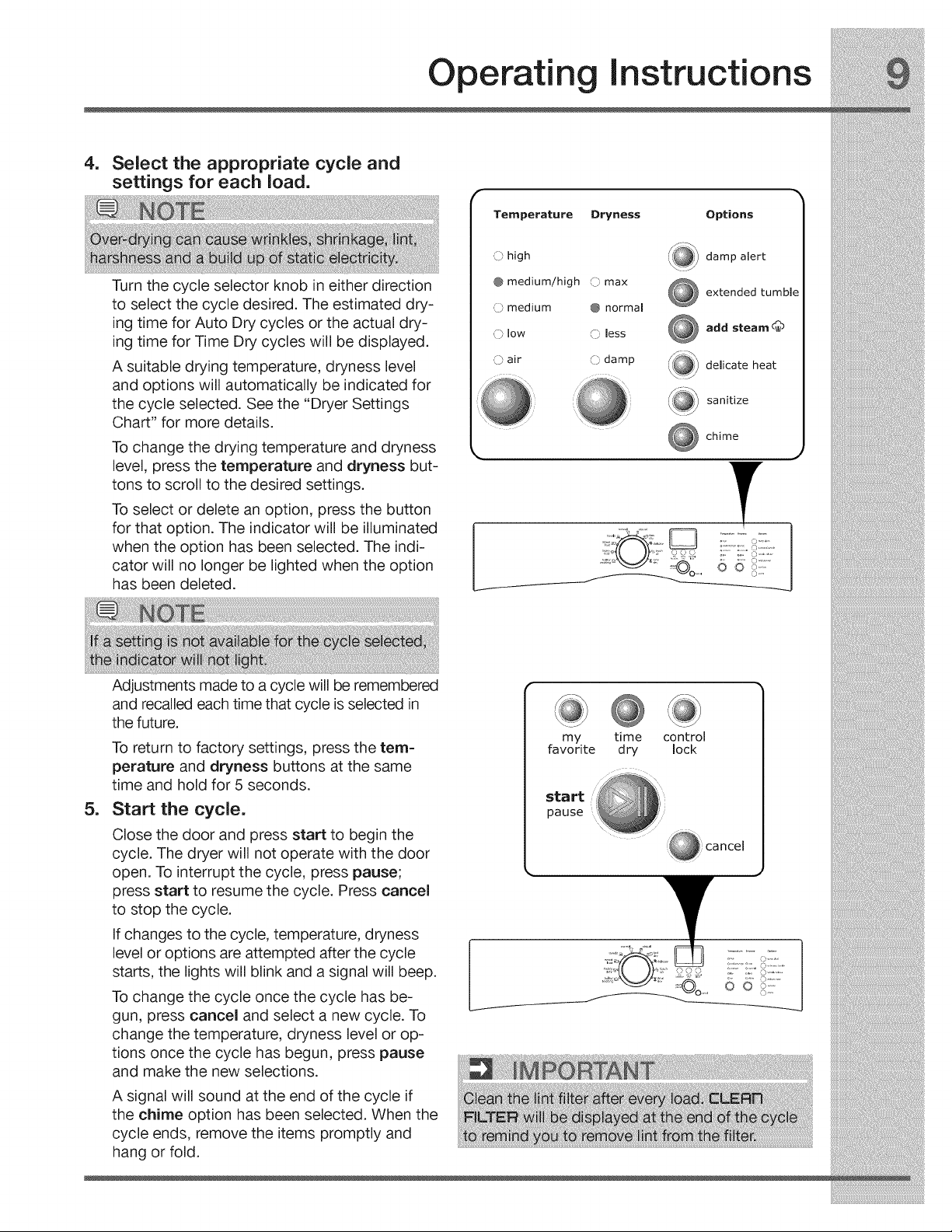
.Select the appropriate cycle and
settings for each load.
Turn the cycle selector knob in either direction
to select the cycle desired. The estimated dry-
ing time for Auto Dry cycles or the actual dry-
ing time for Time Dry cycles will be displayed.
A suitable drying temperature, dryness level
and options will automatically be indicated for
the cycle selected. See the "Dryer Settings
Chart" for more details.
To change the drying temperature and dryness
level, press the temperature and dryness but-
tons to scroll to the desired settings.
To select or delete an option, press the button
for that option. The indicator will be illuminated
when the option has been selected. The indi-
cator will no longer be lighted when the option
has been deleted.
Temperature Dryness Options
O high
@ medium/high O max
O medium @ normal
() low C) less
O air O damp
,_ damp alert
extended tumble
add steam d_
delicate heat
sanitize
chime
::;'02..... !if:
.
Adjustments made to a cycle will be remembered
and recalled each time that cycle is selected in
the future.
To return to factory settings, press the tern=
perature and dryness buttons at the same
time and hold for 5 seconds.
Start the cycle.
Close the door and press start to begin the
cycle. The dryer will not operate with the door
open. To interrupt the cycle, press pause;
press start to resume the cycle. Press cancel
to stop the cycle.
If changes to the cycle, temperature, dryness
level or options are attempted after the cycle
starts, the lights will blink and a signal will beep.
To change the cycle once the cycle has be-
gun, press cancel and select a new cycle. To
change the temperature, dryness level or op-
tions once the cycle has begun, press pause
and make the new selections.
A signal will sound at the end of the cycle if
the chime option has been selected. When the
cycle ends, remove the items promptly and
hang or fold.
my time control
favorite dry lock
start
pause
Operatin Instructions
Cycle Selection
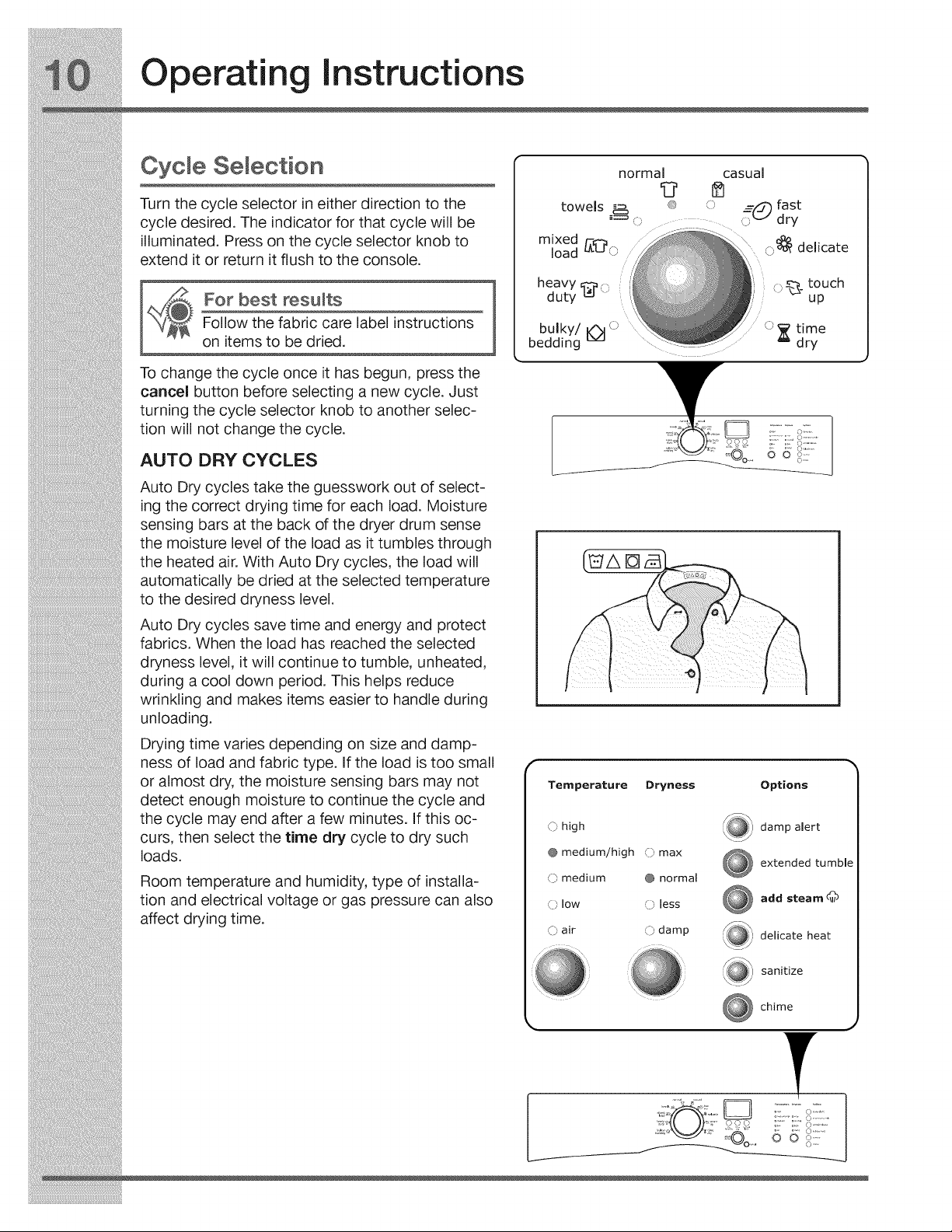
Turn the cycle selector in either direction to the
cycle desired. The indicator for that cycle will be
illuminated. Press on the cycle selector knob to
extend it or return it flush to the console.
For best results
Follow the fabric care label instructions
on items to be dried.
To change the cycle once it has begun, press the
cancel button before selecting a new cycle. Just
turning the cycle selector knob to another selec-
tion will not change the cycle.
AUTO DRY CYCLES
Auto Dry cycles take the guesswork out of select-
ing the correct drying time for each load. Moisture
sensing bars at the back of the dryer drum sense
the moisture level of the load as it tumbles through
the heated air. With Auto Dry cycles, the load will
automatically be dried at the selected temperature
to the desired dryness level.
Auto Dry cycles save time and energy and protect
fabrics. When the load has reached the selected
dryness level, it will continue to tumble, unheated,
during a cool down period. This helps reduce
wrinkling and makes items easier to handle during
unloading.
Drying time varies depending on size and damp-
ness of load and fabric type. If the load is too small
or almost dry, the moisture sensing bars may not
detect enough moisture to continue the cycle and
the cycle may end after a few minutes. If this oc-
curs, then select the time dry cycle to dry such
loads.
Room temperature and humidity, type of installa-
tion and electrical voltage or gas pressure can also
affect drying time.
casual
o
rh
bulky/_ '_
bedding
l
Temperature Dryness
O high
@ medium/high () max
O medium @ normal
O low O less
O air O damp
Options
damp alert
extended tumble
add steam
delicate heat
sanitize
chime
J
' i_©o 6 6 _::::::
Operating instructions
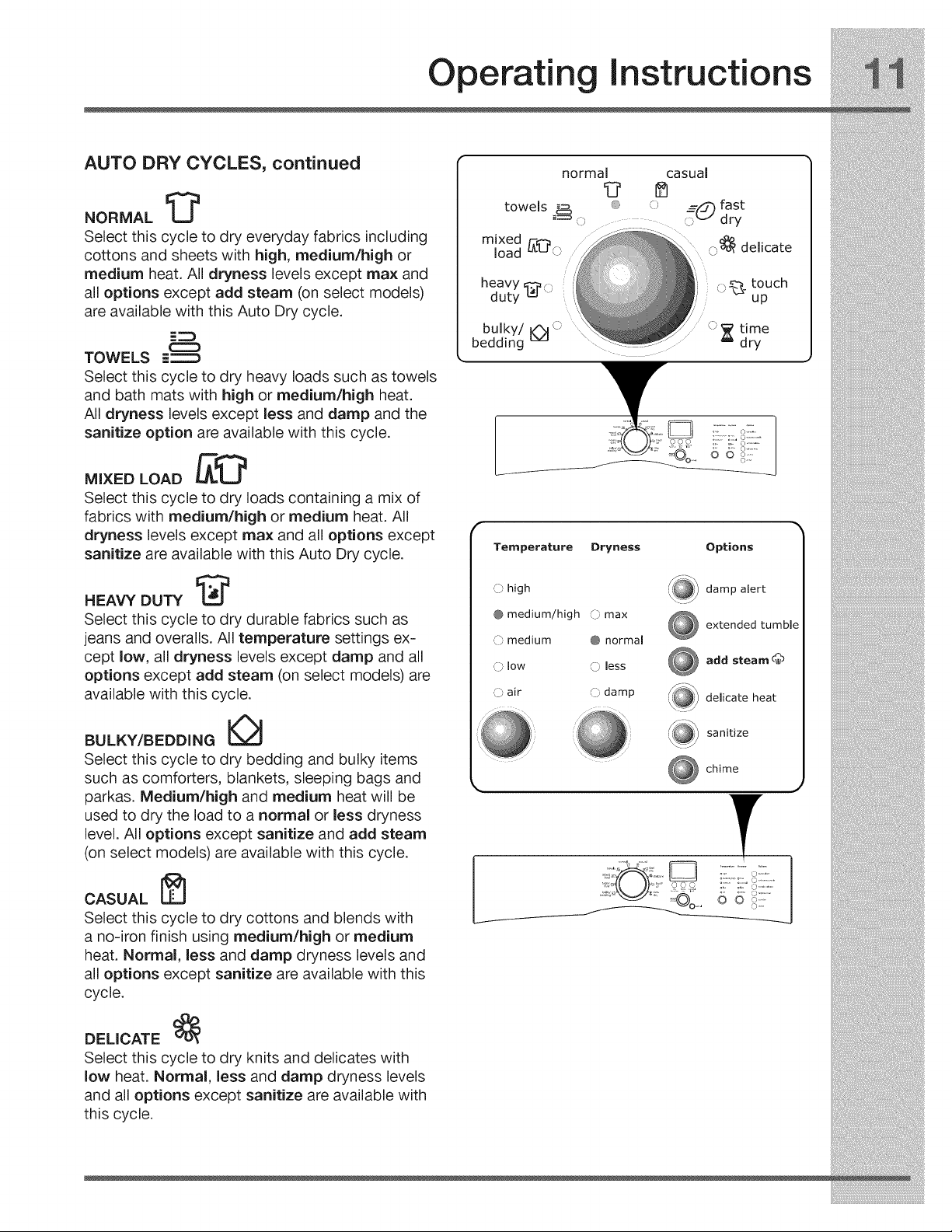
AUTO DRY CYCLES, continued
NORMAL I_
Select this cycle to dry everyday fabrics including
cottons and sheets with high, medium/high or
medium heat. All dryness levels except max and
all options except add steam (on select models)
are available with this Auto Dry cycle.
TOWELS E_
Select this cycle to dry heavy loads such as towels
and bath mats with high or medium/high heat.
All dryness levels except less and damp and the
sanitize option are available with this cycle.
MIXED LOAD _1:_
Select this cycle to dry loads containing a mix of
fabrics with medium/high or medium heat. All
dryness levels except max and all options except
sanitize are available with this Auto Dry cycle.
HEAVY DUTY I:_
Select this cycle to dry durable fabrics such as
jeans and overalls. All temperature settings ex-
cept low, all dryness levels except damp and all
options except add steam (on select models) are
available with this cycle.
BULKY/BEDDING
Select this cycle to dry bedding and bulky items
such as comforters, blankets, sleeping bags and
parkas. Medium/high and medium heat will be
used to dry the load to a normal or less dryness
level. All options except sanitize and add steam
(on select models) are available with this cycle.
CASUAL [_]
Select this cycle to dry cottons and blends with
a no-iron finish using medium/high or medium
heat. Normal, less and damp dryness levels and
all options except sanitize are available with this
cycle.
DELICATE
Select this cycle to dry knits and delicates with
low heat. Normal, less and damp dryness levels
and all options except sanitize are available with
this cycle.
heavy _ o
duty
bulky/_ o
bedding o _ time
dry
k:'::.........o;'i:
.......... ©...........
o S:
Temperature Dryness
_) high
@ medium/high _:bmax
O medium @ normal
,_ low O less
(_ air O damp
Options
_ damp alert
extended tumble
add steam d_
delicate heat
sanitize
chime
ii::ir:)i::
Operatin Instructions
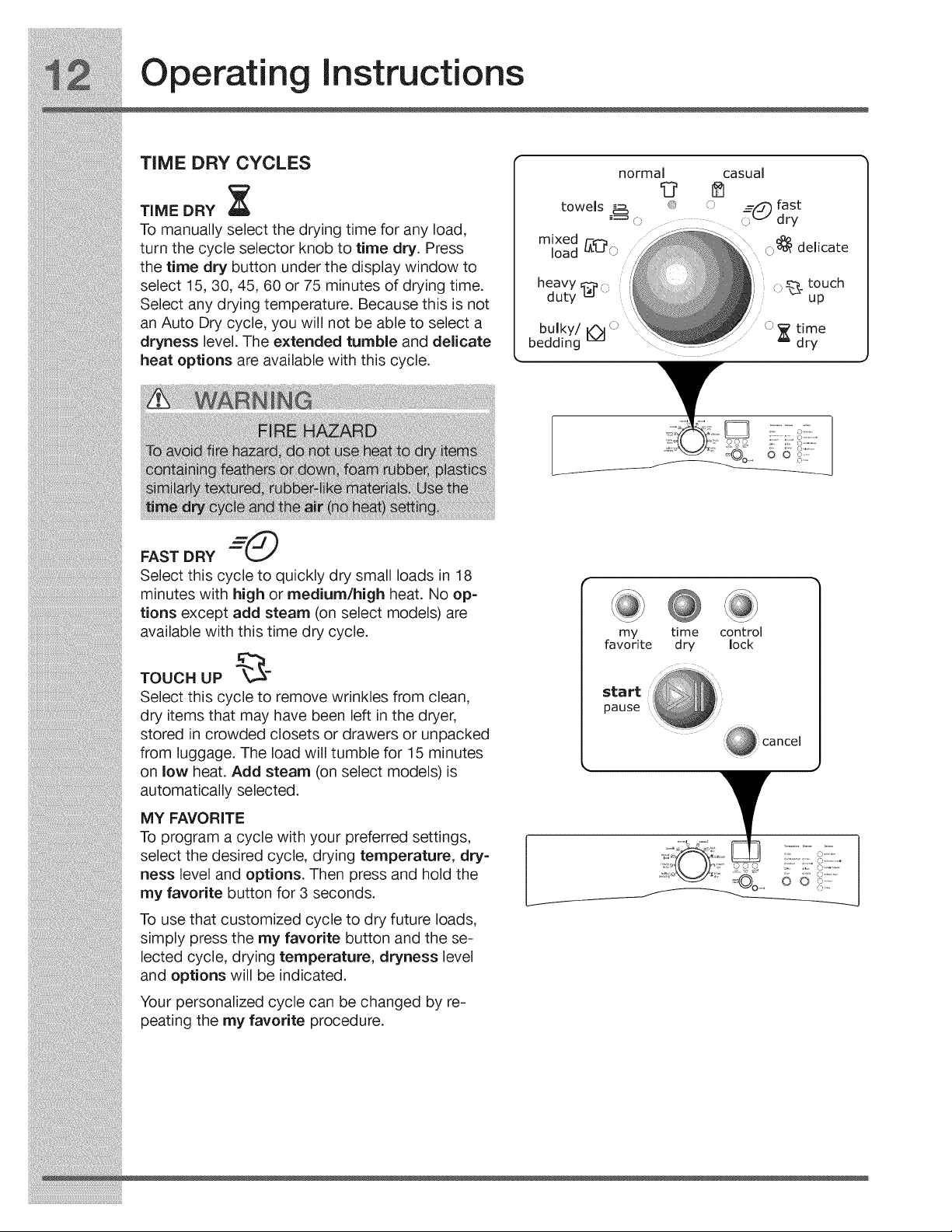
TiME DRY CYCLES
TiME DRY _[
To manually select the drying time for any load,
turn the cycle selector knob to time dry. Press
the time dry button under the display window to
select 15, 30, 45, 60 or 75 minutes of drying time.
Select any drying temperature. Because this is not
an Auto Dry cycle, you will not be able to select a
dryness level. The extended tumble and delicate
heat options are available with this cycle.
heavy
duty _'()
casual
o
rh
bulky/_ '_
bedding
l
FAST DRY "-_O
Select this cycle to quickly dry small loads in 18
minutes with high or medium/high heat. No op-
tions except add steam (on select models) are
available with this time dry cycle.
TOUCH UP _-
Select this cycle to remove wrinkles from clean,
dry items that may have been left in the dryer,
stored in crowded closets or drawers or unpacked
from luggage. The load will tumble for 15 minutes
on low heat. Add steam (on select models)is
automatically selected.
MY FAVORITE
To program a cycle with your preferred settings,
select the desired cycle, drying temperature, dry-
ness level and options. Then press and hold the
my favorite button for 3 seconds.
To use that customized cycle to dry future loads,
simply press the my favorite button and the se-
lected cycle, drying temperature, dryness level
and options will be indicated.
Your personalized cycle can be changed by re-
peating the my favorite procedure.
my time control
favorite dry lock
start
pause
Operating Instructions
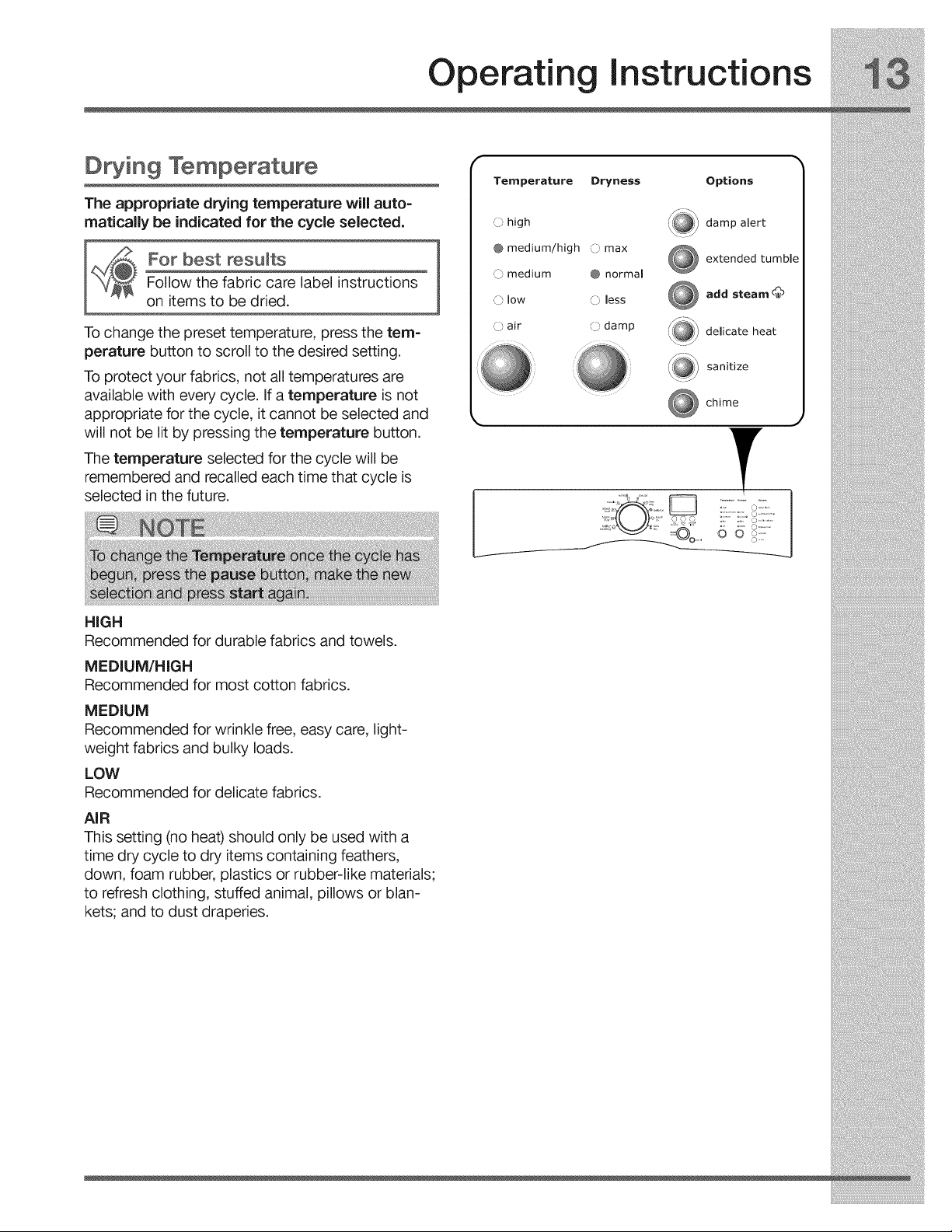
D in9 Temperature
The appropriate drying temperature will auto-
rnaticaliy be indicated for the cycle selected.
For best results
Follow the fabric care label instructions
on items to be dried.
To change the preset temperature, press the tern=
perature button to scroll to the desired setting.
To protect your fabrics, not all temperatures are
available with every cycle. If a temperature is not
appropriate for the cycle, it cannot be selected and
will not be lit by pressing the temperature button.
The temperature selected for the cycle will be
remembered and recalled each time that cycle is
selected in the future.
HiGH
Recommended for durable fabrics and towels.
Temperature Dryness Options
_} high
@medium/high }max
C:} medium @ normal
,_} low C) less
O air O damp
,\_ damp alert
extended tumble
add steam _
delicate heat
sanitize
chime
""_" ;:@_ 6 6 i_i:....
MEDIUM/HIGH
Recommended for most cotton fabrics.
MEDIUM
Recommended for wrinkle free, easy care, light-
weight fabrics and bulky loads.
LOW
Recommended for delicate fabrics.
AiR
This setting (no heat) should only be used with a
time dry cycle to dry items containing feathers,
down, foam rubber, plastics or rubber-like materials;
to refresh clothing, stuffed animal, pillows or blan-
kets; and to dust draperies.
Operatin Instructions
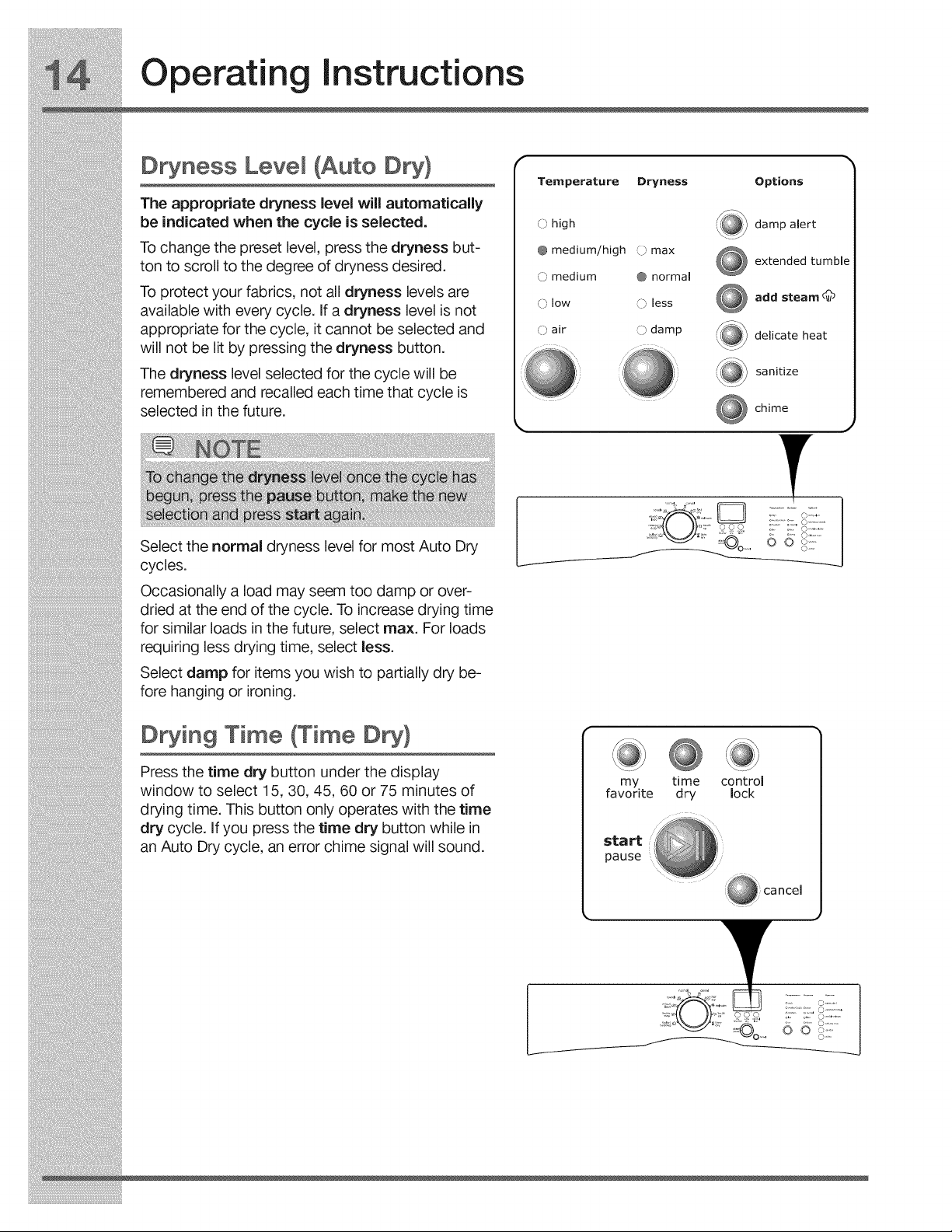
D ness Level (Auto
The appropriate dryness level will automatically
be indicated when the cycle is selected.
To change the preset level, press the dryness but-
ton to scroll to the degree of dryness desired.
To protect your fabrics, not all dryness levels are
available with every cycle. If a dryness level is not
appropriate for the cycle, it cannot be selected and
will not be lit by pressing the dryness button.
The dryness level selected for the cycle will be
remembered and recalled each time that cycle is
selected in the future.
Temperature
@ high
@ medium/high
_ medium
@ low
C)'air
Dryness Options
',_ damp alert
C) max
extended tumble
@ normal
add steam _b
less
£J
0 damp delicate heat
sanitize
chime
Select the normal dryness level for most Auto Dry
cycles.
Occasionally a load may seem too damp or over-
dried at the end of the cycle. To increase drying time
for similar loads in the future, select max. For loads
requiring less drying time, select less.
Select damp for items you wish to partially dry be-
fore hanging or ironing.
D ing Time (Time
Press the time dry button under the display
window to select 15, 30, 45, 60 or 75 minutes of
drying time. This button only operates with the time
dry cycle. If you press the time dry button while in
an Auto Dry cycle, an error chime signal will sound.
my time control
favorite dry lock
start
pause
.... 6 d i!::::
Operating Instructions
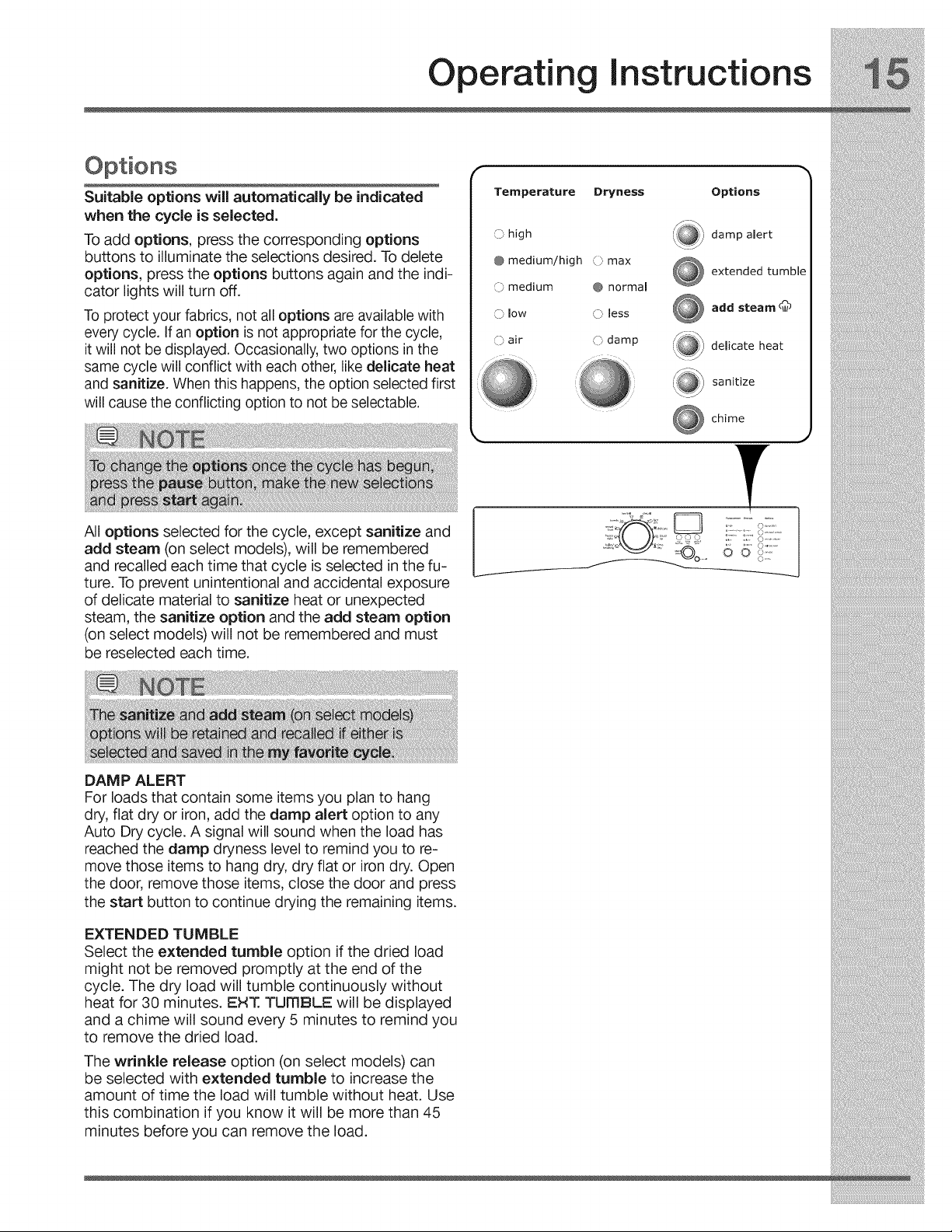
Suitable options will automatically be indicated
when the cycle is selected.
To add options, press the corresponding options
buttons to illuminate the selections desired. To delete
options, press the options buttons again and the indi-
cator lights will turn off.
To protect your fabrics, not all options are available with
every cycle. If an option is not appropriate for the cycle,
it will not be displayed. Occasionally, two options in the
same cycle will conflict with each other, like delicate heat
and sanitize. When this happens, the option selected first
will cause the conflicting option to not be selectable.
All options selected for the cycle, except sanitize and
add steam (on select models), will be remembered
and recalled each time that cycle is selected in the fu-
ture. To prevent unintentional and accidental exposure
of delicate material to sanitize heat or unexpected
steam, the sanitize option and the add steam option
(on select models) will not be remembered and must
be reselected each time.
Temperature Dryness Options
(p high
@ medium/high © max
C)medium @ normal
O low O less
,_:_ damp alert
extended tumble
add steam c_b
r. air
\J
:!@:
.....damp
ks
k.
delicate heat
sanitize
chime
J
DAMP ALERT
For loads that contain some items you plan to hang
dry, flat dry or iron, add the damp alert option to any
Auto Dry cycle. A signal will sound when the load has
reached the damp dryness level to remind you to re-
move those items to hang dry, dry flat or irondry. Open
the door, remove those items, close the door and press
the start button to continue drying the remaining items.
EXTENDED TUMBLE
Select the extended tumble option if the dried load
might not be removed promptly at the end of the
cycle. The dry load will tumble continuously without
heat for 30 minutes. EHT. TumBLE will be displayed
and a chime will sound every 5 minutes to remind you
to remove the dried load.
The wrinkle release option (on select models) can
be selected with extended tumble to increase the
amount of time the load will tumble without heat. Use
this combination if you know it will be more than 45
minutes before you can remove the load.
Operatin Instructions
Options, continued
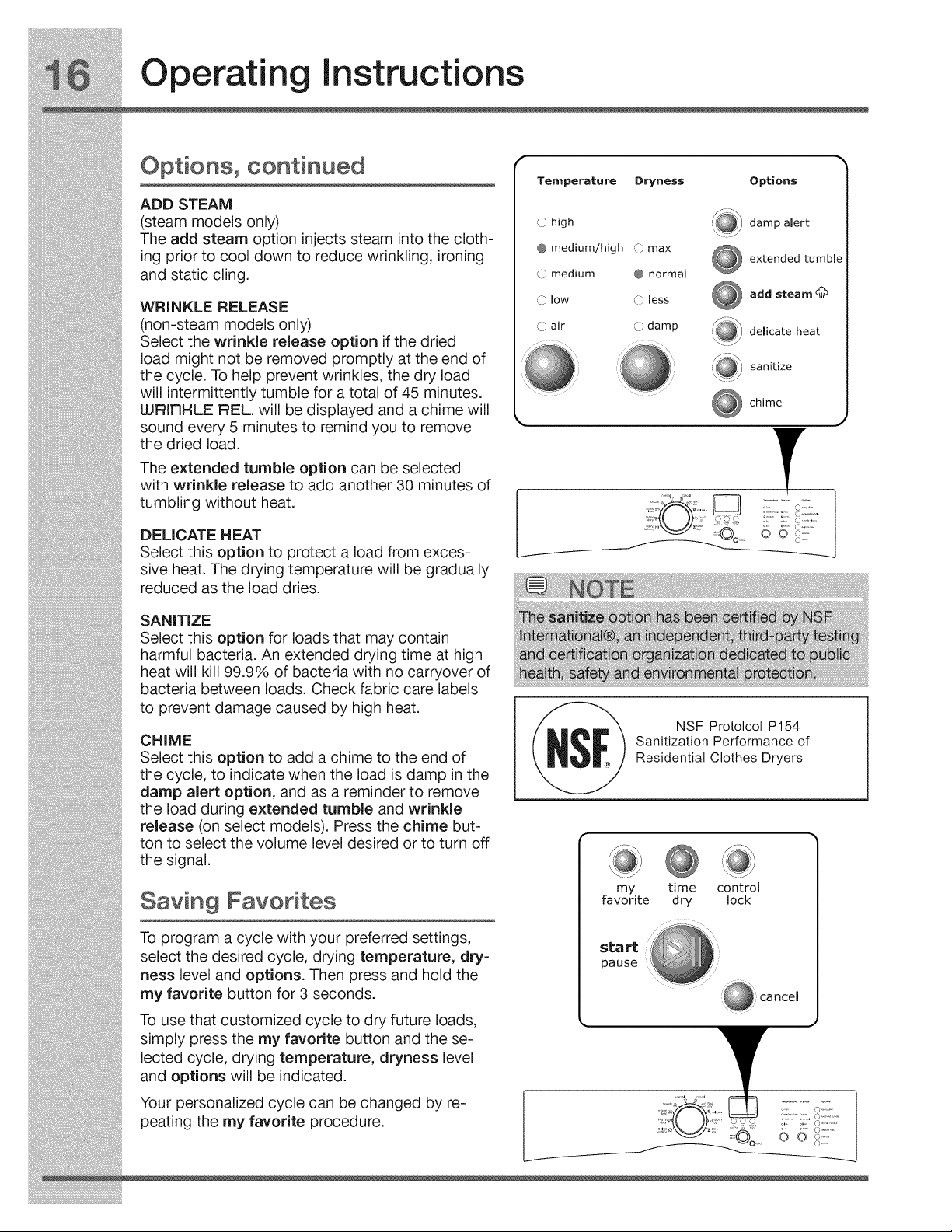
ADD STEAM
(steam models only)
The add steam option injects steam into the cloth-
ing prior to cool down to reduce wrinkling, ironing
and static cling.
WRINKLE RELEASE
(non-steam models only)
Select the wrinkle release option if the dried
load might not be removed promptly at the end of
the cycle. To help prevent wrinkles, the dry load
will intermittently tumble for a total of 45 minutes.
LURITIHLE REL. will be displayed and a chime will
sound every 5 minutes to remind you to remove
the dried load.
The extended tumble option can be selected
with wrinkle release to add another 30 minutes of
tumbling without heat.
DELICATE HEAT
Select this option to protect a load from exces-
sive heat. The drying temperature will be gradually
reduced as the load dries.
SANITIZE
Select this option for loads that may contain
harmful bacteria. An extended drying time at high
heat will kill 99.9% of bacteria with no carryover of
bacteria between loads. Check fabric care labels
to prevent damage caused by high heat.
CHIME
Select this option to add a chime to the end of
the cycle, to indicate when the load is damp in the
damp alert option, and as a reminder to remove
the load during extended tumble and wrinkle
release (on select models). Press the chime but-
ton to select the volume level desired or to turn off
the signal.
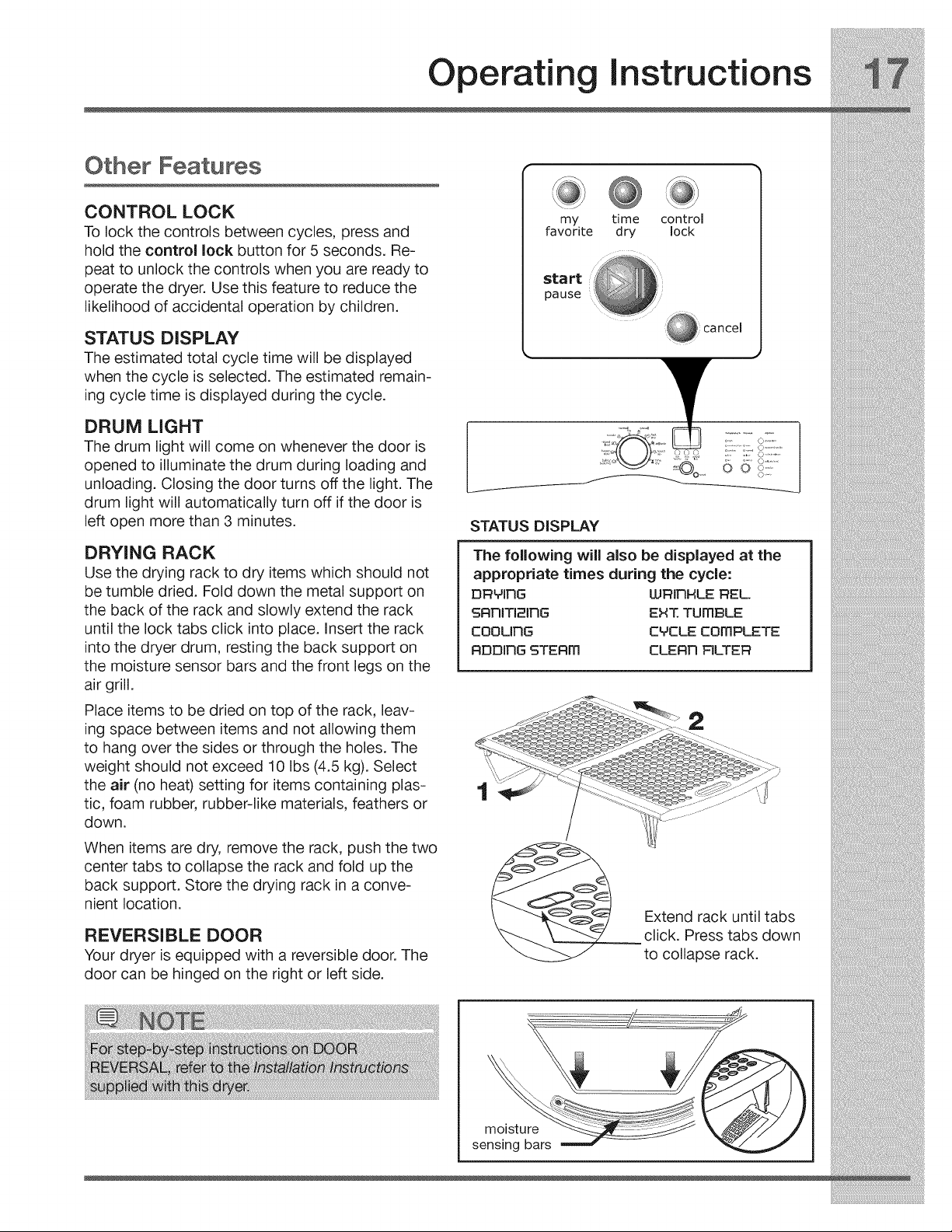
Saving Favorites
To program a cycle with your preferred settings,
select the desired cycle, drying temperature, dry-
ness level and options. Then press and hold the
my favorite button for 3 seconds.
To use that customized cycle to dry future loads,
simply press the my favorite button and the se-
lected cycle, drying temperature, dryness level
and options will be indicated.
Your personalized cycle can be changed by re-
peating the my favorite procedure.
Temperature
O high
@ medium/high
() medium
() low
0air
Dryness
,_) max
@ normal
,_) less
O damp
Options
(_) damp alert
X_::_
extended tumble
add steam d_
delicate heat
sanitize
chime
17 o........o...........
NSF Protolcol P154
Sanitization Performance of
Residential Clothes Dryers
my time control
favorite dry lock
sta rt
pause
Operating Instructions
Other Features
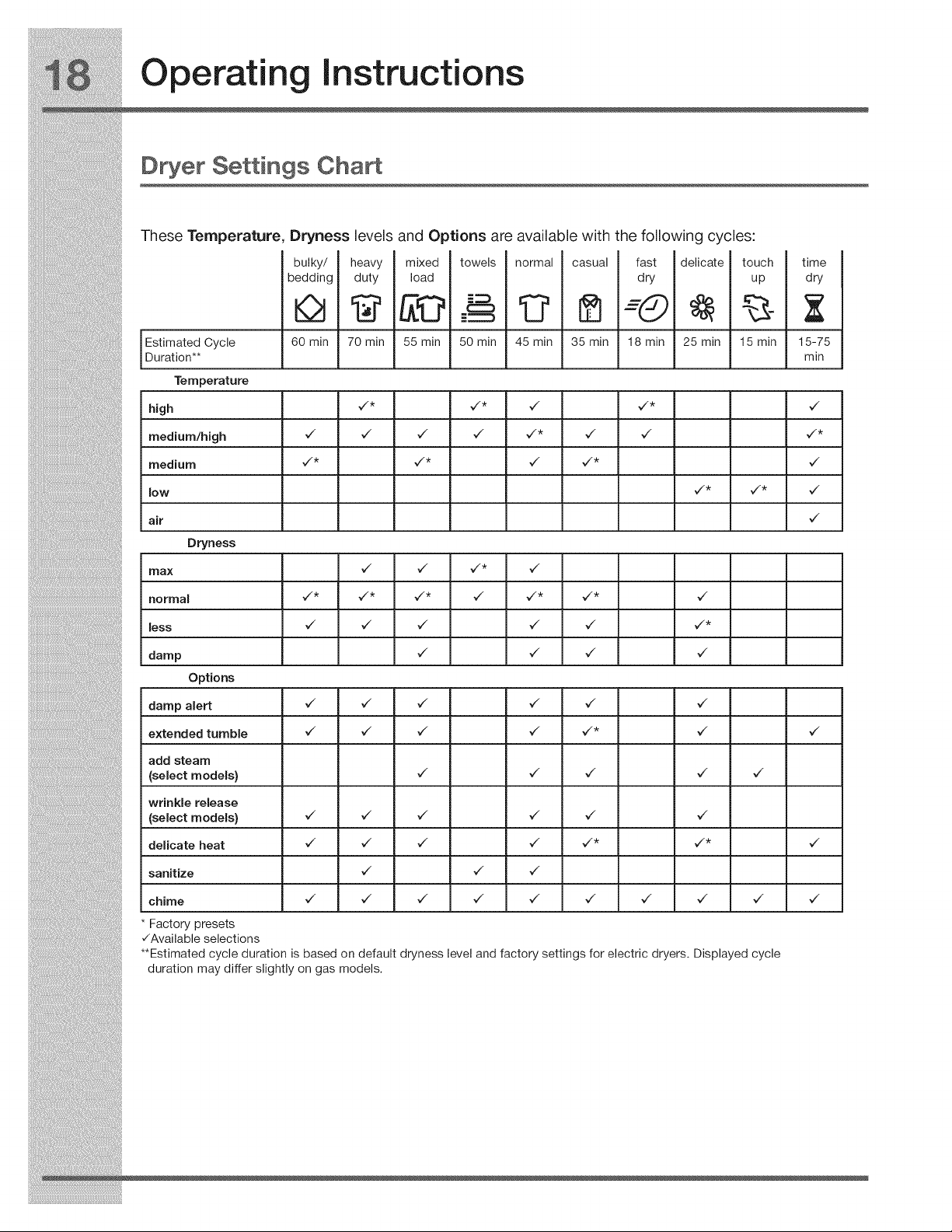
CONTROL LOCK
To lock the controls between cycles, press and
hold the control lock button for 5 seconds. Re-
peat to unlock the controls when you are ready to
operate the dryer. Use this feature to reduce the
likelihood of accidental operation by children.
STATUS DISPLAY
The estimated total cycle time will be displayed
when the cycle is selected. The estimated remain-
ing cycle time is displayed during the cycle.
DRUM LIGHT
The drum light will come on whenever the door is
opened to illuminate the drum during loading and
unloading. Closing the door turns off the light. The
drum light will automatically turn off if the door is
left open more than 3 minutes.
DRYING RACK
Use the drying rack to dry items which should not
be tumble dried. Fold down the metal support on
the back of the rack and slowly extend the rack
until the lock tabs click into place. Insert the rack
into the dryer drum, resting the back support on
the moisture sensor bars and the front legs on the
air grill.
Place items to be dried on top of the rack, leav-
ing space between items and not allowing them
to hang over the sides or through the holes. The
weight should not exceed 10 Ibs (4.5 kg). Select
the air (no heat) setting for items containing plas-
tic, foam rubber, rubber-like materials, feathers or
down.
When items are dry, remove the rack, push the two
center tabs to collapse the rack and fold up the
back support. Store the drying rack in a conve-
nient location.
REVERSIBLE DOOR
Your dryer is equipped with a reversible door. The
door can be hinged on the right or left side.
my time control
favorite dry lock
start
pause
STATUS DISPLAY
The following will also be displayed at the
appropriate times during the cycle:
DRMIRG LURIRHLE REL.
SRRITI;=IRG EHT TUMBLE
COOLING CMCLE cOmPLETE
RDDIRG STERm CLERR FILTER
2
l_ Extend rack until tabs
__ click. Press tabs down
to collapse rack.
L/
moisture
sensing bars
Operatin Instructions
D er Settings ChaA
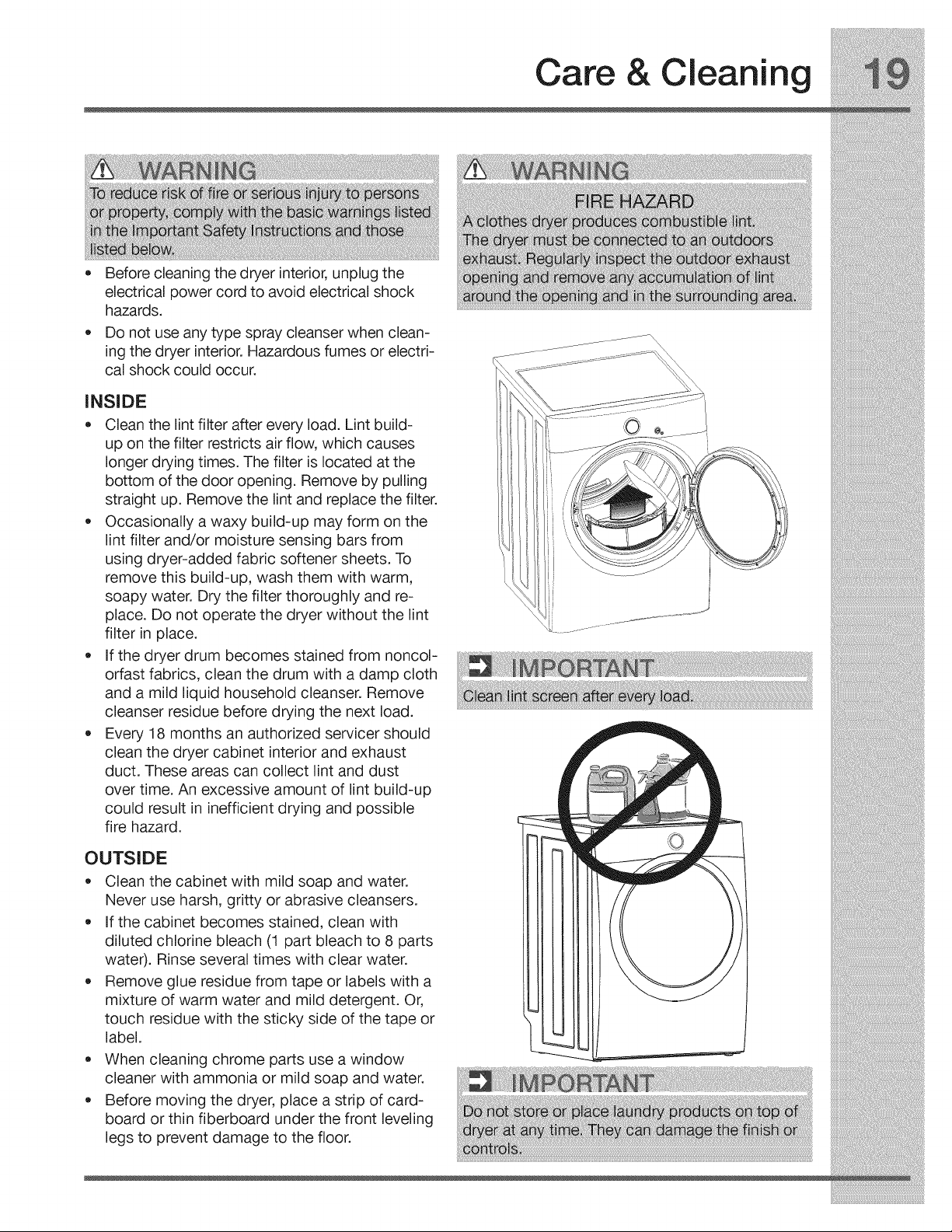
These Temperature, Dryness levels and Options are available with the following cycles:
heavy
duty
bulky/
bedding
60 min
mixed
load
towels
C:::3
E_
50 min
normal
45 min
casual
35 min
fast
dry
-©
delicate
25 min
touch
up
Estimated Cycle 70 min 55 min 18 min 15 min
Uurat on**
Temperature
high _/* _/* _/ _/* _/
medium/high _ _ _ _ ¢_* ¢_ ¢_ ¢_*
medium _/* _/* _/ _/* _/
low ¢_* ¢_* ¢_
air ,/
Dryness
max _ _ _*
normal ¢_* ¢_* ¢_* ¢_ ¢_* ¢_* ¢_
less 7 7 7 7 7 _/*
damp _/ _/ _/ _/
Options
damp alert ,/ ,/ ,/ ,/ ,/ ,/
extended tumble _/ _/ _/ _/ _/* _/ _/
add steam
(select models} ¢_ ¢_ ¢_ ¢_ ¢_
wrinkle release
(select models} ¢_ ¢_ ¢_ ¢_ ¢_ ¢_
delicate heat _/ _/ _/ _/ ¢'* ¢'* ¢"
sanitize ,/ ,/ ,/
chime ,/ ,/ ,/ ,/ ,/ ,/ ,/ ,/ ,/ ,/
Factory presets
V'Available selections
**Estimated cycle duration is based on default dryness level and factory settings for electric dryers. Displayed cycle
duration may differ slightly on gas models.
time
dry
15-75
mln
Care & Cleaning
• Before cleaning the dryer interior, unplug the
electrical power cord to avoid electrical shock
hazards.
Do not use any type spray cleanser when clean-
ing the dryer interior. Hazardous fumes or electri-
cal shock could occur.
INSIDE
= Clean the lint filter after every load. Lint build-
up on the filter restricts air flow, which causes
longer drying times. The filter is located at the
bottom of the door opening. Remove by pulling
straight up. Remove the lint and replace the filter.
Occasionally a waxy build-up may form on the
lint filter and/or moisture sensing bars from
using dryer-added fabric softener sheets. To
remove this build-up, wash them with warm,
soapy water. Dry the filter thoroughly and re-
place. Do not operate the dryer without the lint
filter in place.
If the dryer drum becomes stained from noncol-
orfast fabrics, clean the drum with a damp cloth
and a mild liquid household cleanser. Remove
cleanser residue before drying the next load.
Every 18 months an authorized servicer should
clean the dryer cabinet interior and exhaust
duct. These areas can collect lint and dust
over time. An excessive amount of lint build-up
could result in inefficient drying and possible
fire hazard.
OUTSIDE
= Clean the cabinet with mild soap and water.
Never use harsh, gritty or abrasive cleansers.
If the cabinet becomes stained, clean with
diluted chlorine bleach (1 part bleach to 8 parts
water). Rinse several times with clear water.
Remove glue residue from tape or labels with a
mixture of warm water and mild detergent. Or,
touch residue with the sticky side of the tape or
label.
When cleaning chrome parts use a window
cleaner with ammonia or mild soap and water.
Before moving the dryer, place a strip of card-
board or thin fiberboard under the front leveling
legs to prevent damage to the floor.
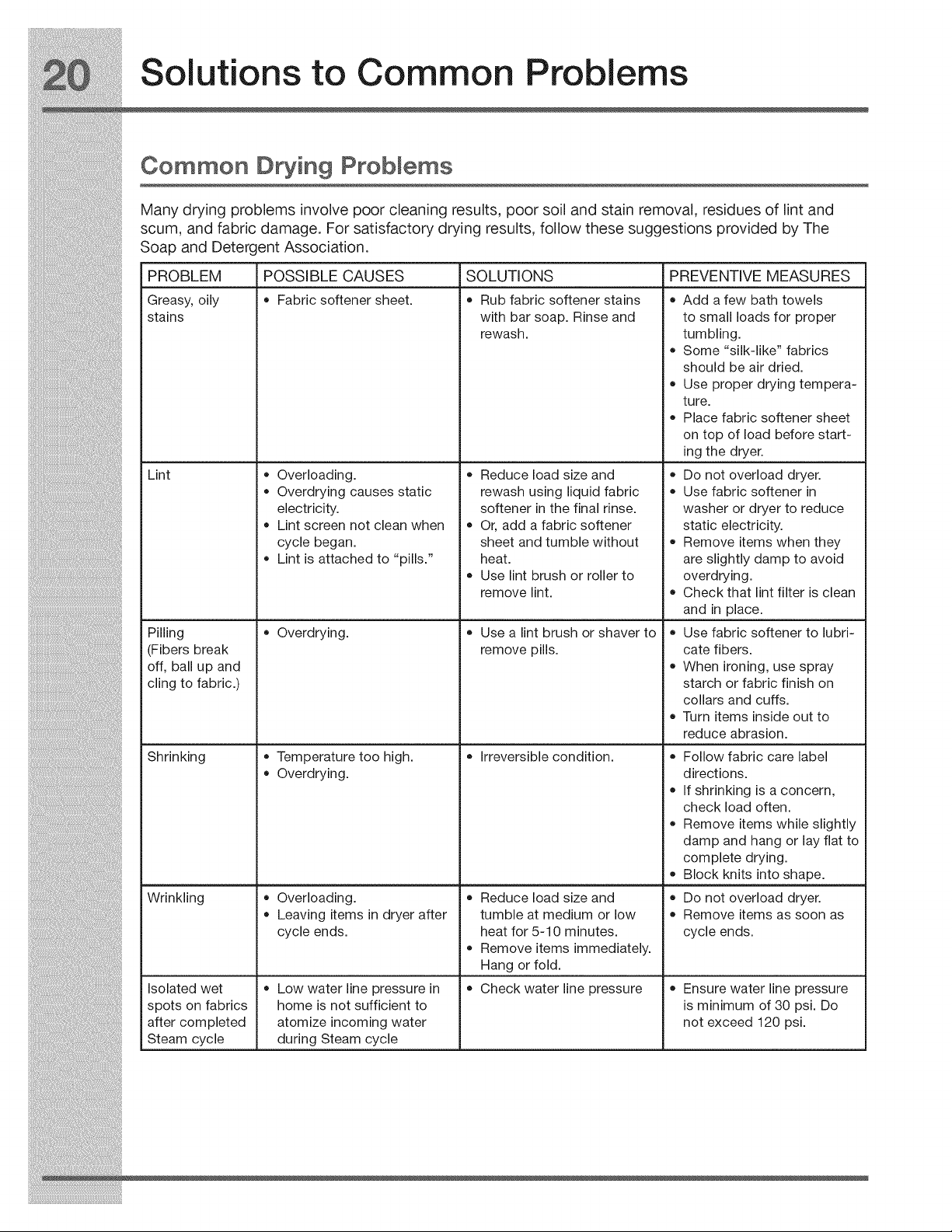
Solutions to Common Problems
Common D ing Probmems
Many drying problems involve poor cleaning results, poor soil and stain removal, residues of lint and
scum, and fabric damage. For satisfactory drying results, follow these suggestions provided by The
Soap and Detergent Association.
PROBLEM POSSIBLE CAUSES SOLUTIONS PREVENTIVE MEASURES
Greasy, oily • Fabric softener sheet. • Rub fabric softener stains •
stains
Lint
Pilling
(Fibers break
off, ball up and
cling to fabric.)
Shrinking
Wrinkling
Isolated wet
spots on fabrics
after completed
Steam cycle
with bar soap. Rinse and
rewash.
• Overloading.
Overdrying causes static
electricity.
Lint screen not clean when
cycle began.
Lint is attached to "pills."
Overdrying.
Temperature too high.
Overdrying.
Overloading.
Leaving items in dryer after
cycle ends.
Low water line pressure in
home is not sufficient to
atomize incoming water
during Steam cycle
Reduce load size and
rewash using liquid fabric
softener in the final rinse.
Or, add a fabric softener
sheet and tumble without
heat.
Use lint brush or roller to
remove lint.
Use a lint brush or shaver to
remove pills.
Irreversible condition.
Reduce load size and
tumble at medium or low
heat for 5-10 minutes.
Remove items immediately.
Hang or fold.
Check water line pressure
Add a few bath towels
to small loads for proper
tumbling.
Some "silk-like" fabrics
should be air dried.
Use proper drying tempera-
ture.
Place fabric softener sheet
on top of load before start-
ing the dryer.
Do not overload dryer.
Use fabric softener in
washer or dryer to reduce
static electricity.
Remove items when they
are slightly damp to avoid
overdrying.
Check that lint filter is clean
and in place.
Use fabric softener to lubri-
cate fibers.
When ironing, use spray
starch or fabric finish on
collars and cuffs.
Turn items inside out to
reduce abrasion.
Follow fabric care label
directions.
If shrinking is a concern,
check load often.
Remove items while slightly
damp and hang or lay flat to
complete drying.
Block knits into shape.
Do not overload dryer.
Remove items as soon as
cycle ends.
Ensure water line pressure
is minimum of 30 psi. Do
not exceed 120 psi.
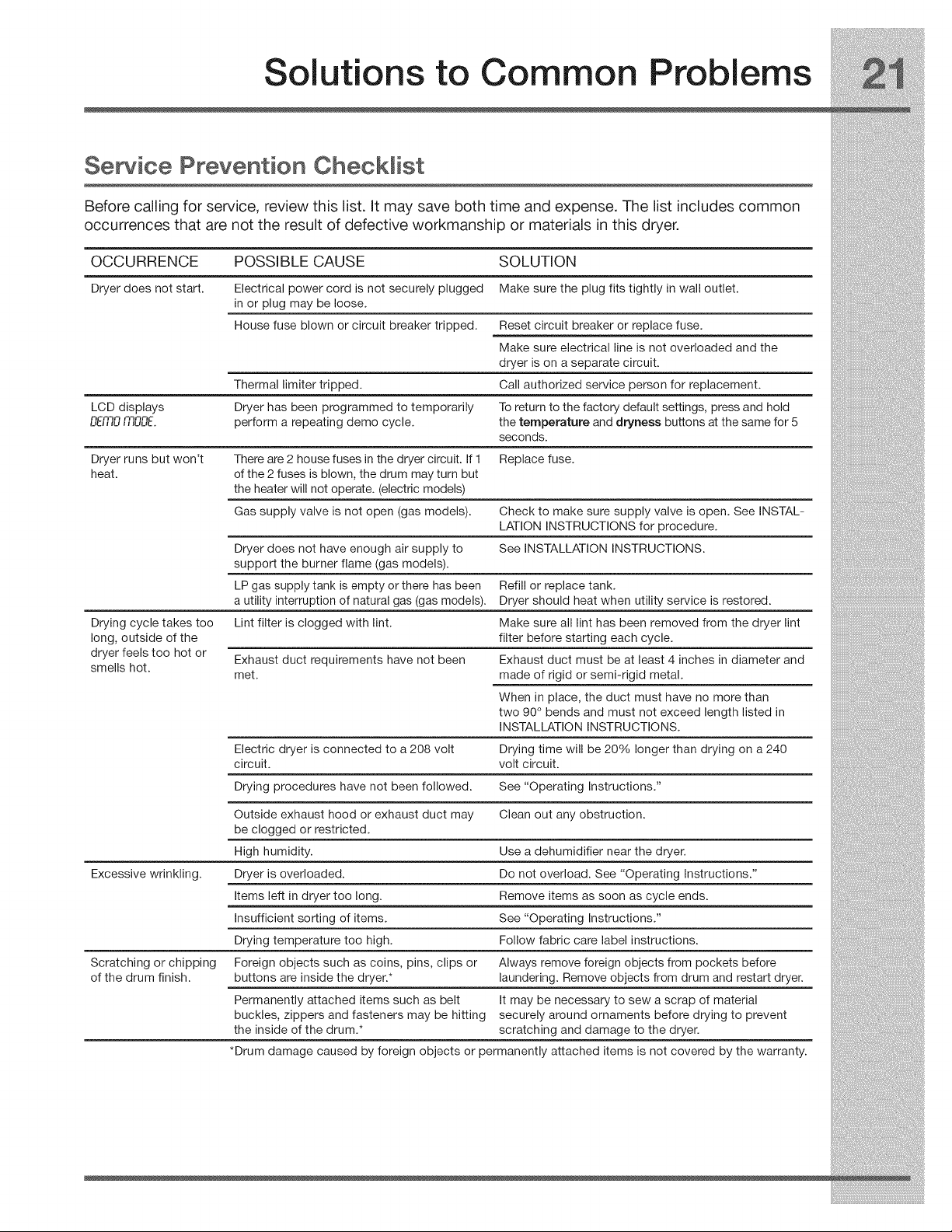
Solutions to Common Problems
Semite Prevention Checklist
Before calling for service, review this list. It may save both time and expense. The list includes common
occurrences that are not the result of defective workmanship or materials in this dryer.
OCCURRENCE POSSIBLE CAUSE SOLUTION
Dryer does not start. Electrical power cord is not securely plugged Make sure the plug fits tightly in wall outlet.
in or plug may be loose.
House fuse blown or circuit breaker tripped. Reset circuit breaker or replace fuse.
Make sure electrical line is not overloaded and the
dryer is on a separate circuit.
Thermal limiter tripped. Call authorized service person for replacement.
LCD displays Dryer has been programmed to temporarily To return to the factory default settings, press and hold
n-_'3_'3 n'3_'3n-
ub,,u ,,,uuL. perform a repeating demo cycle, the temperature and dryness buttons at the same for 5
seconds.
Dryer runs but won't There are 2 house fuses in the dryer circuit. If 1 Replace fuse.
heat. of the 2 fuses is blown, the drum may turn but
the heater will not operate. (electric models)
Gas supply valve is not open (gas models). Check to make sure supply valve is open. See INSTAL-
LATION INSTRUCTIONS for procedure.
Dryer does not have enough air supply to See INSTALLATION INSTRUCTIONS.
support the burner flame (gas models).
LP gas supply tank is empty or there has been Refill or replace tank.
a utility interruption of natural gas (gas models). Dryer should heat when utility service is restored.
Drying cycle takes too Lint filter is clogged with lint. Make sure all lint has been removed from the dryer lint
long, outside of the filter before starting each cycle.
dryer feels too hot or Exhaust duct requirements have not been Exhaust duct must be at least 4 inches in diameter and
smells hot. met. made of rigid or semi-rigid metal.
When in place, the duct must have no more than
two 90 ° bends and must not exceed length listed in
INSTALLATION INSTRUCTIONS.
Electric dryer is connected to a 208 volt Drying time will be 20% longer than drying on a 240
circuit, volt circuit.
Drying procedures have not been followed. See "Operating Instructions."
Outside exhaust hood or exhaust duct may Clean out any obstruction.
be clogged or restricted.
High humidity. Use a dehumidifier near the dryer.
Excessive wrinkling. Dryer is overloaded. Do not overload. See "Operating Instructions."
Items left in dryer too long. Remove items as soon as cycle ends.
Insufficient sorting of items. See "Operating Instructions."
Drying temperature too high. Follow fabric care label instructions.
Scratching or chipping Foreign objects such as coins, pins, clips or Always remove foreign objects from pockets before
of the drum finish, buttons are inside the dryer.* laundering. Remove objects from drum and restart dryer.
Permanently attached items such as belt It may be necessary to sew a scrap of material
buckles, zippers and fasteners may be hitting securely around ornaments before drying to prevent
the inside of the drum.* scratching and damage to the dryer.
*Drum damage caused by foreign objects or permanently attached items is not covered by the warranty.
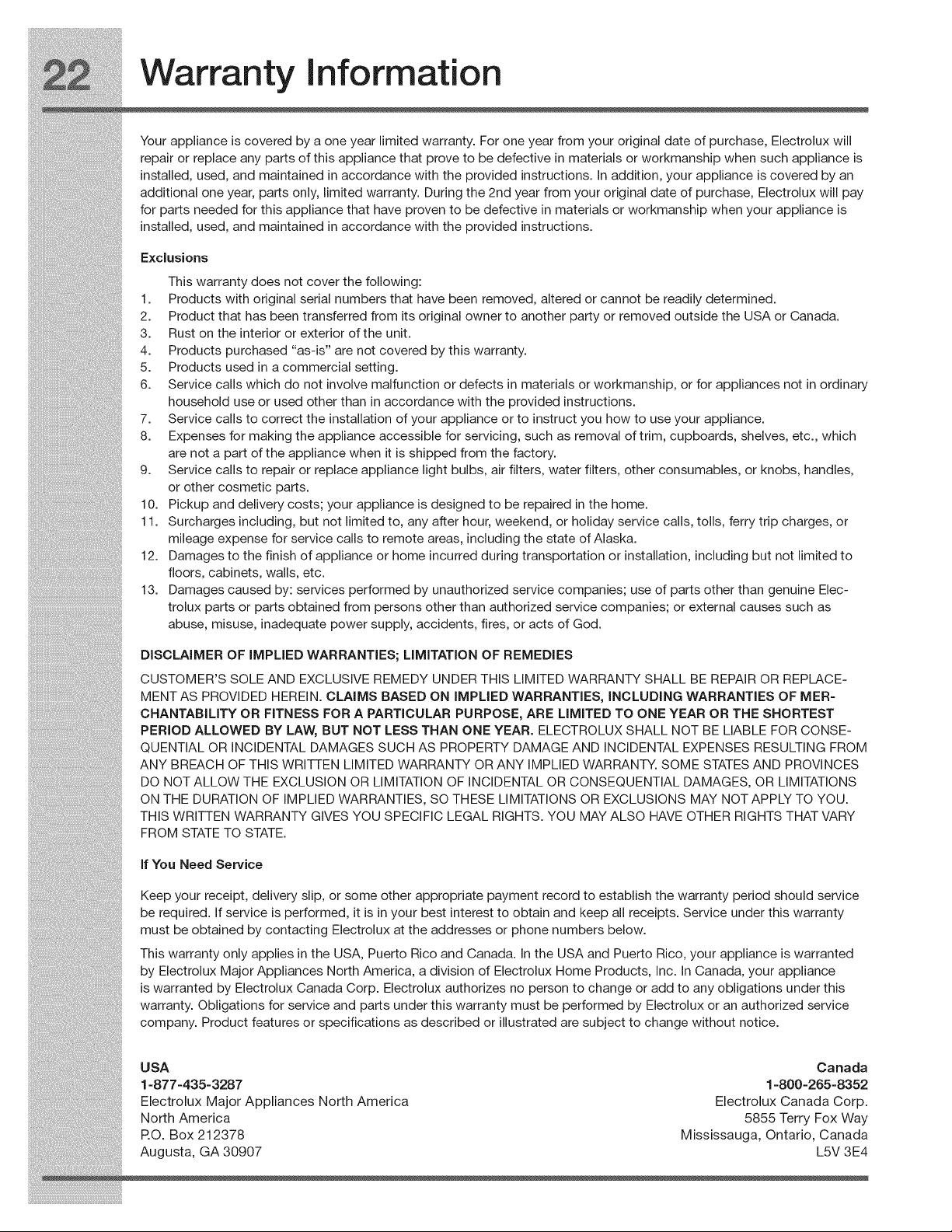
Warranty Information
Your appliance is covered by a one year limited warranty. For one year from your original date of purchase, Electrolux will
repair or replace any parts of this appliance that prove to be defective in materials or workmanship when such appliance is
installed, used, and maintained in accordance with the provided instructions. In addition, your appliance is covered by an
additional one year, parts only, limited warranty. During the 2nd year from your original date of purchase, Electrolux will pay
for parts needed for this appliance that have proven to be defective in materials or workmanship when your appliance is
installed, used, and maintained in accordance with the provided instructions.
Exclusions
This warranty does not cover the following:
1. Products with original serial numbers that have been removed, altered or cannot be readily determined.
2. Product that has been transferred from its original owner to another party or removed outside the USA or Canada.
3. Rust on the interior or exterior of the unit.
4. Products purchased "as-is" are not covered by this warranty.
5. Products used in a commercial setting.
6. Service calls which do not involve malfunction or defects in materials or workmanship, or for appliances not in ordinary
household use or used other than in accordance with the provided instructions.
7. Service calls to correct the installation of your appliance or to instruct you how to use your appliance.
8. Expenses for making the appliance accessible for servicing, such as removal of trim, cupboards, shelves, etc., which
are not a part of the appliance when it is shipped from the factory.
9. Service calls to repair or replace appliance light bulbs, air filters, water filters, other consumables, or knobs, handles,
or other cosmetic parts.
10. Pickup and delivery costs; your appliance is designed to be repaired in the home.
11. Surcharges including, but not limited to, any after hour, weekend, or holiday service calls, tolls, ferry trip charges, or
mileage expense for service calls to remote areas, including the state of Alaska.
12. Damages to the finish of appliance or home incurred during transportation or installation, including but not limited to
floors, cabinets, walls, etc.
13. Damages caused by: services performed by unauthorized service companies; use of parts other than genuine Elec-
trolux parts or parts obtained from persons other than authorized service companies; or external causes such as
abuse, misuse, inadequate power supply, accidents, fires, or acts of God.
DiSCLAiMER OF IMPLIED WARRANTIES; LiMITATiON OF REMEDIES
CUSTOMER'S SOLE AND EXCLUSIVE REMEDY UNDER THiS LIMITED W/ARRANTY SHALL BE REPAIR OR REPLACE-
MENT AS PROVIDED HEREIN. CLAIMS BASED ON IMPLIED WARRANTIES, iNCLUDiNG WARRANTIES OF MER-
CHANTABILITY OR FITNESS FOR A PARTICULAR PURPOSE, ARE LIMITED TO ONE YEAR OR THE SHORTEST
PERIOD ALLOWED BY LAW, BUT NOT LESS THAN ONE YEAR. ELECTROLUX SHALL NOT BE LIABLE FOR CONSE-
QUENTIAL OR iNCiDENTAL DAMAGES SUCH AS PROPERTY DAMAGE AND INCIDENTAL EXPENSES RESULTING FROM
ANY BREACH OF THIS WRITTEN LIMITED WARRANTY OR ANY iMPLIED WARRANTY. SOME STATESAND PROVINCES
DO NOT ALLOW THE EXCLUSION OR LIMiTATiON OF iNCiDENTAL OR CONSEQUENTIAL DAMAGES, OR LIMITATIONS
ON THE DURATION OF IMPLIED WARRANTIES, SO THESE LIMITATIONS OR EXCLUSIONS MAY NOT APPLY TO YOU.
THiS WRITTEN WARRANTY GIVES YOU SPECiFiC LEGAL RIGHTS. YOU MAY ALSO HAVE OTHER RIGHTS THAT VARY
FROM STATETO STATE.
If You Need Service
Keep your receipt, delivery slip, or some other appropriate payment record to establish the warranty period should service
be required. If service is performed, it is in your best interest to obtain and keep all receipts. Service under this warranty
must be obtained by contacting Electrolux at the addresses or phone numbers below.
This warranty only applies in the USA, Puerto Rico and Canada. In the USA and Puerto Rico, your appliance is warranted
by Electrolux Major Appliances North America, a division of Electrolux Home Products, Inc. In Canada, your appliance
is warranted by Electrolux Canada Corp. Electrolux authorizes no person to change or add to any obligations under this
warranty. Obligations for service and parts under this warranty must be performed by Electrolux or an authorized service
company. Product features or specifications as described or illustrated are subject to change without notice.
USA
1-877=435=3287
Electrolux Major Appliances North America
North America
P.O. Box 212378
Augusta, GA 30907
Canada
1-800=265-8352
Electrolux Canada Corp.
5855 Terry Fox Way
Mississauga, Ontario, Canada
L5V 3E4