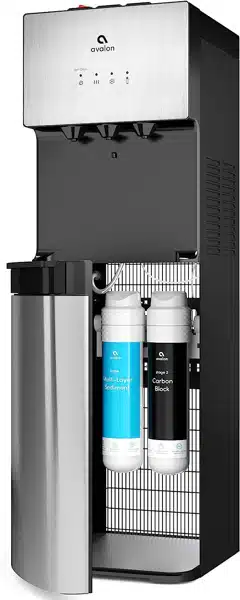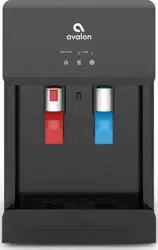
A few simple steps to ensure
perfect water, every time.
Use and Care Guide
MODELS: A8CTBOTTLELESSWHT • A8CTBOTTLELESSBLK
Registration
Please visit the website below to register your new water cooler within the first
30 days of purchase. Registration within the first 30 days will activate your one
year warranty.
www.avalonh2o.com/register-my-avalon-cooler
Please keep your model number, order number and purchase date
for future support. You can reach us at 1-800-256-0695.
Model Number
Order Number
Purchase Date
This product conforms to NSF/ANSI 42 and 53 for the reduction of
Chlorine taste and odor, nominal particulate class I, lead and cysts.

Contents
About Your Water Cooler
Meet Your Avalon Product
Part Names
Indicator Lights
Tech Specs
Filter Function Introduction
Getting Started
Unpacking
Installation (Under the Sink)
Installation (Refrigerator Water Line)
Flushing Filters
Finishing Water Cooler Installation
User Guide and Maintenance
Replacing the Filters
Leak Detection
Cleaning
Activating Self-Cleaning Function
Rinsing, Cleaning, and Draining
Troubleshooting
Safety
1-2
9
10-11
3-4
5
6
12
26-27
20-22
7
13-14
14-18
23
30-31
33-34
25
1
Meet Your Avalon Product
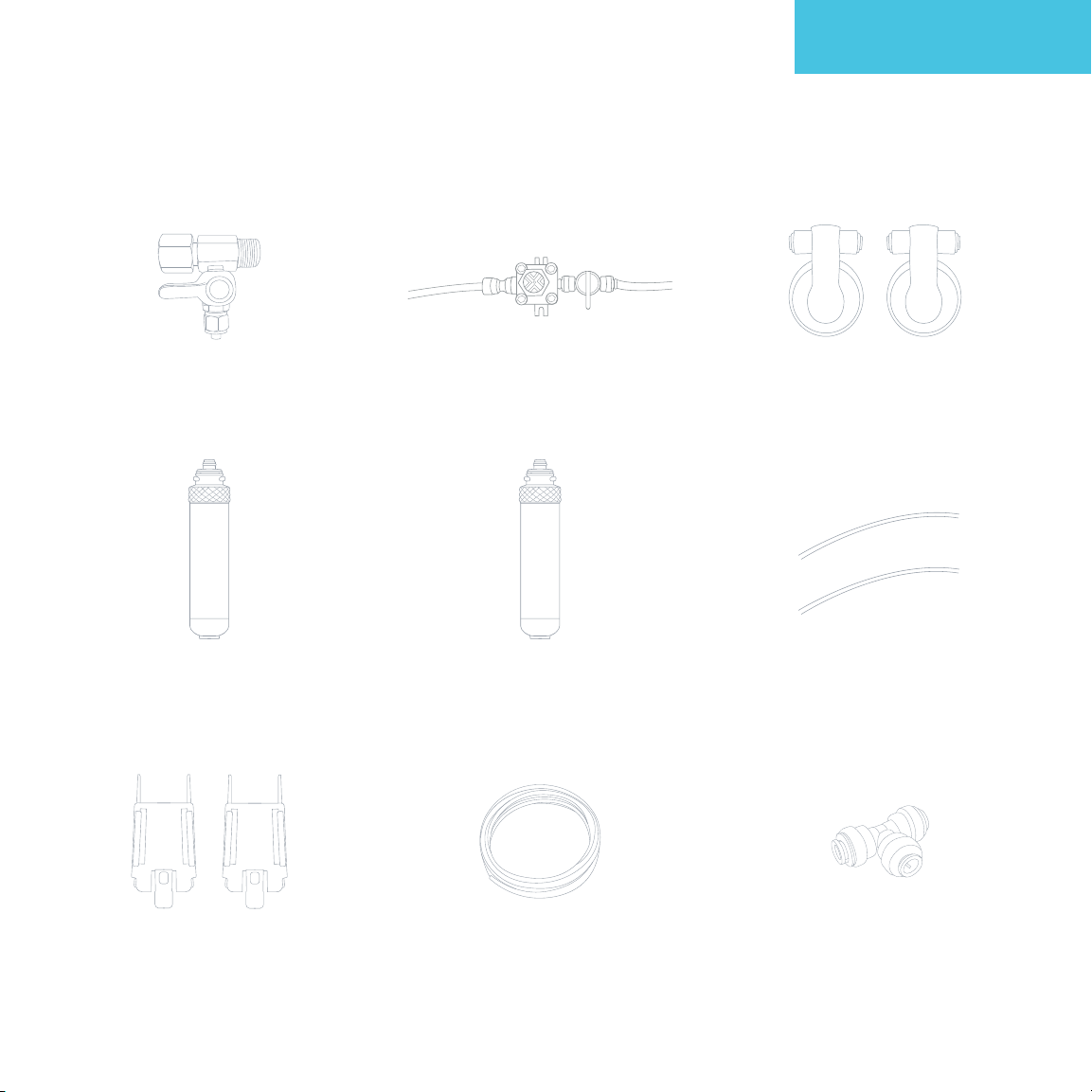
Inside the box, you’ll find:
Adapter with Valve
2 Small PE Tubing
2 Mounting Brackets
Carbon Block Filter
Sediment Filter
Three Way
Plastic Adapter
2 Filter
Adapters
Valve and
Tube Assembly
PE Tubing (20')
About Your Water Cooler

2
Meet Your Avalon Product
Attractive Design
Modern countertop
design with
press-paddle spouts
Custom Temperature
Piping hot
or crisp cold water
Dual Stage Filtration
Double the filtration
for twice the peace
of mind
Worry-Free Cleaning
Self-cleaning ozone
function for
longer lasting
water purification
NSF Certified Filters Energy Star ApprovedUL Listed Child Safety Feature
We meet strict
standards for public
health protection
We design
& manufacture
with your safety
in mind
Saves the
environment
& your wallet
Ensures safe hot
water flow for the
entire family
Built-in Nightlight
Makes late night
water trips a breeze
About Your Water Cooler
3
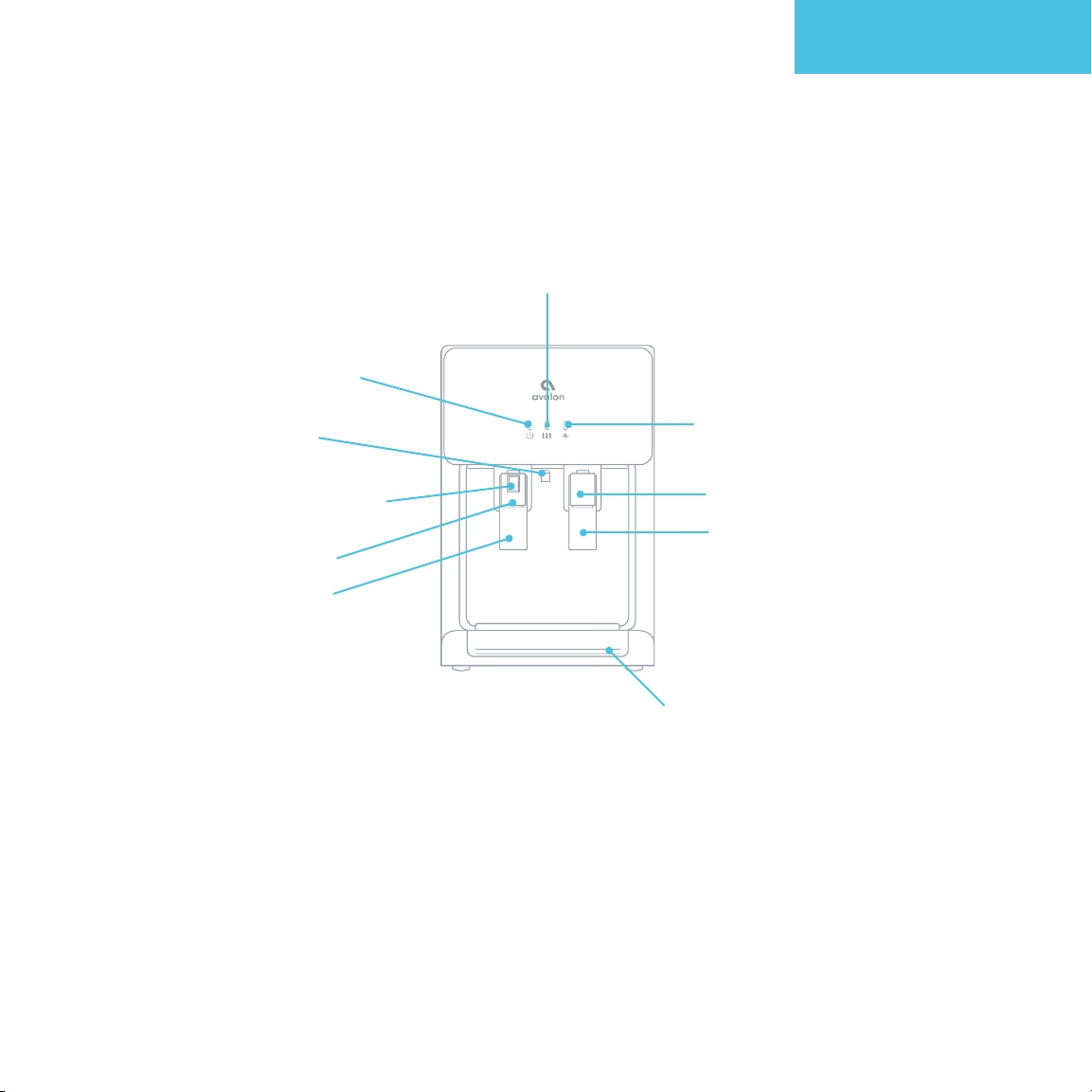
Part Names
1. Power/Self-Cleaning
Indicator Light
4. Nightlight
5. Child Safety Button
7. Hot Water Press Paddle
6. Hot Water Spout
3. Cooling Indicator Light
9. Cold Water Press Paddle
8. Cold Water Spout
10. Drip Tray
2. Heating Indicator Light
About Your Water Cooler
4
Part Names
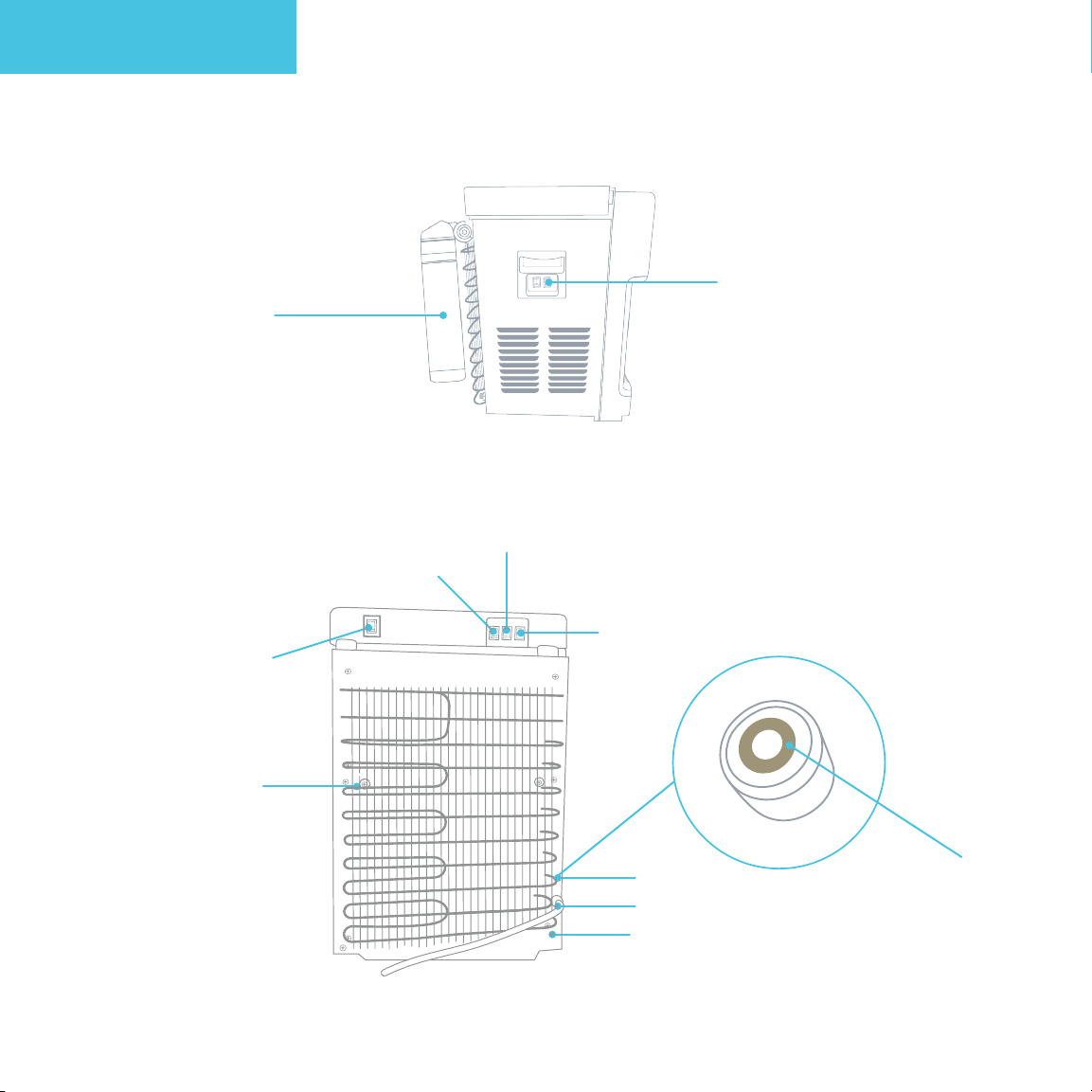
12. Filter Reset Switch
17. Heating Switch
20. Drain Outlet
18. Water Inlet
19. Power Cord
16. Cooling Switch
15. Nightlight Switch
14. Self-Cleaning Switch
13. Condenser
11. Filters
Push Connect Ring
About Your Water Cooler
5
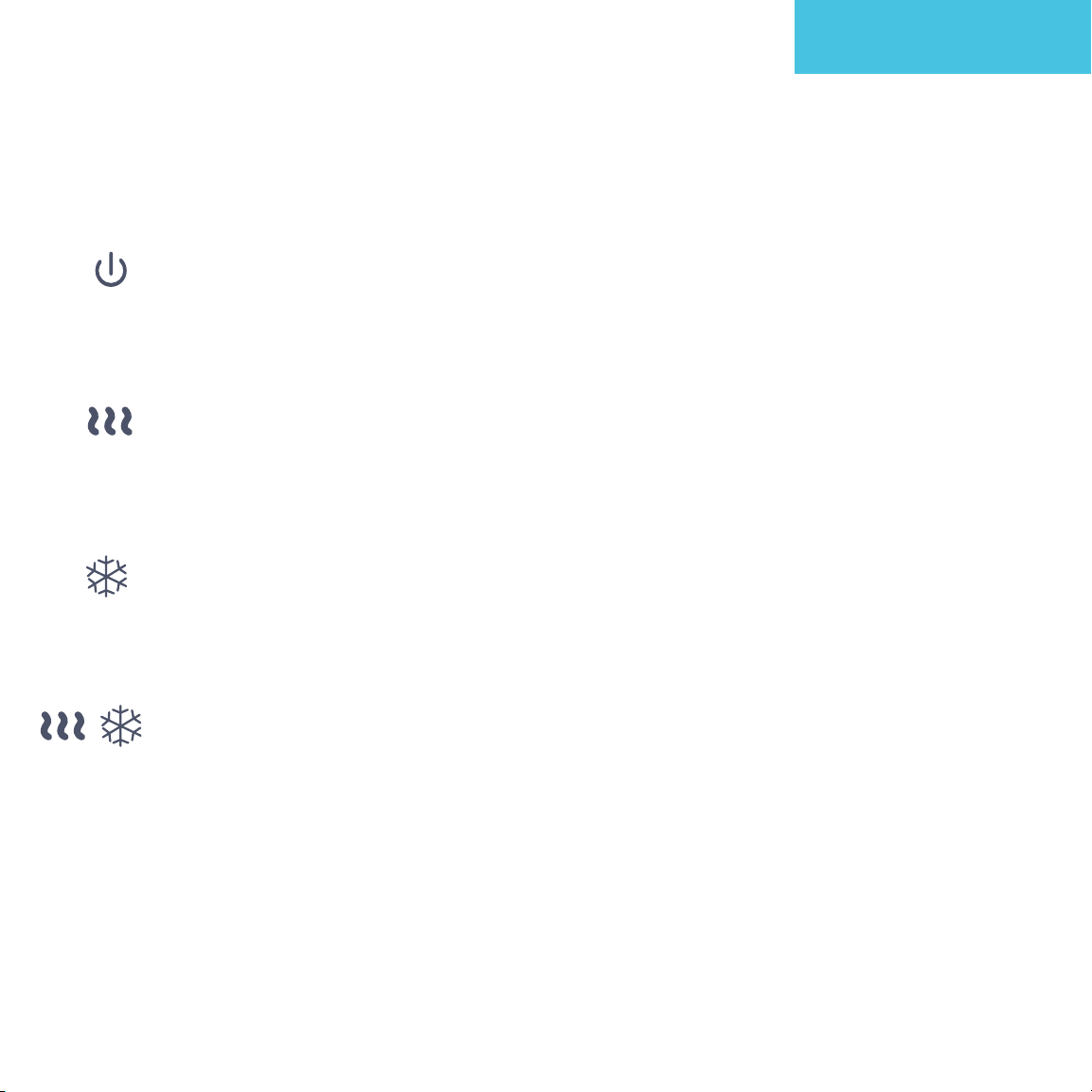
Power/Self-Cleaning Indicator Light
This light will remain steady on to indicate that the unit is plugged in and the
power is on. When the unit is placed into self-cleaning mode this indicator light will
blink until the cycle is complete. When the cycle is complete the light will return to
steady on.
Heating Indicator Light
This light will indicate when the water is heating. The light will remain on while the
water is heating and will turn o when it has reached the correct temperature of
185°F. As the water is dispensed the hot tank will refill and the water will heat. As
the water reheats this indicator light will turn on.
Cooling Indicator Light
This light will indicate when the water is cooling. The light will remain on while the
water is cooling and will turn o when it has reach the correct temperature of 47°F.
As the water is dispensed the cold tank will refill and the water will cool. As the
water cools this indicator light will turn on.
Filter Indicator Light
The Heating Indicator Light and the Cooling Indicator Light will blink together to
alert you that the filter needs to be replaced soon. They will continue to blink and a
beep will sound to let you know to change the filter now.
Indicator Lights
About Your Water Cooler

6
Tech Specs
About Your Water Cooler
Model
A8CTBOTTLELESSWHT • A8CTBOTTLELESSBLK
Hot/Cold Temp Output
Hot Water Capacity
Hot Tank Volume
Cold Water Capacity
Cold Tank Volume
Applicable Water Pressure
Applicable Water
Stage 1 Filtration
Stage 2 Filtration
Product Size
Packing Size
Net Weight/Gross Weight
Voltage/Frequency
Cooling Method
Heating Method
Heating Watts / Cooling Watts
Power Consumption
1.2L/min / 1.2L/min
4 L/H ( ≥ 185°F)
1.16 Liters
2.5 L/H ( ≤ 47°F)
3.6 Liters
0.1-0.4 MPa
Tap Water
Sediment Filter
Carbon Block Filter
13”(L)x12”(W)x19”(H)
16.18”(L)x15.07”(W)x28.34”(H)
35.27 lb / 39.70 lb
115 V 60Hz
Compressor
Internal Element
420W / 100 W
520 W

7
Filter Function Introduction
Stage
Stage 1
Stage 2
Sediment Filter
Carbon Block Filter
Filter
Course filtration of raw water to
remove rust, dirt and sediment
Removes the water odor, residual
chlorine, organic matter,
and lead to improve taste
Function
About Your Water Cooler

8
Getting Started

9
Unpacking Your Avalon Water Cooler
Locating Dispenser
• Do NOT plug in the power cord yet.
• Place dispenser upright on a hard and level surface in a cool and shaded location near a
grounded wall outlet. Position the dispenser so there is about 4 inches of clearance from
the wall on the back and both sides.
Locating Accessories
• Open the top of the packaging and remove the top foam piece along with accessories and
place them aside. (The filter will be located in this foam piece located on the top of the
cooler.)
• Unpack the product and install the drip tray by inserting it into place.
Getting Started
10
Installation (Under the Sink)
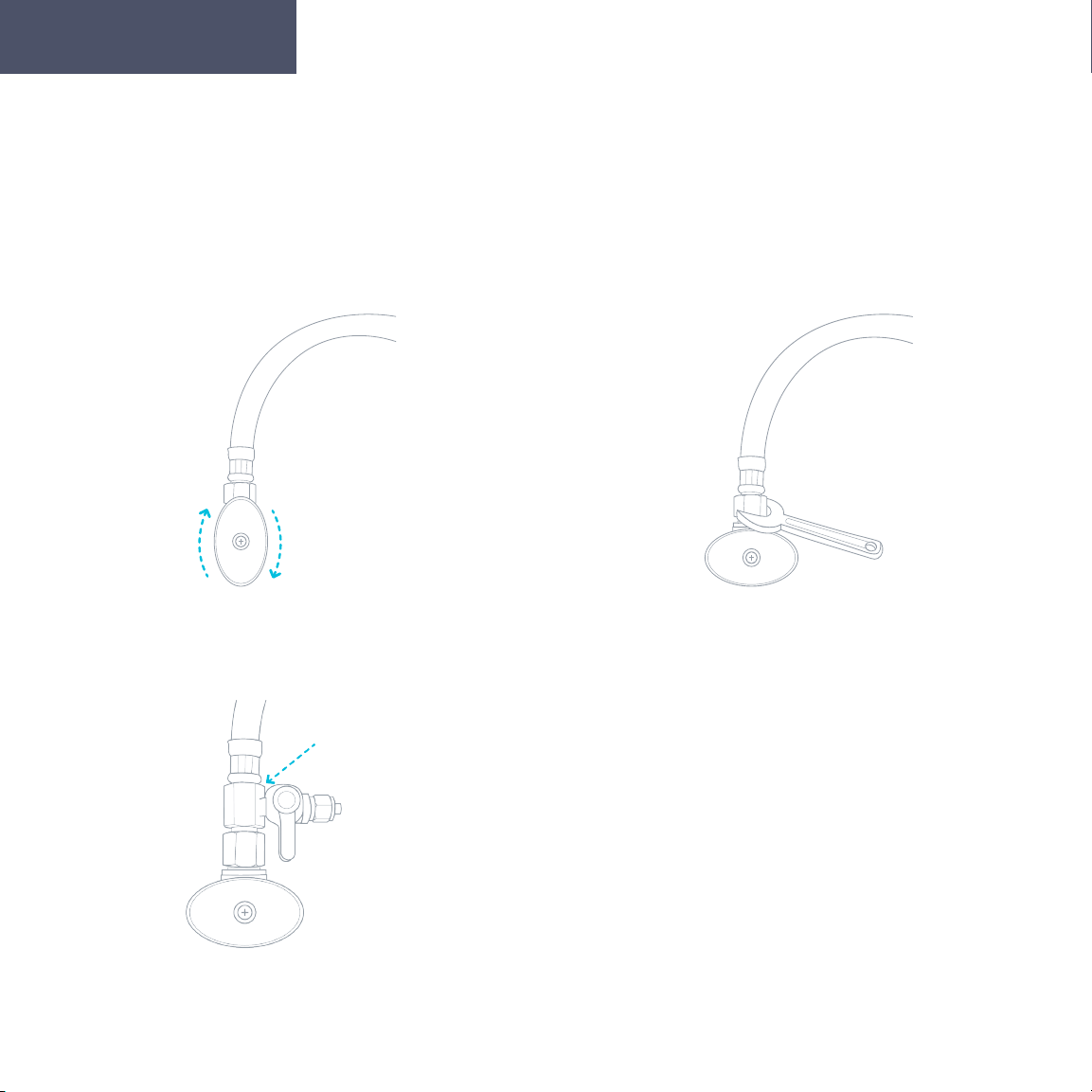
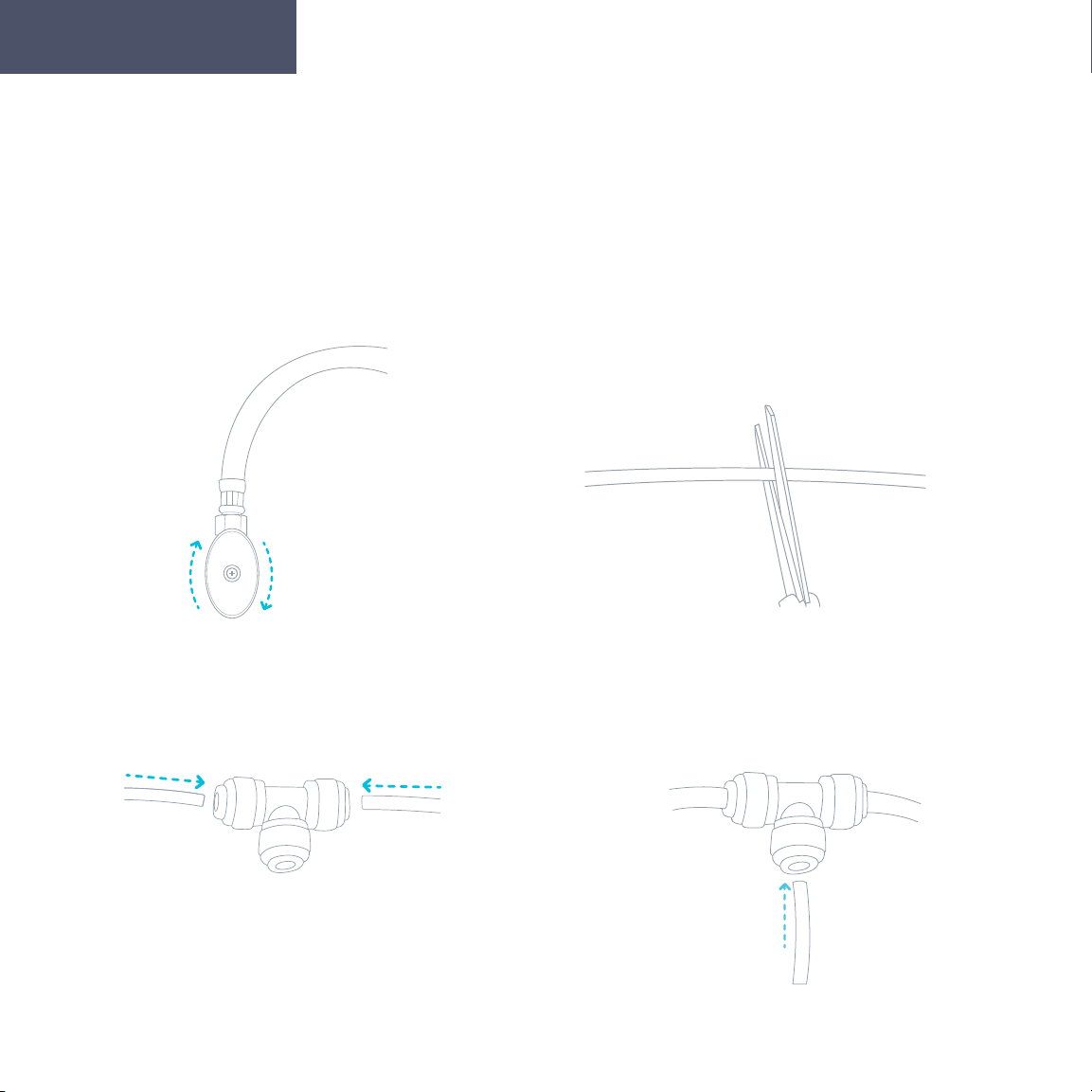
Installing the Metal Adapter with Valve
2. Disconnect the current cold
water supply line under your sink.
3. Connect the Metal Adapter with
valve between the cold water
supply line and cold water valve.
1. Turn o the current cold water supply
that is the source of water to your sink.
Getting Started
11
Installation (Under the Sink)
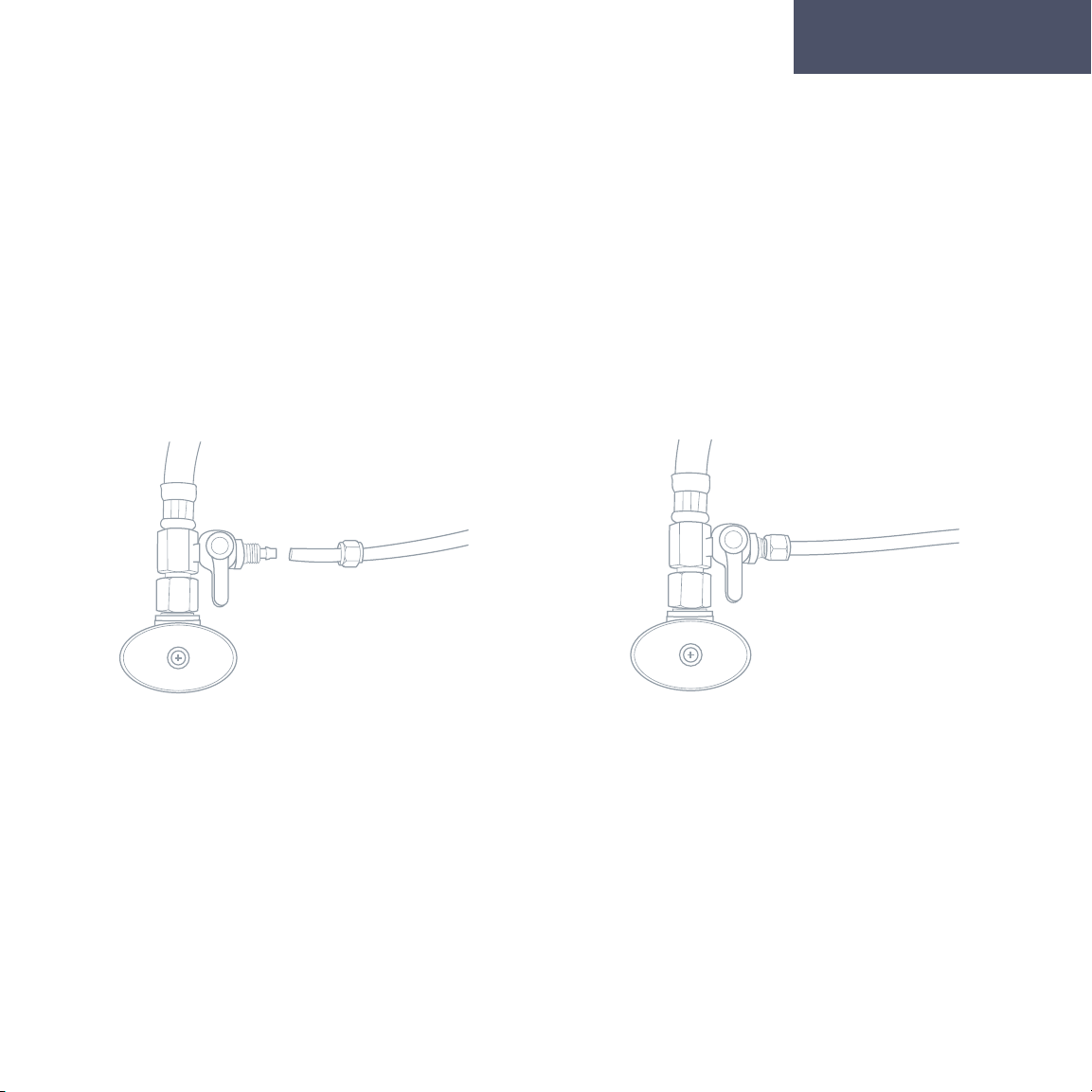
Installing the Metal Adapter with Valve
4. Remove the nut from the Metal Adapter
and insert the PE Tubing through the nut. Slide
the PE Tubing onto the protruding part of the
Metal Adapter where the nut was located
until it reaches the threading.
5. Screw the nut tightly into place to keep the
PE Tubing securely connected to the Metal
Adapter with Valve. Make sure the valve is
in the o position (perpendicular to the PE
Tubing).
Getting Started
12
Installation (Refrigerator Water Line)
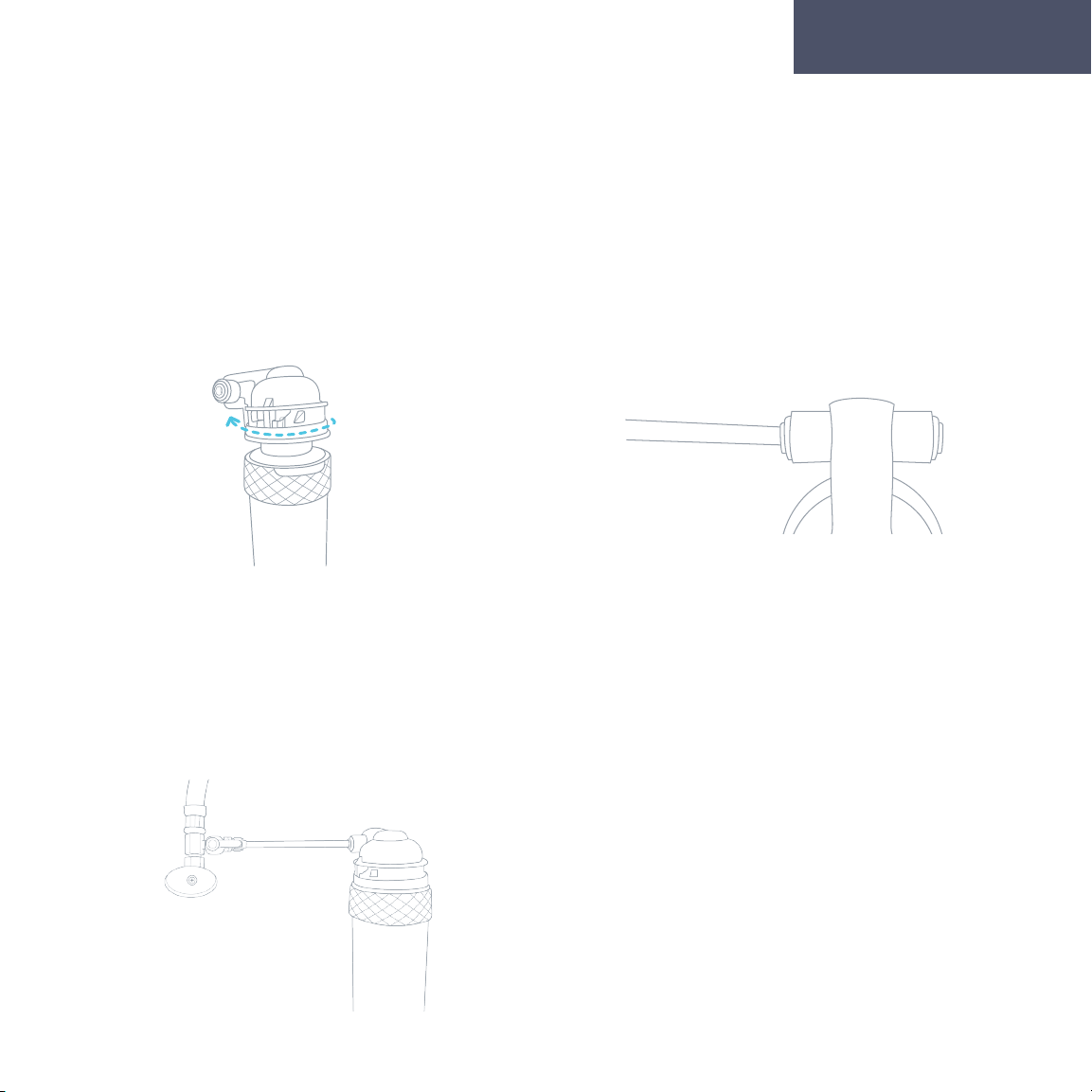
Installing the Three Way Plastic Adapter
1. Turn o the current cold water supply
that is the source of water to your
refrigerator line.
3. Insert each cut end of the existing ¼” tub-
ing into one of the holes of the Three Way
Plastic Adapter.
2. Cut the current ¼” tubing that
is connected to the back of your
refrigerator or ice maker near the
end of it that is currently inserted
into the refrigerator.
4. Insert one end of the PE Tubing that is
supplied with the water cooler into the third
opening of the Three Way Plastic Adapter.
(Refrigerator
Water Line)
(Water
Source)
(Water Cooler)
Getting Started
13
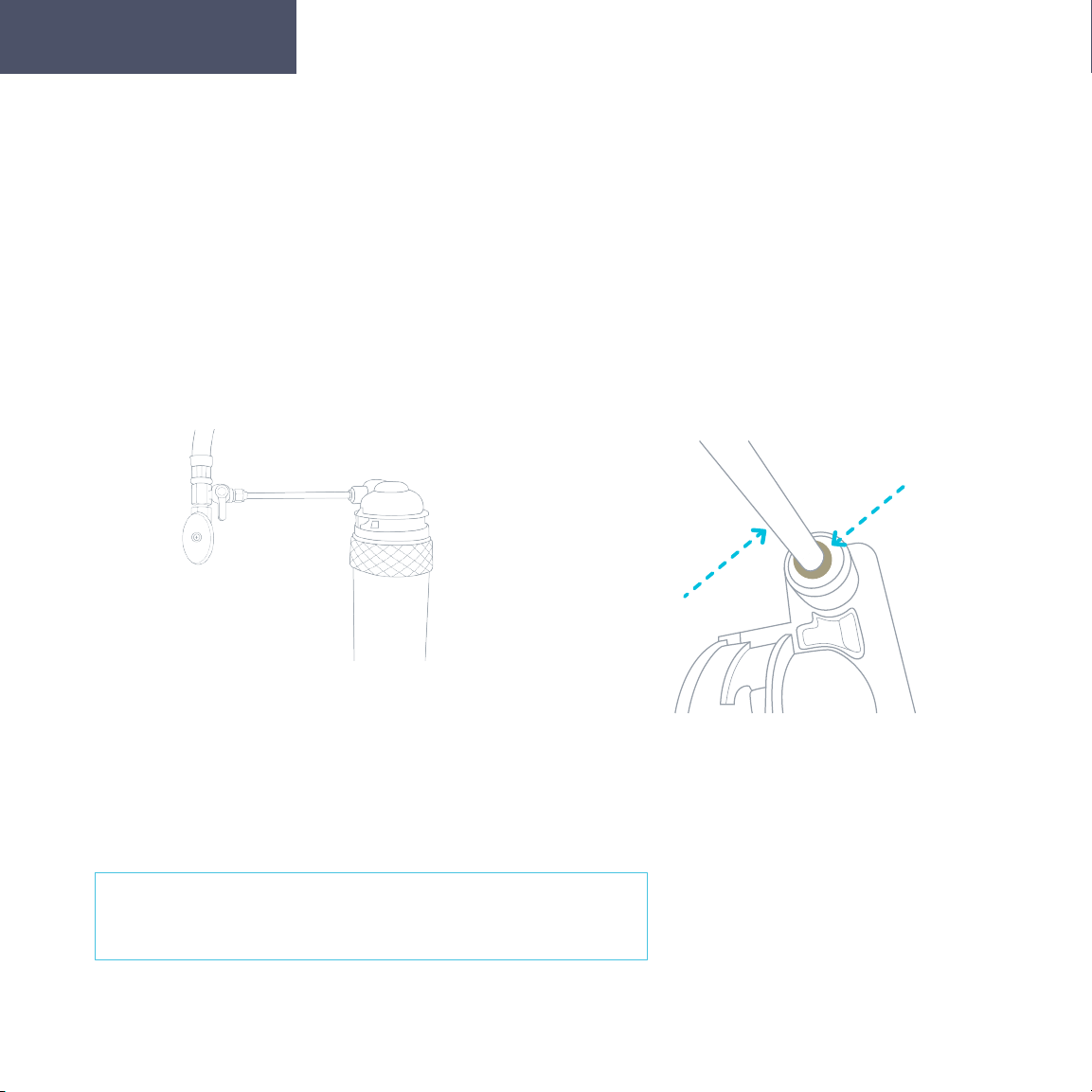
Flushing Filters Prior to Use
Before continuing with installation, it is recommended
that you flush both filters for approximately 2 minutes.
1. Twist the filter into the provided Filter
Flushing Adapter by rotating it clockwise.
3. Hold the filter with the Filter Flushing
Adapter in place over a sink. Turn the Valve
of the Metal Adapter at the water source to
the on position (the on position is parallel
to the PE Tubing) and allow the water to
flow through the Adapter and the filter for
approximately 2 minutes to flush the new filter.
2. Take the open end of the PE Tubing
that is now connected to your water
supply and insert it into the left inlet
hole on the Filter Flushing Adapter in
the direction of the arrow.
Getting Started
14
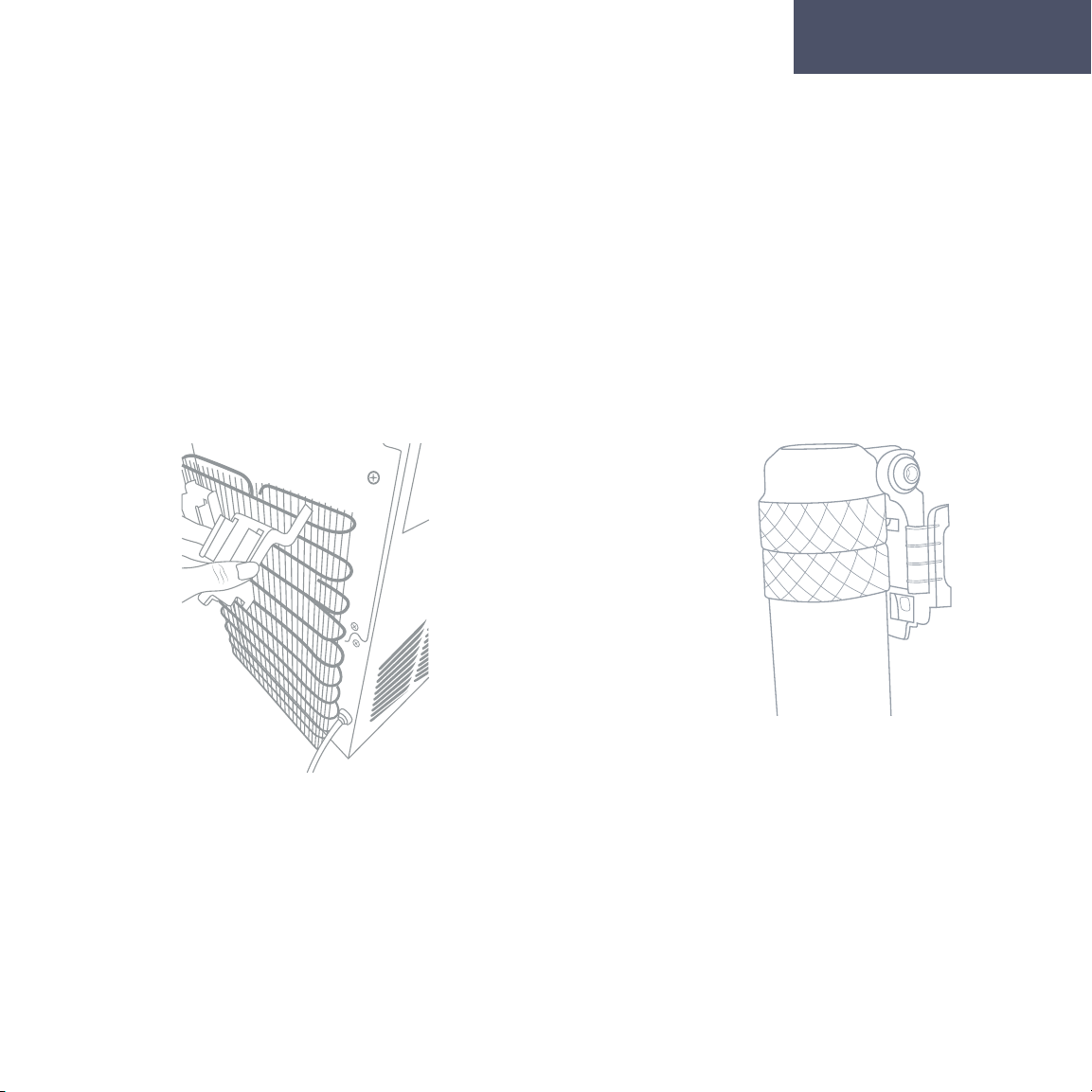
Flushing Filters Prior to Use
5. Remove the end of the PE Tubing
from the Filter Flushing Adapter by
pressing in on the push connect ring
and pulling out the PE Tubing.
Getting Started
4. Turn the Valve of the Metal Adapter
at the water source back to the o
position, remove the filter from the
Filter Flushing Adapter.
Repeat steps 1-5 for flushing the Carbon Block Filter.
15
Finishing the Water Cooler Installation
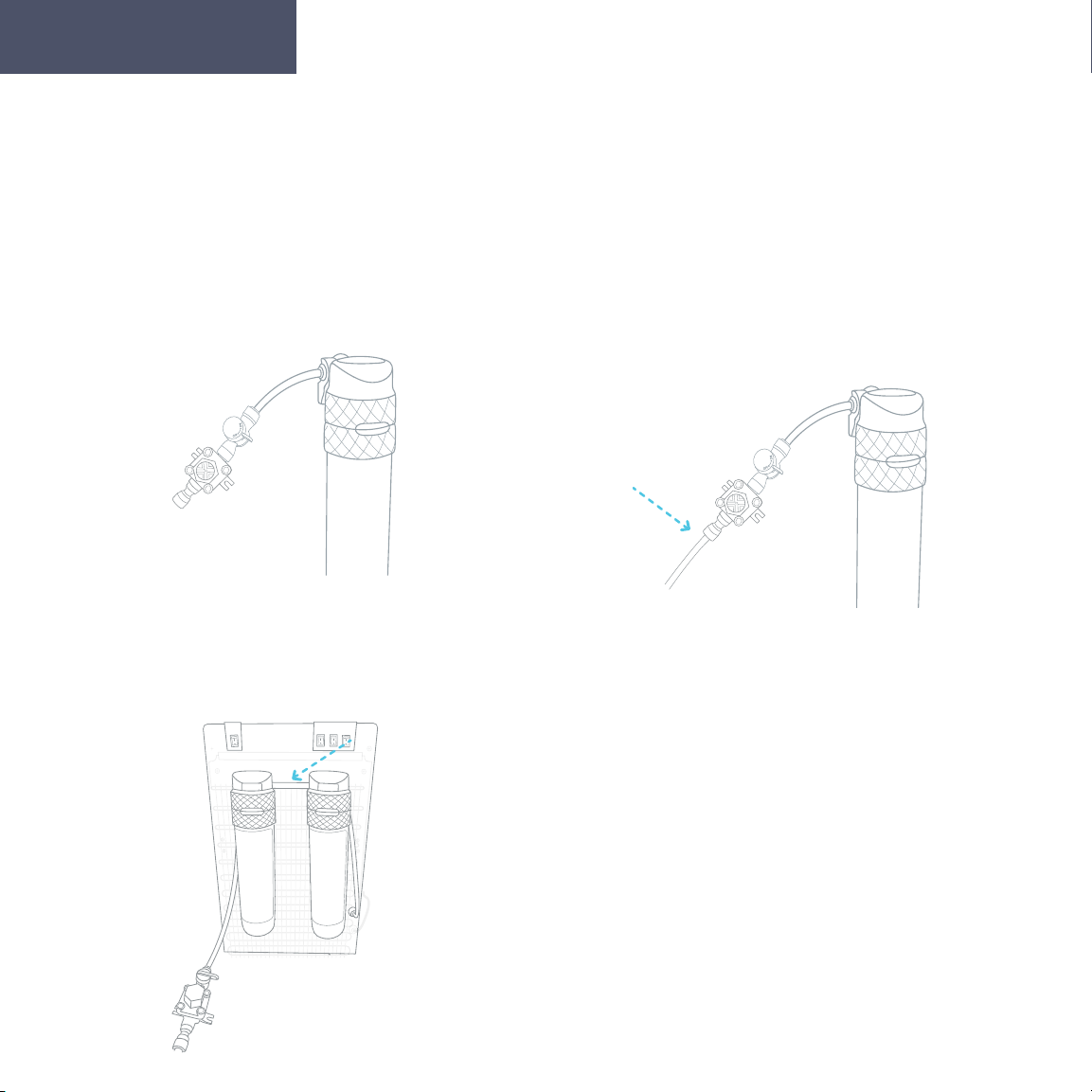
Once you have flushed the filters and removed the filters and PE Tubing from
the Filter Flushing Adaptor, you are ready to complete the installation process.
1. Locate the two black Mounting Brackets.
Clip each bracket, one next to the other, onto
the top of the back of the cooler by inserting
the longer pegs upward into the slots of the
condenser then click the shorter pegs into
place.
2. Slide the 2 Filter Adapters into each of
the Mounting Brackets. Twist the Sedi-
ment Filter into the left Filter Adapter and
the Carbon Block Filter into the right Filter
Adapter. Rotate the filters clockwise to twist
them into place.
Getting Started
16
Finishing the Water Cooler Installation
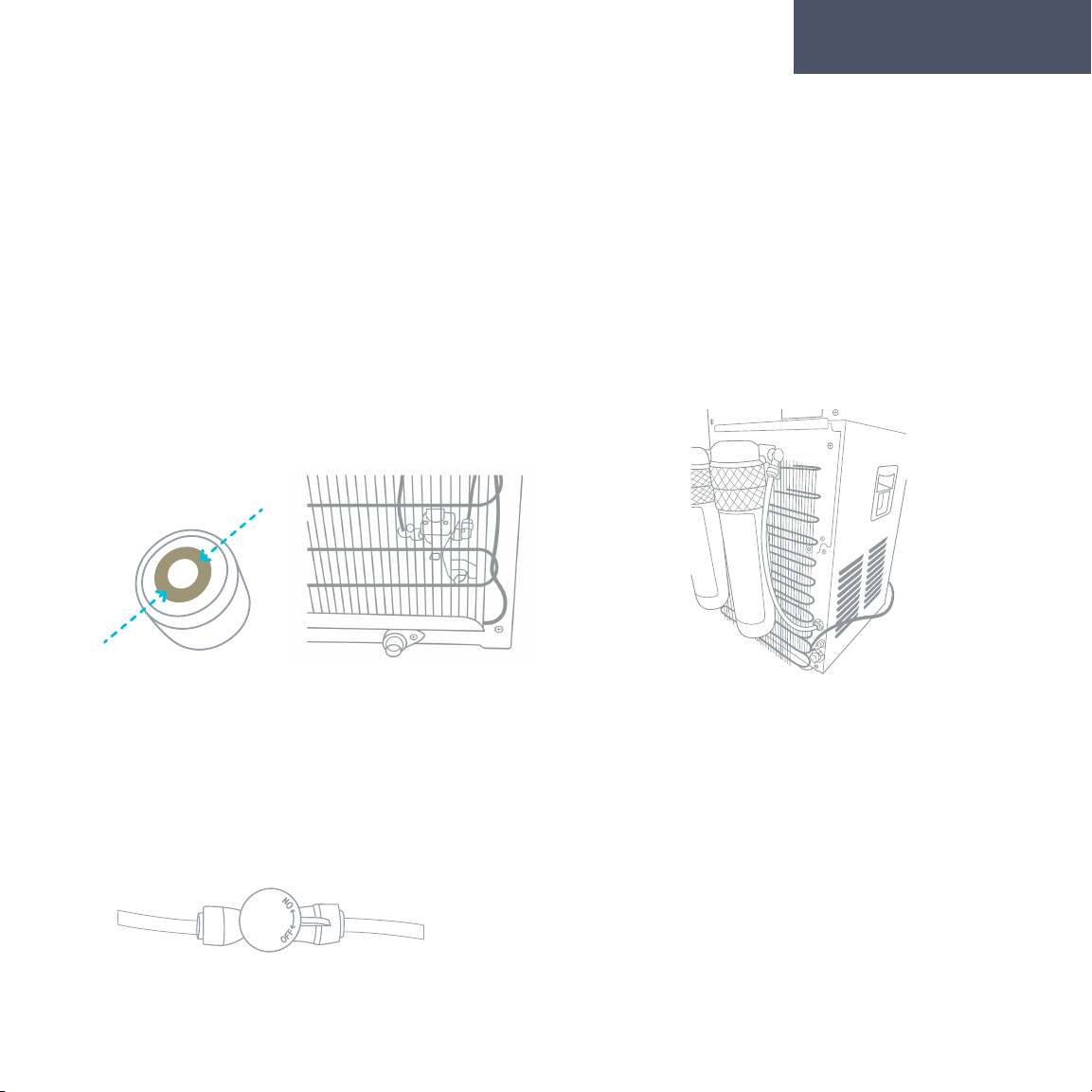
3. Locate the Valve and Tube Assembly.
Connect the tube end of this assembly to the
left insert on the left Filter Adapter.
5. Using the Small PE Tubing, connect the
right side inlet of the first Filter Adapter
to the left side inlet of the second Filter
Adapter.
Getting Started
4. Connect the PE Tubing (20’), that is connected
to the water source, to the open end of the Valve
and Tube Assembly. Make sure that the valve
is in the o position (perpendicular to the PE
Tubing).
17
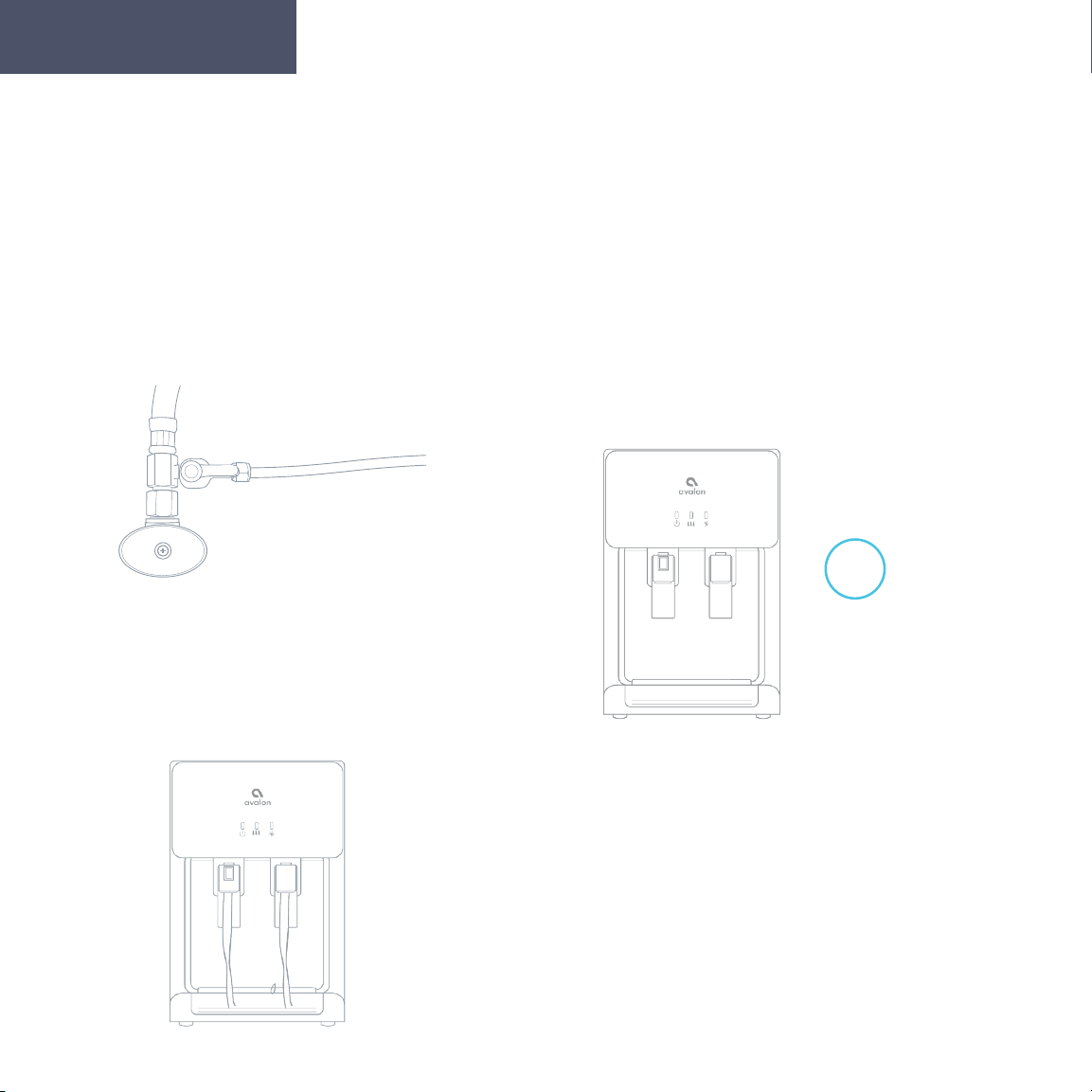
7. Locate the second Small PE Tubing. Connect
one end of the Small PE Tubing to the right
side inlet of the right Filter Adapter. Connect
the other end of that Small PE Tubing to the
water inlet (#18).
8. Locate the valve on the Vale and Tube
Assembly. Turn this valve to the on position
(parallel to the PE Tubing) to allow water to
flow through.
Getting Started
6. Remove the plug from the water inlet (#18)
located on the back of the unit. To do this
press on the push connect ring in towards the
cooler and remove the plug at the same time.
Finishing the Water Cooler Installation
18
Finishing the Water Cooler Installation
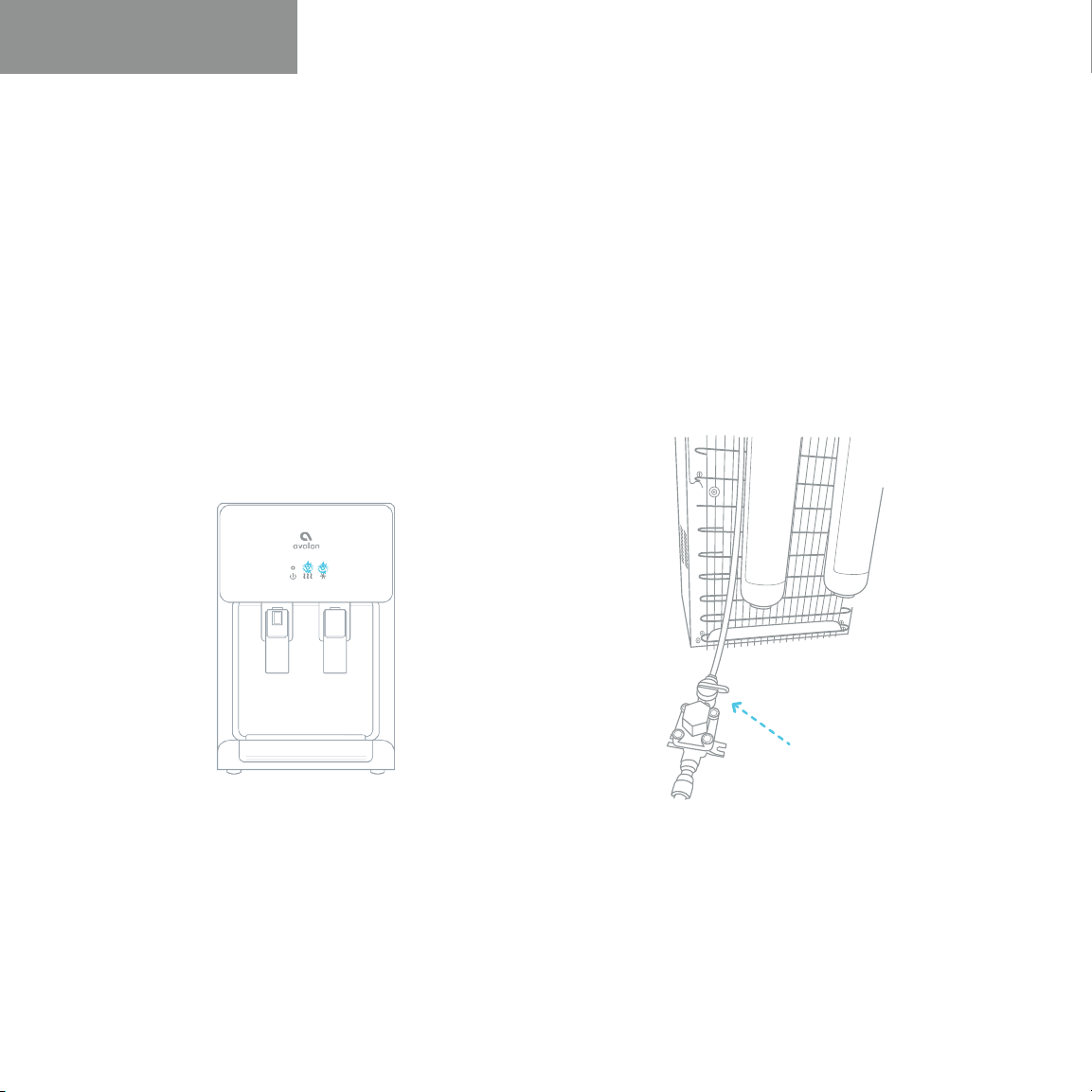
10. After the installation of the water
line and filters is complete, plug the
power cord into a grounded wall
outlet and begin to use the machine.
Please allow the machine about 10-
15 minutes for the water to fill in the
tanks before use.
11. Be sure to dispense a little water
from both the cold and hot water
spouts (#8, #6) prior to turning on the
cooling and heating switches (#16,
#17) located on the back of the cooler.
15-20
min
Hot
Getting Started
9. Locate the Adapter with Valve that
is connected to the water source. Turn
this valve to the on position (parallel
to the PE Tubing) to allow the water to
flow through.

19
User Guide and Maintenance
20
Replacing the Filters
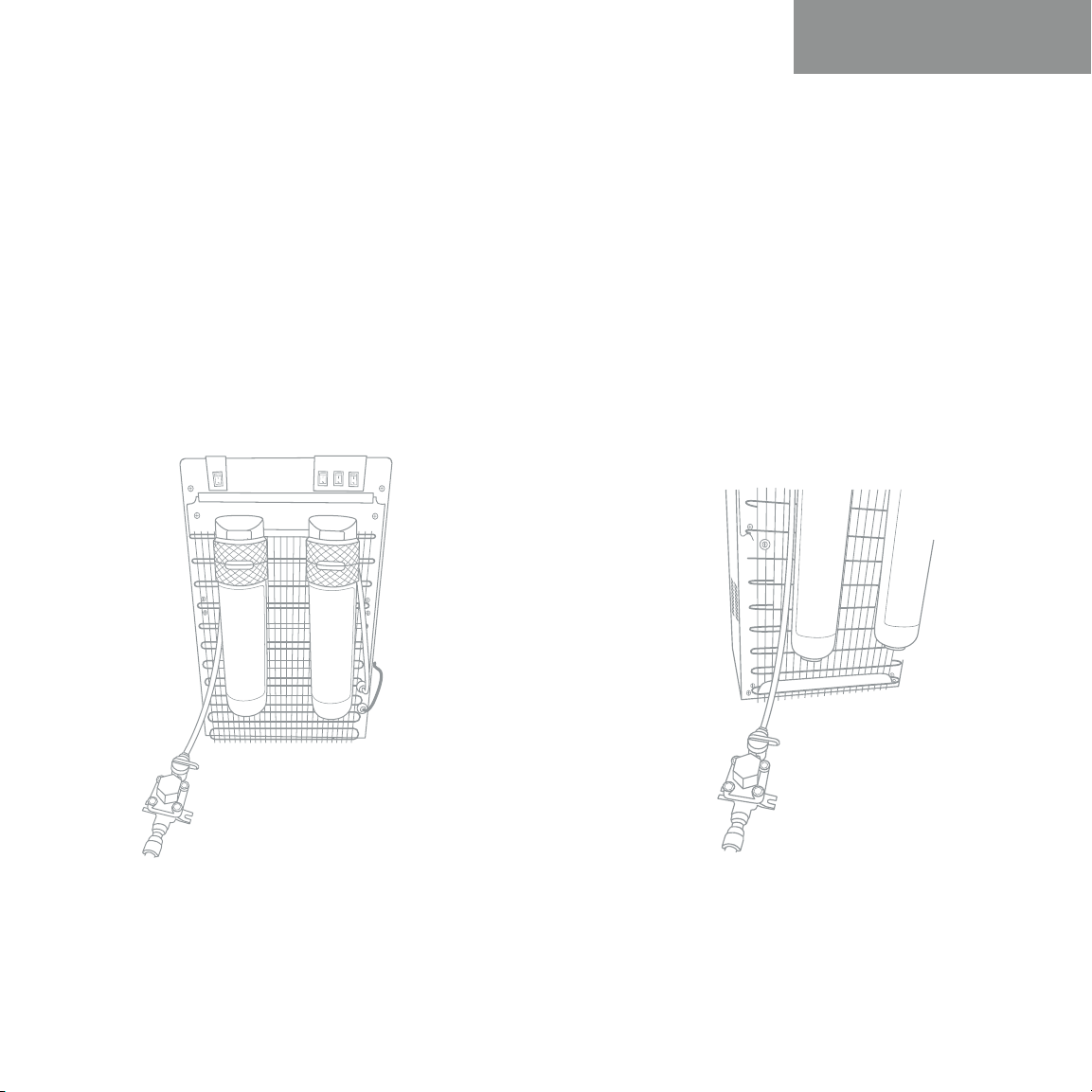
2. Shut o the valve located at the
connection to the water source
or the valve located to the left of
the Sediment Filter on the back
of the unit.
1. When lifetime of the filter is near its end,
either by means of water flow or after 6
months time, the heating (#2) and cooling
(#3) indicator lights will blink as a warning.
When the filter lifetime is up, the heating (#2)
and cooling (#3) indicator lights will continue
to blink and the machine will beep to let you
know that the filter needs to be changed.
User Guide and Maintenance
21
Replacing the Filters
4. Turn on the Valve that was
previously shut o. This valve
will be located at the connection
to the water source or located to
the left of the Sediment Filter on the
back of the unit.
3. Twist the expired filters to remove
them from the Filter Adapters at the back
on the unit. Insert the new filters into
the Filter Adapters by twisting them into
place and rotating them clockwise. Make
sure the Sediment Filter is on the left and
Carbon Block Filter is on the right.
User Guide and Maintenance
22
Replacing the Filters
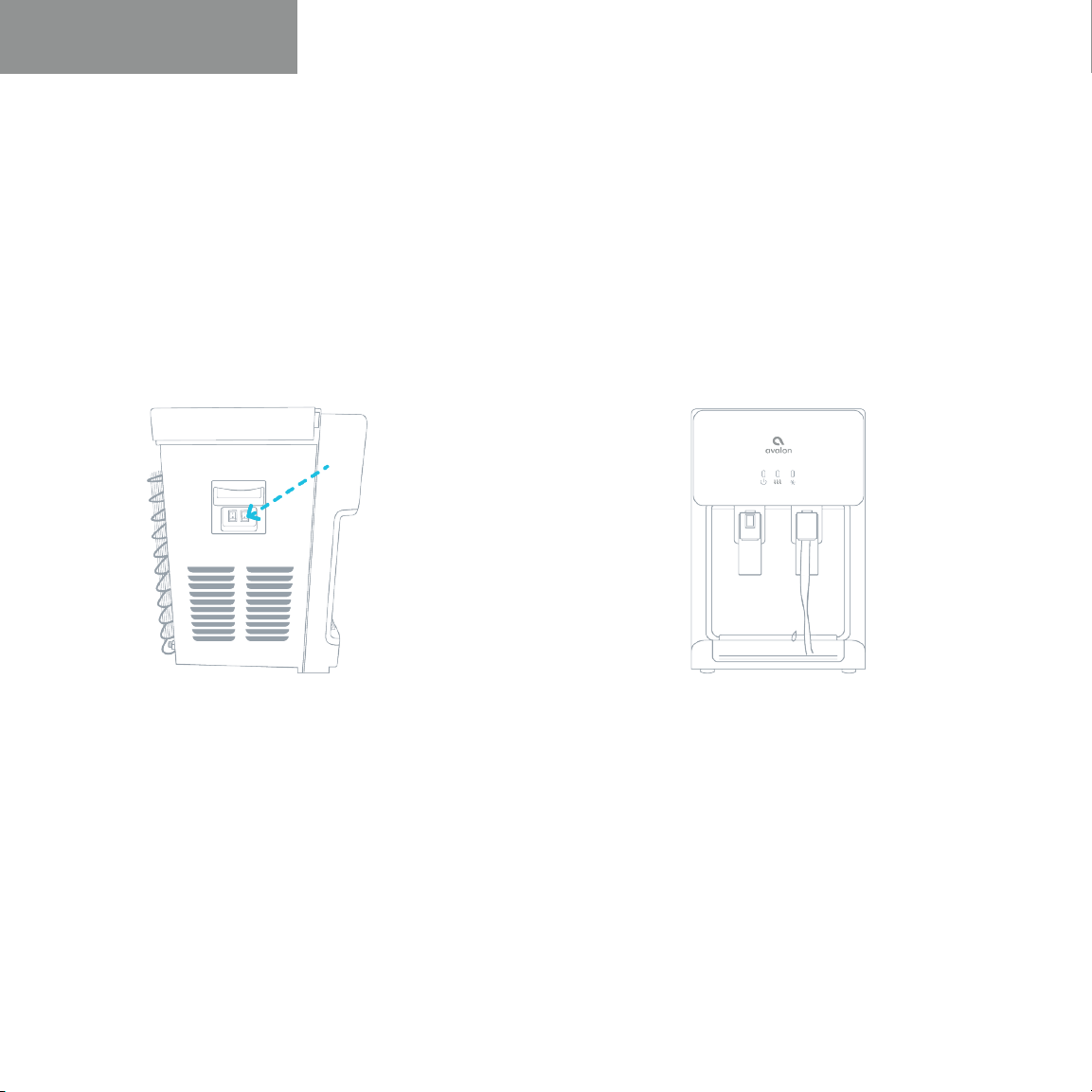
5. After replacing the filters, press and
hold the filter reset button (#12) located
on the left side of the unit. Press and
hold this button until the heating (#2)
and cooling (#3) indicator lights stop
blinking.
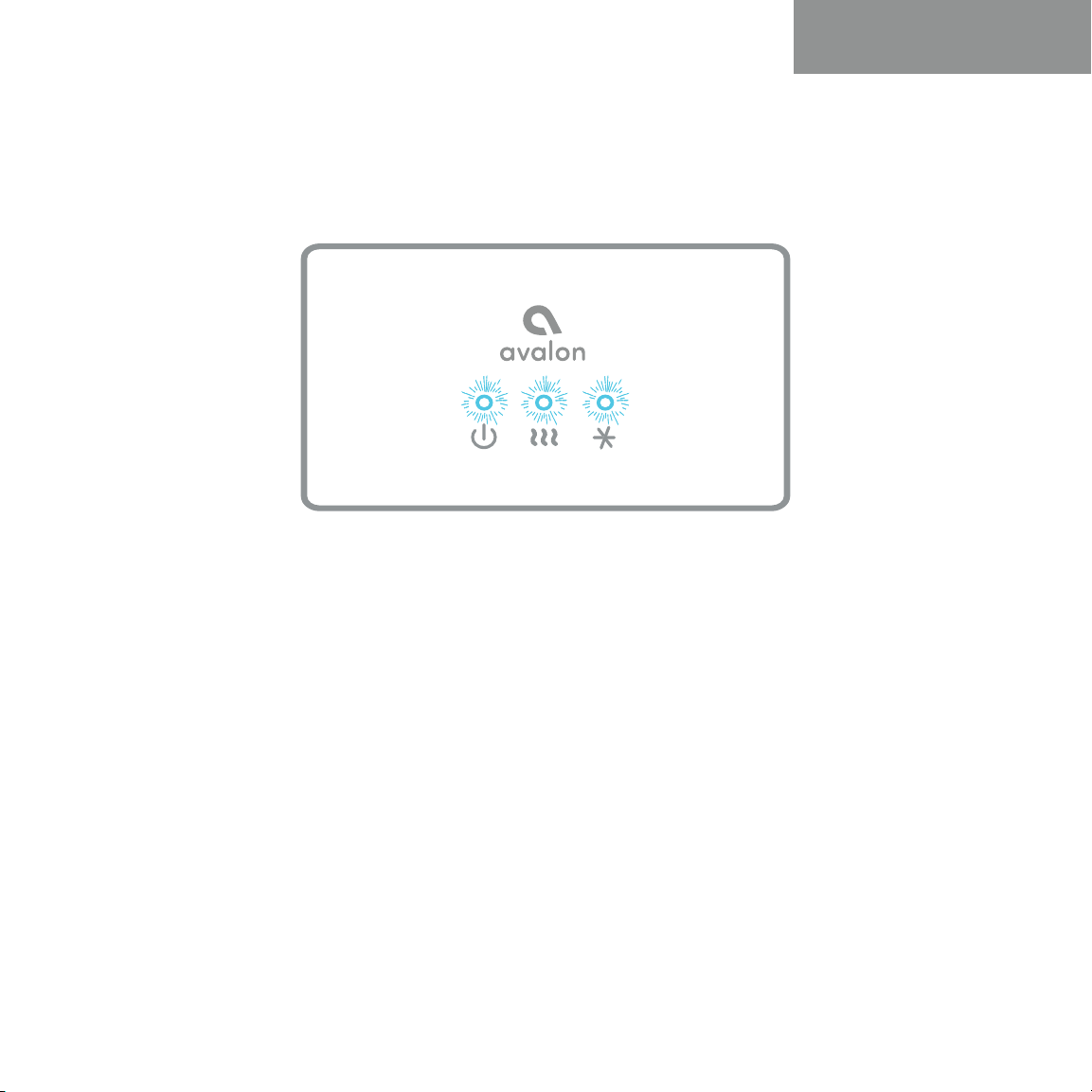
6. In order to flush the new filters, allow
the water to flow from the cold water
spout for approximately 2 minutes.
User Guide and Maintenance
23
Leak Detection
Our machines are equipped with a high-tech leak detector that will alert you of any
potential leak. At the same time the machine will automatically shut o any intake of water to
prevent a potential flood. In the event of a possible leak, power/self-cleaning indicator light (#1),
the heating indicator light (#2) and cooling indicator light (#3) will start blinking and a beep will
sound. Please check around the machine for any leaking water and determine the source of it.
If you find the source of the leak, you can call our support line for assistance in fixing it. If you do
not find the source of this leak, it may have been caused by accidental spillage of water or from
a filter change. The leak detector is inside the machine and will need to be left to dry by itself
once any excess water is removed.
User Guide and Maintenance

24
Cleaning
25
Activating Self-Cleaning Function
3. Ozone will be produced and injected into the water system, it will kill bacteria
and bio-films typically found in water dispensers. By the end of the cleaning cycle
the ozone will convert into harmless oxygen and will be emitted into the air.
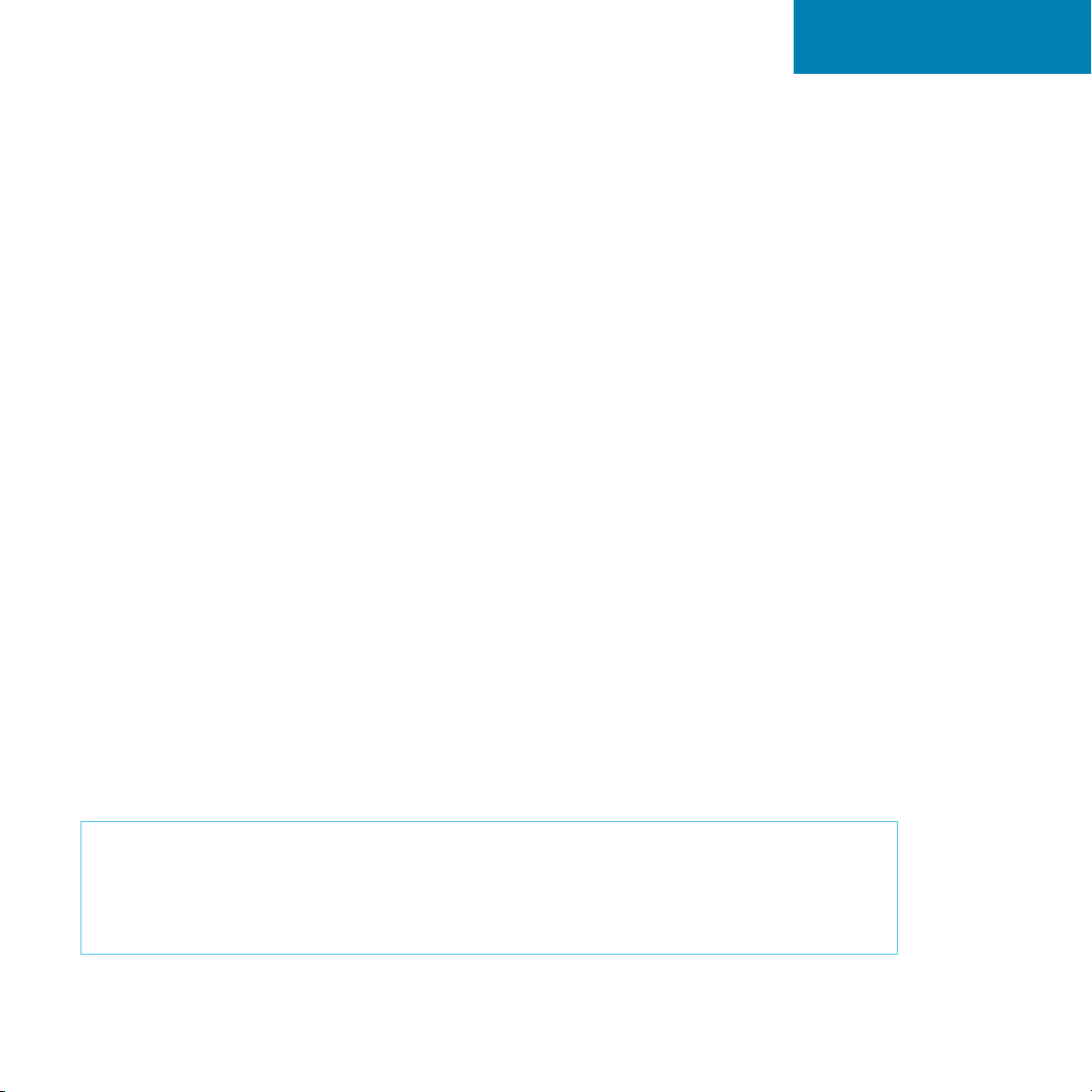
1. To activate, press the self-cleaning switch (#14) and hold in the on (I) position for 5
seconds and release. The switch will immediately go back into the o (O) position.
It is recommended that the self-cleaning feature is used once a week to
sanitize the tanks and water lines.
2. The power/self-cleaning indicator light (#1) will begin to blink. This indicates the
self-cleaning cycle is underway.
4. When the self-cleaning cycle is complete the power/self-cleaning indicator light
(#1) will stop blinking and will be steady.
Please Note: This self-cleaning cycle will take 90 minutes to complete. During
this time do not dispense and drink the water. We recommend you do this during
a period of time when the unit will not be in use for example overnight. During
the cycle you may smell some of the ozone, this is normal.
Cleaning
26
To prolong the lifetime of the machine, it is recommended that the unit be cleaned
and sanitized manually about every six months.
To clean the outside of the unit
Use a disinfectant of your choice to wipe down the outside of the machine.
Disinfectant does not come with this unit. It can be purchased separately from
a local store.
Rinsing, Cleaning, and Draining
The machine has been disinfected prior to departing from the factory. However, it
is recommended to rinse and drain the unit prior to installation.
To rinse the inside of the unit
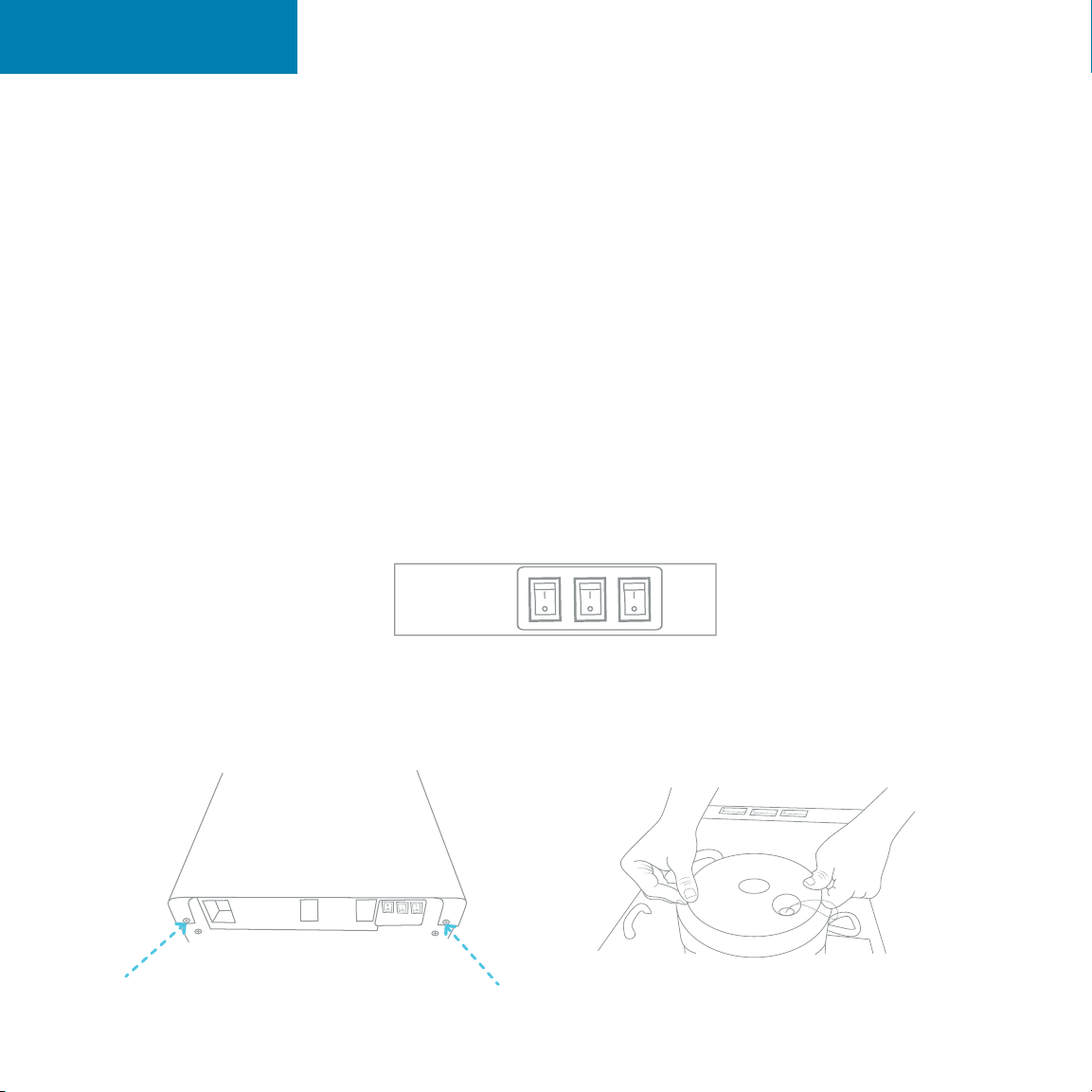
1. Before cleaning, make sure that the cooling switch (#16) and heating switch (#17)
are in the o (O) position and unplug the machine.
2. Remove the two screws located on the back (at the top, in line with the switches) of
the cooler. Remove the top cover by lifting at an angle and pull o. Remove the white
cold water tank cover and the separator.
Cleaning
27
Rinsing, Cleaning, and Draining
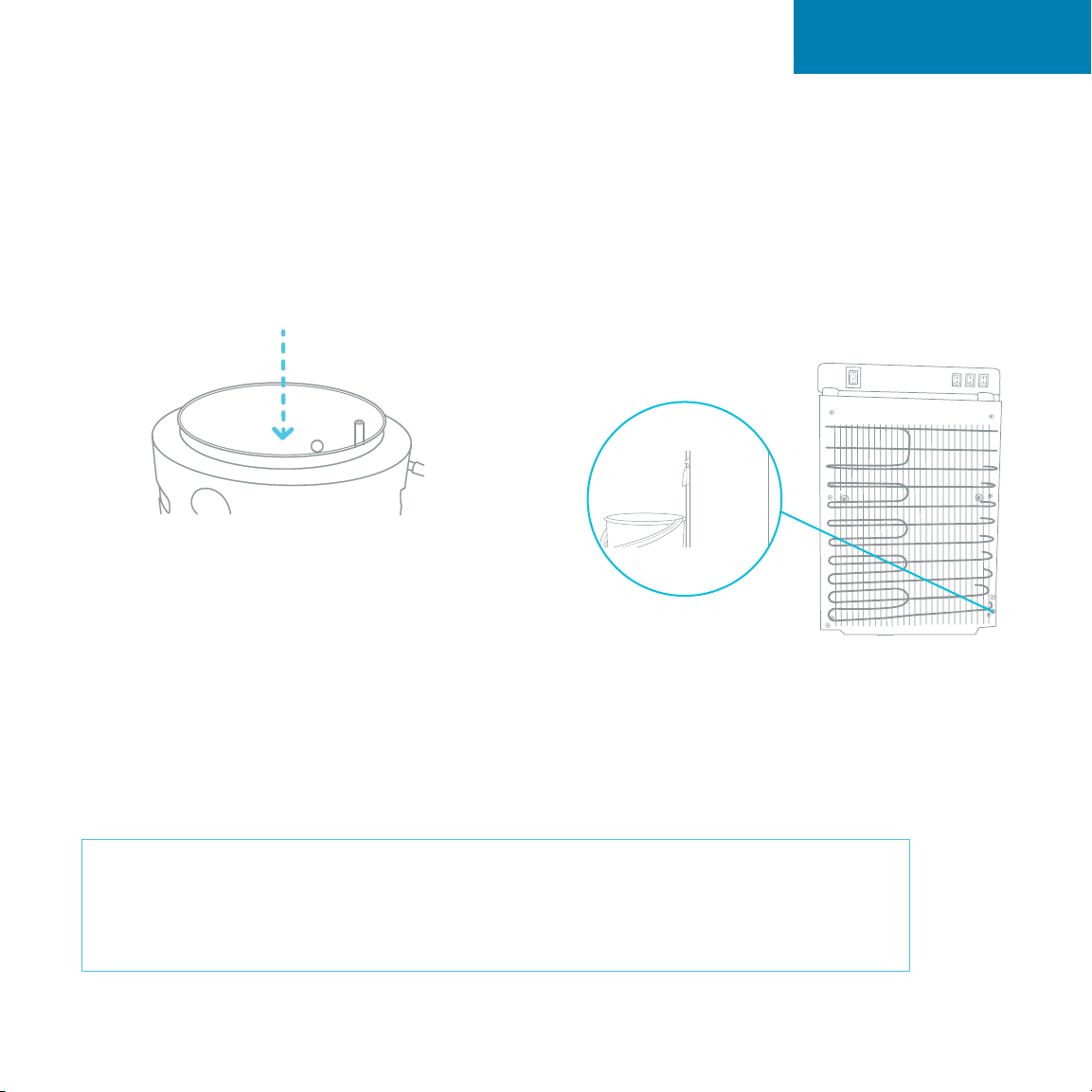
3. Pour 0.6 gallons of clean water into the
cold tank. (The cold water tank is the open
cylinder that the white cover was removed
from).
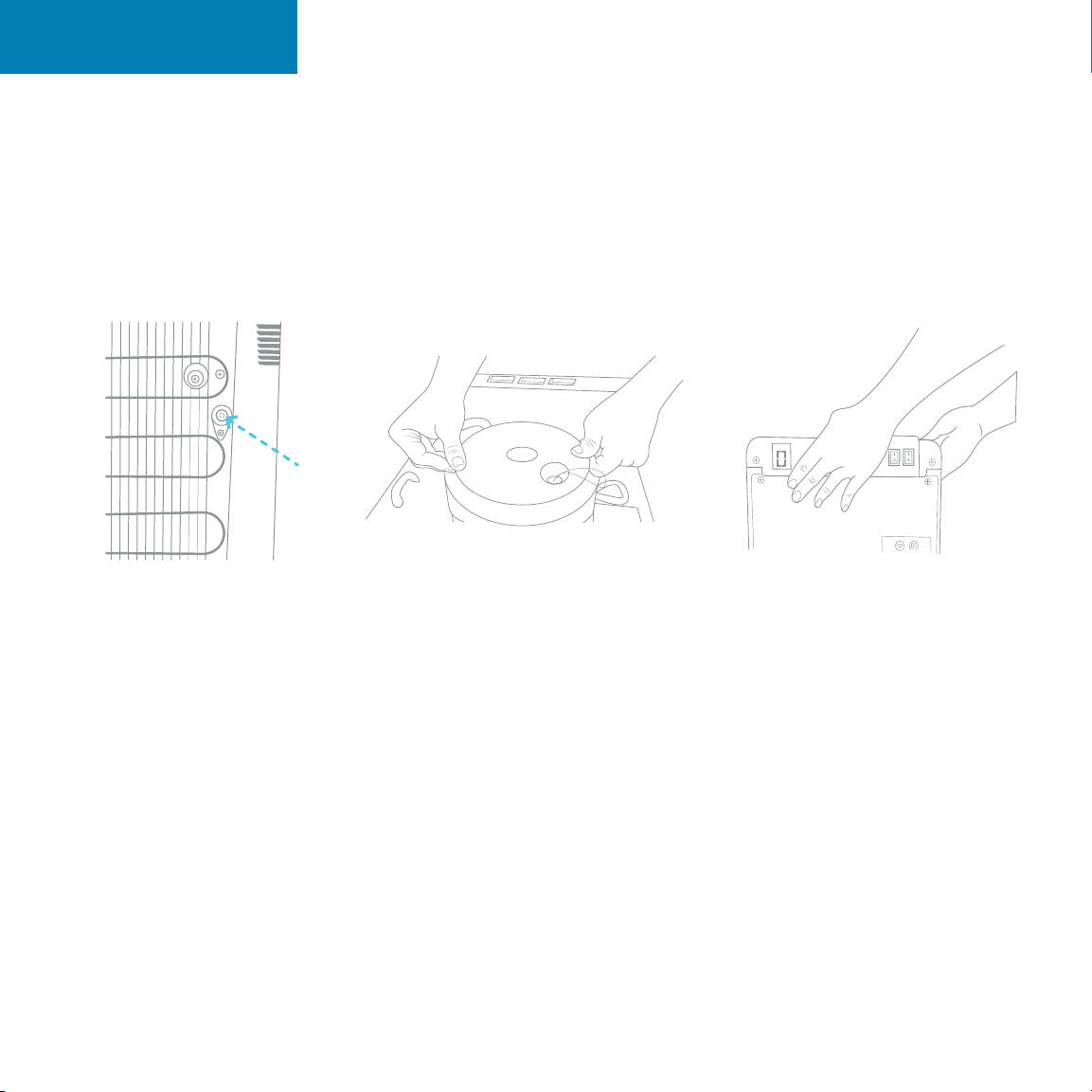
4. Place a large bucket beneath the drain
outlet (#20) located on the back of the unit.
Remove the drain cover and allow the water
to drain from the unit. Water will start flowing
as soon as the drain cover is removed.
Caution: The dispenser will heat water to a temperature of approximately 185°F.
It can cause severe burns if not handled carefully. Please use caution while operating
and cleaning. Please allow ample time for any hot water inside the machine to cool
down before draining it.
Cleaning
28
Rinsing, Cleaning, and Draining
5. Once water is completely drained, reposition the drain cover, cold tank cover
and the top cover. Ensure that the pipes and wires are connected properly and
you may use the dispenser as normal.
Cleaning

29
Troubleshooting

30
Troubleshooting
If you are having trouble with your water cooler please see the following
solutions. You can also view our trouble shooting videos at the website below.
Please feel free to contact us with any questions.
1-800-256-0695
support@avalonh2o.com
www.avalonh2o.com
Troubleshooting

31
Troubleshooting
Indicator lights are flashing and unit is beeping
If indicator lights #1, #2, #3 are flashing and the unit is making a slow beeping
sound, it is alerting you that there may be a leak in the unit. Please refer to page 23.
Please turn o the switches on the back of the unit and unplug the unit.
Ensure that the bottom of the cabinet is completely dry. The sensor is located in the
back left corner. Make sure there is no water on the sensor.
Once the unit is dry you may plug it back in and turn the switches to the on position
and continue normal use.
Water leaking from unit
• Check to make sure that pipes are connected properly.
• Inspect the adapter to ensure that it is connected properly.
• Water pipe may need to be replaced.
Water not dispensing at a hot or cold temperature
This could be caused by an over consumption of water in a short period of time causing
the tanks to empty. Please allow 5 to 10 minutes for the water cooler tanks to refill. Allow
the proper time for the water to heat and cool.
This could be caused by an interruption in the power supply. Please ensure that the
power cord is connected to an outlet. Please make sure that the heating (#17) and
cooling (#16) switches are in the on (I) position.
Troubleshooting

32
Safety

33
Safety
Safety
To reduce risk of injury and property damage, user must read this entire guide
before assembling, installing and operating the dispenser.
Failure to execute the instructions in this manual can cause personal injury or
property damage.
This product dispenses water at very high temperatures. Failure to use this properly can
cause personal injury.
When operating this dispenser, always exercise basic safety precautions, including the
following:
• Prior to use, this dispenser much be properly assembles and installed in
• accordance with this manual.
• This dispenser is intended for water dispensing only. Do NOT use other liquids. Do NOT
use for other purposes. Never use any other liquid in the dispenser other than known
microbiologically safe tap water.
• For indoor use only. Keep water dispenser in a dry place away from direct sunlight. Do
NOT use outdoors.
• Install and use only on a hard, flat and level surface.
• Do NOT place dispenser in an enclosed space or cabinet.
• Do NOT operate the dispenser in the presence of explosive fumes.
• Position back of dispenser no closer than 20 cm from wall and permit free airflow
between wall and dispenser. There must be at least 20 cm clearance on the sides of the
dispenser to permit airflow.
• Use only properly grounded outlets.
• Do not use and extension cord with your water dispenser.
• Always grasp plug and pull straight out from outlet. Never unplug by pulling on power
cord.
• To protect against electric shock, do NOT immerse cord, plug or any other part of the
dispenser in water or other liquid.

34
Safety
Safety
• Ensure dispenser is unplugged prior to cleaning.
• Never allow children to dispense hot water without proper and direct supervision.
Unplug unit to prevent unsupervised use by children.
• Service should be performed only by a certified technician.
• Warning: Do not damage the refrigerant circuit.
• This appliance can be used my children aged from 8 years and above if they have
been given supervision or instruction concerning use of the appliance in a safe way
and if they understand the hazards involved. Cleaning and user maintenance shall not
be made by children unless they are older than 8 and supervised. Keep the appliance
and its cord out of reach of children less than 8 years.
• Appliances can be used by persons with reduced physical, sensory or mental
capabilities or lack of experience and knowledge if they have been given supervision
or instruction concerning use of the appliance in a safe way and understand the
hazards involved. Children shall not play with the appliance.
• This appliance is intended to be used in a household and similar applications such as:
kitchen area in shops, oces and other working environments, bed and breakfast type
environments, catering and similar non-retail applications.
• Do not store explosive substances such as aerosol cans with flammable propellant in
this appliance.
• If the supply cord is damaged, it must be replaced by a special cord assembly
available from the manufacturer or its service agent.
• Never turn the machine upside down or lean it more than 45°.
• Thermostat has been adjusted. There is no need to adjust it by yourself. When the
matching is below the freezing point and blocked by ice, the cooling switch should be
turned o for 4 hours before turning it on again to continue its operation.
• This machine should not be plugged back in until 3 minutes after it has been
unplugged.