CVM-WM200
UHF 96-Channels Wireless Microphone
USER MANUAL


Foreword
Main Features
Thanks for purchasing COMICA WM200 UHF wireless microphone;
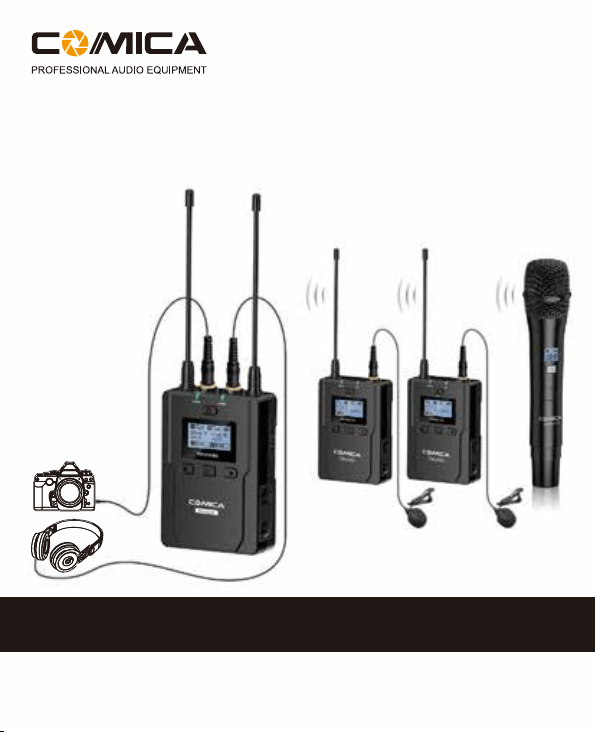
WM200 is an all-metal wireless microphone with dual-transmitter triggered by one
receiver, with two AA batteries, it utilizes UHF wireless FM technology and LED
high-resolution lattice screen, 96 channels in total, 16-level adjustable volume,
and integrated into LCF
(
Low cut filter) , Auto-scanning, Auto IR Channel-match,
stereo / mono switchable audio mode, RF signal strength adjustment, MIC/LINE
IN input dual selection, power monitoring at receiver end, sound pickup dynamic
display, backlight adjustment and other functions, at the same time with strong
shielding anti-noise performance, it’s a high-quality microphone to broadcasting
level;
To ensure the smooth use and safety of the product, please carefully read this
instruction before using and properly assemble and operate.
. Dual Transmitters Triggered by One Receiver, A/B Double Group Options;
. 96 Channels, Used for Multiple Devices Working Together;
. Working Distance is Up to 120m (in open area, up to 80m in Barrier Area);
. LCF Low Cut Filtering Mode;
. Auto-scanning for Quick Channel Selection;
. Manual or Auto IR Sync;
. Adjustable RF Signal Strength;
. Audio Dynamic Display Bar;
. 16 Levels Volume Adjustment;
. Transmitter Power Monitor;
. Mono/Stereo Switchable Output Modes;
. Low-consumption, Super-long Standby Time;
. Lattice LCD Display, High Resolution;
. Full Metal Manufacturing, Excellent Shielding;
1

Notice
Package Contents
When using auto IR sync, please stay within one meter, otherwise the signal may
be too weak and the sync will not be successful;
In the case of stereo/mono mode switch, please preset the mode before using to
avoid the transient interference caused by switching during usage;
The antenna will affect the working distance. Please protect the antenna and avoid
any man-made damage;
The working distance will be affected by the surrounding environment. Please try
to keep the environment open without interference during usage, and close the
WIFI of the device itself;
When using this product in a short distance, it is recommended to set RF strength
at ‘LOW’ to reduce the power consumption;
For smart phone shooting, customers must separately purchase a TRS-TRRS
audio converting cable,and pay attention to set the mobile phone mode to 'Flight
Mode' to avoid incoming call interference;
(It does not support the original recording system of some android systems, the
third-party APP is recommended to be used in this case);
Please keep this product in dry environment;
Do not expose the device in rain or humid environment, otherwise there will be a
danger of short circuit;
Main Parts
:
Lavalier Transmitter (TX) Hand-held Transmitter (HTX) Receiver (RX)
2

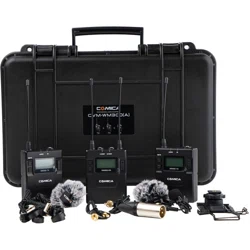
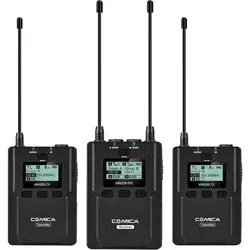
Multiple Selections:
WM200(A) = 2TX + RX
WM200(B) = TX + HTX + RX
WM200(C) = TX + RX
WM200(D) = HTX + RX
TX TX RX
++
TX HTX
HTX
RX
++
TX RX
+
RX
+
3

1
2
3
4
5
6 7
8
9
2 3 4 5 6 7 8 9
2 3 4 5 6 7 8 9
2 3 4 5 6 7 8 9
3
5
4 6 7 8 9
WM200(A)= x2 + + + x3 + x3 + x2 + + +
WM200(B)= + + + x2 + x2 + + + +
WM200(D)= + + + + + + +
WM200(C)= + + + x2 + x2 + + + +
3.5mm Mic Audio Input Cable
3.5mm-3.5mm Audio Output Cable
3.5mm-XLR Audio Output Cable
Belt Clip
Camera Cold-shoe Mount
Wind Muff
Portable Box
User Manual
Warranty Card
Accessories:
1
2
3
4
5
6
7
8
9
The accessories of each combination include
:
1
1
1
2
4
Components and Instruction
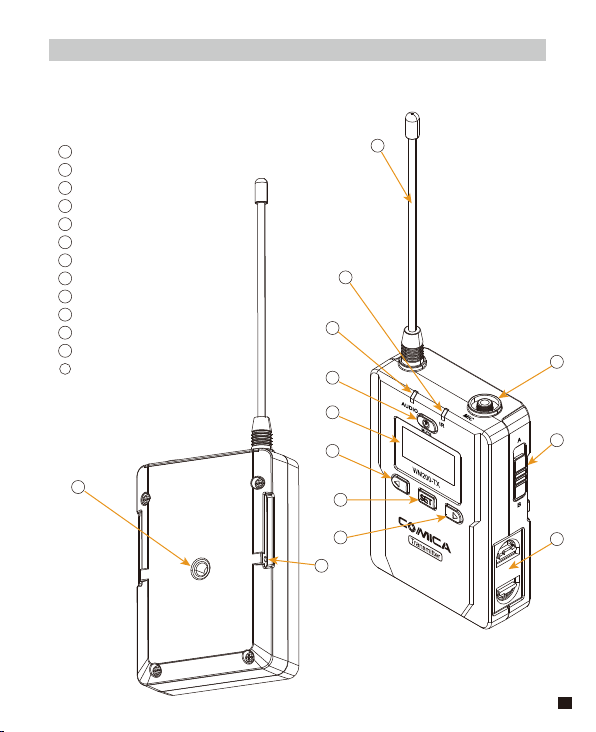
Components
Lavalier Transmitter (TX)
Antenna
Matching Status Indicator Light / IR Screen
Sound Status Indicator Light
On-off / Muting Button
LCD Screen
Function Selection Button -
SET Function Menu
Function Selection Button +
MIC / LINE IN External Input
A/B Group Selection Switch
Battery Tray
1/4 Cold-shoe Mounting Hole
Belt Clip Connecting Hole
1
2
3
4
5
6
7
8
9
10
11
12
13
1
3
2
4
5
6
7
8
9
10
11
12
13
5

2
1
3
4
65
Microphone
LCD Display
On-off / Muting Button
IR Screen
Low cut/Normal Audio Switch
Signal Strength “High/Low” Switch
Hand-held Transmitter (HTX)
1
2
3
4
5
6
LCF
RF
LCF
-
RF
High
Low
6

1
9
10
3
2
4
5
6
7
8
11
12
13
14
15
Receiver (RX)
1
2
3
4
5
6
7
8
9
10
11
12
13
14
15
Group A Antenna
Group B Working Status Indicator Light
Group A Working Status Indicator Light
On/Off Switch
LCD Screen
Function Selection Button -
SET Function Menu
Function Selection Button +
3.5mm Audio Output Socket
3.5mm Monitoring Socket
Group B Antenna
A
、
B or A+B Group Selection Switch
Battery Tray
1/4 Cold-shoe Mounting Hole
Belt Clip Connecting Hole
7
Lavalier
Transmitter
/ Receiver
Hand-held
Transmitter
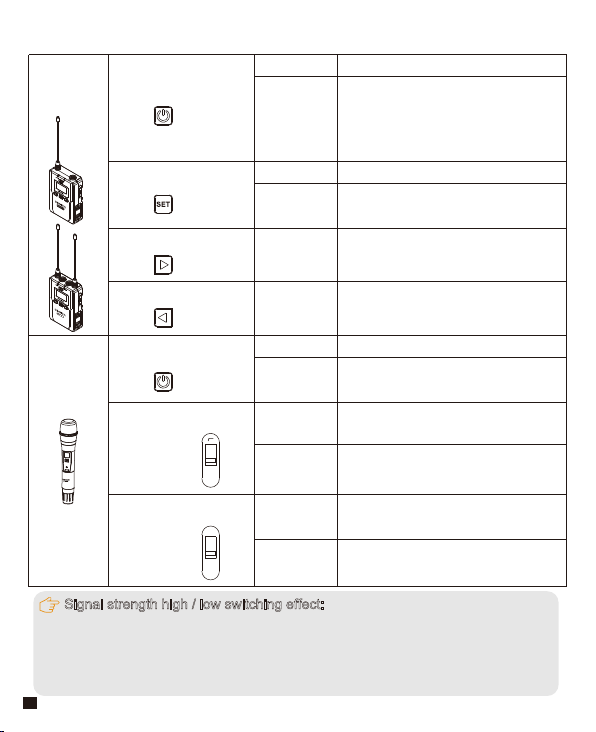
On-off / Muting Button
Long Press
Short Press
Power On / Off
On-off / Muting Button
“Low cut/ Normal”
Sound Switch
Signal Strength
“High/Low”
Switch
Long Press
Power On / Off
Muting Mode
(
This function is only
for transmitter, when the mute
function is turned on and the
screen is lighted up
)
Short Press
Muting Mode
(
Only goes into
effect when the screen lights up
)
SET Function Menu
+ Button
- Button
Long Press Enter the function adjustment menu
Short Press
Short Press
Short Press
1.Confirm the selected function
2.Exit the function adjustment menu
Function Adjustment (+)
Function Adjustment (-)
Push-up
Signal strength--high
Push-down
Signal strength--low
Push-up
Low cut
Push-down
Normal
Function Button Instruction
LCF
-
RF
High
Low
Signal strength high / low switching effect:
With high signal strength, the wireless working distance is up to 80-120M, high
power consumption, battery life is short; With low signal strength, the wireless
working distance is up to 30-60M, low power consumption, the battery can be
used for a long time.
8

Indicator Light Instruction
Transmitter
Receiver
AUDIO
A IR/RF
B IR/RF
A IR/RF
:
Group A Working Status Indicator
B IR/RF
:
Group B Working Status Indicator
IR
Green Light Keeps On
Green Light Keeps On
Green Light Keeps On
Red Light Keeps On
Red Light Flicker
Red Light Flicker
Red Light Flicker
Red light keeps on
Green Light Flicker
Normal Recording Status
(
This state is only for the
transmitter, when the
channel matches
successfully, the receiver
can pick up the sound
)
Muting Mode
Low-power reminder
Channel matches
(
No matter the channel
matches or not
)
Channel in the match...
(
only for IR Sync
)
Normal working status after
the channel matches
Channel doesn’t match
Channel in the match...
(
only for IR Sync
)
Low-power reminder
Group closed
Low cut function:
Appropriately remove the low frequency part of the sound, reduce the ambient
noise of the low frequency part, to make sound more clean and clear.
9

Installation and Usage
1. Install two AA batteries into the battery tray according to the positive
and negative electrode
Lavalier Transmitter
AA
AA
10
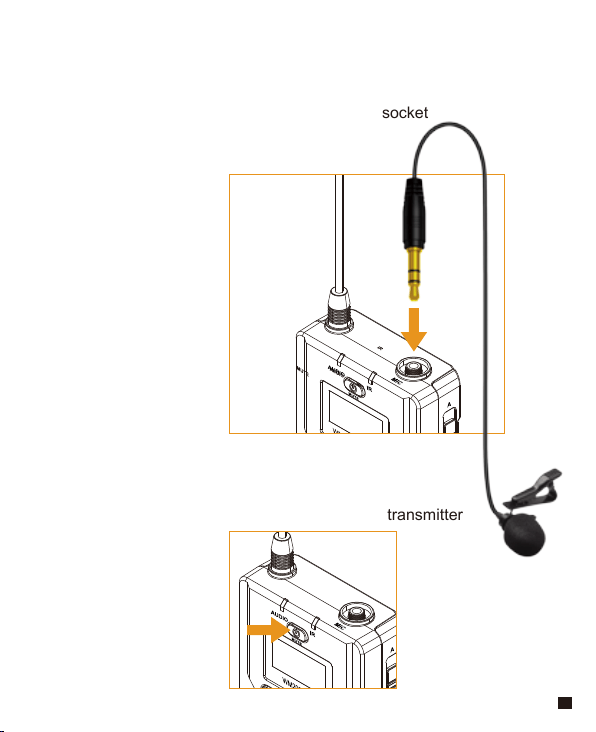
2. Insert the 3.5mm audio input line into MIC socket
3. Long press the power button to turn on the transmitter
11
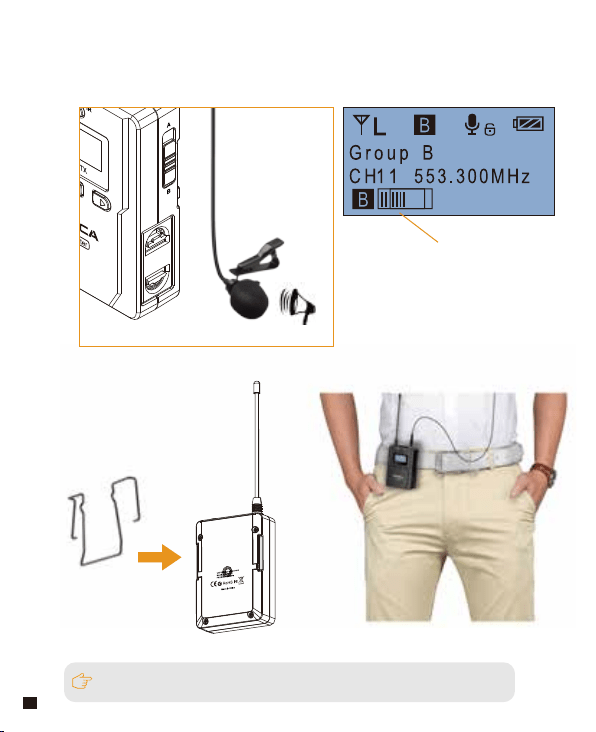
4. Target the MIC to the audio source and check the working status
according to the volume indicator on the screen
5. Connect the belt clip to the connection hole
6. After the channel matching with the receiver, it can be used
Please refer to screen operation instruction for channel matching.
Audio Dynamic Display Bar
12

Please refer to screen operation instruction for channel matching.
2.Long press the button switch to turn on
the hand-held transmitter
3. After the channel matching with the receiver, it can be used
Hand-held Transmitter
1. Install two AA batteries into the battery tray
according to the positive and negative electrode
AA
AA
13
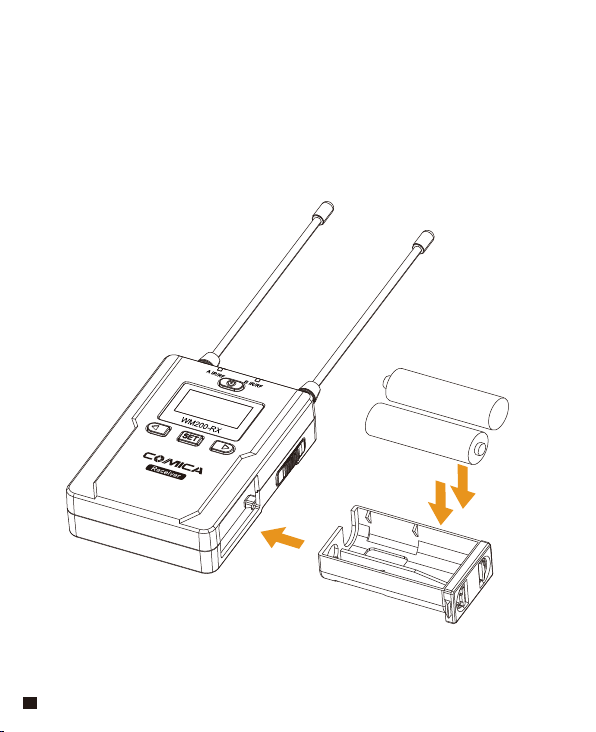
Receiver
1. Install two AA batteries into the battery tray according to the positive
and negative electrode
AA
AA
14

3. Connect one end of the 3.5mm-3.5mm audio OUTPUT line to the
OUTPUT port of WM200RX and another end to the AUDIO
INPUT port of the camera or camcorder.Insert the headphone into
the 3.5mm monitoring port for real-time monitoring and then long
press power button to trun on the receiver.
2. Connect the receiver to the video device through the cold shoe
Most DSLR cameras has 3. 5MM port, if you use the XLR camcorder,
you need to use the 3. 5mm-XLR audio output line.
15
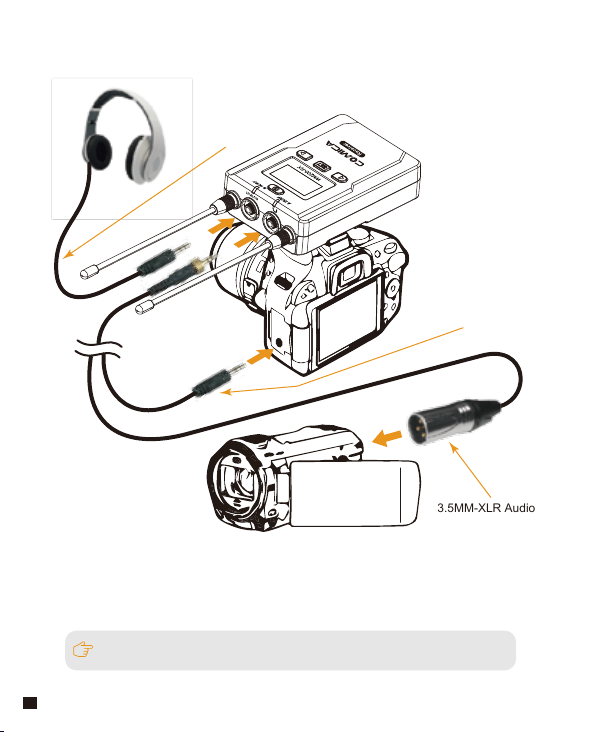
Please refer to screen operation instruction for channel matching.
4. After the channel matching with the receiver, it can be used
3.5MM-XLR Audio
Output Line
3.5mm-3.5mm
Audio Output Line
3.5mm Audio Output
Monitoring Line
16

Screen Display and Operation Instruction
Screen Display Instruction
Operation Instruction
Lavalier Transmitter
Signal Strength High
Signal Strength Low
Group A
Group B
Normal recording
Muting
Muting
(
Unlocking
)
Muting
(
Locking
)
Power Indication
Group A/B
Channel
Group A/B
Audio dynamic display bar Channel Frequency
H
L
1. Group A/B Selection
1.1 Use A/B Group selection switch to select the group, when push
up to A, it will be Group A; when push to B, it will be Group B.
You could choose Group A or Group B according to your demand.
A/B Group Selection Switch
17
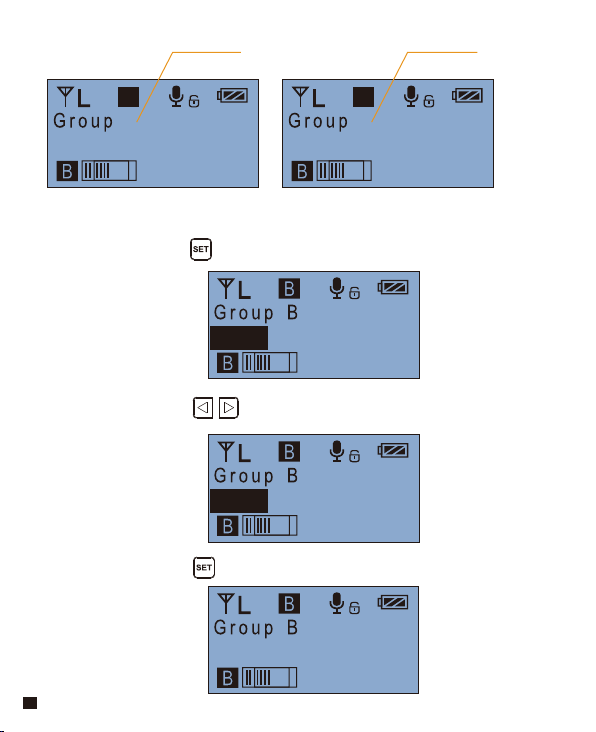
2.1 Long press button to CH setting display page
2.2 Short press button to select the channel
2.Manually Adjust the Channel of Transmitter
CH11 553.300MHz
CH45 533.500MHz
CH45 533.500MHz
2.3 Short press button to confirm
CH45
A
533.500MHz CH45
B
533.500MHz
A B
A Group B Group
18

3.2 Long press button to “ Muting ” display page
3.3 Press button to select Muting mode on/ off
3.4 Short press button to confirm
3.1 Press button to “ Muting ” display page
3. Muting Mode On/ Off
Muting
Enable
CH11 553.300MHz
Muting
CH11 553.300MHz
Enable
Muting
CH11 553.300MHz
Disable
Muting
CH11 553.300MHz
Disable
19

4.2 Long press button to “ Volume Setting ” display page
4.1 Press button to “ Volume Setting ” display page
4. Volume Adjustment at Transmitter End
When set to “ Disable ”, the muting function cannot be used, the icon is:
When set to “ Enable ”, the muting function works, the icon is:
The muting mode can be controlled only when the screen is on, press any
button to light the screen and then press the button to switch the
muting mode.
Volume Setting
Volume 08
CH11 553.300MHz
Volume Setting
CH11 553.300MHz
Volume 08
20
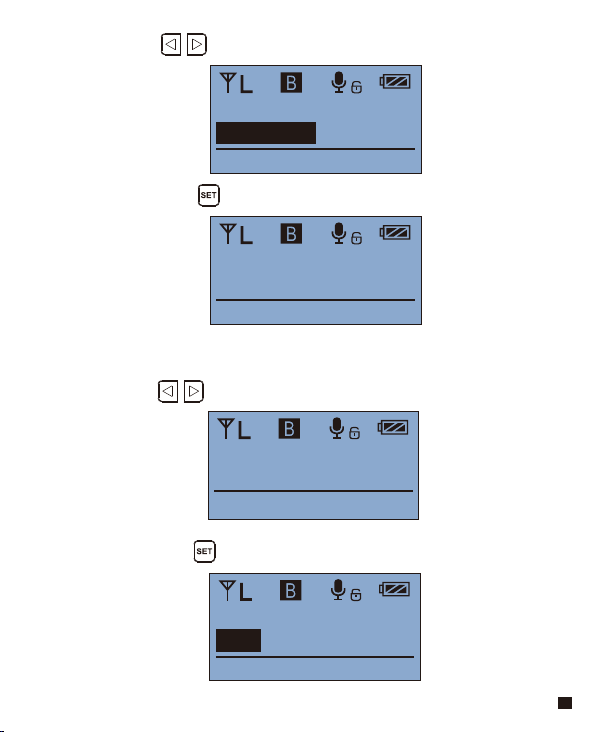
4.4 Short press button to confirm
4.3 Press button to adjust the volume, 16 levels in total
5.2 Long press button to “ RF Power Setting ” display page
5.1 Press button to “ RF Power Setting ” display page
5. Transmitting signal strength “ High/Low ” Adjustment
Volume Setting
CH11 553.300MHz
Volume 15
Volume Setting
CH11 553.300MHz
Volume 15
RF Power Setting
Low
CH11 553.300MHz
RF Power Setting
CH11 553.300MHz
Low
21
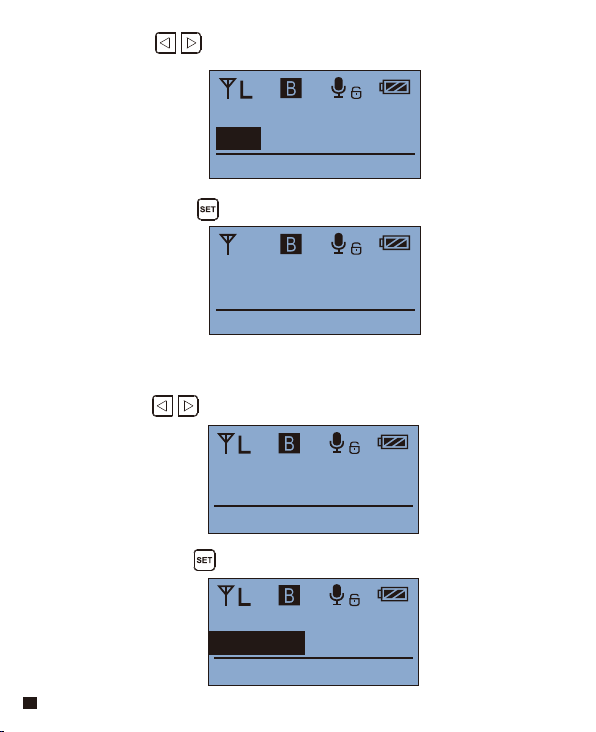
5.4 Short press button to confirm
5.3 Press button to adjust the transmitting signal strength
6.2 Long press button to “ Backlight Mode ” display page
6.1 Press button to “ Backlight Mode ” display page
6. Backlight “ lighting time/turn off ” Adjustment
RF Power Setting
CH11 553.300MHz
High
RF Power Setting
CH11 553.300MHz
High
H
Blacklight Mode
Delay 60s
CH11 553.300MHz
Blacklight Mode
Delay 60s
CH11 553.300MHz
22

6.4 Short press button to confirm
6.3 Press button to adjust the backlight lighting time or
you can turn it off for power saving
Blacklight Mode
OFF
CH11 553.300MHz
Blacklight Mode
OFF
CH11 553.300MHz
23

7.4 Short press button to confirm
7.2 Long press button to “ Input Setting ” display page
7.3 Press button to select “ Mic/ Line in ” input mode
7.1 Press button to “ Input Setting ”display page
7. MIC/LINE IN Input Mode Adjustment
Mic mode is for Microphone input;
Line in mode is for external audio input, such as smart phone music player.
Selecting the corresponding input mode will bring you a better audio effect.
Input Setting
Mic
CH11 553.300MHz
Input Setting
Mic
CH11 553.300MHz
Input Setting
Line in
CH11 553.300MHz
24

8.4 Short press button to confirm
8.2 Long press button to “ Mic LCF ” display page
8.3 Press button to select LCF On/ Off
8.1 Press button to “ Mic LCF ” display page
8. Low cut “On/Off ” Adjustment
The LCF function will remove the low-frequency part of the audio source,
such as the sound of wild insects and the noise of the crowd, and the
main audio source will be thinner. When the LCF function is turned off,
the original sound will be restored, and the main sound source will be
thicker. You can adjust according to actual needs.
Mic LCF
OFF
CH11 553.300MHz
Mic LCF
OFF
CH11 553.300MHz
Mic LCF
ON
CH11 553.300MHz
25

9.2 Long press button for resetting
9.3 Resetting is finished
9.1 Press button to “ Reset ” display page
9. Reset to Defaults
10.1 Press button to “ Version ” display page to check the
version
10. Version
Reset
Reset Default
CH11 553.300MHz
Reset
Resetting...
CH11 553.300MHz
Reset
Finished!
CH11 553.300MHz
Version
V1.0
CH11 553.300MHz
26
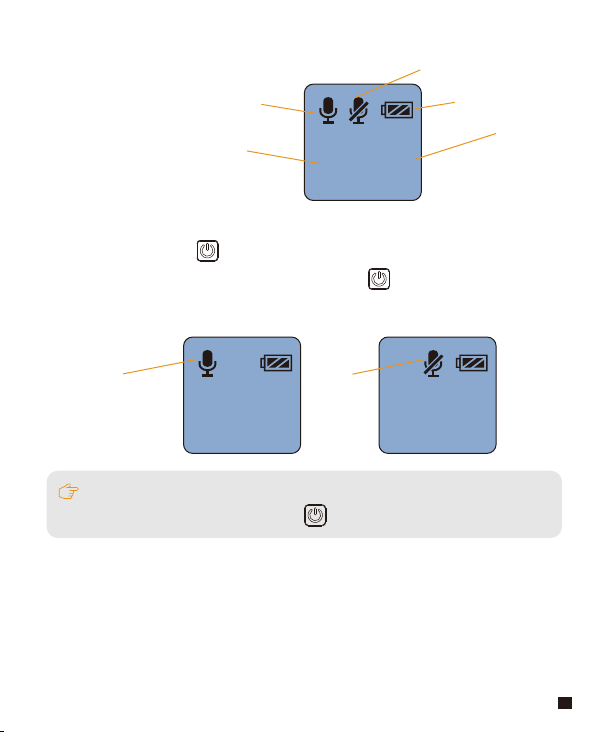
Screen Display Instruction
Operation Instruction
1.Turn on and Muting Mode Switch
Hand-held Transmitter
A
B
8 8
Normal recording mode
Muting mode
Power Indication
Group A/B
Channel
A
B
8 8
Normal recording
A
B
8 8
Muting
The muting mode can be controlled only when the screen is on, press any button
to light the screen and then press the button to switch the muting mode.
1.1 Long press switch button for 2 seconds to turn on or off
1.2 When it’s turned on, short press the button to select
muting mode
27
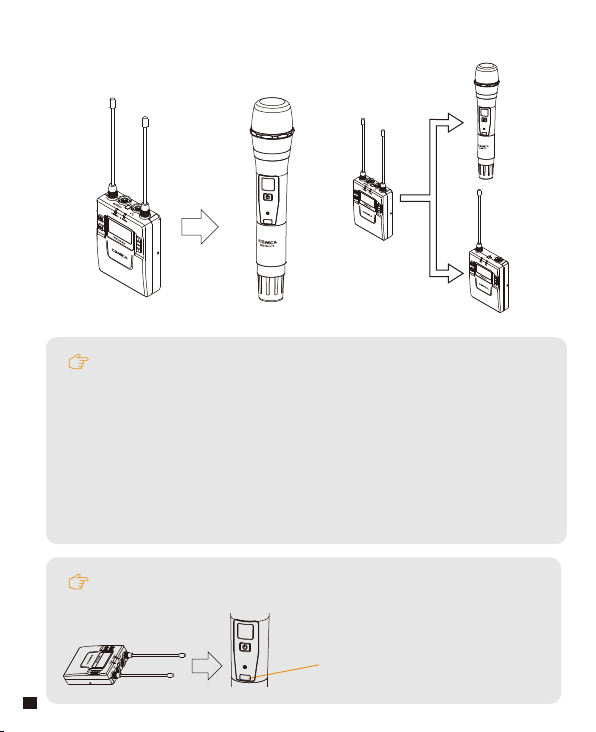
2. Set the channel through infrared sync
During matching, don't shield the infrared receiving screen of the transmitter
against the receiver.
IR Screen
B
Channel
A
Channel
The hand-held transmitter defaults to channel B, and you
can set the group and channel through the receiver (For
example, If Group A of the receiver is used for the matching,
after matching, it will be: Group A CHXX; If Group B of the
receiver is used for the matching, after matching, it will be:
Group B CHXX)
When the hand-held transmitter and the lavalier transmitter
are used together, you should set them to different channels
2.1 Set the channel through infrared sync
28

2.2 Thumbwheel switch
Low cut adjustment switch RF-Low/ High
LCF
-
RF
High
Low
29

Screen Display Instruction
Receiver
When Group A/B is on, the background color of the channel display icon is black;
When Group A/B is off, the channel display icon is transparent and no
background color.
Group A
CH 41 CH 11
Group B
Group A Signal Strength Display Bar Group B Signal Strength Display Bar
Group A Group B
Channel of Group A Channel of Group B
Group A transmitting power Group B Transmitting power
Group A Receiving Audio Status Indication Group B Receiving Audio Status Indication
Power Indication
30
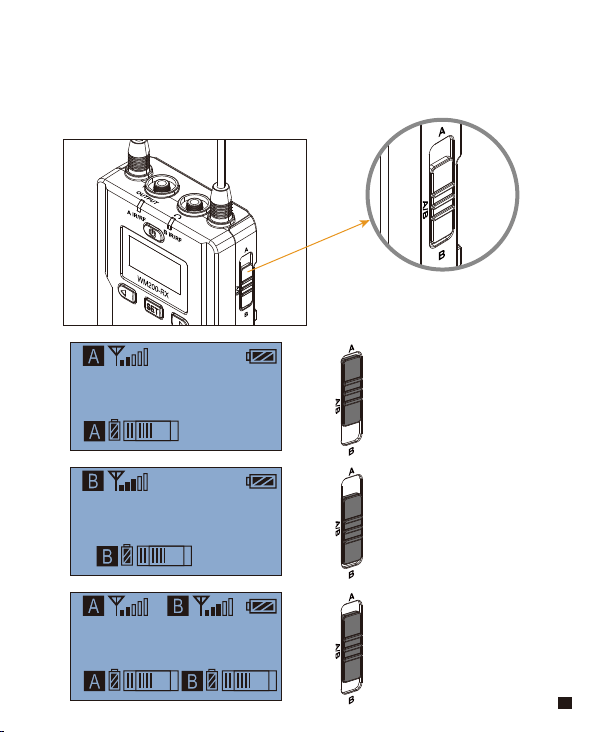
Operation Instruction
1. A
、
B or A+B Group Selection Switch
1.1 Select the group using A, B and A/B group selection switch
Group A
CH 41
CH 11
Group B
Group A
CH 41 CH 11
Group B
A
、
B or A+B Group Selection Switch
Switch to A
Group A turned on,
Group B turned off
Switch to B
Group B turned on,
Group A turned off
Switch to A/B
Group A turned on,
Group B turned on
31

Group A
CH 41 CH 11
Group B
Group A
CH 45 CH 11
Group B
2.1 Long press button to “CH” display page, long press
again for Group A/Group B switch
2.2 Short press button to select the group
2.Manually Adjust the Channel of Group A/ Group B
Group A
CH 45 CH 11
Group B
2.3 Short press button to confirm
32
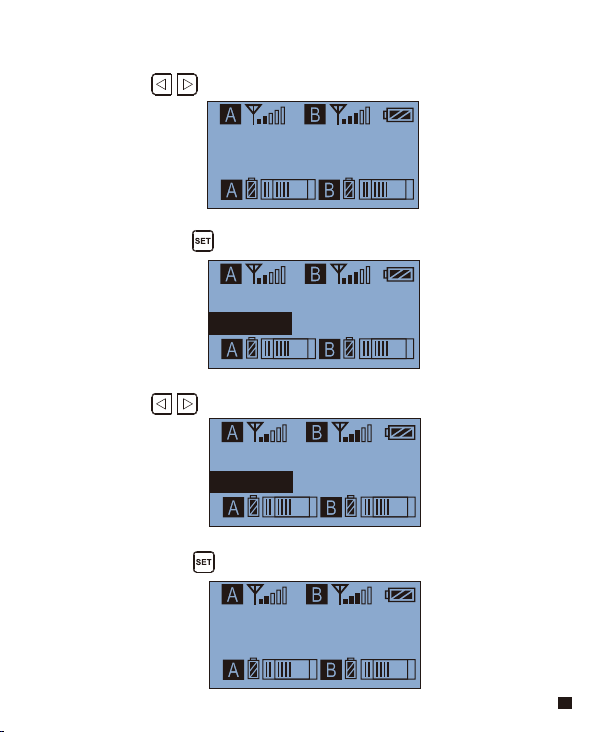
3.4 Short press button to confirm
3. Audio output mode “stereo/mono” adjustment
Output Mode
Stereo
Output Mode
Stereo
Output Mode
Mono
Output Mode
Mono
3.1 Press button to “ Output Mode ” display page
3.2 Long press button to “ Output Mode ” display page
3.3 Press button to select Mono/ Stereo Output Mode
33

4.4 Short press button to confirm
4. Group A/B function setting
Setting
Group B
Setting
Group B
Setting
Group A
Setting
Group A
4.1 Press button to “ Setting ” display page
4.2 Long press button to “ Setting ” display page
4.3 Press button to select Group A/B to edit
34

5.4 Short press button to confirm
5. Group A/B Volume Adjustment
Group B Setting
Volume 8
Group B Setting
Volume 8
Group B Setting
Volume 15
Group B Setting
Volume 15
Group B Setting
Volume
5.1 Short Press button to “ ” display page
5.2 Long press button to “ Setting ” display page
5.3 Short Press button to adjust the volume
35

6.4 Short press button to confirm
6. Group A/B Automatic Channel Scan
Group B Setting
Auto scan CH 12
Group B Setting
Auto scan CH 55
Group B Setting
Scanning CH 96
Group B Setting
Use CH 55 ?
Group B Setting
Auto scan CH
6.1 Short Press button to “ ”display page
6.2 Long press button for Auto scanning
6.3 After scanning, the best available channel will be shown on the
screen and prompted for use
36
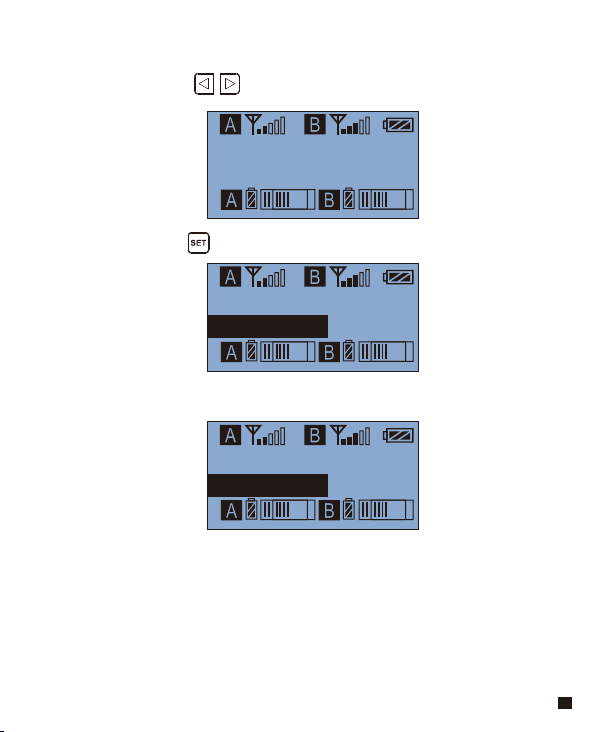
7.Group A/B IR Sync
Group B Setting
Sync with TX
Group B Setting
Matching...
Group B Setting
Matched !
Group B Setting
Sync with TX
7.1 Short Press button to “ ”display page
7.2 Long press button for IR Matching
7.3 Matched
37

8.4 Short press button to confirm
8.2 Long press button to “ Backlight Mode ” display page
8.3 Short press button to adjust the backlight lighting time
or you can turn it off for power saving
8.1 Short Press button to “ Backlight Mode ” display page
8. Backlight “lighting time/turn off ” Adjustment
Backlight Mode
Delay 60s
Backlight Mode
Delay 60s
Backlight Mode
OFF
Backlight Mode
OFF
38

9.2 Long press button for resetting
9.3 Resetting is finished
9.1 Press button to “ Reset ” display page
9. Reset to Defaults
10.1 Press button to “ Version ” display page to check the
version
10. Version
Version
V1.0
Reset
Reset Default
Reset
Resetting...
Reset
Finished !
39

Specification
Lavalier Transmitter TX
Channels
Group A Wireless Frequency
Group B Wireless Frequency
Signal / Noise
Antenna
Transmitting Power
Stray Radiation
Sound Delay
Audio Distortion
Battery
Dimension
Operating Temperature
Storage Temperature
96
520.000MHz ~ 548.500MHz
550.000MHz ~ 578.500MHz
>65dB
1/4 Wavelength Wire Antenna
10dbm/15dbm
<-60dBc
<20ms
<0.5%
AA Batteries x 2pcs
84 x 63.5 x 23mm
0
℃
~ 50
℃
-20
℃
~ 60
℃
40

Hand-held Tranmistter HTX
Channels
Group A Wireless Frequency
Group B Wireless Frequency
Signal / Noise
Antenna
Transmitting Power
Stray Radiation
Sound Delay
Audio Distortion
Battery
Dimension
Operating Temperature
Storage Temperature
96
520.000MHz ~ 548.500MHz
550.000MHz ~ 578.500MHz
>65dB
PCB Antenna
10dbm/15dbm
<-60dBc
<20ms
<0.5%
AA Batteries x 2pcs
Φ53.5(MAX) x 253mm
0
℃
~ 50
℃
-20
℃
~ 60
℃
41

Receiver RX
Channels
Group A Wireless Frequency
Group B Wireless Frequency
Signal / Noise
Antenna
Receiving Power
Stray Radiation
Sound Delay
Audio Distortion
Battery
Dimension
Operating Temperature
Storage Temperature
96
520.000MHz ~ 548.500MHz
550.000MHz ~ 578.500MHz
>65dB
1/4 Wavelength Wire Antenna
-95dBm
<-60dBc
<20ms
<0.5%
AA Batteries x 2pcs
84 x 63.5 x 23mm
0
℃
~ 50
℃
-20
℃
~ 60
℃
42

Email: [email protected]