E L I T E
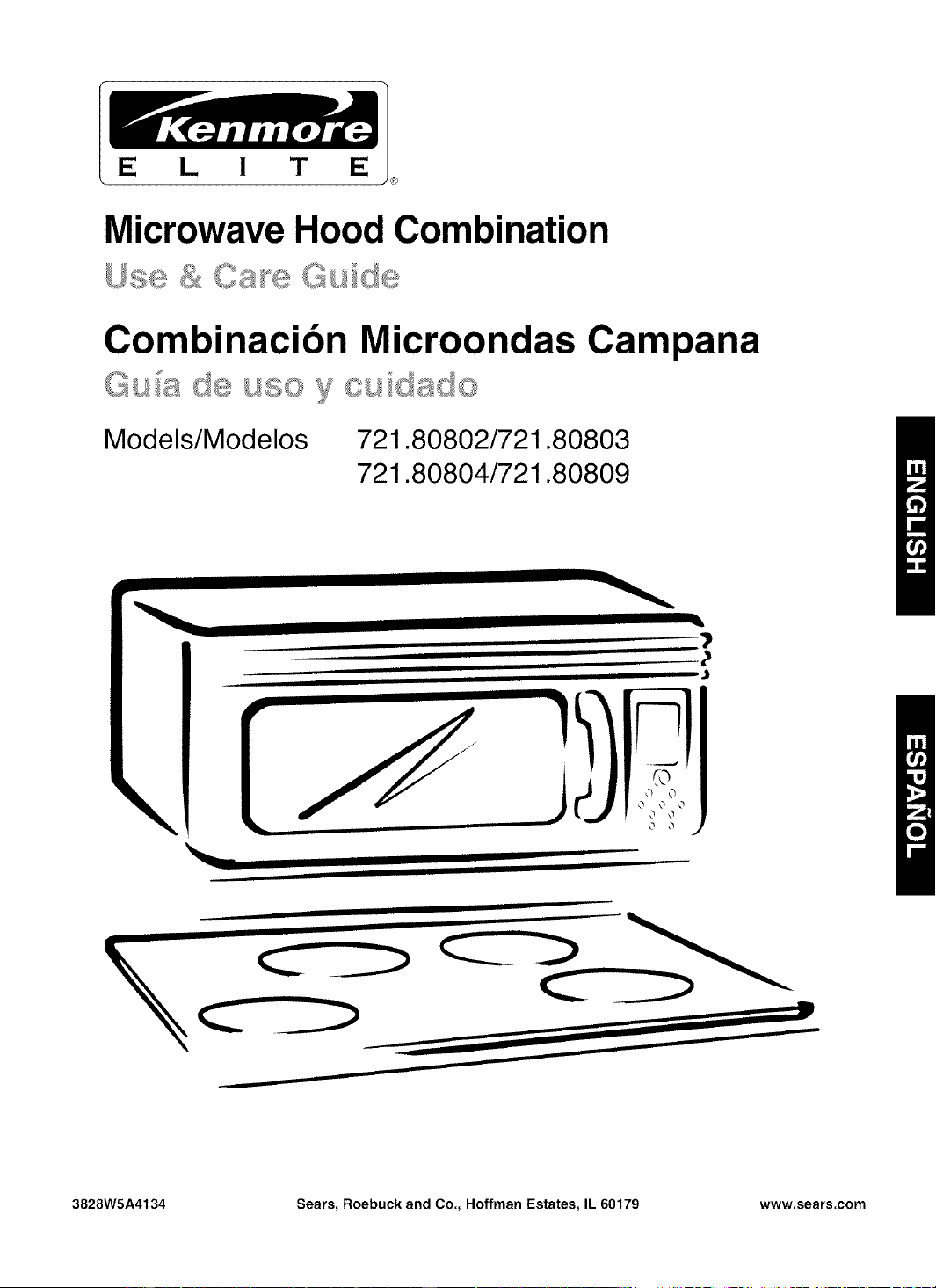
Microwave Hood Combination
/ _ ?_ d'_ _.... _"_ ,'_
Combinacion Microondas Campana
Models/Modelos
721.80802/721.80803
721.80804/721.80809
\
I
ii
i ii iiiiii iiiiiii
I I
ii I •
0 0 0
o o j
I I II I
i I "' .......
I
X
3828W5A4134 Sears, Roebuck and Co., Hoffman Estates, IL 60179 www.sears.com
Table of
Contents
Warranty ........................................................... 2
Sears Service .................................................. 3
Microwave Oven Safety .................................. 4
Getting to Know Your
Microwave Oven .............................................. 7
How your kenmore microwave hood
combination works .......................................... 7
Radio interference .......................................... 7
Testing your microwave oven ......................... 7
Testing your dinnerware or cookware ............ 8
Operating safety precautions .......................... 8
Electrical connection ...................................... 8
Microwave oven features ............................... 9
Installing glass tray ....................................... 10
Oven control panel ........................................ 11
Using Your Microwave Oven ....................... 13
How to use your new dial control .................. 13
Function Selections ....................................... 13
Clock ............................................................. 13
Kitchen Timer ................................................ 14
Vent ............................................................... 14
Light .............................................................. 14
Add 30 second .............................................. 14
Manual cook .................................................. 15
Manual cook in stages .................................. 15
Cooking guide for power levels ..................... 16
Options .......................................................... 17
Soften & Melt ................................................ 17
Child Lock ..................................................... 17
Favorites ....................................................... 18
Using Sensor Cooking .................................. 19
Sensor operating instructions ....................... 19
Sensor cook guide ........................................ 19
Popcorn ......................................................... 19
Cook .............................................................. 20
Reheat .......................................................... 20
Defrost .......................................................... 21
Weight conversion chart ............................... 21
Defrosting tips ............................................... 21
Defrost chart ................................................. 22
Caring for Your Microwave Oven ................. 24
Caring for the filters ....................................... 25
Replacing the cooktop and oven lights .........26
Microwave Cooking Tips ............................... 27
Questions and Answers ................................ 29
Troubleshooting ............................................. 30
Service ............................................. Back cover
Microwave Hood
Combination
Warranty
FULL ONE-YEAR WARRANTY ON
MICROWAVE HOOD COMBINATION
For one year from the date of purchase, if this
Kenmore Microwave Hood Combination fails due to
a defect in material or workmanship, Sears will
repair it free of charge.
FOUR YEAR LIMITED WARRANTY ON
MAGNETRON
For the second through the fifth year from the date
of purchase, if the magnetron in this oven fails due
to a defect in material or workmanship, Sears will
supply a new magnetron, free of charge.
Safety regulations, however, require the magnetron
to be installed by Sears, and you must pay the labor
cost of installation.
WARRANTY SERVICE IS AVAILABLE BY
SIMPLY CONTACTING SEARS SERVICE AT
1-800-4-MY-HOME®
This warranty applies only while this product is in
use in the United States.
This warranty gives you specific legal rights, and
you may also have other rights which vary from
state to state.
Sears, Roebuck and Co.,
Dept. 817WA,
Hoffman Estates, IL 60179
For service call:
1-600-4-MY-HOME®
(1-600-469-4663)
Please record your model's information.
Whenever you call to request service for your
appliance, you need to know your complete model
number and serial number. You can find this
information on the model and serial number
label/plate at the upper side of cavity front in your
Microwave oven. Also, record the other information
shown below.
Model Number
Serial Number
Purchase Date
Sears Service
Master Protection Agreements
Congratulations on making a smart purchase.
Your new Kenmore ®product is designed and manufactured for years of dependable operation.
But like all products, it may require preventive maintenance or repair from time to time.
That's when having a Master Protection Agreement can save you money and aggravation.
Purchase a Master Protection Agreement now and protect yourself from unexpected hassle
and expense.
The Master Protection Agreement also helps extend the life of your new product. Here's
what's included in the Agreement:
I_ Expert service by our 12,000 professional repair specialists
I_ Unlimited service and no charge for parts and labor on all covered repairs
I_ "No-lemon" guarantee - replacement of your covered product if four or more product failures
occur within twelve months
Product replacement if your covered product can't be fixed
I_ Annual Preventive Maintenance Check at your request - no extra charge
I_ Fast help by phone - phone support from a Sears technician on products requiring in-home
repair, plus convenient repair scheduling
I_ Power surge protection against electrical damage due to power fluctuations
Rental reimbursement if repair of your covered product takes longer than promised
Once you purchase the Agreement, a simple phone call is all that it takes for you to schedule service.
You can call anytime day or night, or schedule a service appointment online.
Sears has over 12,000 professional repair specialists, who have access to over 4.5 million quality
parts and accessories. That's the kind of professionalism you can count on to help prolong the life of
your new purchase for years to come. Purchase your Master Protection Agreement today!
Some limitations and exclusions apply. For prices and additional information call 1-800-827-
6655,
Sears Installation Service
For Sears professional installation of home appliances, garage door openers, water heaters, and
other major home items, in the U.S.A. call
1-800-4-MY-HOME ®
Microwave Oven Safety
Your safety and the safety of others are very important.
We have provided many important safety messages in this manual and on your appliance.
Always read and obey all safety messages.
This is the safety alert symbol.
This symbol alerts you to hazards that can kill or hurt you and others.
All safety messages will be preceded by the safety alert symbol and the word
"DANGER" or "WARNING." These words mean:
You will be killed or seriously injured
if you don't follow immediately instructions.
You can be killed or seriously injured
if you don't follow instructions.
All safety messages will identify the hazard, tell you how to reduce the chance of injury, and tell
you what can happen if the instructions are not followed.
IMPORTANT SAFETY INSTRUCTIONS
When using electrical appliances basic safety precautions should be followed, including the
following:
WARNING: To reduce the risk of burns,
electric shock, fire, injury to persons, or
exposure to excessive microwave energy:
• Read all instructions before using the
microwave oven.
• Read and follow the specific
"PRECAUTIONS TO AVOID POSSIBLE
EXPOSURE TO EXCESSIVE MICROWAVE
ENERGY" found in this section.
•The microwave oven must be grounded.
Connect only to properly grounded outlet.
See "GROUNDING INSTRUCTIONS" found
at the end of this section.
• Install or locate the microwave oven only in
accordance with the provided installation
instructions.
•Some products such as whole eggs in the
shell and sealed containers - for example,
closed glass jars - are able to explode and
should not be heated in the microwave oven.
•Use the microwave oven only for its intended
use as described in this manual. Do not use
corrosive chemicals or vapors in the
microwave oven. This type of oven is
specifically designed to heat, cook, or dry
food. It is not designed for industrial or
laboratory use.
•As with any appliance, close supervision is
necessary when used by children.
•Do not operate the microwave oven if it has
a damaged cord or plug, if it is not working
properly, or if it has been damaged or
dropped.
SAVE THESE INSTRUCTIONS
ii!i!i!i!i!i!i!i!i!i!i!i!i!i!i!i!i!i!i!i!i!i!i!i!i!i!i!i!i!i!i!i!i!i!i!i!i!i!i!i!i!i!i!i!i!i!i!i!i!i!i!i!i!i!i!i!i!i!i!i!i!i!i!i!i!i!i!i!i!i!i!i!i!i!i!i!i!i!i!i!i!i!i!i!i!i!i!i!i!i!i!i!i!i!i!i!i!i!i!i!i!i!i!i!i!i!i!i!i!i!i!i!i!i!i!i!i!i!i!i!i!i!i!i!i!i!i!i!i!i!i!i!i!i!i!i!i!i!i!i!i!i!i!i!i!i!i!i!i!i!i!i!i!i!i!i!i!i!i!i!i!i!i!i!i!i!i!i!i!i!i!i!i!i!i!i!i!i!i!i!i!i!i!i!i!i!i!i!i!i!i!i!iliiiliiiii!i!!i!!iiiiiilliii!iiiii!if!illiiii!!!iii!ili!i!!ii!ii!iii!ii!i!iliiii!iilili!iiiiiii!!i!!ii!iiiillii!i!ii!ii!iif!ilii!iiiiiiii!iiil;illii:i!!!!iiiiiiiiiiiilli!!iiiiiiiiiii!!ii!!i!iiiiiii!ii!iiiiiii!i!!!!!iiiiiliiiii!!i!!!!!iiiiiiiiiiiii!ii!iiiiliiliii!iiili!i!ii!ii!ii!ii!ii!ii!ii!i!iiiiiiii!ii!!i!!i!!i!!i!i!!iiiiiiiiiiiiliiiiilliii!i!!ii!iiiiiiiiiiilli!iliiii!ii!ii!ii!il!iiiii!ii!iillii!ilii!i!i!!!iiii!ii!ii!ii!ii!ii!ii!if!fill!iii!ii!ii!i!ii!i!!!iilliii!i!!!i!iiiiiiiiililliiii!!!!!ii!ili!illiililiiiiilliiii!iiiiiill!iili!i!ii!iiiii!!iiiiiiiiliiiilliilililiiiliiifilliii!:iiiiiiiiii!i!!!!!i!!i!!i!!i!!i!!i!!i!!i!!ii!ii!ili!!!iiii!!!ii!
IMPORTANT SAFETY INSTRUCTIONS
•Themicrowaveovenshouldbe servicedonly by
qualifiedservicepersonnel.Callan authorized
servicecompanyforexamination,repair,or
adjustment.
•See doorsurfacecleaninginstructionsinthe"Caring
forYourMicrowaveOven"section.
•To reducethe riskoffireintheovencavity:
- Donotovercookfood.Carefullyattendthe
microwaveovenwhenpaper,plastic,orother
combustiblematerialsareplacedinsidethe ovento
facilitatecooking.
- Removewiretwist-tiesfrom paperor plasticbags
beforeplacingbagsinoven.
- If materialsinsidetheovenignite,keepovendoor
closed,turnovenoff,anddisconnectthepower
cord,or shutoff poweratthe fuseor circuitbreaker
panel.
- Donotusethecavityforstoragepurposes.Donot
leavepaperproducts,cookingutensils,or foodin
the cavitywhennotin use.
•Suitableforuseabovebothgasand electriccooking
equipment.
•Intendedto beusedaboverangeswith maximum
widthof36 inches(91cm).
•CleanVentilatingHoods Frequently- Greaseshould
notbe allowedto accumulateon hoodor filter.
•Whenflamingfoods underthe hood,turnthe fanon.
•Usecarewhencleaningthevent-hoodfilter.
Corrosivecleaningagents,such aslye-basedoven
cleaners,maydamagethefilter.
•Oversizedfoods oroversizedmetalutensilsshould
notbe insertedinthe microwaveovenasthey may
createa fireor riskof electricshock.
•Donotcleanwith metalscouringpads.Piecescan
burnoffthe padandtouch electricalpartsinvolvinga
riskofelectricshock.
•Do not store anything directly on top of the
microwave oven when the microwave oven is in
operation.
• Do not cover or block any openings on the
microwave oven.
•Do not store this microwave oven outdoors. Do not
use the microwave oven near water for example,
near a kitchen sink, in awet basement, near a
swimming pool, or similar location.
• Do not immerse cord or plug in water.
•Keep cord away from heated surfaces.
• Do not let cord hang over edge of table or counter.
•Do not mount over a sink.
• Do not cover racks or any other part of the oven with
metal foil. This will cause overheating of the oven.
•Liquids such as water, coffee, or tea are able to
be overheated beyond the boiling point without
appearing to be boiling due to surface tension of
the liquid. Visible bubbling or boiling when the
container is removed from the microwave oven is
not always present. This could result in very hot
liquids suddenly boiling over when a spoon or
other utensil is inserted into the liquid. To reduce
the risk of injury to persons.
1) Do not overheat the liquid.
2) Stir the liquid both before and halfway through
heating it.
3) Do not use straight-sided containers with
narrow necks.
4) After heating, allow the container to stand
in the microwave oven for a short time before
removing the container.
5) Use extreme care when inserting a spoon or
other utensil into the container.
SAVE THESE INSTRUCTIONS
PRECAUTIONS TO AVOID POSSIBLE
EXPOSURE TO EXCESSIVE MICROWAVE
ENERGY
(a) Do not attempt to operate this oven with the
door open since open - door operation can
result in harmful exposure to microwave
energy. It is important not to defeat or tamper
with the safety interlocks.
(b) Do not place any object between the oven
front face and the door or allow soil or cleaner
residue to accumulate on sealing surfaces.
(c)
(d)
Do not operate the oven ifit is damaged. It is
particularly important that the oven door close
properly and that there is no damage to the:
(1) Door (bent),
(2) Hinges and latches (broken or loosened),
(3) Door seals and sealing surfaces.
The oven should not be adjusted or repaired
by anyone except properly qualified service
personnel.
Electrical
requirements
Observe all governing codes and
ordinances. A 120 Volt, 60 Hz, AC only,
20 amp fused electrical supply is
required. (A time-delay fuse is recommended.)
It is recommended that a separate circuit
serving only this appliance be provided.
Electrical Shock Hazard
Plug into a grounded 3-prong
outlet. Do not remove ground
prong. Do not use an adapter.
Do not use an extension cord.
Failure to follow these
instructions can result in death,
fire, or electrical shock.
GROUNDING INSTRUCTIONS
• For all cord connected appliances:
The microwave oven must be grounded.
In the event of an electrical short circuit,
grounding reduces the risk of electric
shock by providing an escape wire for the
electric current. The microwave oven is
equipped with a cord having a grounding
wire with a grounding plug. The plug must
be plugged into an outlet that is properly
installed and grounded.
WARNING: Improper use of the
grounding can result in a risk of electric
shock.
Do not use an extension cord. If the power
supply cord is too short, have a qualified
electrician or serviceman install an outlet
near the microwave oven.
• For a permanently connected appliance:
The microwave oven must be connected
to a grounded, metallic, permanent wiring
system, or an equipment grounding
conductor should be run with the circuit
conductors and connected to the
equipment grounding terminal or lead
on the microwave oven.
Consult a qualified electrician or
serviceman if the grounding instructions
are not completely understood, or if doubt
exists as to whether the microwave oven
is properly grounded.
SAVE THESE INSTRUCTIONS
• to KnowYour
MicrowaveOven
This section discusses the concepts behind microwave cooking. It also shows you the basics you need to know
to operate your microwave oven. Please read this information before you use your oven.
HOW YOUR KENMORE MICROWAVE HOOD
COMBINATION WORKS
Microwave energy isnot hot. Itcauses food to make
itsown heat,and it's thisheatthat cooks the food.
Microwavesare likeTV waves, radiowaves, or
lightwaves. You cannot seethem, but youcan see
what they do.
A magnetron in the microwave oven produces
microwaves.The microwaves move intothe oven
where they contact food as it turns on the turntable.
Magnetron
Oven cavity
Metal floor Glass tray Guide tray
The glass turntable ofyour microwave oven lets
microwavespass through. Then they bounce off a
metal floor, backthrough the glassturntable, and
are absorbed bythe food.
Microwaves pass through most glass, paper,and
plasticswithout heatingthem so food absorbs the
energy. Microwaves bounceoff metal containersso
food does not absorbthe energy.
Sensor Cooking
TheMicrowaveSystemfeaturesSensorCooking
functions.A humiditysensorintheovencavitydetects
moistureandhumidityemittedfromfoodasit heats.
Thesensoradjustscookingtimesto varioustypesand
amountsoffood.Sensorcookingtakestheguesswork
outofmicrowavecooking.
For the best cooking results
•Always cook food for the shortest cooking time
recommended. Check to see how the food is
cooking.
•Stir, turn over, or rearrange the food being
cooked about halfway through the cooking time
for all recipes. This will help make sure the food is
evenly cooked.
•If you do not have a cover for a dish, use wax
paper, or microwave-approved paper towels or
plastic wrap. Remember to turn back a corner of
the plastic wrap to vent steam during cooking.
Radio interference
Using your microwave oven may cause interference
to your radio,TV, or similar equipment. When there
is interference, you can reduce itor remove it by:
•Cleaning the doorandsealing surfacesof the
oven.
•Adjusting the receivingantenna ofthe radio or
television.
•Moving the receiver away from themicrowave
oven.
•Plugging the microwave oven into a different
outlet so that the microwave oven and receiver are
on differentbranch circuits.
Testing your microwave oven
I To testthe oven putabout 1 cup of cold water in a
glass container inthe oven. Close the door.
Make sure itlatches. Cook at 100% power for 1
minute. When thetime is up,the water should be
heated.
Testing your dinnerware or cookware
Test dinnerware or cookware beforeusing. To
test a dishfor safe use, put itinto the ovenwith a
cupof water beside it. Cook at 100% cook power
forone minute. If the dish gets hot, do not use it.
Some dishes (melamine, some ceramic
dinnerware, etc.)absorb microwave energy,
becoming too hot to handle and slowing cooking
times.Cooking in metal containers notdesigned for
microwave usecould damage the oven, as could
containerswith hidden metal (twist-ties,foil lining,
staples, metallicglaze or trim).
Operating safety precautions
•Never lean on the door or allow a childto swing
on itwhen the door is open.
•Use hot pads. Microwave energy does not heat
containers, butthe heatfrom the food can make
the container hot.
•Do not use newspaper or other printed paper in
the oven.
•Do not dry flowers,fruit, herbs, wood, paper,
gourds, or clothes in the oven.
•Do not starta microwave oven when it isempty.
Product lifemay be shortened. Ifyou practice
programming the oven, put a container of water in
the oven. It isnormal forthe oven door to look
wavy after the oven has been running for a while.
•Do not try to melt paraffin wax inthe oven.
Paraffin wax will not melt in a microwave oven
because itallows microwaves to pass through it.
•Do not operatethe microwave oven unless the
glass turntable is securely in place and can move
freely.The turntable can move in either direction.
Make sure the turntable is correct-side up in the
oven. Handle your turntable with care when
removing itfrom the oven to avoid possibly
breaking it. If yourturntable cracks or breaks,
contact your dealer for a replacement.
•When you use a browning dish, the browning
dish bottom must be at least 3/16 inch abovethe
turntable. Followthe diredions suppliedwith the
browning dish.
•Never cook or reheat a whole egg inside the
shell. Steam buildup in whole eggs may cause
them to burst,and possiblydamage the oven.
Slice hard-boiledeggs before heating. Inrare
cases, poached eggs have been known to
explode. Cover poached eggsand allow a
standing time of one minute before cutting into
them.
•For best results, stir any liquid several times
during heating or reheating. Liquidsheated in
certain containers (especiallycontainers shaped
like cylinders) may become overheated. The liquid
may splash out with a loud noiseduring or after
heating or when adding ingredients (coffee
granules, tea bags,etc.). This can harmthe oven.
•Microwaves may not reachthe center of a roast.
The heatspreads to the center from the outer,
cooked areasjust as in regular oven cooking.This
is one of the reasons for letting some foods (for
example, roasts or baked potatoes) stand for a
while after cooking, or for stirring some foods
during the cooking time.
•Do not deep fry in the oven. Microwavable
utensils are not suitable and itis difficultto
maintain appropriate deep-frying temperatures.
•Do not overcook potatoes. Atthe end ofthe
recommended cooking time, potatoesshould be
slightly firm because they will continue cooking
during standing time. After microwaving, let
potatoes stand for 5 minutes. They willfinish
cooking whilestanding.
Electrical connection
I Ifyour electric power line or outlet voltage isless than 110 volts, cooking times may be longer.
Havea qualified electrician check your electrical
system.
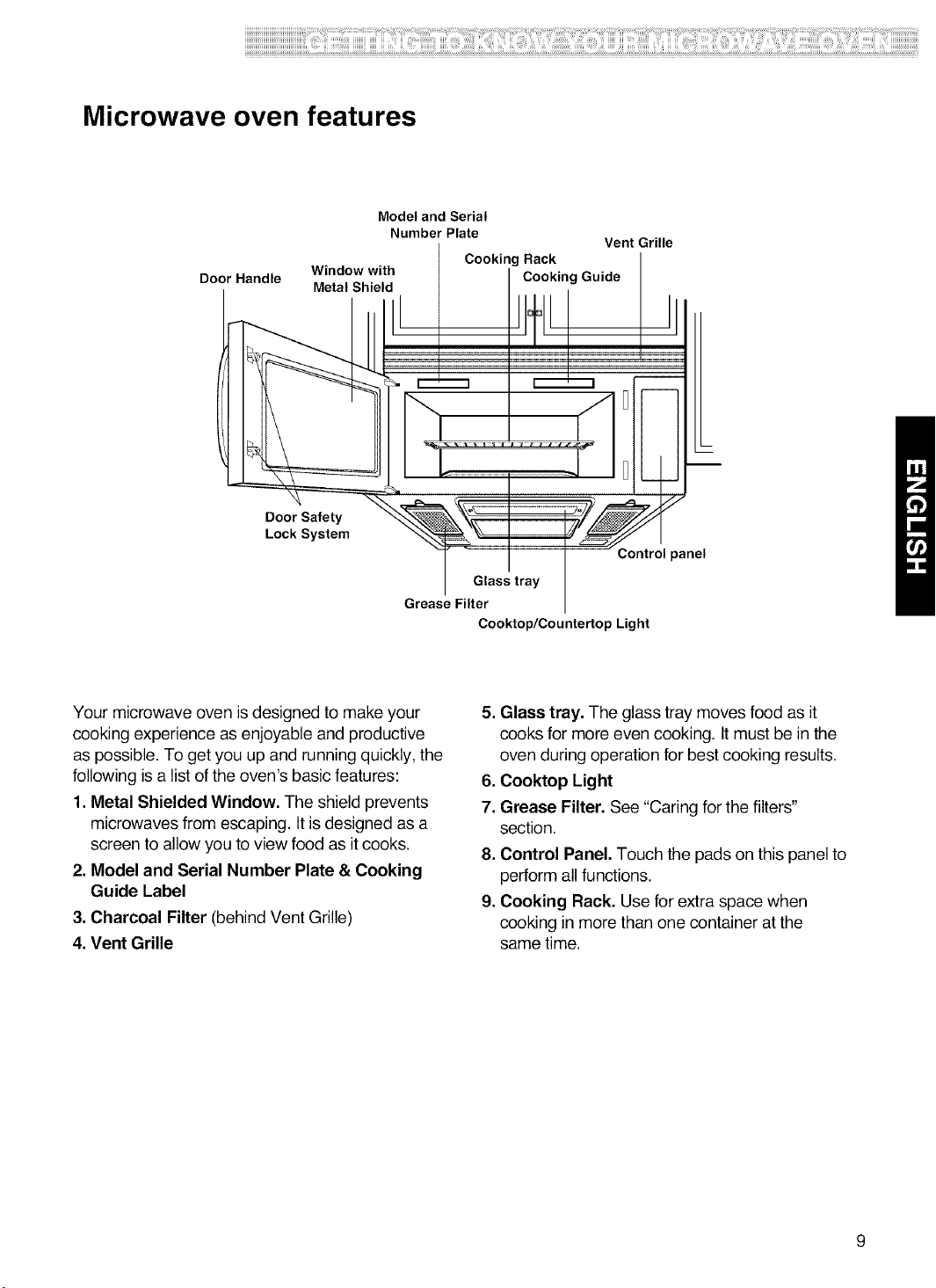
Microwave oven features
Door Handle
Model and Serial
Number Plate
Vent Grille
Cooking Rack
Window with Cooking Guide
Metal Shield
Door Safety
Lock System
3ontrol panel
Glass tray
Grease Filter
Cooktop/Countertop Light
Your microwave oven isdesigned to make your
cooking experience as enjoyable and productive
as possible. To get you up and running quickly, the
following is a list of the oven's basic features:
1.Metal Shielded Window, The shield prevents
microwaves from escaping. It is designed as a
screen to allow you to view food as it cooks.
2. Model and Serial Number Plate & Cooking
Guide Label
3. Charcoal Filter (behind Vent Grille)
4. Vent Grille
5. Glass tray, The glass tray moves food as it
cooks for more even cooking. It must be in the
oven during operation for best cooking results.
6, Cooktop Light
7. Grease Filter. See "Caring for the filters"
section.
8. Control Panel, Touch the pads on this panel to
perform all functions.
9. Cooking Rack, Use for extra space when
cooking in more than one container at the
same time.
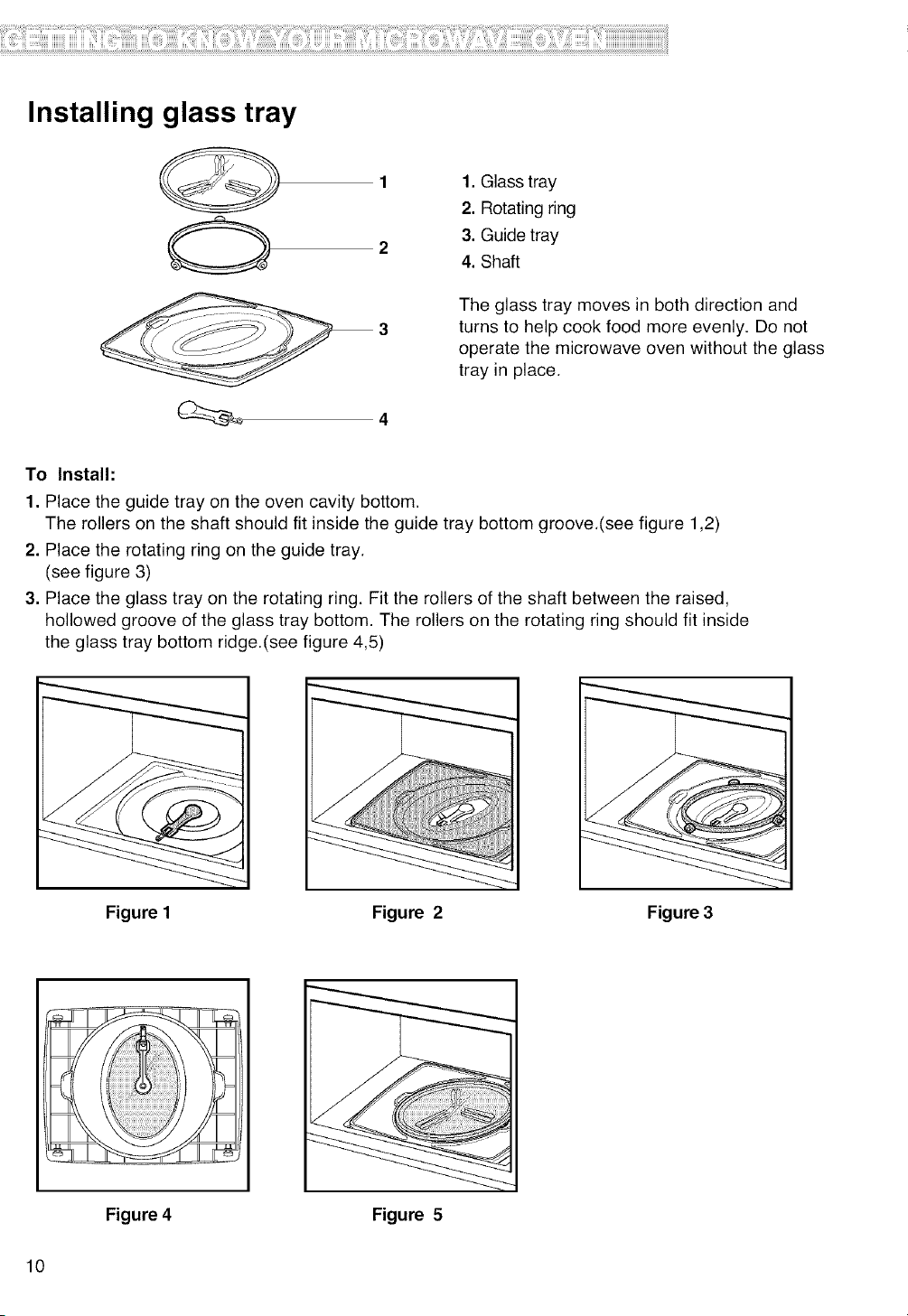
Installing glass tray
1. Glass tray
2. Rotating ring
3. Guide tray
4. Shaft
The glass tray moves in both direction and
turns to help cook food more evenly. Do not
operate the microwave oven without the glass
tray in place.
To Install:
1. Place the guide tray on the oven cavity bottom.
The rollers on the shaft should fit inside the guide tray bottom groove.(see figure 1,2)
2. Place the rotating ring on the guide tray.
(see figure 3)
3. Place the glass tray on the rotating ring. Fit the rollers of the shaft between the raised,
hollowed groove of the glass tray bottom. The rollers on the rotating ring should fit inside
the glass tray bottom ridge.(see figure 4,5)
Figure I Figure 2 Figure 3
Figure 4 Figure 5
10
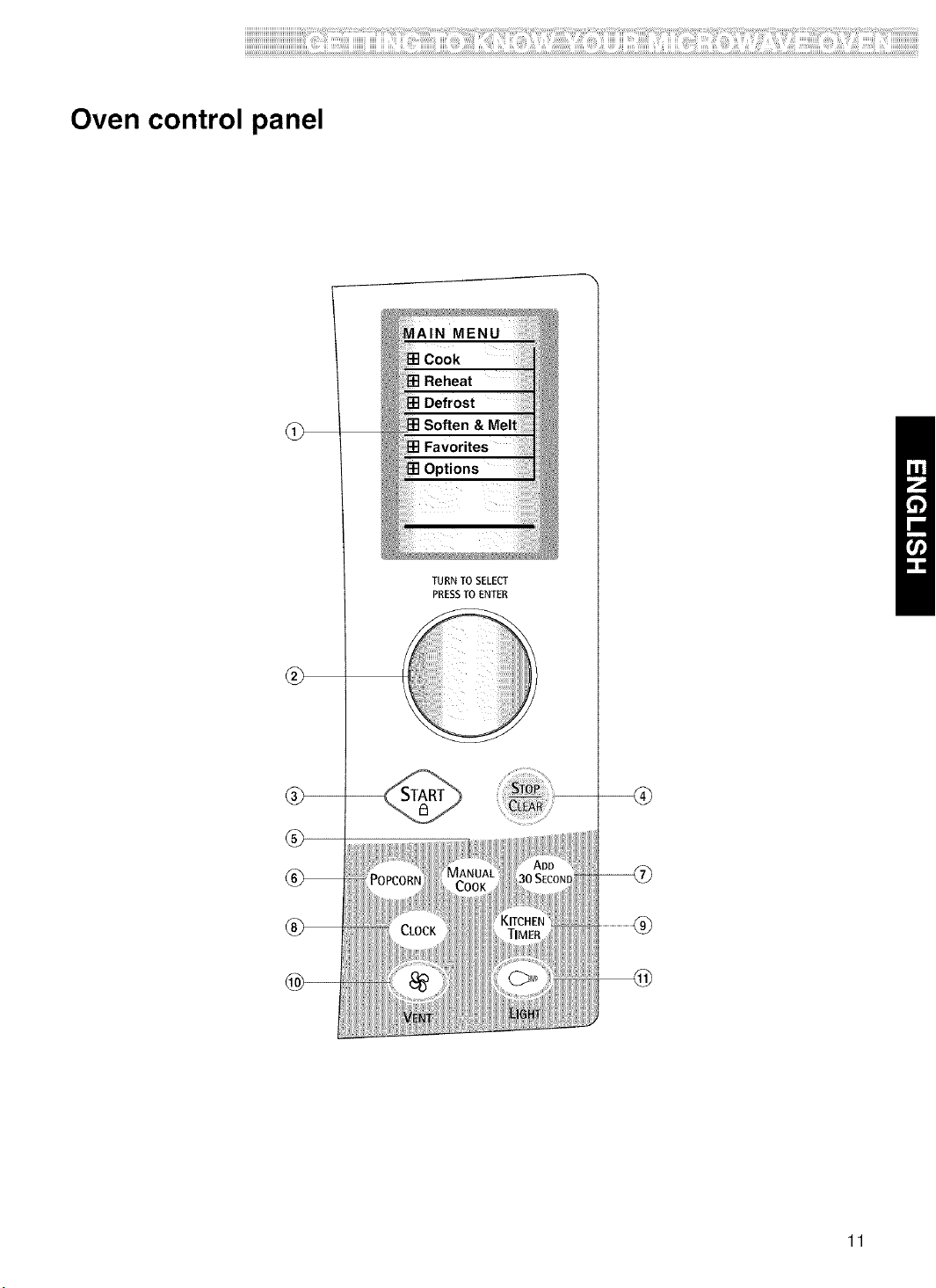
Oven control panel
®
TURN TO SELECT
PRESSTO ENTER
11
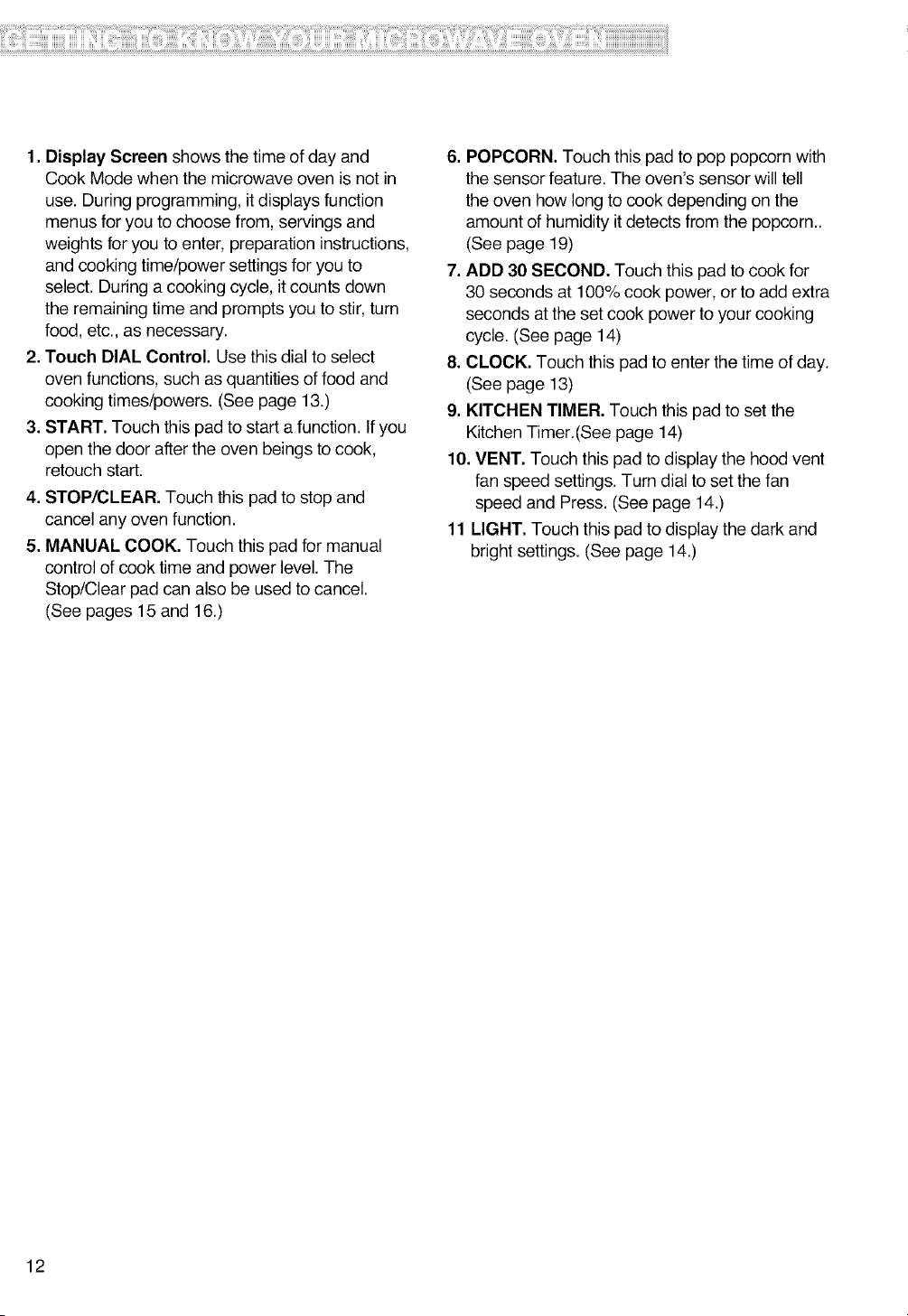
1.DisplayScreenshowsthetimeofdayand
CookModewhenthemicrowaveovenisnotin
use.Duringprogramming,itdisplaysfunction
menusforyoutochoosefrom,servingsand
weightsforyoutoenter, preparation instructions,
and cooking time/power settings for you to
select. During a cooking cycle, itcounts down
the remaining time and prompts you to stir, turn
food, etc., as necessary.
2. Touch DIAL Control. Use this dial to select
oven functions, such as quantities of food and
cooking times/powers. (See page 13.)
3. START. Touch this pad to start a function. Ifyou
open the door after the oven beings to cook,
retouch start.
4. STOP/CLEAR. Touch this pad to stop and
cancel any oven function.
5. MANUAL COOK. Touch this pad for manual
control of cook time and power level. The
Stop/Clear pad can also be used to cancel.
(See pages 15 and 16.)
6. POPCORN. Touch this pad to pop popcorn with
the sensor feature. The oven's sensor will tell
the oven how long to cook depending on the
amount of humidity itdetects from the popcorn..
(See page 19)
7. ADD 30 SECOND. Touch this pad to cook for
30 seconds at 100% cook power, or to add extra
seconds atthe set cook power to your cooking
cycle. (See page 14)
8. CLOCK. Touch this pad to enter the time of day.
(See page 13)
9. KITCHEN TIMER. Touch this pad to set the
Kitchen Timer.(See page 14)
10. VENT. Touch this pad to display the hood vent
fan speed settings. Turn dial to set the fan
speed and Press. (See page 14.)
11 LIGHT. Touch this pad to display the dark and
bright settings. (See page 14.)
12
UsingYourMicrowaveOven
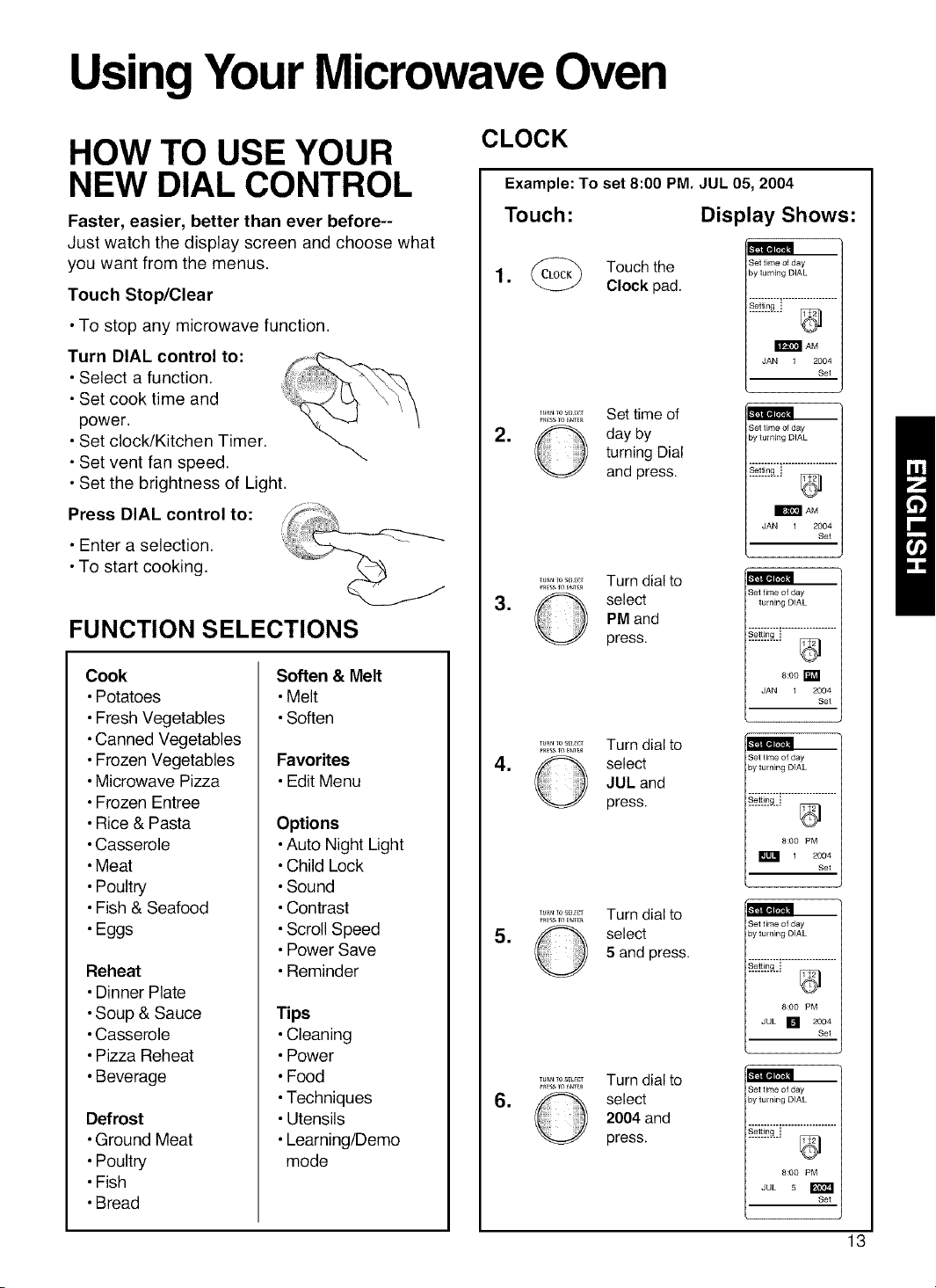
HOW TO USE YOUR
NEW DIAL CONTROL
Faster, easier, better than ever before--
Just watch the display screen and choose what
you want from the menus.
Touch Stop/Clear
•To stop any microwave function.
Turn DIAL control to:
• Select a function.
• Set cook time and
power.
• Set clock/Kitchen Timer,
• Set vent fan speed.
• Set the brightness of Light.
Press DIAL control to:
_'t'tilllDl_t&',
_*t'_TIIIDI_t&',
• Enter a selection,
•To start cooking.
FUNCTION SELECTIONS
Cook
•Potatoes
•Fresh Vegetables
•Canned Vegetables
•Frozen Vegetables
•Microwave Pizza
•Frozen Entree
•Rice & Pasta
•Casserole
•Meat
•Poultry
•Fish & Seafood
•Eggs
Reheat
•Dinner Plate
•Soup & Sauce
•Casserole
•Pizza Reheat
•Beverage
Defrost
•Ground Meat
•Poultry
•Fish
•Bread
Soften & Melt
•Melt
•Soften
Favorites
•Edit Menu
Options
•Auto Night Light
•Child Lock
•Sound
•Contrast
•Scroll Speed
•Power Save
•Reminder
Tips
•Cleaning
•Power
•Food
•Techniques
•Utensils
•Leaming/Demo
mode
CLOCK
Example: To set 8:00 PM. JUL 05,2004
Touch: Display Shows:
1 _ Touchthe
• Clock pad.
Set time of day
3y turning DIAL
_ AM
JAN 1 2004
Set
*
•
•
lUkNTOS_;I_T
TUR_TOS_CT
TUR_TOS_CT
Set time of
day by
turning Dial
and press.
Turn dial to
select
PM and
press.
Turn dial to
select
JUL and
press.
Set time of day
3yturning DIAL
_?]!_.,!_..i
_ AM
JAN 1 2004
Set
Set time of day
turning DIAL
8:00 _
JAN 1 2004
Set
3et time of day
3yturning DIAL
#2_[,_..i
8:00 PM
1 2004
Set
•
•
TUR_TOS_C_
Turn dial to
select
5 and press.
Turn dial to
select
2004 and
press.
3et time of day
3yturning DIAL
#2_[,_..i
8:00 PM
JUL [] 2004
Set
L
Set time of day
by turning DIAL
8:00 PM
JUL 5
Set
13
KITCHEN TIMER LIGHT
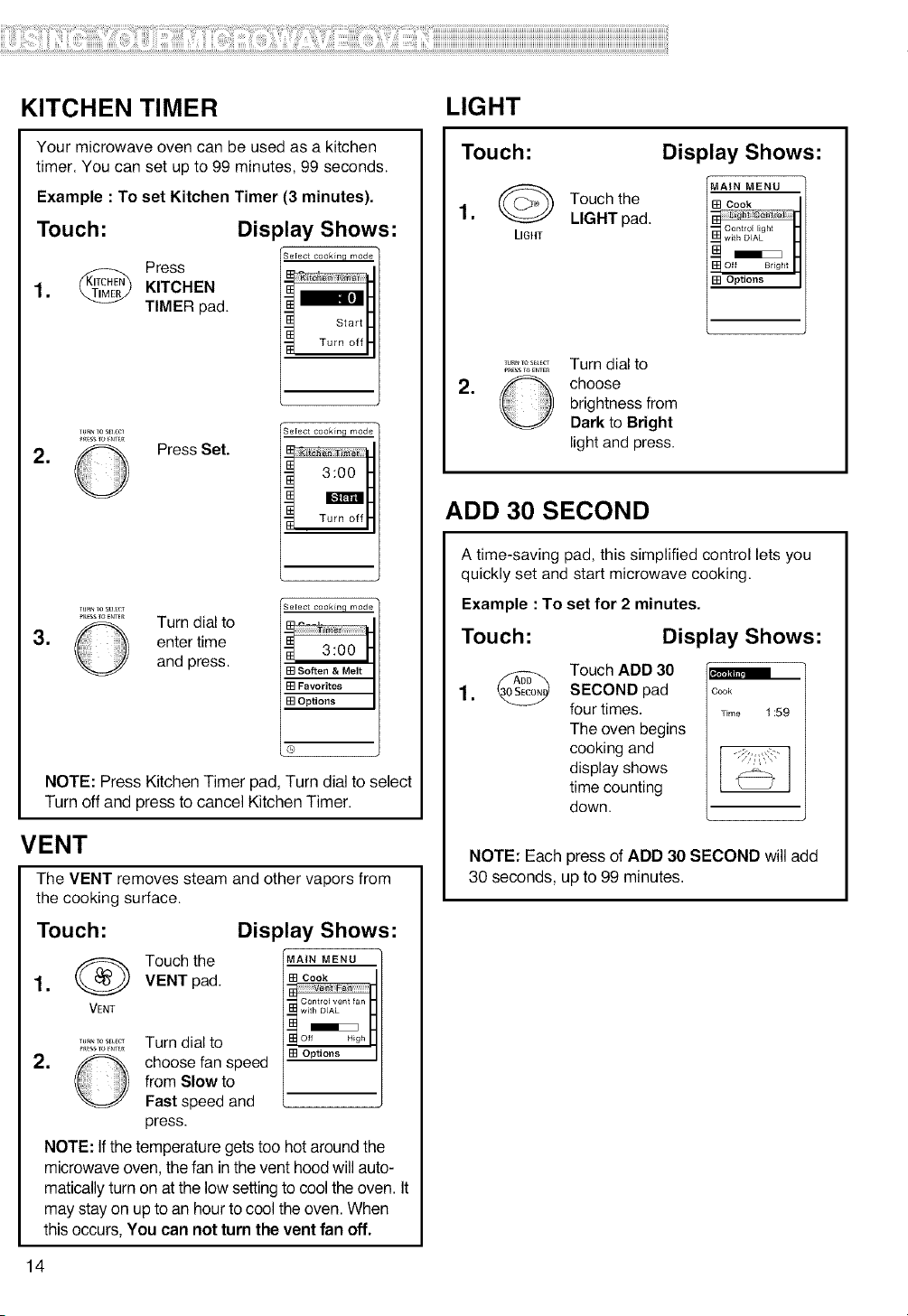
Your microwave oven can be used as a kitchen
timer. You can set up to 99 minutes, 99 seconds.
Example : To set Kitchen Timer (3 minutes).
Touch: Display Shows:
Select cooMnq mode
Press
1. _ KITCHEN
TIMER pad.
.
lu_NTos_;u;c_
©
Press Set.
Select cooMng mode
i 3:00
Turn off
Select cooMnq mode
[] Soften & Melt
[] Favorites
[] Options
®
_m_ Tos_u_cr
.............. Turn dial to
3. _ enter time
and press.
NOTE: Press Kitchen Timer pad, Turn dial to select
Turn off and press to cancel Kitchen Timer.
VENT
The VENT removes steam and other vapors from
the cooking surface.
Touch:
(_) Touch the
1. VENT pad.
VENT
.
TUR_TOS_CT
Turn dial to
choose fan speed
from Slow to
Fast speed and
press.
Display Shows:
MAIN MENU
[] Cook
[] Options
NOTE: Ifthe temperature gets too hot around the
microwave oven, the fan in the vent hood will auto-
matically turn on at the low setting to cool the oven. It
may stay on up to an hour to cool the oven. When
this occurs, You can not turn the vent fan off.
Touch:
1.@
LIGHT
Touch the
LIGHT pad.
Display Shows:
"MAIN MENU
[] Cook
[] Options
.
TUrNYOS_L_CT
PRESSTOENTEn
Turn dial to
choose
brightness from
Dark to Bright
light and press.
ADD 30 SECOND
A time-saving pad, this simplified control lets you
quickly set and start microwave cooking.
Example : To set for 2 minutes.
Touch:
Display Shows:
Touch ADD 30
SECOND pad
four times.
The oven begins
cooking and
display shows
time counting
down.
Cook
Time 1:59
NOTE: Each press of ADD 30 SECOND will add
30 seconds, up to 99 minutes.
14
MANUALCOOK
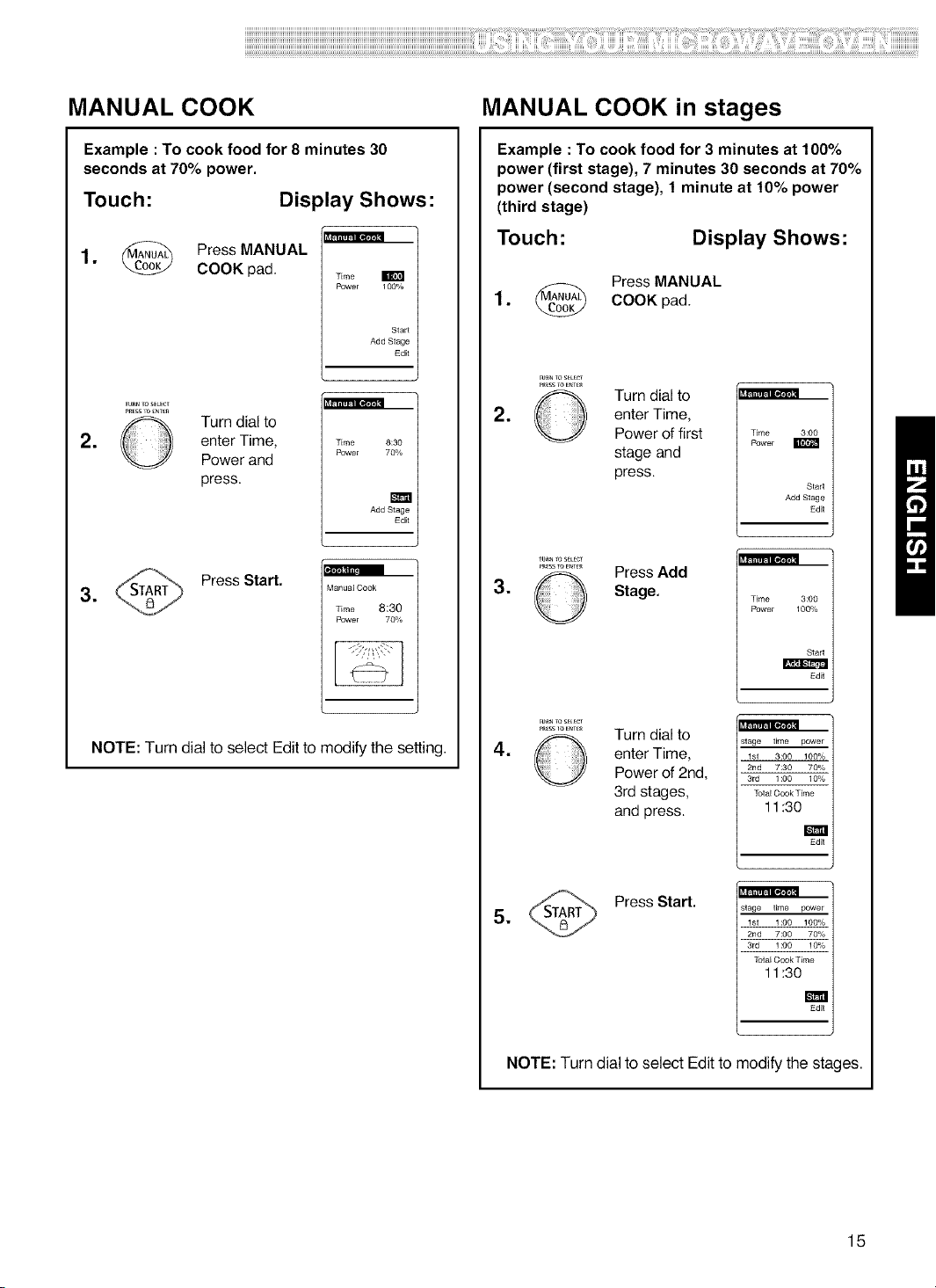
Example : To cook food for 8 minutes 30
seconds at 70% power.
Touch: Display Shows:
1. _ Press MANUAL
COOK pad.
Time E
Power I OO%
Start
Add Stage
Edit
.
_u_ TosELEcT
O Turn dial to
enter Time,
Power and
press.
Time 8:30
Power 70%
m
Add Stage
Edit
.
Press Start.
Manual Cook
Time 8:30
Power 70%
NOTE: Turn dial to select Edit to modify the setting.
MANUAL COOK in stages
Example :To cook food for 3 minutes at 100%
power (first stage), 7 minutes 30 seconds at 70%
power (second stage), 1 minute at 10% power
(third stage)
Touch: Display Shows:
Press MANUAL
1. (IVlANUA_ COOK
pad.
.
P+t_ssroE_T_
O Turn dial to
enter Time,
Power of first
stage and
press.
m
Time 3:00
Rower
Start
Add Stage
Ed_
.
Tu_ +oSEtECl
........... Press Add
O Stage.
m
Time 3:00
Rower 100%
Start
Ed_
.
_u_ Toset _c_
............. Turn dial to
enter Time,
Power of 2nd,
3rd stages,
and press.
m
stage time power
1st 3:00 100%
7:30 70%
3rd 1:00 10%
Total Cook Time
11:30
Ed_
stage time power
1st 1:00 100%
7:00 70%
3rd 1:00 10%
Total Cook Time
11:30
Ed_
.
Press Start.
NOTE: Turn dial to select Edit to modify the stages.
15
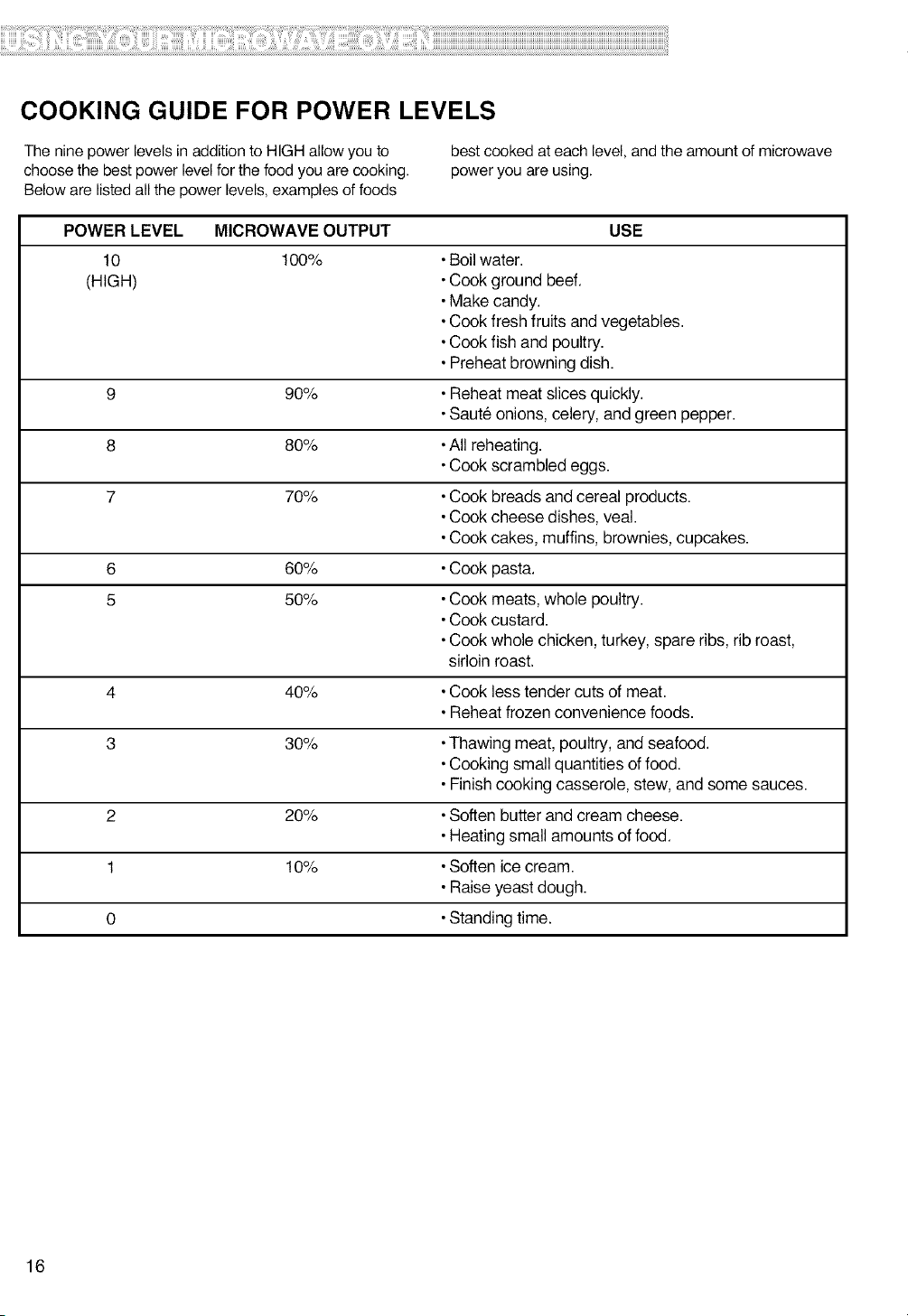
COOKING GUIDE FOR POWER LEVELS
The nine power levels in addition to HIGH allow you to
choose the best power level for the food you are cooking.
Below are listed all the power levels, examples of foods
best cooked at each level, and the amount of microwave
power you are using.
POWER LEVEL MICROWAVE OUTPUT USE
10 100%
(HIGH)
9 90%
8 80%
7 70%
6 60%
5 50%
Boil water.
Cook ground beef.
Make candy.
Cook fresh fruits and vegetables.
Cook fish and poultry.
Preheat browning dish.
• Reheat meat slices quickly.
• Saut6 onions, celery, and green pepper.
•All reheating.
• Cook scrambled eggs.
• Cook breads and cereal products.
• Cook cheese dishes, veal.
• Cook cakes, muffins, brownies, cupcakes.
• Cook pasta.
• Cook meats, whole poultry.
• Cook custard.
• Cook whole chicken, turkey, spare ribs, rib roast,
sirloin roast.
4 40% • Cook less tender cuts of meat.
• Reheat frozen convenience foods.
3 30% •Thawing meat, poultry, and seafood.
• Cooking small quantities of food.
• Finish cooking casserole, stew, and some sauces.
2 20% • Soften butter and cream cheese.
• Heating small amounts of food.
1 10% • Soften ice cream.
• Raise yeast dough.
0 • Standing time.
16
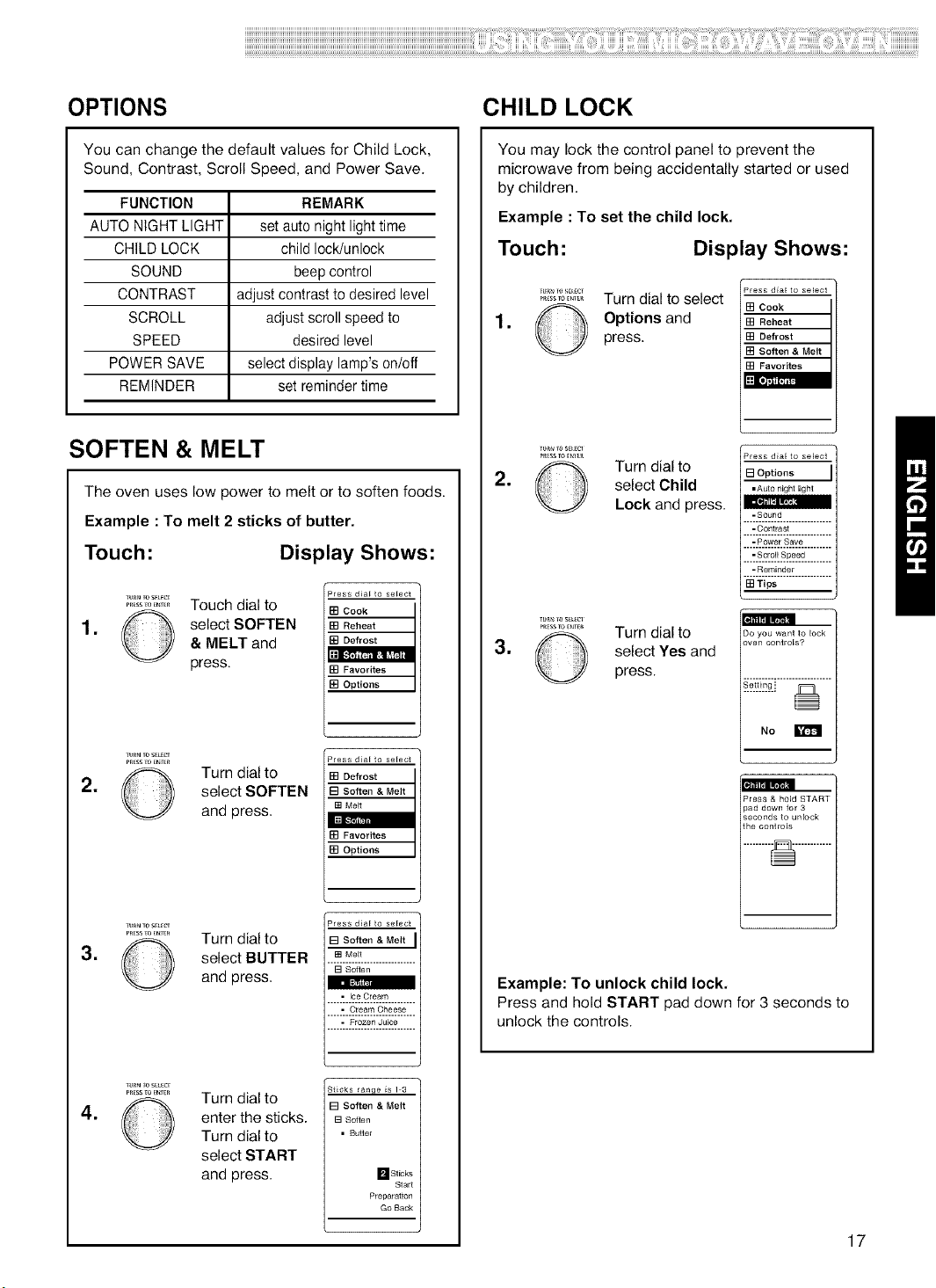
OPTIONS CHILD LOCK
You can change the default values for Child Lock,
Sound, Contrast, Scroll Speed, and Power Save.
FUNCTION REMARK
AUTO NIGHT LIGHT setauto night lighttime
CHILD LOCK child lock/unlock
SOUND beep control
CONTRAST adjust contrast to desired level
SCROLL adjust scroll speed to
SPEED desired level
POWER SAVE select display lamp's on/off
REMINDER set reminder time
SOFTEN & MELT
The oven uses low power to melt or to soften foods.
Example : To melt 2 sticks of butter.
Touch: Display Shows:
,
YwN _osF_
mtLssF(+ENTer
Touch dial to
select SOFTEN
& MELT and
press.
Press d_a[ to select
[] Cook
[] Reheat
[] Defrost
[] Favorites
[] Options
r
Press d_a[ to select
[] Defrost
[] Soften & Melt
[] Melt
[] Favorites
[] Options
Press d_a[ to select
[] Soften & Melt
[] Soften
• Ice Cream
.............................
• Cream Cheese
.............................
• Frozen JuiCe
.............................
.
,
Yu+_N_oSEU_
PRessFOENter
©
ttmNTOSEL_
©
Turn dial to
select SOFTEN
and press.
Turn dial to
select BUTTER
and press.
,
tUrN _OSEL_Cl
PRESSTO_nTER
©
Turn dial to
enter the sticks.
Turn dial to
select START
and press.
Sticks ran{_e _s ] 3
[] Soften & Melt
[] Soften
• Butter
_St_ks
Start
Preparation
Go Back
You may lock the control panel to prevent the
microwave from being accidentally started or used
by children.
Example : To set the child lock.
Touch: Display Shows:
,
mt_ssFoeNle_
Turn dial to select
Options and
press.
Press d_a[ to select
[] Cook
[] Reheat
[] Defrost
[] Soften & Melt
[] Favorites
Press d_a[ to select
[] Options
• Auto night light
-Sound
.............................
-Contrast
.............................
-Power Save
.............................
-Scroll Speed
.............................
-Reminder
.............................
[] Tips
.
,
tu_ +oSEL_Cl
P_SSTOenT_
O
Turn dial to
select Child
Lock and press.
Turn dial to
select Yes and
press.
m
Do you want to lock
oven controls?
m
Press & h[]d START
pad down for 3
seconds to unlock
the controls
Example: To unlock child lock.
Press and hold START pad down for 3 seconds to
unlock the controls.
17
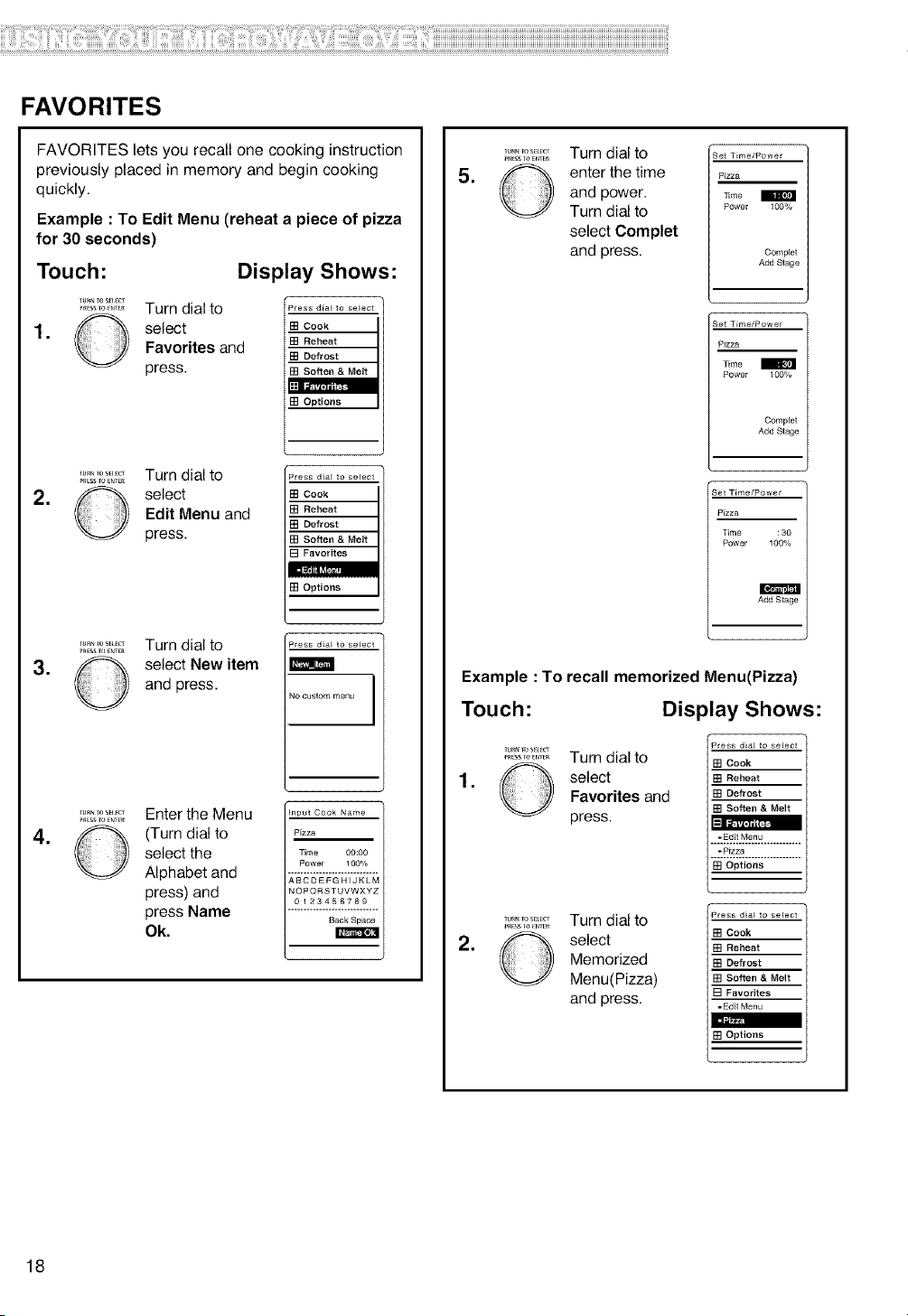
FAVORITES
FAVORITES lets you recall one cooking instruction
previously placed in memory and begin cooking
quickly.
Example : To Edit Menu (reheat a piece of pizza
for 30 seconds)
Touch: Display Shows:
............. Turn dial to
1, select
Favorites and
press.
Press d_a[ to select
[] Cook
[] Reheat
[] Defrost
[] Options
Press d_a[ to select
[] Cook
[] Reheat
[] Defrost
[] Soften & Melt
[] Favorites
[] Options
Press d_a[ to select
NO custom menu
Input Cook Name
Pizza
Time {30:00
Power 1 OO%
.............................
ABCDEFGHIJKLM
NOPQRSTUVWXYZ
0123456789
.............................
Back Space
.
_RESSTO_NrE_
Turn dial to
select
Edit Menu and
press.
,
_RESSTOENTEn
Turn dial to
select New item
and press.
,
_lJR__0Sa_Cf
_RESSTO_N_E.
Enter the Menu
(Turn dial to
select the
Alphabet and
press) and
press Name
Ok.
,
_Ess lo _N_E_
Turn dial to
enter the time
and power.
Turn dial to
select Complet
and press.
Set T_me/Powe r
Pizza
3]me
Power 100%
Complet
Add Stage
Set T_me/Pow er
Pizza
Time
Power 100%
Cemple_
Add Stage
Set T_me/Powe r
Pizza
Time : 30
Power 100%
Add Stage
Example : To recall memorized Menu(Pizza)
Touch: Display Shows:
,
TUR__OSa_cr
_.EsSTo_Nr_.
Turn dial to
select
Favorites and
press.
Press dial to select
[] Cook
[] Reheat
[] Defrost
[] Soften & MeR
=Edit Menu
.............................
=P_zza
.............................
[] Options
Press d_a[ to select
[] Cook
[] Reheat
[] Defrost
[] Soften & Melt
[] Favorites
-Edit Menu
[] Options
.
Tu_. TOS_r
Turn dial to
select
Memorized
Menu(Pizza)
and press.
18
UsingSensorcooking
SENSOR OPERATING
INSTRUCTIONS
Sensor Cook allows you to cook most of your favorite
foods without selecting cooking times and power levels.
The display will indicate Sensing during the initial
sensing period. The oven automatically determines
required cooking time for each food item. When the
internal sensor detects a certain amount of humidity
coming from the food, it will tell the oven how much
longer to heat. The display will show the remaining
heating time. For best results for cooking by Sensor,
follow these recommendations.
1. Food cooked with the sensor system should be at
normal storage temperature.
2. Glass Tray (TURNTABLE) and outside of container
should be dry to assure best cooking results.
3. Foods should always be covered with microwavable
plastic wrap, waxed paper, or a lid.
4. Do not open the door or touch the STOP/CLEAR key
during the sensing time. When sensing time is over,
the oven beeps and the remaining cooking time will
appear in the display window.
At this time you can open the door to stir, turn, or
rearrange the food.
SENSOR COOK GUIDE
Appropriate containers and coverings help assure good
Sensor cooking results.
1. Always use microwavable containers and cover them
with lids or plastic wrap.
2. Never use tight-sealing plastic covers. They can
prevent steam from escaping and cause food to
overcook.
3. Match the amount of the size of the container.
Fill containers at least half full for best results.
4. Be sure the outside of the cooking container and the
inside of the microwave oven are dry before placing
food in the oven. Beads of moisture turning into
steam can mislead the sensor.
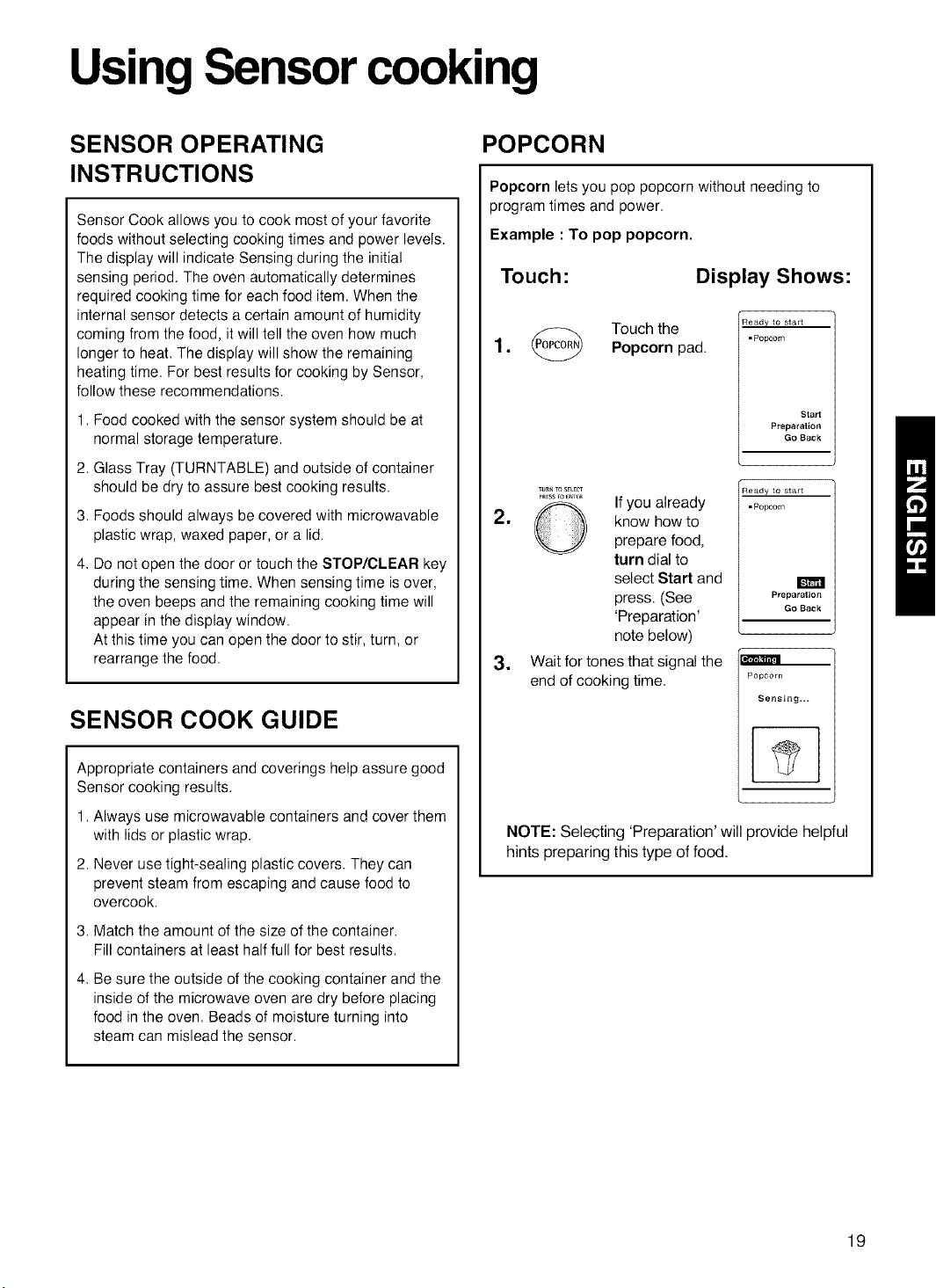
POPCORN
Popcorn lets you pop popcorn without needing to
program times and power.
Example : To pop popcorn.
Touch:
Display Shows:
Touchthe1. Popcorn pad.
Ready to start
-Popcorn
Start
Preparation
Go Back
TU_ TOSELE_
....... ,° If you already
2. _ know how to
prepare food,
turn dial to
select Start and
press. (See
'Preparation'
note below)
3. Wait for tones that signal the
end of cooking time.
Ready to start
-Popcorn
Preparation
Go Back
Popcorn
Sensing,,,
NOTE: Selecting 'Preparation' will provide helpful
hints preparing this type of food.
19
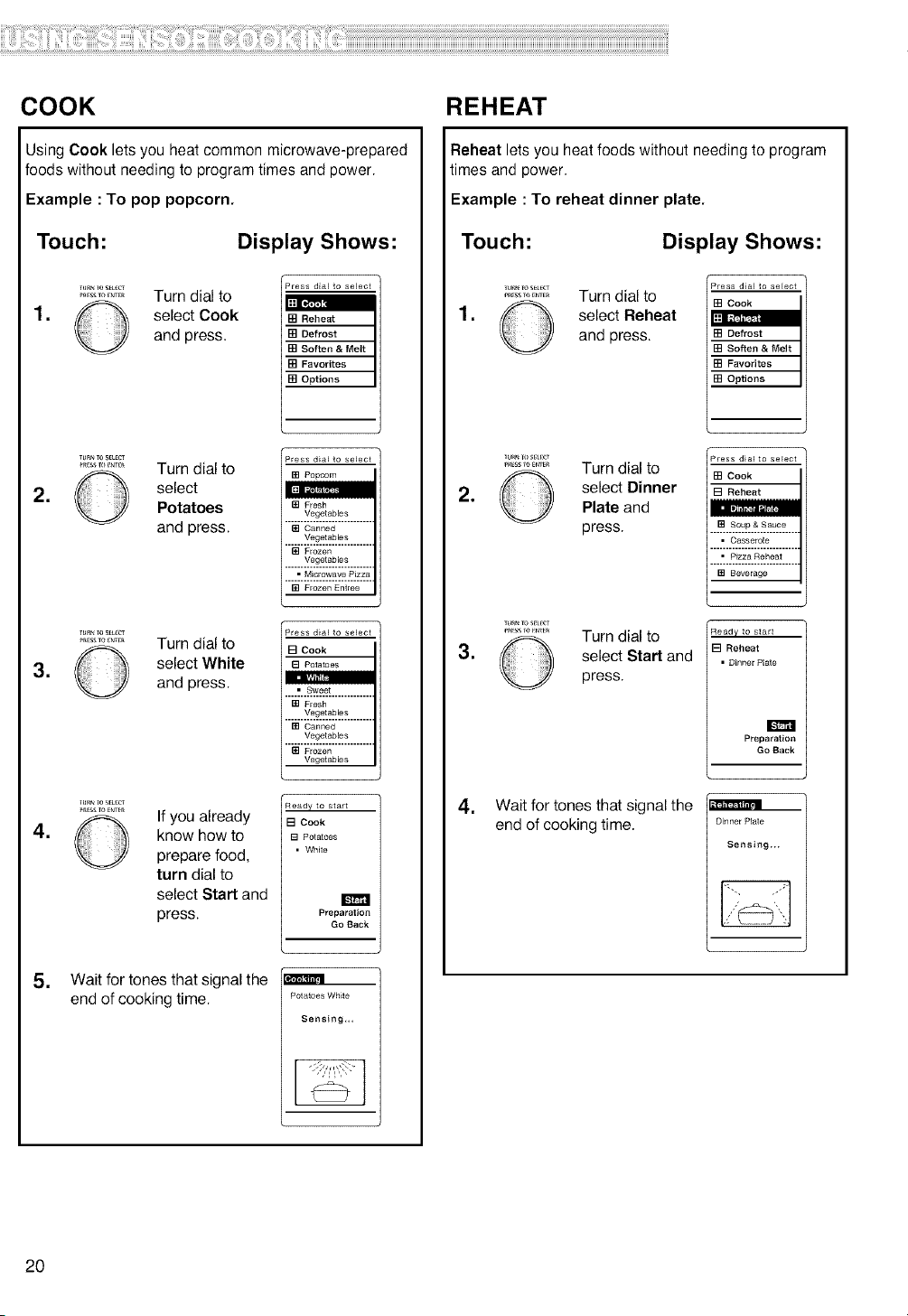
COOK REHEAT
Using Cook lets you heat common microwave-prepared
foods without needing to program times and power.
Example : To pop popcorn.
Touch:
Display Shows:
=
TURNle S_L_
_ESSTO_NTE_
Turn dial to
select Cook
and press.
Press d_a_to select
[] Reheat
[] Defrost
[] Soften & Melt
[] Favorites
[] Options
.
=
TUR_TOS_LfCT
............... Turn dial to
select
Potatoes
and press.
............ Turn dial to
select White
and press.
Press dla[ to select
[] Popcorn
[] Fresh
Vegetables
............................
[] Canned
Vegetables
............................
[] Frozen
Vegetables
............................
• Microwave P_zza
............................
[] Frozen Entree
Press dla_ to select
[] Cook
8 Potatoes
• Sweet
............................
[] Fresh
[] Canned
Vegetables
............................
[] Frozen
Vegetables
•
_u_ _oS_ECF
............. If you already
know how to
prepare food,
turn dial to
select Start and
press.
Ready to start
[] Cook
[] Potatoes
• White
Preparation
Go Back
• Wait for tones that signal the
end of cooking time.
Potatoes White
Sensing,,,
Reheat lets you heat foods without needing to program
times and power.
Example : To reheat dinner plate.
Touch:
Display Shows:
•
lu_N FoS_L_T
_ESSTO_NTFR
Turn dial to
select Reheat
and press.
Press d_a_ to select
[] Cook
[] Defrost
[] Soften & Melt
[] Favorites
[] Options
'Press dla_ to select
[] Cook
[] Reheat
[] Soup & Sauce
.............................
• Casserole
.............................
• Pizza Reheat
.............................
[] Beverage
*
_u_ Tos_;u_l¸
............. Turn dial to
select DinnerPlate and
press.
•
............. Turn dial to
select Start and
press.
Ready to start
[] Reheat
• Dinner P_ate
Preparatio_
Go Back
•
Wait for tones that signal the
end of cooking time.
m
Dinner Plate
Sensing...
20
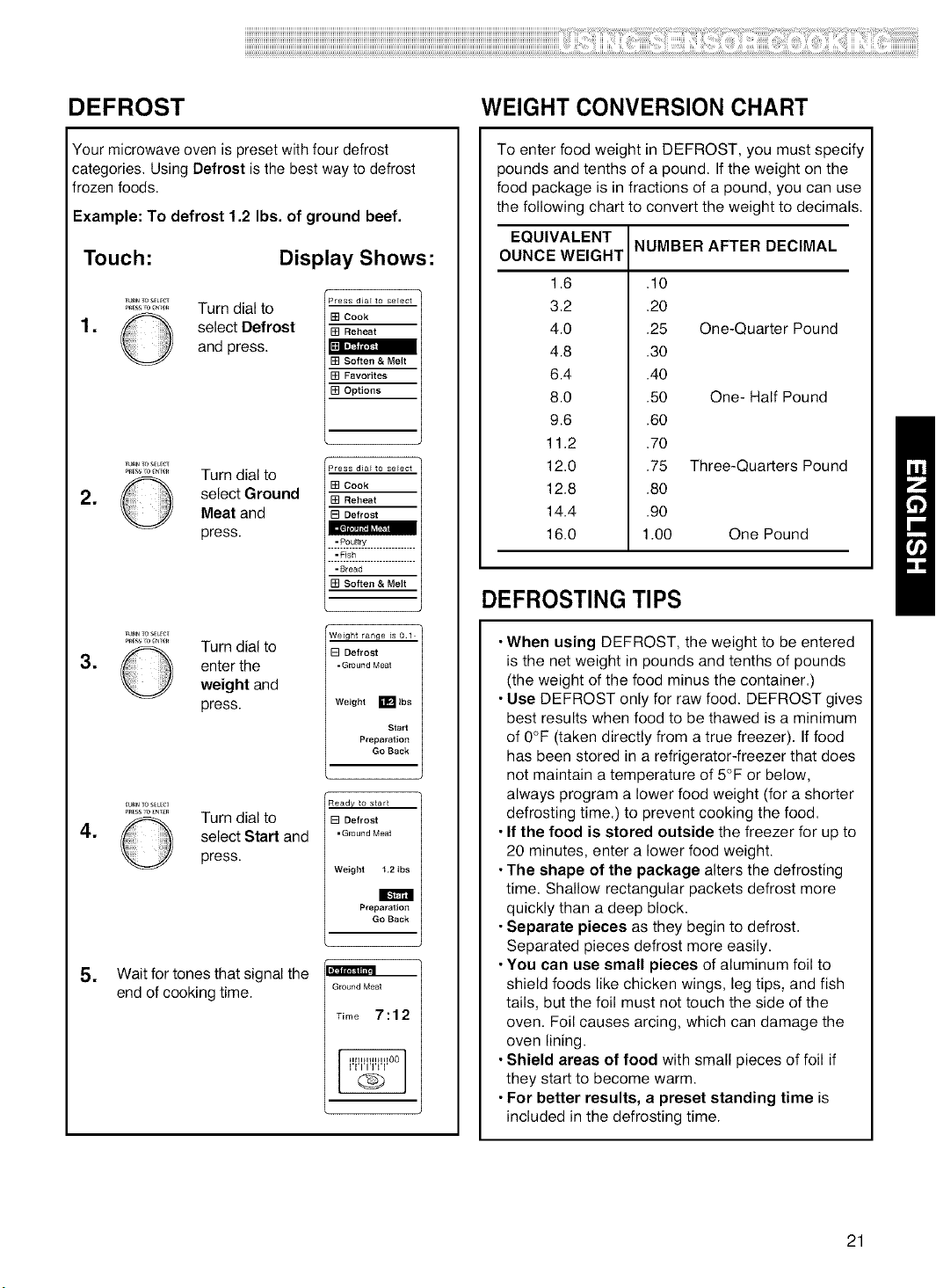
DEFROST
Your microwave oven is preset with four defrost
categories, Using Defrost is the best way to defrost
frozen foods.
Example: To defrost 1.2 Ibs. of ground beef.
Touch:
Display Shows:
.
.
.
Tu_ ToSELE_
Turn dial to
select Defrost
and press.
TUR_TOS_E_
............. Turn dial to
select GroundMeat and
press.
Tu_ ToS_ECT
........... Turn dial to
enter the
weight and
press.
Press dlal to select
[] Cook
[] Soften & Melt
[] Favorites
[] Options
Press dla_ to select
[] Cook
[] Reheat
[3 Defrost
..i_22=}!Z ................
-Fish
.............................
-Bread
[] Soften & Melt
i
Weight range is 01
[] Defrost
• Ground Meat
Weight E Ibs
Start
Preparation
Go Back
.
_u_ ToSELEC_
........... Turn dial to
select Start and
press.
Ready to start
[] Defrost
• Ground Meat
Weight t .2 Ibs
Preparation
Go Back
= Wait for tones that signal the
end of cooking time.
m
Ground Meat
Time 7:12
WEIGHT CONVERSION CHART
To enter food weight in DEFROST, you must specify
pounds and tenths of a pound. If the weight on the
food package is in fractions of a pound, you can use
the following chart to convert the weight to decimals.
NUMBER AFTER DECIMAL
EQUIVALENT
OUNCE WEIGHT
1.6
3.2
4.0
4.8
6.4
8.0
9.6
11.2
12.0
12.8
14.4
16.0
.10
.20
.25
.30
.40
.50
.60
.70
.75
.80
.90
1.00
One-Quarter Pound
One- Half Pound
Three-Quarters Pound
One Pound
DEFROSTING TIPS
• When using DEFROST, the weight to be entered
is the net weight in pounds and tenths of pounds
(the weight of the food minus the container.)
• Use DEFROST only for raw food. DEFROST gives
best results when food to be thawed is a minimum
of 0°F (taken directly from a true freezer). If food
has been stored in a refrigerator-freezer that does
not maintain a temperature of 5°F or below,
always program a lower food weight (for a shorter
defrosting time.) to prevent cooking the food.
• If the food is stored outside the freezer for up to
20 minutes, enter a lower food weight.
• The shape of the package alters the defrosting
time. Shallow rectangular packets defrost more
quickly than a deep block.
• Separate pieces as they begin to defrost.
Separated pieces defrost more easily.
• You can use small pieces of aluminum foil to
shield foods like chicken wings, leg tips, and fish
tails, but the foil must not touch the side of the
oven. Foil causes arcing, which can damage the
oven lining.
• Shield areas of food with small pieces of foil if
they start to become warm.
• For better results, a preset standing time is
included in the defrosting time.
21
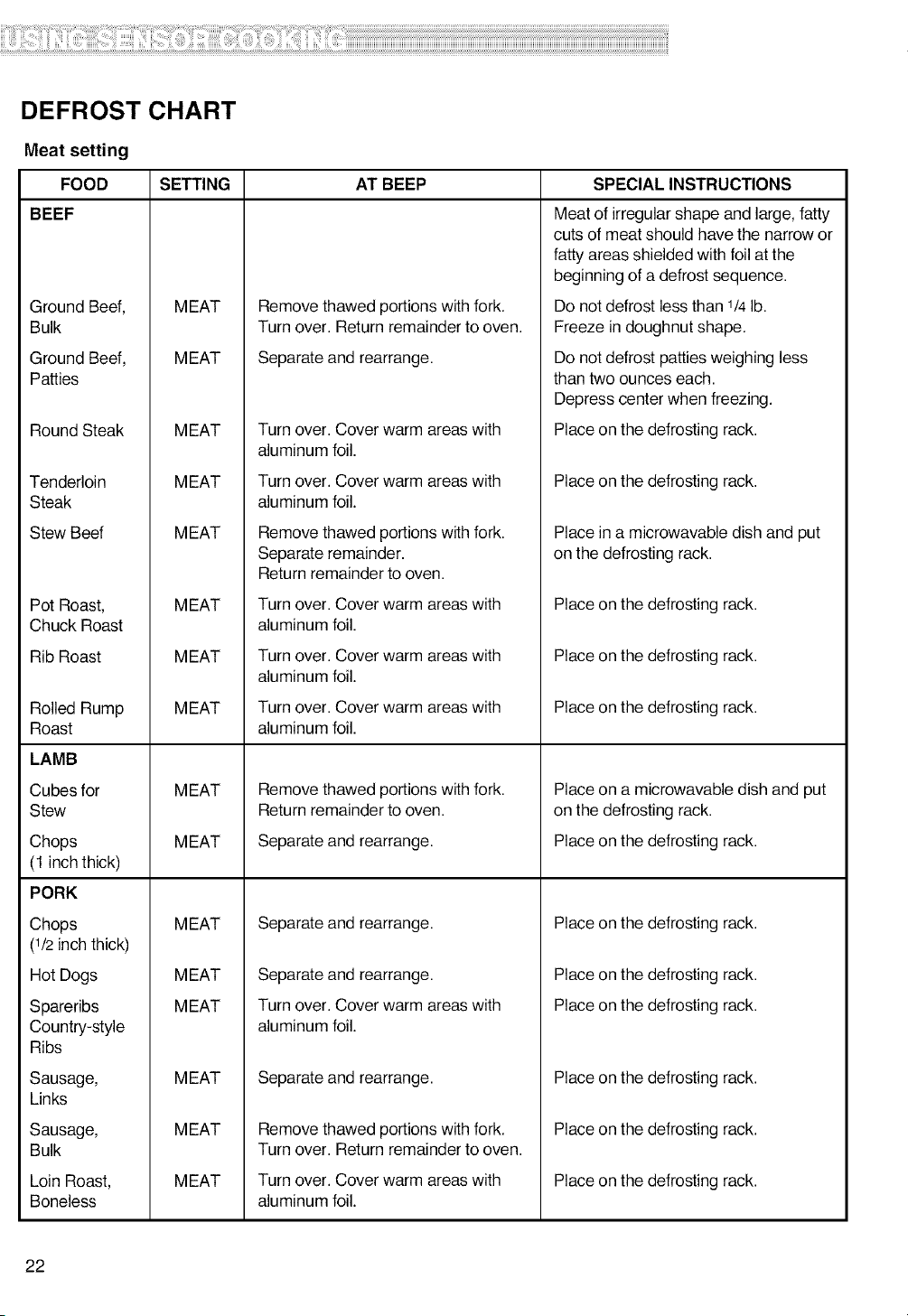
DEFROST CHART
Meat setting
FOOD
BEEF
Ground Beef,
Bulk
Ground Beef,
Patties
Round Steak
Tenderloin
Steak
Stew Beef
Pot Roast,
Chuck Roast
Rib Roast
Rolled Rump
Roast
LAMB
Cubes for
Stew
Chops
(1 inch thick)
PORK
Chops
(1/2 inch thick)
Hot Dogs
Spareribs
Country-style
Ribs
Sausage,
Links
Sausage,
Bulk
Loin Roast,
Boneless
SETTING AT BEEP SPECIAL INSTRUCTIONS
MEAT
MEAT
MEAT
MEAT
MEAT
MEAT
MEAT
MEAT
MEAT
MEAT
MEAT
MEAT
MEAT
MEAT
MEAT
MEAT
Remove thawed portions with fork.
Turn over. Return remainder to oven.
Separate and rearrange.
Turn over. Cover warm areas with
aluminum foil.
Turn over. Cover warm areas with
aluminum foil.
Remove thawed portions with fork.
Separate remainder.
Return remainder to oven.
Turn over. Cover warm areas with
aluminum foil.
Turn over. Cover warm areas with
aluminum foil.
Turn over. Cover warm areas with
aluminum foil.
Remove thawed portions with fork.
Return remainder to oven.
Separate and rearrange.
Separate and rearrange.
Separate and rearrange.
Turn over. Cover warm areas with
aluminum foil.
Separate and rearrange.
Remove thawed portions with fork.
Turn over. Return remainder to oven.
Turn over. Cover warm areas with
aluminum foil.
Meat of irregular shape and large, fatty
cuts of meat should have the narrow or
fatty areas shielded with foil at the
beginning of a defrost sequence.
Do not defrost less than 1/4lb.
Freeze in doughnut shape.
Do not defrost patties weighing less
than two ounces each.
Depress center when freezing.
Place on the defrosting rack.
Place on the defrosting rack.
Place in a microwavable dish and put
on the defrosting rack.
Place on the defrosting rack.
Place on the defrosting rack.
Place on the defrosting rack.
Place on a microwavable dish and put
on the defrosting rack.
Place on the defrosting rack.
Place on the defrosting rack.
Place on the defrosting rack.
Place on the defrosting rack.
Place on the defrosting rack.
Place on the defrosting rack.
Place on the defrosting rack.
22
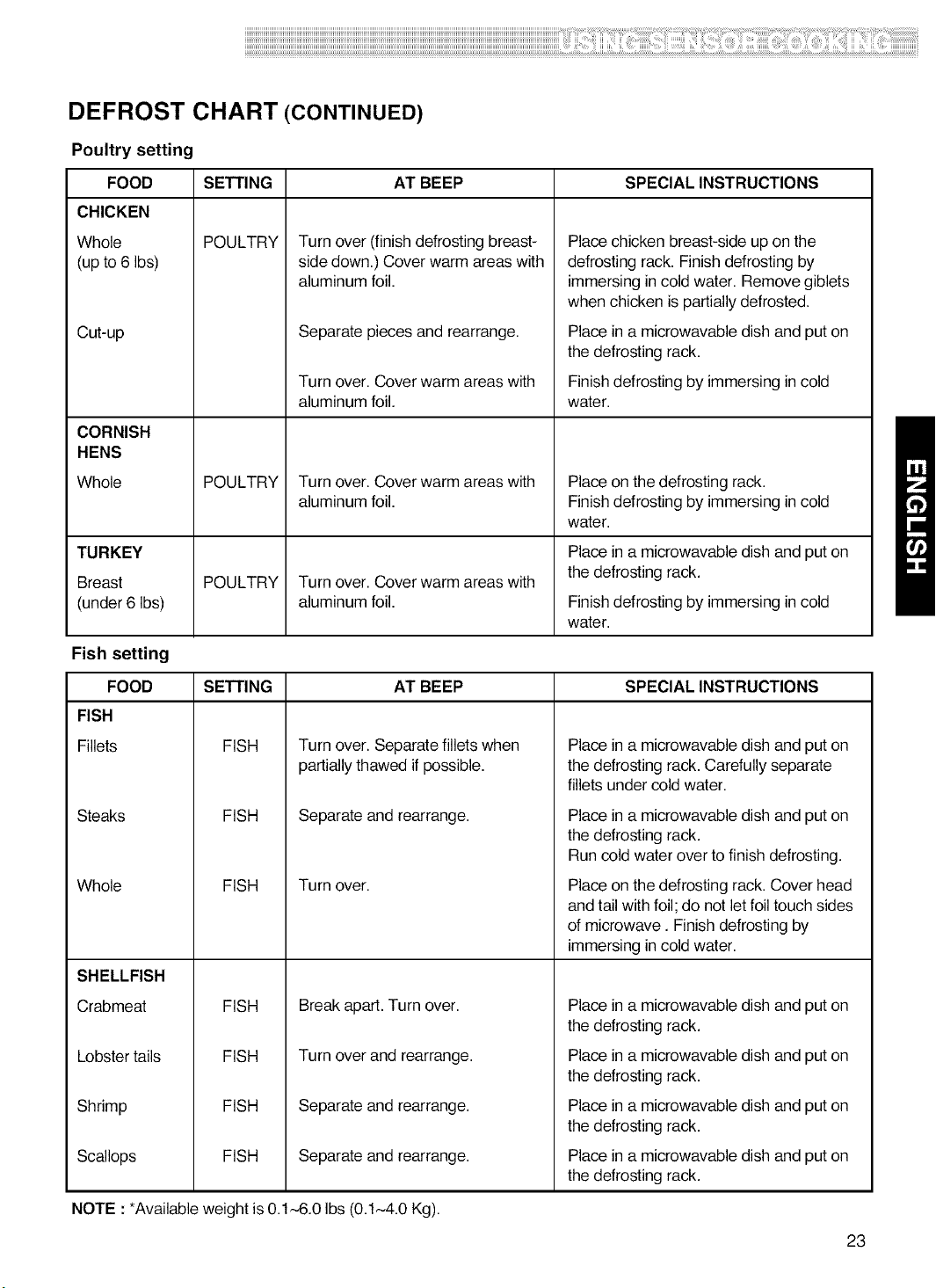
DEFROST CHART (CONTINUED)
Poultry setting
FOOD
CHICKEN
Whole
(up to 6 Ibs)
Cut-up
CORNISH
HENS
Whole
SETTING AT BEEP SPECIAL INSTRUCTIONS
POULTRY
POULTRY
Turn over (finish defrosting breast-
side down.) Cover warm areas with
aluminum foil.
Separate pieces and rearrange.
Turn over. Cover warm areas with
aluminum foil.
Turn over. Cover warm areas with
aluminum foil.
Place chicken breast-side up on the
defrosting rack. Finish defrosting by
immersing in cold water. Remove giblets
when chicken is partially defrosted.
Place in a microwavable dish and put on
the defrosting rack.
Finish defrosting by immersing in cold
water.
Place on the defrosting rack.
Finish defrosting by immersing in cold
water.
TURKEY Place in a microwavable dish and put on
Breast POULTRY Turn over. Cover warm areas with the defrosting rack.
(under 6 Ibs) aluminum foil. Finish defrosting by immersing in cold
water.
Fish setting
SETTING AT BEEP SPECIAL INSTRUCTIONSFOOD
FISH
Fillets
Steaks
Whole
SHELLFISH
Crabmeat
Lobstertails
Shrimp
Scallops
FISH
FISH
Turn over. Separate fillets when
partially thawed if possible.
Separate and rearrange.
FISH Turn over.
FISH
FISH
FISH
FISH
Break apart. Turn over.
Turn over and rearrange.
Separate and rearrange.
Separate and rearrange.
Place in a microwavable dish and put on
the defrosting rack. Carefully separate
fillets under cold water.
Place in a microwavable dish and put on
the defrosting rack.
Run cold water over to finish defrosting.
Place on the defrosting rack. Cover head
and tail with foil; do not let foil touch sides
of microwave. Finish defrosting by
immersing in cold water.
Place in a microwavable dish and put on
the defrosting rack.
Place in a microwavable dish and put on
the defrosting rack.
Place in a microwavable dish and put on
the defrosting rack.
Place in a microwavable dish and put on
the defrosting rack.
NOTE :*Available weight is 0.1,--6.0 Ibs (0.1~4.0 Kg).
23
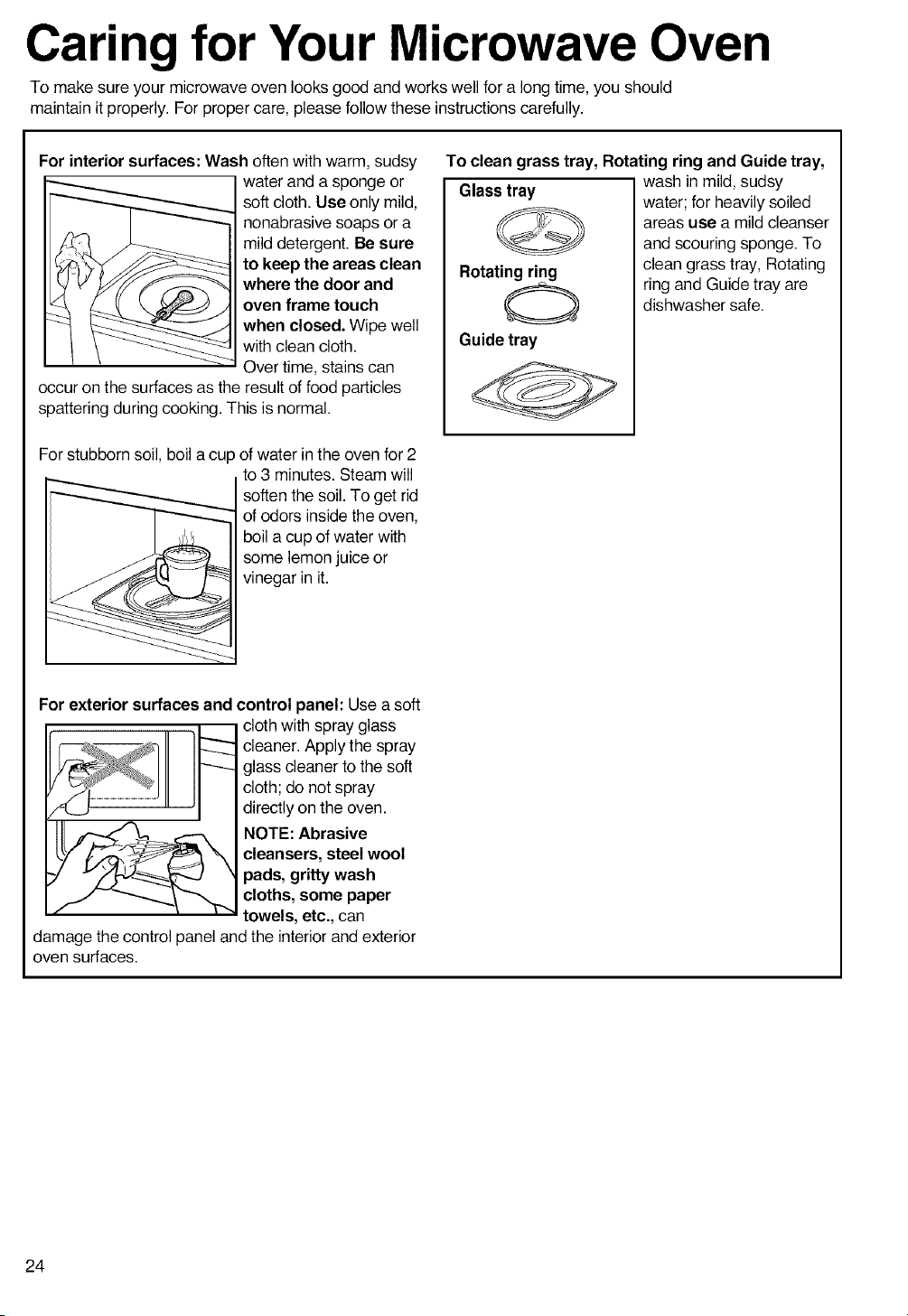
Carin for Your Microwave Oven
To make sure your microwave oven looks good and works well for a long time, you should
maintain it properly. For proper care, please follow these instructions carefully.
For interior surfaces: Wash often with warm, sudsy
water and a sponge or
soft cloth. Use only mild,
nonabrasive soaps or a
mild detergent. Be sure
to keep the areas clean
where the door and
oven frame touch
when closed. Wipe well
with clean cloth.
Over time, stains can
occur on the surfaces as the result of food particles
spattering during cooking. This is normal.
For stubborn soil, boil a cup of water in the oven for 2
to 3 minutes. Steam will
soften the soil. To get rid
of odors inside the oven,
boil a cup of water with
some lemon juice or
vinegar in it.
To clean grass tray, Rotating ring and Guide tray,
wash in mild, sudsy
Glass tray
Rotati_
Guide tray
water; for heavily soiled
areas use a mild cleanser
and scouring sponge. To
clean grass tray, Rotating
ring and Guide tray are
dishwasher safe.
For exterior surfaces and control panel: Use a soft
cloth with spray glass
cleaner. Apply the spray
glass cleaner to the soft
cloth; do not spray
directly on the oven.
NOTE: Abrasive
cleansers, steel wool
pads, gritty wash
cloths, some paper
towels, etc., can
damage the control panel and the interior and exterior
oven surfaces.
24
CARING FOR THE FILTERS
The grease filters should be removed and cleaned often,at least once a month.
NOTE: Ifyour microwave hood combination is installed to recirculate air,the chacoal filter
(Part No.5230Wl A003A)is available from Sears by calling 1-800-4-MY-HOME ®.
The charcoal filter cannot be cleaned and should be replaced every 6 to 12 months.
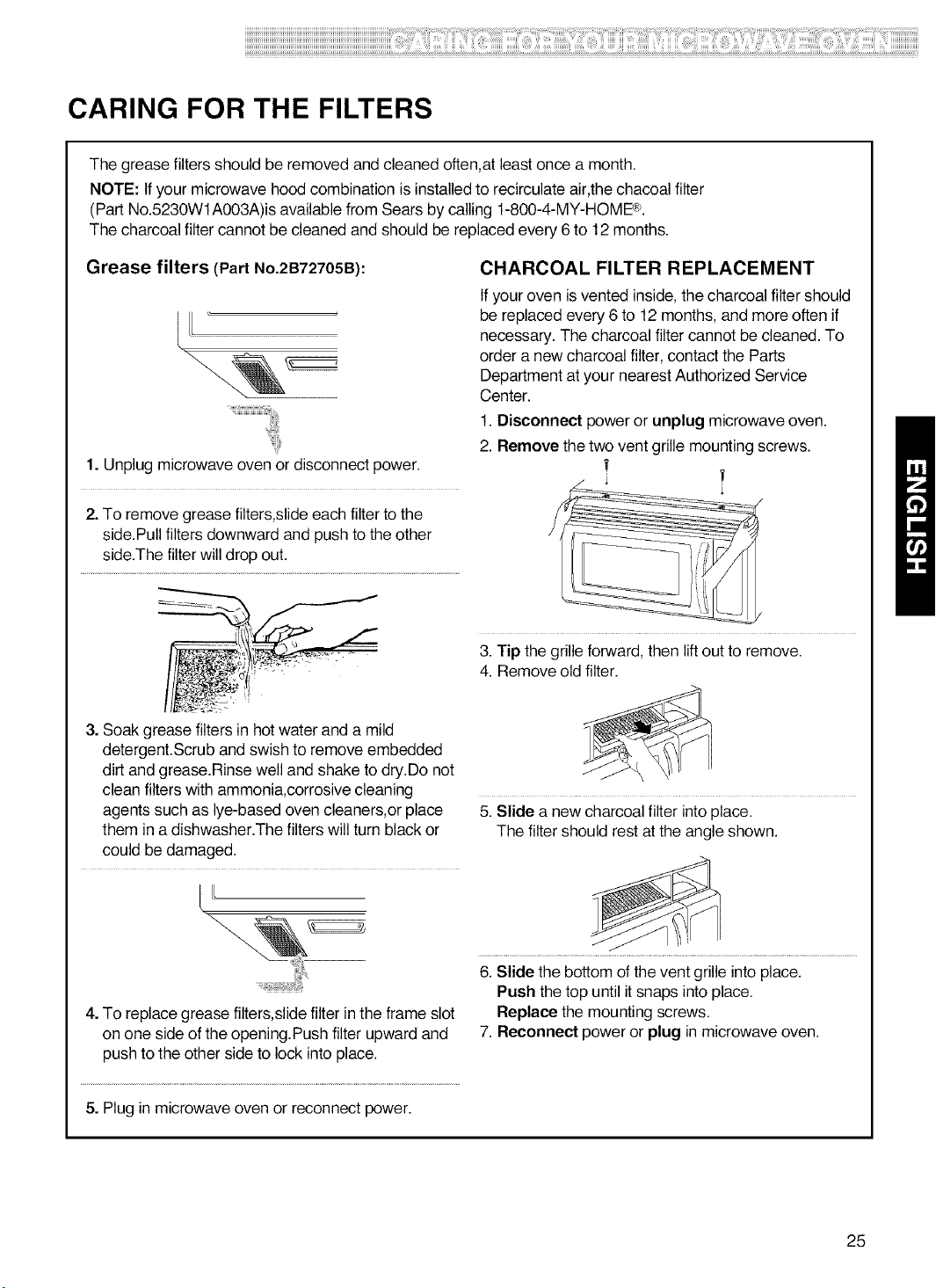
Grease filters (Part No.2B72705B):
I/L:
1. Unplug microwave oven or disconnect power.
2. To remove grease filters,slide each filter to the
side.Pull filters downward and push to the other
side.The filter will drop out.
a. Soak grease filters in hot water and a mild
detergent.Scrub and swish to remove embedded
dirt and grease.Rinse well and shake to dry.Do not
clean filters with ammonia,corrosive cleaning
agents such as lye-based oven cleaners,or place
them in a dishwasher.The filters will turn black or
could be damaged.
[U
4. To replace grease filters,slide filter in the frame slot
on one side of the opening.Push filter upward and
push to the other side to lock into place.
CHARCOAL FILTER REPLACEMENT
If your oven is vented inside, the charcoal filter should
be replaced every 6 to 12 months, and more often if
necessary. The charcoal filter cannot be cleaned. To
order a new charcoal filter, contad the Parts
Department at your nearest Authorized Service
Center.
1. Disconnect power or unplug microwave oven.
2. Remove the two vent grille mounting screws.
r f
a. "rip the grille forward, then liftout to remove.
4. Remove old filter.
5. Slide a new charcoal filter into place.
The filter should rest at the angle shown.
6. Slide the bottom of the vent grille into place.
Push the top until it snaps into place.
Replace the mounting screws.
7. Reconnect power or plug in microwave oven.
5. Plug in microwave oven or reconnect power.
25
REPLACING THE COOKTOP AND OVEN LIGHTS
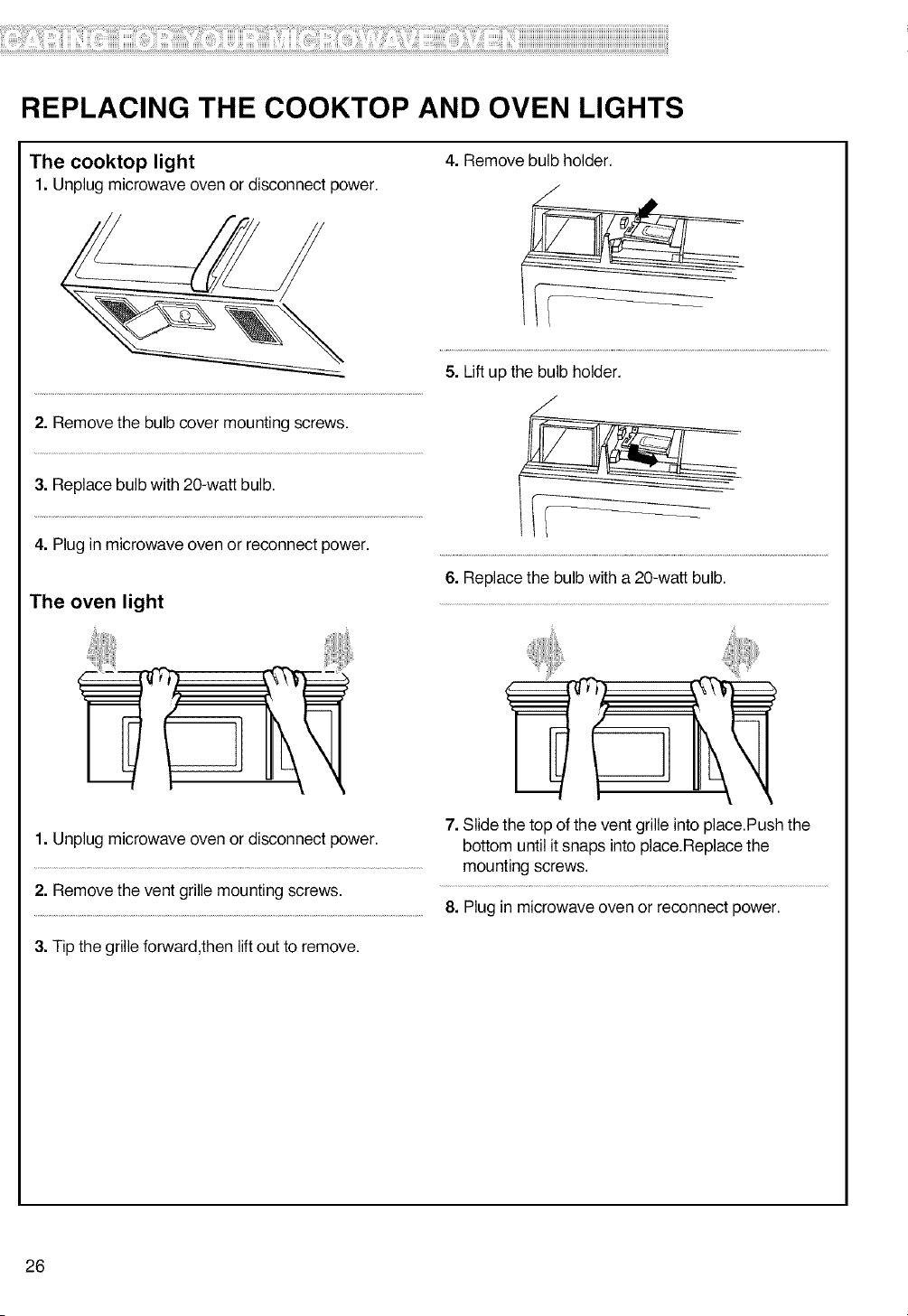
The cooktop light
1. Unplug microwave oven or disconnect power.
4. Remove bulb holder.
/
2. Remove the bulb cover mounting screws.
3. Replace bulb with 20-watt bulb.
4. Plug in microwave oven or reconnect power.
The oven light
1. Unplug microwave oven or disconnect power.
2. Remove the vent grille mounting screws.
3. Tip the grille forward,then lift out to remove.
5. Lift up the bulb holder.
/
6. Replace the bulb with a 20-watt bulb.
7. Slide the top of the vent grille into place.Push the
bottom until it snaps into place.Replace the
mounting screws.
8. Plug in microwave oven or reconnect power.
26
MICROWAVE COOKING TIPS
Amount of food
• If you increase or decrease the amount of food
you prepare, the time it takes to cook that food will
also change. For example, if you double a recipe,
add a little more than half the original cooking time.
Check for doneness and, if necessary, add more
time in small increments.
Starting temperature of food
•The lower the temperature of the food being put
into the microwave oven, the longer it takes to cook.
Food at room temperature will be re-heated more
quickly than food at refrigerator temperature.
Composition of food
• Food with a lot of fat and sugar will be heated
faster than food containing a lot of water. Fat and
sugar will also reach a higher temperature than
water in the cooking process.
•The more dense the food, the longer ittakes to
heat. "Very dense" food like meat takes longer to
heat than lighter, more porous food like sponge
cakes.
Size and shape
• Smaller pieces of food will cook faster than larger
pieces. Also, same-shaped pieces cook more
evenly than different-shaped pieces.
• With foods that have different thicknesses, the
thinner parts will cook faster than the thicker parts.
Place the thinner parts of chicken wings and legs in
the center of the dish.
Stirring, turning foods
• Stirring and turning foods spreads heat quickly to
the center of the dish and avoids overcooking at the
outer edges of the food.
Covering food
Cover food to:
• Reduce splattering
• Shorten cooking times
• Keep food moist
You can use any covering that lets microwaves pass
through. See "Getting to Know Your Microwave
Oven" for materials that microwaves will pass
through. If you are using the Sensor function, be sure
to vent.
Releasingpressure infoods
• Several foods (for example: baked potatoes,
sausages, egg yolks, and some fruits) are tightly
covered by a skin or membrane. Steam can build up
under the membrane during cooking, causing the
food to burst. To relieve the pressure and to prevent
bursting, pierce these foods before cooking with a
fork, cocktail pick, or toothpick.
Using standingtime
•Always allow food to stand after cooking.
Standing time after defrosting and cooking allows
the temperature to evenly spread throughout the
food, improving the cooking results.
•The length of the standing time depends on how
much food you are cooking and how dense it is.
Sometimes it can be as short as the time it takes
you to remove the food from the oven and take it to
the serving table. However, with larger, denser food,
the standing time may be as long as 10 minutes.
Arranging food
For best results, place food evenly on the plate. You
can do this in several ways:
• If you are cooking several items of the same
food, such as baked potatoes, place them in a ring
pattern for uniform cooking.
•When cooking foods of uneven shapes or
thickness, such as chicken breasts, place the
smaller or thinner area of the food towards the
center of the dish where it will be heated last.
• Layer thin slices of meat on top of each other.
•When you cook or reheat whole fish, score the
skin - this prevents cracking.
• Do not let food or a container touch the top or sides
of the oven. This will prevent possible arcing.
Using aluminum foil
Metal containers should not be used in a microwave
oven. There are, however, some exceptions. Ifyou
have purchased food which is prepackaged in an
aluminum foil container, refer to the instructions on
the package. When using aluminum foil containers,
cooking times may be longer because microwaves
will only penetrate the top of the food. Ifyou use
aluminum containers without package instructions,
follow these guidelines:
27
MICROWAVE COOKING TIPS (CONT.)
Using aluminum foil (cont.)
• Place the container in a glass bowl and add some
water so that it covers the bottom of the container,
not more than 1/4 in. (.64 cm) high. This ensures
even heating of the container bottom.
•Always remove the lid to avoid damage to the
oven.
• Use only undamaged containers.
• Do not use containers taller than 3/4 in. (1.9 cm).
• Container must be at least half filled.
•To avoid arcing, there must be a minimum 1/4 in.
(.64 cm) between the aluminum container and the
walls of the oven and also between two aluminum
containers.
•Always place the container on the turntable.
• Shield with small pieces of aluminum foil, parts of
food that may cook quickly, such as wing tips and
leg ends of poultry.
• Heating food in aluminum foil containers usually
takes up to double the time compared to reheating
in plastic, glass, china, or paper containers.
The time when food is ready will vary depending
upon the type of container you use.
• Let food stand for 2 to 3 minutes after heating so
that heat is spread evenly throughout container.
Cooking you should not do in your
microwaveoven
• Do not do canning of foods in the oven. Closed
glass jars may explode, resulting in damage to the
oven.
• Do not use the microwave oven to sterilize objects
(baby bottles, etc.). It is difficult to keep the oven at
the high temperature needed for sterilization.
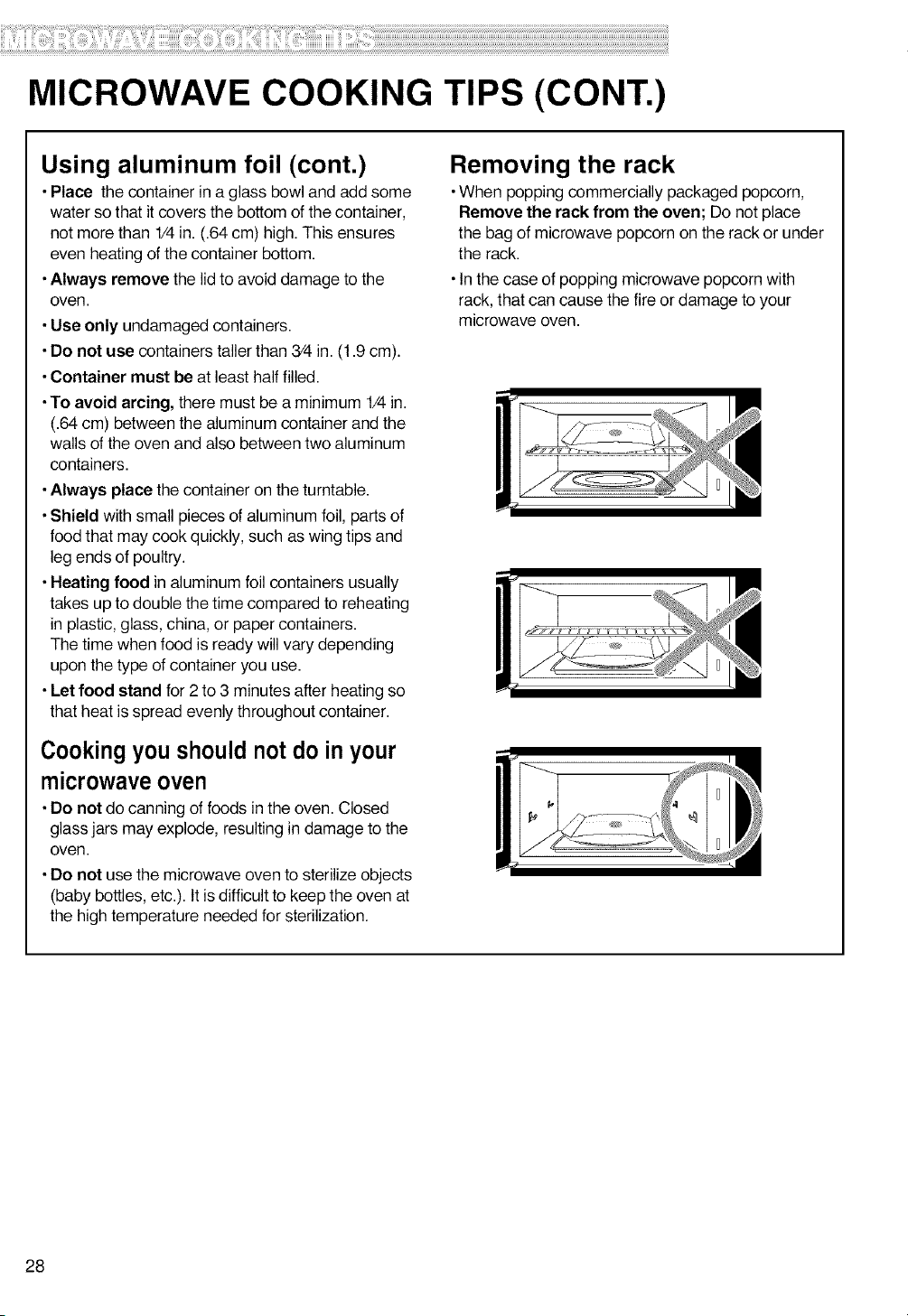
Removing the rack
• When popping commercially packaged popcorn,
Remove the rack from the oven; Do not place
the bag of microwave popcorn on the rack or under
the rack.
• In the case of popping microwave popcorn with
rack, that can cause the fire or damage to your
microwave oven.
28
Questions and Answers
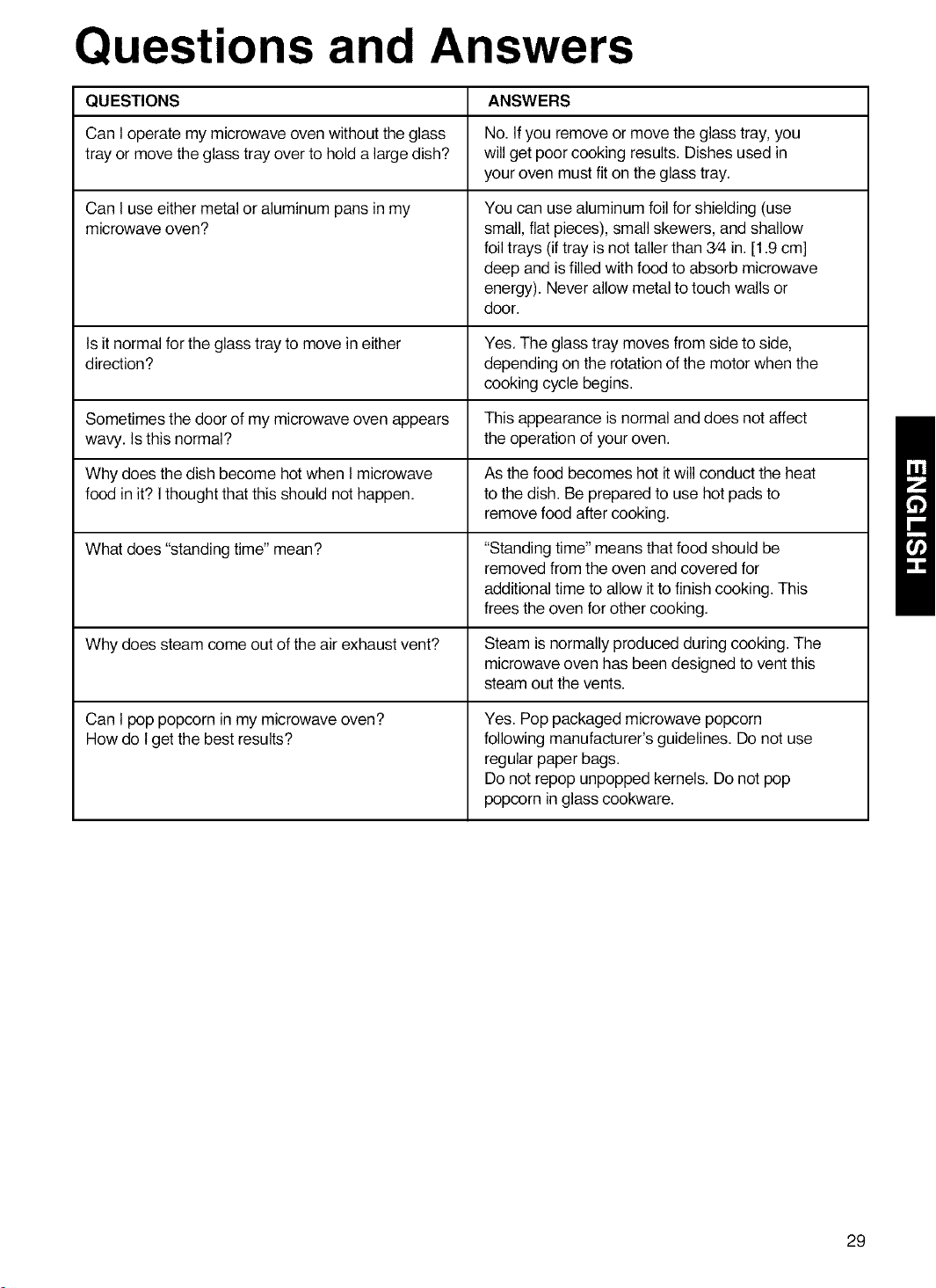
QUESTIONS ANSWERS
Can I operate my microwave oven without the glass No. Ifyou remove or move the glass tray, you
tray or move the glass tray over to hold a large dish? will get poor cooking results. Dishes used in
your oven must fit on the glass tray.
Can I use either metal or aluminum pans in my
microwave oven?
You can use aluminum foil for shielding (use
small, flat pieces), small skewers, and shallow
foil trays (iftray is not taller than 3/4 in. [1.9 cm]
deep and is filled with food to absorb microwave
energy). Never allow metal to touch walls or
door.
Is it normal for the glass tray to move in either Yes. The glass tray moves from side to side,
direction? depending on the rotation of the motor when the
cooking cycle begins.
Sometimes the door of my microwave oven appears This appearance is normal and does not affect
wavy. Is this normal? the operation of your oven.
Why does the dish become hot when I microwave As the food becomes hot it will conduct the heat
food in it? Ithought that this should not happen, to the dish. Be prepared to use hot pads to
remove food after cooking.
What does "standing time" mean? "Standing time" means that food should be
removed from the oven and covered for
additional time to allow it to finish cooking. This
frees the oven for other cooking.
Why does steam come out of the air exhaust vent? Steam is normally produced during cooking. The
microwave oven has been designed to vent this
steam out the vents.
Can I pop popcorn in my microwave oven?
How do I get the best results?
Yes. Pop packaged microwave popcorn
following manufacturer's guidelines. Do not use
regular paper bags.
Donot repop unpopped kernels. Donot pop
popcorn in glass cookware.
29
Troubleshooting
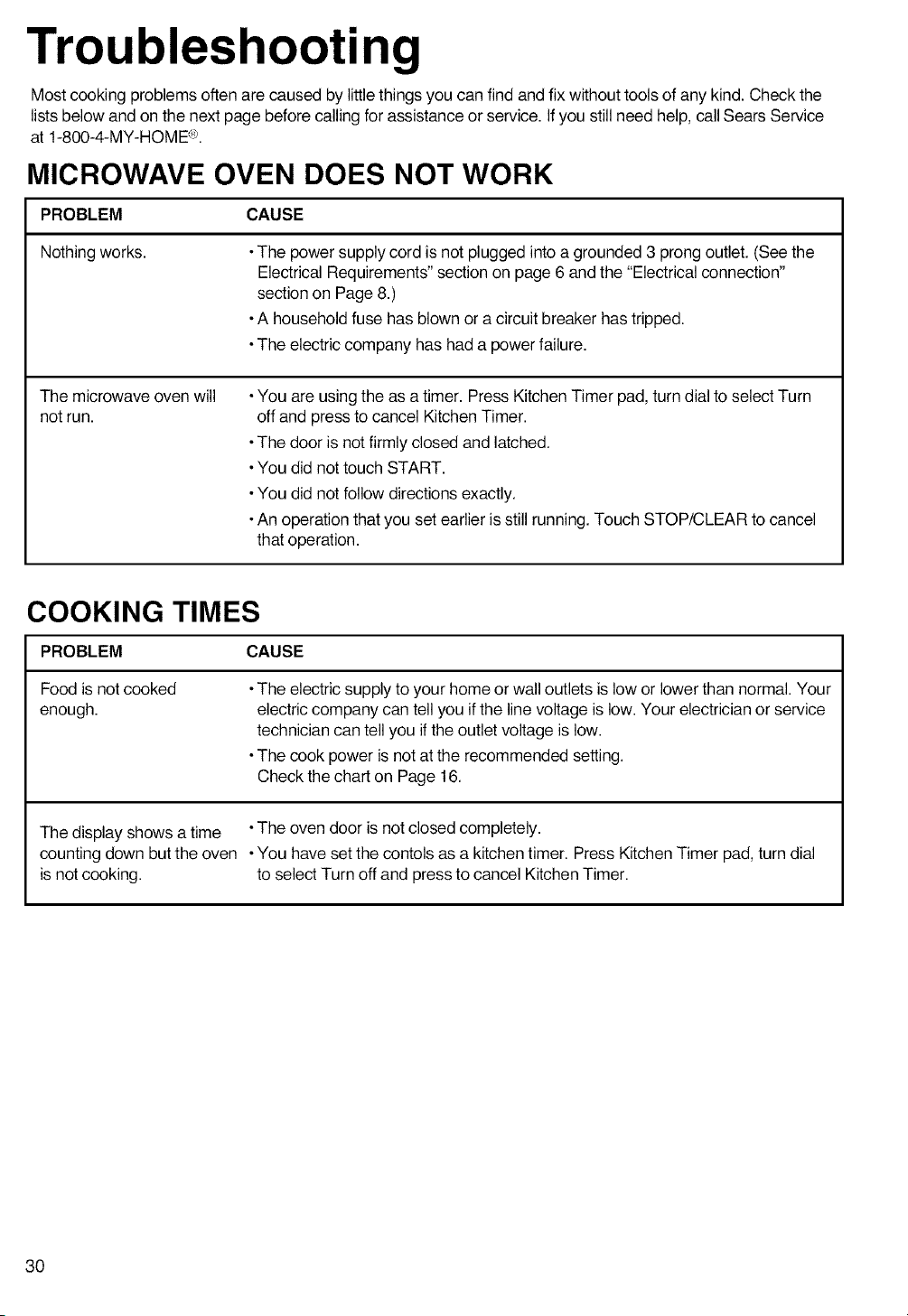
Most cooking problems often are caused by little things you can find and fix without tools of any kind. Check the
lists below and on the next page before calling for assistance or service. Ifyou still need help, call Sears Service
at 1-800-4-MY-HOME <e.
MICROWAVE OVEN DOES NOT WORK
PROBLEM CAUSE
Nothing works. •The power supply cord is not plugged into a grounded 3 prong outlet. (See the
Electrical Requirements" section on page 6 and the "Electrical connection"
section on Page 8.)
•A household fuse has blown or a circuit breaker has tripped.
•The electric company has had a power failure.
The microwave oven will
not run.
•You are using the as a timer. Press Kitchen Timer pad, turn dial to select Turn
off and press to cancel Kitchen Timer.
•The door is not firmly closed and latched.
•You did not touch START.
•You did not follow directions exactly.
•An operation that you set earlier is still running. Touch STOP/CLEAR to cancel
that operation.
COOKING TIMES
PROBLEM CAUSE
Food is notcooked
enough.
•The electric supply to your home or wall outlets is low or lower than normal. Your
electric company can tell you if the line voltage is low. Your electrician or service
technician can tell you if the outlet voltage is low.
•The cook power is not at the recommended setting.
Check the chart on Page 16.
The display shows a time •The oven door is not closed completely.
counting down but the oven •You have set the contols as a kitchen timer. Press Kitchen Timer pad, turn dial
is not cooking, to select Turn off and press to cancel Kitchen Timer.
30
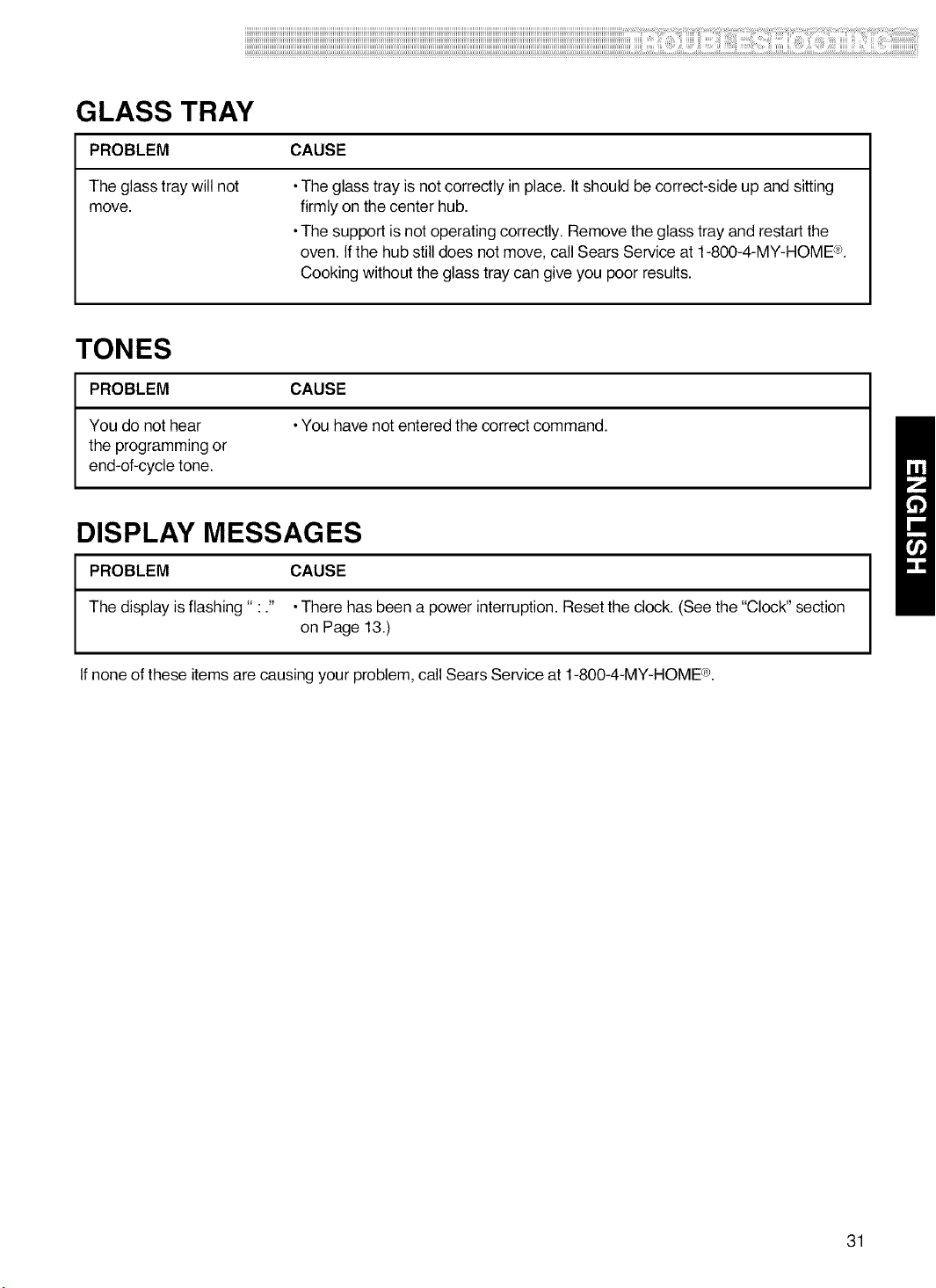
GLASS TRAY
PROBLEM CAUSE
The glass tray will not
move.
•The glass tray is not correctly in place. It should be correct-side up and sitting
firmly on the center hub.
•The support is not operating correctly. Remove the glass tray and restart the
oven. If the hub still does not move, call Sears Service at t-800-4-MY-HOME (e.
Cooking without the glass tray can give you poor results.
TONES
PROBLEM CAUSE
You do not hear •You have not entered the correct command.
the programming or
end-of-cycle tone.
DISPLAY MESSAGES
PROBLEM CAUSE
The display is flashing" : ." •There has been a power interruption. Reset the clock. (See the "Clock" section
on Page 13.)
If none of these items are causing your problem, call Sears Service at 1-800-4-MY-HOME Ce.
31