ENGLISH
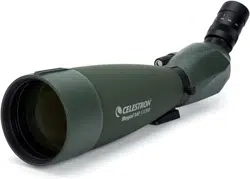
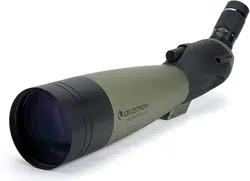
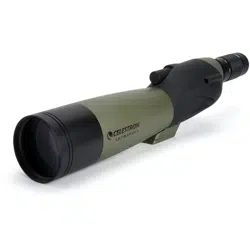
Congratulations on your purchase of a Celestron Ultima Series spotting scope! Whether your interest is in sports, bird watching, nature or wildlife,
hunting, or other activities these spotting scopes offer the fi nest optical quality to allow you years of viewing pleasure.
ULTIMA
SPOTTING SCOPE
INSTRUCTION MANUAL
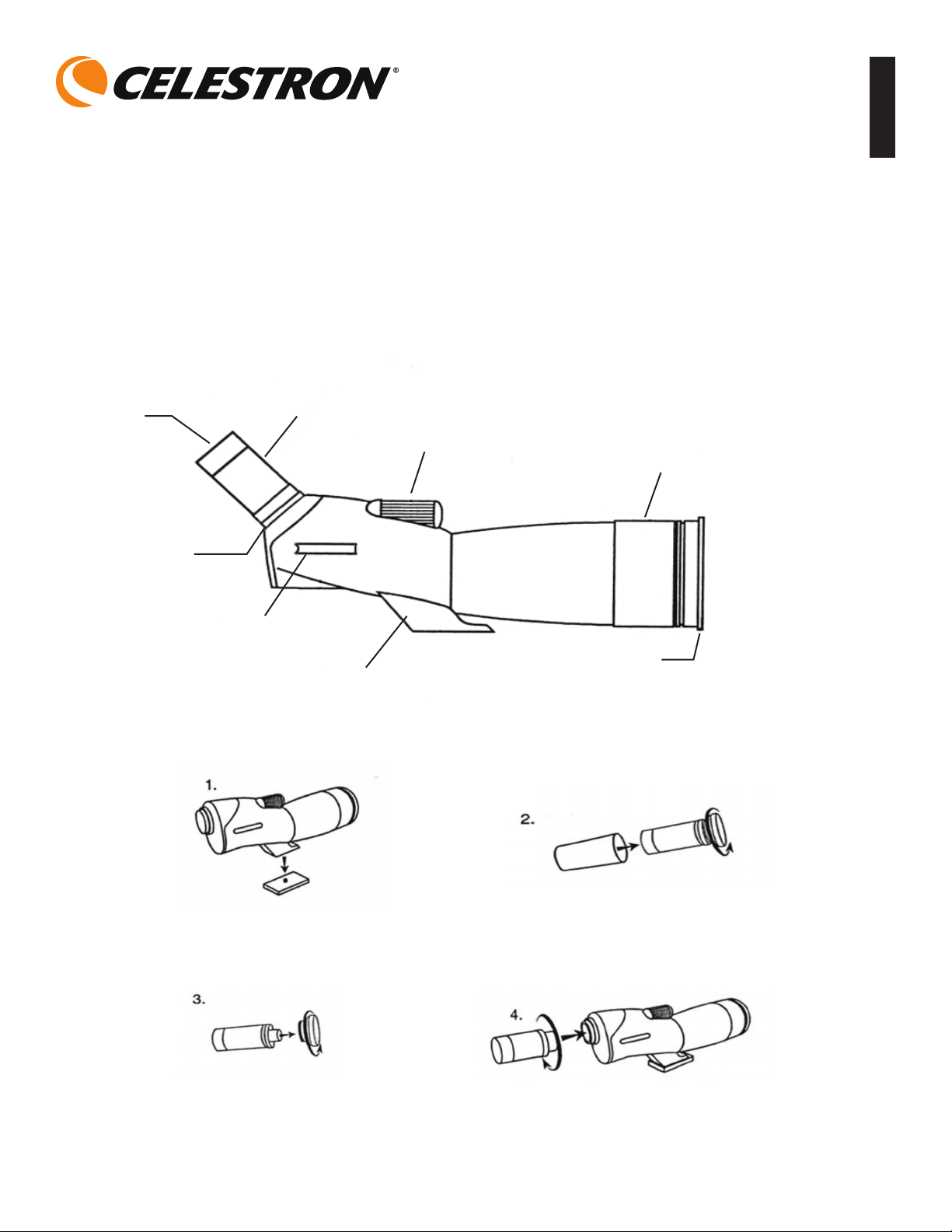
Eyepiece
Rubber
Eyecup
Eyepiece
Locking Ring
Sight Tube
Tripod Adapter
Focus Knob
Lens Shade
Lens Cap
ULTIMA SPOTTING SCOPE
ASSEMBLY
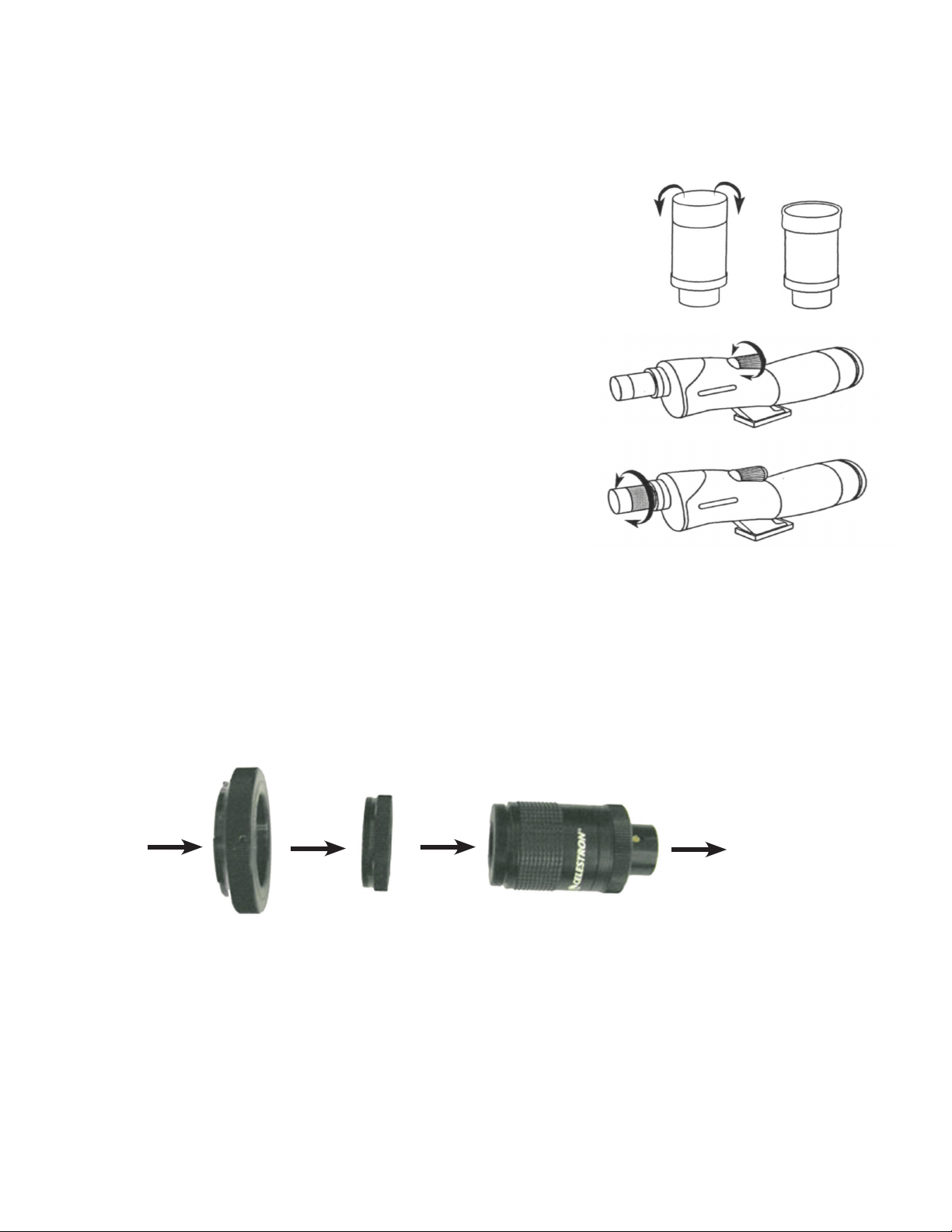
Attach the tripod adapter to your
camera tripod head.
Remove the eyepiece from the
container by turning the cap
counterclockwise.
Remove the cap from the eyepiece by
turning the cap counterclockwise while
holding onto the locking ring.
Remove the cover from the eyepiece adapter.
Insert the Zoom eyepiece with the power
indicator facing up. Secure the eyepiece by
turning the locking ring clockwise.
Warning Note: Never look directly at the Sun with the naked eye or with your spotting scope. Permanent eye damage may result.
Before Observing
Attach your spotting scope to a photo/video tripod before trying to observe as the size and power of the spotting scope requires a solid tripod to be
able to see sharp and steady views. For the Ultima 100 models a Tripod Balancing Platform should be installed for optimum balancing on a tripod
(see information below). Make sure to remove the lens cap prior to observing. You can use the sight tube to locate the object you want to look at and
then look through the eyepiece.
Using the Rubber Eyecup
The zoom eyepiece includes a soft rubber eyecup for eyeglass wearers. Fold down the rubber eyecups
to observe the full field of view when wearing eyeglasses. If you do not use eyeglasses, leave the
rubber eyecup in the up position.
Focusing
To focus slowly rotate the focus knob until the image in the eyepiece is clear and sharp.
Refocusing is usually required if the power is changed. If you feel the focus knob no
longer moves any further (in either direction), then you have reached the end of the travel
range -- don’t try to force it to go further but you should refocus by turning in the opposite
direction. Once an image is in focus, turn the knob clockwise to focus on a closer object and
counterclockwise for a more distant object.
Changing the Magnification (Power)
Rotate the magnification ring around the zoom eyepiece to change the power level of the
spotting scope. Refocus as needed. The brightest and widest field of view will always be at the
lowest power.
Photography
With 35 mm SLR Cameras:
To use your spotting scope as a telephoto lens, remove the rubber eyecup from the top of the eyepiece. You will shoot through the spotting scope
with the eyepiece attached. Thread an optional T-Ring for your make and model of 35 mm camera onto the T-threads located at the top of the
eyepiece. For Ultima 65 models, thread the T-ring adapter (included with your model) onto the eyepiece threads, then you thread a T-Ring onto the
eyepiece. Attach your 35 mm camera body to the T-Ring. Ultima spotting scopes have fixed apertures and, as a result, fixed f/ratios. To properly
expose your subjects photographically, you need to set your shutter speed accordingly. Most 35 mm SLR cameras offer through-the-lens metering
which lets you know if your picture is under or overexposed. Adjustments for proper exposures are made by changing the shutter speed. Consult your
camera manual for specific information on metering and changing shutter speeds.
Hint: Most photos will be the sharpest and brightest when using the lowest power on the zoom eyepiece.
With Digital Cameras:
Since digital cameras (not digital SLR cameras) do not use the T-system to mount cameras to lenses, spotting scopes, telescopes, etc. you need a
different way to be able to use them to take photos. Celestron offers a Universal Digital Camera Adapter (Model # 93626) which makes it easy to
attach a digital camera to your Ultima spotting scope.
35 mm
Camera body
T-Ring
(Optional Item)
T-Ring adapter (for
Ultima 65 only)
Eyepiece with rubber
eyecup removed
Spotting Scope

Tripod Balancing Platform (for Ultima 100 models)
This is used on Ultima 100 models to properly balance your spotting scope on top of a photo/video tripod.
To use the tripod balancing platform:
Mount the platform to the top of your photo tripod using the ¼”-20 threaded hole on the bottom side of the platform.
Attach your spotting scope to the platform using the ¼”-20 mounting screw located on the top side of the platform. Thread the mounting screw in as
far as it will go. Slide the attached spotting scope along the slotted cutout until your spotting scope is balanced on the tripod.
Tighten the locking ring to hold the spotting scope in place.
Maintenance
To protect your spotting scope when not being used, put on all lens covers and the lens cap to keep the optics clean and then put the scope in the
soft carrying case. If your optics could use cleaning, use an optics cleaning kit and follow the instructions.
Specifications
Model 52248 52249 52250 52254 52252 52257
Description Ultima 65 Ultima 65 Ultima 80 Ultima 80 Ultima 100 Ultima 100
Viewing Position 45° Angled Straight 45° Angled Straight 45° Angled Straight
Aperture - mm 65 65 80 80 100 100
Focal Length - mm 386 386 480 480 540 540
Magnification 18x-55x 18x-55x 20x-60x 20x-60x 22x-66x 22x-66x
Eyepiece - Zoom 7-21 mm 7-21 mm 8-24 mm 8-24 mm 8-24 mm 8-24 mm
Angular Field 1.7° @ 18x 1.7° @ 18x 2.0° @ 20x 2.0° @ 20x 1.8° @ 22x 1.8° @ 22x
of View 0.7° @ 55x 0.7° @ 55x 1.0° @ 60x 1.0° @ 60x 1.0° @ 66x 1.0° @ 66x
Linear Field of View 89 @ 18x 89 @ 18x 105 @ 20x 105 @ 20x 95 @ 22x 95 @ 22x
- feet @ 1000 yds. 38 @ 55x 38 @ 55x 53 @ 60x 53 @ 60x 53 @ 66x 53 @ 66x
Eye Relief 18 mm @ 18x 18 mm @ 18x 18 mm @ 20x 18 mm @ 20x 18 mm @ 22x 18 mm @ 22x
Near Focus 20 ft @ 18x 20 ft @ 18x 27 ft @ 20x 27 ft @ 20x 33 ft @ 22x 33 ft @ 22x
6.1 m @ 18x 6.1 m @ 18x 8.2 m @ 20x 8.2 m @ 20x 10.0 m @ 22x 10.0 m @ 22x
Prisms - BaK - 4 Yes Yes Yes Yes Yes Yes
Optical Coatings Multi-Coated Multi-Coated Multi-Coated Multi-Coated Multi-Coated Multi-Coated
Waterproof Yes Yes Yes Yes Yes Yes
Length 13” - 330 mm 16” - 406 mm 16” - 406 mm 19” 483 mm 19” - 483 mm 22” - 559 mm
Weight 37 oz. - 1.1kg 37 oz. - 1.1kg 57 oz. - 1.6 kg 57 oz. - 1.6 kg 72 oz. - 2.0 kg 72 oz. - 2.0 kg
Note: All specifications are subject to change without notice.
Warranty
Ultima Spotting Scopes have the Celestron Limited Lifetime Warranty for the U.S.A. and Canadian customers. For complete details of eligibility and for
warranty information on customers in other countries visit the Celestron website.
¼”-20 Mounting Screw
¼”-20 Threaded Hole
(not shown)
Mounting Screw
Locking Ring
www.celestron.com • 2835 Columbia Street • Torrance, CA 90503 U.S.A. • Telephone: 310.328.9560 • Fax: 310.212.5835
©2012 Celestron • All rights reserved. • 06-12
This product is designed and intended for use by those 14 years of age and older.
Product design and specifications are subject to change without prior notification.

FRANÇAIS
Nous vous félicitons d’avoir fait l’acquisition d’une longue-vue série Ultima de Celestron ! Que vous vous intéressiez aux sports ou à l’observation des
oiseaux, de la faune et de la fl ore, à la chasse ou à d’autres occupations, ces longues-vues offrent la meilleure qualité optique garantie pour en profi ter
des années durant.
LONGUE-VUE ULTIMA
Oculaire
Œilleton en
caoutchouc
Bague de
serrage de
l’oculaire
Bague de serrage
de l’oculaire
Adaptateur pour
trépied
Bouton de mise
au point
Parasoleil
Cache pour
lentille
LONGUE-VUE ULTIMA
MONTAGE
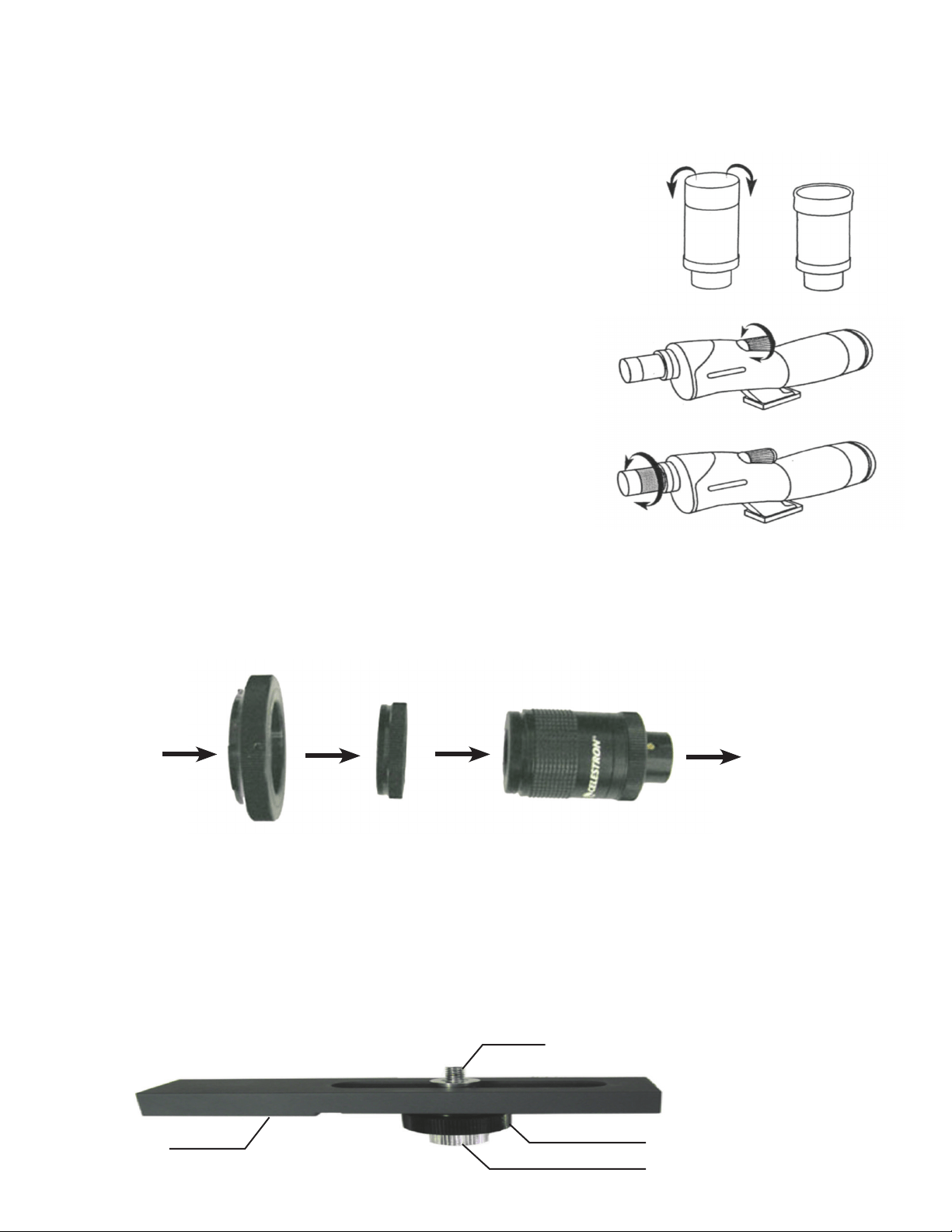
Fixez l’adaptateur pour trépied sur le
plateau du trépied de votre appareil
photo.
Retirez l’oculaire de son logement
en tournant le cache dans le sens
antihoraire.
Retirez le cache de l’oculaire en
tournant celui-ci dans le sens
antihoraire tout en maintenant la
bague de serrage.
Retirez le cache de l’adaptateur pour oculaire.
Insérez l’oculaire zoom avec l’indicateur
de grossissement dirigé vers le haut. Fixez
solidement l’oculaire en tournant la bague de
serrage dans le sens horaire.
Avertissement :
Ne regardez jamais directement le soleil à l’œil nu ou avec votre longue-vue pour éviter tout risque de dommage oculaire
permanent.
Avant toute observation
Fixez votre longue-vue sur un trépied pour photo/vidéo avant de vous en servir pour toute forme d’observation étant donné que la taille et la puissance de
grossissement de la longue-vue nécessite un trépied solide pour obtenir des images nettes et fixes. Pour
les modèles Ultima 100, il convient d’installer une plate-forme de stabilité pour trépied afin d’obtenir un
équilibre optimal du trépied (voir informations ci-dessous).
N’oubliez pas de retirer le cache de la lentille avant d’observer. Vous pouvez utiliser le tube de visée pour
localiser l’objet que vous voulez regarder avant de regarder dans l’oculaire.
Utilisation de l’œilleton en caoutchouc
L’oculaire zoom est doté d’un œilleton en caoutchouc souple pour les porteurs de lunettes. Repliez les
œilletons en caoutchouc pour observer la totalité du champ de vision lorsque vous mettez des lunettes. Si
vous ne portez pas des lunettes, laissez l’oeilleton en caoutchouc en position relevée.
Mise au point
Pour effectuer la mise au point, tournez lentement le bouton de mise au point jusqu’à l’obtention
d’une image claire et nette dans l’oculaire. Il est généralement nécessaire de refaire une mise au
point si la puissance de grossissement a été modifiée. Si vous constatez que le bouton de mise au
point refuse d’aller plus loin (dans un sens ou dans un autre), c’est que vous êtes parvenu en bout
de course – ne forcez pas pour avancer, mais refaites la mise au point en partant dans la direction
opposée. Une fois l’image focalisée, tournez le bouton dans le sens antihoraire pour effectuer une
mise au point sur un objet plus rapproché et dans le sens antihoraire pour un objet éloigné.
Changement du grossissement (Puissance)
Tournez la bague de grossissement autour de l’oculaire zoom pour varier la puissance de
grossissement de la longue-vue. Refaites la mise au point si nécessaire. La puissance de
grossissement la plus faible est celle qui permet d’obtenir le champ de vision le plus net et le plus
important.
Photographie
Avec un appareil photo 35 mm SLR :
Pour utiliser votre longue-vue comme téléobjectif, retirez l’œilleton en caoutchouc situé sur le dessus de l’oculaire. Les photos seront prises en regardant
dans la longue-vue avec l’oculaire en place. Vissez une bague en T optionnelle afin que de pouvoir introduire votre appareil photo 35 mm dans le filetage
situé sur le dessus de l’oculaire. Pour les modèles Ultima 65, vissez l’adaptateur pour bague en T (inclus avec votre modèle) sur le filetage de l’oculaire, puis
vissez une bague en T sur l’oculaire. Installez ensuite votre appareil photo 35 mm sur la bague en T. Les longues-vues Ultima ont des ouvertures fixes, et
donc des rapports focaux fixes. Pour obtenir une bonne exposition des sujets photographiés, vous devez régler la vitesse de l’obturateur en conséquence.
La plupart des appareils photos 35 mm SLR disposent d’un témoin dans le viseur vous permettant de savoir si l’image est sous-exposée ou surexposée. Les
réglages de l’exposition s’effectuent en changeant la vitesse d’obturation. Consultez le manuel d’utilisation de votre appareil photo pour toute information
précise sur le réglage de la focale et la modification des vitesses d’obturation.
Conseil utile : la plupart des photos seront plus nettes et plus contrastées en utilisant la plus petite ouverture de l’oculaire.
Avec un appareil photo numérique :
Étant donné que les appareils photos numériques (et non appareils photos SLR numériques) n’utilisent pas de système en T pour monter l’appareil
sur un objectif, une longue-vue, un télescope ou autre, il vous faudra procéder différemment si vous voulez vous en servir pour prendre des photos.
Celestron offre un adaptateur universel pour appareil photo numérique (modèle n° 93626) permettant de fixer facilement votre appareil photo
numérique sur votre longue-vue Ultima.
Plate-forme de stabilité du trépied (pour modèles Ultima 100)
Ce dispositif est utilisé sur les modèles Ultima 100 pour équilibrer correctement la longue-vue sur un trépied photo/vidéo.
Appareil
photo 35 mm
Bague en T
(article en option)
Adaptateur pour
bague en T
(pour Ultima 65
uniquement)
Oeilleton avec élément
en caoutchouc retiré
Longue-vue
Vis de montage ¼ po-20
Orifice fileté ¼ po-20
(non illustré)
Vis de montage
Bague de serrage

Pour utiliser la plate-forme de stabilité du trépied :
Installez la plate-forme sur la partie supérieure de votre trépied photo à l’aide du trou fileté ¼ po-20 situé sous cette plate-forme.
Fixez votre longue-vue sur la plate-forme à l’aide de la vis de montage ¼ po-20 située sur la partie supérieure de la plate-forme. Vissez la vis de
montage à fond. Enclenchez la longue-vue ainsi fixée en la faisant coulisser dans la gorge prévue à cet effet jusqu’à ce que la longue-vue soit
équilibrée sur le trépied. Serrez la bague de serrage pour maintenir la longue-vue en position.
Entretien
Pour protéger votre longue-vue lorsqu’elle n’est pas utilisée, remettez en place tous les caches ainsi que celui de la lentille pour préserver les optiques
et rangez la longue-vue dans son étui de transport souple. S’il faut nettoyer les optiques, utilisez un kit de nettoyage pour optiques en suivant le
mode d’emploi.
Remarque : Les spécifications sont sujettes à des changements sans notification préalable.
Garantie
Les longues-vues Ultima bénéficient d’une garantie à vie pour les acheteurs résidant aux États-unis et au Canada. Pour tout complément d’information
sur l’application de la garantie et autres dispositions concernant les clients d’autres pays, consultez le site web de Celestron.
www.celestron.com • 2835 Columbia Street • Torrance, CA 90503 U.S.A. • Téléphone: 310.328.9560 • Fax: 310.212.5835
©2012 Celestron • Tous droits réservés. • 06-12
Ce produit est conçu et destiné pour les personnes de 14 ans et plus.
La conception de produits et les caractéristiques sont sujettes à la modification sans avis préalable.
Modèle 52248 52249 52250 52254 52252 52257
Description Ultima 65 Ultima 65 Ultima 80 Ultima 80 Ultima 100 Ultima 100
Vision Coudée à 45° Droite Coudée à 45° Droite Coudée à 45° Droite
Ouverture - mm 65 65 80 80 100 100
Distance focale -mm 386 386 480 480 540 540
Grossissement 18x-55x 18x-55x 20x-60x 20x-60x 22x-66x 22x-66x
Oculaire - Zoom 7-21 mm 7-21 mm 8-24 mm 8-24 mm 8-24 mm 8-24 mm
Champ de vision 1,7° à 18x 1,7° à 18x 2,0° à 20x 2,0° à 20x 1,8° à 22x 1,8° à 22x
angulaire 0,7° à 55x 0,7° à 55x 1,0° à 60x 1,0° à 60x 1,0° à 66x 1,0° à 66x
Champ de vision linéaire 89 à 18x 89 à 18x 105 à 20x 105 à 20x 95 à 22x 95 à 22x
- pieds à 1000 verges 38 à 55x 38 à 55x 53 à 60x 53 à 60x 53 à 66x 53 à 66x
Dégagement oculaire 18 mm à 18x 18 mm à 18x 18 mm à 20x
18 mm à 20x
18 mm à 22x
18 mm à 22x
Mise au point minimum 20 pi à 18x 20 pi à 18x 27 pi à 20x 27 pi à 20x 33 pi à 22x 33 pi à 22x
6,1 m à 18x 6,1 m à 18x 8,2 m à 20x 8,2 m à 20x 10 m à 22x 10 m à 22x
Prismes - BaK - 4 Oui Oui Oui Oui Oui Oui
Revêtements optiques Multi-couches Multi-couches Multi-couches Multi-couches Multi-couches Multi-couches
Étanche Oui Oui Oui Oui Oui Oui
Longueur 13 po –
330 mm
16 po –
406 mm
16 po –
406 mm
19 po –
483 mm
19 po –
483 mm
22 po –
559 mm
Poids 37 oz. – 1,1 kg
37 oz. – 1,1 kg
57 oz. – 1,6 kg
57 oz. – 1,6 kg
72 oz. – 2kg
72 oz. – 2kg

Herzlichen Glückwunsch zum Kauf eines Spotting-Scopes der Celestron Ultima-Serie! Gleichgültig, ob Sie sich für Sport, Vogelbeobachtung, die
Natur, wild lebende Tiere, die Jagd oder andere Aktivitäten interessieren, diese Spotting-Scopes bieten Ihnen die feinste optische Qualität, die Ihnen
beeindruckende Beobachtungserlebnisse über viele Jahre garantieren wird.
ULTIMA
SPOTTING SCOPE
Okular
Gummi-
Okular-
muschel
Okular-
Feststellring
Sichtrohr
Stativadapter
Fokusknopf
Taukappe
Objektivdeckel
ULTIMA SPOTTING SCOPE
ZUSAMMENBAU
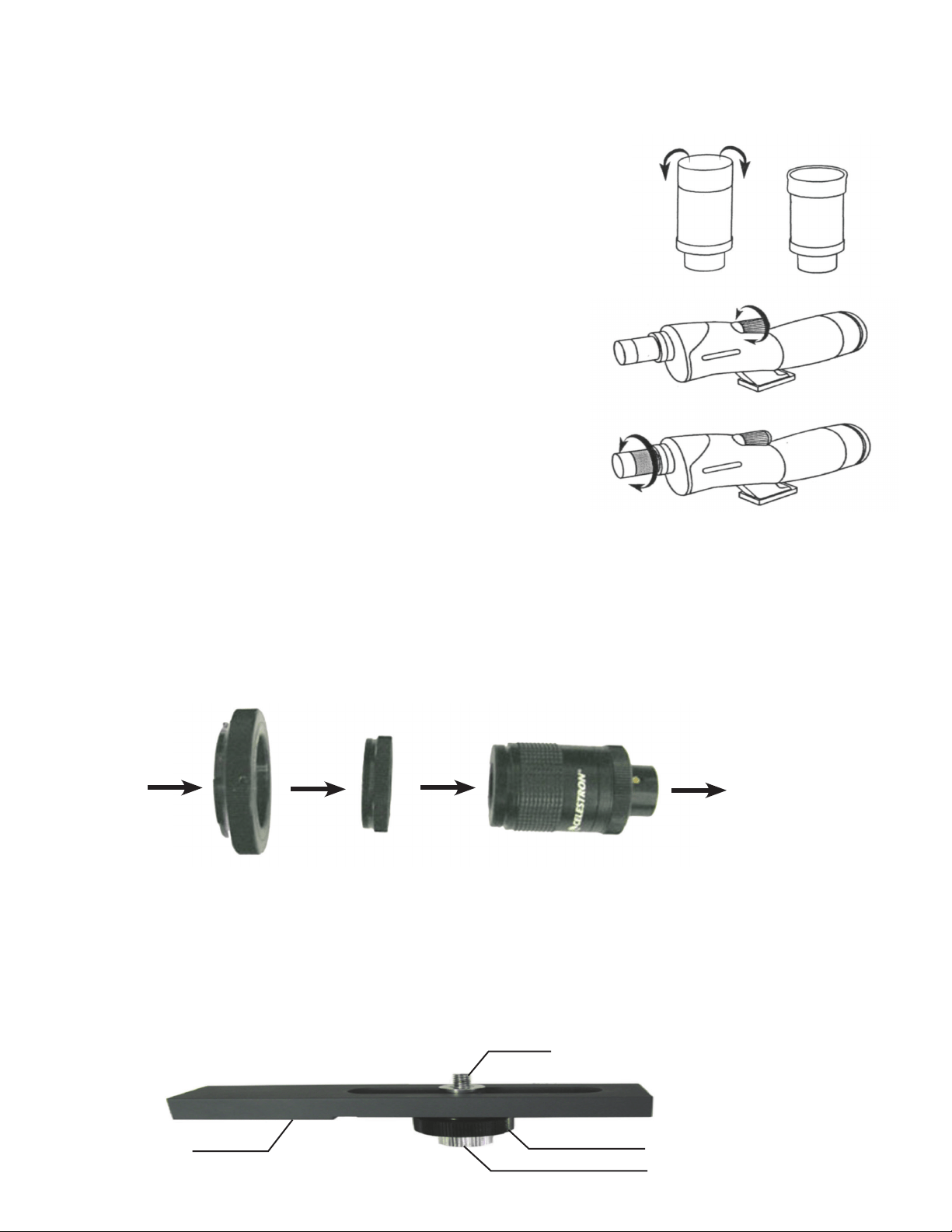
Setzen Sie den Stativadapter auf dem
Kamerastativkopf auf.
Nehmen Sie das Okular vom Behälter
ab, indem Sie den Deckel gegen den
Uhrzeigersinn drehen.
Nehmen Sie den Deckel vom
Okular ab, indem Sie ihn gegen den
Uhrzeigersinn drehen, während Sie den
Feststellring festhalten.
Nehmen Sie den Deckel vom Okular-Adapter
ab. Stecken Sie das Zoom-Okular mit der
Vergrößerungsanzeige nach oben gerichtet
ein. Sichern Sie das Okular, indem Sie den
Feststellring im Uhrzeigersinn drehen.
DEUTSCH
Warnhinweis: Niemals mit bloßem Auge direkt oder durch das Spotting-Scope in die Sonne gucken. Sie könnten permanenten Augenschaden
davontragen.
Vor der Beobachtung
Setzen Sie das Spotting-Scope vor dem Einsatz für Beobachtungen auf ein Foto-/Videostativ; die physische Größe und Vergrößerung des Spotting-
Scopes erfordern ein robustes Stativ für scharfe und verwacklungsfreie Bilder. Für die Ultima
100-Modelle sollte eine Stativ-Nivellierplattform zur optimalen Ausrichtung auf dem Stativ installiert
werden (siehe nachstehende Informationen).
Vergessen Sie nicht, vor der Beobachtung den Objektivdeckel abzunehmen. Sie können das Objekt,
das Sie betrachten wollen, mit dem Sichtrohr ausfindig machen und dann durch das Okular schauen.
Verwendung der Gummi-Okularmuschel
Das Zoom-Okular umfasst eine weiche Gummi-Okularmuschel für Brillenträger. Falten Sie die Gummi-
Okularmuscheln nach unten, um das gesamte Sichtfeld zu beobachten, wenn Sie eine Brille tragen.
Wenn Sie keine Brille tragen, lassen Sie die Gummi-Okularmuschel in der hochgestellten Position.
Fokussierung
Zur Scharfstellung drehen Sie den Fokussierknopf langsam, bis das Bild im Okular klar und
scharf ist. Bei geänderter Vergrößerung muss in der Regel neu fokussiert werden. Wenn Sie
das Gefühl haben, dass der Fokussierknopf sich nicht weiter bewegen lässt (in eine Richtung),
haben Sie das Ende des Bewegungsbereichs erreicht. Versuchen Sie nicht, mit Gewalt weiter
zu drehen, sondern fokussieren Sie neu, indem Sie in die entgegengesetzte Richtung drehen.
Wenn das Bild scharf gestellt ist, drehen Sie den Knopf im Uhrzeigersinn, um ein näher
gelegenes Objekt anzuvisieren, und gegen den Uhrzeigersinn, um ein weiter entferntes Objekt
anzuvisieren.
Ändern der Vergrößerung
Drehen Sie den Vergrößerungsring um das Zoom-Okular, um die Vergrößerungsstufe des
Spotting-Scopes zu ändern. Stellen Sie nach Bedarf die Bildschärfe nach. Das hellste und
breiteste Sichtfeld erhalten Sie immer mit der geringsten Vergrößerung.
Fotografie
Mit 35 mm-SLR-Kameras:
Um Ihr Spotting-Scope als Teleobjektiv zu verwenden, entfernen Sie die Gummi-Okularmuschel vom oberen Endes des Okulars. Sie werden mit
aufgesetztem Okular Aufnahmen durch das Spotting-Scope machen. Schrauben Sie einen optionalen T-Ring für den Typ und das Modell Ihrer 35 mm-
Kamera auf das T-Gewinde oben auf dem Okular. Bei Ultima 65-Modellen schrauben Sie den T-Ring-Adapter (im Lieferumfang des Modells enthalten)
auf das Okulargewinde und dann einen T-Ring auf das Okular. Setzen Sie dann Ihre 35 mm-Kamera auf den T-Ring. Ultima Spotting-Scopes haben
feste Blendenöffnungen und demzufolge feste f-Ratios. Um Ihre Objekte fotografisch richtig zu belichten, müssen Sie Ihre Belichtungszeit entsprechend
einstellen. Die meisten 35 mm-SLR-Kameras bieten „Through-the-lens Metering“, so dass Sie wissen, wenn Ihr Bild unter- oder überbelichtet ist.
Die Einstellungen für korrekte Belichtungen erfolgen durch die Änderung der Belichtungszeit. Die spezifischen Informationen zur Lichtmessung und
Änderung der Belichtungszeit können Sie in der Bedienungsanleitung Ihrer Kamera nachlesen.
Tipp: Die meisten Fotos sind am schärfsten und hellsten, wenn die niedrigste Vergrößerung am Zoom-Okular verwendet wird.
Mit Digitalkameras:
Da Digitalkameras (nicht jedoch SLR-Digitalkameras) nicht das T-System zum Aufsatz von Kameras auf Objektive, Spotting-Scopes, Teleskope
etc. verwenden, brauchen Sie eine andere Option zu ihrer Verwendung zur Aufnahme von Fotos. Celestron bietet einen Universaladapter für
Digitalkameras (Modell 93626) an, der den Aufsatz einer Digitalkamera am Ultima Spotting-Scope erleichtert
Stativ-Nivellierplattform (für Ultima 100-Modelle)
Diese wird mit Ultima 100-Modellen verwendet, um das Spotting-Scope richtig oben auf einem Foto-/Videostativ auszurichten.
35 mm-
Kamerakörper
T-Ring
(optionales Zubehörteil)
T-Ring adapter
(nur für Ultima 65)
Okular mit entfernter
Gummi-Okularmuschel
Spotting Scope
¼ Zoll -20 Befestigungsschraube
¼ Zoll -20
Gewindeöffnung
(nicht gezeigt)
Befestigungsschraube
Feststellring

Verwendung der Stativ-Nivellierplattform:
Installieren Sie die Plattform oben auf dem Fotostativ. Hierzu dient die ¼”-20-Gewindeöffnung an der Unterseite der Plattform.
Installieren Sie das Spotting-Scope auf der Plattform mit der ¼”-20 Befestigungsschraube, die sich an der Oberseite der Plattform befindet.
Schrauben Sie die Befestigungsschraube so weit wie möglich ein. Schieben Sie das installierte Spotting-Scope am geschlitzten Ausschnitt entlang, bis
das Spotting-Scope auf dem Stativ ausgewuchtet ist.
Ziehen Sie den Feststellring fest, um das Spotting-Scope festzustellen.
Pflege
Um Ihr Spotting-Scope bei Nichtgebrauch zu schützen, setzen Sie alle Objektivabdeckungen und -deckel auf, um die Optik sauber zu halten, und
legen Sie dann das Spotting-Scope in die weiche Tragetasche. Wenn Ihre Optik gereinigt werden muss, verwenden Sie ein Optik-Reinigungskit und
befolgen Sie die Anleitung.
Garantie
US- und kanadischen Kunden wird für das Ultima Spotting-Scope die Celestron eingeschränkte Garantie auf Lebenszeit gewährt.
Umfassende Einzelheiten zur Qualifikation und Garantieinformationen für Kunden in anderen Ländern finden Sie auf der Celestron-Website.
www.celestron.com • 2835 Columbia Street • Torrance, CA 90503 U.S.A. • Telefon: 310.328.9560 • Fax: 310.212.5835
©2012 Celestron • Alle Rechte vorbehalten. • 06-12
FCC-Erklärung: Dieses Gerät wurde getestet und entspricht den Grenzwerten für digitale Geräte der Klasse B in Übereinstimmung mit Artikel 15 der FCC-Bestimmungen. Diese
Grenzwerte sollen einen angemessenen Schutz vor Störungen in Wohngegenden bieten. Dieses Gerät erzeugt, verwendet Hochfrequenzenergie und kann diese ausstrahlen und kann,
wenn es nicht in Übereinstimmung mit den Anweisungen installiert und verwendet wird, Störungen im Funkverkehr verursachen. Es kann jedoch keine Garantie gegeben werden, dass in
einer bestimmten Installation keine Störungen auftreten können. Falls dieses Gerät Störungen beim Radio- oder Fernsehempfang verursacht, was durch ein vorübergehendes Ausschalten
des Geräts festgestellt werden kann, wird der Benutzer dazu angehalten, die Störung durch eine oder mehrere der nachstehenden Maßnahmen zu beheben:
• Die Empfangsantenne verlegen oder neu ausrichten.
• Den Abstand zwischen dem Gerät und dem Empfänger vergrößern.
• Das Gerät an eine andere Steckdose auf einem anderen Stromkreis als dem des
Empfängers anschließen.
• Den Händler oder einen erfahrenen Radio- und Fernsehtechniker um Hilfe bitten.
Dieses Gerät wurde für den Gebrauch von 14 Jahren und länger konzipiert.
Konzeption des Produkts und Spezifikationen sind abhängig von Änderung ohne vorherige Mitteilung.
Modell 52248 52249 52247 52250 52254 52251 52252 52257 52253
Beschreibung Ultima 65 Ultima 65 Ultima 65ED Ultima 80 Ultima 80 Ultima 80ED Ultima 100 Ultima 100 Ultima 100 ED
Betrachtungsposition 45°
angewinkelt
Gerade 45°
angewinkelt
45°
angewinkelt
Gerade 45°
angewinkelt
45°
angewinkelt
Gerade 45°
angewinkelt
Blendenöffnung - mm 65 65 65 80 80 80 100 100 100
Brennweite - mm 386 386 386 480 480 480 540 540 540
Vergrößerung 18x-55x 18x-55x 16x-48x 20x-60x 20x-60x 20x-60x 22x-66x 22x-66x 22x-66x
Okular - Zoom 7-21 mm 7-21 mm 8-24 mm 8-24 mm 8-24 mm 8-24 mm 8-24 mm 8-24 mm 8-24 mm
Winkelsichtfeld 1,7° bei 18x 1,7° bei 18x 2,5° bei 16x 2,0° bei 20x 2,0° bei 20x 2,0° bei 20x 1,8° bei 22x 1,8° bei 22x 1,8° bei 22x
0,7° bei 55x 0,7° bei 55x 1,3° bei 48x 1,0° bei 60x 1,0° bei 60x 1,0° bei 60x 1,0° bei 66x 1,0° bei 66x 1,0° bei 66x
Linearsichtfeld 89 bei 18x 89 bei 18x 131 bei 16x 105 bei 20x 105 bei 20x 105 bei 20x 95 bei 22x 95 bei 22x 95 bei 22x
- Fuß bei 1000 Yards 38 bei 55x 38 bei 55x 66 bei 48x 53 bei 60x 53 bei 60x 53 bei 60x 53 bei 66x 53 bei 66x 53 bei 66x
Augenabstand 18 mm bei
18x
18 mm bei 18x 18 mm bei
16x
18 mm bei 20x 18 mm bei 20x 18 mm bei
20x
18 mm bei
22x
18 mm bei 22x 18 mm bei 22x
Naheinstellung 20 Fuß
bei 18x
20 Fuß
bei 18x
20 Fuß
bei 16x
20 Fuß
bei 20x
20 Fuß
bei 20x
20 Fuß
bei 20x
20 Fuß
bei 22x
20 Fuß
bei 22x
20 Fuß
bei 22x
6,1 m
bei 18x
6,1 m
bei 18x
6,1 m
bei 18x
6,1 m
bei 20x
6,1 m
bei 20x
6,1 m
bei 20x
6,1 m
bei 20x
6,1 m
bei 22x
6,1 m
bei 22x
Prismen - BaK - 4 Ja Ja Ja Ja Ja Ja Ja Ja Ja
Optische Vergütung Mehrfach-
Vergütung
Mehrfach-
Vergütung
Mehrfach-
Vergütung
Mehrfach-
Vergütung
Mehrfach-
Vergütung
Mehrfach-
Vergütung
Mehrfach-
Vergütung
Mehrfach-
Vergütung
Mehrfach-
Vergütung
Wasserfest Ja Ja Ja Ja Ja Ja Ja Ja Ja
Länge 330 mm (13”) 406 mm (16") 330 mm (13”) 406 mm (16”) 483 mm (19”) 406 mm (16”) 483 mm (19”) 559 mm (22”) 483 mm (19”)
Gewicht 37 oz. -
1,1 kg
37 oz. -
1,1 kg
37 oz. -
1,1 kg
57 oz. -
1,6 kg
57 oz. -
1,6 kg
57 oz. -
1,6 kg
72 oz. -
2,0 kg
72 oz. -
2,0 kg
72 oz. -
2,0 kg
Hinweis: Alle Spezifikationen können ohne Mitteilung geändert werden.
Le felicitamos por su compra del telescopio terrestre de Celestron de la serie Ultima. Bien esté interesado en deportes, en observar aves o la naturaleza,
o en la vida salvaje, caza u otras actividades, estos telescopios ofrecen la mejor calidad óptica que le garantiza años de satisfacción.
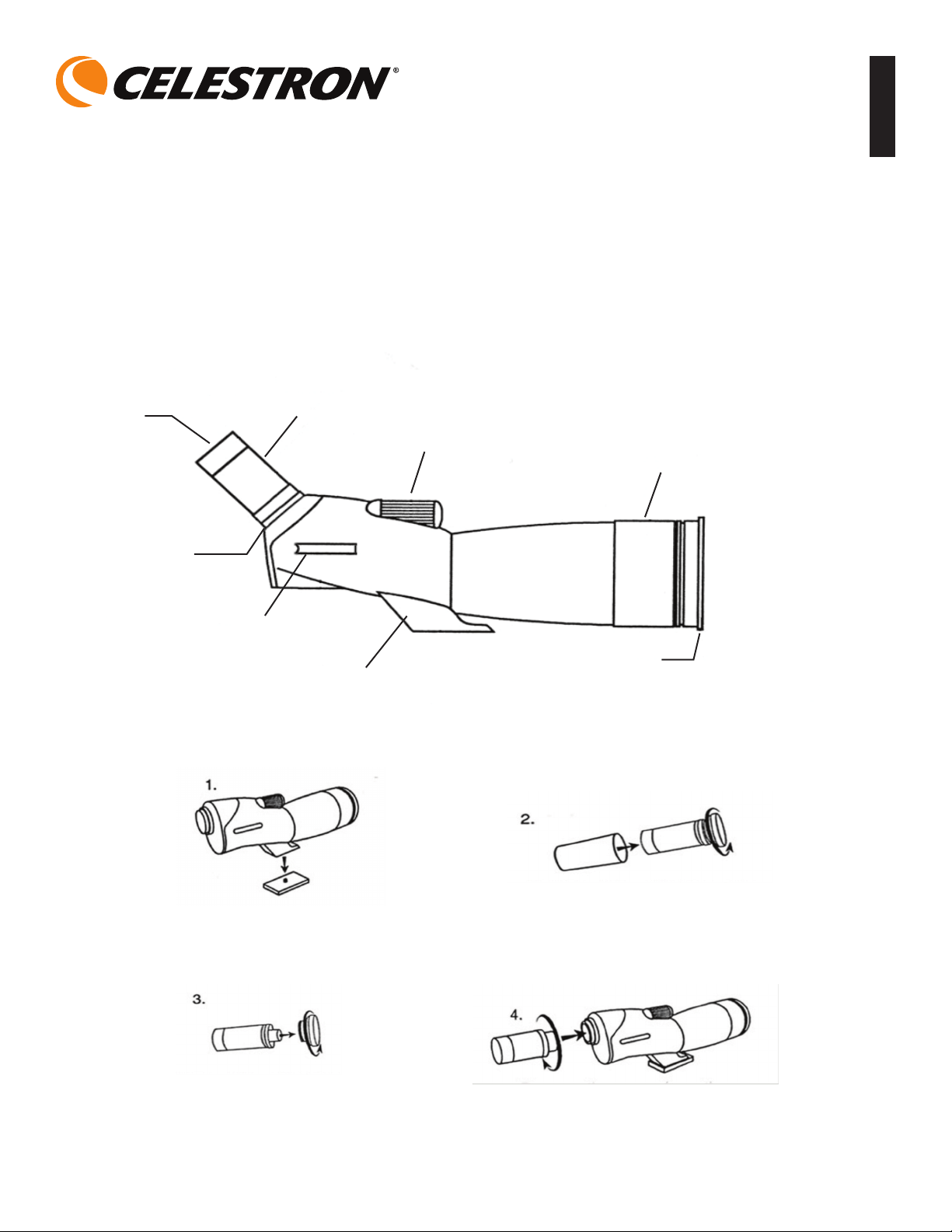
ULTIMA
SPOTTING SCOPE
Ocular
Cilindro de
goma
Aro de
bloqueo del
ocular
Tubo visor
Adaptador para
trípodes
Rueda de
enfoque
Visera del
objetivo
Tapa de la lente
TELESCOPIO TERRESTRE ULTIMA
MONTAJE
Conecte el adaptador para trípodes al
cabezal del trípode de la cámara.
Retire el ocular del envase girando la
tapa hacia la izquierda.
Quite la tapa del ocular girándola hacia
la izquierda mientras sujeta el aro de
bloqueo.
Quite la cubierta del adaptador del ocular.
Introduzca la pieza ocular de zoom con el
indicador de la potencia hacia arriba. Asegure
el ocular en su lugar al girar el aro de bloqueo
hacia la derecha.
ESPAÑOL

Nota de precaución: Nunca mire directamente al sol con el telescopio terrestre o con sus ojos descubiertos. Pueden producirse daños permanentes
en los ojos.
Antes de la observación
Coloque su telescopio en el trípode para cámaras de fotos o vídeo antes de observar, ya que el tamaño y la potencia del mismo requieren un trípode
estable para poder disfrutar de una visualización clara y fija. Para los modelos Ultima 100, se deberá instalar una plataforma compensadora de trípode
para obtener un equilibrio óptimo sobre el trípode (vea la información a continuación).
Asegúrese de quitar las tapas de las lentes antes de hacer observaciones. Puede utilizar el tubo visor
para localizar el objeto que desea mirar y después mire por el ocular.
Uso del cilindro ocular de goma
La pieza ocular del zoom incluye un cilindro de goma para aquellos que llevan gafas. Doble hacia
abajo el cilindro de goma para observar el campo completo de visualización cuando lleve puestas
gafas. Si no lleva gafas, deje el cilindro de goma hacia arriba.
Enfoque
Para enfocar, gire lentamente la rueda de enfoque hasta que la imagen en la pieza ocular se vea con
claridad. El reenfoque es necesario por lo general si se cambia la potencia. Si siente que la
rueda de enfoque no se mueve más en ninguna dirección, es porque ha llegado al final de su
movimiento permitido; no fuerce su movimiento pero tendrá que enfocar de nuevo girándolo
en la dirección contraria. Una vez enfocada la imagen, gire la rueda hacia la derecha para
enfocar un objeto más cercano y hacia la izquierda para enfocar uno más lejano.
Cambio del aumento (potencia)
Gire el aro de aumento alrededor de la pieza ocular del zoom para cambiar el nivel de
potencia del telescopio. Vuelva a enfocar si fuera necesario. El campo visual más claro y ancho
estará siempre en la mínima potencia.
Fotografía
Con cámaras SLR de 35 mm:
Para utilizar su telescopio como una lente telefotográfica, retire el cilindro de goma de la
parte superior del ocular. Tomará la foto con el ocular colocado en el telescopio. Enrosque
el aro en forma de T (opcional en el modelo de cámara de 35 mm que tenga) en las roscas en T situadas en la parte superior del ocular. Para los
modelos Ultima 65, enrosque el adaptador del aro en forma de T (que se incluye con su modelo) en las roscas del ocular y a continuación, enrosque
el aro en T en el ocular. Conecte la cámara de 35 mm al aro en forma de T. Los telescopios Ultima tienen aberturas fijas y, como resultado de ello,
f/escalas también son fijas. Para exponer correctamente sus objetos fotográficamente, necesitará establecer el tiempo de exposición de acuerdo a
ellos. La mayoría de las cámaras SLR de 35 mm ofrecen regulación por medio de la lente, lo cual le deja saber si la foto tiene exceso o insuficiencia de
exposición. Los ajustes para obtener una exposición apropiada se realizan al cambiar el tiempo de la exposición. Consulte el manual de su cámara para
obtener información específica sobre la regulación y el cambio del tiempo de exposición.
Consejos: La mayoría de las fotografías tendrán la máxima calidad cuando se utilice la potencia menor en la pieza ocular de zoom.
Con cámaras digitales:
Debido a que las cámaras digitales (excluyendo las de SLR) no utilizan el sistema en T en el montaje de las cámaras a las lentes, telescopios, etc., se
necesita una forma diferente para poder tomar fotografías. Celestron le ofrece un adaptador universal para cámaras digitales (Modelo Nº 93626) que
facilita el montaje de su telescopio Ultima en una cámara digital.
Plataforma compensadora para trípodes (para los modelos Ultima 100)
Esta se utiliza en los modelos Ultima 100 para equilibrar correctamente su telescopio en la parte superior de los trípodes para cámaras fotográficas o de vídeo.
Cámara de
35 mm
Aro en T (artículo
opcional
Adaptador del aro
en T (sólo para
Ultima 65)
Ocular con el cilindro
de goma extraído
Telescopio terrestre
Tornillo de montaje de 6,35 mm
(¼ pulg.) -20
Orificio roscado de 6,35 mm
(¼ pulg.) -20 (no se muestra)
Tornillo de montaje
Rueda de bloqueo

Para utilizar la plataforma compensadora de trípode:
Acople la plataforma en la parte superior del trípode utilizando el orificio roscado de ¼-20 de pulg. de la parte inferior de la plataforma.
Conecte su telescopio a la plataforma utilizando el tornillo de montaje de ¼-20 de pulg. que se encuentra en la parte superior lateral de la plataforma.
Enrosque el tornillo de montaje hasta el final. Deslice el telescopio ya conectado a lo largo de la ranura hasta que éste esté equilibrado en el trípode.
Apriete la rueda de bloqueo para sujetar en su lugar el telescopio.
Mantenimiento
Para proteger su telescopio cuando no lo esté utilizando, coloque todas las tapas y cubiertas de las lentes para mantener limpias las piezas ópticas y
ponga el telescopio en su estuche. Si debe limpiar las piezas ópticas, utilice un limpiador especial para dichas piezas y siga las instrucciones de limpieza.
Nota: Todas las especificaciones están sujetas a cambios sin notificación.
Garantía
Los telescopios terrestres Ultima tienen la garantía limitada durante la vida útil del producto de Celestron para los clientes de EE.UU. y Canadá.
Para obtener todos los detalles sobre el derecho de los clientes y la información sobre la garantía en otros países, visite el sitio Web de Celestron.
www.celestron.com • 2835 Columbia Street • Torrance, CA 90503 U.S.A. • Teléfono: 310.328.9560 • Fax: 310.212.5835
©2012 Celestron • Todos los derechos reservados. • 06-12
Este producto está diseñado y pretendido para personas de 14 o más años de edad.
El diseño y las especificaciones de producto están conforme a cambio sin la notificación anterior.
Modelo 52248 52249 52250 52254 52252 52257
Descripción Ultima 65 Ultima 65 Ultima 80 Ultima 80 Ultima 100 Ultima 100
Posición de visualización En ángulo de 45° Llano En ángulo de 45° Llano En ángulo de 45° Llano
Apertura (mm) 65 65 80 80 100 100
Distancia focal (mm) 386 386 480 480 540 540
Aumento 18x-55x 18x-55x 20x-60x 20x-60x 22x-66x 22x-66x
Pieza ocular - zoom 7-21 mm 7-21 mm 8-24 mm 8-24 mm 8-24 mm 8-24 mm
Campo angular 1,7° @ 18x 1,7° a 18x 2° a 20x 2° a 20x 1,8° a 22x 1,8° a 22x
visual 0,7° a 55x 0,7° a 55x 1° a 60x 1° a 60x 1° a 66x 1° a 66x
Campo visual lineal 89 a 18x 89 a 18x 105 a 20x 105 a 20x 95 a 22x 95 a 22x
pies a 1000 yardas 38 a 55x 38 a 55x 53 a 60x 53 a 60x 53 a 66x 53 a 66x
Distancia de pupila a la lente 18 mm
a 18x
18 mm
a 18x
18 mm
a 20x
18 mm
a 20x
18 mm
a 22x
18 mm
a 22x
Enfoque de cerca 20 pies
a 18x
20 pies
a 18x
20 pies
a 20x
20 pies
a 20x
20 pies
a 22x
20 pies
a 22x
6,1 m a 18x 6,1 m a 18x 8,2 m a 20x 8,2 m a 20x 10 m a 22x 10 m a 22x
Prismas - BaK - 4 Sí Sí Sí Sí Sí Sí
Recubrimiento óptico Multirre-cubrimiento Multirre-
cubrimiento
Multirre-cubrimiento Multirre-
cubrimiento
Multirre-cubrimiento Multirre-cubrimiento
Impermeable Sí Sí Sí Sí Sí Sí
Largo 13 pulg. –
330 mm
16 pulg –
406 mm
16 pulg. –
406 mm
19 pulg. 483 mm 19 pulg. – 483 mm 22 pulg. – 559 mm
Peso 37 oz. –
1,1 kg
37 oz. –
1,1 kg
57 oz. –
1,6 kg
57 oz. –
1,6 kg
72 oz. –
2 kg
72 oz. –
2 kg

Congratulazioni per il vostro acquisto dello spotting scope Celestron della Serie Ultima! Che siate interessati a sport, osservazione di uccelli, natura,
animali selvatici, caccia o altre attività, questo spotting scope vi offre l’ottica della migliore qualità, per garantirvi anni di osservazioni impagabili.
ULTIMA
SPOTTING SCOPE
Oculare
Paraocchi
in gomma
Anello di
bloccaggio
paraocchi
Tubo di
visualizzazione
Adattatore
treppiedi
Manopola di
messa a fuoco
Ombra lente
Cappuccio lente
ULTIMA SPOTTING SCOPE
MONTAGGIO
Collegate l’adattatore per treppiede
alla testa del treppiede per
fotocamera.
Togliete l’oculare dal contenitore
girandone il cappuccio in senso
antiorario.
Togliete il cappuccio dall’oculare
girandolo in senso antiorario mentre
tenete l’anello di serraggio.
Togliete il coperchio dall’adattatore per oculare.
Inserite l’oculare dello zoom con l’indicatore
di potenza rivolto verso l’alto. Fissate l’oculare
girando l’anello di serraggio in senso orario.
ITALIANO

Avvertenza: Non guardate mai direttamente il sole ad occhi nudi né attraverso lo spotting scope, onde evitare danni permanenti agli occhi.
Prima dell’osservazione
Fissate lo spotting scope ad un treppiede per fotografia/video prima di cercare di eseguire le osservazioni, in quanto le dimensioni e la potenza
dello spotting scope richiedono un treppiede sicuro per permettervi di vedere in modo nitido e stabile. Per i modelli Ultima 100, una piattaforma di
equilibratura per treppiede va installata per equilibrare lo strumento su un treppiede in modo ottimale (vedere le informazioni che seguono).
Assicuratevi di rimuovere il cappuccio della lente prima di eseguire le osservazioni. Potete usare il tubo di visualizzazione per individuare l’oggetto da
osservare, e poi guardare attraverso l’oculare.
Uso del paraocchi in gomma
L’oculare dello zoom include un paraocchi in morbida gomma per chi usa gli occhiali. Piegate verso il
basso il paraocchi in gomma per osservare il campo visivo completo quando indossate occhiali. Se non
indossate occhiali, lasciate il paraocchi in posizione verticale.
Messa a fuoco
Per mettere a fuoco, ruotate lentamente la manopola di messa a fuoco fino a quando l’immagine
nell’oculare non risulta chiara e nitida. Se si cambia la potenza, di solito si richiede di rimettere a fuoco.
Se percepite che la manopola di messa a fuoco non si muove più oltre (in una delle due
direzioni), avete raggiunto la fine della corsa -- non tentate di forzarla a spostarsi ulteriormente:
rimettete a fuoco, invece, girandola nella direzione opposta. Una volta che l’immagine sia a
fuoco, girate la manopola in senso orario per mettere a fuoco su un oggetto più vicino, o in
senso antiorario per mettere a fuoco un oggetto più distante.
Cambiamento del livello di ingrandimento (potenza)
Girate l’anello di ingrandimento attorno all’oculare dello zoom per cambiare il livello di
potenza dello spotting scope. Rimettete a fuoco secondo la necessità. Il campo visivo più
luminoso e ampio sarà sempre alla potenza più bassa.
Fotografia
Con le fotocamere SLR da 35 mm
Per usare lo spotting scope come un teleobiettivo, rimuovete il paraocchi in gomma dalla
sommità dell’oculare. Scatterete attraverso lo spotting scope con l’oculare collegato. Avvitate
un anello a T opzionale per il modello e la marca della fotocamera da 35 mm in dotazione sulla filettatura a T situata sulla sommità dell’oculare. Per
i modelli Ultima 65, avvitate l’adattatore per anello a T (incluso nella dotazione del modello) sulla filettatura dell’oculare, e poi avvitate un anello a T
sull’oculare. Collegate il corpo della fotocamera da 35 mm all’anello a T. Gli spotting scope Ultima hanno aperture fisse e, di conseguenza, rapporti f/
fissi. Per esporre correttamente i soggetti dal punto di vista fotografico, dovrete impostare di conseguenza la velocità dell’otturatore. La maggior parte
delle fotocamere SLR da 35 mm offre una gradazione visibile attraverso l’obiettivo che permette all’utente di sapere se l’immagine è sottoesposta o
sovraesposta. Le regolazioni per ottenere le esposizioni corrette vengono apportate cambiando la velocità dell’otturatore. Consultate il manuale della
vostra fotocamera per informazioni specifiche sulla gradazione e sul cambiamento delle velocità di otturazione.
Suggerimento: La maggior parte delle fotografie risulteranno più nitide e luminose usando la potenza più bassa dell’oculare dello zoom.
Con le fotocamere digitali
Poiché le fotocamere digitali (non quelle SLR) non usano il sistema a T per il montaggio su obiettivi, spotting scope, telescopi e così via, avrete bisogno
di un metodo diverso per poterle usare per scattare fotografie. Celestron offre un adattatore universale per fotocamere digitali (Modello N. 93626) che
facilita l’attacco di una fotocamera digitale allo spotting scope Ultima.
Piattaforma di equilibratura per treppiede (per i modelli Ultima 100)
Viene usata con i modelli Ultima 100 per equilibrare in modo adeguato lo spotting sui treppiedi da fotografia/video.
Corpo della
fotocamera da
35 mm
Anello a T (articolo
opzionale)
Adattatore per
anello a T (solo per
la Ultima 65)
Oculare con paraocchi
in gomma rimosso
Spotting Scope
Vite di montaggio da ¼ poll.-20
Foro filettato da ¼ poll.-20
(non mostrato)
Anello di serraggio
Vite di montaggio

Come usare la piattaforma di equilibratura per treppiede
Montare la piattaforma in cima al treppiede da fotografia usando il foro filettato da ¼”-20 sulla parte inferiore della piattaforma.
Collegare lo spotting scope alla piattaforma usando la vite di montaggio da ¼”-20 situata sulla parte superiore della piattaforma. Avvitare la vite di
montaggio fino a fine corsa. Far scivolare lo spotting scope collegato lungo la fessura fino a quando non risulta equilibrato sul treppiede.
Serrare l’anello di serraggio per tenere lo spotting scope in posizione.
Manutenzione
Per proteggere lo spotting scope quando non viene usato, inserite tutti i coperchi ed i cappucci delle lenti per mantenere puliti i componenti ottici, e
mettete quindi il dispositivo nella sua custodia da trasporto morbida. Se i componenti ottici richiedessero la pulizia, usate un kit apposito e seguite le
istruzioni relative.
Nota: tutte le specifiche tecniche sono soggette a cambiamento senza preavviso.
Garanzia
Lo spotting scope Ultima è coperto dalla garanzia di vita limitata Celestron per gli S.U.A. ed i clienti canadesi. Per i dettagli completi relativi all’idoneità
e per informazioni sulla garanzia per i clienti di altri Paesi, visitare il sito Web Celestron.
www.celestron.com • 2835 Columbia Street • Torrance, CA 90503 U.S.A. • Telefono: 310.328.9560 • Fax: 310.212.5835
©2012 Celestron • Tutti i diritti riservati. • 06-12
Il presente prodotto è progettato e destinato all’uso di persone di età pari o superiore ai 14 anni.
La progettazione e le specifiche sono conforme a cambiamento senza notifica priore.
Specifiche
Modello 52248 52249 52250 52254 52252 52257
Descrizione Ultima 65 Ultima 65 Ultima 80 Ultima 80 Ultima 100 Ultima 100
Posizione di visualizzazione Angolata a 45° Diritta Angolata a 45° Diritta Angolata a 45° Diritta
Apertura - mm 65 65 80 80 100 100
Lunghezza focale - mm 386 386 480 480 540 540
Ingrandimento 18x-55x 18x-55x 20x-60x 20x-60x 22x-66x 22x-66x
Oculare - Zoom 7-21 mm 7-21 mm 8-24 mm 8-24 mm 8-24 mm 8-24 mm
Angolo di 1,7° a 18x 1,7° a 18x 2,0° a 20x 2,0° a 20x 1,8° a 22x 1,8° a 22x
visuale 0,7° a 55x 0,7° a 55x 1,0° a 60x 1,0° a 60x 1,0° a 66x 1,0° a 66x
Campo visivo lineare 89 a 18x 89 a 18x 105 a 20x 105 a 20x 95 a 22x 95 a 22x
- Piedi/metri a 1000
iarde/914 metri
38/11,5 m a 55x 38/11,5 m a 55x 53/16 m a 60x 53/16 m a 60x 53/16 m a 66x 53/16 m a 66x
Sollievo oculare 18 mm a 18x 18 mm a 18x 18 mm a 20x 18 mm a 20x 18 mm a 22x 18 mm a 22x
Messa a fuoco minima 20 piedi a 18x 20 piedi a 18x 27 piedi a 20x 27 piedi a 20x 33 piedi a 22x 33 piedi a 22x
6,1 m a 18x 6,1 m a 18x 8,2 m a 20x 8,2 m a 20x 10,0 m a 22x 10,0 m a 22x
Prismi - BaK - 4 Sì Sì Sì Sì Sì Sì
Rivestimenti ottici Multistrato Multistrato Multistrato Multistrato Multistrato Multistrato
Impermeabile Sì Sì Sì Sì Sì Sì
Lunghezza 13 pollici -
330 mm
16 pollici - 406 mm 16 pollici -
406 mm
19 pollici -483 mm 19 pollici -
483 mm
22 pollici - 559 mm
Peso 37 once -1,1 kg 37 once -
1,1 kg
57 once -
1,6 kg
57 once -
1,6 kg
72 once -
2,0 kg
72 once-
2,0 kg