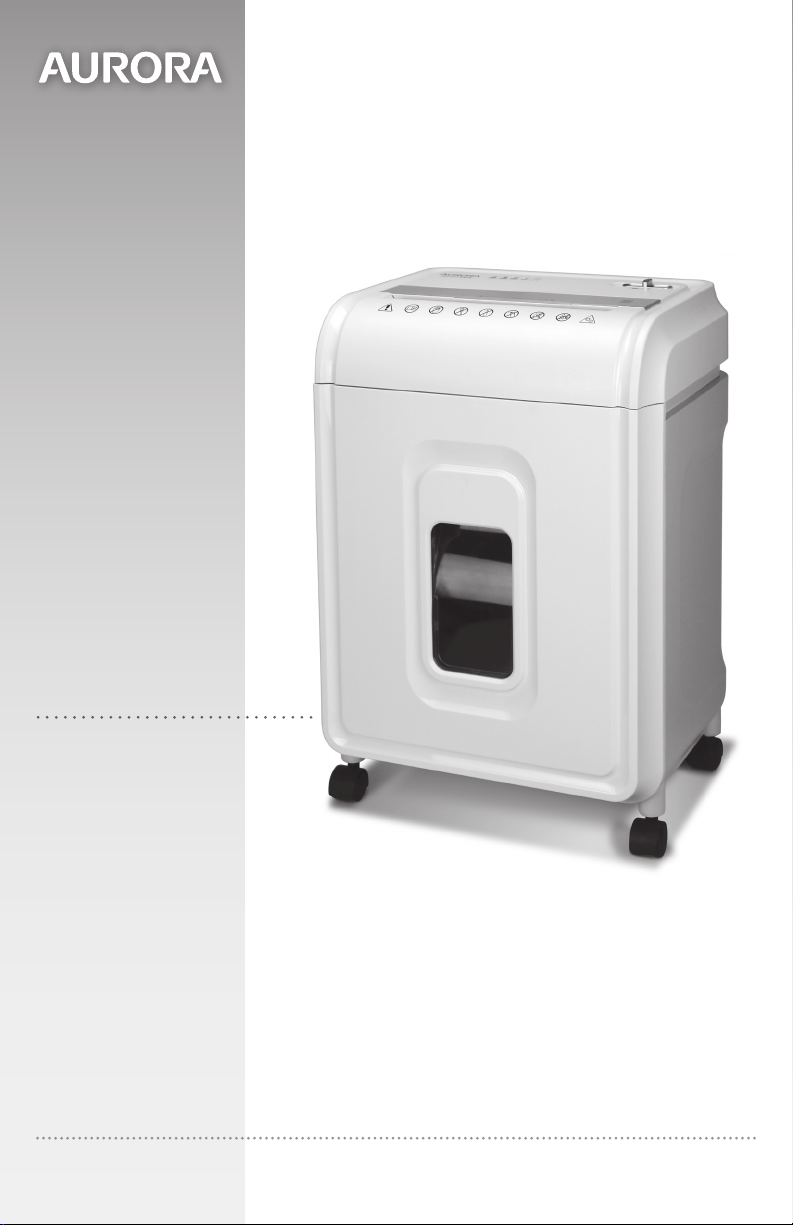
AU808MA
Model No.
Shredder User Manual
Please read these operating instructions before using the unit.
1-800-327-8508
USA Only
1-310-793-5650
International
Email: [email protected]
For more information, please visit us at:
www.auroracorp.com
3ENGLISH
•AlwaysturntheshredderoffandunplugthepowercordfromtheACoutletwhennotinuse,before
cleaning,moving,oremptyingthewastebasket.
•RISKOFFIRE.Neveruseanypetroleumbasedorflammableoilsorlubricantsinoraroundthemachine
assomeoilscancombustcausingseriousinjury.
•NEVERdisposeofflammablechemicalsormaterialsthathavecomeintocontactwithflammable
chemicals(forexample,nailpolish,acetoneandgasoline)intheshredderbasket.
•DonotholdCD/DVDwithfingerthroughthecenterringwhilefeedingintotheshredder.Nevertryto
cleanorcleartheshredderblade.Seriousinjurymayoccur.
•Asocket-outletshouldbeneartheequipmentandbeeasilyaccessible.Neverplacetheshreddernear
wateroranyheatsource.
•Donotusetheshredderifthepowercordisdamagedinanyway.
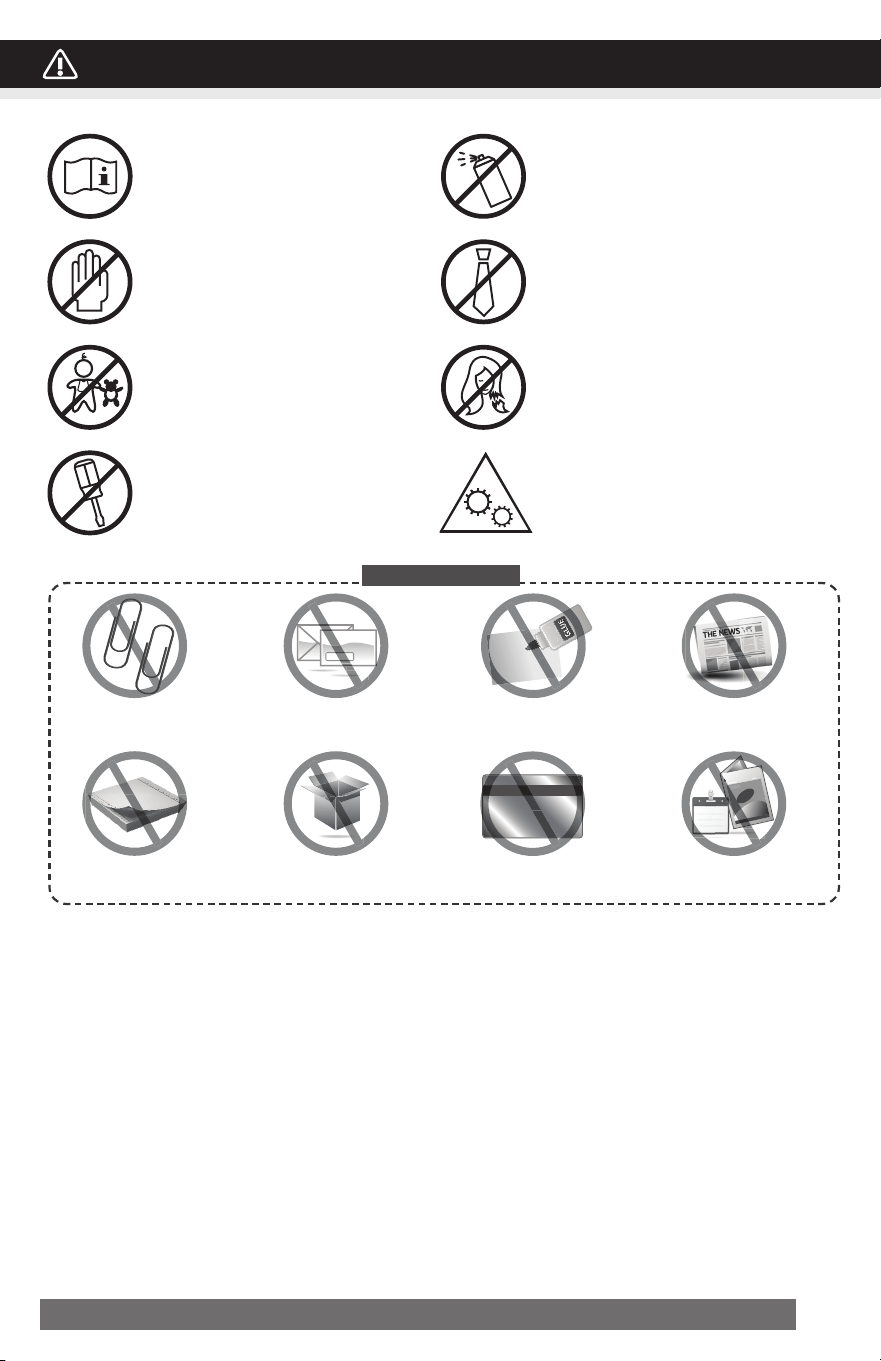
Metal
Credit Card
MAGAZINE
M
eta
t Ca
Large paper clips
Continuous
computerpaper
Window,insulatedenvelopes
orunopenjunkmails
Cardboard
Adhesive
materials
Creditcardmade
bymetal
Newspaper
Laminateddocument
andmagazines
Do not shred:
WARNING
:
SAFETY INSTRUCTIONS, READ BEFORE USING!
Read instructions before use.
Avoidtouchingthedocument
feedopeningwithhands.
Productisnotintendedforuseby
children(productisnotatoy).
Donotinsertforeignobjectsinto
thepaperentryslot.
Donotsprayorkeepany
aerosol products in or around the
shredder.
Keeplooseclothingorjewelry
awayfromthepaperentryslot.
Avoidgettinghairnearthe
paperentryslot.
Keepawayfrommovingparts.
4 ENGLISH
•Donotattempttoservicethisproductyourselfasdoingsomayexposeyoutosharpcuttingblades
and/orelectricityandwillvoidthemanufacturer'swarranty.
•Removebindingfromcheckbookornotepadbeforeshredding.
WARNING
:
!
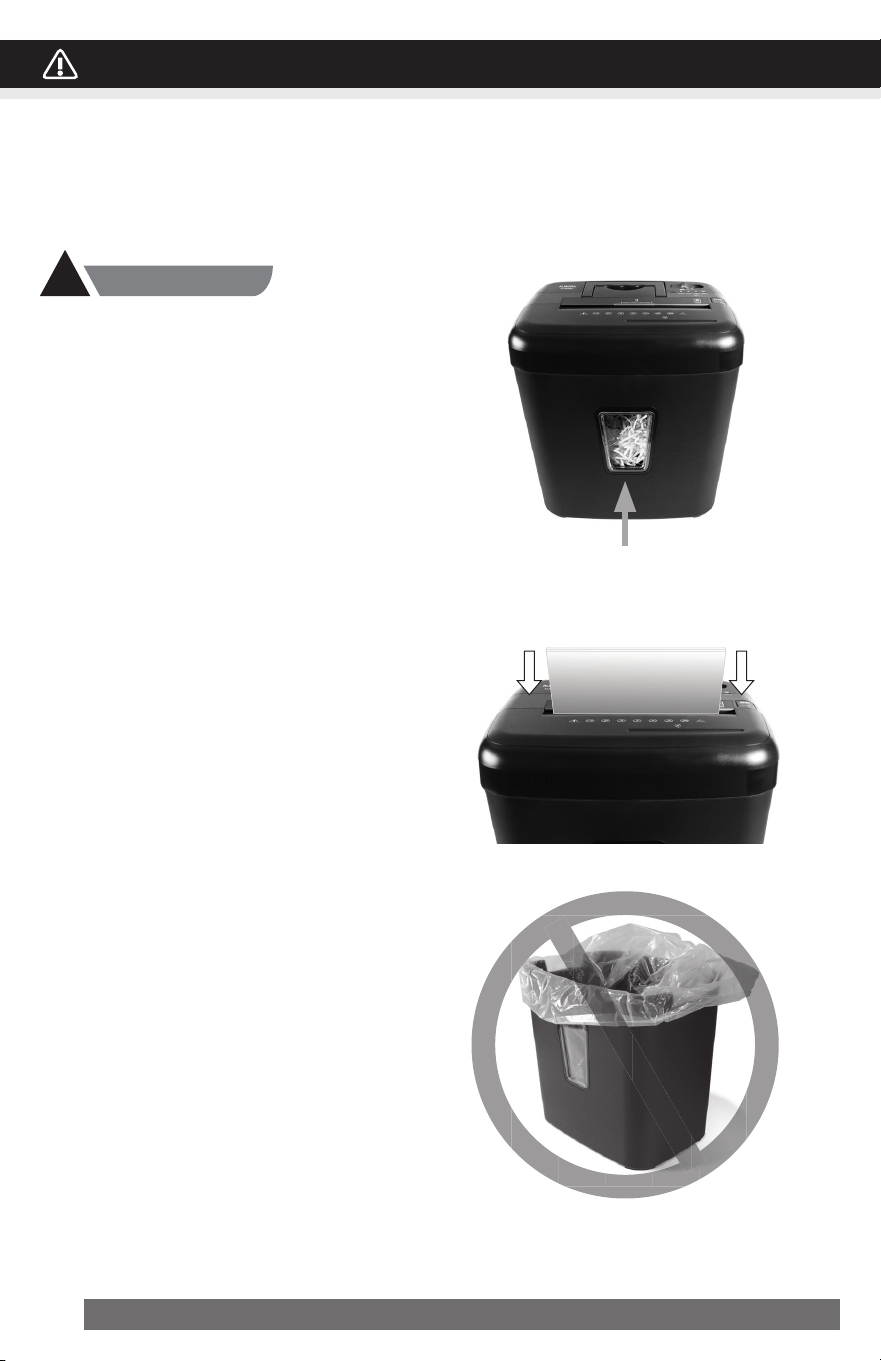
1. Bin Full:
Emptythewastebasketwhenyouseeshredded
materialsfillthewindowtopreventpaperjams.
Neverletthewastebasketbecomefull.Thiswill
leadtoshreddedmaterialsbeingpulledback
upintotheshredderandcausejams.
Empty wastebasket when
the window is filled
2. Overfeeding the shredder:
Makesureyoudonotexceedsheetcountper
pass(8sheetsmax).Insertpaperasstraightas
possible into feed slot and release.
Shreddingbeyondthespecifiedsheetcapacity
canresultinextensivedamagetotheshredder.
Overfeedingwillstrainthemachineandquickly
wearandbreakthecuttingbladesandinternal
components.
3. No Trash bag:
Ifusingaplasticbagtolinethewastebasket,
pleaseremoveit.Thismaycausethe
shreddernottooperateproperly.
No Trash bag
WARNING
:
SAFETY INSTRUCTIONS, READ BEFORE USING!
5ENGLISH
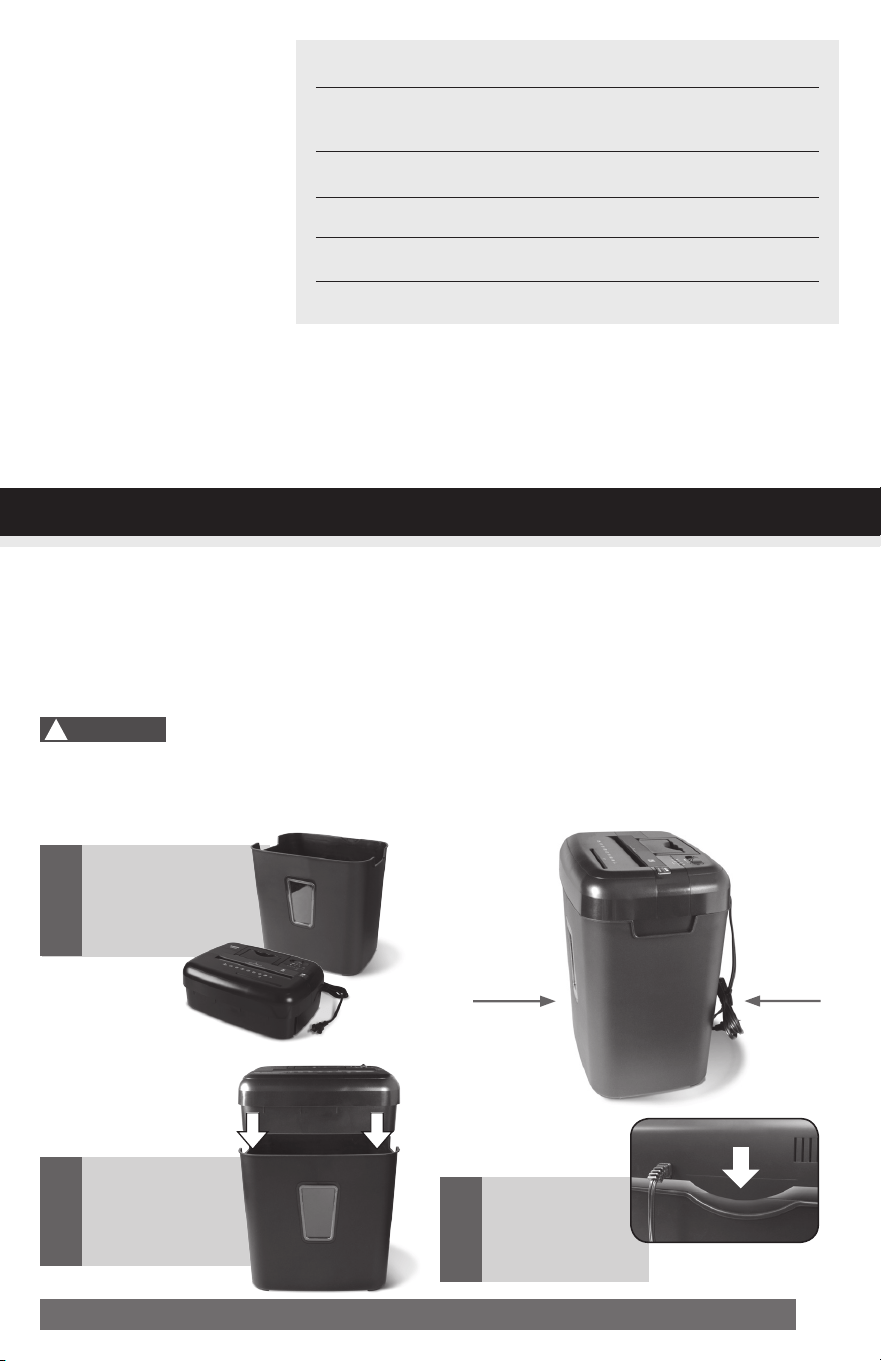
1.Thismodelincludesabuilt-insafetyinterlockmechanism,whichrequirestheshreddertobecorrectly
mountedontotheincludedwastebasket.THESHREDDERWILLNOTOPERATEUNLESSITISPROP-
ERLY MOUNTED AS PICTURED.
2.Asocket-outletshouldbeneartheequipmentandbeeasilyaccessible.
3.Connectthepowercordtoanystandard120voltACoutlet.
Shreddersmayhaveverysharpexposedbladesontheunderside.Usecarewhenmountingthe
shredderonthewastebasket.
Paper Shredder
Operating Instructions
Installation
Operation
Maintenance
Troubleshooting
ServiceCenter
LimitedWarranty
SheetCapacity
PaperShredSize:
PaperFeedEntryWidth
CreditCard&CDCapacity
DutyCycle
Voltage
8Sheetsof20lb.bondpaper*
5/32in.x15/32in.pieces
4mmx12mmpieces
8.7in.(22.0cm)
Onlyoneperpass
5min.on/30min.off
120V~60Hz/3.5A
• Shreds Credit cards, small paper clips, staples and CDs/DVDs
3
Makesurethe
shredder head
iscorrectly
mounted.
Gentlyplacethe
shredder head
onto the
wastebasket.
2
Carefullyliftand
removeshredder
headfromthe
wastebasket.
1
Front
with
window
Back
with
power
cord
INSTALLATION
* ONE FOLDED SHEET OF PAPER EQUATES TO 2 SHEETS OF PAPER
Heavierpaper,humidityorotherthanratedvoltagemayreduceshreddingcapacity.
!
Caution:

6 ENGLISH
CONTINUED NEXT PAGE
Control Switch
Usingtheswitchlocatedontheunit,selectoneofthefollowing
settingsbyslidingtheswitcheitherleftorright.(FIGURE2)
I AUTO:
Thissettingallowstheshreddertobeautomaticallystartedbyinsertingpaperintothefeedslot.
Alwaysfeedthepaperinasstraightaspossible.Whenthepaperhaspassedthrough,theshred-
derwillautomaticallystop.
O OFF:
Thissettingturnsoffallfeaturesoftheshredder.Forsafetyreasons,werecommendthatyouleave
theshredderinthe“Off”positionwhenevertheshredderisunattendedornotinuse.
R REV (REVERSE):
Intheunlikelyeventofapaperjam,thereversesettingcanbeusedtohelpclearthecuttersof
paperthatdidnotpassthrough.Neverattempttoclearajambyusingthereversefunctionuntil
youhaveemptiedthewastebasket.
Jam Remover / FWD
:
Theforwardsettingcanalsobeusedtohelpclearthecuttersintheeventofapaperjam.
Thisallowstomanuallyactivatetheshredderintocuttingmode.
FIGURE 2
OPERATION OPERATION

7ENGLISH
Paper / Credit Card Entry:
Note:
•Alwaysturnoffandunplugtheshredderwhennotinuse.
•Thisshredderwillshredstaplesandsmallpaperclips.Itisrecommendedthatyouremovepaper
clipswheneverpossibletoextendthelifespanofyourshredder.
•Onlyshredcreditcardsbyfeedingthemverticallyintothemiddleofthefeedslot,releasingwhen
shreddingbegins.Neverfeedmorethanonecreditcardatatime.
LED Status
Indicators:
Misaligned / Overload
Overheat / Power On
• Power On:TheGreenLEDlightindicatestheshredderis“On”andreadytooperatewhenpaper
is inserted.
• Overheat:TheRedLEDlightindicatestheshredderhasshredcontinuouslybeyondthemaximum
runningtimeandoverheating,theunitwillautomaticallyshutoff.Ifthishappens,switchtheshredder
Offfor30minutesorlongerbeforeresumingnormaloperation.
• Overload:TheRedLEDlightindicateswhentoomuchpaperisinserted.Usethe"Reverse"
modetobackupandreducenumberofsheets.
• Misaligned:Mounttheshreddersecurelytotherimofthewastebasket.
Features a CD/DVD destroyer:
Do not hold CD/DVD with finger through the
center ring while feeding into the shredder.
Serious injury may occur.
NeverfeedmorethanonecreditcardorCD/DVDatatime.
1)HoldtheCD/DVDbytheedgeandfeedoneatatime,releasing
whenshreddingbegins.
2)Shredderwillstopwhentheentiredischasbeendestroyed.
!
Caution:
OPERATION
Makesureyoudonotexceedsheet
countperpass(8sheetsmax).
Insert paper as straight as pos-
sible into feed slot and release.
Insertonecreditcardatatimeinto
themiddleofthefeedslot.

8 ENGLISH
Warning: Failure to properly maintain your shredder will void the warranty.
Oiltheshredderbladeseverymonthwithbasicvegetable,cookingoilorshredderoil.Followoiling
procedurebelow(FIGURE3).Ithelpstokeeptheshredderbladesoperatingwellovermanyyearsof
use.
Oiling procedure:
1. Turn off shredder.
2.Applyshredderoilacrossfeedslot.
3.Turnshredderinreversemodefor3~5seconds.
Note: Shredder oil is NOT included.
• Do not spray or keep any aerosol products
in or around shredder.
• DO NOT USE CANNED AIR ON SHREDDER.
CLEANING:
•Neveruseanythingflammabletocleantheshredder.Thismayresultinseriousinjuryor
damagetotheproduct.
•ALWAYSUNPLUGTHESHREDDERBEFORECLEANING!
•Onlycleantheshredderbycarefullywipingtheunitwithadrysoftclothortowel.
•Donotcleanorimmerseshredderinwater.Havingtheunitwetmayresultindamageor
malfunctiontotheelectricalcomponents.Iftheshredderhappenstogetwet,besuretocompletely
drytheunitimmediatelywithaclothortowel.
Shredder
Oil
DO NOT USE
AEROSOL PRODUCTS!
FIGURE 3
MAINTENANCE
!
Caution:

9ENGLISH
1) Makesurepowercordispluggedintoa
functioning120Vstandardhousehold
poweroutlet.
Or,tryusingadifferentworkingoutlet.
2) Checkiftheheadunitportionofthe
shredderiscorrectlyseatedontothe
includedwastebasket.
No-power to the shredder
IfOverheatlightislitinred,turnshredder
offandletitcooldownfor30minutes.Turn
shredderon,checkOverheatlightagain,
andrestartshreddingonlywhenlightis
not lit.
1) Unplugthemachinefromthewallsocket.
2) •Findtheactivationsensorinthecenterof
the feed slot.
•Useacottonswabtogentlywipeaway
anydustordebristhathascollectedon
the sensor.
Warning: DO NOT
USE CANNED AIR.
!
Shredder runs continuously
Shredder does not feed or shred paper
Checkpoweroutlet
Shredder head
correctlyinstalled
Overheat Cooldown
Min
30
Cottonswab
Unplugpower
Clean sensor
TROUBLESHOOTING
CONTINUED NEXT PAGE
Ifthereisaproblemwithyourshredder,checkbelowforthesymptomsandstepstoresolve.Ifyoucontinue
tohaveproblems,contactcustomersupportatourServiceCenter1-800-327-8508. DO NOT ATTEMPT
TO REPAIR BY OPENING THE SHREDDER HEAD. This will completely void the product warranty.

10 ENGLISH
•Positioncreditcardorsmallpieceof
paperoverthecreditcardsectionofthe
Feeder(centerposition).
•Tryagain.
Shredder does not feed or shred credit card or small piece of paper
Warning: DO NOT USE ANY
SPRAY CANS OR AEROSOLS.
!
Shredder is jammed and runs in “Reverse” mode only /
Overload icon is lit in red
1) Emptyifbasketfull.
Carefullyremove
paperonshredderheadbottom.
2) Setswitchtoreversefor5sec.
3) Turn off shredder then pull paper side
tosidetoremovejammedpaper(as
muchaspossible).
4) Reducethenumberofsheetsbeing
fed(countpagestobesurenottoex-
ceedthemaximumsheetcount).
1) Turn off shredder.
2) Applyshredderoiltothefeedslot
(shredderoilnotincluded).Letoilsoak
intopaperandmachinefor30minutes.
3) SetthecontrolswitchtoAuto/On.
4) Press“Jam-remover”button(FWD>>)
orusethickpaperstock/greetingcard
tomanuallyactivatetheshredderinto
cuttingmodeopushthejamthrough.
5) Reducethenumberofsheetsbeing
fed(countpagestobesurenottoex-
ceedthemaximumsheetcount).Refeed
the paper.
Reversefor5sec
PowerOffthenpull
paper side to side
Turn off shredder
Press“Clog-remover”
SetswitchtoAuto
Reduce sheets
Applyshredderoiland
waitfor30min.
Usethickpapertopush
jamthrough
Min
30
Feed in the center
With stubborn situations where the reverse function does not help, follow the steps below:
Or
TROUBLESHOOTING
Emptyifbinfull.
Carefullyremovepaper
on shredder head
bottom

Ifyouhaveanyquestionsinregardstotheoperationofthisshredderorinneedofasparepart,please
contactourservicecenterat:
Telephone:1-800-327-8508 (U.S.A. only) or 1-310-793-5650 (International)
Businesshours:MondaytoFriday8:00am-5:00pmPST(PacificStandardTime)
Email:[email protected]
Orformoreinformation,pleasevisitourwebsiteathttp://www.auroracorp.com
Wewarrantthecuttingcylindersofthemachineagainstdefectsofworkmanshipandmaterialfora
period of 5 yearsfromtheoriginalpurchasedatetotheoriginalconsumer,andallotherpartsof
themachineagainstdefectsofworkmanshipandmaterialforaperiodof1 yearfromtheoriginal
purchasedatetotheoriginalconsumer.
Shouldtherebeadefectormalfunctionofthisproduct,wewillrepairorreplacetheproductfreeof
charge.Customerisresponsibleforallshippingchargestoreturnthedefectiveproducttous.A copy
of the proof of purchase showing original purchase date is required.Thiswarrantyis
voidiftheproducthasbeensubjecttodamage,unreasonableuse,improperservice,orothercauses
notarisingfromdefectsinoriginalmaterialorworkmanship.Thiswarrantyisvoidiffactorysealisbro-
kenorremovedfromtheproduct.Thiswarrantydoesnotincludeadjustments,partsorrepairsrequired
bycircumstancesbeyondthecontrolofus.
Therearenoexpressedwarrantiesotherthanthosestatedherein.
Anyexpressedorimpliedwarranties,includingbutnotlimitedtomerchantabilityandfitnessfora
particularpurposearelimitedtotheabovewarrantyperiod.Weshallnotbeliableforanyincidental
orconsequentialcost,expensesordamagesresultingfromanyfailuredefectormalfunctionofthis
product.
Somestatesdonotallowtheexclusionoflimitationsofimpliedwarrantiesorconsequentialdamages,
therefore,theabovelimitationsmaynotapplytoyou.
Thiswarrantygrantsyouspecificlegalrights,andyoumayalsohaveotherrightsthatvaryfromstatetostate.
Before returning any product, please call our Service Center for specific return instructions.
1-800-327-8508 USA ONLY
1-310-793-5650 INTERNATIONAL • [email protected]
SERVICE CENTER
LIMITED PRODUCT WARRANTY
TROUBLESHOOTING

030421
©2021AuroraCorp.ofAmerica
3500ChallengerStreet,Torrance,CA90503USA
1-800-327-8508
USA Only
•
1-310-793-5650
International
•
Email: [email protected]
•
For more information, please visit us at:
www.auroracorp.com