USER GUIDE & SERVICE MANUAL
Model: ULN-CO29B-20A
USER GUIDE & SERVICE MANUAL
Table of Contents
Click on any section below to jump directly there
Intro
Safety
Safety and Warning
Disposal And Recycling
Installation
Environmental Requirements
Electrical
Cutout Dimensions
Product Dimensions
Water Hookup
General Installation
Integrated Panel Dimensions
Integrated Panel Installation
Grille / Plinth Installation
Door Swing
Door Adjust
Maintenance
Door Latch
Cleaning
Cleaning Condenser
Extended Non-Use
Operating Instructions
First Use
Ice
Airflow and Product Loading
Service
Interior Shelves
Door Shelves
Troubleshooting
Wire Diagram
Product Liability
Warranty Claims
Parts
Ordering Replacement Parts
System Diagnosis Guide
Compressor Specifications
Troubleshooting Extended
Defrost
Warranty
USER GUIDE
Introduction
WELCOME TO U-LINE
Congratulations on your U-Line purchase. Your product comes from a company with over ve decades of premium modular ice
making, refrigeration, and wine preservation experience. U-Line creates products focused on functionality, style, and inspired
innovations — paying close attention to even the smallest details. Applications include residential, outdoor, ADA height
compliant, marine, and commercial. Complete product categories include Beverage Centers, Wine Refrigerators, Ice Machines,
Refrigerators, Freezers, and Dispensers.
Our advanced refrigeration systems, large and exible capacities, and Built-In to Stand Out
®
clean integrated look allow you
to preserve the right product, in the right place, at the right temperature. Since 2014, U-Line has been part of the Middleby
family of brands. All products are designed, engineered, and assembled in Milwaukee, Wisconsin, USA, and select products
are available worldwide. U-Line - RIGHT PRODUCT. RIGHT PLACE. RIGHT TEMPERATURE
®
.
PRODUCT INFORMATION
Looking for additional information on your product? User Guides, Spec Sheets, CAD Drawings, Compliance Documentation,
and Product Warranty information are all available for reference and download at u-line.com.
PROPERTY DAMAGE / INJURY CONCERNS
In the unlikely event property damage or personal injury is suspected related to a U-Line product, please take the following
steps:
1. U-Line Customer Care must be contacted immediately at +1.414.354.0300.
2. Service or repairs performed on the unit without prior written approval from U-Line is not permitted. If the unit has been
altered or repaired in the eld without prior written approval from U-Line, claims will not be eligible.
GENERAL INQUIRIES
U-Line Corporation
8900 N. 55th Street
Milwaukee, Wisconsin 53223 USA
Monday - Friday 8:00 am to 4:30 pm CST
T: +1.414.354.0300
Email: sales@u-line.com
u-line.com
CONNECT WITH US
SERVICE & PARTS ASSISTANCE
Monday - Friday 8:00 am to 4:30 pm CST
T: +1.800.779.2547
Service Email: onlineservice@u-line.com
Parts Email: onlineparts@u-line.com
Designed, engineered and assembled in WI, USA
3
USER GUIDE
Safety and Warning 1
SAFETY • INSTALLATION & INTEGRATION • OPERATING INSTRUCTIONS • MAINTENANCE • SERVICE
Safety and Warning
NOTICE
PLEASE READ all instructions before installing,
operating, or servicing the appliance.
SAFETY ALERT DEFINITIONS
Throughout this guide are safety items labeled with a
Danger, Warning or Caution based on the risk type:
DANGER
!
Danger means that failure to follow this safety
statement will result in severe personal injury or
death.
WARNING
!
Warning means that failure to follow this safety
statement could result in serious personal injury
or death.
CAUTION
!
Caution means that failure to follow this safety
statement may result in minor or moderate
personal injury, property or equipment damage.
GENERAL PRECAUTIONS
Use this appliance for its intended purpose only and follow
these general precautions with those listed throughout this
guide.
This appliance is not intended for use by persons
(including children) with reduced physical, sensory or
mental capabilities, or lack of experience or knowledge,
unless they have been given supervision or instruction
concerning use of the appliance by a person responsible
for their safety. Children should be supervised to ensure
that they do not play with this appliance. Cleaning and
user maintenance shall not be performed by children
without supervision.
DANGER
!
Do not use electrical appliances inside the food
storage compartment of this appliance.
WARNING
!
Keep ventilation openings in the appliance
enclosure or in the built in structure clear of
obstruction.
WARNING
!
Do not store explosive substances such as
aerosol cans with flammable propellant in this
appliance.
WARNING
!
Requirement for an external switch in the fixed
wiring is specified.
WARNING
!
To avoid a hazard due to instability of the
appliance, it must be fixed in accordance with
the instructions.
4
USER GUIDE
Safety and Warning 2
SAFETY • INSTALLATION & INTEGRATION • OPERATING INSTRUCTIONS • MAINTENANCE • SERVICE
CAUTION
!
Use care when moving and handling the unit.
Use gloves to prevent personal injury from sharp
edges.
If your model requires defrosting, DO NOT use
medical devices or other means to accelerate the
defrosting process. DO NOT use an ice pick or
other sharp instrument to help speed up
defrosting. These instruments can puncture the
inner lining or damage the cooling unit. DO NOT
use any type of heater to defrost. Using a heater
to speed up defrosting can cause personal injury
and damage to the inner lining.
NOTICE
Do not lift unit by door handle.
Never install or operate the unit behind closed
doors. Be sure front grille (plinth strip/base
fascia) is free of obstruction. Obstructing free
airflow can cause the unit to malfunction and
will void the warranty.
Failure to clean the condenser every six months
can cause the unit to malfunction. This could
void the warranty.
Allow unit temperature to stabilize for 24 hours
before use.
Do not block any internal fans.
Use only genuine U-Line replacement parts.
Imitation parts can damage the unit, affect its
operation or performance and may void the
warranty.
This appliance is intended to be used in household and
similar applications such as:
• Staff kitchen areas in shops, office and other working
environments.
• Farm houses and by clients in hotels, motels and other
residential type environments.
• Bed and breakfast type environments.
• Catering and similar non-retail applications.
5
USER GUIDE
Disposal and Recycling 1
SAFETY • INSTALLATION & INTEGRATION • OPERATING INSTRUCTIONS • MAINTENANCE • SERVICE
Disposal and Recycling
DANGER
!
RISK OF CHILD ENTRAPMENT. Before you throw
away your old refrigerator or freezer, take off
the doors and leave shelves in place so children
may not easily climb inside.
If the unit is being removed from service for disposal,
check and obey all federal, state and local regulations
regarding the disposal and recycling of refrigeration
appliances, and follow these steps completely:
1. Remove all consumable contents from the unit.
2. Unplug the electrical cord from its socket.
3. Remove the door(s)/drawer(s).
6
USER GUIDE
Environmental Requirements 1
SAFETY • INSTALLATION & INTEGRATION • OPERATING INSTRUCTIONS • MAINTENANCE • SERVICE
Environmental Requirements
This model is intended for indoor/interior applications only
and is not to be used in installations that are open/
exposed to natural elements.
This unit is designed to operate between 50°F (10°C) and
100°F (38°C). Higher ambient temperatures may reduce
the unit’s ability to reach low temperatures and/or reduce
ice production on applicable models.
For best performance, keep the unit out of direct sunlight
and away from heat generating equipment.
In climates where high humidity and dew points are
present, condensation may appear on outside surfaces.
This is considered normal. The condensation will
evaporate when the humidity drops.
CAUTION
!
Damages caused by ambient temperatures of
40°F (4°C) or below are not covered by the
warranty.
7
USER GUIDE
Electrical 1
SAFETY • INSTALLATION & INTEGRATION • OPERATING INSTRUCTIONS • MAINTENANCE • SERVICE
Electrical
WARNING
!
SHOCK HAZARD — Electrical Grounding
Required. Never attempt to repair or perform
maintenance on the unit until the electricity has
been disconnected.
Never remove the round grounding prong from
the plug and never use a two-prong grounding
adapter.
Altering, cutting or removing power cord,
removing power plug, or direct wiring can cause
serious injury, fire, loss of property and/or life,
and will void the warranty.
Never use an extension cord to connect power to
the unit.
Always keep your working area dry.
If the detachable type electric supply cord is damaged, it
must be replaced by an equivalent cord available from the
manufacturer or its service agent.
NOTICE
Electrical installation must observe all state and
local codes. This unit requires connection to a
grounded (three-prong), polarized receptacle
that has been placed by a qualified electrician.
The unit requires a grounded and polarized 230 VAC,
50 Hz, 8A power supply (normal household current). An
individual, properly grounded branch circuit or circuit
breaker is recommended. A GFCI (ground fault circuit
interrupter) is usually not required for fixed location
appliances and is not recommended for your unit because
it could be prone to nuisance tripping. However, be sure
to consult your local codes.
See CUTOUT DIMENSIONS for recommended receptacle
location.
8
USER GUIDE
Cutout Dimensions 1
SAFETY • INSTALLATION & INTEGRATION • OPERATING INSTRUCTIONS • MAINTENANCE • SERVICE
Cutout Dimensions
PREPARE SITE
Your U-Line product has been designed for either free-
standing or built-in installation. When built-in, your unit
does not require additional air space for top, sides, or
rear. However, the front grille must NOT be obstructed,
and clearance is required for an electrical connection in
the rear.
CAUTION
!
Unit can NOT be installed behind a closed cabinet
door.
If you would like to align the face of the unit
with other adjacent cabinet doors, you may need
to alter the wall just behind the drain connection
on the unit to accommodate the drain.
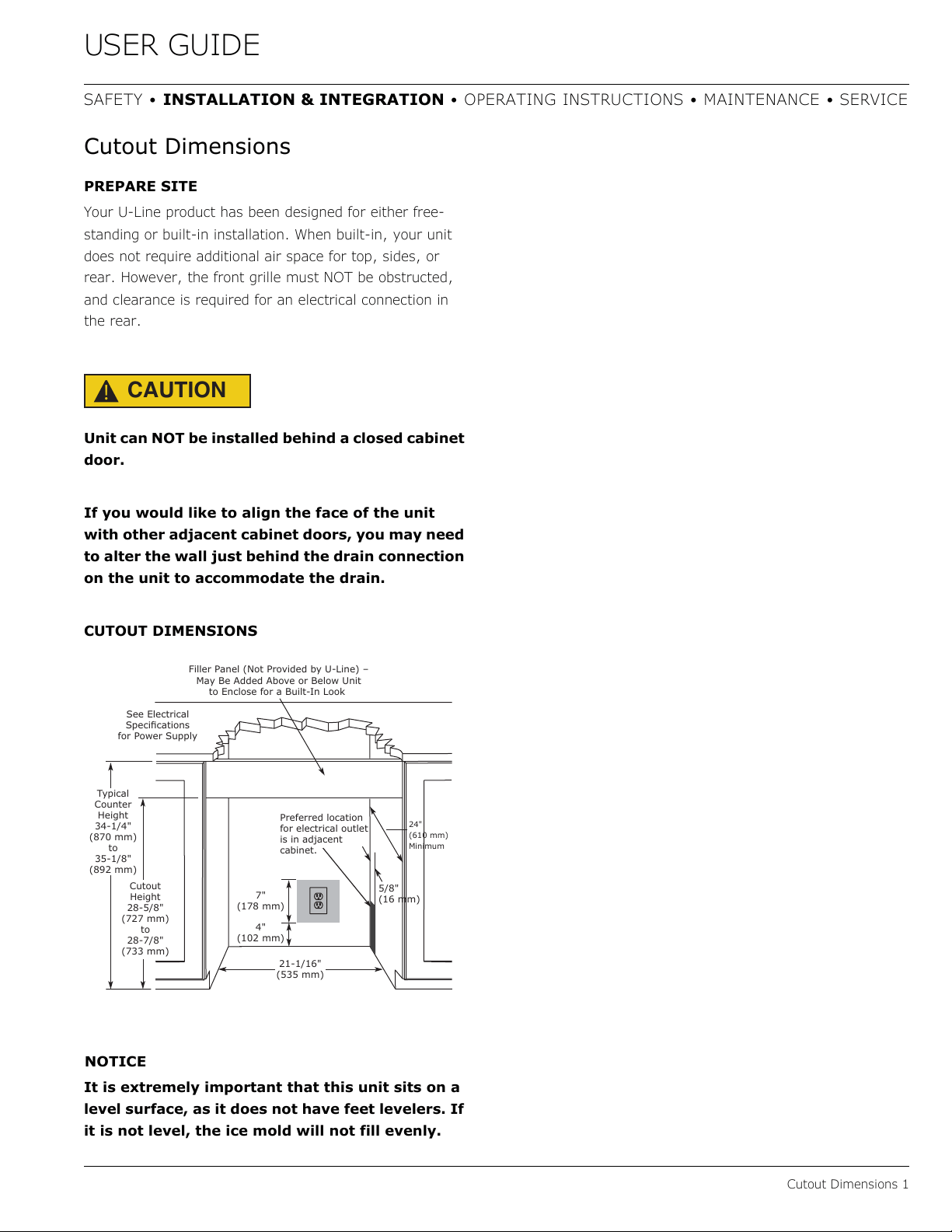
CUTOUT DIMENSIONS
NOTICE
It is extremely important that this unit sits on a
level surface, as it does not have feet levelers. If
it is not level, the ice mold will not fill evenly.
24"
(610 mm)
Minimum
21-1/16"
(535 mm)
See Electrical
6SHFLɟFDWLRQV
IRU3RZHU6XSSO\
7\SLFDO
&RXQWHU
Height
34-1/4"
(870 mm)
WR
35-1/8"
(892 mm)
&XWRXW
Height
28-5/8"
(727 mm)
WR
28-7/8"
(733 mm)
)LOOHU3DQHO1RW3URYLGHGE\8/LQHȊ
0D\%H$GGHG$ERYHRU%HORZ8QLW
WR(QFORVHIRUD%XLOW,Q/RRN
4"
(102 mm)
7"
(178 mm)
3UHIHUUHGORFDWLRQ
IRUHOHFWULFDORXWOHW
LVLQDGMDFHQW
FDELQHW
5/8"
(16 mm)
9
USER GUIDE
Product Dimensions 1
SAFETY • INSTALLATION & INTEGRATION • OPERATING INSTRUCTIONS • MAINTENANCE • SERVICE
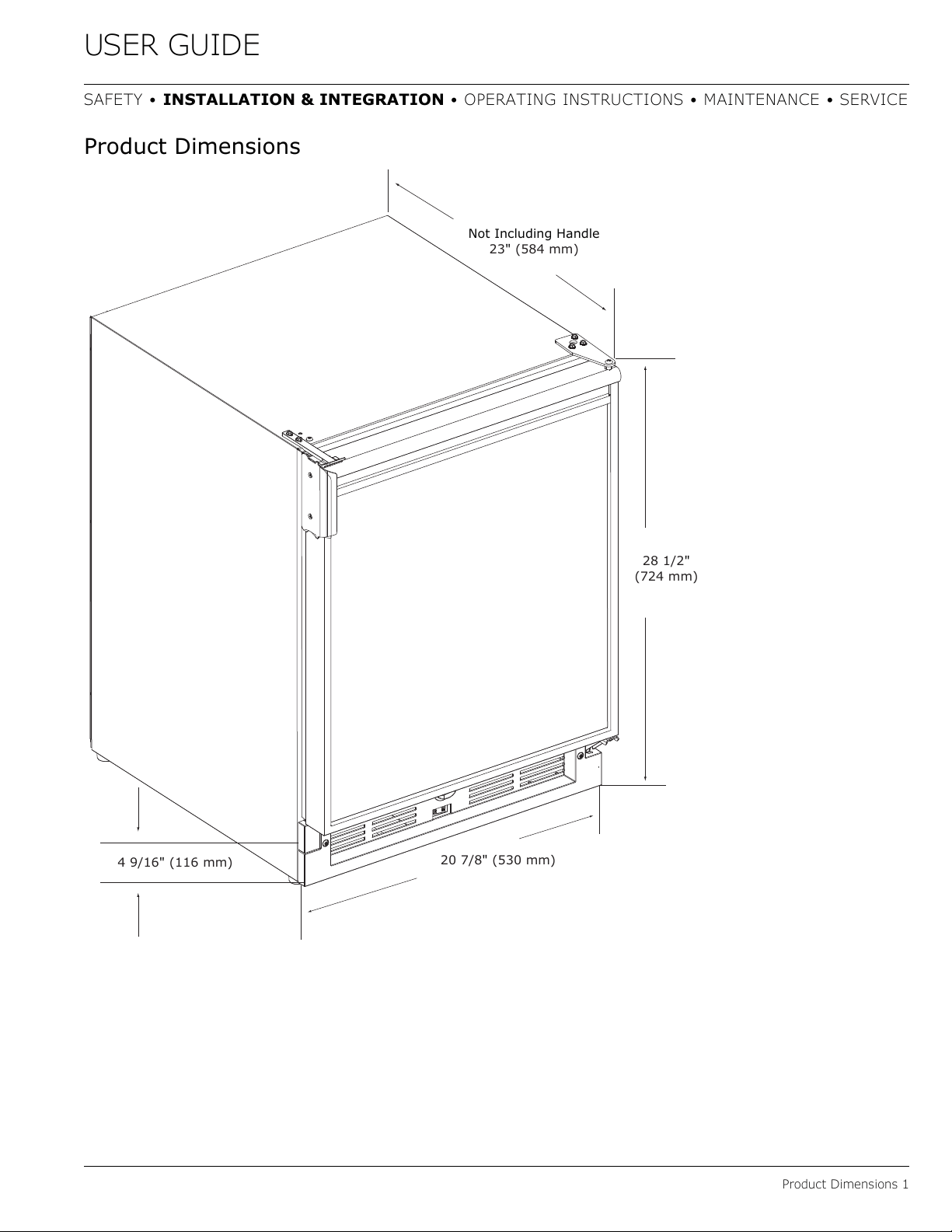
Product Dimensions
28 1/2"
(724 mm)
20 7/8" (530 mm)
4 9/16
" (116 mm)
Not Including Handle
23" (584 mm)
10
USER GUIDE
Door Swing 1
SAFETY • INSTALLATION & INTEGRATION • OPERATING INSTRUCTIONS • MAINTENANCE • SERVICE
Water Hookup
PREPARE PLUMBING
The water valve uses a standard 1/4" (6.35 mm)
compression fitting. U-Line recommends using accessory
water hook up kit – part # 80-54674-00. The kit includes a
10' (3 m) braided flexible water supply line and a brass
hose fitting. When using a 1/4” (6.35 mm) O.D. soft
copper supply line use the brass nut and sleeve included
with the nut.
CAUTION
!
Plumbing installation must observe all state and
local codes. All water and drain connections
MUST BE made by a licensed/qualified plumbing
contractor. Failure to follow recommendations
and instructions may result in damage and/or
harm.
Water Supply Connection
When connecting the water supply, please note the
following:
• Before installing the unit and connecting to the cold
water supply, review the local plumbing codes.
• The water pressure should be between 20 and 120 psi
(138 and 827 kPa).
• The water line MUST have a shut-off valve in the
supply line.
• The water line should be looped into 2 coils. This will
allow the unit to be removed for cleaning and servicing.
Make certain that the tubing is not pinched or damaged
during installation.
WARNING
!
Connect to potable water supply only.
CAUTION
!
Do not use any plastic water supply line. The line
is under pressure at all times. Plastic may crack
or rupture with age and cause damage to your
home.
Do not use tape or joint compound when
attaching a braided flexible water supply line
that includes a rubber gasket. The gasket
provides an adequate seal – other materials
could cause blockage of the valve.
Failure to follow recommendations and
instructions may result in damage and/or harm,
flooding or void the product warranty.
Use new hose set. Do not reuse old hose set.
CAUTION
!
Turn off water supply and disconnect electrical
supply to unit prior to installation.
Use caution when handling back panel. The
edges could be sharp.
1. Turn off water supply and disconnect electrical supply
to product prior to attempting installation.
2. Remove the back panel.
11
USER GUIDE
Door Swing 2
SAFETY • INSTALLATION & INTEGRATION • OPERATING INSTRUCTIONS • MAINTENANCE • SERVICE
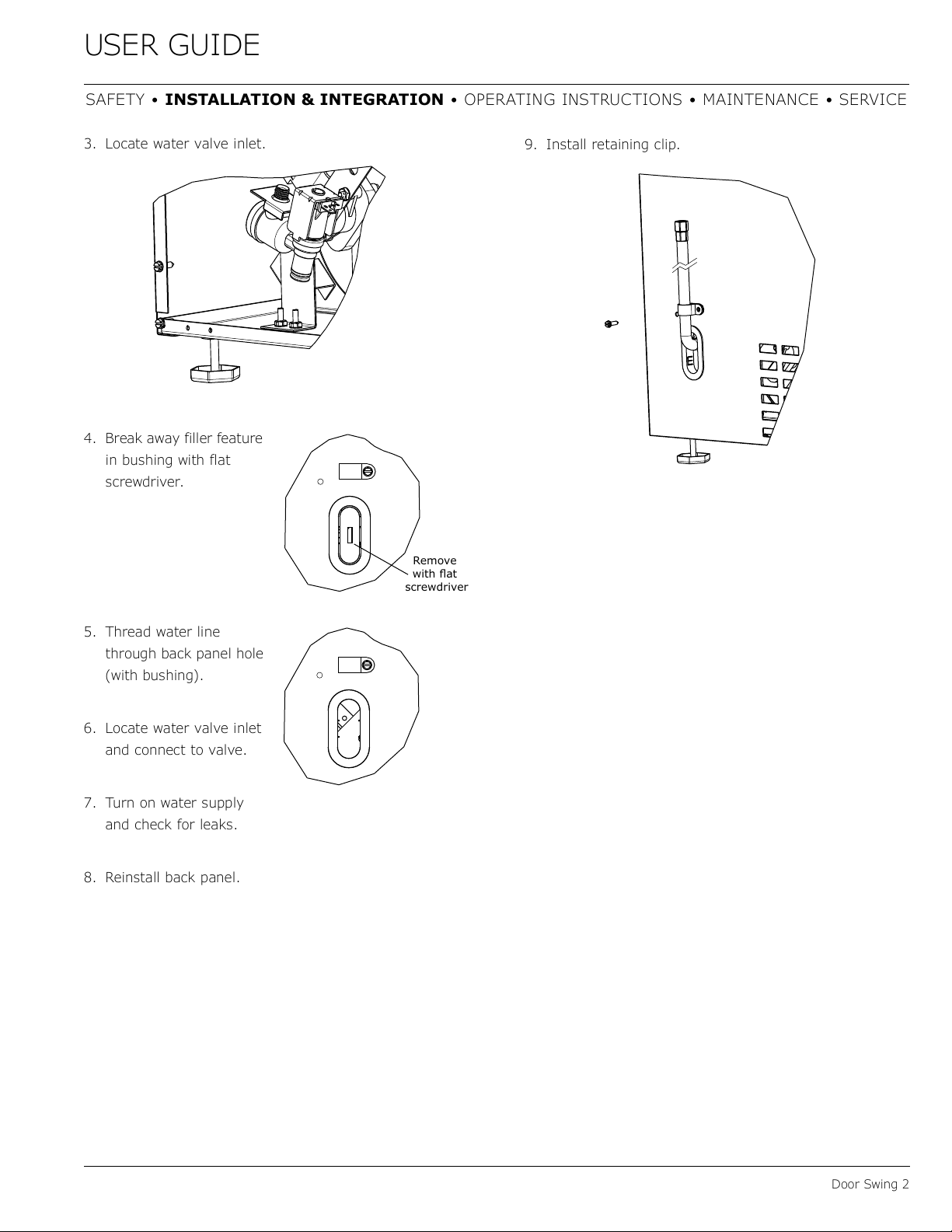
3. Locate water valve inlet.
4. Break away filler feature
in bushing with flat
screwdriver.
5. Thread water line
through back panel hole
(with bushing).
6. Locate water valve inlet
and connect to valve.
7. Turn on water supply
and check for leaks.
8. Reinstall back panel.
9. Install retaining clip.
Remove
ZLWKɠDW
screwdrive
r
12
USER GUIDE
General Installation 1
SAFETY • INSTALLATION & INTEGRATION • OPERATING INSTRUCTIONS • MAINTENANCE • SERVICE
General Installation
LEVELING INFORMATION
NOTICE
Because these units do not have leveling legs, it
is extremely important that they sit on a level
surface. If they are not level, the ice mold will
not fill evenly.
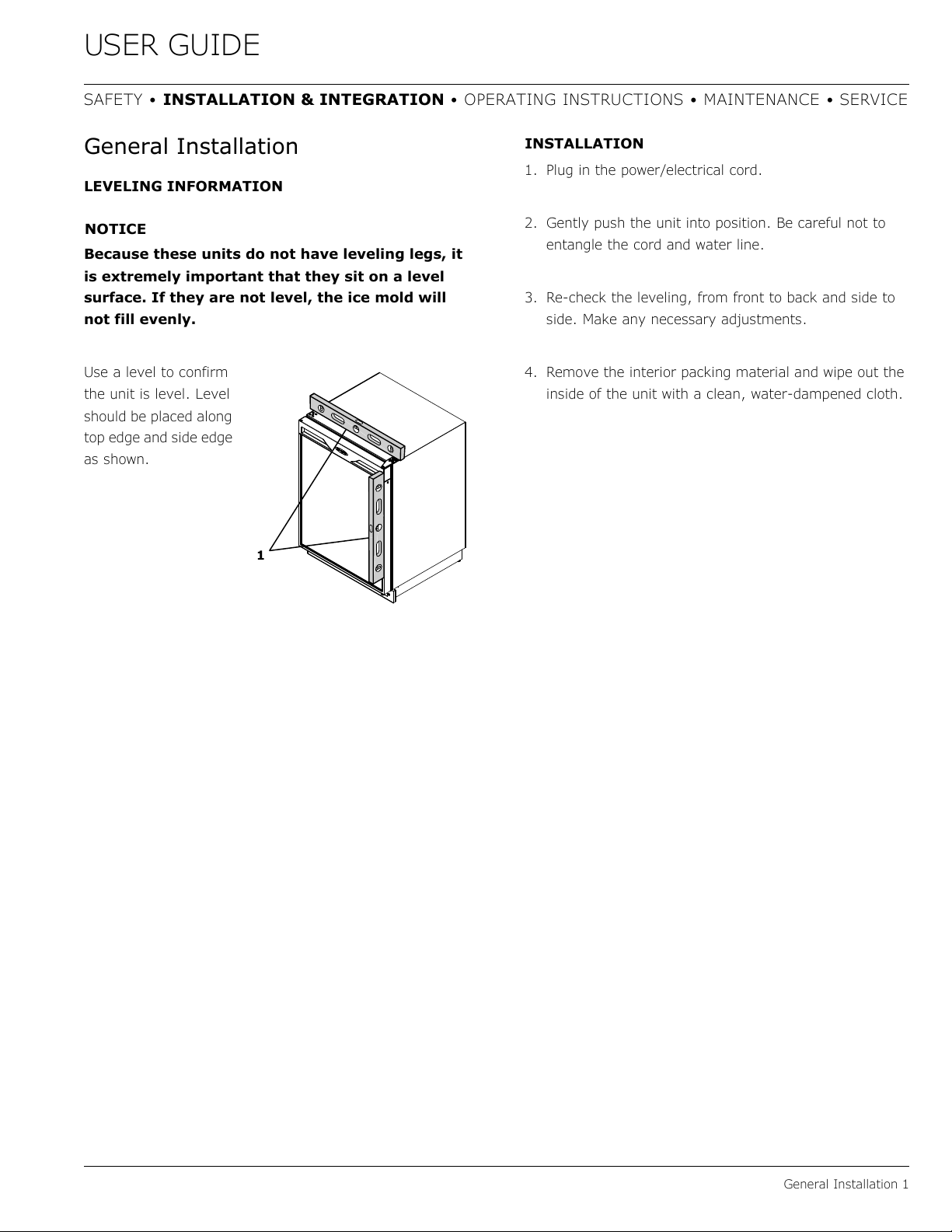
Use a level to confirm
the unit is level. Level
should be placed along
top edge and side edge
as shown.
INSTALLATION
1. Plug in the power/electrical cord.
2. Gently push the unit into position. Be careful not to
entangle the cord and water line.
3. Re-check the leveling, from front to back and side to
side. Make any necessary adjustments.
4. Remove the interior packing material and wipe out the
inside of the unit with a clean, water-dampened cloth.
1
13
USER GUIDE
Integrated Panel Dimensions 1
SAFETY • INSTALLATION & INTEGRATION • OPERATING INSTRUCTIONS • MAINTENANCE • SERVICE
Integrated Panel Dimensions
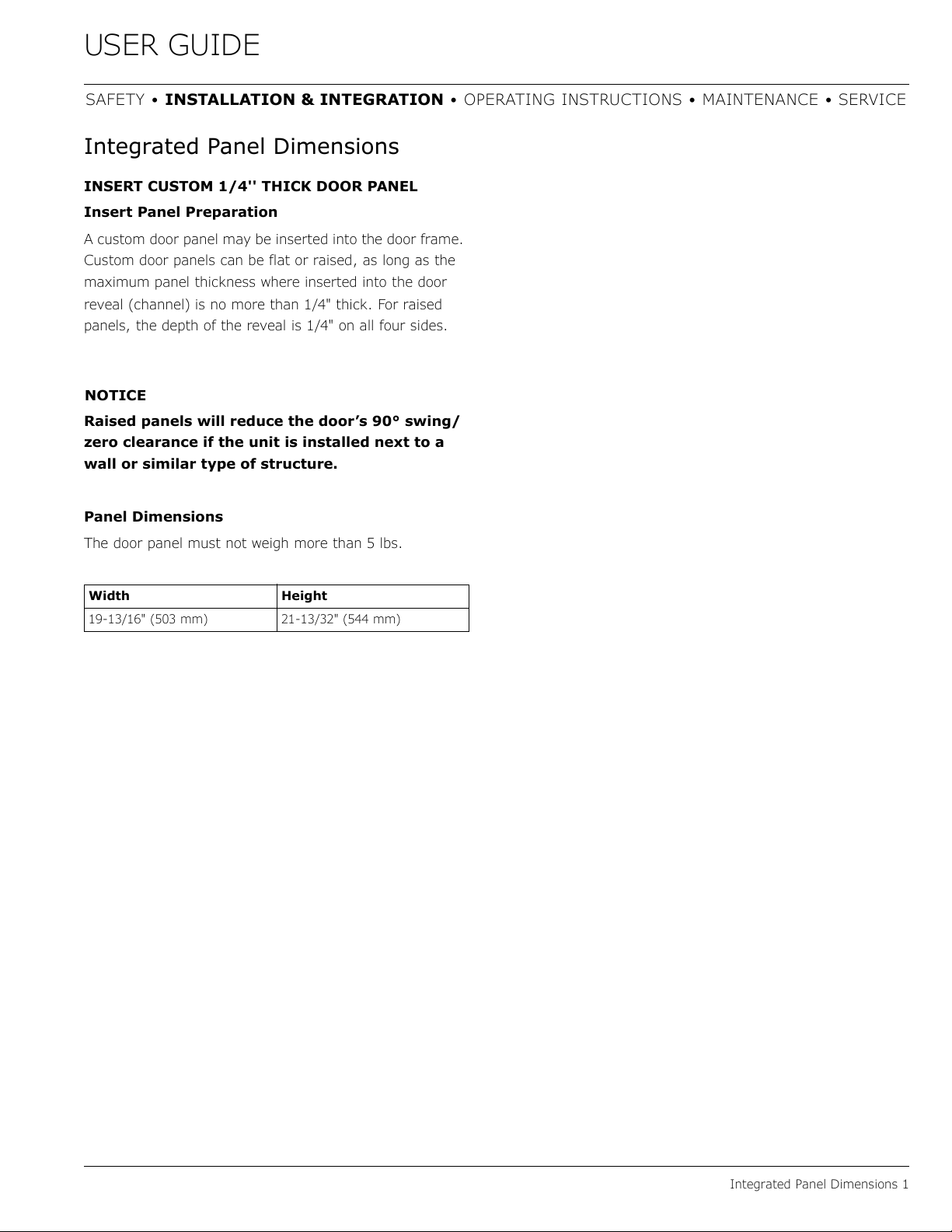
INSERT CUSTOM 1/4'' THICK DOOR PANEL
Insert Panel Preparation
A custom door panel may be inserted into the door frame.
Custom door panels can be flat or raised, as long as the
maximum panel thickness where inserted into the door
reveal (channel) is no more than 1/4" thick. For raised
panels, the depth of the reveal is 1/4" on all four sides.
NOTICE
Raised panels will reduce the door’s 90° swing/
zero clearance if the unit is installed next to a
wall or similar type of structure.
Panel Dimensions
The door panel must not weigh more than 5 lbs.
Width Height
19-13/16" (503 mm) 21-13/32" (544 mm)
14
USER GUIDE
Integrated Panel Installation 1
SAFETY • INSTALLATION & INTEGRATION • OPERATING INSTRUCTIONS • MAINTENANCE • SERVICE
Integrated Panel Installation
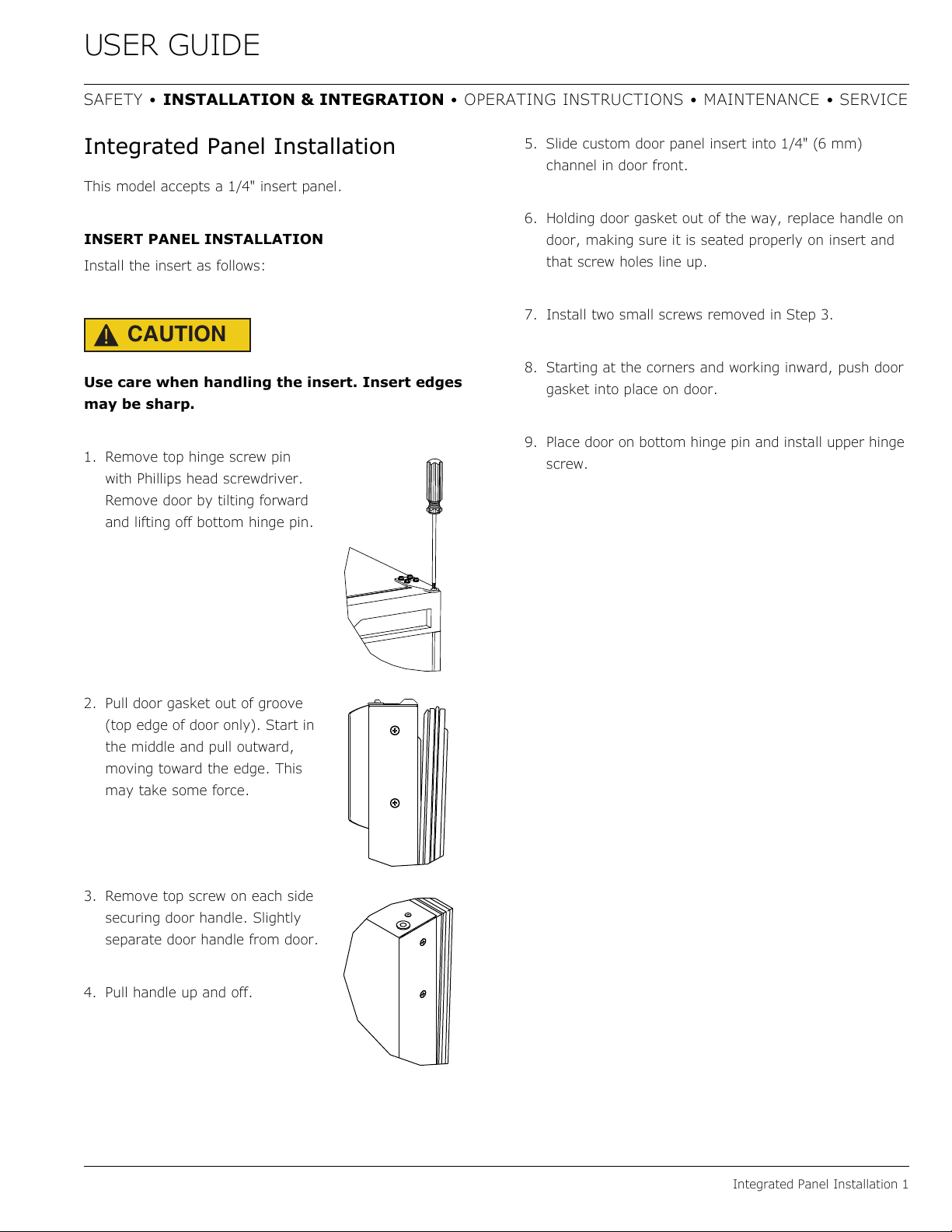
This model accepts a 1/4" insert panel.
INSERT PANEL INSTALLATION
Install the insert as follows:
CAUTION
!
Use care when handling the insert. Insert edges
may be sharp.
1. Remove top hinge screw pin
with Phillips head screwdriver.
Remove door by tilting forward
and lifting off bottom hinge pin.
2. Pull door gasket out of groove
(top edge of door only). Start in
the middle and pull outward,
moving toward the edge. This
may take some force.
3. Remove top screw on each side
securing door handle. Slightly
separate door handle from door.
4. Pull handle up and off.
5. Slide custom door panel insert into 1/4" (6 mm)
channel in door front.
6. Holding door gasket out of the way, replace handle on
door, making sure it is seated properly on insert and
that screw holes line up.
7. Install two small screws removed in Step 3.
8. Starting at the corners and working inward, push door
gasket into place on door.
9. Place door on bottom hinge pin and install upper hinge
screw.
15
USER GUIDE
Grille - Plinth Installation 1
SAFETY • INSTALLATION & INTEGRATION • OPERATING INSTRUCTIONS • MAINTENANCE • SERVICE
Grille - Plinth Installation
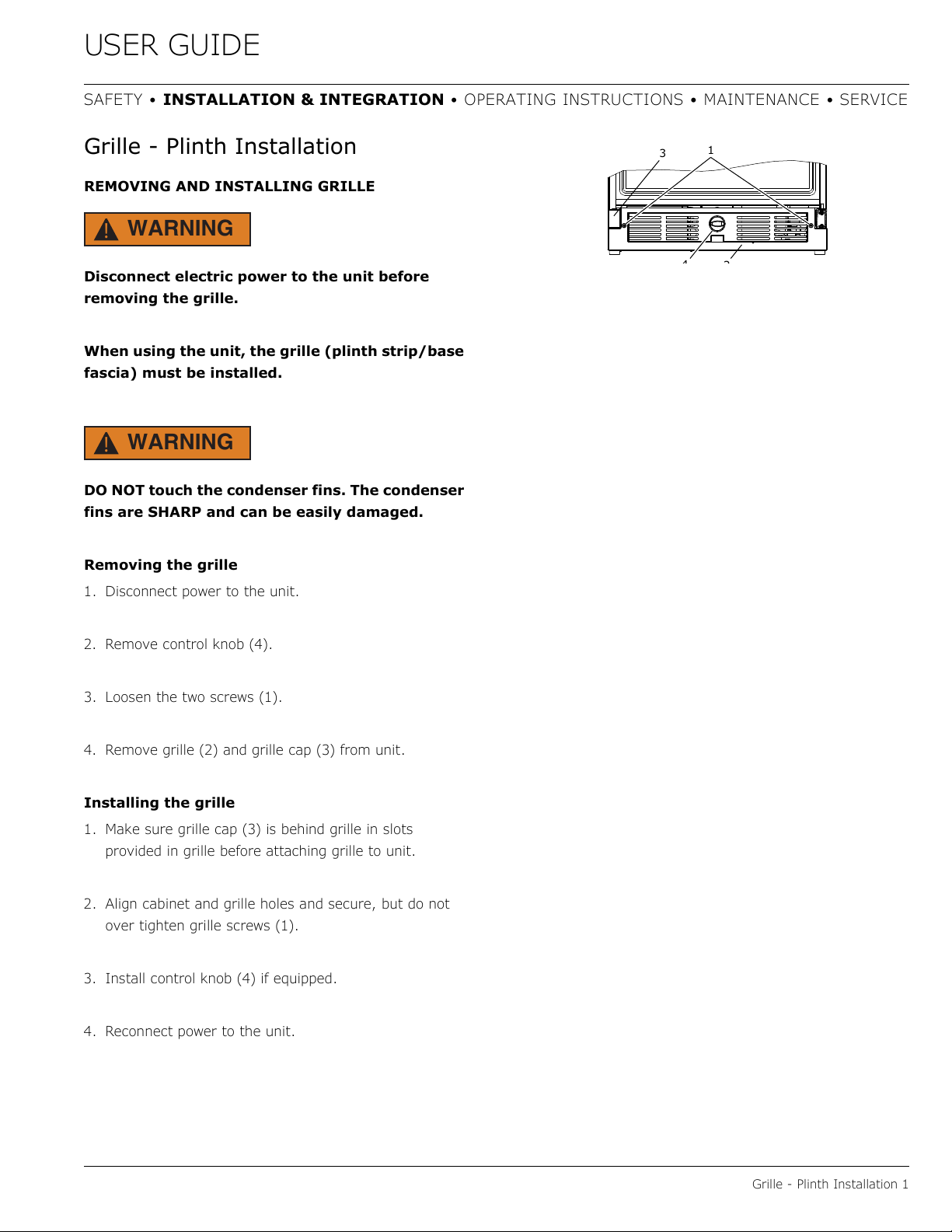
REMOVING AND INSTALLING GRILLE
WARNING
!
Disconnect electric power to the unit before
removing the grille.
When using the unit, the grille (plinth strip/base
fascia) must be installed.
WARNING
!
DO NOT touch the condenser fins. The condenser
fins are SHARP and can be easily damaged.
Removing the grille
1. Disconnect power to the unit.
2. Remove control knob (4).
3. Loosen the two screws (1).
4. Remove grille (2) and grille cap (3) from unit.
Installing the grille
1. Make sure grille cap (3) is behind grille in slots
provided in grille before attaching grille to unit.
2. Align cabinet and grille holes and secure, but do not
over tighten grille screws (1).
3. Install control knob (4) if equipped.
4. Reconnect power to the unit.
2
3
1
4
16
USER GUIDE
Door Swing 1
SAFETY • INSTALLATION & INTEGRATION • OPERATING INSTRUCTIONS • MAINTENANCE • SERVICE
Door Swing
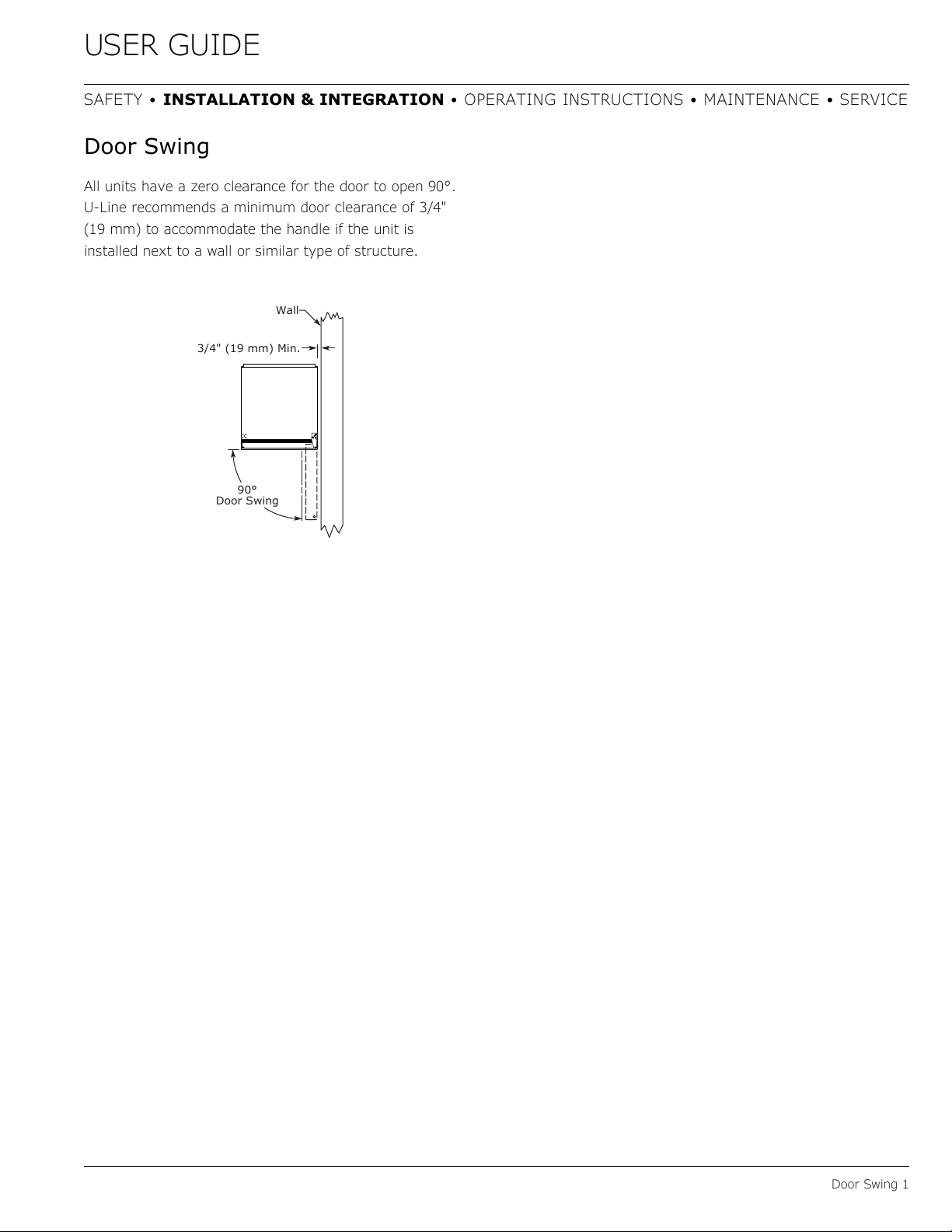
All units have a zero clearance for the door to open 90°.
U-Line recommends a minimum door clearance of 3/4"
(19 mm) to accommodate the handle if the unit is
installed next to a wall or similar type of structure.
3/4" (19 mm) Min.
Wall
90°
Door Swing
17
USER GUIDE
Door Adjustments 1
SAFETY • INSTALLATION & INTEGRATION • OPERATING INSTRUCTIONS • MAINTENANCE • SERVICE
Door Adjustments
CHECKING DOOR ALIGNMENT
The unit’s door is aligned at the factory before shipment.
However, its alignment could have been disturbed during
shipment.
NOTICE
Properly aligned, the door’s gasket should be
firmly in contact with the cabinet all the way
around the door (no gaps).
1. Carefully examine the door’s gasket to ensure that it is
firmly in contact with the cabinet.
2. When inspecting door alignment, make sure the door
gasket is not pinched on the hinge side of the door.
ALIGNMENT AND ADJUSTMENT
1. Loosen (do not remove) top and bottom hinge screws.
2. Align door squarely with cabinet. Make sure gasket is
firmly in contact with cabinet all the way around the
door (no gaps).
3. Tighten bottom hinge screws.
4. Tighten top hinge screws.
REVERSING THE DOOR
Location of the unit may make it desirable to mount the
door on the opposite side of the cabinet.
The hinge hardware will be removed and reinstalled on the
opposite side of the cabinet.
To reverse the door mounting, perform the following:
1. Remove grille (see GRILLE-PLINTH INSTALLATION).
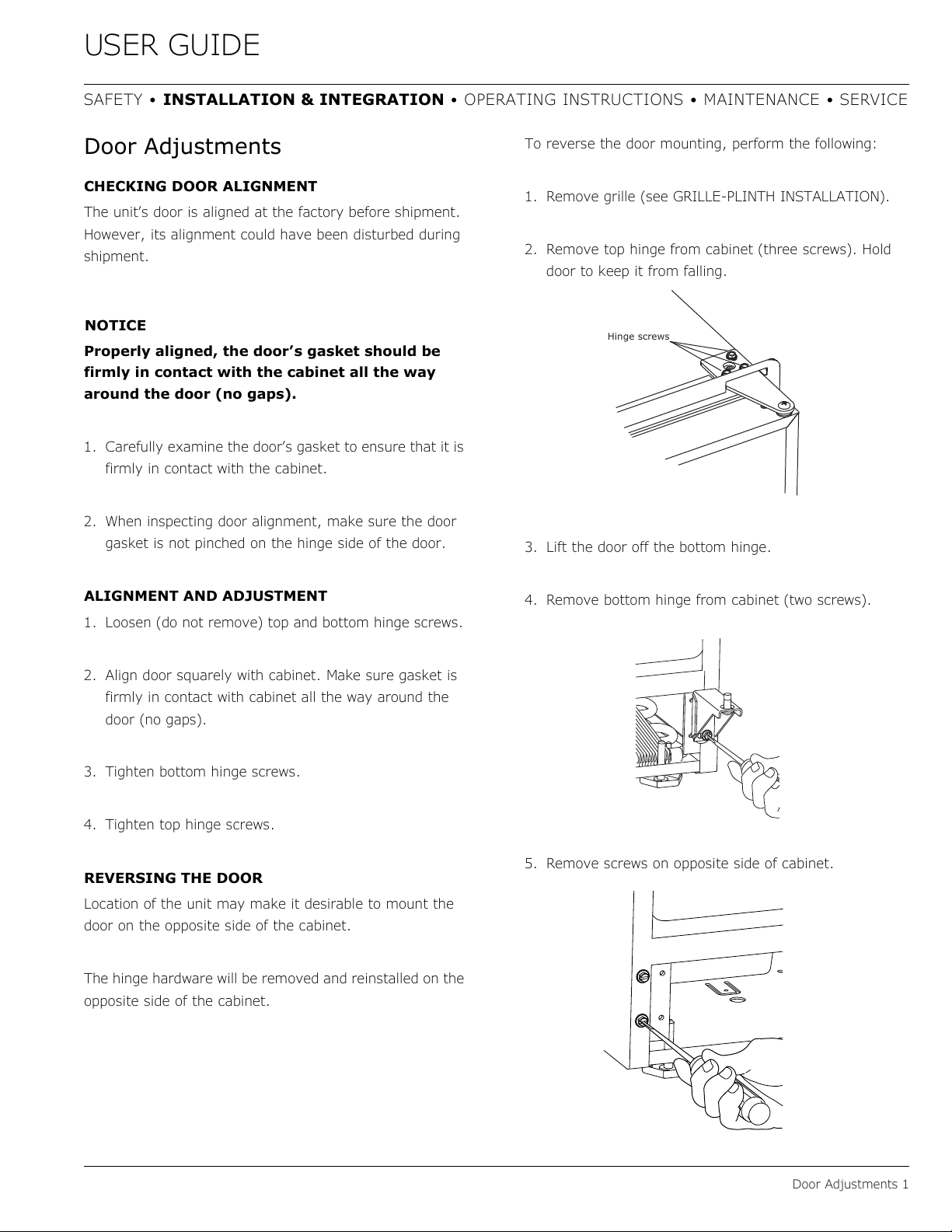
2. Remove top hinge from cabinet (three screws). Hold
door to keep it from falling.
3. Lift the door off the bottom hinge.
4. Remove bottom hinge from cabinet (two screws).
5. Remove screws on opposite side of cabinet.
Hinge screws
18
USER GUIDE
Door Adjustments 2
SAFETY • INSTALLATION & INTEGRATION • OPERATING INSTRUCTIONS • MAINTENANCE • SERVICE
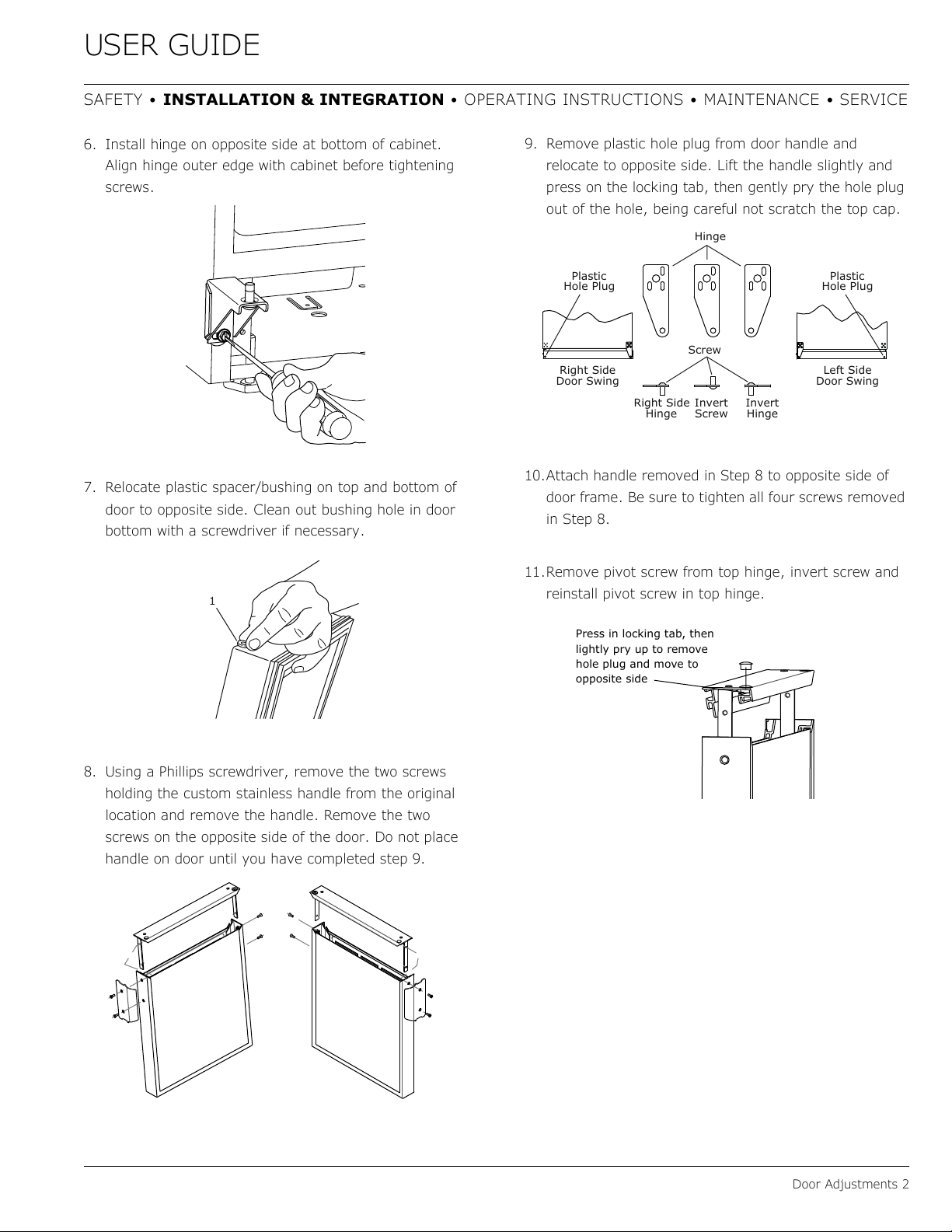
6. Install hinge on opposite side at bottom of cabinet.
Align hinge outer edge with cabinet before tightening
screws.
7. Relocate plastic spacer/bushing on top and bottom of
door to opposite side. Clean out bushing hole in door
bottom with a screwdriver if necessary.
8. Using a Phillips screwdriver, remove the two screws
holding the custom stainless handle from the original
location and remove the handle. Remove the two
screws on the opposite side of the door. Do not place
handle on door until you have completed step 9.
9. Remove plastic hole plug from door handle and
relocate to opposite side. Lift the handle slightly and
press on the locking tab, then gently pry the hole plug
out of the hole, being careful not scratch the top cap.
10.Attach handle removed in Step 8 to opposite side of
door frame. Be sure to tighten all four screws removed
in Step 8.
11.Remove pivot screw from top hinge, invert screw and
reinstall pivot screw in top hinge.
1
Plastic
Hole Plug
Plastic
Hole Plug
Hinge
Screw
Right Side
Door Swing
Right Side
Hinge
Invert
Screw
Invert
Hinge
Left Side
Door Swing
Press in locking tab, then
lightly pry up to remove
hole plug and move to
opposite side
19
USER GUIDE
Door Adjustments 3
SAFETY • INSTALLATION & INTEGRATION • OPERATING INSTRUCTIONS • MAINTENANCE • SERVICE
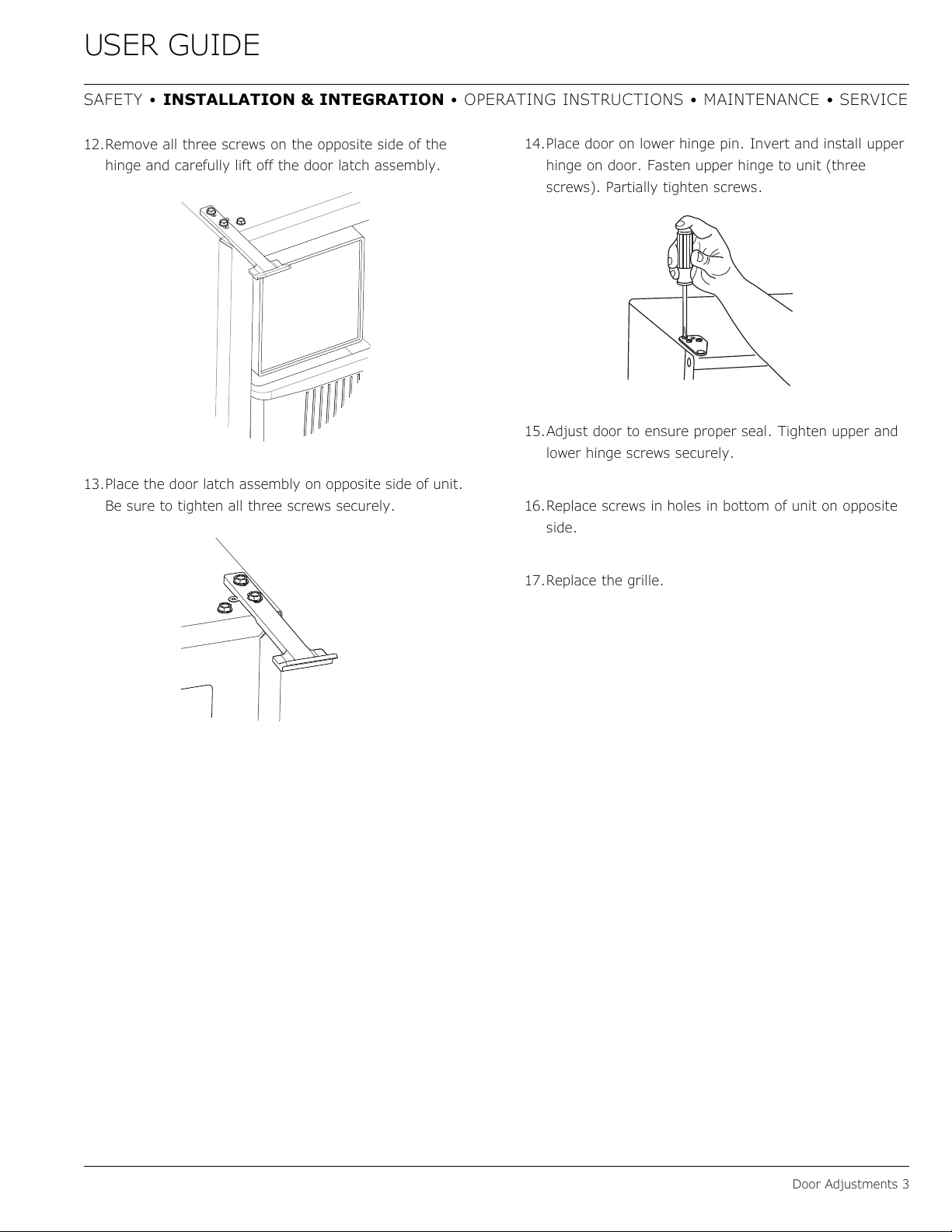
12.Remove all three screws on the opposite side of the
hinge and carefully lift off the door latch assembly.
13.Place the door latch assembly on opposite side of unit.
Be sure to tighten all three screws securely.
14.Place door on lower hinge pin. Invert and install upper
hinge on door. Fasten upper hinge to unit (three
screws). Partially tighten screws.
15.Adjust door to ensure proper seal. Tighten upper and
lower hinge screws securely.
16.Replace screws in holes in bottom of unit on opposite
side.
17.Replace the grille.
20
USER GUIDE
Door Latch 1
SAFETY • INSTALLATION & INTEGRATION • OPERATING INSTRUCTIONS • MAINTENANCE • SERVICE
Door Latch
The door latch assembly included with your unit can be
installed to prevent the door from opening when the
vehicle is in motion.
To install, perform the following:
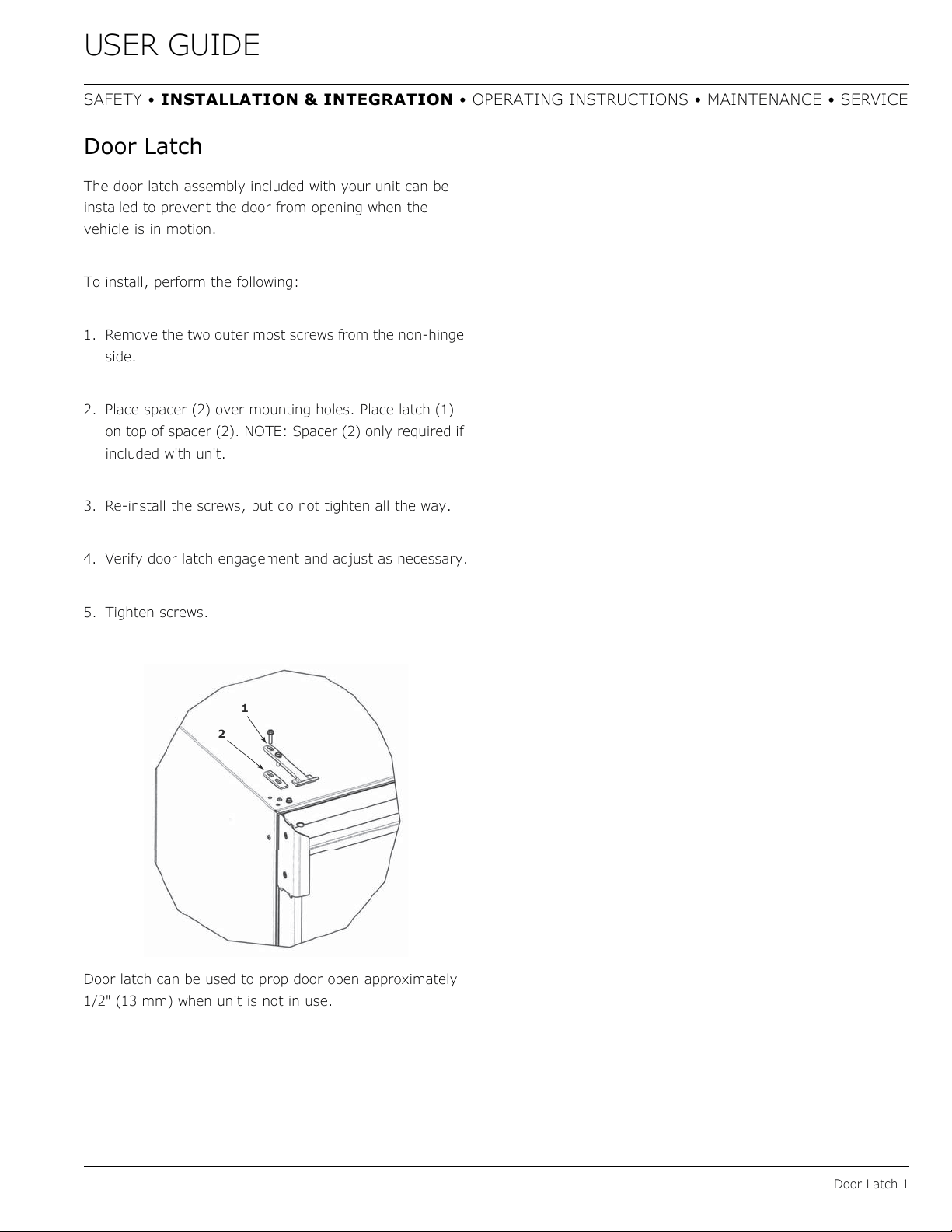
1. Remove the two outer most screws from the non-hinge
side.
2. Place spacer (2) over mounting holes. Place latch (1)
on top of spacer (2). NOTE: Spacer (2) only required if
included with unit.
3. Re-install the screws, but do not tighten all the way.
4. Verify door latch engagement and adjust as necessary.
5. Tighten screws.
Door latch can be used to prop door open approximately
1/2" (13 mm) when unit is not in use.
2
1
21
USER GUIDE
First Use 1
SAFETY • INSTALLATION & INTEGRATION • OPERATING INSTRUCTIONS • MAINTENANCE • SERVICE
First Use
All U-Line controls are preset at the factory. Initial startup
requires no adjustments.
NOTICE
U-Line recommends allowing the unit to run
overnight before loading with product.
U-Line recommends discarding the ice produced
during the first two to three hours of operation
to avoid possible dirt or scale that may dislodge
from the water line.
To turn the unit on or off:
Press the rocker switch located below the temperature
control dial in the center of the grille.
CONTROL DIAL
The control dial sets a single continuous temperature.
This set point temperature is a base setting used by the
controller to maintain the temperature zone in the unit.
The factory default MID setting, number 3 or 4 set point,
is approximately 38°F (3°C). The set point temperature is
a gauge for further temperature adjustments.
OFF
ON
22
USER GUIDE
Ice 1
SAFETY • INSTALLATION & INTEGRATION • OPERATING INSTRUCTIONS • MAINTENANCE • SERVICE
Ice
ICE MAKER OPERATION
When the ice bucket is full, the ice making mechanism will
shut off. However, the refrigeration system will continue
to cool and maintain the ice supply.
NOTICE
Do not place cans or bottles in the ice
compartment because they will freeze.
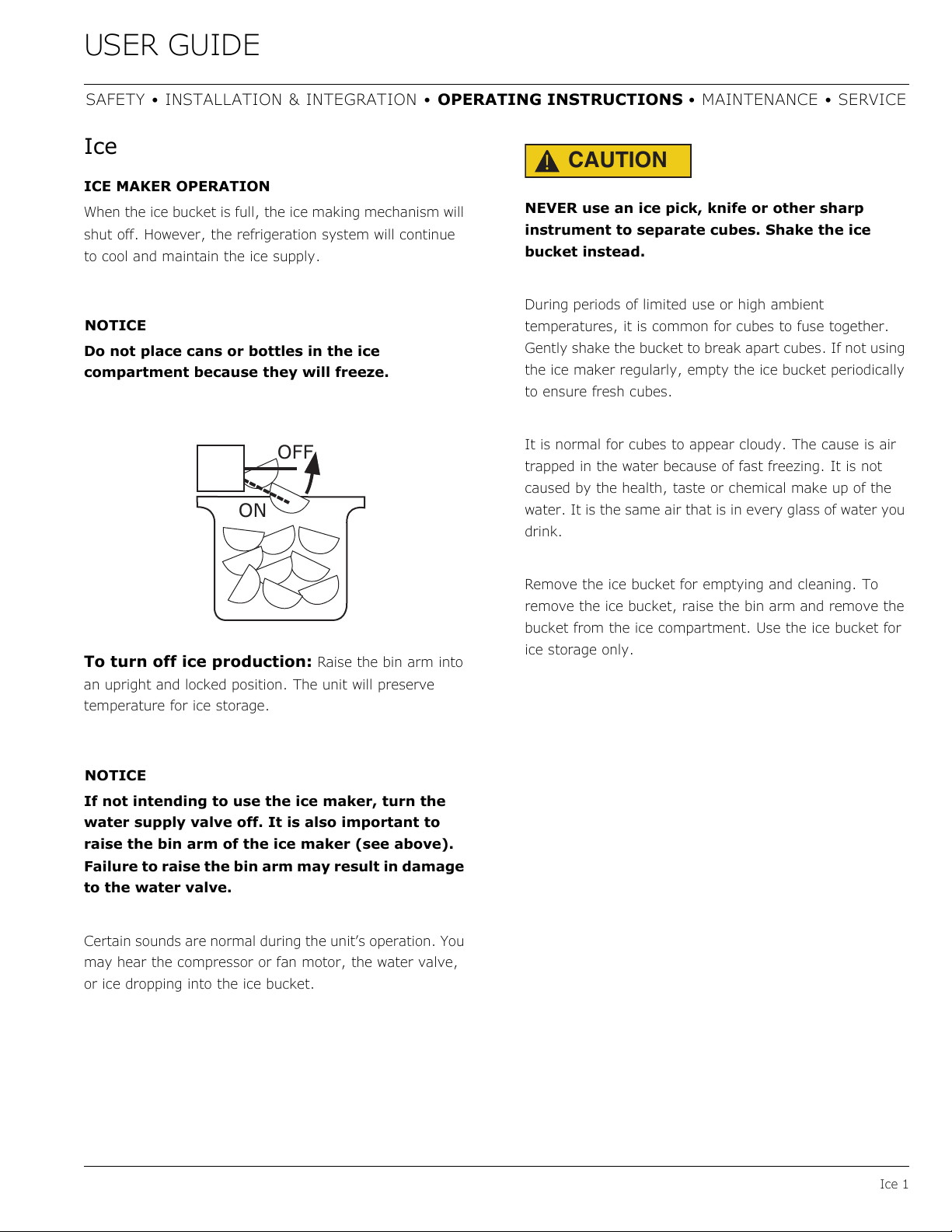
To turn off ice production: Raise the bin arm into
an upright and locked position. The unit will preserve
temperature for ice storage.
NOTICE
If not intending to use the ice maker, turn the
water supply valve off. It is also important to
raise the bin arm of the ice maker (see above).
Failure to raise the bin arm may result in damage
to the water valve.
Certain sounds are normal during the unit’s operation. You
may hear the compressor or fan motor, the water valve,
or ice dropping into the ice bucket.
CAUTION
!
NEVER use an ice pick, knife or other sharp
instrument to separate cubes. Shake the ice
bucket instead.
During periods of limited use or high ambient
temperatures, it is common for cubes to fuse together.
Gently shake the bucket to break apart cubes. If not using
the ice maker regularly, empty the ice bucket periodically
to ensure fresh cubes.
It is normal for cubes to appear cloudy. The cause is air
trapped in the water because of fast freezing. It is not
caused by the health, taste or chemical make up of the
water. It is the same air that is in every glass of water you
drink.
Remove the ice bucket for emptying and cleaning. To
remove the ice bucket, raise the bin arm and remove the
bucket from the ice compartment. Use the ice bucket for
ice storage only.
OFF
ON
23
USER GUIDE
Ice 2
SAFETY • INSTALLATION & INTEGRATION • OPERATING INSTRUCTIONS • MAINTENANCE • SERVICE
ICE MAKER ADJUSTMENT
Ice Cube Thickness Adjustment
Interval - As Required
On ice maker equipped models, adjust the cube size by
changing water amount injected into the ice maker
assembly as follows:
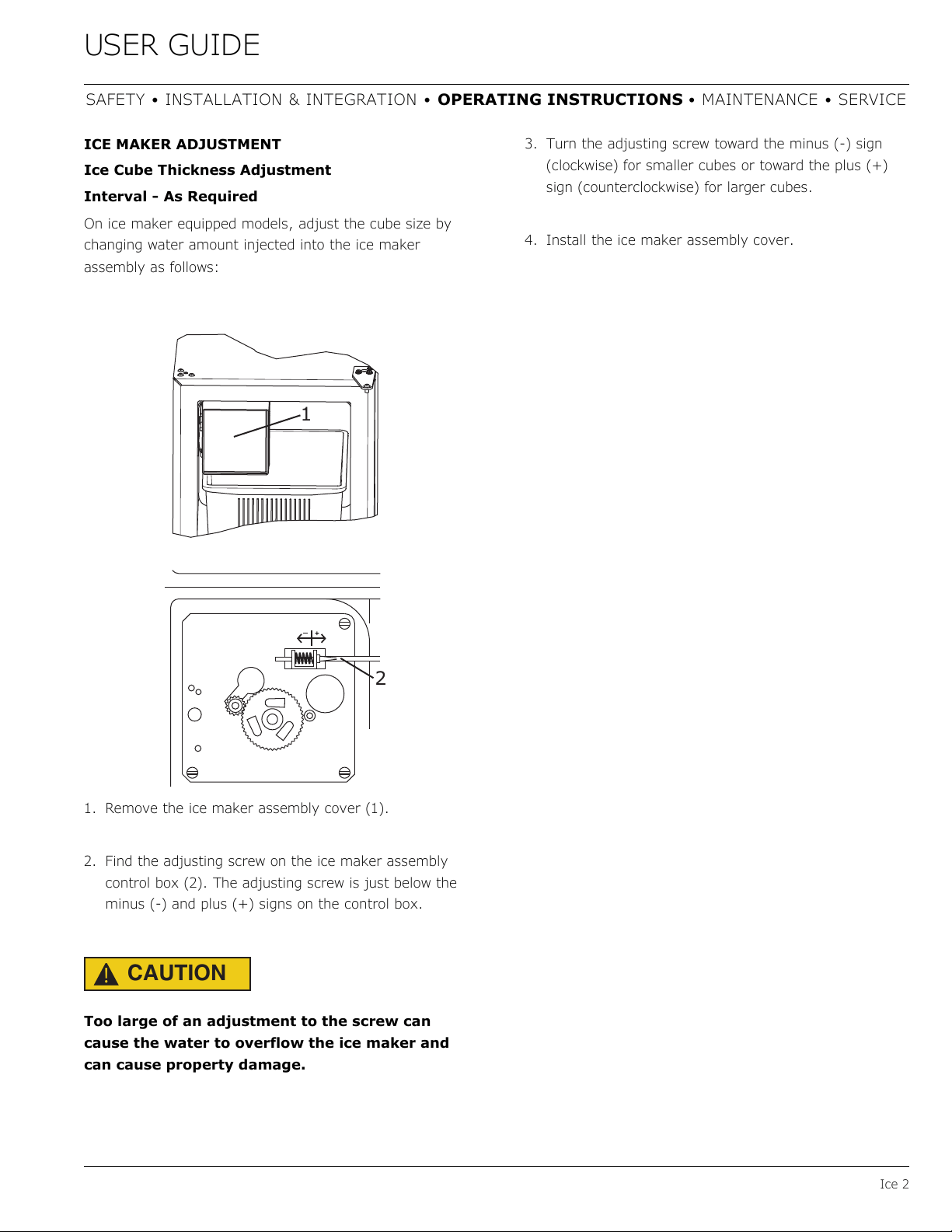
1. Remove the ice maker assembly cover (1).
2. Find the adjusting screw on the ice maker assembly
control box (2). The adjusting screw is just below the
minus (-) and plus (+) signs on the control box.
CAUTION
!
Too large of an adjustment to the screw can
cause the water to overflow the ice maker and
can cause property damage.
3. Turn the adjusting screw toward the minus (-) sign
(clockwise) for smaller cubes or toward the plus (+)
sign (counterclockwise) for larger cubes.
4. Install the ice maker assembly cover.
1
2
24
USER GUIDE
Airflow and Product Loading 1
SAFETY • INSTALLATION & INTEGRATION • OPERATING INSTRUCTIONS • MAINTENANCE • SERVICE
Airflow and Product Loading
NOTICE
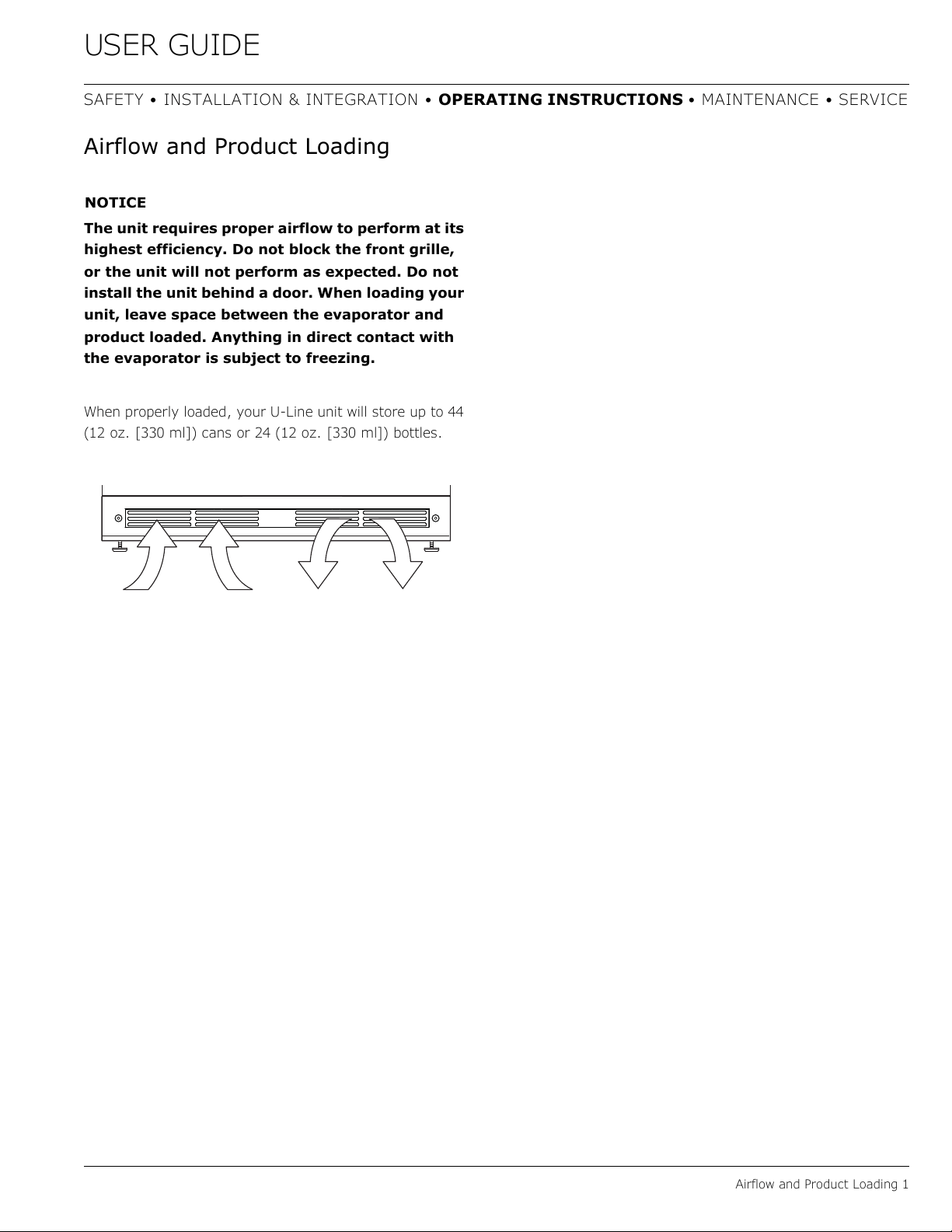
The unit requires proper airflow to perform at its
highest efficiency. Do not block the front grille,
or the unit will not perform as expected. Do not
install the unit behind a door. When loading your
unit, leave space between the evaporator and
product loaded. Anything in direct contact with
the evaporator is subject to freezing.
When properly loaded, your U-Line unit will store up to 44
(12 oz. [330 ml]) cans or 24 (12 oz. [330 ml]) bottles.
25
USER GUIDE
Interior Shelves 1
SAFETY • INSTALLATION & INTEGRATION • OPERATING INSTRUCTIONS • MAINTENANCE • SERVICE
Interior Shelves
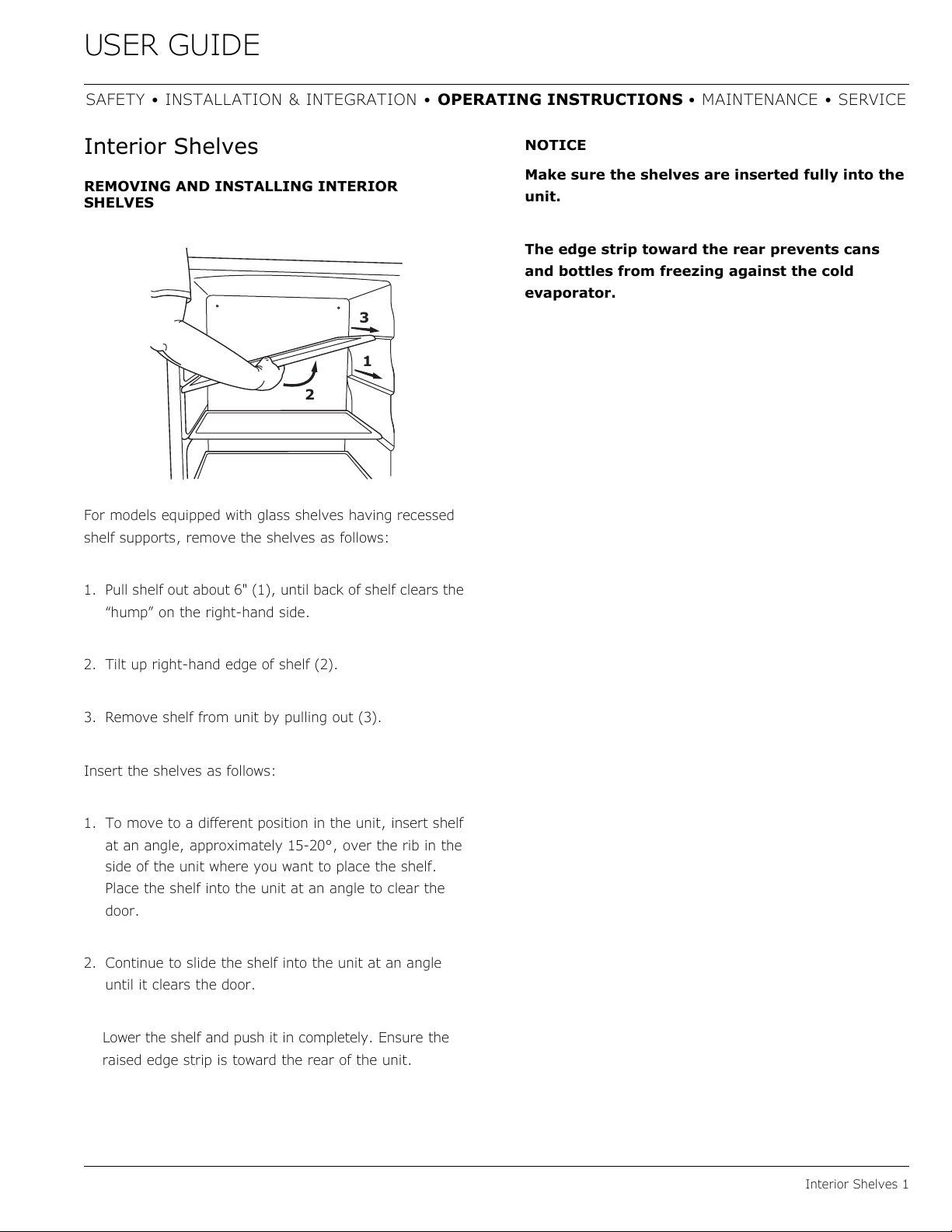
REMOVING AND INSTALLING INTERIOR
SHELVES
For models equipped with glass shelves having recessed
shelf supports, remove the shelves as follows:
1. Pull shelf out about 6" (1), until back of shelf clears the
“hump” on the right-hand side.
2. Tilt up right-hand edge of shelf (2).
3. Remove shelf from unit by pulling out (3).
Insert the shelves as follows:
1. To move to a different position in the unit, insert shelf
at an angle, approximately 15-20°, over the rib in the
side of the unit where you want to place the shelf.
Place the shelf into the unit at an angle to clear the
door.
2. Continue to slide the shelf into the unit at an angle
until it clears the door.
Lower the shelf and push it in completely. E
nsure the
raised edge strip is toward the rear of the unit.
NOTICE
Make sure the shelves are inserted fully into the
unit.
The edge strip toward the rear prevents cans
and bottles from freezing against the cold
evaporator.
2
3
1
26
USER GUIDE
Door Shelves 1
SAFETY • INSTALLATION & INTEGRATION • OPERATING INSTRUCTIONS • MAINTENANCE • SERVICE
Door Shelves
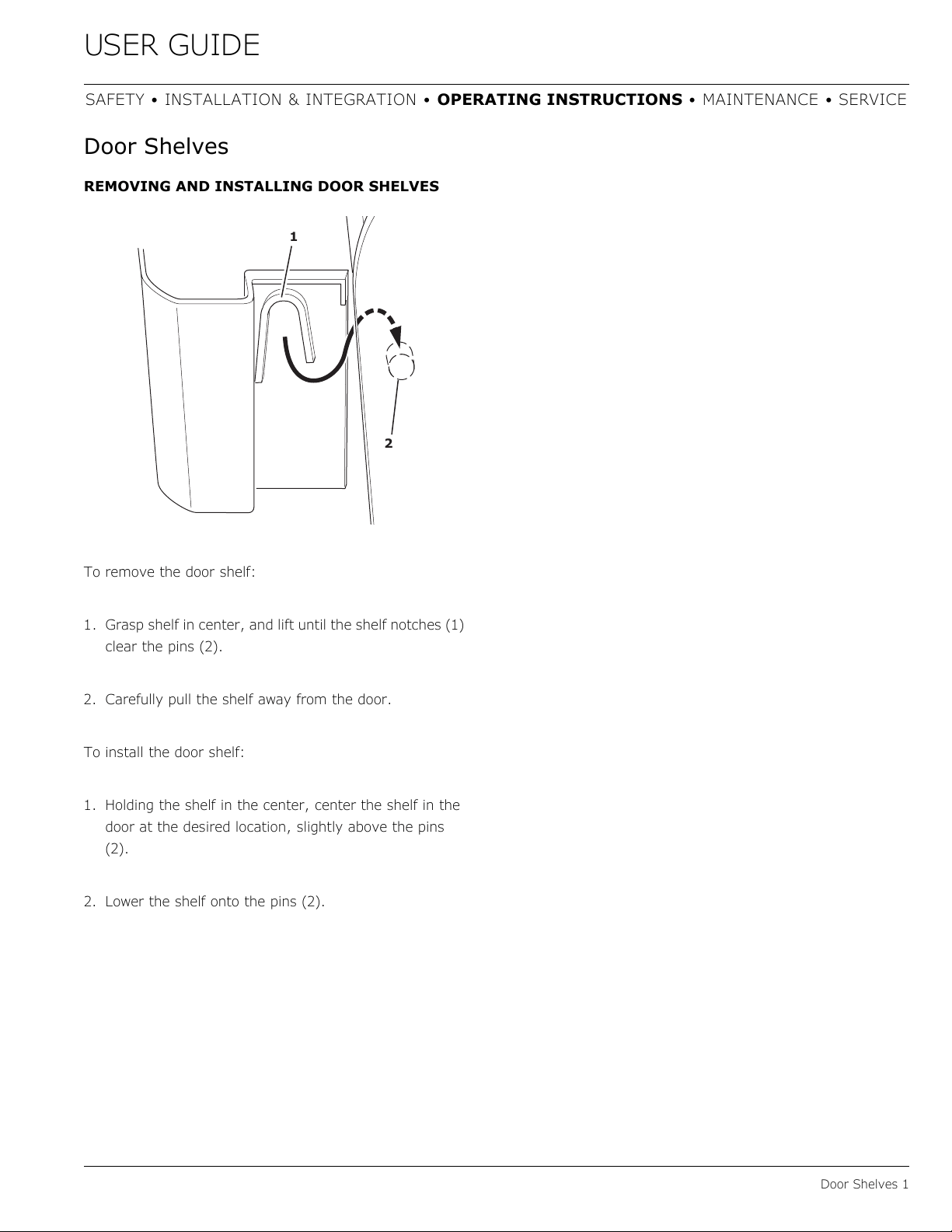
REMOVING AND INSTALLING DOOR SHELVES
To remove the door shelf:
1. Grasp shelf in center, and lift until the shelf notches (1)
clear the pins (2).
2. Carefully pull the shelf away from the door.
To install the door shelf:
1. Holding the shelf in the center, center the shelf in the
door at the desired location, slightly above the pins
(2).
2. Lower the shelf onto the pins (2).
1
2
27
USER GUIDE
Cleaning 1
SAFETY • INSTALLATION & INTEGRATION • OPERATING INSTRUCTIONS • MAINTENANCE • SERVICE
Cleaning
EXTERIOR CLEANING
Vinyl Clad (Black or White) Models
Clean surfaces with a mild detergent and warm water
solution. Do not use solvent-based or abrasive cleaners.
Use a soft sponge and rinse with clean water. Wipe with a
soft, clean towel to prevent water spotting.
Clean any glass surfaces with a non-chlorine glass
cleaner.
Stainless Models
Stainless door panels, handles and frames can discolor
when exposed to chlorine gas, pool chemicals, saltwater
or cleaners with bleach.
Keep your stainless unit looking new by cleaning with a
good quality all-in-one stainless steel cleaner and polish
monthly. For best results use Claire
®
Stainless Steel
Polish and Cleaner. Comparable products are acceptable.
Frequent cleaning will remove surface contamination that
could lead to rust. Some installations may require cleaning
weekly.
Do not clean with steel wool pads.
Do not use stainless steel cleaners or polishes on
any glass surfaces.
Clean any glass surfaces with a non-chlorine glass
cleaner.
Do not use cleaners not specifically intended for
stainless steel on stainless surfaces (this
includes glass, tile and counter cleaners).
If any surface discoloring or rusting appears, clean it
quickly with Bon-Ami
®
or Barkeepers Friend Cleanser
®
and
a nonabrasive cloth. Always clean with the grain. Always
finish with Claire
®
Stainless Steel Polish and Cleaner or
comparable product to prevent further problems.
Using abrasive pads such as ScotchBrite™ will
cause the graining in the stainless steel to
become blurred.
Rust not cleaned up promptly can penetrate the
surface of the stainless steel and complete
removal of the rust may not be possible.
Integrated Models
To clean integrated panels, use household cleaner per the
cabinet manufacturer’s recommendations.
INTERIOR CLEANING
Disconnect power to the unit.
Clean the interior and all removed components using a
mild nonabrasive detergent and warm water solution
applied with a soft sponge or non-abrasive cloth.
Rinse the interior using a soft sponge and clean water.
Do not use any solvent-based or abrasive
cleaners. These types of cleaners may transfer taste to
the interior products and damage or discolor the interior.
28
USER GUIDE
Cleaning 2
SAFETY • INSTALLATION & INTEGRATION • OPERATING INSTRUCTIONS • MAINTENANCE • SERVICE
DEFROSTING
Manual Defrost Models
Unit is a manual defrost model and will require occasional
defrosting. When there is build-up of 1/4" (6 mm) or more
of frost, manually defrost the unit. Defrost every two
months minimum.
Ensure the door is closing and sealing properly.
High ambient temperature and excessive humidity can
also produce frost.
CAUTION
!
DO NOT use an ice pick or other sharp
instrument to help speed up defrosting. These
instruments can puncture the inner lining or
damage the cooling unit. DO NOT use any type of
heater to defrost. Using a heater to speed up
defrosting can cause personal injury and
damage to the inner lining.
To defrost:
1. Disconnect power to the unit.
2. For combo models remove all products from the
interior.
3. Remove ice bucket and discard ice.
4. Place towel or other absorbent material on bottom of
ice bin. For combo models also place in bottom of unit.
5. Fill the ice bucket half full with warm, not hot water.
This will help the unit defrost faster.
6. Place the ice bucket back into the unit on top of the
towel or other absorbent material.
7. Prop the door in an open position (2 in. [50 mm]
minimum).
8. After about 1 hour remove the ice bin and discard
water.
9. Allow the frost to melt naturally.
10.After the frost melts completely clean the interior and
all removed components. (See INTERIOR CLEANING).
NOTICE
DO NOT clean ice bucket using a dishwasher. The
bucket is not dishwasher safe and will be
damaged.
11.When the interior is dry, reconnect power and turn unit
on.
NOTE: To safeguard against contaminates in ice, discard
first three batches of ice after defrosting.
29
USER GUIDE
Cleaning Condenser 1
SAFETY • INSTALLATION & INTEGRATION • OPERATING INSTRUCTIONS • MAINTENANCE • SERVICE
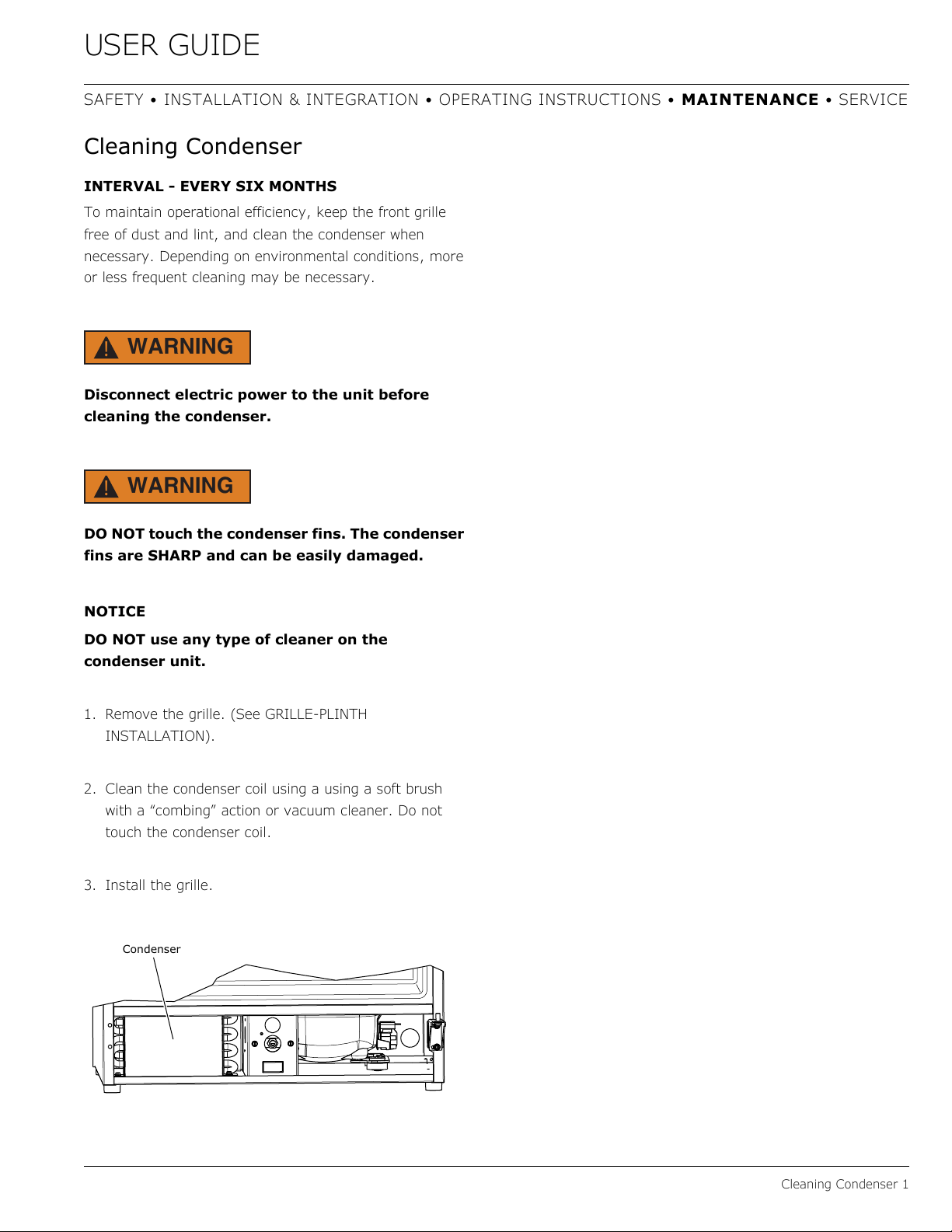
Cleaning Condenser
INTERVAL - EVERY SIX MONTHS
To maintain operational efficiency, keep the front grille
free of dust and lint, and clean the condenser when
necessary. Depending on environmental conditions, more
or less frequent cleaning may be necessary.
WARNING
!
Disconnect electric power to the unit before
cleaning the condenser.
WARNING
!
DO NOT touch the condenser fins. The condenser
fins are SHARP and can be easily damaged.
NOTICE
DO NOT use any type of cleaner on the
condenser unit.
1. Remove the grille. (See GRILLE-PLINTH
INSTALLATION).
2. Clean the condenser coil using a using a soft brush
with a “combing” action or vacuum cleaner. Do not
touch the condenser coil.
3. Install the grille.
Condenser
30
USER GUIDE
Extended Non-Use 1
SAFETY • INSTALLATION & INTEGRATION • OPERATING INSTRUCTIONS • MAINTENANCE • SERVICE
Extended Non-Use
VACATION/HOLIDAY, PROLONGED SHUTDOWN
The following steps are recommended for periods of
extended non-use:
1. Remove all consumable content from the unit.
2. Disconnect the power cord from its outlet/socket and
leave it disconnected until the unit is returned to
service.
3. Turn off the water supply.
4. If ice is on the evaporator, allow ice to thaw naturally.
5. Clean and dry the interior of the cabinet. Ensure all
water has been removed from the unit.
6. Disconnect the water and drain line (if applicable)
making sure all water is removed from the lines.
7. The door must remain open to prevent formation of
mold and mildew. Open door a minimum of 2"
(50 mm) to provide the necessary ventilation.
WINTERIZATION
If the unit will be exposed to temperatures of 40°F (5°C)
or less, the steps above must be followed.
MACHINES WITH BUILT-IN DRAIN PUMPS
If your machine is equipped with a P60 drain pump, it
must be drained according to the following procedure:
1. Remove the drain pump from the ice machine.
2. Drain the water in the pump’s reservoir by turning the
pump upside down and allowing the water to drain
through the pump’s inlet and vent tube fittings.
3. After water is drained, reinstall the drain pump and
reattach all connections.
For questions regarding winterization, please
call U-Line at 414.354.0300.
CAUTION
!
Damage caused by freezing temperatures is not
covered by the warranty.
Do not put anti-freeze in your unit.
31
USER GUIDE
Troubleshooting 1
SAFETY • INSTALLATION & INTEGRATION • OPERATING INSTRUCTIONS • MAINTENANCE • SERVICE
Troubleshooting
BEFORE CALLING FOR SERVICE
If you think your U-Line product is malfunctioning, read
the CONTROL OPERATION section to clearly understand
the function of the control.
If the problem persists, read the NORMAL OPERATING
SOUNDS and TROUBLESHOOTING GUIDE sections below
to help you quickly identify common problems and
possible causes and remedies. Most often, this will resolve
the problem without the need to call for service.
IF SERVICE IS REQUIRED
If you do not understand a troubleshooting remedy, or
your product needs service, contact U-Line Corporation
directly at +1.414.354.0300
When you call, you will need your product Model and
Serial Numbers. This information appears on the Model
and Serial number plate located on the upper right or rear
wall of the interior of your product.
NORMAL OPERATING SOUNDS
All models incorporate rigid foam insulated cabinets to
provide high thermal efficiency and maximum sound
reduction for its internal working components. Despite this
technology, your model may make sounds that are
unfamiliar.
Normal operating sounds may be more noticeable because
of the unit’s environment. Hard surfaces such as cabinets,
wood, vinyl or tiled floors and paneled walls have a
tendency to reflect normal appliance operating noises.
Listed below are common refrigeration components with a
brief description of the normal operating sounds they
make. NOTE: Your product may not contain all the
components listed.
• Compressor: The compressor makes a hum or pulsing
sound that may be heard when it operates.
• Evaporator: Refrigerant flowing through an evaporator
may sound like boiling liquid.
• Condenser Fan: Air moving through a condenser may
be heard.
• Automatic Defrost Drain Pan: Water may be heard
dripping or running into the drain pan when the unit is
in the defrost cycle.
TROUBLESHOOTING GUIDE
DANGER
!
ELECTROCUTION HAZARD. Never attempt to
repair or perform maintenance on the unit
before disconnecting the main electrical power.
Troubleshooting - What to check when problems occur:
Problem Possible Cause and Remedy
Light Remains
on When Door
Is Closed.
Turn off light switch if equipped.
Check reed switch.
Unit Develops
Frost on
Internal
Surfaces.
Frost on the rear wall is normal and will melt
during each off cycle.
If there is excessive build-up of 1/4" or more,
manually defrost the unit.
Ensure the door is closing and sealing
properly.
High ambient temperature and excessive
humidity can also produce frost.
Unit Develops
Condensation
on External
Surfaces.
The unit is exposed to excessive humidity.
Moisture will dissipate as humidity levels
decrease.
Product Is
Freezing.
Because product in contact with the rear wall
may freeze, ensure no product is touching the
rear wall.
Adjust the temperature to a warmer set point.
32
USER GUIDE
Troubleshooting 2
SAFETY • INSTALLATION & INTEGRATION • OPERATING INSTRUCTIONS • MAINTENANCE • SERVICE
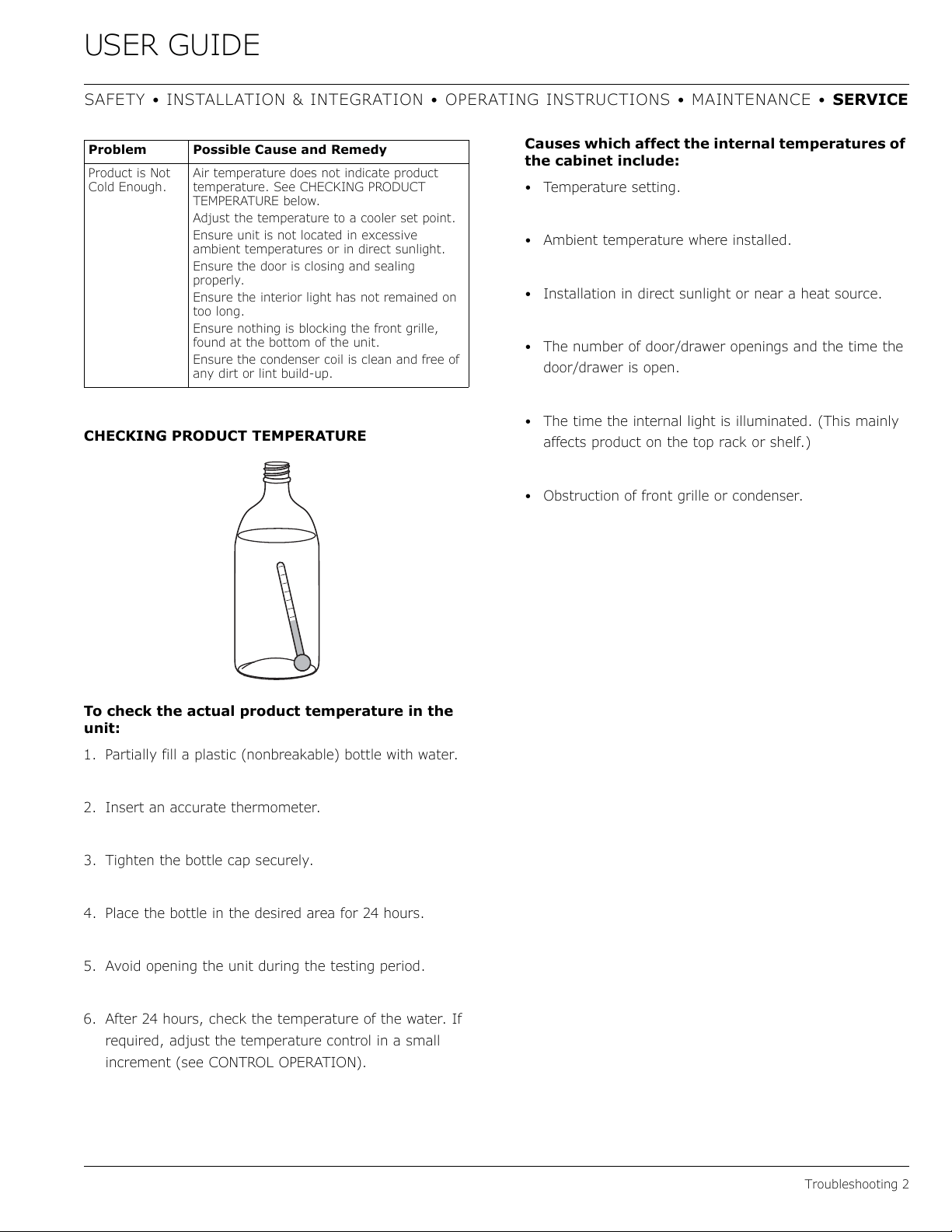
CHECKING PRODUCT TEMPERATURE
To check the actual product temperature in the
unit:
1. Partially fill a plastic (nonbreakable) bottle with water.
2. Insert an accurate thermometer.
3. Tighten the bottle cap securely.
4. Place the bottle in the desired area for 24 hours.
5. Avoid opening the unit during the testing period.
6. After 24 hours, check the temperature of the water. If
required, adjust the temperature control in a small
increment (see CONTROL OPERATION).
Causes which affect the internal temperatures of
the cabinet include:
• Temperature setting.
• Ambient temperature where installed.
• Installation in direct sunlight or near a heat source.
• The number of door/drawer openings and the time the
door/drawer is open.
• The time the internal light is illuminated. (This mainly
affects product on the top rack or shelf.)
• Obstruction of front grille or condenser.
Product is Not
Cold Enough.
Air temperature does not indicate product
temperature. See CHECKING PRODUCT
TEMPERATURE below.
Adjust the temperature to a cooler set point.
Ensure unit is not located in excessive
ambient temperatures or in direct sunlight.
Ensure the door is closing and sealing
properly.
Ensure the interior light has not remained on
too long.
Ensure nothing is blocking the front grille,
found at the bottom of the unit.
Ensure the condenser coil is clean and free of
any dirt or lint build-up.
Problem Possible Cause and Remedy
33
USER GUIDE
SAFETY • INSTALLATION & INTEGRATION • OPERATING INSTRUCTIONS • MAINTENANCE • SERVICE
Wire Diagram 1
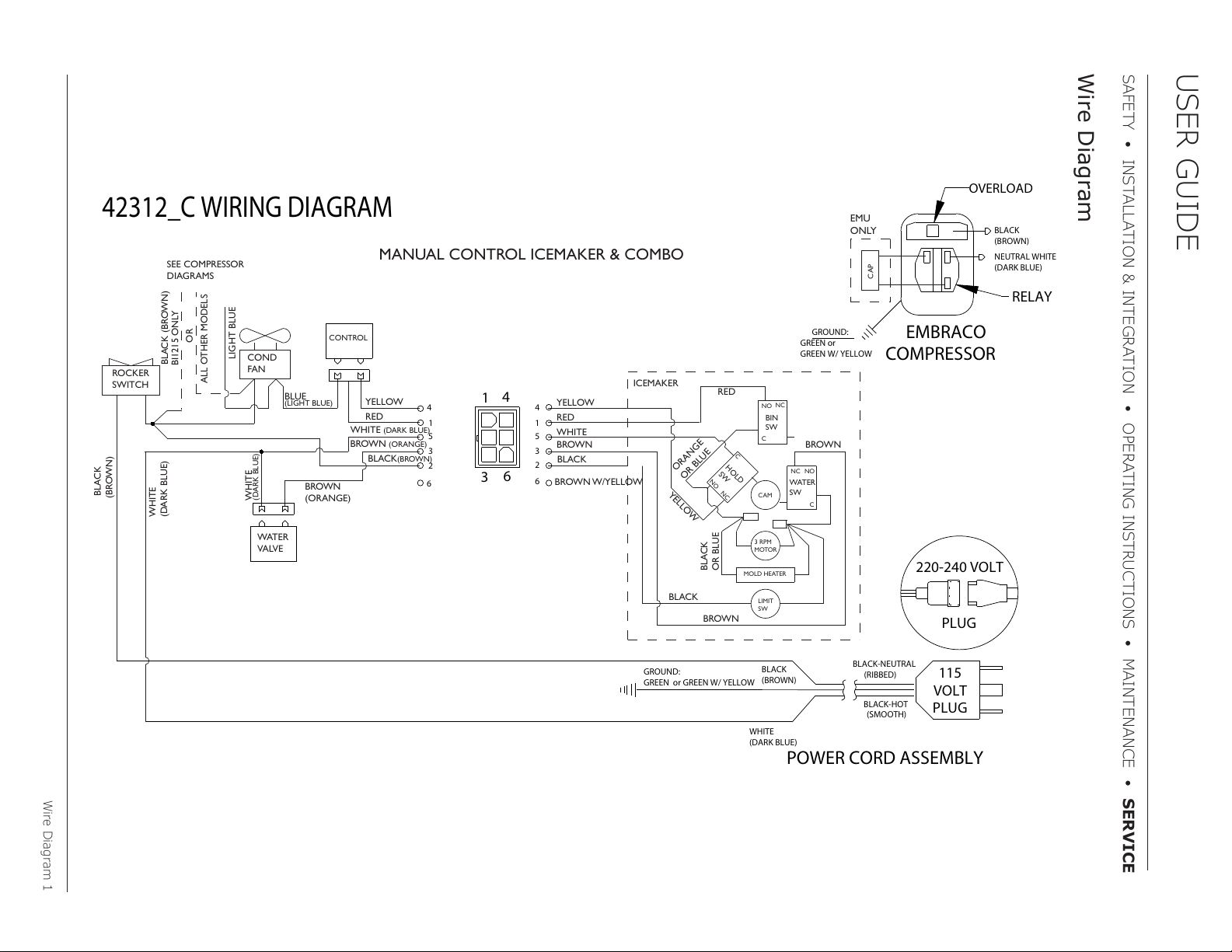
42312_C WIRING DIAGRAM
NEUTRAL WHITE
(DARK BLUE)
BLACK
(BROWN)
RELAY
EMBRACO
COMPRESSOR
GREEN or
GREEN W/ YELLOW
GROUND:
OVERLOAD
CAP
EMU
ONLY
MANUAL CONTROL ICEMAKER & COMBO
ROCKER
SWITCH
COND
FAN
WATER
VALVE
SEE COMPRESSOR
DIAGRAMS
BROWN
(ORANGE)
LIGHT BLUE
BLUE
(LIGHT BLUE)
WHITE
(DARK BLUE)
BLACK (BROWN)
BLACK
(BROWN)
WHITE
(DARK BLUE)
BIN
SW
NO
NC
C
WATER
SW
NC
NO
C
HOLD
SW
NO
NC
C
CAM
3 RPM
MOTOR
LIMIT
SW
MOLD HEATER
YELLOW
BLACK
RED
WHITE
WHITE
(DARK BLUE)
BROWN
YELLOW
RED
BROWN
(ORANGE)
BLACK(BROWN)
BROWN W/YELLOW
RED
YELLOW
BROWN
BLACK
BROWN
ORANGE
OR BLUE
BLACK
OR BLUE
OR
ALL OTHER MODELS
ICEMAKER
BI1215 ONLY
CONTROL
POWER CORD ASSEMBLY
GROUND:
GREEN or GREEN W/ YELLOW
115
VOLT
PLUG
220-240 VOLT
PLUG
BLACK-HOT
(SMOOTH)
BLACK-NEUTRAL
(RIBBED)
BLACK
(BROWN)
WHITE
(DARK BLUE)
1
3
6
4
4
1
5
3
2
6
4
1
5
3
2
6
Wire Diagram
34
USER GUIDE
Product Liability 1
SAFETY • INSTALLATION & INTEGRATION • OPERATING INSTRUCTIONS • MAINTENANCE • SERVICE
Product Liability
Field service technicians are authorized to make an initial
assessment in the event of reported damages. If there are
any questions about the process involved, the technician
should call U-Line for further explanation.
While inspecting for defects or installation issues, photos
should be taken to document any damages or issues
found.
During the assessment, if the service technician is able to
find the source of the damage and it can be resolved by
replacement of a part, the servicer is authorized to
replace the part in question. The part that caused the
damage must be returned to U-Line in its entirety. The
part must be clearly labeled with the serial number of the
unit it was removed from, the date, and the servicer who
removed the part.
If the service technician determines the damage is the
result of installation issues (water connection/drain, etc.),
the consumer would be notified and the issues shall be
resolved at the direction of the consumer.
If damage is evident and the service technician is unable
to find the source, U-Line must be contacted at 1-800-
799-2547 for further direction
8900 N. 55th Street • Milwaukee, WI 53223
T: +1.414.354.0300 • F: +1.414.354.354.5696
Website:
www.u-line.com
Right product. Right place.
Right temperature Since 1962.
35
USER GUIDE
Warranty Claims 1
SAFETY • INSTALLATION & INTEGRATION • OPERATING INSTRUCTIONS • MAINTENANCE • SERVICE
Warranty Claims
The following information defines the parameters for filing
a warranty claim:
• Valid serial number needed
• Valid model number needed
• Narda (or equivalent) form or submitted online at
www.u-line.com
• 60 day submittal deadline from date of completed
service
• Only one repair or unit per warranty claim
• Refrigerant should be labeled and included on the labor
submittal
• Door and water level adjustments are covered 30 days
from install date.
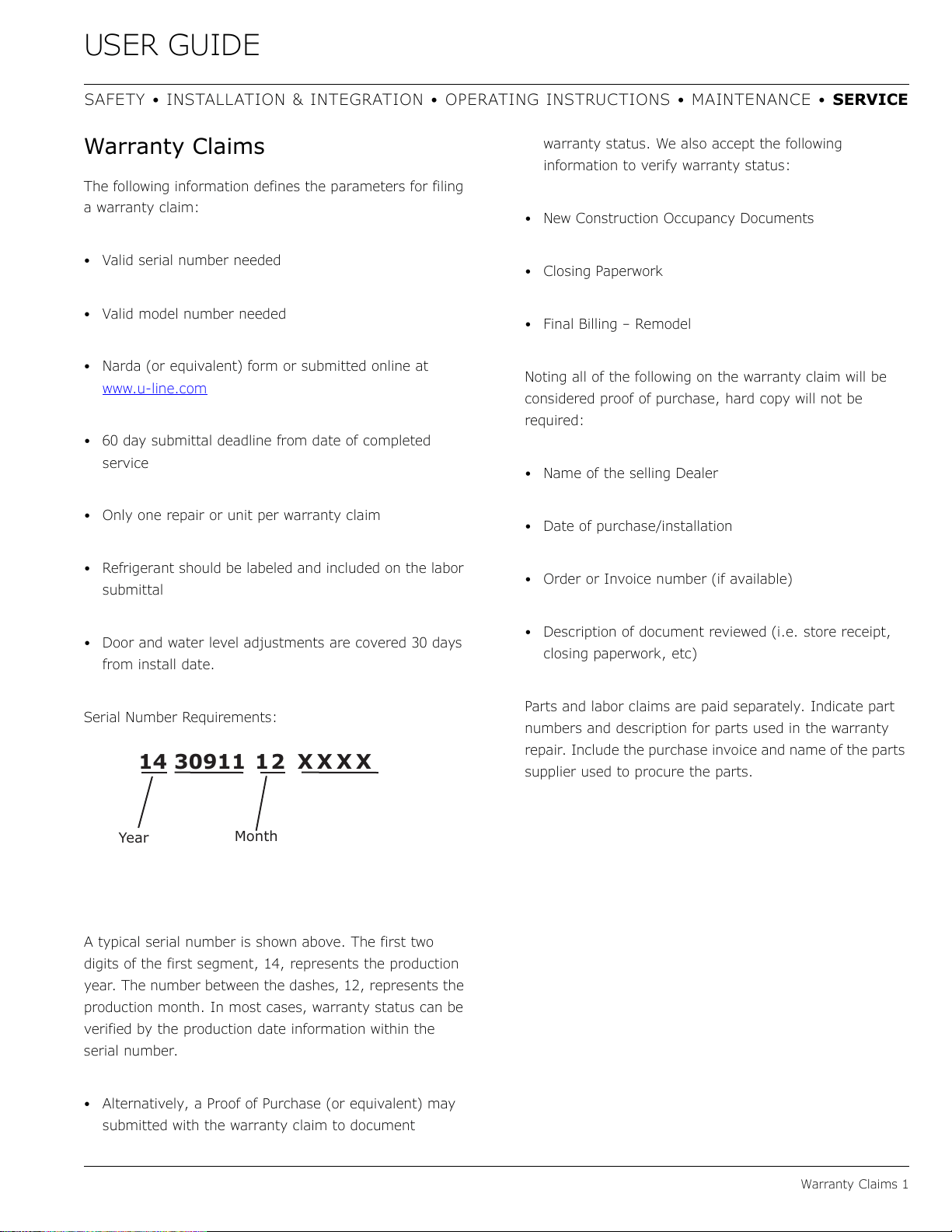
Serial Number Requirements:
A typical serial number is shown above. The first two
digits of the first segment, 14, represents the production
year. The number between the dashes, 12, represents the
production month. In most cases, warranty status can be
verified by the production date information within the
serial number.
• Alternatively, a Proof of Purchase (or equivalent) may
submitted with the warranty claim to document
warranty status. We also accept the following
information to verify warranty status:
• New Construction Occupancy Documents
•Closing Paperwork
• Final Billing – Remodel
Noting all of the following on the warranty claim will be
considered proof of purchase, hard copy will not be
required:
• Name of the selling Dealer
• Date of purchase/installation
• Order or Invoice number (if available)
• Description of document reviewed (i.e. store receipt,
closing paperwork, etc)
Parts and labor claims are paid separately. Indicate part
numbers and description for parts used in the warranty
repair. Include the purchase invoice and name of the parts
supplier used to procure the parts.
14 30911 12 XXXX
Year
Month
36
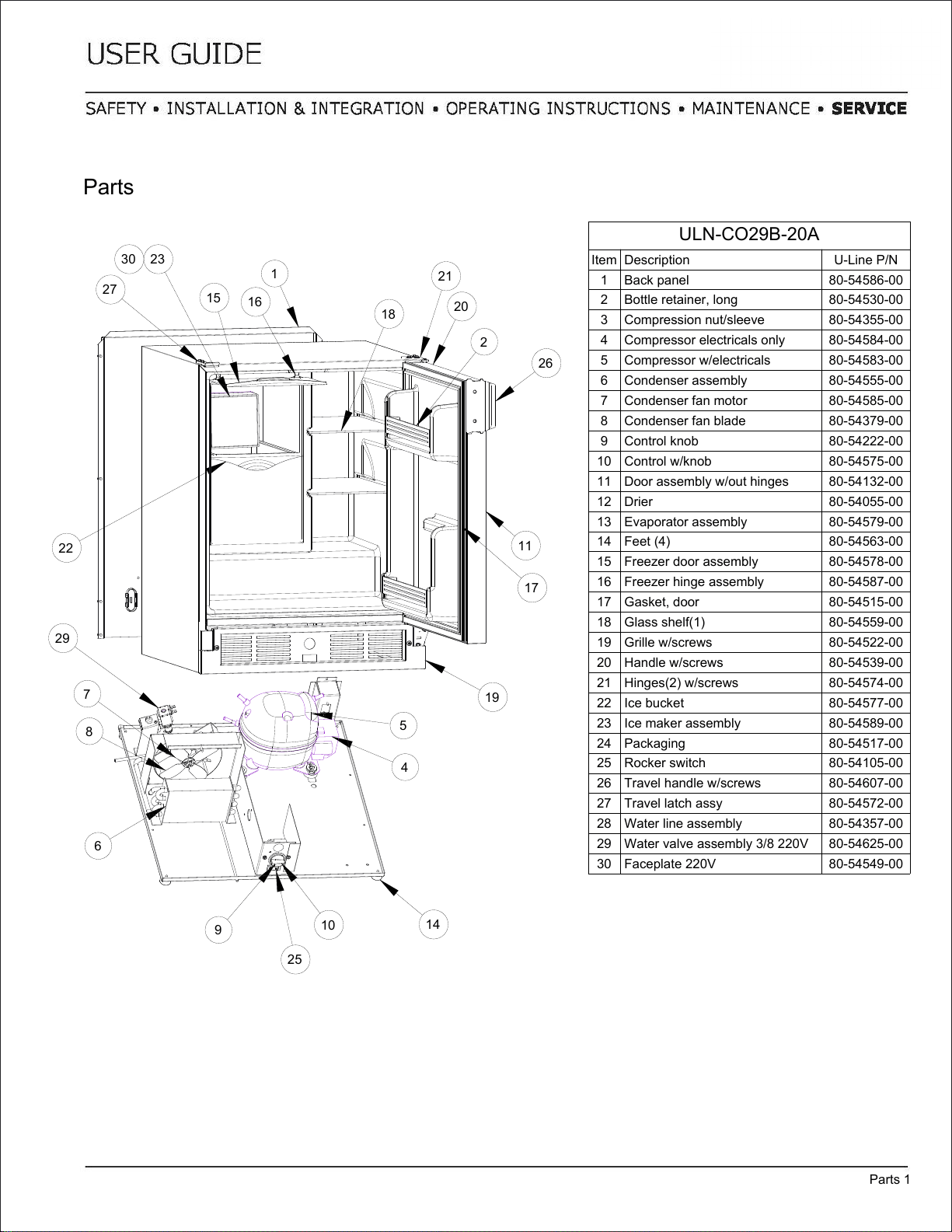
ULN-CO29B-20A
Item Description U-Line P/N
1 Back panel 80-54586-00
2 Bottle retainer, long 80-54530-00
3 Compression nut/sleeve 80-54355-00
4 Compressor electricals only 80-54584-00
5 Compressor w/electricals 80-54583-00
6 Condenser assembly 80-54555-00
7 Condenser fan motor 80-54585-00
8 Condenser fan blade 80-54379-00
9 Control knob 80-54222-00
10 Control w/knob 80-54575-00
11 Door assembly w/out hinges 80-54132-00
12 Drier 80-54055-00
13 Evaporator assembly 80-54579-00
14 Feet (4) 80-54563-00
15 Freezer door assembly 80-54578-00
16 Freezer hinge assembly 80-54587-00
17 Gasket, door 80-54515-00
18 Glass shelf(1) 80-54559-00
19 Grille w/screws 80-54522-00
20 Handle w/screws 80-54539-00
21 Hinges(2) w/screws 80-54574-00
22 Ice bucket 80-54577-00
23 Ice maker assembly 80-54589-00
24 Packaging 80-54517-00
25 Rocker switch 80-54105-00
26 Travel handle w/screws 80-54607-00
27 Travel latch assy 80-54572-00
28 Water line assembly 80-54357-00
29 Water valve assembly 3/8 220V 80-54625-00
30 Faceplate 220V 80-54549-00
Parts
Parts 1
1
4
5
6
7
8
9
10
11
16
17
18
21
30 23
2
19
20
22
26
27
29
14
15
25
37
USER GUIDE
Ordering Replacement Parts 1
SAFETY • INSTALLATION & INTEGRATION • OPERATING INSTRUCTIONS • MAINTENANCE • SERVICE
Ordering Replacement Parts
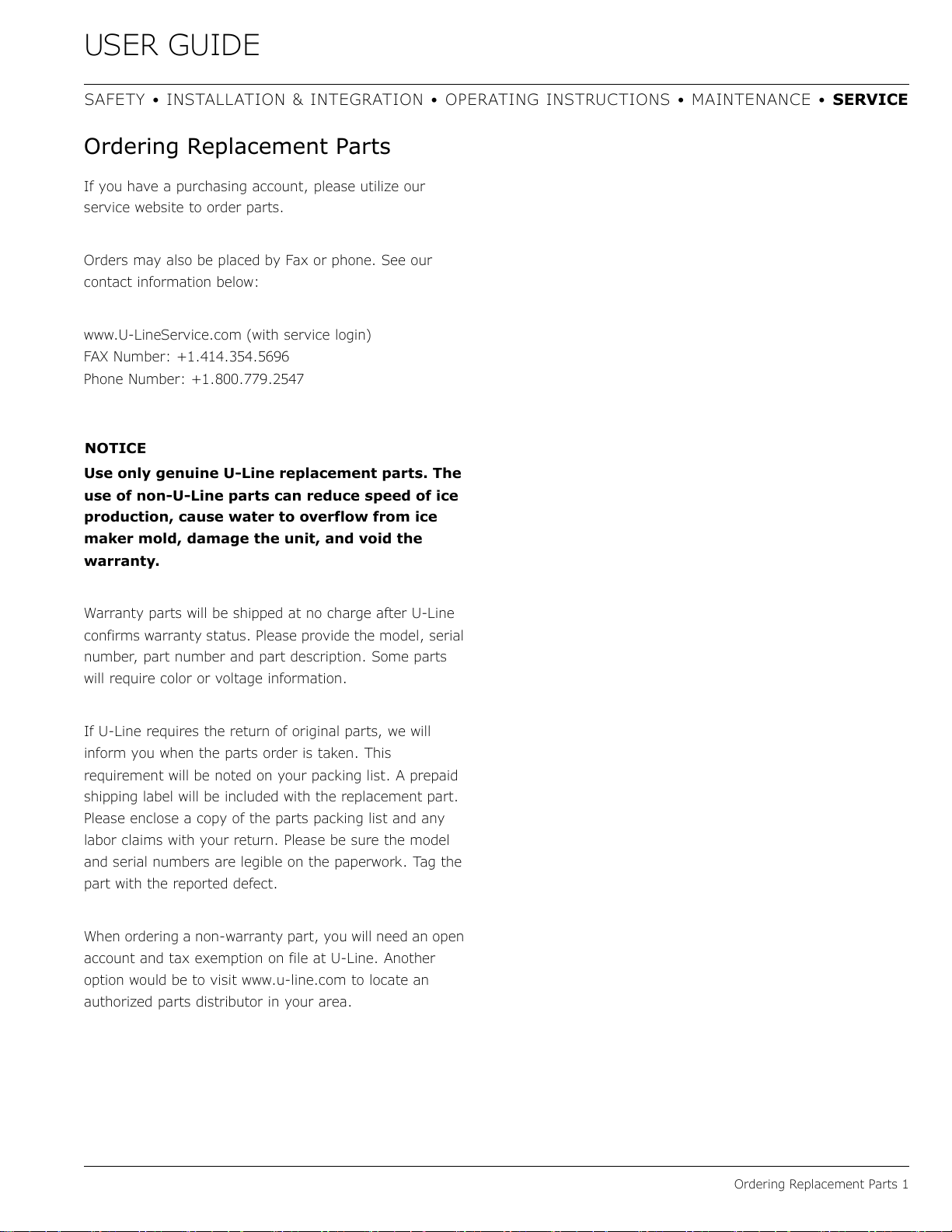
If you have a purchasing account, please utilize our
service website to order parts.
Orders may also be placed by Fax or phone. See our
contact information below:
www.U-LineService.com (with service login)
FAX Number: +1.414.354.5696
Phone Number: +1.800.779.2547
NOTICE
Use only genuine U-Line replacement parts. The
use of non-U-Line parts can reduce speed of ice
production, cause water to overflow from ice
maker mold, damage the unit, and void the
warranty.
Warranty parts will be shipped at no charge after U-Line
confirms warranty status. Please provide the model, serial
number, part number and part description. Some parts
will require color or voltage information.
If U-Line requires the return of original parts, we will
inform you when the parts order is taken. This
requirement will be noted on your packing list. A prepaid
shipping label will be included with the replacement part.
Please enclose a copy of the parts packing list and any
labor claims with your return. Please be sure the model
and serial numbers are legible on the paperwork. Tag the
part with the reported defect.
When ordering a non-warranty part, you will need an open
account and tax exemption on file at U-Line. Another
option would be to visit www.u-line.com to locate an
authorized parts distributor in your area.
38
USER GUIDE
System Diagnosis Guide 1
SAFETY • INSTALLATION & INTEGRATION • OPERATING INSTRUCTIONS • MAINTENANCE • SERVI CE
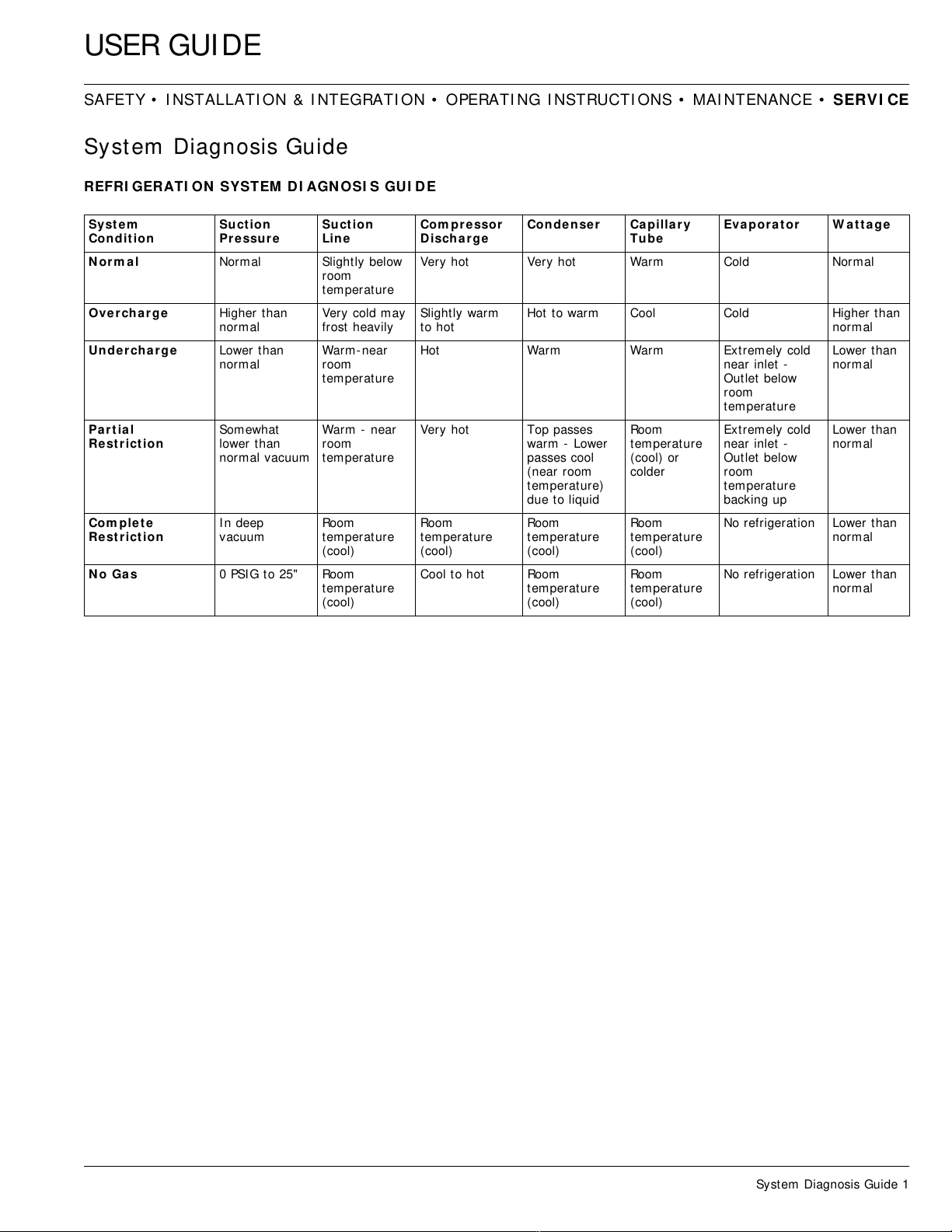
System Diagnosis Guide
REFRI GERATI ON SYSTEM DI AGN OSI S GUI D E
Syst e m
Condit ion
Suct ion
Pressu re
Suct ion
Lin e
Com pre ssor
Disch arge
Conden ser Capilla ry
Tube
Evapora t or W a t t a ge
N orm al Normal Slightly below
room
temperature
Very hot Very hot Warm Cold Normal
Ove rch arge Higher than
normal
Very cold may
frost heavily
Slightly warm
to hot
Hot to warm Cool Cold Higher than
normal
Unde rcharge Lower than
normal
Warm-near
room
temperature
Hot Warm Warm Extremely cold
near inlet -
Outlet below
room
temperature
Lower than
normal
Par t ial
Re st r ict ion
Somewhat
lower than
normal vacuum
Warm - near
room
temperature
Very hot Top passes
warm - Lower
passes cool
(near room
temperature)
due to liquid
Room
temperature
(cool) or
colder
Extremely cold
near inlet -
Outlet below
room
temperature
backing up
Lower than
normal
Com plete
Re st r ict ion
In deep
vacuum
Room
temperature
(cool)
Room
temperature
(cool)
Room
temperature
(cool)
Room
temperature
(cool)
No refrigeration Lower than
normal
N o Ga s 0 PSIG t o 25" Room
temperature
(cool)
Cool to hot Room
temperature
(cool)
Room
temperature
(cool)
No refrigeration Lower than
normal
39
USER GUIDE
Compressor Specifications 1
SAFETY • INSTALLATION & INTEGRATION • OPERATING INSTRUCTIONS • MAINTENANCE • SERVICE
Compressor Specifications
DANGER
!
Electrocution can cause death or serious injury.
Burns from hot or cold surfaces can cause
serious injury. Take precautions when servicing
this unit.
Disconnect the power source.
Do not stand in standing water when working
around electrical appliances.
Make sure the surfaces you touch are not hot or
frozen.
Do not touch a bare circuit board unless you are
wearing an anti-static wrist strap that is
grounded to an electrical ground or grounded
water pipe.
Handle circuit boards carefully and avoid
touching components.
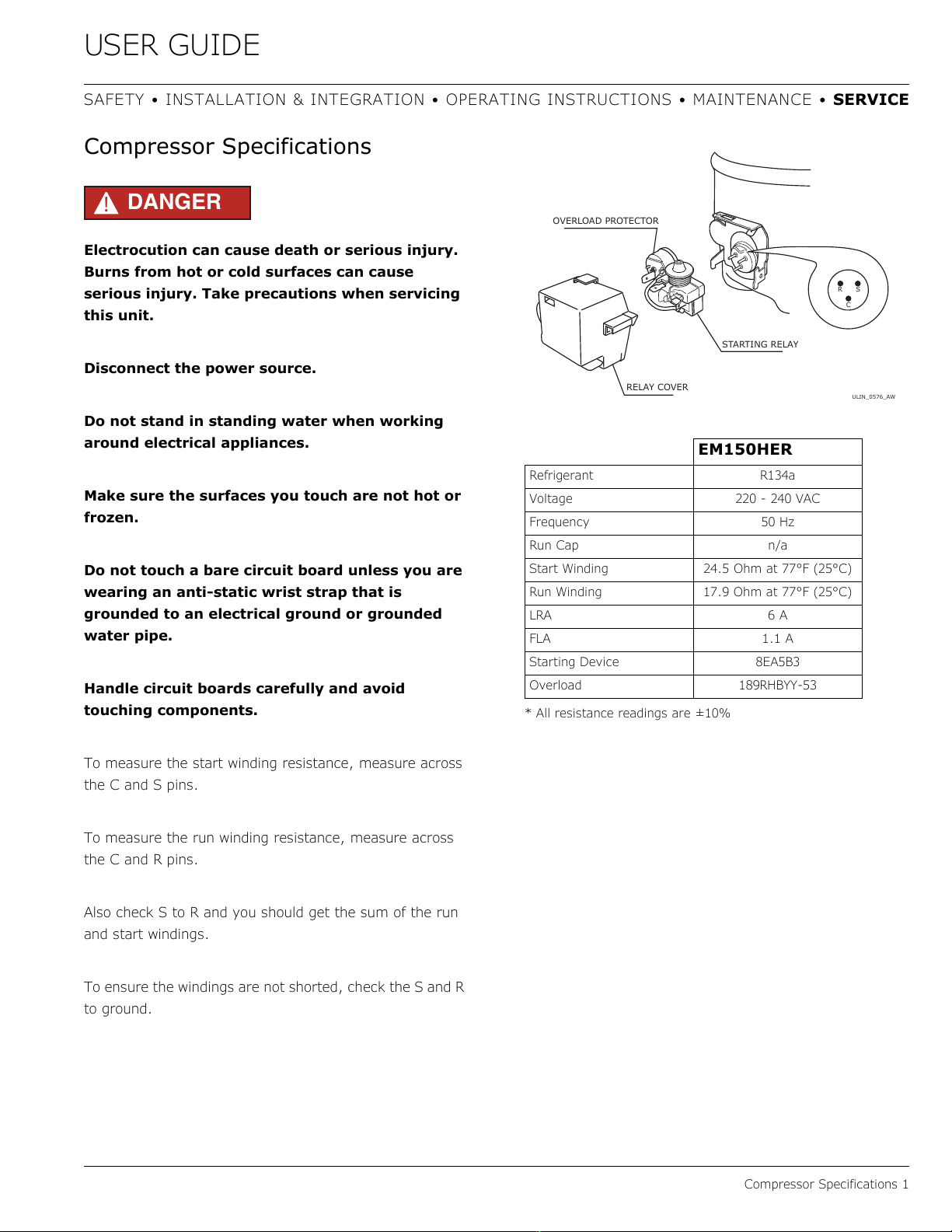
To measure the start winding resistance, measure across
the C and S pins.
To measure the run winding resistance, measure across
the C and R pins.
Also check S to R and you should get the sum of the run
and start windings.
To ensure the windings are not shorted, check the S and R
to ground.
* All resistance readings are ±10%
EM150HER
Refrigerant R134a
Voltage 220 - 240 VAC
Frequency 50 Hz
Run Cap n/a
Start Winding 24.5 Ohm at 77°F (25°C)
Run Winding 17.9 Ohm at 77°F (25°C)
LRA 6 A
FLA 1.1 A
Starting Device 8EA5B3
Overload 189RHBYY-53
ULIN_0576_AW
RS
C
OVERLOAD PROTECTOR
STARTING RELAY
RELAY COVER
40
USER GUIDE
Troubleshooting - Extended 1
SAFETY • INSTALLATION & INTEGRATION • OPERATING INSTRUCTIONS • MAINTENANCE • SERVICE
Troubleshooting - Extended
CAUTION
!
Never attempt to repair or perform maintenance
on the unit until the main electrical power has
been disconnected from the unit.
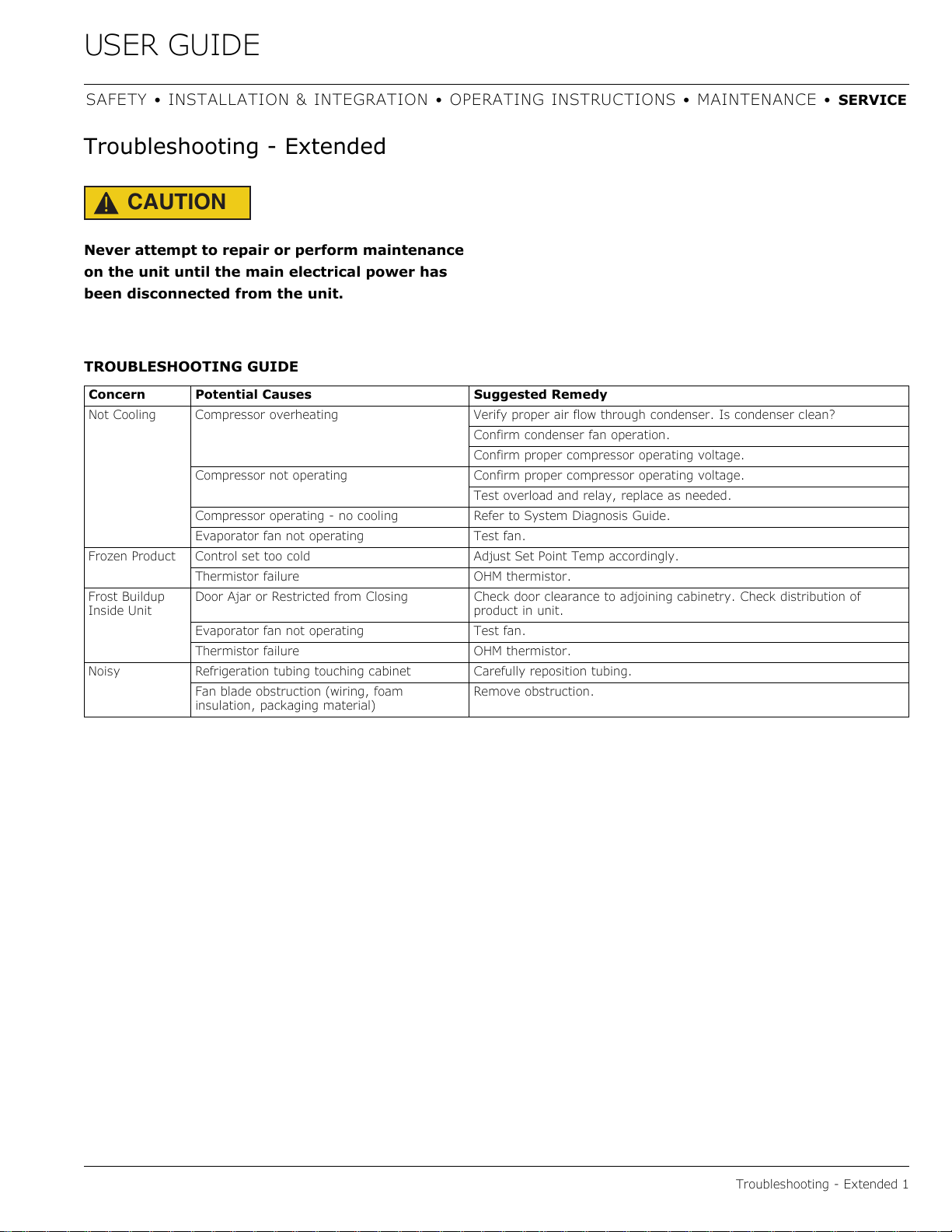
TROUBLESHOOTING GUIDE
Concern Potential Causes Suggested Remedy
Not Cooling Compressor overheating Verify proper air flow through condenser. Is condenser clean?
Confirm condenser fan operation.
Confirm proper compressor operating voltage.
Compressor not operating Confirm proper compressor operating voltage.
Test overload and relay, replace as needed.
Compressor operating - no cooling Refer to System Diagnosis Guide.
Evaporator fan not operating Test fan.
Frozen Product Control set too cold Adjust Set Point Temp accordingly.
Thermistor failureOHM thermistor.
Frost Buildup
Inside Unit
Door Ajar or Restricted from Closing Check door clearance to adjoining cabinetry. Check distribution of
product in unit.
Evaporator fan not operating Test fan.
Thermistor failureOHM thermistor.
Noisy Refrigeration tubing touching cabinet Carefully reposition tubing.
Fan blade obstruction (wiring, foam
insulation, packaging material)
Remove obstruction.
41
USER GUIDE
Defrost 1
SAFETY • INSTALLATION & INTEGRATION • OPERATING INSTRUCTIONS • MAINTENANCE • SERVICE
Defrost
These units are manual defrost.
To defrost unit remove ice bucket. Turn unit off. Use
toweling inside to absorb water as it melts down. This will
help prevent water from getting onto customer’s floor.
The defrost duration is dependent upon usage or climate.
Typically, defrosting is needed approximately every 3 - 6
weeks and/or when 1/4" or more of frost is present -
whichever comes first.
42
USER GUIDE
SAFETY • INSTALLATION & INTEGRATION • OPERATING INSTRUCTIONS • MAINTENANCE • SERVICE
U-Line Corporation (U-Line) Limited Warranty
One Year Limited Warranty
For one year from the date of original purchase, this U-Line product warranty covers all parts and labor to repair or replace any part of the
product that proves to be defective in materials or workmanship. For products installed and used for normal residential use, material
cosmetic defects are included in this warranty, with coverage limited to 60 days from the date of original purchase. All service provided by U-
Line under the above warranty must be performed by U-Line factory authorized service, unless otherwise specified by U-Line. Service
provided during normal business hours.
Available Second Year Limited Warranty
Beyond the standard one year warranty outlined above, U-Line offers an extension of the one year warranty coverage for an additional
second year from the date of purchase, free of charge. To take advantage of this second year warranty, you must register your product with
U-Line within two months from the date of purchase at u-line.com providing proof of purchase
.
Five Year Sealed System Limited Warranty
For five years from the date of original purchase, U-Line will repair or replace the following parts, labor not included, that prove to be
defective in materials or workmanship: compressor, condenser, evaporator, drier, and all connecting tubing. All service provided by U-Line
under the above warranty must be performed by U-Line factory authorized service, unless otherwise specified by U-Line. Service provided
during normal business hours.
Terms
These warranties apply only to products installed in any one of the fifty states of the United States, the District of Columbia, or the ten
provinces of Canada. The warranties do not cover any parts or labor to correct any defect caused by negligence, accident or improper use,
maintenance, installation, service, repair, acts of God, fire, flood or other natural disasters. The product must be installed, operated, and
maintained in accordance with the U-Line User Guide.
The remedies described above for each warranty are the only ones that U-Line will provide, either under these warranties or under any
warranty arising by operation of law. U-Line will not be responsible for any consequential or incidental damages arising from the breach of
these warranties or any other warranty, whether express, implied, or statutory. Some states do not allow the exclusion or limitation of
incidental or consequential damages, so the above limitation or exclusion may not apply to you. These warranties give you specific legal
rights, and you may also have other rights which vary from state to state.
Any warranty that may be implied in connection with your purchase or use of the product, including any warranty of merchantability or any
warranty fit for a particular purpose is limited to the duration of these warranties, and only extends to five years in duration for the parts
described in the section related to the five year limited warranty above. Some states do not allow limitations on how long an implied warranty
lasts, so the above limitations may not apply to you.
• The warranties only apply to the original purchaser and are non-transferable
.
• The second year and five year warranties cover products installed and used for normal residential or designated marine use only.
• The warranties apply to units operated outside only if designed for outdoor use by model and serial number.
• Replacement water filters, light bulbs, and other consumable parts are not covered by these warranties.
• The start of U-Line’s obligation is limited to four years after the shipment date from U-Line
.
•
In-home instruction on how to use your product is not covered by these warranties.
• Food, beverage, and medicine loss are not covered by these warranties.
• If the product is located in an area where U-Line factory authorized service is not available, you may be responsible for a trip charge
or you may be required to bring the product to a U-Line factory authorized service location at your own cost and expense.
• Units purchased after use as floor displays
, and/or certified reconditioned units, are covered by the limited one year warranty only and
no coverage is provided for cosmetic defects.
• Signal issues related to Wi-Fi connectivity are not covered by these warranties.
For parts and service assistance, or to find U-Line factory authorized service near you, contact U-Line:
8900 N. 55th Street, Milwaukee, WI 53223 • u-line.com • onlineservice@u-line.com • +1.800.779.2547
Copyright © 2014/2017 U-Line Corporation. All Rights Reserved. | Publication Number 30379 | 10/2017 Rev. L
Warranty 1
43