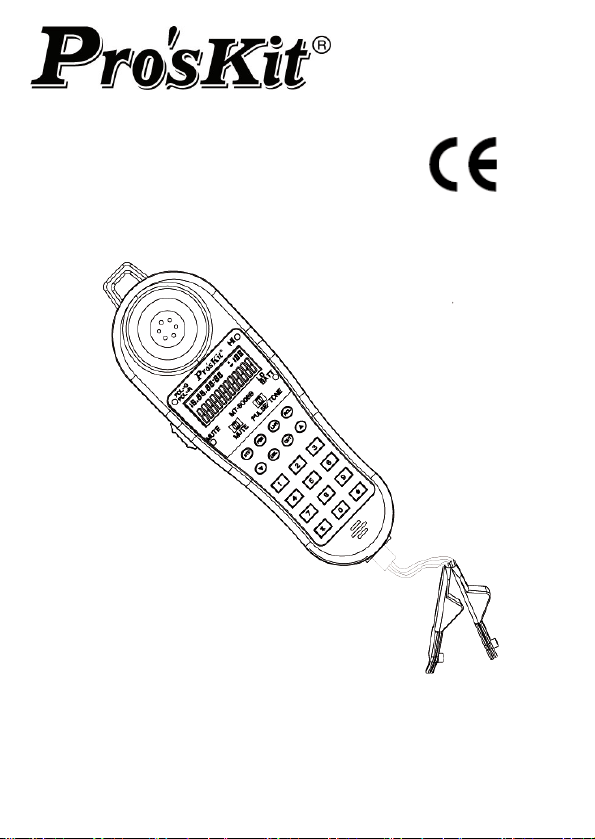
MT
-8006B Data Diver
User’s Manual
1
st
Edition
,
2013
©2013 Prokit’s Industries Co., Ltd.
Safety Information
Read First Before Use
Table 1 describes the international electrical symbols used on the
tester and in this manual.
Table 1. International Electrical Symbols
Warning: Risk of personal injury. See explanations in the
manual. Caution: Risk of damage or destruction to equipment
or software. See explanations in the manual.
Warning: Risk of electric shock.
Please keep an eye on the status or function of the equipment
while operating.
This equipment is not for connection to public communications
networks, such as active telephone systems.
Wa
rning
Never use MT-8006B on circuits of more than 100V.
Never use MT-8006B or test leads if they are damaged.
Inspect the case and test leads for damage before use.
Disconnect unused test leads and connectors from the
MT-8006B when testing telephone circuits.
Never open the case except to change the battery or the fuse;
no user-serviceable parts are inside.
Disconnect all test leads before replacing the battery.
Use only 1.5V AAA batteries, properly installed in the case, to
power MT-8006B.
If this equipment is used in a manner not specified by the
manufacturer, the protection provided by the equipment may
be impaired.
The following IEC symbols are used either on the Data Diver or
throughout the manual:
See Manual for details
Earth Ground
Conformité Européenne
1

Standard package:
MT-8006B * 1
Headphone * 1
Angled bed of nails * 1
User Manual * 1
DESCRIPTION
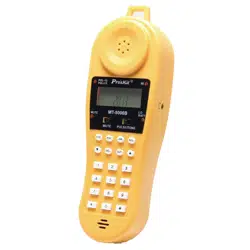
MT-8006B Data Diver is a portable TEL test set used by installers,
repair technicians and other authorized personnel for temporary
communication and for servicing and installing analog voice
telephones.
Design Features
The MT-8006B provides a wide range of features for working on
analog voice lines, and, in addition, it is equipped with protection
features to prevent the accidental disruption of data services. Never
use MT-8006B on circuits of more than 100V.
The following is a list of the MT-8006B features:
LCD display for dialing number, Caller ID, Clock and other
information
Indicator for determining the line service
Headset & Angled bed of nails
Smart power saving enables battery life up to 6 months
12 phone number memory for speed dialing, each memory up
to 16 digits
16 dialing number memories each number up to 16 digits
Support 2 dialing mode: Tone (DTMF) and pulse
Up to 32 digits phone number memory for speed dialing key
Pre-dialing and last number redial function
PBX pause key, insert a PBX pause in stored numbers
Telephone line polarity indicators
Low battery indication
Backlight function for easy reading even in dark areas
RJ-11 port for changing test leads
Ringer and voltage LED indication
2
WARNING:
The MT-8006B Data Diver is not designed to meet outside
plant requirements. It is recommended that this product not
be used outside during adverse and/or wet weather
conditions.
Legal requirements may exist regarding permission to
connect equipment to a Telecom network operated by a
public network operator.
CAUTION:
The operator of this instrument is advised that if the equipment is
used in a manner not specified in this manual, the protection
provided by the equipment may be impaired.
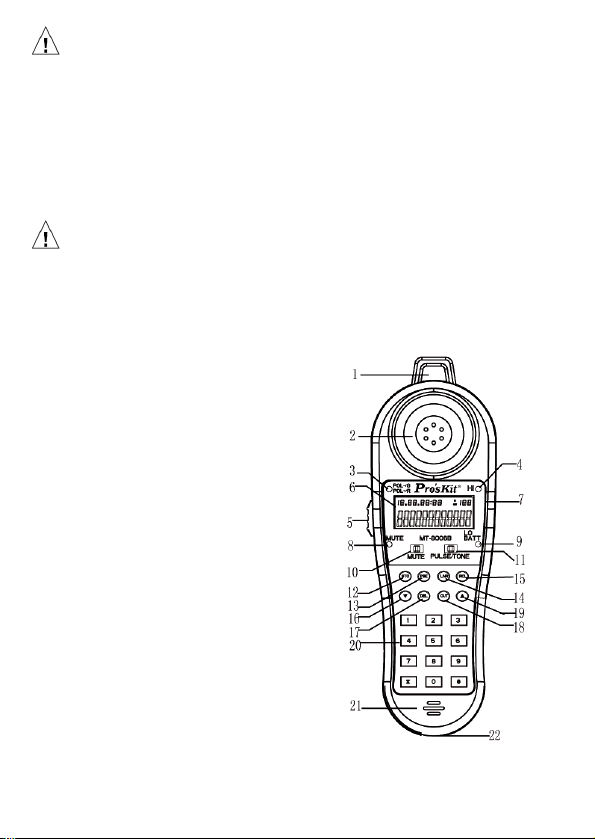
Physical Characteristics
1. Phone stra
p hole
2. Speaker
3. Polarity indicator
4. Ringer and voltage LED indicator
5. Test mode switch
6. LCD Display
7. Headset Jack
8. Mute indicator
9. LO BATT indicator
10. Mute switch
11. Pulse/Tone switch
12. STO 13. PSE
14. LNR 15. RCL
16. ▼ 17. DEL
18. OUT 19. ▲
20. Number pad 0~9, *, #
21. Microphone 22. RJ-11 Jack
3
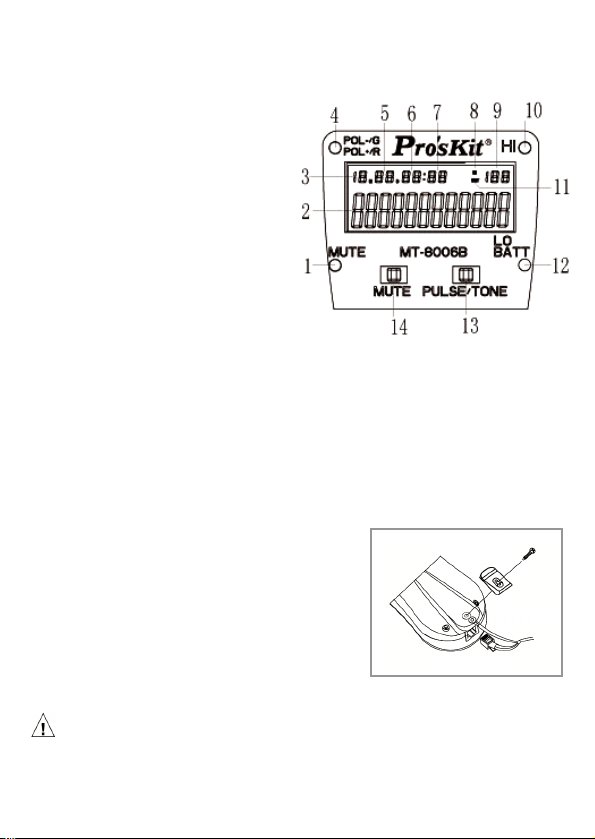
LCD Display:
1. Mute indicator
2. Year / Phone number
3. Month
4. Polarity indicator:
red light : The red clip of
Angled bed of nails is
connect to the + line
green light : The red clip
of Angled bed of nails is
connect to the - line
5. Date
6. Hour
7. Minute
8. Incoming call indicator
9. Sequence of the call in list
10. Voltage LED indicator
When incoming call and ringing, the “HI” LED will flash
When voltage detected, the “HI” LED will lights up
11. Dialing call indicator
12. LO BATT indicator
13. Pulse/Tone switch
14. Mute switch
Line cord connection
MT-8006B Data Diver is designed with a
standard 6-position modular jack for
quick connection of cord set. To place
the cord set, simply remove the clip
attachment screw, and put the terminal
of strain relief over the boss behind the
screw hole, then put the clip back and
fasten the screw and plug the modular plug into the jack
Caution:
In order to prolong the service lifetime of modular plug, please
connect the strain relief terminal before plug into the modular jack
4
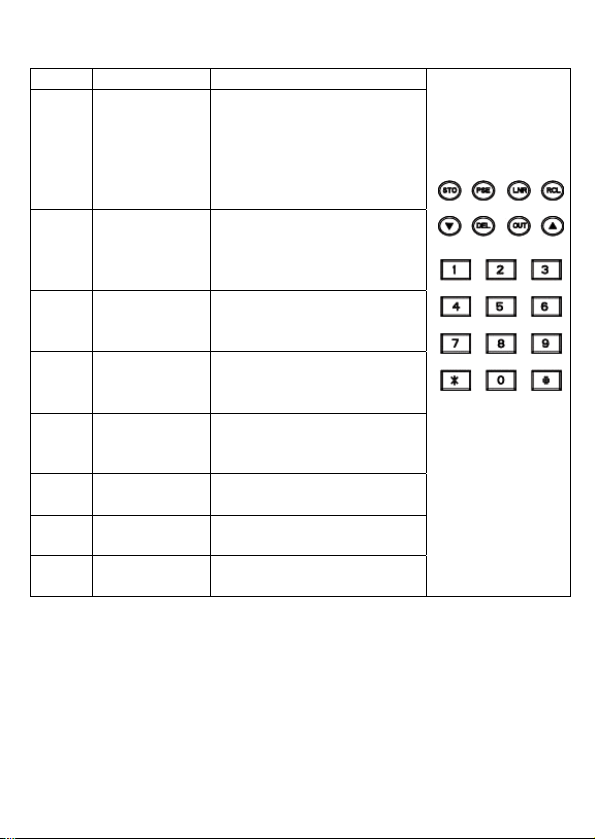
Keys introduction
Key Description Function
STO Set and
Storage
Press STO key will
enter the setting mode,
there are 12 setting
screen on MT-8006B.
Please refer to
Operation section.
▲/▼
Direction
key
Enter the incoming call
list, scroll the numbers
in call list and switch the
setting screen.
RCL Recall To initial a phone call
from stored phone
number
DEL Delete Delete the number in list
or erase the last digit
from the input number
LNR Last
number
redial
Make a phone call for
last dialing number or
per-dial number
PSE Pause Insert a PBX pause into
the input number
OUT Call out list Enter the dialing out
number list
*,#,
0~9
Number
keys
Standard Phone
number keys
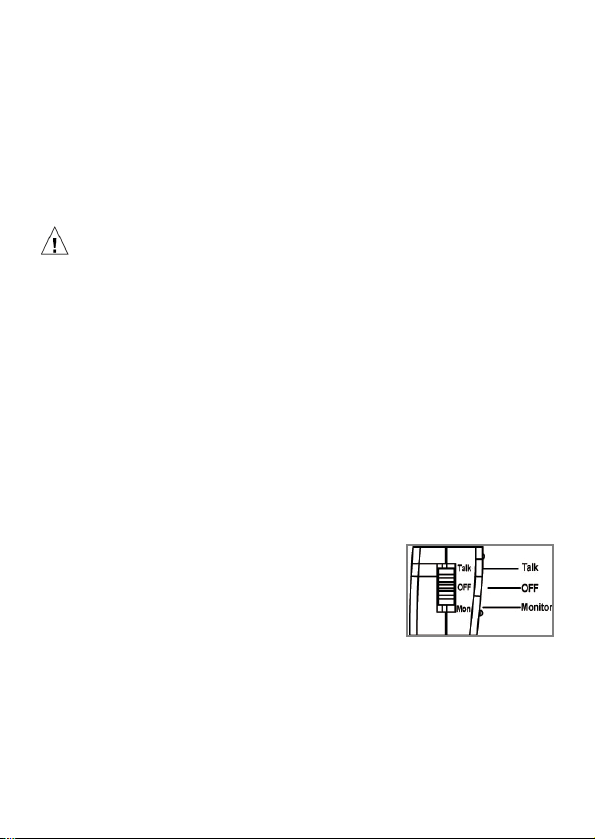
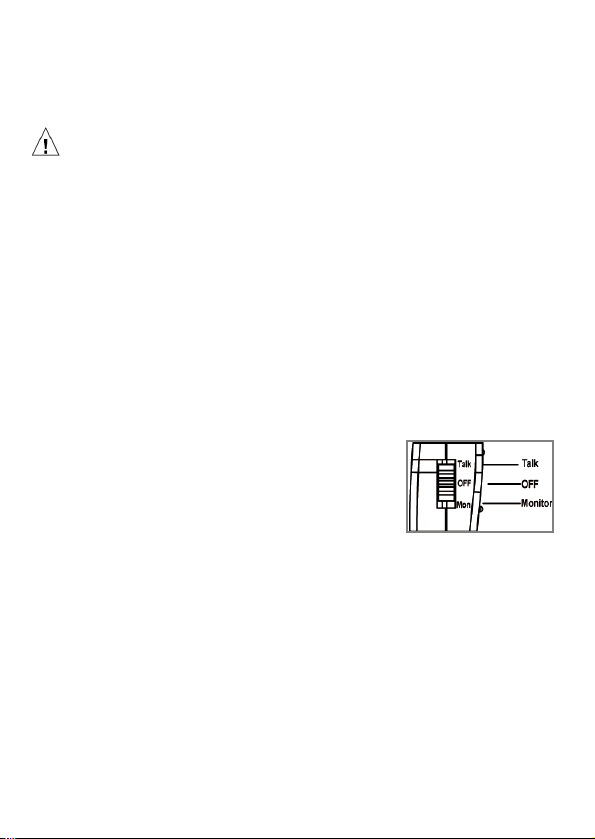
Test mode switch
The test mode switch is a slide switch located on the left side of
MT-8006B. Switch the test mode switch to the “Talk” position to
make the Data Diver work as a telephone line tester. Switch the test
mode switch to the “OFF” position for storage; switch the test mode
switch to the “Mon” position to enable monitoring the line without
disrupting it.
5

6
Hand-free function
The MT-8006B Data Diver comes with a headset and a phone strap
necklace. Connecting them to the headset jack and phone strap
hole will give the MT-8006B a hands-free talk function. Please find
the phone strap hole and the 2.5 mm jack on the right upper corner
of the MT-8006B Data Diver.
OPERATION
1. Remove the battery case lid and install 4pcs 1.5V AAA batteries in
the battery compartment paying close attention to polarity of
battery.
2. Parameter Setting
With the MT-8006B in the OFF position; pressing the STO key will
enter the setting mode. The “SET 1 DATE” shows on LCD. User
can switch the setting item by pressing the▲/▼ key then press
the STO key to enter the set item for detail setting. If user wants to
change the setting press the ▲/▼ key again. When the correct
setting appears press STO key to move to next setting. In the
duration of setting press DEL will quit from the setting mode.
Date and time
If the “SET 1 DATE” is displayed on LCD, press STO key to
enter the Date and time setting. The number of year will flash,
press ▲/▼ key to adjust the value of year. Pressing the STO
key again will move to the month setting. Use the same method
to change the value of month then press STO to move to the
date and time setting. When all the values of date and time are
settle down then press STO key to move to “SET 2 ACODE”.
Area code
When the “SET 2 ACODE” is show on LCD, press STO key to
enter the area code setting item. LCD will show “ACODE-----“.
The first digit of area code will flash, press ▲/▼ key to change
the value. Press STO key to move to the next digit. If all the
digits are set, press STO key to enter “SET 3 FLASH”.
Pause Duration
If the “SET 3 FLASH” is displayed on LCD, press STO key to
enter the Pause Duration setting. LCD will show “FLASH 3 110“.
It means the default pause duration time is 110 ms, Change the
value by ▲/▼ keys then press STO to move to the “SET 4
LCD”.
LCD light adjust
When the “SET 4 LCD” is displayed on LCD, press STO key to
enter the LCD light adjust mode. There are 5 LCD light level can
be selected. Press ▲/▼ key to change the level then press
STO to jump to “SET 5 ALAR” or press DEL to quit.
CAUTION:
The “SET 5 ALAR” is not used by MT-8006B; we suggest users
do not to change the value in “SET 5 ALAR” setting item. In this
setting item press STO to jump to “SET 6 IPP” or press DEL to
quit.
Dialing mode
If the “SET 6 IPP” is displayed on LCD, press STO key to enter
the dial mode setting. The IPP ON/OFF will show on LCD, use
▲/▼ key to swap between them. If “IPP OFF” is selected, the
dialing mode is tone; otherwise, the dialing mode is pulse.
3. Connect the angled bed of nails (or RJ11 plug) to the telecom line
● Talk / OFF / Mon. →Test mode switch:
The Data Diver has three basic modes of
operation: Talk mode, OFF mode and
Monitor mode. Before using the MT-8006B,
please set the Data Diver to proper mode;
otherwise, it will remain in the OFF mode.
(Your Data Diver is set at the “OFF” position before your first use)
T
alk Mode:
The “Talk” mode gives an off hook condition for dialing and talking as
a common battery telephone. It is also available for memory dialing,
last number dialing, caller dialing, redialing…etc.
7

OFF Mode
A. The “OFF” mode can be operated as either power off function
or voltage inspection.
B. Before testing the line, please slide the switch to the “OFF”
position to detect if any voltage exists. When “HI” LED lights up,
please disconnect from the tested line to avoid any damage to
the Data Diver
C. If the “HI” LED does not light up, then you can slide the switch to
either “Talk” or “Mon” position for testing operation
D. If the “HI” LED flashes and the ringer is ringing, it means there
is an incoming call, slide the switch to “Talk” mode, then it can
be used as a common telephone.
E. For safety reason, please use the “OFF” mode to inspect the
AC or DC voltage of unknown lines before testing
Monitor mode
The “Mon” position removes the transmitter from the circuit and the
“Mute” LED will light up automatically. It provides a high impedance
coupling to allow line monitoring without disrupting conversations or
signaling. If there is any signal present, there will be sound coming
from the speaker
When the Data Diver is in either “Talk” or “Mon” mode, the
battery will supply power to the memory operation and Mute
LED until it is drained. Please make sure the switch is in “OFF”
position when not in use.
● PULSE/TONE Switch
Use PULSE/TONE switch to change the dialing mode
between pulse and tone (DTMF) mode
● STO →Store a number:
MT-8006B is in the OFF position or Talk position,
Phone number + STO + N (N=0~9, ﹡, # )
● RCL →Recall (Dialing out a stored number):
MT-8006B is on the Talk position,
RCL + N (N=0~9, *, # )
8

9
● LNR →Last Number Redial:
MT-8006B is on the Talk position,
If a call is not successful and you wish to redial the same
number, just press the LNR button.
The last number redial function is available in either the Pulse
or Tone Mode. The redial memory has a 32-digit capacity.
When checking the incoming or dialing record, press the LNR
button, the number you are dialing will show on the LCD
● PSE →Pause:
There are some cases where it may be necessary to insert a
pause between digits of a stored number, such as when
accessing a trunk through a PBX that requires a 9 to get out.
To store a number with a pause, simply press the PSE button
at the point where the pause is required. For example to store
9-555-1212. The PSE button inserts a 4 second pause.
● DEL →Delete:
In setting mode DEL key is used to quit setting mode. In
pre-dial mode DEL key is used to delete the last digit. In call
in/dialing out list, press DEL will delete a phone number and
press DEL key for 4 seconds all the number in list will be
erased.
● MUTE:
The mute switch turns the handset microphone and
speakerphone microphone off for privacy in Talk mode. When
turn the mute switch to left side, the “MUTE” LED lights up
then the mute function is on, then turn to right side the
“MUTE” LED will turns off and the mute function will also stop,
and back to normal talk mode.
● POL-/G;POL+/R →Telephone line polarity test:
Connect the telephone line to the Angled bed of nails.
MT-8006B is on the Talk position
If the LED is red light, the red Angled bed of nail is
connected to the + line.
If the LED is green light, the red Angled bed of nail is
connected to the - line.

● LO BATT:
If the LO BATT LED lights, that means the user needs to change
the battery for fear of losing data.
Caution
After the battery is removed, the memory of stored numbers
will last for 15 seconds only. When changing the battery,
please pay attention for the polarity of the battery. If the
memory disappears, please follow the previous process as
mentioned in this manual to store a number.
● HI →Line high voltage LED indication
1.
Set the function switch to “OFF” position.
2. Connect the two test leads of the line to the angled bed of
nails.
3. If the "HI" LED lights up; voltage over 70V was detected.
Please don't connect the MT-8006B Data Diver to this line to
avoid the Data Diver damaged.
4. OFF mode operation
● Pick up call:
When receiving a FSK or DTMF call, the Caller ID will display
on LCD. The MT-8006B will also add the number to the
incoming call list and give it a corresponding order in the list. If
the call is from a FSK system, MT-8006B will update the month,
date and time setting of system by the information provide by
FSK signal. If the call is come from DTMF system, MT-8006B
will show the system date and time. LCD will also displays the
corresponding order of the receiving call in the incoming call list.
If the number is not in the incoming call list, the LCD will
indicate it is a new number.
When the ringer is ringing, slide the switch to “Talk” position as
common telephone
● Incoming call list checking and Dialing
1. Press ▲ or ▼ to enter the incoming calling list.
2. Use the ▲ or ▼ key to view numbers in the Call ID list.
3. To make an auto speed scroll press the ▲ or ▼ key for 3
10

11
seconds.
4. Once the incoming number is reached, press LNR key.
5. Set the function to "Talk" mode, and press LNR key, it will
automatically dial the number you reached
● Dialing out list checking and dialing
1. Press the OUT key to enter outgoing call list.
2. Use the OUT key or ▲key to view the number in dialing out
list.
3. To make an auto speed scroll press the ▲ or ▼ key for 3
seconds.
4. Once the outgoing number is reached, press LNR key.
6. Set the function to "Talk" mode, and press LNR key, it will
automatically dial the number you reached.
● Pre-dial function
As with a cell phone, user can input the phone number at
on-hook status then press LNR to send out the number to make
a phone call. It is easy to correct the wrong input in this mode.
5. Talk mode operation
●Incoming call list checking and dialing
1. Press ▲ or ▼ to enter the incoming calling list.
2. Use the ▲ or ▼ key to view numbers in the Call ID list.
3. To make a auto speed scroll press the ▲ or ▼ key for 3
seconds.
4. Once the incoming number is reached, press LNR key.
●Dialing out list checking and dialing
1. Press the OUT key to enter outgoing call list.
2. Use the OUT key or ▲key to view the number in dialing out
list.
3. To make a auto speed scroll press the ▲ or ▼ key for 3
seconds.
4. Once the outgoing number is reached, press LNR key.
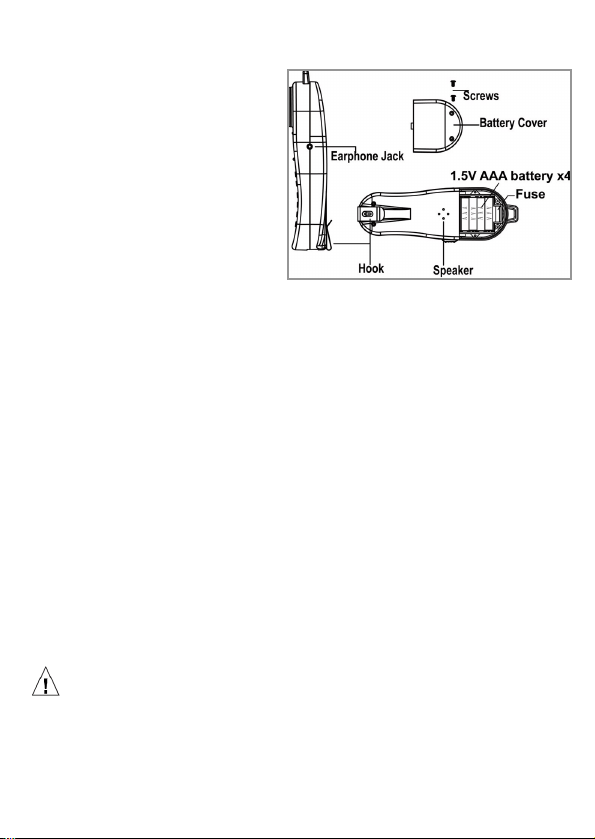
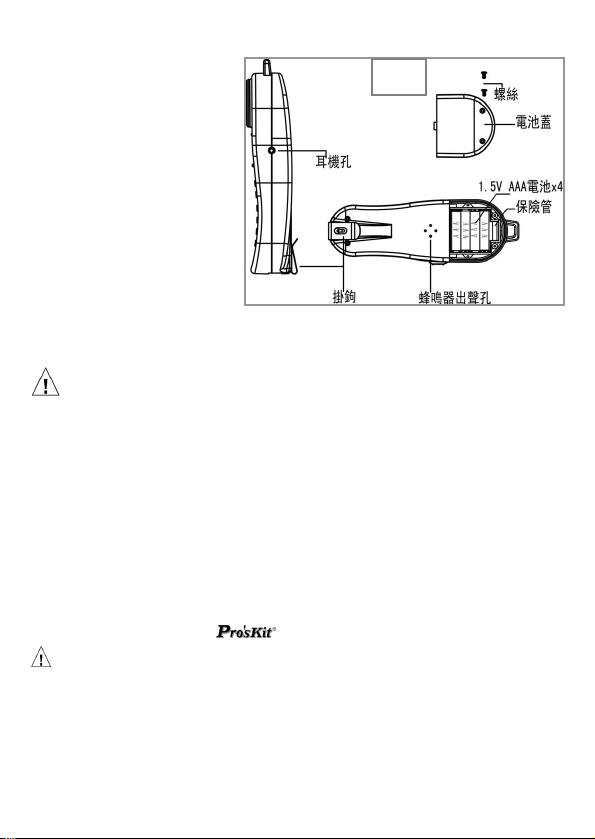
Battery and fuse replacement
If the Data Diver fails to operate properly, or stops working, replace
the battery and retest. Do not
use rechargeable batteries.
To replace the battery:
1. Disconnect the Data
Diver from the line and
place on a flat work
surface with the battery
cover up.
2. Use a Phillips
screwdriver to remove
the two screws from the
battery compartment.
3. Remove the battery cover
4. Remove the old batteries and properly discard.
5. Insert 4pcs of 1.5V AAA batteries into the Data Diver and
observe the proper polarity.
6. Place the battery cover back and fasten the two screws
securely. Do not over tighten screw. Over tightening will strip
the plastic.
Fuse replacement
If the Data Diver still stops working after a new battery is replaced, it
may be caused by a blown fuse.
To replace the fuse:
1. Use a Phillips screwdriver to remove the two screws from the
battery compartment.
2. Remove the battery cover
3. Remove the old fuse
4. Insert a same specification (ø5xL20mm, 250mA/250V) of fuse
5. Replace the battery cover, then fasten the two screws securely
taking care not to over tighten,
Caution:
Before the battery or fuse replacement, please set it in "OFF" mode
position as power off and disconnect the Data Diver from the line.
Remove the angled bed of nails, and stay away from any power
source or other electric equipment to avoid any electric shock
12

MAINTENANCE
WARNING:
To avoid electric shock, do not perform any servicing other
than that contained in the operating instructions unless you
are qualified to do so.
Disconnect clips from any metallic connections before
performing any maintenance.
If moisture should get inside the Data Diver, let the Data Diver dry at
normal room temperature for 24 hours. DO NOT HEAT THE DATA
DIVER. Moisture can provide a leakage path that may conduct
hazardous voltages to you. DO NOT USE the Data Diver if wet.
Keypad Care
Daily use of your Data Diver results in various liquids, dirt, and other
foreign material building up in your keypad. The keypad may be
cleaned by using a soft toothbrush with soap and water.
Do not use a petroleum-based or chlorinated cleaning agent as it will
harm the keypad. Let the Data Diver dry before using!
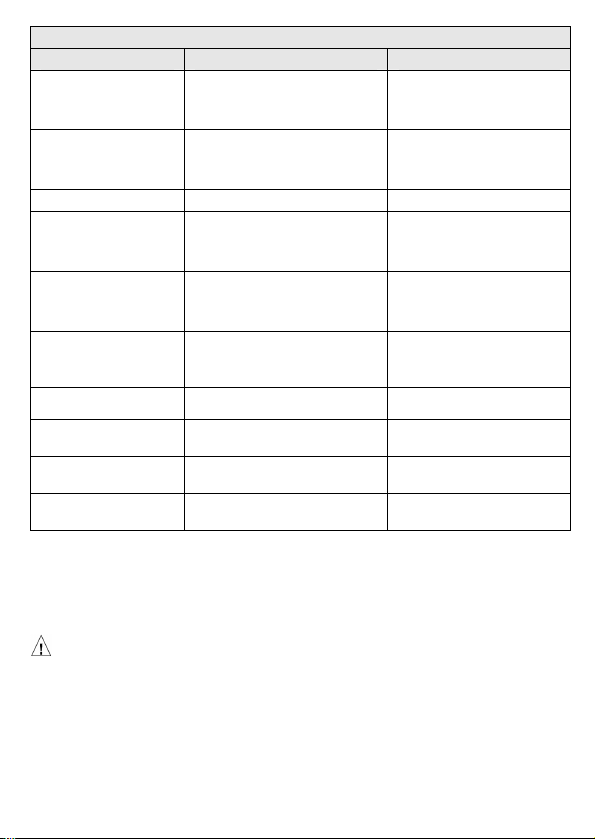
Data Diver Trouble Shooting:
1. The MT-8006B Data Diver is a professional telecom tool,
especially designed for checking telecom lines. It is not allowed to
be used under the power source AC100~125V 50/60Hz or
AC200~250V 50/60Hz; otherwise, it may cause the danger of
electric shock or product damage.
2. If there is any crosstalk in application, generally it is the
interference from the telecom line; please check if the angled bed
of nail clips well connected to the telecom line.
3. If any abnormal situation is found while you are using the Prokit's
Data Diver, please test the other telecom line in the different area
to identify the possible defective situation referring to the trouble
shooting list below. (Attention! Please never have the angled bed
of nail clips connected to the power source for safety reason.)
4. If the Data Diver still doesn't work after the first step of fix-up,
please send back to Prokit’s distributor for repairing
13
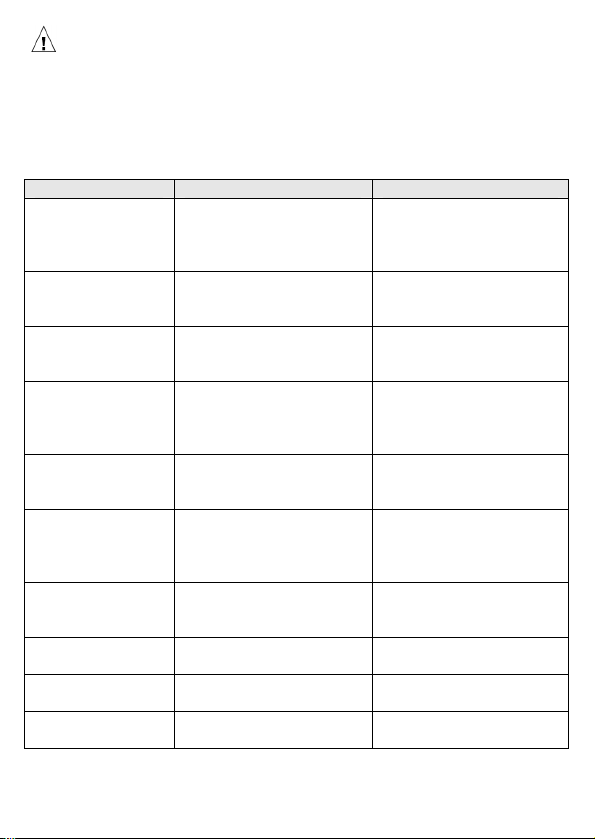
Caution:
If the Data Diver connected to a line with voltage over 100V, the fuse
will be blown, and it may also caused the IC protection function to
start and lock the Data Diver. When it happens, please remove all
batteries, and wait for 5-10 minutes until all power is dissipated, then
place the batteries back and restart the Data Diver.
Defect Situation Possible Problem Solution
Dead, Doesn’t
work
Blown fuse/IC protection
locked
Change new fuse
Remove the batteries,
wait for 5-10mins and
restart the Data Diver
No tone
Angled bed of nails are
not well connected
Check if Angled bed of
nails are well connected
to telecom line
Speakerphone
doesn’t work
MUTE button was
pressed and MUTE LED
indicator lights up
Press the MUTE button
and check if the MUTE
LED is off
Short rings only
Low battery /the angled
bed of nails are
connected to the power
source
Change new battery
Confirm if the angled
bed of nails connected
to the right telecom line
Can not hear the
conversation on
the Monitor status
The switch did not set to
“Mon” position
Low battery
Set the switch to “M”
position / Change a new
battery
Crosstalk
Angled bed of nails are
not connected firmly
The interference from
the telecom line
Check if the Angled bed
of nails are well
connected
Memory of storing
numbers doesn’t
work
Low battery Change new battery
Polarity LED
doesn’t work
Low battery Change new battery
HI (LED)
doesn’t work
Low battery Change new battery
BATT(LED)
doesn’t work
Low battery Change new battery
14
15
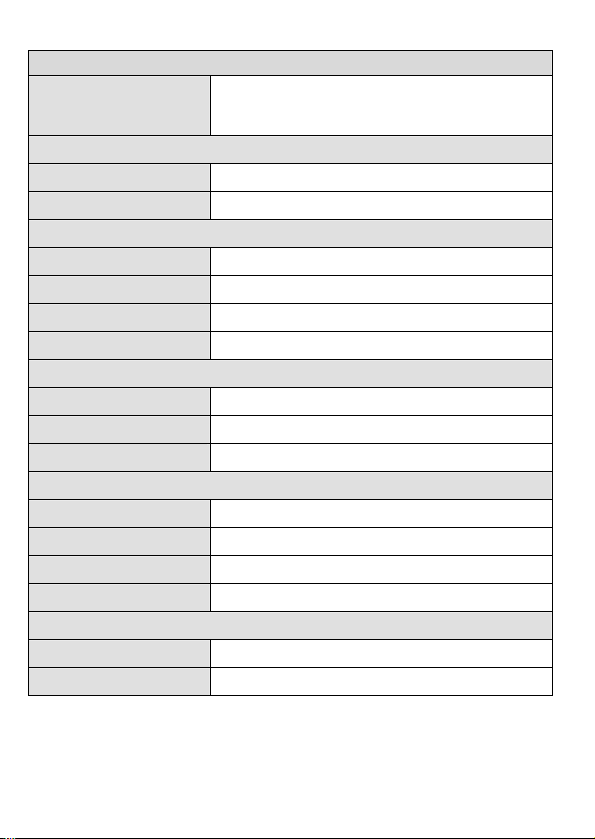
Specification
ELECTRICAL
Loop limit
2 KΩ maximum at 48 Vdc
(nominal 20 mA minimum loop current)
DC resistance
Talk Mode 300Ω typical
Monitor impedance >39kΩ nominal at 1 KHz
Rotary dial output
Pulsing rate 10pps+0.8pps
Percent break 60/40%±2%
Inter digit interval 1000 ms typical
Leakage during Break >130 KΩ
DTMF output
Tone frequency error ±1.5% maximum
Tone level -8±2dBm combined (typical)
High versus low tone
4 dB maximum
Memory dialing
Memory capacity 12 memories
Digit capacity 16 digits per memory
PBX pause duration 1~3.6 seconds
Power source 4pcs 1.5V AAA batteries (not included)
PHYSICAL(Hook included)
Measurement 218.5 ×69.5 × 49mm (8.6” × 2.7” × 1.9”)
Weight 208g typical
MT-8006B 電話查線器
安全資訊
使用前請先詳讀
表1.描述電話查線器上或本手冊中,所使用的國際電氣符號。
國際電氣符號
警告:有人身傷害危險。請參閱手冊中的解釋。
小心:有損害或損壞裝置或軟體的危險。請參閱手冊中的解釋。
警告:有觸電危險。
注意:須注意操作時的狀態或功能。
本設備不可連接至公用通信網路,如帶電的電話系統。
警告
不得在超過 100V 的帶電電路上使用本產品。
不得使用已破損的MT-8006B電話查線器 測試導線。使用以前,請檢查
機殼和測試導線是否有破損。
在測試電話電路時,將不使用的測試導線和連接器從MT-8006B電話查線
器上斷開連接。
除非要更換電池,否則不得打開機殼;其中沒有任何用戶可維修的零
件。
在更換電池以前,請斷開所有測試導線的連接。
僅可使用1.5V AAA電池,正確安裝在機殼內以提供電源。
如果不遵照指定方式使用本設備,則可能影響產品提供的保護。
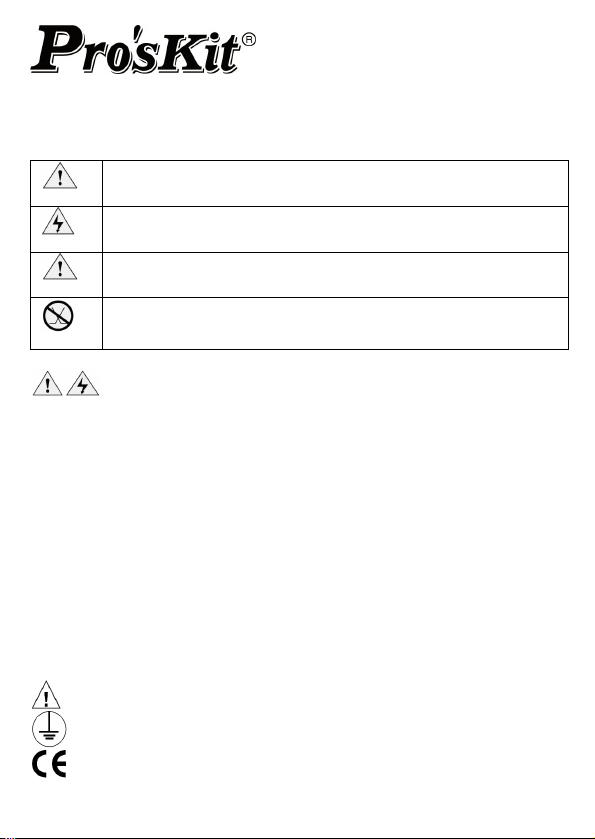
以下的IEC標示會被使用在儀器本身或使用手冊中:
請仔細閱讀此部分的使用手冊
對大地接地
CE認證標誌
16

MT
-8006B電話查線器
本MT-8006B產品包裝所包含的內容如下列所示:
MT-8006B查線器 * 1
耳機麥克風 * 1
標準美式鱷魚夾 * 1
使用手冊 * 1
產品特性
MT-8006B是一台用來協助安裝和維修技術人員的攜帶式電話查線器,具有許多
功能特性,足以提供安裝類比式電話線路之所需,防誤測保護功能,能防止因
誤測而造成儀器本身的損壞,同時提供在100V的電壓下僅燒斷保險絲,但不危
害本體的保護功能。
LCD: 可顯示撥出號碼、來電號碼、時間及其他資訊
具有來電顯示功能,能迅速檢測出電話線
手持通話/耳機通話功能,查修使用方便
耳機麥克風及標準美式鱷魚夾線
智慧型省電功能,待機狀態下,可6個月不用更換電池 (注意:電池未隨
機台出貨)
12組雙鍵儲存記憶撥號,每組記憶可達16位數
16個撥出號碼記憶功能,每個號碼可達16位數
DTMF/脈衝式撥號,適合各國不同交換機
具最後號碼重撥功能,最多可撥32位數
支援末碼重撥及預撥號功能
具PBX間隔功能,可在撥號時產生大約1秒鐘的間隔,可用於自動總機電
話的選項或撥打分機
採用高阻抗監聽電路,監聽中不易產生雜訊輸出
提供極性LED指示,方便檢修時辨識線路極性
電池低電壓LED指示功能,能準確的提示用戶更換電池
智能背光顯示,方便光線較暗的工作環境
本機具有通用RJ-11插座,可直接插入電話線中工作測試。
危險電壓LED指示功能及響鈴警示,能迅速準確顯示當前外線是否誤接。
警告:
MT-8006B電話查線器並非設計在戶外使用的儀器,我們強烈建議
不要在戶外或潮濕的環境下使用MT-8006B電話查線器。
在將MT-8006B接到公眾電信網路前,應先得到相關單位的許可
17
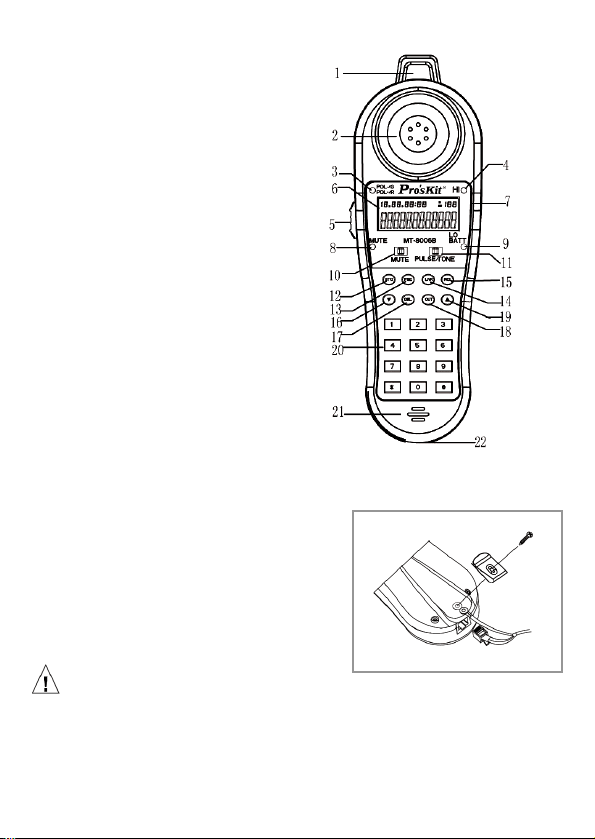
1. 吊掛環
2. 喇叭出音孔
3. 電話線路
極性指示燈
4. 來電與非法電路指示燈
5. 測試模式切換開關
6. LCD 顯示
7. 耳機麥克風插座
8. Mute功能指示燈
9. 電池低電量指示燈
10. Mute功能開關
11. Pulse/Tone切換開關
12. STO(設定/儲存)鍵
13. PSE(PBX間隔)
14. LNR末碼重撥
15. RCL雙鍵記憶重撥鍵
16. ▼下查
17. DEL刪除鍵
18. OUT撥號紀錄查詢
19. ▲上查
20. 標準電話按鈕 0~9, *, #
21. 麥克風收音孔
22. RJ-11插座
18
電信
測試線連接
MT-8006B電話查線器是一款設計帶有6P電
話接頭測試器,方便使用者可以快速連接6P
電話接頭。連接測試線前,請先移除掛鉤螺
絲,將線材安全掛環套上本體固定柱後,再
將掛鉤與螺絲鎖回固定位置。
注意:
為了延長接頭的使用壽命,在接上6P電信接頭前,請務必先將線材安全掛環連
接好後再插接6P電信接頭。
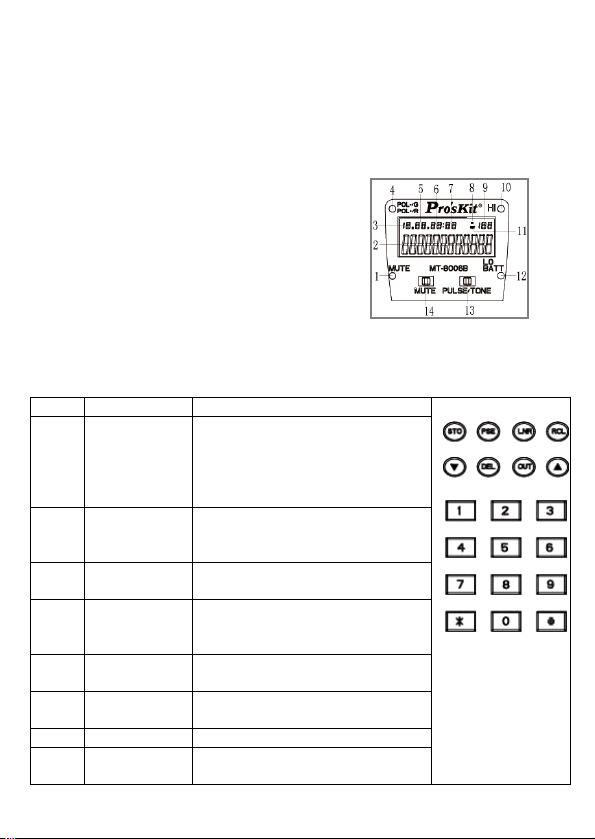
LCD 顯示說明
1、 靜音(MUTE)指示燈
2、 年份或電話號碼
3、 月份
4、 極性指示燈: 亮綠燈代表紅色鱷魚夾所接線路為負極端
亮紅燈代表紅色鱷魚夾所接線路為正極端
5 , 6 , 7:日期, 時, 分
8、 來電指示
9、 號碼次序
顯示
10、 來電指示和非法線路指示
來電時鈴聲響起時,HI 燈閃亮.
如果是非法線路,HI 燈常亮.
11、 去電號碼指示
12、 電池低電壓指示燈 紅色
13、 脈沖/音頻撥號方式切換開關
14、 靜音切換開關
按鍵說明
Key Description Function
STO 設置和儲存 在設定模式按下 STO 鍵可將目
前的設定儲存並跳至下個設定
項。在撥號模式按下 STO 鍵可
配合其他按鍵,將目前的電話號
碼存入特定位置
▲/
▼
方向鍵 按▲/▼鍵可進入來電號碼查詢
狀態,在來電/去電 號碼清單中
按▲/▼鍵上查或下查電話號碼
RCL 重撥鍵 可對雙鍵儲存的電話進行重撥
動作
DEL 刪除鍵 可刪除來電/去電 號碼清單的
電話,或是刪除預撥模式下的最
後一位數字
LNR 末碼重撥鍵 可進行末碼重撥,或是將預撥模
式下輸入的號碼進行撥號
PSE 間隔鍵 在輸入的電話號碼插入一個
PBX 間隔
OUT 撥出號清單 進入撥出號碼清單中
*, #,
0~9
數字鍵 一組標準的電話鍵盤
19

20
測試模式切換開關
測試模式切換開關位於 MT-8006B 的左側位置,可切換三種模式:電話模式、
待機模式及監聽模式。在電話模式下 MT-8006B 就像一台標準話機,可提供電
話線測試功能,在待機模式下可進行內建功能的設定,在監聽模式 MT-8006B
可監聽線路。
免持聽筒通訊功能
透過 MT-8006B 所提供的耳機麥克風,使用者可以免持聽筒通話,耳機麥克風
的插孔,位於 MT-8006B 右側位置。
本機裝置連接
1. 拆除 MT-8006B 背部上方 2 顆螺絲,取下電池蓋,裝入 4 顆 1.5V AAA 電池。
2. 參數設定
MT-8006B 在聽筒掛機狀態下,按下 STO 鍵即可進入設定模式,LCD 會顯示
『SET 1 DATE 』。此時,用▲或▼鍵可改變設定項目,LCD 同時顯示對應
的設定項目。再按 STO 鍵進入該設定項目。在某項設定完成以後,按 STO 鍵
進入下一項設定。所有設定均用▲或▼鍵修改該設定的值,設定過程中可用
DEL 鍵退出設定模式。
設定日期和時間
當 LCD 提示『SET 1 DATE』,按 STO 鍵確認即可進入日期和時間設置項,
此時年的顯示會開始閃爍,使用▲或▼鍵調整年份,每次按鍵調整的間隔為
1,完成後再按 STO 鍵進入月的設定,修改月份的方法與年的修改方式相同,
再按 STO 鍵可依次修改日、小時和分鐘。月和日的調整間隔也是 1,小時和
分鐘的設定可分十位和個位分別設定。時間及日期設置完成後。可按 STO
鍵進入『SET 2 ACODE』,或按 DEL 鍵離開設定模式。當遇到有 FSK 來電信
號時,會自動刷新系統時間,DTMF 來電信號對時間,日期的設置無影響。
設定區碼
當『SET 2 ACODE』顯示在 LCD 上時,按下 STO 鍵可進入區碼設定模式。
進入區碼設定後,LCD 顯示 “ACODE-----“ 第一個"-“會開始閃爍,使
用▲/▼修改數值,可設定或修改的值為 0 到 9,按 STO 鍵進入第二位數的設
定,以此類推。區號設定完成後,按 STO 鍵可進入下一項設定,或按 DEL
鍵離開設定模式。
設定 PBX 間隔時間設置
當 LCD 顯示 “SET 3 FLASH" 時,按下 STO 鍵進入間隔時間設置,LCD
會顯示 “FLASH 3 110“。3 是預設值,此時的 PBX 間隔秒數為 110ms,用
▲/▼鍵修改此數值,共有 110ms/300ms/600ms/1000ms 四種選擇,可充分適
用於各種交換機。按 STO 鍵進入下一項設定,或按 DEL 鍵離開設定模式。
設定 LCD 亮度調整
當『SET 4 LCD』顯示在 LCD 上時,按下 STO 鍵可進入 LCD 亮度調整模式。
預設的亮度值是 3,共有 5 種亮度可供選擇,使用▲/▼鍵即可進行切換,切
換後的效果會立即顯示在螢幕上,確定後按下 STO 進入下一項設定,或按
DEL 鍵離開設定模式。
注意:
“SET 5 ALAR" 並未被使用在本機上,請不要變更此項的設定,請直接按下
STO 鍵跳到“SET 6 IPP" 設定,或按 DEL 鍵離開設定模式。
撥號模式
當 LCD 顯示 “SET 6 IPP" 時,按下 STO 鍵進入本設定,LCD 會顯示“IPP
OFF" ,使用▲/▼在 IPP OFF 及 IPP ON 間進行切換,當選擇“IPP OFF"時
撥號模式是 DTMF 模式,選擇“IPP ON" 時撥號模式是脈衝模式。確定後
按下 STO,或按 DEL 鍵離開設定模式。
3、將本機美式鱷魚夾夾到電話線端子,或是待測電話線路上。
通話/ 關機/ 監聽(T / OFF / M) →功能選擇開關:
話機在使用前,要選擇其工作方式,撥動 MT-8006B 上的功能開關
(如右圖),選擇在合適的檔位上(話機出廠前均設置為 OFF 關機狀態)
Tal
k—電話機功能狀態:
在“Talk"檔位,您可以完整的使用電話機的
功能,例如:送/受話,存儲撥號,記憶撥號,
末碼重撥,預撥號,來/去電清單撥號…等功能。
OFF —線路判斷:
A:本機接檢測線路前,先把功能開關推至“OFF"檔,如果 HI 燈常亮,
代表線路非法,請馬上小心解除連接,以免危及人身安全或造成機子
損壞。
B:如果 HI 燈不亮,您可以推至 Talk 或 Mon 檔位操作。
C:如果 HI 燈閃亮並伴有鈴聲響起,代表線路有來電。
D:您可以使用“OFF"檔來關機。
E:您可以使用“OFF"檔來測試來電響鈴,鈴聲響起後將功能開關推至
“Talk"檔,可接起電話。
F:建議您使用“OFF"檔來檢測未知的外線交直流電壓。
21

Mon —監控功能檔位:
您可以使用“Mon"檔來操作監聽功能,功能開關置於"Mon"(監聽狀態)
檔,MUTE 燈自動亮紅燈起來,如局線有信號則喇叭發出信號音。
注意:
本機於 Talk/ Mon 檔位下,電池需要支援電力給記憶體運作,背光及 Mute
燈也會產生功能,將會造成電力的流失,當機台使用完畢後,請注意將功
能開關設定在“OFF"檔位,避免不必要的電力消耗。
雙音頻/脈沖撥號
本機上設有一個 脈衝撥號/雙音頻撥號 切換開關(PULSE/TONE),在不同
地區可以使用不同的撥號方式, PULSE/TONE 切換開關,撥到左邊代表脈
衝撥號方式,右邊代表雙音頻撥號方式。
STO →記憶儲存撥號鍵:
您可儲存 12 組電話號碼(每組最多 16 數字位元)到數字(0~9)及符號(#,
*)。將功能開關置於“OFF"或“Talk"檔,按電話號碼後+“STO"儲
存鍵+所放置的位置(0~9,#,*),則號碼會儲存至所設位置。
RCL →記憶儲存撥號提取鍵:
您可以使用“RCL" 鍵來提取儲存號碼,將功能開關置於“Talk"檔,按
“RCL"+所放置的位置(0~9,#,*)則可自動撥出號碼。
LNR →末碼重撥鍵:
直接按下 LNR 鍵,系統會自動將最後一次撥號的號碼撥出,對未撥通的電
話這是一個很方便的功能,末碼重撥功能至多可支援到 32 位數。在查詢來
去電紀錄時,亦可按下 LNR 鍵,撥出目前顯示在 LCD 上的號碼。將功能開
關置於“Talk"檔(電話接通狀態),按“LNR"鍵可自動撥出最後一次撥
出號碼。
PSE →暫停功能鍵:
為了滿足小型交換機(PBX)的需要,您可以使用“PSE"鍵來插入暫停功
能(暫停時間約為 4 秒),例如;您要撥打電話號碼 1234567 經總機系統再
轉分機 000,功能開關於“T"檔(電話接通狀態)撥 1234567 後+“PSE"
鍵再按 000 則直接撥出號碼並進入分機號。
DEL →刪除鍵:
A. 在“OFF"檔位參數設定模式下,按下 DEL 鍵可直接跳出設定模式
B. 在“OFF"檔位輸入電話號碼時,按下 DEL 鍵可刪除最後一個數字或符號
C. 在來/去電清單查詢時,按下 DEL 鍵可刪除目前顯示的號碼
22

MUTE →靜音開關鍵:
您可以使用“MUTE"鍵暫時關閉送話,使用通話過程中,將 MUTE 開關撥
到左邊,"MUTE" 燈會亮起,可暫時關閉送話,將 MUTE 開關撥到右邊,
"MUTE" 燈熄滅,可回復送話。
POL-/G;POL+/R →線路極性判別燈:
當您在查修電話線而無法判別兩根線的正、負極性,可使用本機的極性判別
燈號,確認所夾的線路是否極性正確。
例如:將本機的電信專用夾頭分別夾到電話線上,將功能開關置於“Talk"
檔,面板左上邊 POL 燈亮紅色,表示所夾線路極性正確,紅色鱷魚夾所夾
的線為正極;反之當所夾線路極性錯誤時,面板左上邊 POL 燈亮綠色,表
示紅色鱷魚夾所夾的線為負極,需重新換邊夾上線路再測試。
LO BATT →電池低電壓指示燈:
當您發現面板上“LO BATT"燈亮起時,代表電池低於可工作電壓,此時請
盡快更換電池,必免誤判測試數據或儲存資料遺失。
注意:
本機儲存記憶功能只能維持 15 秒鐘,更換電池時,請注意電池極性不可裝反,
若記憶消失,請依說明書之各項操作重新輸入。
HI →外線線路非法 LED 指示:
功能開關撥到“OFF"檔,將鱷魚夾夾到兩外線上,HI(LED)亮紅色,表
示所測電壓高於 DC 70V,切勿將 MT-8006B 使用於此條線路上,避免損壞
機台。
4、OFF 檔位 掛機狀態的操作
接聽來電:
當接收到一通 FSK 或 DTMF 來電時,話機會自動偵測並顯示來電號碼,同
時顯示來電的日期、時間,並記錄這是第幾通來電。若是 FSK 來電,來電
顯示信號同時會自動更新系統的月、日以及時間的設定,而年的設定則不
變。當來電是 DTMF 信號時,系統會將目前的系統日期及時間賦予該來電號
碼,LCD 同時顯示來電序號。系統同時會將此號碼存入到來電清單中的第
一項,其他已存在的號碼則順移一個位置。重複的號碼只存最新的一次來電
紀錄。
鈴聲響起後,將功能開關推至“Talk"檔,即可接起電話。
來電清單及撥號:
23

24
1. 按下▲或▼鍵進入來電清單查詢功能。
2. 使用▲或▼鍵查詢所需要的號碼。
3. 按下▲ 或▼鍵超過 3 秒鐘,可進行清單自動跳號查詢功能。
4. 當想要查詢的號碼出現在 LCD 上時,按下 LNR 鍵撥出號碼。
5. 將功能開關推至“Talk"檔,按下 LNR 鍵,即可撥出來電號碼。
去電清單及撥號:
1. 按下 OUT 鍵進入去電清單查詢功能。
2. 使用 OUT 鍵及▲鍵查詢所需要的號碼。
3. 按下▲ 或▼鍵超過 3 秒鐘,可進行清單自動跳號查詢功能。
4. 當想要查詢的號碼出現在 LCD 上時,按下 LNR 鍵撥出號碼。
5. 將功能開關推至“Talk"檔,按下 LNR 鍵,即可撥出去電號碼。
預撥號功能:
在掛機狀態下,通過各數字鍵鍵入要撥出的號碼。若有輸入錯誤,可用 DEL
鍵修改,全部輸入完成以後,按下 LNR 鍵撥出號碼。再將功能開關推至
“Talk"檔,按下 LNR 鍵,即可撥出預撥號碼。
5、Talk 檔位 通話狀態的操作
來電清單及撥號:
1. 按下▲或▼鍵進入來電清單查詢功能。
2. 使用▲或▼鍵查詢所需要的號碼。
3. 按下▲ 或▼鍵超過 3 秒鐘,可進行清單自動跳號查詢功能。
4. 當想要查詢的號碼出現在 LCD 上時,按下 LNR 鍵撥出號碼。
去電清單及撥號:
1. 按下 OUT 鍵進入去電清單查詢功能。
2. 使用 OUT 鍵及▲鍵查詢所需要的號碼。
3. 按下▲ 或▼鍵超過 3 秒鐘,可進行清單自動跳號查詢功能。
4. 當想要查詢的號碼出現在 LCD 上時,按下 LNR 鍵撥出號碼。
日常保養
在日常使用的過程中,會使 MT-8006B 接觸到液體、灰塵或其他的物質,而導
致 MT-8006B 髒污,或附著在鍵盤上或縫隙間,請用軟性的刷子沾上少許的中
性肥皂或中性清潔劑來清潔 MT-8006B,或些許沾溼的布來清潔 MT-8006B,並
在清潔後用柔軟及乾淨的布擦乾 MT-8006B。
請勿使用油性或是腐蝕性的清潔劑來清潔 MT-8006B,這可能會損害到
MT-8006B 的本體或鍵盤。切記在使用之前要確認 MT-8006B 是乾燥的。
電池、保險管更換說明與圖解:
1. 當您的話機 LO BATT 亮
燈或部分功能失效的現
象,可能是電池電量不
足,請更換新電池。用十
字螺絲起子取下電池蓋的
兩個螺絲,拿起電池蓋,
安裝電池,要注意電池的
極性,不要裝錯。(請選
用特性較佳之高性能電
池,確保監聽音量)
25
換相同規
格的保險管(φ5×L20mm 250mA/250V)。
2. 當您的話機有死機、不通
電的現象時,代表您的保
險管可能已被燒毀,請檢
查保險管。用十字螺絲起子取下電池蓋的兩個螺絲,接著取出保險管,並更
圖解
注意:
在更換電池或保險管時,話機必須處於非工作狀態下,將電信專用夾線取下,
遠離電源等其他電器設備,以免發生觸電危險
200~250V 50/60Hz 的交流電源下作業,以免產
致。檢查鱷
還是無法排除故
回原來購買的
並
簡易故障排除方法
1、 本話機屬於專業通信維修工具,適合通信查線使用,嚴禁在任何具有
AC100~125V 50/60Hz 或 AC
生觸電危險或損壞話機。
2、 本話機操作時,如有雜音現象,一般為電信線路中含有雜訊所
魚夾所夾的線路是否為電訊信號線,鱷魚夾是否接觸良好。
3、 當您發現有不正常的現象時,請先使用不同局域的電信局線重新測試,並
判斷故障原因,請參考下列(簡易故障排除方法)。如果
障,請送 經銷商處維修。
注意:
本話機如果誤觸高於 100V 以上交流電源,除了可能燒毀保險管以外,可能造
成 IC 啟動保護鎖機,而無法進行正常作業,此時只需將電池全部取下,靜置
5~10 分鐘,等待話機電力全部消散後,重新裝回電池,即可回復原始設定,恢
正常使用。
復
簡 方法 易故障排除
故障現象 可能原因 解決方法
死機,不通電 保險管燒斷 / IC 保護鎖機
分
更換同型號保險管 /
取下電池,靜置 5~10
鐘,再重新開機
電話機測試無聲音 線路連接不正確或不牢靠
必
檢查電信專用夾與被測
電話局線是否接好(
須為電信電話線)
麥克風不能發話 E) 已開啟閉音功能(MUTE) 關閉閉音功能(MUT
斷鈴
2. 夾到 AC 電源上 否為電
1. 電池電量不足 1. 更換同型號電池
2. 確定線路是
信訊號線
監控無聲音 或擴音功能沒 功能及擴1.
有開
監控功能
啟
2. 電池電量不足
1. 開啟監控
音功能
2. 更換同型號電池
雜音
2. 線路本身電路雜音 信局線接觸
1. 線路連接不牢靠 1. 檢查電信專用夾是
否與電
良好
記憶失效
電池沒電 更換同型號新電池
極性判別 POL +/
電池沒電 更換同型號新電池
- LED 燈不亮
VDC LO/HI(LED)燈
電池沒電 更換同型號新電池
不亮
LO BATT(LED)燈
不亮
電池沒電 更換同型號新電池
當 MT-8006B 可能有濕氣侵入機殼時,請將 MT-8006B 放置於一般環境下的乾
的路徑,可能會導致使用者觸電,絕對不要在 MT-8006B
潮 使用它
燥位置
至少 24 小時,
絕對不要以加熱方式去除溼氣
。
濕氣會提供電氣導通
濕的時候
注意:
請不要用本手冊上未提及的方式使用 MT-8006B 電話查線器,以免造成
進行任何
保養動作前,請先將測試線或鱷魚夾,從待測物體上移除
任何電氣
衝擊
26
27
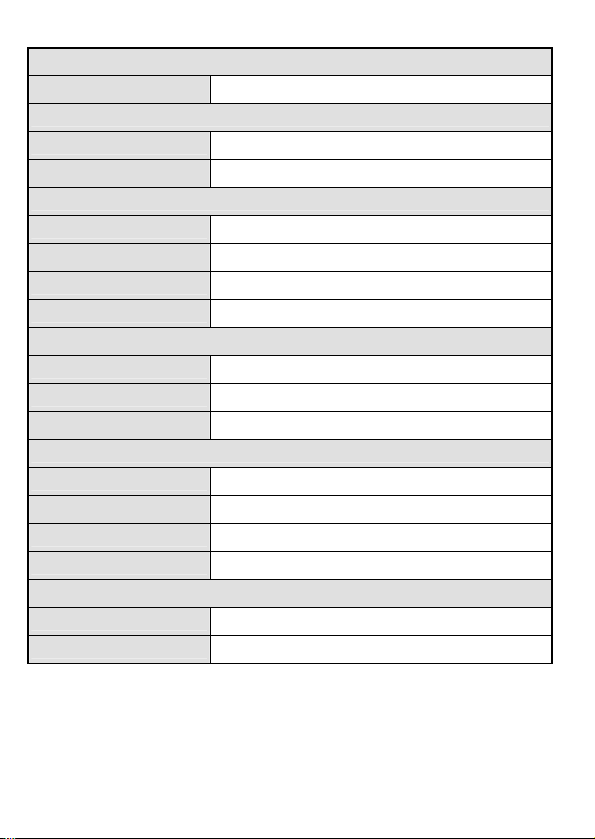
產品規格
電氣特性
環路阻抗 最大 2 KΩ/48 VDC (典型環路電流 20mA)
直流阻抗
通話阻抗 300Ω
監聽阻抗 >39kΩ, 1 KHz
脈衝式撥號輸出
脈衝率 10pps+0.8pps
間隙率 60/40%±2%
信號間隔 1000 ms typical
漏阻抗 >130 KΩ
音頻式撥號輸出
音頻誤差率 ±1.5% 最大值
音頻音量 -8±2dBm combined (typical)
音頻訊號音量差 4dB 最大值
記憶撥號
記憶容量 12 組
數字容量 16 位數字
PBX 中斷時間 1~3.6 秒
工作電源 4 顆 1.5V AAA 電池(不附電池)
外殼與尺寸(含金屬掛鉤)
長x 寬 x 高 218.5 x 69.5 x 49 mm / 8.60 x 2.7 x 4.9 inch
重量 208 g (不含電池及配件)
PROKIT’S INDUSTRIES CO., LTD.
www.prokits.com.tw
©2013 Prokit’s Industries Co., LTD. All rights reserved. 2013001
