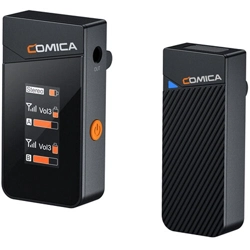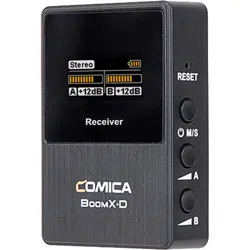
User Manual
2.4G Dual-channel Mini Wireless Microphone
Vimo C


Foreword
Features
Thanks for purchasing Comica 2.4G Dual-channel Mini Wireless Microphone Vimo C
●
Broadcasting-level Sound Quality, Universal for Camera, Phone and Computer
●
Digital Signal Processing, Support One-key Noise Reduction
●
Support Real-time Audio Monitor, Mono/Stereo/Safety Mode Switch
●
4-level Adjusted Gain Control and One-click Muting
●
Rotatable IPS Display for Intuitive Operation and Usage
●
Rechargeable Storage Case for Charging, Storing and Power Monitoring
●
Duration Up to 20 Hours, Support Working While Charging
●
Multifunctional USB-C Port for Charging and Monitoring
●
Low Latency < 20ms, Working Range Up to 200m(Open Area)
1

Notice
Due to 2.4G wireless characteristics, please keep face to face when using, and don’t turn
your back to the receiver, otherwise it is easy to generate breakpoints, which is a normal
phenomenon
Please pay attention that it can not realize STEREO function when in single-channel mode
Please do not expose the product to rain or moisture, and avoid having water or other
liquids spilled on it
Please do not use or store the product near any heat sources such as radiators, stoves, or
other heat-producing appliances
This product is a high-precision product, please prevent it from dropping or colliding
2

Packing List
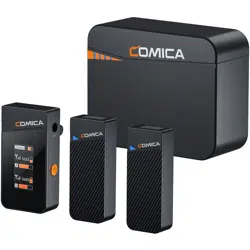
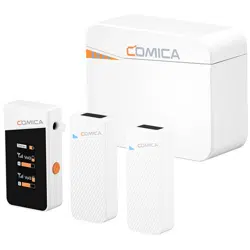
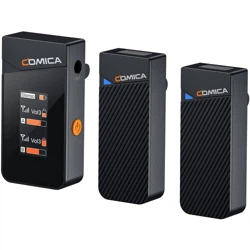
C1=TX+RX C2=TX+TX+RX C3=TX+TX+RX+Bat Case
Main Parts:
Multiple Selections:
Transmitter(TX) Receiver(RX) Bat Case
3

①
⑦ ⑧
② ③ ④
⑤ ⑥
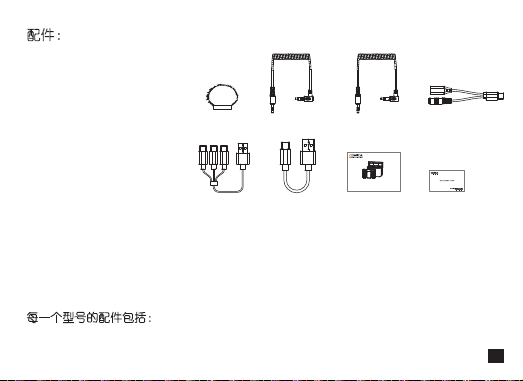
① Wind Mu
② 3.5mm TRS-TRRS Audio Cable
③ 3.5mm TRS-TRS Audio Cable
④ 2 in 1 Charging/Monitoring Adapter Cable
⑤ 3 in 1 Charging Cable
⑥ USB C-USB A Charging Cable
⑦ User Manual
⑧ Warranty Card
C1=①+②+③+④+⑤+⑦+⑧ C2=①x2+②+③+④+⑤+⑦+⑧ C3=①x2+②+③+④+⑥+⑦+⑧
The accessories of each combination include:
Accessories:
User Manual
2.4G Dual-channel Mini Wireless Microphone
Vimo C
4
Components and Instruction
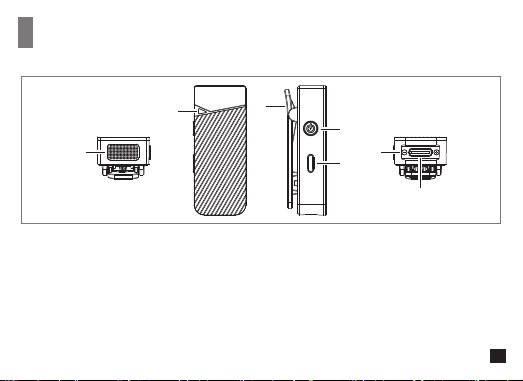
① Internal Mic
② Working Status Indicator: Blink blue when unpaired; Show blue when paired;
Show green when denoise is on; Show red when muting
③ Belt Clip
④ Power/Muting Button: Long press for on/o; Short press for muting
⑤ Denoise/Pairing Button: Short press for denoise on/o; Long press for pairing
⑥ Charging Contact
⑦ USB-C Charging Port
Transmitter (TX):
①
②
③
④
⑤
⑥
⑦
5

Receiver (RX):
①
④
⑤
⑥
⑦
⑧
②
③
6
6

① 3.5mm TRS Audio Output Port
② Power/Mono/Stereo/Safety Mode Switch Button:
Long press for On/O; Short press for mono/stereo/safety mode switch
③ LCD Display
④ Belt Clip
⑤ USB Charging/Monitoring Port:
Insert USB-C headphone to monitor or connect the receiver and the power bank/DC power to
charge; Connect the 3.5mm headphone to monitor and the power bank/DC power to charge
simultaneously via the 2 in 1 monitoring/charging cable
⑥ Volume Control/Pairing/Display Rotation Button:
Short press for volume adjustment of channel A; Long press for display rotation
⑦ Volume Control/Pairing/Display Rotation Button:
Short press for volume adjustment of channel B; Long press for display rotation
⑧ Charging Contact
7
7

① Power Indicator: There are four power indicator lights, one of which represents 25% of the bat
case's power
② Reset Hole: If there is an abnormal phenomenon such as a charging problem, insert a reset pin
into the reset hole to reset it
③ USB-C Charging Port
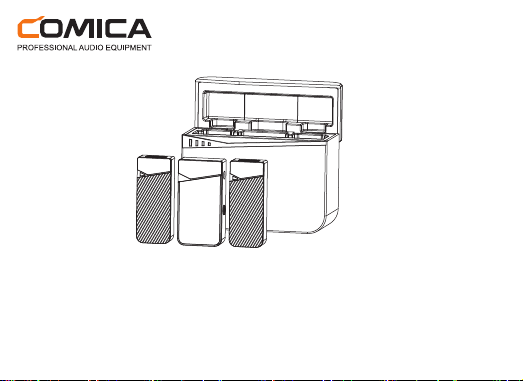
Bat Case:
The transmitters and receiver are automatically turned o when placed in the Bat Case
and turned on automatically when removed
②
③
①
8
8

Screen Display
Receiver(RX):
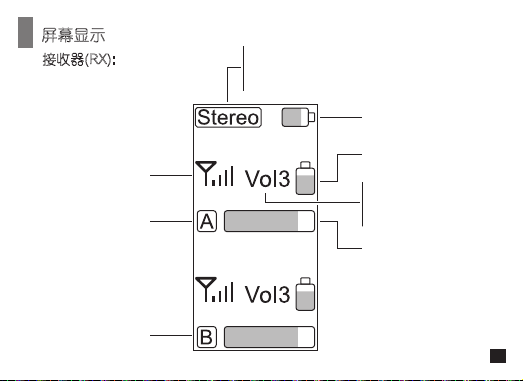
Stereo
Mono
Safety
Receiver's Battery Level
Transmitter's Battery Level
Audio Dynamic Bar
Vol
Mute
Pair
Transmitter A
Signal Strength
Transmitter B
9
9

Installation and Usage
Pairing (All have been paired at the factory. If you need to re-pair, please follow the following
description.)
Long press two pair buttons on the receiver simultaneously until the display shows ‘Pair’; Long press the
pair button on the transmitter until the indicator blinks blue rapidly. The indicator on the transmitter shows
blue when paired. The first paired transmitter is channel A (left channel), and the second paired
transmitter is channel B(right channel)
10
10

Usage
① ②
1. Transmitter Installation
Install the transmitter on the collar so that the internal mic points to the sound source
11

2. Receiver Installation
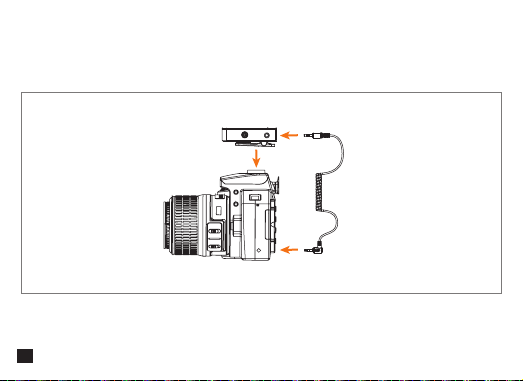
Work with Camera
Hold the receiver through the belt clip to the camera's hot shoe mount, then connect the receiver
with camera through the 3.5mm TRS-TRS audio cable
12

Work with Mobile Phone/Computer
Connect the receiver and the mobile phone/computer via the 3.5mm TRS-TRRS audio cable and
corresponding audio adapter cable (Please purchase audio adapter cable by yourself)
TRRS
Adapter Cable
TRS
13

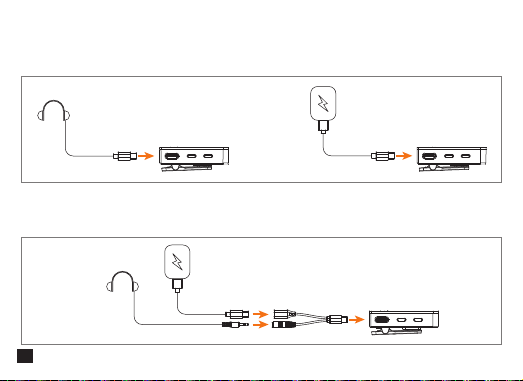
3.Monitoring/Charging
Method One
Connect USB-C headphones to monitor or connect the power bank/DC power using the
USB C-USB A charging cable to charge the receiver
Method Two
Connect 3.5mm headphones through the 2 in1 charging/monitoring adapter cable for monitoring
and connect the power bank/DC power to charge the receiver at the same time
14

Specification
Wireless Type
Antenna
Transmitting Power
Sensitivity
Polar Pattern
Frequency Response
S/N
Equivalent Noise
Maximum SPL
Dynamic Range
Sound Delay
Battery
Charging Time
Standby Time
Net Weight
Dimension
Operating Temperature
Storage Temperature
2.4GHz
Built-in Antenna
10dBm
-32dB ±2dB
Omnidirectional
80Hz~20kHz
70dB
24dBA
110dB
86dB
<20ms
TX: Built-in Li-ion Battery 140mAh 3.7V
RX: Built-in Li-ion Battery 230mAh 3.7V
Bat Case: Built-in Li-ion Battery 1400mAh 3.7V
TX: 2 Hours; RX: 2 Hours; Charging Case: 2 Hours
TX: 8 Hours; RX: 8 Hours; Bat Case: 2 times for two transmitters
and one receiver charged simultaneously
TX: 13g; RX: 19g; Bat Case: 90g
TX: 16x20x50mm; RX: 17x26x50mm; Bat Case: 31x63x80mm
0℃ ~ 50℃
-20℃ ~ 60℃
15


产品使用说明书
2.4G双通道无线迷你麦克风
Vimo C


前言
产品主要功能
注意事项
感谢您购买科唛Vimo C
●
超CD级音质,广泛兼容于相机、手机、电脑
●
内置DSP芯片,支持一键降噪
●
支持实时监听,单声道/立体声/安全音轨多模式切换
●
4级音量可调,支持一键静音
●
IPS可翻转显示屏,可视化操作
●
可收纳多功能充电盒,总续航高达20小时
●
一分二USB-C充电/监听接口,支持边充边用
●
低音频延迟<20ms,无线传输距离高达200m
由于2.4G无线特性,使用时尽量保持面对面,避免背对的情况,否则容易产生断点,属正常现象
单通道模式下,立体声(STEREO)功能无法实现
请将该产品放置在干燥环境中保存;请勿在雨中或潮湿的环境中使用该设备,以免发生短路
请勿将产品放置在散热器、烤箱、冰箱、空调等热源或干扰源附近使用
本产品属于高精密仪器类产品,请勿掉落、碰撞或撞击产品
1

包装清单
C1=TX+RX C2=TX+TX+RX C3=TX+TX+RX+充电盒
主体:
搭配选择:
发射器(TX) 接收器(RX) 充电盒
2
①
⑦ ⑧
② ③ ④
⑤ ⑥
① 防风毛
② 3.5mm TRS-TRRS音频连接线
③ 3.5mm TRS-TRS音频连接线
④ 一分二监听/充电转接线
⑤ 三合一充电线
⑥ USB C-USB A充电线
⑦ 说明书
⑧保修卡
C1=①+②+③+④+⑤+⑦+⑧ C2=①x2+②+③+④+⑤+⑦+⑧ C3=①x2+②+③+④+⑥+⑦+⑧
每一个型号的配件包括:
配件:
User Manual
2.4G Dual-channel Mini Wireless Microphone
Vimo C
3

部件介绍及说明
① 内置咪头
② 状态指示灯:未配对时蓝灯快闪,配对成功时蓝灯长亮,静音状态下亮红灯,降噪状态下亮绿灯
③ 背夹
④ 电源/静音按键:长按开关机,短按静音
⑤ 降噪/配对按键:短按开启/关闭降噪,长按配对
⑥ 充电触点
⑦ USB充电接口
发射器(TX):
①
②
③
④
⑤
⑥
⑦
4
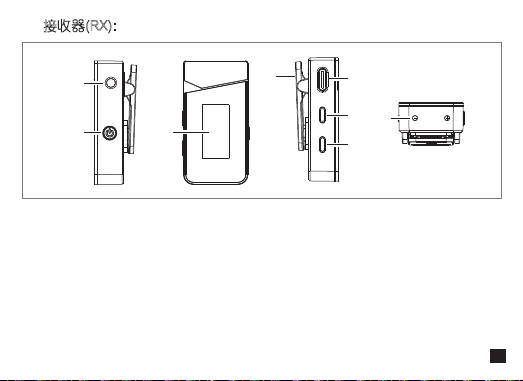
① 3.5mm TRS音频输出口
② 电源/模式切换按键:长按开关机,短按切换单声道/立体声/安全音轨
③ LCD显示屏
④ 背夹
⑤ USB充电/监听接口:插入USB-C耳机监听或连接充电宝/DC电源充电;通过一分二转接线同时
连接3.5mm耳机监听和充电宝/DC电源充电
⑥ 音量调节/配对/屏幕翻转按键:短按调节A通道音量,长按翻转屏幕
⑦ 音量调节/配对/屏幕翻转按键:短按调节B通道音量,长按翻转屏幕
⑧ 充电触点
接收器(RX):
①
④
⑤
⑥
⑦
⑧
②
③
5

① 电量指示灯:共有四格电量,每格代表25%的充电盒电量
② 复位孔:如出现无法充电等异常现象,使用复位针插入复位孔即可重置
③ USB充电接口
充电盒:
发射器与接收器放入充电盒中自动关机,取出时自动开机。
②
③
①
6
6
屏幕显示
接收器(RX):
Stereo:立体声
Mono:单声道
Safety:安全音轨
接收器电量
发射器电量
音频动态条
Vol:当前音量
Mute:静音
Pair:配对中
发射器A
信号强度
发射器B
7
7

安装与使用方法
配对(出厂已默认配对,如遇特殊情况需重新配对可参考以下配对方法)
同时长按接收器两个配对按键至接收器屏幕闪烁Pair字样,再长按发射器配对按键至发射器蓝灯快闪,
配对成功接收器屏幕Pair字样消失,发射器蓝灯长亮。先配对成功的发射器为A通道(左声道),后配
对成功的发射器为B通道(右声道)
8
8

使用方法
① ②
1.安装发射器
将发射器安装到衣领上,使内置麦克风指向音源方向
9
9
2.安装接收器
连接相机
通过背夹把接收器夹到相机的热靴座固定;通过3.5mm TRS-TRS音频连接线连接接收器和相机
10
10

连接手机/电脑
通过3.5mm TRS-TRRS音频连接线和相关音频转接线连接接收器和手机/电脑,可根据个人需求选
择是否进行监听(转接线请自行购买)
四节TRRS插头
转接线
三节TRS插头
11
3.监听/充电
方法一
连接USB-C耳机进行实时监听,或连接充电宝/DC电源给接收器充电
方法二
通过一分二监听/充电转接线连接3.5mm耳机进行实时监听, 同时连接充电宝/DC电源给接收器充电
12

规格参数
无线类型
天线
发射功率
麦克风灵敏度
麦克风指向性
麦克风频率响应
系统信噪比
系统等效噪声
最大声压级
动态范围
声音延迟
电池类型
充电时间
续航时间
净重
尺寸
工作温度
存储温度
2.4GHz
内置天线
10dBm
-32dB±2dB
全指向
80Hz ~ 20kHz
70dB
24dBA
110dB
86dB
<20ms
TX:锂聚合物 140mAh 3.7V ; RX:锂聚合物 230mAh 3.7V
充电盒:锂聚合物 1400mAh 3.7V
TX:2小时; RX:2小时; 充电盒:2小时
TX:8小时; RX:8小时; 充电盒:2次
TX: 13g; RX: 19g; 充电盒: 90g
TX: 16x20x50mm; RX: 17x26x50mm; 充电盒: 31x63x80mm
0℃ ~ 50℃
-20℃ ~ 60℃
13


Email: [email protected]