Custom-Temp
1.8L Digit al
Kettle
USER GUIDE
RJ11-17-SS-TC-RL
• Safety Instructions
• Features
• Operating Instructions
• Cleaning and Maintenance
• Notes
• Terms and Conditions
• Warranty Registration

READ ALL INSTRUCTIONS BEFORE USE
For your safety and continued enjoyment of this product, always
read the instruction manual before using.
COOKING FORWARD
TM
Welcome!
Whether this is your rst Chefman
®
appliance or you’re already
a part of our family, we’re happy to be in the kitchen with you.
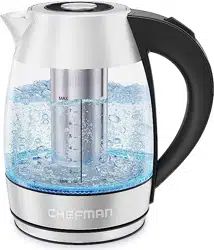
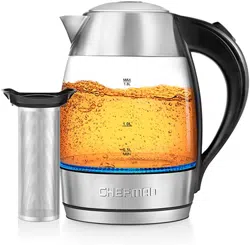
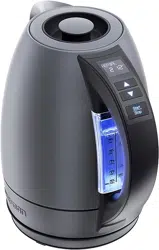
The Custom-Temp 1.8L Digital Kettle was designed to brew your
favorite tea to its best with easy one-touch presets that heat water
to the perfect temperature for your ideal cup. Great for the home
or ofce, the attractive stainless-steel kettle features an intuitive
user interface built right into the handle. Rapid-boil technology
means you can begin steeping in mere minutes, and the colored
LED indicator lights in the viewing window make it easy to see at a
glance when your water is ready.
We know you’re excited to start sipping, but please take a few
minutes to read our directions, safety instructions, and warranty
information.
From our kitchen to yours,
The Chefman
®
Team

4 Safety Instructions
8 Features
10 Operating Instructions
16 Cleaning and Maintenance
17 Notes
20 Terms and Conditions
22 Warranty Registration
CONTENTS

4
When using electrical appliances, basic safety precautions should always be
followed, including:
1. READ ALL INSTRUCTIONS.
2. Do not touch hot surfaces. Use handles or knobs.
3. To protect against re, electrical shock, and injury to persons, do not
immerse the cord, plug, charging base, or unit in water or other liquid.
4. Close supervision is necessary when any appliance is used by or near
children.
5. Unplug from the outlet when not in use and before cleaning. Allow
to cool before putting on or taking off parts, and before cleaning the
appliance.
6. Do not operate any appliance with a damaged cord or plug, or after
the appliance malfunctions or has been damaged in any manner. If this
should occur, contact Chefman
®
Customer Support for examination,
repair, or adjustment.
7. The use of accessory attachments not recommended by Chefman
®
may
result in re, electrical shock, or injury to persons.
8. Do not use outdoors.
9. Do not let the cord hang over the edge of a table or counter or touch
hot surfaces.
SAFETY INSTRUCTIONS
IMPORTANT SAFEGUARDS

5
10. Do not place the unit near or on any type of heat source, such as a gas
or electric burner, stove, or oven, even if not on. Do not use near an
open ame or ammable materials.
11. Always attach plug to appliance rst, then plug cord into the wall
outlet. To disconnect, turn any control to OFF, then remove the
plug from the wall outlet.
12. Do not use the appliance for other than its intended use.
13. Scalding may occur if the lid is opened during the heating cycle.
14. Ensure the lid is securely closed before serving any beverages.
15. Do not set a hot container on a wet or cold surface.
16. Do not use a cracked container or a container having a loose or
weakened handle.
17. Do not clean the container with cleansers, steel wool pads, or other
abrasive materials.
SAFETY INSTRUCTIONS
SAVE THESE INSTRUCTIONS
FOR HOUSEHOLD USE ONLY
IMPORTANT SAFEGUARDS

6
SAFETY INSTRUCTIONS
IMPORTANT SAFEGUARDS
WARNING: This appliance has a polarized plug (one blade is wider than the
other). This plug is intended to t into a polarized outlet only one way. If
the plug does not t fully into the outlet, reverse the plug. If it still does not
t, contact a qualied electrician. Do not attempt to modify the plug in any
way or force it into the outlet. This could result in injury or electrical shock.
SHORT CORD INSTRUCTIONS
A short power-supply cord is provided to reduce the hazards of
entanglement or tripping over a longer cord. Longer detachable
power-supply cords or extension cords are available and may be used
if care is exercised in their use. If a longer detachable power-supply
extension cord is used:
1. The marked electrical rating of the extension cord should be at least
as great as the electrical rating of the appliance.
2. The cord should be arranged so that it will not drape over the
countertop or tabletop where it can be pulled on by children or
tripped over unintentionally.
7
SAFETY INSTRUCTIONS
IMPORTANT SAFEGUARDS
POWER CORD SAFETY TIPS
1. Never pull or yank on the cord or the appliance.
2. To insert the plug, grasp it rmly and guide it into the outlet.
3. To disconnect the appliance, grasp the plug and remove it from
the outlet.
4. Never use the product if the power cord shows signs or abrasion or
excessive wear. Contact Chefman
®
Customer Support for additional
guidance and support.
5. Never wrap the cord tightly around the appliance, as this could place
undue stress on the cord where it enters the appliance and cause it to
fray and break.
DO NOT OPERATE THE APPLIANCE IF THE POWER CORD SHOWS
ANY DAMAGE OR IF THE APPLIANCE WORKS INTERMITTENTLY
OR STOPS WORKING ENTIRELY.
Do not place the appliance on a stovetop
or any other heatable surface, even if the
stovetop is not on. Doing so is a fire hazard.
8
FEATURES
1
2
4
11
10
9
8
7
5
6
3

9
FEATURES
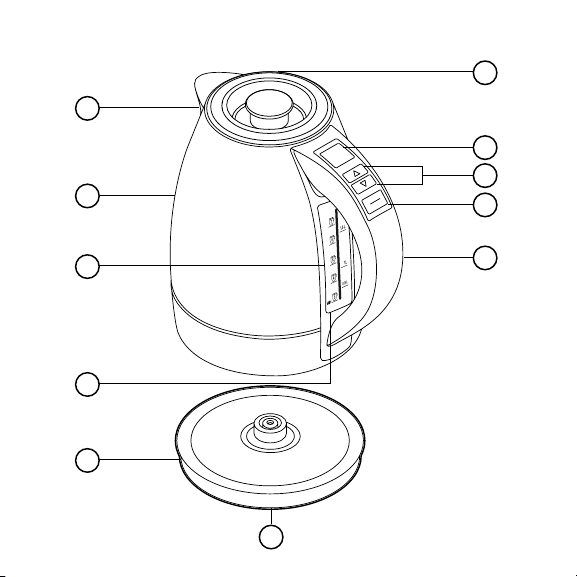
1. Drip-Free Spout with Removable Filter
2. Stainless-Steel Kettle
3. Water-Level Window
4. Tri-Color LED Indicator Lights
5. 360° Swivel Power Base
6. Out-of-Sight Cord Storage (under base)
7. Lift-Out Lid
8. Digital Display
9. Temperature Increase/Decrease Buttons
10. START/STOP Button
11. Stay-Cool Handle with Built-In Control Panel
BUILT-IN PRESETS
• DELICATE: 160°F (70°C)
• GREEN: 175°F (80°C)
• WHITE: 185°F (86°C)
• OOLONG: 195°F (90°C)
• HERBAL: 212°F (100°C)
• BLACK: 212°F (100°C)
• BOIL: 212°F (100°C)
INDICATOR COLORS
Power Up/Standby: WHITE
Heating Water to Temperature: RED
Keep Warm: GREEN

10
BEFORE FIRST USE
1. Remove all packaging and materials. Be sure that all parts are
included before discarding any packaging.
2. Pull out the power cord from the compartment under the base so
that it can sit level, and place the base on a at surface.
3. To clean the pot of any packing debris, “brew” a pot of plain water
without tea. To do so, lift out the lid, then ll the kettle with water to
the MAX line.
4. Replace the lid, place the kettle back on the base unit, and plug it
into a power outlet.
5. The kettle should default to the Boil preset; if not, use arrow buttons
to set it to Boil, then press START. The LED indicator lights will turn
red and the display will show the average live temperature as the
water heats.
6. After the boil, the unit will automatically switch to Keep Warm, and
the LED indicator lights will be green. Empty the kettle, then rinse it
with clean water. It is now ready for use. NOTE: Never ll with water
above the MAX line or below the MIN line indicated on the viewing
window.
OPERATING INSTRUCTIONS

11
The Custom-Temp 1.8L Digital Kettle is perfect for all your hot-water
needs: hot or iced tea, instant or pour-over coffee, instant oatmeal, and
more. The viewing window lights up with bright LEDs, and the kettle lifts
effortlessly from its base for easy lling at the sink and cord-free serving.
The kettle can also be returned to the base from any direction, making it
work well for both right- and left-handed people.
HOW TO USE THE KETTLE
1. Place the base on a flat surface.
2. Fill the kettle to at least the MIN line and not above the MAX line
(1.8 liters) with cold, fresh water, and place the kettle securely onto
its base.
3. Plug in the unit. The LED indicator lights on the viewing window will
light white, meaning it’s in Standby mode.
4. Choose your temperature. Select one of the presets (suggested
temperatures for optimal brewing of specic kinds of teas) or your
own preferred temperature by pressing the up and down arrows on
the handle.
• Hold the button down to go through just the presets.
• Pulse the button to scroll through temperatures in intervals as
well as presets to nd the perfect temperature for you.
• To switch temperature units (°F and °C), hold down both the
up and down arrow buttons for 5 seconds.
OPERATING INSTRUCTIONS
12
5. Press START. The indicator lights will turn red, indicating heating. The
display will show the average live temperature of the water as the heat
increases. (You can cancel heating at any time by pressing STOP.)
6. Heat until your desired temperature is reached. When the temperature
is reached, the unit will beep.
7. Serve. Lift the kettle off its base and pour. If there is water remaining,
return the kettle to the base to keep warm for up to 1 hour. (See p. 15
for more about the Keep Warm function.) Otherwise, turn off the
kettle by pressing STOP and unplugging the unit.
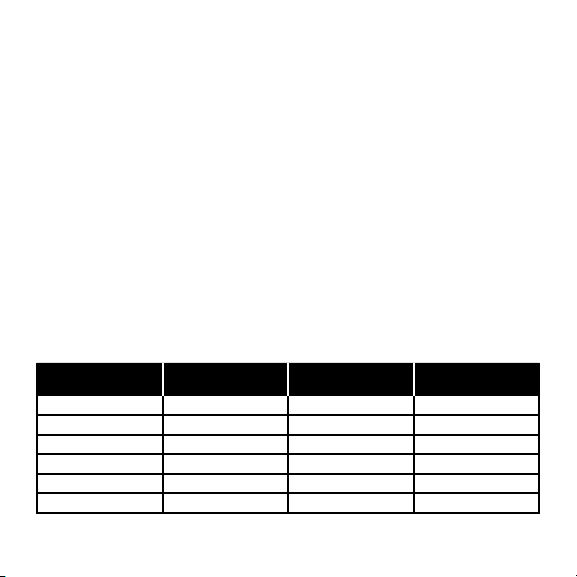
TEA BREWING PRESET CHART
The guide below is intended as a starting point for brewing your perfect
cup of tea. You may need to vary the amount of tea and steeping times
based on the kind of tea, the size of the leaves, and personal preference.
Preset Temperature Loose Tea Amount
(per cup)
Suggested
Steep Time
Delicate 160°F 2 teaspoons 3 minutes
Green 175°F 2 teaspoons 3 minutes
White 185°F 2 teaspoons 4 minutes
Oolong 195°F 2 teaspoons 4 minutes
Herbal 212°F 2 teaspoons 5 minutes
Black 212°F 2 teaspoons 5 minutes
OPERATING INSTRUCTIONS

13
TEA BREWING TIPS
• Use good-tasting water, preferably ltered, for best results.
• If using loose tea, add more or less tea leaves than suggested,
depending on how strong you like your “cuppa.”
• Avoid steeping for too long, which can make tea taste bitter.
• If making iced tea, double the amount of tea leaves and steep a little
longer so that the avor stays strong when chilled.
• If your loose tea comes with brewing instructions, defer to those
initially for optimum amounts and steeping time.
• Save money by re-steeping tea. Though black teas generally give
up all their avor during the rst brew, some teas, like green and
oolong, may be re-steeped within a few hours; let them steep a little
longer during the second steep for best avor.
OPERATING INSTRUCTIONS

14
SPECIAL FEATURES AND FUNCTIONS
Recent Selection Saving
You don't have to reset the kettle every time you use it. After rst use, the
default setting will be the last setting you programmed.
Memory Function
The Custom-Temp 1.8L Digital Kettle features an internal memory that lets
you remove the kettle from the base without the unit turning off. Instead,
Heating or Keep Warm (depending on which mode the unit was in) will
pause, and the kettle will continue heating or warming when it's returned
to the base. This is true so long as the temperature has not dropped by
more than 20°F during the time the kettle was without power. If it has
dropped by more than that, the kettle will go into Standby mode.
Boil-Dry Protection
The unit comes equipped with boil-dry protection. While you should
never heat the kettle without water at least to the MIN line, should the
unit go dry or start without water, it will automatically shut off completely
to avoid damaging the heating element. It will not come back on, even
if you replace it to the base, until it has cooled down. To quickly cool it
down, add cold water to the kettle.
OPERATING INSTRUCTIONS

15
Automatic Keep Warm Function
The Custom-Temp 1.8L Digital Kettle will keep your water hot for up to
1 hour. During the Keep Warm mode, the unit’s indicator lights will be
green, and the words Keep Warm and a timer counting up to 60 minutes
will display. When the time ends, the kettle will go into Standby mode;
the display will still be on and the indicator lights will be white. After 3
minutes with no action, the unit will go into Sleep mode with all lights on
the display dimmed.
If you wish to turn the Keep Warm function off, press and hold both the
up arrow button and the START/STOP button for 5 seconds (to turn it
back on, press and hold the same two buttons for 5 seconds). With the
Keep Warm function off, the indicator lights will turn green and the word
READY will display once the kettle reaches the target temperature. Lifting
the kettle from its base or pressing any button will return it to Standby
mode.
Mute Function
To silence all beeps, press and hold both the down arrow button and the
START/STOP button for 5 seconds. To turn the sound back on, repeat
the action.
OPERATING INSTRUCTIONS

16
1. Unplug the kettle and allow it to cool completely before cleaning.
2. Clean the interior of the kettle as needed by carefully washing the
inside with soapy water. Do not let the handle get wet. Rinse the
inside of the kettle thoroughly. Wipe the outside of the kettle and
the power base with a damp cloth. WARNING: The handle of this
unit contains sensitive electronics. DO NOT expose the handle
to water when cleaning the kettle. DO NOT submerge this unit in
or under water at any time. Doing so may expose the user to an
electric shock hazard and cause the kettle to stop operating.
DESCALING
Due to minerals in water, deposits may form on the base of the kettle
and cause discoloration. To get the best performance from your kettle,
descale it from time to time. Frequency will depend on the hardness of
your water and how often you use the kettle. You can either follow the
directions using a commercial descaler, or use vinegar and water and
follow the directions below:
1. Fill the kettle with enough white vinegar to cover the bottom by
about ½ inch. Heat the vinegar to a boil.
2. Repeat with fresh vinegar until all deposits are removed.
3. When the descaling process is complete, empty the kettle and
rinse it out several times with clean water.
CLEANING AND MAINTENANCE

17
NOTES

18
NOTES

19
NOTES

20
RJ Brands, LLC d/b/a Chefman
®
offers a limited 1-year Warranty
(the “Warranty”) available on sales through authorized distributors and
retailers only. Please note that this Warranty becomes valid from the date
of initial retail purchase and that the Warranty is non-transferable and
applies only to the original purchaser.
This Warranty is void without proof of purchase within the United States and
Canada. Please be aware that this Warranty supersedes all other warranties
and constitutes the entire agreement between the consumer and Chefman
®
.
Any changes to the Terms and Conditions of this Warranty must be in
writing, signed by a representative of Chefman
®
. No other party has the right
or ability to alter or change the Terms and Conditions of this Warranty.
We may ask you to please submit, via email, photos and/or video of the issue
you are experiencing. This is to help us better assess the matter and possibly
offer a quick x. Photos and/or video may also be required to determine
Warranty eligibility.
We encourage you to register your product. Registering can make the
Warranty process easier and can keep you informed of any updates or recalls
on your product. To register, follow the directions on the Chefman
®
Warranty
Registration page in the Chefman
®
User Guide. Please retain your proof of
purchase even after registering. In the event that you do not have proof
of your purchase date, we may declare your Warranty void or we may, at
our sole discretion, apply the date of manufacture as the purchase date for
purposes of this Warranty.
TERMS AND CONDITIONS
Limited Warranty

21
WHAT THE WARRANTY COVERS
• Manufacturer Defects - Chefman
®
products are warranted against defects in
material and workmanship, under normal household use, for a period of 1 year
from the date of purchase when used in accordance with the directions listed
in the Chefman
®
User Guide. If your product does not work as it should, please
contact Customer Support at [email protected] so that we may assist you.
THIS WARRANTY DOES NOT COVER
• Misuse - Damage that occurs from neglectful or improper use of products,
including, but not limited to, damage that occurs as a result of usage with
incompatible voltage, regardless of whether the product was used with a
converter or adapter. See Safety Instructions in the Chefman
®
User Guide for
information on proper use of product;
• Poor Maintenance - General lack of proper care. We encourage you to take care
of your Chefman
®
products so that you may continue to enjoy them. Please see
Cleaning and Maintenance directions in the Chefman
®
User Guide for information
on proper maintenance;
• Commercial Use - Damage that occurs from commercial use;
• Normal Wear and Tear - Damage or degradation expected to occur due to normal
use over time;
• Altered Products - Damage that occurs from alterations or modications by
any entity other than Chefman
®
such as the removal of the rating label afxed
to the product;
• Catastrophic Events - Damage that occurs from re, oods, or natural disasters; or
• Loss of Interest - Claims of loss of interest or enjoyment.
TERMS AND CONDITIONS
Limited Warranty
22
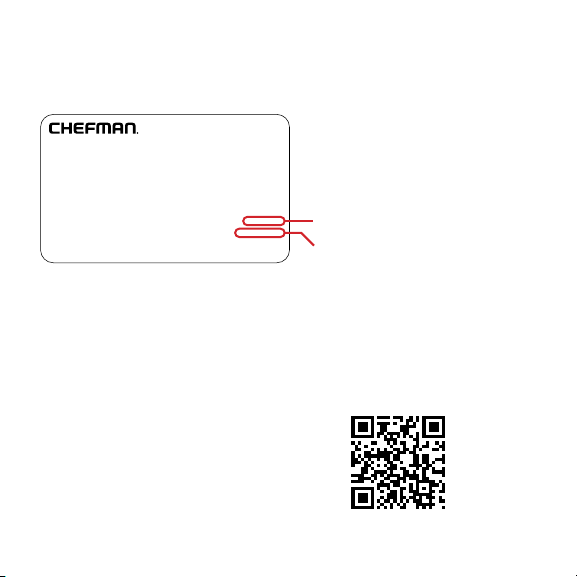
MADE IN CHINA/FABRIQUE EN CHINE
AC ONLY/ AC SEULEMENT
DATE CODE:
ACCESS CODE:
Model/Modele: RJ25-C
Conveyor Toaster
120v~60hz 1800W
CONFORMS TO UL STD. 1026
CERTIFIED TO CSA STD.C22.2 No.64
CAUTION: DO NOT IMMERSE IN WATER
ATTENTION: NE PAS PLONGER DANS L’EAU
WARNING: TO PREVENT ELECTRIC SHOCK,
UNPLUG BEFORE CLEANING
PRÉAVIS: POUR ÉVITER LES CHOCS ÉLECTRIQUES,
DÉBRANCHEZ L’APPAREIL AVANT DE L’UTILISER
READ INSTRUCTIONS BEFORE USING
LISEZ LES INSTRUCTIONS AVANT DE L’UTILISER
HOUSEHOLD USE ONLY
POUR USAGE DOMESTIQUE SEULEMENT
0000000
0000
XXXXXXXX
CHEFMAN
®
WARRANTY REGISTRATION
What do I need to register my product?
•Contact Information
•Model Number
•Proof of Purchase (online
conrmation, receipt, gift receipt)
•Date Code
•Access Code
How do I register my product?
All you need to do is ll out a simple Chefman
®
registration form. You can
easily access the form in one of the two ways listed below:
1. Visit Chefman.com/register.
2. Scan the QR code to access site:
NOTE: Label depicted here is an example.

23
For product information
Please visit us at Chefman.com.
EXCEPT WHERE SUCH LIABILITY IS REQUIRED BY LAW, THIS WARRANTY
DOES NOT COVER, AND CHEFMAN
®
SHALL NOT BE LIABLE FOR,
INCIDENTAL, INDIRECT, SPECIAL, OR CONSEQUENTIAL DAMAGES,
INCLUDING WITHOUT LIMITATION, DAMAGE TO, OR LOSS OF USE OF
THE PRODUCT, OR LOST SALES OR PROFITS OR DELAY OR FAILURE TO
PERFORM THIS WARRANTY OBLIGATION. THE REMEDIES PROVIDED
HEREIN ARE THE EXCLUSIVE REMEDIES UNDER THIS WARRANTY,
WHETHER BASED ON CONTRACT, TORT OR OTHERWISE.
Chefman
®
is a registered trademark of RJ Brands, LLC.
Cooking Forward™ is a trademark of RJ Brands, LLC.
CHEFMAN
®
WARRANTY REGISTRATION

24
CHEFMAN.COM | @MYCHEFMAN
©CHEFMAN 2022
RJ11-17-SS-TC-RL_UG_FINAL_OTP_112922