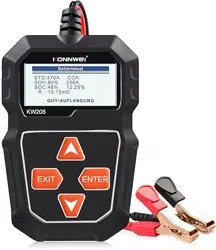
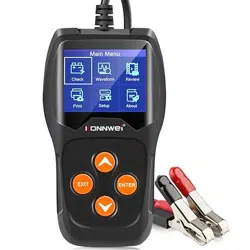
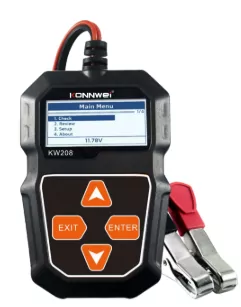
KONNWEI KW208 Car Battery Tester User Manual
1 Product Summary
1.1 Product Profile
KW208 Battery Tester adopts the state-of-the-art conductance testing technology in the word to easily. quickly and accurately measure the actual cold cranking amps capability of the vehicle starting battery. healthy state of the battery itself. and common fault of the vehicle starting system and charging system. which can help maintenance personnel to find the find the problem quickly and accurately. thus to achieve quick vehicle repair.
- Test all automotive cranking lead acid battery. including ordinary lead acid battery. AGM flat plate battery. AGM spiral battery. and Gel battery.
- Directly detect bad cell battery.
- Feature reverse polarity protection; reverse connection may not damage the tester or affect the vehicle and battery.
- Directly test the battery with loss of electricity. full charge is not required before testing.
- Testing standards cover the majority of world’s battery standards. such as CCA. BCI. CA. CA. JIS. DIN. SAE.
- Support multi-languages. customer can select different language package. which includes: English. German. French. Dutch. Russian. Spanish. Italian . Portuguese
1.2 Product Function
KW208 battery tester features the following functions: battery test. cranking test. charging test and other additional functions. Battery test mainly aims to analyze the battery healthy status to calculate the actual cold cranking capability of the battery of the battery and the aging extent. which provide reliable analysis evidence for the test and maintenance of the battery. If may notify the user to replace battery in advance when the battery gets aged.
Cranking test is used to test and analyze the starting motor. Testing the actual required cranking current and cranking voltage of the starting motor is helpful to determine whether the starting motor works properly or not. If the starting malfunction may cause an increased starting loaded torque; or rotor friction of the starting motor generates an increasing friction of the starting motor itself. Charging test is tocheck and analyze the charging system. including generator. rectifier. rectifier diode. etc.. thus to find out whether the output voltage of the generator is normal. the rectifier diode works properly and the abnormal. it will lead to over charge or incomplete charge of the battery. thus cause quick damage to the battery and greatly shorthen the life of other loaded appliance.
1.3 Technical Parameters
- Cold Craning Amps Measurement Range:
Measurement Standard Measurement Range
CCA 100-2000
BCI 100-2000
CA 100-2000
MCA 100-2000
JIS 26A17-245H2
DIN 100-1400
IEC 100-1400
EN 100-2000
SAE 100-2000
- Voltage Measurement Range: 8-16V DC
1.4 Working Environment Requirement
Working Environment Temp: 0°C — 50°C/ -32°F — 122°F It is applicable for automotive manufacturers. automotive maintenance and repair workshops. automotive battery factories. automotive battery factories. automotive battery distributors. and educational organizations. etc.
2 Battery Test
After entering battery test program. tester displays Main Menu. Tester will display the following contents in a sequence. select accordingly.
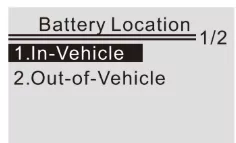
Battery In-vehicle or Out-of-Vehicle
From the startup screen. or press EXIT button to enter Main Menu. Press UP/DOWN key to select the battery location. in vehicle or out of vehicle. then press ENTER key to confirm.
2.1 Battery Test in vehicle
When surface charge detected by the tester. it prompts “Surface charge. turn lights on”. Turn lights on as prompted to eliminate battery surface charge. tester will then display the following messages in a sequence.
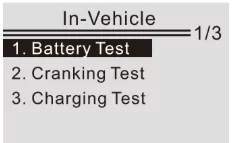
Now the tester detects the surface charge has been eliminated. turn lights off as prompted. then press ENTER key. the tester will recover automatic test.
Select Battery Type
After the battery charge status selected. tester will promt to select battery type. i.e. Regular Flooded. AGM Flat plate or AGM Spiral. Gel and EFB battery. Press UP/DOWN key to select battery type. then press OK key to confirm.
Battery System Standard and Rating
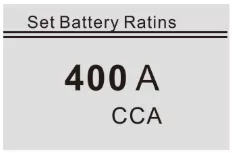
KW208 battery tester each battery according to the selected system and rating. Use UP/DOWN key to select according to the actual system standard and rating marked on the battery. See in the below picture. the arrow indicated location.
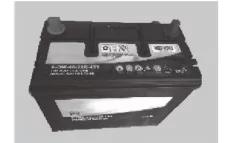
CCA: Cold Cranking Amps. specified by SAE&BCI. most frequently used value for starting battery at 0°F(-18°C).
BCI: Battery Council international standard.
CA: Cranking Amps standard. effective starting current value at 0°C.
MCA: Marine Cranking Amps standard. effective starting current value at 0°C.
JIS: Japan Industrial Standard. displayed on the battery as combination of the numbers and letters. e.g. 55D23. 80D26.
DIN: German Auto Industry Committee Standard.
IEC: Internal Electron technical Commission Standard.
EN: European Automobile Industry Association Standard.
SAE: Society of Automotive Engineers Standard.
From the [Select Type] screen. Press UP/DOWN key to select the Standard. then press ENTER key to confirm.
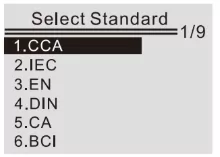
Rating range as following:
Measurement Standard Measurement Range
CCA 100-2000
BCI 100-2000
CA 100-2000
MCA 100-2000
JIS 26A17-245H2
DIN 100-1400
IEC 100-1400
EN 100-2000
SAE 100-2000
Input correct test standard and rating. press ENTER key. tester starts to test. and dynamic interface “Under measurement ...” prompted. See below:
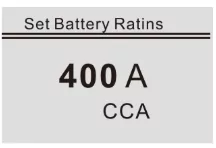
It takes around 1 seconds to display the battery test result.
1 Good Battery
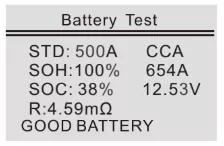
The battery is without any problem. please be relaxed to use.
2 Good. Recharge
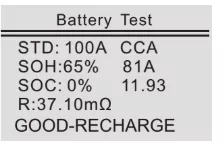
Good battery but low current. recharge before using.
3 Replace
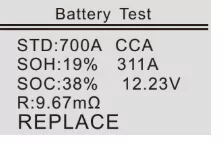
The battery is near to or already reached the end of the using life. replace battery otherwise. bigger danger will be followed.
4 Bad cell. Replace
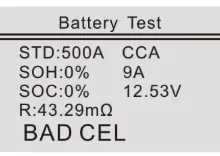
Battery interior damaged. bad cell or short circuit. replace battery.
5 Charge. Retest
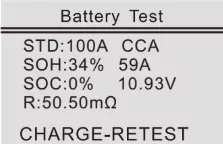
Unstable battery shall be recharged and retested to avoid error. If same test result appears after recharge and retest. the battery is regarded as damaged. replace the battery.
Attention: If “Replace” resulted from IN-VEHICLE mode. it might be the reason that vehicle cable is not well connected with the battery. Ensure to cut off the cable and retest the battery under OUT-OF-VEHICLE before making a decision to replace battery. NOTE: After testing. if need to Exit. press EXIT key to directly Exit to the startup interface.
2.2 Battery out of vehicle test
OUT-OF-VEHICLE means battery is not connected with any of the vehicle loaded. i.e. battery connection is cut off.
From the startup screen. or press EXIT button to enter Main Menu. Press UP/DOWN key to select the battery location. in vehicle or out of vehicle. then press ENTER key to confirm.
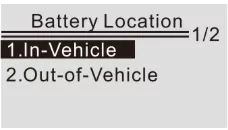
Select Battery Type
After the battery charge status selected. tester will promt to select battery type. i.e. Regular Flooded. AGM Flat plate or AGM Spiral. Gel and EFB battery. Press UP/DOWN key to select battery type. then press OK key to confirm.
Battery System Standard and Rating
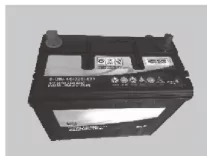
KW208 battery tester each battery according to the selected system and rating. Use UP/DOWN key to select according to the actual system standard and rating marked on the battery. See in the below picture. the arrow indicated location.
CCA: Cold Cranking Amps. specified by SAE&BCI. most frequently used value for starting battery at 0°F(-18°C).
BCI: Battery Council international standard.
CA: Cranking Amps standard. effective starting current value at 0°C.
MCA: Marine Cranking Amps standard. effective starting current value at 0°C.
JIS: Japan Industrial Standard. displayed on the battery as combination of the numbers and letters. e.g. 55D23. 80D26.
DIN: German Auto Industry Committee Standard.
IEC: Internal Electron technical Commission Standard.
EN: European Automobile Industry Association Standard.
SAE: Society of Automotive Engineers Standard. From the [Select Type] screen. Press UP/DOWN key to select the Standard. then press ENTER key to confirm.
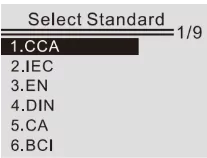
Rating range as following:
Measurement Standard Measurement Range
CCA 100-2000
BCI 100-2000
CA 100-2000
MCA 100-2000
JIS 26A17-245H2
DIN 100-1400
IEC 100-1400
EN 100-2000
SAE 100-2000
Input correct test standard and rating. press ENTER key. tester starts to test. and dynamic interface “Under measurement ...” prompted. See below:
It takes around 1 seconds to display the battery test result.
1 Good Battery
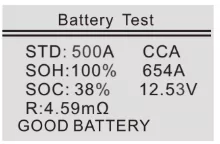
The battery is without any problem. please be relaxed to use.
2 Good. Recharge
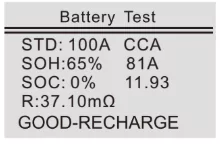
Good battery but low current. recharge before using.
3 Replace
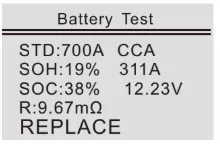
The battery is near to or already reached the end of the using life. replace battery otherwise. bigger danger will be followed.
4 Bad cell. Replace
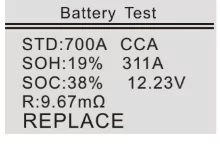
Battery interior damaged. bad cell or short circuit. replace battery.
5 Charge. Retest
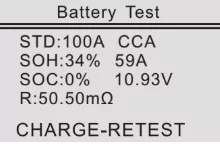
Unstable battery shall be recharged and retested to avoid error. If same test result appears after recharge and retest. the battery is regarded as damaged. replace the battery.
2.3 Review
Review waveform
From the startup screen. or press EXIT button to enter Main Menu. Press UP/DOWN button to select the [Review] function in the Main Menu and press ENTER button. The screen will display the interface as shown below:
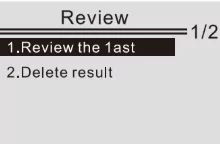
Review the last result
From the startup screen. or press EXIT button to enter Main Menu. Press UP/DOWN button to select the [Review] function in the Main Menu and press ENTER button. The screen will display the interface as shown below:
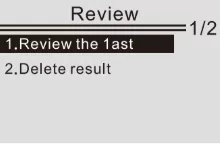
1) Press UP/DOWN button to select Review the last result function and press ENTER button. The screen will display the interface as shown below:
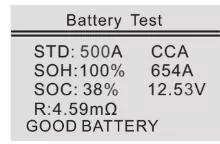
Press UP/DOWN button to select Review SOH or SOC.
3. Service Procedures
If you have any questions. please contact your local store. distributor or visit our website at http:// www.konnwei.com If it becomes necessary to return the tool for repair. contact your local distributor for more information.