Models
KM-1301SAJ-E
Modular Crescent Cuber
Service Manual
Number: 73233
Issued: 9-28-2018
hoshizakiamerica.com
2
WARNING
Only qualied service technicians should install and service the icemaker. To
obtain the name and phone number of your local Hoshizaki Certied Service
Representative, visit www.hoshizaki-europe.com. No service should be undertaken
until the technician has thoroughly read this Service Manual. Failure to service and
maintain the icemaker in accordance with this manual will adversely affect safety,
performance, component life, and warranty coverage and may result in costly water
damage. Proper installation is the responsibility of the installer. Product failure or
property damage due to improper installation is not covered under warranty.
Hoshizaki provides this manual primarily to assist qualied service technicians in the
service and maintenance of the icemaker. Should the reader have any questions or
concerns which have not been satisfactorily addressed, please call the appropriate
Hoshizaki Service Office:
UK/Ireland - Hoshizaki UK
TEL : +44 (0)845 456 0585
FAX: +44 (0)132 283 8331
Holland - Hoshizaki Europe
TEL : +31 (0)20 6918499
FAX: +31 (0)20 6918768
Belgium/Luxemburg - Hoshizaki Belgium
TEL : +32 (0)2 7123030
FAX: +32 (0)2 7123031
Germany/Switzerland/Austria - Hoshizaki Deutschland
TEL : +49 (0)2154 92810
FAX: +49 (0)2154 928128
France - Hoshizaki France
TEL : +33 (0)1 48639380
FAX: +33 (0)1 48639388
Other countries - Hoshizaki Europe
TEL: +31 (0)20 6918499
FAX: +31 (0)20 6918768
Web Site: www.hoshizaki-europe.com
NOTE: To expedite assistance, all correspondence/communication MUST include the
following information:
• Model Number ________________________
• Serial Number ________________________
• Complete and detailed explanation of the problem.

3
CONTENTS
Important Safety Information ................................................................................................. 5
I. Construction and Water/Refrigeration Circuit Diagram ....................................................... 7
A. KM Construction............................................................................................................ 7
B. Bin Control .................................................................................................................... 8
1. Single Bin Control .................................................................................................... 8
2. Stacked Bin Control ................................................................................................. 8
C. Water/Refrigeration Circuit Diagram .............................................................................. 9
II. Sequence of Operation and Service Diagnosis ............................................................... 10
A. Sequence of Operation Flow Chart ............................................................................. 10
1. Operation Flow Chart ............................................................................................ 10
2. Shutdown Flow Chart .............................................................................................11
B. Service Diagnosis ....................................................................................................... 12
C. Control Board Check ................................................................................................... 18
D. Bin Control Check ....................................................................................................... 19
1. Bin Control Check .................................................................................................. 19
2. Bin Control Cleaning .............................................................................................. 20
E. Float Switch Check and Cleaning ............................................................................... 21
1. Float Switch Check ................................................................................................ 21
2. Float Switch Cleaning ............................................................................................ 22
F. Thermistor Check ......................................................................................................... 23
G. Control Switch ............................................................................................................. 23
H. Diagnostic Tables ........................................................................................................ 24
I. Freeze-Up Check List ................................................................................................... 28
III. Controls and Adjustments ............................................................................................... 29
A. Control Board Layout .................................................................................................. 30
B. LED Lights and Audible Alarm Safeties ....................................................................... 31
C. Settings and Adjustments ............................................................................................ 32
1. Default Dip Switch Settings .................................................................................... 32
2. Harvest Time (S4 dip switch 1 & 2)........................................................................ 33
3. Pump-Out Time/Harvest Time During Pump-Out (S4 dip switch 3 & 4) ................. 33
4. Pump-Out Frequency Control (S4 dip switch 5) ..................................................... 34
5. Harvest Pump Time (Harvest Assist) (S4 dip switch 6) ......................................... 34
6. Harvest Pump Time (Harvest Assist) (S4 dip switch 7) ......................................... 35
7. Factory Use (S4 dip switch 8)................................................................................. 35
8. Freeze Timer (S4 dip switch 9 & 10) ...................................................................... 36
9. Float Switch Control Selector (S5 dip switch 1) ..................................................... 36
10. Rell Counter (S5 dip switch 2 and 3) .................................................................. 37
IMPORTANT
This manual should be read carefully before the appliance is serviced. Read
the warnings and guidelines contained in this manual carefully as they provide
essential information for the continued safe use, service, and maintenance of the
appliance. Retain this manual for any further reference that may be necessary.

4
IV. Refrigeration Circuit and Component Service Information.............................................. 38
A. Refrigeration Circuit Service Information .................................................................... 38
B. Component Service Information .................................................................................. 41
V. Maintenance .................................................................................................................... 42
VI. Preparing the Icemaker for Periods of Non-Use ............................................................. 43
VII. Disposal ......................................................................................................................... 44
VIII. Technical Information .................................................................................................... 45
A. Specication and Performance Data ........................................................................... 45
B. Wiring Diagram ............................................................................................................ 46
5
Important Safety Information
Throughout this manual, notices appear to bring your attention to situations which could
result in death, serious injury, damage to the appliance, or damage to property.
WARNING Indicates a hazardous situation which could result in death or
serious injury.
NOTICE Indicates a situation which could result in damage to the
appliance or property.
IMPORTANT Indicates important information about the use and care of the
appliance.
WARNING
The appliance should be destined only to the use for which it has been expressly
conceived. Any other use should be considered improper and therefore dangerous.
The manufacturer cannot be held responsible for injury or damage resulting from
improper, incorrect, and unreasonable use. Failure to service and maintain the
appliance in accordance with this manual will adversely affect safety, performance,
component life, and warranty coverage and may result in costly water damage.
To reduce the risk of death, electric shock, serious injury, or re, follow basic
precautions including the following:
• Only qualied service technicians should install and service this appliance.
• The appliance must be installed in accordance with applicable national, state, and
local codes and regulations. Failure to meet these code requirements could result in
death, electric shock, serious injury, re, or damage to the appliance.
• Electrical connection must be hard-wired and must meet national, state, and local
electrical code requirements. Failure to meet these code requirements could result
in death, electric shock, serious injury, re, or damage.
• The icemaker requires an independent power supply of proper capacity. See the
nameplate for electrical specications. Failure to use an independent power supply
of proper capacity can result in a tripped breaker, blown fuse, damage to existing
wiring, or component failure. This could lead to heat generation or re.
• THE ICEMAKER MUST BE EARTHED (GROUNDED). 220-240VAC UK and the
Republic of Ireland: Failure to properly ground the icemaker could result in death
or serious injury.
• To reduce the risk of electric shock, do not touch the control switch with damp
hands.
• Move the control switch to the "OFF" position and turn off the power supply before
servicing. Lockout/Tagout to prevent the power supply from being turned back on
inadvertently.
• Do not make any alterations to the appliance. Alterations could result in electric
shock, serious injury, re, or damage.
6
WARNING, continued
• The appliance is not intended for use by persons (including children) with reduced
physical, sensory, or mental capabilities, or lack of experience and knowledge,
unless they have been given supervision or instruction concerning use of the
appliance by a person responsible for their safety.
• Children should be properly supervised around the appliance.
• Do not climb, stand, or hang on the appliance or allow children or animals to do so.
Serious injury could occur or the appliance could be damaged.
• Do not use combustible spray or place volatile or ammable substances near the
appliance. They might catch re.
• Keep the area around the appliance clean. Dirt, dust, or insects in the appliance
could cause harm to individuals or damage to the appliance.
NOTICE
• Follow the instructions in this manual carefully to reduce the risk of costly water
damage.
• In areas where water damage is a concern, install in a contained area with a oor
drain.
• Install the appliance in a location that stays above freezing. Normal operating
ambient temperature must be within 45°F to 100°F (7°C to 38°C).
• Do not leave the appliance on during extended periods of non-use, extended
absences, or in sub-freezing temperatures. To properly prepare the appliance for
these occasions, follow the instructions in "VI. Preparing the Icemaker for Periods of
Non-Use."
• Do not place objects on top of the appliance.
• The dispenser unit/ice storage bin is for ice use only. Do not store anything else in
the dispenser unit/ice storage bin.

7
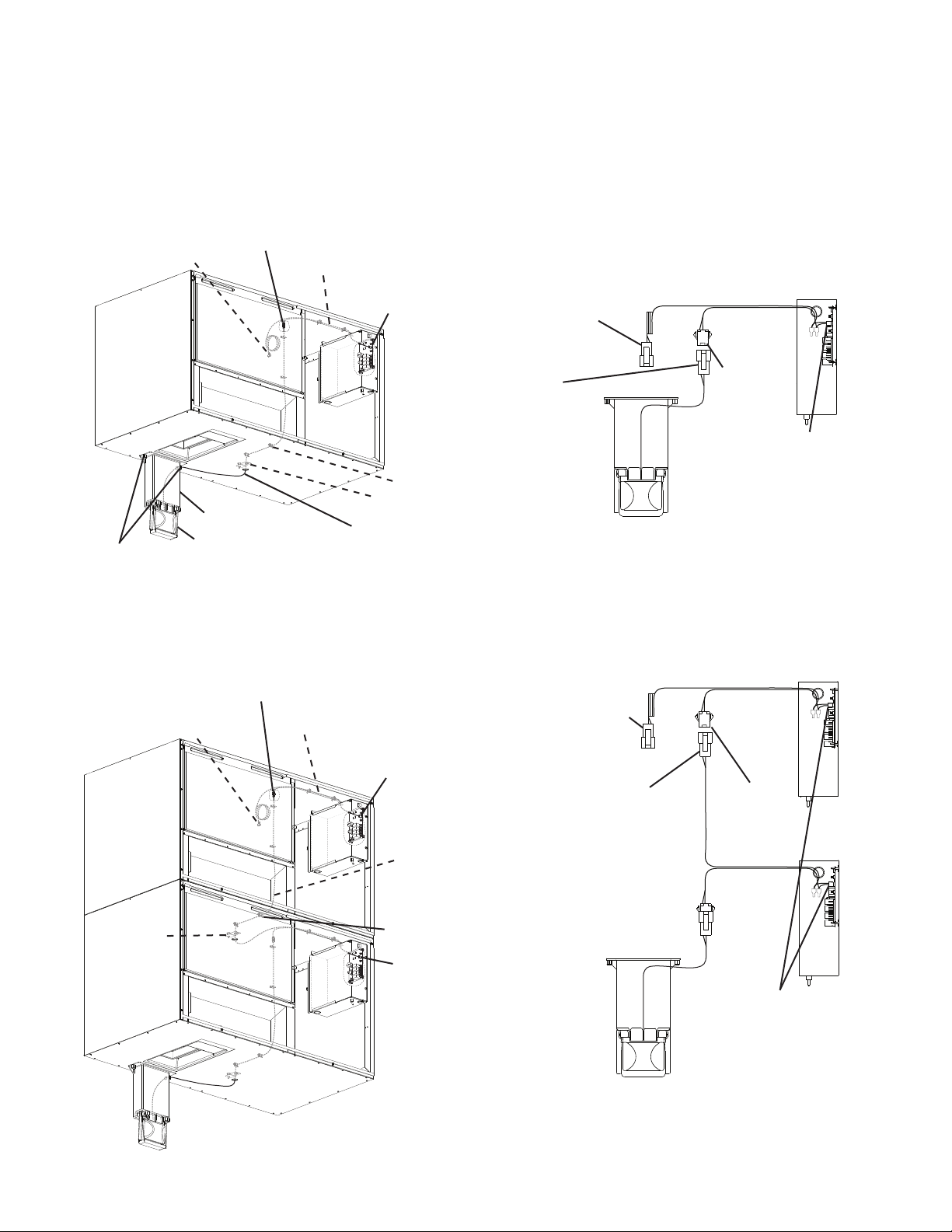
I. Construction and Water/Refrigeration Circuit Diagram
A. KM Construction
1. Air-Cooled Model
Evaporator Assembly
Spray Tubes
Inlet Water Valve
Water Supply Inlet
Hot Gas Valve
Junction Box
Condenser
Check Valves
(refrigeration)
Control Box
Drier
Control Switch
Compressor
Cleaning Valve
Float Switch
Water Pump
Check Valve
(water)
Thermostatic Expansion Valves
Liquid Line Valve
Fan Motor
Fan Blade
Low-Side Service Valve
High-Side Service Valve
High-Pressure
Switch
Transformer Box
8
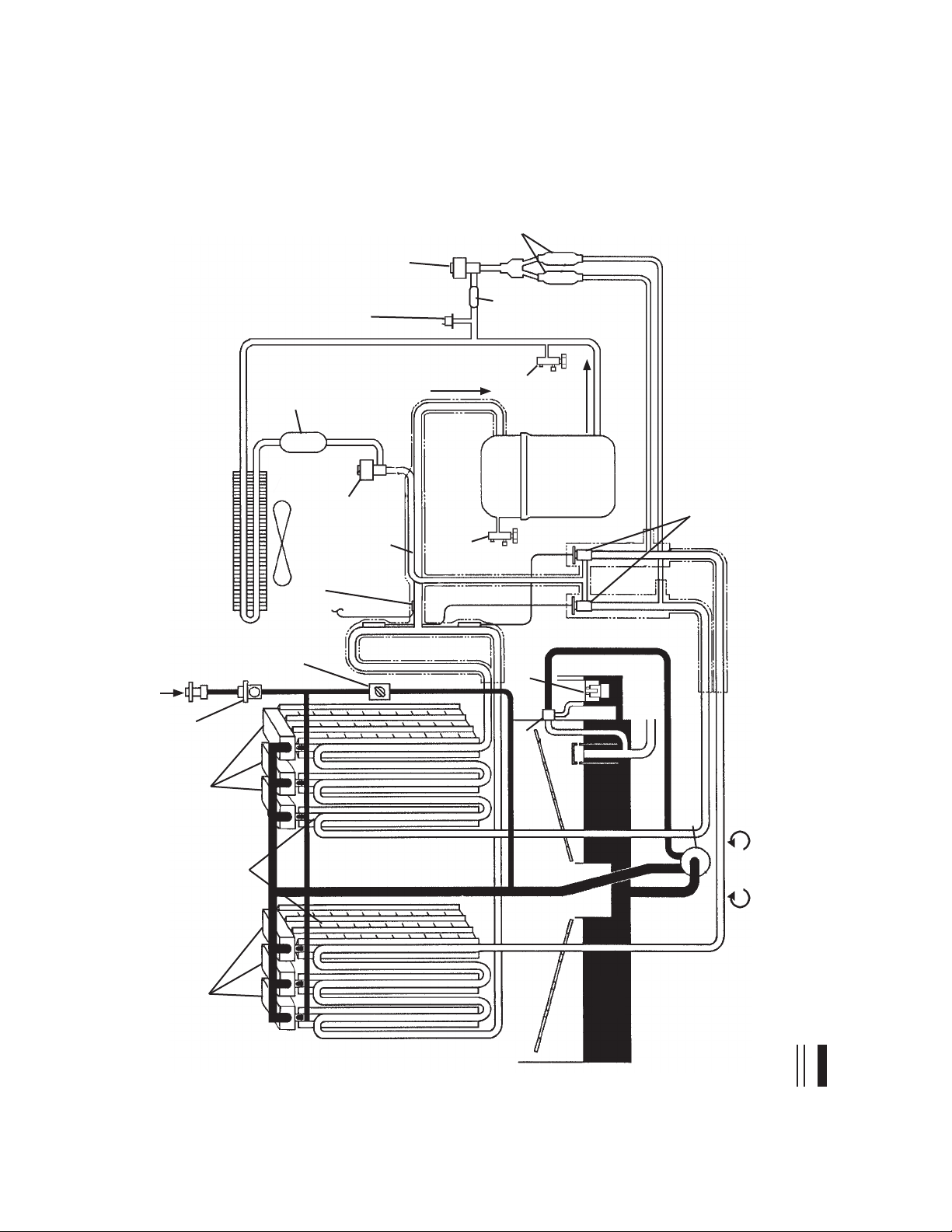
Upper Unit Wire Harness
Connector B (not used)
Bin Control
Cable
Bracket
Control Board
Red K4 Connector
Upper Unit Wire Harness
Wire Saddle
Lower Unit Wire Harness Connector B to
Upper Unit Wire Harness Connector A
Lower
Unit Wire
Harness
Control Board
Red K4 Connector
Upper Unit Connection Overview
Upper Unit Connection Detail
Control Board
Red K4 Connector
Lower Unit Wire Harness
Connector B
Upper Unit
Wire Harness
Connector A
Upper Unit Wire Harness
Connector B (not used)
Wire Harness
Connector A
Bin Control
Cable Connector
Connection Detail
Control Board
Red K4 Connector
Bin Control Assembly
Thumbscrews
Bin Control Bracket
Bin Control
Cable Bracket
Control Board
Red K4 Connector
Wire Harness
Wire Saddle
Bin Control Cable
Bin Control Cable Connector to
Wire Harness Connector A
Wire Harness
Connector B
(for upper unit)
Mechanical Bin Control Connection Overview
Wire Harness
Connector B
(for upper unit)
B. Bin Control
1. Single Bin Control
2. Stacked Bin Control
9
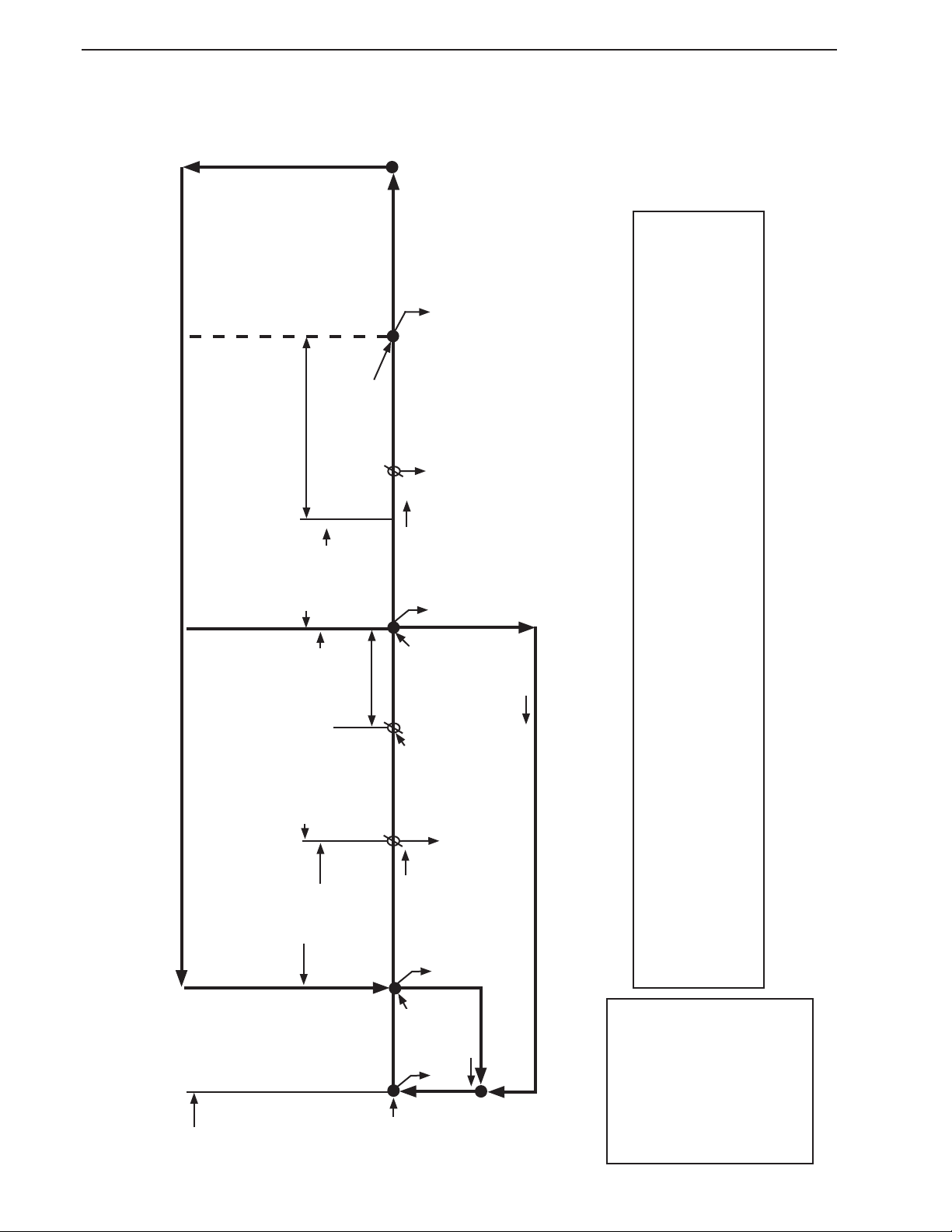
C. Water/Refrigeration Circuit Diagram
1. Air-Cooled Model
Water Supply
Cleaning Valve
Float Switch
Drain
Check Valve
Thermostatic Expansion Valves
Compressor
Hot Gas
Valve
Check
Valves
High-Pressure
Switch
Strainer
Drier
Condenser
Evaporator
Service
Valve
Discharge Line
Suction Line
Water Pump
Thermistor
Spray Tubes
Inlet Water Valve
Pump-Out
Water
Tank
Service
Valve
Refrigeration Circuit
Water Circuit
Liquid Line
Valve
Spray Tubes
Fan
Heat Exchanger
Freeze/Harvest
Pump Timer
10
II. Sequence of Operation and Service Diagnosis
A. Sequence of Operation Flow Chart
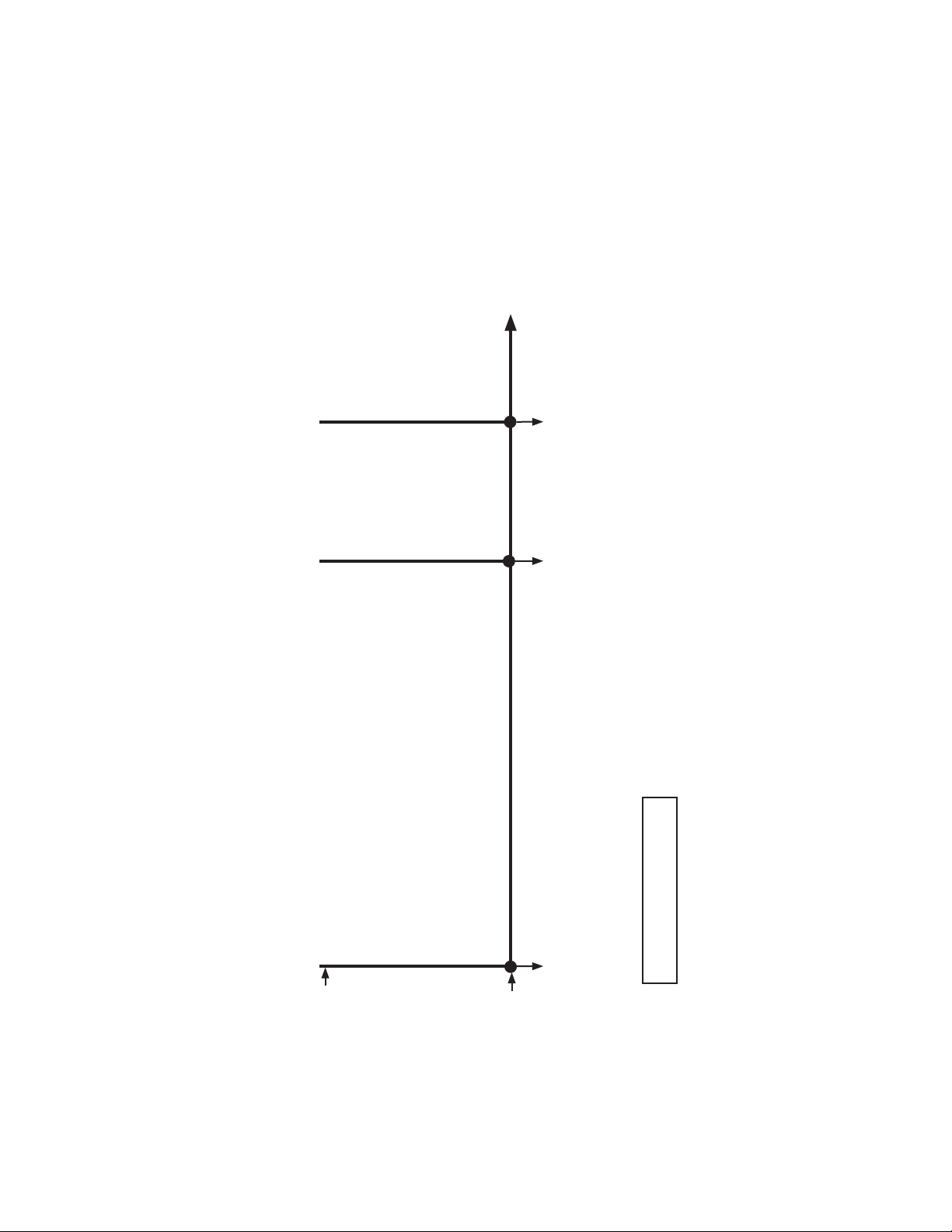
1. Operation Flow Chart
FS check
1 to 3-min. harvest timer in
control (S4 dip switch 1 & 2)
Legend:
BC–bin control
CB–control board
Comp–compressor
FM–fan motor
FS–oat switch
HGV–hot gas valve
HPT–harvest pump time
LLV –liquid line valve
PM–pump motor
WV–inlet water valve
Components Energized when the Control Switch is in the "WASH" Position
The "WASH" position on the control switch is used when cleaning and sanitizing the unit. When in the "WASH" position, power is supplied
to the pump motor. With the cleaning valve closed, the cleaner and sanitizer ow over the outside of the evaporator plate assembly. With the
cleaning valve open, the cleaner and sanitizer ow over both the outside and the inside of the evaporator plate assembly.
Note: Close the cleaning valve after cleaning and sanitizing are complete, otherwise the unit will not restart when the control
switch is placed in the "ICE" position.
Operation Flow Chart
1. 1-Minute
Fill Cycle
Cycle
Steps
2. Harvest Cycle
• WV time: 6 min. or the length of harvest minus HPT
setting (S4 dip switch 6), whichever is shorter.
• Max. harvest time: 20 min.
Thermistor
in control
3. Freeze Cycle
• Min. freeze time: 5 min.
• Max. freeze time: freeze timer setting (S4
dip switch 9 & 10).
FS in control
4. Pump-Out Cycle
• Factory set for every 10th
cycle
(S4 dip switch 5)
• Pump motor stops for
2 sec., then reverses for
10/20 sec.
(S4 dip switch 3 & 4)
WV energized
FS open
Comp energized
HGV energized
WV energized
Thermistor temperature reaches
48°F (9°C) (3.9 kΩ or less). Harvest
timer starts.
FS open
Comp energized
FM energized
PM energized
LLV energized
HGV de-energized
FS closed
Comp energized
HGV energized
PM de-energizes for 2 sec.,
then reverses for 10/20 sec.
FM de-energized
LLV de-energized
FS check
Startup
If FS is open, Comp stops and cycle
returns to 1-Min. ll.
5-min.
minimum
freeze timer in
control
FS closed
FS opens or freeze
timer terminates
50 sec.
PM energized
WV de-energized
Harvest Pump
Time
Slush Control
Thermistor temperature
reaches 36°F (2.2°C)
(5.8 kΩ).
PM de-energized for
10 sec.
11
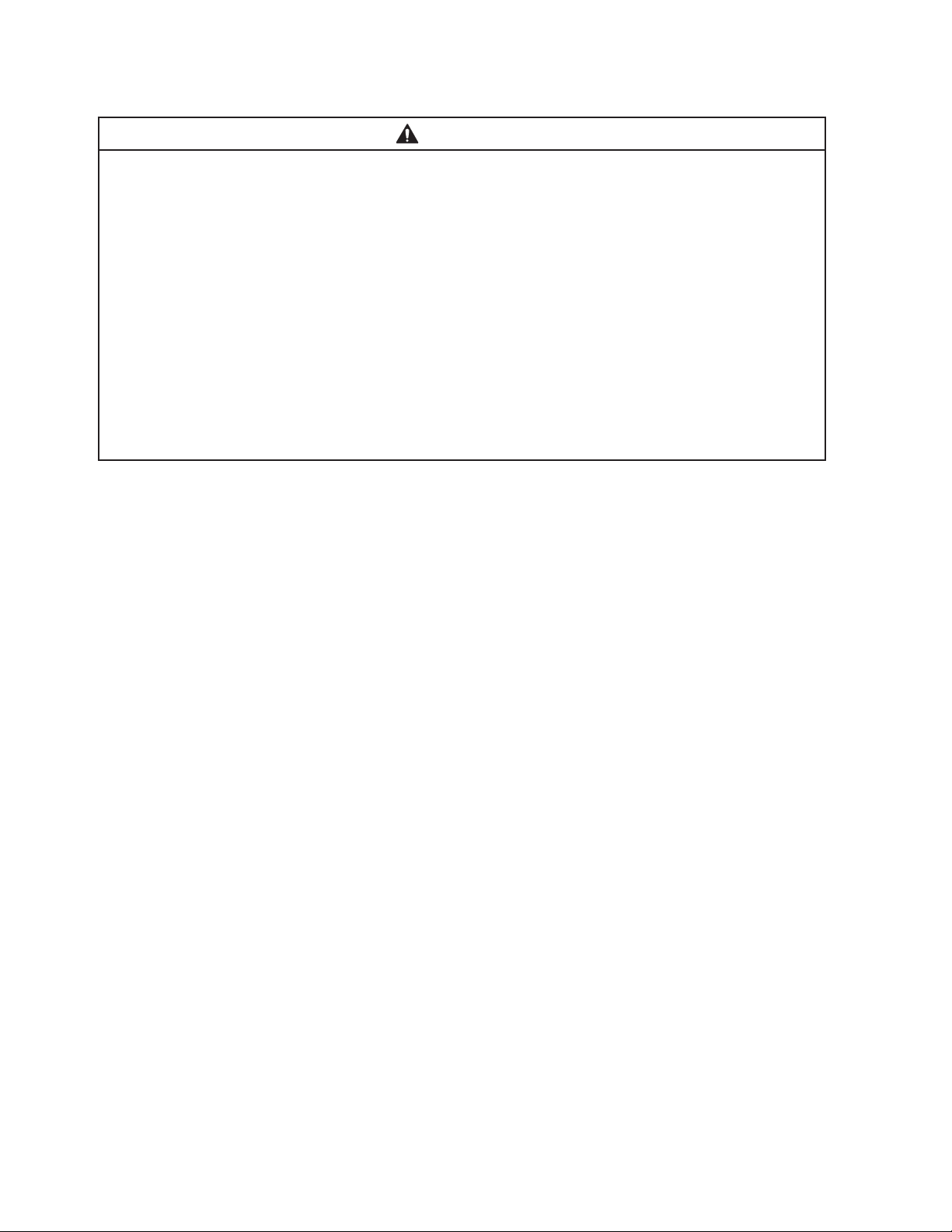
Shutdown Flow Chart
1. Bin Full
Shutdown Delay:
• Fill Cycle–15 sec. after activation.
• Harvest Cycle–At the end of the harvest cycle, or up
to 15 sec. into the freeze cycle if
activated at the end of the harvest cycle.
• Freeze Cycle– 15 sec. after activation if activated at least
15 sec. before the 5-min. short cycle
protection timer terminates.
Otherwise, at the end of the next harvest
cycle.
Shutdown
and Restart
BC Operation
BC open (BC actuator paddle engaged)
Green "BC CLOSED" LED off
Yellow "BC OPEN" LED on
Yellow "BC OPEN" LED continues. All
components de-energized.
2. Icemaker Off
All components
de-energized.
3. Ice Level Lowered
Icemaker starts at
"1. 1-Minute Fill Cycle."
BC closed
(BC actuator paddle disengaged)
Green "BC CLOSED" LED on
Yellow "BC OPEN" LED off
To 1. 1-Minute Fill Cycle
Legend:
BC–bin control
2. Shutdown Flow Chart
12
B. Service Diagnosis
WARNING
• The appliance should be diagnosed and repaired only by qualied service
personnel to reduce the risk of death, electric shock, serious injury, or re.
• Risk of electric shock. Control switch in "OFF" position does not de-energize all
loads Use extreme caution and exercise safe electrical practices.
• Moving parts (e.g., fan blade) can crush and cut. Keep hands clear.
• Before servicing the appliance, move the control switch to the "OFF" position and
turn off the power supply.
• CHOKING HAZARD: Ensure all components, fasteners, and thumbscrews are
securely in place after the appliance is serviced. Make sure that none have fallen
into the dispenser unit/ice storage bin.
• Make sure all food zones in the appliance and dispenser unit/ice storage bin are
clean after service.
The diagnostic procedure is a sequence check that allows you to diagnose the electrical
system and components. Before proceeding, check for correct installation, proper voltage
per nameplate, and adequate water supply. Check CB using the steps in "II.C. Control
Board Check." Check dip switch settings to assure that S4 dip switch 3, 4, 7, 8, 9, 10 and
S5 dip switch 1 through 5 are in the factory default position. S4 dip switch 1, 2, 5, 6 are
cleaning adjustments and the settings are exible. For factory default settings, see "III.C.1.
Default Dip Switch Settings."
Note: • When checking high voltage (115VAC), always choose a white (W) neutral wire to
establish a good neutral connection.
• The 115VAC neutral (W) is provided through the MT. To conrm a good neutral,
check for 60VAC from white (W) neutral to ground (GND). If 60VAC is present,
neutral is good. If 60VAC is not present, check 230VAC main power supply to
MT. If 230VAC is present, check MT continuity.
• When checking voltage from the CB K1 connector (10 pin connector), pull CB
K1connector out slightly to allow room for multimeter test leads contact.
1) Turn off the power supply, then access the control box. Move the control switch to the
"OFF" position. Clear any ice from BC.
2) Check that BC is closed and the 115VAC 10A fuse is good.

13
1. Operation Diagnosis
3) Power On: Turn on the power supply, then move the control switch to the "ICE" position.
A 5-sec. delay occurs. CB red "POWER OK" LED and green "BC CLOSED" LED turn
on. If yellow "BC OPEN" LED is on (indicating a full bin), check BC. Move ice away from
BC actuator paddle. If yellow "BC OPEN" LED stays on, see "II.D. Bin Control Check.".
Note: • CB red "POWER OK" LED remains on unless the 10.5VAC power supply is
interrupted (K2 connector).
• Check CB using the steps in "II.C.Control Board Check."
• Conrm CB green "BC CLOSED" LED is on. If CB yellow "BC OPEN" LED is on,
remove ice from BC. If no ice is around BC and yellow "BC OPEN" LED is on,
see "II.D. Bin Control Check."
a) Power On Diagnosis: If CB red "POWER OK" LED is off, conrm 10A fuse is good.
Check for 115VAC at control switch #1 (LBU) to neutral (W) then at control switch
#2(P) to neutral (W). If 115VAC is present on #1 (LBU) and not on #2(P), replace
control switch. If 115VAC is present on control switch #2 (P), check for 115VAC at
HPS (P) to neutral (W) then HPS (BK) to neutral (W). If115VAC is present at HPS
(P) and not at HPS (BK), HPS is open. See HPS Diagnosis below. If115VAC is
present at HPS (BK), check for 10.5VAC at CB K2#1 red wire to CB K2 #2 red wire.
If10.5VAC is not present, check that the cleaning valve interlock switch is closed.
Next, check CT continuity. If open, replace CT.
b) HPS Diagnosis: Conrm condenser coil is not clogged or restricted. Let refrigeration
circuit pressures equalize. If HPS does not reset and pressures are equalized,
replace HPS. Ifpressures are not equalized, reclaim refrigerant and diagnose
refrigeration circuit restriction. Check that there are no restrictions in the refrigeration
circuit.
Harvest Cycle: HGV, strainer, or check valve.
Freeze Cycle: FM, TXV, LLV, strainer, check valve, drier, and fan blade for binding.
Conrm that the location meets installation requirements. See the appliance's
instruction manual for details.
4) 1-Min. Fill Cycle – LED 4 is on. WV and X11 relay energize. After 1 min., CB checks for
a closed FS. If FS is closed, the harvest cycle begins. If harvest cycle begins (Comp,
HGV, FMR energized), continue to step 5a. If FS is open, WV remains energized until
FS closes (low water safety protection during initial start up and at the end of each
harvest). Diagnosis: Check that water enters the water tank. If not, check that the water
supply line shut-off valve is open and screens or external lters are clear. Check for
115VAC at CB K1 #6 (O) to neutral (W). If 115VAC is not present, replace CB. If 115VAC
is present, and WV does not energize, check for 115VAC at WV. If 115VAC is present,
check coil continuity. Ifopen, replace WV. If the water tank lls, but the appliance fails to
start harvest (Comp energized), check for open FS. See "II.E. Float Switch Check and
Cleaning." If FS is closed and CB fails to start the harvest cycle after 1 min., replace CB.

14
5a) Initial Harvest Cycle – LEDs 1, 4, and 2 are on. WV and X11 relay continue. Comp,
FMR, HGV, and X10 relay energize. CBmonitors the warming of the evaporator via
the thermistor located on the suction line. When the thermistor reaches 48°F (9°C),
CB reads 3.9 kΩ from the thermistor and turns harvest termination over to the harvest
timer (S4 dip switch 1 & 2 and S5dip switch 4). WV and X11 relay are energized during
harvest for a maximum of 6 min. or the length of harvest minus HPT setting (S4 dip
switch 6), whichever is shorter. See step 5b below.
a) Comp Diagnosis: Check that evaporator is warming. Ifnot, conrm that Comp
energizes. If not, check for 115VAC at CB K1 #1 (V) or #9 (V) to neutral (W).
If115VAC is not present, check for 115VAC at CB K1 #7 (LBU) or #10 (LBU) to
neutral (W). If115VAC is present at #7 (LBU) or #10 (LBU) and not at #1 (V) or
#9(V), replace CB. If 115VAC is present, check for 115VAC at CR solenoid. If 115VAC
is present, conrm contacts are closed. If not, replace CR. If CR contacts are closed,
check Comp start and run capacitors, Comp start relay, and Comp motor winding.
b) HGV Diagnosis: If Comp is energized and evaporator is not warming, check that
HGV energizes and opens. Check for 115VAC at CB K1 #2 (P) to neutral (W).
If115VAC is not present and LED 2 is on, replace CB. If 115VAC is present, check for
115VAC at HGV coil and check HGV coil continuity. Replace as needed.
c) LLV Diagnosis: Conrm that LLV is de-energized and closed (not bypassing).
Ifenergized, replace CB. If de-energized and bypassing, replace LLV.
5b) Harvest Pump Time (Harvest Assist) – LEDs 1, 3, and 2 are on. When the thermistor
reaches 48°F (9°C), CB reads 3.9 kΩ from the thermistor and turns harvest termination
over to the harvest timer (S4 dip switch 1 & 2 and S5 dip switch4).
WhenWV de-energizes, LED 4 turns off, X11 relay de-energizes and LED 3turns on.
PM energizes. Comp, HGV, and X10relay continue.
Diagnosis: Place a thermometer on the suction line next to the thermistor. Has it
warmed to 48°F (9°C) or warmer? Conrm thermistor status. See "II.F. Thermistor
Check." If the thermistor reading is in proper range, dip switch 7 is on, and PM does
not energize before harvest terminates, replace CB. If WV continues, check for 115VAC
at CB K1 #6 (O). If115VAC is present, and LED 4 is off, replace CB. If LED 3is on and
PM is not energized, check for 115VAC at CB K1 #5(DBU). If115VAC is not present,
replace CB. If 115VAC is present and PM is not energized, check for 115VAC at X10relay
terminal #7 (Y) to neutral (W). If 115VAC is not present, check for 115VAC at X10 relay
terminal #3 (P) to neutral (W) and X10 relay terminal #5 (Y) to neutral (W). If 115VAC is
present on terminal #3(P) and not on terminal #5 (Y), replace X10 relay. If 115VAC is
present on X10 relay terminal #7 (Y) and PM is not energized, check for 115VAC at X10
relay terminal #4 (R) to neutral (W) and terminal #6 (DBU) to neutral (W). If 115VAC is
present on terminal #6(DBU) and not on terminal #4 (R), replace X10relay. If 115VAC
is present on X10relay terminal #4 (R), check control switch contact continuity between
terminals #4(R) and #5(R). Ifcontacts are open, replace control switch. If contacts are
closed and 115VAC is present between control switch terminal #5(R) and neutral (W),
check PM capacitor and motor winding continuity.

15
5c) Initial Harvest Cycle Termination Diagnosis: When the thermistor reaches 48°F
(9°C), CB reads 3.9 kΩ from the thermistor and turns harvest termination over to
the harvest timer (S4 dip switch 1 & 2 and S5 dip switch 4). Check discharge line
temperature. For a thermistor check, see "II.F.Thermistor Check." If 1-min. ll cycle
starts after harvest timer terminates, check that FS is clean and operating properly, see
"II.E. Float Switch Check and Cleaning." If FS is closed, CB proceeds to the next cycle.
Ifnot, replace CB.
Note: The minimum total time allowed by CB for a complete harvest cycle is based on
S5 dip switch 4. Maximum harvest time allowed is 20min.
NOTICE! S4 dip switch 7 must remain on. Otherwise, PM will not energize during
the last seconds of harvest.
6) Freeze Cycle – LED 1 is on. Comp and PM continue. FM and LLV energize. HGV and
X10 relay de-energize. Appliance is held in freeze by a 5-min. short cycle protection
timer. After 5-min. short cycle protection timer terminates and FS opens, freeze cycle
terminates.
Note: PM power supply switches from CBK1 #5(DBU) in harvest to K1 #4 (R) in freeze.
Slush Control: When slush control is enabled (S5 dip switch 5 "ON"), PM de-energizes
when thermistor reaches 36°F (2.2°C) (5.8kΩ) for 10 sec. then, energizes for the
remainder of the freeze cycle.
a) Freeze Cycle Diagnosis: Conrm Comp and PM continue. Conrm that FM and LLV
energize. Conrm HGV and X10 relay de-energize. During the rst 5 min. of freeze,
conrm evaporator is cooling. If not, conrm WV de-energized (not leaking by),
HGV de-energized (not bypassing), LLV and FM energize, TXV operates correctly,
Comp is efficient, and refrigerant charge is correct. See "VIII.A. Specication and
Performance Data."
b) Comp Diagnosis: If Comp de-energizes once freeze begins, check that appliance
has not shut off on HPS ("POWER OK" LED off). If so, check "3)b) HPS Diagnosis"
above. If"POWER OK" LED is on, check for 115VAC at CB K1 #1 (V) or #9 (V) to
neutral (W). If 115VAC is not present and LED 1 is on, replace CB.
Comp: If 115VAC is present, check for 115VAC at CR coil. If 115VAC is present,
check CR coil and contact continuity. Replace as needed. If CR is okay, check Comp
start relay and start and run capacitors. Next, check Comp motor winding continuity.
If Comp is energized but evaporator is not cooling, check for an inefficient Comp.
See "VIII.A. Specication and Performance Data.
c) WV and HGV Diagnosis: If WV is energized, check for 115VAC at CB K1 #6 (O) to
neutral (W). If 115VAC is present after PM energizes in harvest cycle, replace CB.
If115VAC is not present, replace WV (bypassing). If HGV did not close at the end of
harvest, check for 115VAC at CB K1 #2 (P) to neutral (W). If 115VAC is present and
LED 3 is off, replace CB. If 115VAC is not present, replace HGV (bypassing).
d) PM Diagnosis: Conrm water is owing over evaporator from PM and not WV. If PM
de-energizes once freeze begins, check for 115VAC at CB K1 #4 (R) to neutral (W).
If 115VAC is not present, replace CB. If 115VAC is present and PM is de-energized,
check for 115VAC at control switch #5 (R) to neutral (W). If 115VAC is present at CB
K1 #4 (R) and not at control switch #5 (R), check control switch continuity between
#5 (R) and #4 (R). Replace as needed. If 115VAC is present at control switch #5 (R)
to neutral (W), check PM capacitor and motor winding continuity.
16
e) FM and LLV Diagnosis: If FM or LLV does not energize, check for 115VAC at CB
K1#3 (BK) to neutral (W). If 115VAC is not present, replace CB. If 115VAC is present:
For FM, check capacitor, motor winding, and blade for binding.
For LLV, check coil voltage and continuity.
f) Refrigerant Pressures and TXV Diagnosis: If evaporator is still not cooling, check
refrigerant pressures. See "VIII.A. Specication and Performance Data."
Next, check TXV for proper operation. Remove TXV bulb and hold it in your hand,
refrigerant low-side pressure should rise, place TXV bulb in ice water, refrigerant
low-side pressure should drop. A 10 to 15 pound pressure swing between warm and
cold conditions indicate a good TXV. If a 10 to 15 pound swing is not present, replace
TXV.
g) Freeze Termination Diagnosis: After 5 min. in freeze, disconnect CB K5 FS
connector. 15 sec. later appliance should switch out of the freeze cycle (15 second
delay after FS opens before terminating the freeze cycle). If appliance remains in
freeze longer than 15 sec. after FS removed, replace CB. If appliance switches with
FS removed but would previously not switch out of freeze with FS connected (long
freeze - 3 beep alarm), see "II.E. Float Switch Check and Cleaning."
Note: Normal freeze cycle will last 20 to 40 min. depending on model and conditions.
Cycle times and pressures should follow performance data provided in this
manual. See "VIII.A. Specication and Performance Data."
h) Short Freeze Cycle Diagnosis: Conrm water tank lls and overows during ll and
harvest cycles. If not, check water supply lters, shut-off valve, WV screen. Ifwater
tank empties before 5 min. timer terminates and freeze cycle is short, check that CV
is not leaking by (water owing down the potable drain). If CV is leaking by, remove
and clean CV, replace rubber seat and spring if necessary. If water tank is full, see
"II.E. Float Switch Check and Cleaning." for erratic FS.
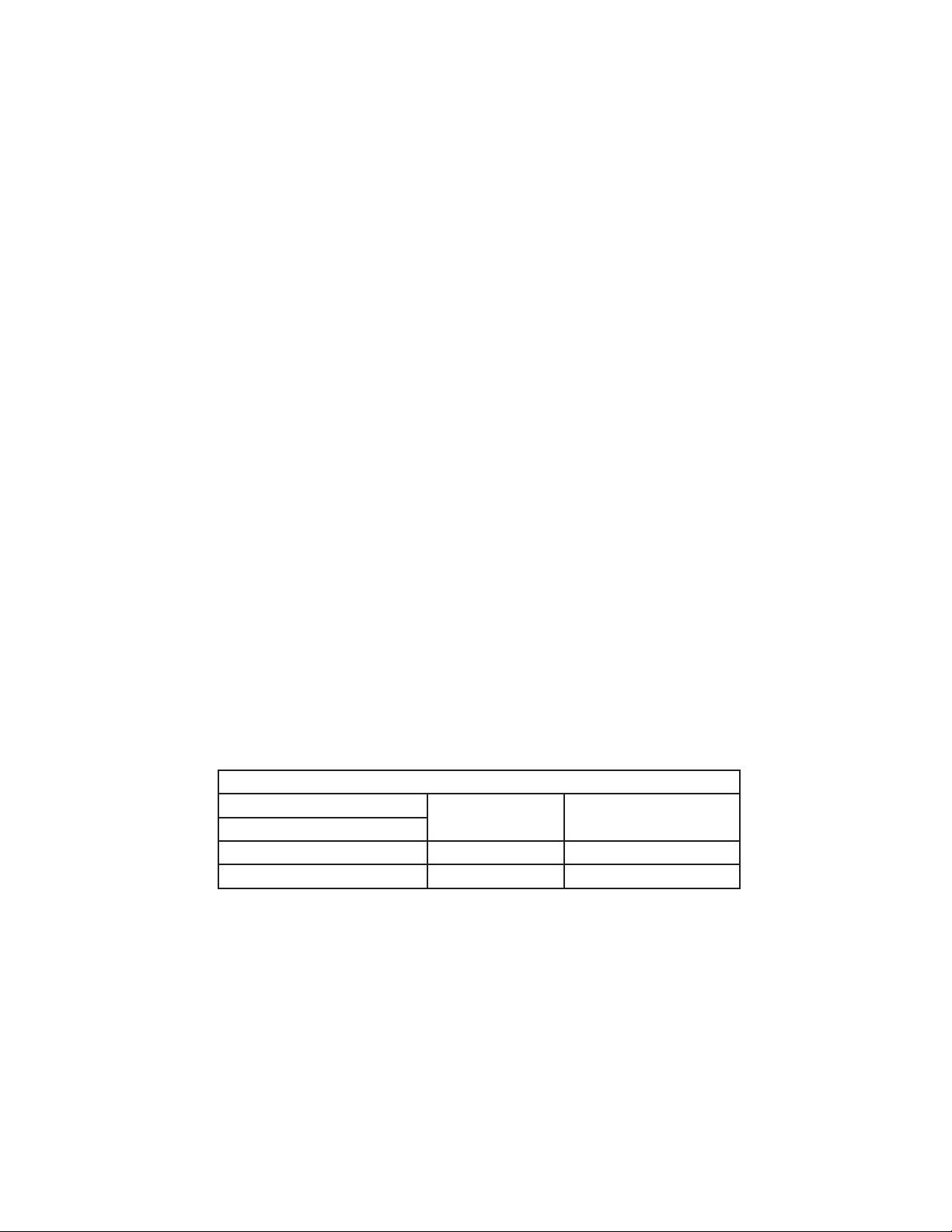
7) Pump-Out Cycle – LEDs 1, 3, and 2 are on (10/20 second pump-out). Timing of the
rst pump-out is determined by S4 dip switch 5. See the table below.
Control Board Settings
S4 Dip Switch Setting
Pump-Out
Frequency
1st Pump-Out
No. 5
OFF Every 10 cycles After 11th freeze cycle
ON Every cycle After 2nd freeze cycle
Comp continues, HGV energizes. If S4dip switch 3 & 4 are set to 3 off and 4 on,
LED 4 turns on and WV and X11 relay energize, energizing X10relay. NOTICE!S4dip
switch 3 & 4 must not be set to 3 off and 4 on. Otherwise, PM will rotate in freeze
cycle direction instead of pump-out direction. FM and LLVde-energize. PM stops
for 2 sec., then reverses for 10/20 sec. depending on pump-out timer (S4dip switch 3
& 4) setting. When the pump-out timer terminates, pump-out is complete. The pump-
out frequency control (S4 dip switch 5) is factory set, and generally no adjustment is
required. However, the pump-out frequency control can be set to have a pump-out occur
every 10 cycles or every cycle. For details, see "III.C.4. Pump-Out Frequency Control
(S4 dip switch 5)."

17
Pump-Out Diagnosis: In the freeze cycle before pump-out (see table above), after
5min. of freeze disconnect CB black K5 connector (FS connector). Check that PM
stops and re-starts. Next, check that PM rotation is correct (water owing down the
drain through CV). If PM does not stop and re-start, check that CB LEDs 1, 3, and
2are on. If not, replace CB. IfLEDs1,3, and 2 are on and PM does not energize,
check for 115VAC at CB K1 #5 (DBU) to neutral (W). If 115VAC is not present, replace
CB. If115VAC is present, check that X10 relay is de-energized. If not, check X11 relay
status. If X11 relay is energized, replace CB. If X11 relay is de-energized and X10 relay
is energized, replace X11 relay (contacts sticking). If X10 relay is de-energized, check
for 115VAC at terminal #6 (DBU) to neutral (W) and terminal #2 (DBU) to neutral (W).
If 115VAC is present on terminal #6 (DBU) and not on terminal #2 (DBU), replace
X10relay. If PM is energized and rotating in pump-out rotation, make sure the drain line
is not clogged and that CV is clean and operating properly.
Conrm FM and LLV de-energize. If FM is energized, conrm where FM is connected
on CB. If connected to CB K1 connector pin #9, FM should be energized. If connected
to CB K1 connector pin #3 and FM is energized, replace CB. If LLV is energized with
LEDs 1, 3, and 2 on, replace CB.
8) Normal Harvest Cycle – Same as the initial harvest cycle. Return to step 5a) above.
Note: Appliance continues to cycle until BC is satised, power is switched off or
freeze-time correction cycle is initiated. The appliance always restarts at the
1-min. ll cycle.
2. Shutdown Diagnosis
1) See "II.D. Bin Control Check."
Legend: BC–bin control; CB–control board; Comp–compressor; CR–compressor relay;
CT–control transformer; CV–check valve; FM–fan motor; FS–oat switch;
HGV–hot gas valve; HPS–high-pressure switch; L LV–liquid line valve;
PM–pump motor; TXV–thermostatic expansion valve; WV–inlet water valve

18
C. Control Board Check
Before replacing CB that does not show a visible defect and that you suspect is bad,
always conduct the following check procedure. This procedure will help you verify your
diagnosis.
Alarm Reset: If CB is in alarm (beeping), press the "ALARM RESET" button on CB
while CB is beeping. WARNING!Risk of electric shock. Care should be
taken not to touch live terminals. Once reset, the icemaker starts at the
1-minute ll cycle. For audible alarm information, see "III.B. LED Lights and
Audible Alarm Safeties."
1) Check the dip switch settings to assure that S4 dip switch 3, 4, 7, 8, 9, 10 and S5 dip
switch 1 through 5 are in the factory default position. S4 dip switch 1, 2, 5 are cleaning
adjustments and the settings are exible. For factory default settings, see "III.C.1.
Default Dip Switch Settings."
2) Move the control switch to the "ICE" position. If the red "POWER OK" LED is on, control
voltage is good, continue to step 3. If the "POWER OK" LED is off, check CT secondary
circuit. CT output is 10.5VAC at 115VAC primary input. If the secondary circuit has
proper voltage and the red LED is off, replace CB.
If the secondary circuit does not have proper voltage, check CT primary circuit. Check
for 115VAC at CB K1 connector pin #10 (LBU) to neutral (W) for 115VAC. Always choose
a white (W) neutral wire to establish a good neutral connection when checking voltages.
For additional checks, see "II.H.1. No Ice Production."
3) The "OUTPUT TEST" button provides a relay sequence test. Make sure the control
switch is in the "ICE" position, then press the "OUTPUT TEST" button. For the correct
lighting sequence, see the table below. Note that the order of the LEDs from the outer
edge of the control board is 1, 4, 3, 2. Components (e.g., compressor) cycle during the
test.
Following the test, the icemaker begins operation at the 1-minute ll cycle. If the LEDs
do not light as described above, replace CB.
4) To verify voltage output from CB to the components, slide the CB K1 connector out far
enough to allow multimeter lead contact. With the icemaker in the cycle to be tested,
check output voltage from the corresponding pin on CB K1 connector to a neutral
(Wwire). If output voltage is not found and the appropriate LED is on, replace CB.
5) Conrm BC communication and shutdown sequence: Move the control switch to the
"ICE" position. Once the ll cycle starts press and hold the BC actuator paddle. CB
shuts down the appliance after 15 sec. If not, conrm BC status. See "II.D. Bin Control
Check." If BC checks ok, replace CB.
Legend: CB–control board; CT–control transformer
19
Wire Harness
Connector A
Bin Control
Cable Connector
Connection Detail
Control Board
Red K4 Connector
Wire Harness
Connector B
(for upper unit)
Fig. 1
D. Bin Control Check
1. Bin Control Check
This appliance uses a lever-actuated proximity switch to control the ice level in the
storage bin. No adjustment is required.
To check BC, follow the steps below.
1) Turn off the power supply.
2) Remove the front panel, then move the control switch to the "OFF" position.
3) Remove the control box cover, then clear any ice away from
BC.
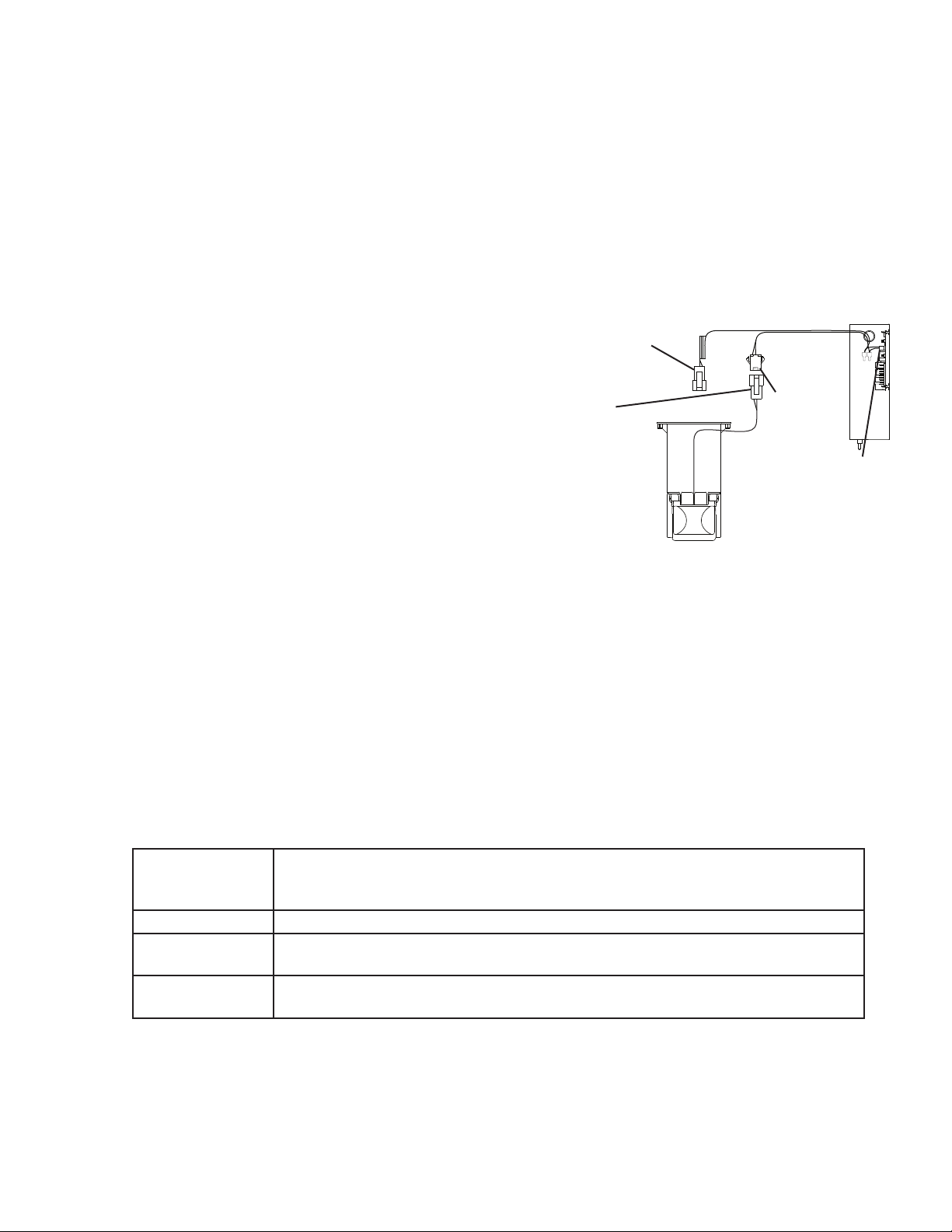
4) Check BC wire harness connections. See Fig. 1.
5) Disconnect BC connector from CB K4 connector.
6) Check for continuity across the wires of
BC connector. When the actuator paddle is
not engaged, BC switch is closed. If open,
check that the wire harness connector is
properly connected and that the actuator
paddle is not sticking. Clean if necessary.
See "II.D. Bin Control Cleaning." If BC
switch still reads open, replace BC.
7) Press and hold the actuator paddle; check for continuity across the wires of BC
connector. When the actuator paddle is engaged, BC switch is open. If closed, check
that the actuator paddle is not restricted. Clean if necessary. See "II.D. Bin Control
Cleaning." If BC switch still reads closed, replace BC.
8) Reconnect BC connector to CB K4 connector, then move the control switch to the "ICE"
position. Turn on the power supply.
9) Check that CB green "BC CLOSED" LED is on.
10) Allow the icemaker to cycle on. Press and hold the actuator paddle. CB yellow
"BCOPEN" LED should turn on and the icemaker should shut down according to the
chart below. If it does not, replace CB.
Cycle at
Mechanical Bin
Control Activation
Shutdown
Fill Cycle 15 sec. after activation.
Harvest Cycle At the end of the harvest cycle, or up to 15 sec. into the freeze cycle if activated at the
end of the harvest cycle.
Freeze Cycle 15 sec. after activation if activated at least 15 sec. before the 5-min. short cycle
protection timer terminates. Otherwise, at the end of the next harvest cycle.
Legend: BC–bin control; CB–control board
20
2. Bin Control Cleaning
Scale may build up on BC. Scale can cause the actuator paddle and magnet to stick. In
this case, BC should be cleaned.
WARNING
CHOKING HAZARD: Ensure all components, fasteners, and thumbscrews are
securely in place after the icemaker is serviced. Make sure that none have fallen
into the dispense unit/ice storage bin.
1) Turn off the power supply.
2) Remove the front panel, then move the control switch to the "OFF" position.
3) Clear any ice away from BC.
4) Disconnect BC connector from CB K4 connector, then remove BC from the icemaker.
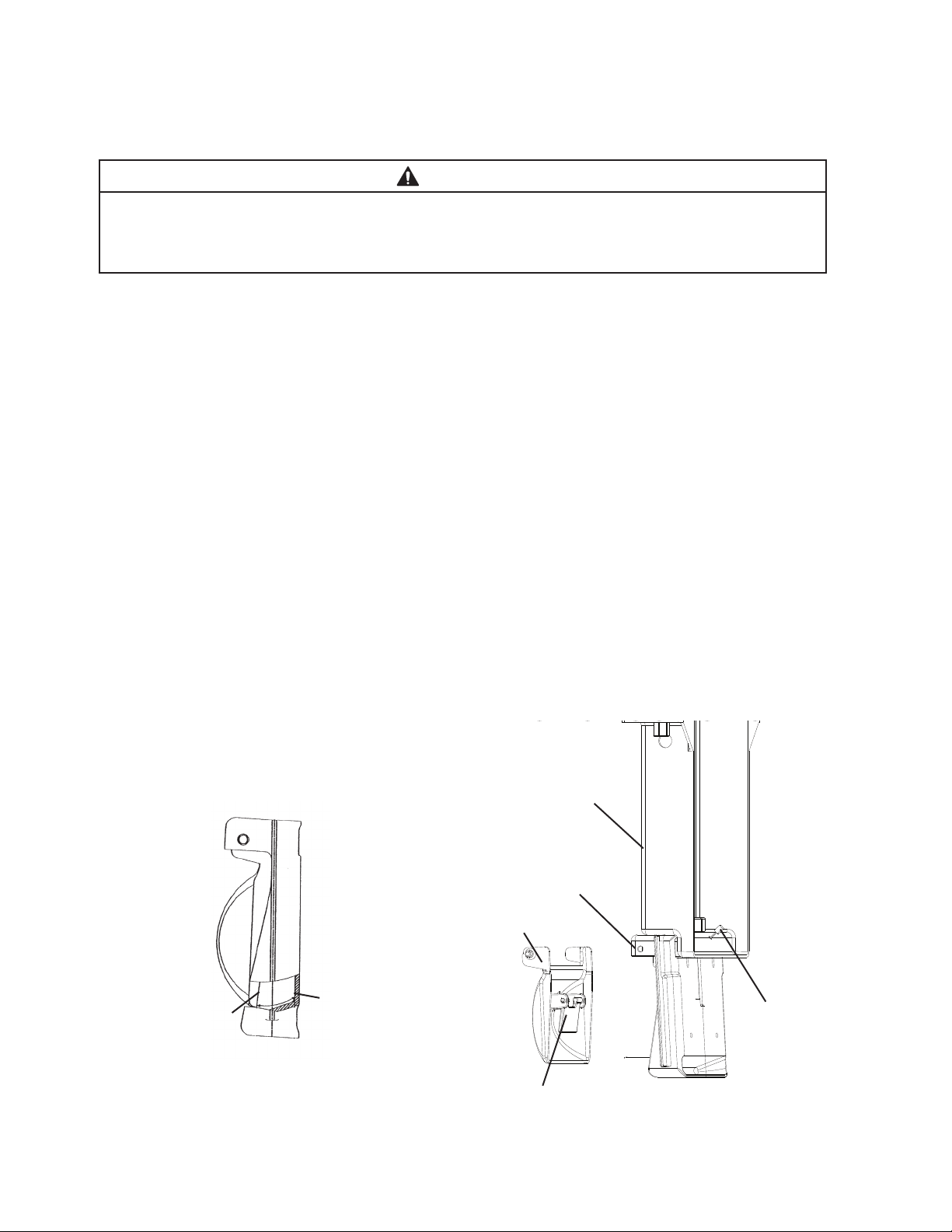
5) Remove the actuator paddle from the switch mount. See Fig. 2.
6) Wipe down BC with a mixture of 1 part of Hoshizaki "Scale Away" and 25 parts of warm
water. Rinse the parts thoroughly with clean water.
7) Reassemble BC and replace it in its correct position.
Note: If the magnet was removed for cleaning, be sure to replace it in its correct
position.
8) Reconnect BC connector to CB K4 connector, then move the control switch to the "ICE"
position.
9) Replace the control box cover in its correct position.
10) Turn on the power supply to start the automatic icemaking process.
11) Replace the front panel in its correct position.
Legend: BC–bin control
BC Bracket
Magnet
Actuator
Paddle
Switch Mount
Fig. 2
Bin Control Proximity
Switch Closed
(calling for ice)
Bin Control
Proximity Switch
Open (bin full,
icemaker off or
shutting down)
BC Connector
21
E. Float Switch Check and Cleaning
FS is used to determine that there is sufficient water in the water tank after the 1-min.
ll cycle and after each harvest cycle. FS is also used to determine that the appropriate
volume of water has been converted into ice before switching out of the freeze cycle. No
adjustment is required.
1. Float Switch Check
To check FS, follow the steps below.
1) Turn off the power supply.
2) Remove the front panel, then move the control switch to the "OFF" position.
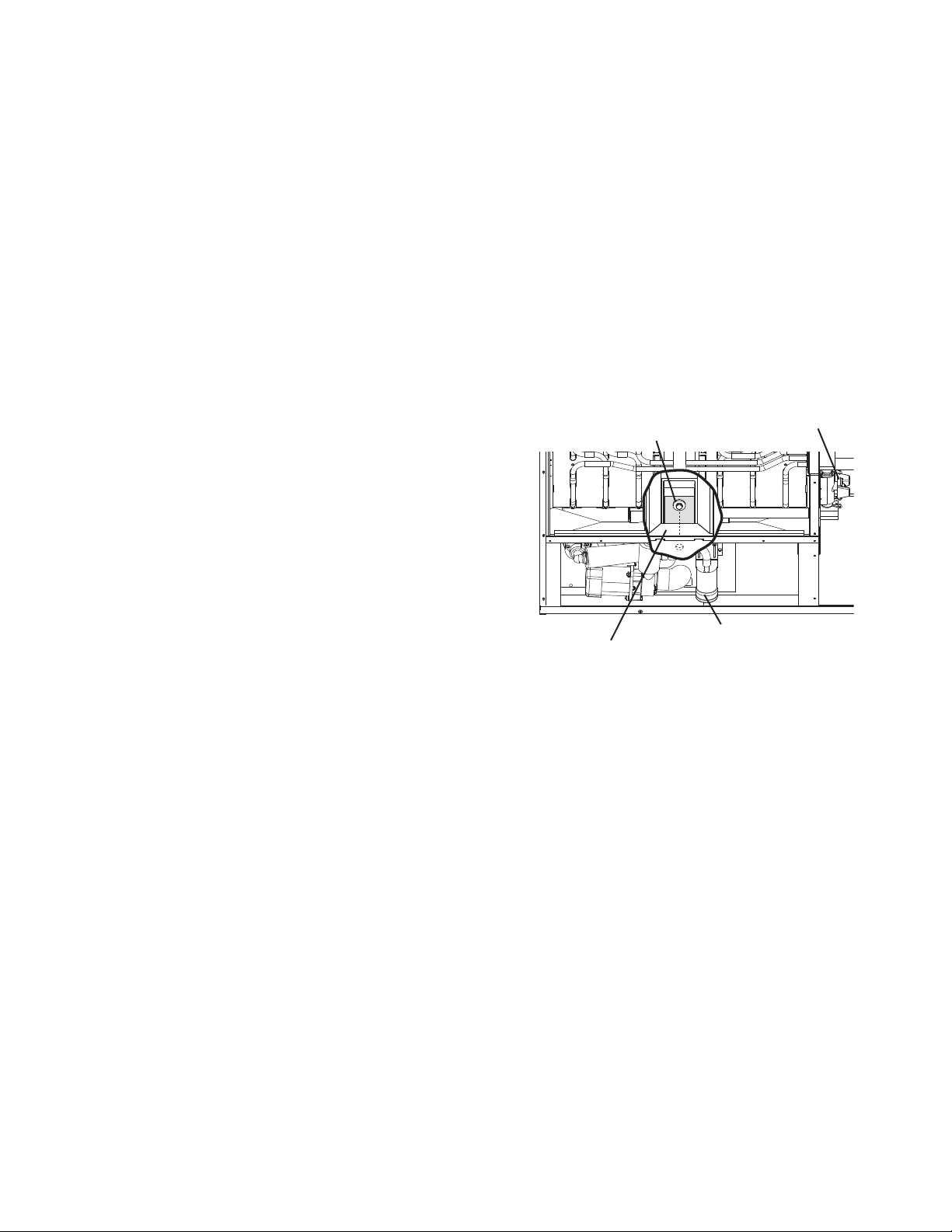
3) Remove the insulation panel, then remove the drain plug located on the lower front part
of the ice chute. See Fig. 3. Allow the water tank to drain.
4) Replace the drain plug in its correct position. Be careful not to cross thread it.
5) Remove the control box cover.
6) Disconnect FS connector from CB
K5connector.
7) Check for continuity across FS leads. With
the water tank empty, FS should be open.
If open, continue to step 8. If closed, follow
the steps in "II.E.2. Float Switch Cleaning."
After cleaning FS, check it again. Replace if
necessary.
8) Reconnect FS connector to CB K5
connector, then replace the control box
cover in its correct position.
9) Move the control switch to the "ICE" position. Replace the insulation panel and front
panel in their correct positions, then turn on the power supply. After 1 min., the 1-min.
ll cycle should end and the initial harvest cycle should begin. If the initial harvest cycle
begins, FS is good and the check is complete. If the initial harvest cycle does not begin,
continue to step 10.
10) Turn off the power supply.
11) Remove the front panel. Move the control switch to the "OFF" position.
12) Remove the control box cover.
13) Disconnect FS connector from CB K5 connector.
14) Check for continuity across FS leads. With the water tank full, FS should be closed.
IfFS is closed and the icemaker will not switch from the 1-min. ll cycle to the initial
harvest cycle, replace CB.
If FS is open, conrm that the water tank is full. If the water tank is not full, check the
water supply, water lters, and inlet water valve. If the water tank is full, follow the
steps in "II.E.2. Float Switch Cleaning." After cleaning FS, check it again. Replace if
necessary.
Legend: CB–control board; FS–oat switch
Fig. 3
Drain Plug
Ice Chute
Float Switch Assembly
Cleaning Valve

22
2. Float Switch Cleaning
Depending on local water conditions, scale may build up on FS. Scale on the switch can
cause the oat to stick. In this case, FS should be cleaned.
1) Turn off the power supply.
2) Remove the front panel, then move the control switch to the "OFF" position.
3) Remove the insulation panel, then remove the drain plug located on the lower front part
of the ice chute. See Fig. 3. Allow the water tank to drain.
4) Replace the drain plug in its correct position. Be careful not to cross thread it.
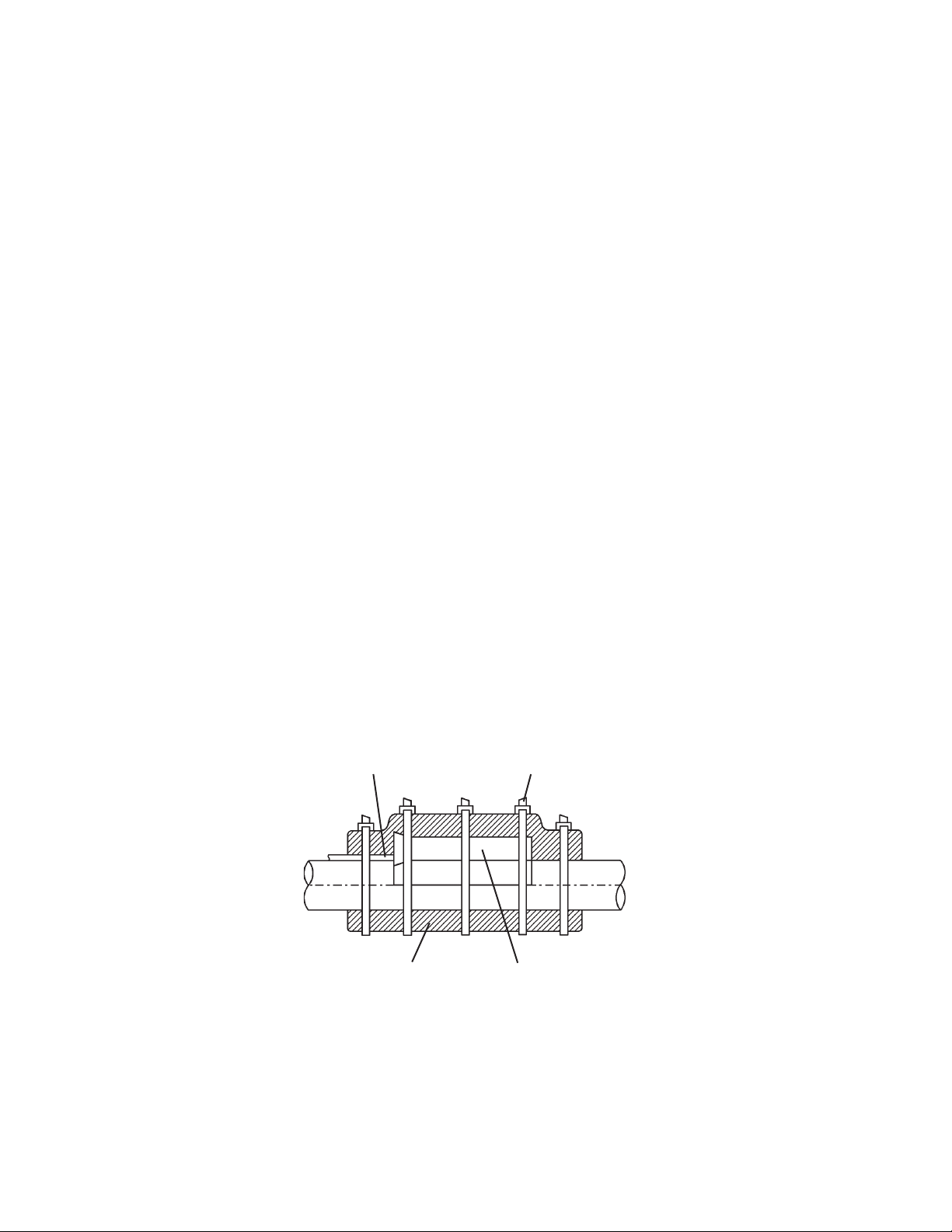
5) Disconnect the vent tube and the ush tube from the top of FS, then remove FS
assembly and remove the rubber boot from the bottom of FS assembly. See Fig. 4.
6) Remove the retainer rod from the bottom of FS housing, then remove the oat.
Becareful not to bend the retainer rod excessively when removing it.
7) Wipe down FS housing, shaft, oat, and retainer rod with a mixture of 1 part Hoshizaki
"Scale Away" and 25 parts warm water. Clean the inside of the rubber boot and hose
with cleaning solution. Rinse the parts thoroughly with clean water.
8) Reassemble FS assembly and replace it and the rubber boot in their correct positions.
Reconnect the vent tube and the ush tube.
9) Move the control switch to the "ICE" position.
10) Replace the insulation panel and front panel in their correct positions.
11) Turn on the power supply to start the automatic icemaking process.
Legend: CB–control board; FS–oat switch
Float
Float Switch
Housing
Rubber Boot
and Hose
Retainer Rod
Flush
Vent
Shaft
Fig. 4
23
F. Thermistor Check
To check thermistor resistance, follow the steps below.
1) Turn off the power supply.
2) Remove the front panel. Move the control switch to the "OFF" position.
3) Remove the control box cover.
4) Remove the thermistor from the refrigerant tubing.
5) Immerse the thermistor sensor portion in a glass containing ice and water for 2 or 3 min.
6) Disconnect the thermistor connector from CB K3 connector and check the resistance
between thermistor leads. Normal range is 4.7 to 6.2 kΩ. If outside the normal range,
replace the thermistor. See "IV.B. Component Service Information." If within the normal
range, continue to the next step.
7) Replace the thermistor in its correct position. See "IV.B. Component Service
Information."
8) Reconnect the thermistor connector to CB K3 connector.
9) Replace the control box cover in its correct position.
10) Move the control switch to the "ICE" position.
11) Replace the front panel in its correct position.
12) Turn on the power supply.
13) Once the harvest cycle starts (Comp energizes), begin timing the harvest cycle.
14) The harvest timer and harvest cycle should terminate within 2 to 5 min. If the harvest
cycle does not terminate within 2 to 5 min., replace CB.
Legend: CB–control board; Comp–compressor
Foam Insulation Thermistor Holder
Thermistor Lead Cable Tie
Fig. 5
G. Control Switch
The control switch has three positions: "OFF" for power off, "ICE" for icemaking, and
"WASH" to energize the pump motor when cleaning and sanitizing. WARNING! Control
switch in "OFF" position does not de-energize all loads. Risk of electric shock.
Use extreme caution and exercise safe electrical practices.
24
H. Diagnostic Tables
1. No Ice Production
No Ice Production - Possible Cause
1. Power Supply a) Off, blown fuse, or tripped breaker.
b) Not within specications.
2. Main Transformer a) Voltage tap switch not set to proper voltage.
b) Coil winding open or shorted.
3. Fuse (Control Box) a) Blown.
4. Control Switch a) In "OFF" or "WASH" position.
b) Bad contacts.
5. High-Pressure Switch a) Dirty condenser.
b) Fan motor not operating.
c) Refrigerant overcharged.
d) Bad contacts.
e) Refrigerant lines or components plugged.
6. Control Transformer
(115VAC/10.5VAC)
a) Coil winding open or shorted.
7. Control Board
See "II.C. Control Board Check"
a) In alarm.
b) Yellow "BC OPEN" LED on (bin full).
c) Defective.
8. Bin Control
See "II.D. Bin Control Check."
a) Tripped with bin lled with ice.
b) Actuator does not move freely.
c) Defective.
9. Water Supply a) Water supply off or improper water pressure.
b) External water lters clogged.
10. Inlet Water Valve a) Screen or orice clogged.
b) Coil winding open.
c) Water valve open in freeze cycle.
11. Float Switch
See "II.E. Float Switch Check
and Cleaning"
a) Float does not move freely.
b) Defective.
12. Compressor a) Compressor relay/magnetic contactor contacts bad or coil winding
open.
b) Start capacitor or run capacitor defective (single phase model).
c) Internal protector open.
d) Start relay contacts bad or coil winding open (single phase model).
e) Compressor defective.
13. Hot Gas Valve a) Closed in harvest cycle.
b) Open in freeze cycle.
14. Thermistor
See "II.F. Thermistor Check"
a) Loose, disconnected, or defective.
15. Pump Motor a) Motor winding open.
b) Bearing worn out or locked rotor.
c) Defective capacitor.
d) Mechanical seal worn out.
25
No Ice Production - Possible Cause
16 Thermostatic Expansion Valve a) Bulb loose.
b) Operating erratically.
1 7. Liquid Line Valve a) Closed in freeze cycle.
b) Open in harvest cycle.
18. Fan Motor a) Motor winding open.
b) Bearing worn out or locked rotor.
c) Defective capacitor.
19. Water System a) Water leaks causing short freeze time.
2. Low Ice Production
Low Ice Production - Possible Cause
Long Harvest Cycle
1. Evaporator a) Scaled up.
2. Spray Tubes and/or Spray
Guides
a) Dirty.
b) Out of position.
3. Refrigerant Charge a) Low.
4. Water Supply a) Low water pressure.
b) External water lters clogged.
c) Insufficient water line size.
Minimum 3/8" Nominal ID (10 mm Nominal OD in the EU) water
tubing or equivalent.
d) Too cold.
5. Control Board
See "II.C. Control Board Check"
a) Thermistor connection loose (K3).
b) Defective.
6. Thermistor
See "II.F. Thermistor Check"
a) Loose, disconnected, or defective.
7. Hot Gas Valve a) Erratic or closed.
8. Inlet Water Valve a) Screen or orice clogged.
9. Compressor a) Inefficient or off.
10. Liquid Line Valve a) Erratic or open.
11. Thermostatic Expansion Valve a) Defective.
Short Freeze Cycle
1. Low Water Supply a) Water lters clogged.
2. Inlet Water Valve a) Screen or orice clogged.
3. Float Switch a) Float does not move freely.
b) Defective.
4. Splash Guard a) Missing or defective.
5. Check Valve a) Dirty.
b) Defective.
6. Control Board a) Defective.
26
Low Ice Production - Possible Cause
Long Freeze Cycle
1. Evaporator a) Scaled up, dirty.
2. Float Switch
See "II.E. Float Switch Check
and Cleaning"
a) Scaled up, dirty.
b) Float sticking.
c) Defective switch.
3. Inlet Water Valve a) Leaking by.
4. Hot Gas Valve a) Erratic or open.
5. Condenser a) Clogged.
6. Control Board
See "II.C. Control Board Check"
a) Float switch connection loose (K5).
b) Defective.
7. Refrigerant Charge a) Low.
8. Thermostatic Expansion Valve a) Bulb loose.
b) Defective.
9. Compressor a) Inefficient or off.
10. Pump Motor a) RPM too slow.
11. Liquid Line Valve a) Erratic or restricted.
3. Freeze-Up
Defrost and clean the icemaker prior to diagnosing freeze-up. Fill out a freeze-up checklist.
See "II.I. Freeze Up Check List," the Hoshizaki America Technician's Pocket Guide, or
contact your local distributor for a copy of the freeze-up checklist.
Freeze-Up - Possible Cause
Harvest Cycle
1. Evaporator a) Scaled up.
b) Damaged.
2. Cube Guides or Splash Guards a) Out of position.
b) Damaged.
3. Spray Tubes and/or Spray
Guides
a) Dirty.
b) Out of position.
4. Water Supply a) Low water pressure.
b) External water lters clogged.
c) Insufficient water line size.
Minimum 3/8" Nominal ID (10 mm Nominal OD in the EU) copper
water tubing or equivalent.
5. Inlet Water Valve a) Screen or orice clogged.
b) Defective.
6. Float Switch
See "II.E. Float Switch Check
and Cleaning"
a) Dirty, sticking.
b) Defective.
7. Refrigerant Charge a) Low.
27
Freeze-Up - Possible Cause
8. Control Board
See "II.C. Control Board
Check" and "III.C. Settings and
Adjustments"
a) Harvest timer (S4 dip switch 1 & 2) set too short.
b) Harvest pump time (harvest assist) (S4 dip switch 7) not in factory
default position.
c) Defective.
9. Bin Control
See "II.D. Bin Control Check"
a) Actuator does not move or defective.
10. Thermistor
See "II.F. Thermistor Check"
a) Loose, disconnected, or defective.
11. Thermostatic Expansion Valve a) Defective.
12. Hot Gas Valve a) Closed or restricted.
13. Liquid Line Valve a) Open.
Freeze Cycle
1. Evaporator a) Scaled up.
b) Damaged.
2. Spray Tubes and/or Spray
Guides
a) Dirty.
b) Out of position.
3. Refrigerant Charge a) Low.
4. Control Board
See "II.C. Control Board Check"
a) Freeze timer (S4 dip switch 9 & 10) set incorrectly.
b) Defective.
5. Inlet Water Valve a) Leaking by.
6. Float Switch
See "II.E. Float Switch Check
and Cleaning"
a) Float does not move freely.
b) Defective.
7. Pump Motor a) RPM too slow.
b) Impeller damaged.
8. Thermostatic Expansion Valve a) Bulb loose or defective.
9. Liquid Line Valve a) Restricted.
28
I. Freeze-Up Check List
“MAKE COPIES AND USE AS NEEDED”
MODEL#_____________________SERIAL#_________________INSTALL DATE_____________FAIL DATE________________
Single Stack
1. Single unit or stacked equipment? [ ] [ ]
YES NO
2. Is the float switch dirty? [ ] [ ]
3. Is the water pump always running in freeze? [ ] [ ]
4. Is the thermistor properly mounted? [ ] [ ]
5. Is the TXV bulb tight and insulated? [ ] [ ]
6. Does the water sump fill to overflow in 60-90 [ ] [ ]
seconds or less when empty? Note: 1800, 2000
2400 should be 60-120 seconds
7. Is water line size 1/2”? If not________” [ ] [ ]
8. Is the water flow 3GPM for KM-150 to KM-900 [ ] [ ]
or 5GPM for KM-1200-KM-2400?
9. Only one water line per unit? If not_______ [ ] [ ]
11. Will the thermostatic bin control cycle the unit [ ] [ ]
OFF within 6-10 seconds when in contact with ice?
11a. Is the bin control capillary touching a heated [ ] [ ]
surface?
For units with mechanical style bin control:
12. Will mechanical control cycle unit off in 6 [ ] [ ]
seconds within the first 5 minutes of freeze?
12a. Is the deflector shield in place over the [ ] [ ]
control bracket.
12b. Is DIP switch number 7 ON? [ ] [ ]
12c. Is machine mounted on a dispenser? [ ] [ ]
13. Are the evaporator separators positioned [ ] [ ]
properly?
14. Is the cube guide positioned correctly? [ ] [ ]
15. Date evaporators were last cleaned? _____________________
16. Date water valve screen was last cleaned?________________
16a Does water valve close completely when [ ] [ ]
de-energized?
17. What is water pressure?___________Temperature__________
YES No
18. Does the unit have any water filtration? [ ] [ ]
If yes please list the following:
Filter brand___________________Model_________________
Filter pressure gauge reading during the fill cycle___________
Date filter was last replaced?___________________________
GPM or LPM flow rate of filter system?__________________
19. Please list the DIP switch settings.
1____2____3____4____5____6____7____8____9____10___
20. Is the cube size consistent form inlet to outlet [ ] [ ]
of evaporator?_
21. Is ice still dropping when the unit goes into freeze [ ] [ ]
22. After defrosting, was the unit leak checked? [ ] [ ]
Were any leaks found? [ ] [ ]
If so where?_________________________________________
23. Was any refrigerant added to the unit? [ ] [ ]
If so, how much?____________________________________
24.What was the head pressure? Freeze_________Harvest_______
(Freeze pressure should be taken 5 minutes into the cycle)
25. What was the suction pressure? Freeze______Harvest_______
(Freeze pressure should be taken 5 minutes into the cycle)
26. What was the length of the cycles?
Harvest_________________Freeze_________________
27. Ambient temperature at condenser? ____________________F
28. Water-cooled condenser outlet temperature______________F
29. Is the hot gas valve opening? [ ] [ ]
30. List model and manufacture of the bin____________________
_____________________________________________________
31. Has the stainless steel extension bracket been [ ] [ ]
added? (All “S” models)
32.What is the ice drop weight?____________________________
Note: Please make copies of this form and use it when diagnosing a freeze up condition.
Please submit a completed copy of the checklist with any Freeze-up labor claim form
PLEASE COMPLETE WHEN DIAGNOSING A FREEZE-UP
REFRIGERANT LEAK OR LOW CHARGE
TECHNICAL SUPPORT FAX 1-800-843-1056

29
III. Controls and Adjustments
• A Hoshizaki exclusive control board is employed in KM and KMH series appliances.
• All models are pretested and factory adjusted.
• For a control board check procedure, see "II.C. Control Board Check."
NOTICE
• Fragile, handle very carefully.
• The control board contains integrated circuits, which are susceptible to failure
due to static discharge. It is especially important to touch the metal part of the
icemaker when handling or replacing the control board.
• Do not touch the electronic devices on the control board or the back of the control
board.
• Do not change wiring and connections. Do not misconnect K3 WHITE, K4RED,
and K5 BLACK, because the same connector is used for the thermistor,
mechanical bin control, and oat switch.
• Do not short out power supply to test for voltage.
• Always replace the whole control board assembly if it goes bad.
30
A. Control Board Layout
"J" Control Board
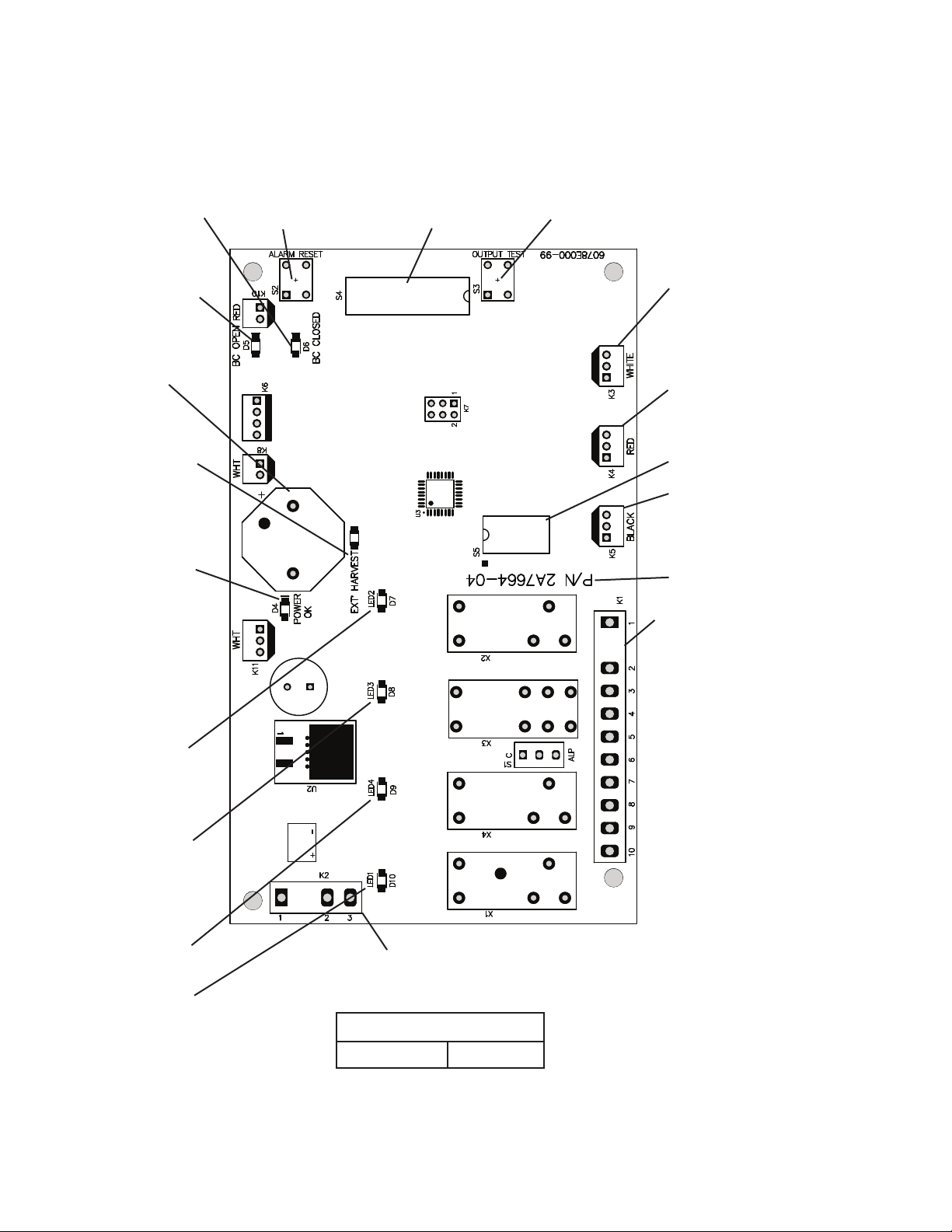
Part Number 2A7664-04
"J" Control Board
• K4 (red) Connector
Bin Control
• K1 Connector
Pins #1 through #10
#1, 9 Compressor Relay
#2 Hot Gas Valve, X12 Relay
#3 Fan Motor
Liquid Line Valve
#4 Pump Motor (icemaking)
#5 Pump Motor
(harvest pump timer and
pump-out)
#6 Inlet Water Valve, X11 Relay
#7, 10 Component Power
Supply
#8 Open
• Bin Control Switch
Open LED (yellow)
• Bin Control Switch
Closed LED (green)
• LED 2 (X2 Relay)
LED 2 on:
K1 Connector Pin #2
LED 2 off:
K1 Connector Pin #3
• LED 3 (X3 Relay)
LED 3 on:
K1 Connector Pin #5
LED 3 off:
K1 Connector Pin #4
(energized in freeze)
• LED 4 (X4 Relay)
K1 Connector Pin #6
• LED 1 (X1 Relay)
K1 Connector Pin #1, #9
• K2 Connector
Control Transformer
(10.5VAC)
• S5 Dip Switch
• "ALARM RESET" Button
• S4 Dip Switch
• "OUTPUT TEST" Button
(used to test relays on control board)
• K3 (white) Connector
Thermistor
(harvest control and
high temperature safety)
• K5 (black) Connector
Float Switch
(water level)
• Part Number
• Alarm Buzzer
• Relay LEDs
(4) (indicate which
relays are energized
and which K1
connector pins are
energized
• POWER OK LED
(red) (lights when
10.5VAC is supplied
to K2 connector)
• Ext. Harvest LED
(yellow) (lights
when water line
thermistor initiates
extended harvest)
Not used this model
31
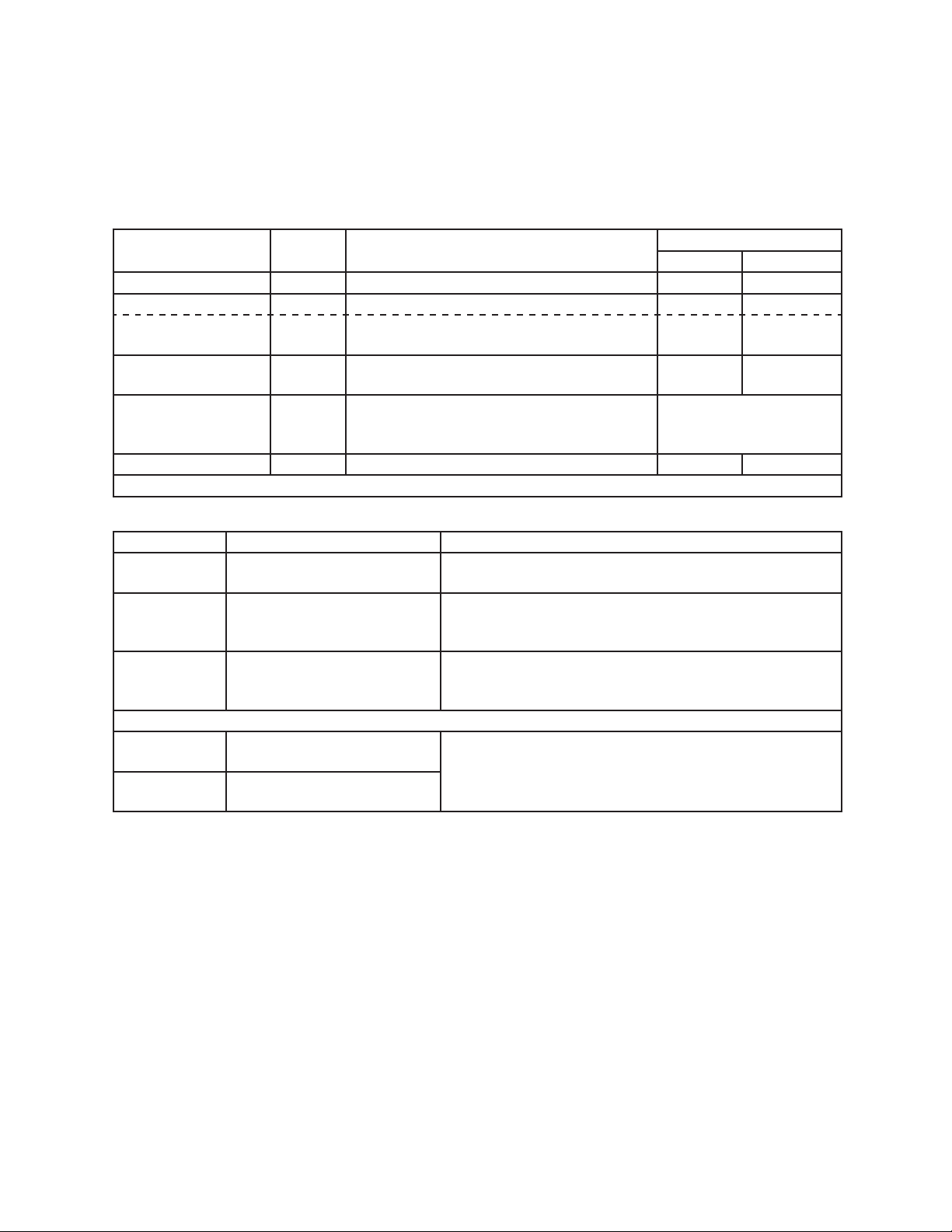
B. LED Lights and Audible Alarm Safeties
Beep occurs and red "POWER OK" LED turns on when control switch is moved to "ICE"
position.
Sequence
Green LEDs 1 through 4 turn on and sequence from initial startup as listed in the table
below. Order of green LEDs from the outer edge of control board is 1, 4, 3, 2.
Sequence Step LED
Energized
Components
Time LEDs are On
Min. Max.
1-Minute Fill Cycle 4 WV
Harvest Cycle 1, 4, 2 Comp, HGV, WV 1 minute 20 minutes
Harvest Pump Time
(harvest assist)
1, 3, 2 Comp, HGV, PM 0 seconds 50 seconds
Freeze Cycle 1 Comp, FM, PM, LLV 5 minutes freeze timer
setting
Slush Control 1, 3 Comp, FM, LLV If S5 dip switch 5 on,
PM off 10 sec. when
thermistor at 36°F (2.2°C)
Pump-Out Cycle 1, 4
†
, 3, 2 Comp, HGV, PM, WV
†
10 seconds 20 seconds
†
pump-out timer setting
Alarms
Type Alarm Notes
1
Beep
High Evaporator Temp.
(temperature > 127°F) (53°C)
Check for harvest problem (stuck HGV or relay), hot
water entering unit, stuck HM, or shorted thermistor.
2
Beep
Harvest Backup Timer
(harvest > 20 min. for two
cycles in a row)
Check thermistor (open), HGV not opening, TXV or LLV
leaking by, low charge, inefficient Comp.
3
Beep
Freeze Timer
(freeze > freeze timer setting
for two cycles in a row)
Check FS stuck closed (up), WV leaking by, HGV leaking
by, PM not pumping, TXV defective, LLV not opening, low
charge, or inefficient Comp.
To reset above safeties, press "ALARM RESET" button with power supply on.
6 Low Voltage
(92Vac±5% or less)
Red LED turns off if voltage protection operates.
Control voltage safeties automatically reset when voltage
is corrected.
7 High Voltage
(147Vac±5% or more)
Legend: CB–control board; Comp–compressor; FM–fan motor; FS–oat switch;
HGV–hot gas valve; L LV–liquid line valve; PM–pump motor; TXV–thermostatic
expansion valve; WV–inlet water valve
32
C. Settings and Adjustments
NOTICE
Dip switches are factory set. Failure to maintain factory settings may adversely
affect performance and warranty coverage. For more information, contact your
Hoshizaki Service Center.
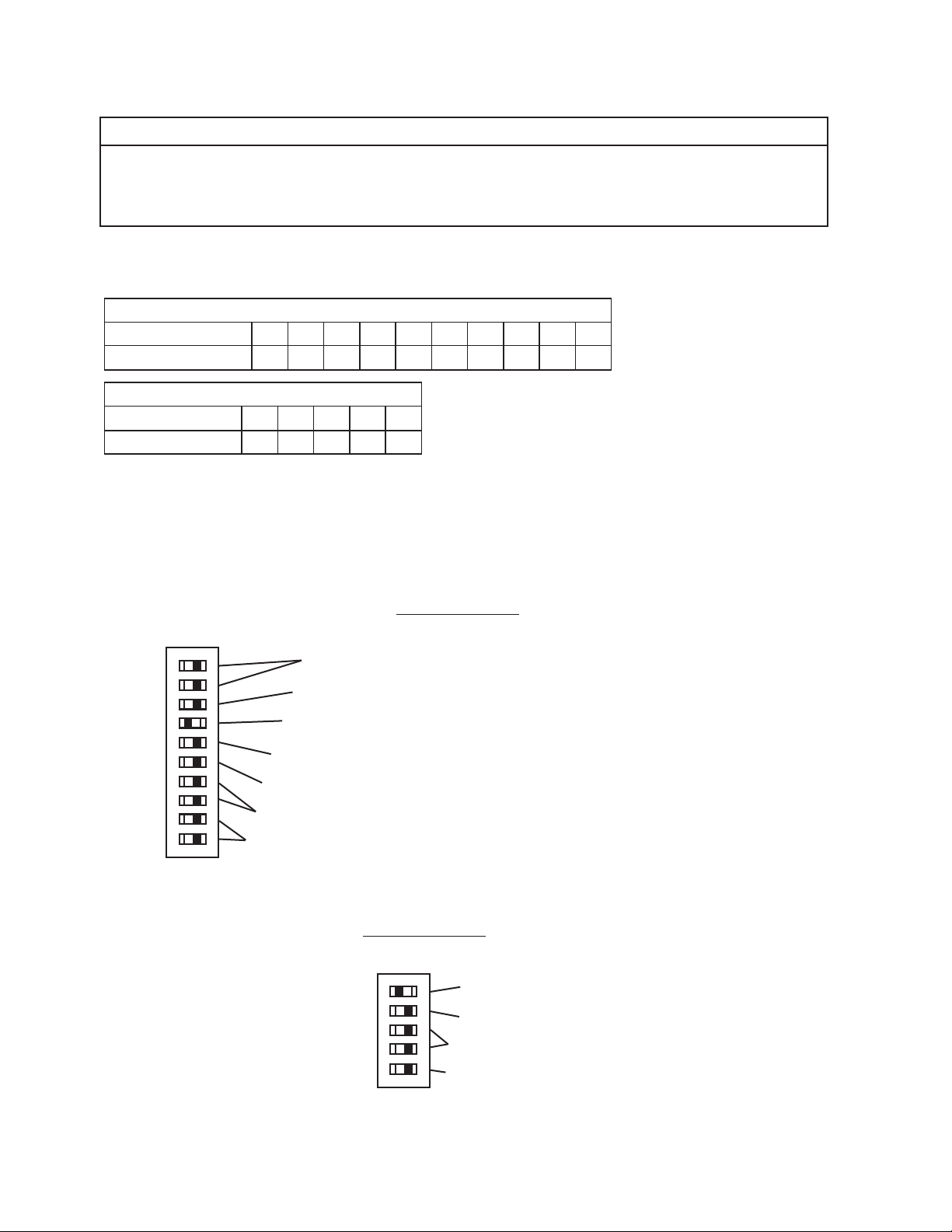
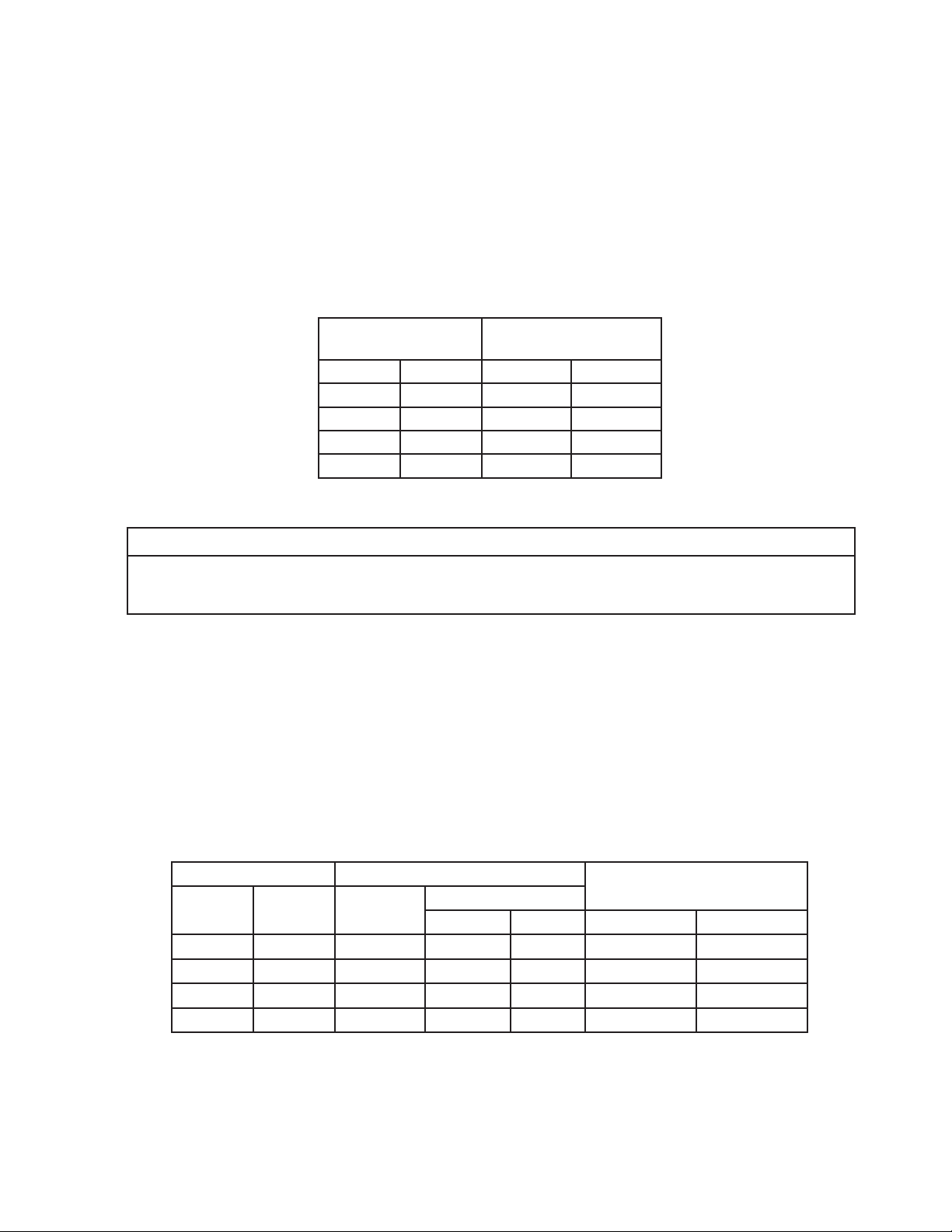
1. Default Dip Switch Settings
The dip switches are factory-adjusted to the following positions:
S4 Dip Switch
S4 Dip Switch No. 1 2 3 4 5 6 7 8 9 10
KM-1301SAJ-E
OFF OFF ON ON ON ON ON OFF ON ON
S5 Dip Switch (Do Not Adjust)
S5 Dip Switch No.
1 2 3 4 5
KM-1301SAJ-E OFF OFF OFF OFF OFF
Freeze Timer (9 & 10)
Pump-Out Frequency Control (5)
Pump-Out Time/Harvest Time During Pump-Out (3 & 4)
Harvest Timer (1 & 2)
Factory Use (8)
Harvest Pump Time (Harvest Assist) (7) (Do Not Adjust)
1 2 3 4 5 6 7 8 9 10
ON
S4 Dip Switch
"J" Control Board
1 2 3 4 5
ON
S5 Dip Switch (Do Not Adjust)
"J" Control Board
Rell Counter (2 and 3)
Float Switch Control Selector (1)
Minimum Harvest Time (4)
Slush Control (5)
Harvest Pump Time Timer (Harvest Assist Duration) (6)
33
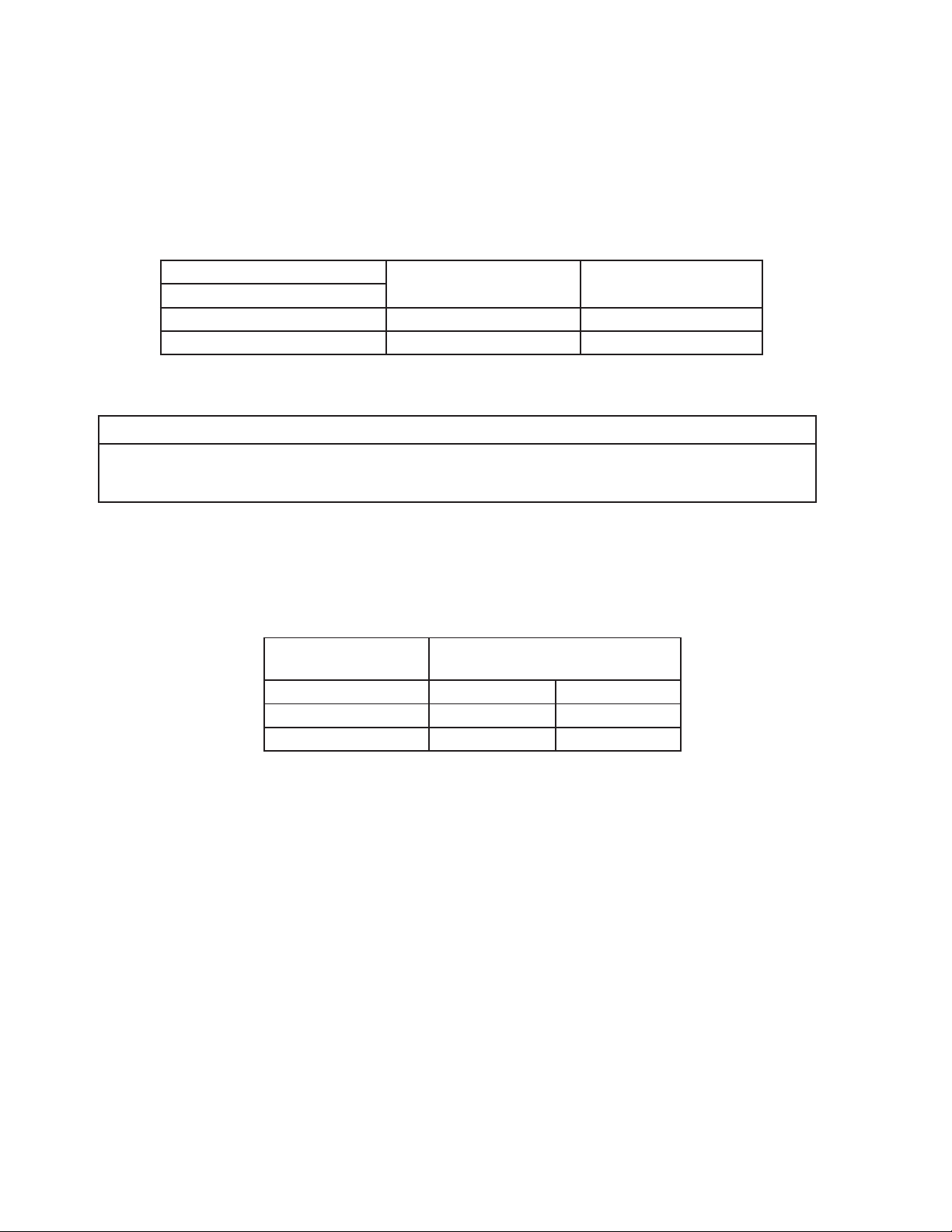
2. Harvest Time (S4 dip switch 1 & 2)
The harvest timer starts counting when the thermistor reaches 48°F (9°C) at the
evaporator outlet and the control board reads 3.9 kΩ from the thermistor. The harvest
timer is factory set, and generally no adjustment is required. However, a setting longer
than the factory setting may be advised in cases where the drain provided at harvest
needs to be prolonged for extra cleaning. Note that the pump-out timer (S4 dip switch
3 & 4) acts in place of the harvest timer during cycles with a pump out. For details, see
"III.C.3. Pump-Out Timer (S4 dip switch 3& 4)."
Note: On models with a pump-out every cycle, the harvest timer is only relevant during
the initial harvest cycle since a pump out occurs every cycle thereafter.
S4 Dip Switch Setting
Time
(sec.)
No. 1 No. 2 S5-4 OFF S5-4 ON
OFF OFF 60 30
ON OFF 90 45
OFF ON 120 60
ON ON 180 75
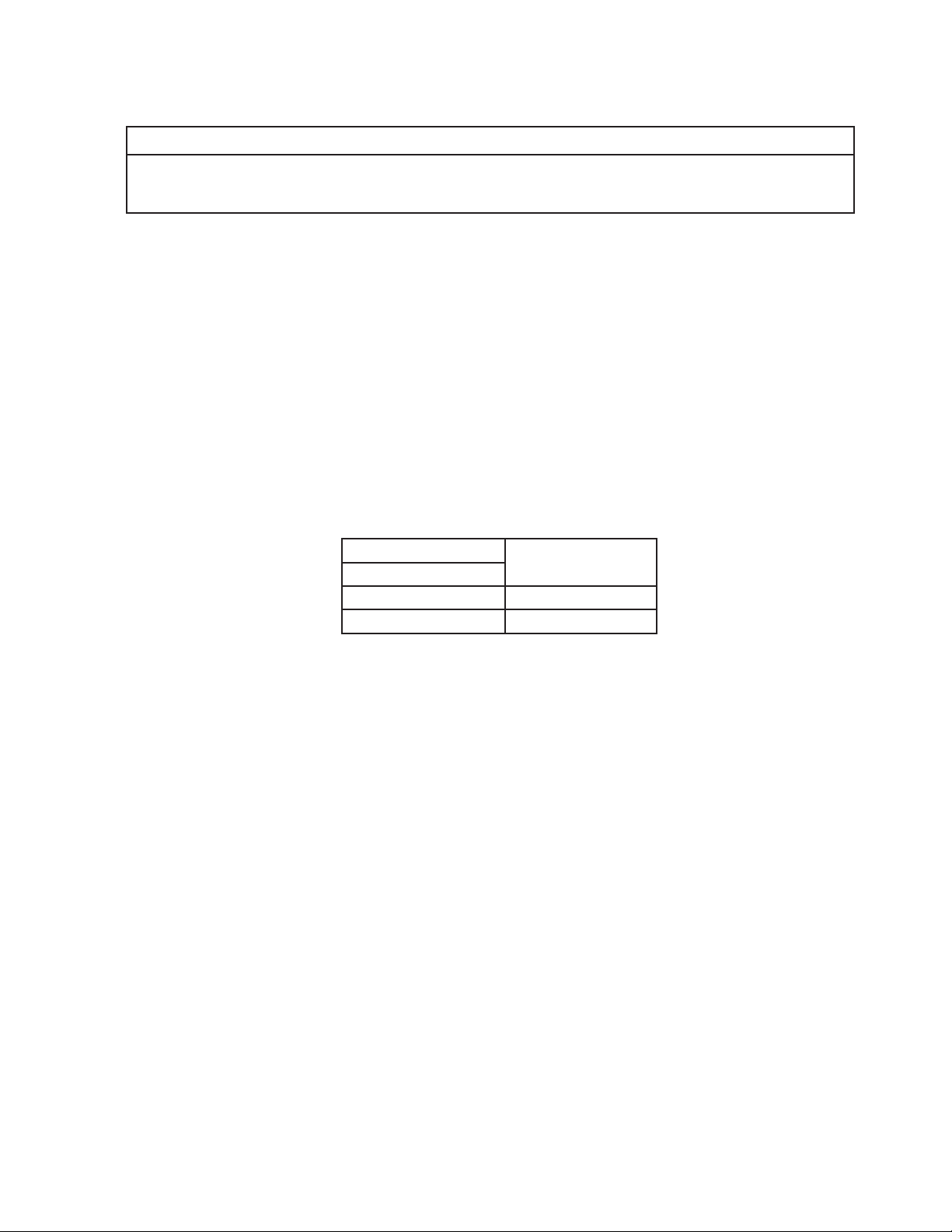
3. Pump-Out Time/Harvest Time During Pump-Out (S4 dip switch 3 & 4)
NOTICE
Do not adjust 3 off and 4 on. Pump motor does not run in pump-out rotation in this
setting.
When a pump-out is called for, the pump motor stops for 2 sec., then energizes in the
reverse direction, taking water from the bottom of the water tank and forcing pressure
against the check valve seat allowing water to go through the check valve and down the
drain. At the same time, water ows through the small tube to power ush the oat switch.
The pump motor drains the water tank for the time determined by the pump-out timer.
The pump-out timer also acts in place of the harvest timer during cycles with a pump-out.
The pump-out timer is factory set, and generally no adjustment is required. However,
where water quality is bad and the icemaker needs a longer pump-out time, the pump-out
timer can be adjusted. The pump-out time can be set to pump-out for 10or 20 sec. During
pump-out cycles minimum harvest time is based on times given in the table below.
S4 Dip Switch Setting Time (sec.)
Inlet Water
Valve
No. 3 No. 4
T1 T2
S5-4 OFF S5-4 ON S5-4 OFF S5-4 ON
OFF OFF 10 150 100 Closed Closed
ON OFF 10 180 130 Closed Closed
OFF ON 10 120 70 Open Closed
ON ON 20 180 180 Closed Closed
T1: Time to drain the water tank
T2: Harvest timer at pump out
34
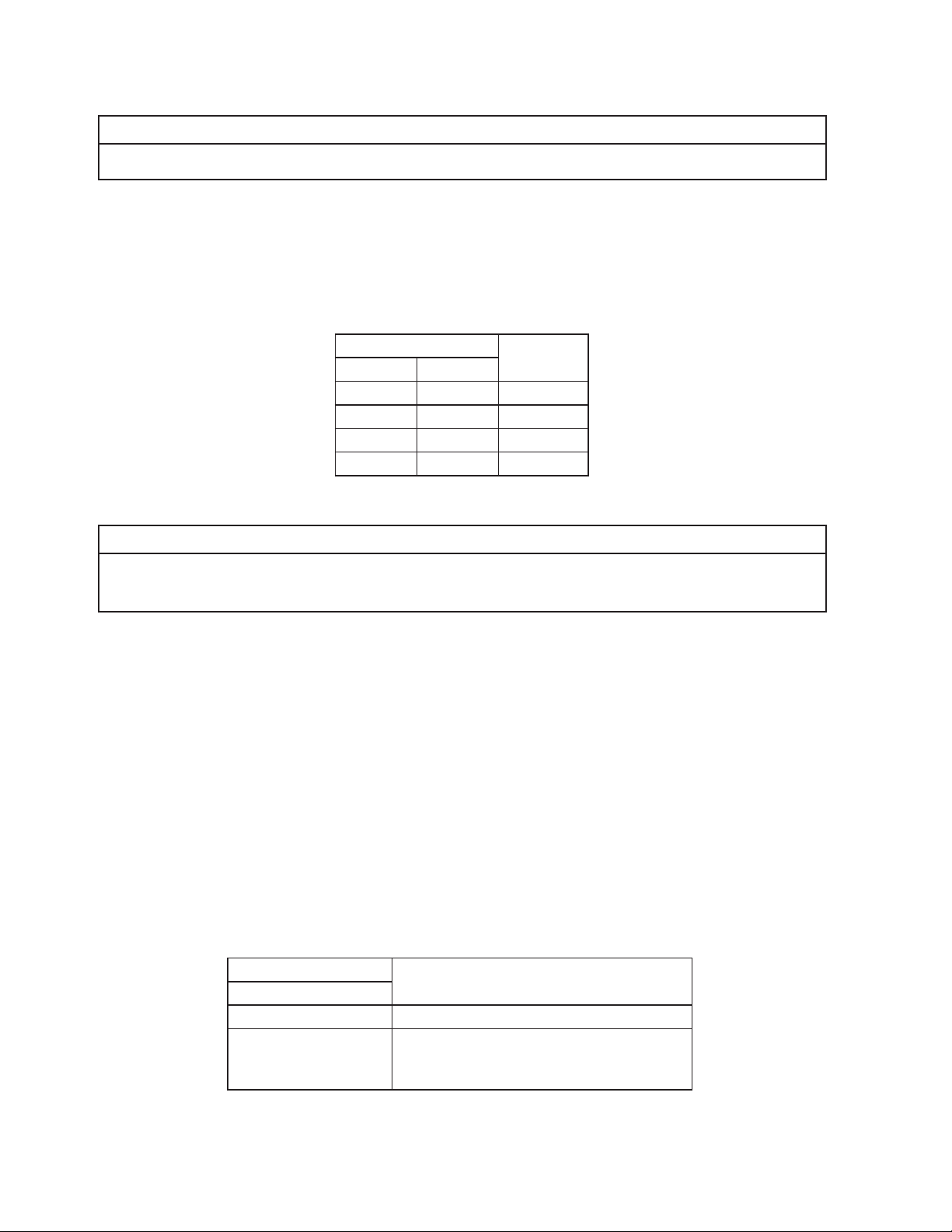
4. Pump-Out Frequency Control (S4 dip switch 5)
The pump-out frequency control is factory set to drain the water tank every 10 cycles.
Generally no adjustment is required. However, where water quality is bad and the
icemaker needs a pump-out more often, the pump-out frequency can be adjusted. The
pump-out frequency control can be set to have a pump-out occur every cycle, or every
10 cycles.
The rst pump-out is dependent on S4 dip switch 5. See the table below.
S4 Dip Switch Setting
Pump-Out Frequency 1st Pump-Out
No. 5
OFF Every 10 cycles After 11th freeze cycle
ON Every cycle After 2nd freeze cycle
5. Harvest Pump Time (Harvest Assist) (S4 dip switch 6)
NOTICE
Factory set for proper operation. Do not adjust. Adjustment outside of the factory
default setting may result in damage to the appliance.
Harvest pump time (harvest assist) is only active when S4 dip switch 7 is in the "ON"
position. In the factory default position, the harvest pump time (harvest assist) starts with
50sec. left to go in harvest cycle (S4 dip switch 6) and after the thermistor reaches 48°F
(9°C) at the evaporator outlet and the control board reads 3.9kΩ from the thermistor. The
harvest pump time (harvest assist) is factory set, and no adjustment is required.
S4 Dip Switch Setting
Harvest Pump Time
(Harvest Assist)
No. 6 S5-4 OFF S5-4 ON
OFF 50 sec. 25 sec.
ON 25 sec. 15 sec.
35
6. Harvest Pump Time (Harvest Assist) (S4 dip switch 7)
NOTICE
Factory set for proper operation. Do not adjust. Adjustment outside of the factory
default setting may result in damage to the appliance.
Depending on S4 dip switch 7 setting, the pump motor either stays off or is energized
during the last seconds of the harvest cycle. When the pump motor is energized (S4 dip
switch 7 on), water circulates over the evaporator. The harvest water valve is open during
harvest for a maximum of 6 minutes or the length of harvest minus the harvest pump time
value(S4 dip switch 6), whichever is shorter.
When S4 dip switch 7 is in the on position and harvest begins, X11 and X10 relays
energize. A latching circuit is created through the X11 and X10 relays. For further details,
see "VIII.B. Wiring Diagrams." In the factory default position, 50 sec. before harvest
termination, LED 4 turns off, inlet water valve and X11 relay de-energize. X10 relay
remains energized through the latching circuit. Next, LED 3 turns on and control board
K1connector pin #5 (DBU wire) energizes, energizing the pump motor for the last
seconds of harvest. Harvest pump time adjusted by S4 dip switch 1 & 2 and S5 dip switch
4settings. Contact Technical Support before adjusted these settings.
S4 Dip Switch Setting
Harvest Pump Time
(Harvest Assist)
No. 7
OFF Disabled
ON Enabled
7. Factory Use (S4 dip switch 8)
Factory set for proper operation. Do not adjust. This must be left in the factory default
position.
36
8. Freeze Timer (S4 dip switch 9 & 10)
NOTICE
Adjust to proper specication, or the icemaker may not operate correctly.
The freeze timer setting determines the maximum allowed freeze time to prevent possible
freeze-up issues. Upon termination of the freeze timer, the control board initiates the
harvest cycle or pump-out cycle. After 2 consecutive freeze timer terminations, the control
board shuts down the icemaker. In this case, see "II.H.3. Low Ice Production" for possible
solutions. The freeze timer is factory set and no adjustment is required. Before changing
this setting, contact Hoshizaki Technical Support at 1-800-233-1940 for recommendations.
S4 Dip Switch Setting Time
(min.)
No. 9 No. 10
OFF OFF 60
OFF ON 50
ON OFF 70
ON ON 75
9. Float Switch Control Selector (S5 dip switch 1)
NOTICE
Do not adjust. This must be left in the factory default position or the icemaker will
not operate correctly. The KM-1301SAJ-E uses a single oat switch with no rells.
Float switch selector used in applications where rell is required in the freeze cycle. Rells
set by S5 dip switch 2 and 3. Note: In single oat switch with upper oat operation only
1rell allowed.
• Single oat switch application:
• With S5 dip switch 1 in the "OFF" position, control board monitors the lower oat switch
for rell operation.
• With S5 dip switch 1 in the "ON" position, the control board monitors the upper oat
switch for rell operation. In this case no upper oat switch exists, therefore the control
board reads an open upper oat switch immediately when the freeze cycle starts and
initiates a rell. Since there is no upper oat switch to close and terminate the rell, the
rell lasts for a maximum of 1-min. During the 1-min. rell, LED 4 is on.
• Double oat switch application: Float switch control selector determines which oat switch
(upper or lower) the control board monitors for rell control during the freeze cycle.
S5 Dip Switch Setting
Pump-Out ComponentsNo. 1
OFF Bottom Float Switch Control
ON
Top Float Switch Control
(this setting is ignored if rell counter
(S5 dip switch 2 and 3) set to 0)
37
10. Rell Counter (S5 dip switch 2 and 3)
NOTICE
Do not adjust. These must be left in the factory default position or the icemaker will
not operate correctly.
S5 Dip Switch Setting Rell
Counter
No. 2 No. 3
OFF OFF 0
OFF ON 1 rell
ON OFF 9 rells
ON ON 10 rells
11. Minimum Harvest Time (S5 dip switch 4)
NOTICE
Factory set for proper operation. Do not adjust. Adjustment outside the factory
default setting may result in damage to the appliance.
S5 Dip Switch Setting Minimum
Harvest Timer
No. 4
OFF 120 sec.
ON 70 sec.
12. Slush Control (S5 dip switch 5)
NOTICE
Factory set for proper operation. Do not adjust. Adjustment outside the factory
default setting may result in damage to the appliance.
This dip switch setting provides slush control during the freeze cycle. When the
evaporator temperature reaches 36°F (2.2°C) the control board reads a 5.8kΩ signal from
the thermistor and de-energizes the water pump for 10 sec. to melt ice slush and prevent
ice slush from blocking the water supply tubing, causing irregular freeze patterns.
S5 Dip Switch Setting
Slush ControlNo. 5
OFF Disabled
ON Enabled
38
IV. Refrigeration Circuit and Component Service Information
WARNING
• This appliance should be diagnosed and repaired only by qualied service
personnel to reduce the risk of death, electric shock, serious injury, or re.
• Move the control switch to the "OFF" position and turn off the power supply. Place
the disconnect in the "OFF" position. Lockout/Tagout to prevent the power supply
from being turned back on inadvertently.
• CHOKING HAZARD: Ensure all components, fasteners, and thumbscrews are
securely in place after the icemaker is serviced. Make sure that none have fallen
into the dispenser unit/ice storage bin.
• Make sure all food zones in the icemaker and dispenser unit/ice storage bin are
clean after service.
A. Refrigeration Circuit Service Information
WARNING
• Repairs requiring the refrigeration circuit to be opened must be performed by
properly trained and EPA-certied service personnel.
• Use an electronic leak detector or soap bubbles to check for leaks. Add a trace of
refrigerant to the system (if using an electronic leak detector), and then raise the
pressure using nitrogen gas (140 PSIG). Do not use R-404A as a mixture with
pressurized air for leak testing.
NOTICE
• Always recover the refrigerant and store it in an approved container. Do not
discharge the refrigerant into the atmosphere.
• Do not leave the system open for longer than 15 min. when replacing or servicing
parts. The Polyol Ester (POE) oils used in R-404A applications can absorb
moisture quickly. Therefore it is important to prevent moisture from entering the
system when replacing or servicing parts.
• Always install a new drier every time the sealed refrigeration system is opened.
Do not replace the drier until after all other repair or replacement has been made.
Install the new drier with the arrow on the drier in the direction of the refrigerant
ow.
• When brazing, protect the drier by using a wet cloth to prevent the drier from
overheating. Do not allow the drier to exceed 250°F (121°C).
1. Refrigerant Recovery
The icemaker is provided with refrigerant service valves. Using proper refrigerant practices,
recover the refrigerant. Store the refrigerant in an approved container. Do not discharge the
refrigerant into the atmosphere.

39
2. Brazing
WARNING
• R-404A itself is not ammable at atmospheric pressure and temperatures up to
176°F (80°C).
• R-404A itself is not explosive or poisonous. However, when exposed to high
temperatures (open ames), R-404A can be decomposed to form hydrouoric
acid and carbonyl uoride both of which are hazardous.
• Do not use silver alloy or copper alloy containing arsenic.
1) Braze all ttings while purging with nitrogen gas owing at a pressure of 3 to 4 PSIG.
Note: Because the pipes in the evaporator case are specially coated to resist corrosion,
it is important to make connections outside the evaporator case when possible. If
it is necessary to braze inside the evaporator case, use sandpaper to remove the
coating from the brazing connections before unbrazing the components.
NOTICE
• Always install a new drier every time the sealed refrigeration system is opened.
• Do not replace the drier until after all other repair or replacement has been made.
Install the new drier with the arrow on the drier in the direction of the refrigerant
ow.
• When brazing, protect the drier by using a wet cloth to prevent the drier from
overheating. Do not allow the drier to exceed 250°F (121°C).
2) Use an electronic leak detector or soap bubbles to check for leaks. Add a trace of
refrigerant to the system (if using an electronic leak detector), and then raise the
pressure using nitrogen gas (140 PSIG). Do not use R-404A as a mixture with
pressurized air for leak testing.
3. Evacuation and Recharge (R-404A)
1) Attach a vacuum pump to the system. Be sure to connect the charging hoses to both
high and low-side refrigerant access valves.
IMPORTANT
The vacuum level and vacuum pump may be the same as those for current
refrigerants. However, the rubber hose and gauge manifold to be used for
evacuation and refrigerant charge should be exclusively for POE oils.
2) Turn on the vacuum pump. Open the gauge manifold valves, then open the high and
low-side service valves. Never allow the oil in the vacuum pump to ow backwards.
3) Allow the vacuum pump to pull down to a 29.9" Hg vacuum. Evacuating period depends
on pump capacity.
4) Close the low-side valve and high-side valve on the gauge manifold.

40
5) Disconnect the gauge manifold hose from the vacuum pump and attach it to a
refrigerant service cylinder. Remember to loosen the connection and purge the air from
the hose. For the required refrigerant charge, see the rating label inside the icemaker.
Hoshizaki recommends only virgin refrigerant or reclaimed refrigerant which meets
ARI Standard 700 (latest edition) be used.
6) A liquid charge is required when charging an R-404A system (to prevent fractionation).
Place the service cylinder on the scales; if the service cylinder is not equipped with
a dip tube, invert the service cylinder, then place it on the scales. Open the high-side
valve on the gauge manifold.
7) Allow the system to charge with liquid until the proper charge weight is met.
8) If necessary, add any remaining charge to the system through the low-side.
NOTICE!To prevent compressor damage, use a throttling valve or liquid
dispensing device to add the remaining liquid charge through the low-side
refrigerant service valve with the icemaker running.
9) Close the high and low-side service valves, then close the high and low-side gauge
manifold valves. Disconnect the gauge manifold hoses.
10) Cap the refrigerant service valves to prevent a possible leak.
41
B. Component Service Information
NOTICE
When replacing a component listed below, see the notes to help ensure proper
operation.
Component Notes
Compressor 1 phase: Install a new start capacitor, run capacitor, and start relay.
Thermostatic
Expansion Valves
• Attach the thermostatic expansion valve bulb to the suction line in the same location
as the previous bulb.
• The bulb should be between the 10 and 2 o'clock positions on the tube.
• Secure the bulb with the clamp and holder, then insulate it.
Hot Gas Valves
Liquid Line Valves
• Replace the strainer if applicable.
• Use copper tube of the same diameter and length when replacing valve lines.
Fan Motors Install a new capacitor.
Pump Motor Install a new capacitor.
Thermistor • Attach the new thermistor to the suction line in the same location as the previous
thermistor.
• The thermistor should be at the 12 o'clock position on the tube.
• Smoothly ll the recessed area of the thermistor holder with high thermal
conductive type sealant. Hoshizaki America part number 4A0683-01 (Silicone
Heat Sink Compound 10-8108 manufactured by GC Electronics), KE-4560 RTV
(manufactured by ShinEtsu Silicones), or equivalent are recommended.
• Secure the thermistor with the holder, then insulate it.
• Be very careful to prevent damage to the leads.
42
V. Maintenance
The maintenance schedule below is a guideline. More frequent maintenance may be
required depending on water quality, the appliance's environment, and local sanitation
regulations
WARNING
• Only qualied service technicians should service the appliance.
• To reduce the risk of electric shock, do not touch the control switch or service
switch with damp hands
• Before servicing: Move the control switch to the "OFF" position and turn off the
power supply. Place the disconnect in the "OFF" position.
Lockout/Tagout to prevent the power supply from being turned back on
inadvertently.
• CHOKING HAZARD: Ensure all components, fasteners, and thumbscrews are
securely in place after any maintenance is done to the icemaker. Make sure that
none have fallen into the dispenser unit/ice storage bin.
Maintenance Schedule
Frequency Area Task
Daily Scoop Clean the ice scoop using a neutral cleaner. Rinse thoroughly after
cleaning.
Bi-Weekly Air Filters Inspect. Wash with warm water and neutral cleaner if dirty.
Monthly External Water
Filters
Check for proper pressure and change if necessary.
Icemaker Exterior Wipe down with a clean, soft cloth. Use a damp cloth containing a
neutral cleaner to wipe off oil or dirt build up. Clean any chlorine staining
(rust colored spots) using a non-abrasive cleanser.
Yearly Icemaker and
Dispenser Unit/Ice
Storage Bin Liner
Clean and sanitize per the cleaning and sanitizing instructions provided
in the instruction manual or maintenance label on the icemaker.
Water Supply Inlet Close the icemaker water supply line shut-off valve and drain the water
system. Clean the water supply inlet screen.
Condenser Inspect. Clean if necessary by using a brush or vacuum cleaner. More
frequent cleaning may be required depending on location.
Water Hoses Inspect the water hoses and clean/replace if necessary.
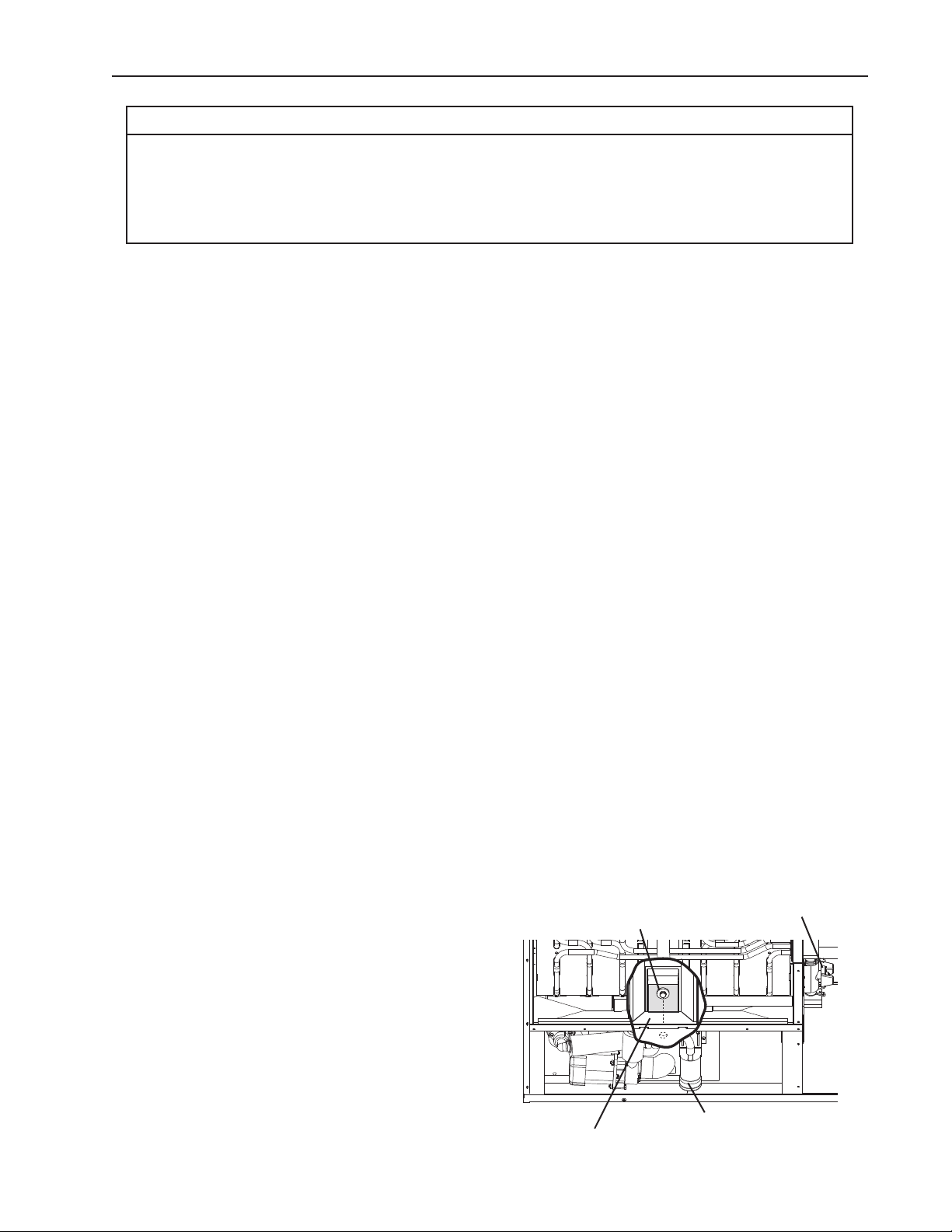
43
VI. Preparing the Icemaker for Periods of Non-Use
NOTICE
• When storing the appliance for an extended time or in sub-freezing temperatures,
follow the instructions below to prevent damage.
• To prevent damage to the water pump, do not operate the appliance with the
control switch in the "WASH" position when the water tank is empty.
When the appliance is not used for two or three days under normal conditions, it is
sufficient to move the control switch to the "OFF" position. When storing the appliance for
an extended time or in sub-freezing temperatures, follow the instructions below.
1. Remove the water from the icemaker water supply line:
1) Turn off the power supply, then remove the front panel.
2) Move the control switch to the "OFF" position.
3) Close the icemaker water supply line shut-off valve, then open the icemaker water
supply line drain valve.
4) Allow the line to drain by gravity.
5) Attach a compressed air or carbon dioxide supply to the icemaker water supply line
drain valve.
6) Move the control switch to the "ICE" position.
7) Replace the front panel in its correct position, then turn on the power supply.
8) Blow the icemaker water supply line out using the compressed air or carbon dioxide
supply.
9) Close the icemaker water supply line drain valve.
2. Drain the water tank:
1) Turn off the power supply, then remove the front panel.
2) Move the control switch to the "OFF" position.
3) Remove the insulation panel. Remove the drain plug located on the lower front part of
the ice chute. See Fig. 6. Allow the water tank to drain.
4) Replace the drain plug and the insulation panel in their correct positions. Be careful not
to cross thread the drain plug.
5) Remove all ice from the dispenser unit/ice
storage bin. Clean the dispenser unit/ice
storage bin liner using a neutral cleaner.
Rinse thoroughly after cleaning.
6) Replace the front panel in its correct
position.
Fig. 6
Drain Plug
Ice Chute
Float Switch Assembly
Cleaning Valve

44
VII. Disposal
The appliance contains refrigerant and must be disposed of in accordance with
applicable national, state, and local codes and regulations. Refrigerant must be
recovered by properly certied service personnel.
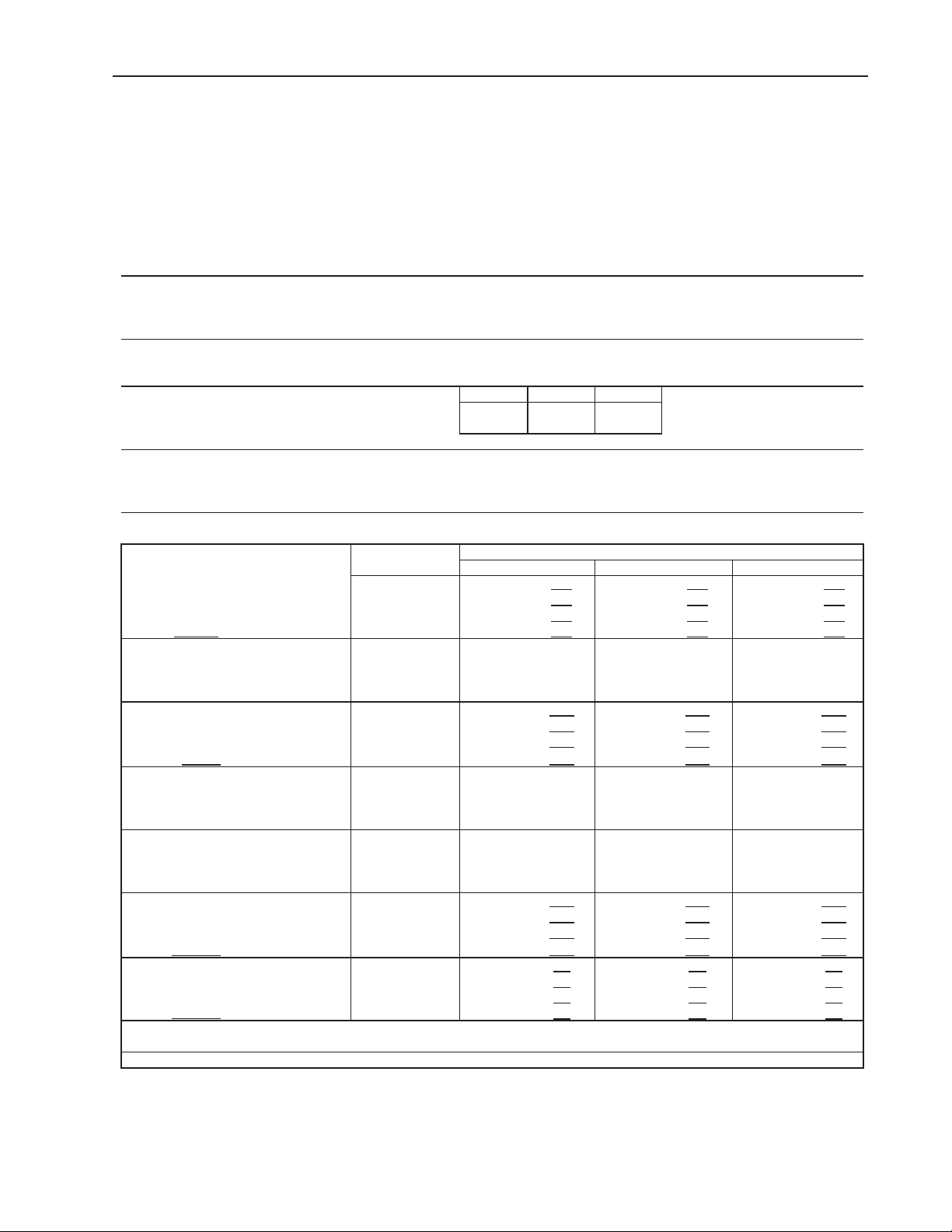
45
VIII. Technical Information
We reserve the right to make changes in specications and design without prior notice.
A. Specication and Performance Data
Pressure data is recorded at 5 min. into freezing cycle. The data not in bold
should be used for reference only.
1. KM-1301SAJ-E
Specification Sheet
AC SUPPLY VOLTAGE 220-240/50/1
AMPERAGE 11.35 A (5 Min. Freeze AT 104°F / WT 80°F)
MINIMUM CIRCUIT AMPACITY 20 A
MAXIMUM FUSE SIZE 20 A
ELECTRIC & WATER CONSUMPTION 90/70°F 70/50°F
ELECTRIC W (kWH/100 lbs.) 2080 (4.52) 1900 (3.32)
WATER gal./24HR (gal./100 lbs.) 386 (34.9) 604 (43.9)
APPROXIMATE ICE PRODUCTION
10/10°C 20/15°C 30/25°C
PER 24 HR. FOR EUROPE MARKET
1300 (589) 1356 (615) 1164 (528)
lbs./day (kg/day)
SHAPE OF ICE
Crescent Cube
ICE PRODUCTION PER CYCLE 36 lbs. (16.3 kg) 1440pcs.
BIN CONTROL SYSTEM Mechanical Switch
REFRIGERANT CHARGE R404A, 4 lb. 3 oz. (1900g)
Performance Data Sheet
70/21 1375 624
1296 588 1178 535
80/27 1315 596 1191 540 1069 485
90/32 1296 588 1105 501 982 445
lbs./day kg./day
100/38 1269 576 1076 488 869 394
70/21
80/27
90/32
watts 100/38
70/21 604 2.28
540 2.04 493 1.87
80/27 555 2.10 456 1.73 432 1.63
90/32 540 2.04 386 1.46 351 1.33
gal./day m
3
/day
100/38 461 1.74 378 1.43 319 1.21
70/21
80/27
90/32
min. 100/38
70/21
80/27
90/32
min. 100/38
70/21 239 16.8
260 18.2 278 19.6
80/27 255 17.9 287 20.1 300 21.1
90/32 260 18.2 309 21.7 325 22.9
PSIG kg/cm
2
G
100/38 260 18.3 313 22.0 340 23.9
70/21 51 3.6 53 3.7 56 3.9
80/27 52 3.7 55 3.9 58 4.1
90/32 53 3.7 57 4.0 60 4.2
PSIG kg/cm
2
G
100/38 54 3.8 58 4.1 63 4.4
16,100 BTU/h [AT 90ºF (32ºC) / WT 70ºF (21ºC)]
TOTAL HEAT OF REJECTION FROM COMPRESSOR 2,600 BTU/h [AT 90ºF (32ºC) / WT 70ºF (21ºC)]
APPROXIMATE ICE PRODUCTION
PER 24 HR.
AMBIENT TEMP.
(ºF/ºC)
WATER TEMP. (ºF/ºC)
50/10 70/21 90/32
APPROXIMATE ELECTRIC
CONSUMPTION
1900 1953 2005
1940 2022 2063
1953 2080 2127
1956 2091 2170
APPROXIMATE WATER
CONSUMPTION PER 24 HR.
FREEZING CYCLE TIME
29 31 35
31 34 39
31 37 41
32 38 45
HARVEST CYCLE TIME
4.0 3.9 3.8
3.9 3.7 3.8
3.9 3.6 3.6
TOTAL HEAT OF REJECTION FROM CONDENSER
3.8 3.6 3.6
HEAD PRESSURE
SUCTION PRESSURE
ENG.F-011.1.0205
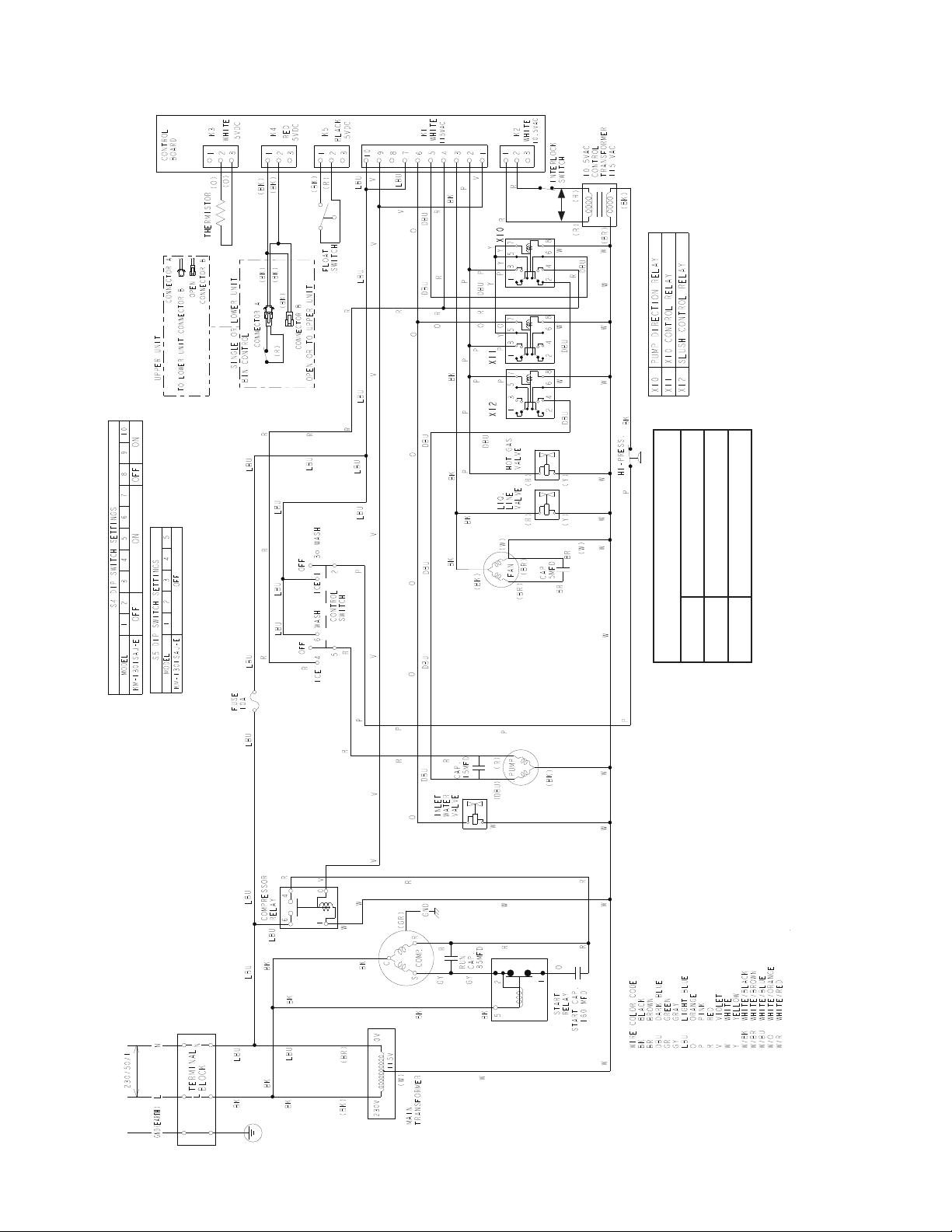
46
B. Wiring Diagram
*
* High-Pressure Switch
Air-Cooled Model
Cut-out 412±
22
PSIG
Cut-in 327±22 PSIG
0