USER GUIDE
NZ AU
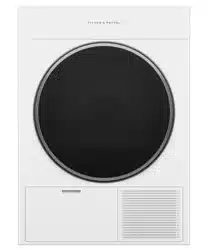
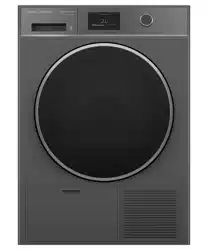
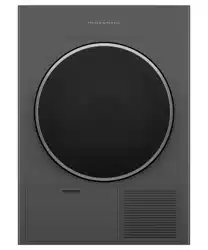
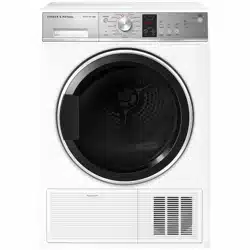
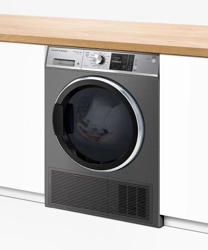
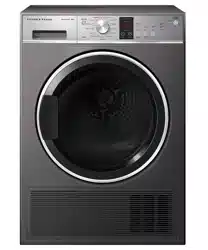
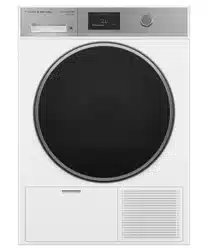
HEAT PUMP CLOTHES DRYER
DH9060H1 & DH9060HG1 models


3
CONTENTS
Safety and warnings 4
First use 8
Setting a cycle 11
Loading suggestions 14
Dry cycles 16
Cycle settings 18
Cycle options 19
W-Fi connection and Remote Mode 21
Cleaning 23
Cleaning the lint filter 24
Emptying the water tank 25
Cleaning the condenser filter 26
Troubleshooting 29
Fault codes 34
Manufacturer’s Warranty and Service Guide 35
Registration
To register your product visit our website: fisherpaykel.com/register
4
SAFETY AND WARNINGS
WARNING!
Electric Shock Hazard
Failure to follow this advice may result in
electric shock or death.
• If you are using an extension cord or a portable
electrical outlet device (eg multi-socket outlet
box), ensure that it is positioned so that it does
not come into contact with water or moisture.
WARNING!
Fire Hazard
• Only dry fabrics that have been washed
with water.
• Do not use heat to dry articles containing
foam rubber or similarly textured rubber–like
materials, dry on
COOL AIR.
• Never stop a tumble clothes dryer before the
end of the drying cycleunless all items are
removed and spread out in order to dissipate
the heat.
• A clothes dryer produces combustible lint;
the lint filter must be cleaned before each
drying cycle.
• Failure to follow the warnings outlined in these
user instructions can cause a fire hazard.
• Failure to follow these instructions can result in
death or personal injury.

5
SAFETY AND WARNINGS
READ AND SAVE THIS GUIDE
WARNING!
Read Safety Guide. Failure to follow all guides and rules could cause personal injury or
property damage. Use this appliance only for the intended purpose as described in the
user guide and installation guide of this appliance. When using this appliance, always
exercise basic safety precautions including the following:
General
z
Do not touch or operate the appliance with wet hands or with bare feet.
z
A damaged power cord must be replaced by a Fisher & Paykel trained and supported
service technician or similarly qualified person in order to avoid a hazard. Do not use
the machine until it has been repaired to avoid a risk of electric shock.
z
Do not operate this appliance if it has been damaged during transport. Contact your
Fisher&Paykel dealer or Fisher & Paykel trained and supported service technician.
z
This product has been designed for personal, family or household use. This product is
not designed for any commercial use. Any commercial use will terminate this products
manufacturer’s warranty.
z
This appliance is not intended for use by persons (including children) with reduced
physical, sensory or mental capabilities, or lack of experience and knowledge,unless
they are supervised or given instructions on how to use the applianceby someone
responsible for their safety.
z
Supervise children to ensure they do not play with the appliance or climb inside
thedrum.
z
Do not swing on or put weight on the door.
z
Undergarments that contain metal reinforcements should not be placed in the dryer.
Damage to the dryer can result if the metal reinforcements come loose during drying. If
you wish to dry these items use a drying rack or place in a garment bag.
z
Check and remove all objects from pockets, eg lighters and matches.
z
Items should go through the cooling phase in the final part of the cycle. This ensures
items are left at a temperature where they will not be damaged. Ifforany reason the
cycle is stopped before it has finished, dry clothes should be removed immediately and
not left in the appliance. Items should be quickly spread out flat to cool so heat can
dissipate, not left bunched up, eg in a clothes basket or in a pile.
z
In the event of a power outage the cycle will be paused when power is restored. Press
start to resume the cycle.
z
The only user-removable parts of the dryer are the filters, water tank and drying rack.
No other parts are designed to be removed by anyone other than aFisher & Paykel
trained and supported service technician.
z
For problems that cannot be solved from information in the user guide, turn off
and unplug your appliance and contact a Fisher & Paykel trained and supported
service technician.
z
Never attempt to repair the appliance yourself.
z
Never put dripping wet clothes in or on top of the dryer as excess water may cause an
electrical hazard.
z
Do not under any circumstances place an electric blanket or any other electrical, plastic
or rubber items in the appliance, unless the care label specifically states it is safe to
do so.

6
SAFETY AND WARNINGS
z
Do not overload your dryer beyond its rated capacity.
z
MODEL MAXIMUM CAPACITY* (KG)
DH9060H1, DH9060HL1, DH9060HLG1 & DH9060HG1 9
*Capacity refers to the maximum dry weight of items the dryer can dry at any one time
z
Do not dry curtains in your dryer.
z
For models with a water tank, never run the dryer without the water tank in place
unless drain hose is connected. For models without a water tank, the drain hose must
be connected.
z
Do not use the water collected in the water tank for drinking or food processing.
z
If the water tank becomes full, the appliance will pause and sound an alarm. You must
empty the water tank before the appliance can continue running.
Lint
z
Do not operate this appliance without the lint filters in place, or allow lint to accumulate
in or around the appliance.
z
Accumulated lint in the appliance can become a fire hazard; it also reduces
the efficiency of the appliance by causing longer drying times and increased
power consumption.
z
Clean the lint filter before every load.
z
Ensure the area around the appliance is clear of lint.
z
If the lint filter becomes damaged, contact your Fisher & Paykel trained and supported
service technician to arrange getting a new filter. Do not operate your appliance
with a damaged lint filter or without the filter in place, as this will cause damage to
your appliance.
Spontaneous combustion
To reduce the risk of fire the following should be observed:
z
Items that have been spotted or soaked with vegetable oil or cooking oil are a fire
hazard and should not be placed in the appliance.
z
Oil-affected items can ignite spontaneously, especially when exposed to heat sources
such as this appliance. The items become warm causing an oxidation reaction in the
oil. This oxidation creates heat. If the heat cannot escape the items can become hot
enough to catch fire. Piling, stacking or storing oil-affected items can prevent heat from
escaping creating a fire hazard.
z
If it is unavoidable that fabrics that contain vegetable oil, cooking oil or have been
contaminated by hair care products be placed in this appliance, they should first be
washed in hot water with extra detergent — this will reduce, but not eliminate the fire
hazard. The cooling cycle should be used to reduce the temperature ofthese items.
They should not be removed from the appliance and piled or stacked while hot.
z
Items that have previously been cleaned in, washed in, soaked in or spotted with
flammable liquids or solids, eg petrol/gasoline, kerosene, dry cleaning solvents,
vegetable or cooking oil, acetone, denatured alcohol, some brands of spot removers,
turpentine, waxes and wax removers or other flammable or explosive substances should
not be placed in the appliance.
z
The appliance is not to be used if industrial chemicals have been used for cleaning.
z
Fabric softeners or similar products should not be used in the appliance to
eliminate the effects of static electricity, unless this practice is specifically
recommended by the manufacturer of the fabric softener product.

7
z
Items such as foam rubber (latex foam), shower caps, rubber backed articles, clothes
or pillows fitted with foam rubber pads, waterproof textiles, shoes containing rubber or
plastic items should not be placed in the appliance. These materials can spontaneously
combust when heated.
z
Do not dry unwashed items in the appliance.
z
When using REFRESH BY STEAM cycles on unwashed clothing ensure there are no
flammable substances on them.
Installation
z
The appliance must not be supplied through an external switching device, such as a
timer, or connected to a circuit that is regularly switched on and off by a utility.
z
We do not recommend the use of extension cords or portable electrical outlet devices
for safety reasons.
z
Install the appliance on a solid and level floor surface.
z
The appliance must be installed in a well-ventilated, dust-free environment.
z
The appliance must not be installed on any textured floor coverings (eg carpet, rugs).
Ensure that openings at the base of the appliance are not obstructed.
z
The appliance must not be installed behind a lockable door, a sliding door or a door
with the hinge on the opposite side to that of the tumble dryer, in such a way that a full
opening of the tumble dryer door is restricted.
z
If installing behind a cabinetry door, it must be hinged on the same side as the dryer
and there must be a minimum clearance of 40mm from the front of the dryer door to
the internal face of the cabinetry door for the product to operate safely. The enclosed
space must be provided with sufficient ventilation to meet local building code
requirements or the door must be open while the product is operating.
z
This appliance can be installed on a compatible Fisher & Paykel plinth. To ensure
stability, the plinth must be fitted correctly with the appliance. For installation
instructions and compatible plinth models, refer to fisherpaykel.com.
z
Do not install or operate this appliance on any other plinth or structure.
z
For more information refer to the installation guide. To access, go to fisherpaykel.com/
specify and search by appliance type, product name or model.
Water supply requirements
z
Inlet water pressure: Max. 1MPa (145psi), Min. 30kPa (4.5psi)
z
Inlet water flow rate: Min. 6litres/minute
z
The cold water temperature should not exceed35°C. Temperatures above these may
cause the appliance to fault or cause damage to it.
z
A pressure-reducing valve must be installed if pressure is higher than 1Mpa.
z
New hose sets provided should be used to connect the appliance to the water mains.
Old hose sets should not be re-used.
z
We recommend the inlet hose(s) are changed every 5 years. WARNING: Failure to do so
may result in a flood and damage to property.
Disposal
z
When disposing of this appliance, it is recommended that the door is removed to
avoidchildren getting trapped inside, and that the electrical cable is cut off close to
thedryer.
SAFETY AND WARNINGS
8
FIRST USE
*Located behind filter cover.
2
3
4
5
1
7
6
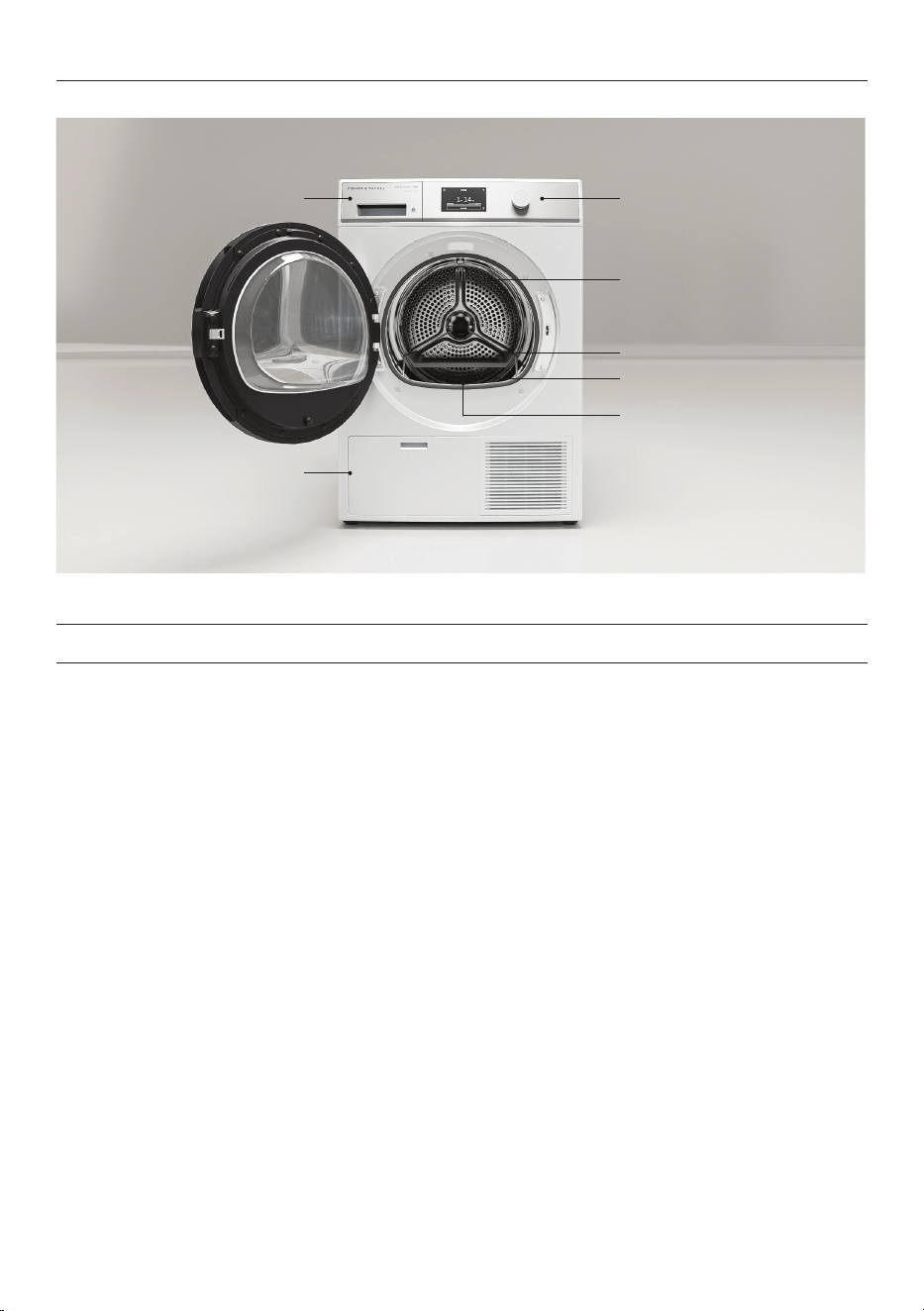
Features and accessories
1 Water tank
2 Dryer controls
3 Drum light
4 Drying rack
5 Sensors
6 Lint filter
7 Condenser filter*
9
FIRST USE
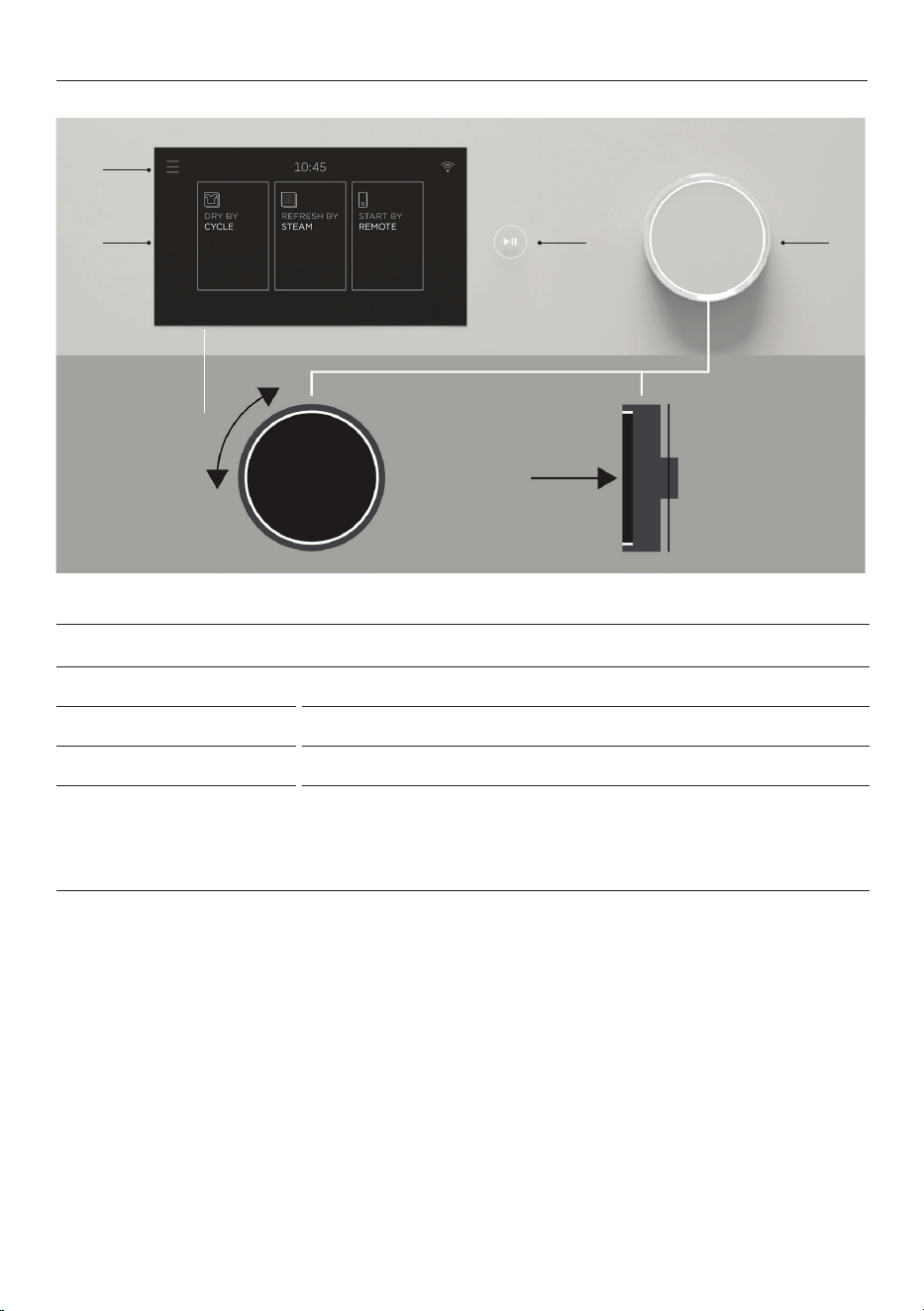
Control panel
1 Menu
Press to access additional features and settings.
2 Touchscreen display
Use to navigate and select cycles, features and settings.
3 Start/Pause button
Press to start or pause a cycle.
4 Control dial
z
Press the dial to turn the display on.
z
Turn the dial to scroll.
z
Press to select or confirm.
z
Press and hold to go back or to turn the display off.
3 42
1
10
FIRST USE
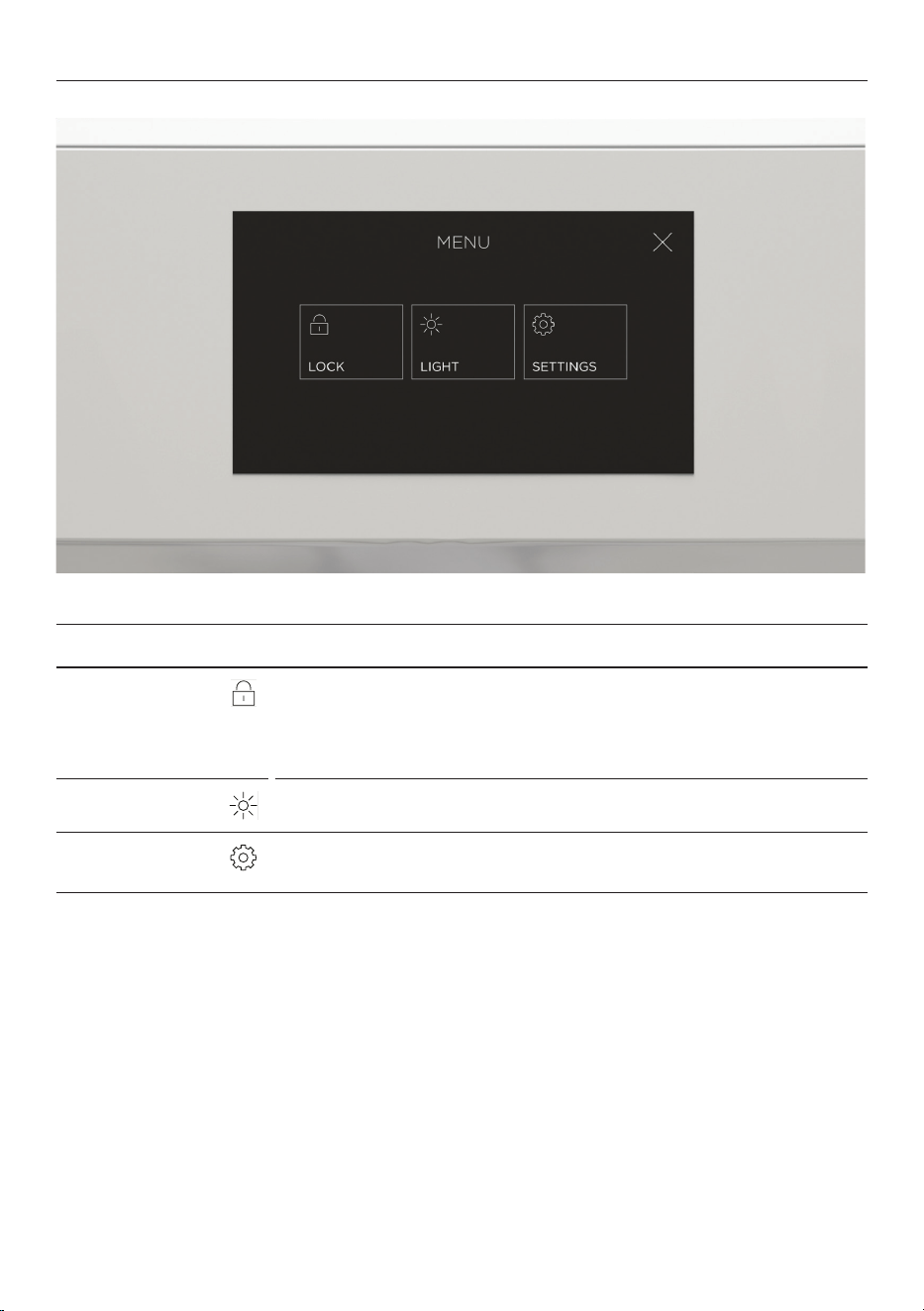
Menu
LOCK
Lock the controls to prevent accidental use. The controls can be
locked at any time including while a cycle is running.
When locked, the controls will be unresponsive except to pause
a cycle. Press and hold the screen to unlock.
LIGHT
Turn the drum light ON/OFF.
SETTINGS
Adjust the appliance settings to suit your preferences or set up a
Wi-Fi connection. Refer to ‘Wi-Fi connection & Remote mode’.
11
SETTING A CYCLE
Before you begin
z
Check pockets for items that could damage your clothes or get caught in the dryer.
z
Check and empty the lint filter.
z
Check and empty the water tank (if not set up for automatic draining).
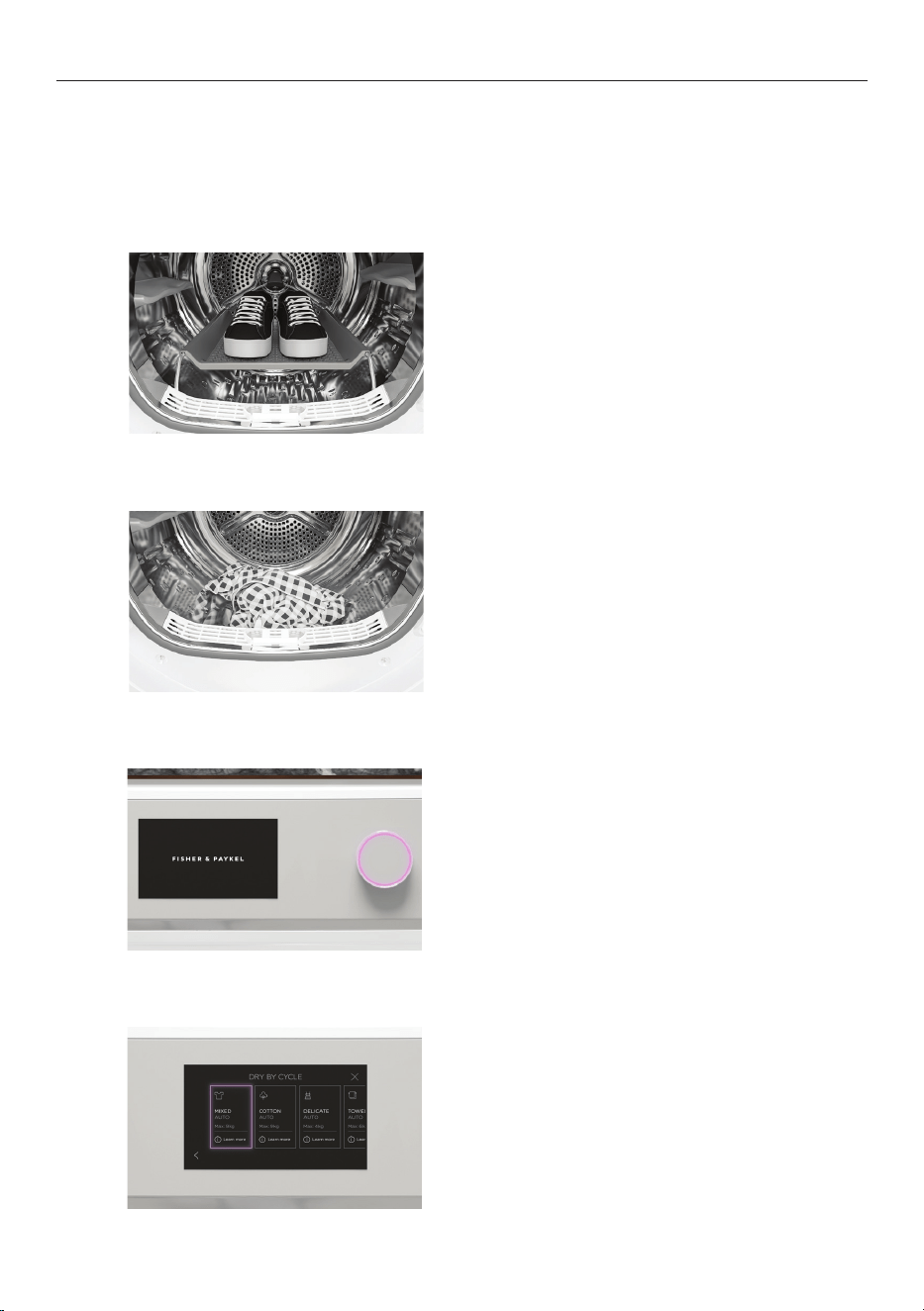
Place items in the dryer.
For best results, dry similar items together
and do not exceed the maximum capacity for
the selected cycle.
2
Fit the drying rack if required. Refer to
‘Loading suggestions’.
1
3
Press the dial to turn on the display.
4
Select a drying mode then select a cycle.
12
SETTING A CYCLE
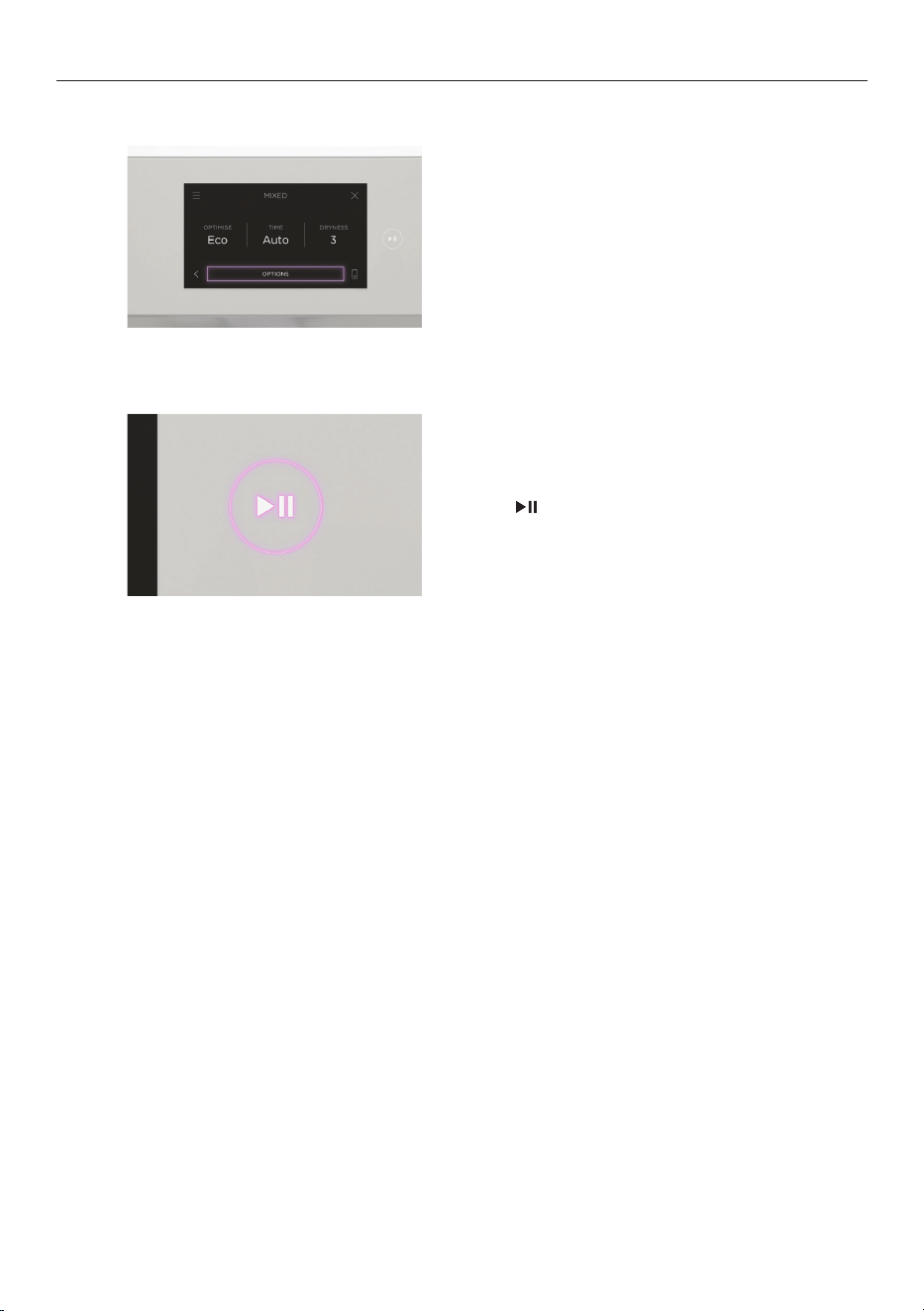
5
Adjust the settings as needed or press
OPTIONS to access additional cycle options.
For more information refer to ‘Cycle settings’
and ‘Cycle options.’
6
Press to start the cycle.
13
SETTING A CYCLE
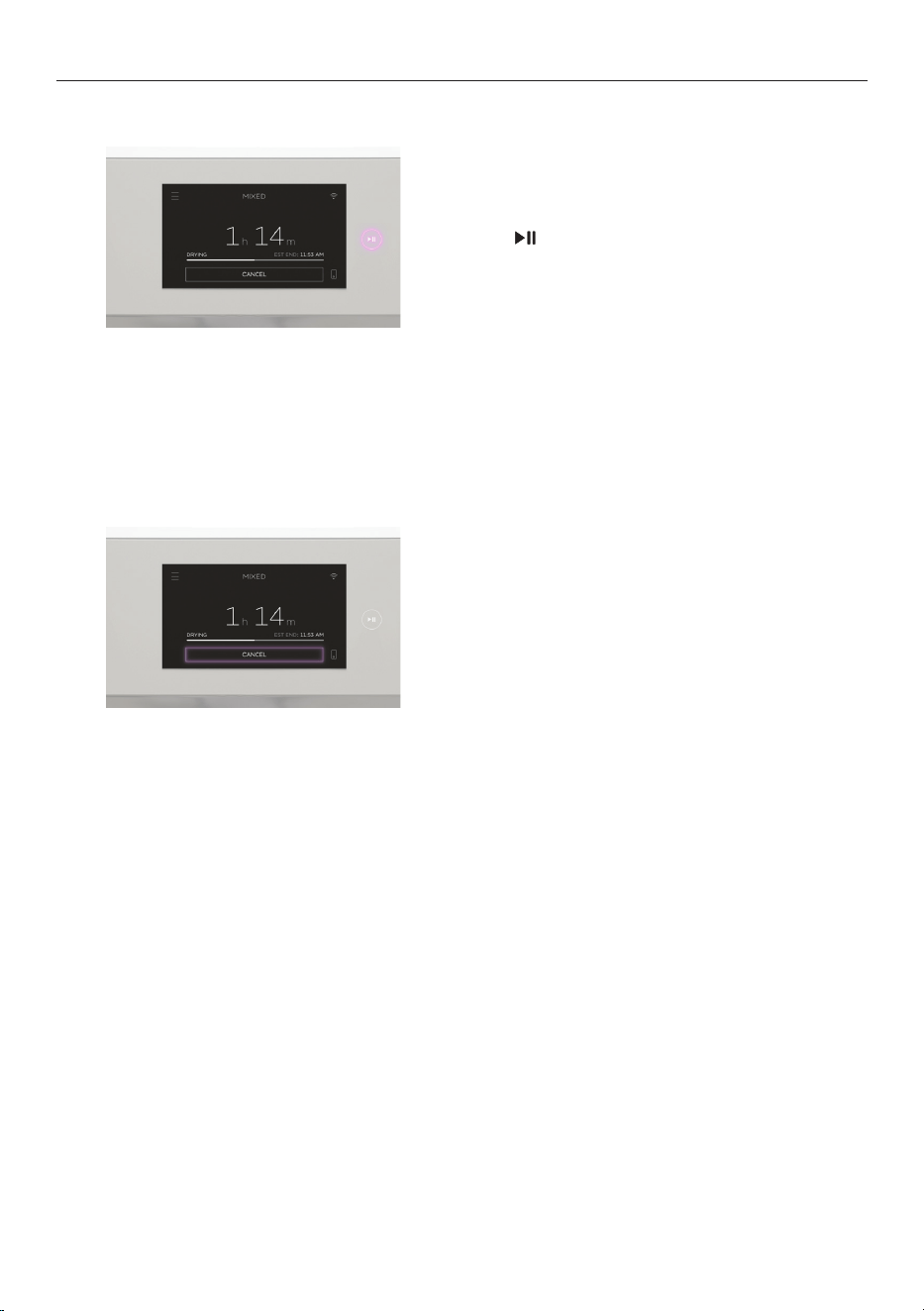
Press to pause the cycle.
Press
CANCEL.
Pausing a cycle
Cancelling a cycle
If cancelling a cycle partway through, remove items immediately and spread out to cool. Do
not leave hot items in the dryer or in a clothes basket. Take care as the drum and items may
be hot.

14
LOADING SUGGESTIONS
Sorting
z
Sort itemsintoloads of similar items, and loads that will likely take similar times to
dry. This prevents thepossibility of some items becoming over-dried whilst others are
still damp.
z
Always separate coloured items from whites, especially when they are new.
z
Colour run could be an issue, especially if using DELAYED START.
z
Close zippers, hooks and eyes, and other fastenings (ie fasten the opening of duvet/
doona covers), and remove loose bra wires. These can damage your dryer and clothes.
z
Items of clothing with screen-printing should be turned inside out to prevent damage to
the print.
z
Care labels on garments provide valuable information about the fabric type and
howthegarment should be dried. Always follow the advice on garment labels.
Loading
z
Loading items correctly will help to minimise creasing and wrinkling, and ensure the load
is dried evenly.
z
Allow enough room in the dryer for clothes to tumble freely. Load the dryer in terms of
the space the garments take up when dry, rather than when they are wet.
z
Shake clothes out and load individually to help items dry evenly and reduce tangling.
z
Dry permanent press items (eg business shirts) together on the EASY IRON cycle with the
WRINKLE FREE option on. This will help reduce wrinkling and the need for ironing.
z
Hang garments as soon as the drying cycle is complete to reduce the need for ironing.
Drying times
z
Drying very small loads is inefficient. Try to dry medium to large loads.
z
Heavier items (towels, flannelette sheets) will take longer to dry than light items
(synthetics and polyester cotton sheets and shirts).
z
Drying times can be reduced by spinning the wash load at the highest spin speed
suitable for the load type in your washing machine.
z
Check bulky items during the cycle to ensure even drying, pause the dryer and reposition
the item if necessary.
Lint
Some items are lint givers, while others are lint collectors. Always dry lint givers
and collectors separately.
LINT GIVERS LINT COLLECTORS
Towels Synthetics, eg polar fleece
Flannelette sheets Corduroy
Polyester cottons
15
LOADING SUGGESTIONS
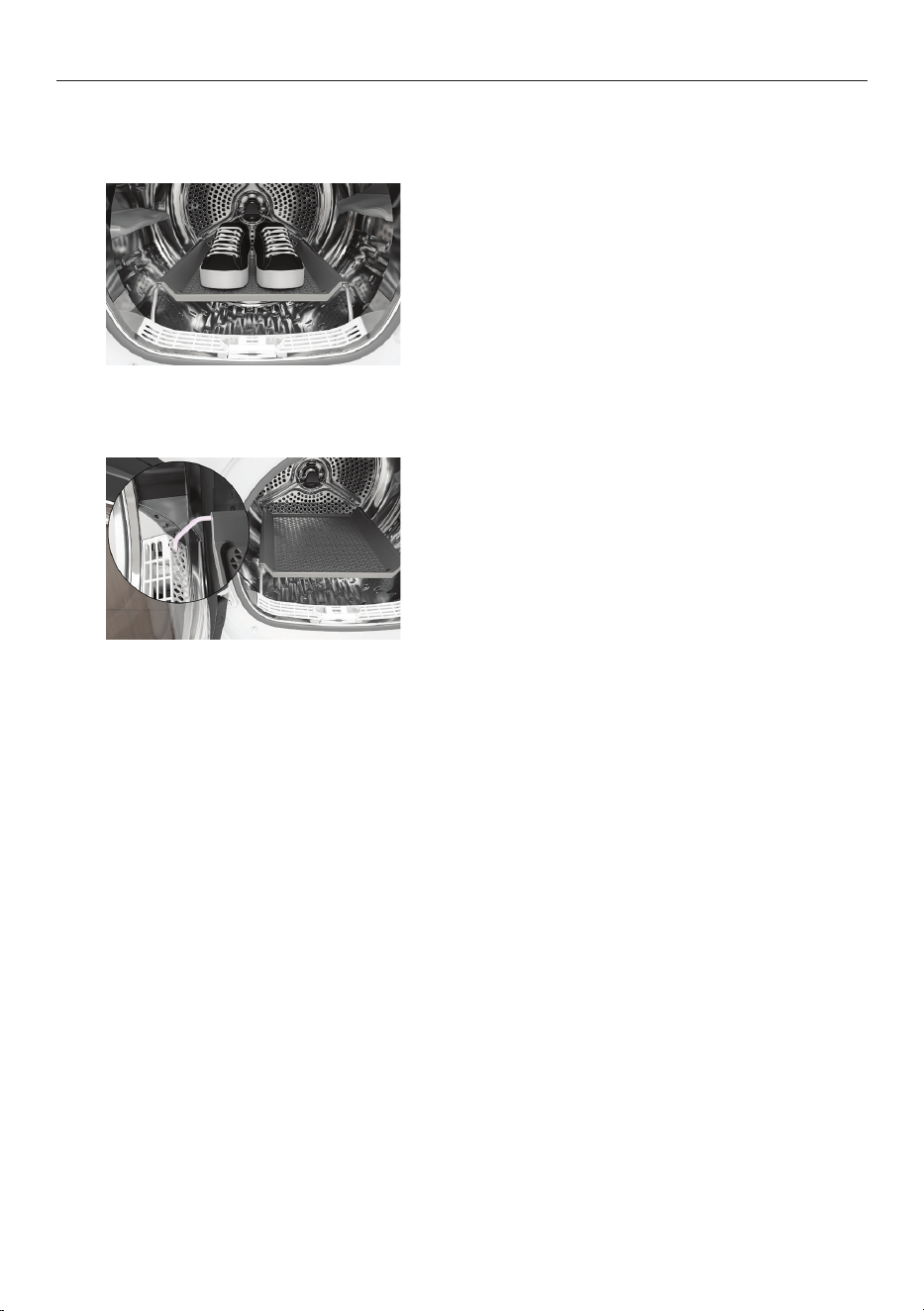
Use the drying rack for items that cannot be
tumbled such as sneakers, hats and soft toys.
Use the rack with the following cycles:
z
RACK DRY
z
SNEAKERS
z
SOFT TOYS (optional)
Drying rack
To fit the drying rack, insert the legs into the
slots in lint filter then lower into place.
16
DRY CYCLES
Your dryer has a number of cycles to suit your fabric care needs. Selecting the most
appropriate cycle for each particular load will help ensure you get the best results.
DRY BY CYCLE
CYCLE DESIGNED FOR
MAX.
LOAD SIZE
(KG)
MIXED
An everyday cycle for mixed fabrics. Ideal for items like
t-shirts and trousers.
9
COTTON¹
A high heat cycle for natural cotton fabrics. 9
DELICATE
A gentle cycle for delicate items such as blouses and
dresses.
4
TOWELS
Designed for drying thick and absorbent items such
as towels.
6
SHEETS
An optimised cycle for bed linen. Ideal for drying sheets,
covers and pillowcases.
4
WOOL²
An extra gentle cycle to care for woollen items. This
cycle meets the Woolmark requirements for machine
washable items.
1
ULTRA DELICATE
An extra gentle cycle for very delicate items such as lace. 1
SILK
An extra gentle cycle designed specifically for silk items. 1
ACTIVEWEAR
An extra low heat cycle optimised for activewear. Ideal for
synthetic and elasticated items.
2
DENIM
An everyday cycle to care for denim fabrics. 3
HEAVY
A stronger cycle designed for durable fabrics. 8
SANITISE
An extra hot cycle designed to eliminate bacteria. Ideal for
sanitising items like towels and sheets.
4
SPORTS
A medium heat cycle designed for sportswear. Suitable for
more durable fabrics.
4
SYNTHETICS
An everyday cycle for synthetic fabrics. Ideal for synthetic
fabrics and polyester-cotton blends
4
BULKY
A gentle cycle for large or bulky items. Ideal for items like
jackets, duvets and quilts.
3
OUTDOOR
A low heat cycle designed for outdoor clothing and high
performance fabrics.
2
EASY IRON
Designed to minimise creasing in items like shirts. Items are
ready to iron at the end of the cycle.
4
RACK DRY
Designed for items that cannot be tumbled. This cycle
requires the drying rack.
3
SOFT TOYS
A gentle cycle for looking after soft toys. This cycle can be
used with the drying rack.
4 items
17
DRY CYCLES
DRY BY CYCLE
CYCLE DESIGNED FOR
MAX.
LOAD SIZE
(KG)
SNEAKERS
A gentle cycle for drying sneakers and sports shoes. This
cycle requires the drying rack.
2 pairs
COOL AIR
A heat free cycle for airing items. 4
REFRESH BY STEAM
CYCLE DESIGNED FOR
MAX.
LOAD SIZE
(ITEMS)
MIXED
Designed to refresh dry items by reducing creases and
odours. Ideal for mixed fabrics.
3
SHIRTS
Designed to refresh shirts by reducing creases and
odours.
3
DELICATE
A gentle cycle to refresh delicate items such as blouses
and dresses.
3
SANITISE
A high heat cycle designed for sanitising dry items. 3
²Woolmark Wool Care
The wool drying cycle of this machine has been approved by The Woolmark
Company for the drying of machine washable wool products provided that the
products are washed and dried according to the instructions on the garment
label and those issued by the manufacturer of this machine. M2018.
¹COTTON with ECO, AUTO and DRYNESS: 3 selected is the recommended energy saving cycle
for everyday drying.
REFRESH BY STEAM
All
REFRESH BY STEAM cycles are designed for refreshing dry items. To dry wet items select
DRY BY CYCLE.
18
CYCLE SETTINGS
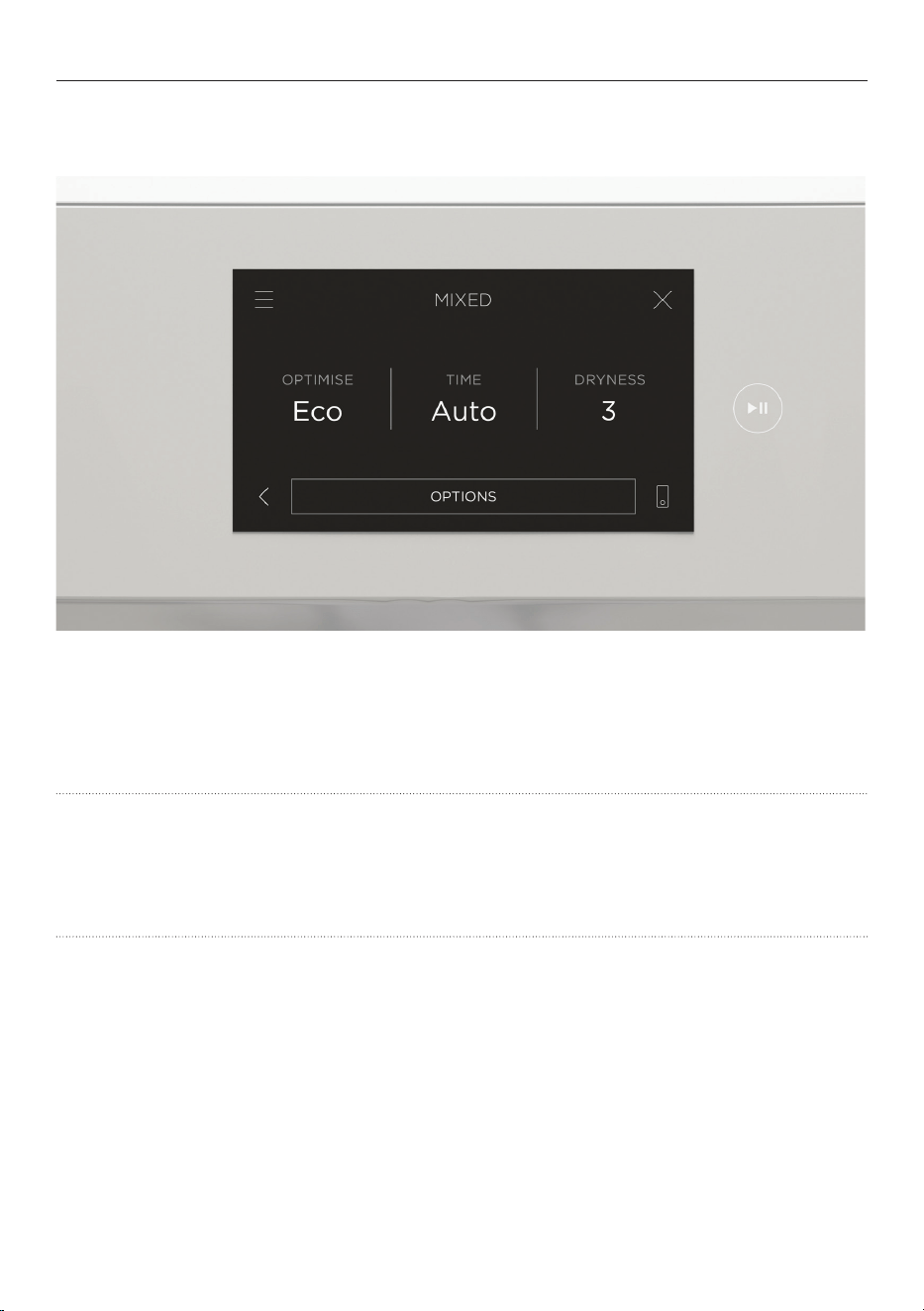
TIME
Set your preferred cycle time. The cycle will end after the set time. If the time is set to
AUTO
the cycle will end automatically when the load reaches the selected dryness level.
DRYNESS
Set the level of dryness required. The dryer will sense the remaining moisture in the load to
end the cycle. Level 1 is the dampest setting, while level 5 is the driest. Try a higher or lower
setting if the load dryness is not as expected.
Adjust the default cycle settings to suit your preferences. Tap the setting to select then
adjust as needed.
OPTIMISE
Optimise the cycle as required to reduce noise, save time or save energy. Some optimise
options are not available on certain cycles to ensure optimal results.
19
CYCLE OPTIONS
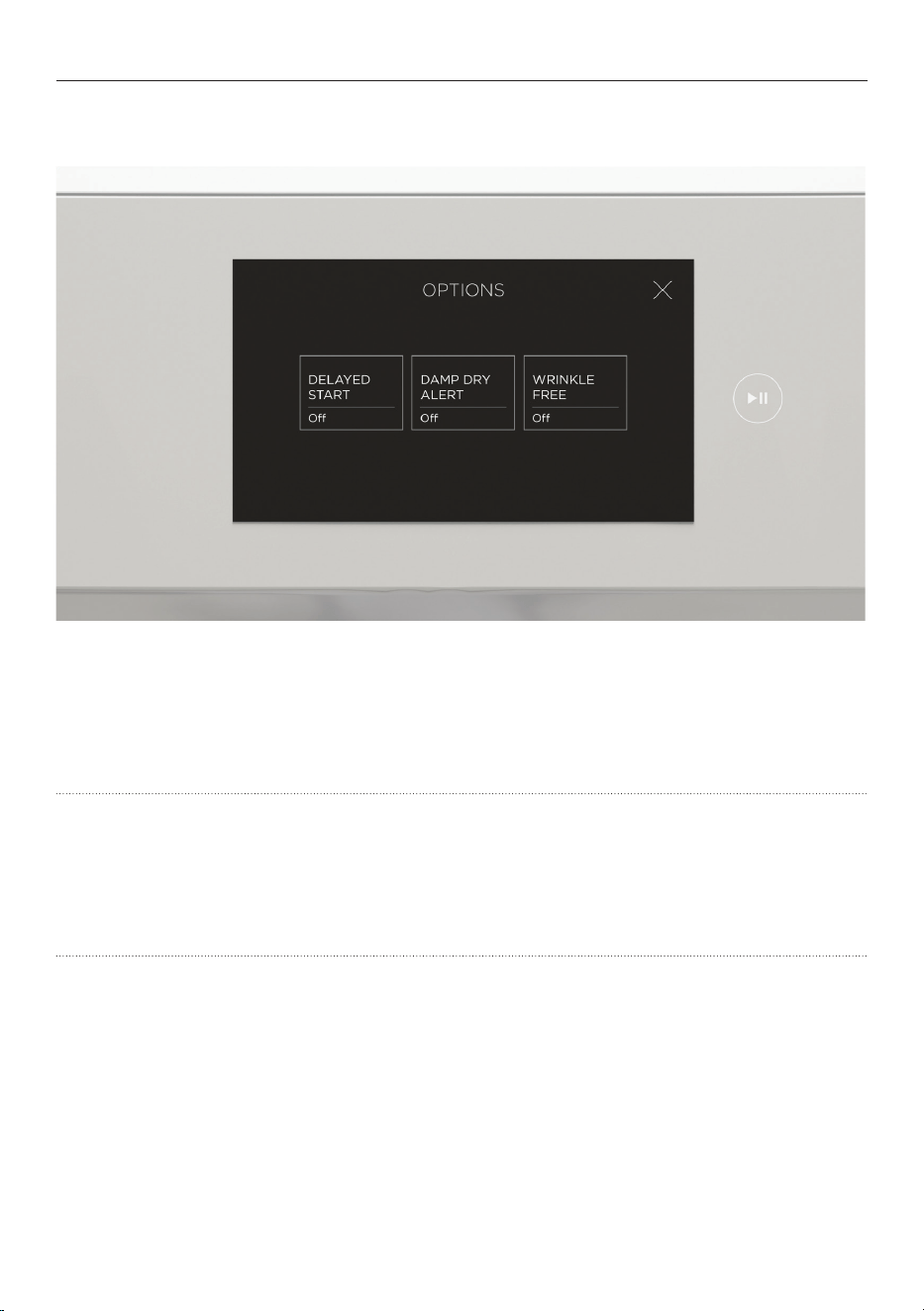
WRINKLE FREE
After the cycle is complete the load will continue to tumble periodically to help reduce
wrinkles.
WRINKLE FREE will remain active for up to 8 hours or until cancelled. To cancel,
touch the screen or open the door.
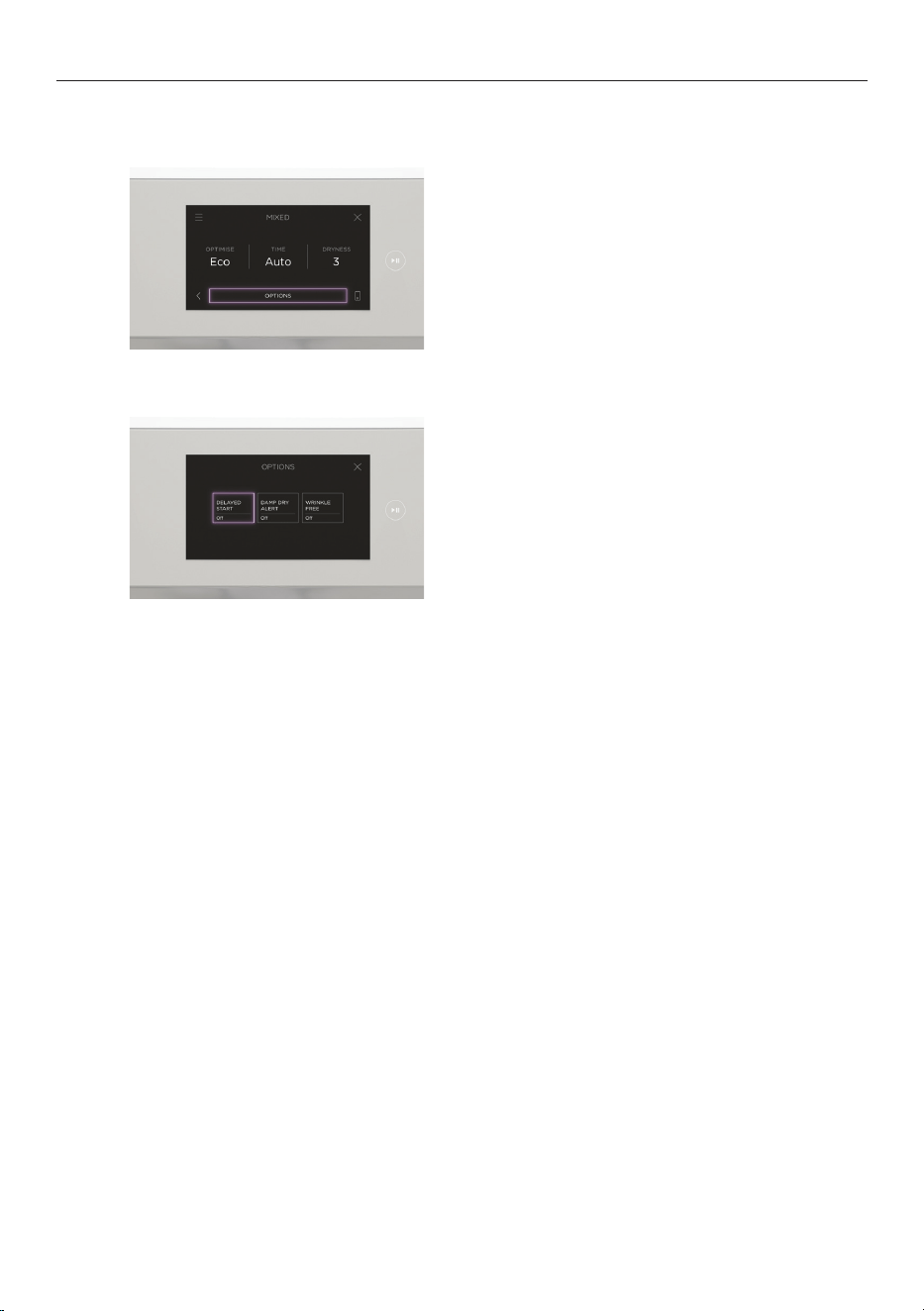
DAMP DRY ALERT
Set an alert for when the load reaches damp dry level. Pause the cycle to remove items that
do not need further drying. Restart the cycle to continue drying the remaining load.
Select additional cycle options as needed to suit your preferences.
DELAYED START
Set a time for the cycle to start. Avoid using
DELAYED START for damp, non-colourfast items
as this may cause dye run to occur.
20
CYCLE OPTIONS
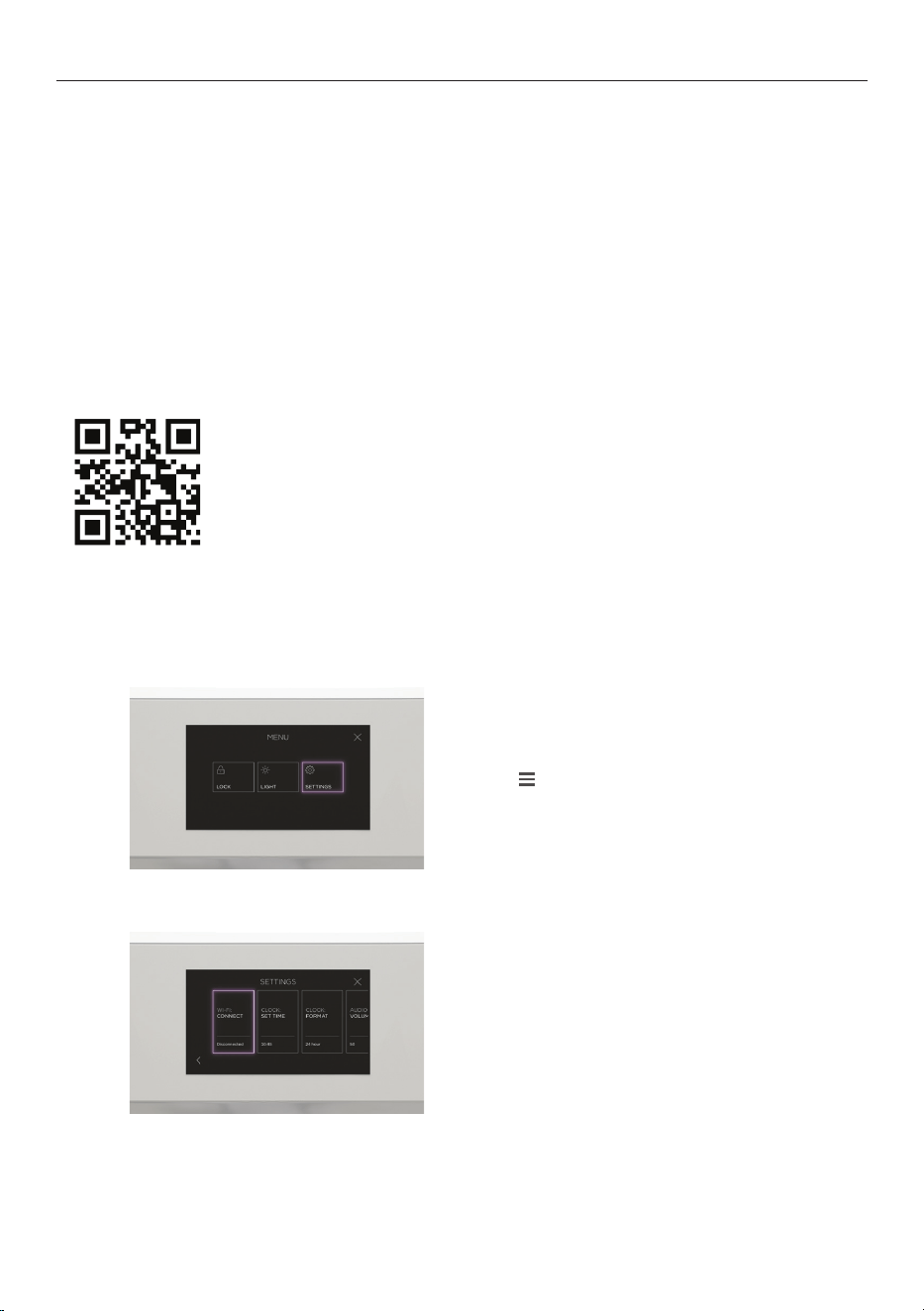
Accessing options
Select a cycle option and adjust as needed.
2
1
Select a cycle then press OPTIONS to access.
21
W-FI CONNECTION AND REMOTE MODE
Your appliance may be connected to your home wireless network and operated remotely
using the app.
Connect your appliance to ensure it stays up to date with the latest software and features.
Getting started
z
Ensure your home Wi-Fi network is turned on.
z
You will be given step-by-step guidance on your mobile device.
z
It may take up to 10 minutes to connect your appliance.
z
For further guidance and troubleshooting, please refer to the app.
On your mobile device:
1 Download the app. Scan the QR code or go to
www.fisherpaykel.com/connect
2 Register and create an account.
3 Add your appliance and set up the Wi-Fi connection.
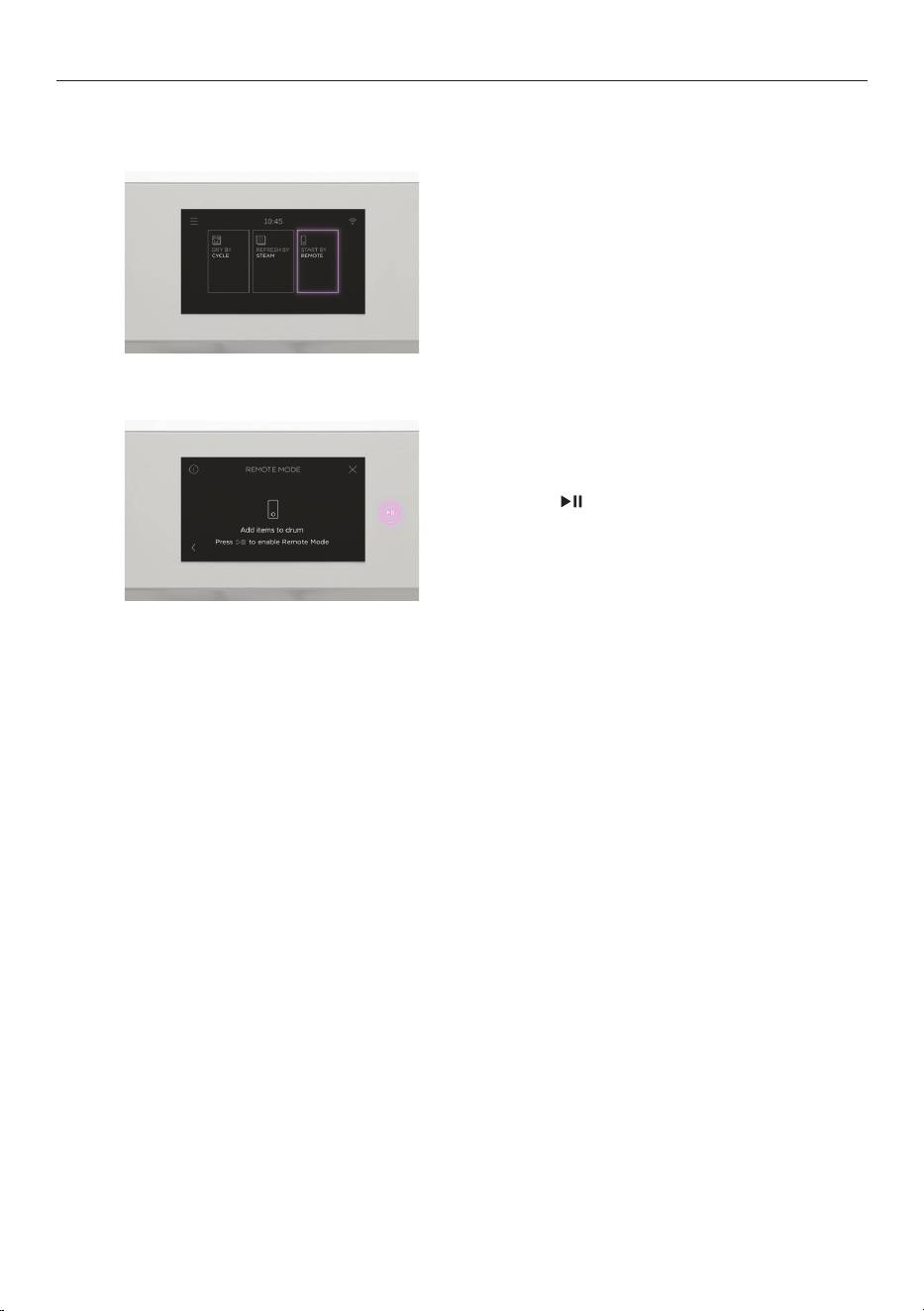
Connecting to your home Wi-Fi
1
Press
Fridge
3.0 °C
Fridge
3.0 °C
Fridge
5.0 °C
then select SETTINGS.
Select WI-FI: CONNECT then WI-FI SETUP
and follow the instructions onscreen.
2
22
WI-FI CONNECTION AND REMOTE MODE
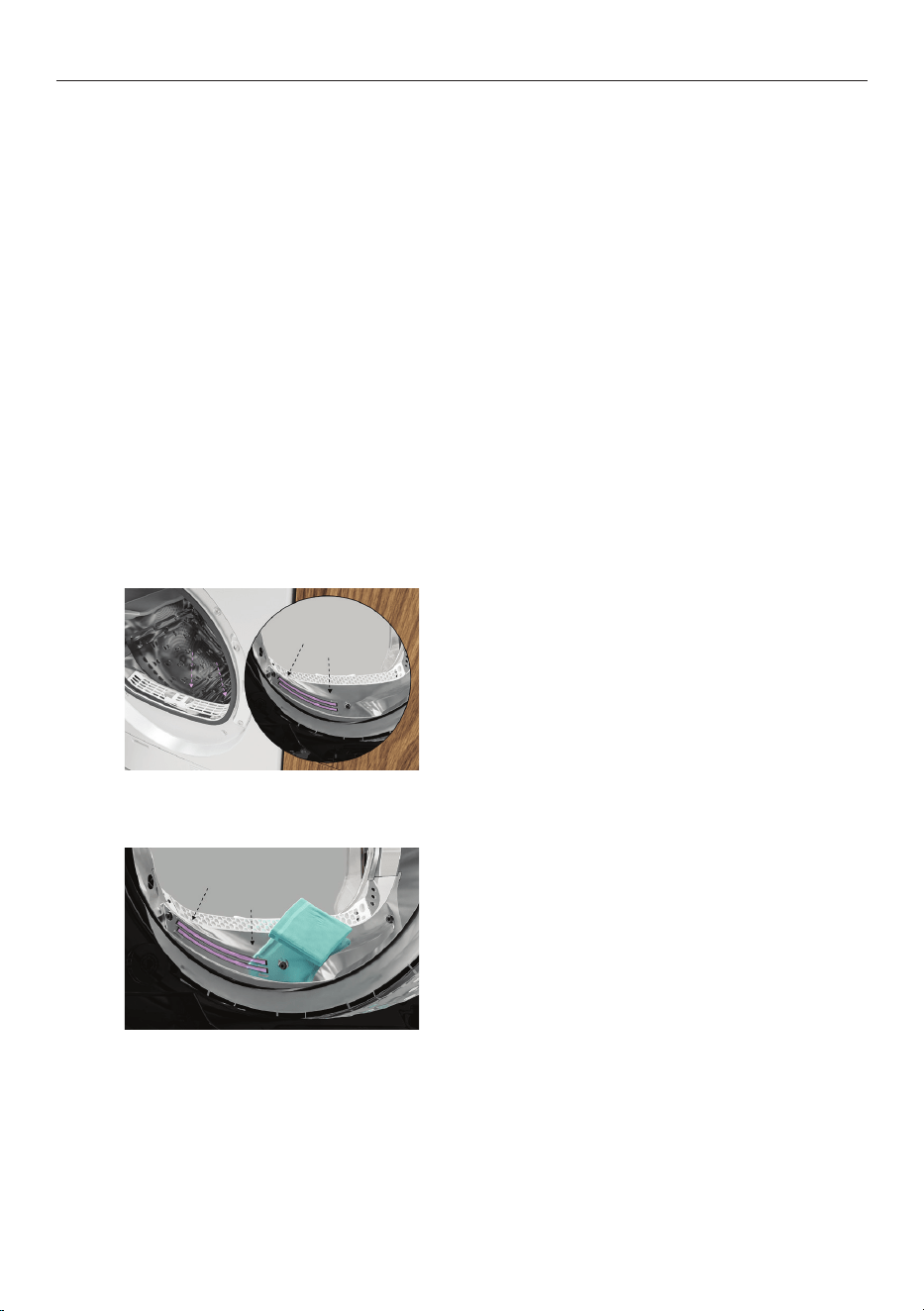
Enabling Remote Mode
Select
START BY REMOTE.
1
Follow the instructions onscreen
then press .
Remote Mode is now enabled.
2
23
CLEANING
Surfaces and accessories
Wipe with a damp cloth and mild detergent, then dry with a clean, lint-free cloth. We do
not recommend using the following cleaning products as they may cause damage:
z
Plastic or stainless steel scouring pads
z
Abrasive, solvent, household cleaners
z
Acid or alkaline cleaners
z
Hand washing liquids or soap
z
Stainless steel cleaners or polishes
z
Laundry detergents or disinfectants
Inside the dryer
Check and clean the inside of the drum regularly. If the drum has anyresidual dirt or lint
stuck to it, remove this and wipe it clean with a damp cloth. Donot leave any metal objects
in the drum, as these may cause rust.
Sensors
The sensors detect whether the laundry is dry or not. Clean the sensors regularly to
maintain optimum performance.
Locate the metal sensors just behind
thelint filter.
Wipe with a soft cloth dampened
withvinegar, then dry with a clean cloth.
1
2
24
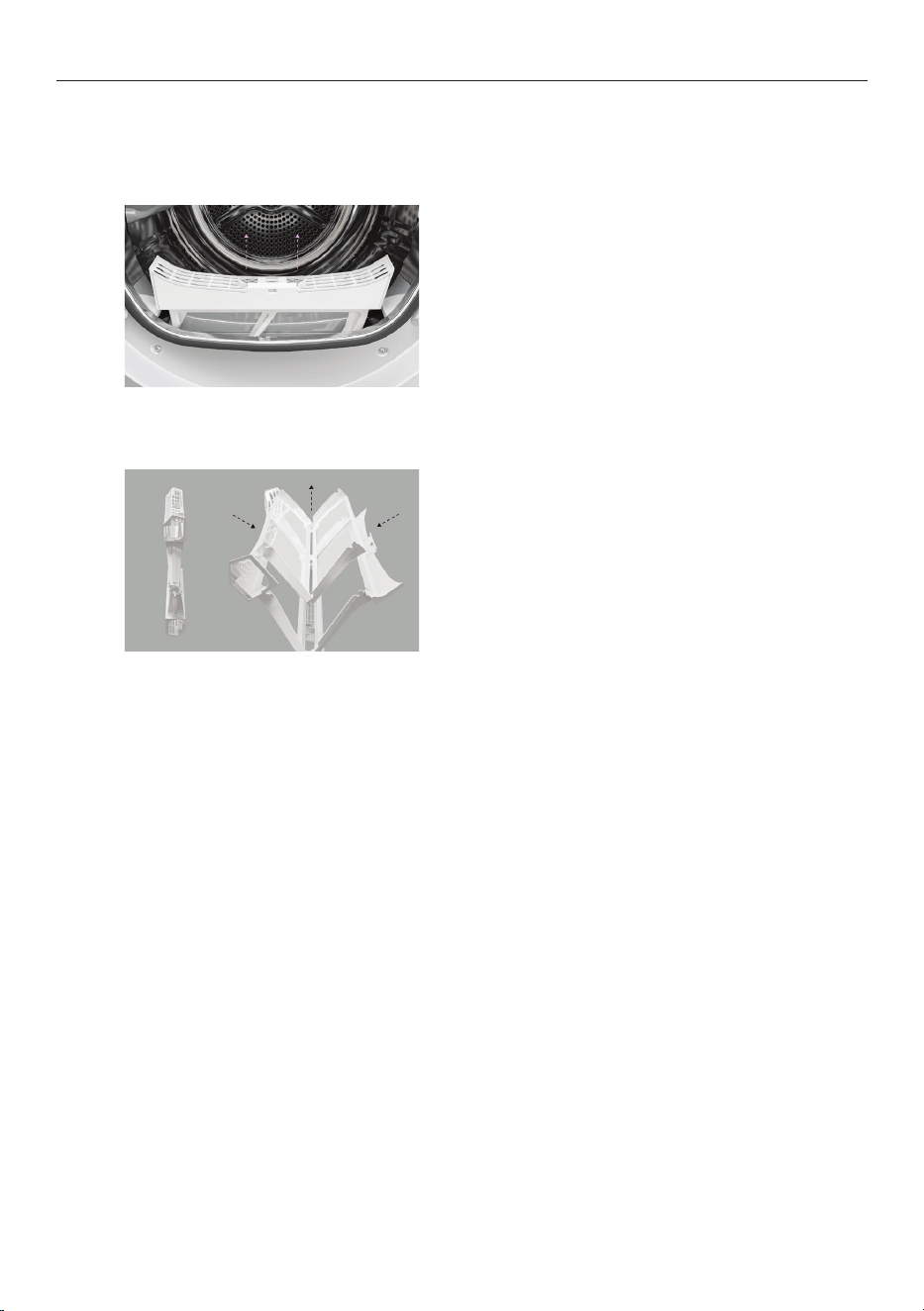
CLEANING THE LINT FILTER
Check and clean the lint filter after every load to prevent build up. Lint can become a fire
hazard if it is allowed to accumulate in or around your dryer.
Remove the lint filter.
Open the filter and wipe clean, then replace.
Ensure the lint filter is correctly in place
before running another cycle.
1
2
25
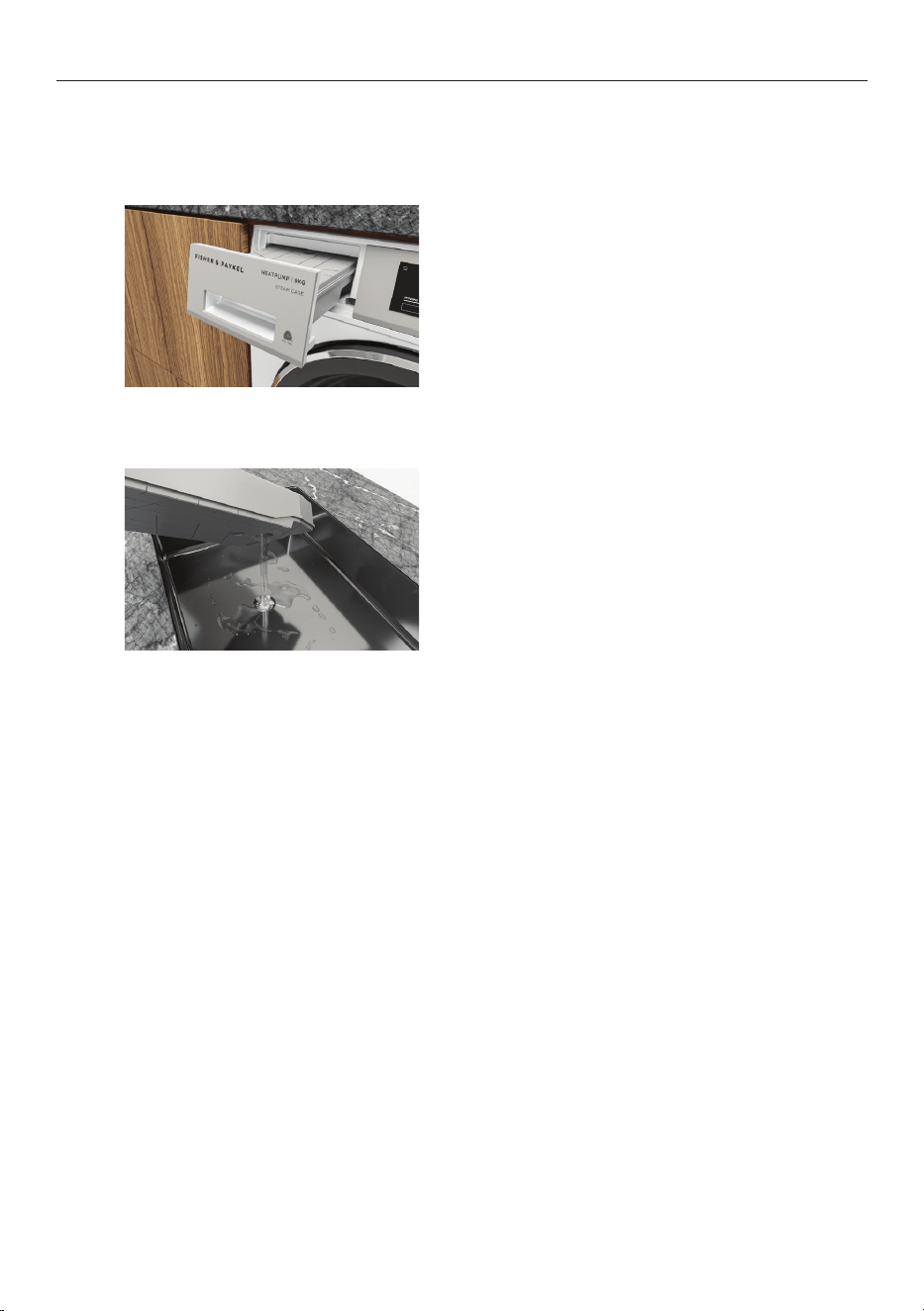
EMPTYING THE WATER TANK
During drying cycles, water is collected in the water tank at the top left of the dryer. Empty
the water tank after every load.
Use the handle to pull the water tank out.
Keepthe tank level when removing to
prevent water from spilling.
Empty the water tank then replace.
Ensure the water tank is correctly in place
before running another cycle.
Never run the dryer without the water tank in place unless thedrainhosehasbeeninstalled.
You do not need to empty the water tank ifyou have set up the drain hose to drain
the waterautomatically. Refer to the installation guide for instructions on installing the
drain hose.
1
2
26
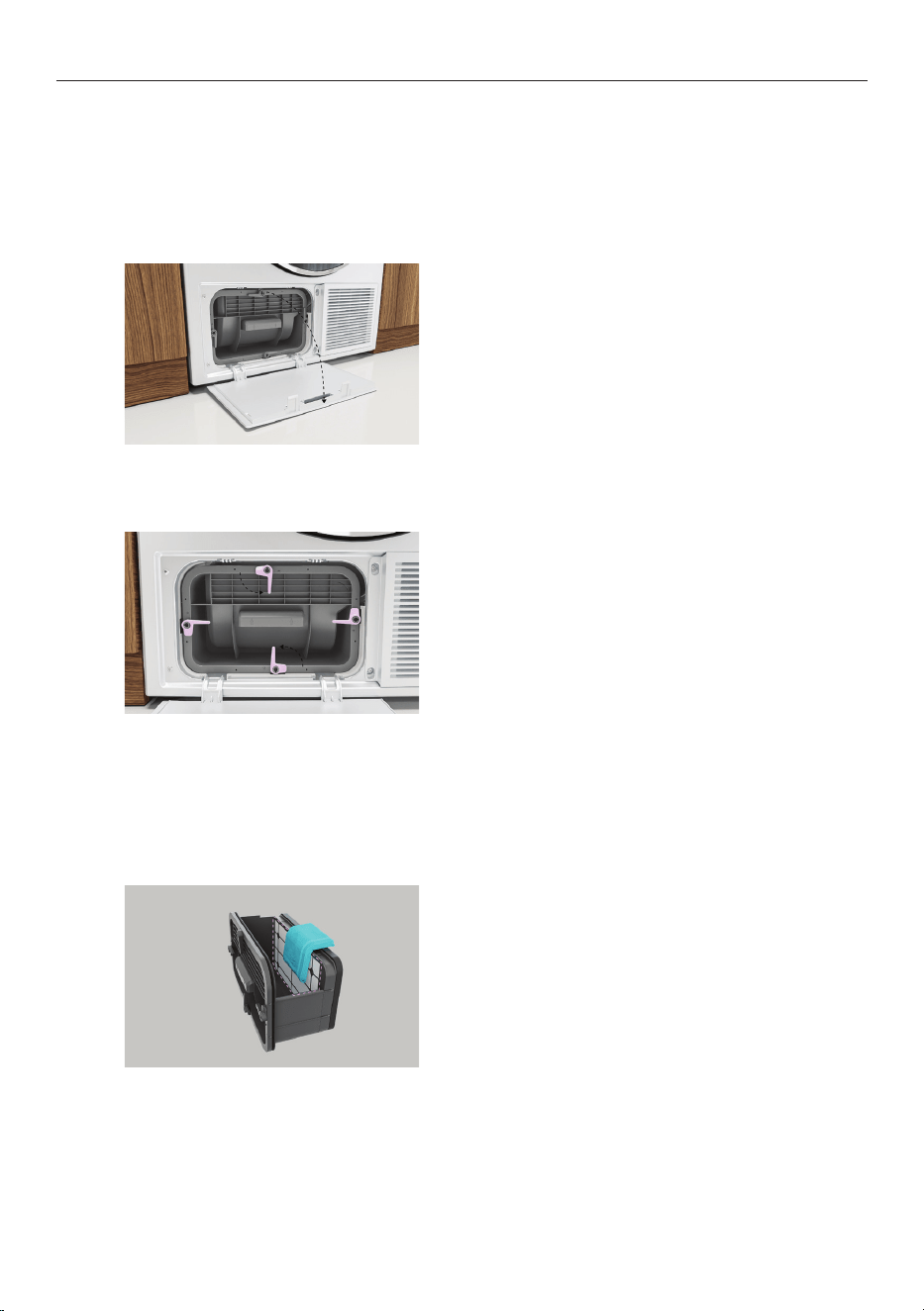
CLEANING THE CONDENSER FILTER
Clean the condenser filter, filter foam and evaporator grid regularly to maintain
optimum performance.
Removing the condenser filter
Wipe clean or use a vacuum to remove
any lint build-up from the mesh surface
of the filter.
3
Cleaning the condenser filter:
Open the filter cover to access the
condenser filter.
1
Turn the four condenser lock levers 90°
thenpull out the condenser filter.
2
27
CLEANING THE CONDENSER FILTER
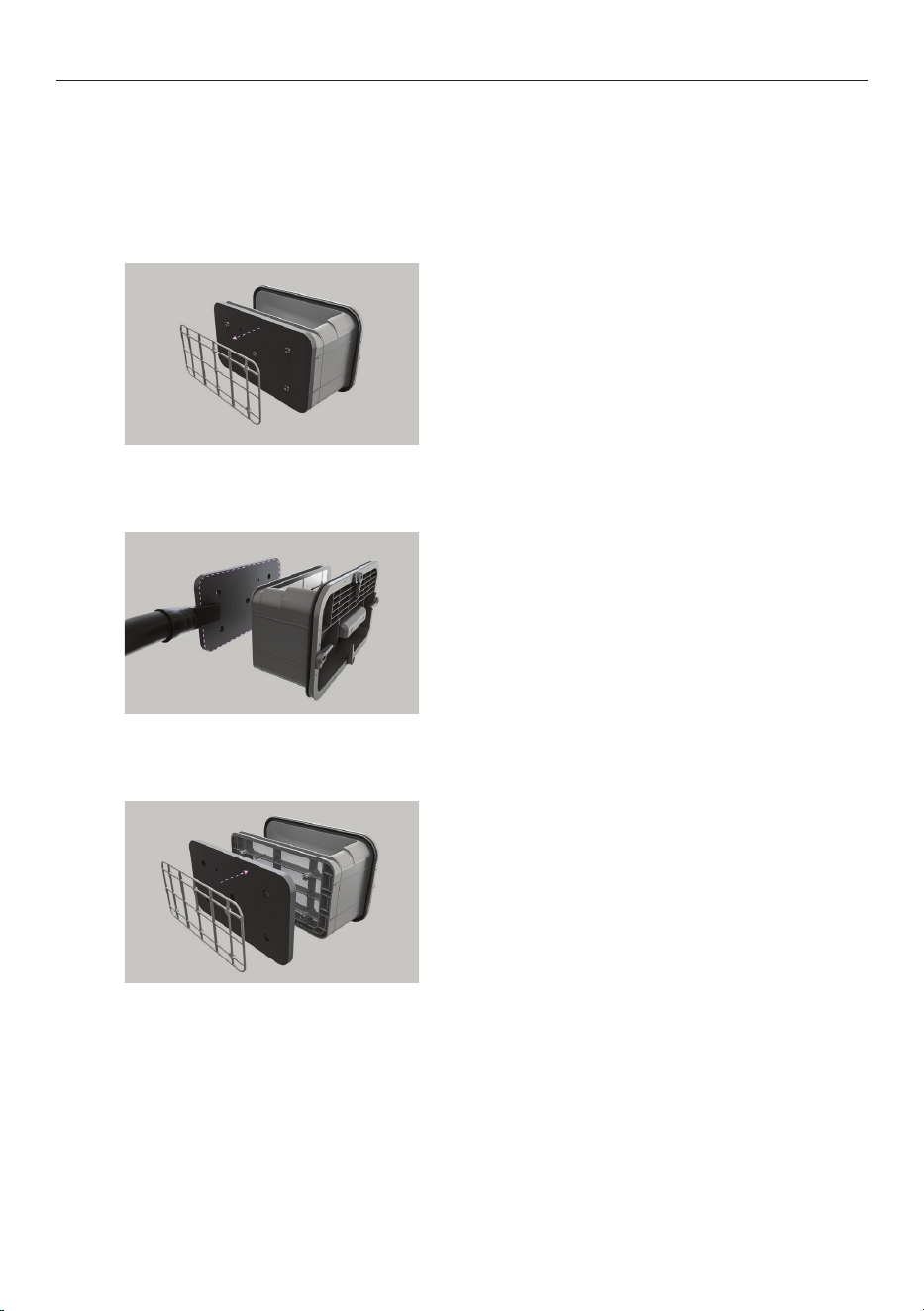
Cleaning/replacing the condenser filter foam
The condenser filter foam may need to be replaced if it is very blocked or has deteriorated.
Three filter foams are provided with your dryer. Replacement filters are available via
www.fisherpaykel.com
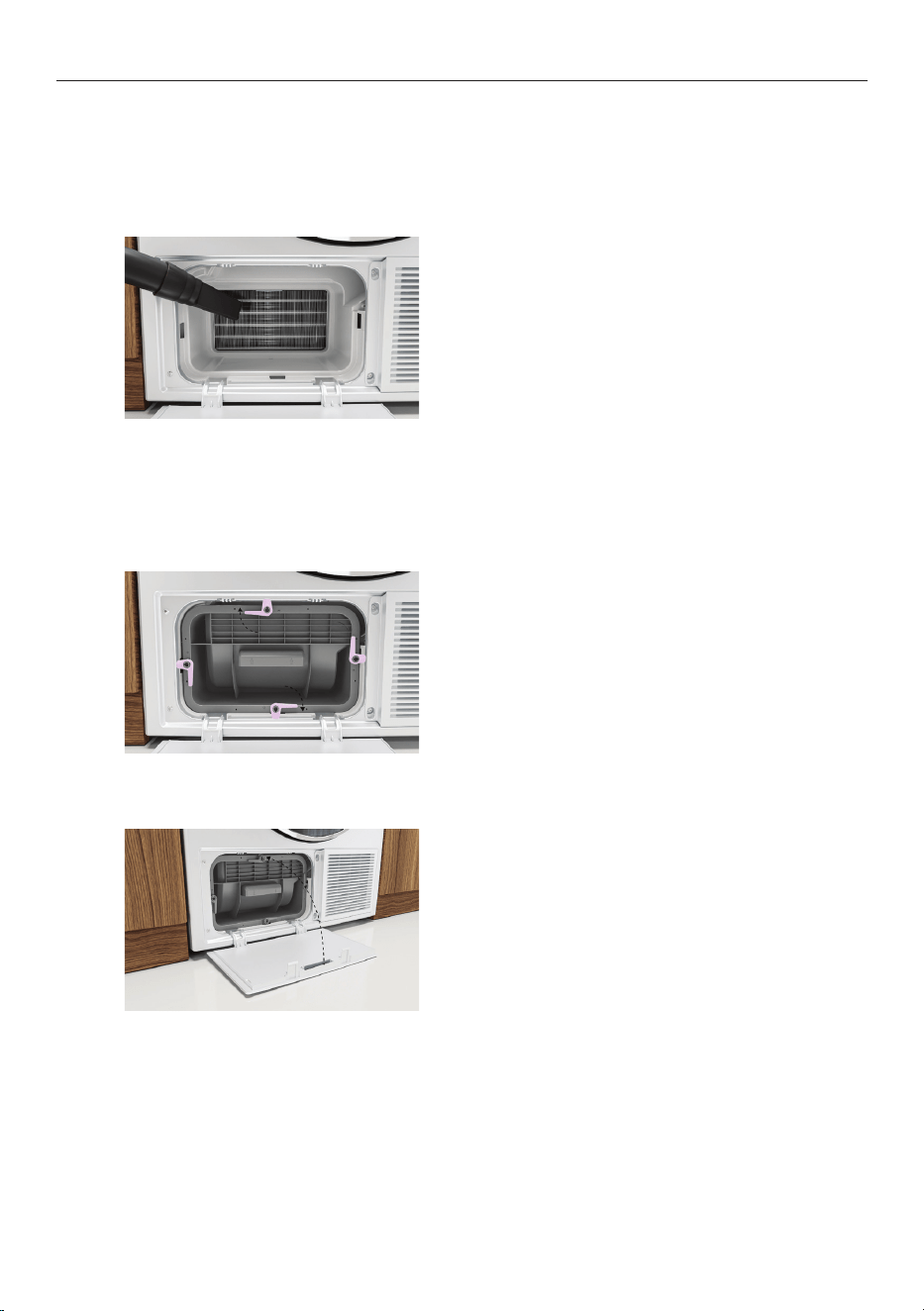
Remove the bracket securing the foam to
condenser filter.
4
Remove the foam and use a vacuum
with a narrow attachment to remove
any lint build-up.
5
Replace the foam and secure with
the bracket.
6
28
CLEANING THE CONDENSER FILTER
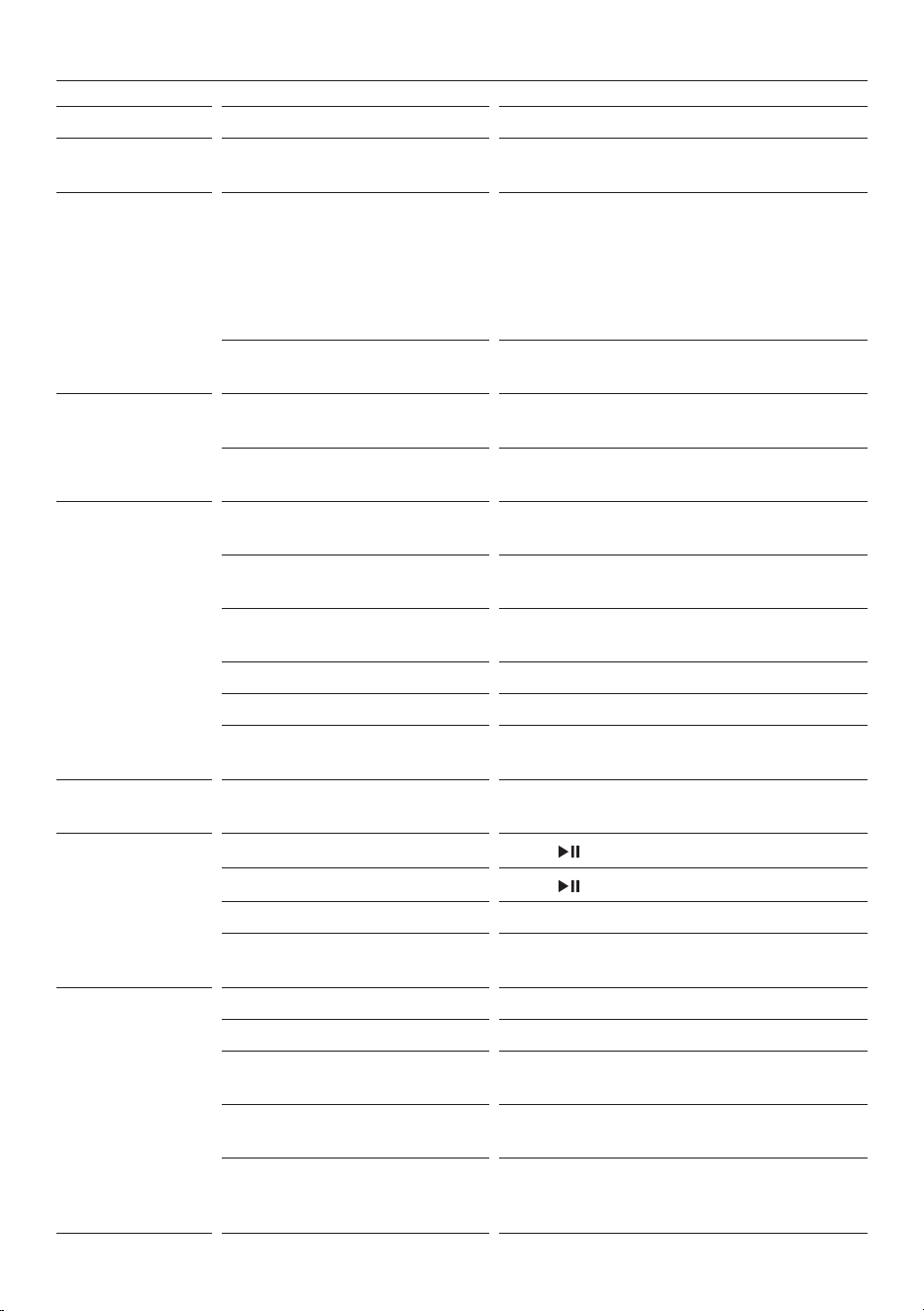
Cleaning the evaporator grid
The evaporator grid is located behind the condenser filter. Take care when cleaning as the
metal fins have sharp edges.
Replacing the condenser filter:
Clean carefully with avacuum, using
a dusting brush or anarrow crevice
attachment.
Take care not to bend the finemetalfins.
7
Replace the condenser filter and secure using
the lock levers.
Ensure the locksare securely engaged.
8
Close the filter cover.
9
29
TROUBLESHOOTING
PROBLEM POSSIBLE CAUSES WHAT TO DO
Display will not
turn on
No power. Ensure the dryer is plugged in and the
power supply is turned on at the wall.
Display not
responding
Dryer needs to be reset. Press the dial to turn the dryer off. Wait a
few seconds, then press the dial again to
turn the dryer back on.
If the problem persists, try turning the
dryer off and on again at the wall. The
display may take a few seconds to load.
Software update may
be required.
If the dryer is connected to Wi-Fi, check
if any updates are available.
Dryer does
notheat
Water tank is full. Ensure the water tank is empty. Refer to
‘Water tank’.
The cycle is in the
COOLING phase.
This is normal. Wait for the cycle
to finish.
Dryer will
not start
The door is not
properly closed.
Ensure the door is firmly shut. Checklint
filter is not obstructing the door.
Is the dryer displaying a user
warning or fault code?
Refer to ‘Fault codes’.
Water tank is full or not
correctly in place.
Ensure the water tank is empty and
correctly inplace. Refer to ‘Water tank’.
Dryer is overloaded. Remove some items from the dryer.
DELAYED START is set. Refer to ‘Cycle options’.
The controls are locked. Press and hold the screen to unlock the
controls.
Dryer stops
andstarts
WRINKLE FREE is on. This is normal. Refer to ‘Cycle options.’
Dryer stops
mid-cycle
Power failure.
Press
to resume thecycle.
Cycle has been paused.
Press
to resume thecycle.
Door is open. Ensure the door is firmly shut.
Items fell off the rack
during
RACK DRY.
Ensure the rack is installed correctly and
replace items on the rack.
Noises Dryer is overloaded. Remove some items from the dryer.
Dryer has a fault. Refer to ‘Fault codes’.
End ofa cycle. Go to
SETTINGS and turn off alerts. Refer
to ‘Menu’.
Dryer is not level. Ensure the dryer is level. Refer to
installation guide.
Compressor noises. Thisis normal. At the start of the cycle
the dryer may make some unfamiliar
noises when the compressor turns on.
30
TROUBLESHOOTING
PROBLEM POSSIBLE CAUSES WHAT TO DO
Vibration Dryer is not installed on
astable surface.
Ensure the dryer is installed on
a flat, stable surface. Refer to
installation guide.
Dryer is not level. Ensure the dryer is level. Refer to
installation guide.
Dryer is overloaded. Remove some items from the dryer.
Cycle taking
too long
Cycle selected not
appropriate for the load.
Select an appropriate cycle for the
load. Refer to ‘Cycles’.
Dryness level selected not
appropriate for the load.
Select a lower dryness level. Refer to
‘Cycle settings’.
Dryer is overloaded. Remove some items from the dryer.
Lint filter, condenser filter,
filter foam or evaporator
grid isblocked.
Check and clean the lint filter,
condenser filter, filter foam and
evaporator grid.
If the problem persists the filter foam
may need to be replaced. Refer to
‘Condenser filter.’
Water tank is full. Refer to ‘Water tank’.
Environmental conditions
maybe affecting operation.
In particularly hot or cold conditions
cycles may take longer and
beless efficient.
Ensure the dryer is installed in a
well-ventilated, dust-free environment.
Donot operate this dryer behind
closeddoors (ie inside a cupboard).
Load overly wet at the
start of cycle.
Remove more water from the
load before placing it in the dryer,
egselecta faster spin speed on your
washer, if appropriate for your load.
Load was damp dry at
thestart of cycle.
If the load had been partially air dried,
eg has been washed and placed on
the line, use a
TIME DRY cycle and
monitor the dryness of your clothes.
Dryer is not draining
properly.
Check the drain hose (if connected)
forblockages or damage. If
the problem persists contact
Customer Care.
Items are tangled. Try separating items and
dryingsimilaritems together.
Referto‘Loading suggestions’.
31
TROUBLESHOOTING
PROBLEM POSSIBLE CAUSES WHAT TO DO
Lint Lint filter not cleaned
or replaced.
Ensure the lint filter is cleaned after
every cycle and replaced correctly.
Refer to ‘Lint filter’.
Loads not sorted correctly. Dry lint-giving items separately
from lint receivers. Also, dry similar
colours together, eg light coloured
items withlight coloured items,
dark itemswith dark items. Refer to
‘Loading suggestions’.
Clothes over dried. Over drying clothes in the dryer
cancause them to attract lint.
Useanauto sensing cycle or ensure
you check your load if using the time
dry cycles to avoid over drying.
New items have been dried
inthe dryer recently.
Clean the lint filter and use
COOL AIR
cycle to clear any remaininglintfrom
the dryer.
New towels or flannelette
sheets can leave lint in the
dryer, which may be picked
up by subsequent loads.
Fabric damage Instructions on care label
notfollowed.
Follow the instructions on the
carelabel of the items.
Dryness level selected not
appropriate for the fabric
type
Ensure dryness level selected is
appropriate for the fabric type.
Referto the item’s care label.
Metal parts on the items or
inthe load.
Fasten zips and other clasps
beforeplacing items in the dryer.
Items not separated or
driedon an appropriate
cyclefor the fabric type.
Dry similar items together.
Ensureanappropriate cycle is
selected. Refer to ‘Cycles’.
Items fell off the rack during
RACK DRY.
Ensure the rack is installed correctly
and only one or two items are
placed on the rackata time. Refer to
‘Rack dry’.
Used a
TIME DRY cycle
anddid not monitor the
dryness of clothes during
the cycle.
Ensure that clothes are checked
fordryness during the cycle
whenusing the timed programmes
toavoid over drying.
Cycle selected not
appropriate for the load.
Select an appropriate cycle for the
load. Refer to ‘Cycles’.
Items removed from dryer
before cycle has finished.
Removing items before the
COOLING
phase may causedamage. Spread
items out and allow to cool fully
before putting away.
32
TROUBLESHOOTING
PROBLEM POSSIBLE CAUSES WHAT TO DO
Tangling Loads not separated
duringloading.
Try separating out larger items
fromsmaller items.
Items loaded into the
dryerincorrectly.
Load items individually into the
dryer. Do not place folded items
inthe dryer.
Incorrect cycle selection. Try using the
EASY IRON cycle to
dryshirts and the SHEETS cycle to
drysheets. Refer to ‘Cycles’.
Load size too large. Try drying smaller load sizes.
Somecycles have a lower maximum
load size. Refer to ‘Cycles’.
Delicate items not separated
in a mesh bag.
Dry pantyhose, bras, stockings
andany other delicate items prone
totangling in a mesh bag.
Sheets and duvet/doona
covers due to their size,
areprone to tangling.
Dry sheets and duvet/doona covers
separately from other laundry,
apartfrom towels. Ensure duvet/
doona covers are buttoned or
fastened closed before drying.
When washing sheets, adding a
towel tied in a knot may help to
prevent tangling.
Creasing Cycle selected not
appropriate for the load.
Select
EASY IRON to
minimisecreasing.
Dryer is overloaded. Remove some items from the dryer.
Dryness level selected not
appropriate for the load.
Select a lower dryness level. Refer to
‘Cycle settings’.
WRINKLE FREE is not on. Select the WRINKLE FREE option to
rotate the load at the end of the
drying cycle. Refer to ‘Cycle options.
Dye transfer White/light and coloured
items not separated
beforedrying.
Sort white/light and coloured items
into separate loads.
Wet items left sitting in
thedryer before drying.
Refer to ‘Loading suggestions’.
33
TROUBLESHOOTING
PROBLEM POSSIBLE CAUSES WHAT TO DO
Dryer not draining Drain hose not connected
tothe water tank.
Ensure the drain hose is connected
correctly. Refer to installation guide.
Water tank not correctly
inplace.
Ensure the water tank is correctly
in place.
Drain hose or drain blocked
ordamaged.
Check drain hose (if connected)
anddrain for blockages or damage.
Dryer is beeping
and displaying
acode
Dryer has a fault. Try turning the dryer off and waiting
one minute before turning it back
on. If the fault code persists contact
Customer Care. Refer to ‘Fault codes’.
Water coming from
under thedryer
Water tank not correctly
inplace.
Ensure the water tank is correctly
in place.
Water tank is full. Ensure the water tank is empty. Refer
to ‘Water tank’.
Water tank may be damaged. Check the water tank for any signs
ofdamage.
Drain hose not connected
tothe water tank.
Ensure the drain hose is connected
correctly. Refer to installation guide.
Drain hose or drain blocked
ordamaged.
Check drain hose (if connected)
anddrain for blockages or damage.
Drain hose has slipped
outofthe drain.
Ensure the drain hose is securely
fixed in place. Drain hoses can move
or get displaced, which may lead to
water draining onto the floor.
Dryer door not closing
properly, affecting the seal.
Ensure there is nothing obstructing
the door opening and that the dryer
door is closed properly.
Inlet hose not
correctly tightened.
Check inlet hose and tighten
connection if necessary. Refer to
installation guide.
Water in drum at
endofcycle
Water tank is full. Ensure the water tank is empty. Refer
to ‘Water tank’.
Environmental conditions
maybe affecting operation.
In particularly hot, humidor cold
conditions water may re-condense in
the drum oron the inside of the door.
34
FAULT CODES
How do I know if there is a problem?
Your dryer will beep and an alert will show in the display.
What to do
First try to fix the issue and clear the alert according to the instructions onscreen or the
steps in the following table.
If the problem persists
1 Note down the fault code.
2 Contact Customer Care or a Fisher & Paykel trained and supported service technician.
Refer to the Service and Warranty booklet for contact details.
‘E’ fault codes
You may be able to clear the fault by resetting the dryer. Follow the steps below:
1 Press the dial to turn the dryer off.
2 Wait a few seconds, then press the dial again to turn the dryer back on.
If the fault code has disappeared, the fault has been reset and you can continue to use
your dryer.
ALERT WHAT TO DO
LOCKED
Press and hold the screen to unlock the controls.
CHECK FILTERS
Clean lint and condenser filters and carefully vacuum the evaporatorgrid.
Check the lint filter or condenser filter are not damaged.
Check there is nothing else trapped in the filters or evaporator grid,
whichmay be blocking the air flow.
WATER TANK
FULL
Check if the water tank is full.
Empty the water tank.
If using the drain hose, check whether the water tank or drainhose
isblocked.
Check the drain hose is still attached at the back of the machine, andisnot
kinked or squashed.
CLOSE DOOR
Ensure the door is firmly shut, then press to resume the cycle.
Try opening and closing the door again.
Reposition the load, ensuring items are not in the way of the door.
COOLING DOWN
Wait for the dryer to cool. The cycle will resume once the drum has cooled.
ROOM TEMP
LOW
The room temperature is too low for the dryer to work effectively. Ensure
that the room temperature is above 5°C to avoidloss of efficiency.
ROOM TEMP
HIGH
The room temperature is too hot for the dryer to work effectively. Wait for
environment to cool before resuming.
MAX TIME
REACHED
There are a number of reasons the maximum cycle time might be reached.
Referto ‘Troubleshooting’.
35
MANUFACTURER’S WARRANTY AND SERVICE GUIDE
To access your Warranty and Service Guide
Scan the QR code with your smartphone to access your warranty
and book a service, or view online at https://www.fisherpaykel.
com/nz/help-and-support/warranty-information
This product has been designed for use in a domestic (residential) environment. This
product is not designed for any commercial use. Any commercial use by the customer will
affect this product’s Manufacturer’s Warranty.
To access your Warranty and Service Guide
Scan the QR code with your smartphone to access your warranty
and book a service, refer to your separate warranty and service
book or view online at https://www.fisherpaykel.com/au/help-and-
support/warranty-information
NZ
AU
Complete and keep for safe reference:
Model
Serial No.
Purchase Date
Purchaser
Dealer
Suburb
Tow n
Country

431233A 07.23
FISHERPAYKEL.COM
© Fisher & Paykel Appliances 2023. All rights reserved.
The models shown in this guide may not be available in all markets
and are subject to change at any time.
The product specifications in this guide apply to the specific products and
models described at the date of issue. Under our policy of continuous product
improvement, these specifications may change at any time.
For current details about model and specification availability in your country,
please go to our website or contact your local Fisher&Paykel dealer.