Frigidaire.com USA 1-800-374-4432 Frigidaire.ca Canada 1-800-265-8352
A06823455(January 2023)
use
&
care
PRECAUTIONS MICROWAVE ENERGY ..... 4
IMPORTANT SAFETY INSTRUCTIONS ....... 5
CONTROL PANEL ................................................9
OPERATION ........................................................ 10
CLEANING AND CARE ...................................18
................................................... 22
WARRANTY
. . ...
1:1
...
MICROWAVE
OVEN
2
INTRODUCTION
INTRODUCTION
Welcome to our
family
Thank you for bringing Frigidaire into your home!
We see your purchase as the beginning of a long
relationship together.
This manual is your resource for the use and care
of your product. Please read it before using your
appliance. Keep it handy for quick reference. If
something doesn’t seem right, the troubleshooting
section will help you with common issues.
FAQs, helpful tips and videos, cleaning products, and
kitchen and home accessories are available at www.
frigidaire.com.
We are here for you! Visit our website, chat with an
agent, or call us if you need help. We may be able
to help you avoid a service visit. If you do need
service, we can get that started for you
Let's make it ocial! Be sure to register your prod-
.
uct.
Keep your product info here so it’s easy to find.
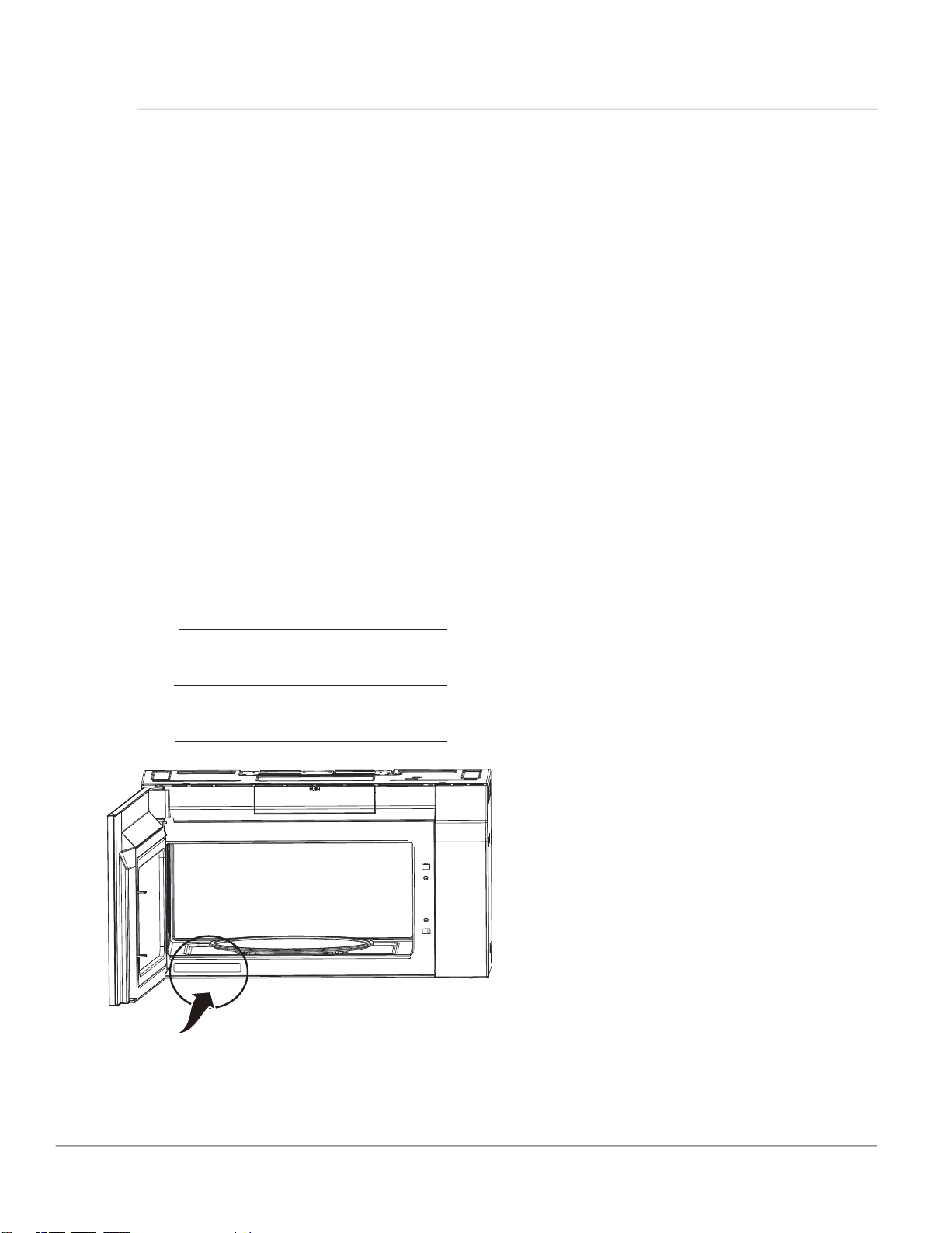
Model Number:
Serial Number:
Purchase Date:
Serial Number Location
3
WARNING
Indicates a potentially hazardous situation which,
if not avoided, may result in death or serious
injury
.
CAUTION
Indicates a potentially hazardous situation
which, if not avoided, may result in minor or
moderate injury.
IMPORTANT
Indicates installation, operation or main-tenance
information which is important but not hazard-
related.
Read all instructions before using this appliance.
This manual contains important safety symbols and instructions. Please pay attention to these symbols
and follow all instructions given.
Do not attempt to install or operate your appliance until you have read the safety precautions in this
manual. Safety items throughout this manual are labeled with a WARNING or CAUTION statement based
on the risk type.
Warnings and important instructions appearing in this guide are not meant to cover all possible
conditions and situations that may occur. Common sense, caution, and care must be exercised with
installing, maintaining, or operating your appliance.
DEFINITIONS
This is the safety alert symbol. It is used to alert of potential personal injury hazards. Obey all safety
messages that follow this symbol to avoid possible injury or death.
NOTE
Indicates a short, informal reference – something
written down to assist the memory or for future
reference.
IMPORTANT SAFETY INSTRUCTIONS
NOTE
ELECTRICAL
REQUIREMENTS
Product rating is 120 volts AC, 60 Hertz,
1.5/1.55 kilowatts and 14.0 amps.This product
must be connected to a seperate and dedicated
supply circuit of the proper voltage and
frequency. Wire size must conform to the
requirements of the National Electrical Code or
the prevailing local code for this kilowatt rating.
The power supply cord and plug should be
brought to a seperate and dedicated 15- to 20-
ampere branch circuit single grounded outlet.
The outlet box should be located in the cabinet
above the microwave oven. The outlet box and
supply circuit should be installed by a qualifed
electrician and conform to the National Electrical
Code or the prevailing local code.
IMPORTANT
1. If you have any questions about the grounding
or electrical instructions, consult a qualified
electrician or service person.
2. Neither Electrolux nor the dealer can
accept
any liability for damage to the microwave oven
or personal injury resulting from failure to
observe the
correct electrical connection
procedures.
SAVE THESE INSTRUCTIONS
Do not attempt to operate this oven
with the door open since open door operation can
result in harmful exposure to microwave energy. It
is important not to defeat or tamper with the safety
interlocks.
Do not place any object between the oven front
face and the door or allow soil or cleaner residue to
accumulate on sealing surfaces.
Do not operate the oven if it is damaged. It is
particularly important that the oven door close
properly and that there is no damage to the:
(1) DOOR (bent)
(2)HINGES AND LATCHES (broken or loosened)
(3)DOOR SEALS AND SEALING SURFACES.
The oven should not be adjusted or repaired by
anyone except properly qualified service
personnel.
4
PRECAUTIONS MICROWAVE ENERGY
PRECAUTIONS TO AVOID POSSIBLE EXPOSURE
TO EXCESSIVE MICROWAVE ENERGY
WARNING
To reduce the risk of burns, electric shock, fire,
in
jury to persons or exposure to excessive
microwave energy:
This device complies with part 18 of the FCC Rules.
RADIO INTERFERENCE
• Operation of the microwave oven may cause
interference to your radio, TV or similar
equipment.
• When there is interference, it may be reduced
or eliminated by taking the following measures:
- Clean door and sealing surface of the oven.
- Reorient the receiving antenna of radio or
television.
- Relocate the microwave oven with respect to
the receiver.
- Move the microwave oven away from the
receiver.
- Plug the microwave oven into a different outlet
so that microwave oven and receiver are on
different branch circuits.
UTENSILS
CAUTION
• Personal Injury Hazard
• Tightly-closed utensils could explode. Closed
containers should be opened and plastic pouches
should be pierced before cooking.
• See the instructions on "Materials you can use in
microwave oven or to be avoided in microwave
oven."
There may be certain non-metallic utensils that are
not safe to use for microwaving. If in doubt, you
can test the utensil in question following the
procedure below.
Utensil Test:
- Fill a microwave-safe container with 1 cup of
cold water (250ml) along with the utensil in
question.
- Cook on maximum power for 1 minute.
- Carefully feel the utensil. If the empty utensil is
warm, do not use it for microwave cooking.
- Do not exceed 1 minute cooking time.
SAVE THESE INSTRUCTIONS

When using electrical appliances basic safety
precautions should be followed, including the
following:
WARNING
To reduce the risk of burns, electric shock, fire,
injury to persons or exposure to excessive
microwave energy:
• Read all instructions before using the appliance.
• Read and follow the specific:
"PRECAUTIONS TO AVOID POSSIBLE
EXPOSURE TO EXCESSIVE MICROWAVE
ENERGY" found on page 4.
• This appliance must be grounded.
Connect only
to properly grounded outlet. See
"GROUNDING INSTRUCTIONS" found on page 6.
• Install or locate this appliance only
in accordance with the provided installation
instructions.
• Some products such as whole eggs and sealed
containers - for example, closed glass jars - are
able to explode and should not be heated in this
oven.
• Use this appliance only for its intended use as
described in the manual. Do
not use corrosive chemicals or vapors in this
appliance. This type of oven is specifically
designed to heat, cook or dry food. It is not
designed for industrial or laboratory use.
• HOT CONTENTS CAN CAUSE SEVERE BURNS.
DO NOT ALLOW CHILDREN TO USE THE
MICROWAVE. Use caution when removing hot
items.
• Do not operate this appliance if it has a damaged
cord or plug, if it is not working properly, or if it
has been damaged or dropped.
• This appliance should be serviced only by
qualified service personnel. Contact nearest
authorized service facility for examination, repair,
or adjustment.
• Do not cover or block any openings on the
appliance.
• Do not store this appliance outdoors. Do not use
this product near water - for example, near a
kitchen sink, in a wet basement, near a swimming
pool, or similar location.
• Do not immerse cord or plug in water.
• Keep cord away from heated surface.
• Do not let cord hang over edge of table or
counter. When cleaning surfaces of door and
oven that comes together on closing the door,
use only mild, nonabrasive soaps, or detergent
applied with a sponge or soft cloth.
• To reduce the risk of fire in the oven cavity:
- Do not overcook food. Carefully attend appliance
whe
n paper, plastic, or other combustible
materials are placed inside the oven to facilitate
cooking.
- Remove wire twist-ties from paper or plastic bag
before when placing bag in oven.
- If material inside of the oven ignite, keep oven
door closed, turn oven off, and disconnect the
power cord, or shut off power at the fuse or circuit
breaker panel.
- Do not use the cavity for storage purposes. Do not
leave paper products, cooking utensils, or food in
the cavity when not in use.
• Liquids, such as water, coffee, or tea are able to be
overheated beyond the boiling point without
appearing to
be boiling. Visible bubbling or boiling when the
container is removed from the microwave oven is
not always present. THIS COULD RESULT IN VERY
HOT LIQUID SUDDENLY BOILING OVER WHEN THE
CONTAINER IS DISTURBED OR A UTENSIL IS
INSERTED INTO THE LIQUID. To reduce the risk of
injury to persons:
• Do not overheat the liquid.
• Stir the liquid both before and halfway through
heating it.
• Do not use straight-sided containers with narrow
necks.
• After heating, allow the container to stand in the
microwave oven for a short time before removing
the container.
• Use extreme care when inserting a spoon or other
utensil into the container.
• Oversized food or oversized metal utensils should
not be inserted in a microwave/toaster oven as they
may create a fire or risk of electric shock. Do not
clean with metal scouring pads. Pieces can burn off
the pad and touch electrical parts involving a risk of
electric shock.
• Do not use paper products when appliance is
operated in the toaster, air fry or convection mode.
• Do not store any materials, other than
manufacturer's recommended accessories, in this
oven when not in use.
• Do not cover racks or any other part of the oven
with metal foil. This will cause over- heating of the
oven.
• Clean Ventilation Hoods Frequently -Grease should
not be allowed to accumulate on hood or filter.
• When flaming foods under the hood, turn the fan on.
• Use care when cleaning the vent-hood filter.
Corrosive cleaning agents, such as lye-based oven
cleaners, may damage the filter.
• Suitable for use above both gas and electric cooking
equipment.
IMPORTANT SAFETY INSTRUCTIONS
5
SAVE THESE INSTRUCTIONS
When using electrical appliances basic safety
precautions should be followed, including the
following:
WARNING
To reduce the risk of burns, electric shock, fire,
injury to persons or exposure to excessive
microwave energy:
• Read all instructions before using the appliance.
• Read and follow the specific:
"PRECAUTIONS TO AVOID POSSIBLE
EXPOSURE TO EXCESSIVE MICROWAVE
ENERGY" found on page 4.
• This appliance must be grounded.
Connect only
to properly grounded outlet. See
"GROUNDING INSTRUCTIONS" found on page 6.
• Install or locate this appliance only
in accordance with the provided installation
instructions.
• Some products such as whole eggs and sealed
containers - for example, closed glass jars - are
able to explode and should not be heated in this
oven.
• Use this appliance only for its intended use as
described in the manual. Do
not use corrosive chemicals or vapors in this
appliance. This type of oven is specifically
designed to heat, cook or dry food. It is not
designed for industrial or laboratory use.
• HOT CONTENTS CAN CAUSE SEVERE BURNS.
DO NOT ALLOW CHILDREN TO USE THE
MICROWAVE. Use caution when removing hot
items.
• Do not operate this appliance if it has a damaged
cord or plug, if it is not working properly, or if it
has been damaged or dropped.
• This appliance should be serviced only by
qualified service personnel. Contact nearest
authorized service facility for examination, repair,
or adjustment.
• Do not cover or block any openings on the
appliance.
• Do not store this appliance outdoors. Do not use
this product near water - for example, near a
kitchen sink, in a wet basement, near a swimming
pool, or similar location.
• Do not immerse cord or plug in water.
• Keep cord away from heated surface.
• Do not let cord hang over edge of table or
counter. When cleaning surfaces of door and
oven that comes together on closing the door,
use only mild, nonabrasive soaps, or detergent
applied with a sponge or soft cloth.
• To reduce the risk of fire in the oven cavity:
- Do not overcook food. Carefully attend appliance
whe
n paper, plastic, or other combustible
materials are placed inside the oven to facilitate
cooking.
- Remove wire twist-ties from paper or plastic bag
before when placing bag in oven.
- If material inside of the oven ignite, keep oven
door closed, turn oven off, and disconnect the
power cord, or shut off power at the fuse or circuit
breaker panel.
- Do not use the cavity for storage purposes. Do not
leave paper products, cooking utensils, or food in
the cavity when not in use.
• Liquids, such as water, coffee, or tea are able to be
overheated beyond the boiling point without
appearing to
be boiling. Visible bubbling or boiling when the
container is removed from the microwave oven is
not always present. THIS COULD RESULT IN VERY
HOT LIQUID SUDDENLY BOILING OVER WHEN THE
CONTAINER IS DISTURBED OR A UTENSIL IS
INSERTED INTO THE LIQUID. To reduce the risk of
injury to persons:
• Do not overheat the liquid.
• Stir the liquid both before and halfway through
heating it.
• Do not use straight-sided containers with narrow
necks.
• After heating, allow the container to stand in the
microwave oven for a short time before removing
the container.
• Use extreme care when inserting a spoon or other
utensil into the container.
• Oversized food or oversized metal utensils should
not be inserted in a microwave/toaster oven as they
may create a fire or risk of electric shock. Do not
clean with metal scouring pads. Pieces can burn off
the pad and touch electrical parts involving a risk of
electric shock.
• Do not use paper products when appliance is
operated in the toaster, air fry or convection mode.
• Do not store any materials, other than
manufacturer's recommended accessories, in this
oven when not in use.
• Do not cover racks or any other part of the oven
with metal foil. This will cause over- heating of the
oven.
• Clean Ventilation Hoods Frequently -Grease should
not be allowed to accumulate on hood or filter.
• When flaming foods under the hood, turn the fan on.
• Use care when cleaning the vent-hood filter.
Corrosive cleaning agents, such as lye-based oven
cleaners, may damage the filter.
• Suitable for use above both gas and electric cooking
equipment.
IMPORTANT SAFETY INSTRUCTIONS
5
SAVE THESE INSTRUCTIONS
SAVE THESE INSTRUCTIONS
GROUNDING INSTRUCTIONS
This appliance must be grounded. In the event of an electrical short circuit, grounding reduces the risk of
electric shock by providing an escape wire for the electric current. This appliance is equipped with a cord
having a grounding wire with a grounding plug. The plug must be plugged into an outlet that is properly
installed and grounded.
WARNING
Improper use of the grounding can result in a risk
of electric shock.
Consult a qualified electrician or serviceman if the
grounding instructions are not completely
understood, or if doubt exists as to whether the
appliance is properly grounded. If it is necessary to
use an extension cord, use only a
3-wire extension cord that has a 3-blade grounded
plug, and 3-slot receptacle th
at will accept the
plug on the appliance.The marked rating of the
extension cord shall be equal to or greater than the
electrical rating of the appliance.
DANGER
Electric Shock Hazard
Touching some of the internal components can
cause serious personal injury or death.
Do not
disassemble this appliance.
6
IMPORTANT SAFETY INSTRUCTIONS
IMPORTANT
1. If you have any questions about the
grounding or electrical instructions,
consult a
qualified electrician or service person.
2. Neither Electrolux nor the dealer can accept
any liability for damage to the microwave
oven or personal injury resulting from failure
to observe the
correct electrical connection
procedures.
WARNING
Electric Shock Hazard
Improper use of the grounding can result in
electric shock. Do not plug into an outlet until
appliance is properly installed and grounded.
• A short power supply cord is provided to reduce
the risks resulting from becoming entangled in or
tripping over a longer cord.
• Longer cord sets or extension cords are available
and may be used if care is exercised in their use.
• If a long cord or extension cord is used:
- The marked electrical rating of the cord set or
extension cord should be at least as great as the
electrical rating of the appliance.
- The extension cord must be a grounding-type 3-
wire cord.
- The longer cord should be arranged so that it
will not drape over the
counter top or tabletop
where it can be pulled on by children or tripped
over unintentionally.
7
IMPORTANT SAFETY INSTRUCTIONS
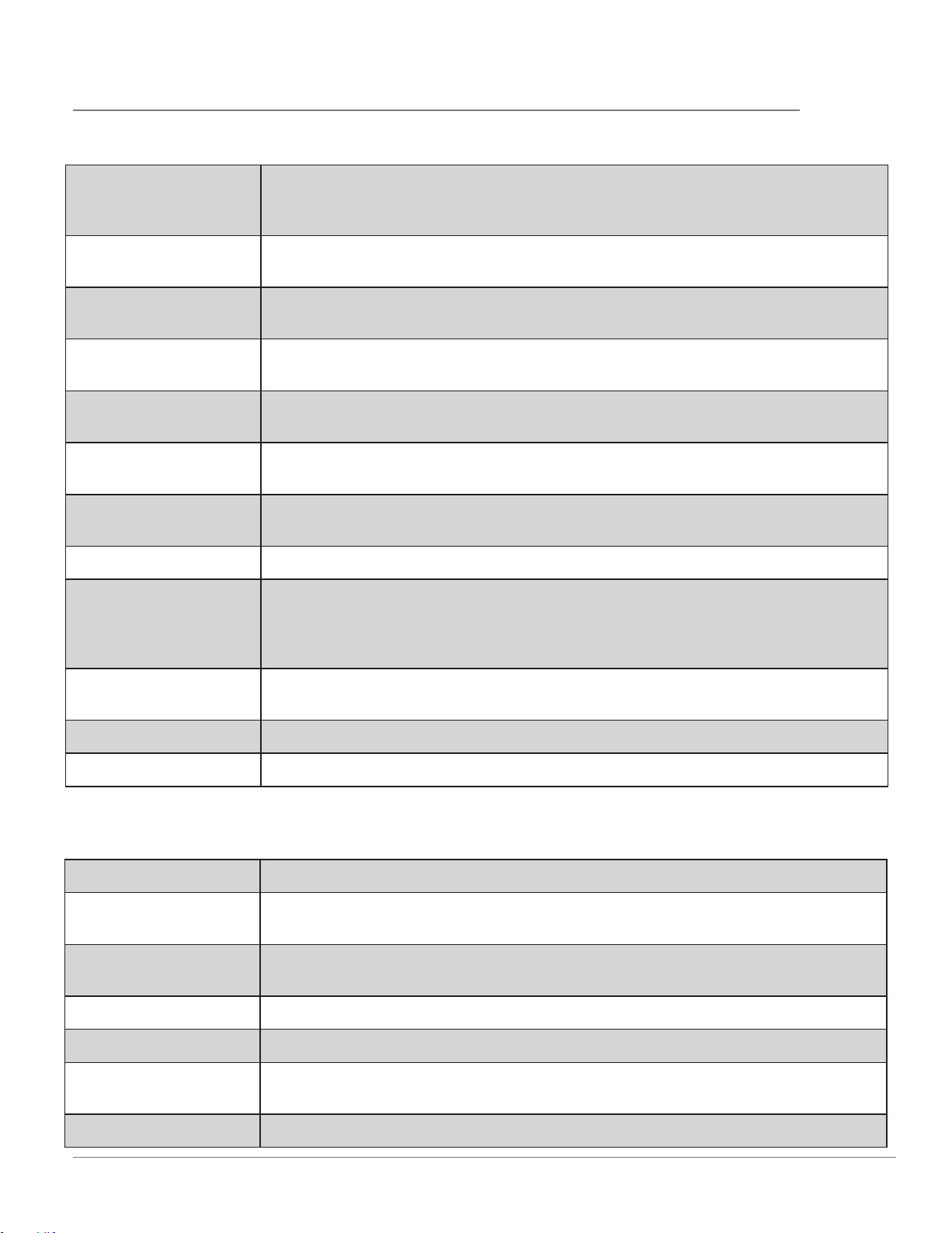
Materials you can use in microwave oven
Browning dish
Follow manufacturer instructions. The bottom of browning dish must be at
least 3/16 inch (5mm) above the turntable. Incorrect usage may cause the
turntable to break.
Dinnerware
Microwave-safe only. Follow manufacturer's instructions. Do not use cracked
or chipped dishes.
Glass jars
Always remove lid. Use only to heat food until just warm. Most glass jars are
not heat resistant and may break.
Glassware
Heat-resistant oven glassware only. Make sure there is no metallic trim. Do not
use cracked or chipped dishes.
Oven cooking bags
Follow manufacturer instructions. Do not close with metal tie. Make slits to
allow steam to escape.
Paper plates and cups
Use for short term cooking/warming only. Do not leave oven unattended
while cooking.
Paper towels
Use to cover food for reheating and absorbing fat. Use with supervision for a
short-term cooking only.
Parchment paper Use as a cover to prevent splattering or a wrap for steaming.
Plastic
Microwave-safe only. Follow the manufacturer instructions. Should be labeled
"Microwave Safe". Some plastic containers soften, as the food inside gets hot.
"Boiling bags" and tightly closed plastic bags should be slit, pierced or vented
as directed by package.
Plastic wrap
Microwave-safe only. Use to cover food during cooking to retain moisture. Do
not allow plastic wrap to touch food.
Thermometers Microwave-safe only (meat and candy thermometers).
Wax paper Use as a cover to prevent splattering and retain moisture.
Materials to be avoided in microwave oven
Aluminum tray May cause arcing. Transfer food into microwave-safe dish.
Food carton with
metal handle
May cause arcing. Transfer food into microwave-safe dish.
Metal or metal-
trimmed utensils
Metal shields the food from microwave energy. Metal trim may cause arcing.
Metal twist ties May cause arcing and could cause a fire in the oven.
Paper bags May cause a fire in the oven.
Plastic foam
Plastic foam may melt or contaminate the liquid inside when exposed to high
temperature.
Wood Wood will dry out when used in the microwave oven and may split or crack.
ABOUT FOOD
FOOD DO DON’T
Eggs, sausages,
nuts, seeds, fruits &
vegetables
• Puncture egg yolks before
cooking to prevent
"explosion".
• Pierce skins of potatoes,
apples, squash, hot dogs
and sausages so that
steam escapes.
• Cook eggs in shells.Reheat
whole eggs.Dry nuts or
seeds in shells.
Popcorn
• Use specially bagged
popcorn for microwave
cooking.
• Listen while popping corn
for the popping to slow
to 1 or 2 seconds or use
special popcorn pad.
• Pop popcorn in regular
brown bags or glass
bowls.
• Exceed maximum time on
popcorn package.
Unevenly cooked
foods
• Transfer baby food to
small dish and heat
carefully, stirring often.
Check temperature before
serving.
• Put nipples on bottles
after heating and shake
thoroughly. “Wrist” test
before feeding.
• Heat disposable bottles.
• Heat bottles with nipples
on.
• Heat baby food in original
jars.
General
• Cut baked goods with
filling after heating to
release steam and avoid
burns.
• Stir liquids briskly before
and after heating to avoid
“eruption”.
• Use deep bowl, when
cooking liquids or cereals,
to prevent boilovers.
• Heat or cook in closed
glass jars or air tight
containers.
• Can in the microwave as
harmful bacteria may not
be destroyed.
• Deep fat fry.
• Dry wood, gourds, herbs
or wet papers.
IMPORTANT SAFETY INSTRUCTIONS
8
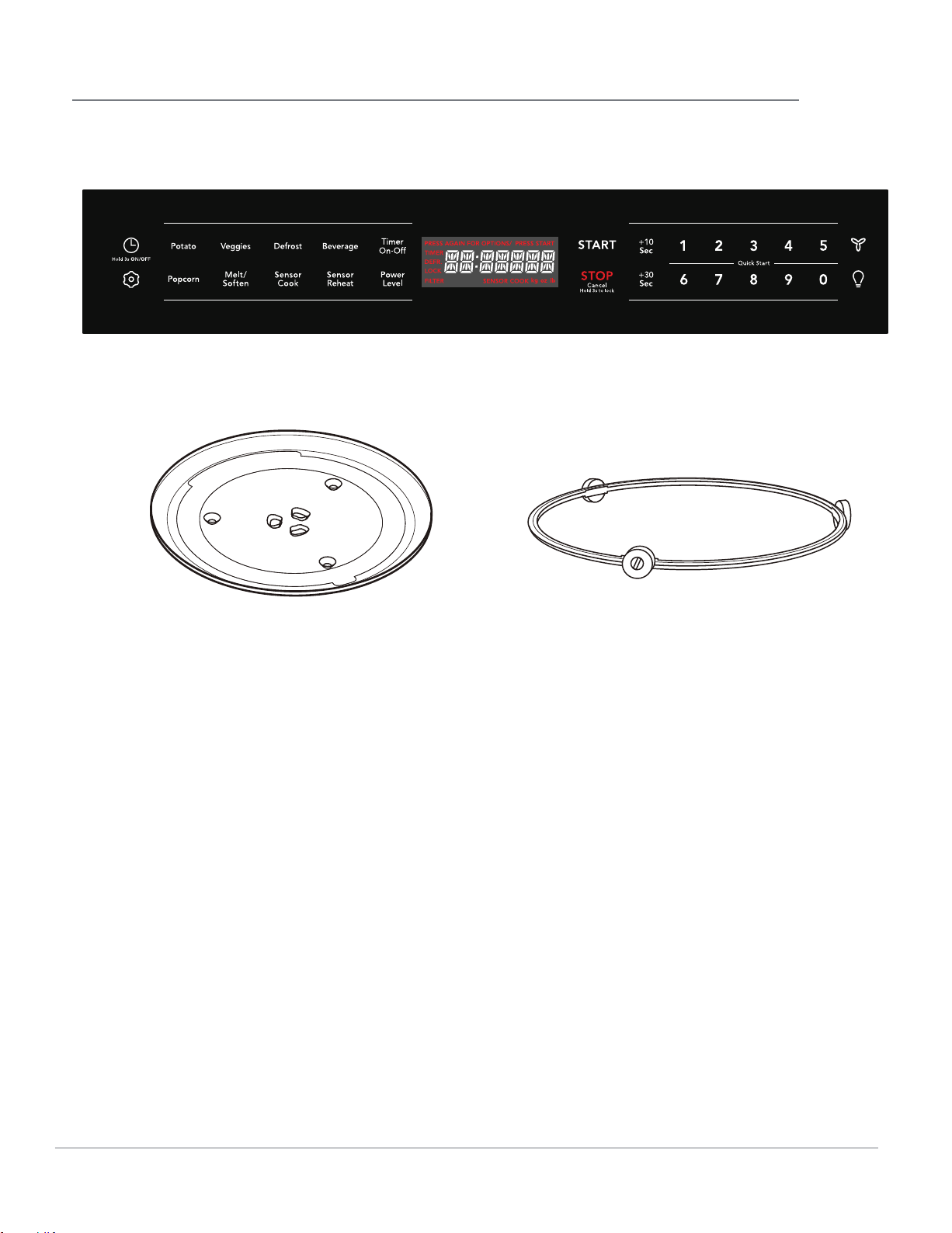
CONTROL PANEL
9
(//ƫ1.*0(!
Turntable Ring Assembly
CONVECT
OPERATION
• Before operating your new appliance make sure
you read and understand this Use and Care
Guide completely.
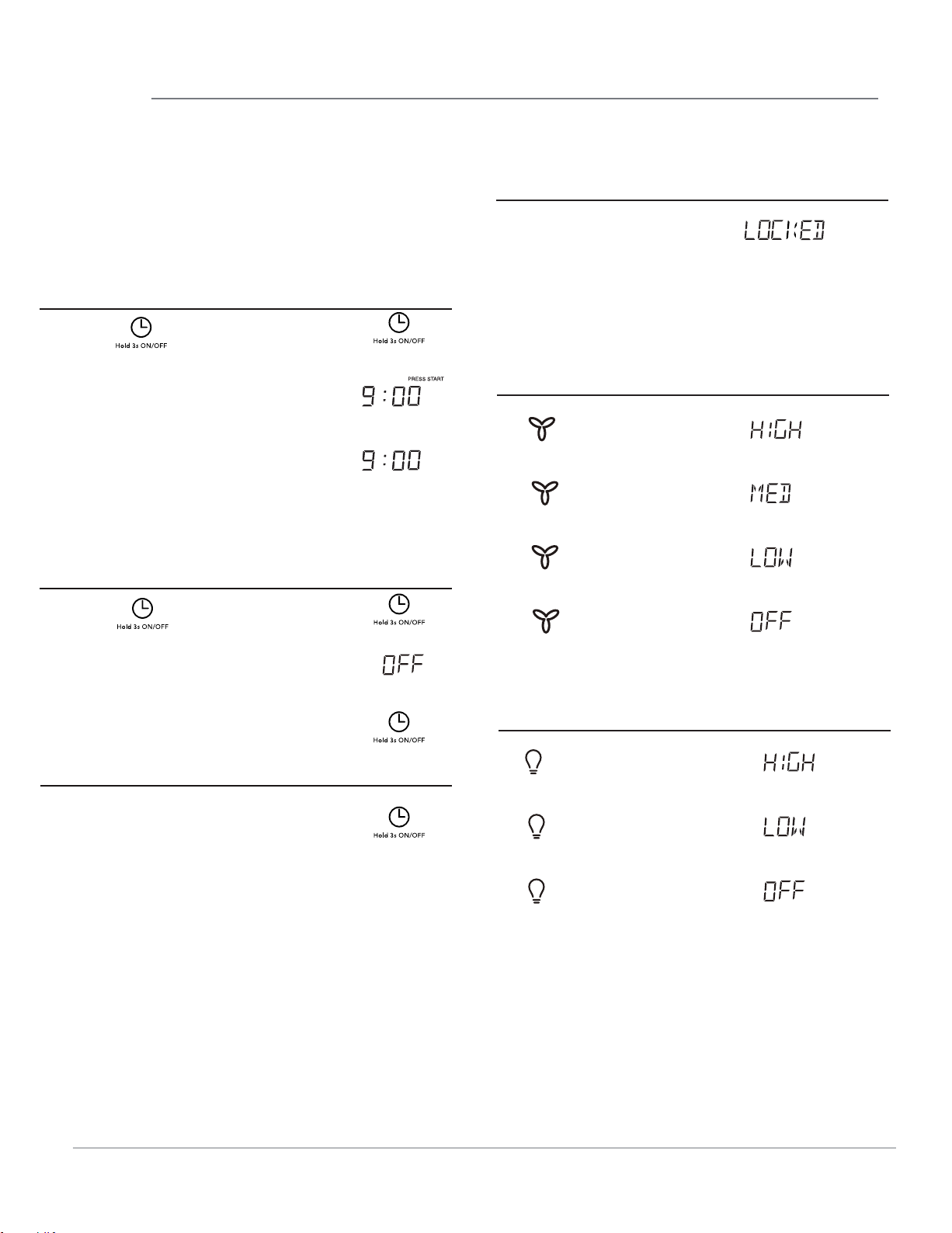
• The clock can be
disabled when the microwave
is first plugged in and the STOP key is selected.
To re-enable the clock follow clock instructions.
SETTING THE CLOCK
Example: setting clock display for 9:00:
1. Touch
2. Enter time using number pads.
3. Touch pad .
p ad once .
START
SETTING THE CLOCK ON/OFF
1. Touch
2.
Time will display, after 3s, OFF
will display.
and hold pad
.
3.
1.
Example: to turn off clock display:
Example: to turn on clock display:
Hold the clock button for 3s and
Tap the clock button to see the
if the display is off.
10
1.
XX:XX
(current time will display after
LOCK
STOP
(for 3 seconds)
Touch: Display Shows:
1.
x 1
2. x 2
3. x 3
4. x 4
Display Shows:
1.
x 1
2. x 2
3. x 3
Display Shows:
CHILD LOCK
•
Suppose you want to lock or unlock the controls.
VENT FAN
Touch:
SURFACE LIGHT
Touch:
the clock will show in the display
and when ON is shown in the
current time
display the clock will remain on.
2 seconds)
OPERATION
Sensor cooking has an electronic controlled sensor
that detects the vapor (moisture and humidity)
emitted from the food as it heats. The sensor
adjusts the cooking times and power level for
various foods and quantities automatically.
Using Sensor Settings:
1. Be sure the exterior of the cooking container
and the interior of the oven are dry. Wipe off
any moisture with a dry cloth or paper towel.
2. The oven works with foods at normal storage
temperature. For example, popcorn would be at
room temperature.
3. More or less food than the quantity listed in the
chart should be cooked following the guidelines
in any microwave cookbook.
4. During the first part of SENSOR COOKING, food
name will appear in the display. Do not open the
oven door or touch the pad during this part
of the cycle. The measurement of vapor will be
interrupted.
When the sensor detects the vapor emitted from
the food, remainder of cooking time will appear.
Door may be opened when remaining cooking
time appears in the display. At this time, you
may stir or season food, as desired.
5. If the sensor does not detect vapor properly
when popping popcorn, the oven will turn off,
and the correct time of day will be displayed. If
the sensor does not detect vapor properly when
cooking other foods, the error code :E-04 will be
displayed. will be displayed, and the oven will
turn off.
6. Check food for temperature after cooking. If
additional time is needed, continue to cook
manually.
Covering Foods:
Some foods cook better when covered.
1. Casserole lid.
2. Plastic wrap: Use plastic wrap recommended
for microwave cooking. Cover dish loosely;
allow approximately 1/2 inch to remain
uncovered to allow steam to escape. Plastic
wrap should not touch food.
3. Wax paper: Cover dish completely; fold excess
wrap under dish to secure. If dish is wider than
paper, overlap two pieces at least one inch to
cover.
Be careful when removing any covering to allow
steam to escape away from you.
NOTES for SENSOR COOKING
1. The final cooking result will vary according
to the food condition (e.g. initial temperature,
shape, quality). Check food for temperature
after cooking. If additional time is needed,
continue to cook manually.
2. Stay near the oven while it’s in use and check
cooking progress frequently so that there is no
chance of overcooking food.
3. When SENSOR COOKING is selected Turntable
On is automatically set for optimum cooking.
SENSOR COOK
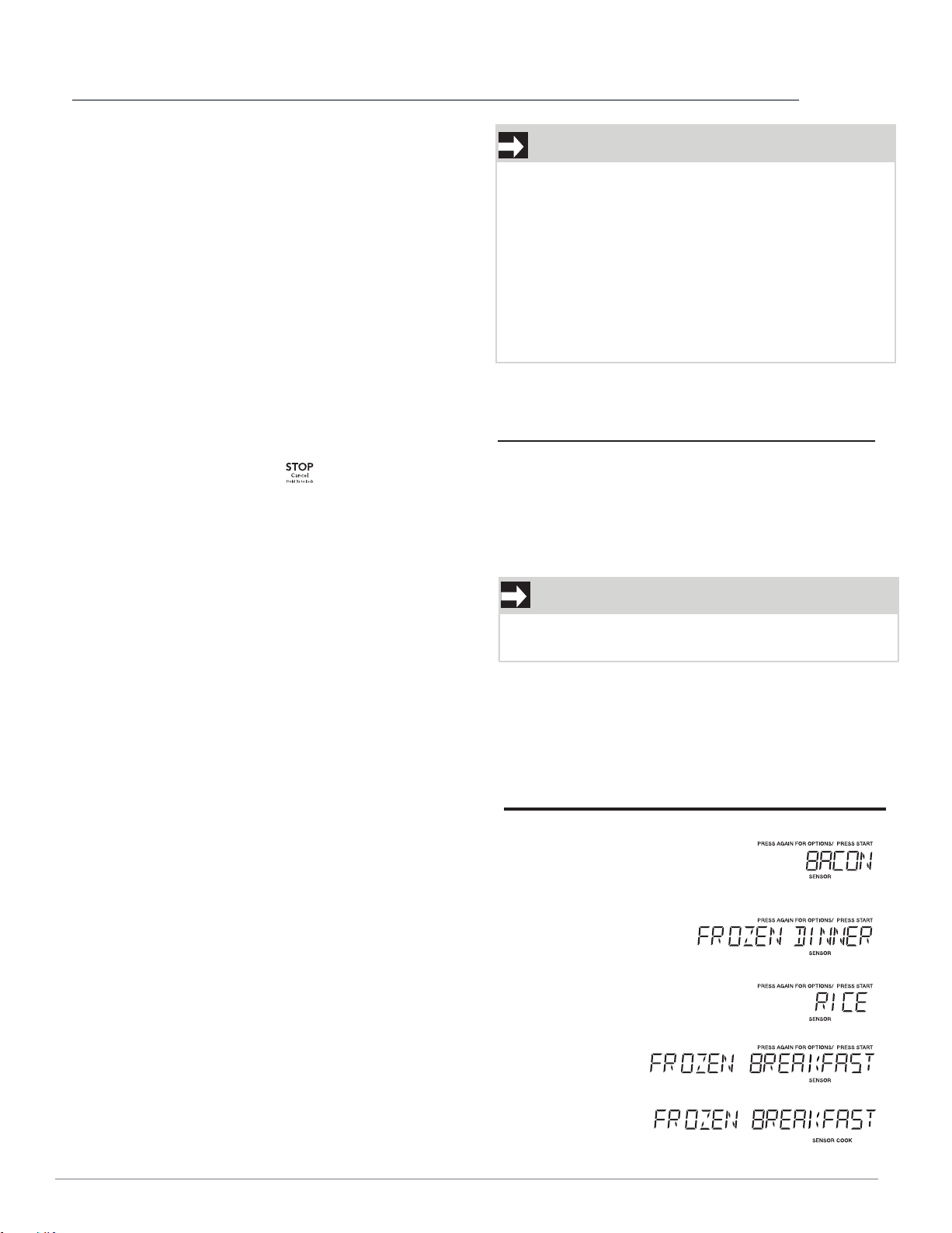
You can cook foods by touching the sensor cook
pad multiple times. You don’t need to calculate
cooking time or power level.
• Suppose you want to cook frozen breakfast .
Touch: Display Shows:
1.
Sensor
Cook
2.
Sensor
Cook
3.
Sensor
Cook
4.
Sensor
Cook
5. START
11
Using the +10/+30 Sec key
This feature will let you quickly start or add 10 or
30 seconds.
Touch the
+
10
Sec
/
+
30
pad to:
1.
2.
Start cooking for 10 seconds at
100% power level.
Extend cooking time in multiples of
10
seconds each time this pad is
touched during microwave cooking.
NOTE
NOTE
Touch the or to add time to any cooking
cycle in progress expect for defrost cooking.
Sec
+
10
Sec
+
30
Sec
/ 30 seconds
/ 30 seconds
Time counting down
OPERATION
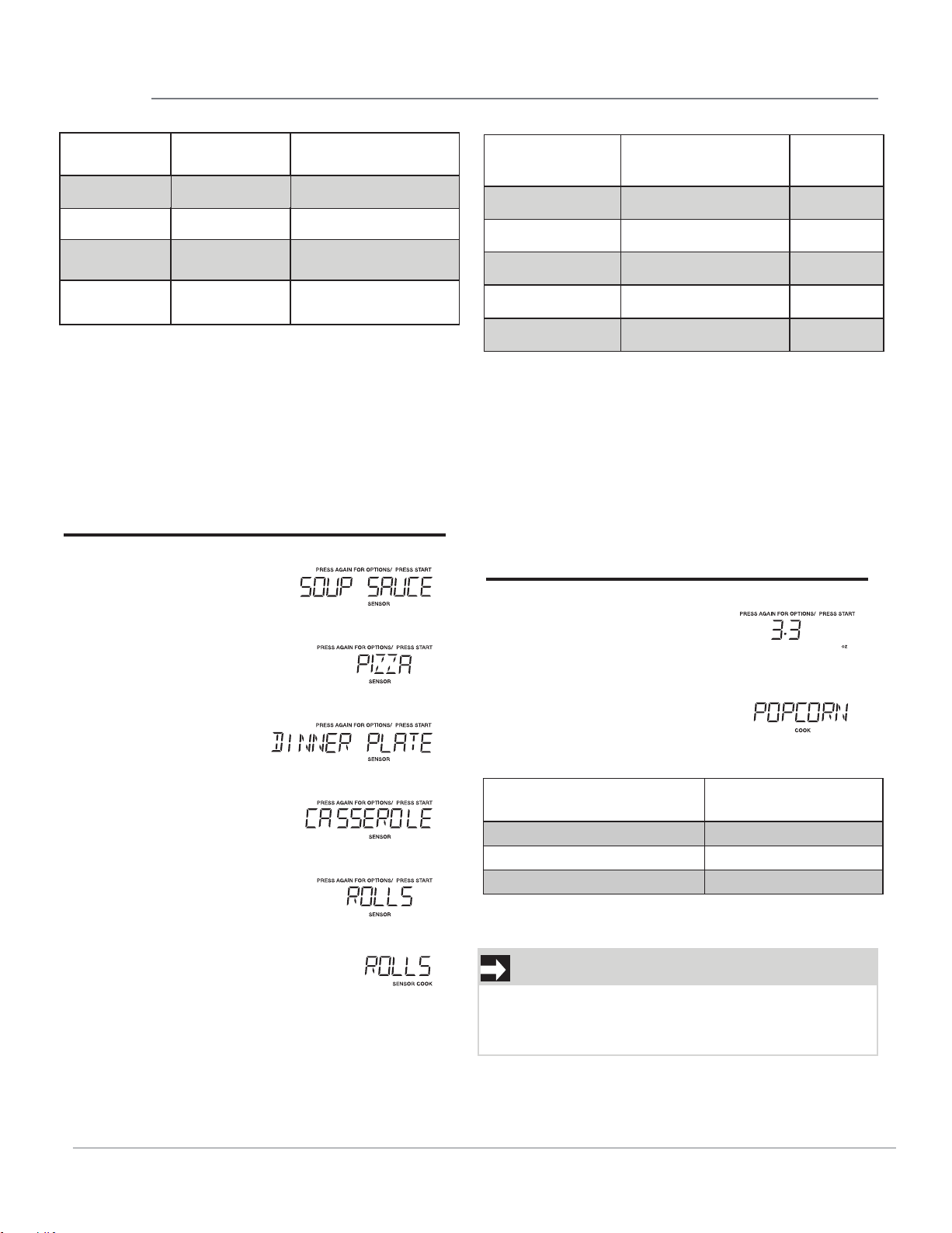
SENSOR REHEAT
• Suppose you want to reheat rolls with sensor
reheat.
Touch: Display Shows:
1.
Sensor
Reheat
2.
Sensor
Reheat
3.
Sensor
Reheat
4.
Sensor
Reheat
5.
Sensor
Reheat
6. START
POPCORN
The popcorn quick touch pad lets you pop 3.3,
3.0, 1.75 ounce bags of commercially packaged
microwave popcorn. Pop only one package at a
time. If you are using a microwave popcorn
popper, follow manufacturer's instructions.
• Suppose you want to pop a 3.3 oz. popcorn.
Touch: Display Shows:
1. Popcorn
2. START
NOTES for Popcorn
Do not use regular paper bags.
Do not re-pop unpopped kernals.
Do not pop popcorn in glass cookware.
Touch Sensor
Cook
Food
Amount
X2
X3
Frozen Dinner
10 oz/20 oz
X4
Rice
X1 Bacon
1-3 slices
1-2 cups
Frozen
Breakfast
10 oz/20 oz
Touch Popcorn
Amount
X1 3.3 oz
X2 3.0 oz
X3
1.75 oz
Touch Sensor
Reheat
Food Amount
X1
X2
X3
X4
X5
Soup/Sauce
1-2 ups
Pizza
-4 lices
Dinner Plate
1 late
Casserole
1 erving
Rolls
1-3 ieces
12
1
s
p
c
s
p
Time counting down
Time counting down
OPERATION
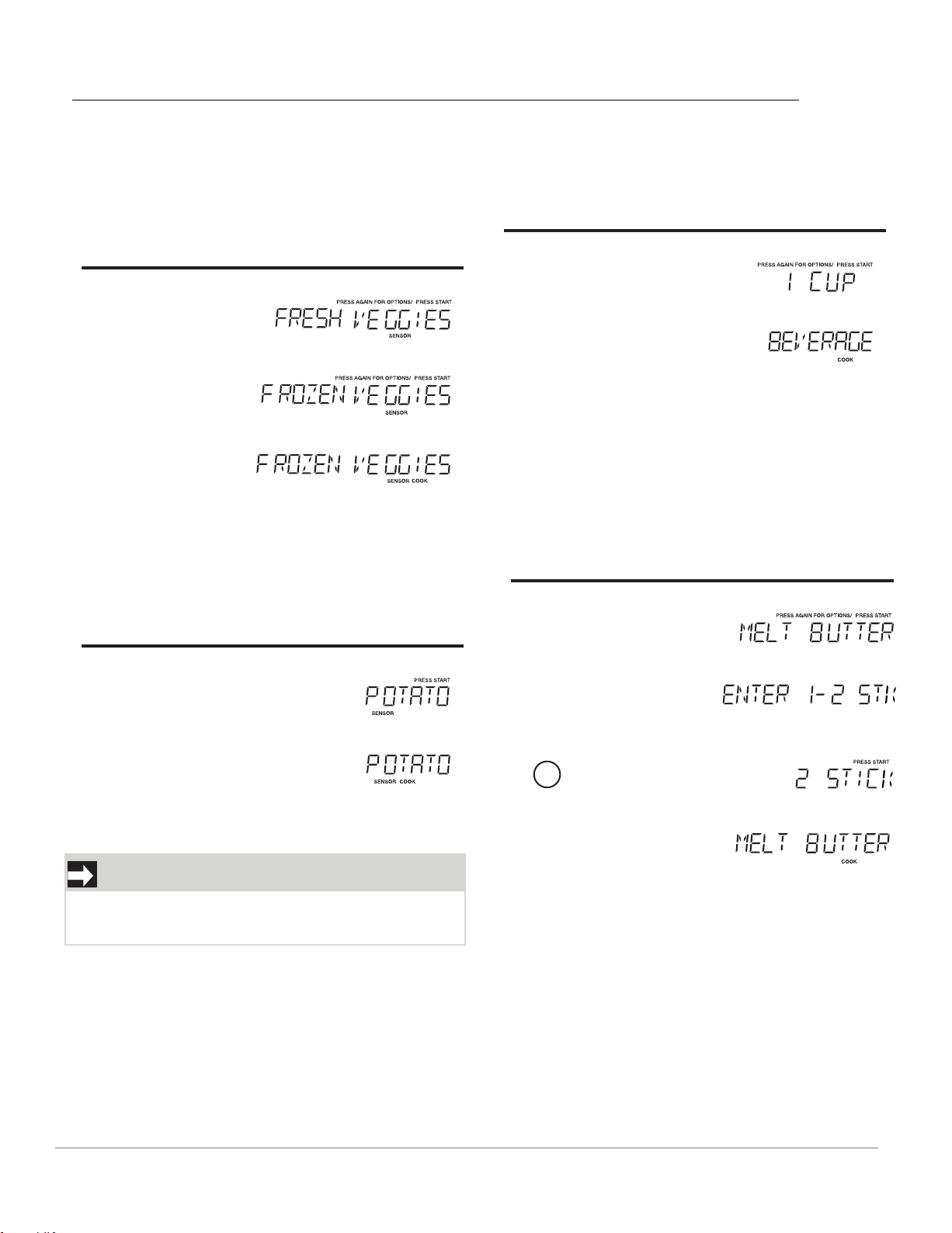
VEGGIES
There are 2 options (Frozen Vegetables, Fresh
Vegetables) under the Veggies.
• Suppose you want to cook two cups of frozen
veggies.
Touch: Display Shows:
1. Veggies
2. Veggies
3. START
POTATO
• Suppose you want to cook 1 to 4 baked Potatoes.
Touch: Display Shows:
1. Potato
2. START
BEVERAGE
• Suppose you want to reheat beverages 1 to 2
cups.
Touch: Display Shows:
1. Beverage
2. START
SETTING MELT/SOFTEN
The oven uses low power to melt and soften items.
See the following table.
• Suppose you want to melt 2 sticks of Butter.
Touch: Display Shows:
1.
Melt/
Soften
2. START
3.
2
4. START
NOTES
Cooking times are based on an average 8 ounce
potato.
13
Time counting down
Time counting down
Time counting down
Time counting down
OPERATION
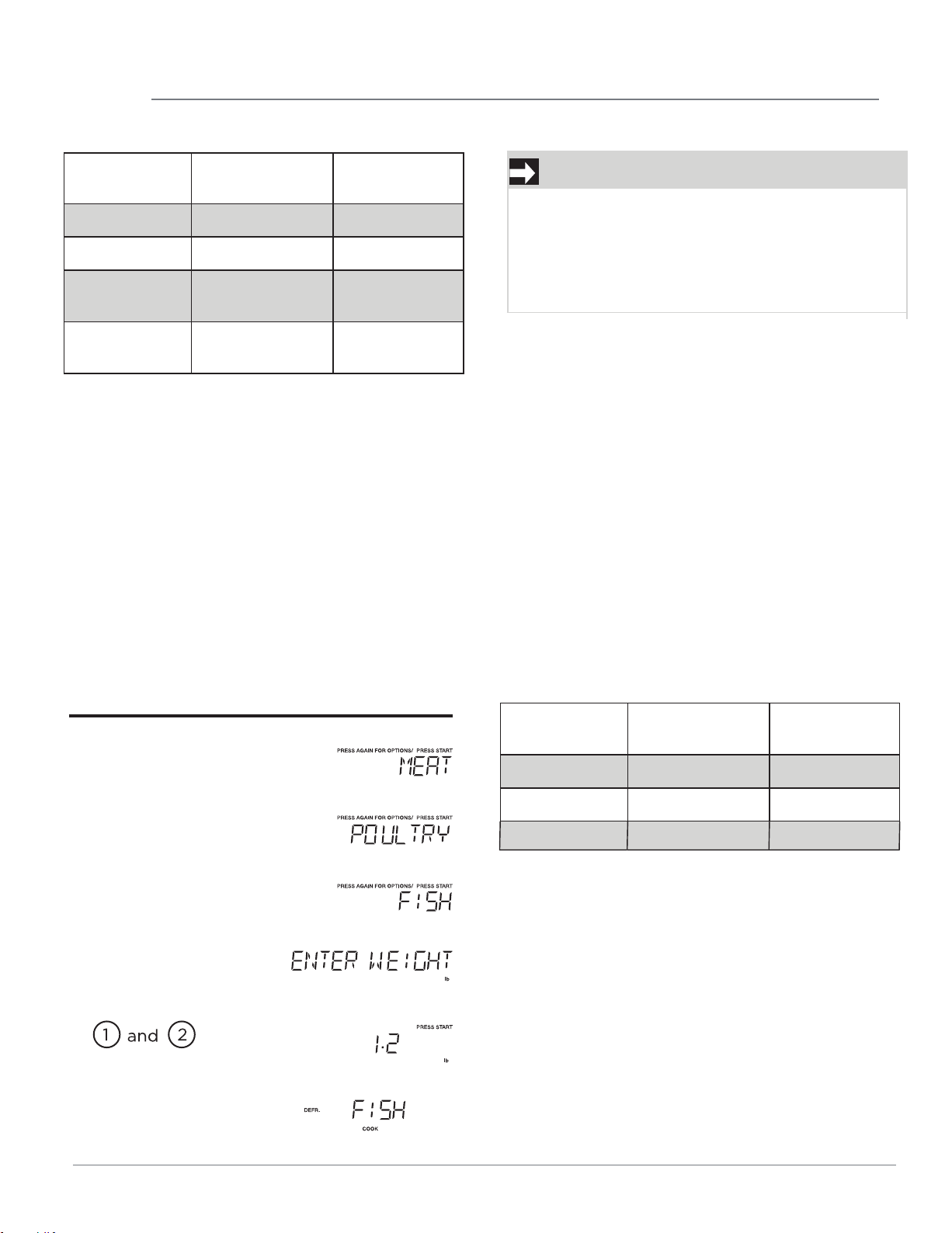
USING AUTO DEFROST
The auto defrost feature provides you with the best
defrosting method for frozen foods. The cooking
guide will show you which defrost sequence is
recommended for the food you are defrosting.
For added convenience, the Auto Defrost includes
a built-in beep mechanism that reminds you to
check, turn over, separate, or rearrange the food in
order to get the best defrost results. Three different
defrosting levels are provided:
1.MEAT
2.POULTRY
3.FISH
Available weight is 0.1-6.0 lbs
• Suppose you want to defrost 1.2 lbs of fish.
Touch: Display Shows:
1. Defrost
2. Defrost
3. Defrost
4. START
5.
To enter weight
6. START
NOTE
START
The oven will beep during the defrost cycle. At
this
time, open the door and turn, separate, or
rearrange the food. Remove any portions that
have thawed. Return frozen portions to the oven
and touch to resume the defrost cycle.
Touch Melt/
Soften
Food Amount
x1 Melt Butter
1 or 2 sticks
x2 Melt Chocolate 2/4/8 oz
x3
Soften Ice
Cream
1 pint/1.5 quart
x4
Soften Cream
Cheese
3 or 8 oz
OPERATING TIPS
• For best results, remove fish, shell fish, meat and
poultry from its original closed paper or plastic
package (wrapper). Otherwise, the wrap will hold
steam and juice close to the foods, which can
cause the outer surface of the foods to cook.
• For best results, roll your ground meat into a ball
before freezing. During the DEFROST cycle, the
microwave will signal when it is time to turn the
meat over. Scrape off any excess frost from the
meat and continue defrosting.
• Place foods in a shallow container or on a
microwave roasting rack to catch drippings.
This table shows food type selections and the
weights you can set for each type. For best results,
loosen or remove covering on food.
Touch Defrost
Menu Amount
x1 Meat 0.1-6.0 lbs.
x2 Poultry 0.1-6.0 lbs.
x3 Fish 0.1-6.0 lbs.
Time counting down
14
MICROWAVE COOKING
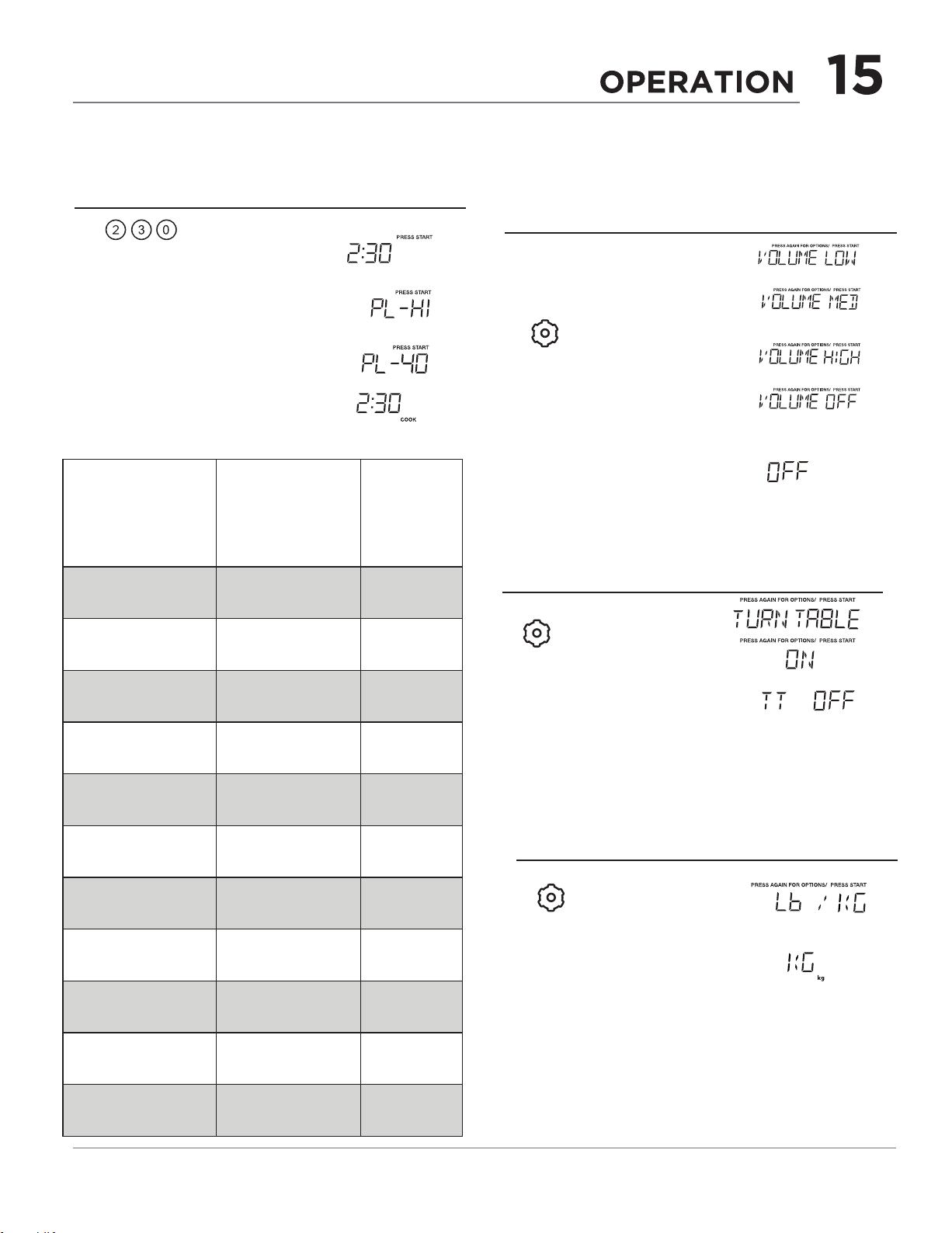
TOUCH POWER
LEVEL PAD
NUMBER OF
TIMES FOR
DESIRED POWER
APPROXIMATE
PERCENTAGE
OF POWER
COMMON
WORDS
FOR
POWER
LEVELS
x 1
100% High
Power
x 2
90%
x 3
80%
x 4
70%
Medium
High
x 5
60%
x 6
50% Medium
x 7
40%
x 8
30%
Med Low/
Defrost
x 9
20%
x 10
10% Low
x 11
0%
SETTING WEIGHT LB/KG
• Suppose you want to change from lb to kg.
1.
x 3
2. START
Touch: Display Shows:
USER SETTING
VOLUME
Suppose you want to set the volume for "off".
(after 3 seconds)
(after 3 seconds)
(after 3 seconds)
Touch: Display Shows:
•
1.
x 1
The display will scroll.
When you see the
desired setting touch
Start.
2. START
1.
x 2
2. START
TURNTABLE ON/OFF
Touch:
Display Shows:
Suppose you want to microwave for 2:30 at 40%
power level.
•
4.
Time counting down
Power
Level
START
X6
3.
To set 2:30 cook
time for first stage.
Power
Level
Touch: Display Shows:
2.
1.
Level
Power
Level
Power
Level
Power
Level
Power
Level
Power
Level
Power
Level
Power
Level
Power
Level
Power
Level
Power
Level
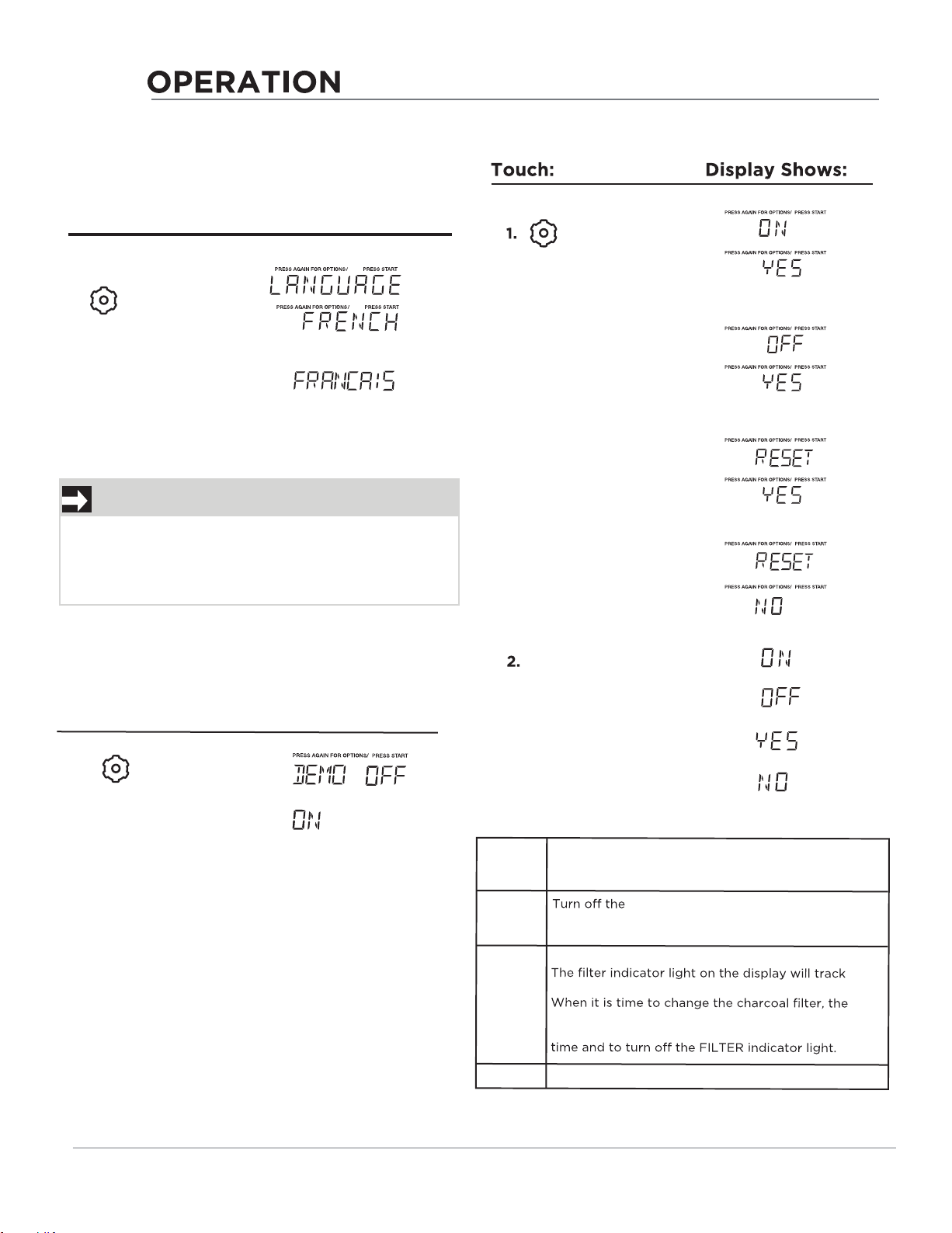
x 6
FILTER
FILTER
FILTER
FILTER
FILTER
FILTER
FILTER
FILTER
START
The display will scroll.
When you see the
desired setting touch
Start.
On yes
FILTER
indicator light on by default for recirculation.
The FILTER
indicator light will track the vent fan on
time.
Off yes
Reset yes
Reset FILTER
Indicator
the
vent fan on time.
FILTER indicator light will come on.
Use RESET YES to reset the vent motor tracking
Reset no
Will not reset the time for
FILTER
indicator light.
FILTER
indicator light when vented to
outside. The
FILTER
indicator light will not track the
vent fan on time
.
16
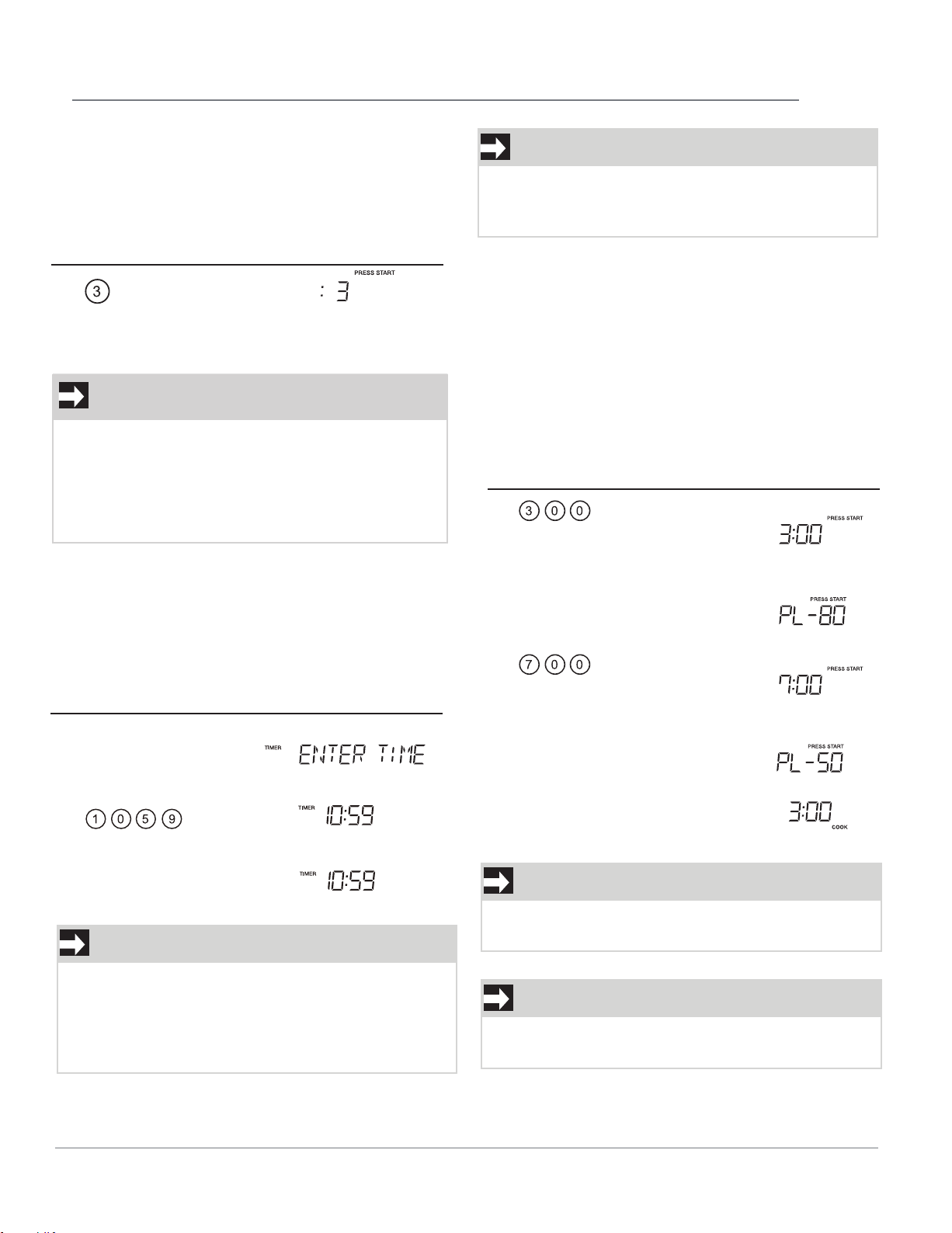
SETTING LANGUAGE
When previous language is English, suppose you
want to set the language.
Touch: Display Shows:
1.
x 4
2.
START
When the setting is completed, the current time
will display 2 seconds later, if the time is not set, the
oven will return to waiting state.
NOTE
When START is touched
and the previous settin
g
was English it will be set to French. If you want to
switch back to English you will have to again
touch START four times and then touch START.
DEMO SETTING
•
Suppose you want to turn on Demo Mode
1.
x 5
2. START
Touch:
Display Shows:
SETTING FILTER
OPERATION
"Food" will be displayed if a quick start cooking
cycle or +10 Sec/+30 Sec key is touched more
NOTE
1.
Touch: Display Shows:
USING ONE TOUCH START
Touch 1 - 9 for 1 - 9 minutes microwave cooking. The
cooking will start 2 seconds after your selection.
• Suppose you want to microwave for 3
minutes.
Time counting down
automatically after 2
seconds
17
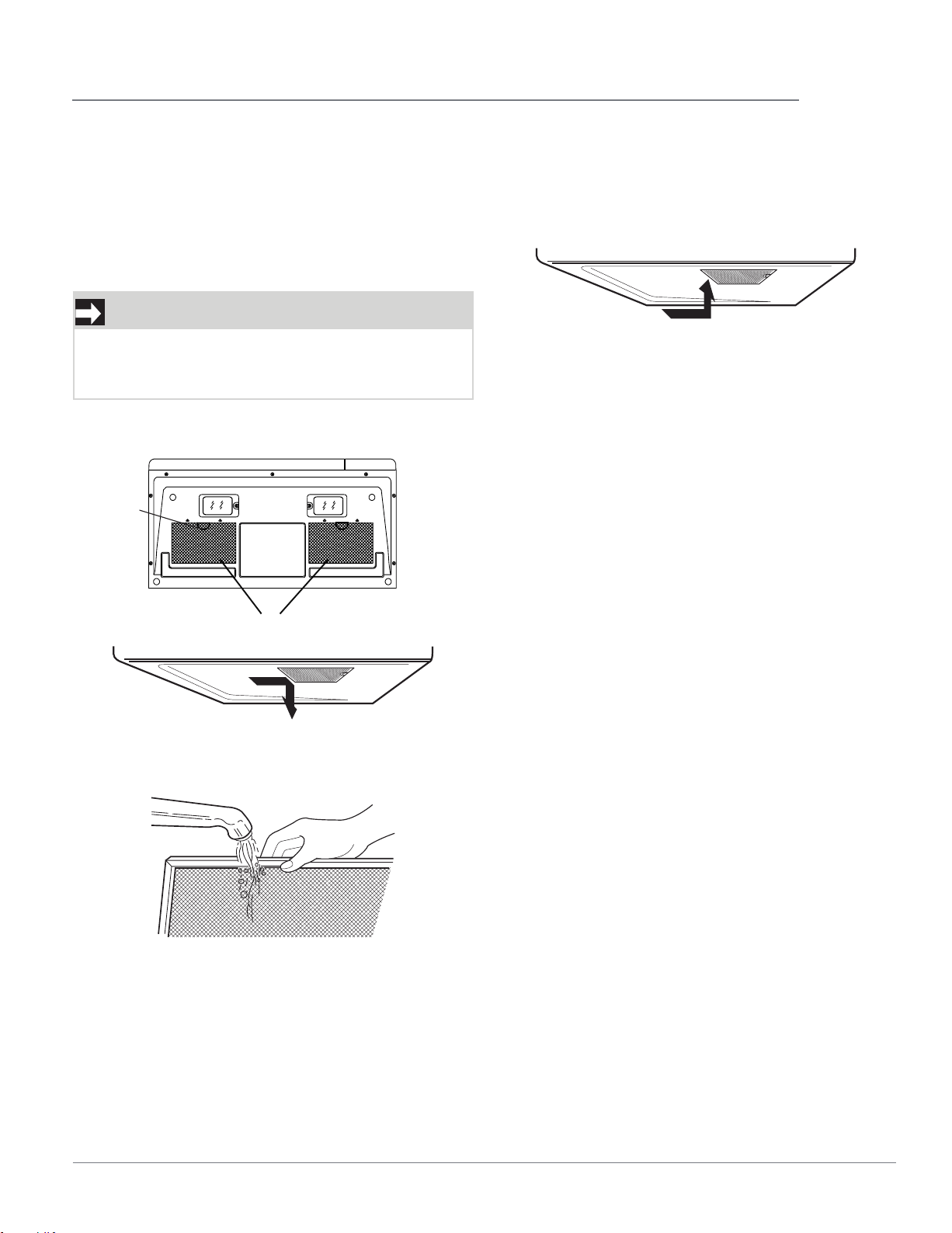
SETTING THE TIMER
• Your microwave oven can be used as a kitchen
timer. You can set up to 99:99. The kitchen timer
can be used while the microwave oven is running.
• Suppose you want to set a timer for 10:59.
Touch: Display Shows:
1. Timer
On-Off
2.
3. Timer/On-Off
(Timer counts down)
NOTE
There are not any other programs during the
kitchen timer.
During the process of setting the timer, if you
touch STOP or there is not any operation in 5
minutes, the oven will enter to waiting state.
NOTE
The display will return to default setting after 15
minutes if a cooking cycle is stopped and not
restarted.
• Suppose you want to set a 2-stage cook cycle.
The first stage is a 3 minute cook time at 80%
cook power then a 7 minute cook time at 50%
cook power.
MULTI-STAGE COOKING
For best results, some recipes call for different
power levels during a cook cycle. You can program
your microwave for two power level stages during
the cooking cycle.
4.
5.
NOTE
At the end of 3 minutes the display will change
to 7 minutes.
Time counting down
Power
Level
START
X
6
1.
To set a 3 minute
cook time for first
stage.
2.
3.
To set a 7 minute
cook power for the
second stage.
Power
Level
X3
Touch: Display Shows:
NOTE
Defrost and auto menu can not be set in multi-
stage cook
than 5 minutes after the door of microwave oven
is closed. You must open then close the door
again to clear "Food" from the display.

18
CLEANING AND CARE
Disconnect the power cord or leave the door open to deactivate the oven during cleaning. Disconnect the
power cord before replacing filters and lights.
EXTERIOR
The outside surface is precoated steel and plastic.
Clean the outside with mild soap and water; rinse
and dry with a soft cloth. Do not use any type of
household or abrasive cleaner.
DOOR
Wipe the window on both sides with a soft cloth
to remove any spills or spatters. Metal parts will
be easier to maintain if wiped frequently with a
soft cloth. Avoid the use of spray and other harsh
cleaners as they may stain, streak or dull the door
surface.
EASY CARE™ STAINLESS STEEL /
SMUDGE _PRO OF™ STAINLESS STEEL
/ BLACK STAINLESS STEEL(SOME
MODELS)
Your microwave oven(some models) may have a
Stainless Steel finish or coating. Clean the stainless
with warm soapy water using a clean sponge
or cloth. Rinse with clean water and dry with a
soft clean cloth. DO NOT use ANY store bought
cleaners like Stainless Steel cleaners or any other
types of cleaners containing any
abrasive, chlorides,
chlorines or ammonia. It is recommended to use
mild dish soap and water or a 50/50 solution of
water and vinegar.
TOUCH CONTROL PANEL
Care should be taken in cleaning the touch control
panel. If the control panel becomes soiled, open the
microwave oven door before cleaning. Wipe the
panel with a cloth dampened slightly with water
only. Dry with a soft cloth. Do not scrub or use any
sort of chemical cleaners. Close door and touch
STOP.
INTERIOR
Cleaning is easy because little heat is generated to
the interior surfaces. To clean the interior surfaces,
wipe with a soft cloth and warm water. DO NOT
USE ABRASIVE OR HARSH CLEANERS OR
SCOURING PADS. For heavier soil, use baking soda
or a mild soap; rinse thoroughly with hot water.
The round wire rack and shelf can be cleaned with
hot soapy water, rinsed and dried.
WAVEGUIDE COVER
The waveguide cover is located on the right side
in the microwave oven cavity. It is made from mica
so requires special care. Keep the waveguide cover
clean to assure good microwave oven performance.
Carefully wipe with a damp cloth any food spatters
from the surface of the cover immediately after
they occur. Built-up splashes may overheat and
cause smoke or possibly catch fire. DO NOT
REMOVE THE WAVEGUIDE COVER.
ODOR REMOVAL
Occasionally, a cooking odor may remain in the
microwave oven. To remove, combine 1 cup water,
grated peel and juice of 1 lemon in a 2-cup glass
measuring cup.
Boil for several minutes using 100% power.
Allow to set in microwave oven until cool. Wipe
interior with a soft cloth.
TURNTABLE/TURNTABLE SUPPORT
The turntable and turntable support can be
removed for easy cleaning. Wash them in mild,
sudsy water; for stubborn stains use a mild cleanser
and non-abrasive scouring sponge. They are also
dishwasher-proof. Use upper
wirerack of dishwasher. The turntable motor shaft
is not sealed, so excess water or spills should be
wiped up immediately.
CLEANING AND CARE
19
Disconnect the power cord or leave the door open to deactivate the oven during cleaning. Disconnect the
power cord before replacing filters and lights.
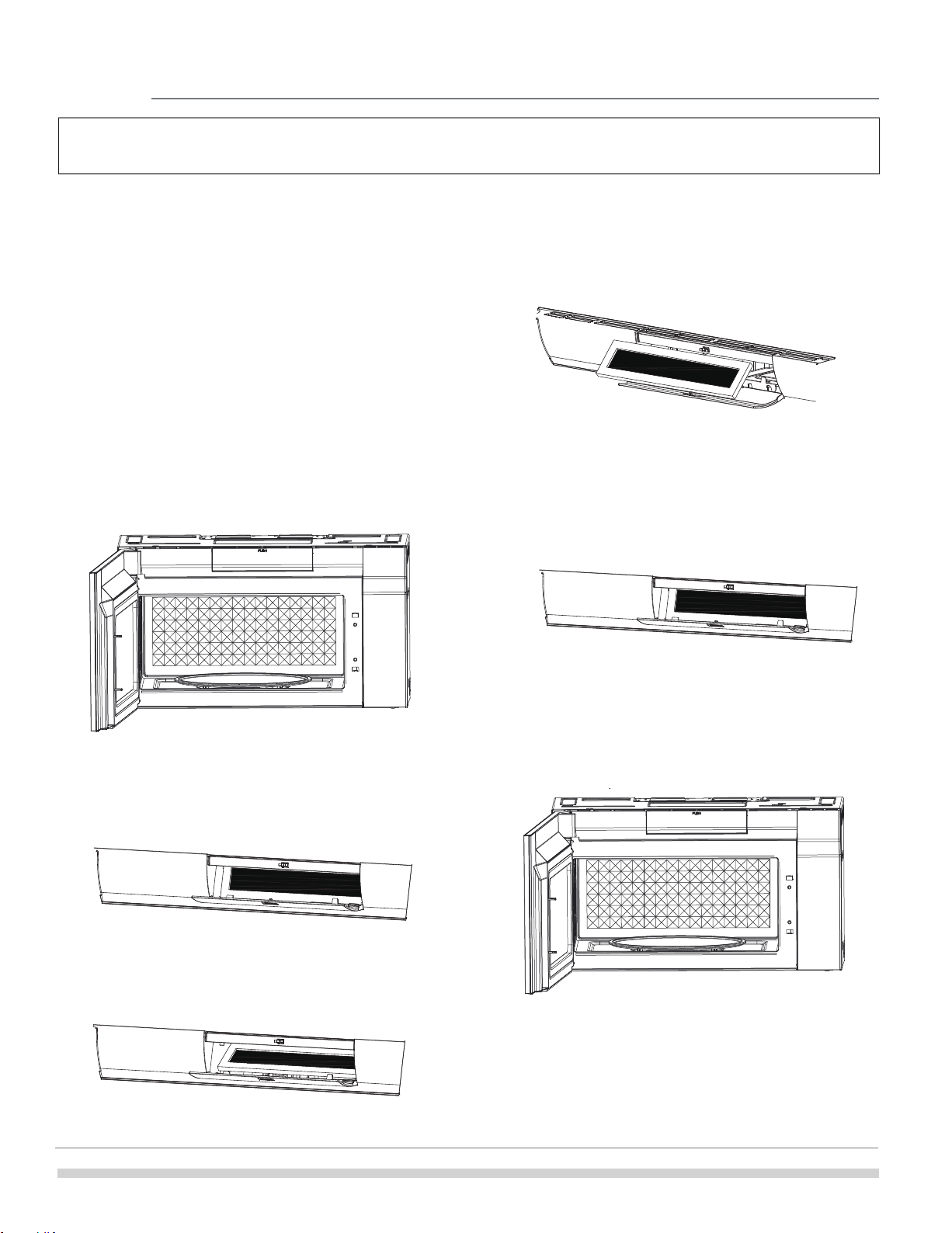
Cleaning the grease filters
The oven ventilation grease filters should be
removed and cleaned often; generally at least once
every month.
To order parts call 800-599-7569
Grease filter part number 5304478913
CAUTION
To avoid risk of personal injury or property
damage, do not operate oven hood without filters
properly in place.
Front
Rear
Grease
filters
Tab
1. To remove the grease filter filters, slide
the filter to the rear. Then pull filter downward
and push to the other side. The filter will drop
out. Repeat for the 2nd filter.
2. Soak the
grease filters in hot water using a
mild detergent. Rinse well and shake to dry or
wash in a dishwasher. Do not use ammonia. The
aluminum on the filter will corrode and darken.
3.
To reinstall the
grease filter, slide it into the
side slot, then push up and toward
oven to
lock. Reinstall the 2nd filter using the same
procedure.
20
Disconnect the power cord or leave the door open to deactivate the oven
during cleaning. Disconnect the power cord before replacing filters and lights.
4. Remove the charcoal filter by pushing the top
of the filter inwards, then pull it forward out
from the unit.
Charcoal filter replacement
Charcoal filter part number
the top area of the filter cavity.
6. Press the bottom of charcoal filter to place it
into the correct position.
FRPAMRAF
5. Slide the top of the new charcoal filter into ????
3. And then open the cover.
.
7. P
r
e
s
s
the
"
Push" to close the cover
To order parts call 800-599-7569
Charcoal filter when installed in your microwave oven, is
used for nonvented, recirculated Installation. When it is
time to replace the charcoal filter, the FILTER light on
display will turn on.
If your microwave is vented to the outside, then you can
turn off the filter light in the settings.
1 . Disconnect power to the microwave oven at the circuit
breaker panel or by unplugging.
2. Pr
es
s
the
"
Push" position on the
c
o
v
e
r
.
CLEANING AND CARE
21
Please check the following before calling for service:
Place one cup of water in a glass measuring cup in the microwave oven and close the door securely.
Operate the microwave oven for one minute at HIGH 100%.
A Does the microwave oven light come on?
B Does the cooling fan work? (Put your hand on the louver above the Control Panel.)
C Does the turntable rotate? (It is normal for the turntable to turn in either direction.)
D Is the water in the microwave oven warm?
If “NO” is the answer to any of the above questions, please check electrical outlet, fuse and/or circuit
breaker. If they are functioning properly, CONTACT YOUR NEAREST ELECTROLUX AUTHORIZED SER-
VICER.
A microwave oven should never be serviced by a “do-it-yourself” repair person.
YES ____ NO ____
YES ____ NO ____
YES ____ NO ____
YES ____ NO ____
SERVICE CALL CHECK
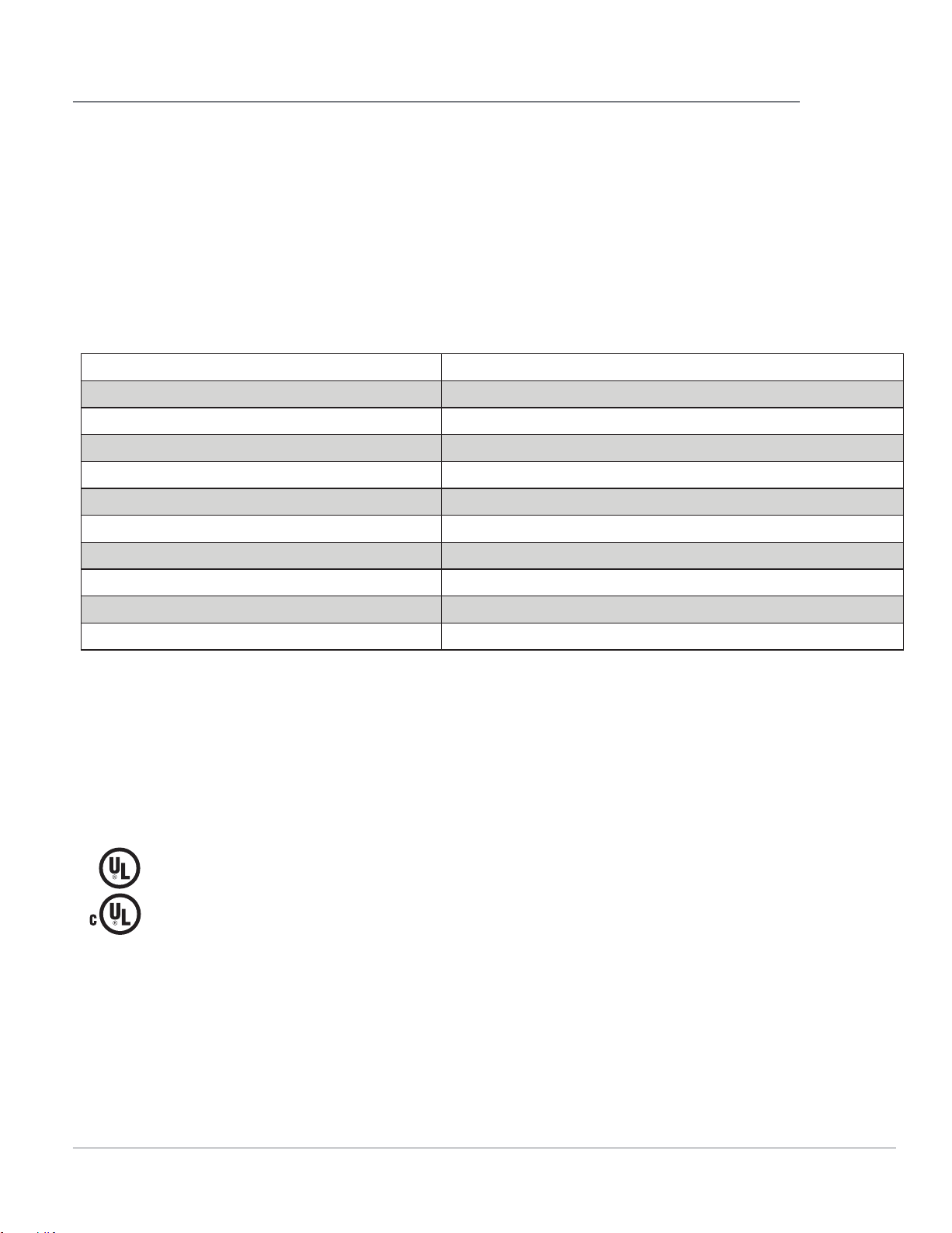
AC Line Voltage: Single phase 120V, 60Hz, AC only
AC Power Required: 1 500 W 14.2 amps.
Output Power*: 1000 W
Frequency: 2450 MHz (Class B/Group2)**
Outside Dimensions: 29 .88 ”(W) x 15.94”(D) x 16.41 ”(H)
Cavity Dimensions: 20.94 ”(W) x 14.57”(D) x 10.51 ”(H)
Microwave oven Capacity***: 1.9 Cu.Ft.
Cooking Uniformity: Turntable
Weight: Approx. (net) 57.1 lbs, (gross) 63.9 lbs
Work/Night Light: 2*1.2W LED, the part number is 5304499540.
Oven Light: 1*1.2W LED, the part number is 5304499540.
* The International Electrotechnical Commission’s standardized method for measuring output wattage.
This test method is widely recognized.
** This is the classification of ISM (Industrial, Scientific and Medical) equipment described in the
International Standard CISPR11.
*** Internal capacity is calculated by measuring maximum width, depth and height. Actual capacity for
holding food is less. In compliance with standards set by:
FCC - Federal Communications Commission Authorized.
DHHS - Complies with Department of Health and Human Services (DHHS) rule, CFR, Title 21, Chapter I,
Subchapter J.
NHW - Department of National Health and Welfare of Canada.
- This symbol on the nameplate means the product is listed by Underwriters Laboratories,
Inc.
- This symbol on the nameplate means the product is listed by Underwriters Laboratories,
Inc. for use in USA or Canada.
SPECIFICATIONS
22
Your appliance is covered by a one year limited warranty. For one year from your original date of
purchase, Electrolux will pay all costs for repairing or replacing any parts of this appliance that prove
to be defective in materials or workmanship when such appliance is installed, used and maintained in
accordance with the provided instructions.
Exclusions This warranty does not cover the following:
1. Products with original serial numbers that have been removed, altered or cannot be readily
determined.
2. Product that has been transferred from its original owner to another party or removed outside the
USA or Canada.
3. Rust on the interior or exterior of the unit.
4. Products purchased “as-is” are not covered by this warranty.
5. Food loss due to any refrigerator or freezer failures.
6. Products used in a commercial setting.
7. Service calls which do not involve malfunction or defects in materials or workmanship, or for
appliances not in ordinary household use or used other than in accordance with the provided
instructions.
8. Service calls to correct the installation of your appliance or to instruct you how to use your appliance.
9. Expenses for making the appliance accessible for servicing, such as removal of trim, cupboards,
shelves, etc., which are not a part of the appliance when it is shipped from the factory.
10. Service calls to repair or replace appliance light bulbs, air filters, water filters, other consumables, or
knobs, handles, or other cosmetic parts.
11. Surcharges including, but not limited to, any after hour, weekend, or holiday service calls, tolls, ferry
trip charges, or mileage expense for service calls to remote areas, including the state of Alaska.
12. Damages to the finish of appliance or home incurred during installation, including but not limited to
fl oors, cabinets, walls, etc.
13. Damages caused by: services performed by unauthorized service companies; use of parts other than
genuine Electrolux parts or parts obtained from persons other than authorized service companies; or
external causes such as abuse, misuse, inadequate power supply, accidents, fires, or acts of God.
DISCLAIMER OF IMPLIED WARRANTIES; LIMITATION OF REMEDIES
CUSTOMER’S SOLE AND EXCLUSIVE REMEDY UNDER THIS LIMITED WARRANTY SHALL BE PRODUCT
REPAIR OR REPLACEMENT AS PROVIDED HEREIN. CLAIMS BASED ON IMPLIED WARRANTIES,
INCLUDING WARRANTIES OF MERCHANTABILITY OR FITNESS FOR A PARTICULAR PURPOSE, ARE
LIMITED TO ONE YEAR OR THE SHORTEST PERIOD ALLOWED BY LAW, BUT NOT LESS THAN ONE
YEAR. ELECTROLUX SHALL NOT BE LIABLE FOR CONSEQUENTIAL OR INCIDENTAL DAMAGES SUCH
AS PROPERTY DAMAGE AND INCIDENTAL EXPENSES RESULTING FROM ANY BREACH OF THIS
WRITTEN LIMITED WARRANTY OR ANY IMPLIED WARRANTY. SOME STATES AND PROVINCES DO
NOT ALLOW THE EXCLUSION OR LIMITATION OF INCIDENTAL OR CONSEQUENTIAL DAMAGES, OR
LIMITATIONS ON THE DURATION OF IMPLIED WARRANTIES, SO THESE LIMITATIONS OR EXCLUSIONS
MAY NOT APPLY TO YOU. THIS WRITTEN WARRANTY GIVES YOU SPECIFIC LEGAL RIGHTS. YOU MAY
ALSO HAVE OTHER RIGHTS THAT VARY FROM STATE TO STATE.
If You Need Service
Keep your receipt, delivery slip, or some other appropriate payment record to establish the warranty
period should service be required. If service is performed, it is in your best interest to obtain and keep all
receipts. Service under this warranty must be obtained by contacting Electrolux at the addresses or phone
numbers below.
This warranty only applies in the USA and Canada. In the USA, your appliance is warranted by Electrolux
Major Appliances North America, a division of Electrolux Home Products, Inc. In Canada, your appliance is
warranted by Electrolux Canada Corp. Electrolux authorizes no person to change or add to any obligations
under this warranty. Obligations for service and parts under
this warranty must be performed by Electrolux or an authorized service company. Product features or
specifications as described
or illustrated are subject to change without notice.
USA
1-800-374-4432
Electrolux Home Products,
Inc.,
10200 David Taylor Drive
Charlotte, NC 28262
Canada
1.800.265.8352
Electrolux
Canada Corp.
5855
Terry Fox Way
Mississauga, Ontario, Canada
L5V
3E4
Printed
in
China
welcome
home
Frigidaire.com
1-800-374-4432
Frigidaire.ca
1-800-265-8352
owner support
accessories
service
Our home is your home. Visit us if you
need help with any of these things:
registration
(See your registration card
for more information.)