
ES
Owner’s Manual
Mode d’emploi
Manual de instrucciones
Before using the instrument, be sure to read “PRECAUTIONS” on pages 4-5.
For information on assembling the instrument, refer to the instructions at the end of this
manual.
Avant d’utiliser l’instrument, lisez attentivement la section « PRÉCAUTIONS D’USAGE »
aux pages 4 et 5.
Pour plus d’informations sur l’assemblage de l’instrument, reportez-vous aux instructions
figurant à la fin de ce manuel.
Antes de utilizar el instrumento, lea las “PRECAUCIONES”, en las páginas 4-5.
Para obtener más información sobre el montaje del instrumento, consulte las
instrucciones que encontrará al final de este manual.
EnglishFrançaisEspañol
FR
EN
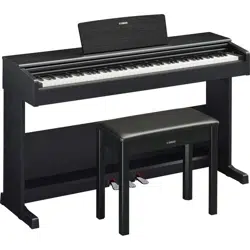
YDP
-
105
DIGITAL PIANO
PIANO NUMÉRIQUE
PIANO DIGITAL
1. IMPORTANT NOTICE: DO NOT MODIFY THIS
UNIT!
This product, when installed as indicated in the instruc-
tions contained in this manual, meets FCC requirements.
Modifications not expressly approved by Yamaha may
void your authority, granted by the FCC, to use the prod-
uct.
2. IMPORTANT: When connecting this product to accesso-
ries and/or another product use only high quality shielded
cables. Cable/s supplied with this product MUST be used.
Follow all installation instructions. Failure to follow instruc-
tions could void your FCC authorization to use this prod-
uct in the USA.
3. NOTE: This product has been tested and found to com-
ply with the requirements listed in FCC Regulations, Part
15 for Class “B” digital devices. Compliance with these
requirements provides a reasonable level of assurance
that your use of this product in a residential environment
will not result in harmful interference with other electronic
devices. This equipment generates/uses radio frequen-
cies and, if not installed and used according to the instruc-
tions found in the users manual, may cause interference
harmful to the operation of other electronic devices. Com-
pliance with FCC regulations does not guarantee that
interference will not occur in all installations. If this product
is found to be the source of interference, which can be
determined by turning the unit “OFF” and “ON”, please try
to eliminate the problem by using one of the following
measures:
- Relocate either this product or the device that is being
affected by the interference.
- Utilize power outlets that are on different branch (circuit
breaker or fuse) circuits or install AC line filter/s.
- In the case of radio or TV interference, relocate/reorient
the antenna. If the antenna lead-in is 300 ohm ribbon
lead, change the lead-in to co-axial type cable.
If these corrective measures do not produce satisfactory
results, please contact the local retailer authorized to dis-
tribute this type of product. If you cannot locate the appro-
priate retailer, please contact Yamaha Corporation of
America, 6600 Orangethorpe Ave., Buena Park,
CA90620, USA.
The above statements apply ONLY to those products dis-
tributed by Yamaha Corporation of America or its subsid-
iaries.
(529-M04 FCC class B YCA 01)
FCC INFORMATION (U.S.A.)
(529-M02 FCC sdoc YCA 01)
COMPLIANCE INFORMATION STATEMENT
(Supplierʼs declaration of conformity procedure)
Responsible Party: Yamaha Corporation of America
Address: 6600 Orangethorpe Ave. Buena Park, Calif. 90620
Telephone: 714-522-9011
Type of Equipment: Digital Piano
Model Name: YDP-105
This device complies with Part 15 of the FCC Rules.
Operation is subject to the following two conditions:
1) this device may not cause harmful interference, and
2) this device must accept any interference received including interference that may cause undesired operation.
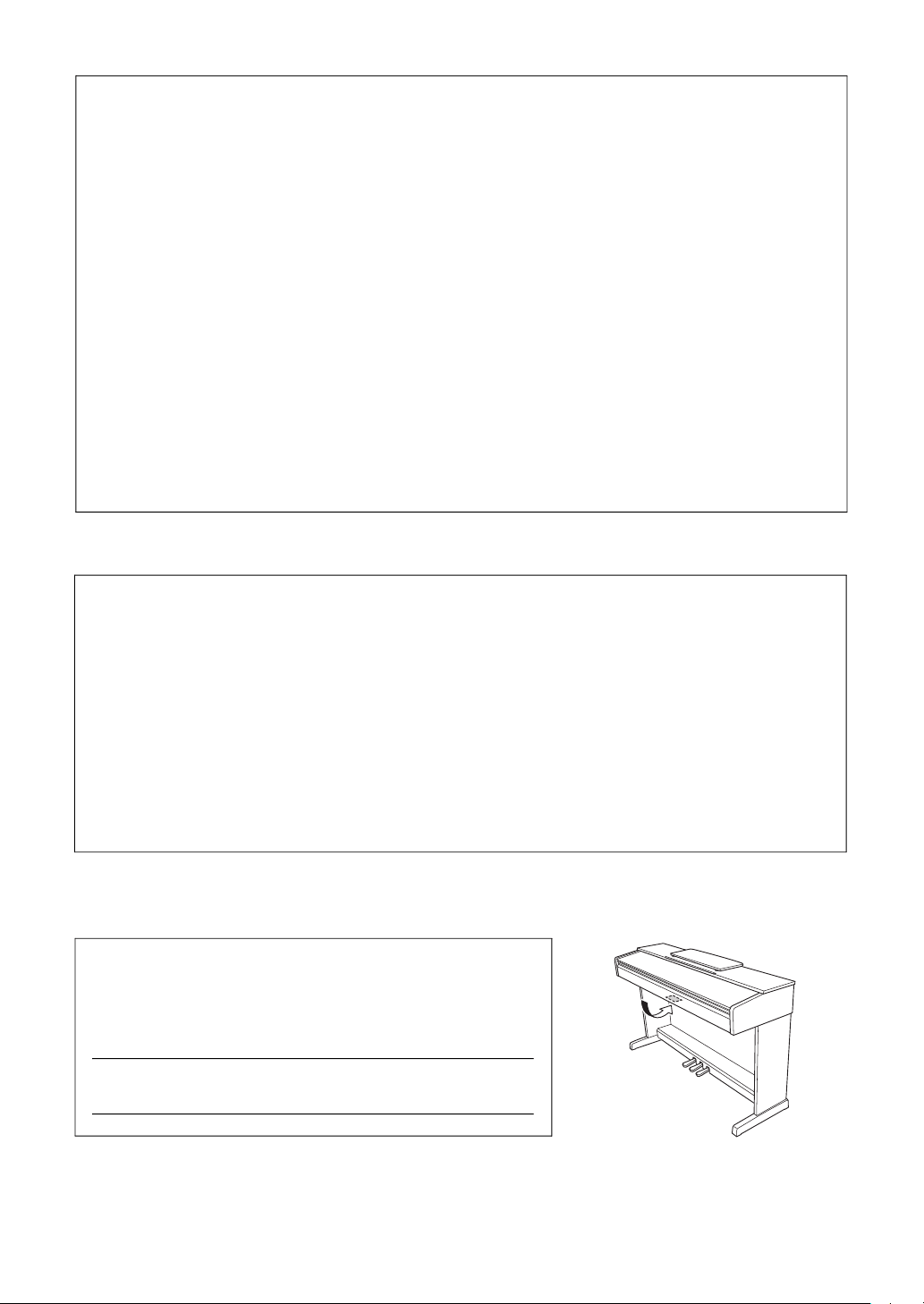
The model number, serial number, power requirements, etc., may be found on or
near the name plate, which is at the bottom of the unit. You should note this
serial number in the space provided below and retain this manual as a perma-
nent record of your purchase to aid identification in the event of theft.
Model No.
Serial No.
(1003-M06 plate bottom en 01)
The name plate is located on the bottom of the unit.
For AC adaptor
Explanation of Graphical Symbols
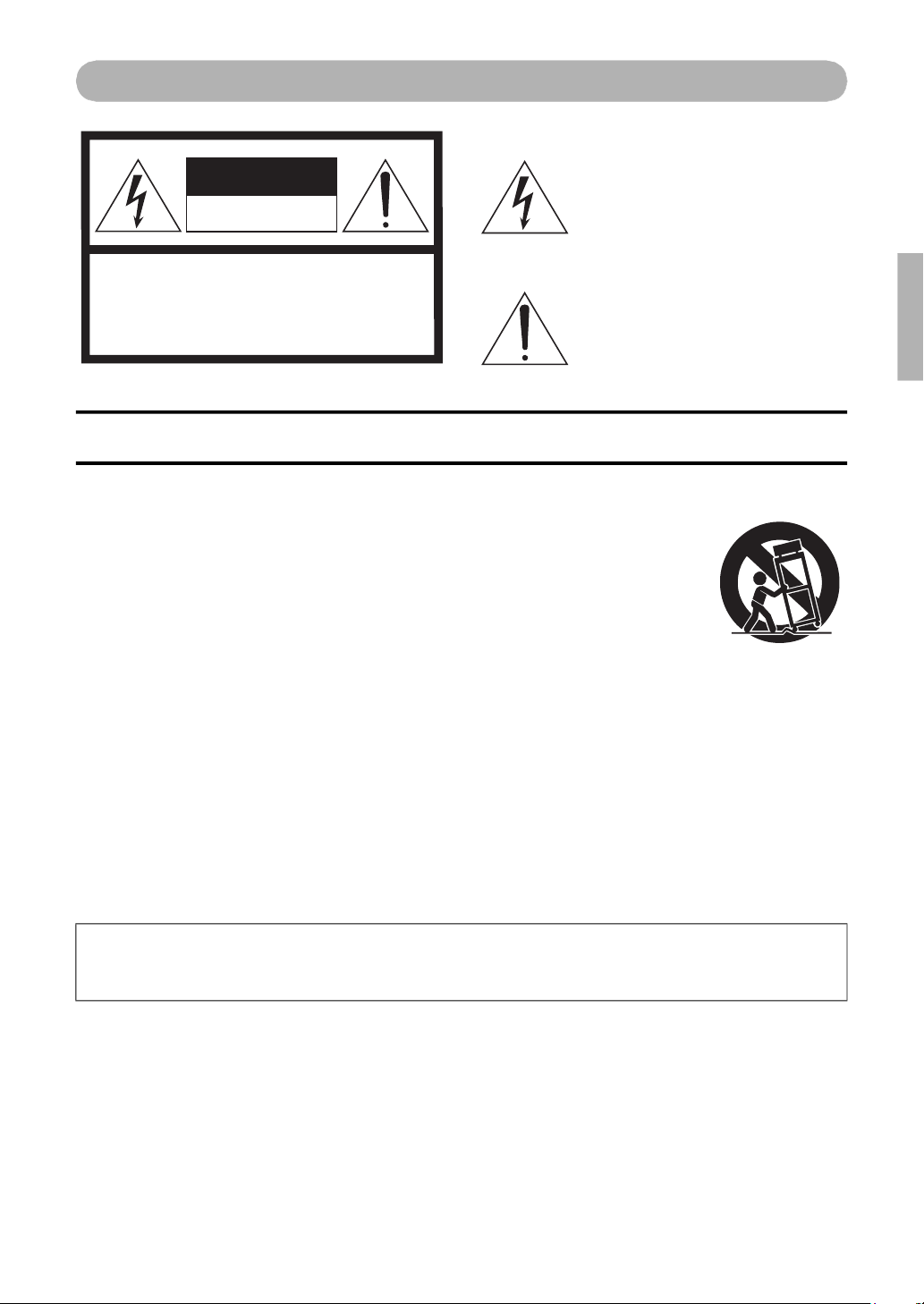
The lightning flash with arrowhead symbol
within an equilateral triangle is intended to
alert the user to the presence of uninsulated
“dangerous voltage” within the product’s
enclosure that may be of sufficient
magnitude to constitute a risk of electric
shock to persons.
The exclamation point within an equilateral
triangle is intended to alert the user to the
presence of important operating and
maintenance (servicing) instructions in the
literature accompanying the product.
IMPORTANT SAFETY INSTRUCTIONS
1 Read these instructions.
2 Keep these instructions.
3 Heed all warnings.
4 Follow all instructions.
5 Do not use this apparatus near water.
6 Clean only with dry cloth.
7 Do not block any ventilation openings. Install in
accordance with the manufacturer’s instructions.
8 Do not install near any heat sources such as
radiators, heat registers, stoves, or other
apparatus (including amplifiers) that produce
heat.
9 Do not defeat the safety purpose of the polarized
or grounding-type plug. A polarized plug has two
blades with one wider than the other. A grounding
type plug has two blades and a third grounding
prong. The wide blade or the third prong are
provided for your safety. If the provided plug does
not fit into your outlet, consult an electrician for
replacement of the obsolete outlet.
10 Protect the power cord from being walked on or
pinched particularly at plugs, convenience
receptacles, and the point where they exit from the
apparatus.
11 Only use attachments/accessories specified by
the manufacturer.
12 Use only with the cart,
stand, tripod, bracket, or
table specified by the
manufacturer, or sold with
the apparatus. When a cart
is used, use caution when
moving the cart/apparatus
combination to avoid injury
from tip-over.
13 Unplug this apparatus during lightning storms or
when unused for long periods of time.
14 Refer all servicing to qualified service personnel.
Servicing is required when the apparatus has
been damaged in any way, such as power-supply
cord or plug is damaged, liquid has been spilled or
objects have fallen into the apparatus, the
apparatus has been exposed to rain or moisture,
does not operate normally, or has been dropped.
(502-M01 UL 60065-1 en 01)
CAUTION: TO REDUCE THE RISK OF
ELECTRIC SHOCK, DO NOT REMOVE
COVER (OR BACK). NO USER-SERVICEABLE
PARTS INSIDE. REFER SERVICING TO
QUALIFIED SERVICE PERSONNEL.
CAUTION
RISK OF ELECTRIC SHOCK
DO NOT OPEN
WARNING
TO REDUCE THE RISK OF FIRE OR ELECTRIC SHOCK, DO NOT EXPOSE THIS APPARATUS TO RAIN OR
MOISTURE.
4
YDP-105 Owner’s Manual
PRECAUTIONS
PLEASE READ CAREFULLY BEFORE PROCEEDING
Especially in the case of children, a guardian should provide guidance on how to properly use and
handle the product before actual use.
Please keep this manual in a safe and handy place for future reference.
WARNING
Always follow the basic precautions listed below to avoid the possibility of serious injury or even death from
electrical shock, short-circuiting, damages, fire or other hazards. These precautions include, but are not limited to,
the following:
Power supply
• Do not place the power cord near heat sources such as
heaters or radiators. Also, do not excessively bend or
otherwise damage the cord, or place heavy objects on
it.
• Do not touch the product or the power plug during an
electrical storm.
• Only use the correct voltage specified for the product.
The required voltage is printed on the name plate of the
product.
• Use the specified AC adaptor (page 20).
• Check the power plug periodically and remove any dirt
or dust which may have accumulated on it.
• Insert the power plug firmly all the way into the AC
outlet. Using the product when it is not plugged in
sufficiently can cause dust to accumulate on the plug,
possibly resulting in fire or skin burns.
• When setting up the product, make sure that the AC
outlet you are using is easily accessible. If some trouble
or malfunction occurs, immediately turn off the power
switch and disconnect the plug from the outlet. Even
when the power switch is turned off, as long as the
power cord is not unplugged from the wall AC outlet, the
product will not be disconnected from the power source.
• Do not connect the product to an electrical outlet using
a multi-plug outlet extender. Doing so can result in
lower sound quality, or possibly cause overheating in
the outlet.
• When disconnecting the power plug, always hold the
plug itself and not the cord. Pulling by the cord can
damage it and cause electric shocks or a fire.
• If not using the product for long periods of time, be sure
to pull the power plug from the AC outlet.
Do not disassemble
• This product contains no user-serviceable parts. Do not
attempt to disassemble the internal parts or modify
them in any way.
Water warning
• Do not expose the product to rain, use it near water or
in damp or wet conditions, or place on it any containers
(such as vases, bottles or glasses) containing liquids
which might spill into any openings or places where
water may drop. A liquid such as water getting into the
product may cause a fire, electric shocks, or
malfunctions.
• Use the AC adaptor indoors only. Do not use in any wet
environments.
• Never insert or remove a power plug with wet hands.
Fire warning
• Do not place any burning items or open flames near the
product, since they may cause a fire.
Using the bench (if included)
• Do not place the bench in an unstable position where it
might accidentally fall over.
• Do not play carelessly with or stand on the bench.
Using it as a tool or stepladder or for any other purpose
might result in accident or injury.
• Only one person should sit on the bench at a time, in
order to prevent the possibility of accident or injury.
• If the bench screws become loose due to extensive
long-term use, tighten them periodically using the
specified tool in order to prevent the possibility of
accident or injury.
• Keep special watch over any small children so that they
don’t fall off the rear of the bench. Since the bench does
not have a backrest, unsupervised use may result in
accident or injury.
DMI-10 1/2
5
YDP-105 Owner’s Manual
If you notice any abnormality
• If any of the following problems occur, immediately turn
off the power switch and disconnect the power plug
from the outlet. Finally have the device inspected by
Yamaha service personnel.
- The power cord or plug becomes frayed or damaged.
- Unusual smells or smoke are emitted.
- Some object, or water has been dropped into the
product.
- There is a sudden loss of sound during use of the
product.
- Cracks or other visible damage appear on the
product.
CAUTION
Always follow the basic precautions listed below to avoid the possibility of physical injury to you or others, or
damage to the product or other property. These precautions include, but are not limited to, the following:
Assembly
• Assemble the product in the proper sequence by
following the assembly instructions in this manual. Also,
make sure to tighten the screws or bolts regularly.
Failure to do so might result in damage to the product or
even injury.
Location
• Do not place the product in an unstable position or a
location with excessive vibration, where it might
accidentally fall over and cause injury.
• Do not go near the product during an earthquake.
Strong shaking during an earthquake could cause the
product to move or tip over, resulting in damage to the
product or its parts, and possibly causing injury.
• When transporting or moving the product, always use
two or more people. Attempting to lift the product by
yourself may result in injuries, such as back injuries, or
cause the product to be dropped and broken, which
could lead to other injuries.
• Before moving the product, remove all connected
cables, to prevent damage to the cables or injury to
anyone who might trip over them.
Connections
• Before connecting the product to other electronic
components, turn off the power for all components.
Before turning the power on or off for all components,
set all volume levels to minimum.
• Be sure to set the volumes of all components at their
minimum levels and gradually raise the volume controls
while playing the product to set the desired listening
level.
Handling
• Do not insert your finger or hand in any gaps on the key
cover or product. Also take care that the key cover does
not pinch your finger.
• Do not insert foreign materials such as metal or paper
into any openings or gaps of the product. Failure to
observe this may cause a fire, electric shocks, or
malfunctions.
• Do not rest your weight on, or place heavy objects on
the product, and do not use excessive force on the
buttons, switches or connectors.
• Keep small parts out of the reach of infants. Your
children may accidentally swallow them.
• Do not use the product or headphones for a long period
of time at a high or uncomfortable volume level, since
this can cause permanent hearing loss. If you
experience any hearing loss or ringing in the ears,
consult a physician.
• Remove the power plug from the AC outlet before
cleaning the unit. Failure to observe this may cause
electric shocks.
Always turn the power off when the instrument is not in
use.
Even when the [ ] (Standby/On) switch is in standby
status (power lamp is off), electricity is still flowing to the
instrument at the minimum level.
When you are not using the instrument for a long time,
make sure you unplug the power cord from the wall AC
outlet.
Yamaha cannot be held responsible for damage
caused by improper use or modifications to the
product, or data that is lost or destroyed.
DMI-10 2/2

6
YDP-105 Owner’s Manual
NOTICE
To avoid the possibility of malfunction/ damage to the product,
damage to data, or damage to other property, follow the notices
below.
Handling
• Do not use the instrument in the vicinity of a TV, radio,
stereo equipment, mobile phone, or other electric devices.
Otherwise, the instrument, TV, or radio may generate noise.
• When you use the instrument along with an app on your
smart device, such as a smartphone or tablet, we recommend
that you enable “Airplane Mode” on the device to avoid noise
caused by communication.
• Do not expose the instrument to excessive dust or
vibrations, or extreme cold or heat (such as in direct
sunlight, near a heater, or in a car during the day) to prevent
the possibility of disfiguration, damage to the internal
components or unstable operation. (Verified operating
temperature range: 5° – 40°C, or 41° – 104°F.)
• Do not place vinyl, plastic or rubber objects on the
instrument, since this might discolor the instrument.
Maintenance
• When cleaning the instrument, use a soft and dry/slightly
damp cloth. Do not use paint thinners, solvents, alcohol,
cleaning fluids, or chemical-impregnated wiping cloths.
• During extreme changes in temperature or humidity,
condensation may occur and water may collect on the
surface of the instrument. If water is left, the wooden parts
may absorb the water and be damaged. Make sure to wipe
any water off immediately with a soft cloth.
Information
About copyrights
• The copyright of the “content”
*1
installed in this product
belongs to Yamaha Corporation or its copyright holder.
Except as permitted by copyright laws and other relevant
laws, such as copying for personal use, it is prohibited to
“reproduce or divert”
*2
without the permission of the
copyright holder. When using the content, consult with a
copyright expert.
• If you create music or perform with the contents through the
original use of the product, and then record and distribute
them, the permission of Yamaha Corporation is not required
regardless of whether the distribution method is paid or free
of charge.
*1: The word “content” includes a computer program, audio
data, Accompaniment Style data, MIDI data, waveform
data, voice recording data, music score, and score data,
etc.
*2: The phrase “reproduce or divert” includes taking out the
content itself in this product, or recording and
distributing it without changes in a similar manner.
About functions/data bundled with the
instrument
• Some of the preset songs have been edited for length or
arrangement, and may not be exactly the same as the
original.
About this manual
• The illustrations as shown in this manual are for
instructional purposes only.
• “QR Code” is a registered trademark of DENSO WAVE
INCORPORATED.
• The company names and product names in this manual are
the trademarks or registered trademarks of their respective
companies.
Tuning
• Unlike an acoustic piano, this instrument does not need to
be tuned by an expert (although the pitch can be user-
adjusted to match other instruments). This is because the
pitch of digital instruments is always maintained perfectly.
About disposal
• When disposing of this product, please contact the
appropriate local authorities.
7
YDP-105 Owner’s Manual
Table of Contents
PRECAUTIONS .................................... 4
About the Manuals................................ 8
Included Accessories ............................. 8
Panel Controls and Terminals.............. 9
Setting Up.............................................10
Key Cover ..................................................................10
Music Rest .................................................................10
Turning the Power On.............................................10
Auto Power Off Function........................................11
Volume Limiter Function .......................................11
Functions ..............................................12
Using the Pedals........................................................14
Data List................................................15
Keyboard Stand Assembly ...................16
Assembly Precautions..............................................16
Assembly....................................................................16
Data Backup and Initializing...............19
Troubleshooting...................................19
Specifications........................................20
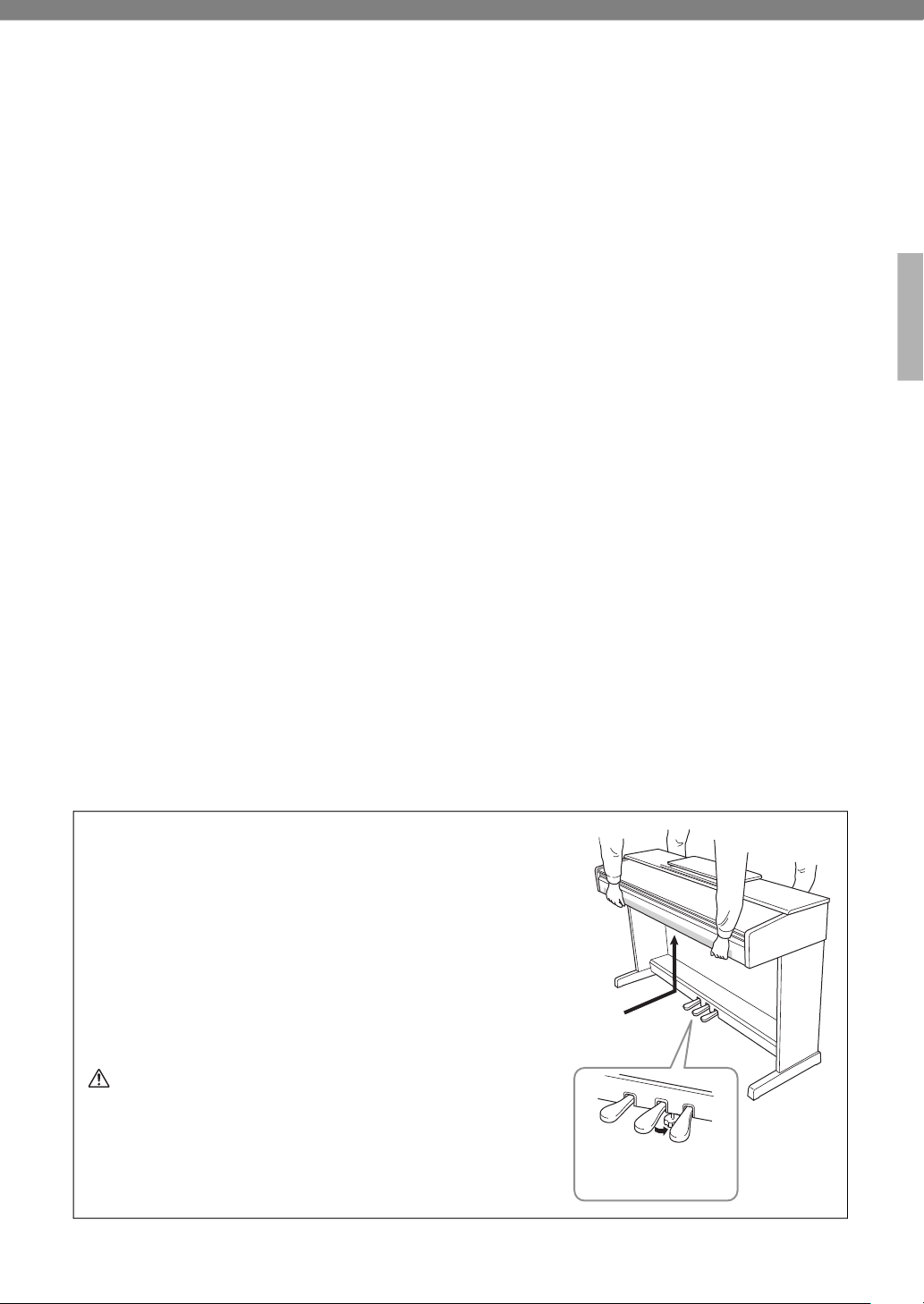
When Moving/Installing the Instrument
When moving the instrument after assembly (page 16), be sure
to keep the instrument horizontal and hold with two or more
people. Do not subject the instrument to excessive vibration or
shock. After re-installation, check the assembly checklist.
If you move to another location, you can transport the
instrument along with other belongings. The unit can be
transported either assembled or disassembled.
We recommend that you place the instrument away from the
wall by about 5 cm to optimize and enhance the overall sound
even further.
CAUTION
Always hold the bottom of the main unit. Moving the unit by holding
any part other than the bottom may cause damage to the unit or
personal injury.
NOTICE
Rotate the adjuster under the pedal until it no longer touches the
floor surface before moving the instrument. The adjuster can damage
the floor.
Be sure to hold
the bottom.
Rotate the adjuster until
it no longer touches the
floor surface.
8
YDP-105 Owner’s Manual
Thank you for choosing this Yamaha digital piano.
This instrument provides exceptionally high-quality sound
and expressive control for your playing enjoyment.
In order to make the most of the performance potential and features of the instrument,
please read the manuals thoroughly, and keep them in a handy place for later reference.
About the Manuals
This instrument has the following manuals.
Included Manuals
• Owner’s Manual (this book)
Explains how to use the instrument.
Online Manuals
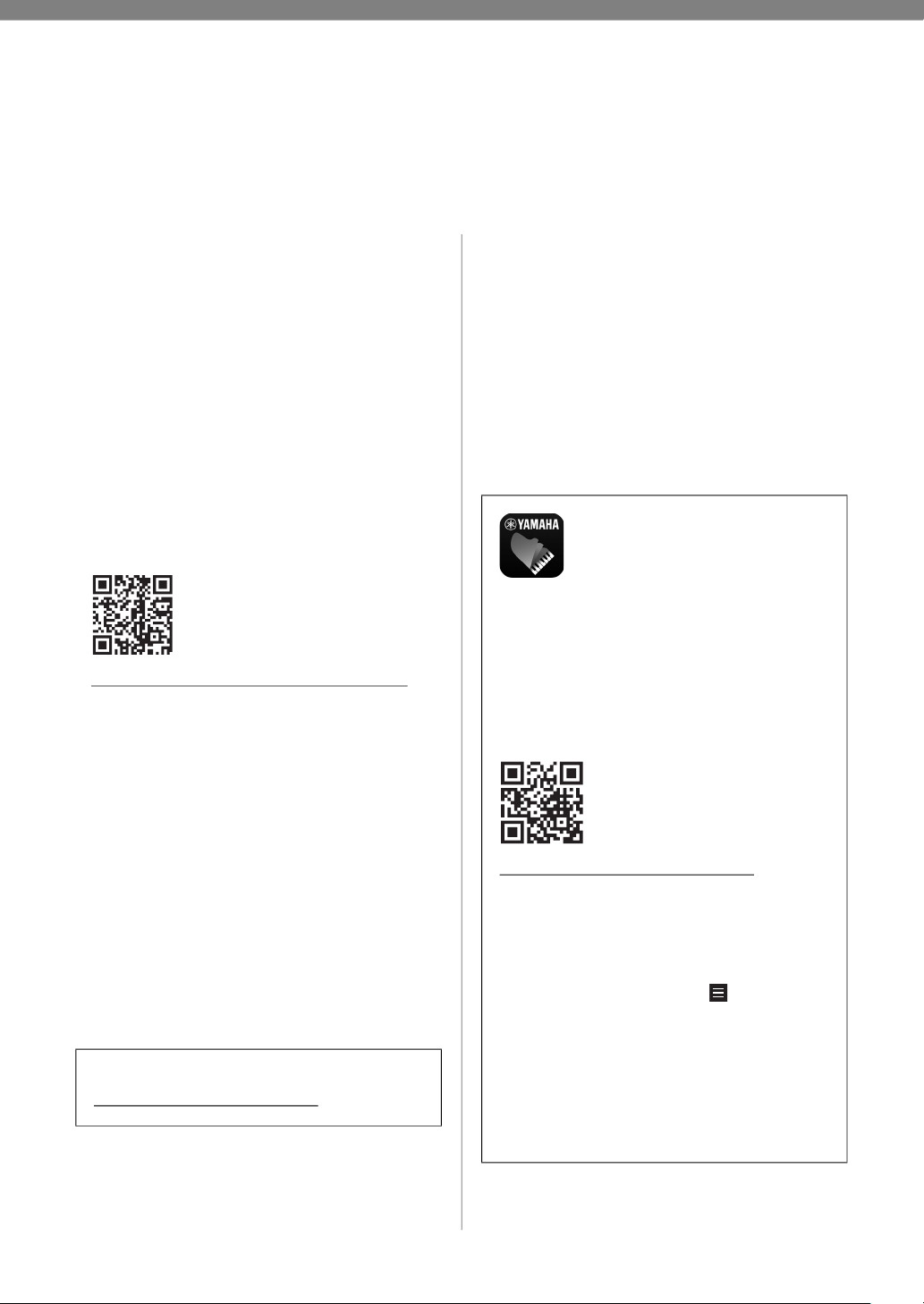
• Quick Operation Guide
Shows in chart form the functions assigned to the
keyboard for quick understanding. It also contains
various lists, such as those of Voices, Songs, etc.
https://manual.yamaha.com/mi/kb-ekb/ydp-105/
• Smart Device Connection Manual
Explains how to connect the instrument to a
smartphone or tablet, etc.
• Computer-related Operations
Includes instructions on connecting this instrument to
a computer.
• MIDI Reference
Contains the MIDI Data Format and MIDI
Implementation chart, as well as descriptions on MIDI
functions such as MIDI channel and Local Control
settings.
To obtain these materials, access the Yamaha
Downloads website, then enter the model name for
searching the desired files.
Included Accessories
• Owner’s Manual (this book) × 1
• Online Member Product Registration × 1
• AC adaptor* × 1
• Bench* × 1
* May not be included depending on your particular
area. Please check with your Yamaha dealer.
Yamaha Downloads
https://download.yamaha.com/
Smart device application –
“Smart Pianist”
With the specially developed “Smart
Pianist” app running on your smart
device, you can remotely control your digital
piano for even more convenience and
flexibility. By presenting various parameters
on-screen, this app allows you to make settings
in a visual, more intuitive manner. For more
details on “Smart Pianist,” refer to the
following Yamaha web site.
https://www.yamaha.com/kbdapps/
For instructions on connecting the instrument
to a smart device, Connection Wizard in
“Smart Pianist” will guide you according to the
operating condition and environment. To start
the Connection Wizard, tap “ ” (Menu)
located at the upper left of the screen to open
the Menu display, and then tap “Instrument” →
“Start Connection Wizard.”
NOTE
This instrument does not support wireless connection.
Please select “Cable” in the selection of the connection
method to the Smart Pianist.
9
YDP-105 Owner’s Manual
Panel Controls and Terminals
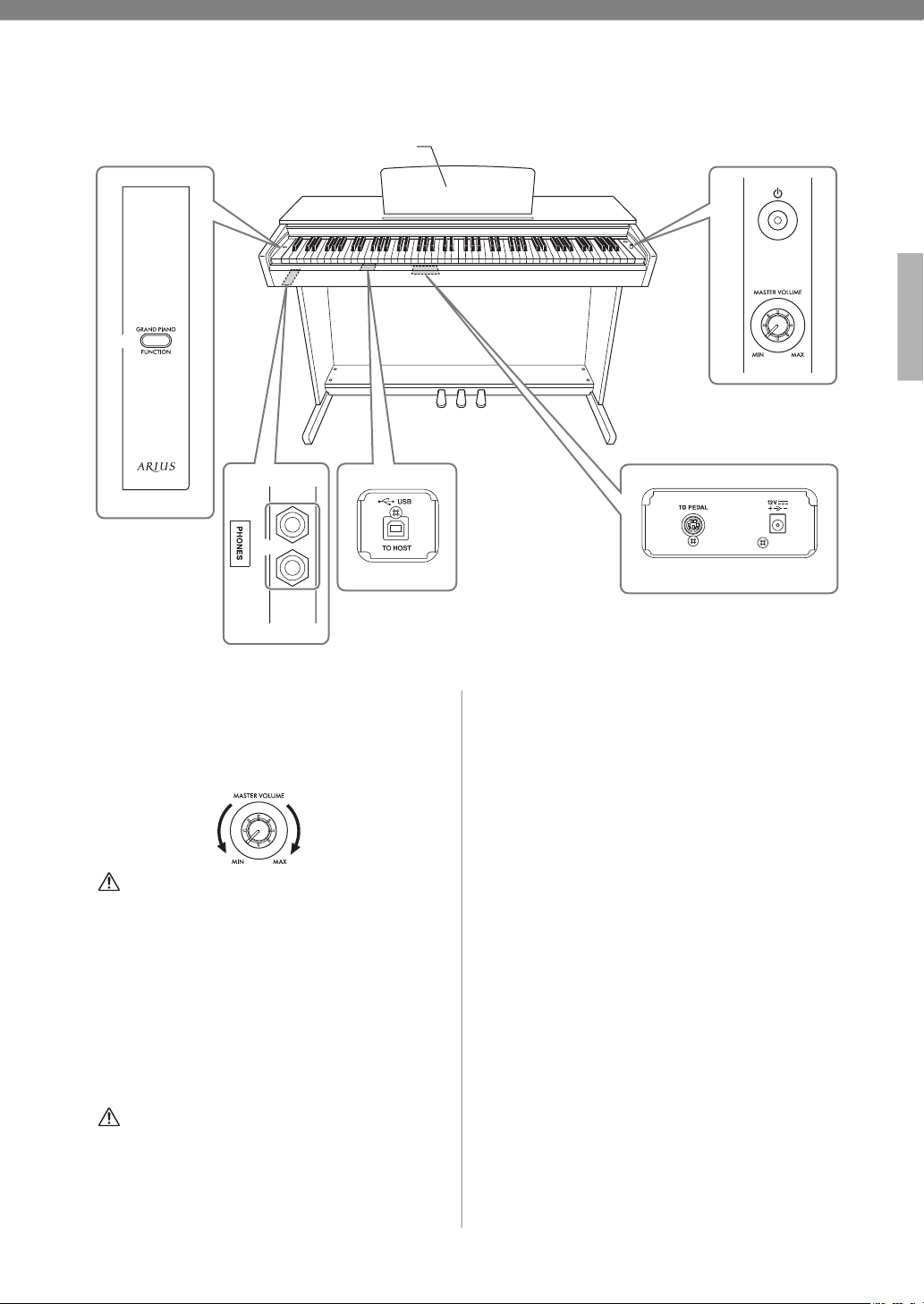
1 [P] (Standby/On) switch......................... page 10
For turning the power on or setting to standby.
2 [MASTER VOLUME] knob ..................... page 10
For adjusting the volume of the entire sound.
CAUTION
Do not use this instrument at a high volume level for a
long period of time, to avoid damaging your hearing.
3 [GRAND PIANO/FUNCTION] button .. page 12
For instantly calling up the Grand Piano 1 Voice.
FUNCTION
You can set various parameters by pressing a note on
the keyboard while holding this button.
4 [PHONES] jacks
For connecting a set of standard stereo headphones.
CAUTION
Do not use headphones at a high volume for an extended
period of time; doing so may cause hearing loss.
5 [USB TO HOST] terminal
For connecting to a computer or a smart device. For
details on connections, refer to “Computer-related
Operations” or “Smart Device Connection Manual”
on the website.
NOTICE
Use an AB type USB cable of less than 3 meters.
USB 3.0 cables cannot be used.
6
[TO PEDAL] jack ..................................... page 18
For connecting the pedal cord.
7 DC IN jack................................................ page 10
For connecting the AC adaptor.
8 Soft Pedal (Left) ....................................... page 14
Pressing this pedal reduces the volume and slightly
changes the timbre of notes.
9 Sostenuto Pedal (Center) ........................ page 14
Pressing this pedal after playing a note or notes (but
before releasing your fingers) causes the pressed
note(s) to sustain while subsequent notes can be
played without sustain.
) Damper Pedal (Right).............................. page 14
Pressing this pedal causes the notes you play to have a
longer sustain. It can be used with the half pedal
function.
1
2
3
4
5
9 )8
7
6
Bottom
(Keyboard side)
Bottom
(Keyboard side)
Bottom
(Keyboard side)
Music Rest
Level decreases Level increases
10
YDP-105 Owner’s Manual
Setting Up
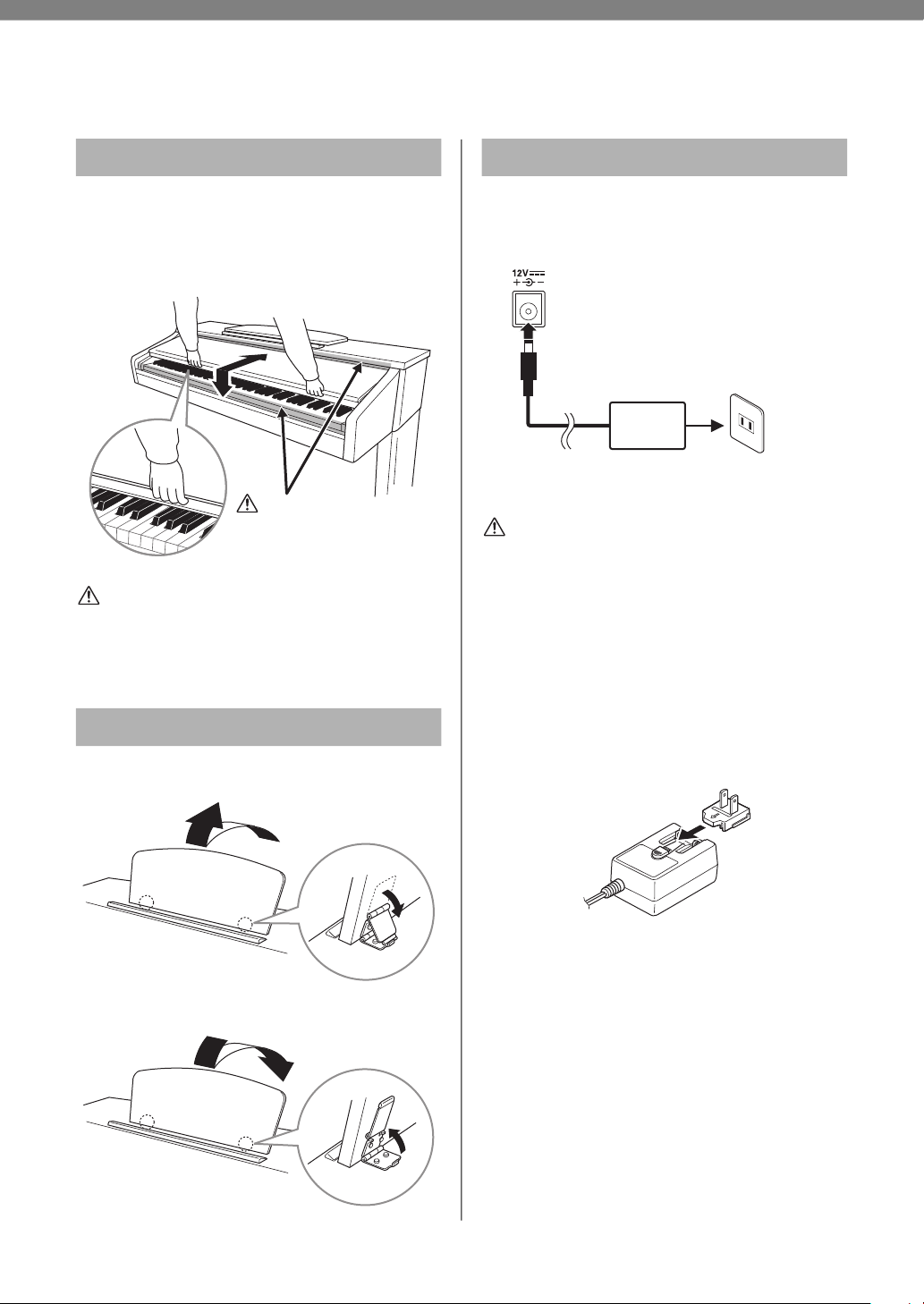
To open the key cover, lift the cover slightly, then
push and slide it to the end.
To close the key cover, gently slide the cover toward
you.
CAUTION
Hold the cover with both hands when opening or closing it.
Do not release it until it is fully opened or closed. Be careful
to avoid catching fingers (yours or others, especially
children’s) between the cover and main unit.
To raise the music rest:
To lower the music rest:
1. Connect the plugs of the AC adaptor in
the order shown in the illustration.
Follow the order shown above in reverse when
disconnecting the AC adaptor.
WARNING
• Use the specified adaptor (page 20) only. The use of other
adaptors may result in irreparable damage to both the
adaptor and the instrument.
• When setting up the product, make sure that the AC outlet
you are using is easily accessible. If some trouble or
malfunction occurs, immediately turn the power off and
disconnect the plug from the outlet.
• When using the AC adaptor with a removable plug,
- Make sure to keep the plug attached to the AC adaptor.
Using the plug alone can cause electric shock or fire.
- If the plug is accidentally removed from the AC adaptor,
never touch the metallic section when attaching the plug.
To avoid electric shock, short circuit or damage, also be
careful that there is no dust between the AC adaptor and
plug.
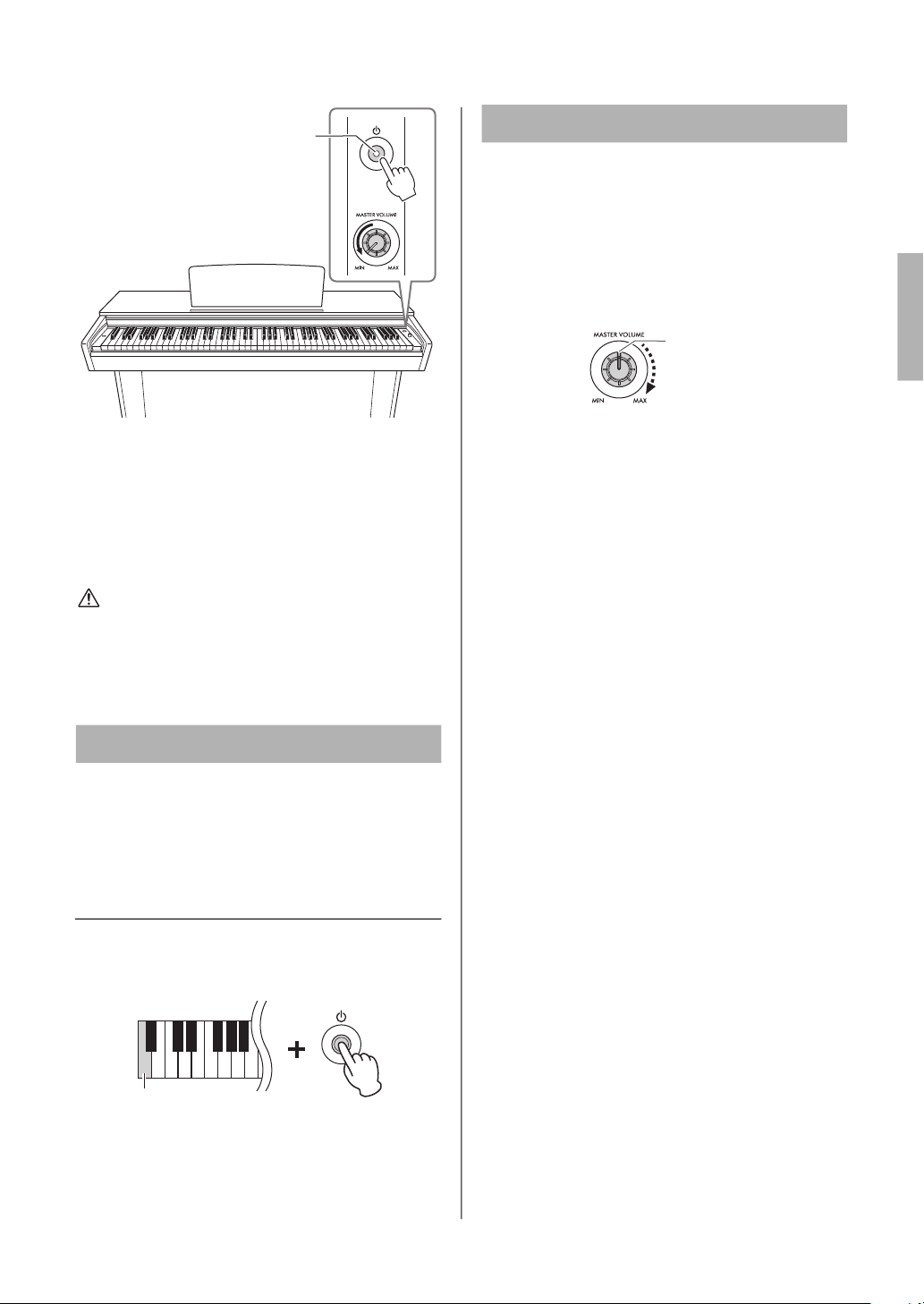
2. Turn down the [MASTER VOLUME]
knob to “MIN.”
3. Press the [P] (Standby/On) switch to
turn the power on.
Adjust the volume as desired while playing the
keyboard.
Key Cover
Music Rest
CAUTION
Be careful to avoid catching
your fingers when opening or
closing the cover.
1
2
3
1
2
3
Turning the Power On
1
2
AC outlet
AC
adaptor
DC IN jack (page 9)
DC plug
Plug
Slide the plug
as indicated
The shape of the plug and outlet differ depending on the locale.
Setting Up
11
YDP-105 Owner’s Manual
NOTICE
Press only the [P] (Standby/On) switch when turning the
power on. Any other operations, such as pressing the keys,
buttons or pedals may cause the instrument to malfunction.
4. Press the [P] (Standby/On) switch again
for 1 second to turn off the power.
The power lamp turns off.
CAUTION
Even when the [P] (Standby/On) switch is in the standby
status, electricity is still flowing to the instrument at a
minimum level. When not using the instrument for an
extended period of time, be sure to unplug the power
cord
from the wall AC outlet.
To prevent unnecessary power consumption, this
function automatically turns the power off if the
instrument is not operated for 30 minutes.
Default setting: Enabled
Disabling Auto Power Off (simple method)
While holding down the A−1 key (the lowest key),
press the [P] (Standby/On) switch to turn the
instrument on.
To re-enable the Auto Power Off function, see
page 12 (
2).
When this function is on, the Master Volume does
not increase even when the [MASTER VOLUME]
knob is turned to the right from center. This allows
you to protect your hearing when using the
headphones or prevent loud sound from coming
out of the speakers.
To turn on this function, see page 13 (
*).
Auto Power Off Function
2
3
The power lamp lights up.
Lowest key
Volume Limiter Function
Maximum Volume (Center)
The Master Volume does not
increase even when the
[MASTER VOLUME] knob is
turned to the right from center.
12
YDP-105 Owner’s Manual
Functions
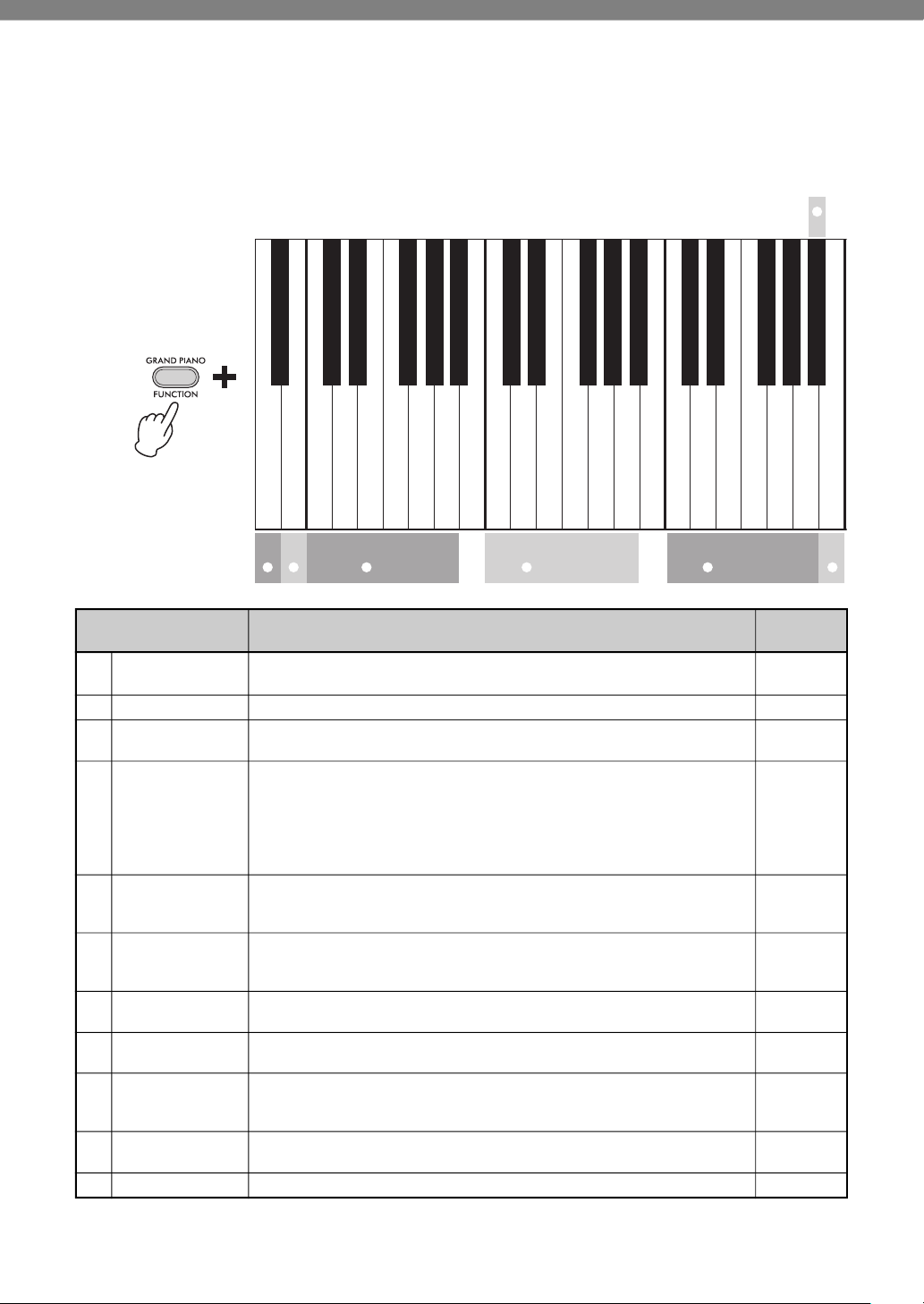
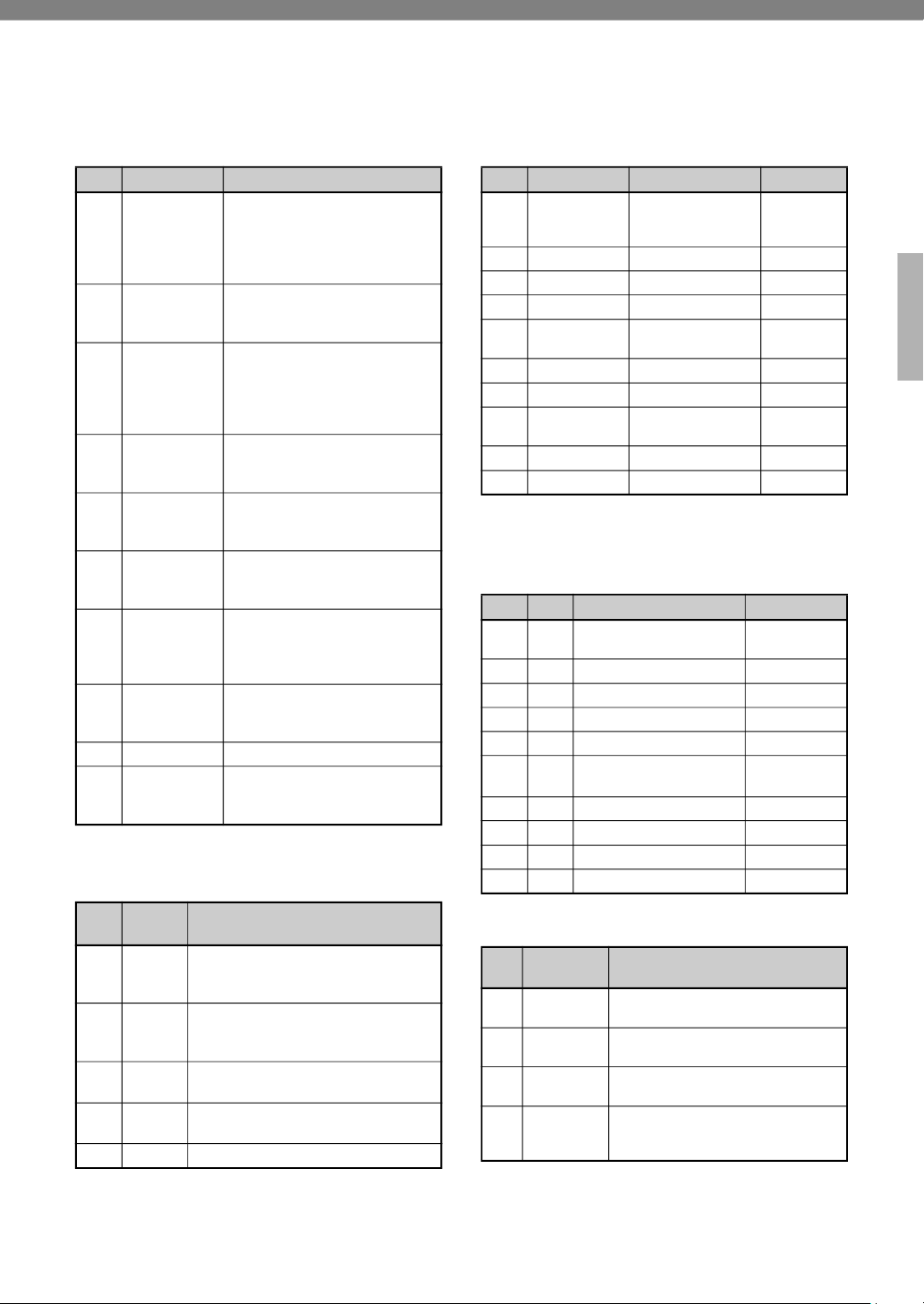
You can call up a function by holding down the [GRAND PIANO / FUNCTION] button and pressing the
specified key. For certain functions, changing the setting produces a confirmation sound.
Simply pressing the [GRAND PIANO / FUNCTION] button calls up the Grand Piano 1 Voice.
Function Description
Default
Setting
1
Current Tempo
value
Confirms the Current Tempo Value by audible voice (in English). —
2
Auto Power Off
Enables/disables the Auto Power Off function (page 11). Enabled
3
Voices
Pressing one key selects a specific Voice; pressing two keys simultaneously layers
two Voices (Dual). To exit from Dual, select another Voice.
Voice List (page 15)
—
4
5
Voice Demo Song
Preset Song
Starts playback of the Voice Demo Song or Preset Song continuously. To stop
playback, press the [FUNCTION] button.
Voice Demo Song List / Preset Song
List (page 15)
To play back the selected Song repeatedly
While holding down the [FUNCTION] button, press and hold one of the specified
keys until you hear the confirmation sound (C).
—
6
Touch Sensitivity
Determines how the sound responds to your playing strength. Each press of the key
switches the setting in sequence: Soft (1), Medium (2), Hard (3) and Fixed (4).
Touch Sensitivity List (page 15)
Medium
7
Duo On/Off
Engages or exits from the Duo function, which allows two different players to play
the instrument in the same octave range, on the left and right side with the E3 key
as the boundary.
Pedal function using Duo (page 14)
Off
8
Reverb Type
Selects the Reverb type which simulate the reverberation of different performance
spaces.
Reverb Type List (page 15)
Depending
on the Voice
9
Reverb Depth
Adjusts the Reverb depth.
Setting range: 0 (no effect) – 10 (maximum depth)
Depending
on the Voice
)
Damper Resonance
On/Off
Turns the Damper Resonance effect on/off. The Damper Resonance effect
simulates the resonance of the strings of an acoustic piano when its damper pedal
is pressed.
On
!
Transpose
Transposes the pitch up or down in semitones.
Setting range: −6 – 0 – +6
0
@
Metronome
Start/stop the Metronome. Off (stop)
$%
C0
'()*$%
C1
'()*$%
C2
'()*$%
$ᅊ&ᅊ'ᅊ)ᅊ*ᅊ$ᅊ&ᅊ'ᅊ)ᅊ*ᅊ$ᅊ&ᅊ'ᅊ)ᅊ*ᅊ$ᅊ
Auto Power Off Enable
Bright Grand
DX E.Piano
Harpsichord 8'
Vibraphone
Current Tempo Value
Auto Power Off Disable
Grand Piano
Stage E.Piano
Organ Principal
Organ Tutti
Harpsichord 8'+4'
Strings
Bright Grand
DX E.Piano
Harpsichord 8'
Vibraphone
Grand Piano
Stage E.Piano
Organ Principal
Organ Tutti
Harpsichord 8'+4'
Strings
Valse op.64-1 “Petit chien”
Turkish March
Arabesque
The Entertainer
Touch Sensitivity
Menuett G dur BWV Anh.114
Für Elise
Träumerei
Dolly’s Dreaming and Awakening
Humoresque
Duo On/Off
La Fille aux Cheveux de Lin
12 73 Voice 4 Voice Demo 5 Preset Song
6
Functions
13
YDP-105 Owner’s Manual
Function Description
Default
Setting
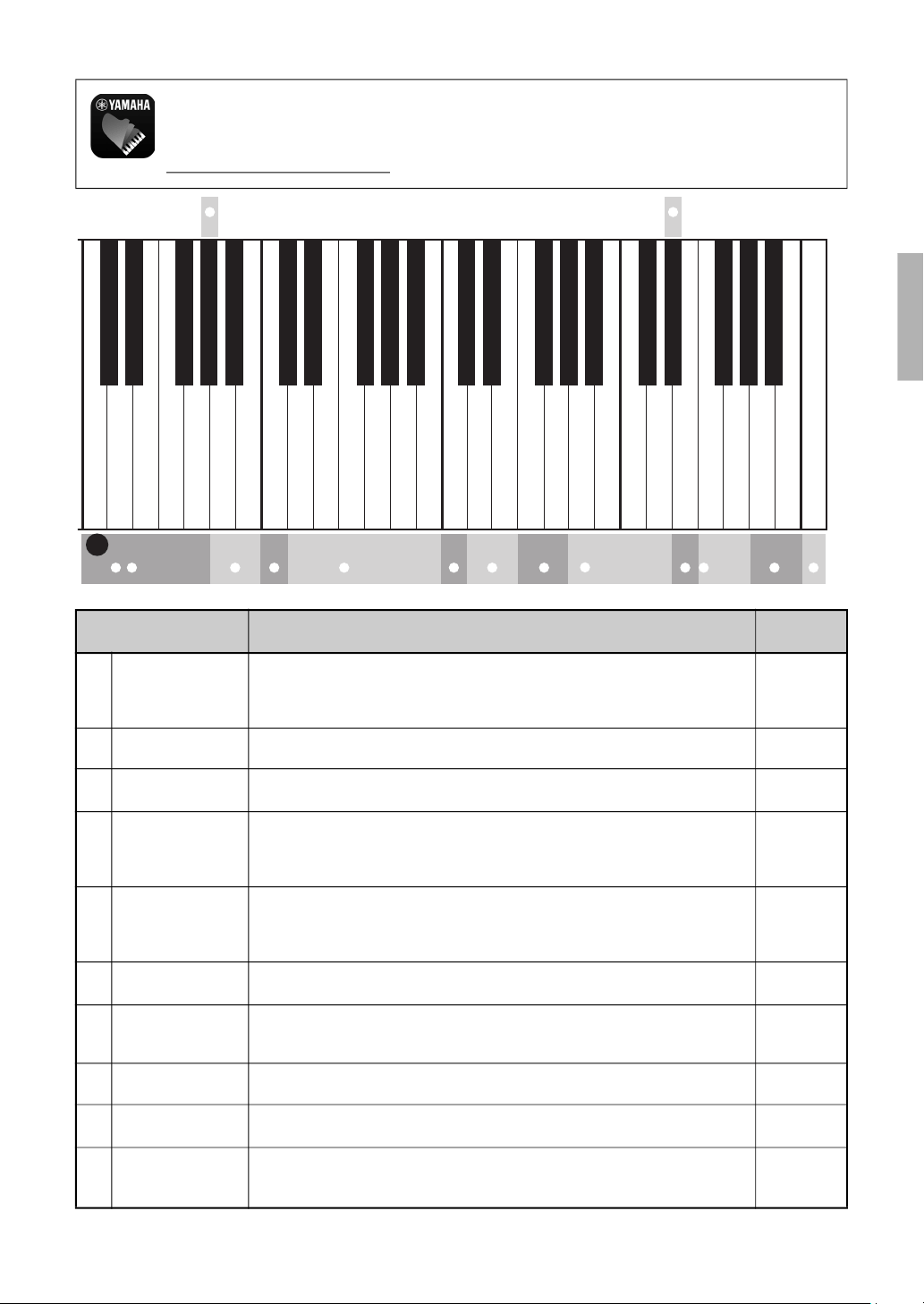
#
Tempo
Changes the tempo of Song playback or the Metronome.
The number key is used to specify the tempo numerically. To specify “95,” press the
A#4 (0), A4 (9) and F4 (5) keys in order while holding down [FUNCTION].
Setting range: 32 – 280
120
(Metronome)
$
Metronome Beat
Selects a Metronome Beat from 0 and 2 – 6.
Setting range: 0 (no beat), 2, 3, 4, 5, 6
0 (no beat)
%
Metronome
Volume
Adjusts the Metronome Volume.
Setting range: 1 – 20
10
^
Volume Balance
(Dual)
Adjusts the Balance between two Voices in Dual (3). The Voice assigned to the left
key becomes Voice 1, and the Voice assigned to the right key becomes Voice 2.
Settings above “0” increase the volume of Voice 1, and vice versa.
Setting range: −6 – +6
Depending
on the
combination
of Voices
&
Octave Shift
Shifts the octave for each Voice in Dual (3) or Duo (7). In Duo, the right-hand
range is Voice 1, while the left-hand range is Voice 2. In Dual, the Voice assigned to
the left key becomes Voice 1.
Setting range: −1 – +1
0
*
Volume Limiter
On/Off
Turns the Volume Limiter Function on/off.
See page 11.
Off
(
Audio Loop Back
On/Off
Sets whether the audio sound input from the [USB TO HOST] terminal is returned to
the computer/smart device or not, along with the performance played on the
instrument.
On
A
Tuning
Fine tunes the pitch of the entire instrument in approx. 0.2 Hz steps.
Setting range: 414.8 – 440.0 – 466.8 Hz
440.0 Hz
B
MIDI Transmit
Channels
Sets the MIDI Transmit Channels. For details, refer to “MIDI Reference”.
Setting range: 1 – 16
1
C
Operation
Confirmation
Sounds
Turns on/off the Operation Confirmation Sounds, which occur when you change a
setting using the keys of the keyboard.
On
C3
'()*$%
C4
'()*$%
C5
'()*$%
C6
'( )*$%
C7
&ᅊ'ᅊ)ᅊ*ᅊ$ᅊ&ᅊ'ᅊ)ᅊ*ᅊ$ᅊ&ᅊ'ᅊ)ᅊ*ᅊ$ᅊ&ᅊ'ᅊ)ᅊ*ᅊ$ᅊ
Default
A3 = 442.0 Hz
A3 = 440.0 Hz
Volume Limiter On/Off
Default
0 (Voice 2)
Number key 6
Number key 8
Number key 3
Number key 1
Stage
Hall2
Reverb Depth Default
Damper Resonance On/Off
0 (Default)
Metronome Beat +
Number key 0
Default Volume
Hall1
Room
Off
Reverb Depth −
Reverb Depth +
Transpose −
Transpose +
Number key 7
Number key 5
Number key 4
Number key 2
Default Tempo
Number key 9
Metronome On/Off
MIDI Transmit Channel +
Operation Confirmation Sounds On/Off
MIDI Transmit Channel −
−1 (Voice 2)
+1 (Voice 2)
0 (Voice 1)
−1 (Voice 1)
+1 (Voice 1)
Volume Balance +
Raise by approx. 0.2 Hz
Lower by approx. 0.2 Hz
Volume Balance −
Metronome Beat −
Metronome Volume −
Metronome Volume +
Audio Loop Back On/Off
!@ $% ^ (A Tuning BC8 9 Reverb # Tempo & Octave Shift
) *
Smart Device App “Smart Pianist”
You can get even more enjoyment out of this instrument—with additional functions and highly intuitive
controls—by connecting to the “Smart Pianist” smart device app. For details, see the website below.
https://www.yamaha.com/kbdapps
Functions
14
YDP-105 Owner’s Manual
Damper Pedal (Right)
Pressing this pedal will sustain notes longer.
Releasing this pedal immediately stops (damps)
any sustained notes. This pedal also features a
“half-pedal” function that creates partial sustain
effects, depending on how far down you press the
pedal.
NOTE
If the damper pedal doesn’t work, make sure that the pedal cord
is properly plugged into the main unit (page 18).
Half-pedal function
This function allows you to vary the sustain length depending on
how far the pedal is pressed. The farther down you press the
pedal, the more the sound sustains. For example, if you press the
damper pedal and all notes you are playing sound a bit murky
and loud with too much sustain, you can release the pedal half
way or higher to decrease the sustain (murkiness).
Damper Resonance
When only piano Voices (page 15) is selected, pressing the
damper pedal activates the Damper Resonance effect (page 12)
to recreate the resonance of an acoustic piano’s strings.
NOTE
Damper Resonance cannot be used in Duo.
Sostenuto Pedal (Center)
Pressing this pedal while holding the notes will
sustain the pressed notes (as if the Damper Pedal
had been pressed), but all subsequently played
notes will not be sustained. This makes it possible
to sustain a chord or single low note, for example,
while the other notes are played “staccato.”
NOTE
While the sostenuto pedal is held, the organ and strings Voices
sound continuously without decay after the notes have been
released.
Soft Pedal (Left)
Pressing this pedal will reduce the volume and
slightly change the timbre of the notes. The notes
played before this pedal is pressed are not affected.
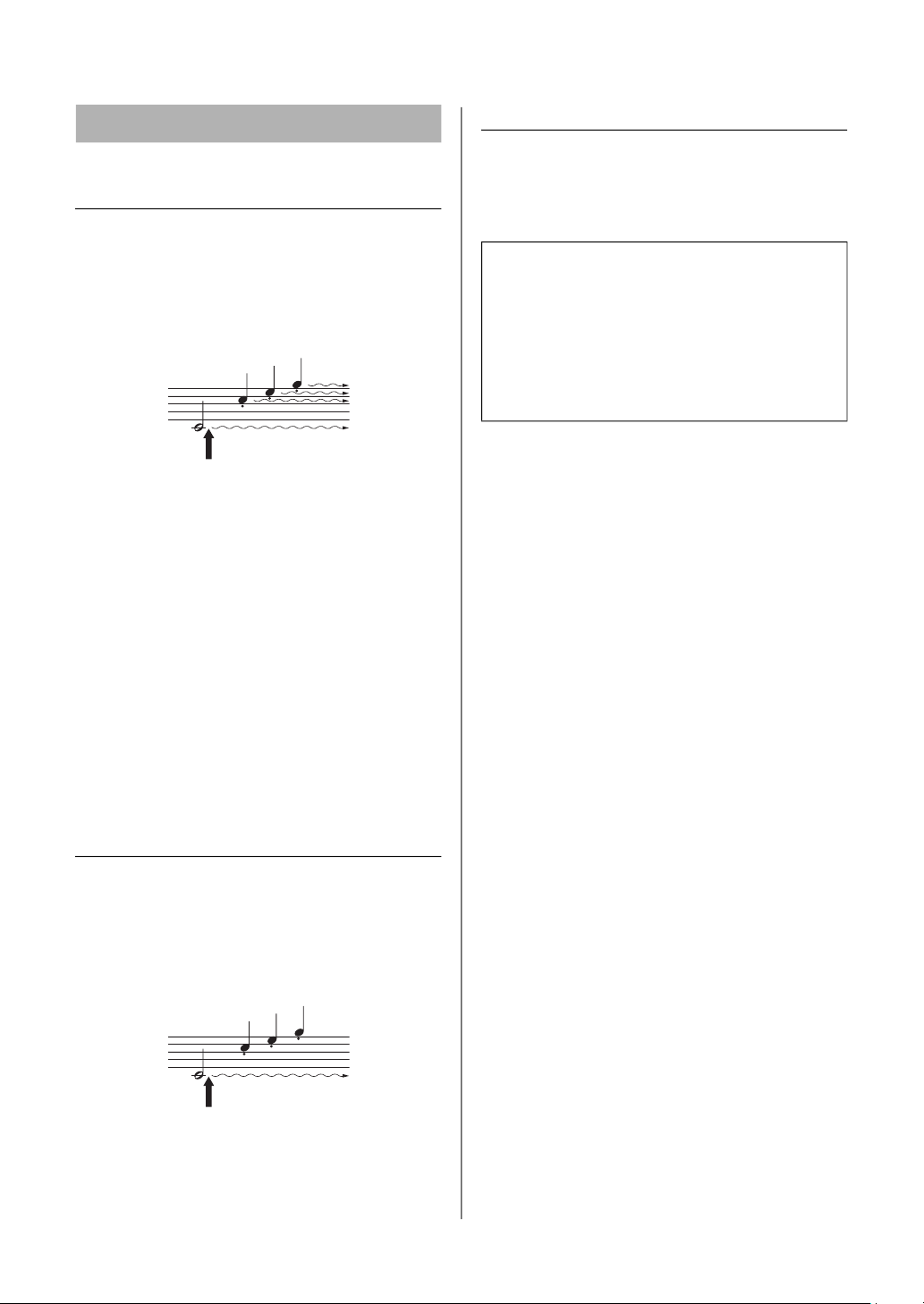
Using the Pedals
When you press the damper pedal here,
this note and the notes you play before you
release the pedal sustain longer.
When you press the sostenuto pedal here
while holding the note, the note will sustain as
long as you hold the pedal.
Pedal function in Duo (page 12)
In Duo, the pedal function changes as follows.
• Right Pedal: Damper pedal for the right-hand
range.
• Center Pedal: Damper pedal for both the right-
hand and left-hand ranges.
• Left Pedal: Damper pedal for the left-hand range.
15
YDP-105 Owner’s Manual
Data List
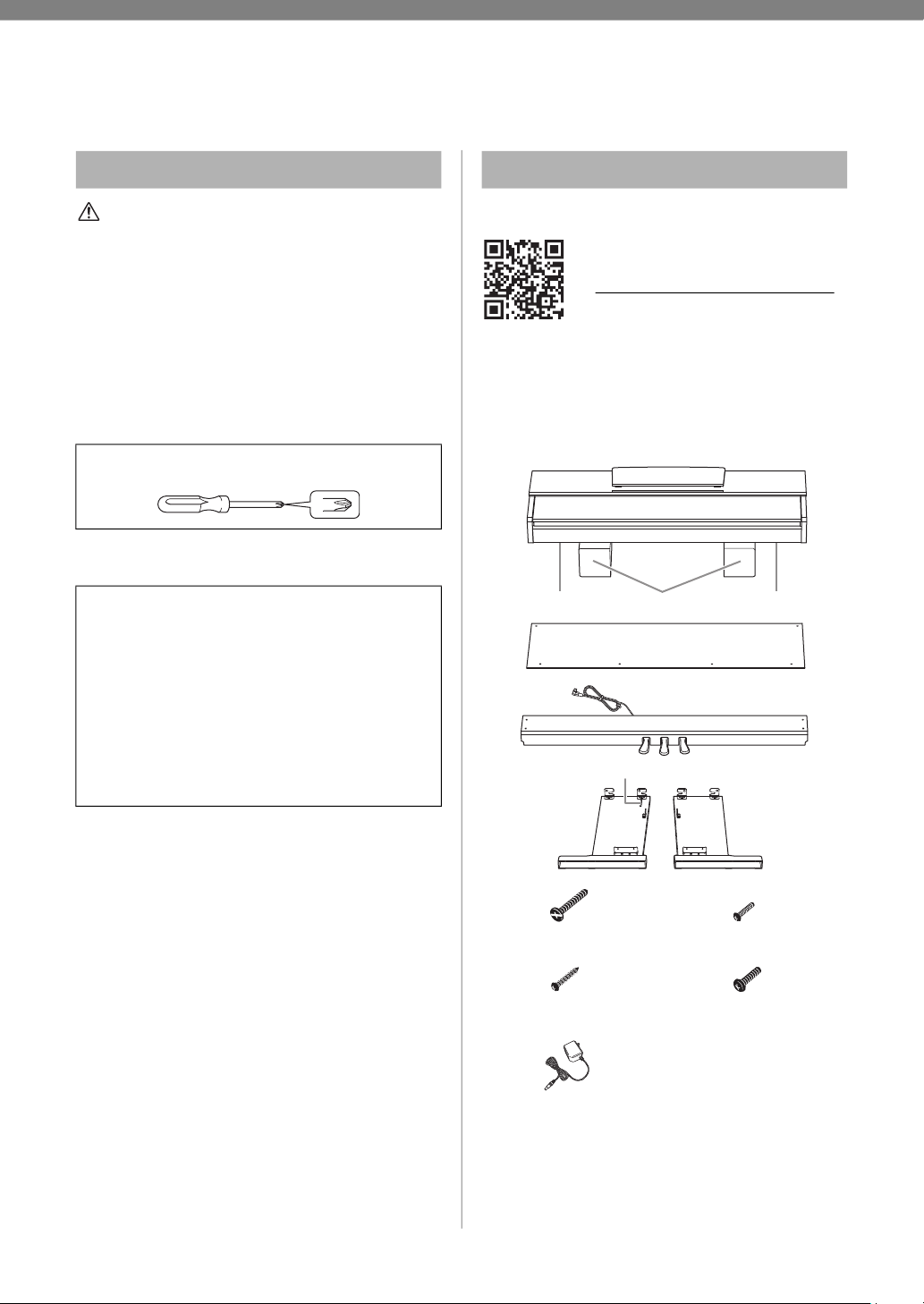
Voice List
*Piano Voices.
Reverb Type List
NOTE
In Dual, the Reverb Type for Voice 1 is called up.
Voice Demo Song List
The Demo Songs excluding original Songs are short rearranged
excerpts from the original compositions. The original Demo Songs
are Yamaha originals (© Yamaha Corporation).
Preset Song List
Touch Sensitivity
NOTE
This setting is disabled with some Voices, such as an organ
sound.
Key Voice Name Description
C0 Grand Piano*
Recorded samples from a full
concert grand piano. Perfect for
classical compositions as well as
any other style that requires
acoustic piano.
C#0 Bright Grand*
Bright piano sound. Clear tone
helps the sound to “cut through”
when playing in an ensemble.
D0
Stage E.Piano
Vintage electric piano sound of
hammer-struck metallic “tines.”
Soft tone when played lightly, and
an aggressive tone when played
hard.
D#0 DX E.Piano
An electronic piano sound
created by FM synthesis. Good
for standard popular music.
E0
Organ
Principal
A typical pipe organ sound (8 feet
+ 4 feet + 2 feet). Good for sacred
music from the Baroque period.
F0 Organ Tutti
This is the organ’s full coupler
sound, often associated with
Bach’s “Toccata and Fugue.”
F#0
Harpsichord 8'
The definitive instrument for
baroque music. Authentic
harpsichord sound, with plucked
strings, no touch response.
G0
Harpsichord
8'+4'
Mixes the same Voice an octave
higher for a more brilliant,
dynamic tone.
G#0 Vibraphone Played with relatively soft mallets.
A0 Strings
Spacious and large-scale string
ensemble. Try combining this
Voice with piano in Dual.
Key
Reverb
Type
Description
C3 Hall1
For a bigger reverb sound. This effect
simulates the natural reverberation of a
small-size concert hall.
C#3 Hall2
For a truly spacious reverb sound. This
effect simulates the natural
reverberation of a large concert hall.
D3 Room
Simulates the reverb you hear in a
room.
D#3 Stage
Simulates the reverb of a stage
environment.
E3 Off No effect is applied.
Key Voice Name Title
Composer
C1
Grand Piano
Valse No.2 As dur
op.34-1 “Valse
Brillante”
F. F. Chopin
C#1
Bright Grand
Original Original
D1
Stage E.Piano
Original Original
D#1
DX E.Piano
Original Original
E1
Organ
Principal
Original Original
F1
Organ Tutti
Original Original
F#1
Harpsichord 8'
Gavotte J. S. Bach
G1
Harpsichord
8'+4'
Invention No. 1 J. S. Bach
G#1
Vibraphone
Original Original
A1
Strings
Original Original
Key No. Title Composer
C2 1
Menuett G dur BWV
Anh.114
J. S. Bach
C#2 2
Turkish March W. A. Mozart
D2 3
Für Elise
L. v. Beethoven
D#2 4
Valse op.64-1 “Petit chien” F. F. Chopin
E2 5
Träumerei R. Schumann
F2 6
Dolly’s Dreaming and
Awakening
T. Oesten
F#2 7
Arabesque
J. F. Burgmüller
G2 8
Humoresque A. Dvořák
G#2 9
The Entertainer S. Joplin
A2 10
La Fille aux Cheveux de Lin C. A. Debussy
No.
Touch
Sensitivity
Description
1 Soft
Produces relatively high volume even
with light playing strength.
2 Medium
Standard Touch Sensitivity (default
setting).
3 Hard
Requires strong playing to produce
high volume.
4 Fixed
The volume level will be the same
regardless of how hard you play the
keys.
16
YDP-105 Owner’s Manual
Keyboard Stand Assembly
CAUTION
• Assemble the instrument using at least two people.
• Assemble the instrument on a hard and flat floor with ample
space.
• Be sure to use the correct parts in the correct orientation,
and assemble the instrument in accordance with the
sequence given here.
• Keep small parts (such as screws) out of the reach of
infants. Children may accidentally swallow them.
• Be sure to use only the included screws of specified sizes.
Use of any other screws can cause damage or malfunction
of the product.
• To disassemble the unit, reverse the assembly sequence
given here.
You can watch a video of the assembly.
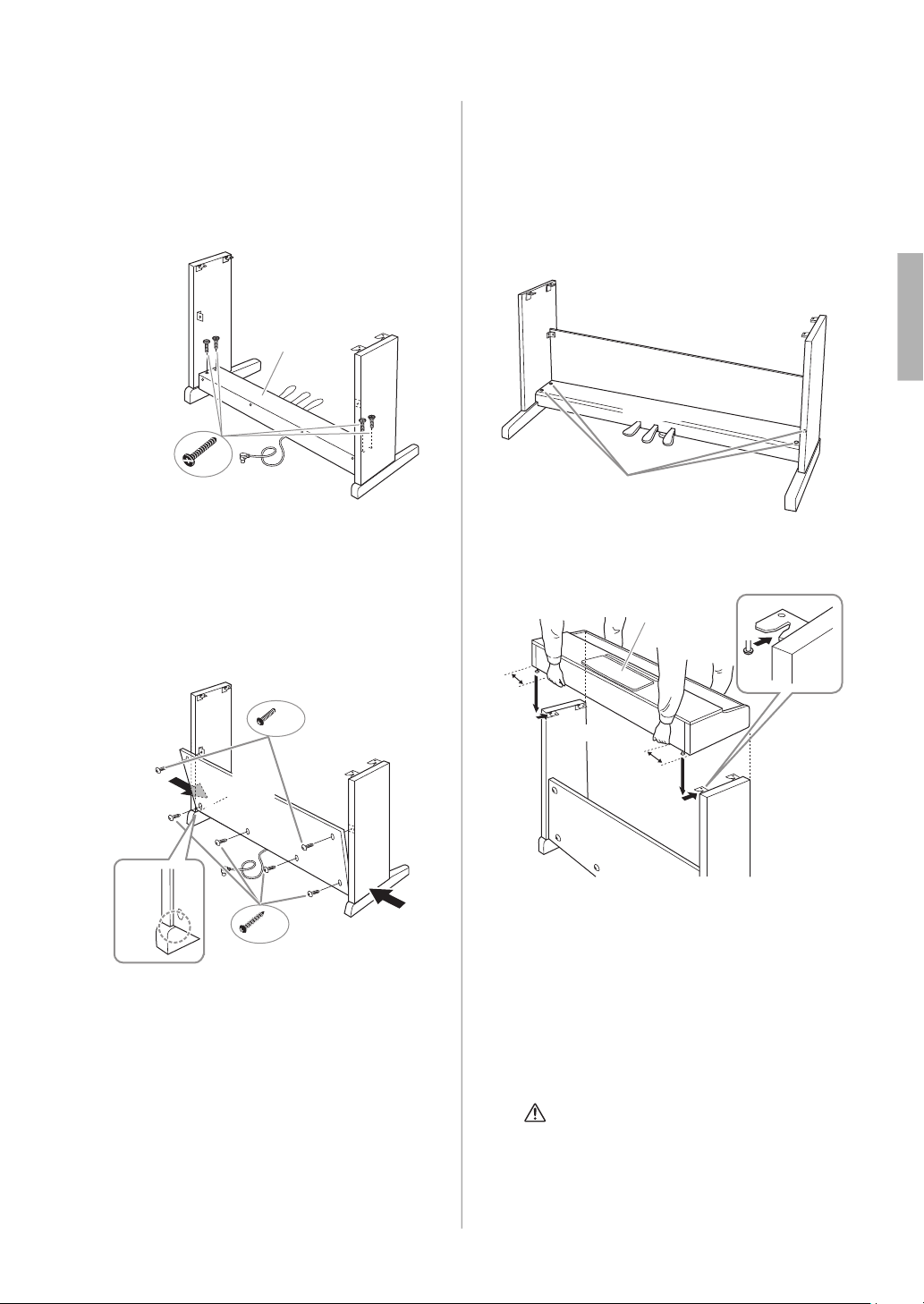
Check if you have all of the items indicated below.
NOTICE
Make sure to place the main unit on the polystyrene foam
pads that have been removed from the packages. Position the
pads so that they will not contact the speaker covers on the
bottom of the main unit.
* The adaptor may not be included, or may look different from the
illustration above, depending on your particular area.
Assembly Precautions
Have a Phillips-head (+) screwdriver of the appropriate size
ready.
Post-assembly checklist
• There are no unused parts.
• The instrument is stable even if you shake it.
• The pedal adjuster is firmly pressed against to the floor
surface.
• Both the pedal cord and power cord are plugged
securely into the correct jacks.
→ If there are any items above you haven’t confirmed,
review the assembly procedure and correct any errors.
Assembly
Scan the QR code at left or access the
website below.
https://4wrd.it/ydp_assembly_video3
× 4
× 4
× 2
× 4
Cord holder
Speaker cover Speaker coverPolystyrene foam pads
Main unit
Back board
Pedal box
Side board (L) Side board (R)
Flat head screws (6 × 20 mm) Thin screws (4 × 12 mm)
Tapping screws (4 × 20 mm)
Thick screws (6 × 16 mm)
AC adaptor
Keyboard Stand Assembly
17
YDP-105 Owner’s Manual
1. Align the side boards with each end
of pedal box, and lightly tighten
with flat head screws (6 × 20 mm)
for temporary fastening
These screws will be tightened securely later in
step 3.
2. Attach the back board.
Depending on the model, the surface color of one
side of the back board may be different from the
other side. In this case, position the back board so
that the side facing the front (pedal side) matches
the color of the main unit.
2-1 Place the back board on each foot of side
boards.
2-2 Attach the top of the back board by
temporarily fastening the thin screws (4 ×
12 mm).
2-3 While pushing on the lower part of the side
boards from the outside, secure the bottom
ends of the back board using tapping screws
(4 × 20 mm) in the order from outside to
inside (
1 → 2).
2-4 Securely tighten the screws on the top of the
back board that were attached in step 2-2.
3. Secure the pedal box.
Securely tighten the screws on the pedal box that
were attached in step 1.
4. Set the main unit in place.
4-1 Be sure to hold the bottom surface at least
10 cm inside from the edge of the main unit
so that you do not pinch your hands.
4-2 Place the main unit on the side boards so
that the front of the main unit and the side
boards are aligned. Slide the main unit
forward and insert the metal fittings on the
bottom of the main unit into the metal
fittings on the side boards.
CAUTION
• Be careful not to pinch your hands or drop the main
unit.
• Do not hold anywhere other than the specified
position.
× 4
Side board (R)
Side board (L)
Pedal box
Flat head screws (6 × 20 mm)
2
-
2, 2
-
4
2
-
1
2
-
3
× 2
× 4
2
2
1
1
Side board (R)
Side board (L)
Back
board
Tapping screws (4 × 20 mm)
Thin screws
(4 × 12 mm)
3
Pedal box
Side board (R)
Side board (L)
Back board
At least
10 cm
At least
10 cm
Main unit
Side board (R)
Side board (L)
Back board
Keyboard Stand Assembly
18
YDP-105 Owner’s Manual
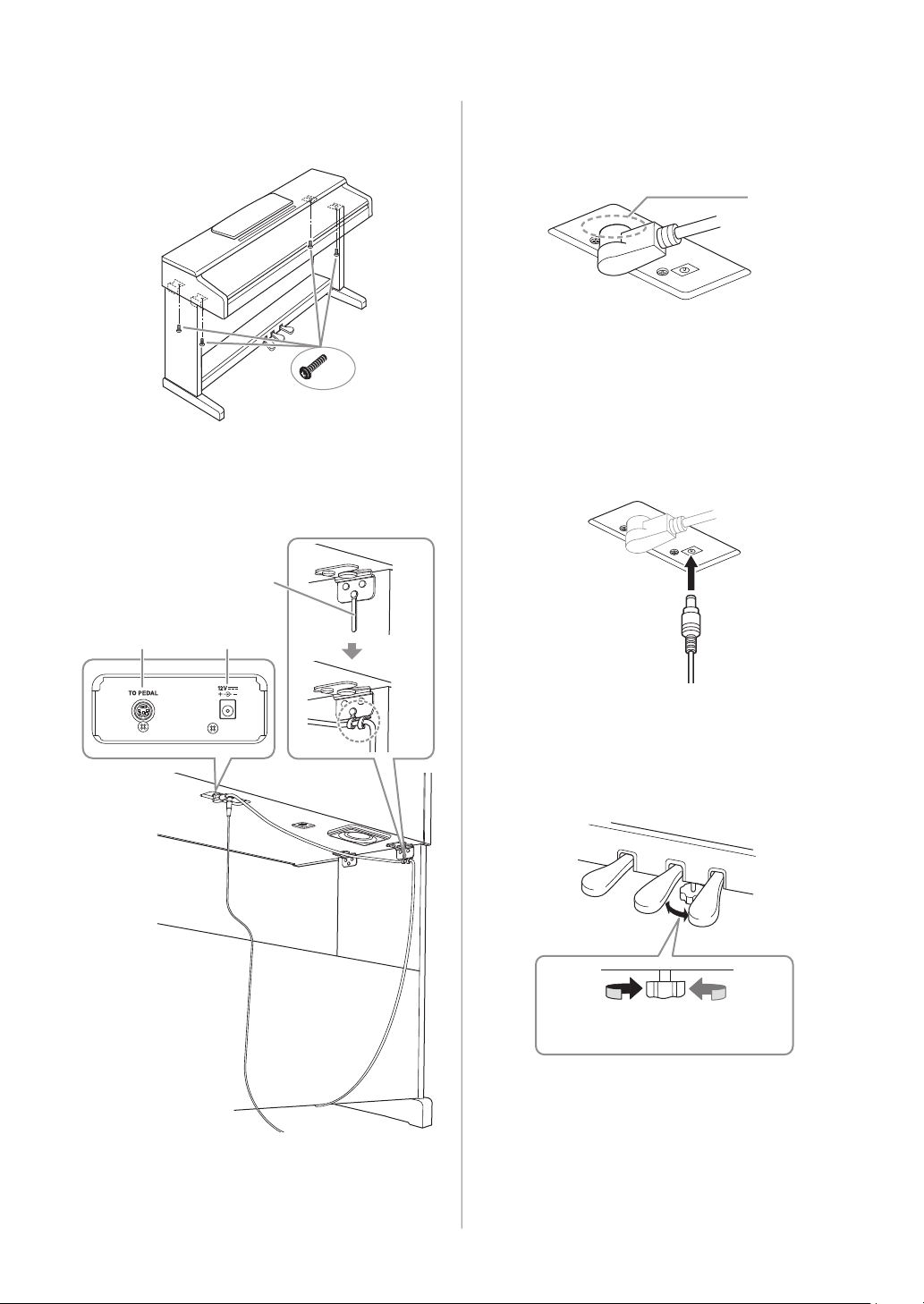
5. Secure the main unit by tightening
the thick screws (6 × 16 mm).
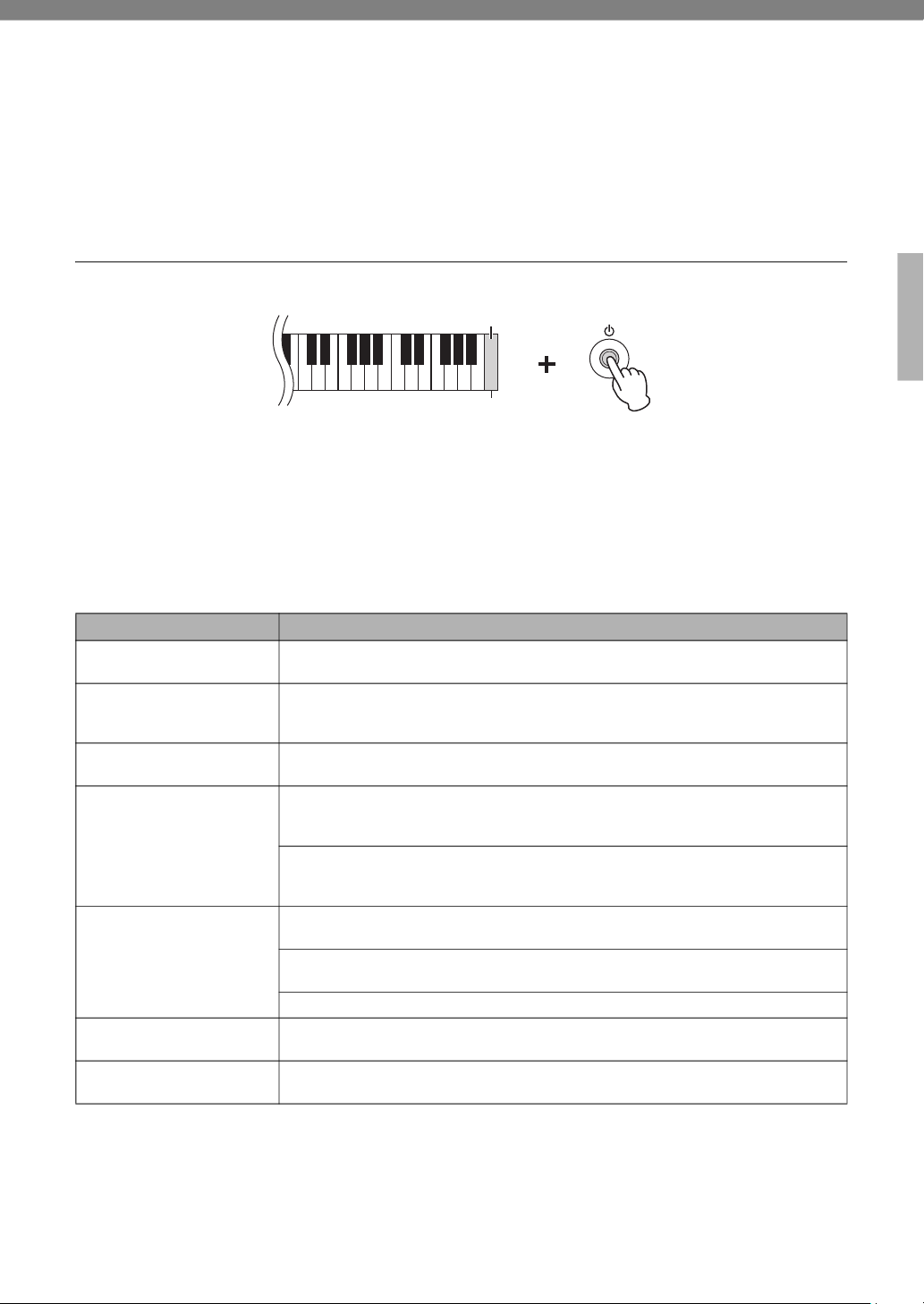
6. Connect the pedal cord plug and the
power plug.
6-1 Insert the pedal cord plug to the
[TO PEDAL] jack from the rear.
Insert the plug until the metal part disappears
from view.
NOTICE
If it is not plugged in firmly, it may cause the pedals to
not work.
6-2
Wind the cord holders around pedal cord to
hold it.
The cord holders are attached to the side board
(L).
6-3 Insert the DC plug into the DC IN jack.
7. Rotate the adjuster until it presses in
firm contact with the floor surface.
Make sure that the pedal box does not rattle or
give way when you step on the pedals.
After completing the assembly, please check the Post-
assembly checklist (page 16).
× 4
Main unit
Side board (R)
Side board (L)
Thick screws
(6 × 16 mm)
6
-
1
6
-
2
6
-
3
TO PEDAL DC IN
Cord holder
Metal part
To press against
the floor
To separate from
the floor
19
YDP-105 Owner’s Manual
Data Backup and Initializing
The following data will automatically be maintained as backup data even if you turn off the power.
Backup data
Metronome Volume, Metronome Beat, Touch Sensitivity, Tuning, Auto Power Off, Operation Confirmation
Sound on/off, Volume Limiter on/off
To initialize the backup data:
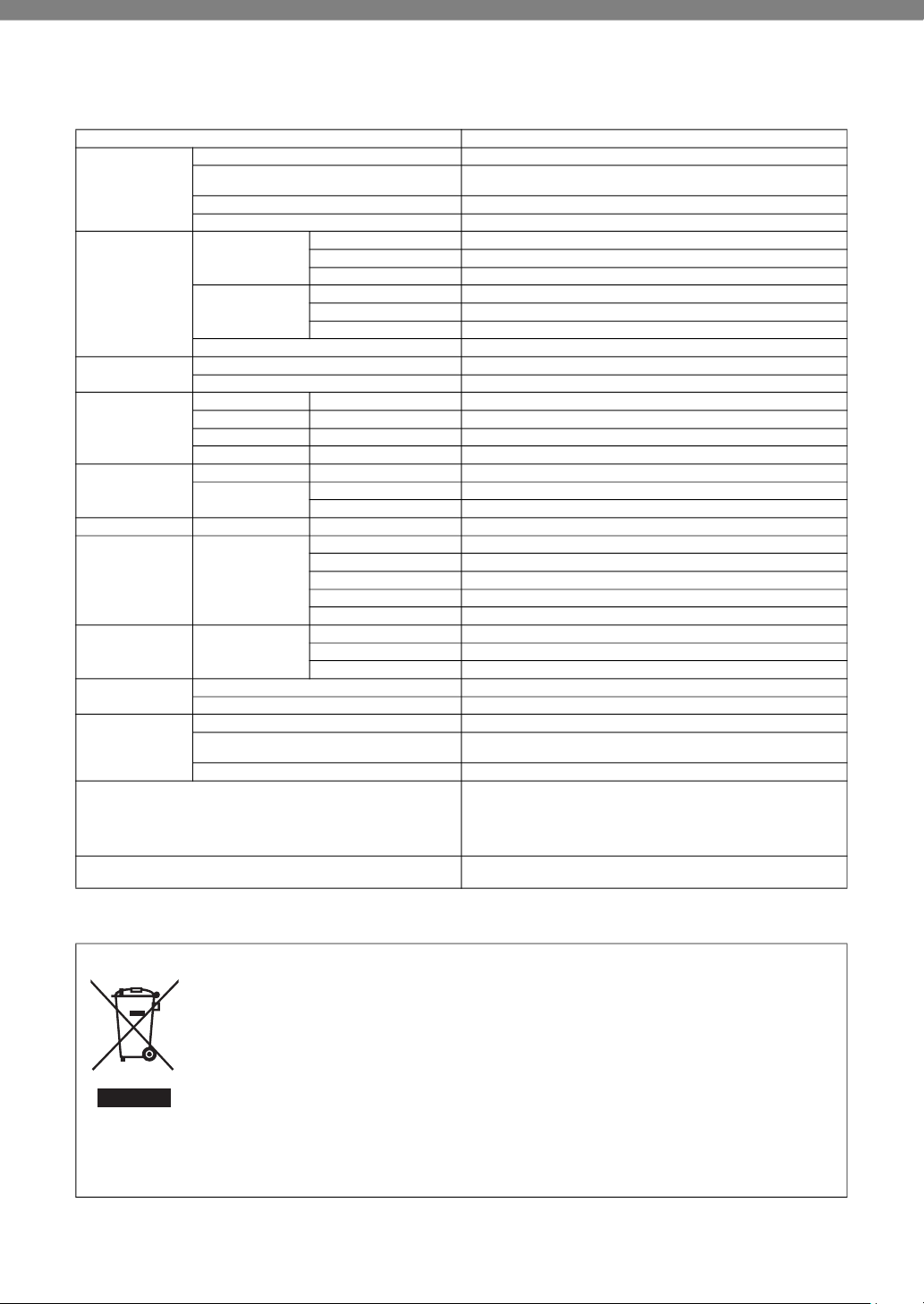
While holding down the C7 key (right-most key), turn the power on to initialize the backup data to the factory
initial settings.
NOTICE
Never turn off the power while the initialization is being executed.
NOTE
If this instrument somehow malfunctions or fails to operate properly, try executing the initialization.
Troubleshooting
Problem Possible Cause and Solution
Power suddenly and
unexpectedly turns off.
This is normal and the Auto Power Off function may have been activated (page 12).
If desired, disable the Auto Power Off function.
The instrument does not
turn on.
The plugs are not properly connected. Make sure that the DC plug is securely inserted into
the DC IN jack on the instrument, and that the AC plug is securely inserted to the AC outlet
(page 18).
A click or pop is heard when
the power is turned on or off.
This is normal when electrical current is being applied to the instrument.
Noise is heard from the
speakers or headphones.
The noise may be due to interference caused by the use of a mobile phone in close
proximity to this instrument. Turn off the mobile phone, or move it further away from this
instrument.
When you use the instrument along with the application on your smart device, we
recommend that you set “Airplane Mode” to “ON” on your smart device in order to avoid
noise caused by communication.
The overall volume is low, or no
sound is heard.
The Master Volume is set too low. Set it to an appropriate level using the [MASTER VOLUME]
knob (page 9).
Make sure a pair of headphones or conversion adaptor is not connected to the [PHONES]
jack (page 9).
The Volume Limiter setting is “On”. Set the Volume Limiter to “Off” (page 11).
Pedals do not function.
The pedal cord may not be securely connected to the [TO PEDAL] jack. Be sure to insert the
pedal cord all the way until the metal part of the cord plug disappears from view (page 18).
The damper pedal does not
function as expected.
The damper pedal was pressed when the power was turned on. This is not a malfunction;
release the pedal and press it again to reset the function.
C7
Highest key
20
YDP-105 Owner’s Manual
Specifications
* The contents of this manual apply to the latest specifications as of the publishing date. To obtain the latest manual, access the Yamaha website then download
the manual file. Since specifications, equipment or separately sold accessories may not be the same in every locale, please check with your Yamaha dealer.
(58-M02 WEEE en 01)
Product Name Digital Piano
Size/Weight
Width 1,357 mm (53-7/16")
Height
(With music rest raised)
815 mm (32-1/16")
(969 mm (38-1/8"))
Depth 422 mm (16-5/8")
Weight 37.5 kg (82 lb, 11 oz)
Control Interface
Keyboard
Number of Keys 88
Type GHS with Matte Black Keytops
Touch Response Soft / Medium / Hard / Fixed
Pedal
Number of Pedals 3
Half Pedal Yes (Damper)
Functions Damper, Sostenuto, Soft
Panel Language English
Cabinet
Key Cover Style Sliding
Music Rest Yes
Voices
Tone Generation Piano Sound AWM Stereo Sampling
Piano Effect Damper Resonance Yes
Polyphony Number of Polyphony (Max.) 64
Preset Number of Voices 10
Effects
Types Reverb 4 types
Functions
Dual Yes
Duo Yes
Playback Preset Number of Preset Songs 10 Voice Demo Songs +10 Piano Preset Songs
Functions Overall Controls
Metronome Yes
Tempo 32 – 280
Transpose −6 – 0 – +6
Tuning 414.8 – 440.0 – 466.8 Hz (approx. 0.2 Hz increments)
USB Audio Interface 44.1 kHz, 16 bit, stereo
Connectivity Connections
DC IN Yes
Headphones Standard stereo phone jack (× 2)
USB TO HOST Yes
Sound System
Amplifiers 6 W × 2
Speakers 12 cm × 2
Power Supply
Adaptor PA-150 or an equivalent recommended by Yamaha (Output: DC 12 V, 1.5 A)
Power Consumption
6 W
(When using PA-150 AC adaptor)
Auto Power Off Yes
Included Accessories
• Owner’s Manual
• Bench*
• Online Member Product Registration
• AC adaptor*: PA-150 or an equivalent
*May not be included depending on your area. Check with your Yamaha dealer.
Separately Sold Accessories
(May not be available depending on your locale.)
• HPH-150/100/50 headphones
• AC adaptor: PA-150 or an equivalent recommended by Yamaha
Information for users on collection and disposal of old equipment:
This symbol on the products, packaging, and/or accompanying documents means that used electrical and electronic
products should not be mixed with general household waste.
For proper treatment, recovery and recycling of old products, please take them to applicable collection points, in
accordance with your national legislation.
By disposing of these products correctly, you will help to save valuable resources and prevent any potential negative
effects on human health and the environment which could otherwise arise from inappropriate waste handling.
For more information about collection and recycling of old products, please contact your local municipality, your waste
disposal service or the point of sale where you purchased the items.
For business users in the European Union:
If you wish to discard electrical and electronic equipment, please contact your dealer or supplier for further
information.
Information on Disposal in other Countries outside the European Union:
symbol is only valid in the European Union. If you wish to discard these items, please contact your local authorities or
dealer and ask for the correct method of disposal.

21
Important Notice:
U.S. LIMITED WARRANTY for Customers in the United States
For detailed information about this Yamaha product and warranty service,
please either visit the following website address (printable file is available at our website)
or contact Customer Service at the address or telephone number identified below.
Website Address:
yamaha.i.o/YDPWarranty
Customer Service:
Yamaha Corporation of America
6600 Orangethorpe Avenue, Buena Park, CA 90620-1273
Telephone: 800-854-1569
22
For details of products, please contact your nearest Yamaha representative or the authorized distributor listed below.
Pour plus de détails sur les produits, veuillez-vous adresser à Yamaha ou au distributeur le plus proche de vous figurant dans la liste suivante.
Para detalles sobre productos, contacte su tienda Yamaha más cercana o el distribuidor autorizado que se lista debajo.
CANADA
Yamaha Canada Music Ltd.
135 Milner Avenue, Toronto, Ontario M1S 3R1,
Canada
Tel: +1-416-298-1311
U.S.A.
Yamaha Corporation of America
6600 Orangethorpe Avenue, Buena Park, CA 90620,
U.S.A.
Tel: +1-714-522-9011
MEXICO
Yamaha de México, S.A. de C.V.
Av. Insurgentes Sur 1647 Piso 9, Col. San José
Insurgentes, Delegación Benito Juárez, CDMX,
C.P. 03900, México
Tel: +52-55-5804-0600
BRAZIL
Yamaha Musical do Brasil Ltda.
Praça Professor José Lannes, 40-Cjs 21 e 22, Brooklin
Paulista Novo CEP 04571-100 – São Paulo – SP,
Brazil
Tel: +55-11-3704-1377
ARGENTINA
Yamaha Music Latin America, S.A.,
Sucursal Argentina
Olga Cossettini 1553, Piso 4 Norte,
Madero Este-C1107CEK,
Buenos Aires, Argentina
Tel: +54-11-4119-7000
PANAMA AND OTHER LATIN
AMERICAN REGIONS/
CARIBBEAN REGIONS
Yamaha Music Latin America, S.A.
Edificio Torre Davivienda, Piso: 20
Avenida Balboa, Marbella, Corregimiento de Bella
Vista, Ciudad de Panamá, Rep. de Panamá
Tel: +507-269-5311
THE UNITED KINGDOM/IRELAND
Yamaha Music Europe GmbH (UK)
Sherbourne Drive, Tilbrook, Milton Keynes,
MK7 8BL, U.K.
Tel: +44-1908-366700
GERMANY
Yamaha Music Europe GmbH
Siemensstrasse 22-34, 25462 Rellingen, Germany
Tel: +49-4101-303-0
SWITZERLAND/LIECHTENSTEIN
Yamaha Music Europe GmbH, Branch
Switzerland in Thalwil
Seestrasse 18a, 8800 Thalwil, Switzerland
Tel: +41-44-3878080
AUSTRIA/CROATIA/
CZECH REPUBLIC
/
HUNGARY/ROMANIA/SLOVAKIA/
SLOVENIA
Yamaha Music Europe GmbH, Branch Austria
Schleiergasse 20, 1100 Wien, Austria
Tel: +43-1-60203900
POLAND
Yamaha Music Europe
Sp.z o.o. Oddział w Polsce
ul. Wielicka 52, 02-657 Warszawa, Poland
Tel: +48-22-880-08-88
BULGARIA
Dinacord Bulgaria LTD.
Bul.Iskarsko Schose 7 Targowski Zentar Ewropa
1528 Sofia, Bulgaria
Tel: +359-2-978-20-25
MALTA
Olimpus Music Ltd.
Valletta Road, Mosta MST9010, Malta
Tel: +356-2133-2093
NETHERLANDS/BELGIUM/
LUXEMBOURG
Yamaha Music Europe, Branch Benelux
Clarissenhof 5b, 4133 AB Vianen, The Netherlands
Tel: +31-347-358040
FRANCE
Yamaha Music Europe
7 rue Ambroise Croizat, Zone d'activités de Pariest,
77183 Croissy-Beaubourg, France
Tel: +33-1-6461-4000
ITALY
Yamaha Music Europe GmbH, Branch Italy
Via Tinelli N.67/69 20855 Gerno di Lesmo (MB),
Italy
Tel: +39-039-9065-1
SPAIN/PORTUGAL
Yamaha Music Europe GmbH Ibérica, Sucursal
en España
Ctra. de la Coruña km. 17,200, 28231
Las Rozas de Madrid, Spain
Tel: +34-91-639-88-88
GREECE
Philippos Nakas S.A. The Music House
19th klm. Leof. Lavriou 190 02 Peania – Attiki,
Greece
Tel: +30-210-6686260
SWEDEN
Yamaha Music Europe GmbH Germany Filial
Scandinavia
JA Wettergrensgata 1, 400 43 Göteborg, Sweden
Tel: +46-31-89-34-00
DENMARK
Yamaha Music Denmark,
Fillial of Yamaha Music Europe GmbH, Tyskland
Generatorvej 8C, ST. TH., 2860 Søborg, Denmark
Tel: +45-44-92-49-00
FINLAND
F-Musiikki Oy
Antaksentie 4
FI-01510 Vantaa, Finland
Tel: +358 (0)96185111
NORWAY
Yamaha Music Europe GmbH Germany -
Norwegian Branch
Grini Næringspark 1, 1332 Østerås, Norway
Tel: +47-6716-7800
ICELAND
Hljodfaerahusid Ehf.
Sidumula 20
IS-108 Reykjavik, Iceland
Tel: +354-525-5050
CYPRUS
Nakas Music Cyprus Ltd.
Nikis Ave 2k
1086 Nicosia
Tel: + 357-22-511080
Major Music Center
21 Ali Riza Ave. Ortakoy
P.O.Box 475 Lefkoşa, Cyprus
Tel: (392) 227 9213
RUSSIA
Yamaha Music (Russia) LLC.
Room 37, entrance 7, bld. 7, Kievskaya street,
Moscow, 121059, Russia
Tel: +7-495-626-5005
OTHER EUROPEAN REGIONS
Yamaha Music Europe GmbH
Siemensstrasse 22-34, 25462 Rellingen, Germany
Tel: +49-4101-303-0
Yamaha Music Gulf FZE
JAFZA-16, Office 512, P.O.Box 17328,
Jebel Ali FZE, Dubai, UAE
Tel: +971-4-801-1500
TURKEY
Yamaha Music Europe GmbH
Merkezi Almanya Türkiye İstanbul Şubesi
Mor Sumbul Sokak Varyap Meridian Business
1.Blok No:1 113-114-115
Bati Atasehir Istanbul, Turkey
Tel: +90-216-275-7960
ISRAEL
RBX International Co., Ltd.
P.O Box 10245, Petach-Tikva, 49002
Tel: (972) 3-925-6900
OTHER REGIONS
Yamaha Music Gulf FZE
JAFZA-16, Office 512, P.O.Box 17328,
Jebel Ali FZE, Dubai, UAE
Tel: +971-4-801-1500
THE PEOPLE’S REPUBLIC OF CHINA
Yamaha Music & Electronics (China) Co., Ltd.
2F, Yunhedasha, 1818 Xinzha-lu, Jingan-qu,
Shanghai, China
Tel: +86-400-051-7700
HONG KONG
Tom Lee Music Co., Ltd.
11/F., Silvercord Tower 1, 30 Canton Road,
Tsimshatsui, Kowloon, Hong Kong
Tel: +852-2737-7688
INDIA
Yamaha Music India Private Limited
P-401, JMD Megapolis, Sector-48, Sohna Road,
Gurugram-122018, Haryana, India
Tel: +91-124-485-3300
INDONESIA
PT Yamaha Musik Indonesia Distributor
Yamaha Music Center Bldg. Jalan Jend. Gatot
Subroto Kav. 4, Jakarta 12930, Indonesia
Tel: +62-21-520-2577
KOREA
Yamaha Music Korea Ltd.
11F, Prudential Tower, 298, Gangnam-daero,
Gangnam-gu, Seoul, 06253, Korea
Tel: +82-2-3467-3300
MALAYSIA
Yamaha Music (Malaysia) Sdn. Bhd.
No.8, Jalan Perbandaran, Kelana Jaya, 47301
Petaling Jaya, Selangor, Malaysia
Tel: +60-3-78030900
SINGAPORE
Yamaha Music (Asia) Private Limited
Block 202 Hougang Street 21, #02-00,
Singapore 530202, Singapore
Tel: +65-6740-9200
TAIWAN
Yamaha Music & Electronics Taiwan Co., Ltd.
2F., No.1, Yuandong Rd., Banqiao Dist.,
New Taipei City 22063, Taiwan (R.O.C.)
Tel: +886-2-7741-8888
THAILAND
Siam Music Yamaha Co., Ltd.
3, 4, 15, 16th Fl., Siam Motors Building,
891/1 Rama 1 Road, Wangmai,
Pathumwan, Bangkok 10330, Thailand
Tel: +66-2215-2622
VIETNAM
Yamaha Music Vietnam Company Limited
15th Floor, Nam A Bank Tower, 201-203 Cach
Mang Thang Tam St., Ward 4, Dist.3,
Ho Chi Minh City, Vietnam
Tel: +84-28-3818-1122
OTHER ASIAN REGIONS
https://asia-latinamerica-mea.yamaha.com/
index.html
AUSTRALIA
Yamaha Music Australia Pty. Ltd.
Level 1, 80 Market Street, South Melbourne,
VIC 3205 Australia
Tel: +61-3-9693-5111
NEW ZEALAND
Music Works LTD
P.O.BOX 6246 Wellesley, Auckland 4680,
New Zealand
Tel: +64-9-634-0099
REGIONS AND TRUST
TERRITORIES IN PACIFIC OCEAN
https://asia-latinamerica-mea.yamaha.com/
index.html
NORTH AMERICA
CENTRAL & SOUTH AMERICA
EUROPE
AFRICA
MIDDLE EAST
ASIA
OCEANIA
DMI30
Head Office/Manufacturer: Yamaha Corporation 10-1, Nakazawa-cho, Naka-ku, Hamamatsu, 430-8650, Japan
Importer (European Union): Yamaha Music Europe GmbH Siemensstrasse 22-34, 25462 Rellingen, Germany
Importer (United Kingdom): Yamaha Music Europe GmbH (UK) Sherbourne Drive, Tilbrook, Milton Keynes, MK7 8BL, United Kingdom

https://www.yamaha.com/
Yamaha Global Site
https://download.yamaha.com/
Yamaha Downloads
ZS66930
VEH0570
Manual Development Group
© 2022 Yamaha Corporation
Published 03/2022
MWMA-A0