
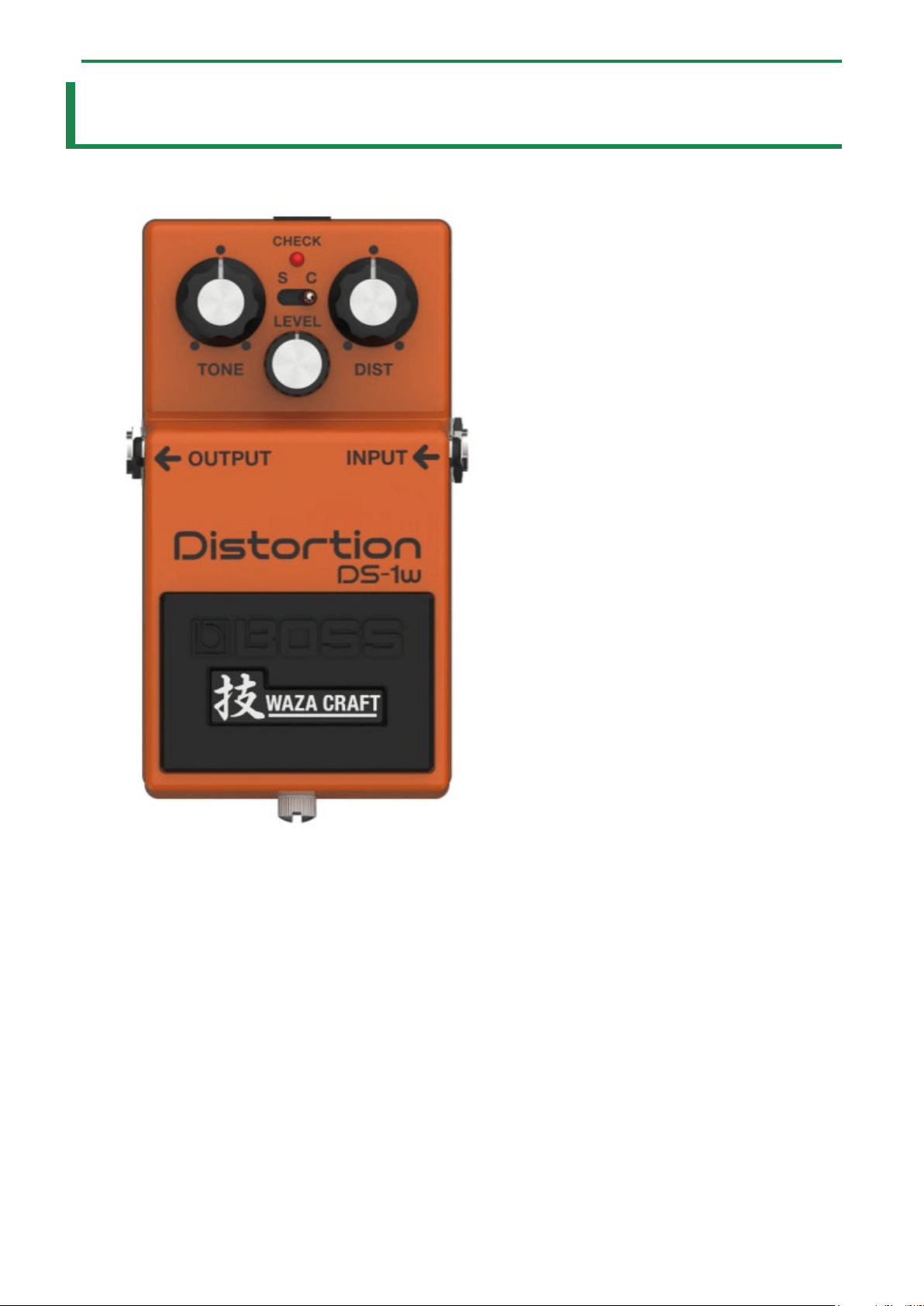
DS-1W
Owner’s Manual

Table of contents
2
Table of contents
DS-1W Owner’s Manual ......................................................... 3
Panel Descriptions .................................................................. 4
Changing the Batteries .......................................................... 6
Main Specifications ................................................................. 7
DS-1W Owner’s Manual
3
DS-1W Owner’s Manual
Before using this unit, carefully read “USING THE UNIT SAFELY” and “IMPORTANT NOTES” (leaflet “USING THE UNIT SAFELY”). After
reading, keep the document(s) where it will be available for immediate reference.
© 2022 Roland Corporation
Panel Descriptions
4
Panel Descriptions
Name
Function
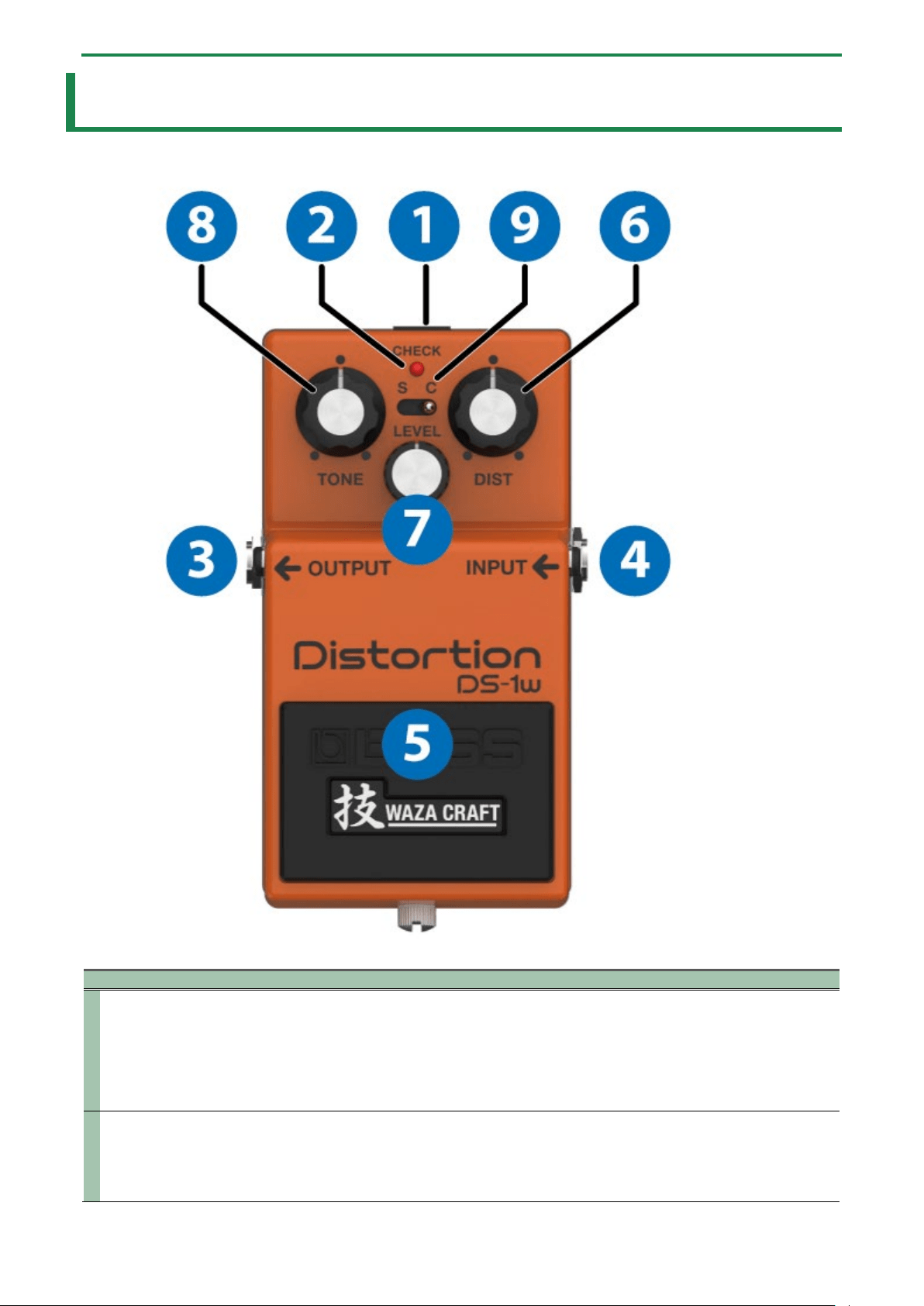
1
DC IN jack
Use this jack to connect an AC adaptor (PSA series; sold separately). If you use the AC adapter, you can play for
a long time without worrying about running out of battery.
* Use only the specified AC adaptor (PSA series; sold separately), and connect it to an AC outlet of the
correct voltage.
* If the AC adaptor is connected while power is on, the power supply is drawn from the AC adaptor.
2
CHECK
indicator
This indicator shows whether an effect is ON/OFF, and doubles as the Battery Check indicator.
The indicator lights when an effect is ON.
* The brightness of the CHECK indicator (LED) will dim as the battery lowers. Replace the battery when the
LED is dim or does not light. For details on how to replace, refer to “3. Changing the Batteries(P.6)”.

Panel Descriptions
5
Name
Function
3
OUTPUT
jack
Connect this jack to your amplifier or effect unit.
4
INPUT jack
Connect the output of your electric guitar, other musical instruments or effect units to this jack.
* The INPUT jack also serves as the power switch. Power is turned on whenever a plug is inserted into the
INPUT jack, and is turned off when the plug is disconnected. When not using the DS-1W, disconnect the
cable that is connected to the INPUT jack.
Ó
“Turing the power on/off ”
5
Pedal
switch
This switch turns the effects ON/OFF.
6
[DIST] knob
Adjusts the distortion depth and the sustain length at the same time. The further this is turned clockwise, the
heavier the distortion effect becomes, and the longer the sound sustains.
7
[LEVEL]
knob
Adjusts the volume when the effect is used.
* Turn this knob all the way counterclockwise to turn the sound off.
8
[TONE]
knob
Adjusts the tonal character of the distortion. Turning this clockwise cuts the low end and boosts the high end, for
a more cutting tone. Turning this all the way counterclockwise cuts the high end and boosts the low end, for a
more mellow tone.
9
[MODE]
knob
Switches between sound variations.
● S (standard): gives a sound that recreates the original DS-1, using a newly-designed circuit.
● C (custom): gives a custom sound that’s been tuned up to be more dynamic and thick.
* To prevent malfunction and equipment failure, always turn down the volume, and turn off all the units before making any
connections.
* Do not use connection cables that contain a built-in resistor.
Turning the power on/off
* Once everything is properly connected, be sure to follow the procedure below to turn on their power. If you turn on
equipment in the wrong order, you risk causing malfunction or equipment failure.
* Before turning the unit on/off, always be sure to turn the volume down. Even with the volume turned down, you might hear
some sound when switching the unit on/off. However, this is normal and does not indicate a malfunction.
Turning the power on
Turn on the power to your amp last.
Turning the power off
Turn off the power to your amp first.
Changing the Batteries
6
Changing the Batteries
When operating on battery power only, the CHECK indicator gets dimmer when battery power gets too low. Replace the batteries
as soon as possible.
* Batteries should always be installed or replaced before connecting any other devices. This way, you can prevent malfunction
and damage.
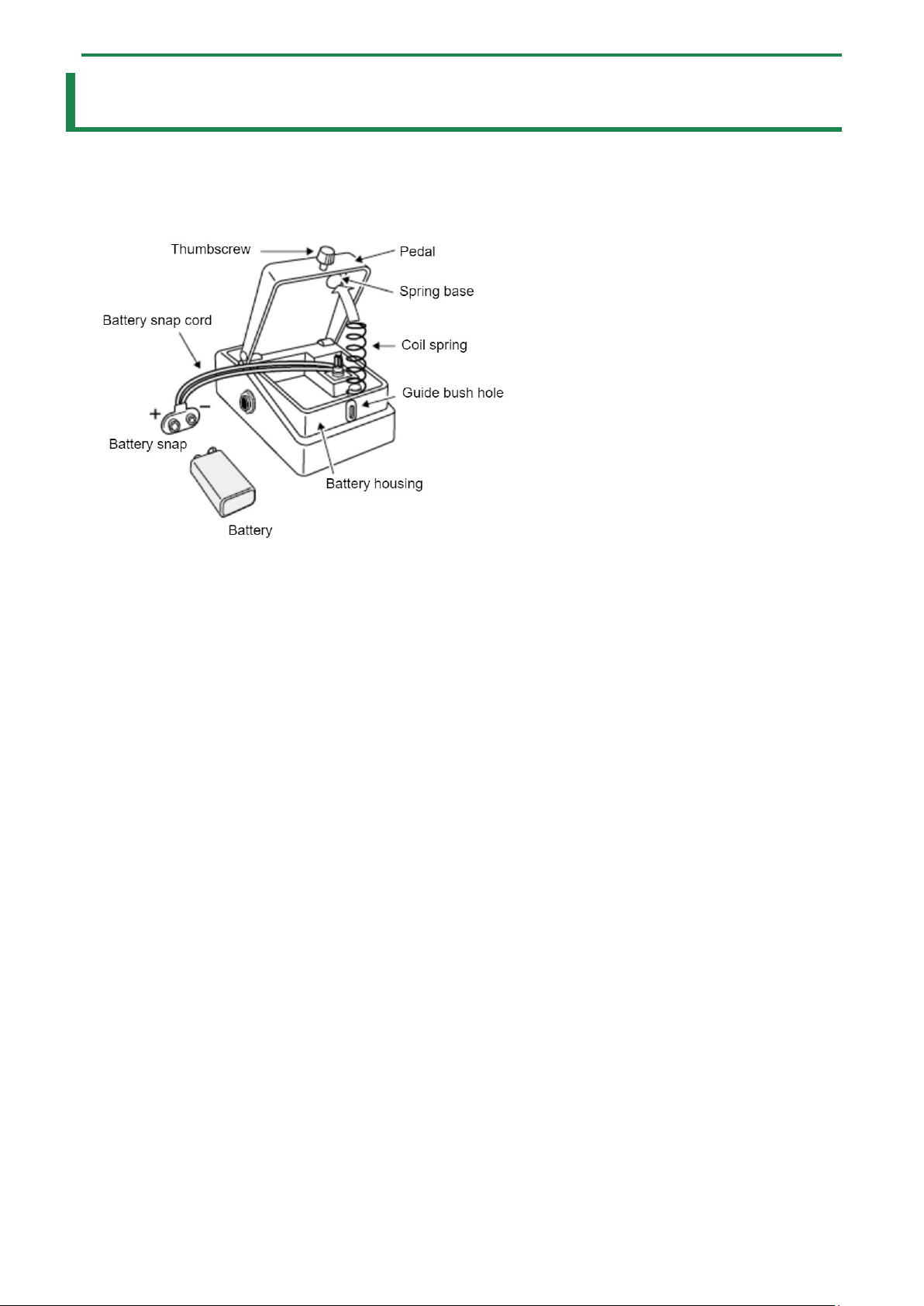
1.
Hold down the pedal and loosen the thumbscrew, then open the pedal upward.
You don’t need to take the thumbscrew out completely to open the pedal.
2.
Remove the old battery from the battery housing, and remove the battery snap connected to it.
3.
Connect the battery snap to the new battery, and place the battery inside the battery housing.
Be sure to carefully observe the battery’s polarity (+ versus -).
4.
Slip the coil spring onto the spring base on the back of the pedal, and then close the pedal.
Carefully avoid getting the snap cord caught in the pedal, coil spring, and battery housing.
5.
Finally, hold down the pedal while tightening the thumbscrew into the guide bush hole.
Use of battery
● If you handle batteries improperly, you risk explosion and fluid leakage. Make sure that you carefully observe all of
the items related to batteries that are listed in the “USING THE UNIT SAFELY” and “IMPORTANT NOTES” leaflets for
proper use.
● This device contains batteries when shipped from the factory. These are test batteries, which may not last as long as
new batteries.
● The sound may distort if the batteries are nearly depleted. This is not a malfunction. If this happens, replace the
batteries or use the AC adaptor (sold separately).

Main Specifications
7
Main Specifications
Nominal Input Level
INPUT: -20 dBu
Input Impedance
INPUT: 1 MΩ
Nominal Output Level
OUTPUT: -20 dBu
Output Impedance
OUTPUT: 1 kΩ
Recommended Load Impedance
OUTPUT: 10 kΩ or greater
Bypass
Buffered bypass
Controls
Pedal switch, Mode switch, [DIST] knob, [LEVEL] knob, [TONE] knob
Indicator
CHECK indicator (Serves also as battery check indicator)
Connectors
INPUT jack: 1/4-inch phone type
OUTPUT jack: 1/4-inch phone type
DC IN jack
Power Supply
Alkaline battery (9 V, 6LR61 or 6LF22) or Carbon-zinc battery (9 V, 6F22)
AC adaptor (PSA series: sold separately)
Current Draw
15 mA
Expected battery life under continuous use
Alkaline: Approx. 50 hours
Carbon: Approx. 25 hours
* These figures will vary depending on the actual conditions of use
Dimensions
73 (W) x 129 (D) x 59 (H) mm
2-7/8 (W) x 5-1/8 (D) x 2-3/8 (H) inches
Weight (including battery)
430 g
1 lb
Accessories
Leaflet (“USING THE UNIT SAFELY” , “IMPORTANT NOTES” , and “Information”)
Alkaline battery (9 V, 6LR61 or 6LF22)
Options (sold separately)
AC adaptor: PSA series
* 0 dBu = 0.775 Vrms
* This document explains the specifications of the product at the time that the document was issued. For the latest
information, refer to the Roland website.

Main Specifications
8
DS-1W
Owner’s Manual
©2022 Roland Corporation