Connecting to Alexa & Google Home
ENGLISH
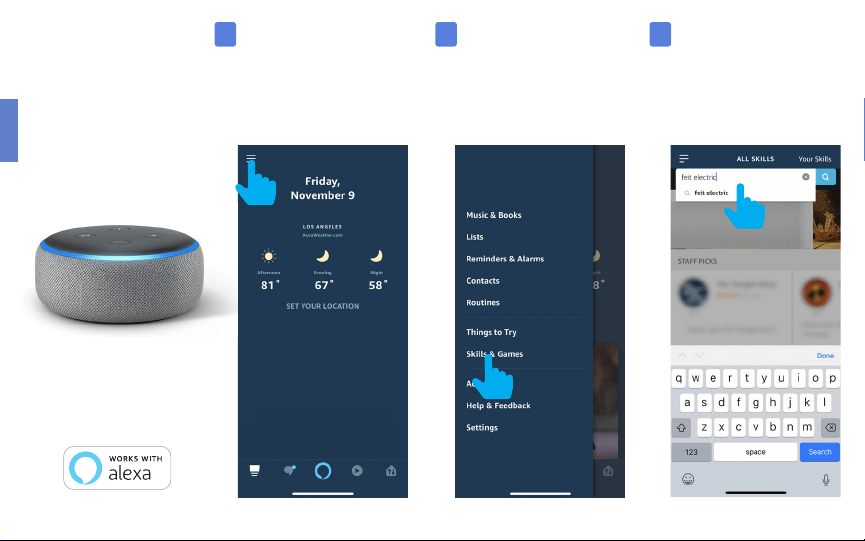
Connecting
to Alexa
Launch the Alexa App then
tap on the “Menu”.
(In the upper left corner)
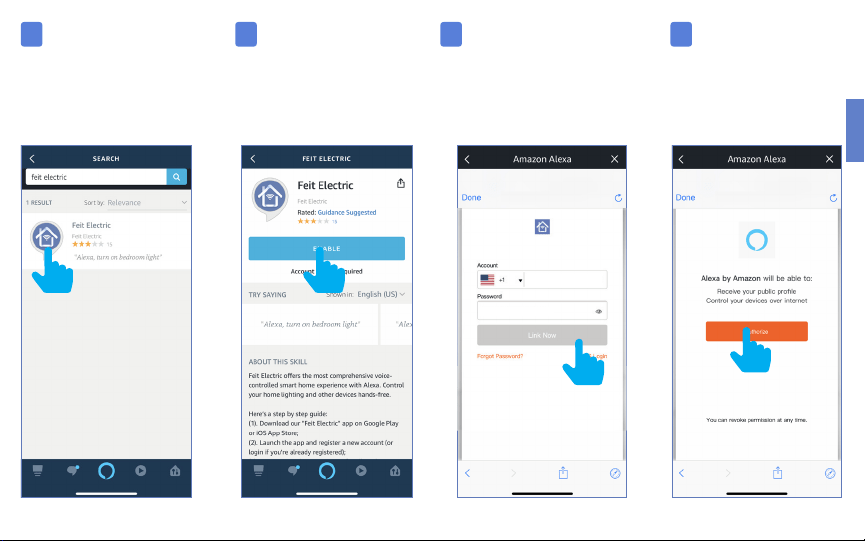
In the search menu type
“Feit Electric”.
Tap “Feit Electric”.
1 2 3
Tap “Skills & Games ”.
ENGLISH
Tap “Feit Electric”. Tap “Enable”. Enter the user & password
from the Feit Electric App.
Then tap “Link Now”.
Tap “Authorize”.
*********
4 5 6 7
XXXXXXX
ENGLISH
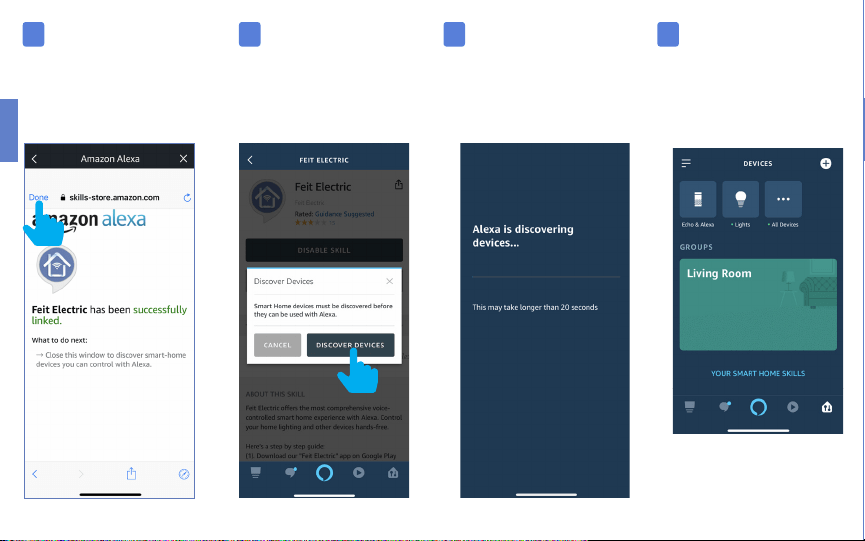
Tap “Done”
in the upper left corner.
Tap “Discover Devices”.
Alexa will now discover
and add device(s).
Once the device(s) are
discovered they will appear
under “Devices”
(lower right corner).
8 9
10 11
Note: Additional devices will
be added automatically when
added to the Feit Electric App.

Basic Commands: Amazon Alexa
These are some of the currently supported Alexa voice commands for Feit Electric Wifi bulb(s).
• Alexa, set [light name] to [0-100]%
• Alexa, set [light name] to [0-100]% brightness
• Alexa, turn [light name] on/off
• Alexa, dim/brighten [light name]
• Alexa, increase/decrease [light name]
• Alexa, set the [light name] light to red or [color of choice]
• Alexa, change the [light name] to the color blue or [color of choice]
• Alexa, make the [light name] warm white
• Alexa, change the [light name] to cool white
• Alexa, set the [light name] to daylight
ENGLISH
Connecting to
Google Home
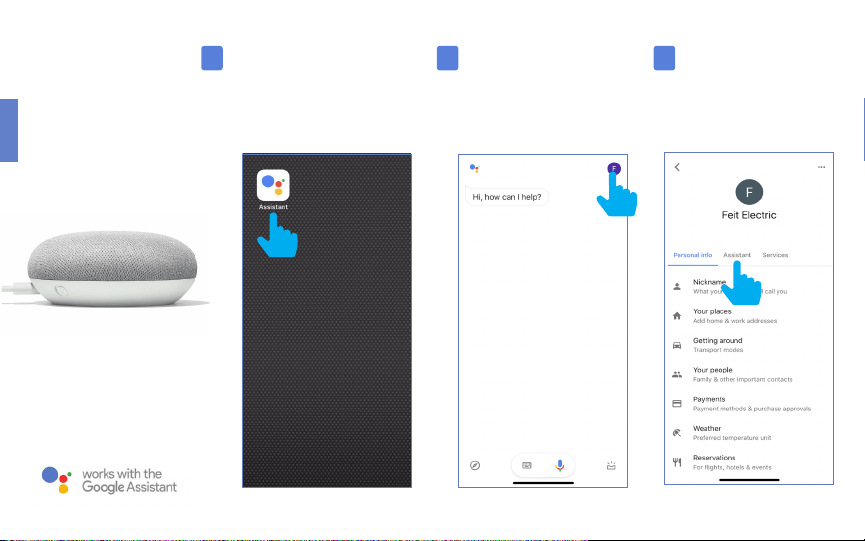
Open the
“Google Assistant” App.
In the upper right corner tap
the “Circle” icon.
Tap “Assistant”
1 2 3
ENGLISH
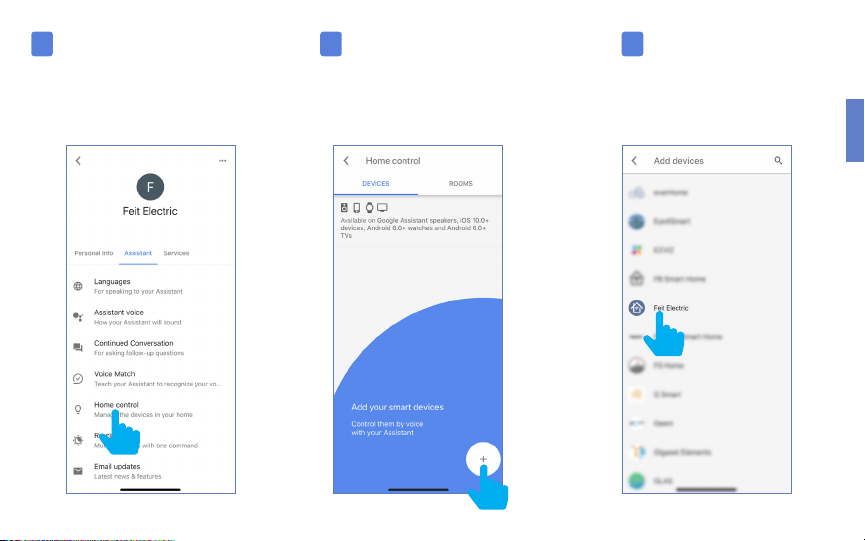
Tap “Home Control” To add a device tap on
the Circle (+) located in the
lower right corner.
Scroll down and
tap “Feit Electric”.
4 5 6
ENGLISH
7 8
9
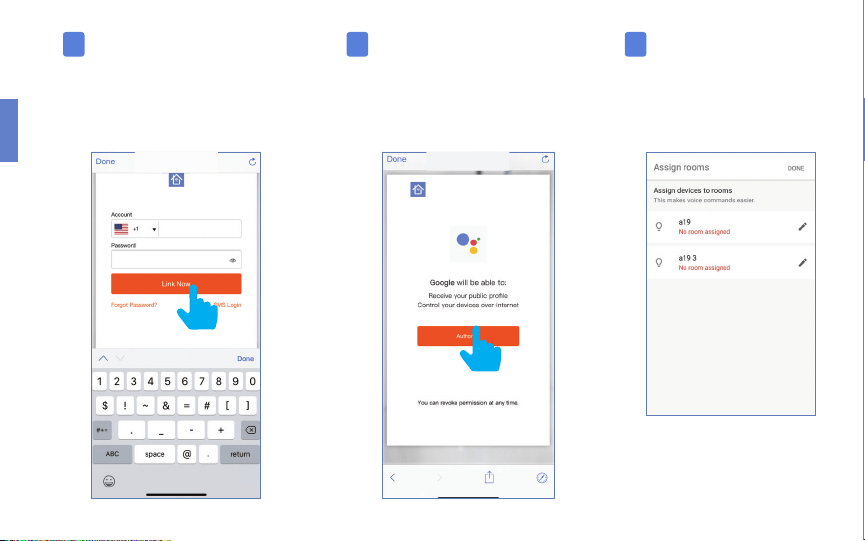
Enter the user & password
from the Feit Electric App then tap
“Link Now”.
Once device(s) are connected
tap “Done” to return to
Devices or tap the “Pen”
icon to assign a room.
Tap “Authorize”.
*********
XXXXXXX
Note: Additional devices will
be added automatically when
added to the Feit Electric App.

Basic Commands: Google Assistant
These are some of the currently supported Alexa voice commands for Feit Electric Wifi bulb(s).
• Hey Google, set [light name] to [0-100]%
• Hey Google, set [light name] to [0-100]% brightness
• Hey Google, turn [light name] on/off
• Hey Google, dim/brighten [light name]
• Hey Google, increase/decrease [light name]
• Hey Google, set the [light name] light to red or [color of choice]
• Hey Google, change the [light name] to the color blue or [color of choice]
• Hey Google, make the [light name] warm white
• Hey Google, change the [light name] to cool white
• Hey Google, set the [light name] to daylight
“Hey Google” or “OK Google” voice commands are both acceptable

Minimum System Requirements
iOS 9.3 and Android 4.1
May not be compatible with all devices.
If you are unable to download the app, the product is not
compatible with your device.
Amazon, Alexa and all related logos are trademarks
of Amazon.com, Inc. or its affiliates.
© 2015 Google Inc. All rights reserved. Google,
Works with the Google Assistant and the Google
Play Word are registered trademarks of Google Inc.
App Store is a service mark of Apple Inc.
For Technical Support
Please contact Feit Electric at
(562) 463-BULB (2852)
or visit us at
www.feit.com
feit.com/smartwifibulb