HiFi Began with YaDlaha
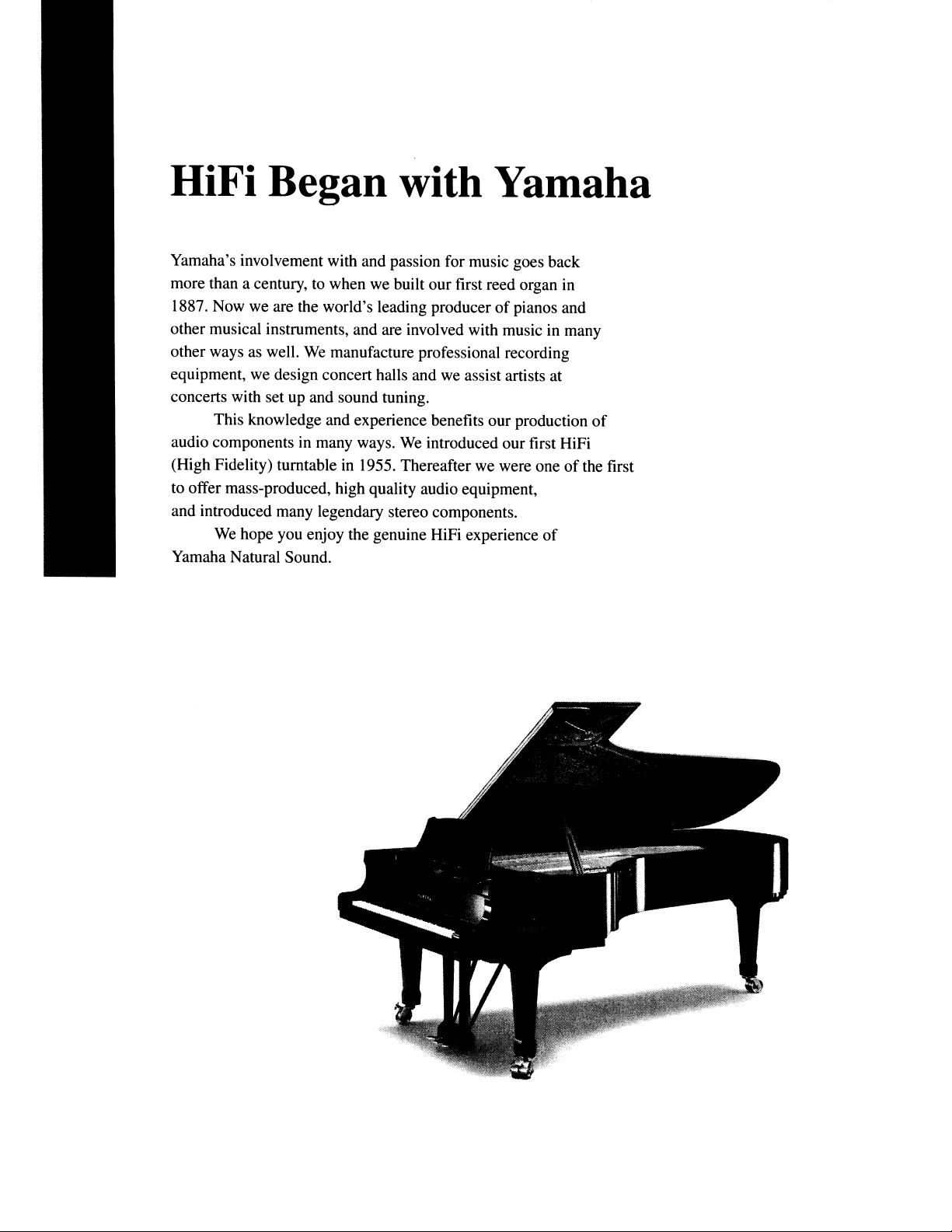
Yamaha's involvement with and passion for music goes back
more than a century,
to
when we built our first reed organ
in
1887. Now we are the world's leading producer
of
pianos and
other musical instruments, and are involved with music in many
other ways as well.
We
manufacture professional recording
equipment, we design concert halls and we assist artists at
concerts with set up and sound tuning.
This knowledge and experience benefits our production
of
audio components in many ways.
We
introduced our first HiFi
(High Fidelity) turntable
in
1955. Thereafter we were one
of
the first
to offer mass-produced, high quality audio equipment,
and introduced many legendary stereo components.
We
hope you enjoy the genuine HiFi experience
of
Yamaha Natural Sound.
1920-
196005
1970s
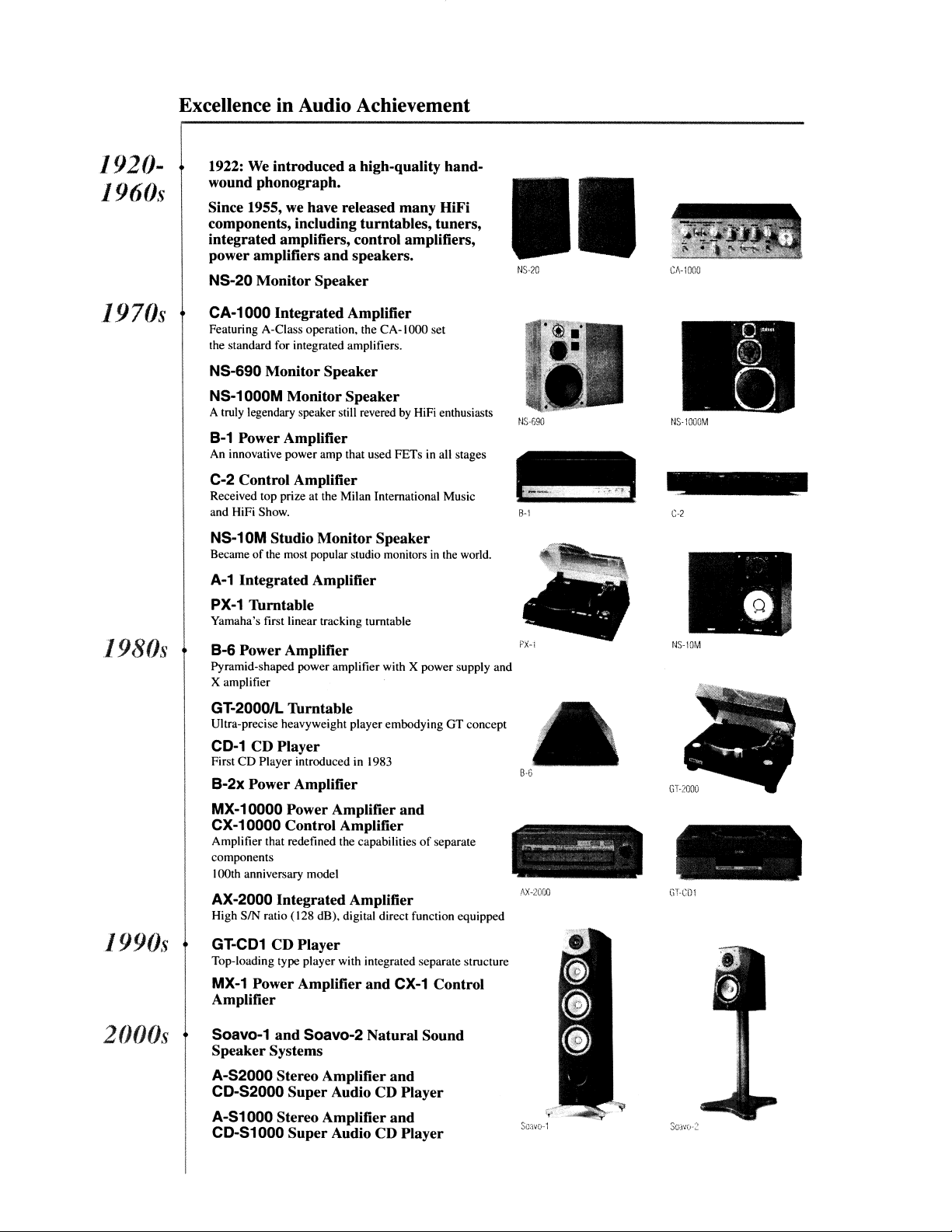
Excellence in Audio Achievement
1922:
We
introduced a high-quality hand-
wound phonograph.
Since 1955, we have released many HiFi
components, including turntables, tuners,
integrated amplifiers, control amplifiers,
power amplifiers and speakers.
NS-20 Monitor Speaker
CA-1000 Integrated Amplifier
Featuring A-Class opemtion, the
CA-l
000 set
the standard for integrated amplifiers.
NS-690 Monitor Speaker
NS-1000M Monitor Speaker
A truly legendary speaker still revered
by
HiFi enthusiasts
B-1 Power Amplifier
An innovative power amp that used FETs in all stages
C-2 Control Amplifier
Received top prize at the Milan International Music
and HiFi Show.
II
NS-20
NS-690
8-'1
Cf.-lOOO
NS-l000M
C-2
1980s
1990s
2000s
NS-10M Studio Monitor Speaker
Became
of
the most popular studio monitors
in
the
world.
A-1
Integrated Amplifier
PX-1
Thrntable
Yamaha's first linear tracking turntable
B-6 Power Amplifier
Pyramid-shaped power amplifier with X power supply and
X amplifier
GT-2000/L Thrntable
Ultra-precise heavyweight player embodying GT concept
CD-1 CD Player
First
CD
Player introduced in 1983
B-2x Power Amplifier
MX-10000 Power Amplifier and
CX-10000 Control Amplifier
Amplifier that redefined the capabilities
of
separate
components
100th anniversary model
AX-2000 Integrated Amplifier
High SIN ratio (128 dB), digital direct function equipped
GT-CD1
CD Player
Top-loading type player with integrated separate structure
MX-1 Power Amplifier and CX-1 Control
Amplifier
Soavo-1 and Soavo-2 Natural Sound
Speaker Systems
A-S2000 Stereo Amplifier and
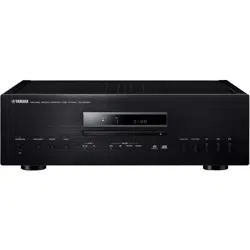
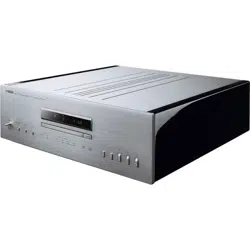
CD-S2000 Super Audio CD Player
A-S1000 Stereo Amplifier and
CD-S1000 Super Audio CD Player
B·6
AX-2000
Saavv·,1
~
-....
.
•
it'
,
- .
-.
.
NS-IOM
CD-SIOOO
• Symmetrical circuitry using independent left
and
rightpower supply
circuits
and
a twin DAC structure
for
fully independent left
and
right
channels
• Separate power-transformer windings
for
digital
and
analog circuitry
• Newly developed high rigidity silent loader
and
high precision CD drive
•
PURE
DIRECT
• Super soundfrom Super Audio CDs
• Newly developed heavyweightfeetto suppress vibrations
• Supplied accessories
Please check that you have received all
of
the following parts.
• Power cable
• Remote control
• Batteries (A
A,
R6, UM-3)
(x2)
• Audio pin cable
• Safety brochure
Contents
Controls
and
functions 6
Connections
14
Specifications
18
Playable disc format
19
Troubleshooting
21
•
About
this
manual
•
o'4>'~
indicates a tip for your operation.
• This manual
is
printed prior to production. Design and specifications are subject to change
in
part as a result
of
improvements, etc.
In
case
of
di
fferences between the manual and the product, the product has priority.
• The color
of
images in this manual may vary from the original.
• Read the "Safety brochure" before using this unit.
4
En
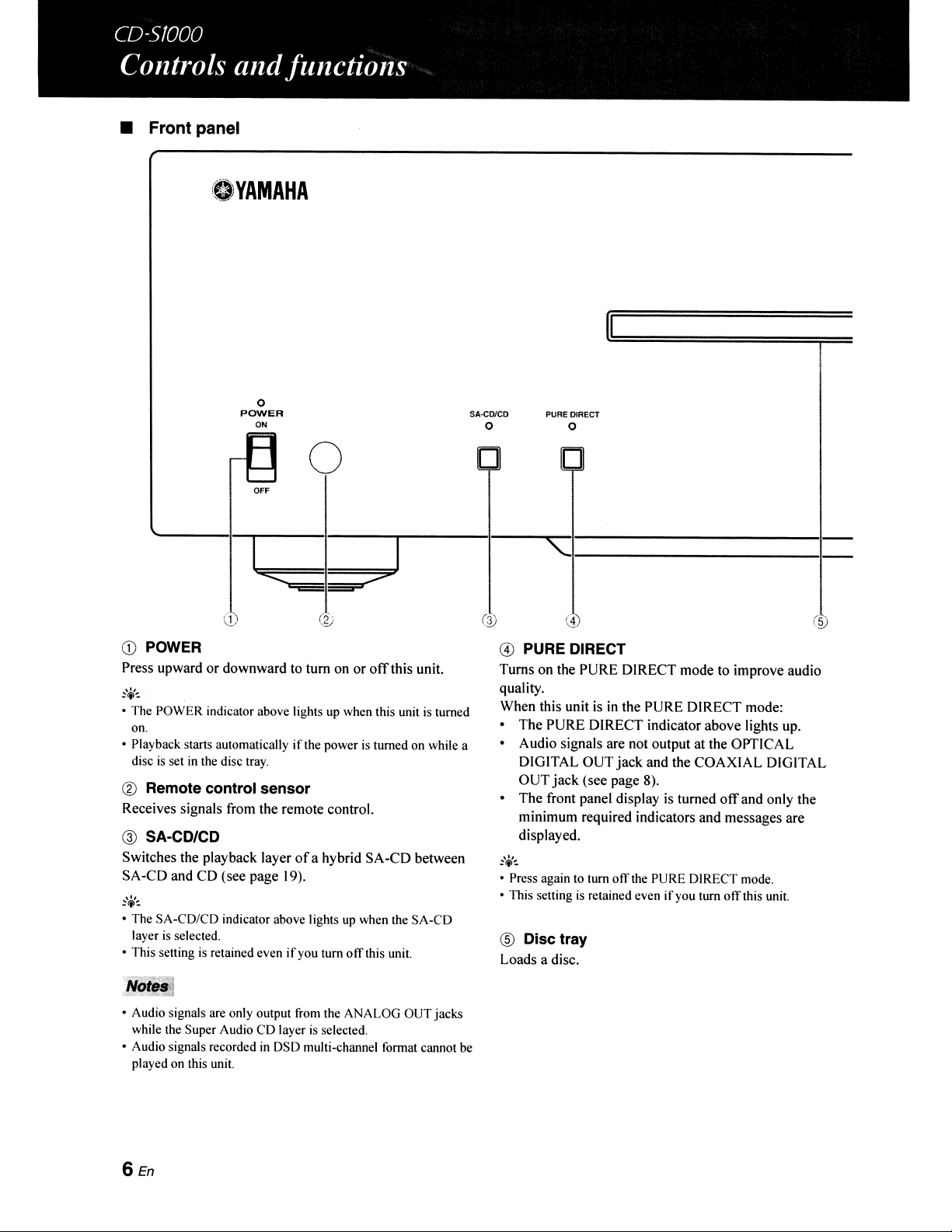
• Front panel
.YAMAHA
II
o
POWER
~~
I'---'
'--
OFF
I
o
I
SA-CO/CD
o
PURE DIRECT
o
'"1----------1--
CD
POWER
Press upward or downward to tum on or
off
this unit.
• The POWER indicator above lights up when this unit
is
turned
on.
• Playback starts automatically
if
the power
is
turned on while a
disc
is
set in the disc tray.
® Remote control sensor
Receives signals from the remote control.
@ SA-CD/CD
Switches the playback layer
of
a hybrid SA-CD between
SA-CD and CD (see page 19).
~\¥-:
• The SA-CD/CD indicator above lights up when the SA-CD
layer
is
selected.
• This setting
is
retained even
if
you turn
off
this unit.
• Audio signals are only output from the ANALOG OUT jacks
while the Super Audio CD layer
is
selected.
• Audio signals recorded in DSD multi-channel format cannot be
played on this unit.
6En
@ PURE DIRECT
Turns on the PURE DIRECT mode to improve audio
quality.
When this unit
is
in
the PURE DIRECT mode:
• The PURE DIRECT indicator above lights up.
• Audio signals are not output at the OPTICAL
DIGITAL OUT jack and the COAXIAL DIGITAL
OUT
jack
(see page 8).
• The front panel display
is
turned
off
and only the
minimum required indicators and messages are
displayed.
~(j<':.
• Press again to turn
off
the PURE DIRECT mode.
• This setting
is
retained even
if
you turn
off
this unit.
® Disc tray
Loads a disc.
DO
o
o
_________
,.
7
(§)
®
~
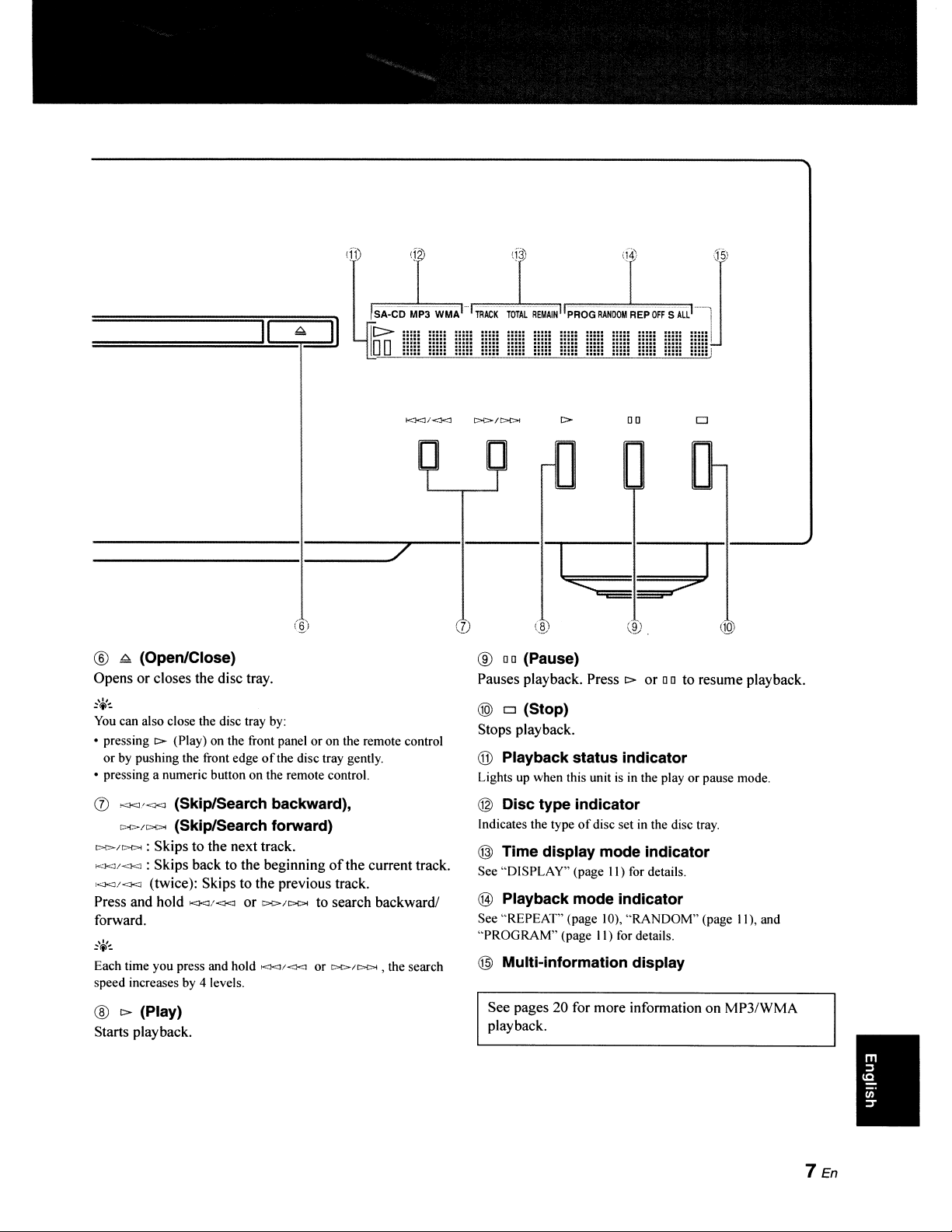
(Open/Close)
Opens or closes the disc tray.
:.,-=.
You
can also close the disc tray
by:
• pressing
t>
(Play) on the front panel or on the remote control
or by pushing the front edge
of
the disc tray gently.
• pressing a numeric button on the remote control.
(])
><J<Ji<)<~
(Skip/Search backward),
''''I>/Do<><
(Skip/Search forward)
t:>!>/t.><><
: Skips to the next track.
KJ<J/-<..1<J
: Skips back to the beginning
ofthe
current track.
KJ<J/<Kl
(twice): Skips to the previous track.
Press and hold
Kl<J/Kl<J
or
>:>/Do<><
to search backward!
forward.
Each time you press and hold t<..."'<JI<1<J or
t>C>/l>C>4
, the search
speed increases by 4 levels.
®
t>
(Play)
Starts playback.
·7
10.
®
DO
(Pause)
Pauses playback. Press c> or
DO
to resume playback.
@)
0 (Stop)
Stops playback.
® Playback status indicator
Lights
up
when this unit
is
in
the play or pause mode.
@ Disc type indicator
Indicates the type
of
disc set
in
the disc tray.
@ Time display mode indicator
See "DISPLAY" (page
II)
for details.
@ Playback mode indicator
See
"REPEAT'
(page 10), "RANDOM" (page II), and
"PROGRAM" (page
II)
for details.
@ Multi-information display
See pages 20 for more information on
MP3/WMA
playback.
7 En
I
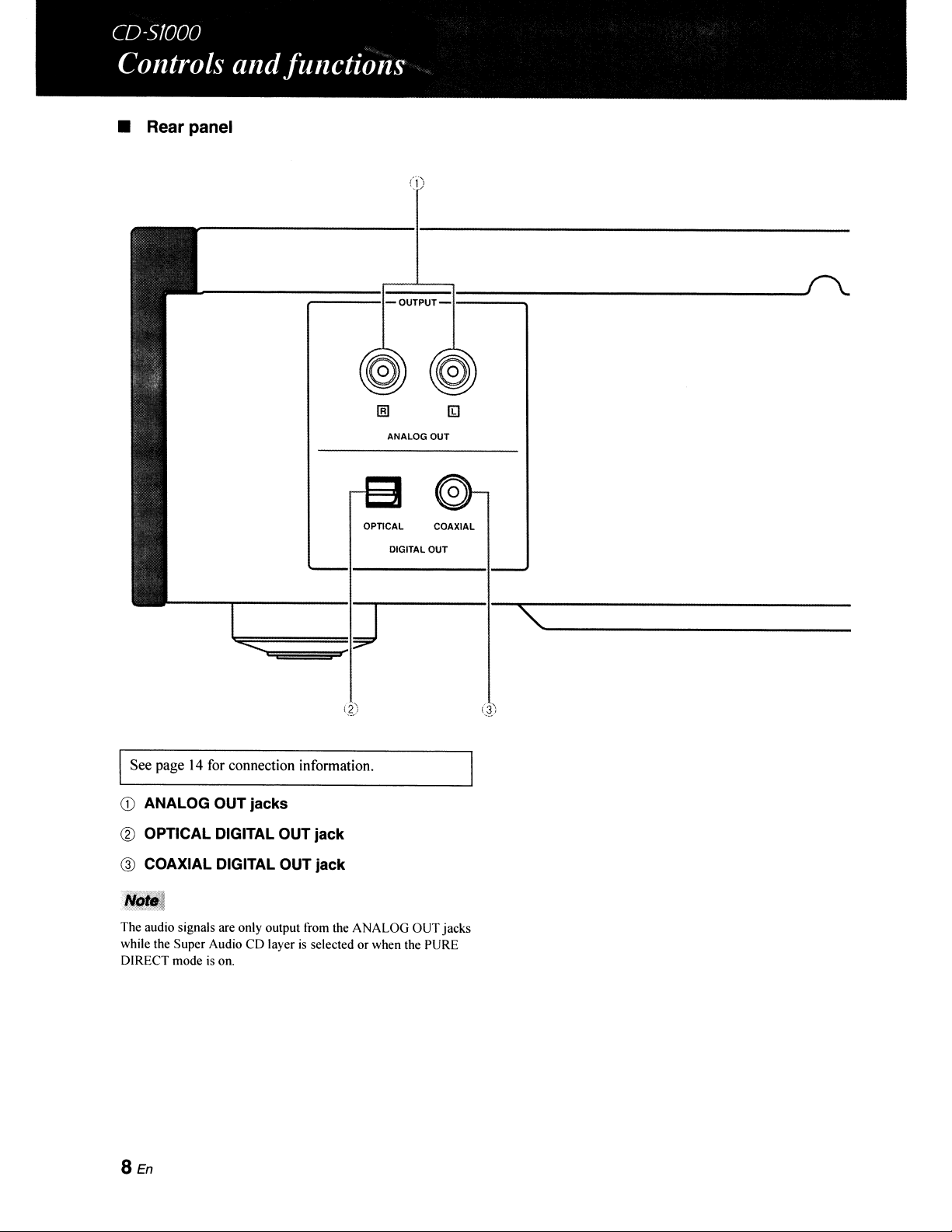
• Rear panel
(1)
,-----------
COAXIAL
DIGITAL
OUT
ANALOG
OUT
opnCAL
------;::===:r-~O~U~TP~U;T::J:===::::::----------------f\.
ISee page
14
for connection information.
CD
ANALOG OUT jacks
@ OPTICAL DIGITAL OUT jack
@ COAXIAL DIGITAL OUT jack
Nq~·l
The audio signals are only output from the ANALOG OUT jacks
while the Super Audio
CD
layer
is
selected or when the PURE
DIRECT mode
is
on.
8En
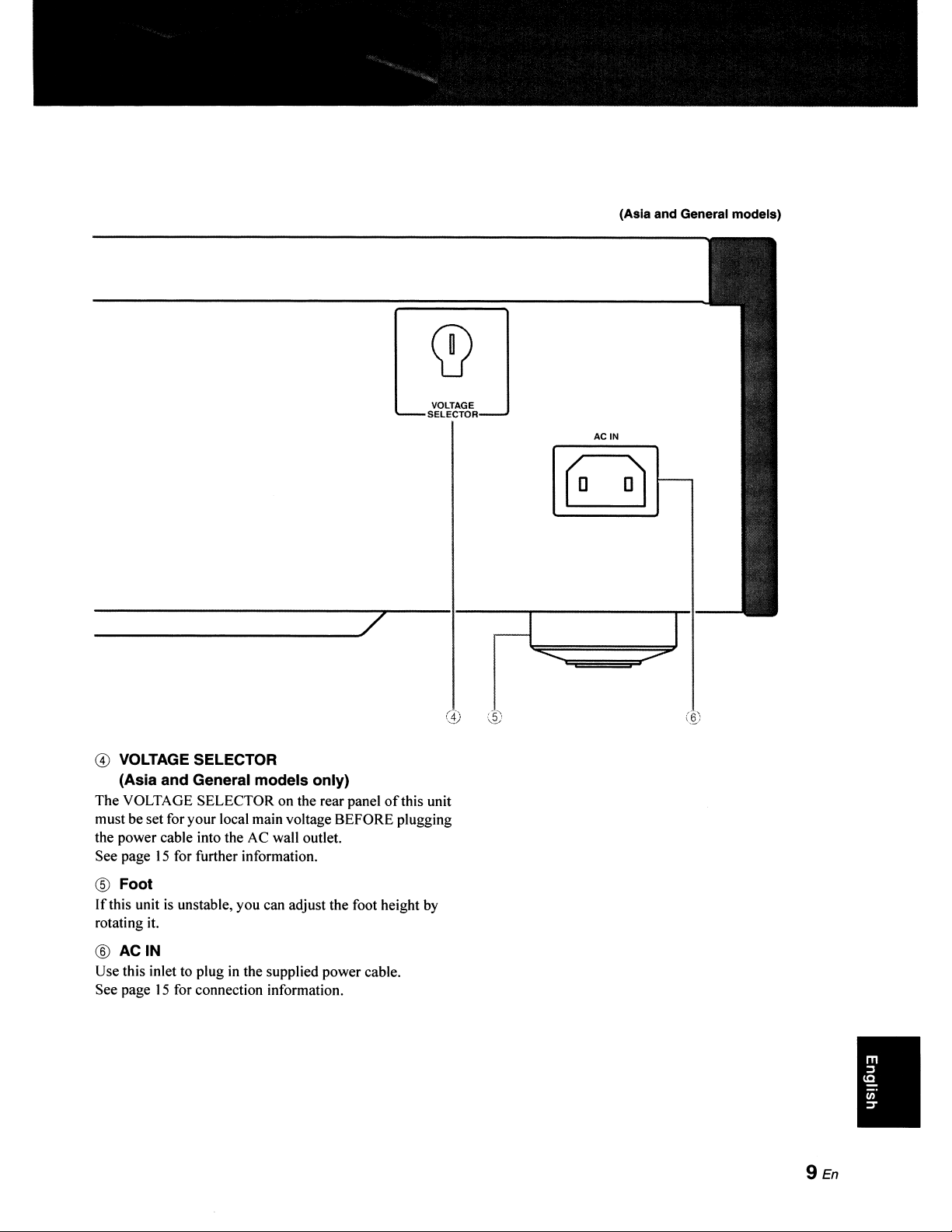
(Asia and General models)
VOLTAGE
SELECTOR
__________
7
(1)
@ VOLTAGE SELECTOR
(Asia and General models only)
The VOLTAGE SELECTOR on the rear panel
ofthis
unit
must be set for your local main voltage BEFORE plugging
the power cable into the AC wall outlet.
See page
15
for further information.
® Foot
If
this unit
is
unstable, you can adjust the foot height
by
rotating
it.
®
ACIN
Use this inlet to plug in the supplied power cable.
See page
15
for connection information.
ACIN
9En
•
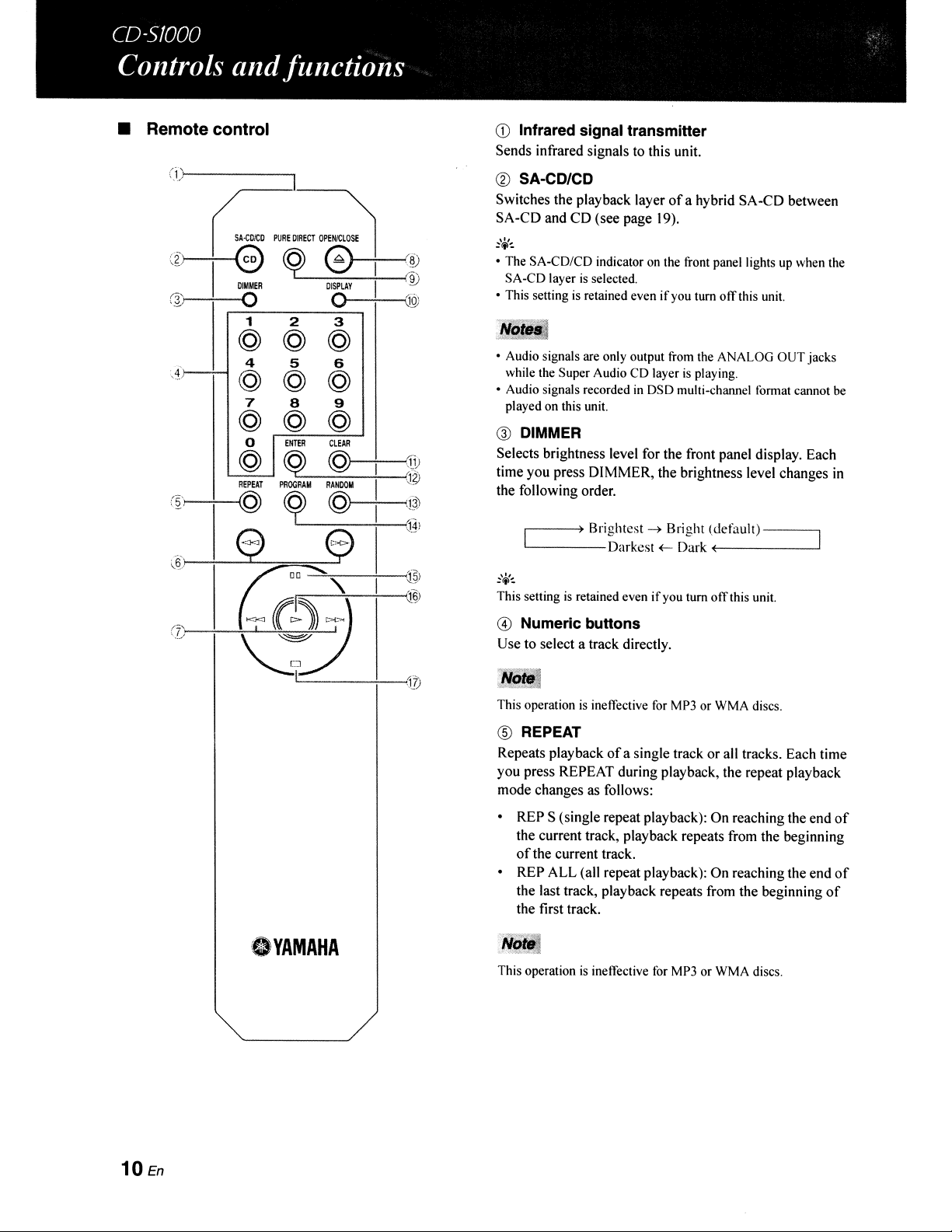
• Remote control
CD
Infrared signal transmitter
Sends infrared signals to this unit.
(i)c--------,
® SA-CD/CD
Switches the playback layer
ofa
hybrid SA-CD between
SA-CD and CD (see page
19).
@ DIMMER
Selects brightness level for the front panel display. Each
time you press DIMMER, the brightness level changes
in
the following order.
This operation
is
ineffective for MP3 or WMA discs.
® REPEAT
Repeats playback
of
a single track or all tracks. Each time
you press REPEAT during playback, the repeat playback
mode changes as follows:
• REP S (single repeat playback): On reaching the end
of
the current track, playback repeats from the beginning
of
the current track.
• REP ALL (all repeat playback): On reaching the end
of
the last track, playback repeats from the beginning
of
the first track.
JliJ..-
This operation
is
ineffective
for
MP3 or WMA discs.
r---~)
Brightest
~
Bright (default)
---
'------Darkesl
+- Dark
~(------
@ Numeric buttons
Use to select a track directly.
This setting
is
retained even
if
you tum
off
this unit.
• Audio signals are only output from the ANALOG OUT jacks
while the Super Audio CD layer
is
playing.
• Audio signals recorded in DSD multi-charmel format cannot be
played on this unit.
• The SA-CD/CD indicator on the front panel lights up when the
SA-CD layer
is
selected.
• This setting
is
retained even
if
you turn
off
this unit.
DISPLAY
o
<J
1 2 3
@ @ @
4 5
6
r--"""
@ @ @
7
8 9
@ @ @
@\©)
CLEAR
@
I
"
(-
REPEAT
PROORAM
RANDOM
I
"
J
@
~
@
I
:
(.
EJ
E?
I
,
)
~'
I
,
~'~~
(
,
.'
~
o
YAMAHA
(6
(7
SHoICo
':2>----t--G
...
I
DIMMER
(lJ
0
10
En
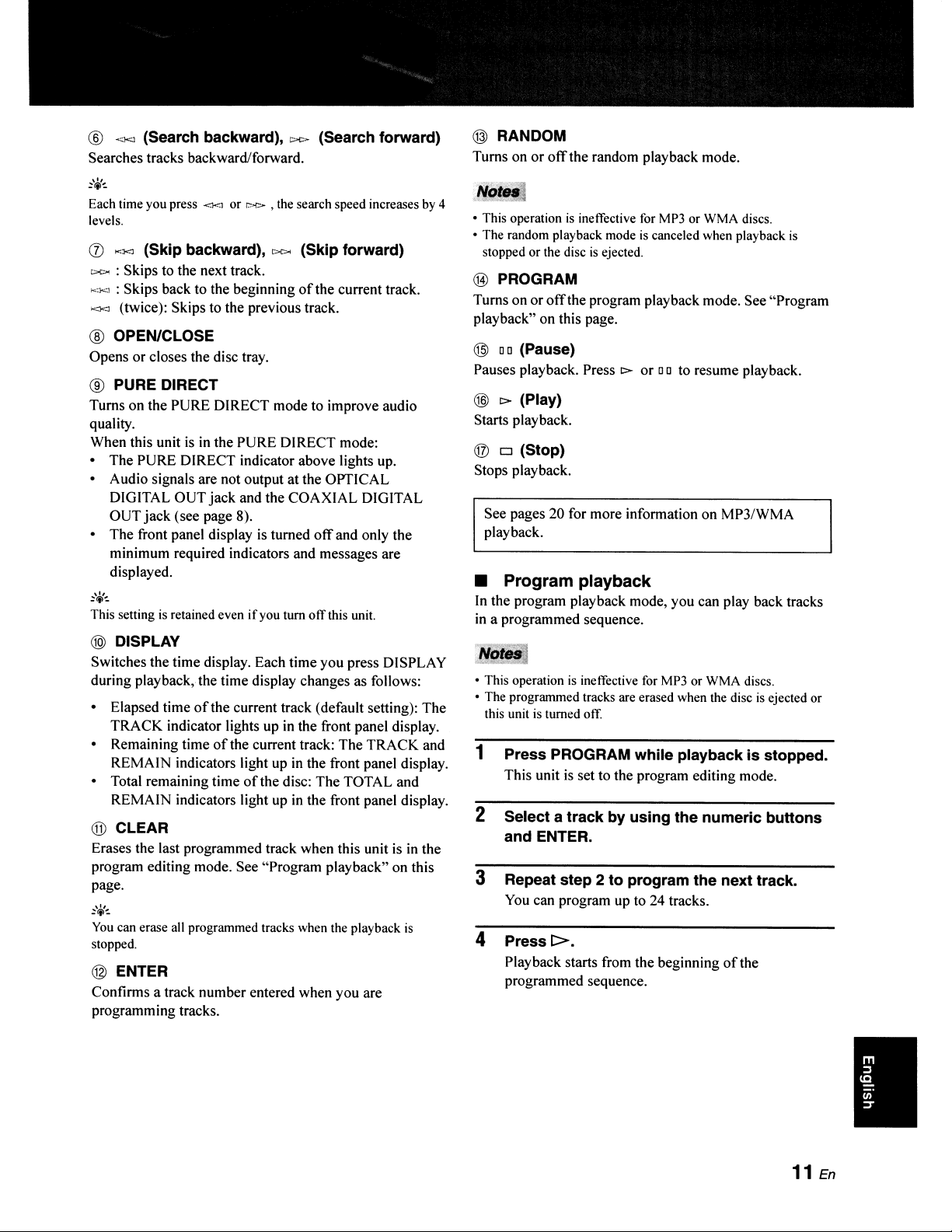
®
~"'1<J
(Search backward), r:><> (search forward)
Searches tracks backward/forward.
:,¥:.
Each time you press
<KI
or
r.---r-.>
, the search speed increases by 4
levels.
(j)
....
.xJ
(Skip backward),
c>c>o
(Skip forward)
c>c><
: Skips to the next track.
K:l<J
: Skips back to the beginning
of
the current track.
><l<J (twice): Skips to the previous track.
® OPEN/CLOSE
Opens or closes the disc tray.
® PURE DIRECT
Turns on the PURE DIRECT mode to improve audio
quality.
When this unit
is
in
the PURE DIRECT mode:
• The PURE DIRECT indicator above lights up.
• Audio signals are not output at the OPTICAL
DIGITAL OUT jack and the COAXIAL DIGITAL
OUT
jack
(see page 8).
• The front panel display
is
turned
off
and only the
minimum required indicators and messages are
displayed.
This setting is retained even
if
you
tum
off
this unit.
® DISPLAY
Switches the time display. Each time you press DISPLAY
during playback,the time display changes as follows:
• Elapsed time
of
the current track (default setting): The
TRACK indicator lights
up
in
the front panel display.
• Remaining time
of
the current track: The TRACK and
REMAIN indicators light up
in
the front panel display.
• Total remaining time
of
the disc: The TOTAL and
REMAIN indicators light up
in
the front panel display.
@ CLEAR
Erases the last programmed track when this unit
is
in the
program editing mode. See "Program playback" on this
page.
You
can erase all programmed tracks when the playback
is
stopped.
@ ENTER
Confirms a track number entered when you are
programming tracks.
@ RANDOM
Turns on or
off
the random playback mode.
• This operation
is
ineffective for MP3 or WMA discs.
• The random playback mode
is
canceled when playback
is
stopped or the disc
is
ejected.
® PROGRAM
Turns on or
off
the program playback mode. See "Program
playback" on this page.
@
DO
(Pause)
Pauses playback. Press
t>-
or
DO
to resume playback.
@
t>-
(Play)
Starts playback.
® 0 (Stop)
Stops playback.
See pages 20 for more information on MP3/WMA
playback.
•
Program
playback
In
the program playback mode, you can play back tracks
in a programmed sequence.
• This operation
is
ineffective for MP3 or WMA discs.
• The programmed tracks are erased when the disc
is
ejected or
this unit
is
turned off.
1 Press PROGRAM while playback is stopped.
This unit
is
set to the program editing mode.
2 Select a track by using the numeric buttons
and ENTER.
3 Repeat step 2 to program the next track.
You
can program
up
to 24 tracks.
4 Press
1>.
Playback starts from the beginning
of
the
programmed sequence.
11
En
I
• Installing batteries
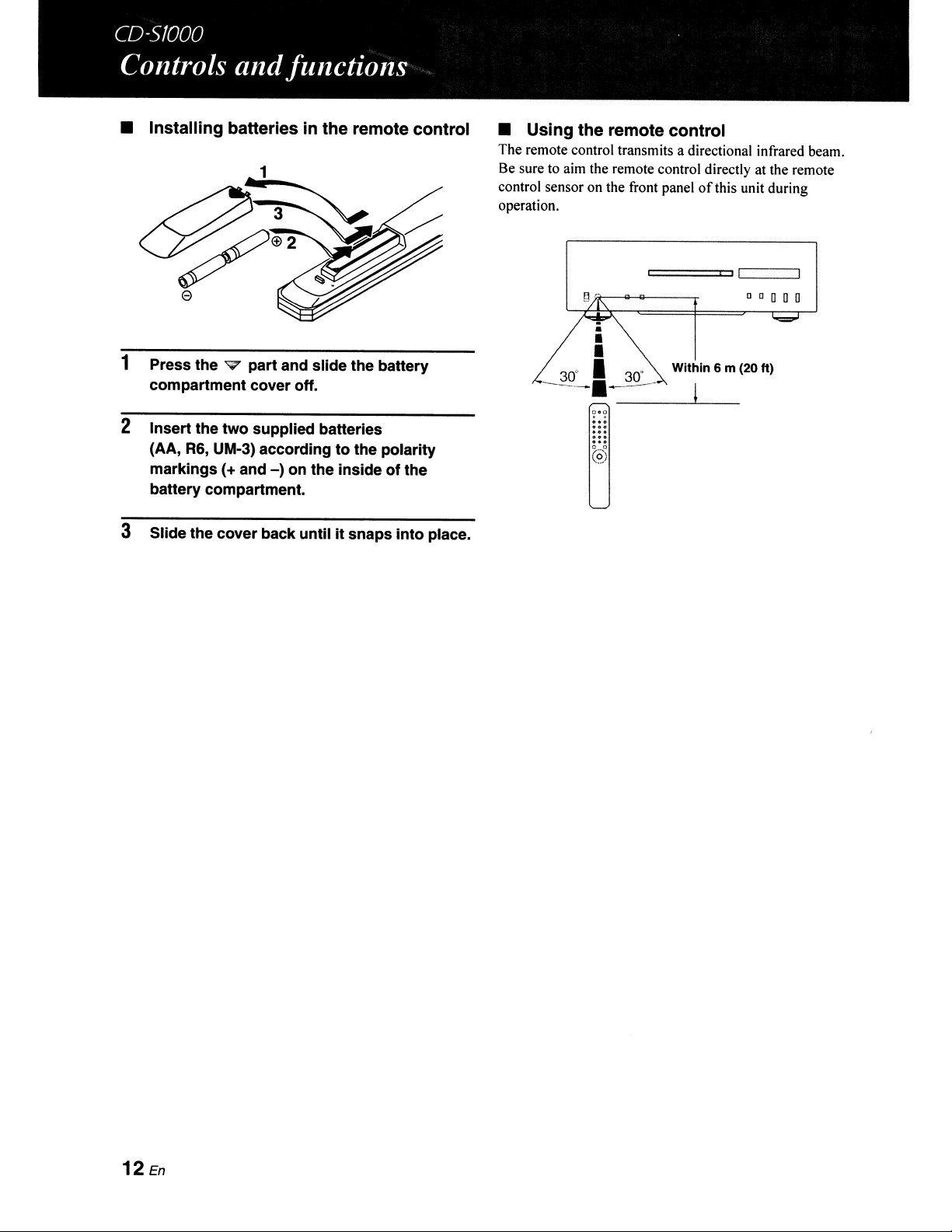
in
the remote control
1 Press the v part and slide the battery
compartment cover off.
2 Insert the two supplied batteries
(AA, R6, UM-3) according to the polarity
markings
(+ and
-)
on the inside of the
battery compartment.
3 Slide the cover back until it snaps into place.
12
En
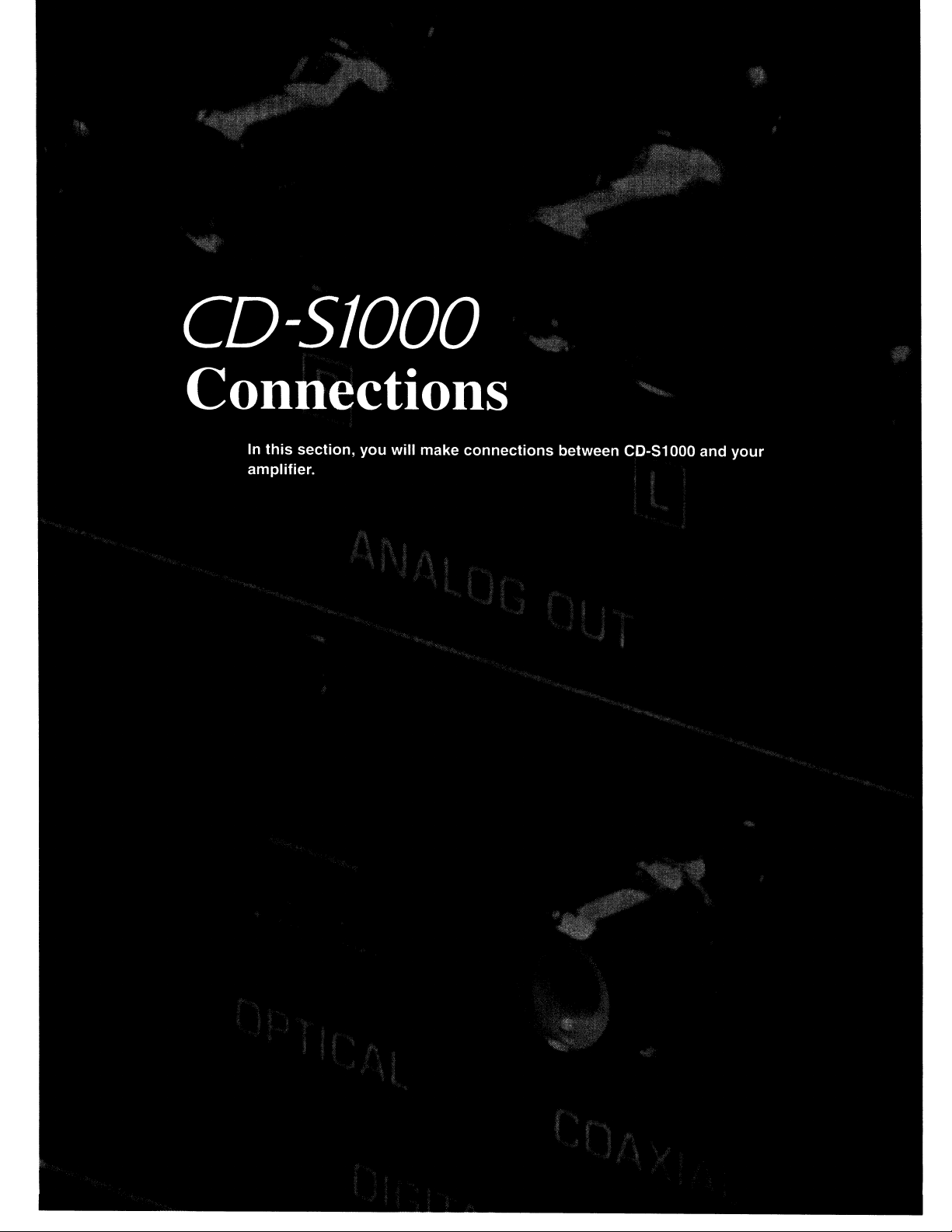
• Using the remote control
The remote control transmits a directional infrared beam.
Be sure to aim the remote control directly at the remote
control sensor on the front panel
of
this unit during
operation.
===,
CI
===:J
o 0 0 0 0
...
@
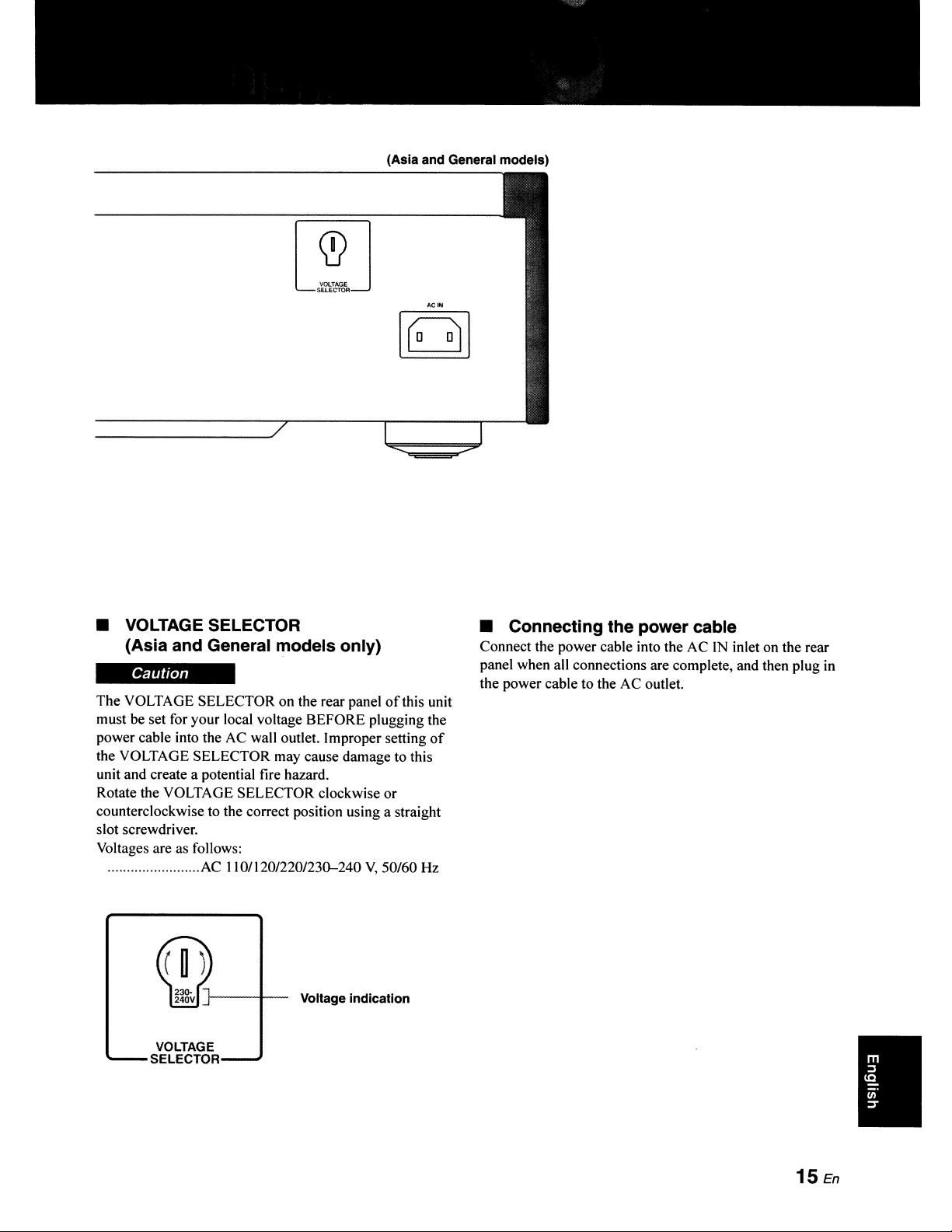
The audio signals are
only
output from
the ANALOG OUT Jacks while the
Super Audio
CD
layer Is selected
or
when the
PURE
DIRECT mode is on.
OUTPUT
ANALOG
OllT
""-----------
14
En
Amplifier
(Asia and General models)
• VOLTAGE SELECTOR
(Asia
and
General models only)
Caution
The VOLTAGE SELECTOR on the rear panel
of
this unit
must
be
set for your local voltage BEFORE plugging the
power cable into the AC wall outlet. Improper setting
of
the VOLTAGE SELECTOR may cause damage to this
unit and create a potential fire hazard.
Rotate the VOLTAGE SELECTOR clockwise or
counterclockwise to the correct position using a straight
slot screwdriver.
Voltages are as follows:
........................
AC
110112012201230-240
V,
50/60 Hz
Voltage indication
VOLTAGE
SELECTOR
• Connecting the power cable
Connect the power cable into the AC
IN
inlet on the rear
panel when all connections are complete, and then plug in
the power cable to the
AC
outlet.
•
15
En
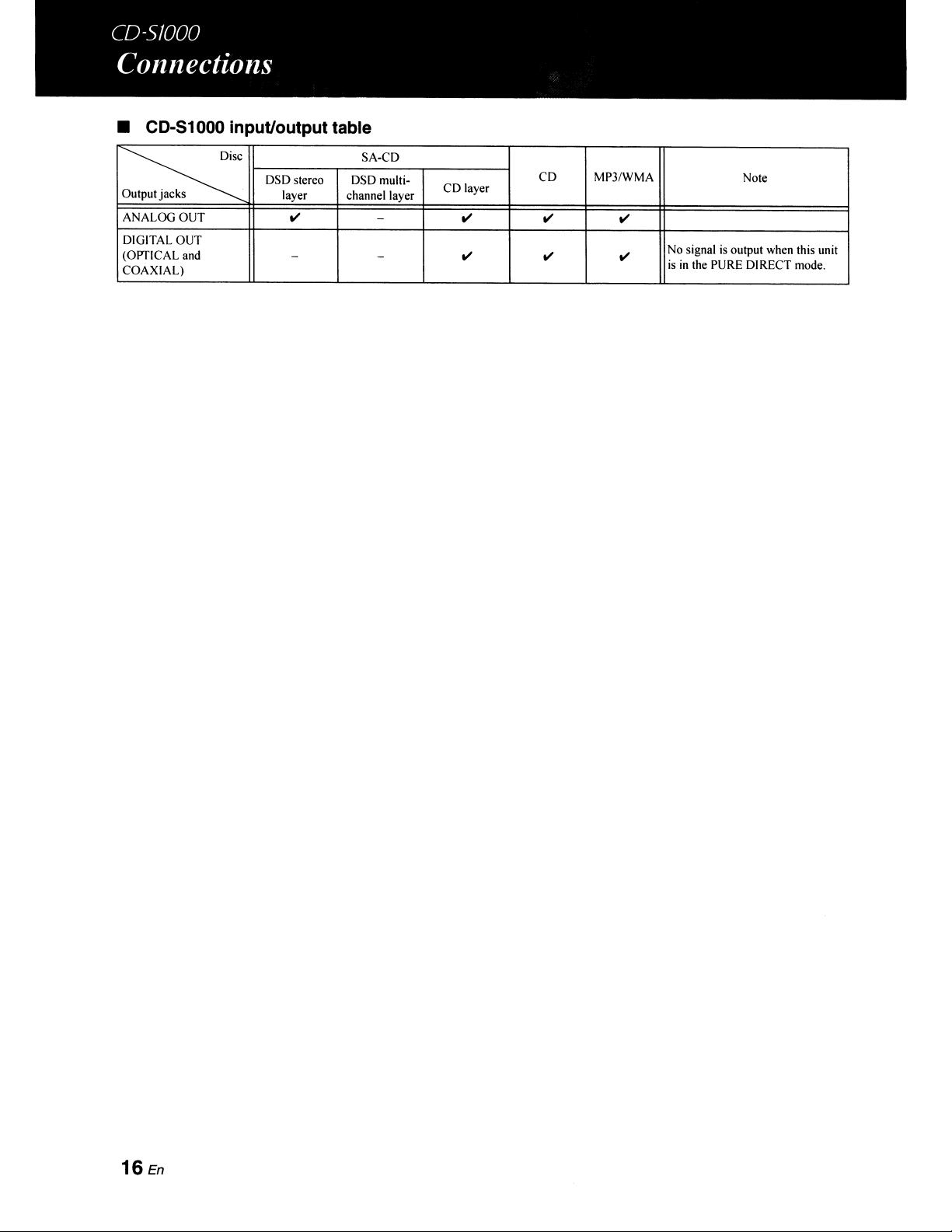
• CD-51000 input/output table
~
SA-CD
DSD stereo
DSDmulti-
CD
MP3/WMA
Note
Outputjacks
layer channel layer
CD
layer
ANALOG
OUT
.....
-
..... ..... .....
DIGITAL
OUT
(OPTICAL and
-
-
..... ..... .....
No signal
is
output when this unit
COAXIAL)
is
in
the PURE DIRECT mode.
16
En
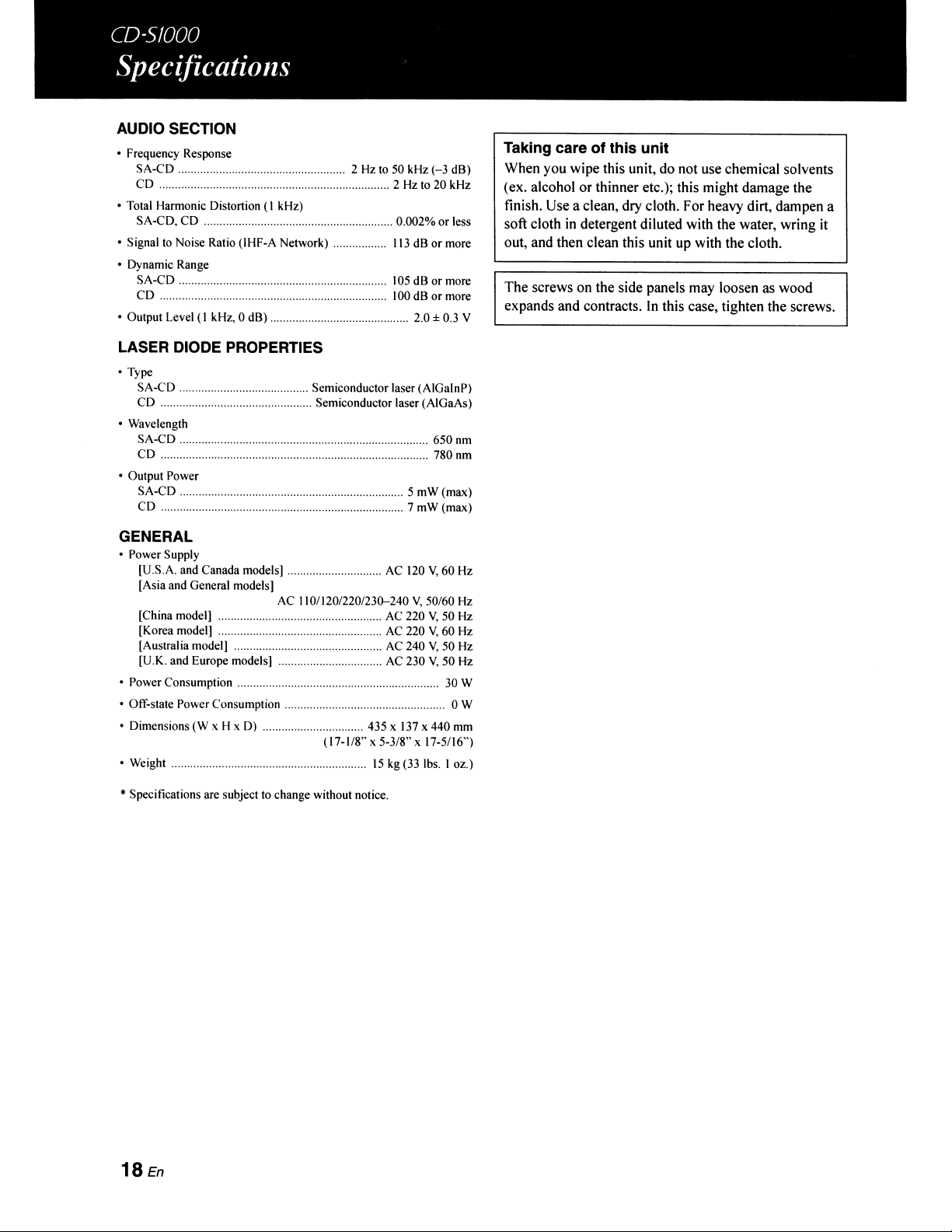
AUDIO SECTION
• Frequency Response
SA-CD
2 Hz to 50 kHz (-3
dB)
CD
2 Hz to
20
kHz
• Total Harmonic Distortion
(I
kHz)
SA-CD,
CD
0.002%
or
less
• Signal to Noise Ratio (IHF-A Network)
113
dB
or
more
• Dynamic Range
SA-CD
105
dB
or
more
CD
. 100 dB
or
more
• Output Level
(I
kHz, 0
dB)
.
LASER DIODE PROPERTIES
. 2.0 ± 0.3 Y
Taking care of this unit
When you wipe this unit, do not use chemical solvents
(ex. alcohol or thinner etc.); this might damage the
finish. Use a clean, dry cloth. For heavy dirt, dampen a
soft cloth
in
detergent diluted with the water, wring it
out, and then clean this unit up with the cloth.
The screws on the side panels may loosen as wood
expands and contracts.
In
this case, tighten the screws.
• Type
SA-CD
Semiconductor laser (AIGalnP)
CD
Semiconductor laser (AIGaAs)
• Wavelength
SA-CD
650 nm
CD
. 780
nm
• Output Power
SA-CD
5
mW
(max)
CD
7 mW (max)
GENERAL
• Power Supply
[U.S.A. and Canada models]
AC
120
Y,
60
Hz
[Asia and General models]
AC 110/120/220/230-240
Y,
50160
Hz
[China model] AC 220
Y,
50 Hz
[Korea model] AC 220
Y,
60 Hz
[Australia model] AC 240
Y,
50 Hz
[U.K.
and
Europe models] AC 230
Y,
50 Hz
• Power Consumption 30 W
• Off-Slate Power Consumption 0 W
• Dimensions
(W
x H x D) 435 x
137
x
440
mm
(17-1/8" x
5-318"
x 17-5/16")
• Weight
15
kg (33 Ibs. I oz.)
*Specifications are subject to change without notice.
18
En
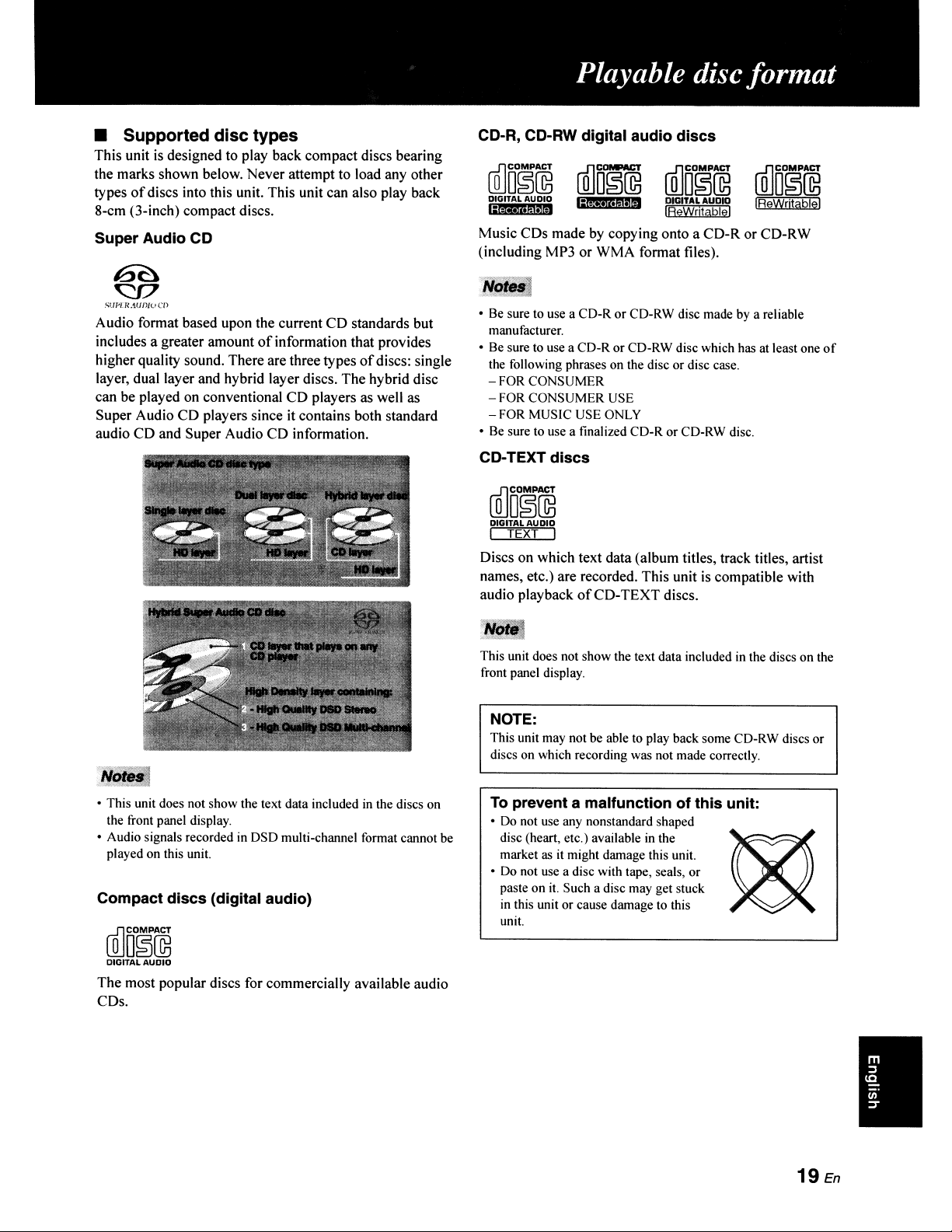
Music CDs made by copying onto a CD-R or CD-RW
(including MP3 or WMA format files).
CD-R, CD-RW digital audio discs
• Supported disc types
This unit
is
designed to play back compact discs bearing
the marks shown below. Never attempt to load any other
types
of
discs into this unit. This unit can also play back
8-cm (3-inch) compact discs.
Super Audio CD
(QJD1~~@
DIGITAL AUDIO
l;iM'·mIM
[g]o~~
DIGITAL
AUDIO
IReWritablel
[g]OD~~
IReWrjtablel
SI.1P[R.'iU
f)JU
en
Audio format based upon the current CD standards but
includes a greater amount
of
information that provides
higher quality sound. There are three types
of
discs: single
layer, dual layer and hybrid layer discs. The hybrid disc
can be played on conventional CD players as well as
Super Audio CD players since it contains both standard
audio CD and Super Audio CD information.
• This unit does not show the text data included
in
the discs on
the front panel display.
• Audio signals recorded
in
DSD multi-channel format cannot
be
played on this unit.
Compact discs (digital audio)
(QJDO~i
DIGITAL AUDIO
The most popular discs for commercially available audio
CDs.
• Be sure to use a CD-R
or
CD-RW disc made by a reliable
manufacturer.
• Be sure to use a CD-R or CD-RW disc which has at least one
of
the following phrases on the disc or disc case.
- FOR CONSUMER
- FOR CONSUMER USE
- FOR MUSIC USE ONLY
• Be sure to use a finalized CD-R or CD-RW disc.
CD-TEXT discs
[g]DO~~
DIGITAL
AUDIO
I TEXT I
Discs on which text data (album titles, track titles, artist
names, etc.) are recorded. This unit
is
compatible with
audio playback
of
CD-TEXT discs.
This unit does not show the text data included
in
the discs on the
front panel display.
NOTE:
This unit may not be able to play back some CD-RW discs or
discs on which recording was not made correctly.
To
prevent a malfunction of this unit:
•
Do
not use any nonstandard shaped
disc (heart, etc.) available
in
the
~
market
as
it
might damage this unit.
• Do not use a disc with tape, seals, or
paste on
it.
Such a disc may get stuck
in
this unit or cause damage to this
unit.
19
En
I
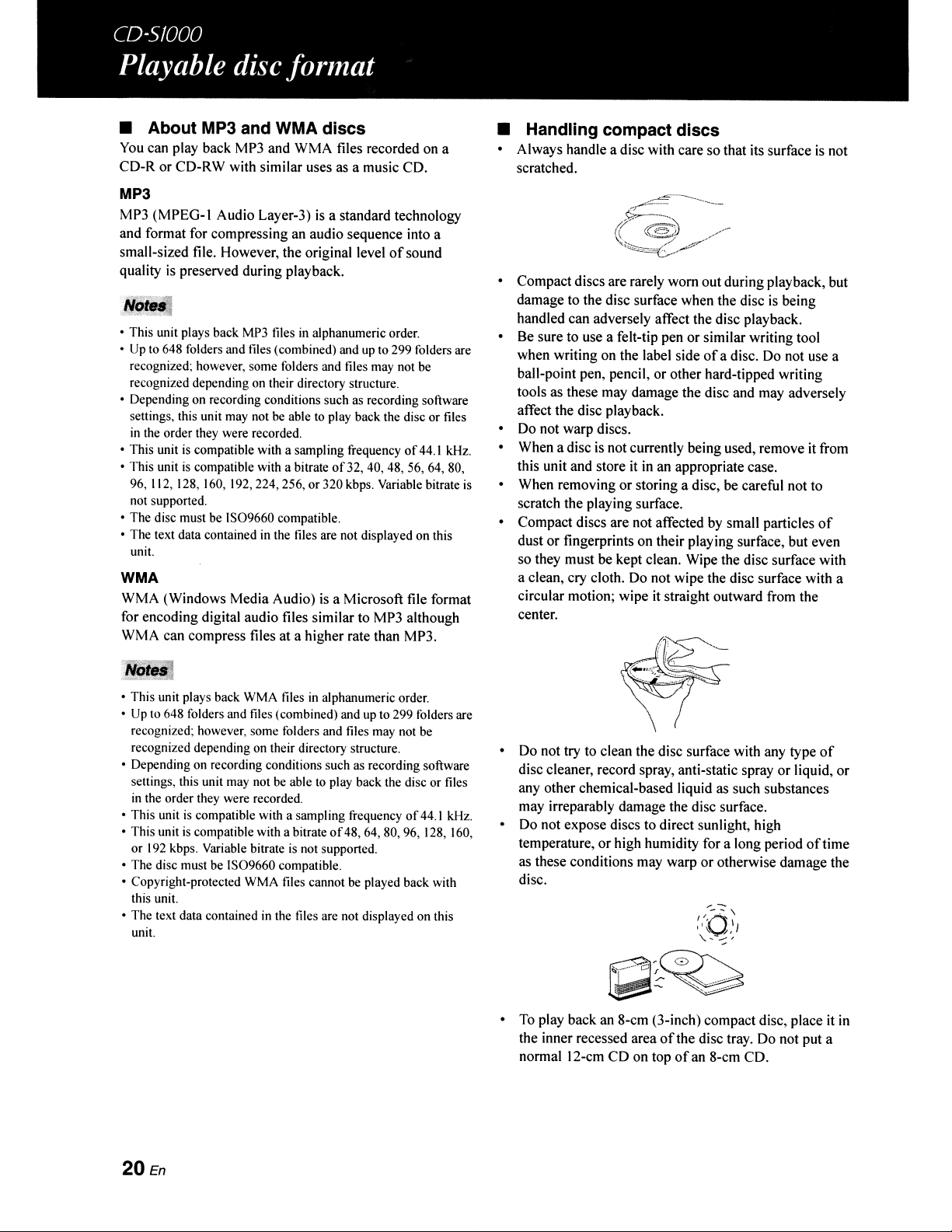
• About MP3 and WMA discs
You
can play back MP3 and WMA files recorded on a
CD-R or CD-RW with similar uses as a music CD.
MP3
MP3
(MPEG-l Audio Layer-3)
is
a standard technology
and format for compressing
an
audio sequence into a
small-sized file. However, the original level
of
sound
quality
is
preserved during playback.
• This unit plays back MP3 files in alphanumeric order.
•
Up
to
648 folders and files (combined) and up to 299 folders are
recognized; however, some folders and files may not be
recognized depending on their directory structure.
• Depending on recording conditions such as recording software
settings, this unit may not be able
to
play back the disc or files
in
the order they were recorded.
• This unit is compatible with a sampling frequency
of
44.1 kHz.
• This unit
is
compatible with a bitrate
of
32, 40, 48, 56, 64, 80,
96, 112, 128, 160, )
92,224,256,
or 320 kbps. Variable bitrate
is
not supported.
• The disc must be
IS09660
compatible.
• The text data contained in the files are not displayed on this
unit.
WMA
WMA (Windows Media Audio)
is
a Microsoft file format
for encoding digital audio files similar to MP3 although
WMA can compress files at a higher rate than MP3.
• This unit plays back WMA files
in
alphanumeric order.
• Up to 648 folders and files (combined) and up to 299 folders are
recognized; however, some folders and files may not be
recognized depending on their directory structure.
• Depending on recording conditions such as recording software
settings, this unit may not be able
to
play back the disc or files
in
the order they were recorded.
• This unit
is
compatible with a sampling frequency
of
44.) kHz.
• This unit
is
compatible with a bitrate
of
48,64,80,96,
128, 160,
or
192
kbps. Variable bitrate
is
not supported.
• The disc must be
IS09660
compatible.
• Copyright-protected WMA files cannot
be
played back with
this unit.
• The text data contained
in
the files are not displayed on this
unit.
20
En
• Handling compact discs
o Always handle a disc with care so that its surface
is
not
scratched.
o Compact discs are rarely worn out during playback, but
damage to the disc surface when the disc
is
being
handled can adversely affect the disc playback.
o
Be
sure to use a felt-tip pen or similar writing tool
when writing on the label side
of
a disc.
Do
not use a
ball-point pen, pencil, or other hard-tipped writing
tools as these may damage the disc and may adversely
affect the disc playback.
o
Do
not warp discs.
o When a disc
is
not currently being used, remove it
ITom
this unit and store it
in
an appropriate case.
o When removing or storing a disc, be careful not to
scratch the playing surface.
o Compact discs are not affected
by
small particles
of
dust or fingerprints on their playing surface, but even
so they must be kept clean. Wipe the disc surface with
a clean, cry cloth. Do not wipe the disc surface with a
circular motion; wipe
it
straight outward from the
center.
o Do not try to clean the disc surface with any type
of
disc cleaner, record spray, anti-static spray or liquid, or
any other chemical-based liquid as such substances
may irreparably damage the disc surface.
o Do not expose discs to direct sunlight, high
temperature, or high humidity for a long period
oftime
as these conditions may warp
or
otherwise damage the
disc.
o
To
play back an 8-cm (3-inch) compact disc, place it
in
the inner recessed area
ofthe
disc tray. Do not put a
normal 12-cm CD on top
of
an
8-cm CD.
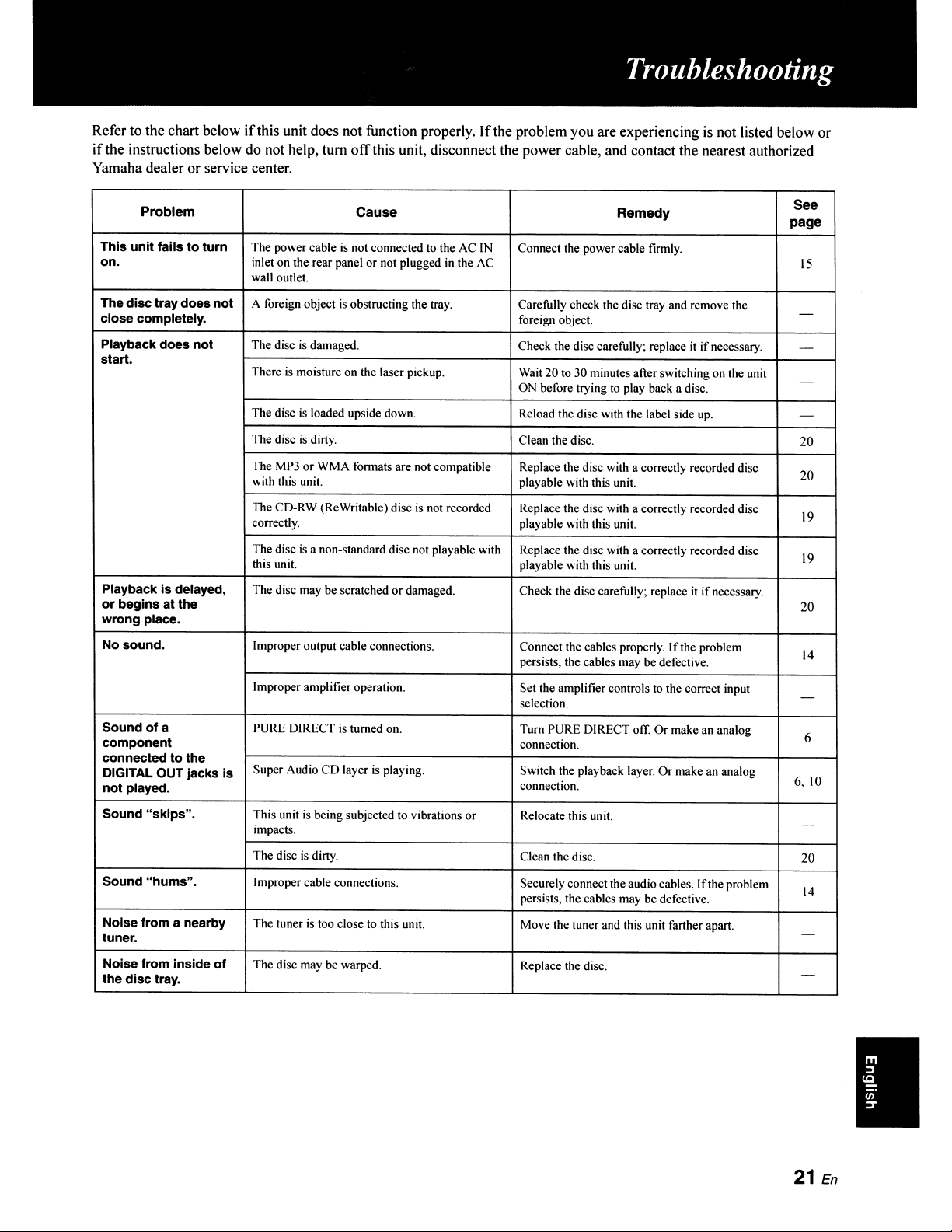
Refer to the chart below
if
this unit does not function properly.
If
the problem you are experiencing
is
not listed below or
if
the instructions below do not help, tum
off
this unit, disconnect the power cable, and contact the nearest authorized
Yamaha dealer or service center.
Problem
Cause
Remedy
See
page
This
unit
fails
to
turn
The power cable
is
not connected to the AC
IN
Connect the power cable firmly.
on.
inlet on the rear panel
or
not plugged
in
the
AC
15
wall outlet.
The
disc
traydoes
not
A foreign object
is
obstructing the tray.
Carefully check the disc tray and remove the
-
close completely. foreign object.
Playback does
not
The disc
is
damaged. Check the disc carefully; replace
it
if
necessary. -
start.
There
is
moisture on the laser pickup. Wait 20 to 30 minutes after switching on the unit
-
ON before trying to play back a disc.
The disc
is
loaded upside down. Reload the disc with the label side
up.
-
The disc
is
dirty.
Clean the disc.
20
The MP3 or WMA formats are not compatible
Replace the disc with a correctly recorded disc
20
with this unit. playable with this unit.
The CD-RW (ReWritable) disc
is
not recorded Replace the disc with a correctly recorded disc
19
correctly.
playable with this unit.
The disc
is
a non-standard disc not playable with Replace the disc with a correctly recorded disc
19
this unit. playable with this unit.
Playback
is
delayed, The disc may be scratched or damaged. Check the disc carefully; replace
it
if
necessary.
or
begins
at
the
20
wrong
place.
No sound.
Improper output cable connections. Connect the cables properly.
If
the problem
14
persists, the cables may be defective.
Improper amplifier operation. Set the amplifier controls
to
the correct input
-
selection.
Sound
ofa
PURE DIRECT
is
turned on. Turn PURE DIRECT off.
Or
make an analog
6
component
connection.
connected
to
the
DIGITAL OUT jacks
is
Super Audio
CD
layer
is
playing. Switch the playback layer.
Or
make an analog
6,10
not
played.
connection.
Sound
"skips".
This unit
is
being subjected to vibrations or Relocate this unit.
impacts.
-
The disc
is
dirty. Clean the disc.
20
Sound
"hums".
Improper cable connections. Securely connect the audio cables.
If
the problem
14
persists, the cables may be defective.
Noise from a nearby The tuner
is
too close
to
this unit.
Move the tuner and this unit farther apart.
tuner.
-
Noise from Inside
of
The disc may be warped.
Replace the disc.
the
disc
tray.
-
I
21
En
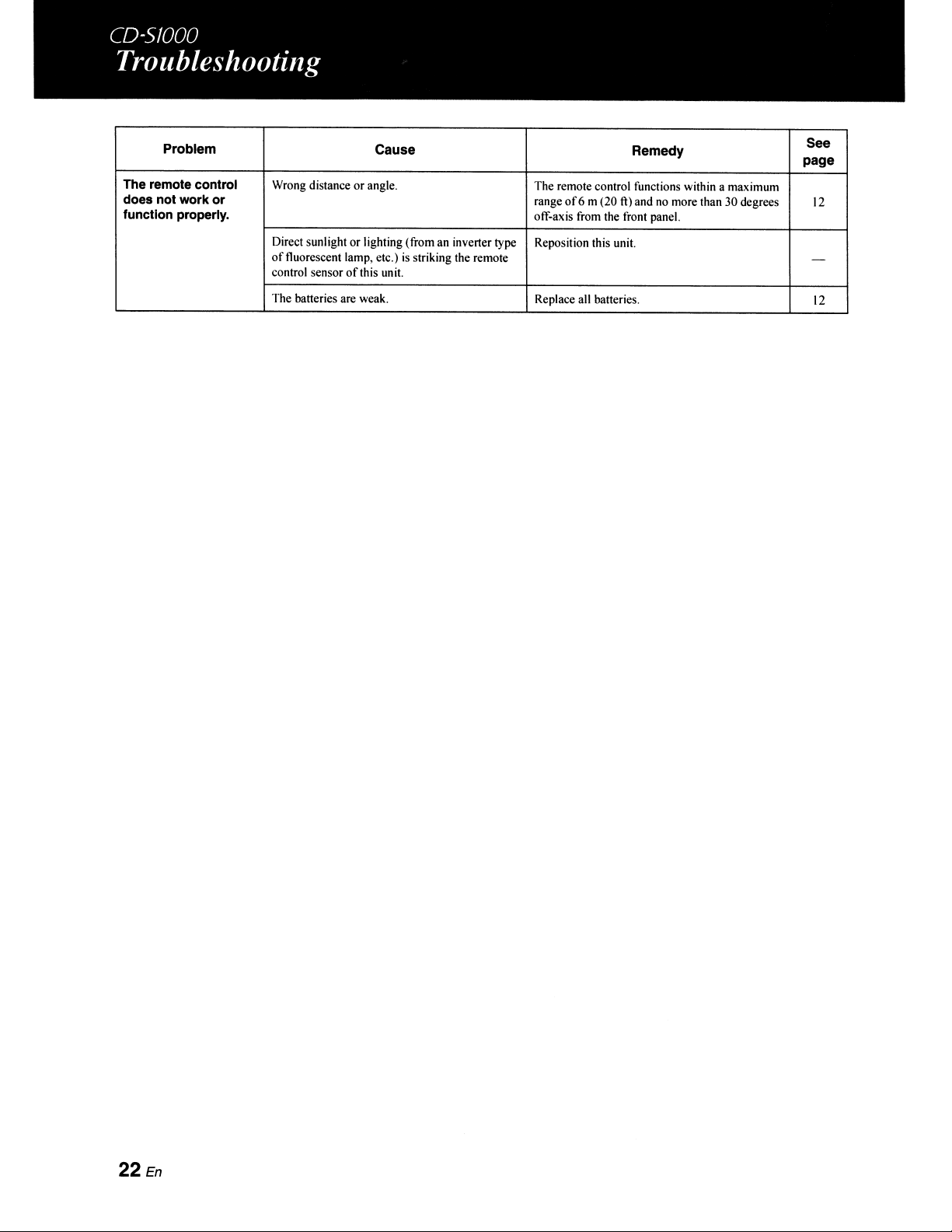
Problem
Cause
Remedy
See
page
The remote control
Wrong distance or angle. The remote control functions within a maximum
does not work
or
range
of6
m (20
ft)
and
no
more than 30 degrees
12
function properly.
off-axis from the front panel.
Direct sunlight or lighting (from an inverter type Reposition this unit.
of
fluorescent lamp, etc.) is striking the remote -
control sensor
of
this unit.
The batteries are weak. Replace all batteries.
12
22
En
SAFETY BROCHURE
BROCHURE SUR LA SECURITE
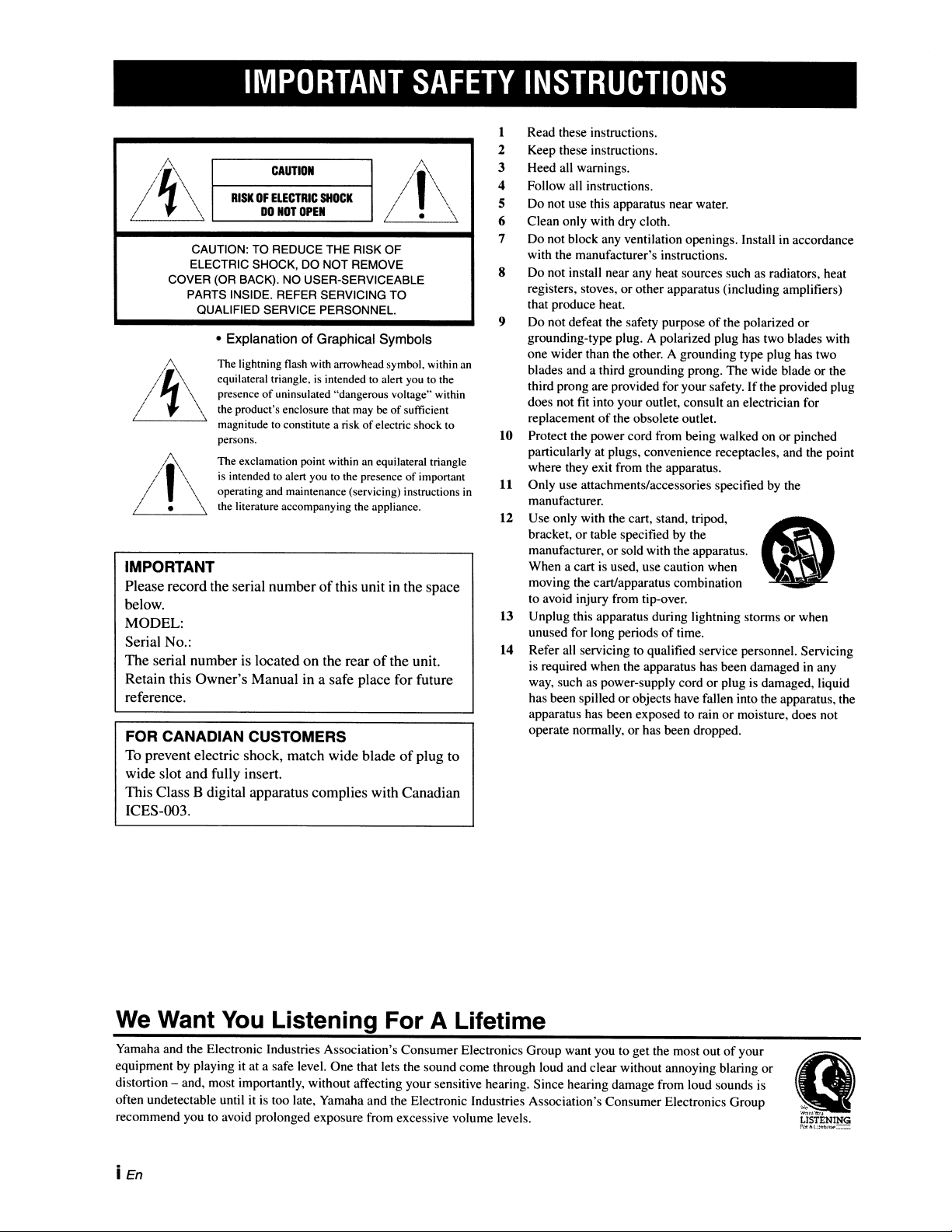
IMPORTANT
SAFETY
INSTRUCTIONS
CAUTION: TO REDUCE THE RISK OF
ELECTRIC SHOCK, DO NOT REMOVE
COVER (OR BACK). NO USER-SERVICEABLE
PARTS INSIDE. REFER SERVICING TO
QUALIFIED SERVICE PERSONNEL.
FOR CANADIAN CUSTOMERS
To
prevent electric shock, match wide blade
of
plug to
wide slot and fully insert.
This Class B digital apparatus complies with Canadian
ICES-Om.
IMPORTANT
Please record the serial number
of
this unit in the space
below.
MODEL:
Serial No.:
The serial number is located on the rear
of
the unit.
Retain this Owner's Manual in a safe place for future
reference.
Read these instructions.
Keep these instructions.
Heed all warnings.
Follow all instructions.
Do not use this apparatus near water.
Clean only with dry cloth.
Do not block any ventilation openings. Install
in
accordance
with the manufacturer's instructions.
Do not install near any heat sources such as radiators, heat
registers, stoves, or other apparatus (including amplifiers)
that produce heat.
Do not defeat the safety purpose
of
the polarized or
grounding-type plug. A polarized plug has two blades with
one wider than the other. A grounding type plug has two
blades and a third grounding prong. The wide blade or the
third prong are provided for your safety. If the provided plug
does not fit into your outlet, consult
an
electrician for
replacement
of
the obsolete outlet.
Protect the power cord from being walked on or pinched
particularly at plugs, convenience receptacles, and the point
where they exit from the apparatus.
Only use attachments/accessories specified by the
manufacturer.
Use only with the cart, stand, tripod,
(8
bracket, or table specified by the
manufacturer, or sold with the apparatus. •
~
When a cart is used, use caution when
moving the cart/apparatus combination
to avoid injury from tip-over.
Unplug this apparatus during lightning storms or when
unused for long periods
of
time.
Refer all servicing to qualified service personnel. Servicing
is required when the apparatus has been damaged
in
any
way, such as power-supply cord or plug is damaged, liquid
has been spilled or objects have fallen into the apparatus, the
apparatus has been exposed to rain or moisture, does not
operate normally, or has been dropped.
14
13
12
10
11
9
8
1
2
3
4
5
6
7
1
/.\
The lightning flash with arrowhead symbol. within an
equilateral triangle. is intended to alel1 you to the
presence
of
uninsulated "dangerous voltage" within
the product's enclosure that may
be
of
sufficient
magnitude to constitute a risk
of
electric shock to
persons.
The exclamation point within an equilateral triangle
is
intended to alel1 you to the presence of impol1ant
operating and maintenance (servicing) instructions in
the literature accompanying the appliance.
• Explanation of Graphical Symbols
1,1\
/ \
/ . \
Lj
/~~
L..-_C_AUTION-----'
RISK
OF
ELECTRIC
SlfOCK
DO
NOT
OPEN
We Want
You
Listening For A Lifetime
Yamaha and the Electronic Industries Association's Consumer Electronics Group want you to get the most out
of
your
equipment by playing it at a safe level. One that lets the sound come through loud and clear without annoying blaring or
distortion - and, most importantly, without affecting your sensitive hearing. Since hearing damage from loud sounds
is
often undetectable until it
is
too late, Yamaha and the Electronic Industries Association's Consumer Electronics Group
recommend you to avoid prolonged exposure from excessive volume levels.
i En
FCC INFORMATION (for US customers)
IMPORTANT
NOTICE:
DO
NOT
MODIFY
THIS
lINIT!
This product, when installed as indicated in the
instructions contained
in
this manual, meets FCC
requirements. Moditications not expressly approved by
Yamaha may void your authority, granted by the FCC, to
use the product.
2
IMPORTANT:
When connecting this product to
accessories and/or another product use only high quality
shielded cables. Cable/s supplied with this product
MUST
be used. Follow all installation instructions. Failure to
follow instructions could void your FCC authorization to
use this product
in
the USA.
3
NOTE:
This product has been tested and found to comply
with the requirements listed
in
FCC Regulations, Part
15
for Class
"B"
digital devices. Compliance with these
requirements provides a reasonable level
of
assurance that
your use
of
this product in a residential environment will
not result in harmful interference with other electronic
devices.
This
equipment generates/uses radio frequencies and,
if
not installed and used according to the instructions found
in
the users manual, may cause interference harmful to the
operation
of
other electronic devices.
CAUTION
Use
of
controls
or
adjustments
or
performance
of
procedures
other than those specified herein may result in hazardous
radiation exposure.
AVERTISSEMENT
L'utilisation
de
commandes et l'emploi de reglages ou
de
methodes autres que ceux decrits ci-dessous, peuvent
entrainer une exposition aun rayonnement dangereux.
I
~
I
1llS;SJ1
L..,.J
L..,.J
-
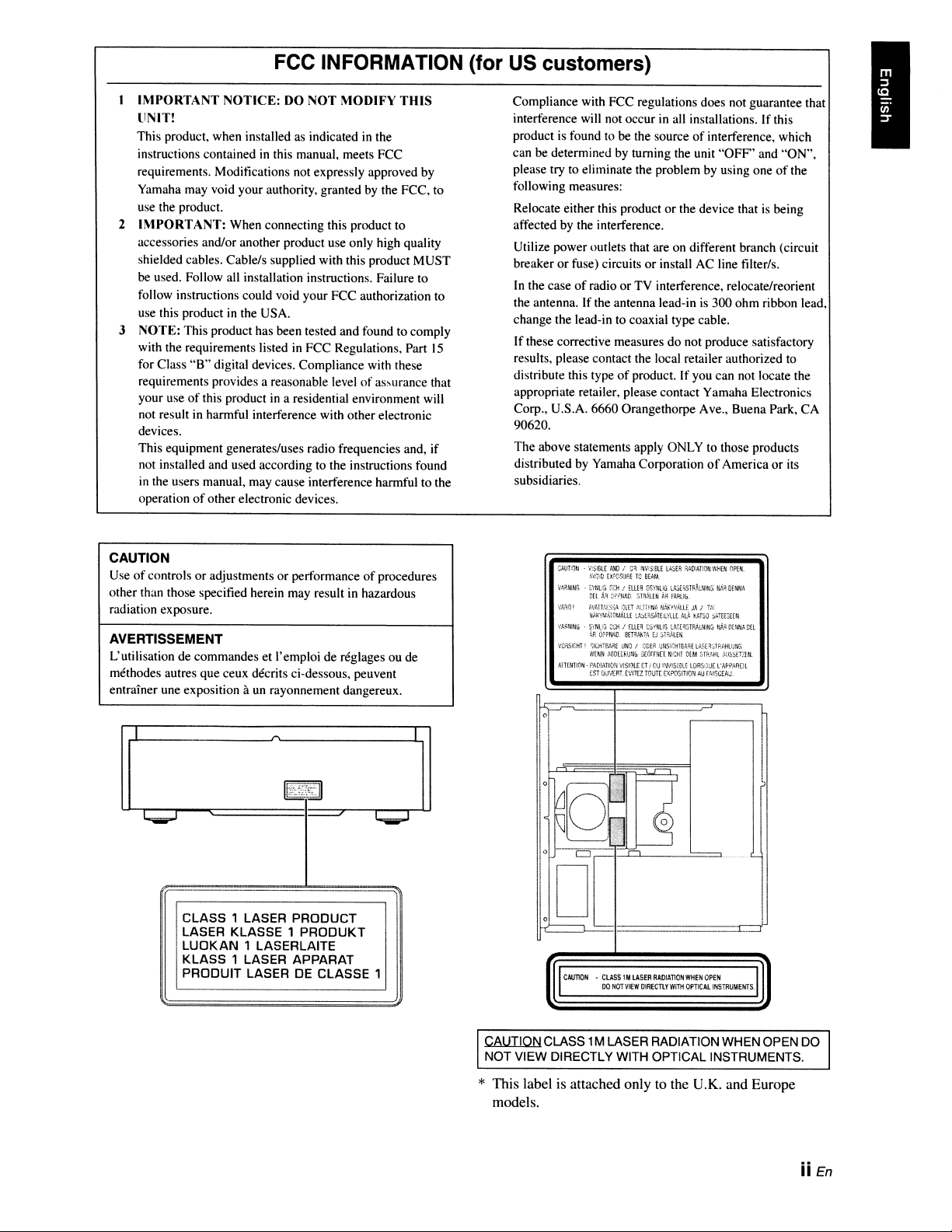
CLASS 1 LASER PRODUCT
LASER KLASSE 1 PRODUKT
LUOKAN
1 LASERLAITE
KLASS
1 LASER APPARAT
PRODUIT LASER
DE
CLASSE 1
Compliance with FCC regulations does not guarantee that
interference will not occur in all installations.
If
this
product is found to be the source
of
interference, which
can be determined by turning the unit
"OFF'
and
"ON",
please try to eliminate the problem by using one
of
the
following measures:
Relocate either this product
or
the device that is being
affected by the interference.
Utilize power outlets that are
on
different branch (circuit
breaker
or
fuse) circuits
or
install AC line tilter/s.
In
the case
of
radio
or
TV
interference, relocate/reorient
the antenna. If the antenna lead-in is 300
ohm
ribbon lead,
change the lead-in to coaxial type cable.
If
these corrective measures
do
not produce satisfactory
results, please contact the local retailer authorized to
distribute this type
of
product. If you can not locate the
appropriate retailer, please contact Yamaha Electronics
Corp., U.S.A. 6660 Orangethorpe Ave., Buena Park,
CA
90620.
The
above statements apply ONLY to those products
distributed by Yamaha Corporation
of
America
or
its
subsidiaries.
CilUT;i)tj
.
V,$lfil[
;.ND!
Oil
i"lVi:)iBt[
l4m!
RAlliAT!O~IWtiEN
OPE~.
f;ViH.:orCWf:.ETO
eEAM
Vf;;H~JNG
swuG
Wi
/
mER
[;Syt,li(j
LA:)E~srf;~,LNI!.G
~;';;,i!
OfNHh
nFl.
Art
D'\~lNAO.
smAwi
~R
fAF.Ul:I.
oJhHO
!
I,VAn!.t:5:i~
mEl'
;\L!Wtlf..
!i,'~Y;JAlll
JA:
T.,:
NAKyI,l4u:l!.'.AtlE
LASERS,iTE:l~UL
ALl.
~J.rso
SATEE3Wt
\'''~~lltiG
S'irlU:J
C:;'Oi
I
mEil.
eS"!'I'iUG
LA-:.til.5T~j.LrfING
t";!O
O(-14t/.r.
DH
foP.
O;;P"4D.
eEHM.Tfl.
EJ
;)T~Wi.
,;Of\SltHT!
~IUiTE""'.E
uNO
I
ODEil
;;ljSi;;!'!le.:.~[
lJ:H%lr::J,Ht,j:l!'
WENH
o\&1tItilj!lli
:.i£O:f!;(UI!OH
OUA
HJoi].Hi.
;\UhSf'!'!:Hl.
A1T(!flION·
~"'DlAlI0:'11f,SI~tI
tl'
il}J
!~Jv;smu
LORS=JJ(
t'APPARDt
EST
O;JVER'T.
H'ITE!
TOUTE
EX?DS!TIor~
AU
rMSGEAJ.
,-;=
....,
r
I
I
I
CAIJ110N
•
CLASS
1M
LASER
RADIATION
WHEN
OPEN
I
I
DO
NOT
VIEW
DIRECTlY
IViTl1
OPT1CAlINSTRU~EI/TS·1
CAUTION CLASS
1M
LASER RADIATION WHEN OPEN
DO
NOT VIEW DIRECTLY WITH OPTICAL INSTRUMENTS.
* This label is attached only to the U.K. and Europe
models.
ii
En
Caution:
Read
this
before
operating
your
unit.
The laser component
in
this product is capable
of
emitting
radiation exceeding the limit for Class I.
As long
as
this unit
is
connected to the
AC
wall outlet,
it
is
not disconnected from the
AC
power source even
if
you tum off this unit by POWER.
LASER SAFETY
This unit employs a
laser.
Due
to
possible eye injury, only a qualified
service person should remove
the
cover or attempt
to
service this
device.
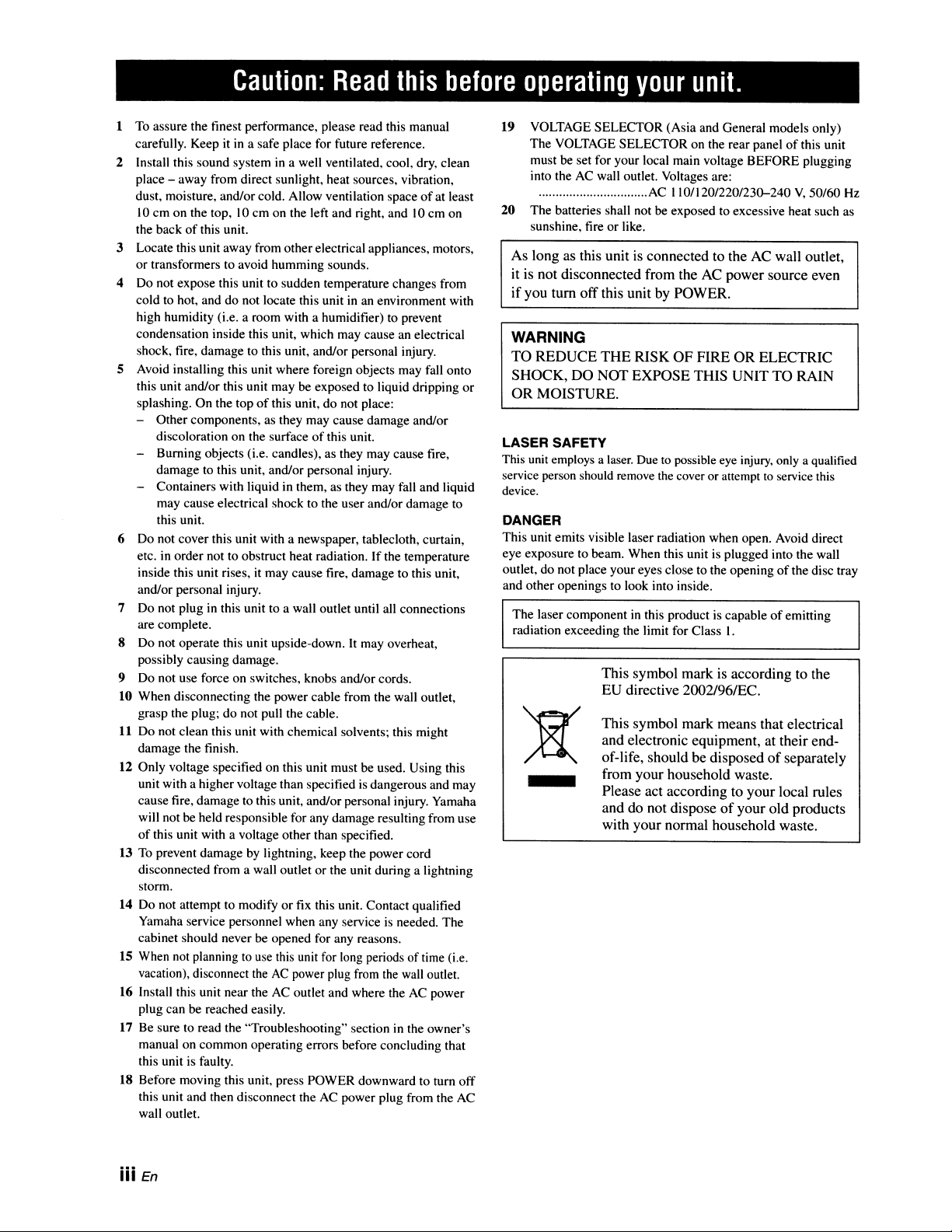
This symbol mark means that electrical
and electronic equipment, at their end-
of-life, should be disposed
of
separately
from your household waste.
Please act according to your local rules
and do not dispose
of
your old products
with your normal household waste.
This symbol mark
is
according to the
EU directive
2002l96/EC.
-
WARNING
TO REDUCE
THE
RISK OF FIRE OR ELECTRIC
SHOCK, DO NOT EXPOSE THIS UNIT TO RAIN
OR MOISTURE.
DANGER
This unit emits visible laser radiation when open. Avoid direct
eye exposure to beam. When this unit is plugged into the wall
outlet, do not place your eyes close to the opening
of
the disc tray
and other openings to look into inside.
19
VOLTAGE SELECTOR (Asia and General models only)
The VOLTAGE SELECTOR on the rear panel
of
this unit
must be set for your local main voltage BEFORE plugging
into the
AC
wall outlet. Voltages are:
................................
AC
110/120/220/230-240
V,
50/60 Hz
20
The batteries shall not be exposed to excessive heat such as
sunshine, fire or like.
1
To
assure the tinest performance, please read this manual
carefully. Keep
it
in
a safe place for future reference.
2 Install this sound system
in
a well ventilated, cool, dry, clean
place - away from direct sunlight, heat sources, vibration,
dust, moisture, andlor cold. Allow ventilation space
of
at least
10
cm on the top,
10
cm on the left and right, and
10
em on
the back
of
this unit.
3 Locate this unit away from otherelectrical appliances, motors,
or transformers to avoid humming sounds.
4 Do not expose this unit to sudden temperature changes from
cold to hot, and do not locate this unit
in
an environment with
high humidity (i.e. a room with a humidifier) to prevent
condensation inside this unit, which may cause an electrical
shock, fire, damage to this unit, and/or personal injury.
5 Avoid installing this unit where foreign objects may fall onto
this unit and/or this unit may be exposed to liquid dripping or
splashing. On the top
of
this unit, do not place:
- Other components, as they may cause damage and/or
discoloration on the surface
of
this unit.
- Burning objects (i.e. candles), as they may cause fire,
damage to this unit, and/or personal injury.
- Containers with liquid in them, as they may fall and liquid
may cause electrical shock to the user and/or damage to
this unit.
6 Do not cover this unit with a newspaper, tablecloth, curtain,
etc.
in
order not to obstruct heat radiation.
If
the temperature
inside this unit rises, it may cause fire, damage to this unit,
and/or personal injury.
7 Do not plug in this unit to a wall outlet until all connections
are complete.
S Do not operate this unit upside-down. It may overheat,
possibly causing damage.
9 Do not use force on switches, knobs and/or cords.
10 When disconnecting the power cable from the wall outlet,
grasp the plug; do not pull the cable.
11
Do not clean this unit with chemical solvents; this might
damage the tinish.
12 Only voltage specified on this unit must be used. Using this
unit with a higher voltage than specified
is
dangerous and may
cause fire, damage to this unit, and/or personal injury. Yamaha
will not be held responsible for any damage resulting from use
of
this unit with a voltage other than specified.
13 To prevent damage by lightning, keep the power cord
disconnected from a wall outlet or the unit during a lightning
storm.
14 Do not attempt to modify or fix this unit. Contact qualified
Yamaha service personnel when any service is needed. The
cabinet should never be opened for any reasons.
15 When
not
planning
to
use
this unit
for
long periods oftime (i.e.
vacation), disconnect
the
AC
power plug
from
the
wall
outlet.
16
Install this unit near the
AC
outlet and where the
AC
power
plug can be reached easily.
17 Be sure to read the "Troubleshooting" section
in
the owner's
manual on common operating errors before concluding that
this unit is faulty.
IS Before moving this unit, press POWER downward to tum off
this unit and then disconnect the
AC
power plug from the
AC
wall outlet.
iii En
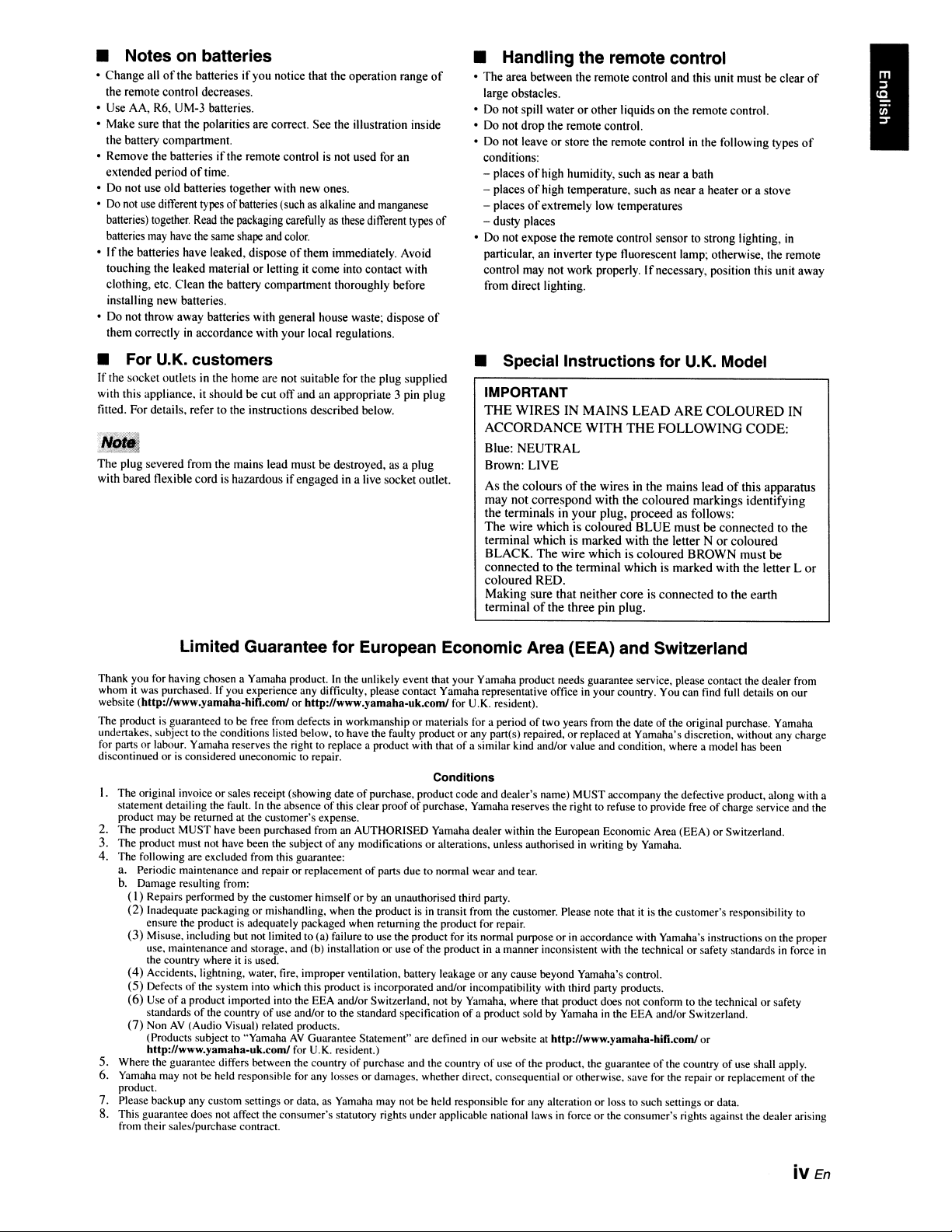
• Notes on batteries
•
Change
all
of
the batteries
if
you notice that the operation range
of
the remote control decreases.
• Use AA, R6, UM-3 batteries.
• Make sure that the polarities are correct.
See
the illustration inside
the battery compartment.
• Remove the batteries
if
the remote control is not used for an
extended period
of
time.
• Do not use
old
batteries together with new ones.
•
Do
not
use
different types
of
batteries (such
as
alkaline and manganese
batteries) together.
Read
the packaging carefully
as
these different types
of
batteries
may
have the same shape and color.
• I
l'the batteries have leaked, dispose
of
them immediately. Avoid
touching the leaked material
or
letting
it
come
into contact with
clothing, etc. Clean the battery
compartment
thoroughly before
installing new batteries.
• Do not
throwaway
batteries with general house waste; dispose
of
them correctly
in
accordance with
your
local regulations.
• For U.K. customers
If
the socket outlets in the home are not suitable for the plug supplied
with this appliance,
it
should be cut
off
and an appropriate 3 pin plug
fitted. For details, refer to the instructions described below.
....
,',j1
J!!e.::4
The
plug severed from the mains lead must
be
destroyed, as a plug
with bared flexible
cord
is hazardous
if
engaged
in a live socket outlet.
• Handling the remote control
•
The
area between the remote control and this unit must
be
clear
of
large obstacles.
• Do not spill water
or
other
liquids
on
the remote control.
• Do not
drop
the remote control.
• Do not leave
or
store the remote control in the following types
of
conditions:
- places
of
high humidity, such
as
near a bath
- places
of
high temperature, such
as
near a heater
or
a stove
- places
of
extremely low temperatures
- dusty places
• Do not
expose
the remote control sensor to strong lighting, in
particular, an inverter type fluorescent lamp; otherwise, the remote
control may not work properly.
If
necessary, position this unit away
from direct lighting.
• Special Instructions for U.K. Model
IMPORTANT
THE
WIRES
IN
MAINS
LEAD
ARE
COLOURED
IN
ACCORDANCE
WITH
THE
FOLLOWING
CODE:
Blue:
NEUTRAL
Brown:
LIVE
As
the
colours
of
the
wires
in
the
mains
lead
of
this
apparatus
may
not
correspond
with
the
coloured
markings
identifying
the
terminals
in
your
plug,
proceed
as
follows:
The
wire
which
is
coloured
BLUE
must
be
connected
to
the
terminal
which
is
marked
with
the
letter
N
or
coloured
BLACK.
The
wire
which
is
coloured
BROWN
must
be
connected
to
the
terminal
which
is
marked
with
the
letter
L
or
coloured
RED.
Making
sure
that
neither
core
is
connected
to
the
earth
terminal
of
the
three
pin
plug.
Limited Guarantee for European Economic Area (EEA) and Switzerland
Thank you for having chosen a Yamaha product.
In
the unlikely event that your Yamaha product needs guarantee service, please contact the dealer from
whom
it
was purchased.
If
you experience any difficulty, please contact Yamaha representative office
in
your country. You can find full details
on
our
website (http://www.yamaha-hifi.comlorhttp:llwww.yamaha-uk.coml for U.K. resident).
The product
is
guaranteed to be free from defects
in
workmanship or materials for a period
of
two years from the date of the original purchase. Yamaha
undertakes. subject to the conditions listed below, to have the faulty product or any part(s) repaired, or replaced at Yamaha's discretion, without any charge
for parts or labour. Yamaha reserves the right to replace a product with that
of
a similar kind and/or value and condition, where a model has been
discontinued or
is
considered uneconomic to repair.
Conditions
I. The original invoice or sales receipt (showing date
of
purchase. product code and dealer's name) MUST accompany the defective product, along with a
statement detailing the fault.
In
the absence
of
this clear proof
of
purchase, Yamaha reserves the right
to
refuse to provide free of charge service and the
product
may
be returned at the customer's expense.
2.
The product MUST have been purchased from
an
AUTHORISED Yamaha dealer within the European Economic Area (EEA) or Switzerland.
3.
The product must
not
have been the subject
of
any modifications or alterations. unless authorised
in
writing
by
Yamaha.
4.
The following are excluded from this guarantee:
a. Periodic maintenance and repair or replacement
of
parts due to normal wear and tear.
b, Damage resulting from:
(
I)
Repairs performed
by
the customer himself
or
by
an
unauthorised third party.
(2)
Inadequate packaging or mishandling, when the product
is
in
transit from the customer. Please note that
it
is the customer's responsibility to
ensure the product
is
adequately packaged when returning the product for repair.
(3)
Misuse, including but not limited to (a) failure to
use
the product for its normal purpose or
in
accordance with Yamaha's instructions
on
the proper
use. maintenance and storage. and (b) installation or use
of
the product
in
a manner inconsistent with the technical or safety standards
in
force
in
the country where
it
is
used.
(4)
Accidents. lightning, water, fire, improper ventilation, battery leakage or any cause beyond Yamaha's control.
(5)
Defects
of
the system into which this product
is
incorporated and/or incompatibility with third party products.
(6)
Use
of
a product imported into the EEA and/or Switzerland, not
by
Yamaha. where that product does not conform to the technical or safety
standards
of
the country
of
use and/or to the standard specification
of
a product sold
by
Yamaha
in
the EEA and/or Switzerland.
(7)
Non
AV
(Audio Visual) related products.
(Products subject to "Yamaha
AV
Guarantee Statement" are defined
in
our website at http://www.yamaha-hifi.comlor
http://www.yamaha-uk.comlfor U.K. resident.)
5.
Where the guarantee differs between the country
of
purchase and the country
of
use
of
the product. the guarantee
of
the country of use shall apply.
6.
Yamaha may
not
be
held responsible for any losses or damages. whether direct, consequential or otherwise, save for the repair or replacement of the
product.
7.
Please backup any custom settings or data.
as
Yamaha may not be held responsible for any alteration or loss to such settings or data.
8. This guarantee does not affect the consumer's statutory rights under applicable national laws
in
force or the consumer's rights against the dealer arising
from
their sales/purchase contract.
iv
En
_YAMAHA
©
2008
YAMAHA
CORPORATION
All rights reserved.
YAMAHA ELECTRONICS CORPORATION, USA 6660 ORANGETHORPE AVE., BUENA PARK, CALIF, 90620, U.S.A.
YAMAHA CANADA MUSIC
lID.
135 MILNER AVE
..
SCARBOROUGH, ONTARIO M1S
3Rl,
CANADA
YAMAHA ELECTRONIK EUROPA G.m.b.H. SIEMENSSTR. 22,34, 25402 RELLINGEN BEl HAMBURG, GERMANY
YAMAHA ElECTRONlQUE FRANCE S.A. RUE AMBROISE CROlZAT BP70 CROISSY·BEAUBOURG 77312 MARNE-lA-VALLEE CEDEX02, FRANCE
YAMAHA
ELECTRONICS (UK)
lTD.
YAMAHA HOUSE, 200 RICKMANSWORTH ROAD WATFORD, HERTS WD18 7GQ, ENGLAND
YAMAHA SCANDINAVIA A.B.
J A WETIERGRENS GATA
1,
BOX 30053, 400 43 VASTRA FROlUNDA, SWEDEN
YAMAHA MUSIC AUSTRALIA PTY,
lID.
lEVEL
1,99
QUEENSBRIDGE STREET, SOUTHBANK, VIC 3006, AUSTRALIA
YAMAHA
CORPORATION
Printed
in
Malaysia c
WN63220
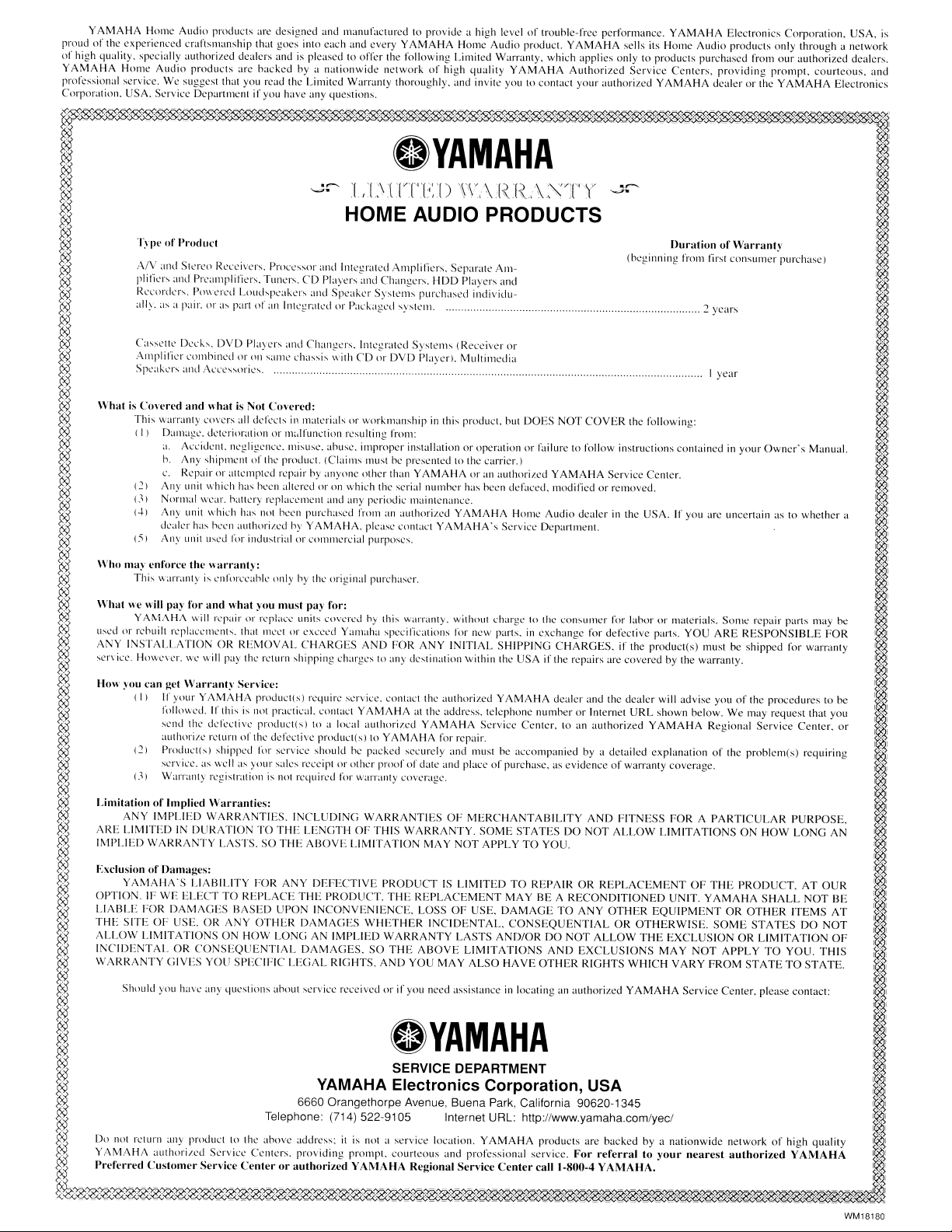
YAMAHA
Home
Audio
products
arc
designed
and
manufacturcd
to
provide
a
high
level
of
trouhle-free
performance.
YAMAHA
Electronics
Corporation.
USA.
is
proud
of
the
experienced
craftsmanship
that
gocs
into
each
and
every
YAMAHA
Home
Audio
product.
YAMAHA
sclls
its
Home
Audio
products
only
through
a
network
of
high
quality.
specially
authorized
dcalers
and
is
pleased
to
offer
the
following
Limited
WarraJ1ly.
which
applies
only
to
products
purchased
from
our
authorized
dealers.
YAMAHA
Home
Audio
products
are
backed
by
a
nationwide
network
of
high
quality
YAMAHA
Authorized
Scrvice
Centers.
providing
prompt.
courteous,
and
professional
service.
,Ve
suggest
that
you
read
the
Limited
Warranty
thoroughly.
and
invite
you
to
contact
your
authorized
YAMAHA
dealer
or
the
YAMAHA
Electronics
Corporation.
USA.
Service
Dcpartmcnt
if
you
have
any
qucstions.
r%%%%$'%;S'S';Z'$%$'$'~:Z'~£'.s'!Z',S'£'~%£'Z;&$~$'$'%ZE'£'$'!S',S'$'%%£'£JS'Z~~HHSlf;Z'%!Z'~ffi~%~<Z';Z'H%~1
~
.YAMAHA
I
~.'
I.,'
~,:>"
~:'"'
'[ .[
\'
.[
V'[~
'[.;'
'()
l\'
..
\
,[?
'f.:>
..
~~Vi[T,V
--,r
~~
~
..
I
.•
.
\.
.
..
I.
~,
".
\...,
'\
A
.,
.I
~
~
HOME AUDIO PRODUCTS i
~
'I\pe
of
I'rodu(·t
Duration
of
Warranty
~
~.'
(beg.inning
from
firsl
consumer
purchase,
~
..
;:."
~'Y,
,\IV
and
Stereo
Receivers,
Processor
and
Integrated
Amplifiers.
Separate
Am-
~~
~
plifiers
and
Preampliliers,
Tuners.
CD
Players
and
Changers.
HDD
Players
and
~
~.'
ReL·nrders. PO\\'CI'ed
Loud'peakers
and
Spc'aker
Systems
purchased
individu-
~.'.:
~X
all)_
as
a pair.
or
~l'"
p~lrt
or
all
Integrated
or
Pac
"'aged
systL'lll.
~
years
K"S
~
i
~.
Ca.ssclle
Decks.
DVD
Players
and
Changers.
Integratcd
Systems
(Receiver
or
1
...
:
....
1,
~,:>"
Amplifier
L'()mhined
or
Oil
same
chassis
\\'ith
CD
or
DVD
Player).
Multimedia
K--$
"A,'?
SpC;IKCr\
and
f\Ccc
tlric.... I
year
r,~
~.........
I
~
What
is
Cowred
and
what
is
Not
Covered:
I
~
This
warranty
CO\'CrS
all
dekcts
in
materials
ur
workmanship
in this
product.
but
DOES
NOT
COVER
the
following:
~
~'?
(I)
Dama.!2l'. tktcriur;'ltioll
or
m<llfullction
rl'sulting
from:
r.S:?i
~
a.
A~citkllt.
ncgligcm.:c.
misusl'.
anusC'.
il11p,~pcr
installation
or
operation
or
failure
to
follow
instructions
contained
in
your
Owner's
Manual.
I
~
h. AllY
'hipmellt
of
the
producl.
(Claims
must
be
prescntcd
to
the
carrier.)
~
~~
c.
Repair
or
attempled
repair
by
allyone
other
than
YAMAHA
or
an
authoriled
YAMAHA
Service
Center.
K~
'.<.~~;".'?'
(2)
Any
unit
which
has
ht'l'n
altered
or
on
which
the
serial
numher
has
heen
defaced.
modified
or
removed.
~~.':"
.•.•.
'
?';X
(3)
Normal
Wl'ar.
halll'ry
rc-placelllcnt
and
any
periodic
maintenance.
<~-S
'.<.'?
(-1)
Allv uilil \\'hich
has
not
heen
purchased
from
an
authori/.ed
YAMAHA
Home
Audio
dealer
in
the
USA.
If
you
arc
uncertain
as
to
whcther
a
..
~
dealer
has
bccn
authurilcd
by
YAMAHA.
please
contact
YAMAHA'
s
Serviec
Departmcnl.
~ii
~
(:'il
Any
unit u
....
('u
1'01'
illllustrial
or
cotllllh.::'rcial
purposes.
~
~
Who
may
enforce
the
warranty:
I
~'?
This
\\"cIlT<lnty
is
l'llfon:('ahlc
only
hy
thc
original
purchas('r.
tJ?i
~~~..
~I~~'·.:,:
•...
':
~,:>"
What
we
will
pay
for
and
what
you
must
pay
for:
1\':~
y
t\~1AH/\
will rL'pair
or
rcpl<lc~
units \.·ovcrt::d h
y
Ihis
warranty.
without
dlargc
to
the con:-'Ulllt'T for
labur
or
materials.
Some
repair
parts
may
be
'.<.'?
uscd
Ill'
rebuill
replaccments.
that m\'et
ur
cxceed
Yamaha
specifications
for
new
parts.
in
exchan)!e
for
defective
parts.
YOU
ARE
RESPONSIBLE
FOR
r~
~
ANY
INSTALLATION
OR
RE
10VAL
CHARGES
AND
FOR
A
'Y
INITIAL
SHIPPING
CHARGES.
if
the
product(s)
Illust
be
shipped
for
warranty
~
~
~
?';X
:-,cl'\"icl'.
HO\H~\·er.
WI.'
will
pay
the
rl'turn
~hirring
charges
to
any
destination
\vilhin
the
USA
if
the
repairs
are
covered
by
the
warranty.
~-$
~
~
~
How
~'ou
can
get
\Varrant~'
Senice:
~I:'"
~~
(I)
If
your
YAMAHA
pruduct(s)
requirc
scn·iee.
contact
the
authorized
YAMAHA
dealer
and
the
dealer
will
advise
you
of
the
procedures
to
be
~
follm'cd.
If
this
is not
practical.
contact
YAMAHA
at thc
address.
telcphone
number
or
Internet
URL
shown
below.
We
may
request
that
you
~s?
~
,cnd
the
defectivc
product(s)
10
a
local
authorizcd
YAMAHA
Servicc
Center.
to
an
authorized
YAMAHA
Regional
Service
Center.
or
~I&.'~;.JI
~':Y,
authorize
rcturn
of
thc'
defectivc
product(s)
to
YAMAHA
for
repair.
~
~
121
Product(sl
shipped
for
service
should
hc
packed
securely
and
must
be
aecompallied
by
a
detailed
explanation
of
the
problem(s)
requiring
~
x,~
sL'rvil·c.
as
\vell
as
your
salcs
rcccipt
or
other
proor
of
datI.'
and
place
01"
purChase,
as
evidence
or
warranty
coverage.
r~
~~
(3)
Warranty
registration
is not
required
rur
warranty
coverage.
~
~
~
~
Limitation
of
Implied
Warranties:
@)
'.<.'?
A Y
IMPLIED
WARRANTIES.
I,
CLUDING
WARRA
TIES
OF
MERCHANTABILITY
A D
FITNESS
FOR
A
PARTICULAR
PURPOSE.
1~
~
ARE
LIMITED
IN
DURATIO
!
TO
THE
LENGTH
OFTHIS
WARRA
TY.
SOME
STATES
DO
NOT
ALLOW
LIMITATIONS
0
HOW
LONG
AN
I,~.~.'
~,:>"
IMPLIED
WARRANTY
LASTS.
SO
THE
ABOVE
LIMITATION
MA
Y
NOT
APPLY
TO
YOU.
~~
~.
~.;.·.I
~,:>"
F:xclusion
of
Damages:
~~
~
YAMAHA'S
LIABILITY
FOR
ANY
DEFECTIVE
PRODUCT
IS
LIMITED
TO
REPAIR
OR
REPLACEMENT
OF
THE
PRODUCT.
AT
OUR
~
~~
OPTIO
'. IF
WE
ELECT
TO
REPLACE
THE
PRODUCT.
THE
REPLACEME
T
MA
Y
BE
A
RECONDITIONED
U IT.
YAMAHA
SHALL
NOT
BE
k~
~
LIABLE
FOR
DAMAGES
BASED
UPON
I
CONVENIE
CEo
LOSS
OF
USE,
DAMAGE
TO
ANY
OTHER
EQUIPME
T
OR
OTHER
ITEMS
AT
ii/I
~
THE
SITE
OF
USE,
OR
ANY
OTHER
DAMAGES
WHETHER
INCIDENTAL.
CONSEQUENTIAL
OR
OTHERWISE.
SOME
STATES
DO
NOT
1.'1
~
ALLOW
LIMITATIONS
ON
HOW
LONG
AN
IMPLIED
WARRANTY
LASTS
AND/OR
DO
NOT
ALLOW
THE
EXCLUSION
OR
LIMITATION
OF
~
~
INCIDENTAL
OR
CONSEQUENTIAL
DAMAGES.
SO
THE
A130VE
LIMITATIONS
AND
EXCLUSIONS
MAY
NOT
APPLY
TO
YOU.
THIS
~
~
WARRANTY
GIVES
YOU
SPECIFIC
LEGAL
RIGHTS,
AND
YOU
MAY
ALSO
HAVE
OTHER
RIGHTS
WHICH
VARY
FROM
STATE
TO
STATE.
~
~.
I,·.·.·
..
·.',
~':Y,
Should
you
havc
allY
questions
about
service
rcceivcd
or
if
you
nced
assistance
in
locating
an
authorized
YAMAHA
Service
Center.
please
cOlltaet:
K~
~
I
~
~VAMAHA
~
~
~II
~
~
SERVICE DEPARTMENT I
~.
YAMAHA
Electronics
Corporation,
USA
~!
....
I,
~,:>"
6660 Orangethorpe Avenue, Buena Park, California 90620-1345
~~
~.
Telephone: (714) 522-9105 Internet
URL:
http://www.yamaha.com/yec/;
~
Do
not
return
any
product
10
the
abovc
address:
it
is not a
service
location.
YAMAHA
products
are
backed
by
a
nationwide
network
of
high
quality
~
~
YAMAHA
authorizcd
Servicc'
Centers.
providing
prompt.
courteous
und
professional
service.
For
referral
to
your
nearest
authorized
YAMAHA
I
~~
Preferred
Customer
Senice
Center
or
authorized
YAMAHA
Regional
Service
Center
call
1-800-4
YAMAHA,
~
~'Y,
;r,4
~~~~~~~~~~~~~~'0:.'0;~~~~~~~~~~~~~~~~~~~~~~~~~~~~~~~~~~~~~~~~
WM18180