Built-inElectricConvectionOven
Safety Instructions ...........................3,4
Operating Instructions, Tips
Aluminum Foil ................................4_ !9, 23, 28
Baking ....................................................................17-19
Broiling/Broiling Guide ..........................27-29
Control Panel ............................................................. 6-9
Convection Cooking ..................................t 1-17
Convection Baking .................................. 12-14
Convection Roasting .............................15-17
Convection Roasting with _e Probe ........t 6
Multi-Shelf Baking .............................................12
Special Roasting Rack .....................................15
"13med Convection Baking ....................13, 14
Features .................................................................................. 5
Oven Control Clock and Timer ................6-9
Preheating ................................................. 18, 27-29
Probe .............................................................! 6, 24, 25
Roasting/Roasting Guide .....................23, 26
Roasting witfi the Probe ............................24, 25
Self-Cleaning Instructions ........................30-33
Shelves ........4, 10. 12, 15, 16, ! 8, 29, 30, 34
Special Features of Your Control ..............8, 9
Timed Baking .....................................................20, 21
Problem Solver ........................... 37,38
Thermostat Adjustment-
Do It Yourself. ........................................................22
More questions L.call
GEAnswerCenter_800.626.2000
Care and Cleaning .........................34-36
Broiler Pan and Grid .............................................34
Oven Door .........................................................................35
Oven Light Bulb ..........................................................36
Oven Shelves ............................................................ 34
Probe ..............................................................................36
Self-Cleaning Instructions .......................30-33
Consumer Services ............................39
Appliance Registration ...............................................2
Important Phone Numbers ..............................39
Model and Serial Number Location ................2
Removal of Packaging Tape ..............................2
Warranty ...........................................................Back Cover
GEAppliances Mode/: JTP56
164D2966P205-I
HELP US HELP YOU...
Before using your oven, read this
guide carefully.
It is intended to help you operate and maintain
your new oven properly.
Keep it handy for answers to your questions.
If you don't understand something or need more help, call:
GE Answer Center ®
800.626.2000
24 hours a day, 7 days a week
How to Remove Packaging Tape
To assure no damage is done to the finish of the
product, the safest way to remove adhesive left from
packaging tape on new appliances is an application of
a household liquid dishwashing detergent, mineral oil
or cooking oil. Apply with a soft cloth and allow to
soak. Wipe dry and then apply an appliance polish to
thoroughly clean and protect the surface.
NOTE: The plastic tape must be removed from the
chrome trim on oven parts. It cannot be removed if
it is baked on_
Write down the model and serial
numbers.
You'll find them on a label on the front of the lower
oven behind the oven door.
These numbers are also on the Consumer Product
Ownership Registration Card that came with your
oven_ Before sending in this card, please write these
numbers here:
Model Number
Serfal Number
Use these numbers in any correspondence or service
calls concerning your oven°
If you received a damaged oven...
Immediately contact the dealer (or builder) that sold
you the oven.
Save time and money.
Before you request service...
Check the Problem Solver in the back of this guide.
It fists causes of minor operating problems that you
can correct yourseff.
YOU NEED SERVICE...
To obtain service, see the Consumer Services page
in the back of this guide°
We're proud of our service and want you to be
pleased. If for some reason you are not happy with
the service you receive, here are three steps to follow
for further help_
FIRST, contact the people who serviced your
appliance. Explain why you are not pleased. In most
cases, this will solve the problem°
NEXT, if you are still not pleased, write all the
details--including your phone number--to:
Manager, Consumer Relations
GE Appliances
Appliance Park
Louisville, KY 40225
FINALLY, if your problem is still not resolved, write:
Major Appliance Consumer Action Program
20 North Wacker Drive
Chicago, !L 60606
2
IMPORTANT SAFETY INSTRUCTIONS
Read all instructions before using this appliance.
• Teach children not to play with the controls
or any other part of the oven.
• Never leave the oven door open when you are
not watching the oven.
• Always keep combustible wall coverings, curtains
or drapes a safe distance from your ovenL.
following.
, Never wear loose-fi .tting or hanging garments
while using the appliance. Be caref_ when
reaching for items stored in cabinets over the
oven. Flammable material could be ignited if
brought in contact with hot heating elements and
may cause severe burns.
• DO NOT STORE OR USE COMBUSTIBLE
MATERIALS, GASOLINE OR OTHER
FLAMMABLE VAPORS AND LIQUIDS IN
THE VICINITY OF THIS OR ANY OTHER
APPLIANCE.
• Use only dry pot holders---Moist or
•Have.the installer show you the location of the _______ damp pot holders on hot surfaces may
drcuit breaker orfuse. Mark it for easy reference, result in burns from steam. Do not let
pot holders touch hot heating elements. Do not
'Be sure your appliance--:is properly installed" and use a towel or other bulky cloth. Such cloths can
".... "ce
groundedby a qualified tectmiclan m accordan catch fire on a hot heating element.
with the provided Insta_ation Instructions. •Always keep dish towels, dish cloths, pot
, Do not attempt to repair or replace any part of holders and other linens a safe distance from
your ovenunless it is specifically recommended your oven.
hthis guide. All other servicing Should be
referred to a qualified technic!an. •Always keep wooden and plastic utensilsand canned food a safe distance away from
• Before performing any service, DISCONNECT your oven.
THE OVEN POWER SUPPLY AT THE • For your safety, never use your appliance for
HOUSEHOLD DISTRIBUTION PANEL
BY REMOVING THE FUSE OR SWITCHING warming or heating the room.
OFF THE CIRCUIT BREAKER. - Do not store flammable materials in the oven.
• Do not leave children alone--Children should
not be left alone or unattended in an area where
appliance is in use. They should never be allowed
to sitor stand on any part of the appliance.
•Do not allow anyone to climb, stand or hang on
the door. They could damage the oven or cause
severe personal injury_
• CAUTION: ITEMS OF INTEREST TO
CHILDREN SHOULD NOT BE STORED IN
CABINETS ABOVE AN OVEN. CHILDREN
CLIMBING ON THE OVEN TO REACH
ITEMS COULD BE SERIOUSLY INJURED.
• Do not let cooking grease or other
flammable materials accumulate in
or near the oven.
-Be sure the oven is securely installed in a
cabinet that is firmly attached to the house
structure. Never allow anyone to climb, sit or
stand on the oven door.
Icontinued n_rt page)
3
• IMPORTANT SAFETY INSTRUCTIONS
(continued)
• Do not use water on
Smother
the oven off
-When using cooking or roasting bags in the
oven, follow the manufacatrer's directions.
• Do not use your oven to dry newspapers.
If overheated, they can catch fire.
•Do not leave paper products, cooking utensils
or food in the oven when not in use.
•elements or the
interior surface of the oven. These surfaces
maybe hot enough toburn even thoughthey
are dark in color. During and after use, do not
t6uch, or let clothing or other flammable
materials Contact, a_y interior area of the oven;
allow sufficient l_e for cooling first.
Pote_tially hot surfaces include the oven vent
openings and surfaces near the openings, crevices
around the oven door, the edges of the door
window and metal _ parts above the door.
Remember: The inside surface of the oven may
• After broiling, always take the broiler pan
out of the oven and clean it. Leftover grease
in the broile r pan can catch on fire the next time
you use the pan.
• Never leave jars or cans of fat drippings in or
near your oven.
• Do not use the oven for a storage area.
Items stored in an oven can ignite.
° Clean only parts listed in this Use and
Care Guide.
• Do not use aluminum foil to line oven bottoms,
except as suggested in this guide. Improper
installation of aluminum f0il may result in a
safe to eat_
Oven
'Stand away from the oven when opening the
oven door. The hot airor steam which escapes
can bum hands, face and/or eyes.
,Do not heat unopened food containers.
Pressure could build up and the container
could burst, causing an injury.
• Keep the oven vent duct unobstructed.
Keep the oven free from grease buildup.
handled when hot, do not let the pot holder
Contactthe heating elements.
• Pulling out the shelf to the stop'lock is a
convenience in lifting heavy foods. It is also a
precaution against burns from touching the hot
surfaces of the door or the oven walls.
taken not to rob, damage or move the gasket.
° Do not use oven cleaners. No commercial oven
cleaner or oven liner protective coating of any
kind should be used in or around any part of the
oven. Residue from oven cleaners will damage
the inside of the oven when the self:clean cycle
is used_
• Before self-cleaning the oven, remove the broiler
pan, grid and other cookware.
• Be sure to wipe up excess spillage before
starting the serf-cleaning operation.
° If the serf-cleaning mode malfunctions, turn
the oven off and disconnect the power supply.
Have it serviced by a qualified techrfician,
SAVE THESE
INSTRUCTIONS
4
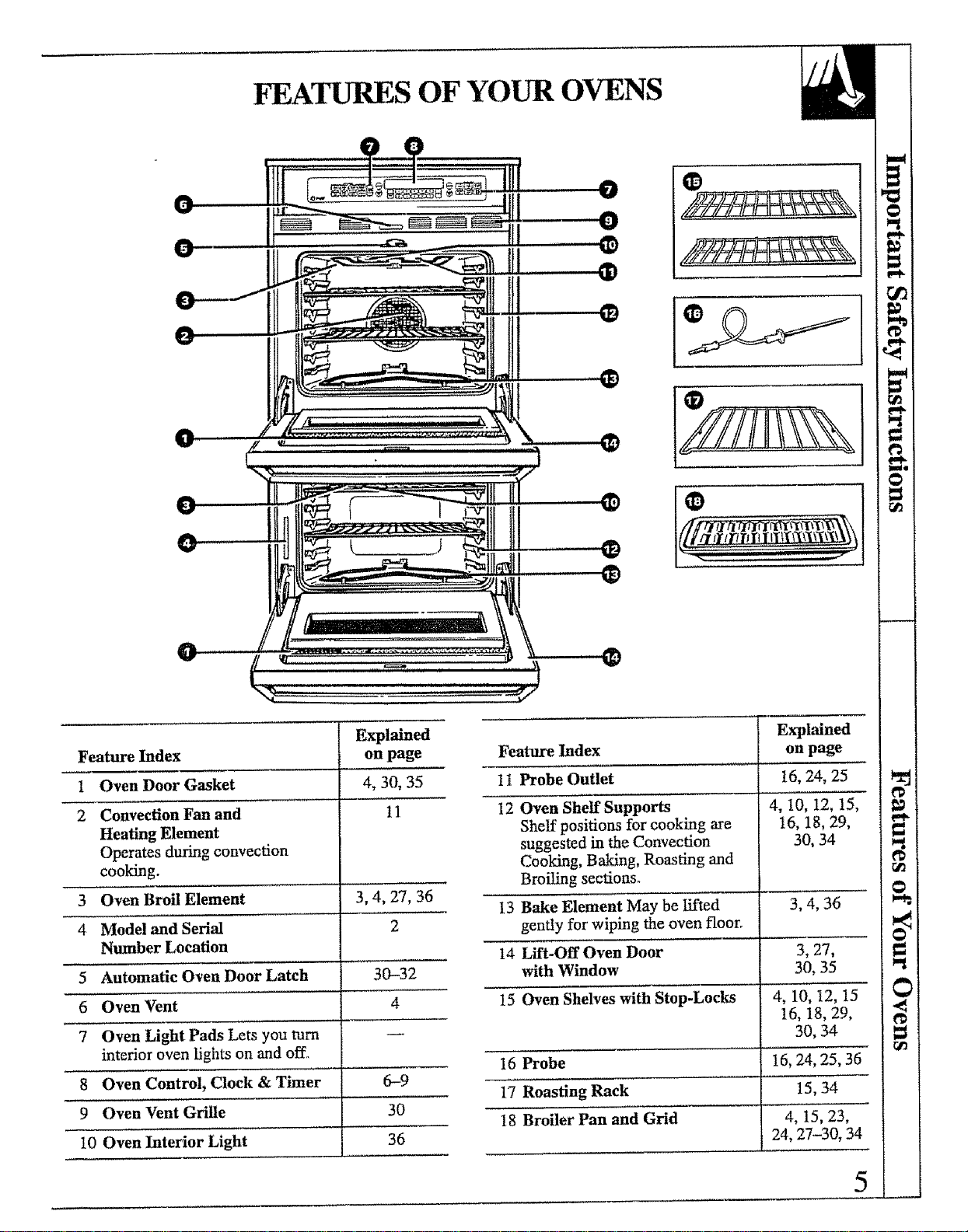
FEATURES OF YOUR OVENS
Explained
Feature Index on page
1Oven Door Gasket 4, 30, 35
2Convection Fan and 11
Heating Element
Operates during convection
cooking.
3 Oven Broil Element 3, 4, 27, 36
4 Model and Serial 2
Number Location
5 Automatic Oven Door Latch 30-32
6 Oven Vent 4
7Oven Light Pads Lets you turn
interior oven lights on and offl,
8 Oven Control, Clock & Timer 6--9
9 Oven Vent Grille 30
10 Oven Interior Light 36
Explained
Feature Index on page
1t Probe Outlet 16, 24, 25
12 Oven Shelf Supports 4, 10, 12, 15,
Shelf positions for cooking are 16, 18, 29,
suggested in the Convection 30, 34
Cooking, Baking, Roasting and
Broiling sections.
13 Bake Element May be lifted 3, 4, 36
gently for wiping the oven floor_
14 Lfft-OffOven Door 3, 27,
with Window 30, 35
15 Oven Shelves with Stop-Locks 4, 10, t2, 15
16, 18, 29,
30, 34
16 Probe 16, 24, 25, 36
17 Roasting Rack 15, 34
18 Broiler Pan and Grid 4, 15, 23,
24, 27-30, 34
5
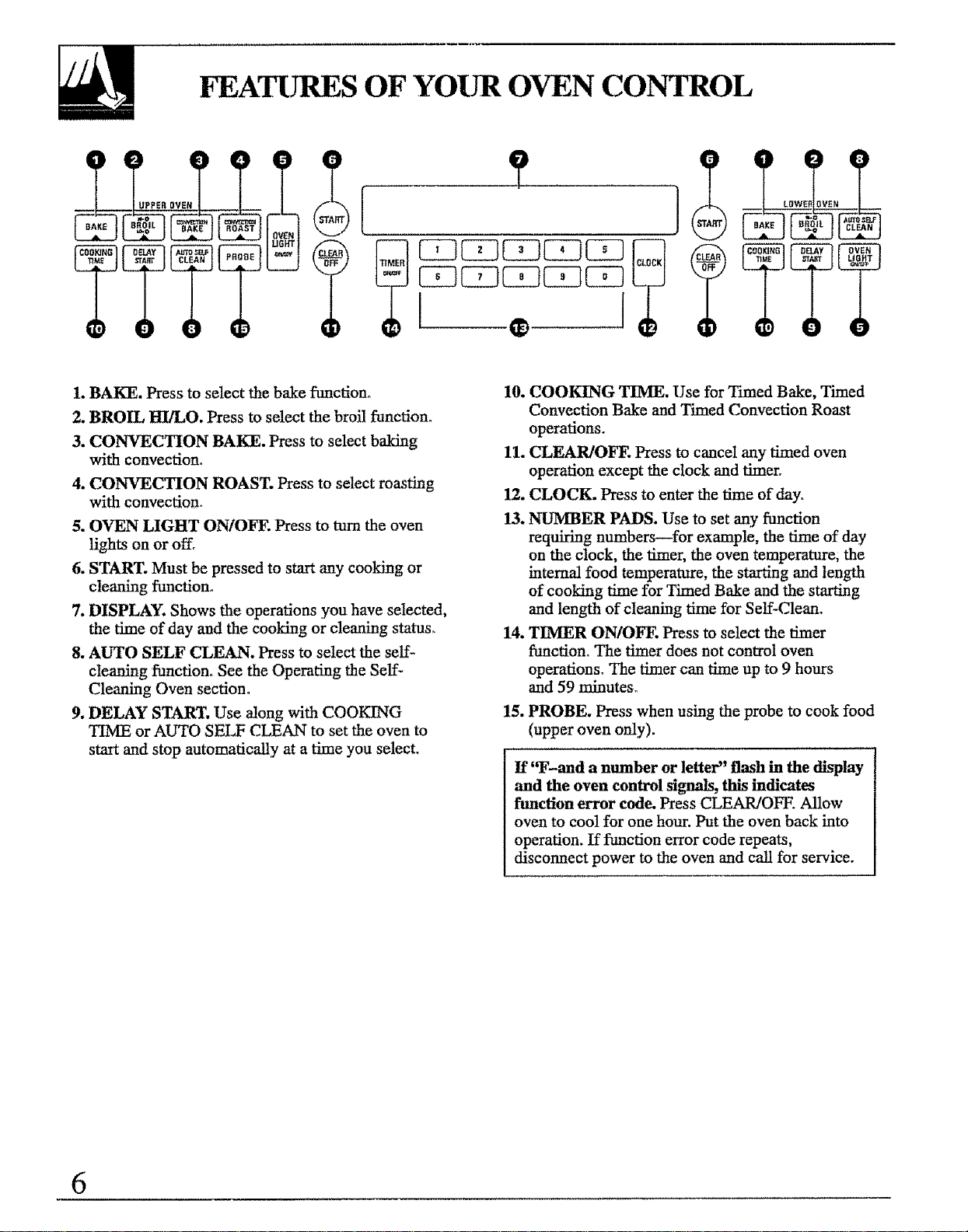
FEATURES OF YOUR OVEN CONTROL
1. BAKE. Press to select the bake function,
2. BROIL _/LO. Press to select the broil function.
3. CONVECTION BAKE. Press to select baking
with convection.
4. CONVECTION ROAST. Press to select roasting
with convection.
5. OVEN LIGHT ON/OFF. Press to turn the oven
lights on or off.
6. START. Must be pressed to start any cooking or
cleaning function°
7. DISPLAY. Shows the operations you have selected,
the time of day and the cooking or cleaning status.
8. AUTO SELF CLEAN. Press to select the self=
cleaning function. See the Operating the SeL¢-
Cleaning Oven section°
9. DELAY START. Use along with COOKING
TIME or AUTO SELF CLEAN to set the oven to
staxt and stop automatically at a time you select.
10. COOKING TIME, Use for Tmaed Bake, Timed
Convection Bake and Timed Convection Roast
operations.
11. CLEAR/OFF. Press to cancel any timed oven
operation except the clock and timer.
12. CLOCK. Press to enter the time of day.
13. NUMBER PADS. Use to set any function
requiting numbers--for example, the t_e of day
on the clock, the timer, the oven temperature; the
internal food temperature, the starting and length
of cooking time for Timed Bake and the starting
and length of cleaning time for Self-Clean.
14. TIMER ON/OFF. Press to select the timer
function. The timer does not control oven
operations. The timer can time up to 9 hours
and 59 minutes°
15. PROBE. Press when using the probe to cook food
(upper oven only).
If'T-and a number or letter" flash in the display
and the oven control signals, this indicates
function error code. Press CLEAR/OFF. Allow
oven to coo! for one hour. Put the oven back into
operation. If function error code repeats,
disconnect power to the oven and call for service.
6
OVEN CONTROL, CLOCK AND TINIER
Clock
The clock must be set for the automatic oven timing functions to work properly.
The time of day clock cannot be changed during Delay Start. (It can be
changed during a regular bake or broil operation.)
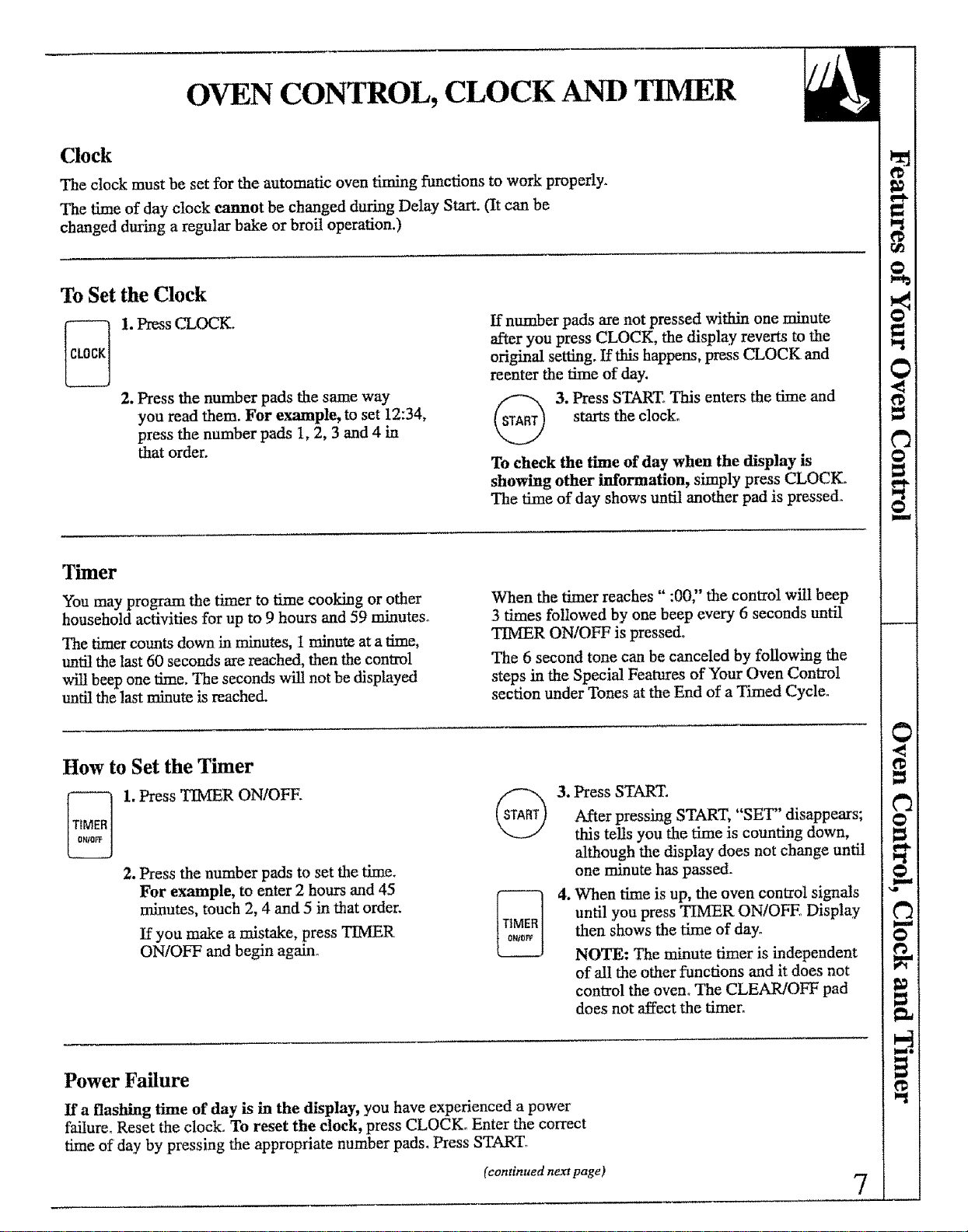
To Set the Clock
1. Press CLOCK.
2. Press the number pads the same way
you read them. For example, to set 12:34,
press the number pads 1, 2, 3 and 4 in
that order.
If number pads are not pressed within one minute
after you press CLOCK, the display reverts to the
original setting. If this happens, press CLOCK and
reenter the time of day.
3. ress START° This enters the time and
starts the clock°
To check the time of day when the display is
showing other information, simply press CLOCK=
The time of day shows until another pad is pressed°
Timer
You may program the timer to time cooking or other
household activities for up to 9 hours and 59 minutes.
The timer counts down in minutes, 1 minute at a time,
tmti! the last 60 seconds are reached, then the control
will beep one time. The seconds will not be displayed
until the last minute is reached.
When the timer reaches" :00" the control will beep
3 times followed by one beep every 6 seconds until
TIMER ON/OFF is pressed+
The 6 second tone can be canceled by following the
steps in the Special Features of Your Oven Control
section under Tones at the End of a Timed Cycle_
How to Set the Timer
1. Press TIMER ON/OFF.
2. Press the number pads to set the time.
For example, to enter 2 hours and 45
minutes, touch 2, 4 and 5 in that order.
If you make a mistake, press TIMER
ON/OFF and begin again_
3. Press START.
After pressing ST.aJ_.T, "SET" disappears;
this tells you the time is counting down,
although the display does not change until
one minute has passed.
4. When time is up, the oven control signals
until you press TIMER ONiOFE. Display
then shows the time of day°
NOTE: The minute timer is independent
of all the other functions and it does not
control the oven° The CLEAR/OFF pad
does not affect the timer.
Power Failure
If a flashing time of day is in the display, you have experienced a power
failure_ Reset the clock. To reset the clock, press CLOCK. Enter the correct
time of day by pressing the appropriate number pads. Press STARTf
(continued new page) 7
OVEN CONTROL, CLOCK AND TIMER
(continued)
The control has a series of tones that will sound at different times° These
tones may sound while you set the control for an oven traction or at the end
of the oven fimction_ They will also alert you when an incorrect time
or temperature has been entered or if there is a problem with the oven°
Tones While Setting the Control
When you press a touch pad you will hear a beep.
This beep will let you know you have placed enough
pressure on the pad to activate it.
Preheat Notification Tone
When you set an oven temperature the oven
automatically starts to heat. When the temperature
inside the oven reaches your set temperature a tone will
sound to let you know to place the food in the oven.
Attention Tone
This tone will sound if you set an invalid function or try to set an additional
function. The tone can be quickly identified by watching the display messages,
SPECIAL FEATURES OF YOUR OVEN CONTROL
Your new touch pad control has additional features that you may choose
to use, The following are the features and how you may activate them. The
special feature modes can only be activated while the display is showing the
time of day clock,
They remain in the control's memory until the steps are repeated, When the
display shows your choice press START, The special features will remain in
memory after a power failure.
Tones at the End of a Timed Cycle
At the end of a timed cycle, 3 short beeps wilt sound F"-'--1
followed by one beep every 6 seconds, until
CLEAR/OFF is pressed. This continuous 6 second
beep may be canceled,
To cancel the 6 second beep:
_ _ 1, Press the upper oven BAKE and @
BROIL HI/LO at the same time
for 2 seconds until the display
shows "SF?'
2. Press TIMER ON/OFFo The display
shows "CON BEEP" (continuous beep).
Press TIMER ONIOFF again_ The
display shows "BEEP?' (This cancels
the one beep every 6 seconds3
3, Press START°
NOTE: This cancels the end of cycle tone
for both ovens,
Fahrenheit or Centigrade Temperature Selection
Your oven control is set to use the Fahrenheit
temperature selections but you may change this to use
the Centigrade selections°
1.PresstheupperovenBAKE
C22LJ and BROIL HI/LO at the same
time for 2 seconds until the
display shows "SF?'
8
2. Press BROIL HULOo The display willshow "F" (Fahrenheit),
3. Press BROIL HI/LO again_ The display
will show "C" (Centigrade)°
4. Press START. The new setting will be
displayed for both ovens.
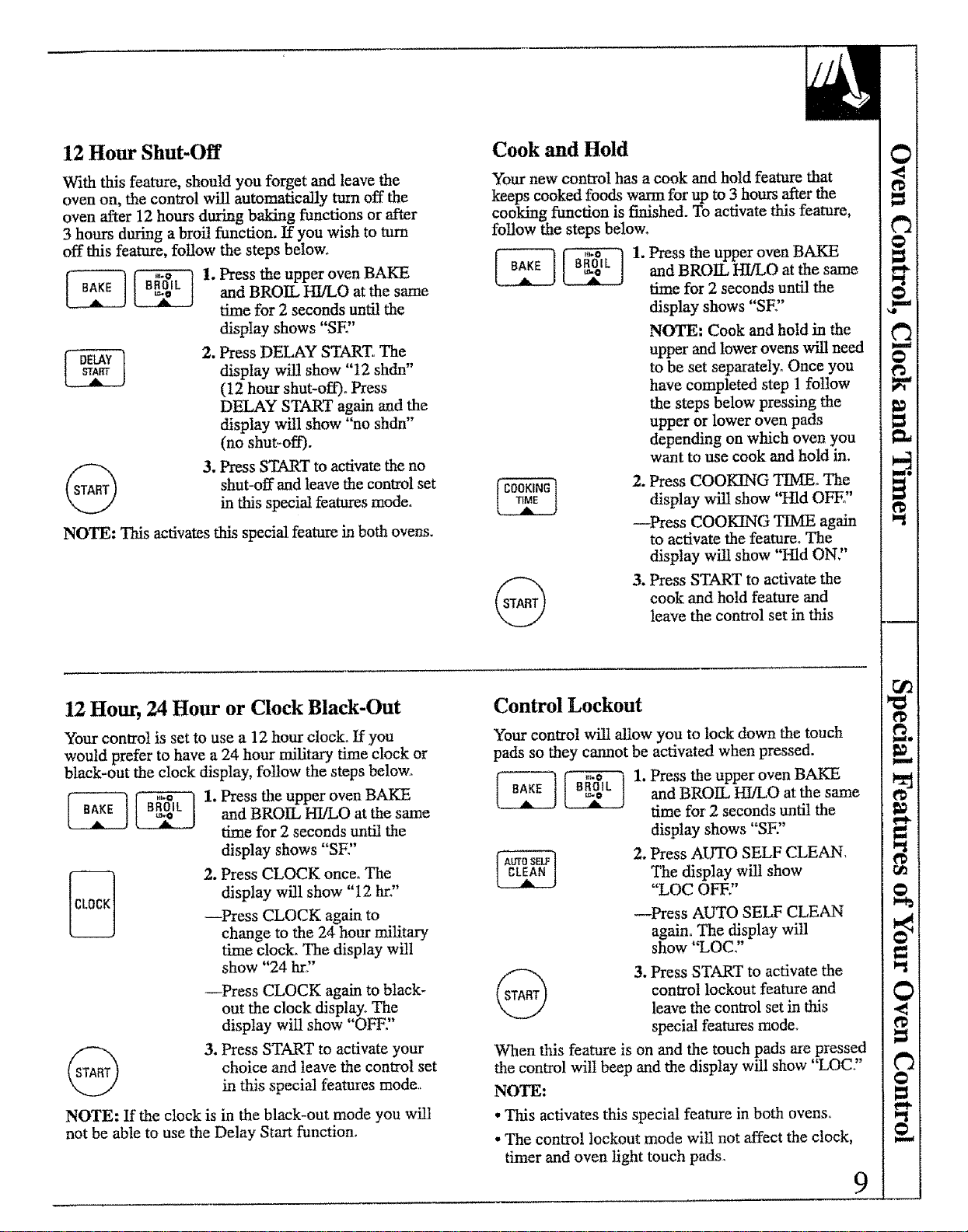
12 Hour Shut-Off
With this feature, should you forget and leave the
oven on, the control will automatically turn off the
oven after 12 hours during baiting functions or after
3 hours during a broil function. If you wish to turn
off this feature, follow the steps below.
_ 1. Press the upper oven BAKE
L L3 and BROIL HI/LO at the same
time for 2 seconds until the
display shows "SE"
2, Press DELAY START. The
display will show "12 shdn"
(12 hour shut-off). Press
DELAY START again and the
display will show "no shdn"
(no shut-off).
@ 3. Press START to activate the no
shut-off and leave the control set
in this special features mode.
NOTE: This activates this special feature in both ovens.
Cook and Hold
Your new control has a cook and hold feature that
keeps cooked foods wm-m for up to 3 hours after the
cooking fimction is finished. To activate this feature,
follow the steps below.
_ _ 1. Press the upper oven BAKE
and BROIL HI/LO at the same
time for 2 seconds until the
display shows "SF"
NOTE-' Cook and hold in the
upper and lower ovens will need
to be set separately° Once you
have completed step 1 follow
the steps below pressing the
upper or lower oven pads
depending on which oven you
want to use cook and hold in.
2. Press COOKING TIMEo The
display will show "Hid OFE"
--Press COOKING TIME again
to activate the feature° The
display will show "Hid ON."
3. Press START to activate the
cook and hold feature and
leave the control set in this
12 Hour, 24 Hour or Clock Black-Out
Your control is set to use a 12 hour clock. If you
would prefer to have a 24 hour military time clock or
black-out the clock display, follow the steps below.
_ _ 1. Press the upper oven BAKE
and BROIL HI_/LO at the same
time for 2 seconds until the
display shows "SE"
2. Press CLOCK once_ The
display will show "12 hro"
--Press CLOCK again to
change to the 24 hour military
time clock. The display will
show "24 hr,,"
--Press CLOCK again to black-
out the clock display, The
display will show "OFF."
3. Press START to activate your
choice and leave the control set
in this special features mode_
NOTE: If the clock is in the black-out mode you will
not be able to use the Delay Start function.
Control Lockout
Your control will allow you to lock down the touch
pads so they cannot be activated when pressed.
_1. Press the upper oven BAKE
and BROIL HI/LO at the same
time for 2 seconds until the
display shows "SF:'
2. Press AUTO SELF CLEANThe display will show
"LOC OFF."
--Press AUTO SELF CLEAN
again° The display will
show "LOC?'
@3. Press START m activate the
control lockout feature and
leave the control set in this
special features mode°
When this feature is on and the touch pads are pressed
the control witI beep and the display will show "LOC?'
NOTE:
• This activates this special feature in both ovens,,
• The control lockout mode will not affect the clock,
diner and oven light touch pads. 9
USING YOUR OVEN
Before Using Your Oven
1. Look at the controls° Be sure you understand
how to set them properly. Read over the directions
for the Oven Controls so you understand how to use
them°
2. Check the inside of the oven. Look at the shelves.
Take a practice run at removing and replacing them
properly to give sure, sturdy support.
3. Read over the information and tips that follow.
4. Keep this guide handy so you can refer to it,
especially during the first weeks of using your
new oven°
NOTE:
•You may notice a "burning" or "oily" smell the first
few times you turn your oven OnoThis is normal in a
new oven and will disappear in a short time. To speed
the process, set a seN-clean cycle for 4 hours. See
the Self-Cleaniug Oven section°
• A cooling fan may automatically turn on and off to
cool internal parts. This is normal, and the fan may
continue to run even after the oven is turned off°
•You will hear a convection fan while cooking with
the convection fea_tre, The fan wi!l stop when the
door is opened, but the heat wi_ not turn off.
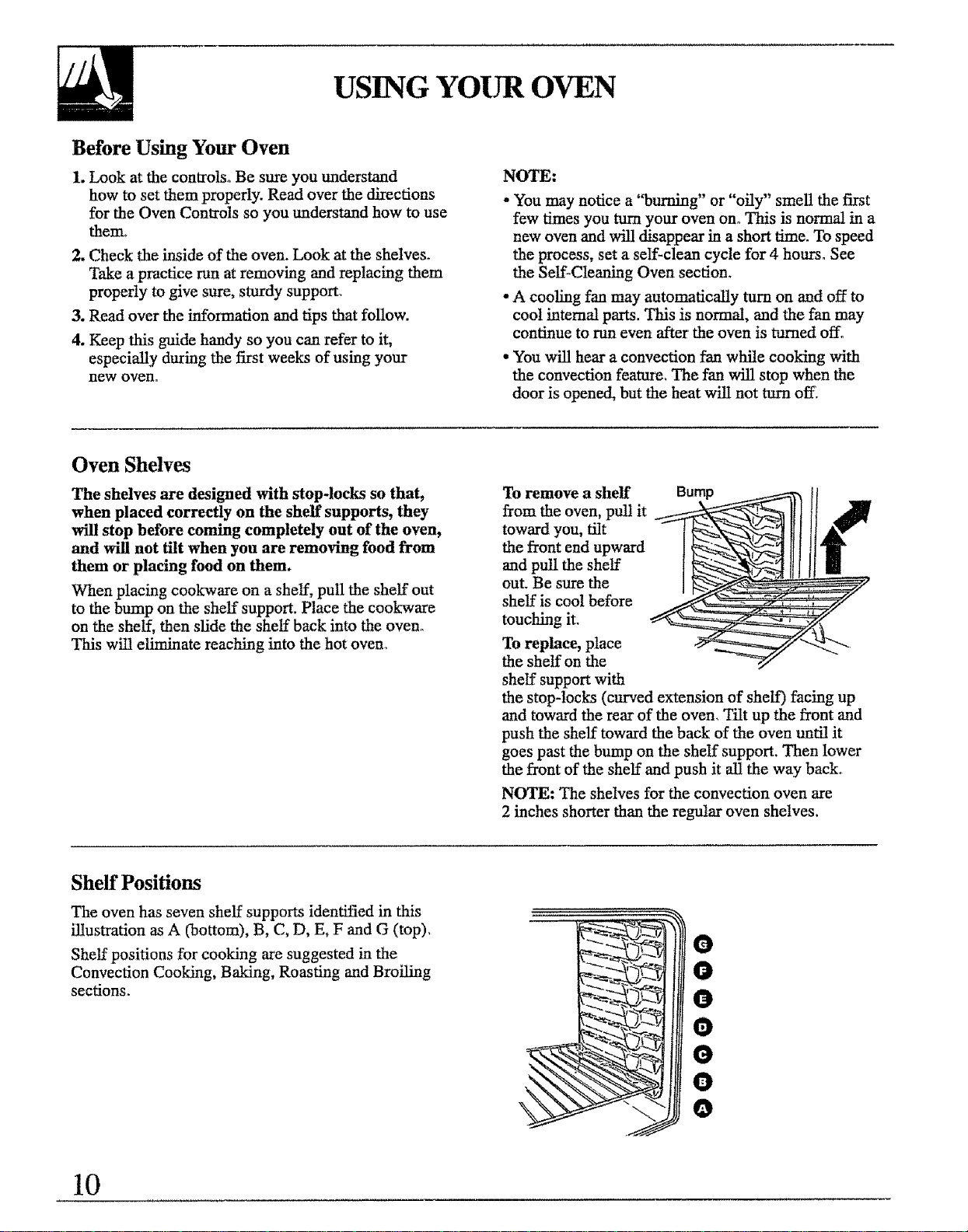
Oven Shelves
The shelves are designed with stop-locks so that,
when placed correctly on the shelf supports, they
will stop before coming completely out of the oven,
and will not tilt when you are removing food from
them or placing food on them.
When placing cookware on a shelf, pull the shelf out
to the bump on the shelf support. Place the cookware
on the shelf, then slide the shelf back into the oven°
This wii1 eliminate reaching into the hot oven_
To remove a shelf Bump
from the oven, pull it
toward you, tilt
the front end upward
and pull the shelf
out. Be sure the
shelf is cool before
touching it.
To replace, place
the shelf on the
shelf support with
the stop-locks (curved extension of shelf) facing up
and toward the rear of the oven. Tilt up the front and
push the shelf toward the back of the oven until it
goes past the bump on the shelf support, Then lower
the front of the shelf and push it all the way back°
NOTE: The shelves for the convection oven are
2 inches shorter than the regular oven shelves.
Sheff Positions
The oven has seven shelf supports identified in this
illustration as A (bottom), B, C, D, E, F and G (top),
Shelf positions for cooking are suggested in the
Convection Cooking, Baking, Roasting and Broiling
sections_
O
0
0
O
O
0
O
10
CONVECTION COOKING
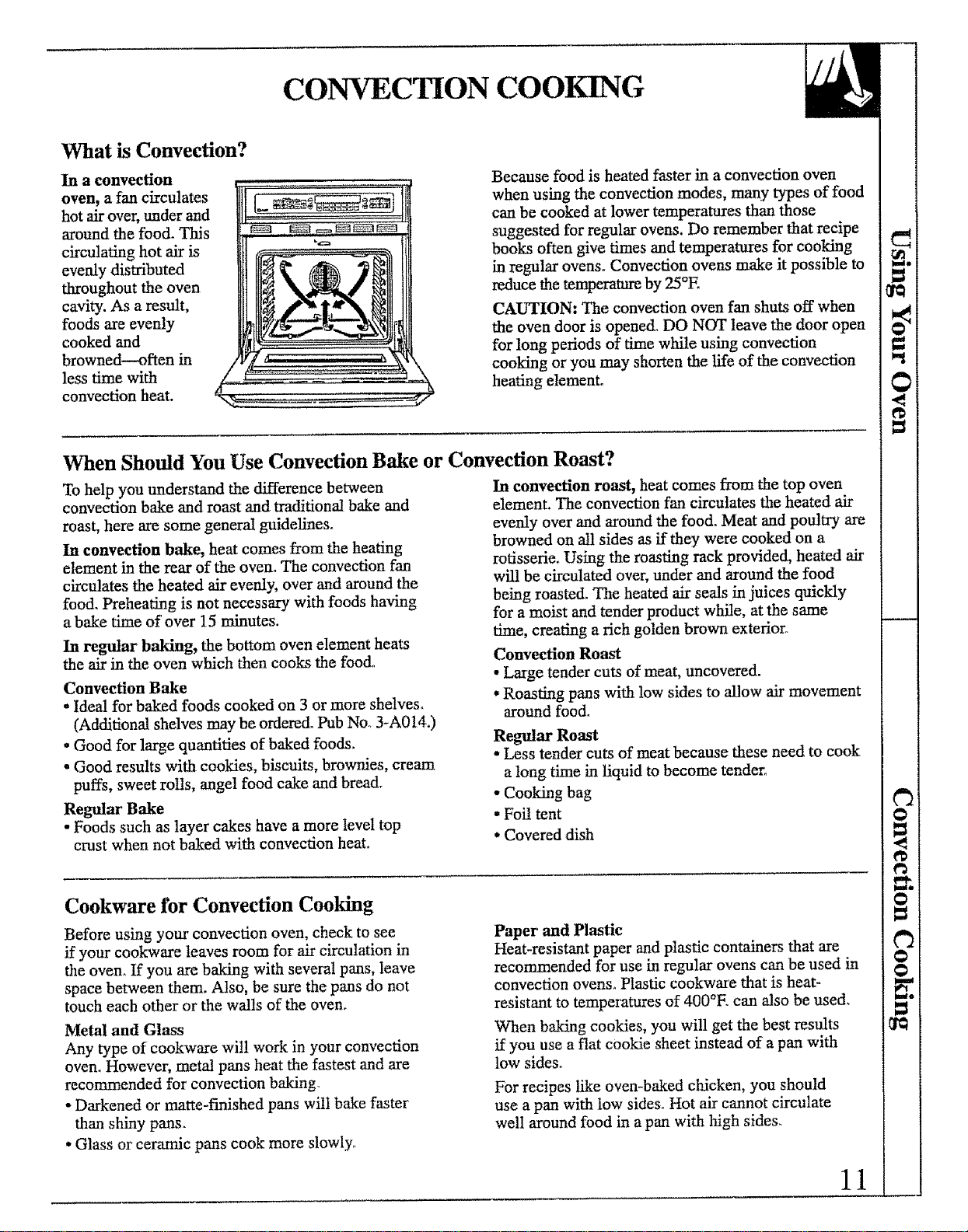
What is Convection?
In a convection
oven, a fan circulates
hot air over, under and
around the foo& This
circulating hot air is
evenly distributed
throughout the oven
cavity. As a result,
foods are evenly
cooked and
browned--often in
less time with
convection heat.
Because food is heated faster in a convection oven
when using the convection modes, many types of food
can be cooked at lower temperatures than those
suggested for regular ovens. Do remember that recipe
books often give times and temperatures for cooking
in regular ovens° Convection ovens make it possible to
reduce the temperature by 25°E
CAUTION: The convection oven fan shuts off when
the oven door is opened_ DO NOT leave the door open
for long periods of time while using convection
cooking or you may shorten the life of the convection
heating element°
When Should You Use Convection Bake or Convection Roast?
To help you understand the difference between
convection bake and roast and traditional bake and
roast, here are some general guidelineso
In convection bake, heat comes from the heating
element in the rear of the oven. The convection fan
circulates the heated air evenly, over and around the
food. Preheating is not necessary with foods having
a bake time of over 15 minutes.
In regular baking, the bottom oven element heats
the air in the oven which then cooks the food..
Convection Bake
- Ideal for baked foods cooked on 3 or more shelves.
(Additional shelves may be ordered. Pub No. 3-A014.)
•Good for large quantifies of baked foods.
•Good results with cookies, biscuits, brownies, cream
puffs, sweet rolls, angel food cake and bread.
Regular Bake
• Foods such as layer cakes have a more level top
crust when not baked with convection heat.
In convection roast, heat comes from the top oven
element. The convection fan circulates the heated air
evenly over and around the food. Meat and poultry are
browned on all sides as if they were cooked on a
rotisserie_ Using the roasting rack provided, heated air
will be circulated over, under and around the food
being roasted. The heated air seals in juices quickly
for a moist and tender product while, at the same
time, creating a rich golden brown exterior_
Convection Roast
• Large tender cuts of meat, uncovered.
• Roasting pans with low sides to allow air movement
around food.
Regular Roast
•Less tender cuts of meat because these need to cook
a long time in liquid to become tender°
• Cooking bag
• Foil tent
.Covered dish
Cookware for Convection Cooking
Before using your convection oven, check to see
if your cookware leaves room for air circulation in
the oven° If you are baking with several pans, leave
space between them. Also, be sure the pans do not
touch each other or the wa!ls of the oven.
Metal and Glass
Any type of cookware will work in your convection
oven° However, metal pans heat the fastest and are
recommended for convection baking_
• Darkened or matte-finished pans wili bake faster
than shiny pans_
• Glass or ceramic pans cook more slowly_
Paper and Plastic
Heat-resistant paper and plastic containers that are
recommended for use in regular ovens can be used in
convection ovens° Plastic cookwate that is heat-
resistant to temperatures of 400°E can also be used.
When baking cookies, you will get the best results
if you use a flat cookie sheet instead of a pan with
low sides.
For recipes like oven-baked chicken, you should
use a pan with low sides° Hot air cannot circulate
well around food in a pan with high sides.
11
CONVECTION BAKING
(upper oven only)
As a general rule, reduce the temperature by 25°E for
convection baking°
Preheating is not necessary with foods having a bake
time of over 15 minutes_
Check foods for doneness at the minimum
suggested cooking time.
Use pan size recommended in the recipe.
Multi-Shelf Baking
Because heated air is circulated evenly throughout the
oven, foods can be baked with excellent results on
two, three or more shelves at a time. Multi-shelf
baking may increase cook times slightly for some
foods but the overall result is time saved. Multi-shelf
baking provides very good results with cookies,
biscuits and other quickbreads.
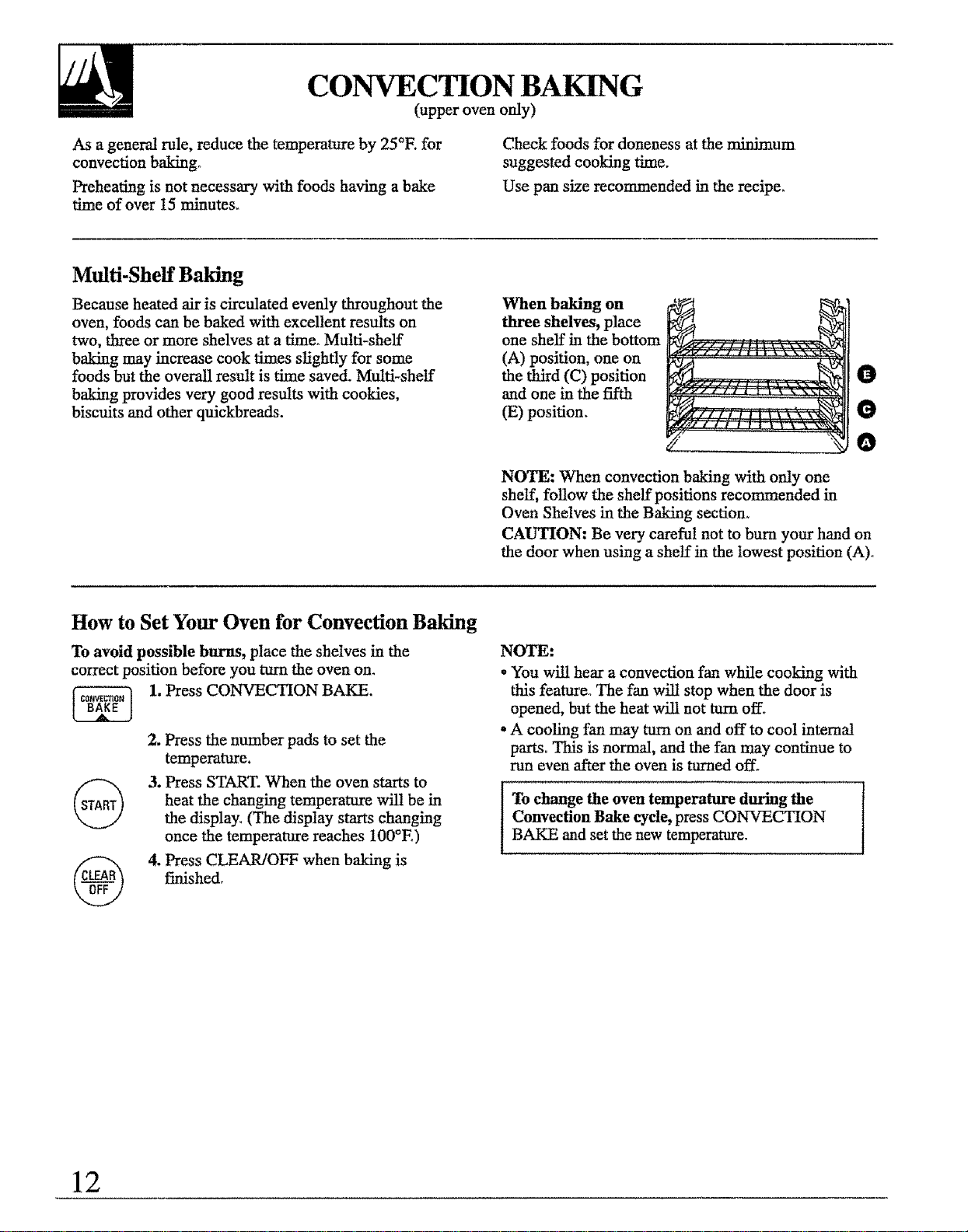
When baking on
three shelves, place
one shelf in the bottom
(A) position, one on
the third (C) position
and one in the fifth
(E) position.
O
O
O
NOTE: When convection baking with only one
shelf, follow the shelf positions recommended in
Oven Shelves in the Baking section.
CAUTION: Be very careful not to bum your hand on
the door when using a shelf in the lowest position (A)o
How to Set Your Oven for Convection Baiting
To avoid possible burns, place the shelves in the
correct position before you turn the oven on.
1, Press CONVECTION BAKE.
2. Press the number pads to set the
temperature.
3. Press START. When the oven starts to
heat the changing temperature wilt be in
the display. (The display starts changing
once the temperature reaches 100°E)
4, Press CLEAR/OFF when baking is
finished.
NOTE:
* You will hear a convection fan while cooking with
this feature. The fan will stop when the door is
opened, but the heat will not turn off.
*A cooling fan may turn on and off to cool internal
parts° This is normal, and the fan may continue to
run even after the oven is turned off.
lTo change the oven temperature during the
Convection Bake cycle, press CONVECTION
BAKE and set the new temperature.
12
TIMED CONtraCTION BAKING
(upper oven only)
How to Convection Time Bake
The oven control allows you to turn the oven on or off
automatically at specific times that you set. Examples
of Immediate Start (oven turns on now and you set it
to turn off automatically at the end of cooking time)
and Delay Start and Stop (setting the oven to turn on
automatica_y at a later time and turn off after a preset
cooking time) wil! be described°
NOTE: Before beginning, make sure the oven clock
shows the correct time of day,.
To set the clock, first press CLOCK.
Press the number pads to set the time of day.
Press START.
•You can use Timed Bake in one oven while
using Self-Clean in the other.
-You can use Timed Bake in both ovens at the
same time°
NOTE: An attention tone will sound if you are using
Timed Baking and do not press START after entering
the baking temperature°
How to Set Immediate Start and Automatic Stop Convection Bake
To avoid possible burns, place the oven shelves in
the correct position before you turn the oven on.
The oven will turn on immediately and cook for a
specific length of time° At the end of cooking time,
the oven will turn off automatieally_
1. Press CONVECTION BAKE°
2, Press the number pads to set the
temperature_
3. Press COOKING TIME.
NOTE: If your recipe requires
preheating, you may need to add
additional time to the length of the
cooking timer
4, Press the number pads to set the length
of baking time°
The oven temperature that you set and
the cooking time that you entered will be
in the display.
5. Press START.
6.
The display shows the changing oven
temperature and cooking time
countdown. (The display starts changing
once the temperature reaches 100°E)
Press CLEAR/OFF to clear the end of
cycle tone if necess_yo
NOTE:
•The low temperature zone of this oven (between
170°E. and 200°E) is available to keep hot cooked
foods warm. Food kept in the oven longer than two
hours at these low temperatures may spoil.
- Foods that spoil easily, such as milk, eggs, fish,
stuffings, poultry and pork, should not be allowed
to sit for more than one hour before or after cooldngo
Room temperature promotes the growth of harmfifl
bacteria. Be sure the oven light is off because heat
from the bulb will speed harmful bacteria growth.
(continued n_vt page)
13
TIMED CONVECTION BAKING
(upper oven only---continued)
How to Set Delay Start and Automatic Stop Convection Bake
Easy Steps:
1, Press CONVECTION BAKE.
2. Press the number pads to set the oven
temperature.
3. Press COOKING TIME.
4. Press the number pads to set the length
of baking time°
5. Press DELAY START°
6. Press the number pads to set the desired
start time.
7. Press START,
To avoid possible burns, place the shelves in the
correct position before you program the oven.
You can set the control to delay the start of cooking,
cook for a specific length of time and turn off
automatically.
1. Press CONVECTION BAKE.
2. Press the number pads to set baking
temperature.
3. Press COOKING TIME.
NOTE: If your recipe requires preheating,
you may need to add additional time to
the length of the cooking time.
4. Press the number pads to set
baking time°
5. Press DELAY START.
6. Press the number pads to set the time
of day you want the oven to turn on and
start cooking.
7. Press START.
If you would like to check the times you
have set, press DELAY START to check
the stair time you have set or press
COOKING TIME to check the length
of cooking time you have set.
When the oven turns on at the time of day
you have set, the display will show the
changing tempera_re (starting at 100°E)
and the cooking time countdown,
At the end of cooking time the oven
will turn off and the end of cycle tone
wil! sound.
8. Press CLEAR/OFF to clear the end of
cycle tone if necessary.
NOTE:
The low temperature zone of this oven (between
170°E and 200°E) is available to keep hot cooked
foods warm. Food kept in the oven longer than two
hours at these low temperatures may spoil,
Foods that spoil easily, such as milk, eggs, fish,
stuffings, poultry and pork, should not be allowed
to sit for more than one hour before or a_er cooking.
Room temperature promotes the growth of harmful
bacteria. Be sure the oven light is off because heat
from the bulb wi_ speed harmful bacteria growth.
Using Convection Conversion
By using the Convection Conversion feature you can
automatically convert the oven temperature from
regular baking to Convection Bake temperatures°
To convert the oven temperature for convection
baking:
1. Press and hold CONVECTIONBAKE for 4 to 5 seconds.
2. Using the number pads enter the
temperature recommended in the recipe.
14
3, Press START.
The display shows the converted
(reduced) temperature.
For example: If you entered a recipe
temperature of 350°E, the display will
show 325°E when it is converted.
4. Press CLEAR/OFF when baking is
finished.
NOTE: Conversion must be set each
time you want to use ito It is not held
in memory.
CONVECTION ROASTING
(upper oven only)
Meats cooked in a convection oven are dark brown on
the outside and tender and juicy on the inside, In most
cases, cooking time will be less when using the
Convection Roast feature. Sometimes cooking time is
reduced by 10 minutes per hour,
To make sure the meat is cooked the way you want it,
we recommend using the temperature probe provided
with the oven, Your double oven has a probe in the
upper oven only,
The special roasting rack allows heated air to circulate
over and under the meat. This allows the meat to
brown on all sides,
NOTE:
•Use the temperature recommended in the
Convection Roasting Guide.
• Preheating is not necessary.
•Check foods for doneness at the minimum
suggested time°
•Use the special roasting rack with the broiler pan
and grid.
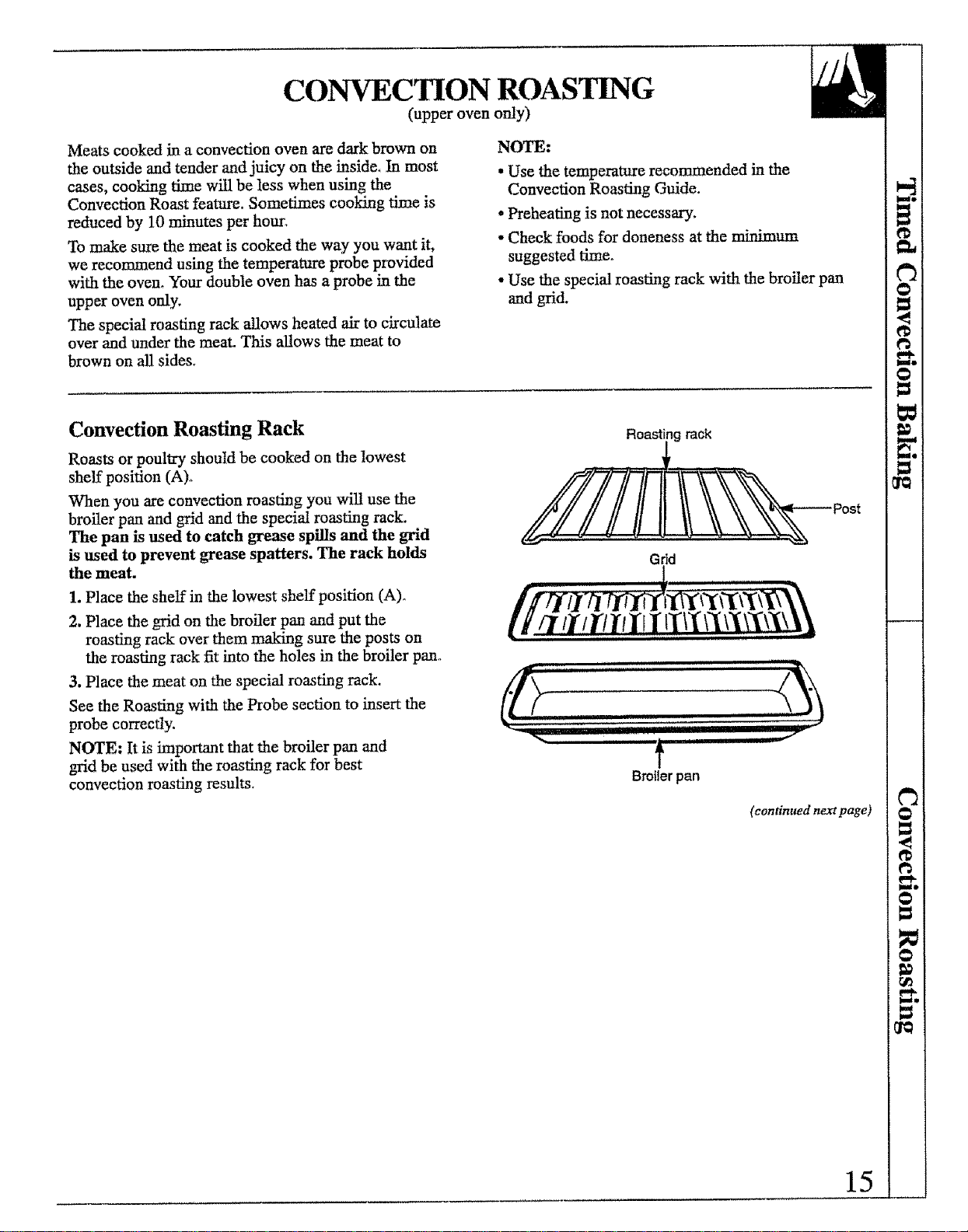
Convection Roasting Rack
Roasts or poultry should be cooked on the lowest
shelf position (A).
When you are convection roasting you will use the
broiler pan and grid and the special roasting rack.
The pan is used to catch grease spills and the grid
is used to prevent grease spatters. The rack holds
the meat.
1. Place the shelf in the lowest shelf position (A)o
2. Place the grid on the broiler pan and put the
roasting rack over them making sure the posts on
the roasting rack fit into the holes in the broiler pan°
3. Place the meat on the special roasting rack.
See the Roasting with the Probe section to insert the
probe correctly.
NOTE: It is important that the broiler pan and
grid be used with the roasting rack for best
convection roasting results,
Roasting rack
Grid
ll. iiil,i i i
////7 t/t'/I"tlrI tTll" \x%},X
,dr ,...... i illl
i
I Ill Illlll'llll'lll'llqll
i Hu,n_ i i iiiiii
t
Broiler pan
, ii,,,,w"
(continued next page)
15
CONVECTION ROASTING
(upper oven only---continued)
How to Set Your Oven for Convection Roasting When Using the Temperature Probe
NOTE: For best results when roasting large turkeys
and masts, we recommend using the probe included
in the convection oven. For the correct placement of
the probe, see the description in the Roasting section°
The display will flash if the probe is inserted
into the outlet and you have not set a probe
temperature and pressed START.
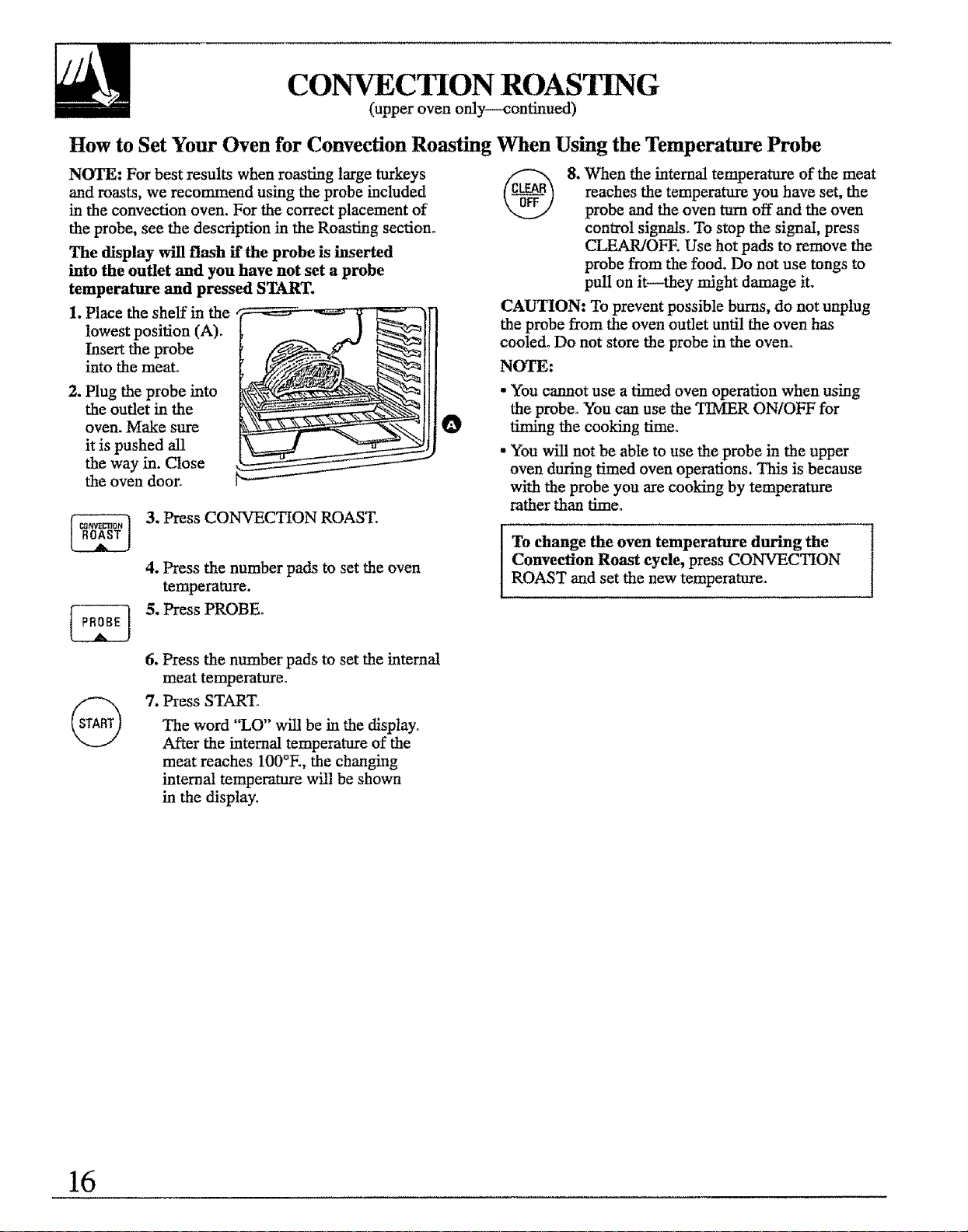
1. Place the shelf in the
lowest position (A)o
Insert the probe
into the meat°
2. Plug the probe into
the outlet in the
oven. Make sure
it is pushed all
the way in. Close
the oven door°
O
3. Press CONVECTION ROAST.
4. Press the number pads to set the oven
temperature.
5. Press PROBEr
6. Press the number pads to set the intemat
meat temperature.
7. Press START,
The word "LO" will be in the display°
After the internal temperature of the
meat reaches 100°E, the changing
internal temperature will be shown
in the display.
8. When the internal temperature of the meat
reaches the temperature you have set, the
probe and the oven turn off and the oven
control signals. To stop the signal, press
CLEAR/OFE Use hot pads to remove the
probe from the food. Do not use tongs to
pull on it--they might damage it.
CAUTION: To prevent possible bums, do not unplug
the probe from the oven outlet until the oven has
cooled° Do not store the probe in the oven°
NOTE:
• You cannot use a timed oven operation when using
the probe° You can use the TIMER ON/OFF for
timing the cooking firne_
- You will not be able to use the probe in the upper
oven during timed oven operations. This is because
with the probe you are cooking by temperature
rather than time.
To change the oven temperature during the
Convection Roast cycle, press CONVECTION
ROAST and set the new temperature°
16
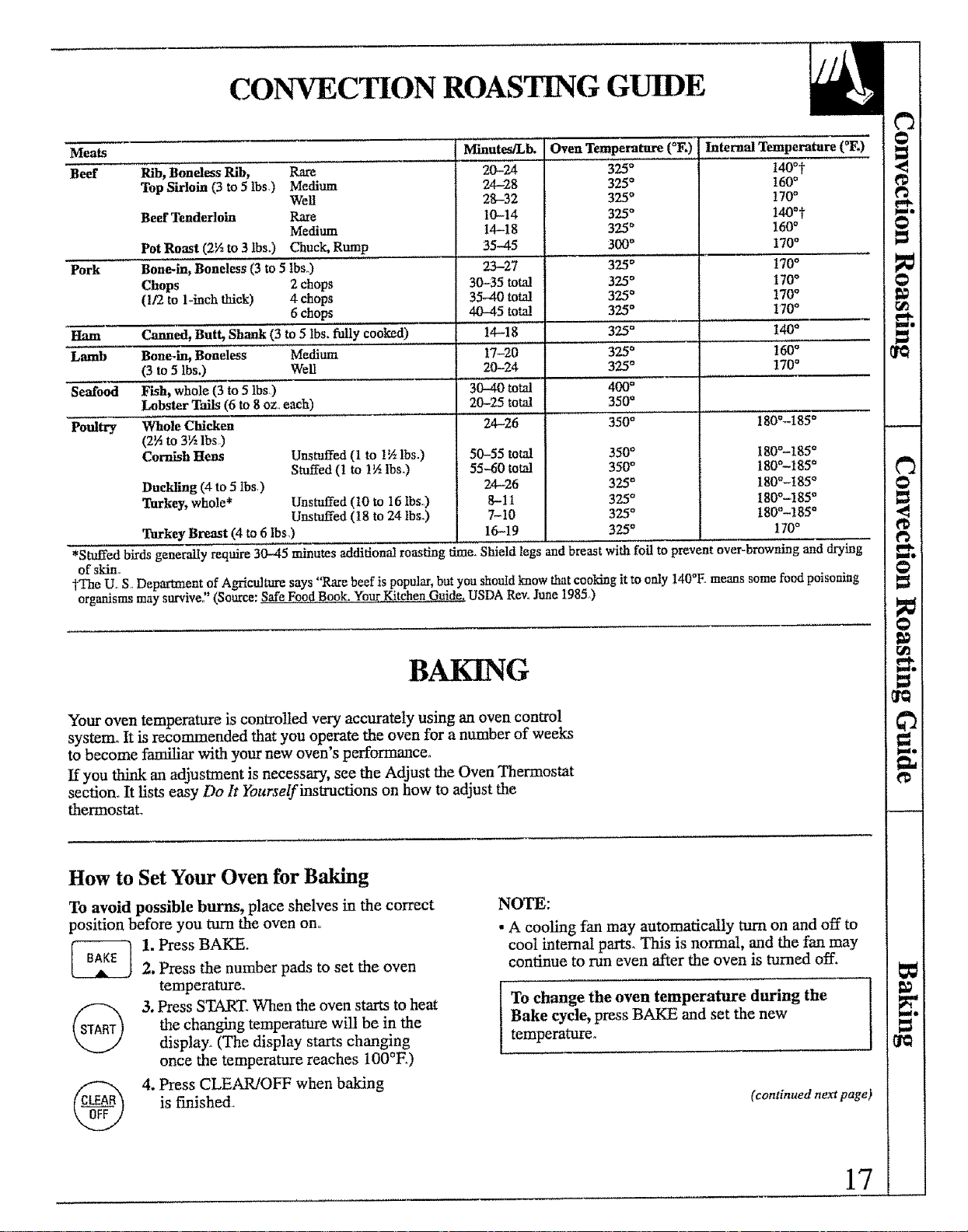
CONVECTION ROASTING GUIDE
Meats Minutes/Lb. "Oven Temperature (°F.) lnte_ Temperature (°F.)
Beef Rib, Boneless Rib, Rare 20-24 325_ t400t
Top Sirloin (3 to 5 lbs,) Medium 24-28 325" 160°
Well 28-32 325°170°
Beef Tenderloin Rare 10-14 325* !40*t
Medium t4-18 325' 160°
Pot Roast (2½ to 3 lbs.) Chuck, Rump 35-45 300* 170°
Pork Bone-ln, Boneless (3 to 5 tbs..) 23-27 325 ° 170°
Chops 2 chops 30-35 total 325 ° 170°
(1/2 to 1-inch thick) 4 chops 35-40 total 325 o 170°
6 chops 40-45 tota! 325* 170°
Ham Canned, Butt, Shank (3 to 5 tbs. fully cooked) 14-18 325* 140°
Lamb Bone.in, Boneless Medium 17-20 325* 160_
(3 to 5 lbs.) Well 20-24 325* !70 °
Seafood Fish, whole (3 to 5 Ibs) 30--40 total 400*
Lobster Tails (6 to 8 oz. each) 20-25 total 350 e
Poultry Whole Chicken
(TA to 3½ lbs)
Cornish Hens
Duckling (4 to 5 Ibs,)
Tarkey, whole*
Unstuffed (1 to 1½lbs.)
Stuffed (! to 1½ lbs.)
Unstuffed (t0 to 16 IbSo)
Unstuffed (18 to 24 lbs.)
Tarkey Breast (4 to 6 Ibs,)
24-26
50-55 total
55-60 total
24--26
8-11
7-10
16-19
350*
350*
350*
325*
325*
325*
325*
180°-185 °
180°-185 °
180°-185 °
180°-185 °
180°-185 °
180°-185 °
!70 °
*Stuffed birds generally require 30-45 minutes additional roasting lime. Shield legs andbreast with foil to prevent over-browning and drying
ofskin_
Jq'he U. S.. Deparl_ent of Agriculture says "Rare beef is popular, but you should know that cooking it to only 140°E means some food poisoning
organisms may survive,' (Source: Safe Food Bgok. YourKitchenGuide. USDA Rev, June 1985)
BAKING
Your oven temperature is controlled very accurately using an oven control
system_ tt is recommended that you operate the oven for a number of weeks
to become familiar with your new oven's performance.
If you think an adjustment is necessary, see the Adjust the Oven Thermostat
section° It lists easy Do It Yourselfinsu'ucfions on how to adjust the
thermostat_
How to Set Your Oven for Baking
To avoid possible burns, place shelves in the correct
position before you turn the oven on.
1. Press BAKE.
2. Press the number pads to set the oven
temperature,
3. Press START. When the oven starts to heat
the changing temperature wil! be in the
display. (The display starts changing
once the temperature reaches 100°E)
4. Press CLEAR!OFF when baking
is Finished.
NOTE:
•A cooling fan may automatically turn on and off to
cool internal parts. This is normal, and the fan may
continue to run even after the oven is turned off.
To change the oven temperature during the
Bake cycle, press BAKE and set the new
temperature_
(continued next page)
17
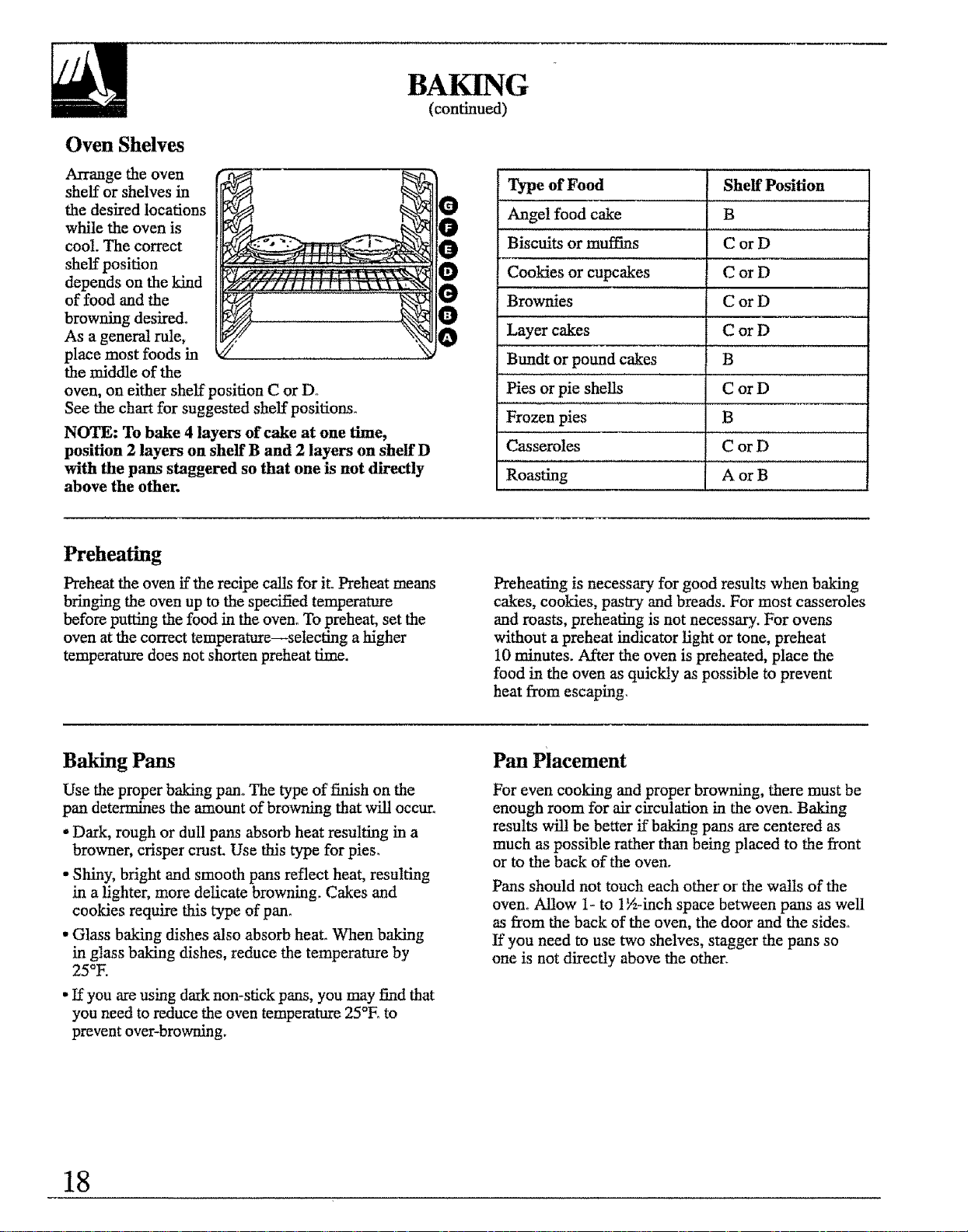
Oven Shelves
Arrange the oven
shelf or shelves in
the desired locations
while the oven is
cool. The correct
shelf position
depends on the kind
of food and the
browning desired°
As a general rule,
place most foods in
the middle of the
oven, on either shelf position C or Dr
See the chart for suggested shelf positions.
NOTE: To bake 4 layers of cake at one time,
position 2 layers on shelf B and 2 layers on shelf D
with the pans staggered so that one is not directly
above the other.
BAKING
(continued)
Type of Food
Angel food cake
Biscuits or muffius
Cookies or cupcakes
Brownies
Layer cakes
Btmdt or pound cakes
Pies or pie shells
Shelf Position
B
CorD
CorD
CorD
CorD
iB
CorD
Frozen pies B
Casseroles C or D
Roasting A or B
Preheating
Preheat the oven if the recipe calls for itoPreheat means
bringing the oven up to the specified temperature
before putting the food in the oven° To preheat, set the
oven at the correct temperature--selecting a higher
temperaane does not shorten preheat time.
Preheating is necessary for good results when baking
cakes, cookies, pastry and breads. For most casseroles
and roasts, preheating is not necessary. For ovens
without a preheat indicator light or tone, preheat
10 minutes. After the oven is preheated, place the
food in the oven as quickly as possible to prevent
heat from escaping.
Baking Pans
Use the proper baking pan° The type of finish on the
pan determines the amount of browning that will occur.
-Dark, rough or dull pans absorb heat resulting in a
browner, crisper crust. Use this type for pies.
• Shiny, bright and smooth pans reflect heat, resulting
in a lighter, more delicate browning. Cakes and
cookies require this type of pan.
•Glass baking dishes also absorb heat. When baking
in glass baking dishes, reduce the temperature by
25°I.
• If you are using daIk non-stick pans, you may find that
you need to reduce the oven temperature 25°E to
prevent over-browning.
Pan Placement
For even cooking and proper browning, there must be
enough room for air circulation in the oven. Baking
results will be better if baking pans are centered as
much as possible rather than being placed to the front
or to the back of the oven.
Pans should not touch each other or the walls of the
oven. Allow 1- to 1½-inch space between pans as well
as from the back of the oven, the door and the sides.
If you need to use two shelves, stagger the pans so
one is not directly above the other.
18
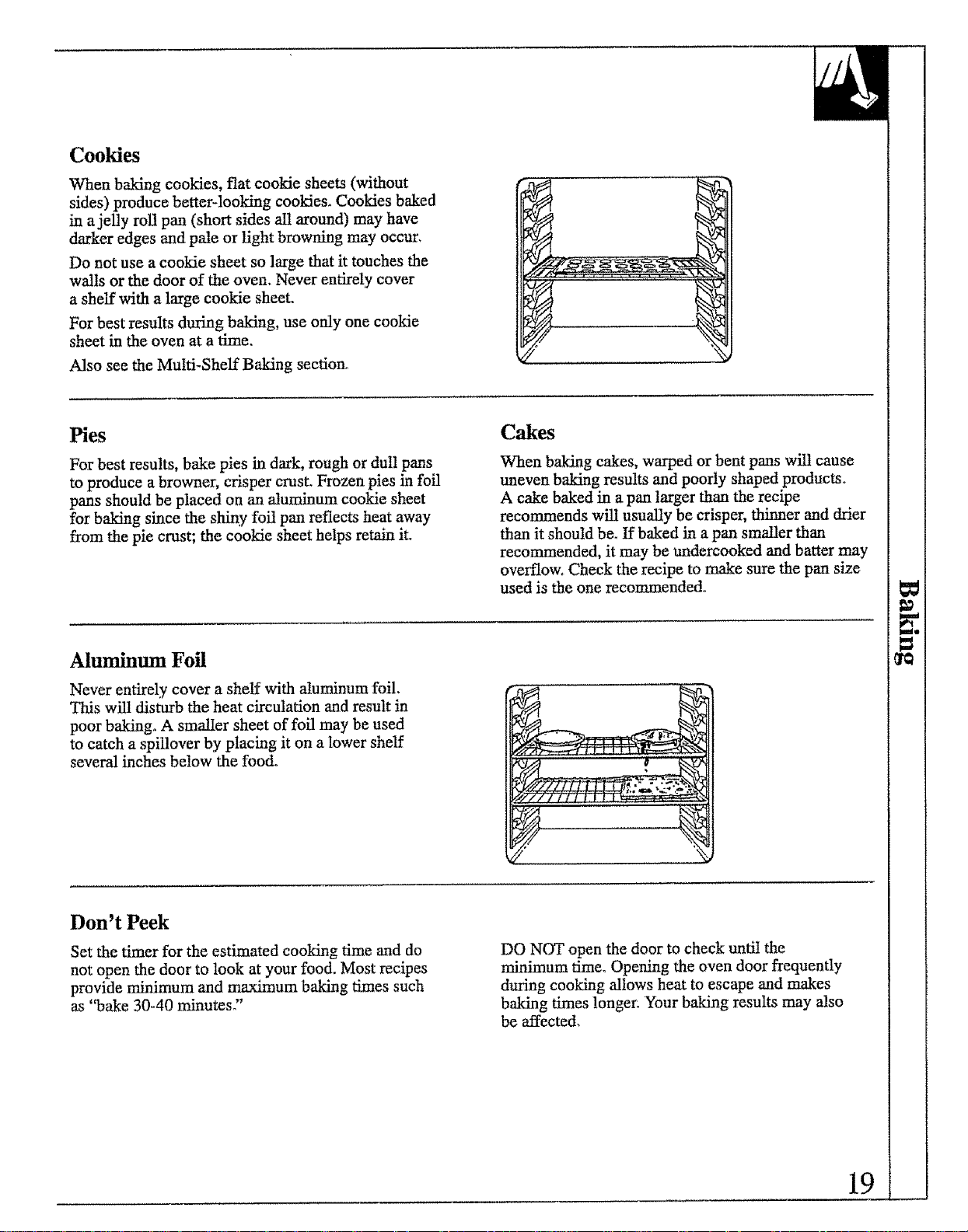
Cookies
When baking cookies, flat cookie sheets (without
sides) produce better-looking cookies_ Cookies baked
in a jelly roll pan (short sides all around) may have
darker edges and pale or light browning may occur.
Do not use a cookie sheet so large that it touches the
walls or the door of the oven. Never entirely cover
a shelf with a large cookie sheet.
For best results during baking, use only one cookie
sheet in the oven at a time.
Also see the Multi-Shelf Baking section.
Pies
For best results, bake pies in dark, rough or duI1 pans
to produce a browner, crisper crest. Frozen pies in foil
pans should be placed on an aluminum cookie sheet
for baking since the shin.,! foil pan reflects heat away
from the pie crust; the cookie sheet helps retain it.
Cakes
When baking cakes, warped or bent pans will cause
uneven baking results and poorly shaped products°
A cake baked in a pan larger than the recipe
recommends will usually be crisper, thinner and drier
than it should be. If baked in a pan smaller than
recommended, it may be undercooked and batter may
overflow. Check the recipe to make sure the pan size
used is the one recommended°
Aluminum Foil
Never entirely cover a shelf with aluminum foil.
This will disturb the heat circulation and result in
poor baking. A smaller sheet of foil may be used
to catch a spillover by placing it on a lower shelf
several inches below the food.
Don't Peek
Set the timer for the estimated cooking time and do
not open the door' to took at your food. Most recipes
provide minimum and maximum baking times such
as "bake 30-40 minutes"
DO NOT open the door m check until the
minimum time. Opening the oven door frequently
during cooking allows heat to escape and makes
baking times longer. Your baking results may also
be affected.
19
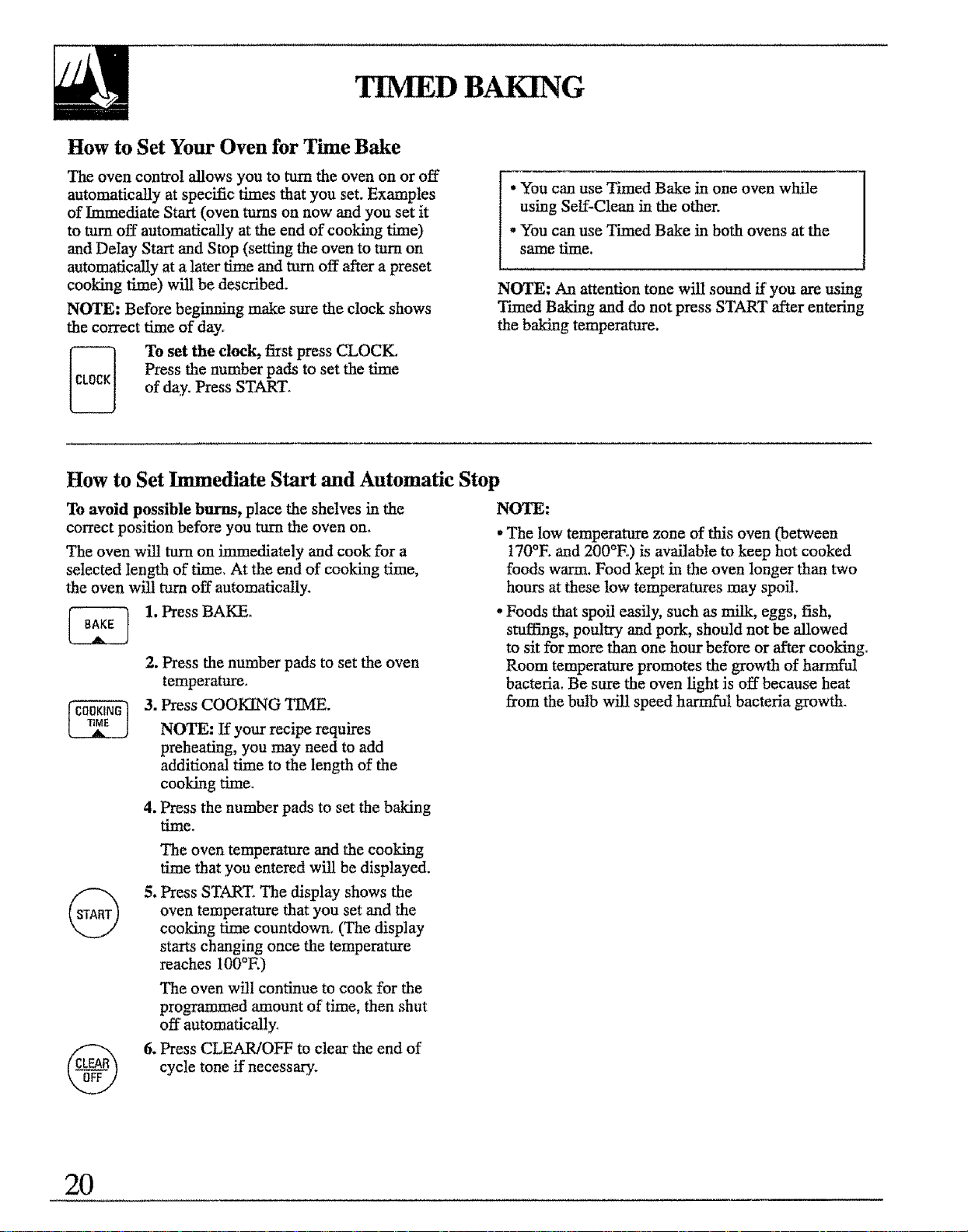
TIMED BAKING
How to Set Your Oven for Time Bake
The oven control allows you to turn the oven on or off
automatically at specific times that you set. Examples
of Immediate Start (oven turns on now and you set it
to turn off automatically at the end of cooking time)
and Delay Start and Stop (setting the oven to rum on
automatically at a later time and turn off after a preset
cooking time) will be described.
NOTE: Before beginning make sure the clock shows
the correct time of day_
To set the clock, first press CLOCK.
Press the number pads to set the time
of day. Press START.
• You can use Timed Bake in one oven while
using Self-Clean in the other.
• You can use Timed Bake in both ovens at the
same time.
NOTE: An attention tone will sound if you are using
Timed Baking and do not press START after entering
the baking temperature.
How to Set Immediate Start and Automatic Stop
To avoid possible burns, place the shelves in the
correct position before you turn the oven on.
The oven will turn on immediately and cook for a
selected length of time_ At the end of cooking time,
the oven will mm off automatically.
1. Press BAKE.
2. Press the number pads to set the oven
temperature_
3. Press COOKING TIME.
NOTE: If your recipe requires
preheating, you may need to add
additional time to the length of the
cooking time.
4. Press the number pads to set the baking
ti_eo
NOTE:
,The low temperature zone of this oven (between
170°E and 200°E) is available to keep hot cooked
foods warm. Food kept in the oven longer than two
hours at these low temperatures may spoil,
° Foods that spoil easily, such as milk, eggs, fish,
stuffings, poultry and pork, should not be allowed
to sit for more than one hour before or after cooking°
Room temperature promotes the growth of harmful
bactetia. Be sure the oven light is off because heat
from the bulb will speed harmful bacteria growth.
The oven tempemtore and the cooking
6me that you entered will be displayed.
5. Press START, The display shows the
oven temperature that you set and the
cooking time countdown. (The display
starts changing once the temperature
reaches 100°E)
The oven will continue to cook for the
programmed amount of time, then shut
off automatically.
6. Press CLEAR!OFF to clear the end of
cycle tone if necessary.
2O
How to Set Delay Start and Automatic Stop
Easy Steps:
1. Press BAKE°
2. Press the number pads to select oven
temperature.
3. Press COOKING TIME.
4. Press the number pads to set the length of
baking time°
5. Press DELAY START.,
6. Press the number pads to set the desired
start time.
7. Press START.
To avoid possible burns, place the shelves in the
correct position before you mm the oven on.
You can set the control to delay the start of cooking,
cook for a specific length of time and then turn off
automatically.
1. Press BAKE°
2. Press the number pads to set the
temperature.
3. Press COOKING TIME.
NOTE: If your recipe requires
preheating, you may need to add
additional time to the cooking time_
4. Press the number pads to set the
baking time.
5, Press DELAY START.
6. Press the number pads to set the time of
day you want the oven to turn on and
start cooking°
7. Press START.
If you would like to check the times you
have set, press DELAY START to check
the start time you have set or press
COOKING TIME to check the length of
cooking time you have set.
When the oven turns on at the time of day
you have set, the display will show the
changing temperature (starting at 100°E)
and the cooking time countdown.
At the end of cooking time the oven will
mrn off and the end of cycle tone will
soun&
8. Press CLEAR/OFF to clear the end of
cycle tone if necessary.
NOTE:
, The low temperature zone of this oven (between
170°E and 200°E) is available to keep hot cooked
foods warm. Food kept in the oven longer than two
hours at these low temperatures may spoil.
, Foods that spoil easily, such as milk, eggs, fish,
stuffings, poultry and pork, should not be allowed
to sit for more than one hour before or niter cooking°
Room temperature promotes the growth of harmful
bacteria. Be sure the oven light is off because heat
from the bulb will speed harmful bacteria growth°
21
ADJUST THE OVEN HERMOSTATm
DO IT YOURSELF!
You may find that your new oven cooks differently
than the one it replaced. We recommend that you
use your new oven for a few weeks to become more
familiar with it, following the times given in your
recipes as a guider
If you think your new oven is too hot or too cool,
you can adjust the thermostat yourself. If you think
it is too hot, adjust the thermostat to make it cooler. If
you think it is too cool, adjust the thermostat to make
it hotter.
We do not recommend the use of inexpensive
thermometers, such as those found in grocery stores,
to check the temperature setting of your new oven,
These thermometers may vary 20-40 degrees.
The thermostat adjustment for Baking also affects
Convection Baking and Convection Roasting.
To Adjust the Thermostat:
__ 1. Press the upper oven BAKE
and BROIL H][/LO at the same
time for 2 seconds until the
display shows "SF."
NOTE: The thermostats in the
upper and lower ovens need to
be adjusted separately° Once
you have completed step 1
follow the steps below pressing
the upper or lower oven pads
depending on which oven
thermostat you want to adjust.
2. Press BAKE. A two digit
number shows in the display.
Press BAKE once to increase
(+) the oven temperature, or
twice to decrease (-)o
3. The oven temperature can be
adjusted up to (+) 35°F. hotter
or (-) 35°E cooler. Press the
number pads the same way you
read them. For example, to
increase the oven temperature
15°F., press 1 and 5o
4. When you have made the
adjustment, press START to go
back to the time of day display°
Use your oven as you would
normally.
NOTE: This adjustment will not affect the broiling
or self-cleaning temperatures. It will be retained in
memory after a power failure.
22
ROASTING
Roasting is cooking by dry heat. Tender meat or
poultry can be roasted uncovered in your oven_
Roasting temperatures, which should be low and
steady, keep spattering to a minimum.
Roasting is really a baking procedure used for meats.
Therefore, the oven controls are set for Baking or
Timed Baking, (You may hear a slight clicking sound,
indicating the oven is working properly.) Timed
Baking wil! turn the oven on and off automatically,
Most meats continue to cook slightly after being
removed from the oven. The internal temperature
will rise about 5° to !0°E during the recommended
standing time of t0 to 20 minutes, This a!lows
roasts to firm up and makes them easier to carve,
To compensate for this rise in temperature, you may
want to remove the roast sooner (at 5 ° to !0°E less
than the temperature in the Roasting Guide),
Remember that food wilt continue to cook in the hot
oven and therefore should be removed when the
desired internal temperature has been reached_
How to Set Your Oven for Roasting
1. Place the shelf in Aor B position. No preheating
is necessary,
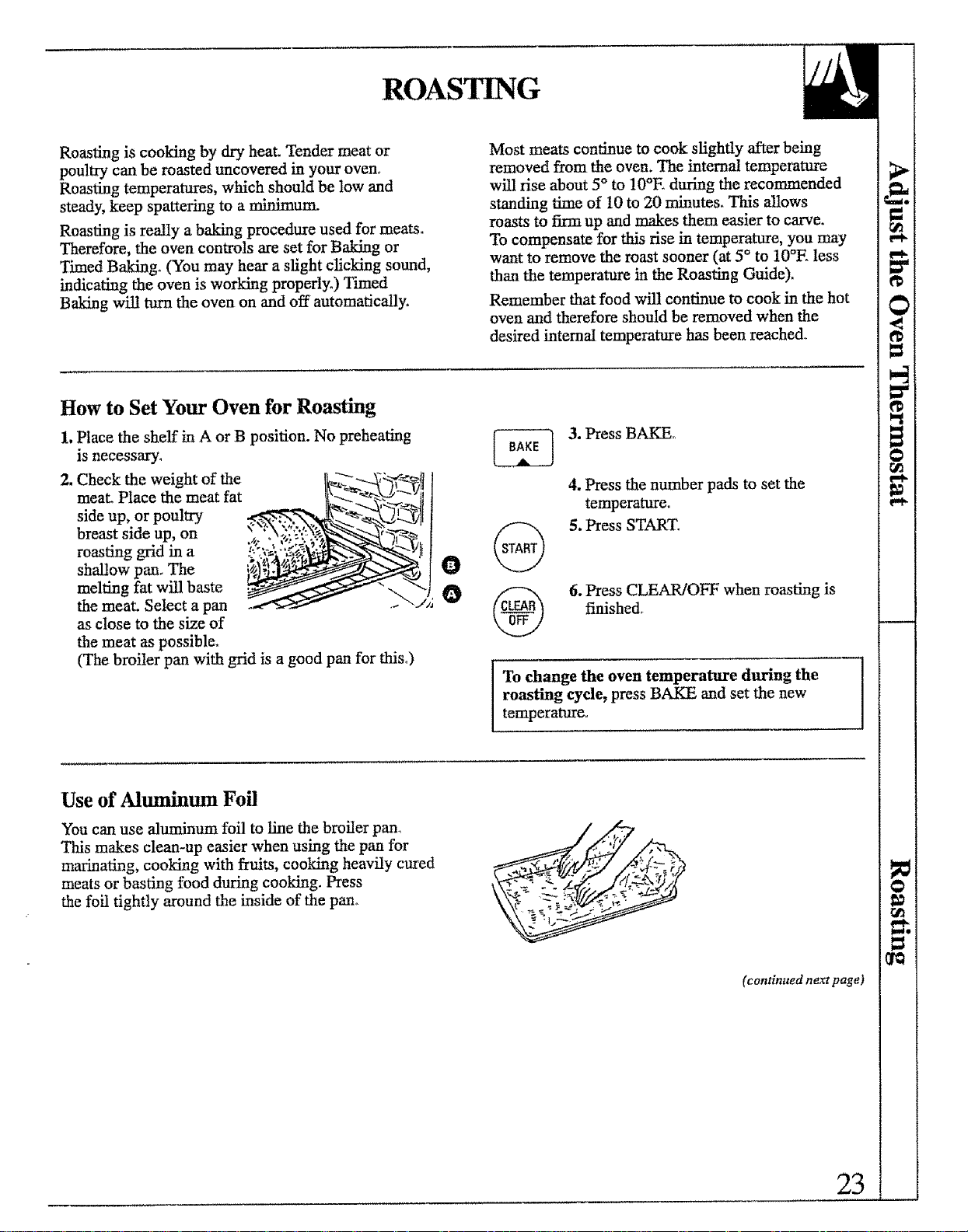
2, Check the weight of the
meat_ Place the meat fat
side up, or poultry
breast side up, on
roasting grid in a
shallow pan, The
melting fat will baste
the meat. Select a pan
as close to the size of
the meat as possible,
(The broiler pan with grid is a good pan for this°)
O
o
3. Press BAKE°
4. Press the number pads to set the
temperature_
5. Press START.
6. Press CLEAR/OFF when roasting is
finished,
ITo change the oven temperature during the
roasting cycle, press BAKE and set the new
temperature.
Use of Aluminum Foil
You can use aluminum foil to line the broiler pan_
This makes clean-up easier when using the pan for
marinating, cooking with fruits, cooking heavily cured
meats or basting food during cooking. Press
the foil tightly around the inside of the pan° _-_._ -.
(continued ne_ page)
23
ROASTING ATH THE PROBE
See the Roasting Guide (upper oven only)
Correct Placement of the Temperature Probe
Your double oven has a probe in the upper oven only.
A temperature probe has been provided for use in your
new oven. This probe is designed to withstand high
temperatures. Temperature probes provided with other
products, such as those used for microwave ovens,
may not be designed to withstand high temperatures.
Use of probes other than the one provided with this
product may result in damage to the probe.
Never leave your probe inside the oven during a
self=cleaning cycle°
For many foods, especially roasts and poultry, internal
food temperature is the best test for doneness. The
temperature probe takes the guesswork out of roasting
by cooking foods to the exact doneness you want.
When the internal temperature of the food reaches the
temperature you set, the oven automatically shuts off.
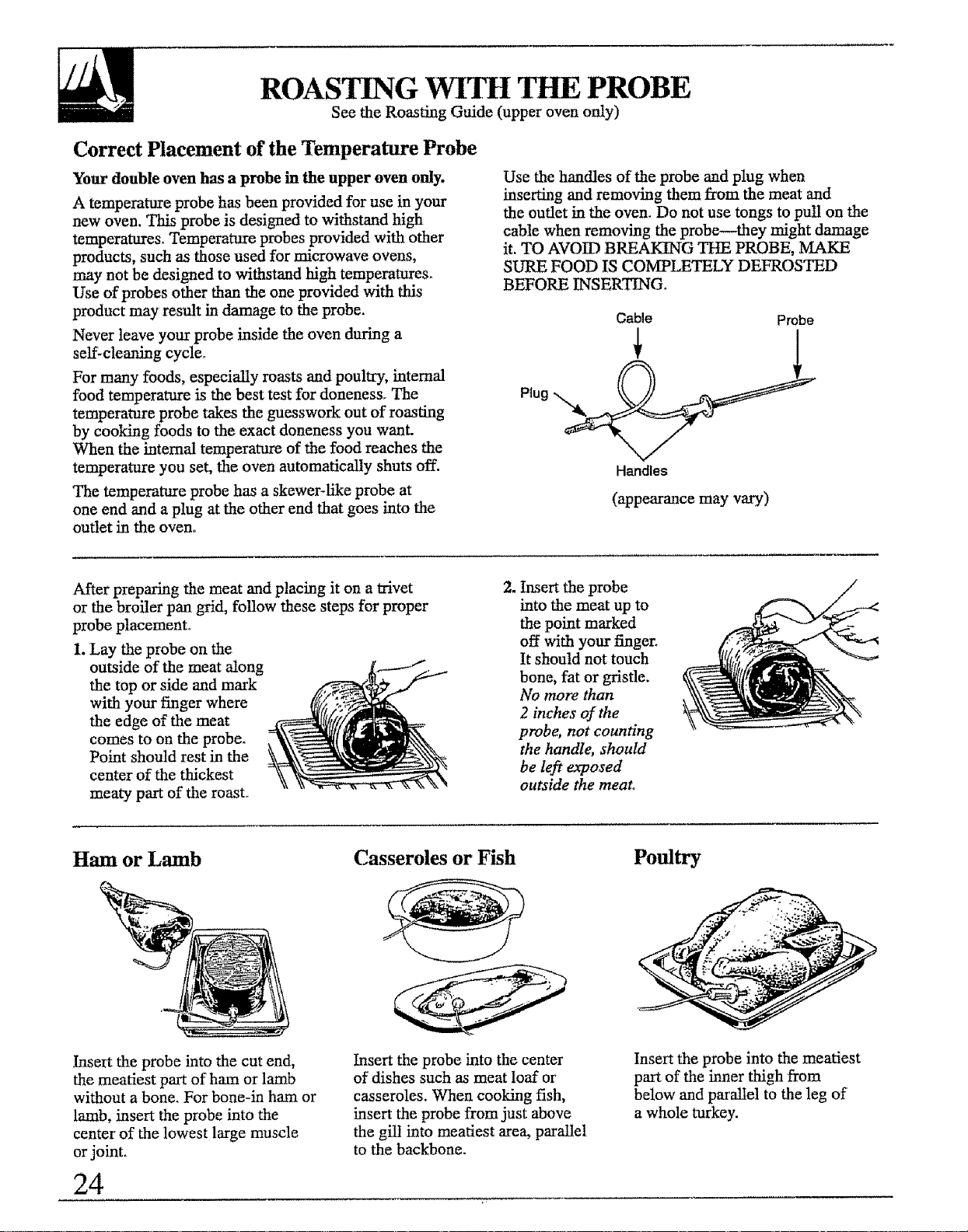
The temperature probe has a skewer-like probe at
one end and a plug at the other end that goes into the
outlet in the oven..
Use the handles of the probe and plug when
inserting and removing them from the meat and
the outlet in the oven. Do not use tongs to pull on the
cable when removing the probe--they might damage
it. TO AVOID BREAKING THE PROBE, MAKE
SURE FOOD IS COMPLETELY DEFROSTED
BEFORE INSER'HNG.
Cable Probe
Handles
(appearance may vary)
After preparing the meat and placing it on atrivet
or the broiler pan grid, follow these steps for proper
probe placement°
1. Lay the probe on the
outside of the meat along
the top or side and mark
with your finger where
the edge of the meat
comes to on the probe°
Point should rest in the
center of the thickest
meaty part of the roast,
2. Insert the probe
into the meat up to
the point marked
off with your finger_
It should not touch
bone, fat or gristle.
No more than
2 inches of the
probe, not counting
the handle, shouM
be left exposed
outside the meat°
Ham or Lamb Casseroles or Fish Poultry
Insert the probe into the cut end,
the meatiest part of ham or lamb
without a bone. For bone-in ham or
lamb, insert the probe into the
center" of the lowest large muscle
orjoint.
24
Insert the probe into the center
of dishes such as meat loaf or
casseroles. When cooking fish,
insert the probe from just above
the gilt into meatiest area, parallel
to the backbone.
Insert the probe into the meatiest
part of the inner thigh from
below and parallel to the leg of
a whole turkey.
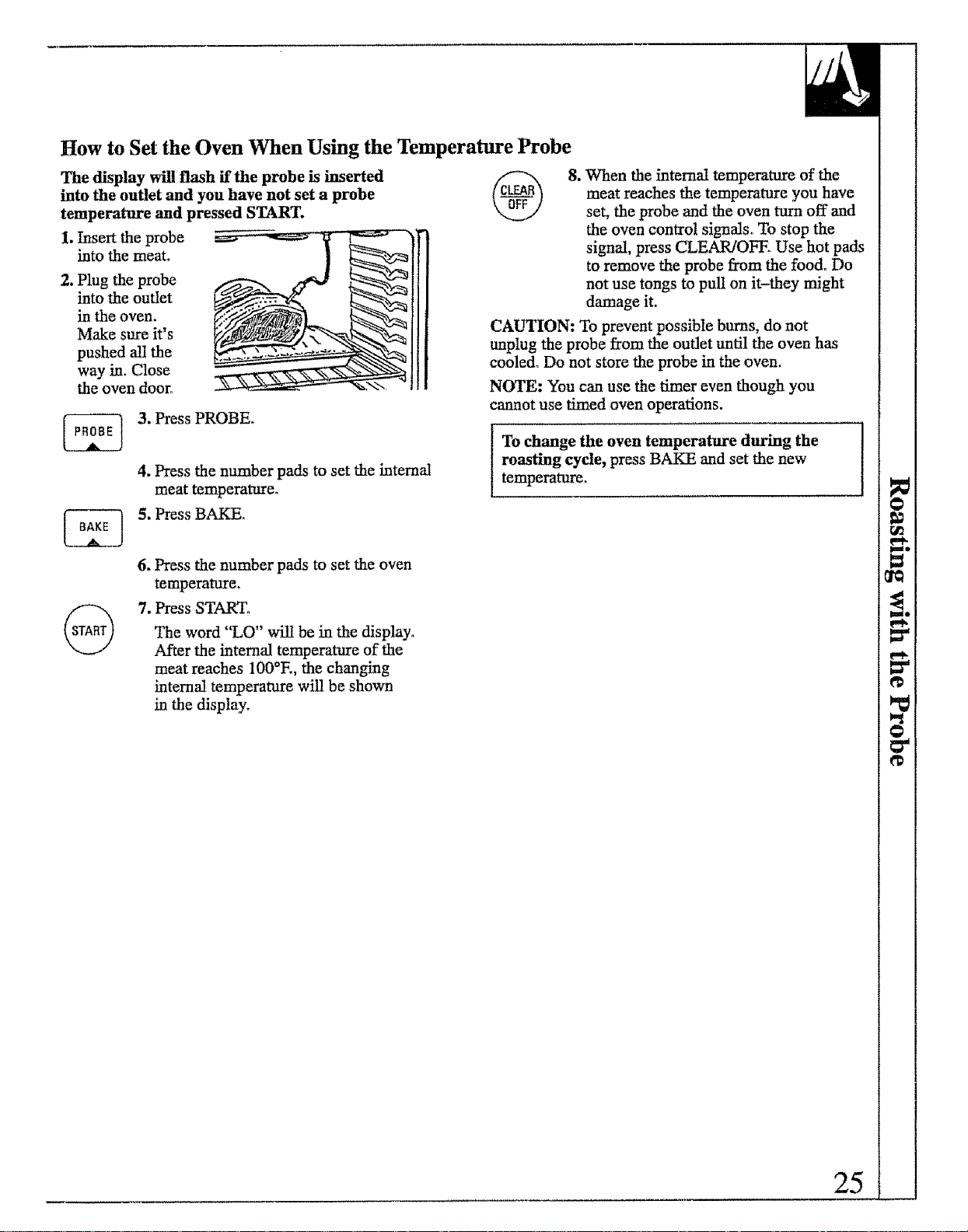
How to Set the Oven When Using the Temperature Probe
The display will flash if the probe is inserted
into the outlet and you have not set a probe
temperature and pressed START.
1. Insertthe probe
into the meat,
2. Plug the probe
into the outlet
in the oven.
Make sure it's
pushed all the
way in. Close
the oven door°
3. Press PROBE.
4. Press the number pads to set the internal
meat temperature.
5. Press BAKE.
8. When the internal temperature of the
meat reaches the temperature you have
set, the probe and the oven turn off and
the oven control signals_ To stop the
signal, press CLEAR/OFE Use hot pads
to remove the probe from the food° Do
not use tongs to pull on it-they might
damage it.
CAUTION: To prevent possible burns, do not
unplug the probe from the outlet until the oven has
cooled. Do not store the probe in the oven.
NOTE: You can use the timer even though you
cannot use timed oven operations.
Io change the oven temperature during the
roasting cycle, press BAKE and set the new
temperature.
6. Press the number pads to set the oven
temperature.
7. Press START.
The word "LO" will be in the display.
After the internal temperature of the
meat reaches 100°E, the changing
internal temperature will be shown
in the display.
25
ROASTING
(continued)
Questions and Answers
Q. Is it necessary to check for doneness with a
meat thermometer?
A. Checking the finished internal temperature at the
completion of cooking time is recommended if you
did not use the probe while cooking_ Temperatures
are shown in the Roasting Guide. For roasts over
8 lbs., check with thermometer at half-hour intervals
after half the cooking time has passed.
Q. Why is my roast crumbling when I try to
carve it?
A. Roasts are easier to slice if allowed to coot 10 to
20 minutes after removing them from the oven°
Be sure to cut across the grain of the meat.
Q. Do I need to preheat my oven each time I cook a
roast or poultry?
A, It is not necessary to preheat your oven°
Q. When buying a roast, are there any special tips
that would help me cook it more evenly?
A. Yes_ Buy a roast as even in thickness as possible,
or buy rolled roasts.
Q. Can I seal the sides of my foil "tent" when
roasting a turkey?
A. Sealing the foil wilt steam the meat. Leaving it
unsealed allows the air to circulate and brown
the meat.
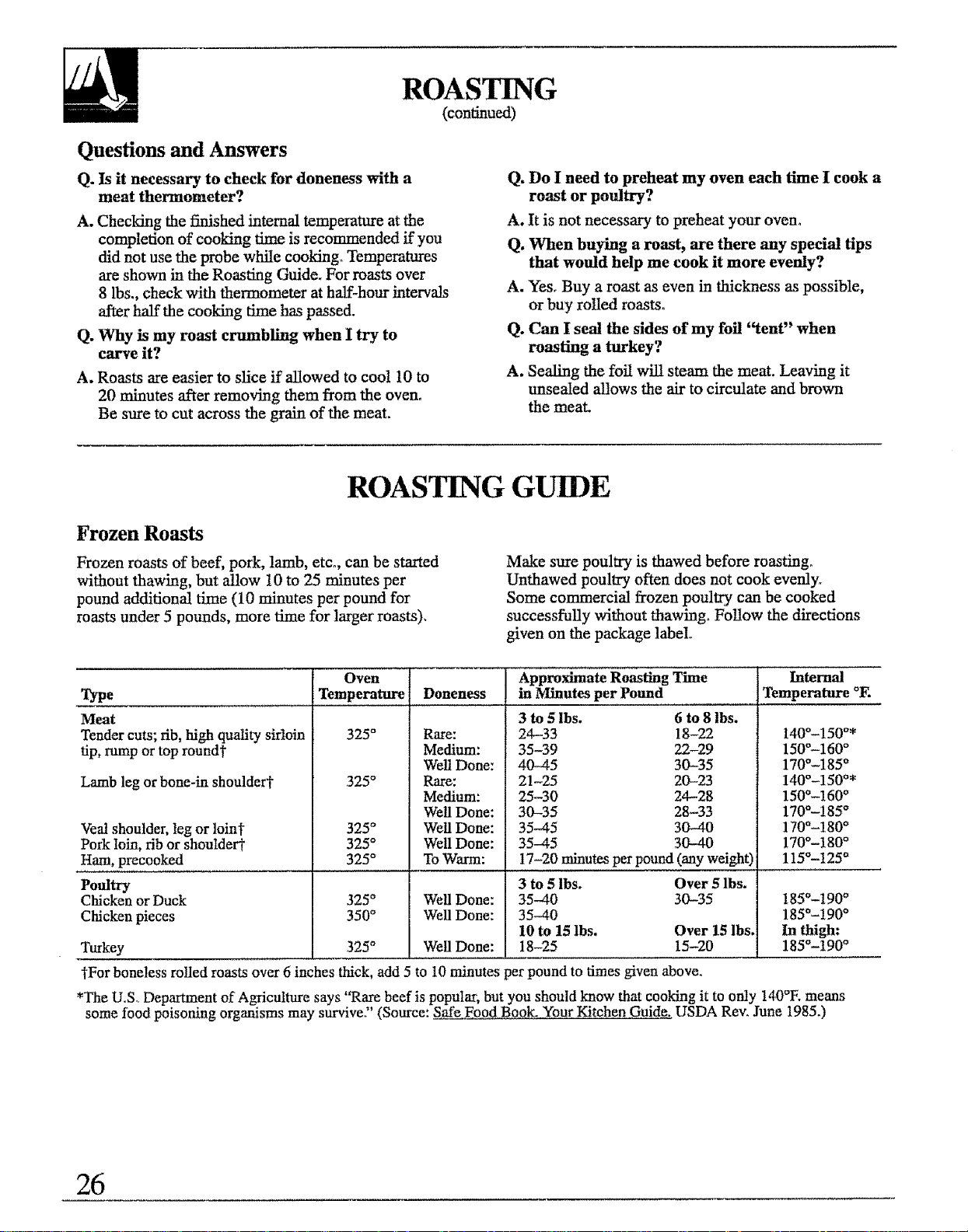
ROASTING GUIDE
Frozen Roasts
Frozen roasts of beef, pork, lamb, etco, can be started
without thawing, but allow 10 to 25 minutes per
pound additional time (10 minutes per pound for
roasts under 5 pounds, more time for larger roasts),
Make sure poultry is thawed before roasting.
Unthawed poultry often does not cook eveuly_
Some commercial frozen poultry, can be cooked
successfully without thawing_ Follow the directions
given on the package label,
Type
Meat
Tender cuts; rib, high quality sirloin
tip, rump or top round'_
Lamb leg or bone-in shoulderi"
Veal shoulder, leg or loin?
Pork loin, rib or shoutdert
Oven
Temperature I
325°
325°
325°
325°
Doneness
Rare:
Medium:
Well Done:
Rare:
Medium:
Well Done:
Well Done:
Well Done:
Approximate Roasting Time
in Minutes per Pound
3 to 51bs. 6 to 8 Ibs.
24-33 !8-22
35-39 22-29
40-45 30-35
21-25 20-23
25-30 24-28
30-35 28-33
35-45 30-40
35-45 30-40
Ham, precooked 325°
Poultry
Chicken or Duck 325°
Chicken pieces 350°
Turkey
"_Forboneless roiled roasts over 6 inches thick,
To Warm: 17-20 minutes per pound (any weight)
3 to 5 lbs. Over 5lbs.
Well Done: 35-40 30-35
Well Done: 35-40
10 to 15 lbs, Over 15 lbs,
325° Well Done: 18-25 15-20
add 5 to 10 minutes per pound to times given above.
Internal
Temperature OF.
140°-150°*
150_-160 °
170°-185 o
140o-150°*
150°-160 °
170°-185 °
170°-180 °
170°-180 °
115°-125 °
185°-190 °
185°-t90 °
In thigh:
185°-190 °
*The U.S. Department of Agriculture says "Rare beef is populaz; but you should know that cooking it to only !40°E means
some food poisoning organisms may survive)' (Source: Safe Food Book. Your Kitchen Guide. USDA Rev. June 1985.)
26
BROII,ING
Broil_g is cooking food by intense radiant heat
from the upper broil element in the oven° Most fish
and tender cuts of meat can be broiled. Follow these
directions to keep spattering and smoking to a
miD.imum_
If the meat has fat or gristle around the edge, cut
vertical slashes through both about 2 inches apart. If
desired, the fat may be trimmed, leaving a layer about
1/8 inch thick.
Place the meat on the broiler grid in the broiler pan.
Always use the grid so the fat drips into the broiler
pan; otherwise the juices may become hot enough to
catch on fire.
Position a shelf on recommended shelf position as
suggested in the Broiling Guide. Most broiling is done
on E position, but if your oven is connected to 208
volts, you may wish to use a higher position.
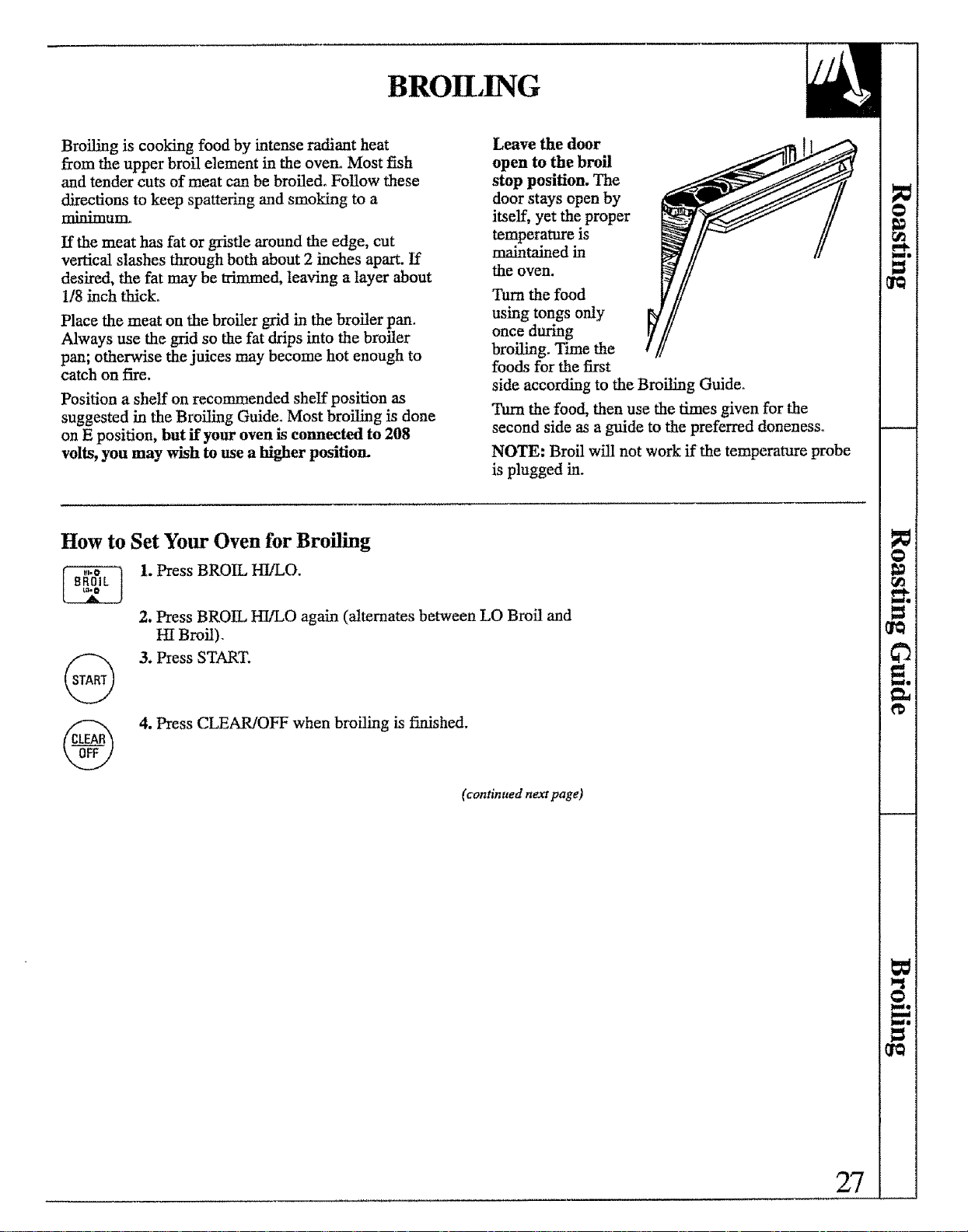
Leave the door
open to the broil
stop position. The
door stays open by
itself, yet the proper
temperature is
maintained in
the oven.
Ttu'n the food
using tongs only [h!//
once during yf
broiling. Time the
foods for the first
side according to the Broiling Guide.
"hun the food, then use the times given for the
second side as a guide to the preferred doneness_
NOTE: Broil will not work if the temperature probe
is plugged in.
How to Set Your Oven for Broiling
1. Press BROIL HI/LO.
2. Press BROIL HI/LO again (alternates between LO Broil and
HI Broil).
3. Press START.
4. Press CLEAR/OFF when broiling is fimshed.
(continued next page)
27
BROILING
(continued)
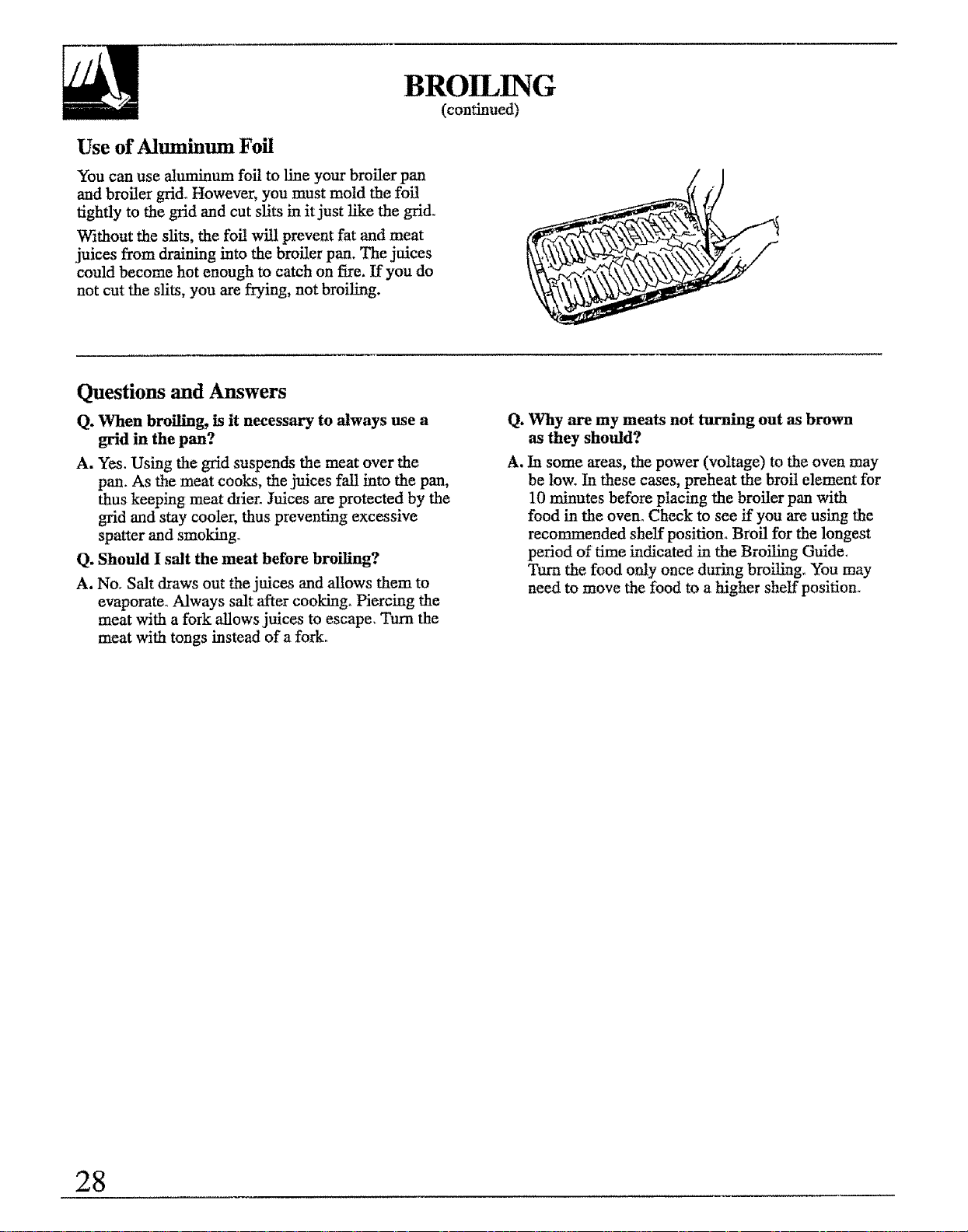
Use of Aluminum Foil
You can use aluminum foil to line your broiler pan
and broiler grid. However, you must mold the foil
tightly to the grid and cut slits in it just like the grid.
Without the slits, the foil will prevent fat and meat
juices from draining into the broiler pan. The juices
could become hot enough to catch on fire. If you do
not cut the slits, you are flying, not broiling.
Questions and Answers
Q. When broiling, is it necessary to always use a
grid in the pan?
A. Yes. Using the grid suspends the meat over the
pan. As the meat cooks, the juices fail into the pan,
thus keeping meat drier. Juices are protected by the
grid and stay cooler, thus preventing excessive
spatter and smoking°
Q. Should I salt the meat before broiling?
A. No, Salt draws out the juices and allows them to
evaporate° Always salt after cooking_ Piercing the
meat with a fork aUows juices to escape. Turn the
meat with tongs instead of a fork.
Q. Why are my meats not turning out as brown
as they should?
A, In some areas, the power (voltage) to the oven may
be low. In these cases, preheat the broil element for
10 minutes before placing the broiler pan with
food in the oven° Check to see if you are using the
recommended shelf position. Broil for the longest
period of time indicated in the Broiling Guide.
the food only once during broil_go You may
need to move the food to a higher shelf position.
28
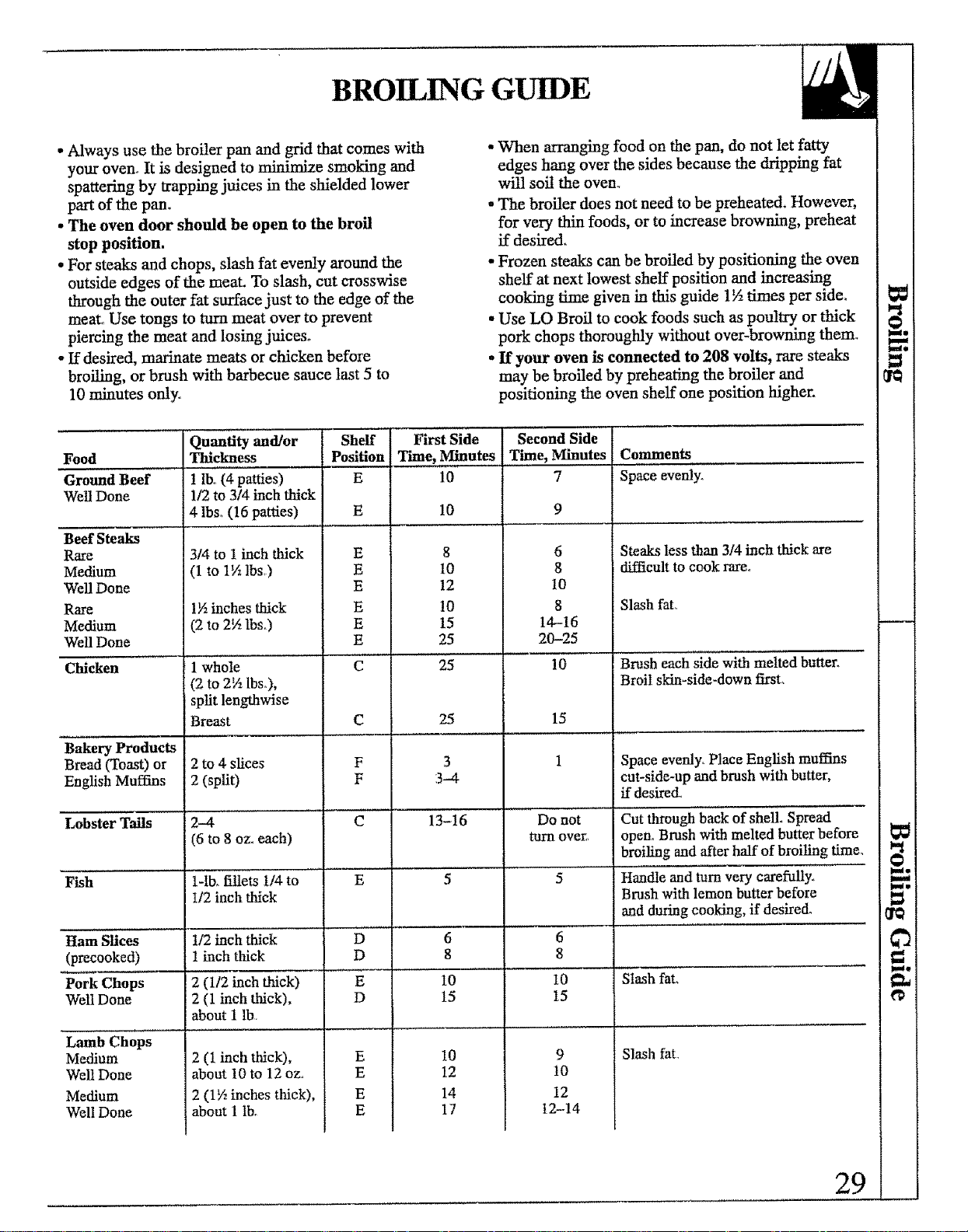
BROILING GUIDE
•Always use the broiler pan and grid that comes with
your oven. It is designed to minimize smoking and
spattering by trapping juices in the shielded lower
part of the pan.
• The oven door should be open to the broil
stop position.
• For steaks and chops, slash fat evenly around the
outside edges of the meat. To slash, cut crosswise
through the outer fat surface just to the edge of the
meat. Use tongs to turn meat over to prevent
piercing the meat and losing juices.
• If desired, marinate meats or chicken before
broiling, or brush with barbecue sauce last 5 to
10 minutes only_
• When arranging food on the pan, do not let fatty
edges hang over the sides because the dripping fat
will soil the oven_
° The broiler does not need to be preheated. However,
for very thin foods, or to increase browning, preheat
ff desired.
• Frozen steaks can be broiled by positioning the oven
shelf at next lowest shelf position and increasing
cooking time given in this guide 1½ times per side.
• Use LO Broil to cook foods such as poultry or thick
pork chops thoroughly without over-browning them_
• If your oven is connected to 208 volts, rare steaks
may be broiled by preheating the broiler and
positioning the oven shelf one position higher.
Quantity and/or Sheff First Side Second Side
Food Thickness Position Time, Minutes Time, Minutes Comments
Ground Beef ! lb, (4 patties) E 10 7 Space evenly.
Well Done 1/2 to 3/4 inch thick
4 lbSo(16 patties) E 10 9
Steaks less than 3/4 inch thick are
difficult to cook rare,,
Beef Steaks
Rare
Medium
Well Done
Rare
Medium
Well Done
3/4 to t inch thick
(1 to 1½ lbs,)
1½inches thick
(2 to 2½ lbs3
E
E
E
E
E
E
8
t0
12
10
15
25
6
8
10
8
14-16
20-25
Chicken 1 whole C 25 10
(2 to 2½ lbs_),
spit lengthwise
Breast C 25 15
Bakery Products
Bread _oast) or 2 to 4 slices F 3 1
English Muffins 2 (split) F 3-4
Lobster Tails 2-4 C 13-16 Do not
(6 to 8 ozoeach) turn over,_
Fish 1-ib_fillets 114to E 5 5
I/2 inch thick
]Jam Slices t/2 inch thick D 6 6
(precooked) ! inch thick D 8 8
Pork Chops 2 (1/2 inch thick) E 10 10
Well Done 2 (1 inch thick), D 15 15
about 1 lb.
Slash fat,,
Brush each side with melted butter_
3roil skin-side-down firsL
Space evenly. Place English muffins
cut-side-up and brush with butter,
ff desired.
Cut through back of shell. Spread
open° Brush with melted butter before
broiling and after half of broiling time.
Handle and turn very carefully°
Brush with lemon butter before
and during cooking, if desired°
Slash fat.
Slash fat.
Lamb Chops
Medium
Well Done
Medium
Well Done
2 (1 inch thick),
about 10 to 12 oz,,
2 (1½ inches thick),
about 1 tb.
E
E
E
E
10
12
14
17
9
t0
12
t2-14
29
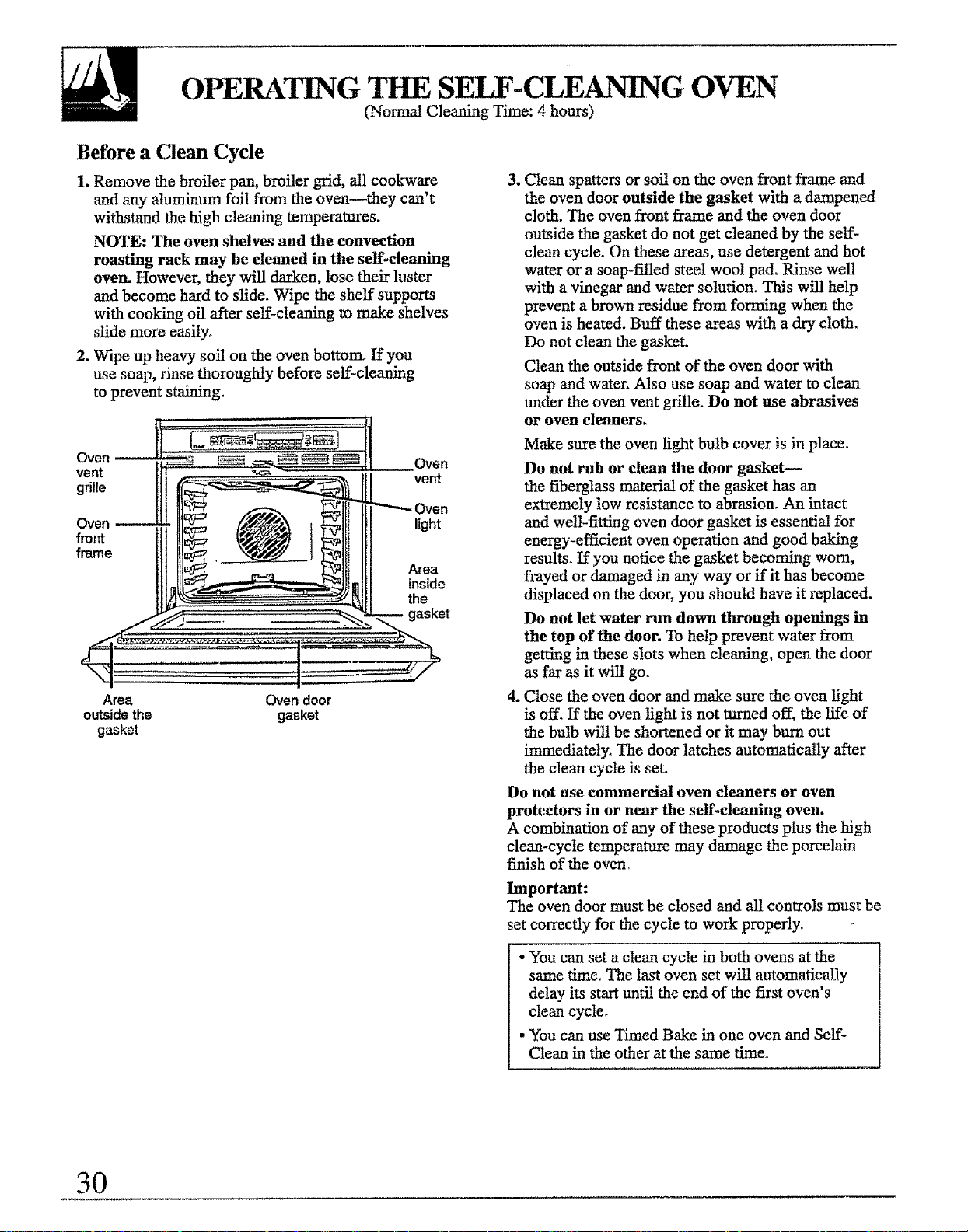
OPERAI]NG THE SELF-CLEANING OVEN
(Normal Cleaning Time: 4 hours)
Before a Clean Cycle
1. Remove the broiler pan, broiler grid, all cookware
and any aluminum foil from the oven they can't
withstand the high cleaning temperatures.
NOTE: The oven shelves and the convection
roasting rack may be cleaned in the self-cleaning
oven. However, they will darken, lose their luster
and become hard to slide. Wipe the shelf supports
with cooking oil after self-cleaning to make shelves
slide more easily°
2. Wipe up heavy soil on the oven bottom_ If you
use soap, rinse thoroughly before self-cleaning
to prevent staining.
Oven
vent
grille
Oven
front
frame
Oven
vent
)Yen
light
Area
inside
the
Area Oven door
outside the gasket
gasket
3_ Clean spatters or soil on the oven front frame and
the oven door outside the gasket with a dampened
cloth. The oven front frame and the oven door
outside the gasket do not get cleaned by the self-
clean cycle. On these areas, use detergent and hot
water or a soap-filled steel wool pad, Rinse well
with a vinegar and water solution. This will help
prevent a brown residue from forming when the
oven is heated° Buff these areas with a dry cloth.
Do not clean the gasket.
Clean the outside front of the oven door with
soap and water. Also use soap and water to clean
under the oven vent grille. Do not use abrasives
or oven cleaners.
Make sure the oven light bulb cover is in place.
Do not rub or clean the door gasket--
the fiberglass material of the gasket has an
extremely low resistance to abrasion. An intact
and well-fitting oven door gasket is essential for
energy-efficient oven operation and good baking
results. If you notice the gasket becoming worn,
frayed or damaged in any way or if it has become
displaced on the door, you should have it replaced.
Do not let water run down through openings in
the top of the door. To help prevent water from
getting in these slots when cleaning, open the door
as far as it will go.
4. Close the oven door and make sure the oven light
is off. If the oven light is not turned off, the life of
the bulb will be shortened or it may bum out
immediately. The door latches automatically after
the clean cycle is set.
Do not use commercial oven cleaners or oven
protectors in or near the self-cleaning oven.
A combination of any of these products plus the high
clean-cycle temperature may damage the porcelain
finish of the oven°
Important:
The oven door must be closed and all controls must be
set correctly for the cycle to work properly.
• You can set a clean cycle in both ovens at the
same time, The last oven set wilt automatically
delay its start until the end of the first oven's
clean cycle.
• You can use Timed Bake in one oven and Self-
Clean in the other at the same time.
3O
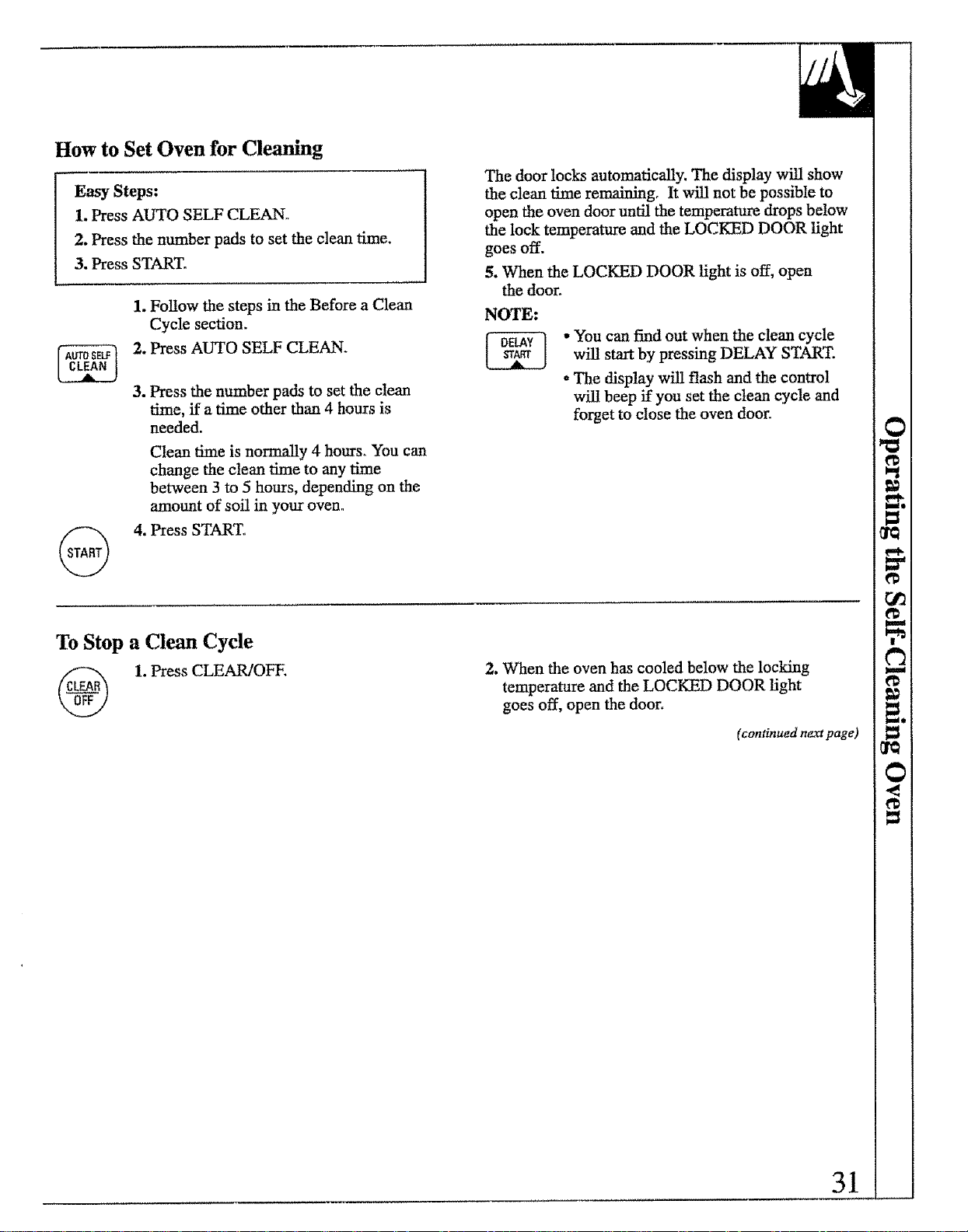
How to Set Oven for Cleaning
Easy Steps:
1. Press AUTO SELF CLEAN.
2. Press the number pads to set the clean time.
3. Press START°
1. Follow the steps in the Before a Clean
Cycle section,
2, Press AUTO SELF CLEAN+
3. Press the number pads to set the clean
time, if a time other than 4 hours is
needed.
Clean time is normally 4 hours° You can
change the clean time to any time
between 3 to 5 hours, depending on the
amount of soil in your oven°
4. Press START,,
The door locks automatically, The display will show
the clean time remaining, It will not be possible to
open the oven door until the temperature drops below
the lock temperature and the LOCKED DOOR light
goes off.
5. When the LOCKED DOOR light is off, open
the door,
NOTE:
• You can find out when the clean cycle
will start by pressing DELAY START.
•The display will flash and the control
will beep if you set the clean cycle and
forget to close the oven door.
To Stop a Clean Cycle
1. Press CLEAR/OFE
2, When the oven has cooled below the locking
temperature and the LOCKED DOOR light
goes off, open the door.
(con6nuedn_page)
31
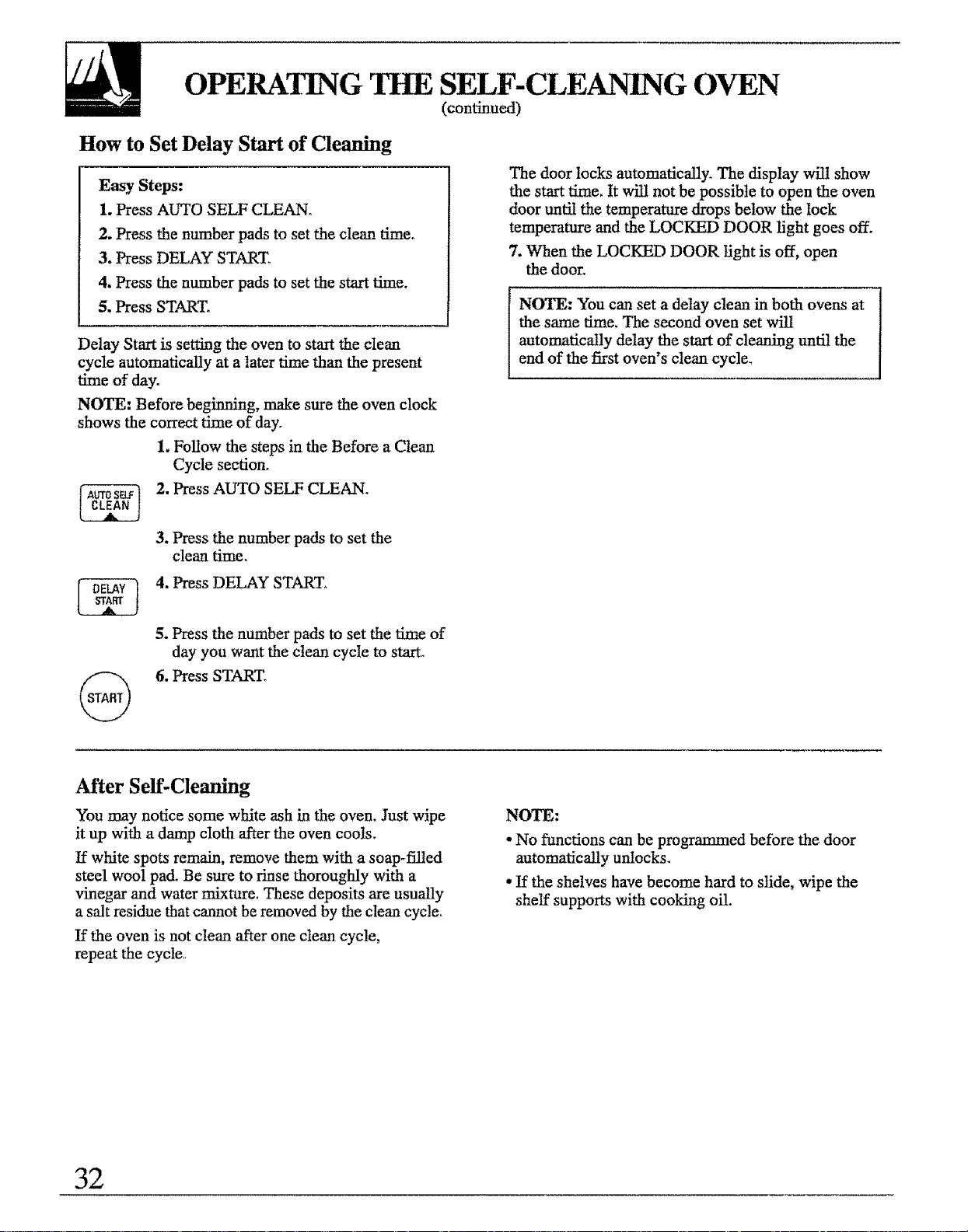
OPERATING THE SELF-CLEANING OVEN
(continued)
How to Set Delay Start of Cleaning
Easy Steps:
1. Press AUTO SELF CLEAN.
2. Press the number pads to set the clean time.
3. Press DELAY START
4. Press the number pads to set the start time.
5. Press START.
Delay Start is setting the oven to start the clean
cycle automatically at a later time than the present
time of day.
NOTE: Before beginning, make sure the oven clock
shows the correct time of day.
1. Follow the steps in the Before a Clean
Cycle section_
2. Press AUTO SELF CLEAN.
3. Press the number pads to set the
clean time,
The door locks automatically. The display will show
the start time. It will not be possible to open the oven
door until the temperature drops below the lock
temperature and the LOCKED DOOR light goes off,
7. When the LOCKED DOOR light is off, open
the door.
NOTE: You can set a delay clean in both ovens at
the same time. The second oven set will
automatically delay the start of cleaning until the
end of the first oven's clean cycle.
4. Press DELAY START.
5. Press the number pads to set the time of
day you want the clean cycle to start.
6. Press START.
After Self-Cleaning
You may notice some white ash in the oven. Just wipe
it up with a damp cloth after the oven cools.
If white spots remain, remove them with a soap-filled
steel wool pad. Be sure to rinse thoroughly with a
vinegar and water mixture. These deposits are usually
a salt residue that cannot be removed by the clean cycle.
If the oven is not clean after one clean cycle,
repeat the cycle
NOTE:
• No functions can be programmed before the door
automatically unlocks.
. If the shelves have become hard to slide, wipe the
shelf supports with cooking oil.
32
Questions and Answers
Q. If my oven clock is not set to the correct time of
day, can I still serf-clean my oven?
A. If the clock is not set to the correct time of day you
will not be able to set a delay clean to end at a
specific time,
Q. Can I use commercial oven cleaners on any part
of my self.cleaning oven?
A. No cleaners or coatings should be used around
any part of this oven. If you do use them and do
not thoroughly rinse the oven with water, wiping it
absolutely clean afterwards, the residue can scar
the oven surface and damage metal parts the next
time the oven is automatically cleaned.
Q. Can I clean both ovens at the same time?
A. No. Theie is too much heat_ The control only
allows one oven to clean at a time.
Q. What should I do if excessive smoking occurs
during cleaning?
A. This is caused by excessive soft. Turn the oven off.
Open the windows to rid the room of smoke. Wait
until the oven has cooled and the words "LOCKED
DOOR" are off in the display. Wipe up the excess
soil and reset the clean cycle.
Q. Is the "crackling" or "popping" sound I hear
during cleaning normal?
A. Yes° This is the sound of the meta! heating
and cooImg during both the cooking and
cleaning funcfions_
Q. Should there be an odor during the cleaning?
A. Yes, there will be an odor during the first few
cleanings. Failure to wipe out excessive soil might
also cause a strong odor when cleaning.
Q. What causes the hair-like lines on the enameled
surface of my oven?
A. This is a normal condition, resulting from heating
and cooling during cleaning, These lines do not
affect how your oven performs.
Q. Why do I have ash left in my oven after
cleaning?
A. Some types of soft will leave a deposit which
is ash. It can be removed with a damp sponge
or cloth.
Q. My oven shelves do not slide easily. What is
the matter?
A. After many cleanings, oven shelves will lose their
luster and become hard to slide° To make the
shelves slide more easfty, wipe the shelf supports
with cooking oi!.
Q. My oven shelves have become gray after the
self-clean cycle. Is this normal?
A. Yes. After the self-clean cycle, the shelves will lose
some luster and discolor to a deep gray color.
33
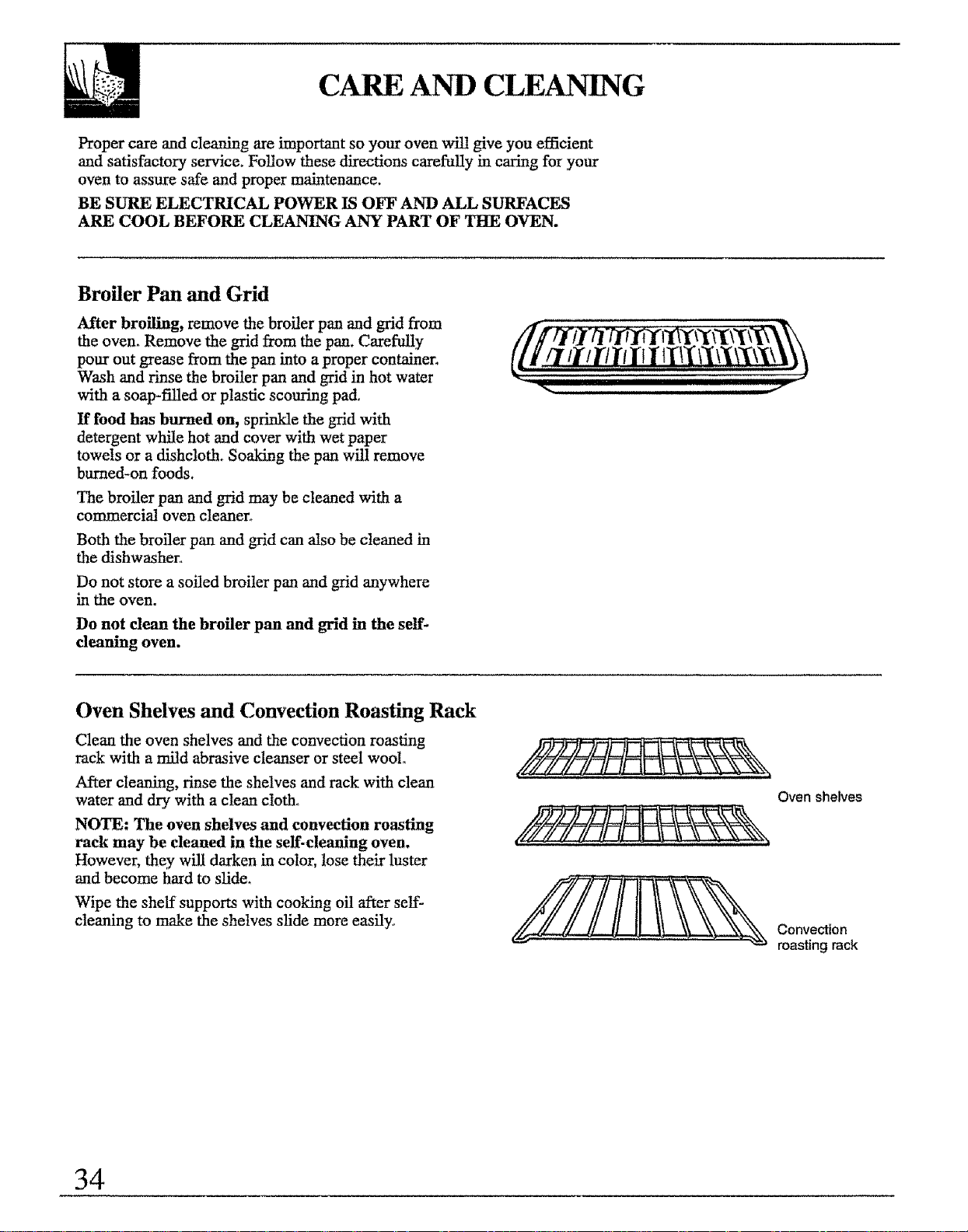
CARE AND CLEANING
Proper care and cleaning are important so your oven will give you efficient
and satisfactory service. Follow these directions carefully in caring for your
oven to assure safe and proper maintenance.
BE SURE ELECTRICAL POWER IS OFF AND ALL SURFACES
ARE COOL BEFORE CLEANING ANY PART OF THE OVEN.
Broiler Pan and Grid
After broiling, remove the broiler pan and grid from
the oven. Remove the grid from the pan. CareflflJy
pour out grease from the pan into a proper container_
Wash and rinse the broiler pan and grid in hot water
with a soap-filled or plastic scouring pad.
If food has burned on, sprinkle the grid with
detergent while hot and cover with wet paper
towels or a dishcloth. Soaking the pan will remove
burned-on foods.
The broiler pan and grid may be cleaned with a
commercial oven cleaner°
Both the broiler pan and grid can also be cleaned in
the dishwasher..
Do not store a soiled broiler pan and grid anywhere
in the oven.
Do not clean the broiler pan and grid in the self-
cleaning oven.
II IIIII
Oven Shelves and Convection Roasting Rack
Clean the oven shelves and the convection roasting
rack with a mitd abrasive cleanser or steel wooto
After cleaning, rinse the shelves and rack with clean
water and dry with a clean cloth°
NOTE: The oven shelves and convection roasting
rack may be cleaned in the self-cleaning oven.
However, they will darken in color, lose their luster
and become hard to slide.
Wipe the shelf' supports with cooking oil after self-
cleaning to make the shelves slide more easily.
Oven shelves
Convection
roasting rack
34
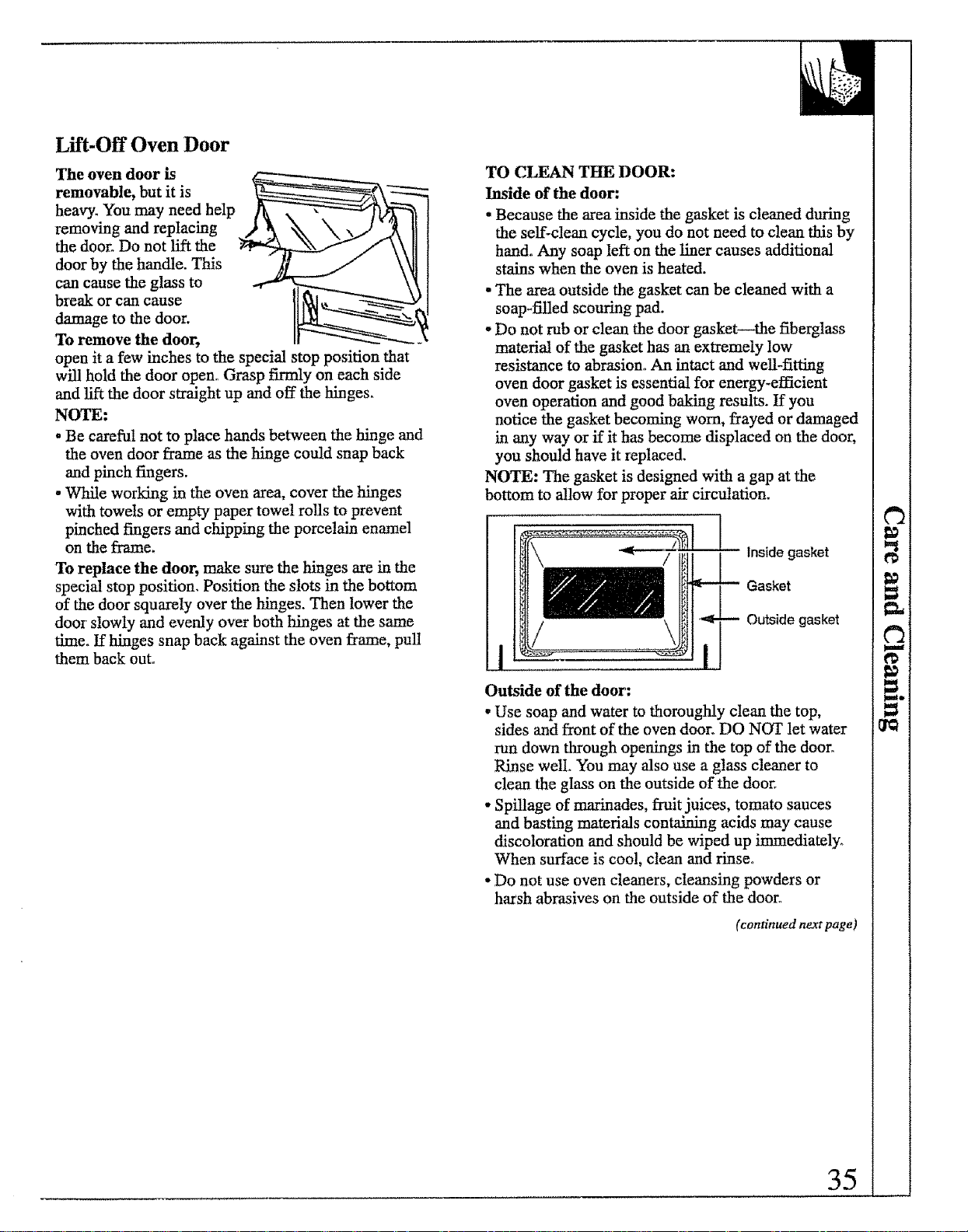
Lift-Off Oven Door
The oven door is
removable, but it is
heavy. You may need help
removing and replacing
the door. Do not lift the
door by the handle. This
can cause the glass to
break or can cause
damage to the door.
To remove the door,
open it a few inches to the special stop position that
will hold the door open° Grasp firmly on each side
and lift the door straight up and off the hinges.
NOTE:
•Be careful not to place hands between the hinge and
the oven door frame as the hinge could snap back
and pinch fingers.
- While working in the oven area, cover the hinges
with towels or empty paper towel rolls to prevent
pinched fingers and chipping the porcelain enamel
on the frame.
To replace the door, make sure the hinges are in the
special stop position, Position the slots in the bottom
of the door squarely over the hinges. Then lower the
door slowly and evenly over both hinges at the same
time. If hinges snap back against the oven frame, pull
them back out.
TO CLEAN THE DOOR:
Inside of the door:
.Because the area inside the gasket is cleaned during
the self-clean cycle, you do not need to clean this by
hand. Any soap left on the liner causes additional
stains when the oven is heated.
• The area outside the gasket can be cleaned with a
soap-filled scouring pad.
o Do not rub or clean the door gasket--the fiberglass
material of the gasket has an extremely low
resistance to abrasion° An intact and well-fitting
oven door gasket is essential for energy-efficient
oven operation and good baking results. If you
notice the gasket becoming worn, frayed or damaged
in any way or if it has become displaced on the door,
you should have it replaced.
NOTE: The gasket is designed with a gap at the
bottom to allow for proper air circulation.
Inside gasket
Gasket
Outside gasket
Outside of the door:
• Use soap and water to thoroughly clean the top,
sides and front of the oven door. DO NOT let water
run down through openings in the top of the door°
Rinse welt. You may also use a glass cleaner to
clean the glass on the outside of the door.
• Spillage of marinades, fruit juices, tomato sauces
and basting materials containing acids may cause
discoloration and should be wiped up immediately.
When surface is cool, clean and rinse°
•Do not use oven cleaners, cleansing powders or
harsh abrasives on the outside of the door°
(continuednextpage)
_t
35
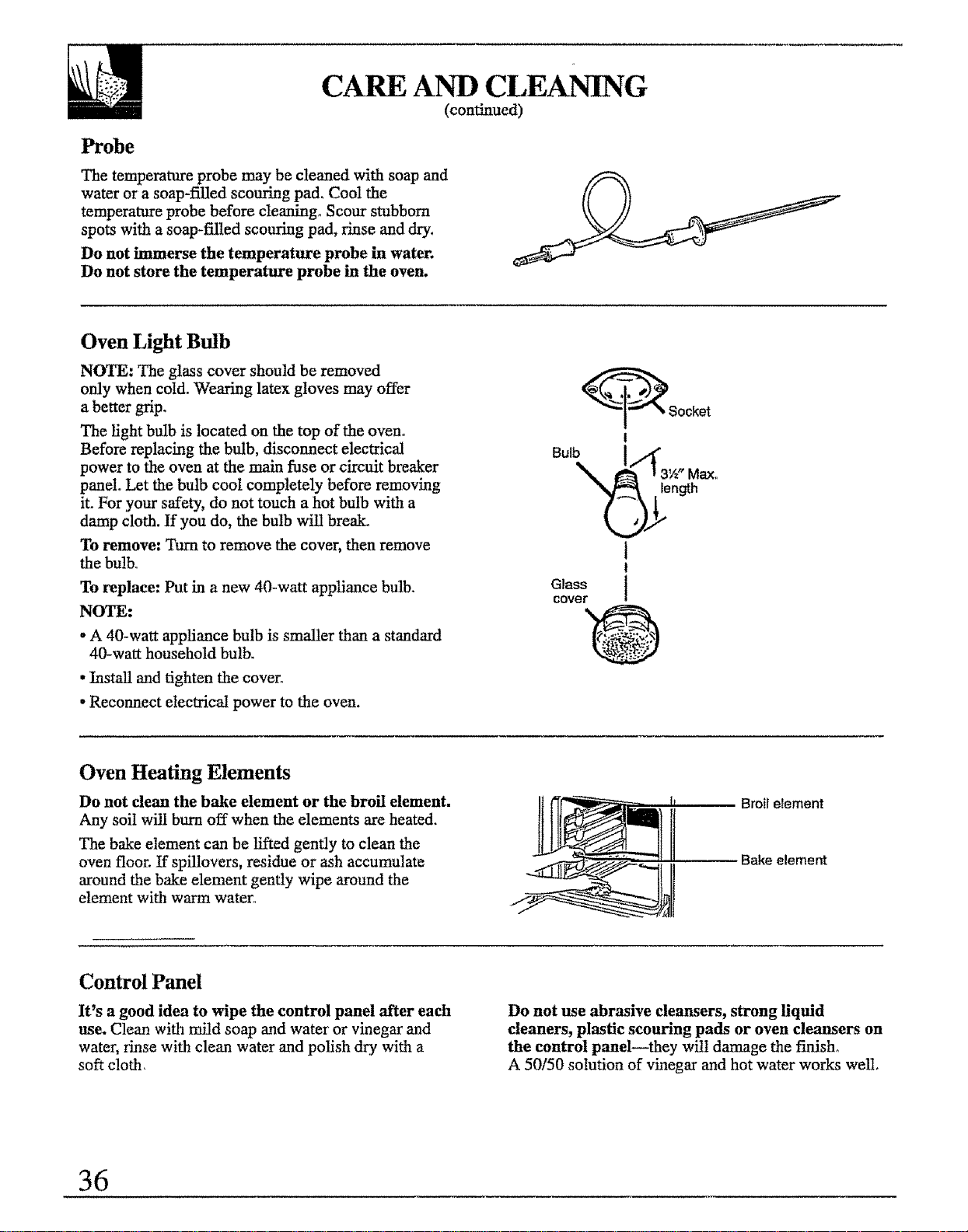
CARE AND CLEANING
(continued)
Probe
The temperature probe may be cleaned with soap and
water or asoap-filled scouring pad. Cool the
temperature probe before cIeaningo Scour stubborn
spots with a soap-filled scouring pad, rinse and dry.
Do not immerse the temperature probe in water.
Do not store the temperature probe in the oven.
Oven Light Btdb
NOTE: The glass cover should be removed
only when cold. Wearing latex gloves may offer
a better grip.
The light bulb is located on the top of the oven.
Before replacing the bulb, disconnect electrical
power to the oven at the main fuse or circuit breaker
panel. Let the bulb cool completely before removing
it. For your safety, do not touch a hot bulb with a
damp cloth. If you do, the bulb will break°
To remove: Turn to remove the cover, then remove
the bulb.
To replace: Put in a new 40-watt appliance bulb.
NOTE:
oA 40-watt appliance bulb is smaller than a standard
40-watt household bulb.
• Install and tighten the cover.
, Reconnect electrical power to the oven.
_Socket
I
Bo,b !.t" .
_. _ _3'_ Max,,
._length
1
t
Glass i
cover 0
Oven Heating Elements
Do not clean the bake element or the broil element.
Any soil will burn off when the elements are heated.
The bake element can be lifted gently to clean the
oven floor, tf spillovers, residue or ash accumulate
around the bake element gently wipe around the
element with warm water.
Broil element
Bake element
Control Panel
It's a good idea to wipe the control panel after each
use. Clean with mild soap and water or vinegar and
water, rinse with clean water and polish dry with a
soft cloth,
Do not use abrasive cleansers, strong Hquid
cleaners, plastic scouring pads or oven cleansers on
the control panel--they will damage the fiafisho
A50/50 solution of vinegar and hot water works well,
36
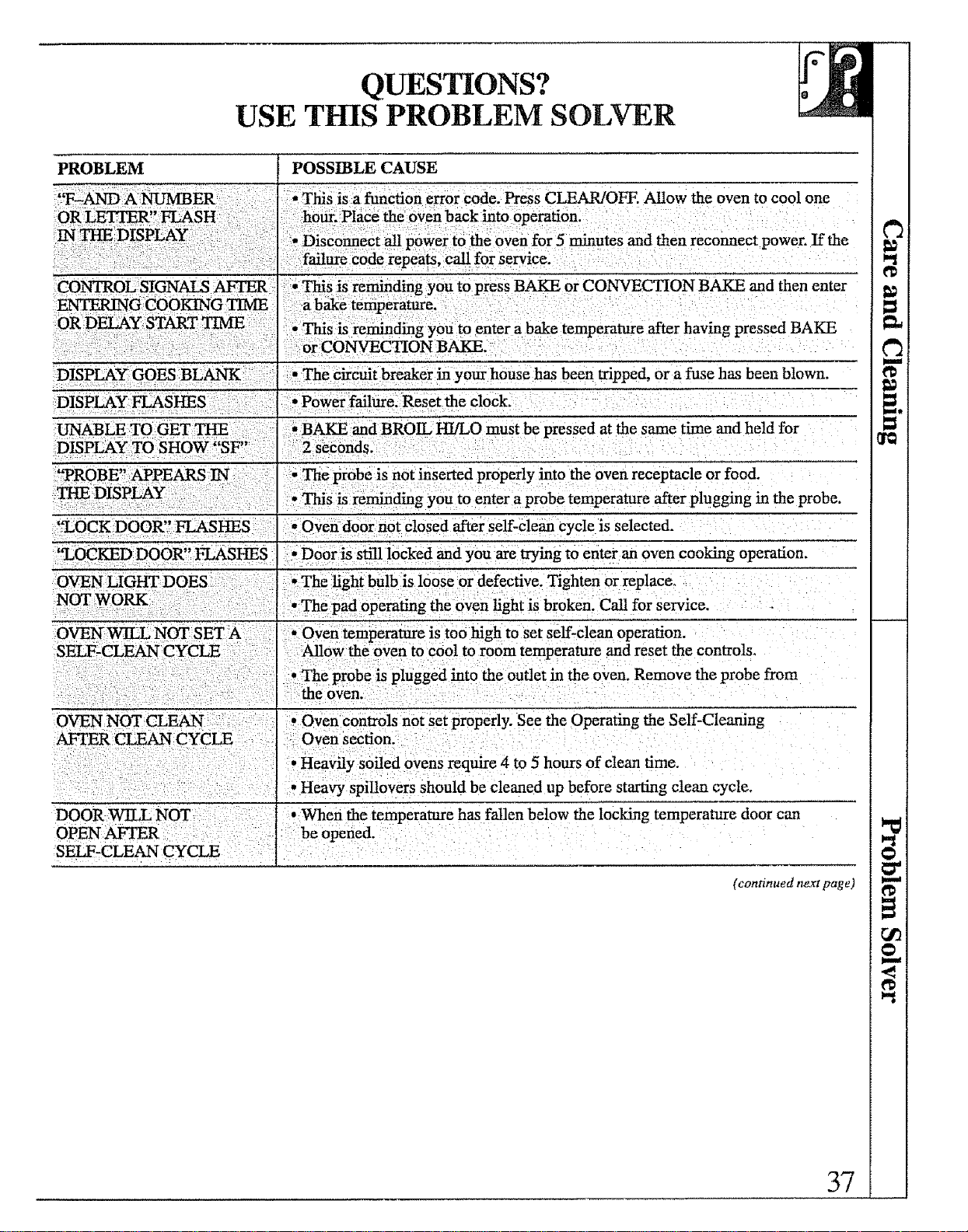
QUESTIONS?
USE THIS PROBLEM SOLVER
PROBLEM POSSIBLE CAUSE
•This is a function error code. Press CLEAR/OFF. Allow the oven to cool one
hour. Place the oven back into operation.
•Disconnect all power to the oven for 5 minutes and then reconnect power. If the
failure code repeats, call for service.
• This is reminding you to press BAKE or CONVECTION BAKE and then enter
ENTERI_ GCOOKING TIME a bake temperature. • :
OR DELAY: START TIME _ ;This is reminding you to enter a bake temperature after having pressed BAKE
or CONVECTION BAKE.
DISPLAY GOES BLANK: :•The Circuit breaker in your house has been tripped, or a fuse has been blown.
DISPLAY FLASHES • Power failure. Reset the clock.
,BAKE and BROIL HI/LO must be pressed at the same time and held for
2 seconds.
• The probe is not inserted properly into the oven receptacle or food.
0This is reminding you to enter a probe temperature after plugging in the probe.
'%OCK DOOR" FLASHES •Oven door not closed after self-clean cycle is selected.
'_LOCKED DOOR" FLASHES °Door is still locked and you are trying to enter an oven cooking operation.
L
The light bulb is loose or defective. Tighten or replace°
"The pad operating the oven light is broken. Call for service.
° Oven temperature is too high to set self-clean operation.
SELF-CLEAN Allow the oven to cool to room temperature and reset the controls_
• The probe is plugged into the outlet in the oven. Remove the probe from
: _ the oven.
OVEN NOT CLEAN: , Oven controls not Set properly. See the Operating the Self-Clenning
AF1T_.R CLEAN CYCLE Oven section.
, Heavily soiled ovens require 4 to 5 hours of clean time.
, Heavy spiltovers should be cleaned up before starting clean cycle.
DOOR WILL NOT •When the temperature has fallen below the locking temperature door can
OPEN Ab-q_R be opened.
(continued nexI page)
37
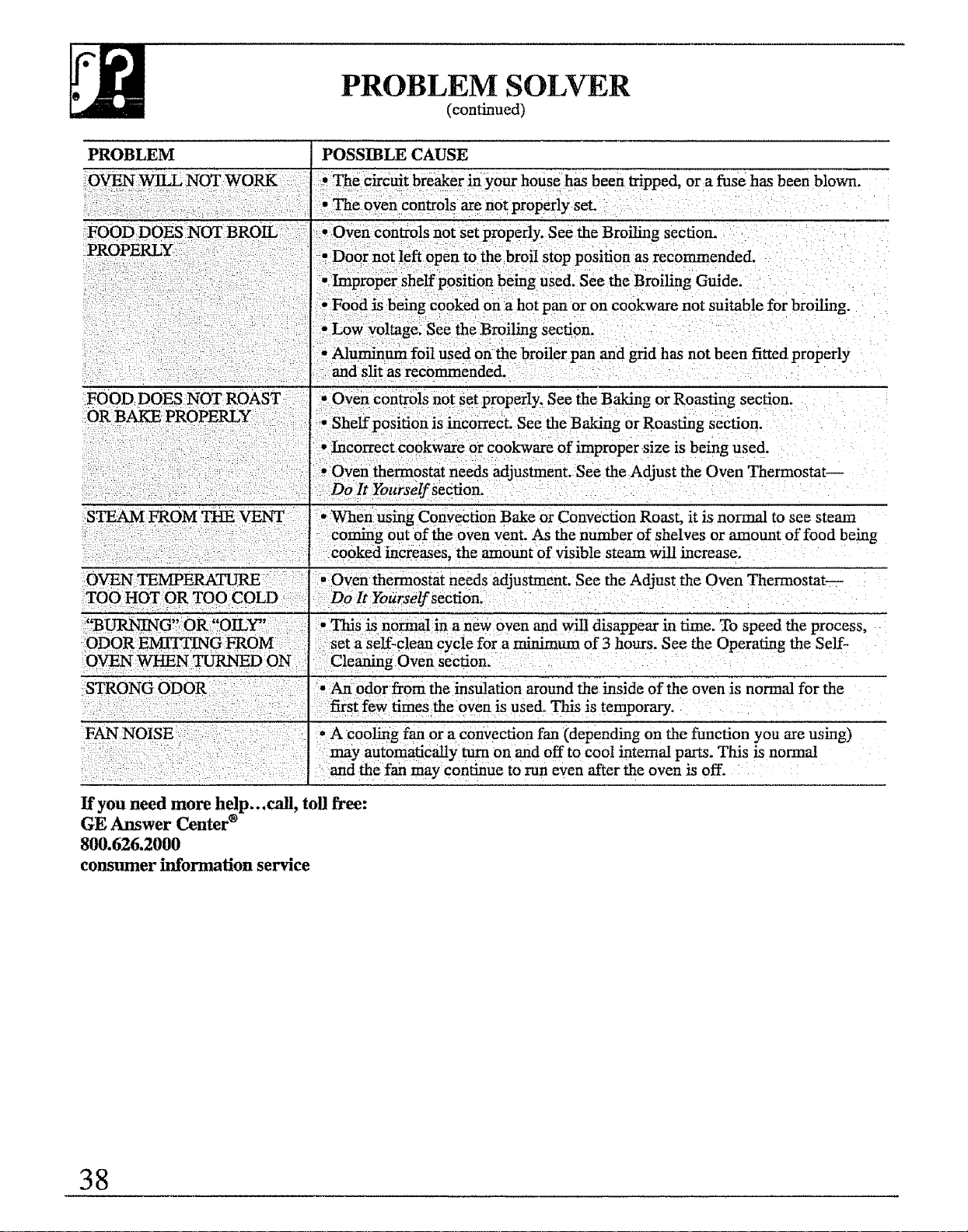
PROBLEM SOLVER
(continued)
PROBLEM POSSIBLE CAUSE
*_The circuit breaker in your house has been tripped, or a fuse has been blown.
, The oven controls arenot properly set.
, Oven controls not set properly. See the Broiling section.
recommended.
used. See the Broiling Guide.
pan or on cookware not suitable for broiling.
See the Broiling section.
: I and grid has not been fitted properly
and slit as recommended.
FOOD DOES NOT ROAST • Oven controls not set properly_ See the Baking or Roasting section.
Shelf position is incorrect. See the Baking or Roasting section.
Incorrect cookware Or cookware of improper size is being used.
Oven thermostat needs adjustment. See the Adjust the Oven Thermostat--
Do It Yourself secfiorL
*:When using Convection Bake or Convection Roast, it is normal to see steam
coming out of the oven vent. As the number of shelves or amount of food being
cooked increases, the amount of visible steam will increase.
OVEN TEMPERATURE .... • Oven thermostat needs adjustment. See the Adjust the Oven Thermostat--
TOO HOT OR TOO COLD Do It Yourself section.
i"............... G,: R" my,,
::BURN]N O
ODOR EMITTING FROM:
OVEN _N :_DON:
FAN NOISE
• Thi s is norton1 in a new oven and will disappear in time. To speed the process,
Set a self-clean cycle for a minimum of 3 hours, See the Operating the Self-
Cleaning Oven section.
An odor from the insulation around the inside of the oven is normal for the
times the oven is used.. This is temporary.
*A cooling fan or a convection fan (depending on the function you are using)
may automatiCaUy turn on and off to cool internal parts. This is normal
d the fan may continue to run even after the oven is off.
If you need more help...call, toll free:
GE Answer Center ®
800.626.2000
consumer information service
38
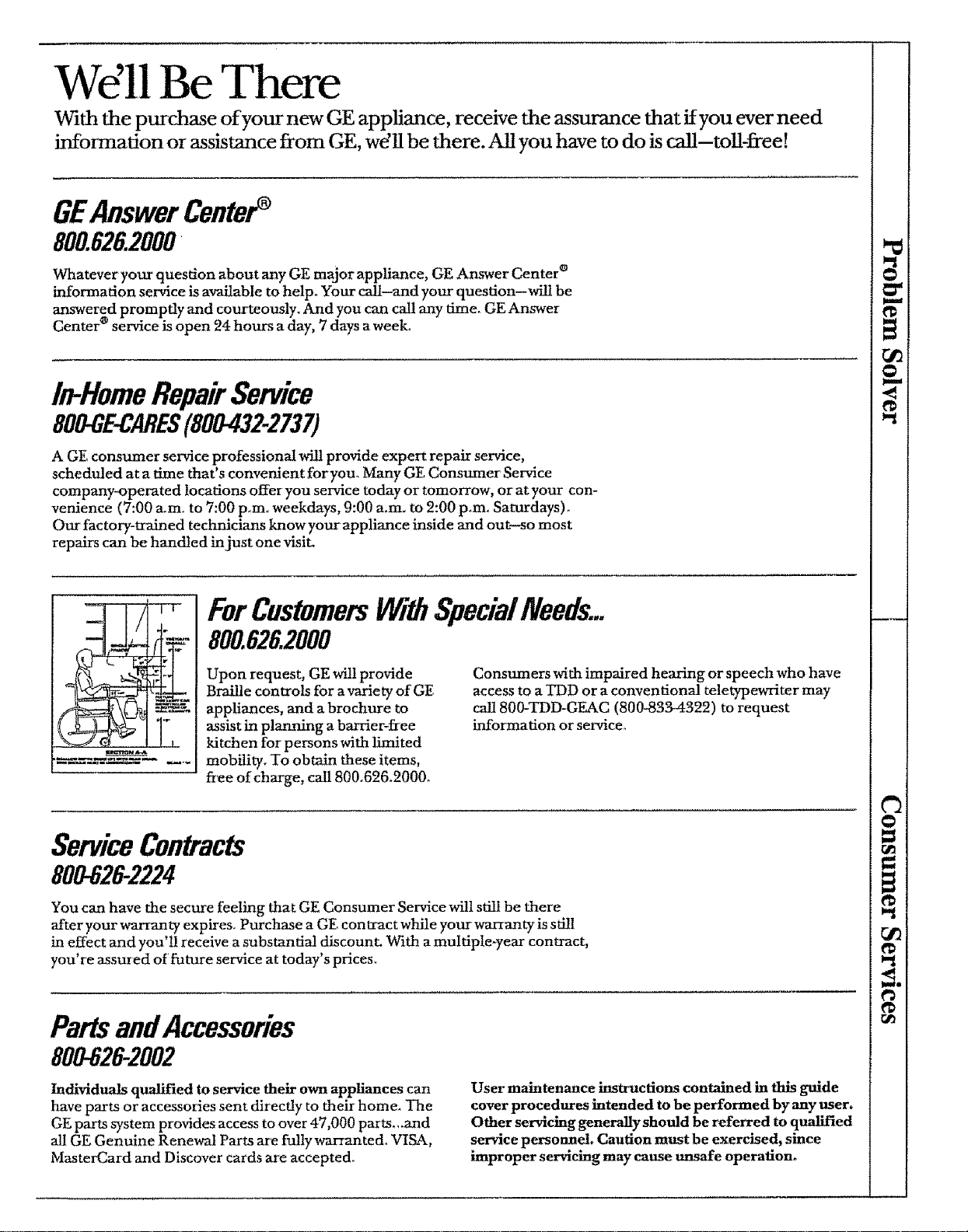
Wdll Be There
With the purchase of your new GE appliance, receive the assurance that ifyou ever need
information or assistance from GE, wdll be there.All you have to do is ca!l-toil-free[
GEAnswerCenter
800.626.2000
Whatever your question about any GE major appliance, GE Answer Center _
information service is available to help. Your call-and your question--will be
answered promptly and courteously..Amd you can call any time. GE Answer
Center _ service is open 24 hours a day, 7 days a week°
In-HomeRepairService
800-GE-CARES(800432-2737)
AGE consumer service professional will provide expert repair service,
scheduled at a time that's convenient foryou. Many GE Consumer Service
company-operated locations offer you service today or tomorrow, or at your con-
venience (7:00 a.mo to 7:00 pore0 weekdays, 9:00 a.m. to 2:00 pore.. Saturdays)°
Our factory-tralned technicians know your appliance inside and out-so most
repairs can be handled in just one visit.
7t-
I°
1,_ M __
ForCustomersJ4gtthSpeciaINeeds...
800.626.2000
Upon request, GE Mll provide
Braille controls for a variety of GE
appliances, and a brochure to
assist in planning a barrier-flee
kitchen for persons with limited
mobility. To obtain these items,
free of charge, call 800°626.2000_
Consumers with impaired hearing or speech who have
access to a TDD or a conventional teletypewriter may
call 800-TDD-GEAC (800-8334322) to request
information or service,.
ServiceContracts
800-62&2224
You can have the secure feeling that GE Consumer Service will still be there
after your warranty expires. Purchase a GE contract while your warranty is still
in effect and you'll receive a substantial discount. With a multiple-year contract,
you're assured of future service at today's prices,
PartsandAccessories
800-626-2002
Individuals qualified to service their own appliances can
have parts or accessories sent directly to their home. The
GE parts system provides access to over 47,000 parts,,.and
all GE Genuine Renewal Parts are fulty war_anted° VISA,
MasterCard and Discover cards are accepted.
User maintenance iustr'actions contained in this guide
cover procedures intended to be performed by any user.
Other servicing generaliyshould be referred to qualified
service personnel Caution must be exercised, since
improper servicing may cause unsafe operation.
o"
1€
o_
@
u
i
i
_o
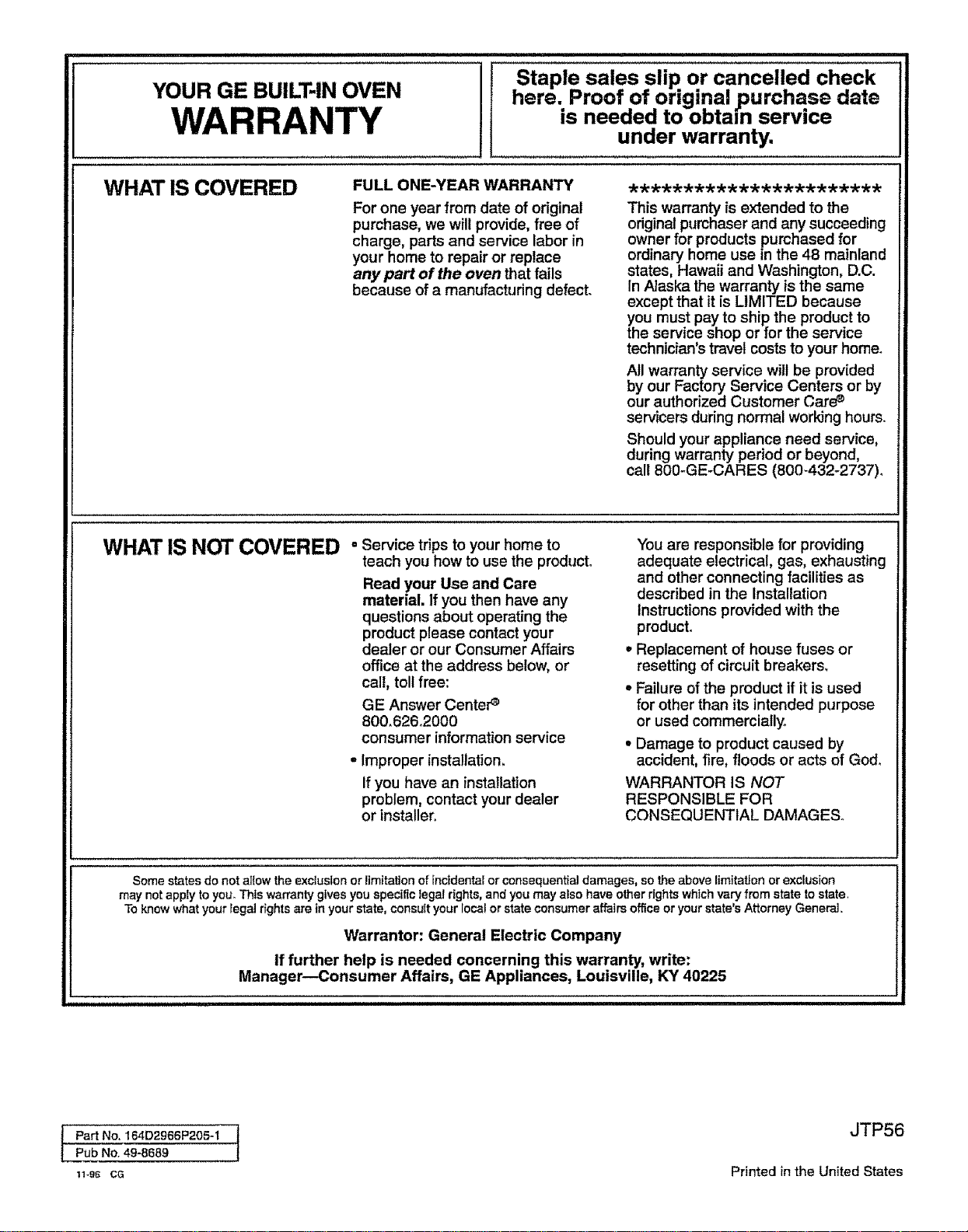
=LLJJ I I JLJIII II!l L JJ I IJJl'l"=',,,= .......................................................,HI=
Staple sales slip or cancelled check
YOUR GE BUILT-IN OVEN here. Proof of original ,purchase date
WARRANTY is needed to obtain service
under warranty.
WHAT IS COVERED FULL ONE-YEAR WARRANTY ***********************
For one year from date of original
purchase, we will provide, free of
charge, parts and service labor in
your home to repair or replace
any part of the oven that fails
because of a manufacturing defect.
This warranty is extended to the
original purchaser and any succeeding
owner for products purchased for
ordinary home use in the 48 mainland
states, Hawaii and Washington, D.C.
In Alaska the warranty is the same
except that it is LIMITED because
you must pay to ship the product to
the service shop or for the service
technician's travel costs to your home.
All warranty service will be provided
by our Factory Service Centers or by
our authorized Customer Care_
servicers during normal working hours.
Should your appliance need service,
during warranty period or beyond,
call 800-GE-CARES (800-432-2737).
WHATIS NOTCOVERED =Service trips to your home to
teach you how to use the product°
Read your Use and Care
material. If you then have any
questions about operating the
product please contact your
dealer or our Consumer Affairs
office at the address below, or
call, tollfree:
GE Answer CenteP
800.626.2000
consumer information service
•improper installation.
ifyou have an installation
problem, contact your dealer
or installer,
You are responsible for providing
adequate electrical, gas, exhausting
and other connecting facilities as
described in the Installation
Instructions provided with the
product.
•Replacement of house fuses or
resetting of circuit breakers,
° Failure of the product if it is used
for other than its intended purpose
or used commercially°
° Damage to product caused by
accident, fire, floods or acts of God.
WARRANTOR IS NOT
RESPONSIBLE FOR
CONSEQUENTIAL DAMAGES.
Soma states do not allow the exclusion or limitation of incidental or consequential damages, so the above limitaUon or exclusion
may not apply to you_ This warranty gives you specific legal rights, and you may also have other rights which vary from state to state
To know what your legal r_ghts are in your state, consult your local or state consumer affairs office or your state's Attorney General..
Warrantor: General Electric Company
If further help is needed concerning this warranty, write:
Manager--Consumer Affairs, GE Appliances, Louisville, KY 40225
Part No. 164D2966P205-1
Pub No. 49-8689
11-96 Ca
JTP56
Printed in the United States