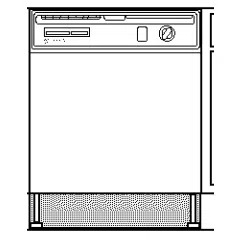
_Jltra Wash Dishwasher
Use & Care Guide
Table of Contents ............. 1 (English section)
3378922 _s R_.ck andCoHoganE=at_,I__179USA MODELS/MODELOS/MODIbLES
15895, 15891
Table of Contents
Page
•_ars Dishwasher Warranty ........................................... 1
,shwasher Safety .......................................................... 2
Parts and Features .......................................................... 3
America's Cleanest Dishes
How the ULTRA WASH* System, ULTRA WASH
Sensor and ATC work ................................................ 4
Start Up Guide
Before using your dishwasher .................................... 5
Starting your dishwasher for everyday loads ............. 6
Loading Your Dishwasher
Preparing to load your dishwasher ............................. 7
Loading the top rack ................................................... 7
Loading the bottom rack............................................. 9
Loading the silverware basket .................................. 10
Quiet operating tips .................................................. 10
Page
Your Part In Cleaning Dishes
Using the detergent dispenser ................................. 11
Using the rinse agent dispenser ............................... 12
Water temperature tips ............................................. 12
Cycles ....................................................................... 13
Options ..................................................................... 15
Special features ....................................................... 16
Caring for Your Dishwasher
Cleaning your dishwasher ........................................ 16
Storingyour dishwasher ........................................... 17
Tips for washing special items ................................. 18
Troubleshooting Guide ................................................. 19
We Service What We Sell ............................................. 22
Sears Repair Services in U.S.A. and Canada ............. 23
Sears Dishwasher Warranty
FULL ONE YEAR WARRANTY ON 800 SERIES KENMORE ULTRA WASH* DISHWASHERS
Forone year from the date of purchase,when the dishwasher isinstalledand operated in accordance with the
instructionsprovided in the InstallationInstructionsand Owners Manual, Sears will repair,freeof charge, defects in
materials or workmanship.
FULL TWO YEAR WARRANTY ON ELECTRONIC CONTROL AND POWER SUPPLY BOARD
Jr two years from the date of purchase, when the dishwasheris installedand operated in accordance with the instructions
provided in the Installation Instructions and Owners Manual, Sears will repair or replace, free of charge, the electronic module
and power supply board if defective in materials or workmanship.
FULL WARRANTY FOR THE LIFE OF THE DISHWASHER ON ULTRA LIFE* TUB MODELS AGAINST
LEAKS IN THE TUB AND INNER DOOR PANEL
For the life of the dishwasher if a leak should occur as a result of failure of the polypropylene tub or innerdoor panel due to
cracking, chipping or peeling, Sears will replace, free of charge, the tub or inner door panel.
LIMITED TWO YEAR WARRANTY ON THE ULTRA WASH* WASH SYSTEM
After the first year and until two years from the date of purchase, when the dishwasher is installed and operated in accordance
with the instructions provided in the Installation Instructions and Owners Manual, Sears will furnish free of charge, replacement
parts for any part of the ULTRA WASH wash system (motor, pump, spray arms, ULTRAFLOW* water feed tube, motor seals,
and pump gasket) which is defective in materials or workmanship. Customer assumes any labor costs associated with replace-
ment of these parts.
If the dishwasher is subject to other than private family use, the above warranty coverage is effective for only 90 days.
WARRANTY SERVICE IS AVAILABLE BY CONTACTING THE NEAREST SEARS SERVICE CENTER IN THE UNITED STATES
OR CANADA. This warranty applies only while the product is in use in the United States or Canada. This warranty gives you
specific legal rights, and you may also have other rights which vary from state to state or province to province.
Sears, Roebuck and Co.
Dept. 817WA, Hoffman Estates, IL 60179
3/97
Sears Canada, Inc.
Toronto, Ontario, Canada M5B2B8
* Indicates symbol for Trademark
1
Dishwasher Safety
Your safety and the safety of others is very important.
We have provided many important safety messages in this manual and on your appliance. Always read and
obey all safety messages.
This isthe safety alert symbol.
This symbol alerts you to hazards that can killor hurtyou and others.
All safety messages will be preceded by the safety alert symbol and the word "DANGER" or
"WARNING." These words mean:
You will be killed or seriously injured if you
don't follow instructions.
You can be killed or seriously injured if you
don't follow instructions.
All safety messages willidentity the hazard, tell you how to reduce the chance of injury, and tell you what can
happen if the instructions are not followed.
IMPORTANT SAFETY INSTRUCTIONS
WARNING - When using the dishwasher,
follow basic precautions, including the following:
• Read all instructionsbefore using the dishwasher.
• Use the dishwasher only for its intended function.
• Use only detergents or rinse agents recommended for
use in a dishwasher and keep them out of the reach of
children.
• When loading items to be washed:
1) Locate sharp items so that they are not likely
to damage the door seal; and
2) Load sharp knives with the handles up to
reduce the risk of cut-type injuries.
• Do not wash plastic items unless they are marked
"dishwasher safe" or the equivalent. For plastic items
not so marked, check the manufacturer's recommen-
dations.
• Do not touch the heating element during or immedi-
ately after use.
I
• Do not operate the dishwasher unless all enclosure I
panels are properly in place.
I
• Do not tamper with controls.
• Do not abuse, siton, or stand on the door or dish racks ..
of the dishwasher.
• To reduce the risk of injury, do not allow children to play
in or on the dishwasher.
• Under certain conditions, hydrogen gas may be produced
in a hot water system that has not been used for two
weeks or more. HYDROGEN GAS IS EXPLOSIVE.
If the hot water system has not been used for such a
period, before using the dishwasher turn on all hot water
faucets and let the water flow from each for several
minutes. This willrelease any accumulated hydrogen
gas. As the gas isflammable, do not smoke or use an
open flame during this time.
• Remove the door to the washing compartment when
removing an olddishwasher from service or discarding it.
- SAVE THESE INSTRUCTIONS -
2
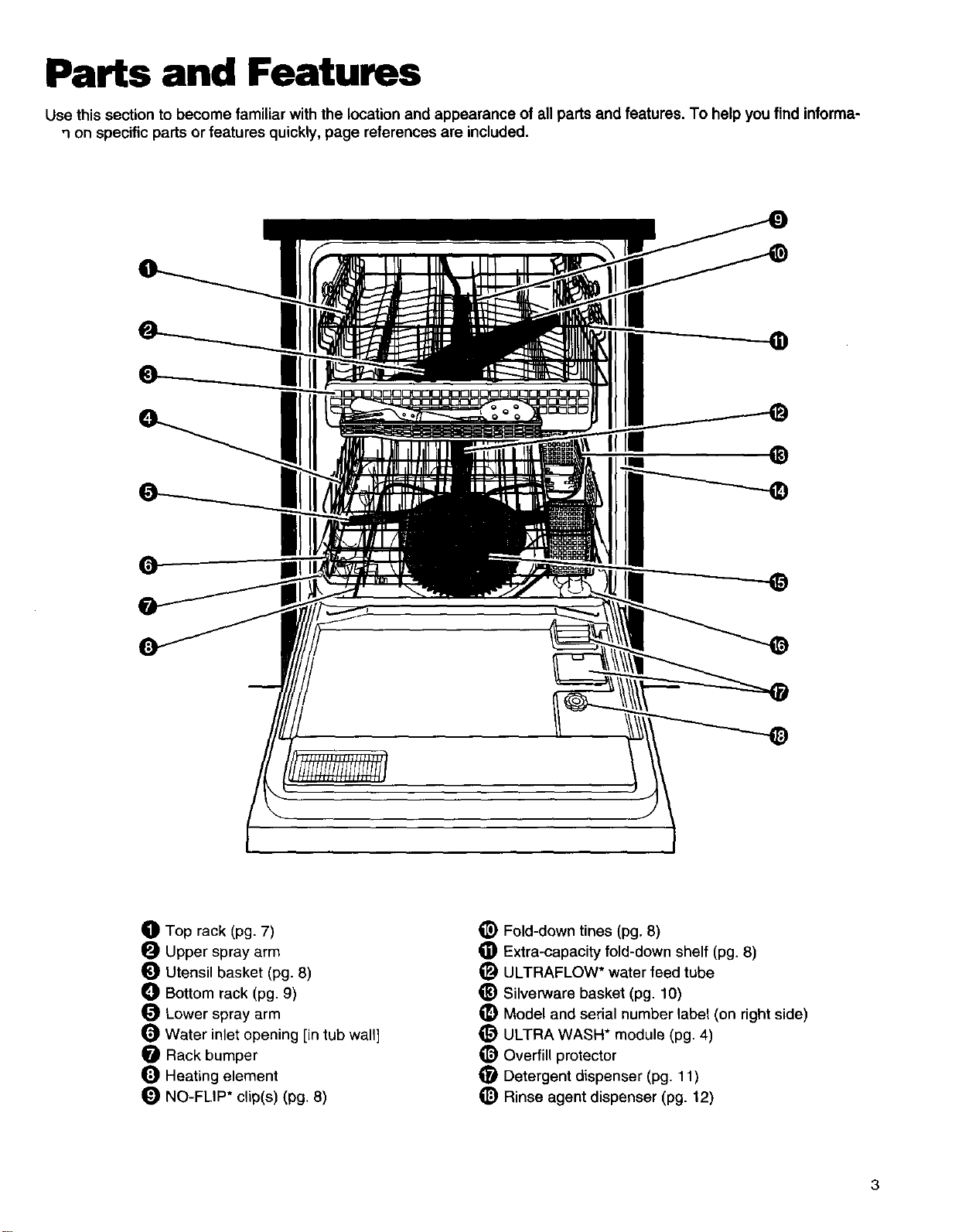
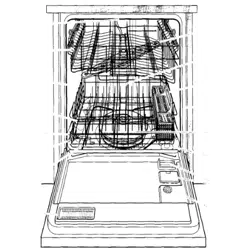
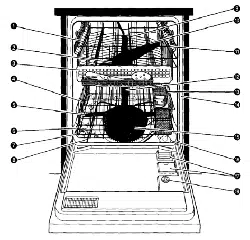
Parts and Features
Use this section to become familiar with the location and appearance of all parts and features. To help you find informa-
q on specific parts or features quickly, page references are included.
®
O Top rack (pg. 7)
O Upper spray arm
Utensil basket (pg. 8)
_) Bottom rack (pg. 9)
Lower spray arm
Water inlet opening [in tub wall]
Rack bumper
Heating element
NO-FLIP* clip(s) (pg. 8)
_) Fold-down tines (pg. 8)
Extra-capacity fold-down shelf (pg. 8)
_) ULTRAFLOW* water feed tube
_) Silverware basket (pg. 10)
_) Model and serial number tabel (on right side)
_) ULTRA WASH* module (pg. 4)
_) Overfill protector
O Detergent dispenser (pg. 11)
_) Rinse agent dispenser (pg. 12)
3
America's Cleanest Dishes
How the ULTRA WASH* System, ULTRA WASH Sensor
and ATC work
Your dishwasher's new ULTRA WASH Soil Removal
System is designed to give you sparkling clean dishes in
the shortest amount of time with the least amount of
energy necessary. The ULTRA WASH System includes:
• A heavy duty grinder that acts as a food disposer to grind
and dispose of large food particles.
• An ULTRA WASH Sensor that monitors the soil level in
the wash load and adjusts the cycle accordingly.
• An Automatic Temperature Control (ATC) that assures
the proper water temperature for the wash cycle you
select and the soil level of the load.
Here's how the ULTRA WASH Soil Removal
System works:
1, When you load the dishwasher, all you need to do is
remove bones, large chunks, or burned-on food. Any
remaining food will be ground up and disposed.
2, Hot water fills the dishwasher to a level near the
bottom of the overfill protector.
3. While the water is heated, the Water Heating indicator
on the control panel glows and the cycle time on the
electronic display holds.
4, When the water reaches the proper temperature, the
Water Heating indicator turns off and the cycle time
countdown resumes.
5. Detergent is added at the correct times from the
detergent dispenser, and hot water is pumped through
the ULTRA WASH pump.
6. Food particles are removed from dishes, pots and
pans, tableware, and cutlery as the dishwasher sprays
a mixture of hot water and detergent through two spray
arms against their soiled surfaces.
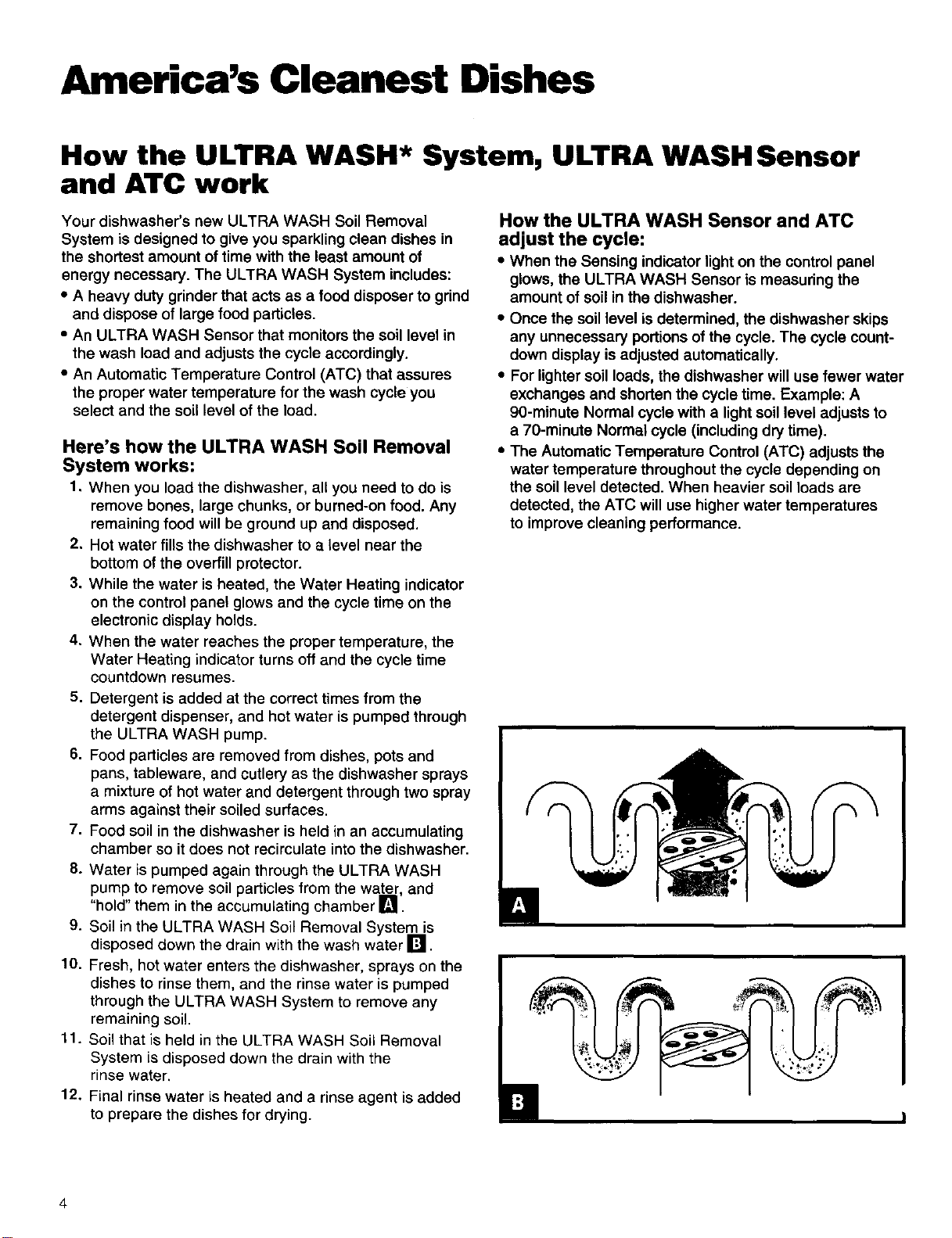
7. Food soil in the dishwasher is held in an accumulating
chamber so it does not recirculate into the dishwasher.
8. Water is pumped again through the ULTRA WASH
pump, to remove soil particles from the water, and
hold them in the accumulating chamber I_1.
9. Soil in the ULTRA WASH Soil Removal System is
disposed down the drain with the wash water I_1.
10. Fresh, hot water enters the dishwasher, sprays on the
dishes to rinse them, and the rinse water is pumped
through the ULTRA WASH System to remove any
remaining soil.
11. Soil that is held in the ULTRA WASH Soil Removal
System is disposed down the drain with the
rinse water.
12. Final rinse water is heated and a rinse agent is added
to prepare the dishes for drying.
How the ULTRA WASH Sensor and ATC
adjust the cycle:
• When the Sensing indicator light on the control panel
glows, the ULTRA WASH Sensor is measuring the
amount of soil in the dishwasher.
• Once the soil level isdetermined, the dishwasher skips
any unnecessary portions ofthe cycle. The cycle count-
down display is adjusted automatically.
• For lighter soil loads, the dishwasher will use fewer water
exchanges and shorten the cycle time. Example: A
g0-minute Normal cycle with a lightsoil level adjusts to
a 7g-minute Normal cycle (including dry time).
• The Automatic Temperature Control (ATC) adjusts the
water temperature throughout the cycle depending on
the soil level detected. When heavier soil loads are
detected, the ATC will use higher water temperatures
to improve cleaning performance.
Start Up Guide
Before using your dishwasher
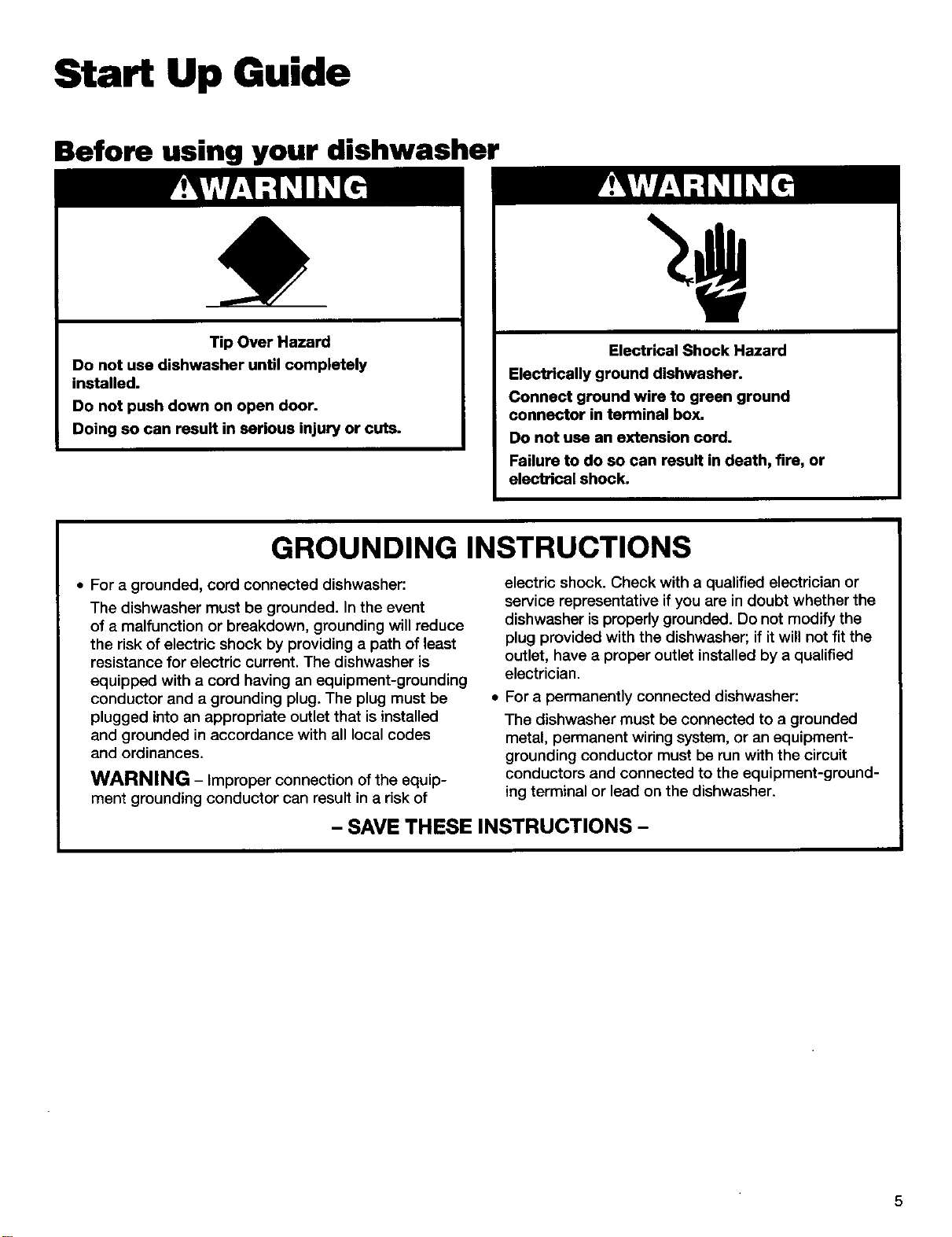
Tip Over Hazard
Do not use dishwasher until completely
installed.
Do not push down on open door.
Doing so can result in serious injury or cuts.
Electrical Shock Hazard
Elect_cally ground dishwasher.
Connect ground wire to green ground
connector in terminal box.
Do not use an extension cord.
Failure to do so can result in death, fire, or
electrical shock.
GROUNDING INSTRUCTIONS
• For a grounded, cord connected dishwasher:
The dishwasher must be grounded. In the event
of a malfunction or breakdown, grounding will reduce
the risk of electric shock by providing a path of least
resistance for electric current. The dishwasher is
equipped with a cord having an equipment-grounding
conductor and a grounding plug. The plug must be
plugged into an appropriate outlet that is installed
and grounded in accordance with all local codes
and ordinances.
WARNING - Improper connection of the equip-
ment grounding conductor can result in a risk of
electric shock. Check with a qualified electrician or
service representative if you are in doubt whether the
dishwasher is properly grounded. Do not modify the
plug provided with the dishwasher; if it will not fit the
outlet, have a proper outlet installed by a qualified
electrician.
For a permanently connected dishwasher:
The dishwasher must be connected to a grounded
metal, permanent winng system, or an equipment-
grounding conductor must be run with the circuit
conductors and connected to the equipment-ground-
ing terminal or lead on the dishwasher.
- SAVE THESE INSTRUCTIONS -
5
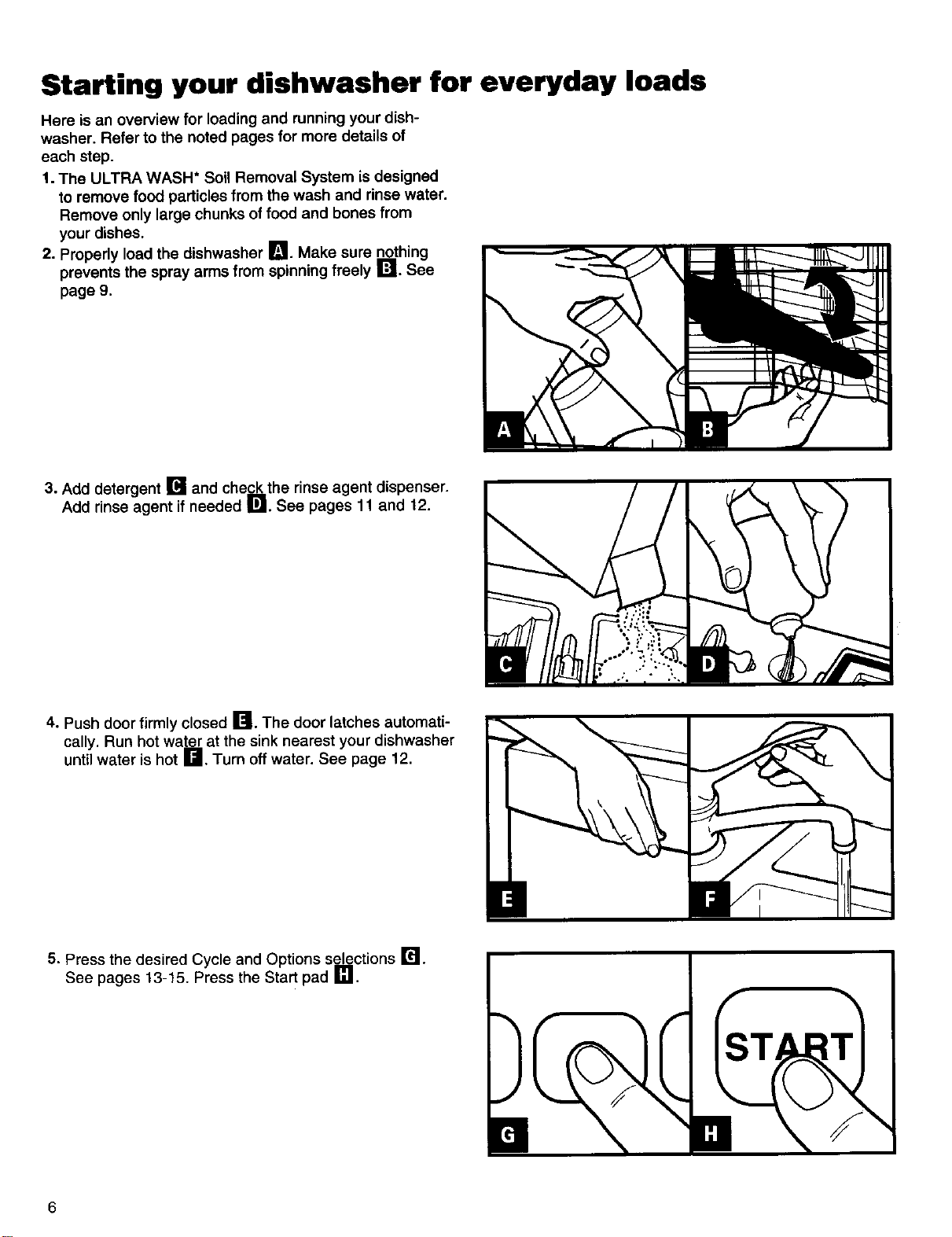
Starting your dishwasher for everyday loads
Hero is an overview for loading and running your dish-
washer. Refer to the noted pages for more details of
each step.
1. The ULTRA WASH* Soil Removal System is designed
to remove food particles from the wash and rinse water.
Remove only large chunks of food and bones from
your dishes.
2. Properly load the dishwasher I_1. Make sure nothing
prevents the spray arms from spinningfreely I'_ll. See
page 9.
3. Add detergent [] and check the rinse agent dispenser.
Add rinse agent if needed []. See pages 11 and 12.
4. Push door firmly closed []. The door latches automati-
cally. Run hot water at the sink nearest your dishwasher
until water is hot r.Jl. Turn off water. See page 12.
5. Press the desired Cycle and Options selections r'_.
See pages 13-15. Press the Start pad []. I
6
Loading Your Dishwasher
This section tells you how to load your dishwasher properly for the best washing and rinsing results.
Preparing to load your dishwasher
• Load correctly for best washing results. Incorrect loading
may cause poor washing and the need to rewash all or
part of the load.
• Wash full loads. Running a half-filled dishwasher uses
the same amount of electricity and hot water as a fully
loaded machine.
• To save water and energy, do not rinse dishes before
putting them into the dishwasher.
• Remove large pieces of food, fruit pits, bones, and other
hard items. The ULTRA WASH* module will remove food
particles from the water. The module contains a chopping
device which will reduce the size of food items.
NOTE: If hard items such as fruitseeds, nuts, and egg
shells enter the ULTRA WASH module, you might hear
chopping, grinding,crunching, or buzzing sounds. Those
sounds are normal when hard items enter the module.
Do not let metallic items (such as pot handle screws) get
into the ULTRA WASH module. They could damage the
ULTRA WASH module.
• Foods like eggs, rice, pasta, spinach, and cooked
cereals may be hard to remove if they are left to dry over
a period of time. Run a Quick Rinse cycle to keep dishes
moist if you do not plan to wash them soon.
• Load dishes so soiled surfaces face the rotating
spray arms.
• Load dishes so they are not stacked or overlapping, if
possible. It is important for the water spray to reach all
soiled surfaces for best washing. For best drying, water
must be able to drain from all surfaces.
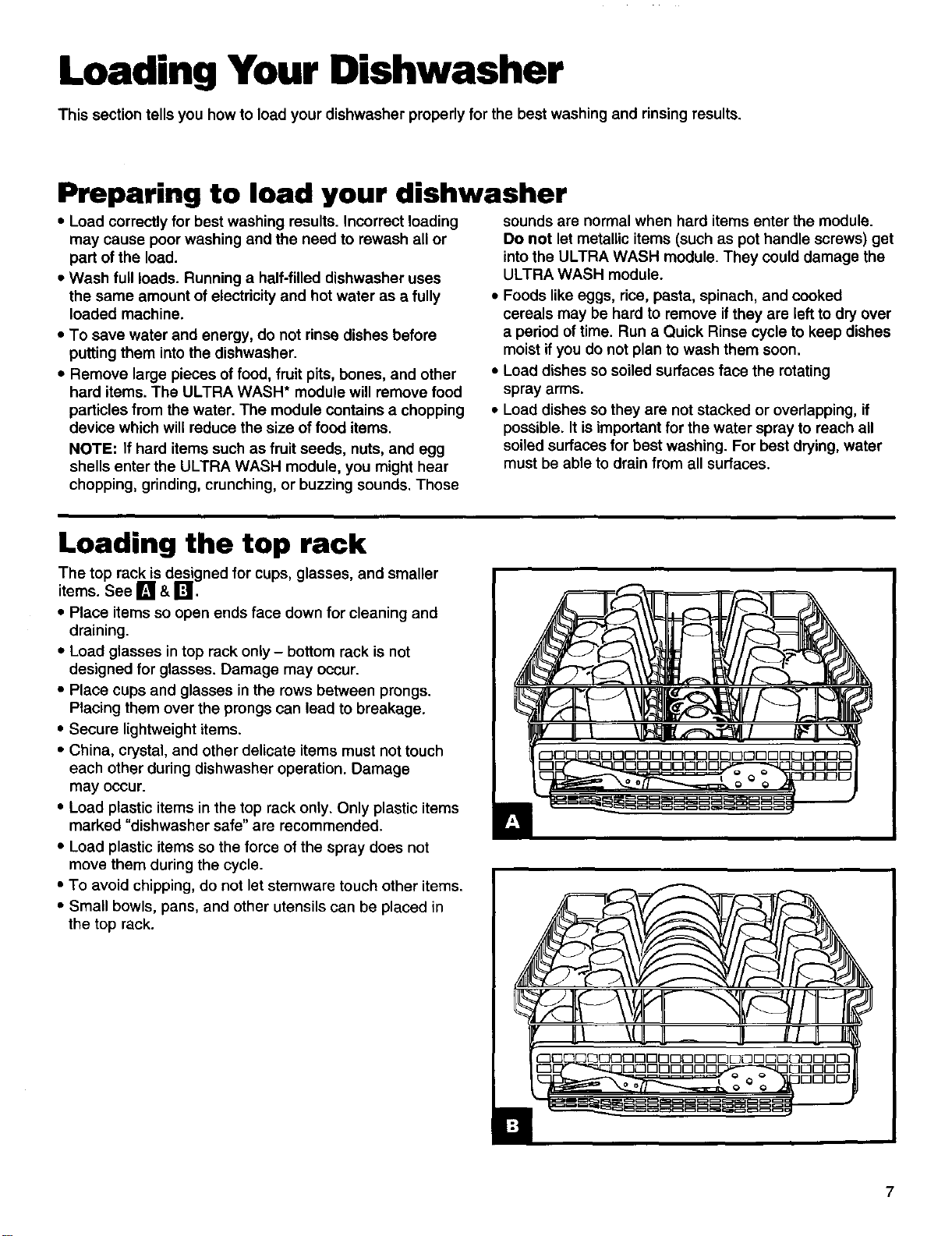
Loading the top rack
The top rack is designed for cups, glasses, and smaller
items. See [] & r_.
• Place items so open ends face down for cleaning and
draining.
• Load glasses in top rack only - bottom rack is not
designed for glasses. Damage may occur.
• Place cups and glasses in the rows between prongs.
Placing them over the prongs can lead to breakage.
• Secure lightweight items.
• China, crystal, and other delicate items must not touch
each other during dishwasher operation. Damage
may occur.
• Load plastic items in the top rack only. Only plastic items
marked "dishwasher safe" are recommended.
• Load plastic items so the force of the spray does not
move them during the cycle.
• To avoid chipping, do not let stemware touch other items.
• Small bowls, pans, and other utensils can be placed in
the top rack.
7
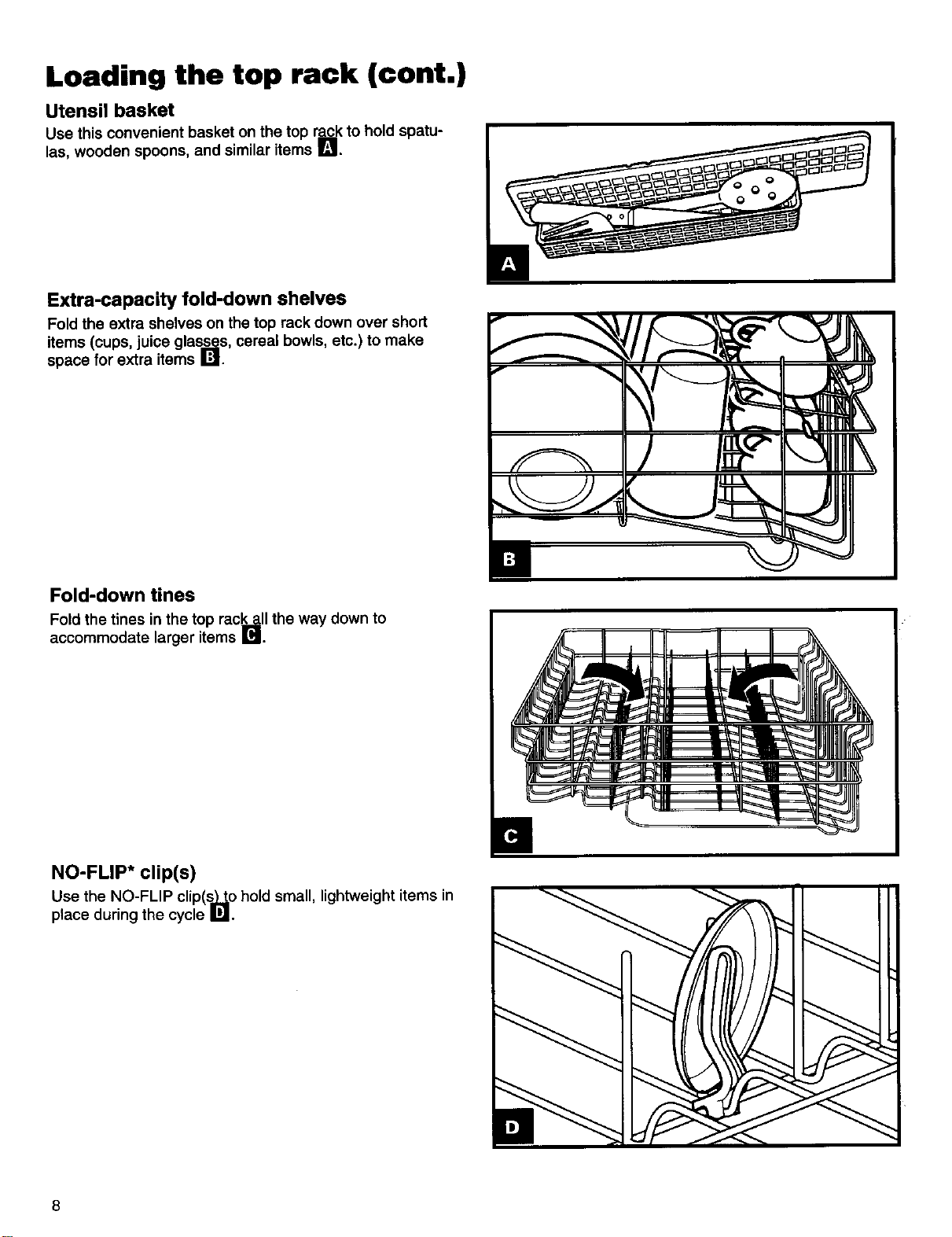
Loading the top rack (cont.)
Utensil basket
Use this convenient basket on the top rack to hold spatu-
las, wooden spoons, and similar items I_1,
Extra-capacity fold-down shelves
Fold the extra shelves on the top rack down over short
items (cups, juice gla_s, cereal bowls, etc.) to make
space for extra items I._11.
Fold-down tines
Fold the tines in the top rack_ll the way down to
accommodate larger items IBI.
/ 1.5 qHIrk
I:i _
NO-FLIP* clip(s)
Use the NO-FLIP clip(s,_o hold small, lightweight items in
place during the cycle WI.
8
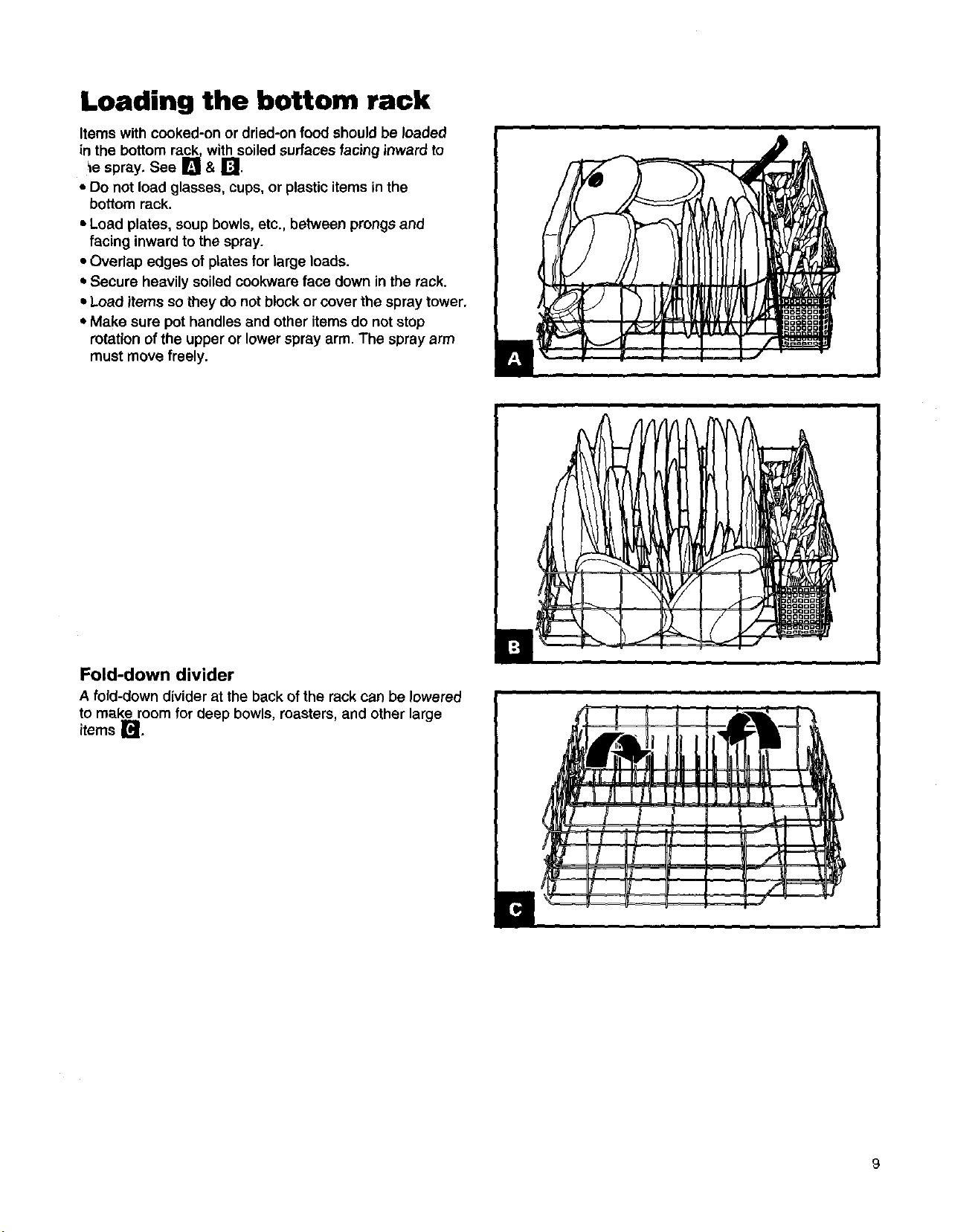
Loading the bottom rack
Items with cooked-on or dried-on food should be loaded
in the bottom rack, with soiled surfaces facing inward to
_e spray. See Q & [:'!.
• Do not load glasses, cups, or plastic items in the
bottom rack.
• Load plates, soup bowls, etc., between prongs and
facing inward to the spray.
• Overlap edges of plates for large loads.
* Secure heavily soiled cookwara face down in the rack.
=Load items so they do not blockor cover the spray tower,
• Make sure pot handles and other items do not stop
rotation of the upper or lower spray arm. The spray arm
must move freely.
i
L
, o . . t i
I
Fold-down divider
A fold-down divider at the back of the rack can be lowered
to make room for deep bowls, roasters, and other large
items r_,
9
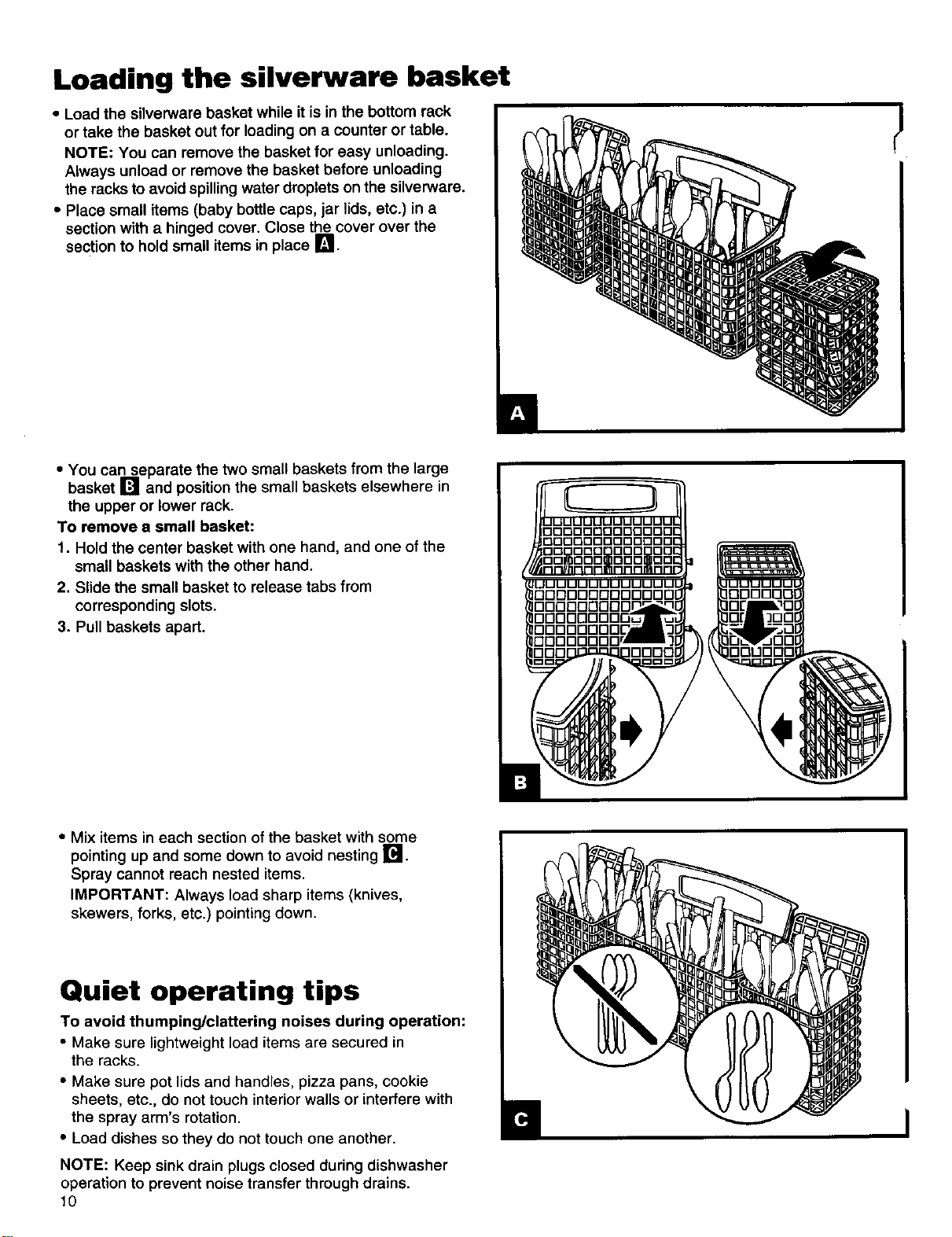
Loading the silverware basket
• Load the silverware basket while itis in the bottom rack
or take the basket out for loading on a counter or table.
NOTE: You can remove the basket for easy unloading.
Always unload or remove the basket before unloading
the racks to avoid spillingwater droplets on the silverware.
• Place small items (baby bottle caps, jar lids, etc.) in a
section with a hinged cover. Close the cover over the
section to hold small items in place I_1.
• You can separate the two small baskets from the large
basket [] and position the small baskets elsewhere in
the upper or lower rack.
To remove a small basket:
1. Hold the center basket with one hand, and one of the
small baskets with the other hand.
2. Slide the small basket to release tabs from
corresponding slots.
3. Pull baskets apart.
• Mix items in each section of the basket with some
pointing up and some down to avoid nesting [].
Spray cannot reach nested items.
IMPORTANT: Always load sharp items (knives,
skewers, forks, etc.) pointing down.
Quiet operating tips
To avoid thumping/clattering noises during operation:
• Make sure lightweight load items are secured in
the racks.
• Make sure pot lids and handles, pizza pans, cookie
sheets, etc., do not touch interior walls or interfere with
the spray arm's rotation.
• Load dishes so they do not touch one another.
NOTE: Keep sink drain plugs closed during dishwasher
operation to prevent noise transfer through drains.
10
Your Part in Cleaning Dishes
Operating your dishwasher properly enables you to obtain the best possible results. This section explains proper
dishwasher operation.
Using the detergent dispenser
• Use automatic dishwashing detergent only. Other
detergents are too mild and much too sudsy.
• Add detergent just before starting cycle.
• Store tightly closed detergent in a cool, dry place. Fresh
automatic dishwasher detergent results in better
cleaning.
Filling the detergent dispenser
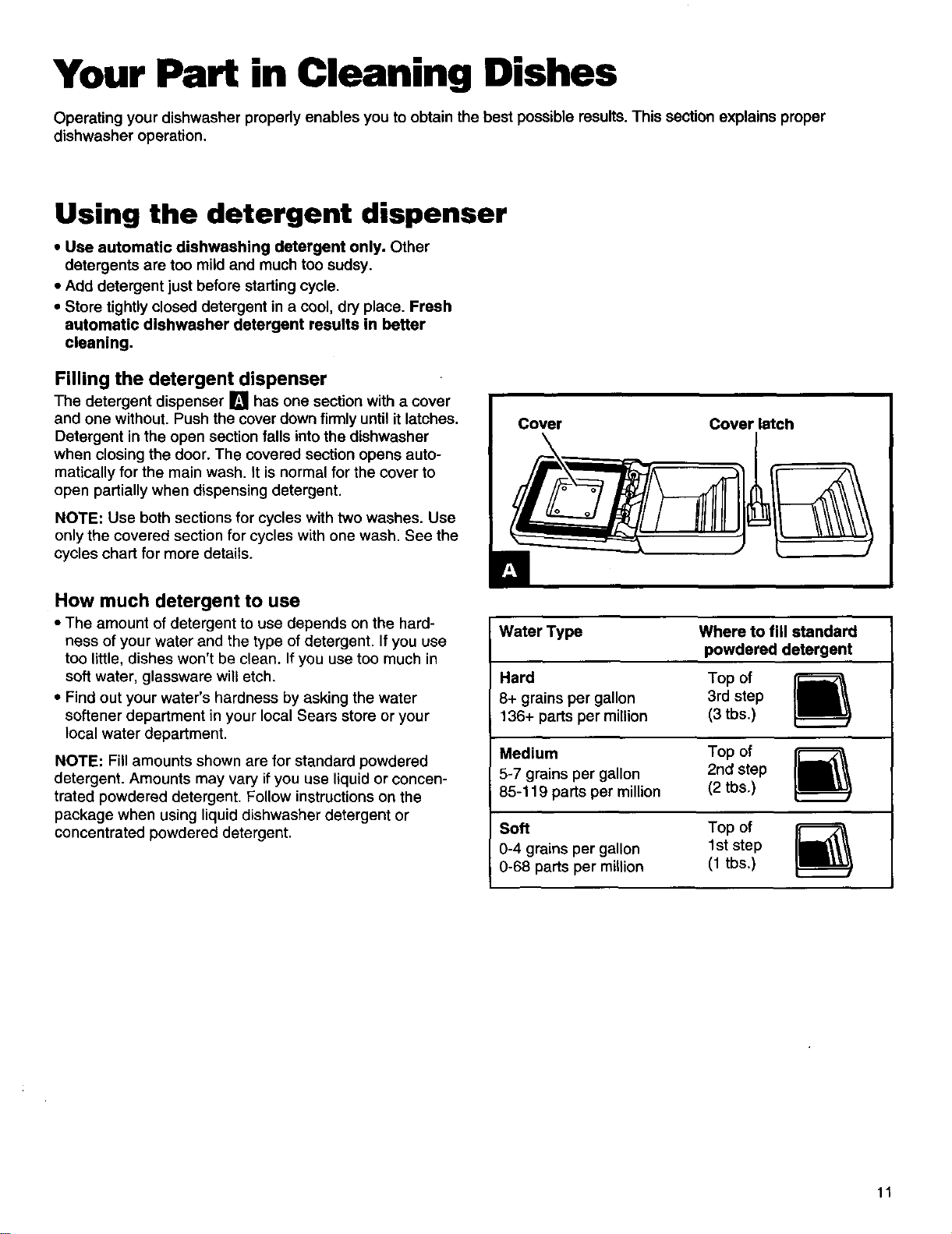
The detergent dispenser [] has one section with a cover
and one without. Push the cover down firmlyuntil it latches.
Detergent in the open section falls intothe dishwasher
when closing the door. The covered section opens auto-
matically for the main wash. It is normal for the cover to
open partially when dispensing detergent.
NOTE: Use both sections for cycles with two washes. Use
only the covered section for cycles with one wash. See the
cycles chart for more details.
How much detergent to use
• The amount of detergent to use depends on the hard-
ness of your water and the type of detergent. If you use
too little, dishes won't be clean. If you use too much in
soft water, glassware will etch.
• Find out your water's hardness by asking the water
softener department in your local Sears store or your
local water department.
NOTE: Fill amounts shown are for standard powdered
detergent. Amounts may vary if you use liquid or concen-
trated powdered detergent. Follow instructions on the
package when using liquid dishwasher detergent or
concentrated powdered detergent.
Cover Cover latch
Water Type Where to fill standard
powdered detergent
Hard Top of
8+ grains per gallon 3rd step
136+ parts per million (3 tbs.)
Medium Top of
5-7 grains per gallon 2nd step
85-119 parts per million (2 tbs.)
Soft Top of
0-4 grains per gallon 1st step
0-68 parts per million (1 tbs.)
11
Using the rinse agent dispenser
A rinse agent greatly improves dish drying and helps
prevent spots or streaks. The dnse agent helps water flow
off dishes and keeps water from forming droplets. A small
amount of rinse agent automatically releases into the final
rinse water.
Keep the rinse agent dispenser filled with a liquid
rinse agent. For best drying results, periodically check the
dispenser as follows to see if itneeds filling:
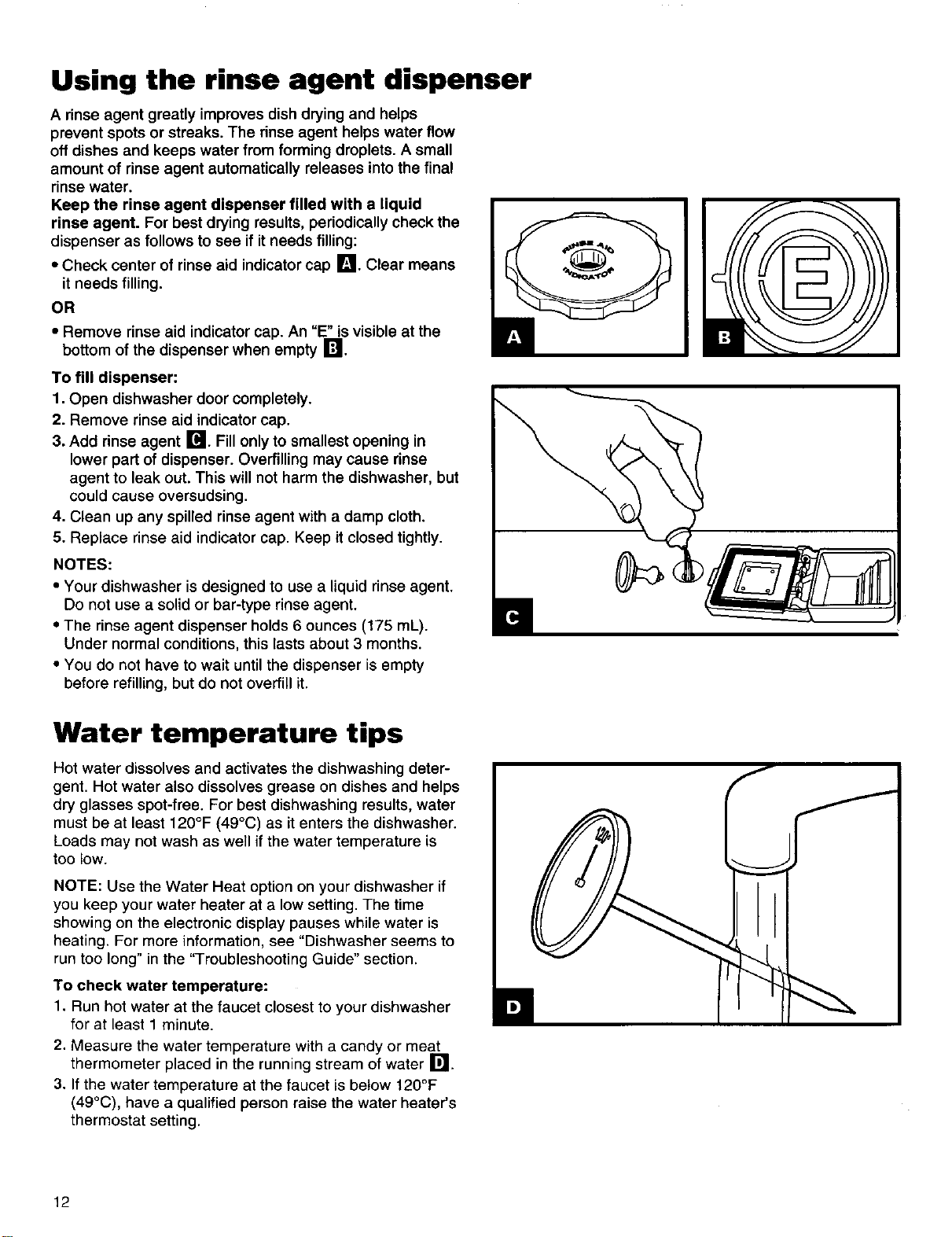
• Check center of rinse aid indicator cap I_1. Clear means
it needs filling.
OR
• Remove rinse aid indicator cap. An "E" is visible at the
bottom of the dispenser when empty I_Jl.
To fill dispenser:
1. Open dishwasher door completely.
2. Remove rinse aid indicator cap.
3. Add rinse agent Ir¢l. Fill only to smallest opening in
lower part of dispenser. Overfilling may cause rinse
agent to leak out. This will not harm the dishwasher, but
could cause overeudeing.
4. Clean up any spilled rinse agent with a damp cloth.
5. Replace rinse aid indicator cap. Keep it closed tightly.
NOTES:
• Your dishwasher is designed to use a liquid rinse agent.
Do not use a solid or bar-type rinse agent.
• The rinse agent dispenser holds 6 ounces (175 mL).
Under normal conditions, this lasts about 3 months.
• You do not have to wait untilthe dispenser is empty
before refilling, but do not overfill it.
Water temperature tips
Hot water dissolves and activates the dishwashing deter-
gent. Hot water also dissolves grease on dishes and helps
dry glasses spot-free. For best dishwashing results, water
must be at least 120°F (49°C) as it enters the dishwasher.
Loads may not wash as well if the water temperature is
too low.
NOTE: Use the Water Heat option on your dishwasher if
you keep your water heater at a low setting. The time
showing on the electronic display pauses while water is
heating. For more information, see "Dishwasher seems to
run too long" in the "Troubleshooting Guide" section.
To check water temperature:
1. Run hot water at the faucet closest to your dishwasher
for at least 1 minute.
2. Measure the water temperature with a candy or meat
thermometer placed in the running stream of water r_l
3. if the water temperature at the faucet is below 120°F
(49°C), have a qualified person raise the water heater's
thermostat setting.
12
Cycles
f
CYCLE
UltraWashSensor • AutomaticTemperatureControl * QulslGuardSystem
SENSING WASHING WATER HEA'nNG SANI COMPLETE CLEAN CONTROL LOCK
I ("I"I"I"I" 1
POTS NORMAL WATER CHINA QUICK QUICK SAM
PANS WASH MISER WASH WASH RINSE RINSE
SENSING CYCLES OPTIONS
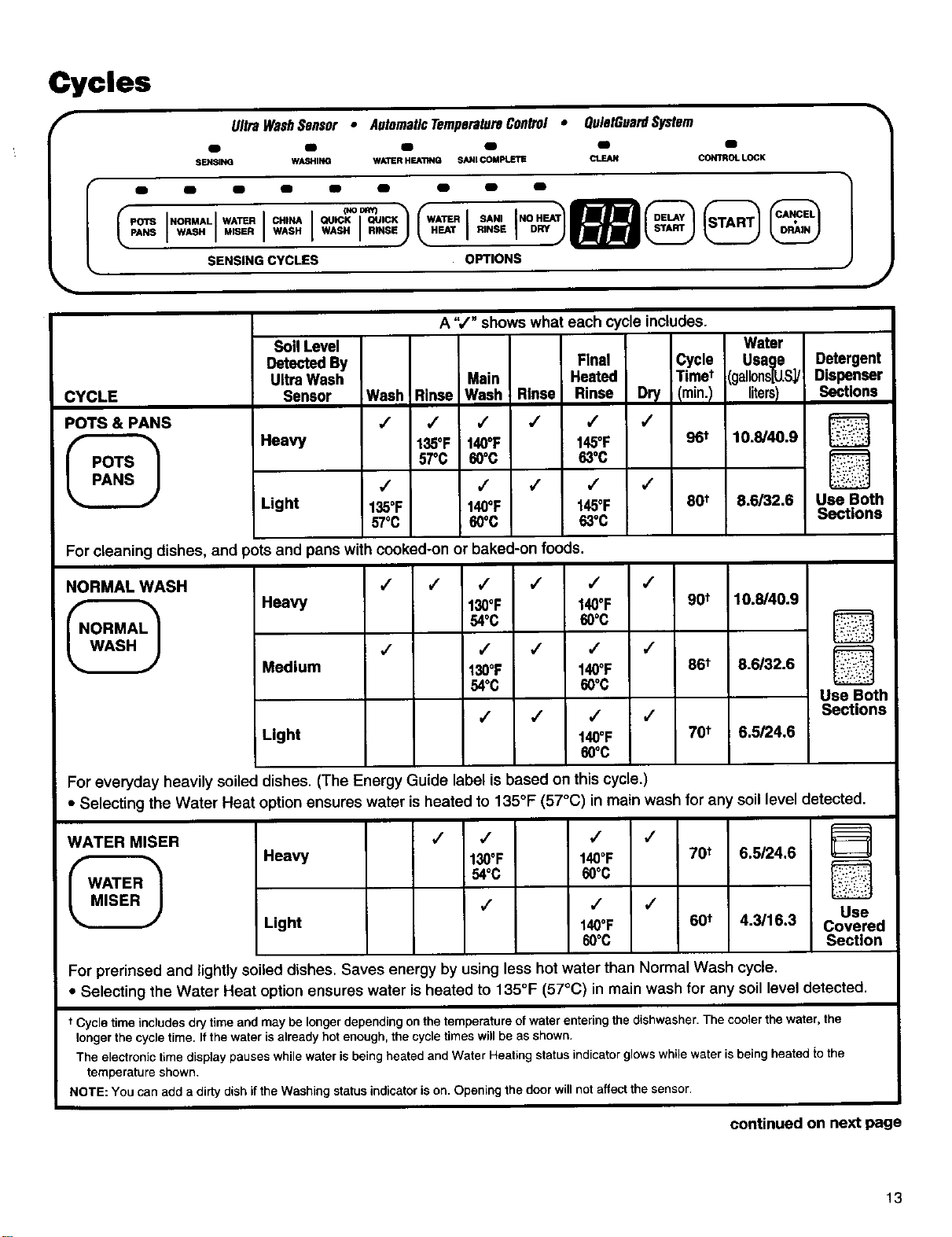
POTS & PANS
i POTS
PANS
A ",/" shows what each cycle includes.
Soil Level Water
Detected By Final Cycle Usage
UltraWash Main Heated Timet [gallons[_S_/
Sensor Wash Rinse Wash Rinse Rinse Dry /min.I liters)
,/ ,/ ,/ ,/ ,/ J
Heavy 135OF 140OF 145OF 96t 10.8/40.9
57°C 60°C 630C
Light
,/ / ,/ ,/ /
135OF 140OF 145OF 80t 8.6/32.6
57°C 60°C 63"C
Detergent
Dispenser
Sections
5
D
Use Both
Sections
For cleaning dishes, and pots and pans with cooked-on or baked-on foods.
NORMAL WASH
•
NORMAL
WASH
,/ / / / / ,/
Heavy 130OF 140OF 90t 10.6/40.9
54oc 60°C
,/ ,/ ,/ ,/ /
Medium 130OF 140OF 86t 8.6/32.6
54oc 60°C
/ / / /
Light 140OF 70t 6.5/24.6
60oc
[]
D
Use Both
Sections
For everyday heavily soiled dishes. (The Energy Guide label is based on this cycle.)
• Selecting the Water Heat option ensures water is heated to 135°F (57°C) in main wash for any soil
WATER MISER
WATER
MISER
Heavy
Light
/ / / /
130OF 140°F 70t
54oc 60oc
,/
./ ,/
140OF 60t
60°C
level
6.5/24.6
4.3/16.3
detected.
D
D
Use
Covered
Section
For prerinsed and lightly soiled dishes. Saves energy by using less hot water than Normal Wash cycle.
• Selecting the Water Heat option ensures water is heated to 135°F (57°C) in main wash for any soil level detected.
t Cycle time includes dry time and may be longer depending on the temperature of water entering the dishwasher. The cooler the water, the
longer the cycle time. If the water is already hot enough, the cycle times will be as shown.
The electronic time display pauses while water is being heated and Water Heating status indicator glows while water is being heated to the
temperature shown.
NOTE: You can add a dirty dish if the Washing status indicator is on. Opening the door will not affect the sensor.
continued on next page
13
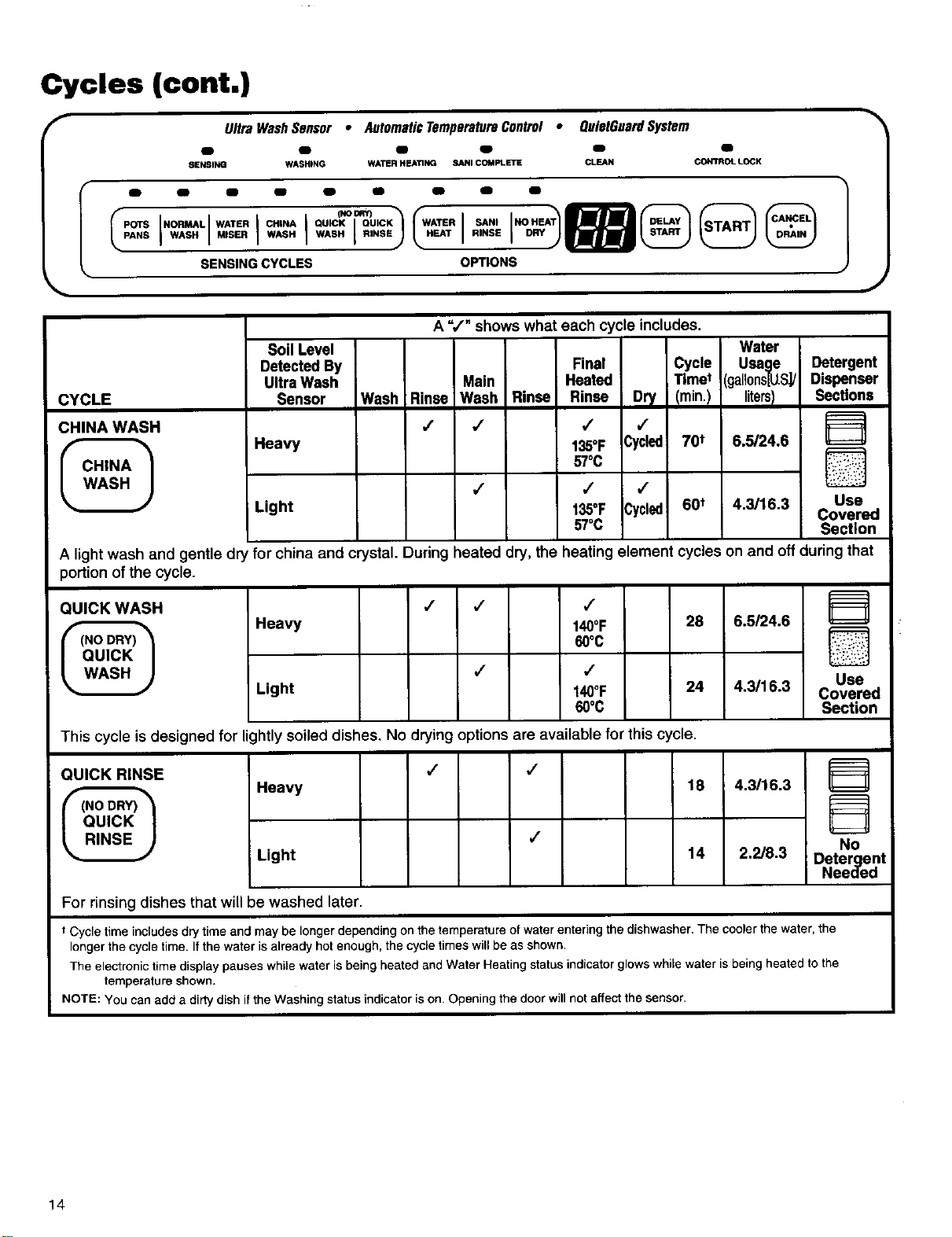
Cycles (cont.)
f
II"
POTS
PANS
UltraWashSensor • AutomaticTemperatureControl . OuiutGuardSystem
m fD lB _ IB fD
_IENSING WASHING WATER HEATING SANI COMPLETE CLEAN CONTROL LOCK
m i _ Em _ Em II
I i I I°°°R°u'c"-
NORMAL WATER CHINA
WASH MISER WASH WASH I RINSE RINSE
SENSING CYCLES OPTIONS
CYCLE
CHINA WASH
r
CHINA
WASH
A ",/" shows what each cycle includes.
Soil Level
Detected By Final
UltraWash Main Heated
Sensor Wash Rinse Wash Rinse Rinse
Heavy
,/ ,/
Light
,/
135°F
57°C
Cycle
Time*
Dry (min.)
,/
Cycled! 70t
,/ ,/ ,/
135°F Cycled 60*
57°C
Water
Usage
(gallons[U.S.]/
litersI
6.5/24.6
4.3/16.3
Detergent
Dispenser
Sections
D
Use
Covered
Section
A light wash and gentle dry for china and crystal. During heated dry, the heating element cycles on and off during that
)ortion of the cycle.
QUICK WASH
(NO DRY)
QUICK
WASH
Heavy
Light
/ / ,/
140OF 28
60°C
/ ,/
140OF 24
60°C
6.5/24.6
4,3/16.3
D
Use
Covered
Section
This cycle is designed for lightly soiled dishes. No drying options are available for this cycle.
QUICK RINSE
(NO DRY)
QUICK
RINSE
,/ ,/
Heavy 18 4.3/16.3
,/
Light 14 2.2/8.3
D
No
Detergent
Needed
For rinsing dishes that will be washed later.
t Cycle time includes dry time and may be longer depending on the temperature ofwater entering the dishwasher. The cooler the water, the
longer the cycle time. If the water is already hot enough, the cycle times will be as shown.
The electronic time display pauses while water is being heated and Water Heating status indicator glows while water is being heated to the
temperature shown.
NOTE: YOU can add a dirty dish ifthe Washing status indicator is on. Opening the door will not affect the sensor.
14
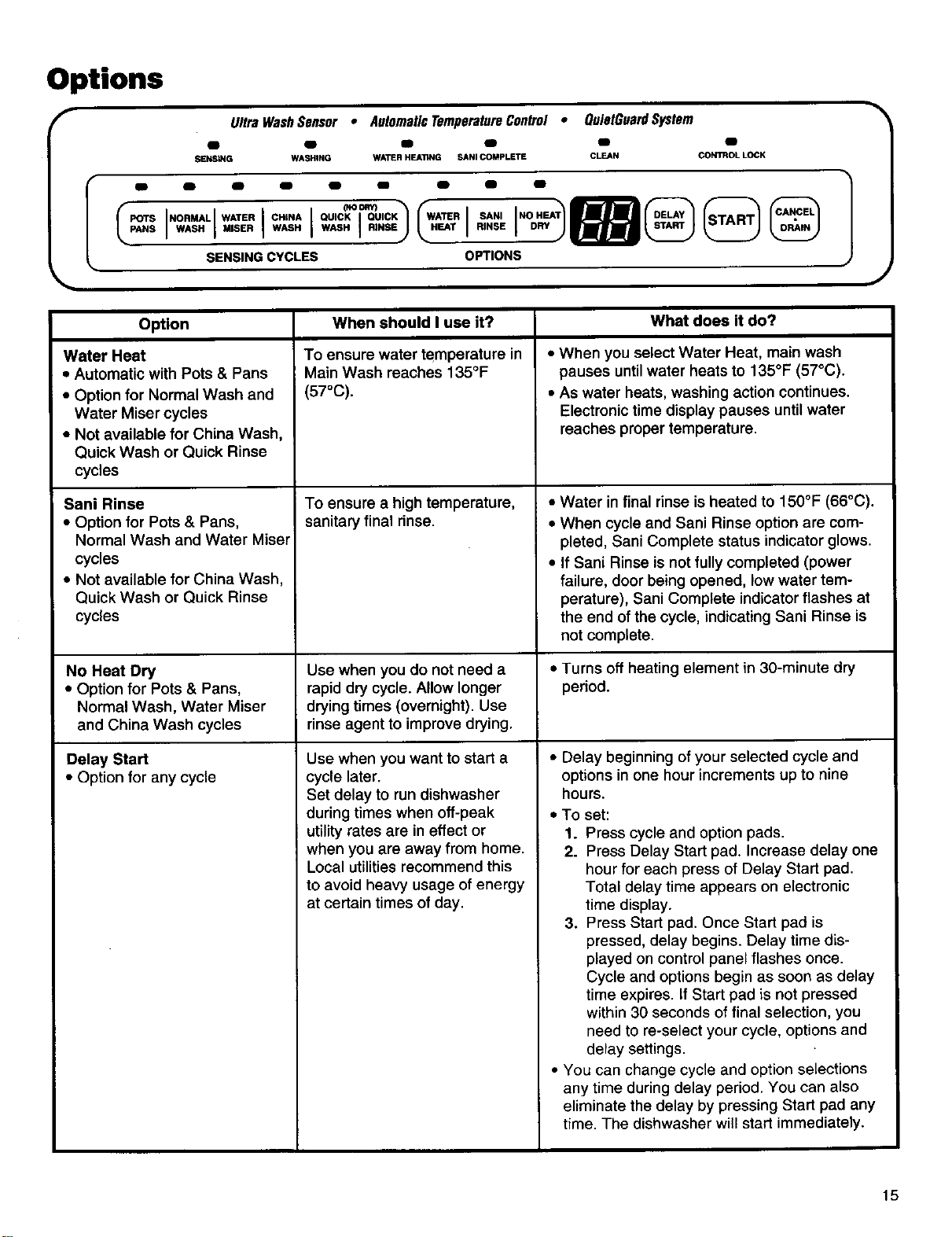
Options
UltraWashSensor • AutomaticTemperatureControl • OulatGuardSystem
m fD g _ _
SENSING WASHtNG WATER HEATING SANI COMPLETE CLEAN CONTROL LOCK
%
J
NORMAL WATER CHINA QUICK QUICK SANI
WASH MISER WASH WASH RINSE RINSE
SENSINGCYCLES OFrlONS
When should I use it?
To ensure water temperature in
Main Wash reaches 135°F
(57°C).
What does it do?
Option
Water Heat
• Automatic with Pots & Pans
• Option for Normal Wash and
Water Miser cycles
• Not available for China Wash,
Quick Wash or Quick Rinse
cycles
Sani Rinse
• Option for Pots & Pans,
Normal Wash and Water Miser
cycles
• Not available for China Wash,
Quick Wash or Quick Rinse
cycles
No Heat Dry
• Option for Pots & Pans,
Normal Wash, Water Miser
and China Wash cycles
Delay Start
• Option for any cycle
To ensure a high temperature,
sanitary final rinse.
Use when you do not need a
rapid dry cycle. Allow longer
drying times (overnight). Use
rinse agent to improve drying.
Use when you want to start a
cycle later.
Set delay to run dishwasher
during times when off-peak
utilityrates are in effect or
when you are away from home.
Local utilities recommend this
to avoid heavy usage of energy
at certain times of day.
• When you select Water Heat, main wash
pauses until water heats to 135°F (57°C).
• As water heats, washing action continues.
Electronic time display pauses until water
reaches proper temperature.
• Water in final rinse is heated to 150°F (66°C).
• When cycle and Sani Rinse option are com-
pleted, Sani Complete status indicator glows.
• If Sani Rinse is not fully completed (power
failure, door being opened, low water tem-
perature), Sani Complete indicator flashes at
the end of the cycle, indicatingSani Rinse is
not complete.
• Turns off heating element in 30-minute dry
period.
• Delay beginning of your selected cycle and
options in one hour increments up to nine
hours.
• To set:
1. Press cycle and option pads.
2. Press Delay Start pad. Increase delay one
hour for each press of Delay Start pad.
Total delay time appears on electronic
time display.
3. Press Start pad. Once Start pad is
pressed, delay begins. Delay time dis-
played on control panel flashes once.
Cycle and options begin as soon as delay
time expires. If Start pad is not pressed
within 30 seconds of final selection, you
need to re-select your cycle, options and
delay settings.
• You can change cycle and option selections
any time during delay period. You can also
eliminate the delay by pressing Start pad any
time. The dishwasher will start immediately.
15
Special features
Start Button Memory
• To use last full cycle and options completed, press the
Start pad.
• If you do not run dishwasher daily, close door to maintain
memory.
• if power is off or door is open for an extended period of
time, the Start button memory will default to Normal cycle
with Heat Dry.
To change a cycle
• Press Cancel,Drain. Wait for 2 minute drain to complete.
Reset dishwasher for desired cycle and options. (Re-
member to add detergent if dishwasher has already gone
through wash portion of original cycle.)
OR
• You can change cycle and options any time during first
2 minutes of cycle (while water is entering dishwasher)
without pressing Cancel-Drain.
To cancel a cycle
• Press Cancel,Drain. Wait for 2 minute drain to complete.
Control Lock
Prevent accidental cycle selections by "locking" controls.
To lock controls: Press and hold No Heat Dry pad for
4 seconds. Control Lock status indicator glows when
controlsare locked.
• To unlock controls: Press and hold No Heat Dry pad for
4 seconds. Control Lock status indicator will flash and
turn off.
If you tryto set cycles or options when controls are
locked, Control Lock status indicator willflash so you
know cycles or options cannot be selected until controls
are unlocked.
Caring for Your Dishwasher
Your new dishwasher is designed to give you many years of dependable service. There are a few things you can do to
maintain your dishwasher properly. This section tells you how to clean and care for your dishwasher. Refer to the
"Troubleshooting Guide" section for special cleaning problems.
Cleaning your dishwasher
Cleaning the exterior
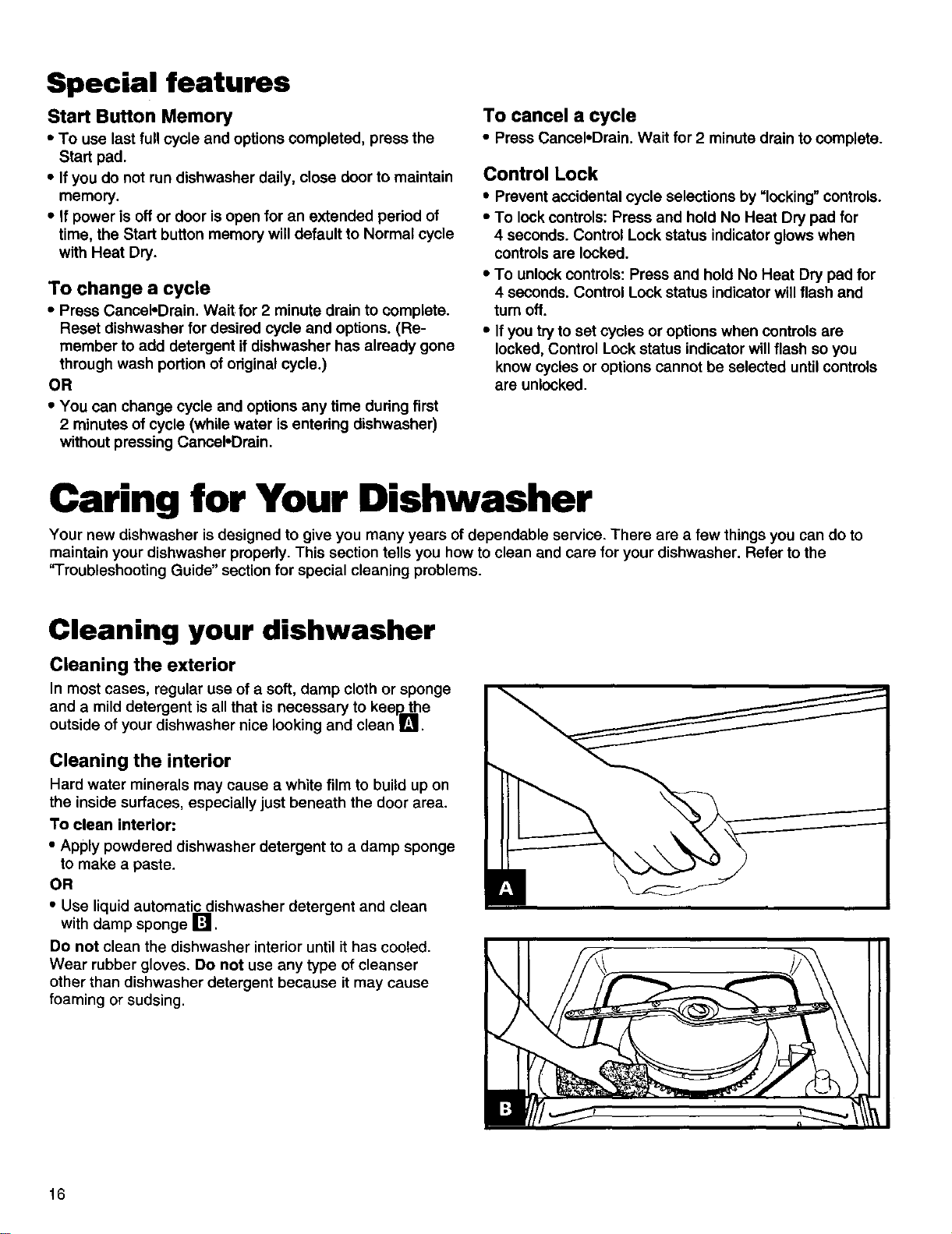
In most cases, regular use of a soft, damp cloth or sponge
and a mild detergent is all that is necessary to keep. the
outside of your dishwasher nice looking and clean I_'!
Cleaning the interior
Hard water minerals may cause a white film to build up on
the inside surfaces, especially just beneath the door area.
To clean interior:
• Apply powdered dishwasher detergent to a damp sponge
to make a paste.
OR
• Use liquid automatic dishwasher detergent and clean
with damp sponge !_.
Do not clean the dishwasher interior until ithas cooled.
Wear rubber gloves. Do not use any type of cleanser
other than dishwasher detergent because it may cause
foaming or sudsing.
\
l:!
16
Storing your dishwasher
Moving or winterizing your dishwasher
Protect your dishwasher and home against water damage
due to freezing water lines. Ifyour dishwasher is left in a
seasonal dwelling or could be exposed to near freezing
temperatures, have a qualified person do the following:
1. Disconnect power supply to the dishwasher.
2. Turn off water supply to the dishwasher.
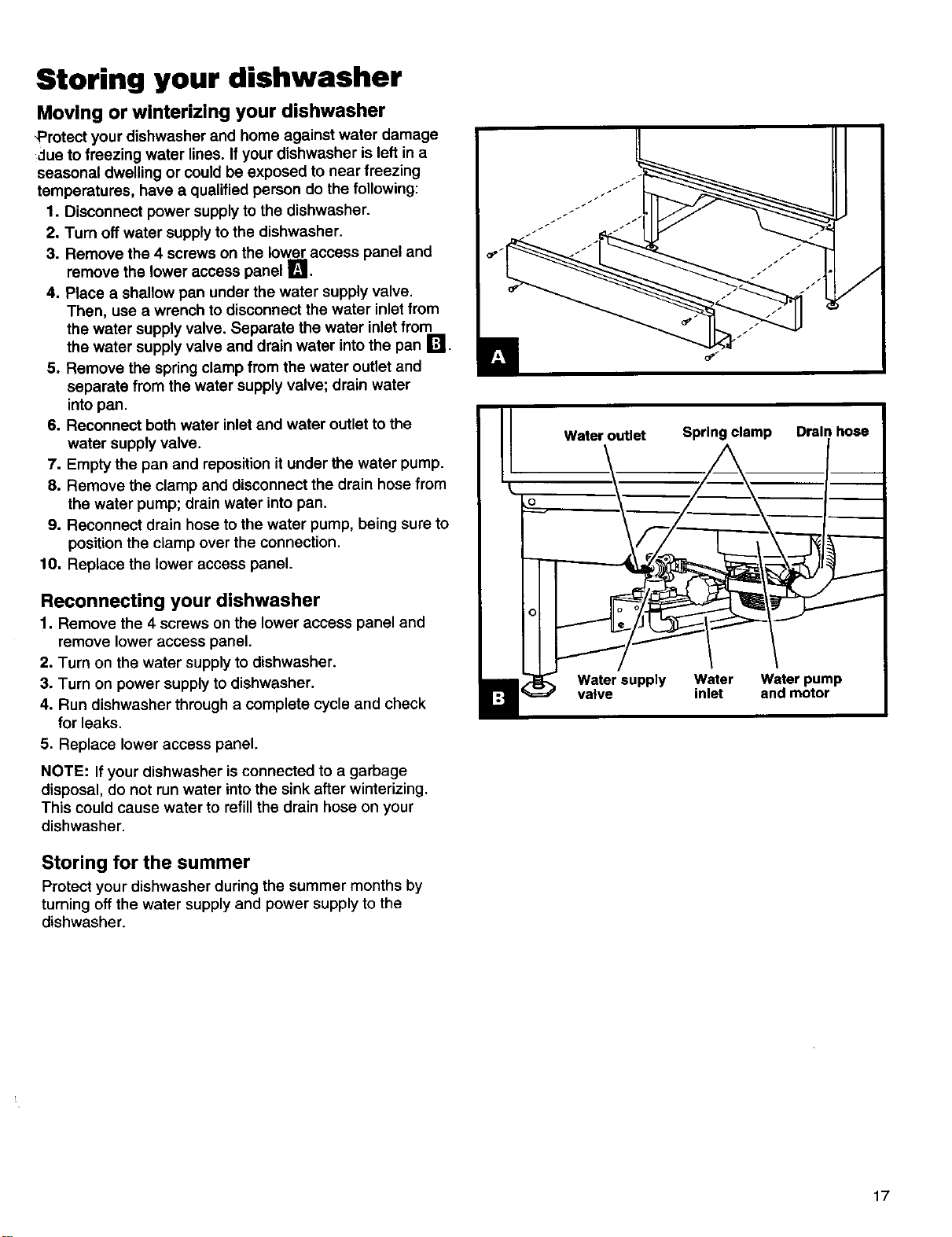
3. Remove the 4 screws on the lower access panel and
remove the lower access panel [].
4. Place a shallow pan under the water supply valve.
Then, use a wrench to disconnect the water inlet from
the water supply valve. Separate the water inletfrom
the water supply valve and drain water intothe pan [_.
5. Remove the spring clamp from the water outlet and
separate from the water supply valve; drain water
intopan.
6. Reconnect both water inletand water outlet to the
water supply valve.
7. Empty the pan and repositionit under the water pump.
8. Remove the clamp and disconnect the drain hose from
the water pump; drain water into pan.
9. Reconnect drain hose to the water pump, being sure to
position the clamp over the connection.
10. Replace the lower access panel.
Reconnecting your dishwasher
1. Remove the 4 screws on the lower access panel and
remove lower access panel.
2. Turn on the water supply to dishwasher.
3. Turn on power supply to dishwasher.
4. Run dishwasher through a complete cycle and check
for leaks.
5. Replace lower access panel.
NOTE: If your dishwasher isconnected to a garbage
disposal, do not run water into the sink after winterizing.
This could cause water to refill the drain hose on your
dishwasher.
Storing for the summer
Protect your dishwasher during the summer months by
turning offthe water supply and power supply to the
dishwasher.
J
17
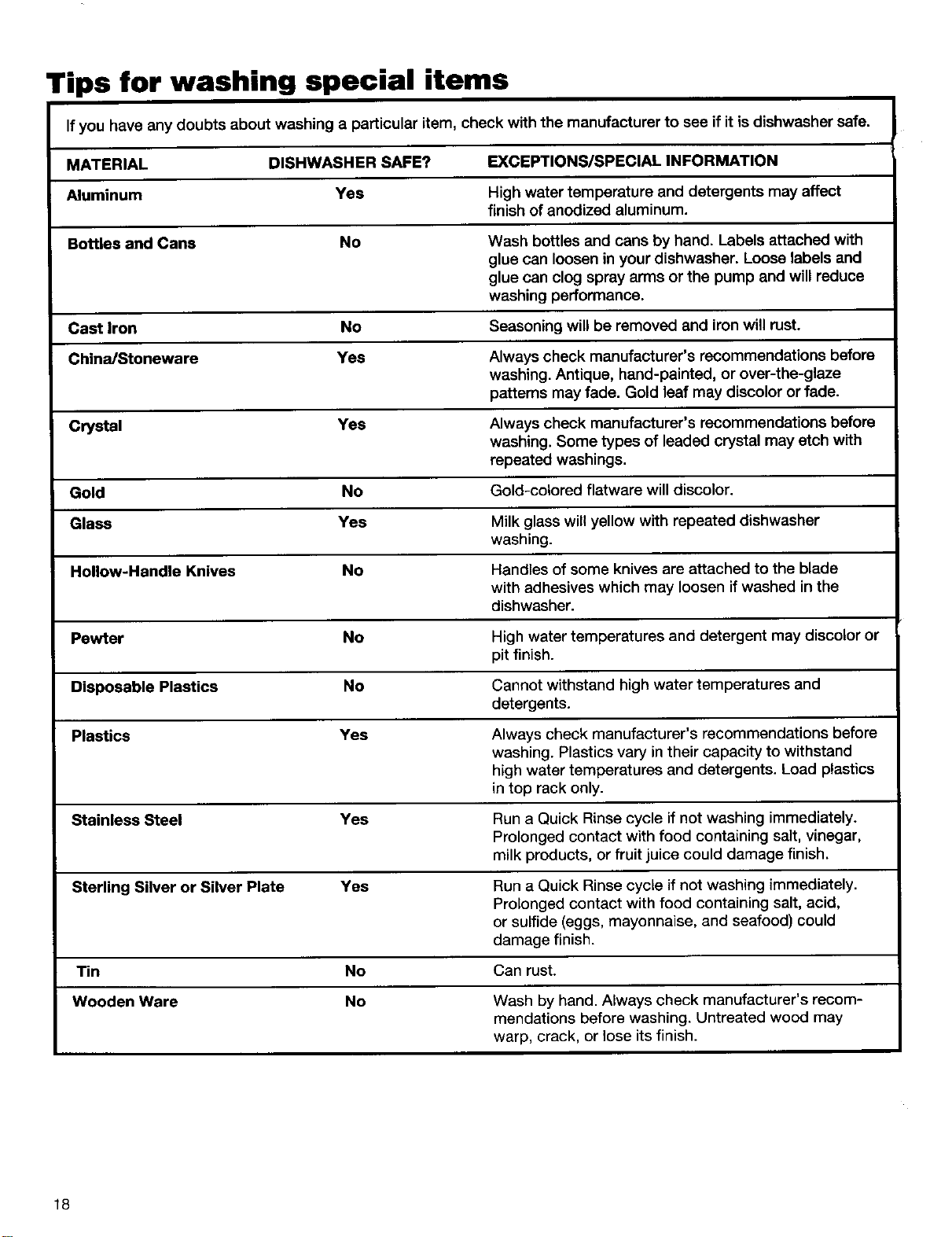
Tips for washing special items
If you have any doubts about washing a particular item, check with the manufacturer to see if it isdishwasher safe.
MATERIAL DISHWASHER SAFE? EXCEPTIONS/SPECIAL INFORMATION
Aluminum Yes High water temperature and detergents may affect
finish of anodized aluminum.
Bottles and Cans No Wash bottles and cans by hand. Labels attached with
glue can loosen in your dishwasher. Loose labels and
glue can clog spray arms or the pump and will reduce
washing performance.
Cast Iron No Seasoning will be removed and iron will rust.
China/Stoneware Yes Always check manufacturer's recommendations before
washing. Antique, hand-painted, or over-the-glaze
patterns may fade. Gold leaf may discolor or fade.
Crystal Yes Always check manufacturer's recommendations before
washing. Some types of leaded crystal may etch with
repeated washings.
Gold No Gold-colored flatware will discolor.
Glass Yes Milk glass will yellow with repeated dishwasher
washing.
Hollow-Handle Knives No Handles of some knives are attached to the blade
with adhesives which may loosen ifwashed in the
dishwasher.
Pewter No High water temperatures and detergent may discolor or
pit finish.
Disposable Plastics No Cannot withstand high water temperatures and
detergents.
Plastics Yes Always check manufacturer's recommendations before
washing. Plastics vary in their capacity to withstand
high water temperatures and detergents. Load plastics
in top rack only.
Stainless Steel Yes Run a Quick Rinse cycle if not washing immediately.
Prolonged contact with food containing salt, vinegar,
milk products, or fruit juice could damage finish.
Sterling Silver or Silver Plate Yes Run a Quick Rinse cycle if not washing immediately.
Prolonged contact with food containing salt, acid,
or sulfide (eggs, mayonnaise, and seafood) could
damage finish.
Tin No Can rust.
Wooden Ware No Wash by hand. Always check manufacturer's recom-
mendations before washing. Untreated wood may
warp, crack, or lose its finish.
18
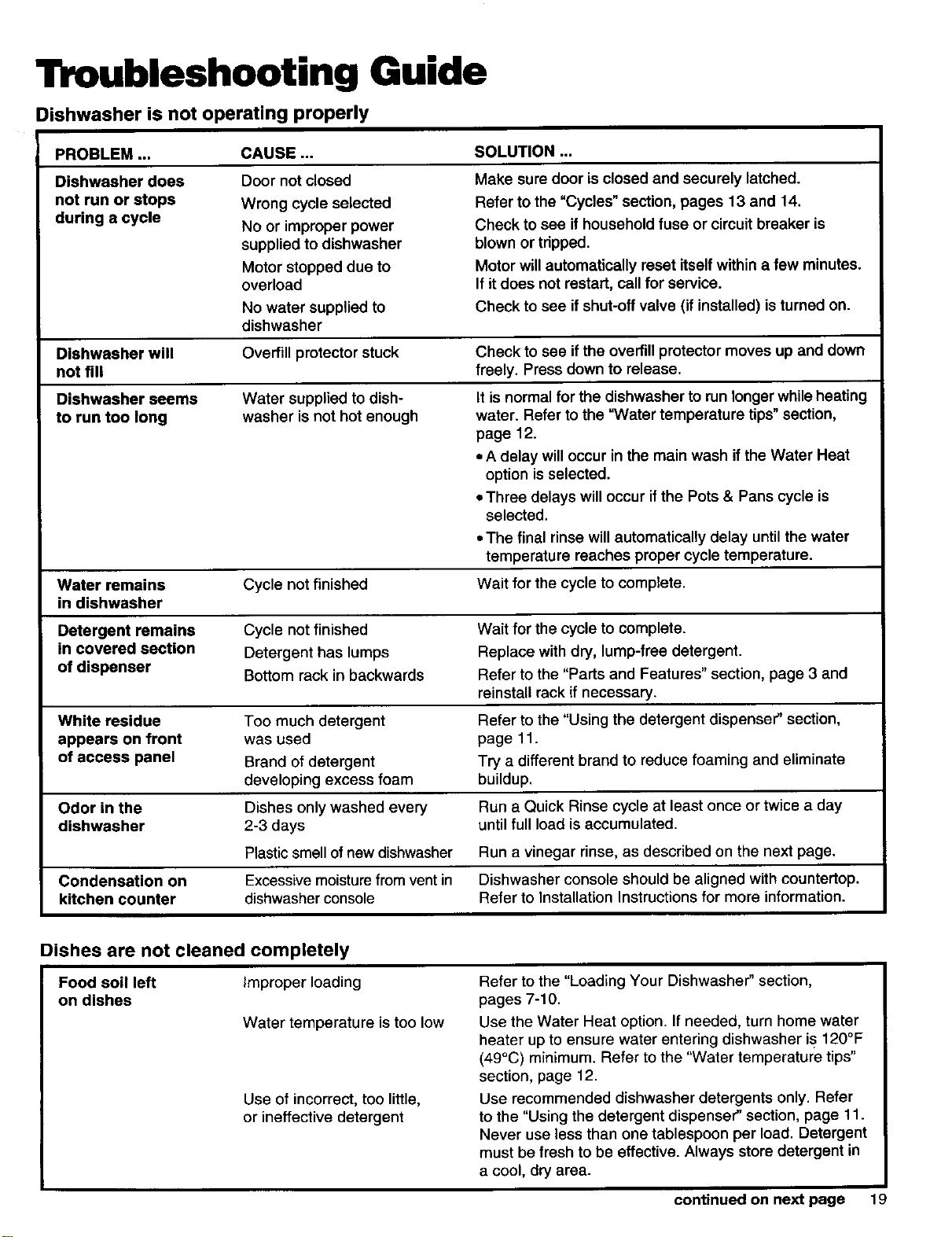
Troubleshooting Guide
Dishwasher is not operating properly
PROBLEM ...
Dishwasher does
not run or stops
during a cycle
SOLUTION...
CAUSE...
Make sure door is closed and securely latched.
Refer to the "Cycles" section, pages 13 and 14.
Check to see if household fuse or circuit breaker is
blown or tripped.
Motor will automatically reset itself within a few minutes.
If it does not restart, call for service.
Door not closed
Wrong cycle selected
No or improper power
supplied to dishwasher
Motor stopped due to
overload
No water supplied to Check to see if shut-off valve (if installed) is turned on.
dishwasher
Dishwasher will Overfill protector stuck Check to see ifthe overfill protector moves up and down
not fill freely. Press down to release.
Dishwasher seems
to run too long
Water supplied to dish-
washer is not hot enough
It is normal for the dishwasher to run longerwhileheating
water. Refer to the "Water temperature tips"section,
page 12.
• A delay will occur in the main wash if the Water Heat
option isselected.
• Three delays will occur if the Pots & Pans cycle is
selected.
•The final rinse will automatically delay until the water
temperature reaches proper cycle temperature.
Water remains Cycle not finished Wait for the cycle to complete.
in dishwasher
Detergent remains Cycle not finished Wait for the cycle to complete.
in covered section Detergent has lumps Replace with dry, lump-free detergent.
of dispenser Bottom rack in backwards Refer to the "Parts and Features" section, page 3 and
reinstall rack if necessary.
White residue Too much detergent Refer to the "Using the detergent dispenser" section,
appears on front was used page 11.
of access panel Brand of detergent Try a different brand to reduce foaming and eliminate
developing excess foam buildup.
Odor in the Dishes onlywashed every Run a Quick Rinse cycle at least once or twice a day
dishwasher 2-3 days until full load isaccumulated.
Plasticsmell ofnew dishwasher Run a vinegar rinse, as described on the next page.
Condensation on Excessivemoisturefrom ventin Dishwasher console should be aligned with countertop.
kitchen counter dishwasherconsole Refer to Installation Instructionsfor more information.
Dishes are not cleaned completely
Food soil left Improper loading
on dishes
Water temperature istoo low
Use of incorrect, too little,
or ineffective detergent
Refer to the "Loading Your Dishwasher" section,
pages 7-10.
Use the Water Heat option. If needed, turn home water
heater up to ensure water entering dishwasher is 120°F
(49°C) minimum. Refer to the "Water temperature tips"
section, page 12.
Use recommended dishwasher detergents only. Refer
to the "Using the detergent dispenser" section, page 11.
Never use less than one tablespoon per load. Detergent
must be fresh to be effective. Always store detergent in
a cool, dry area.
continued on next page 19
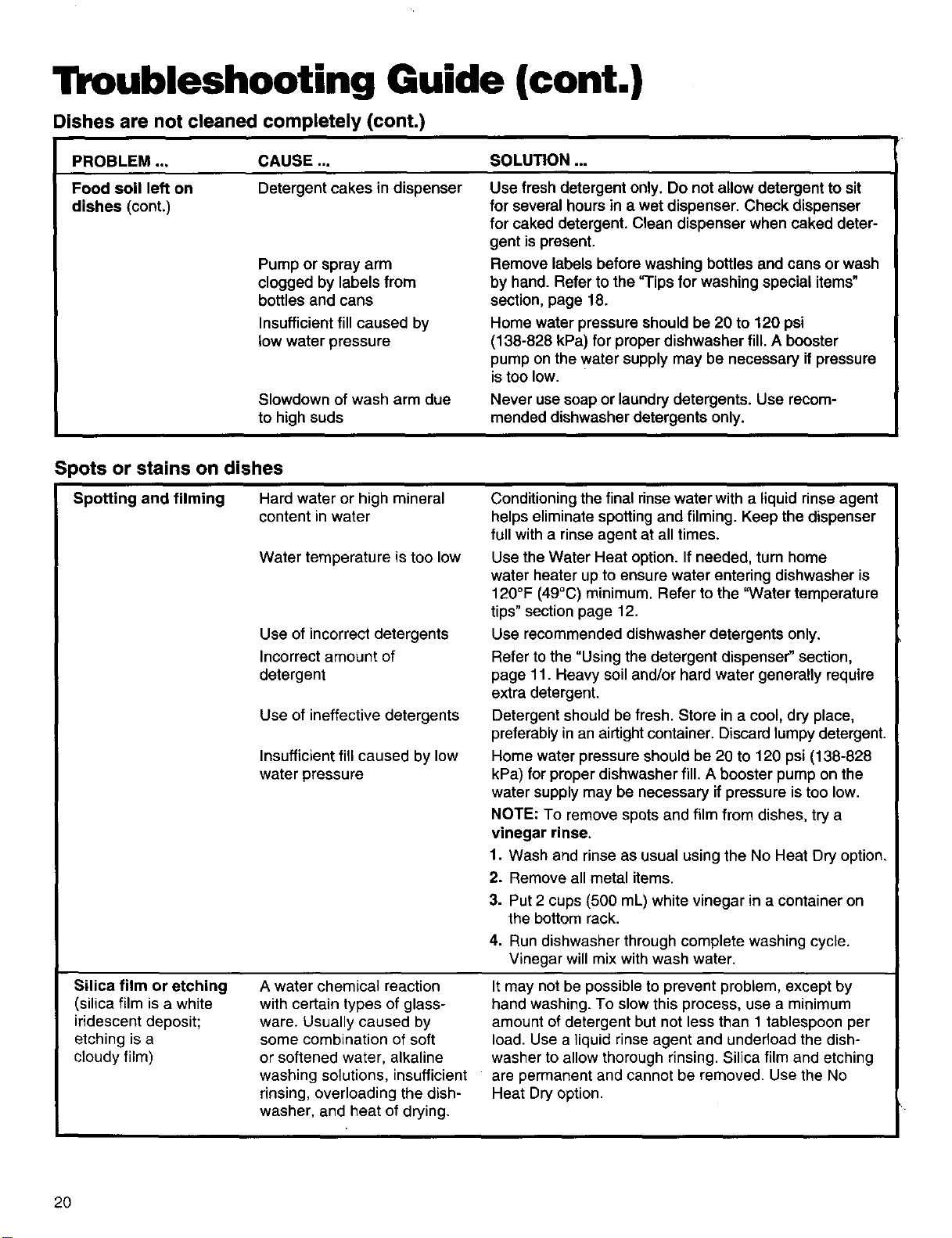
Troubleshooting Guide (cont.)
Dishes are not cleaned completely (cont.)
PROBLEM ..,
Food soil left on
dishes (cont.)
CAUSE ... SOLUTION ...
Detergent cakes in dispenser
Pump or spray arm
clogged by labels from
bottles and cans
Insufficient fill caused by
low water pressure
Slowdown of wash arm due
to high suds
Use fresh detergent only. Do not allow detergent to sit
for several hours in a wet dispenser. Check dispenser
for caked detergent. Clean dispenser when caked deter-
gent ispresent.
Remove labels before washing bottles and cans or wash
by hand. Refer to the "Tips for washing special items"
section, page 18.
Home water pressure should be 20 to 120 psi
(138-828 kPa) for proper dishwasher fill. A booster
pump on the water supply may be necessary if pressure
is too low.
Never use soap or laundry detergents. Use recom-
mended dishwasher detergents only.
Spots or stains on dishes
Spotting and filming
Silica film or etching
(silica film is a white
iridescent deposit;
etching isa
cloudy film)
Hard water or high mineral
content in water
Water temperature is too low
Use of incorrect detergents
Incorrect amount of
detergent
Use of ineffective detergents
Insufficient fill caused by low
water pressure
A water chemical reaction
with certain types of glass-
ware. Usually caused by
some combination of soft
or softened water, alkaline
washing solutions, insufficient
rinsing, overloading the dish-
washer, and heat of drying.
Conditioning the final rinse water with a liquid rinse agent
helps eliminate spotting and filming. Keep the dispenser
full with a rinse agent at all times.
Use the Water Heat option. If needed, turn home
water heater up to ensure water entering dishwasher is
120°F (49°C) minimum. Refer to the "Water temperature
tips" section page 12.
Use recommended dishwasher detergents only.
Refer to the "Using the detergent dispenser" section,
page 11. Heavy soil and/or hard water generally require
extra detergent.
Detergent should be fresh. Store in a cool, dry place,
preferably in an airtight container. Discard lumpy detergent.
Home water pressure should be 20 to 120 psi (138-828
kPa) for proper dishwasher fill. A booster pump on the
water supply may be necessary if pressure is too low.
NOTE: To remove spots and film from dishes, try a
vinegar rinse.
1. Wash and rinse as usual using the No Heat Dry option.
2. Remove all metal items.
3. Put 2 cups (500 mL) white vinegar in a container on
the bottom rack.
4. Run dishwasher through complete washing cycle.
Vinegar will mix with wash water.
It may not be possible to prevent problem, except by
hand washing. To slow this process, use a minimum
amount of detergent but not less than 1 tablespoon per
load. Use a liquid rinse agent and undedoad the dish-
washer to allow thorough rinsing. Silica film and etching
are permanent and cannot be removed. Use the No
Heat Dry option.
2O
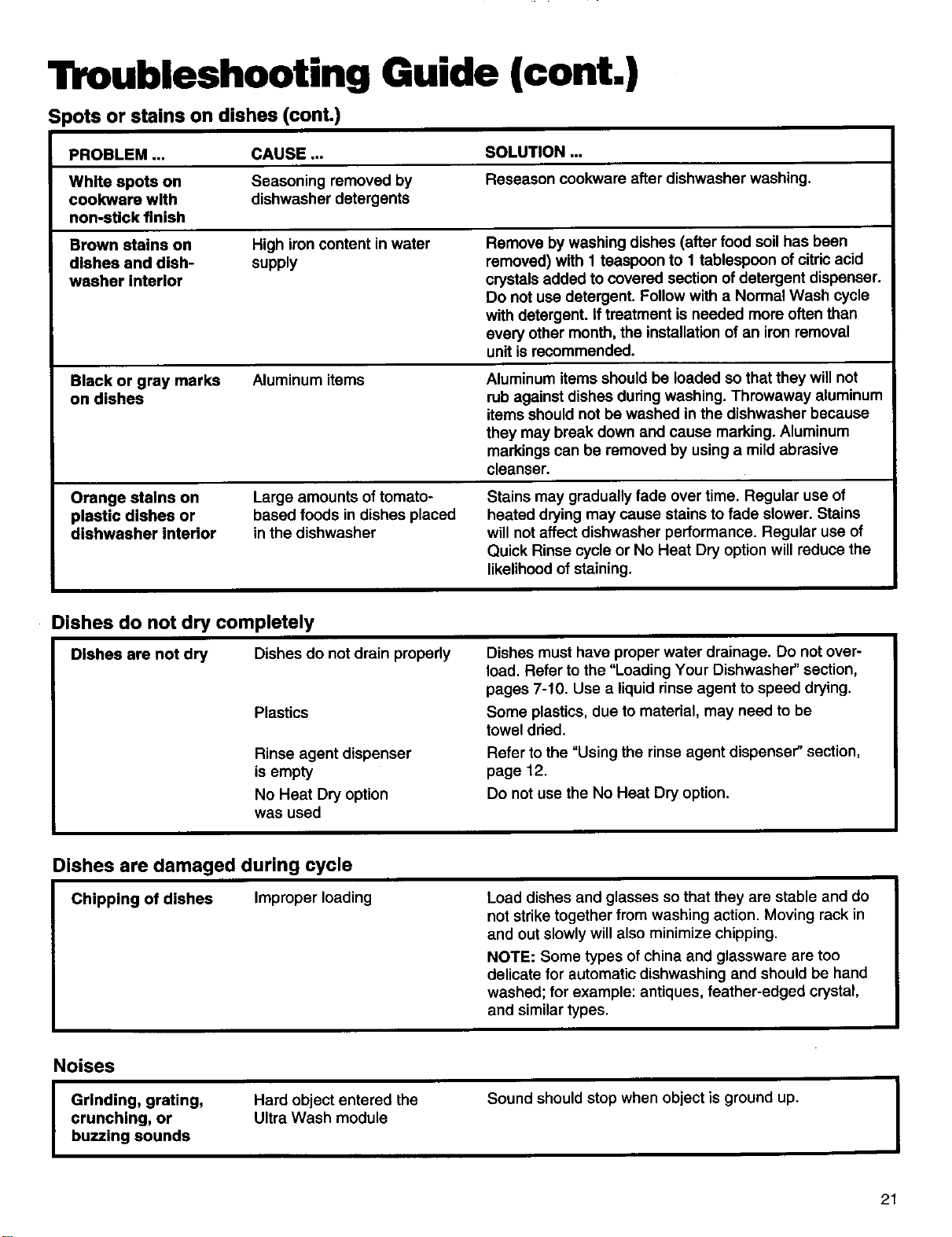
Troubleshooting Guide (cont.)
Spots or steins on dishes (cont.)
PROBLEM ... CAUSE ... SOLUTION ...
White spots on Seasoning removed by Reseason cookware after dishwasher washing.
cookware with dishwasher detergents
non-stick finish
Brown stains on High iron content in water Remove by washing dishes (after food soil has been
dishes and dish- supply removed) with 1 teaspoon to I tablespoon of citricacid
washer interior crystals added to covered section ofdetergent dispenser.
Do not use detergent. Follow with a Normal Wash cycle
with detergent. Iftreatment is needed more often than
every other month, the installationof an iron removal
unit is recommended.
Black or gray marks
on dishes
Aluminum items Aluminum items should be loaded so that they will not
rub against dishes during washing. Throwaway aluminum
items should not be washed in the dishwasher because
they may break down and cause marking. Aluminum
markings can be removed by using a mild abrasive
cleanser.
Orange stains on
plastic dishes or
dishwasher interior
Large amounts of tomato-
based foods in dishes placed
in the dishwasher
Stains may gradually fade over time. Regular use of
heated drying may cause stains to fade slower. Stains
will not affect dishwasher performance. Regular use of
Quick Rinse cycle or No Heat Dry option will reduce the
likelihood of staining.
Dishes do not dry completely
Dishes are not dry Dishes do not drain properly
Plastics
Rinse agent dispenser
is empty
No Heat Dry option
was used
Dishes must have proper water drainage. Do not over-
load. Refer to the "Loading Your Dishwasher" section,
pages 7-10. Use a liquid rinse agent to speed drying.
Some plastics, due to material, may need to be
towel dried.
Refer to the "Using the rinse agent dispenser" section,
page 12.
Do not use the No Heat Dry option.
Dishes are damaged during cycle
Chipping of dishes Improper loading
Load dishes and glasses so that they are stable and do
not strike together from washing action. Moving rack in
and out slowly will also minimize chipping.
NOTE: Some types of china and glassware are too
delicate for automatic dishwashing and should be hand
washed; for example: antiques, feather-edged crystal,
and similar types.
Noises
I rinding, grating,
crunching, or
buzzing sounds
Hard object entered the
Ultra Wash module
Sound should stop when object is ground up.
I
21
We Service What We Sell
"We Service What We Sell" is our assurance you can depend on Sears for service. Your dishwasher has added value when you
consider that Sears has serviceunits nationwide, staffed with professional technicians specifically trained on Sears appliances
and having the parts, tools, and equipment to ensure that we meet our pledge to you ... "We Service What We Sell."
Sears Maintenance Agreement
Maintain the value ofyour KENMORE Dishwasher with a Sears MaintenanceAgreement. Sears dishwashers are designed,
manufactured, and tested for yearsof dependable operation. Yet, any modern appliance may requireservice from timeto time.
The Sears Maintenance Agreement:
• Isyourway to buy tomorrow's service at today's prices.
• Eliminates repair bills resulting from normaluse.
• Allows for as many servicecalls as required.
• Providesfor service by professionalSearsTrained Technicians.
• Even ifyou don't need repairs, the Maintenance Agreement offersan annual preventative maintenance check-up at
your request!
This Maintenance Agreement does not cover original installation,reinstallation, or damage resulting from external causes such
as acts of abuse, theft, fire, flood, wind, lightning, freezing, power failure, power reduction, etc.
22
Sears Repair Services in U.S-A. and Canada
Forthe repair or replacement
partsyouneed
Call7 am - 7 pm, 7 days aweek
1-800-366-PART
(1-800-366-7278)
Forin-homemajorbrandrepair service
Call24 hours a day,7 days a week
1-800-4-REPAIR
(1-800-473-7247)
Forthe location ofa SearsRepair
Service Centerinyour area
Call24 hours a day,7 days a week
1-800-488-1222
Forinformationonpurchasinga Sears
Maintenance Agreementorto inquire
aboutan existingAgreement
Call 9 am - 5 pro, Monday - Saturday
1-800-827-6655
A
The model number of your product is located on
the serial plate beneath the top handle.
When requesting service or ordering parts, always
provide the following information:
• Product Type • Part Number
• Model Number • Part Description
SEARS
America's Repair Specialists
For information on parts and service in Canada, call:
1-800-665-4455
23

Notes
24

a97
Printsdin U,S.A.
Im_a¢;soen losEE,UU.
3378922 Irn_.i e.x_la.-u.J*