SM22030RANN Swan x Rangers Microwave IM.indd 1SM22030RANN Swan x Rangers Microwave IM.indd 1 04/11/2021 12:0804/11/2021 12:08
2
SM22030RANN Swan x Rangers Microwave IM.indd 2SM22030RANN Swan x Rangers Microwave IM.indd 2 04/11/2021 12:0804/11/2021 12:08
3
SM22030RANN Swan x Rangers Microwave IM.indd 3SM22030RANN Swan x Rangers Microwave IM.indd 3 04/11/2021 12:0804/11/2021 12:08
4
SM22030RANN Swan x Rangers Microwave IM.indd 4SM22030RANN Swan x Rangers Microwave IM.indd 4 04/11/2021 12:0804/11/2021 12:08
5
SM22030RANN Swan x Rangers Microwave IM.indd 5SM22030RANN Swan x Rangers Microwave IM.indd 5 04/11/2021 12:0804/11/2021 12:08
6
SM22030RANN Swan x Rangers Microwave IM.indd 6SM22030RANN Swan x Rangers Microwave IM.indd 6 04/11/2021 12:0804/11/2021 12:08
7
SM22030RANN Swan x Rangers Microwave IM.indd 7SM22030RANN Swan x Rangers Microwave IM.indd 7 04/11/2021 12:0804/11/2021 12:08
8
SM22030RANN Swan x Rangers Microwave IM.indd 8SM22030RANN Swan x Rangers Microwave IM.indd 8 04/11/2021 12:0804/11/2021 12:08
9
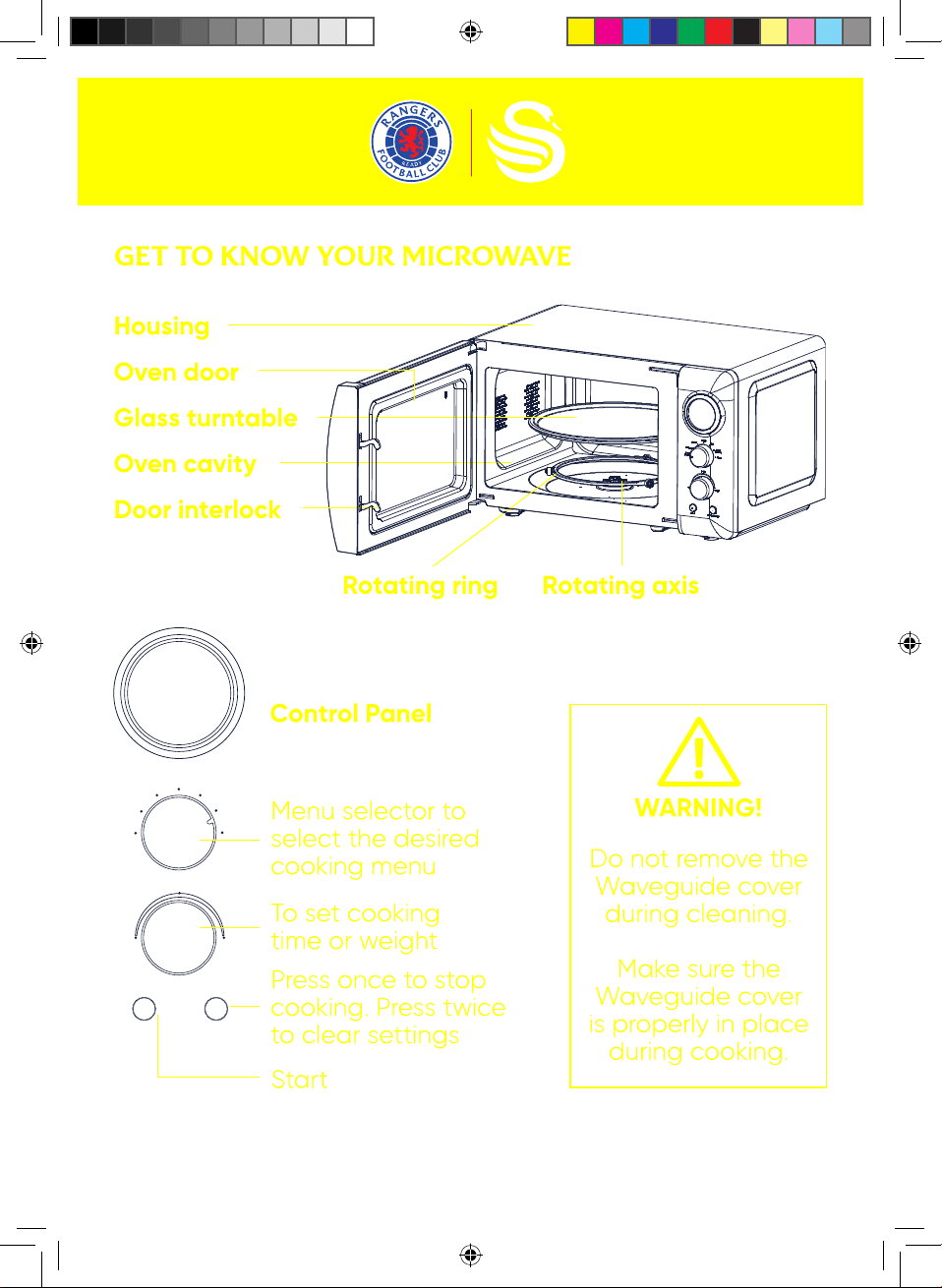
Defrost
M.Low
M.High
High
Speed
Cooking
Clock
Enter
Time
Start Pause/Cancel
Weight
Auto
Cooking
SM22030RANN Swan x Rangers Microwave IM.indd 9SM22030RANN Swan x Rangers Microwave IM.indd 9 04/11/2021 12:0904/11/2021 12:09
10
SM22030RANN Swan x Rangers Microwave IM.indd 10SM22030RANN Swan x Rangers Microwave IM.indd 10 04/11/2021 12:0904/11/2021 12:09
11
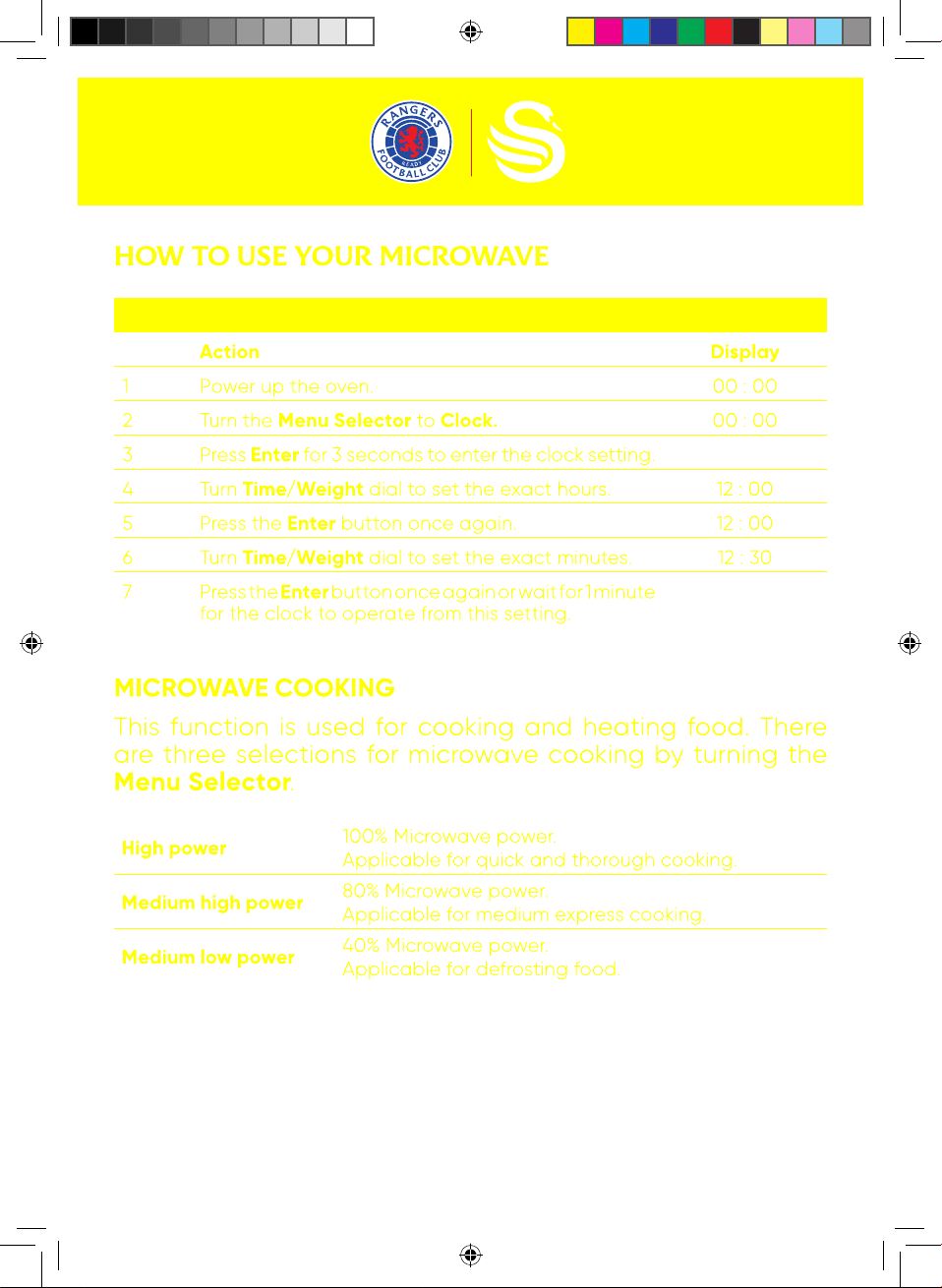
For example: to set 12:30
Action
Display
1 Power up the oven. 00 : 00
2 Turn the Menu Selector to Clock. 00 : 00
3 Press Enter for 3 seconds to enter the clock setting.
4 Turn Time/Weight dial to set the exact hours. 12 : 00
5 Press the Enter button once again. 12 : 00
6 Turn Time/Weight dial to set the exact minutes. 12 : 30
7 Press the Enter button once again or wait for 1 minute
for the clock to operate from this setting.
High power
100% Microwave power.
Applicable for quick and thorough cooking.
Medium high power
80% Microwave power.
Applicable for medium express cooking.
Medium low power
40% Microwave power.
Applicable for defrosting food.
SM22030RANN Swan x Rangers Microwave IM.indd 11SM22030RANN Swan x Rangers Microwave IM.indd 11 04/11/2021 12:0904/11/2021 12:09
12
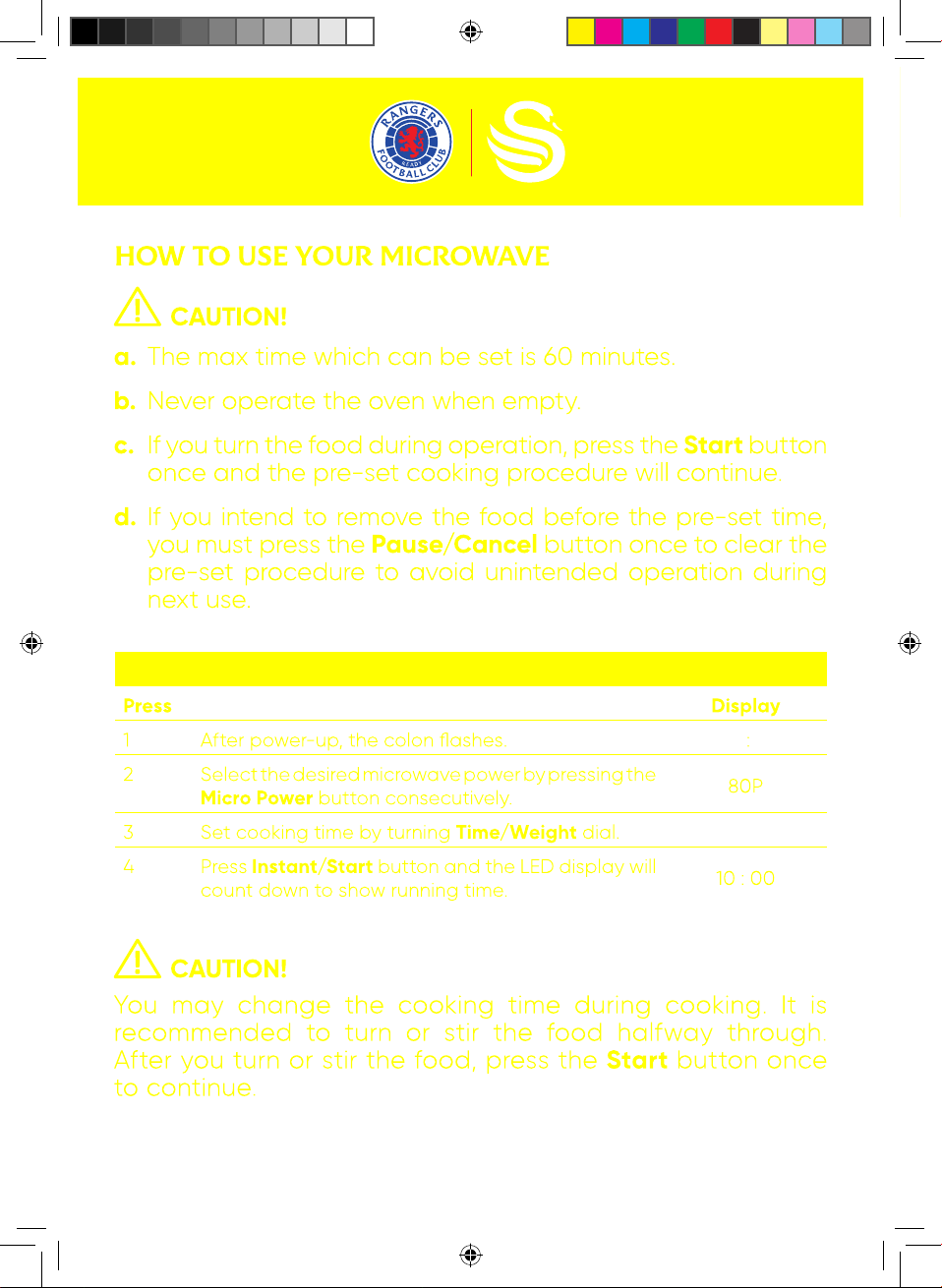
For example: to cook at P80 for 10 minutes
Press
Display
1 After power-up, the colon flashes. :
2 Select the desired microwave power by pressing the
Micro Power button consecutively.
80P
3 Set cooking time by turning Time/Weight dial.
4 Press Instant/Start button and the LED display will
count down to show running time.
10 : 00
SM22030RANN Swan x Rangers Microwave IM.indd 12SM22030RANN Swan x Rangers Microwave IM.indd 12 04/11/2021 12:0904/11/2021 12:09
13
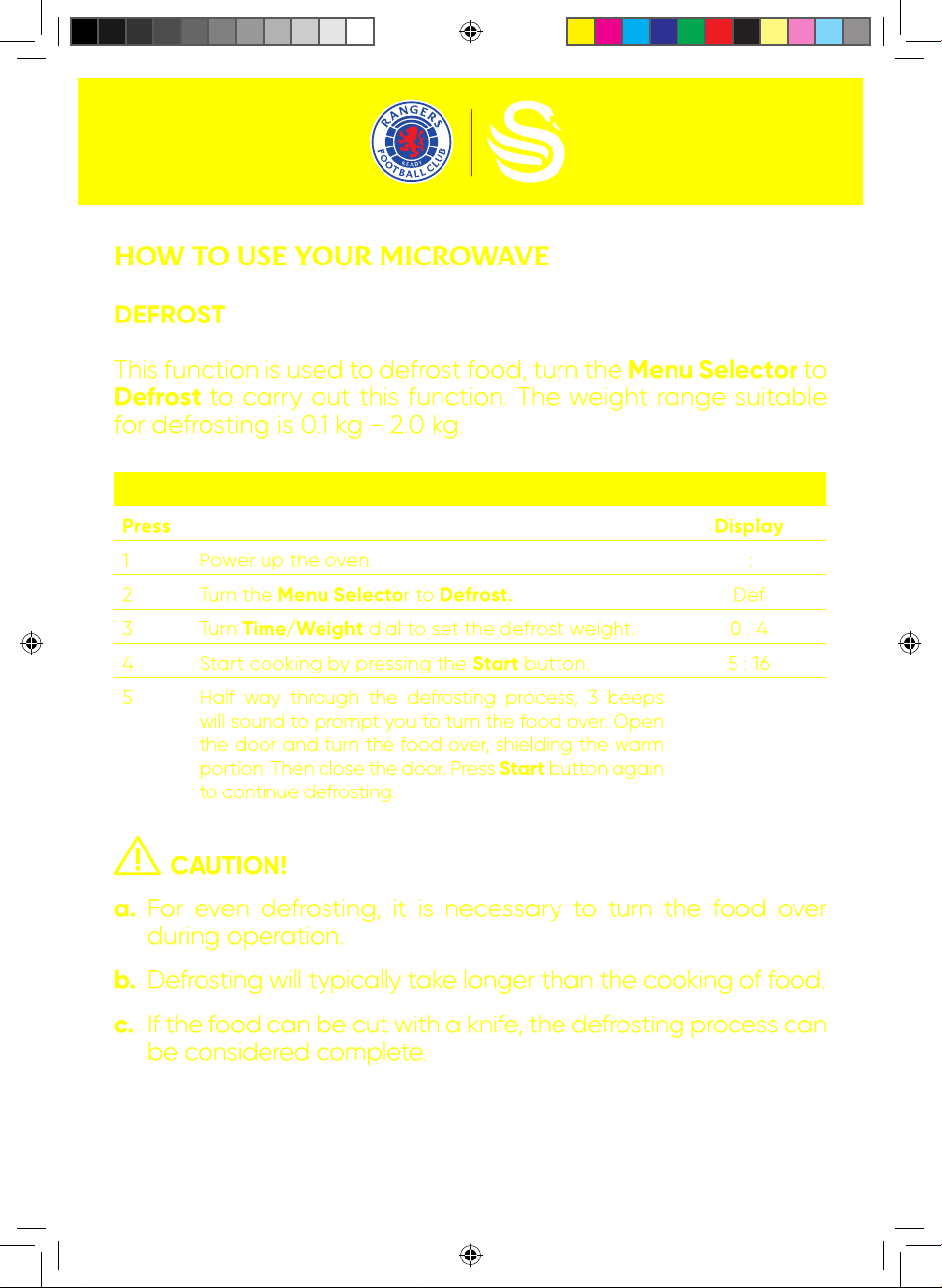
For example: to defrost 0.4kg poultry
Press
Display
1 Power up the oven. :
2 Turn the Menu Selector to Defrost. Def
3 Turn Time/Weight dial to set the defrost weight. 0 . 4
4 Start cooking by pressing the Start button. 5 : 16
5 Half way through the defrosting process, 3 beeps
will sound to prompt you to turn the food over. Open
the door and turn the food over, shielding the warm
portion. Then close the door. Press Start button again
to continue defrosting.
SM22030RANN Swan x Rangers Microwave IM.indd 13SM22030RANN Swan x Rangers Microwave IM.indd 13 04/11/2021 12:0904/11/2021 12:09
14
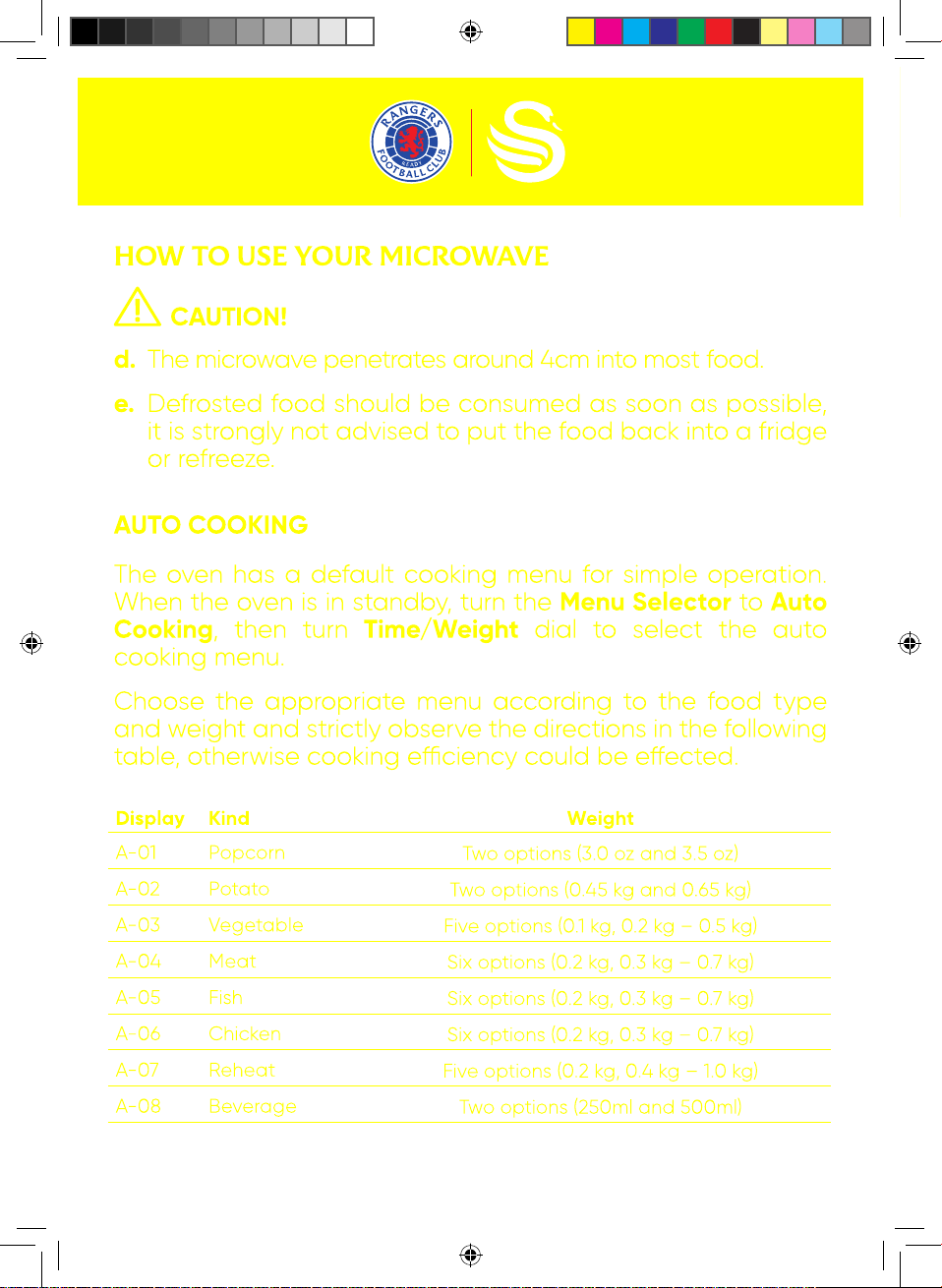
Display Kind Weight
A-01 Popcorn
Two options (3.0 oz and 3.5 oz)
A-02 Potato
Two options (0.45 kg and 0.65 kg)
A-03 Vegetable
Five options (0.1 kg, 0.2 kg – 0.5 kg)
A-04 Meat
Six options (0.2 kg, 0.3 kg – 0.7 kg)
A-05 Fish
Six options (0.2 kg, 0.3 kg – 0.7 kg)
A-06 Chicken
Six options (0.2 kg, 0.3 kg – 0.7 kg)
A-07 Reheat
Five options (0.2 kg, 0.4 kg – 1.0 kg)
A-08 Beverage
Two options (250ml and 500ml)
SM22030RANN Swan x Rangers Microwave IM.indd 14SM22030RANN Swan x Rangers Microwave IM.indd 14 04/11/2021 12:0904/11/2021 12:09
15
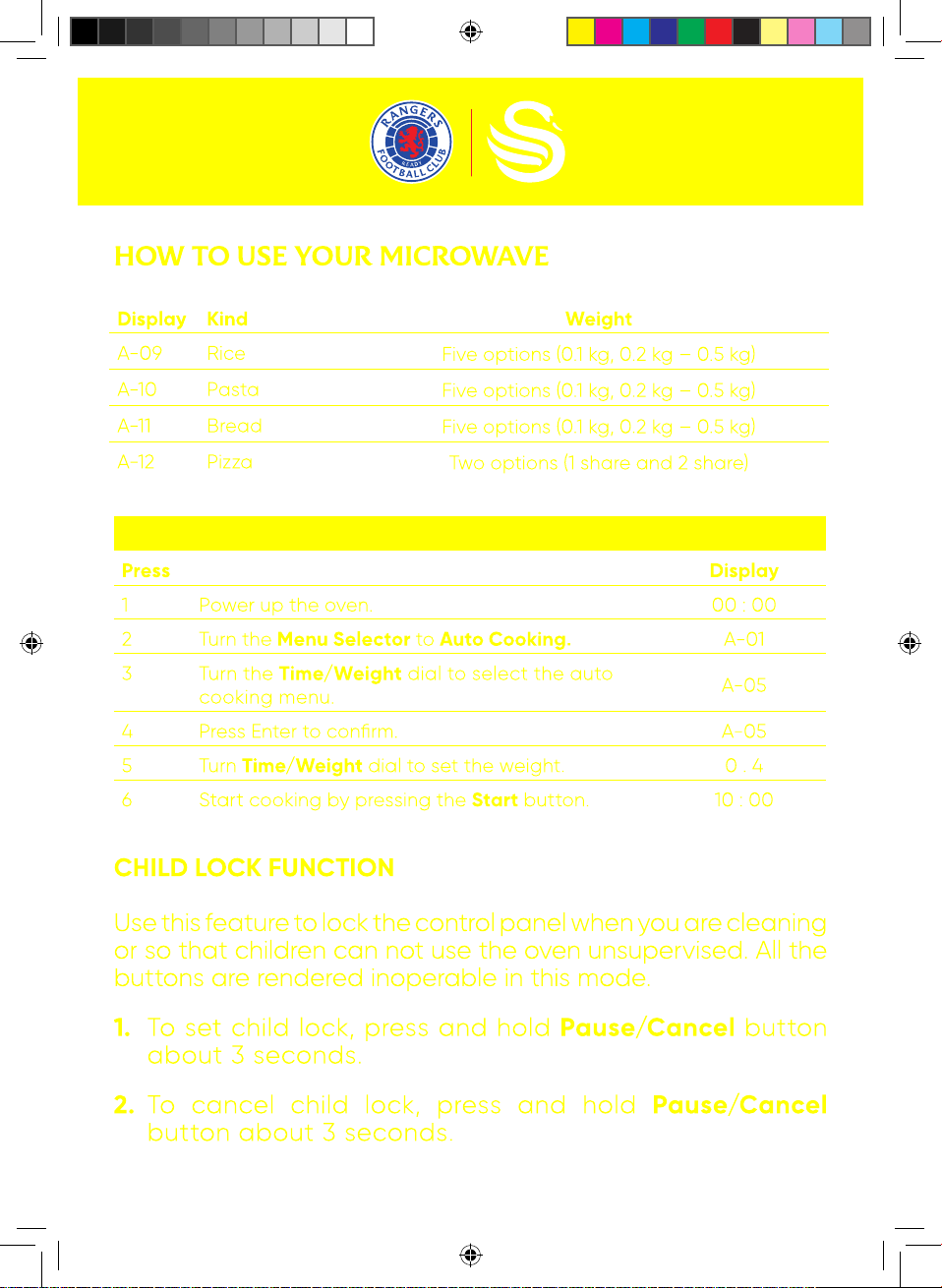
Display Kind Weight
A-09 Rice
Five options (0.1 kg, 0.2 kg – 0.5 kg)
A-10 Pasta
Five options (0.1 kg, 0.2 kg – 0.5 kg)
A-11 Bread
Five options (0.1 kg, 0.2 kg – 0.5 kg)
A-12 Pizza
Two options (1 share and 2 share)
For example: to steam 0.4kg fish
Press
Display
1 Power up the oven. 00 : 00
2 Turn the Menu Selector to Auto Cooking. A-01
3 Turn the Time/Weight dial to select the auto
cooking menu.
A-05
4 Press Enter to confirm. A-05
5 Turn Time/Weight dial to set the weight. 0 . 4
6 Start cooking by pressing the Start button. 10 : 00
SM22030RANN Swan x Rangers Microwave IM.indd 15SM22030RANN Swan x Rangers Microwave IM.indd 15 04/11/2021 12:0904/11/2021 12:09
16
SM22030RANN Swan x Rangers Microwave IM.indd 16SM22030RANN Swan x Rangers Microwave IM.indd 16 04/11/2021 12:0904/11/2021 12:09
17
SM22030RANN Swan x Rangers Microwave IM.indd 17SM22030RANN Swan x Rangers Microwave IM.indd 17 04/11/2021 12:0904/11/2021 12:09
18
SM22030RANN Swan x Rangers Microwave IM.indd 18SM22030RANN Swan x Rangers Microwave IM.indd 18 04/11/2021 12:0904/11/2021 12:09
19
SM22030RANN Swan x Rangers Microwave IM.indd 19SM22030RANN Swan x Rangers Microwave IM.indd 19 04/11/2021 12:0904/11/2021 12:09
20
SM22030RANN Swan x Rangers Microwave IM.indd 20SM22030RANN Swan x Rangers Microwave IM.indd 20 04/11/2021 12:0904/11/2021 12:09
21
SM22030RANN Swan x Rangers Microwave IM.indd 21SM22030RANN Swan x Rangers Microwave IM.indd 21 04/11/2021 12:0904/11/2021 12:09
22
SM22030RANN Swan x Rangers Microwave IM.indd 22SM22030RANN Swan x Rangers Microwave IM.indd 22 04/11/2021 12:0904/11/2021 12:09
23
SM22030RANN Swan x Rangers Microwave IM.indd 23SM22030RANN Swan x Rangers Microwave IM.indd 23 04/11/2021 12:0904/11/2021 12:09
SM22030RANN Swan x Rangers Microwave IM.indd 24SM22030RANN Swan x Rangers Microwave IM.indd 24 04/11/2021 12:1004/11/2021 12:10