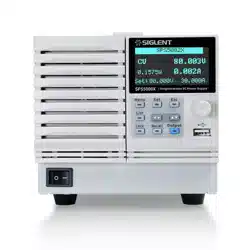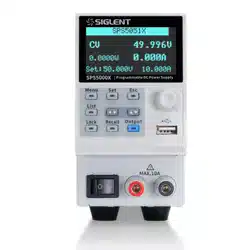
SPS5000X Series User Manual
WWW.SIGLENT.COM 0
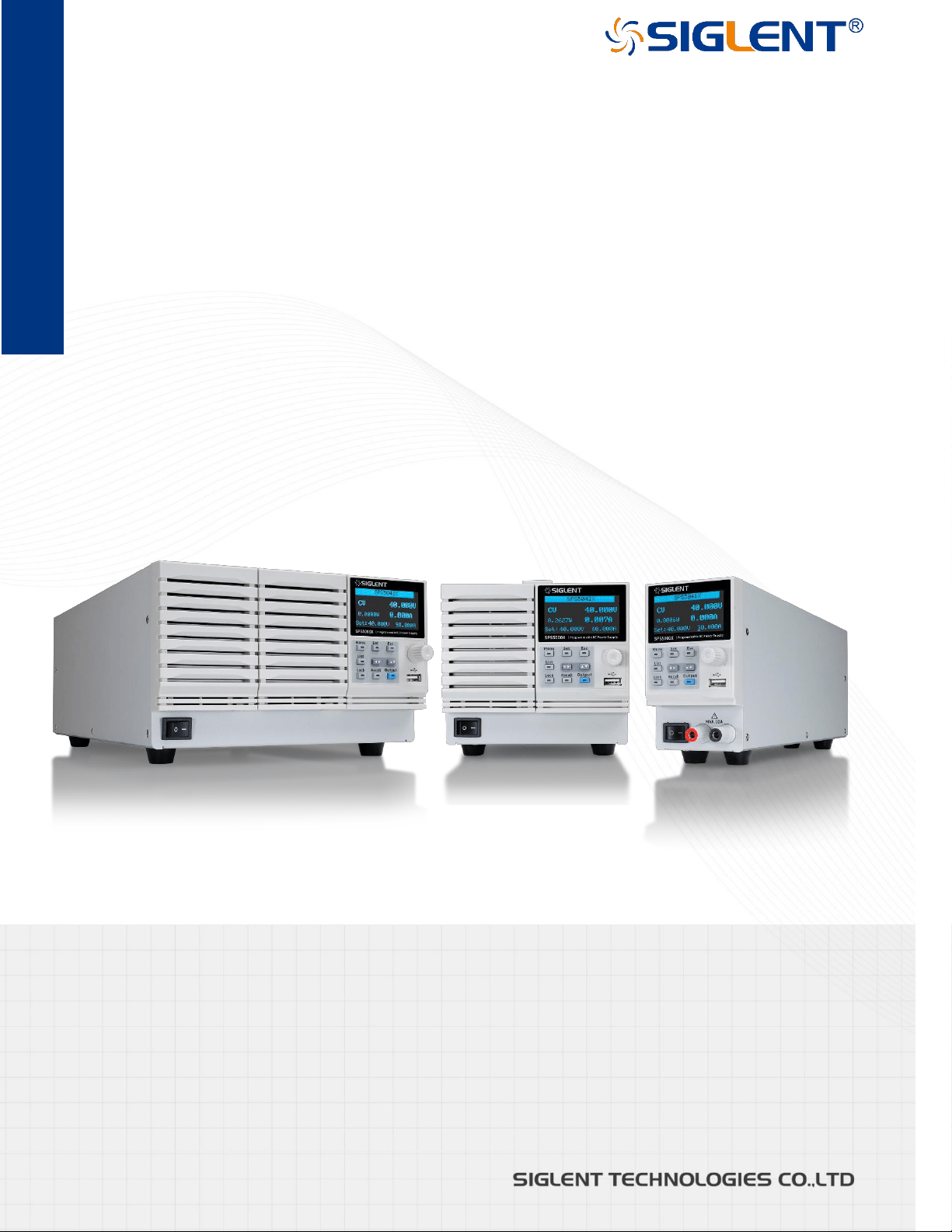
SPS5000X Series
Wide Range Programmable
Switching DC Power Supplies
User Manual

SPS5000X Series User Manual
WWW.SIGLENT.COM 1
Contents
INTRODUCTION ................................................................................................................................................................. 4
IMPORTANT SAFETY INFORMATION.............................................................................................................................. 5
GENERAL SAFETY SUMMARY ....................................................................................................................5
SAFETY TERMS AND SYMBOLS ..................................................................................................................6
WORKING ENVIRONMENT ..........................................................................................................................7
COOLING REQUIREMENTS ..........................................................................................................................8
AC POWER AND GROUND CONNECTIONS ....................................................................................................9
OUTPUT PORT CONNECTIONS ................................................................................................................. 10
CLEANING ............................................................................................................................................ 10
ABNORMAL CONDITIONS ........................................................................................................................ 11
DOCUMENTATION CONVENTIONS ............................................................................................................. 12
INFORMATIONS ESSENTIELLES SUR LA SÉCURITÉ ................................................................................................. 13
EXIGENCE DE SÉCURITÉ ......................................................................................................................... 13
TERMES ET SYMBOLES DE SÉCURITÉ ....................................................................................................... 14
ENVIRONNEMENT DE TRAVAIL ................................................................................................................. 15
EXIGENCES DE REFROIDISSEMENT ........................................................................................................... 17
CONNEXIONS D'ALIMENTATION ET DE TERRE ............................................................................................ 17
CONNEXION DU PORT DE SORTIE ............................................................................................................. 18
NETTOYAGE .......................................................................................................................................... 19
CONDITIONS ANORMALES ....................................................................................................................... 19
DELIVERY OF THE POWER SUPPLY ............................................................................................................................ 21
ABOUT WARRANTY ............................................................................................................................... 21
MAINTENANCE AGREEMENT ................................................................................................................... 22
INTRODUCTION OF SPS5000X SERIES ........................................................................................................................ 23
PERFORMANCE AND FEATURES .............................................................................................................. 24
MODEL INTRODUCTION .......................................................................................................................... 25
SIZE 26
SPS5000X SERIES OVERVIEW ...................................................................................................................................... 29
APPEARANCE ....................................................................................................................................... 29
REAR PANEL ........................................................................................................................................ 32
THEORY OF OPERATION ............................................................................................................................................... 35
OPERATING AREA DESCRIPTION ............................................................................................................. 35
CC AND CV MODE ................................................................................................................................ 35
SLEW RATE .......................................................................................................................................... 36
BLEEDER CONTROL ............................................................................................................................... 37
INTERNAL RESISTANCE .......................................................................................................................... 38
ALARMS ............................................................................................................................................... 39
CONSIDERATIONS .................................................................................................................................. 39
Inrush current
........................................................................................................................................................ 39
Pulsed or Peaked loads
...................................................................................................................................... 40

SPS5000X Series User Manual
WWW.SIGLENT.COM 2
Reverse current regenerative load
................................................................................................................... 40
Reverse current connection method
................................................................................................................ 41
Grounding
............................................................................................................................................................... 41
SWITCH ON / OFF AND OUTPUT PORT ........................................................................................................................ 43
CONNECT THE POWER CORD.................................................................................................................. 43
POWER ON ........................................................................................................................................... 43
POWER OFF.......................................................................................................................................... 44
OUTPUT PORT ...................................................................................................................................... 44
USER INTERFACE ........................................................................................................................................................... 46
BASIC OPERATION ......................................................................................................................................................... 48
SYSTEM SETTINGS ................................................................................................................................ 48
View Version Information
.................................................................................................................................... 48
System Upgrade
................................................................................................................................................... 48
Restore Default
..................................................................................................................................................... 49
Beeper Setup
........................................................................................................................................................ 49
Parallel/Series Operation
.................................................................................................................................... 49
FUNCTION SETTINGS ............................................................................................................................. 63
Set List Function
................................................................................................................................................... 63
Set OCP/OVP
........................................................................................................................................................ 67
Set Bleeder Resistor Control
............................................................................................................................. 67
Set CC/CV Priority
............................................................................................................................................... 67
Set Output On/Off Delay Time
.......................................................................................................................... 68
Set Internal Resistance
....................................................................................................................................... 69
Set Measurement Accuracy
............................................................................................................................... 69
External Analog Control
...................................................................................................................................... 70
External Control Output On/Off
......................................................................................................................... 71
Multi-channel Settings
......................................................................................................................................... 73
Analog Interface
.................................................................................................................................................... 74
Save/Recall
............................................................................................................................................................ 76
COMMUNICATION INTERFACE SETTINGS ................................................................................................................... 77
REMOTE CONTROL ........................................................................................................................................................ 78
WAY TO CONTROL................................................................................................................................. 78
GRAMMATICAL CONVENTIONS ................................................................................................................ 79
COMMAND SUMMARY ............................................................................................................................ 80
COMMAND DESCRIPTION ...................................................................................................................... 80
IEEE Common Command Subsystem
............................................................................................................ 80
Measure Command Subsystem
........................................................................................................................ 83
Configure Configuration Command Subsystem
............................................................................................ 84
List Configuration Command Subsystem
....................................................................................................... 91
System Configuration Command Subsystem
................................................................................................ 95
WEB SERVICE ....................................................................................................................................... 98
List operation method:
....................................................................................................................................... 101
List file export
...................................................................................................................................................... 103
TROUBLESHOOTING ................................................................................................................................................... 104

SPS5000X Series User Manual
WWW.SIGLENT.COM 3
CONTACT US ................................................................................................................................................................ 105
SPS5000X Series User Manual
WWW.SIGLENT.COM 4
Introduction
This user manual includes important safety and installation information related to the
SPS5000X series wide range programmable Switching DC Power Supply and includes
simple tutorials for basic operation of the supply.
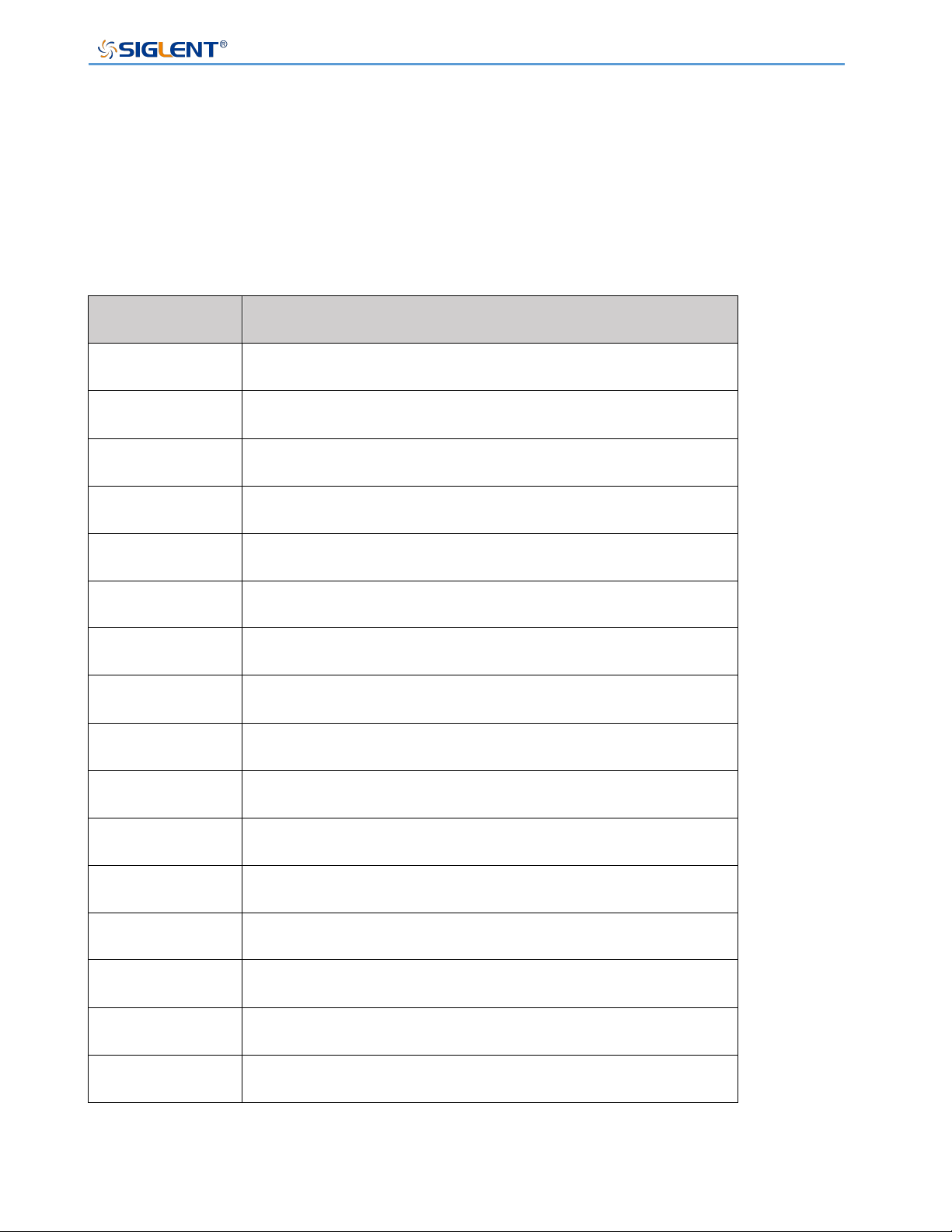
The series includes the following models:
Model
Output parameters
SPS5041X
40 V/30 A/360 W
SPS5042X
40 V/60 A/720 W
SPS5043X
40 V/90 A/1080 W
SPS5044X
2-channel, 40 V/30 A/360 W/CH
SPS5045X
3-channel, 40 V/30 A/360 W/CH
SPS5051X
50 V/10 A/180 W
SPS5081X
80 V/15 A/360 W
SPS5082X
80 V/30 A/720 W
SPS5083X
80 V/45 A/1080 W
SPS5084X
2-channel, 80 V/15 A/360 W/CH
SPS5085X
3-channel, 80 V/15 A/360 W/CH
SPS5161X
160 V/7.5 A/360 W
SPS5162X
160 V/15 A/720 W
SPS5163X
160 V/22.5 A/1080 W
SPS5164X
2-channel, 160 V/7.5 A/360 W/CH
SPS5165X
3-channel, 160 V/7.5 A/360 W/CH
SPS5000X Series User Manual
WWW.SIGLENT.COM 5
Important Safety Information
This manual contains information and warnings that must be followed by the user for safe
operation and to keep the product in a safe condition.
General Safety Summary
Carefully read the following safety precautions to avoid personal injury and prevent
damage to the instrument and any products connected to it. To avoid potential hazards,
please use the instrument as specified.
To avoid fire or personal injury, use the proper power cord.
Only use the state/locally approved power cord with the instrument.Sold to North America
and other countries, it will be equipped with power cord meeting local requirements.
Warning:
Do not use removable power cords with insufficient ratings.
Ground the instrument.
The instrument grounds through the protective terra conductor of the power line. To avoid
electric shock, the ground conductor must be connected to the earth. Make sure the
instrument is grounded correctly before connect its input or output terminals.
Review all terminal ratings before use.
To avoid fire or electrical shock, please look over all ratings and instructions for the
instrument. Before connecting the instrument, please read the manual carefully to gain
more information about the ratings and important use instructions for safe operation.
Do not operate with suspected failures.
If you suspect that there is damage to the instrument, halt use and contact your local
SIGLENT dealer immediately.
SPS5000X Series User Manual
WWW.SIGLENT.COM 6
Do not operate in wet/damp conditions.
Do not operate in an explosive atmosphere.
Keep the surface of the instrument clean and dry.
Anyone operating this equipment should refer to the instruction manual to
understand the protection afforded by the equipment. Please use the instrument
only in accordance with regulations.
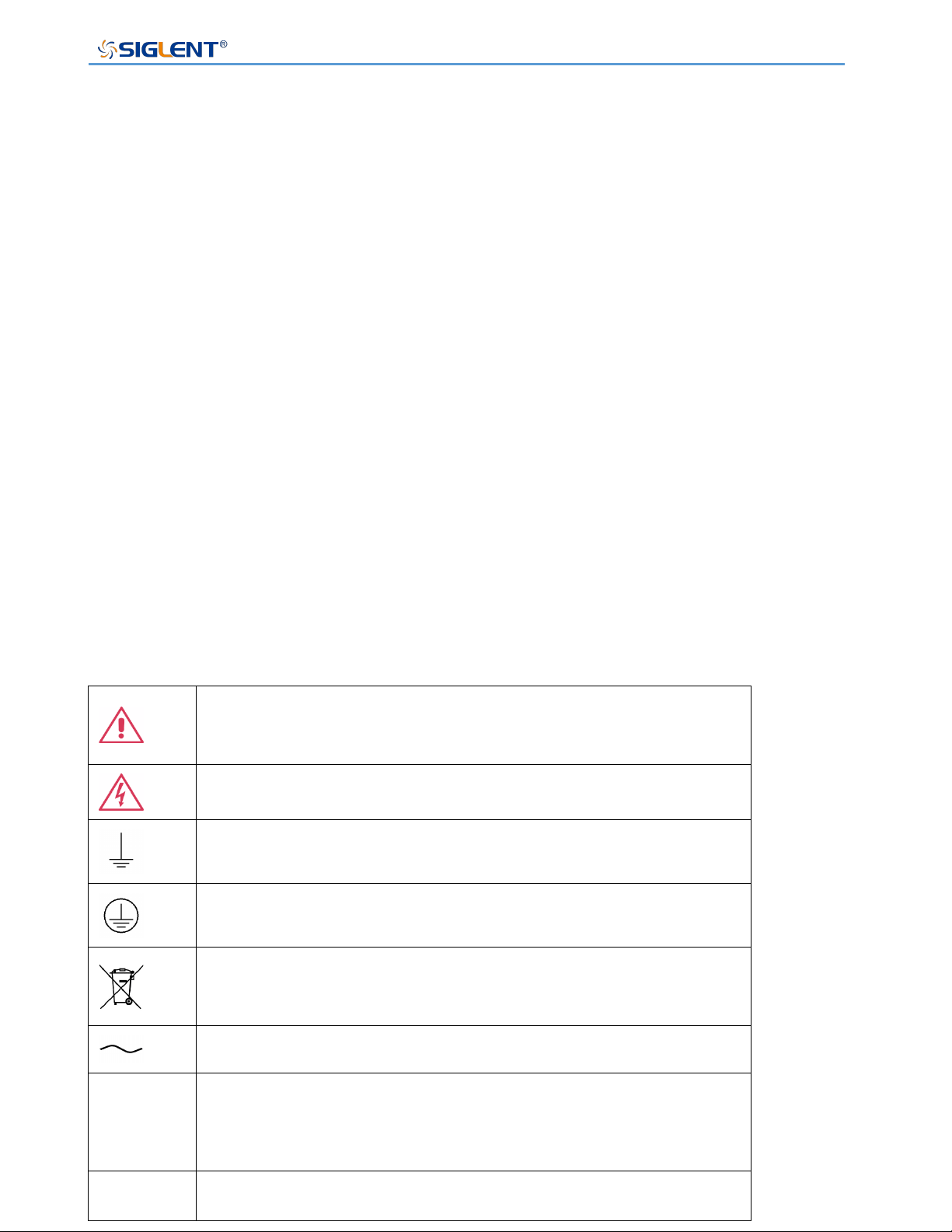
Safety Terms and Symbols
When the following symbols or terms appear on the front or rear panel of the instrument or
in this manual, they indicate special care in terms of safety.
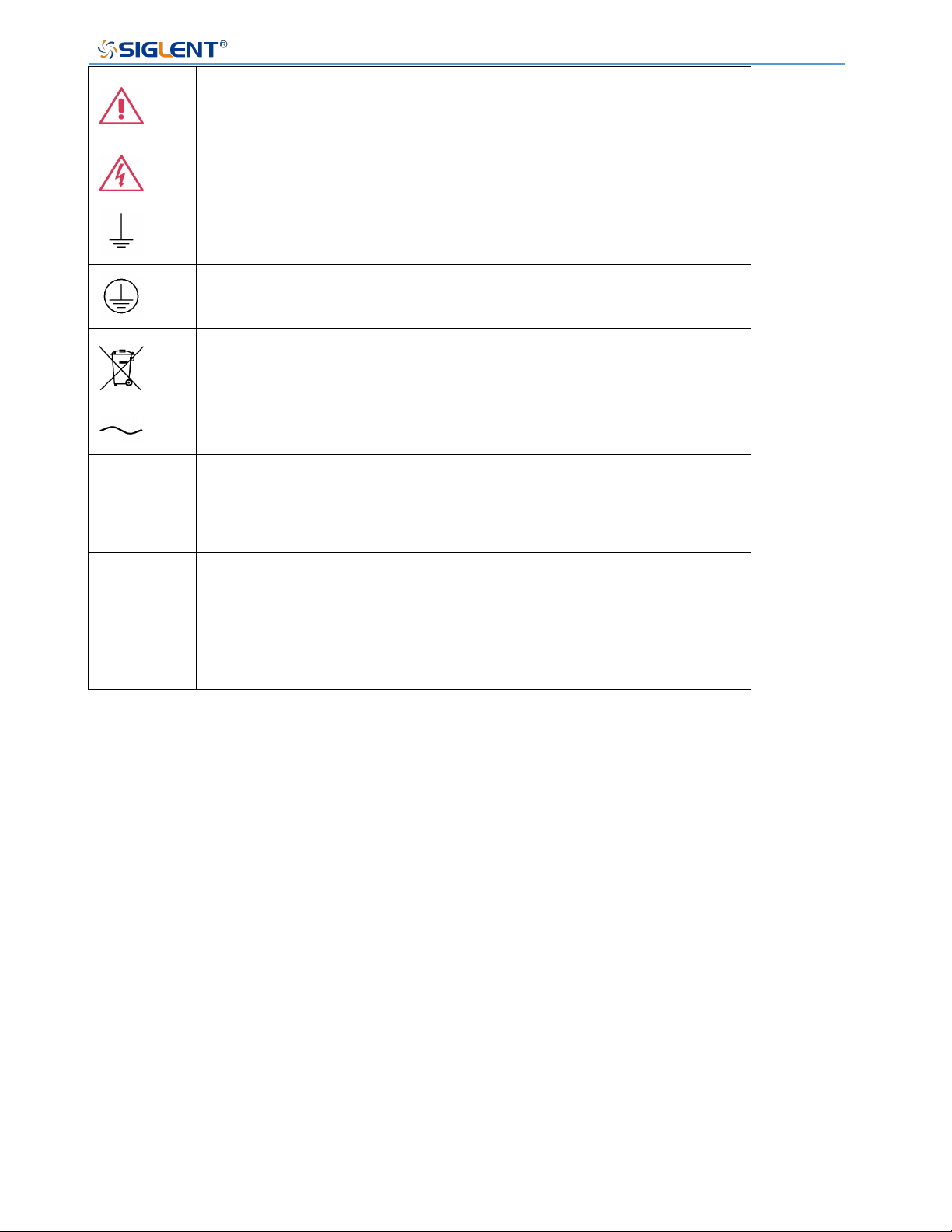
This symbol is used where caution is required. Refer to the
accompanying information or documents to protect against personal
injury or damage to the instrument.
This symbol warns of a potential risk of shock hazard.
This symbol is used to denote the measurement ground connection.
This symbol is used to denote a safety ground connection.
This symbol shows that do not put electronic equipment as unsorted
municipal waste management. Please separate collection or contact
equipment suppliers.
This symbol is used to represent an alternating current, or "AC".
CAUTION
The "CAUTION" symbol indicates a potential hazard. It calls attention
to a procedure, practice, or condition which may be dangerous if not
followed. Do not proceed until its conditions are fully understood and
met.
WARNING
The "WARNING" symbol indicates a potential hazard. It calls attention
to a procedure, practice, or condition which, if not followed, could
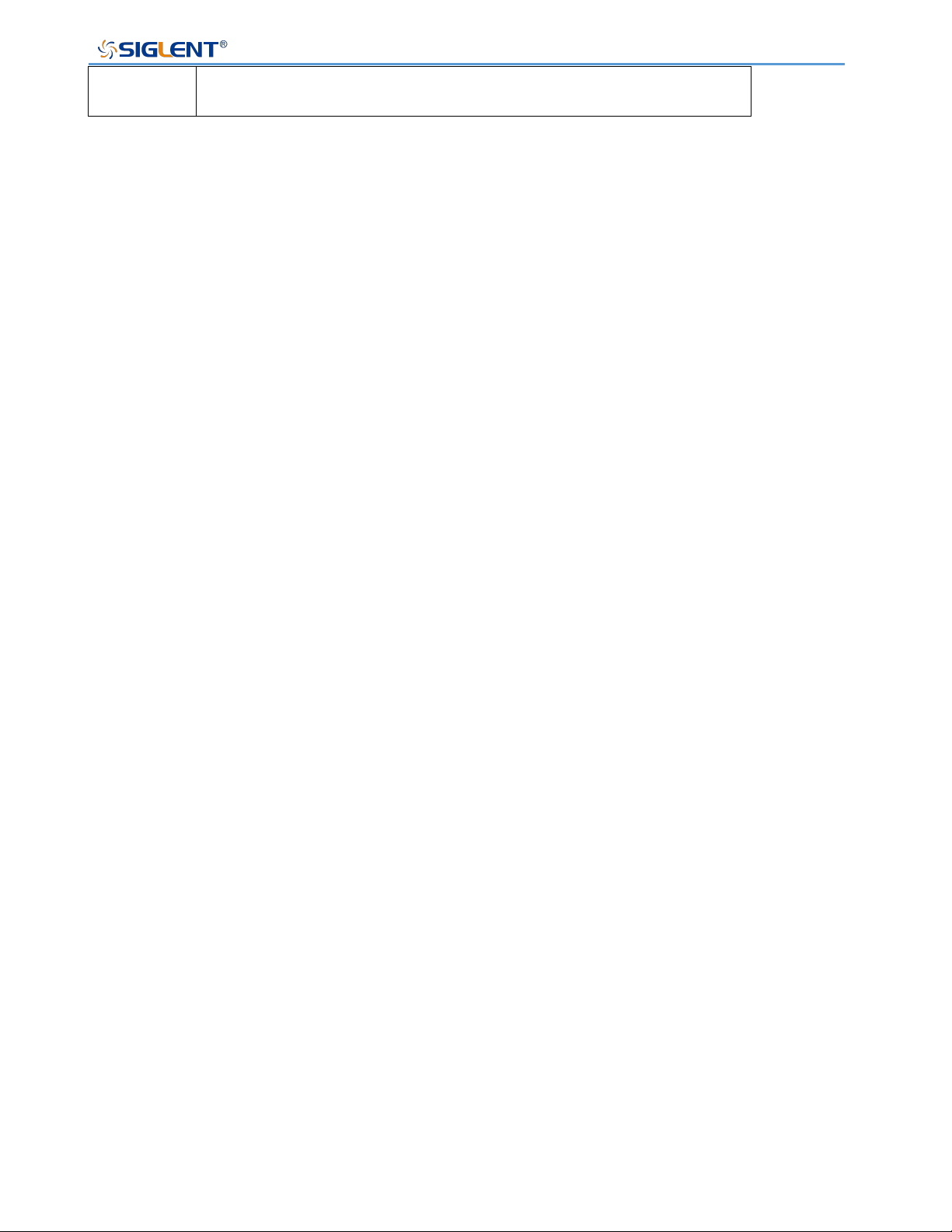
SPS5000X Series User Manual
WWW.SIGLENT.COM 7
cause bodily injury or death. If a WARNING is indicated, do not
proceed until the safety conditions are fully understood and met.
Working Environment
The design of the instrument has been verified to conform to EN 61010-1 safety standard
per the following limits:
Environment
This instrument is intended for indoor use and should be operated in a clean, dry
environment.
Ambient temperature
Operating: 0 ℃ to +50 ℃
Non-operation: -20 ℃ to +60 ℃
Note: Direct sunlight, radiators, and other nearby heat sources should be taken into
account when assessing the ambient temperature.
Relative Humidity
Operating: 20% to 85% RH, 40 ℃, 24 hours
Non-operating: 20% to 85% RH, 65 ℃, 24 hours
Altitude
Operating: ≤ 2,000 m
Overvoltage category
This product is intended to be powered by MAINS that comply with Overvoltage Category
II, which is typical of cord-and-plug connected equipment.
SPS5000X Series User Manual
WWW.SIGLENT.COM 8
Note:
Measurement Category II. For measurements performed on circuits directly connected
to the low-voltage installation.
Measurement Category III. For measurements performed in the building installation.
Measurement Category IV. For measurements performed at the source of low-voltage
installation.
Only mains power supply circuits have an overvoltage category rating.
Degree of pollution
The power supply may be operated in environments of Pollution Degree II.
Note:
Degree of Pollution II refers to a working environment that is dry and non-conductive
pollution occurs. Occasional temporary conductivity caused by condensation is
expected.
Do not dispose of electronic equipment in unsorted municipal waste. To
reduce the impact on the environment, please separate collection
processing or contact equipment suppliers.
IP rating
IP20 (as defined in IEC 60529).
Cooling requirements
This instrument relies on forced air cooling with internal fans and ventilation openings.
Care must be taken to avoid restricting the airflow around the apertures (fan holes) at the
back of the power supply. Please keep good ventilation when using, and regularly check
the vents and fans.
SPS5000X Series User Manual
WWW.SIGLENT.COM 9
CAUTION: Do not block the ventilation holes located on the back of the
power supply.
CAUTION: Do not allow any foreign matter to enter the power supply
through the ventilation holes, etc.
AC Power and ground connections
The instrument operates with a single-phase, 100 to 240 Vrms (+/-10%) AC power at 47 to
63 Hz (+/-5%)
To avoid electrical shock, always use a grounded power plug.
No manual voltage selection is required because the instrument automatically adapts to
line voltages with the following specifications:
Voltage range: 90 to 264 Vrms, Frequency range: 47 to 63 Hz.
CAUTION: When using the power supply in the United Kingdom, ensure
the security of the power cord conforms to the following instructions
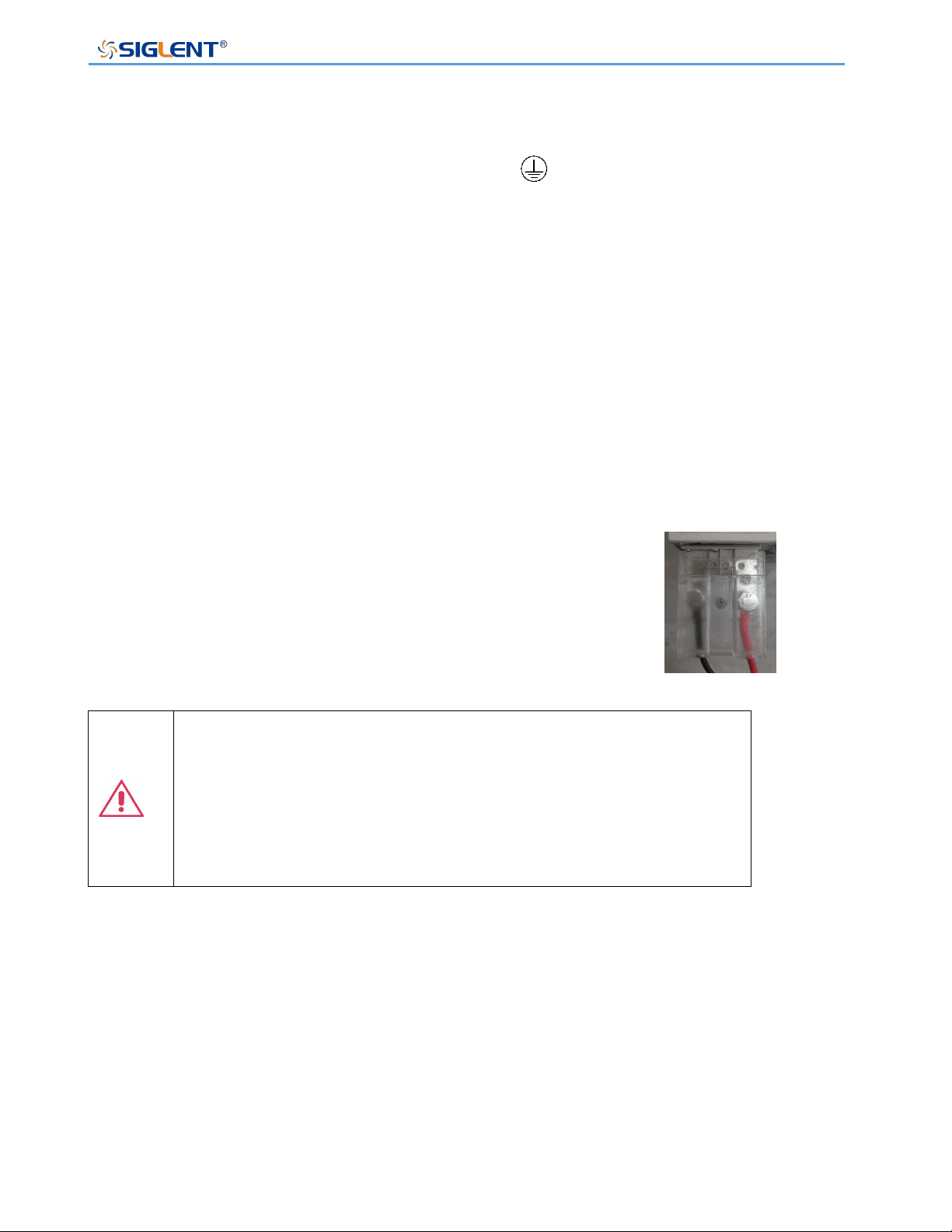
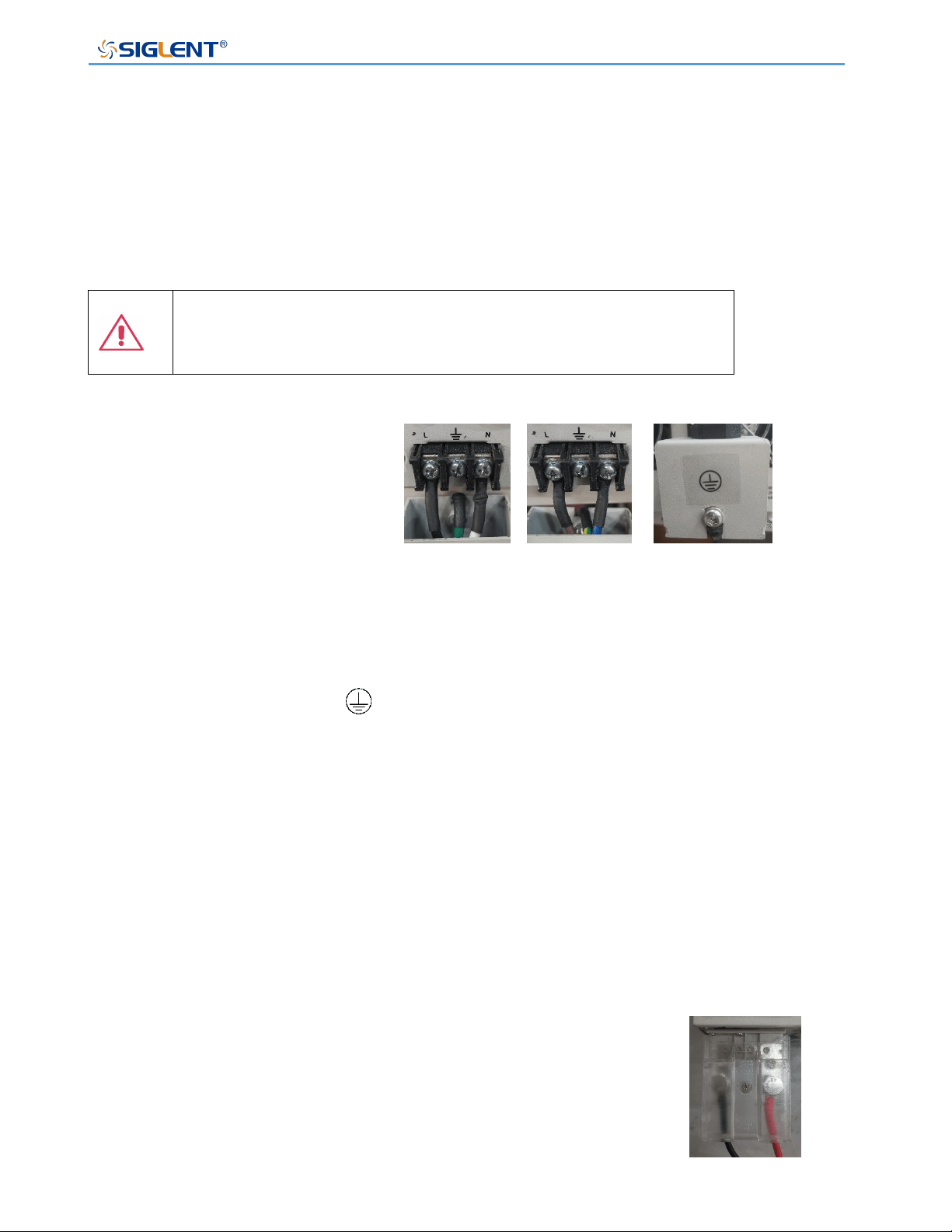
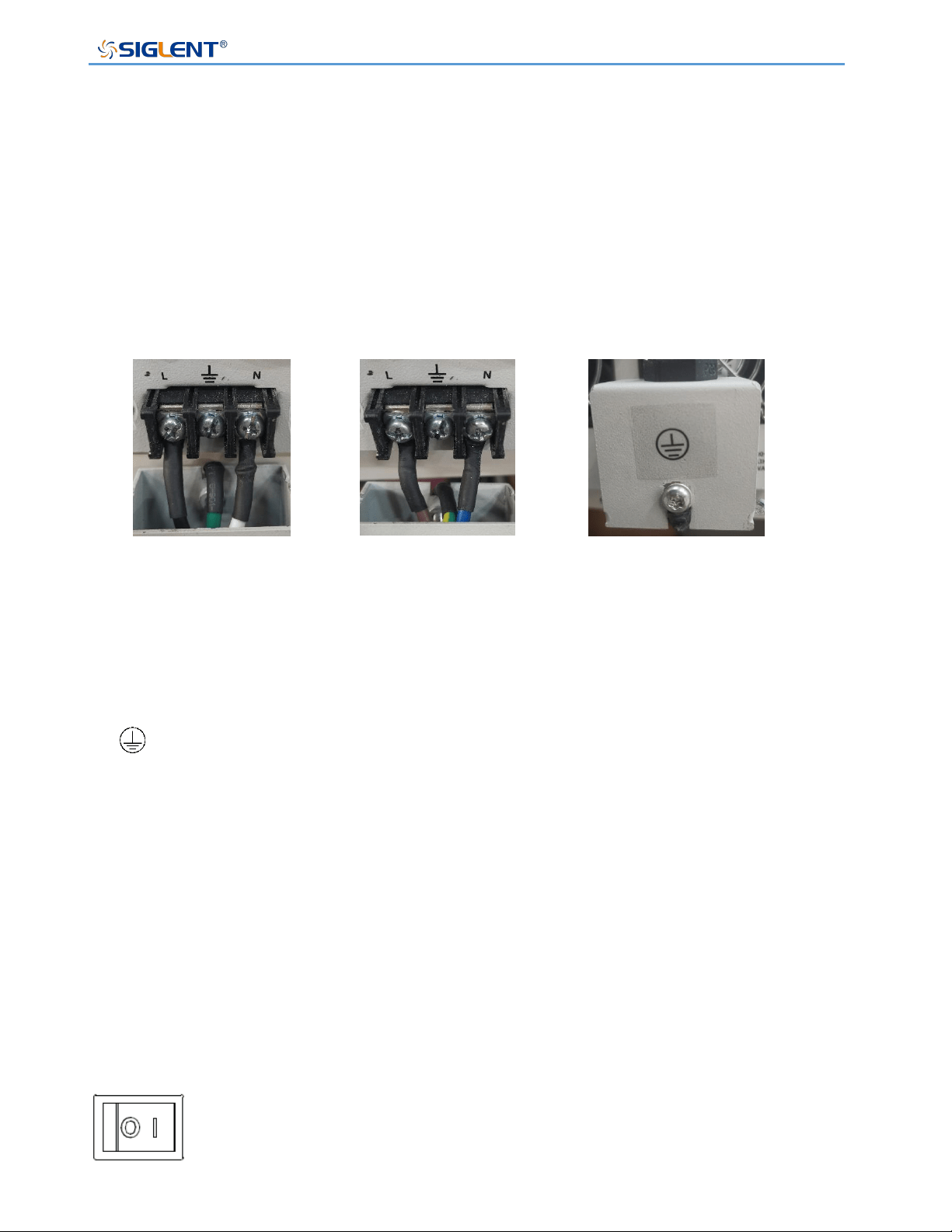
Wire colors must meet the following rules:
Black/Brown: Live wire
Green/Green-yellow: Earth wire
White/Blue: Neutral wire
The wire which is coloured Black(American Standard) or Brown(European standard)should
American Standard
European standard
Back view
SPS5000X Series User Manual
WWW.SIGLENT.COM 10
be connected to lug labeled with the letter L.
The wire which is coloured Green(American Standard) or Green-yellow(European
standard) should be connected to the earth symbol .
The wire which is coloured White(American Standard) or Blue(European standard) should
be connected to lug labeled with the letter N.
Finally, fix the metal cover on the casing with screws and tighten the black fixing parts.
Wire connections must be made by a professional. If you have questions, please refer to
the instructions or contact your local SIGLENT dealer.
Output Port connections
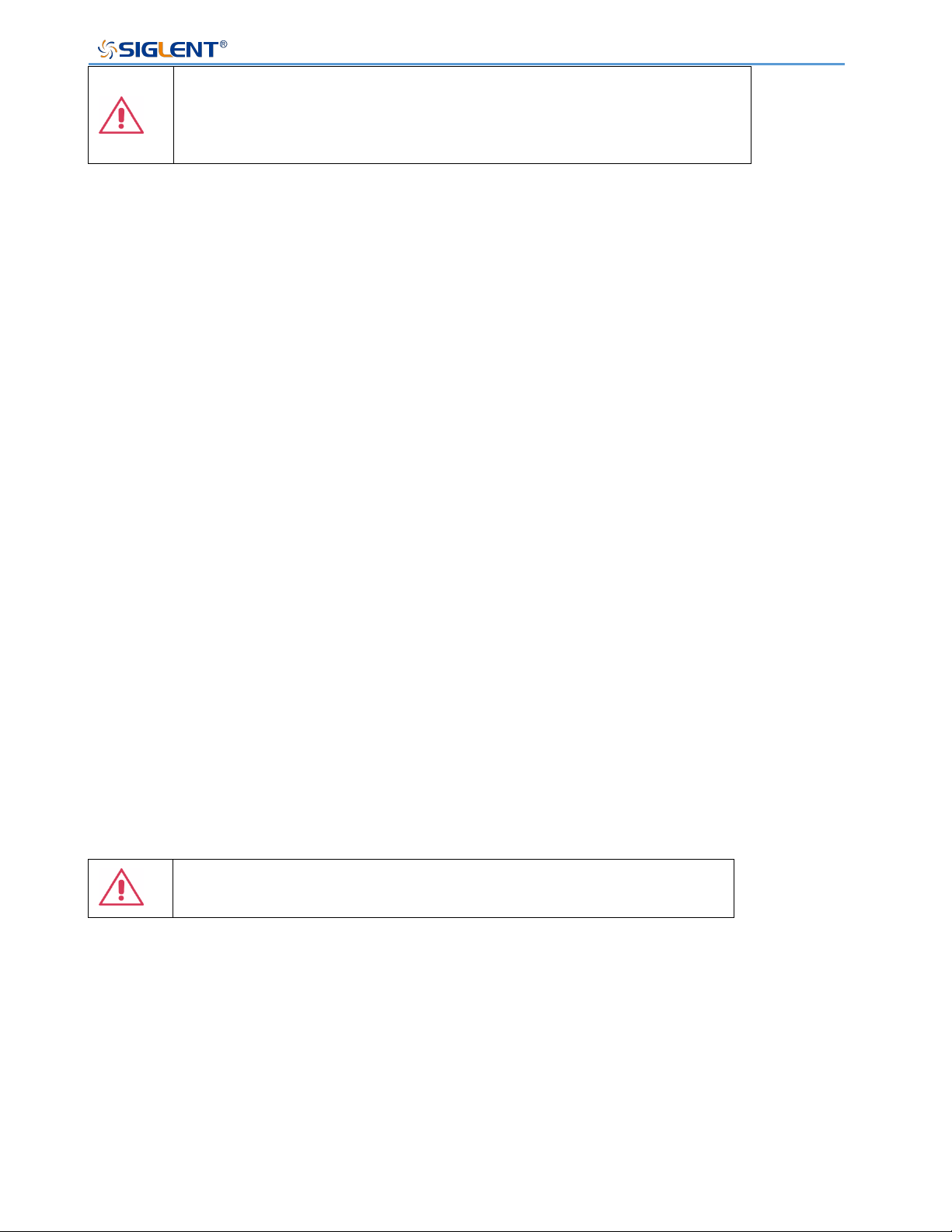
Make sure to turn off the power before connecting the cable to the
output port, install the plastic protective shell and tighten the
screws.
Warning: The power switch must be turned off before installing wiring at
the power output terminal.The plastic protective shell must be installed
before turning on the power supply.
Otherwise, there may be a risk of electric shock.
The front and rear outputs cannot be used at the same time. When the
front output is connected with the load, the rear port should not be
connected with the load.
Cleaning
Clean only the exterior of the instrument, using a damp, soft cloth. Do not use chemicals or
abrasive elements. Under no circumstances should you allow moisture to penetrate the
instrument. To avoid electrical shock, unplug the power cord from the AC outlet before
cleaning.
Output port connections
SPS5000X Series User Manual
WWW.SIGLENT.COM 11
Warning: Electrical Shock Hazard!
No operator serviceable parts inside. Do not remove covers.
Refer servicing to qualified personnel
Abnormal conditions
Only operate the instrument for the purposes specified by the manufacturer.
Do not operate the power supply if there are any visible signs of damage or if it has been
subjected to severe transport stresses.
If you suspect the power supply’s protection has been impaired, disconnect the power
cord, and secure the instrument against any unintended operation.
Proper use of the instrument requires reading and understanding all of the instructions and
labels.
If the equipment is used in a manner not specified by the manufacturer, the protection
provided by the equipment may be impaired.
Warning: Any use of the power supply in a manner not specified by the
manufacturer may impair the instrument’s safety protection.

SPS5000X Series User Manual
WWW.SIGLENT.COM 12
Documentation conventions
For the symbols appearing in the subsequent text, the convention with represents
the menu option on the front panel of the machine, the convention with represents
the menu option displayed by the machine, and the convention with represents the
selected item of the machine menu.
SPS5000X Series User Manual
WWW.SIGLENT.COM 13
Informations essentielles sur la sécurité
Ce manuel contient des informations et des avertissements que les utilisateurs doivent
suivre pour assurer la sécurité des opérations et maintenir les produits en sécurité.
Exigence de Sécurité
Lisez attentivement les précautions de sécurité ci - après afin d 'éviter les dommages
corporels et de prévenir les dommages aux instruments et aux produits associés. Pour
éviter les risques potentiels, utilisez les instruments prescrits.
Éviter l 'incendie ou les lésions corporelles.
Utilisez une ligne d 'alimentation appropriée.
Seules les lignes d'alimentation en électricité réservées à l'usage exclusif d'instruments
reconnus au niveau local peuvent être utilisées.Vendue en Amérique du Nord et dans
d'autres pays, elle sera équipée de lignes électriques répondant aux exigences locales.
WARNING:
N'utilisez pas de cordon d'alimentation amovible de faible puissance.
Posez vos instruments par terre.
L 'appareil est mis à la Terre par des conducteurs tera protecteurs de lignes
électriques.Pour éviter le contact électrique, le fil de masse doit être mis à la terre. Avant
de connecter les bornes d 'entrée ou de sortie, assurez - vous que l' instrument est
correctement mis à la terre.

SPS5000X Series User Manual
WWW.SIGLENT.COM 14
Connectez correctement la ligne de signal.
Le potentiel de la ligne de signaux est égal à la terre, de sorte que la ligne de signaux ne
doit pas être connectée à une haute tension.Ne touche pas les contacts ou les
composants nus.
Affiche la valeur nominale de toutes les bornes.
Pour éviter les incendies ou les coupures d 'électricité, consultez toutes les valeurs
nominales et signez la description de l' instrument. Avant de connecter l 'instrument, lisez
attentivement le Manuel pour obtenir davantage d' informations sur la valeur nominale.
Ne pas travailler en cas de panne.
Si vous soupçonnez que l 'appareil est endommagé, demandez au personnel d' entretien
qualifié de l 'examiner.
Ne pas fonctionner dans des conditions humides / humides.
Pas dans un environnement explosif.
Maintenez la surface de l 'instrument propre et sec.
L'organisme ou l'opérateur responsable doit se référer au cahier des charges pour
protéger la protection offerte par le matériel. Veuillez utiliser l 'instrument prescrit.
Termes et symboles de sécurité
Lorsque les symboles ou termes suivants apparaissent sur le panneau avant ou arrière de
l'instrument ou dans ce manuel, ils indiquent un soin particulier en termes de sécurité.
SPS5000X Series User Manual
WWW.SIGLENT.COM 15
Ce symbole est utilisé lorsque la prudence est requise. Reportez-vous
aux informations ou documents joints afin de vous protéger contre les
blessures ou les dommages à l'instrument.
Ce symbole avertit d'un risque potentiel de choc électrique.
Ce symbole est utilisé pour désigner la connexion de terre de mesure.
Ce symbole est utilisé pour indiquer une connexion à la terre de
sécurité.
This symbol shows that do not put electronic equipment as unsorted
municipal waste management. Please separate collection or contact
equipment suppliers.
Ce symbole est utilisé pour représenter un courant alternatif, ou "AC".
CAUTION
Le symbole " CAUTION" indique un danger potentiel. Il attire l'attention
sur une procédure, une pratique ou une condition qui peut être
dangereuse si elle n'est pas suivie. Ne continuez pas tant que ses
conditions n'ont pas été entièrement comprises et remplies.
WARNING
Le symbole " WARNING" indique un danger potentiel. Il attire
l'attention sur une procédure, une pratique ou une condition qui, si elle
n'est pas suivie, pourrait entraîner des blessures corporelles ou la
mort. Si un AVERTISSEMENT est indiqué, ne continuez pas tant que
les conditions de sécurité ne sont pas entièrement comprises et
remplies.
Environnement de travail
La conception de l'instrument a été certifiée conforme à la norme EN 61010-1, sur la base
des valeurs limites suivantes:
Environnement
Cet instrument est utilisé à l 'intérieur des locaux et doit être utilisé dans un environnement
propre et sec.
Température ambiante
En fonctionnement: 0 ℃ à +50 ℃
Hors fonctionnement: -20 ℃ à +60 ℃

SPS5000X Series User Manual
WWW.SIGLENT.COM 16
Note: pour évaluer la température de l'environnement, il convient de tenir compte des
rayonnements solaires directs, des radiateurs thermiques et d'autres sources de chaleur.
Humidité
Fonctionnement: 20 à 85% HR, 40 ℃, 24 heures
Hors fonctionnement: 20 à 85% HR, 65 ℃, 24 heures
Altitude
Fonctionnement: ≤ 2000m
À l'arrêt: ≤ 15 266 m
Catégorie d 'installation (surtension)
Ce produit est alimenté par une alimentation électrique conforme à l 'installation
(surtension) Catégorie II.
Installation (overvoltage) Category Definitions Définition de catégorie d 'installation
(surtension)
La catégorie II d'installation (surtension) est un niveau de signal applicable aux terminaux
de mesure d' équipement reliés au circuit source.Dans ces bornes, des mesures
préventives sont prises pour limiter la tension transitoire à un niveau inférieur
correspondant.
La catégorie II d'installation (surtension) désigne le niveau local de distribution d 'énergie
d' un équipement conçu pour accéder à un circuit alternatif (alimentation alternative).
Degré de pollution
SPS5000X Series User Manual
WWW.SIGLENT.COM 17
Alimentation électrique peut être utilisé dans un environnement Pollution Degree II.
Note: Pollution Degree II signifie que le milieu de travail est sec et qu'il y a une pollution
non conductrice.Parfois, la condensation produit une conductivité temporaire.
IP Rating
IP20 (as defined in IEC 60529).
Exigences de refroidissement
L 'appareil repose sur un ventilateur interne et un ventilateur de ventilation.Attention.Des
mesures doivent être prises pour éviter de limiter le flux d 'air autour de l' ouverture arrière
de l 'alimentation (orifice de ventilateur).Gardez une bonne ventilation lors de l 'utilisation
et vérifiez régulièrement les ventilateurs et les ventilateurs.
ATTENTION: Ne bloquez pas les orifices de ventilation de l 'arrière
de l' alimentation.
ATTENTION: Ne laisse aucun objet étranger entrer dans l
'alimentation électrique, par exemple par le trou de ventilation.
Connexions d'alimentation et de terre
L'instrument fonctionne avec une alimentation CA monophasée de 100 à 240 Vrms (+/-
10%) à 47 à 63Hz (+/- 5%).
Les bornes de mise à la terre de protection des prises d 'alimentation en courant alternatif
sont mises à la terre afin d' éviter les chocs électriques.
Il n 'est pas nécessaire de sélectionner la tension manuellement, car l' instrument s'
adapte automatiquement à la tension du circuit.
SPS5000X Series User Manual
WWW.SIGLENT.COM 18
L 'instrument s' adapte automatiquement aux entrées de lignes de communication dans
les limites suivantes:
Plage de tension: 90 à 264 vrms, plage de fréquence: 47 à 63 Hz.
ATTENTION: Lorsque le Royaume - Uni utilise l'énergie
électrique, la sécurité des lignes électriques est assurée
conformément à la description ci - après.
La couleur du fil doit être conforme aux règles suivantes:
Noir / brun: conducteur vivant
Vert / vert - jaune: sol
Blanc / bleu: neutre
Les fils noirs (norme américaine) ou bruns (norme européenne) doivent être raccordés aux
languettes marquées de la lettre L.
Le conducteur vert (norme américaine) ou vert - jaune (norme européenne) doit être relié
au symbole de mise à la terre .
Les fils blancs (norme américaine) ou bleus (norme européenne) doivent être raccordés
aux languettes marquées de la lettre N.
Le câblage doit être effectué par un professionnel.Si vous avez des questions, consultez
les instructions ou contactez votre revendeur siglent local.
Connexion du port de sortie
Assurez - vous d'éteindre l'alimentation avant de connecter le câble au
port de sortie, d'installer un boîtier de protection en plastique et de
serrer les vis.
Normes américaines
Normes européennes
Vue arrière
Connexion du port de sortiet
SPS5000X Series User Manual
WWW.SIGLENT.COM 19
Avertissement: L'interrupteur d'alimentation doit être éteint avant que le
câblage ne soit installé à la sortie d'alimentation. Un boîtier de protection
en plastique doit être installé avant que l'alimentation ne soit allumée.
Sinon, il peut y avoir un risque de choc électrique.
Les sorties avant et arrière ne peuvent pas être utilisées simultanément.
Lorsque la sortie actuelle est connectée à la charge, le port arrière ne doit
pas être connecté à la charge.
Nettoyage
Nettoyez uniquement l'extérieur de l'instrument à l'aide d'un chiffon doux et humide.
N'utilisez pas de produits chimiques ou d'éléments abrasifs. Ne laissez en aucun cas
l'humidité pénétrer dans l'instrument. Pour éviter les chocs électriques, débranchez le
cordon d'alimentation de la prise secteur avant de le nettoyer.
Avertissement: risque de choc électrique!
Aucune pièce réparable par l'opérateur à l'intérieur. Ne retirez pas les
capots.
Confiez l'entretien à un personnel qualifié
Conditions anormales
Utilisez l'instrument uniquement aux fins spécifiées par le fabricant.
N'utilisez pas la lunette s'il y a des signes visibles de dommages ou si elle a été soumise à
de fortes contraintes de transport.
Si vous doutez que la protection de l 'alimentation électrique soit compromise, désactivez la
ligne d' alimentation et fixez l 'appareil afin d' éviter toute manipulation accidentelle.
Une bonne utilisation de l'instrument nécessite la lecture et la compréhension de toutes les
instructions et étiquettes.
SPS5000X Series User Manual
WWW.SIGLENT.COM 20
La protection offerte par le matériel peut être compromise si celui - ci est utilisé de manière
non spécifiée par le fabricant.
Avertissement: L'utilisation de l'énergie de manière non prescrite par
le fabricant peut compromettre la sécurité des instruments.

SPS5000X Series User Manual
WWW.SIGLENT.COM 21
Delivery of The Power Supply
• General Inspection
Note: Before your first use of the equipment, please check the condition using the steps
below.
• Inspection of transport packaging
If it is found that the packing box or foam plastic pad is seriously damaged, please save it
for subsequent inspection. The carrier and shipper must be contacted for any damage
caused during transport. The SIGLENT company is not responsible for any damage caused
during shipment.
• Check the equipment
If there is mechanical damage, missing parts, or the instrument fails to pass the electrical
and mechanical tests, please contact the nearest SIGLENT office or distributor as soon as
possible.
• Check the accessories
Detailed information about included accessories is included at the end of this document.
Please refer to this description to check whether the attachment is delivered completely. If
there is any omission or damage, please contact the local SIGLENT customer service center
or national distributors. If you fail to contact us in time in case of omission or damage, we
will not be responsible for replacement.
About Warranty
The power supply has a 3-year warranty for normal use and operation from the date of
delivery. SIGLENT may repair or choose to replace any product returned to the authorized
service center during the warranty period. But to do so, we must first examine the product

SPS5000X Series User Manual
WWW.SIGLENT.COM 22
to determine that the defect is caused by the process or material, not by abuse, negligence,
accident, abnormal conditions, or operation.
SIGLENT is not responsible for any situation caused by any defect, damage or malfunction
caused by the following:
a) Maintenance or installation by personnel other than those authorized by SIGLENT
b) Connection of incompatible equipment and improper connection
c) Any damage or failure caused by the use of products not supplied by SIGLENT suppliers.
Also, SIGLENT will not be responsible for the maintenance of the modified or integrated
power supply product if the product has been modified or integrated and these changes
or integration increase the time or difficulty of power maintenance tasks.
All spare parts and replacement parts and maintenance are guaranteed for 90 days.
The power supply software has been fully tested and is considered to be functioning properly.
However, the software is provided without any type of warranty covering detailed
performance. Products not manufactured by SIGLENT are guaranteed by the OEM only.
Maintenance Agreement
We provide various services based on individual maintenance agreements. We offer
extended warranties which can extend the warranty period beyond the standard period. We
provide installation, training, enhancement and on-site maintenance and other services
through a dedicated supplemental support agreement. For details, please contact your
nearest SIGLENT customer service center or national distributors.
SPS5000X Series User Manual
WWW.SIGLENT.COM 23
Introduction of SPS5000X Series
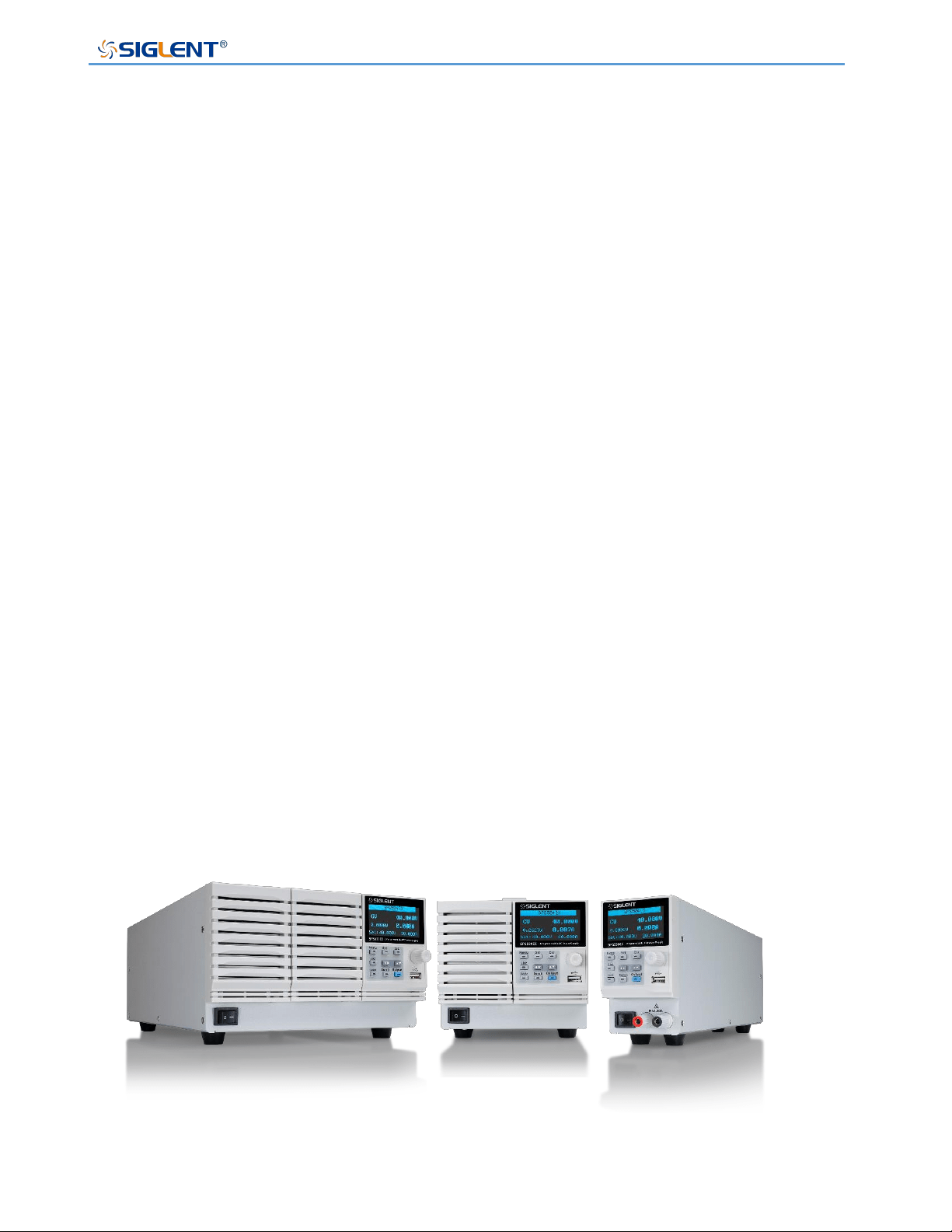
The SIGLENT SPS5000X series is a programmable DC switching power supply with
single/multiple outputs and constant power features. The series includes 16 models, with 40
V, 50V, 80 V, 160 V rated output voltage values and 180W, 360 W, 720 W, 1080 W
maximum output power levels. Users can connect 2 sets of power supplies in series or up-
to 3 sets in parallel. This series of products can meet the user's combination selection of 0
~ 320 V, 0 ~ 270 A, and the maximum combined power can reach up to 3240 W, meeting
different application requirements.
SPS5000X series programmable DC switching power supply is equipped with a 2.4-inch
high brightness OLED display, friendly human-computer interaction interface, and excellent
performance indicators. The minimum resolution is 1mV / 1mA. The output voltage and
current rise time is adjustable. It has two output modes: Constant voltage and constant
current. It also supports list sequence programming mode. It also has over-voltage, over-
current, power limit and over-temperature protection, high-precision, low-noise, and high-
reliability.
Standard LAN / USB communication interface, analog control interface, the product can be
remotely controlled through web pages. It can be widely used in a variety of demanding
testing places, such as general laboratory testing, LED lighting industry, automotive
electronics, and other fields.
SPS5000X Series User Manual
WWW.SIGLENT.COM 24
Performance and Features
Rated voltage: 40 V, 50V, 80 V, 160 V
Rated output power: 180W, 360 W, 720 W, 1080 W
Constant power output, a wide range of voltage and current outputs, high efficiency
switching power supply
CV, CC priority mode selection, better protection for the circuit/DUT
Fast recovery time, < 1 ms
Fast output response time, < 1 ms
Voltage and current rise/fall rate adjustable
Set and read back resolution 1 mV, 1 mA
Built-in bleeder current control, the power in the output capacitor can be discharged
below the circuit/DUT safe voltage after shutdown
Support remote voltage compensation Sense function
Support local list function editing, USB import list sequence file
External analog voltage and resistance control, voltage and current monitoring output
Overvoltage, over current, power limit, over-temperature protection, safe and reliable
2.4-inch OLED high-brightness display with a wide viewing angle of 170 degrees
Equipped with USB, LAN standard communication interface, optional USB-GPIB
module
With 1/2, 1/3, 1/6 rack size, flexible assembly
Embedded web server provides remote computer by web browser without the need to
install additional software on the host computer
SPS5000X Series User Manual
WWW.SIGLENT.COM 25
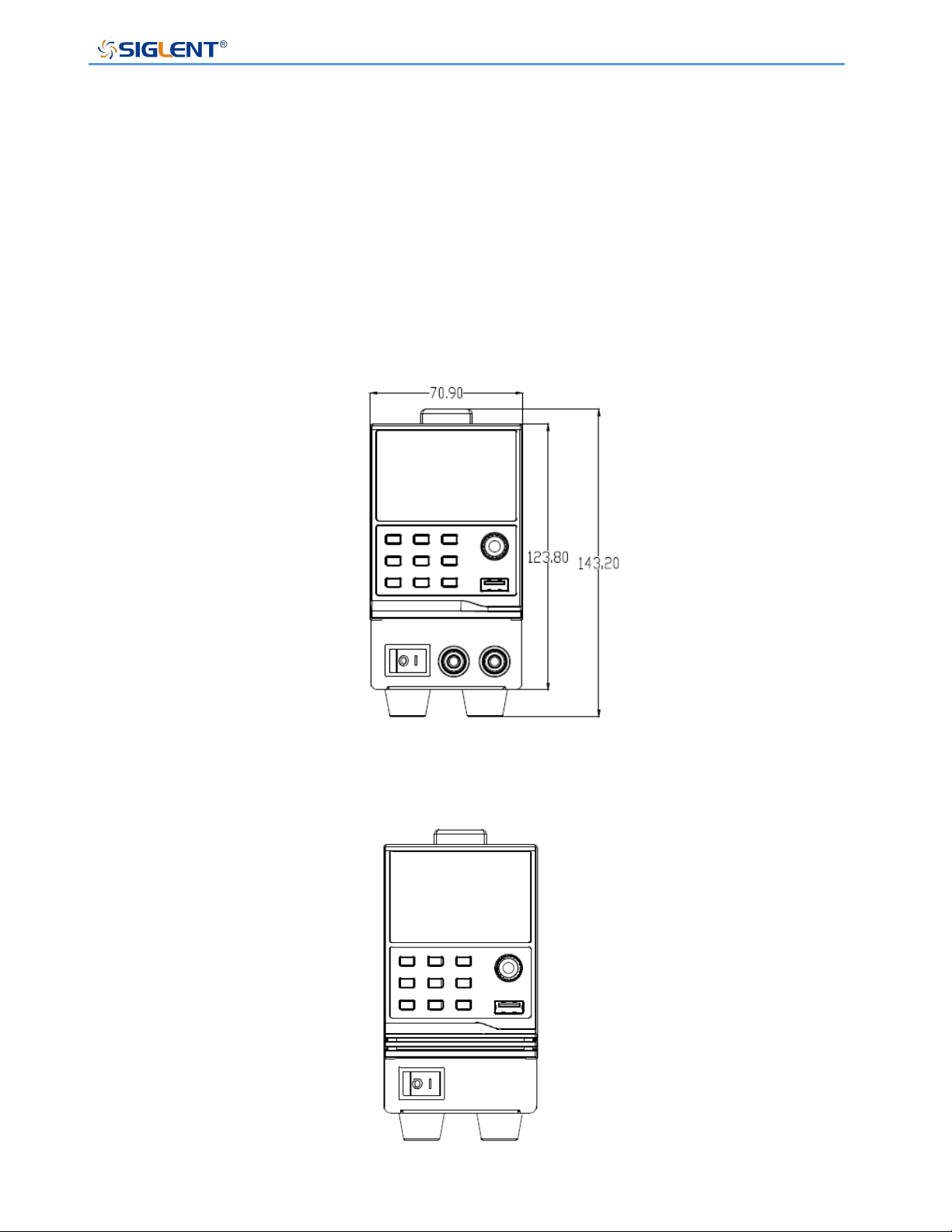
Model Introduction
The SPS5000X series includes 16 models, with four voltage output types of 40V / 50V / 80V
/ 160V, with up to three output channels:
Model
Type
Channels
Voltage (V)
Current (A)
Power (W)
SPS5041X
Ⅰ
1
0~40
0~30
360
SPS5042X
Ⅱ
1
0~40
0~60
720
SPS5043X
Ⅲ
1
0~40
0~90
1080
SPS5044X
Ⅳ
2
0~40/CH
0~30/CH
360/CH
SPS5045X
Ⅴ
3
0~40/CH
0~30/CH
360/CH
SPS5051X
Ⅰ
1
0~50
0~10
180
SPS5081X
Ⅰ
1
0~80
0~15
360
SPS5082X
Ⅱ
1
0~80
0~30
720
SPS5083X
Ⅲ
1
0~80
0~45
1080
SPS5084X
Ⅳ
2
0~80/CH
0~15/CH
360/CH
SPS5085X
Ⅴ
3
0~80/CH
0~15/CH
360/CH
SPS5161X
Ⅰ
1
0~160
0~7.5
360
SPS5162X
Ⅱ
1
0~160
0~15
720
SPS5163X
Ⅲ
1
0~160
0~22.5
1080
SPS5164X
Ⅳ
2
0~160/CH
0~7.5/CH
360/CH
SPS5165X
Ⅴ
3
0~160/CH
0~7.5/CH
360/CH
SPS5000X Series User Manual
WWW.SIGLENT.COM 26
Size
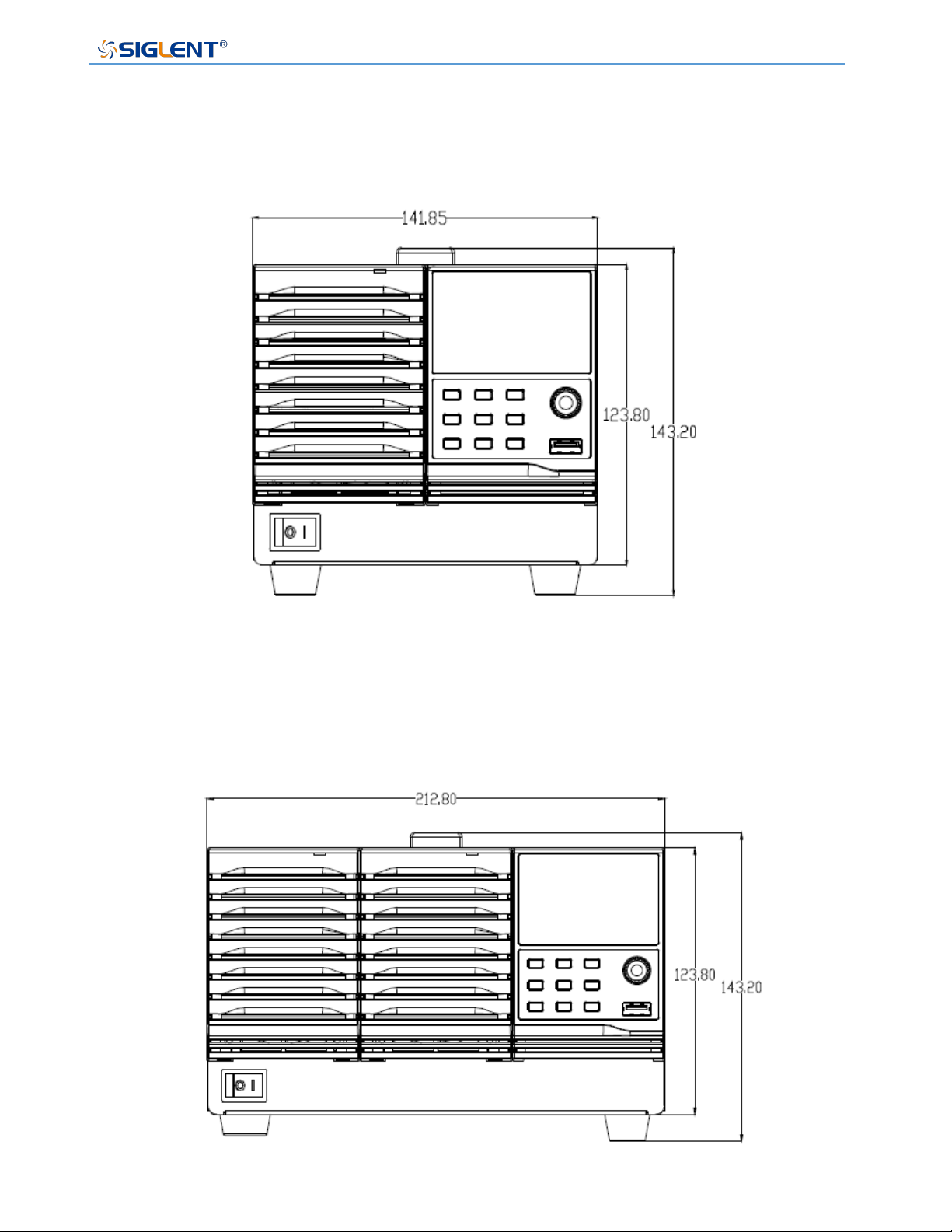
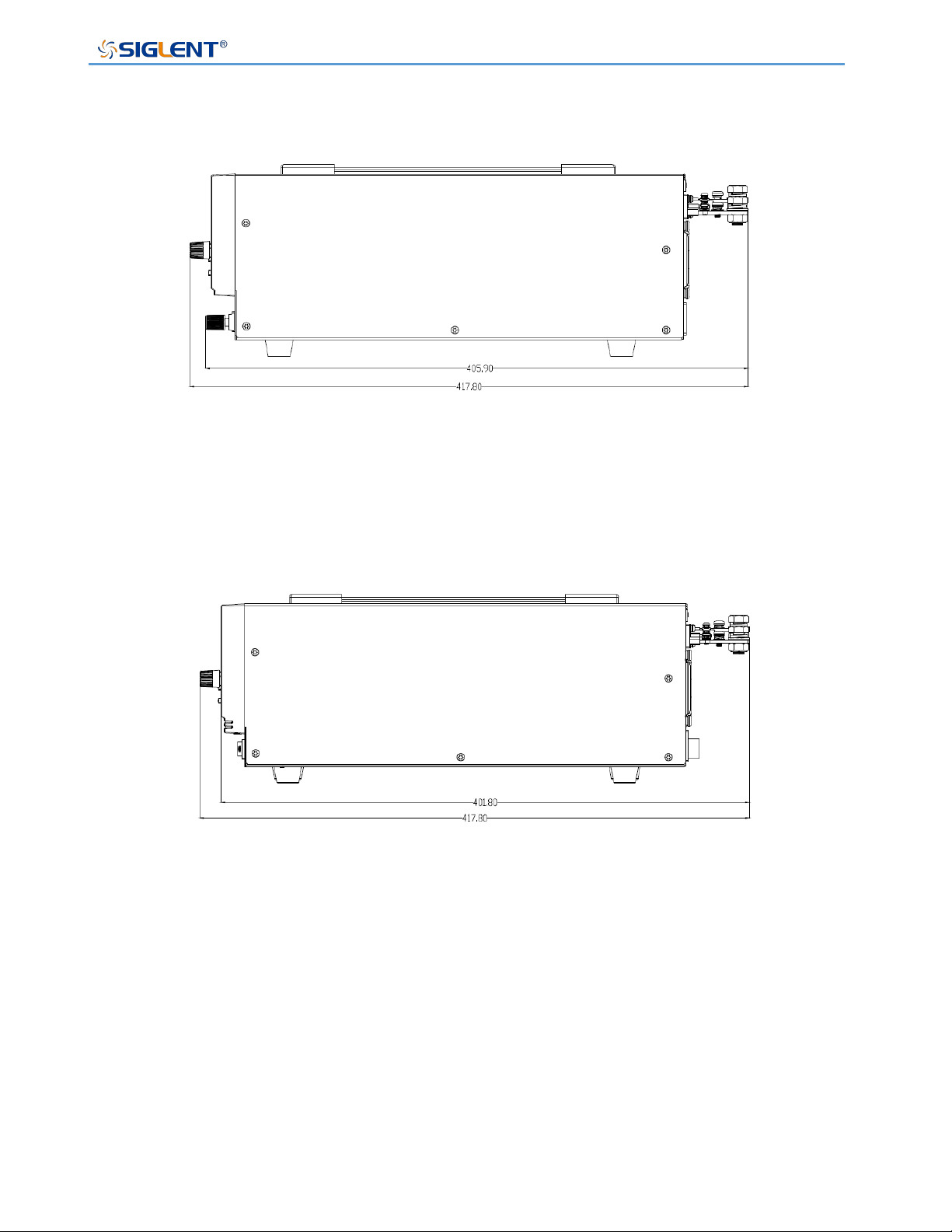
The numbers marked in the pictures are in millimeters
1)Front dimension drawing of single module
SPS5041X,SPS5051X, SPS5081X, SPS5161X
SPS5000X Series User Manual
WWW.SIGLENT.COM 27
2) Front dimension drawing of dual module
SPS5042X, SPS5044X, SPS5082X, SPS5084X, SPS5162X, SPS5164X
3)Three module frontal dimension drawing
SPS5043X, SPS5045X, SPS5083X, SPS5085X, SPS5163X, SPS5165X
SPS5000X Series User Manual
WWW.SIGLENT.COM 28
4) Side dimension drawing with front output port
5) The side dimensions of other models are shown in the figure below, except that the rack
dimensions of the models with front output ports are slightly different
SPS5000X Series User Manual
WWW.SIGLENT.COM 29
SPS5000X Series Overview
Appearance
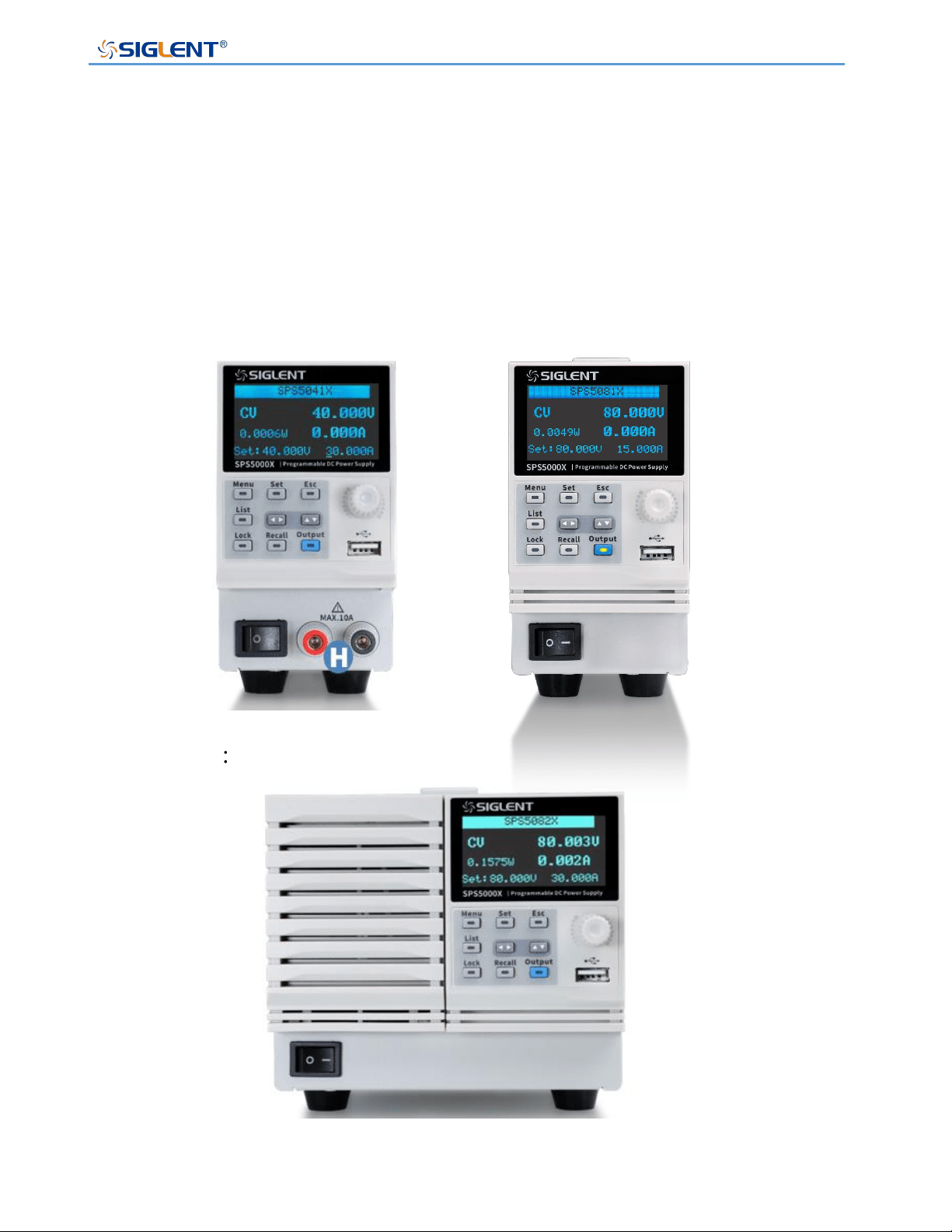
The SPS5000X series has three different appearance panels, distinguished by TypeⅠ, Type
Ⅱ/TypeⅣ, TypeⅢ/TypeⅤ:
TypeⅠ
TypeⅡ/TypeⅣ
SPS5000X Series User Manual
WWW.SIGLENT.COM 30
TypeⅢ/TypeⅤ
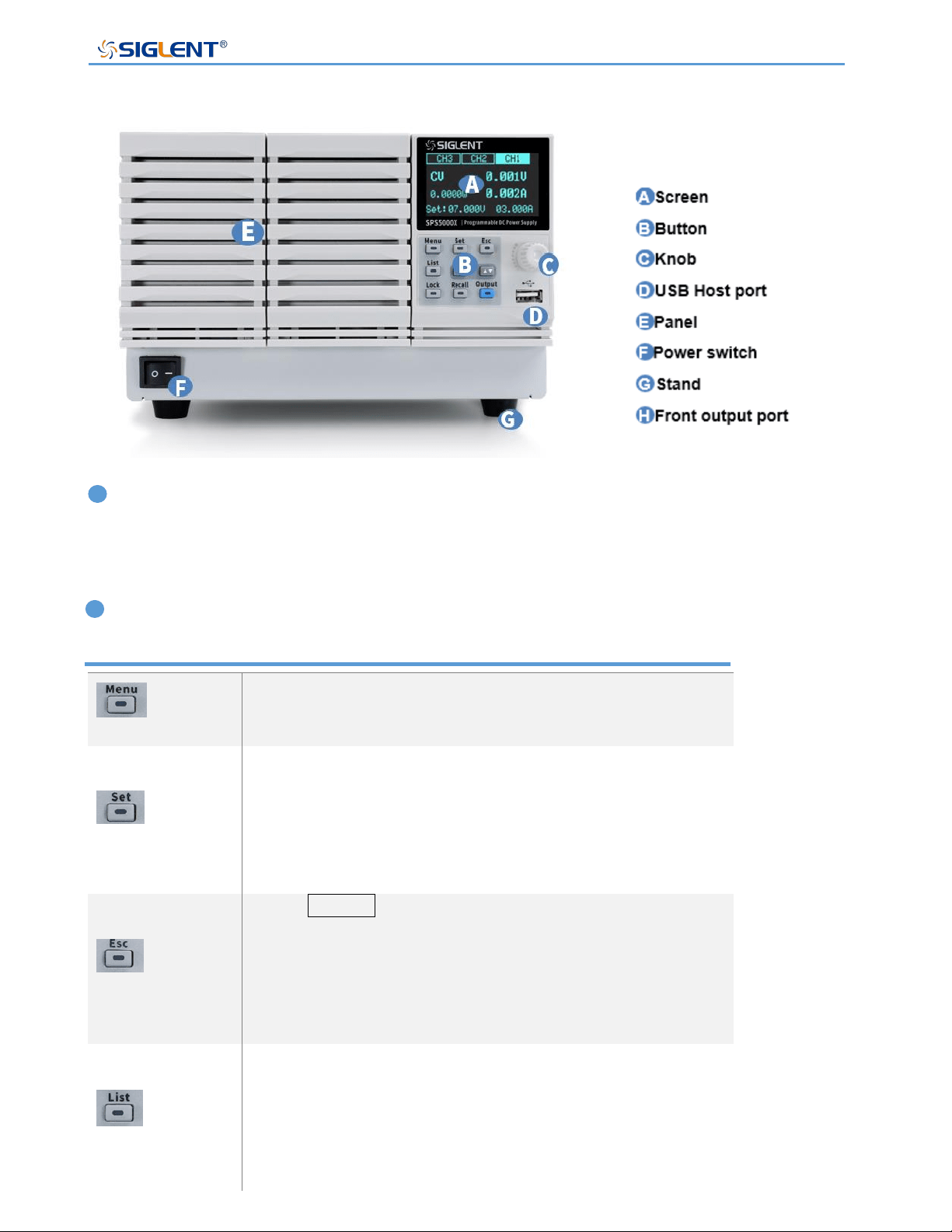
A A Screen
All SPS supplies include a 2.4-inch OLED display for displaying system output status,
system parameter settings, menu options, and promotion information.
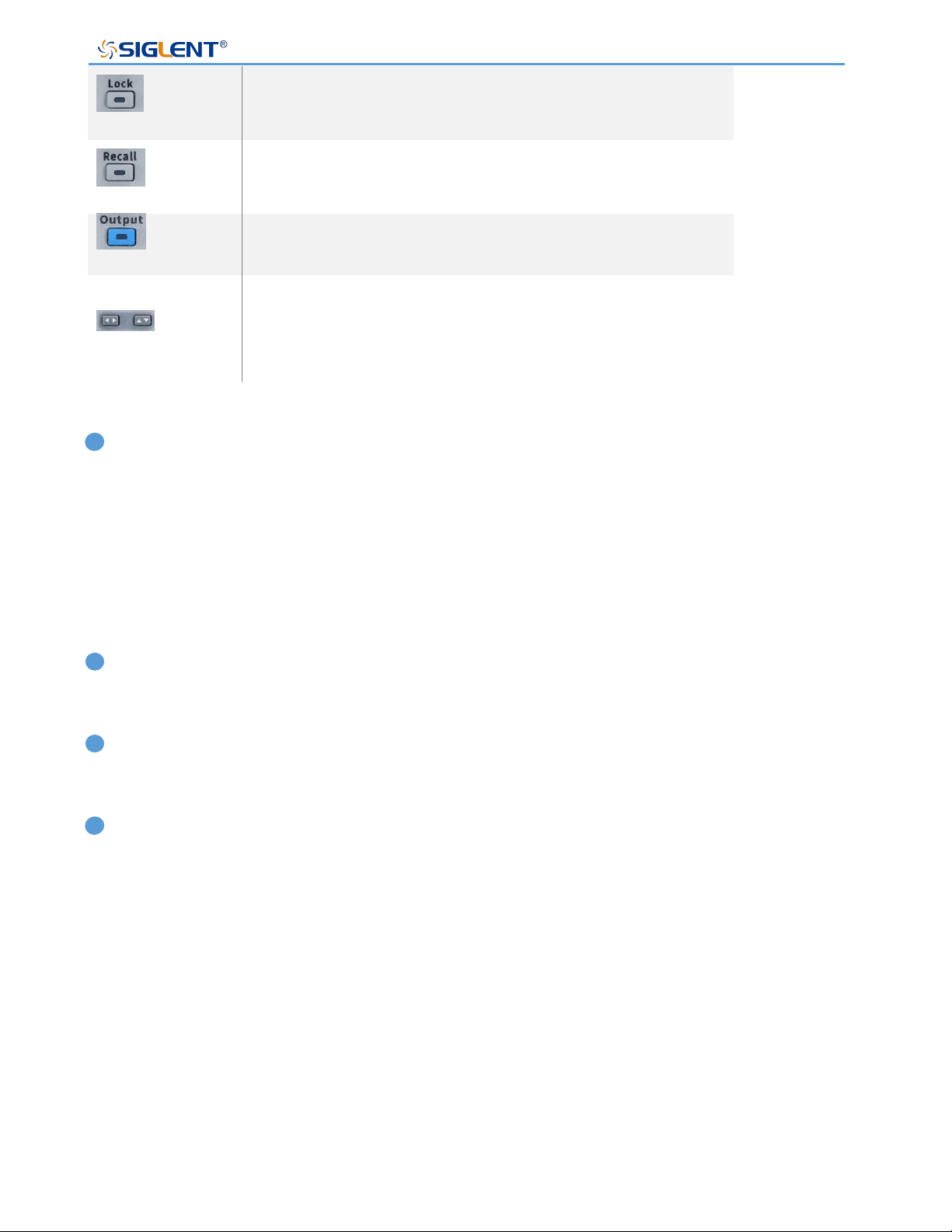
B Button
Used to view system information and configure power
parameters.
(V/I) In the main interface, press this key to select and set
the output voltage value or output current value.
Press this key in the function area to enter the next menu,
which is equivalent to the confirm key.
Press Menu to enter the menu list, press this key to
return to the previous menu.
When the power supply enters the protection state, long
press the key to release the protection mode
Press this key to enter the List mode, you can set each
group of output current, output voltage and running time,
etc.
Press this key again to exit the List interface
SPS5000X Series User Manual
WWW.SIGLENT.COM 31
Press this key to turn on the keyboard lock function, long
press to release the key lock.
Used to recall or store the state. If you select List, press
this key to store or recall the List state.
Power output button used to turn the output on or off.
The direction buttons are used to switch the digits of the
value where the cursor is selected, and to move the cursor
position or switch options.
C Direction knob
When setting parameters, turn the knob to increase or decrease the value at the cursor.
When setting objects (voltage or current, operation mode, internal resistance configuration,
etc.), rotate the knob to quickly move the cursor position or switch options, press the knob
to set the current parameters, rotate the knob to increase or decrease the value at the cursor,
and press again to make the current setting effective.
D USB Host port
Used to insert peripheral USB devices for file transfer and system upgrades.
F Power Switch
Used to turn the power on or off.
H Front output port (positive (+), negative (-))
The current output front port can output a maximum current of 10 A.
SPS5000X Series User Manual
WWW.SIGLENT.COM 32
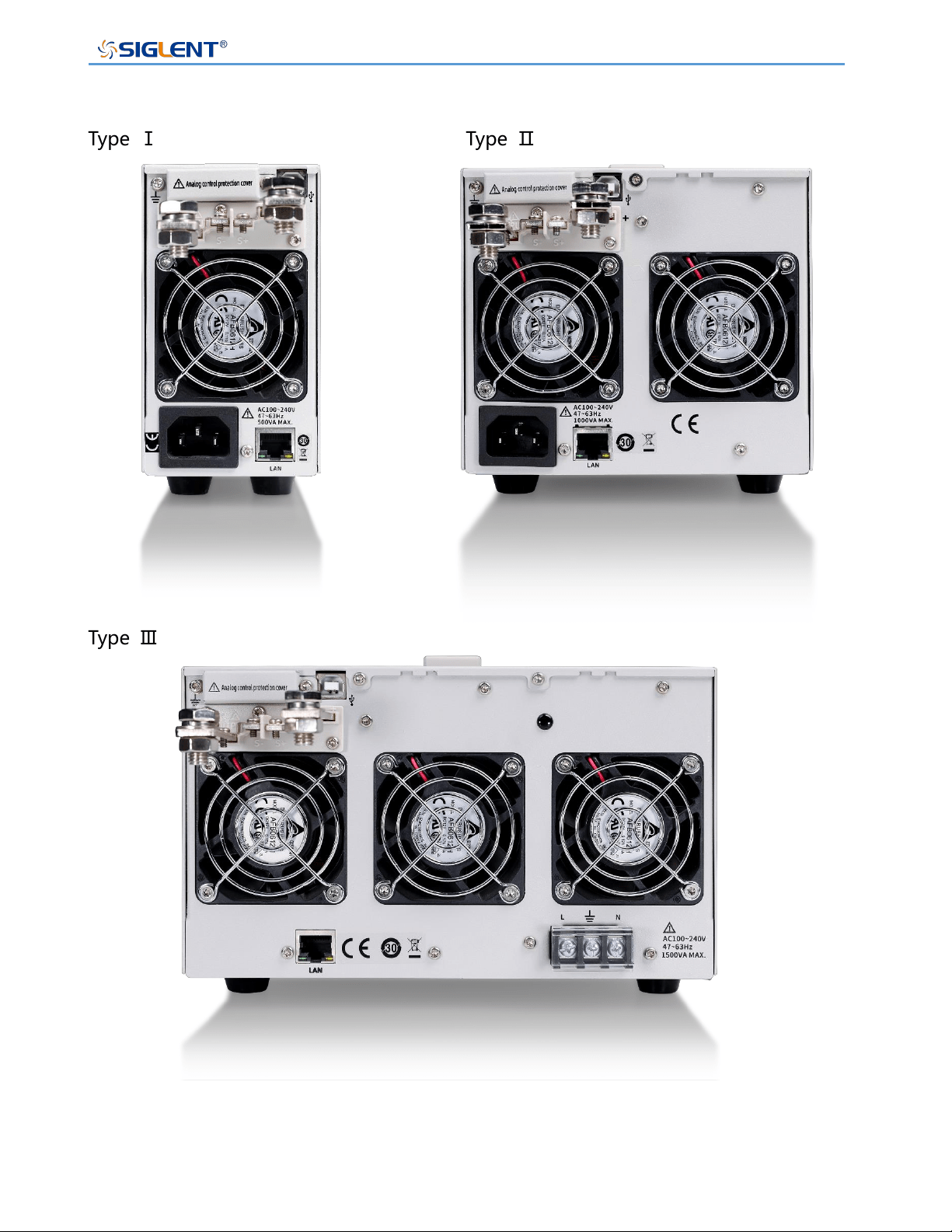
Rear Panel
Type Ⅰ Type Ⅱ
Type Ⅲ
SPS5000X Series User Manual
WWW.SIGLENT.COM 33
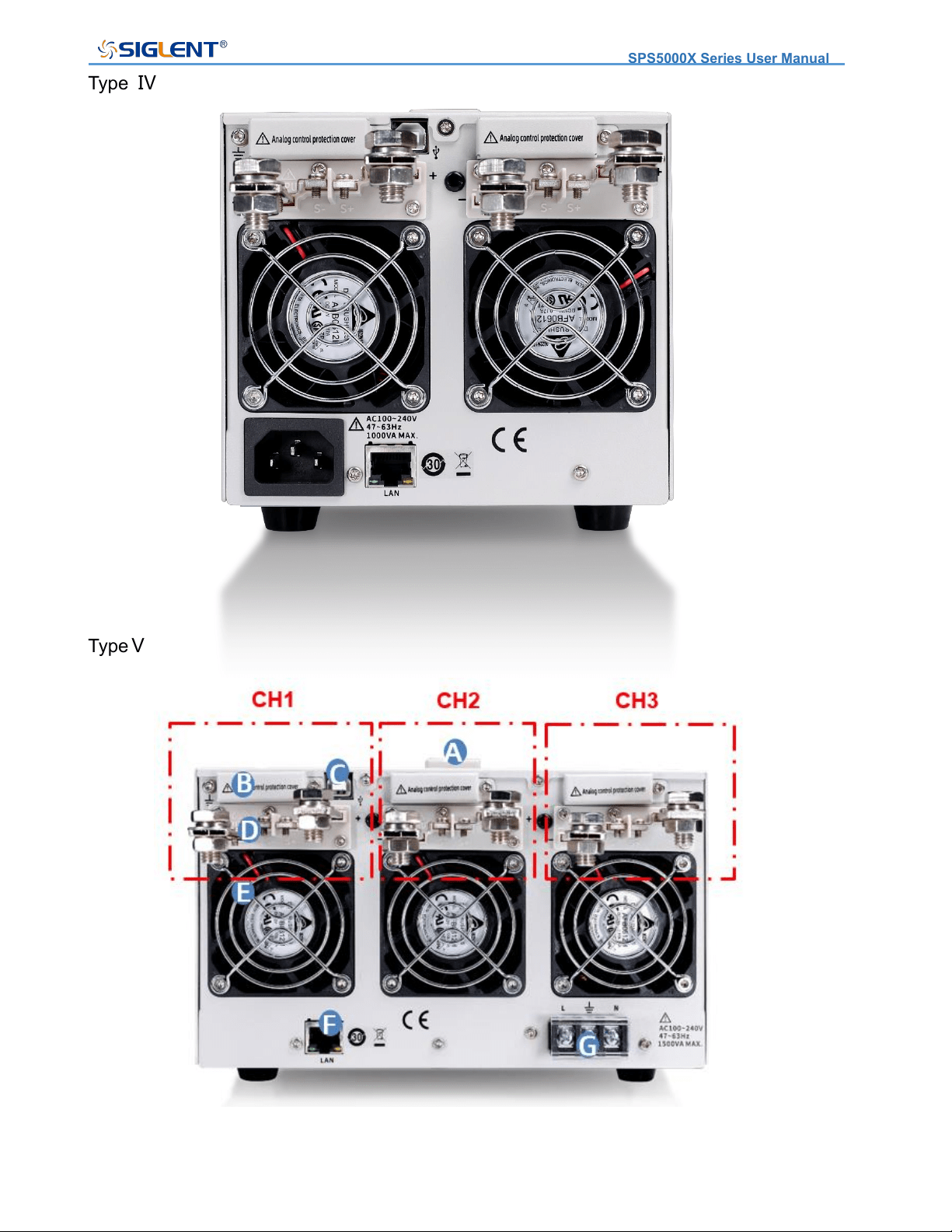
Type Ⅳ
TypeⅤ
SPS5000X Series User Manual
WWW.SIGLENT.COM 34
B Analog connector port
Output for the monitor signals of voltage and current output. Also used for analog control of
the current and voltage outputs.
C
This interface can be connected to a PC for remote communication via USB using the
USBTMC protocol. Provides remote computer control of the supply by sending commands
through computer software.
D Output Interface
One set of positive (+) and negative (-) output terminals, type IV has two output orts, and
type V has three output ports. On units with multiple output channels, the channels are
arranged as follows (when facing the rear panel): From right to left, the one near the display
is CH1, then CH2, CH3.
E Fan port
The temperature-controlled fan effectively dissipates the heat of the power supply line over
all operating conditions.
F LAN port
Supplies a connection between the power supply and a LAN. SPS5000X conforms to the
VXI-11 instrument standard and supports Socket-based and remote commands, and remote
control. It can quickly build a test system with other standard equipment and easily achieve
system integration.
AC power interface
The AC power supply supports 100 ~ 240 V, 47 Hz ~ 63 Hz. Please use the provided power
cord to connect to MAINS. For different types of power interface connections, please refer
to [7.1].

SPS5000X Series User Manual
WWW.SIGLENT.COM 35
Theory of Operation
This chapter introduces the function and principles of operating the SPS5000X series power
supply.
Operating Area Description
SPS5000X are DC switching power supplies with high voltage and current output. All models
have continuous voltage (CV) and continuous current (CC) output control modes with
working ranges limited only by the output power. The working area is determined by the
rated output power and the rated voltage and current.
When the total output power of the power supply (voltage x current output) is less than the
rated power output, the SPS operates as a typical constant voltage and constant current
power supply.
When the total output power (voltage x current output) is greater than the rated power output,
the effective output is limited to 105% of the rated power. At this time, the output voltage and
current are only related to the load value as shown below:
CC and CV Mode
When the power supply is operating in CV mode, the load receives a constant voltage, and
the current output changes with the load. When the load resistance is too low to maintain
I(A)
V(V)
10
20
30
40
50
60
70
80
5 10 15 20 25 30 35 40
4.5A
24V
9A
12V
I(A)
V(V)
20
40
60
80
100
120
140
160
2.5 7.5 15
2.25A
48V
SPS5000X Series User Manual
WWW.SIGLENT.COM 36
the constant voltage, the power supply switches to CC mode, and the current limit remains
constant.
When the power supply is operating in constant current mode (CC), the load receives
constant current. Even if the output voltage is changed, the current remains the same. If the
load resistance increases to the current limit (Iset) or greater, the power supply switches to
CV mode. This switching point is called the crossover point, and the local state is displayed
as ALT.
The power supply operates in CV or CC mode, which is determined by the set voltage (Vset),
set current (Iset), load resistance (RL) and critical resistance (Rc, Rc=Vset/Iset). When
RL>Rc, the power supply runs in CV mode. At this time, Vout=Vset, Iout<Iset. If RL
decreases, when Iout=Iset, the power supply switches to CC mode.
On the contrary, when the load resistance is less than the critical resistance, the power
supply operates in CC mode. In CC mode, the output current is equal to Iset and the output
voltage is less than Vset.
CV priority mode CC priority mode
Slew Rate
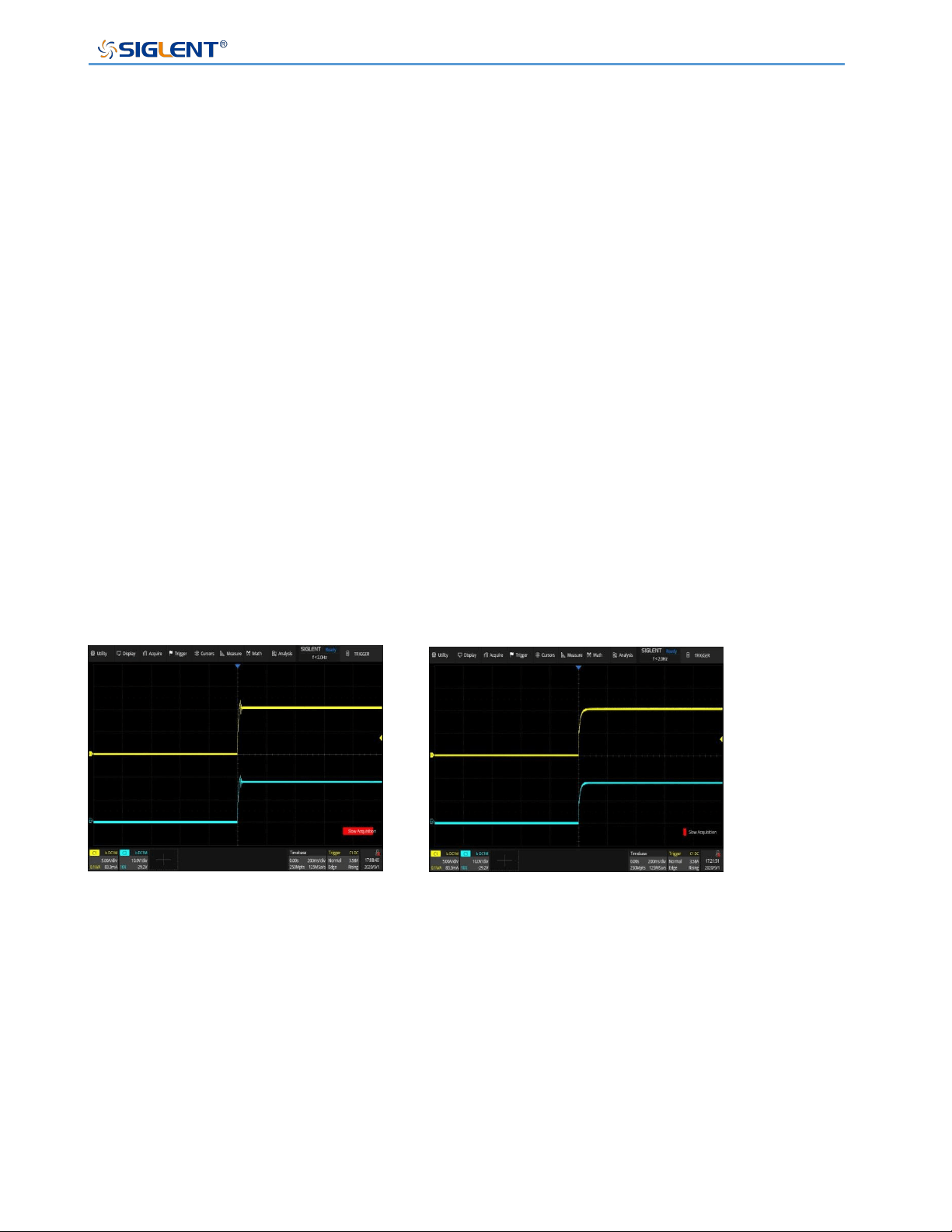
The slope of CV and CC mode can be selected to limit the voltage and current consumption.
The slope setting is divided into high-speed priority and slope priority. The high-speed priority
mode does not allow setting the slope in CV or CC mode, while the rising and falling slopes
can be set independently in the slope priority mode.
SPS5000X Series User Manual
WWW.SIGLENT.COM 37
V(V)
T
0
ON
slew rate
Bleeder Control
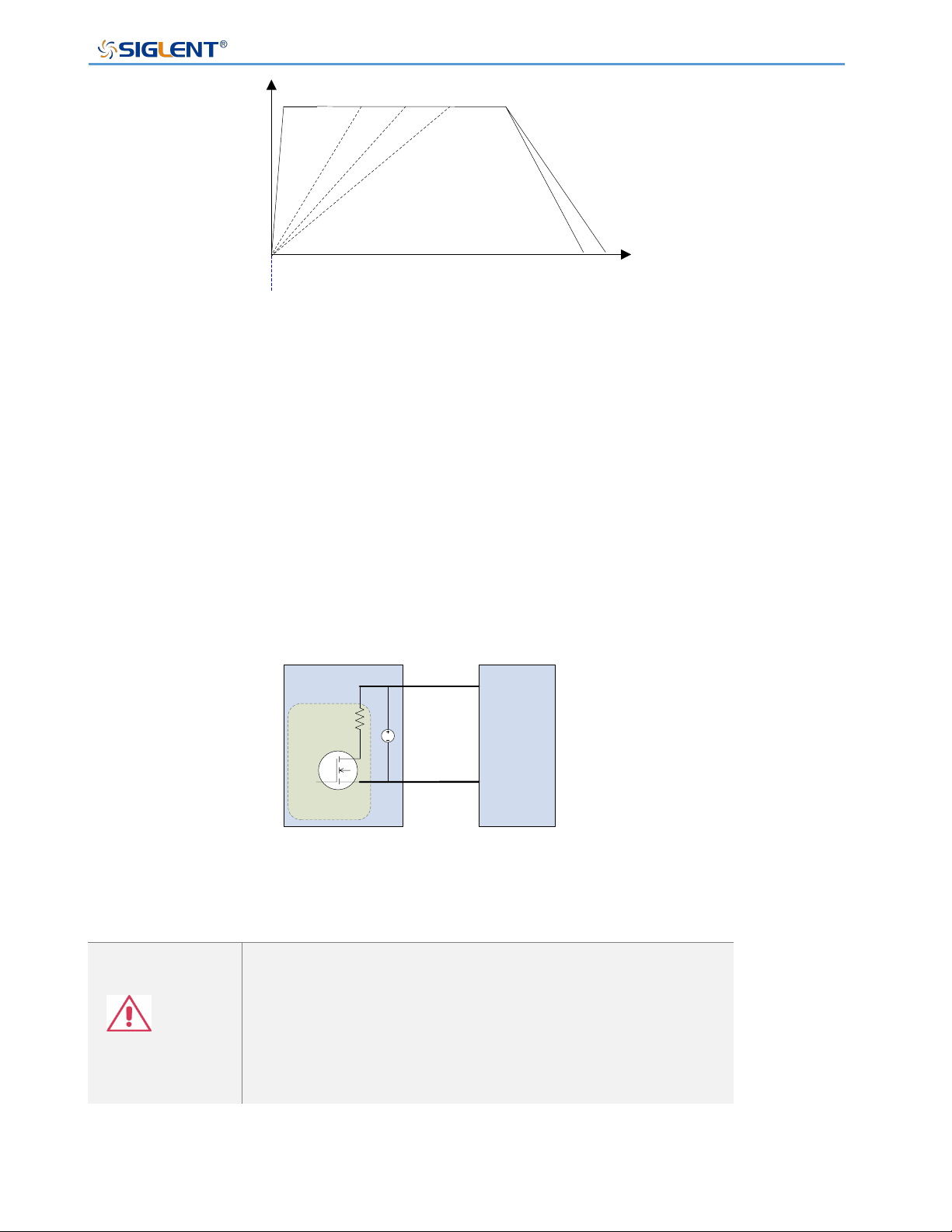
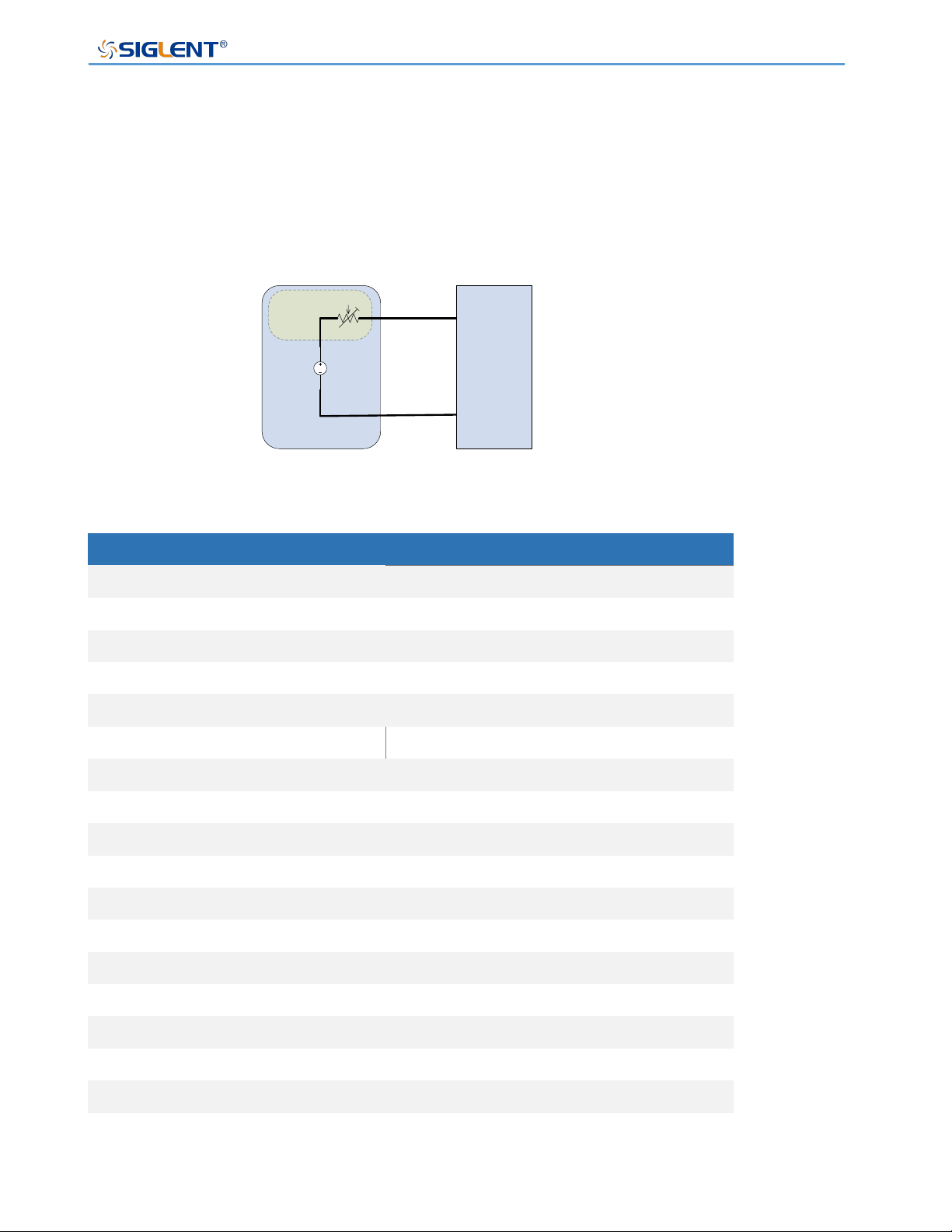
The SPS power supplies feature a bleeder resistor. When the power is turned off and the
load is disconnected, the bleeder resistor will consume the power in the output capacitor.
Without a bleeder resistor, the output capacitor would continue to be charged, causing
potential danger.
The bleeder resistance can also play a role in smoothing the voltage regulation rate.
Load
DC
SPS5000X
+
-
discharge circuit
Bleeder circuit
Note
The bleeder resistor is turned on by default. In battery
charging applications, make sure to turn off the bleeder
resistor when the instrument is turned off because the
bleeder resistor will discharge the connected battery.
SPS5000X Series User Manual
WWW.SIGLENT.COM 38
Internal Resistance
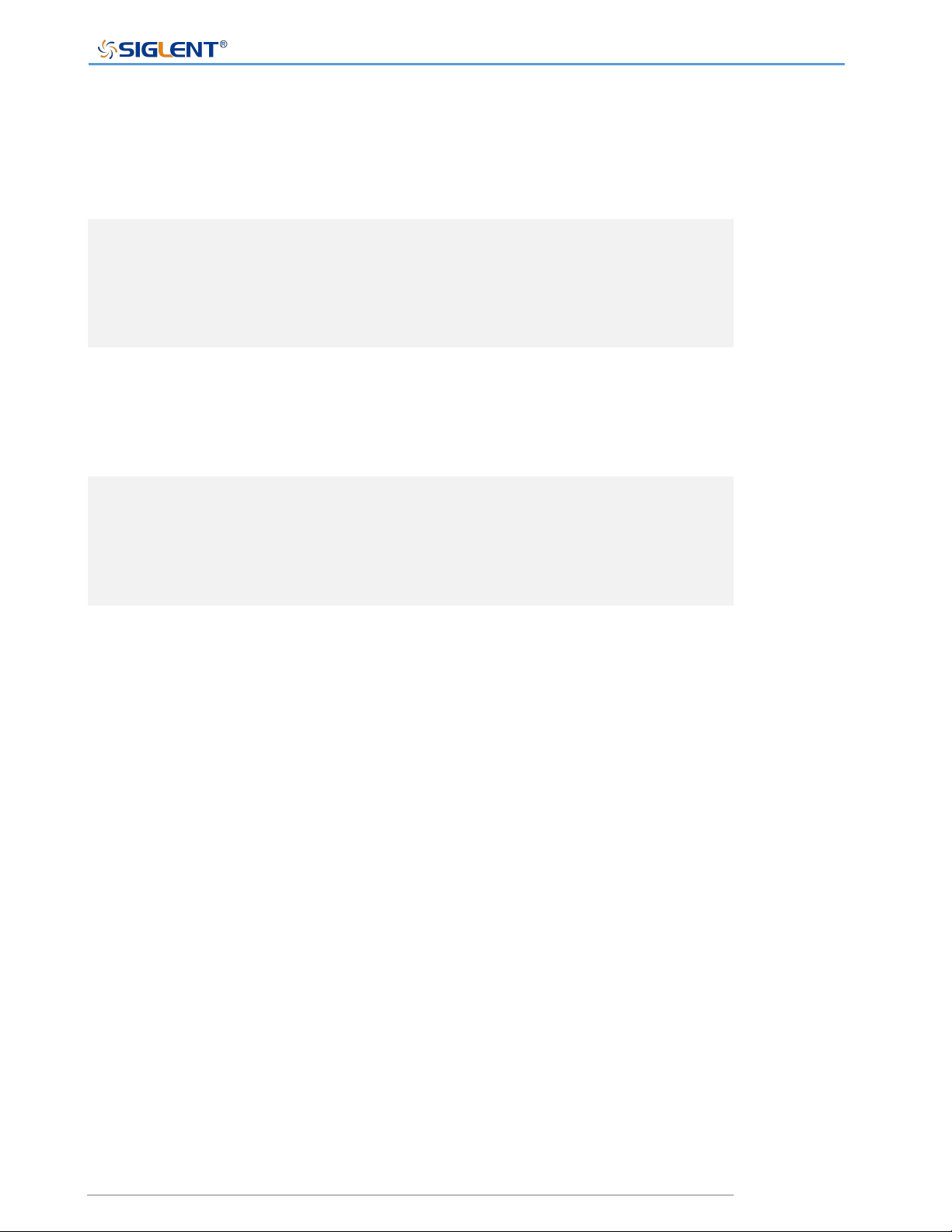
The internal resistance can be customized in the configuration menu of the power supply.
After setting, it can be regarded as a resistor in series with the positive output terminal. At
this time, the power supply behaves like power source with internal resistance, such as a
lead-acid battery.
Load
DC
SPS5000X
+
-
Internal
resistance
SPS Model
Internal Resistance Range
SPS5041X
0 ~ 1.5 Ω
SPS5042X
0 ~ 0.75 Ω
SPS5043X
0 ~ 0.5 Ω
SPS5044X
0 ~ 1.5 Ω
SPS5045X
0 ~ 1.5 Ω
SPS5051X
0 ~ 6 Ω
SPS5081X
0 ~ 6 Ω
SPS5082X
0 ~ 3 Ω
SPS5083X
0 ~ 2 Ω
SPS5084X
0 ~ 6 Ω
SPS5085X
0 ~ 6 Ω
SPS5161X
0 ~ 24 Ω
SPS5162X
0 ~ 12 Ω
SPS5163X
0 ~ 8 Ω
SPS5164X
0 ~ 24 Ω
SPS5165X
0 ~ 24 Ω
SPS5000X Series User Manual
WWW.SIGLENT.COM 39
Alarms
The power supply has a protection function. When the protection alarm is set, the protection
mechanism will be triggered and respond accordingly when the set conditions are reached.
OVP
The overvoltage protection (OVP) function prevents
the load from being damaged by high voltage and
triggers the output to be disconnected.
OCP
The overcurrent protection (OCP) function prevents
the load from being damaged by high current and
triggers the output to be disconnected.
OTP
Overtemperature protection function can prevent the
instrument from overheating damage and
automatically disconnect the output.
Alarm output
The alarm output is a separate open collector
photocoupler output. When the protection settings
(OCP, OVP, OTP) are exceeded, the power supply
will automatically shut down and an alarm will be
output via the analog control interface.
Considerations
The following conditions should be considered when using SPS power supplies:
Inrush current
The power supply generates an inrush current when it is turned on. Ensure that the power
supply is sufficient at the moment of starting, especially when multiple power supplies are
turned on at the same time.
SPS5000X Series User Manual
WWW.SIGLENT.COM 40
Note
In a short time, the switching power supply will generate
inrush current, reducing the service life of the power
switch of the input fuse box.
Pulsed or Peaked loads
The load is subject to current peaks or pulses, and the maximum current may exceed the
average current value. The power supplies only display the average current value. For
pulsed current loads, the actual current may be greater than the displayed value. At this time,
the current limit must be increased or the large power supply must be turned off.
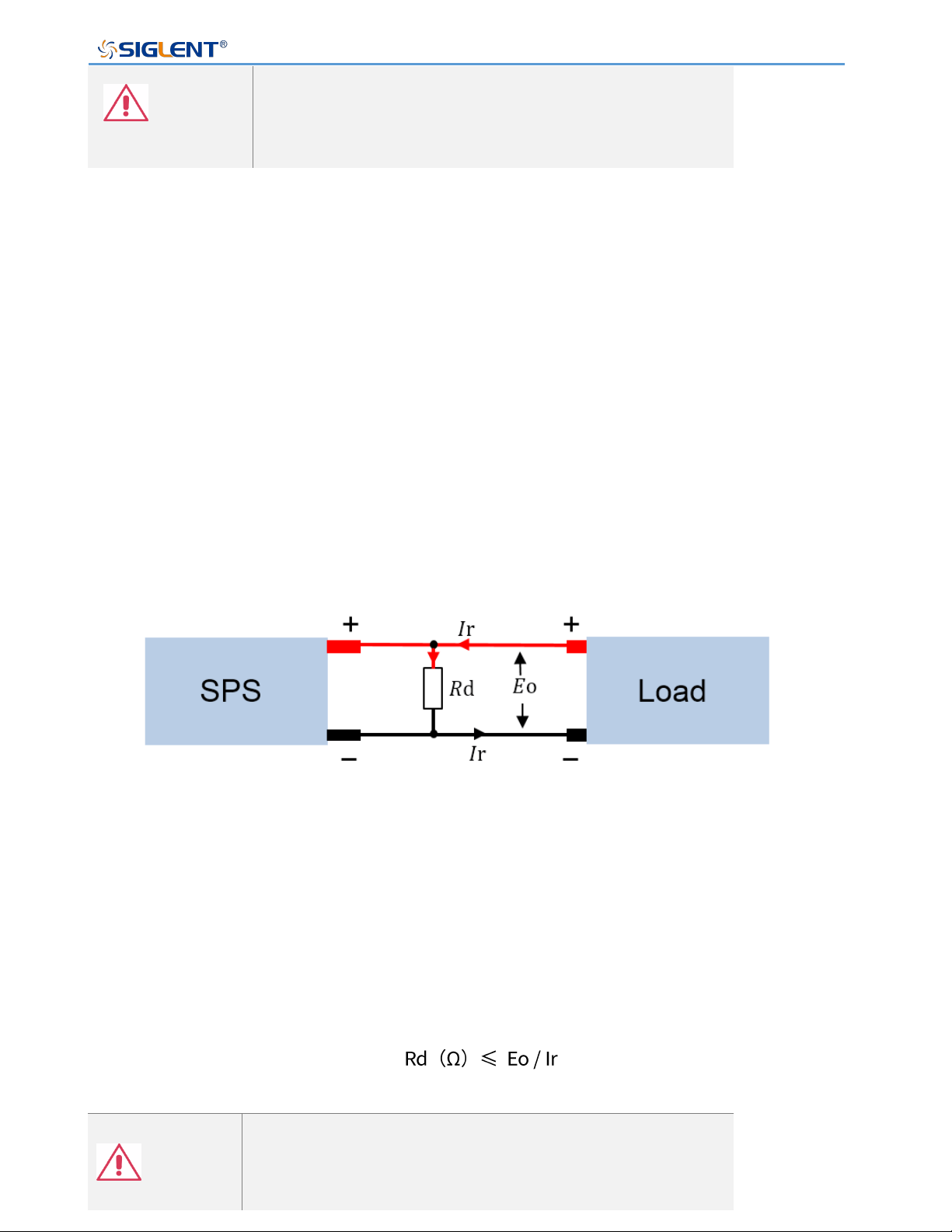
Reverse current regenerative load
When the power supplies are connected to regenerative loads (such as transformers and
inverters), the reverse current will be fed back to the power supply and cannot be absorbed
by the power supply. For such a load that can generate reverse current, a resistor must be
connected in parallel with the power supply to avoid the inflow of reverse current. This
method is only applicable when the bleeder resistor is closed.
To calculate the resistance value (Rd) of the virtual resistor, first determine the maximum
reverse current Ir and determine the output voltage Eo.
Note
As the current decreases, the resistance of the output is
partially absorbed.
Ensure that the resistor used can withstand the power
SPS5000X Series User Manual
WWW.SIGLENT.COM 41
capacity of the power supply or load.
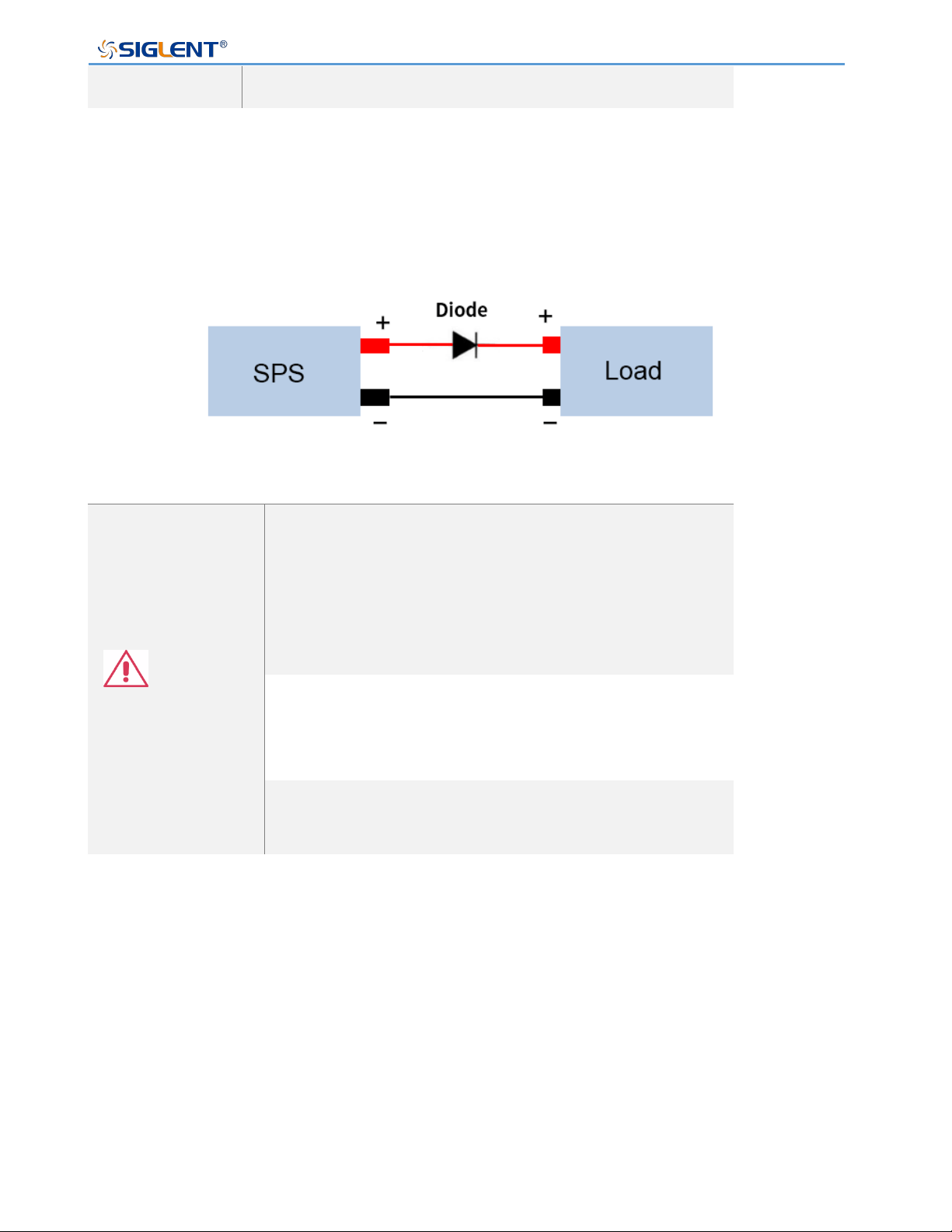
Reverse current connection method
When the power supplies are connected to a load such as a battery, reverse current may
flow into the power supply. To prevent damage to the power supply, connect a reverse
protection diode in series between the power supply and the load.
Note
Ensure that the reverse voltage of the protection diode
can withstand 2 times the rated output voltage of the
power supply and that it can withstand 3 ~ 10 times of
the rated output current of the power supply in forward
(conduction) current.
Ensure that the diode can withstand the subsequent
heat generated by the maximum power that the supply
can deliver.
When a diode is used to limit the reverse voltage, the
remote measurement function should be turned off
Grounding
The output terminals of the power supplies are independent of the protective ground terminal.
When in protective grounding or floating low, the insulation capacity of the load, load line,
and other connected equipment must be considered.
Floating
When the output terminal is floating, the load and all load wires must be insulated, and the
insulation capacity should be greater than the insulation voltage of the power supply.
SPS5000X Series User Manual
WWW.SIGLENT.COM 42
Grounded output terminal
If the positive/negative terminal is connected to the protective ground terminal, the insulation
capacity required by the load and the load line will be greatly reduced. The insulation
capacity only needs to be greater than the maximum output voltage of the power supply.
Note
If using external voltage control, please do not
ground the external voltage terminal, otherwise, it will
cause a short circuit.
SPS5000X Series User Manual
WWW.SIGLENT.COM 43
Switch On / Off and Output Port
Connect the Power Cord
Type I / type II / type IV supplies have a power interface with a 10 A input port: use the power
cord provided to connect to the socket on the rear panel.
Type III / type V supplies have the following power cord connection method:
1) Turn off the power switch;
2) Connect the AC input terminal to the AC power cord;
Black/Brown: The live/hot wire, connected to port L.
Green/Green-yellow: The ground wire is connected to the terminal with a grounding mark
.
White/Blue: The neutral/zero line, connected to port N.
3) Install the protective cover.
Power On
The SPS5000X is powered on manually. After the power is connected to the AC power
source through the power cord, manually press the power button to start the instrument and
enter the boot interface.
When the switch is in 1 state, it means that the switch is on. At this time, if there
is sufficient AC power from MAINS, the power supply is in the on state.
American Standard
European standard
Back view

SPS5000X Series User Manual
WWW.SIGLENT.COM 44
Note
The power supplies generate an inrush current when
turned on. Please make sure that the power supply is
sufficient at the moment of turning on, especially when
multiple power supplies are turned on at the same
time.
Power Off
Press the switch button on the panel to set the 0 position to turn off the power.
Warning
It takes about 8 seconds for the power to be fully
turned on and off.
Do not turn the power on and off quickly. Please wait
at least 10 seconds before changing the output switch
state.
Attention
When the power supply is on, quickly chaging the output state may damage the power
supply. Do not continuously change the output state of the supply.
Output Port
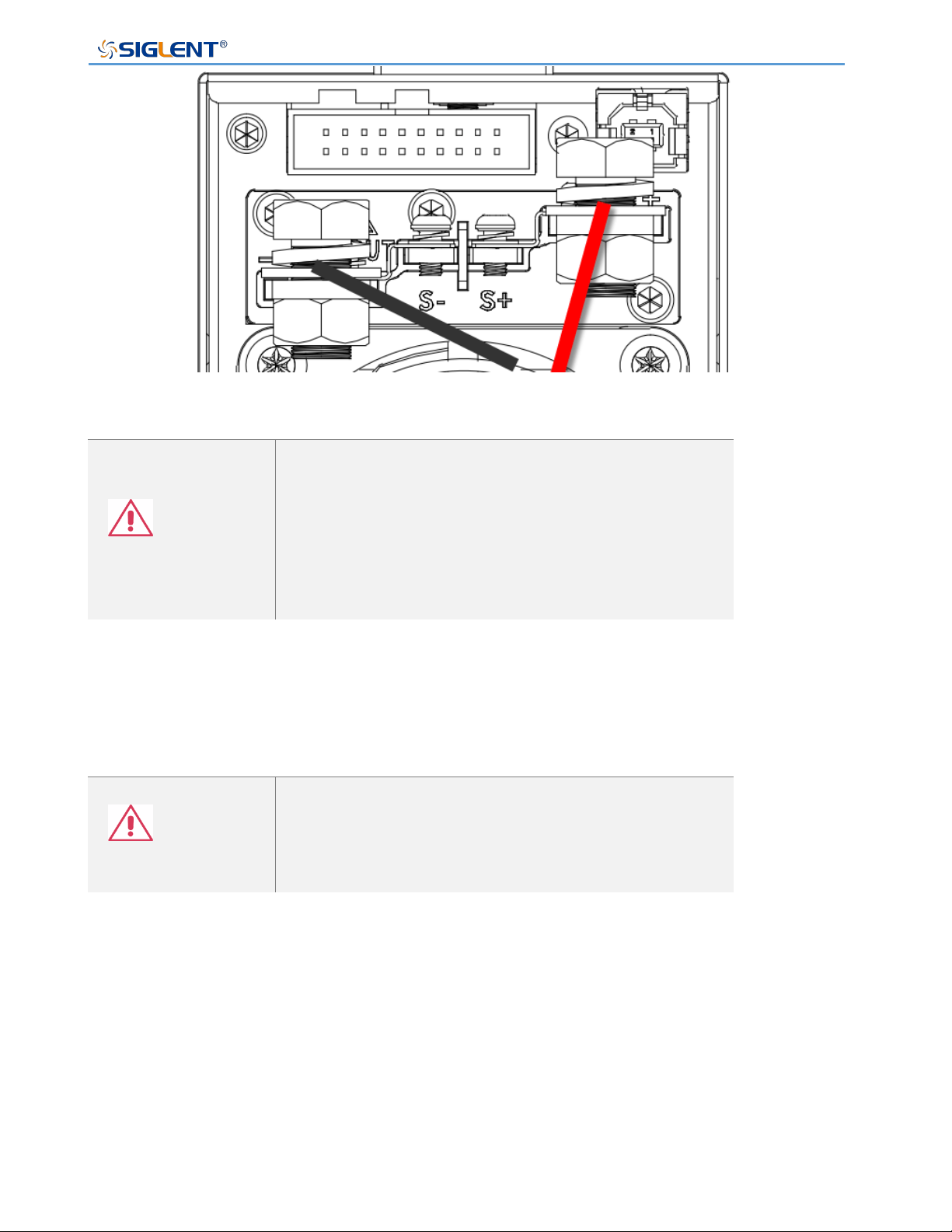
Before connecting the output terminal to the load, consider the cable specifications and the
maximum voltage of the load. Connect the output terminal and load line with M4 screw or
M8 bolt (> 30A). If remote voltage measurement is used, remove the connection terminals
on S +, S - and output, and connect the S +, S - detection lines to the load. For the most
accurate power delivery, connect the S+ and S- as close to the load as possible
SPS5000X Series User Manual
WWW.SIGLENT.COM 45
Warning
The power switch must be turned off before installing
wiring at the power output terminal.The plastic
protective shell must be installed before turning on the
power supply.
Otherwise, there may be a risk of electric shock.
The single-module model also has a front output port that can output a maximum current of
10 A.
Warning
The front and rear outputs cannot be used at the same
time. When the front output is connected with the load,
the rear port should not be connected with the load.
SPS5000X Series User Manual
WWW.SIGLENT.COM 46
User Interface
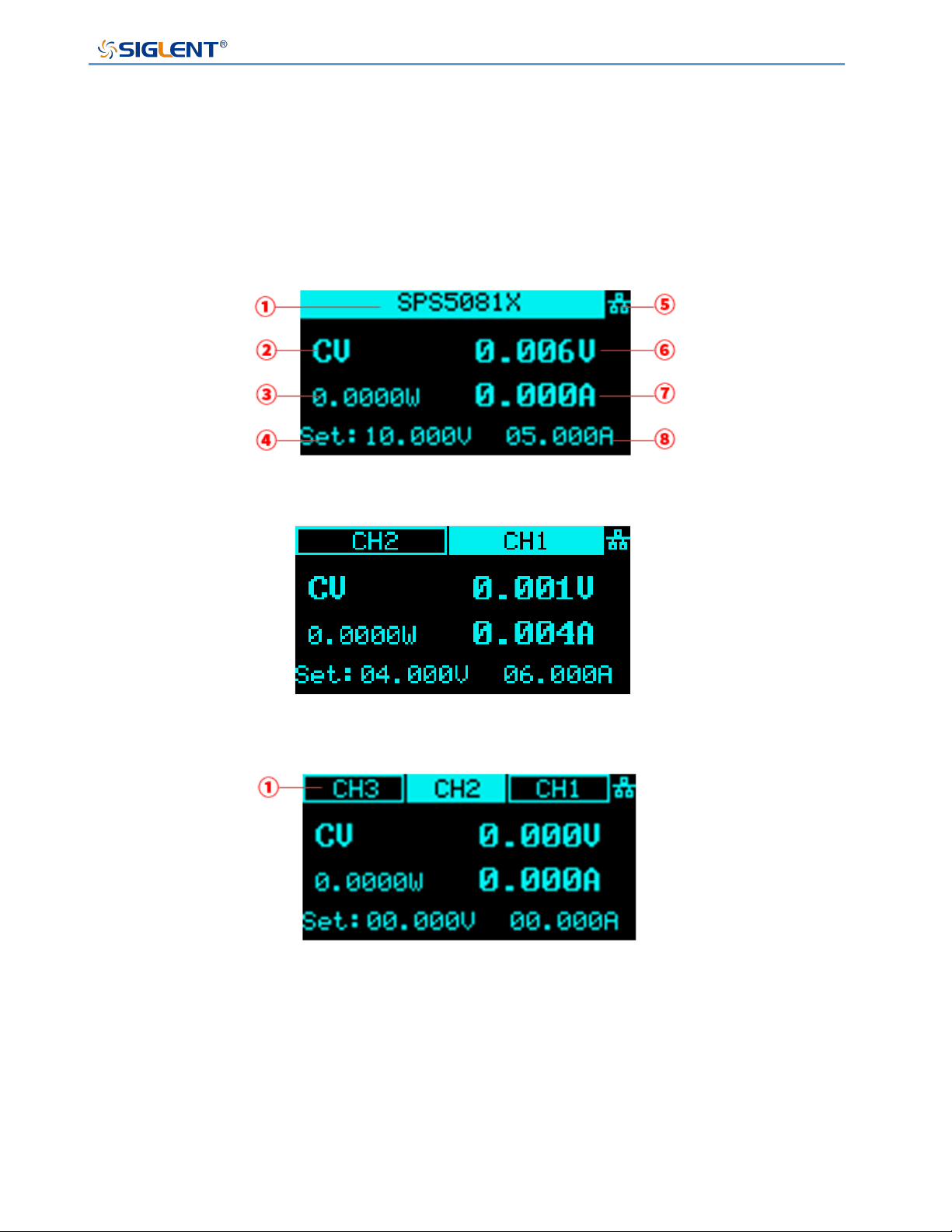
According to different output channels, the SPS5000X series has different user interfaces.
TypeⅠ/TypeⅡ/TypeⅢ
Type IV
Type Ⅴ:
① Type I/Type II/Type III are single-channel models. The status bar here displays the
machine model information. If it is multi-channel, the status of each channel is
displayed here.
Type IV is a dual-channel model: Two channels CH1 and CH2 are displayed.
Type V is a three-channel model: Three channels of CH1, CH2, and CH3 are
displayed.
SPS5000X Series User Manual
WWW.SIGLENT.COM 47
② Display the current status of the power supplies. The symbol display and meaning of
the power supply are as follows:
Symbol
Representation
CV
CV mode
CC
CC mode
Alt
Critical mode
S
Series mode
P
Parallel mode
CV:EXT
External control mode
CC:EXT
External control mode
③ Output power value.
④ Voltage setting value, you can set the size of the output voltage value.
Method: Press the Set / V/I key to switch the cursor position, press the left
and right direction keys to switch the cursor to the number of digits, turn the knob to
increase or decrease the value, press the knob to confirm, and the setting is
complete.
⑤ Display the status of LAN network port or peripheral USB access. When the network
cable is connected or the U disk is inserted, this place is highlighted. means that
a U disk has been read, and means that the LAN cable is connected.
⑥ Output voltage value, take the average voltage
⑦ Output current value, take the average value of current.
⑧ Current setting value, you can set the size of the output current value.
Method: Press the Set key to switch the cursor position, press the left and right
direction keys to switch the cursor to the number of digits, turn the knob to increase
or decrease the value, press the knob to confirm, and the setting is complete.

SPS5000X Series User Manual
WWW.SIGLENT.COM 48
Basic Operation
This chapter will introduce the functions and operation methods of the control panel of
SPS5000X in detail so that you can have a more comprehensive understanding of the
SPS5000X for better work.
Before using the product, it is necessary to confirm that the product can work and output
normally. Confirmation steps: Power Off → Normally connect the sense sheet and the output
terminal is not wired → Install the shell, Power On and Restore Default → Set 5V 0.5A and
output→ Make sure the working mode is CV and the voltage readback value is between
4.075V and 5.025V → Power Off and Short circuit output → Install the shell and Power On
→ Make sure the working mode is CC and the current readback value is between 395mA
and 605mA.
System Settings
View Version Information
Operation method: Press menu → 1.System → 1.Version on the panel to call up
the system information interface.
The information that can be viewed on the interface includes: Boot times, vendor name,
model, product specification, serial number, host version, and slave version.
System Upgrade
Please follow the steps below to upgrade the firmware:
1) Download the firmware upgrade package from the official website.
2) Copy the .ADS file in the upgrade package to the root directory of the U disk(FAT32).
3) Insert the USB flash disk into the USB port of the front panel.
4) Press Menu → 1.System → 4.Upgrade on the front panel, and select the upgrade file.
5) Press the button to confirm. The upgrade progress bar will pop up. After the upgrade is
successful, it will restart. If it fails, a prompt box will pop up.
Any operation that interrupts the upgrade process may cause upgrade failure or even the
SPS5000X Series User Manual
WWW.SIGLENT.COM 49
machine cannot be restarted. Do not remove the USB memory device or make any changes
to the power supply while updating.
Restore Default
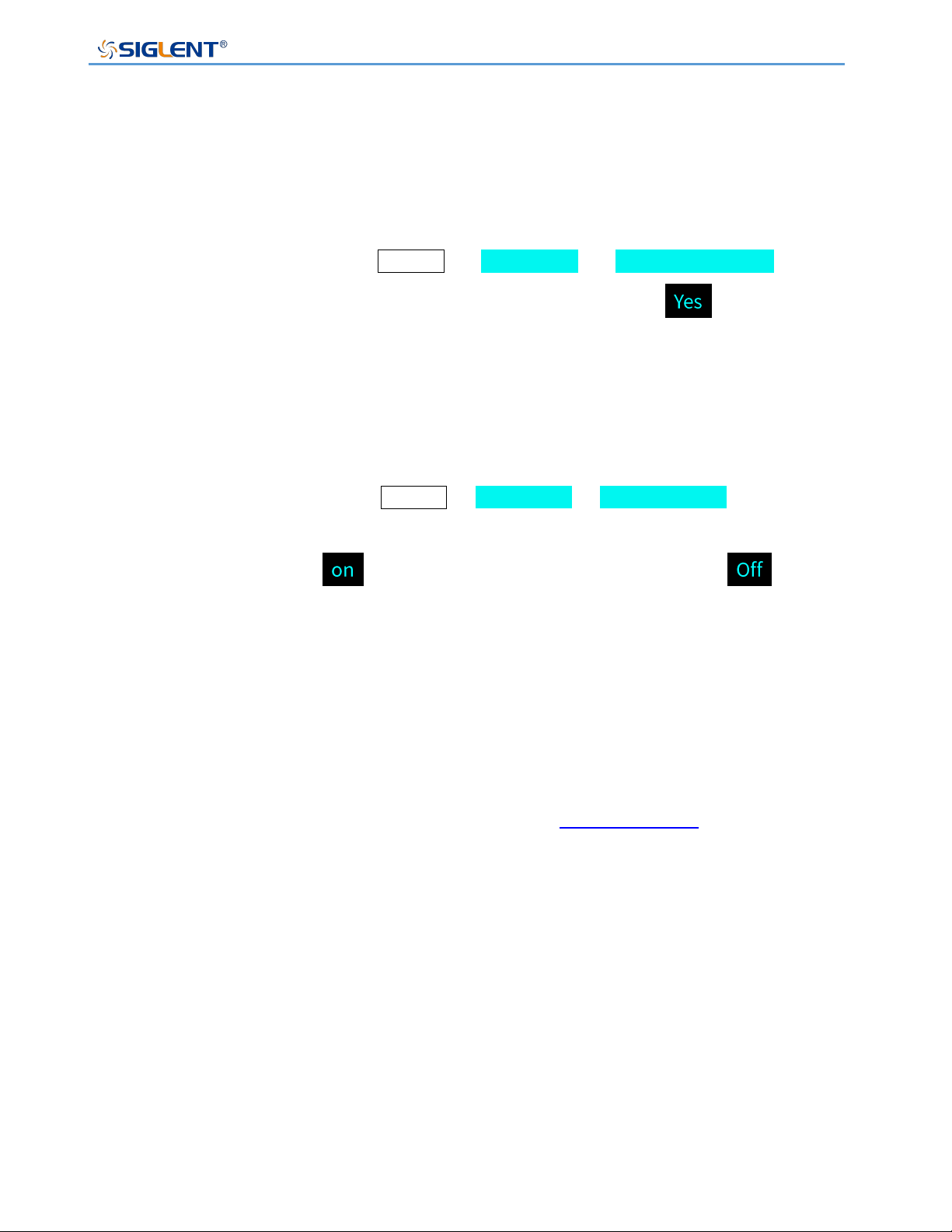
Operation method: After pressing Menu → 1.System → 2.Default Setting on the
front panel, press the knob on the interface, turn the knob to select and press the
knob to confirm, and automatically return to the main interface after successful setting.
Beeper Setup
Operation method: After pressing Menu → 1.System → 3.Key sound on the front
panel, press the knob on the interface, turn the knob to On, press the knob to confirm, and
the buzzer setting is turned . To set off, press the knob again to select , press
the knob to confirm, and the buzzer setting is off.
Parallel/Series Operation
The content of this chapter requires an external analog interface cable, which is an option
of this product. Users can purchase it on the official website according to their needs. For
more option information, please click the official website (www.siglent.com).
The content of this section is divided into two parts: series and parallel between independent
machines and series and parallel between multiple channels of the same machine.
Parallel or Series among multiple SPS5000X supplies
Two or three power supplies can be connected in series or parallel to extend the output
capabilities.
SPS5000X Series User Manual
WWW.SIGLENT.COM 50
Supported models
Mode
Rated voltage(V)
Rated current(A)
SPS5051X
50
10
SPS5041X
40
30
SPS5042X
60
SPS5043X
90
SPS5081X
80
15
SPS5082X
30
SPS5083X
45
SPS5161X
160
7.5
SPS5162X
15
SPS5163X
22.5
The following uses 2 SPS5081X as an example to realize the method of series and parallel
connection. The two machines are arbitrarily named A and B, which can realize two
connection combinations of series between AB and parallel between AB
(1) Series between AB
Before realizing serial output, it is necessary to set the mode of SPS and connect the
output port and back-end analog interface.
Mode setting
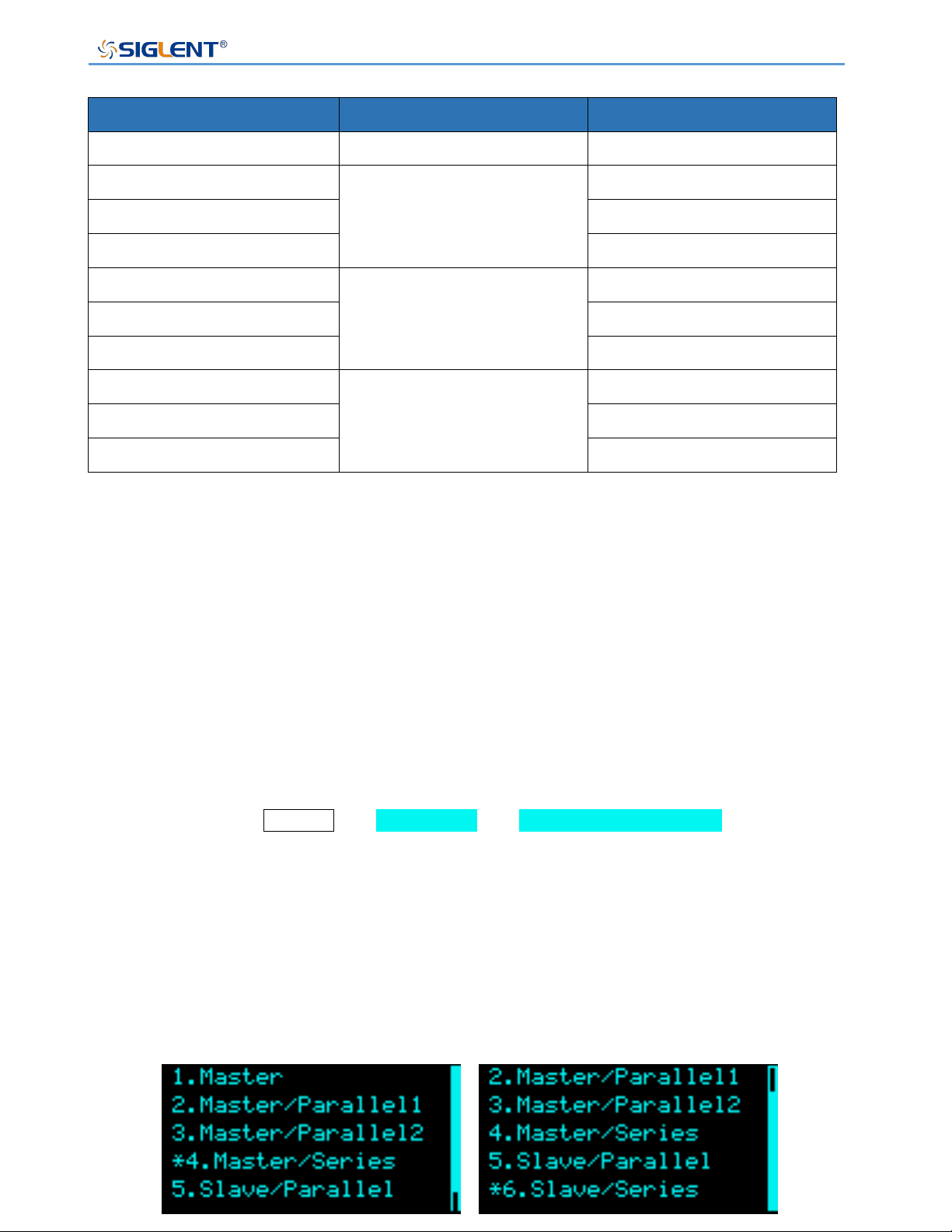
Setting method: Menu → 1.System → 5.M/S mode settings to enter the
setting interface, press the knob to display a cursor, turn the knob to select the
configuration of the slave/slave mode, and press the knob to make the setting effective.
After SPS power supply A enters the menu 5. M/S mode settings interface according to
the above setting method, select 4. Master/Series option, SPS power supply B enters
the setting interface according to the above method, and select 6. Slave/series option.
Setting interface
A
B
SPS5000X Series User Manual
WWW.SIGLENT.COM 51
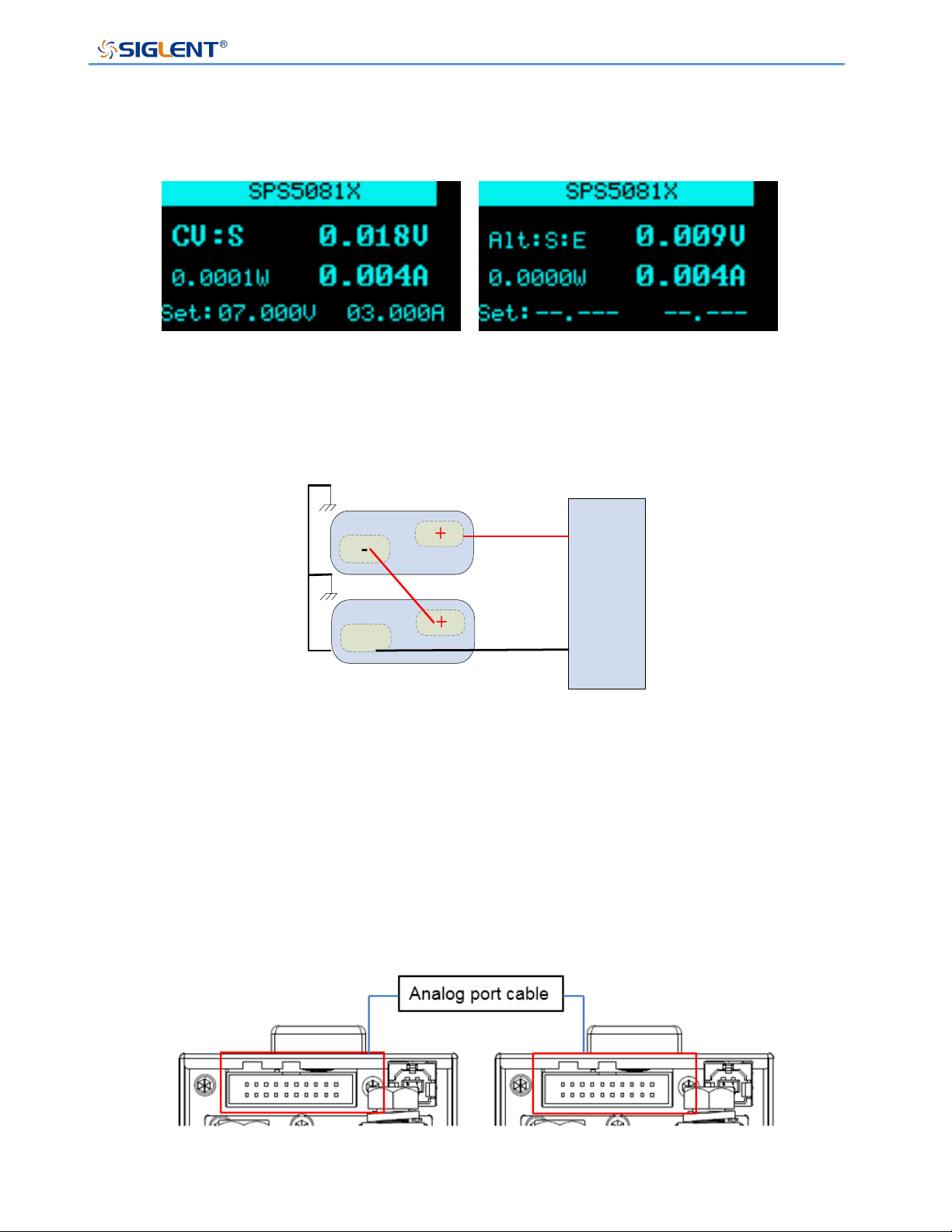
After the setting is successful, A is the master, B is the slave, and the voltage and current
buttons of B cannot be operated.
Output port connection
-
+
Load
-
-
+
+
Master unit
Slave unit
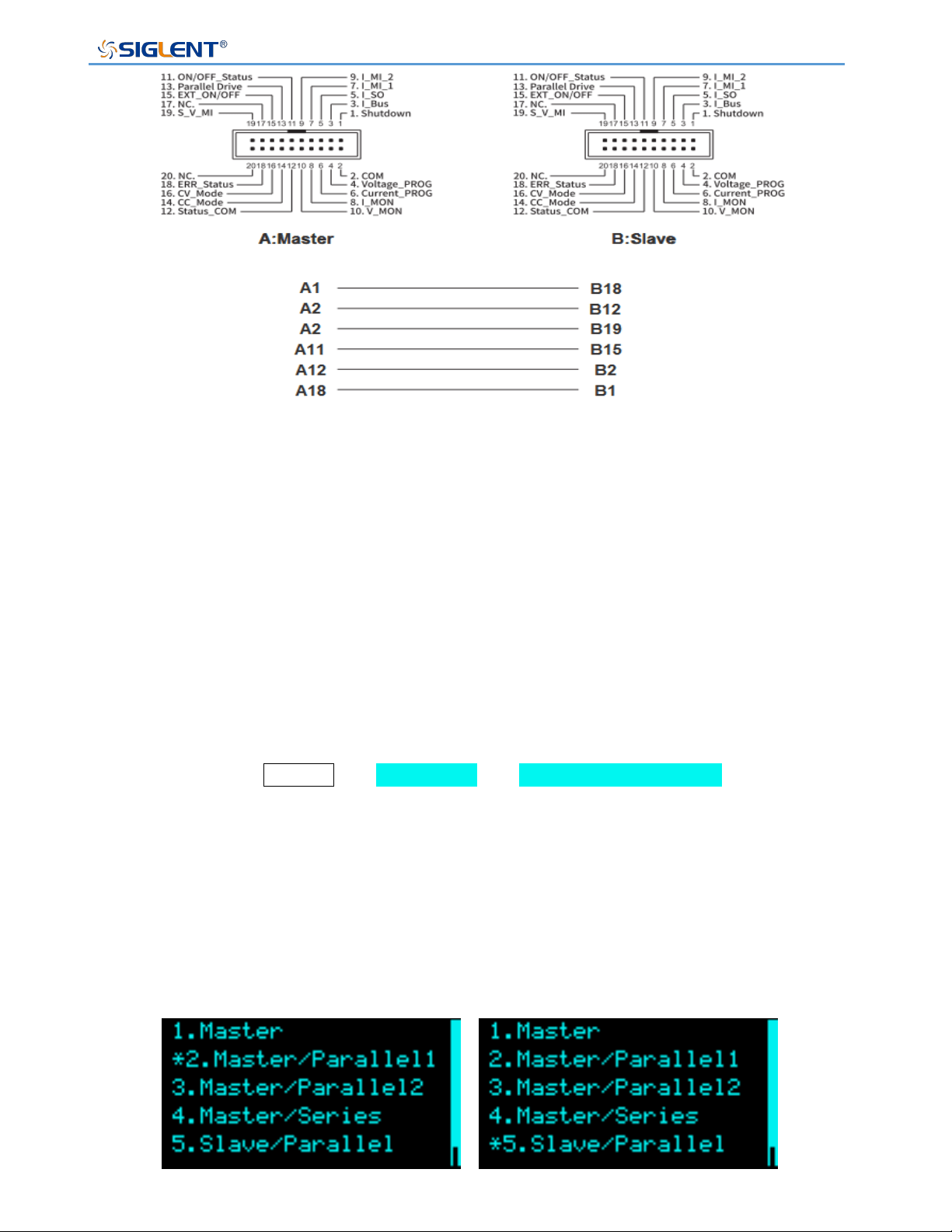
Analog port connection
Users can use the analog connection line option to realize the analog port connection
between two power supplies. You can also make your own connection line according to
the corresponding relationship of each port number to realize the connection control
between the AB SPS power supply.
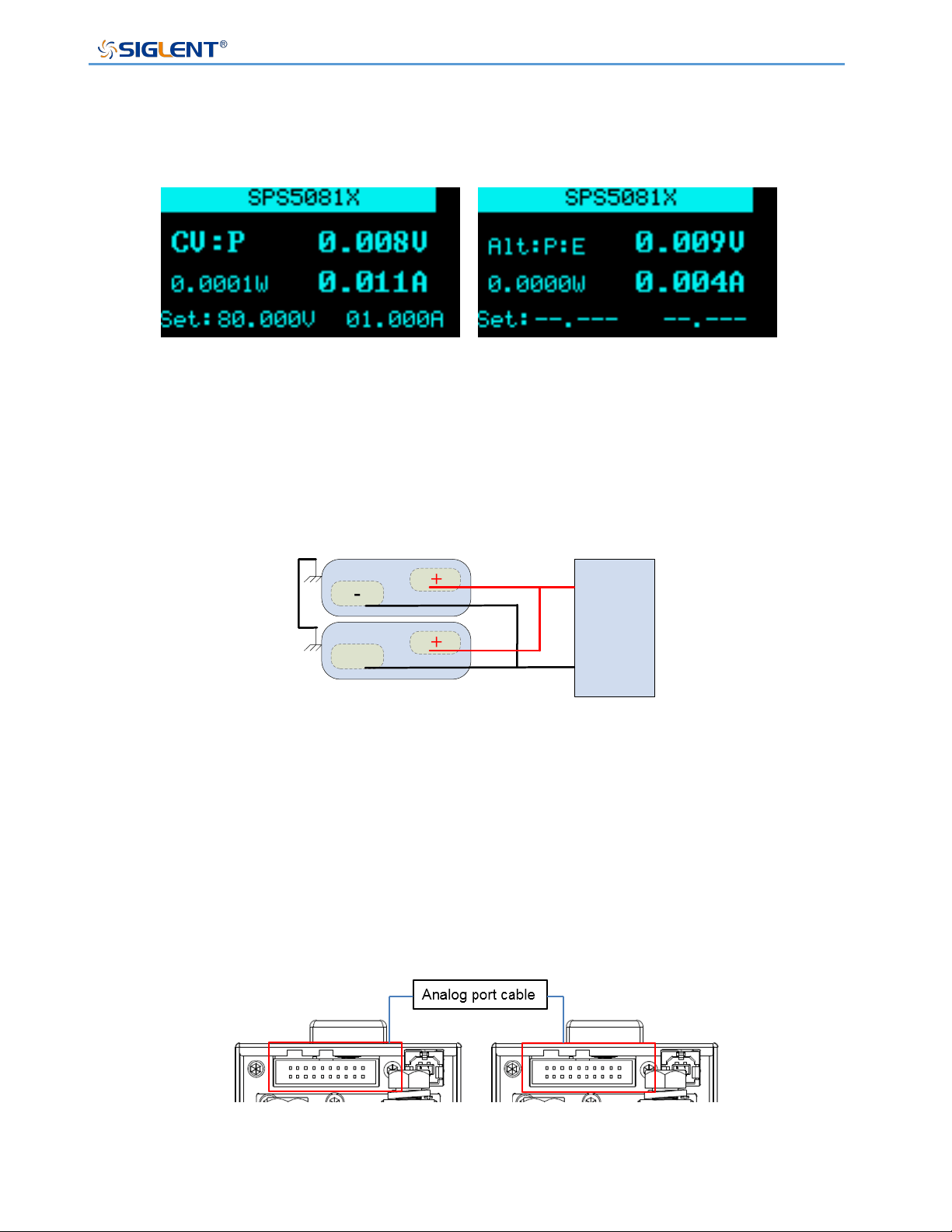
A main interface
B main interface
A
B
A
B
SPS5000X Series User Manual
WWW.SIGLENT.COM 52
In series, the output control of the entire series system is realized by the host A. The
maximum output voltage that can be set is twice the rated voltage of the current model.
The output voltage and current of the host A are set to be the output voltage and current
of the series system.
(2) Parallel between AB
Mode setting
Setting method: Menu → 1.System → 5.M/S mode settings to enter the
setting interface, press the knob to display a cursor, turn the knob to select the
configuration of the slave/slave mode, and press the knob to make the setting effective.
After power supply A enters the menu 5. M/S mode settings interface according to the
above setting method, select 2.Master/ Parallel1 option, power supply B enters the
setting interface according to the above method, and select 5. Slave/ Parallel option.
Setting interface
A
B
SPS5000X Series User Manual
WWW.SIGLENT.COM 53
After the setting is successful, A is the master, B is the slave, and the voltage and current
buttons of B cannot be operated.
Output port connection
-
+
Load
+
Master unit
-
+
Slave unit
-
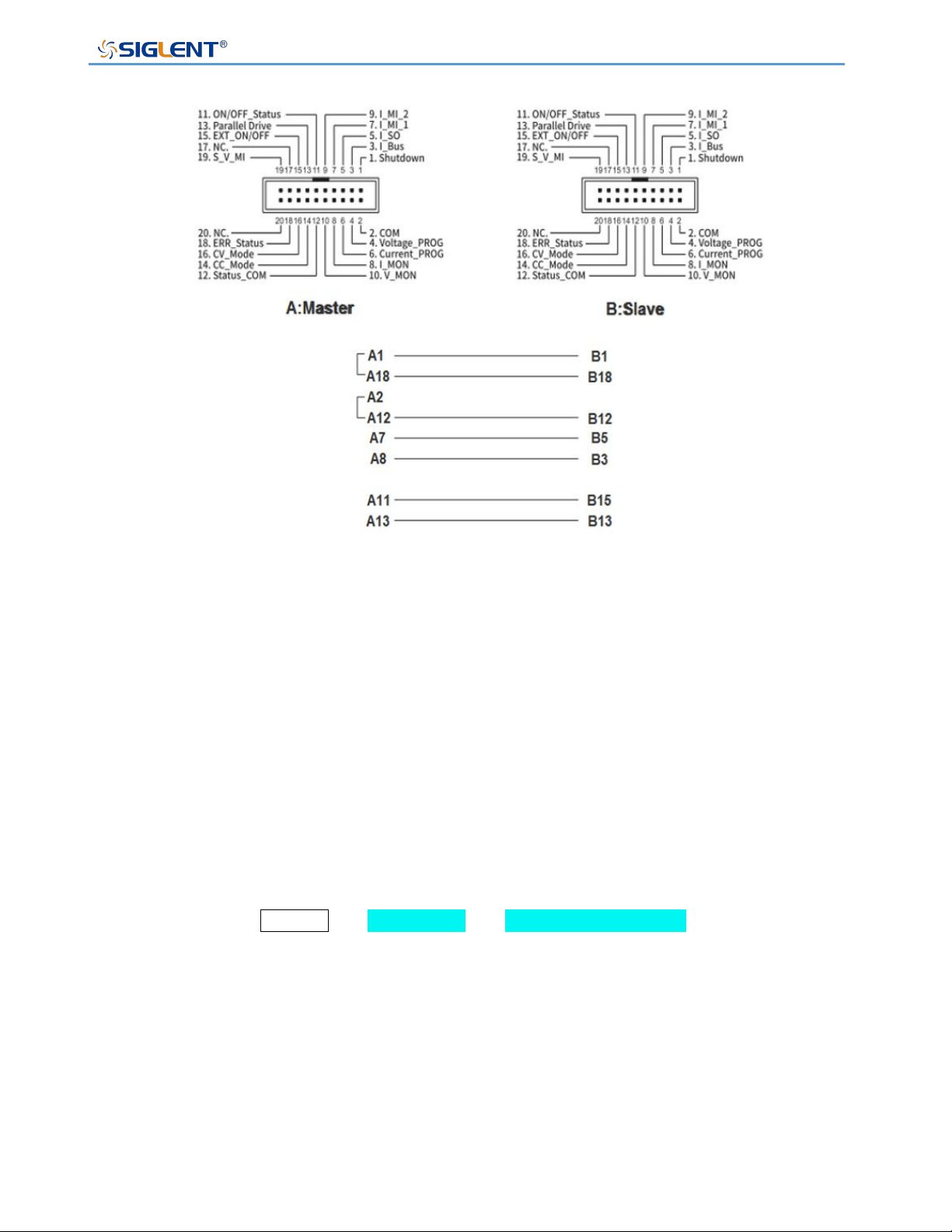
Analog port connection
The user can use the analog connection line option to realize the analog port connection
between two power supplies. You can also make your own connection line according to
the corresponding relationship diagram of each port number to realize the connection
control between the AB power supply.
A main interface
B main interface
SPS5000X Series User Manual
WWW.SIGLENT.COM 54
In parallel, host A realizes the output control of the entire parallel system. The maximum
output current that can be set is twice the rated current of the current model. Host A sets
the output voltage and current to the output voltage and current of the parallel system.
(3) ABC parallel
Three SPSs of the same model are arbitrarily named A, B and C.
Mode setting
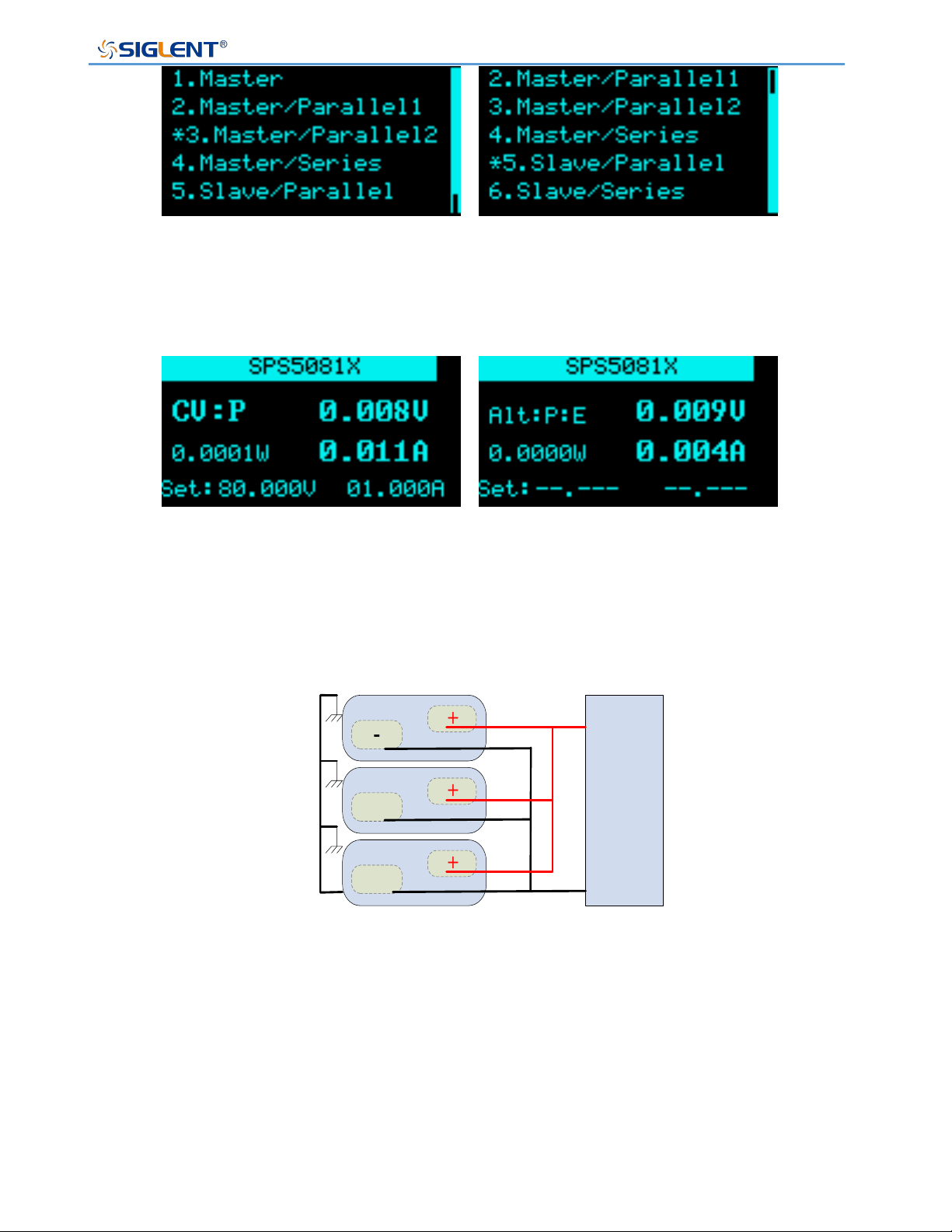
Setting method: Menu → 1.System → M/S mode settings enter the setting
interface, press the knob to display a cursor, turn the knob to select the configuration of
the slave/slave mode, and press the knob to make the setting effective. When * appears
in front of the option, it means the currently selected item.
After power supply A enters the menu 5. M/S mode settings interface according to the
above setting method, select 3.Master/ Parallel2 option, power supply B enters the
setting interface according to the above method, select 5. Slave/ Parallel option, power
supply C and B have the same settings, also select 5. Slave/ Parallel option.
Setting interface
SPS5000X Series User Manual
WWW.SIGLENT.COM 55
After the setting is successful, A is the master, B and C are the slaves, and the setting
voltage and current buttons of B and C cannot be operated.
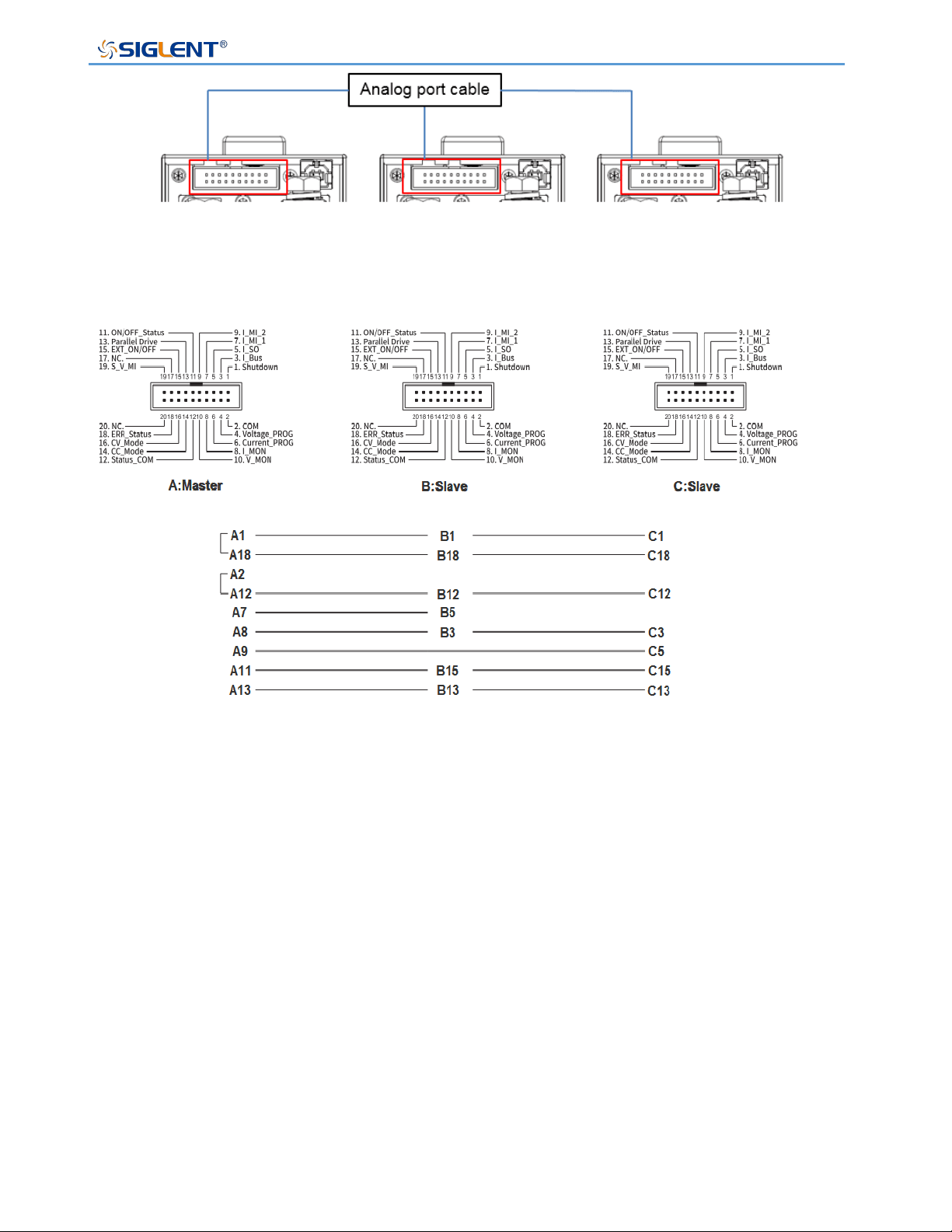
Output port connection
Analog port connection
User can use the analog connection line option to realize the analog port connection
between the three power supplies. You can also make your own connection line
according to the corresponding relationship diagram of each port number to realize the
connection control between the three power supplies.
A
B and C
A main interface
B C main interface
-
+
Load
-
+
Master unit
-
+
Slave unit 1
-
+
Slave unit 2
SPS5000X Series User Manual
WWW.SIGLENT.COM 56
When three power supplies are output in parallel, host A realizes the output control of
the entire parallel system. The maximum output current that can be set is three times the
rated current of the current model. The output voltage and current of host A are set to the
output voltage and current of the parallel system.
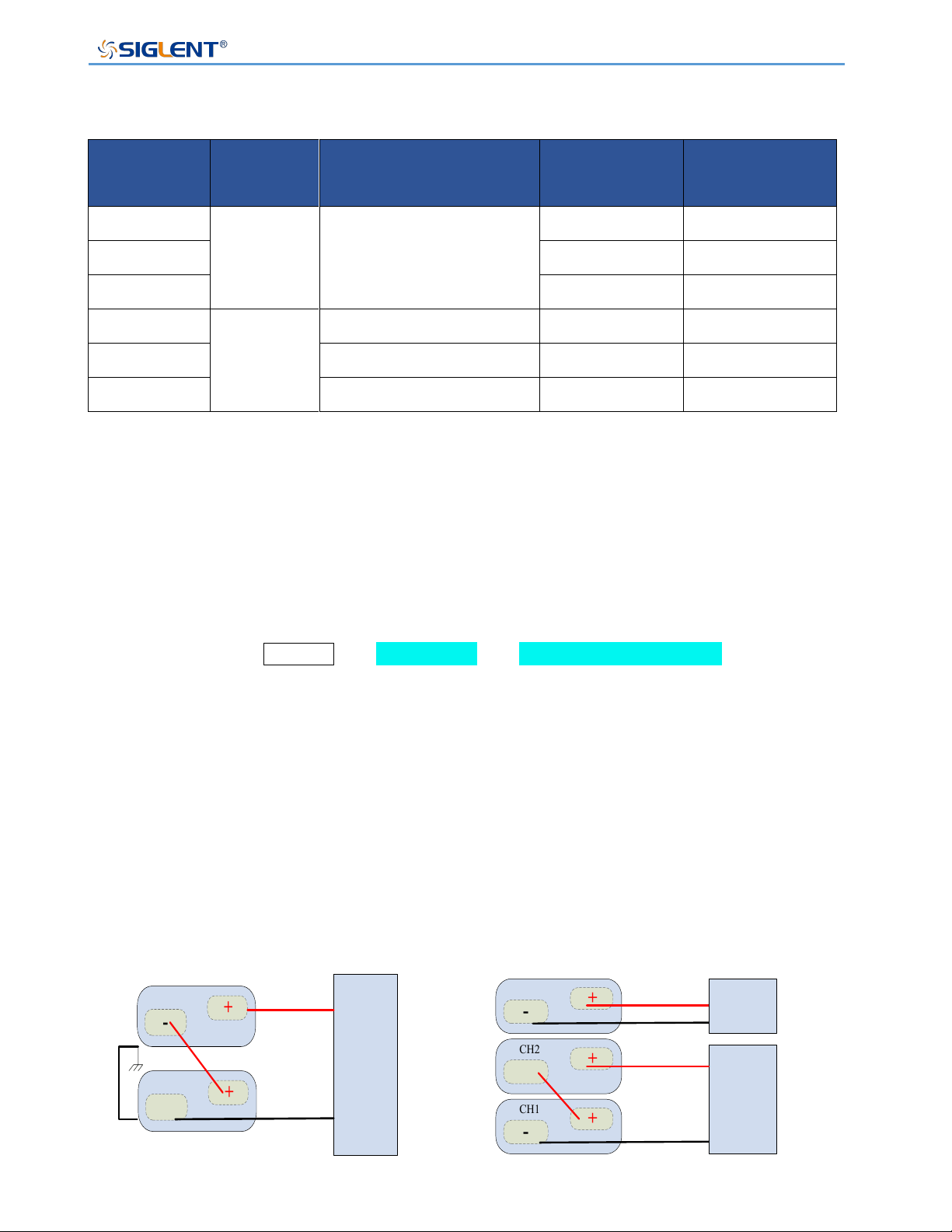
Parallel or Series among channels
Models with two or three output channels, support the combination series or parallel
output between the channels
SPS5000X Series User Manual
WWW.SIGLENT.COM 57
Supported models
Mode
Channels
Output
combination
Voltage(V/CH)
Current(A/CH)
SPS5044X
2
CH1/CH2 series
CH1/CH2 parallel
40
30
SPS5084X
80
15
SPS5164X
160
7.5
SPS5045X
3
CH1/CH2 series
40
30
SPS5085X
CH1/CH2 parallel
80
15
SPS5165X
CH1/CH2/CH3 parallel
160
7.5
(1) CH1/CH2 series
Before realizing serial output, it is necessary to set the mode of SPS and connect the
output port and back-end analog interface.
Mode setting
Setting method: Menu → 1.System → 5.M/S mode settings to enter the
setting interface, press the knob to display a cursor, turn the knob to select the
configuration of the slave/slave mode, and press the knob to make the setting effective.
Set CH1 to SER according to the above setting method, and the state of CH2 will be
automatically set according to the selection of CH1. After the setting is successful, CH1
is the master, CH2 is the slave, and the setting voltage and current buttons of CH2 cannot
be operated.
Output port connection
-
+
Load
-
-
+
+
SPS5044X
SPS5084X
SPS5164X
CH2
CH1
-
+
Load 1
-
+
CH3
-
+
CH2
-
+
CH1
SPS5045X
SPS5085X
SPS5165X
Load 2
SPS5000X Series User Manual
WWW.SIGLENT.COM 58
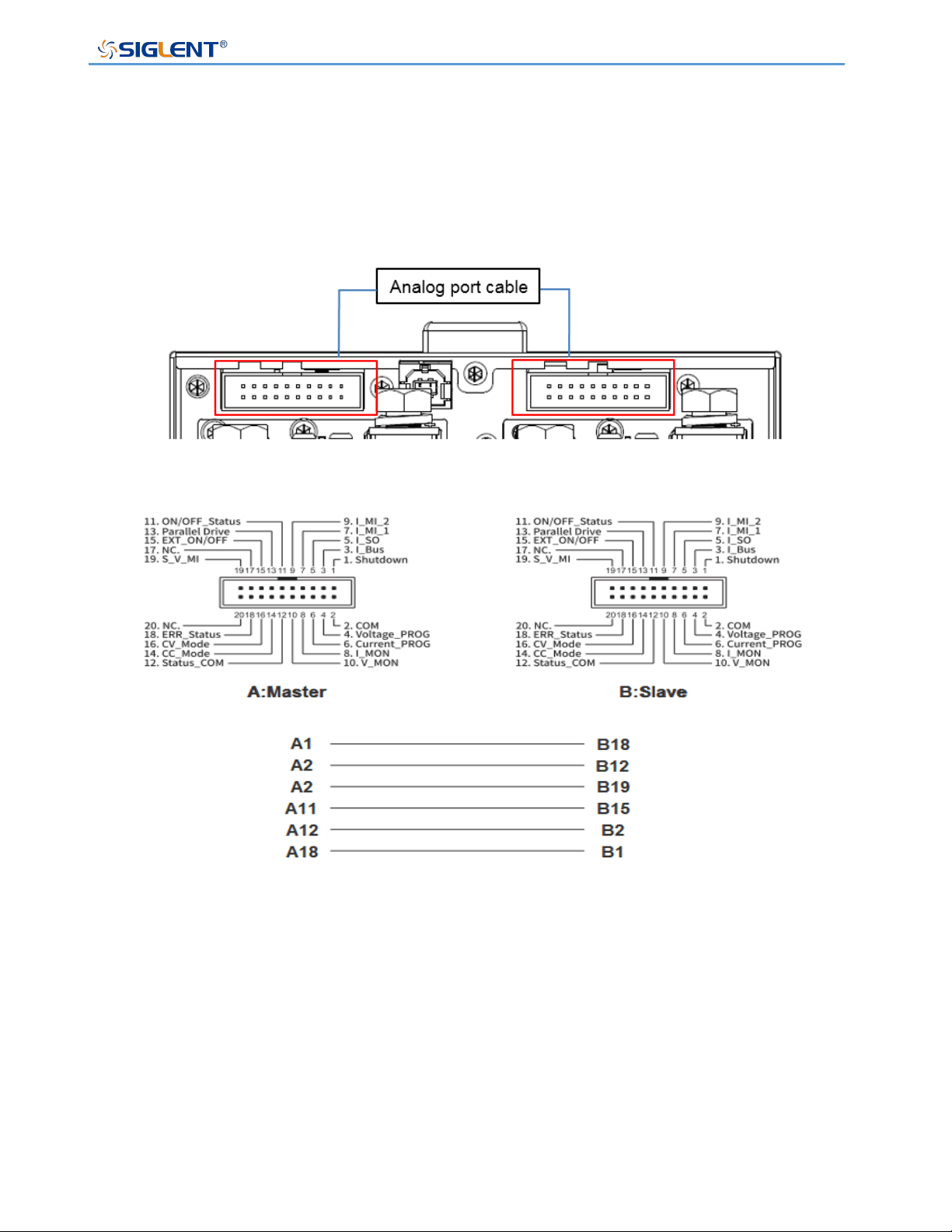
Analog port connection
User can use the analog connection line option to realize the analog port connection
between the two channels. You can also make your own connection line according to the
corresponding relationship of each port number to realize the connection control between
the two channels.
In series output, CH1 realizes the output control of the entire series system. The
maximum output voltage that can be set is twice the rated voltage of the current model.
The output voltage and current of CH1 are set to the output voltage and current of the
series system.
SPS5000X Series User Manual
WWW.SIGLENT.COM 59
(2) CH1/CH2 parallel
Before realizing serial output, it is necessary to set the mode of SPS and connect the
output port and back-end analog interface.
Mode setting
Setting method: Menu → 1.System → 5.M/S mode settings to enter the
setting interface, press the knob to display a cursor, turn the knob to select the
configuration of the slave/slave mode, and press the knob to make the setting effective.
Set CH1 to PAR1 according to the above setting method, and the state of CH2 will be
automatically set according to the selection of CH1. After the setting is successful, CH1
is the master, CH2 is the slave, and the setting voltage and current buttons of CH2 cannot
be operated.
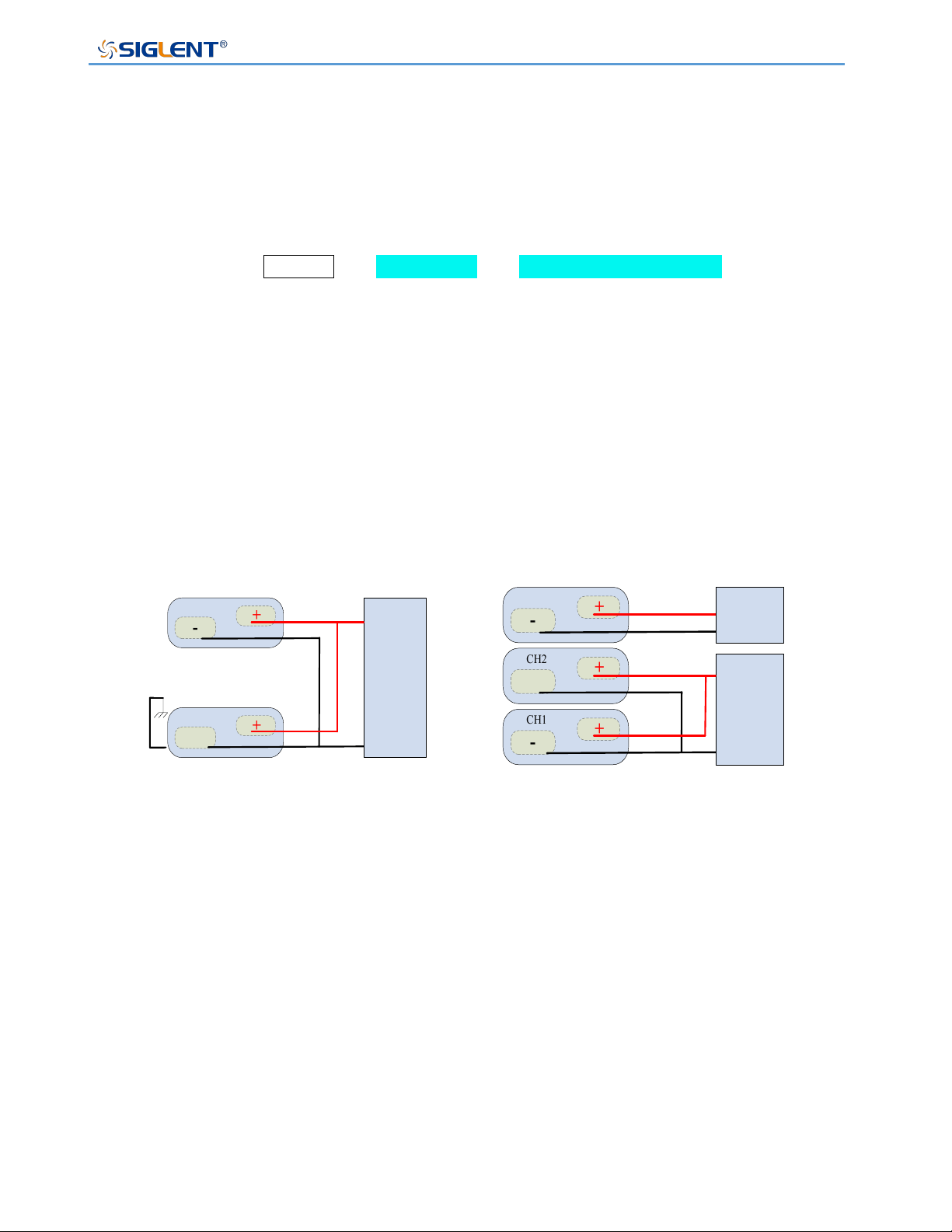
Output port connection
-
+
Load 1
-
+
CH3
-
+
CH2
-
+
CH1
SPS5045X
SPS5085X
SPS5165X
Load 2
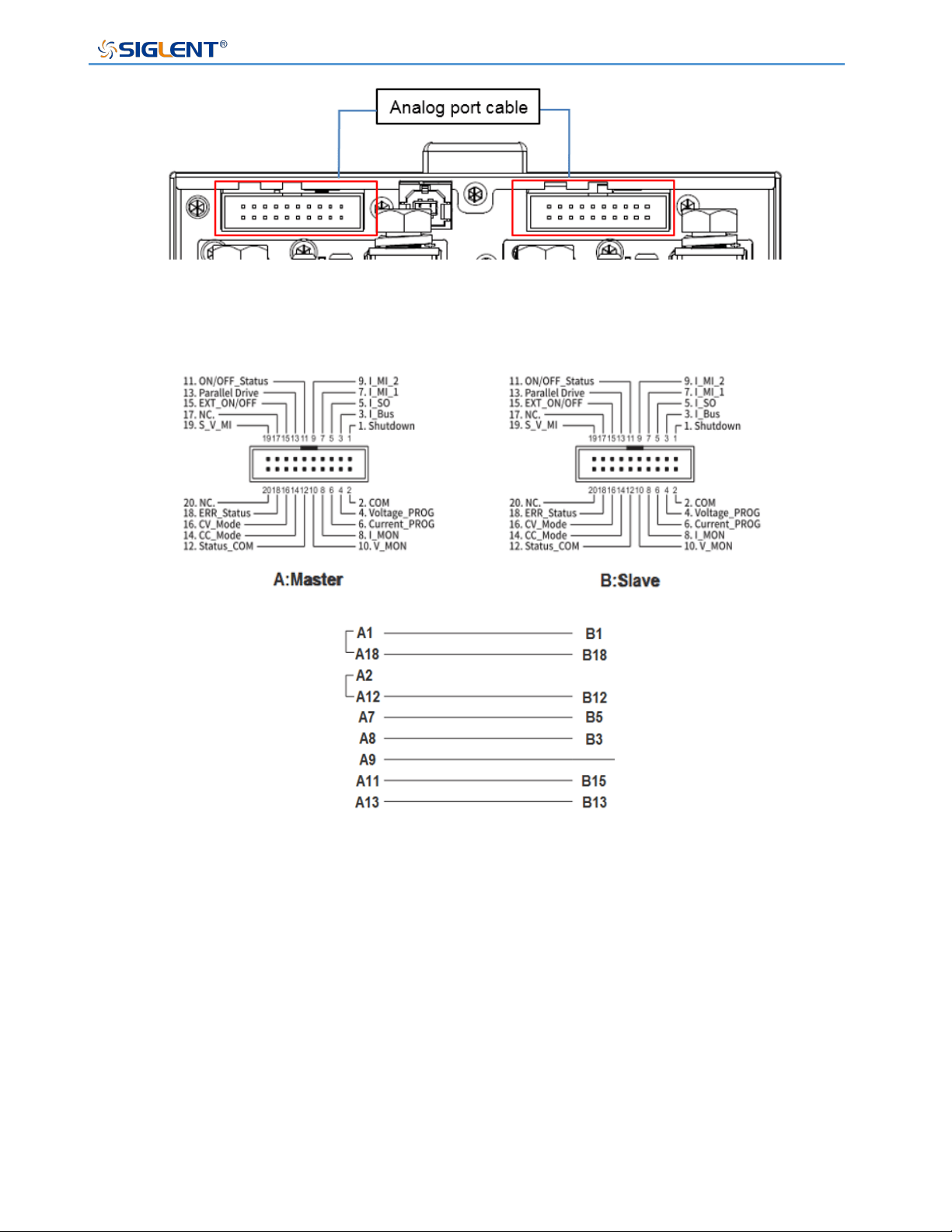
Analog port connection
User can use the analog connection line option to realize the analog port connection
between the two channels. You can also make your own connection line according to the
corresponding relationship of each port number to realize the connection control between
the two channels.
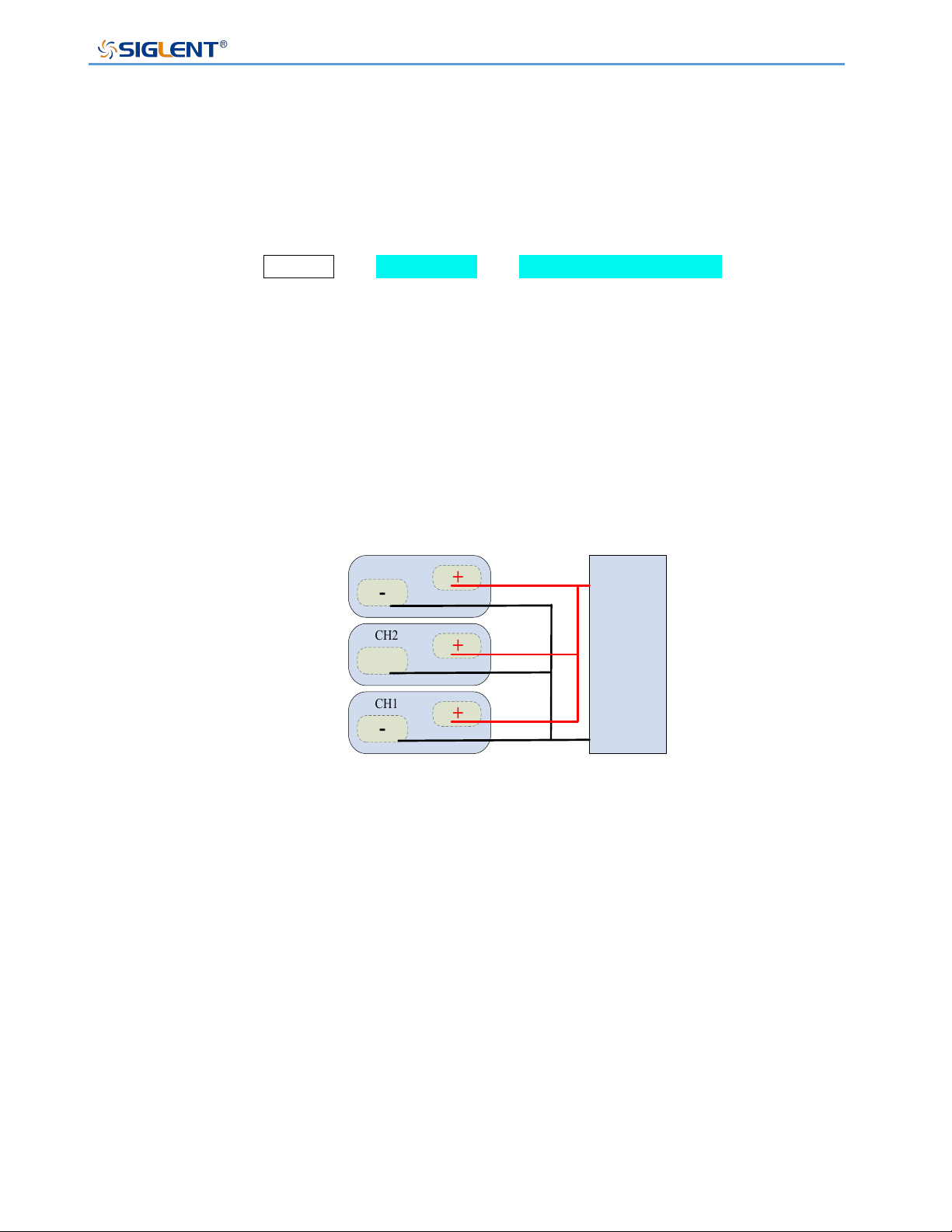
-
+
Load
-
+
CH2
-
+
CH1
SPS5044X
SPS5084X
SPS5164X
SPS5000X Series User Manual
WWW.SIGLENT.COM 60
During parallel output, CH1 realizes the output control of the entire parallel system. The
maximum output current that can be set is twice the rated current of the current model.
The output voltage and current of CH1 are set to the output voltage and current of the
parallel system.
SPS5000X Series User Manual
WWW.SIGLENT.COM 61
(3) CH1/CH2/CH3 parallel
Before realizing parallel output, you need to set the mode of SPS and connect the output
port and the back-end analog interface.
Mode setting
Setting method: Menu → 1.System → 5.M/S mode settings to enter the
setting interface, press the knob to display a cursor, turn the knob to select the
configuration of the slave/slave mode, and press the knob to make the setting effective.
Set CH1 to PAR2 according to the above method, the state of CH2 and CH3 will be
automatically selected according to the setting of CH1, at this time, CH1/CH2/CH3 are
output in parallel.
Output port connection
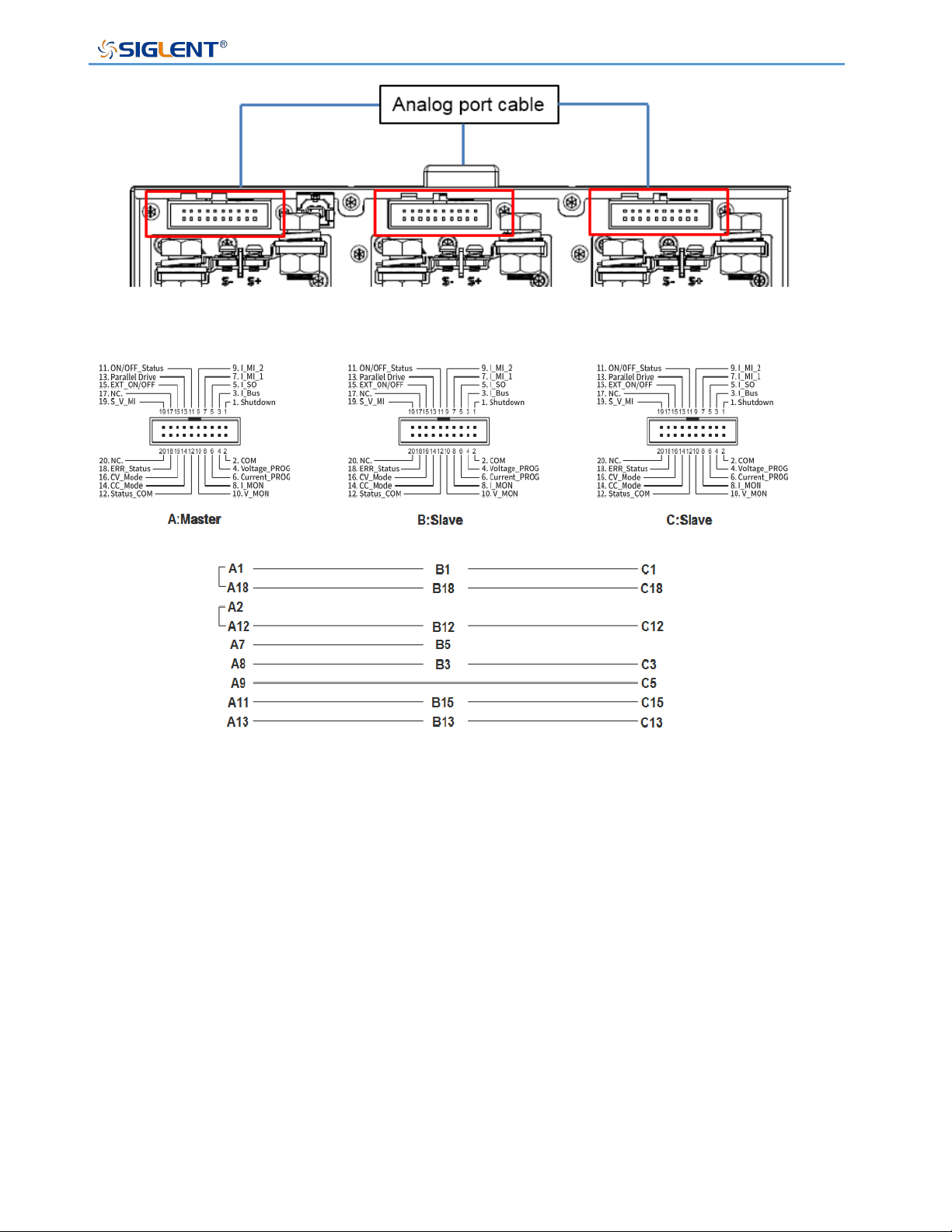
Analog port connection
User can use the analog connection line option to realize the analog port connection
between the three channels. You can also make your own connection lines according to
the corresponding relationship of each port number to achieve connection control
between channels.
-
+
Load
-
+
CH3
-
+
CH2
-
+
CH1
SPS5045X
SPS5085X
SPS5165X
SPS5000X Series User Manual
WWW.SIGLENT.COM 62
When the three channels are output in parallel, CH1 realizes the output control of the
entire parallel system. The maximum output current that can be set is three times the
rated current of the current model. The output voltage and current of CH1 is set to the
output voltage and current of the parallel system.
SPS5000X Series User Manual
WWW.SIGLENT.COM 63
Function Settings
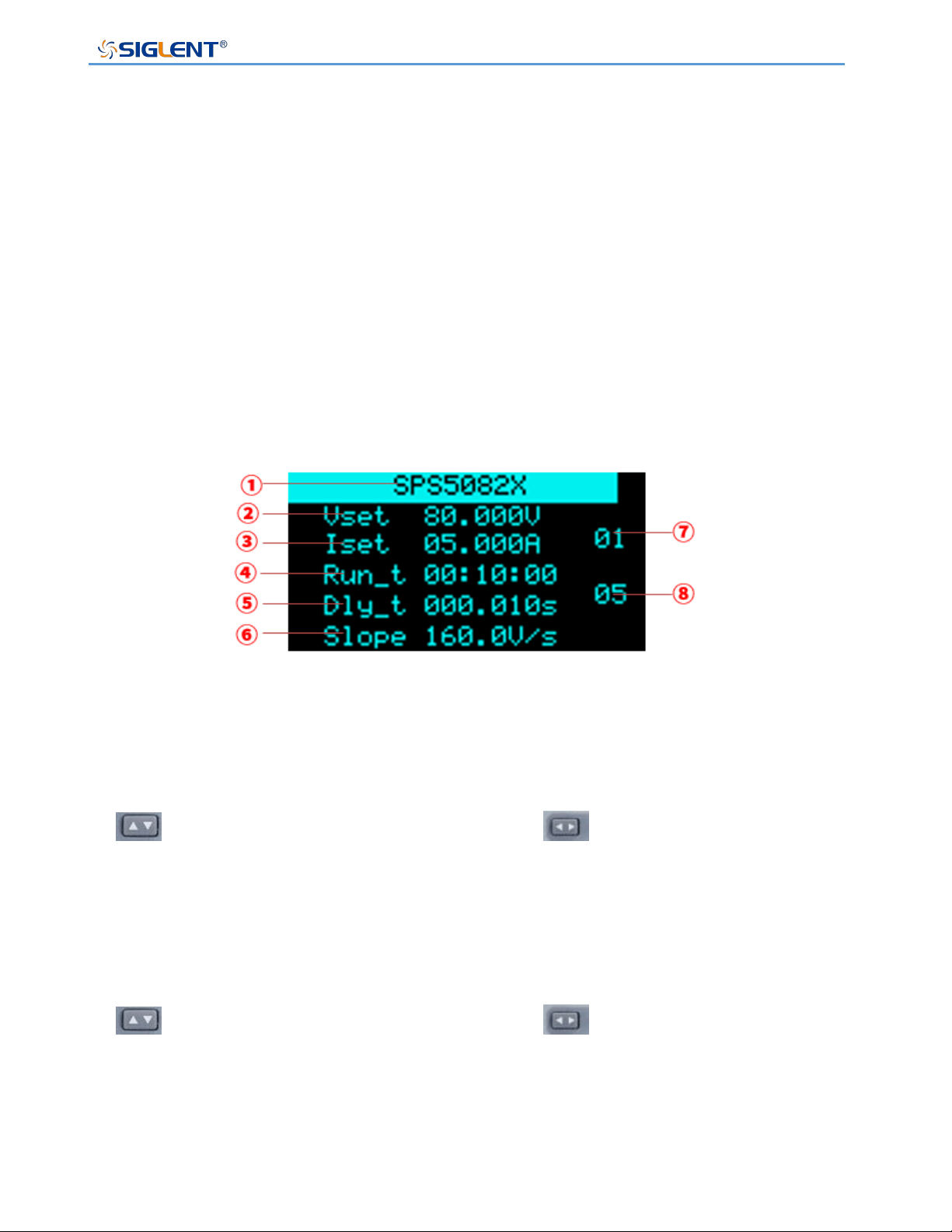
Set List Function
1) Single-channel models
The following UI introduction is the display effect of the old version, and the
introduction to the use of the list function of 3.1.1.8 and the latest version, which is
followed by the content of this section.
Press the List key directly on the operation panel to enter the List setting interface, and press
the List key again to exit the List mode:
① Display model, not editable.
② Set the output voltage level
Setting method: In the List setting interface, press the knob to display the cursor, press
key to move the cursor to the position, press key to move the cursor to the
digit to be changed, turn the knob to increase or decrease the value, and press the knob
to enter the setting.
③ Set the output current level
Setting method: In the List setting interface, press the knob to display the cursor, press
key to move the cursor to the position, press key to move the cursor to the
digit to be changed, turn the knob to increase or decrease the value, and press the knob
to enter the setting.
④ Single-step running time
Setting method: In the List setting interface, move the cursor to here, turn the knob to
change the level, and press the knob to confirm the setting.
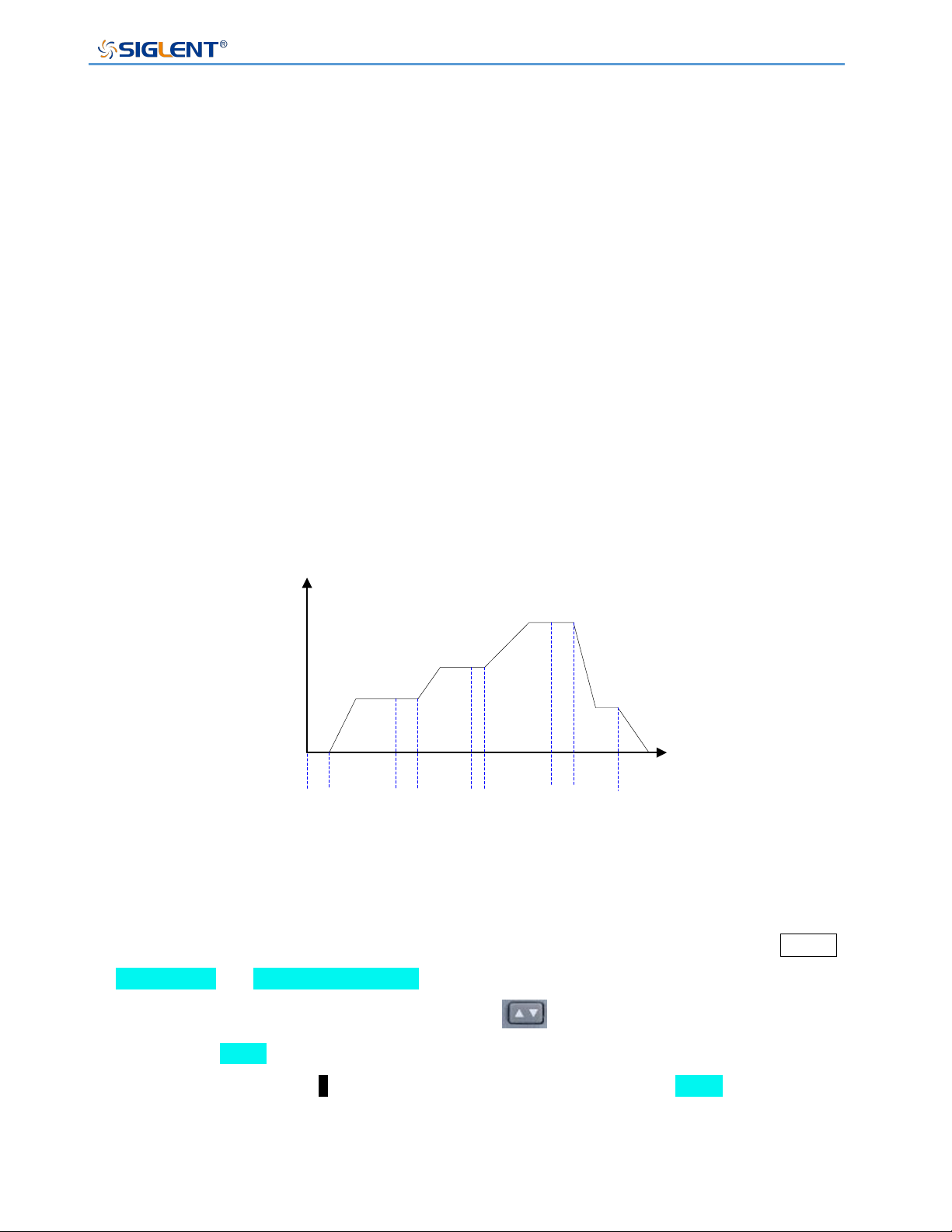
SPS5000X Series User Manual
WWW.SIGLENT.COM 64
⑤ Output delay time
⑥ Slope level
When the power supply is set to CC mode priority, here is the current slope. When set
to CV priority, this is the voltage slope.
Setting method: In the List setting interface, move the cursor to here, turn the knob to
change the level, and press the knob to confirm the setting.
⑦ Number of List groups in the current setting interface, 01 means the first group
Setting method: In the List setting interface, press the key when the cursor is hidden to
switch the current group number interface.
⑧ Total number of steps, the total number of steps output by List, 05 means there are 5
sets of data
Setting method: In the List setting interface, move the cursor to here, turn the knob to
change the value, and press the knob to confirm.
V(V)
T
0
delay1 Run time1 delay2 Run time2 delay3
Run time3
delay4 Run time4 OFFON
List mode
2) Multi-channel model
To set the List output, first set the channel mode to List mode. Setting method: Press Menu
→ Configure → 10.Channel Mode to enter the setting interface. When the cursor is
hidden, press the left and right direction keys to switch the channel to be set
CH1/CH2/ CH3. CH1 means that the CH1 channel is currently selected. Press the knob and
then turn the knob to select . Press the knob. When it is displayed as List , the channel
List mode is set successfully.
For other settings, refer to the single-channel output model method. During List output, press
the knob to pause the time, and press the knob again to continue the output countdown.
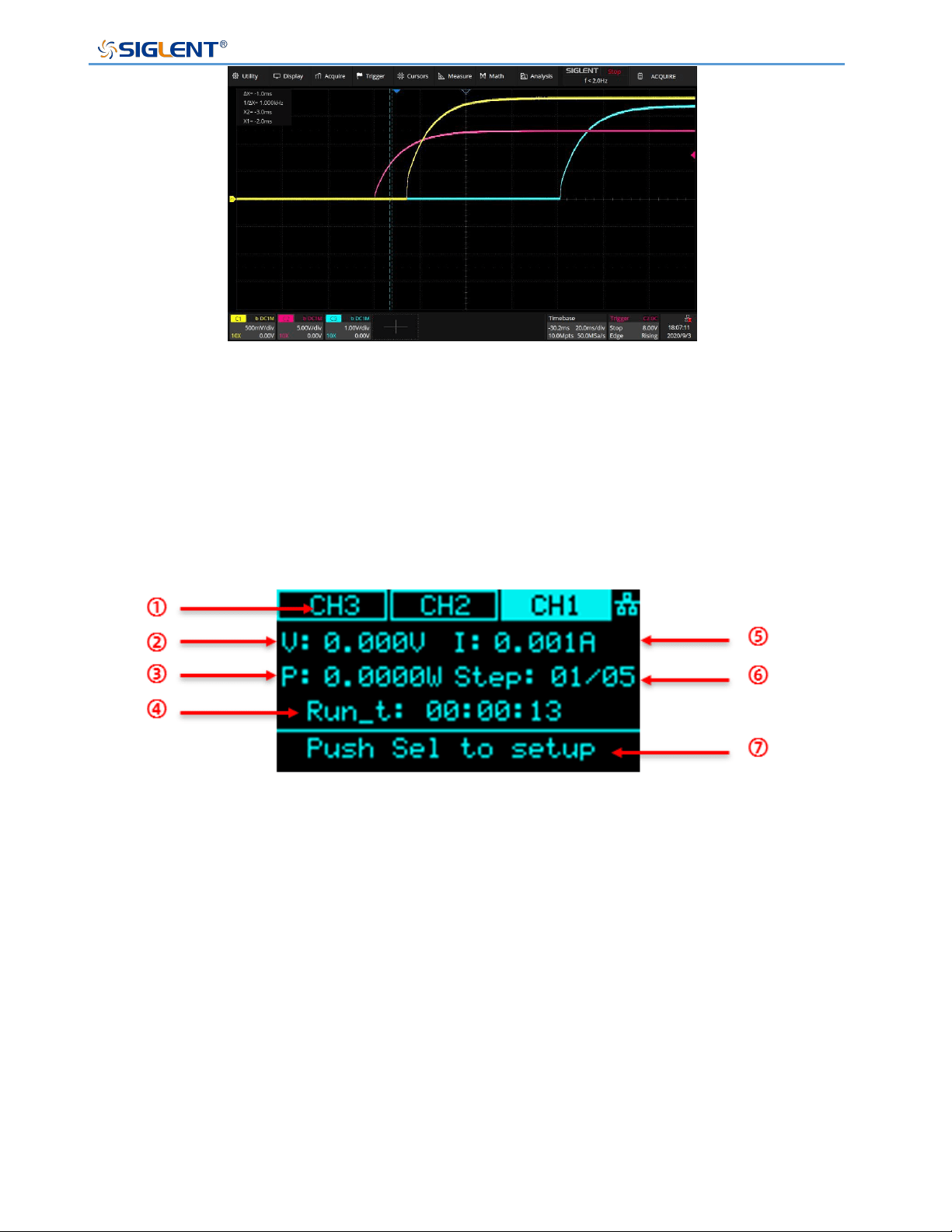
SPS5000X Series User Manual
WWW.SIGLENT.COM 65
3-channel List mode output example
3.1.1.8 and updated version list introduction
Press the List key on the front panel to enter the list main interface, as shown in the following
figure
① Channel display: press the left and right direction keys on the front panel to switch
channels. For single channel models, the model information is displayed here.
② Displays the real-time voltage at the list status output.
③ Displays the real-time power output by the list.
④ Running time: displays the remaining time of the current steps. The time countdown is
performed in the form of hour: minute: second when outputting.
⑤ Displays the real-time current at the output of the list.
⑥ Display of running steps. It is expressed in the form of current running steps / total steps.
⑦ Operation prompt. Press the knob in this interface to enter the list parameter
configuration interface.
List main interface
图
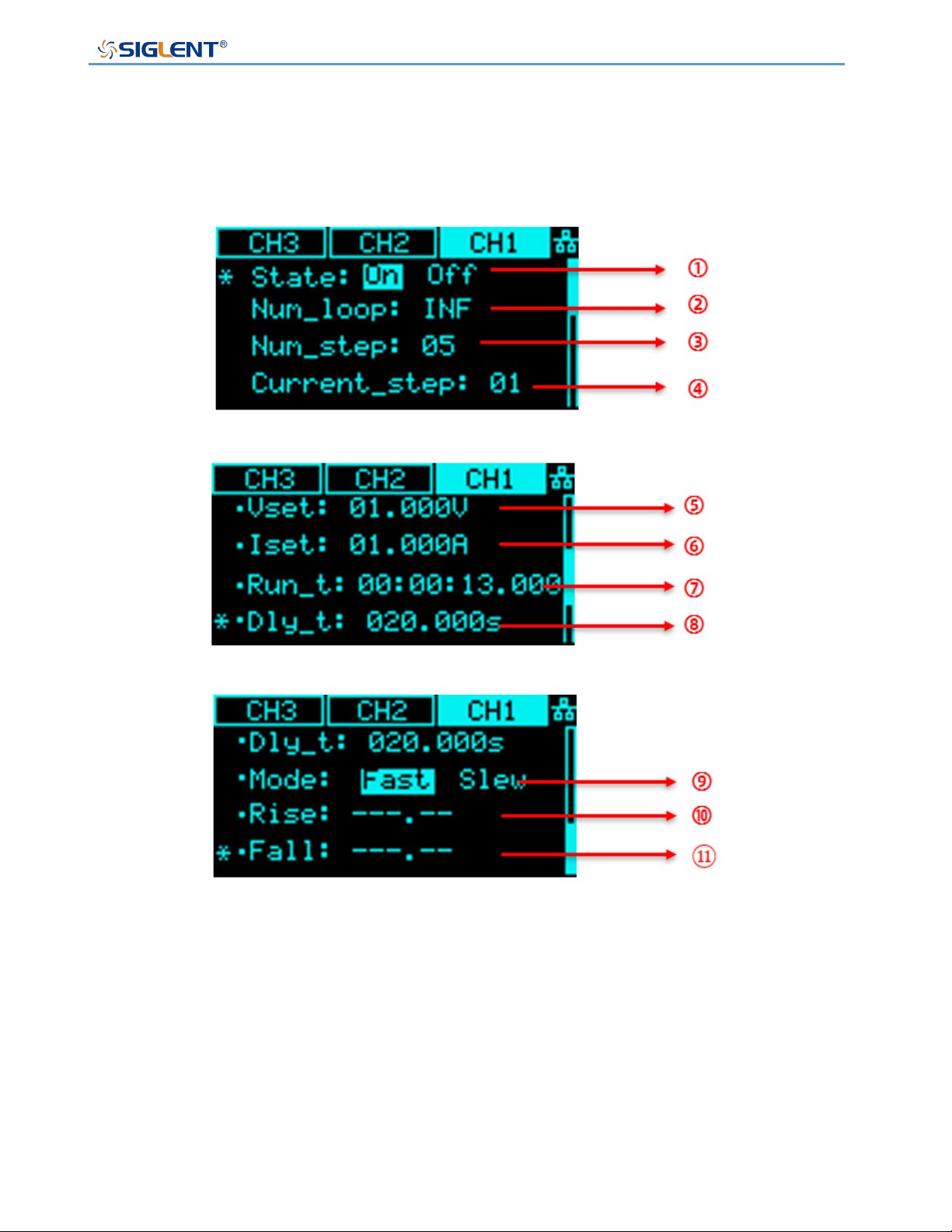
SPS5000X Series User Manual
WWW.SIGLENT.COM 66
Enter the list parameter configuration interface, rotate the knob to select parameters. Press
the knob at the point where the * sign points to set this parameter. After setting, press the
knob again to take effect.
① List output enable status. It is used to realize the independent control of the list output
of each channel by the multi-channel model. This setting is not available for single
channel models.
② Number of cycles. Set the number of output cycles for the total number of steps, and INF
is infinite cycle.
③ Total steps.
④ The number of steps of the current operation. 01 represents the first step.

SPS5000X Series User Manual
WWW.SIGLENT.COM 67
⑤ Set the output voltage value for the current number of steps.
⑥ Set the output current value for the current number of steps.
⑦ The running time is expressed in the form of hour: minute: second.
⑧ Set the output delay time of the current number of steps.
⑨ The output priority mode of the current number of steps is fast priority by default.
When Slew is selected, ⑩ rising slope and ⑪ falling slope can be set.
Set OCP/OVP
Setting method: Menu → Configure → 1.Protect , enter the setting interface. After
pressing the knob, press the up and down direction keys to move the cursor, select the knob
to change the value, and press the knob to confirm the setting takes effect.
OCP has added the switch OCP function option key. When it is displayed as On , it
means that the OCP function is on. Setting method: Press the knob on the setting interface,
move the cursor to the shadow overlay On/Off, turn the knob to select On or Off, press the
knob to confirm and the setting will take effect. When the display is Off , it means that the
OCP function is turned off and the power supply will not trigger over-current protection.
Set Bleeder Resistor Control
Setting method: Menu → Configure → 2.Shunt , enter the setting interface. Press
the knob in the interface, turn the knob to switch the Off/On options, press the knob to
confirm and the setting takes effect.
Set CC/CV Priority
The SPS5000X operation mode can be set to select CC high-speed priority, CC slope priority,
CV high-speed priority, and CV slope priority. High-speed priority makes the voltage and
current change at the fastest rate, and slope priority makes the power supply change in
voltage and current at a specified slope.
SPS5000X Series User Manual
WWW.SIGLENT.COM 68
Setting method: Menu → 3.Operating Mode to proceed to the next submenu interface.
Press the knob to enter the 1.Mode interface , and you can select the CC/CV mode. After
pressing the knob, turn the knob to switch between CC or CV. Press the knob to confirm and
the setting takes effect. When CC is displayed, it means that it is currently in CC mode.
Press Esc to return to the previous menu.
Turn the knob to 2.Priority mode and press the knob to enter, you can set the mode as
high-speed priority or slope priority. The setting method is the same as above, and the
setting takes effect after pressing the knob to confirm. When High Speed is displayed, it
means that the current mode is high-speed priority mode, and the slope cannot be edited in
this mode. Press Esc to return to the previous menu.
When set to slope priority mode, press the knob to enter the 3.Slew value interface, you
can set the voltage rise/fall slope or current rise/fall slope.
Set Output On/Off Delay Time
The SPS5000X can be set to turn on the output delay function and turn off the output delay
function.
Setting method: Menu → 2.Configure → 4.Output delay to enter the setting
interface. In the interface, press the knob to display a cursor, press to switch the
setting of on delay or off delay, press key to switch the number of digits, and turn the
knob to change the value. After the setting is completed, you need to press the knob to
confirm.
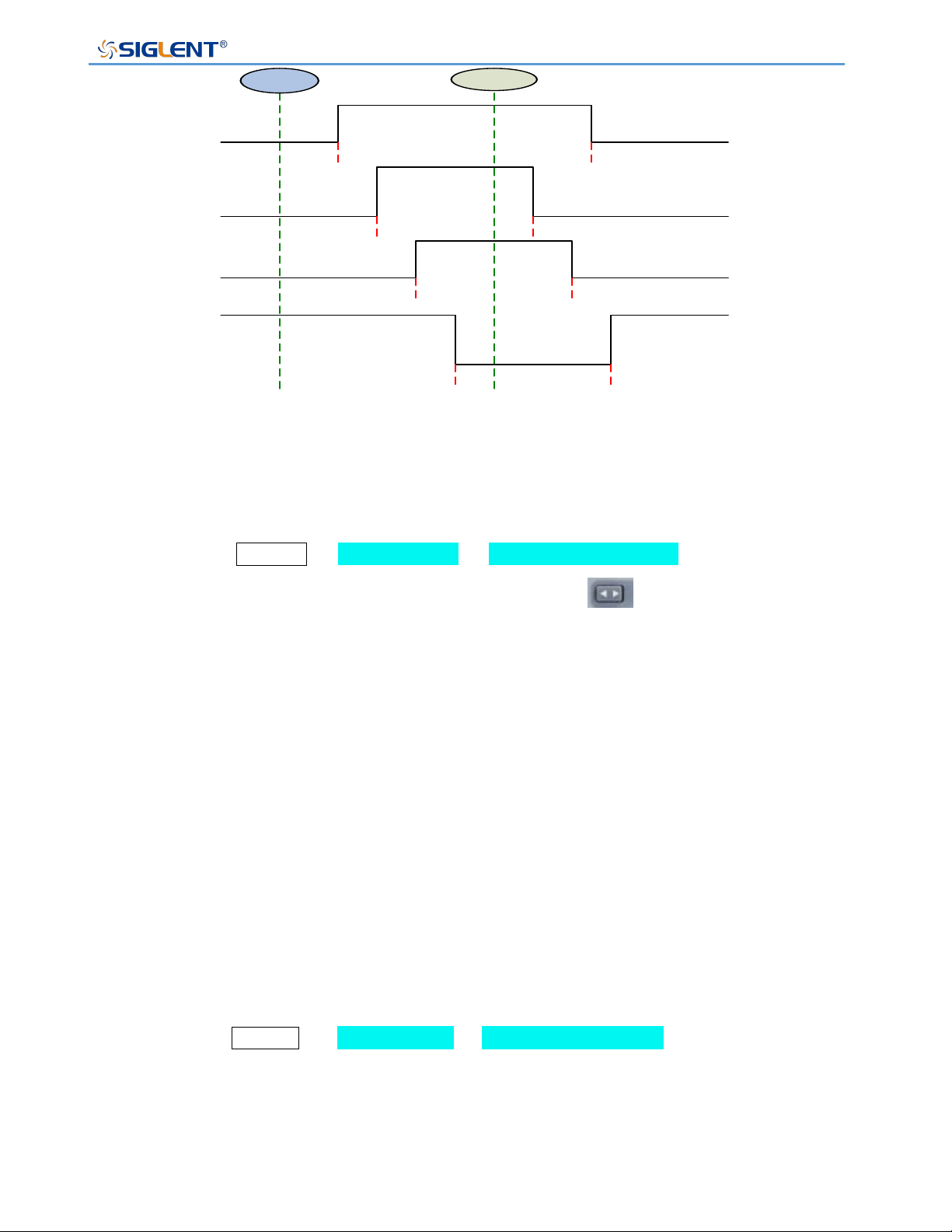
SPS5000X Series User Manual
WWW.SIGLENT.COM 69
ON
OFF
1#
SPS5000X
2#
SPS5000X
3#
SPS5000X
4#
SPS5000X
T1_ON_Delay
T1_OFF_Delay
T2_ON_Delay T2_OFF_Delay
T3_ON_Delay T3_OFF_Delay
T4_ON_Delay
T4_OFF_Delay
Set Internal Resistance
Setting method: Menu → 2.Configure → 5.Output resistance Enter the setting
interface. Press the knob to display the cursor. Press the key to switch the digit where
the cursor is located. Turn the knob to increase or decrease the value. After the setting is
completed, you need to press the knob to confirm it to take effect.
Different types of power supplies can be set with different internal resistance values, see the
previous chapter 6.5 for details.
Set Measurement Accuracy
The SPS5000X has three measurement accuracy modes to choose from: Low, Mid and
High. When Low is selected, the measurement rate is the fastest but has less accuracy.
High is the slowest measurement, but more accuracy. High is selected by default.
Setting method: Menu → 2.Configure → 6.Measure average to enter the setting
interface. Press the knob in the interface, turn the knob to switch the cursor, press the knob
to confirm and the setting takes effect.
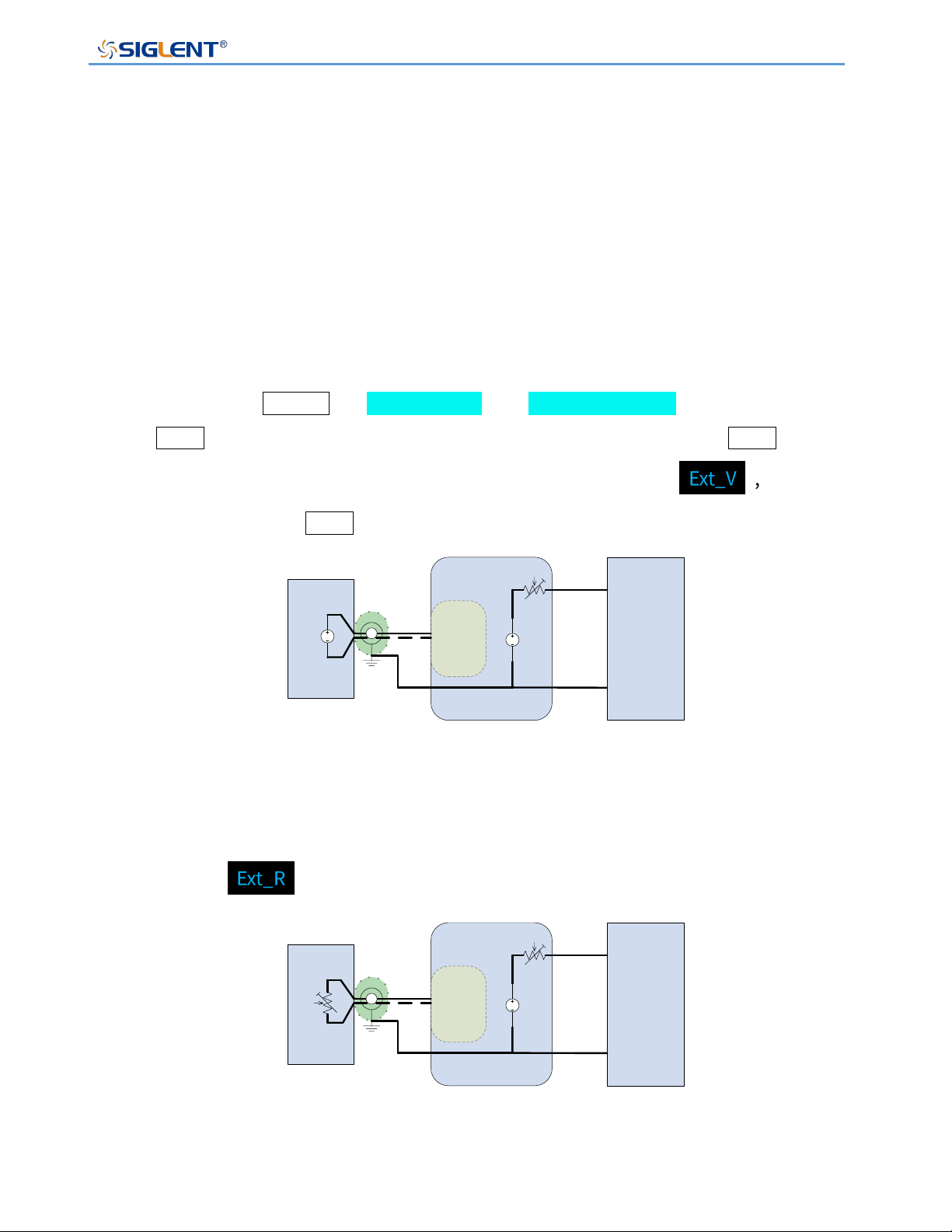
SPS5000X Series User Manual
WWW.SIGLENT.COM 70
External Analog Control
Four working modes of voltage control voltage, voltage control current, resistance control
voltage, and resistance control current can be realized through the ports on the rear panel.
In the external voltage control mode, an adjustable voltage of 0-10 V is connected to the
input terminal to simulate the output from 0 to full-scale, to adjust the value of the voltage
and current output by the power supply (10 V corresponds to the voltage or current value of
the full-scale of the power supply).
◆ External voltage control voltage output
Setting method: Menu → 2.Configure → 7.Voltage control , press the knob or
the Set button to enter the setting interface, then press the knob or the Set button
to enter the selection, and press the knob or turn the knob to select and then
press the knob or the Set button to confirm .
Load
DC
SPS5000X
+
-
Analog
connector
DC
V_PROG_
Voltage
0-10V
2 core shielded
wire or twisted pair
2
4
External voltage control voltage output
◆ External resistance control voltage output:
The operation method is the same as (external voltage control voltage output), select
and confirm
Load
DC
SPS5000X
+
-
Analog
connector
R_PROG_
Voltage
0-10K
2 core shielded
wire or twisted pair
2
4
External resistance control voltage output
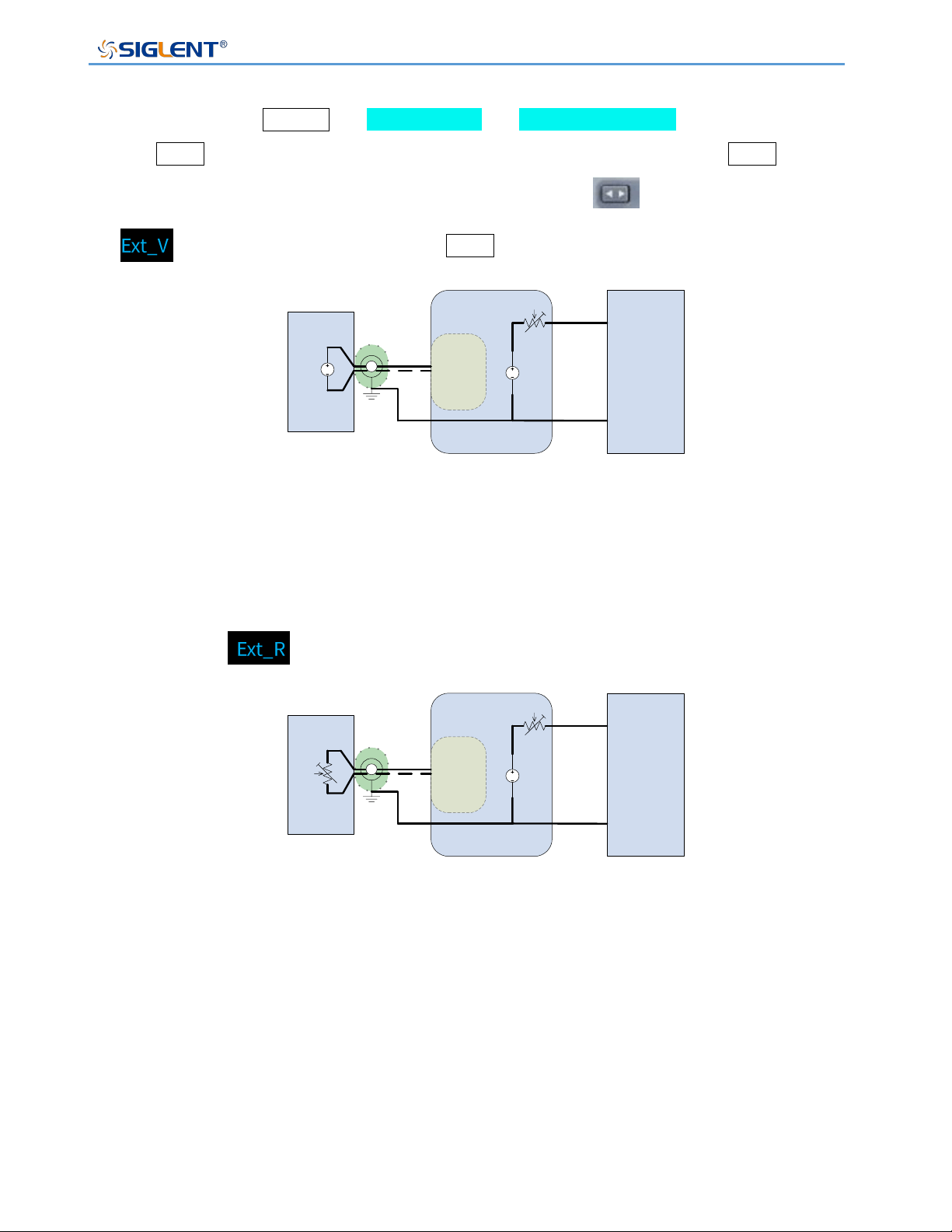
SPS5000X Series User Manual
WWW.SIGLENT.COM 71
◆ External voltage control current output:
Setting method: Menu → 2.Configure → 8.Current control , press the knob or
the Set button to enter the setting interface, then press the knob or the Set button
to enter the selection, and then press the knob or the to set button to select
, and then press the knob or the Set button to confirm .
Load
DC
SPS5000X
+
-
Analog
connector
DC
V_PROG_
Current
0-10V
2 core shielded
wire or twisted pair
2
6
External voltage control current output
◆ External resistance control current output:
The operation method is the same as (external voltage control current output), select
and confirm .
Load
DC
SPS5000X
+
-
Analog
connector
R_PROG_
Current
0-10K
2 core shielded
wire or twisted pair
2
6
External resistance control current output
External Control Output On/Off
When set to ON, the Output button on the front panel is invalid. The output is controlled by
the rear analog interface pin15 low-level effective control, and the reference ground is pin 2
(COM).
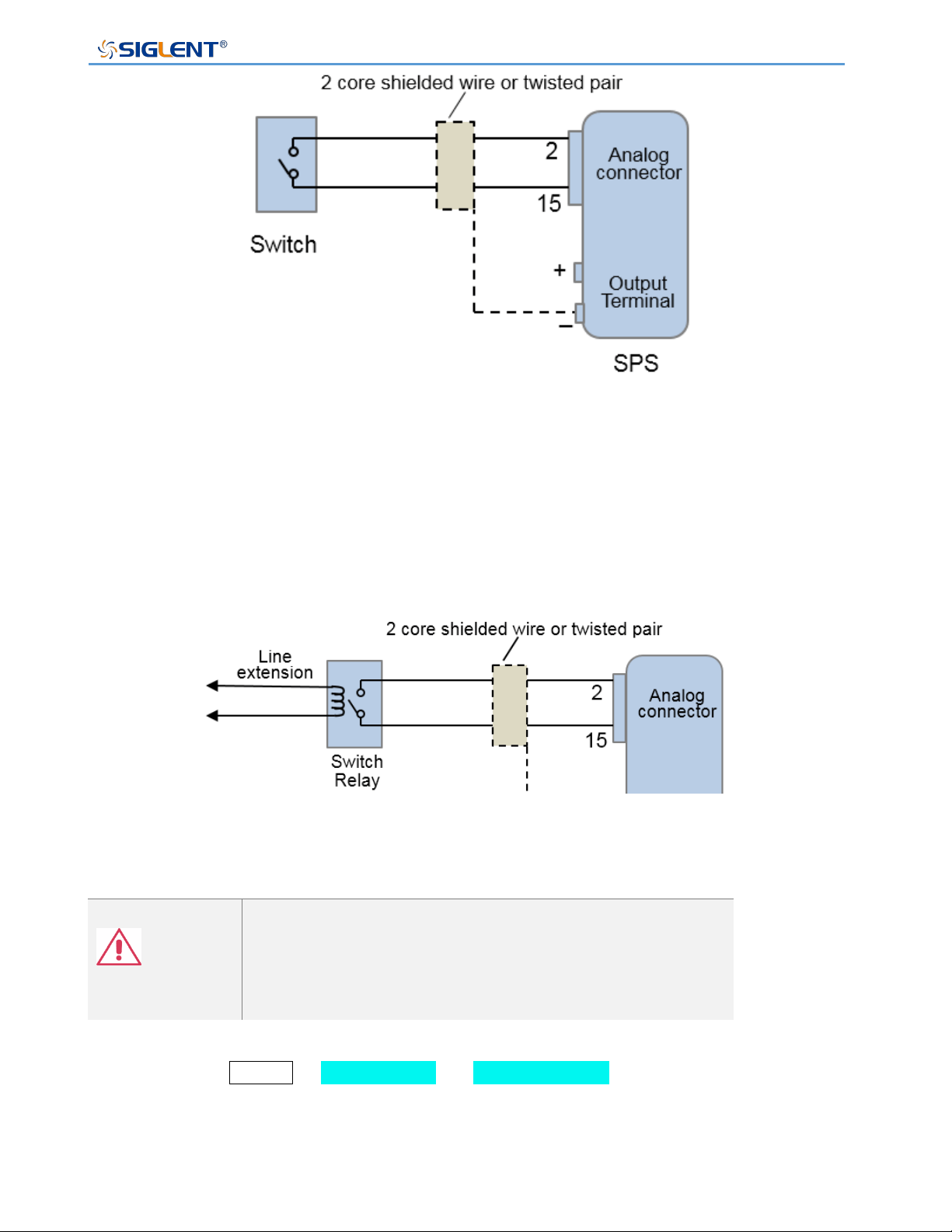
SPS5000X Series User Manual
WWW.SIGLENT.COM 72
External control output on / off
When using the switch remotely, please use the switch relay to extend the circuit
Use relay switch
Note
If you use a switch to control multiple instruments, make
sure that each instrument is independent and use a relay
to complete the operation.
Setting method: Menu → 2.Configure → 9.Ext on/off to enter the setting interface.
After pressing the knob, turn the knob to switch On/Off. Press the knob to confirm and the
setting takes effect.
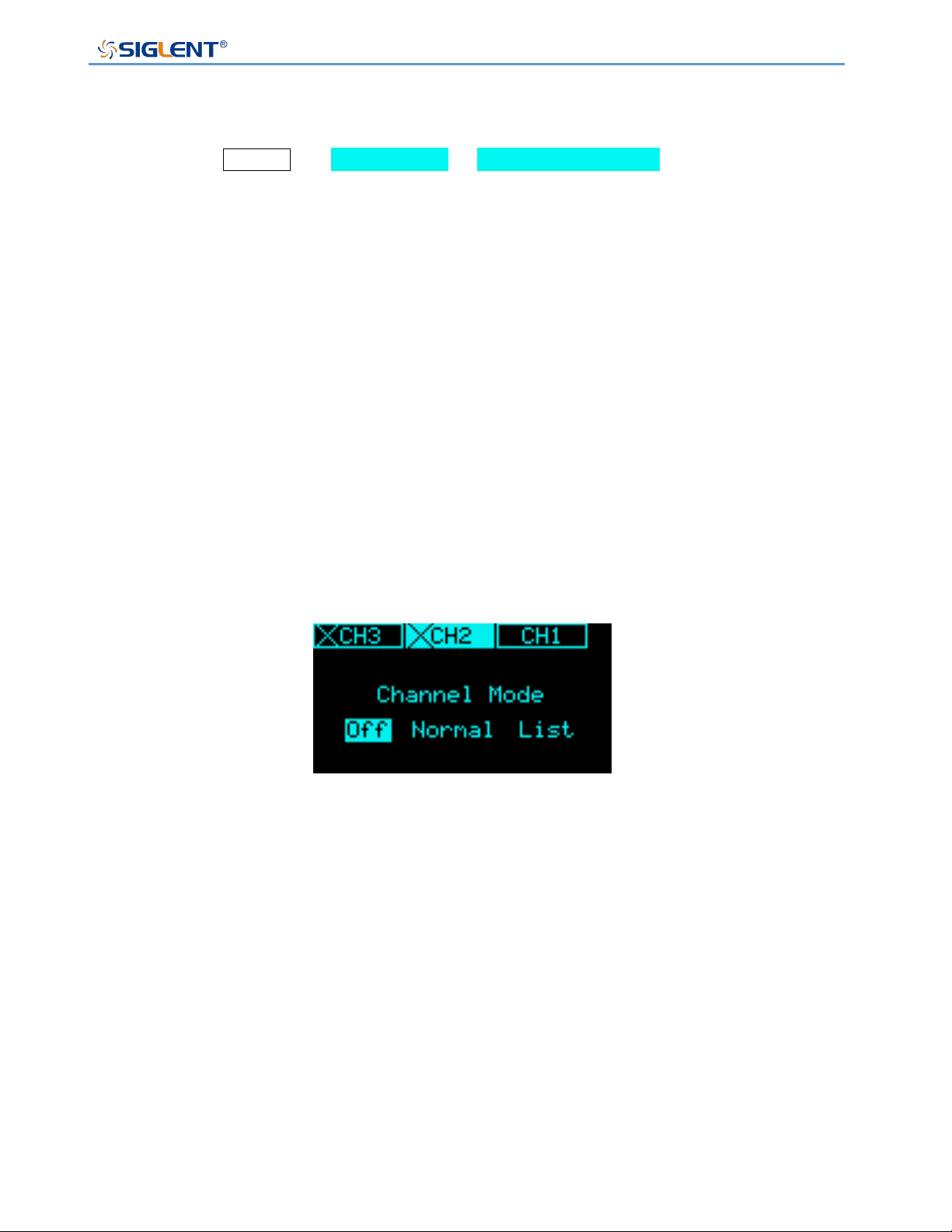
SPS5000X Series User Manual
WWW.SIGLENT.COM 73
Multi-channel Settings
For models with multiple output channels, the channel mode can be set.
Setting method: Menu → 2.Configure → 10. Channel Mode to enter the setting
interface. In the interface, press the key to switch the channel selection. Press the knob and
then turn the knob to switch the channel selection mode. Press the knob to confirm and the
setting takes effect.
Off: The channel is closed. When the output is turned on, the channel in the Off state
has no voltage or current output。
Normal: The channel is in the normal state. When the output is turned on, each channel
outputs according to the set voltage and current。
List: List mode. After the channel is set to List mode, when the output is turned on,
the channel outputs according to the voltage and current values set by the List.
The figure shows that the CH2 and CH3 channels are Off.
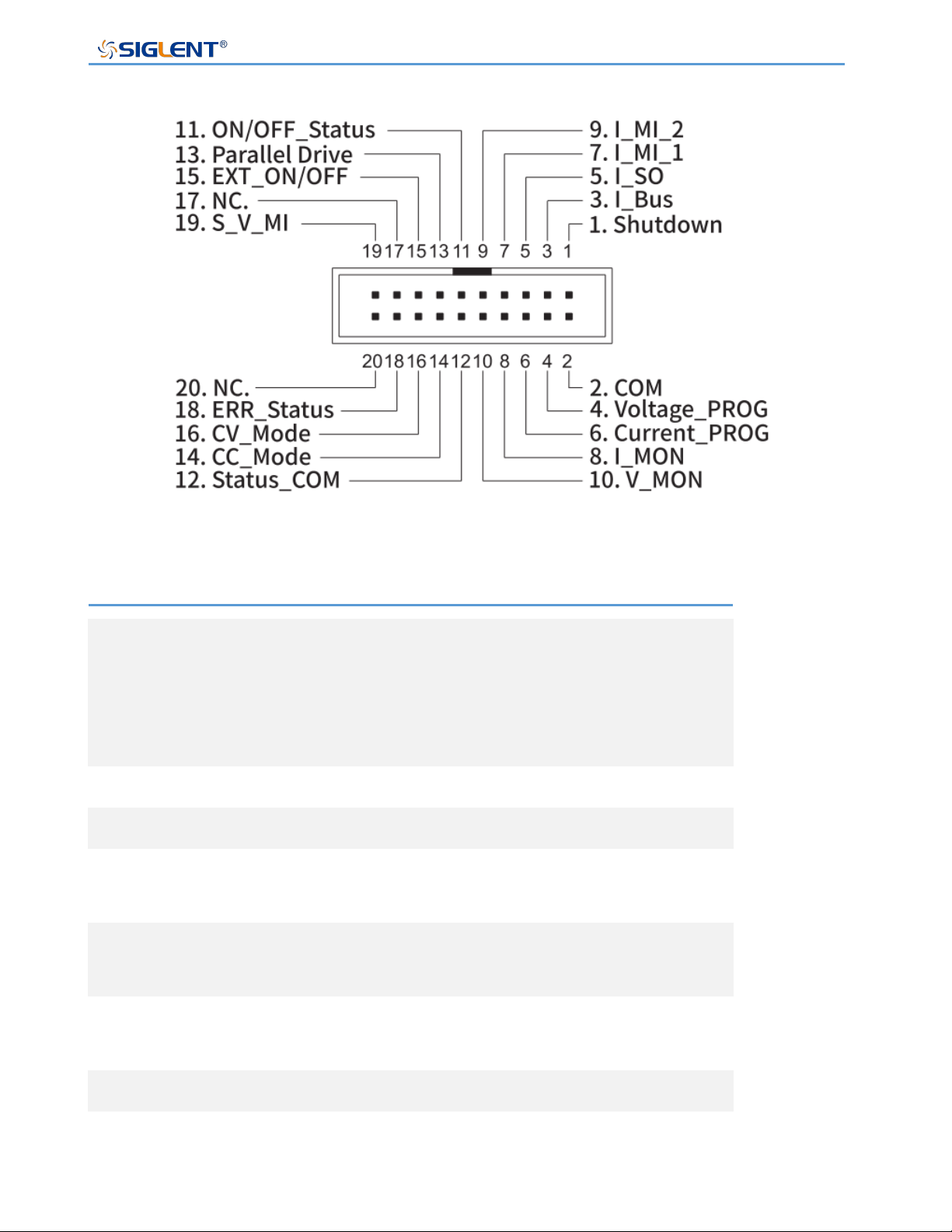
SPS5000X Series User Manual
WWW.SIGLENT.COM 74
Analog Interface
Pin Number
Description
01
The shutdown signal will turn off the output when a low TTL
signal is applied.
The shutdown signal is pulled up to 5V with a 10kΩ pull-up
resistor.
03
Used when operating 2 or more units in parallel.
05
Current sum output signal when used in parallel mode.
07
Master unit current sum input signal from the first slave
CURRENT SUM OUTPUT. Used in parallel mode only.
09
Master unit current sum input signal from the second slave
CURRENT SUM OUTPUT. Used in parallel mode only.
11
Turns on when the output has been turned on. (photo
coupled open collector output)
13
Parallel control signal during master-slave parallel operation.
15
Turns the output on/off when (default setting) a low TTL
signal is applied.
Internally, the circuit is pulled up to +5 V with 10 kΩ

SPS5000X Series User Manual
WWW.SIGLENT.COM 75
resistance.
19
Series slave input during master-slave series operation.
(40 V/80 V/160 V models only)
02
Control signal common. Connected to the sense terminal
when remote sense is used.
Connected to the negative output terminal when remote
sense is not used.
04
External voltage control of the voltage output.
A voltage of 0~10 V is used to control the full-scale voltage
output (0%~100%) of the instrument.
External resistance control of the voltage output.
A resistance of 0 kΩ ~ 10 kΩ is used to control the full-scale
voltage output (0%~100%) of the instrument.
04,02
When connecting the external voltage source to the MIL
connectors, use shielded or twisted paired wiring.
06
External voltage control of the current output.
A voltage of 0~10V is used to control the full-scale current
output (0%~100%) of the instrument
External resistance control of the current output.
A resistance of 0kΩ ~ 10kΩ is used to control the full-scale
current output (0%~100%) of the instrument.
08
Current Monitor Output. Outputs the full-scale current
(0~100%) as a voltage (0V~10V).
10
Voltage Monitor Output. Outputs the full-scale voltage
(0~100%) as a voltage (0V~10V).
12
Common for status signals 14, 16, and18.
14
Turns on when CC mode is active. (photo coupled open
collector output)
16
Turns on when CV mode is active. (photo coupled open
collector output)
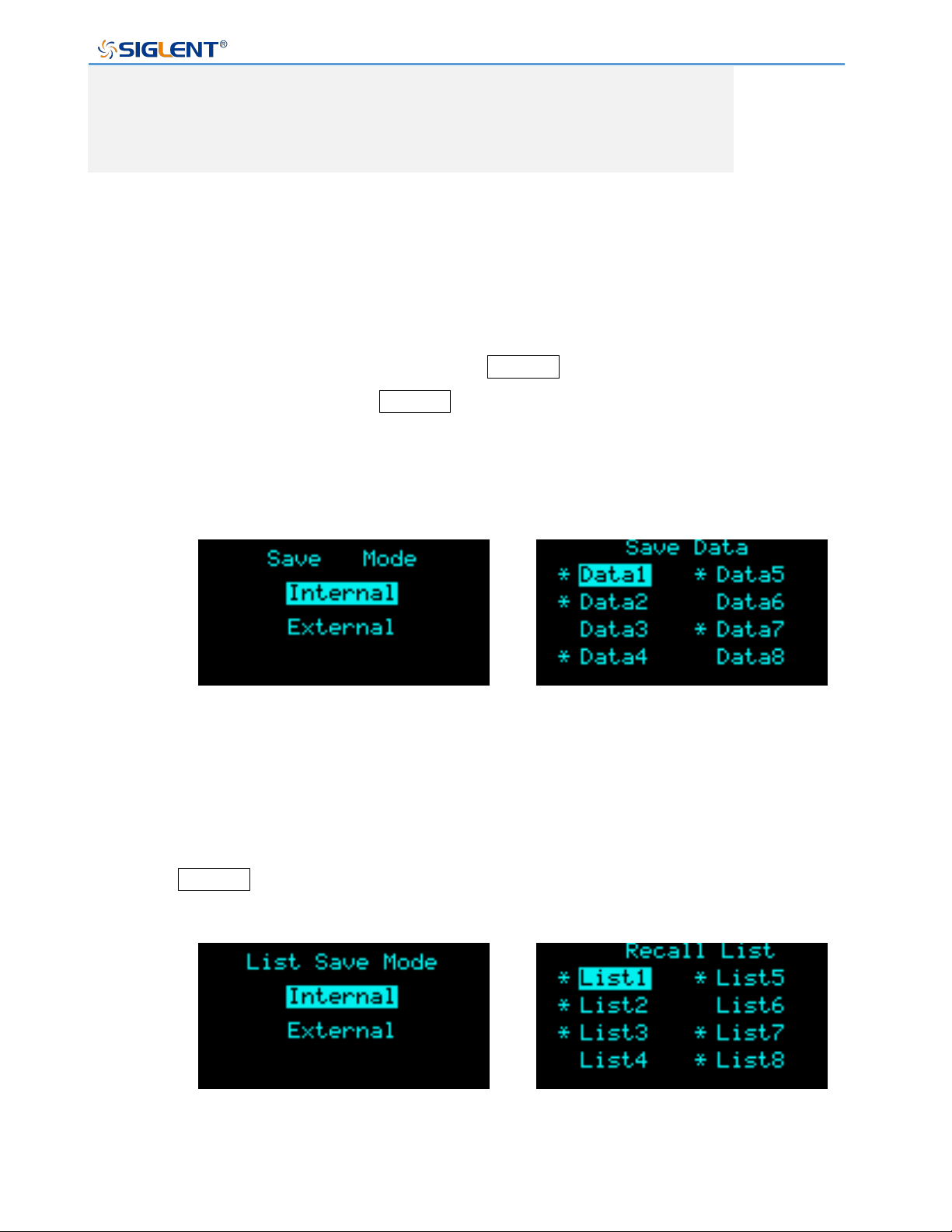
SPS5000X Series User Manual
WWW.SIGLENT.COM 76
18
Turns on when any of the protection modes are tripped (OVP,
OCP) or if a shutdown signal is received. (photo coupled
open collector output)
Save/Recall
SPS supports storing the current settings to an internal or external U disk, and the user can
call the saved file to restore the settings.
Setting method: In the main interface, press the Recall button on the front panel to enter
the store recall interface, press the Recall button again to switch between the save mode
and the recall mode
If stored in the internal (Internal), 8 groups of data can be stored, with * indicating that there
are data items currently stored.
Select the stored data in the Recall mode to perform the setting recovery operation.
If you choose the External option, the data will be stored in the external USB flash drive. In
the Recall mode, enter the External and browse the USB flash drive files to recall.
Press the Recall key in the List mode to store and recall List data. For the method to
enter the List, refer to the chapter 9.2.1 List Function.
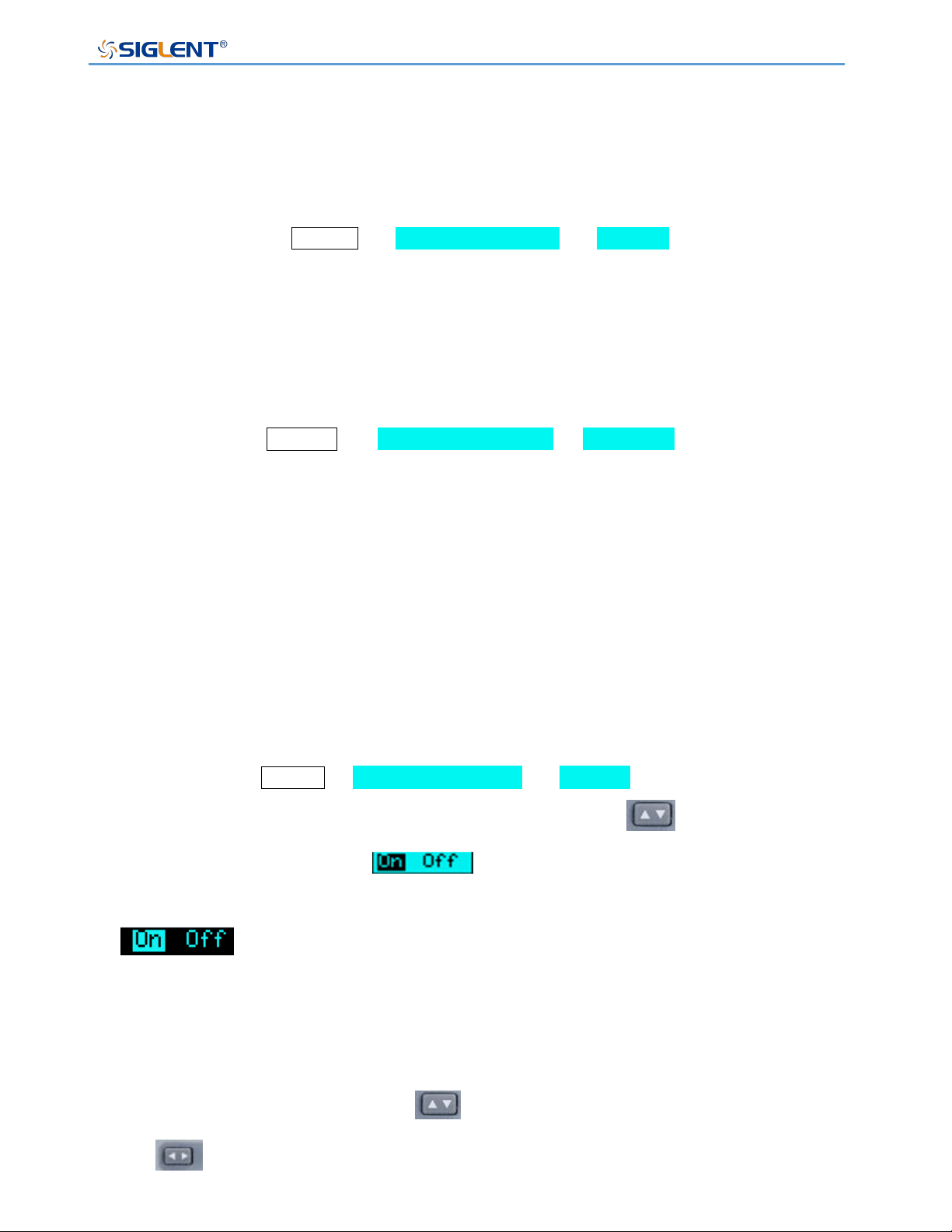
SPS5000X Series User Manual
WWW.SIGLENT.COM 77
Communication interface settings
◆ USB
USB cannot be edited, only viewing operations can be performed.
Operation method: Menu → 3.Communication → 1.USB . After entering the
interface, you can view the resource information of the USB device.
◆ GPIB
Setting method: Menu → 3. Communication → 2. GPIB enters the setting
interface, press the knob to display a cursor, turn the knob to change the value, and
press the knob to make the setting effective.
◆ LAN
SPS5000X supports DHCP function, users can set to obtain IP automatically or set IP
manually. You can set the DHCP switch, IP address, gateway address, and subnet mask
address.
Setting method: Menu → 3. Communication → 3.LAN to enter the LAN setting
interface. Press the knob to display the cursor position, press to move the cursor
position up and down. When is displayed, it means that the selection is
On, turn the knob to switch On/Off, and press the knob to confirm the effect. When
is displayed, it means that DHCP is set to On, and the IP is automatically
obtained at this time.
If you want to set the IP manually, first set DHCP to Off according to the above method.
After pressing the knob, press the key to move the cursor up and down, press
the key to move the cursor left and right, turn the knob to change the value, and
press the knob to confirm the setting takes effect.

SPS5000X Series User Manual
WWW.SIGLENT.COM 78
Remote Control
The SPS5000X supports communication with a computer via USB, LAN, and GPIB-USB
interfaces using a SCPI (Standard Commands for Programmable Instruments) compliant
command set.
This chapter will introduce how to build a programming environment and explain the SCPI
commands supported by the SPS5000X.
Way to Control
Using NI-VISA
Users can realize remote control of the instrument by using NI-VISA of NI (National
Instrument Corporation). Regarding NI-VISA, there is a complete and real-time version
(Run-Time Engine version). The complete version includes NI device drivers and a tool
called NI MAX. NI MAX is a user interface used to control the device. The real-time version
is much smaller than the full version, and it only includes NI device drivers.
After installing NI-VISA, use a USB cable to connect the SPS5000X (via the USB Device
interface on the rear panel) to the computer, or use a network cable to connect the
SPS5000X (via the LAN interface on the rear panel) to the local area network where the
computer is located.
Based on NI-VISA, users can remotely control SPS5000X in two ways, one is through web
service; the other is custom programming combined with SCPI commands. For more
information, please refer to the programming examples.
Using Sockets
Users can also use Sockets to communicate with SPS5000X based on the TCP/IP protocol
through the network port. Socket communication is a basic communication technology of
computer networks, which allows applications to communicate through network hardware
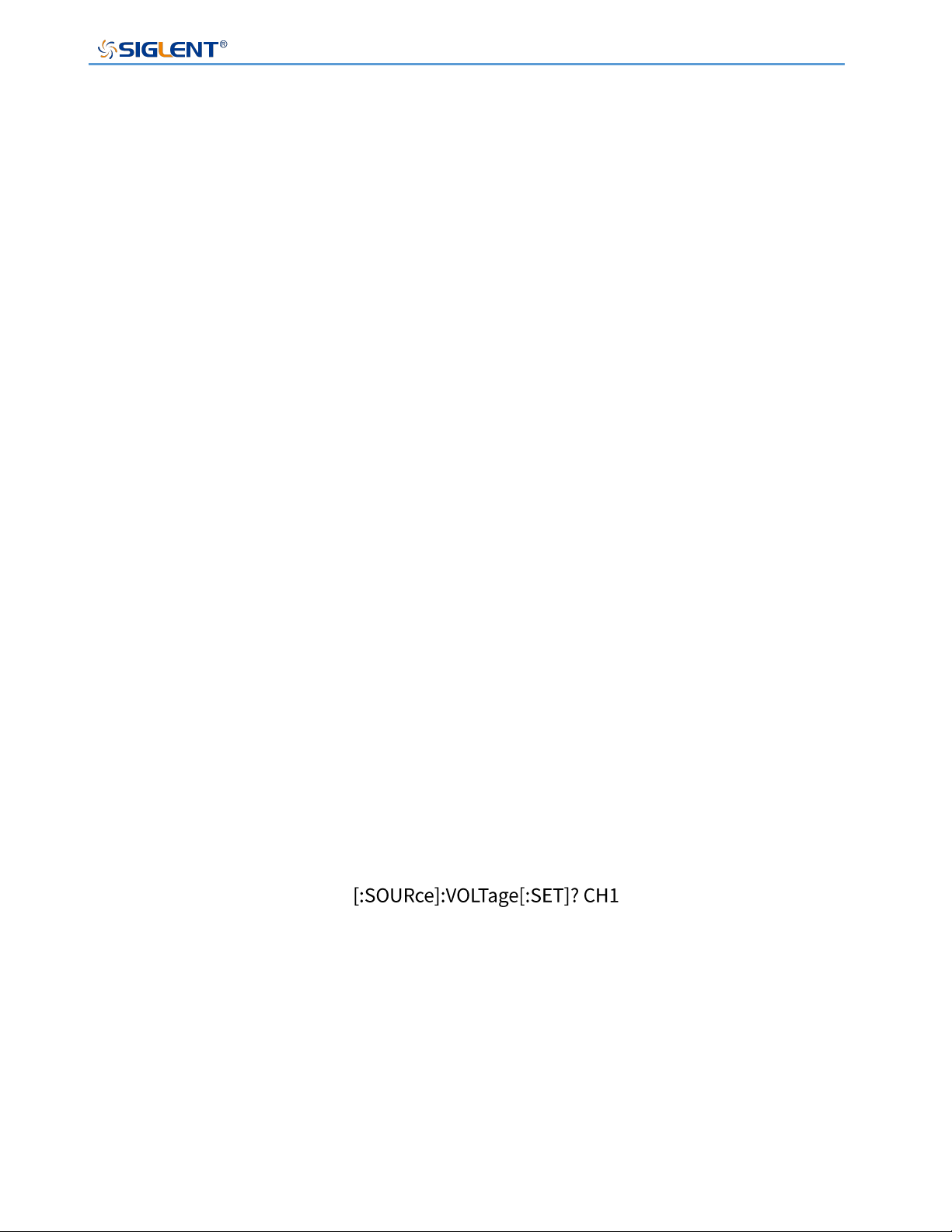
SPS5000X Series User Manual
WWW.SIGLENT.COM 79
and standard network protocol mechanisms built into the operating system. This method
requires two-way communication between the instrument and the computer network through
an IP address and a fixed port number.
The port of SPS5000X for Socket communication is 5025.
After connecting the SPS5000X (via the LAN interface on the rear panel) to the local area
network where the computer is located with a network cable, the user can combine SCPI
commands for custom programming to realize remote control of the SPS5000X. For more
information, please refer to the programming examples.
Grammatical Conventions
SCPI commands are a tree-like hierarchical structure, including multiple subsystems. Each
subsystem is composed of a root keyword and one or several hierarchical keywords.
Command keywords are separated by colons ‘: ’, keywords are followed by optional
parameter settings, commands and parameters are separated by ‘spaces’, for multiple
parameters, parameters are separated by commas‘, ’. A question mark ‘?’ is added after the
command line, which means to query this function.
Most SCPI commands are a mixture of upper and lower case letters. Capital letters indicate
the abbreviations of commands, namely short commands. If you want better program
readability, you can use long commands. E.g:
Among them, the keyword VOLTage. You can enter VOLT or VOLTage, and combine upper
and lower case letters at will. Therefore, VolTaGe, volt, and Volt are all acceptable. Other
formats (such as VOL and VOLTAG) will produce errors.
⚫ Braces ({ }) enclose the parameter selection. The braces are not sent with the command
string.
⚫ The vertical line (|) divides the parameter selection.
⚫ Angle brackets (< >) indicate that a value must be assigned to the parameter inside the

SPS5000X Series User Manual
WWW.SIGLENT.COM 80
bracket. The angle brackets are not sent with the command string.
⚫ Optional parameters are enclosed in square brackets ([ ]). If you do not specify a value
for the optional parameter, the instrument will use the default value. For example, the
[:SET] in the above command can be omitted (for example: ‘VOLT? CH1’), and the
command will operate on the current channel. The square brackets are not sent with the
command string.
Command Summary
1) IEEE Common Command Subsystem.
2) Measure Command Subsystem.
3) Configure Configuration Command Subsystem.
4) List Configuration Command Cubsystem.
5) System Configuration Command Subsystem.
Command Description
IEEE Common Command Subsystem
*IDN?
Command format: *IDN?
Description: Get device information string (return string content includes: manufacturer,
device model, device serial port number, software version number)
E.g: *IDN?
Response: Siglent Technologies,SPS5082X,SPS5X2006005,3.1.1.5\n
*RST
Command format: *RST
Description: Restore the state of the device to the initial state.

SPS5000X Series User Manual
WWW.SIGLENT.COM 81
E.g: *RST
*CLS
Command format: *CLS
Description: Clear the values of all event registers and clear the error list at the same
time
E.g: *CLS
*ESE
Command format: *ESE <number>
Description: Set the enable value of the standard event status register
E.g: *ESE 16
*ESE?
Command format: *ESE?
Description: Query the enable value of the standard event status register.
E.g: *ESE?
Response: 64
*ESR?
Command format: *ESR?
Description: Query and clear the event value of the standard event status register.
E.g: *ESR?
Response: 0
*OPC
Command format: *OPC
Description: Operation complete.
E.g: *OPC

SPS5000X Series User Manual
WWW.SIGLENT.COM 82
*OPC?
Command format: *OPC?
Description: Query whether the current operation is complete.
E.g: *OPC?
Response: 1
*SRE
Command format: *SRE<number>
Description: Set the enable value of the status byte register
E.g: *SRE 24
*SRE?
Command format: *SRE?
Description: Query the enable value of the status byte register
E.g: *SRE?
Response: 24
*STB?
Command format: *STB?
Description: Query the event value of the status byte register
E.g: *STB?
Response: 72
*TST?
Command format: *TST?
Description: Query the result of instrument self-test
E.g: *TST?
Response: 0

SPS5000X Series User Manual
WWW.SIGLENT.COM 83
*WAI
Command format:
Description: Wait for all outstanding operations to complete before executing any
other commands
E.g:
Measure Command Subsystem
Set voltage value
Command format: [:SOURce]:VOLTage[:SET] <channel>,{<value> | MINimum | MAXimum |DEFault}
Channel={CH1,CH2,CH3}
Description: Set the voltage value of the selected channel
E.g: :SOURce:VOLTage:SET CH1,3
Description: Set the CH1 channel voltage value to 3V
Command format: [:SOURce]:VOLTage[:SET]? <channel>
Description: Get the set voltage value of the selected channel
E.g: :SOURce:VOLTage:SET? CH1
Response: 3.000000\n
Obtain the measured voltage value
Command format: MEASure:VOLTage? <channel>
Description: Get the voltage measurement value of the selected channel
E.g: MEASure:VOLTage? CH1
Response: 2.991442\n
Set current value
Command format: [:SOURce]:CURRent[:SET] <channel>,{<value> | MINimum | MAXimum |DEFault}
Description: Set the current value of the selected channel
E.g: :SOURce:CURRent:SET CH1,2
Description: Set the CH1 channel current value to 3V
Command format: [:SOURce]:CURRent[:SET]? <channel>
Description: Get the set current value of the selected channel

SPS5000X Series User Manual
WWW.SIGLENT.COM 84
E.g: :SOURce:CURRent:SET? CH1
Response: 2.000000\n
Obtain the measured current value
Command format: MEASure:CURRent? <channel>
Description: Get the current measurement value of the selected channel
E.g: MEASure:CURRent? CH1
Response:1.999407\n
Get power measurement
Command format: MEASure:POWER? <channel>
Description: Get the electrical power measurement value of the selected channel
E.g: MEASure:POWER? CH1
Response:19.959515\n
Get the running status of the channel
Command format: MEASure[:RUN]:MODE? <channel>
Description: Get the running status of the selected channel
E.g: MEASure:RUN:MODE? CH1
Response: CV\n
Configure Configuration Command Subsystem
Set OVP value
Command format: [:SOURce]:OVP <channel>,{<value> | MINimum | MAXimum |DEFault}
Description: Set the overvoltage value of the selected channel
E.g: :SOURce:OVP CH1,8
Description: Set the OVP value of CH1 channel to 8V
Command format: [:SOURce]:OVP? <channel>
Description: Get the overvoltage value of the selected channel
E.g: :SOURce:OVP? CH1
Response: 15.000000\n

SPS5000X Series User Manual
WWW.SIGLENT.COM 85
Set OCP value
Command format: [:SOURce]:OCP <channel>,{<value> | MINimum | MAXimum |DEFault}
Description: Set the overcurrent value of the selected channel
E.g: :SOURce:OCP CH1,8
Description: Set the OCP value of CH1 to 8A
Command format: [:SOURce]:OCP? <channel>
Description: Get the overcurrent value of the selected channel
E.g: :SOURce:OCP? CH1
Response: 8.000000\n
Set OCP switch state
Command format: SYStem:OCP:STATe <channel>,{ON | OFF | 0 | 1}
Description: Set the ocp switch state of the selected channel
E.g: SYStem:OCP:STATe CH1, 1
Description: Set to open OCP function
Command format: SYStem:OCP:STATe? <channel>
Description: Get the ocp switch status of the selected channel
E.g: SYStem:OCP:STATe? CH1
Response: 1\n
Set the voltage rise slope
Command format: [:SOURce]:VOLTage:RISE:SLOPe <channel>,{<value> | MINimum | MAXimum |DEFault}
Description: Set the voltage rise slope value of the selected channel
E.g: :SOURce:VOLTage:RISE:SLOPe CH1,8
Description: Set the voltage rising slope of CH1 channel to 8V/s
Command format: [:SOURce]:VOLTage:RISE:SLOPe? <channel>
Description: Get the voltage rise slope value of the selected channel
E.g: :SOURce:VOLTage:RISE:SLOPe? CH1
Response: 23.000000\n
Set the voltage drop slope
Command format: [:SOURce]:VOLTage:FALL:SLOPe <channel>,{<value> | MINimum | MAXimum |DEFault}
Description: Set the voltage drop slope value of the selected channel

SPS5000X Series User Manual
WWW.SIGLENT.COM 86
E.g: :SOURce:VOLTage:FALL:SLOPe CH1,8
Description: Set the voltage drop slope of CH1 channel to 8V/s
Command format: [:SOURce]:VOLTage:FALL:SLOPe? <channel>
Description: Get the voltage drop slope value of the selected channel
E.g: :SOURce:VOLTage:FALL:SLOPe? CH1
Response:10.000000\n
Set current rising slope
Command format: [:SOURce]:CURRent:RISE:SLOPe <channel>,{<value> | MINimum | MAXimum |DEFault}
Description: sSet the current rising slope value of the selected channel
E.g: :SOURce:CURRent:RISE:SLOPe CH1,8
Description: Set the current rising slope of CH1 channel to 8A/s
Command format: [:SOURce]:CURRent:RISE:SLOPe? <channel>
Description: Get the current rising slope value of the selected channel
E.g: :SOURce:CURRent:RISE:SLOPe? CH1
Response:8.000000\n
Set current falling slope
Command format: [:SOURce]:CURRent:FALL:SLOPe <channel>,{<value> | MINimum | MAXimum |DEFault}
Description: Set the current falling slope value of the selected channel
E.g: :SOURce:CURRent:FALL:SLOPe CH1,10
Description: Set the current falling slope of CH1 channel to 10A/s
Command format: [:SOURce]:CURRent:FALL:SLOPe? <channel>
Description: Get the current falling slope value of the selected channel
E.g: :SOURce:CURRent:FALL:SLOPe? CH1
Response:13.000000\n
Set the voltage response change mode
Command format: [:SOURce]:VOLTage[:RESPonse]:MODE <channel>,{FAST| SLOPE}
Description: Set the voltage response change mode of the selected channel (FAST /
SLOPE)
E.g: :SOURce:VOLTage:RESPonse:MODE CH1,FAST

SPS5000X Series User Manual
WWW.SIGLENT.COM 87
Description: Set the voltage response of CH1 channel to FAST (fast priority) (set to
CV mode available)
Command format: [:SOURce]:VOLTage[:RESPonse]:MODE? <channel>
Description: Get the voltage response change mode of the selected channel
E.g: :SOURce:VOLTage:RESPonse:MODE? CH1
Response: Slope priority\n
Set current response change mode
Command format: [:SOURce]:CURRent [:RESPonse]:MODE <channel>,{FAST| SLOPE}
Description: Set the current response change mode of the selected channel (FAST /
SLOPE)
E.g: :SOURce:CURRent:RESPonse:MODE CH1,FAST
Description: Set the current response of CH1 channel to FAST (fast priority) (available
when set to CC mode)
Command format: [:SOURce]:CURRent [:RESPonse]:MODE? <channel>
Description: Get the current response change mode of the selected channel
E.g: :SOURce:CURRent:RESPonse:MODE? CH1
Response: Fast priority\n
Set voltage control mode
Command format: [:SOURce]:CTRL:VOLTage:MODE <channel>,{LOCAL| EXT_V | EXT_R | EXT_R_MAX }
Description: Set the voltage control mode of the selected channel (LOCAL| EXT_V |
EXT_R | EXT_R_MAX)
E.g: :SOURce:CTRL:VOLTage:MODE CH1,LOCAL
Description: Set the CH1 channel voltage control mode to LOCAL mode
Command format: [:SOURce]:CTRL:VOLTage:MODE? <channel>
Description: Get the voltage control mode of the selected channel
E.g: :SOURce:CTRL:VOLTage:MODE? CH1
Response: LOCAL\n
Set current control mode
Command format: [:SOURce]:CTRL:CURRage:MODE <channel>,{LOCAL| EXT_V | EXT_R | EXT_R_MAX }

SPS5000X Series User Manual
WWW.SIGLENT.COM 88
Description: Set the current control mode of the selected channel (LOCAL| EXT_V |
EXT_R | EXT_R_MAX)
E.g: :SOURce:CTRL:CURRage:MODE CH1,LOCAL
Description: Set CH1 channel current control mode to LOCAL mode
Command format: [:SOURce]:CTRL:CURRage:MODE? <channel>
Description: Get the current control mode of the selected channel
E.g: :SOURce:CTRL:CURRage:MODE? CH1
Response: LOCAL\n
Set the bleeder circuit mode
Command format: [:SOURce]:CTRL:LOAD:MODE <channel>,{ ON | OFF }
Description: Set the bleeder circuit mode of the selected channel (ON | OFF)
E.g: :SOURce:CTRL:LOAD:MODE CH1,ON
Description: Set channel bleed open
Command format: [:SOURce]:CTRL:LOAD:MODE? <channel>
Description: Get the bleeder circuit mode of the selected channel
E.g: :SOURce:CTRL:LOAD:MODE? CH1
Response: ON\n
Set output status
Command format: [:SOURce]:OUTPut[:ALL:][:STATe] {ON | OFF | 0 | 1}
Description: Set the output status of all channels (ON | OFF | 0 | 1)
E.g: OUTPut 1
Description: Open output
Command format: [:SOURce]:OUTPut[:ALL:][:STATe]?
Description: Get the output status of all channels
E.g: OUTPut?
Response: 0\n
Set output ON delay
Command format: [:SOURce]: OUTPut:ON:DELay <channel>,{<value> | MINimum | MAXimum |DEFault}
Description: Set the delay time of the output ON of the selected channel
E.g: OUTPut:ON:DELay CH1,3

SPS5000X Series User Manual
WWW.SIGLENT.COM 89
Description: Set the output ON delay to 3 seconds
Command format: [:SOURce]: OUTPut:ON:DELay? <channel>
Description: Obtain the delay time of the selected channel's output ON
E.g: OUTPut:ON:DELay?
Response:4.000000\n
Set output OFF delay
Command format: [:SOURce]: OUTPut:OFF:DELay <channel>,{<value> | MINimum | MAXimum |DEFault}
Description: Set the delay time for output OFF of the selected channel
E.g: OUTPut:OFF:DELay CH1,1
Description: Set output OFF delay less than 1 second
Command format: [:SOURce]: OUTPut:OFF:DELay? <channel>
Description: Obtain the delay time of output OFF of the selected channel
E.g: OUTPut:OFF:DELay?
Response: 3.000000\n
Set the output enable state of the channel
Command format: [:SOURce]: OUTPut:OFF:DELay <channel>,{ON | OFF | 0 | 1}
Description: Set the channel output enable state of the selected channel (ON | OFF |
0 | 1)
E.g: OUTPut:SET:ON:STATe CH1,1
Description: Set CH1 output enable on
Command format: [:SOURce]:OUTPut:SET:ON:STATe? <channel>
Description: Get the channel output enable status of the selected channel
E.g: OUTPut:SET:ON:STATe? CH1
Response: 1\n
Set external output enable state
Command format: [:SOURce]:OUTPut:LOCAL:Enable <channel>,{ON | OFF | 0 | 1}
Description: Set the external output enable state of the selected channel (ON | OFF |
0 | 1)
E.g: OUTPut:LOCAL:ENable CH1,0
Description: Set CH1 channel to external control mode

SPS5000X Series User Manual
WWW.SIGLENT.COM 90
Command format: [:SOURce]:OUTPut:LOCAL:ENable? <channel>
Description: Get the external output enable status of the selected channel
E.g: OUTPut:LOCAL:ENable? CH1
Response: 1\n
Set internal resistance
Command format: [:SOURce]:INIT:RESIstance <channel>,{<value> | MINimum | MAXimum |DEFault}
Description: Set the internal resistance of the selected channel
E.g: INIT:RESIstance CH1,2
Description: Set the internal resistance of CH1 channel to 2Ω
Command format: [:SOURce]:INIT:RESIstance? <channel>
Description: Get the internal resistance value of the selected channel
E.g: INIT:RESIstance? CH1
Response: 2.000000\n
Set channel CC/CV priority mode
Command format: [:SOURce][:CVCC]:PRIOrity <channel>,{CC | CV }
Description: Set the CC/CV priority of the selected channel (CC | CV)
E.g: PRIOrity CH1,CC
Description: Set the operation mode to CC priority
Command format: [:SOURce][:CVCC]:PRIOrityq? <channel>
Description: Get the CC/CV priority of the selected channel
E.g: PRIOrityq?
Response: CC\n
Set the measurement average
Command format: SYStem:MEASure:AVERage { LOW| MIDDLE| HIGH}
Description: Set the average measurement value (LOW| MIDDLE| HIGH)
E.g: SYStem:MEASure:AVERage LOW
Command format: SYStem:MEASure:AVERage?
Description: Get average measurement value
E.g: SYStem:MEASure:AVERage?

SPS5000X Series User Manual
WWW.SIGLENT.COM 91
Restore the current protection status of the specified channel
Command format: [:SOURce]:RESET:CHANnel:PROTect <channel>
Description: Restore the circuit protection status of the selected channel
E.g: RESET:CHANnel:PROTect
Restore the circuit protection status of all channels
Command format: [:SOURce]:RESET:CIRCuit:PROTect
Description: Restore the circuit protection status of all channels
E.g: RESET:CIRCuit:PROTect
List Configuration Command Subsystem
Set channel List mode status
Command format: [:SOURce]:LIST[:STATe] <channel>,{ON | OFF | 0 | 1}
Description: Set the List mode status of the selected channel (ON|OFF|0|1)
E.g: LIST CH1,1
Description: Set CH1 channel to List mode
Command format: [:SOURce]:LIST[:STATe]? <channel>
Description: Get the List mode status of the selected channel
E.g: LIST? CH1
Response: 1\n
Set list output enable status
Command format:
Description:
E.g:
Description:
Command format:
Description:
E.g:
Response:

SPS5000X Series User Manual
WWW.SIGLENT.COM 92
Set the total number of steps in List
Command format: [:SOURce]:LIST:STEP <channel>,{<value> | MINimum | MAXimum |DEFault}
Description: Set the number of List steps of the selected channel
E.g: LIST:STEP CH1,2
Description: Set the total number of steps in List to 2
Command format: [:SOURce]:LIST:STEP? <channel>
Description: Get the number of List steps of the selected channel
E.g: LIST:STEP? CH1
Response: 2\n
Set the number of cycles
Command format: [:SOURce]:LIST:CYCLes <channel>,[:COUNt]
Description: Set the number of cycles
E.g: LIST:CYCLes CH1,3
Description: Set the list steps cycle of CH1 to 3 times
Command format: [:SOURce]:LIST:CYCLes[:COUNt]? <channel>
Description: Gets the number of return list cycles
E.g: LIST:CYCLes? CH1
Response:3\n
Set the specified number of steps List voltage value
Command format: [:SOURce]:LIST:VOLTage <channel>,<step>,{<value> | MINimum | MAXimum |DEFault}
Description: Set the voltage setting value of the current step number of the selected
channel List
E.g: LIST:VOLTage CH1,1,9
Description: Set 1 step voltage value to 9V
Command format: [:SOURce]:LIST:VOLTage? <channel>,<step>
Description: Get the voltage setting value of the current step number of the selected
channel List
E.g: LIST:VOLTage? CH1,1

SPS5000X Series User Manual
WWW.SIGLENT.COM 93
Response:9.000000\n
Set the current value of the specified number of steps
Command format: [:SOURce]:LIST:CURRent <channel>,<step>,{<value> | MINimum | MAXimum |DEFault}
Description: Set the current setting value of the current step number of the selected
channel List
E.g: LIST:CURRent CH1,1,5
Description: Set the current value of step 1 to 5A
Command format: [:SOURce]:LIST:CURRent? <channel>,<step>
Description: Get the current setting value of the current step number of the selected
channel List
E.g: LIST:CURRent? CH1,1
Response: 5.000000\n
Set the running time of the specified number of steps
Command format: [:SOURce]:LIST:WIDth <channel>,<step>,{<value> | MINimum | MAXimum |DEFault}
Description: Set the running time of the current step number of the selected channel
List
E.g: LIST:WIDth CH1,1,30
Description: Set the running time of step 1 to 30 seconds
Command format: [:SOURce]:LIST:WIDth? <channel>,<step>
Description: Get the running time of the current step number of the selected channel
List
E.g: LIST:WIDth? CH1,1
Response: 30.000000\n
Set the delay time of the specified number of steps
Command format: [:SOURce]:LIST:DELAy <channel>,<step>,{<value> | MINimum | MAXimum |DEFault}
Description: Set the delay time of the current step number of the selected channel List
E.g: LIST:DELAy CH1,1,9
Description: Set the delay time of step 1 to 9 seconds
Command format: [:SOURce]:LIST:DELAy? <channel>,<step>
Description: Get the delay time of the current step number of the selected channel List

SPS5000X Series User Manual
WWW.SIGLENT.COM 94
E.g: LIST:DELAy? CH1,1
Response:9.000000\n
Set the voltage rise slope for the specified number of steps
Command format: [:SOURce]:LIST:VOLTage:RISE:SLOPe <channel>,<step>,{<value> | MINimum |
MAXimum |DEFault}
Description: Set the voltage rise slope value of the selected channel steps in list mode
E.g: LIST:VOLTage:RISE:SLOPe CH1,1,160
Description: Set the voltage rise slope of step 1 of channel 1 to 160V / s
Command format: [:SOURce]:LIST:VOLTage:RISE:SLOPe? <channel>,<step>
Description: Obtain the voltage rise slope value of the selected channel steps in list
mode
E.g: LIST:VOLTage:RISE:SLOPe? CH1,1
Response: 160.000000\n
Set the voltage fall slope for the specified number of steps
Command format: [:SOURce]:LIST:VOLTage:FALL:SLOPe <channel>,<step>,{<value> | MINimum |
MAXimum |DEFault}
Description: Set the voltage fall slope value of the selected channel steps in list mode
E.g: LIST:VOLTage:FALL:SLOPe CH1,1,160
Description: Set the voltage fall slope of step 1 of channel 1 to 160V / s
Command format: [:SOURce]:LIST:VOLTage:FALL:SLOPe? <channel>,<step>
Description: Obtain the voltage fall slope value of the selected channel steps in list
mode
E.g: LIST:VOLTage:FALL:SLOPe? CH1,1
Response:160.000000\n
Set the current rise slope for the specified number of steps
Command format: [:SOURce]:LIST:CURRent:RISE:SLOPe <channel>,<step>,{<value> | MINimum |
MAXimum |DEFault}
Description: Set the current rise slope value of the selected channel steps in list mode
E.g: LIST:CURRent:RISE:SLOPe CH1,1,30
Description: Set the current rise slope of step 1 of channel 1 to 30A / s

SPS5000X Series User Manual
WWW.SIGLENT.COM 95
Command format: [:SOURce]:LIST:CURRent:RISE:SLOPe? <channel>,<step>
Description: Obtain the current rise slope value of the selected channel steps in list
mode
E.g: LIST:CURRent:RISE:SLOPe? CH1,1
Response: 30.000000\n
Set the current fall slope for the specified number of steps
Command format: [:SOURce]:LIST:CURRent:FALL:SLOPe <channel>,<step>,{<value> | MINimum |
MAXimum |DEFault}
Description: Set the current fall slope value of the selected channel steps in list mode
E.g: LIST:CURRent:FALL:SLOPe CH1,1,30
Description: Set the current fall slope of step 1 of channel 1 to 30A / s
Command format: [:SOURce]:LIST:CURRent:FALL:SLOPe? <channel>,<step>
Description: Obtain the current fall slope value of the selected channel steps in list
mode
E.g: LIST:CURRent:FALL:SLOPe? CH1,1
Response: 30.000000\n
System Configuration Command Subsystem
Button sound settings
Command format: MENU:SOUNd:KEY {ON | OFF | 0 | 1}
Description: Set the button sound switch state
E.g: MENU:SOUNd:KEY 1
Description: Set open key sound
Command format: MENU:SOUNd:KEY?
Description: Get button sound switch status
E.g: MENU:SOUNd:KEY?
Response: 1\n
Set warning sound
Command format: MENU:SOUNd:ALARm {ON | OFF | 0 | 1}
Description: Set warning sound switch state

SPS5000X Series User Manual
WWW.SIGLENT.COM 96
E.g: MENU:SOUNd:ALARm 1
Description: Set warning sound on
Command format: MENU:SOUNd:ALARm?
Description: Get warning sound switch status
E.g: MENU:SOUNd:ALARm?
Response: 1\n
Get network port connection status
Command format: LAN:LINK?
Description: Get the connection status of the network port
E.g: LAN:LINK?
Response: 1\n
DHCP setting
Command format: DHCP {ON | OFF | 0 | 1}
Description: Set to dynamically obtain IP status
E.g: DHCP 1
Description: Set to open the DHCP function
Command format: DHCP?
Description: Get dynamic IP status
E.g: DHCP?
Response: 1\n
Set IP address
Command format: LAN:IPADdress <value>
Description: Set IP address
E.g: LAN:IPADdress 10.11.13.213
Command format: LAN:IPADdress?
Description: Get IP address
E.g: LAN:IPADdress?

SPS5000X Series User Manual
WWW.SIGLENT.COM 97
Set the subnet mask
Command format: LAN:SMASk <value>
Description: Set the subnet mask
E.g: LAN:SMASk 255.255.255.0
Command format: LAN:SMASk?
Description: Get the subnet mask
E.g: LAN:SMASk?
Set up the gateway
Command format: LAN:GATeway <value>
Description: Set up the gateway
E.g: LAN:GATeway 10.11.13.1
Command format: LAN:GATeway?
Description: Get the gateway
E.g: LAN:GATeway?
Set MAC address
Command format: LAN:MAC <value>
Description: Set MAC address
E.g: LAN:MAC 00:00:00:00:a0:42
Command format: LAN:MAC?
Description: Get MAC address
E.g: LAN:MAC?
Set GPIB address
Command format: GPIB:ADDRess <value>
Description: Set GPIB address
E.g: GPIB:ADDRess 3
Command format: GPIB:ADDRess?
Description: Get GPIB address
E.g: GPIB:ADDRess?

SPS5000X Series User Manual
WWW.SIGLENT.COM 98
Restore factory settings data
Command format: FACTory:RESET
Description: Restore factory settings data
E.g: FACTory:RESET
Restore default data
Command format: DEFAult:RESET
Description: Restore default setting data
E.g: DEFAult:RESET
Set master-slave series-parallel mode
Command format: SYStem:DEVIce:ROLE <channel>,{ M_INDEPEN | M_PAREL_1 | M_PAREL_2 |
M_SERIES| S_PAREL | S_SERIES }
Description: Set the master-slave series-parallel mode of the selected channel
E.g: SYStem:DEVIce:ROLE CH1,M_INDEPEN
Command format: SYStem:DEVIce:ROLE? <channel>
Description: Get the master-slave series-parallel mode of the selected channel
E.g: SYStem:DEVIce:ROLE? CH1
Get slave version information
Command format: SYStem:SLAVE:VERsion? <channel>
Description: Get the selected channel slave version
E.g: SYStem:SLAVE:VERsion? CH1
Web Service
The SPS5000X can be remotely controlled through its embedded web control interface.
The first connection method:
The PC computer is not connected to the network, and the SPS5000X and the PC computer
are directly connected through a network cable(cross-over cable). First, set up the computer.
The following takes the Windows 7 system as an example:
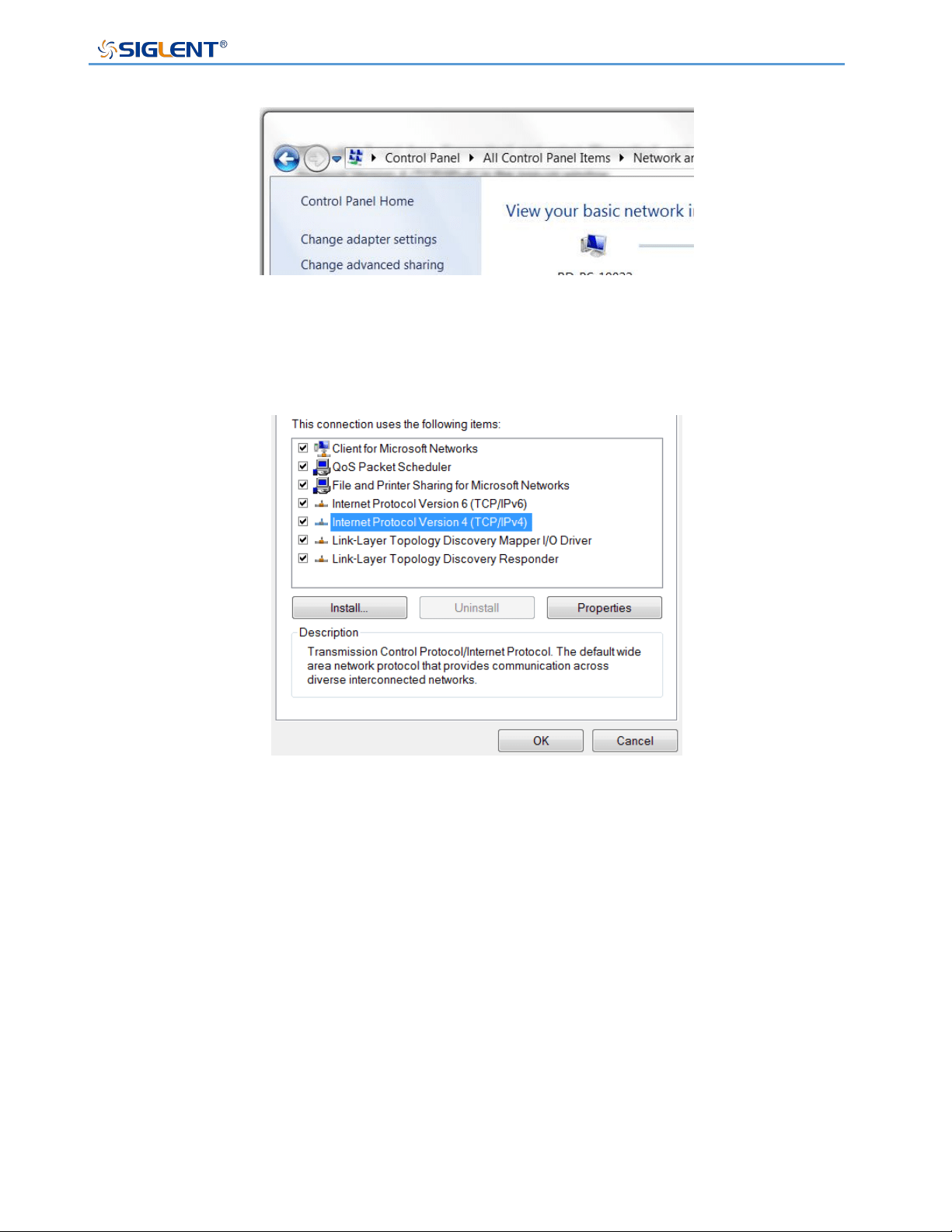
SPS5000X Series User Manual
WWW.SIGLENT.COM 99
1) Open the Network Sharing Center in the control panel and click Change adapter settings
2) Right-click [Local Area Connection] and select [Properties], and double-click Internet
Protocol Version 4 (TCP/IPv4) in the pop-up window
3) Select [Use the following IP address] to set the IP address, subnet mask and default
gateway, and click OK after setting
4) The PC computer setting is completed.

SPS5000X Series User Manual
WWW.SIGLENT.COM 100
① Set an IP address different from SPS
② Set the same subnet mask as SPS
③ Set the same gateway as SPS
Set the SPS power supply
Refer to the previous chapter [9.3.3] LAN settings, manually set SPS to be the same as the
PC computer subnet mask and default gateway, and set a different IP address. At this point,
the PC and SPS settings are completed, and the web page can be opened for remote control.
The second connection method:
SPS and PC are connected to the same network, SPS can automatically obtain IP or
manually change the IP address to be connected.
Web interface
After obtaining the IP address of the SPS5000X by any of the above methods, open the
Google browser on the PC and directly enter the IP address in the input field to enter.
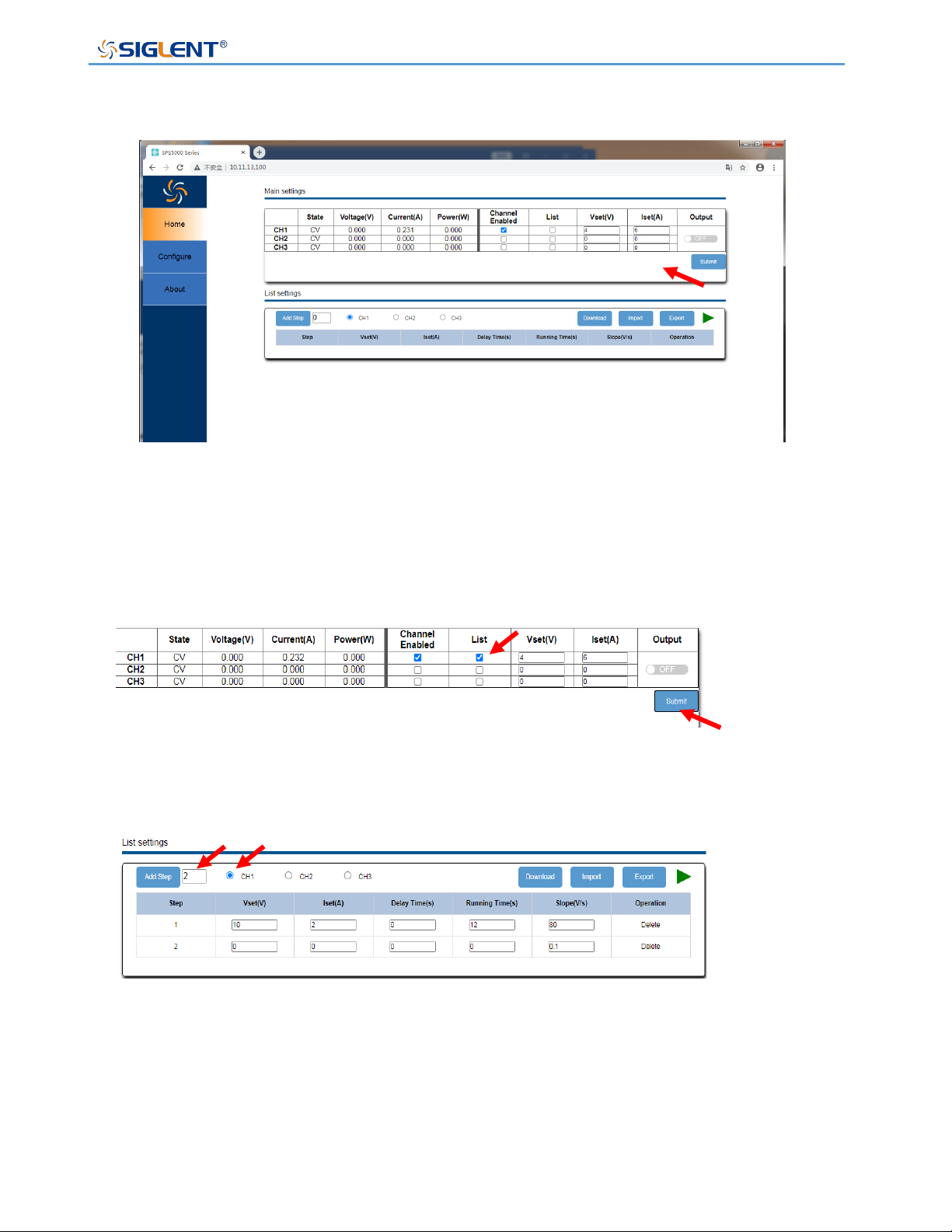
SPS5000X Series User Manual
WWW.SIGLENT.COM 101
After configuring the voltage and current on the main interface, you need to click the arrow
at the arrow to submit, and the data will be sent to the power supply.
List operation method:
1) Set the channel mode to List mode. Select List, click Submit
2) Add the number of List steps, if it is a multi-channel model, select the channel to be set
3) Set the voltage and current parameters of each step, and click Download after the output
is completed to send the List data to the power supply
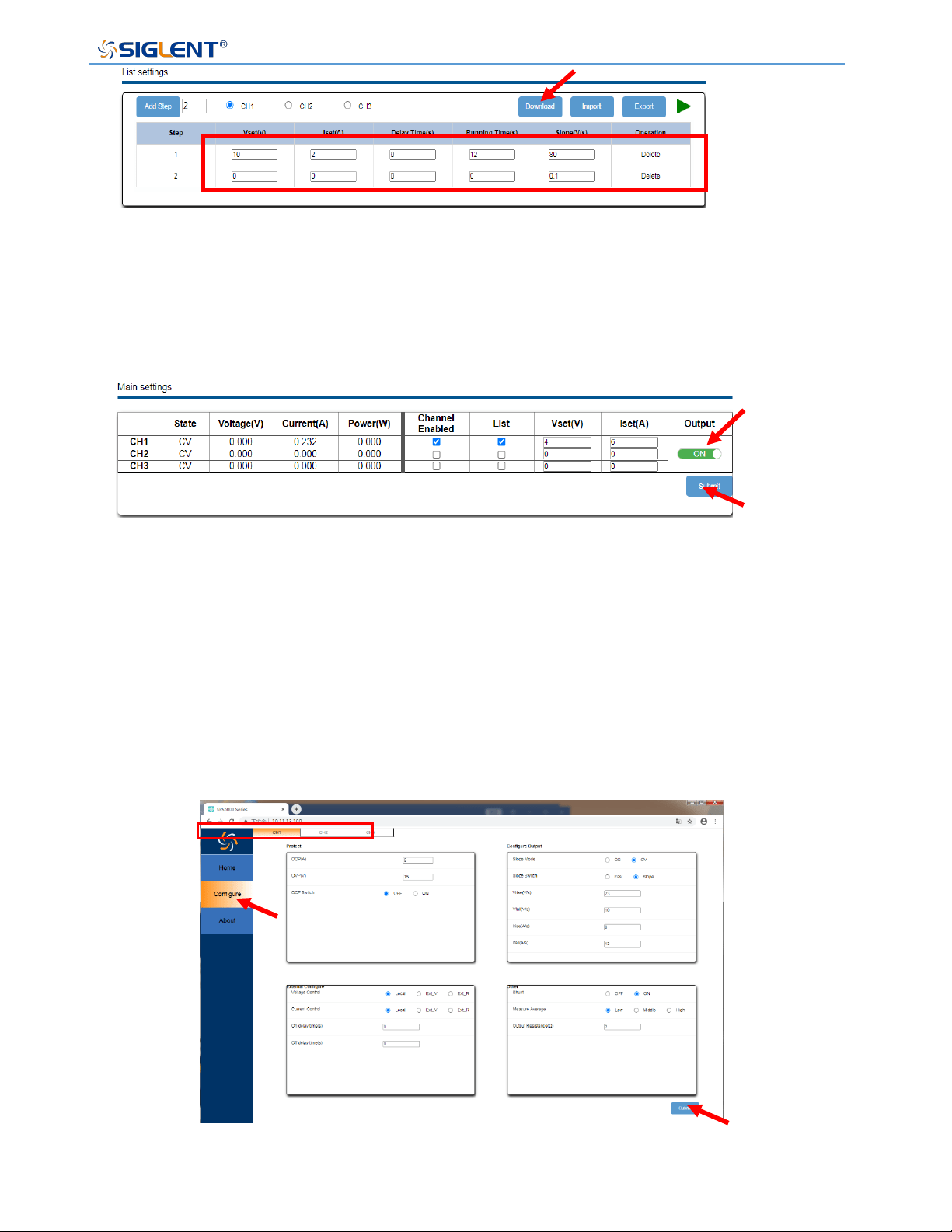
SPS5000X Series User Manual
WWW.SIGLENT.COM 102
4) Turn on the Output switch of the channel and click Submit. After the setting is successful,
the power supply sets the output according to the number of List steps, and the setting
is completed.
Operating:
Click [Configure] in the left column to switch to the configuration interface
If it is a multi-channel model, select the channel to be configured at the top bar.
After performing function configuration on the Configure interface, you need to click Submit
at the arrow to send the data to the power supply.
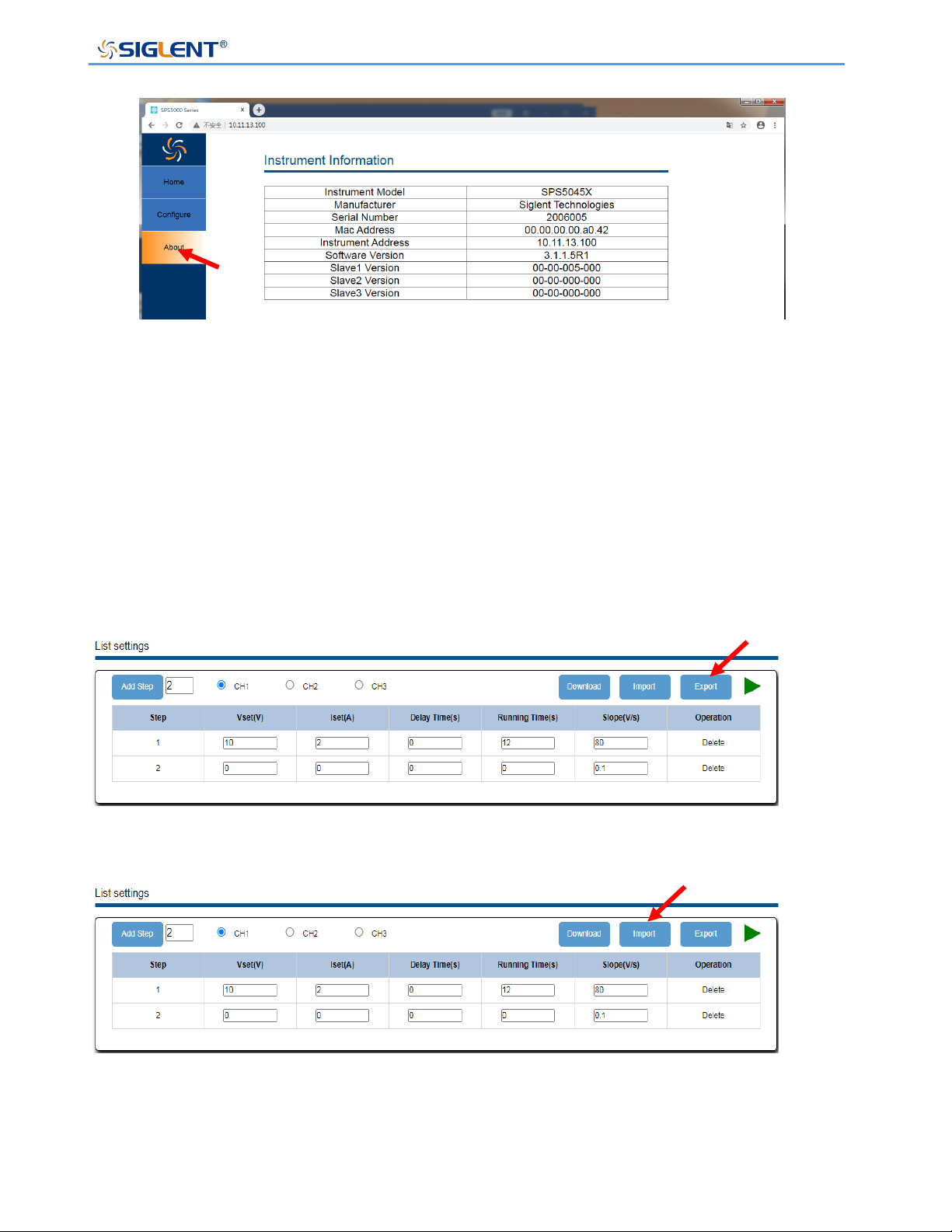
SPS5000X Series User Manual
WWW.SIGLENT.COM 103
Click [About] in the left column to view device information
List file export
The SPS webpage supports exporting the settings of the voltage, current, delay time,
running time and slope of the List steps to the outside in the form of .csv, and click Export to
start the export operation.
The exported .csv file supports editing. After opening the .csv file, the user can customize
the number of steps and other settings according to the format and then apply it to SPS.
Click Import on the webpage and find the file path, then you can import the edited .csv file
and apply it to SPS.
In addition, the exported .CSV file can also be copied to a USB flash drive, and the
application of List storage data can also be realized by inserting the USB flash drive into the
power supply for external calling.

SPS5000X Series User Manual
WWW.SIGLENT.COM 104
Troubleshooting
The following lists the power supply in the use of the process of possible failures and
troubleshooting. When you encounter these faults, please follow the corresponding steps to
deal with them. If you can't handle them, please contact siglent in time.
A. If the power on key is pressed, the power supply is still black, and there is no display:
➢ Check whether the power connector is connected properly.
➢ After checking, please restart the power supply.
➢ If the power supply can not be started normally, please contact SIGLENT.
B. No voltage output by output
➢ Check whether the voltage and current settings are correct
➢ Check whether the supply is in host mode, whether EXT on/off is in the off state,
Volt_ctrl and Curr_ctrl are in Local state, whether the output resistance is set properly,
whether the output delay time is too large, and the slope mode setting is too small,
which causes the output voltage to rise slowly.
➢ Use the default setting to reset the voltage and current output after restoring the
factory settings.
➢ If the power supply still cannot be used normally, please contact SIGLENT.
C. U disk cannot be recognized:
➢ Check whether the U disk device can work normally.
➢ Check whether the power USB HOST interface is working properly.
➢ Make sure that the flash-type U disk is used, and the power supply does not support
hard disk-type U disk devices.
➢ Re-plug the U disk, or restart the power and insert the U disk again.
➢ If you still cannot use the U disk normally, please contact SIGLENT.

SPS5000X Series User Manual
WWW.SIGLENT.COM 105
Contact Us
Asia/Headquarters
SIGLENT TECHNOLOGIES CO., LTD.
Address: Blog No.4 & No.5, Antongda Industrial Zone, 3rd Liuxian Road, Bao'an District,
Shenzhen, 518101, China.
Tel: 400-878-0807
Website: https://www.siglent.com
North America
SIGLENT TECHNOLOGIES North America
Address: 6557 Cochran Rd, Solon, OH 44039
Tel: 440-398-5800
E-mail: [email protected]
Website: https://www.siglentna.com
Europe
SIGLENT Technologies Germany GmbH
Add: Staetzlinger Str. 70
86165 Augsburg, Germany
Tel: +49(0)-821-666 0 111 0
E-mail: [email protected]
Website: https://www.siglenteu.com