
Owner's Guide
Guia del usuario
III II
\
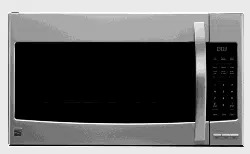
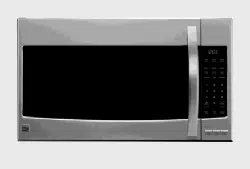
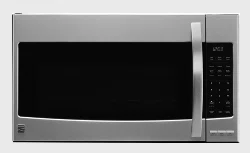
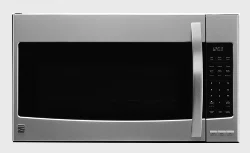
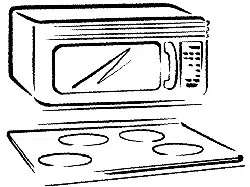
Microwave Hood Combination
Combinaci6n Microondas Campana
. . , . . -
Wa_ ................... ,...................... 2 Caring for Your Mi©rowave Oven ..... 33
$ear_ Serv}ce ...................... ,........... 2 Cooking Guide .................................. 36
Mi©rowave Oven Safety ............... 3-5 Questions and Answers .................... 38
Installation Instructions ................. 6
Getting to Know Your
Microwave Oven .............................. 8
Using Your Microwave Oven ......... 20
8169425
TroubleshooJlng ................................ 39
Index ............................................ ...., 41
Secci6n en Espa_3o| .......................... 43
Seers Toll.Free Numbers ............. ,.o,. 88
S_s, Ro_u_k and Co., Hottrr_ _, fk 6_1 t9 L/.S._
, .--
MI)DEIJN_DELO 68_;O0/1/;_
Microwave Oven Warranty
FULL ONE-YEAR WARRANTY ON MICROWAVE OVEN
For one year from the date of purchase, if this Kenmore Microwave Oven fails due to a defect in material or
workmanship, Sears will repair it free of charge.
FULL FIVE-YEAR WARRANTY ON THE MAGNETRON
For five years from the date of purchase, if the magnetron in this Kenmore Microwave Oven fails due to a
defect in material or workmanship, Sears will repair it free of charge.
The above warranty coverage applies only to Microwave Ovens which are used for private household purposes.
WARRANTY SERVICE IS AVAILABLE BY SIMPLY CONTACTING THE NEAREST SEARS STORE OR
SERVICE CENTER IN THE UNITED STATES.
This warranty applies only while this product is in use in the United States.
This warranty gives you specific legal rights, and you may also have other rights which vary from state to state,
Sears, Roebuck and Co., For service call:
DepL 817WA, 1-800-4-REPAIR
Hoffman Estates, IL 60179 1-800-473-7247
Sears Service
"We service what we sell"
"We service what we sell" is our assurance to you that you can depend on Sears for service because Sears
Service is nationwide.
Your Sears Kenmore Microwave Oven has added value when you consider that Sears has a service unit near
you, staffed by Sears Trained Technicians - professional technicians specifically trained on Sears Kenmore
Microwave Ovens, having the parts, tools, and equipment to insure that we meet our pledge to you -
"We service what we sell!"
To further add to the value of your microwave oven,
buy a Sears Maintenance Agreement.
Sears Kenmore Microwave Ovens are designed, manufactured, and tested for years of dependable operation.
Yet, any modern appliance may require service from time to time. A Sears Maintenance Agreement is more
than an extension of the Warranty. It provides complete protection from unexpected repair bills and undue
inconvenience. It assures you of maximum efficiency from your Microwave Oven.
Here's a comparative Warranty and Maintenance Agreement chart showing you the benefits of a Sears
Microwave Oven Maintenance Agreement.
YEARS OF OWNERSHIP COVERAGE 1ST YR. 2ND YR. THRU 5TH YR.
Replacement of defective parts other than magnetron W MA
Replacement of magnetron W W
Annual preventative maintenance check at your request MA MA
W - WARRANTY
MA - MAINTENANCE AGREEMENT
Contact your Sears salesperson or local Sears Service Center today and purchase a Sears Maintenance
Agreement.
Keep thi_; book and the sales slip together in a safe place for future reference.
Microwave Oven Safety
Your safety and the safety of others is very important.
We have provided many important safety messages in this manual and on your appliance. Always read and
obey all safety messages.
This is the safety alert symbol.
This symbol alerts you to hazards that can kill or hurt you and others.
All safety messages will be preceded by the safety alert symbol and the word "DANGER" or
"WARNING." These words mean:
You will be killed or seriously injured if you don't
follow instructions.
You can be killed or seriously injured if you don't
follow instructions,
All safety messages will identifythe hazard, tell you how to reduce the chance of injury, and tell you what can
happen if the instructions are not followed.
IMPORTANT SAFETY INSTRUCTIONS
When using electrical appliances basic safety precautions should be followed, includingthe following:
WARNING - To reduce the risk of burns,
electric shock, fire, injury to persons or exposure
to excessive microwave energy:
• Read all instructions before using the
microwave oven.
• Read and follow the specific "PRECAUTIONS TO
AVOID POSSIBLE EXPOSURE TO EXCESSIVE
MICROWAVE ENERGY" found in this section.
=The microwave oven must be grounded. Connect
only to properly grounded outlet. See "GROUND-
ING INSTRUCTIONS" found at the end of this
section.
"Install or locate the microwave oven only in
accordance with the provided installation
instructions.
• Some products such as whole eggs and sealed
containers - for example, closed glass jars -
may explode and should not be heated in the
microwave oven.
• Use the microwave oven only for its intended use
as described in this manual. Do not use corrosive
chemicals or vapors in the microwave oven_This
type of oven isspecifically designed to heat,
cook, or dry food. It is not designed for industrial
or laboratory use.
•As with any appliance, close supervision is
necessary when used by children.
"Do not operate the microwave oven if it has a
damaged cord or plug, if it is not working properly,
or if it has been damaged or dropped.
• The microwave oven should be serviced only by
qualified service personnel. Call an authorized
service company for examination, repair or
adjustment.
• Do not cover or block any openings on the
microwave oven.
• Do not store the microwave oven outdoors. Do not
use the microwave oven near water - for example,
near a kitchen sink, in a wet basement, or near a
swimming pool, and the like,
• Do not immerse cord or ptug in water.
• Keep cord away from heated surfaces.
• Do not let cord hang over edge of table or
counter.
• See door surface cleaning instructions in the
"Caring for Your Microwave Oven" section.
• Do not mount over a sink.
• Do not store anything directly on top of the
microwave oven when the microwave oven is
in operation.
- SAVE THESE INSTRUCTIONS -
continued on next page
IMPORTANT SAFETY INSTRUCTIONS
• To reduce the risk of fire in the oven cavity:
- Do not overcook food. Carefully attend the
microwave oven if paper, plastic, or other
combustible materials are placed inside the
oven to facilitate cooking.
- Remove wire twist-ties from paper or plastic
bags before placing bag in oven.
- If materials inside the oven should ignite, keep
oven door closed, turn oven off, and disconnect
the power cord, or shut off power at the fuse
or circuit breaker panel.
- Do not use the cavity for storage purposes. Do
not leave paper products, cooking utensils, or
food in the cavity when not in use.
,,Suitable for use above both gas and electric
cooking equipment.
*intended to be used above ranges with maximum
width of 36 inches.
• Clean Ventilating Hoods Frequently- Grease
should not be allowed to accumulate on hood
or filter.
• When flaming foods under the hood, turn the fan
on.
• Use care when cleaning the vent-hood filter.
Corrosive cleaning agents, such as lye-based
oven cleaners, may damage the filter.
- SAVE THESE INSTRUCTIONS -
PRECAUTIONS TO AVOID POSSIBLE EXPOSURE TO
EXCESSIVE MICROWAVE ENERGY
(a) Do not attempt to operate this oven with the door
open since open-door operation can result in
harmful exposure to microwave energy. It is
important not to defeat or tamper with the safety
interlocks.
(b) Do not place any object between the oven front
face and the door or allow soil or cleaner residue
to accumulate on sealing surfaces.
(e) Do not operate the oven if it is damaged. It is
particularly important that the oven door close
properly and that there is no damage to the:
(1) door (bent),
(2) hinges and latches (broken or loosened),
(3) door seals and sealing surfaces.
|d) The oven should not be adjusted or repaired by
anyone except properly qualified service personnel.
Electrical requirements
Observe all governing codes and ordinances.
A 120 Volt, 60 Hz, AC only, 15 or 20 amp fused
electrical supply is required. (A time-delay fuse is
recommended.) It is recommended that a separate
circuit serving only this appliance be provided.
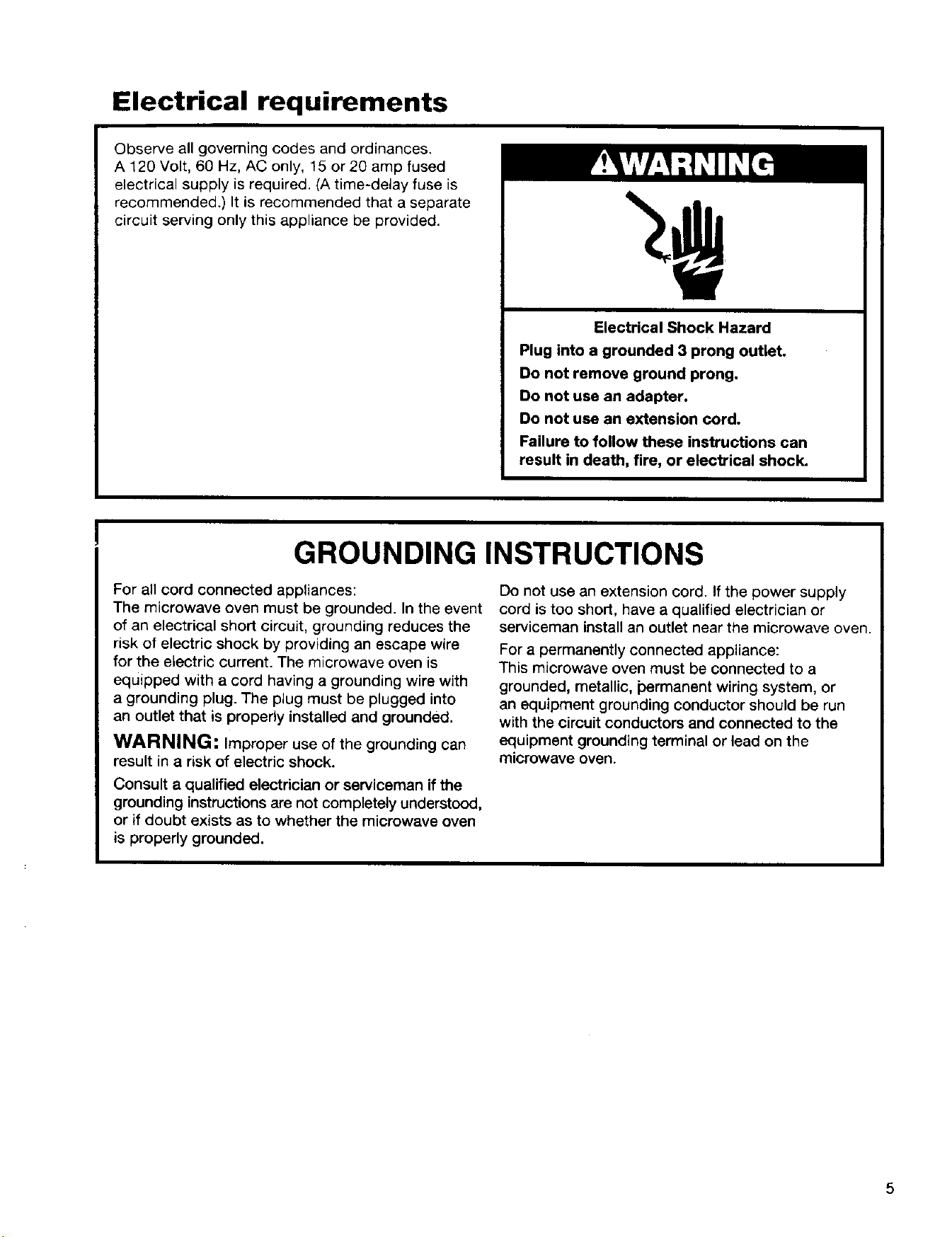
Electrical Shock Hazard
Plug into a grounded 3 prong outlet.
Do not remove ground prong.
Do not use an adapter.
Do not use an extension cord.
Failure to follow these instructions can
result in death, fire, or electrical shock.
GROUNDING INSTRUCTIONS
For all cord connected appliances:
The microwave oven must be grounded. In the event
of an electrical short circuit, grounding reduces the
risk of electric shock by providing an escape wire
for the electric current. The microwave oven is
equipped with a cord having a grounding wire with
a grounding plug. The plug must be plugged into
an outlet that is properly installed and grounded.
WARNING: Improper use of the grounding can
result in a risk of electric shock.
Consult a qualified electrician or serviceman ifthe
grounding instructions are not completely understood,
or if doubt exists as to whether the microwave oven
is properly grounded.
Do not use an extension cord. If the power supply
cord is too short, have a qualified electrician or
serviceman install an outlet near the microwave oven.
For a permanently connected appliance:
This microwave oven must be connected to a
grounded, metallic, permanent wiring system, or
an equipment grounding conductor should be run
with the circuit conductors and connected to the
equipment grounding terminal or lead on the
microwave oven.
5
Installation Instructions
Space requirements
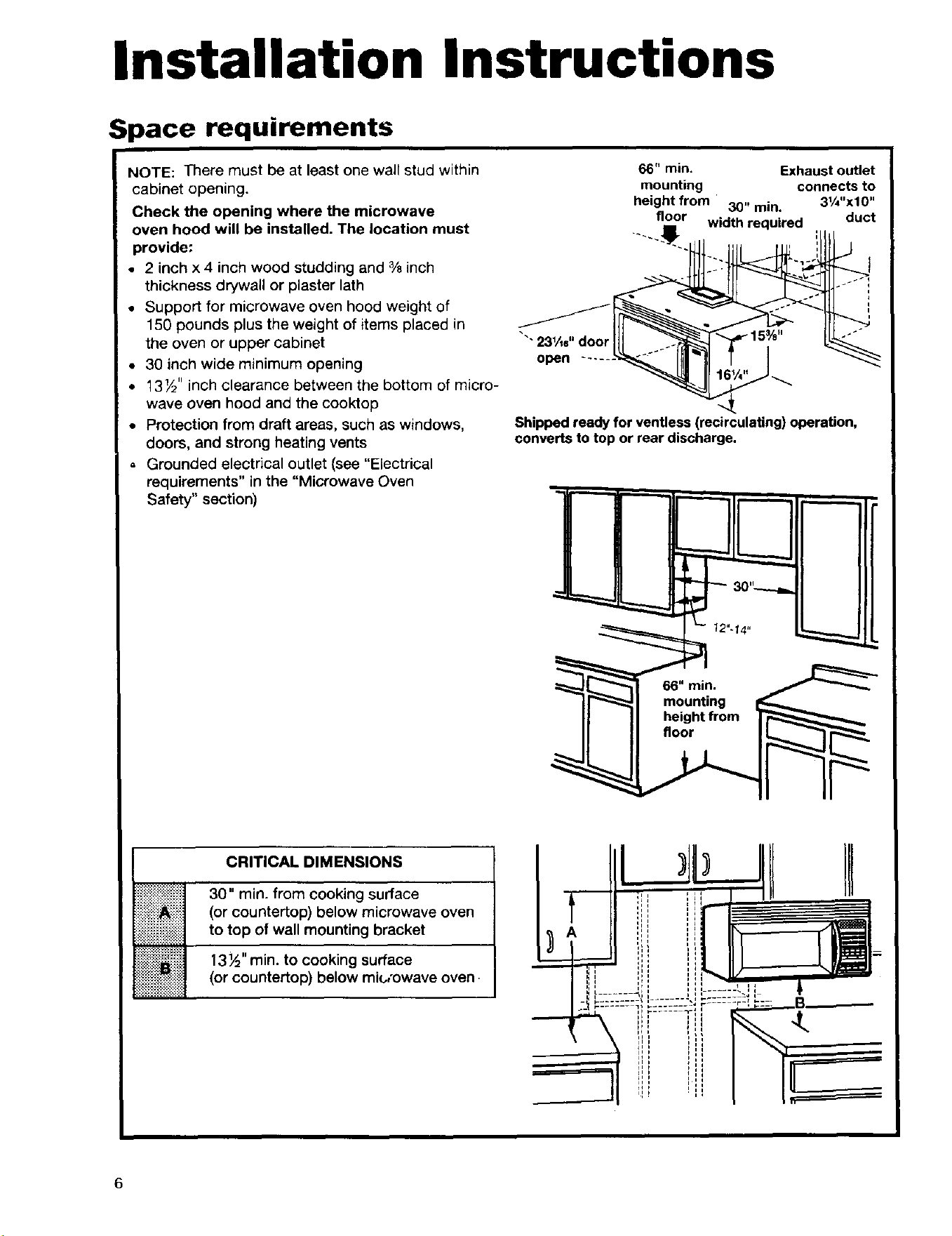
NOTE: There must be at least one wall stud within
cabinet opening.
Check the opening where the microwave
oven hood will be installed. The location must
provide:
• 2 inch x 4 inch wood studding and % inch
thickness drywall or plaster lath
• Support for microwave oven hood weight of
150 pounds plus the weight of items placed in
the oven or upper cabinet
• 30 inch wide minimum opening
• 13½" inch clearance between the bottom of micro-
wave oven hood and the cooktop
• Protection from draft areas, such as windows,
doors, and strong heating vents
, Grounded electrical outlet (see "Electrical
requirements" in the "Microwave Oven
Safety" section)
66" min. Exhaustoutlet
mounting connects to
heightfrom 30" min. 31/4"x10"
floor width required duct
"'23¼e"door
open
Shipped ready for ventless (recirculating) operation,
converts to top or rear discharge.
!_!i!i!_!i!i!_!i!i!_!i!i!_!i!ii_i
iiiiiiiiiiiiiii iiiili!
i%i!i!i!i!ii!iii_!i!ii
_:::::::::::::::
_:.:._.:._:.:.:.:.:._.:._:.
CRITICAL DIMENSIONS
30" min. from cooking surface
(or countertop) below microwave oven
to top of wall mounting bracket
13½" rain. to cooking surface
(or countertop) below mk,,'owave oven.
HIr,,i
6
er ovin9 Yepl ac n9 tF e r icr(;'wave oven
Excessive Weight Hazard
Use two or more people to move and install
microwave oven.
Failure to do so can result in back or
other injury.
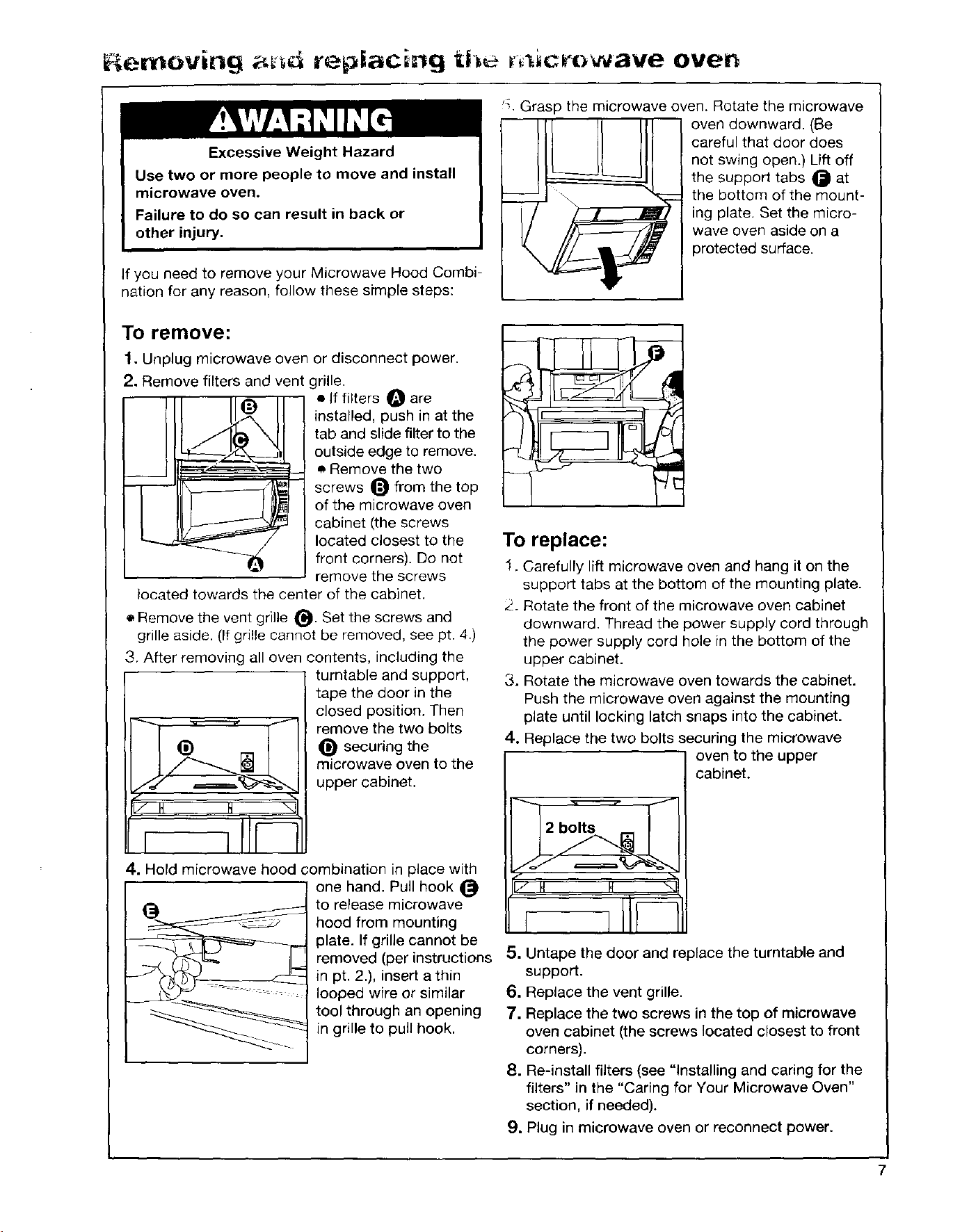
If you need to remove your Microwave Hood Combi-
nation for any reason, follow these sh'nple steps:
!:, Grasp the microwave oven. Rotate the microwave
oven downward. (Be
careful that door does
not swing open.) Lift off
the support tabs _ at
the bottom of the mount-
ing plate. Set the micro-
wave oven aside on a
protected surface.
To remove:
1. Unplug microwave oven or disconnect power.
2. Remove filters and vent grille.
• If filters O are
installed, push in at the
tab and slide filter to the
outside edge to remove.
• Remove the two
-- screws _ from the top
of the microwave oven
I cabinet (the screws
located closest to the
front corners). Do not
remove the screws
located towards the center of the cabinet.
• Remove the vent grille _. Set the screws and
grille aside. (If grille cannot be removed, see pt. 4.)
3. After removing all oven contents, including the
turntable and support,
tape the door in the
closed position. Then
remove the two bolts
_) _ securing the
microwave oven to the
upper cabinet.
4. Hold microwave hood combination in place with
one hand. Pull hook
To replace:
1. Carefully lift microwave oven and hang it on the
support tabs at the bottom of the mounting plate.
2. Rotate the front of the microwave oven cabinet
downward. Thread the power supply cord through
the power supply cord hole in the bottom of the
upper cabinet.
3. Rotate the microwave oven towards the cabinet.
Push the microwave oven against the mounting
plate until locking latch snaps into the cabinet.
4. Replace the two bolts securing the microwave
oven to the upper
cabinet.
in pt. 2.), insert a thin
looped wire or similar
tool through an opening
in grille to pull hook.
to release microwave
hood from mounting /
plate. If grille cannot be
removed (per instructions 5. Untape the door and replace the turntable and
support.
6. Replace the vent grille.
7. Replace the two screws in the top of microwave
oven cabinet (the screws located closest to front
corners).
8. Re-install filters (see "Installing and caring for the
filters" in the "Caring for Your Microwave Oven"
section, if needed).
9. Plug in microwave oven or reconnect power.
7
Getting to Know Your
Microwave Oven
This section discusses the concepts behind microwave cooking. It also shows you the basics you need to
know to operate your microwave oven. Please read this information before you use your microwave oven.
How your microwave oven works
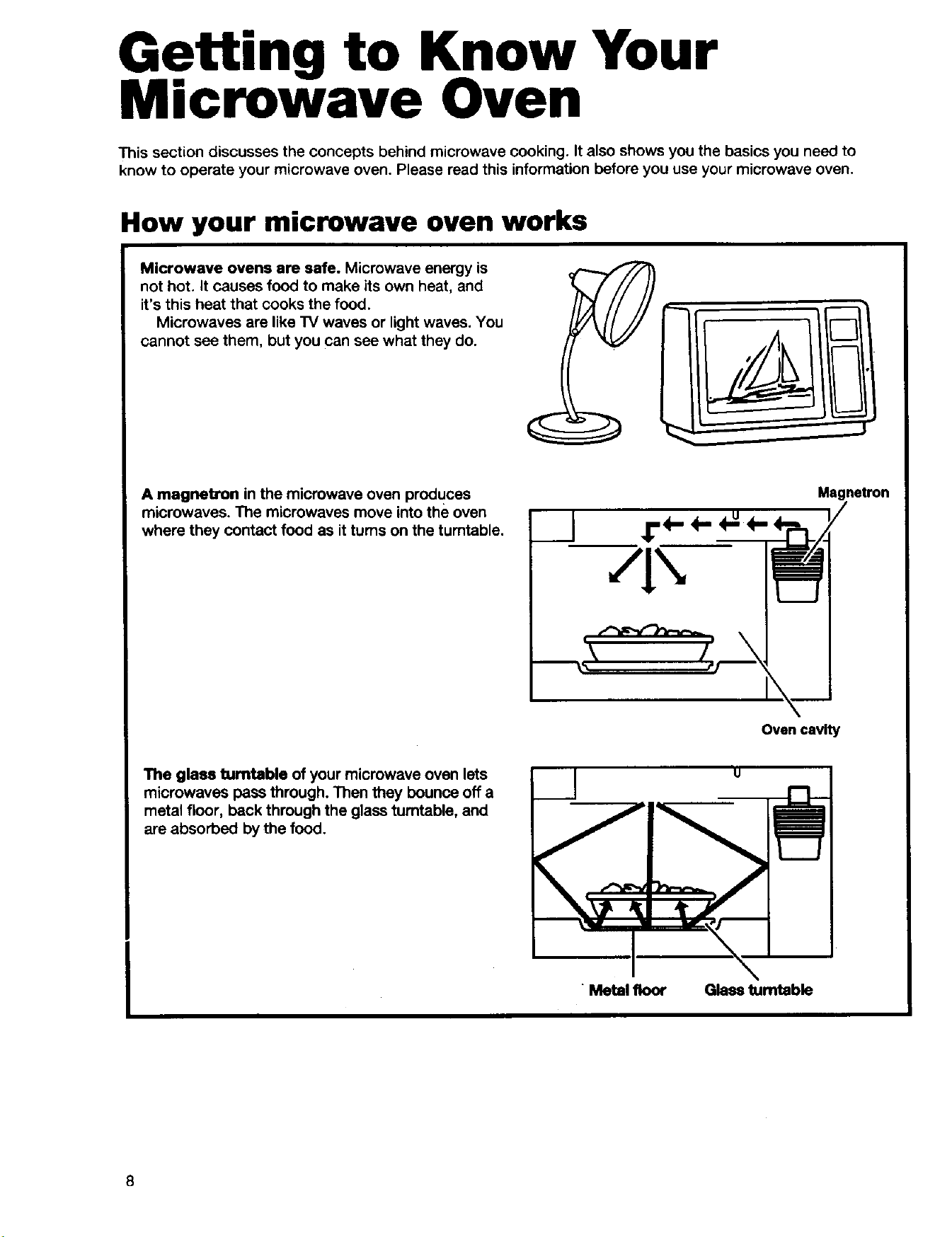
Microwave ovens are safe. Microwave energy is
not hot. It causes food to make its own heat, and
it's this heat that cooks the food.
Microwaves are like TV waves or light waves. You
cannot sea them, but you can see what they do.
A magnetron in the microwave oven produces
microwaves. The microwaves move into the oven
where they contact food as it turns on the turntable.
_(- ("m
Magnetron
Ovencavity
The glass turntable of your microwave oven lets
microwaves pass through. Then they bounce off a
metal floor, back through the glass turntable, and
are absorbed by the food.
u
"Metal floor Glass turntable
8
How your microwave oven works (cont.)
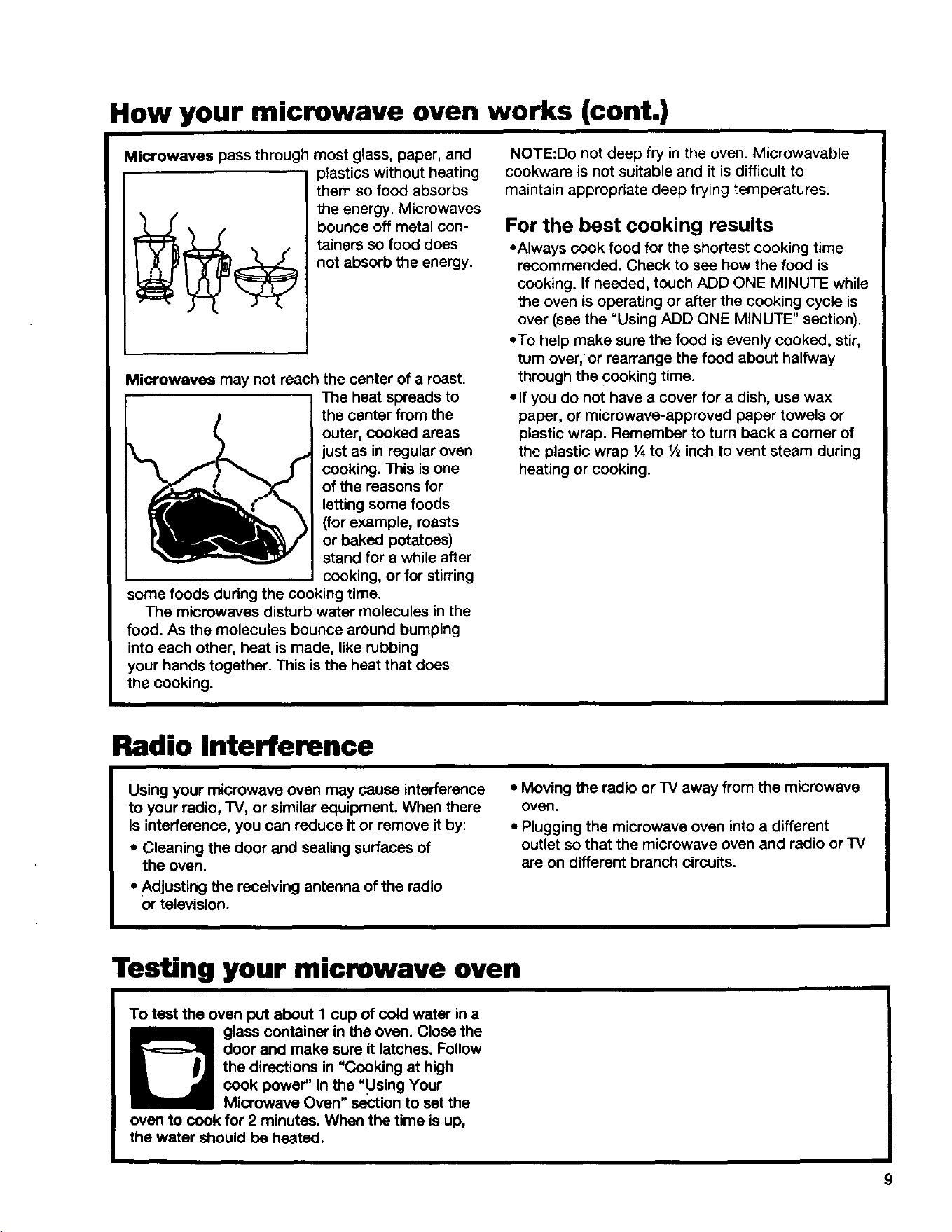
Microwaves pass through most glass, paper, and
plastics without heating
them so food absorbs
the energy. Microwaves
bounce off metal con-
tainers so food does
not absorb the energy.
Microwaves may not reach the center of a roast.
The heat spreads to
the center from the
outer, cooked areas
just as in regular oven
cooking. This isone
I of the reasons for
letting some foods
(for example, roasts
or baked potatoes)
stand for a while after
cooking, or for stirring
some foods during the cooking time.
The microwaves disturb water molecules in the
food. As the molecules bounce around bumping
into each other, heat is made, like rubbing
your hands together. This is the heat that does
the cooking.
NOTE:Do not deep fry in the oven. Microwavable
cookware is not suitable and it is difficult to
maintain appropriate deep frying temperatures.
For the best cooking results
• Always cook food for the shortest cooking time
recommended. Check to see how the food is
cooking. If needed, touch ADD ONE MINUTE while
the oven isoperating or after the cooking cycle is
over (see the "Using ADD ONE MINUTE" section).
=To help make sure the food is evenly cooked, stir,
turn over,"or rearrange the food about halfway
through the cooking time.
=If you do not have a cover for a dish, use wax
paper, or microwave-approved paper towels or
plastic wrap. Remember to turn back a comer of
the plastic wrap _Ato _.,_inch to vent steam during
heating or cooking.
Radio interference
Using your microwave oven may cause interference
to your radio, TV, or similar equipment. When there
is interference, you can reduce it or remove it by:
• Cleaning the door and sealing surfaces of
the oven.
* Adjusting the receiving antenna of the radio
or television.
• Moving the radio or TV away from the microwave
oven.
• Plugging the microwave oven into a different
outlet so that the microwave oven and radio orTV
are on different branch circuits.
Testing your microwave oven
To test the oven put about I cup of cold water in a
glass container in the oven. Close the
door and make sure it latches. Follow
the directions in "Cooking at high
cook power" in the "Using Your
Microwave Oven" section to set the
oven to cook for 2 minutes. When the time is up,
the water should be heated.
Testing your dinnerware or cookware
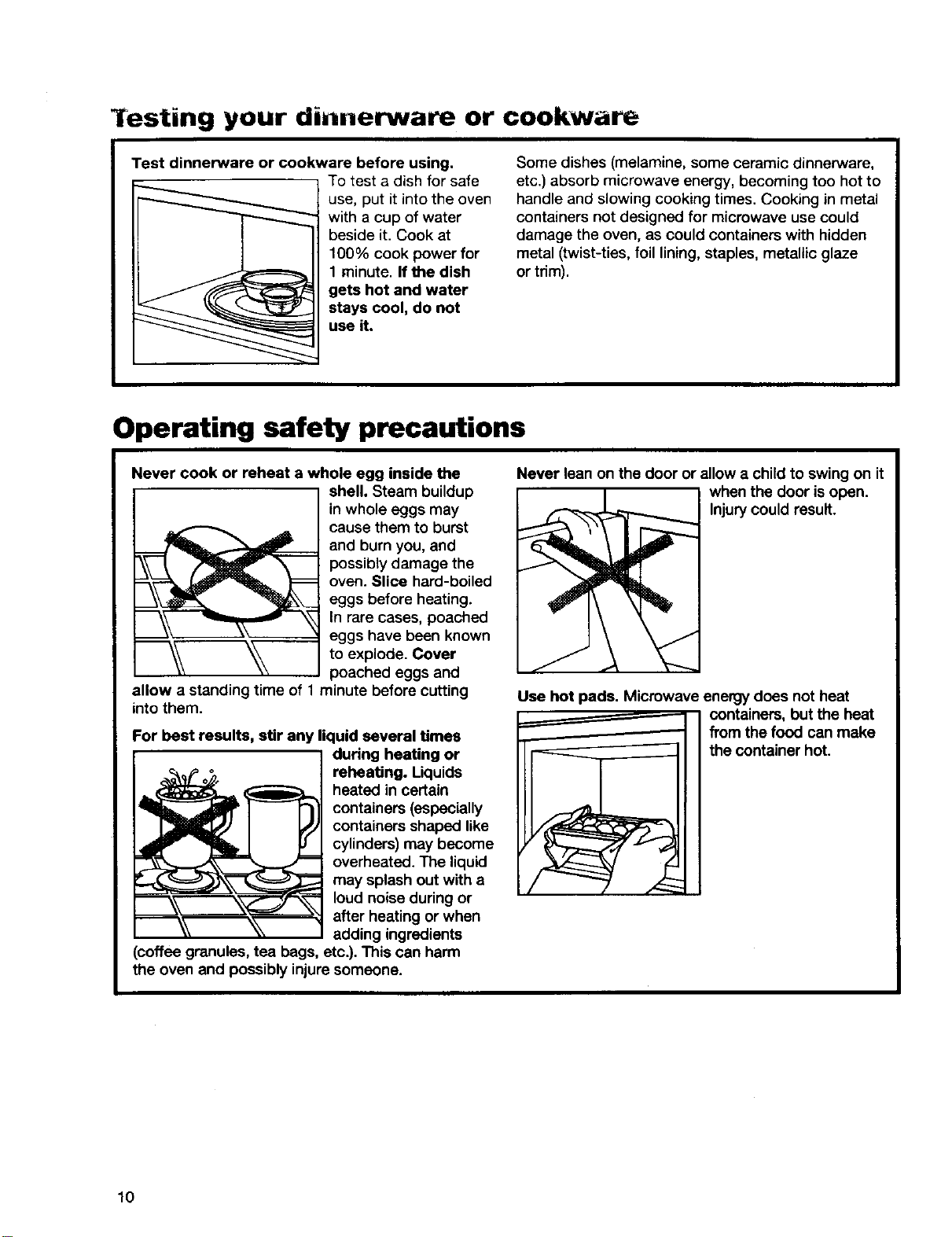
Test dinnerware or cookware before using,
To test a dish for safe
use, put it into the oven
with a cup of water
beside it. Cook at
100% cook power for
1 minute. If the dish
gets hot and water
stays cool, do not
use it.
Some dishes (melamine, some ceramic dinnerware,
etc.) absorb microwave energy, becoming too hot to
handle and slowing cooking times. Cooking in metal
containers not designed for microwave use could
damage the oven, as could containers with hidden
metal (twist-ties, foil lining, staples, metallic glaze
or trim).
Operating safety precautions
Never cook or reheat a whole egg inside the
j shell. Steam buildupin whole eggs may
cause them to burst
and burn you, and
possibly damage the
oven. Slice hard-boiled
eggs before heating.
In rare cases, poached
eggs have been known
_ to explode. Cover
poached eggs and
allow a standing time of 1 minute before cutting
into them.
For best results, stir any liquid several times
during heating or
reheating. Liquids
heated in certain
containers (especially
containers shaped like
cylinders) may become
overheated. The liquid
may splash out with a
loud noise during or
after heating or when
adding ingredients
(coffee granules, tea bags, etc.). This can harm
the oven and possibly injure someone.
Never lean on the door or allow a child to swing on it
when the door is open.
Injurycould result.
Use hot pads. Microwave energy does not heat
containers, but the heat
from the food can make
the container hot.
10

afety precautions (cont.)
Do not overcook potatoes. Fire could result. At
the end of the recom-
mended cooking time,
potatoes should be
slightly firm because
they will continue cook-
ing during standing
time. After micro-
waving, let potatoes
stand for 5 minutes.
They willfinish cooking
while standing.
Do not start a microwave oven when it is empty.
Product life may be
shortened.
If you practice
programming the oven,
put a container of
water in the oven.
It is normal for the
oven door to look wavy
after the oven has been
running for a while.
Do not use newspaper or other printed paper in the
oven. Fire could result.
Do not dry flowers,
fruit, herbs, wood,
paper, gourds, or
clothes in the oven.
Fire could result.
Do not try to melt paraffin wax in the oven. Paraffin
wax will not melt in a
microwave oven because
it allows microwaves to
pass through it.
Do not operate the microwave oven unless the
glass turntable is
securely in place and
can rotate freely on the
support rollers. The
turntable can rotate in
either direction.
Make sure the rollers
are completely inside
the center circle of the
turntable; this will let the
turntable rotate properly.
Make sure the turntable is correct-side up in the
oven. Carefully place the cookware on your
turntable to avoid possibly breaking it.
Handle your turntable with care when removing
it from the oven to avoid possibly breaking it. if your
turntable cracks or breaks, contact Sears for a
replacement.
When you use a browning dish, the browning
dish bottom must be at least 3/_6inch (.5 cm) above
the turntable. Follow the directions supplied with the
browning dish.
Electrical connection
If your electric power line or outlet voltage is
Circuit breaker
or fuse box
less than 110 volts,
cooking times may be
longer. Have a qualified
electrician check your.
electrical system.
11
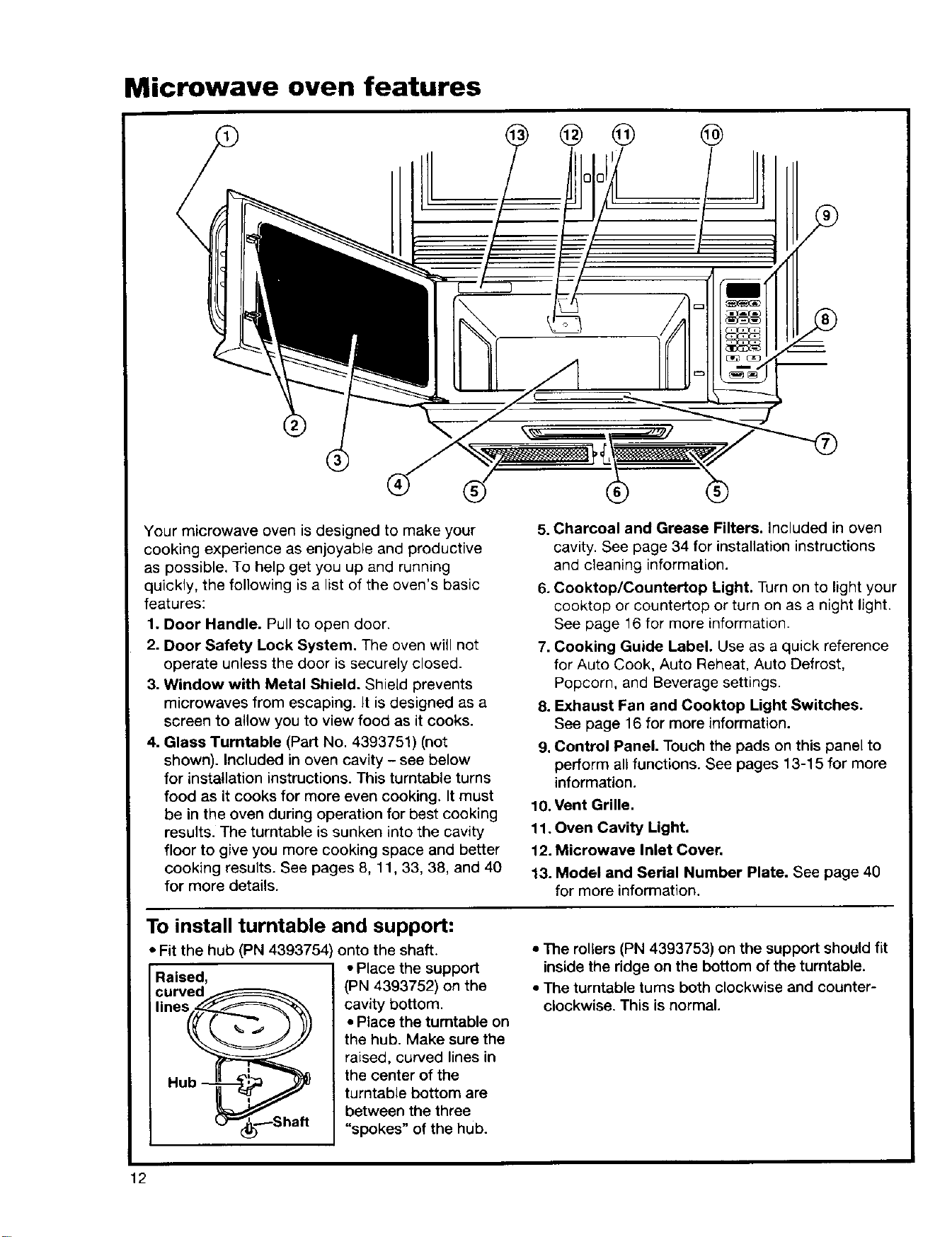
Microwave oven features
@ @ @ @
®
Your microwave oven is designed to make your
cooking experience as enjoyable and productive
as possible. To help get you up and running
quickly, the following is a list of the oven's basic
features:
1. Door Handle. Pull to open door.
2. Door Safety Lock System. The oven will not
operate unless the door is securely closed.
3. Window with Metal Shield. Shield prevents
microwaves from escaping. It is designed as a
screen to allow you to view food as it cooks.
4. Glass Turntable (Part No. 4393751) (not
shown). Included in oven cavity - see below
for installation instructions. This turntable turns
food as it cooks for more even cooking. It must
be in the oven during operation for best cooking
results. The turntable is sunken into the cavity
floor to give you more cooking space and better
cooking results. See pages 8, 11,33, 38, and 40
for more details.
5. Charcoal and Grease Filters. Included in oven
cavity. See page 34 for installation instructions
and cleaning information.
6. Cooktop/Countertop Light. Turn on to light your
cooktop or countertop or turn on as a night light.
See page 16 for more information.
7. Cooking Guide Label. Use as a quick reference
for Auto Cook, Auto Reheat, Auto Defrost,
Popcorn, and Beverage settings.
8. Exhaust Fan and Cooktop Light Switches.
See page 16 for more information.
9. Control Panel. Touch the pads on this panel to
perform all functions. See pages 13-15 for more
information.
10, Vent Grille.
11. Oven Cavity Light.
12. Microwave Inlet Cover.
13. Model and Serial Number Plate. See page 40
for more information.
To install turntable and support:
• Fit the hub (PN 4393754 onto the shaft.
Raised,
curved_
lineS_Hu _'_
• Place the suppo_
(PN 4393752) on the
cavity bottom.
• Place the turntable on
the hub. Make sure the
raised, curved lines in
the center of the
turntable bottom are
between the three
"spokes" of the hub.
• The rollers (PN 4393753) on the support should fit
inside the ridge on the bottom of the turntable.
• The turntable turns both clockwise and counter-
clockwise. This is normal.
12
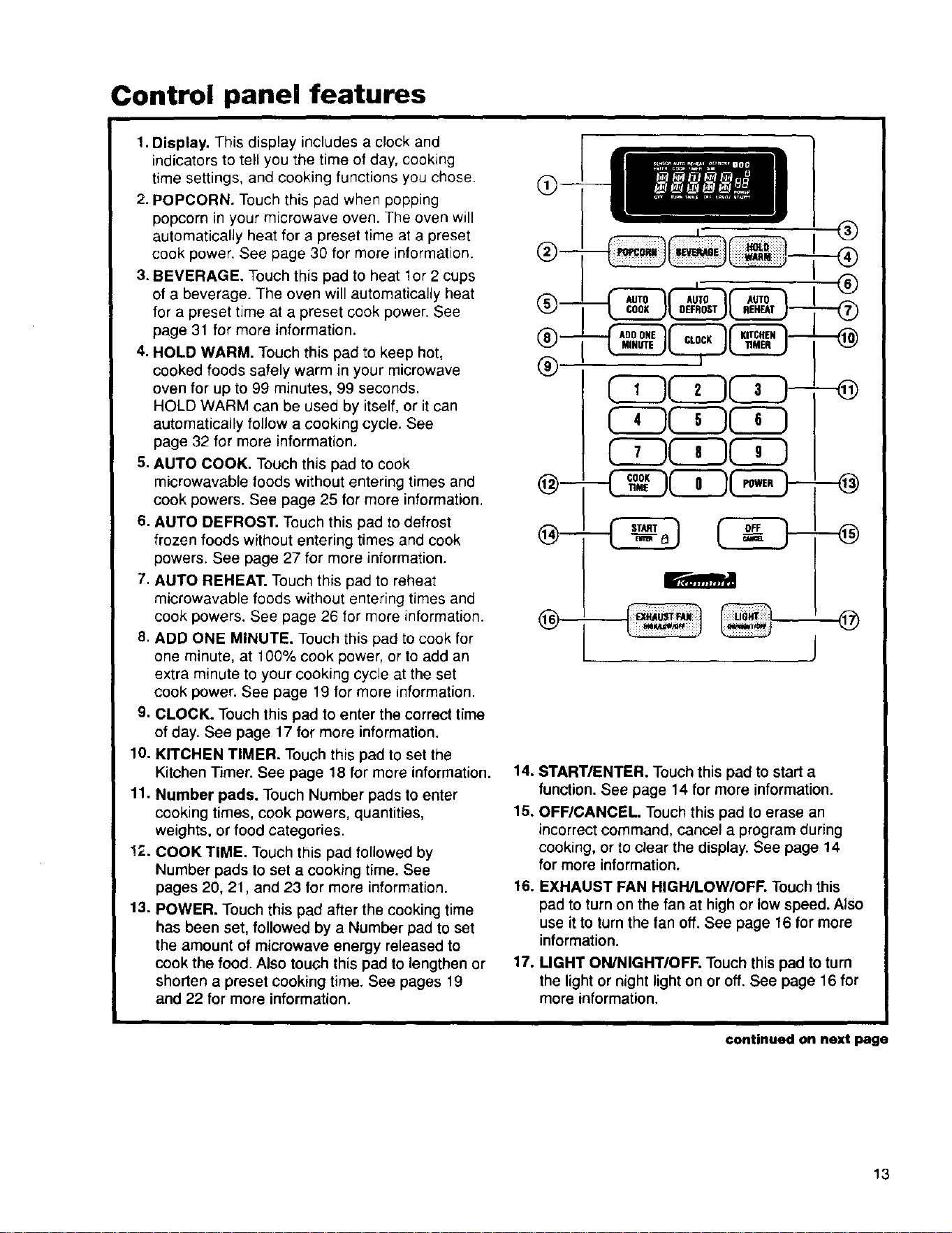
Control panel features
1. Display. This display includes a clock and
indicators to tell you the time of day, cooking
time settings, and cooking functions you chose.
2. POPCORN. Touch this pad when popping
popcorn in your microwave oven. The oven will
automatically heat for a preset time at a preset
cook power. See page 30 for more information.
3. BEVERAGE. Touch this pad to heat 1or 2 cups
of a beverage. The oven will automatically heat
for a preset time at a preset cook power. See
page 31 for more information.
4. HOLD WARM. Touch this pad to keep hot,
cooked foods safely warm in your microwave
oven for up to 99 minutes, 99 seconds.
HOLD WARM can be used by itself, or it can
automatically follow a cooking cycle. See
page 32 for more information,
5. AUTO COOK. Touch this pad to cook
microwavable foods without entering times and
cook powers. See page 25 for more information.
6. AUTO DEFROST. Touch this pad to defrost
frozen foods without entering times and cook
powers. See page 27 for more information.
7. AUTO REHEAT. Touch this pad to reheat
microwavable foods without entering times and
cook powers. See page 26 for more information.
8. ADD ONE MINUTE. Touch this pad to cook for
one minute, at 100% cook power, or to add an
extra minute to your cooking cycle at the set
cook power. See page 19 for more information.
9. CLOCK. Touch this pad to enter the correct time
of day. See page 17 for more information.
10. KITCHEN TIMER. Touch this pad to set the
Kitchen Timer. See page 18 for more information.
11. Number pads. Touch Number pads to enter
cooking times, cook powers, quantities,
weights, or food categories.
!;-. COOK TIME. Touch this pad followed by
Number pads to set a cooking time. See
pages 20, 21, and 23 for more information.
13. POWER. Touch this pad after the cooking time
has been set, followed by a Number pad to set
the amount of microwave energy released to
cook the food. Also touch this pad to lengthen or
shorten a preset cooking time. See pages 19
and 22 for more information.
®--
®--
®
@
® j®
14. START/ENTER. Touch this pad to start a
function. See page 14 for more information.
15. OFF/CANCEL. Touch this pad to erase an
incorrect command, cancel a program during
cooking, or to clear the display. See page 14
for more information.
16. EXHAUST FAN HIGH/LOW/OFF. Touch this
pad to turn on the fan at high or low speed. Also
use it to turnthe fan off. See page 16 for more
information.
17. UGHT ON/NIGHT/OFF. Touch this pad to turn
the light or night light on or off. See page 16 for
more information.
continued on next page
13
Control panel features (cont.)
NOTES:
• If you have entered all settings for a function but
do not touch START/ENTER in 5 seconds, the
START? indicator light will show.
* If you open the door while the oven is on and
then shut the door, the START? indicator light
will show. Touch START/ENTER to continue.
• If you choose a function but do not press
another Command pad within 1 minute, the
display returns to the time of day and you have
to start over.
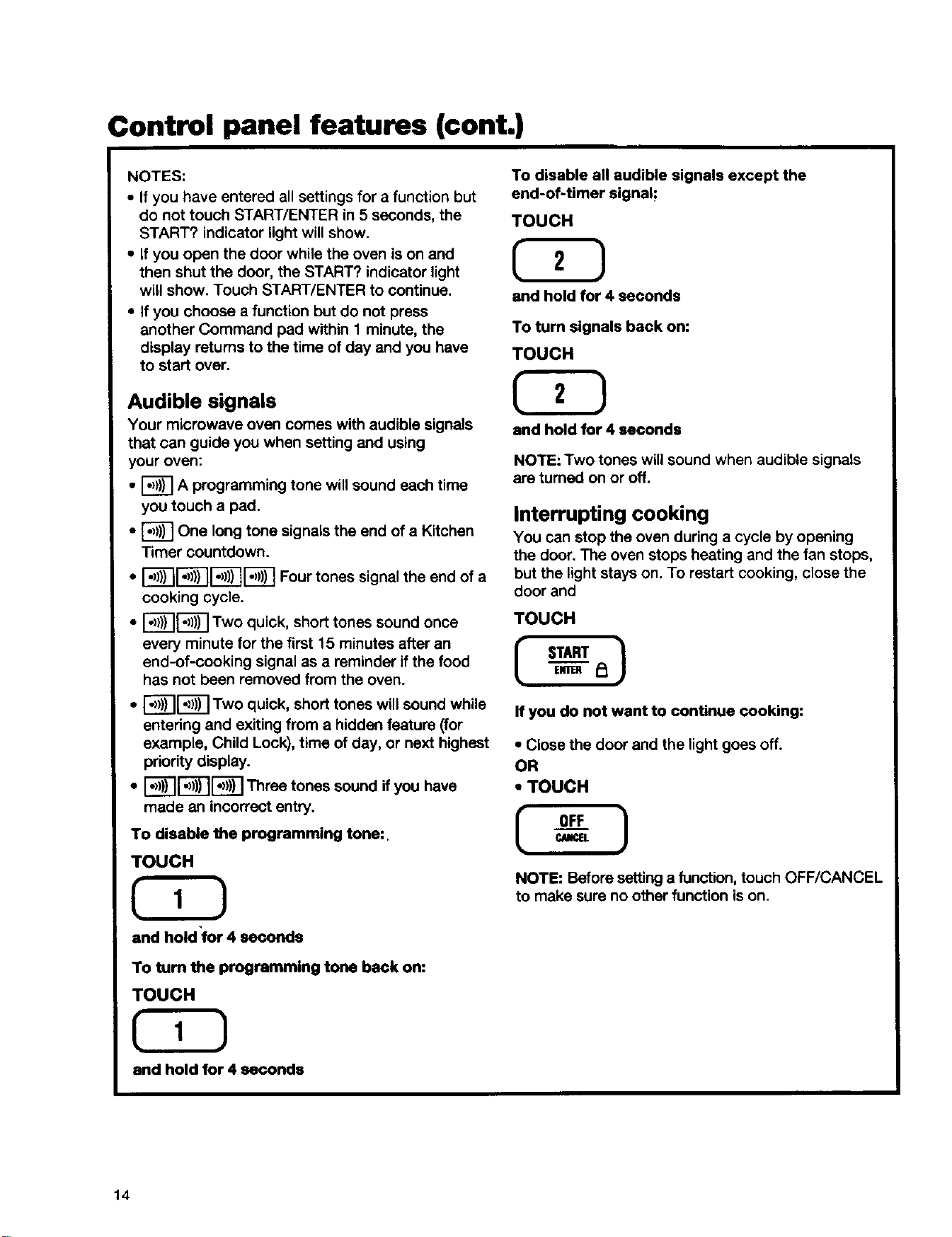
Audible signals
Your microwave oven comes with audible signals
that can guide you when setting and using
your oven:
• _ A programming tone will sound each time
you touch a pad.
• _ One long tone signals the end of a Kitchen
Timer countdown.
• i_-_r_l_r_ Four tones signal the end of a
cooking cycle.
• _'_ Two quick, short tones sound once
every minute for the first 15 minutes after an
end-of-cooking signal as a reminder if the food
has not been removed from the oven.
• I_[_1 Two quick, short tones will sound while
entering and exiting from a hidden feature (for
example, Child Lock), time of day, or next highest
priority display.
• I")))I1")))II")))IThree tones sound if you have
made an incorrect entry.
To disable the programming tone:.
TOUCH
and hold'for 4 seconds
To tum the programming tone back on:
TOUCH
and hold for 4 seconds
To disable all audible signals except the
end-of-timer signal;
TOUCH
and hold for 4 seconds
To turn signals back on:
TOUCH
and hold for 4 seconds
NOTE: Two tones will sound when audible signals
are turned on or off.
Interrupting cooking
You can stop the oven during a cycle by opening
the door. The oven stops heating and the fan stops,
but the light stays on. To restart cooking, close the
door and
TOUCH
If you do not want to continue cooking:
• Close the door and the light goes off.
OR
" TOUCH
NOTE: Before setting a function,touch OFF/CANCEL
to make sure no other function is on.
14
Control panel features (cont.)
Using the child lock
The Child Lock locks the control panel so children
cannot use the microwave oven when you do not
want them to.
To lock the control panel:
TOUCH
ENTER _
and hold for 4 seconds
Two tones will sound and PI will appear on the
display. When the control panel is locked, 3 tones
will sound and LOCK will appear when you touch
any pad except for EXHAUST FAN and LIGHT,
Number pads 1 and 2, and START/ENTER.
TO unlock the control panel:
TOUCH
START }
and hold for 4 seconds
Two tones will sound and I_1will be cleared from
the display.
Using the demo/learning feature
You can set your microwave oven to display your
commands as you enter them without turning the
magnetron on. This feature helps you learn to use
your oven without actually cooking food.
To set the demo/leaming feature:
TOUCH
and hold for 4 seconds
Two tones will sound and a small "d" will appear on
the display.
To cancel the demo/learning feature:
TOUCH
and holdfor 4 seconds
Two tones will sound and the small "d" will
disappear from the display.
15
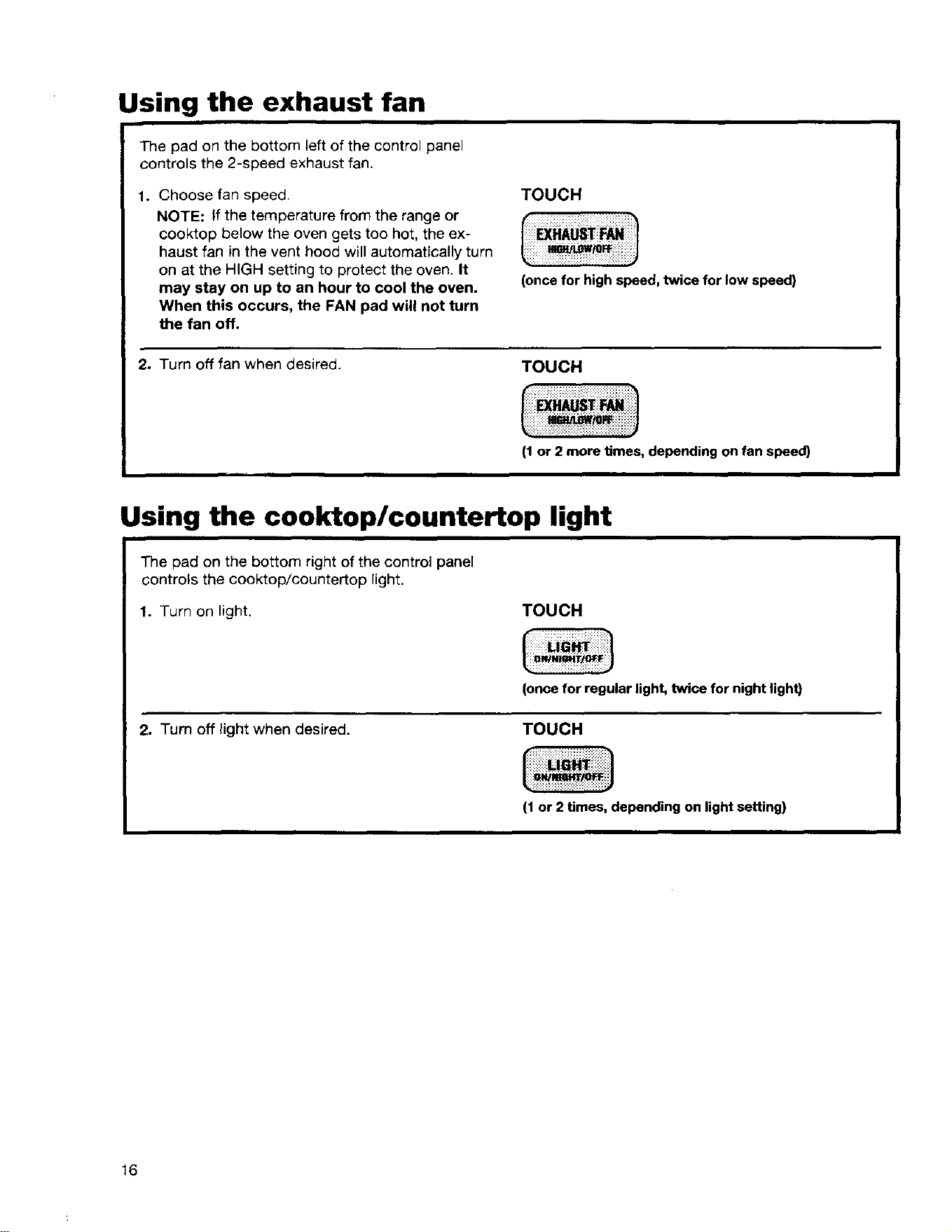
Using the exhaust fan
The pad on the bottom left of the control panel
controls the 2-speed exhaust fan.
1. Choose fan speed,
NOTE: If the temperature from the range or
cooktop below the oven gets too hot, the ex-
haust fan in the vent hood will automatically turn
on at the HIGH setting to protect the oven. It
may stay on up to an hour to cool the oven.
When this occurs, the FAN pad will not turn
the fan off.
TOUCH
(oncefor high speed, twice for low speed)
2. Turn off fan when desired.
TOUCH
I1 or 2 more times, depending on fan speed)
Using the cooktop/countertop light
The pad on the bottom right of the control panel
controls the cooktop/countertop light.
1. Turn on light.
TOUCH
(once for regular light, twice for night light)
2. Turn off light when desired.
TOUCH
(1or 2 times, depending on light setting)
16
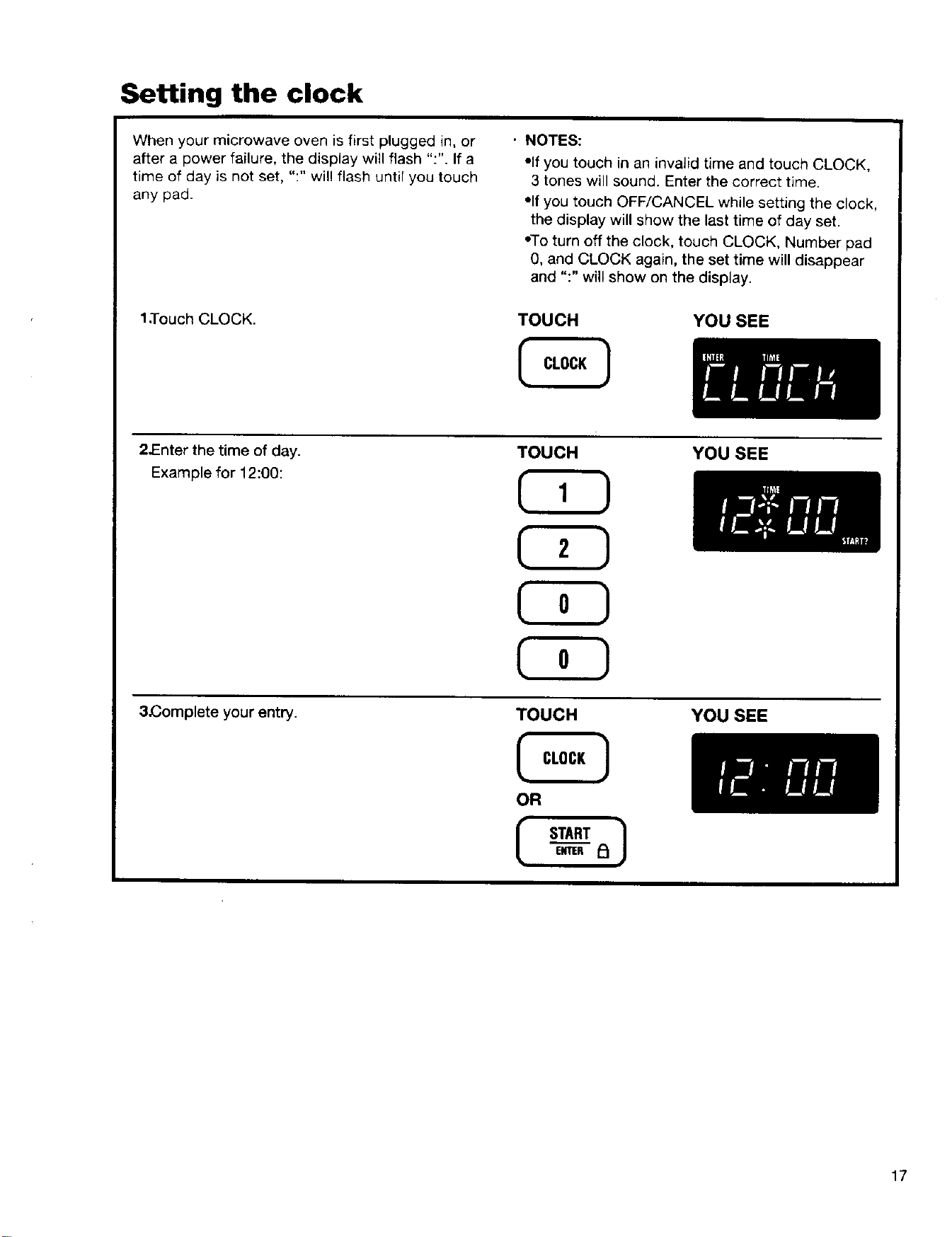
Setting the clock
When your microwave oven is first plugged in, or
after a power failure, the display will flash ":". If a
time of day is net set, ":" will flash until you touch
any pad.
1,Touch CLOCK.
• NOTES:
• If you touch in an invalid time and touch CLOCK,
3 tones will sound. Enter the correct time.
"If you touch OFF/CANCEL while setting the clock,
the display will show the last time of day set.
•To turn off the clock, touch CLOCK, Number pad
0, and CLOCK again, the set time will disappear
and ":" will show on the display.
TOUCH
YOU SEE
2JEnter the time of day.
Example for 12:00:
3.Complete your entry.
TOUCH
TOUCH
OR
START
ENTER IOI
YOU SEE
YOU SEE
17
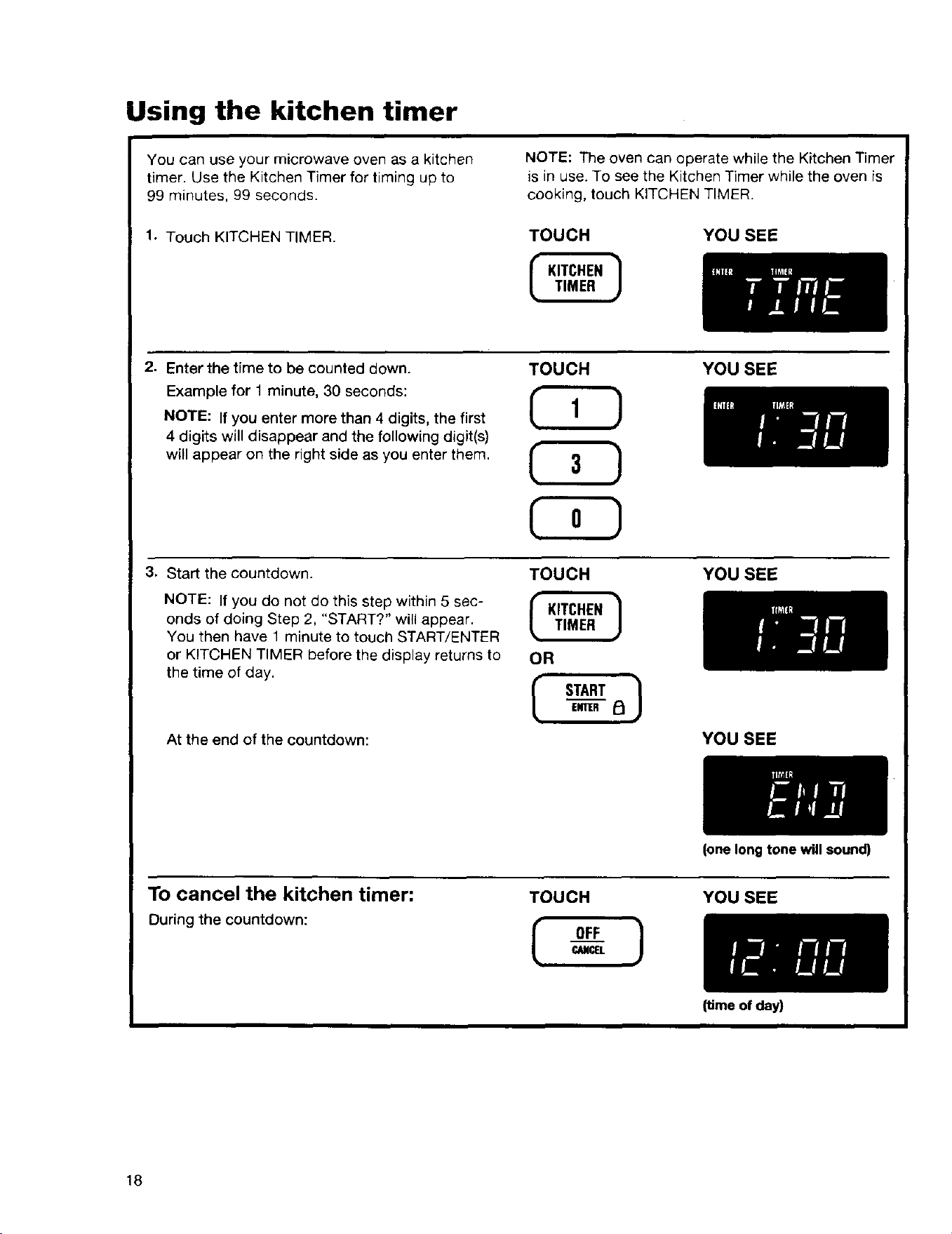
Using the kitchen timer
You can use your microwave oven as a kitchen
timer. Use the Kitchen Timer for timing up to
99 minutes, 99 seconds.
1. Touch KITCHEN TIMER.
NOTE: The oven can operate while the Kitchen Timer
is in use. To see the Kitchen Timer while the oven is
cooking, touch KITCHEN TIMER.
TOUCH YOU SEE
2. Enter the time to be counted down.
Example for 1 minute, 30 seconds:
NOTE: If you enter more than 4 digits, the first
4 digits will disappear and the following digit(s)
will appear on the right side as you enter them.
TOUCH YOU SEE
3. Start the countdown.
NOTE: If you do not do this step within 5 sec-
onds of doing Step 2, "START?" will appear.
You then have 1 minute to touch START/ENTER
or KITCHEN TIMER before the display returns to
the time of day.
At the end of the countdown:
TOUCH
OR
I STARTENTER i_ ]
YOU SEE
YOU SEE
To cancel the kitchen timer:
During the countdown:
TOUCH
OF___FCI_ICEL ]
(one long tone will sound)
YOU SEE
18
(time of day)
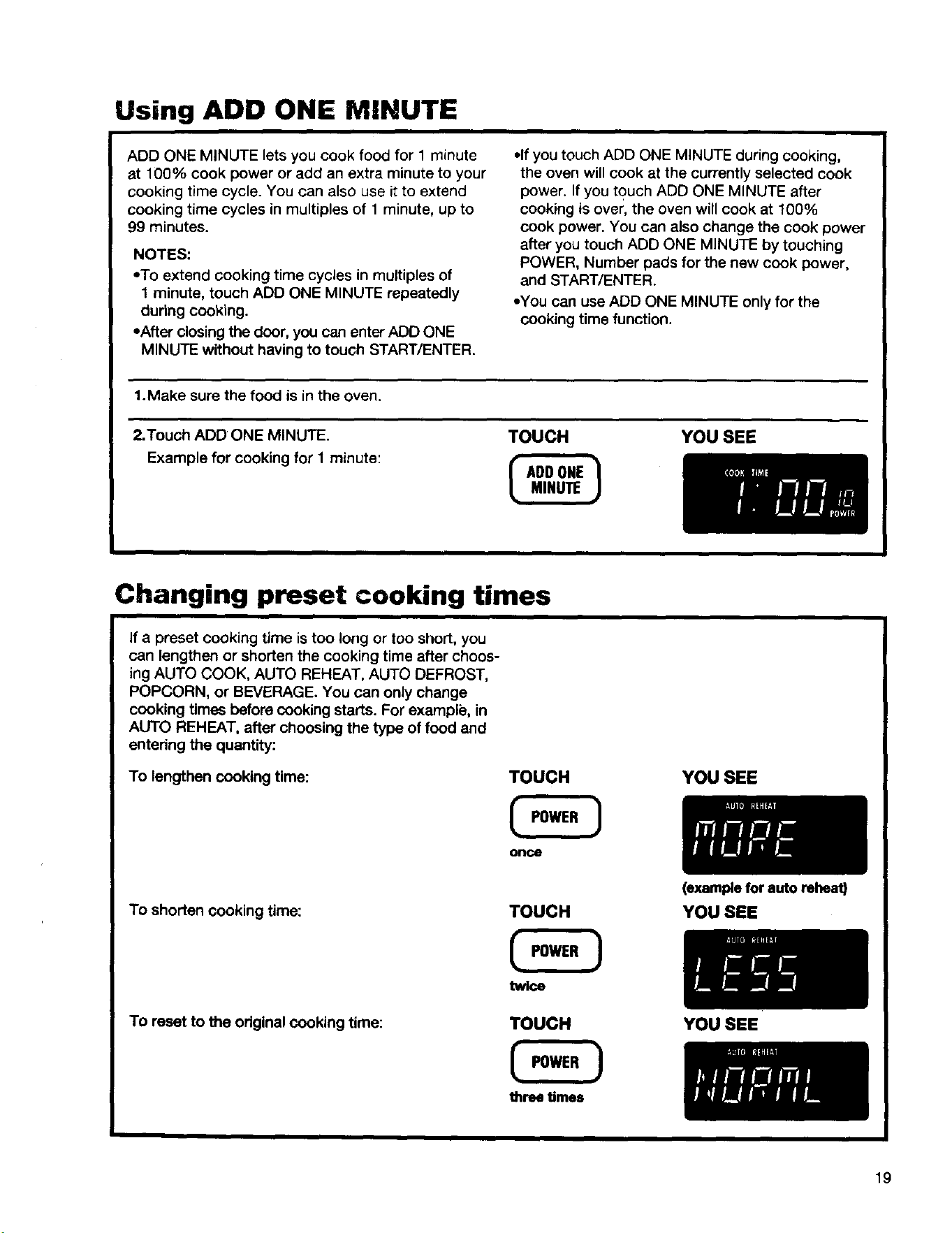
Using ADD ONE MINUTE
ADD ONE MINUTE lets you cook food for 1 minute
at 100% cook power or add an extra minute to your
cooking time cycle. You can also use it to extend
cooking time cycles in multiples of 1 minute, up to
99 minutes.
NOTES:
"To extend cooking time cycles in multiples of
1 minute, touch ADD ONE MINUTE repeatedly
during cooking.
•After closing the door, you can enter ADD ONE
MINUTE without having to touch START/ENTER.
•If you touch ADD ONE MINUTE during cooking,
the oven will cook at the currently selected cook
power. If you touch ADD ONE MINUTE after
cooking is over, the oven will cook at 100%
cook power. You can also change the cook power
after you touch ADD ONE MINUTE by touching
POWER, Number pads for the new cook power,
and START/ENTER.
•You can use ADD ONE MINUTE only for the
cooking time function.
1.Make sure the food is in the oven.
2.Touch ADD ONE MINUTE. TOUCH YOU SEE
Example for cooking for I minute:
Changing preset cooking times
If a preset cooking time is too long or too short, you
can lengthen or shorten the cooking time after choos-
ing AUTO COOK, AUTO REHEAT, AUTO DEFROST,
POPCORN, or BEVERAGE. You can only change
cooking times before cooking starts. For example, in
AUTO REHEAT, after choosing the type of food and
entering the quantity:
To lengthen cooking time:
TOUCH
once
YOU SEE
To shorten cooking time:
To reset to the original cooking time:
TOUCH
tw[_
TOUCH
three times
(example for auto reheat)
YOU SEE
YOU SEE
19
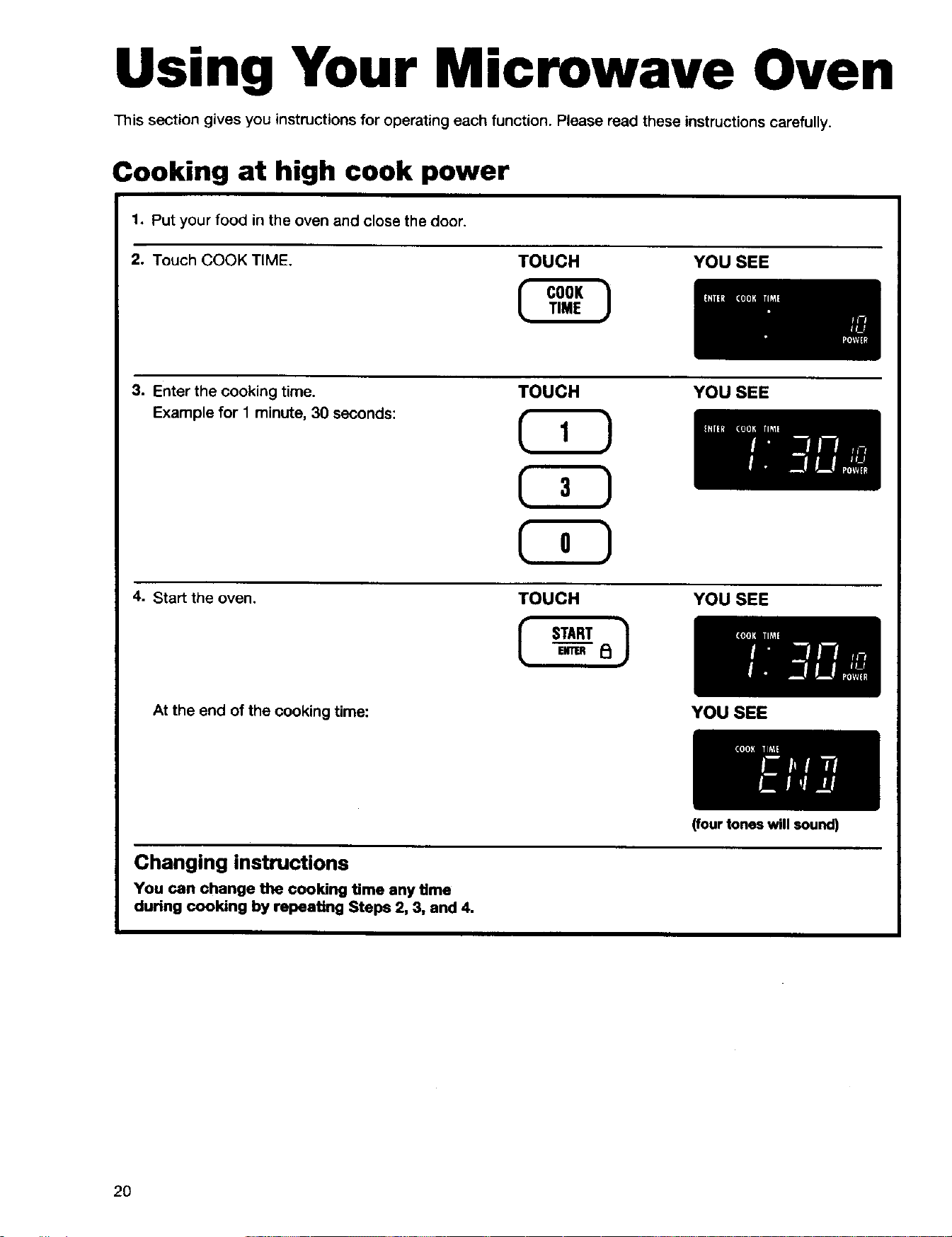
Using Your Microwave Oven
This section gives you instructionsfor operating each function. Please read these instructions carefully.
Cooking at high cook power
1. Put your food in the oven and close the door.
2. Touch COOK TIME.
TOUCH YOU SEE
3. Enter the cooking time.
Example for 1 minute, 30 seconds:
TOUCH YOU SEE
4. Start the oven.
TOUCH YOU SEE
At the end of the cooking time: YOU SEE
Changing instructions
You can change the cooking time any time
during cooking by repeating Steps 2, 3, and 4.
2O
(four tones will sound)
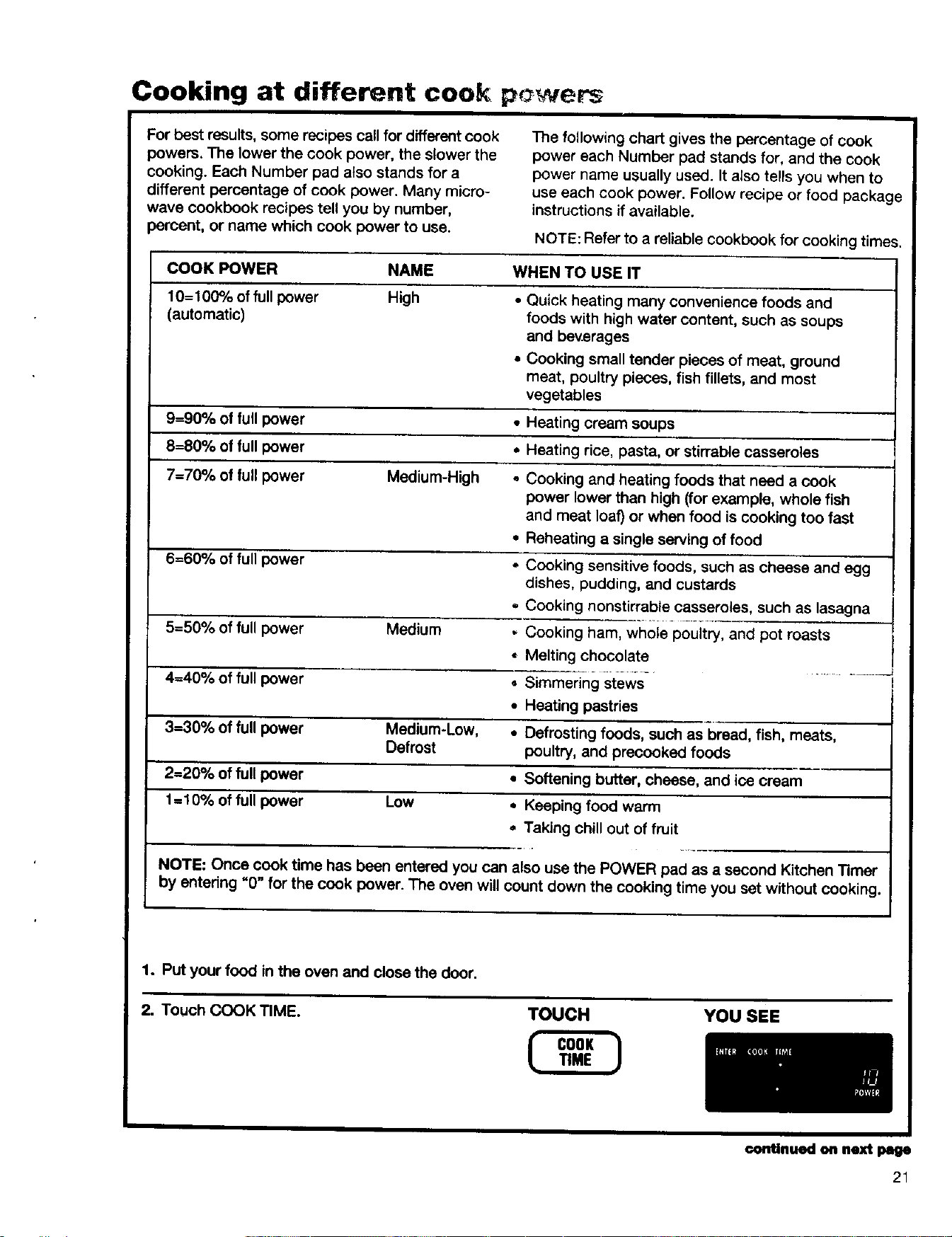
Cooking at different cooS: p( wets
For best results, some recipes call for different cook
powers. The lower the cook power, the slower the
cooking. Each Number pad also stands for a
different percentage of cook power. Many micro-
wave cookbook recipes tell you by number,
percent, or name which cook power to use,
The following chart gives the percentage of cook
power each Number pad stands for, and the cook
power name usually used. It also tells you when to
use each cook power. Follow recipe or food package
instructions if available.
NOTE: Refer to a reliablecookbook for cooking times,
COOK POWER NAME WHEN TO USE IT
10= 100% of full power High * Quick heating many convenience foods and
(automatic) foods with high water content, such as soups
and beverages
• Cooking small tender pieces of meat, ground
meat, poultry pieces, fish fillets, and most
vegetables
9=90% of full power • Heating cream soups
8=80% of full power * Heating rice, pasta, or stirrable casseroles
7=70% of full power Medium-H_gh - Cooking and heating foods that need a cook
power lower than high (for example, whole fish
and meat loaf) or when food is cooking too fast
• Reheating a single serving of food
6=60% of full power * Cooking sensitive foods, such as cheese and egg
dishes, pudding, and custards
.. Cooking nonstirrable casseroles, such as lasagna
5=50% of full power Medium - Cooking ham, whole poultry, and pot roasts
= Melting chocolate
4=40% of full power • Simmering stews
• Heating pastries
3=30% of full power Medium-low, • Defrosting foods, such as bread, fish, meats,
Defrost poultry, and precooked foods
2=20% of full power * Softening butter, cheese, and ice cream
1=10% of full power Low • Keeping food warm
= Taking chill out of fruit
NOTE: Once cook time has been entered you can also use the POWER pad as a second Kitchen Timer
by entering "0" for the cook power. The oven will count down the cooking time you set without cooking.
1o Put your food inthe oven and close the door.
2. Touch COOK TIME. TOUCH YOU SEE
continued on next page
21
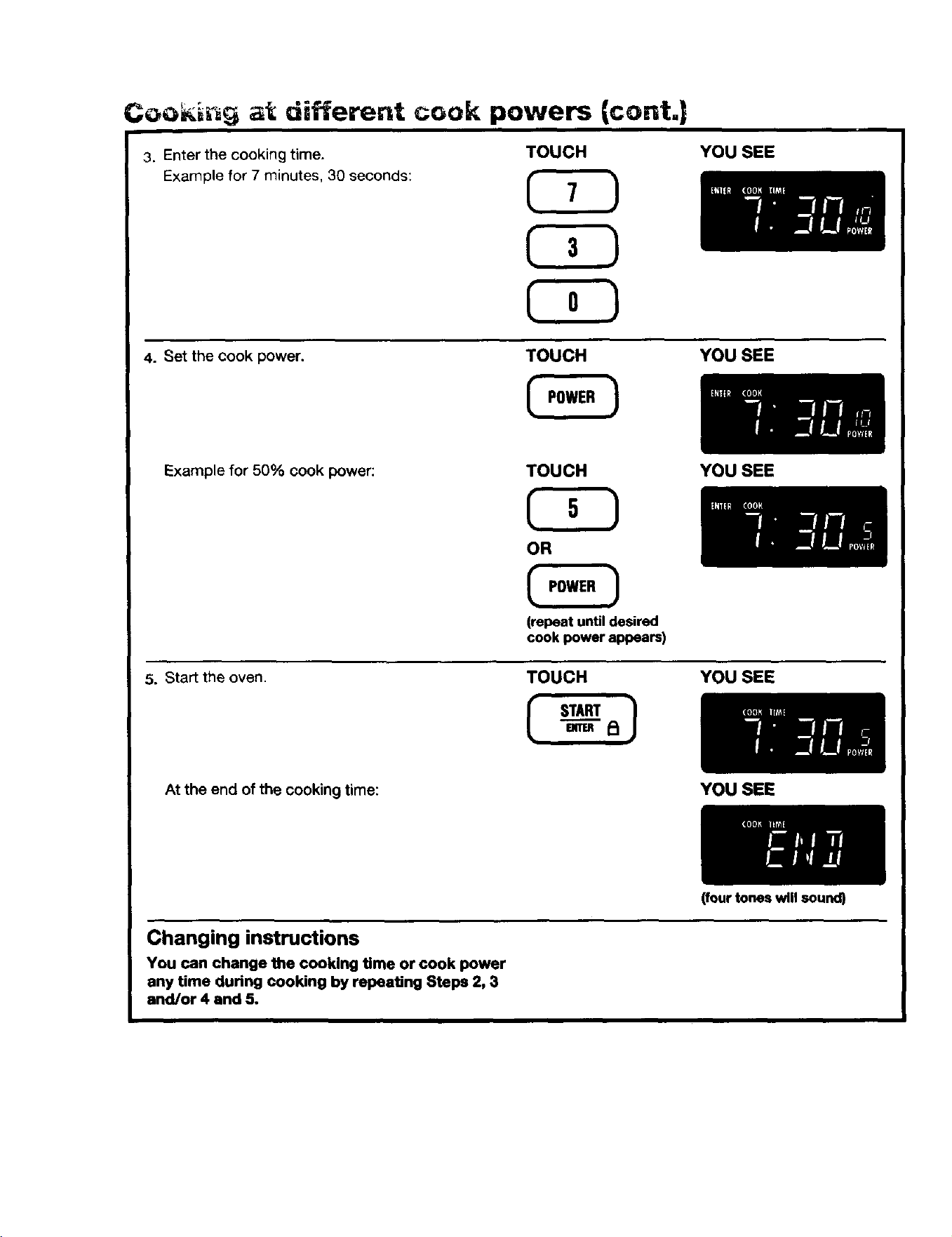
Coo_'_n_ at different cook powers {cont.|
3. Enter the cooking time.
Example for 7 minutes, 30 seconds:
TOUCH YOU SEE
4. Set the cook power.
TOUCH YOU SEE
Example for 50% cook power:
5. Start the oven.
TOUCH
OR
(repeat untildesired
cook power appears)
TOUCH
YOU SEE
YOU SEE
At the end of the cooking time:
Changing instructions
You can change the cooking time or cook power
any time during cooking by repeating Steps 2, 3
and/or 4 and 5.
YOU SEE
(four tones will sound)
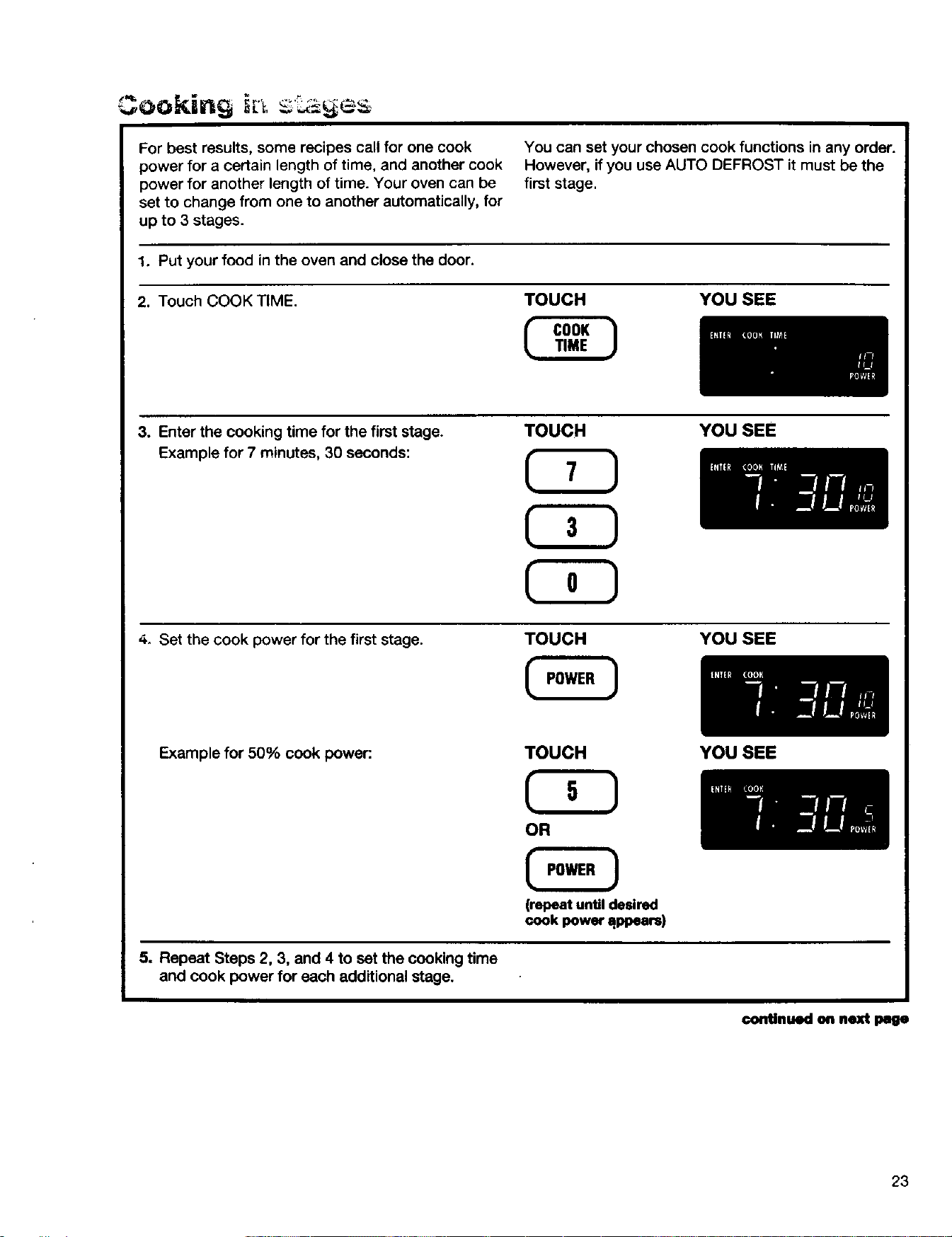
For best results, some recipes call for one cook
power for a certain length of time, and another cook
power for another length of time. Your oven can be
set to change from one to another automatically, for
up to 3 stages.
You can set your chosen cook functions in any order.
However, if you use AUTO DEFROST it must be the
first stage.
1. Put your food in the oven and close the door.
2. Touch COOK TIME. TOUCH YOU SEE
3. Enter the cooking time for the first stage.
Example for 7 minutes, 30 seconds:
TOUCH YOU SEE
4. Set the cook power for the first stage.
TOUCH YOU SEE
Example for 50% cook power:
TOUCH YOU SEE
(repeat until desired
cook power appears)
5. Repeat Steps 2, 3, and 4 to set the cooking time
and cook power for each additional stage.
continued on next page
23
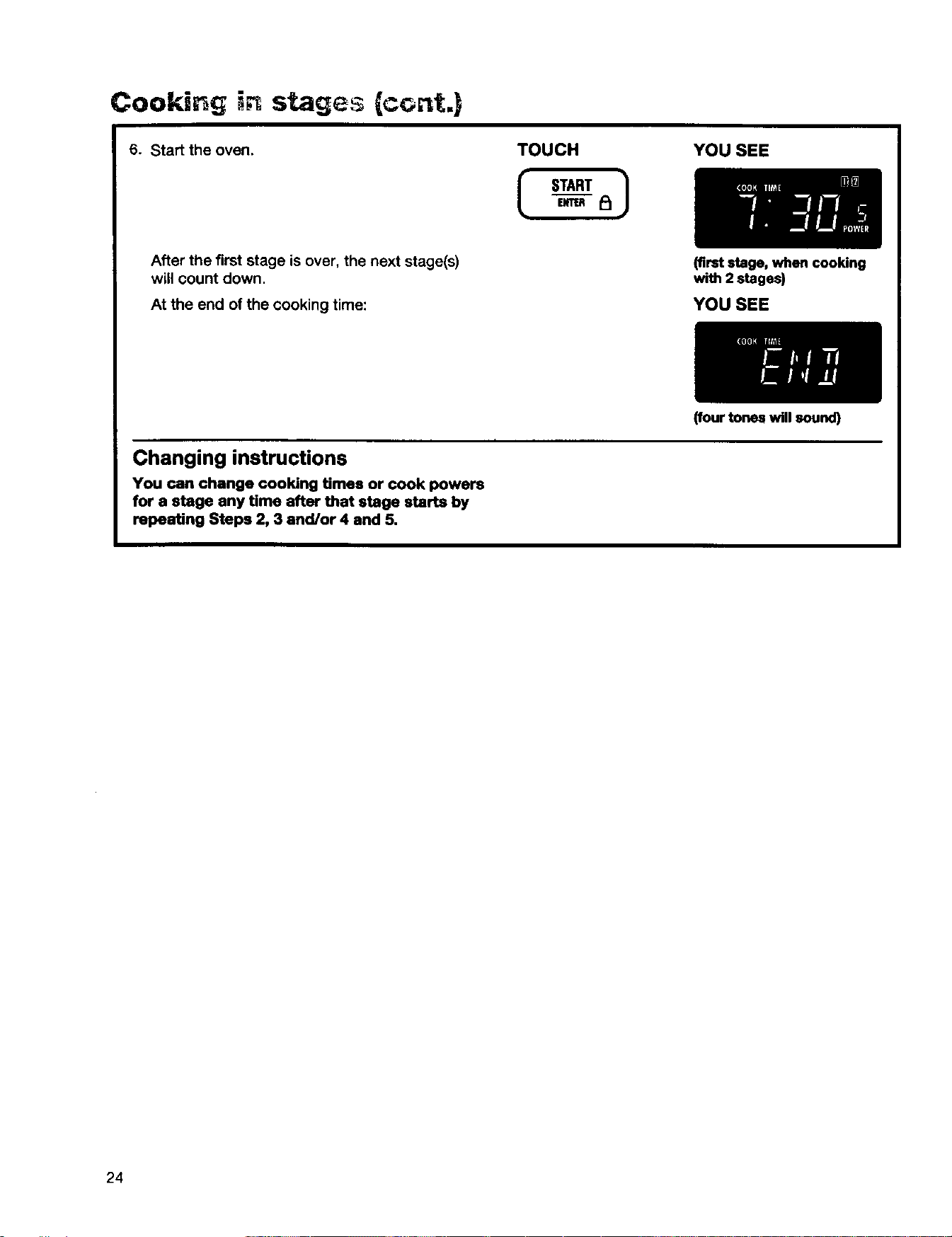
Cooking stages {cont.)
6. Start the oven. TOUCH
I START
YOU SEE
After the first stage is over, the next stage(s)
will count down.
At the end of the cooking time:
(firststage, when cooking
with 2 stages)
YOU SEE
Changing instructions
You ran change cooking times or cook powers
for a stage any time after that stage starts by
repeating Steps 2, 3 and/or 4 and 5.
24
(four tones will sound)
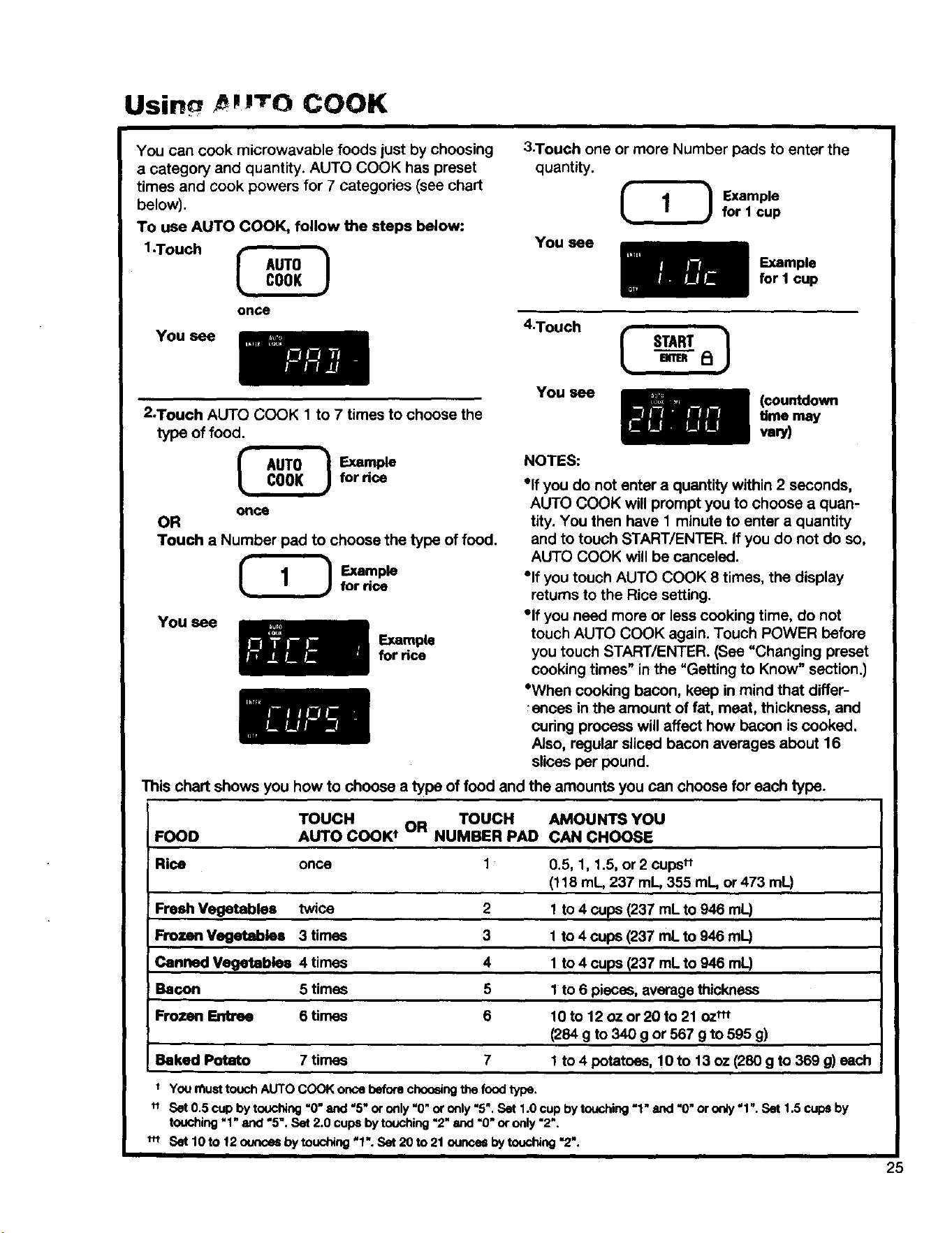
Usin pm'ro COOK
You can cook microwavable foods just by choosing
a category and quantity. AUTO COOK has preset
times and cook powers for 7 categories (see chart
below).
To use AUTO COOK, follow the steps below:
1.Touch _
onGe
You see
3.Touch one or more Number pads to enter the
quantity.
_ Example
for 1 cup
You see
Example
for I cup
4"T°uch I START
2-Touch AUTO COOK 1 to 7 times to choose the
type of food.
_ E_ml_
once
OR
Touch a Number pad to choose the type of food.
Example
for rice
You see
Example
for rice
You see
(countdown
time may
vary)
NOTES:
"Ifyou do not enter a quantity within 2 seconds,
AUTO COOK will prompt you to choose a quan-
tity. You then have 1 minute to enter a quantity
and to touch START/ENTER. If you do not do so,
AUTO COOK will be canceled.
"If you touch AUTO COOK 8 times, the display
returns to the Rice setting.
°if you need more or less cooking time, do not
touch AUTO COOK again. Touch POWER before
you touch START/ENTER. (See "Changing preset
cooking times" in the "Getting to Know" section.)
"When cooking bacon, keep in mind that differ-
_ances inthe amount of fat, meat, thickness, and
cudng process will affect how bacon iscooked.
Also, regular sliced bacon averages about 16
slices per pound.
This chart shows you how to choose a type of food and the amounts you can choose for each type.
FOOD
TOUCH .._ TOUCH AMOUNTS YOU
AUTO COOK t uM NUMBER PAD CAN CHOOSE
Rice once
Fresh Vegetables twice
Frozen Vegetables 3 times
Canned Vegetables 4 times
Bar,on 5 times
Frozen Entree 6 times
1
2
3
4
5
6
Baked Potato 7 times 7
0.5, 1, 1.5, or 2 cups"
(118 mL, 237 mL, 355 mL, or 473 mL)
1 to 4 cups (237 mL to 946 mL)
1 to 4 cups (237 mL to 946 mL)
1 to 4 cups (237 mL to 946 mL)
1 to 6 pieces, averagethickness
10 to 12 oz or 20 to 21 oz"t
(284 g to 340 g or 567 g to 595 g)
1 to 4 potatoes, 10to 13 oz (280 g to 369 g)esch
+ You _ust touch AUTO COOK once before choosing the food type.
tt Set 0.5 cup by to_ching =0" and "5" or only "0" or only "5". Set 1.0 cup by touching "1" and "0" or only "1". Set 1.5 cups by
touching "1" and "5". Set 2.0 cups by touching =2" and =0" or only "2".
_*_ Set 10 to 12 _ by touching "1". Set 20 to 21 ounces by touching "2".
25
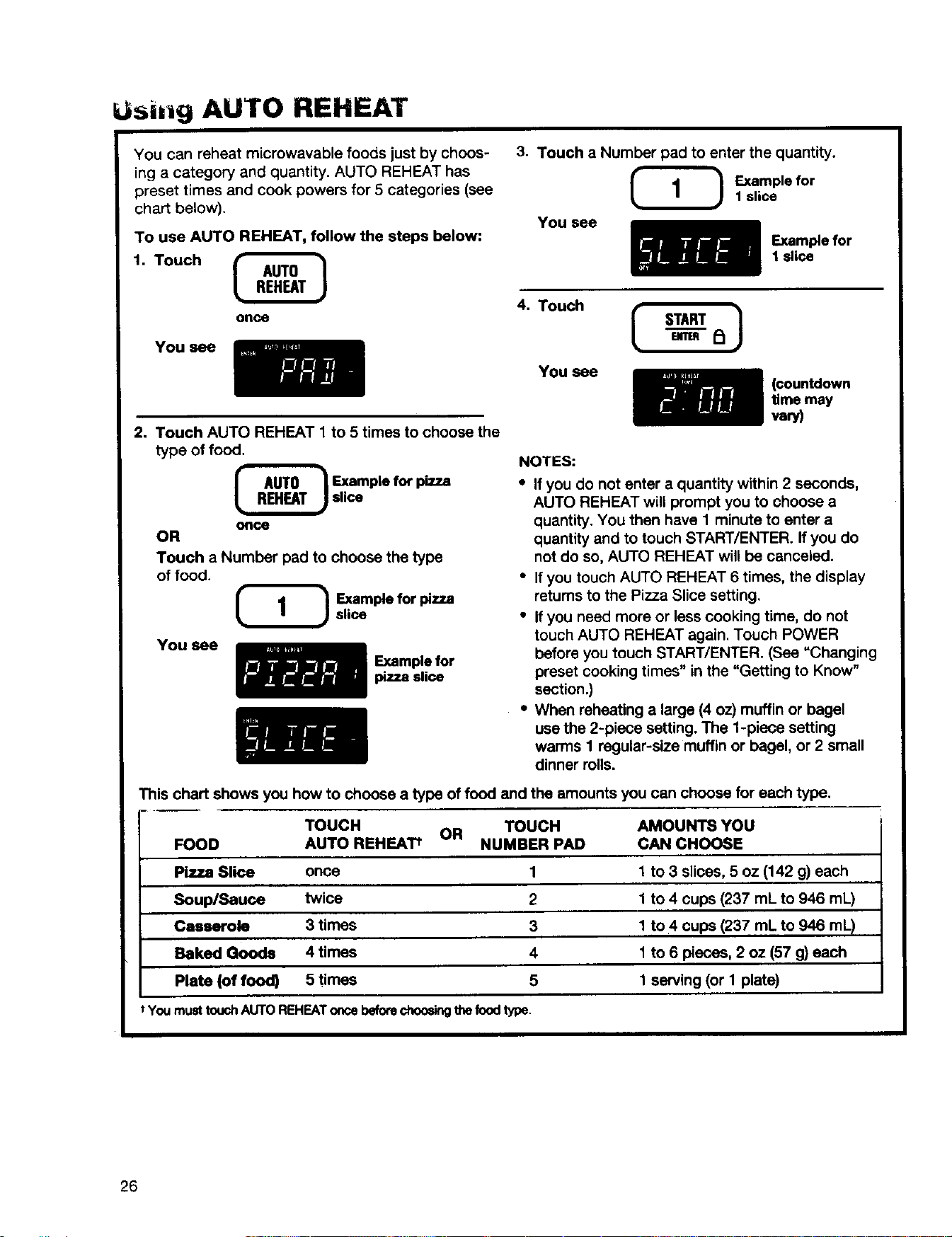
Usii g AUTO REHEAT
You can reheat microwavable foods just by choos-
ing a category and quantity. AUTO REHEAT has
preset times and cook powers for 5 categories (see
chart below).
To use AUTO REHEAT, follow the steps below:
1. Touch
once
You see
2. Touch AUTO REHEAT 1 to 5 times to choose the
type of food,
_ Ex.,amplefor pizza
slice
once
OR
Touch a Number pad to choose the type
of food.
Example for pizza
slice
You see
Example for
pizza slice
3. Touch a Number pad to enter the quantity.
Example for
1 slice
You see
Example for
1 slice
4. Touch
You see
START }
(countdown
time may
vary)
NOTES:
• If you do not enter a quantity within 2 seconds,
AUTO REHEAT will prompt you to choose a
quantity. You then have 1 minute to enter a
quantity and to touch START/ENTER. If you do
not do so, AUTO REHEAT will be canceled.
• If you touch AUTO REHEAT 6 times, the display
returns to the Pizza Slice setting.
• If you need more or less cooking time, do not
touch AUTO REHEAT again. Touch POWER
before you touch START/ENTER. (See "Changing
preset cooking times" in the "Getting to Know"
section.)
• When reheating a large (4 oz) muffin or bagel
use the 2-piece setting. The 1-piece setting
warms I regular-size muffin or bagel, or 2 small
dinner rolls.
This chart shows you how to choose a type of food and the amounts you can choose for each type.
TOUCH OR TOUCH AMOUNTS YOU
FOOD AUTO REHEAT t NUMBER PAD CAN CHOOSE
Pizza Slice once 1 1 to 3 slices, 5 oz (142 g) each
Soup/Sauce twice 2 1 to 4 cups (237 mL to 946 mL)
Casserole 3 times 3 1 to 4 cups (237 mL to 946 mL)
Baked Goods 4 times 4 1 to 6 pieces, 2 oz (57 g) each
Plate (of food) 5 times 5 1 serving (or I plate)
t You must touch AUTO REHEAT once befo_ choo_dngthe food type.
26
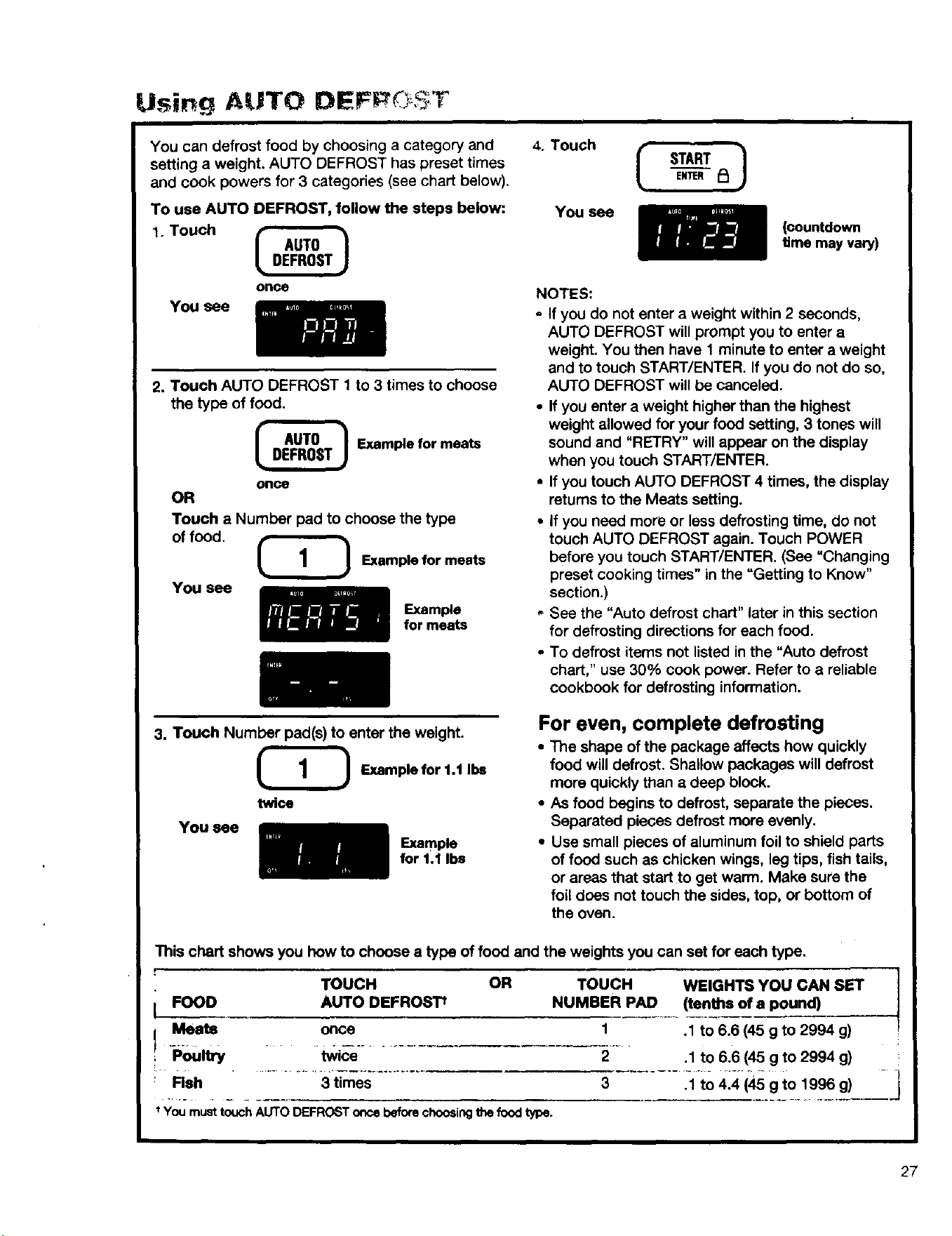
Using AUTO DEFP¢ $:T
You can defrost food by choosing a category and
setting a weight. AUTO DEFROST has preset times
and cook powers for 3 categories (see chart below).
To use AUTO DEFROST, follow the steps below:
1. Touch
OnCe
You see
2. Touch AUTO DEFROST 1 to 3 times to choose
the type of food.
_ Example for meats
once
OR
Touch a Number pad to choose the type
of food.
(1 ! Examplefor meats
YOU see
Example
for meats
4. Touch
You see
I START
ENTER
(countdown
time may vary)
NOTES:
- If you do not enter a weight within 2 seconds,
AUTO DEFROST will prompt you to enter a
weight. You then have 1 minute to enter a weight
and to touch START/ENTER. If you do not do so,
AUTO DEFROST will be canceled.
• If you enter a weight higher than the highest
weight allowed for your food setting, 3 tones will
sound and "RETRY" will appear on the display
when you touch START/ENTER.
• If you touch AUTO DEFROST 4 times, the display
returns to the Meats setting.
• If you need more or less defrosting time, do not
touch AUTO DEFROST again. Touch POWER
before you touch START/ENTER. (See "Changing
preset cooking times" in the "Getting to Know"
section.)
," See the "Auto defrost chart" later in this section
for defrosting directions for each food.
• To defrost items not listed in the "Auto defrost
chart," use 30% cook power. Refer to a reliable
cookbook for defrosting information.
3. Touch Number pad(s) to enter the weight.
(_ Examplefor 1.1 Ibs
twice
You_e
Exam_e
_rl.llba
For even, complete defrosting
• The shape of the package affects how quickly
food will defrost. Shallow packages will defrost
more quickly than a deep block.
• As food begins to defrost, separate the pieces.
Separated pieces defrost more evenly.
• Use small pieces of aluminum foil to shield parts
of food such as chicken wings, leg tips, fish tails,
or areas that start to get warm. Make sure the
foil does not touch the sides, top, or bottom of
the oven.
This chart shows you how to choose a type of food and the weights you can set for each type.
f
TOUCH OR TOUCH WEIGHTS YOU CAN SET
[ FOOD AUTO DEFROSTt NUMBER PAD (tenths of a pound)
I Meats 1 .1 to 6.6 (45 g to 2994 g)
Poultry 2 .1 to 6.6 (45 g to 2994 g)
3 .1 to 4.4 (45 g to 1996 g)
once
tWi&--
Rsh ....... 3 times
You must touch AUTO DEFROST once before choosing the food type.
27

Auto defrost chart
Meat setting
FOOD
Beef
Ground Beef, Bulk
Ground Beef, Patties
Round Steak, Tenderloin Steak,
Pot Roast, Chuck Roast, Rib
Roast, Rolled Rump Roast
Stew Beef
SPECIAL INSTRUCTIONS
Meat of irregular shape and large, fatty cuts of meat should have the
narrow or fatty areas shielded with foil at the beginning of a defrost cycle.
Do not defrost less than 1/4Ib (133 g).
Do not defrost less than two 4 oz (133 g) patties.
Place on a microwavable roasting rack.
Place ina microwavable baking dish.
Place in a microwavable baking dish.
Place on a microwavable roasting rack.
Place on a microwavable roasting rack.
Lamb
Cubes for Stew
Chops (1 inch [2.5 cm] thick)
Pork
Chops (1,_inch [13 mm] thick),
Hot Dogs, Spareribs,Country-
Style Ribs, Loin Roast (Boneless),
Sausage, Links
Sausage, Bulk
Place in a microwavable baking dish.
Fish setting
FOOD
Fish
Fillets
_e_s
Whole
Shell Fish
Crabmeat,
LobsterTails,
Shrimp, Scallops
SPECIAL INSTRUCTIONS
Place in a microwavable baking dish. Carefully separate fillets under
cold water.
Place in a microwavable baking dish: Run cold water over to finish
defrosting.
Place in a microwavable baking dish. Cover head and tail with foil;
do not let foil touch sides of microwave oven. Finish defrosting by
immersing in cold water.
Place in a microwavable baking dish.
28
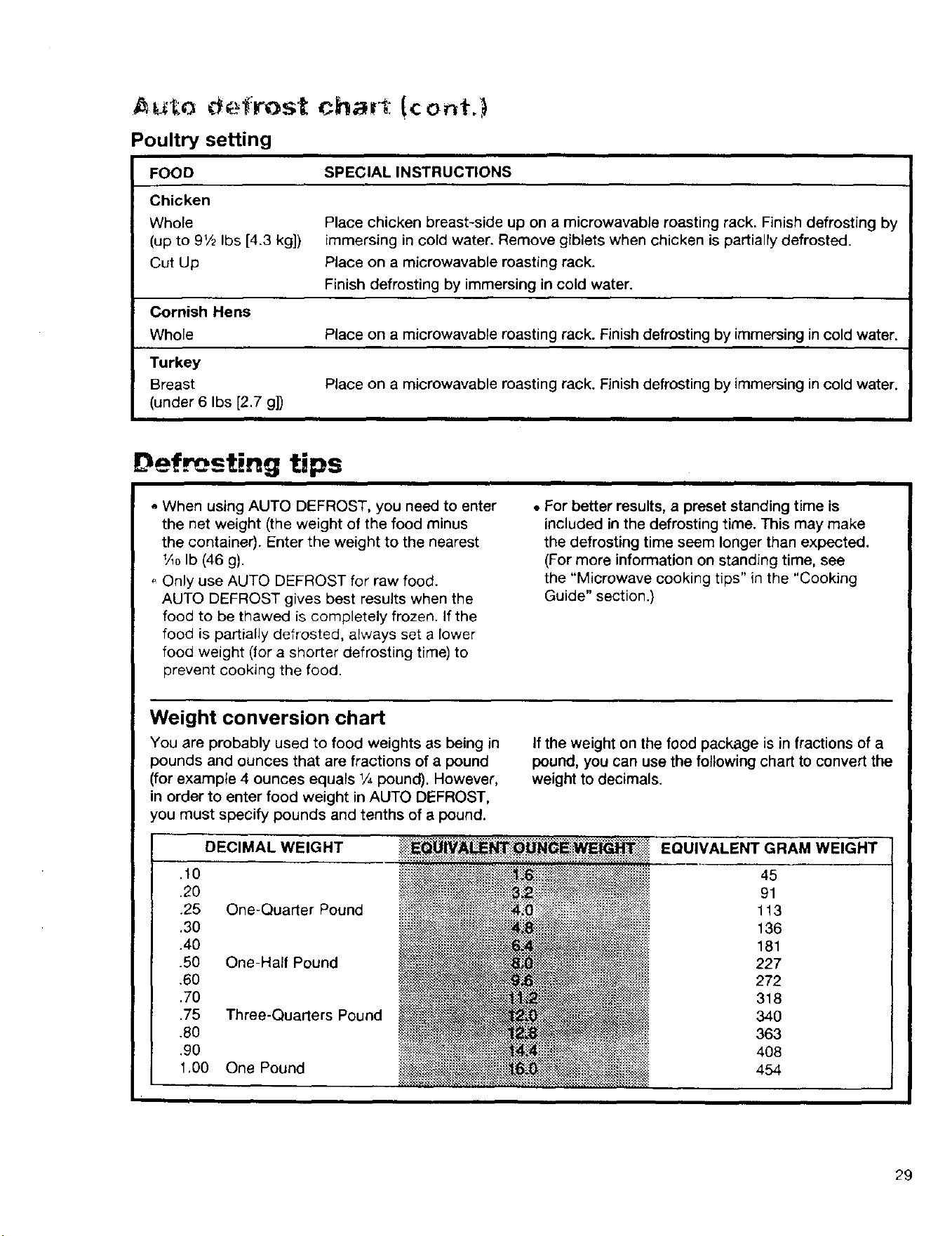
Poultry setting
FOOD SPECIAL INSTRUCTIONS
Chicken
Whole Place chicken breast-side up on a microwavable roasting rack. Finish defrosting by
(up to 9t/2 Ibs [4.3 kg]) immersing in cold water. Remove giblets when chicken is partially defrosted.
Cut Up Place on a microwavable roasting rack.
Finish defrosting by immersing in cold water.
Cornish Hens
Whole Place on a microwavable roasting rack. Finishdefrosting by immersing incold water.
Turkey
Breast Place on a microwavable roasting rack. Finishdefrosting by immersing incold water.
(under 6 Ibs [2.7 g])
Defrosting tips
o When using AUTO DEFROST, you nesd to enter
the net weight (the weight of the food minus
the container). Enter the weight to the nearest
+AoIb (46 g).
Only use AUTO DEFROST for raw food.
AUTO DEFROST gives best results when the
food to be thawed is completely frozen. If the
food is partially defrosted, always set a lower
food weight (for a shorter defrosting time) to
prevent cooking the food.
• For better results, a preset standing time is
included in the defrosting time. This may make
the defrosting time seem longer than expected.
(For more information on standing time, see
the "Microwave cooking tips" in the "Cooking
Guide" section.)
Weight conversion chart
You are probably used to food weights as being in
pounds and ounces that are fractions of a pound
(for example 4 ounces equals 1/4pound). However,
in order to enter food weight in AUTO DEFROST,
you must specify pounds and tenths of a pound.
DECIMAL WEIGHT
.10
.20
.25 One-Qua_erPound
.30
.40
.50 One-Half Pound
+60
.70
.75 Three-Qua_ers Pound
.80
+90
1,00 One Pound
If the weight on the food package is in fractions of a
pound, you can use the following chart to convert the
weight to decimals.
EQUIVALENT GRAM WEIGHT
45
91
113
136
181
227
272
318
34O
363
408
454
29
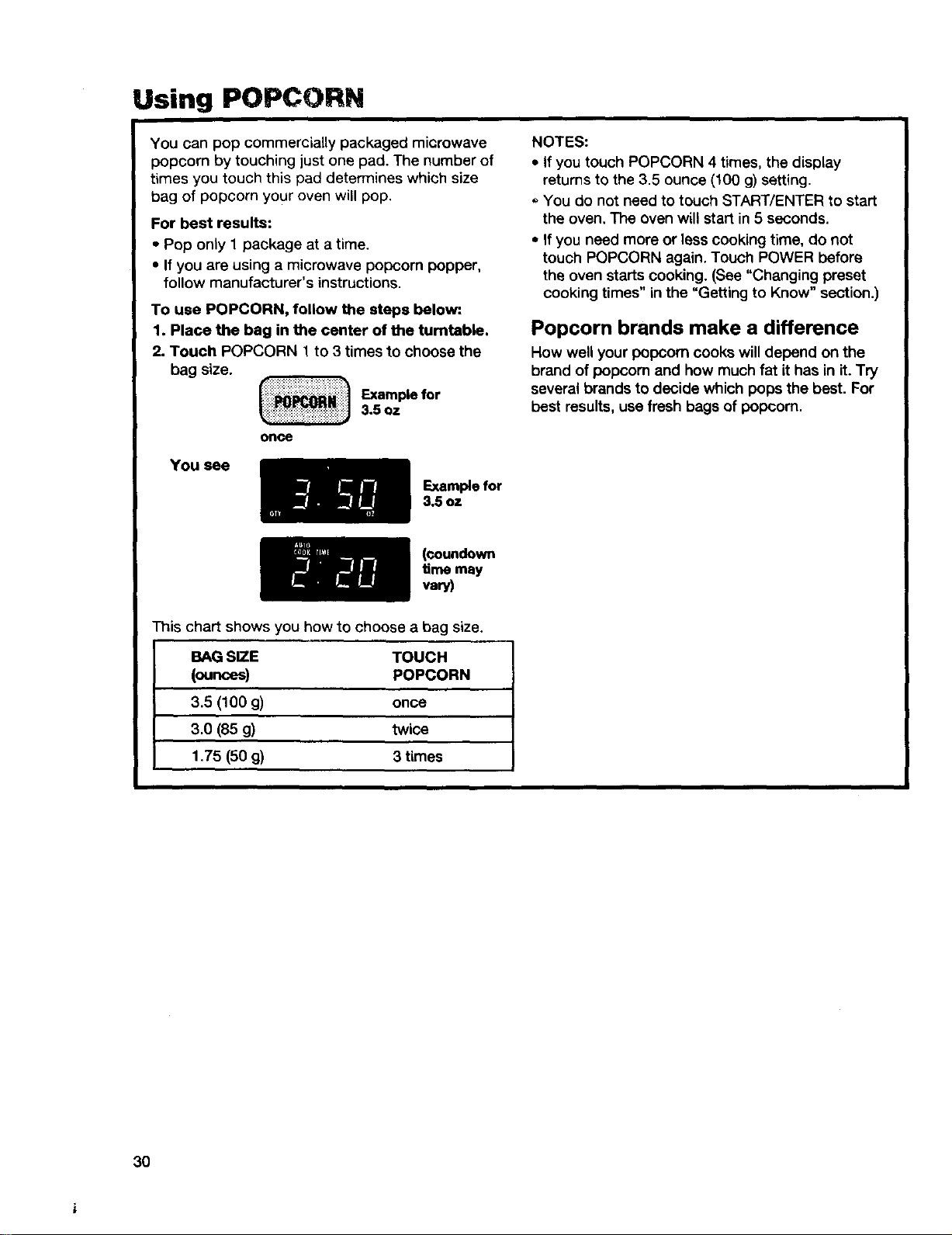
Using POPCORN
You can pop commercially packaged microwave
popcorn by touching just one pad. The number of
times you touch this pad determines which size
bag of popcorn your oven will pop.
For best results:
- Pop only 1 package at a time.
• If you are using a microwave popcorn popper,
follow manufacturer's instructions.
To use POPCORN, follow the steps below:
1. Place the bag in the center of the turntable.
2. Touch POPCORN 1 to 3 times to choose the
bag size.
Example for3.5 oz
once
You see
Example for
3.5 oz
NOTES:
• If you touch POPCORN 4 times, the display
retums to the 3.5 ounce (100 g) setting.
You do not need to touch START/ENTER to start
the oven, The oven will start in 5 seconds.
• If you need more or less cooking time, do not
touch POPCORN again. Touch POWER before
the oven starts cooking. (See "Changing preset
cooking times" in the "Getting to Know" section.)
Popcorn brands make a difference
How well your popcorn cooks will depend on the
brand of popoom and how much fat it has in it. Try
several brands to decide which pops the best. For
best results, use fresh bags of popoom.
(ooundown
time may
vary)
This chart shows you how to choose a bag size.
BAG SIZE TOUCH
(ounces) POPCORN
3.5 (100 g) once
3.0 (85 g) twice
1.75 (50 g) 3 times
3O
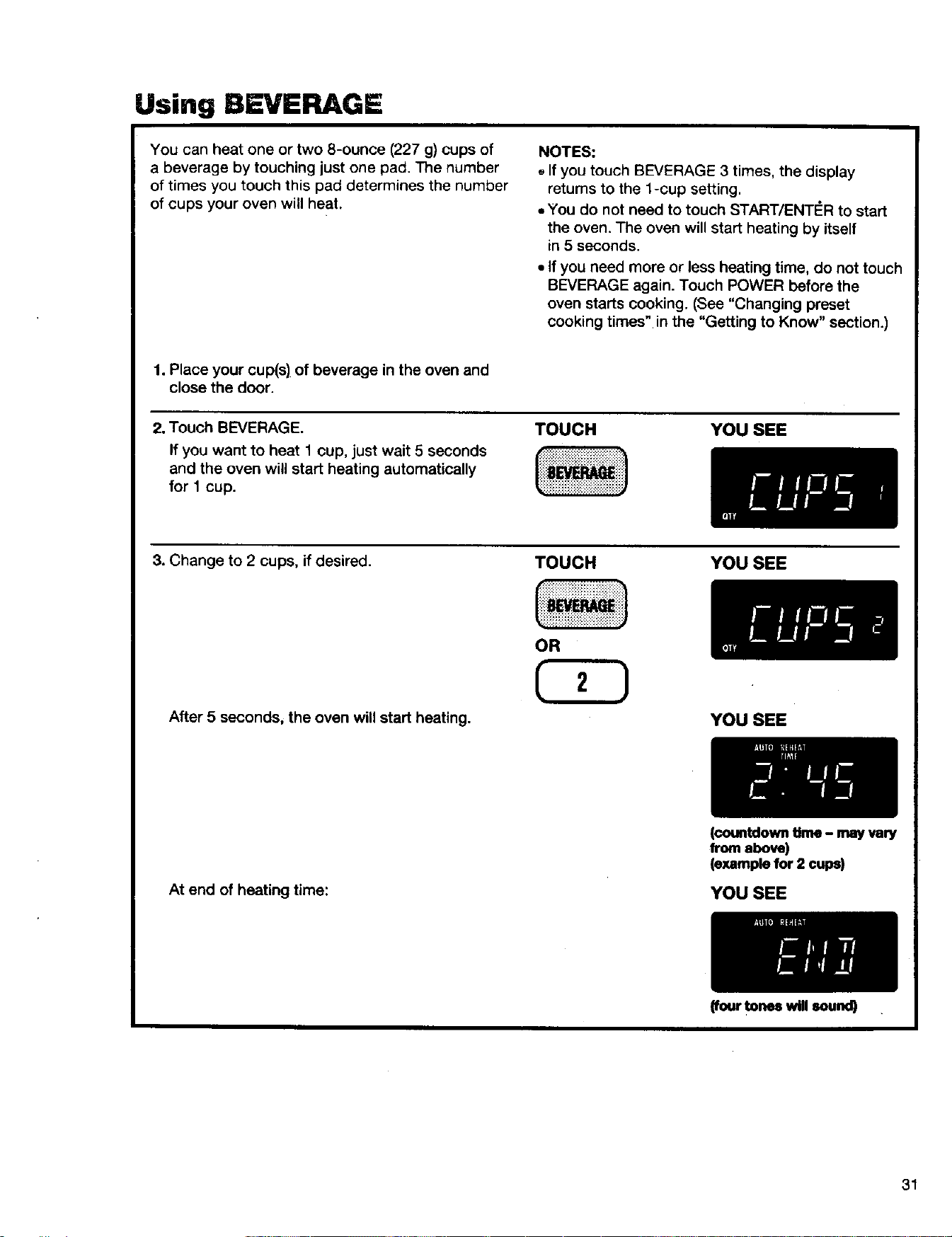
Using BEVERAGE
You can heat one or two 8-ounce (227 g) cups of
a beverage by touching just one pad. The number
of times you touch this pad determines the number
of cups your oven will heat.
NOTES:
,,If you touch BEVERAGE 3 times, the display
retums to the l-cup setting.
,,You do not need to touch START/ENT#R to start
the oven. The oven will start heating by itself
in 5 seconds.
• If you need more or less heating time, do not touch
BEVERAGE again. Touch POWER before the
oven starts cooking. (See "Changing preset
cooking times" in the "Getting to Know" section.)
1. Place your cup(s) of beverage in the oven and
close the door.
2. Touch BEVERAGE.
If you want to heat 1 cup, just wait 5 seconds
and the oven will start heating automatically
for 1 cup.
TOUCH YOU SEE
3. Change to 2 cups, if desired.
After 5 seconds, the oven will start heating.
TOUCH YOU SEE
YOU SEE
At end of heating time:
(countdowntime - mayvary
from above)
(examplefor 2 cups)
YOU SEE
(four tones will sound)
31
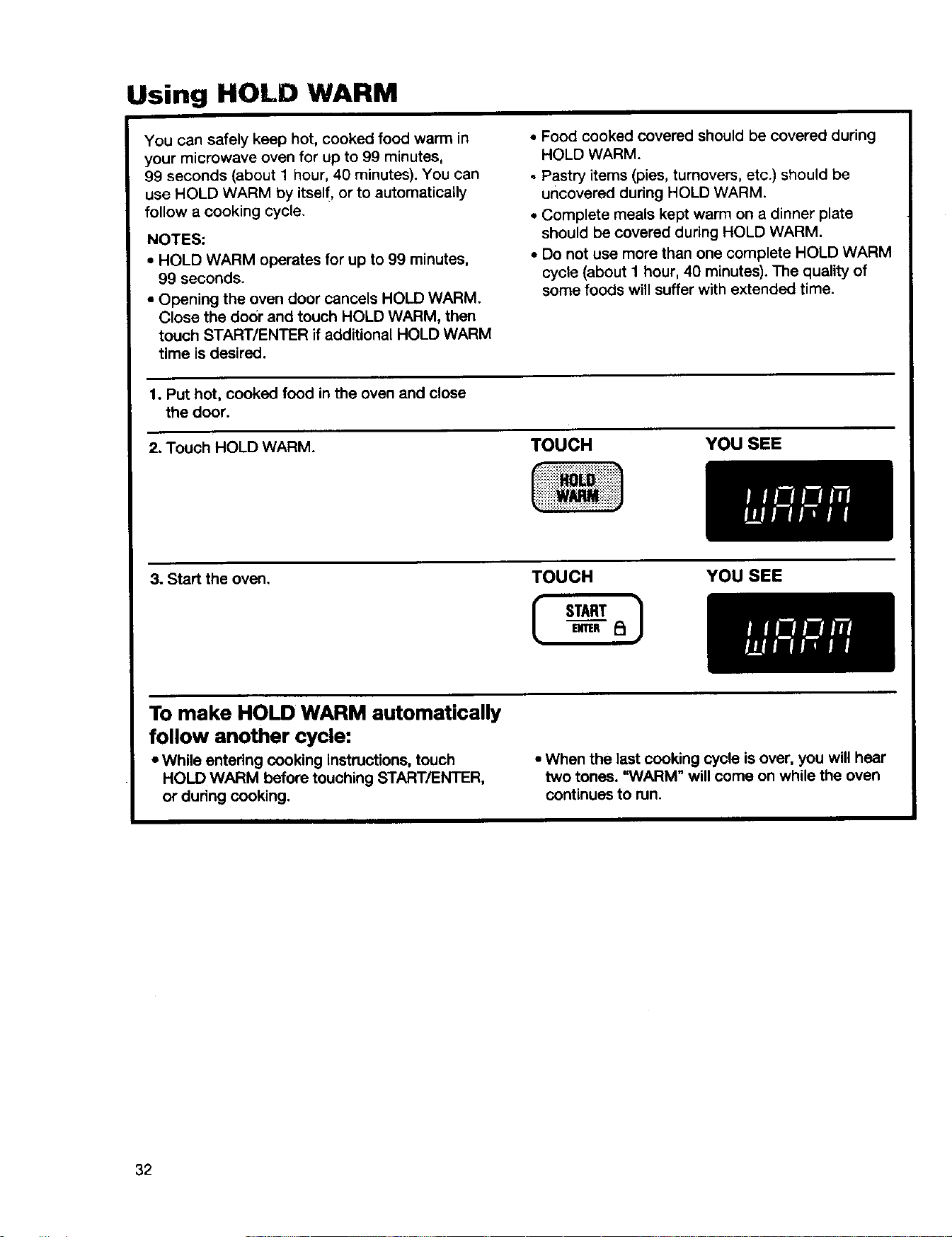
Using HOLD WARM
You can safely keep hot, cooked food warm in
your microwave oven for up to 99 minutes,
99 seconds (about 1 hour, 40 minutes). You can
use HOLD WARM by itself, or to automatically
follow a cooking cycle.
NOTES:
• HOLD WARM operates for up to 99 minutes,
99 seconds.
• Opening the oven door cancels HOLD WARM.
Close the door and touch HOLD WARM, then
touch START/ENTER if additional HOLD WARM
time is desired.
• Food cooked covered should be covered during
HOLD WARM.
Pastry items (pies, turnovers, etc.) should be
uncovered during HOLD WARM.
• Complete meals kept warm on a dinner plate
should be covered during HOLD WARM.
• Do not use more than one complete HOLD WARM
cycle (about 1 hour, 40 minutes). The quality of
some foods will suffer with extended time.
1. Put hot, cooked food in the oven and close
the door.
2. Touch HOLD WARM. TOUCH YOU SEE
3. Start the oven.
TOUCH YOU SEE
To make HOLD WARM automatically
follow another cycle:
• While entering cooking instructions, touch
HOLD WARM before touching START/ENTER,
or during cooking.
• When the last cooking cycle isover, you will hear
two tones. "WARM" will come on while the oven
continues to run.
32
Caring for Your Microwave
Oven
To make sure your microwave oven looks good and works well for a long time, you should maintain it properly.
For proper care, please follow these instructions carefully.
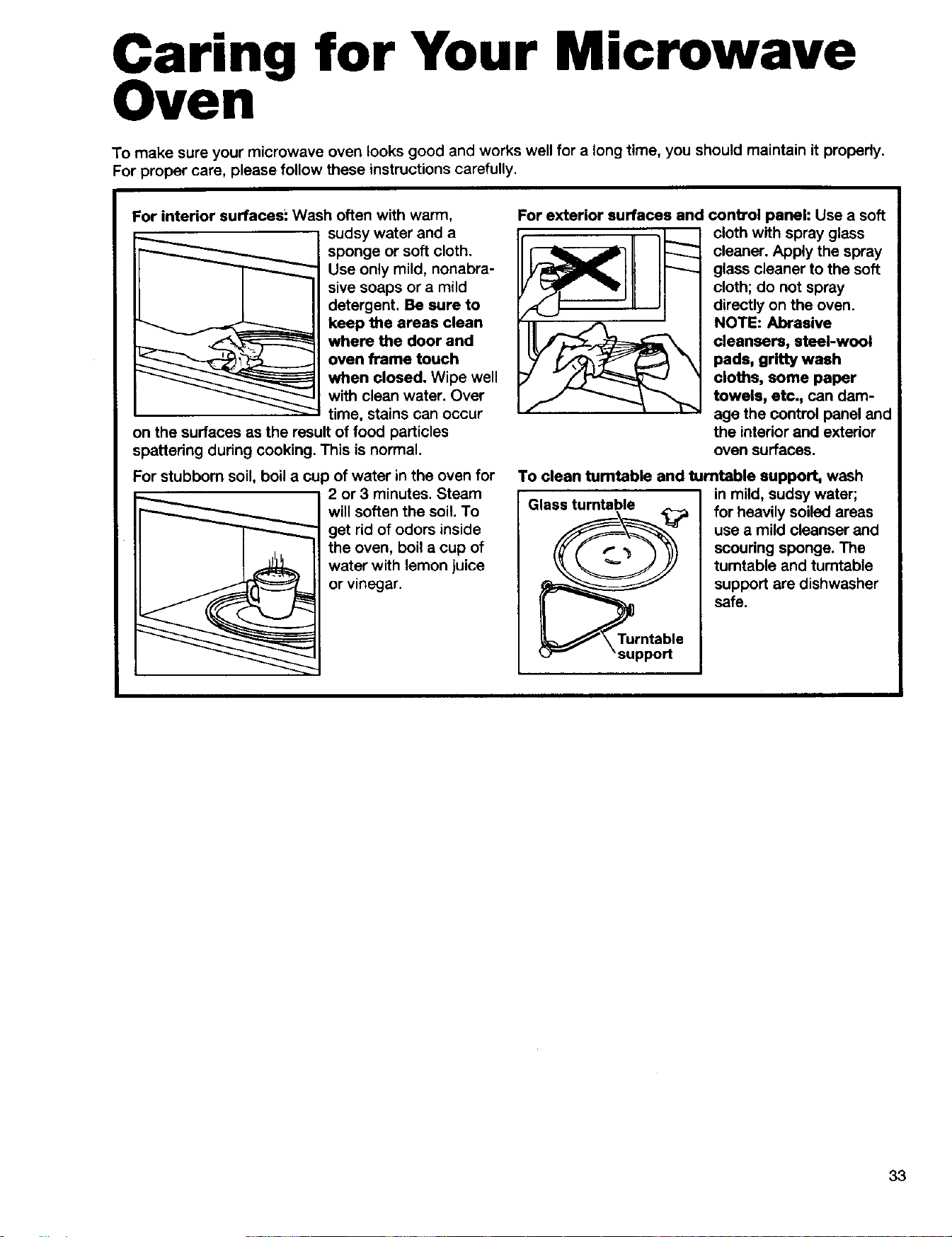
For interior surfaces! Wash often with warm,
sudsy water and a
sponge or soft cloth.
Use only mild, nonabra-
sive soaps or a mild
detergent. Be sure to
keep the areas clean
where the door and
oven frame touch
when closed. Wipe well
with clean water. Over
time, stains can occur
on the surfaces as the result of food particles
spattering during cooking. This is normal.
For stubborn soil, boil a cup of water in the oven for
2 or 3 minutes. Steam
will soften the soil. To
get rid of odors inside
the oven, boil a cup of
water with lemon juice
or vinegar.
For exterior surfaces and control panel: Use a soft
cloth with spray glass
cleaner. Apply the spray
glass cleaner to the soft
cloth; do not spray
directly on the oven.
NOTE: Abrasive
cleansers, steel-wool
pads, gritty wash
cloths, some paper
towels, etc., can dam-
age the control panel and
the intedor and exterior
oven surfaces.
To clean tumtable and turntable support, wash
Glass turntable in mild, sudsy water;
for heavily soiled areas
use a mild cleanser and
scouring sponge. The
turntable and turntable
support are dishwasher
safe.
Turntable
support
33
Installing and caring for the filters
Do not allow grease and soil to build up in the
grease filters. It will decrease the exhaust fan
efficiency and could cause a fire. Remove and
clean grease filters at least once a month.
NOTE: If your microwave hood combination is
installed to recirculate air, install the charcoal filter
(Part No. 4393690), available from your nearest
Sears Service Center. The charcoal filter cannot
be cleaned and should be replaced every 6 to
12 months.
Electricel Shock Hazard
Disconnect power before removing filters.
Replace all panels before oparstlng.
Fallurs to do so can result in death
or eloctrlcal shock.
Removing, cleaning, and replacing
1. Unplug microwave oven or disconnect power.
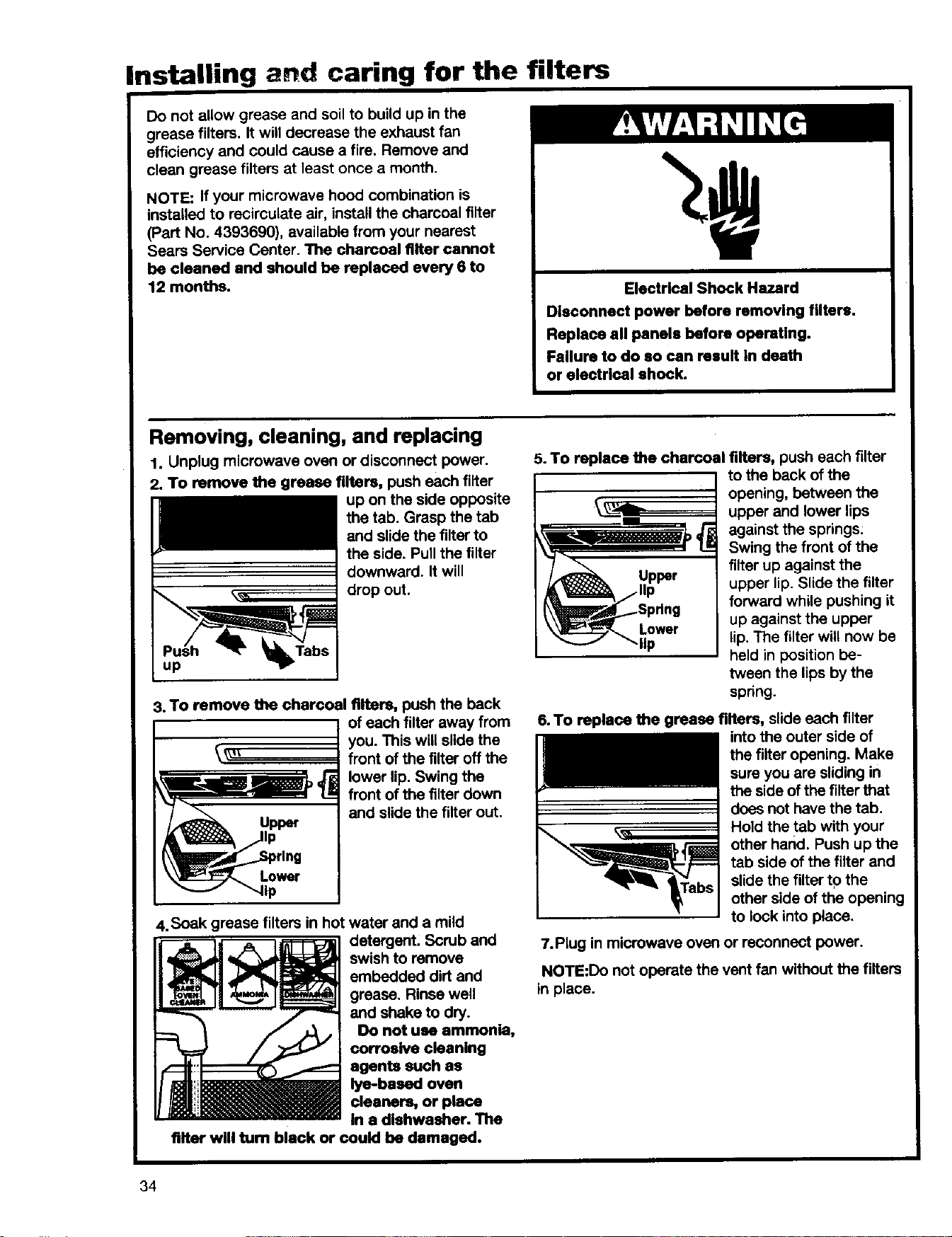
2. To remove the grease filters, push each filter
up on the side opposite
the tab. Grasp the tab
and slide the filterto
the side. Pull the filter
downward. It will
drop out.
3. To remove the charcoal filters, push the back
of each filter away from
you. This will slide the
_'_ front of the filter off the
lower lip. Swing the
front of the filter down
and slidethe filter out.
Upper
Lower
,,lip
4.Soak grease filters in hot water and a mild
detergent. Scrub and
swish to remove
embedded dirt and
grease. Rinse well
and shake to dry.
Do not use ammonia,
corrosive cleaning
agents such as
lye-based oven
cleaners, or place
in a dishwasher. The
filter will turn black or could be damaged.
5. To replace the charcoal filters, push each filter
to the back ofthe
opening, between the
upper and lower lips
against the springs:
Swing the front of the
filterup against the
upper lip. Slide the filter
forward while pushing it
Lower up against the upper
lip lip. The filterwill now be
held in position be-
tween the lips by the
spring.
6. To replace the grease filters, slide each filter
intothe outer side of
the filter opening. Make
sure you are sliding in
the side of the filterthat
does not have the tab.
Hold the tab with your
other hand. Push up the
tab side of the filter and
slide the filterto the
other side of the opening
to lock into place.
7.Plug in microwave oven or reconnect power.
NOTE:Do not operate the vent fan without the filters
in place.
34
Replacing the cooktop and oven lights
The cooktop light
1. Unplug microwave oven or disconnect power.
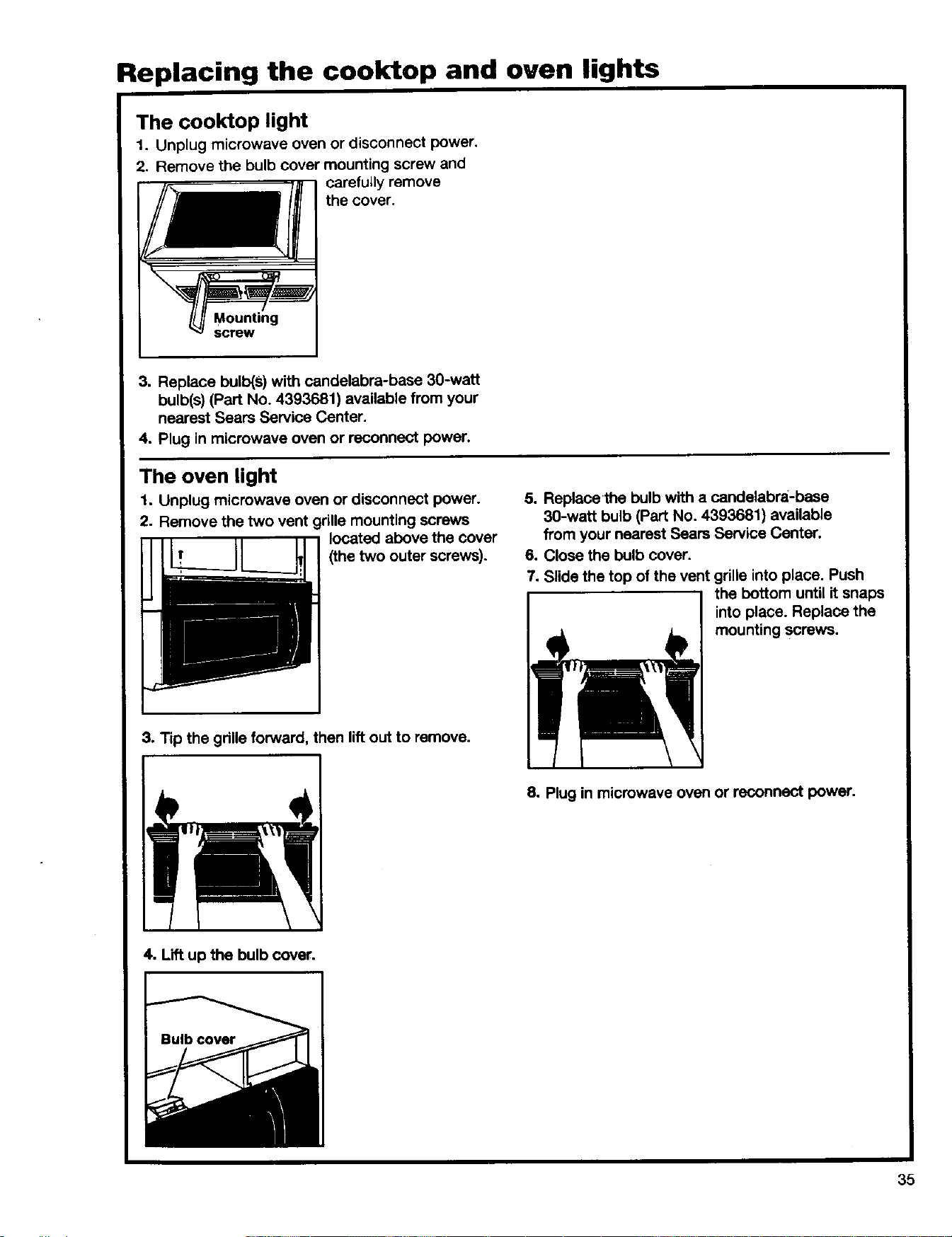
2. Remove the bulb cover mounting screw and
carefully remove
the cover.
Mounting
screw
3. Replace bulb(s) with candelabra-base 30-watt
bulb(s) (Part No. 4393681) available from your
nearest Sears Service Center.
4. Plug in microwave oven or reconnect power.
The oven light
1. Unplug microwave oven or disconnect power.
2. Remove the two vent grille mounting screws
located above the cover
(the two outer screws).
5. Replacethe bulb with a candelabra-base
30-watt bulb (Part No. 4393681) available
from your nearest Sears Service Center.
6. Close the bulb cover.
7. Slide the top of the vent grille into place. Push
the bottom until it snaps
I I int° place" Replace the
mounting screws.
3. Tip the grille forward, then lift out to remove.
8. Plug in microwave oven or reconnect power.
4. Lift up the bulb cover.
35

Cooking Guide
licrowave cooking tips
Amount of food
• If you increase or decrease the amount of food
you prepare, the time it takes to cook that food
will also change. For example, if you double a
recipe, add a little more than half the original
cooking time. Check for doneness and, if
necessary, add more time in small increments.
Starting temperature of food
• The lower the temperature of the food being
put into the microwave oven, the longer it takes
to cook. Food at room temperature will be re-
heated more quickly than food at refrigerator
temperature.
Composition of food
• Food with a lot of fat and sugar will be heated
faster than food containing a lot of water. Fat and
sugar will also reach a higher temperature than
water in the cooking process.
• The more dense the food, the longer it takes
to heat. "Very dense" food like meat takes longer
to reheat than lighter, more porous food like
sponge cakes.
Size and shape
- Smaller pieces of food will cook faster than
larger pieces. Also, same-shaped pieces cook
more evenly than different-shaped pieces.
• With foods that have different thicknesses,
the thinner parts will cook faster than the thicker
parts. Place the thinner parts of chicken wings
and legs in the center of the dish.
Stirring, turning foods
• Stirring and turning foods spreads heat quickly
to the center of the dish and avoids overcooking
at the outer edges of the food.
Covering food
Cover food to:
• Reduce splattering
• Shorten cooking times
• Keep food moist
You can use any covering that lets microwaves pass
through.
Releasing. pressure in foods
• Several foods (for example: baked potatoes,
sausages, egg yolks, and some fruits) are tightly
covered by a skin or membrane. Steam can build
up under the membrane during cooking, causing
the food to burst. TO relieve the pressure and to
prevent bursting, pierce these foods before
cooking with a fork, cocktaU pick, or toothpick.
Using standing time
• Always allow food to stand after cooking. Stand-
ing time after defrosting and cooking allows the
temperature to evenly spread throughout the food,
improving the cooking results.
• The length of the standing time depends on
how much food you are cooking and how dense
it is. Sometimes itcan be as short as the time it
takes you to remove the food from the oven and
take it to the serving table. However, with larger,
denser food, the standing time may be as long
as 10 minutes.
36
Microwave cooking tips (cont.)
Arranging food
For best results, place food evenly on the plate.
You can do this in several ways:
• If you are cooking several items of the same
food, such as baked potatoes, place them in a
ring pattern for uniform cooking.
• Wllen cooking foods of uneven shapes or
thickness, such as chicken breasts, place the
smaller or thinner area of the food towards the
center of the dish where it will be heated last.
• Layer thin slices of meat on top of each other.
. When you cook or reheat whole fish, score
the skin - this prevents cracking. Shield the tail
and head of whole fish with small pieces of foil to
prevent overcooking. When using foil, make sure
itdoesn't touch the sides of the oven.
. Do not let food or a container touch the top
or sides of the oven. This will prevent possible
arcing.
Using aluminum foil
Metal containers should not be used in a micro-
wave oven. There are, however, some exceptions.
If you have purchased food which is prepackaged
in an aluminum foil container, refer to the instruc-
tions on the package. When using aluminum foil
containers, cooking times may be longer because
microwaves will only penetrate the top of the food.
Ifyou use aluminum containers without package
instructions, follow these guidelines:
• Place the container in a glass bowl and add some
water so that it covers the bottom of the container,
not more than 1,_inch (6 mm) high. This ensures
even heating of the container bottom.
• Always remove the lid to avoid damage to
the oven:
• Use only undamaged containers.
• Do not use containers taller than 3/4inch (19 mm).
• Container must be at least half filled.
*To avoid arcing, there must be a minimum
1,_inch (6 mm) between the aluminum container
and the walls of the oven and also between two
aluminum containers.
• Always place the container on the turntable.
• Reheating food in aluminum foil containers usually
takes up to double the time compared to reheating
in plastic, glass, china, or paper containers. The
time when food isready will vary depending upon
the type of container you use.
• Let food stand for 2 to 3 minutes after heating so
that heat is spread evenly throughout container.
Cooking you should not do in your
microwave oven
*Do not do canning of foods in the oven. Closed
glass jars may explode, resulting in damage to
the oven or possible personal injury.
• Do not use the microwave oven to sterilize objects
(baby bottles, etc.). It is difficultto keep the oven at
the high temperature needed for safe sterilization.
37
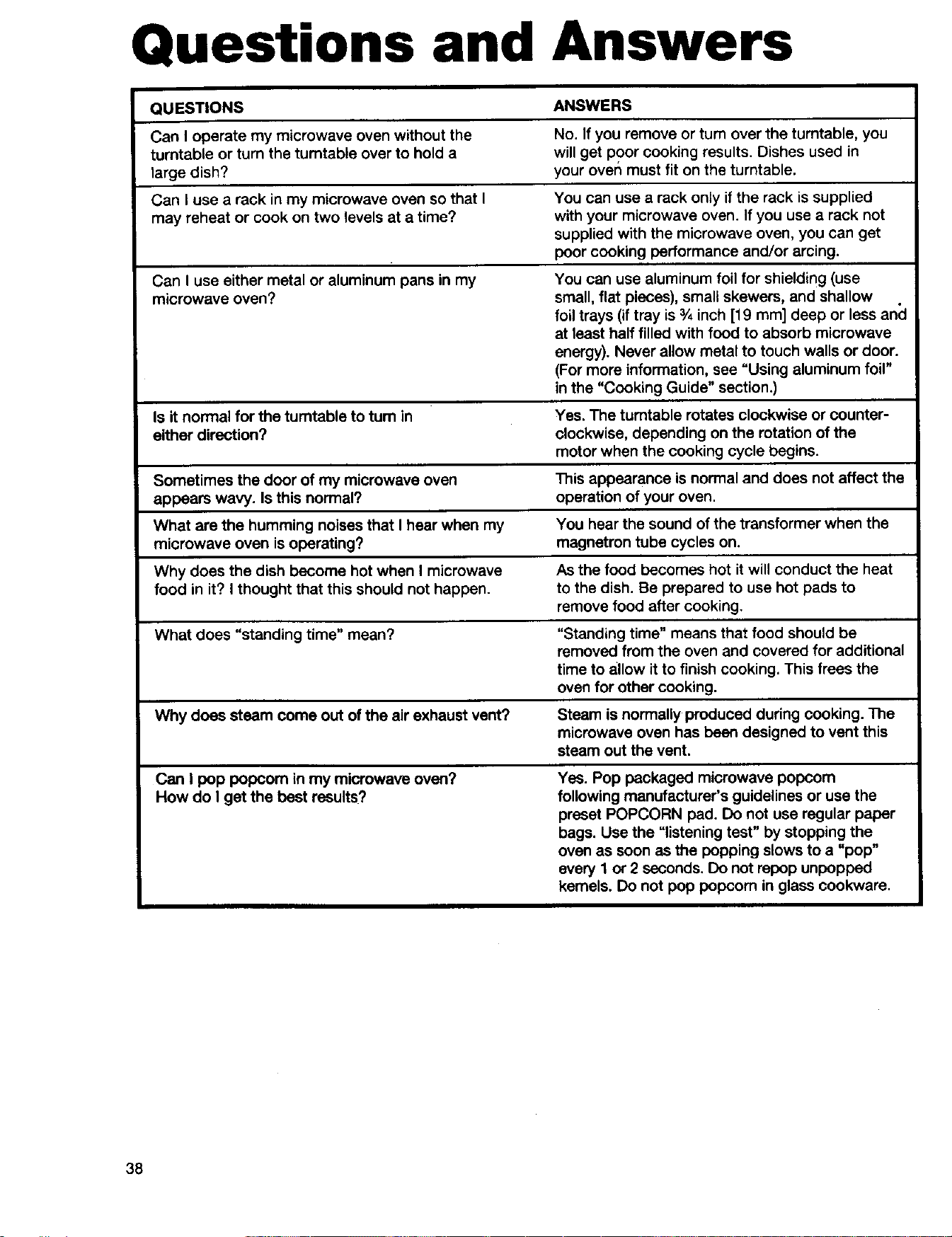
Questions and Answers
QUESTIONS ANSWERS
Can I operate my microwave oven without the No. If you remove or turn over the turntable, you
turntable or turn the tumtable over to hold a willget poor cooking results. Dishes used in
large dish? your over_must fit on the turntable.
Can I use a rack in my microwave oven so that I You can use a rack only if the rack is supplied
may reheat or cook on two levels at a time? with your microwave oven. If you use a rack not
supplied with the microwave oven, you can get
poor cooking performance and/or arcing.
Can I use either metal or aluminum pans in my You can use aluminum foil for shielding (use
microwave oven? small, flat pieces), small skewers, and shallow
foil trays (if tray is 3/4inch [19 mm] deep or less ancl
at least half filled with food to absorb microwave
energy). Never allow metal to touch walls or door.
(For more information, see "Using aluminum foil"
in the "Cooking Guide" section.)
Is itnormal for the turntable to turn in Yes. The turntable rotates clockwise or counter-
either direction? clockwise, depending on the rotation of the
motor when the cooking cycle begins.
Sometimes the door of my microwave oven This appearance is normal and does not affect the
appears wavy. Is this normal? operation of your oven.
What are the humming noises that I hear when my You hear the sound of the transformer when the
microwave oven isoperating? magnetron tube cycles on.
Why does the dish become hot when I microwave As the food becomes hot it will conduct the heat
food in it? I thought that this should not happen, to the dish. Be prepared to use hot pads to
remove food after cooking.
What does "standing time" mean? "Standing time" means that food should be
removed from the oven and covered for additional
time to allow it to finish cooking. This frees the
oven for other cooking.
Why does steam come out of the air exhaust vent? Steam is normally produced during cooking. The
microwave oven has been designed to vent this
steam out the vent.
Can I pop popcom in my microwave oven? Yes. Pop packaged microwave popcom
How do I get the best results? following manufacturer's guidelines or use the
preset POPCORN pad. Do not use regular paper
bags. Use the "listening test" by stopping the
oven as soon as the popping slows to a "pop"
avery 1 or 2 seconds. Do not repop unpopped
kernels. Do not pop popoom in glass cookware.
38
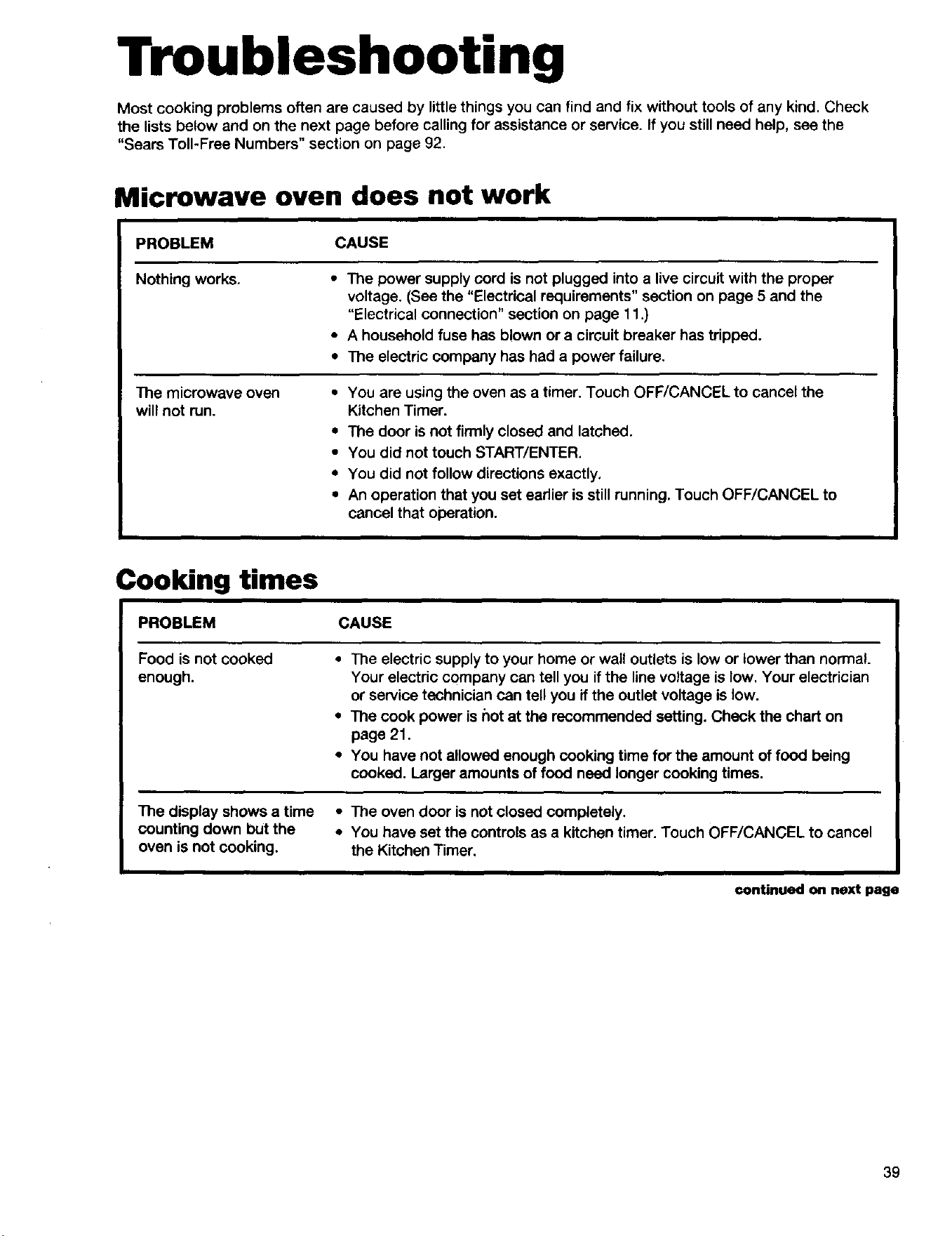
Troubleshooting
Most cooking problems often are caused by little things you can find and fix without tools of any kind. Check
the lists below and on the next page before calling for assistance or service. If you still need help, see the
"Sears Toll-Free Numbers" section on page 92.
Microwave oven does not work
PROBLEM CAUSE
Nothing works.
The microwave oven
will not run.
• The power supply cord is not plugged into a live circuit with the proper
voltage. (See the "Electrical requirements" section on page 5 and the
"Electrical connection" section on page 11.)
• A household fuse has blown or a circuit breaker has tripped.
• The electric company has had a power failure.
• You are using the oven as a timer. Touch OFF/CANCEL to cancel the
Kitchen Timer.
• The door is not firmly closed and latched.
• You did not touch START/ENTER.
• You did not follow directions exactly.
• An operation that you set earlier is still running. Touch OFF/CANCEL to
cancel that operation.
Cooking times
PROBLEM CAUSE
Foodis not cooked
enough.
• The electric supply to your home or wall outlets is low or lower than normal.
Your electric company can tell you if the line voltage is low. Your electrician
or service technician can tell you ff the outlet voltage is low.
• The cook power is hot at the recommended setting. Check the chart on
page 21.
• You have not allowed enough cooking time for the amount of food being
cooked. Larger amounts of food need longer cooking times.
The display shows a time • The oven door is not closed completely,
counting down but the • You have set the controls as a kitchen timer. Touch OFF/CANCEL to cancel
oven is not cooking, the Kitchen Timer.
€onUnuedonnextpage
39
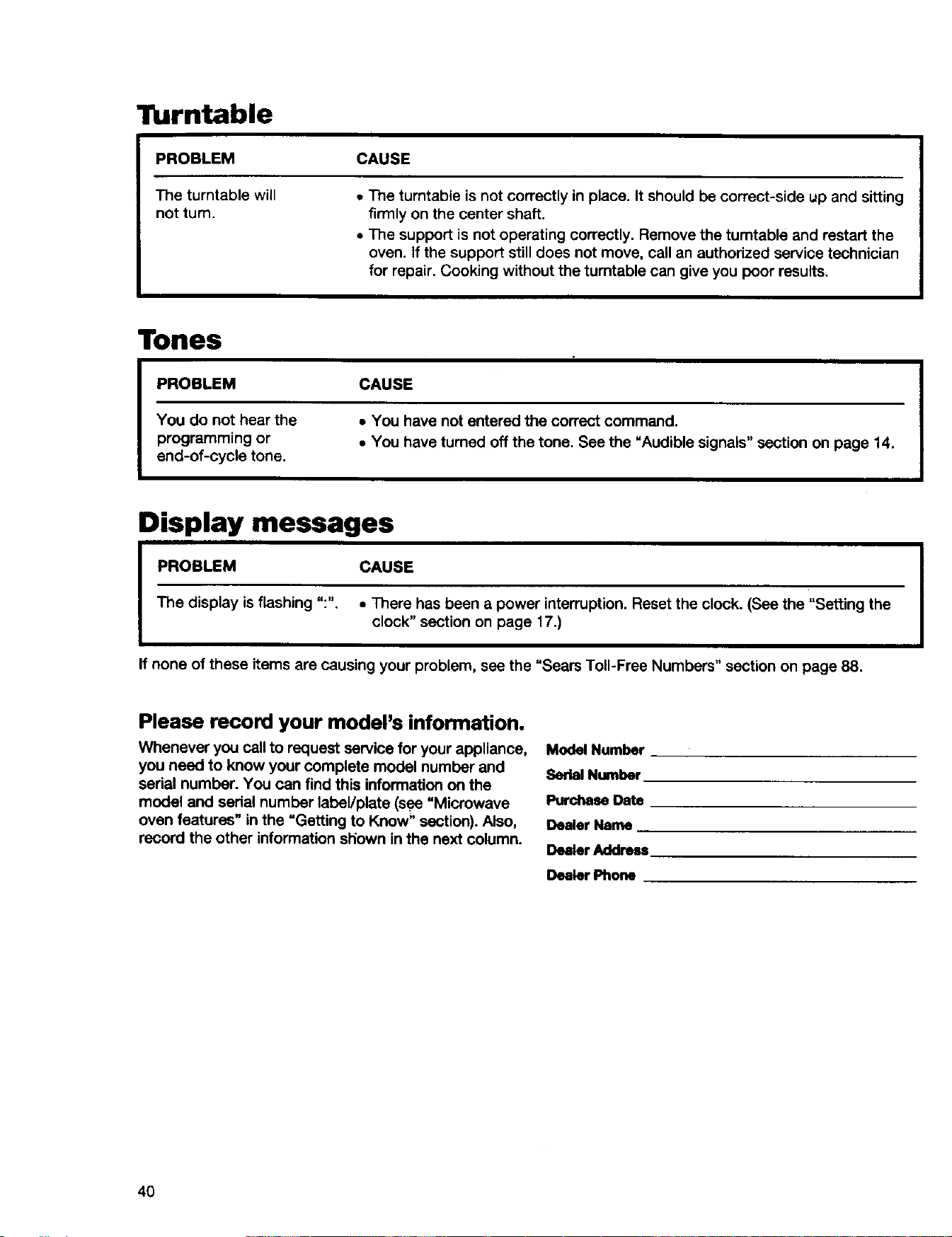
Turntable
PROBLEM
The turntable will
not turn.
I
CAUSE
• The turntable is not correctly in place. It should be correct-side up and sitting
firmly on the center shaft.
• The support is not operating correctly. Remove the turntable and restart the
oven. If the support stilldoes not move, call an authorized service technician
for repair. Cooking without the turntable can give you poor results.
Tones
PROBLEM
You do not hear the
programming or
end-of-cycle tone.
CAUSE
• You have not entered the correct command.
• You have turned off the tone. See the "Audible signals" section on page 14.
Display messages
PROBLEM CAUSE
The display is flashing ":". • There has been a power interruption. Reset the clock. (See the "Setting the
clock" section on page 17.)
If none of these items are causing your problem, see the "Sears Toll-Free Numbers" section on page 88.
Please record your model's information.
Whenever you call to request service for your appliance,
you need to know your complete model number and
sedal number. You can find this information on the
model and serial number labeVplate (see "Microwave
oven features" in the =Getting to Know" section). Also,
record the other information sPiownin the next column.
Model Number
Serial Number
Purchase Date
Dealer Name
Dealer Address
Dealer Phone
4O
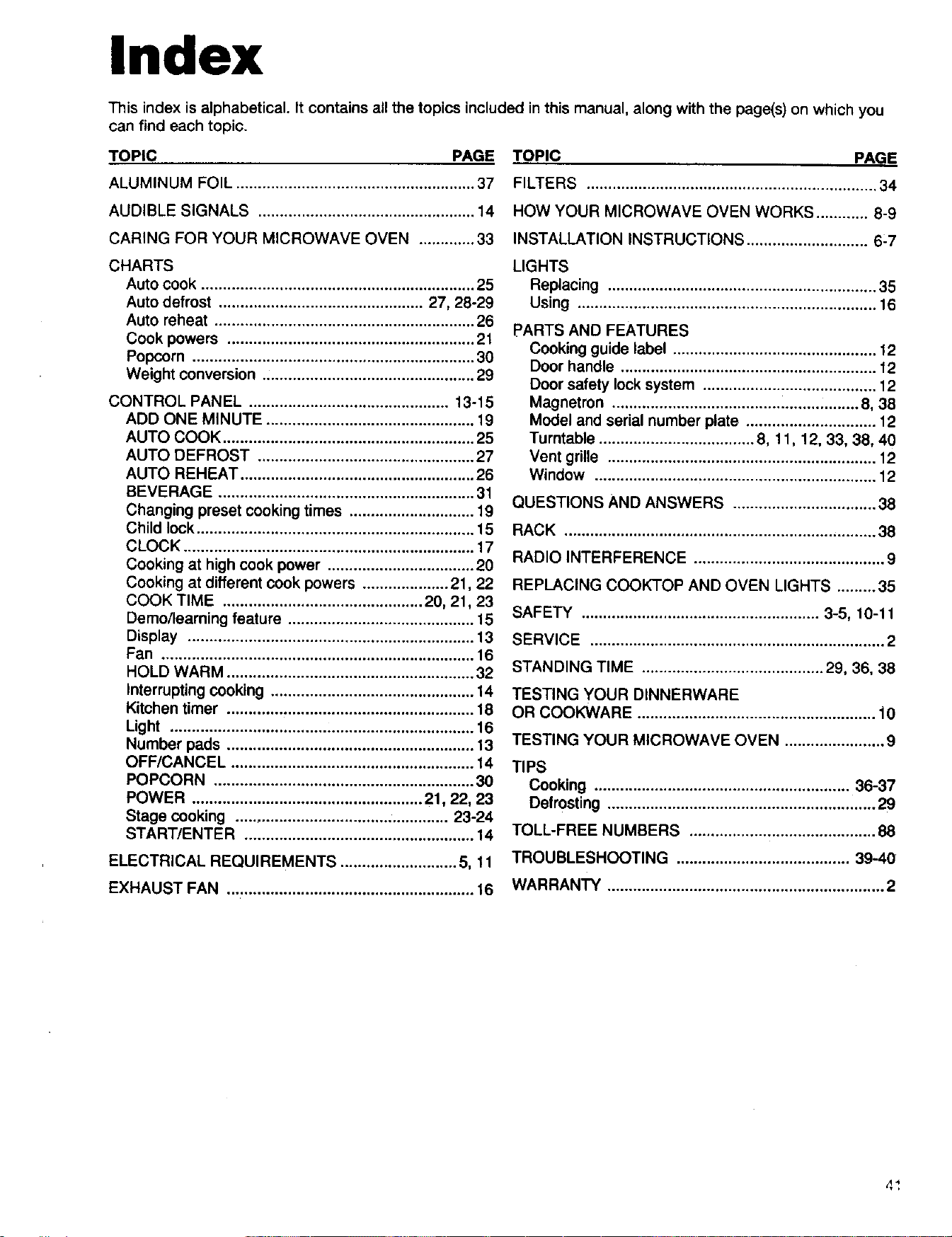
Index
This index is alphabetical. It contains all the topics included inthis manual, along with the page(s) on which you
can find each topic.
TOPIC PAGE
ALUMINUM FOIL ....................................................... 37
AUDIBLE SIGNALS .................................................. 14
CARING FOR YOUR MICROWAVE OVEN ............. 33
CHARTS
Auto cook ............................................................... 25
Auto defrost ............................................... 27, 28-29
Auto reheat ............................................................ 26
Cook powers ......................................................... 21
Popcorn ................................................................. 30
Weight conversion ................................................. 29
CONTROL PANEL .............................................. 13-15
ADD ONE MINUTE ................................................ 19
AUTO COOK .......................................................... 25
AUTO DEFROST .................................................. 27
AUTO REHEAT ...................................................... 26
BEVERAGE ........................................................... 31
Changing preset cooking times ............................. 19
Child lock ................................................................ 15
CLOCK ................................................................... 17
Cooking at high cook power .................................. 20
Cooking at different cook powers .................... 21,22
COOK TIME .............................................. 20, 21,23
Demo/learning feature ........................................... 15
Display .................................................................. 13
Fan ........................................................................ 16
HOLD WARM ......................................................... 32
Interrupting cooking ............................................... 14
Kitchen timer ......................................................... 18
Light ...................................................................... 16
Number pads ......................................................... 13
OFF/CANCEL ........................................................ 14
POPCORN ............................................................ 30
POWER ..................................................... 21, 22, 23
Stage cooking ................................................. 23-24
START/ENTE R ..................................................... 14
ELECTRICAL REQUIREMENTS ........................... 5, 11
EXHAUST FAN ......................................................... 16
TOPIC PAGI=
FILTERS ................................................................... 34
HOW YOUR MICROWAVE OVEN WORKS ............ 8-9
INSTALLATION INSTRUCTIONS ............................ 6-7
LIGHTS
Replacing .............................................................. 35
Using ..................................................................... 16
PARTS AND FEATURES
Cooking guide label ............................................... 12
Door handle ........................................................... 12
Door safety lock system ........................................ 12
Magnetron ......................................................... 8, 38
Model and serial number plate .............................. 12
Turntable .................................... 8, 11, 12, 33, 38, 40
Vent grille .............................................................. 12
Window ................................................................. 12
QUESTIONS AND ANSWERS ................................. 38
RACK ........................................................................ 38
RADIO INTERFERENCE ............................................ 9
REPLACING COOKTOP AND OVEN LIGHTS ......... 35
SAFETY ....................................................... 3-5, 10-11
SERVICE .................................................................... 2
STANDING TIME .......................................... 29, 36, 38
TESTING YOUR DINNERWARE
OR COOKWARE ....................................................... 10
TESTING YOUR MICROWAVE OVEN ....................... 9
TIPS
Cooking ........................................................... 36-37
Defrosting .............................................................. 29
TOLL-FREE NUMBERS ........................................... 88
TROUBLESHOOTING ........................................ 39-40
WARRANTY ................................................................ 2
4 _,
Notes
42
Tabla de contenidos
Garantia ............................................... 44
Servioio Soars ...................................... 44
Seguridad del homo
de microondas ................................ 45-47
Instrucciones de instalaci6n .............. 48
Conozca su homo
de microondas ..................................... 51
C6mo utilizar su homo
do microondas ..................................... 63
C6mo ¢uidar su homo
de microondas ..................................... 78
Guia de Cocina .................................... 82
Preguntas y respuestas ....................... 84
Soluci6n de prob|emas ........................ 85
|ndice ................................................... 87
Liame sin ©osto ................................... 88
43
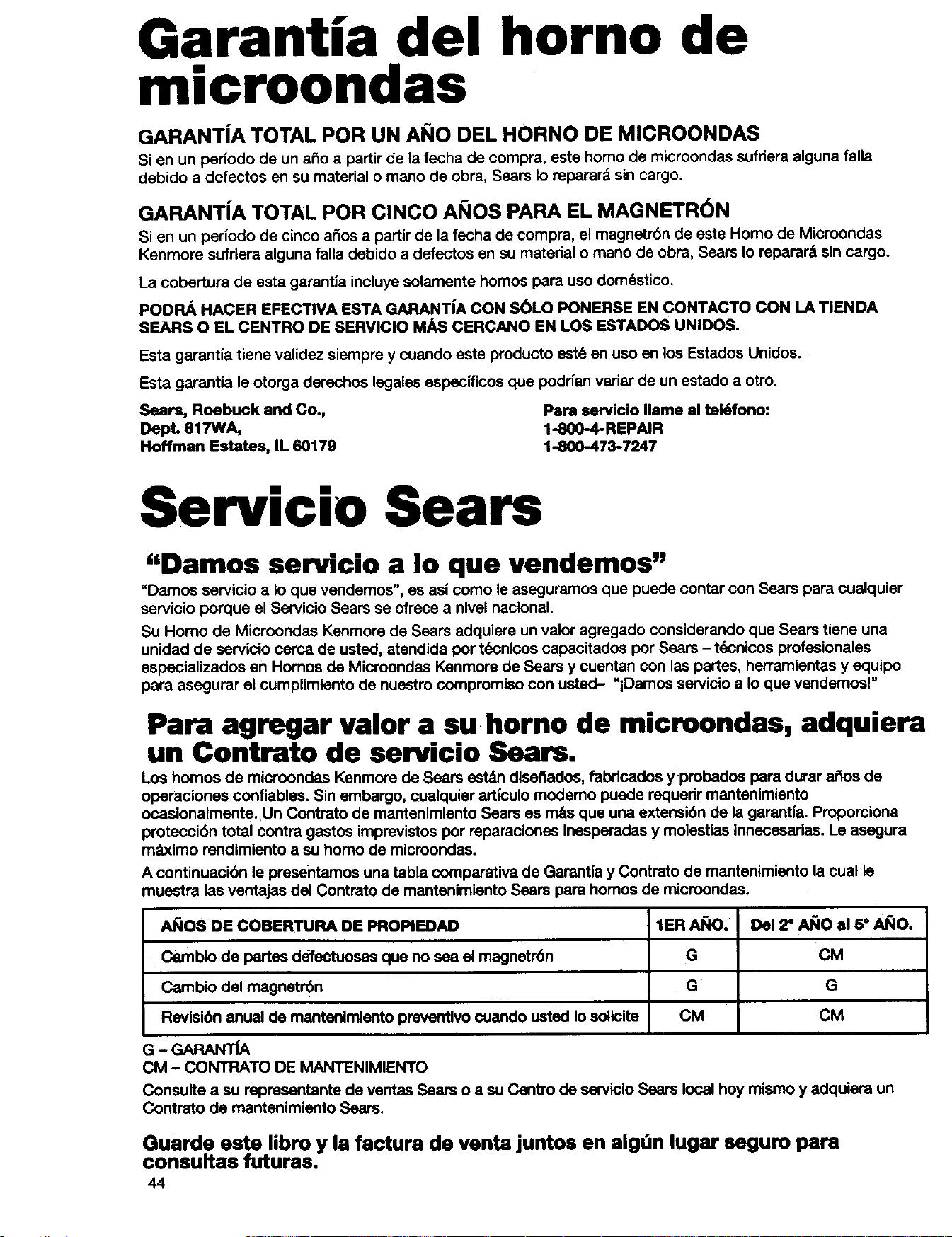
Garantia del horno de
microondas
GARANT|A TOTAL POR UN AI_IO DEL HORNO DE MICROONDAS
Si en un periodo de un a_o a partir de la fecha de compra, este homo de microondas sufriera alguna falla
debido a defectos en su material o mano de obra, Sears Io reparar& sin cargo.
GARANT|A TOTAL POR ClNCO AI_IOS PARA EL MAGNETRON
Si en un periodo de cinco a_os a partir de la fecha de compra, el magnetrbn de este Homo de Microondas
Kenmore sufriera alguna falla debido a defectos en su material o mano de obra, Sears Io repamr_ sin cargo.
La cobertura de esta garant|a incluye solamente homos loamuso domdstico.
PODRA HACER EFECTIVA ESTA GARANT|A CON S_LO PONERSE EN CONTACTO CON LA TIENDA
SEARS O EL CENTRO DE SERVIClO MAS CERCANO EN LOS ESTADOS UNIDOS.
Esta garantia tiene validez siempre y cuando este producto est6 en uso en los Estados Unidos.
Esta garantia le otorga derechos legales especificos que poddan variar de un estado a otto.
Sears, Roebuck and Co., Pars servicio Ilame al tek_fono:
DepL 817WA, 1-800-4-REPAIR
Hoffman Estates, IL 60179 1-800-473-7247
Servicio Sears
"Damos servicio a Io que vendemos"
"Damos servicio a Io que vendemos", es asi como le aseguramos que puede contar con Sears para cualquier
servicio porque el Servicio Sears se ofrece a nivel nacional.
Su Homo de Microondas Kenmore de Sears adquiere un valor agregado considerando que Sears tiene una
unidad de servicio cerca de usted, atendida por t(_cnicos capacitados por Sears - t_cnicos profesionales
especializados en Homos de Microondas Kenmore de Sears y cuentan con las partes, herramientas y equipo
para asegurar el cumplimiento de nuestro compromiso con usted- "iDamos servicio a Io que vendemos!"
Para agregar valor a su horno de microondas, adquiera
un Contrato de servicio Sears.
Los homos de microondas Kenmore de Sears estdn dise_ados, fabdcados y probados para durar a#_osde
operaciones confiables. Sin embargo, _ualquier artl'culomodemo puede requerir mantenimlento
ocasionalmente. Un Contrato de mantenimiento Sears es m&sque una extensi6n de la garantfa. Pmporciona
proteccibn total contra gastos imprevistos por reparaciones Inesperadas y molestias innecesadas. Le asegura
m_ximo rendimiento a su homo de microondas.
A continuacibn le presentamos una tabla comparativa de Gamntia y Contrato de mantenimiento la cual ie
muestra las ventajas del Contrato de mantenimiento Sears para homos de microondas.
A_OS DE COBERTURA DE PROPIEDAD
Cambio de partes defeCtuosas que no sea el magnetr6n
Cambio del magnetr6n
Revisibn anual de mantenimiento preventivo cuando usted Io soticita
G - GARANTIA
CM - CONTRATO DE MANTENIMIENTO
1ERAI;IO.
G
G
CM
Del 2" AI_IOal 5 ° AI_IO.
CM
G
CM
Consulte a su representante de ventas Sears o a su Centro de ServIcIoSears local hoy mismo y adquiera un
Contmto de mantenimlento Sears.
Guarde este libro y la factura de venta juntos en algOn lugar seguro para
consultas futuras.
44
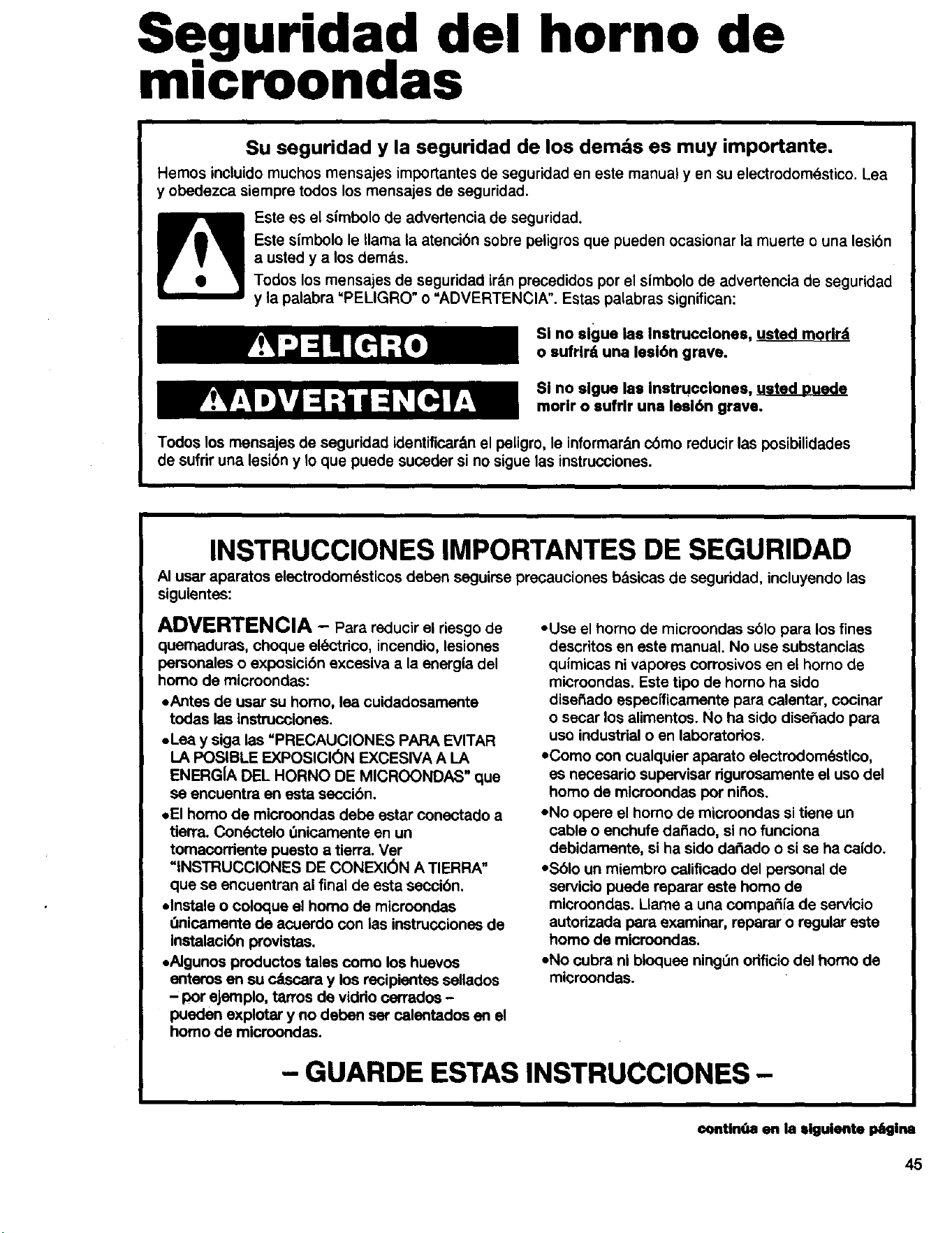
Seguridad del horno de
microondas
Su seguridad y la seguridad de los demds es muy importante.
Hemos induido muchos mensajes importantes de seguridad en este manual yen su electrodom_stico. Lea
y obedezca siempre todos los mensajes de seguridad.
Este es el simbolo de advertencia de seguridad.
Este simbolo le llama la atencibn sobre peligros que pueden ocasionar la muerte o una lesibn
a usted y a los dem&s.
Todos los mensajes de seguridad ir_.n precedidos por el simbolo de advertencia de seguridad
y la palabra "PELIGRO" o =ADVERTENCIA". Estas palabras significan:
Sl no slgue las Instrucclones, usted morlrd
o sufrlrd una lesl6n grave.
SI no slgue las Instrucclones, usted DuQde
morlr o sufrlr una lesl6n grave.
Todos los mensajes de seguridad identificar&nel peligro, le informar&n c6mo reducir las posibilidades
de sufrir una lesibn y Io que puede suceder si no sigue las instrucciones.
INSTRUCCIONES IMPORTANTES DE SEGURIDAD
AI usar aparatos electrodom6sticos deben seguirse precauciones bdsicas de seguridad, incluyendo las
siguientes:
ADVERTENCIA - Para reducir el riesgo de
quemaduras, choque el_%'tdco,incendio, lesiones
personales o exposicibn excesiva a la energia del
homo de microondas:
oAntes de usar su homo, lea cuidadosamente
todas las instrucciones.
oLea y siga las "PRECAUCIONES PAPA EVITAR
LA POSIBLE EXPOSICION EXCESIVA A LA
ENERGIA DEL HORNO DE MICROONDAS" que
se encuentra en esta seccibn,
,,El homo de mioroondas debe estar conectado a
tierra. Con6ctelo 0nicamente an un
tomacordenta puesto a tierra. Ver
=INSTRUCCIONES DE CONEXI(_N A TIERRA"
que se encuentran al final de esta secci6n.
=Instals o coloque el homo de microondas
Onicamerrte de acoerdo con las instrucciones de
Instalacibn provlstas.
=Algunos productos tales como los huevos
enteros en su c&scara y los recipientes sellados
- por ejernplo, tarros de viddo carrados -
pueden explotar y no depen ser calentados en el
homo de microondas.
• Use el homo de microondas sblo para los fines
descritos en este manual. No use substancias
quimicas ni vapores corrosivos en el homo de
microondas. Este tipo de homo ha sido
disetiado especfficamente para calentar, cocinar
o secar los alimentos. No ha sido diseSado para
uso industrial o en laboratodos.
• Como con cualquier aparato electrodom6stico,
es necesario supervisar rigurosamente el uso del
homo de microondas por nii_os.
• No opere el homo de microondas si tiene un
cable o enchufe daSado, si no funciona
debidamente, si ha sido da_ado o si se ha caido.
• Sblo un miembro calificado del personal de
servicio puede reparar este homo de
mieroondas. Llame a una compa_ia de servicio
autorizada para examinar, reparar o regular este
homo de microondas.
• No cubra ni bloquee ning_n orificio del homo de
microondas.
- GUARDE ESTAS INSTRUCClONES -
conUnOa en la elguiente I_glna
45
INSTRUCCIONES IMPORTANTES DE SEGURIDAD
• No guarde el homo de microondas al aire libre.
No Io use cerca del agua - por ejemplo, cerca del
fregadero, en un s6tano ht3medo, o cerca de una
piscina o lugares semejantes.
• No sumerja el cable o el enchufe en agua.
• Mantenga el cable de alimentaci6n alejado de
las superficies calientes.
• No deje que el cable cuelgue del borde de una
mesa o superficie.
• Yea las instrucciones de cbmo limpiar la
superficie de la puerta en la secci6n "Cuidado
de su homo de microondas".
• No Io instale sobre un fregadero.
• No guarde ningOnobjeto directamente sobre la
parte supedor del homo de microondas cuando
el homo de microondas est_ en funcionamiento.
• Para reducir el riesgo de incendio en la cavidad
del homo:
- No cocine demasiado los alimentos. Vigile
cuidadosamente el homo de microondas si se
coloca dentro del mismo, papel, pl&sticoo
cualquier material combustible para facilitar
la coccibn.
- Quite los alambres que sujetan las bolsas de
papel o de pl&stico antes de colocarlas en el
homo.
- Si los materiales dentro del homo prenden
fuego, mantenga cerrada la puerta del homo,
ap_gueto y desconecte el cable de
alimentacion, o corte la energla en el fusible
o en el panel interruptor de circuitos.
- No use la cavidad del homo de microondas
para guardar objetos. No deje productos de
papel, utensilios de cocina o alimentos en la
cavidad cuando no est6 usando el aparato.
• Adecuado para use sobre equipes de cocina de
gas y el_ctdcos.
• Para usarse sobre cocinas con anchura m_xima
de 36 pulgadas.
• Limpie con frecuencia las campanas extractoras
- no debe dejarse que la grasa se acumule en la
camDana o en elfiltro.
• Cuando este cocinando alimentos con llama
debajo de la campana, ponga el ventilador
ha funcionar.
• Limpie con cuidado el filtro de lacampana
extractora. Los productos de limpieza
corrosivos, tales como los limpiadores de
homo a base de lejia, pueden dafiar el filtro.
- GUARDE ESTAS INSTRUCCIONES -
PRECAUCIONES PARA EVITAR LA POSIBLE
EXPOSICION EXCESIVA A LA ENERG|A DE LAS
MICROONDAS
(a) No trate de pener en funcionamiento este homo
de microondas con la puerta abierta, pues esto
puede causar la exposici6n perjudicial a la
energia del microondas. Es importante no
desactivar ni forzar los intercierres de seguddad.
(b) No coloque ningt3nobjeto entre la cara frontal
del homo y la puerta ni deje que se acumulen
residuos de pelvo o de productos de limpieza en
las superficies de sellado.
(¢) No use el homo si est_ dafiado. Es muy
importante que la puerta del homo se cierre
debidamente y que no est6n dafiados:
(1) .l=apuerta (doblada),
(2) Las bisagras y pestillos (quebrados o flojos),
(3) Los cierres herm6ticos de la puerta o las
superficies de sellado.
(d) El homo no debe ser regulado ni reparado por
ninguna persona que no sea un miembro
calificado dei personal de servicio.
46
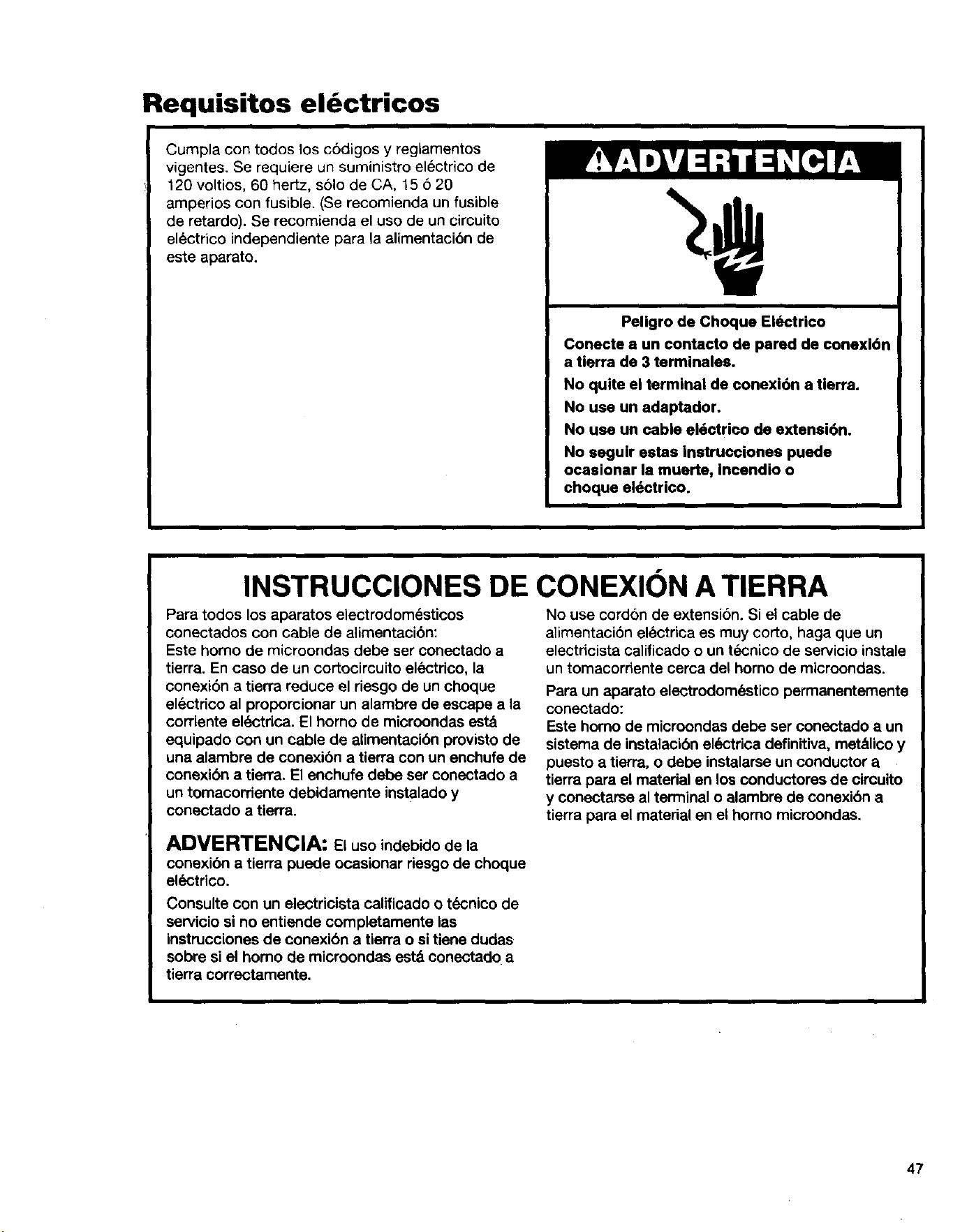
Requisitos el ctricos
Cumpla con todos los c6digos y reglamentos
vigentes. Se requiere un suministro el6ctrico de
120 voltios, 60 hertz, solo de CA, 15 6 20
amperios con fusible. (Se recomienda un fusible
de retardo). Se recomienda el uso de un circuito
electrico independiente para la alimentacion de
este aparato.
Peligro de Choque Electrico
Conecte a un contacto de pared de conexi6n
a tierra de 3 terminales.
No quite el terminal de conexi6n a tierra.
No usa un adaptador.
No use un cable el6ctrico de extensi6n.
No seguIr estas instrucciones puede
ocasionar la muerte, incendio o
choque eldctrico.
INSTRUCCIONES DE CONEXION A TIERRA
Para todos los aparatos electrodom_sticos
conectados con cable de alimentaci6n:
Este homo de microondas debe ser conectado a
tierra. En caso de un cortocircuito el6ctrico, la
conexi6n a tierra reduce el riesgo de un choque
elL=ctdco al proporcionar un alambre de escape a la
corriente el_%-'trica.El homo de microondas est_l
equipado con un cable de alimentacidn provisto de
una alambre de conexi6n a tierra con un enchufe de
conexi6n a tierra. El enchufe debe ser conectado a
un tomacorriente debidamente instalado y
conectado a tierra.
No use cordon de extensi6n. Si el cable de
alimentaci6n electrica es muy corto, haga que un
electricista calificado o un tdcnico de servicio instale
un tomacordente cerca del horno de microondas.
Para un aparato electrodom6stico permanentemente
conectado:
Este homo de microondas debe ser conectado a un
sistema de instalacibn ek_ctrica definitiva, met&lico y
puesto a tierra, o debe instalarse un conductor a
tierra para el material en los conductores de circuito
y conectarse al terminal o alambre de conexibn a
tierra para el material en el homo microondes.
ADVERTENCIA: Elusoindebido dela
conexibn a tierra puede ocasionar riesgo de choque
el_,=ctrico.
Consulte con un electricista calificado o t_cnico de
servicio si no entiende completamente las
instrucciones de conexibn a tierra o si tiene dudes
sobre si el homo de microondas est8 conectado a
tierra correctamente.
47
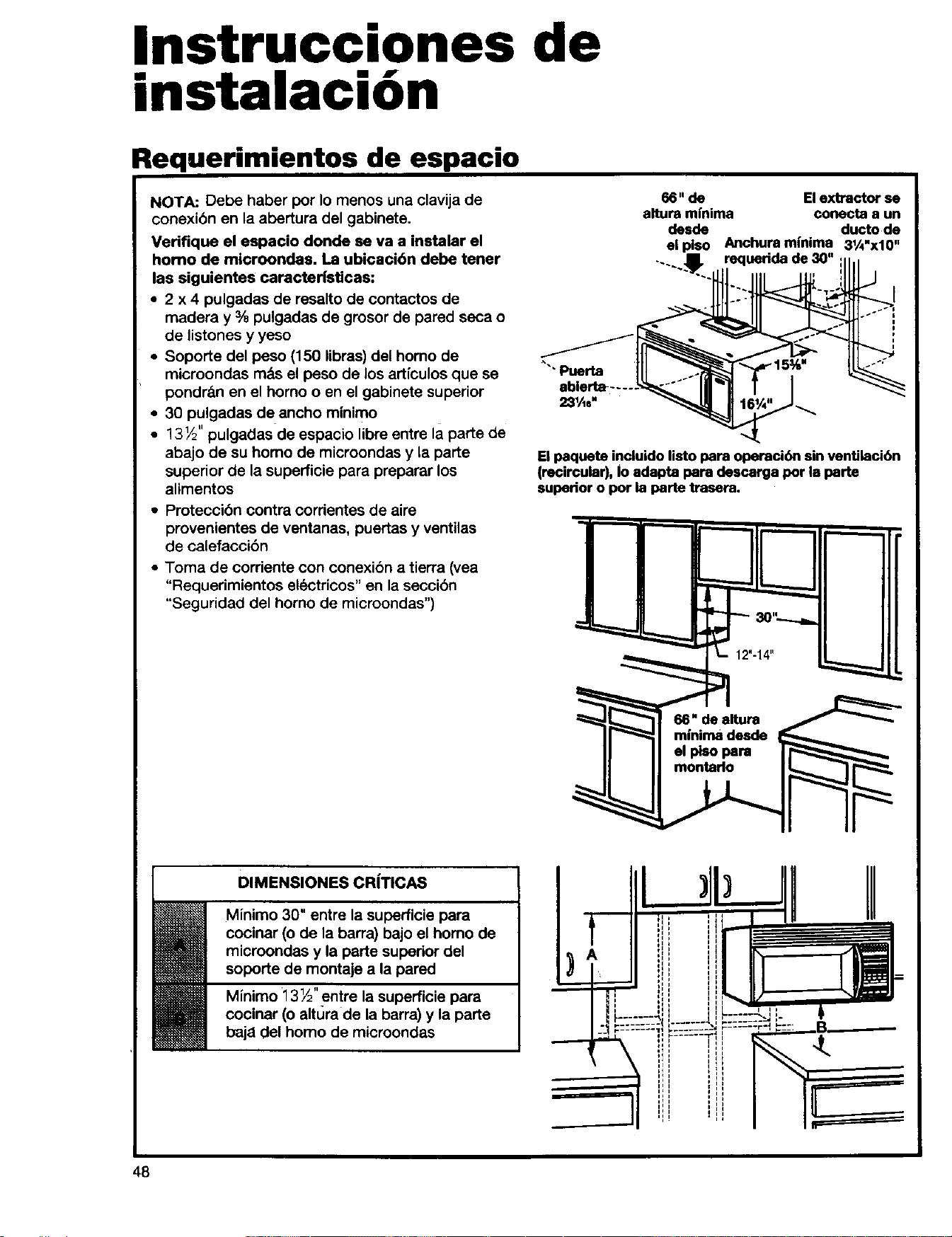
Instrucciones de
instalaci6n
Requerimientos de espacio
NOTA: Debe haber per Io menos una clavija de
conexi6n en la abertura del gabinete.
Verifique el espacio donde se va a instalar el
homo de mioroondas. La ubicacibn debe tener
las siguientes caracteristicas:
• 2 x 4 pulgadas de resalto de contactos de
madera y 3/8pulgadas de grosor de pared seca o
de listones y yeso
• Soporte del peso (150 libras) del homo de
microondas mbs el peso de los articulos que se
pondrfm en el homo o en el gabinete superior
• 30 pulgadas de ancho minimo
• 13½" pulgadas de espacio libre entre la parte de
abajo de su homo de microondas y la parte
superior de la superficie para preparar los
alimentos
• Proteccibn contra corrientes de aire
provenientes de ventanas, puertas y ventilas
de calefaccibn
• Toma de corriente con conexibn a tierra (vea
"Requerimientos electricos" en la seccibn
"Seguridad del homo de microondas")
66" de El extractor se
altura mfnima conecta a un
desde ducto de
el plso Anchuram{nima 31A.x10.
--...I. requedda de 30"
Puerta
El paquete incluido listo para operadbn sin venUlacibn
(recircular), Io adapta loam descarga por la porte
superior o por la parte trasora,
DIMENSIONES CR|TICAS
Minimo 30" entre la superficie para
cocinar (o de la barra) bajo el homo de
microondas y la perte superior del
soperte de montaje a la pared
Minimo 13 ½" entre la superficie para
cocinar (o altLJrade la barra) y la parte
baja del homo de micreondas
el piso para
48
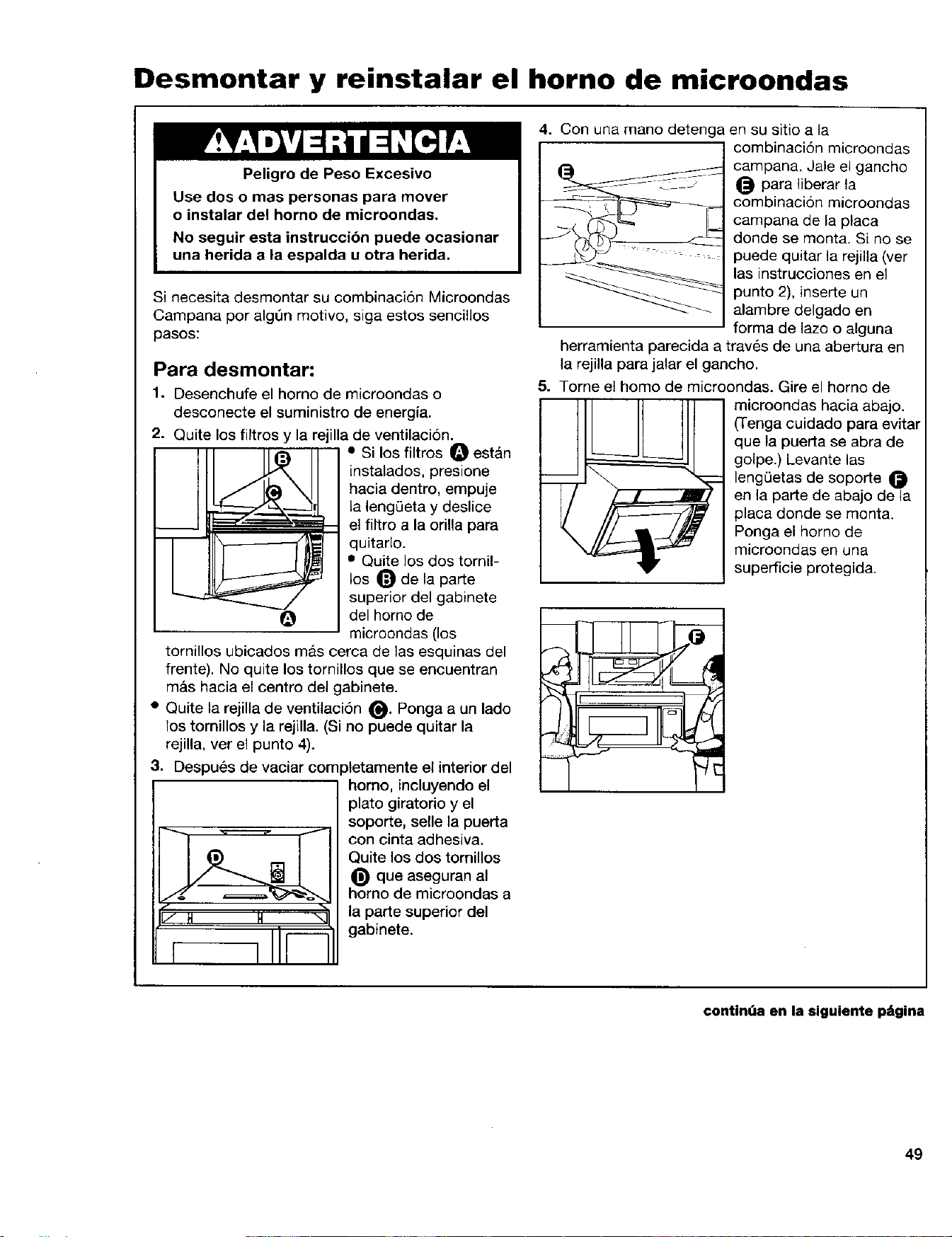
Desmontar y reinstalar el horno de microondas
Peligro de Peso Excesivo
Use dos o mas personas para mover
o instalar del homo de microondas.
No seguir esta instruccibn puede ocasionar
una herida a la espalda u otra herida.
Si necesita desmontar su combinacion Microondas
Campana per alg0n motive, siga estos sencillos
pasos:
Para desmontar:
1. Desenchufe el homo de microondas o
desconecte el suministro de energia.
2. Quite los filtros y la rejilla de ventilaci6n.
• Si los filtros O est&n
instalados, presione
hacia dentro, empuje
__, la leng0eta y deslice
_===r_" _-- el filtro a la orilla para
- _ quitarlo.
• Quite los dos tornil-
los _ de la parte
superior del gabinete
del homo de
microondas (los
tornillos ubicados mas cerca de las esquinas del
frente). No quite los tornillos que se eecuentran
m&s hacia el centre del gabinete.
• Quite ia rejilla de ventilaci6n O. Ponga a un lade
los tornillos y la rejilla. (Si no puede quitar la
rejilla, ver el punto 4).
3. Despu_s de vaciar comptetamente el interior del
homo, incluyendo el
plato giratorio y el
soporte, selle la puerta
con cinta adhesiva.
Quite los dos tornillos
que aseguran al
homo de microondas a
la parte superior del
gabinete.
4. Con una mane detenga en su sitio a la
combinaci6n micreondas
campana. Jale el gancho
para liberar la
combinacion microondas
campana de la placa
donde se monta. Si no se
puede quitar la rejilla (ver
las instrucciones en el
punto 2), inserte un
alambre delgado en
forma de lazo o alguna
herramienta parecida a trav6s de una abertura en
la rejilla para jalar el gancho.
5. Tome el homo de microondas. Gire el horno de
microondas hacia abajo.
(Tenga cuidado para evitar
que la puerta se abra de
golpe.) Levante ias
lengQetas de soporte
ee la parte de abajo de la
placa deride se monta.
Ponga el homo de
microondas en una
superficie protegida.
contin"a en la siguiente p=_gina
49
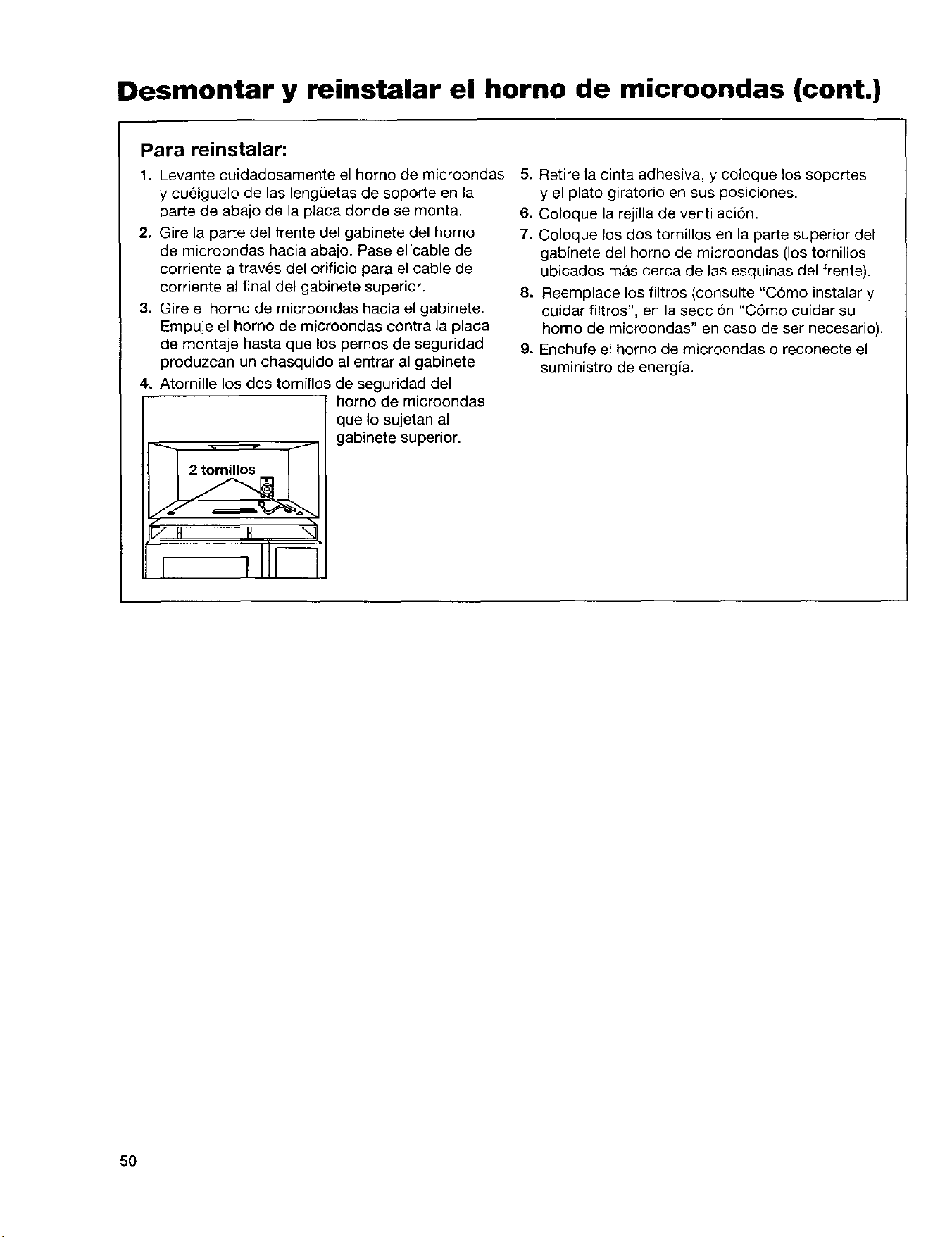
Desmontar y reinstalar el horno de microondas (cont.)
Para reinstalar:
1. Levante cuidadosamente el homo de microondas
y cuelguelo de las lengQetas de soporte en la
parte de abajo de la placa donde se monta.
2. Gire la parte del frente del gabinete del homo
de microondas hacia abajo. Pase el'cable de
corriente a trav6s del orificio para el cable de
corriente al final del gabinete superior.
3. Gire el homo de microondas hacia el gabinete.
Empuje el homo de microondas contra la placa
de montaje hasta que los pemos de seguridad
produzcan un chasquido al entrar al gabinete
4. Atornille los dos tornillos de seguridad del
/ H H "
homo de microondas
que Io sujetan al
gabinete superior•
5. Retire la cinta adhesiva, y coloque los soportes
y el plato giratorio en sus posiciones.
6. Coloque la rejilla de ventilaci6n.
7. Coloque los dos tomillos en la parte superior del
gabinete del homo de microondas (los tornillos
ubicados mas cerca de las esquinas del frente).
8. Reemplace los filtros (consulte "C6mo instalar y
cuidar filtros", en la secci6n "Como cuidar su
homo de microondas" en caso de ser necesario).
9. Enchufe el homo de microondas o reconecte el
suministro de energfa.
50
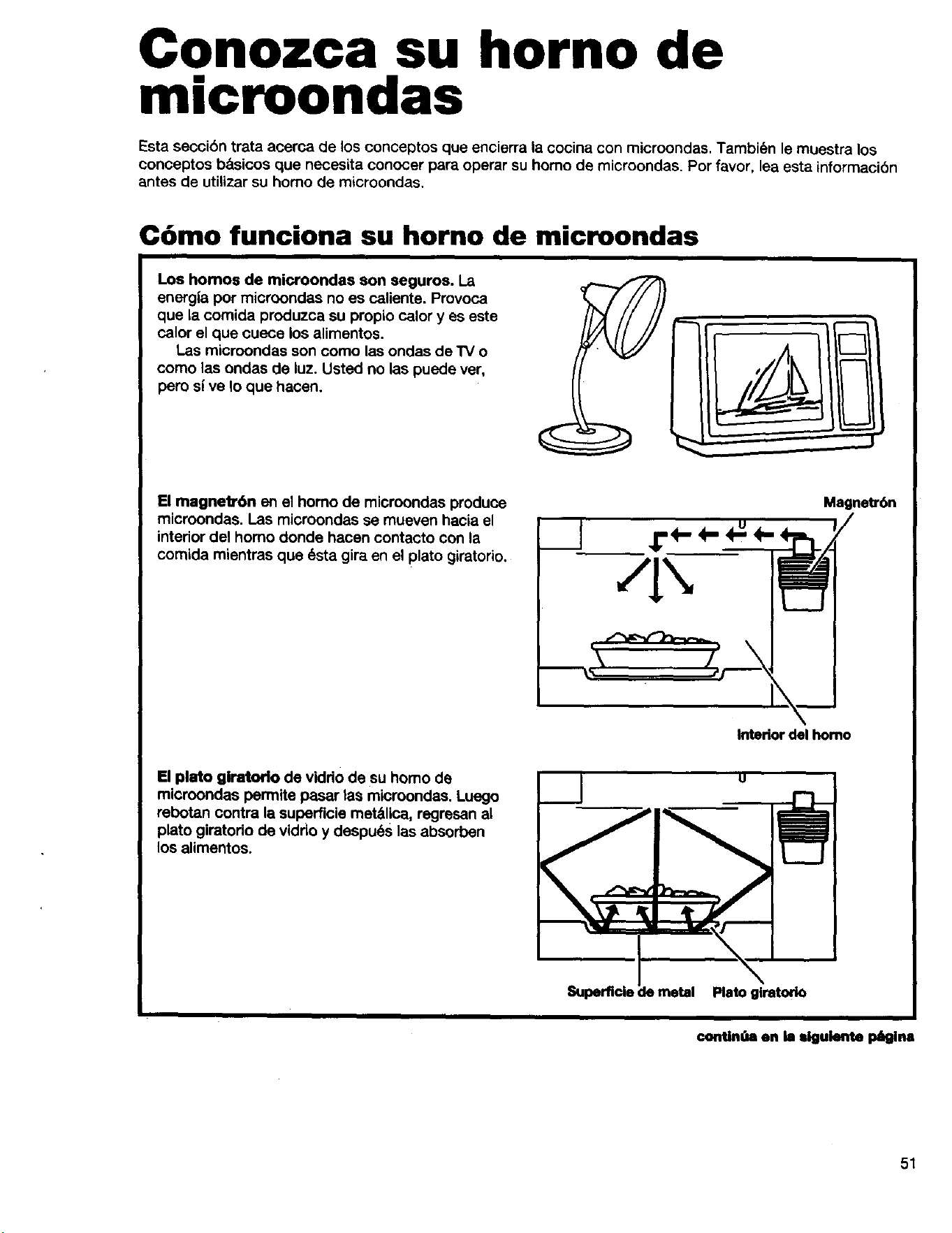
Conozca su horno de
microondas
Esta seccibn trata acerca de los conceptos que encierra la cocina con microondas. Tambi_n le muestra los
conceptos b&sicos que necesita conocer para operar su homo de microondas. Por favor, lea esta informaoibn
antes de utilizar su homo de microondas.
C6mo funciona su horno de microondas
Los homos de microondas son seguros. La
energla pot microondas no es caliente. Provoca
que la comida produzca su propio calory es este
calor el que cuece los alimentos.
Las microondas son como las ondas de "IVo
como las ondas de luz. Usted no las puede ver,
pero si ve Io que hacen.
El magnetrOn en el homo de microondas produce
microondas. I.as microondas se mueven haoia el
interior del homo donde hacen contacto con la
comida mientras que 6sta gira en el plato giratorio.
r.€- 4- m
Magne_r6n
Interior del homo
El plato giratodo de vidrio de su homo de
microondas permite pasar las microondas. Luego
rebotan contra la superficie metSl!ca, regresan al
plato giratodo de viddo y despu6s las absorben
los alimentos.
Superfide
Plato glratorio
continua en la =lgulente p_gina
51
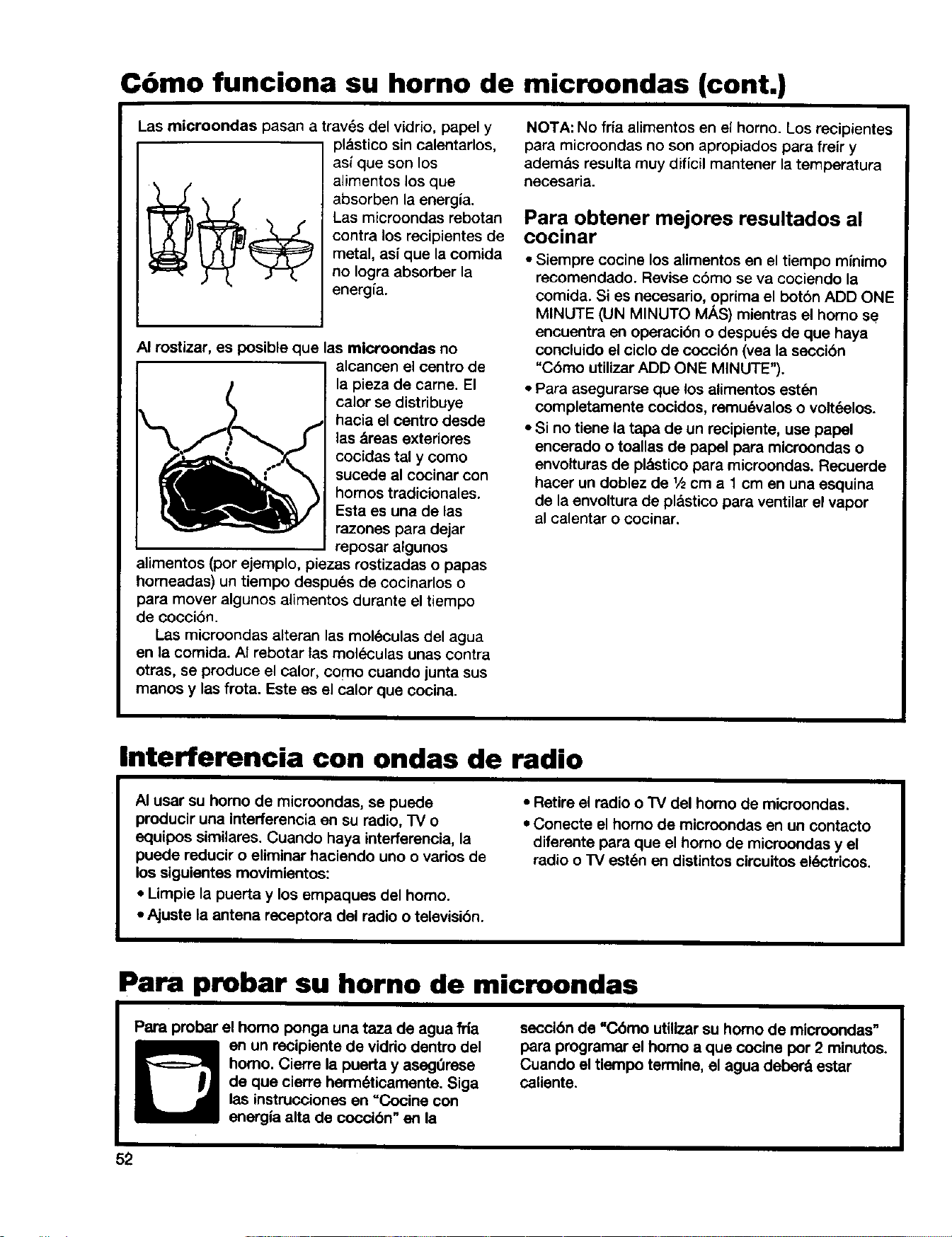
C6mo funciona su horno de microondas (cont.)
Las microondas pasan travSs del vidrio, papel y
pl._stico sin calentarlos,
asf que son los
alimentos los que
absorben la energia.
Las microondas rebotan
contra los recipientes de
metal, asf que la comida
no Iogra absorber la
energfa.
AI rostizar, es posible que las microondas no
alcancen el centre de
la pieza de came. El
calor se distribuye
hacia el centro desde
las _reas exteriores
cocidas tal y como
sucede al cocinar con
homos tradicionales.
Esta es una de las
razones para dejar
reposar algunos
alimentos (por ejemplo, piezas rostizadas o papas
homeadas) un tiempo despu6s de cocinarlos o
para mover algunos alimentos durante el tiempo
de coccibn.
Las microondas alteran las moleculas del agua
en la comida. AI rebotar tas moleculas unas contra
otras, se produce el calor, como cuando junta sus
manos y las frota. Este es el calor que cocina.
NOTA: No fr{a alimentos en el homo. Los recipientes
para microondas no son apropiados para freir y
ademas resulta muy dificil mantener la temperatura
necesaria.
Para obtener mejores resultados al
COclnar
• Siempre cocine los alimentos en el tiempo minimo
recomendado. Revise c6mo se va cociendo la
comida. Si es necesario, oprima el botbn ADD ONE
MINUTE (UN MINUTO MAS) mientras el homo se
encuentra en operacibn o despues de que haya
concluido el ciclo de coccibn (vea la seccibn
"Chino utilizar ADD ONE MINUTE").
• Para asegurarse que los alimentos est_=n
completamente cocidos, remu6valos o voltdelos.
• Si no tiene la tapa de un recipiente, use papel
encerado o toallas de papel para microondas o
envolturas de pl&sticopara microondas. Recuerde
hacer un doblez de 1/scm a 1 cm en una esquina
de laenvoltura de plastico para ventilar el vapor
al calentar o cocinar.
Interferencia con ondas de radio
AI usar su homo de microondas, se puede
producir una interferencia en su radio, TV o
equipos similares. Cuando haya interferencia, la
puede reducir o eliminar haciendo uno o varios de
los siguientes movimientos:
• Limpie la puerta y los empaques del homo.
• Ajuste la antena receptora del radio o televisibn.
• Retire el radio o "IV del homo de microondas.
• Conecte el homo de microondas en un contacto
diferante para que el homo de microondas y el
radio o TV est6n en distintos circuitos ek_'tricos.
Para probar su horno de microondas
Papa probar el homo ponga una taza de agua ilia
en un recipiente de vidrio dentro del
homo. Cierre la puerta y asegt_rase
de que cierre herm_ticamente. Siga
las instrucciones en "Cocine con
energia alta de coccibn" en la
seccibn de "Cbmo utillzar su homo de microondas"
para programar el homo a que cocine por 2 minutos.
Cuando el tiempo termine, el agua deber8 estar
caUente.
52
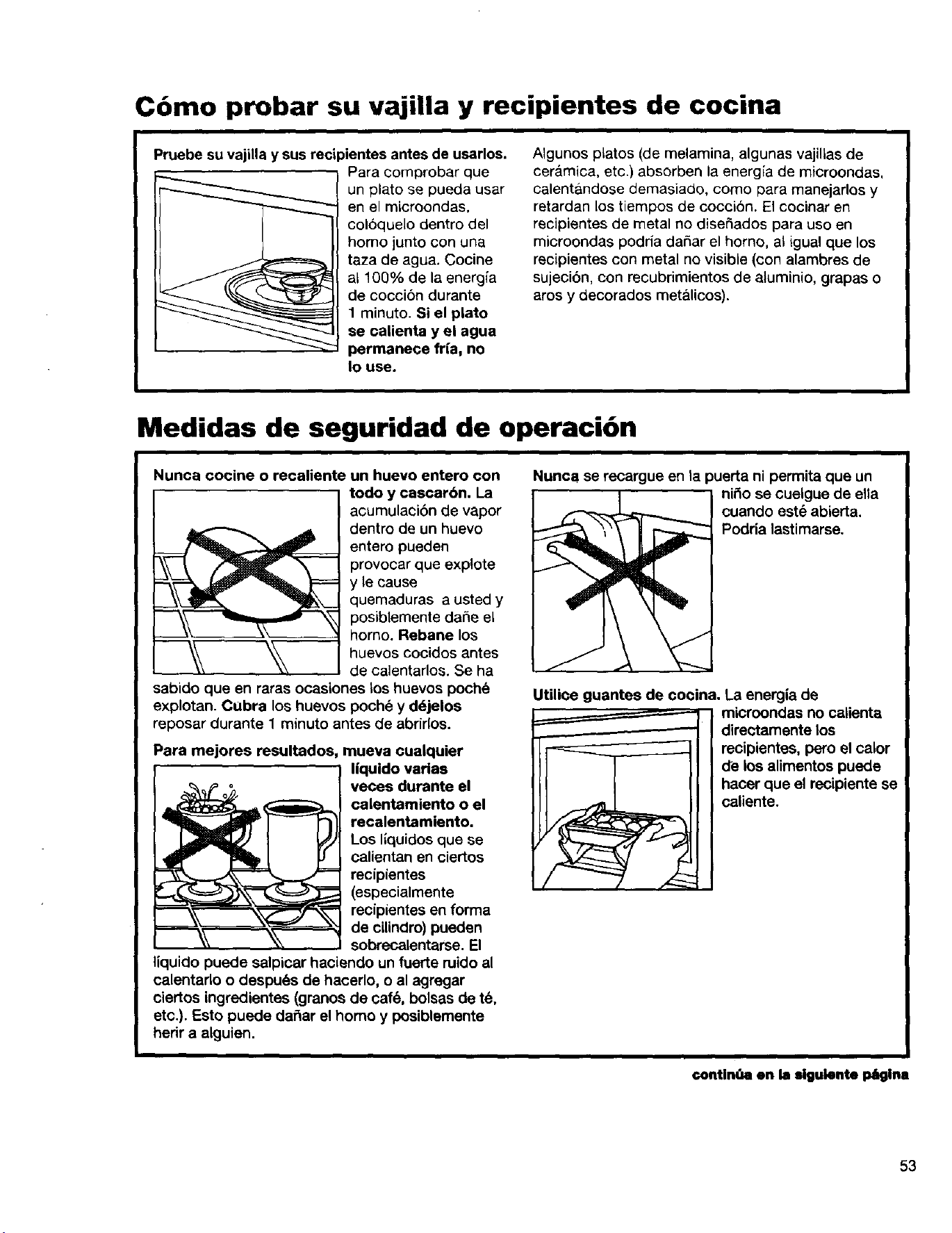
Cbmo probar su vajiUa y recipientes de cocina
Pruebe su vajilla y sus recipientes antes de usarlos.
Para com0robar que
un plato se pueda usar
en el microondas,
coloquelo dentro del
homo junto con una
taza de agua. Cocine
a1100% de la energ[a
de cocci6n durante
1 minuto. Si el plato
se calienta y el agua
permanece fr{a, no
Io use.
AIgunos platos (de melamina, algunas vajillas de
cer&mica, etc.) absorben la energia de microondas,
calent&ndose demasiado, como para manejarlos y
retardan los tiempos de cocci6n. El cocinar en
recipientes de metal no diseSados para uso en
microondas podria daSar el homo, al igual que los
recipientes con metal no visible (con alambres de
sujecibn, con recubrimientos de aluminio, grapas o
aros y decorados met&licos).
Medidas de seguridad de operaci6n
Nunca cocine o recaliente un huevo entero con
i odo y cascarbn. Laacumulaci6n de vapor
dentro de un huevo
entero pueden
provocar que exptote
y le cause
quemaduras a usted y
posiblemente daSe el
horno. Rebane los
I huevos cocidos antes
de calentarlos. Se ha
sabido queen raras ocasiones _os huevos poche
explotan. Cubra los huevos poch6 y ddjelos
reposar durante 1 minuto antes de abdrlos.
Para mejores resultados, mueva cualquier
liquido varias
veces durante el
calentamiento o el
recalentamiento.
Los llquidos que se
calientan en ciertos
recipientes
(especialmente
recipientes en forrna
de cilindro) pueden
sobrecalentarse. El
liquido puede salpicar haciendo un fuerte ruido al
calentado o despu6s de hacerlo, o al agregar
ciertos ingredientes (granos de caf& bolsas de t&
etc.). Esto puede dar_ar el homo y posiblemente
herir a alguien.
Nunca se recargue en la puerta ni permita que un
nmo se cuelgue de ella
cuando est_ abierta.
Podria lastimarse,
Utilice guantes de cocina. La energia de
microondas no calienta
I directamente los
recipientes, pero el calor
de los alimentos puede
hacer que el recipiente se
caliente.
contlnt'a en la siguiente p6glna
53
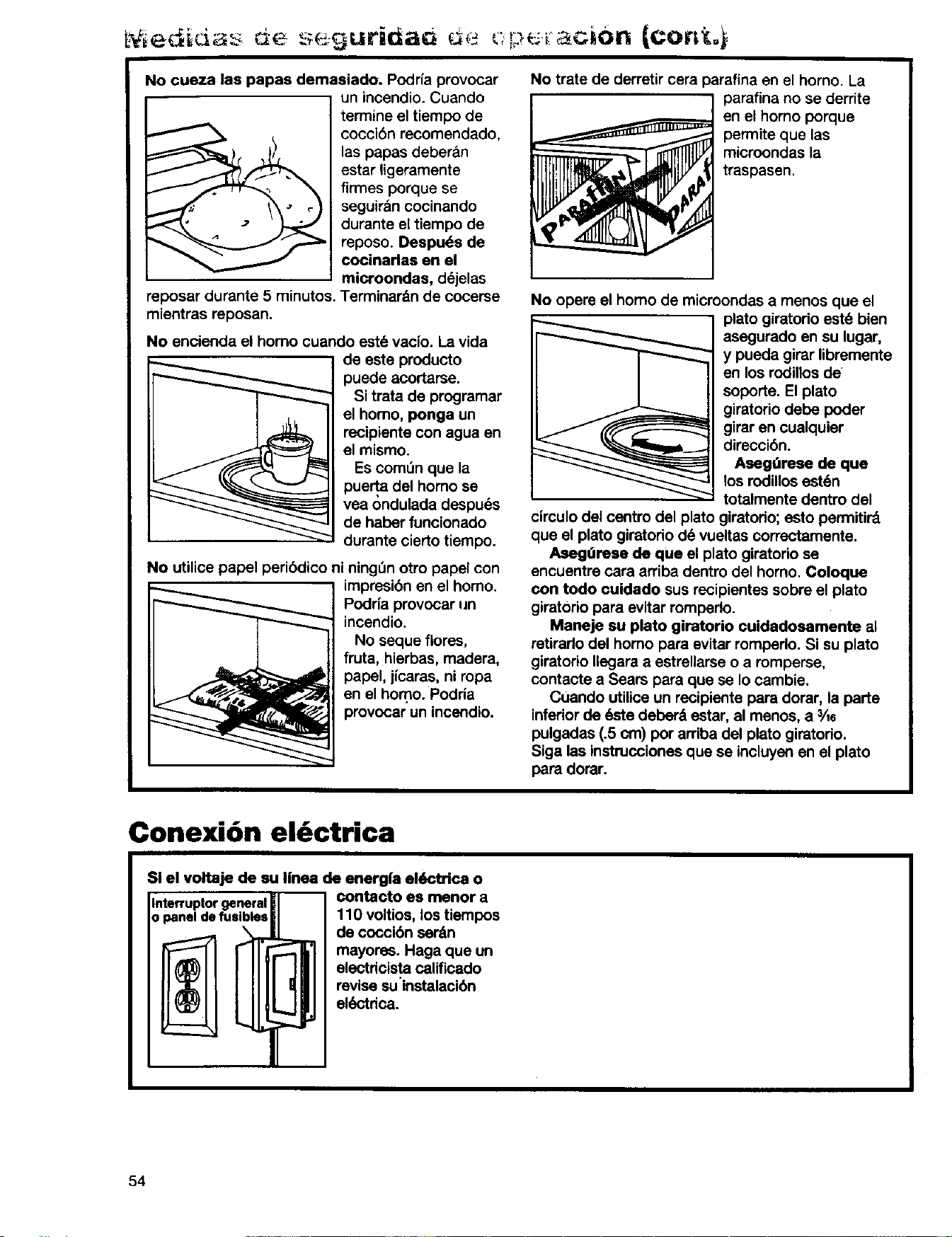
No cueza las papas demasiado. Podrfa provocar
reposar durante 5 minutos.
mientras reposan.
un incendio. Cuando
termine el tiempo de
cocci6n recomendado,
las papas deberan
estar ligeramente
firmes porque se
seguir&n cocinando
durante el tiempo de
reposo. Despu(_s de
cocinarlas en el
microondas, d(_jelas
Terminardn de cocerse
No encienda el homo cuando est6 vacfo. La vida
de este producto
puede acortarse.
Si trata de programar
el homo, ponga un
recipiente con agua en
el mismo.
Es comen que la
pue_a del homo se
yea ondulada despu_s
de haber funcionado
durante cierto tiempo.
No utilice papel peri6dico ni ningOn otro papel con
impresi6n en el homo.
Podr{a provocar un
incendio.
No seque flores,
fruta, hierbas, madera,
papel, jicaras, ni ropa
en el homo. Podria
provocar un incendio.
i i
No trate de derretir cera parafina en el horno. La
parafina no se derrite
en el homo porque
permite que las
microondas la
traspasen.
No opere el homo de microondas a menos que el
plato giratodo este bien
asegurado en su lugar,
y pueda girar libremente
en los rodinos de
soporte. El plato
giratorio debe poder
girar en cualquier
direcci(Sn.
Asegtirese de que
los rodillos est6n
totalmente dentro del
circulo del centro del plato giratodo; esto permitir_
que el plato giratorio d(_vueltas correctamente.
Asegtirese de que el plato giratorio se
encuentre cara arriba dentro del homo. Coloque
con todo cuidado sus recipientes sobre el plato
girat0rio para evitar romperlo.
Maneje su plato giratorio cuidadosamente al
retirarlo del homo para evitar romperlo. Si su plato
giratorio Ilegara a estrellarse o a romperse,
contacte a Sears para que se Io cambie.
Cuando utilice un recipiente para dorar, la parte
inferiorde q_-tedeber& estar, al menos, a 3Ae
pulgadas (.5 cm) pot arriba del plato giratodo.
Siga las instrucciones que se incluyen en el plato
para dorar.
Conexi6n el&ctrica
SI el voltaje de su Iinea de energ|a el(_trica o
Interruptor general
o panel de fuslbies
contacto es rnenor a
110 voltios, los tiempos
de coccibn ser_n
mayores. Haga que un
electdcista calificado
revise suinstalaci6n
el_-'tdca.
54
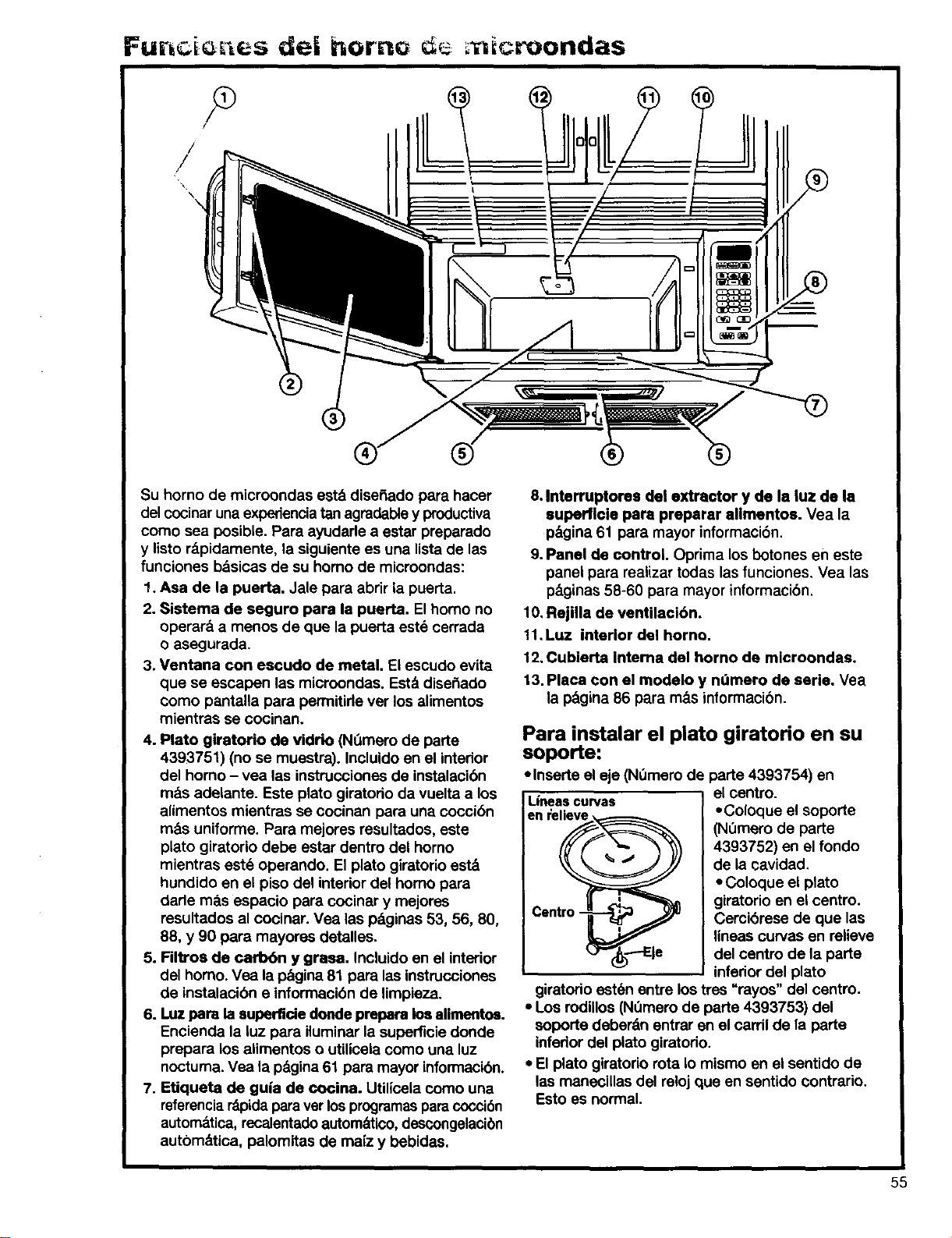
Furz i c s dei horno ; icroondas
,%
\
II
®
Su homo de microondas esterdise_ado para hacer
del cocinaruna experiencia tan agradabley productiva
como sea posible. Pare ayudarle a ester preparado
y listo r&pidamente, la siguiente es una lista de las
funciones bdsicas de su homo de microondas:
1. Asa de la puerta. Jale para abrir la puerta.
2. Sistema de seguro para la puerta. El homo no
operar& a menos de que la puerta este cerrada
o asegurada.
3. Ventana con escudo de metal. El escudo evita
que se escapen las microondas. Est,. diseSado
como pantalla para permitirle ver los alimentos
mientras se cooinan.
4. Plato giratorio de vidrio (Nt_merode parte
4393751) (no se muestra). Incluido en el interior
del homo - yea las instrucciones de instalacibn
rods adelante. Este plato giratorio da vuelta a los
alimentos mientras se cocinan para una cocci6n
m&s uniforme. Para mejores resultados, este
plato giratorio debe estar dentro del homo
mientras est6 operando. El plato giretorio est&
hundido en el piso del interior del homo para
darle mb.s espacio para cocinar y mejores
resultados al cocinar. Vea las 10_ginas53, 56, 80,
88, y 90 para mayores detalles.
5. Filtros de carbbn y grasa. Incluido en el interior
del homo. Vea la p_gina 81 para las instrucciones
de instalacibn e informacibn de limpieza.
6. I.uz pare la superflde donde prepare los alimentos.
Encienda la luz para iluminar la superficie donde
prepare los alimentos o utilicela como una luz
noctuma. Vea la pdgina 61 para mayor informacibn.
7. Etiqueta de gu|a de cocina. Utilicela como una
referencia r&pida para ver los programas para coccibn
automdtica, recalentado autom&tico,descongelacibn
autbmdtica, palomitas de ma[z y bebidas.
®
8. Interruptores del extractor y de la luz de la
superficle para preparar allmentos. Vea la
p&gina61 para mayor informaci6n.
9. Panel de control. Oprima los botones en este
panel para realizar todas las funciones, Vea las
p_ginas 58-60 para mayor informacibn,
10, Rejilla de ventilacibn.
11,Luz interior del homo.
12. Cubierta Intema del horno de mlcroondas.
13. Placa con el modelo y ndmero de serie. Vea
la pagina 86 para m_s informacibn.
Para instalar el plato giratorio en su
soporte:
• Inserte el eje (NOmero de
Lineascurvas
en relieve
Cen _tro_
_"(_----Eie
parte 4393754) en
el centre.
• Coloque el soporte
(Nemero de parte
4393752) en el fondo
de la cavidad,
• Coloque el plato
giratorio en el centro.
Cemibrese de que las
lineas ourvas en relieve
del centro de la parte
inferior del plato
giratorio est6n entre los tres "rayos" del centre.
• Los rodillos (Nt_merode parte 4393753) del
soporte deber&n entrar en el cardl de la parte
inferior del plato giratodo.
• El plato giratorio rota Io mismo en el sentido de
las maneciUas del reloj queen sentido contrario.
Esto es normal.
55
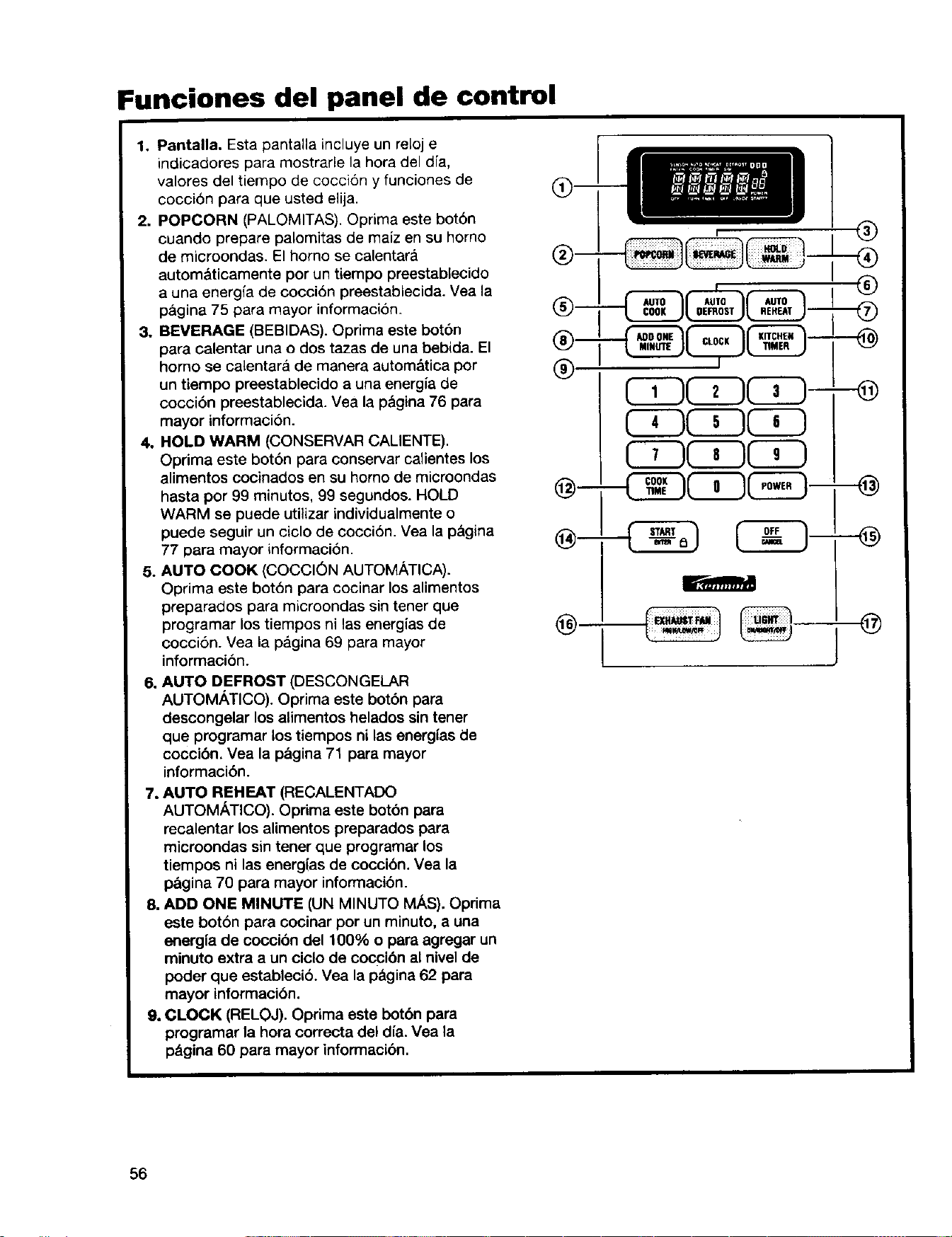
Funciones del panel de control
1, Pantalla. Esta pantalla incluye un mloj e
indicadores para mostrarle la hora del dfa,
valores del tiempo de cocci6n y funciones de
coccion para que usted elija
2. POPCORN (PALOMITAS) Oprima este bot6n
cuando prepare palomitas de maiz en su homo
de microondas El homo se calentar_
automaticamente por un tiempo preestablecido
a una energfa de coccion preestablecida Vea la
p&gina 75 para mayor informacion
3. BEVERAGE (BEBIDAS) Oprima este bot6n
para calentar una o dos tazas de una bebida El
homo se calentara de manera autom&tica pot
un tiempo preestablecido a una energia de
cocci6n preestablecida Vea la p&gina 76 para
mayor informacion
4. HOLD WARM (CONSERVAR CALIENTE)
Oprima este bot6n para conservar calientes los
alimentos cocinados en su homo de microondas
hasta por 99 minutos, 99 segundos. HOLD
WARM se puede utilizar individualmente o
puede seguir un ciclo de cocci6n Yea la p&gina
77 para mayor informaci6n
5. AUTO COOK (COCCI6N AUTOMATICA)
Oprima este bot6n para cocinar los alimentos
preparados para microondas sin tener que
programar los tiempos ni las energ(as de
cocci6n Vea la pagina 69 para mayor
informaci6n
6. AUTO DEFROST (DESCONGELAR
AUTOMATICO). Oprima este botbn para
descongelar los alimentos helados sin tener
que programar los tiempos ni las energfas de
coccibn. Vea la p&gina 71 para mayor
informacibn,
7. AUTO REHEAT (RECALENTADO
AUTOMATICO). Oprima este botbn para
recalentar los alimentos preparados para
microondas sin tener que programar los
tiempos ni las energfas de cocci6n. Vea la
pagina 70 para mayor informacibn.
8. ADD ONE MINUTE (UN MINUTO M/_S). Oprima
este botbn para cocinar por un minuto, a una
energfa de coccibn de1100% o para agregar un
minuto extra a un ciclo de coccibn al nivel de
poder que establecib. Vea la p_gina 62 para
mayor informacibn.
9. CLOCK (RELOJ). Oprima este botbn para
programar la hora correcta del dia. Vea la
p_gina 60 para mayor informacibn.
®
(ZZ)GD(ZS-
®
®
c"'" J J
56
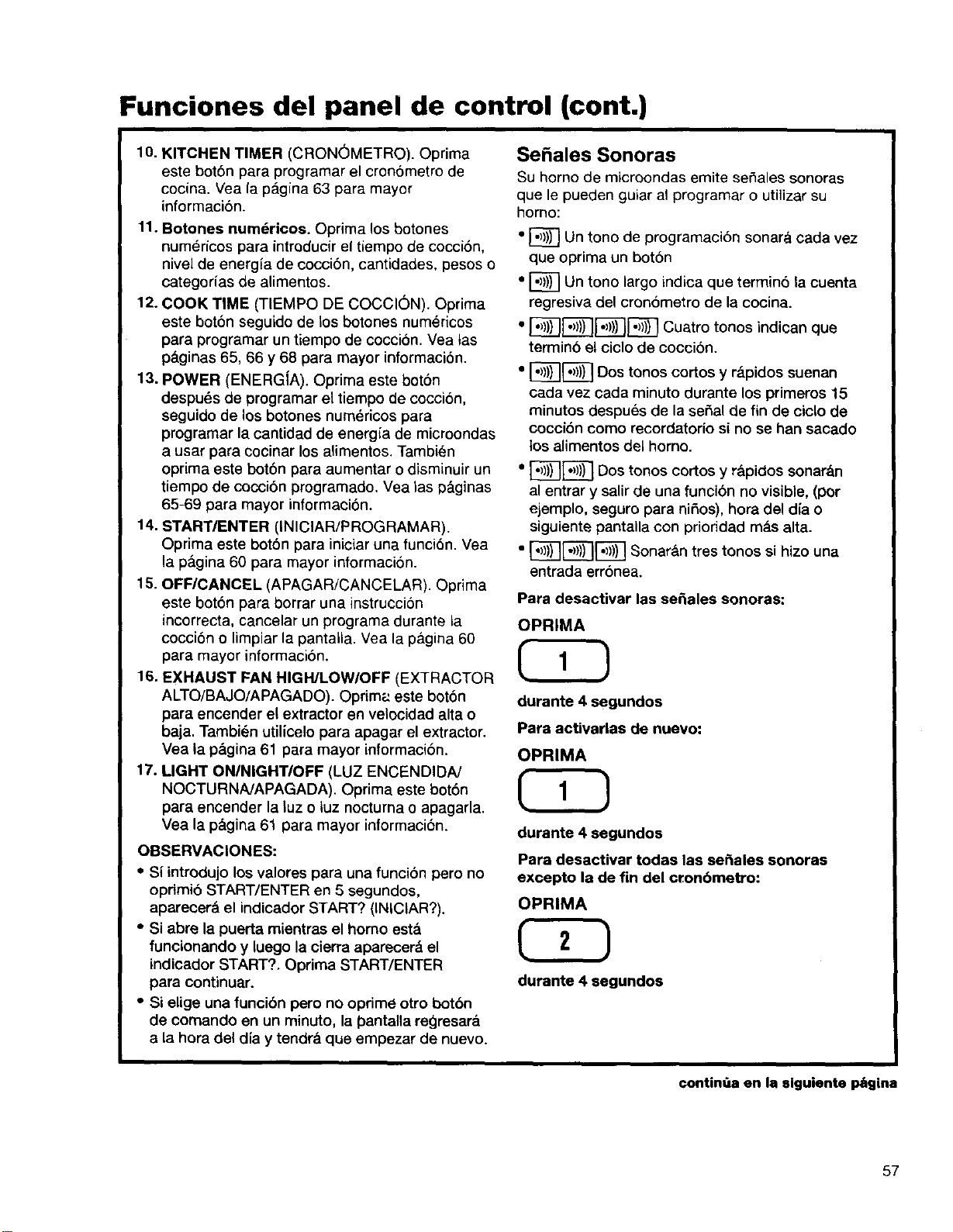
Funciones del panel de control (cont.)
10. KITCHEN TIMER (CRON_METRO). Oprima
este bot6n para programar el cron6metro de
cocina. Vea la p_lgina 63 para mayor
informaci6n.
11. Botones numdricos. Oprima los botones
numericos para introducir el tiempo de cocci6n,
nivel de energia de coccibn, cantidades, pesos o
categorias de alimentos.
12. COOK TIME (TIEMPO DE COCCION). Oprima
este bot6n seguido de los botones numericos
para programar un tiempo de coccion. Vea tas
p&ginas65, 66 y 68 para mayor informacibn.
13. POWER (ENERG[A). Oprima este boton
despu_s de programar el tiempo de coccion,
seguido de los botones num_ricos para
programar la cantidad de energia de microondas
a usar para cocinar los alimentos. Tambien
oprima este botbn para aumentar o disminuir un
tiempo de cocci6n programado. Vea las p&ginas
65-69 para mayor informaci6n.
14. START/ENTER (INICIAR/PROGRAMAR).
Oprima este bot6n para iniciar una funci6n. Vea
la p&gina 60 para mayor informaci6n.
15. OFF/CANCEL (APAGAR/CANCELAR). Optima
este bot6n para borrar una instrucciSn
incorrecta, cancelar un programa durante la
cocci6n o limpiar la pantalla. Vea la p_.gina 60
para mayor informaci6n.
16. EXHAUST FAN HIGH/LOW/OFF (EXTRACTOR
ALTO/BAJO/APAGADO). Oprim;: este botbn
para encender el extractor en velocidad altao
baja. Tambien utilicelo para apagar el extractor.
Vea la p&gina 61 para mayor informacibn.
17. LIGHT ON/NIGHTIOFF (LUZ ENCENDIDN
NOCTURNA/APAGADA). Oprima este botbn
para encender la luz o luz nocturna o apagarla.
Vea la p_.gina 61 para mayor informaci6n.
OBSERVACIONES:
• Si introdujo los valores para una funci6n pero no
opdmi6 START/ENTER en 5 segundos,
aparecera el indicador START? (INICIAR?).
• Si abre la puerta mientras el homo est&
funcionando y luego la cierra aparecer& el
indicador START?. Oprima START/ENTER
para continuar.
• Si elige una funcibn pero no oprime otro botbn
de comando en un minuto, la pantalla regresar_.
a la hora del dia y tendra que empezar de nuevo.
Sehales Sonoras
Su homo de microondas emite sefiales sonoras
que le pueden guiar al programar o utilizar su
homo:
• [_} Un tone de programaci6n sonara cada vez
que oprima un botbn
• I_ Un tono largo indica que terminb la cuenta
regresiva del cronbmetro de la cocina.
• [_-I)'))) I_ Cuatro tonos indican que
termino el ciclo de coccion.
" I_] Dos tonos cortos Y
r_.pidossuenan
cada vez cada minuto durante los primeros 15
minutos despues de la serial de fin de ciclo de
cocci6n como recordatorio si no se han sacado
los alimentos del homo.
" _[_ Dos tonos cortos y r_ipidos sonar&n
al entrar y salir de una funcibn no visible, (por
ejemplo, seguro para nifios), hora del dia o
siguiente pantalla con prioridad m_.s alta.
• ,,)1)ISooar ntrestonossihizouna
entrada err6nea.
Para desactivar las se_ales sonoras:
OPRIMA
CSD
durante 4 segundos
Para activarlas de nuevo:
OPRIMA
durante 4 segundos
Para desactivar todas las se_ales sonoras
excepto la de fin del cronbmetro:
OPRIMA
durante 4 segundos
continOa en la slguiente P6gina
57
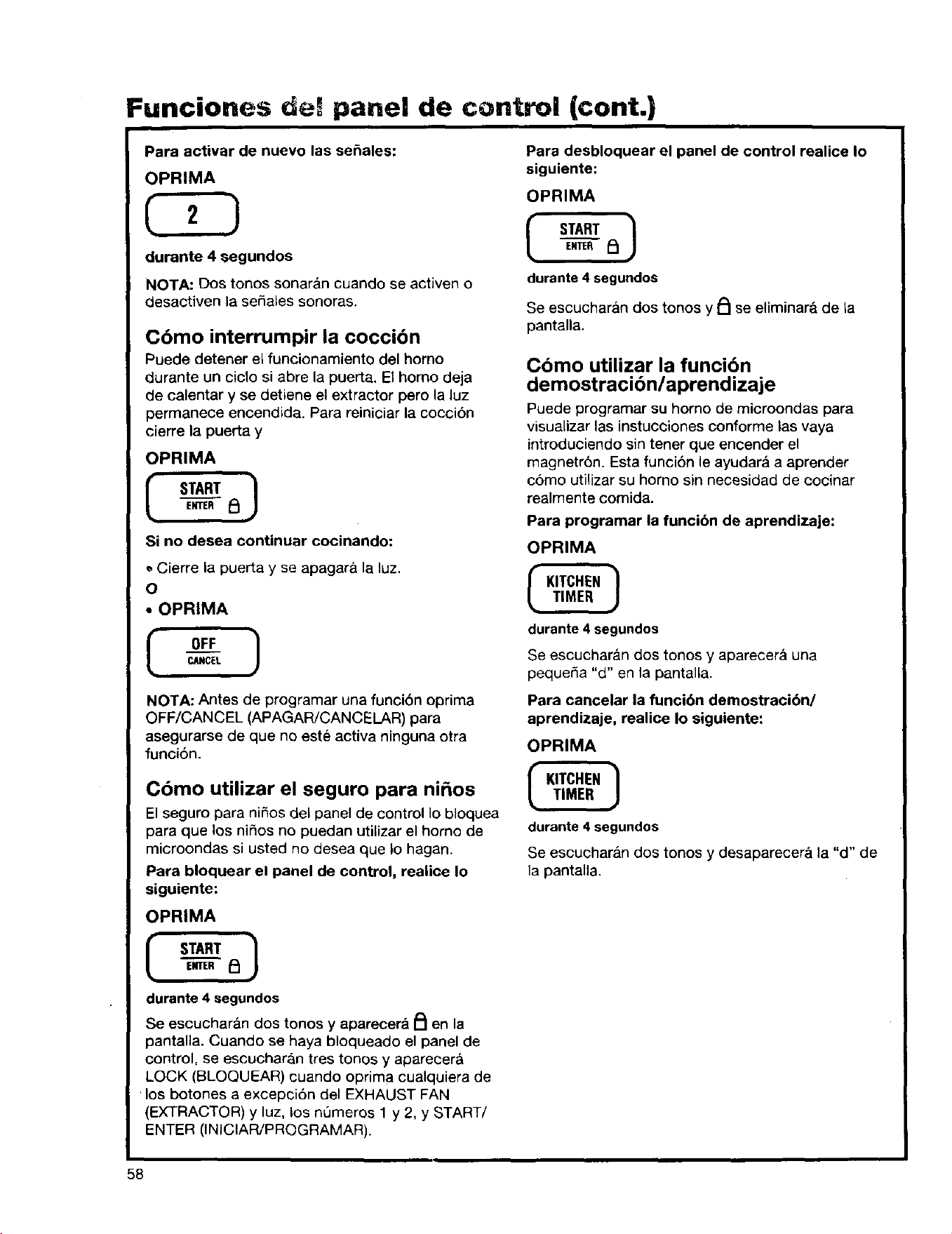
Funciones def panel de control (cont.)
Para activar de nuevo las se_ales:
OPRIMA
C2D
durante 4 segundos
NOTA: Dos tonos sonar_n cuando se activen o
Ciesactiven la sehales sonoras.
Cbmo interrumpir la coccibn
Puede detener el funcionamiento del homo
durante un ciclo si abre la puerta. El homo deja
de calentar y se detiene el extractor pero la luz
permanece encendida. Para reiniciar la coccion
cierre la puerta y
OPRIMA
I START 1
ENTER _1
Si no desea continuar cocinando:
Cierre la puerta y se apagara la luz.
O
• OPRIMA
I OFF 1
CANCEL
NOTA: Antes de programar una funci6n oprima
OFF/CANCEL (APAGAR/CANCELAR) para
asegurarse de que no este activa ninguna otra
funci6n.
Cbmo utilizar el seguro para ni_os
El seguro para ni_os del panel de control Io bloquea
para que los nihos no puedan utilizar el homo de
microondas si usted no desea que _ohagan.
Para bloquear el panel de control, realiee Io
siguiente:
OPR|MA
ENTER i_
durante 4 segundos
Se escuchar_n dos tonos y apareeera _ en la
pantalla. Cuando se haya bloqueado el panel de
control, se escucharan tres tonos y aparecer&
LOCK (BLOQUEAR) cuando oprima cualquiera de
los botones a excepci6n del EXHAUST FAN
(EXTRACTOR) y luz, los nQmeros 1 y 2, y START/
ENTER (INICIAR/PROGRAMAR).
Para desbloquear el panel de control realice Io
siguiente:
OPRIMA
[ S.RT]ENTER _:_
durante 4 segundos
Se escucharan dos tonos y PI se eliminar& de La
pantalla.
Como utilizar la funcibn
demostracibn/aprendizaje
Puede programar su homo de microondas para
visualizar las instucciones conforme tas vaya
introduciendo sin tenet que encender el
magnetr6n. Esta funcibn le ayudara a aprender
como utilizar su homo sin necesidad de cocinar
realmente comida.
Para programar la funcibn de aprendizaje:
OPRIMA
durante 4 segundos
Se escucharan dos tonos y aparecer_ una
pequeSa "d" en la pantalla.
Para cancelar la funci6n demostracibn/
aprendizaje, realice Io siguiente:
OPRIMA
durante 4 segundos
Se escuchar,_n dos tones y desaparecer_ la "d" de
la pantalla.
58
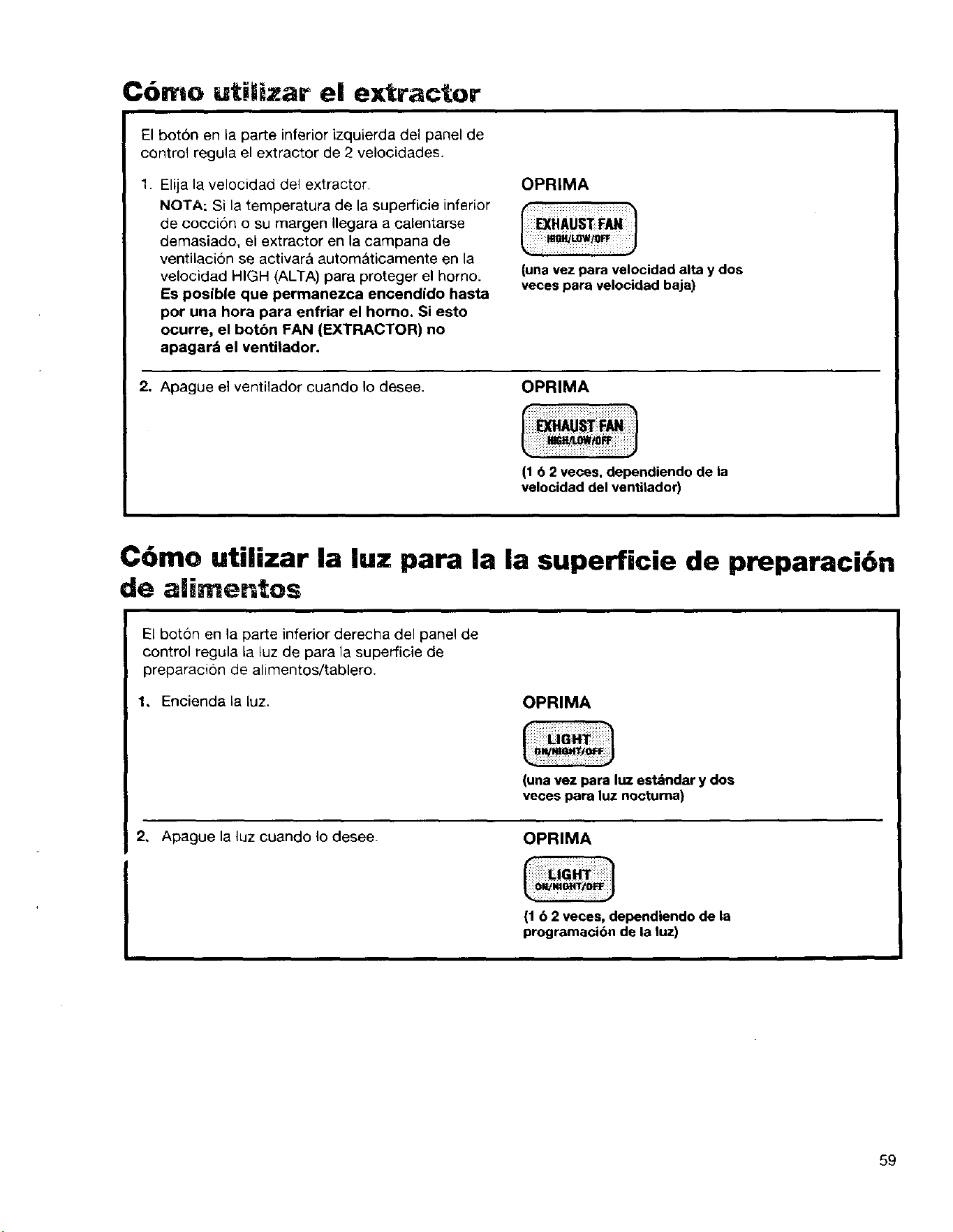
C6mo uti/iJzar el extractor
El boton en la parte inferior izquierda del panel de
control regula el extractor de 2 velocidades.
1. Elija la velocidad del extractor.
NOTA: Si la temperatura de la superficie inferior
de coccion o su margen Ilegara a calentarse
demasiado, el extractor en la campana de
ventilaci6n se activar& automaticamente en la
velocidad HIGH (ALTA) para proteger el homo.
Es posib|e que permanezca encendido hasta
por una hora para enfriar el horno. Si esto
ocurre, el botbn FAN (EXTRACTOR) no
apagard el ventilador.
OPRIMA
J
(una vez para velocidad alta y dos
veces para velocidad baja)
2, Apague el ventilador cuando Io desee.
OPRIMA
116 2 veces, dependiendo de la
velocidad del venti|ador)
C6mo utilizar la luz para la la superficie de preparaci6n
de alimentos
El bot6n en la parte inferior derecha del panel de
control regula la luz de para la superficie de
preparacion de alimentos/tablero.
1, Encienda la luz.
OPRIMA
(una vez para luz est_ndar y dos
veces para luz noctuma)
2, Apague la luz cuando Io desee. OPRIMA
(1 b 2 veces, dependiendo de la
programacibn de la luz)
59
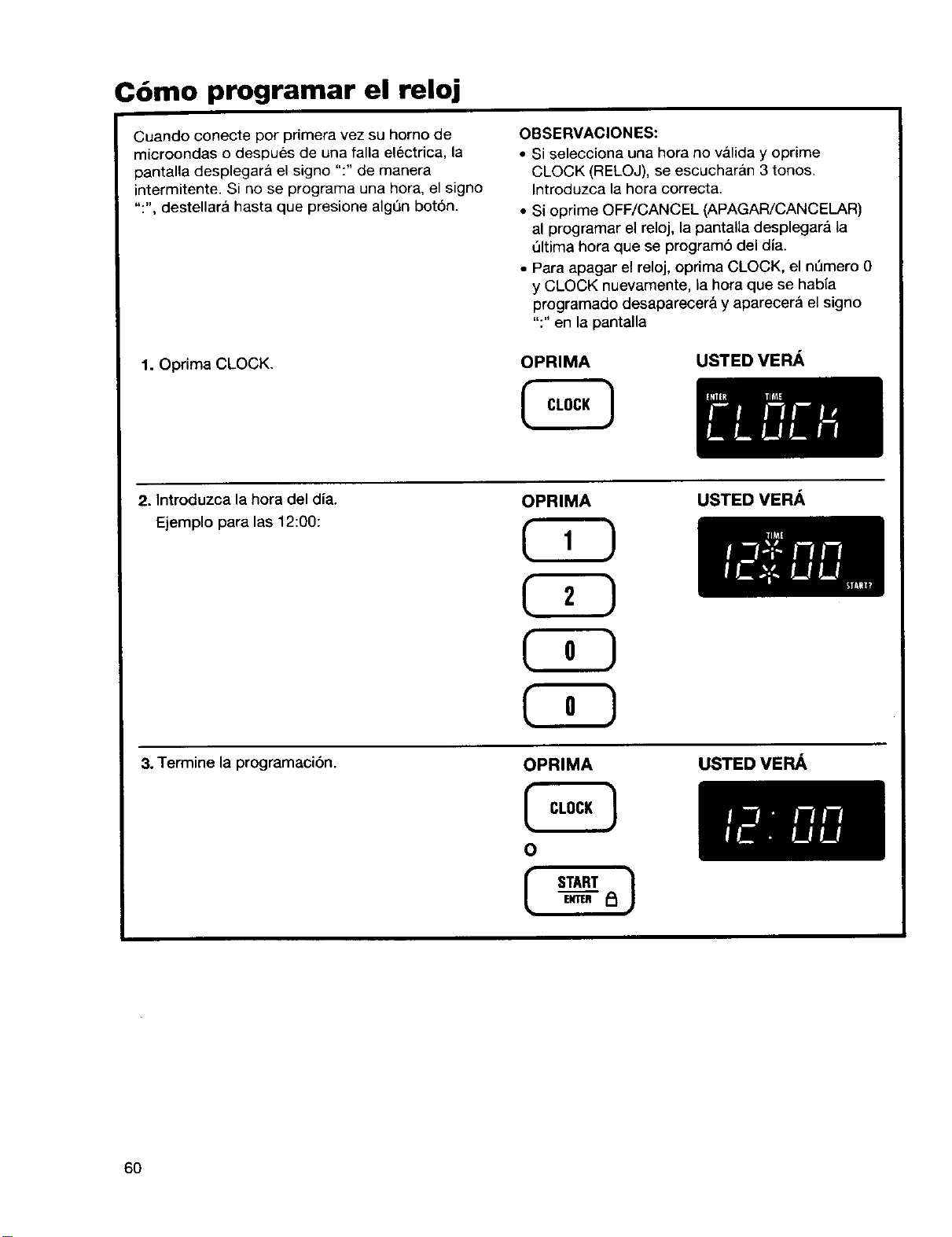
C6mo programar el reloj
Cuando conecte por primera vez su homo de
microondas o despues de una falla electrica, la
pantalla desplegara el signo ":" de manera
intermitente. Si no se programa una hora, el signo
":", destellara hasta que presione alg_n bot6n.
1. Oprima CLOCK.
OBSERVACIONES:
• Si selecciona una hora no valida y oprime
CLOCK (RELOJ), se escucharan 3 tonos.
Introduzca la hora correcta.
• Si oprime OFF/CANCEL (APAGAR/CANCELAR)
al programar el reloj, la pantaUa desplegar& ta
Qltima hora que se program6 del dia.
• Para apagar el reloj, oprima CLOCK, el n[_mero 0
y CLOCK nuevamente, la hora que se habia
programado desaparecer& y aparecer_ el signo
":" en la pantalla
OPRIMA
USTED VERA
2. Introduzca la hora del dia.
Ejemplo para las 12:00:
3. Termine la programaci6n.
OPRIMA
C3D
OPRIMA
O
START )
USTED VE_
USTED VE_
6O
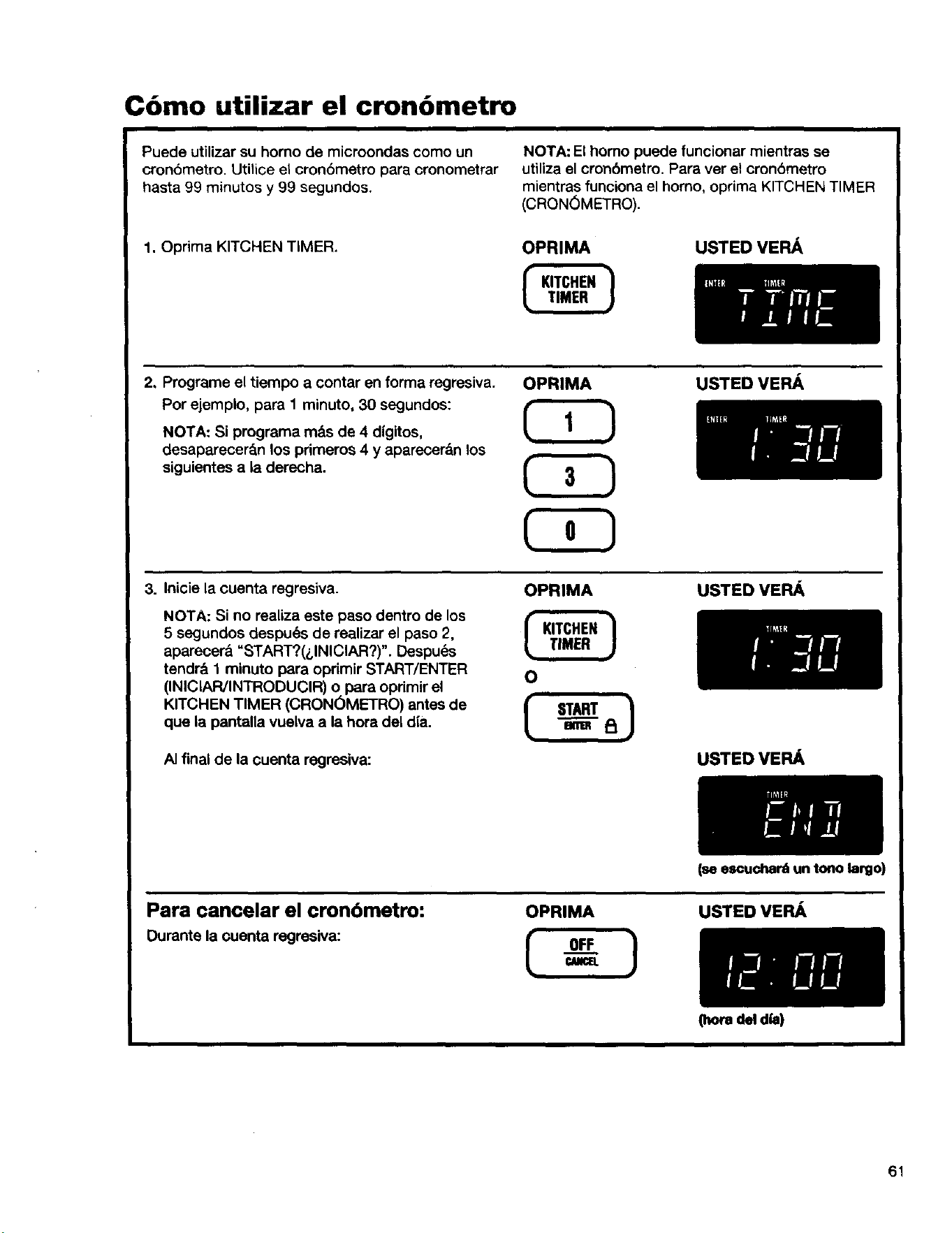
C6mo utilizar el cron6metro
Puede utilizar su horno de microondes como un
cronbmetro, utnice el cron6metro pars cronometrar
hasta 99 minutos y 99 segundos.
1. Oprima KITCHEN TIMER.
NOTA: El homo puede funcionar mientras se
utinza el cronbmetro. Para ver el cron6metro
mientras funciona el homo, oprima KITCHEN TIMER
(CRON6METRO).
OPRIMA
USTEDVERA
2. Programe el tiempo a contar en forma regresiva.
Por ejemplo, para 1 minuto, 30 segundos:
NOTA: Si programa m&s de 4 digitos,
desaparecerSn los primeros 4 y aparecer&n los
siguientes a la derecha.
OPRIMA
C3D
USTEDVERA
3. Inicie la cuenta regresiva.
NOTA: Si no realiza este paso dentro de los
5 segundos despu_s de realizar el paso 2,
aparecer_l "START?(_,INICIAR?)". Despu_s
tendril 1 minuto para oprimir START/ENTER
(INIClAR/INTRODUCIR) o para opdmir el
KITCHEN TIMER (CRONOMEFRO) antes de
que la pantalla vuelva a la hora del d{a.
AI final de la cuenta regresiva:
OPRIMA USTED VERA
USTEDVERA
Para cancelar el cronbmetro:
Ourante la ¢uenta regresiva:
OPRIMA
OFF 1
(seescucha_ un tono largo)
USTED VER/_
[horadel dia)
61
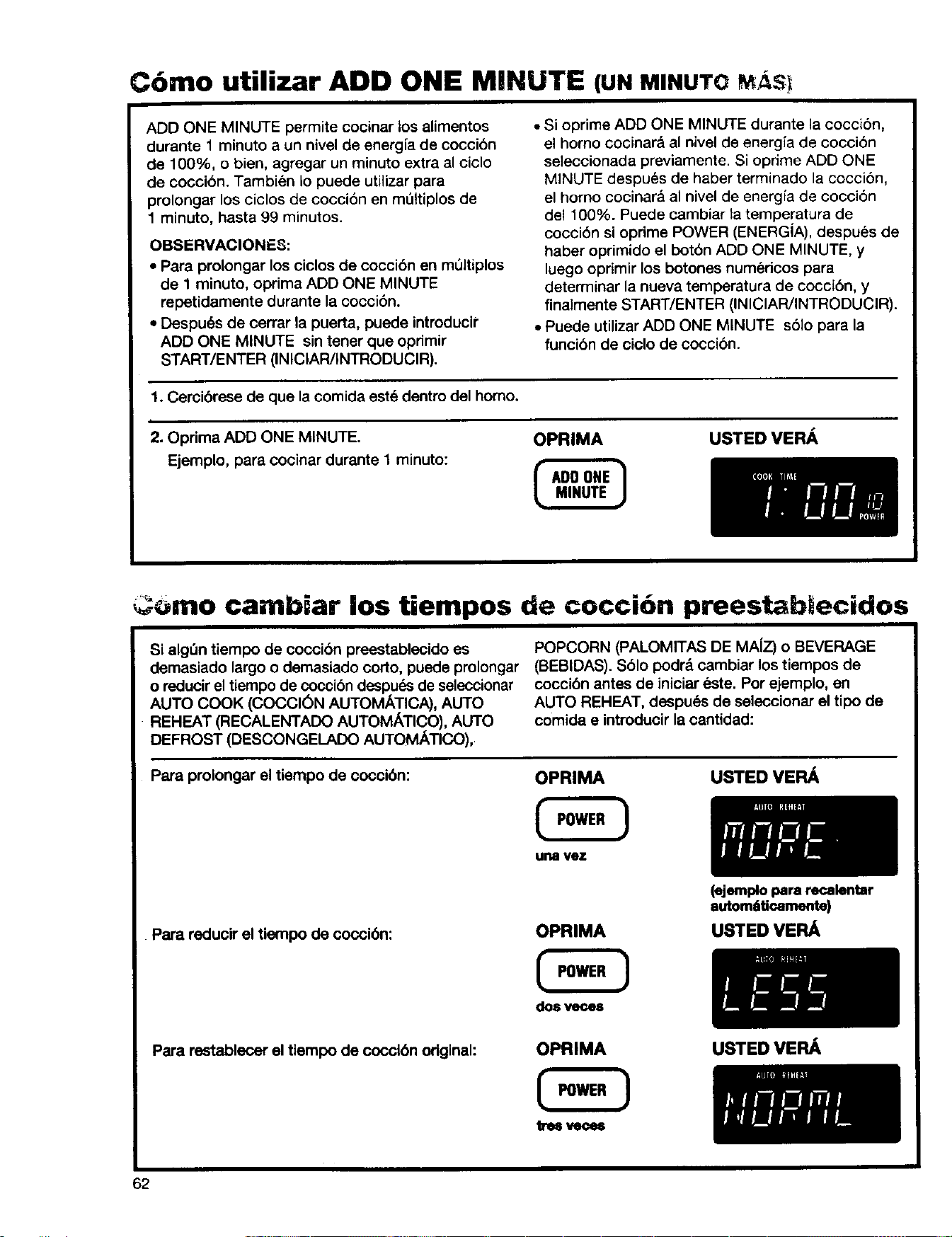
Cbmo utilizar ADD ONE MINUTE (UNMINUTOM_,S!
ADD ONE MINUTE permite cocinar los alimentos
durante 1 minuto a un nivel de energ{a de coccibn
de 100%, o bien, agregar un minuto extra al ciclo
de coccion. Tambien Io puede utilizar para
prolongar los ciclos de coccibn en mt_ltiplos de
1 minuto, hasta 99 minutos.
OBSERVACIONES:
• Para prolongar los ciclos de coccibn en mt_ltiplos
de 1 minuto, oprima ADD ONE MINUTE
repetidamente durante la cocci6n.
• Despu(_s de cerrar la puerta, puede introducir
ADD ONE MINUTE sin tener que opdmir
START/ENTER (INICIAR/INTRODUCIR).
• Si oprime ADD ONE MINUTE durante la cocci6n,
el homo cocinar_l al nivel de energia de cocci6n
seleccionada previamente. Si oprime ADD ONE
MINUTE despu_s de haber terminado la coccion,
el homo cocinar& al nivel de energia de coccibn
de1100%. Puede cambiar ta temperatura de
coccibn si oprime POWER (ENERGiA), despues de
haber oprimido el botbn ADD ONE MINUTE, y
luego oprimir los botones numericos para
determinar la nueva temperatura de coccibn, y
finalmente START/ENTER (INIClAR/INTRODUClR).
• Puede utilizar ADD ONE MINUTE sblo para la
funcibn de ciclo de coccion.
1. Cercibrese de que la comida este dentro del homo.
i
2. Oprima ADD ONE MINUTE.
Ejemplo, para cocinar durante 1 minuto:
OPRIMA USTED VE PJ_.
omo cambiar los tiempos de coccion preestabtecidos
Si alg_n tiempo de coccibn preestablecido es
demasiado largo o demasiado corto, puede prolongar
o reducirel tiempo de coccibn despu_s de seleccionar
AUTO COOK (COCCl6N AUTOMATICA), AUTO
REHEAT (RECALENTADO AUTOMATICO), AUTO
DEFROST (DESCONGELADO AUTOMATIC, O),
POPCORN (PALOMITAS DE MA{Z) o BEVERAGE
(BEBIDAS). Sblo podr& cambiar los tiempos de
coccibn antes de iniciar este. Por ejemplo, en
AUTO REHEAT, despu6s de seleccionar el tipo de
comida e introducir la cantidad:
Para prolongar el tiempo de coccibn:
OPRIMA
unsvez
USTED VEFL_
Para reducir el tiempo de coccibn:
OPRIMA
do8 vece8
(ejemplo para recalentar
auton_ticamente)
USTED VEP_
Para restablecer el tiempo de coccibn original:
OPRIMA
62
USTED VEPJ_
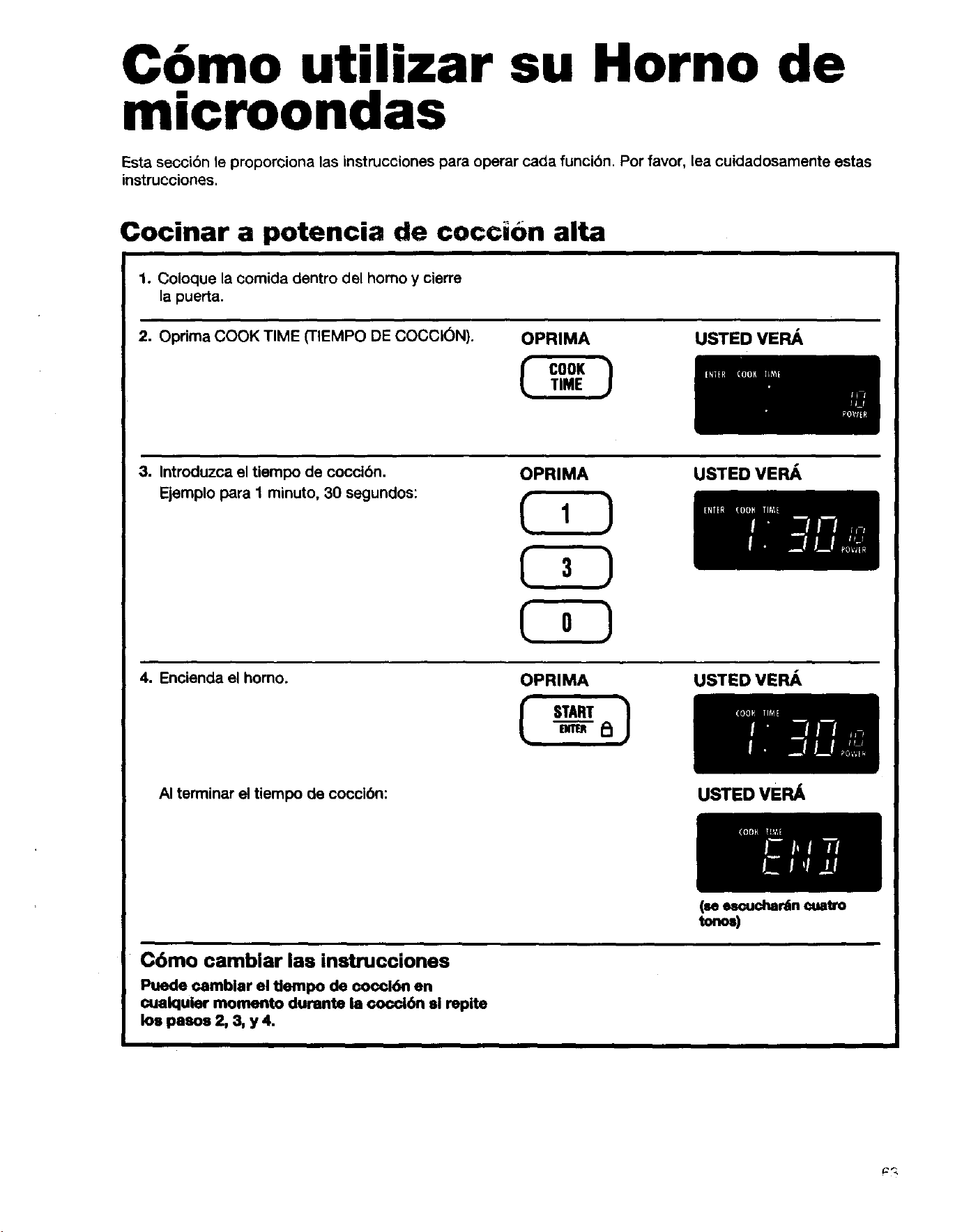
C6mo utilizar su Horno de
microondas
Esta seccibn le proporciona las instrucciones para operar carla funci6n. Por favor, lea cuidadosamente estas
instrucciones.
Cocinar a potencia de coccibn alta
1. Coloque la comida dentro del homo y cierre
la puerta.
2. Oprima COOK TIME (TIEMPO DE COCCK_N). OPRIMA
USTEDVERA
3. Introduzca el tiempo de coccibn.
Ejemplo para 1 minuto, 30 segundos:
OPRIMA USTED VERA
4. Encienda el horno.
OPRIMA USTEDVERA
AI terminar el tiempo de coccibn:
Cbmo camblar las instrucciones
Puede ¢amblar el tiempo de coccl6n en
cuaiquier momento durants ia oocci6n si repite
los pasos 2, 3, y 4.
USTED VER_
(seescuchar_n cuatro
tonos)
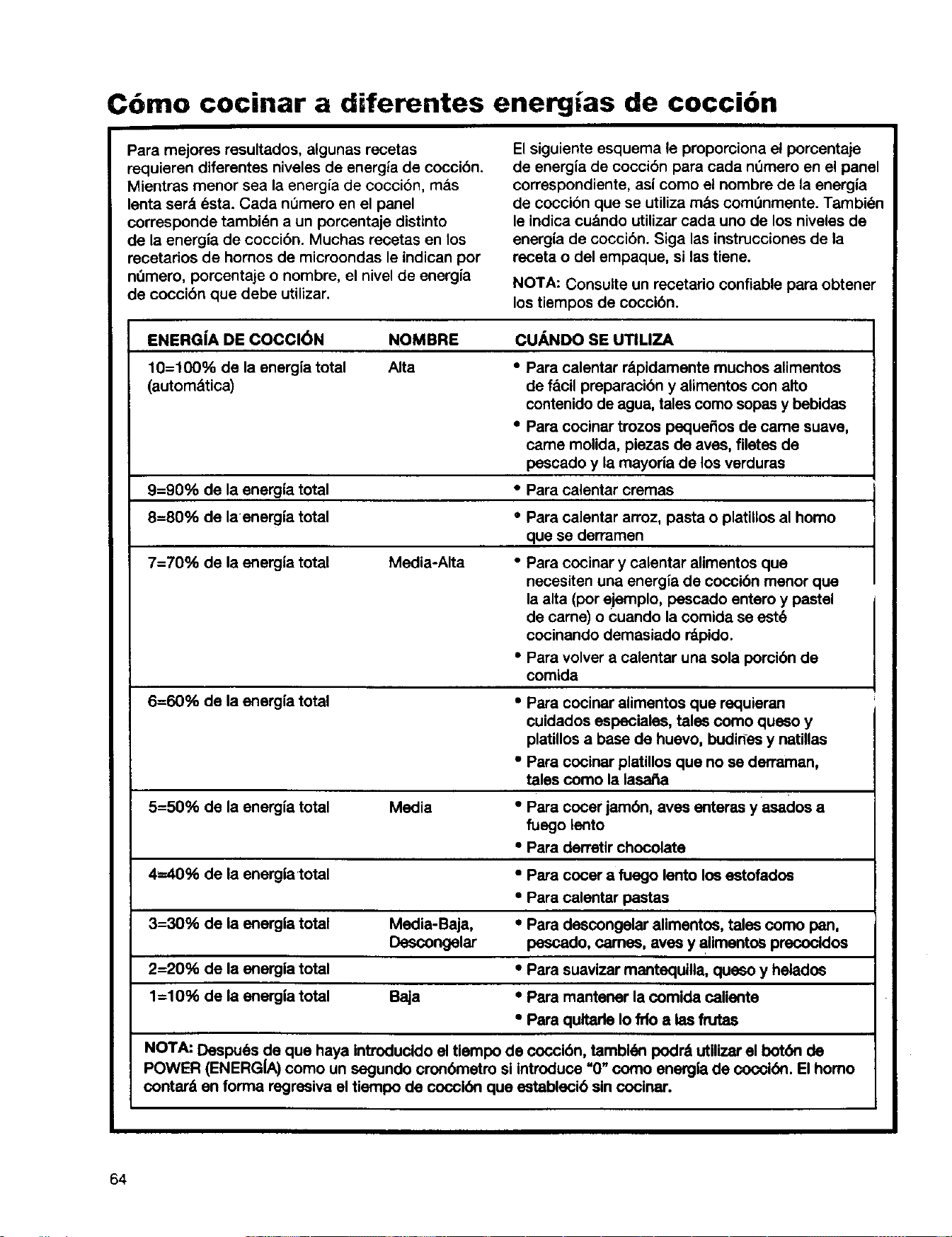
C6mo cocinar a diferentes energias de cocci6n
Para mejores resultados, algunas recetas
requieren diferentes niveles de energia de cocci6n.
Mientras menor sea la energia de cocci6n, m_.s
lenta ser_. dsta. Cada nOmero en el panel
corresponde tambidn a un porcentaje distinto
de la energia de coccibn. Muchas recetas en los
recatados de hornos de microondas le indican por
nOmero, porcantaje o nombre, el nivel de energia
de coccibn que debe utilizar.
El siguiente esquema le proporciona el porcentaje
de energ{a de coccibn para cada nt_mero en el panel
correspondiente, as{ como el nombre de la energia
de coccion que se utiliza m_s comOnmente. Tambidn
le indica cu&ndo utilizar cada uno de los niveles de
energ{a de cocci6n. Siga las instrucciones de la
receta o del empaque, si las tiene.
NOTA: Consulte un recetario confiable para obtener
los tiempos de coccibn.
ENERG|A DE COCCl6N NOMBRE CUANDO SE UTILIZA
10=100% de la energfa total Alta • Para calentar rSpidamente muchos alimentos
(automStica) de facil preparacibn y alimentos con alto
contenido de agua, tales como sopas y bebidas
•Para cocinar trozos paquefios de came suave,
came molida, piezas de aves, filetes de
pescado y la mayoria de los verdures
9=90% de la energia total •Para calentar cremes
8=80% de la energia total •Para calentar arroz, pasta o platillos al homo
que se derramen
7=70% de la energ|a total Media-Alta •Para cocinar y calentar alimentos que
necesiten una energia de coccibn manor que
laalta (pot ejemplo, pescado entero y pastel
de came) o cuando la comida se est6
cocinando demasiado rdpido.
•Para volver a calentar una sola porcibn de
comida
6=60% de la energfa total •Para cocinar alimentos que requieran
cuidedos especiales, tales como queso y
platillos a base de huevo, budirtes y natUlas
• Para cocinar platillos que no se derraman,
tales como la lasafia
5=50% de la energfa total Media •Para cocer jambn, aves enteras y asados a
fuego lento
•Para derretir chocolate
4--40% de la energia'total •Para cocer a fuego lento los estofados
•Para calentar pastas
3=30% de ia energia total Media-Baja, •Para descongelar alimentos, tales como pan,
Descongelar pescado, cames, aves y alimentos precocidos
2=20% de la energia total •Para suavizar mentaquina, queso y helados
1=10% de la energ|a total Baja •Para mantener la comida calienta
°Para qultade Io fdo alas frutas
NOTA: Despu6s de que haya introducido el tiempo de coocibn,=_mbidn podr_ utilizer el botbn de
POWER (ENERGL_) como un segundo cronbmetro si introduce 0 como energia de coocibn. El homo
contar& en forma regresiva el tiempo de coccibn que establecib sin cocinar.
64
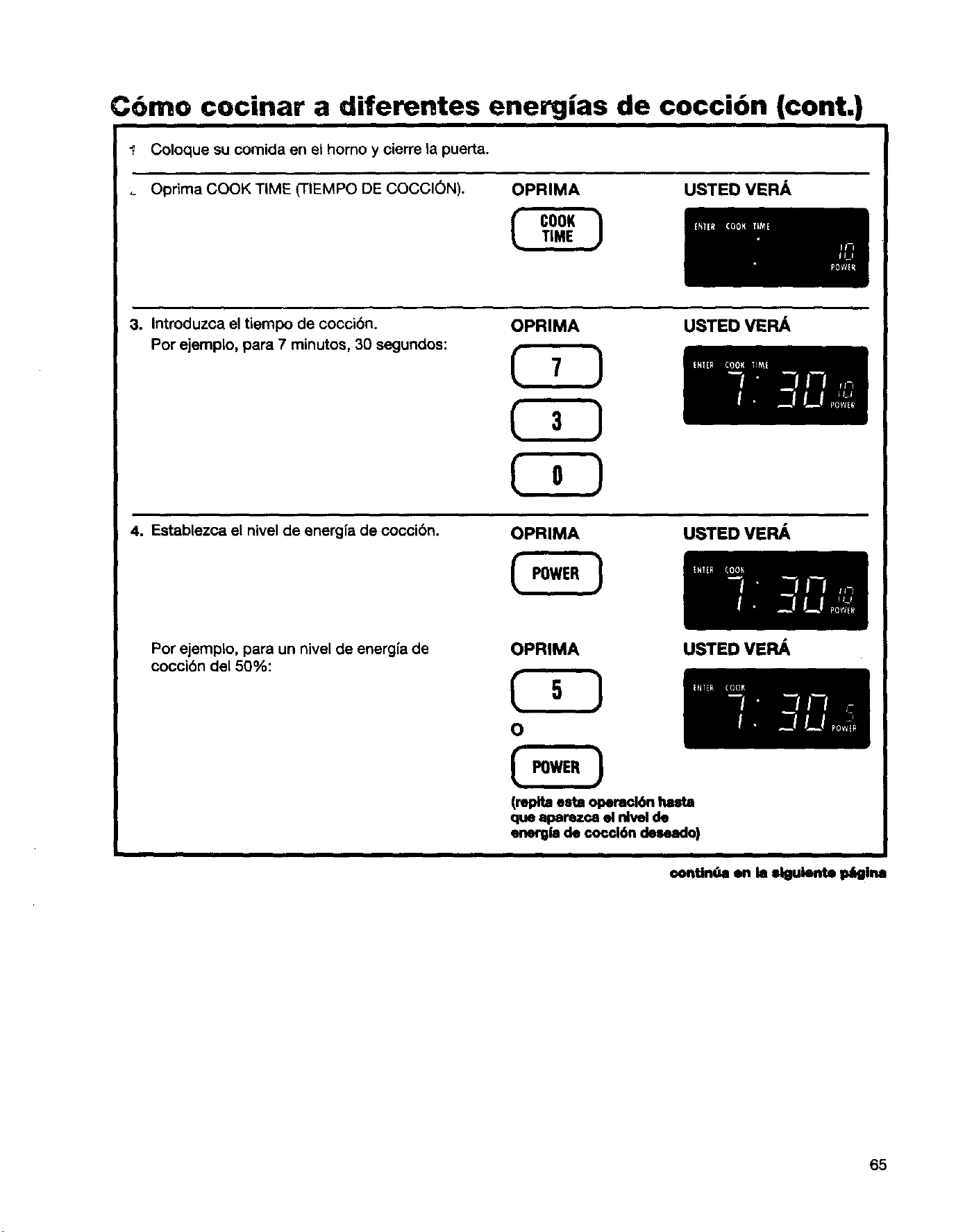
C6mo cocinar a diferentes energias de cocci6n (cont.)
",, Coloque su comida en et homo y cierre la puerta.
Oprima COOK TIME (TIEMPO DE COCCION). OPRIMA
USTED VERA
3. Introduzca el tiempo de cocci6n.
Por ejemplo, para 7 minutos, 30 segundos:
OPRIMA USTEOVERA
4. Establezca el nivel de energia de coccibn. OPRIMA USTEDVERA
Por ejemplo, para un nivel de energfa de
coccibn de150%:
OPRIMA
USTED VERA
(repita esta opemci6n hasta
que aparezca el Idvel de
energfa de cor,d6n cleseaclo)
€ontinUa on la slguiente p6gina
65
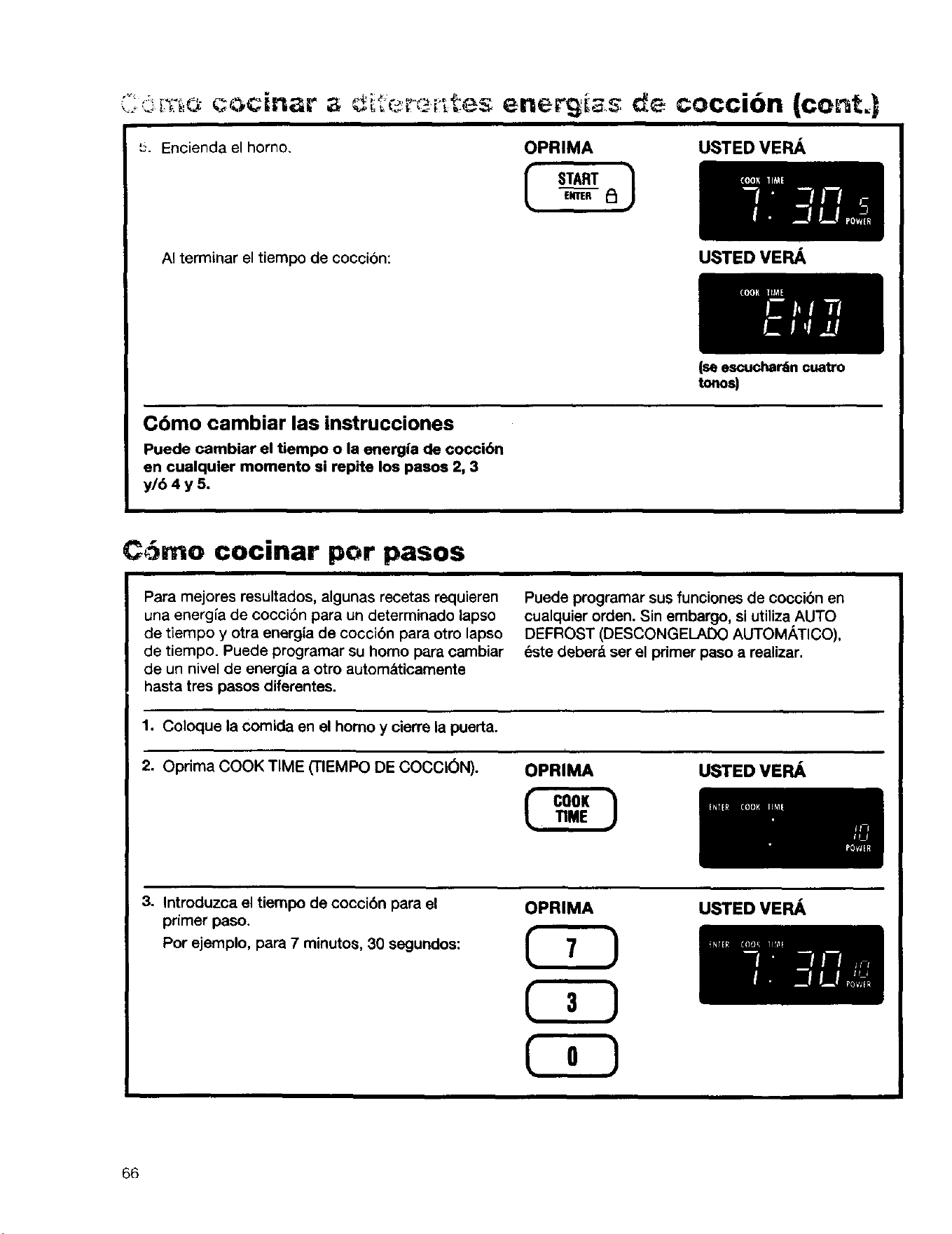
'=. Enciendaelhorno. OPRIMA USTED VEFLA
E_mER _
AI terminar el tiempo de coccion:
Cdmo cambiar las instrucciones
Puede cambiar el tiempo o la energ|a de cocci6n
en cualquier momento si repite los paeos 2, 3
y/6 4 y 5.
C6mo cocinar por pasos
Para mejores resultados, algunas recetas requieren
una energ{a de cocci6n para un determinado lapso
de tiempo y otra energia de cocci6n para otro lapso
de tiempo. Puede programar su homo para cambiar
de un nivel de energia a otro autom_tticamente
hasta tree pasos diferentes.
USTEDVERA
(se escuchar6n cuatro
tonos)
Puede programar sus funciones de cocci6n en
cualquier orden. Sin embargo, siutiliza AUTO
DEFROST (DESCONGELADO AUTOMATICO),
6ste deberd ser el primer paso a realizar.
1. Coloque la cornida en el homo y cierre la puerta.
2. Oprima COOK TIME (TIEMPO DE COCCION).
OPRIMA USTED VERA
3. Introduzca el tiempo de coccibn para el
primer paso.
Por ejemplo, para 7 minutos, 30 segundos:
OPRIMA USTED VERA
66
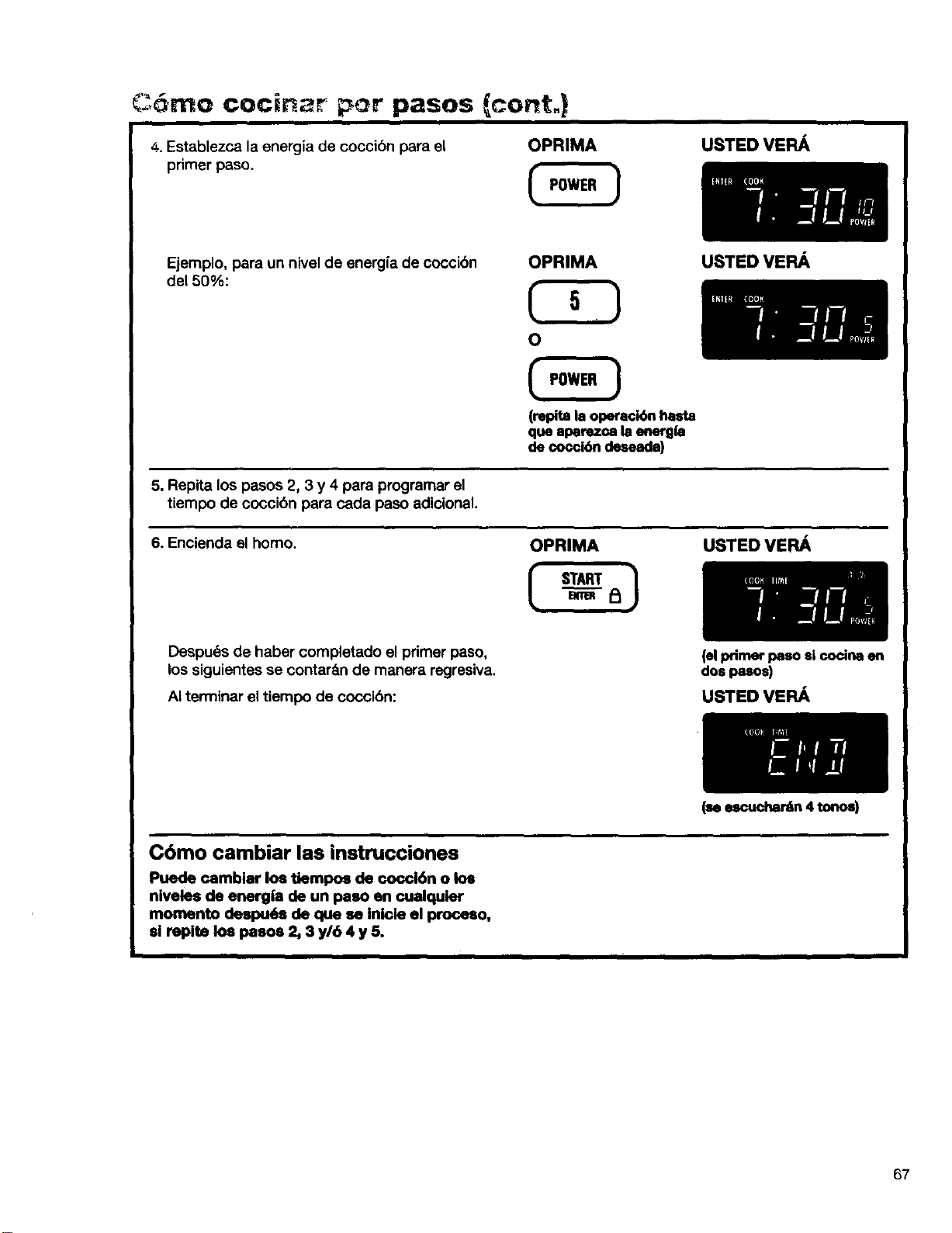
C:,6mo cocinar por pasos cont.)
4, Establezca la energia de cocci6n para el OPRIMA
primer paso.
USTED VEFIA
Ejemplo, para un nivel de energ{a de coccibn
de150%:
USTED VEPu_
OPRIMA
(repita la operaci6n hasta
que aparezc,a la energla
de cocci6n deseada)
5. Repita los pasos 2, 3 y 4 para programar el
tiempo de coccibn para cada paso adicional.
6. Encienda el homo. OPRIMA USTED VERA
Despu6s de haber completado el primer paso,
los siguientes se contar&n de manera regresiva,
AI terminar el tiempo de coccibn:
(elprimer paso si cocina en
dos pasos)
USTED VE FL&,
Cbmo cambiar las instrucciones
Puede camblar los tiempos de cocci6n o los
niveles de energ|a de un paso en cualquler
momento despu6a de que se Inlcle el proceso,
sl replte los paeos 2, 3 y/6 4 y 5.
(_escucha_n4tonos)
67
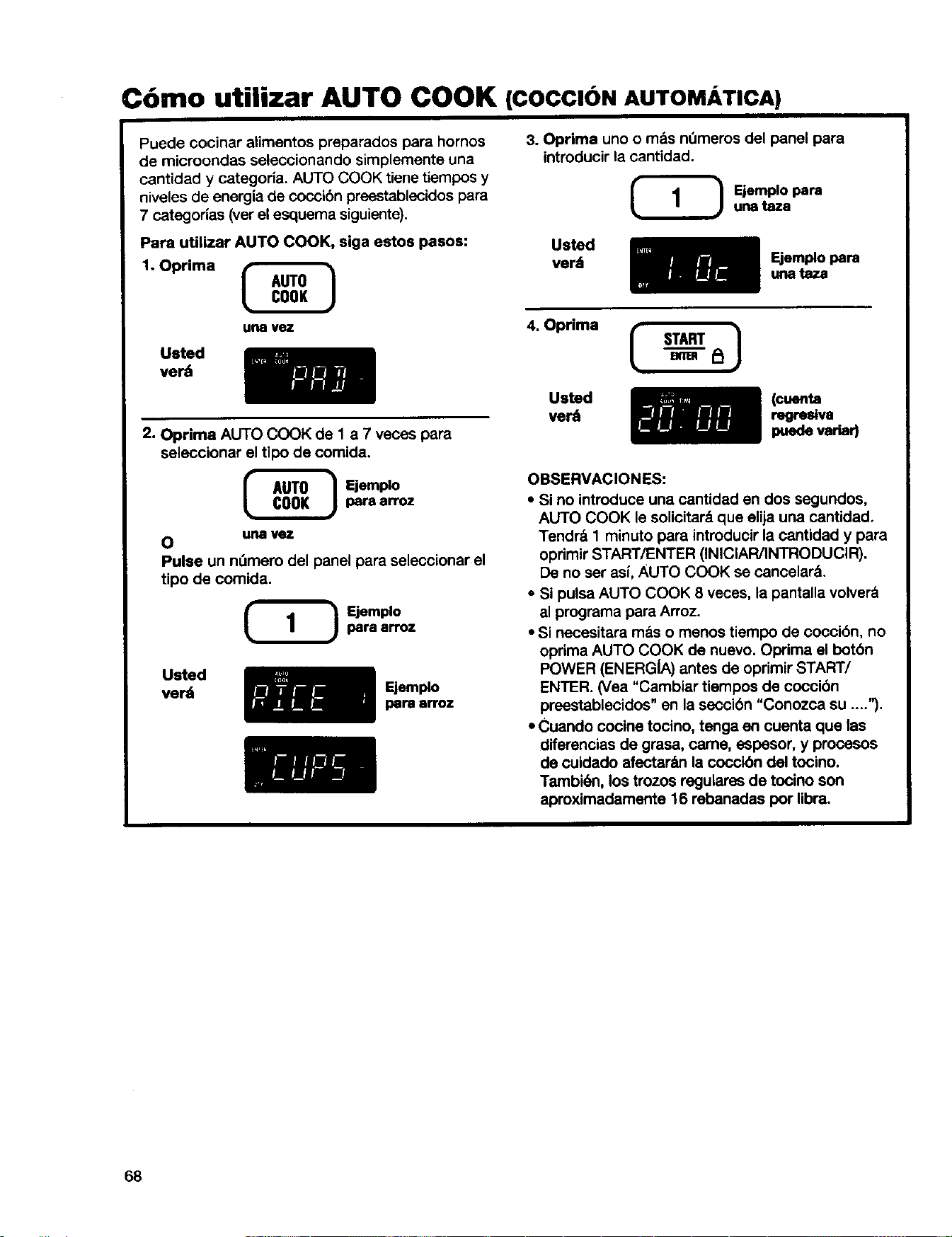
Cbmo utilizar AUTO COOK (COCCION AUTOMATICA)
Puede cocinar alimentos preparados para hornos
de microondas seleccionando simplemente una
cantidad y categoria. AUTO COOK tiene tiempos y
niveles de energia de coccibn preestablecidos para
7 categorlas (ver el esquema siguiente).
Para utilizar AUTO COOK, siga estos pasos:
1. Oprima
urw vez
Usted
verd
2. Oprima AUTO COOK de 1 a 7 veces para
seleccionar el tipo de comida.
_ E|emplopera 8_z
0 UrlRI vez
Pulse un nL3merodel panel para seleccionar el
tipo de comida.
Ejemplo
para arroz
Usted
ver_
Ejemplo
pare arroz
3. Oprima uno o m&s n_meros del panel para
introducir la cantidad.
Ejemplo para
una taza
Usted
ver_
Ejemplo para
una taza
4. Oprima
Usted
verd
(¢uenta
regrestva
puedevariad
OBSERVACIONES:
• Si no introduce una cantidad en dos segundos,
AUTO COOK le solicitard que elija una cantidad+
Tendr& 1 minuto para introducir la cantidad y para
oprimir START/ENTER (INICIAR/INTRODUCIR).
De no ser asf,AUTO COOK se cancelar&.
- Si pulsa AUTO COOK 8 veces, la pantalla volverd
al programa para Arroz.
• Si necesitara mds o menos tiempo de coccibn, no
oprima AUTO COOK de nuevo. Optima el botbn
POWER (ENERGIA) antes de oprimir START/
ENTER. (Vea "Cambiar tiempos de coccibn
preestablecidos" en la seccibn "Conozca su ....").
• Cuando cocine tocino, tenga en cuenta qua las
difarencias de grasa, came, espesor, y procesos
de cuidado afectar_m la coccibn del tocino.
Tambi6n, los trozos regulares de tocino son
aproximadamente 16 rebanadas por libra.
68
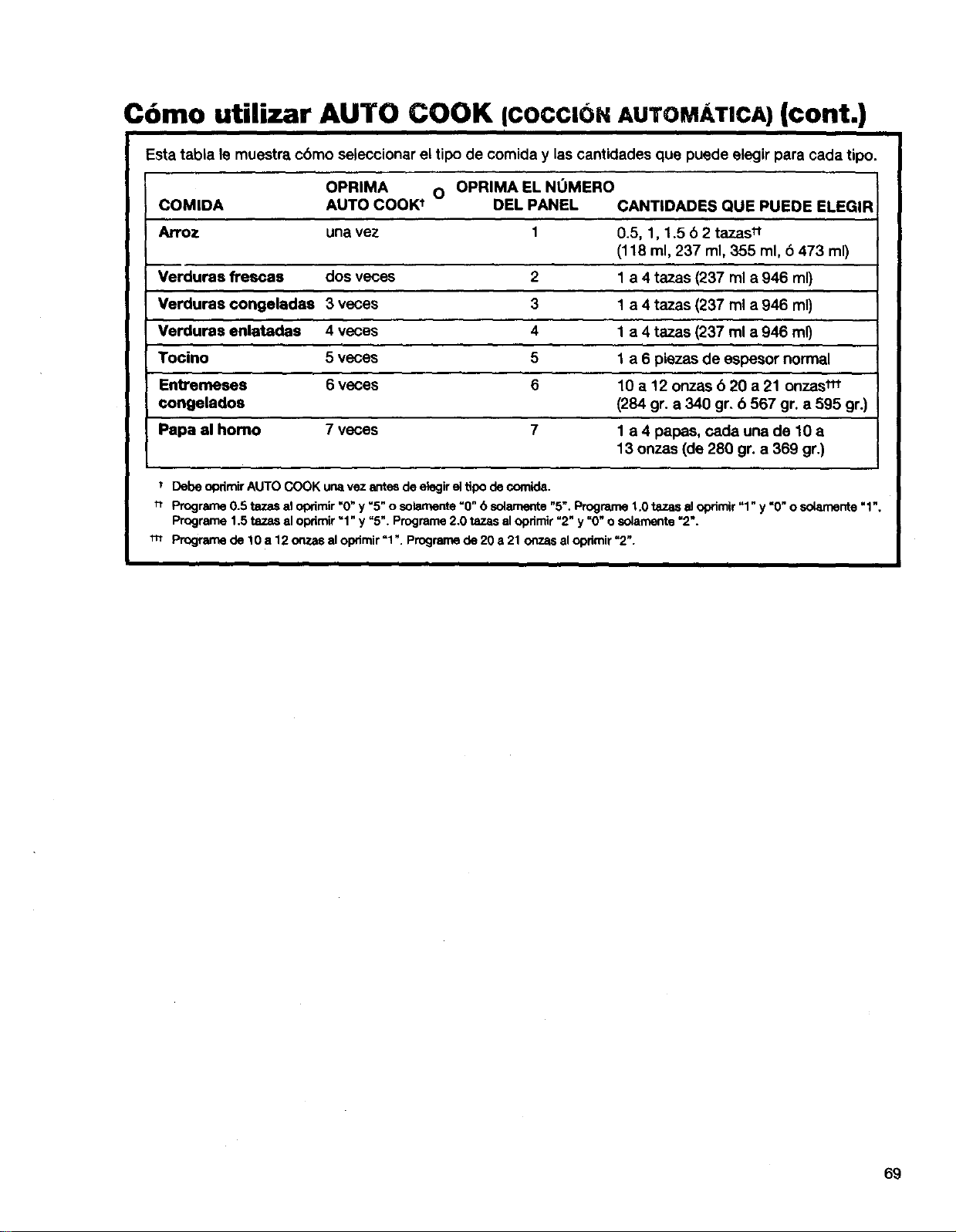
Como utilizar AUTO COOK ICOCClbNAUTOMATICA) (cont.)
i I
Esta tabla le muestra cbmo seleccionar el tipo de comida y las cantidades que puede elegir para cada tipo.
OPRIMA O OPRIMA EL NUMERO
COMIDA AUTO COOK t OEL PANEL CANTIDADES QUE PUEDE ELEGIR
Arroz una vez 1 0.5, 1, 1,5 b 2 tazas tt
(118 ml, 237 ml, 355 ml, 6 473 ml)
Verduras flrescas dos veces 2 1 a 4 tazas (237 ml a 946 ml)
Verduras ¢ongeladas 3 veces 3 1 a 4 tazas (237 ml a 946 mr)
4 1 a 4 tazas (237 ml a 946 mr)
5 1 a 6 piezas de espesor normal
5 10 a 12 onzas 6 20 a 21 onzas_
(284 gr. a 340 gr. 6 567 gr. a 595 gr.)
7 1 a 4 papas, cada una de 10 a
13 onzas (de 280 gr. a 369 gr.)
i
Verduras enlatadas 4 veces
Tocino 5 veces
Entremeses 6 veces
congelados
Papa al homo 7 veces
Debe opdmir AUTO COOK una vez antes de elegir el tipo de comida.
t_ Prograrne 0.5 tazas el oprimir "0" y "5" o solamente "0" 6 solamente "5". Progran_ 1.0 tazas el oprimir "1" y "0" o solarnente "1",
Prograrne 1.5 tazas el oprimir "1" y "5". Programe 2.0 tazas al opdmir "2" y "0" o solamente "2".
_-t Programe de 10 a 12 ora.as al oprimir =1.. Prograrne de 20 a 21 onzas al opdmir =2".
69
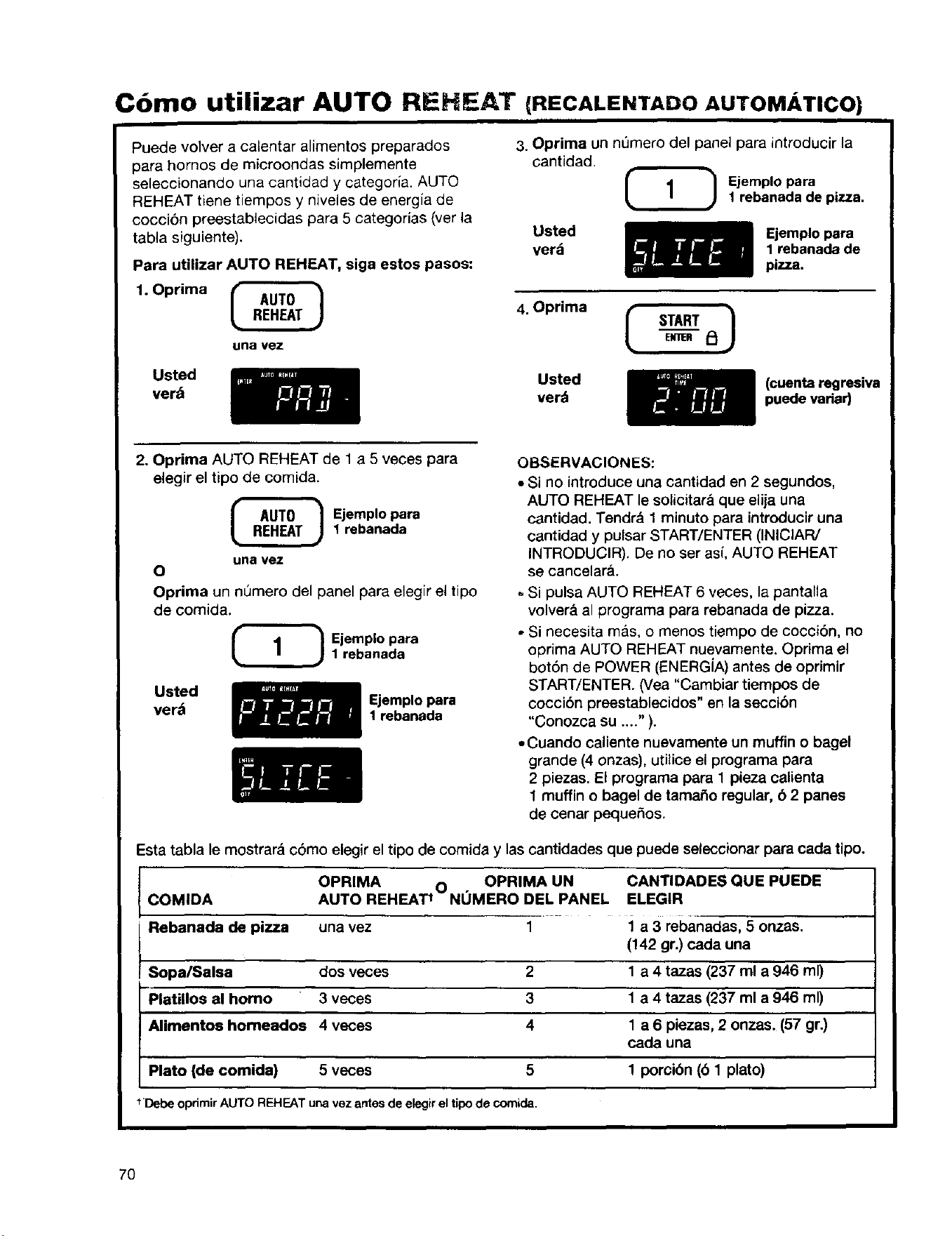
Como utilizar AUTO REHEAT (RECALENTADOAUTOMATICO)
Puede volver a calentar alimentos preparados
para hornos de microondas simplemente
seleccionando una cantidad y categoria. AUTO
REHEAT tiene tiempos y niveles de energia de
cocci6n preestablecidas para 5 categorias (ver la
tabla siguiente).
Para utilizar AUTO REHEAT, siga estos pasos:
1. Oprima
una vez
3. Oprima un ni3mero del panel para introducir la
cantidad.
Ejemplopara
1 rebanada de pizza.
Usted
verd
Ejemplo para
1 rebanada de
pizza.
4. Oprima ( STARTEmRF_I
Usted
verb
Usted
verd
(cuenta regresiva
puede variar)
2. Oprima AUTO REHEAT de 1 a 5 veces para
elegir el tipo de comida.
Ejemplo para
1 rebanada
una vez
0
Oprima un nQmero del panel para elegir el tipo
de comida.
_ jemplo para1rebanada
Usted
verb
Ejemplo para
1 rebanada
OBSERVACIONES:
• Si no introduce una cantidad en 2 segundos,
AUTO REHEAT le soiicitara que elija una
cantidad. Tendr& 1 minuto para introducir una
cantidad y pulsar START/ENTER (INICIAR/
INTRODUCIR). De no ser asi, AUTO REHEAT
se cancelara.
Si pulsa AUTO REHEAT 6 veces, la pantalla
volver& al programa para rebanada de pizza.
• Si necesita mas, o menos tiempo de cocci6n, no
optima AUTO REHEAT nuevamente. Oprima el
bot6n de POWER (ENERG[A) antes de oprimir
START/ENTER. (Vea "Cambiar tiempos de
coccibn preestablecidos" en la seccibn
"Conozca su ...." ).
• Cuando caliente nuevamente un muffin o bagel
grande (4 onzas), utiiice el programa para
2 piezas. El programa para 1 pieza calienta
1 muffin o bagel de tamafio regular, b 2 panes
de cenar pequefios.
Esta tabla le mostrar_ c6mo elegir el tipo de comida y las cantidades que puede seleccionar para cada tipo.
OPRIMA O OPRIMA UN CANTIDADES QUE PUEDE
COMIDA AUTO REHEAT t NOMERO DEL PANEL ELEGIR
Rebanada de pizza una vez 1 1 a 3 rebanadas, 5 onzas,
Sopa/Salsa dos veces 2
PlaUllos al homo 3 veces 3
Alimentos homeados 4 veces 4
Plato (de comida) 5 veces 5
(142 gr.) cada una
1 a 4 tazas (237 ml a 946 ml)
1 a 4 tazas (237 ml a 946 ml)
1 a 6 piezas, 2 onzas. (57 gr.)
cada una
1 porcibn (6 1 plato)
t Debe oprimir AUTO REHEAT una vez antes de elegir el tipo de comida.
7O
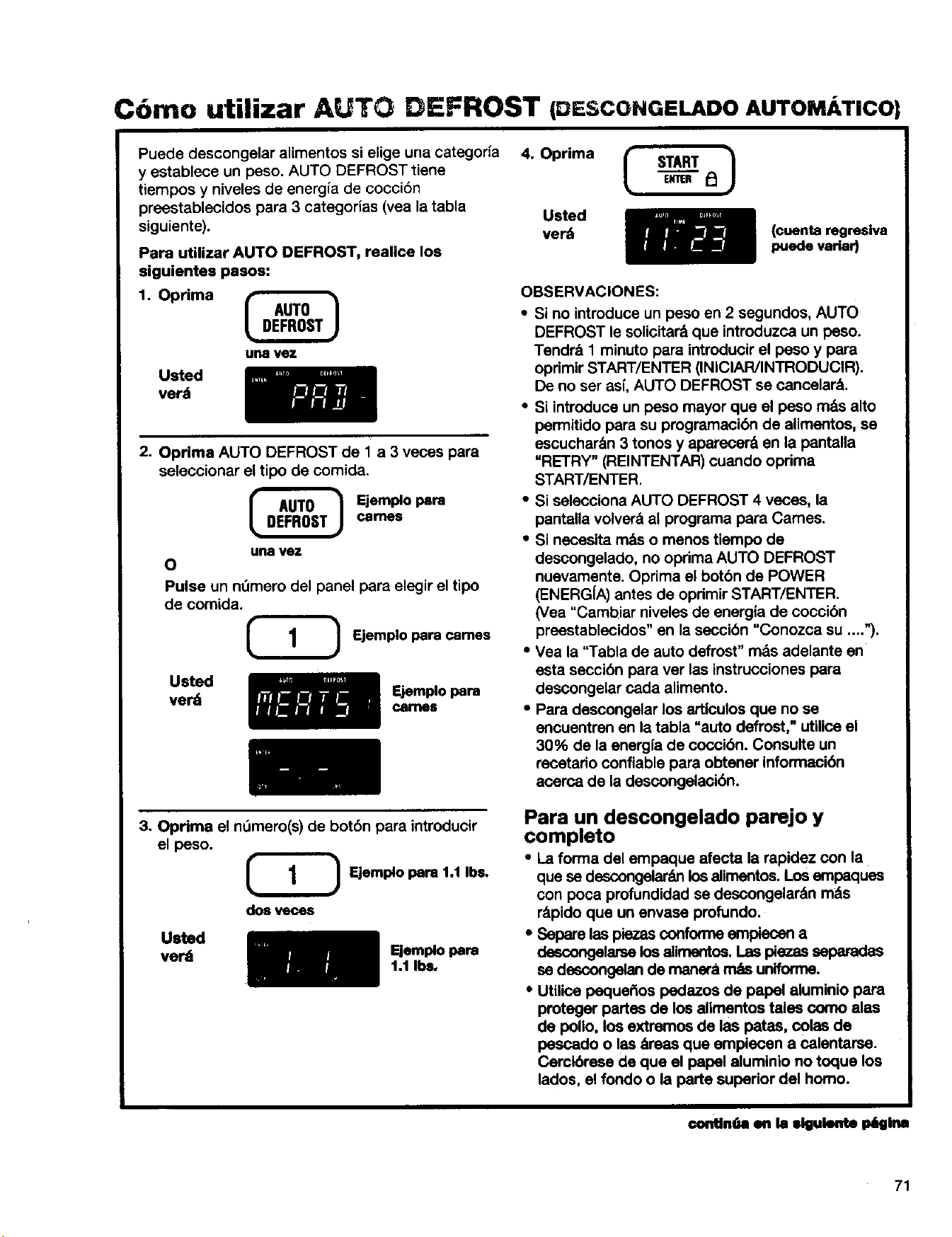
C6mo utilizar AUTO DEFROST (DESCONGELADOAUTOM/ TICO
Puede descongelar alimentos si elige una categor{a 4. Oprima
y establece un peso. AUTO DEFROST tiene
tiempos y niveles de energia de cocci6n
preestablecidos para 3 categories (vea la tabla Usted
siguiente), ver_
Para utilizar AUTO DEFROST, realice los
siguientes pasos:
1. Oprima
un8 vez
Usted
verd
2. Oprima AUTO DEFROST de 1 a 3 veces para
seleccionar el tipo de comida.
Ejemple para
carnt_
una vez
O
Pulse un n_mero delpanelpara elegireltipo
de comida.
Ejemplo para carries
Usted
verd
_emplo loam
caflles
(¢uenta regreslva
puede variar)
OBSERVACIONES:
• Si no introduce un peso en 2 segundos, AUTO
DEFROST le solicitar& que introduzca un peso.
Tendr& 1 minuto para introducir el peso y para
oprimir START/ENTER (INICIAR/INTRODUCIR).
De no ser as[, AUTO DEFROST se cancelar&.
• Si introduce un peso mayor que el peso m&s alto
permitido para su programack_n de alimentos, se
escuchar&n 3 tonos y aparecer& en la pantalla
"RETRY" (REINTENTAR) cuando oprima
START/ENTER.
• Si selecciona AUTO DEFROST 4 veces, la
pantalla volver&al programa para Cames.
• Si necesita m&so menos tiempo de
descongelado, no oprima AUTO DEFROST
nuevamente. Oprima el botbn de POWER
(ENERG[A) antes de oprimir START/ENTER.
(Vea "Cambiar nivelesde energia de coccibn
preestablecidos" en la ssocibn "Conozca su ....").
• Vea la "Tabla de auto defrost" m&s adelante en
esta seccibn para ver las instrucciones para
descongelar cada alimento.
• Para descongelar los articulos que no se
encuentren en la tabla "auto defrost," utilice el
30% de la energfa de coccibn. Consulte un
recetario confiable para obtener informacibn
acerca de la descongelacibn.
3. Oprima el nt_mero(s)de botbn para introducir
el peso.
_ Ejemplo para %1Ibs.
dos veces
Usted
verdi
Eismplo pare
1.1 Ib_
Para un descongelado parejo y
completo
• La forma del empaque afecta la rapidez con la
que se descongelar_mlos alimentos. Los empaques
con poca profundidad se descongelarSn m_s
rSpido que un envase profundo.
• Separe las piezes confonne empieosn a
descongalarselosalimentos. Las pieces separadas
es descongalan de manera rr_s uniforme.
• Utilice peque_os pedazos de papal aluminio para
proteger partes de los alimentos tales oomo alas
de polio, los extremos de las pates, colas de
poscado o les _reas que empiecen a calentarse.
Cercibrese de que el papel alumlnio no toque los
lados, el fondo o la parte superior del homo.
€ontin(m en hi siguiente I_lglns
71
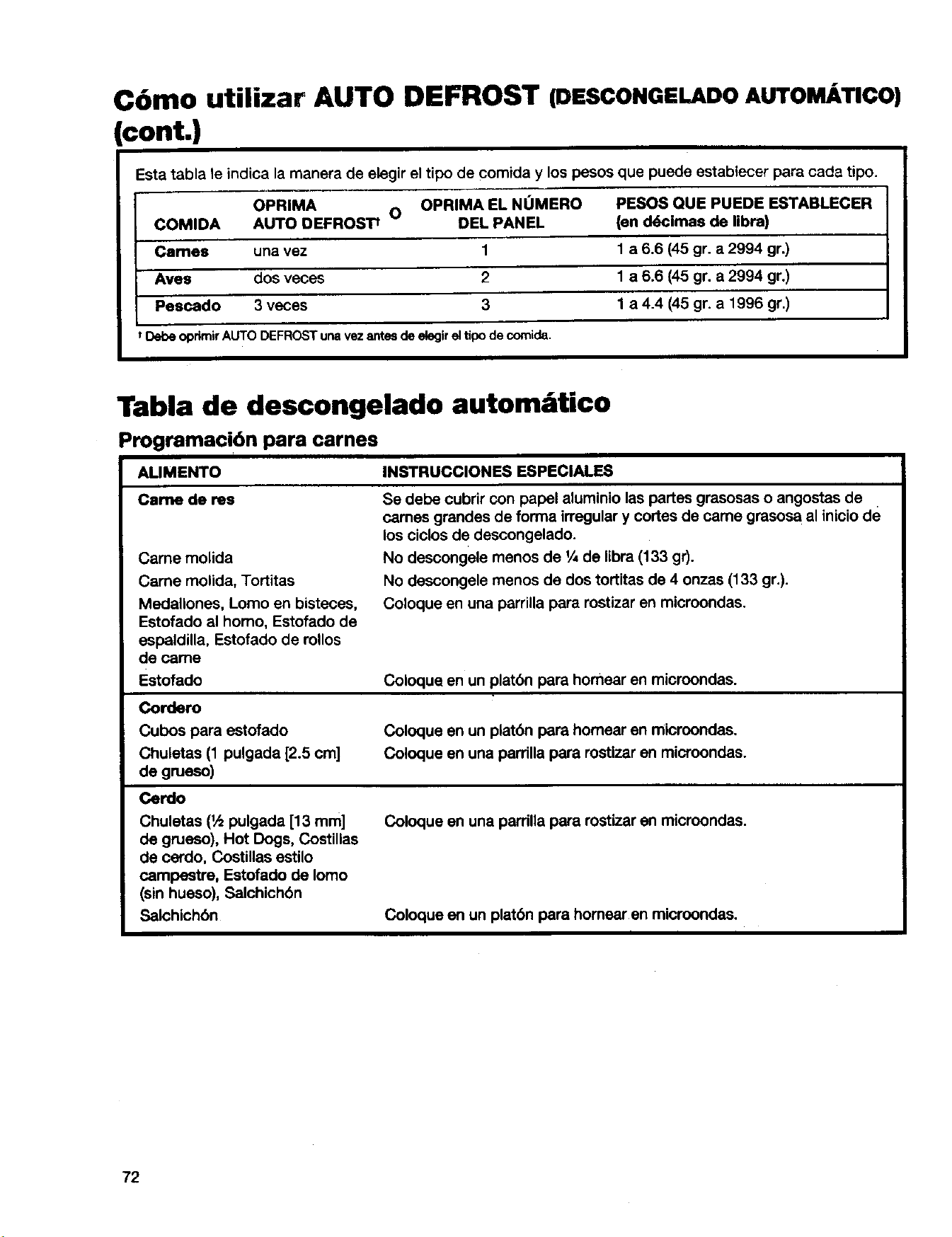
C6mo utilizar AUTO DEFROST (DESCONGELADOAUTOMATICO)
cont.)
Esta tabla le indica la manera de elegir el tipo de comida y los pesos que puede establecer para cade tipo.
OPRIMA O OPRIMA EL NUMERO PESOS QUE PUEDE ESTABLECER
COMIDA AUTO OEFROSTt DEL PANEL (en d6cimae de libra)
Cames una vez 1 1 a 6.5 (45 gr. a 2994 gr.)
Ayes dos veces 2 1 a 6.6 (45 gr. a 2994 gr.)
Pescado 3 veces 3 1 a 4.4 (45 gr. a 1996 gr.)
t Debeopdmir AUTODEFROSTunavezantesdeelegir el tipo decomida.
Tabla de descongelado autom;ttico
Programaci6n para carnes
ALIMENTO INSTRUCCIONES ESPECIALES
Came de res
Came molida
Came rnolida, Tortitas
Medallones, Lomo en bisteces,
Estofado al homo, Estofado de
espaldilla, Estofado de roUos
de came
Estofado
Cordero
Cubos para estofado
Chuletas (1 pulgada [2.5 cm]
de grueso)
Cerdo
Chuletas (1,_pulgada [13 mm]
de grueso), Hot Dogs, Costillas
de cerdo, Costillas estilo
campestra, Estofado de Iomo
(sin hueso), Salchichbn
Salchichbn
Se debe cubrir con papel aluminio las partes grasosas o angostas de
carnes grandes de forma irregular y cortes de came grasosa al inicio de
los ciclos de descongelado.
No descongele menos de 1_de libra (133 gr).
No descongele menos de dos tortitas de 4 onzas (133 gr.).
Coloque en una parrilla para rostizar en microondes.
Coloque en un platbn para homear en microondas.
Coloque en un platbn pars homear en microondas.
Coloque en una parrilla para rostlzar en microondas.
Coloque en una parrilla para rostizar en microondas.
Coloque en un platbn para homear en microondas.
72
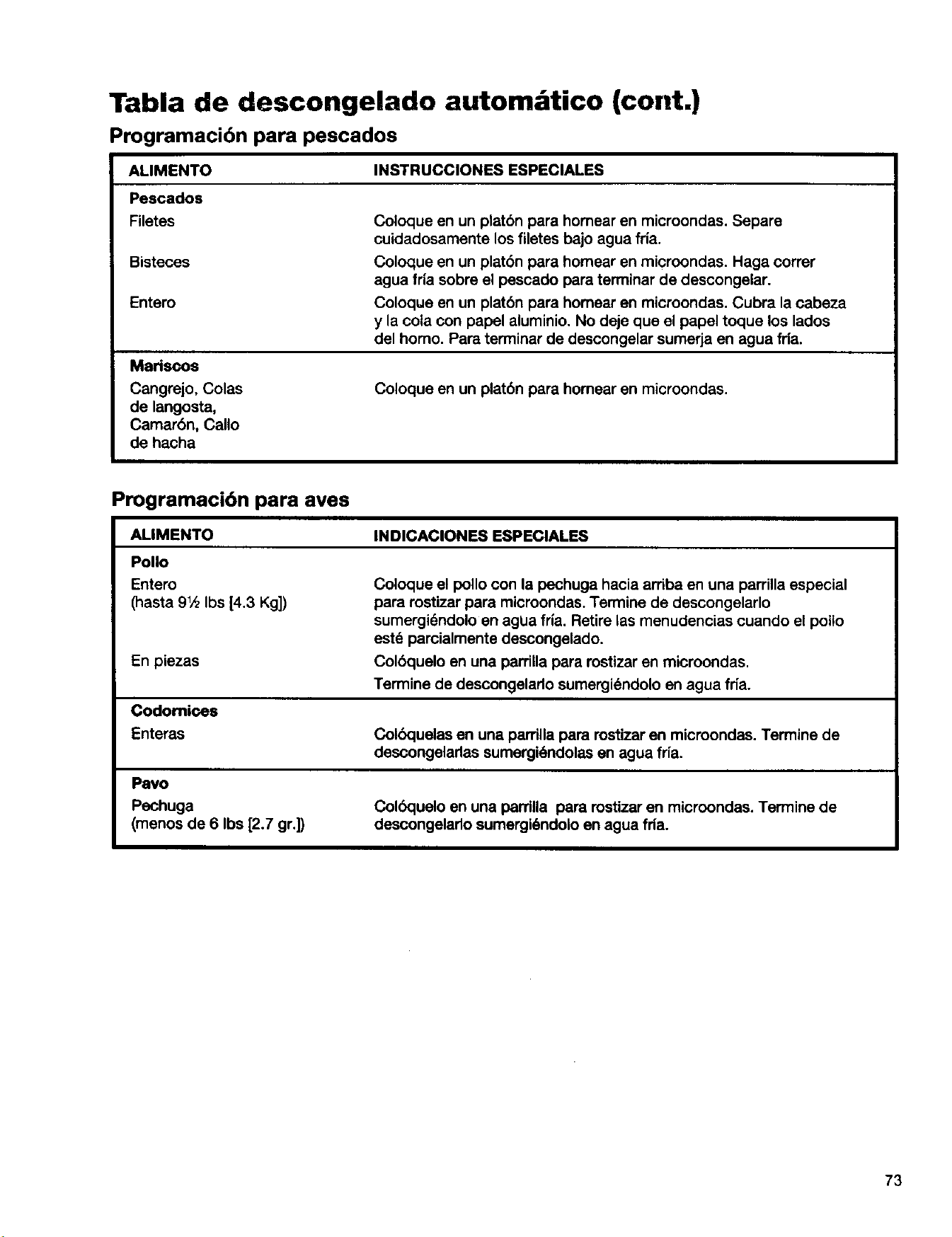
Tabla de descongelado autom tico (cont.)
Programacibn para pescaclos
ALIMENTO INSTRUCCIONES ESPECIALES
Pescados
Filetes
Bisteces
Entero
Mariscos
Cangrejo, Colas
de langosta,
Camarbn, Callo
de hacha
Coloque en un platbn para homear en microonclas. Separe
cuidadosamente los filetes bajo agua fria.
Coloque en un platbn para homear en microondas. Haga correr
agua fria sobre el pescado para terminar de descongelar.
Coloque en un platbn para homear en microondas. Cubra la cabeza
y la cola con papel aluminio. No deje que el papel toque los lados
del homo. Para terminar de descongelar sumerja en agua fda.
Coloque en un platbn para homear en microondas.
Programacibn para ayes
AUMENTO
INDICACIONES ESPECIALES
Polio
Entero
(hasta 91,_Ibs [4.3 Kg])
Coloque el polio con la pechuga hacia arriba en una parrilla especial
para rostizar para microondas. Termine de descongelarlo
sumergi_ndolo en agUa fria. Retire las menudencias cuando el polio
estd parcialmente descongelado.
En piezas Colbquelo en una pardlla para rostizar en microondas.
Termine de descongelarlo sumergi_ndolo en agua fria.
Codomioes
Enteras Colbquelas en una pardlla para rostizar en microondas. Termine de
descongelarlas sumergk_ndolasen agua fria.
Pavo
Pechuga
(menos de 6 Ibs _.7 gr.])
Colbquelo en una pardlla para rostizar en microondas. Ten'nine de
descongelarlo sumergi_ndolo en agua fda.
73
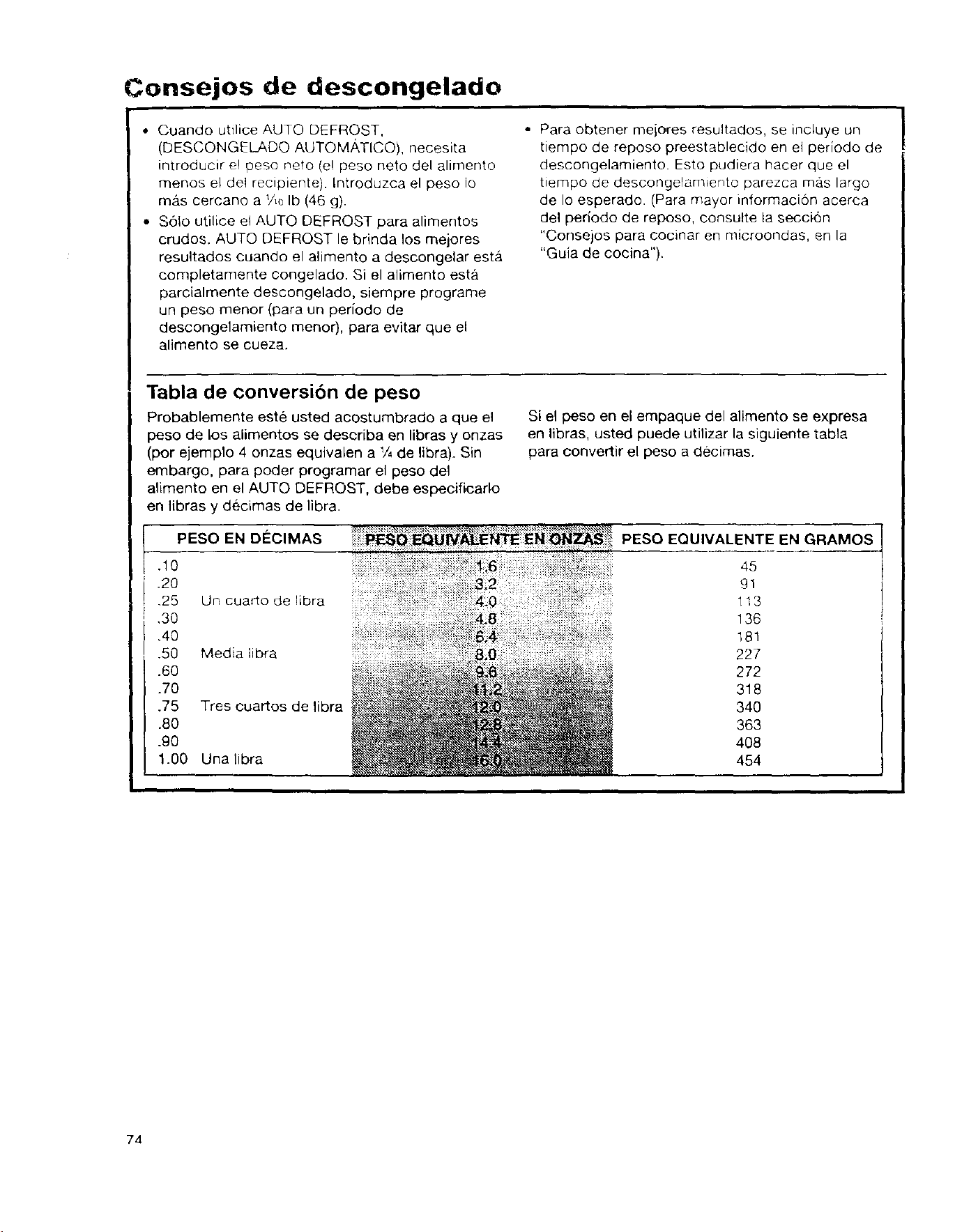
Consejos de descongelado
• Cuando utilice AUTO DEFROST,
(DESCONGELADO AUTOMA, TICO), necesita
introducir el peso nero (e! peso neto del alimento
menos el de1 recipiente). Introduzca el peso Io
ma,s cercano a V_ Ib (46 g).
• S6to utilice el AUTO DEFROST para alimentos
crudos. AUTO DEFROST le brinda los mejores
resultados cuando el alimento a descongelar estb,
completamente congelado. Si el alimento esta
parcialmente descongelado, siempre programe
un peso menor (para un periodo de
descongelamiento menor), para evitar que el
alimeeto se cueza.
• Para obtener mejores resultados, se incluye un
tiempo de reposo preestablecido en el periodo de
descongelamiento. Esto pudiera hacer que el
tiempo de descongelamiento parezca mas largo
de Io esperado. (Para mayor informaci6n acerca
del periodo de reposo, consutte la seccion
"Consejos para cocinar en microondas, en la
"Guia de cocina").
Tabla de conversibn de peso
Probablemente este usted acostumbrado a que el
peso de los alimentos se describa en libras y onzas
(por ejemplo 4 onzas equivalen a V4de libra). Sin
embargo, para poder programar el peso del
alimento en el AUTO DEFROST, debe especificarlo
en libras y decimas de libra.
PESO EN DECIMAS
.10
.20
,25 Un cuarto de libra
,30
,40
.50 Media libra
.60
.70
.75 Tres cuartos de libra
.80
.90
1.00 Una libra
Si el peso en el empaque del alimento se expresa
en libras, usted puede utilizar la siguiente tabla
para convertir el peso a decimas.
PESO EQUlVALENTE EN GRAMOS
45
gl
113
136
181
227
272
318
340
363
408
454
74
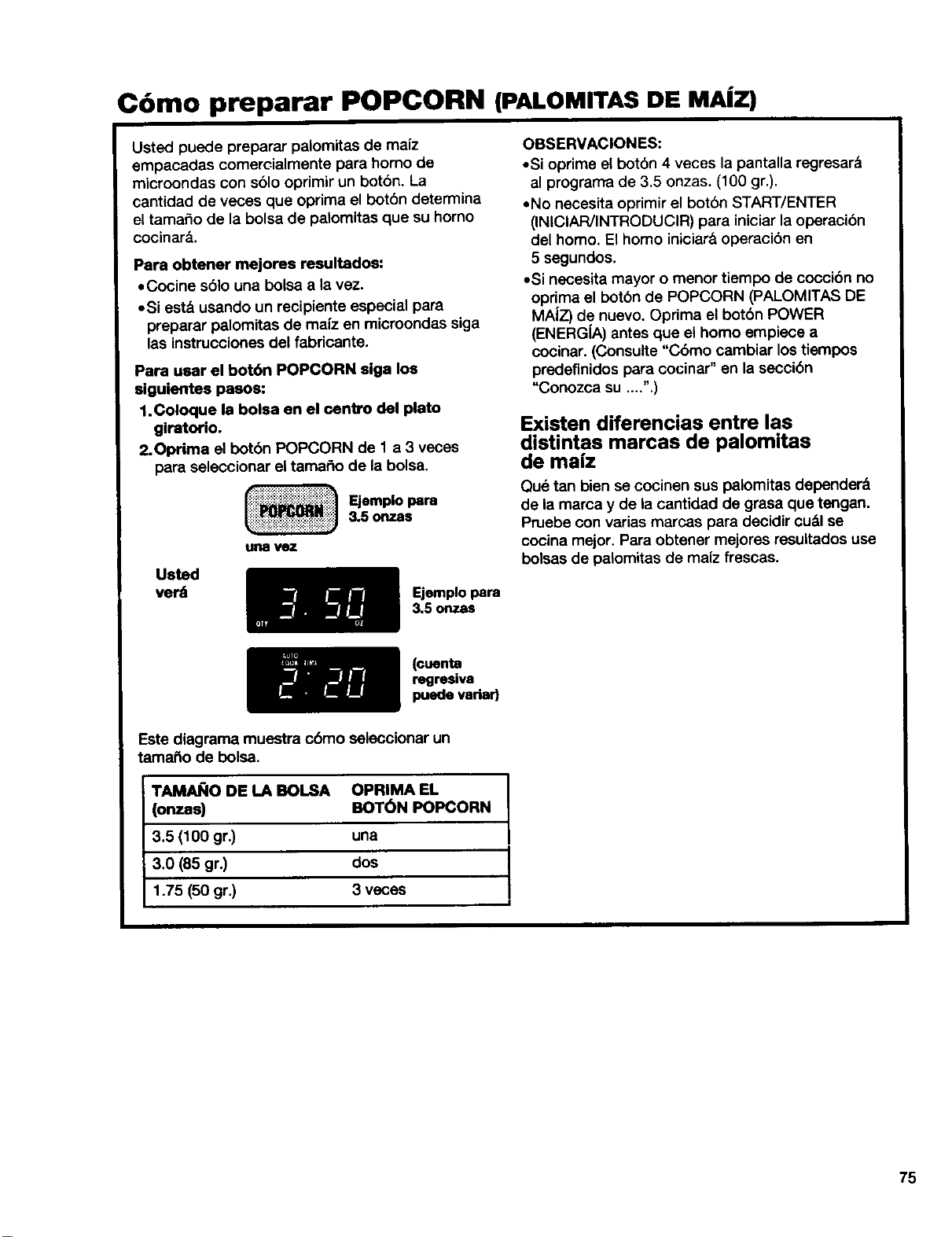
C6mo preparar POPCORN (PALOMITAS DE MAiZ)
Usted puede preparar palomitas de maiz
empacadas comemialmente para homo de
microondas con sblo oprimir un botbn. La
cantidad de veces que oprima el botbn determina
el tama_o de la bolsa de palomitas que su homo
cocinar_..
Papa obtener mejores resultados:
• Cocine s61o una bolsa a la vez.
• Si est& usando un recipiente especial para
preparar palomitas de maiz en microondas siga
las instrucciones del fabdcante.
Papa usar el bot6n POPCORN siga los
siguientes paaos:
1.Coloque la bolsa en el centro del plato
gipatorio.
2.Oprima el bot6n POPCORN de 1 a 3 veces
para selaccionar el tamar_o de la bolsa.
un8
Ejemplo I_ra
&5 onzas
Uated
verd
Ejemplo para
3.5 onzas
OBSERVACIONES:
• Si oprime el bot6n 4 veces la pantalla regresar_
al progran'rade 3,5 onzas. (100 gr,),
• No nacesita oprimir el bot6n START/ENTER
(INICIAR/INTRODUCIR) para iniciar la operacibn
del homo. El homo iniciar_ operacibn en
5 segundos.
• Si necesRa mayor o menor tiempo de coccibn no
opdma el botbn de POPCORN (PALOMITAS DE
MAiZ) de nuevo. Optima el botbn POWER
(ENERG(A) antes qua el homo empiece a
cocinar. (Consulte "Chino cambiar los tiempos
predefinidos para cocinar" an la seccibn
"Conozca su ....".)
Existen diferencias entre las
distintas marcas de palomitas
de mafz
Qu_ tan bien se cocinen sus palomitas depender&
de la marca y de la cantidad de grasa que tengan.
Pruebe con varias mamas para decidir cudl se
cocina mejor. Para obtener mejores resultados use
bolsas de palomitas de maiz frescas.
(cuenta
regresiva
puede variad
Este diagrama muestra cbmo seleccionar un
tama_o de bolsa.
TAMAI;IO DE LA BOLSA
(onzaa)
3,5 (100 gr.) una
3.0 (85 gr.) dos
1.75 (50 gr.) 3 veces
OPRIMA EL
BOT_)N POPCORN
E
75
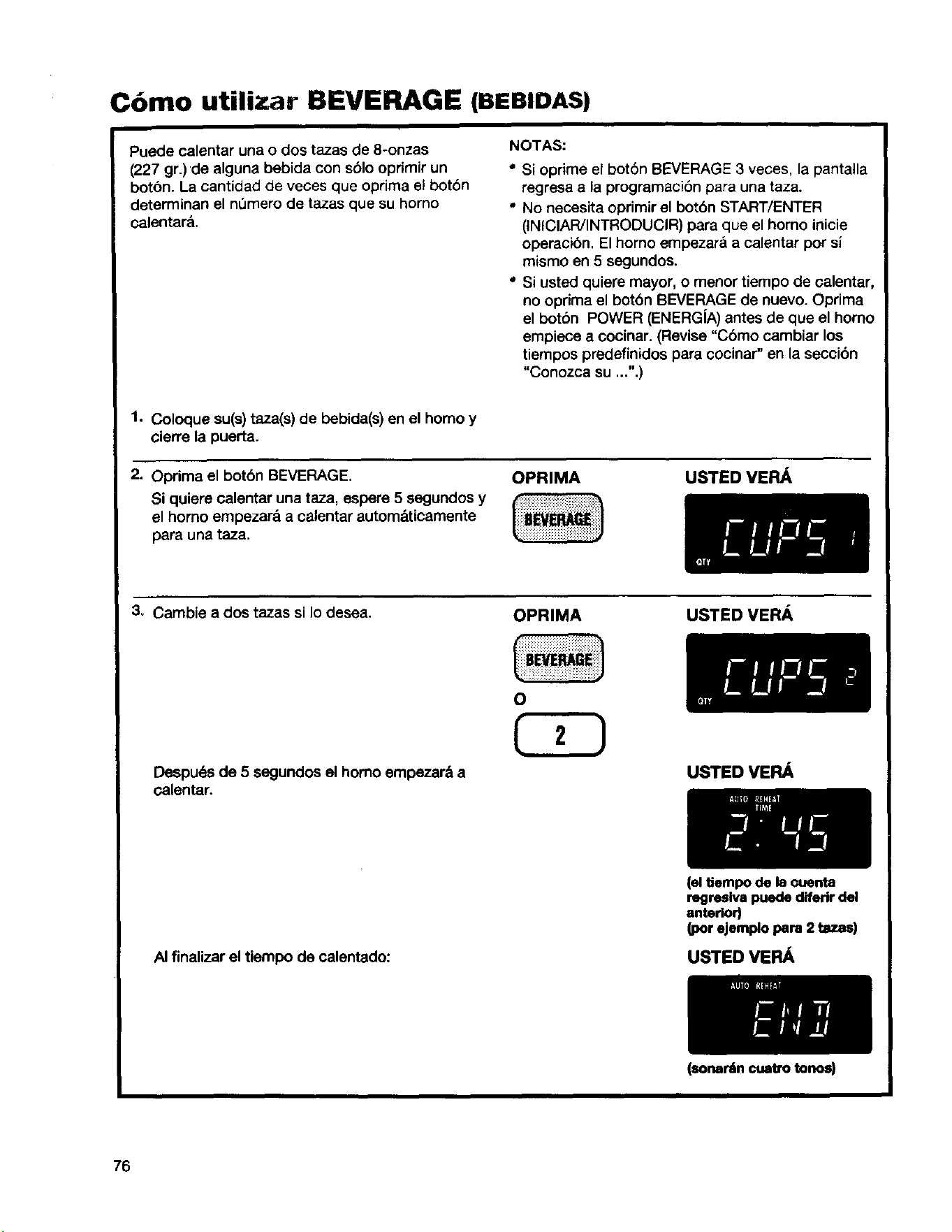
C6mo utilizar BEVERAGE (BEBIDAS)
Puede calentar una o dos tazas de 8-onzas
(227 gr.)de alguna bebida con s61ooprimir un
boton. La cantidad de veces que optima el boton
determinan el n0mero de tazas que su homo
calentar&.
NOTAS:
" Si oprime el bot6n BEVERAGE 3 veces, la pantalla
regresa a la programaci6n para una taza.
• No necesita oprimir el botbn START/ENTER
(INICIAR/INTRODUCIR) para que el homo inicie
operacibn. El homo empezar& a calentar pot si
mismo en 5 segundos.
Si usted quiere mayor, o menor tiempo de calentar,
no oprirna el botbn BEVERAGE de nuevo. Oprima
el botbn POWER (ENERG[A) antes de que el homo
empiece a cocinar. (Revise "Cbmo cambiar los
tiempos predefinidos para cocinar" en la seccibn
"Conozca su ...".)
1. Coloque su(s) taza(s) de bebida(s) en el homo y
cierre la puerta.
2. Oprima el bot6n BEVERAGE.
Si quiere calentar una taza, espere 5 segundos y
el homo empezar& a calentar autorn&ticamente
para una taza.
OPRIMA
USTED VEFL_
3_ Cambie a dos tazas si Io desea.
rl/
Despues de 5 segundos el homo empezar& a
calentar.
OPRIMA
USTEDVERA
USTEDVER_
AI finalizar el tiempo de calentado:
(el tiempo de la cuenta
regresiva puede diferir del
anterior)
(por ejemplo para 2 tazas)
USTED VERA
76
(sonantncuatro tonos)
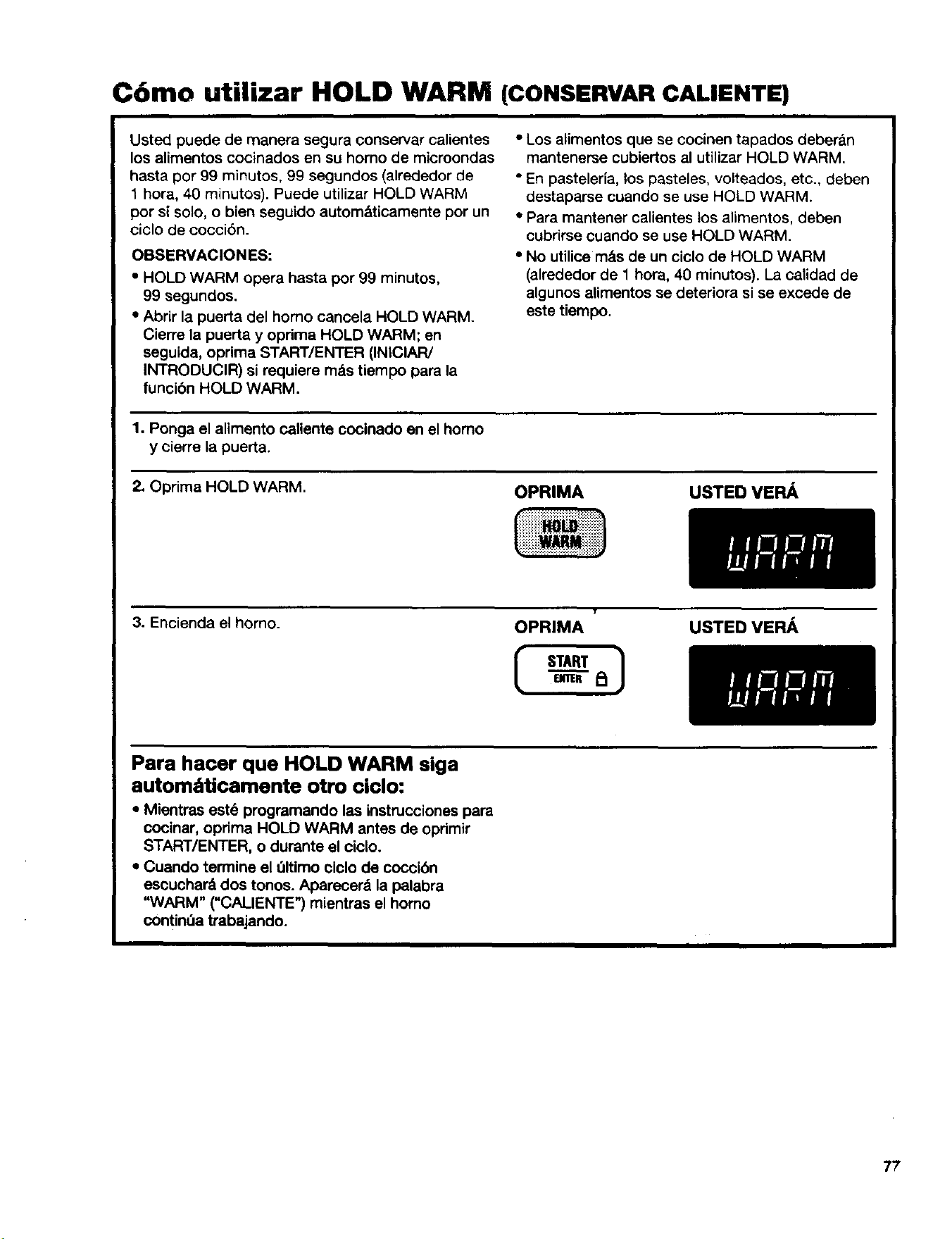
C6mo utilizar HOLD WARM (CONSERVARCALIENTE)
Usted puede de manera segura conservar calientes
los alimentos cooinados en su homo de microondas
hasta por 99 minutos, 99 segundos (alrededor de
1 hora, 40 minutos). Puede utilizar HOLD WARM
per si solo, o bien seguido autom&ticamente por un
ciclo de coccibn.
OBSERVACION ES:
• HOLD WARM opera hasta por 99 minutos,
99 segundos.
• Abrir la puerta del homo cancela HOLD WARM.
Cierre la puerta y oprima HOLD WARM; en
seguida, oprima START/ENTER (INIClAR/
INTRODUClR) si requiere m_s tiempo para la
funcibn HOLD WARM.
• Los alimentos que se cocinen tapados deberan
mantenerse cubiertos al utiNzar HOLD WARM.
• En pasteleria, los pasteles, volteados, etc., deben
destaparse cuando se use HOLD WARM.
• Para mantener calientes los alimentos, deben
cubrirse cuando se use HOLD WARM.
• No utilice m_.s de un ciclo de HOLD WARM
(alrededor de 1 hora, 40 minutos). La calidad de
algunos alimentos se deteriora si se excede de
este tiempo.
1. Ponga el alimento caliente cocinado en el homo
y cierre la puerta.
2. Oprima HOLD WARM.
OPRIMA USTED VE FL_,
3. Encienda el homo.
T
OPRIMA USTED VEFL&,
Para hacer que HOLD WARM siga
autom;_ticamente otro ciclo:
• Mientras est_ programando las instrucciones para
cocinar, opdma HOLD WARM antes de oprimir
START/ENTER, o durante el ciclo.
• Cuando termine el 01timo eiclo de coccibn
eseuchar& dos tonos. Aparecer& la pelabra
"WARM" ("CALIENTE") mientras el homo
contint_atrabajando.
77
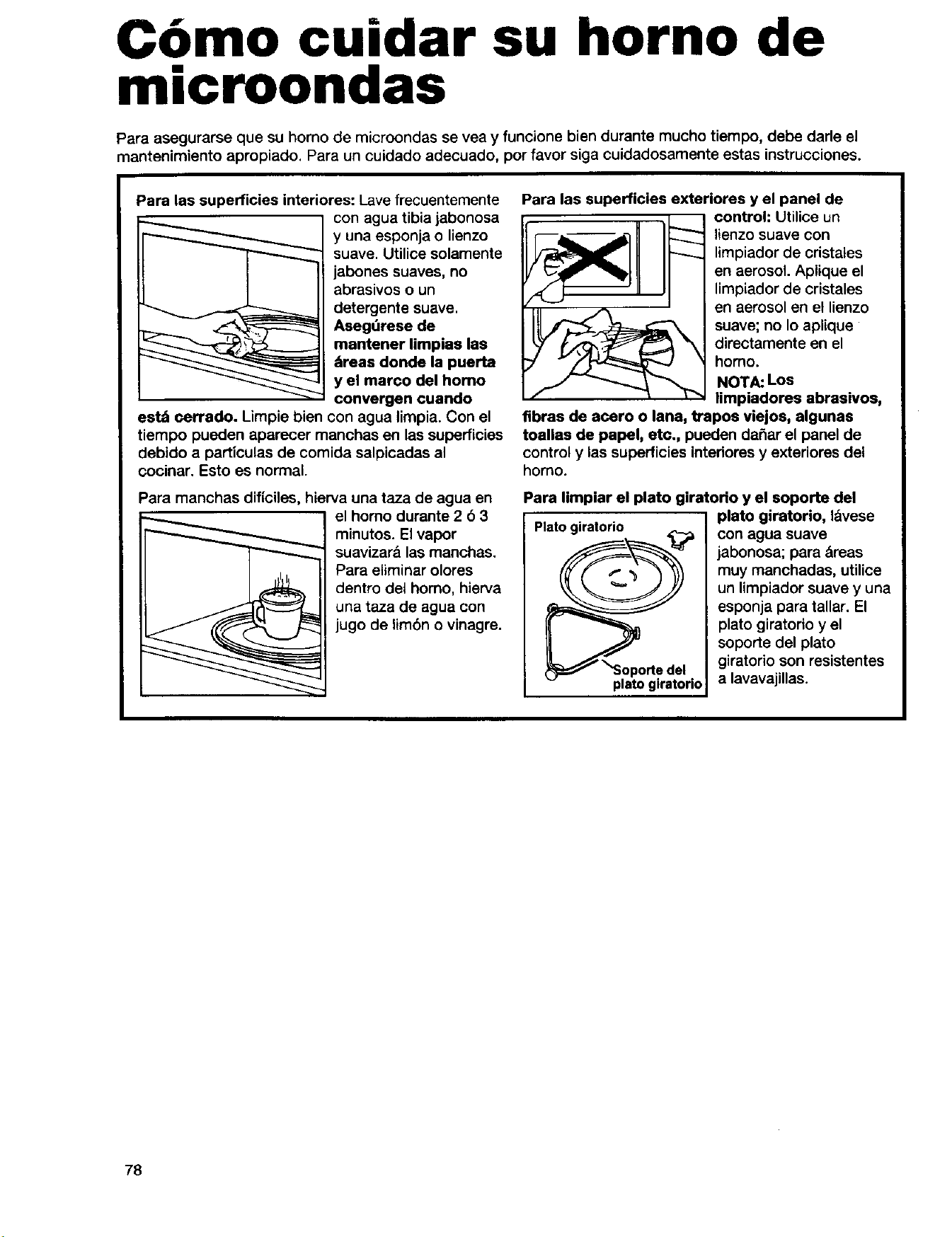
Como cuidar su horno de
microondas
Para asegurarse que su horno de microondas se vea y funcione bien durante mucho tiempo, debe darle el
mantenimiento apropiado. Para un cuidado adecuado, por favor siga cuidadosamente estas instrucciones.
Para las superficies interiores: Lave frecuentemente
con agua tibia jabonosa
y una esponja o lienzo
suave. Utilice solamente
jabones suaves, no
abrasivos o un
detergente suave.
Aseg_rese de
mantener Iimpias las
_reas donde la puerta
y el marco del homo
convergen cuando
estd cerrado. Limpie bien con agua lirnpia.Con el
tiempo pueden aparecer rnanchas en las superficies
debido a particulas de cornida salpicadas al
cocinar. Esto es normal.
Para manchas dificiles, hierva una taza de agua en
el homo durante 2 6 3
rninutos. El vapor
suavizar& lasrnanchas.
Para elirninarolores
dentro det homo, hierva
una taza de agua con
jugo de lirnbn o vinagre.
Para las superficies exteriores y el panel de
control: Utilice un
lienzo suave con
limpiador de cristales
en aerosol. Aplique el
lirnpiadorde cristales
en aerosol en el lienzo
suave; no Io aplique
directarnente en el
homo.
NOTA: Los
limpiadores abrasivos,
fibras de acero o lana, trapos viejoa, algunas
toallas de papel, etc., pueden daSar el panel de
control y ias superficies intedores y exteriores del
homo.
Para limpiar el plato giratorio y el soporte del
__oporte del
platogiratorio
plato giratorio, I&vese
con agua suave
jabonosa; para &reas
rnuy manchadas, utilice
un lirnpiador suave y una
esponja para tallar. El
plato giratorio y el
soporte del plato
giratorio son resistentes
a lavavajillas.
78
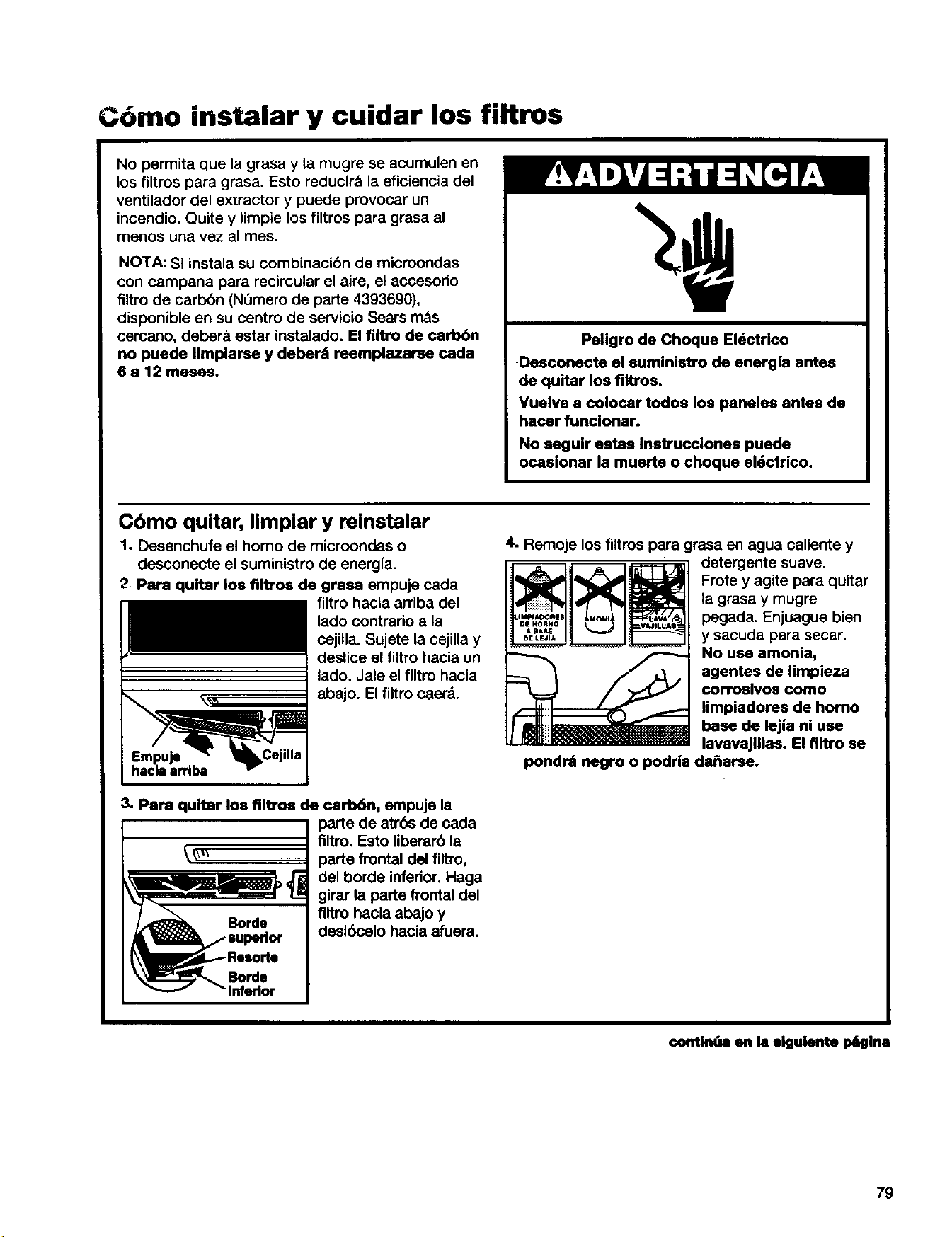
C6mo instalar y cuidar los filtros
No permita que la grasa y la mugre se acumulen en
los filtros para grasa. Esto reducira la eficiencia del
ventilador del extractor y puede provocar un
incendio. Quite y limpie los filtros para grasa al
menos una vez al mes.
NOTA: Si instala su combinacibn de microondas
con campana para recircular el aire, el accesodo
filtro de carbbn (N_mero de parte 4393690),
disponible en su centro de servicio Sears mas
cercano, debar& estar instalado. El filtro de oarbbn
no puede limpiarse y deber& reemplazarse cada
6 a 12 meses.
Peligro de Choque EI6ctrlco
•Desconecte el suministro de energia antes
de quitar los flltros.
Vuelva a colocar todos los paneles antes de
hacer funclonar.
No seguir estas instrucclones puede
ocasionar la muerte o choque el6ctrico.
C6mo quitar, limpiar y reinstalar
1. Desenchufe el homo de rnicroondas o
desconecte el surninistro de energia.
2. Para quitar los filtros de grasa empuje cada
fiRro hacia arriba del
lado contrario a la
cejilla. Sujete la cejilla y
deslice el filtro hacia un
lado. Jale el filtro hacia
abajo. El fiRrocaerd.
3. Para quitar los flltros de oarb6n, empuje la
Borde
I v "inferior I
parte de atrbs de cada
filtro. Esto liberarb la
parte frontal del fiRro,
del horde inferior. Haga
girar la parte frontal del
fiRro hacia abajo y
deslbcelo hacia afuera.
4. Remoje los filtros para grasa en agua caliente y
detergente suave.
Frote y agite para quitar
la grasa y rnugre
pegada. Enjuague bien
y sacuda para secar.
No use amonia,
agentes de limpieza
corrosivos como
limpiadores de homo
base de lej|a ni use
lavavajiilas. El filtro se
pondrd negro o podrla da_arse.
€ontinq_aen la siguiente plglna
79
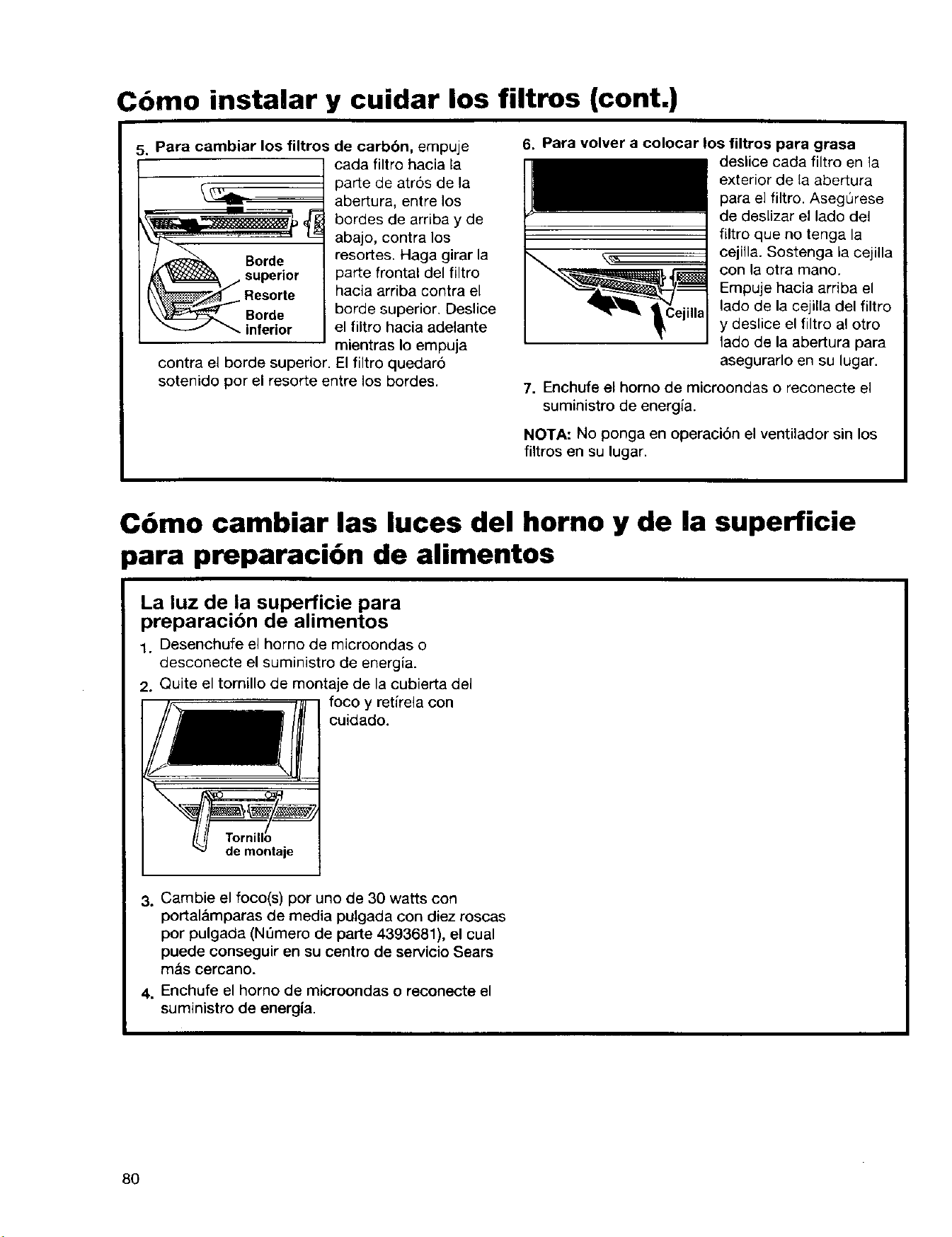
Como instalar y cuidar los filtros (cont.)
5. Para cambiar los fUtros de carbbn, empuje
_m
40r;e
_C:3_p_r_ Borde
_- inferior
cada filtro hacia la
parte de atr6s de la
abertura, entre los
bordes de arriba y de
abajo, contra los
resortes. Haga girar la
parte frontal del filtro
hacia arriba contra el
borde superior. Deslice
el filtro hacia adelante
mientras Io empuja
contra el borde superior. El filtro quedar6
sotenido por el resorte entre los bordes.
8
6. Para volver a colocar los filtros para grasa
deslice cada filtro en la
exterior de la abertura
para el filtro. Asegurese
de deslizar el lado del
filtro que no tenga la
cejilla. Sostenga la cejilla
con la otra mano.
Empuje hacia arriba el
lado de la cejilla del filtro
y deslice el filtro al otro
1ado de la abertura para
asegurarlo en su lugar.
7. Enchufe el homo de microondas o reconecte el
suministro de energia.
NOTA: No ponga en operacidn el ventilador sin los
filtros en su lugar.
C6mo cambiar las luces del horno y de la superficie
3ara preparaci6n de alimentos
La luz de la superficie para
preparacion de alimentos
1. Desenchufe el horno de microondas o
desconecte el suministro de energia.
2. Quite el tornillo de montaje de la cubierta del
foco y retirela con
cuidado.
de montaje
3. Cambie el foco(s) por uno de 30 watts con
portal&mparas de media puigada con diez roscas
por pulgada (NQmero de parte 4393681), el cual
puede conseguir en su centro de servicio Sears
mas oeroano.
4. Enchufe el horno de microondas o reconecte el
suministro de energia.
80
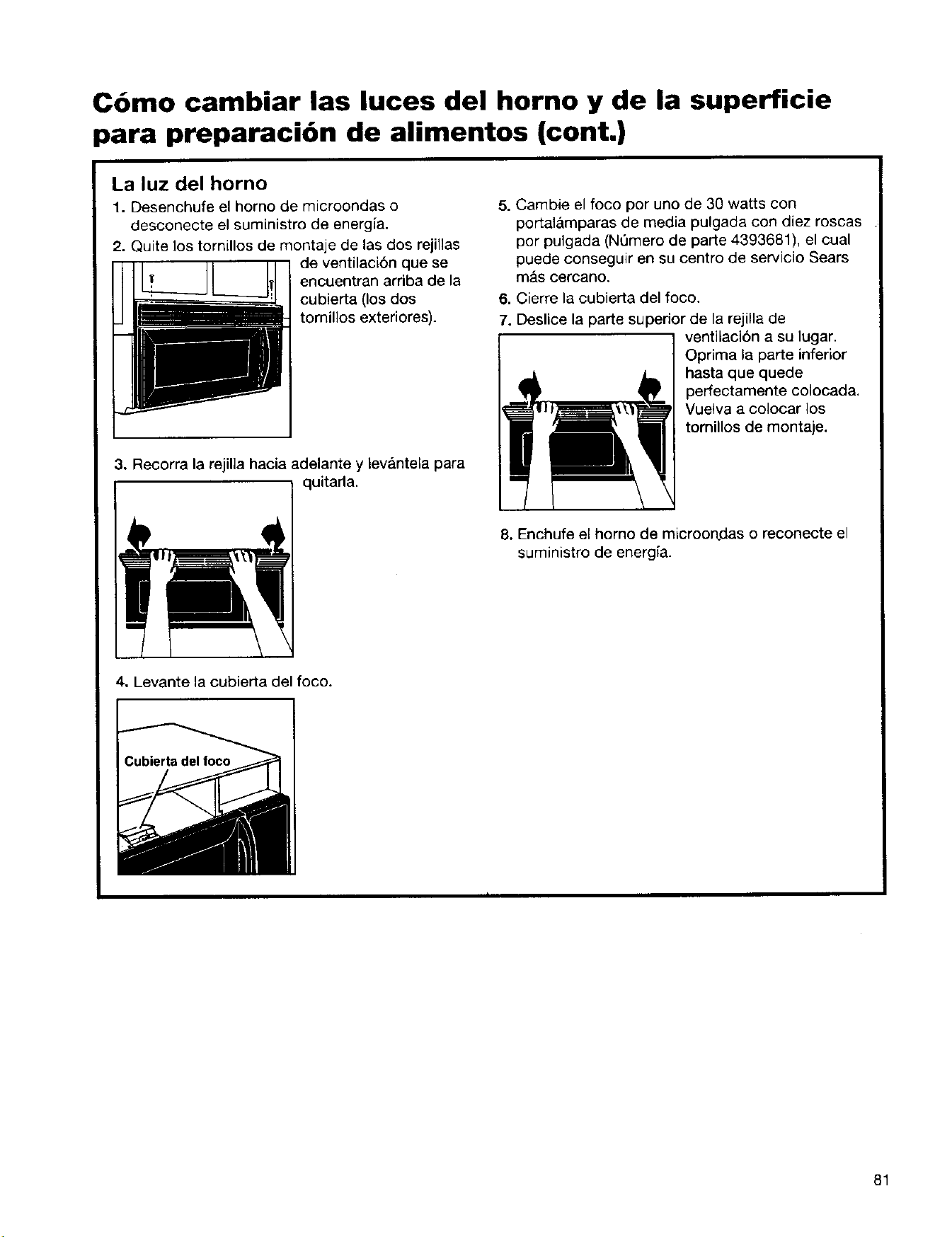
C6mo cambiar las luces del horno y de la superficie
para preparaci6n de alimentos (cont.)
La luz del horno
1. Desenchufe el homo de microondas o
desconecte el suministro de energia.
2. Quite los tornillos de montaje de las dos rejillas
de ventilaci6n que se
encuentran arriba de la
cubierta (los dos
tornillos exteriores).
3. Recorra la rejilla hacia adelante y lev&ntela para
I I quitarla'
5. Cambie el foco por uno de 30 watts con
portalamparas de media pulgada con diez roscas
por pulgada (NQmero de parte 4393681), el cual
puede conseguir en su centro de servicio Sears
m&s cercano.
6. Cierre la cubierta del foco.
7. Deslice la parte superior de la rejilla de
ventilaci6n a su lugar.
Oprima la parte inferior
hasta que quede
perfectamente colocada.
Vuelva a colocar los
tomillos de montaje.
8. Enchufe el homo de microon.das o reconecte el
suministro de energia.
4. Levante la cubierta del foco.
81
Guia de Cocina
Cantidad de alimentos
•" Si usted incrementa o disminuye la cantidad
de alimentos que prepara, el tiempo que toma
cocinarlos tambien cambiar& Por ejemplo, si
duplica las cantidades de una receta, agregue un
poco mas de la mitad del tiempo original para
cocimiento. Verifique el termino de cocimiento y
si es necesario incremente el tiempo en periodos
pequefios.
Temperatura inicial de los alimentos
• Mientras mds baja sea la temperatura de los
alimentos al momento de introducirlos al homo
de microondas, mayor sera el tiempo de
cocci6n. Los alimentos a temperatura ambiente
se recalentar&n con mayor rapidez que los
refrigerados.
Composicibn de los alimentos
• Los alimentos con mucha grasa y azt_car se
calentaran con mayor rapidez que aquellos que
contengan mucha agua. La grasa y el az0car
tambien alcanzaran una temperatura m_fisalta
que el agua en el proceso de cocci6n.
• Mientras mas densos sean los alimentos,
mayor sera su tiempo de calentamiento. "Los
alimentos muy densos" como la came. toman
rnas tiempo para volver a calentarse que otros
m&s Iigeros, mas porosos como los pasteles
esponjados.
Tama_o y forma
• Los pedazos mbs peque_os de alimentos se
coceran mas rapidamente que los grandes. De
igual manera, los pedazos con forma similar
entre si se cocinar:_n m_,s uniformemente que los
que tienen formas distintas.
• En alimentos que tienen distintos grosores,
las partes m_.s delgadas se cocinaran con mayor
rapidez que las m&s gruesas. Coloque las partes
m&s delgadas de las alas y piernas de polio en el
centro d_l plato.
Cbmo cubrir los alimentos
Cubra los alimentos para:
" Evitar que salpiquen
Reducir los tiempos de cocci6n
• Evitar que los alimentos se resequen
Cualquier cubierta que utilice para tapados, debe
permitir el paso de las microondas.
Como liberar la presibn en los
alimentos
" Algunos alimentos (por ejemplo: papas al
homo, salsas, yemas de huevo, y algunas frutas)
estan cubiertos firmemente pot una piel o
membrana. Se podrla formar vapor bajo la
membrana durante la cocci6n, Io que provocaria
que los alimentos explotaran. Con el fin de
disminuir dicha presi6n y evitar que exploten,
haga pequeSas ineisiones en los alimentos con
un teneder o un palillo antes de cocinarlos.
Como utilizar el tiempo de reposo
' Siempre deje reposar los alimentos despues
de cocinarlos. El dejar reposar los alimentos
despues de haberse descongelado o cocinado
permite que ta temperatura se distribuya
uniformemente para mejorar el resuitado en la
coccion.
• El tiempo de reposo que destine dependera de
la cantidad de los alimentos que vaya a cocinar
asi como de su densidad. Algunas veces este
tiempo puede ser tan breve como el que toma
sacar los alimentos del homo y Ilevarlos a la
mesa. Sin embargo, en alimentos de mayor
densidad yen cantidades tambi6n mayores, el
tiempo de reposo puede Ilegar a ser hasta de
10 minutos.
Mover y voltear los alimentos
• AI mover y voltear los alimentos, el calor se
distribuye rapidamente hacia el centro del plato,
con Io que se evita el sobrecocimiento en las
orillas.
82
Acomodo de los alimentos
Para obtener mejores resuttados, coloque los
alimentos uniformemente en el plato. Puede
hacerlo de distintas maneras:
• Si estd cocinando varios alimentos iguales,
tales como papas al homo, colbquelas en forma
circular para obtener un cocimiento uniforme.
• Cuando cocine alimentos con formas o
grosores irregulares tales como pechugas de
polio, coloque las partes mas pequeSas o
delgadas de los alimentos hacia el centro det
plato, lugar al que el calor Ilegara al final.
• Acomode las rebanadas delgadas de came en
capas una sobre la otra.
• Cuando cocine o recaliente un pescado
entero, haga cortes en la piel - para evitar que
se agriete. Cubra la cola y la cabeza del pescado
con pedazos peque6os de papel aluminio para
evitar la sobrecoccibn. Cuando utilice papel
aluminio, asegt3rese de que este no toque las
paredes del homo.
• No permita que los alimentos o recipientes
toquen las paredes del homo. Esto es con el fin
de evitar posibles descargas electricas.
Cbmo utilizar el papel aluminio
No deber_,n utilizarse recipientes de metal en un
homo de microondas. Aunque existen algunas
excepciones. Si se trata de alimentos
preempacados en alg{3n recipiente de papel
aluminio siga las instrucciones impresas en el
empaque. Cuando se utilizan recipientes de papel
aluminio, los tiempos de coccibn Ix)drian ser m_s
largos debido a que las microondas solamente
penetrarSn en la parte superior de los alimentos.
Si utiliza recipientes de aluminio sin instrucciones
en el empaque, tome en cuenta Io siguiente:
Coloque el recipiente dentro de otro de vidrio y
aSada un poco de agua de ta] manera que cubra
el fondo del mismo a no rods de V4de pulgada (6
mm) de alto. Esto asegurar_l un calentamiento
uniforme hasta el fondo del recipiente.
Quite siempre la tapa para evitar daSar el homo.
Utilice solamenta recipientes en buen estado.
No uUlice recipientes con una profundidad
mayor que 3/4pulgada (19 mm)..
• El recipiente debe estar Ileno por Io menos la
mitad.
* Para evitar descargas eldctricas debe existir
un minimo de 1/2pulgada (6mm) entre el
recipiente de aluminio y las paredes del homo,
Io mismo entre dos recipientes de aluminio.
* Coloque siempre el recipiente sobre el plato
giratorio.
= Generalmente toma el doble de tiempo
recalentar alimentos en recipientes de papel
aluminio comparado con el que toma el hacerlo
en recipientes de pldstico, vidrio, porcelana o
papel. El tiempo en que un alimento esta listo
variara dependiendo del tipo de recipiente que
utilice.
Deje reposar los alimentos de 2 a 3 minutos
despu6s de calentarlos para que el calor se
distribuya de manera uniforme por todo el
recipiente.
Lo que no deberd cocinar en su
horno de microondas
• No elabore conservas en el homo. Los frascos
de vidrio cerrados pueden explotar y causar
daSos al homo o lastimar a alguien.
= No utilice el homo de microondas para esterilizar
objetos (biberones, etc). Es clificilmantener el
homo a la temperatura necesada para una
esterilizacibn segura.
83

Preguntas y respuestas
PREGUNTAS RESPUESTAS
6Puedo poner en operaci6n mi homo de
microondas sin el plato giratorio o voltear 6ste
para colocar un plato m&s grande?
&Puedo utilizar una rejilla en mi homo de
microondas para poder recalentar o cocinar en
dos niveles al mismo tiempo?
No. Si quita o voltea el plato giratorio obtendr&
resultados poco satisfactorios. Los platos utilizados
en su homo deben ajustarse a la medida del plato
giratono.
Puede utilizar una rejilla s61o siesta forma parte de
su homo de microondas. Si utiliza una rejilla ajena a
su homo de microondas podda obtener resultados
poco satisfactorios y/o provocar una descarga
electrica.
&Puedo utilizar sartenes de metal o aluminio
indistintamente en mi homo de microondas?
LEs normal que el plato giratorio se mueva en
cualquier direcci6n?
Puede utilizar papel aluminio para protecci6n
(utilice pedazos pequefios y sin arrugas), alambres
para brochetas y charolas de papel alumirlio poco
profundas (si la charola tiene 3/_de pulgada [19mm]
de profundidad o menos, debe Ilenarse al menos
hasta la mitad con alimentos para absorber la
energia de las microondas). Nunca permita que
metal alguno toque las paredes o la puerta. (Para
mayor informaci6n consulte "C6mo utilizar papel
aluminio" en la secci6n "Guia para cocinar").
SL El plato giratorio se mueve en el sentido de las
manecillas del reloj o en direccion contraria, esto
depende de la rotaci6n del motor al momento de
iniciarse el ciclo de cocci6n.
Algunas veces la puerta de mi homo de Esta ap_;encia _-snormal y no afecta el
microondas se ve ondulada. _,Esesto normal? funcionamiento de su homo.
&Que son esos zumbidos que se oyen cuando mi Lo que usted escucha es el ruido del transformador
homo de microondas est& funcionando? cuando el tubo magnetron est& en movimiento.
&Por que se calienta el plato cuando cocino en el? ALcalentarse los alimentos estos conducir&n el
Pense que esto no deberia suceder, calor al plato. Tenga a la mano guantes o
almohadillas aislantes para sacar los alimentos
despu6s de cocinarlos.
&Que significa "tiempo de reposo"? "Tiempo de reposo" significa que los alimentos
deben retirarse del homo y cubrirse durante un
tiempo adicional para permitir que la cocci6n
termine. Esto deja libre al homo para seguir
cocinando.
&Por que sale vapor por ta salida del extractor? Es normal que se produzca vapor al cocinar. El
homo de microondas ha sido diseSado para sacar
este vapor pot la salida del extractor.
&Puedo hacer palomitas de maiz en mi homo de
microondas? &C6mo puedo obtener los mejores
resultados?
Si. Haga palomitas de maiz especiales para homo
de microondas siguiendo las instrucciones del
fabricante o utilizando el bot6n POPCORN
(PALOMITAS). No utilice bolsas de papel normales.
Utilice la "prueba de ofdo" deteniendo la operaci6n
del homo tan pronto como el sonido de los granos
reventando decrezca a un "pop" cada 1 6 2
segundos. No vuelva a cocinar los granos que no
hayan reventado. No haga palomitas en recipientes
de vidrio.
84
Soluci6n de problemas
Muchos de los problemas al cocinar se deben generalmente a pequefios detalles que puede encontrar y
arreglar sin necesidad de herramientas de ningun tipo. Verifique la lista que aparece en esta p&gina y la
siguiente antes de solicitar algun tipo de servicio. Si despues de esto todavia necesita ayuda consulte la
seccion "Numeros de larga distancia sin costo de Sears" en la p&gina 44.
El horno de microondas no funciona
PROBLEMA CAUSA
Nada funciona.
El homo de microondas
no funoiona.
• El cable no esta conectado a un circuito con el voltaje adecuado. (Consulte
las secciones: "Requerimientos electricos" en la p&gina 49 y "Conexi6n
el6ctrica" en la pagina 56.)
• Se quemo un fusible domestico o se desconect6 un interruptor de circuitos.
• La compafiia de luz tuvo una falla de energia.
• Est& utilizando el homo como cron6metro. Optima el bot6n OFF/CANCEL
(APAGAR/CANCELAR) para desactivar el cron6metro.
• La puerta no est& bien cerrada ni asegurada.
• No oprimi6 START/ENTER (INICIAR/INTRODUCIR).
• No siguio las instrucciones al pie de la letra.
• Una operacion que inici6 anteriormente todavia no termina. Optima OFF/
CANCEL para cancelar la operaci6n.
Tiempos de coccion
PROBLEMA
La comida no esta
bien cocida.
La pantalla muestra un
conteo de tiempo
decreciente pero el homo
no cocina.
CAUSA
• El suministro de energfa electrica de su casa o los contactos en las paredes
es bajo, o m&s ddbil de Io normal. La compafiia de luz puede decide si el
voltaje de linea est& baj?. Su electricista o t6cnico de servicio pueden
decirle si el voltaje est& bajo.
• El nivel de energia de cocci6n no se program6 seg,',n las recomendaciones.
Verifique la tabla en la p_gina 64.
• No program6 el tiempo suficiente para la cantidad de alimentos a cocinarse.
A cantidades mayores de alimentos, mayores tiempos de cocci6n.
• La puerta del homo no est& completamente cerrada.
• Program6 los controles para la funcion de cron6metro. Oprima
OFF/CANCEL para cancelar el cron6metro.
85

Plato giratorio
PROBLEMA
CAUSA
El plato giratorio
no gira.
• El plato giratorio no esta colocado correctamente. Debe estar con el lado
correcto hacia arriba y descansar firmemente sobre el eje del centro.
• El soporte no funciona correctamente. Retire el plato giratorio y vuelva a
iniciar la operacidn del homo. Si el soporte aQn no se mueve, Ilame al
tecnico autorizado para su reparaci6n. Cocinar sin el plato giratorio puede
producir resultados poco satisfactorios.
Tonos
PROBLEMA CAUSA
No se escucha el tono
de programaci6n o de
fin de ciclo.
• No introdujo la instrucci6n c0rrecta.
• Desactiv6 el tono. Ver la secci6n "SeSales sonoras" en la p&gina 59.
Visualizar mensajes
I PROBLEMA
La pantalla parpadea ":".
CAUSA
• Hubo una interrupci6n de energia electrica. Vuelva a programar el reloj.
(Vea la secci6n "C6mo programar el reloj" en la pagina 62.)
Si nada de Io anterior es la causa del problema vea la secci6n "Nt_meros de larga distancia sin costo de
SEARS" en la p&gina 92.
Por favor, registre la informacibn de su modelo.
Siempre que Ilame para solicitar servicio pare su Ndmero de modelo
aparato, necesita tener a la mano los n6meros Ndmero de serie
completos de modelo y serie. Puede encontrar esta
informaci6n en la placa/etiqueta del rnodelo y n_mero
de serie (vea "Funciones del homo de microondas" en
la secci6n "Conozca su..."). Tambi_n registre la
informaci6n adioional clue aparece en la siguiente
columna.
Fecha de compra
Nombre del distribuidor
Direccibn del distribuidor
Tel_fono del distribuidor
86
Jndice
Este {ndice es alfab6tico. Contiene todos los temas incluidos en el manual junto con la (s) p&gina(s) donde
usted puede encontrar cada tema.
TEMA PAGINA TEMA PAGINA
C6MO CAMBIAR LOS FOCOS DEL HORNO
Y SUPERFIClE PARA PREPARACION DE
ALIMENTOS .............................................................. 80
C6MO CUIDAR SU HORNO DE MICROONDAS ..... 78
C6MO FUNClONA SU HORNO
DE MICROONDAS ................................................... 51
C6MO PROBAR SU HORNO DE MICROONDAS .... 52
Consejos de cocina .......................................... 82-83
Descongelado ....................................................... 74
C(_MO PROBAR SU VAJILLA O REClPIENTES ..... 53
FILTROS ................................................................... 79
FOCOS
Cambio de focos ................................................... 80
Cdmo utilizarlos ..................................................... 59
GARANT{A ................................................................ 44
INSTRUCClONES PARA INSTALACl6N ................. 48
INTERFERENClA DE ONDAS DE RADIO ................. 9
NOMEROS SIN COSTO ........................................... 88
PANEL DE CONTROL ......................................... 56-58
ADD ONE MINUTE (UN MINUTO MAS) ............... 62
AUTO COOK (COClNADO AUTOMATICO) .......... 68
AUTO DEFROST (DESCONGELADO
AUTOMATICO) ...................................................... 71
AUTO REHEAT (RECALENTADO
AUTOMATICO) ...................................................... 70
BEVERAGE (BEBIDAS) ........................................ 76
Cambiar tiempos preestablecidos de cocci6n ........ 62
CLOCK (RELOJ) .................................................... 60
Cocinando en pasos ........................................ 66-67
C6mo cocinar a un nivel alto de energia. .............. 63
Cbmo cocinar a diferentes energias
de coccibn .................................................. 64, 65, 6'6
Cbmo interrumpir la cocci6n .................................. 58
COOK TIME (TIEMPO DE COCCI6N) ............ 63-66
Cronbmetro ............................................................ 61
Funcibn Demostracibn/aprendizaje .................. 57-58
HOLD WARM (CONSERVAR CALIENTE) ............ 77
Luz ......................................................................... 59
N0meros en el panel ............................................. 56
OFF/CANCEL (APAGAR/CANCELAR) ................. 58
Pantalla .................................................................. 58
POPCORN (PALOMITAS DE MAiZ) ..................... 75
POWER (ENERG(A) .................................. 62, 64, 65
Segum para niSos .................................................. 58
START/ENTER (INICIAR/INTRODUCIR) ............. 58
Ventilador ............................................................... 59
PAPEL ALUMINIO ..................................................... 83
PARRILLA .................................................................. 84
PARTES Y CARACTERJSTICAS
Asa de la puerta ..................................................... 55
Etiqueta de guia de cocci6n ................................... 55
Magnetr6n ........................................................ 51, 84
Placa de Modelo y n_mero de serie ....................... 86
Plato giratorio ........................... 51, 54, 55, 78, 84, 86
RejiUa de ventilaci6n .............................................. 55
Sistema de cerrado de seguridad de la puerta ...... 55
Ventana .................................................................. 55
PREGUNTAS Y RESPUESTAS ................................ 84
REQUERIMIENTOS DE ENERG[A ..................... 47, 54
SEGURIDAD ............................................. 45-47, 53-54
SEIgALES SONORAS ................................................ 57
SERVICIO ................................................................. 44
SOLUCI_)N DE PROBLEMAS ............................. 85-86
TABLAS
Conversiones de peso ........................................... 74
Descongelado autom&tico ................................ 71-74
Niveles de energia de cocci6n ............................... 64
Palomitas de Ma/z .................................................. 75
Recalentado autom&tico ........................................ 70
Tablas de cocci6n autom_tica ................................ 69
TIEMPO DE REPOSO ................................... 74, 83, 84
VENTILADOR ............................................................ 59
87
For the repair or replacement parts you need
Call 7 am-7 pro, 7 days a week
1-800-366-PART
(1-800-366-7278)
.oq..o..*.°°o.*.oo.*.o ......... .o. ................. °....° .... oo
For in-home major brand repair service
Call 24 hours a day, 7 days a week
1-800-4-MY-HOME °
(1-800-469-4663)
°°°o °°o°°,,.°..°o**°°°°o° .... .,.oo° ............... °.,°.o°°°.°*_
For the location of a
Sears Parts and Service Center
in your area
Call 24 hours a day, 7 days a week
1-800-488-1222
For more information on purchasing a
Sears Maintenance Agreement
or to inquire about an existing Agreement
Call 9 am-5 pro, Monday-Saturday
1-800-827-6655
The Service Side of Sears
4619-652-58455