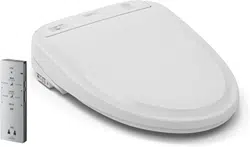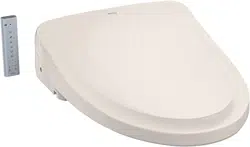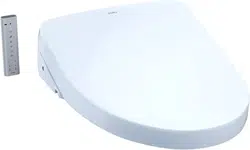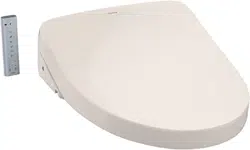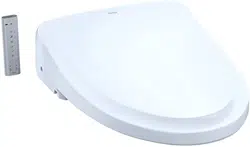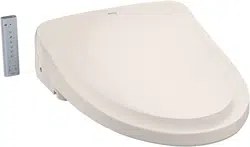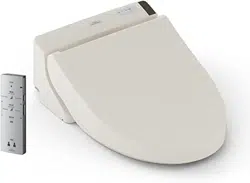

C200
A200
SW2044
(TCF6531U)
SW2043
(TCF6530U)
SW2024
(TCF6501U)
WASHLET
Instruction Manual
■
Thank you for your recent purchase of the product. Please read the enclosed
information to ensure the safe use of your product.
■
Be sure to read this Instruction Manual before using your product and keep it in a
safe place for future reference.
2
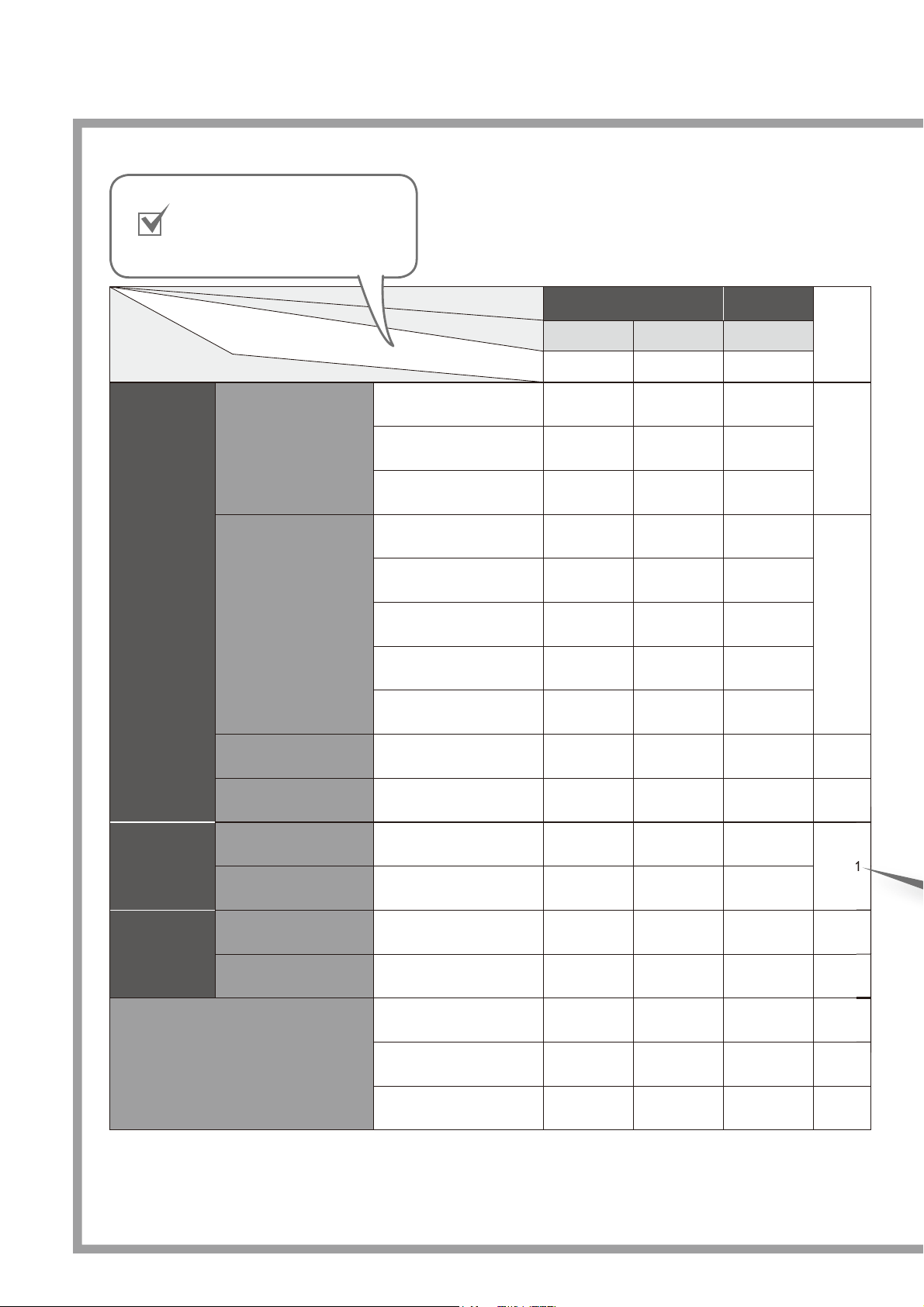
The available functions vary according to the model.
Functions
C200 A200
Ref.
Page
SW2044
SW2043 SW2024
Basic
Functions
Cleansing
Rear cleansing
●●●
16Rear soft cleansing
●●●
Front cleansing
●●●
Changing the washing
method
Wand position adjustment
●●●
16, 17
Water pressure adjustment
●●●
Oscillating cleansing
●●●
Pulsating cleansing
●●●
Personal setting lock
●●●
Drying
Warm air drying
●●
—
16
Changing the temperature
Temperature adjustment
●●●
22, 23
Sanitary
Functions
Removing odors
Deodorizer
●●
—
20, 21
Bowl pre-cleaning
Pre-mist
●●
—
Convenient
Functions
Heating the toilet seat
Heated seat
●●●
-
Saving energy
Energy Saver
●●●
24, 25
Maintenance
Main Unit
One-touch removal
●●●
28
Removable toilet lid
●●●
29
Wand cleaning
●●●
30
Your Model
Product name (Model)
Part No.
1
5
Check your model name
and write a check mark in
this field as needed.
3
Safety Precautions .................... 4
Operational Precautions .......... 11
Parts Names ........................... 12
Preparation .............................. 14
Changing Settings ................... 32
What to Do?............................. 38
●
If you cannot operate with the
remote control ...................... 38
●
Freeze Damage Prevention
... 38
●
Long Periods of Disuse ........ 40
Troubleshooting ....................... 41
Specifi cations .......................... 45
Warranty .................................. 46
Basic Operations ..................... 16
Automatic Functions ................ 20
DEODORIZER, PRE-MIST
Temperature Adjustment.......... 22
Energy Saver Feature ............. 24
Power Plug .............................. 26
Main unit .................................. 27
Deodorizing Filter .................... 27
Gap between the Main Unit
and the Toilet Bowl .................. 28
Gap between the Main Unit
and the Toilet Lid ..................... 29
Wand ....................................... 30
Wand cleaning
Water Filter Drain Valve ........... 31
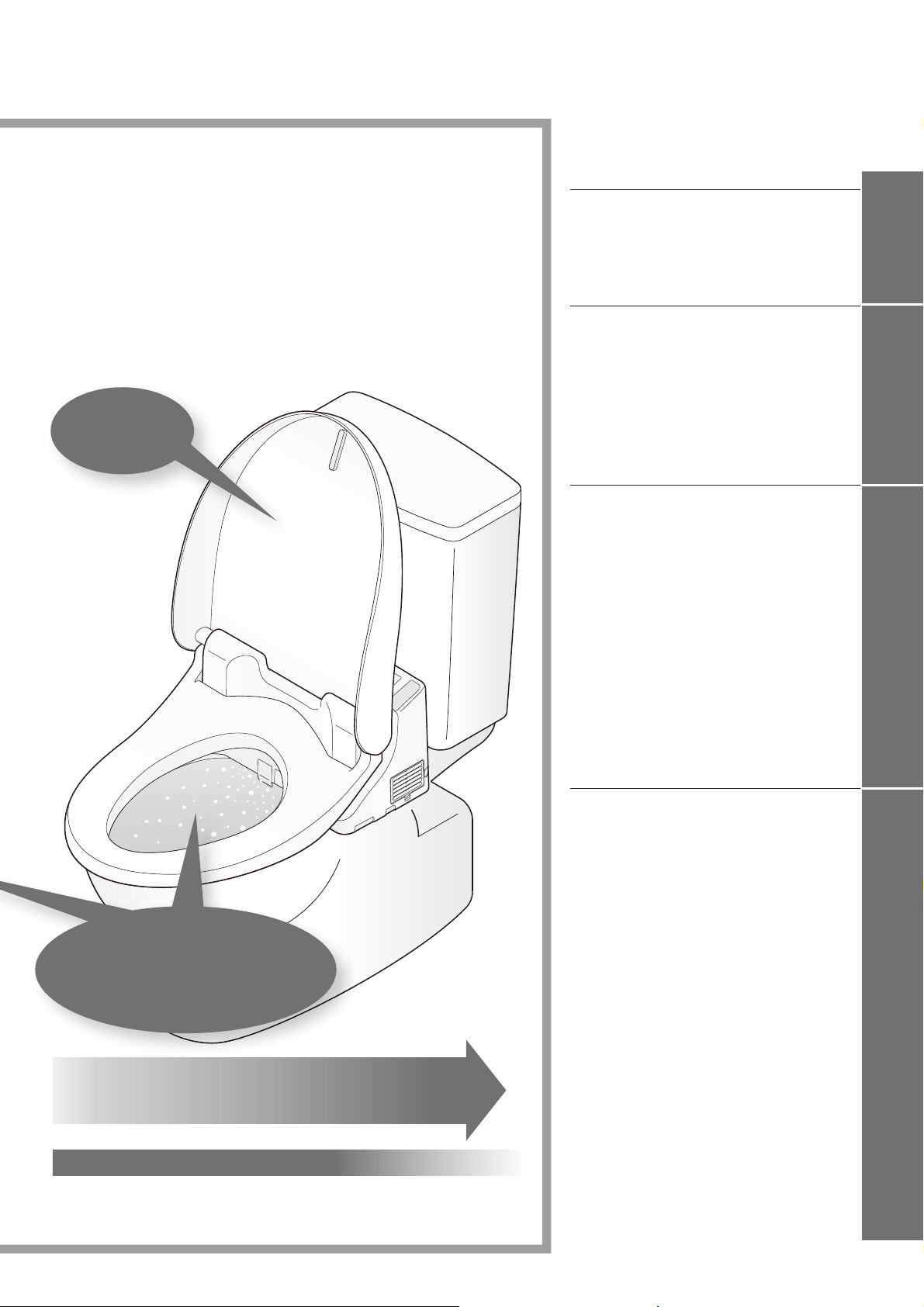
As you sit
A mist is automatically sprayed
in the toilet bowl to create a water
cushion, which prevents dirt from
adhering to the surface.
Product name,
Part No.
Table of Contents
The self-cleaning functions operate
automatically.
(See pages 20 for details.)
A mist is sprayed in the toilet bowl.
The deodorizer operates.
ReferenceMaintenanceOperation
Introduction
4
These precautions are important for safe usage. Be sure to follow them and use the product
correctly.
Symbols and Meanings
WARNING
May result in death or serious injury.
CAUTION
May result in injury or property damage.
The following symbols are used to indicate important safety instructions for the use of the product.
Symbol Meaning
This symbol indicates a prohibited use of the product.
This symbol is used to indicate a required step in the use of this product.
This product is classifi ed as Class 1 Equipment and must be grounded.
Install this equipment where the electrical outlet is accessible.
This appliance is not intended for use by persons (including children) with reduced physical, sensory or
mental capabilities, or lack of experience and knowledge, unless they have been given supervision or
instruction concerning use of the appliance by a person responsible for their safety.
Children should be supervised to ensure that they do not play with the appliance.
Use the new hose set included with this equipment. Do not reuse an old hose set.
WARNING
Do not plug or unplug the power plug with wet hands.
Doing so may cause electrical shock.
Do not get any water or cleaning solution on the main unit or power plug.
Doing so may cause fi re, electrical shock, heat or short circuit.
Doing so may cause the product to crack resulting in injury or water damage.
Never disassemble, repair or alter.
Doing so may cause fi re, electrical shock, heat or short circuit.
Do not install the product on moving vehicles such as wheeled vehicles or boats.
Doing so may cause fi re, electric shock, short circuit or malfunction.
The toilet seat, toilet lid, main unit or other parts may come loose and fall off, resulting in injury.
Safety Precautions
5
WARNING
Do not use the Washlet if a malfunction occurs.
Always unplug the plug from the outlet.
Close the water shutoff valve to stop water supply.
Possible malfunctions:
Water is leaking from a pipe or the main unit.
The product is cracked or broken.
The product makes a strange noise or emits a strange odor.
The product emits smoke.
The product is abnormally hot.
The toilet seat cushion is out of place.
Continued use after malfunction could cause a fi re, electric shock, heat, short circuit, injury or
water damage.
Only use tap water or potable well water (underground water).
Do not use seawater.
Doing so may cause irritation to the skin and malfunction.
Do not touch the power plug during thunderstorms.
Doing so may cause electrical shock.
Do not allow the water supply hose to touch the power plug or outlet.
Doing so may cause condensation resulting in a fi re, electrical shock, heat or a short.
Do not do anything that may damage the power cord, power plug.
Do not strike, yank, twist, excessively bend, damage, alter, or heat the electrical cords. Also, do
not place anything heavy on, bind or pinch the electrical cords.
Using a damaged electrical cord may result in a fi re, electrical shock, heat or short.
Do not use a loose or faulty electrical outlet.
Doing so may cause fi re or short circuit.
Do no use any outlet or wiring equipment beyond its specifi ed rating.
Plugging too many plugs into the same outlet, for example using outlet splitters, can cause fi re
due to heat.
Do not use any power supply other than the one specifi ed.
AC 120V,60Hz
Doing so may cause fi re or excessive heat.
Do not stick a fi nger or anything else into the warm air outlet.*
Do not place anything on the warm air outlet or drape clothes over it.
Doing so may cause burns, electrical shock or malfunction.
Keep cigarettes and other open fl ames away from the product.
Failure to do so may cause fi re.
* Except SW2024
Introduction
6
WARNING
Beware of irritation or burn.
Improper use of the toilet seat may cause irritation or burn.
When sitting for a long time on the toilet seat, switch the toilet seat temperature adjustment to "OFF".
When any of the following persons use a heated seat or warm air drying, someone should switch the
toilet seat temperature adjustment to "OFF" and switch the drying air temperature to "Low".
Young children, the aged and other users unable to set the temperature appropriately themselves.
The ill, physically disabled and others who do not have freedom of movement.
Those using any medicines that cause drowsiness (sleeping or cold medicine), those who have
been drinking heavily, anyone severely fatigued and anyone else liable to fall asleep.
This is an electrical product. Do not install it anywhere water is likely to get on
the product or anywhere with humidity high enough that water is likely to form
on the surface of this product. When using the product in a bathroom, install
a fan or ventilation port and ensure good air fl ow through the bathroom.
Failure to do so may cause fi re or electrical shock.
Always connect the Washlet to the cold water supply.
Connecting to hot water supply may result in burns and equipment damage.
Make sure that a properly grounded (3 prong) outlet has been installed.
Failure to install a grounded outlet could cause electrical shock in the event of a malfunction or
short circuit.
Insert the power plug securely into the outlet.
Failure to do so may cause fi re, heat or short circuit.
To unplug, hold the plug, not the cord.
Do not unplug by pulling the cord.
Pulling on the cord may cause damage and result in fi re or heat.
If the electric cord is damaged, avoid danger by having the manufacturer’s
repair department or equivalent specialist replace it.
Always disconnect the power plug from the outlet before cleaning,
maintenance or inspection.
Failure to do so may cause electrical shock or malfunction.
* Except when using "Wand cleaning".
Periodically remove dust and dirt from the electrical plug and make sure it is
securely plugged into the wall outlet.
Failure to do so may cause fi re, heat or short circuit.
Pull the plug out from the outlet and wipe clean with a dry cloth.
Always unplug the plug from the outlet before removing the main unit.
Failure to do so could cause a fi re or electrical shock.
Safety Precautions (Continued)
7
CAUTION
Do not use the product if the main unit is unstable.
Doing so may cause the main unit to come loose and fall, resulting in injury.
If the product is damaged, do not touch the damaged section.
Doing so may cause electrical shock or injury.
Replace it immediately.
Do not apply strong force, mechanical shock, step on or stand on the toilet
seat, toilet lid or main unit. Also do not place any heavy object on the toilet
seat, toilet lid or main unit.
Doing so may cause cracking or cause the main unit to come loose and fall, resulting in injury.
Doing so could damage the product and cause injury or water damage.
Do not lift up this product by the toilet seat or lid.
Do not raise the toilet seat or lid while objects are resting on top of the toilet.
Doing so may cause the main unit to come loose and fall, resulting in injury.
When cleaning or maintaining the plastic parts (main unit etc.) or the water
supply hose, use a kitchen cleaner diluted with water. Do not use any of the
following.
Toilet cleaner, household cleaner, benzene, paint thinner, powdered cleanser or nylon scrubbing pads.
These items may damage or crack the plastic and cause injury or malfunction.
These items could damage the water supply hose and cause a water leak.
WARNING
Preliminary studies in females suggest that overuse of continuous spraying
can increase the possibility of vaginal mucosa drying and potential
reduction in desirable microbial organisms.
Although these studies have not been validated, please consult your
healthcare provider for concerns regarding whether these circumstances
may apply to you.
More importantly, if you are an individual suffering from any immune
defi ciency as a result of disease, chemotherapy, or other medical condition
compromising the immune system you should consult your healthcare
provider before use of this product.
Introduction
8
Safety Precautions (Continued)
CAUTION
To prevent a sudden water leak, do not remove the water fi lter drain valve
when the shutoff valve is open.
Doing so will cause water to spurt out.
(Refer to Page 31 for instructions on cleaning the water fi lter drain valve.)
Do not fold or crush the water supply hose; do not damage by cutting with a
sharp object.
Doing so may cause water leaks.
Do not install the base plate, which is not attached.
Doing so could cause a fi re or damage.
If a water leak should occur, always close the shutoff valve.
When the ambient temperature is likely to drop to 0°C (32°F) or lower,
prevent damage to the pipes and hoses due to freezing.
Frozen water pipes could cause the main unit and the pipes to break, resulting in a water leak.
Regulate the room temperature to prevent the pipes and hoses from freezing during cold months.
Drain the water.
When not using the Washlet over an extended period of time, drain the
water out of the main unit and the water supply hose after closing the water
shutoff valve, and pull the electrical plug from the outlet.
When using the product again, allow the product to refi ll with water fi rst.
Otherwise, the water in the tank might become contaminated and cause skin infl ammation or
other problems. (Refer to Page 39 for instructions on replenishing the water.)
Leaving the power on may cause fi re or heat.
When installing the water fi lter drain valve, make sure that it is securely
tightened in its proper position.
Failure to securely tighten it may cause a water leaks.
Push the main unit securely on to the base plate.
After pushing the main unit until a click sound is heard, pull it slightly toward you to make sure that
the product does not detach.
Failure to do so could cause the main unit to come loose and fall resulting in injury.
9
DANGER To reduce the risk of electrocution:
1. Do not use while bathing.
2. Do not place or store the product where it can fall or be pulled into a tub or sink.
3. Do not place in or drop into water or other liquid.
4. Do not reach for the product when it has fallen into water. Unplug it immediately.
WARNING
To reduce the risk of burns, electrocution, fi re or injury to persons:
1. Close supervision is necessary when this product is used by, on, or near children or
invalids.
2. Use this product only for its intended use as described in this manual. Do not use
attachments not recommended by the manufacturer.
3. Never operate this product if it has a damaged cord or plug, is not working properly, has
been dropped or damaged, or has been dropped in water. Return the product to a service
center for examination and repair.
4. Keep the cord away from heated surfaces.
5. Never block the air openings on the product or place it on a soft surface, such as a bed
or couch, where the air openings may be blocked. Keep the air openings free of lint, hair,
and other similar items.
6. Never use while sleepy or drowsy.
7. Never drop or insert any object into any opening or hose.
8. Do not use outdoors. Do not operate where aerosol (spray) products are being used or
where oxygen is being administered.
9. Connect this product to a properly grounded outlet only.
See "Grounding Instructions" in Page 10.
10. The tank should be fi lled with water only.
Introduction
10
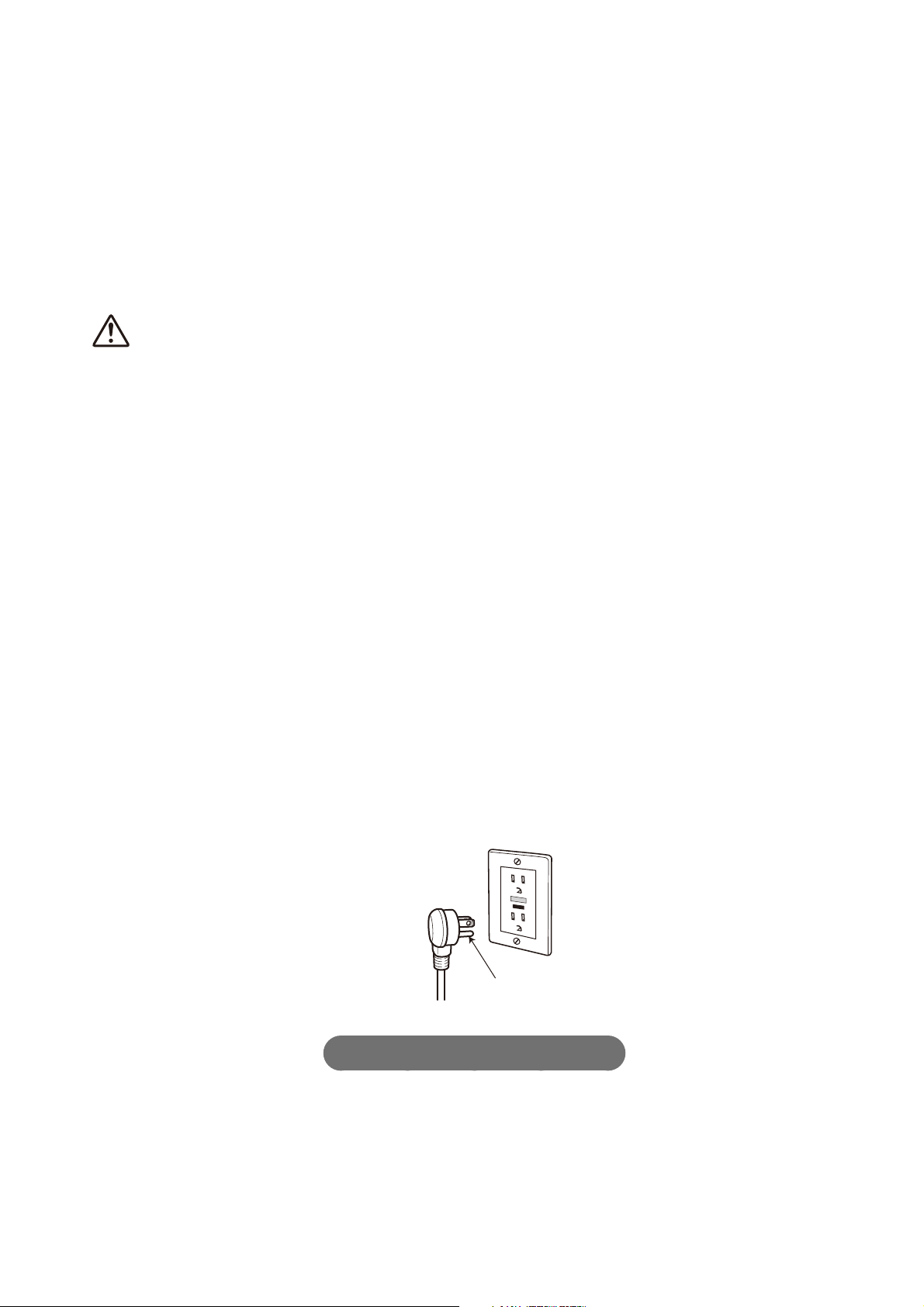
Grounding Instructions
This product should be grounded. In the event of an electrical short circuit, grounding
reduces the risk of electric shock by providing an escape wire for the electrical current.
The plug must be plugged into an outlet that is properly installed and grounded.
DANGER - Improper use of the grounding plug can result in a risk of electric shock.
If repair or replacement of the cord or plug is necessary, do not connect the grounding wire
to either fl at-head terminal.
Check with a qualifi ed electrician or serviceman if the grounding wire instructions are not
completely understood, or if in doubt as to whether the product is properly grounded.
This product is factory equipped with a specifi c electric cord and plug to permit connection
to a proper electric circuit. Make sure that the product is connected to an outlet having the
same confi guration as the plug.
No adapter should be used with this product. Do not modify the plug provided - if it will not fi t
in the outlet, have the proper outlet installed by a qualifi ed electrician.
If the product must be reconnected for use on a different type of electric circuit, the
reconnection should be made by qualifi ed service personnel.
If it is necessary to use an extension cord, use only a three wire extension cord that has a
three blade grounding plug, and a three-slot receptacle outlet that will accept the plug on the
product.
Replace or repair a damaged cord.
Grounding pin
Save these instructions.
Safety Precautions (Continued)
11
Operational Precautions
■
For prevention of damage
●
Wipe plastic areas such
as the main unit and
remote control with a
soft, wet cloth.
Dry cloth or tissue
●
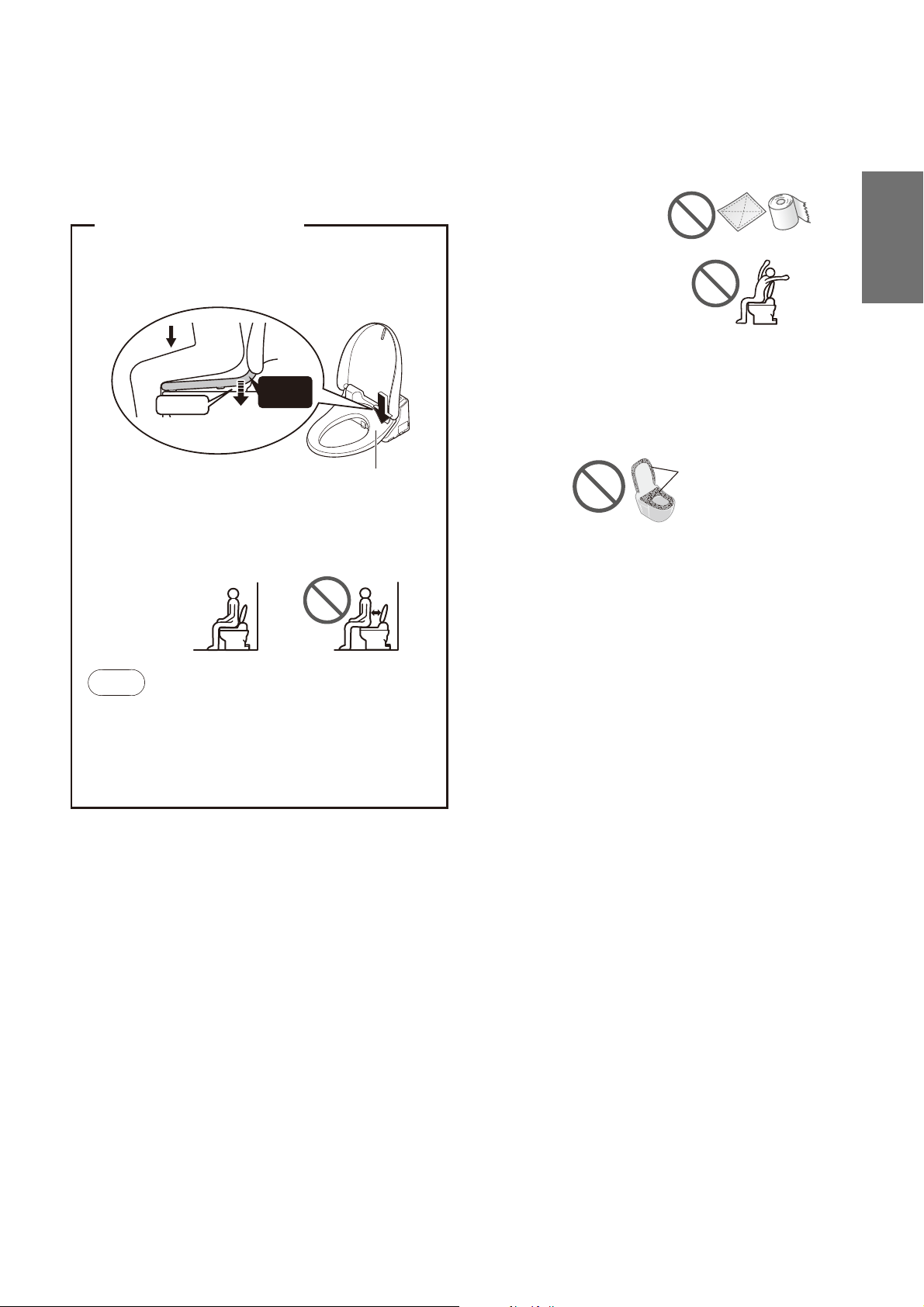
Do not lean against the
toilet lid.
■
Problem Prevention
●
Disconnect the power plug if there is a risk of lightning.
●
A toilet seat cover or a toilet lid cover cannot be used.
(The seat switch may not function properly.)
Covers
●
Do not urinate on the main unit, toilet seat or wand.
(Doing so may cause pink or brown stains or a
malfunction.)
●
Do not apply strong forces to the control panel of the
remote control.
●
When using a toilet cleaner to clean the toilet, wash it off
within 3 minutes and leave the toilet seat and toilet lid open.
Wipe off any cleaner that remains on the toilet bowl.
(If vapor from a toilet bowl cleaner enters the main unit, it
may cause a malfunction.)
●
Do not expose to direct sunlight.
(Doing so may cause changes in color, irregular heated
seat temperature, remote control malfunction or Washlet
malfunction due to the change in temperature.)
●
Use radios, etc. away from the Washlet.
(The Washlet could cause interference with the radio signal.)
●
If you use a booster seat for infants or a soft highchair,
remove it after use.
(Keeping it installed may prevent some of the functions
from being used.)
●
Do not apply force to the remote control.
(May cause malfunction.)
To prevent the remote control from being dropped, set it
in the hanger when you are not using it. Be careful not
to expose it to water.
●
Do not place anything on the toilet seat and lid, and do
not press them with hands.
Failure to do so may turn on the seat switch, causing the
fl oor to get wet if buttons on the remote control are touched
and warm water comes out from the wand. (The seat switch
may turn on if force is applied to the toilet seat or lid.)
■
For prevention of malfunctions
●
Do not block the remote control transmitter or receiver.
< About the seat switch >
●
When you sit on the toilet seat, the seat switch turns
ON, enabling you to use various features.
(A click sound is heard when the seat switch is ACTIVATED.)
Gap
The toilet seat lowers.
Switch
ON
Seat switch
(Built-in)
●
Sit back on the toilet seat.
The seat switch will not turn on unless you sit
on the seat properly.
Note
When a child uses the Washlet, the seat switch
may not be ACTIVATED by their light body weight.
Since the toilet seat is designed to move up
and down, a clearance is provided between the
toilet seat cushion and the toilet bowl.
Introduction
12
Parts Names
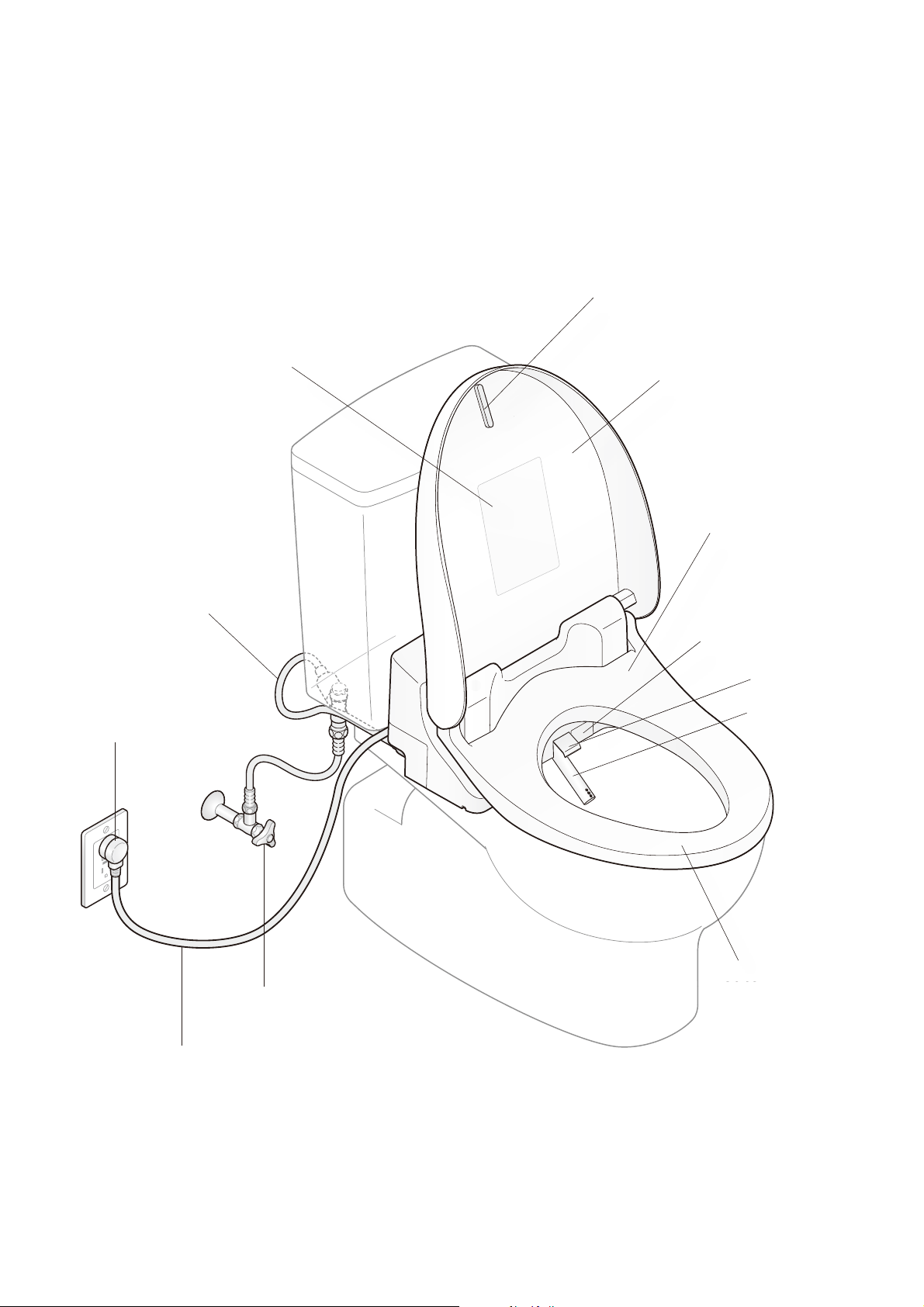
Product name, part no., etc.
Toilet lid cushion
Power plug
Shutoff valve
Wand cover
Wand
Heated seat
Toilet lid
(Page.15)
(Page.15)
Seat switch
(Built-in)
To
He
at
ed
Power cord
To
Warm air outlet cover *
Se
(
B
u
Warm
a
Water supply hose
13
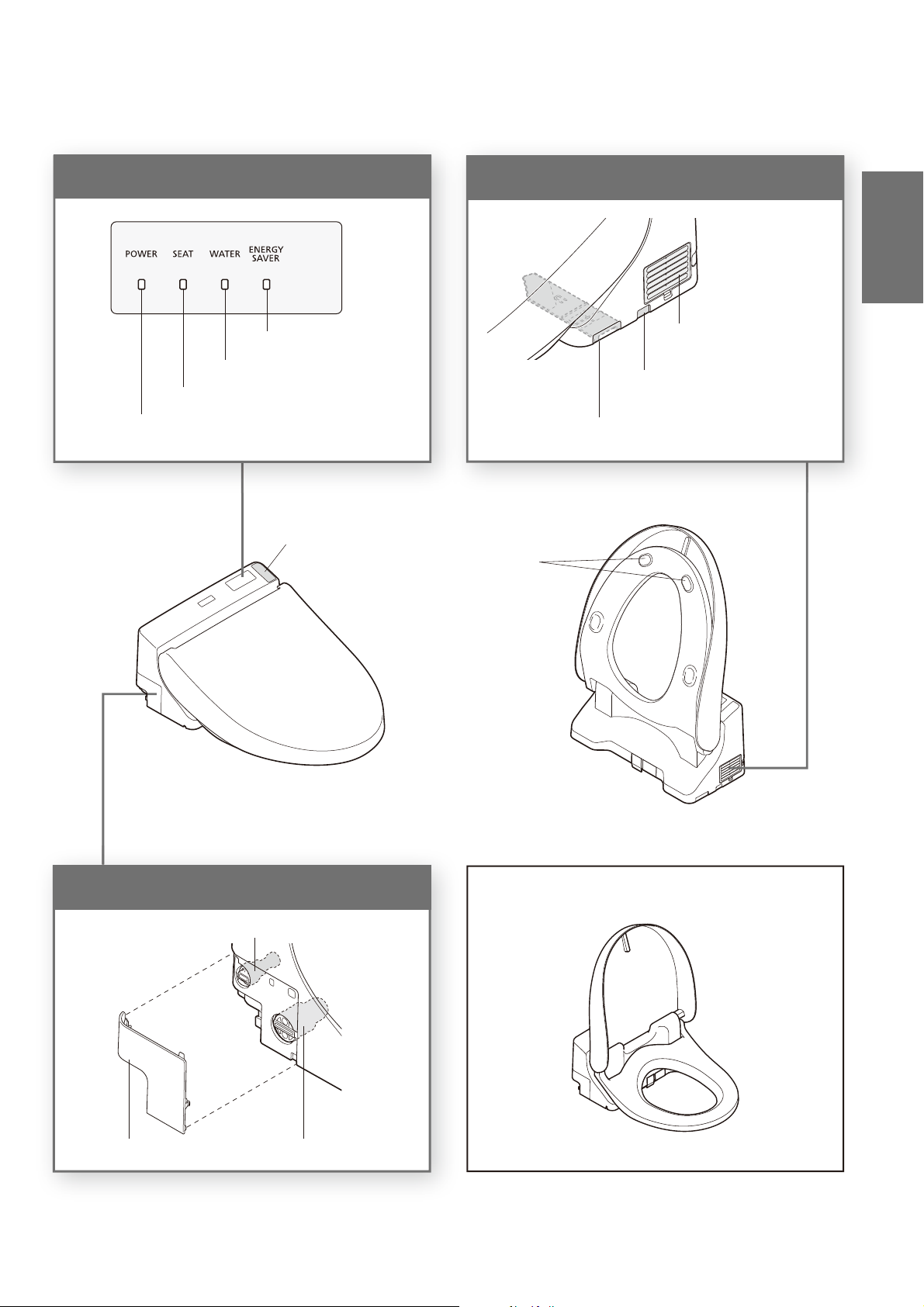
SW2043
Left side of main unit
Right side of main unit
Main display
* Except SW2024 Descriptions in this manual are based on the illustrations of SW2044.
Deodorizer outlet *
Deodorizing fi lter * (Page.27)
Toilet seat
cushions
Cover Water drain plug (Page 40)
Water fi lter drain valve
(Page 31)
Remote control receiver
POWER LED
SEAT LED
ENERGY SAVER LED
WATER LED
Main unit removal button
(Page.28)
The toilet seat and lid shape varies by model.
Introduction
14
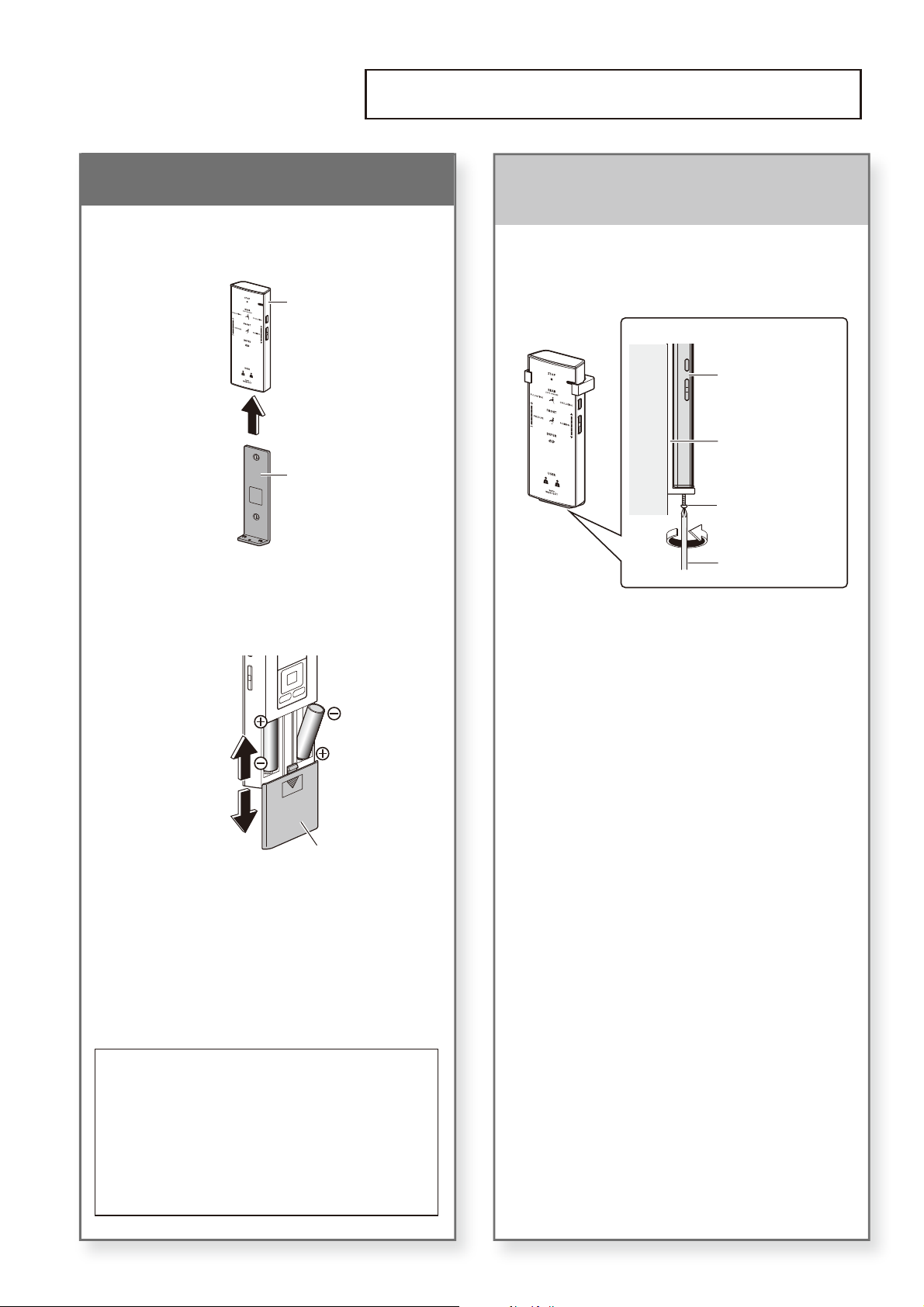
If the remote control is secured
(for anti theft)
1
Remove the screw from the
remote control fi xture.
Remote control
Hanger
Screw
Phillips screwdriver
Wall
(View from side)
2
Remove the remote control
from the hanger.
■ To secure the remote control again
Tighten the screw.
(Overtightening may cause damage to parts
such as the hanger)
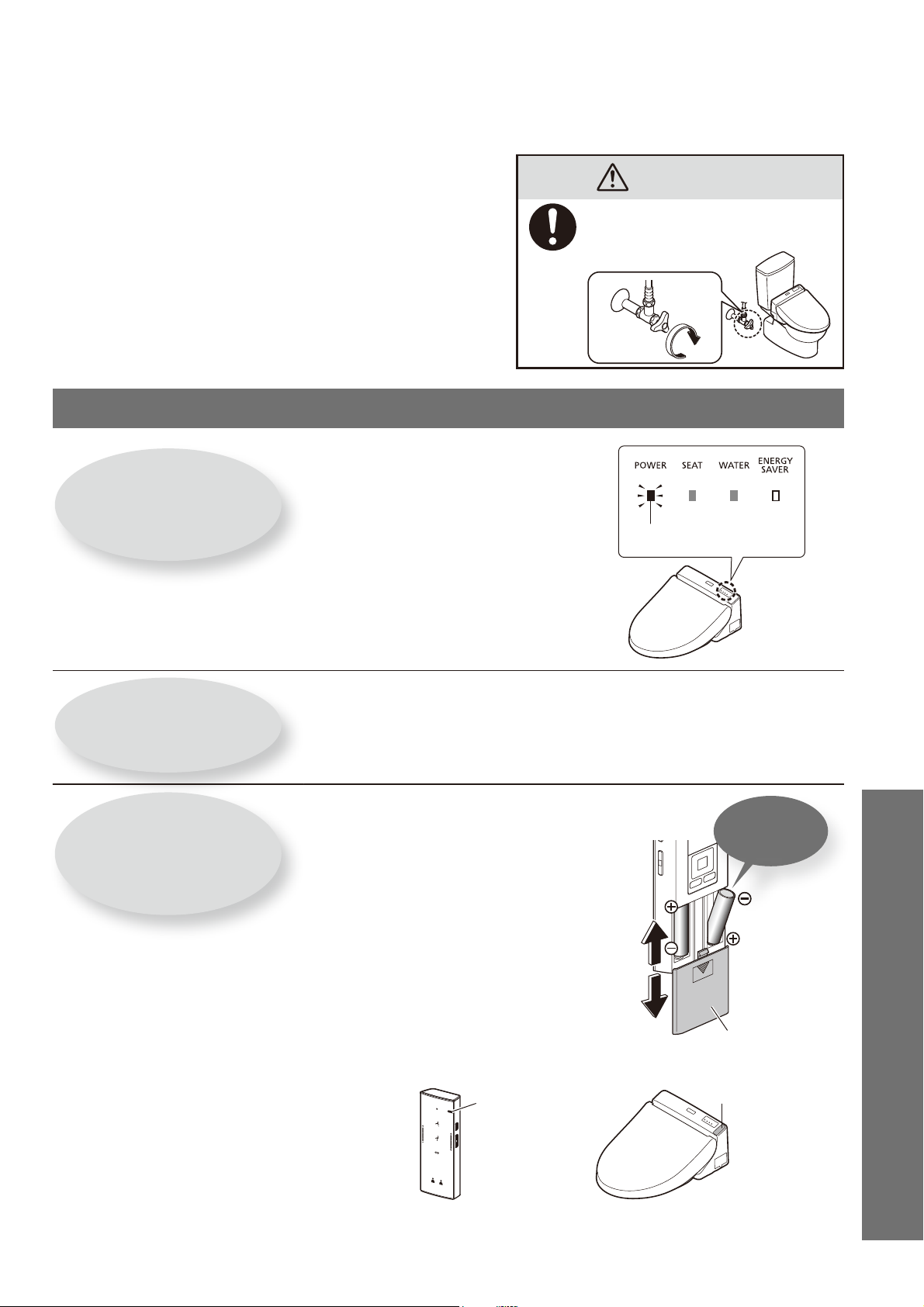
1.Insert the battery
1
Remove the remote control
from the hanger.
Remote control
Hanger
2
Open the battery cover and
insert two AA batteries.
Close
Open
Battery cover
●
When batteries are properly inserted,
temperature levels appear on the display of
the remote control (back side).
●
The display goes out when no button on the
remote control is pressed for 5 minute or more.
3
Mount the remote control in
the hanger.
■ About the batteries
●
Use dry cell, alkaline batteries. Follow the instructions
below to prevent the batteries from rupturing or
leaking fl uid.
When replacing the batteries, use new batteries of
the same brand.
If you will not be using the remote control for a long
time, remove the batteries.
Do not use rechargeable batteries.
Preparation
Using the Product for the First Time
15
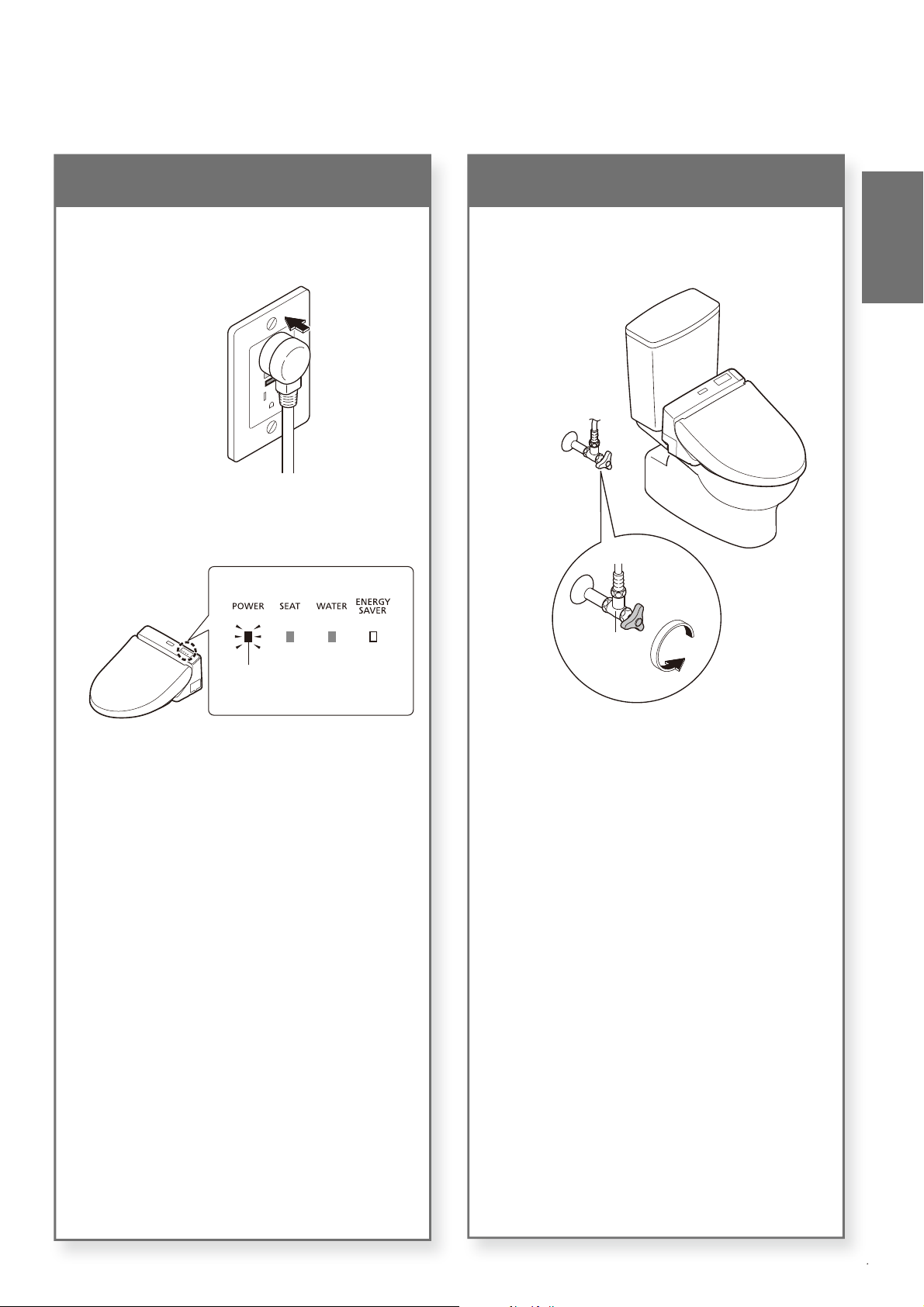
2.Turn on the power
1
Insert the power plug.
The wand extends and then retracts.
2
Check that the POWER LED
on the main display is lit up.
Lit
1
3.Open the shutoff valve
1
Fully open the shutoff valve.
Shutoff
valve
Introduction
16
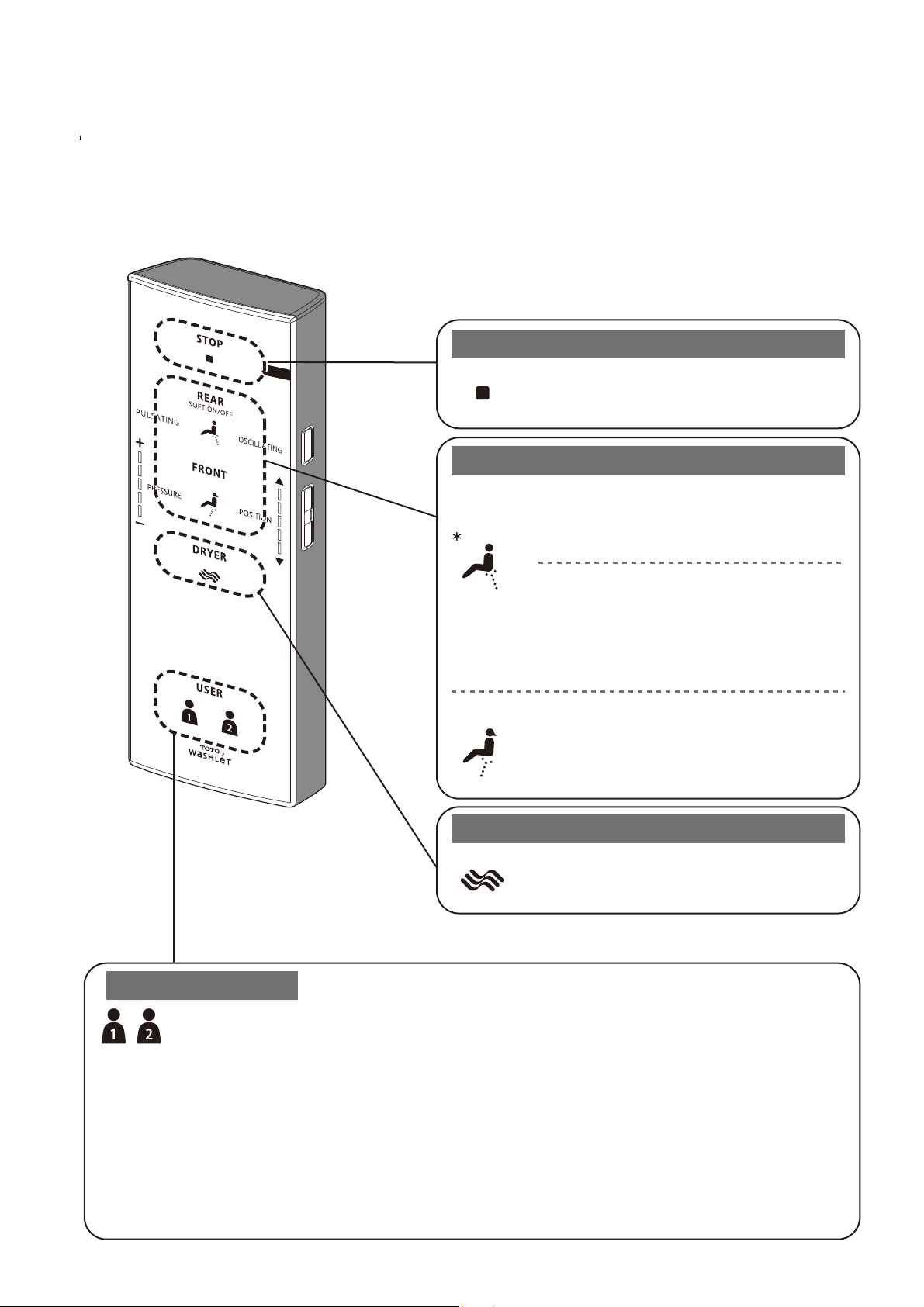
Press a button on the remote control; a beep sounds when the main unit receives the signal.
Stopping
Cleansing
Drying
(SW2044, SW2043 only)
Personal Setting
[STOP]
Stops the operation.
[REAR]
Cleanses your rear.
*
The mode changes between [SOFT] (Flickering) and
[REAR] (Lit) each time the button is pressed.
(The drawing is SW2044)
[SOFT]
Washes your rear with mild water pressure.
[DRYER]
Dries your rear.
[FRONT]
Serves as a bidet for ladies.
[USER1] / [USER2]
You can store your preferred wand position, water pressure and water temperature a setting.
● To store a setting
While cleansing is in progress, set your preferred wand position, water pressure, and warm water
temperature, and then press and hold [USER 1] or [USER 2] for 2 seconds or longer.
● To use
Press [USER 1] or [USER 2], and then press the button for the cleansing you want to use.
*The wand position and water pressure lamps will light up for about 10 seconds in their set
positions, and the water temperature display switches.
Basic Operations
17
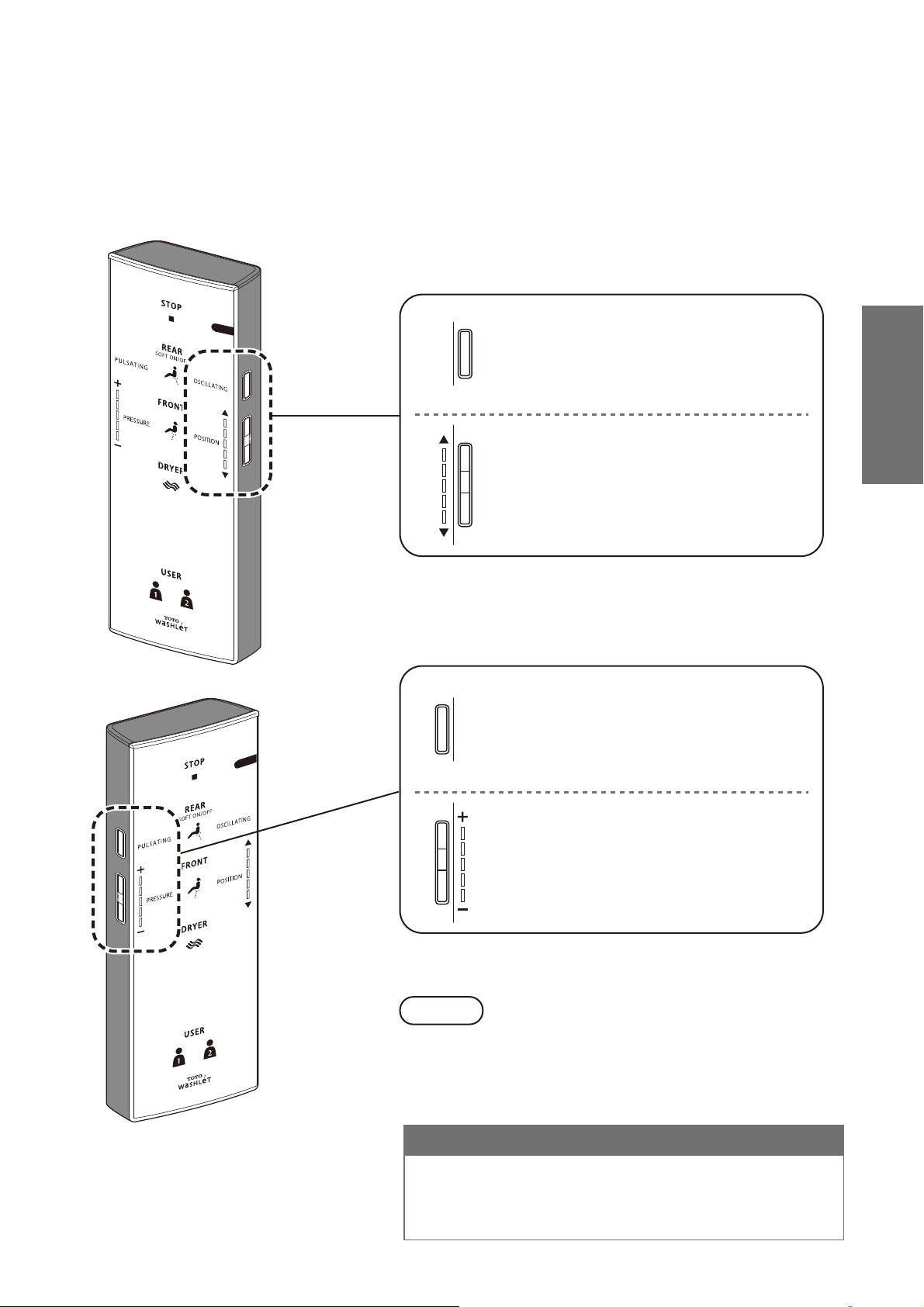
● Functions that operate when a button is pressed during "REAR", "SOFT", or "FRONT" cleansing.
[OSCILLATING]
●The wand moves back and forth to
wash your rear thoroughly.
●
The setting changes between "ON" and
"OFF" each time the button is pressed.
[POSITION]
●The wand position can be adjusted to
the front or rear.
("▲": Moves to the front, "▼": Moves to
the rear)
[PULSATING]
●Washes with the water pressure
pulsating between soft and strong.
●
The setting changes between "ON" and
"OFF" each time the button is pressed.
[PRESSURE]
●The water pressure strength can be
adjusted for cleansing functions such
as REAR.("-": Softer, "+": Stronger)
●
Sitting back on the toilet seat makes it easier to adjust the
wand position and to reduce splashing.
Note
For your information
●
Water may sometimes come out from around the wand when it
expands in the warm water tank, but this is normal.
●
As the warm water tank of hot-water system is used, the temperature
of warm water may become lower if it is continuously consumed.
Operation
18
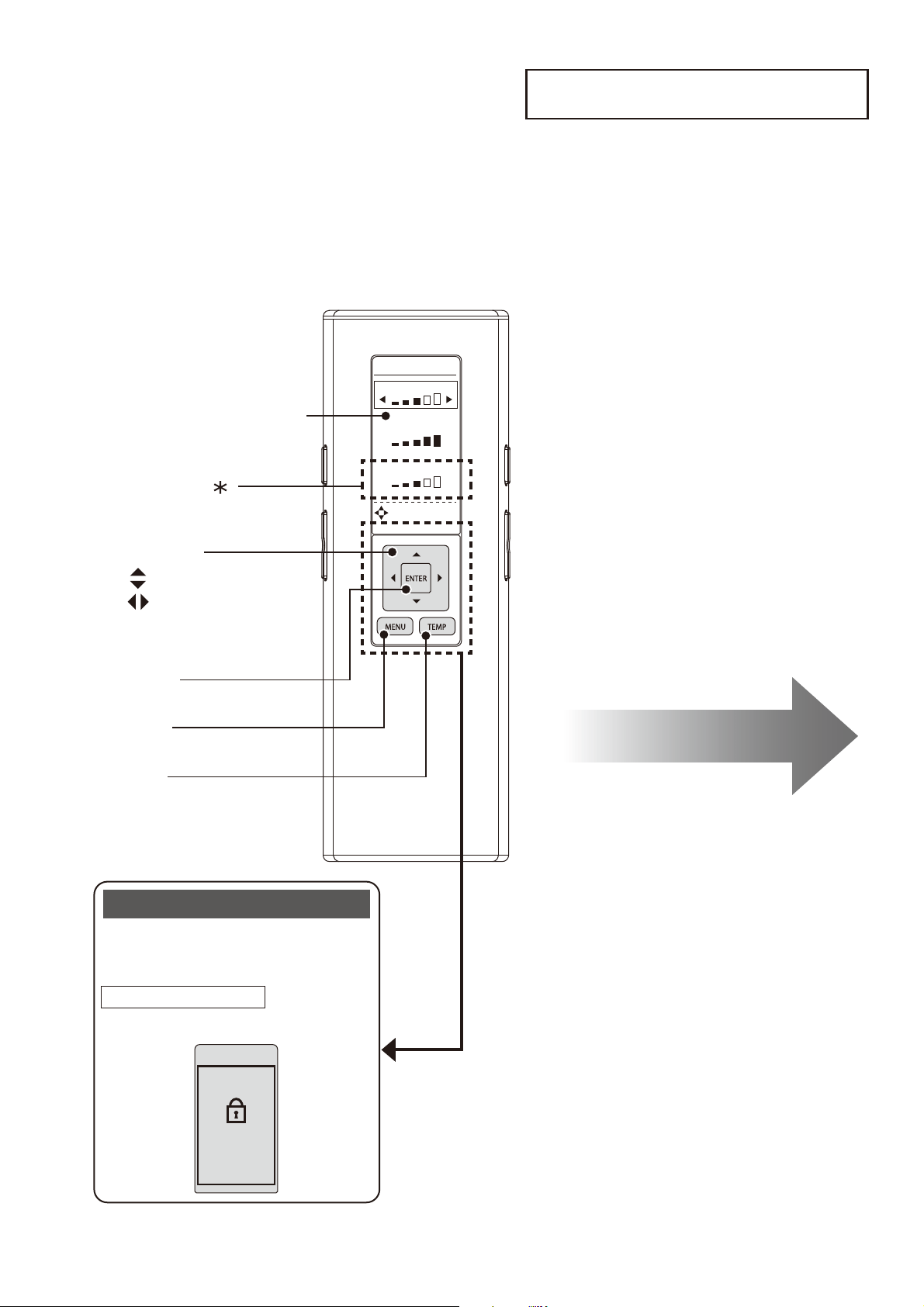
SETTING LOCK
PRESS ENTER
FOR 2 SEC
TO RESET
WATER
SEAT
DRYER
DIRECTIONAL
TEMPERATURE
SETTING
[ENTER]
[MENU]
Select keys
:Select an item
:Select a setting
[TEMP]
Remote control back side
Remote controller display
Press [MENU] to display the menu
screen.
You can lock the settings so that you
do not mistakenly operate the rear
buttons while using the remote control.
SETTING LOCK
Display screen during setting lock
How to Set (Page 36)
Basic Operations
About the Menu Screen
This section is an overview of the settings that can be confi gured with the remote control.
See the corresponding pages for the detailed descriptions.
The setting items and numbers vary according to the model.
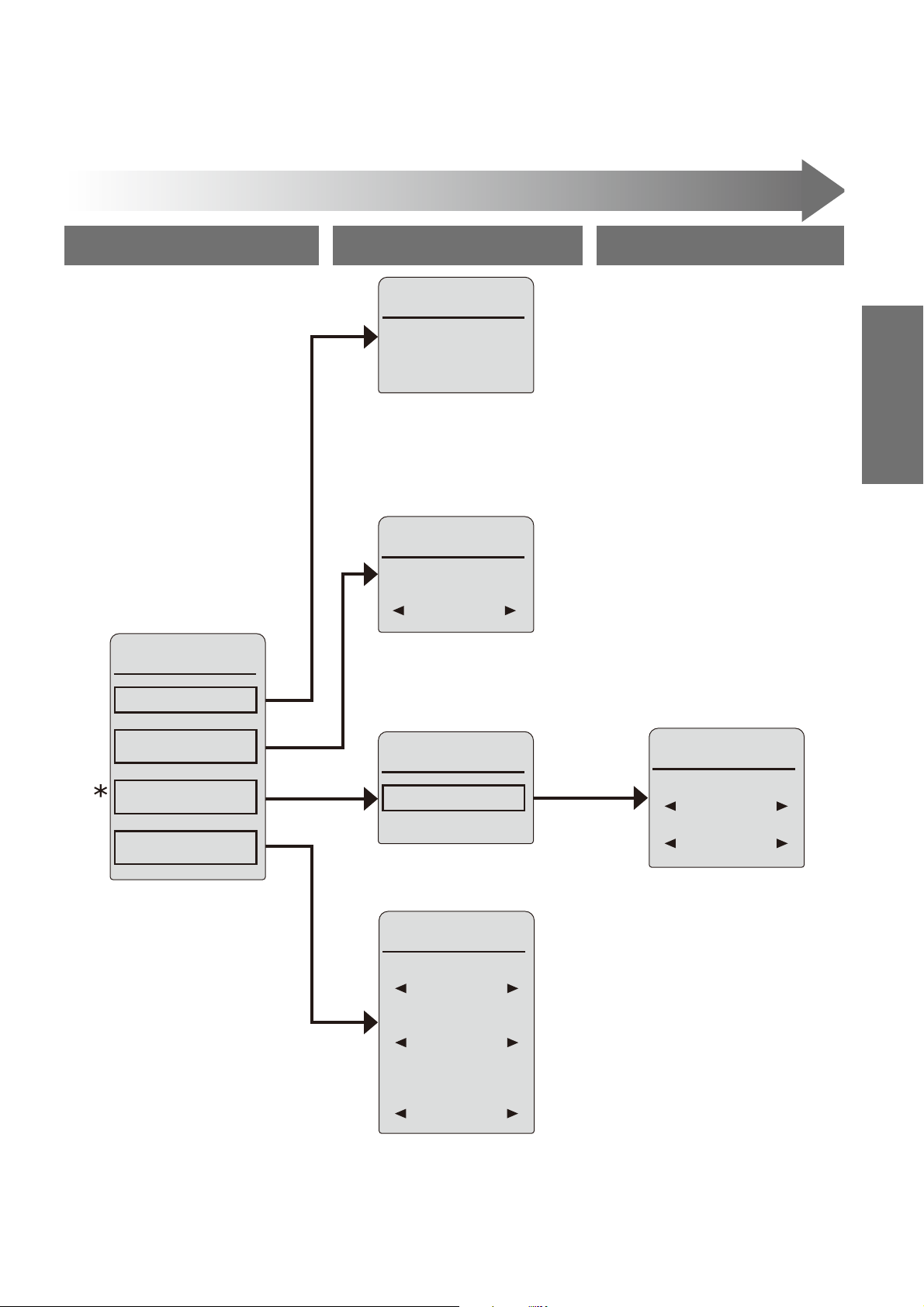
19
1. BEEP
2. SETTING
LOCK
OTHER
SETTINGS
1/3
OFF
ON
3. PERSONAL
SETTING
LOCK
ON
WAND
CLEANING
MODE ON/OFF
CLEANING
1/1
1. AUTO ENERGY
SAVER
OFF
ENERGY
SAVER
1/1
CLEANING
1/2
1. PRE-MIST
ON
1. CLEANING
2. ENERGY
SAVER
3. AUTO
FUNCTIONS
4. OTHER
SETTINGS
MENU 1/4
1. CLEANING
AUTO
FUNCTIONS
1/1
2. DEODORIZER
ON
* Will not be dis
p
la
y
ed on SW2024 remote control.
Level 1 Level 3Level 2
Menu Screen
Operation
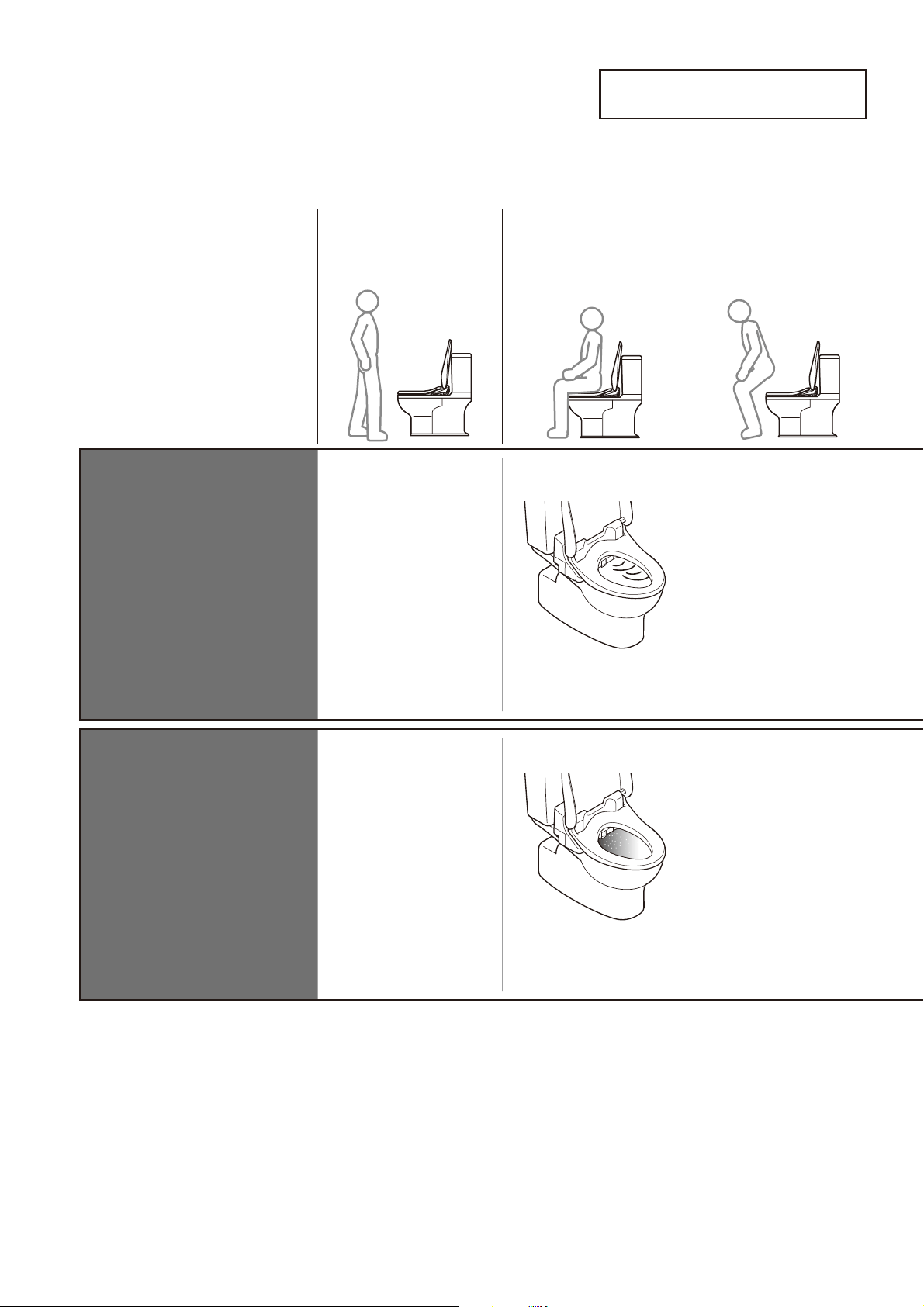
20
As you approach
As you sit As you stand up*
DEODORIZER
(SW2044, SW2043
only)
Deodorizer stops
➝
It stops after about 2 minutes
Starts the deodorizer
A mist is sprayed inside the
toilet bowl to make it more
diffi cult for dirt to adhere
PRE-MIST
(SW2044, SW2043
only)
A mist is sprayed inside
the toilet bowl
* To sanitize the toilet bowl every time it is used, water remaining in the wand is drained after you stand up from the toilet seat.
Automatic Functions
Cleaning Features
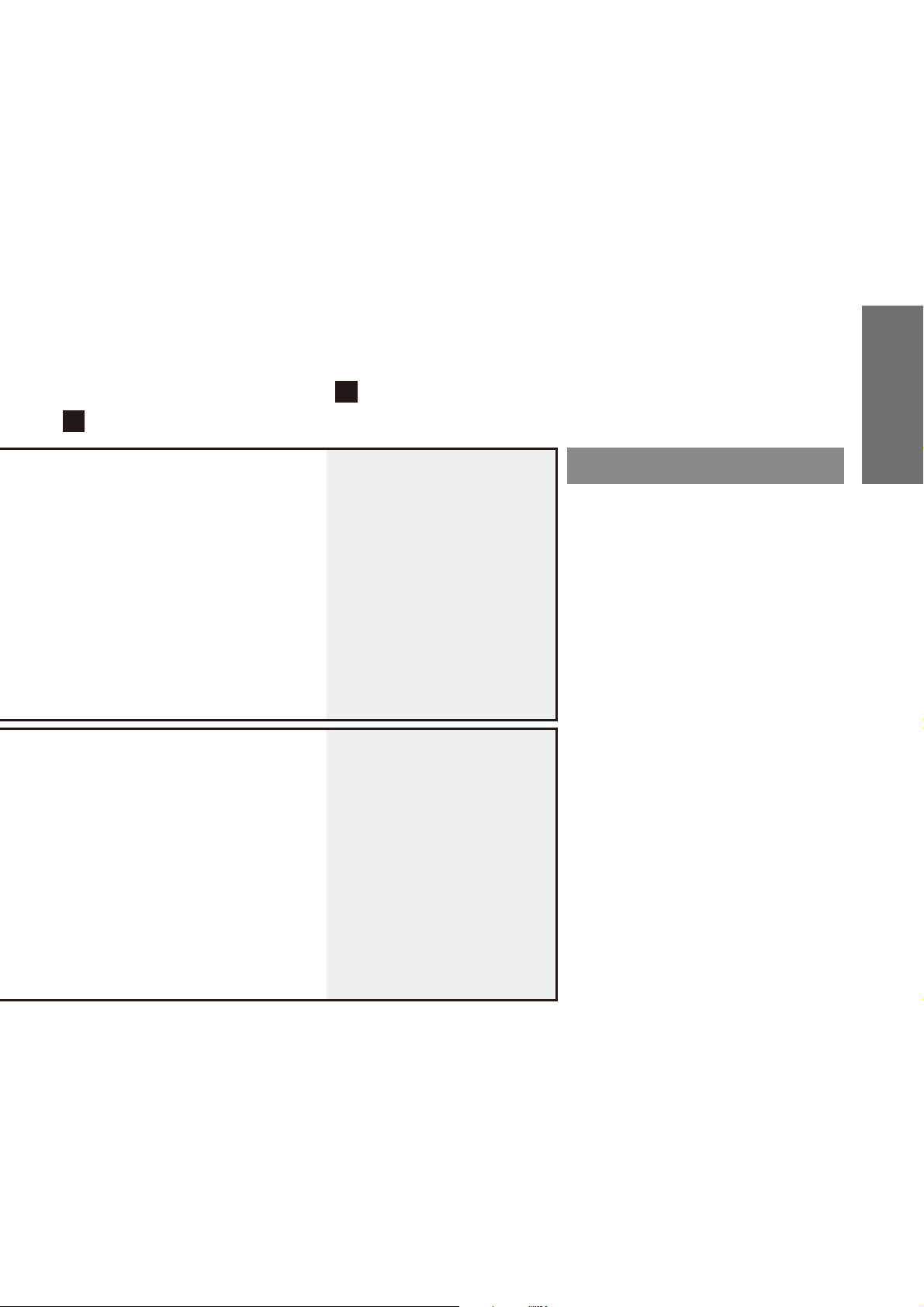
21
Changing
settings
Note
DEODORIZER ON/OFF
(Page 34)
PRE-MIST ON/OFF
(Page 34)
• The pre-mist will not spray for about
90 seconds after you stand up from
the toilet seat.
If dirt adheres...
■
If dirt adheres to the wand
during use, you can extend
the wand to clean it.
●
Cleaning the wand (Page 30)
Operation
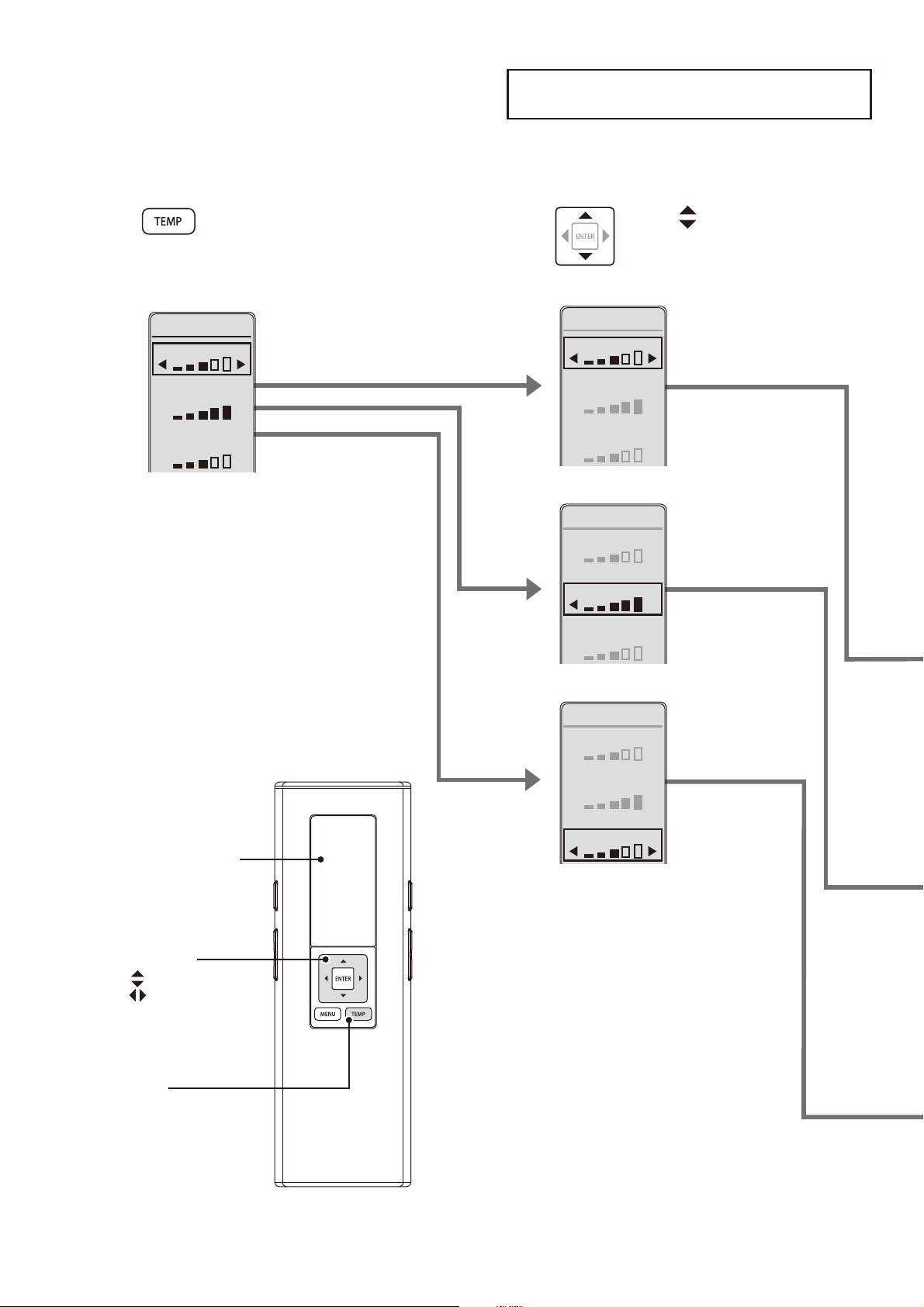
22
Temperature Adjustment
Warm Water / Toilet Seat / Drying *
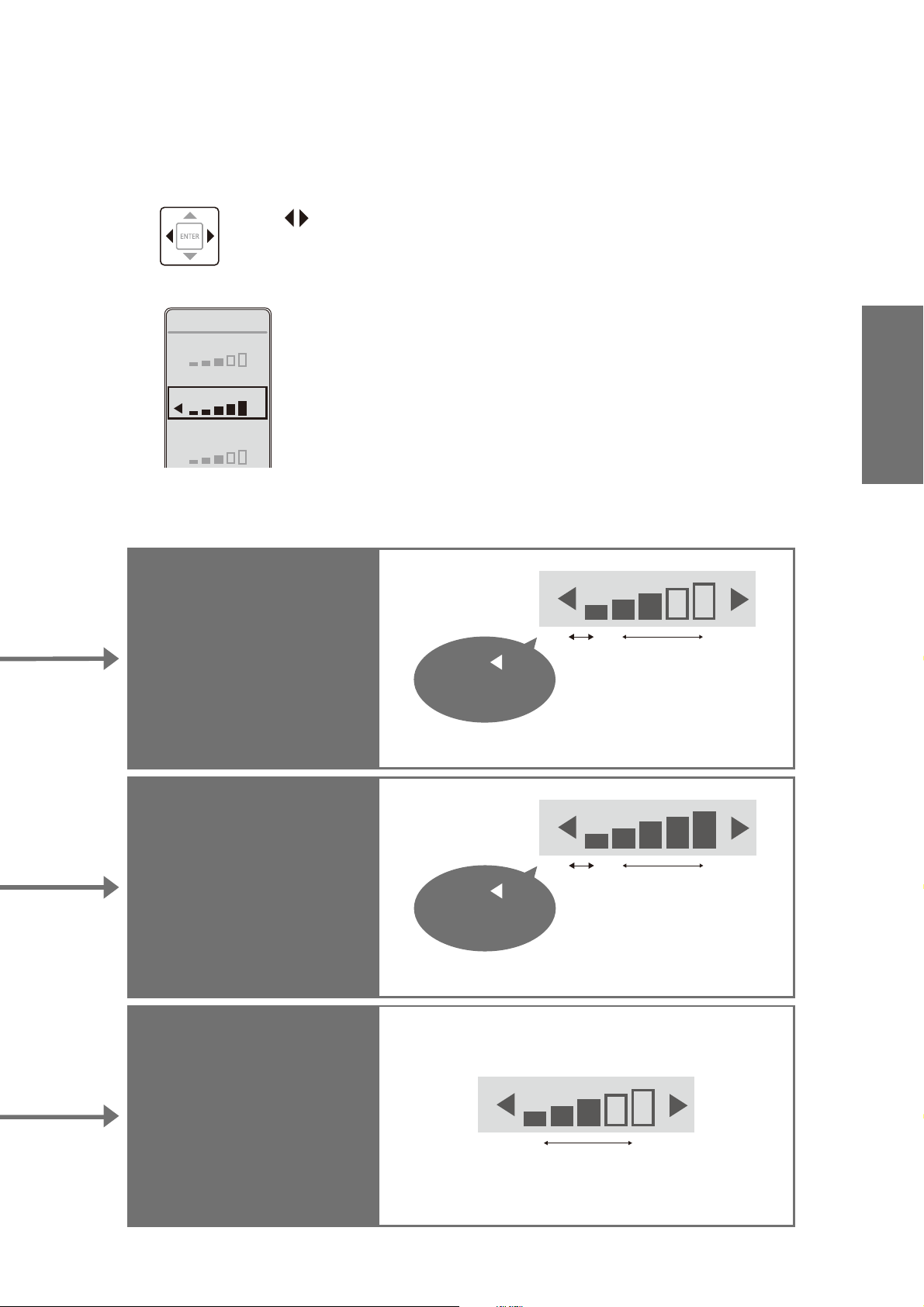
You can adjust the temperature levels or turn the settings to "OFF".
1
Press [TEMP].
WATER
TEMPERATURE
SETTING
SEAT
DRYER
2
Use to select the
item you want to set.
WATER
SEAT
DRYER
TEMPERATURE
SETTING
WATER
SEAT
DRYER
TEMPERATURE
SETTING
WATER
SEAT
DRYER
TEMPERATURE
SETTING
:Select an item
:Select a setting
Remote controller
display
[TEMP]
Select keys
23
Warm water
temperature
OFF Low High
Press
until "OFF"
appears.
Toilet seat
temperature
OFF Low High
Press
until "OFF"
appears.
Drying air
temperature*
Low High
* Will not be displayed on SW2024 remote control.
3
Use to select the
temperature level.
<Settings complete>
WATER
SEAT
DRYER
TEMPERATURE
SETTING
When "OFF" is set, the SEAT LED will go off.
When "OFF" is set, the WATER LED will go off.
Operation
24
Energy Saver Feature
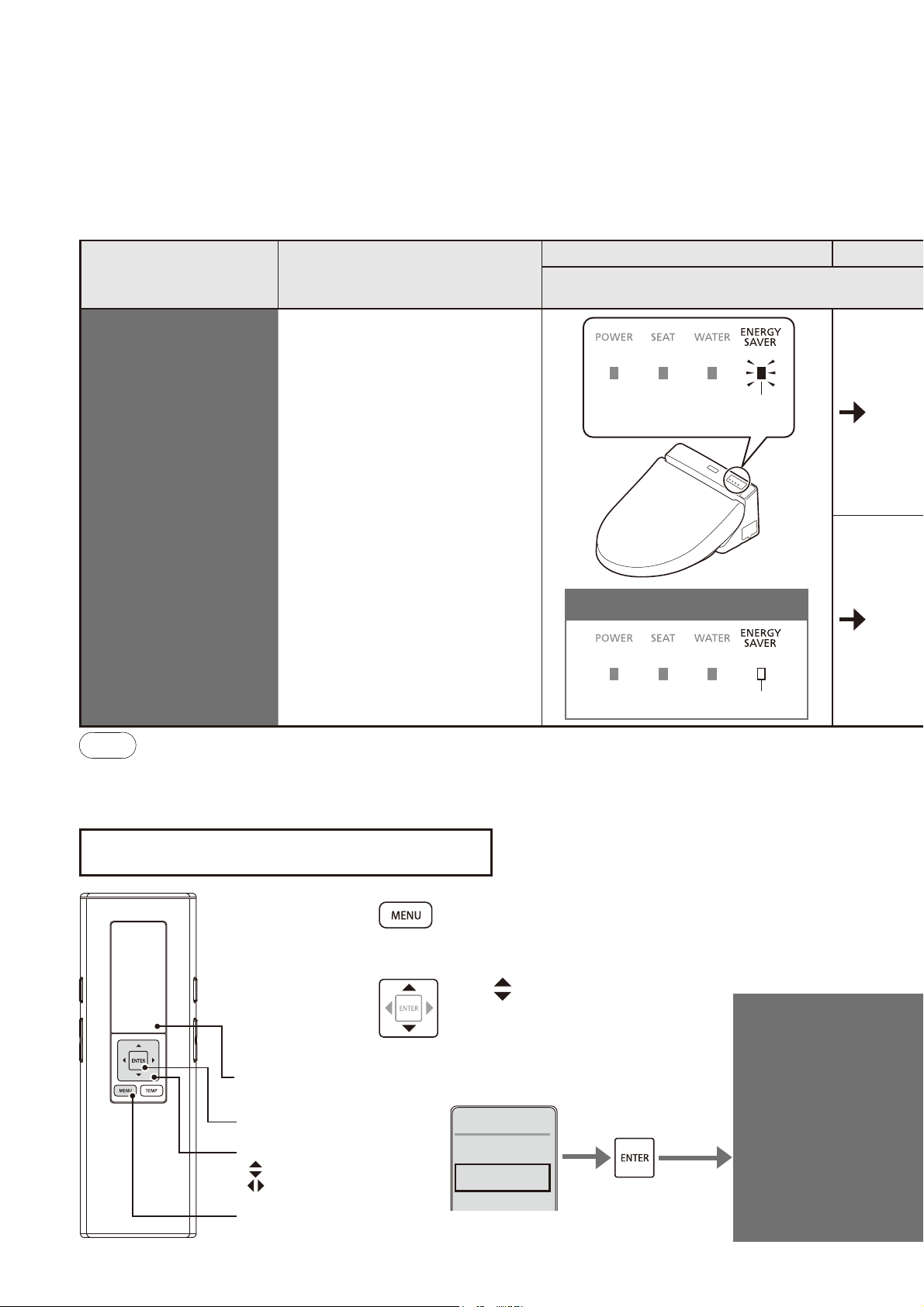
You can save energy by turning the toilet seat heater to a low temperature (or turning
the heater "OFF") during periods when the toilet will be used infrequently.
It takes about 10 days for the product to determine the periods when it is used relatively less frequently.
Note
●
Even if the toilet seat heater is being activated (with the toilet seat heater set to "Low" or "OFF," or with the warm water heater
set to "OFF"), the toilet seat will be temporarily heated when you sit on it.
(To reach the setting temperature, the toilet seat and warm water take about 15 minutes and 10 minutes, respectively.)
Type Situation
When energy saver is set
Main Display
ENERGY
SAVER
You want the Washlet
to save energy
automatically
The Washlet detects time
periods with infrequent use
and lowers the toilet seat
temperature automatically.
Furthermore, it automatically
turns off the toilet seat and warm
water heater during time periods
when the toilet is never used.
Lit
(Green)
OFF
When energy saver is not set
1
Press [MENU].
2
Use to select
"ENERGY SAVER"
and then press
[ENTER].
1. CLEANING
2. ENERGY
SAVER
3. AUTO
MENU 2/4
ENERGY
SAVER
Remote controller
display
:Select an item
:Select a settin
g
Select keys
[ENTER]
[MENU]
How to set
25
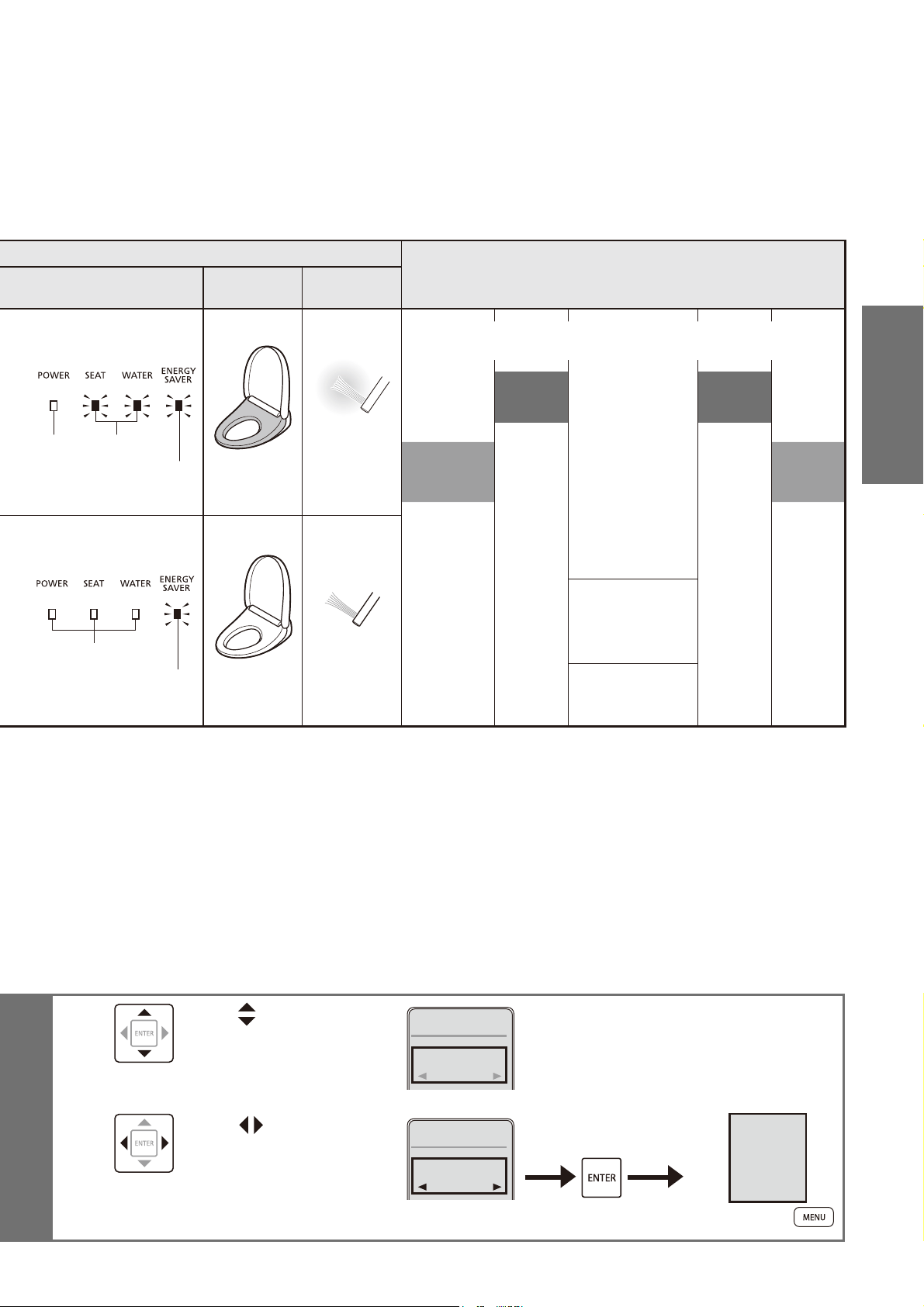
When energy saver is in operation
AM PM
Toilet seat
heater
Warm water
heater
068 590
LitOFF
Lit
(Orange)
Time period with
infrequent use
Low
Set
temperature
*1
Example)
Time period with infrequent use (from 9:00PM to 6:00AM): Low
Time period the toilet is never used (8:00AM to 5:00PM): OFF
Set
temperature
*1
Set
temperature
*1
Low
temperature
*2
Low
temperature
*2
Time period the toilet
is never used
OFF
Lit
(Orange)
OFF
OFF
OFF
*3
*1 The temperature set on Page 22.
*2
The time period when the toilet seat heater is set to a "low temperature" by the energy saver. The warm water heater is "Set temperature".
*3 The time period when the toilet seat heater and warm water heater are "OFF".
3
Use to select
"AUTO ENERGY
SAVER".
1. AUTO ENERGY
SAVER
OFF
ENERGY
SAVER
1/1
4
Use to select
"ON" or "OFF"
and then press
[ENTER].
1. AUTO ENERGY
SAVER
ON
ENERGY
SAVER
1/1
AUTO
ENERGY
SAVER
ON
(To return
➝
)
Operation
26
Maintenance
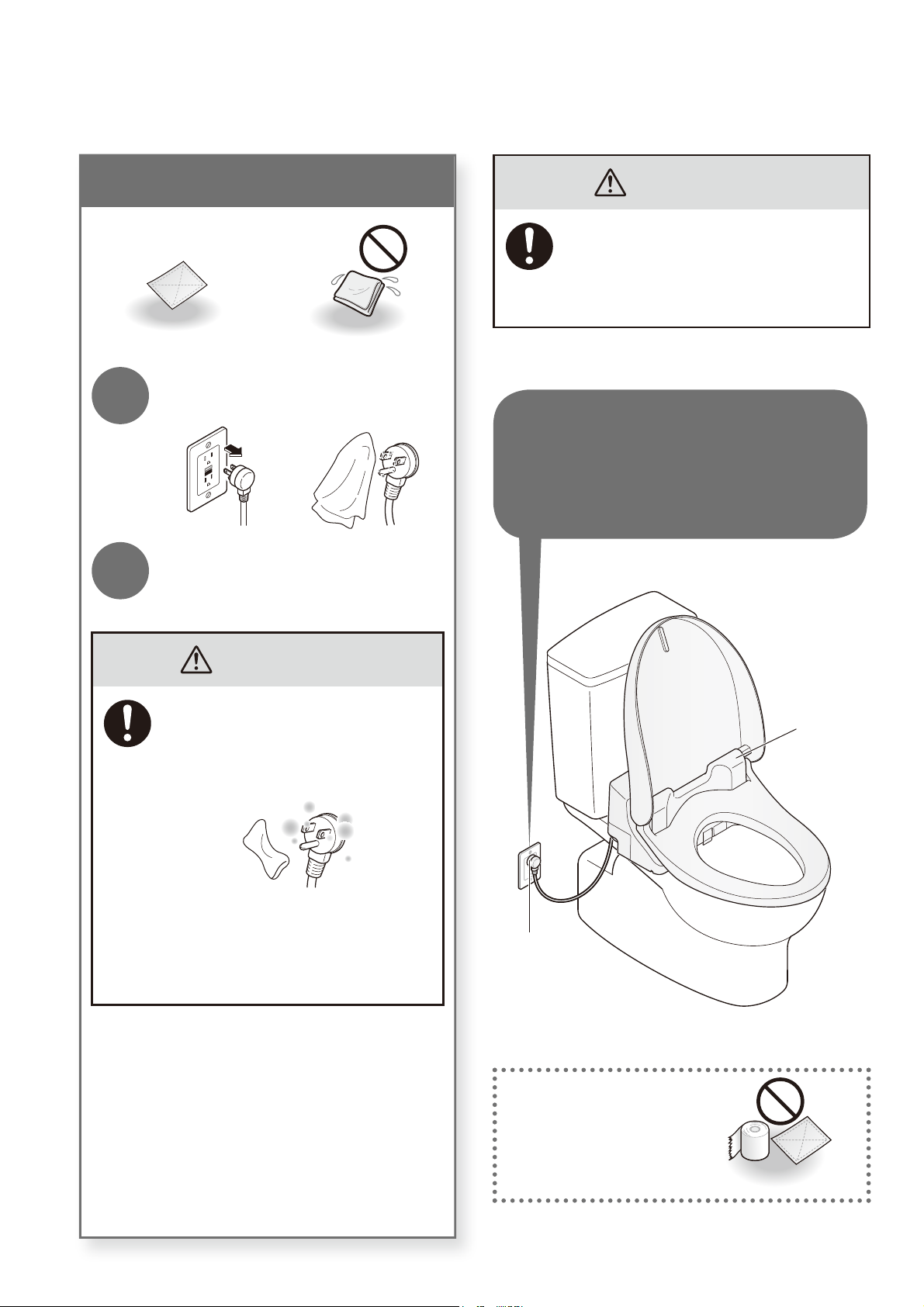
Power plug (Perform monthly)
Dry cloth Wet cloth
1
Disconnect the power plug
and wipe it with a dry cloth.
2
Insert the power plug.
The POWER LED lights up.
WARNING
●
Periodically remove dust from
the blades and other parts of the
power plug.
Disconnect the plug and wipe it
with a dry cloth.
●
Fully insert the power plug.
●
When disconnecting, hold the
main body of the power plug.
Pulling the cord may damage the
plug or cord.
WARNING
Always disconnect the power plug from
the outlet before cleaning, maintenance
or inspection. (see left)
(Failure to do so may cause electric shock
or malfunction, resulting in a breakdown.)
*Except when using "Wand cleaning".
Do not use a dry cloth
or toilet paper on plastic
parts.
(May cause damage.)
Main unit
Power plug
*For safety, disconnect the
power plug before cleaning
or maintenance.
27
Main Unit (Perform daily)
Soft cloth soaked in water
•
Toilet paper
•
Dry cloth
•
Nylon scrubbing pads
(May cause damage.)
1
Unplug the power plug.
2
Wipe with a soft cloth that has
been soaked in water and
wrung-out thoroughly.
■
For heavy dirt
Wipe with a soft cloth soaked in diluted,
neutral kitchen detergent, and then wipe
with a soft cloth soaked in water.
•
Neutral kitchen detergent
•
Paint thinner
•
Benzene
•
Powdered cleanser
3
Insert the power plug.
The POWER LED lights up.
Attention!
●
The Washlet is an electric appliance.
Be careful not to let water seep inside or
leave detergent in the gap between the main
unit and toilet bowl.
(May damage plastic parts or cause a malfunction.)
●
When using a toilet cleaner to clean the
toilet, wash it off within 3 minutes and leave
the toilet seat and toilet lid open.
Wipe off any cleaner that remains on the toilet
bowl. (If vapor from a toilet bowl cleaner enters
the main unit, it may cause a malfunction.)
●
Do not push or pull the covers around the
wand with undue force.
(May cause damage or malfunction.)
2
7
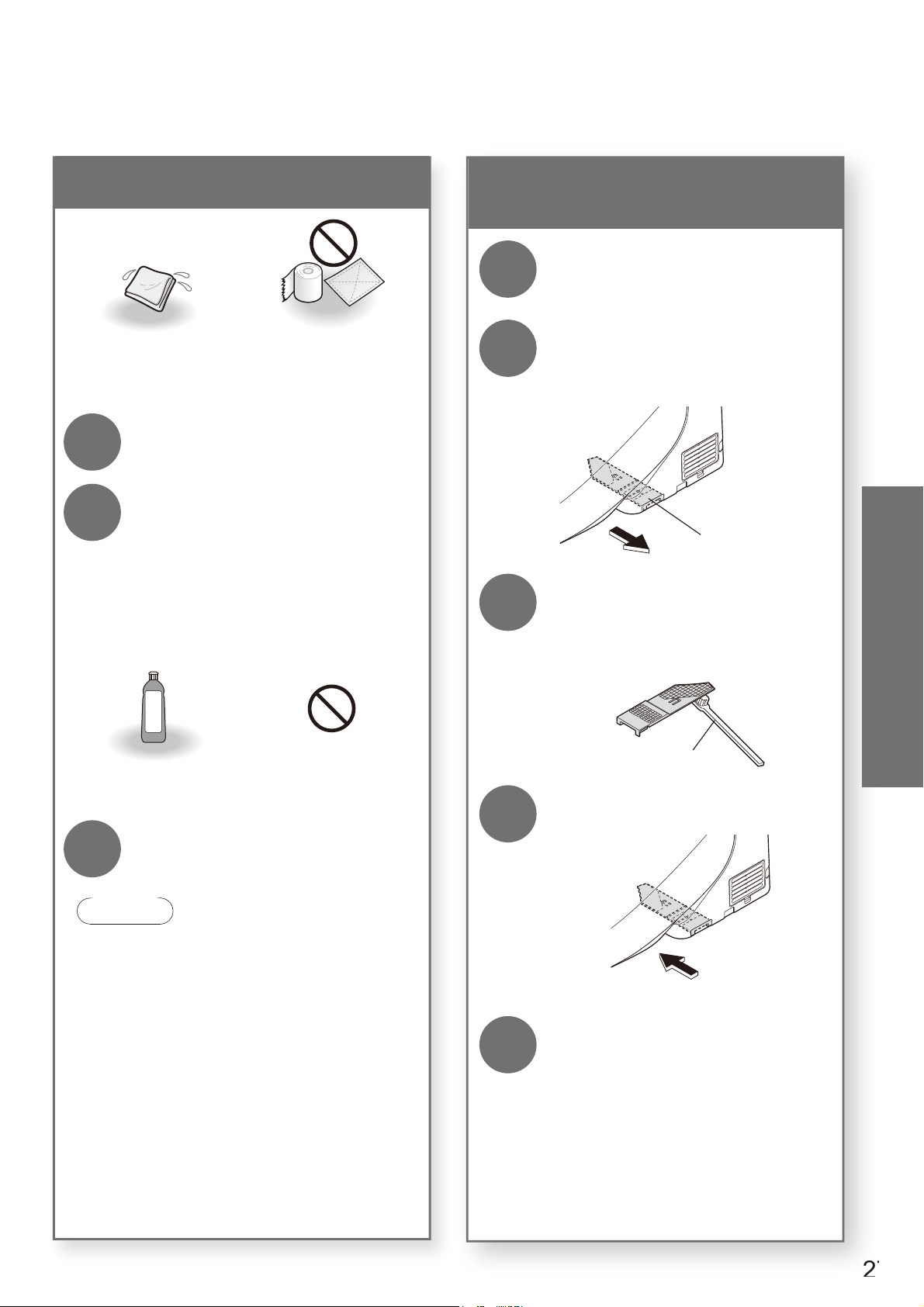
Deodorizing fi lter (Perform monthly)
<If you notice odors>
(SW2044, SW2043 only)
1
Unplug the power plug.
2
Remove the deodorizing fi lter.
Hold the knob and pull outward.
Do not pull with undue force.
(May cause damage or malfunctions)
Deodorizing fi lter
3
Clean with a tool such as a
toothbrush.
When washing with water, dry off all water
before mounting.
Toothbrush
4
Mount the deodorizing fi lter.
Push fi rmly until a click sound is heard.
5
Insert the power plug.
The POWER LED lights up.
Maintenance
28
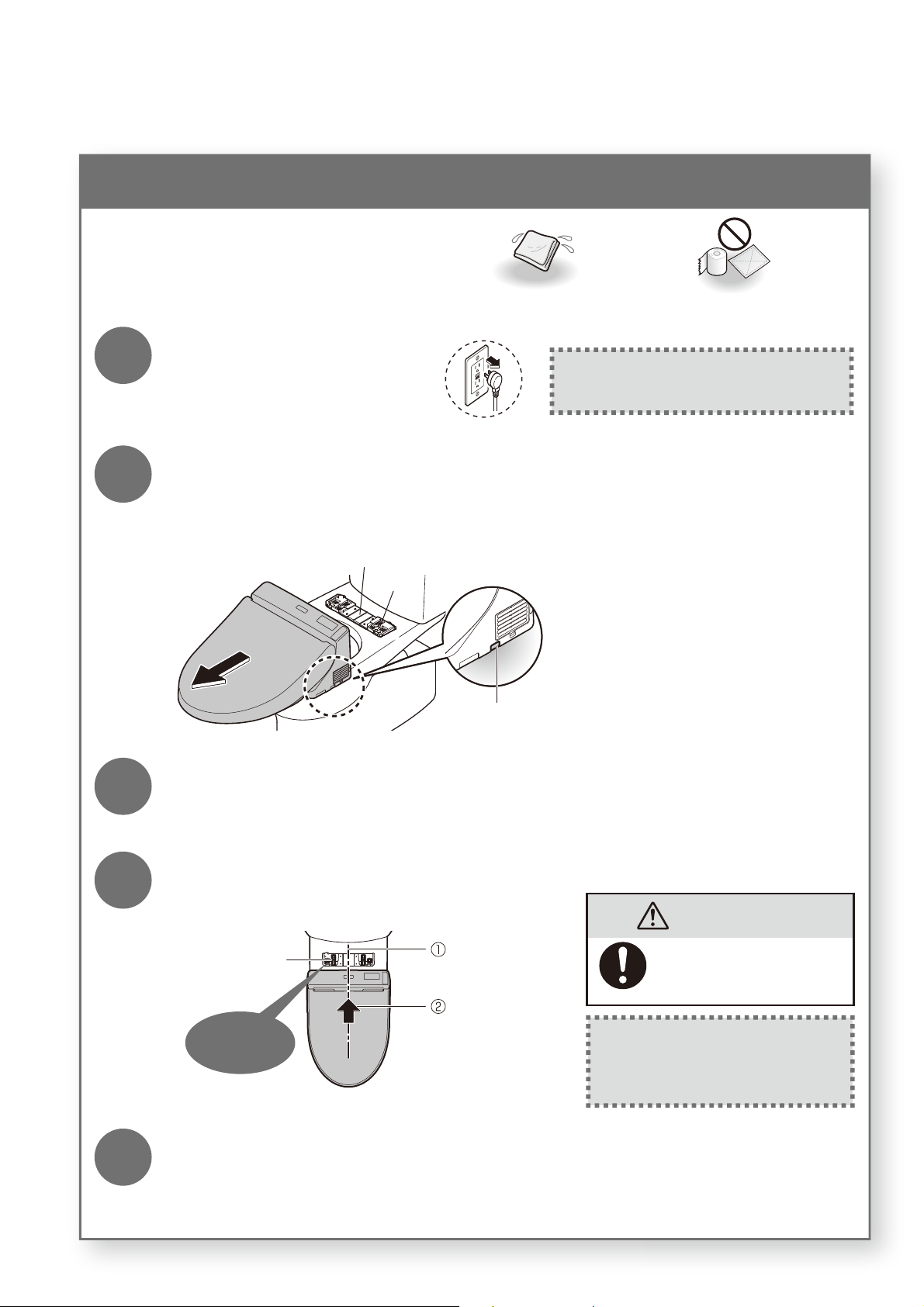
Gap between the Main Unit and Toilet Bowl (Perform monthly)
You can remove the main unit to clean
the top of the toilet bowl and the bottom
of the main unit.
Soft cloth soaked in water Toilet paper, etc. (May cause damage.)
1
Unplug the power plug.
If the power is not unplugged, the unit may
malfunction or cause a failure or electric shock.
2
Remove the main unit.
•
Do not pull the unit with undue force
(because the water supply hose and power cord are attached).
Main unit removal button
Base plate
Bolt
Pull the main unit toward you
while pressing the button.
3
Clean the gap.
• Wipe with a soft cloth soaked in a diluted, neutral kitchen detergent. Then, wipe it with a soft
cloth soaked in water so that no detergent remains.
4
Mount the main unit.
Click
Base plate
Align the center.
Push the main unit
until a click sound
is heard.
CAUTION
Push the main unit fi rmly
onto the base plate until
a click sound is heard.
After mounting, check that the main
unit does not detach even when
pulled.
5
Insert the power plug.
The POWER LED lights up.
Maintenance
29
2
9
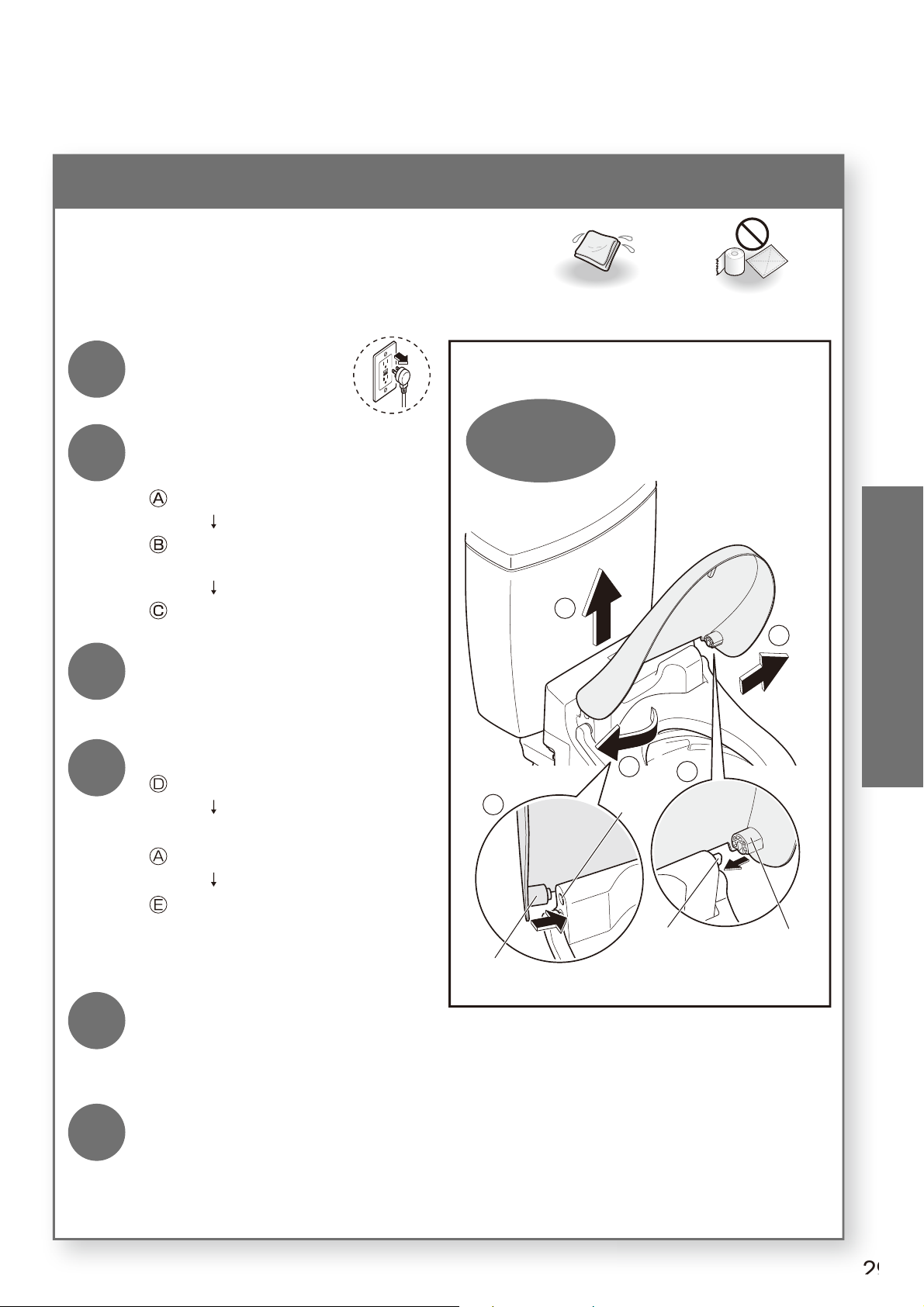
Gap between the Main Unit and the Toilet Lid (Perform monthly)
The toilet lid can be removed for thorough
cleaning.
Soft cloth soaked in water Toilet paper, etc.
(May cause damage.)
1
Unplug the power
plug.
Removing and Reinstalling
D
E
A
B
C
Hold with both
hands
Recess
Hinge
Hinge
Pin
2
Remove the toilet lid.
:Pull the left side outward.
: Disconnect the hinge from the recess
and pull up.
:Disconnect the right side.
3
Wipe with a soft cloth that
has been soaked in water
and wrung-out thoroughly.
4
Reinstall the toilet lid.
:
Join the pin and the hinge on the right side.
Slightly tilt the toilet lid to the front.
:While pulling out the left side,
:
Mount by joining the hinge with the recess.
* Be careful not to pinch your fi ngers.
5
Open and close the toilet lid
to check the mounting, and
then mount the main unit.
6
Insert the power plug.
The POWER LED lights up.
Maintenance
30
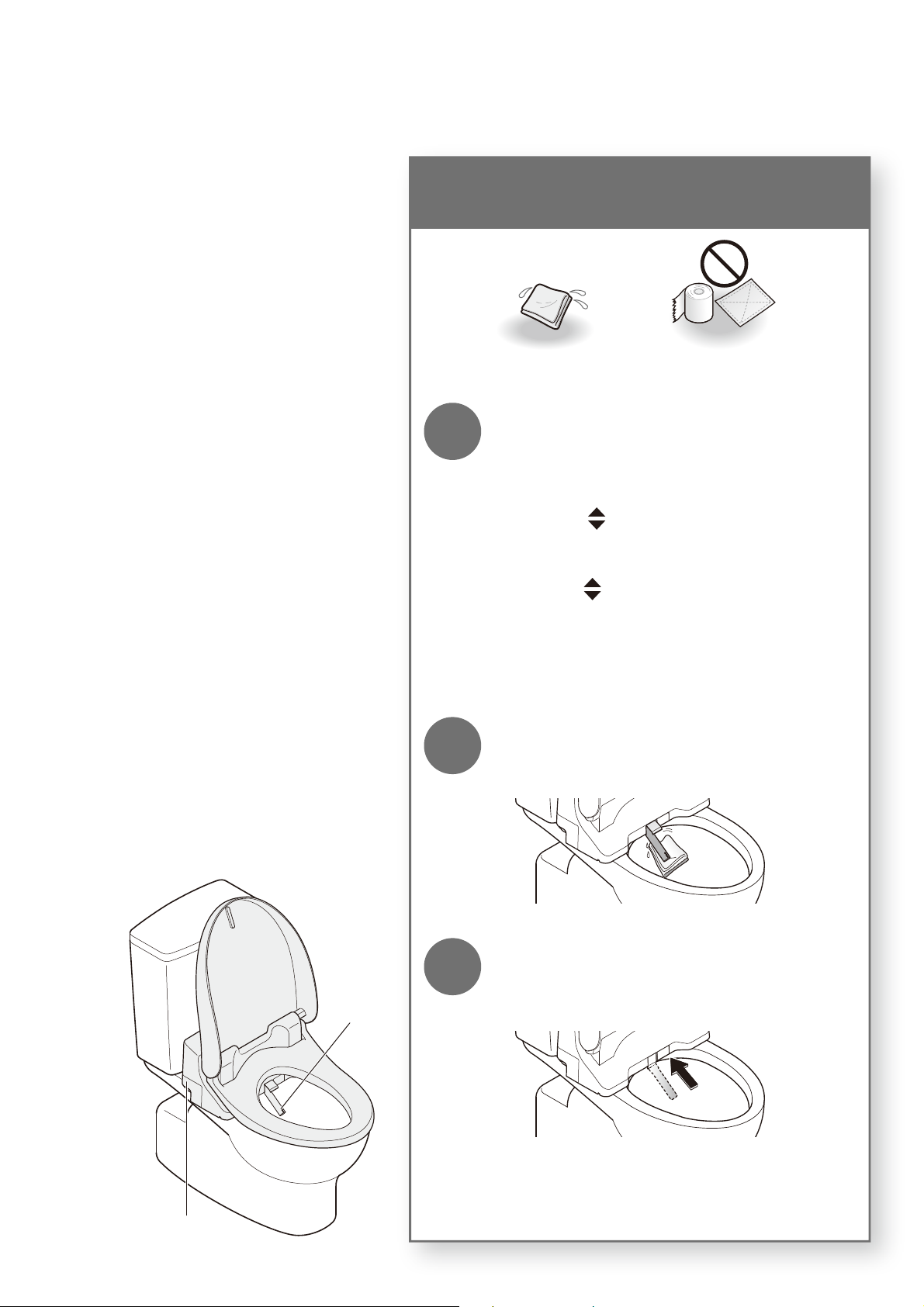
Wand
Water fi lter drain valve
Maintenance
Wand (Perform monthly)
<Wand cleaning> If you notice dirt
Soft cloth soaked in water Toilet paper, etc.
(May cause damage.)
1
Extend the wand.
Operate with the buttons on the back side of the
remote control.
(1) Press [MENU].
(2)
Use to select "CLEANING".
Press [ENTER].
(3)
Use
to select "WAND CLEANING
MODE ON/OFF".
Press [ENTER].
The wand extends and water sprays out for cleaning.
The wand automatically retracts after about 5 minutes.
2
Wipe with a soft, wet cloth.
Do not pull, push or press the wand with excessive
force. (May cause damage or malfunction.)
3
Press [STOP] on the front side of
the remote control.
The wand retracts.
31
3
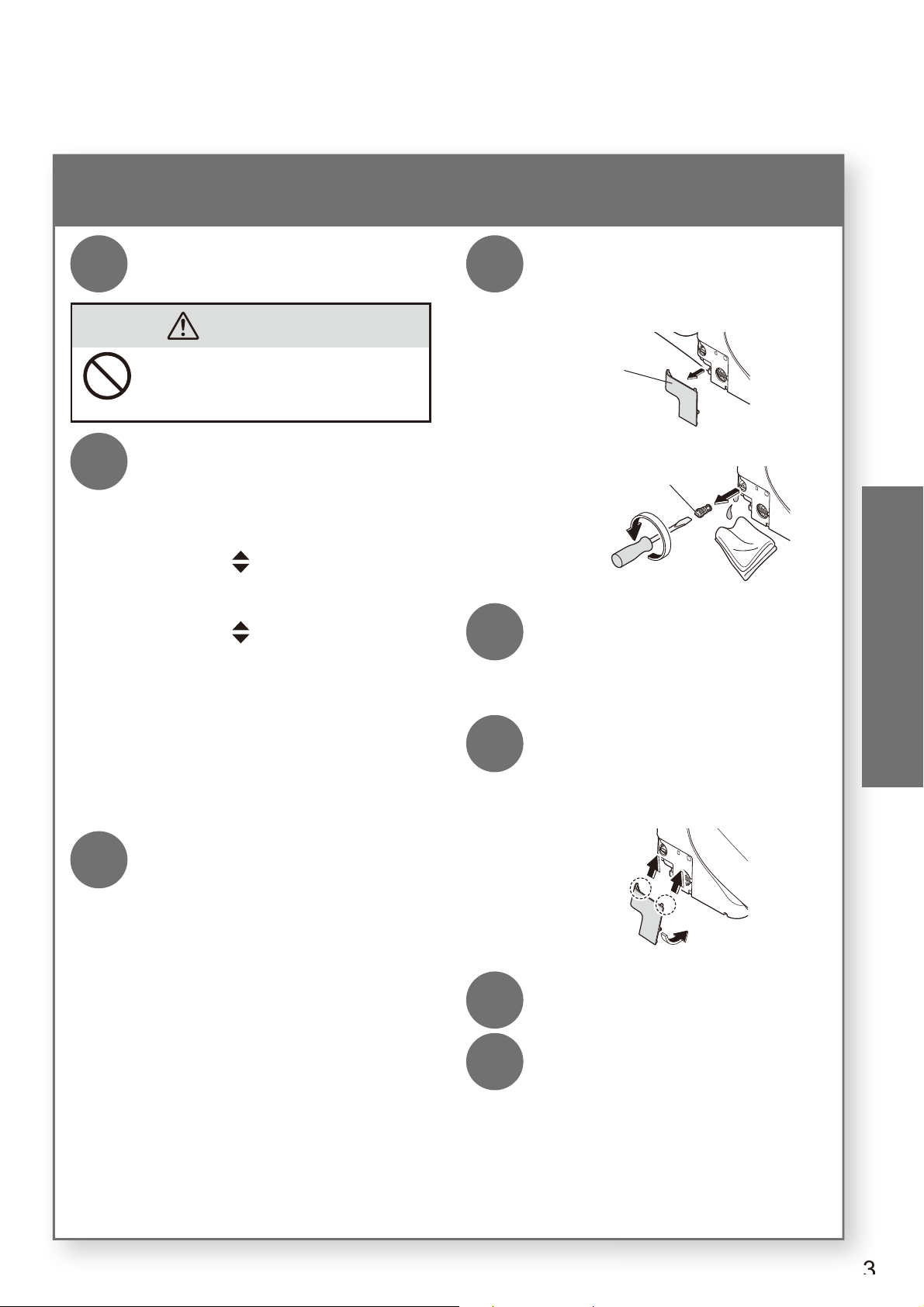
Water fi lter drain valve (Perform once every 6 months)
<If you think the water pressure has weakened>
1
Close the shutoff valve.
The water supply stops.
CAUTION
Do not remove the water fi lter drain
valve while the shutoff valve is open.
(Otherwise, water may leak out)
2
Extend the wand.
Operate with the buttons on the back side
of the remote control.
(1) Press [MENU].
(2)
Use to select "CLEANING".
Press [ENTER].
(3)
Use
to select "WAND
CLEANING MODE ON/OFF".
Press [ENTER] to extend the
wand.
Press [ENTER] again to retract
the wand.
(Release the pressure from the
water supply pipe.)
3
Unplug the power plug.
4
Remove the cover and water
fi lter drain valve.
Loosen with a fl at-head screwdriver and
then pull.
Cover
Water Filter Drain Valve
5
Clean with a tool such as a
toothbrush.
Also, remove any dust from inside the hole
of the water fi lter drain valve.
6
Reinstall the water fi lter drain
valve and cover.
Insert the water fi lter drain valve and tighten
it securely with a fl at-head screwdriver.
7
Insert the power plug.
The POWER LED lights up.
8
Open the shutoff valve.
Maintenance
32
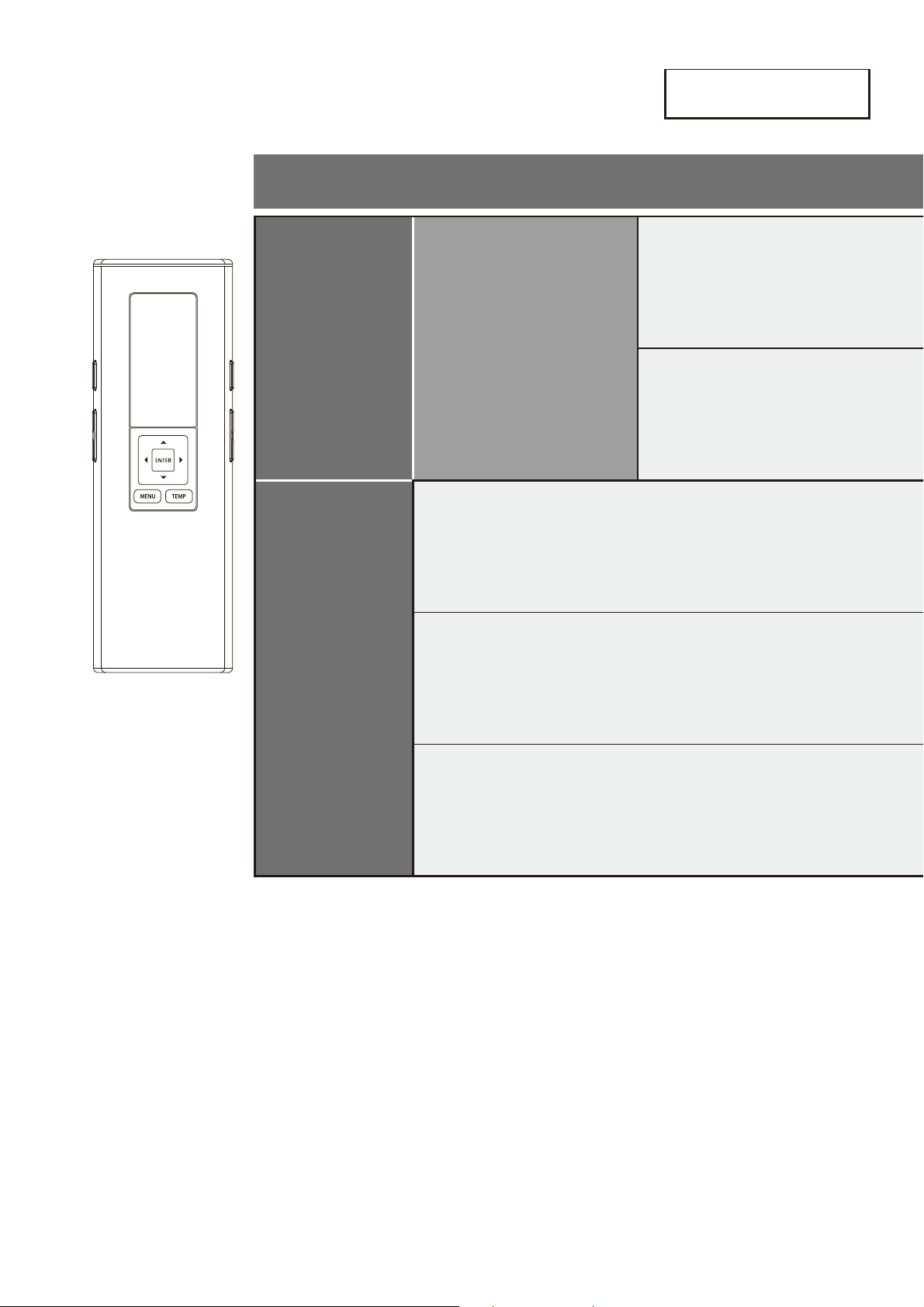
Changing Settings
Setting List
Setting Types
AUTO
FUNCTIONS
CLEANING
PRE-MIST
DEODORIZER
OTHER
SETTINGS
BEEP
SETTING LOCK
PERSONAL SETTING LOCK
33
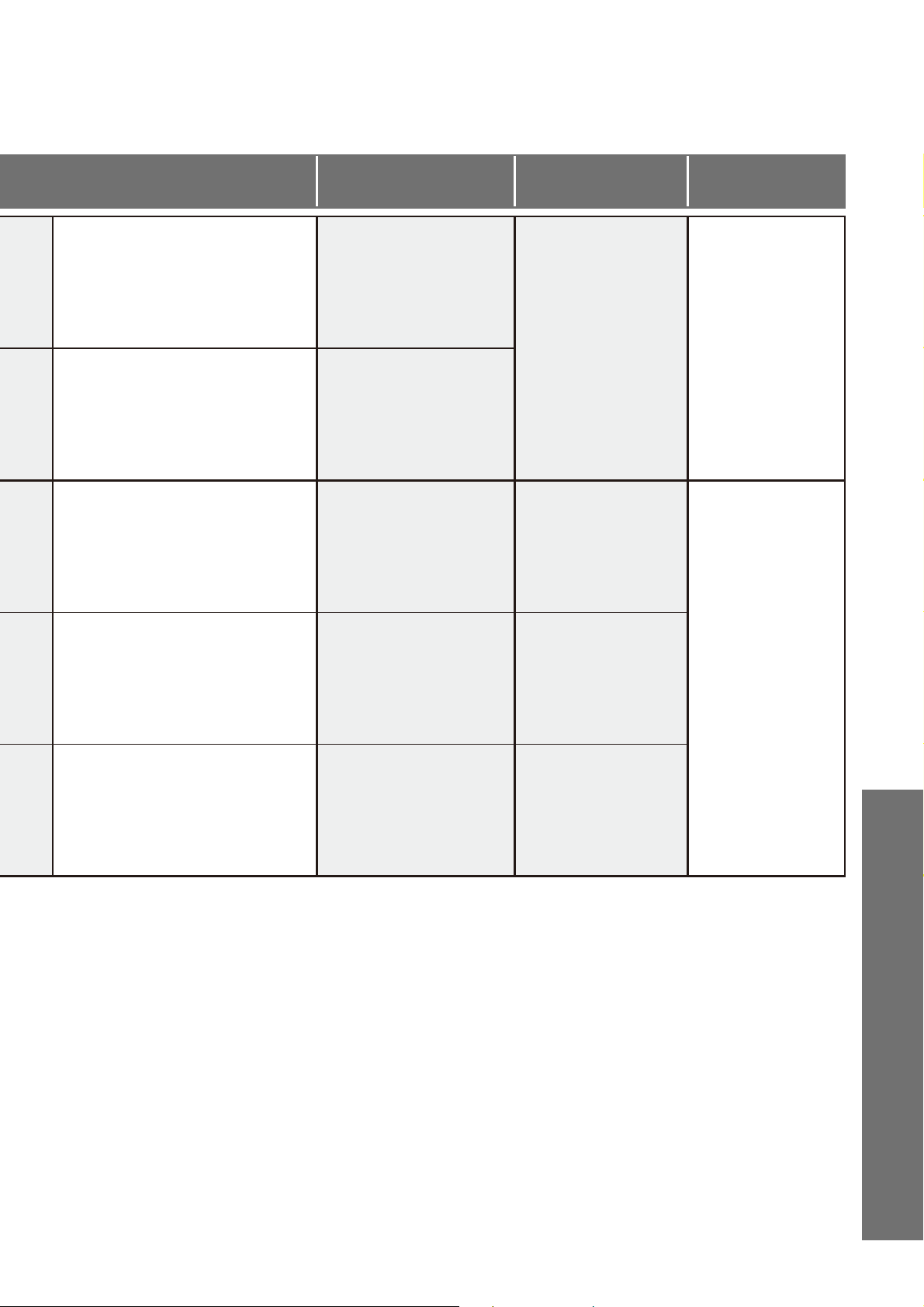
Available Settings*
Applicable Models
Setting Ref.
Page
Set whether or not to spray mist
automatically after sitting on the
toilet seat
ON/OFF
SW2044
SW2043
Page 34
Set whether or not to deodorize
automatically after sitting on the
toilet seat
ON/OFF
Set whether or not to make a beep
sound
ON/OFF
All models
Page 36
Set whether or not to use the
setting lock
ON/OFF
All models
Set whether or not to use the
personal setting lock
ON/OFF
All models
*The black text is the initial setting.
Reference
34
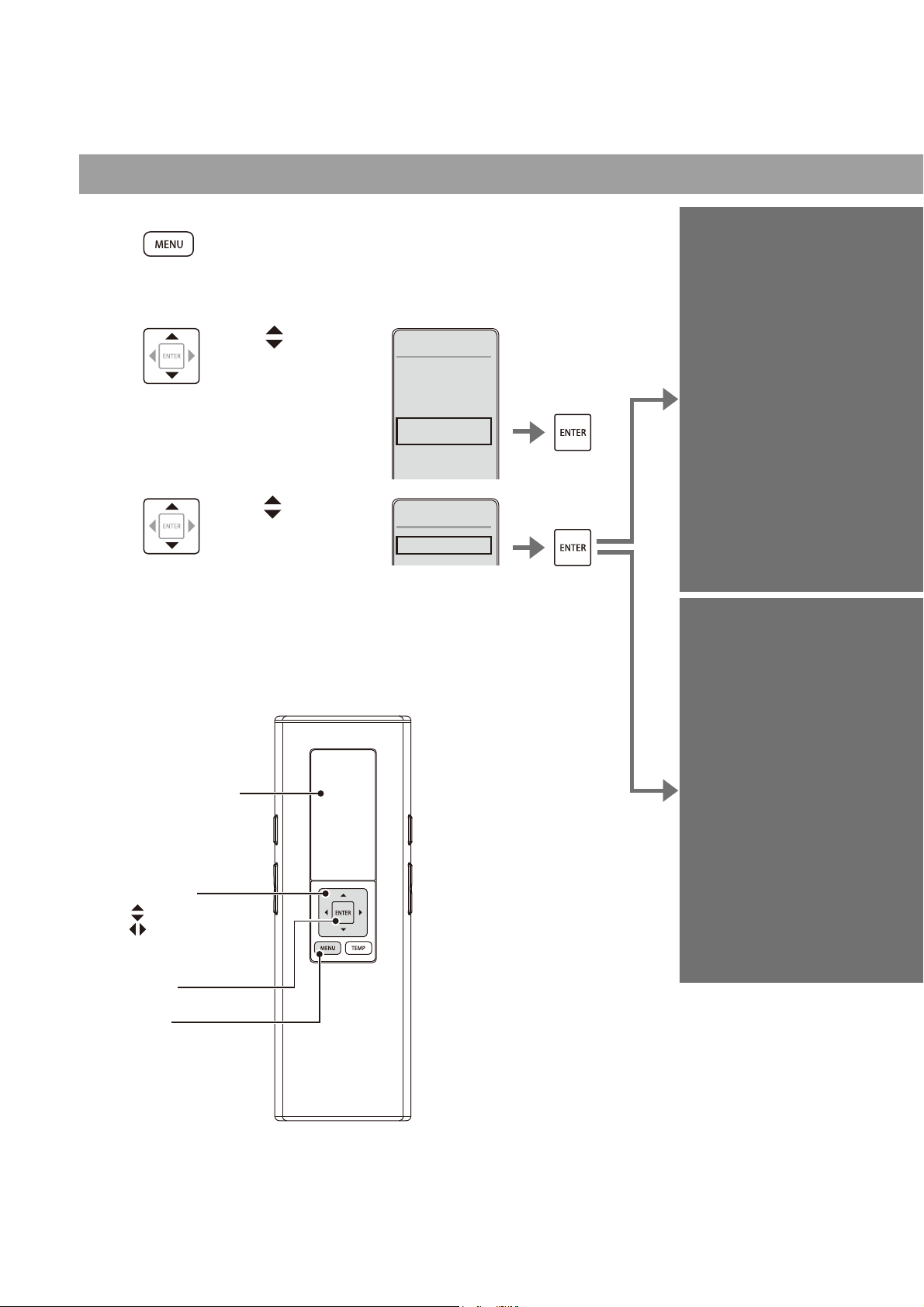
Changing Settings
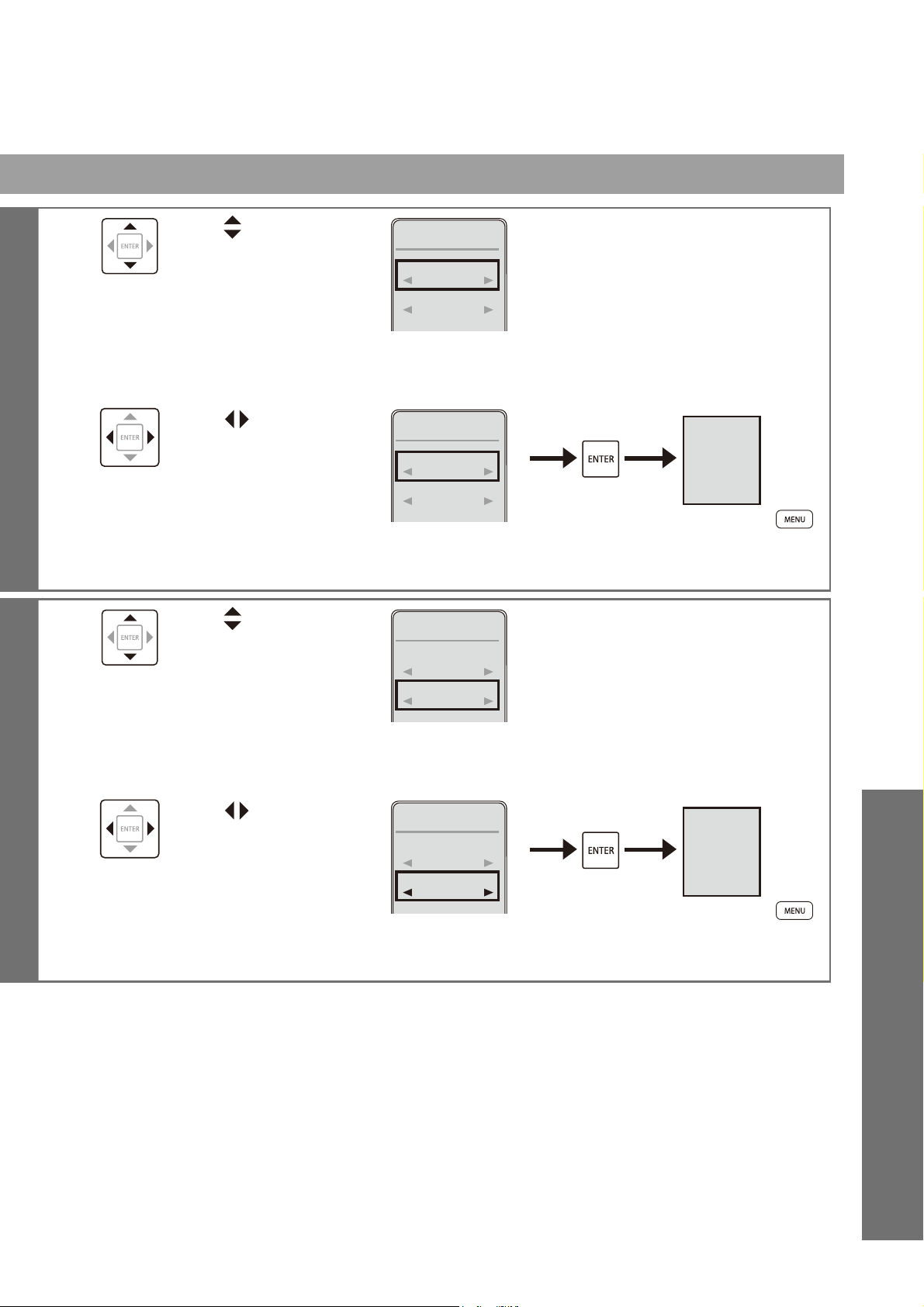
CLEANING
1
Press [MENU].
2
Use to
select "AUTO
FUNCTION"
and then press
[ENTER].
1. CLEANING
2. ENERGY
SAVER
3. AUTO
FUNCTIONS
4. OTHER
SETTING
MENU 3/4
3
Use to select
"CLEANING"
and then press
[ENTER].
1. CLEANING
AUTO
FUNCTIONS
1/1
[ENTER]
[MENU]
:Select an item
:Select a setting
Remote controller
display
Select keys
Items set on this display
1.PRE-MIST
2.DEODORIZER*
* Will not be displayed on SW2024 remote control.
Set whether or not to spray
mist automatically after
sitting on the toilet seat
PRE-MIST
(SW2044, SW2043
only)
Set whether or not to
deodorize automatically
after sitting on the toilet
seat
DEODORIZER
(SW2044, SW2043
only)
35
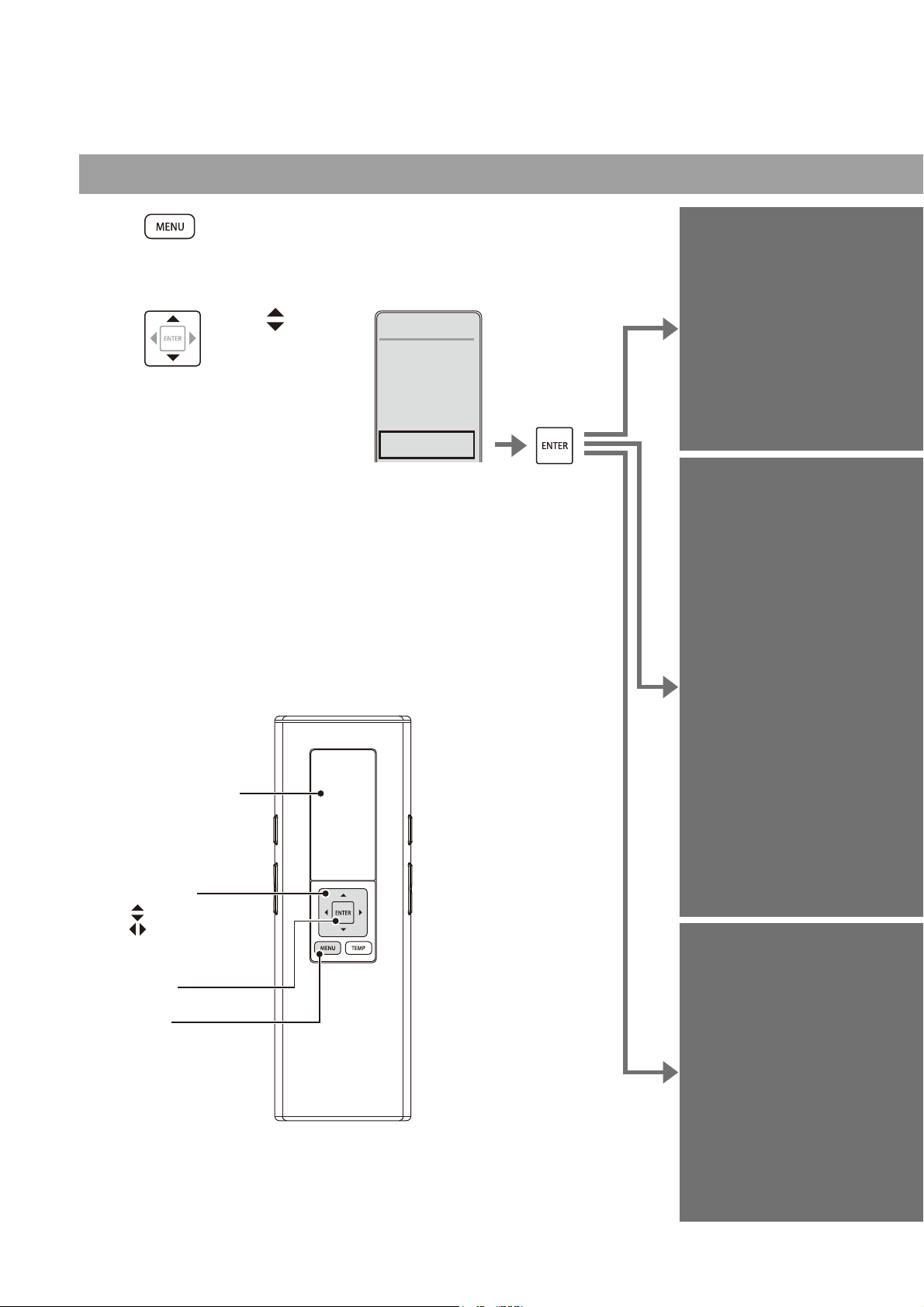
4
Use to select
"PRE-MIST".
CLEANING 1/2
1. PRE-MIST
ON
2. DEODORIZER
ON
5
Use to select
"ON/OFF" and then
press [ENTER].
CLEANING 1/2
1. PRE-MIST
OFF
2. DEODORIZER
ON
PRE-MIST
OFF
(To return
➝
)
4
Use to select
"DEODORIZER".
CLEANING 2/2
1. PRE-MIST
ON
2. DEODORIZER
ON
5
Use to select
"ON/OFF" and then
press [ENTER].
CLEANING 2/2
1. PRE-MIST
ON
2. DEODORIZER
OFF
DEODORIZER
OFF
(To return
➝
)
Reference
36
Changing Settings
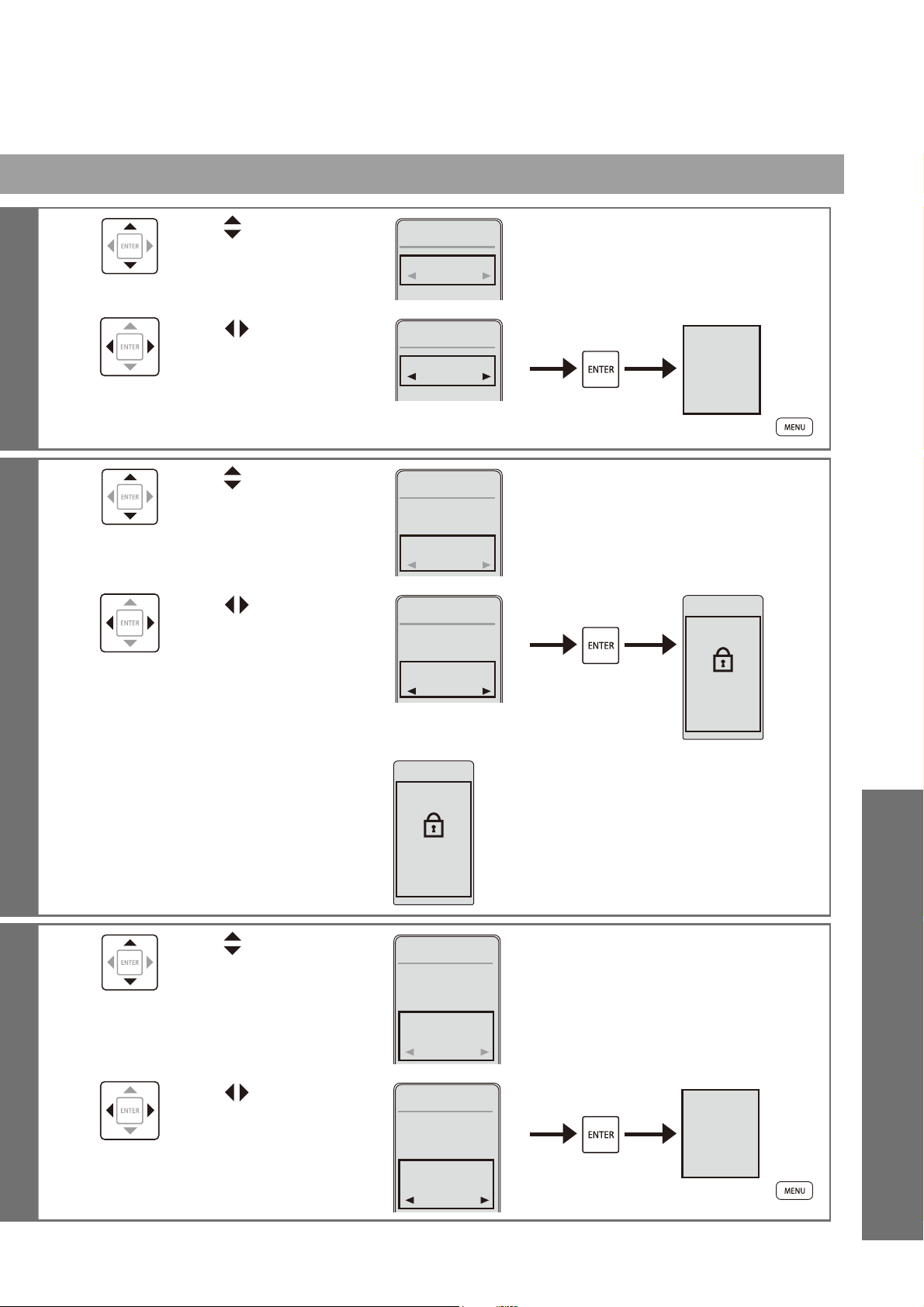
OTHER SETTINGS
1
Press [MENU].
2
Use to
select
"OTHER
SETTING"
and then
press
[ENTER].
1. CLEANING
2. ENERGY
SAVER
3. AUTO
FUNCTIONS
4. OTHER
SETTINGS
MENU 4/4
Set whether or not to
make a beep sound
BEEP
Set whether or not to use
the setting lock
SETTING
LOCK
Set whether or not to use
the personal setting lock
PERSONAL
SETTING
LOCK
Items set on this display
1.BEEP
2.SETTING LOCK
3.PERSONAL SETTING LOCK
[ENTER]
[MENU]
:Select an item
:Select a setting
Remote controller
display
Select keys
37
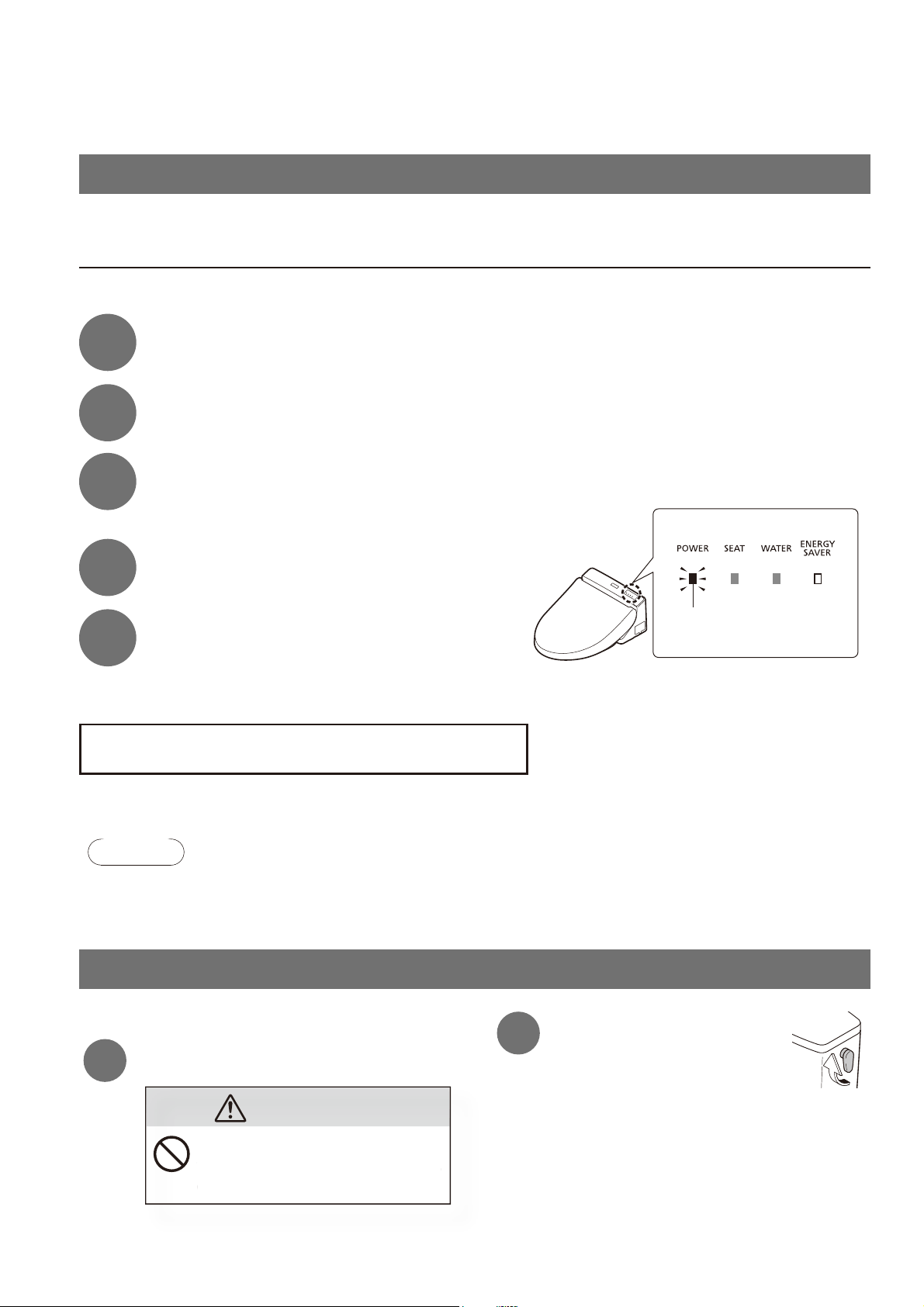
3
Use to select
"BEEP".
1. BEEP
OTHER
SETTINGS
1/3
ON
4
Use to select
"ON/OFF" and then
press [ENTER].
1. BEEP
OTHER
SETTINGS
1/3
OFF
BEEP
OFF
(To return
➝
)
3
Use
to select
"SETTING LOCK".
1. BEEP
2. SETTING
LOCK
OTHER
SETTINGS
2/3
OFF
ON
4
Use to select
"ON/OFF" and then
press [ENTER].
1. BEEP
2. SETTING
LOCK
OTHER
SETTINGS
2/3
ON
ON
SETTING LOCK
PRESS ENTER
FOR 2 SEC
TO RESET
5
Check the displayed screen.
Display screen during setting lock
SETTING LOCK
PRESS ENTER
FOR 2 SEC
TO RESET
Cancellation method:
Press [ENTER] for 2 seconds
or longer.
* If you want to relock after cancellation,
reconfi gure the setting.
3
Use to select
"PERSONAL
SETTING LOCK".
2. SETTING
LOCK
3. PERSONAL
SETTING
LOCK
OTHER
SETTINGS
3/3
ON
OFF
4
Use to select
"ON/OFF" and then
press [ENTER].
2. SETTING
LOCK
3. PERSONAL
SETTING
LOCK
OTHER
SETTINGS
3/3
OFF
OFF
PERSONAL
SETTING LOCK
OFF
(To return
➝
)
Reference
38
What to Do?
If you cannot operate with the remote control
The batteries may have worn out.
Replace the batteries.
■
Replacing the batteries
1
Unplug the power plug.
The POWER LED goes off.
2
Remove the remote control from the hanger.
(Page14)
3
Open the battery cover and replace the
AA batteries.
(Page14)
Lit
4
Mount the remote control in the hanger.
5
Insert the power plug.
The POWER LED lights up.
When the ambient temperature is likely to drop to 0°C (32°F) or lower, take measures to
prevent freezing.
Attention!
●When the ambient temperature is likely to drop to 0°C (32°F) or lower, do not use the energy saver feature.
(May damage the product.)
●
Warm the bathroom or take measures against freezing so that the ambient temperature does not drop below 0°C (32°F).
Freeze damage prevention
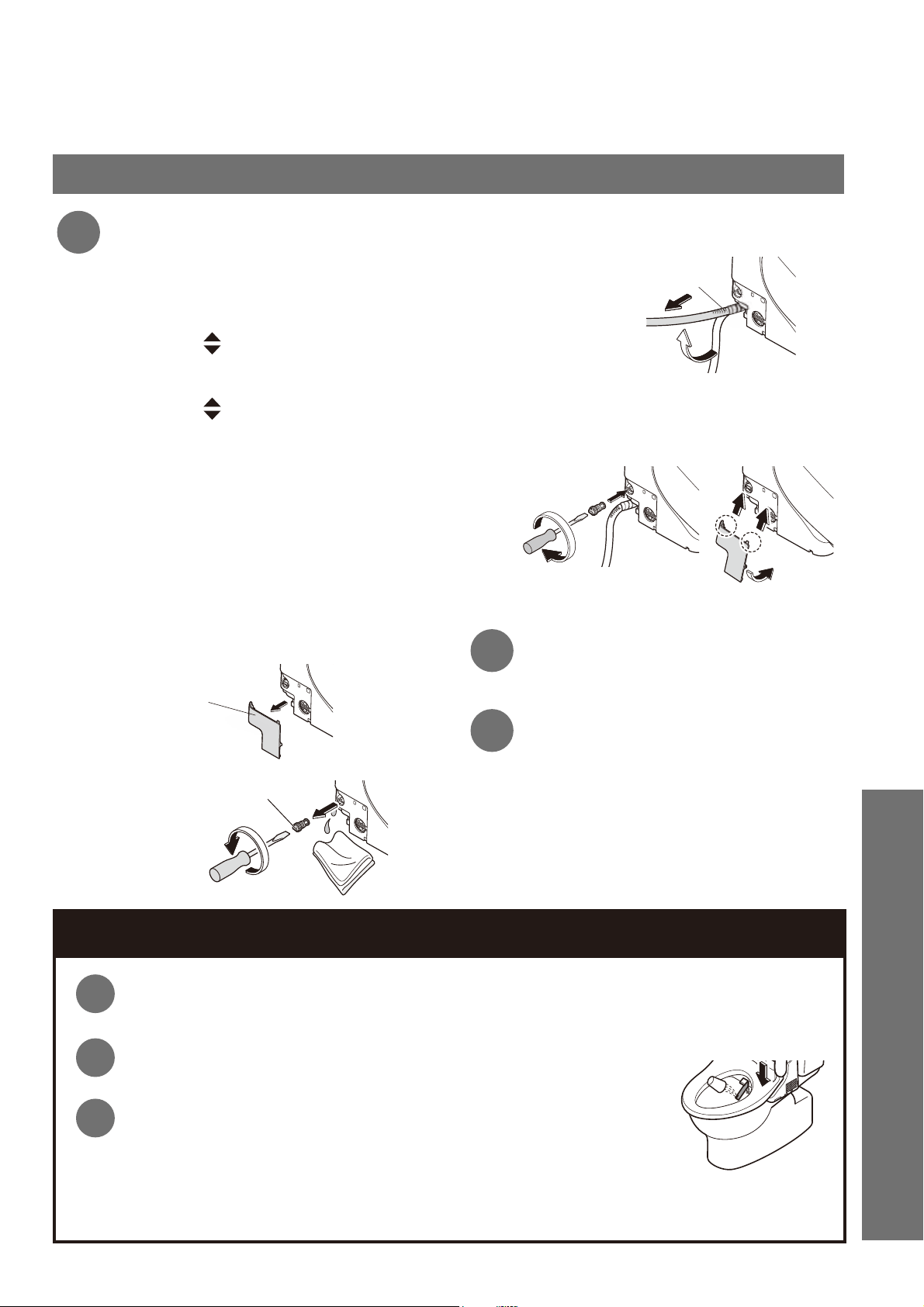
■
How to drain the water
1
Close the shutoff valve.
Do not remove the water fi lter drain
valve while the shutoff valve is open.
(Otherwise, water may leak out)
D
o not remove the water fi lter drain
v
alve while the shutoff valve is o
p
en
.
(O
therwise, water ma
y
leak out
)
CAUTION
2
Drain the water from
the toilet tank.
Turn the fl ush handle of the toilet
tank to the full fl ush side.
Turn the lever until water fl ow stops.
Freeze Damage Prevention
39
Freeze damage prevention (continued)
3
Drain the pipe.
(1) Extend the wand.
Operate with the buttons on the back
side of the remote control.
1. Press [MENU].
2. Use
to select "CLEANING".
Press [ENTER].
3.
Use to select "WAND
CLEANING MODE ON/OFF".
Press [ENTER] to extend the wand.
Hold the wand in the extended
position until no more water comes
from around the wand.
Press [ENTER] again to retract the wand.
(Release the pressure from the
water supply pipe.)
(2) Unplug the power plug.
(3) Remove the cover and water fi lter
drain valve.
Cover
Water fi lter drain valve
(4) Drain the water from the water
supply hose.
Water supply hose
Horizontally
(5) After draining the water, install the
water fi lter drain valve and cover.
Insert the water fi lter drain valve and use a
fl at-head screwdriver to tighten it securely.
(6) Insert the power plug.
4
Check that the POWER LED
on the main display is lit up.
(Page 15)
5
Set the water and toilet seat
temperature to "High".
(Page 22)
(To maintain the temperature.)
When fi nished, close the toilet seat and toilet lid.
■
To use the Washlet again
The water needs to be resupplied. (See below)
Resupplying the Water (After draining)
1
Open the shutoff valve.
• Check that water is not leaking from a pipe or the main unit.
2
If the power is not turned ON
Insert the power plug.
3
Discharge water from the wand.
(1) Pressing down the right side of the toilet seat,
(2)
Press [REAR] on the remote control for about two minutes to discharge water from the wand.
(It takes about one minute before water comes out. Catch the water in a paper cup or other receptacle.)
■
If the remaining water has frozen and no water comes out
• Heat the inside of the bathroom, and warm the water supply hose and shutoff valve using a cloth soaked in warm water.
Reference
40
What to Do?
Long Periods of Disuse
How to drain the water
1
Drain the water from the toilet tank.
(Procedures
and in "Freeze damage prevention" on page 38)
2
Drain the pipe.
(Step
3
(1) to (5) on Page 39)
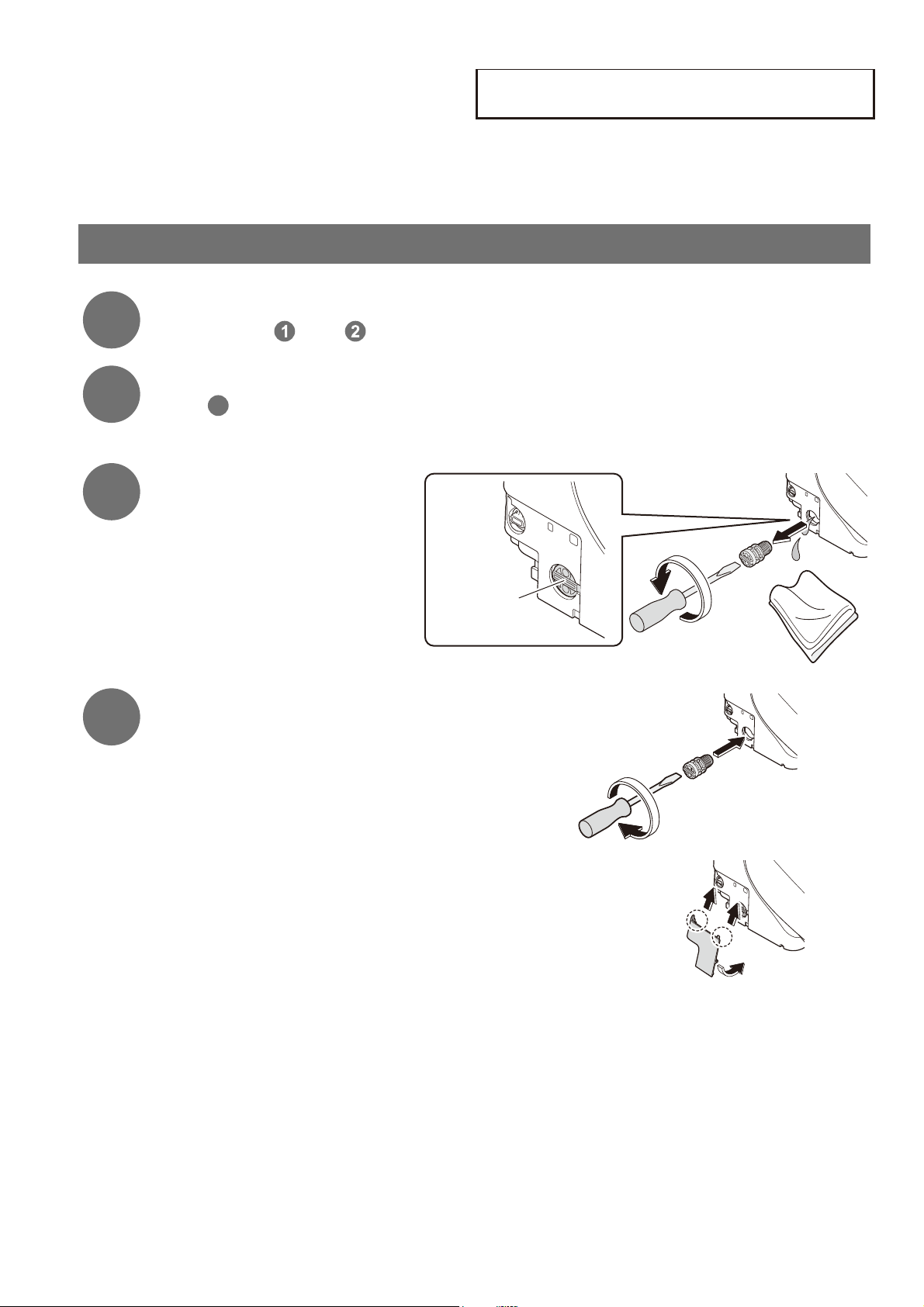
* After draining water, keep the cover removed.
3
Remove the water drain
plug.
The water comes out from near the
wand for about 90 seconds.
Water drain plug
4
Reinstall the water drain plug and
cover.
■
If water may get frozen
• Add antifreeze solution in the water in the bowl to prevent freezing.
(The antifreeze solution should not be fl ushed out. Collect it before using the toilet and dispose of it.)
■
To use the Washlet again
• The water needs to be resupplied. (Page 39)
If the toilet is in a location you will not visit for a long time, drain the water.
(The water in the tank may become contaminated and cause skin irritation or other problems.)
41
Troubleshooting
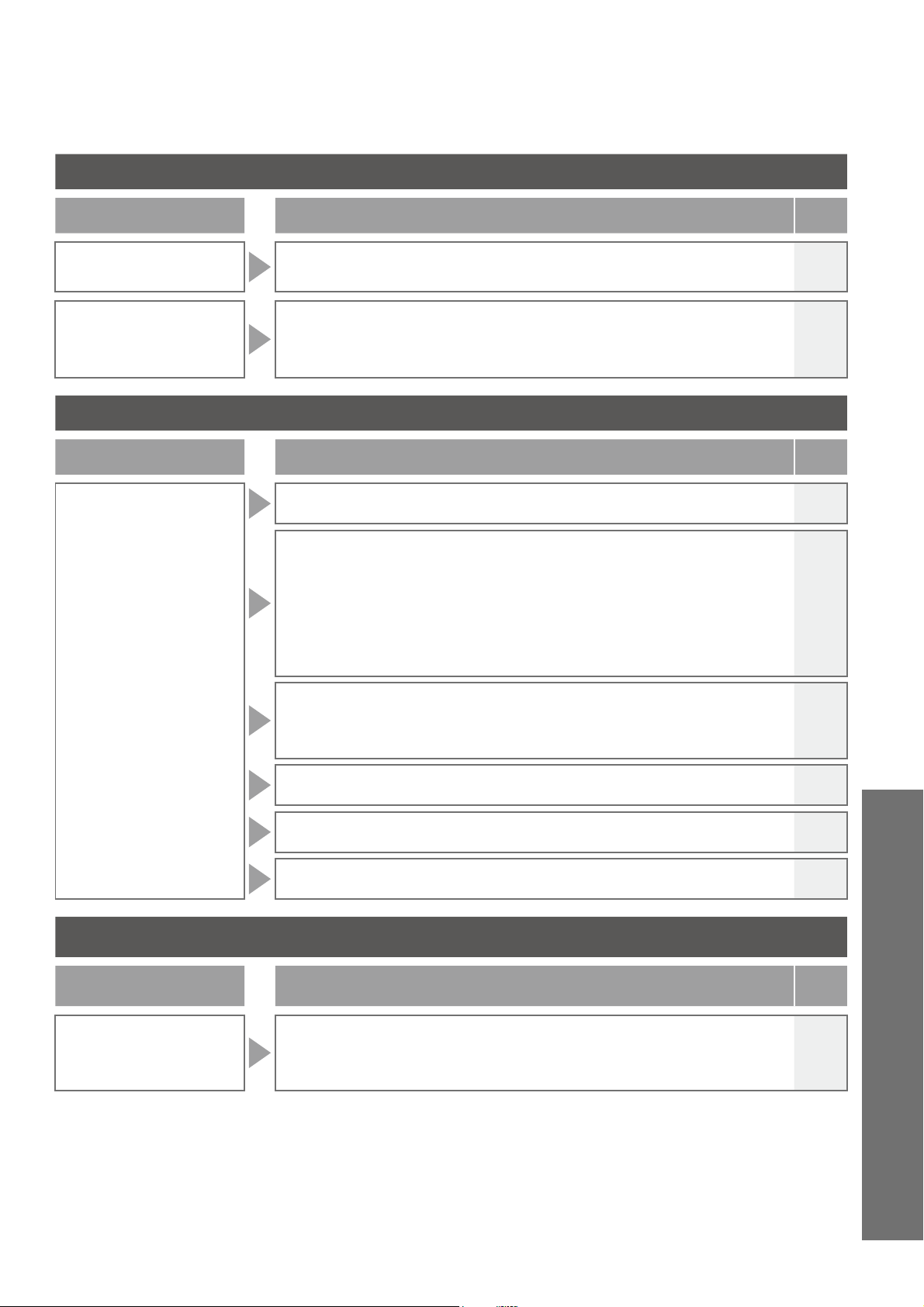
First, try the actions described on pages 41 to 44.If the problem
persists, consult the installer, seller or the contact listed on the
back cover of this manual.
CAUTION
If a water leak occurs, close the
shutoff valve.
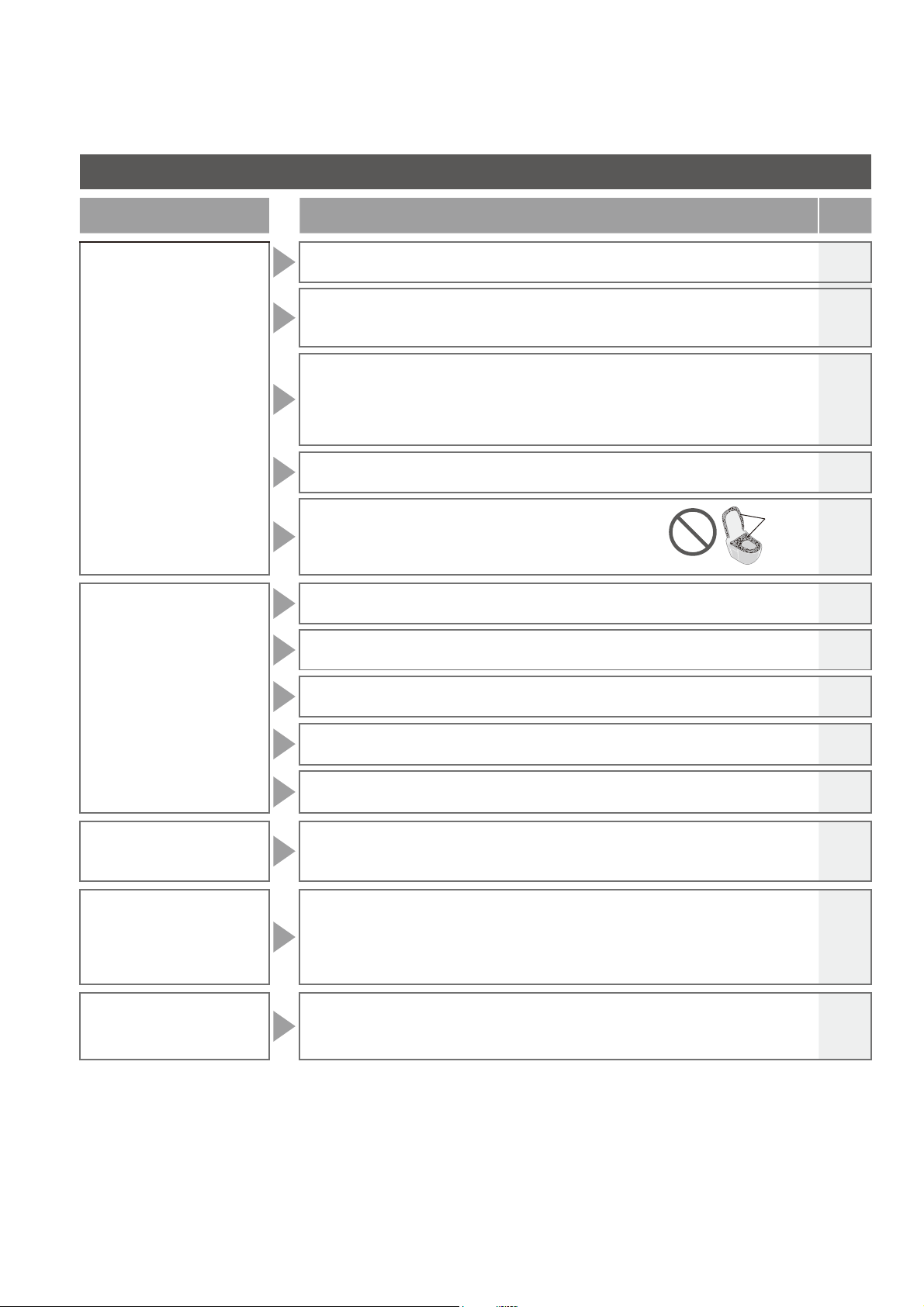
Please check fi rst
Is the
POWER LED lit?
■
SW2044·SW2043
Is the POWER LED fl ickering?
➞
The main unit is not mounted properly.
Mount the main unit again. (Page 28)
■
Is the breaker on the
distribution board turned
on?
➞
Check whether there is a power
outage or the breaker has turned
"OFF".
Lit
Is the ENERGY
SAVER LED lit?
■
While the LED is lit, energy saver (Page 24) is in operation,
so the toilet seat temperature may be reduced or the
heater may be turned off.
Is the remote
control working?
■
Are the remote control
batteries dead?
➞
Replace the batteries. (Page 38)
■
Is the remote control
transmitter or the remote
control receiver blocked?
➞
Remove obstructions, dirt, water
droplets or any other blockages.
Close
Open
Battery cover
The remote
control uses
batteries
to operate.
Remote control
transmitter
Remote control receiver
Reference
42
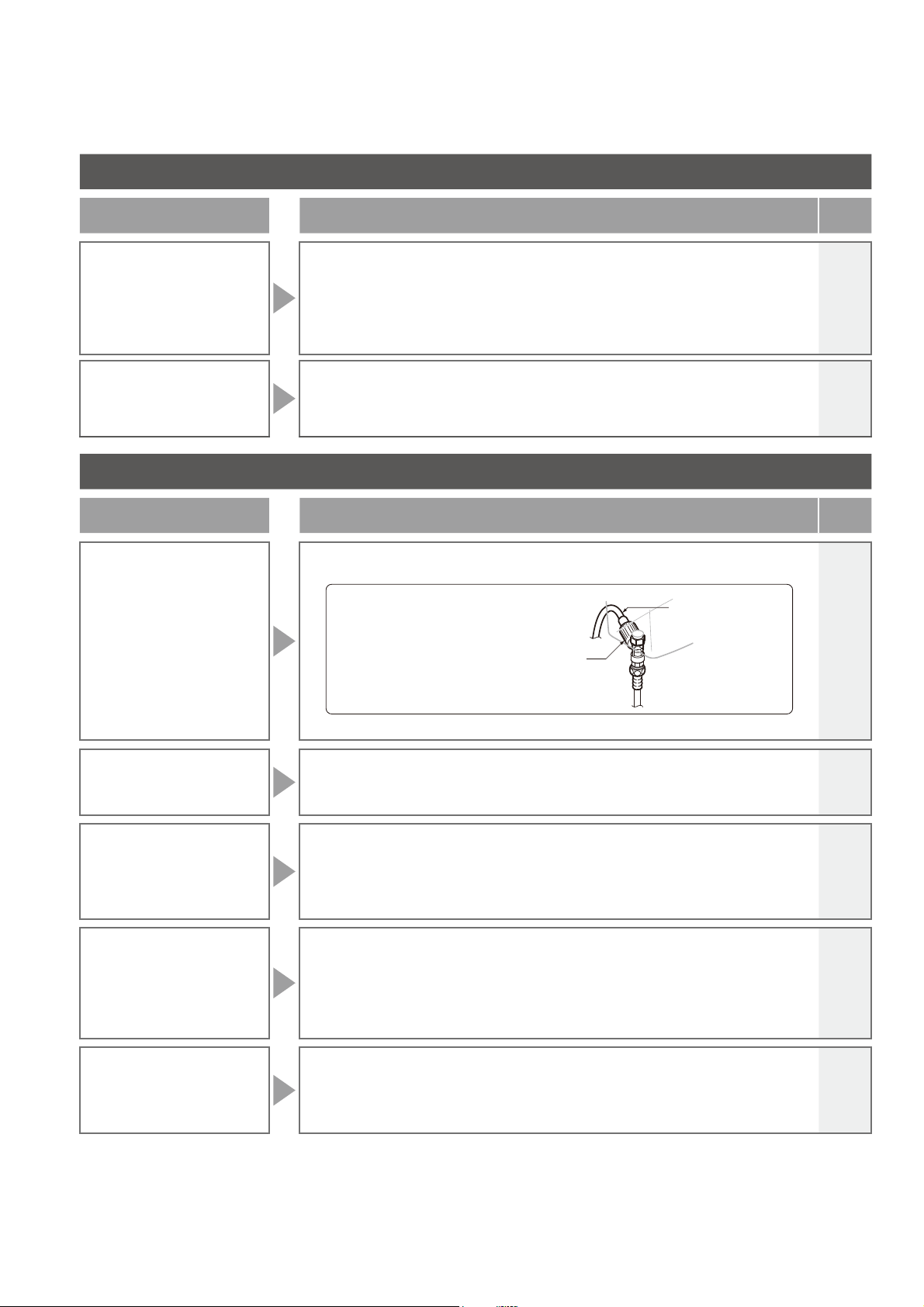
Rear and Rear soft, front cleansing, wand
Trouble Please check
Ref.
Page
The wand
(or cleansing water)
does not come out
●
When the temperature is low, it takes time for the wand to come out after the
remote control button is pressed because the water must be warmed up fi rst.
-
●
Did you sit on the toilet continuously for 2 hours or longer?
(If so, operation is stopped for safety purposes.)
➞
Stand up from the seat and then use again.
-
●
If the water supply pressure drops signifi cantly, for example if water is used
elsewhere or if there is a water failure, the function may stop for safety.
➞
Disconnect the power plug and wait about 10 seconds before inserting it again.
If the same symptom reappears ➞ There may be a malfunction. Consult
with the contact listed on the back cover of this manual.
-
●
The seat switch may have diffi culty detecting some sitting postures.
➞
Sit back on the toilet seat.
11
●
Are you using a toilet seat cover, a toilet lid cover or
a seat for infants?
➞
Remove any covers. When using a seat for infants
or a soft highchair, remove after each use.
Covers
11
The wand extends but
the cleansing water
does not come out /
The cleansing water
pressure is weak
●
Has a water failure occurred?
➞
Press the "STOP" button and wait until water service is restored.
-
●
Is the shutoff valve closed?
15
●
Is the water fi lter drain valve clogged with foreign matter?
➞
Clean the filter.
31
●
Is the water pressure set to a low level?
17
●
Is the water drain plug loosened?
➞
Tighten the water drain plug securely.
40
The cleansing water
is cold
●
Is the water temperature set to "OFF" or a low level?
●
When the temperature of the water supply or the bathroom is low, the water
temperature may be low when first sprayed.
22
-
Stops in the middle
of use
●
Rear, rear soft and front cleansing stop automatically after 5 minutes of
continuous use.
●
Does the seat switch have diffi culty detecting?
➞
Sit back on the toilet seat. If you get up slightly from the seat, or sit forward on
the seat, the seating switch may temporarily stop detecting your presence.
-
11
Water comes out
unexpectedly
from the wand
●
Water may sometimes come out from around the wand when it expands in
the warm water tank.
-
Troubleshooting
43
Warm air drying (SW2044, SW2043 only)
Trouble Please check
Ref.
Page
The dryer
temperature is low
●
Is the remote control preset temperature set to a low level?
22
Stops in the middle
of use
●
The feature stops automatically after 10 minutes of continuous use.
●
Does the seat switch have diffi culty detecting?
➞
Sit back on the toilet seat. If you get up slightly from the seat, or sit forward on
the seat, the seating switch may temporarily stop detecting your presence.
-
11
Toilet Seat and Toilet Lid
Trouble Please check
Ref.
Page
The toilet seat is
cold
●
Is the toilet seat temperature set to "OFF" or a low level?
22
●
Is the ENERGY SAVER LED (orange) lit?
When the SEAT LED (green) is also lit.
➞
The toilet seat temperature has been lowered to save energy. When you sit,
the toilet seat is temporarily heated.
When the SEAT LED is OFF.
➞
Energy saver is operating and has turned off the toilet seat heater. When
you sit on the seat, the toilet seat heater is turned on temporarily and the
seat is warmed in about 15 minutes.
24
●
Have you been seated for a long time?
After about 20 minutes of sitting, the temperature starts going down, and
after about 1 hour, the toilet seat heater is turned "OFF".
➞
Stand up from the seat and then use again.
-
●
Did you put anything on the toilet seat or the toilet lid?
➞
Remove the object from the toilet seat or the toilet lid.
-
●
The seat switch may have diffi culty detecting some sitting postures.
➞
Sit back on the toilet seat.
11
●
Is a toilet lid or seat cover installed?
➞
Remove any covers.
11
Energy Saver
Trouble Please check
Ref.
Page
The energy saver
feature is not
working
●
Because the function takes several days learning the usage conditions before
starting energy saver, the amount of energy saving may be low, depending
on the frequency of use.
➞
Check the energy saver feature.
24
Reference
44
Troubleshooting
Deodorizer (SW2044, SW2043 only)
Trouble Please check
Ref.
Page
The deodorizer
seems to be not
working
●
Is "DEODORIZER" set to "OFF"?
➞
Set to "ON".
●
Even after sitting down, you do not hear operation sounds.
➞
Sit back on the toilet seat.
●
If you hear an operation sound when you sit on the toilet seat.
➞
Clean the deodorizing filter.
34
11
27
A strange odor is
emitted
●
Are you using an air freshener or deodorizer that you purchased separately?
Doing so may reduce the effectiveness of the Washlet deodorizer or cause
strange odors.
➞
Remove the air freshener or deodorizer.
-
Others
Trouble Please check
Ref.
Page
Water is leaking
from the plumbing
connections
●
If any nuts in a connection are loose, fi rmly tighten them with a tool such as a
monkey wrench.
Do not use tools on the water supply hose
connection. Tighten it by hand.
Water supply hose connection
Water supply hose
➞
If the water leak does not stop, close the shutoff valve and seek repair.
-
The display on
the remote control
goes out
●
The display goes out when no button on the remote control is pressed for 5
minutes or more.
14
The main unit is
unstable
●
There is clearance between the toilet seat cushion and the toilet bowl for
activating the seat switch. When you sit on the toilet seat, the toilet seat
subsides slightly to activate the seat switch.
●
Are the bolts that anchor the main unit loose?
➞
Remove the main unit and then firmly tighten the base plate bolts.
11
28
The main unit makes
a sound
<Only when sitting on the toilet seat.>
●
You hear operation sounds for preparing the pre-mist or spraying mist in the
toilet bowl.
➞
You can turn them "OFF". (SW2044, SW2043 only)
<When moving away from the toilet bowl after use>
●
You may hear the sound of the remaining water being drained.
20
34
-
You feel air in the toilet
bowl when sitting on
the toilet seat
(SW2044, SW2043 only)
●
A mist is sprayed inside the toilet bowl to make it more diffi cult for dirt to
adhere when sitting on the toilet seat. You may feel air when a mist is sprayed.
➞
You can turn it "OFF".
20
34
45
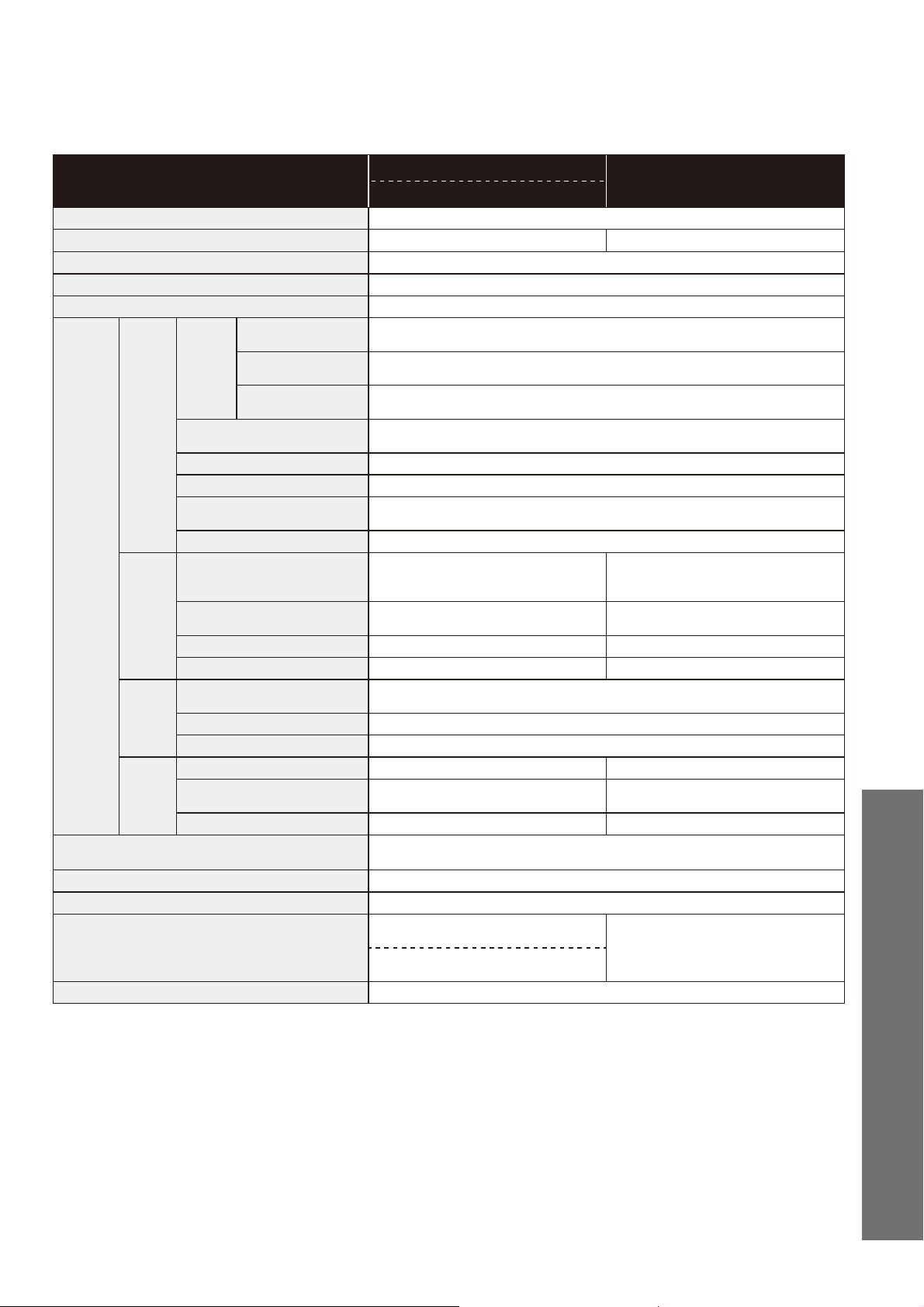
Specifi cations
Item
SW2044
SW2024
SW2043
Rated power supply AC 120 V 60 Hz
Rated power consumption 406 W 292 W
Type of water heater Tank type
Power cord length 1.2 m (3.93 ft)
Water protection level IPX4
Functions
Cleansing
Spray
volume
Rear cleansing
Approx. 0.27 to 0.43 L/min. (Approx. 0.07 to 0.11 gal/min.)
<at 0.20 MPa (29 PSI) water pressure>
Rear soft cleansing
Approx. 0.27 to 0.43 L/min. (Approx. 0.07 to 0.11 gal/min.)
<at 0.20 MPa (29 PSI) water pressure>
Front cleansing
Approx. 0.29 to 0.43 L/min. (Approx. 0.08 to 0.11 gal/min.)
<at 0.20 MPa (29 PSI) water pressure>
Water temperature
Adjustable temperature range: OFF,
about 35°C to 40°C (about 95°F to 104°F)
Toilet tank capacity 0.64 L (0.17 gal)
Heater capacity 225 W
Safety device
Temperature fuse, overheat shutoff switch
(bimetal automatic return type), anti-idling fl oat switch
Backfl ow prevention device Vacuum breaker, Check valve
Warm
air
dryer
Warm air temperature
*
Adjustable temperature range :
about 30°C to 60°C
(about 86°F to 140°F)
-
Airfl ow volume
Approx. 0.27 m
3
/min
(Approx. 9.53 ft
3
/min)
-
Heater capacity 347 W -
Safety device Temperature fuse -
Heated
seat
Surface temperature
Adjustable temperature range: OFF, about 28°C to 36°C (about 82°F to 97°F)
<About 26°C (about 79°F) when energy saver is in operation>
Heater capacity 50 W
Safety device Temperature fuse
Deodorizer
Method O
2
deodorization -
Airfl ow volume
Approx. 0.16 m
3
/min
(Approx. 5.65 ft
3
/min)
-
Power consumption Approx. 5.3 W -
Water supply pressure
Minimum required water pressure: 0.05 MPa (7.25 PSI) <dynamic>,
Maximum required water pressure: 0.75 MPa (108.75 PSI) <static>
Water supply temperature 0°C to 35°C (32°F to 95°F)
Working ambient temperature 0°C to 40°C (32°F to 104°F)
Dimensions
W 391 mm × D 531 mm × H 188 mm
(W 1.28 ft × D 1.74 ft × H 0.62 ft)
W 391 mm × D 531 mm × H 188 mm
(W 1.28 ft × D 1.74 ft × H 0.62 ft)
W 391 mm × D 480 mm × H 188 mm
(W 1.28 ft × D 1.57 ft × H 0.62 ft)
Weight About 5 kg (about 11 lb)
* Temperature around the warm air outlet measured by TOTO.
Reference

46
1. TOTO warrants its washlet series ("Washlet") to be free from defects in materials and workmanship during normal use when
properly installed and serviced, for a period of one (1) year from date of purchase. This limited warranty is extended only to
the ORIGINAL PURCHASER of the Product and is not transferable to any third party, including but not limited to any
subsequent purchaser or owner of the Product. This warranty applies only to TOTO Product is purchased and installed in
USA, Canada.
2. TOTO's obligations under this warranty are limited to repair, replacement or other appropriate adjustment, at TOTO's option,
of the Product or parts found to be defective in normal use, provided that such Product was properly installed, used and
serviced in accordance with instructions.
TOTO reserves the right to make such inspections as may be necessary in order to determine the cause of the defect. TOTO
will not charge for labor or parts in connection with warranty repairs or replacements. TOTO is not responsible for the cost of
removal, return and/or reinstallation of the Product.
3.This warranty does not apply to the following items:
a) Damage or loss sustained in a natural calamity such as fire, earthquake, flood, thunder, electrical storm, etc.
b) Damage or loss resulting from any accident, unreasonable use, misuse, abuse, negligence, or improper care, cleaning, or
maintenance of the Product.
c) Damage or loss resulting from sediments or foreign matter contained in a water system.
d) Damage or loss resulting from the quality of water in the region where the product is used.
e) Damage or loss resulting from improper installation or from installation of the Product in a harsh and/or hazardous
environment, or improper removal, repair or modification of the Product. This includes locations where the water pressure
is above local codes or standards. (NOTE : Product model codes allow a maximum of 80 PSI. Check local codes or
standards for requirements).
f) Damage or loss resulting from electrical surges or lightning strikes or other acts which are not the fault of TOTO or which
the Product is not specified to tolerate, including failure to use the factory equipped cord and plug or use of a loose or faulty
electrical outlet or use of a current or socket other than a 120V, 60Hz electrical current from a GFI (ground, fused) socket.
g) Damage or loss resulting from normal and customary wear and tear, such as gloss reduction, scratching or fading over
time due to use, cleaning practices or water or atmospheric conditions, including but not limited to, the use of bleach, alkali,
acid cleaners, dry (powder) cleaners or any other abrasive cleaners or the use of metal or nylon scrubbers.
4. If the Danger Label which has been placed over the seams on the back of the Product s top unit is broken or otherwise not
intact, this limited warranty is void.
5. In order for this limited warranty to be valid, proof of purchase is required. TOTO encourages warranty registration upon
purchase to create a record of Product ownership at http://www.totousa.com. Product registration is completely voluntary and
failure to register will not diminish your limited warranty rights.
6. If the Product is used commercially or is installed outside of USA, Canada, TOTO warrants the Product to be free from
defects in materials and workmanship during normal use for one (1) year from the date of installation of the Product, and all
other terms of this warranty shall be applicable except the duration of the warranty.
7. This warranty gives you specific legal rights. You may have other rights which vary from state to state, province to province or
country to country.
8. To obtain warranty repair service under this warranty, you must take the Product or deliver it prepaid to a TOTO service
facility together with proof of purchase (original sales receipt) and a letter stating the problem, or contact a TOTO distributor
or products service contractor, or write directly to TOTO U.S.A., INC., 1155 Southern Road, Morrow, GA 30260 (888) 295
8134 or (678) 466-1300, if outside the U.S.A. If, because of the size of the Product or nature of the defect, the Product cannot
be returned to TOTO, receipt by TOTO of written notice of the defect together with proof of purchase (original sales receipt)
shall constitute delivery. In such case, TOTO
may choose to repair the Product at the purchase'r s location or pay to
transport the Product to a service facility.
WARNING! TOTO shall not be responsible or liable for any failure of, or damage to, this Product caused by either
chloramines in the treatment of public water supply or cleaners containing chlorine (calcium hypochlorite).
NOTE: The use of a high concentrate chlorine or chlorine related product's can seriously damage the fittings. This damage
can cause leakage and serious property damage.
THIS WRITTEN WARRANTY IS THE ONLY WARRANTY MADE BY TOTO. REPAIR, REPLACEMENT OR OTHER
APPROPRIATE ADJUSTMENT AS PROVIDED UNDER THIS WARRANTY SHALL BE THE EXCLUSIVE REMEDY
AVAILABLE TO THE ORIGINAL PURCHASER. TOTO SHALL NOT BE RESPONSIBLE FOR LOSS OF THE PRODUCT OR
FOR OTHER INCIDENTAL, SPECIAL OR CONSEQUENTIAL DAMAGES OR EXPENSES INCURRED BY THE ORIGINAL
PURCHASER, OR FOR LABOR OR OTHER COSTS DUE TO INSTALLATION OR REMOVAL, OR COSTS OF REPAIRS
BY OTHERS, OR FOR ANY OTHER EXPENSE NOT SPECIFICALLY STATED ABOVE. IN NO EVENT WILL TOTO'S
RESPONSIBILITY EXCEED THE PURCHASE PRICE OF THE PRODUCT. EXCEPT TO THE EXTENT PROHIBITED BY
APPLICABLE LAW, ANY IMPLIED WARRANTIES, INCLUDING THAT OF MERCHANTABILITY OR FITNESS FOR USE OR
FOR A PARTICULAR PURPOSE, ARE EXPRESSLY DISCLAIMED. SOME STATES DO NOT ALLOW LIMITATIONS ON
HOW LONG AN IMPLIED WARRANTY LASTS, OR THE EXCLUSION OR LIMITATION OF INCIDENTAL OR
CONSEQUENTIAL DAMAGES, SO THE ABOVE LIMITATION AND EXCLUSION MAY NOT APPLY TO YOU.
Limited Warranty

47
Reference
2014.10.10
D08885
TOTO U.S.A., Inc. 1155 Southern Road Morrow, GA 30260
Phone : (770) 282 8686
•
You are advised to record the following information to allow quick service.
Date of purchase : Name of shop :
Tel : ( )
Date : year month day
Warranty Registration and Inquiry
For product warranty registration, TOTO U.S.A. Inc. recommends On-Line Warranty Registration. Please visit
our web site http://www.totousa.com. If you have questions regarding warranty policy or coverage, please
contact TOTO U.S.A. Inc.,
Customer Service Department, 1155 Southern Road, Morrow, GA 30260 (888) 295 - 8134 or (678) 466 - 1300
when calling from outside of U.S.A.