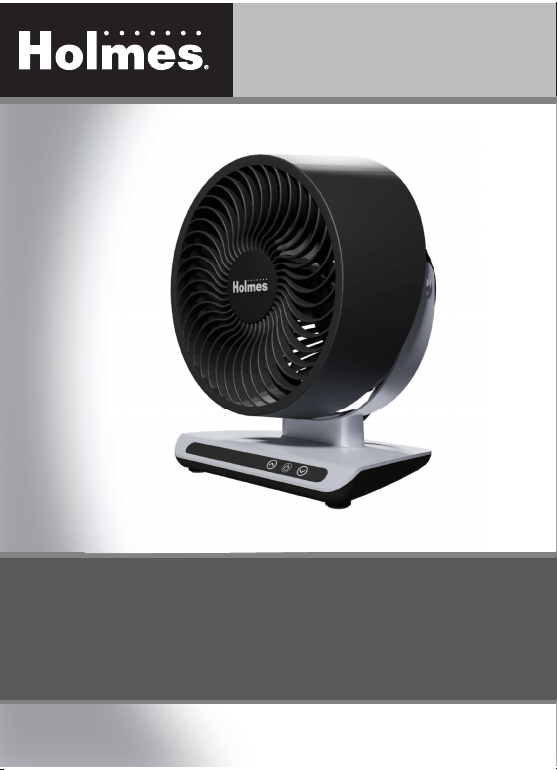
Instruction Manual
Item: 12093
Model: 32510114
PLEASE READ AND SAVE THESE IMPORTANT INSTRUCTIONS
WA R R A N T Y I N F OR M AT I O N
Printed In China
M A I N T E N A N C E
USER SERVICING INSTRUCTIONS
Follow these instructions to safely and correctly care for this fan.
REPLACEABLE FUSE
If the (2.5 Amp, 125 Volt) replaceable fuse blows, please visit our website at www.getholmesfans.com for
information on how to order a new fuse. Follow the below instructions to replace the fuse on the plug.
REPLACING THE FUSE
1. Unplug the fan.
Grasp plug and remove from the receptacle or other outlet device.
NOTE:
Do not unplug by pulling on cord.
2. Openfusecover,locatedonthetopoftheplug,byusingyourthumboraathead
screwdriver to slide the cover towards the prongs.
NOTE:
Ensure the fuse cover is completely open before attempting to remove fuse.
3. Remove fuse carefully by using a small screwdriver to pry it from the compartment
at the metal ends of the fuse. (See Figure 2)
4. Placeplugonasolid,atsurface.Insertnew2.5Amp,125Voltfuseintofuse
compartment. Use a small screwdriver to secure the metal ends of the fuse into the
compartment.
CAUTION:
Riskof�re.Replacefuseonlywith2.5Amp,125Voltfuse.
5. Slide fuse cover closed completely.
NOTE:
Iffusecoverisdif�culttoclose,makesurethefuseiscompletelysecuredinplacebypressingonmetal
ends of the fuse.
CAUTION:
Riskof�re.Donotreplacetheattachmentplug.Itcontainsasafetydevice(fuse)thatshouldnotbe
removed. Discard product if the attachment plug is damaged.
Figure 2
Fuse
Fuse cover
Metal ends
3 YEAR LIMITED WARRANTY
This device has a limited warranty of 3 years from the original date of purchase against workmanship and defects in
material. If under normal use, your product fails to operate, please contact our customer service department at
info@getholmesfans.com. A refund or replacement will be provided to you with proof of purchase. Star Elite Inc.
maydenyclaimsofdamagecausedbymisuseormodi�cationsofthisproduct.
Warranty Service
Contact our customer service at www.getholmesfans.com/en/contact-us
or info@getholmesfans.com or 1-866-769-3166 (8:30 am - 5:00 pm EST) Monday-Friday.
Our team will be happy to assist.
www.getholmesfans.com
Blizzard
®
8 Inch Digital Air Circulator
©
2023 Sunbeam Products, Inc. All rights reserved.
HOLMES
®
and BLIZZARD
®
are registered trademarks of Sunbeam Products, Inc. used under license.
Distributed by Star Elite Inc., Montreal, Canada H3B 3X9
SEH022-030123

IMPORTANT SAFETY INSTRUCTIONS
O P E R AT I O N C L E A N I N G / M A I N T E N A N C E
FAN CLEANING
• Always unplug the fan before cleaning.
• Do not allow water to drip on or into the fan
housing.
• Use only a soft cloth moistened with a mild soap
solution.
• Do not use harsh chemicals such as gasoline,
thinner or benzene as a cleaner.
• Do not attempt to remove the fan blade.
FAN HEAD AND BASE CLEANING
Using a soft, moist cloth, with or without a mild soap
solution, carefully clean the fan base and head. Use
CAUTION around the housing area.
Do not allow the motor or other electrical components to
be exposed to water.
FAN STORAGE
• Store the fan in a clean, dry location between
seasons or when not in use for an extended period of
time.
• Keep the fan protected from dirt and dust during
storage.
TILT ADJUSTMENT
Gently move the fan head up or down manually to the
desired angle.
FIGURE 1
A
D
B
C
E
G
H
I
N
K
M
L
J
F
A. Front Grill
B. Rear Grill
C. Fan Blade
D. Base
E. Control Panel
F. Cord
G. Speed Indicator
H. Speed Up Button
I. Power Icon
J. Speed Down Button
K. Remote Control
L. Speed Button
M. Mute Button
N. Power Button
15. To disconnect, grip plug and pull from wall outlet.
Never yank on cord.
16. Always use on a dry, level surface.
17. Do not operate fan until fully assembled with all
parts properly in place.
18. This product is intended for household use ONLY and
not for commercial or industrial applications.
19.
WARNING:
To reduce the risk of electrical shock
and injury to persons, do not use in window.
20.
WARNING:
Toreducetheriskof�reorelectric
shock, do not use this fan with any solid-state speed
control device.
21.
WARNING:
Toreducetheriskof�re,electric
shock or injury to persons, do not use replacement
parts that have not been recommended by the
manufacturer (eg: Parts made at home using a 3D
Printer).
22. This product employs overload protection (fuse).
A blown fuse indicates an overload or short-circuit
situation. If the fuse blows, unplug the product from
the outlet. Replace the fuse as per the user servicing
instructions (follow product marking for proper fuse
rating) and check the product. If the replacement
fuse blows, a short circuit may be present and the
product should be discarded or contact customer
service.
WARNING:
Chemical Burn Hazard. Keep batteries away
from children. This product contains a lithium button/coin
cell battery. If a new or used lithium button/coin cell battery
is swallowed or enters the body, it can cause severe internal
burns and can lead to death in as little as 2 hours. Always
completely secure the battery compartment. If the battery
compartment does not close securely, stop using the product,
remove the batteries, and keep it away from children. If you
think batteries might have been swallowed or placed inside
any part of the body, seek immediate medical attention.
When using electrical appliances, basic safety
precautions should always be taken including the
following:
1. Read all instructions before using this appliance.
2. Use fan only for purposes described in the instruction
manual.
3. To protect against electrical shock do not immerse
unit, plug or cord in water or spray with liquids and
plug the appliance directly into a 120V AC electrical
outlet.
4. Close supervision is necessary when any appliance is
used near children.
5. Not intended for use by children
6. Unplug from outlet when not in use, when moving
fan from one location to another, and before
cleaning.
7. Avoid contact with moving parts.
8. Do not operate in the presence of explosive and/or
ammablefumes.
9.Toavoid�rehazard,NEVERplacethecordunder
rugsoranypartsnearanopename,cookingor
other heating appliance.
10. Do not operate any appliance with a damaged cord
or plug after the appliance malfunctions, or has been
dropped/damaged in any manner. Discard fan or
contact customer service.
11. Do not run cord under carpeting. Do not cover cord
with throw rugs, runner, or similar coverings. Do not
route cord under furniture or appliances. Arrange
cordawayfromtraf�careaandwhereitwillnotbe
tripped over.
12. The use of attachments not recommended or sold by
the appliance manufacturer may cause hazards.
13. Do not let the cord hang over the edge of a table,
counter or come in contact with hot surfaces or leave
exposedtohightraf�careas.
14. Do not use outdoors.
THIS APPLIANCE HAS A POLARIZED PLUG (one blade is wider than
the other). To reduce the risk of electric shock, this plug is intended to
fit in a polarized outlet only one way. If the plug does not fit fully in
the outlet, reverse the plug. If it still does not fit, contact a qualified
electrician to install the proper outlet.
DO NOT ATTEMPT TO MODIFY THIS PLUG OR DEFEAT THIS
SAFETY FEATURE IN ANY WAY.
For inquiries regarding recycling and proper disposal
of this product, please contact your local waste
management facility.
ASSEMBLY
This Table Fan comes completely assembled and is ready
for use.
OPERATING INSTRUCTIONS
1. Make sure the fan is in the OFF position.
2. Set the fan base on a dry, level surface.
3. A green backlit power icon will illuminate as soon
as the fan is plugged in. Press the power icon (I)
on the control panel (E) or the remote control (K)
to turn the fan on.
4. Use the up and down speed buttons (H and J) to
cycle through the 3 speed settings (low, medium
or high). The number of speed indicator lights on
the display panel will indicate the correct speed
setting.
5. Tosilencesettingcon�rmationbeeps,pressthe
Mute button (M) located on the remote control.
Press the button again to re-activate setting
con�rmationbeeps.
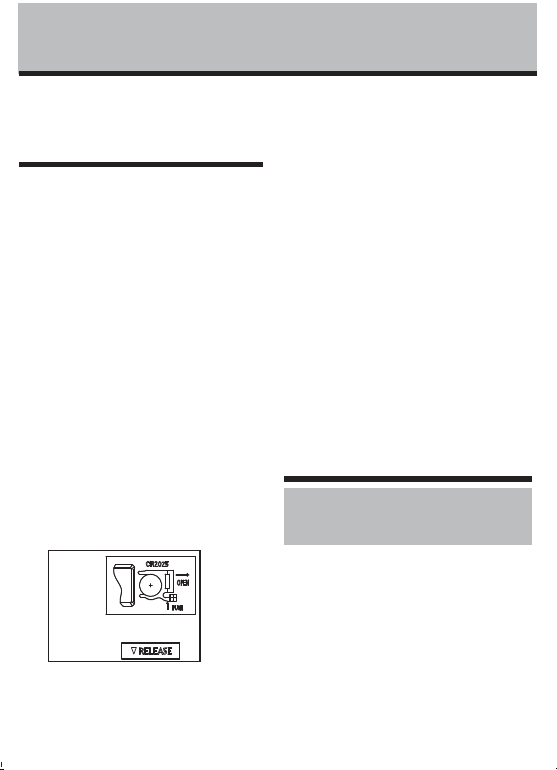
REMOTE CONTROL: (SEE FIGURE 2)
NOTE:
PLEASE REMOVE THE PROTECTIVE PLASTIC FROM
THE REMOTE CONTROL BATTERY BEFORE OPERATION.
This unit includes one lithium battery, CR2025/3V
Remove battery before discarding the remote.
Battery Replacement
The cells should be disposed of properly, including
keeping them away from children. Even used cells
may cause injury.
1. Locate the battery compartment on the bottom
back of the remote control handset. Push tab and
pull battery tray.
2. Remove old battery.
3. Place new battery into battery compartment.
4. Slide battery compartment into the remote control
handset.
NOTES:
1. Remove the battery from the equipment when it is
not being used for an extended period of time.
2. Remove the used battery promptly.
3. Do not discard used batteries into household trash
containers. Contact your local government for
disposal or recycling practices in your area.
Figure 2
!
PLEASE READ AND SAVE
THESE IMPORTANT SAFETY
INSTRUCTIONS

IMPORTANT SAFETY INSTRUCTIONS
O P E R AT I O N C L E A N I N G / M A I N T E N A N C E
FAN CLEANING
• Always unplug the fan before cleaning.
• Do not allow water to drip on or into the fan
housing.
• Use only a soft cloth moistened with a mild soap
solution.
• Do not use harsh chemicals such as gasoline,
thinner or benzene as a cleaner.
• Do not attempt to remove the fan blade.
FAN HEAD AND BASE CLEANING
Using a soft, moist cloth, with or without a mild soap
solution, carefully clean the fan base and head. Use
CAUTION around the housing area.
Do not allow the motor or other electrical components to
be exposed to water.
FAN STORAGE
• Store the fan in a clean, dry location between
seasons or when not in use for an extended period of
time.
• Keep the fan protected from dirt and dust during
storage.
TILT ADJUSTMENT
Gently move the fan head up or down manually to the
desired angle.
FIGURE 1
A
D
B
C
E
G
H
I
N
K
M
L
J
F
A. Front Grill
B. Rear Grill
C. Fan Blade
D. Base
E. Control Panel
F. Cord
G. Speed Indicator
H. Speed Up Button
I. Power Icon
J. Speed Down Button
K. Remote Control
L. Speed Button
M. Mute Button
N. Power Button
15. To disconnect, grip plug and pull from wall outlet.
Never yank on cord.
16. Always use on a dry, level surface.
17. Do not operate fan until fully assembled with all
parts properly in place.
18. This product is intended for household use ONLY and
not for commercial or industrial applications.
19.
WARNING:
To reduce the risk of electrical shock
and injury to persons, do not use in window.
20.
WARNING:
Toreducetheriskof�reorelectric
shock, do not use this fan with any solid-state speed
control device.
21.
WARNING:
Toreducetheriskof�re,electric
shock or injury to persons, do not use replacement
parts that have not been recommended by the
manufacturer (eg: Parts made at home using a 3D
Printer).
22. This product employs overload protection (fuse).
A blown fuse indicates an overload or short-circuit
situation. If the fuse blows, unplug the product from
the outlet. Replace the fuse as per the user servicing
instructions (follow product marking for proper fuse
rating) and check the product. If the replacement
fuse blows, a short circuit may be present and the
product should be discarded or contact customer
service.
WARNING:
Chemical Burn Hazard. Keep batteries away
from children. This product contains a lithium button/coin
cell battery. If a new or used lithium button/coin cell battery
is swallowed or enters the body, it can cause severe internal
burns and can lead to death in as little as 2 hours. Always
completely secure the battery compartment. If the battery
compartment does not close securely, stop using the product,
remove the batteries, and keep it away from children. If you
think batteries might have been swallowed or placed inside
any part of the body, seek immediate medical attention.
When using electrical appliances, basic safety
precautions should always be taken including the
following:
1. Read all instructions before using this appliance.
2. Use fan only for purposes described in the instruction
manual.
3. To protect against electrical shock do not immerse
unit, plug or cord in water or spray with liquids and
plug the appliance directly into a 120V AC electrical
outlet.
4. Close supervision is necessary when any appliance is
used near children.
5. Not intended for use by children
6. Unplug from outlet when not in use, when moving
fan from one location to another, and before
cleaning.
7. Avoid contact with moving parts.
8. Do not operate in the presence of explosive and/or
ammablefumes.
9.Toavoid�rehazard,NEVERplacethecordunder
rugsoranypartsnearanopename,cookingor
other heating appliance.
10. Do not operate any appliance with a damaged cord
or plug after the appliance malfunctions, or has been
dropped/damaged in any manner. Discard fan or
contact customer service.
11. Do not run cord under carpeting. Do not cover cord
with throw rugs, runner, or similar coverings. Do not
route cord under furniture or appliances. Arrange
cordawayfromtraf�careaandwhereitwillnotbe
tripped over.
12. The use of attachments not recommended or sold by
the appliance manufacturer may cause hazards.
13. Do not let the cord hang over the edge of a table,
counter or come in contact with hot surfaces or leave
exposedtohightraf�careas.
14. Do not use outdoors.
THIS APPLIANCE HAS A POLARIZED PLUG (one blade is wider than
the other). To reduce the risk of electric shock, this plug is intended to
fit in a polarized outlet only one way. If the plug does not fit fully in
the outlet, reverse the plug. If it still does not fit, contact a qualified
electrician to install the proper outlet.
DO NOT ATTEMPT TO MODIFY THIS PLUG OR DEFEAT THIS
SAFETY FEATURE IN ANY WAY.
For inquiries regarding recycling and proper disposal
of this product, please contact your local waste
management facility.
ASSEMBLY
This Table Fan comes completely assembled and is ready
for use.
OPERATING INSTRUCTIONS
1. Make sure the fan is in the OFF position.
2. Set the fan base on a dry, level surface.
3. A green backlit power icon will illuminate as soon
as the fan is plugged in. Press the power icon (I)
on the control panel (E) or the remote control (K)
to turn the fan on.
4. Use the up and down speed buttons (H and J) to
cycle through the 3 speed settings (low, medium
or high). The number of speed indicator lights on
the display panel will indicate the correct speed
setting.
5. Tosilencesettingcon�rmationbeeps,pressthe
Mute button (M) located on the remote control.
Press the button again to re-activate setting
con�rmationbeeps.
REMOTE CONTROL: (SEE FIGURE 2)
NOTE:
PLEASE REMOVE THE PROTECTIVE PLASTIC FROM
THE REMOTE CONTROL BATTERY BEFORE OPERATION.
This unit includes one lithium battery, CR2025/3V
Remove battery before discarding the remote.
Battery Replacement
The cells should be disposed of properly, including
keeping them away from children. Even used cells
may cause injury.
1. Locate the battery compartment on the bottom
back of the remote control handset. Push tab and
pull battery tray.
2. Remove old battery.
3. Place new battery into battery compartment.
4. Slide battery compartment into the remote control
handset.
NOTES:
1. Remove the battery from the equipment when it is
not being used for an extended period of time.
2. Remove the used battery promptly.
3. Do not discard used batteries into household trash
containers. Contact your local government for
disposal or recycling practices in your area.
Figure 2
!
PLEASE READ AND SAVE
THESE IMPORTANT SAFETY
INSTRUCTIONS
IMPORTANT SAFETY INSTRUCTIONS
O P E R AT I O N C L E A N I N G / M A I N T E N A N C E
FAN CLEANING
• Always unplug the fan before cleaning.
• Do not allow water to drip on or into the fan
housing.
• Use only a soft cloth moistened with a mild soap
solution.
• Do not use harsh chemicals such as gasoline,
thinner or benzene as a cleaner.
• Do not attempt to remove the fan blade.
FAN HEAD AND BASE CLEANING
Using a soft, moist cloth, with or without a mild soap
solution, carefully clean the fan base and head. Use
CAUTION around the housing area.
Do not allow the motor or other electrical components to
be exposed to water.
FAN STORAGE
• Store the fan in a clean, dry location between
seasons or when not in use for an extended period of
time.
• Keep the fan protected from dirt and dust during
storage.
TILT ADJUSTMENT
Gently move the fan head up or down manually to the
desired angle.
FIGURE 1
A
D
B
C
E
G
H
I
N
K
M
L
J
F
A. Front Grill
B. Rear Grill
C. Fan Blade
D. Base
E. Control Panel
F. Cord
G. Speed Indicator
H. Speed Up Button
I. Power Icon
J. Speed Down Button
K. Remote Control
L. Speed Button
M. Mute Button
N. Power Button
15. To disconnect, grip plug and pull from wall outlet.
Never yank on cord.
16. Always use on a dry, level surface.
17. Do not operate fan until fully assembled with all
parts properly in place.
18. This product is intended for household use ONLY and
not for commercial or industrial applications.
19.
WARNING:
To reduce the risk of electrical shock
and injury to persons, do not use in window.
20.
WARNING:
Toreducetheriskof�reorelectric
shock, do not use this fan with any solid-state speed
control device.
21.
WARNING:
Toreducetheriskof�re,electric
shock or injury to persons, do not use replacement
parts that have not been recommended by the
manufacturer (eg: Parts made at home using a 3D
Printer).
22. This product employs overload protection (fuse).
A blown fuse indicates an overload or short-circuit
situation. If the fuse blows, unplug the product from
the outlet. Replace the fuse as per the user servicing
instructions (follow product marking for proper fuse
rating) and check the product. If the replacement
fuse blows, a short circuit may be present and the
product should be discarded or contact customer
service.
WARNING:
Chemical Burn Hazard. Keep batteries away
from children. This product contains a lithium button/coin
cell battery. If a new or used lithium button/coin cell battery
is swallowed or enters the body, it can cause severe internal
burns and can lead to death in as little as 2 hours. Always
completely secure the battery compartment. If the battery
compartment does not close securely, stop using the product,
remove the batteries, and keep it away from children. If you
think batteries might have been swallowed or placed inside
any part of the body, seek immediate medical attention.
When using electrical appliances, basic safety
precautions should always be taken including the
following:
1. Read all instructions before using this appliance.
2. Use fan only for purposes described in the instruction
manual.
3. To protect against electrical shock do not immerse
unit, plug or cord in water or spray with liquids and
plug the appliance directly into a 120V AC electrical
outlet.
4. Close supervision is necessary when any appliance is
used near children.
5. Not intended for use by children
6. Unplug from outlet when not in use, when moving
fan from one location to another, and before
cleaning.
7. Avoid contact with moving parts.
8. Do not operate in the presence of explosive and/or
ammablefumes.
9.Toavoid�rehazard,NEVERplacethecordunder
rugsoranypartsnearanopename,cookingor
other heating appliance.
10. Do not operate any appliance with a damaged cord
or plug after the appliance malfunctions, or has been
dropped/damaged in any manner. Discard fan or
contact customer service.
11. Do not run cord under carpeting. Do not cover cord
with throw rugs, runner, or similar coverings. Do not
route cord under furniture or appliances. Arrange
cordawayfromtraf�careaandwhereitwillnotbe
tripped over.
12. The use of attachments not recommended or sold by
the appliance manufacturer may cause hazards.
13. Do not let the cord hang over the edge of a table,
counter or come in contact with hot surfaces or leave
exposedtohightraf�careas.
14. Do not use outdoors.
THIS APPLIANCE HAS A POLARIZED PLUG (one blade is wider than
the other). To reduce the risk of electric shock, this plug is intended to
fit in a polarized outlet only one way. If the plug does not fit fully in
the outlet, reverse the plug. If it still does not fit, contact a qualified
electrician to install the proper outlet.
DO NOT ATTEMPT TO MODIFY THIS PLUG OR DEFEAT THIS
SAFETY FEATURE IN ANY WAY.
For inquiries regarding recycling and proper disposal
of this product, please contact your local waste
management facility.
ASSEMBLY
This Table Fan comes completely assembled and is ready
for use.
OPERATING INSTRUCTIONS
1. Make sure the fan is in the OFF position.
2. Set the fan base on a dry, level surface.
3. A green backlit power icon will illuminate as soon
as the fan is plugged in. Press the power icon (I)
on the control panel (E) or the remote control (K)
to turn the fan on.
4. Use the up and down speed buttons (H and J) to
cycle through the 3 speed settings (low, medium
or high). The number of speed indicator lights on
the display panel will indicate the correct speed
setting.
5. Tosilencesettingcon�rmationbeeps,pressthe
Mute button (M) located on the remote control.
Press the button again to re-activate setting
con�rmationbeeps.
REMOTE CONTROL: (SEE FIGURE 2)
NOTE:
PLEASE REMOVE THE PROTECTIVE PLASTIC FROM
THE REMOTE CONTROL BATTERY BEFORE OPERATION.
This unit includes one lithium battery, CR2025/3V
Remove battery before discarding the remote.
Battery Replacement
The cells should be disposed of properly, including
keeping them away from children. Even used cells
may cause injury.
1. Locate the battery compartment on the bottom
back of the remote control handset. Push tab and
pull battery tray.
2. Remove old battery.
3. Place new battery into battery compartment.
4. Slide battery compartment into the remote control
handset.
NOTES:
1. Remove the battery from the equipment when it is
not being used for an extended period of time.
2. Remove the used battery promptly.
3. Do not discard used batteries into household trash
containers. Contact your local government for
disposal or recycling practices in your area.
Figure 2
!
PLEASE READ AND SAVE
THESE IMPORTANT SAFETY
INSTRUCTIONS

Instruction Manual
Item: 12093
Model: 32510114
PLEASE READ AND SAVE THESE IMPORTANT INSTRUCTIONS
WA R R A N T Y I N F O R M AT I O N
Printed In China
M A I N T E N A N C E
USER SERVICING INSTRUCTIONS
Follow these instructions to safely and correctly care for this fan.
REPLACEABLE FUSE
If the (2.5 Amp, 125 Volt) replaceable fuse blows, please visit our website at www.getholmesfans.com for
information on how to order a new fuse. Follow the below instructions to replace the fuse on the plug.
REPLACING THE FUSE
1. Unplug the fan.
Grasp plug and remove from the receptacle or other outlet device.
NOTE:
Do not unplug by pulling on cord.
2. Openfusecover,locatedonthetopoftheplug,byusingyourthumboraathead
screwdriver to slide the cover towards the prongs.
NOTE:
Ensure the fuse cover is completely open before attempting to remove fuse.
3. Remove fuse carefully by using a small screwdriver to pry it from the compartment
at the metal ends of the fuse. (See Figure 2)
4. Placeplugonasolid,atsurface.Insertnew2.5Amp,125Voltfuseintofuse
compartment. Use a small screwdriver to secure the metal ends of the fuse into the
compartment.
CAUTION:
Riskof�re.Replacefuseonlywith2.5Amp,125Voltfuse.
5. Slide fuse cover closed completely.
NOTE:
Iffusecoverisdif�culttoclose,makesurethefuseiscompletelysecuredinplacebypressingonmetal
ends of the fuse.
CAUTION:
Riskof�re.Donotreplacetheattachmentplug.Itcontainsasafetydevice(fuse)thatshouldnotbe
removed. Discard product if the attachment plug is damaged.
Figure 2
Fuse
Fuse cover
Metal ends
3 YEAR LIMITED WARRANTY
This device has a limited warranty of 3 years from the original date of purchase against workmanship and defects in
material. If under normal use, your product fails to operate, please contact our customer service department at
info@getholmesfans.com. A refund or replacement will be provided to you with proof of purchase. Star Elite Inc.
maydenyclaimsofdamagecausedbymisuseormodi�cationsofthisproduct.
Warranty Service
Contact our customer service at www.getholmesfans.com/en/contact-us
or info@getholmesfans.com or 1-866-769-3166 (8:30 am - 5:00 pm EST) Monday-Friday.
Our team will be happy to assist.
www.getholmesfans.com
Blizzard
®
8 Inch Digital Air Circulator
©
2023 Sunbeam Products, Inc. All rights reserved.
HOLMES
®
and BLIZZARD
®
are registered trademarks of Sunbeam Products, Inc. used under license.
Distributed by Star Elite Inc., Montreal, Canada H3B 3X9
SEH022-030123

Instruction Manual
Item: 12093
Model: 32510114
PLEASE READ AND SAVE THESE IMPORTANT INSTRUCTIONS
WA R R A N T Y I N F O R M AT I O N
Printed In China
M A I N T E N A N C E
USER SERVICING INSTRUCTIONS
Follow these instructions to safely and correctly care for this fan.
REPLACEABLE FUSE
If the (2.5 Amp, 125 Volt) replaceable fuse blows, please visit our website at www.getholmesfans.com for
information on how to order a new fuse. Follow the below instructions to replace the fuse on the plug.
REPLACING THE FUSE
1. Unplug the fan.
Grasp plug and remove from the receptacle or other outlet device.
NOTE:
Do not unplug by pulling on cord.
2. Openfusecover,locatedonthetopoftheplug,byusingyourthumboraathead
screwdriver to slide the cover towards the prongs.
NOTE:
Ensure the fuse cover is completely open before attempting to remove fuse.
3. Remove fuse carefully by using a small screwdriver to pry it from the compartment
at the metal ends of the fuse. (See Figure 2)
4. Placeplugonasolid,atsurface.Insertnew2.5Amp,125Voltfuseintofuse
compartment. Use a small screwdriver to secure the metal ends of the fuse into the
compartment.
CAUTION:
Riskof�re.Replacefuseonlywith2.5Amp,125Voltfuse.
5. Slide fuse cover closed completely.
NOTE:
Iffusecoverisdif�culttoclose,makesurethefuseiscompletelysecuredinplacebypressingonmetal
ends of the fuse.
CAUTION:
Riskof�re.Donotreplacetheattachmentplug.Itcontainsasafetydevice(fuse)thatshouldnotbe
removed. Discard product if the attachment plug is damaged.
Figure 2
Fuse
Fuse cover
Metal ends
3 YEAR LIMITED WARRANTY
This device has a limited warranty of 3 years from the original date of purchase against workmanship and defects in
material. If under normal use, your product fails to operate, please contact our customer service department at
[email protected]. A refund or replacement will be provided to you with proof of purchase. Star Elite Inc.
maydenyclaimsofdamagecausedbymisuseormodi�cationsofthisproduct.
Warranty Service
Contact our customer service at www.getholmesfans.com/en/contact-us
or [email protected] or 1-866-769-3166 (8:30 am - 5:00 pm EST) Monday-Friday.
Our team will be happy to assist.
www.getholmesfans.com
Blizzard
®
8 Inch Digital Air Circulator
©
2023 Sunbeam Products, Inc. All rights reserved.
HOLMES
®
and BLIZZARD
®
are registered trademarks of Sunbeam Products, Inc. used under license.
Distributed by Star Elite Inc., Montreal, Canada H3B 3X9
SEH022-030123