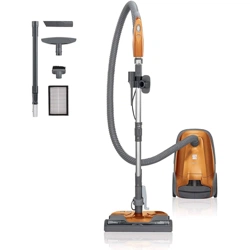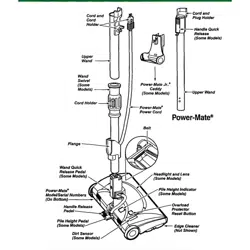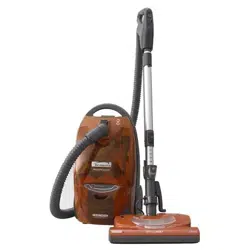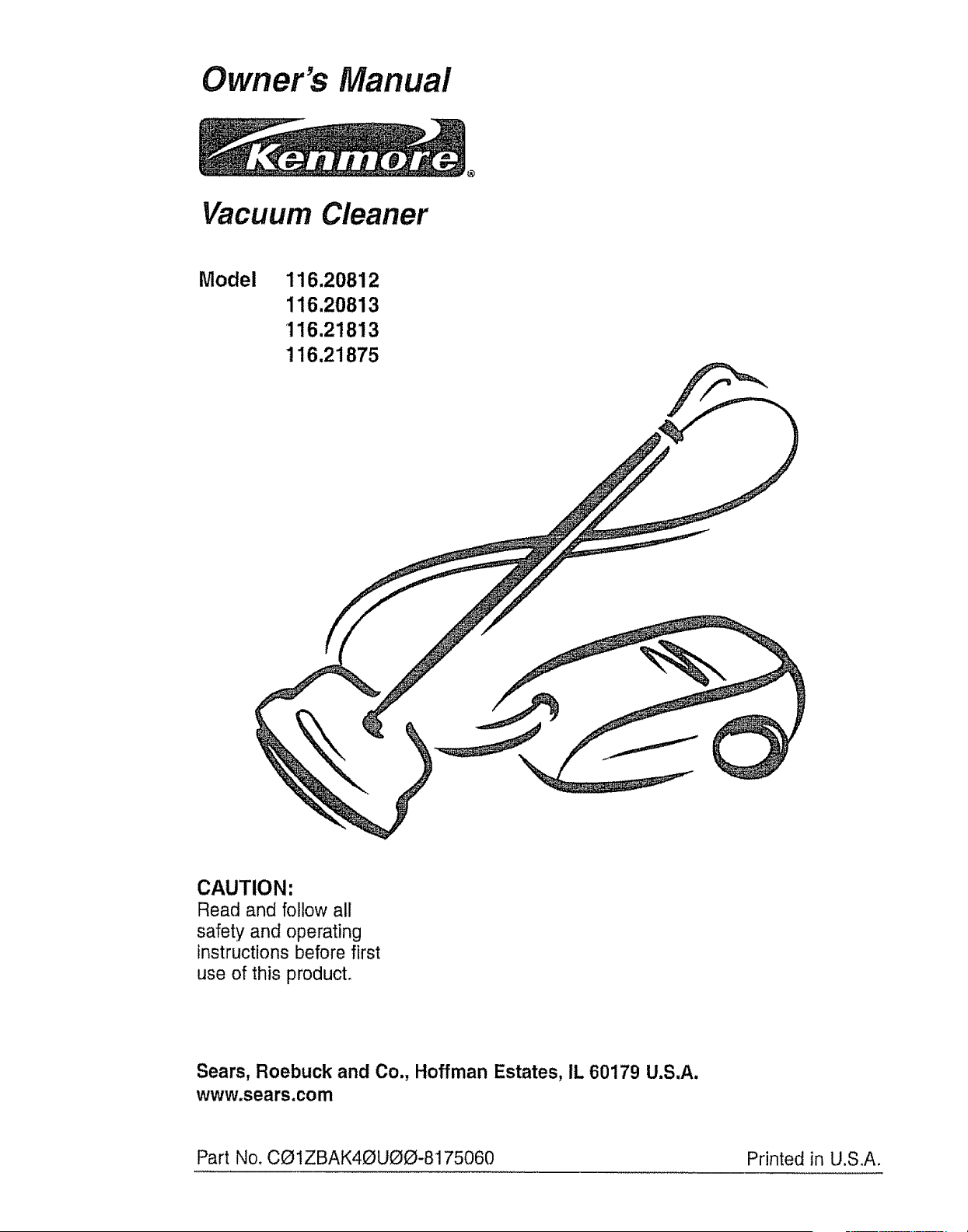
Owner's Manual
Vacuum Cleaner
Model 116.20812
116.20813
116.21813
116,21875
CAUTION:
Read and follow all
safety and operating
instructions before first
use of this product.
Sears, Roebuck and Co., Hoffman Estates, IL 60179 U.S.A.
www.sears.com
Part No. C_1ZBAK4_UOO-8175060 Printed in U.S,A.
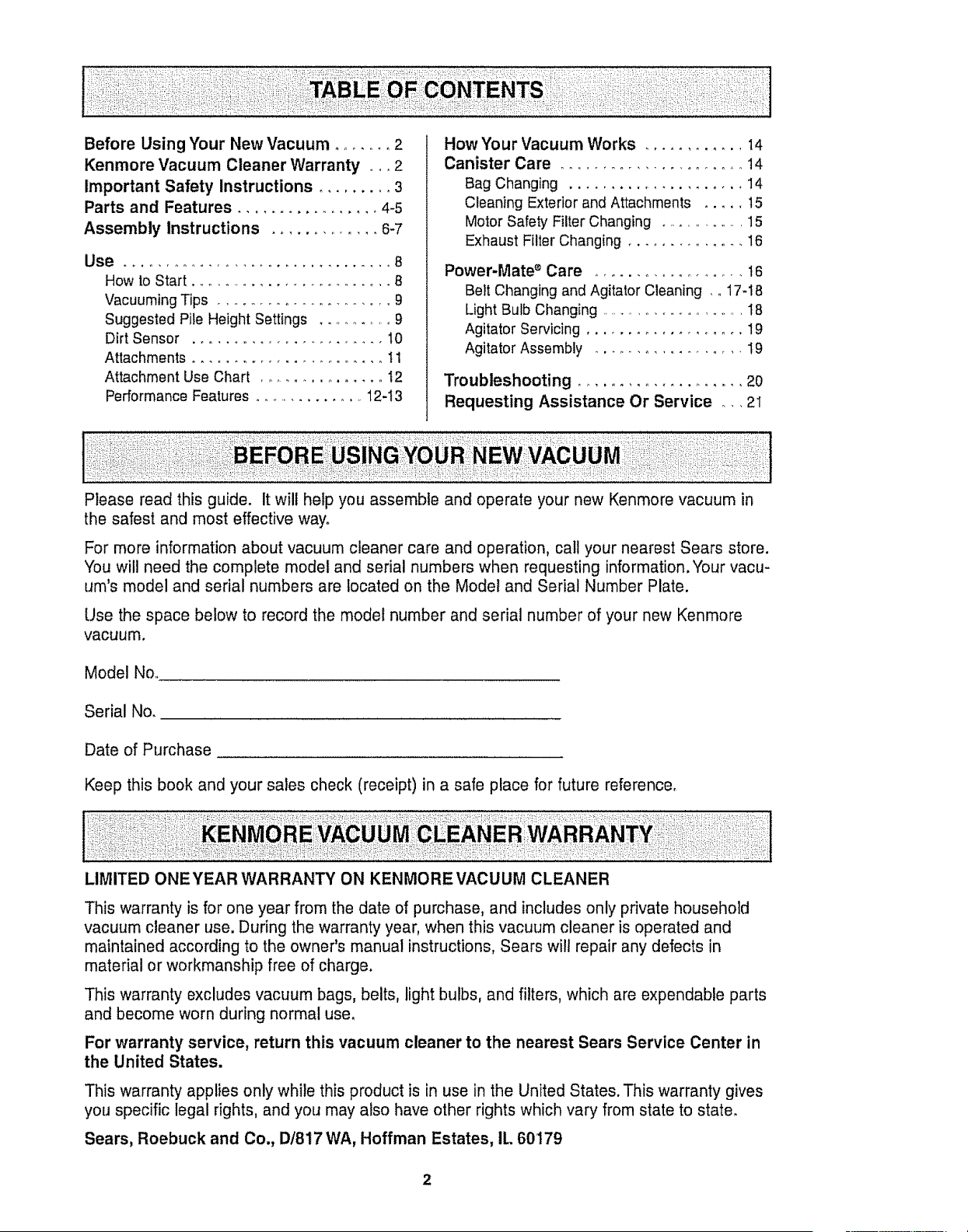
Before Using Your New Vacuum ........ 2
Kenmore Vacuum Cleaner Warranty ,... 2
Important Safety Instructions ......... 3
Parts and Features ................. 4-5
Assembly Instructions .............. 6-7
Use _ _, ........... ...... , _. ,, _ _ _., ... _B
How to Start .......................... B
Vacuuming Tips ..................... 9
Suggested Pile Height Settings .......... 9
Dirt Sensor ........................ 10
Attachments ........................ 11
Attachment Use Chart ................ t2
Performance Features ............... 12-I3
How Your Vacuum Works ............ 14
Canister Care ......................... 14
Bag Changing ..................... 14
Cleaning Exterior and Attachments ..... 15
Motor Safety Filter Changing ................ 15
Exhaust Filter Changing ............... 16
Power-Mate ® Care .................. 16
Belt Changing and Agitator Cleaning , o17-18
Light Bulb Changing ........................ 18
Agitator Servicing ................... 19
Agitator Assembly .................. 19
Troubleshooting ..................... 20
Requesting Assistance Or Service .,. 2I
Please read this guide. It will help you assemble and operate your new Kenmore vacuum in
the safest and most effective way°
For more information about vacuum cleaner care and operation, call your nearest Sears store.
You will need the complete model and serial numbers when requesting information. Your vacu-
um's model and serial numbers are located on the Model and Serial Number Plate.
Use the space below to record the model number and serial number of your new Kenmore
vacuum.
Model Noo
Serial No.
Date of Purchase
Keep this book and your sales check (receipt) in a safe place for future reference,
LIMITED ONE YEAR WARRANTY ON KENMORE VACUUM CLEANER
This warranty is for one year from the date of purchase, and includes only private household
vacuum cleaner use. During the warranty year, when this vacuum cleaner is operated and
maintained according to the owner's manual instructions, Sears wi!l repair any defects in
material or workmanship free of charge,
This warranty excludes vacuum bags, belts, light bulbs, and filters, which are expendable parts
and become worn during normal use,
For warranty service, return this vacuum cleaner to the nearest Sears Service Center in
the United States.
This warranty applies only while this product is in use in the United States. This warranty gives
you specific legal rights, and you may also have other rights which vary from state to state.
Sears, Roebuck and Co., I)/817 WA, Hoffman Estates, IL 60179
2
Your safety is important to us.To reduce the risk of fire, electrical shock, injury to
persons or damage when using your vacuum cleaner, follow basic safety precau-
tions including the following:
Read this manual before assembling or
using your vacuum cleaner.
Use your cleaner only as described in this
manual Use only with Sears recommended
attachments.
To reduce the risk of electrical shock - Do
not use outdoors or on wet surfaces,
Disconnect electrical supply before servic-
ing or cleaning out brush area. Failure to do
so could result in electrical shock or brush
suddenly starting.
Always turn cleaner off before connecting or
disconnecting the hose or PoweroMate ®,
Always turn cleaner off before unplugging.
Do not unplug by pulling on cord. To unplug,
grasp the plug, not the cord_
Hold plug when rewinding onto cord reel
Do not allow plug to whip when rewinding.
Do not use with damaged cord or plug. tf
cleaner is not working as it should, has been
dropped, damaged, left outdoors, or dropped
into water, return it to a Sears Service
Center.
Do not pull or carry by cord, use cord as a
handle, close door on cord, or pull cord
around sharp edges or corners. Do not run
cleaner over cord. Keep cord away from
heated surfaces.
Do not leave cleaner when plugged in.
Unplug from outlet when not in use and
before servicing,
Do not allow to be used as a toy. Close
attention is necessary when used by or near
children_
Do not handle plug or cleaner with wet
hands.
Do not put any objects into openings.
Do not operate the cleaner with a punctured
hose_ The hose contains electrical wires.
Replace if cut or worn. Avoid picking up
sharp objects,
Do not use with any opening blocked; keep
free of dust, lint, hair and anything that may
reduce air flow.
Keep hair, loose clothing, fingers, and all
parts of body away from openings and mov-
ing parts_
Do not use cleaner without dust bag and/or
filters in place.
Always change the dust bag after vacuum-
ing carpet cleaners or freshener, powders
and fine dust. These products clog the bag,
reduce airflow and can cause the bag to
burst. Failure to change bag could cause
permanent damage to the cleaner.
Do not use the cleaner to pick up sharp hard
objects, small toys, pins, paper clips, etc.
They may damage the cleaner or dust bag,
Do not pick up anything that is burning or
smoking, such as cigarettes, matches, or hot
ashes,
Do not use cleaner to pick up flammable or
combustible liquids (gasoline, cleaning fluids,
perfumes, etc.), or use in areas where they
may be present. The fumes from these sub-
stances can create a fire hazard or explo-
sion.
Use extra care when cleaning on stairs. Do
not put on chairs, tables, etc. Keep on floor.
You are responsible for making sure that
your vacuum cleaner is not used by anyone
unable to operate it properly_
Do not operate without exhaust filter or
exhaust filter cover installed,
SAVE THESE INSTRUCTIONS
Proper assembly and safe use of your vacuum cleaner are your responsibilities, Your cleaner
is intended only for household user Read this Owner's Manual carefully for important use and
safety information. This guide contains safety statements under warning and caution symbols°
Please pay special attention to these boxes and follow any instructions given. WARNING
statements alert you to such dangers as fire, electrical shock, burns and personal injury,CAU-
TION statements alert you to such dangers as personal injury and/or property damage.
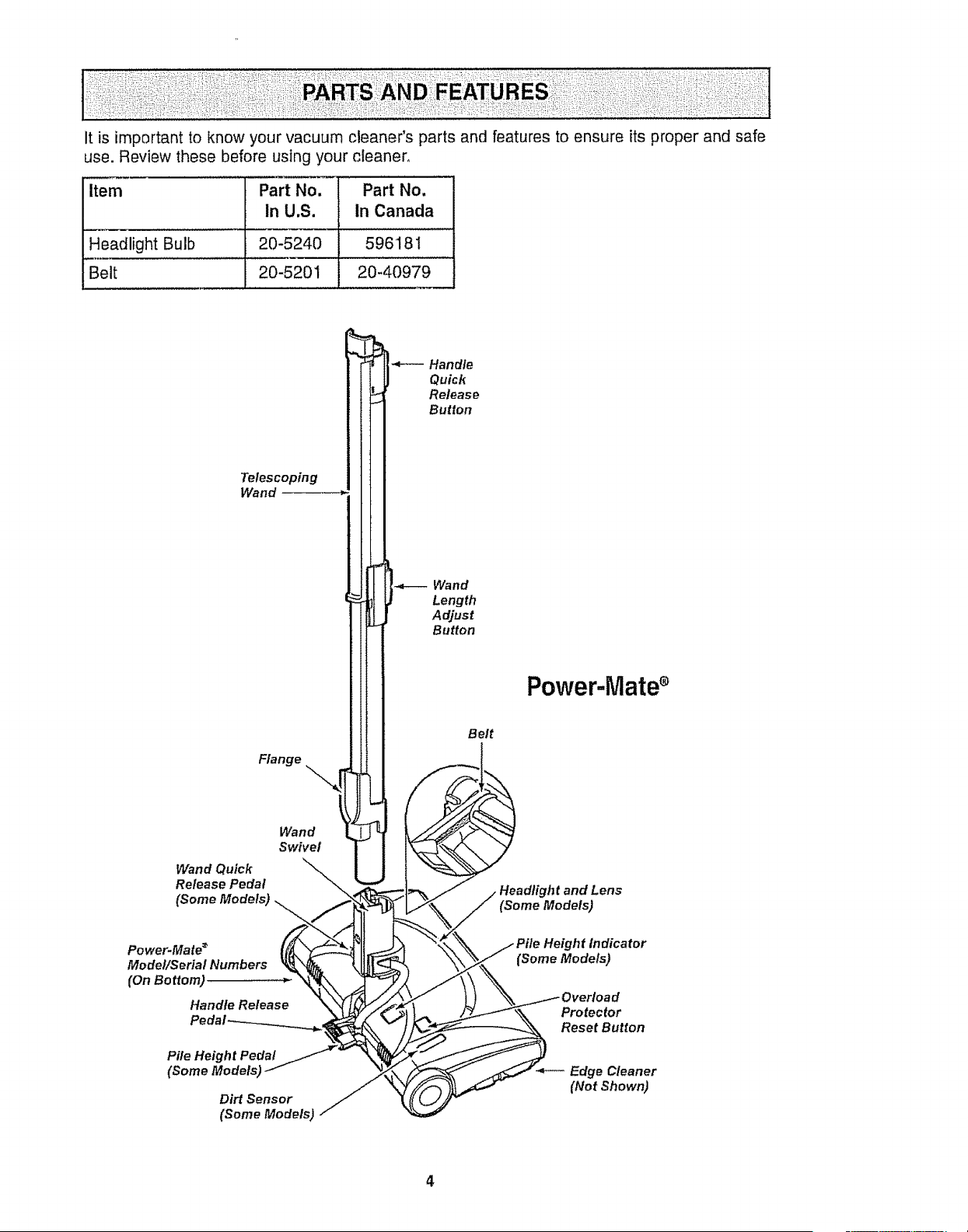
it is importantto knowyourvacuumcleaner'spartsandfeaturestoensureits properandsafe
use.Reviewthesebeforeusingyourcleaner,
Item Part No. Part No.
In U.S. In Canada
Headlight Bulb 20-5240 59618 I
Belt 20-5201 20-40979
Telescoping
Wand
Wand Quick
Release Pedal
Flange
Wand
Swivel
\..
Handle
Quick
Release
Button
Wand
Length
Adjust
Button
Belt
Power.Mate _
Model/Serial Numbers
(On Bottom)
Handle Release
Pile Height Pedal
(Some Modelsj
Dirt Sensor
(Some Models)
Power-iVlatee
Headlight and Lens
(Some Models)
He_lht Indicator
Proteclor
Reset Button
Edge Cleaner
(Not Shown)
4
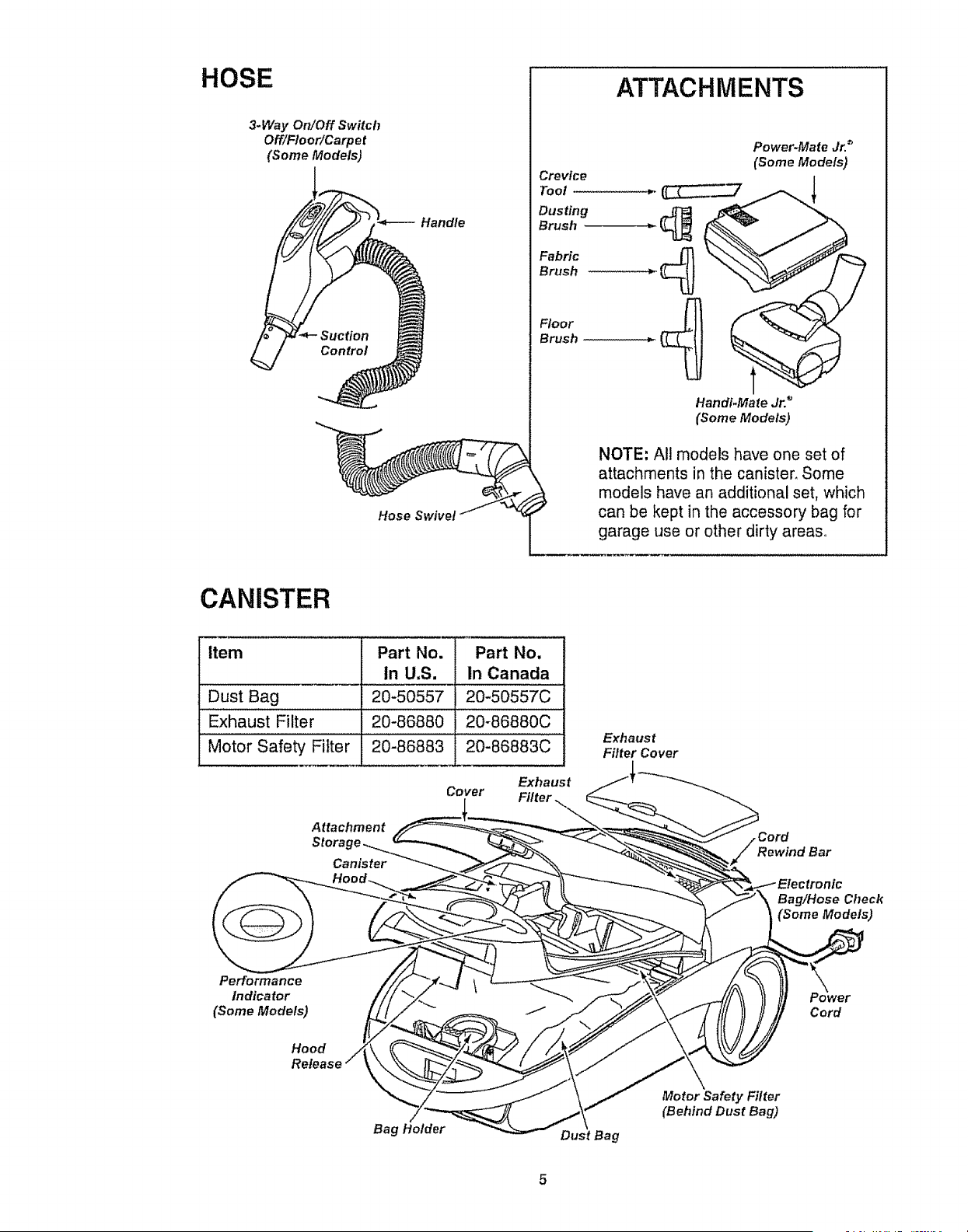
HOSE
3.Way On!Off Switch
Off/Floor!Carpet
(Some Models)
I
Handle
Hose Swivel
ATTACHMENTS
Crevice
Tool
Dusting
Brush
Fabric
Brush
Floor
Brush
Power*Mate Jr. _
(Some Models)
Hand#Mate Jr. _
(Some Models)
NOTE: All models have one set of
attachments in the canister, Some
models have an additional set, which
can be kept in the accessory bag for
garage use or other dirty areas,
CANISTER
Item Part No. Part No.
In U.S. In Canada
Dust Bag .............20-50557 "20-50557€ .....
Exhaust Filter 20-86880 20-86880C
Motor Safety Filter 20-86883 20-86883C
Exhaust
Cover Filter,
Attachment
Storac
Canister
Exhaust
Filter Cover
Rewind Bar
Bag!Hose Check
(Some Models)
Performance
Indicator
(Some Models)
Hood
Cord
Bag Holder Dust Bag
Motor Safety Filter
(Behind Dust Bag)
E
Electrical Shock Hazard
DO NOT plug into electrical supply
until assembly is complete. Failure
to do so could result in electrical
shock or injury,
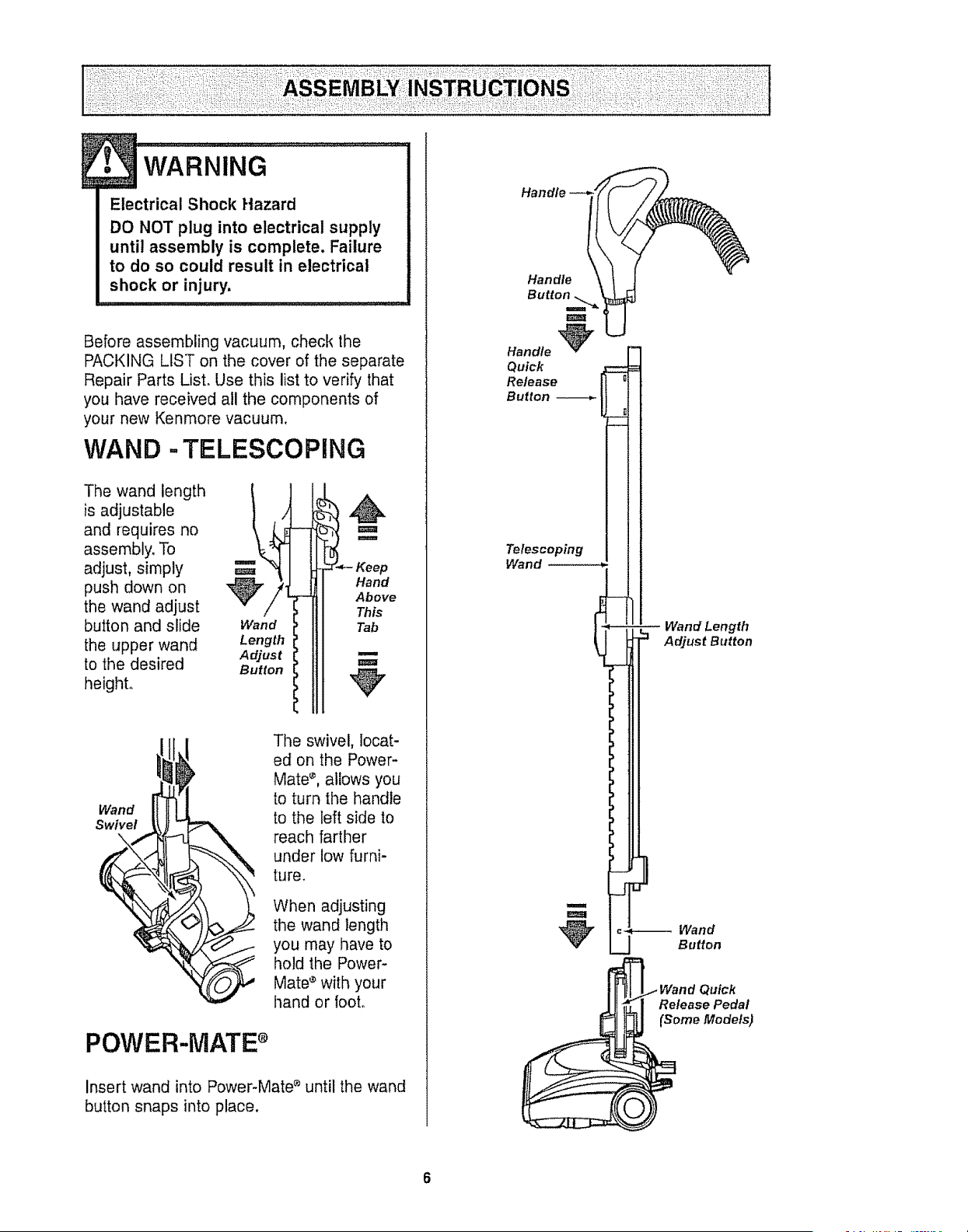
Before assembling vacuum, check the
PACKING LIST on the cover of the separate
Repair Parts List. Use this list to verify that
you have received all the components of
your new Kenmore vacuum.
WAND =TELESCOPING
The wand length
is adjustable
and requires no
assembly, To
adjust, simply
push down on
the wand adjust
button and slide
the upper wand
to the desired
height..
Wand
Length
Adjust
Button
Hand
Above
This
Tab
m
Wand
Swivel
The swivel, locat-
ed on the Power-
Mate _, allows you
to turn the handle
to the left side to
reach farther
under low furni-
ture.
When adjusting
the wand length
you may have to
hold the Power-
Mate ® with your
hand or foot,,
POWER-MATE s
Insert wand into Power-Mate e until the wand
button snaps into place.
Handle
Button
Handle _
Quick
Release
Button
Telescoping
Wand ........
I
m
-3
E
m Wand Length
Adjust Button
_-*-_- Wand
Button
Quick
Release Pedal
(Some Models)
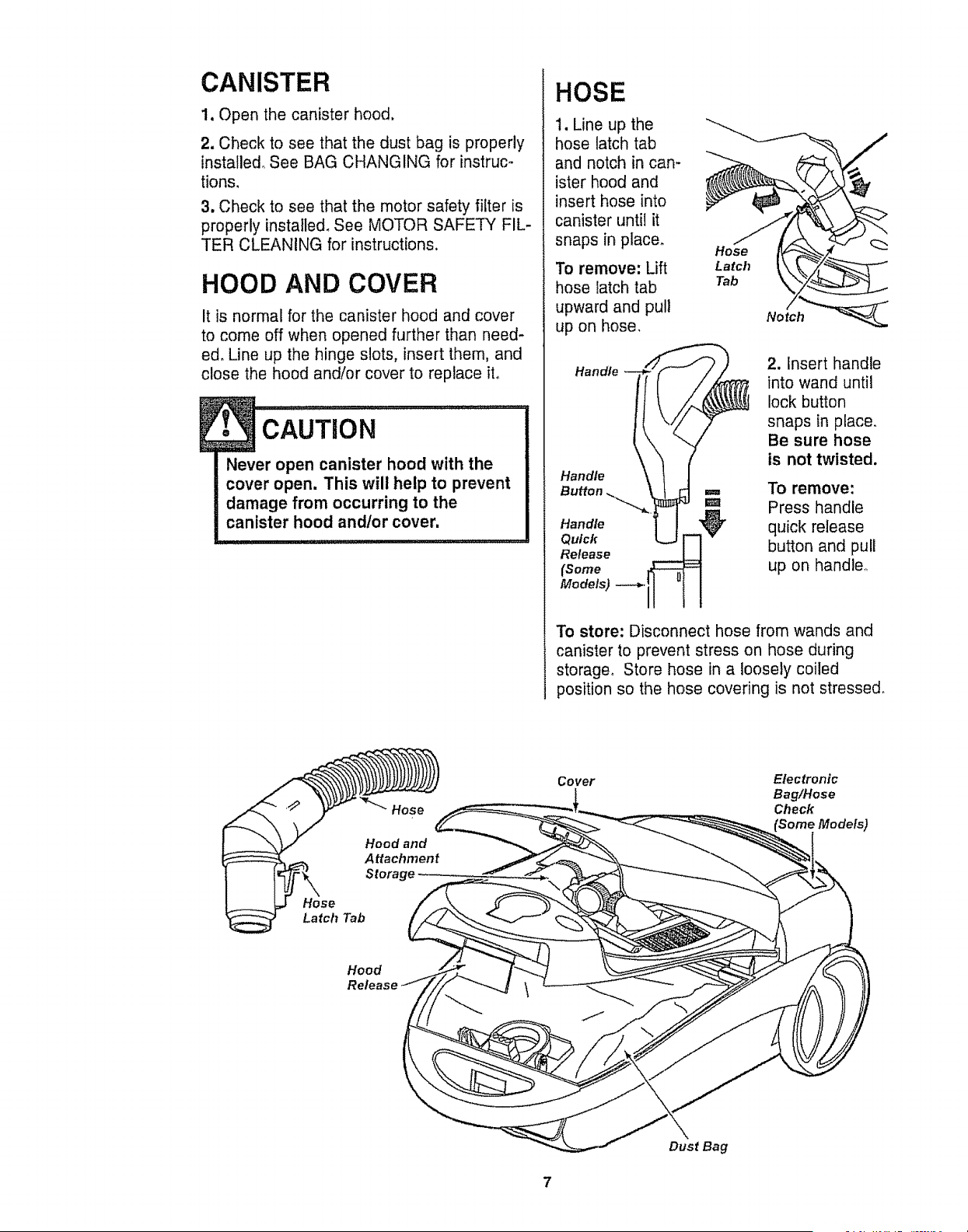
CANISTER
1. Open the canister hood.
2. Check to see that the dust bag is properly
installed, See BAG CHANGING for instruc-
tions,
3. Check to see that the motor safety filter is
properly installed, See MOTOR SAFETY FIL-
TER CLEANING for instructions.
HOOD AND COVER
It is normal for the canister hood and cover
to come off when opened further than need-
ed, Line up the hinge slots, insert them, and
close the hood and!or cover to replace ito
Never open canister hood with the
cover open. This will help to prevent
damage from occurring to the
canister hood andlor cover.
Storage
HOSE
1. Line up the
hose latch tab
and notch in can-
ister hood and
insert hose into
canister until it
snaps in placer
To remove: Lift
hose latch tab
upward and pull
up on hose,
Handle
Handle
Handle
Quick
Release
(Some
Models)
Hos e
Latch
Tab
2. Insert handle
into wand until
lock button
snaps in place,
Be sure hose
is not twisted.
To remove:
Press handle
quick release
button and pull
up on handler
To store: Disconnect hose from wands and
canister to prevent stress on hose during
storage, Store hose in a loosely coiled
position so the hose covering is not stressed.
Hose
Latch Tab
Cover E_ctronic
Bag/Hose
Check
Hood
Release
DustBag
7
HOW TO START
•ING..............................................I
Personal Injury and Product Damage
Hazard
•DO NOT plug in if switch is in ON
position. Personal injury or
damage could result.
• The cord moves rapidly when
rewinding. Keep children away
and provide a clear path when
rewinding the cord to prevent
personal injury.
=DO NOT use outlets above
counters. Damage from cord to
items in surrounding area
could occur.
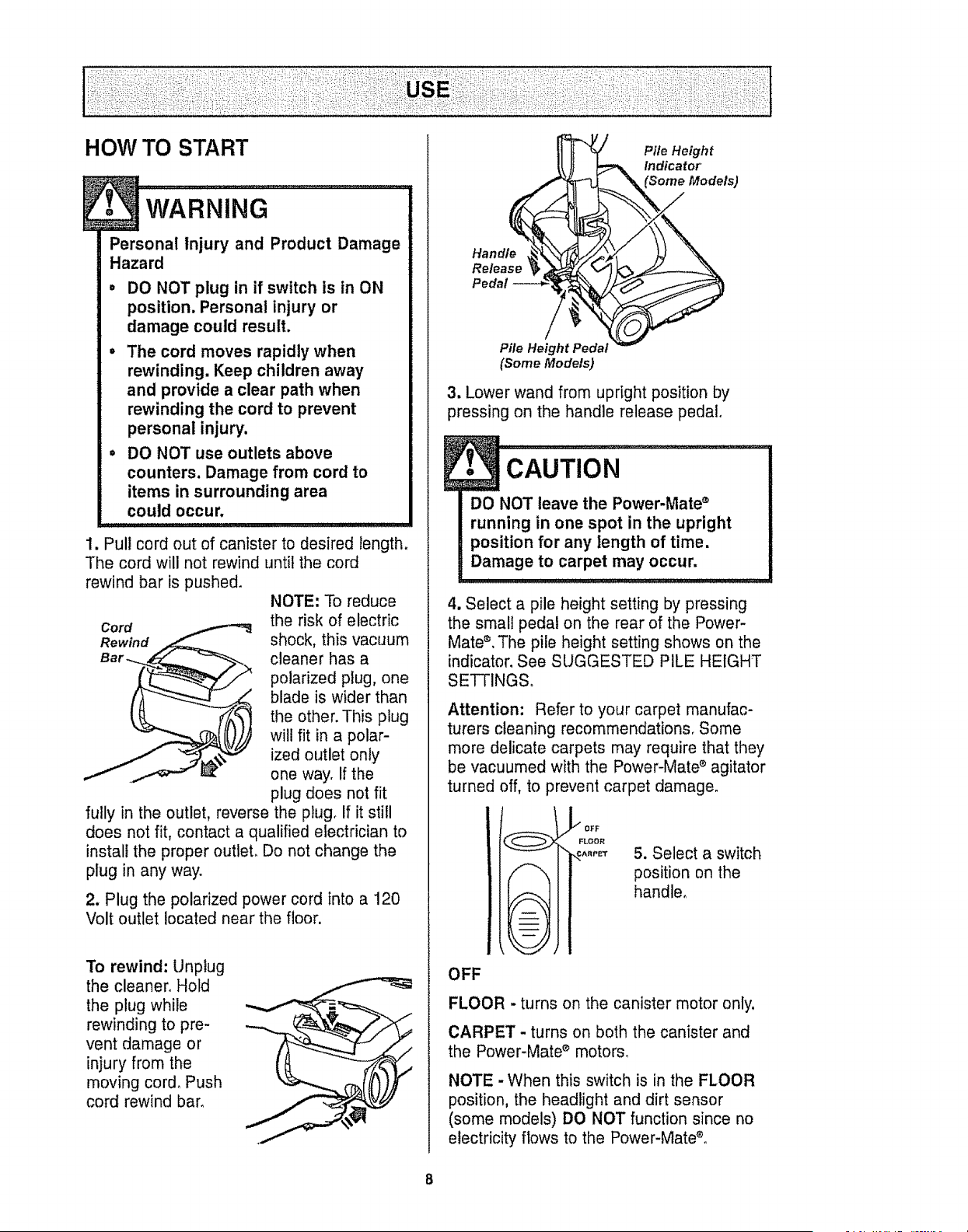
1. Pull cord out of canister to desired length.
The cord will not rewind until the cord
rewind bar is pushed.
NOTE; To reduce
Cord the risk of electric
Rewind shock, this vacuum
cleaner has a
polarized plug, one
blade is wider than
the other. This plug
will fit in a polar-
ized outlet only
one way. If the
plug does not fit
fully in the outlet, reverse the plug, If it still
does not fit, contact a qualified electrician to
install the proper outleL Do not change the
plug in any way.
2. Plug the polarized power cord into a 120
Volt outlet located near the floor,
To rewind: Unplug
the cleaner_ Hold
the plug while
rewinding to pre-
vent damage or
injury from the
moving cord. Push
cord rewind barn
Pile Height
Indicator
Handle
Release
Pedal
Pile Height Pedal
(Some Models)
3, Lower wand from upright position by
pressing on the handle release pedal,
CAUTION
DO NOT leave the Power-Mate '_
running in one spot in the upright
position for any length of time.
Damage to carpet may occur.
4. Select a pile height setting by pressing
the small pedal on the rear of the Power-
Mate ®.The pile height setting shows on the
indicator. See SUGGESTED PILE HEIGHT
SETTINGS°
Attention: Refer to your carpet manufac-
turers cleaning recommendations. Some
more delicate carpets may require that they
be vacuumed with the Power-Mate ® agitator
turned off, to prevent carpet damage°
_OFF
FLOOR
ARPET
5. Select a switch
position on the
handle,
OFF
FLOOR -turns on the canister motor only,
CARPET - turns on both the canister and
the Power-Mate ® motors.
NOTE -When this switch is in the FLOOR
position, the headlight and dirt sensor
(some models) DO NOT function since no
electricity flows to the Power-Mate®.
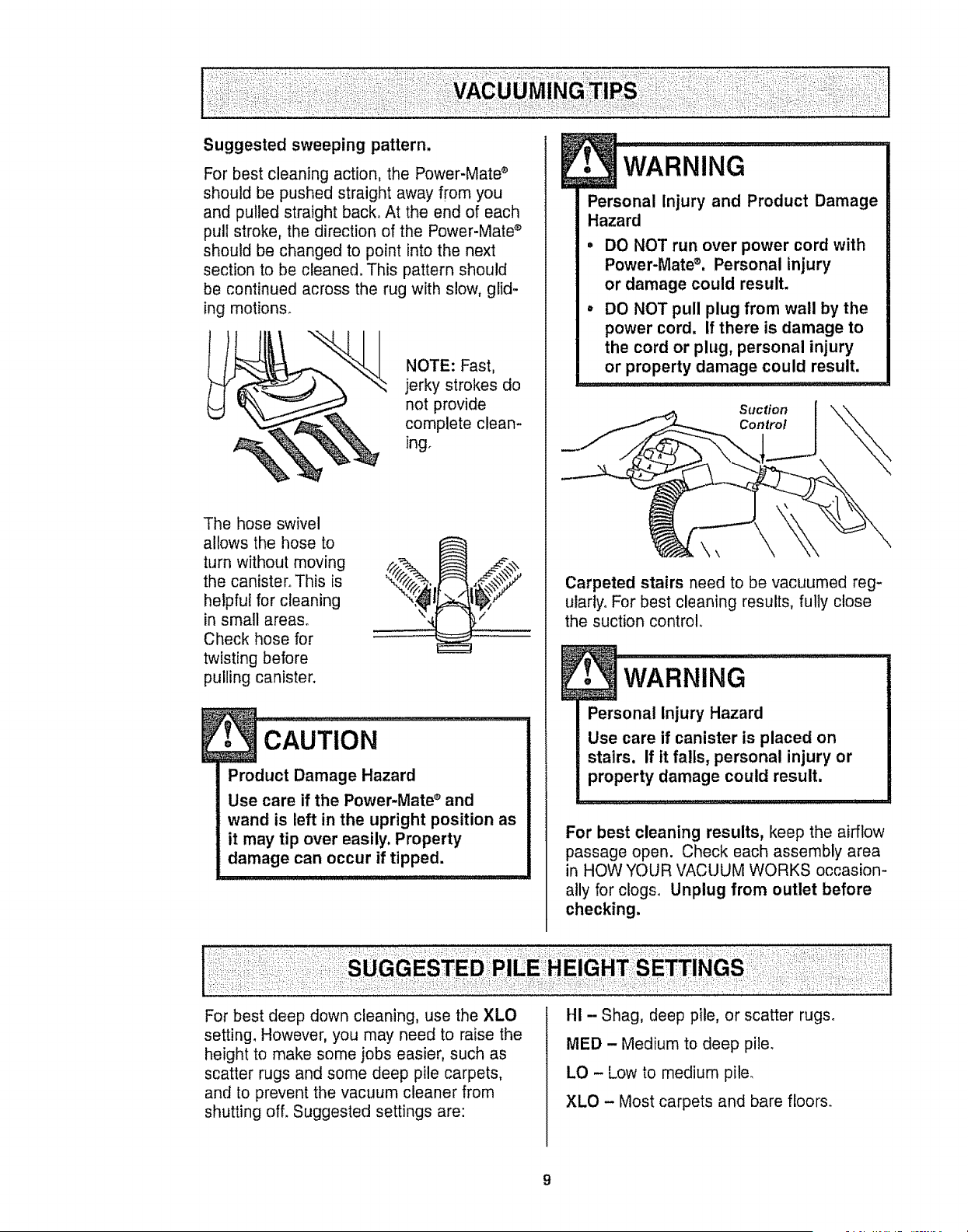
Suggested sweeping pattern,
For best cleaning action, the Power-Mate ®
should be pushed straight away from you
and pulled straight back° At the end of each
pull stroke, the direction of the Power-Mate ®
should be changed to point into the next
section to be cleaned. This pattern should
be continued across the rug with slow, glid-
ing motions.
NOTE: Fast,
jerky strokes do
not provide
complete clean-
ing.
The hose swivel
allows the hose to
turn without moving
the canister° This is
helpful for cleaning
in small areas°
Check hose for
twisting before
pulling canister.
Product Damage Hazard
Use care if the Power-Mate ® and
wand is left in the upright position as
it may tip over easily, Property
damage can occur if tipped.
•wARNiNG..............
Personal Injury and Product Damage
Hazard
DO NOT run over power cord with
Power-Mate ®. Personal injury
or damage could result,
DO NOT pull plug from wall by the
power cord. If there is damage to
the cord or plug, personal injury
or property damage could result.
Suction
Control
Carpeted stairs need to be vacuumed reg-
ularly. For best cleaning results, fully close
the suction control.
i
Personal Injury Hazard
Use care if canister is placed on
stairs. If it falls, personal injury or
property damage could result.
For best cleaning results, keep the airflow
passage open. Check each assembly area
in HOW YOUR VACUUM WORKS occasion-
ally for clogso Unplug from outlet before
checking.
For best deep down cleaning, use the XLO
setting. However, you may need to raise the
height to make some jobs easier, such as
scatter rugs and some deep pile carpets,
and to prevent the vacuum cleaner from
shutting off. Suggested settings are:
::
HI - Shag, deep pile, or scatter rugs°
MED -Medium to deep pile.
LO - Low to medium pile.
XLO - Most carpets and bare floors.
9
SOME MODELS TO CLEAN THE LENSES
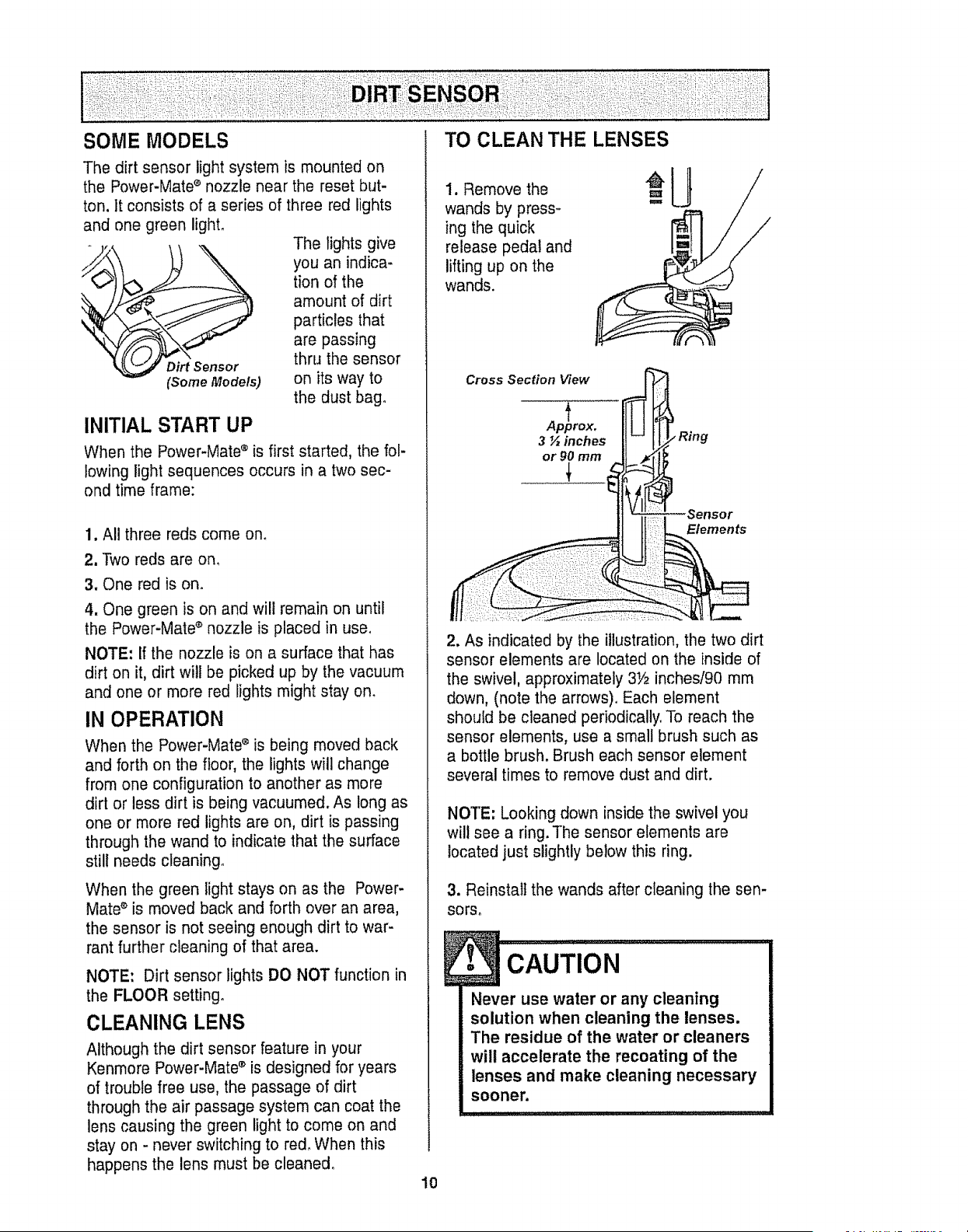
The dirt sensor light system is mounted on
the Power-Mate s nozzle near the reset but-
ton. It consists of a series of three red lights
and one green light.
The lights give
you an indica-
tion of the
amount of dirt
particles that
are passing
Dirt Sensor thru the sensor
(Some Models) on its way to
the dust bag°
INITIAL START UP
When the Power-Mate ® is first started, the fol-
lowing light sequences occurs in a two sec-
ond time frame:
1, All three reds come ono
2. Two reds are om
3. One red is on.
4. One green is on and will remain on until
the Power-Mate ® nozzle is placed in use.
NOTE: If the nozzle is on a surface that has
dirt on it, dirt will be picked up by the vacuum
and one or more red lights might stay on.
IN OPERATION
When the Power-Mate s is being moved back
and forth on the floor, the lights will change
from one configuration to another as more
dirt or less dirt is being vacuumed. As long as
one or more red lights are on, dirt is passing
through the wand to indicate that the surface
still needs cleaning°
When the green light stays on as the Power-
Mate ® is moved back and forth over an area,
the sensor is not seeing enough dirt to war-
rant further cleaning of that area.
NOTE: Dirt sensor lights DO NOT function in
the FLOOR setting.
CLEANING LENS
Although the dirt sensor feature in your
Kenmore Power-Mate s is designed for years
of trouble free use, the passage of dirt
through the air passage system can coat the
lens causing the green light to come on and
stay on - never switching to red. When this
happens the lens must be cleaned.
10
1. Remove the
wands by press-
ing the quick
release pedal and
lifting up on the
wands.
Cross Section View
f
Approx.
3_inches
or 90 mm
Sensor
Elements
2. As indicated by the illustration, the two dirt
sensor elements are located on the inside of
the swivel, approximately 3Y2 inches/90 mm
down, (note the arrows). Each element
should be cleaned periodically. To reach the
sensor elements, use a small brush such as
a bottle brush. Brush each sensor element
several times to remove dust and dirt.
NOTE: Looking down inside the swivel you
will see a ring. The sensor elements are
located just slightly below this ring.
3. Reinstall the wands after cleaning the sen-
sors.
CAUTION
Never use water or any cleaning
solution when cleaning the lenses.
The residue of the water or cleaners
will accelerate the recoating of the
lenses and make cleaning necessary
sooner.
E
ATTACHMENTS ON
, CAUT'0N
DO NOT attach or remove handle or
wands while cleaner isON. This
could cause sparking and damage
the electricalcontacts.
HANDLE
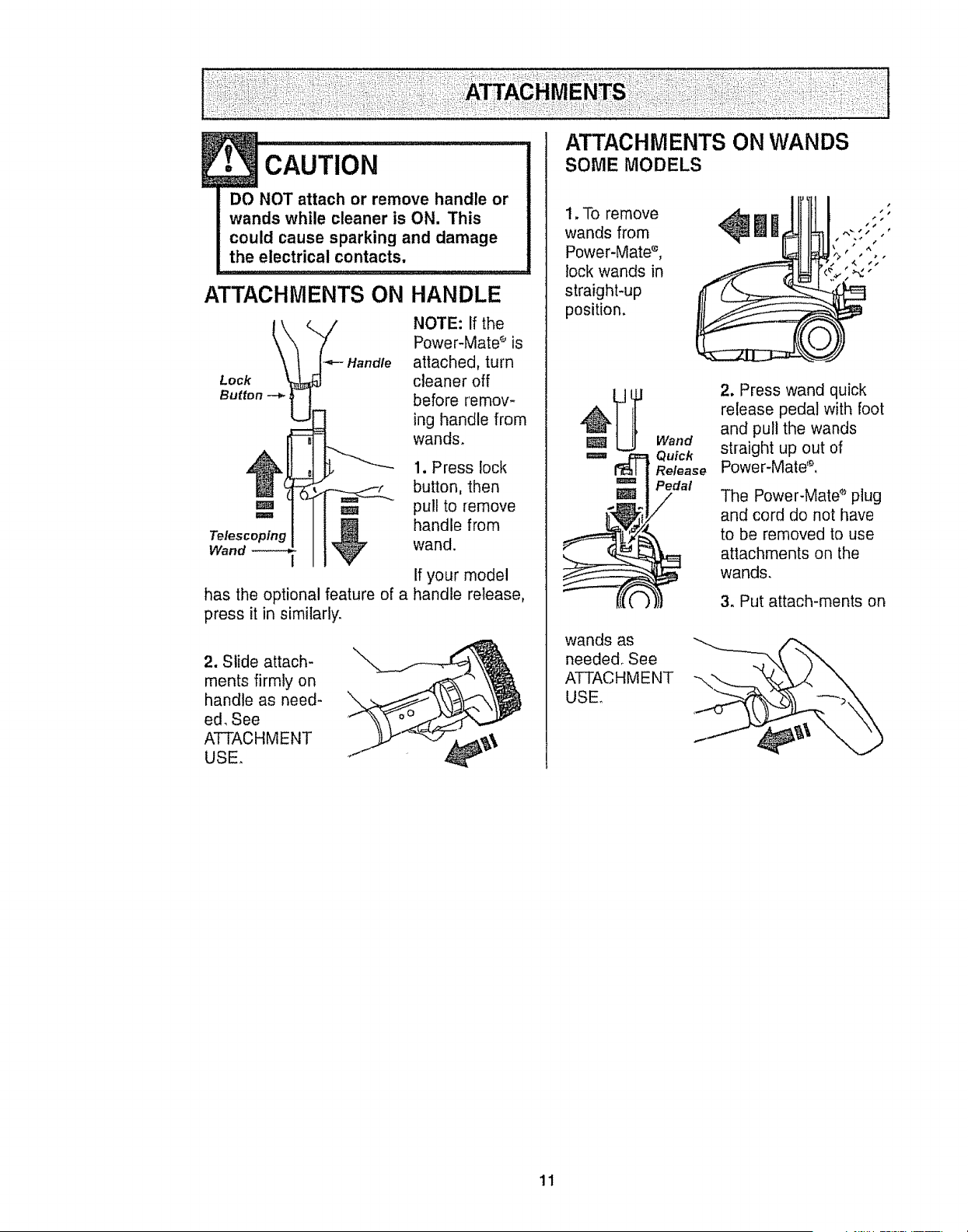
NOTE: If the
Power-Mate _ is
Handle attached, turn
Lock cleaner off
Button --*_ before remov-
ing handle from
wands.
1. Press lock
button, then
m u pull to remove
._ handle from
Telescoping wand.
Wand
has the optional feature of a
press it in similarly.
If your model
handle release,
2. Slide attach-
ments firmly on
handle as need-
ed, See
ATTACHMENT
USE.
\
ATTACHMENTS ON WANDS
SOME MODELS
, o e ovo it!
wands from
Power-Mate ° ,
lock wands in
straight-up
position, I
Wand
m _p_ Quick
Release
BPedal
wands as
needed, See
ATTACHMENT
USE.
2. Press wand quick
release pedal with foot
and pull the wands
straight up out of
Power-Mate%
The Power-Mate _-_plug
and cord do not have
to be removed to use
attachments on the
wands,
3. Put attach-ments on
11
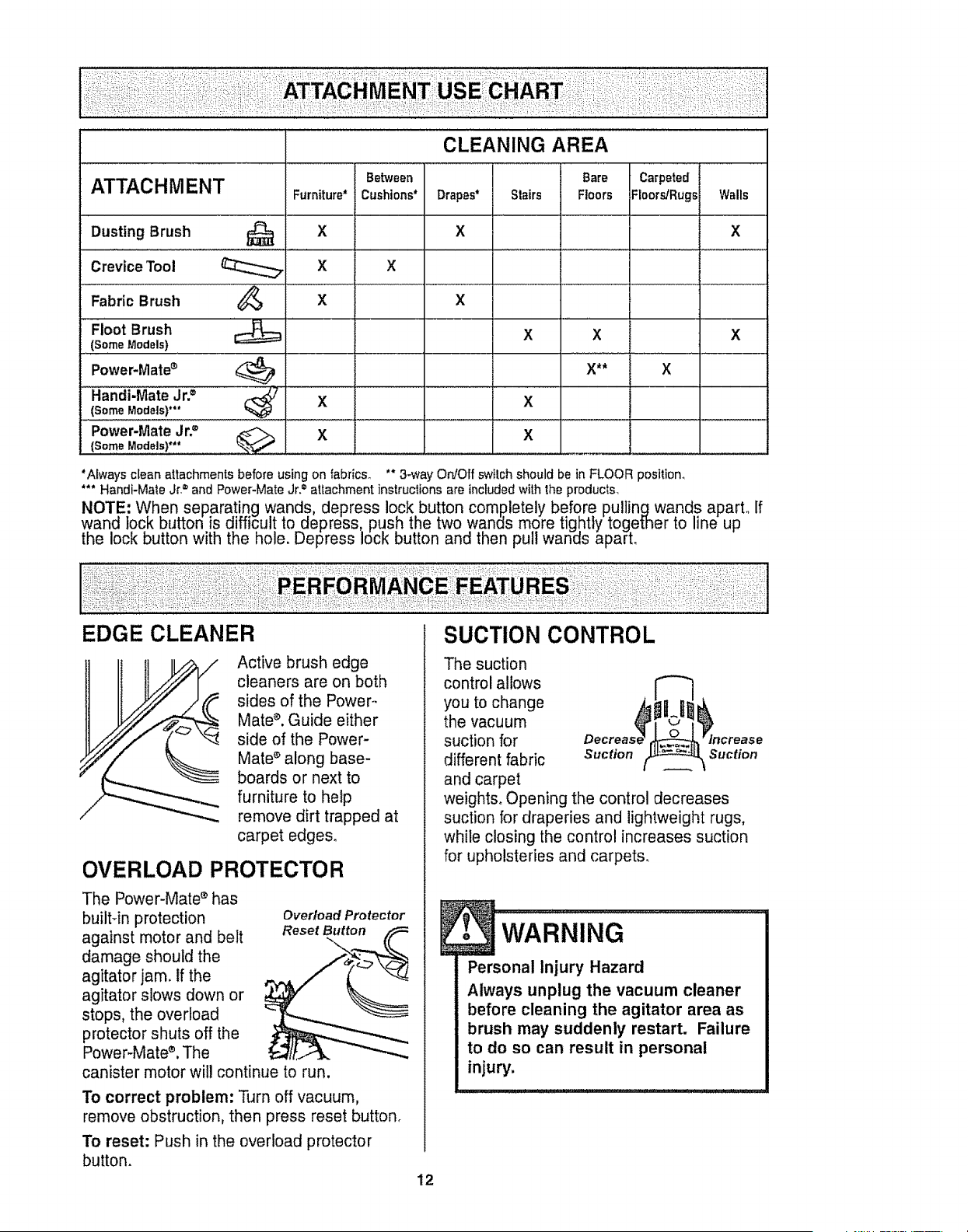
CLEANING AREA
Be_een Bare Carpeted
ATTACHMENT Furniture* Cushions* Drapes" Stairs Floors FloorgRugsi Walls
Dusting Brush _X X X
Crevice Tool X X
Fabric Brush _X X
X X
Floot Brush
(So,me Models)
Power'Mate®
(Some Models)"*
Power-Mate Jr2
X
X** X
X
' x
x
*Always clean attachments before using on fabrics° ** 3_wayO_Off switch should be in FLOOR position,
*** Handi-Mate Jr,= and Power-Mate Jr.= attachment instructions are includedwith the products,
NOTE: When separating wands depress Iockbutton completely before pullingwands apart., If
wand lock button is difficul! to _depress,, pt!sh the two wands more tightly together to line up
the lOCKbutton with the nole. uepress lOCKbutton and then pull wanes aparL
Active brush edge
cleaners are on both
sides of the Power°
Mate _. Guide either
side of the Power-
Mate * along base-
boards or next to
furniture to hetp
remove dirt trapped at
carpet edges_
OVERLOAD PROTECTOR
The Power-Mate _ has
built4n protection
against motor and belt
damage should the
agitator jam. if the
agitator slows down or
stops, the overload
protector shuts off the
Power-Mate ®.The
canister motor will continue to run.
Overload Protector
Reset Button
To correct problem: Turn off vacuum,
remove obstruction, then press reset button_
To reset: Push in the overload protector
button.
12
The suction
control allows
you to change
the vacuum
suction for Decrea_
different fabric Suction
and carpet
weights. Opening the control decreases
suction for draperies and lightweight rugs,
while closing the control increases suction
for upholsteries and carpets.
Suction
, WARN,NG
Personal InjuryHazard
Always unplug the vacuum cleaner
before cleaning the agitator area as
brush may suddenly restart. Failure
to do so can result in personal
injury.
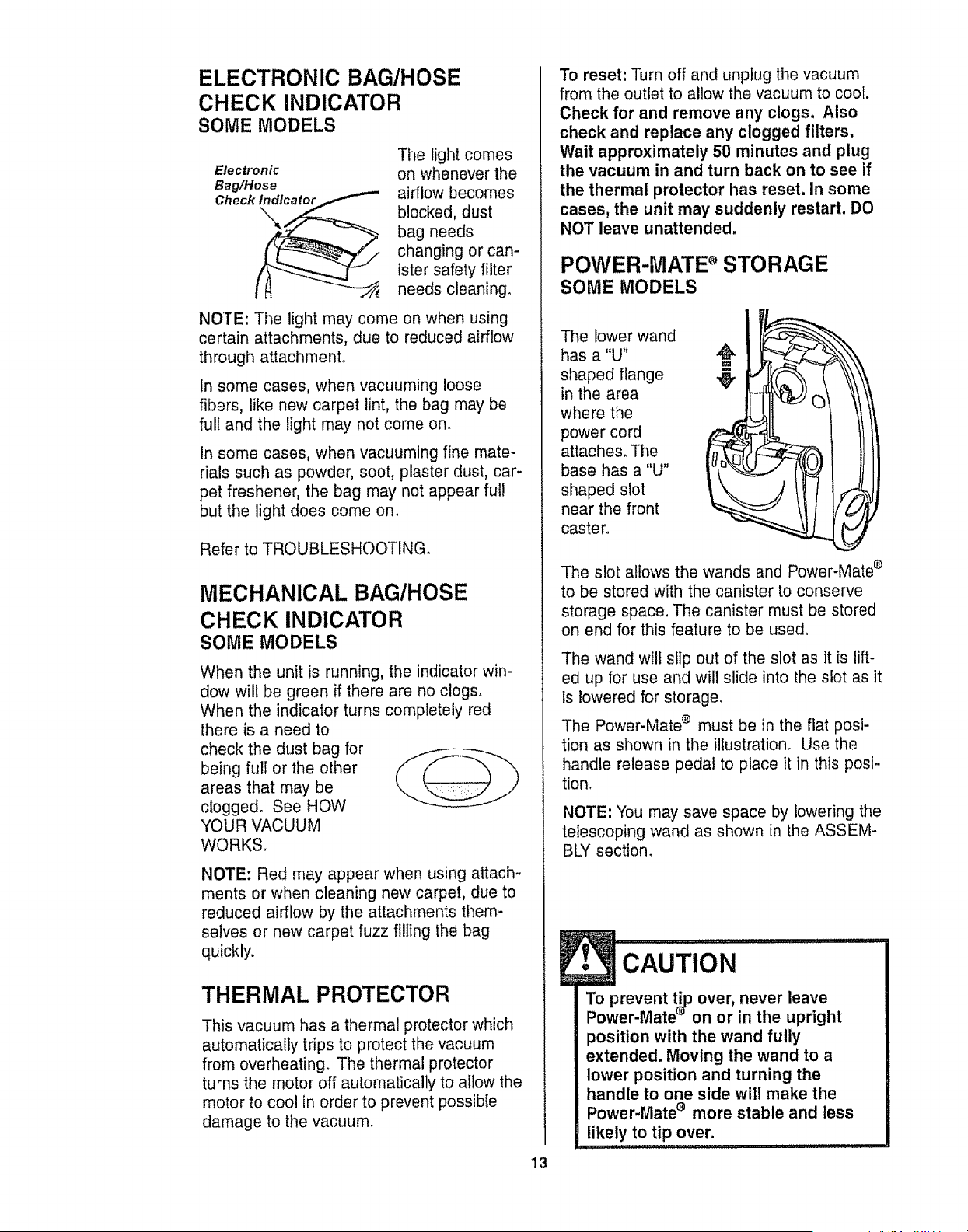
ELECTRONIC BAG/HOSE
CHECK INDICATOR
SOME MODELS
Electronic
Bag/Hose
The light comes
on whenever the
airflow becomes
blocked, dust
bag needs
changing or can-
ister safety filter
needs cleaning.
NOTE: The light may come on when using
certain attachments, due to reduced airflow
through attachment°
In some cases, when vacuuming loose
fibers, like new carpet lint, the bag may be
full and the light may not come on.
In some cases, when vacuuming fine mate-
rials such as powder, soot, plaster dust, car-
pet freshener, the bag may not appear ful!
but the light does come on.
Refer to TROUBLESHOOTING.
MECHANICAL BAG/HOSE
CHECK INDICATOR
SOME MODELS
When the unit is running, the indicator win-
dow will be green if there are no clogs°
When the indicator turns completely red
there is a need to
check the dust bag for
being full or the other
areas that may be
clogged. See HOW
YOUR VACUUM
WORKS.
NOTE: Red may appear when using attach-
ments or when cleaning new carpet, due to
reduced airflow by the attachments them-
selves or new carpet fuzz filling the bag
quickly.
THERMAL PROTECTOR
This vacuum has a thermal protector which
automatically trips to protect the vacuum
from overheating. The thermal protector
turns the motor off automatically to allow the
motor to cool in order to prevent possibie
damage to the vacuum.
13
To reset: Turn off and unplug the vacuum
from the outlet to allow the vacuum to cool.
Check for and remove any clogs. Also
check and replace any clogged filters,
Wait approximately 50 minutes and plug
the vacuum in and turn back on to see if
the thermal protector has reset. In some
cases, the unit may suddenly restart. DO
NOT leave unattended.
POWER-MATE s STORAGE
SOME MODELS
The lower wand
has a "U"
shaped flange
in the area
where the
power cord
attaches, The
base has a "U"
shaped slot
near the front
caster°
The slot allows the wands and Power-Mate e
to be stored with the canister to conserve
storage space. The canister must be stored
on end for this feature to be used,
The wand will slip out of the slot as it is lift-
ed up for use and will slide into the slot as it
is lowered for storage_
The Power-Mate ® must be in the flat posi-
tion as shown in the illustration. Use the
handle release pedal to place it in this posi-
t!ore
NOTE: You may save space by lowering the
telescoping wand as shown in the ASSEM-
BLY section.
E! IIII '1" II ....... ;;T,;;_m
•CAUTION
To prevent tip over, never leave
Power-Mate _on or in the upright
position with the wand fully
extended. Moving the wand to a
lower position and turning the
handle to one side will make the
Power-Mate _ more stable and less
likely to tip over.
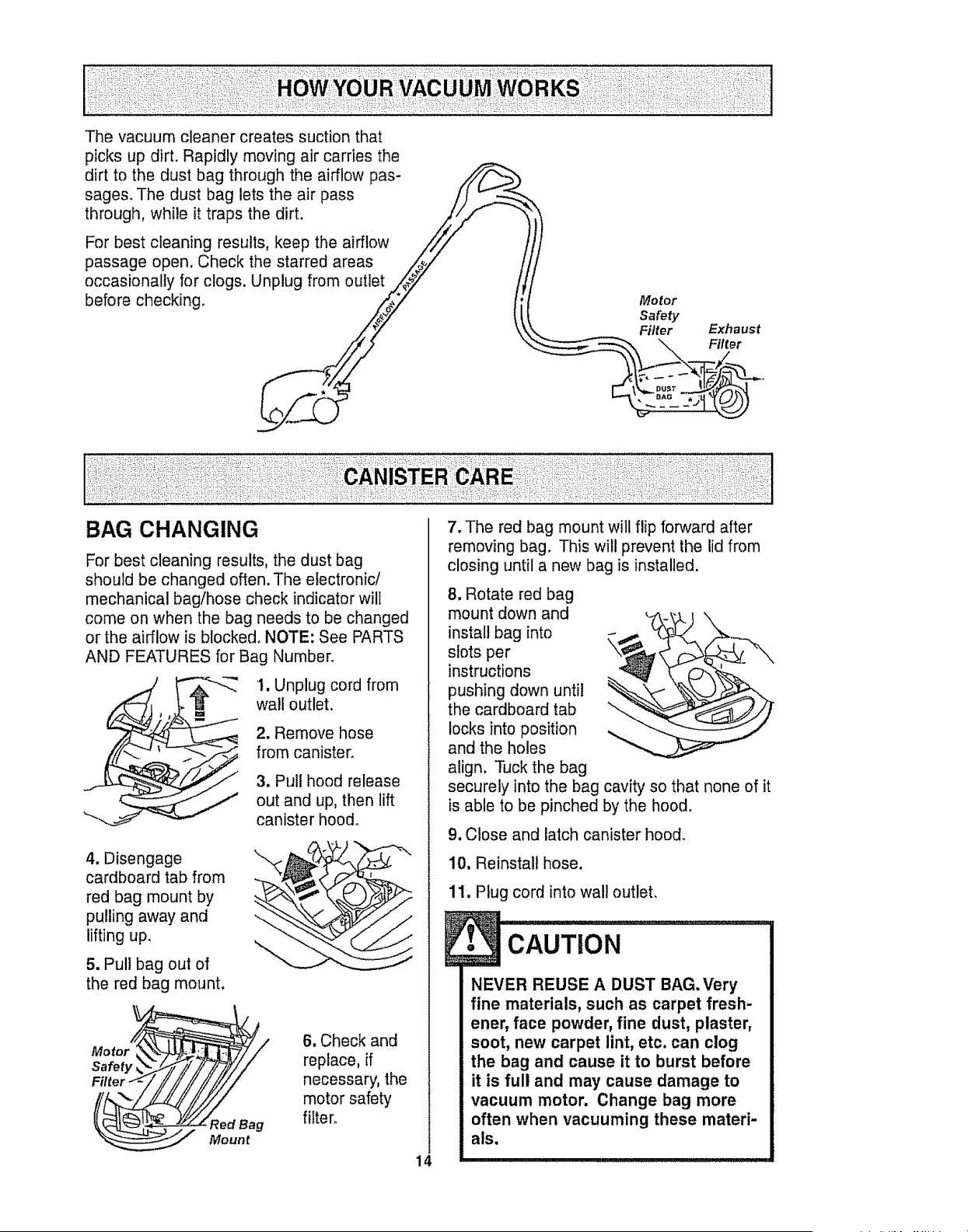
The vacuum cleaner creates suction that
picks up dirL Rapidly moving air carries the
dirt to the dust bag through the airflow pas-
sages. The dust bag lets the air pass
through, while it traps the dirt.
For best cleaning results, keep the airflow
passage open. Check the starred areas
occasionally for clogs. Unplug from outlet
before checking,, Motor
Safety
Filter Exha ust
BAG CHANGING
For best cleaning results, the dust bag
should be changed often. The electronic/
mechanical baglhose check indicator will
come on when the bag needs to be changed
or the airflow is blocked° NOTE: See PARTS
AND FEATURES for Bag Number°
1. Unplug cord from
wall outlet.
2. Remove hose
from canister.
3. Pull hood release
out and up, then lift
canister hood°
4. Disengage
cardboard tab from
red bag mount by
pulling away and
lifting up,
5. Pull bag out of
the red bag mount.
Motor_//
SaVory TF/F/i//
F,tor-<-//Yii // ii////
__ Mount
6. Check and
replace, if
necessary, the
motor safety
filter°
7, The red bag mount will flip forward after
removing bag. This will prevent the lid from
closing until a new bag is installed.
14
8, Rotate red bag
mount down and
install bag into
slots per
instructions
pushing down until
the cardboard tab
locks into position
and the holes
align, Tuck the bag
securely into the bag cavity so that none of it
is able to be pinched by the hood,
9. Close and latch canister hood.
10. Reinstall hose.
11. Plug cord into wall outlet,
...........i
NEVER REUSE A DUST BAG. Very
fine materials, such as carpet fresh-
ener, face powder, fine dust, plaster,
soot, new carpet lint, etc. can clog
the bag and cause it to burst before
it is full and may cause damage to
vacuum motor. Change bag more
often when vacuuming these materi-
als.
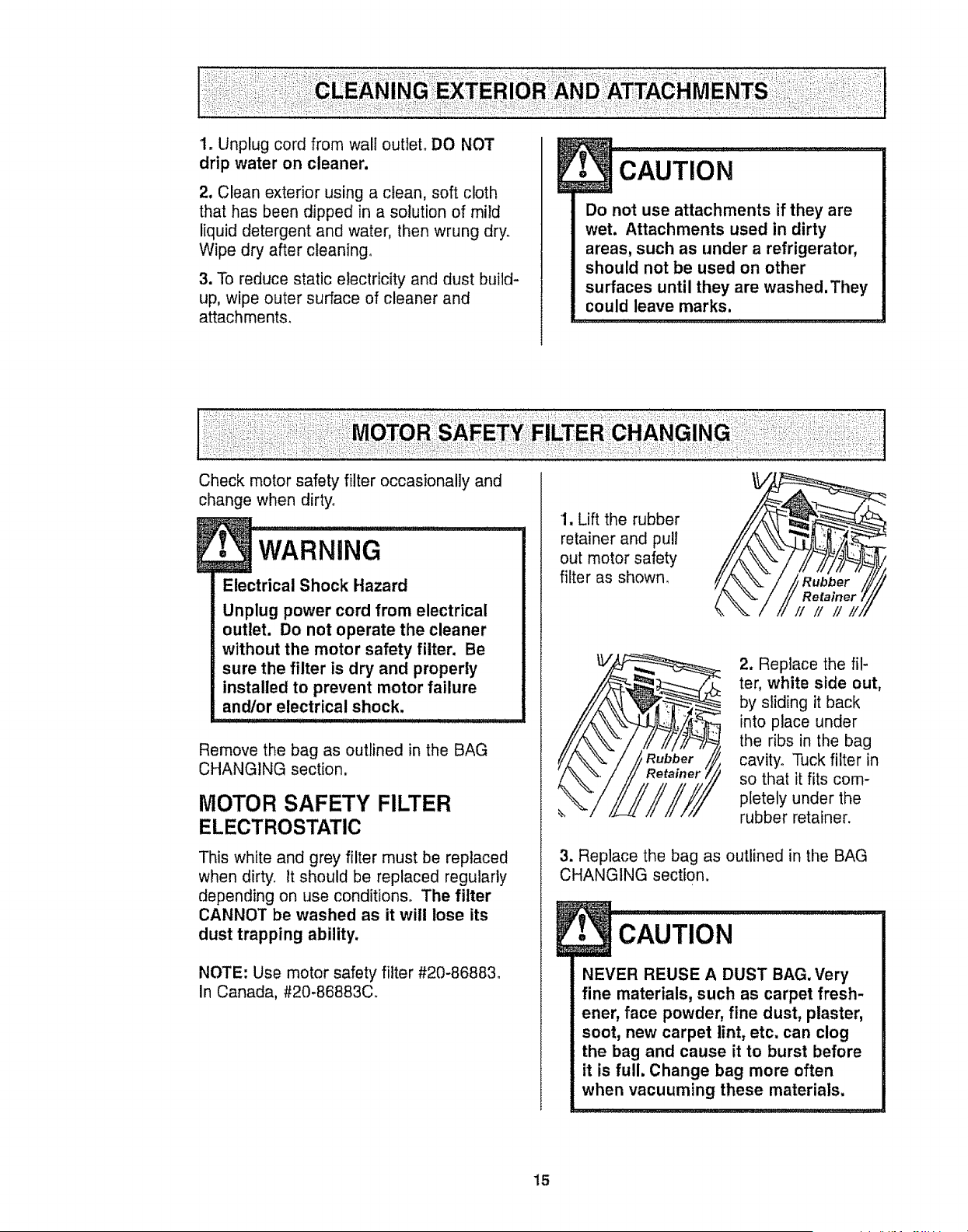
1. Unplug cord from wall outlet. DO NOT
drip water on cleaner.
2, Clean exterior using a clean, soft cloth
that has been dipped in a solution of mild
liquid detergent and water, then wrung dry.
Wipe dry after cleaning°
3. To reduce static electricity and dust build-
up, wipe outer surface of cleaner and
attachments.
!I cAUTIoN ..............
Do not use attachments if they are
wet. Attachments used in dirty
areas, such as under arefrigerator,
should not be used on other
surfaces until they are washed. They
could leave marks.
Check motor safety filter occasionally and
change when dirty.
I'I'=A"='=G......................
Electrical Shock lazard
Unplug power cord from electrical
outlet. Do not operate the cleaner
without the motor safety filter. Be
sure the filter is dry and properly
installed to prevent motor failure
and/or electrical shock.
Remove the bag as outlined in the BAG
CHANGING section.
MOTOR SAFETY FILTER
ELECTROSTATIC
This white and grey filter must be replaced
when dirty, it should be replaced regularly
depending on use conditions. The filter
CANNOT be washed as it will lose its
dust trapping ability,
NOTE: Use motor safety filter #20-86883_
In Canada, #20-86883C.
1. Lift the rubber
retainer and pull
out motor safety
filter as shown.
2. Replace the fil-
ter, white side out,
by sliding it back
into place under
the ribs in the bag
cavity. Tuck filter in
so that it fits com-
pletely under the
rubber retainer.
3. Replace the bag as outlined in the BAG
CHANGING section.
,u
CAUTION
NEVER REUSE A DUST BAG. Very
fine materials, such as carpet fresh-
ener, face powder, fine dust, plaster,
soot, new carpet lint, etc. can clog
the bag and cause it to burst before
it is full. Change bag more often
when vacuuming these materials.
15
wARr,JiNG.......................
Fire andlor Electrical Shock Hazard
Do not operate with a clogged
exhaust filter or without the exhaust
filter or exhaust filter cover installed.
i l,il I I I,I!l',,L',g., r, ....... ,;,......
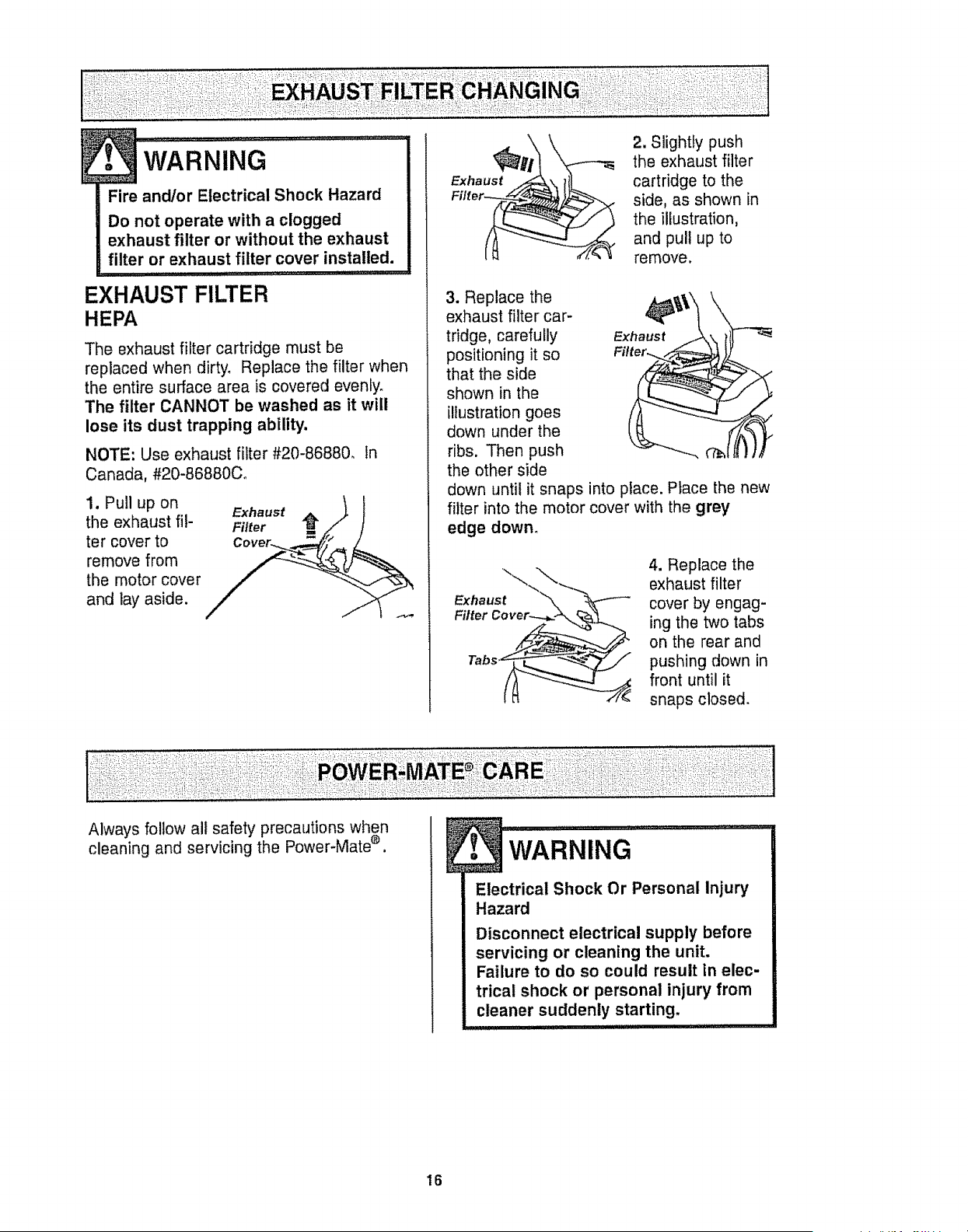
EXHAUST FILTER
HEPA
The exhaust filter cartridge must be
replaced when dirty. Replace the filter when
the entire surface area is covered evenly.
The filter CANNOT be washed as it will
lose its dust trapping ability.
NOTE: Use exhaust filter #20-86880. tn
Canada, #20-86880C.
1. Pull up on
the exhaust fil-
ter cover to
remove from
the motor cover
and lay aside.
Exhaust
2. Slightly push
the exhaust filter
cartridge to the
side, as shown in
the illustration,
and pull up to
remove.
3. Replace the
exhaust filter car-
tridge, carefully Exhaust
positioning it so
that the side
shown in the
illustration goes
down under the
ribs. Then push
the other side
down until it snaps into place. Place the new
filter into the motor cover with the grey
edge down.
Exhaust
4. Replace the
exhaust filter
cover by engag-
ing the two tabs
on the rear and
pushing down in
front until it
snaps closed.
Always follow all safety precautions when
cleaning and servicing the Power-Mate e. l wARNING .............
Electrical Shock Or Personal Injury
Hazard
Disconnect electrical supply before
servicing or cleaning the unit.
Failure to do so could result tn elec-
trical shock or personal injury from
cleaner suddenly starting.
ii I , II ,i I iiililll , i,iiiiiii1,,i,, ,
16
l. CAuTioN..................
When you remove the end caps, a
small metal washer on each end
may come off.DO NOT lose these
two metal washers.
TO CLEAN AGITATOR:
NOTE: In order to keep cleaning efficiency
high and to prevent damage to your vacu-
um, the agitator must be cleaned every time
the belt is changed.
The agitator must also be cleaned accord-
ing to the following schedule:
Vacuum Use
HEAVY -
(used daily)
MODERATE -
(used 2-3 times/week)
LIGHT -
(used 1 time/week)
Clean Agitator
every week
every month
every 2 months
Remove any dirt or debris in the belt path
area or in the brush roller area.
Carefully remove any string or debris
located on the agitator, end caps, wash-
ers or agitator shall
IMPORTANT
Replace the
washers and
the end caps.
See the explod-
ed view for cor-
rect
assembly,
Disconnect cleaner from electrical outlet.
Check and remove hair, string and lint build-
up frequently in the Power-Mate ® agitator
and end cap areas. If build-up becomes
®
excessive, disconnect Power-Mate from
wand and follow the steps below_
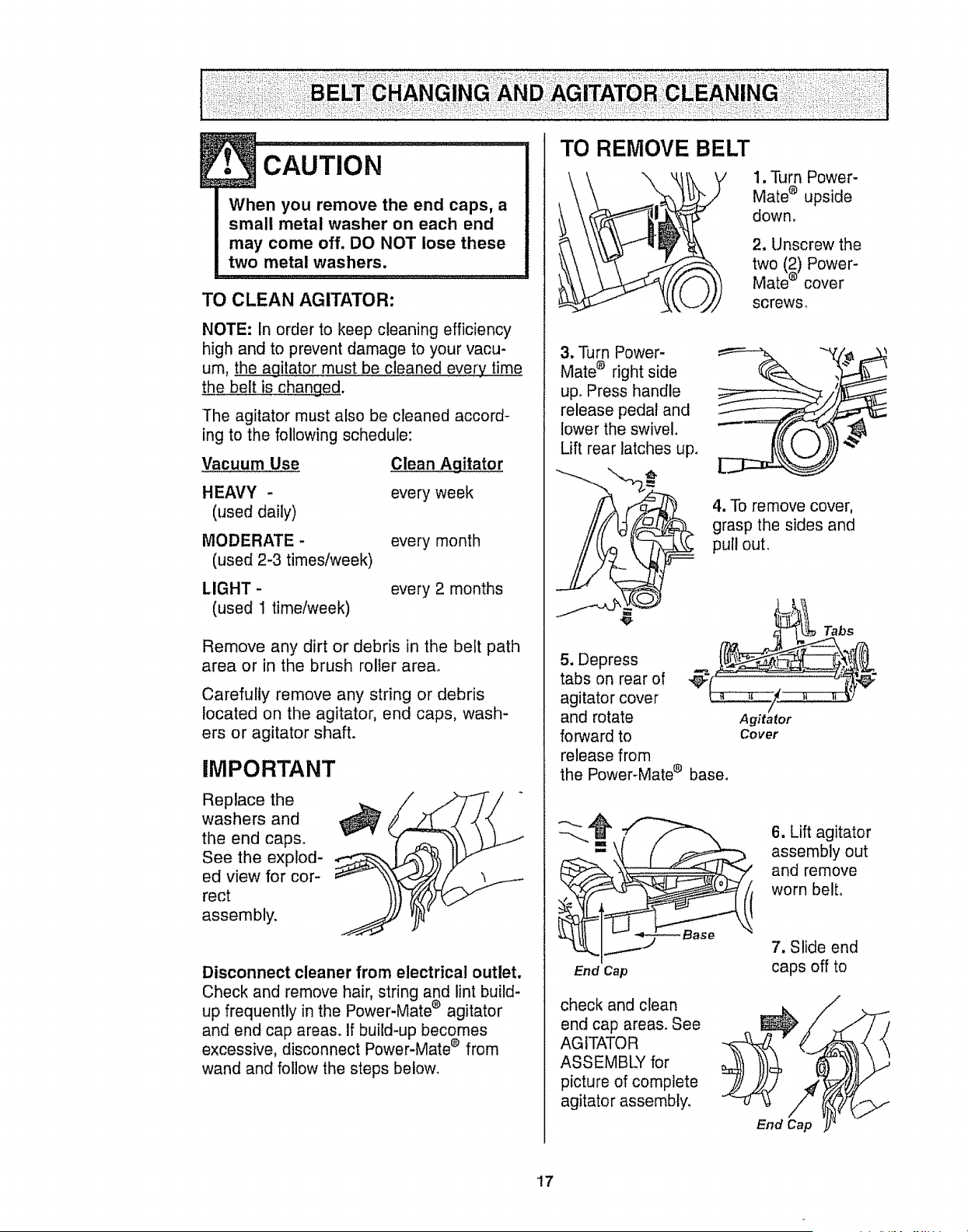
TO REMOVE BELT
1, Turn Power-
Mate _ upside
down,
2. Unscrew the
two (2) Power-
Mate ® cover
screws,
3. PJrn Power-
Mate ® right side
up. Press handle
release pedal and
lower the swivel.
Lift rear latches up_
4, To remove cover,
grasp the sides and
pull out.
5. Depress
tabs on rear of
agitator cover
and rotate
forward to
release from
the Power-Mate ® base.
Agitator
Cover
Tabs
End Cap
check and clean
end cap areas. See
AGITATOR
ASSEMBLY for
picture of complete
agitator assembly,
6. Lift agitator
assembly out
and remove
worn belto
7. Slide end
caps off to
End Cap
/
'!7
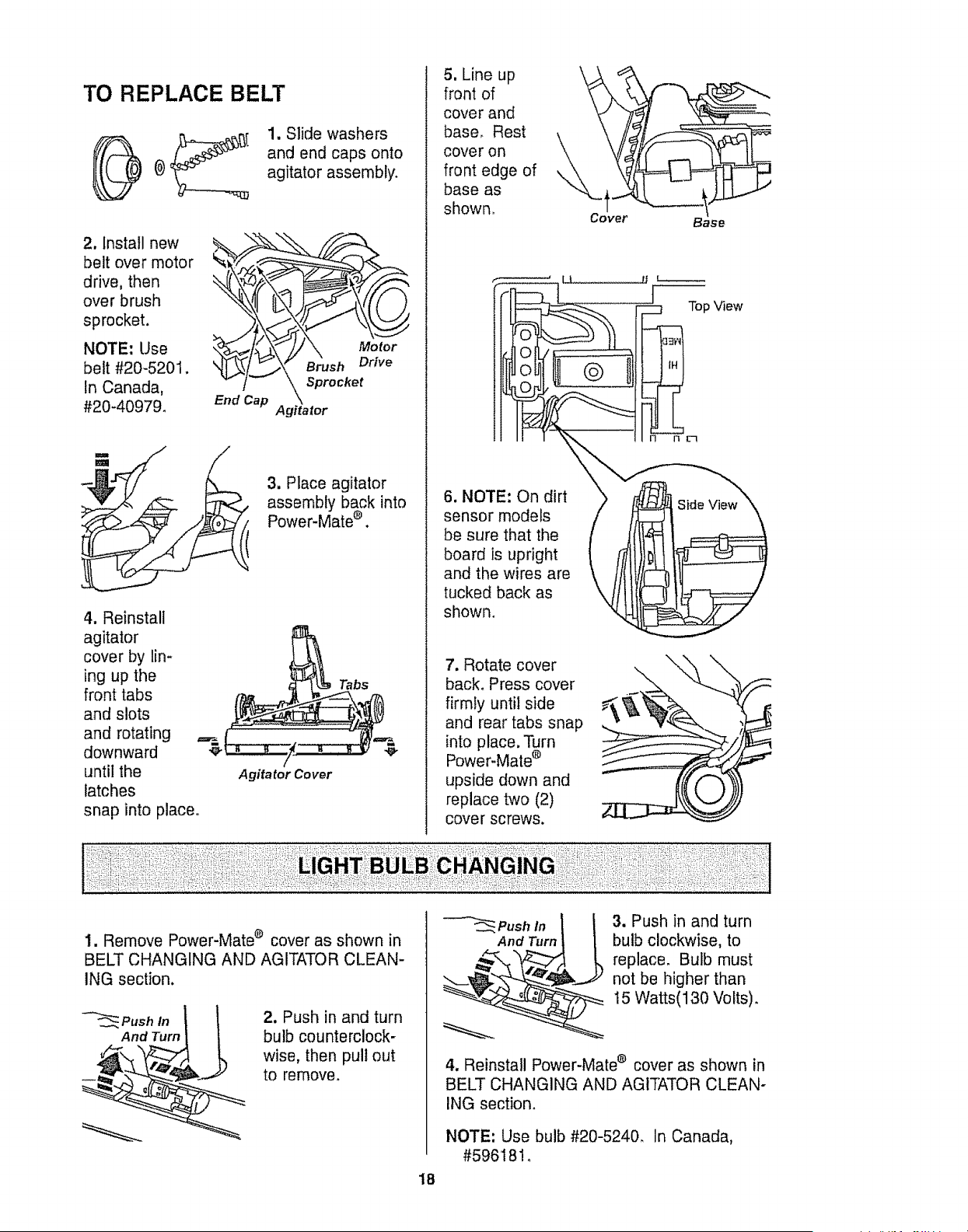
TO REPLACE BELT
1. Slide washers
and end caps onto
agitator assembly.
2. install new
belt over motor
drive, then
over brush
sprocket.
NOTE: Use
belt #20-5201.
In Canada,
#20-4097&
.ko,
Agitator
3. Place agitator
assembly back into
Power-Mate _ .
4. Reinstall
agitator
cover by lin-
ing up the
front tabs
and slots
and rotating _=_
downward €
until the
latches
snap into place°
Agita tot Cover
Tabs
5. Line up
front of
cover and
base. Rest
cover on
front edge of
base as
shown. Cover
6. NOTE: On dirt
sensor models
be sure that the
board is upright
and the wires are
tucked back as
shown.
7. Rotate cover
back. Press cover
firmly until side
and rear tabs snap
into place. Turn
Power-Mate ®
upside down and
replace two (2)
cover screws.
Base
J Top View
1. Remove Power-Mate ® cover as shown in
BELT CHANGING AND AGITATOR CLEAN-
ING section.
_'-_,_.__Pushlnt 1
And Turn _
2. Push in and turn
bulb counterclock-
wise, then pull out
to remove.
3. Push in and turn
bulb clockwise, to
replace. Bulb must
not be higher than
15 Watts(130 Volts).
4. Reinstall Power-Mate e cover as shown in
BELT CHANGING AND AGITATOR CLEAN-
ING section.
NOTE: Use bulb #20-5240. In Canada,
#59618!_
18
wAR.m.G
Electrical Shock Or Personal Injury
Hazard
Disconnect electrical supply before
servicing or cleaning the unit.
Failure to do so could result in elec-
trical shock or personal injury from
cleaner suddenly starting.
,,, .........,, _............
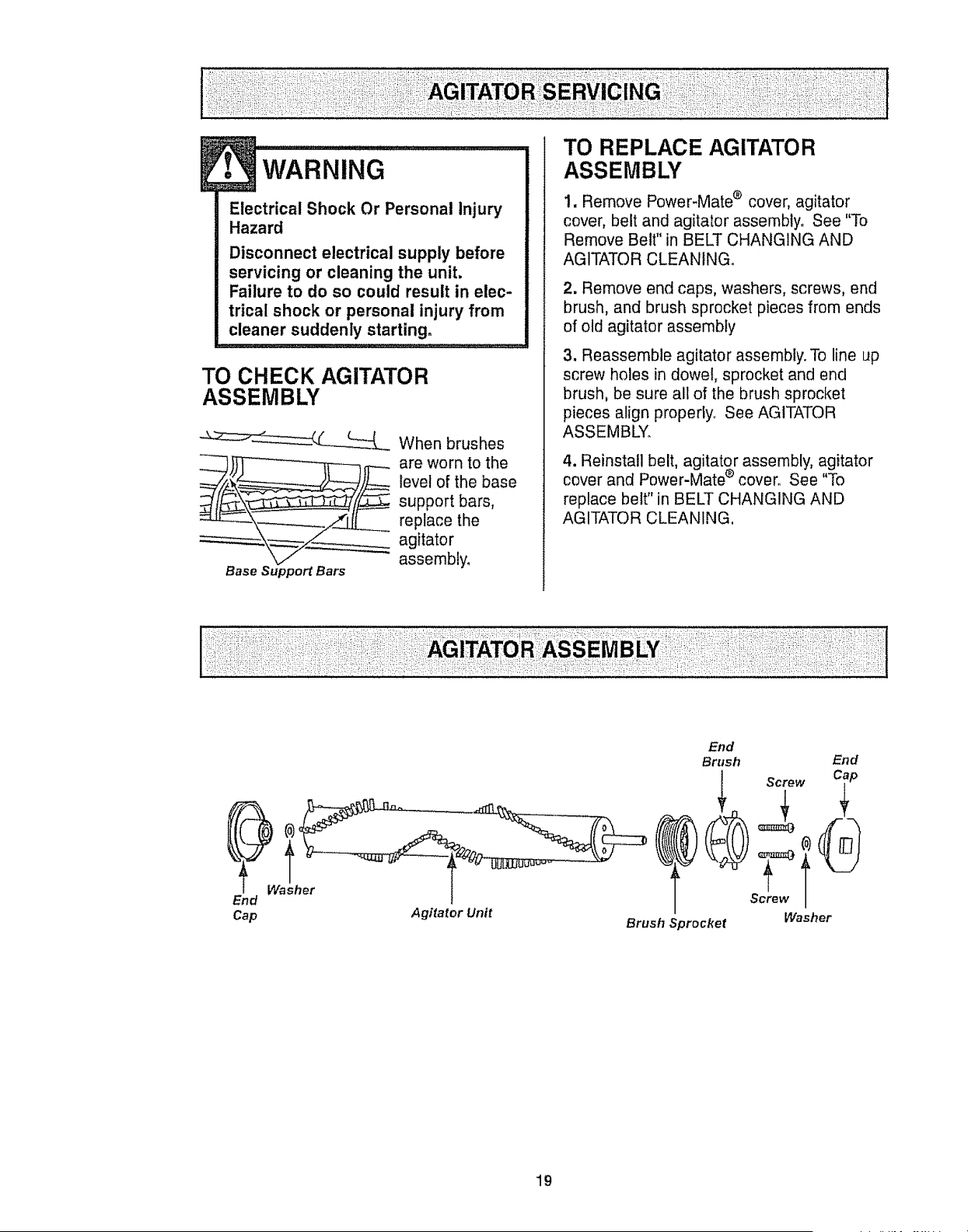
TO CHECK AGITATOR
ASSEMBLY
When brushes
___ are worn to the
level of the base
support bars,
replace the
agitator
assembly.
Base Support Bars
ITO REPLACE AGITATOR
ASSEMBLY
1. Remove Power-Mate ® cover, agitator
cover, belt and agitator assembly. See "To
Remove Belt" in BELT CHANGING AND
AGITATOR CLEANINGo
2. Remove end caps, washers, screws, end
brush, and brush sprocket pieces from ends
of old agitator assembly
3. Reassemble agitator assembly. To line up
screw holes in dowel, sprocket and end
brush, be sure all of the brush sprocket
pieces align properly_ See AGITATOR
ASSEMBLY_
4. Reinstall belt, agitator assembly, agitator
cover and Power-Mate ®cover. See "To
replace belt" in BELT CHANGING AND
AGITATOR CLEANING,
End
Cap Agitator Unit
End
Brush End
rT
Screw
Washer
Brush Sprocket
19
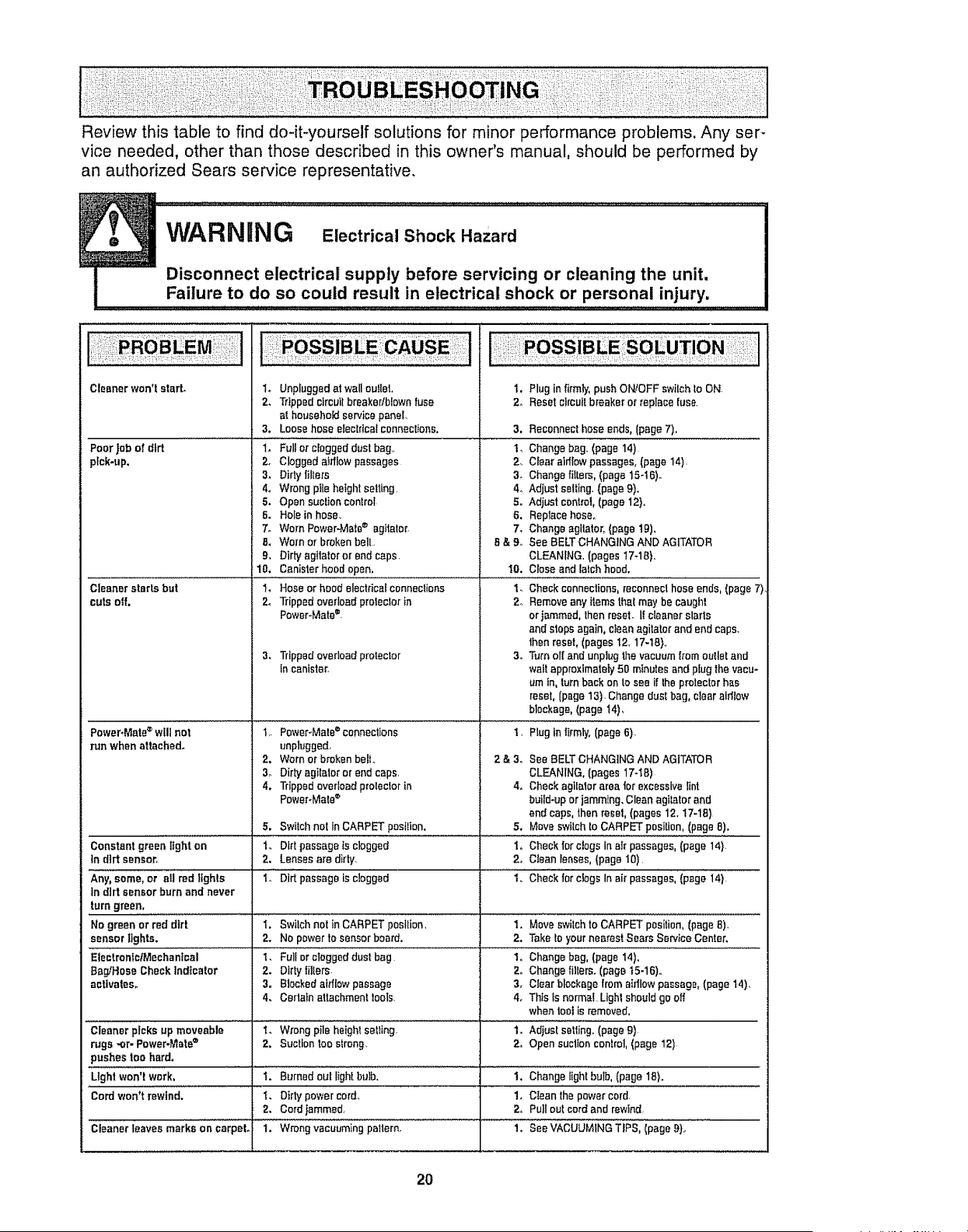
Review this table to find do-it-yourself solutions for minor performance problems. Any ser-
vice needed, other than those described in this owner's manual, should be performed by
an authorized Sears service representative,
WARNING Electrical Shock Hazard
....| ............ Disconnect electrical supply before servicing or cleaning the unit,
Failure to do so could result in electrical shock or personal injury.
1. Unpluggedat wallou!let,
2. Trippedcircuilbreakedblownfuse
at householdservice panel.
3. Loosehose electricalconnections,
..........= ..................
1. Fullor cloggeddust bag,,
2. Clogged aMlow passages
Cleanerwon't start.
Poor Jobof d_rt
pick-up.
Cleaner starts but
cuts off.
PoweroMete®will net
run when attached°
3. Dirtytillers
4. Wrong pile height setting,
5. Open suctioncontrol
6. Holein hose.
7. Worn Power-Mate_ agitator,
8. Wornor brokenbelt.
9, Dirtyagttatoror end caps.
10. Canisterhood open,
1. Hoseor hoodelectricalconnedions
24 Trippedoverload protectorin
Power-Mate=.
3, Trippedoverloadprotector
incanister.
I. Plug in firmly,push ON/OFFswilch to ON,
2. Resetcircuitbreaker or replacefuse_
3,
2_
8_
4o
5.
6.
7.
I]&9o
t0.
2o
34
Reconnecthose ends, (page 7),
Changebag, (page 14)
Clear aidlowpassages,(page14),
Changefilters,(page 15-! 6)-
Adjust setting. (page9).
Adjust control,(page 12},,
Replacehose°
Changeagitator_(page tg),
See BELTCHANGINGAND AGITATOR
CLEANfNG,(pages17-10).
Close andlalch hood.
Checkconnections,reconnecthose ends, (page 7)
Removeany items thatmay be caught
orlammed, Ihen reset. 1!cleaneralerts
and stops again, cleanagitator and endcaps.
thenreset,(pages 12. 17-18}.,
Turn oil and unplug the vacuumlromoutlet and
waitapproximately50 minutes andplug the vacu-
um in, turn back on to see i{ the protectorhas
reset, (page 13), Changedual bag, clear aidlow
blockage,(page 14)_
1, Plug _nfirmly. (page 6).
t,, Power_Mets®connections
unplugged,
2. Wornor broken belt,
3o Dirt,/agitator or end ceps_
4. Trippedoverload prolectorin
PoweroMata_
2&3. See BELTCHANGINGAND AGITATOR
CLEANING,(pages 17-18)
4. Checkagllalorarea tot excessivelint
build-upor jamming.Cleanagiletorand
end caps,thenreset,(pages 12. 17.18}
5. Moveswitchto CARPETposition,(page8).
i. Checkfor ctogs in air passages, (page 14)
2o Ctaan lenses,(page 10),
....i,,' Check"'lorclogs In ei_passages, (page i4}:
5. Switchnot In CARPETposition.
Constantgreen light on Io Dirt passageisclogged
in dirt sensor, 2. Lensesare dirty,
AnYlsome,or ell rod'lights l o"'Dirt Passageiaclogged
in dirt sensor burn and never
turngreen,
No green or red dirt I. Switchnot in CARPETpos_lion, 1. Move switchto CARPETposition, (page8).
sensor lights. 2. No power to sensor board. 2. Taketo your nearestSears Serv}ceCenter.
......................................... ............ ,u_
EleetronlcfMechanlcal 1. Fullor clogged dust bag 1o Changebag, (page14),
Bag/Hose Check indicator 2. Dirty fillers 24 Changefillers. (page t5-16),,
activates. 3. Blockedaidiow passage 3, Cfear blockagefrom aidlowpassage,(page 14),
4. Certainattachment !eels, 4_ Thisis normal.Lighlshouldgo off
when tool isremoved,
cleaner picks up moveable I_ Wrongpile height setting 1. Adiustsetling. (page g)
rugs-or- Power.Mate® 2, Suctiontoo slrong 2. Open suclton control,(page 12)
pushestoe hard,
Light won't work, i. Burnedout light bulb. 1. Changelight bulb, (page 18).
Cordwon't rewind. 1. Dirty powercord. 1. CIeanthe powercord.
2. Cordjammed, 2. Pull out cordand rewind
Cleanerleavesmarks on carpel 1. Wrongvacuumingpattern, 1_ See VACUUMiN=G'TiPS_ipage ._},.
2O

r:• •-
rx %
"i
For repair of major brand appliances in your own home ...
no matter who made it, no matter who sold it!
1-800-4-MY-HOME ® Anytime, day or night
(t-800-469-4663) (U.S.A. and Canada)
www, sears.com www,sears.ca
For repair of carry-in products like vacuums, lawn equipment, and
electronics, call for the nearest Sears Parts and Repair Center.
1-800-488-1222 Anytime, day or night (U S A. only)
www,sears.com
For the replacement parts, accessories and owner's manuals
that you need to do-it-yourself, call Sears PartsDirectS_f!
1-800-366-PART
(1-800-366-7278)
6 a.m - 11 p m. 7 days a week
(USA only)
www.sears.com/partsdirect
To purchase or inquire about a Sears Service Agreement
or Sears Maintenance Agreement:
1-800-827-6655 (U.SA)
7 am, - 5 p,m,, CST, Mon.- Sat.
1-800-361-6665 (Canada)
9 a.m,- 8 p,m EST, M - F,4 pm Sat.
Para pedir servicio de reparaciOn a
domicilio, y para ordenar piezas:
1_888-SU-HOGAR sM
(1-888-784-6427)
Au Canada pour service en frangais:
1-800-LE-FOYER _Ic
(1-800-533-6937)
www sears.ca
Ire :.
,HomeCentraT®) ..............
k.
@ Sears, Roebuck and Co.
TM
® RegisteredTrademark/Trademark/s_aService Mark of Sears,RoebuckandCo
@MarcaRegistrada/_r. Marcade F&brica/sMMarca de Servicio de Sea_s,Roebuckand Co
Mc Marque decommerce/MD Marque d_pos_e de Sears, Roebuck and Co
21

Sears, Roebuck and Co., Hoffman Estates, I160179 U.S.A.
Part Noo CO1ZBAK40U(_O-8175060
Printed in U.S.A.
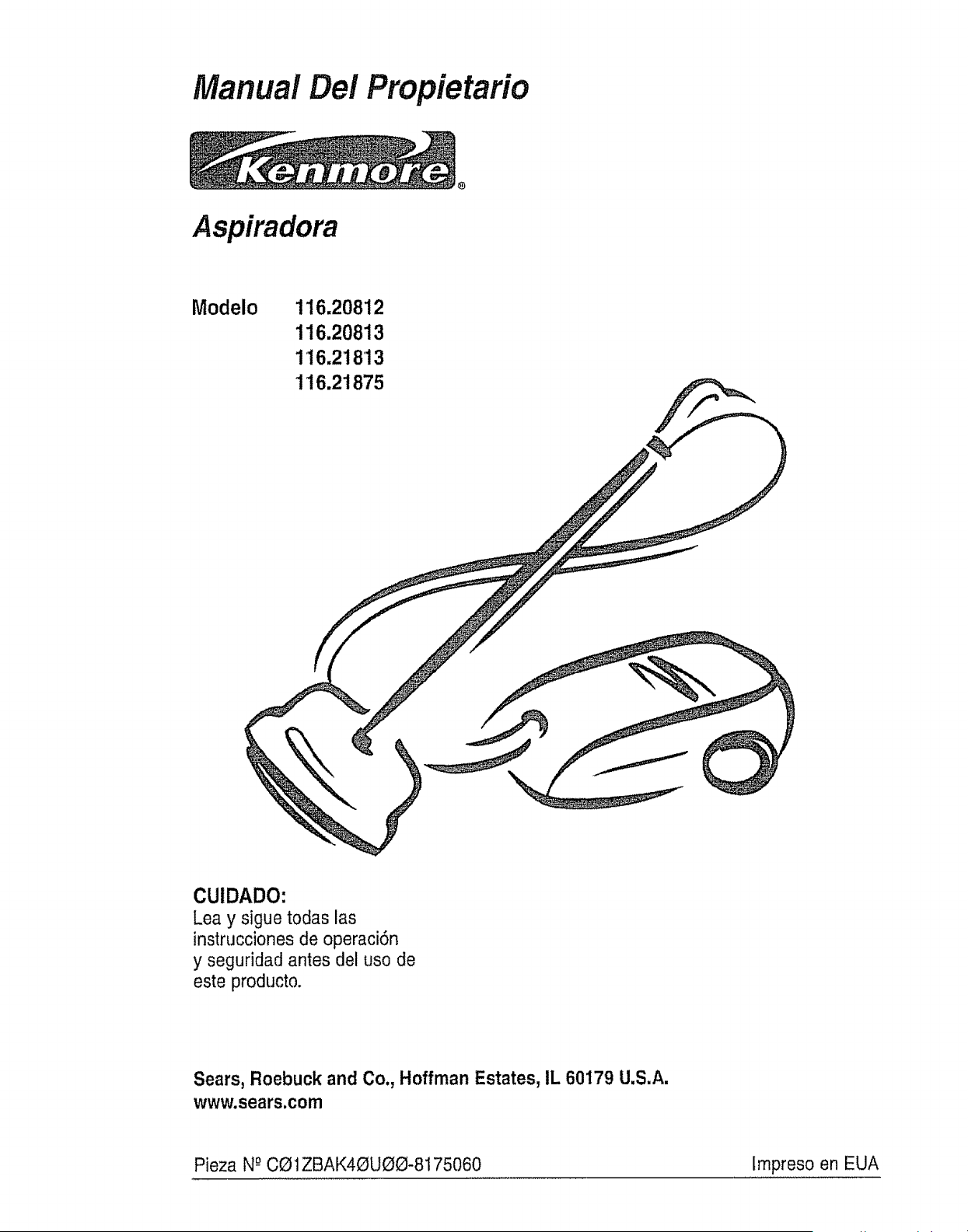
Manual Del Propietario
Aspiradora
Modelo 116,20812
116.20813
116.21813
116.21875
CUIDADO:
Lea y sigue todas las
instrucciones de operaci6n
y seguridad antes del uso de
este producto.
Sears, Roebuck and Co., Hoffman Estates, IL 60179 U.S.A.
www.sears.com
Pieza N-°CQ1ZBAK40UOO-8175060 lmpreso en EUA
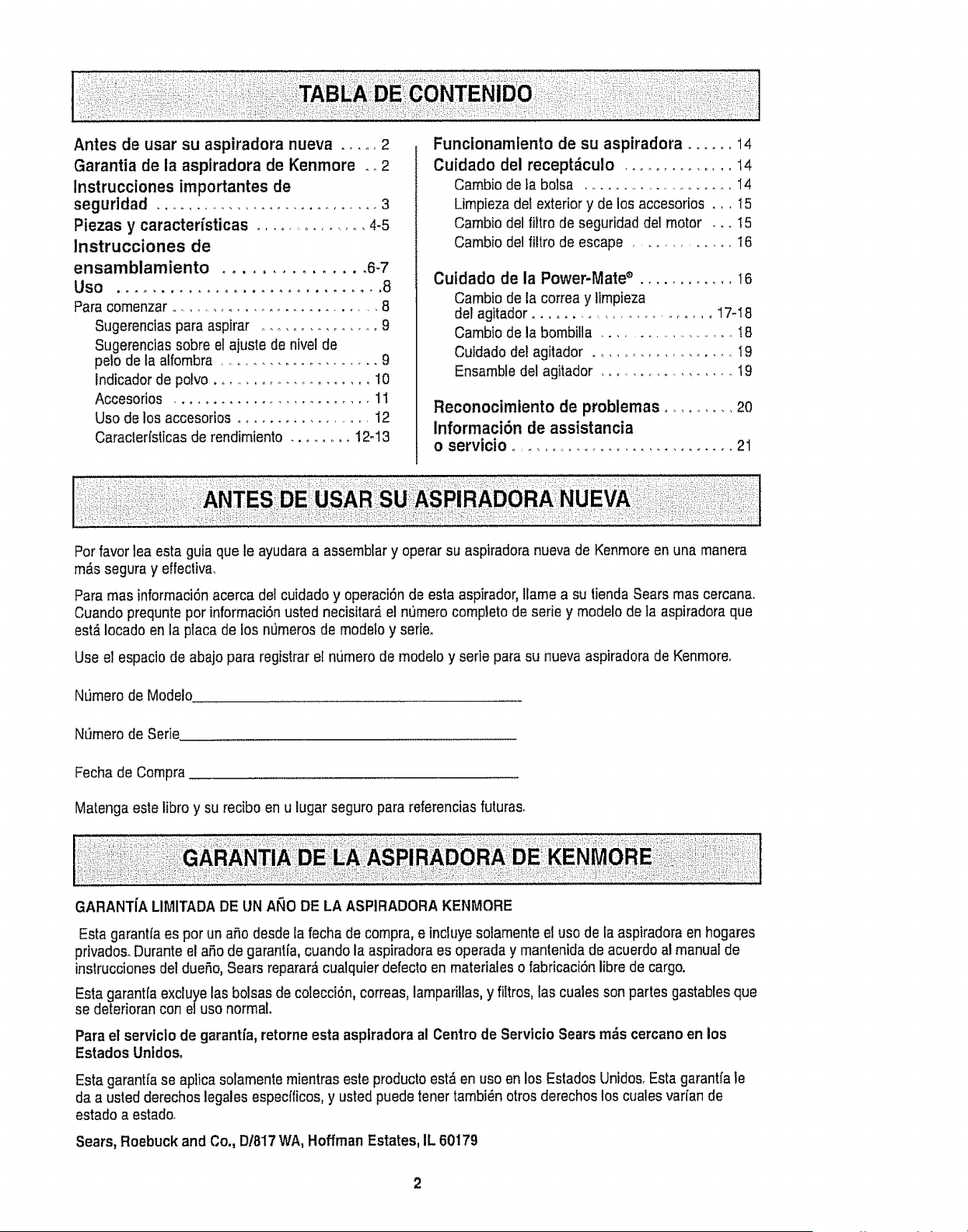
Antes de usar su aspiradora nueva ..... 2
Garantia de la aspiradora de Kenmore ,_ 2
Instrucciones importantes de
seguridad ............................... 3
Piezas y caracterfsticas ................ 4-5
Instrucciones de
ensamblamiento ............... 6-7
Uso ............................... 8
Para cornenzar ............................... 8
Sugerencias para aspirar ............... 9
Sugerencias sobre el ajuste de nivel de
polo de la alfombra ....................... 9
Indicador de polvo ...................... 10
Accesorios .......................... 11
Uso de los accesorios ................... 12
Caracterfsticas de rendimiento ........ 12-13
Funcionamlento de su aspiradora ...... 14
Cuidado del recept_culo .............. 14
Cambio de la bolsa .......................... I4
Limpieza del exterior y de los accesorios _,, t 5
Cambio del filtro de seguridad del motor .., 15
Cambio deJfiltro de escape ............. 16
Cuidado de la Power-Mate ® ............ I6
Cambio de la correa y limpieza
del agitador .......................... 17-! 8
Cambio de la bombilla ....................... !8
Cuidado del agitador ................. I9
Ensamble del agitador ................. t9
Reconocimiento de problemas .......... 20
lnformaci6n de assistancia
o servicio ................................. 21
Porfavor lea esta guia que le ayudara a assemblar y operar su aspiradora nueva de Kenrnore en una manera
rn_s segura y effectiva.
Para mas informaci6nacerca del cuidado y operaci6n de esta aspirador, ltamea su tiendaSears mas cercana,
Cuando prequnte por inforrnaci6nusted necisitar_ el nfimero completo de serie y modelo de ]a aspiradora que
est_ iocado en la placa de los n_rneros de modefo y serie.
Use el espacio de abajo para registrarel nurnero de modelo y serie para su nueva aspiradora de Kenrnoreo
Nfimero de Modelo
N_mero de Serie
Fecha de Compra
Matenga este libro y su recibo en u lugar seguro para referenciasfuturas.
GAFIANTfA LIMITADADE UN ANO DE LA ASPIRADORA KENMORE
Esta garantfaes por unafio desde la fecha de compra, e incluye solamente el use de la aspiradora en hogares
privados. Durante el aSo de garantfa, cuando la aspiradora esoperada y mantenida de acuerdo al manual de
instruccienes del due5o, Sears reparar_ cualquter defecto en materiales o fabricaci6n libre de cargo.
Esta garantfa excluye las bolsas de colecci6n, correas, lamparilras,y _tros, tas cuales son partes gastables que
se deterioran con eluso normal
Para et serviclo de garantfa, retorne esta asptradoraal Centro de Servtcio Sears rods cercano en los
Estados Unidos,
Esta garantfase aplica solamente mientras este productoest_ en uso en los Estados Unidos. Esta garantfa le
da a usted derechos legales especfficos,y usted puede toner tambi_n otros derechos los cuales var[an de
estado a estado.
Sears, Roebuckand Co., D/817 WA, Hoffman Estates, IL 60179
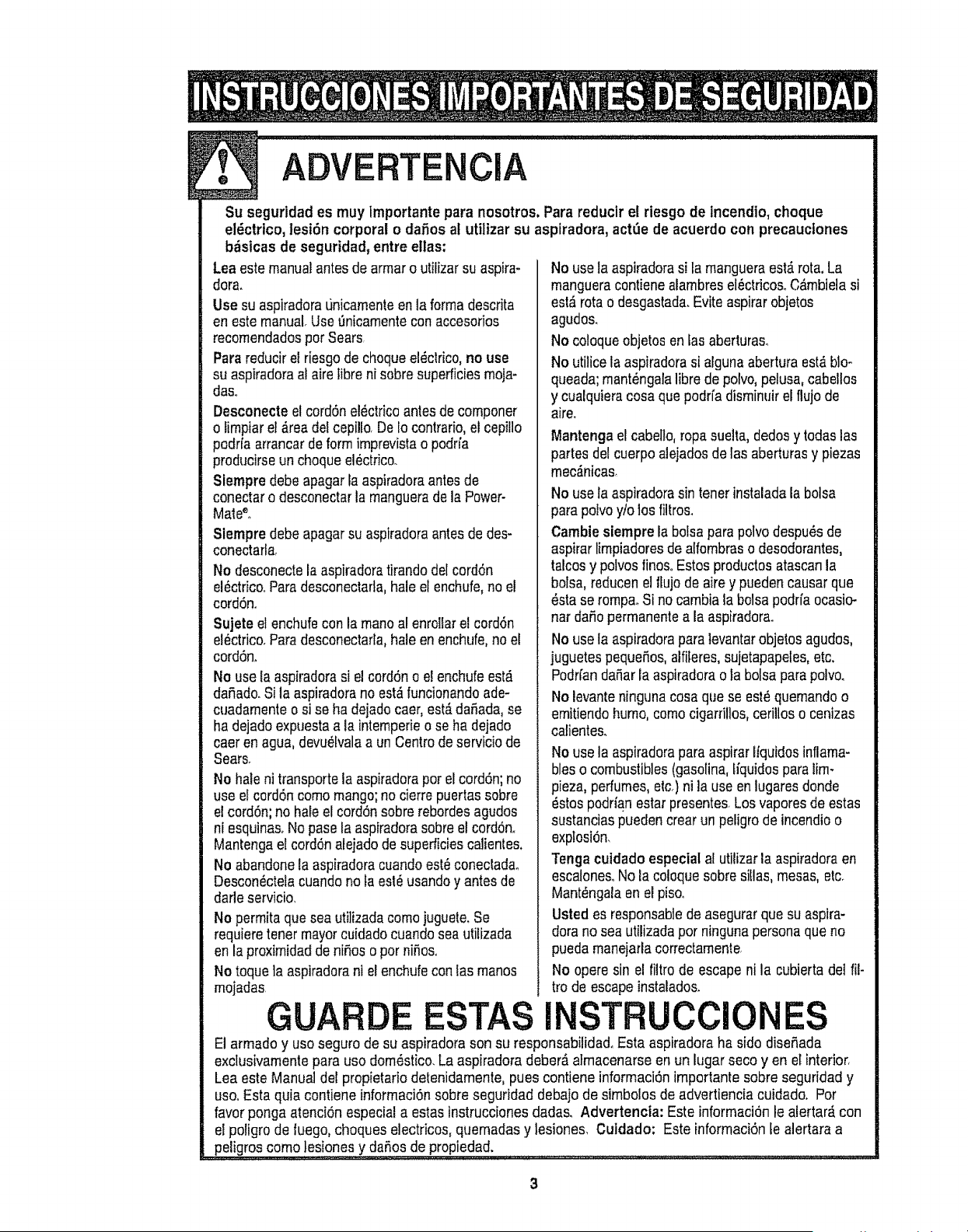
ADVERTE ClA
Su seguridad es muy Importante para nosotros,Pare reducir et riesgo de incendio, cheque
eldctrico, lesi6n corporal odaSos at utilizar su aspiradora, actL_ede acuerdo con precauctones
b_sicas de seguridad, entre ellas:
Lea estemanual antesde arrnar o utilizar su aspira+
dora.
Use su aspiradoraL_nicamenteen la ferrnadescrita
en estemanual+Use 0nicamentecon accesofios
recomendadosper Sears,
Parareducir el riesgo de chequeel_ctrico,no use
su aspiradoraal aire tibre ni sobre superficiesmoja+
das+
Desconecte el cordSnel_ctricoantes de componer
olimpiar el&readel cepilto.De to contrario,el cepitlo
podrfa arrancardeform imprevistao podrfa
preducirseun cheque el_ctrico.
Slempre debe apagar la aspiradoraantes de
conectaro desconectarla mangueradela Power-
Male++
Siempredebeapagar su aspiradoraantesde des-
conectarla,
No desconectela aspiradoratirando delcord6n
el_ctrico°Paredescenectafla,hale el enchufe,no el
cordSn+
Sujete el enchufecon la maneal enrollar el cord6n
el_ctrico+Paredesconectarla,hale en enchufe,no el
cord6n.
No use ta aspiradorasi el cord6no el enchufeest_
dafiado.Si la aspiradorano est_funcionandoade-
cuadamenteosi se ha deiadocaer, est&daSada,se
ha dejadoexpuestaala intemperieo se ha dejado
caer en ague, devu_lvalaa un Centrede serviciode
Searsr
No hale ni transportela aspiradoraper elcord6n; no
use elcordSncomemango;no cierrepuertas sobre
el cord6n;no hale el cord6n sobrerebordesagudos
ni esquinas+No pasola aspiradorasobre el cord6n.
Mantengael cord6nalejado de superficiescalientes+
No abandonela aspiradoracuandoest_coneclada.
Descon_ctelacuando no ta est_ usandoy antes de
darle servicio.
No permita que sea utilizada comejuguete+Se
requiem toner mayorcuidadocuandosea utitizada
en la proximidadde niSoso per niSos+
No toque la aspiradorani el enchufecon tasrnanos
rnojadas.
GUAR
No use ta aspiradorasi la mangueraest_rota+La
rnangueracontienealambresel_ctricosoC_mbielasi
est#,rote o desgastad&Evite aspirerobjetos
agudo&
No coloqueobjetos en fas aberturaso
No utilice la aspiradorasi algunaabertura est_blo-
queada;rnant_ngalalibre de potvo,pelusa, cabellos
y cualquieracosa quepodrfa disminuirel fluje de
aire+
Mantencjael cabello, ropasuelta, dedos ytodaslas
partes delcuerpo alejadosde las aberturasy piezas
mec,_nicas_
No use la aspiradorasin tenorinstaladala boise
parapotvoy/o los filtros.
Cambie siempre la boisepara polvodespu_s de
aspirarIimpiadoresde alfembraso desodorantes,
talcosy pelvesfinoSoEstosproductosatascanla
boise,reducen el tlujo de airey pueden causar que
_stase tempe+Si no cambiala boise podrfa ocasic-
nat daSopermanentea la aspiradora.
No use la aspiradorapara levantarobjetos agudos,
juguetespequeSos,alfileres,sujetapapeles,etc,
Podrfanda_arla aspiradorao la boise pare polv&
No levanteninguna cosa que se est_quemandoo
emitiendohumo, come cigarfillos, cerillos o cenizas
caliente&
No use la aspiradorapareaspirar lfquidos inflama-
bles o combustibles(gasoline,ffquidospareiim-
pieza, perfumes,etc°)ni]a use en lugaresderide
_stos podrian esterpresentes Los vaperesde estas
sustanciaspuedencrear un peligro de incendioo
explesi6n<
Tonga cuidado especial al utilizar la aspiraderaen
escalonesoNo la coleque sobresiUas,mesas,etc°
Mant_ngalaen el pis&
Usted es responsablede asegurarque su aspire-
dora no sea utilizadaper ningunapersona que no
puedamanejarlacorrectamente,
No opere sin el filtro de escape ni la cubierta det ill-
trode escapeinstalados+
ISTR CClONES
El armado y use seguro de su aspiradorason su responsabilidadoEsta aspiradora ha side diseSada
exclusivamentepare use dom_stico.La aspiradoradeber_ afmacenarse en un lugar seco yen el interior,
Lea este Manual del propietario detenidamente,pues contiene informaci6n importante sebre seguridad y
usooEsta quia contiene informaci6n sobre seguridad debajo de simbelos de advertiencia cuidado+ Per
favor ponga atenci6n especial a estas instrucciones dada& Advertencta: Este informaci6n le aiertar_,con
el poligro de fuego, cheques electricos, quemadas y lesiones, Cuidado; Este informaci6n te alertara a
peligros come tesiones y dares de propiedad.
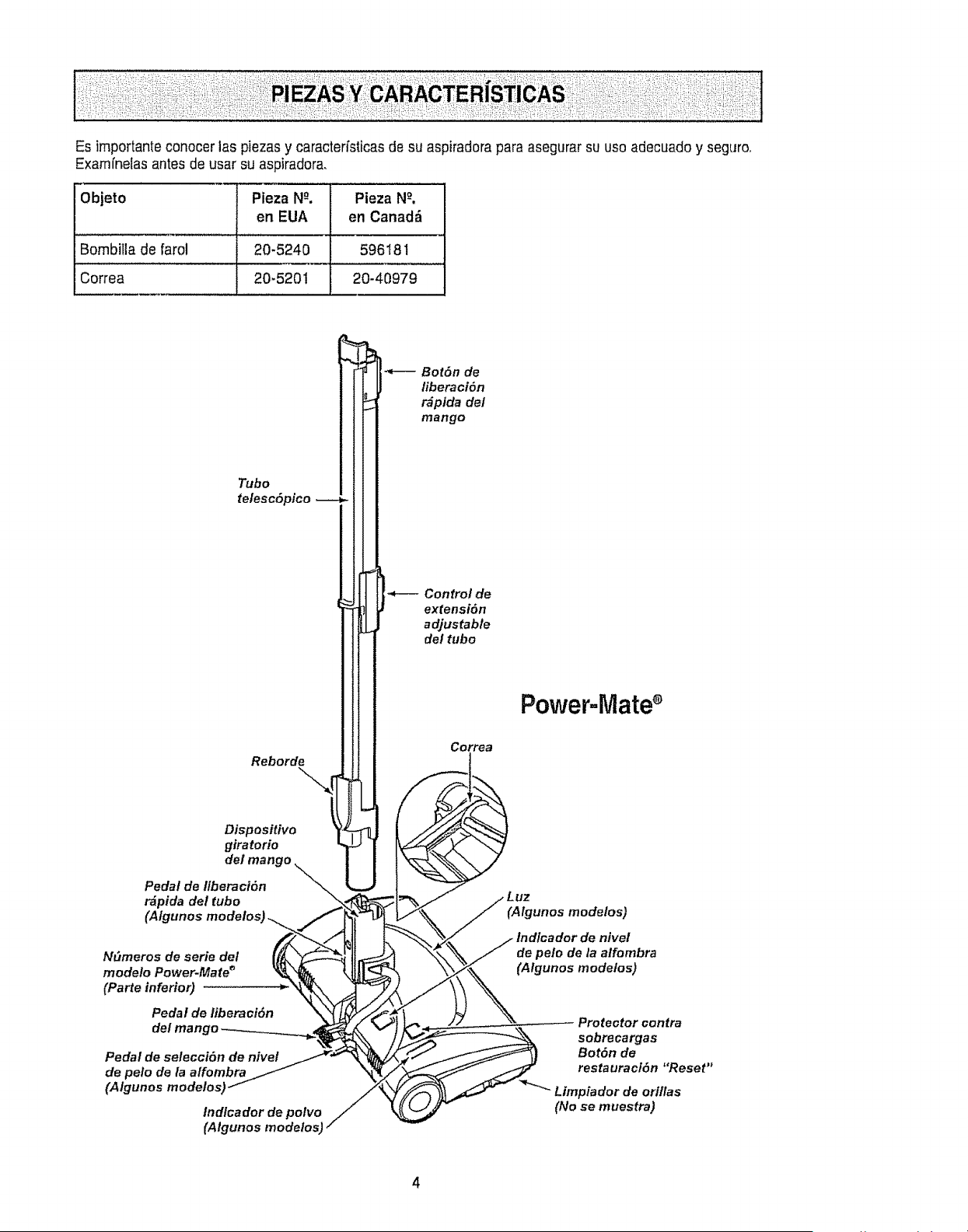
Es importante conocer las piezas y caractefisticas de su aspiradora para asegurar su uso adecuado y seguro.
Examfnelas antes de usar su aspiradora,
Objeto Pieza N_. Pieza N_°,
en EUA en Canad_
Bombitla de farol 20-5240 596181
Correa 20-5201 20-40979
Tubo
telesc6pieo
Reborde
Dispositivo _'_i
giratorio
de/man
Pedal de Ilberaci6n
r_pida del tubo
(AIgunos
N_meros de serie del
modelo Power-Mate _
(Parte inferior)
Pedal de liberaci6n
del mango
Pedal de selecci6n de nivel
de pelo de la a/fombra
(Algunos modelosJ
Indlcador de polvo
(Algunos modelos)
Bot6n de
fiberaci6n
r_pida del
mango
Control de
extensi6n
adjustable
del tubo
Correa
Power=Mate
(Algunos mode/os)
de pelo de la alfombra
(Algunos mode/os)
Proteator contra
sobrecargas
Bot6n de
restauracf6n "Reset"
_'- Limpiador de orl/las
(No se muestra)
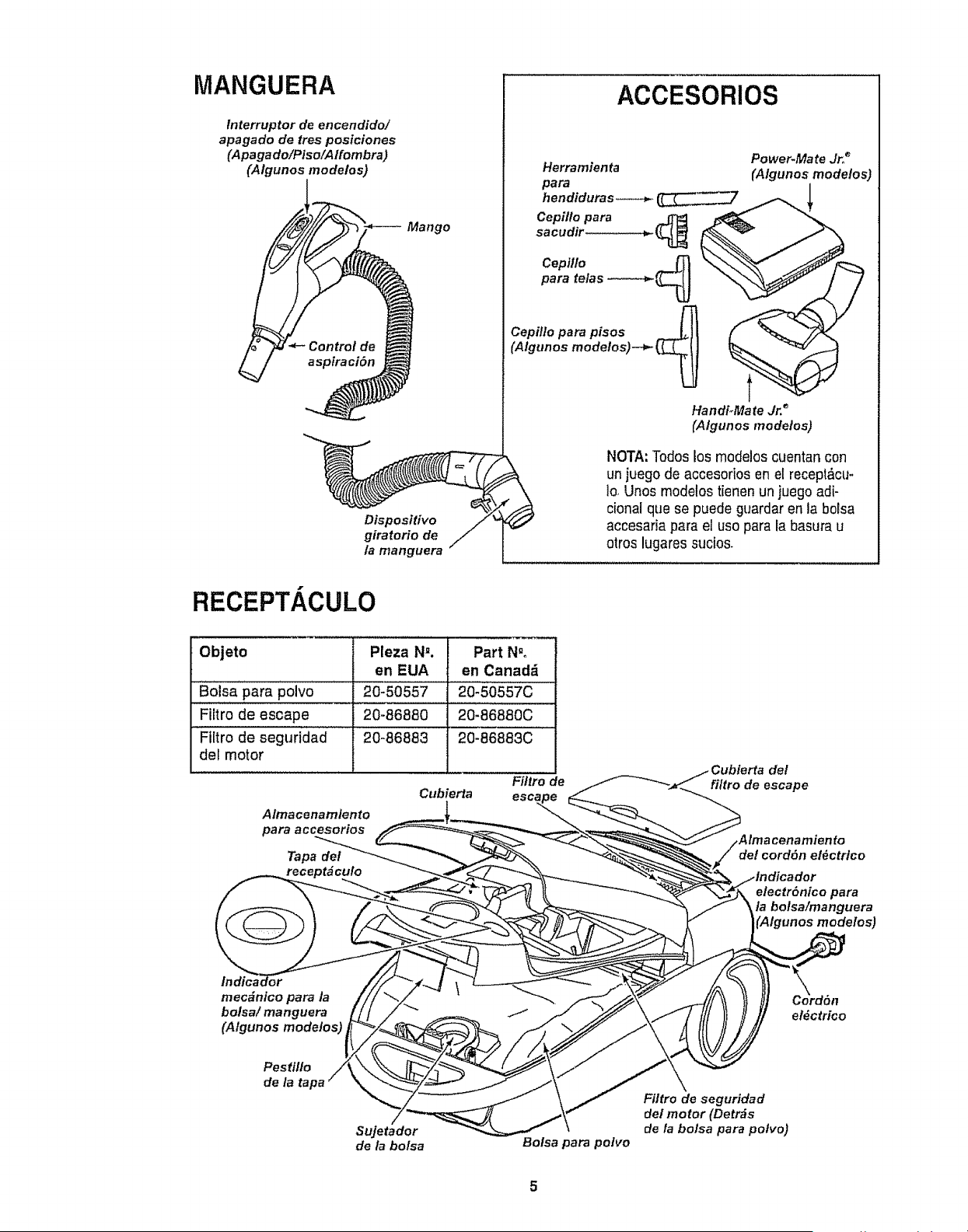
MANGUERA
tnterruptor de encendido/
apagado de tres posiciones
(Apagado/Piso/Alfombra)
(Algunos modelos)
I
Mango
Disposttivo
giratorio de
la manguera
ACCESORIOS
Herramienta
para
h endidura s----_- ___.7
Cepillo para ..JTF_
sacudir .............. _ ___ _
Ceplllo
para telas
Cepillo para pisos
(Algunos modelos)--_,- {._
Power*Mate Jr__"
(Algunos modelos)
Handi_Mate Jr, _
(Algunosmodetos)
NOTA: Todoslos modelos cuentan con
un juegode accesorios en el recept,_cu-
1o_Unos modelos tienen unjuegoadi-
cional que se puede guardar en ta boFsa
accesaria para el uso para la basura u
otros lugaressucios.
RECEPT/ CULO
Objeto Pleza N_. Part N.o
en EUA en Canad_
Bolsa para polvo 20-50557 20-50557C
'Fiitr0 de escape 20-86880 20:86880c
Flltro de seguridad 20-86883 20-86883C
del motor
Filtro de
Cubierta
Almacenamlento
para accesorios
Tapa del
_t_culo
del
filtro de escape
1to
de/cordSn el_ctrico
electr6nlco para
/a botsa/manguera
(A/gunos mode/es)
Indica<
mec_nico para la
bolsa/ manguera
(Algunos modelos)
el_ctrico
Pes_flo
Sujetador
de la bolsa Bolsa para polvo
Filtro de seguridad
de/motor (Detr_s
de la bolsa para polvo)
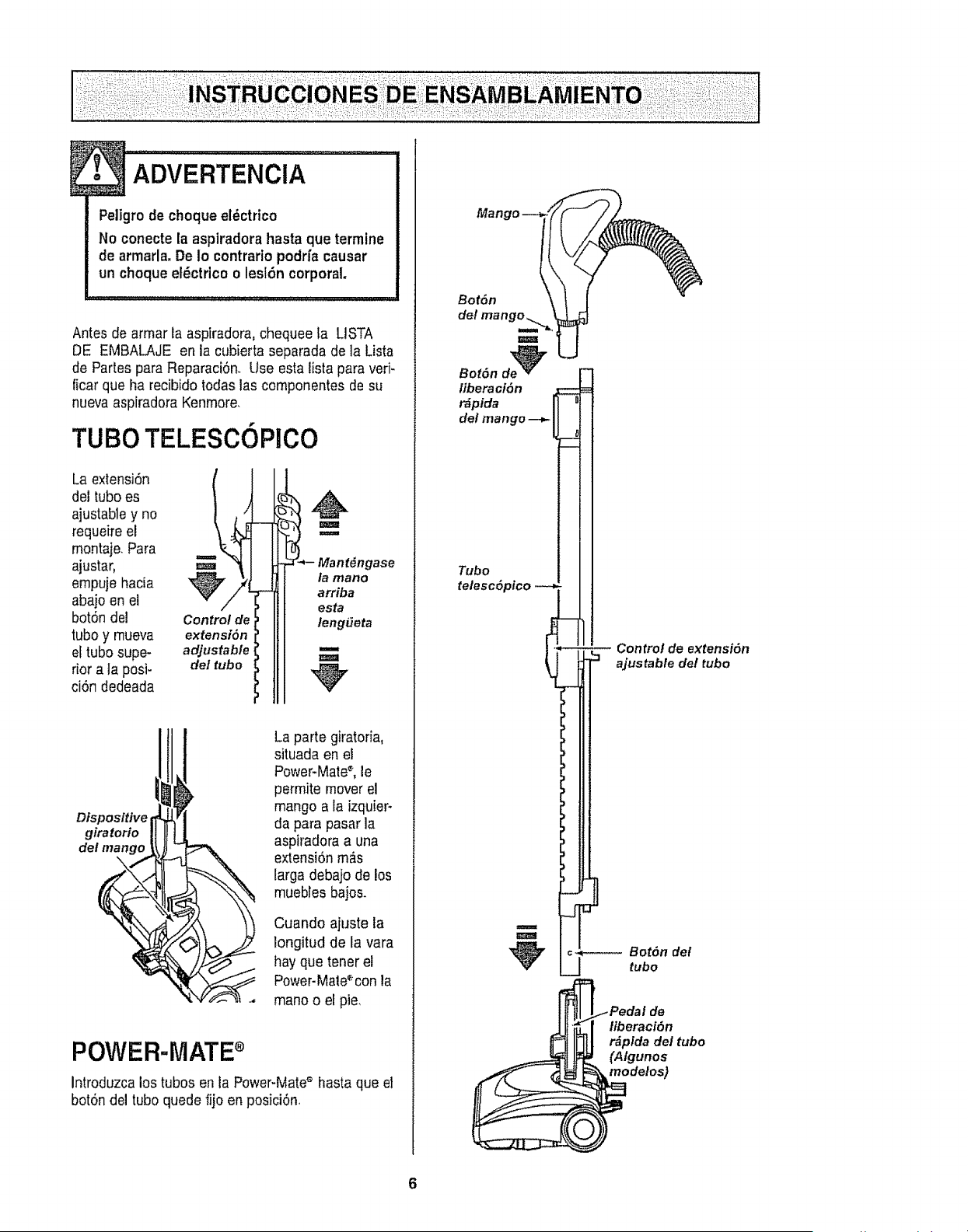
Peligro de choque el_ctrico
No conecte la aspiradora hasta que termine
de armada, De io contrario podrfa causar
un choque et_ctrico o lesi6n corporal,
Antes de armar la aspiradora, chequee ta L1STA
DE EMBALAjE en la cubierta separada de la Lista
de Partes para Reparaci6n. Use esta listapara veri-
ficar que ha recibido todas las componentes de su
nueva aspiradora Kenmore.
TUBO TELESCOPICO
La extensi6n
del tubo es
ajustabley no
requeire el
montaje. Para
ajustar,
empuje hacia
abajo en el
bot6n del
tubo y rnueva
el tubo supe-
rior a ta posi-
ci6n dedeada
Control de
extensi6n
adjustable
de/tubo I
1@
i - nt nga o
la mano
arriba
esta
teng_teta
m
m
Ofspositive
giratorio
del mango
La parte giratoria,
situada en el
Power-Mate_, le
permite mover el
mango a la izquier-
da para pasar la
aspiradora a una
extensi6n m_.s
larga debajo de los
muebfes bajos.
Cuando ajuste la
longitud de la vara
hay que tener el
Power-Mate%on la
mano o el pie,
POWER-MATE
Introduzcalos tubos en la Power-Mate_ hasta que el
bot6n del tubo quede fijo en posici6n.
Mango --_o_ ........
del mango......
.o,,° -U
liberaci6n
r_pida
del mango
Tubo
telesc6pico
Control de extensi6n
_" ajustable del tubo
I
m
c_---_ Bot6n del
tubo
[_ Pedal de
ltberaci6n
r_(APllgdadel tubo
odolos)
6
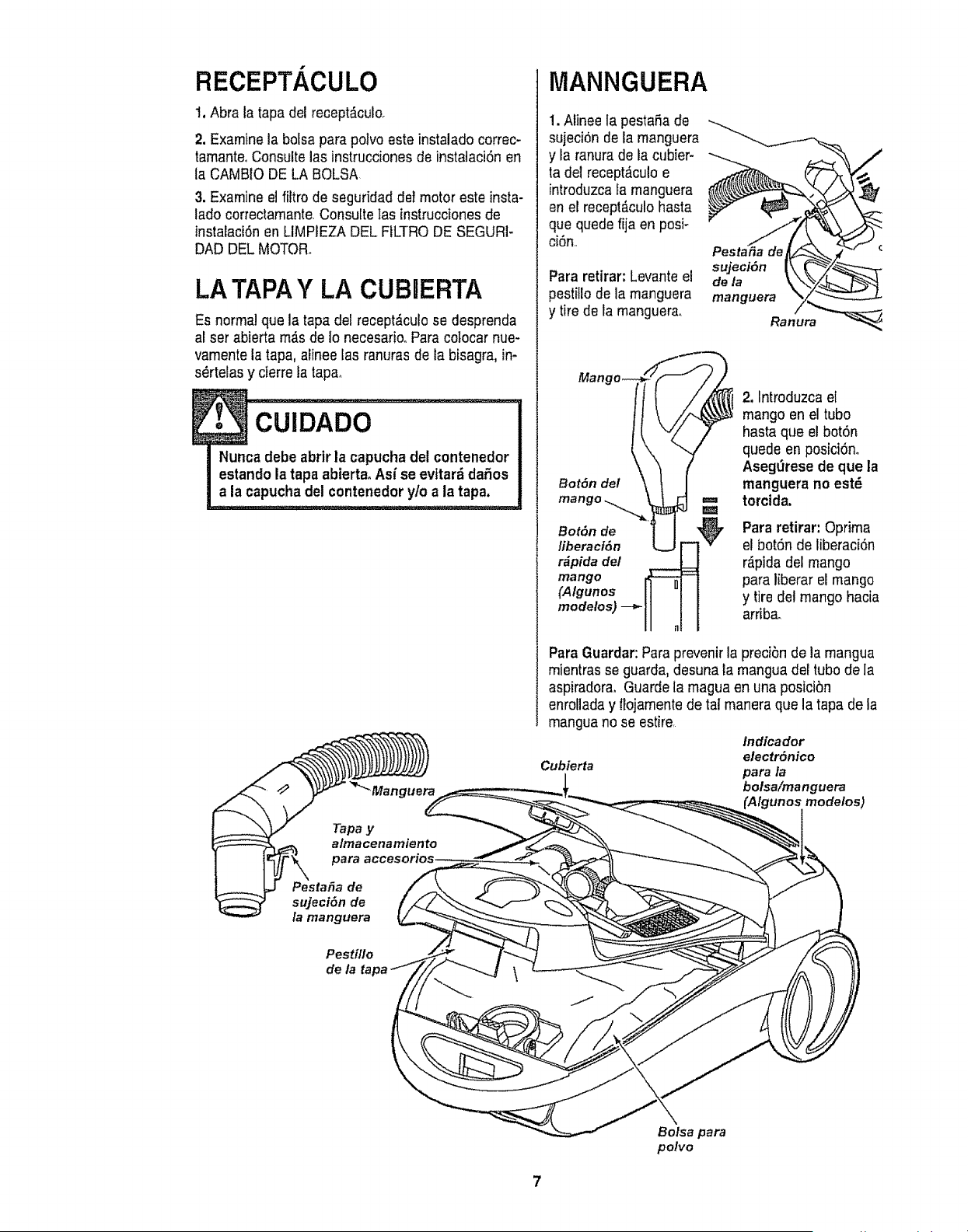
RECEPT/ CULO
1, Abra la tapa del recept_culo.
2, Examine la bofsa para polvo este instalado correc-
tamanteoConsultelas instrucciones de instataci6n en
la CAMBIO DE LA BOLSA
3. Examine el _tro de seguridad del motor este insta-
lado correctamante.Consulte Ias instruccionesde
instalaci6nen LIMPIEZA DEL FILTRO DE SEGURI-
DAD DEL MOTOR°
LA TAPA Y LA CUBIERTA
Es normal que la tapa del recept_culo se desprenda
al ser abierta m_s de Io necesario. Para cotocar nue-
vamente la tapa, alinee ias ranuras de la bisagra, in-
s_rtelas y cierre fa tapa, ....................................
Nunca debe abrirla capucha del contenedor
estando la tapa abierta° Asi se evitar_ da5os
ala capucha del contenedor y/o a la tapa.
Tapa y
MANNGUERA
1. Alinee la pestaSa de
sujeci6n de la manguera
y la ranura de ia cubier-
ta del recephiculo e
introduzca fa manguera
en el recept_culo hasta
que quedefija en posi-
ci6n.
Para retirar: Levanteel
pestillo de la manguera
y tire de la manguera.
Pesta_a
sujeci6n
dela
manguera
Mango__
Bot6n de
fiberacf6n __"
rdpida del
mango
(AIgu.os II "1 I
01[
2, Introduzca el
mango en el tubo
hasta que el bot6n
quede en posiciSn.
Aseg,_rese de que la
manguera no est_
torcida.
Para retirar: Oprima
el bot6n de liberaci6n
r_pida del mango
para liberar el mango
ytiredet mango hacia
arriba.
Para Guardar:Para prevenir la preci6n de la mangua
mientras se guarda, desuna la mangua del tubo de Ia
aspiradora. Guardela magua en una posici6n
enrollada y t_ojamentede tal manera que la tapa de la
mangua no se estire,
Indicador
electr6nico
Cubierta para la
bolsa/manguera
(Algunos modelos)
Pestafia de
sujeci6n de
la manguera
Pestillo
de la ta
Bolsa para
polvo
7
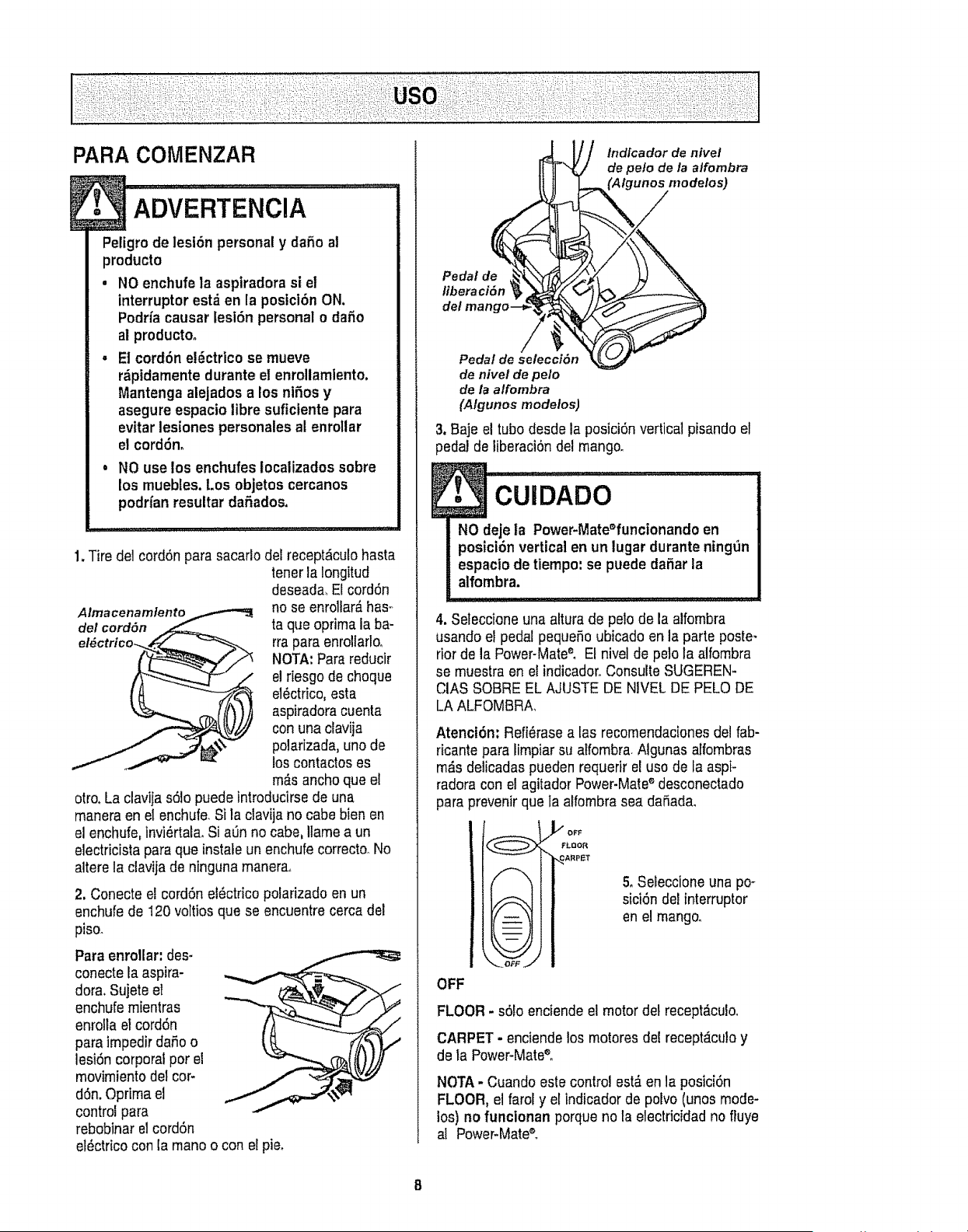
PARA COMENZAR
ADVERTENOIA .............
Petigro de lesion personal y dafio at
producto
, NO enchufe la aspiradora si el
interruptor est_ en la posiciOn ON,
Podr/a causar lesion personal o da5o
al producto.
• Et cordon e!Octrico se mueve
r_pidarnente durante el enrollarnlento,
Mantenga alejados alos niOos y
asegure espacio libre sufictente para
evitar lesiones personales al enrollar
el cordOn_
. NO use los enchufes localizados sobre
los muebles.Los objetos cercanos
podrfan resultar da5ados.
1. Tire del cordon para sacarlo del recept_culo hasta
tener la iongitud
deseada_El cordon
no se enrollar_ has=
ta que optima la ba-
rra para enrolfarlo,
NOTA: Parareducir
e! riesgo de choque
elOctrico,esta
aspiradoracuenta
con una clavija
polarizada, unode
los contactos es
m&sancho que el
otro.La clavija s0lo puede introducirse de una
manera en el enchufe. Si la clavija no cabe bien en
el enchufe, invi_rtala. Si alanno cabe, Itame a un
electricista para que instale un enchufecorrecto.No
altere la clavija de ninguna manera,,
2. Conecte el cordon eiOctricopolarizado en un
enchufe de 120 voltios que se encuentre cerca del
piso.
Para enrollar: des-
conecte la aspira-
dora, Sujete el
enchufe rnientras
enrolla el cordon
para irnpedir daOoo
lesion corporal por el
movirniento del cor-
don. Oprima el
control para
rebobinar el cordon
el_ctrico con la mano o con el pie.
lndfcadorde nivet
de pe/o de/a a/fombra
Pedal de
liberation
del man
Pedalde selection
de nivel de pelo
de la alfombra
(A/gunosmodelos)
3. Baje el tubodesde la posiciOnvertical pisando el
pedal de liberaciOndel mango.
NO deje la Power-Mate_funcionandoen
posiciOnvertical en un lugar durante ningdn
espacto de tiempo: se puede daRarla
alfornbra.
4. ;eteccioneuna altura de pe!o de la alfombra
usando el pedal pequefio ubicado en la parte poste-
rior de la Power-MateE El nivel de pelo la alfombra
se muestra en et indicador,,Consulte SUGEREN-
CIAS SOBRE EL AJUSTE DE NIVEL DE PELO DE
LA ALFOMBRA,
AtenciOn: Refi_rase alas recomendaciones del fab-
ricante para lirnpiar su alfornbra.Algunas atfornbras
rn_s delicadas pueden requerir el uso de la aspi-
radora con el agitador Power-Mate®desconectado
para }revenir que ta alfornbra sea daOada.
)'/OFF
FLOOR
_ARPET
5, Seieccione una po-
sici0n del [nterruptor
en el mango.
OFF
FLOOR - s01oenciende el motor del recept_cu!o,
CARPET- enciendelos rnotores del recept_culoy
de la Power-Mate®o
NOTA-Cuando estecontrol est&en la posiciOn
FLOOR, el farol y el indicadorde polvo (unos mode-
los) no funcionan porque no la electricidad no fluye
a! Power-Mate_
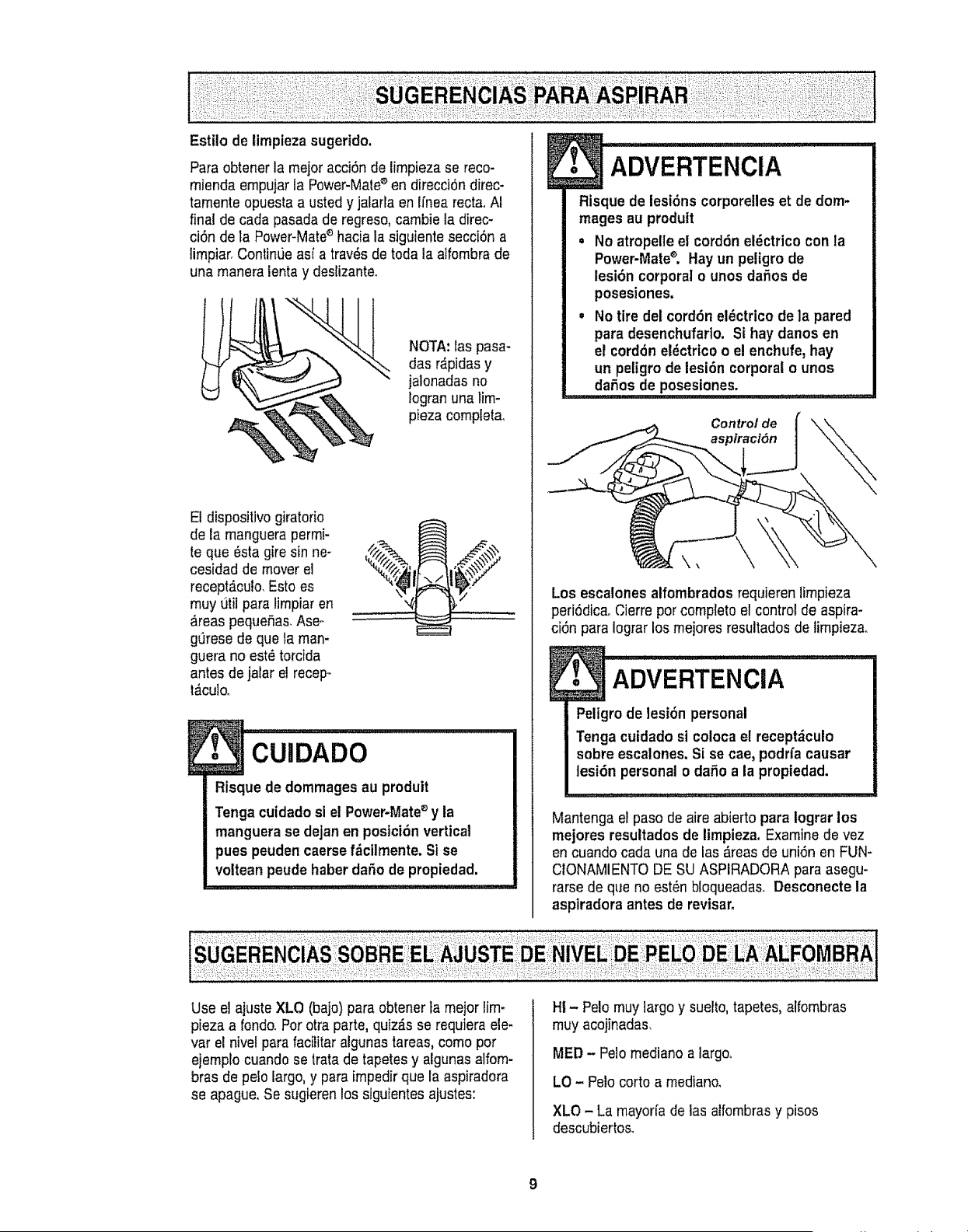
Paraobtenerlamejoracci6ndeiirnpiezasereco-
miendaempujarlaPower-Mate®endirecci6ndirec-
tamenteopuestaaustedyjalarlaenIfnearecta.AI
finaldecadapasadaderegreso,carnbieladirec-
ci6ndelaPower-Mateahacialasiguientesecci6na
lirnpiar,ContinL_easfatrav6sdetodalaatfombrade
unarnaneratentay deslizante.
NOTA:laspasa-
das r_pidas y
jalonadas no
logran una lirn-
pieza completa_
El dispositivo giratorio
de la manguera permi-
teque _sta gire sin ne-
cesidad de mover el
recept,_culo.Esto es
rnuy titil para lirnpiar en
_reas pequeSas,Ase°
gQresede que la rnan-
guera no est_ torcida
antes de jalar el recep-
t,_culo,
',4
Risque de dommages au produit
Tenga cuidado si el Power-Mate®y la
manguera se dejan en postci6n vertical
pues peuden caerse f_cilmente. Si se
voltean peude haber dafio de propiedad.
Use el ajuste XLO (bajo) para obtener ta mejor lirn-
pieza a rondo.Por otra parle, quiz_s se requiera ele-
var el nivel para facilitar algunas tareas, como por
ejemplocuando se trata de tapetes y algunas alfom-
bras de polo largo, y para irnpedir que la aspiradora
se apague. Se sugieren los siguientes ajustes:
:ADvERTENclA ....I
Risque de lesi6ns corporelles et de dom-
mages au prodult
=No atropelle e! cord6n el_ctrico con ta
Power-Mate®. Hay un peligro de
lesi6n corporal o unos dafios de
posesiones.
,No tire del cord6n el_ctrico de la pared
para desenchufario. Si hay danos en
et cord6n el_ctrico o el enchufe, hay
un peligro de lesi6n corporal ounos
...... daSos de posesiones.
Control de
Los escalones alfombrados requieren limpieza
peri6dica. Cierre por complete el control de aspira-
ci6n para Iograr los mejores resultados de limpiezao
ADVERTENCIA
Peligro de lesi6n personal
Tongacuidado si coloca el receptdculo
sobre escalones. Si se cae, podria causar
tesi6n personal o da_o a la propiedad.
Mantenga el paso de aire abierto para Iograr los
mejores resuttados de lirnpieza. Examine de vez
en cuando cada una de las _reas de uni6n en FUN-
CtONAMIENTO DE SU ASPIRADORA para asegu-
rarse de que no est_n bloqueadas. Desconecte la
aspiradora antes de revisaro
HI -Polo muy largo y suelto, tapetes, alfombras
muy acojinadas.
MED - Pe!o mediano a largo°
LO - Polo corto a mediano,
XLO - La mayorfa de las alfornbrasy pisos
descubiertos_
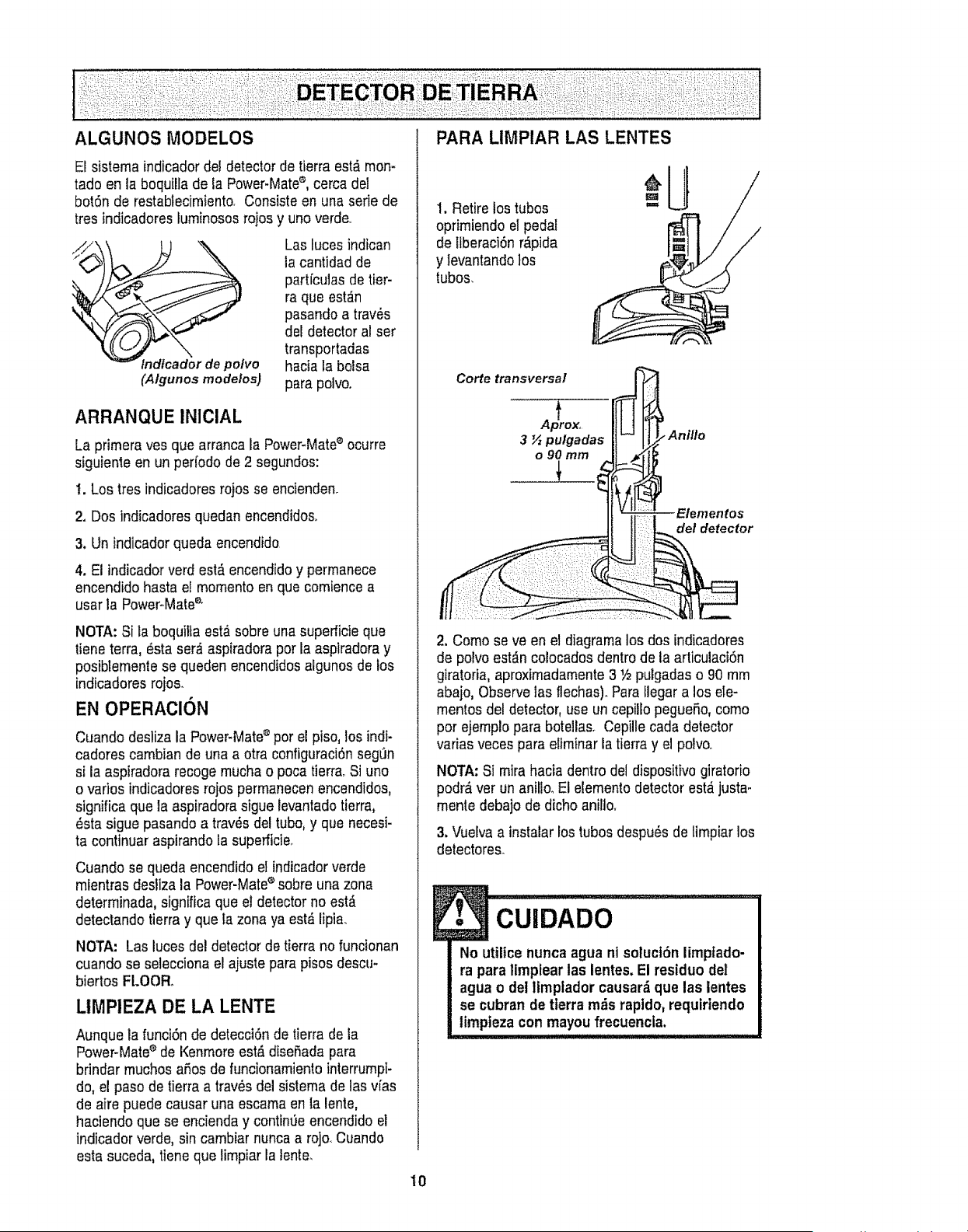
ALGUNOS MODELOS PARA LIMPIAR LAS LENTES
El sistema indicador del detector de tierra est_ rnon-
tado en la boquilla de la Power-Mate_, cerca del
bot6n de restablecimiento. Consiste en una sefie de
tres indicadoresluminososrojos y uno verde..
Las luces indican
la cantidad de
partfculas de tier-
ra que est_n
pasando a trav_s
del detector al ser
transportadas
tndlcador de polvo hacia la bolsa
(Algunos modelos) para polvo.
ARRANQUE INICIAL
La primera yes que arranca la Power-Matee ocurre
siguiente en un perfodo de 2 segundos:
t. Los tres indicadores rojos se encienden.
2. Dos indicadores quedan encendidos,.
3. Un indicadorqueda encendido
4. El indicador verd est&encendido y perrnanece
encendido hasta el momento en que comience a
usar la PoweroMatee"
NOTA: Si la boquilta est,_sobre una superficie que
tiene terra, _sta ser_,aspiradora por la aspiradora y
posibtementese queden encendidos algunos de los
indicadores rojos.
EN OPERACION
Cuando desliza la Power-Matee por el piso, los indt-
cadores cambian de una aotra configuraci6n segL_n
si la aspiradora recoge mucha o poca tierraoSi uno
o varios indicadores rojos permanecen encendidos,
significa que la aspiradora sigue levantado tierra,
_sta sigue pasando a trav_s del tube, y que necesi-
ta continuar aspirando la superficieo
Cuando se queda encendido el indicador verde
mientras desliza la Power-Mateesobre una zona
determinada, significa que el detector no est_
detectando tierra y que Ia zona ya est,, lipia.
NOTA: Las luces del detector de tierrano funcionan
cuando se selecciona el ajuste para pisos descu-
biertos FLOOR.
LIMPIEZA DE LA LENTE
Aunque la funci6n de detecci6n de tierrade la
Power-Mate_ de Kenmore est,, diseSadapara
brindar rnuchos afos de funcionarniento interrumpi-
do, el paso de tierra a trav_s del sistema de las vias
de aire puede causar una escama en la lente,
haciendo que se encienda y contin0e encendido el
indicador verde, sin carnbiarnunca a rojo. Cuando
esta suceda, tiene que lirnpiar la lente.
10
1. Retire los tubos
opfimiendo el pedal
de liberaci6n r_pida
y levantandolos
tubos.
Corte transversal
Elementos
del detector
2. Como se ve en el diagrama los dos indicadores
de polvo est_,ncolocados dentro de la articulaci6n
giratoria, aproximadamente3 Y2pulgadas o 90 mm
abajo, Observe las flechas). Para Ilegar a los ele-
mentos del detector, use un cepillo pegueP,o, como
por ejernplo para botellaso Cepille cada detector
varias veces para eliminar la tierra y el polvo,.
NOTA: Si mira hacia dentro del dispositivo giratorio
podr_ ver un anillo_El elemento detector est,_justa,.
rnente debajo de dicho anillo.
3. Vuelva a instalarlos tubes despu_s de limpiar los
detectores.
CUIDADO ..............
No utUicenunca agua nl soluct6n limpfado-
ra para limpiear las lentes, El residuo deI
agua o del ttmptador causar_que las lentes
se cubran de tterra m_s raptdo, requirtendo
limpteza con mayoufrecuencia.
E
NO instale ni retire el mango ni los tubos
cuando la aspiradora est_ encendida.
Esto podria causer chispas y dafter los
contactos eldctricos.
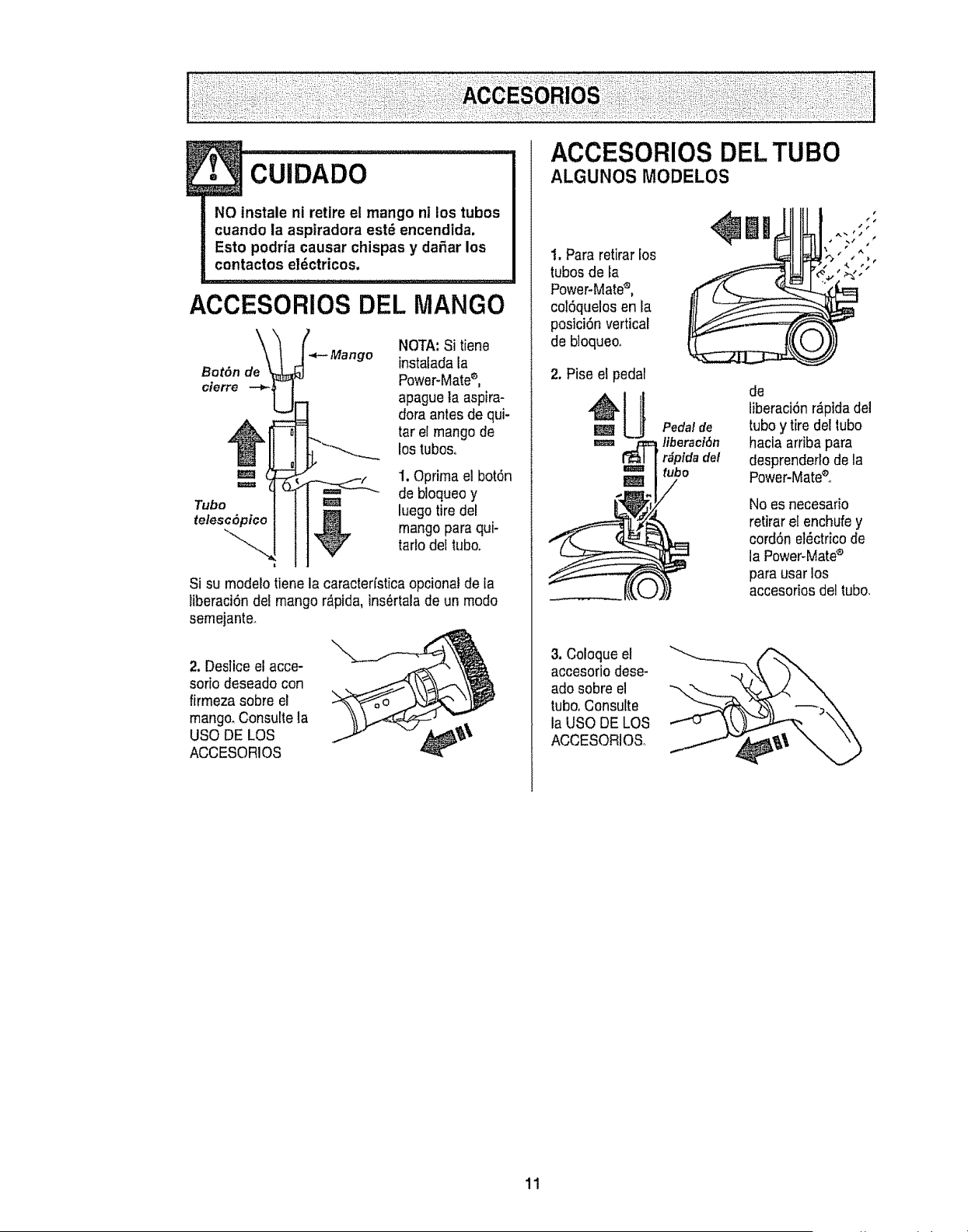
ACCESORIOS DEL MANGO
Bot6n de
cierre --_,
NOTA, Si tiene
instalada la
Power-Matee,
apague ta aspire-
dora antes de qui-
tar ef mango de
los tubos,,
ma _ f 'I. Oprima el bot6n
Tubo luego tire del
teles_._P'_v I mango pare qui-
ratio de! tubo.
Si su modelo tiene la caracterfstica opcional de ta
liberaci6n det mango r_pida, ins_rtala de un modo
semejante.
2. Des]iceel acce-
sorio deseado con
firmeza sobre el
mango_Consulte la
USO DE LOS
ACCESORIOS
ACCESORIOS DEL TUBO
ALGUNOS MODELOS
1. Para retirar Eos
tubosde fa
Power-Mates,
col6quelosen la
posici6n vertical
de bloqueoo
3. Coioque el
accesorio dese-
ado sobre el
tubo,Consutte
la USO DE LOS
ACCESORIOSo
÷
Pedal de
liberacl6n
'r_pida del
tubo
de
liberaci6n r_pidadel
tubo y tire del lubo
hacia arriba pare
desprenderlo de la
Power-Mate®.
NO es necesario
retirar el enchufey
eord6n el_ctricode
la Power-Mates
pare user los
accesorios del tubo.
11
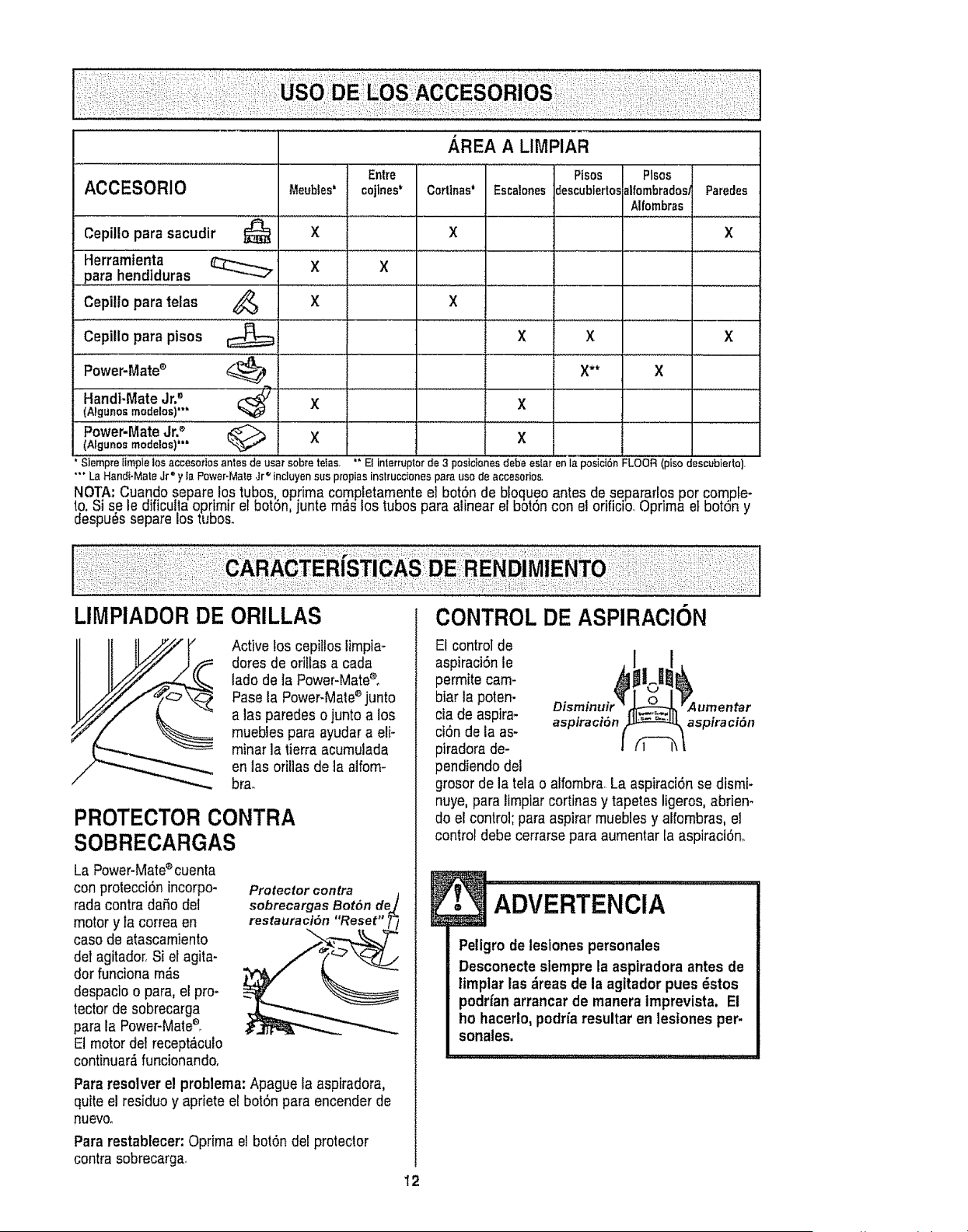
Handt-MsteJr2
(Algunosmodelos)'"
Power:Mate jr. _
(Algunos modelos)"'
Ptsos Plsos
descublertosalfombradoslParedes
Alfombras
X
X X X
X** X
Slempre[imptelos accesoflos antes de usar sobreteIas, " El interrupterde 3 postcionesdebeestarenla posici6nFLOOR (plso descubierto).
"'* LaHandi-MateJr" y _aPower-Male,Jr_incluyensus propias instruccionespara use de accesofios,
NOTA: Cuando separe los tubes, optima comp!etarnente el boto:nde bloqueo antes de s.epa_rlos per compfe-
to. Si se Is dificuila oprimir el bot6n, junte m_s los tubes para alinear el bm6n con eJoriricio_uprima eJbotdn y
despu6s separe los tubes.
LIMPIADOR DE
Active los cepiltos limpia-
dores de oritlssa cada
lade de ]a Power-Matee.
Pase la Power-Matee junto
alas paredes o juntoa los
muebies para ayudar s eli-
minar la tierra acumulada
en las oril]as de Is alfom-
brae
PROTECTOR CONTRA
SOBRECARGAS
La Power-Mate®cuenta
con protecci6n incorpo-
rada contra daSo del
motor y la correa en
case de atascamiento
del agitador. Si el agits-
dor funciona m_.s
despacloo pars, el pro-
tector de sobrecarga
para la Power-Mste°_
El motor del recept,_culo
continuar_funcionandoo
Protector contra
sobrecargas Bot6n de
restauracl6n "Reset" i
Para resolver el problema: Apague la aspiradora0
quite el residue y apriete el bot6n pars encender de
_quevoo
Para restablecer:Optima et bot6n del protector
contrs sobrecarga,
El control de
aspiraci6nle
permite cam-
biar la poten-
cia de aspira- aspiraci6n aspiraci6n
ci6n de la as-
piradors de-
pendiendo del
grosor de la tela o alfombra,La aspiraci6n se dismi-
nuye, para limpiar cortinas y tapetes ligeros, abrien-
do el control; para aspirar rnuebles y alfombras, el
control debe cerrarse para aumentar la aspiraci6n,
12
Peligro de lesiones persona]es
Desconecte slempre la aspiradora antes de
limplar las &reas de Is agitador pues _stos
podrfan arrancarde manera Imprevista, El
he hacerlo, podr_aresultar en lestones per-
sonales.
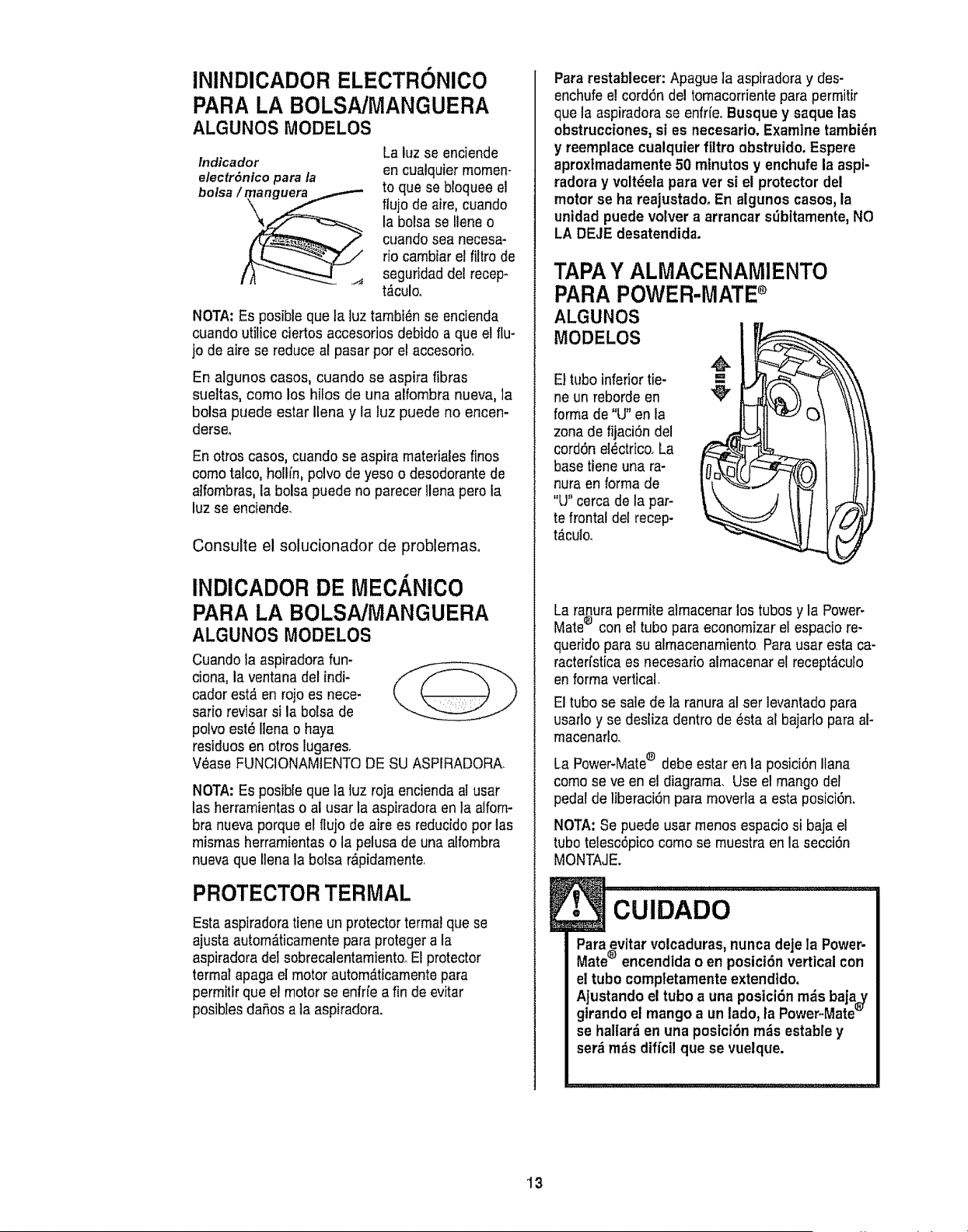
ININDICADOR ELECTRONICO
PARA LA BOLSNMANGUERA
ALGUNOS MODELOS
Indicador
electr6ntco para la
bolsa /_
!1| _'---_,- .._
La luz se enciende
en cualquier memen-
to que se bloquee el
flujo de aire, cuando
la bolsa se Ilene o
cuando sea necesa-
rio cambiar e! filtro de
seguridad del recep-
t,_culoo
NOTA: Es posible que fa ]uz tambien se eneienda
cuando utilice ciertos accesorios debido a que el flu-
jo de aire se reduce al pasar per et accesorio.
En algunos cases, cuando se aspira fibras
sueltas, come los hilos de una alfombra nueva, la
bolsa puede estar Ilena y la luz puede no encen-
derseo
En otros cases, cuando se aspira materiales fines
come talco, hollin, pelvo de yeso o desodorantede
alfombras, la bolsa puede no parecer Ilena pore la
luz se enciende.
Consulte el solucionador de problemaso
INDICADOR DE MECANICO
PARA LA BOLSNMANGUERA
ALGUNOS MODELOS
Cuando la aspiradora fun-
ciona, la ventana del indi-
coder est_ en rojo es nece-
sario revisar sila bolsa de
polvo est_ Ilena o haya
residues en otros lugares.
V_ase FUNCIONAMIENTODE SU ASPIRADORA.
NOTA: Es posibie queta luz roja encienda al usar
los herramientas o al usar la aspiradora en la alfom-
bra nueva porque el flujo de aire es reducido per los
mismas herramientas o la pelusa de una alfombra
nueva que Ilena la bolsa r&pidamente,
PROTECTOR TERMAL
Esta aspiradora tiene un protector termat que se
ajusta autom_.ticamentepara proteger a la
aspiradora del sobrecalentamiento,.El protector
termalapaga el motor autom_ticamentepara
permitir que el motor se enffie a fin de evitar
posiblesdafios a ]a aspiradora.
Para restablecer: Apague la aspiradora y des-
enchufe e! cord6n del tomacorriente para permitir
que la aspiradora se enfrfe. Busque y saque las
obstrucciones, st es necesario. Examinetambi_n
y reemplace cualquler ftitro obstruido, Espere
aproxtmadamente 50 minutes yenchufe la aspi-
radora y volt,eta para vet si el protector de!
motor se ha reajustado. En algunos cases, la
unidad puede volver a arrancar sdbitamente, NO
LA DEJE desatendida.
TAPA YALMACENAMIENTO
PARA POWER-MATE
ALGUNOS
MODELOS
El tubeinferior tie-
neun reborde en
forma de "U" en ta
zona de fijaci6n del
cord6n el_ctrico, La
base tiene una ra-
nura en forma de
"U" cerca de la par-
te frontal del recep-
t_culo.
m
La ranura permite almacenar los tubes y la Power-
®
Mate con el tube para economizar el espacio re-
querido para su almacenamiento Para usar esta ca-
racterfstica es necesar[o almacenar el recept_culo
en forma vertical.
El tubese sale de la ranura al ser levantado para
usarlo y se desEizadentro de _sta al bajarlo para al-
macenarlo_
La Power-Mate® debe estar en la posici6n liana
come se ve en el diagrama. Use el mango dei
pedal de liberaci6n para moverla a esta posici6n.
NOTA:Se puede usar menos espacio si baja el
tubetelesc6picocome se muestra en la secci6n
MONTAJE.
CUIDADO
I Para_vitar volcaduras_nunca dejela Power-
Mate encendida o en posici6n vertical con
el tube comptetamenteextendido,
Ajustando el tube a una postci6n m_s baja_
gtrando el mango a un lade, la Power-Mate_"
se haltar_ en una postct6n m_s estable y
ser_ m_s diffcil que se vuelque.
'13
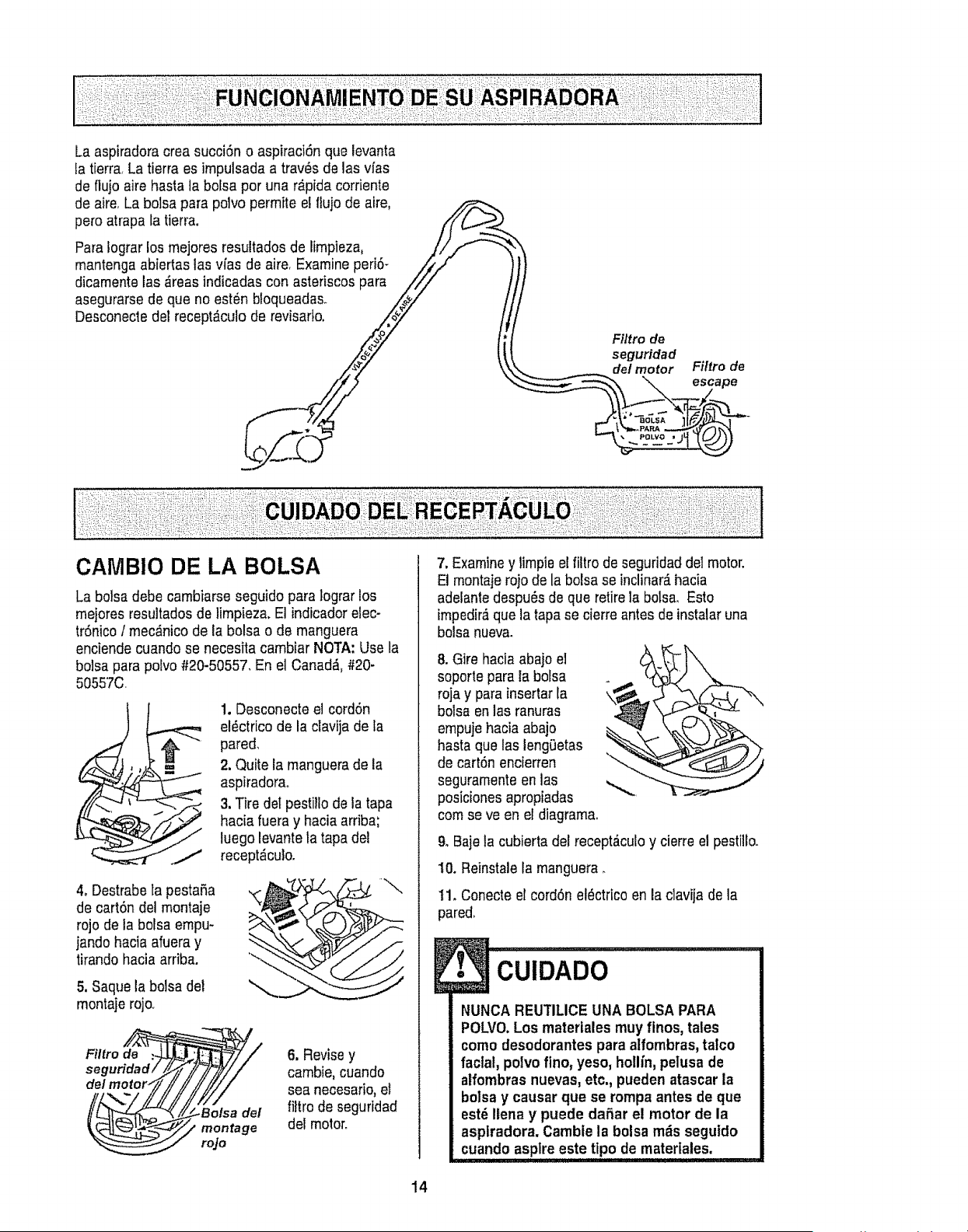
La aspiradora crea succi6n o aspiraci6n que levanta
la tierra, La tierra es impulsada a tray, s de las vfas
de flujo aire basra ]a bolsa por una r&pida corriente
de aire, La bolsa para polvo permite el llujo de aire,
pero atrapa la tierra,
Para lograr los mejores resultados de limpieza,
mantenga abiertas las v[as de aire, Examine peri6*
dicamente las _reas indicadas con asteriscos para
asegurarse de que no est_n bloqueadas.
Desconecte del recept_culo de revisarto.
F#tro de
seguridad
de/motor Filtro de
_X "_ escape
_, POLVO ,J
CAMBIO DE LA BOLSA
La bolsa debe cambiarse seguido para lograr los
mejores resultados de limpieza. El indicador elec-
trSnico/mec_nico de la bolsa o de manguera
enciende cuando se necesita cambiar NOTA: Use la
bolsa para polvo #20-50557, En el Canada, #20-
50557C
1. Desconecte el cord6n
el_ctrico de la clavija de la
pared,
2. Quite la manguera de ia
aspiradorao
3. Tire dot pestillo de la tapa
hacia fuera y hacia arriba;
luego levante la tapa del
recept_culo.
4oDestrabe la pesta5a
de cart6n del montaje
rojo de la bolsa empu-
jando hacia afuera y
tirando hacia arriba.
5. Saque la bolsa del
montaje rejo,
Filtro de >
seguridad i
del motor,
6, Revisey
cambie, cuando
sea necesario, el
filtro de seguridad
del motor.
7, Examiney limpie el filtro de seguridad del motor.
El montajerojo de la bolsa se inclinar_,hacia
adelante despu_sde que retire la bolsa, Esto
impedir,_que la tapa se cierre antes de instalaruna
bolsa nueva.
8. Gire hacia abajo el
soporte para la bolsa
roja y parainsertar la
bolsa en las ranuras
empuje hacia abajo
hasta que las leng0etas
de cart6n encierren
seguramente en las
posiciones apropiadas
corn se ve en el diagrama,
9, Baje la cubierta del recept_culo y cierre el pestilloo
10. Reinstale la manguera.
11, Conecte el cord6n el_ctrico en la clavija de la
pared,
, C"LIiD'ADO
NUNCA REUTILICE UNA BOLSA PARA
POLVO.Los materiales muy finos, tales
cornodesodorantes para alfombras, talco
facial, polvofino, yeso, ho!lin,pelusa de
alfombras nuevas, etc., pueden atascar la
bolsa y causar que se rompa antes de que
est_ Ilena y puede daSar el motor de la
aspiradora. Camble la bolsa m_s segutdo
.......cuando aspire este tipo de matedales.
14
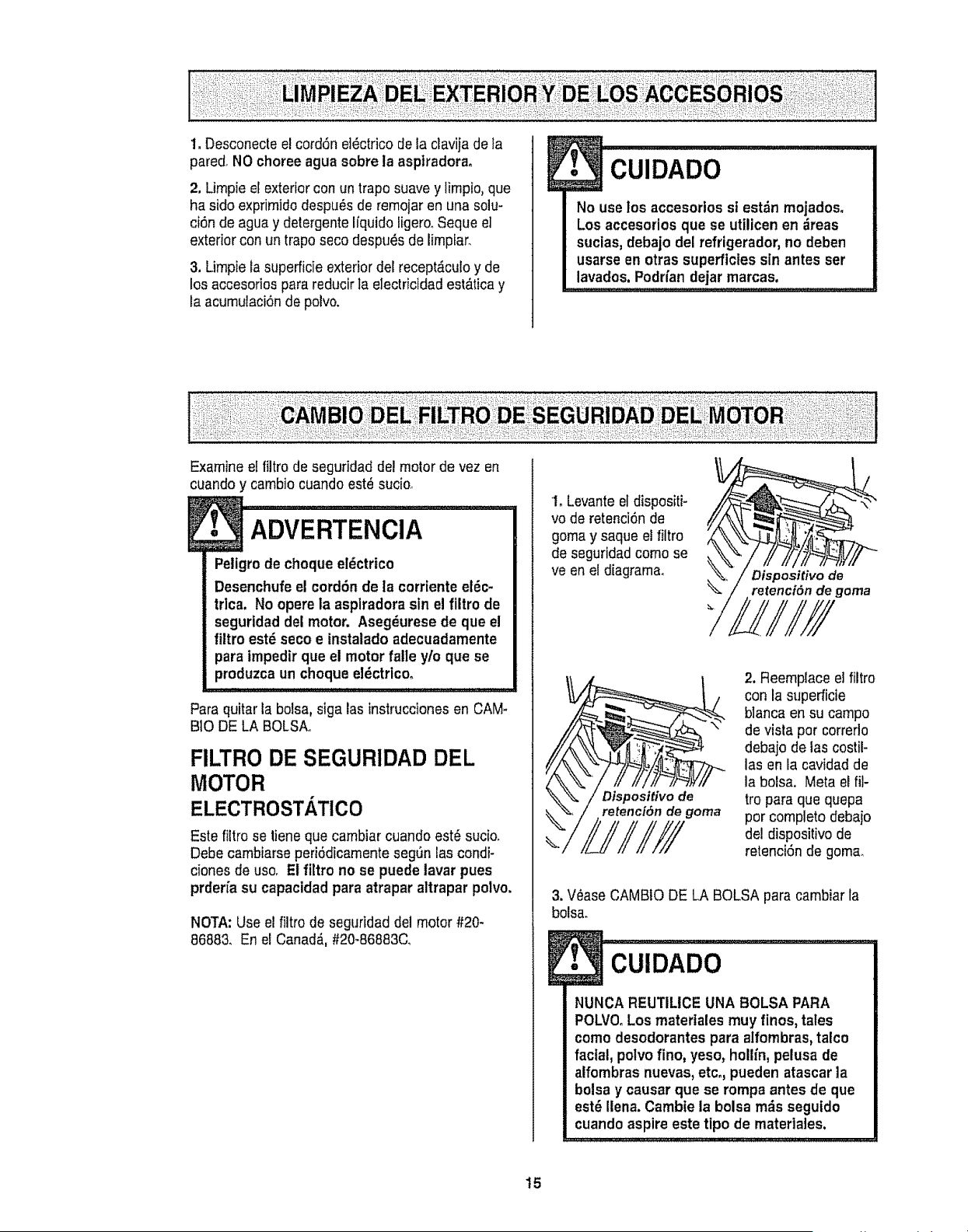
1. Desconecteel cord6n el_ctrico de la clavija de ta
pared_NO choree agua sobre la asptradora°
2. Limpie et exterior con un trapo suave y limpio, que
ha side exprimiclodespu_s de remoiar en una solu-
ci6n de agua y detergente Ifquido ligero, Seque el
exterior con un trapo seco despu_s de limpiar,
3. Limpie la superficie exterior del recept£culo y de
los accesorios para reducir la electricidad est_tica y
ta acumulaci6n de polvo,
!
No use los accesortos si estdn mojados.
Los accesoriosque se utilicen en ;ireas
sucias, debajo del refrigerador, no deben
usarse en otras superficies sin antes ser
lavados. Podrfandejar marcas.
Examine el filtro de seguridad del motor de vez en
cuando y cambio cuando est_ sucio_
!
Peligrode cheque el_ctrico
Desenchufe el cord6n de la corrtente eldc-
trlca. No opere la asplradora sin el filtro de
seguridad del motor. Asegdurese de que el
filtro est_ seco e instalado adecuadamente
para irnpedirque el motor falle y/o que se
produzca uncheque eldctrlcoo
Para quitar la bolsa, siga las instrucciones en CAM-
BIO DE LA BOLSAo
FILTRO DE SEGURIDAD DEL
MOTOR
ELECTROSTATICO
Este filtro se tiene que cambiar cuando est_ sucio,
Debe cambiarse peri6dicamente seg_n ias condi-
ciones de use, E! filtro no se puede lavar pues
prderi'a su capacidad para atrapar attrapar polvo.
NOTA: Use el filtro de seguridad del motor #20-
86883, En el Canada,,#20-86883C,
1, Levante el dispositi-
vo de retenciOnde
goma y saque el filtro
de seguridad come se
ve en el diagrama,
)/
Dispositivo de
retenci6n de goma
M,/////
Dispositivo de
retenci6n de goma
2. Reemplace el filtro
con la superficie
blanca en su campo
de visla per correrto
debajo de las costil-
las en la cavidad de
la bolsa. Meta el ill-
tro paraque quepa
per complete debajo
de! dispositivo de
retenci6n de goma,
3, V0ase CAMBtO DE LA BOLSA para cambiar la
bolsa.
!
NUNCA REUTILICE UNA BOLSA PARA
POLVO.Los matertales muy fines, tales
come desodorantes para alfombras,talco
facial, polvo fine, yeso, hollin, pelusa de
alfombras nuevas,etco,pueden atascar ta
bolsa y causar que se rompa antes de que
est6 Ilena. Cambie la bolsa m_s seguido
cuando aspire este tipo de materiales.
15
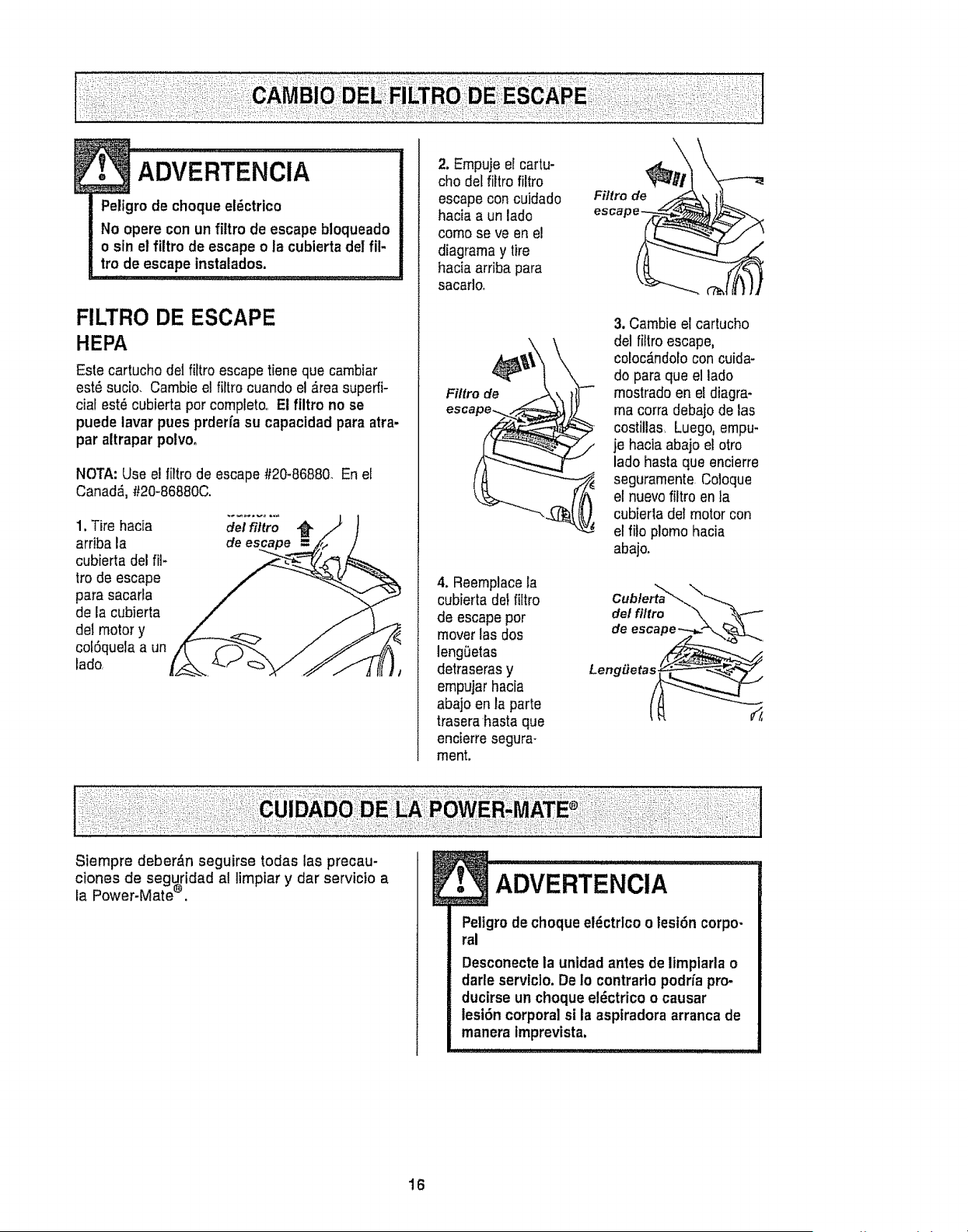
Peligrodechoque el_ctrico
No opere con un filtro de escape btoqueado
o sin el filtro de escape o la cubierta del ill-
tro de escape tnstalados.
FILTRO DE ESCAPE
HEPA
Este cartucho det fittro escape tiene que cambiar
est_ sucio. Cambie el filtro cuando el _rea superfi-
cial est_ cubierta porcompleto,, El flltro no se
puede lavar pues prderfa su capacidad para atra-
par altrapar polvoo
NOTA: Use e! liltro de escape #20-86880. En el
Canada.,#20-86880C.
1, Tire hacia
arriba la
cubierta del fil-
tro de escape
para sacarla
de la cubierta
del motor y
colSquela a un
lado.
del filtro
de
2. Empuje el cartu-
cho def filtro filtro
escape con cuidado
hacia a un lado
como se ve en el
diagrama y tire
hacia arriba para
sacarlo.
Filtro de
4. Reernplacela
cubierta del filtro
de escapeper
mover las dos
lengeetas
detraseras y
empujar hacia
abajo en la parte
trasera basra que
encierre segura-
ment.
Filtro de
3. Cambie el cartucho
del filiro escape,
coloc_ndolo con cuida-
do para que el lado
mostrado en el diagra-
ma corra debajo de las
costillas. Luego, empu-
je hacia abajo el otro
lado hasta que encierre
seguramente.Coloque
el nuevo filtro en ta
cubierta det motor con
el file plomo hacia
abajo.
Cublerta_,
del fillro
de
Siempre deber_n seguirse todas las precau-
ciones de seguridad al limpiar y dar servicio a
la Power-Mate ®. • ADVERTENCIA I
Peligro de choque el_ctrlco olesf6n corpo-
ral
Desconectela unidad antes de limplarta o
darle serviclo. De Io contrarto podrfa pro-
ducirse un choque el_ctrico o causar
lesi6n corporal si la aspfradora arranca de
manera imprevista.
16
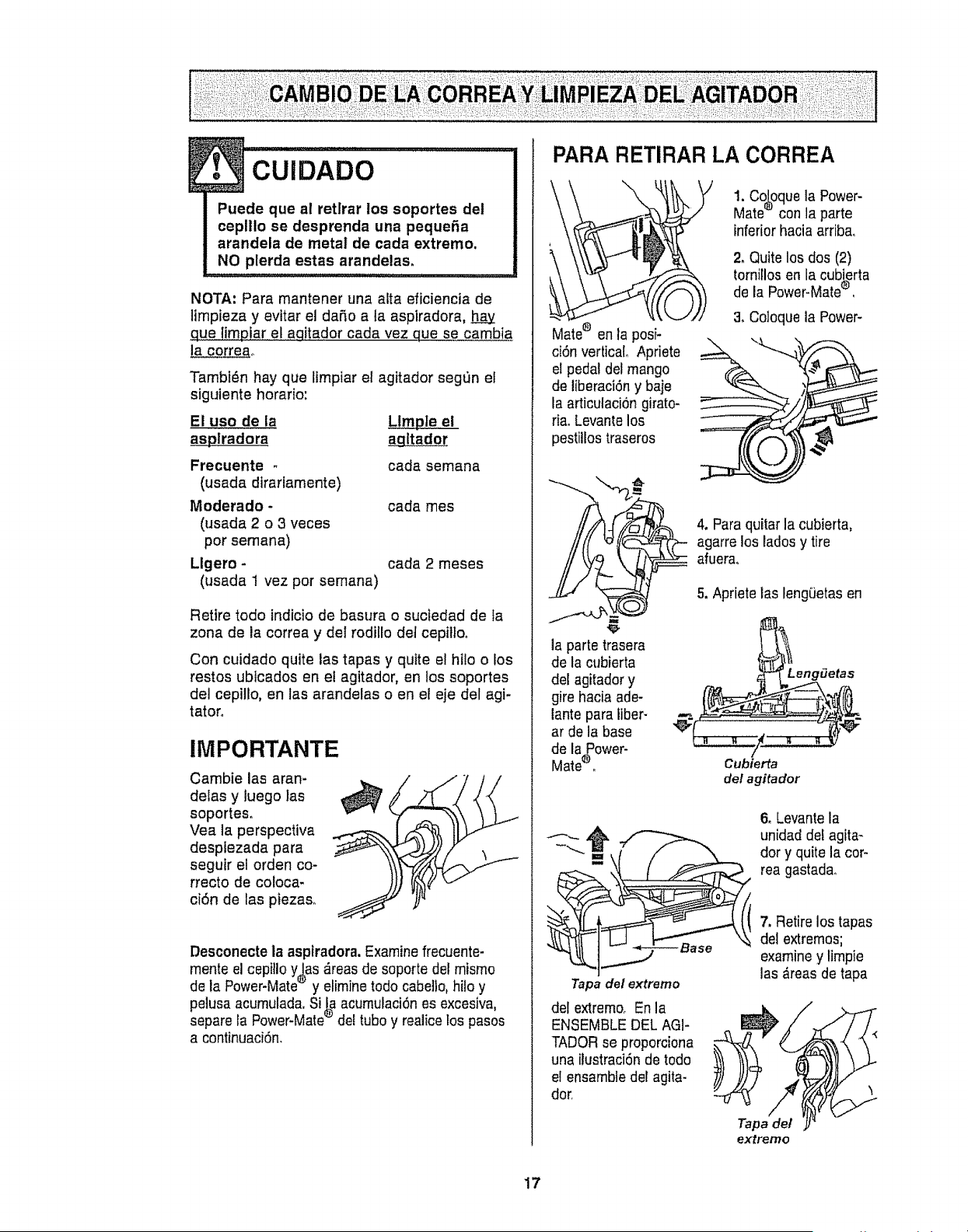
!. cu,DAoo............................................I
Puede que al retlrar los soportes del
ceplllo se desprenda una peque_a
arandela de metal de cada extremo.
NO plerda estas arandelas,
NOTA; Para mantener una alia eficiencia de
limpieza y evttar el daSo a ta aspiradora, h_.a.y
que limpiar el aqitador cada vez que se cambia
la correao
Tambl_n hay que Itmpiar el agitador segt_n el
siguiente horatio:
El uso de la Llmple el
as__splradora agltador
Frecuente - cada semana
(usada dtrarfamente)
Moderado - cada mes
(usada 2 o 3 veces
por semana)
Llgero - cada 2 meses
(usada 1 vez por semana)
Retire todo indicio de basura o suctedad de la
zona de la correa y del rodillo det cepilloo
Con cuidado quite las tapas y quite el htlo o los
restos ubtcados en el agitador, en !os soportes
del cepillo, en las arandelas o en el eje del agi-
tator.
IMPORTANTE
Cambie las aran-
delas y luego las
soportes.
Vea la perspectiva
desplezada para
seguir el orden co-
rrecto de coloca-
ci6n de las piezaso
Desconecte ia aspiradora.Examine frecuente-
mente el cepillo y_as _reas de soporte del mismo
de la Power-Mate_' y elimine todo cabello, hilo y
pelusa acumulada.Si J_ acumulaci6nes excesiva,
separe la Power-Mate_"del tubo y realice los pasos
a continuaci6n.
PARA RETIRAR LA CORREA
Male® en la posi-
ci6n vertical° Apriete
el pedal del mango
de liberaci6n y baje
la articulaci6n girato-
ria. Levanle los
pestiUostraseros
1. Co_oquela Power-
Mate_ con la parte
inferior hacia arribao
2, Quite los dos (2)
tornillosen la cubierta
de la Power-Mate®,
& Coloque la Power-
la parle trasera
de la cubierta
del agitador y
gire hacia ade-
lante para liber-
ar de la base
de la_ower-
Mate'_o
Tapa del extremo
del extremo° En la
ENSEMBLE DEL AGI-
TADOR se proporciena
una ilustraci6n de todo
el ensambledel agita-
dor,
4, Para quitar la cubierta,
agarre los lados y tire
afuera..
5, Apriete las lengt3etasen
LengiJetas
Cubierta
del agita dor
6. Levantela
unidad del agita-
dory quite la cor-
rea gastadao
7, Retire los tapas
del extremos;
examiney limpie
las ,_reas de tapa
Tapade/
extremo
17
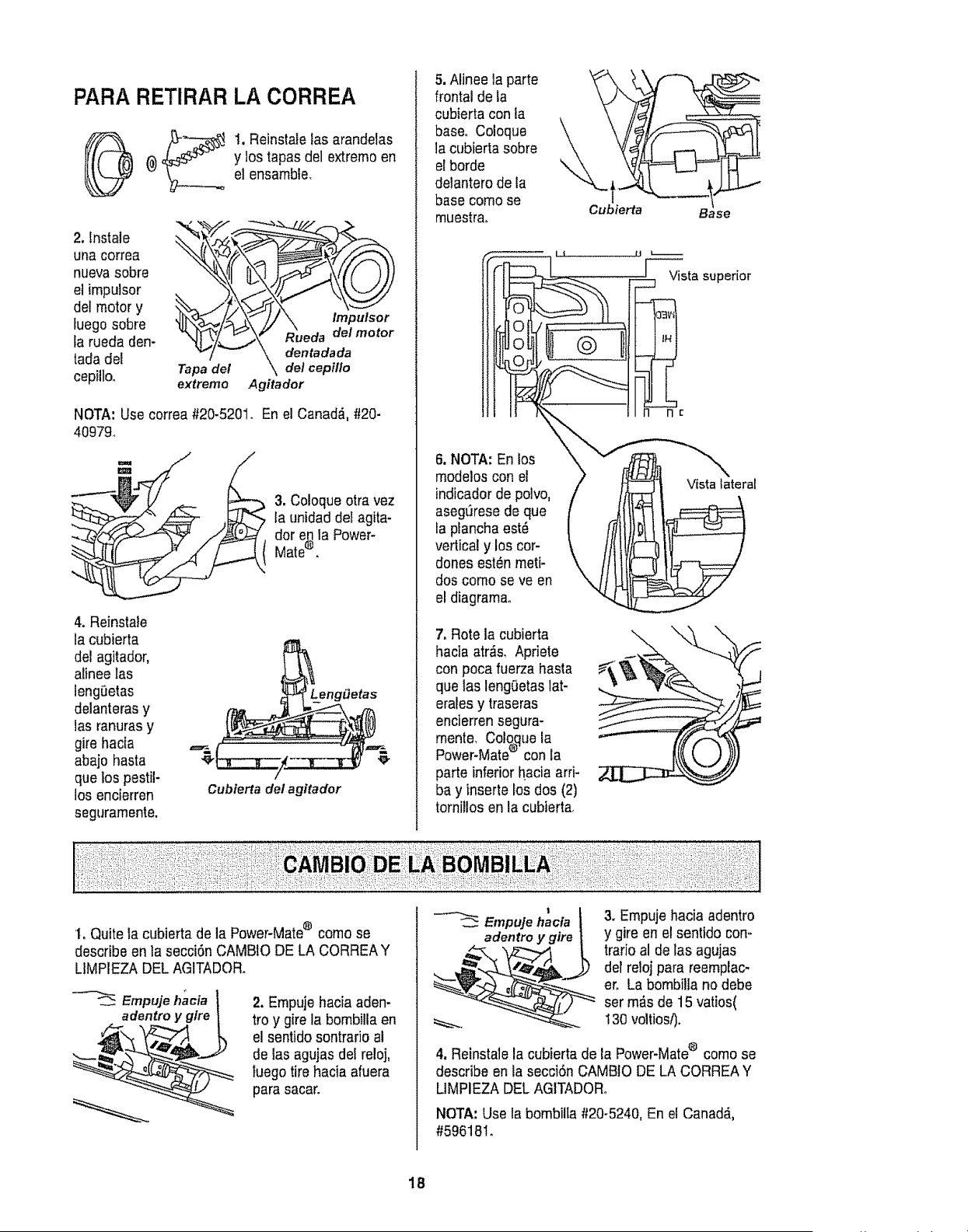
PARA RETIRAR LA CORREA
1, Reinstale las arandelas
y los tapas del extrerno en
el ensamble.
2. lnstale
una correa
nueva sobre
el irnpulsor
del motor y
fuego sobre
la rueda den-
tada de!
cepilloo
_-/ _ \ dentadada
Tapa del \de/cept/Io
extrerno Agitador
NOTA: Use correa #20-5201. En el Canadfi, #20-
40979.
3. Coloque otra vez
la unidad det agita-
dot en la Power-
Mate® .
4. Reinstale
la cubierta
deeagitador,
alinee las
leng_etas
delanteras y
las ranuras y
gire hacia
abajo hasta
que los pestil-
los encierren
seguramente.
Lenggetas
Cubierta del agitador
5. Alinee la parte
frontal de la
cubierta con la
base, Coloque
la cubierta sobre
elhorde
delantero de la
base come se
rnuestrao Cubierta Base
Vistasuperior
6. NOTA: En los
rnodelos con el
indicadorde polvo,
aseg_rese de que
la plancha est_
vertical y los cor-
dones est_n metF
dos corno se ve en
el diagrarnao
7. Rote la cubierta
hacia atr_s. Apriete
con poca fuerza hasta
que las lengOetaslat-
erales y traseras
encierren segura-
rnente. Cologue la
Power-Mate® con la
parte inferiorhacia arrF
bay inserte los dos (2)
tornillos en la cubierta,
Vista lateral
1oQuite la cubierta de la Power-Mate® come se
describe en la seccifn CAMBIO DE LA CORREAY
LIMPIEZA DEL AGITADOR.
Empuje hacia
adentro y glre
2. Ernpuje hacia aden-
tro y gire la bombiila en
el sentido sontrario al
de las agujas del reloj,
luego tire hacia afuera
para sacar.
1
Empuje hacia
adentro y gire
3. Empuje hacia adentro
y gire en el sentido con-
trario al de las agujas
deFreloi para reemplac-
ere La bombilla no debe
set m_s de 15 varies(
130voltios/).
4. Reinstale la cubierta de la Power-Mate® come se
describe en la secci6n CAMBtO DE LA CORREA Y
UMPIEZA DELAGITADORo
NOTA: Use la bombilta #20-5240, En el Canadd,
#59618I.
18
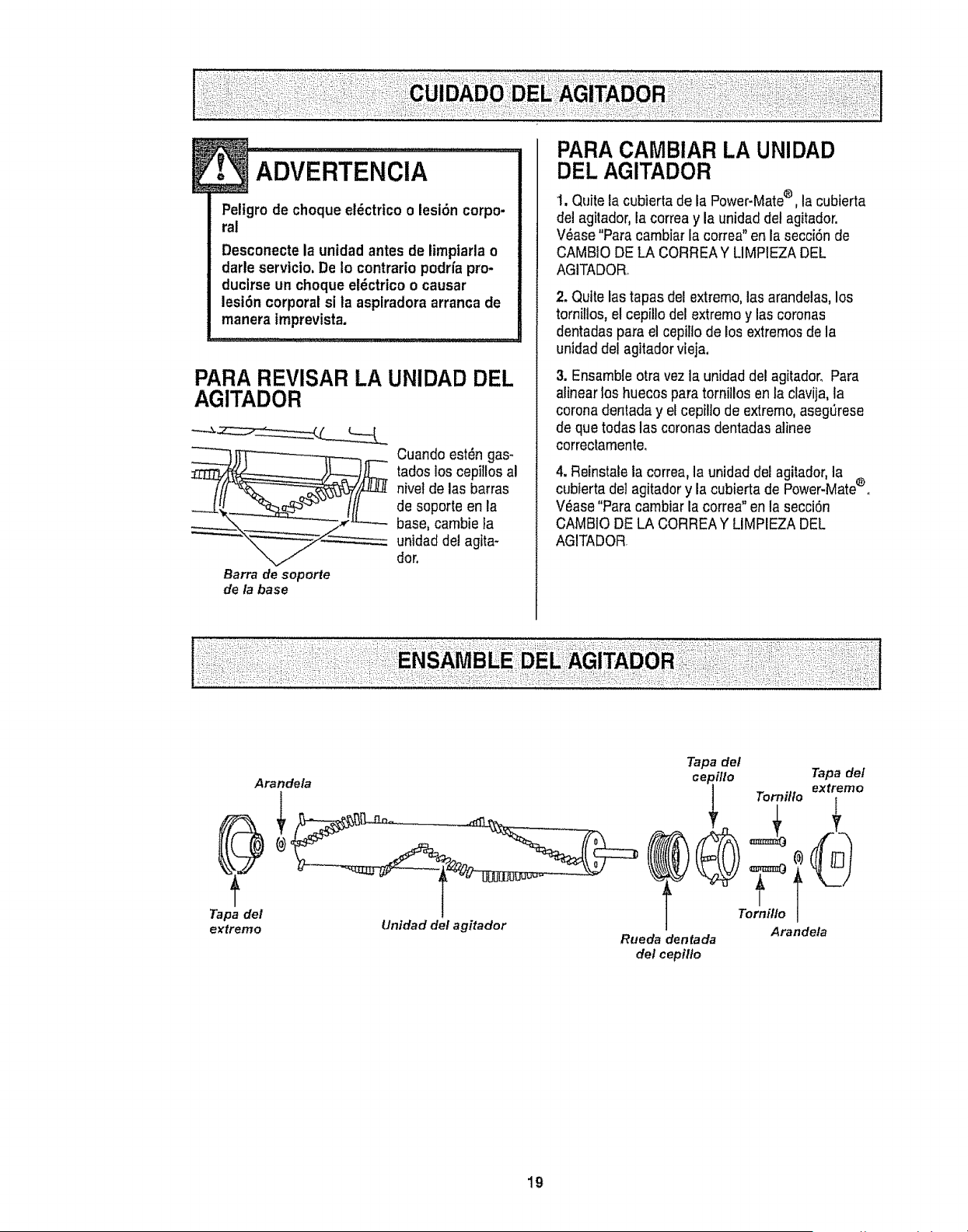
i._ADVERTENCiA .....................
Peligro de choque el_ctrico olesiSn corpo-
ral
Desconecte la unidad antes de timptarla o
darle servlcio. De Io contrario podria pro-
ducirse un choque el_ctrico o causar
lesi6n corporal si la asplradora arranca de
manera imprevista.
PARA REVISAR LA UNIDAD DEL
AGITADOR
__ Cuando est_n gas-
tados los cepillos al
nivetde las barras
de soporte en la
._. ,," base, cambie la
unidad deJagita-
dot.
Barra de soporte
de/a base
PARA CAMBIAR LA UNIDAD
DEL AGITADOR
1, Quite la cubierta de la Power-Mate® , la cubierta
del agitador, la correa y la unidad del agitador.
V_ase "Para cambiar la correa" en la secci6n de
CAMBtO DE LA CORREAY LIMPIEZA DEL
AGITADORo
2. Quite las tapas del extremo,las arandelas,los
tornillos, el cepillo del extreme y las coronas
dentadas para el cepilIo de los extremos de la
unidad del agitador vieja.
3. Ensamble otra vez la unidad del agitador_ Para
alinear los huecos para tornillos en la clavija, la
corona dentada y el cepilio de extremo,aseg_rese
de que todas las coronas dentadas alinee
correctamente.
4. Reinstale la correa, la unidad del agitador,la ®
cubIerta de] agitador y la cubierta de Power-Mate o
V6ase "Para carnbiar la correa" en la secci6n
CAMBIO DE LA CORREA Y LIMPIEZA DEL
AGITADOR
Tapa del
extremo
Arande/a
Unldad del agitador
Tapa def
cepillo Teaxfaedmefo
Tornillo i
Arande!a
Rueda dentada
del cepil/o
19
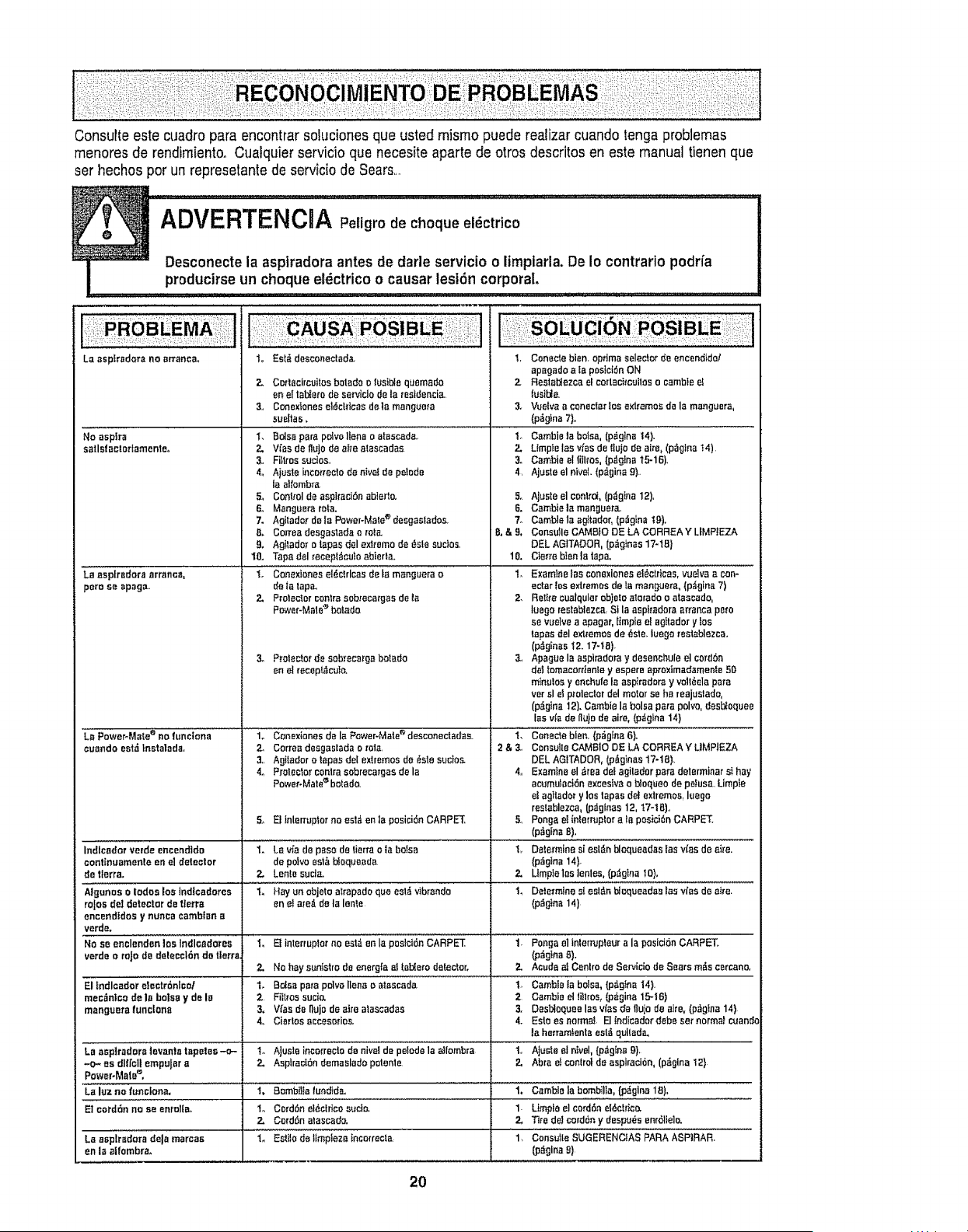
Consulteestecuadroparaencontrarsolucionesqueustedmismopuederealizarcuandotongaproblemas
menoresderendimiento.Cualquierservicioquenecesiteapartedearrasdescfitosenestemanualtienenque
sethechosperunrepresetantedeserviciodeSears....
ql .......... i ............ T T TTT TT L L L L
ADVERTENCHA decheque el ctrico
Desconecte la asptradora antes de darle servicio o limpiarla. De Io contrarlo podrfa
producirse un cheque el_ctrico o causer lest6n corporal.
La asptradora no erranca_
No asplra
satlsfactatfamente.
"La aspir_0ra arrancal
pete se apaga..
1o Eat& deeconectada.
2. C{)rtacircuitos bolado o f_sibie qL_emado
en el talYerode serviclode la residencIa..
3. Conexlonesel_clrlcas de lamangue_a
sueltas,
2. Vies de flujode ei_eataecadas
3, Filtres suctos,
4. Ajusteincot._eclode nive_de pelode
laaltombra
5., Conbclde aspffaci6n oh]erie.
6., Manguera rata.
7. Agitation"de Ia Power-Matee desgaslados
B. Correa desgastada c role.
9, Agilador o tapes del extreme de _ste suctos_
10. Tapa dal fecepl_coto abierlao
1_ Conexiones el_ctrlcas deI_manguera e
deta lapa.,
2, Prolector centre sobrecargasde ta
Pmver-Ma!o'_botado.
3_ Proleclor de sob_ecargabotado
en el recepl._cuIo.
'La P0wePMale e no funcfona ........................................i"o Conexionesde la Power-Mate desconectadas.
cuando est_ tnstatada, 2, Corraa desgastada o role,
3, Agilador o fapas del extremes de _sle sucios-
4o Prolectcr conlra sebrecargasde la
Power-Male_bolado.
5_ El tnlenuptorno eel& en la posici(_nCARPET,
i_l_,,m_;W,d_e,_e.dldo 1oLa_a depasodatio.ao_abaiza
contlnuamente an el detector de polvo°sis b_equeada
detlerra. 2. Lentosucre.
Aigu"OS 0iodos los ]ndicadores ......."['""Hay'on obieto alrapado que eet_ vibrando
rajas del detector de llerra en el are_ de ta lenle
encendldos y nunca cambfan a
verde.
verde orojode deleeelSn de tlerra
2.
El fndlcador electrdnlco/ 1. Balsa pare pDlvollena o alascada
mec_intcode la balsa yde IB 2 FiIl_ossucio.
manguera functona 3, V_as de Itujode aire alas_adas
4, Giartos accesodos,
Le a_p_radora tevanla tapetes-o-i to AJus!e ia aiiombra
-o-_ es d]lfcB empular a 2. Asplrad6n demaslado polenle
power-Malee,
La luz no funclona, 1, Bombt]ia lundida.
El cordSn no se enrelta- 1. CordSn el_ctrtce s_do.
2. Cord6n alascado.
La asptradora dole mercas 1. EstJlode Itmpleza incerrecta
en la alfombra.
I, Conecle bran. optima selector de encend_da!
apagadoa ta pos}otSnON
2 Restabtezcael cedacimui!oso eambte el
lusil:i_
3. Vuelva a coneclm"los exlremos de la manguera,
(p_glna 7).
i Cam ie abol,al(p gi"ai41...................
2. Umple lasvlasde I|ujede aire,(p_glna14)
3_ Gamble ellillros,(p_g!ea 15-1B).
4, Ajuste el nivel. (p_gina 9).
5. Ajuste el central,(p_g_na12),
6. Gamblela manguera.,
7. Camblela ag}tador, (p_gina It)),
B,&9, CensuIle CAMBtO DE LA CORREAY UMPIEZA
eEL AGITAC'OR,(p_gJnas17-1B)
10, Cierre bIenla tapa,
1. Examtnelos conexionea el@ctrleas,vuelvaacon-
actorlos extremesdela manguera, (p_gina 7)
2. Rellracualqular eb)eloaterado oatescado,
luego reetabtazca St la aspiradoraatlanta pore
se vuelve aapagar, fimpie e! agttadory los
tap.',s del extremesde _ste. iuego reatablezca,
(p_ginasI2.17-t8).
3., Apague laaspiradora ydesenchule el cordSn
dellomacorrtenle yespere aprcximadamenle50
mlnutos y enchufe ta asptraderayvoll_ela pare
ver sl el proleclcr del motorse ha reajuslado,
(p_gina12). Gamble la balsa pare polvo, des_aquee
lea via de fl_je de aire, (p_gina 14}
'L Cenecle blen. (p_glna 6).
2& 3, CcneulleGAMBle DE LA CORREA YL1MPIEZA
DEL AGITADOR, (p_ginas !7-18),.
4. Examlneel _rea dot agilador pare determinar sI hay
ecumulaci6nexcesfva obloqueo de petusa, Limpte
ag_tadorylos tapes def extremes, luego
restablezca,(p,iginas12, 17-t B).,
5, Pongaet interrupter ala pasic_SnGARPET_
(pi_glnaB).
t,, Determinesi asian bloqueadas las v(as de aire.
(pi_glna14}.
2. Llmp]elos lenles, (p_gina 10),
1, Dalermine sl asian bi_queadas los v_'asde at_'e.
(p_g}na 14)
t. Pongaeltnlerrupieur ala posicl6nCARPET.
(p_gInaB).
No hay"suntstro de energfa el tablero detector. Z. Acuda aI Cenlro de Servicio de Sears m_s cercane,
t, Gamblela balsa,[p_,gtna14}.
2Cambie el tBlros, (p_gina 15-16)
3, Desbtoqueelab vies de flulode Bite,(p_gina 14)
4.. Esto es normal.Eltndicadar debe set normalcuando
la hmramlentaest_ qultada,
1_, Ajuste el ntvel, (p,tg_na91,
2. Abra el conlrot de aspiraci6n, (p_glna12}
I, Cambiela bombilla, (p_glna 18)L
I. Umpta el cord6nel_iclrica
2. Tire del cord6n y despu_e enr611ele.
(p_gina 9)
2O

For repair of major brand appliances in your own home ...
no matter who made it, no matter who sold it!
!
1-800-4-MY-HOME ® Anytime, day or night
(1-800-469-4663) (US.A. and Canada) .... :
www_sears.cawww.sears.com
For repair of carry-in products like vacuums, lawn equipment, and !
electronics, call for the nearest Sears Parts and Repair Center.
1-800-488-1222 Anytime, day or night (U S A only)
www.sears.com
For the replacement parts, accessories and owner's manuals
that you need to do-it-yourself, call Sears PartsDirectS_!
1-800-366-PART 6 a.m - 11 pm, 7 days a week
• 1
(t-800-366-7278) (U.S.A. only)
i
www.sears.com/partsdirect
To purchase or inquire about a Sears Service Agreement
or Sears Maintenance Agreement:
1-800-827-6655 (U,S,A,) 1-800-361-6665 (Canada)
7 a.m,- 5 p,,m,,,CST, Mon..- Sat 9 a.m.- 8 p.m. EST, M - F, 4 p.m, Sat.
Para pedir servicio de reparaci6n a
domicilio, y para ordenar piezas:
1-888-SU,.HOGAR s_
(1-888-784-6427)
Au Canada pour service en frangais:
1-800-LE-FOYER Mc
(1-800-533-6937)
www,sears,ca
I 1
....!_!:: :!,::::!ili.::i:_::,}:i::_:i_:::_::::_
::.:.:.:.i:.:.!,!::]:!.:..:],.:::HomeCentral
© Seam,Roebuckand Co,
® RegisteredTrademarktTMTrademarkIsMService Mark of Sears, Roebuckand Coo
® Marca Regtstrada /TM MarcadeF_.brica/sMMarca de Servlciode Sears, Roebuckand Co
McMarquede commerce/MDMarqued_pos_ede Sears, Roebuckand Co
21

Sears, Roebuck and Co., Hoffman Estates, II 60179 EUA
Pieza N-°,C01ZBAK40UOIZI-8175060
Impreso en EUA