DP08CL
DP08CS

-01-
-02-
-03-
-04-
-05-
-06-
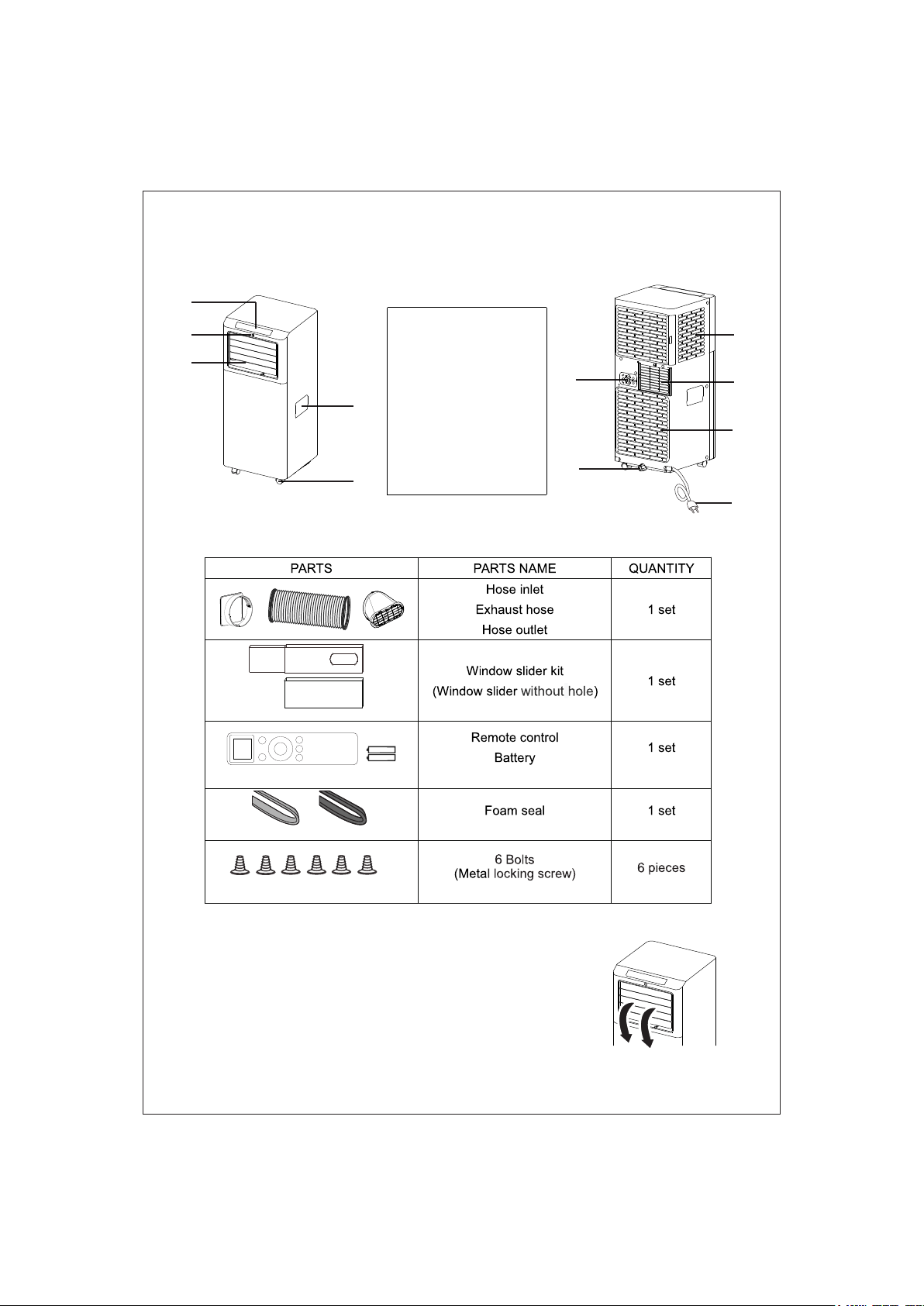
DESCRIPTION
ACCESSORIES
NOTE: All the illustrations in this manual are for explanatory purposes only.
Your appliance may be slightly different.
Be sure all accessories are removed from the packing before use.
Caution: The unit MUST be open deflector before using!
1. Control panel
2. Remote control
receiver
3. Deflector
4. Handle (both sides)
5. Castors
6. Intake grille
7. Air outlet grille
8. Intake grille
9. Plug fixer
10. Condenser drain
11. Power cable
1
2
3
4
5
6
7
9
8
10
11
-07-
INSTALLATION INSTRUCTIONS
EXHAUSTING HOT AIR
In the Cool Mode the appliance must be placed
close to a window or opening so that the warm
exhaust air can be ducted outside.
First position unit on a flat floor and make sure
there’s a minimum of 18” (45cm) clearance
around the unit,and is within the vicinity of a
single circuit outlet power source.
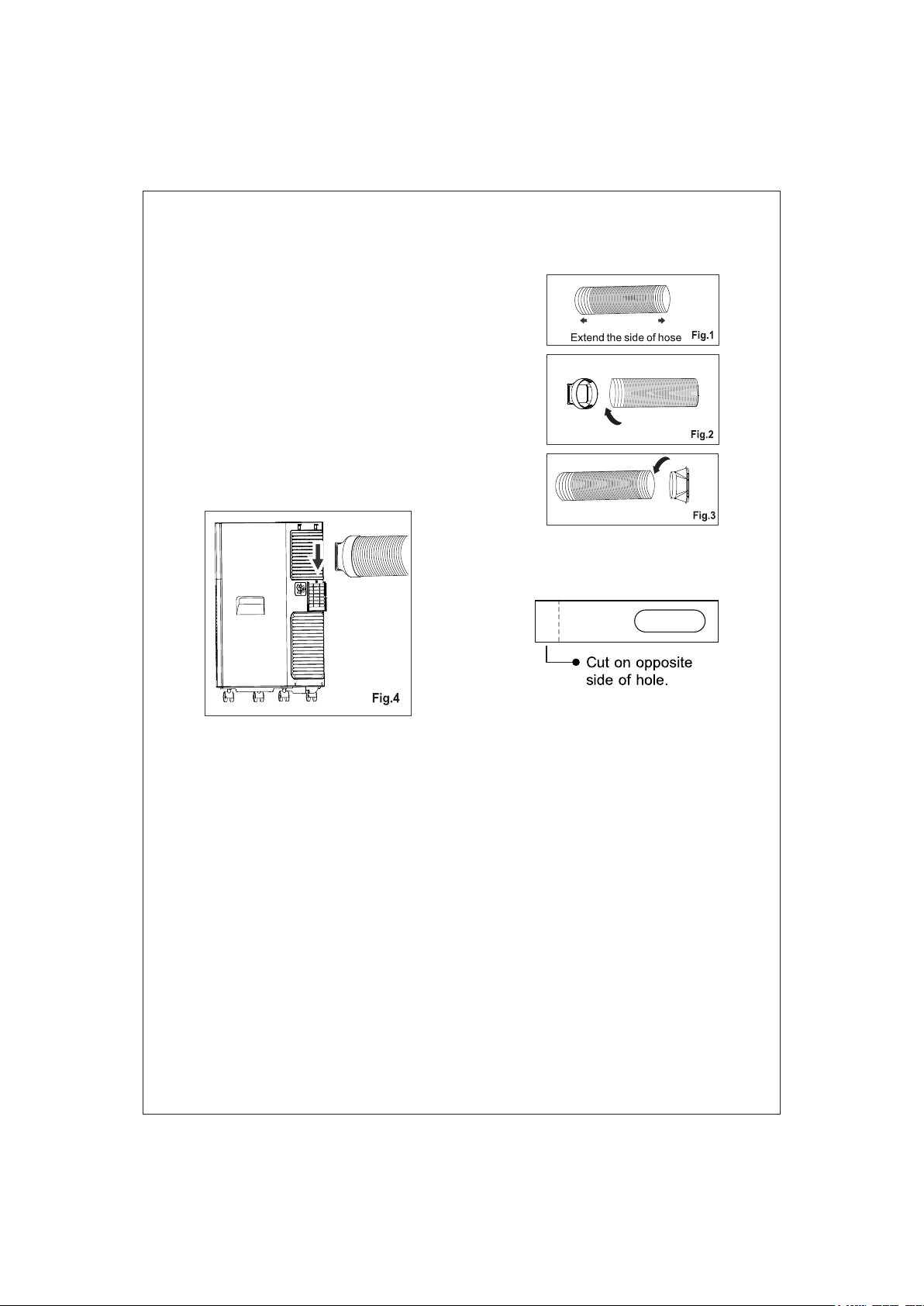
1. Extend either side of the hose (Fig.1) and
screw the hose inlet (Fig.2).
2. Extend the other side of the hose and screw
it to the hose outlet (Fig.3).
3. Install the hose inlet into the unit (Fig.4).
4. Affix the hose outlet into the window slider kit
and seal. (Fig.5 &6).
Your window slider kit has been designed to fit most standard vertical and horizontal
window applications; however, it may be necessary for you to modify some aspects
of the installation procedures for certain types of windows. The window slider kit can
be fastened with screws.
NOTE: If the window opening is less than the minimum length of the window slider
kit, cut the end without the hold in it short enough to fit in the window opening. Never
cut out the hole in window slider kit.
Slide into
-08-
INSTALLATION INSTRUCTIONS
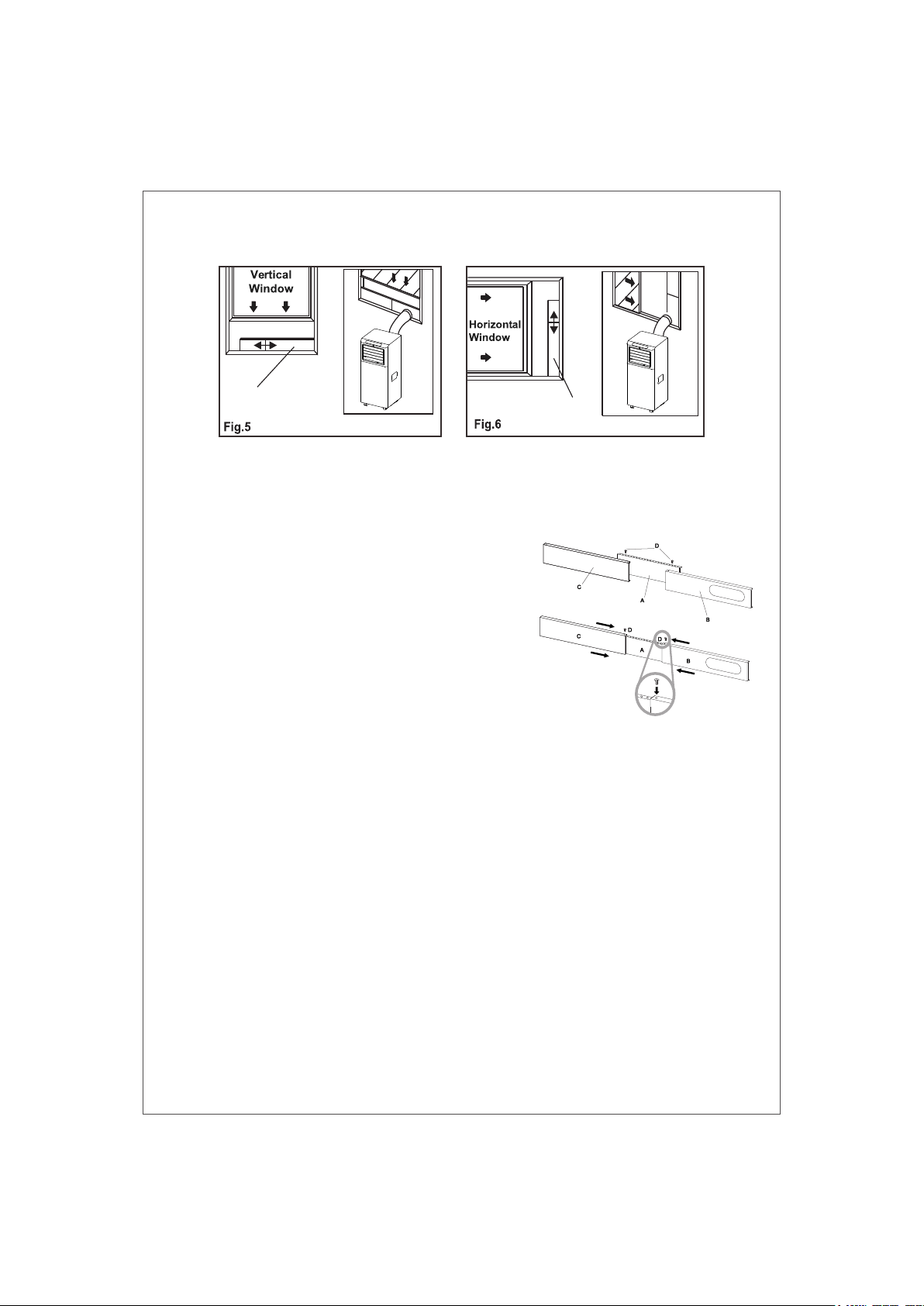
WINDOW SLIDER KIT INSTALLATION
1:Parts:
A) Panel
B) Panel with one hole
C) Panel without hole (maybe not supplied)
D) Screw to lock window kit in place
2: Assembly:
Slide Panel B and C into Panel A and size
to window width. Windows sizes vary. When
sizing the window width, be sure that the window
kit assembly is free from gaps from gaps and/or
air pockets when taking measurements.
3.Lock the screw into the holes that correspond
With the width that your window requires to ensure
that there are no gaps or air pockets in the window
kit assembly after installation.
Window slider
Window slider
-09-
INSTALLATION INSTRUCTIONS
LOCATION
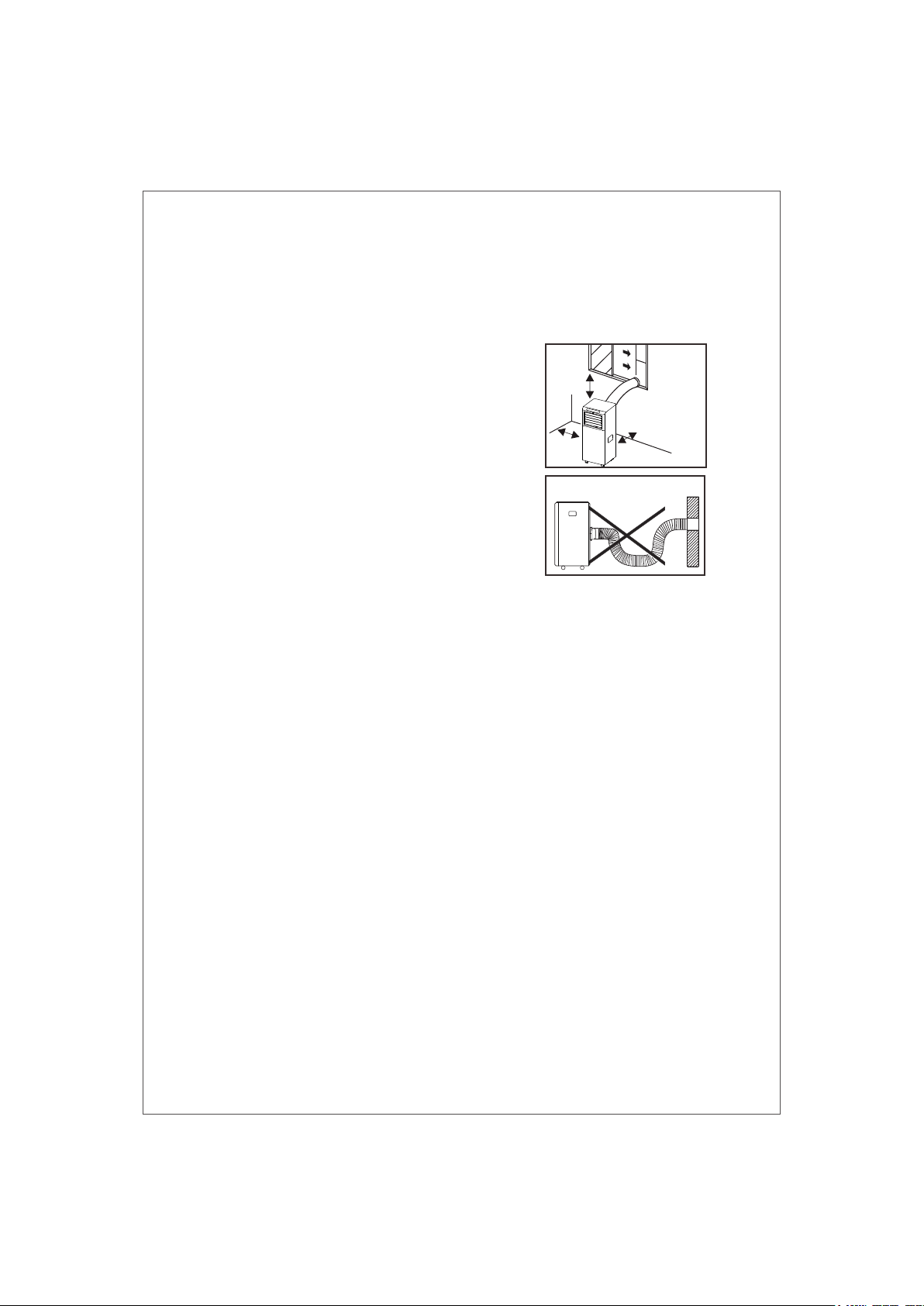
● The unit should be placed on a firm foundation
to minimize noise and vibration. For safe and
secure positioning. place the unit on a smooth,
level floor strong enough to support the unit.
● The unit has casters to aid placement, but it
should only be rolled on smooth, flat surfaces.
Use caution when rolling on carpeted surfaces.
Use caution and Protect floors when rolling over
wood floors. Do not attempt to roll the unit over
objects.
● The unit must be placed within reach of a
properly rated grounded socket.
● Never place any obstacles around the air inlet
or outlet of the unit.
● Allow at least 18” (45cm) of around and above
space away from the wall for efficient working.
● The hose can be extended, but it is the best to
keep the length to minimum required. Also make
sure that the hose does not have any sharp bends
or sags.
45cm
45cm
45cm
-10-
DESCRIPTION OF THE DISPLAY SCREEN
TURNING THE APPLIANCE ON
Plug into the mains socket, then the appliance is standby.
Press the button to make the appliance turn on. The
last function active when it was turned off will appear.
√ Never turn the air conditioner off by unplugging from
the mains. Always press the button , then wait for a few
minutes before unplugging. This allows the appliance to
perform a cycle of checks to verify operation.
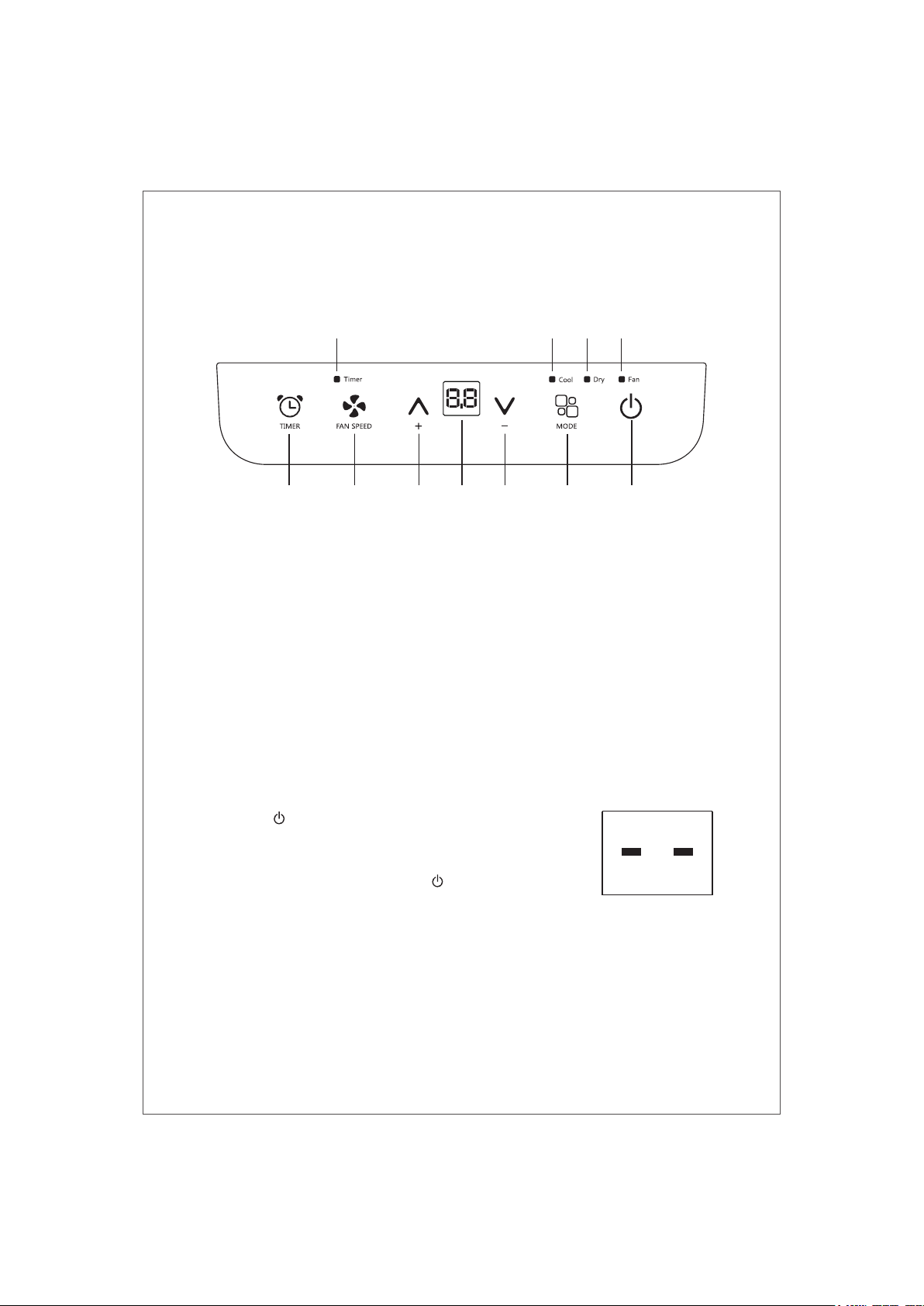
The control panel is on the top of the appliance, enables you to manage part
functions without remote controller, but to fully exploit its potential, you must use
the remote controller.
1 2 3 4 5 6
7
A B CD
1.Timer button
2.Fan button
3.Increase button
4.Display screen
5.Decrease button
6.Mode button
7.ON/OFF button
A.Cool symbol
B.Dehumidify symbol
C.Fan symbol
D.Timer symbol
-11-
DESCRIPTION OF THE DISPLAY SCREEN
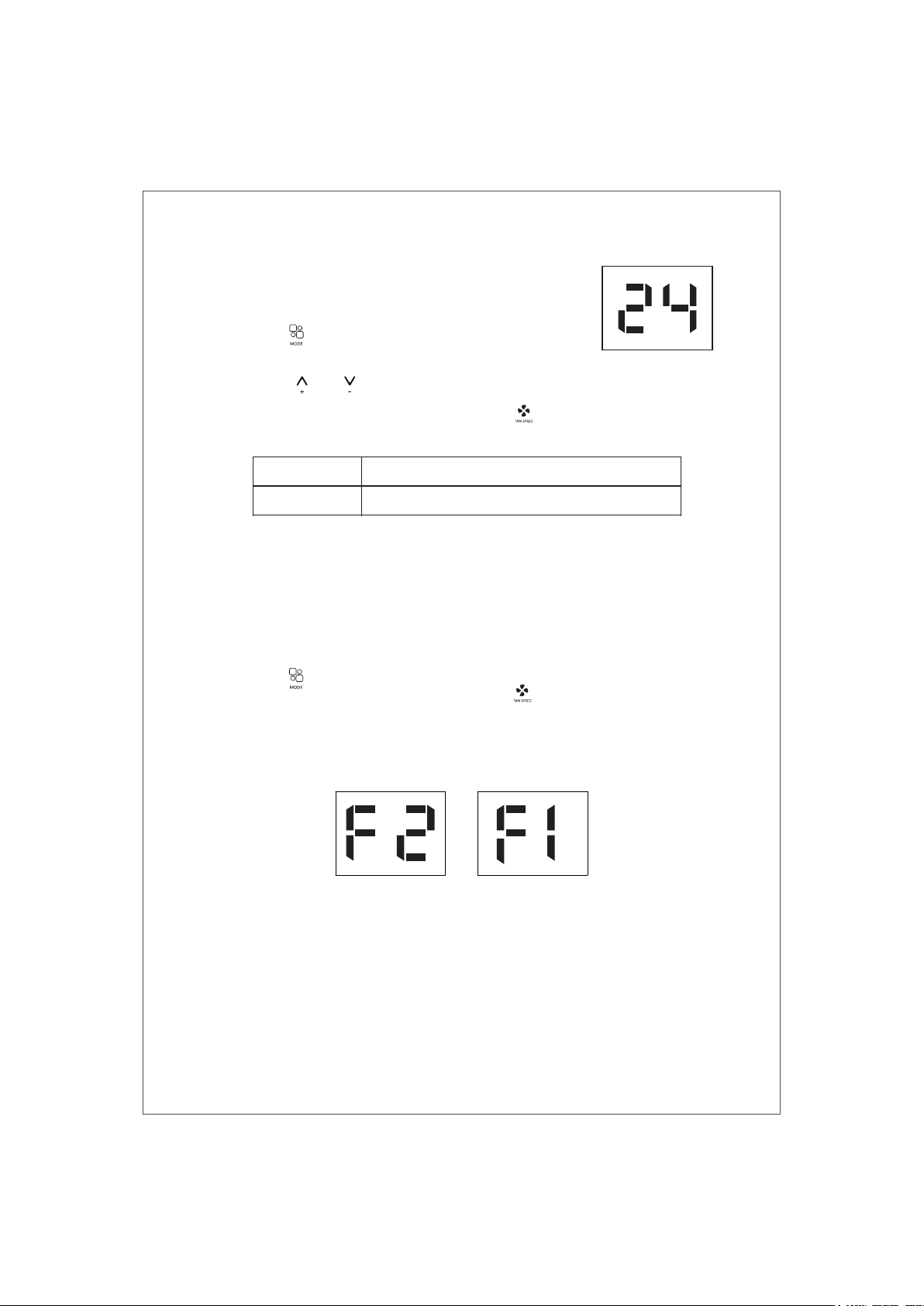
The most suitable temperature for the room during the summer varies from 24℃
to 27℃(75 to 81). You are recommended, however, not to set a
temperature much below the outdoor temperature. This will cause unnecessary
power consumption.
COOL mode
Ideal for hot muggy weather when you need to cooling and
dehumidify the room.
To set this mode correctly:
● Press the “ ” button a number of times until the “Cool”
symbol light appears.
● Select the target temperature18℃-32℃(64°F-90°F) by
pressing the “ ” / “ ” button until the corresponding
value is displayed.
● Select the required fan speed by pressing the “ ” button. Different fan speed
have different function.
F2 High
F1 Low
To achieved the temperature as fast as possible.
Run of the low noise.
FAN mode
When using the appliance in this mode, the air hose does not need to be attached.
To set this mode correctly:
● Press the “ ” button a number of times until the “ Fan ” symbol appears.
● Select the required fan speed by pressing the “ ” button.
Two speeds are available: High/Low
● If appear “ F2 ” symbol standard for high speed fan, and “ F1 ” stand for low
speed fan.
As the figure below:
High
Low
-12-
DESCRIPTION OF THE DISPLAY SCREEN
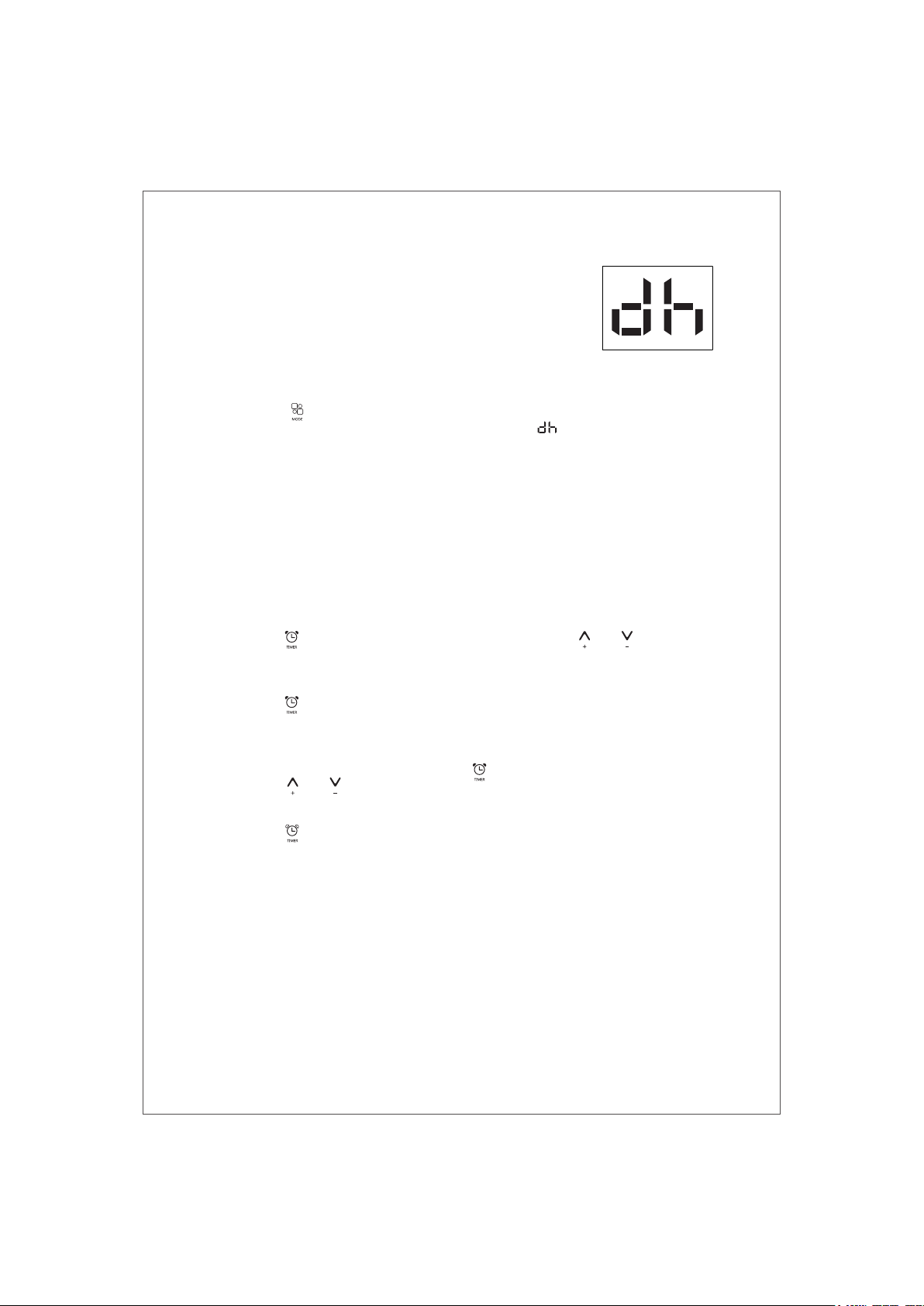
DRY mode
Ideal to reduce room humidity (spring and autumn, damp
rooms rainy periods, etc).
Before using the dry mode, the appliance should be
prepared in the same way as for cool mode, with the air
exhaust hose attached to enable the moisture to be
discharged outside.
To set this mode correctly:
● Press the “ ” button a number of times until the
“ Dry ” symbol light appears, the screen will appear “ ”;
● In this mode, fan speed is selected automatically by the appliance.
SETTING THE TIMER
This timer can be used to delay the appliance start up or shutdown, this avoids
wasting electricity by optimizing operating periods.
Programming start up
● Turn on the appliance, choose the mode you want, for example Dehumidify mode,
high fan speed. Turn off the appliance.
● Press the “ ” button, the screen starts to flash, press the “ ” / “ ” to adjust the
set time from 0.5-24 hours.
● In 5 seconds without the operation, the timer start function, then the “Timer” symbol
lights.
● Press the “ ” button again to cancel the Timer, and the “Timer” symbol disappear.
Programming shut down
● When the appliance is running, press the “ ” button, the screen starts to flash.
● Press the “ ” / “ ” to adjust the set time from 0.5-24 hours.
● In 5 seconds without the operation, the timer start function, then the “Timer” symbol
lights.
● Press the “ ” button again to cancel the Timer, and the “Timer” symbol disappear.
-13-
DESCRIPTION OF THE DISPLAY SCREEN
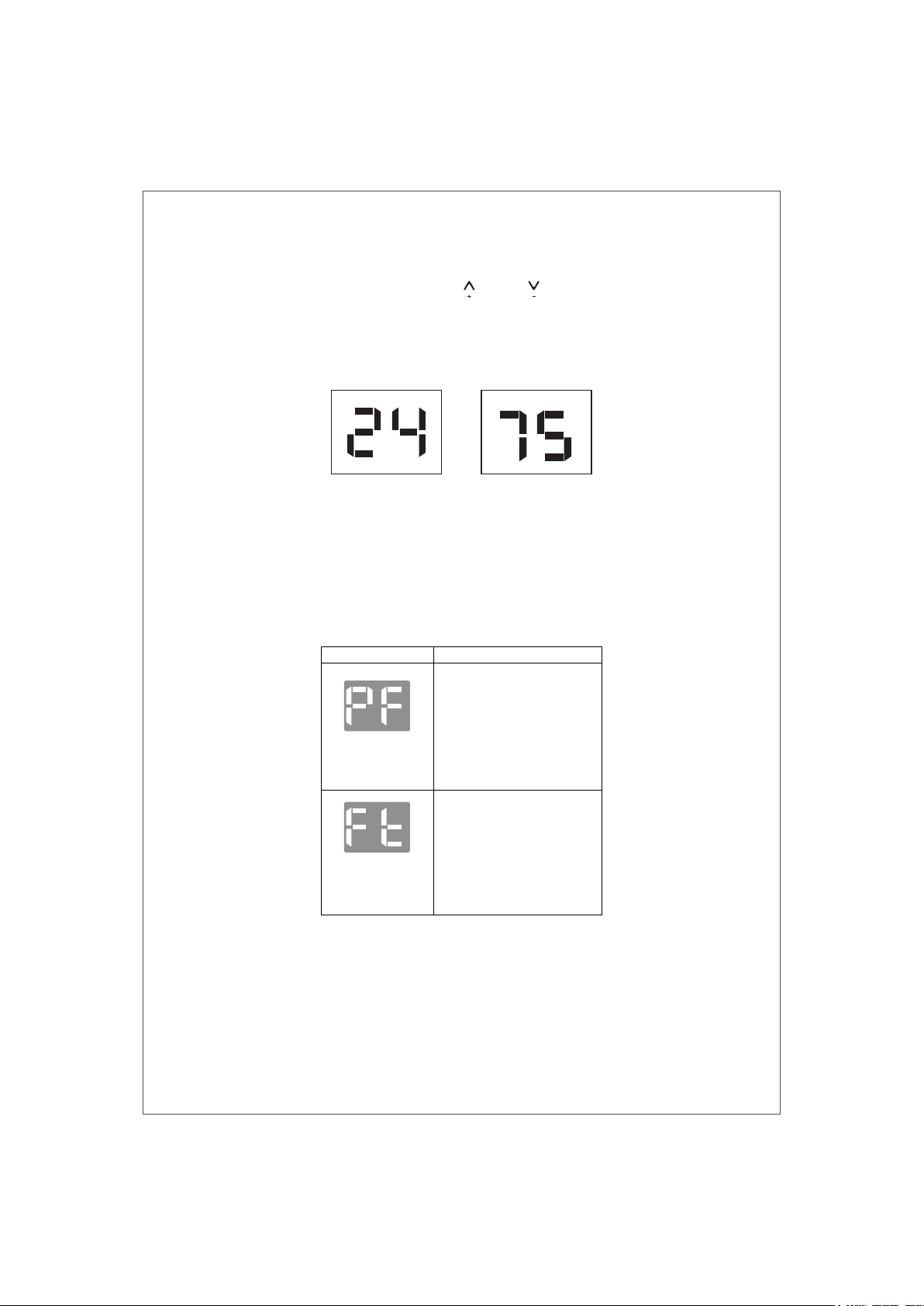
SWITCH THE UNIT OF TEMPERATURE
When the appliance is running, hold on “ ” and “ ” button together 3 seconds
by the same time, then you can change the unit of temperature.
For example:
Before change, in cool mode, the screen display like fig1.
After change, in cool mode, the screen display like fig2.
The following functions below are optional. Please refer to the real object, just
because these functions only belong to some model.
SELF-DIAGNOSIS
The appliance has a self-diagnosis system to identify a number of malfunctions.
Error messages are displayed on the appliance display.
Fig.1 Fig. 2
IF IS DISPLAYED WHAT SHOULD I DO?
PROBE FAILURE
(sensor damaged)
If this is displayed, contact your
local authorize service center.
FULL TANK
(safety tank full)
Empty the internal safety tank,
following the instructions in the
"End of season operations"
paragraph.
-14-
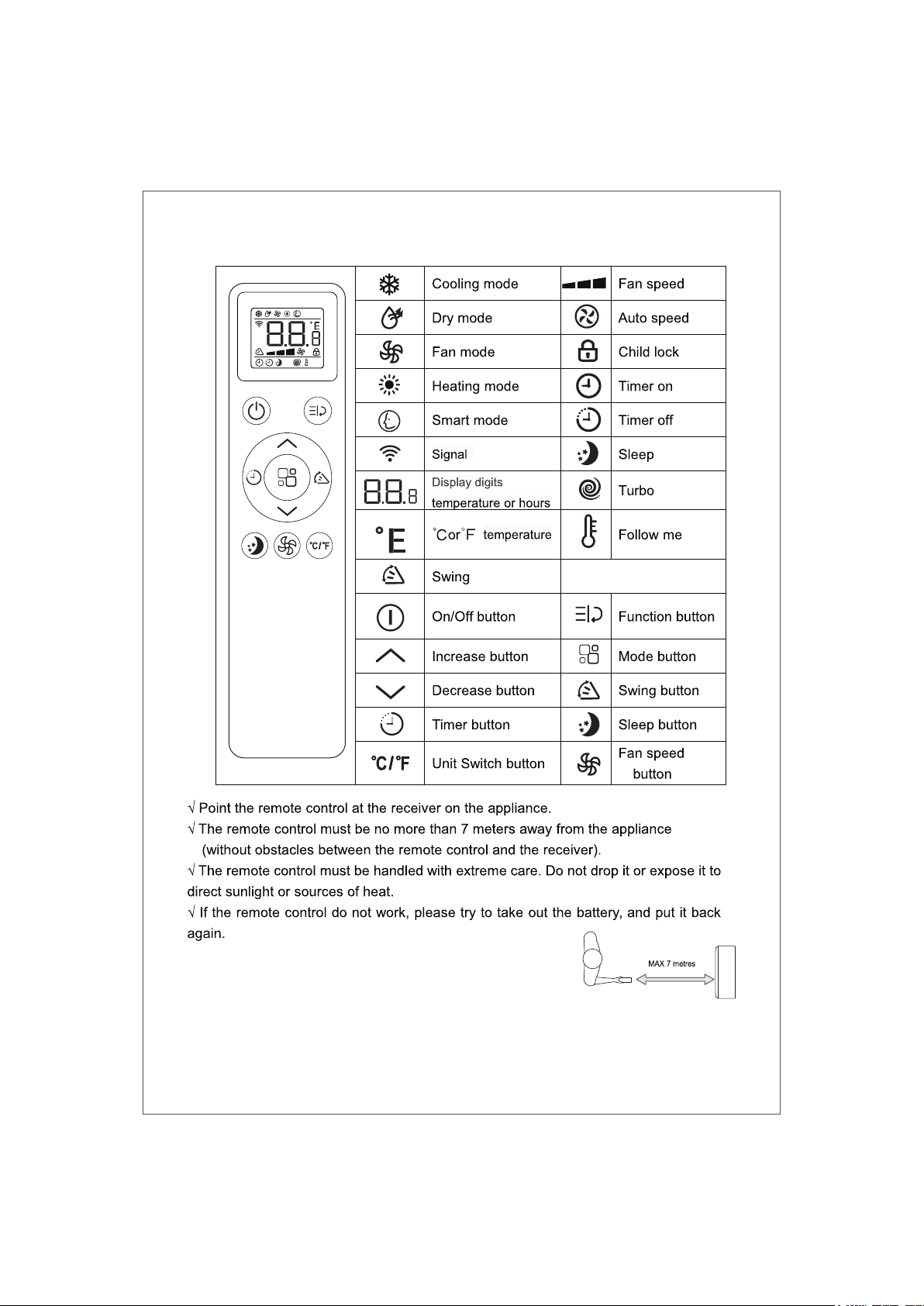
REMOTE CONTROL MANUAL
-15-
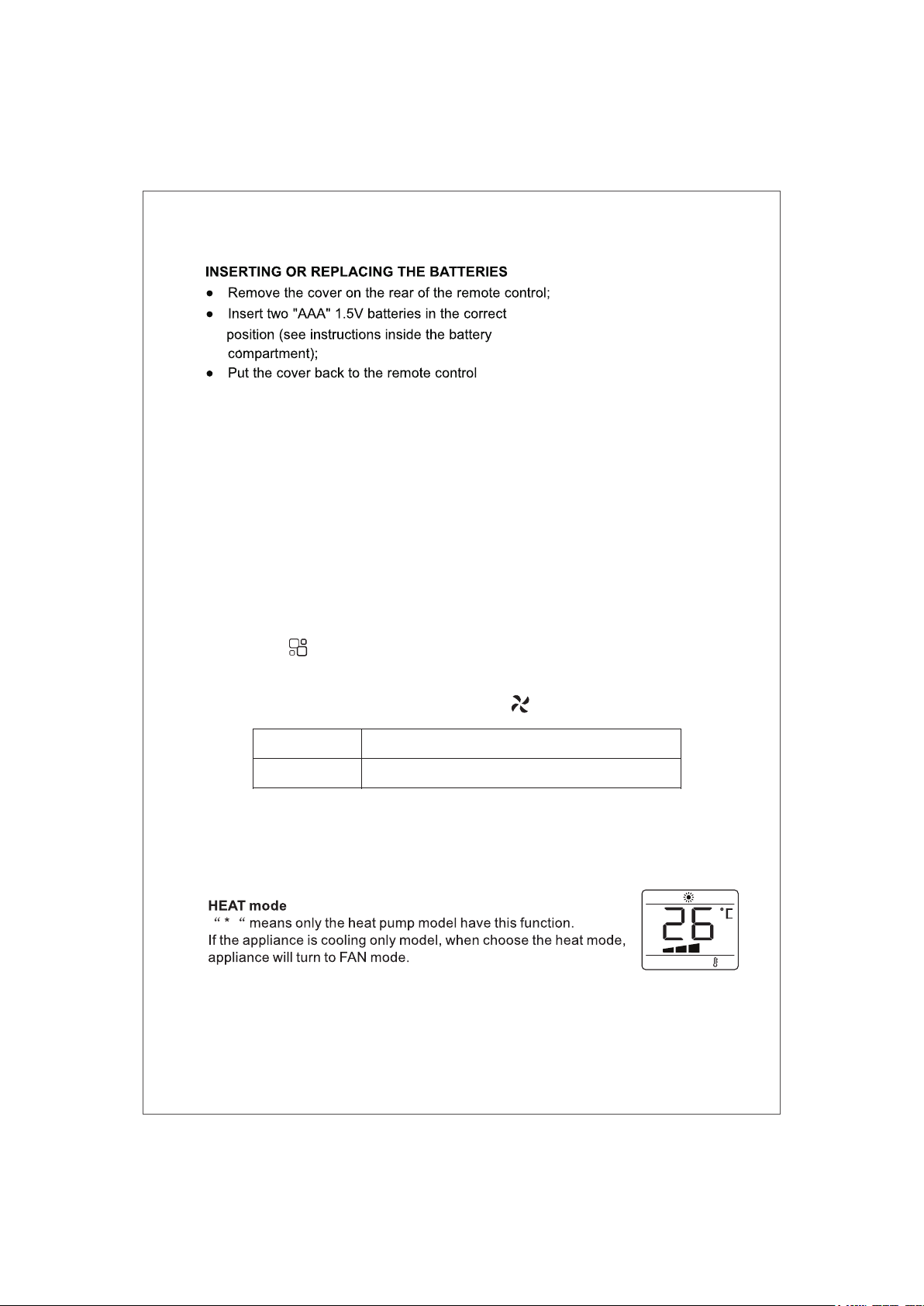
NOTE:
√ If the remote control unit is replaced or disposed
of, the batteries must be removed and discarded in
accordance with current legislation as they are harmful to the environment.
√ Do not mix old and new batteries. Do not mix alkaline, standard (carbon-zinc)
or rechargeable (nickel-cadmium) batteries.
√ Batteries may explode or leak if exposed to open flames. Dispose of batteries
accordingly.
√ If the remote control is not being used for extended periods of time (winter
storage), remove the batteries and store in a cool, dry location.
COOL mode
Ideal for hot muggy weather when you need to cooling and
dehumidify the room.
To set this mode correctly:
● Press the “ ” button a number of times until the “Cool” symbol light appears.
● Select the target temperature 64℉-90℉ (18℃-32℃) by pressing the “ ∧ ” or
“ ∨ ” button until the corresponding value is displayed.
● Select the required fan speed by pressing the “ ” button. Different fan
speed have different function.
The most suitable temperature for the room during the summer varies from 75℉
- 81℉ (24℃ - 27℃). You are recommended, however, not to set a temperature
much below the outdoor temperature. The fan speed difference is more noticeable
when the appliance is under FAN mode but may not be noticeable under COOL
mode.
REMOTE CONTROL MANUAL
F2 High
F1 Low
To achieved the temperature as fast as possible.
Run of the low noise.
-16-
REMOTE CONTROL MANUAL
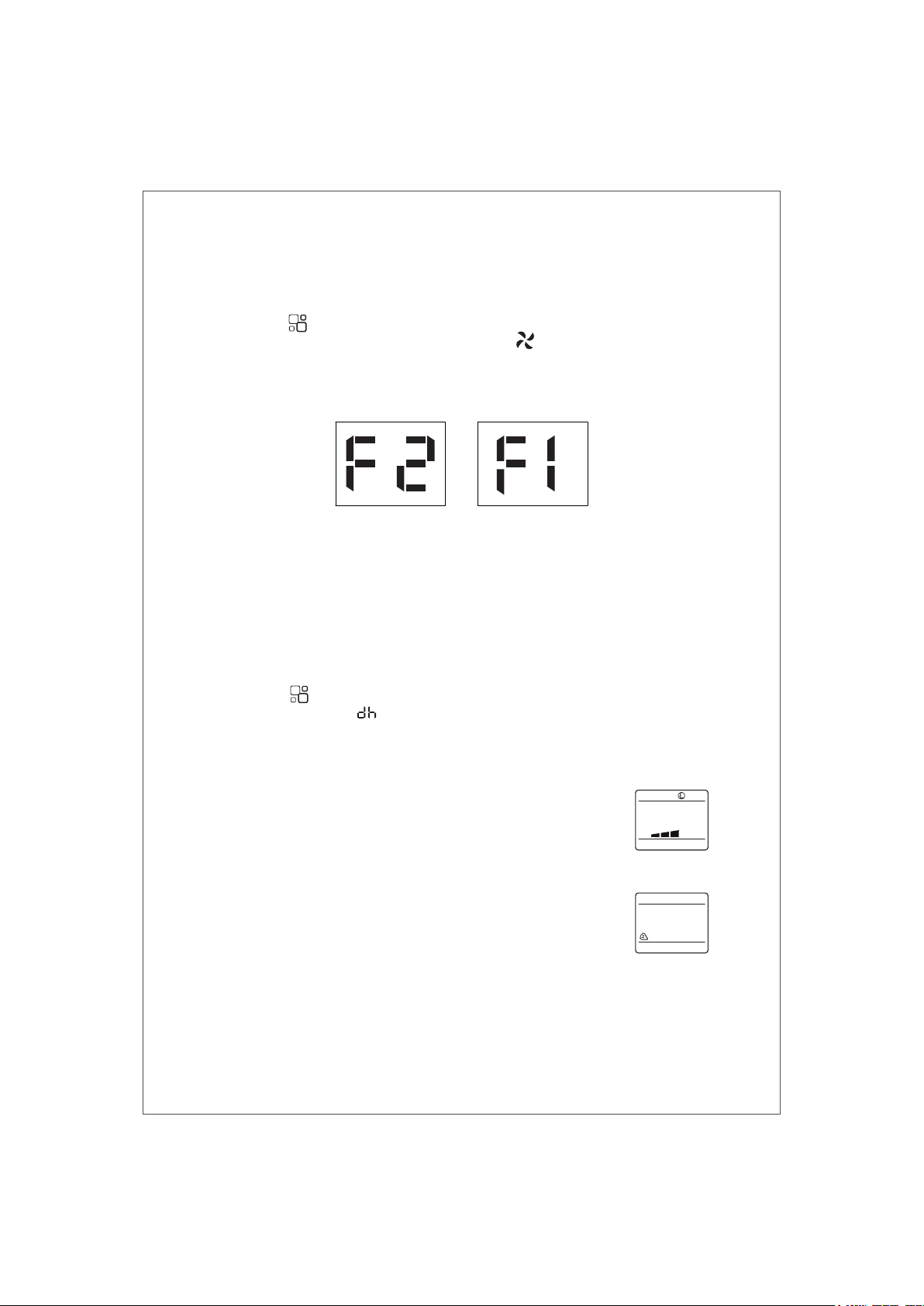
FAN mode
When using the appliance in this mode, the air hose does not need to be attached.
● Press the “ ” button a number of times until the “Fan” symbol light appears.
● Select the required fan speed by pressing the “ ” button.
Two speeds are available: High/Low
● If appear “ F2 ” symbol standard for high speed fan, and “ F1 ” stand for low
speed fan.
As the figure below:
DRY mode
Ideal to reduce room humidity (spring and autumn, damp rooms rainy periods,
etc).
In dry mode, the appliance should be prepared in the same way as for cool mode,
with the air exhaust hose attached to enable the moisture to be discharged
outside.
To set this mode correctly:
● Press the “ ” button a number of times until the “Dry” symbol light appears,
the screen will appear “ ”;
● In this mode, fan speed is selected automatically by the appliance and default
low peed fan.
High
Low
-17-
SMART mode
This function don't use for this series mode,
when choose this function, the appliance will turn to FAN mode.
SWING function
NOTE: This serial unit have no auto swing function.
SLEEP function
This function is useful for the night as it gradually reduces operation of the
appliance.
To set this function correctly:
● Select the cool or heat mode as described above.
● Press the “ ” button.
The appliance operates in the previously selected mode.
When you choose the sleep function, the screen will reduce the brightness,and
the fan speed is low.
The SLEEP function maintains the room at optimum temperature without
excessive fluctuations in either temperature or humidity with silent operation.
Fan speed is always at Low, while room temperature and humidity vary gradually
to ensure the most comfortable.
When in COOL mode, the selected temperature will increase by 1℃(1℉) per hour
in a 2 hour period. This new temperature will be maintained for the next 6 hours.
Then the appliance turn it off.
The SLEEP function can be canceled at any time during operation by pressing the
“Sleep”, “Mode” or “fan speed” button.
In DRY mode, SLEEP function is still available.
REMOTE CONTROL MANUAL
-18-
SETTING THE TIMER
● This timer can be used to delay the appliance start up or shutdown, this avoids
wasting electricity by optimizing operating periods.
Programming start up
● Turn on the appliance, choose the mode you want, for example Dehumidify
mode, high fan speed. Turn off the appliance.
● Press the “ ” button , the screen starts to flash, press the “ ” / “ ” to
adjust the set time from 0.5-24 hours.
● In 5 seconds without the operation, the timer start function, then the “Timer”
symbol lights.
● Press the “ ” button again to cancel the Timer, and the “Timer” symbol
disappear.
Programming shut down
● When the appliance is running, press the “ ” button, the screen starts to flash.
● Press the “ ” / “ ” to adjust the set time from 0.5-24 hours.
● In 5 seconds without the operation, the timer start function, then the “Timer”
symbol lights.
● Press the “ ” button again to cancel the Timer, and the “Timer” symbol
disappear.
REMOTE CONTROL MANUAL
Fig.1 Fig. 2
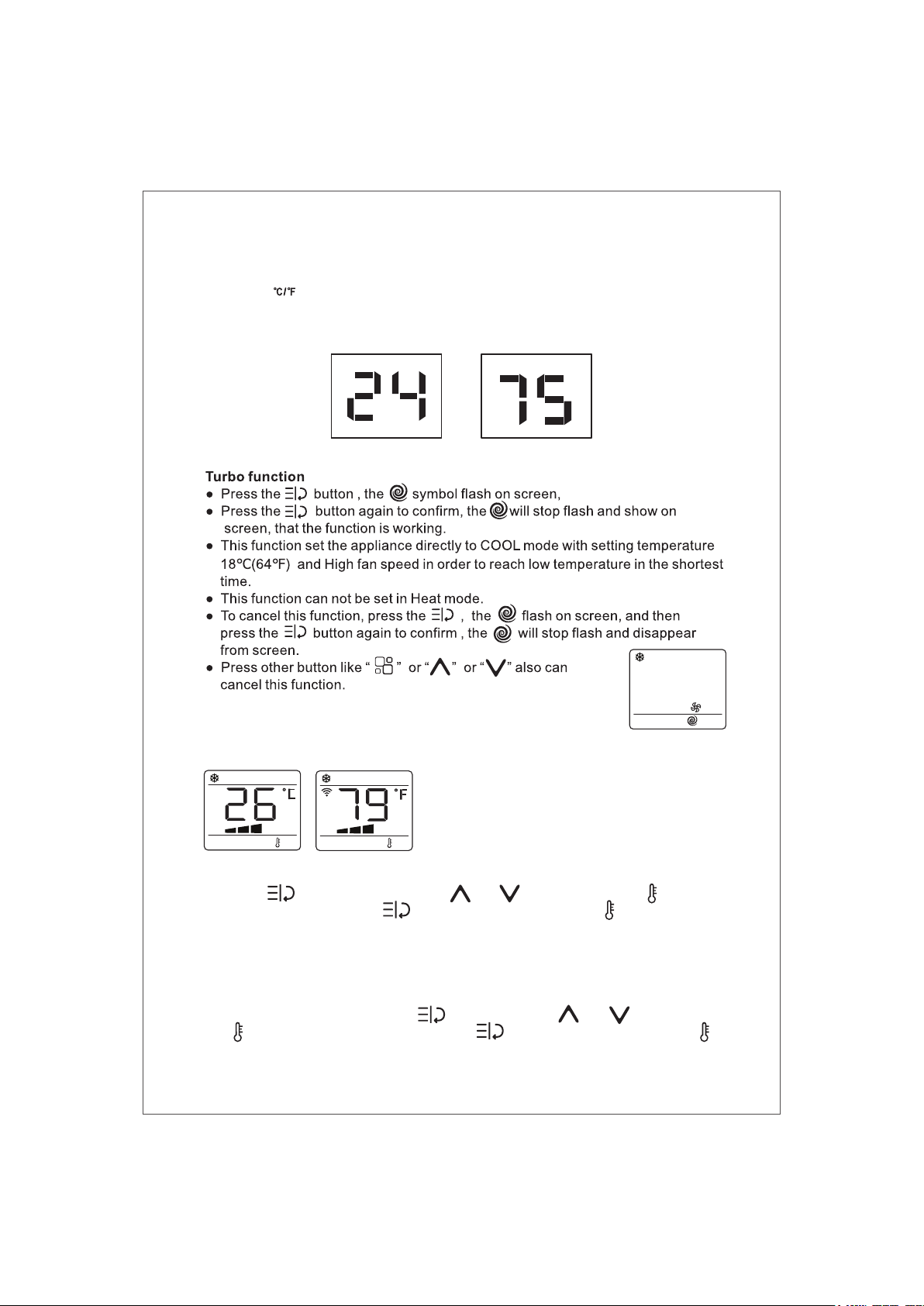
Switch the unit of temperature
Press the “ ” butoon, then you can change the unit of temperature.
For example:
Before change, in cool mode, the screen display like Fig.1.
After change, in cool mode, the screen display like Fig.2.
-19-
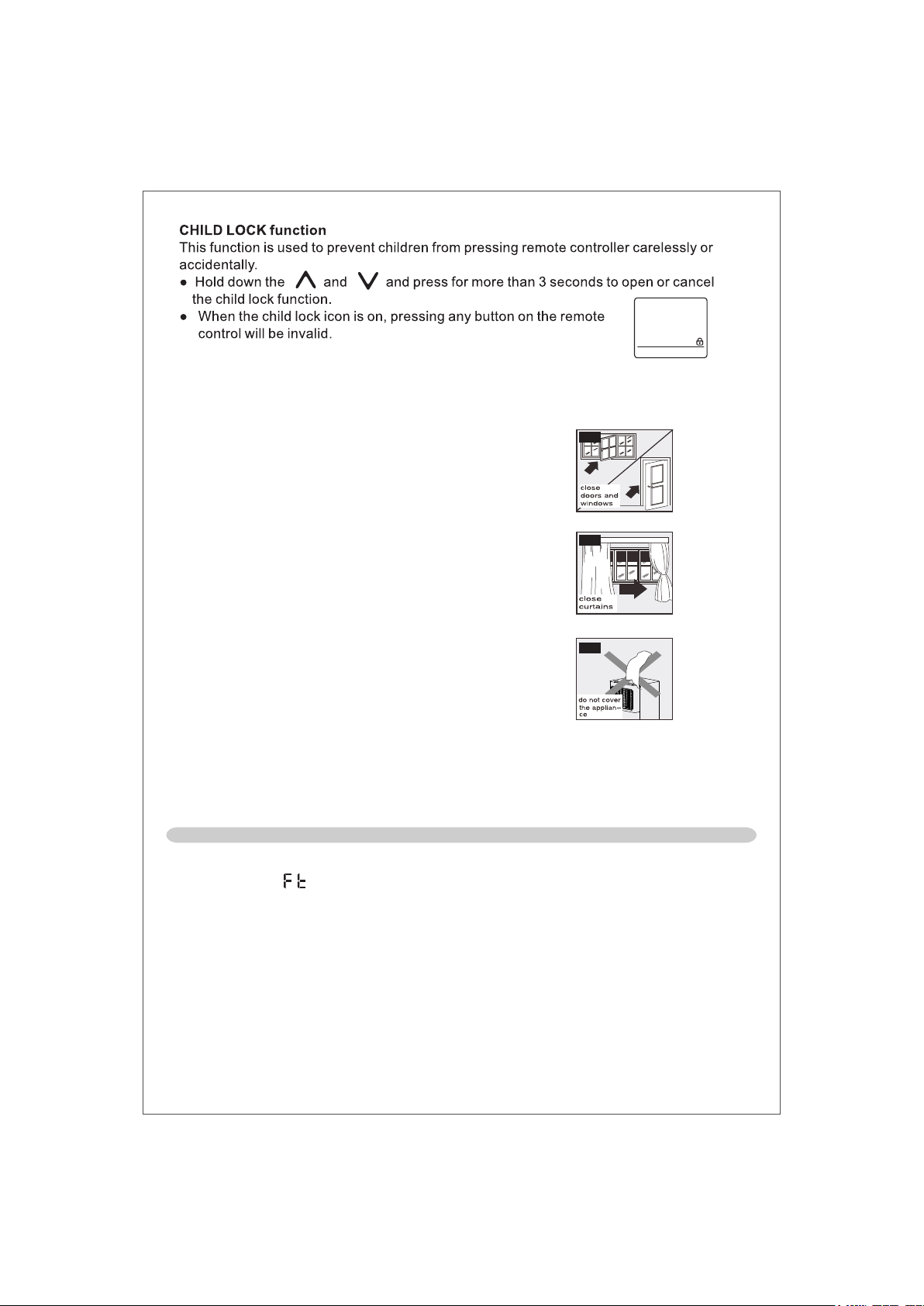
Follow me function
This function can be activated from the remote control ONLY.
The remote control serves as a remote thermostat allowing for
the precise temperature control at its location.
To activate the Follow Me function, point the remote control towards the appliance and
press the button, and then press or button to until the flash on
screen, and then press the button again to confirm , the will stop flash and
show on screen.
The remote control will send this signal to the air conditioner every 20 minutes interval
until press the Follow Me/Temp Sensing button again.
If the unit does not receive the Follow Me/Temp Sensing signal during any 25 minutes
interval, the unit will exit the Follow Me/Temp Sensing mode.
To cancel this function, press the , and then press or button to until
the flash on screen, and then press the button again to confirm , the will
stop flash and disappear from screen.
TIPS FOR CORRECT USE
WATER DRAINAGE METHOD
When there is excess water condensation inside the unit, the appliance stops running
and shows “ ” (FULL TANK as mentioned in SELF-DIAGNOSIE). This indicates that
the water condensation needs to be drained using the following procedures:
Manual Draining (fig.14)
Water may need to be drained in high humidity areas
1. Unplug the unit from power source.
2. Place a drain pan under the lower drain plug. See diagram.
3. Remove the lower drain plug.
4. Water will drain out and collect in the drain pan (maybe not supplied).
5. After the water is drained, replace the lower drain plug firmly.
6.Turn on the unit.
To get the best from your appliance, follow these
recommendations:
● Close the windows and doors in the room to be
air conditioned (Fig. 11). When installing the
appliance semi-permanently, you should leave a
door slightly open (as little as 1 cm) to guarantee
correct ventilation;
● Protect the room from direct exposure to the sun
by partiallyclosing curtains and/or blinds to make
the appliance much more economical to run (Fig. 12);
● Never rest objects of any kind on the appliance;
(Fig. 13)
● Do not block the air inlet or outlet of the appliance.
Reduced air flow will result in poor performance and
could damage the unit.
● Make sure there are no heat sources in the room;
● Never use the appliance in very damp rooms
( laundries for example ).
● Never use the appliance outdoors.
● Make sure the appliance is standing on a level
surface. if necessary, place the castor locks under the
front wheels.
Fig.11
Fig.12
Fig.13
-20-

WATER DRAINAGE METHOD
Continuous Draining (fig.15)
While using the unit in dehumidifier mode, continuous drainage is recommended.
1. Unplug the unit from the power source.
2. Remove the drain plug. While doing this operation some residual water may spill so
please have a pan to collect the water.
3. Connect the drain hose (1/2" or 12.7mm, maybe not supplied). See diagram.
4. The water can be continuously drained through the hose into a floor drain or bucket.
5. Turn on the unit.
NOTE:
Please be sure that the height of and section of the drain hose should not be higher than
that of the drain outlet, or the water tank may not be drained. (fig.16 and fig.17)
16 17
14 15
-21-
Before cleaning or maintenance, turn the appliance off by pressing the button on the
control panel or remote control, wait for a few minutes then unplug from the mains socket.
CLEANING THE CABINET
You should clean the appliance with a slightly damp cloth then dry with a dry cloth.
● Never wash the appliance with water. It could be dangerous.
● Never use petrol, alcohol or solvents to clean the appliance.
● Never spray insecticide liquids or similar.
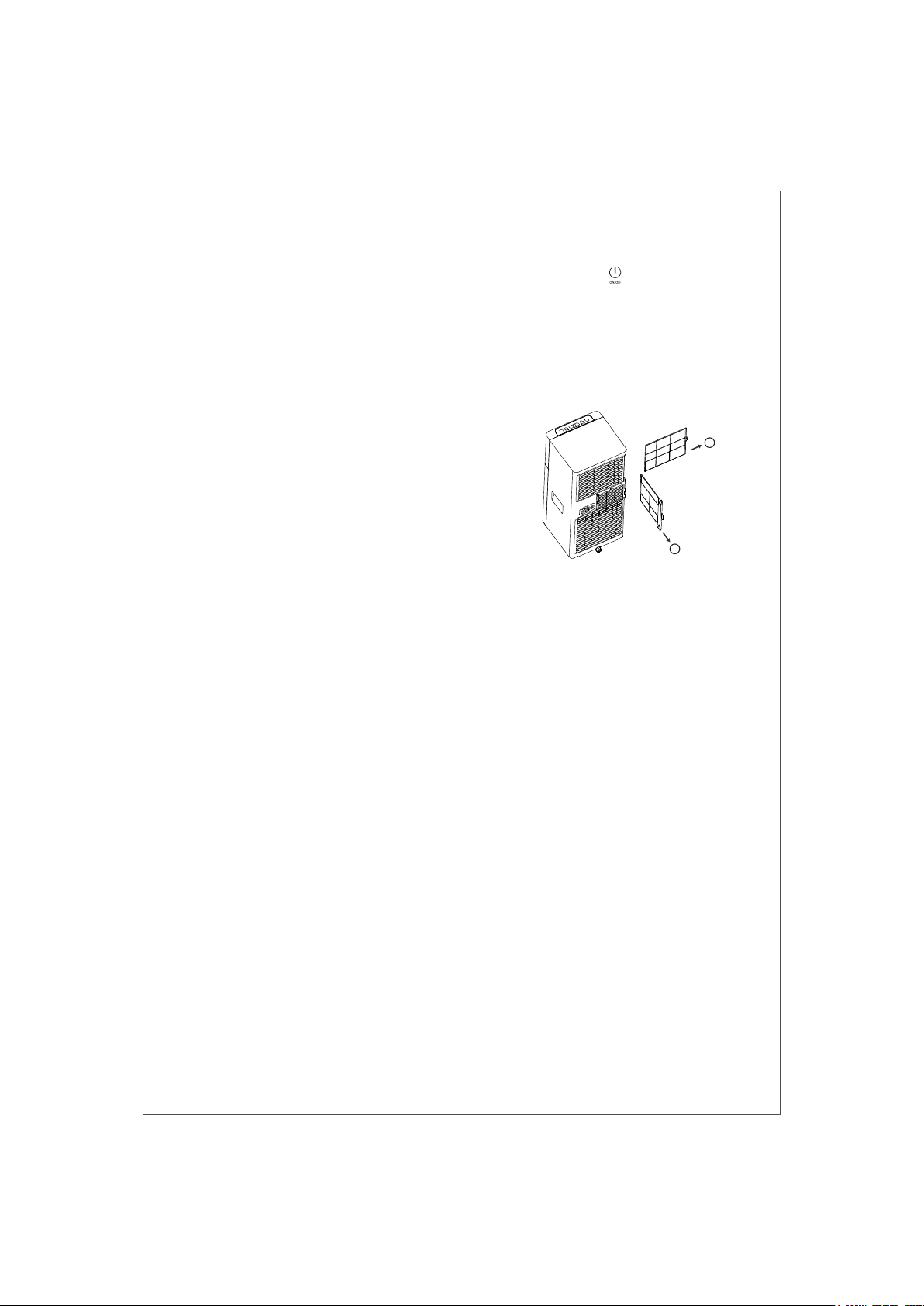
CLEANING THE AIR FILTERS
To keep your appliance working efficiently, you should
clean the filter every week of operation.
The filter can take out like fig below.
To avoid possible cuts, avoid contacting the metal parts
of the appliance when removing or re-installing the filter.
It can result in the risk of personal injury.
Use a vacuum cleaner to remove dust accumulations
from the filter. If it is very dirty, immerse in warm water and
rinse a number of times. The water should never be hotter
than 40℃ (104℉). After washing, leave the filter to dry then
attach the intake grille to the appliance.
1
2
CLEANING
-22-
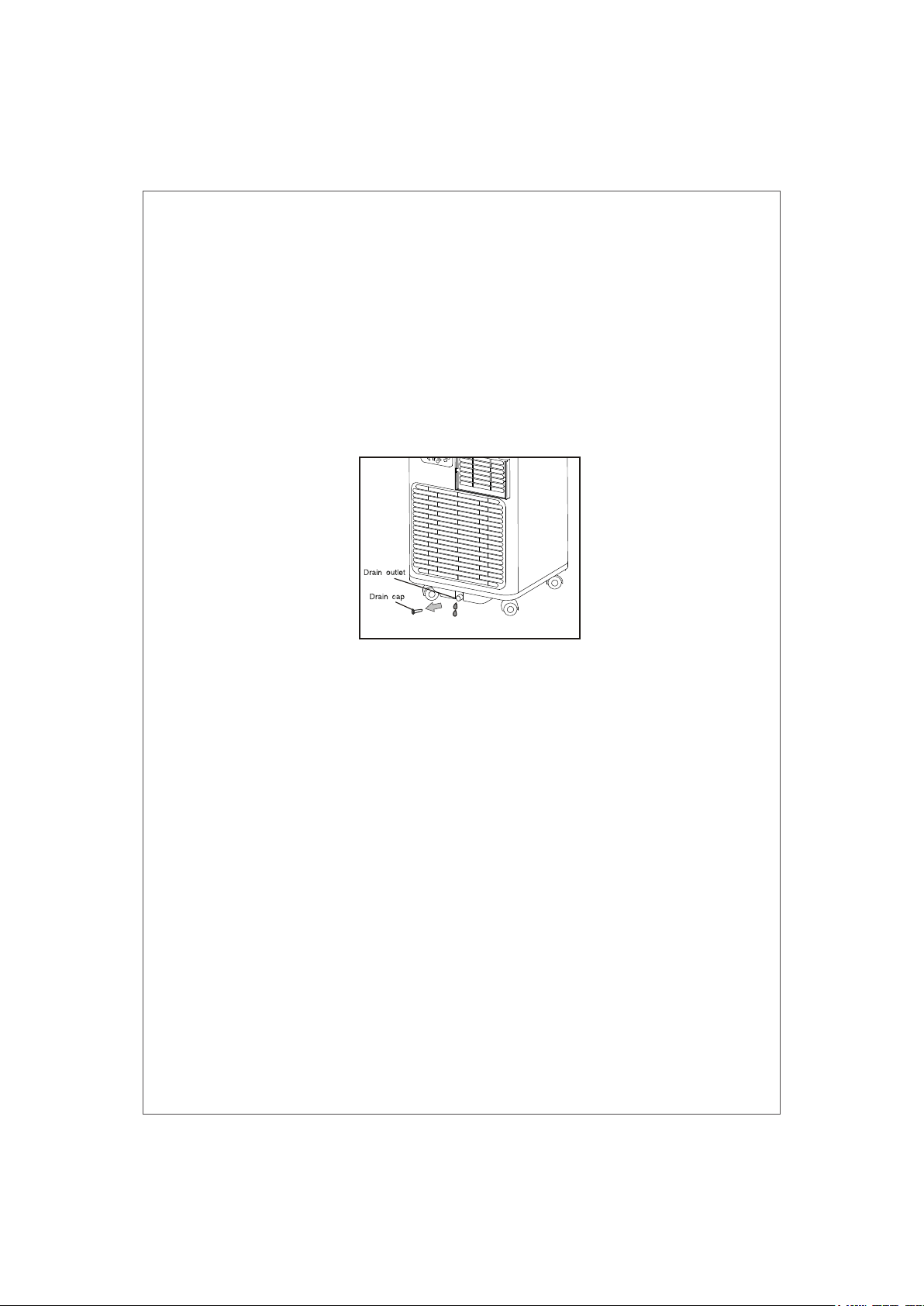
START-END OF SEASON OPERATIONS
START OF SEASON CHECKS
Make sure the power cable and plug are undamaged and the earth system is efficient.
Follow the installation instructions precisely.
END OF SEASON OPERATIONS
To empty the internal circuit completely of water, remove the cap.
Run off all water left into a basin. When all the water has been drained, put the cap back in place.
Clean the filter and dry thoroughly before putting back.
STRICTEST OPERATION ENVIRONMENT:
Cooling mode: 18℃-35℃ (64℉-95℉), 30%RH~90%RH
-23-
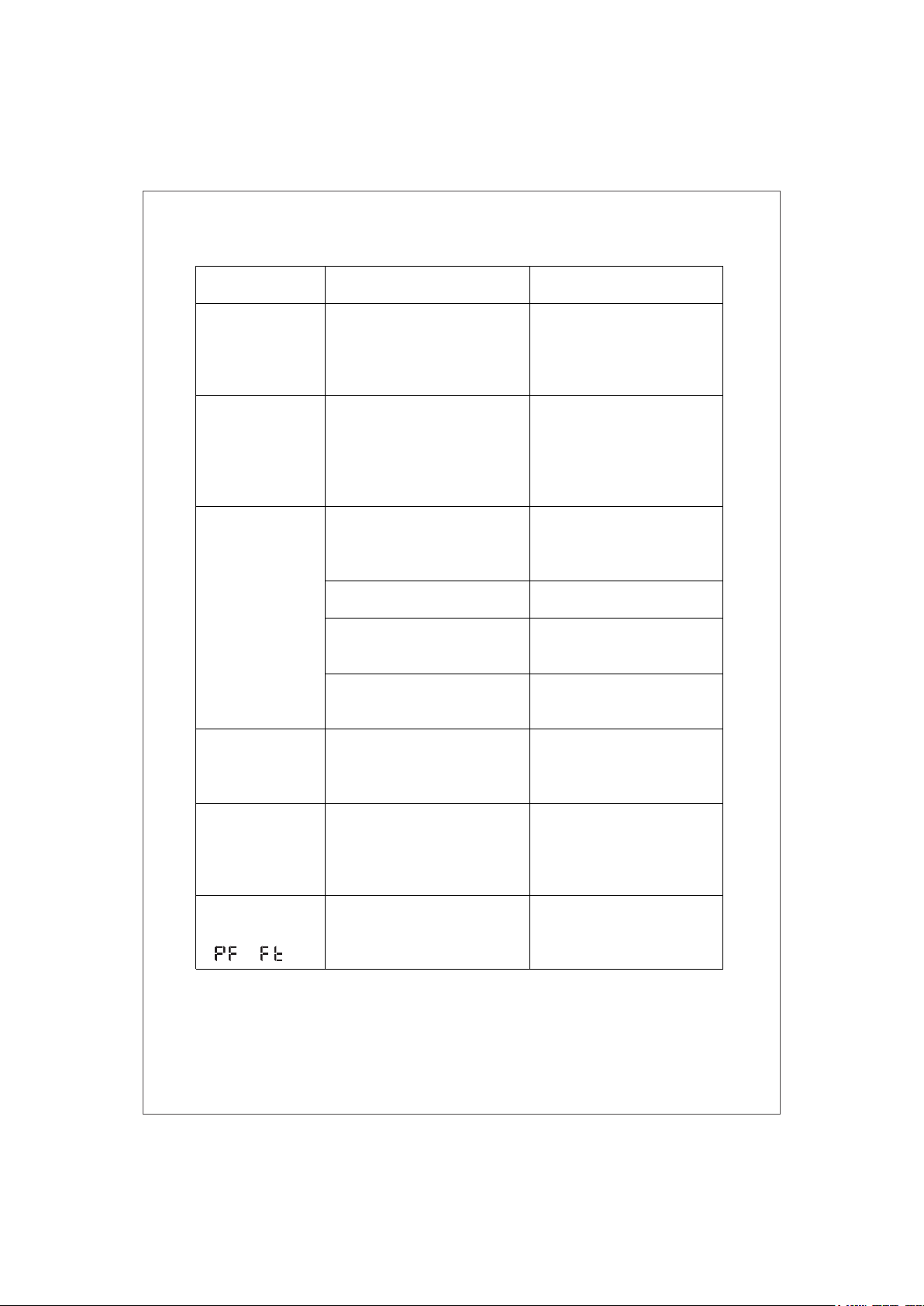
TROUBLESHOOTING
Windows, doors and/or
curtains open
During operation,
there is an
unpleasant smell
in the room
The appliance
works, but does not
cool the room
●
● Close doors, windows and
curtains, bearing in mind the
"tips for correct use" given
above
●
There are heat sources in the
room (oven, hairdryer, etc.)
●
Eliminate the heat sources
●
The air exhaust hose is
detached from the appliance
●
Fit the air exhaust hose in the
housing at the back of the
appliance
●
The technical specification of
the appliance is not adequate
for the room in which it is located
● Air
filter clogged
●
Clean the filter as described
above
● Something is preventing the
air from being discharged
● Check and remove any
obstacle obstructing air
discharge
-
PROBLEM
CAUSE
SOLUTION
The appliance
does not come on
● There is no current
● It is not plugged into the mains
●
● Wait
●
Plug into the mains
●
●
Here are bends in the air exhaust
hose
● Position the air exhaust hose
correctly, keeping it as short
and free of curves as possible
to avoid bottlenecks
The internal safety device has
tripped
Wait 30 minutes, if the problem
persists, contact your service
center
The appliance
works for a short
time only
The internal compressor safety
device prevents the appliance
from being restarted until three
minutes have elapsed since it
was last turned off
Wait. This delay is part of
normal operation
The appliance has a self-
diagnosis system to identify a
number of malfunctions
The following
message appears
on the display:
The appliance
does not operate for
about three minutes
after restarting it
●
●
/
●
●
See the SELF-DIAGNOSIS
Chapter
-24-
-25-