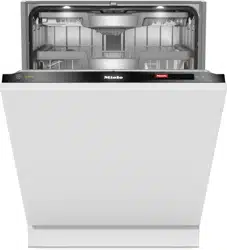
Operating instructions
Dishwashers
To avoid the risk of accidents or damage to the appliance, it is es-
sential to read these instructions as well as the installation sheet be-
fore it is installed and used for the first time.
en-GB M.-Nr. 11 952 361HG07-W

Contents
2
Warning and safety instructions ...................................................................... 6
Notes on the operating instructions................................................................ 16
Notes on the layout ............................................................................................. 16
Scope.................................................................................................................. 17
Guide to the appliance...................................................................................... 18
Appliance overview ............................................................................................. 18
Control panel....................................................................................................... 19
Caring for the environment .............................................................................. 22
Before using for the first time .......................................................................... 23
Opening the door ................................................................................................ 23
Door-opening mechanism................................................................................... 24
Closing the door.................................................................................................. 24
Miele@home ........................................................................................................ 25
Basic settings...................................................................................................... 26
Setting the language ...................................................................................... 26
Setting up Miele@home ................................................................................. 26
Setting the time of day ................................................................................... 27
Setting the water hardness level .................................................................... 27
Activating AutoDos......................................................................................... 28
Dishwasher salt ................................................................................................... 29
Filling the salt reservoir................................................................................... 30
Refilling the salt .............................................................................................. 31
Rinse aid.............................................................................................................. 32
Adding rinse aid ............................................................................................. 33
Filling the rinse aid reservoir........................................................................... 33
Settings .............................................................................................................. 34
Opening the settings menu ................................................................................. 34
Changing settings ............................................................................................... 34
Closing the settings menu................................................................................... 34
Language ......................................................................................................... 35
Time..................................................................................................................... 35
Water hardness ................................................................................................... 36
AutoDos (automatic dispensing) ......................................................................... 36
Rinse aid.............................................................................................................. 37
Miele@home ........................................................................................................ 37
Remote control.................................................................................................... 40
Remote Update ................................................................................................... 41
SmartStart ........................................................................................................... 42

Contents
3
EcoStart............................................................................................................... 42
Consumption (EcoFeedback) .............................................................................. 44
Temperature ........................................................................................................ 45
Display brightness............................................................................................... 45
Volume................................................................................................................. 45
Refill reminders.................................................................................................... 46
AutoOpen ............................................................................................................ 46
2nd interim rinse.................................................................................................. 46
Knock2open ........................................................................................................ 46
BrilliantLight......................................................................................................... 47
Hygiene cycle ...................................................................................................... 47
Heat accumulator................................................................................................ 47
Software version.................................................................................................. 48
Legal information................................................................................................. 48
Copyrights and licences for operator and control software ................................ 48
Copyrights and licences for the communication module.................................... 49
Showroom ........................................................................................................... 49
Factory default..................................................................................................... 49
Caring for the environment .............................................................................. 50
Economical dishwashing..................................................................................... 50
EcoFeedback consumption indicator.................................................................. 51
Heat accumulator................................................................................................ 52
Loading the dishwasher.................................................................................... 53
General information............................................................................................. 53
Upper basket....................................................................................................... 55
Adjusting the upper basket ................................................................................. 58
Lower basket....................................................................................................... 59
Cutlery tray .......................................................................................................... 62
Loading the 3D MultiFlex tray......................................................................... 62
Loading examples ............................................................................................... 63
Dishwashers with cutlery tray......................................................................... 63
Detergent ........................................................................................................... 65
Active ingredients ............................................................................................... 65
Detergent dosage................................................................................................ 66
Automatic dispensing/AutoDos........................................................................... 67
Activating AutoDos......................................................................................... 67
Inserting a PowerDisk..................................................................................... 68
Manual detergent dispensing .............................................................................. 70
Detergent dispensing ..................................................................................... 70
Adding detergent............................................................................................ 70

Contents
4
Operation............................................................................................................ 72
Switching on the dishwasher .............................................................................. 72
Selecting a programme ....................................................................................... 72
Display of programme duration........................................................................... 73
Starting the programme ...................................................................................... 73
End of programme............................................................................................... 74
Energy management ........................................................................................... 74
Switching off the dishwasher .............................................................................. 75
Unloading the dishwasher................................................................................... 75
Interrupting a programme.................................................................................... 76
Cancelling or changing a programme ................................................................. 76
Options ............................................................................................................... 77
Timer .............................................................................................................. 77
Activating Remote start.................................................................................. 81
Guide for selecting a programme .................................................................... 82
Programme overview ........................................................................................ 84
Further programmes............................................................................................ 86
Extras.................................................................................................................. 87
Selecting extras................................................................................................... 87
Cleaning and care ............................................................................................. 89
Cleaning the wash cabinet .................................................................................. 89
Cleaning the door and the door seal................................................................... 90
Cleaning the control panel .................................................................................. 90
Cleaning the reflector panel ................................................................................ 90
Cleaning the appliance front ............................................................................... 91
Cleaning the AutoDos ......................................................................................... 92
Cleaning the spray arms...................................................................................... 94
Checking the filters in the wash cabinet ............................................................. 97
Cleaning the filters............................................................................................... 97
Cleaning the water inlet filter............................................................................... 99
Cleaning the drain pump..................................................................................... 100
Problem solving guide ...................................................................................... 102
Technical problems ............................................................................................. 102
Fault messages ................................................................................................... 104
Door release ........................................................................................................ 105
Water inlet fault ................................................................................................... 106
Water drainage fault ............................................................................................ 107
Fault in the AutoDos (automatic dispensing)....................................................... 108

Contents
5
Spray arm fault .................................................................................................... 110
General problems with the dishwasher ............................................................... 111
Noises.................................................................................................................. 113
Unsatisfactory washing result ............................................................................. 114
Service................................................................................................................ 118
Contact in the event of a fault ............................................................................. 118
EPREL database ................................................................................................. 118
Warranty .............................................................................................................. 118
Note for test institutes ......................................................................................... 119
Optional accessories ........................................................................................ 120
Installation.......................................................................................................... 122
The Miele Waterproof system.............................................................................. 122
Water inlet ........................................................................................................... 122
Regulation in Germany........................................................................................ 123
Water drainage .................................................................................................... 124
Electrical connection .......................................................................................... 126
Technical data.................................................................................................... 127
EU Conformity declaration .................................................................................. 128
UK Conformity declaration.................................................................................. 128

Warning and safety instructions
6
This dishwasher conforms to current safety requirements. Inappro-
priate use can, however, lead to personal injury and material dam-
age.
Please observe the installation sheet and read the operating in-
structions carefully before setting up the dishwasher and using it
for the first time. They both contain important information on its in-
stallation, safety, use and maintenance. This is to protect yourself
from injury and prevent damage to the dishwasher.
In accordance with standard IEC60335-1, Miele expressly and
strongly advises that you read and follow the instructions in the
chapter on installing the dishwasher as well as the safety instruc-
tions and warnings.
Miele cannot be held liable for damage caused by non-compliance
with these instructions.
Keep the installation sheet and the operating instructions in a safe
place and pass them on to any future owner.

Warning and safety instructions
7
Appropriate use
This dishwasher is intended for use in domestic households and
similar working and residential environments.
This dishwasher is not intended for outdoor use.
This dishwasher is intended for use at altitudes of up to 4000m
above sea level.
This dishwasher must only be used for cleaning domestic crock-
ery and cutlery. All other types of use are not permitted.
The appliance can only be used by people with reduced physical,
sensory or mental capabilities, or lack of experience and knowledge,
if they are supervised whilst using it, or have been shown how to use
it in a safe way and recognise and understand the consequences of
incorrect operation.

Warning and safety instructions
8
Safety with children
Children under 8 years of age must be kept away from the dish-
washer unless they are constantly supervised.
Children aged 8 and older may only use the dishwasher without
supervision if they have been shown how to use it in a safe manner.
Children must be able to understand and recognise the possible
dangers caused by incorrect operation.
Children must not be allowed to clean or maintain the dishwasher
unsupervised.
Children should be supervised in the vicinity of the dishwasher.
Never allow children to play with the dishwasher. There is a danger
that children might shut themselves in the dishwasher.
If the automatic door opening mechanism is active (depending on
the model), keep young children away from the area in which the
door opens. There is a danger of injury in the unlikely event of a fault
with the opening mechanism.
Danger of suffocation! Whilst playing, children may become en-
tangled in packaging material (such as plastic wrapping) or pull it
over their head and risk suffocation. Keep packaging material away
from children.
Keep children away from detergents. Detergents cause severe
skin burns and severe eye damage. They can cause burning in the
mouth and throat, or inhibit breathing. It is therefore important to
keep children away from the dishwasher when the door is open. De-
tergent residues could still be present in the dishwasher. Seek med-
ical advice immediately if a child has swallowed or inhaled any deter-
gents.

Warning and safety instructions
9
Technical safety
Unauthorised installation, maintenance and repairs can cause
considerable danger for the user. Installation, maintenance and re-
pairs must only be carried out by a qualified technician.
Damage to the dishwasher can compromise your safety. Before
using the dishwasher and in particular following transport, check it
for any visible damage. Never use a damaged dishwasher.
The electrical safety of this dishwasher can only be guaranteed
when correctly earthed. It is most important that this basic safety re-
quirement is present. If in doubt, the electrical installation should be
checked by a qualified electrician.
Miele cannot be held liable for the consequences of an inadequate
or lack of earthing system (e.g. electric shock).
Temporary or permanent operation on an autonomous power sup-
ply system or a power supply system that is not synchronised with
the mains power supply (e.g. island networks, back-up systems) is
possible. A prerequisite for operation is that the power supply sys-
tem complies with the specifications of EN50160 or an equivalent
standard.
The function and operation of the protective measures provided in
the domestic electrical installation and in this Miele product must
also be maintained in isolated operation or in operation that is not
synchronised with the mains power supply, or these measures must
be replaced by equivalent measures in the installation. As described,
for example, in the current version of BS OHSAS 18001–2 ISO
45001.
The dishwasher must only be plugged into the electricity supply
via a suitable switched socket using a fused 3-pin plug (it must not
be hard-wired). The electrical socket must be easily accessible after
the dishwasher is installed so that it can be disconnected from the
electricity supply at any time.

Warning and safety instructions
10
There must be no electrical sockets behind the dishwasher be-
cause the building-in niche may be too small. Danger of overheating
and fire risk if the dishwasher were to be pushed up against a plug.
The dishwasher must not be installed underneath a hob. The high
temperatures radiated by hobs could damage the dishwasher below.
For the same reason, the appliance must not be installed next to
open fires or other appliances that give off heat, such as heaters
etc., not normally found in a kitchen.
Ensure that the connection data on the dishwasher’s data plate
(fuse rating, frequency and voltage) match the mains electricity sup-
ply. This data must correspond in order to avoid the risk of damage
to the dishwasher. Compare these before connecting the appliance
to the mains. If in any doubt, consult a qualified electrician.
Do not connect the dishwasher to the mains supply until it has
been fully installed and any adjustment has been made to the door
springs.
The dishwasher may only be operated if the door opening mech-
anism is working correctly. Otherwise there could be a risk of danger
whilst the automatic door opening mechanism (depending on the
model) is active.
To check that the door opening mechanism is working correctly:
- The door springs must be evenly adjusted on both sides. They are
correctly adjusted when the door remains stationary when left half
open (approx. 45° opening angle). It is also important that the
door cannot fall open.
- The door locking pins automatically retract when the door opens
at the end of the drying phase.
Multi-socket adapters and extension leads do not guarantee the
required safety of the appliance (fire hazard). Do not connect the
dishwasher to the mains electricity supply using a multi-socket ad-
apter or an extension lead.

Warning and safety instructions
11
The dishwasher must not be used in a non-stationary location
(e.g. on a ship).
Do not install the dishwasher in a room where there is a risk of
frost occurring. Frozen hoses are at risk of tearing or bursting. The
reliability of the electronic control unit may be impaired at temperat-
ures below freezing point.
To avoid any damage to the dishwasher, it must only be operated
when it is connected to a fully vented plumbing system.
The plastic housing of the water connection contains a solenoid
valve. The housing must not be dipped in water.
There are live wires in the water inlet hose. Do not cut the hose,
even if it is too long.
The integrated Waterproof system offers protection from water
damage, provided that the following conditions are met:
- Installation has been carried out correctly
- The dishwasher is properly maintained and parts are replaced
where this is noticeably required
- The stopcock is turned off during longer absences from the home
(e.g. whilst on holiday).
The Waterproof system will work even when the dishwasher is
switched off. However, the dishwasher must remain connected to
the electricity supply.
The water-connection pressure needs to be between 50 and
1,000kPa.
A damaged dishwasher could be dangerous. If the dishwasher
gets damaged, switch it off at the mains immediately and call your
Miele dealer or Miele Service.
While the appliance is under warranty, repairs should only be un-
dertaken by a Miele authorised service technician. Otherwise the
warranty is invalidated.

Warning and safety instructions
12
We recommend replacing defective components with original
spare parts. If original Miele spare parts are installed correctly, Miele
ensures full compliance with safety requirements and the warranty
remains valid.
During installation, maintenance and repair work, the dishwasher
must be disconnected from the mains electricity supply (switch it off
and withdraw the plug from the socket).
If the mains connection cable is damaged, it must only be re-
placed with a specific mains connection cable of the same type
(available from the Miele Customer Service Department). For safety
reasons this must only be done by the Miele Customer Service De-
partment or a Miele authorised technician.
This dishwasher is supplied with a special lamp (depending on the
model) to cope with particular conditions (e.g. in terms of temperat-
ure, moisture, chemical resistance, abrasion resistance and vibra-
tion). This lamp must only be used for the purpose for which it is in-
tended. The lamp is not suitable for room lighting. Replacement
lamps may only be fitted by a Miele authorised technician or by the
Miele Customer Service Department.
Correct installation
The dishwasher must be installed and connected in compliance
with the supplied installation sheet.
Be careful before and while installing the dishwasher.
Some metal parts pose a risk of injury/being cut. Wear pro-
tective gloves.
The dishwasher must be correctly aligned horizontally to ensure
problem-free operation.
In order to ensure stability, built-under and integrated dishwashers
must only be installed under a continuous worktop that is secured to
adjacent cabinetry.

Warning and safety instructions
13
A sink in the adjacent cabinet of the dishwasher must be carefully
sealed. Regularly check for leaks to avoid damage to the dish-
washer.
The dishwasher must only be built into a tall unit if additional
safety precautions are taken. In order to safely install the appliance
in a tall unit, please use the Tall unit installation set and observe the
installation sheet provided. Otherwise there is the danger of the unit
tipping over.
The door springs must be evenly adjusted on both sides. They are
correctly adjusted when the door remains stationary when left half
open (approx. 45° opening angle). It is also important that the door
cannot fall open.
The appliance must only be operated with properly adjusted door
springs.
If the door cannot be adjusted properly, contact the Miele Customer
Service Department.
The maximum weight of the front panel that can be aligned with the
factory fitted door springs is 10–12kg (depending on model).
Correct use
Do not use solvents in the dishwasher. Risk of explosion.
Dishwasher detergents can cause burning on the skin and in the
eyes, nose, mouth and throat. Avoid contact with detergents. Do not
inhale powder detergents. Do not swallow dishwasher detergents.
Seek medical attention immediately if detergent has been swallowed
or inhaled.
Avoid leaving the dishwasher door open unnecessarily. You could
injure yourself on the open door or trip over it.
Do not sit or lean on the open door. The dishwasher could tip
over. This could injure you or damage the dishwasher.

Warning and safety instructions
14
Crockery may be very hot at the end of the programme. Allow the
dishes to cool until they are comfortable enough to handle before
unloading them.
Only use detergent and rinse aid formulated for domestic dish-
washers. Do not use washing-up liquid.
Do not use any commercial or industrial detergents. These may
cause material damage, and there is a risk of a severe explosive
chemical reaction (such as an explosive oxyhydrogen gas reaction).
Do not fill the rinse aid reservoir with powder or liquid detergent.
This will cause damage to the reservoir.
Do not fill the AutoDos (depending on model) with powder or li-
quid detergent. Loose detergent will damage the AutoDos.
Do not fill the salt reservoir with powder or liquid detergent. Deter-
gent will damage the water softener.
Only use special coarse-grained dishwasher salt or other pure kit-
chen salt for reactivation. Other salts may contain insoluble additives
that can impair the functioning of the water softener.
In dishwashers with a cutlery basket (depending on model), knives
and forks should be placed with the handles upwards in the basket
for safety reasons. Knives and forks placed with the handles down-
wards pose a danger of injury. However, cutlery placed handle down
in the basket will come out cleaner and drier.
Plastic items that cannot withstand being washed in hot water,
such as disposable plastic containers or plastic cutlery, should not
be cleaned in the dishwasher. The high temperatures in the dish-
washer may cause them to melt or lose shape.
If you use the timer option (depending on model), the detergent
compartment must be dry. If it is not, wipe it until dry. The detergent
will clump together if the detergent compartment is not dry, and this
may mean that it is not fully rinsed out.

Warning and safety instructions
15
Please observe the information given in the “Technical data”
chapter regarding the capacity of the dishwasher.
Accessories and spare parts
Only use original Miele accessories. If other parts are used, war-
ranty, performance and, if applicable, product liability claims will be
invalidated.
Miele will guarantee to supply functional spare parts for a min-
imum of 10years and up to 15years following the discontinuation of
your dishwasher.
Transport
Damage to the dishwasher can compromise your safety. Before
using the dishwasher, check it for any visible transport damage.
Never use a damaged dishwasher.
Only transport the dishwasher in an upright position so that no
water flows into the electrical controls, as this would cause faults.
If you wish to transport the dishwasher, empty it and securely
fasten all loose parts such as baskets, hoses and mains connection
cables.
Notes on the operating instructions
16
These operating instructions apply to
several different dishwasher models of
different heights.
The different dishwasher models will be
named as follows:
normal = dishwasher measuring
80.5cm high (built-in appliance) or
84.5cm high (freestanding appliance)
XXL = dishwasher measuring 84.5cm
high (built-in appliance).
Notes on the layout
Warnings
Information which is important
for safety is highlighted in a thick
framed box with a warning symbol.
This alerts you to the potential
danger of injury to people or damage
to property.
Read these warning notes carefully
and observe the procedural instruc-
tions and codes of practice they de-
scribe.
Notes
Notes provide information of particu-
lar importance that must be ob-
served.
They are highlighted in a thick
framed box.
Additional information and com-
ments
Additional information and comments
are highlighted in a box framed with a
single black line.
Instructions for the user
Instructions on how to operate the dish-
washer are identified by marked operat-
ing steps. They explain the procedure
step by step.
Operating steps are indicated by a
black square bullet point.
Example:
Select the desired setting and press
OK to confirm.
Display
Information given via the dishwasher
display appears in a special display font
to match the font on the appliance.
Example:
When the message Close the door ap-
pears in the display...

Scope
17
The appliance is supplied with:
- Dishwasher
- Operating instructions for operating
the dishwasher
- Installation sheet for installing the
dishwasher
- Other installation accessories for in-
stalling the dishwasher (see installa-
tion sheet)
- Funnel for filling the dishwasher salt
- Additional printed matter and add-
ons if required
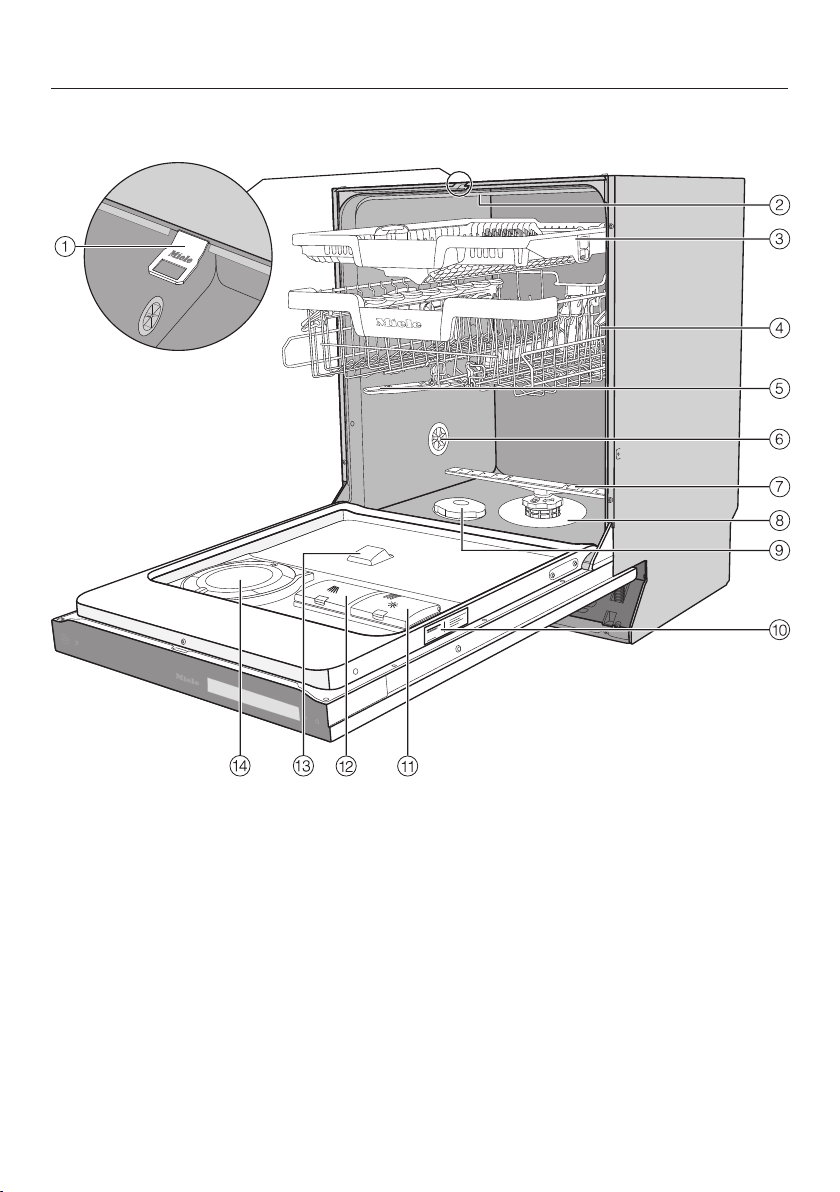
Guide to the appliance
18
Appliance overview
a
Door locking pins
b
Top spray arm
c
3D MultiFlex cutlery tray (depending
on model)
d
Upper basket (depending on model)
e
Middle spray arm
f
Aeration valve
g
Bottom spray arm
h
Filter combination
i
Salt reservoir
j
Data plate
k
Rinse aid reservoir
l
Detergent compartment
m
AutoDos detergent outlet
n
AutoDos (automatic dispensing)
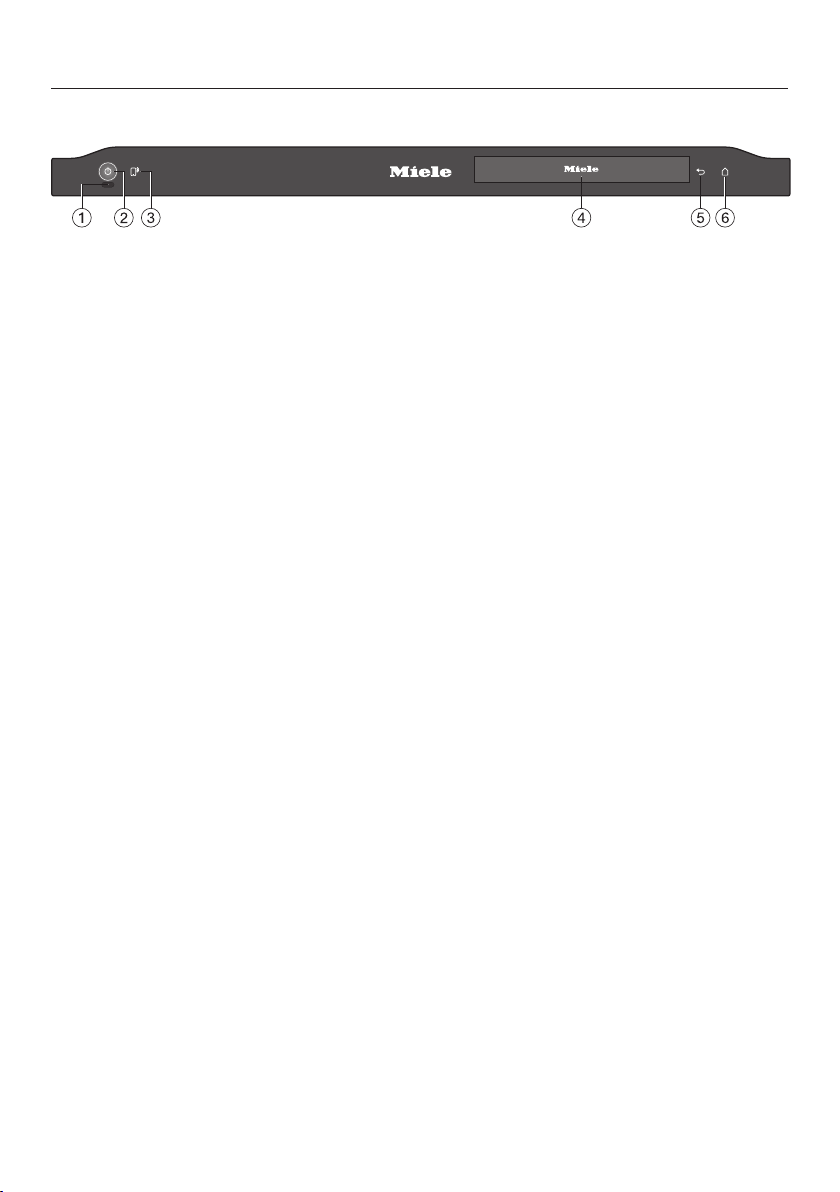
Guide to the appliance
19
Control panel
a
Optical in-operation indicator light
For indicating an ongoing wash pro-
gramme when the door is closed.
b
On/Offsensor control
For switching the dishwasher on and
off.
c
Remote startsensor control
For activating/deactivating the Re-
mote start option.
d
Touch display
For further information, see the “Dis-
play functions” section in the “Guide
to the appliance” section.
e
Backsensor control
For navigating back to the previous
menu or deleting values that have
been set previously.
f
Homesensor control
For returning to the Programmes
menu.

Guide to the appliance
20
Display functions
The display is used to select or set the
following:
- The programme
- Options
- The timer
- The Settings
The display can show the following:
- The programme name
- The programme stage
- The estimated time left for the pro-
gramme to run
- The energy and water consumption
(EcoFeedback)
- Any relevant fault messages and in-
formation
To save energy, the dishwasher
switches off after a few minutes if you
do not press any sensor controls dur-
ing this time.
Touch the sensor control to switch
the dishwasher back on.
The sensor controls on the control
panel and in the display react to finger-
tip contact.
The touch display can be scratched
by pointed or sharp objects, e.g.
pens.
Only touch the display with your fin-
gers.
Touch the required menu option to se-
lect it.
The currently selected setting is marked
in orange and can be changed.
The OKsensor control in the display is
used to confirm a message or setting
and to move to another menu level.
To exit a sub-menu again, use the
Backsensor control.
Touch the sensor control at any time
to return to the Programme menu.
If you do not press any sensor controls
for several seconds, the display will re-
vert to the previous menu. You will then
have to enter your settings again.

Guide to the appliance
21
Examples of how to operate the ap-
pliance
Main menu
Use the Back sensor control to
switch from the Programme menu to
the main menu.
Settings
Programmes
In the main menu, you can choose the
Programme menu to select pro-
grammes as well as the Settings menu.
You can alter the dishwasher’s controls
to suit changing requirements in the
Settings menu (see “Settings” chapter).
Option lists
You can scroll to the right or the left by
swiping your finger across the display.
50
°C
45-65
°C
Gentle
°C
45
°C
75
IntensiveAuto
The orange bar at the bottom of the dis-
play indicates that further options are
available.
You can change the order of pro-
grammes listed in the Programmes
menu by pressing and holding a pro-
gramme name and dragging it to the
place you want (except the ECO pro-
gramme).
50
°C
Estimate
Extra clean Extra dry
After selecting a programme, the Extras
menu is displayed. This is where you
can select any extras you want, activate
the timer and view the energy and water
consumption with the Estimate func-
tion.
Numerical values
You can set numerical values in some
menus.
11:45
OK
You can set the numbers by touching
the numerical keypad that you want to
change.
You can then set the numbers using the
sensor controls.
Use the OKsensor control to accept
the set numerical value.
Holding down the relevant or
sensor control will increase or de-
crease the time automatically.
Caring for the environment
22
Disposing of the packaging
material
The packaging material is used for
handling and protects the appliance
from transport damage. The packaging
material used is selected from materials
which are environmentally friendly for
disposal and can generally be recycled.
Recycling the packaging material re-
duces the use of raw materials. Use
material-specific collection points for
valuable materials and take advantage
of return options. Your Miele dealer will
take the packaging material away.
Disposing of your old appli-
ance
Electrical and electronic appliances
contain many valuable materials. They
also contain certain materials, com-
pounds and components which were
essential for their correct functioning
and safety. These could be hazardous
to human health and to the environment
if disposed of with household waste or
if handled incorrectly. Please do not,
therefore, dispose of your old appliance
with household waste.
Instead, please make use of officially
designated collection and disposal
points to dispose of and recycle elec-
trical and electronic appliances in your
local community, with your dealer or
with Miele, free of charge. By law, you
are solely responsible for deleting any
personal data from the old appliance
prior to disposal. You are legally obliged
to remove any old batteries which are
not securely enclosed by the appliance
and to remove any lamps without des-
troying them, where this is possible.
These must be taken to a suitable col-
lection point where they can be handed
in free of charge. Please ensure that
your old appliance poses no risk to chil-
dren while being stored for disposal.
Before using for the first time
23
Every dishwasher is tested at the fact-
ory. There will be residual water in the
appliance from this test. It is not an in-
dication that the dishwasher has been
used previously.
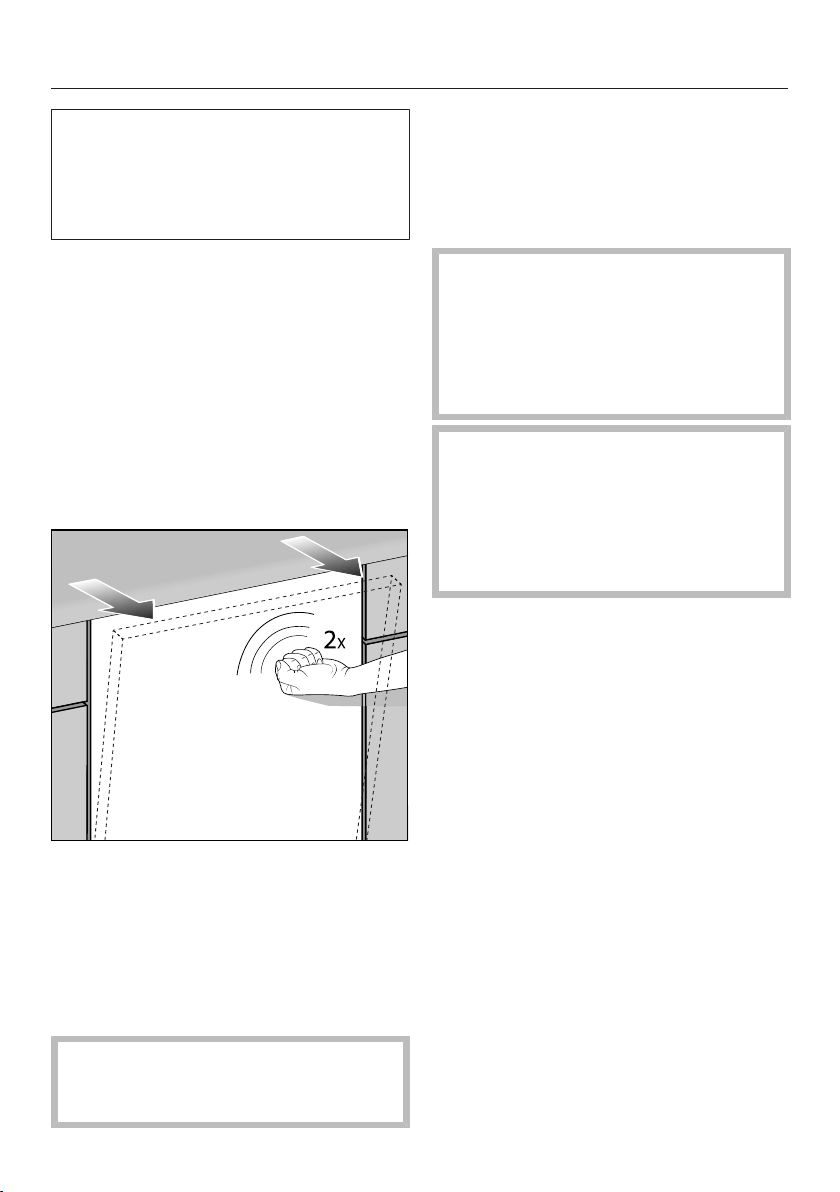
Opening the door
In some programmes, the door auto-
matically opens slightly to assist the
drying process.
This function can be deactivated, if pre-
ferred (see “Settings – AutoOpen”).
This dishwasher has a motorised door
opener which is activated by knocking
on the door front (Knock2open func-
tion).
Knock twice in quick succession on
the top third of the door front.
The door will open a little.
Hold the door at the top edge and
pull the door out of the lock.
The door locking pins will retract.
To prevent a technical fault, do not
hold the door locking pins firmly
when they are retracting.
If the door is opened during operation
all wash functions are automatically in-
terrupted.
You can deactivate this function (see
“Settings – Knock2open”).
Risk of scalding due to hot wa-
ter.
During operation, water in the dish-
washer may be very hot.
During operation, only open the door
with extreme caution.
Risk of injury due to door open-
ing automatically.
The door may open automatically at
the end of a programme.
Keep the area around the door free
of obstructions.
Before using for the first time
24
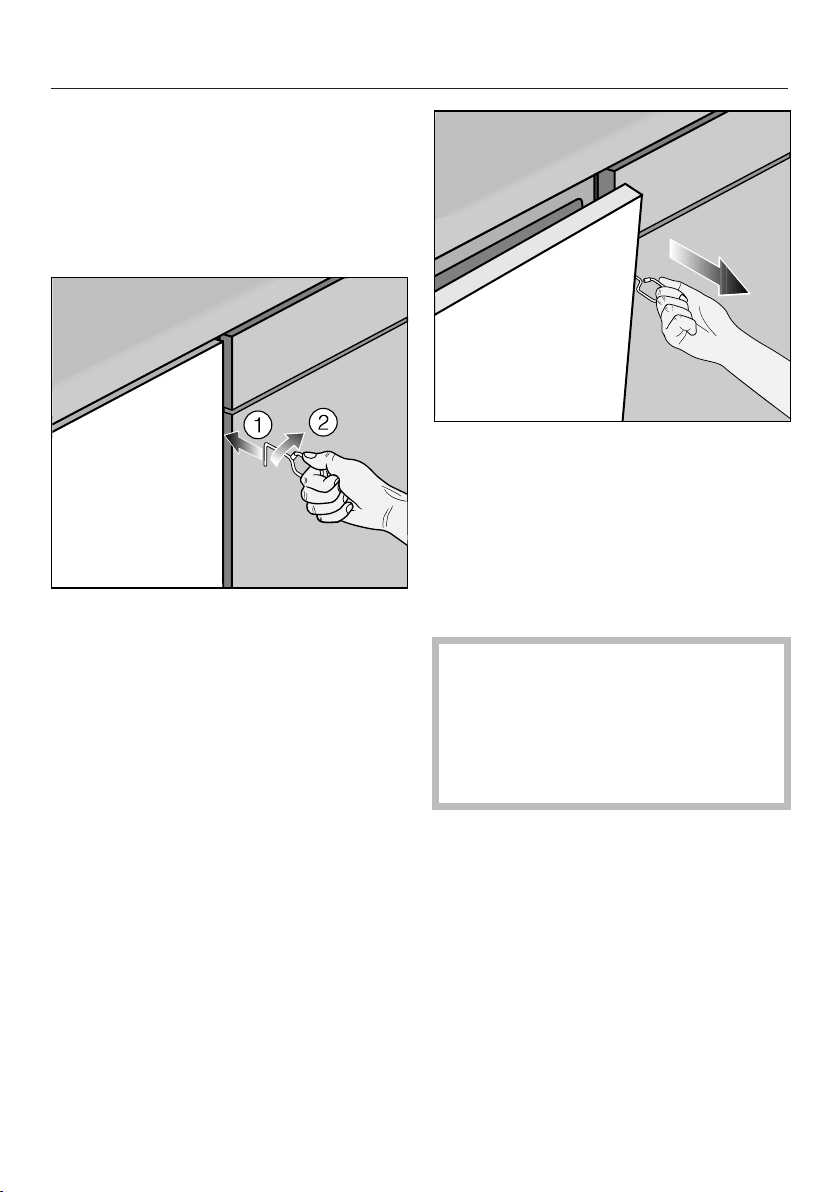
Door-opening mechanism
If the door will not open when knocked
or if there is a power failure, the door
can be opened manually with the door-
opening mechanism supplied with the
dishwasher.
Push the door-opening mechanism
into the gap between the dishwasher
front and the neighbouring unit
door about 15cm below the work-
top.
Turn the door-opening mechanism
clockwise, until it grips behind the
dishwasher front.
Then use it to pull the door open.
Closing the door
Push the baskets right in.
Then raise the door up, and push un-
til it clicks into position.
The door will then close automatically.
Risk of crushing due to the door
closing.
When closing the door, you are at
risk of shutting your fingers in it.
Do not put your hand inside the door
as it is closing.
Before using for the first time
25
Miele@home
Your dishwasher is equipped with an
integrated WiFi module.
In order to use it you will need:
- A WiFi network
- The Miele app
- A Miele user account The user ac-
count can be created via the Miele
app.
The Miele app will guide you as you
connect your dishwasher to your home
WiFi network.
Once your dishwasher is connected to
your WiFi network you can use the app,
for example, to carry out the following
activities:
- Control your dishwasher remotely
- Call up information on the operating
status of your dishwasher
- Call up information on the pro-
gramme sequence of your dish-
washer
Connecting your dishwasher to your
WiFi network will increase energy con-
sumption, even when the dishwasher is
switched off.
Make sure that your WiFi network
signal strength is strong enough at
the installation site of your dish-
washer.
Availability of the WiFi connection
The WiFi connection shares a frequency
range with other appliances (including
microwave ovens and remote control
toys). This can give rise to sporadic or
even complete connection failures.
Therefore, the availability of featured
functions cannot be guaranteed.
Miele@home availability
The ability to use the Miele app de-
pends on the availability of the
Miele@home service in your country.
The Miele@home service is not avail-
able in every country.
For information about availability,
please visit www.miele.com.
Miele App
The Miele App is available to download
free of charge from the Apple App
Store
®
or from the Google Play Store™.
Before using for the first time
26
Basic settings
Switching on the dishwasher
Open the door.
Switch the dishwasher on using the
sensor control.
The welcome screen will appear when
the dishwasher is switched on and the
welcome melody will sound.
For further information about the dis-
play functionality, see the “Display
functions” section in the “Guide to the
appliance” chapter.
Setting the language
The display will then change automatic-
ally to the screen for setting the lan-
guage.
Select the language you want as well
as the country if applicable.
For further information on setting the
language, see the “Language” section
in the “Settings” chapter.
The set language is marked orange.
Setting up Miele@home
The messageSet up Miele@home? will
appear in the display.
If you want to set up Miele@home
now, select the Yesoption.
Tip: To set it up at a later date, select
the Nooption.
There are two ways of connecting your
dishwasher to your WiFi network:
Select the connection method you
wish to use.
1. App
2. WPS
You will then be guided by the display
and the Miele app.
For further information on
Miele@home, see the “Miele@home”
section in the “Settings” chapter.
Before using for the first time
27
Setting the time of day
The time of day is updated automatic-
ally if a connection is established with
the WiFi network.
The display will then change to the
screen for setting the clock format and
the time of day.
The current time of day must be set be-
fore you can use the timer option.
Select the setting you want for the
clock format.
Set the hours and the minutes and
confirm by pressing OK.
Setting the water hardness level
The display will change to the screen
for setting the water hardness.
- You should programme the dish-
washer to the correct water hardness
for your area.
- Your local water authority will be able
to advise you of the water hardness
level in your area.
- Where the water hardness fluctuates
e.g. between 1.8 and 2.7mmol/l (10 -
15 °dH - German scale) always pro-
gramme the dishwasher to the higher
value (2.7mmol/l or 15 °dH in this ex-
ample).
In the event of a fault, it will help the
service technician if you know the hard-
ness of your local water supply.
Therefore, please enter the water hard-
ness:
____________°dH or mmol/l
The dishwasher is programmed at the
factory for a water hardness level of
2.5mmol/l (14°dH – German scale).
Set the water hardness level in your
area and confirm using OK.
See the “Settings” chapter, “Water
hardness” section for more informa-
tion.

Before using for the first time
28
Activating AutoDos
The display changes to the settings
screen for AutoDos (see the “Detergent”
chapter, “Automatic dispensing/Auto-
Dos” section).
Even if you do not wish to use Auto-
Dos, you must remove the transport
locking device from the PowerDisk
compartment before running the first
programme (see the “Detergent”
chapter, “Activating AutoDos” sec-
tion).
You can activate AutoDos.
If you do not wish to use AutoDos
(automatic dispensing), you can manu-
ally dispense the detergent via the de-
tergent compartment (see the “Deter-
gent” chapter, “Manual detergent dis-
pensing” section).
Select the setting you want and con-
firm with OK.
This setting applies to all programmes
and you can change it in a pro-
gramme's Extras menu.
Finally, prompts will appear in the dis-
play.
After confirming these prompts with
OK, the messages Add salt and run the
“QuickPowerWash” programme with the
“Express” option without a load and Re-
fill rinse aid may appear.
Add salt and rinse aid if necessary
(see “Before using for the first time –
Dishwasher salt” and “Rinse aid”).
Select OK to confirm the messages.
The selected programme will be shown
briefly in the display.
Next, the estimated energy and water
consumption may be shown for the
chosen programme for several
seconds.
Then the display will show the estim-
ated running time for the programme
selected.
Before using for the first time
29
Dishwasher salt
In order to achieve good cleaning res-
ults, the dishwasher needs to operate
with soft water. Hard water results in
the build-up of calcium deposits on
crockery and on the wash cabinet walls.
Mains water with a water hardness level
higher than 0.9mmol/l (5°dH – German
scale) must be softened. This occurs
automatically in the integrated water
softener. The water softener is suitable
for a water hardness level of up to
12.6mmol/l (70°dH – German scale).
In order to maintain the functions of
the water softener, it must be reactiv-
ated regularly. Reactivation occurs
automatically every ninth programme
sequence. At the start of the next pro-
gramme, an additional 4.4l of water is
required for this process. Energy con-
sumption increases by 0.015kWh and
the programme is extended by approx.
3minutes.
The above only applies to the ECO
programme at a water hardness of
2.5mmol/l (14°dH – German scale).
For other programmes and water
hardness levels, the frequency of re-
activation will differ.
In order to be reactivated, the water
softener requires dishwasher salt.
Depending on the water hardness level
(<3.8mmol/l, or <21°dH – German
scale), dishwasher salt is not required if
combination detergents are being used
(see “Detergent – Powder detergent and
detergent tabs”).
If the water in your area is very soft
and constantly lower than 0.9mmol/l
(5°dH – German scale), you do not
need to add dishwasher salt. The salt
refill indicator will automatically switch
off after the water hardness has been
set accordingly (see “Settings – Water
hardness”).
Damage to the water softener
from detergent.
Detergent will damage the water
softener.
Do not fill the salt reservoir with
powder or liquid detergent.
Damage caused by using unsuit-
able salts.
Some types of salt may contain in-
soluble components which can
cause the water softener to malfunc-
tion.
Only use special coarse-grained
dishwasher salt or other pure kitchen
salt for reactivation.
If you only ever use combination de-
tergent products in your dishwasher,
you can turn off both refill reminders if
you wish (see “Settings – Refill re-
minders”).
Please make sure that if you stop us-
ing combination detergent products,
you refill the dishwasher salt and
rinse aid. Switch the refill reminders
back on if required.
Before using for the first time
30
Filling the salt reservoir
Before filling the salt reservoir for the
first time, you must fill it with approx.
2l of water to enable the salt to dis-
solve.
Once the dishwasher has been used
once, there is always sufficient water
in the salt reservoir.
Remove the lower basket from the
wash cabinet and unscrew the salt
reservoir cap.
Danger of corrosion due to saline
solution.
Water or saline solution will run out
of the reservoir when the cap is
opened. Saline solution that runs out
can cause corrosion in the wash
cabinet and to the dishwasher load.
The salt reservoir should therefore
only be opened in order to replenish
the salt.
Fill the salt reservoir with approx. 2l
of water (first use only).
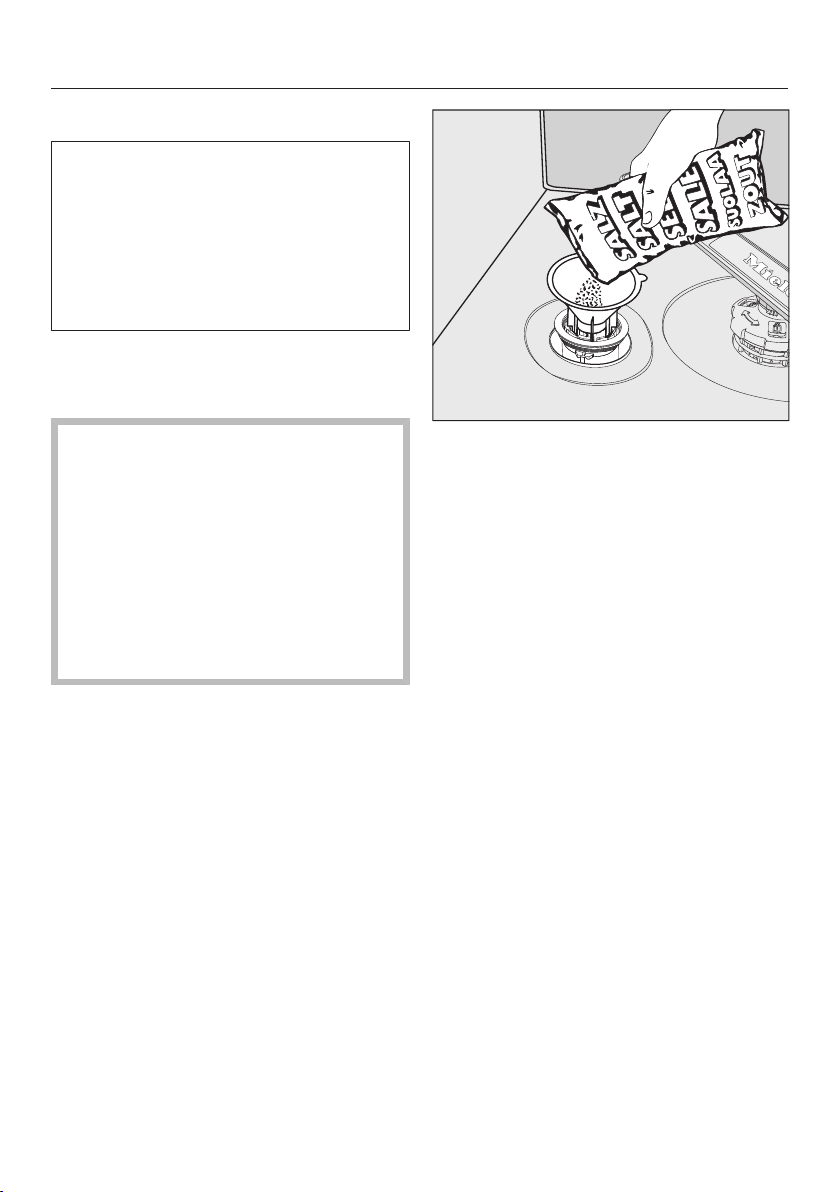
Place the funnel provided over the
salt reservoir and carefully fill with
dishwasher salt until the reservoir is
full. The salt reservoir holds up to
2kg of salt, depending on the type of
salt used.
Clean off salt residues from around
the salt reservoir opening. Next,
screw the salt reservoir cap on again
firmly.
Immediately after filling the salt reser-
voir and each time you remove the
salt container cap, run the
65°CQuickPowerWash pro-
gramme with the Express pro-
gramme option selected without a
load in the dishwasher to dissolve
and remove any traces of salt from
the wash cabinet.

Before using for the first time
31
Refilling the salt
When Add salt and run the
“QuickPowerWash” programme with the
“Express” option without a load appears
in the display, wait until the end of the
programme and then refill the salt
reservoir.
Confirm with OK.
The salt refill indicator will go out.
Risk of corrosion due to saline
solution.
Saline solution that runs out can
cause corrosion in the wash cabinet
and to the load items.
Each time you remove the salt reser-
voir cap, you must run the
65°CQuickPowerWash pro-
gramme with the Express pro-
gramme option selected without any
load items in the dishwasher. This
will dissolve and remove any traces
of salt from the wash cabinet.
After the salt reservoir has been filled,
the salt refill indicator may still appear in
the display if the salt concentration has
not yet reached the correct level. In this
case, confirm the message again with
OK.
The salt refill indicator will be switched
off if you have programmed the dish-
washer for a water hardness below
0.9mmol/l (5°dH – German scale).
Before using for the first time
32
Rinse aid
Rinse aid is necessary to ensure that
water does not cling and leave marks
on crockery during the drying phase,
and helps crockery dry faster after it
has been washed.
Rinse aid is poured into the container
and the amount set is dispensed auto-
matically.
Washing-up liquid or detergent
can cause damage.
Washing-up liquid and detergent can
damage the rinse aid container.
Only fill it with rinse aid formulated
for domestic dishwashers.
Alternatively, you could use liquid citric
acid at a concentration of up to 10%.
The resulting rinsing and drying quality
on the crockery will not, however, be as
good as when rinse aid is used.
Risk of acid damage.
The dishwasher can be damaged by
high concentrations of acid.
Under no circumstances should you
use citric acid with a higher acid
content.
If you only ever wish to use combina-
tion products in your dishwasher,
you do not need to add rinse aid.
However, for optimum rinsing and
drying results, use dishwasher deter-
gent and add dishwasher salt and
rinse aid separately.
If you only ever use combination de-
tergent products containing salt and
rinse aid in your dishwasher, you can
switch off both refill reminders if you
wish (see “Settings – Refill remind-
ers”).
Please make sure that if you stop us-
ing combination detergents, you refill
the dishwasher salt and rinse aid.
Switch the refill reminders back on if
required.
Before using for the first time
33
Adding rinse aid
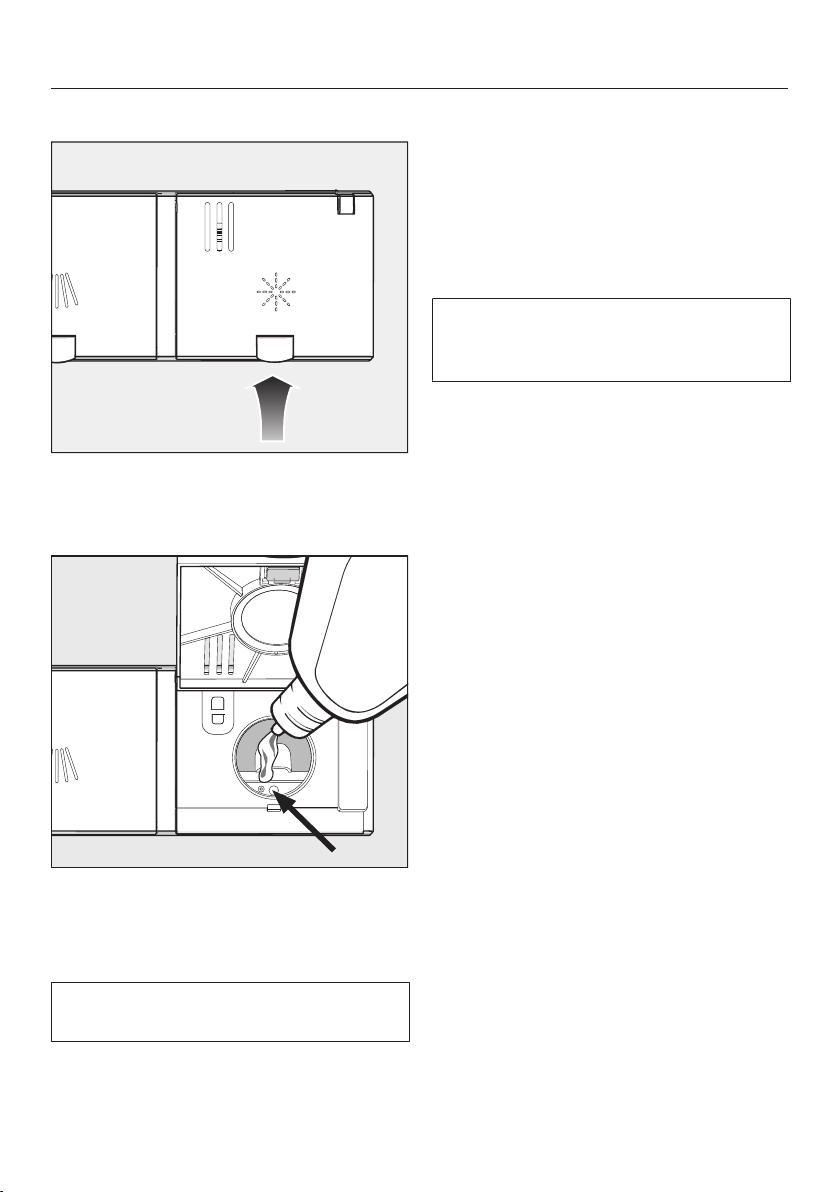
Press the yellow button on the lid
of the rinse aid reservoir.
The lid will spring open.
Fill with rinse aid until the filling level
indicator (arrow) changes to a dark
colour while the door is horizontally
open.
The rinse aid reservoir holds approx-
imately 110ml.
Close the lid firmly until you hear it
click into place. Otherwise, water can
enter the rinse aid reservoir during a
programme.
Wipe up any spilled rinse aid. This
prevents excess foam developing
during the next programme.
You can adjust the rinse aid dosage
for the best wash result (see “Set-
tings” chapter, “Rinse aid” section).
Filling the rinse aid reservoir
When the refill reminder Refill rinse aid
appears in the display, the reservoir
contains sufficient rinse aid for 2 to 3
programmes only.
Refill with rinse aid in plenty of time.
Confirm with OK.
The rinse aid refill reminder will disap-
pear.
Settings
34
You can alter the dishwasher’s con-
trols to suit changing requirements by
adjusting the settings.
The settings can be altered at any
time.
Opening the settings menu
Switch the dishwasher on using the
sensor control.
The Programmes menu will appear in
the display.
For further information about the dis-
play functionality, see the “Display
functions” section in the “Guide to the
appliance” chapter.
Switch to the main menu using the
sensor control.
Touch the Settingssensor control.
The display will change to the Set-
tingsmenu.
Changing settings
Select the setting you want to
change.
The selected setting is marked in or-
ange.
Change the value displayed and con-
firm with OK.
or
Touch an option to select it.
To exit a sub-menu again, use the
Backsensor control.
The display will revert to the menu
above.
Closing the settings menu
Touch thesensor control.
The display will change to the main
menu.

Settings
35
Language
The display can be set to appear in one
of several different languages.
You can change the language used in
the display and also the country via the
Language sub-menu.
The flag after the wordLanguage
serves as a guide if a language that
you do not understand has been set.
In this case keep selecting the menu
option that has a flag after it until you
reach the Language sub-menu.
Time
The current time of day must be set be-
fore you can use the timer option.
Setting the clock format
You can select either a 24-hour or 12-
hour clock.
Select the setting you want for the
clock format.
Setting the time of day
You can set the current time of day.
Set the hours and the minutes and
confirm by pressing OK.
The time of day has now been saved.
Settings
36
Water hardness
Your dishwasher is fitted with a water
softener.
- You should programme the dish-
washer to the correct water hardness
for your area.
- Your local water authority will be able
to advise you of the water hardness
level in your area.
- Where the water hardness fluctuates
e.g. between 1.8 and 2.7mmol/l (10–
15°dH - German scale) always pro-
gramme the dishwasher to the higher
value (2.7mmol/l or 15°dH in this ex-
ample).
If the water hardness in your area is
available in a unit other than °dH, you
can convert the values as follows:
1°dH = 0.18mmol/l = 1.78°fH
Setting the water hardness level
Select the water hardness level in
your area and confirm using OK.
AutoDos (automatic dispens-
ing)
Automatic dispensing automatically ad-
justs the amount of detergent to the se-
lected programme. In the Auto45–
65°C programme, the quantity is adjus-
ted depending on the degree of soiling
of the crockery.
If you want to extend the service life of
the PowerDisk, you can reduce the dis-
pensing quantity. The programme’s
cleaning performance may decrease as
a result.
If you want to improve the cleaning per-
formance, you can increase the dis-
pensing quantity. This reduces the ser-
vice life of the PowerDisk.
Dosage amount settings
For best results, you can adjust the dis-
pensing quantity of the PowerDisk.
Select the Dosage amount menu op-
tion and confirm with OK.
Select the setting you want and con-
firm with OK.
Settings
37
Rinse aid
You can adjust the rinse aid dosage for
best results.
The rinse aid dosage can be set from 0
to 6ml.
3ml is the factory default setting.
The rinse aid dosage can turn out to be
higher than the set value due to the
automatic adjustment of the pro-
gramme.
If spots appear on crockery and glass-
ware:
- Increase the rinse aid dosage.
If clouding or smearing appears on
crockery and glassware:
- Decrease the rinse aid dosage.
Miele@home
Your dishwasher is equipped with an in-
tegrated WiFi module.
You can connect your dishwasher to
your WiFi network.
This will increase the energy consump-
tion, even when the dishwasher is
switched off.
The “Settings” and “Miele@home set-
tings” menus will be added as addi-
tional menu options.
Make sure that your WiFi network
signal strength is strong enough at
the installation site of your dish-
washer.
There are a number of ways of connect-
ing your dishwasher to your WiFi net-
work:
Settings
38
App
The Miele app is available to download
free of charge from the Apple App
Store
®
or from the Google Play Store™.
Select the Appmenu option and con-
firm with OK.
Follow the instructions in the app.
Once your dishwasher is connected to
your WiFi network, you can use the app
to carry out the following tasks:
- Control your dishwasher remotely
- Call up information on the operating
status of your dishwasher
- Call up information on the pro-
gramme sequence of your dish-
washer
- Set up a Miele@home network with
other WiFi-enabled Miele appliances
WPS
As an alternative to networking via the
Miele app, you can connect your dish-
washer to your WiFi network using WPS
(Wireless Protected Setup).
Your WiFi router must support WPS.
Confirm the messagePress the WPS
button on your router. with OK.
Activate the WPS function on your
router within twominutes.
Once the connection has been estab-
lished, confirm the message with OK.
If the connection fails, you have prob-
ably not activated WPS on your router
quickly enough. Repeat the steps
above.

Settings
39
Deactivate
If you do not wish to use the WiFi mod-
ule of your dishwasher, you can switch
it off.
Select the Deactivatemenu option
and confirm with OK.
In the Miele@homemenu, the menu op-
tionActivate will now be displayed in-
stead of Deactivate.
Activate
If you wish to connect your dishwasher
to your WiFi network, you can turn on
the WiFi module.
Select the Activatemenu option and
confirm with OK.
In the Miele@homemenu, the menu op-
tionDeactivate will now be displayed in-
stead of Activate.
Display Connection status
You can call up the current connection
status of your dishwasher.
Select the Connection statusmenu op-
tion and confirm with OK.
Use the sensor controls to con-
secutively call up the WiFi signal
strength, the name of your router and
the associated IP address.
Select OK to confirm the messages.
Set up again
This menu option only appears if you
have already connected your dish-
washer to your WiFi network.
Connecting via the app
Select the Appmenu option and con-
firm with OK.
Follow the instructions in the app.
Connecting via WPS
Select the WPSmenu option and
confirm with OK.
Follow the instructions in the display.

Settings
40
Reset network configuration?
This menu option will only be displayed
if you have connected your dishwasher
to your WiFi network.
You can use this menu option to reset
all WiFi module settings to the factory
default settings.
The network configuration should be re-
set whenever a dishwasher is being dis-
posed of or sold, or if a used dish-
washer is being put into operation. This
is the only way to ensure that all per-
sonal data has been removed and the
previous owner will no longer be able to
access the dishwasher.
Select the menu option Reset network
configuration?.
Select the Yes menu option and con-
firm with OK.
Remote control
This menu option will only be dis-
played if you have connected your
dishwasher to your WiFi network (see
“Settings” chapter, “Miele@home”
section)
If you wish to permanently switch off
the Remote controloption, you can do
this under this menu option. The
sensor control will then no longer be
available to select until you change this
setting again.
Even if the Remote controloption is
switched off, you can use Miele to call
up information about your appliance.
However, you cannot start any pro-
grammes or change any settings from
it.
Settings
41
Remote Update
The RemoteUpdate menu option is
only displayed and can only be selec-
ted if the requirements for using
Miele@home have been met (see “Be-
fore using for the first time” chapter,
“Miele@home” section).
The RemoteUpdate function is used for
updating the software in your dish-
washer. If an update is available for
your dishwasher, it will automatically
download it. Updates will not be in-
stalled automatically. They must be initi-
ated manually.
If you do not install an update, you can
continue to use your dishwasher as
usual. However, Miele recommends in-
stalling updates.
Activating/deactivating
The RemoteUpdate function is activ-
ated as standard. Available updates will
be downloaded automatically and will
only be installed if you initiate them.
Deactivate RemoteUpdate if you do not
wish any updates to be downloaded
automatically.
Running a RemoteUpdate
Information about the content and
scope of a RemoteUpdate will be
provided in the Miele app.
A message will appear in your dish-
washer display if a software update is
available.
You can install the update immediately
or postpone it until later. When the ap-
pliance is switched on again, you will be
reminded about the update.
Switch RemoteUpdate off if you do not
wish to install updates.
Updates may take several minutes.
Please note the following information
about the RemoteUpdate function:
- You will only receive a message when
an update is available.
- Once an update has been installed, it
cannot be undone.
- Do not switch the dishwasher off dur-
ing the update. Otherwise, the up-
date will be aborted and will not be
installed.
- Some software updates can only be
carried out by Miele Service.

Settings
42
SmartStart
This menu option will only be dis-
played if you have connected your
dishwasher to your WiFi network (see
“Settings” chapter, “Miele@home”
section)
The SmartStartfunction is used for start-
ing your dishwasher automatically at a
time when your energy costs are most
economical.
To use this function you may need fur-
ther technical accessories.
If you have activated SmartStartPermit-
ted, the Timer menu of the selected
programme will no longer show EcoStart
but will instead show SmartStart. The
dishwasher will then start within the
timeframe specified when it receives a
signal from the energy supplier.
If it has not received a signal from the
energy supplier by the latest possible
start time, the dishwasher will start
automatically.
EcoStart
In order to run your dishwasher in the
most economical way, you can use the
EcoStartoption to take advantage of
your electricity supplier’s cheaper en-
ergy tariffs (see “Options” chapter,
“Timer” section).
With this option selected, your dish-
washer will start automatically at your
electricity supplier’s cheapest tariff
times.
To use this option, you must first set up
to three energy tariff time zones in
which the dishwasher can start. You
can allocate different priorities to these
time zones. The time with the cheapest
energy tariff will be given Priority 1.
Contact your electricity supplier to find
out the times of the cheapest energy
tariffs.
Once the energy tariff times have been
set, you can use the EcoStartoption to
set the latest finish time required for
each programme.
The dishwasher will then start automat-
ically during the cheapest energy tariff
time. The programme will end at the set
finish time at the latest.

Settings
43
Setting the energy tariff times
Before you can use the EcoStartoption,
you must set at least one energy tariff
time.
Select an energy tariff time to set
from T1 to T3.
The start of the energy tariff time selec-
ted will be displayed.
Set the hours and minutes for the
start time.
Select Finish.
The end of the energy tariff time selec-
ted will be displayed.
Set the hours and minutes for the end
time and confirm both with OK.
The energy tariff time will be saved.
You can now select the priority of the
saved energy tariff time.
Select the priority you want.
The selected settings are displayed.
The energy tariff time will be activated.
Changing the energy tariff times
You can change the start, end or priority
of an energy tariff time.
Select an energy tariff time to change
from T1 to T3.
Select the setting you want to
change.
Change the setting and confirm with
OK.
The selected settings are displayed.
The change will be saved.

Settings
44
Deleting the energy tariff times
You can delete the settings for an en-
ergy tariff time and in doing so deactiv-
ate the EcoStartoption for this time
zone.
Select an energy tariff time to delete
from T1 to T3.
Select Delete.
Confirm the query with Yes.
The settings for the energy tariff time
selected will be reset.
Confirm the message with OK.
The energy tariff time will be deleted.
Consumption (EcoFeedback)
You can set whether the energy and
water consumption is displayed for the
selected programme. This function
shows the estimated consumption be-
fore a programme, and the actual con-
sumption after the end of the pro-
gramme.
You can also call up the total consump-
tion of energy and water for all the wash
programmes you have previously run on
your dishwasher (see “Caring for the
environment” chapter, “EcoFeedback
consumption data” section).
Display Consumption display
Select the Consumption displaymenu
option.
Select the setting you want.
Display Total consumption
Select the Total consumptionmenu op-
tion.
The values for energy and water are
displayed.
You can delete the values for the total
consumption.
Select the menu option.
Select the Yesmenu option.
The values are deleted.
Settings
45
Temperature
The temperature can be displayed in
°C/Celsius or °F/Fahrenheit.
The factory default setting is °C/
Celsius.
Display brightness
You can set the display brightness to
one of seven different levels on the bar
chart.
Volume
A buzzer sequence will sound at the
end of a programme or if there is a fault
as long as the buzzers are activated.
Buzzer in the event of a fault
In the event of a fault, the alarm tone
will sound four times at intervals with a
short pause between each set of tones.
The alarm tone that sounds when
there is a fault cannot be deactiv-
ated.
Buzzers
The buzzer at the end of a programme
will sound four times at intervals with a
short pause between each set of tones.
The volume of the buzzer at the end of
the programme can be selected from
one of seven levels. If no volume is se-
lected, the buzzer is switched off.
Keypad tone
An audible tone sounds each time a
sensor control outside of the touch dis-
play is pressed.
The volume for the keypad tone can be
set to one of seven different levels. If no
volume is selected, the keypad tone is
switched off (except the On/
Offsensor control).
Welcome melody
If you switch the dishwasher on or off, a
brief melody will sound.
You can switch the melody off.
Settings
46
Refill reminders
If you only ever use combination deter-
gent products or automatic dispensing
using Miele PowerDisks (if available),
you can switch off the refill reminders
for dishwasher salt and rinse aid if you
wish.
Please make sure that if you stop us-
ing combination detergents, you refill
the dishwasher salt and rinse aid.
Switch the refill reminders back on.
AutoOpen
In some programmes the door automat-
ically opens slightly to assist the drying
process.
This function can be deactivated if you
wish.
Risk of damage due to steam.
Steam from the dishwasher could
damage the edges of delicate work-
tops when you open the door at the
end of the programme if the fan is no
longer running.
If you have deactivated the auto-
matic door opening function but
would still like to open the door at
the end of the programme, then
make sure that you open the door
fully.
2nd interim rinse
You can choose this function to in-
crease the cleaning performance of the
programmes with a second interim
rinse.
When this function is activated, water
consumption may increase.
If this function is switched on, it will be
applied to all programmes until it is
switched off again (except for the ECO
programme).
Knock2open
The door opens if you knock twice in
quick succession on the top third of the
door front.
The function can be deactivated,
in which case the door has to be fitted
with a handle to open it.

Settings
47
BrilliantLight
This dishwasher is equipped with wash
cabinet interior lighting.
When the door is open, the lighting
switches off automatically after 15
minutes.
You can also switch off the wash cab-
inet interior lighting permanently.
Hygiene cycle
If you mainly use low temperature pro-
grammes (<50°C), there is a risk of
bacteria and unpleasant odours build-
ing up in the wash cabinet (see “Clean-
ing and care – Hygiene cycle”).
If this function is switched on, a mes-
sage will be displayed recommending
the use of a high temperature pro-
gramme after several low temperature
programmes have been run.
Heat accumulator
This dishwasher is equipped with a heat
accumulator (see “Caring for the envir-
onment – Heat accumulator”).
Select State
The heat accumulator function can be
switched off if you do not wish to use it.
This will increase energy consumption.
Select the State menu option.
Select the setting you want and con-
firm with OK.
Empty manually
You can manually empty the heat accu-
mulator, e.g. for a longer period of ab-
sence, or before moving the appliance
to a new location.
In doing so, please ensure that the
dishwasher is properly connected.
Select the Empty manuallymenu op-
tion.
The process starts straight away.

Settings
48
Software version
You can call up the electronic software
version of your dishwasher for technical
support purposes.
Legal information
You can view legal information about
the open source licences for your dish-
washer.
Copyrights and licences for
operator and control software
Miele uses their own and third party
software which is not subject to any so-
called Open Source Licence for the op-
eration and control of the appliance.
This software/these software compon-
ents are protected by copyright. The
copyright powers of Miele and third
parties have to be respected.
Furthermore, this appliance contains
software components which are distrib-
uted under Open Source licence condi-
tions. Please refer to menu item Set-
tings| Legal information| Open source li-
cences in the appliance for the Open
Source components contained therein,
together with the corresponding copy-
right notices, copies of the licence
terms valid at the time, and any further
information. The liability and warranty
provisions of the Open Source licence
terms and conditions as stated therein
apply only in relation to the respective
rights holders.

Settings
49
Copyrights and licences for the
communication module
For the purpose of operating and con-
trolling the communication module,
Miele uses proprietary or third-party
software that is not covered by open
source licensing terms. These items of
software/software components are pro-
tected by copyright. The copyrights
held by Miele and third parties must be
respected.
Furthermore, this communication mod-
ule contains software components
which are distributed under open
source licence conditions. The open
source components contained in the
appliance along with the corresponding
copyright notices, copies of the licens-
ing terms valid at the time, and any fur-
ther information can be accessed loc-
ally via IP using a web browser (http://
<IP address>/Licenses). The liability
and warranty arrangements for the
open source licences displayed in this
location only apply in relation to the re-
spective rights holders.
Showroom
For demonstration purposes only.
The dishwasher is equipped with a
demo mode for showroom use.
Factory default
You can reset all dishwasher settings to
the factory default settings.
WiFi module settings (where applicable)
have to be reset separately (see “Set-
tings – Miele@home”).
Select Reset appliance settings?.
Select the Yes option and confirm
with OK.

Caring for the environment
50
Economical dishwashing
This dishwasher is exceptionally eco-
nomical in its use of water and electri-
city.
You can make the most of your appli-
ance by following these tips:
- Washing in a dishwasher generally
uses less water and energy than
washing by hand.
- There is no need to pre-rinse items
under running water, and this unne-
cessarily increases water and energy
consumption.
- For the most economical dishwash-
ing, make full use of the basket capa-
city without overloading the dish-
washer. This results in the most eco-
nomical dishwashing in terms of en-
ergy and water consumption.
- Choose the programme to suit the
type of crockery being washed and
the degree of soiling (see “Pro-
gramme overview”).
- Select the ECOprogramme for en-
ergy-saving dishwashing. This pro-
gramme is the most efficient in terms
of its combined energy and water
consumption for cleaning dishes with
a normal level of soiling.
- If you have a hot water connection,
choose the SolarSave programme
(see “Installation – Water inlet”). The
wash water will not be heated up dur-
ing this programme.
- Follow the detergent manufacturer’s
recommendations on detergent
dosage.
- If you are manually dosing the deter-
gent, reduce the amount of detergent
by
1
/
3
when using powder or liquid
detergent if the baskets are only half
full.
Caring for the environment
51
EcoFeedback consumption in-
dicator
You can view information about the en-
ergy and water consumption of your
dishwasher (see “Settings” chapter,
“Consumption” section).
The following information will appear in
the display:
- Estimated energy and water con-
sumption before the programme se-
quence begins.
- Actual energy and water consump-
tion at the end of a programme.
- The total consumption of the dish-
washer.
1. Consumption estimate
You can display the predicted energy
and water consumption in the Extras
menu of the selected programme using
the Estimate function.
The estimated consumption will be
shown as a bar chart. The more bars
displayed, the higher the energy or wa-
ter consumption of the selected pro-
gramme.
The values are influenced by the pro-
gramme, the extras selected, the ambi-
ent conditions and the size of the load.
The estimated consumption function is
activated as standard. This function can
be deactivated, if preferred (see “Set-
tings”, “Consumption” section).
2. Displaying consumption
At the end of the programme, you can
call up the actual energy and water
consumption for the programme that
has just been run.
Open the door at the end of the pro-
gramme.
Select the Consumption function.
The energy and water consumption of
the programme that has just run is dis-
played.
Switching the dishwasher off at the
end of the programme will delete the
actual consumption values for the pro-
gramme that has just been run.
3. Total consumption
You can view the total consumption of
energy and water for all previously used
programmes of your dishwasher (see
“Settings” chapter, “Consumption” sec-
tion).

Caring for the environment
52
Heat accumulator
This dishwasher is equipped with a heat
accumulator, in which fresh water for
the programme is pre-heated and
stored in order to save energy. The heat
accumulator is refilled with fresh water
towards the end of each rinse cycle.
The water is held here ready for the
next rinse cycle.
If you do not wish to use this function, it
can be switched off (see “Settings –
Heat accumulator”).
If the water in the heat accumulator has
not been used for several weeks, the
water will be automatically drained off
for hygiene reasons. This procedure
takes a few minutes and will occur even
with the dishwasher switched off or the
door open.
Please ensure that the dishwasher is
properly connected.
The display will remain dark while the
heat accumulator is drained off. If you
touch the sensor control, the display
will show the message Empty heat accu-
mulator. Other functions will be unavail-
able during this procedure.
Automatic emptying cannot be interrup-
ted.
During the subsequent programme se-
quence, water and energy consumption
will be higher.
The heat accumulator can be manually
drained for transporting the dishwasher,
e.g. when moving house (see “Settings
– Heat accumulator”).
The heat accumulator should only be
used in conjunction with a cold water
connection.
This function should be switched off
if your dishwasher is connected to a
hot water connection.

Loading the dishwasher
53
General information
Remove coarse food residues from
crockery.
There is no need to pre-rinse items un-
der running water.
Damage can be caused by ash,
sand, wax, lubricating grease or
paint.
These substances will contaminate
the dishwasher and can then no
longer be removed.
Do not wash items soiled with these
substances in the dishwasher.
Crockery can be loaded anywhere in
the baskets, but the following notes
should be observed:
- Do not place crockery and cutlery in-
side other items where they will cover
one another.
- Load the crockery so that water can
access all surfaces. This ensures that
they get properly cleaned.
- Make sure that all items are securely
positioned.
- Hollow items such as cups, glasses,
pots etc. must be placed upside
down in the baskets.
- Tall and narrow hollow items, such as
champagne glasses, should be
placed in the middle of the basket
rather than in the corners. This en-
sures the hollow items are more eas-
ily accessed by the water jets.
- Wide-based items should be placed
at an angle so that water can run off
them freely.
- The spray arms must not be blocked
by items that are too tall or hang
through the baskets. Test for free
movement by manually rotating the
spray arms.
- Make sure that small items cannot
fall through the holders in the bas-
kets.
Small items such as lids should
therefore be placed in the 3D
MultiFlex tray or cutlery basket (de-
pending on model).
Some foods may contain natural dyes,
e.g. carrots, tomatoes or ketchup.
These dyes can discolour plastic items
in the dishwasher if large quantities of
these foods are in contact with the
crockery inside the appliance. The sta-
bility of plastic items is not affected by
this discolouration.
Washing silverware can also cause
plastic items to discolour.

Loading the dishwasher
54
Items not suitable for dishwashers:
- Wooden cutlery and crockery or
items with wooden parts: these may
discolour and fade. The glue used in
these items is not dishwasher-proof
and wooden handles may come
loose after being washed in a dish-
washer.
- Craft items, antiques, valuable vases
and decorative glassware: such items
are not suitable for dishwashers.
- Plastic items that are not heat resist-
ant: the high temperatures in the
dishwasher may cause them to melt
or lose shape.
- Copper, brass, tin and aluminium
items: these may discolour or be-
come dull.
- Colours painted over a glaze: these
may fade after a number of washes.
- Delicate glassware and glassware
containing lead crystal: clouding may
occur over time.
Silver
Silver that has been in contact with
foods containing sulphur can discolour.
These include egg yolk, onions, mayon-
naise, mustard, pulses, fish, fish brine
and marinades.
Silverware previously cleaned with a
silver polish may still be damp or spot-
ted at the end of a programme, where
water has not run off smoothly.
Tip: Rub the silver dry with a cloth.
Damage due to caustic alkaline
detergents.
Aluminium parts (e.g. the grease fil-
ters of cooker hoods) can be dam-
aged by caustic alkaline detergents.
In extreme cases, there is a risk of an
explosive chemical reaction (such as
an explosive oxyhydrogen gas reac-
tion).
Aluminium components must not be
cleaned in the dishwasher with
caustic alkaline commercial or indus-
trial detergents.
Tip: When purchasing new crockery
and cutlery, make sure they are dish-
washer-proof if you want to wash them
in the dishwasher.
Glass care
- Clouding may occur on glasses after
frequent washing in the dishwasher.
When washing delicate glassware in
the dishwasher, ensure that only a
special glass care programme with
very low temperatures is selected
(see “Programme overview”). This will
reduce the risk of clouding.
- Purchase glassware that is dish-
washer-safe (e.g. Riedel glassware).
- Use detergents with glass protective
additives.
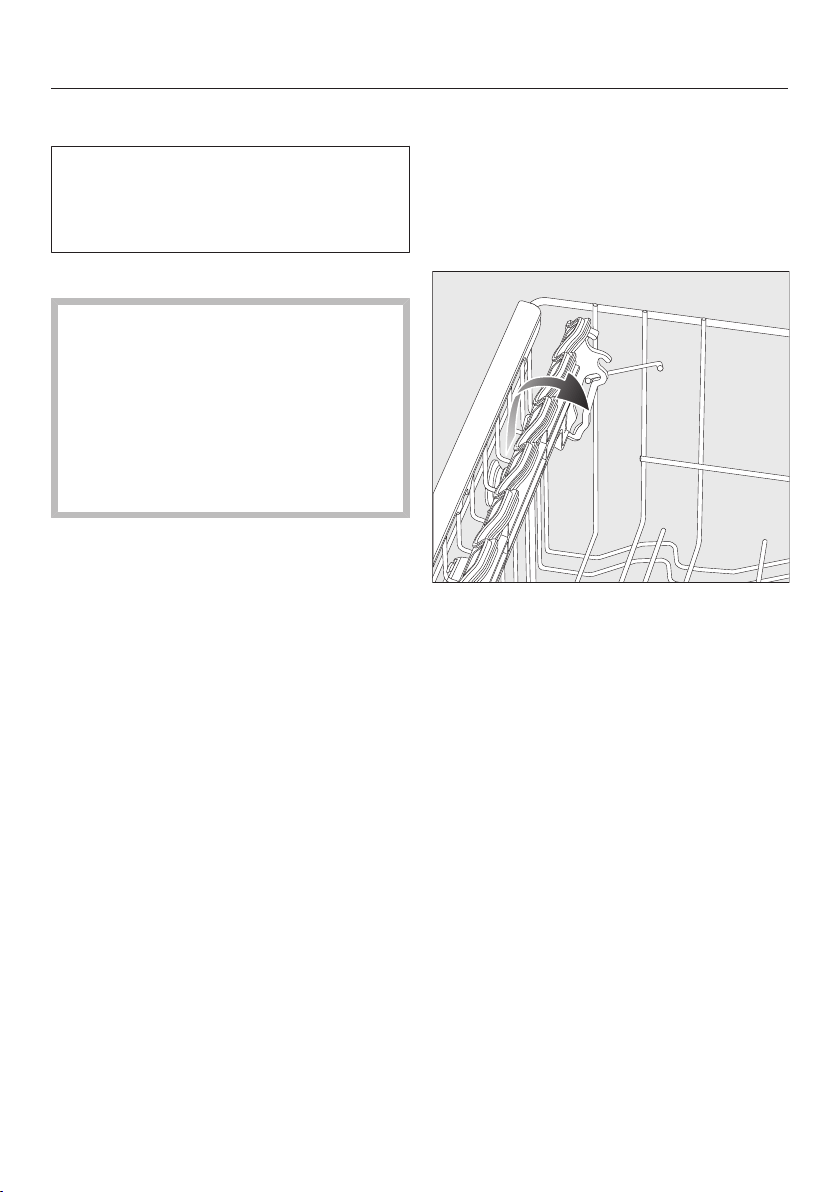
Loading the dishwasher
55
Upper basket
See the “Loading the dishwasher”
chapter, “Loading examples” section
for examples of how to load crockery
and cutlery.
Loading the upper basket
Damage due to leaking water.
If you run the dishwasher without the
upper basket, water can leak out of
the dishwasher.
Only run the dishwasher with the up-
per basket in place (except during
the programmeTall items , if avail-
able).
Use the upper basket for small, light-
weight and delicate items such as
cups, saucers, glasses, dessert
bowls etc.
Shallow pans or casserole dishes can
also be placed in the upper basket.
Long items such as soup ladles and
mixing spoons should be placed lying
down across the front of the upper
basket.
Loading the FlexCare cup rack
You can put cups, small bowls and flat
crockery on the FlexCare cup rack.
Glasses can be arranged along the cup
rack so they sit securely during the pro-
gramme.
Lower the cup rack to do so.
Raise the cup rack upwards to make
room for tall items.
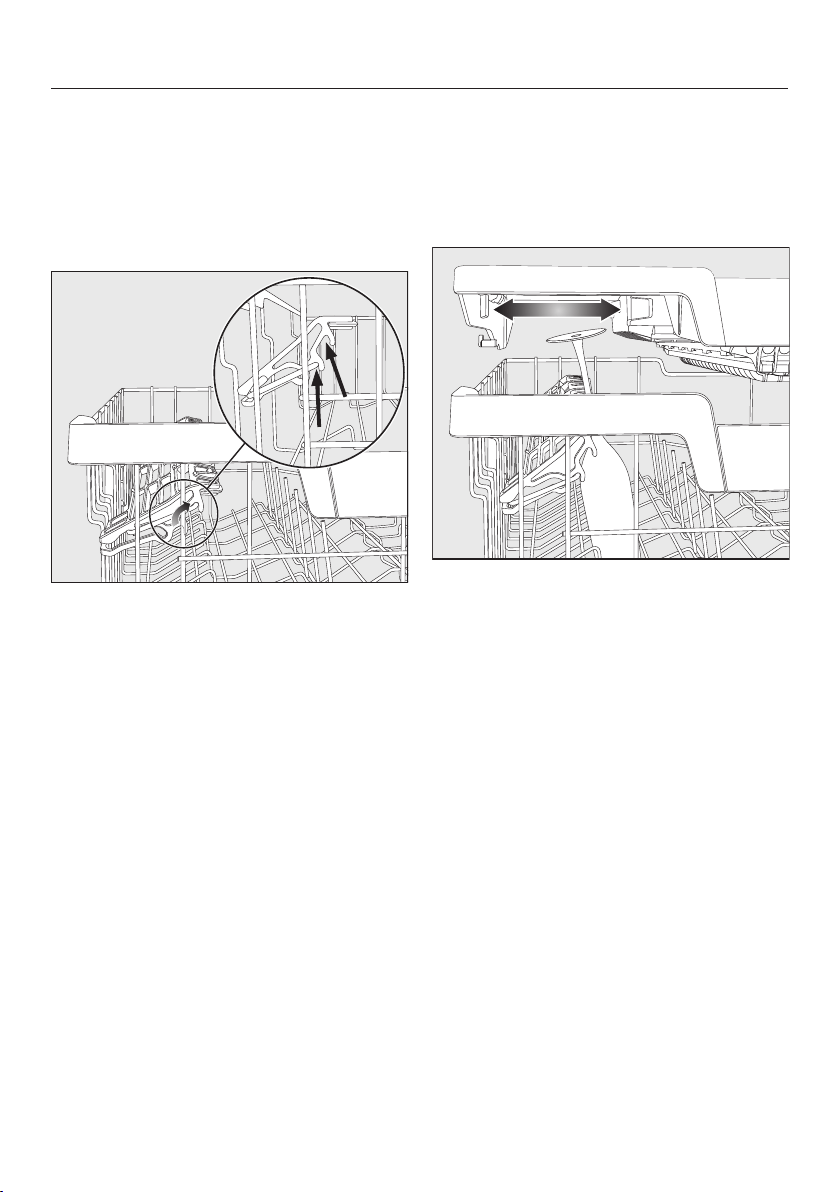
Loading the dishwasher
56
Adjusting the FlexCare cup rack
You can set the height and depth of the
cup rack at two different levels. so that
it can accommodate larger cups and so
that taller crockery can be placed un-
derneath it.
Pull the cup rack upwards and click it
into the desired position (see arrow).
Loading the silicone elements of the
FlexCare cup rack
The silicone elements in the cup rack
are specially designed to hold tall
glasses with long stems securely.
Lower the cup rack and lean the
glasses against the openings.
If you wish you can adjust the left in-
sert of the 3D MultiFlex tray to make
space for taller glasses (see the “Cut-
lery” chapter, “3D MultiFlex tray” sec-
tion).
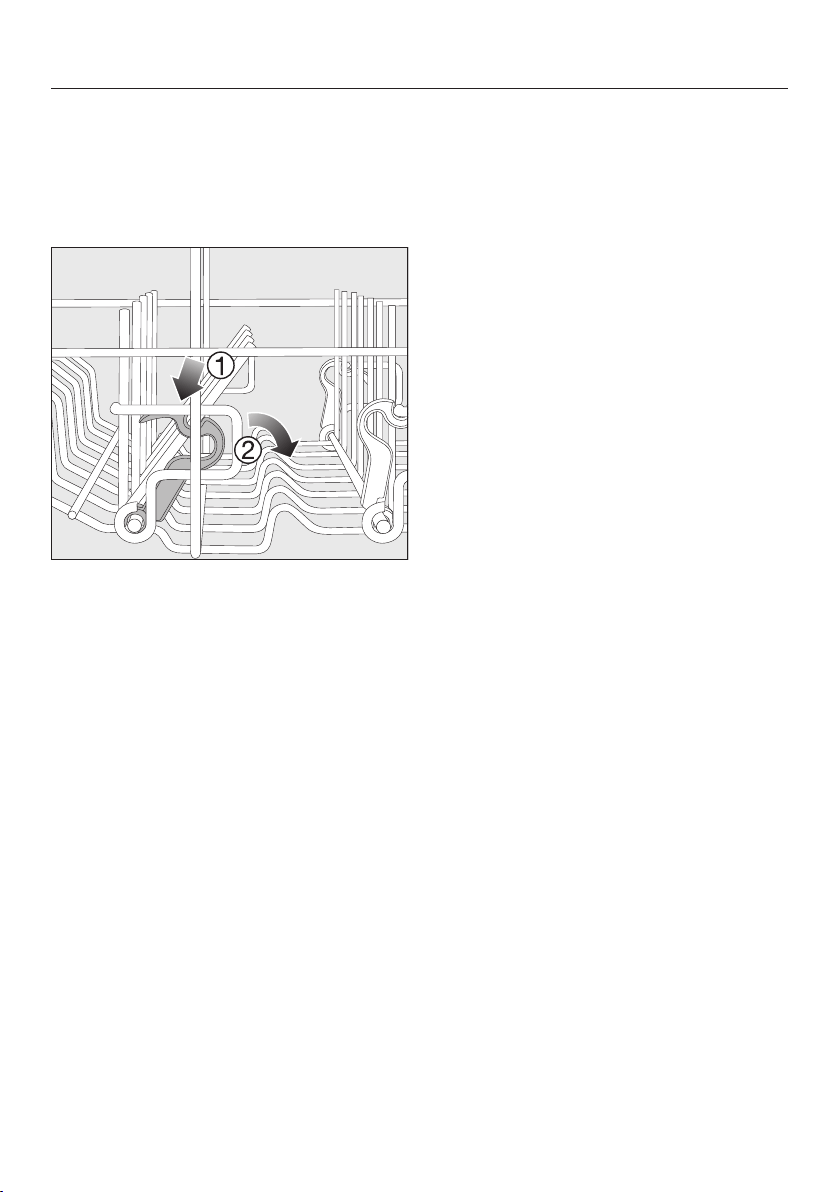
Loading the dishwasher
57
Lower the spikes
On both right-hand rows of spikes, you
can lower every other spike to make it
easier to arrange larger crockery, like
cereal bowls.
Press the yellow lever downwards ,
and then lower the dark grey spikes
.
Place the bowls vertically in the row
of spikes.
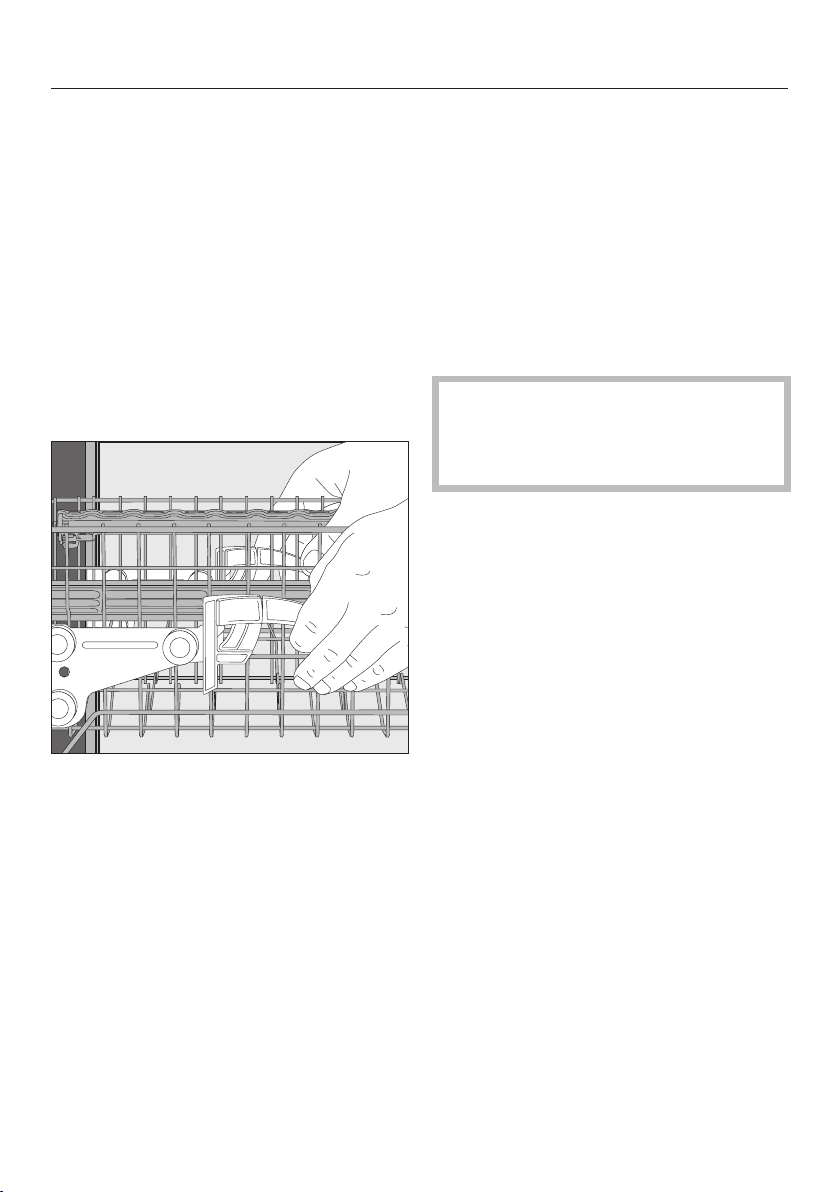
Loading the dishwasher
58
Adjusting the upper basket
In order to gain more space for taller
pieces of crockery in the lower basket
or upper basket, the upper basket can
be adjusted on 3levels with 2cm
between each level.
The upper basket can also be set at an
angle so that water can run off freely
from recesses. Make sure, however,
that the basket can slide smoothly in
and out of the wash cabinet.
Pull out the upper basket.
To raise the upper basket:
Lift the basket up until it clicks into
place.
To lower the upper basket:
Pull upwards on the levers at either
side of the upper basket.
Adjust the basket to the desired
height and then push the levers se-
curely back down into position.
When adjusting the upper basket,
make sure that tall plates in the lower
basket do not block the middle spray
arm.
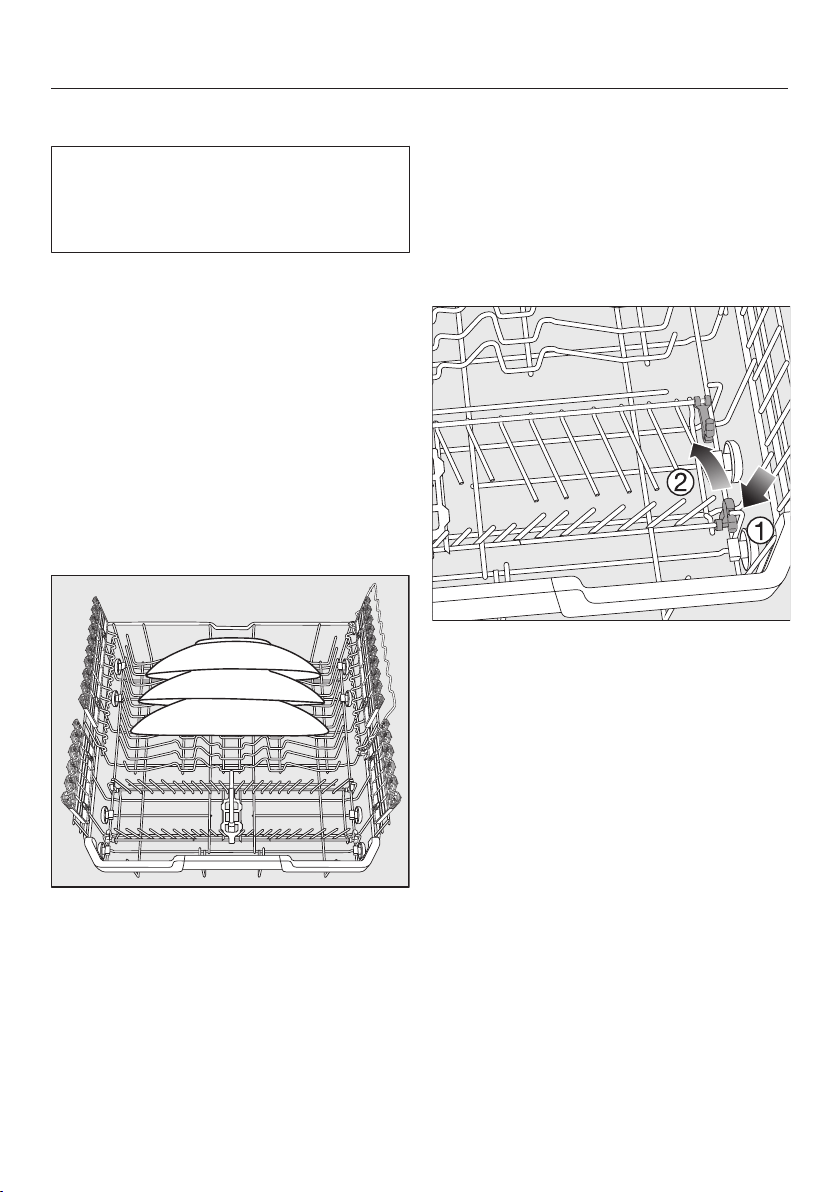
Loading the dishwasher
59
Lower basket
See the “Loading the dishwasher”
chapter, “Loading examples” section
for examples of how to load crockery
and cutlery.
Loading the lower basket
Place larger and heavier items such
as plates, serving platters, sauce-
pans, bowls etc., in the lower basket.
Glasses, cups and small plates and
saucers can also be placed in the
lower basket.
Loading the MultiComfort zone
The rear section of the lower basket is
used for washing cups, glasses, plates
and pots.
Place very large plates in the middle
of the lower basket.
Tip: When tilted, plates up to 35cm in
diameter can be accommodated.
Lowering the spikes
The rows of spikes at the front are used
for loading plates, soup bowls, platters,
dessert bowls and saucers.
Both rows of spikes can be lowered to
make more room for large items such
as pots, pans and serving dishes.
Press the yellow lever downwards ,
and then lower the rows of spikes .
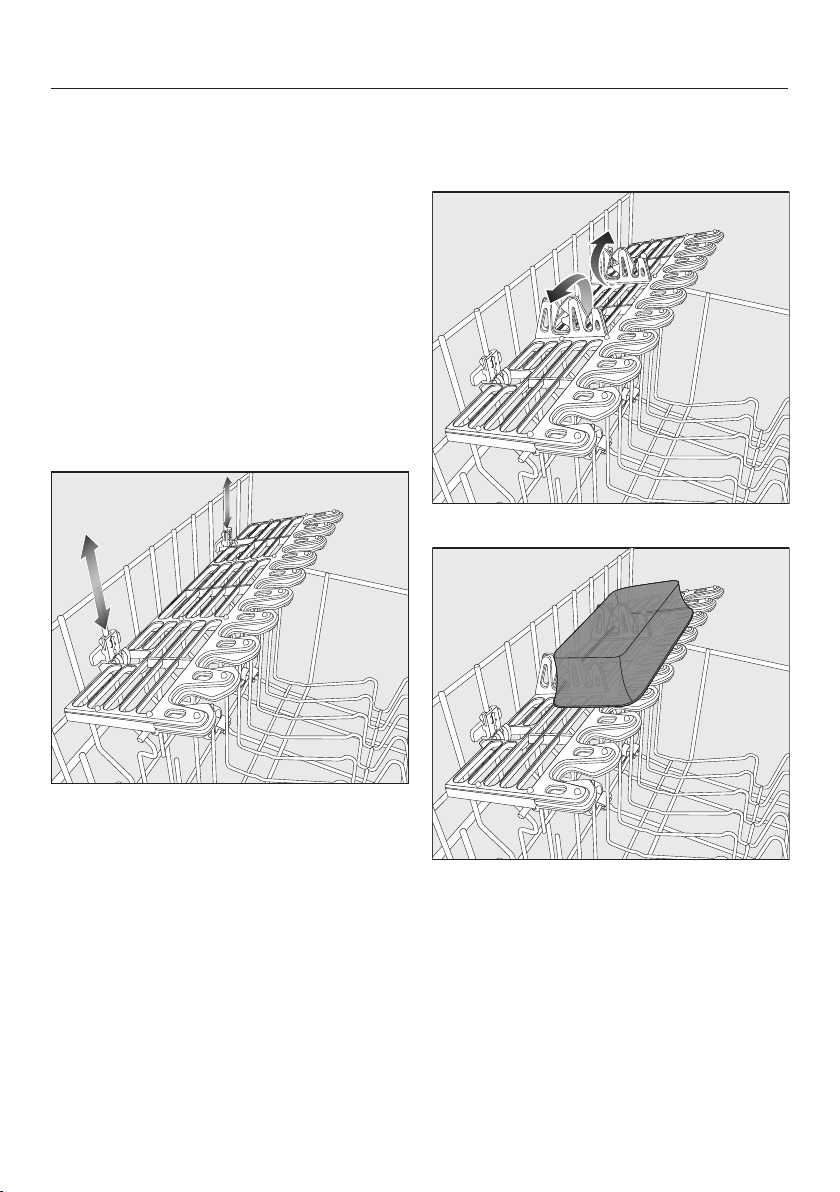
Loading the dishwasher
60
Loading the FlexCare glass holder
with MultiClips
The silicone elements in the glass
holder provide a stable and secure hold
for delicate stemware.
Stemware such as wine glasses,
champagne flutes and beer glasses
can be leaned against the glass rack
or suspended from it.
The glass rack can be raised to make
more room for tall items.
You can set the glass rack at two differ-
ent heights.
Slide the glass rack to the desired
height until the catches click into
place at the top or the bottom.
The MultiClips enable you to fasten light
items such as those made from plastic
onto the glass holder.
Fold up the MultiClips.
Secure light items to the MultiClips.
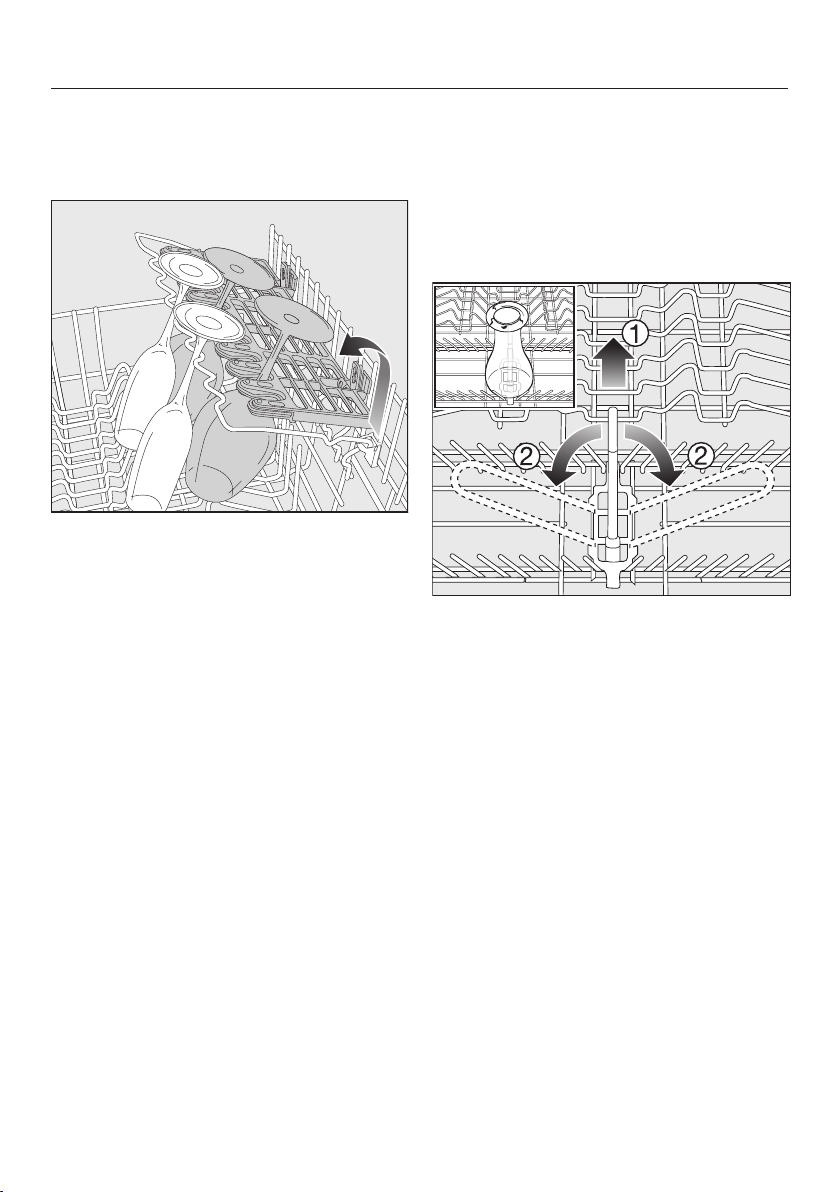
Loading the dishwasher
61
Loading the glass rail
This rail is designed to hold glasses
with long stems securely.
Lower the glass rail and lean the
glasses against it.
Lower the bottle holder
The bottle holder can be used to keep
narrow items such as milk and baby
bottles secure during a programme.
Raise the bottle holder upwards and
push it down until it clicks into place.
If the bottle holder is not needed, lift
it up using the yellow lever and
fold it to the side .
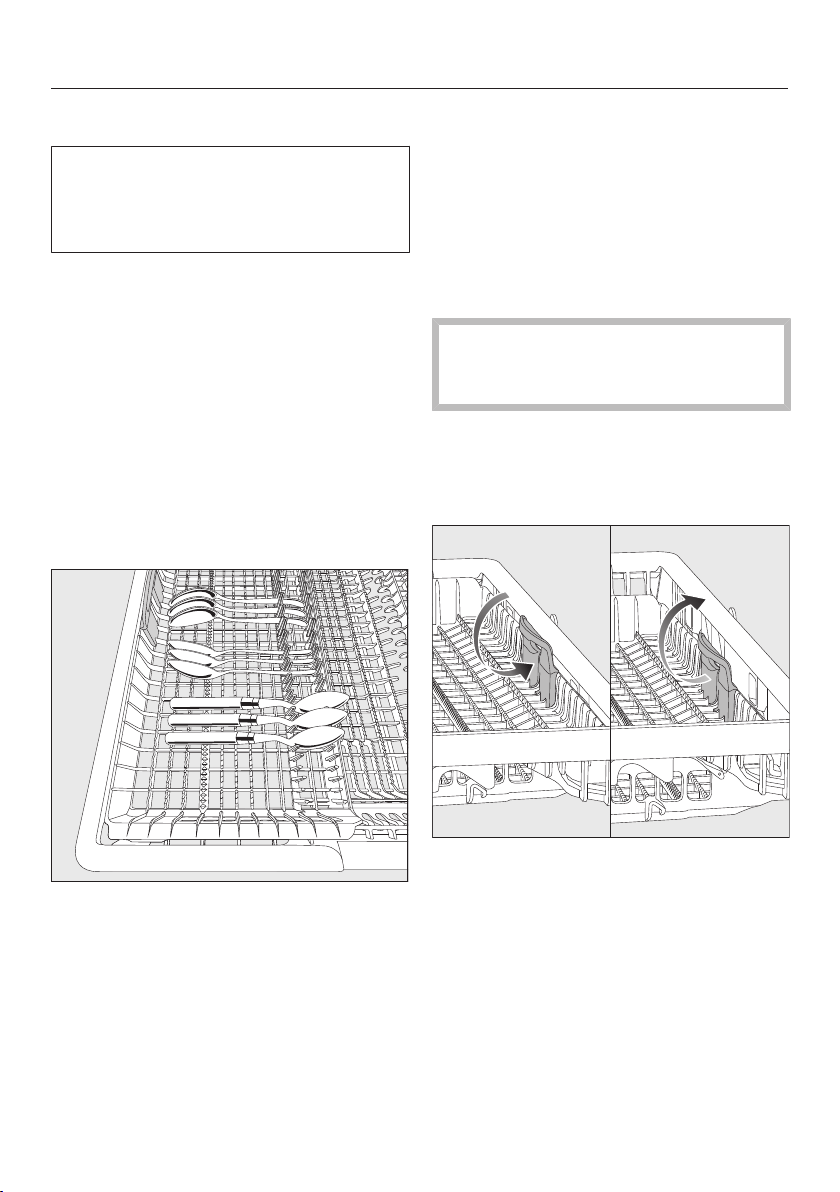
Loading the dishwasher
62
Cutlery tray
See the “Loading the dishwasher”
chapter, “Loading examples” section
for examples of how to load crockery
and cutlery.
Load the cutlery into the 3D MultiFlex
tray.
Loading the 3D MultiFlex tray
To make unloading easier, cutlery
should be grouped in zones, one for
knives, one for forks, one for spoons,
etc.
Spoon heads should be placed in con-
tact with at least one of the serrated re-
tainers on the base of the tray to ensure
that water runs off them freely.
If spoon handles do not fit between
the holders, then lay them the other
way round.
You can push the left insert to the
middle in order to accommodate tall
items of crockery and long stemmed
glasses in the upper basket (see “Upper
basket” – Loading the silicone elements
of the FlexCare cup rack”).
You can put large and long cutlery in
the recessed centre part of the tray.
Arrange tall items (such as cake
servers) so that they do not block the
upper spray arm.
You can adjust the height of the right-
hand insert to create more space in the
right-hand part of the tray for larger cut-
lery items or smaller pieces of crockery.
Pull the insert inwards by the yellow
handle and click it into place in one of
the two positions.
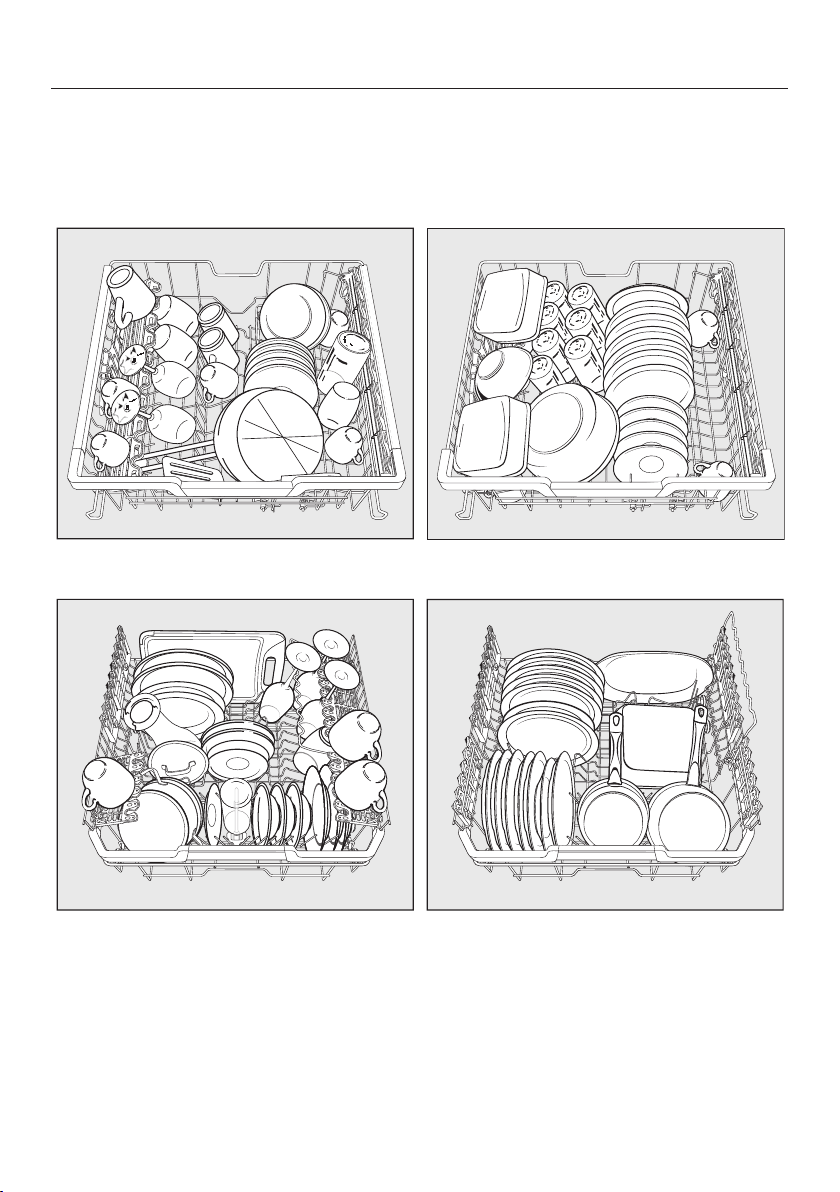
Loading the dishwasher
63
Loading examples
Dishwashers with cutlery tray
Upper basket
Lower basket
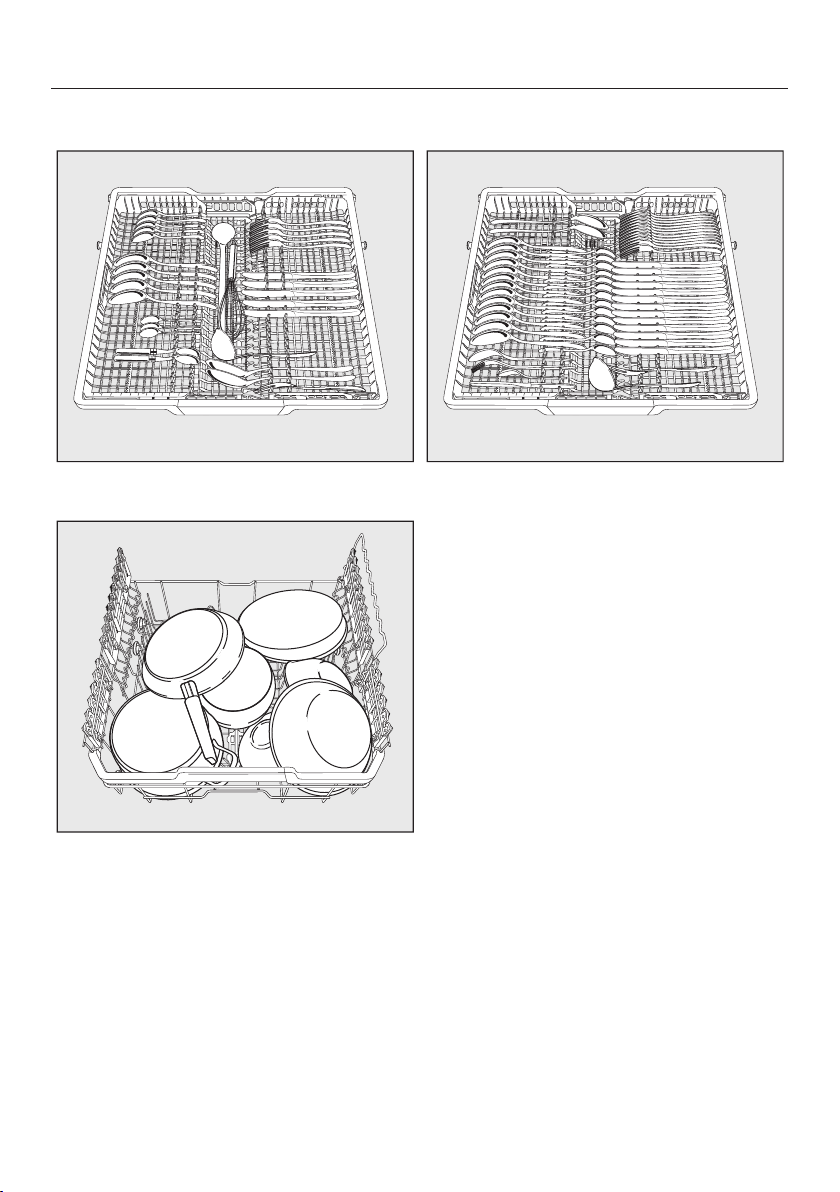
Loading the dishwasher
64
Cutlery tray
Heavily soiled items
Detergent
65
Active ingredients
Damage caused by using unsuit-
able detergents.
Detergents that are not suitable for
domestic dishwashers can cause
damage to the dishwasher or to the
load.
Only use detergents formulated for
domestic dishwashers.
Modern detergents contain various act-
ive ingredients, the most important of
which are:
- Water softening complexing agents
to prevent calcification.
- Alkalis to aid removal of dried-on
soiling.
- Enzymes to break down starch and
loosen protein.
- Oxygen-based bleaching agents to
remove coloured stains (e.g. tea, cof-
fee, tomato sauce).
Most dishwasher detergents are mildly
alkaline and contain enzymes and oxy-
gen-based bleaching agents.
There are different types of detergent:
- Powder and liquid gel detergents.
These detergents allow you to adjust
the amount dispensed according to
the size of the load and level of soil-
ing.
- Tab detergents. These are suitable for
most levels of soiling.
As well as the usual detergents, com-
bination products are also available.
These contain rinse aid and water
softener (dishwasher salt).
Only use these combination detergents
for the water hardness levels recom-
mended by the manufacturer on the
packaging.
The cleaning and drying performance of
these combination detergents can vary
greatly.
For optimum cleaning and drying res-
ults, use dishwasher detergent and
add salt and rinse aid separately.

Detergent
66
Risk of chemical burns from de-
tergent.
Dishwasher detergents can cause
burning on the skin and in the eyes,
nose, mouth and throat.
Avoid contact with detergents.
Do not inhale powder detergents. Do
not swallow dishwasher detergents.
Seek medical attention immediately if
detergent has been swallowed or in-
haled.
Keep children away from detergents.
Detergent residues could still be
present in the dishwasher. Keep chil-
dren away from the dishwasher when
the door is open. Do not fill the de-
tergent dispenser until just before
starting the programme and activate
the door safety lock (depending on
model).
Detergent dosage
There are two ways of dispensing the
detergent.
During automatic dispensing the Auto-
Dos will automatically dispense the re-
quired amount of detergent for each
programme sequence once a
PowerDisk has been inserted (see “De-
tergent” chapter, “Automatic dispens-
ing/AutoDos” section).
If you do not wish to use automatic dis-
pensing, you can manually dispense the
detergent into the detergent compart-
ment. This means you will have to fill
the required amount of detergent into
the detergent compartment before each
programme (see “Detergent” chapter,
“Manual detergent dispensing” section).

Detergent
67
Automatic dispensing/AutoDos
Before you can use AutoDos, you must
insert a PowerDisk containing powder
detergent into the PowerDisk compart-
ment.
One PowerDisk contains enough deter-
gent for approx. 20cycles, depending
on the chosen programme.
PowerDisks are available to order dir-
ectly from Miele’s online store, the
Miele Customer Service Department
or from your Miele dealer.
Risk of chemical burns from re-
sidual detergent.
Detergents have a caustic effect.
This can cause health problems and
damage to surfaces. If the AutoDos
is used incorrectly or leaks, residual
detergent may drip onto the floor
area in front of the dishwasher.
Always remove residual detergent
from in front of the dishwasher im-
mediately.
Activating AutoDos
Switch the dishwasher on using the
sensor control.
Before you first use AutoDos, remove
the transport lock from the PowerDisk
compartment and dispose of it ap-
propriately.
Insert a PowerDisk (see the “Auto-
matic dispensing/AutoDos” chapter,
“Inserting a PowerDisk” section).
The AutoDosfunction will be activated
automatically.
This setting applies to all programmes
and you can change it in a pro-
gramme's Extras menu.
If no programme is started for 48
hours, the PowerDisk will automatic-
ally be rotated so that the detergent
does not clump together. If this hap-
pens, the messagePowder refresh in
progress will be shown in the display
when the dishwasher is switched on.
No detergent will be dispensed.
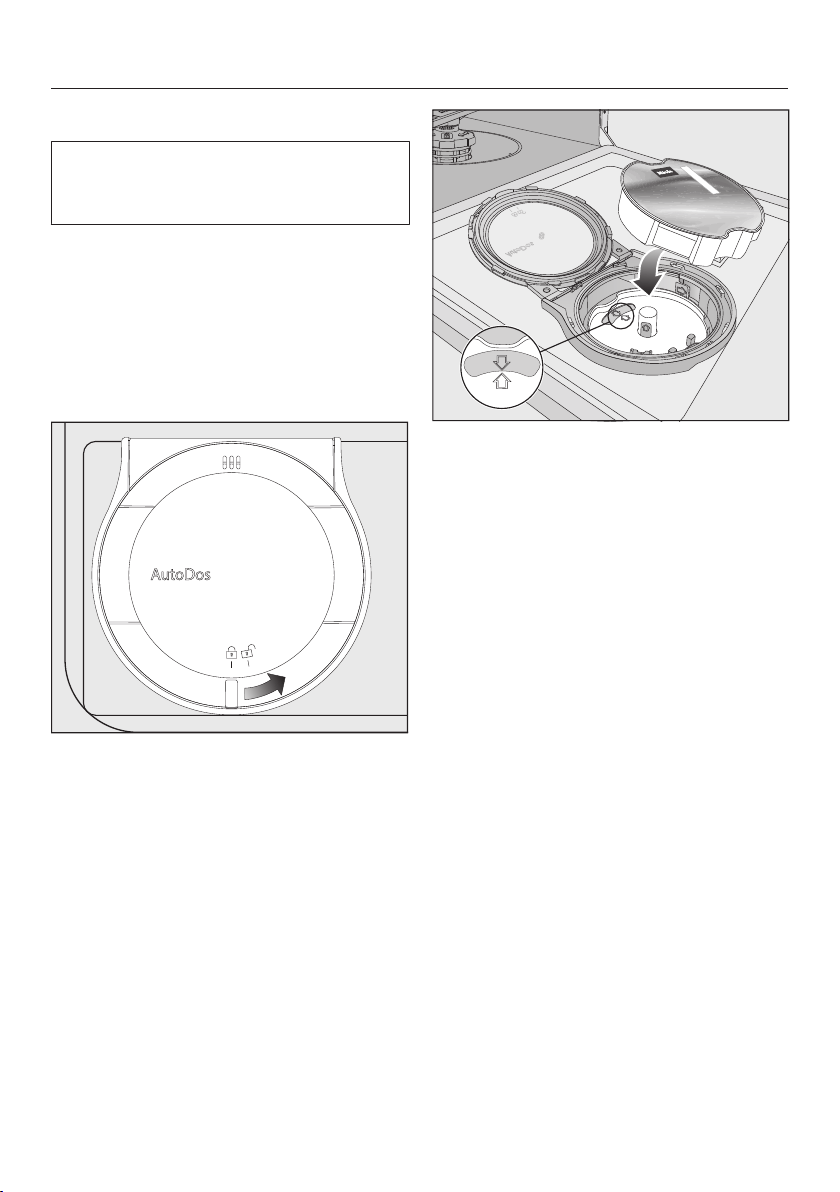
Detergent
68
Inserting a PowerDisk
Switch on the dishwasher before you
replace the PowerDisk so that the
dishwasher recognises it.
When the messagePowerDisk almost
empty appears, the reservoir contains
sufficient detergent for two to three pro-
grammes only.
Only replace the PowerDisk when the
messagePowerDisk empty. Deactivate
AutoDos with OK. appears.
Turn the AutoDos lid to and open
it.
The messageAutoDos lid open will ap-
pear in the display.
Remove the empty PowerDisk.
If the arrows in the PowerDisk holder
and in the viewing window are not
pointing towards each other, remove
the PowerDisk holder (see the
“Cleaning and care” chapter, “Clean-
ing the AutoDos” section).
Put the holder back into place so that
the arrows point towards each other
and the holder lies flat.
When doing this, only touch the
PowerDisk holder by the yellow tab in
the middle. Do not touch the side tab.
Insert the new PowerDisk and press it
evenly downwards until it sits flush.
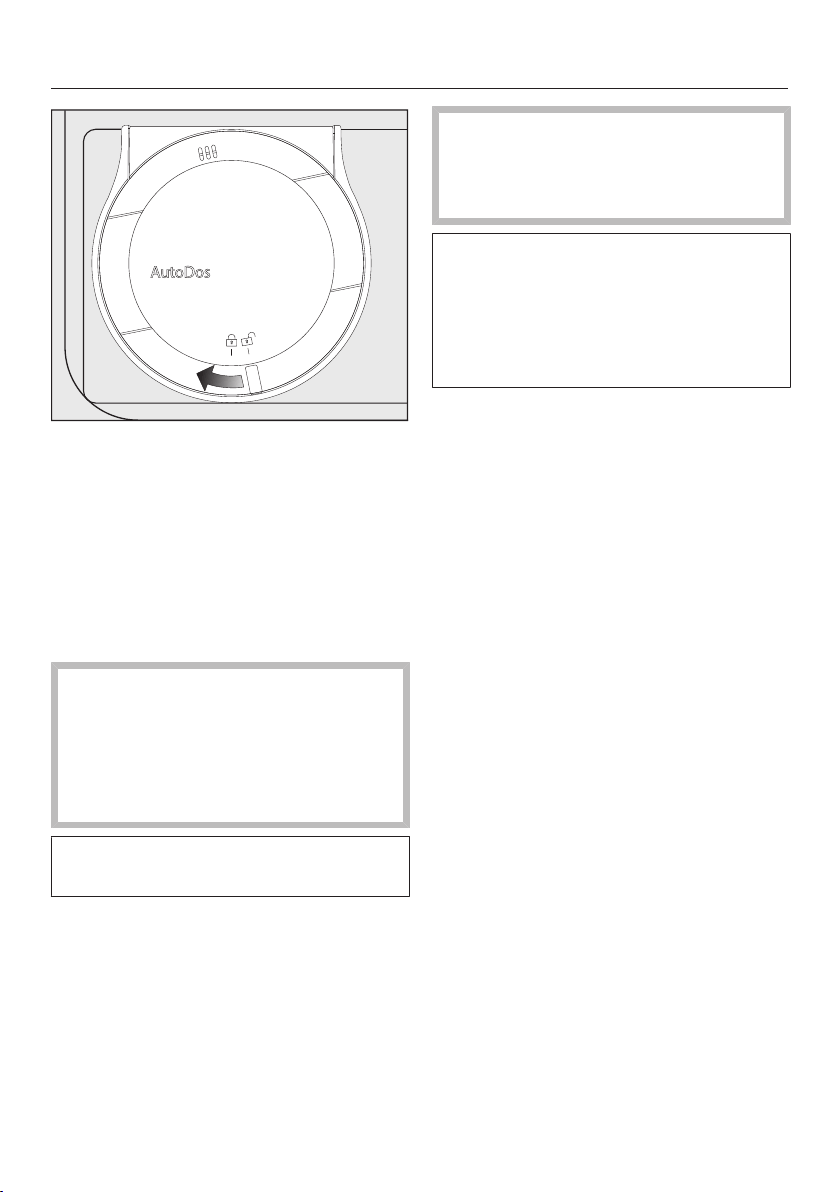
Detergent
69
Close the AutoDos lid and turn it until
the lid handle is directly below the
symbol.
If the PowerDisk is not in the correct
starting position, it will be rotated auto-
matically and the AutoDosfunction will
be activated.
Wait until this procedure ends before
you start a programme.
The AutoDos lid must be closed to
prevent damage to the AutoDos.
Always close the AutoDos lid before
you close the dishwasher door. Oth-
erwise, the AutoDos may become
damaged.
Programmes cannot start when the
AutoDos lid is open.
The detergent powder must be dry
so that it does not clump together.
Do not fill the AutoDos with any type
of fluid.
In order to ensure that the AutoDos
works at its best, check it each time
you replace the PowerDisk and clean
it if needed (see the “Cleaning and
care” chapter, “Cleaning the AutoDos”
section).
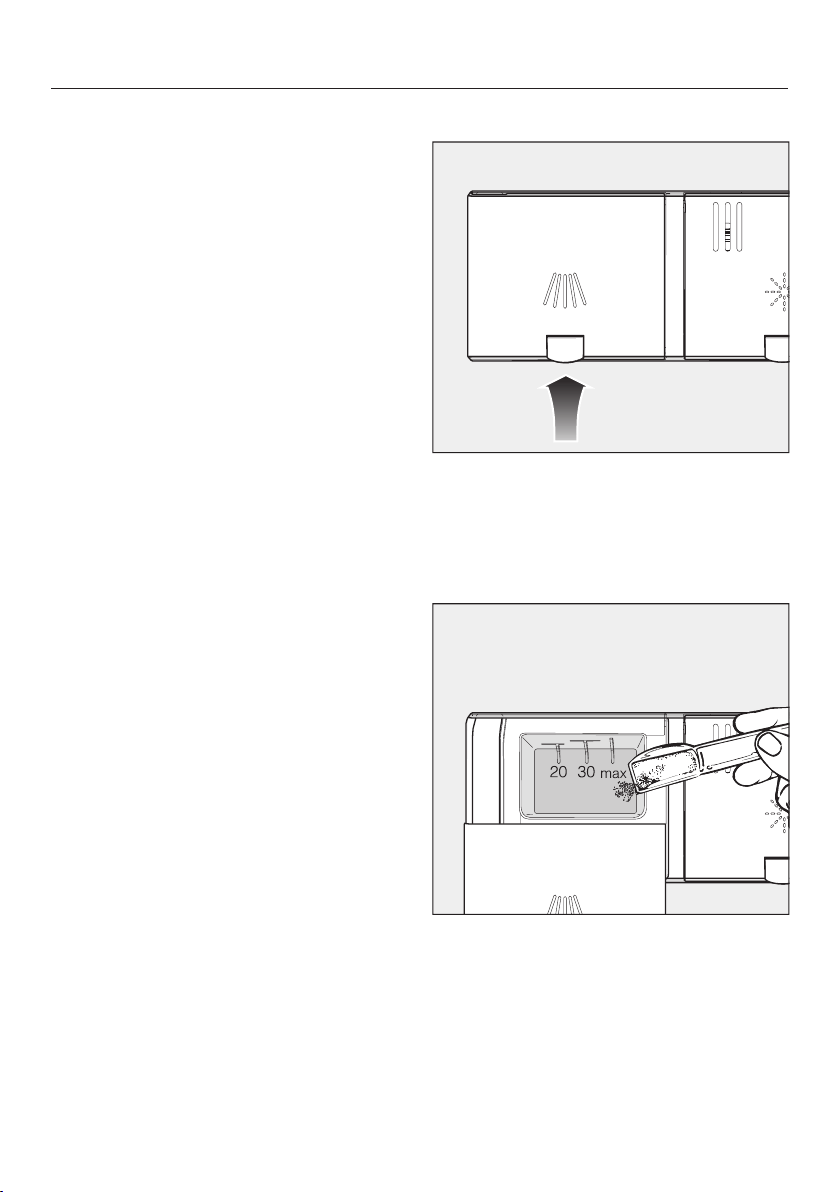
Detergent
70
Manual detergent dispensing
Detergent must be manually dispensed
if you have deactivated automatic dis-
pensing in a programme's Extras menu.
Detergent dispensing
The detergent compartment holds a
maximum of 50ml.
There are marks in the detergent com-
partment to aid with dispensing: 20, 30,
max. When the door is opened to a ho-
rizontal position, they show the approx-
imate fill level in ml and the maximum
fill height.
Follow the detergent dosage recom-
mended by the manufacturer on the
packaging.
Unless directed otherwise, use one
detergent tab or add 20 to 30ml of
detergent to the detergent compart-
ment, depending on the degree of
soiling of the crockery.
Failure to dispense the recommended
amount of detergent may impair clean-
ing results.
Some tabs may not dissolve completely
when the programme QuickPowerWash
is used.
Adding detergent
Press the yellow button on the lid
of the detergent compartment.
The lid will spring open.
The lid will also open at the end of a
programme.
Add the detergent to the detergent
compartment.
Push the lid shut until you hear it click
into place.
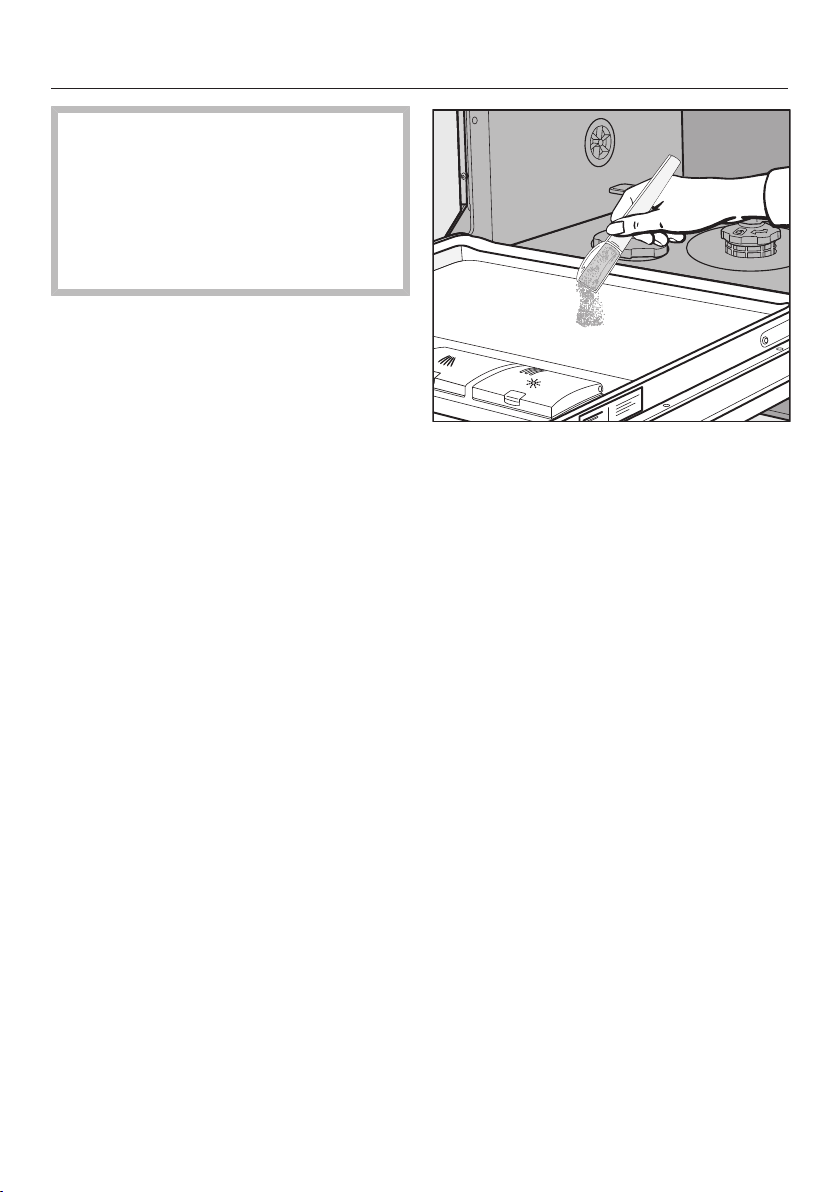
Detergent
71
The detergent must not cause the
detergent compartment lid to get
stuck. This can prevent the lid from
opening during the programme se-
quence.
Do not overfill the detergent com-
partment.
If you wish, deactivate automatic dis-
pensing/AutoDos.
Ensure that the detergent packaging
is properly closed after use. This pre-
vents the detergent from getting
damp and clumping together.
You can also apply a small amount of
detergent to the inner panel of the
door in programmes that have a pre-
wash stage (see “Programme over-
view”).

Operation
72
Switching on the dishwasher
Open the stopcock, if it is closed.
Open the door.
Make sure the spray arms can rotate
freely.
Touch thesensor control.
If the dishwasher has been switched
off for longer than 1minute, you will
need to hold the sensor control for
a bit longer (wipe protection).
The Programmes menu will appear in
the display.
Selecting a programme
Choose your programme according to
the type of crockery and the degree of
soiling.
The different programmes and their
uses are described under “Programme
overview”.
Select the programme you want in
the display.
The display will change to the Extras
menu.
You can now select the extras (see “Ex-
tras”).
To select a different programme, touch
the sensor control to return to the
Programmes menu.

Operation
73
Display of programme duration
The estimated duration of the selected
programme appears on the display be-
fore the programme begins. If the door
is opened during the programme, the
time left until the end of the programme
is displayed.
The displayed duration may vary for the
same programme. It is influenced by,
for example, the temperature of the in-
coming water, the reactivation cycle of
the water softener, the detergent type
and the amount of dishes and how
soiled they are.
When a programme is selected for the
first time, the display will show the aver-
age programme duration for a cold wa-
ter connection.
The programme durations shown in the
“Programme overview” chapter refer to
standard test loads and temperatures.
Each time a programme is run, the con-
trol module calculates the programme
duration according to the temperature
of the water taken into the dishwasher
and the size of the load.
Starting the programme
Start the programme by closing the
door.
If necessary, confirm the previously
displayed messages with OK.
The in-operation indicator light comes
on to confirm that a programme se-
quence has been started.
Risk of scalding due to hot wa-
ter.
During operation, water in the dish-
washer may be very hot.
During operation, only open the door
with extreme caution.
Operation
74
End of programme
At the end of a programme, the optical
in-operation indicator light will flash
slowly with the door shut. The buzzer
might also sound.
The optical in-operation indicator light
will go out 10minutes after the end of
the programme if the door is closed.
The programme has ended when the
display shows the message Finished.
In some programmes, if the AutoOpen
function is activated, the door will auto-
matically open slightly (see “Settings –
AutoOpen”). This improves the drying
process.
If the Consumptionprogrammable func-
tion is switched on, you can now call up
the actual energy and water consump-
tion of the programme that has just fin-
ished (see “Caring for the environment –
EcoFeedback consumption indicator”).
The drying fan may continue to run for
a few minutes at the end of the pro-
gramme.
Risk of damage due to steam.
Steam from the dishwasher could
damage the edges of delicate work-
tops when you open the door at the
end of the programme if the fan is no
longer running.
If you have deactivated the auto-
matic door opening function (see
“Settings – AutoOpen”), but would
still like to open the door at the end
of the programme, then make sure
that you open the door fully.
Energy management
To save energy the dishwasher will
switch off automatically 10 minutes
after the last time a sensor control is
pressed or after the end of a pro-
gramme.
You can switch the dishwasher back on
again with the sensor control.
If the dishwasher has been switched off
for longer than 1minute, you will need
to hold the sensor control for a bit
longer (wipe protection).
The dishwasher will not switch itself
off whilst a programme is running or if
there is a fault.

Operation
75
Switching off the dishwasher
Open the door.
The dishwasher can be switched off
at any time using the sensor con-
trol.
Confirm the query Switch appliance off?
with Yes.
Switching the dishwasher off during a
programme stops the programme.
You can also do this to stop an ongoing
timer.
Risk of damage from leaking wa-
ter.
Leaking water can cause damage.
If the dishwasher is not going to be
used for a longer period of time, e.g.
whilst on holiday, the stopcock
should be closed as a precaution.
Unloading the dishwasher
Dishes tend to break and chip more
easily when they are hot. Allow the
dishes to cool until they are comfortable
enough to handle before unloading
them.
If you open the door fully after switching
off, the dishes will cool much faster.
First unload the lower basket, then
the upper basket and finally the 3D
MultiFlex tray (if present).
This will prevent water drops from the
upper basket and 3D MultiFlex tray
from falling onto the dishes in the
lower basket.

Operation
76
Interrupting a programme
A programme will be interrupted as
soon as the door is opened.
If the door is closed again, the pro-
gramme will continue from the point it
was at before the door was opened.
Risk of scalding due to hot wa-
ter.
During operation, water in the dish-
washer may be very hot.
During operation, only open the door
with extreme caution.
Cancelling or changing a pro-
gramme
If a programme is cancelled, import-
ant programme stages may be
missed.
A programme should only be can-
celled in the first few minutes of the
programme sequence.
If a programme has already started and
you wish to cancel it, proceed as fol-
lows:
Open the door.
Touch the Back sensor control.
Confirm the query Cancel the pro-
gramme? with Yes.
The programme is cancelled.
If you would like to select another pro-
gramme:
Touch the sensor control.
The display will change back to the Pro-
grammes menu.
If you have dispensed detergent
manually, check whether the deter-
gent compartment is still closed.
If the lid is already open, fill it with de-
tergent again and close the lid.
Select the programme you want, and
then start it by shutting the door.
The optical in-operation indicator light
comes on to show that a programme
sequence has been started.
Options
77
Timer
The timer gives you several options
for starting a programme at a later time.
You can set the start time or the finish
time of a programme. You can also use
the EcoStart or SmartStartfunctions to
benefit from cheaper energy tariffs at
night.
With manual detergent dispensing
the detergent will clump together if
the detergent compartment is not
dry, and this may mean it is not fully
rinsed out.
When using the timer function, make
sure that the detergent compartment
is dry before adding detergent. Wipe
dry with a cloth first, if necessary.
Do not use any liquid detergents.
These can leak out.
Danger to health due to deter-
gent.
To prevent children coming into con-
tact with dishwasher detergent:
Do not fill the detergent dispenser
until just before starting the pro-
gramme, i.e. before you activate the
timer.
Activating the timer
Open the door.
Switch the dishwasher on using the
sensor control.
Select the programme you want to
use.
Touch the Timer sensor control.
The Timer sensor control lights up.
You can choose between the Start at,
Finish at or EcoStart functions, or
SmartStart if applicable.
Select the function you want.
The last time set for the timer will be
displayed and the hour number block
will be highlighted.
Select the time you want for the timer
using the sensor controls and
confirm with OK.
If, while you are setting the time, you do
not apply any settings for several
seconds, the display will revert to the
previous menu. You will then have to
enter your settings again.
After you have activated the timer, all
the displays will switch off after a few
minutes to save energy.
You can also activate a timer via the
Miele app.

Options
78
Setting “Start at”
With the Start atfunction, you set the
exact time you want the programme to
start at.
Set the hours with the sensor
controls.
Touch the minute number block.
Use the sensor controls to enter
the minutes and confirm your entry
by touching OK.
The saved start time for the selected
programme will appear in the display for
several minutes.
Close the door.
When the set time is reached, the se-
lected programme will begin automatic-
ally.
Setting “Finish at”
Use the Finish atfunction to set the
latest time by which the selected pro-
gramme has to be finished.
Set the hours with the sensor
controls.
Touch the minute number block.
Use the sensor controls to enter
the minutes and confirm your entry
by touching OK.
The estimated start time for the selec-
ted programme will appear in the dis-
play for several minutes.
A message will appear in the display if
the programme cannot be completed
by the set finish time because it has too
long a running time. It will show the
time that can be set.
If it appears, confirm the message
with OK.
Close the door.
The selected programme will start auto-
matically when the estimated start time
is reached.

Options
79
Setting EcoStart
You can use the EcoStartfunction to be-
nefit from cheaper energy tariffs at
night. Before you can use this option,
you need to set up to three electrical
tariff time zones (see “Settings”
chapter, “EcoStart” section).
Then set the latest time by which the
selected programme has to be finished
by.
The dishwasher will then start automat-
ically in the most economical tariff zone
within the time set.
Set the hours with the sensor
controls.
Touch the minute number block.
Use the sensor controls to enter
the minutes and confirm your entry
by touching OK.
The estimated start time for the selec-
ted programme will appear in the dis-
play for several minutes.
Close the door.
The messageWaiting for EcoStart will ap-
pear in the display.
The selected programme will start auto-
matically when the estimated start time
is reached.
Setting SmartStart
The SmartStartfunction is used for start-
ing your dishwasher automatically at a
time when your energy costs are most
economical.
To use this function you may need fur-
ther technical accessories.
If you have activated the
SmartStartfunction in the Settingsmenu,
the Timermenu will no longer show
the EcoStartfunction but will instead
show SmartStart (see “Settings” chapter,
“Miele@home” section).
If your energy provider offers this ser-
vice, they will send a signal to your
dishwasher when energy costs are at
their most economical.
This signal will start the dishwasher.
You can set the time by which the se-
lected programme has to be finished
by. The dishwasher will then calculate
the latest possible start time for the pro-
gramme selected and will wait until this
start time for the signal from the energy
provider.

Options
80
Set the time by which the selected pro-
gramme has to be finished by.
Set the hours with the sensor
controls.
Touch the minute number block.
Use the sensor controls to enter
the minutes and confirm your entry
by touching OK.
The messageWaiting for SmartStart will
appear in the display.
Close the door.
The selected programme will start auto-
matically as soon as the energy pro-
vider has sent the signal or the latest
possible calculated start time has been
reached.
Changing and deleting the timer
You can change the time set for the
timer or delete it in order to start the se-
lected programme immediately.
Changing the timer
Open the door.
Touch the timeroption in the dis-
play.
You can use the sensor controls to
change the time for the timer.
Deleting the timer
Select the option and confirm with
OK.
The time for the timer is reset to the
current time of day.
The display switches back to the Extras
menu for the selected programme.
Once you have closed the door, the
programme starts within one minute.
The timer stops if you switch off the
dishwasher while a timer is running or
touch the sensor control and confirm
the query with Yes.
You can also change the time set for
the timer or delete it using the Miele
app.

Options
81
Activating Remote start
You can start your dishwasher remotely
using the Miele app. To do this, you first
need to install the app on your mobile
device, connect the dishwasher to your
WiFi network (see “Settings” chapter,
“Miele@home” section) and, if applic-
able, activate the Remote controloption
(see “Settings” chapter, “Remote con-
trol” section).
Open the door.
Switch the dishwasher on using the
sensor control.
Touch thesensor control.
The sensor control lights up.
Switch the dishwasher off using the
sensor control.
Close the door.
The dishwasher can now be operated
remotely using the Miele app.
The Remote start option will remain ac-
tivated until you deactivate it again us-
ing the sensor control. The option
will also remain active if you switch the
dishwasher off and back on again in the
meantime.
Even if the Remote start option is not
active, you can check the status of your
dishwasher and apply settings using
the Miele app.
If you start a programme by closing the
dishwasher door, the remote start op-
tion will automatically be activated for
the duration of the programme.
Guide for selecting a programme
82
Temperature-sensitive dishes,
glasses and plastics
Pots, pans, everyday crockery
and cutlery
No crockery
Lightly dried-on
normal food
deposits
Stubborn dried-on, burnt-on
food deposits containing
starch or protein
1
Residual salt after refilling
the salt container
Programme with glass care
Water and
energy saving programme
Maximum
cleaning performance
Flushes out
salt residues
Crockery Food deposits Programme
features
Robust items that
need to be hygienically
clean, e.g. baby bottles,
chopping boards
Lightly dried-on
normal food
deposits
Programme with special
parameters
for the hygienic cleaning
Mixed crockery
Standard dried-on normal
food deposits
Very quiet programme
All normal
food deposits
Lightly dried-on
normal food
deposits
Variable,
sensor-controlled programme
Short programme taking
less than an hour
1
Food such as potatoes, pasta, rice or stews can leave starchy deposits.
Deposits containing protein can be left by food such as fried meat or fish.
Guide for selecting a programme
83
Gentle45°C
Auto 45–65°C
QuickPowerWash 65°C
ExtraQuiet55°C
QuickPowerWash 65°C
+ Express
Programme
2
Hygiene 70°C
2
The programmes can be combined with the “Express”, “IntenseZone”, “Extra clean” or
“Extra dry” Extras (see “Extras”).
You can also select the “Second interim rinse” function (see “Settings”).
3
The estimated values may change due to the selected settings or programme options,
or the conditions in which the appliance is being used.
Consumption estimate
3
Energy consumption
Water consumption
Programme duration
Energy consumption
Water consumption
Programme duration
Energy consumption
Water consumption
Programme duration
Energy consumption
Water consumption
ECO
Energy consumption
Water consumption
Programme duration
Programme duration
Intensive 75°C
Energy consumption
Water consumption
Programme duration
Energy consumption
Water consumption
Programme duration 13 minutes,
no heating up,
solely for flushing out salt.
Programme duration
Programme overview
84
Programme Programme sequence
Pre-wash Main wash Interim rinse Final rinse Drying/
AutoOpen
°C °C
ECO
1
- 43
42
/
Auto 45–65°C Variable programme sequence,
sensor-controlled adjustment according to load size and level of soiling
As
required
45–65
55–70
/
Gentle 45°C
45
55–70
/
ExtraQuiet 55°C
- 55
55–70
/
QuickPowerWash
65°C
- 65
60
/
Hygiene 70°C
- 70
75
/
Intensive 75°C
75
55–70
/
PowerWash60°C
60
55–70
/
SolarSave /
Tall items 65°C
65
55–70
/
Pasta/Paella
75
55–70
/
Beer glasses
- 45
56 - / -
Maintenance wash
- 75
70
/
1
This programme is the most efficient in terms of its combined energy and water con-
sumption for cleaning normally soiled dishes.

Programme overview
85
Consumption
2
Electrical energy Water
Time
Cold water Hot water Litres Cold water Hot water
15°C 60°C 15°C 60°C
kWh kWh h:min h:min
0.54 0.29 8.4 3:50 3:40
0.65–1.00
3,4
0.55–0.65
3,4
6.0–13.0
3,4
2:02–3:06 1:59–2:49
0.85 0.40 13.5 2:42 2:23
0.90 0.70 9.5 4:04 3:50
1.10 0.75 10.5 0:58 0:58
1.55 1.15 10.0 2:26 2:14
1.25 0.85 13.5 3:09 2:44
1.00 0.60 13.0 2:32 2:20
- 0.07 27.0 - 2:48
1.05 0.60 13.5 2:30 2:23
1.20 0.80 13.5 2:49 2:43
0.75 0.40 9.5 1:13 0:59
1.75 1.10 18.5 2:12 1:57
2
Values for the ECO programme were calculated under standardised testing conditions.
Values for the remaining programmes were calculated under comparable testing condi-
tions.
In practice, the selected settings, programme options or operating conditions may result
in different values.
3
Minimum value: half load with light soiling
4
Maximum value: full load with heavy soiling

Programme overview
86
Further programmes
SolarSave
Programme operating without heating
when the dishwasher is connected to a
hot water supply of at least 45°C (see
“Installation – Water inlet”). This pro-
gramme is suitable for cleaning a mixed
load with normal household food
residues that have slightly dried on.
PowerWash60°C
Programme for cleaning a mixed load
with normal household food residues.
Tallitems65°C
Programme for especially large, temper-
ature-resistant items such as very large
pots/pans. In order to make space for
large items in the lower basket, remove
the upper basket for washing with this
programme.
Pasta/Paella
Programme with long soak phases for
mixed crockery, pots, pans, and non-
delicate porcelain. This programme is
especially suitable for removing soiling
containing starch left by potatoes,
pasta and rice.
Glasses
This programme does not use rinse aid
and omits the drying phase. It is partic-
ularly suitable for cleaning beer glasses
where a good head of froth is needed.
Maintenance programme
The dishwasher wash cabinet is gener-
ally self-cleaning. However, if residues
or deposits occur, use the Mainten-
anceprogramme to clean it. The dish-
washer must not be loaded for this pro-
gramme. This programme is designed
for cleaning the wash cabinet using
care products (dishwasher cleaner/
dishwasher conditioner) (see “Optional
accessories” chapter, “Appliance care”
section). Follow the instructions on the
packaging. When using dishwasher
care products, detergent should not be
dispensed. For this reason, automatic
dispensing (if available) will be deactiv-
ated for this programme.

Extras
87
Selecting extras
You can use extras to adjust the pro-
grammes.
To do this, you can select or deselect
the extras in the Extras menu of a se-
lected programme before starting it.
Open the door.
Switch the dishwasher on using the
sensor control.
Select a different programme as re-
quired.
All available extras are shown in the dis-
play.
Not all extras can be selected in every
programme or used in combination.
Extras that are not available are
greyed out and cannot be selected.
Select the extras you want.
The selected extras are marked in or-
ange.
If you want to cancel the selection of
an extra, touch the sensor control for
the extra again.
When you have made all the settings
you want, close the door to start the
programme.
The selected extras will remain active
for that particular programme until the
settings are changed (except for the
ECO programme).

Extras
88
IntenseZone
The IntenseZoneextra increases clean-
ing performance in the lower basket.
Energy consumption increases due to
the extended wash duration in the lower
basket and increased temperature.
Express
The Expressextra reduces the pro-
gramme duration.
In order to achieve optimum cleaning
results, the temperature, and therefore
the energy consumption, will increase
with this option.
The time by which the programme dura-
tion is shortened varies according to the
selected programme.
Selecting the Expressextra may take
precedence over other selected op-
tions.
When used in combination with the
QuickPowerWashprogramme, the Ex-
pressextra results in a wash pro-
gramme designed solely for the pur-
pose of rinsing the cabinet to remove
salt solution that leaked out after re-
filling the salt reservoir.
Extraclean
You can select this extra to increase the
cleaning performance of the pro-
grammes.
If you activate this extra, the pro-
gramme durations and the main wash
temperatures will increase. The water
and energy consumption may increase.
Extradry
You can select this extra to increase the
programme's drying performance.
If you activate this extra, the pro-
gramme durations and final rinse tem-
peratures will increase. The energy con-
sumption may increase.
Cleaning and care
89
Check the condition of your dish-
washer regularly (approx. every 4–6
months). In this way, faults and prob-
lems can be avoided.
Damage due to unsuitable clean-
ing agents.
All surfaces are susceptible to
scratching. Contact with unsuitable
cleaning agents can alter or discol-
our the external surfaces.
Only use cleaning agents formulated
for use on the relevant surfaces.
Cleaning the wash cabinet
The wash cabinet is largely self-clean-
ing, provided that the correct amount of
detergent is always used.
The frequent use of low-temperature
wash programmes (<50°C) increases
the risk of contamination and odours in-
side the wash cabinet. Run the Intens-
ive 75°C programme once per month
to clean the wash cabinet and prevent
odours from developing.
However, if residues such as limescale
or grease have been deposited, use the
Maintenance programme to clean the
dishwasher (see “Programme overview
– Additional programmes”) with
dishwasher cleaner (see “Optional ac-
cessories – Appliance care”). Follow the
instructions on the product packaging.
Miele cleaning and care products are
available to order from the Miele Cus-
tomer Service Department or from the
Miele online shop.
Clean the filters in the wash cabinet
regularly.

Cleaning and care
90
Hygiene cycle
If you mainly use low temperature pro-
grammes, there is a risk of bacteria and
unpleasant odours building up in the
wash cabinet. If you repeatedly use low
temperature programmes, you should
regularly run a high temperature pro-
gramme. This is to prevent the build-up
of residues and odours.
You can activate or deactivate a Hy-
giene info message (see “Settings – Hy-
giene cycle”).
If you deactivate this message, run the
Intensive75°Cprogramme once per
month to clean the wash cabinet and
prevent odours from developing.
Cleaning the door and the door
seal
The door seal and the sides of the dish-
washer door cannot be reached and
cleaned by the spray arm jets. As a res-
ult, mould can develop here.
Wipe the door seals regularly with a
damp cloth to remove food deposits.
Wipe off any food or drink residues
that may have dripped onto the sides
of dishwasher door.
Cleaning the control panel
The control panel should only be
wiped with a damp cloth.
Cleaning the reflector panel
The reflector panel for the optical in-op-
eration indicator light is situated on the
protective foil underneath the worktop.
The reflector panel should only be
cleaned with a damp cloth if neces-
sary.

Cleaning and care
91
Cleaning the appliance front
Damage due to soiling.
Soiling that is left too long might be-
come impossible to remove and
could cause the external surfaces to
alter or discolour.
It is therefore best to remove any
soiling immediately.
Clean the appliance front with a clean
soft sponge and a solution of warm
water and washing-up liquid. After
cleaning, wipe the surfaces dry using
a soft cloth.
A clean, damp microfibre cloth
without detergent can also be used.
To avoid damaging the external sur-
faces, do not use the following:
- Detergents containing soda, ammo-
nia, acids or chlorides
- Detergents containing descaling
agents
- Abrasive detergents, e.g. scouring
powder, scouring liquid, or pumice
stones
- Detergents containing solvents
- Stainless steel cleaning agents
- Dishwasher cleaner
- Oven cleaner
- Glass cleaning agents
- Hard, abrasive brushes or sponges,
e.g. pot scourers, brushes or
sponges that have been previously
used with abrasive cleaning agents
- Eraser stain remover blocks
- Sharp metal scrapers
- Wire wool
- Steam cleaners
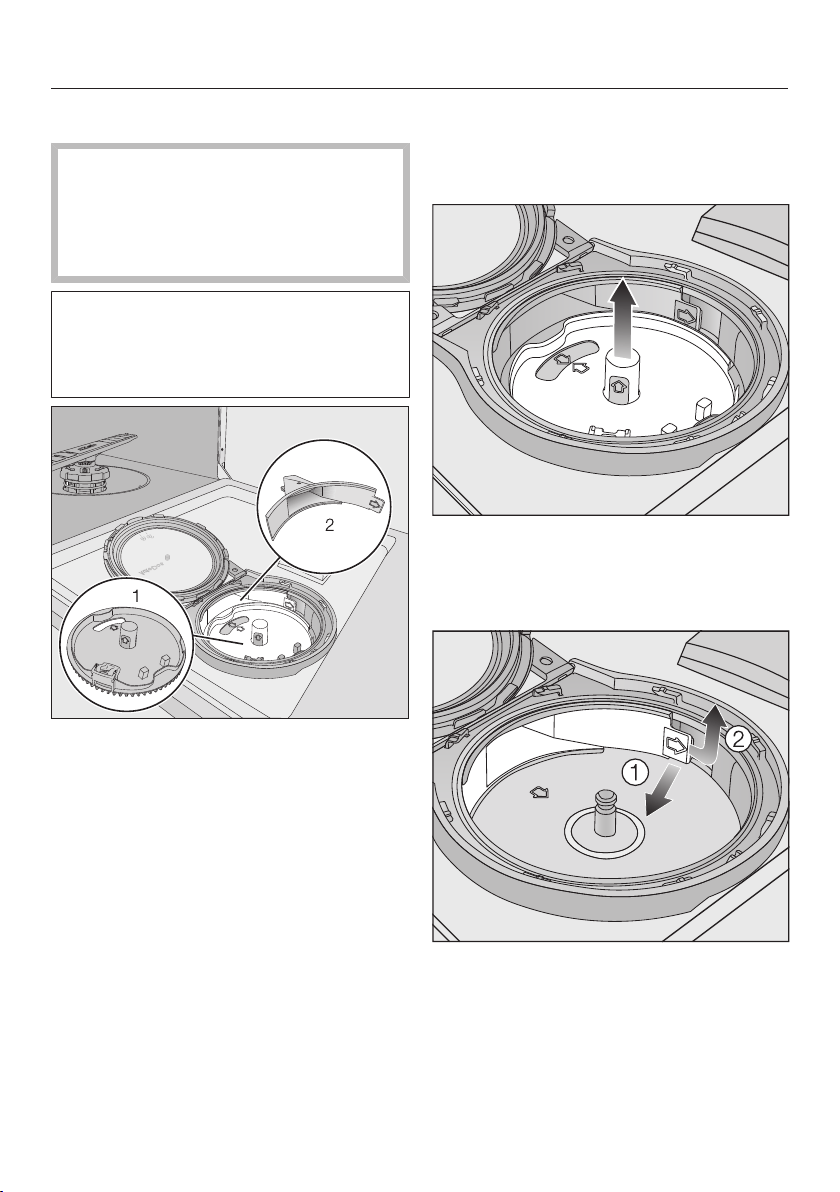
Cleaning and care
92
Cleaning the AutoDos
If the Clean AutoDos message is dis-
played, check that the fill channel is
clean, and clean it if necessary, e.g.
powder residues. This helps keep the
AutoDos working properly.
In order to ensure that the AutoDos
works at its best, check it each time
you replace the PowerDisk and clean
it if needed.
1 PowerDisk holder
2 Fill channel for dispensing the deter-
gent from the PowerDisk into the wash
cabinet
Turn the AutoDos lid to and open
it.
Remove the PowerDisk if appropriate.
Pull the PowerDisk holder upwards
by the yellow tabs and remove it.
When doing so, do not pull on the
side tab.
Use the tab (see arrow) to release
the fill channel and pull it out .
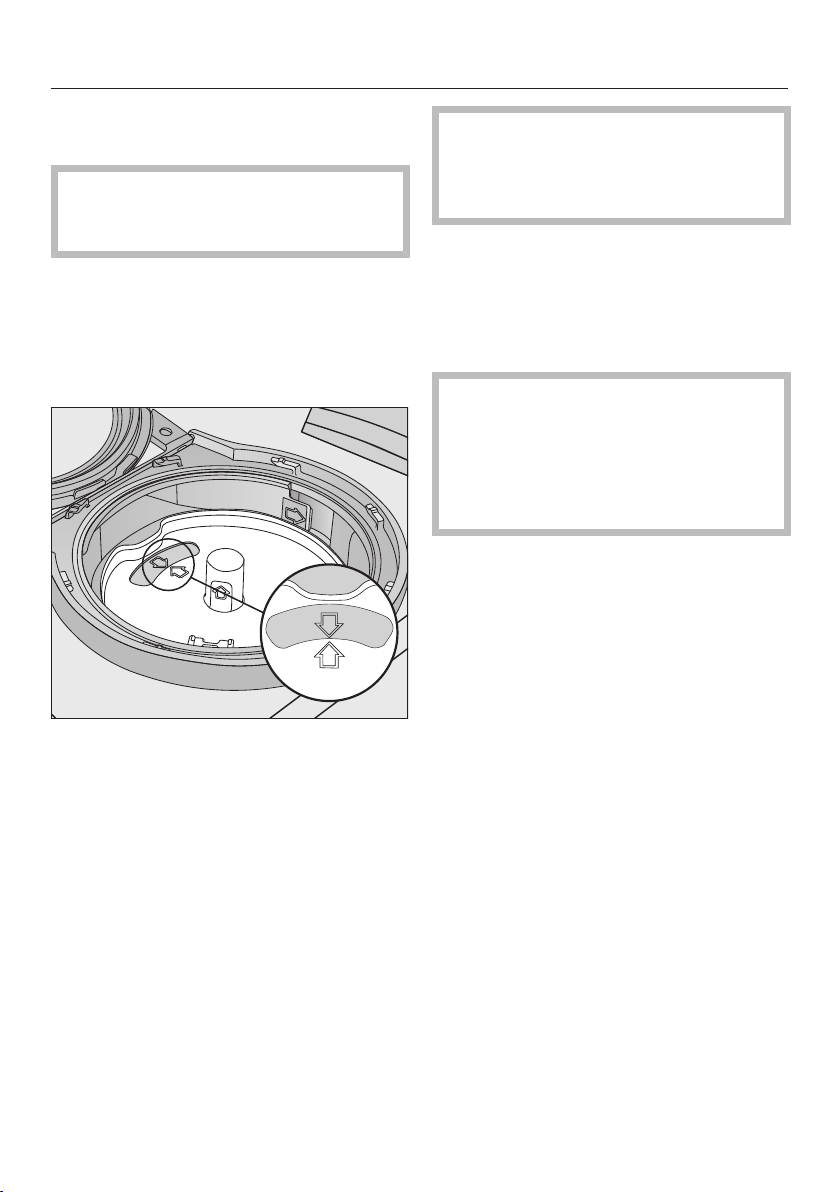
Cleaning and care
93
Clean the fill channel using water and
a soft brush if necessary.
It is very important that no moisture
gets inside the AutoDos system dur-
ing cleaning.
Dry the fill channel well so that the
detergent powder does not clump to-
gether.
Insert the fill channel again until the
tab clicks into place.
Put the holder back into place so that
the arrows in the PowerDisk holder
and in the viewing window point to-
wards each other. The holder must lie
flat.
The AutoDos lid must close tightly so
that the detergent powder does not
get wet and clump together.
Make sure that all seals are clean.
Insert a PowerDisk.
Close the AutoDos lid and turn it until
the lid handle is directly below the
symbol. (see “Detergent – Inserting
a PowerDisk”).
Regularly check the lower spray arm
for any blockages to ensure that the
detergent outlet of the AutoDos can
be fully flushed out (see “Cleaning
and care – Cleaning the spray
arms”).
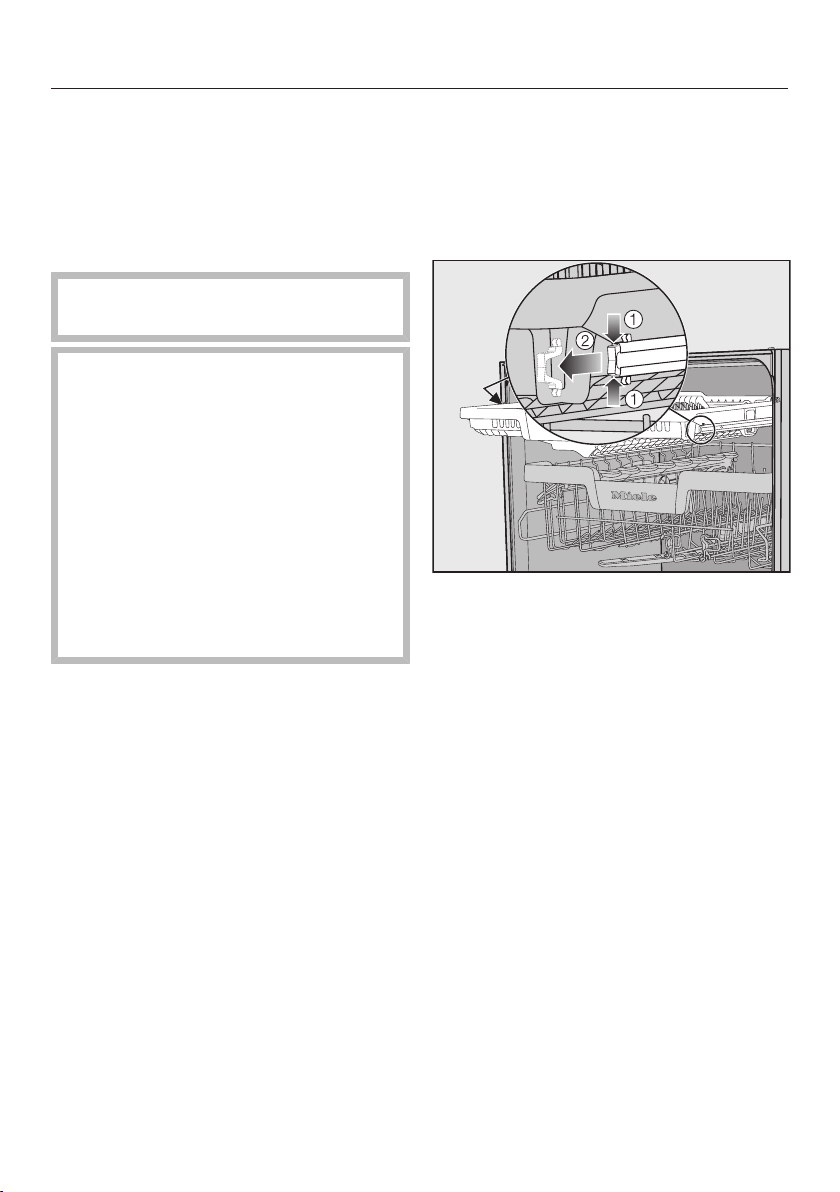
Cleaning and care
94
Cleaning the spray arms
Particles of food can get stuck in the
spray arm nozzles and bearings. The
spray arms should therefore be inspec-
ted regularly (approx. every 2–
4months).
Never run a wash programme
without using the spray arms.
Damage due to soiling entering
the circulation system.
Without filters, soiling can enter the
circulation system and cause a
blockage.
Do not run a wash programme
without the lower spray arm or
without the filters.
When cleaning the filters and spray
arms, make sure that coarse soiling
cannot get into the circulation sys-
tem.
Switch the dishwasher off.
Removing the cutlery tray (if present)
In order to be able to remove the upper
spray, you first have to remove the cut-
lery tray (if present).
Take out the cutlery tray.
Press the rail safety clips on both
sides of the cutlery tray together
and remove the safety clips.
Take out the cutlery tray completely.
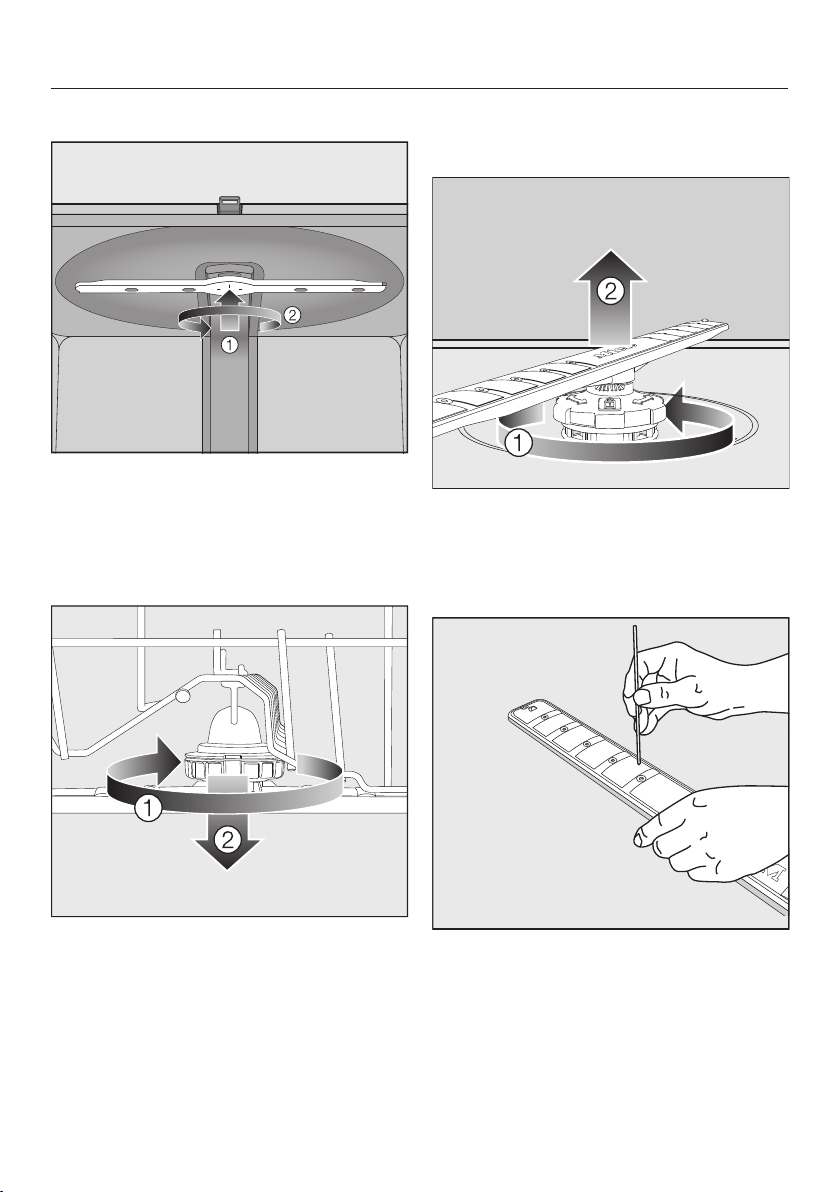
Cleaning and care
95
Removing the top spray arm
Push the upper spray arm upwards
to engage the inner ratchet. Then un-
screw the spray arm by rotating the
screw thread anti-clockwise.
Removing the middle spray arm
Rotate the screw thread of the middle
spray arm clockwise and remove
the spray arm.
Removing the lower spray arm
Remove the lower basket.
Rotate the screw thread of the lower
spray arm anti-clockwise and pull
the spray arm upwards to remove.
Cleaning the spray arms
Use a pointed object to push food
particles into the spray arm nozzles.
Rinse the spray arm thoroughly under
running water.
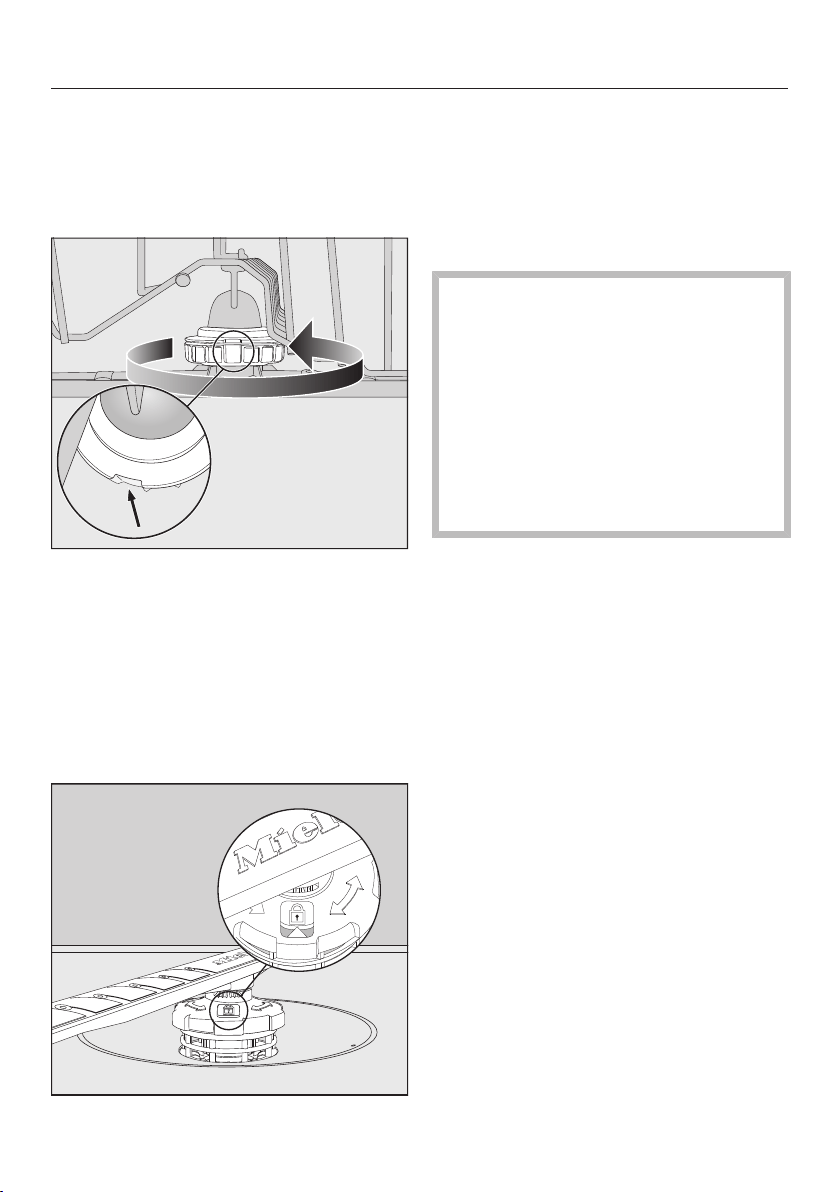
Cleaning and care
96
Inserting the upper spray arm
Refit the upper spray arm and tighten
it by hand.
Inserting the middle spray arm
Replace the middle spray arm and
turn the screw thread anticlockwise
until it engages. Make sure that the
recesses in the lock line up.
Inserting the lower spray arm
Refit the lower spray arm and ensure
that the filter combination lies flat in
the base of the wash cabinet.
Rotate the screw thread of the lower
spray arm clockwise until the arrow in
the viewing window points to the lock
symbol.
Make sure the spray arms can rotate
freely.
Damage due to soiling entering
the circulation system.
The lower spray arm is used to se-
cure the filter combination. Without
filters, coarse soiling can enter the
circulation system and cause a
blockage.
Do not run a wash programme
without the lower spray arm or
without the filters.
Inserting the cutlery tray (if present)
Slide the cutlery tray back onto the
rails from the front.
Replace the safety clips in the rails on
both sides of the cutlery tray.
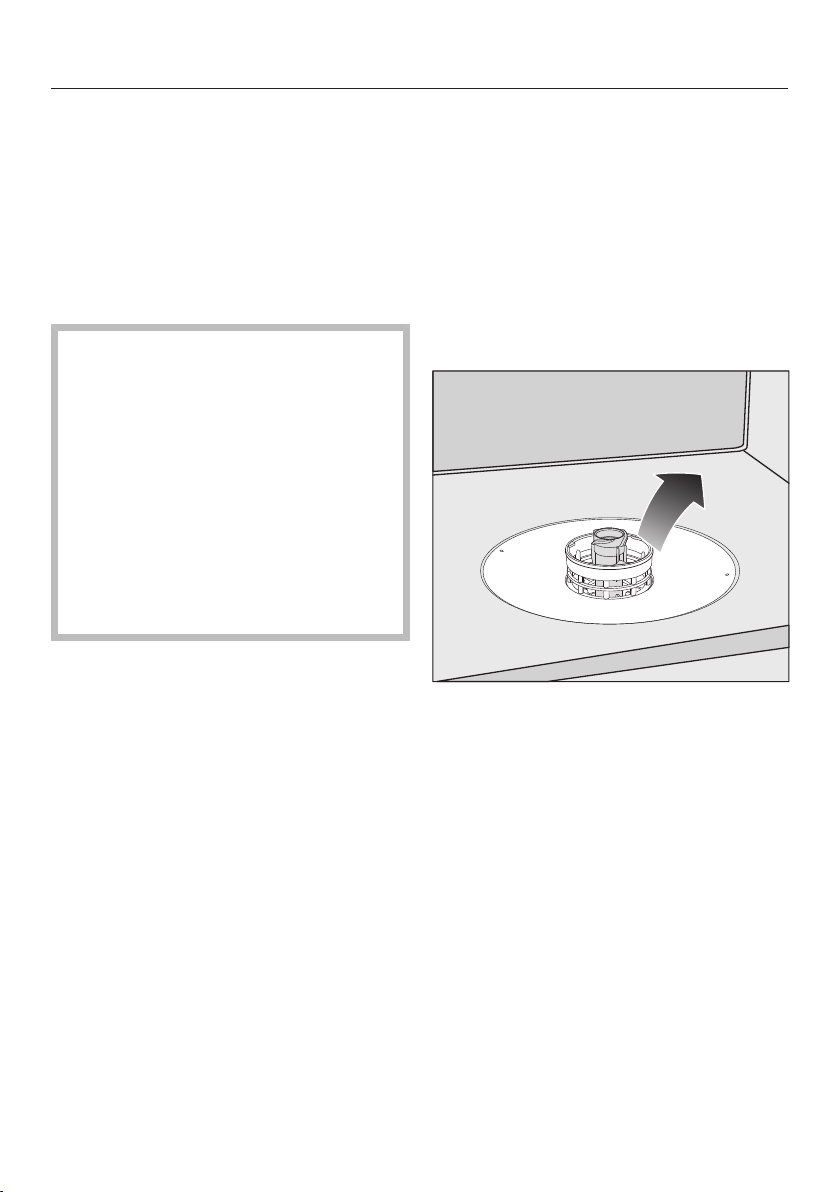
Cleaning and care
97
Checking the filters in the
wash cabinet
The filter combination in the base of the
wash cabinet retains coarse soiling
from the suds solution. This prevents
soiling getting into the circulation sys-
tem and re-entering the wash cabinet
through the spray arms.
Damage due to soiling entering
the circulation system.
Without filters, soiling can enter the
circulation system and cause a
blockage.
Do not run a wash programme
without the lower spray arm or
without the filters.
When cleaning the filters and spray
arms, make sure that coarse soiling
cannot get into the circulation sys-
tem.
The filters can become blocked by soil-
ing that collects over time. The level of
soiling and the time it takes before the
filters need cleaning will vary depending
on use.
The messageRemove filters and clean
them if necessary will appear in the dis-
play after every 50 programme cycles.
Check the filter combination.
Clean it, if necessary.
Then confirm the message with OK.
Cleaning the filters
Switch the dishwasher off.
Remove the lower spray arm (see
“Cleaning and care” chapter, “Clean-
ing the spray arms” section).
Before removing the filter combina-
tion, remove any coarse soiling to
prevent it from entering the circulation
system.
Remove the filter combination.
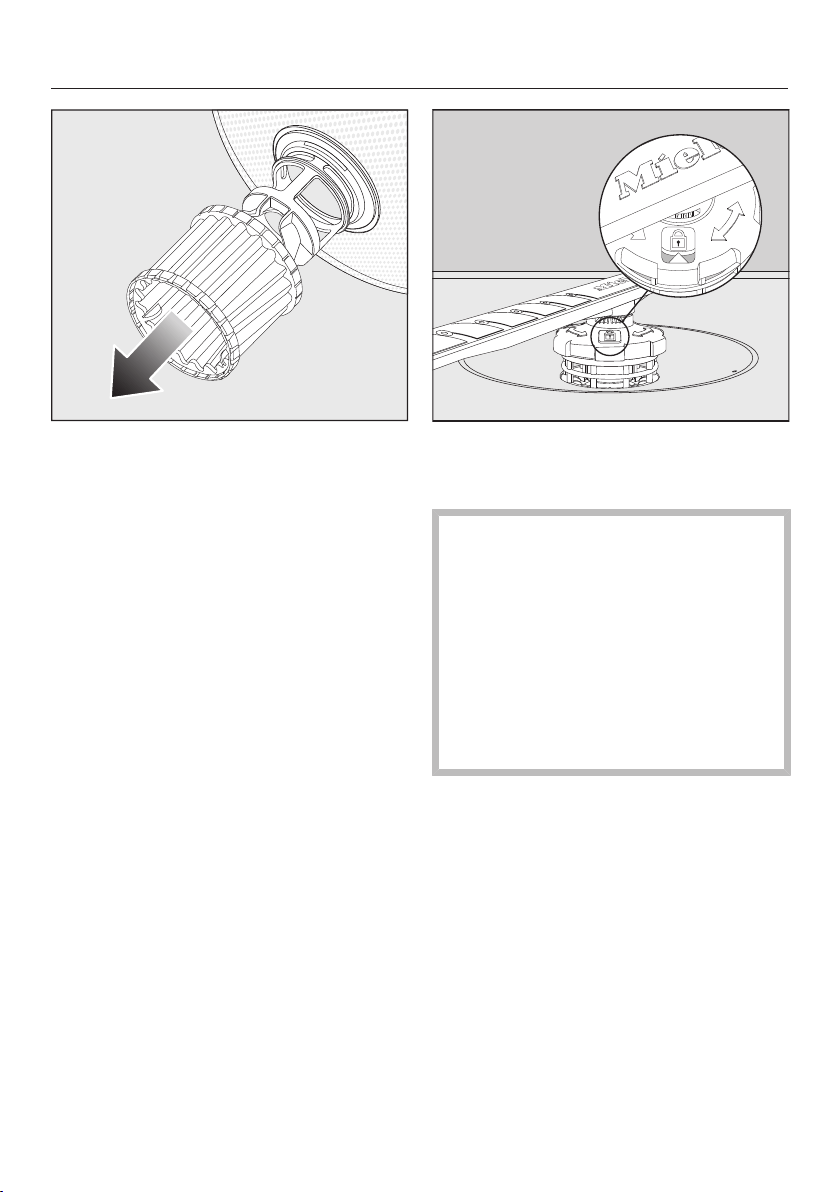
Cleaning and care
98
In order to clean the inside of the fil-
ter, pull the microfilter on the plastic
ring downwards and away from the
filter combination.
Rinse all the parts under running wa-
ter.
If necessary, use a soft cleaning
brush to remove soiling.
Insert the microfilter back into the fil-
ter combination.
Refit the filter combination so that it
lies flat in the base of the wash cab-
inet.
Refit the lower spray arm to the filter
combination using the screw connec-
tion.
Rotate the screw connection clock-
wise until the arrow in the viewing
window points to the lock symbol.
Damage due to soiling entering
the circulation system.
The lower spray arm is used to se-
cure the filter combination. Without
filters, coarse soiling can enter the
circulation system and cause a
blockage.
Do not run a wash programme
without the lower spray arm or
without the filters.
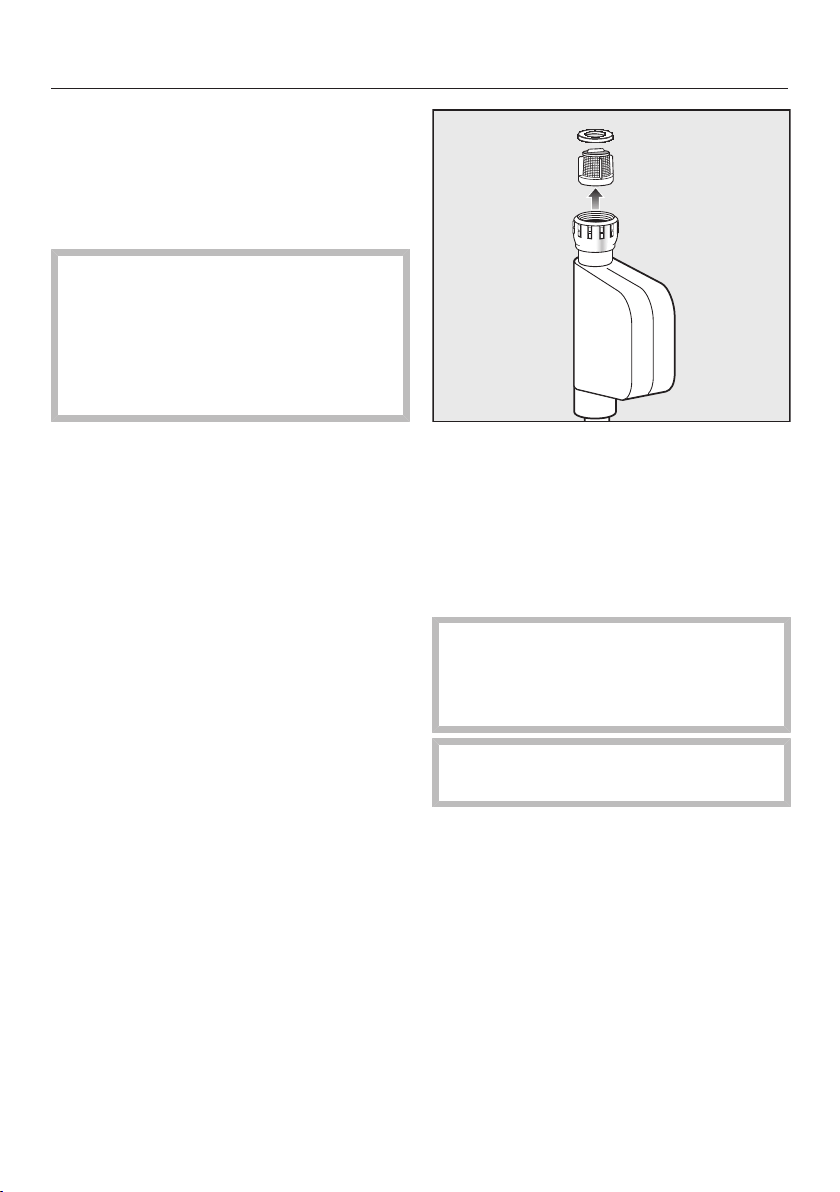
Cleaning and care
99
Cleaning the water inlet filter
A filter is incorporated in the screw
thread to protect the water inlet valve. If
the filter is soiled, insufficient water
flows into the wash cabinet.
Risk of electric shock from mains
voltage.
The plastic housing of the water con-
nection contains an electrical valve.
The housing must not be dipped in
water.
Disconnect the dishwasher from the
mains.
To do this, turn off the dishwasher,
switch off at the socket and remove
the plug.
Close the stopcock.
Unscrew the water inlet valve.
Remove the seal from the screw
thread.
Using pointed pliers, take hold of the
plastic filter slat and remove the filter.
Rinse the filter under running water.
Reassemble in reverse order.
Screw the screw thread securely
back onto the stopcock. Slowly open
the stopcock. If water drips out,
tighten the screw thread.
Never forget to put the filter back in
place after cleaning.
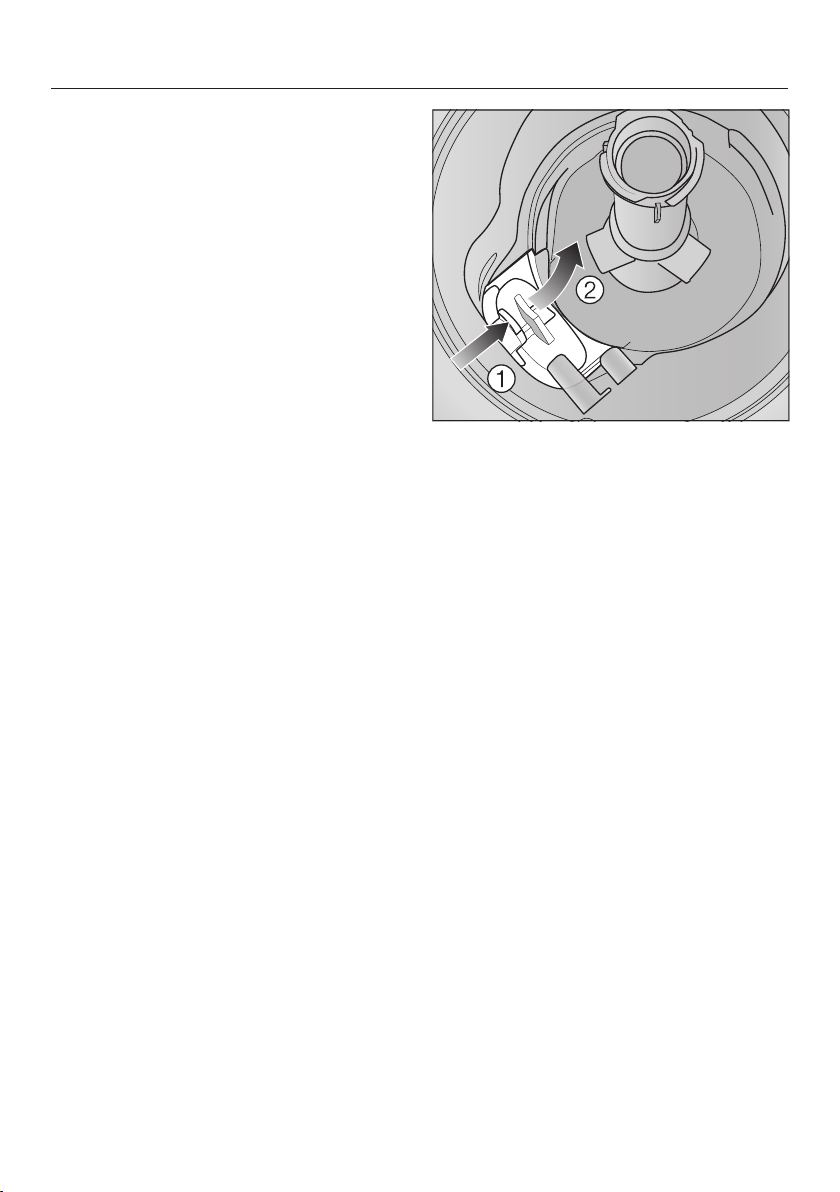
Cleaning and care
100
Cleaning the drain pump
If water remains in the wash cabinet
after the end of a programme, the water
has not been pumped away. The drain
pump may be blocked by foreign ob-
jects. These are easy to remove.
Disconnect the dishwasher from the
mains.
To do this, turn off the dishwasher,
switch off at the socket and withdraw
the plug.
Take the filter combination out of the
wash cabinet (see “Cleaning and
care” chapter, “Cleaning the filters”).
Scoop the water out of the cabinet
using a suitable small container or
utensil.
Press the catch of the drain pump
cover inwards .
Tip the cover inwards until it is re-
leased .
Rinse the cover thoroughly under run-
ning water and remove all foreign ob-
jects.
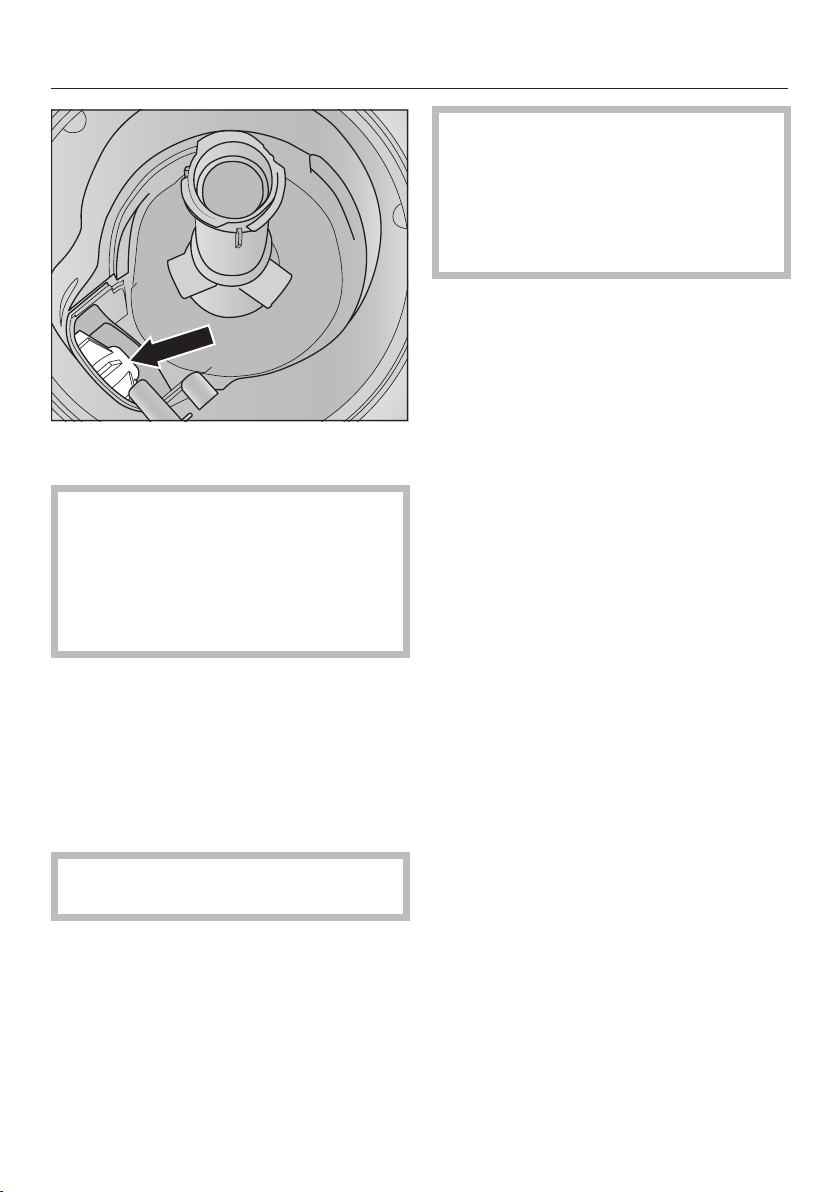
Cleaning and care
101
The drain pump (see arrow) is under-
neath the cover.
Risk of injury from glass splin-
ters.
It is especially difficult to see glass
splinters in the drain pump.
Take care when cleaning the drain
pump.
Carefully remove all foreign objects
from the drain pump. Check the drain
pump impeller by manually turning it.
You will feel a little resistance when
you turn the impeller.
Refit the cover by placing it down
vertically from above.
Ensure that the catch engages cor-
rectly.
Damage due to incorrect clean-
ing.
The components are delicate and
can be damaged during cleaning.
Take care when cleaning the drain
pump.
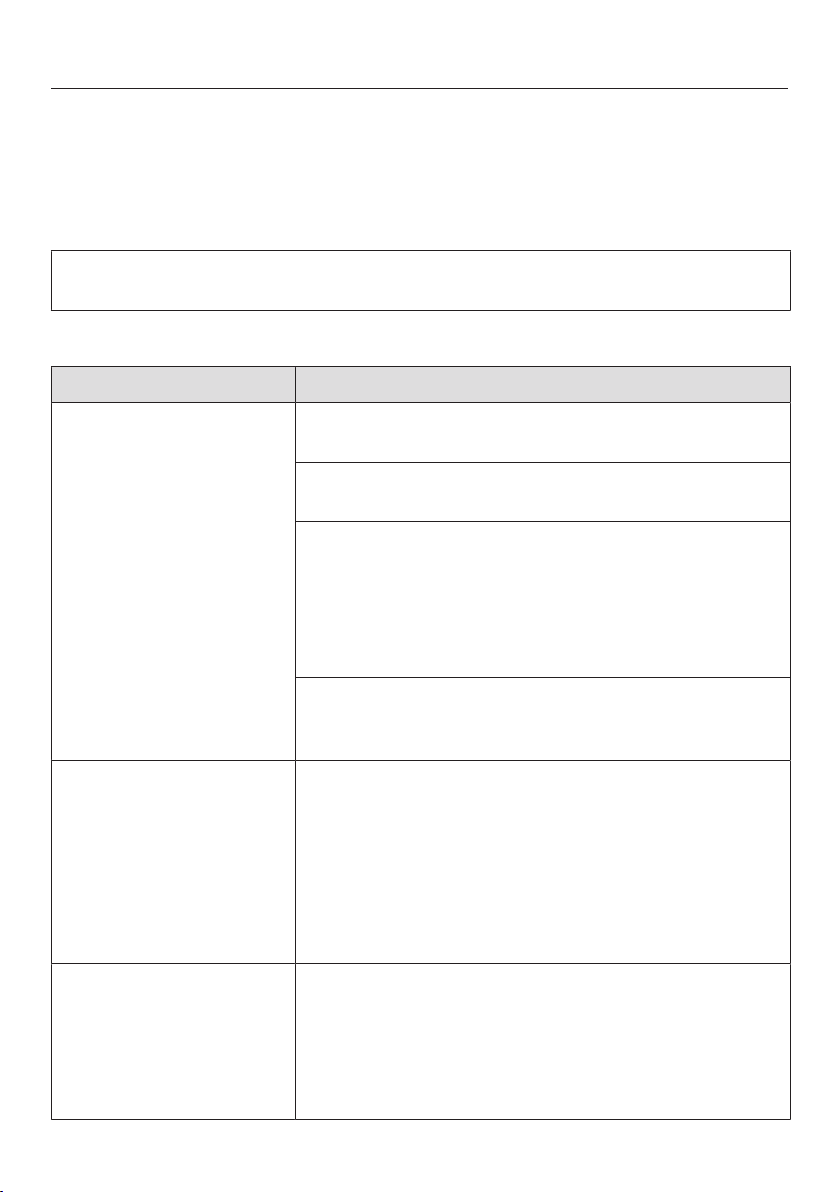
Problem solving guide
102
Many malfunctions and faults that can occur in daily operation can be easily
remedied. Time and money will be saved because a service call will not be
needed.
The following guide may help you to find the reason for a malfunction or a fault,
and to correct it.
This section only lists faults that you can remedy yourself. All other faults are
shown in Fault FXX.
Technical problems
Problem Cause and remedy
The dishwasher will not
start.
The door is not closed properly.
Raise the door upwards until the catch engages.
The dishwasher is not plugged in.
Insert the plug and switch on at the socket.
The mains fuse has tripped.
Reset the trip switch in the fuse box or replace the
fuse in the plug (see data plate for minimum fuse
rating).
If the mains fuse trips again, contact the Miele
Customer Service Department.
The dishwasher is not switched on.
Switch the dishwasher on using the sensor con-
trol.
The sensor control
does not respond or
only responds once it
has been touched sev-
eral times.
Energy management: the door was opened or closed
shortly before the sensor control was touched. As
a result, the dishwasher was already switched on.
The electronic module requires a few seconds to be
ready for operation.
Wait a few seconds after opening or closing the
door.
Then touch the sensor control.
The dishwasher stops
during a programme.
The mains fuse has tripped.
Reset the trip switch in the fuse box or replace the
fuse in the plug (see data plate for minimum fuse
rating).
If the mains fuse trips again, contact Miele Ser-
vice.

Problem solving guide
103
Problem Cause and remedy
After the programme
has started, the optical
in-operation indicator
light is not visible.
The reflector panel was not correctly fitted.
Re-fit the reflector panel correctly (see installation
sheet).

Problem solving guide
104
Fault messages
Problem Cause and remedy
The optical in-operation
indicator light is flash-
ing quickly.
The alarm tone is
sounding.
One of the following
faults appears in the
display:
Before rectifying the problem:
Switch the dishwasher off.
Fault F: Technical fault.
Switch the appliance off and
back on again. Read the op-
erating instruction manual
for further details.
There may be a technical fault.
Switch the dishwasher back on after a few
seconds.
Select the programme you want to use.
Close the door.
If the fault message appears again, there is a tech-
nical fault.
Switch the dishwasher off.
Close the stopcock.
Call the Miele Customer Service Department.
Waterproof fault: Switch
the appliance off, close the
stopcock, call Miele Service.
The Waterproof system has reacted.
Switch the dishwasher off.
Close the stopcock.
Call Miele Service.
Fault F 78: A technical
fault has occurred. Switch
the appliance off, close the
stopcock and call Miele Ser-
vice.
Circulation pump fault.
Switch the dishwasher off.
Switch the dishwasher back on.
Select the programme you want to use.
Close the door.
If the fault message appears again, there is a tech-
nical fault.
Switch the dishwasher off.
Close the stopcock.
Call the Miele Customer Service Department.

Problem solving guide
105
Door release
Problem Cause and remedy
The optical in-operation
indicator light is flash-
ing quickly.
The alarm tone is
sounding.
The following fault is in-
dicated via the display:
Before rectifying the problem:
Switch the dishwasher off.
Door opening fault.
Switch the appliance off and
back on again. Read the op-
erating instruction manual
for further details.
The door does not open automatically.
There may be a technical fault.
Open the door manually (see “Before using for the
first time – Opening the door”) and switch the
dishwasher back on again.
If the same fault message appears again, call the
Miele Customer Service Department.
The door does not close automatically.
The door might be obstructed by an item inside the
appliance.
If this is the case, remove the item causing an ob-
struction and switch the dishwasher on again.
If the same fault message appears again, call the
Miele Customer Service Department.

Problem solving guide
106
Water inlet fault
Problem Cause and remedy
The optical in-operation
indicator light is flash-
ing quickly.
The alarm tone is
sounding.
One of the following
messages appears in
the display:
Please open the stop-
cock
The stopcock is closed.
Open the stopcock fully.
Insufficient water intake.
Open the stopcock fully.
Refer to operating instruc-
tions if necessary
Before rectifying the problem:
Switch the dishwasher off.
The water inlet is restricted.
Open the stopcock fully and start the programme
again.
Clean the filter in the water inlet (see “Cleaning
and care” – Cleaning the filter in the water inlet”).
The water-connection pressure is lower than
50kPa.
Seek professional advice.
The on-site connection for the water drainage may
be too low and you will need to vent the water
drainage (see “Installation – Water drainage”).
Fault F 18: A technical
fault has occurred. Switch
the appliance off, close the
stopcock and call Miele Ser-
vice.
A technical fault has occurred.
Switch the dishwasher off.
Close the stopcock.
Call the Miele Customer Service Department.
The following fault mes-
sage appears on the
display during the Sol-
arSaveprogramme:
Intake temperature too low
The intake water has not reached the required tem-
perature of 45°C (see “Installation – Water inlet”).
Start the programme again.
If the fault message appears again, select a differ-
ent programme.
Problem solving guide
107
Water drainage fault
Problem Cause and remedy
The optical in-operation
indicator light is flash-
ing quickly.
The alarm tone is
sounding.
The message
Water was not pumped
away, see operating instruc-
tions appears in the dis-
play.
Before rectifying the problem:
Switch the dishwasher off.
Water drainage fault.
There might be water in the wash cabinet.
Clean the filter combination (see “Cleaning and
care – Cleaning the filters”).
Clean the drain pump (see “Cleaning and care –
Cleaning the drain pump”).
Remove any kinks or loops in the drain hose.

Problem solving guide
108
Fault in the AutoDos (automatic dispensing)
Problem Cause and remedy
The message
Insert PowerDisk or deactiv-
ate AutoDos with OK ap-
pears in the display.
The AutoDosfunction is active but no PowerDisk has
been inserted.
Insert a PowerDisk (see the “Detergent” chapter,
“Automatic dispensing/AutoDos” section).
If you do not wish to use automatic dispensing,
deactivate the function using OK.
The optical in-operation
indicator light is flash-
ing quickly.
The alarm tone is
sounding.
The programme does
not start or a pro-
gramme that has
already started stops.
The messageAutoDos lid
open appears in the dis-
play
The AutoDos lid has not been closed properly.
Close the AutoDos lid and lock it fully (see “Deter-
gent” chapter, “Automatic dispensing/AutoDos”
section).
If the lid cannot be fully closed, check whether the
PowerDisk holder is lying flat (see “Detergent”
chapter, “Inserting a PowerDisk” section).
If the same fault message appears again, call the
Miele Customer Service Department.
The message
PowerDisk empty. Deactiv-
ate AutoDos with OK. ap-
pears in the display.
The AutoDosfunction is active and the PowerDisk is
empty.
Replace the PowerDisk (see the “Detergent”
chapter, “Automatic dispensing/AutoDos” section).
If you do not wish to use automatic dispensing,
deactivate the function using OK.
The message
PowerDisk empty. Deactiv-
ate AutoDos with OK. ap-
pears in the display
even though you have
inserted a new
PowerDisk.
The dishwasher was switched off when the
PowerDisk was replaced and it has therefore not re-
cognised the new PowerDisk.
Switch the dishwasher on before replacing the
PowerDisk (see the “Detergent” chapter, “Auto-
matic dispensing/AutoDos”, “Inserting a
PowerDisk” section).

Problem solving guide
109
Problem Cause and remedy
The optical in-operation
indicator light is flash-
ing quickly.
At the end of the pro-
gramme, the alarm tone
sounds and the display
shows the following
message:
Fault F 601: A fault has
occurred; switch the appli-
ance off and back on again.
Restart the programme. If
the fault occurs again, call
Miele Service.
There is a fault in the AutoDos.
Switch the dishwasher off and back on again.
Check whether the PowerDisk holder and the
PowerDisk have been fitted correctly (see “Deter-
gent – Automatic dispensing/AutoDos”).
Activate the AutoDosfunction and restart the pro-
gramme.
If the fault message appears again, there is a tech-
nical fault. You can continue to use your dishwasher
by deactivating automatic dispensing in the Extras
menu of a programme and manually dispensing the
detergent via the detergent compartment.
If you wish to use automatic dispensing again,
contact the Miele Customer Service Department.
The optical in-operation
indicator light is flash-
ing quickly.
At the end of the pro-
gramme, the alarm tone
sounds and the display
shows the following
message:
AutoDos requires mainten-
ance. Please check Auto-
Dos system.
The dishwasher does
not switch off at the end
of the programme.
The wash items may not
be clean because an in-
sufficient amount of de-
tergent was dispensed.
The AutoDosfunction is
automatically deactiv-
ated during the pro-
gramme sequence.
An empty PowerDisk has been inserted or the Auto-
Dos is blocked by residual detergent. Detergent
dosage is insufficient.
The AutoDosfunction was automatically deactivated.
Switch the dishwasher off and back on again.
Multiple messages appear in the display.
Clean the pouring channel of the AutoDos (see
“Detergent” chapter, “Cleaning the AutoDos” sec-
tion).
Clean the lower spray arm (see “Cleaning and
care” chapter, “Cleaning the spray arms” section).
Select OK to confirm each message.
Activate the AutoDosfunction by confirming the
messageAutoDos available using OK.
Start the programme again.
The programme duration will be extended by up to
2.5hours to flush out the AutoDos detergent outlet.

Problem solving guide
110
Spray arm fault
Problem Cause and remedy
During the programme
and at the end of the
programme, the display
shows the following
message:
Check spray arms
The dishwasher does
not switch off at the end
of the programme.
The wash items may not
be clean because no
detergent was dis-
pensed. The Auto-
Dosfunction is auto-
matically deactivated
during the programme
sequence.
The lower spray arm is blocked or the nozzles of the
lower spray arm are clogged. The AutoDosfunction
is automatically deactivated during the programme
sequence because the AutoDos detergent outlet
cannot be completely flushed out.
Switch the dishwasher off and back on again.
Messages appear in the display.
Perform a rotation check of the lower spray arm
and rearrange the wash items if they are blocking
the spray arm.
Clean the lower spray arm (see “Cleaning and
care” chapter, “Cleaning the spray arms” section).
Select OK to confirm each message.
Start the programme again.
Problem solving guide
111
General problems with the dishwasher
Problem Cause and remedy
The door will not open
when knocked.
The Knock2open function has been permanently dis-
abled.
Switch the door opening function on again (see
“Settings” chapter, ”Knock2open” section).
If the door still will not open or if there is a power cut,
the door can still be opened manually using the the
door-opening mechanism supplied (see ”Before us-
ing for the first time” chapter, ”Door-opening mech-
anism” chapter).
The indicator lights and
the display are dark.
The dishwasher has switched off automatically to
save energy.
Switch the dishwasher back on using the
sensor control.
The wash cabinet light-
ing does not come on
when the door is
opened.
The wash cabinet lighting has been switched off per-
manently.
Switch the lighting back on again (see “Settings”
chapter, “BrilliantLight” section).
Faulty wash cabinet lighting.
Call Miele Service.
Detergent residue is left
in the detergent com-
partment at the end of a
programme.
The detergent compartment was still damp when de-
tergent was added.
Only add the detergent when the detergent com-
partment is dry.
The detergent compart-
ment lid cannot be
closed.
Residual detergent is blocking the catch.
Remove the residual detergent.
At the end of a pro-
gramme there is a film
of moisture on the in-
side of the door and
possibly on the interior
cabinet walls.
This is part of the normal function of the drying sys-
tem. The moisture will dissipate after a short while.
Problem solving guide
112
Problem Cause and remedy
Water remains in the
wash cabinet at the end
of a programme.
Before rectifying the problem:
Switch the dishwasher off.
The filter combination in the wash cabinet is clogged.
Clean the filter combination (see “Cleaning and
care” chapter, “Cleaning the filters” section).
The drain pump is blocked.
Clean the drain pump (see “Cleaning and care”
chapter, “Cleaning the drain pump” section).
The drain hose is kinked.
Remove any kinks from the drain hose.
Build-up of odours in
the wash cabinet
The frequent use of low-temperature wash pro-
grammes (<50°C) increases the risk of contamina-
tion and odours inside the wash cabinet.
Regularly run a high-temperature programme. This
is to prevent the build-up of residues and odours.

Problem solving guide
113
Noises
Problem Cause and remedy
Knocking noise in the
wash cabinet
A spray arm is knocking against a wash item.
Carefully open the door and rearrange the wash
items that are obstructing the spray arm.
Rattling noise in the
wash cabinet
Wash items are insecure in the wash cabinet.
Carefully open the door and rearrange the wash
items so that they sit securely.
There is a foreign object (e.g. glass shard) in the drain
pump.
Remove the foreign object from the drain pump
(see “Cleaning and care” chapter, “Cleaning the
drain pump” section).
Knocking noise in the
water pipes
This may be caused by the on-site installation or the
cross-section of the piping.
However, this will not affect the functioning of the
dishwasher in any way. If in doubt, contact a suit-
ably qualified plumber.

Problem solving guide
114
Unsatisfactory washing result
Problem Cause and remedy
The crockery is not
clean.
The crockery was not loaded correctly.
See notes in the “Loading the dishwasher” for ex-
amples on how to load crockery and cutlery.
The programme was not powerful enough.
Select a more powerful programme (see “Pro-
gramme overview”).
Activate the Extra clean function (see “Extras – Ex-
tra clean”).
Activate the “Second interim rinse” function (see
“Settings – Second interim rinse”).
Not enough detergent was dispensed during manual
detergent dispensing.
Use more detergent or change the detergent you
are using.
Increase the dispensing quantity during automatic
dispensing (if available) (see “Settings – AutoDos”).
Items are blocking the path of the spray arms.
Carry out a rotation check and if needed rearrange
the items so that the spray arms can rotate freely.
The filter combination in the wash cabinet is not
clean or was incorrectly fitted.
This may have caused the spray arm jets to become
blocked.
Clean and/or fit the filter combination correctly.
Clean the spray arm jets if necessary (see “Clean-
ing and care – Cleaning the spray arms”).
There are smears on
glassware and cutlery.
There is a bluish sheen
on the surface of glass-
ware. The film can be
wiped off.
The rinse aid dosage is set too high.
Reduce the dosage (see “Settings” chapter, “Rinse
aid” section).

Problem solving guide
115
Problem Cause and remedy
The crockery is not dry
or cutlery and glasses
are flecked.
The rinse aid dosage is too low or the rinse aid con-
tainer is empty.
Replenish the rinse aid container, increase the
dosage or change the brand of rinse aid (see “Be-
fore using for the first time – Rinse aid”).
The crockery was taken out of the wash cabinet too
soon.
Leave the crockery in longer (see “Operation – Un-
loading the dishwasher”).
The duration of the drying phase for the selected pro-
gramme is not sufficient for the crockery (particularly
for plastic crockery).
Select the Extradry extra (see “Extras – Ex-
tradry”).
You have used combination products that have insuf-
ficient drying performance.
Switch to another detergent, or replenish the rinse
aid (see “Before using for the first time – Rinse
aid”).
Glassware has a brown
or blue tinge. The film
cannot be wiped off.
Ingredients from the detergent have formed a de-
posit.
Switch to another detergent straight away.
Glassware is dull and
discoloured. The film
cannot be wiped off.
The glassware is not dishwasher-proof. The surface
has altered.
No remedy.
Purchase glassware that is dishwasher-proof.
Tea or lipstick stains
have not been com-
pletely removed.
The wash temperature of the selected programme
was too low.
Select a programme with a higher main wash tem-
perature.
The bleaching effect of the detergent used is too low.
Switch to another detergent.
Problem solving guide
116
Problem Cause and remedy
White residue is visible
on the crockery. Cloud-
ing has occurred on
glassware and cutlery.
The film can be wiped
off.
The rinse aid dosage is set too low.
Increase the dispensing quantity (see “Settings –
Rinse aid”).
There is no salt in the salt reservoir.
Fill the salt reservoir (see “Before using for the first
time – Dishwasher salt”).
The salt reservoir cap has not been screwed on cor-
rectly.
Replace the cap, making sure that it screws back
on correctly.
Unsuitable combination detergents were used.
Switch to another detergent. If using detergent
tabs or powder detergent, do not choose combin-
ation products and ensure you refill the dish-
washer salt and rinse aid.
The water softener is programmed to too low a water
hardness level.
Programme the water softener to a higher water
hardness level (see “Settings – Water hardness”).
Too much detergent was dispensed.
Reduce the dispensing quantity during automatic
dispensing (if available) (see “Settings – AutoDos”).
Activate the “Second interim rinse” function (see
“Settings – Second interim rinse”).
Not enough combination detergent was dispensed.
The water softener performance is not sufficient.
Increase the dispensing quantity during automatic
dispensing (if available) (see “Settings – AutoDos”).
Add more dishwasher salt.
Plastic items are discol-
oured.
Natural dyes, e.g. from carrots, tomatoes or ketchup
may be the cause. The amount of detergent used or
its bleaching effect was not sufficient to deal with
natural dyes.
Use more detergent (see “Detergent”).
Parts that are already discoloured will not revert to
their original colour.
Problem solving guide
117
Problem Cause and remedy
There are rust stains on
cutlery.
The affected items are not corrosion resistant.
No remedy.
Purchase cutlery that is dishwasher-proof.
A programme was not run after dishwasher salt was
added. Traces of salt have got into the normal wash
cycle.
Always run the 65°CQuickPowerWashpro-
gramme with the Expressprogramme option se-
lected and without any load in the dishwasher im-
mediately after adding dishwasher salt.
The salt reservoir cap has not been screwed on cor-
rectly.
Replace it, making sure that it screws back on cor-
rectly.

Service
118
Contact in the event of a fault
In the event of any faults which you
cannot remedy yourself, please contact
your Miele dealer or the Miele Customer
Service Department.
You can book a Miele Customer Ser-
vice Department call-out online at
www.miele.com/service.
Contact information for the Miele Cus-
tomer Service Department can be
found at the end of this document.
Please quote the model identifier and
serial number of your appliance (Fabr./
SN/Nr.) when contacting the Miele Cus-
tomer Service Department. This inform-
ation can be found on the data plate.
Please note that telephone calls may be
monitored and recorded for training
purposes and that a call-out charge will
be applied to service visits where the
problem could have been resolved as
described in this booklet.
The data plate is located on the right
side of the door.
EPREL database
From 1 March 2021, information on en-
ergy labelling and ecodesign require-
ments will be available in the European
Product Database (EPREL). You can
find the product database at the follow-
ing link https://eprel.ec.europa.eu/. You
will be asked to enter the model identi-
fier.
The model identifier can be found on
the data plate.
X xxxx
Miele & Cie. KG, Carl-Miele-Straße 29
33332 Gütersloh, Germany
Made in xxxx
Mod:
Type:
XX/XXXXXXXXX
HGXX
M.No: XXXXXXXX
AC xxx V x Hz
xx A
x,x kW
Warranty
For information on the appliance war-
ranty specific to your country please
contact Miele. See back cover for ad-
dress.
In the UK, your appliance warranty is
valid for 2 years from the date of pur-
chase. However, you must activate your
cover by calling 0330 160 6640 or re-
gistering online at www.miele.co.uk.

Service
119
Note for test institutes
All relevant information for comparison
testing is provided in the “Comparison
tests” booklet.
You can download this booklet from the
Miele website. You will find the booklet
under “Downloads” on the page for the
relevant dishwasher model.

Optional accessories
120
Dishwasher detergent, rinse aid and
cleaning and care products are avail-
able for this dishwasher, as are optional
accessories.
All the products have been designed for
Miele appliances.
These and many other products can be
ordered from the Miele webshop, the
Miele Customer Service Department or
your Miele dealer.
Dishwasher detergent, rinse
aid and salt
When selecting your Miele dishwasher,
you opted for top quality and perform-
ance. To achieve optimum results all the
time, it is important to use the right
dishwasher products. Not all off-the-
shelf products deliver the same results
in all dishwashers.
For this reason Miele offers dishwasher
products specifically designed for Miele
appliances.
PowerDisk
Special Miele formula – for outstanding
cleaning results in Miele dishwashers
with AutoDos automatic dispensing.
- Exclusive Miele powder granulate
- With rinse aid and salt functions
- With components to protect silver
and glass
- With active oxygen for thorough
cleaning
- With super-active enzymes – effect-
ive even at low temperatures
In hard water areas, we recommend us-
ing the complete Miele system: the
PowerDisk, rinse aid and salt perfectly
match each other.
Detergent tabs
- Sparkling results even with stubborn
food deposits
- Combination product with other func-
tions such as rinse aid, dishwasher
salt and glass protection additives
- Phoshate free ‒ helps protect the en-
vironment
- No need to unwrap thanks to water-
soluble wrapping
Powder detergent
- With active oxygen for thorough
cleaning
- With enzymes that are effective even
at low temperatures
- With glass-protection formula against
corrosion
Rinse aid
- For sparkling glasses
- Helps crockery to dry
- With glass-protection formula against
corrosion
- Specially designed cap for precise,
easy dispensing
Dishwasher salt
- Prevents limescale on crockery and
in the appliance
- Extra coarse-grained

Optional accessories
121
Appliancecare
Miele cleaning and care products
provide optimum care for your Miele
dishwasher.
Dishwasher cleaner
- For use with the Maintenancepro-
gramme without detergent dispens-
ing
- Cleans the dishwasher effectively
and thoroughly
- Removes grease, bacteria, and asso-
ciated unpleasant odours
- Ensures excellent dishwashing res-
ults
Descaling agent
- Removes heavy limescale deposits
- Mild and gentle with natural citric
acid
Conditioner
- Removes odours, limescale and light
deposits
- Maintains the elasticity and leak
tightness of the seals
Freshener
- Neutralises unpleasant odours
- Fresh, pleasant fragrance of lime and
green tea
- Easy and convenient to attach to the
dishwasher basket
- Very economical; lasts for 60 wash
cycles
Installation
*INSTALLATION*
122
The Miele Waterproof system
Provided that your dishwasher has
been installed correctly, the Miele Wa-
terproof system will protect you from
water damage throughout its lifetime.
Water inlet
Health risk due to wash water.
Water in the dishwasher is not drink-
ing water.
Do not drink any water from the dish-
washer.
Health risk and risk of damage
due to contaminated incoming water.
The quality of the incoming water
must correspond to the drinking wa-
ter specification of the country in
which the dishwasher is being oper-
ated.
Connect the dishwasher to a drinking
water supply.
The dishwasher may be connected to
cold or hot water (up to max. 60°C)
supplies.
If energy-saving water heating sources
such as solar energy circulation sys-
tems are used, we recommend con-
necting to the hot water supply. This
saves both time and electrical energy
costs. Hot water is used in all pro-
grammes.
The SolarSaveprogramme (if available)
requires a hot water connection of
between a minimum of 45°C and a
maximum of 60°C (inlet temperature).
The higher the water intake temperat-
ure, the better the cleaning and drying
results.
The water inlet hose is approx. 1.5m
long. A 1.5m long, flexible metal exten-
sion hose (tested to
14,000kPa/140bar) is available as an
optional accessory from Miele specialist
dealers or the Miele Customer Service
Department.
A stopcock with a ¾"threaded union is
required for the connection. If a stop-
cock is not available, only a qualified in-
staller may connect the dishwasher to
the drinking water supply.
The water connection pressure must be
between 50 and 1000kPa. If the water
connection pressure is too high, a pres-
sure reducing valve must be fitted.
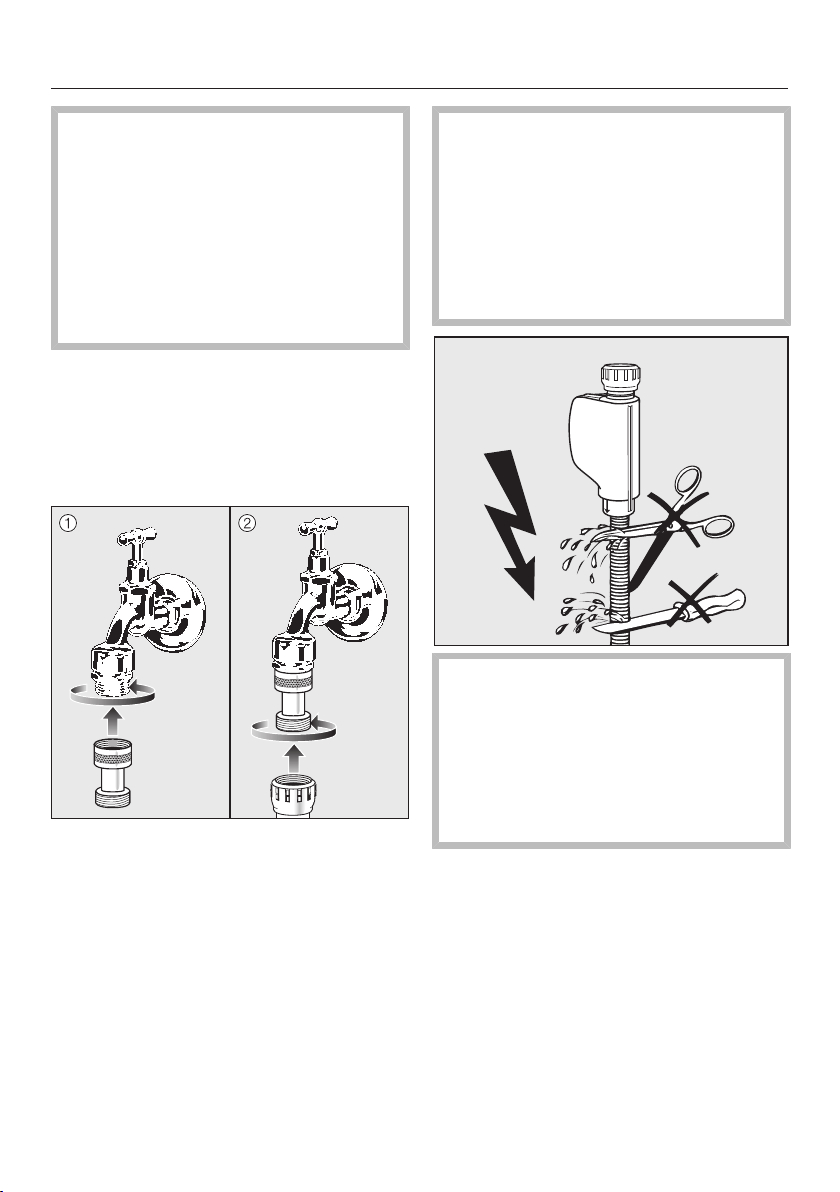
Installation
*INSTALLATION*
123
Risk of damage from leaking wa-
ter.
The connection point is subject to
mains water pressure. Water leaking
from it can cause damage.
You should therefore open the stop-
cock slowly and check for leaks.
Correct the position of the seal and
screw thread if appropriate.
Regulation in Germany
For the protection of drinking water, the
non-return valve supplied with the dish-
washer must be installed between the
stopcock and the water inlet hose.
Screw the non-return valve onto the
stopcock.
Screw the water inlet hose onto the
thread of the non-return valve.
Risk of damage due to excessive
pressure.
A brief increase in the water pressure
can damage components of the
dishwasher.
This dishwasher must only be oper-
ated when it is connected to a fully
vented plumbing system.
Risk of electric shock from mains
voltage.
There are electrical components in
the water inlet hose.
The inlet hose must not be shortened
or damaged in any way (see illustra-
tion).

Installation
*INSTALLATION*
124
Water drainage
The dishwasher’s drainage system is fit-
ted with a non-return valve, which pre-
vents dirty water from flowing back into
the appliance via the drain hose.
The dishwasher is supplied with ap-
prox.1.5m of flexible drain hose with
an internal diameter of 22mm.
The drain hose can be extended using a
connection piece to attach a further
length of hose. The drainage length
must not be longer than 4m and the
delivery head no higher than 1m.
If the hose is to be directly fitted to the
drainage outlet on site, use the hose
clip supplied (see installation plan).
The hose can be directed to the left or
the right of the appliance.
The on-site connector for the drain hose
can be adapted to different hose dia-
meters. If the connector extends too far
into the drain hose, it must be
shortened. Otherwise, the drain hose
can become blocked.
The drain hose must not be shortened.
Lay the drain hose so that it does not
kink and is not being subjected to
pressure or tension.
Risk of damage from leaking wa-
ter.
Leaking water can cause damage.
After commissioning, make sure that
the water is not leaking.
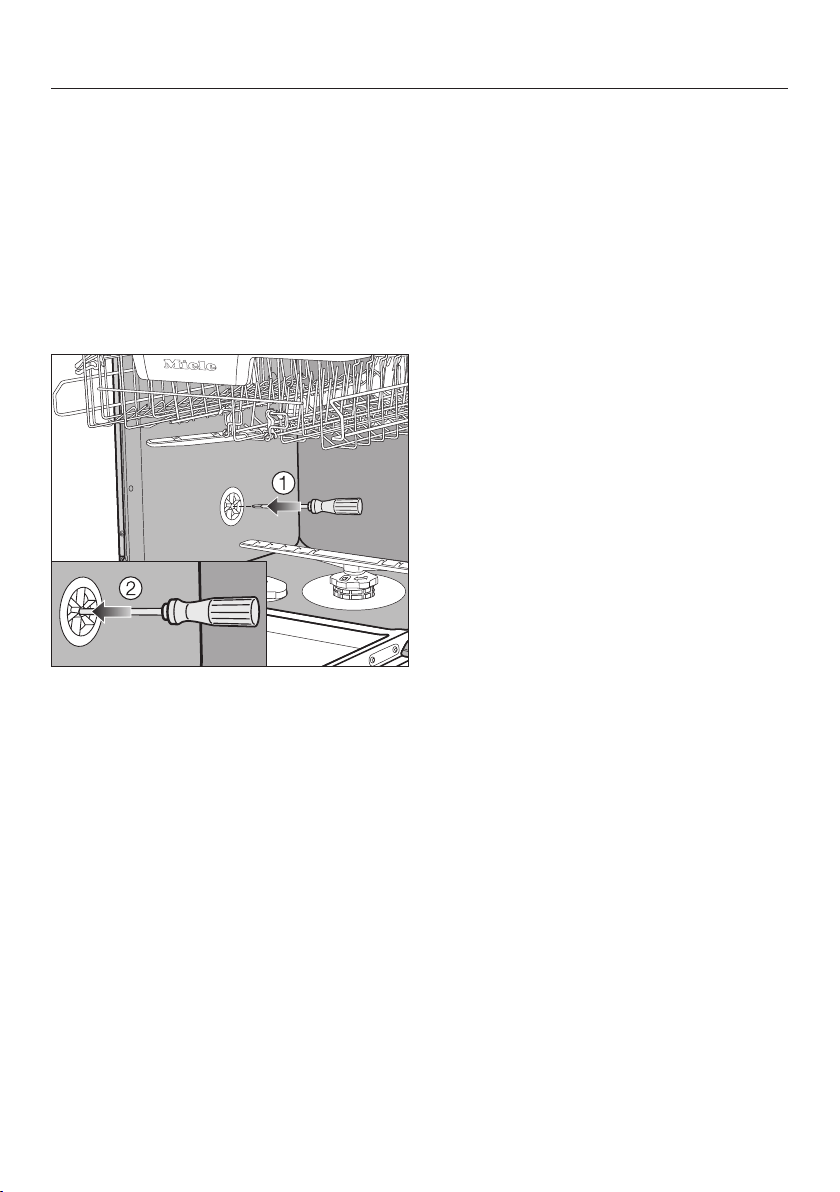
Installation
*INSTALLATION*
125
Venting the water drain
If the on-site drainage connection is
situated lower than the guide path for
the lower basket rollers in the open
door, the drainage system must be ven-
ted. Otherwise, a siphoning effect dur-
ing a programme can cause the appli-
ance to empty itself of water.
Open the dishwasher door fully.
Remove the lower basket.
Insert a screwdriver into the middle
opening of the vent valve in the left
wash cabinet wall.
Press the screwdriver further into the
opening and push it through the
membrane behind.
The vent opening for the water drain is
now open.

Installation
*INSTALLATION*
126
Electrical connection
The dishwasher is “connector-ready” as
standard for connection to an earthed
socket.
The socket must be easily accessible
after the dishwasher has been installed.
If that is not possible, ensure that a
suitable means of disconnection is
provided on the installation side for
each pole.
Risk of fire from overheating.
Connecting the dishwasher to a
multi-socket adapter or to an exten-
sion lead can overload the mains
connection cable.
For safety reasons, do not use an ex-
tension lead or multi-socket adapter.
The electrical installation must comply
with VDE0100 requirements.
For safety reasons, we recommend us-
ing a type residual current device
(RCD) in the assigned electrical installa-
tion for connecting the dishwasher.
If the mains connection cable is dam-
aged, it must only be replaced with a
specific mains connection cable of the
same type (available from the Miele
Customer Service Department). For
safety reasons, such replacement may
only be carried out by a qualified spe-
cialist or the Miele Customer Service
Department.
These operating instructions and the
data plate indicate the nominal power
consumption and the appropriate fuse
rating. Compare this information with
the data of the on-site electrical con-
nection.
If in any doubt, consult a qualified elec-
trician.
Temporary or permanent operation on
an autonomous power supply system or
a power supply system that is not syn-
chronised with the mains power supply
(e.g. island networks, back-up systems)
is possible. A prerequisite for operation
is that the power supply system com-
plies with the specifications of
EN50160 or an equivalent standard.
The function and operation of the pro-
tective measures provided in the do-
mestic electrical installation and in this
Miele product must also be maintained
in isolated operation or in operation that
is not synchronised with the mains
power supply, or these measures must
be replaced by equivalent measures in
the installation. As described, for ex-
ample, in the current version of BS OH-
SAS 18001–2 ISO 45001.
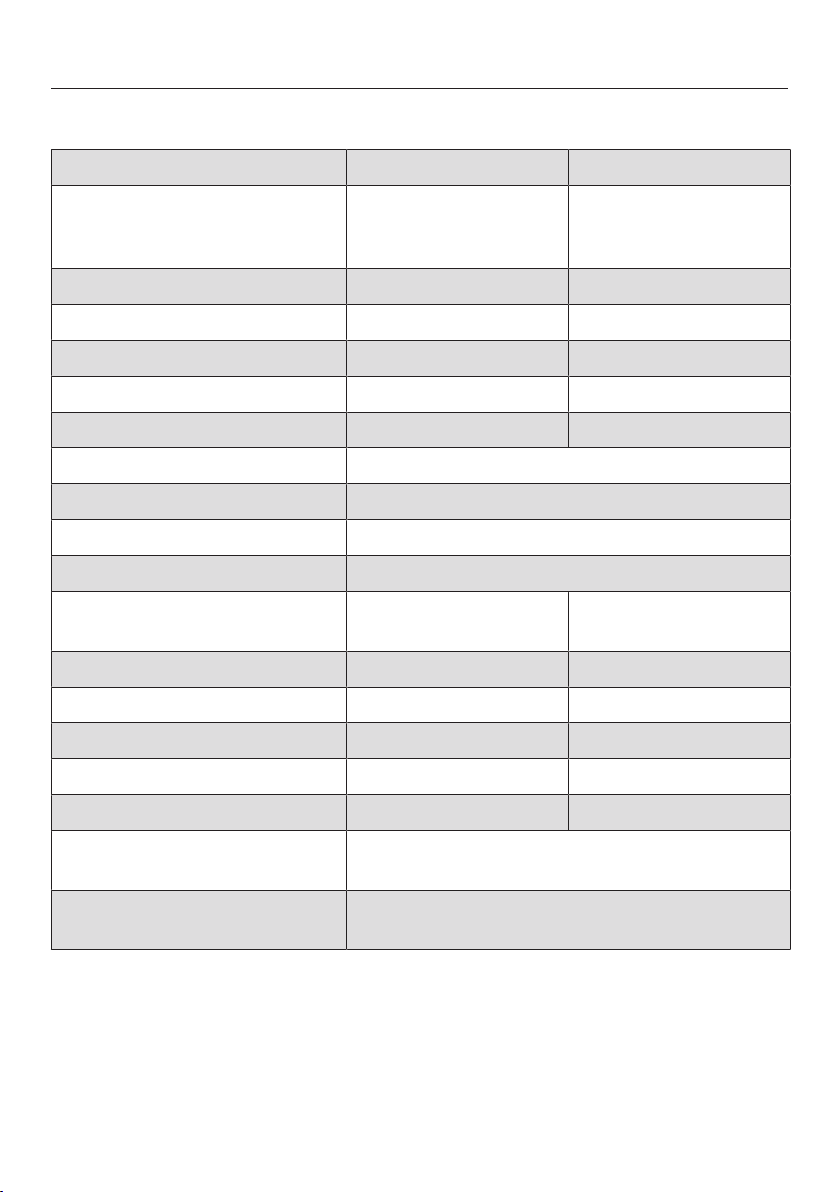
Technical data
127
Technical data
Dishwasher model Normal XXL
Height 80.5cm
(adjustable by
+6.5cm)
84.5cm
(adjustable by
+6.5cm)
Height of building-in niche Min. 80.5cm (+6.5cm) Min. 84.5cm (+6.5cm)
Width 59.8cm 59.8cm
Width of building-in niche 60cm 60cm
Depth 57cm 57cm
Weight Max. 47kg Max. 54kg
Voltage See data plate
Rated load See data plate
Fuse rating See data plate
Test certifications awarded See data plate
Water pressure 50–1000kPa
(0.5–10bar)
50–1000kPa
(0.5–10bar)
Hot water connection Up to max. 60°C Up to max. 60°C
Delivery head Max. 1m Max. 1m
Drainage length Max. 4m Max. 4m
Mains connection cable Approx. 1.7m Approx. 1.7m
Capacity 13/14 place settings* 13/14 place settings*
Frequency range of the WiFi
module
2.4000–2.4835GHz
Maximum transmission power
of the WiFi module
<100mW
*Depending on model

Technical data
128
EU Conformity declaration
Miele hereby declares that this dishwasher complies with Directive 2014/53/EU.
The complete text of the EU declaration of conformity is available from one of the
following internet addresses:
- Products, Download from www.miele.ie
- For service, information, operating instructions etc: go to www.miele.ie/do-
mestic/customer-information-385.htm and enter the name of the product or the
serial number
UK Conformity declaration
Miele hereby declares that this dishwasher complies with UK Radio Equipment
Regulations 2017, as amended.
The complete text of the UK declaration of conformity is available from one of the
following internet addresses:
- Products, Download from www.miele.co.uk
- For service, information, operating instructions etc: go to www.miele.co.uk and
enter the name of the product or the serial number



United Kingdom
Miele Co. Ltd., Fairacres, Marcham Road, Abingdon, Oxon, OX14 1TW
Tel: 0330 160 6600, Internet: www.miele.co.uk/service, E-mail: [email protected]
Australia
Miele Australia Pty. Ltd.
ACN 005 635 398
ABN 96 005 635 398
Level 4, 141 Camberwell Road
Hawthorn East, VIC 3123
Tel: 1300 464 353
Internet: www.miele.com.au
Miele Electrical Appliances Co., Ltd.
1-3 Floor, No. 82 Shi Men Yi Road
Jing' an District
200040 Shanghai, PRC
Tel: +86 21 6157 3500
Fax: +86 21 6157 3511
E-mail: [email protected],
Internet: www.miele.cn
China Mainland
Miele (Hong Kong) Ltd.
41/F - 4101, Manhattan Place
23 Wang Tai Road
Kowloon Bay, Hong Kong
Tel: (852) 2610 1025
Fax: (852) 3579 1404
Email:
Website: www.miele.hk
Hong Kong, China
Miele India Pvt. Ltd.
1st Floor, Copia Corporate Suites,
Commercial Plot 9,
Mathura Road, Jasola,
New Delhi - 110025
E-mail: customercare@miele.in
Website: www.miele.in
India
Miele Ireland Ltd.
2024 Bianconi Avenue
Citywest Business Campus
Dublin 24
Tel: (01) 461 07 10
Fax: (01) 461 07 97
E-Mail: [email protected]
Internet: www.miele.ie
Ireland
Malaysia
Miele Sdn Bhd
Suite 12-2, Level 12
Menara Sapura Kencana
Petroleum
Solaris Dutamas No. 1
Jalan Dutamas 1
50480 Kuala Lumpur, Malaysia
Phone: +603-6209-0288
Fax: +603-6205-3768
Miele New Zealand Limited
IRD 98 463 631
8 College Hill
Freemans Bay, Auckland 1011
New Zealand
Tel: 0800 464 353
Internet: www.miele.co.nz
New Zealand
Miele Pte. Ltd.
29 Media Circle
#11-04 ALICE@Mediapolis
Singapore 138565
sTel: +65 6735 1191
Fax: +65 6735 1161
E-Mail: [email protected]
Internet: www.miele.sg
Singapore
Miele (Pty) Ltd.
63 Peter Place
Bryanston 2194
P.O. Box 69434
Bryanston 2021
Tel: (011) 875 9000
Fax: (011) 875 9035
E-mail: [email protected]
Internet: www.miele.co.za
South Africa
Miele Appliances Ltd.
Showroom 1
Eiffel 1 Building
P.O. Box 114782 - Dubai
Tel. +971 4 3044 999
Fax. +971 4 3418 852
800-MIELE (64353)
E-Mail: [email protected]
Website: www.miele.ae
United Arab Emirates
Manufacturer:
Miele & Cie. KG, Carl-Miele-Straße 29, 33332 Gütersloh, Germany
Thailand
Miele Appliances Ltd.
BHIRAJ TOWER at EmQuartier
43rd Floor Unit 4301-4303
689 Sukhumvit Road
North Klongton Sub-District
Vadhana District
Bangkok 10110, Thailand
Sheikh Zayed Road, Umm Al Sheif

M.-Nr. 11 952 361 / 00en-GB
G7970, G7975