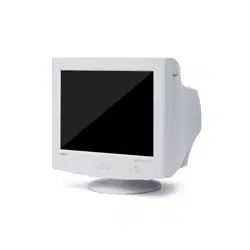
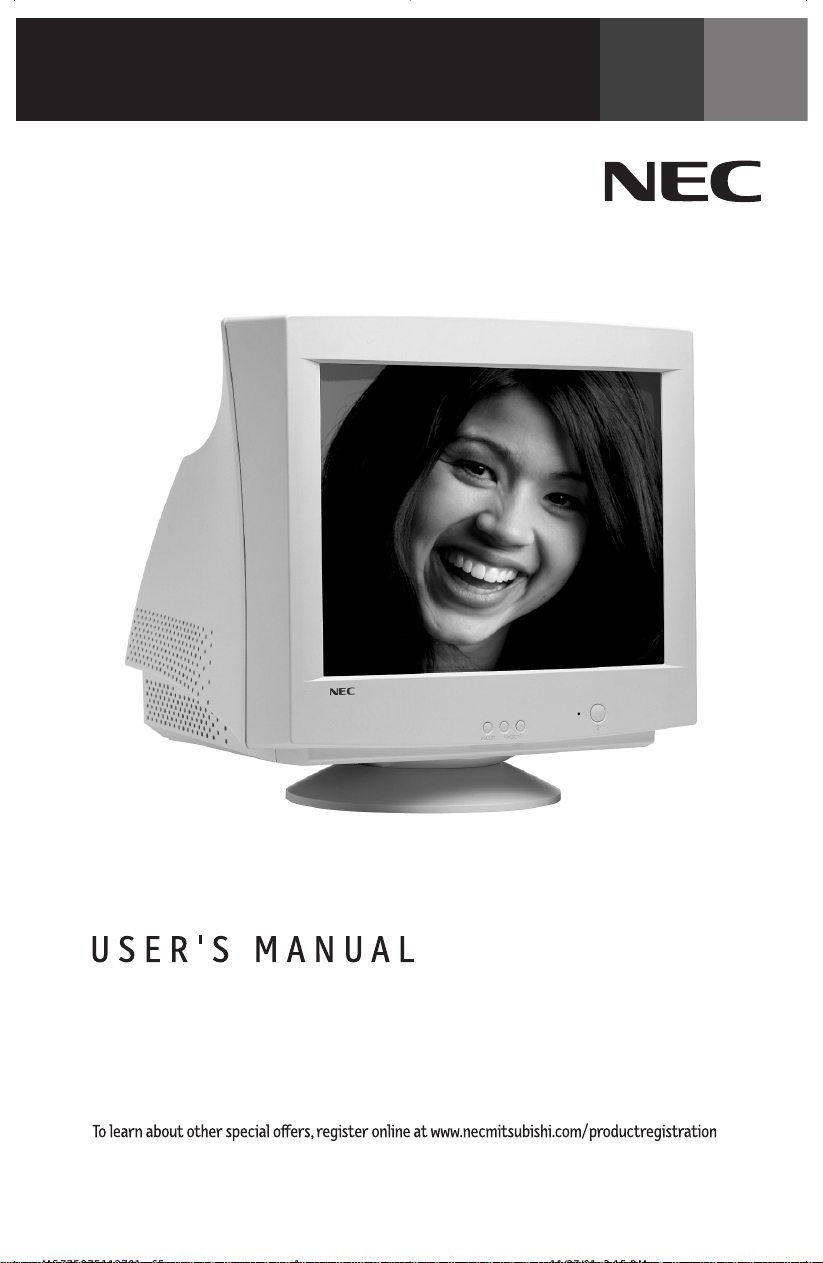
Flat MultiSync
®
77F
TM
/97F
TM
MultiSync 97F
MS77F97F112701.p65 11/27/01, 3:15 PM1

Index
Warning.................................................................................................. 1
Contents ............................................................................................... 2
Quick Start ...........................................................................................3
Controls ................................................................................................ 5
Recommended Use ..............................................................................7
Specifications ...................................................................................... 9
Features .............................................................................................. 11
Troubleshooting ................................................................................. 12
References .......................................................................................... 13
Limited Warranty ..............................................................................14
Avertissement .................................................................................... 15
Contenu ............................................................................................... 16
Mise en marche rapide ..................................................................... 17
Commandes ........................................................................................ 19
Usage recommandé........................................................................... 21
Fiche techniques .............................................................................. 23
Fonctions ............................................................................................ 25
Dépannage ......................................................................................... 26
Références ......................................................................................... 27
Garantie limitée................................................................................ 28
MS77F97F112701.p65 11/27/01, 3:15 PM2
1
Canadian Department of Communications Compliance Statement
DOC: This Class B digital apparatus meets all requirements of the Canadian Interference-
Causing Equipment Regulations.
C-UL: Bears the C-UL Mark and is in compliance with Canadian Safety Regulations
according to CSA 22.2 #950.
FCC Information
1.
Use the attached specified cables with the N0701 and N9902
color monitors
so as not to interfere with radio and television reception.
(1) Please use the supplied power cable or equivalent to ensure FCC compliance.
(2) Shielded captive type signal cable.
Use of other cables and adapters may cause interference with radio and television
reception.
2.
This equipment has been tested and found to comply with the limits for a Class B digital device,
pursuant to part 15 of the FCC Rules. These limits are designed to provide reasonable protection
against harmful interference in a residential installation. This equipment generates, uses, and can
radiate radio frequency energy, and, if not installed and used in accordance with the instructions, may
cause harmful interference to radio communications. However, there is no guarantee that interference
will not occur in a particular installation. If this equipment does cause harmful interference to radio
or television reception, which can be determined by turning the equipment off and on, the user is
encouraged to try to correct the interference by one or more of the following measures:
• Reorient or relocate the receiving antenna.
• Increase the separation between the equipment and receiver.
• Connect the equipment into an outlet on a circuit different from that to which the receiver
is connected.
• Consult your dealer or an experienced radio/TV technician for help.
If necessary, the user should contact the dealer or an experienced radio/television technician for
additional suggestions. The user may find the following booklet, prepared by the Federal Communica-
tions Commission, helpful: ”How to Identify and Resolve Radio-TV Interference Problems.“ This booklet
is available from the U.S. Government Printing Office, Washington, D.C., 20402, Stock No. 004-000-
00345-4.
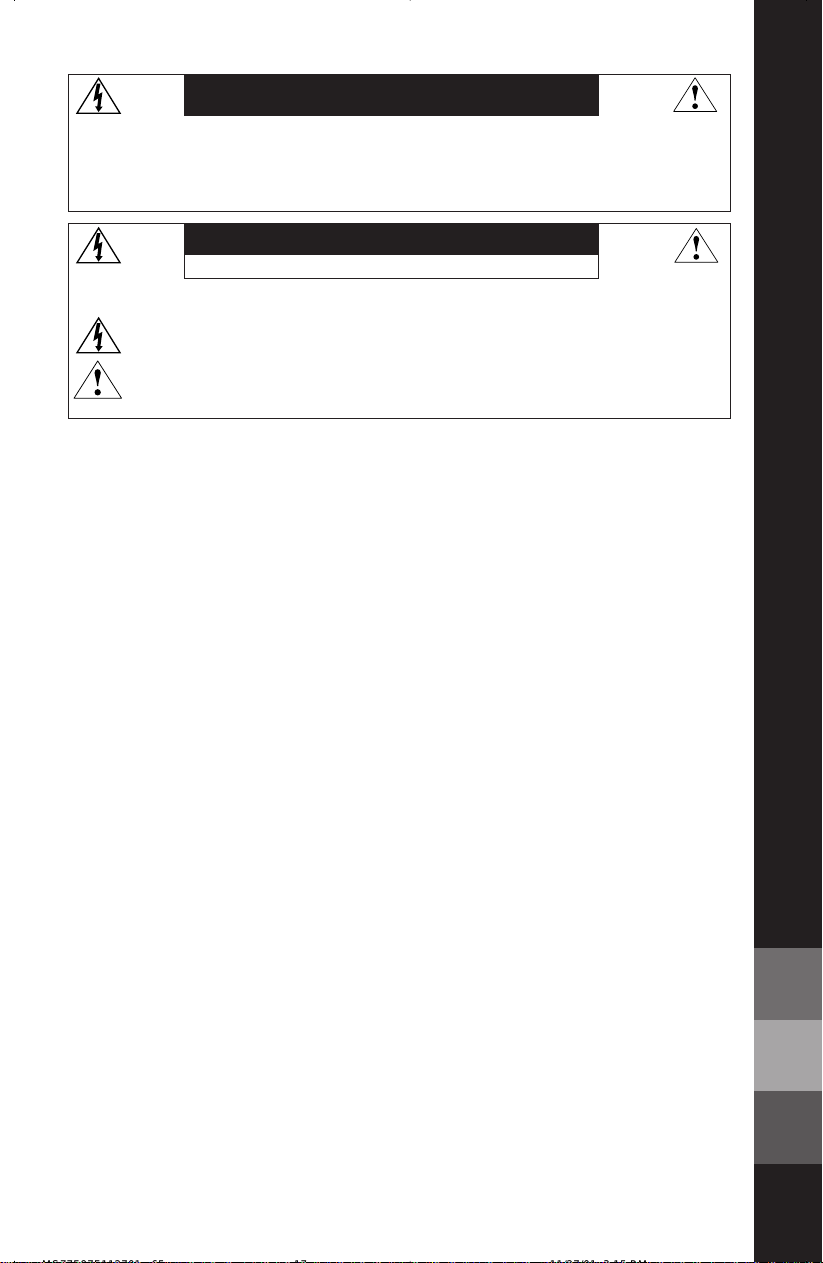
TO PREVENT FIRE OR SHOCK HAZARDS, DO NOT EXPOSE THIS UNIT TO RAIN OR MOISTURE. ALSO, DO NOT USE
THIS UNIT'S POLARIZED PLUG WITH AN EXTENSION CORD RECEPTACLE OR OTHER OUTLETS UNLESS THE PRONGS
CAN BE FULLY INSERTED.
REFRAIN FROM OPENING THE CABINET AS THERE ARE HIGH VOLTAGE COMPONENTS INSIDE. REFER SERVICING
TO QUALIFIED SERVICE PERSONNEL.
WARNING
CAUTION
RISK OF ELECTRIC SHOCK • DO NOT OPEN
CAUTION: TO REDUCE THE RISK OF ELECTRIC SHOCK, DO NOT REMOVE COVER (OR BACK). NO USER
SERVICEABLE PARTS INSIDE. REFER SERVICING TO QUALIFIED SERVICE PERSONNEL.
This
symbol warns user that uninsulated voltage within the unit may have sufficient magnitude to cause
electric shock. Therefore, it is dangerous to make any kind of contact with any part inside this unit.
This symbol alerts the user that important literature concerning the operation and maintenance of this
unit has been included. Therefore, it should be read carefully in order to avoid any problems.
MS77F97F112701.p65 11/27/01, 3:15 PM3
2
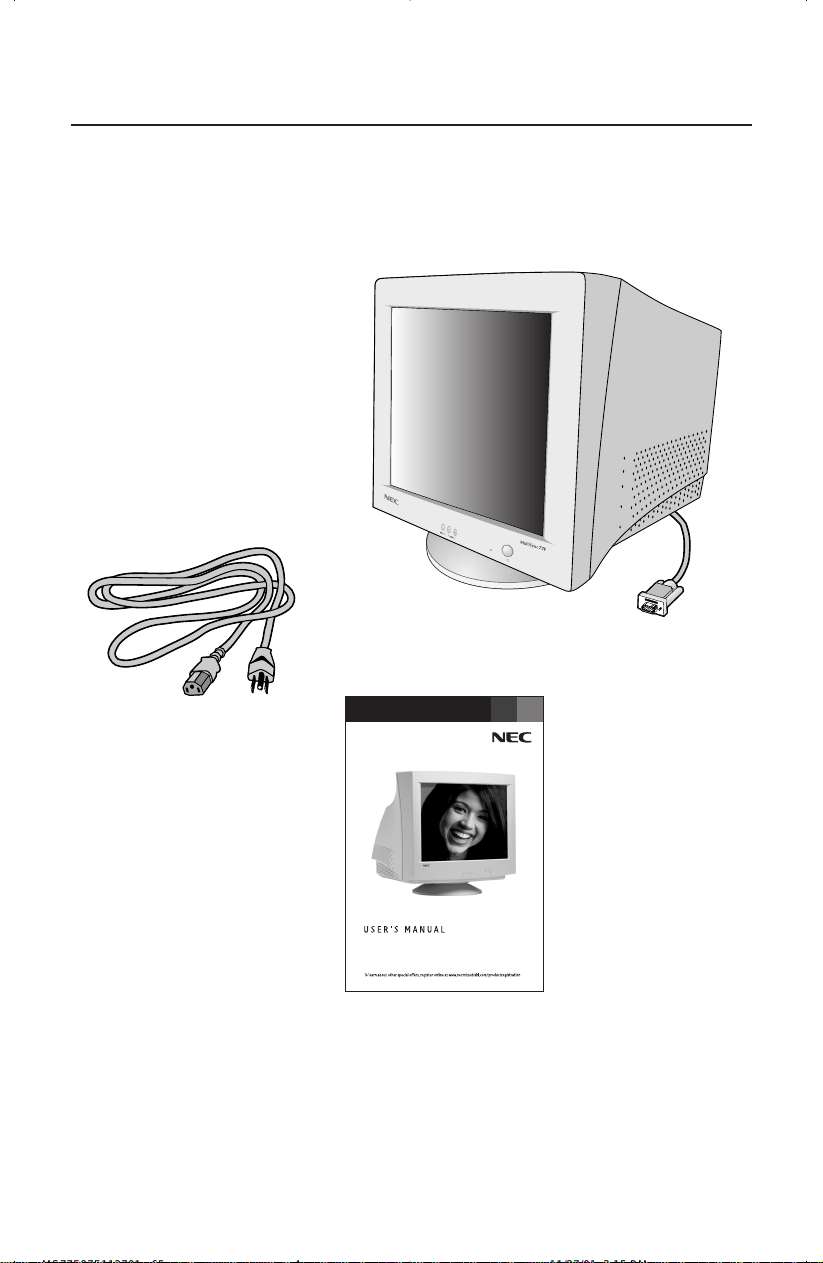
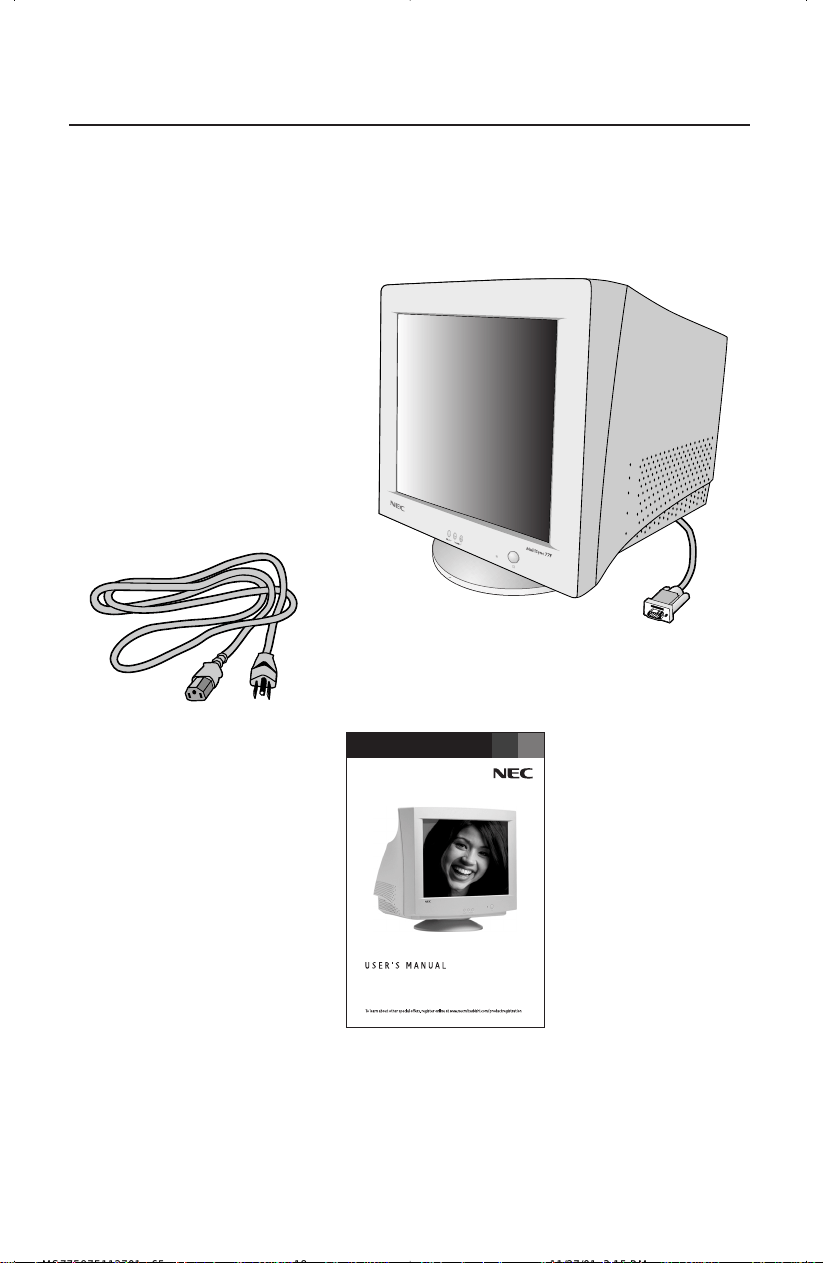
Your new NEC MultiSync
®
monitor box* should contain the following:
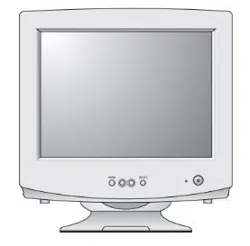
• MultiSync Monitor MultiSync 77F or 97F
• Power Cord
• Captive Signal Cable
• User’s Manual
Contents
Power Cord
* Remember to save your original box and packing material to transport or ship
the monitor.
Captive Signal Cable
Flat MultiSync
®
77F
TM
/97F
TM
MultiSync 97F
User’s Manual
MS77F97F112701.p65 11/27/01, 3:15 PM4
Quick Start
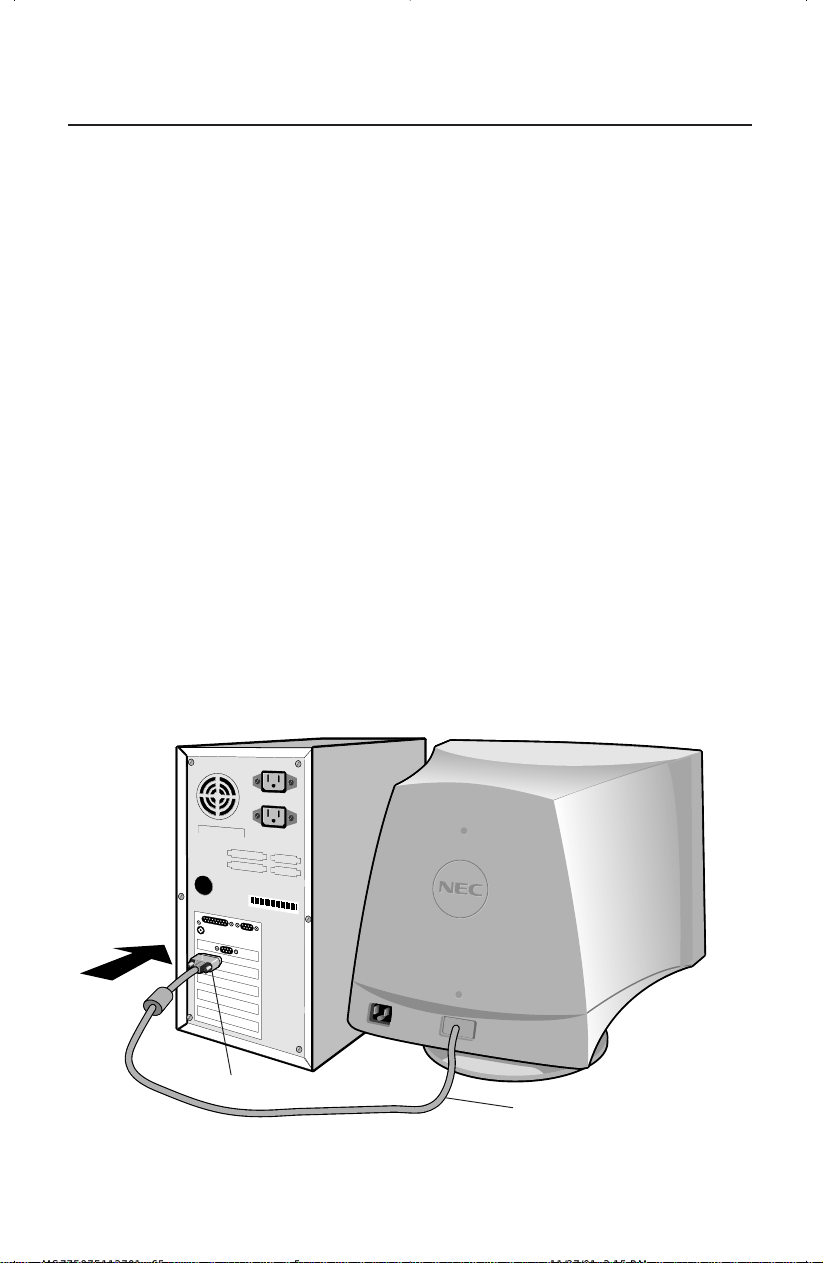
Figure A.1
3
To attach the MultiSync
®
monitor to your system, follow these
instructions:
1. Turn off the power to your computer.
2. If necessary, install the display card into your system. For more information,
refer to the display card manual.
3. For the PC: Connect the 15-pin mini D-SUB of the captive signal cable to the
connector of the display card in your system (Figure A.1). Tighten all screws.
For the Mac: Connect the Macintosh cable adapter (not included) to the
monitor connector on the Macintosh (Figure B.1). Attach the 15-pin mini
D-SUB end of the captive signal cable to the Macintosh cable adapter on
the computer (Figure B.1). Tighten all screws.
NOTE: To obtain the Macintosh cable adapter, call NEC-Mitsubishi Electronics
Display of America, Inc. at (800) 632-4662.
4. Connect one end of the power cord to the MultiSync monitor and the other
end to the power outlet (Figure C.1).
5. Turn on the monitor (Figure D.1) and the computer.
NOTE: For download information on the Windows
®
95/98/2000/XP INF file
for your MultiSync monitor, refer to the References section of this User’s
Manual.
NOTE: If you have any problems, please refer to the Troubleshooting section of
this User’s Manual.
Captive Signal Cable
15-pin mini D-SUB
MS77F97F112701.p65 11/27/01, 3:15 PM5
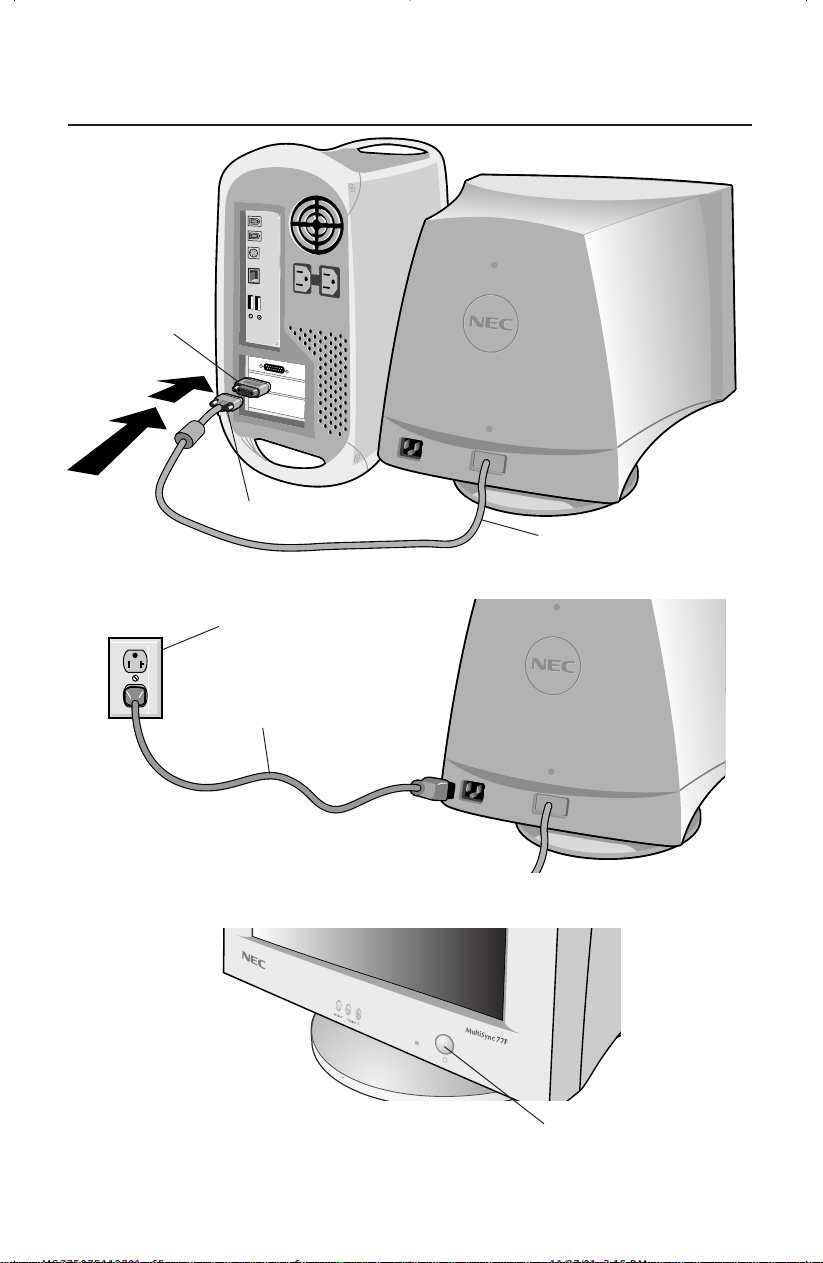
Figure D.1
Figure C.1
Figure B.1
Quick Start –continued
4
Captive Signal Cable
15-pin mini D-SUB
Mac Adapter
(Not Included)
Power Cord
Power Outlet
Power Button
MS77F97F112701.p65 11/27/01, 3:15 PM6
5
Controls
OSM
™
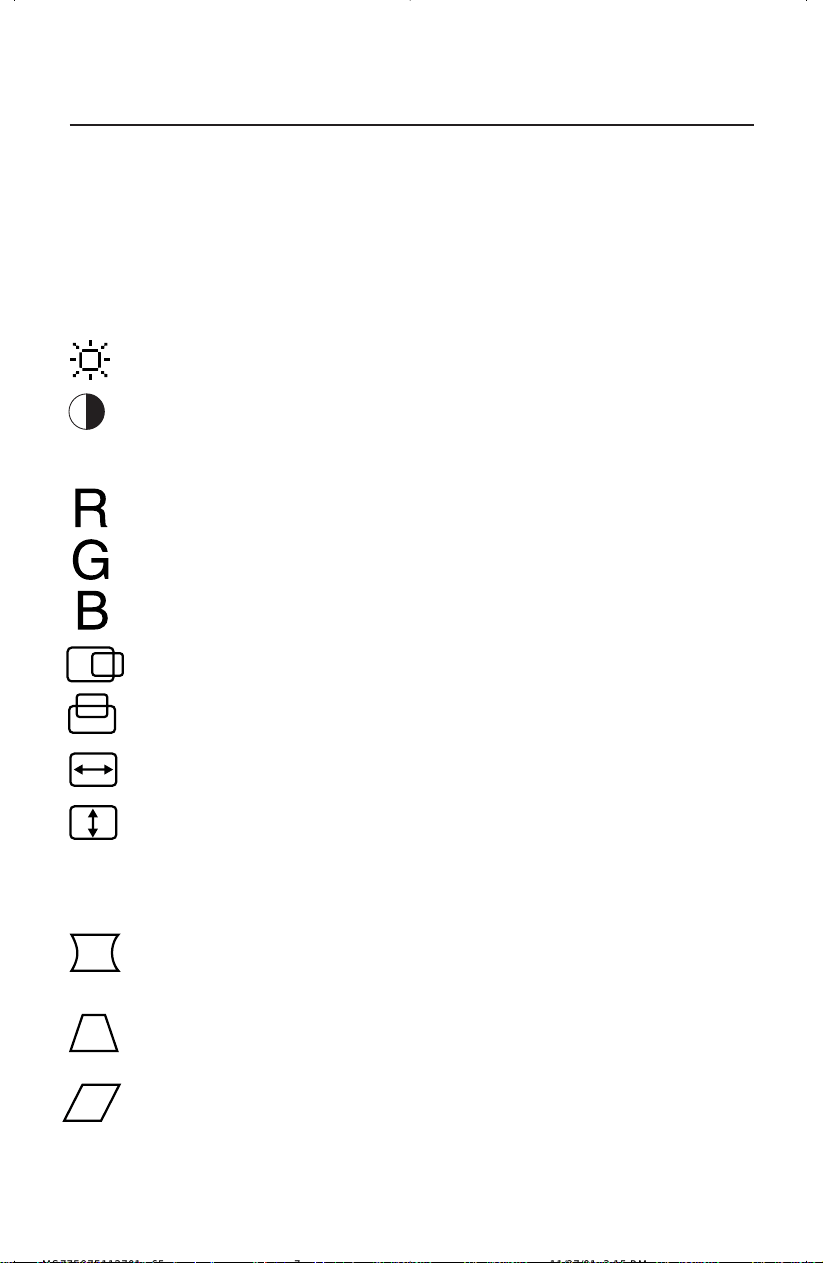
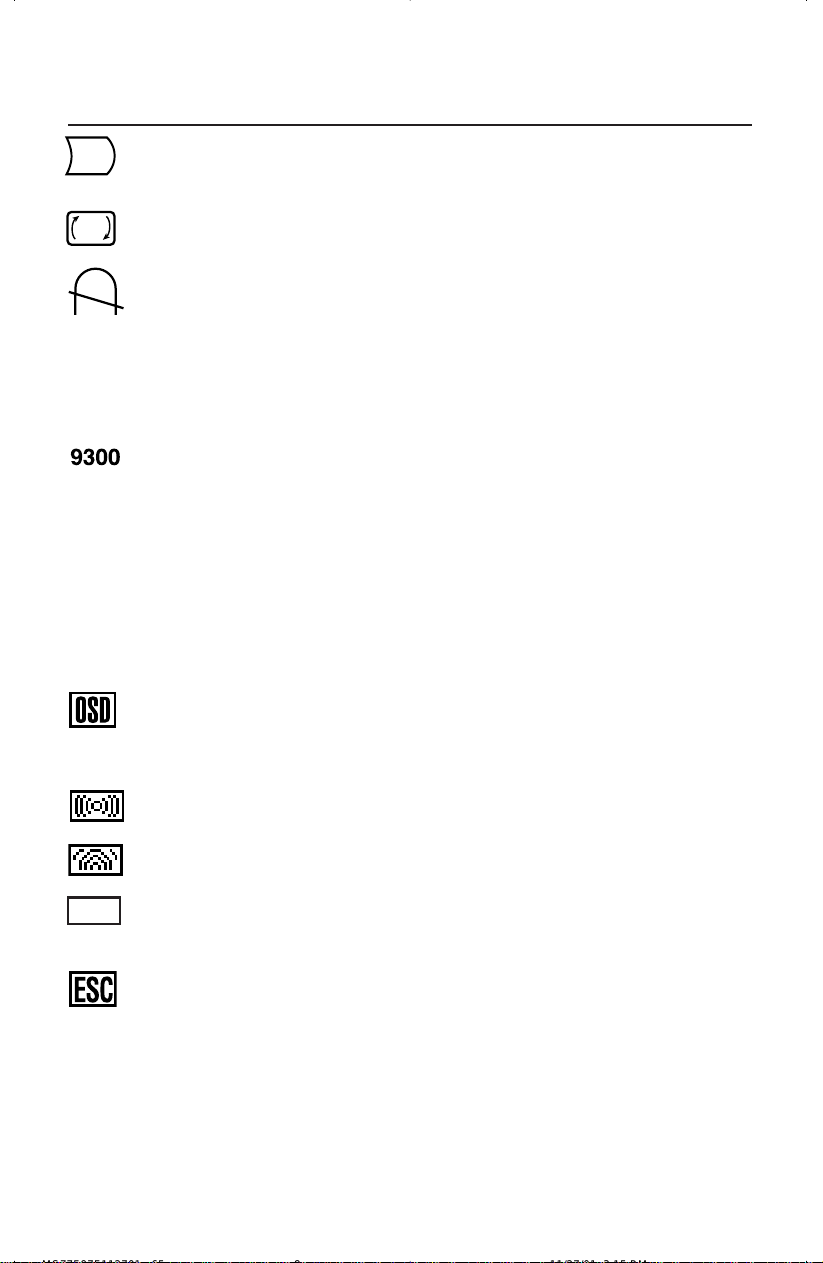
(On-Screen Manager) control buttons on the front of the monitor function
as follows:
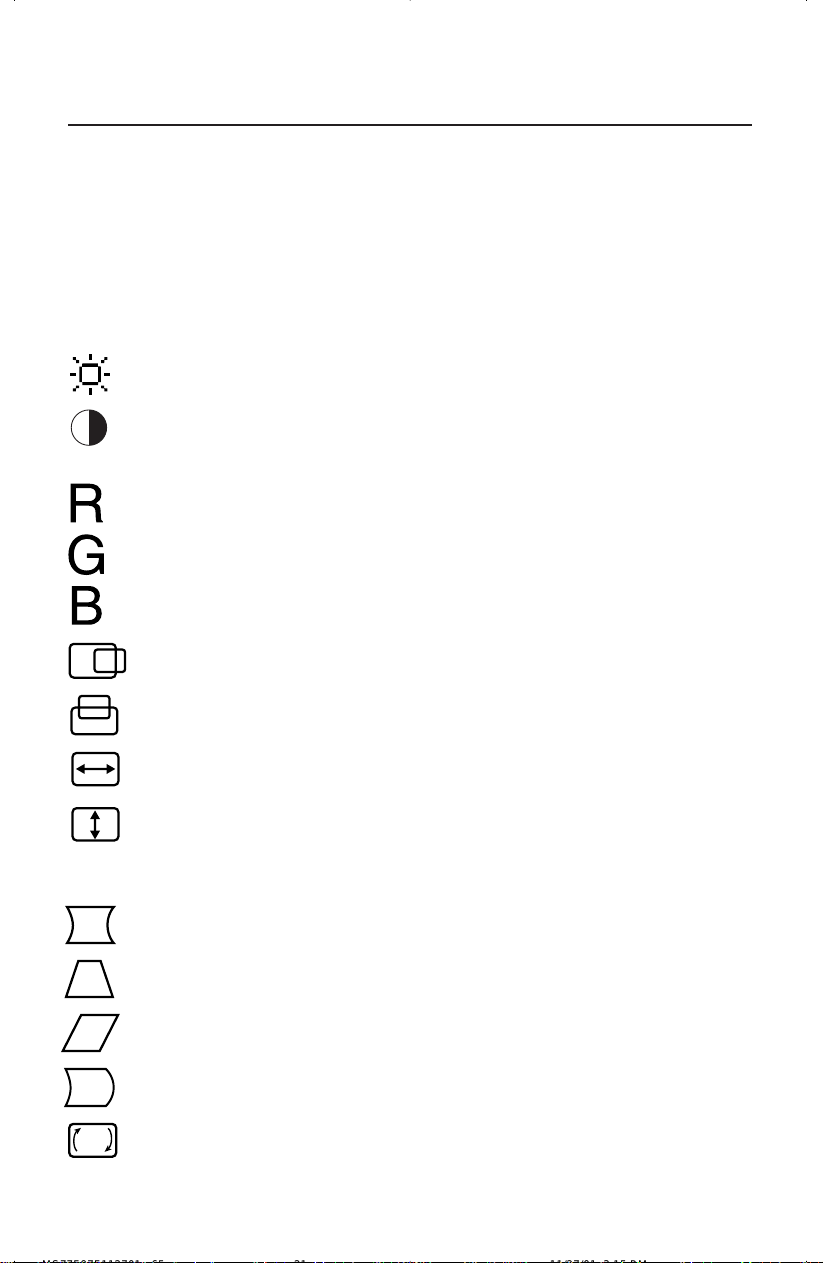
SELECT Enters and exits the OSM menu.
CONTROL –/+ Selects one of the controls and increases or decreases the
adjustment.
RESET Resets the highlighted control to the factory setting. Press
–/+ at the same time for approximately one second.
Adjusts the overall image and background screen brightness.
Adjusts the image brightness in relation to the background.
(Contrast control is also effective with – and + buttons, even though
OSM window is not visible.)
Red Color Contrast: Adjust the red contrast of the display
Green Color Contrast: Adjust the green contrast of the display.
Blue Color Contrast: Adjust the blue contrast of the display.
Moves the image horizontally (left or right).
Moves the image vertically (up or down).
Increases or decreases the horizontal size of the image.
Increases or decreases the vertical size of the image.
The Geometry controls allow you to adjust the curvature or angle of the sides of
your display.
Increases or decreases the curvature of the sides either inward or
outward.
Increases or decreases the top of the screen to be the same as
the bottom.
Increases or decreases the tilt of the sides either to the left or right.
MS77F97F112701.p65 11/27/01, 3:15 PM7
6
Controls –continued
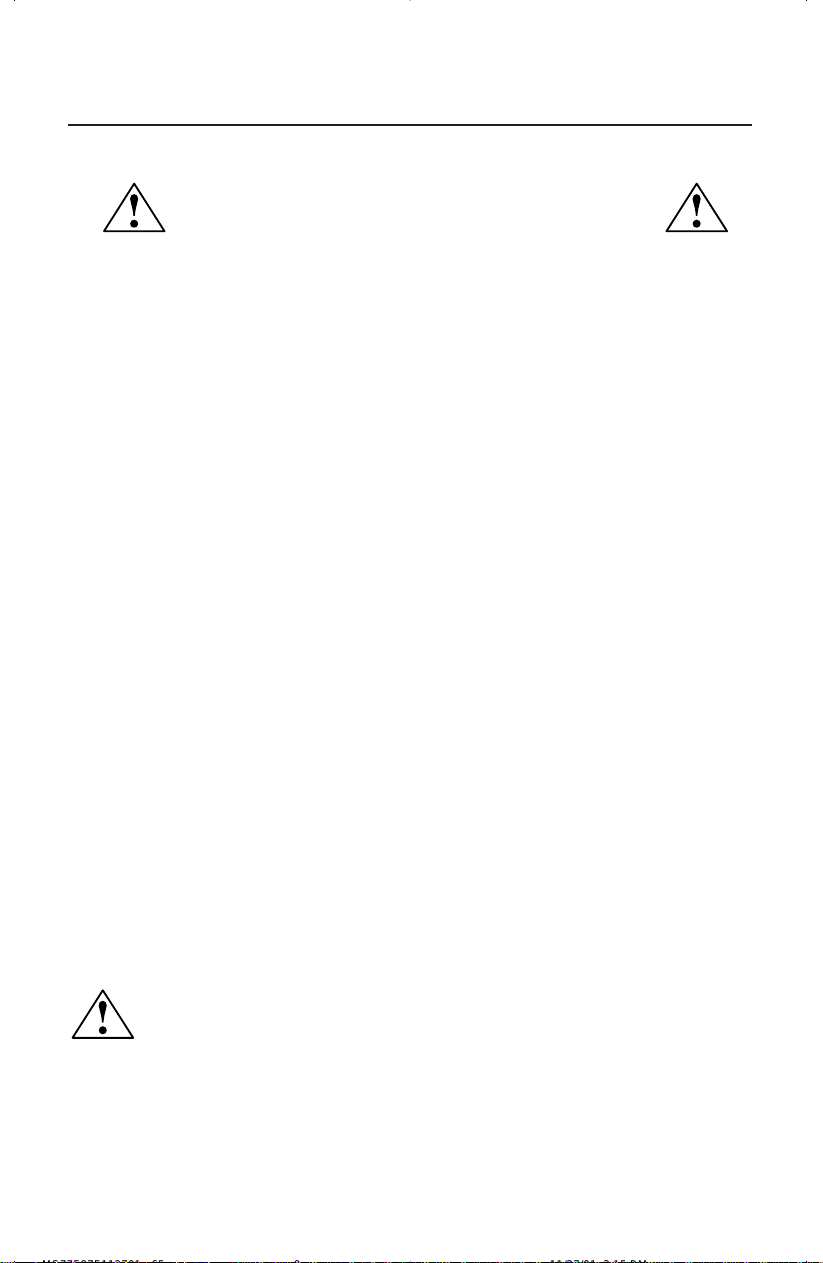
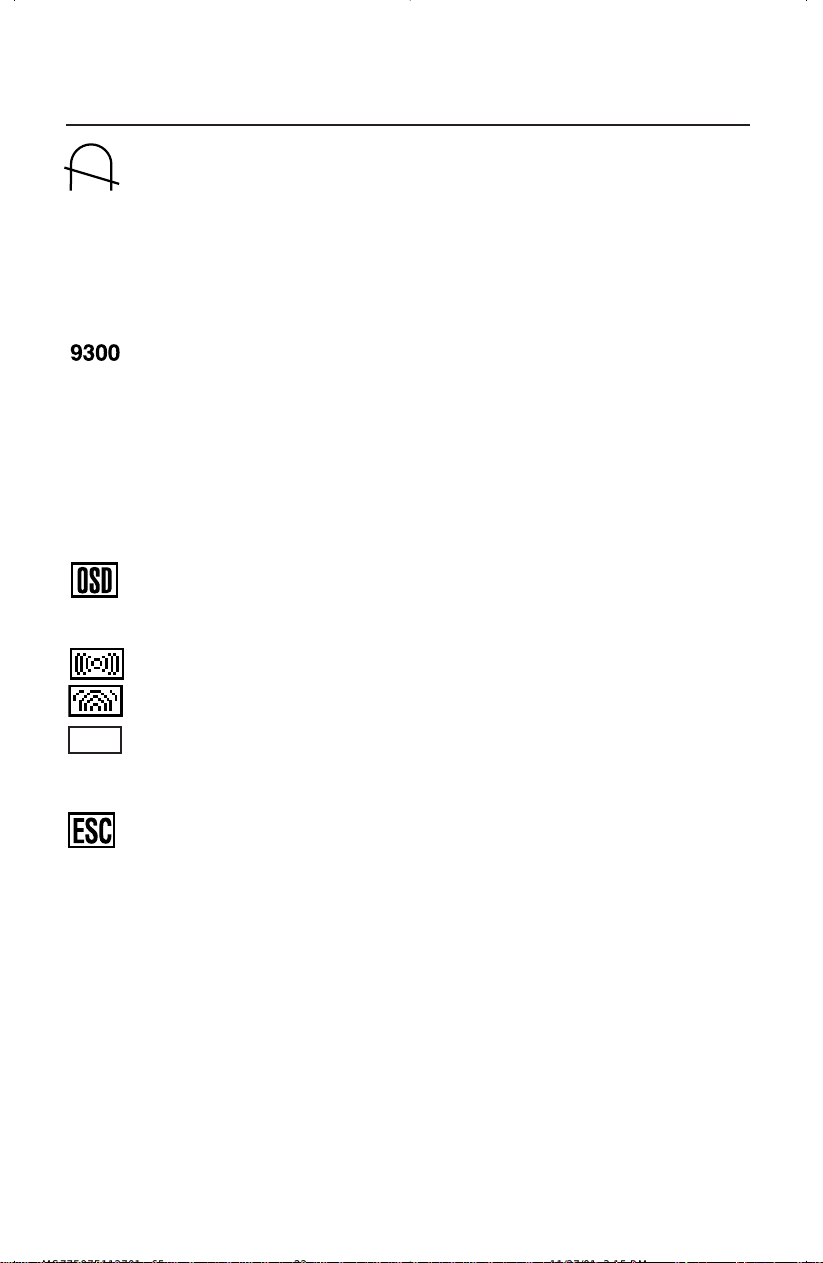
Increases or decreases the curvature of the sides either to the left
or right.
Rotates the entire display clockwise or counterclockwise.
Degauss Control: Eliminates the buildup of stray magnetic fields that
alter the correct scan of the electron beams and affect the purity of the
screen colors, focus and convergence. When activated, your screen
image will jump and waver a bit as the screen is demagnetized.
Caution: Please allow a minimum of 20 minutes to elapse
between uses of the Degauss Control.
This color setting is adjusted at the factory to the stated Kelvin. There
are 3 colors and one user color. Choose your color preference by
pressing the SELECT button on the OSM
™
window.
3 colors (9300, 7500, sRGB): MultiSync 77F
3 colors (9300, 7500, 6500): MultiSync 97F
Note: sRGB mode provides the suitable color managed picture image. You
can not change Red, Green and Blue colors, brightness and contrast
individually.
OSM
™
: There are 3 background colors (blue, black, and white). To choose
background color, press SELECT button after the selection of OSM in
“Icon select window”.
Horizontal Moiré Canceler: Reduces horizontal moiré levels.
Vertical Moiré Canceler: Reduces vertical moiré levels.
(MultiSync 77F)
To exit the OSM menu. Select EXIT in “Icon select
window”, then push SELECT button to exit OSM menu.
(MultiSync 95F)
To exit the OSM menu. Select ESC in “Icon select
window”, then push SELECT button to exit OSM menu.
Note: If no buttons are pushed after 10 seconds while in OSM, the OSM
menu will automactically disappear.
EXIT
MS77F97F112701.p65 11/27/01, 3:15 PM8
Recommended Use
7
Safety Precautions and Maintenance
FOR OPTIMUM PERFORMANCE, PLEASE NOTE THE
FOLLOWING WHEN SETTING UP AND USING
THE MULTISYNC
®
COLOR MONITOR:
• DO NOT OPEN THE MONITOR. There are no user serviceable parts inside and
opening or removing covers may expose you to dangerous shock hazards or other
risks. Refer all servicing to qualified service personnel.
• Do not spill any liquids into the cabinet or use your monitor near water.
• Do not insert objects of any kind into the cabinet slots, as they may touch dangerous
voltage points, which can be harmful or fatal or may cause electric shock, fire or
equipment failure.
• Do not place any heavy objects on the power cord. Damage to the cord may cause
shock or fire.
• Do not place this product on a sloping or unstable cart, stand or table, as the monitor
may fall, causing serious damage to the monitor.
• Keep the monitor away from high capacity transformers, electric motors and other
devices such as external speakers or fans, which may create strong magnetic fields.
• If possible, position the monitor so that it is facing the east to minimize the effects of the
earth’s magnetic field.
• Changing the direction of the monitor while it is powered on may cause image
discoloration. To correct this, turn the monitor off for 20 minutes before powering it
back on.
• When operating the MultiSync monitor with its AC 220-240V worldwide power
supply, use a power supply cord that matches the power supply voltage of the AC
power outlet being used. The power supply cord you use must have been approved by
and comply with the safety standards of your country.
• In UK, use a BS-approved power cord with molded plug having a black (5A) fuse installed
for use with this monitor. If a power cord is not supplied with this monitor, please contact
your supplier.
Immediately unplug your monitor from the wall outlet and refer servicing to qualified service
personnel under the following conditions:
• When the power supply cord or plug is damaged.
• If liquid has been spilled, or objects have fallen into the monitor.
• If the monitor has been exposed to rain or water.
• If the monitor has been dropped or the cabinet damaged.
• If the monitor does not operate normally by following operating instructions.
• Allow adequate ventilation around the monitor so that heat can
properly dissipate. Do not block ventilated openings or place the
monitor near a radiator or other heat sources. Do not put anything
on top of monitor.
• The power cable connector is the primary means of detaching the
system from the power supply. The monitor should be installed close
to a power outlet which is easily accessible.
• Handle with care when transporting. Save packaging for transporting.
CAUTION
MS77F97F112701.p65 11/27/01, 3:15 PM9
CORRECT PLACEMENT AND ADJUSTMENT OF THE MONITOR
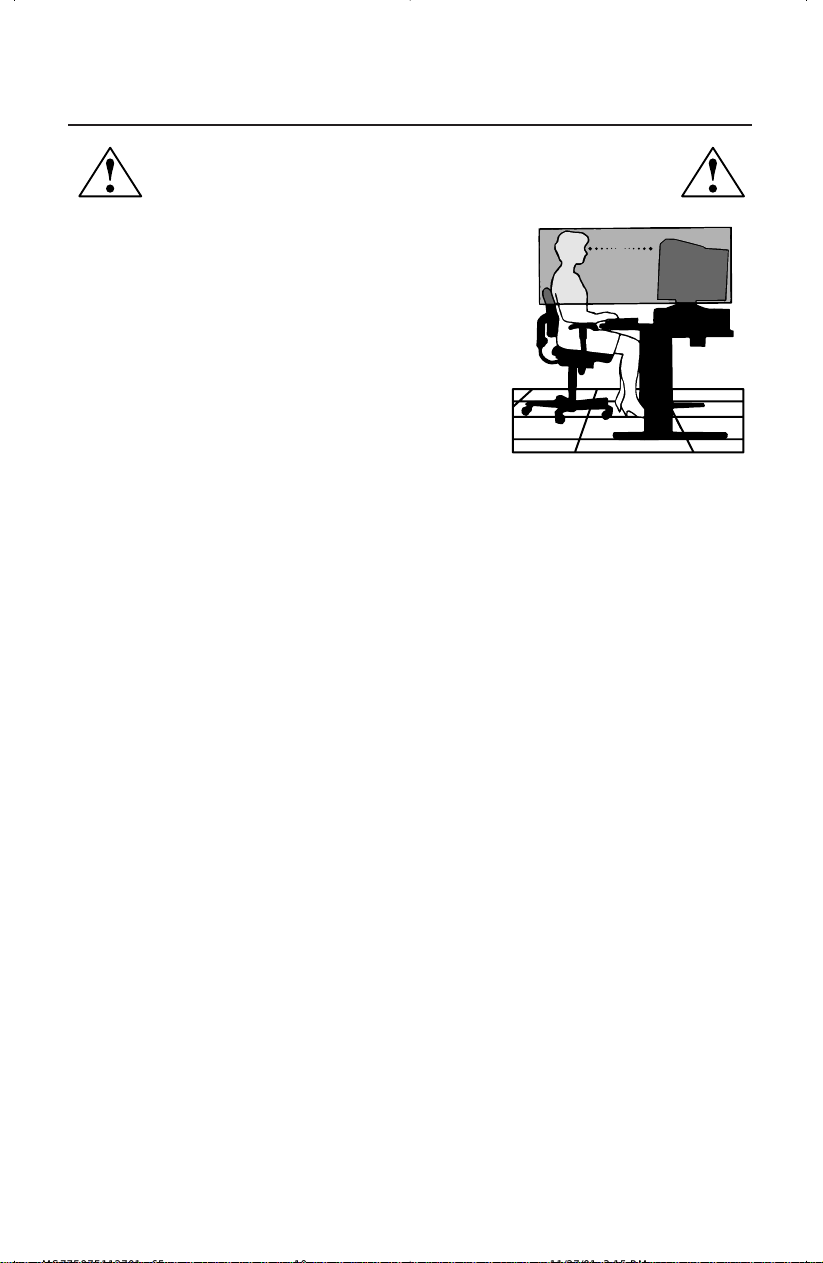
CAN REDUCE EYE, SHOULDER AND NECK FATIGUE. CHECK THE
FOLLOWING WHEN YOU POSITION THE MONITOR:
Recommended Use –continued
• Adjust the monitor height so that the top of the screen
is at or slightly below eye level. Your eyes should look
slightly downward when viewing the middle of the
screen.
• Position your monitor no closer than 12 inches and no
further away than 28 inches from your eyes. The optimal
distance is 18 inches.
• Rest your eyes periodically by focusing on an object
at least 20 feet away. Blink often.
• Position the monitor at a 90° angle to windows and
other light sources to minimize glare and reflections.
Adjust the monitor tilt so that ceiling lights do not reflect on your screen.
• If reflected light makes it hard for you to see your screen, use an anti-glare filter.
• Adjust the monitor’s brightness and contrast controls to enhance readability.
• Use a document holder placed close to the screen.
•
Position whatever you are looking at most of the time (the screen or reference material) directly in
front of you to minimize turning your head while you are typing.
• Get regular eye checkups.
Cleaning Your Monitor: A special coating is provided on the glass (CRT) surface of this
monitor to reduce a reflection and static electricity on the glass surface.
Due to the delicate coating on the glass surface, use a lint-free, non-abrasive cloth (cotton
or equivalent) and a non-alcohol, neutral, non-abrasive cleaning solution to minimize
dust. If the screen requires more than a light cleaning, apply water or soften neutral
detergent with much water directly to a soft cloth and use it upon wringing water, to clean
the glass surface. Clean your monitor regularly.
CAUTION: The following agents will cause damage to the CRT when cleaning the glass
surface: Benzene, thinner, acid/alkaline detergent, alcohol detergent, detergent with
abrasive powder, detergent with anti-static agent, detergent for cleaning.
Ergonomics
To realize the maximum ergonomics benefits, we recommend the following:
• Adjust the Brightness until the background raster disappears
• Do not position the Contrast control to its maximum setting
• Use the preset Size and Position controls with standard signals
• Use the preset Color Setting and Sides Left/Right controls
• Use non-interlaced signals with a vertical refresh rate between 75-120Hz for the
MultiSync
®
77F and 75-160Hz for the MultiSync 97F
• Do not use primary color blue on a dark background, as it is difficult to see and may
produce eye fatigue due to insufficient contrast
For more detailed information on setting up a healthy work environment, call NEC-Mitsubishi
Electronics Display of America, Inc. at (888) NEC-MITS, NEC FastFacts
™
information at (800) 366-
0476 and request document #900108 or write the American National Standard for Human Factors
Engineering of Visual Display Terminal Workstations – ANSI-HFS Standard No. 100-1988 – The
Human Factors Society, Inc. P.O. Box 1369, Santa Monica, California 90406.
8
MS77F97F112701.p65 11/27/01, 3:15 PM10
9
Specifications
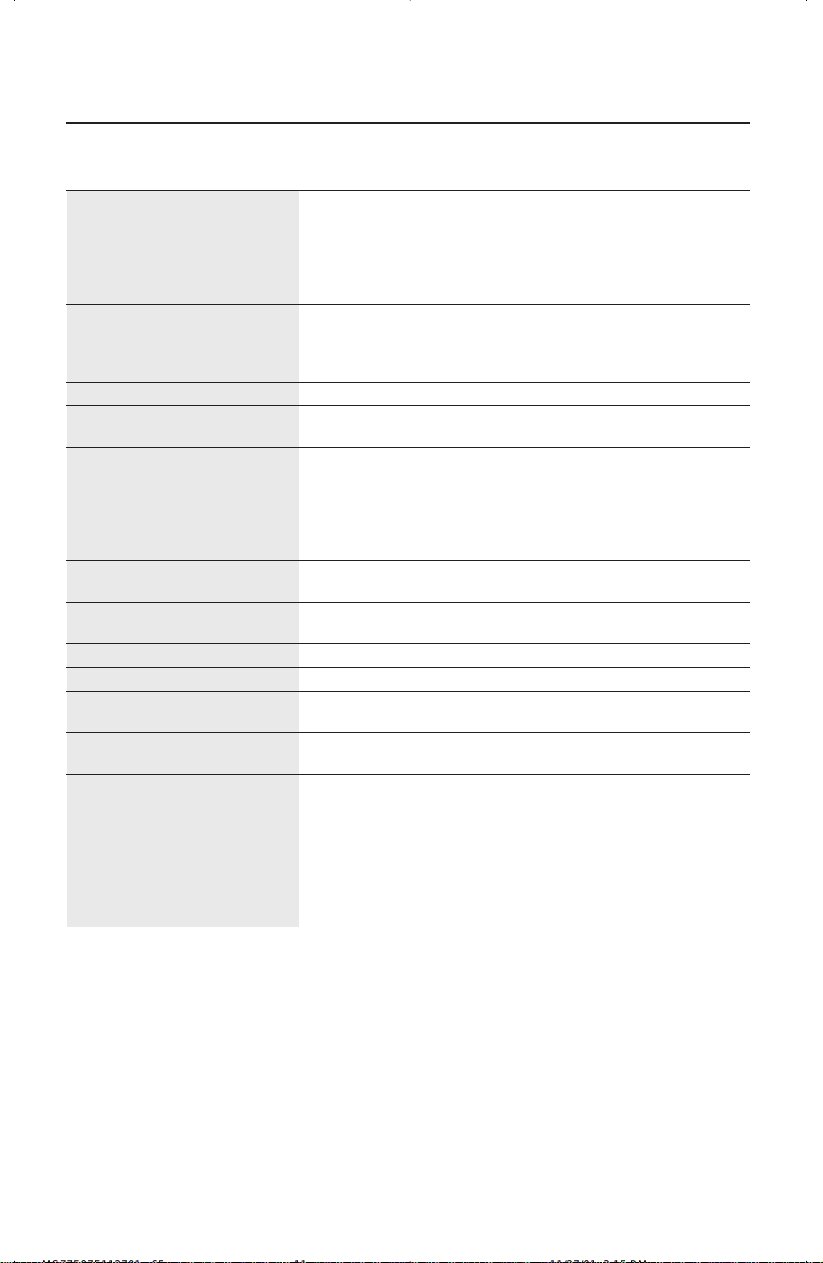
Monitor MultiSync
®
77F Notes
Specifications Monitor
Picture Tube Diagonal: 17 inch 90° deflection, 0.21-0.25 mm variable
Viewable Image Size: 16.0 inch horizontal dot pitch, 0.24-0.28 mm variable
diagonal dot pitch, medium short persistence
phosphor, multi-layered, anti-static screen
coating, semi-tint screen, Invar Shadow Mask
and OptiClear
®
screen.
Input Signal Video: ANALOG 0.7 Vp-p/75 Ohms
Sync: Separate sync. TTL Level
Horizontal sync. Positive/Negative
Vertical sync. Positive/Negative
Display Colors Analog input: Unlimited number of Colors Depends on display card used.
Synchronization Horizontal: 31 kHz to 70 kHz Automatically
Range Vertical: 55 Hz to 120 Hz Automatically
Resolutions Supported 640 x 480 @ 60 to 120 Hz
Some systems may not support
Resolution based on
horizontal and
800 x 600 @ 55 to 110 Hz
all modes listed.
vertical frequencies only
832 x 624 @ 55 to 106 Hz
1024 x 768 @ 55 to 87 Hz .......................
NEC-Mitsubishi Electronics Display cites
1152 x 870 @ 55 to 77 Hz
recommended resolution at
1280 x 1024 @ 55 to 66 Hz
85 Hz for optimal display performance.
Active Display Area Horizontal:
310 mm/12.2 inches Dependent upon signal timing used,
(Factory Setting) Vertical:
232 mm/9.1 inches and does not
include border area.
Active Display Area
325 mm/12.8 inches Dependent upon signal timing used,
(Full Scan)
244 mm/9.6 inches and does not
include border area.
Power Supply
AC 100 – 240 V, 50-60 Hz
Current Rating 1.5A @ 100 – 240 V
Dimensions
403 mm (W) x 420 mm (H) x 420 mm (D)
15.9 inches (W) x 16.5 inches (H) x 16.5 inches (D)
Weight 16.7 kg
36.8 lbs
Environmental Considerations
Operating Temperature: 0°C to +35° C
Humidity: 30% to 80%
Feet: 0 to 10,000 Feet
Storage Temperature: -20°C to +60° C
Humidity: 10% to 90%
Feet: 0 to 45,000 Feet
NOTE: Technical specifications are subject to change without notice.
MS77F97F112701.p65 11/27/01, 3:15 PM11
10
Monitor MultiSync
®
97F Notes
Specifications Monitor
Picture Tube Diagonal: 19 inch 90° deflection, 0.20-0.24 mm variable
Viewable Image Size: 18.0 inch horizontal mask pitch, 0.24-0.28 mm variable
diagonal mask pitch, medium short
persistence phosphor, multi-layered, anti-
static screen coating, semi-tint screen, Invar
Shadow Mask and OptiClear
®
screen.
Input Signal Video: ANALOG 0.7 Vp-p/75 Ohms
Sync: Separate sync. TTL Level
Horizontal sync. Positive/Negative
Vertical sync. Positive/Negative
Display Colors Analog input: Unlimited number of Colors Depends on display card used.
Synchronization Horizontal: 31 kHz to 96 kHz Automatically
Range Vertical: 55 Hz to 160 Hz Automatically
Resolutions Supported 640 x 480 @ 60 to 160 Hz
Some systems may not support
Resolution based on
horizontal and
800 x 600 @ 55 to 153 Hz
all modes listed.
vertical frequencies only
832 x 624 @ 55 to 144 Hz
1024 x 768 @ 55 to 120 Hz
1152 x 870 @ 55 to 105 Hz
NEC-Mitsubishi Electronics Display
1280 x 1024 @ 55 to 89 Hz .....................
cites recommended resolution at
1600 x 1200 @ 55 to 76 Hz
85 Hz for optimal display performance
Active Display Area Horizontal:
356 mm/14.0 inches Dependent upon signal timing used,
(Factory Setting) Vertical:
267 mm/10.5 inches and does not
include border area.
Active Display Area
366 mm/14.4 inches Dependent upon signal timing used,
(Full Scan)
274 mm/10.8 inches and does not
include border area.
Power Supply
AC 100 – 240 V, 50-60 Hz
Current Rating 2.2A @ 100
–
240 V
Dimensions
442 mm (W) x 453 mm (H) x 455 mm (D)
17.4 inches (W) x 17.8 inches (H) x 17.9 inches (D)
Weight 22 kg
48.5 lbs
Environmental Considerations
Operating Temperature: 0°C to +35° C
Humidity: 30% to 80%
Feet: 0 to 10,000 Feet
Storage Temperature: -20°C to +60° C
Humidity: 10% to 90%
Feet: 0 to 45,000 Feet
NOTE: Technical specifications are subject to change without notice.
Specifications –continued
MS77F97F112701.p65 11/27/01, 3:15 PM12

11
Features
Flat Dot Pitch CRT: Delivers an unparalleled viewing experience with a virtually
flat image, eliminating distortion and reducing glare so that what you see on-
screen is what you get on your printed output.
OptiClear
®
Screen Surface: Reduces reflection and glare and increases contrast
without sacrificing focus level, clarity or brightness. Along with the flat square
technology CRT, a high contrast screen delivers crisp, clean text and graphics.
Invar Shadow Mask: Holes in the thin metal sheet behind the glass of the CRT
surface correspond to each phosphor dot on the inner surface of the CRT’s
faceplate, allowing the correct electron beam (red, green, blue) to hit the correct
color phosphor for improved focus, brightness and color.
Dual Dynamic Beam Focus: Provides precise, continuous focus adjustments of the
electron beams and optimum image quality, even to the far edges of the screen.
AccuColor
®
Control System: Allows you to change the color settings on your
display to match your personal preference.
OSM
™
(On-Screen Manager) Controls: Allow you to quickly and easily adjust all
elements of your screen image via simple to use on-screen menus.
ErgoDesign
®
Features: Enhance human ergonomics to improve the working
environment, protect the health of the user and save money. Examples include
OSM controls for quick and easy image adjustments, tilt/swivel base for pre-
ferred angle of vision and compliance with MPRII guidelines for lower emissions.
Plug and Play: The Microsoft
®
solution with the Windows
®
95/98/2000/XP
operating system facilitates setup and installation by allowing the monitor to send
its capabilities (such as screen size and resolutions supported) directly to your
computer, automatically optimizing display performance.
IPM
™
(Intelligent Power Manager) System: Provides innovative power-saving
methods that allow the monitor to shift to a lower power consumption level when
on but not in use, saving two-thirds of your monitor energy costs, reducing
emissions and lowering the air conditioning costs of the workplace.
Reduced Magnetic Field
™
Technology: Reduces magnetic and alternating electric
field emissions and static electricity, addressing ergonomic concerns regarding
potential risks from extended computer monitor use.
Multiple Frequency Technology: Automatically adjusts monitor to the display
card’s scanning frequency, thus displaying the resolution required.
FullScan
™
Capability: Allows you to use the entire screen area in most
resolutions, significantly expanding image size.
OSM Display Screen Copyright 2002 by
NEC-Mitsubishi Electronics Display of America, Inc.
MS77F97F112701.p65 11/27/01, 3:15 PM13

12
Troubleshooting
No picture
• Display card should be completely seated in its slot.
• Power Button and computer power switch should be in the ON position.
• Signal cable should be completely connected to display card/computer.
• Check connector for bent or pushed-in pins.
Image is scrolling or unstable
• Signal cable should be completely attached to the computer.
• Check pin assignments and signal timings of the monitor and your
display card with respect to recommended timings and pin assignments.
• If the Macintosh cable adapter is used, check for proper connection or
make sure the display card is Macintosh compatible and that the card is
properly seated in the computer.
LED on monitor is not lit
(no green or orange color can be seen)
• Power Switch should be in the ON position and power cord should
be connected.
Picture is fuzzy or color looks blotchy
• Adjust Brightness and Contrast Controls.
• Access the Degauss Control through OSM™ controls. Activate the
Degauss Control.
CAUTION: A minimum interval of 20 minutes should elapse before the
Deguass Control is used a second time when not switching
between modes.
Picture bounces or a wavy pattern is present
in the picture
• Move electrical devices that may be causing electrical interference away
from the monitor.
• See inside cover of User’s Manual for FCC information.
Edges of the display image are not square
• Use the OSM Geometry Controls to straighten the edges.
• If possible, position the front of the monitor facing east.
Display image is not centered, too small, or too large
• Use the OSM Size and Position Controls to adjust the image.
MS77F97F112701.p65 11/27/01, 3:15 PM14

References
13
• BBS (978) 742-8706
NEC-Mitsubishi Electronics Display of America Remote Bulletin Board System is
an electronic service accessible with your system and a modem. Communica-
tion parameters are: 300/1200/2400/9600/14.4k/28.8k/33.6k bps, no
parity, 8-data bits, 1 stop bit
• Customer Service/
Technical Support (800) 632-4662
Fax (978) 742-7049
• Electronic Channels:
Internet e-mail: [email protected]
Internet ftp site: ftp.necmitsubishi.com
World Wide Web: http://www.necmitsubishi.com
Product Registration:
http://www.necmitsubishi.com/productregistration
European Operations: http://www.nec-monitors.com
Windows
®
95/98/Me/2000/XP INF File:
http://support.necmitsubishi.com/software.htm
then download the file NECMSINF.ZIP
• FastFacts™ Information (800) 366-0476
INFORMATION DESCRIPTION DOCUMENT #
Glossary Definition of terms related 900203
to functions, features and
installation of the
MultiSync
®
monitor
More Information Names and addresses of 900204
other groups involved in
standards and features of
the MultiSync monitor
Macintosh Connection Detailed information on 153006
connecting the MultiSync
monitor to a Macintosh
Healthy Work Environment Detailed information on 900108
setting up a healthy work
environment
• Literature & Sales Info (800) NEC-INFO [(800) 632-4636]
• MultiSync Fulfillment (800) 632-4662
[For software & accessories]
• TeleSales (800) 284-4484
MS77F97F112701.p65 11/27/01, 3:15 PM15

Limited Warranty
14
NEC-Mitsubishi Electronics Display of America, Inc. (hereinafter “NMD-A”) warrants this
Product to be free from defects in material and workmanship and, subject to the conditions set
forth below, agrees to repair or replace (at NMD-A’s sole option) any part of the enclosed unit
which proves defective for a period of one (1) year from the date of first consumer purchase.
Spare parts are warranted for ninety (90) days. Replacement parts or unit may be new or
refurbished and will meet specifications of the original parts or unit.
This warranty gives you specific legal rights and you may also have other rights, which vary
from state to state. This warranty is limited to the original purchaser of the Product and is not
transferable. This warranty covers only NMD-A-supplied components. Service required as a
result of third party components is not covered under this warranty. In order to be covered
under this warranty, the Product must have been purchased in the U.S.A. or Canada by the
original purchaser. This warranty only covers Product distribution in the U.S.A. or Canada by
NMD-A No warranty service is provided outside of the U.S.A. or Canada. Proof of Purchase
will be required by NMD-A to substantiate date of purchase. Such proof of purchase must be
an original bill of sale or receipt containing name and address of seller, purchaser, and the
serial number of the product.
It shall be your obligation and expense to have the Product shipped, freight prepaid, or
delivered to the authorized reseller from whom it was purchased or other facility authorized
by NMD-A to render the services provided hereunder in either the original package or a
similar package affording an equal degree of protection. All Products returned to NMD-A for
service MUST have prior approval, which may be obtained by calling 1-800-632-4662. The
Product shall not have been previously altered, repaired, or serviced by anyone other than a
service facility authorized by NMD-A to render such service, the serial number of the product
shall not have been altered or removed. In order to be covered by this warranty the Product
shall not have been subjected to displaying of fixed images for long periods of time resulting
in image persistence (afterimage effects), accident, misuse or abuse or operated contrary to
the instructions contained in the User’s Manual. Any such conditions will void this warranty.
NMD-A SHALL NOT BE LIABLE FOR DIRECT, INDIRECT, INCIDENTAL, CONSEQUENTIAL,
OR OTHER TYPES OF DAMAGES RESULTING FROM THE USE OF ANY NMD-A PRODUCT
OTHER THAN THE LIABILITY STATED ABOVE. THESE WARRANTIES ARE IN LIEU OF ALL
OTHER WARRANTIES EXPRESS OR IMPLIED, INCLUDING, BUT NOT LIMITED TO, THE
IMPLIED WARRANTIES OF MERCHANTABILITY OR FITNESS FOR A PARTICULAR PURPOSE.
SOME STATES DO NOT ALLOW THE EXCLUSION OF IMPLIED WARRANTIES OR THE
LIMITATION OR EXCLUSION OF LIABILITY FOR INCIDENTAL OR CONSEQUENTIAL DAM-
AGES SO THE ABOVE EXCLUSIONS OR LIMITATIONS MAY NOT APPLY TO YOU.
This Product is warranted in accordance with the terms of this limited warranty. Consumers
are cautioned that Product performance is affected by system configuration, software, the
application, customer data, and operator control of the system, among other factors. While
NMD-A Products are considered to be compatible with many systems, specific functional
implementation by the customers of the Product may vary. Therefore, suitability of a Product
for a specific purpose or application must be determined by consumer and is not warranted
by NMD-A.
For the name of your nearest authorized NEC-Mitsubishi Electronics Display of America, Inc.
service facility, contact NEC-Mitsubishi Electronics Display of America, Inc. at 1-800-632-
4662.
MS77F97F112701.p65 11/27/01, 3:15 PM16
15
Déclaration de conformité au Département des Communications Canada
DOC : Cet appareil numérique de classe B respecte toutes les exigences du Règlement
sur le matériel à l'origine d'interférences du Canada.
C-UL : Ce produit porte la marque «C-UL» et est conforme aux règlements de sûreté
canadiens selon CAN/CSA 22.2 No. 950.
Informations FCC
1.
Utiliser les câbles spécifiés fournis avec les moniteurs couleur N0701 et N9902 afin de ne pas provoquer
d'interférences avec la réception radio et télévision
.
(1) Prière d'utiliser le câble d'alimentation fourni ou équivalent pour assurer la conformité FCC.
(2) Prière d'utiliser le câble de signal captif.
L'utilisation d'autres câbles et adaptateurs peut provoquer des interférences avec la réception radio et
télévision.
2.
Cet appareil a passé avec succès les tests de conformité des spécifications d'équipements de Classe B
section 15 de la réglementation FCC. Ces spécifications ont été établies pour garantir un niveau inoffensif
des interférences produites pour une utilisation dans un lieu public. Cet appareil génère et utilise et peut
irradier des fréquences radio et, s'il n'est pas installé et utilisé en accord avec les directives de ce mode
d'emploi, il peut causer des interférences néfastes aux communications radio. Cependant, il n'est pas
garanti qu'aucune interférence ne se produira dans une installation particulière.
Si cet appareil provoque des interférences nuisibles à la réception radio ou télévision, lesquelles peuvent
être décelées en allumant et en éteignant l'appareil, il est recommandé à l'utilisateur d'essayer de corriger
les interférences en prenant une ou plusieurs des mesures suivantes :
• Réorienter ou repositionner l'antenne de réception.
• Augmenter l'espacement entre l'appareil et le récepteur.
• Connecter l'appareil à une prise de courant sur un circuit différent de celui sur lequel le récepteur est
connecté.
• Consulter son revendeur ou un technicien radio/TV expérimenté pour obtenir de l'aide.
Si nécessaire, l'utilisateur doit contacter le revendeur ou un technicien radio/TV afin d'obtenir des
informations supplémentaires. L'utilisateur peut se procurer le livret utile suivant, préparé par la Commission
Fédérale des Communications : «How to Identify and Resolve Radio-TV Interference Problems» (comment
cerner et résoudre les problèmes d’interférences radio/TV). Ce livret est disponible auprès du U.S.
Government Printing Office, Washington, D.C., 20402, Stock No. 004-000-00345-4.
AFIN D’ÉVITER TOUT RISQUE D’INCENDIE OU D’ÉLECTROCUTION, NE PAS EXPOSER CET APPAREIL À LA PLUIE OU À
L’HUMIDITÉ. NE PAS UTILISER LA FICHE D’ALIMENTATION POLARISÉE AVEC UNE PRISE DE CORDON DE RALLONGE
OU AUTRE PRISE SAUF SI LES BROCHES PEUVENT ÊTRE ENTIÈREMENT INTRODUITES.
NE PAS OUVRIR LE BOÎTIER, LEQUEL CONTIENT DES COMPOSANTS À HAUTE TENSION. CONFIER TOUS TRAVAUX
À DU PERSONNEL TECHNIQUE QUALIFIÉ.
AVERTISSEMENT
ATTENTION
RISQUE DE DÉCHARGE ÉLECTRIQUE • NE PAS OUVRIR
ATTENTION : POUR ÉVITER TOUT RISQUE D'ÉLECTROCUTION, NE PAS OUVRIR LE COUVERCLE (L'ARRIÈRE). À L'INTÉRIEUR, AUCUNE
PIÈCE NE NÉCESSITE L'INTERVENTION DE L'UTILISATEUR. EN CAS DE PROBLÈME, S'ADRESSER À DU PERSONNEL TECHNIQUE QUALIFIÉ.
Ce symbole est une mise en garde contre les risques d'électrocution que présentent certaines parties dépourvues
d'isolation à l'intérieur de l'appareil. Il est donc dangereux d'établir le moindre contact avec ces parties
.
Ce symbole prévient l'utilisateur que des directives d'utilisation et de maintenance de cet appareil sont fournies avec
ce guide d’utilisateur. Par conséquent, celles-ci doivent être lues attentivement pour éviter tout incident.
MS77F97F112701.p65 11/27/01, 3:15 PM17
Manuel de
l’utilisateur
Flat MultiSync
®
77F
TM
/97F
TM
MultiSync 97F
La boîte* de votre nouveau moniteur NEC MultiSync
MD
contient :
• Moniteur MultiSync
MultiSync 77F au 97F
• Cordon d'alimentation
• Câble de signal captif
• Manuel de l'utilisateur
Contenu
Cordon d'alimentation
16
* Ne pas oublier de conserver la boîte et le matériel d'emballage d'origine pour transporter ou
expédier le moniteur.
Câble de signal captif
MS77F97F112701.p65 11/27/01, 3:15 PM18
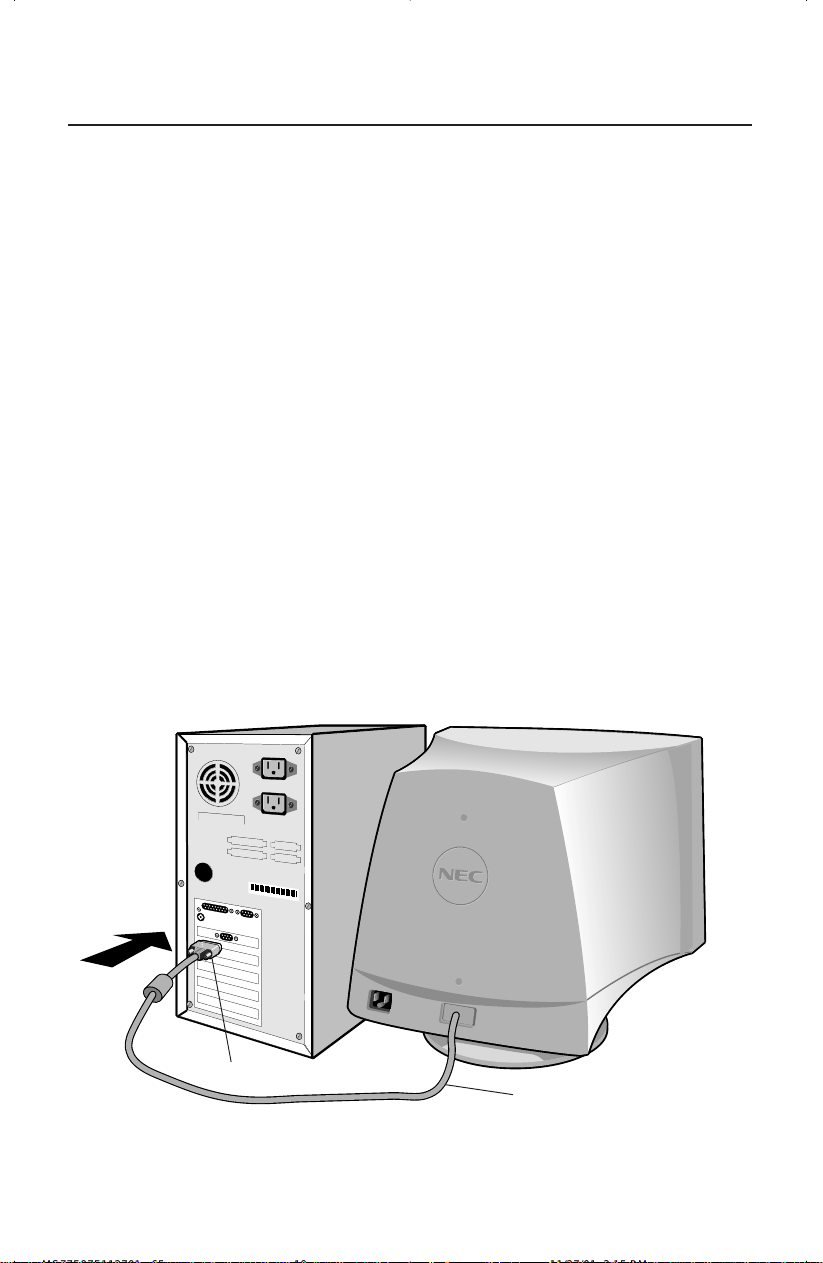
Figure A.1
17
Pour raccorder le moniteur MultiSync
MD
au système, suivre les
directives ci-après :
1. Mettre l'ordinateur hors tension.
2. Si nécessaire, installer la carte vidéo dans le système. Pour plus d'informations, se
reporter au mode d'emploi de la carte vidéo.
3. Pour le PC : Connecter la mini-fiche D-SUB à 15 broches du câble de signal captif au
connecteur de la carte vidéo du système (Figure A.1). Serrer toutes les vis.
Pour le Mac : Connecter l'adaptateur de câble Macintosh (non fourni) au connecteur
de moniteur sur le Macintosh (Figure B.1). Fixer l'extrémité de la mini-fiche D-SUB à
15 broches du câble de signal captif d’interface à l'adaptateur de câble Macintosh sur
l'ordinateur (Figure B.1). Serrer toutes les vis.
REMARQUE : Pour obtenir un adaptateur de câble Macintosh, appeler NEC-Mitsubishi
Electronics Display of America, Inc. sau (800) 632-4662.
4. Connecter une extrémité du cordon d'alimentation au moniteur MultiSync et l'autre
extrémité à la prise de courant (Figure C.1).
5. Allumer le moniteur (Figure D.1) et l'ordinateur.
REMARQUE : Pour les informations de chargement dans le fichier INF Windows
®
95/
98/2000/XP pour le moniteur MultiSync, se reporter à la section
Références de ce manuel de l'utilisateur.
REMARQUE : En cas de problèmes, prière de se reporter à la section Dépannage de ce
manuel de l'utilisateur.
Mise en marche rapide
Câble de signal captif
Mini-fiche D-SUB à 15 broches
MS77F97F112701.p65 11/27/01, 3:15 PM19
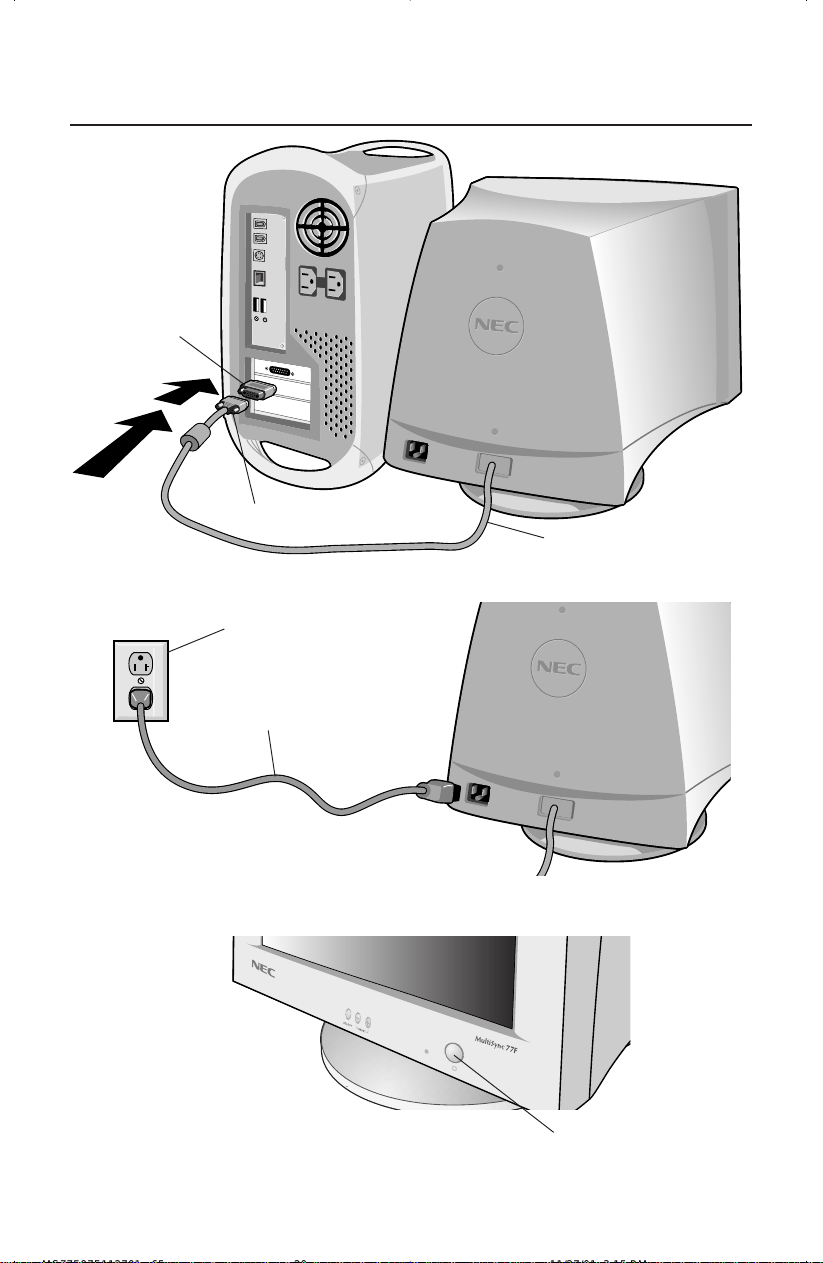
Figure D.1
Figure C.1
Figure B.1
Mise en marche rapide (suite)
18
Câble de signal captif
Mini-fiche D-SUB à 15 broches
Adaptateur Mac
(non fourni)
Cordon d’alimentation
Prise de courant
Bouton d’alimentation
MS77F97F112701.p65 11/27/01, 3:15 PM20
19
Les touches de commandes OSM
MC
(Gestionnaire à l'écran) à l'avant du moniteur
fonctionnent comme suit :
SELECT Entre et quitte le menu OSM.
CONTROL –/+ Déplace la barre dans le sens – ou + pour augmenter ou
diminuer le réglage.
RESET Réinitialise la commande en surbrillance au réglage d’usine.
Appuyez simultanément sur les boutons – et + pendant environ 1 seconde.
Règle la luminosité de l'image générale et de l'écran d'arrière-plan.
Règle la luminosité de l'image en function du fond. (La commande de contraste
fonctionne aussi avec les boutons – et + m
ê
me si la fen
ê
tre OSM n’est pas
à
l
'
é
cran).
Contraste de la couleur rouge : Règle le contraste rouge de l’affichage.
Contraste de la couleur vert : Règle le contraste vert de l’affichage.
Contraste de la couleur bleu : Règle le contraste bleu de l’affichage.
Déplace l'image horizontalement (vers la gauche ou vers la droite).
Déplace l'image verticalement (vers le haut ou vers le bas).
Augmente ou diminue le format horizontal de l'image.
Augmente ou diminue le format vertical de l'image.
Les commandes Geometry permettent de régler la courbure ou l'angle des côtés de l'affichage.
Augmente ou diminue la courbure des côtés vers l'intérieur ou vers l'extérieur.
Augmente ou diminue le dessus de l'écran pour qu'il soit le même que le dessous.
Augmente ou diminue l'inclinaison des côtés vers la gauche ou vers la droite.
Augmente ou diminue la courbure des côtés vers la gauche ou vers la droite.
Fait pivoter tout l'affichage dans le sens horaire ou dans le sens inverse.
Commandes
MS77F97F112701.p65 11/27/01, 3:15 PM21
EXIT
Commande Degauss : Élimine l'accumulation de champs magnétiques
parasites qui modifieraient le balayage correct du faisceau d'électrons et
affecteraient la pureté des couleurs de l'écran, la netteté et la conver-
gence. Lorsque l'image d'écran est activée, celle-ci saute et tremble un
peu pendant la démagnétisation de l'écran.
Attention : Prière de laisser s'écouler un minimum de 20 minutes
entre chaque utilisation de la commande Degauss.
Chaque préréglage de couleur est paramétré en usine au Kelvin indiqué. Ily
a 3 couleurs et une couleur d’utilisateur. Choisissez votre préférence de
couleur en appuyant surle bouton SELECT dans le window d’OSM.
3 couleurs (9300, 7500, sRGB): MultiSync 77F
3 couleurs (9300, 7500, 6500): MultiSync 97F
Mode sRGB: Le Mode sRGB permet d’obtenir une image dont les couleurs sont
harmonieuses et équilibrées. II est impossible de modifier les couleurs Rouge,
Vert, Bleu, de Luminosité et de Contraste indépendamment les unes des autres.
OSM
MC
: Il existe trois couleurs d’arrière-plan (bleu, noir et blanc). Pour
sélectionner une couleur d’arrière-plan, appuyez sur le bouton SELECT
après avoir sélectionné OSM dans la «fenêtre de sélection des icônes».
Horizontal Éliminateur de Moiré : Réduit les niveaux horizontal de moiré.
Vertical Éliminateur de Moiré : Réduit les niveaux vertical de moiré.
(MultiSync 77F)
Pour quitter le menu OSM, sélectionnez EXIT dans
la «fenêtre de sélection des icônes» et appuyez sur
le bouton SELECT pour quitter le menu OSM.
(MultiSync 97F)
Pour quitter le menu OSM, sélectionnez ESC dans
la «fenêtre de sélection des icônes» et appuyez sur
le bouton SELECT pour quitter le menu OSM.
REMARQUE : Si aucon bouton n’est poussé après 10 secondes alors
que dans OSM, le menu d’OSM disparaîtra
automatiquement.
20
Commandes (suite)
MS77F97F112701.p65 11/27/01, 3:15 PM22
Consignes de sécurité et de maintenance
POUR UN FONCTIONNEMENT OPTIMAL, PRIÈRE DE NOTER
CE QUI SUIT POUR LE RÉGLAGE ET L'UTILISATION DU
MONITEUR COULEUR MultiSync
MD
:
• NE PAS OUVRIR LE MONITEUR. Aucune pièce intérieure ne nécessite l'intervention
de l'utilisateur, et l'ouverture ou la dépose des couvercles peut exposer à des risques
de décharges dangereuses ou d'autres risques. Confier tous travaux à du personnel
technique qualifié.
• Ne pas renverser de liquides dans le boîtier, ni utiliser le moniteur près de l'eau.
• Ne pas introduire d'objets de quelque nature que ce soit dans les fentes du boîtier
car ceux-ci pourraient toucher des endroits sous tension dangereuse, ce qui peut
provoquer des blessures, voire être fatal, ou peut occasionner une décharge
électrique, un incendie ou une panne de l'appareil.
• Ne pas placer d'objets lourds sur le cordon d'alimentation. Un cordon endommagé
peut occasionner une décharge ou un incendie.
• Ne pas placer cet appareil sur un chariot, un support ou une table inclinée ou
instable, afin d'éviter que le moniteur ne tombe, occasionnant de sérieux dommages
au moniteur.
• Maintenir le moniteur éloigné de transformateurs à haute capacité, de moteurs
électriques et d'autres dispositifs tels que des hauts-parleurs ou ventilateurs externes,
lesquels peuvent créer des champs magnétiques puissants.
• Si possible, positionner le moniteur de sorte qu'il soit orienté vers l'est, afin de
minimiser les effets du champs magnétique terrestre.
• Changer le moniteur d'orientation alors qu'il est sous tension peut occasionner une
décoloration de l'image. Pour éviter cela, mettre le moniteur hors tension pendant
20 minutes avant de le remettre sous tension.
• Pour l'utilisation du moniteur MultiSync avec l'alimentation CA mondiale de
220-240 V, utiliser un cordon d'alimentation qui correspond à la tension de l'alimentation fournie
à la prise de courant CA. Le cordon d'alimentation utilisé doit être agréé et en conformité avec les
normes de sécurité de son pays.
• Au Royauma-Uni, utiliser un cordon d'alimentation certifié BS avec une prise mouiée ayant
un fusible noir (5A) installé pour l'utilisation avec ce moniteur. Si un cordon d'alimentation
n'est pas fourmi avec ce moniteur, veuiller contacter votre fournisseur.
Débrancher immédiatement le moniteur de la prise murale et confier la réparation à du
personnel technique qualifié dans les cas suivants :
• Lorsque le cordon d'alimentation ou la fiche est endommagé(e).
• Si du liquide a été renversé ou des objets sont tombés à l'intérieur du moniteur.
• Si le moniteur a été exposé à la pluie ou à de l'eau.
• Si le moniteur est tombé ou le boîtier est endommagé.
• Si le moniteur ne fonctionne pas normalement en suivant les directives d'utilisation.
•
Prévoir une aération suffisante autour du moniteur pour que la chaleur
puisse se dissiper correctement. Ne pas obstruer les ouvertures de
ventilation ni placer le moniteur près d'un radiateur ou autre source de
chaleur. Ne rien poser sur le moniteur.
• La fiche du cordon d'alimentation est le moyen principal de débrancher
le système de l'alimentation. Le moniteur doit être installé à proximité
d'une prise de courant dont l'accès est aisé.
•
Manipuler avec soin lors du transport. Conserver l'emballage pour le
transport.
Usage recommandé
21
ATTENTION
MS77F97F112701.p65 11/27/01, 3:15 PM23
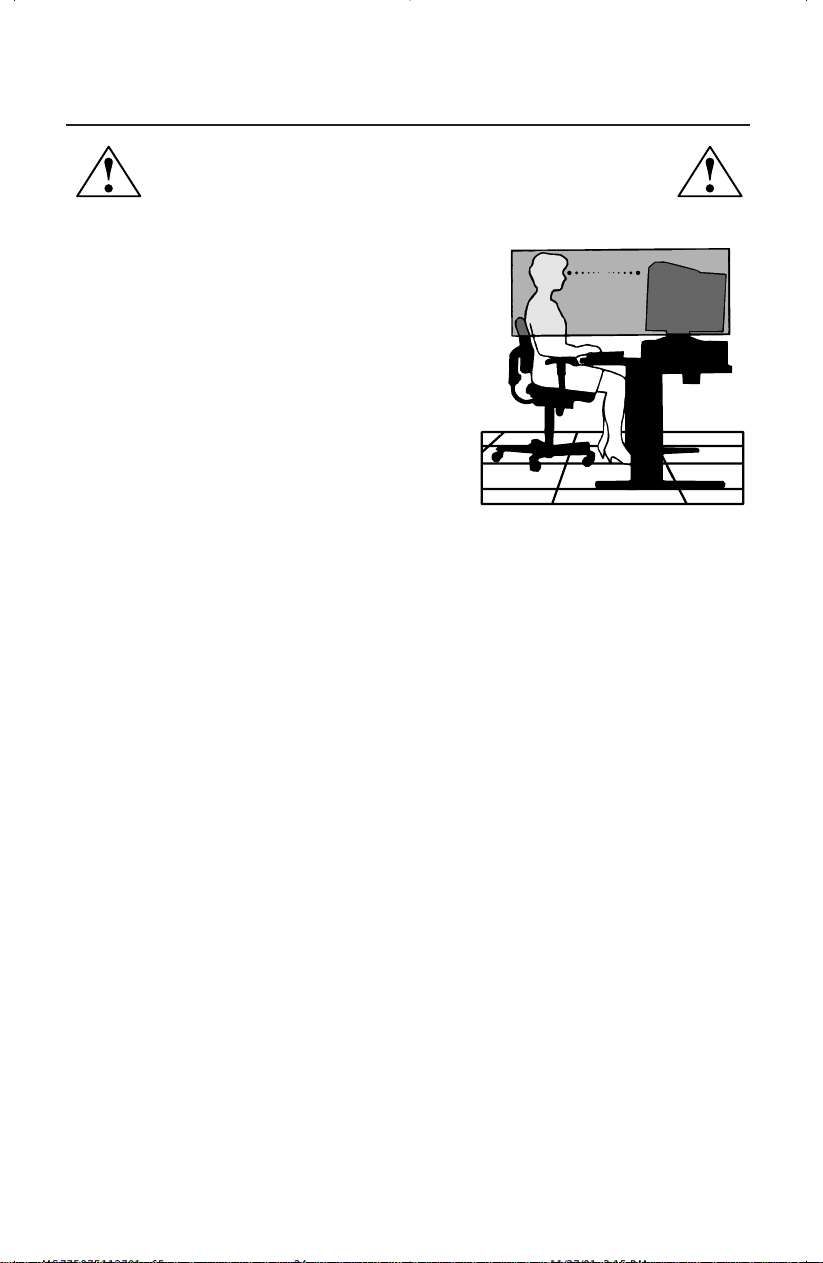
LA MODIFICATION DE LA POSITION ET DU RÉGLAGE DU
MONITEUR PEUT RÉDUIRE LA FATIGUE DES YEUX, DES ÉPAULES ET
DE LA NUQUE. OBSERVER LES DIRECTIVES CI-APRÈS LORS DU
POSITIONNEMENT DU MONITEUR :
Usage recommandé (suite)
• Régler la hauteur du moniteur de sorte que le dessus de
l'écran soit au niveau ou légèrement en-dessous du niveau
des yeux. Les yeux doivent regarder légèrement vers le
bas lorsque l'on regarde le milieu de l'écran.
• Positionner le moniteur à une distance minimale de 30 cm
(12 pouces) et maximale de 70 cm (28 pouces) des yeux. La
distance optimale est de 45 cm (18 pouces).
•
Reposer ses yeux régulièrement en regardant vers un objet
situé à au moins 6 m (20 pieds). Cligner régulièrement.
• Positionner le moniteur à un angle de 90° par rapport
aux fenêtres et autres sources de lumière, afin de
réduire au maximum les reflets et l'éblouissement.
Régler l'inclinaison du moniteur de sorte que l'éclairage du plafond ne soit pas reflété sur l'écran.
• Si une lumière réfléchie rend la vision de l'écran difficile, utiliser un filtre anti-reflet.
• Régler les commandes de luminosité et de contraste du moniteur pour améliorer la lisibilité.
• Utiliser un support de document placé près de l'écran.
• Positionner ce que l'on regarde le plus souvent (l'écran ou les documents de référence) directement
devant soi pour réduire au maximum les mouvements de la tête lorsque l'on dactylographie.
• Consulter régulièrement un ophtalmologiste.
Nettoyage de votre moniteur: La surface (tube cathodique) du verre de ce moniteur est revêtu d’un
composant spécial prévu pour réduire les reflets et l’électricité statique sur la surface du verre. Pour
retirer la poussière sans abîmer le revêtement de la surface du verre, utilisez un chiffon sans abrasif
ni peluche (en coton ou équivalent) avec une solution de nettoyage sans abrasif, neutre et sans alcool.
Si cela n’est pas suffisant, nettoyez la surface du verre avec un chiffon doux légèrement imbibé d’eau
ou de détergent neutre dilué avec beaucoup d’eau. Nettoyez régulièrement votre moniteur.
ATTENTION: Vous risquez d’endommager le tube cathodique si vous utilisez les agents suivants pour
nettoyer la surface du verre: Benzène, diluant, détergent acide/alcalin, détergent à base d’alcool,
détergent comportant de la poudre abrasive ou un agent anti-statique, détergent de nettoyage.
Ergonomie
Pour des raisons ergonomiques, nous vous recommandons :
• de régler la luminosité de façon à faire desparaître la trame de fond.
• de ne pas régler le contröle de contraste au maximum.
• d’afficher les tailles et positions d’images présélectionnées.
• d’utiliser les préréglages d’origine (usine) pour la couleur les commandes droite/gauche.
• de travailler avec des signaux non etrelacés ayant des fréquences de balayage vertical de 76 à
120 Hz (MultiSync
MD
77F) et 76 à 160 Hz (MultiSync 97F).
•
de ne pas traviller avec une image composée d’informations de couleur bleu primaire sur fond noir.
Cette combinaison de couleurs est difficile à déceler et fatigue la vue à cause de son faible contraste.
Pour des informations plus détaillées sur l'établissement d'un environnement de travail sain, appeler
NEC-Mitsubishi Electronics Display of America, Inc. au (888) NEC-MITS, demander le service
d’information par télécopieur NEC FastFacts au (800) 366-0476 et demander le document #
900108 ou écrire à American National Standard for Human Factors Engineering of Visual Display
Terminal Workstations - ANSI-HFS Standard No. 100-1988 - The Human Factors Society, Inc. P.O.
Box 1369, Santa Monica, California 90406.
22
MS77F97F112701.p65 11/27/01, 3:15 PM24
Fiche techniques
23
Caractér. techn. Moniteur Remarques
du moniteur MultiSync
MD
77F
Tube cathodique Diagonal : 17 po Déflexion de 90°, espacement entre pixels
Format de l'image visible : 16,0 po variable horizontal 0,21mm - 0,25 mm;
espacement entre pixels variable diagonal
0,24mm - 0,28 mm; luminophore à
persistance moyenne-courte; revêtement
d’écran multicouche antistatique; masque
perforé d'invar et surface d’écran OptiClear
®
.
Signal d'entrée Vidéo : ANALOGIQUE O,7 Vp-p/75 Ohms
Sync : Niveau TTL. sync. séparé
Positif/négatif sync. horizontale
Positif/négatif sync. verticale
Couleurs d'affichage Entrée analogique : Nombre illimité de couleurs Dépend de la carte vidéo utilisée.
Gamme de Horizontale: 31 kHz à 70 kHz Automatique
synchronisation Verticale : 55 Hz à 120 Hz Automatique
Résolutions acceptées 640 x 480 @ 60 à 120 Hz
Certains systèmes peuvent ne pas accepter
Résolutions basées sur les fréquences
800 x 600 @ 55 à 110 Hz
tous les modes listés.
horizontales et verticales uniquement
832 x 624 @ 55 à 106 Hz
1 024 x 768 @ 55 à 87 Hz .......................
NEC-Mitsubishi Electronics Display
1 152 x 870 @ 55 à 77 Hz
recommande une résolution à 85 Hz
1 280 x 1 024 @ 55 à 66 Hz
pour des performances d'affichage
optimales.
Zone d'affichage active Horizontale :
310 mm/12,2 po Dépend de la synchronisation du signal
(réglage d'usine) Verticale :
232 mm/9,1 po utilisée et ne comprend pas la zone de bord.
Zone d'affichage active
325 mm/12,8 po Dépend de la synchronisation du signal
(balayage complet)
244 mm/9,6 po utilisée et ne comprend pas la zone de bord.
Alimentation
CA 100 - 240 V, 50-60 Hz
Tension d'alimentation 1,5 A @ 100 - 240 V
Dimensions
403 mm (L) x 420 mm (H) x 420 mm (P)
15,9 po (L) x 16,5 po (H) x 16,5 po (P)
Poids 16,7 kg
36,8 livres
Considérations environnementales
Température de fonctionnement : 0 °C à +35 °C
Humidité : 30 % à 80 %
Altitude : 0 à 10 000 pieds
Température de stockage : -20 °C à +60 °C
Humidité : 10 % à 90 %
Altitude : 0 à 45 000 pieds
REMARQUE : Les caractéristiques techniques sont sujettes à changement sans préavis.
MS77F97F112701.p65 11/27/01, 3:15 PM25
Fiche techniques (suite)
24
Caractér. techn. Moniteur Remarques
du moniteur MultiSync
MD
97F
Tube cathodique Diagonale : 19 po Déflexion de 90°, 0,20-0,24 mm masque
Format de l'image visible : 18,0 po variable horizontal tangue; 0,24-0,28 mm
masque variable diagonal tangue; luminophore
à persistance moyenne-courte; revêtement
d’écran multicouche antistatique; masque
perforé d'invar et surface d’écran OptiClear
®
.
Signal d'entrée Vidéo : ANALOGIQUE O,7 Vp-p/75 Ohms
Sync : Niveau TTL. sync. séparé
Positif/négatif sync. horizontale
Positif/négatif sync. verticale
Couleurs d'affichage Entrée analogique : Nombre illimité de couleurs Dépend de la carte vidéo utilisée.
Gamme de Horizontale: 31 kHz à 96 kHz Automatique
synchronisation Verticale : 55 Hz à 160 Hz Automatique
Résolutions acceptées 640 x 480 @ 60 à 160 Hz
Certains systèmes peuvent ne pas accepter
Résolutions basées sur les fréquences
800 x 600 @ 55 à 153 Hz
tous les modes listés.
horizontales et verticales uniquement
832 x 624 @ 55 à 144 Hz
1 024 x 768 @ 55 à 120 Hz
1 152 x 870 @ 55 à 105 Hz NEC-Mitsubishi Electronics Display
1 280 x 1 024 @ 55 à 89 Hz ....................
recommande une résolution à 85 Hz
1 600 x 1 200 @ 55 à 76 Hz
pour des performances d'affichage
optimales.
Zone d'affichage active Horizontale :
356 mm/14,0 po Dépend de la synchronisation du signal
(réglage d'usine) Verticale :
267mm/10,5 po utilisée et ne comprend pas la zone de bord.
Zone d'affichage active
366 mm/14,4 po Dépend de la synchronisation du signal
(balayage complet)
274 mm/10,5 po utilisée et ne comprend pas la zone de bord.
Alimentation
CA 100 - 240 V, 50-60 Hz
Tension d'alimentation 2,2 A @ 100 - 240 V
Dimensions
442 mm (L) x 453 mm (H) x 455 mm (P)
17,4 po (L) x 17,8 po (H) x 17,9 po (P)
Poids 22,0 kg
48,5 livres
Considérations environnementales
Température de fonctionnement : 0 °C à +35 ° C
Humidité : 30 % à 80 %
Altitude : 0 à 10 000 pieds
Température de stockage : -20 °C à +60 °C
Humidité : 10 % à 90 %
Altitude : 0 à 45 000 pieds
REMARQUE : Les caractéristiques techniques sont sujettes à changement sans préavis.
MS77F97F112701.p65 11/27/01, 3:15 PM26

25
Fonctions
CRT de Point Plat Tangue: Assure une qualité de visualisation inégalée avec une image quasi-
plate, éliminant la distorsion et réduisant les reflets de sorte que ce que vous voyez à l’ecran est
identique à ce qui est imprimé sur paper.
Surface d'écran OptiClear
®
: Réduit la réflexion et l'éblouissement et augmente le
contraste sans sacrifier le niveau de netteté, la clarté ni la luminosité. Doté de la
technologie TRC d'écran plat carré, un écran à haut contraste avec une taille procure des
textes et des graphiques clairs et détaillés.
Masque perforé d'invar : Des trous dans la fine feuille de métal derrière le verre de la
surface TRC correspondent aux points phosphorescents sur la surface intérieure du plateau
du TRC, permettant au bon faisceau électronique (rouge, vert, bleu) d'atteindre la bonne
substance fluorescente de couleur pour une netteté, une luminosité et des couleurs
meilleures.
Mise au point à double faisceau dynamique : Permet des réglages précis et continus des
faisceaux électroniques et une qualité d'image optimale, jusqu'à l'extrémité des bords de
l'écran.
Système de commande AccuColor
®
: Permet de commuter entre deux réglages de
couleurs sur l'affichage en fonction de ses préférences de couleurs personnelles.
Commandes OSM
MC
(gestionaire à l'écran) : Permet de régler facilement et rapidement
tous les éléments de l'image de l'écran via les menus à l'écran simples à utiliser.
Fonctions ErgoDesign
®
: Améliore l'ergonomie humaine pour améliorer l'environnement
de travail, protéger la santé de l'utilisateur et épargner de l'argent. On peut citer comme
exemple les commandes OSM pour un réglage rapide et aisé de l'image, une base
d'inclinaison/de rotation pour un angle de vision préféré et la conformité aux directives
MPRII concernant les réductions d'émissions.
Plug and Play: La solution Microsoft
®
avec le système d’exploitation Windows
®
95/98/
2000/XP facilite la configuration et l'installation en permettant au moniteur d'envoyer ses
capacités (telles que le format et les résolutions d'écran acceptés) directement à
l'ordinateur, optimisant ainsi automatiquement les performances d'affichage.
Système IPM
MC
(Intelligent Power Manager/Gestionnaire d'énergie intelligent) : Procure
des méthodes d'économie d'énergie novatrices qui permettent au moniteur de passer à un
niveau de consommation d'énergie plus faible lorsqu'il est allumé mais non utilisé,
épargnant deux tiers des coûts énergétiques, réduisant les émissions et diminuant les coûts
de conditionnement d'air du lieu de travail.
Technologie Reduced Magnetic Field
MC
(Champs magnétiques réduits) : Réduit les
émissions de champs magnétiques et électriques alternatifs et l'électricité statique, dans un
but d'intérêt ergonomique concernant les risques potentiels provenant d'une utilisation
prolongée d'un moniteur d'ordinateur.
Technologie à fréquence multiple : Règle automatiquement le moniteur à la fréquence de
la carte vidéo, affichant ainsi la résolution requise.
Capacité FullScan
MC
(balayage complet) : Permet d'utiliser la totalité de la surface d'écran
dans la plupart des résolutions, augmentant ainsi de façon significative la taille de
l'image.
OSM Display Screen Copyright 2002 par
NEC-Mitsubishi Electronics Display of America, Inc.
MS77F97F112701.p65 11/27/01, 3:15 PM27

26
Dépannage
Pas d'image
• La carte vidéo doit être complètement introduite dans sa fente.
• La touche d'alimentation et le commutateur d'alimentation de l'ordinateur
doivent être en position ON (Marche).
• Le câble de signal doit être bien connecté à la carte vidéo /l'ordinateur.
• Vérifier si le connecteur n'est pas plié ou si les broches ne sont pas
renfoncées.
L'image défile ou est instable
• Le câble de signal doit être bien fixé à l'ordinateur.
• Contrôler la répartition des broches et la synchronisation de signal du
moniteur et la carte vidéo en respectant les synchronisations et la répartition
des broches recommandées.
• Si l'adaptateur de câble Macintosh est utilisé, vérifier la connexion au
préalable ou s'assurer si la carte vidéo est compatible Macintosh et si la
carte est bien mise en place dans l'ordinateur.
La LED sur le moniteur n'est pas éclairée
(couleur non verte ou orange
peut
ê
tre vue)
• Le commutateur d'alimentation doit être en position ON et le cordon
d'alimentation doit être connecté.
L'image est floue ou les couleurs semblent brouillées
• Régler les commandes de luminosité et de contraste.
• Accéder à la commande Degauss via les commandes OSM
MC
. Activer la
commande Degauss.
ATENTION : Un intervalle d’au moins 20 minutes doit s'écouler avant que la
commande Degauss ne soit utilisée une seconde fois lorsqu'il
n'y a pas de commutation entre les modes.
L'image danse ou une trame onduleuse est présente sur l'image
•Éloigner du moniteur les appareils électriques qui peuvent occasionner des
interférences électriques.
• Voir à l'intérieur de la couverture du mode d'emploi pour les informations
FCC.
Les bords de l'image affichée ne sont pas carrés
• Utiliser les commandes de géométrie OSM pour redresser les bords.
• Si possible, orienter l'avant du moniteur vers l'est.
L'image affichée n'est pas centrée, est trop petite ou trop large
• Utiliser les commandes de format OSM et de positionnement pour ajuster
l'image.
MS77F97F112701.p65 11/27/01, 3:15 PM28

Références
27
• BBS (978) 742-8706
Le système de babillard électronique NEC-Mitsubishi Electronics Display of
America, Inc. est un service électronique accessible avec votre système et un
modem. Les paramètres de communication sont : 300/1200/2400/9600/1,4
k/28,8 k/33,6 k bps, pas de parité, 8 bits de données, 1 bit d'arrêt
• Service à la clientèle/
Assistance technique (800) 632-4662
Télécopieur (978) 742-7049
• Canaux électroniques:
Internet (e-mail): [email protected]
Site internet ftp: ftp.necmitsubishi.com
World Wide Web: http://www.necmitsubishi.com
Produit enregistré:
http://www.necmitsubishi.com/productregistration
Opérations Européennes:
http://
www.nec-monitors.com
Fichier INF Windows
®
95/98/Me/2000/XP:
http://support.necmitsubishi.com/software.htm
Ensuite, télécharger le fichier NECMSINF.ZIP
• Informations FastFacts
MC
(800) 366-0476
INFORMATION DESCRIPTION N° DOCUMENT
Glossaire Définition des termes en relation 900203
avec les fonctions, les caractéristiques
et l'installation du moniteur
MultiSync
MD
Informations complémentaires Noms et adresses d'autres 900204
groupes impliqués dans les
normes et les fonctions
du moniteur MultiSync
Connexion Macintosh Informations détaillées sur le 153006
raccordement du moniteur MultiSync
à un Macintosh
Environnement de travail sain Informations détaillées sur 900108
l'établissement d'un environnement
de travail sain
• Info docum. & vente (800) NEC-INFO [(800) 632-4636]
• Commande de produits MultiSync (800) 632-4662
[Pour logiciels et accessoires]
• Téléventes (800) 284-4484
MS77F97F112701.p65 11/27/01, 3:15 PM29

Garantie limitée
28
NEC-Mitsubishi Electronics Display of America, Inc. (ci-après «NMD-A») garantit que ce
produit est exempt de vice de fabrication et de main-d’oeuvre et, selon les conditions énoncées
ci-dessous, accepte de réparer ou remplacer, à sa discrétion, toute pièce de l’appareil concerné
qui s’avérerait défectueuse et ce, pendant une période de une (1) ans à partir de la date d’achat
initial. Les pièces de rechange sont garanties pendant quatre-vingt dix (90) jours. Les pièces
de rechange ou unités peuvent être neuves ou reconditionnées et seront conformes aux
spécifications des pièces et des unités d’origine. Cette garantie vous accorde des droits légaux
spécifiques auxquels peuvent s’ajouter d’autres droits pouvant varier d’une juridiction à l ’autre.
Cette garantie est limitée à l’acheteur d’origine du produit et n’est pas transférable. Cette
garantie couvre uniquement les composants fournis par NMD-A. Une réparation requise à la
suite de l’utilisation des pièces provenant d’un tiers n’est pas couverte par cette garantie. Pour
être couvert par cette garantie, le produit doit avoir été acheté aux États-Unis ou au Canada
par l’acheteur d’origine. Cette garantie couvre uniquement la distribution du produit aux États-
Unis ou au Canada par NMD-A. Aucune garantie n’est offerte à l’extérieur des États-Unis et
du Canada. La preuve d’achat sera exigée par NMD-A pour prouver la date d’achat. Une telle
preuve d’achat doit être une facture de vente d’origine ou un reçu reprenant le nom et l’adresse
du vendeur, de l’acheteur et le numéro de série du produit.
Pour obtenir un service au titre de la garantie, vous devez expédier le produit en port prépayé
ou le déposer chez le revendeur agréé qui vous l’a vendu ou dans un autre centre autorisé par
NMD-A, soit dans l’emballage d’origine, soit dans un emballage similaire procurant un
niveau équivalent de protection. Avant de retourner tout produit à NMD-A, vous devez
d’abord obtenir une autorisation de retour de marchandise en composant le 1-800-632-
4662. Le produit ne pourra avoir été enlevé ou modifié, réparé ou entretenu au préalable par
personne d’autre que du personnel technique autorisé par NMD-A, et le numéro de série du
produit ne pourra pas avoir été enlevé. Pour être couvert par cette garantie, le produit ne
pourra pas avoir été soumis à l’affichage d’une image fixe pendant de longues périodes de
temps résultant en une persistance de l’image, un accident, une utilisation incorrecte ou
abusive ou une utilisation contraire aux directives contenues dans le guide de l’utilisateur. Une
seule de ces conditions annulera la garantie.
NMD-A NE POURRA ÊTRE TENUE RESPONSABLE DE DOMMAGES DIRECTS, INDIRECTS,
ACCIDENTELS, SECONDAIRES OU D’AUTRES TYPES DE DOMMAGES RÉSULTANT DE
L’UTILISATION D’UN PRODUIT QUI N’ENTRENT PAS SOUS LA RESPONSABILITÉ DÉCRITE
CI-DESSUS. CES GARANTIES REMPLACENT TOUTE AUTRE GARANTIE EXPLICITE OU
IMPLICITE, Y COMPRIS, MAIS SANS S’Y LIMITER, TOUTE GARANTIE DE QUALITÉ
MARCHANDE OU D’APTITUDE À UNE FIN PARTICULIÈRE. CERTAINES JURIDICTIONS NE
PERMETTANT PAS L’EXCLUSION DE GARANTIES IMPLICITES OU LA LIMITATION OU
L’EXCLUSION DE RESPONSABILITÉ POUR DOMMAGES ACCIDENTELS OU SECONDAIRES,
LES EXCLUSIONS OU LIMITATIONS CI-DESSUS POURRAIENT NE PAS S’APPLIQUER DANS
VOTRE CAS.
Ce produit est garanti selon les termes de cette garantie limitée. Les consommateurs doivent
savoir que les performances du produit peuvent varier selon la configuration du système, le
logiciel, l’application, les données du client et la manière dont le produit est utilisé par
l’opérateur, ainsi que d’autres facteurs. Bien que les produits NMD-A soient considérés
compatibles avec de nombreux systèmes, la mise en oeuvre fonctionnelle du produit peut
varier d’un client à l ’autre. Par conséquent, l’adéquation d’un produit à un besoin ou une
application spécifique doit être déterminée par le consommateur et n’est pas garantie par
NMD-A.
Pour connaître le nom du centre de service technique agréé NEC-Mitsubishi Electronics
Display of America le plus proche, appeler NEC-Mitsubishi Electronics Display of America au
1-800-632-4662.
MS77F97F112701.p65 11/27/01, 3:15 PM30
# de pièce 15501031
Imprimé aux Chine
AVIS DE PROPRIÉTÉ EXCLUSIVE ET DE DÉGAGEMENT DE RESPONSABILITÉ
Les informations contenues dans ce document, y compris tous les designs et matériel s'y rapportant, sont la propriété de
NEC-Mitsubishi Electronics Display of America et/ou ses concédants. NEC-Mitsubishi Electronics Display of America se
réserve les droits de fabrication brevetée, les droits d’auteurs et autres propriétés exclusives à ce document, y compris
tous les droits de design, de fabrication, de reproduction, d'utilisation et de vente y afférent, à condition que ces droits
n'ont pas été directement délivrés à d'autres.
Les produits de NEC-Mitsubishi Electronics Display of America dont il est question dans ce document sont garantis
conformément aux termes de la déclaration de garantie limitée accompagnant chaque produit. Cependant, les
performances réelles de chaque produit dépendent de facteurs tels que la configuration du système, les données du client
et la manière dont le produit est utilisé. Étant donné que la mise en oeuvre fonctionnelle du produit peut varier d’un client
à l’autre, l'adéquation et l'application de configurations spécifiques du produit peuvent être déterminées par le client
et ne sont pas garanties par NEC-Mitsubishi Electronics Display of America.
Afin de permettre l'amélioration du design et des caractéristiques techniques, les informations contenues dans ce
document sont sujettes à modifications sans préavis. La reproduction totale ou partielle de ce document sans l'accord
préalable de NEC-Mitsubishi Electronics Display of America est interdite.
DÉCLARATION DE CONFORMITÉ
Cet appareil est conforme à l'article 15 du règlement de la FCC. L'utilisation est soumise à deux conditions. 1) Cet appareil
ne peut pas occasionner d'interférences nuisibles, et 2) cet appareil doit accepter toutes interférences reçues, y compris
les interférences qui peuvent occasionner un mauvais fonctionnement.
Partie responsable américaine : NEC-Mitsubishi Electronics Display of America, Inc.
Adresse : 1250 N. Arlington Heights Road, Suite 500
Itasca, Illinois 60143
N
o
tél. : (630) 467-3000
Type de produit : Moniteur d'ordinateur
Classification de l'appareil : Périphérique classe B
Modèles : N0701/N9902
Nous déclarons par la présente que les appareils mentionnés ci-dessus sont
conformes aux normes techniques spécifiées dans le règlement de la FCC.
Windows est une marque déposée de Microsoft Corporation. NEC est une marque déposée de NEC Corporation.ENERGY STAR est une
marque déposée aux États-Unis. Tous les autres noms de marques et de produits sont des marques de commerce ou des marques déposées
de leurs propriétaires respectifs.
En tant que partenaire ENERGY S TAR
®
, NEC-Mitsubishi Electronics Display of America, Inc. a veillé à ce que ce produit respecte les normes
ENERGY STAR en matière de rendement énergétique. Le logo ENERGY STAR ne représente aucun aval par l’EPA de quelque produit ou
service que ce soit.
Série Flat Enterprise NEC
S
é
rie MultiSync
MD
NEC
MS77F97F112701.p65 11/27/01, 3:15 PM31
Part No. 15501031
Printed in China
PROPRIETARY NOTICE AND LIABILITY DISCLAIMER
The information disclosed in this document, including all designs and related materials, is the valuable property of
NEC-Mitsubishi Electronics Display of America and/or its licensors, as appropriate, reserve all patent, copyright and
other proprietary rights to this document, including all design, manufacturing, reproduction, use and sales rights thereto,
except to the extent said rights are expressly granted to others.
The NEC-Mitsubishi Electronics Display of America product(s) discussed in this document are warranted in accordance
with the terms of the Limited Warranty Statement accompanying each product. However, actual performance of each
such product is dependent upon factors such as system configuration, customer data and operator control. Since
implementation by customers of each product may vary, the suitability of specific product configurations and applications
must be determined by the customer and is not warranted by NEC-Mitsubishi Electronics Display of America.
To allow for design and specification improvements, the information in this document is subject to change at any time
without notice. Reproduction of this document or portions thereof without prior approval of NEC-Mitsubishi Electronics
Display of America is prohibited.
DECLARATION OF CONFORMITY
This device complies with Part 15 of FCC Rules. Operation is subject to the following two conditions. (1) This device may
not cause harmful interference, and (2) this device must accept any interference received, including interference that may
cause undesired operation.
U.S. Responsible Party: NEC-Mitsubishi Electronics Display of America, Inc.
Address: 1250 N. Arlington Heights Road, Suite 500
Itasca, Illinois 60143
Tel. No.: (630) 467-3000
Type of Product: Computer Monitor
Equipment Classification: Class B Peripheral
Models: N0701/N9902
We hereby declare that the equipment specified above
conforms to the technical standards as specified in the FCC Rules.
Windows is a registered trademark of Microsoft Corporation. NEC is a registered trademark of NEC Corporation. ENERGY STAR is a U.S.
registered trademark. All other brands and product names are trademarks or registered trademarks of their respective owners.
As an ENERGY STAR
®
Partner, NEC-Mitsubishi Electronics Display of America, Inc. has determined that this product meets the ENERGY
STAR guidelines for energy efficiency. The ENERGY STAR emblem does not represent EPA endorsement of any product or service.
NEC MultiSync
®
Series
MS77F97F112701.p65 11/27/01, 3:15 PM32