EN User manual 1 35
ﻡﺪﺨﺘﺴﳌﺍ
ﻞﻴﻟﺩ
AR
AC3036
User manual


1EN
Contents
1 Important ���������������������������������������������������������������������������������������2
Safety ������������������������������������������������������������������������������������������������������������������������������2
Electromagnetic elds (EMF) ���������������������������������������������������������������������������������4
Recycling ����������������������������������������������������������������������������������������������������������������������� 4
2 Your air purier �����������������������������������������������������������������������������5
Product overview �������������������������������������������������������������������������������������������������������5
Controls overview ������������������������������������������������������������������������������������������������������6
3 Getting started ������������������������������������������������������������������������������ 7
Installing the lter ������������������������������������������������������������������������������������������������������ 7
Wi-Fi indicator ������������������������������������������������������������������������������������������������������������ 7
Wi-Fi connection �������������������������������������������������������������������������������������������������������8
4 Using the air purier ��������������������������������������������������������������������9
Understanding the air quality light ���������������������������������������������������������������������9
Turning on and o ���������������������������������������������������������������������������������������������������� 10
Changing the mode setting ���������������������������������������������������������������������������������� 10
Switching the display indicator �����������������������������������������������������������������������������11
Using the light on/o function ������������������������������������������������������������������������������11
Checking the lter status ����������������������������������������������������������������������������������������12
5 Cleaning and maintenance �������������������������������������������������������12
Cleaning schedule ����������������������������������������������������������������������������������������������������12
Cleaning the body of the air purier ������������������������������������������������������������������13
Cleaning the particle sensor ���������������������������������������������������������������������������������13
Cleaning the surface of the lter �������������������������������������������������������������������������14
Replacing the lter ���������������������������������������������������������������������������������������������������15
Filter reset ������������������������������������������������������������������������������������������������������������������� 16
6 Storage ����������������������������������������������������������������������������������������� 16
7 Troubleshooting ��������������������������������������������������������������������������17
8 Guarantee and service ��������������������������������������������������������������� 19
Order parts or accessories ������������������������������������������������������������������������������������ 19

2 EN
1 Important
Safety
Read this user manual carefully before you use the appliance, and save it for future reference�
Danger
• Do not clean the appliance with water, any other liquid, or a
(ammable) detergent, nor let them enter the appliance, to avoid
electric shock and/or a re hazard�
• Do not spray any ammable materials such as insecticides or fragrance
around the appliance�
Warning
• Check if the voltage indicated on the appliance corresponds to the
local power voltage before you connect the appliance�
• If the power cord is damaged, you must have it replaced by Philips, a
service center authorized by Philips, or similarly qualied persons in
order to avoid a hazard�
• Do not use the appliance if the plug, the power cord, or the appliance
itself is damaged�
• This appliance is not intended for use by persons (including children)
with reduced physical, sensory, or mental capabilities, or lack of
experience and knowledge, unless they have been given supervision or
instruction concerning use of the appliance by a person responsible for
their safety�
• Child shall not play with the appliance�
• Cleaning and maintenance shall not be made by children without
supervision�
• Do not block the air inlet and outlet, e�g� by placing items on the air
outlet or in front of the air inlet�
• Make sure that foreign objects do not fall into the appliance through
the air outlet�

3EN
Caution
• This appliance is not a substitute for proper ventilation, regular vacuum
cleaning, or use of an extractor hood or fan while cooking�
• Always place and use the appliance on a dry, stable, level, and
horizontal surface�
• Leave at least 20cm free space around the appliance and leave at least
30cm free space above the appliance�
• Do not sit or stand on the appliance� Do not place anything on top of
the appliance�
• Do not place the appliance directly below an air conditioner to prevent
condensation from dripping onto the appliance�
• Only use the original Philips lters specially intended for this appliance�
Do not use any other lters�
• Combustion of the lter may cause irreversible human hazard and/
or jeopardize other lives� Do not use the lter as fuel or for similar
purpose�
• Avoid knocking against the appliance (the air inlet and outlet in
particular) with hard objects�
• Do not insert your ngers or objects into the air outlet or the air inlet to
prevent physical injury or malfunctioning of the appliance�
• Do not use this appliance when you have used indoor smoke-type
insect repellents or in places with oily residues, burning incense, or
chemical fumes�
• Do not use the appliance near gas appliances, heating devices or
replaces�
• Always unplug the appliance when you want to move, clean appliance,
replace the lter or carry out other maintenance�
• The appliance is only intended for household use under normal
operating conditions�
• Do not use the appliance in wet surroundings or in surroundings with
high humidity or high ambient temperatures, such as the bathroom,
toilet, or kitchen, or in a room with major temperature changes�
• The appliance does not remove carbon monoxide (CO) or radon (Rn)� It
cannot be used as a safety device in case of accidents with combustion
processes and hazardous chemicals�

4 EN
Electromagnetic elds (EMF)
This Philips appliance complies with all applicable standards and regulations regarding
exposure to electromagnetic elds�
Recycling
Do not throw away the product with the normal household waste at the end of its life, but
hand it in at an ocial collection point for recycling� By doing this, you help to preserve the
environment�
Follow your country's rules for the separate collection of electrical and electronic products�
Correct disposal helps prevent negative consequences for the environment and human
health�
5EN
2 Your air purifier
Congratulations on your purchase, and welcome to Philips!
To fully benet from the support that Philips oers, register your product at
www�philips�com/welcome�
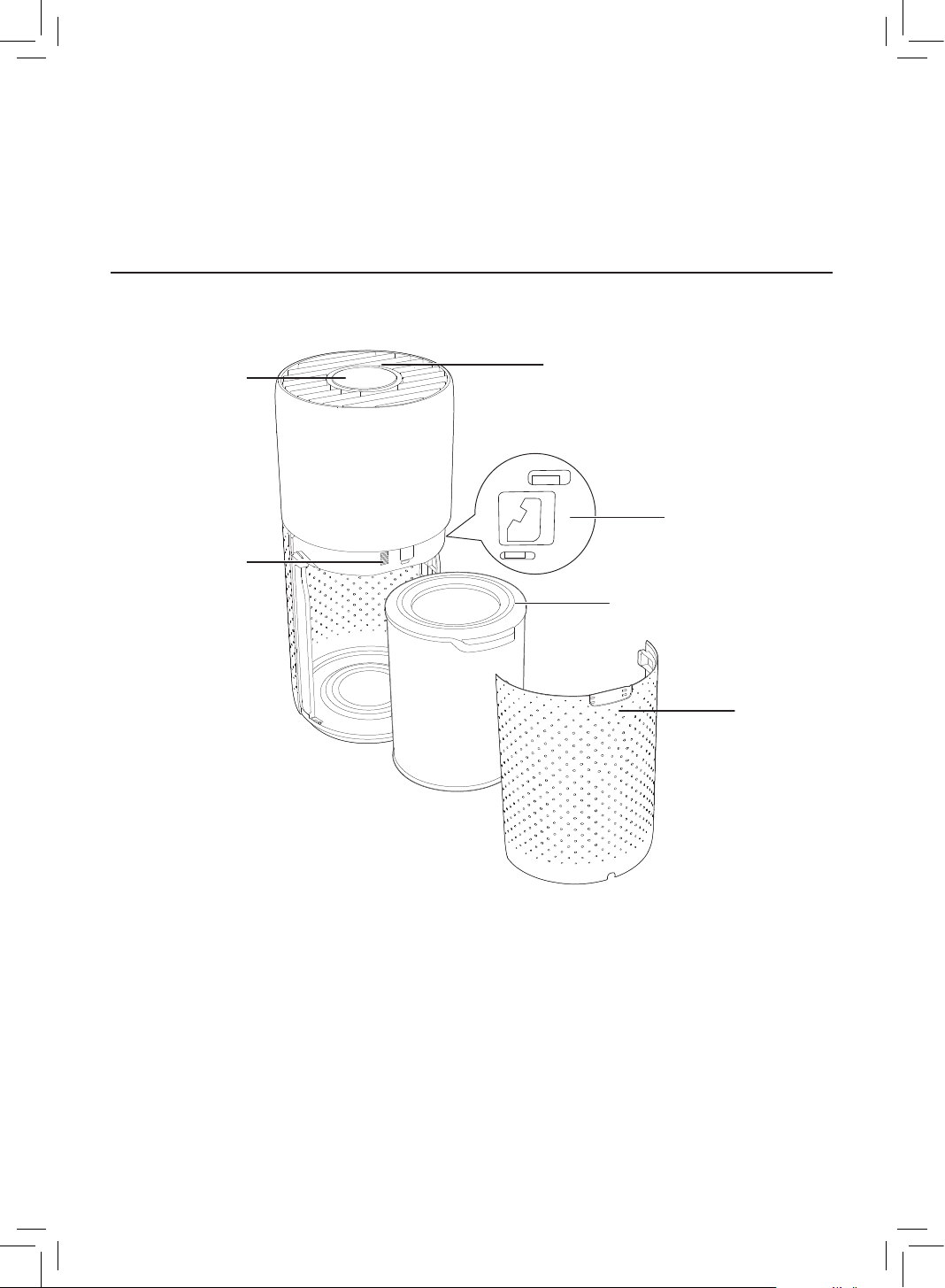
Product overview
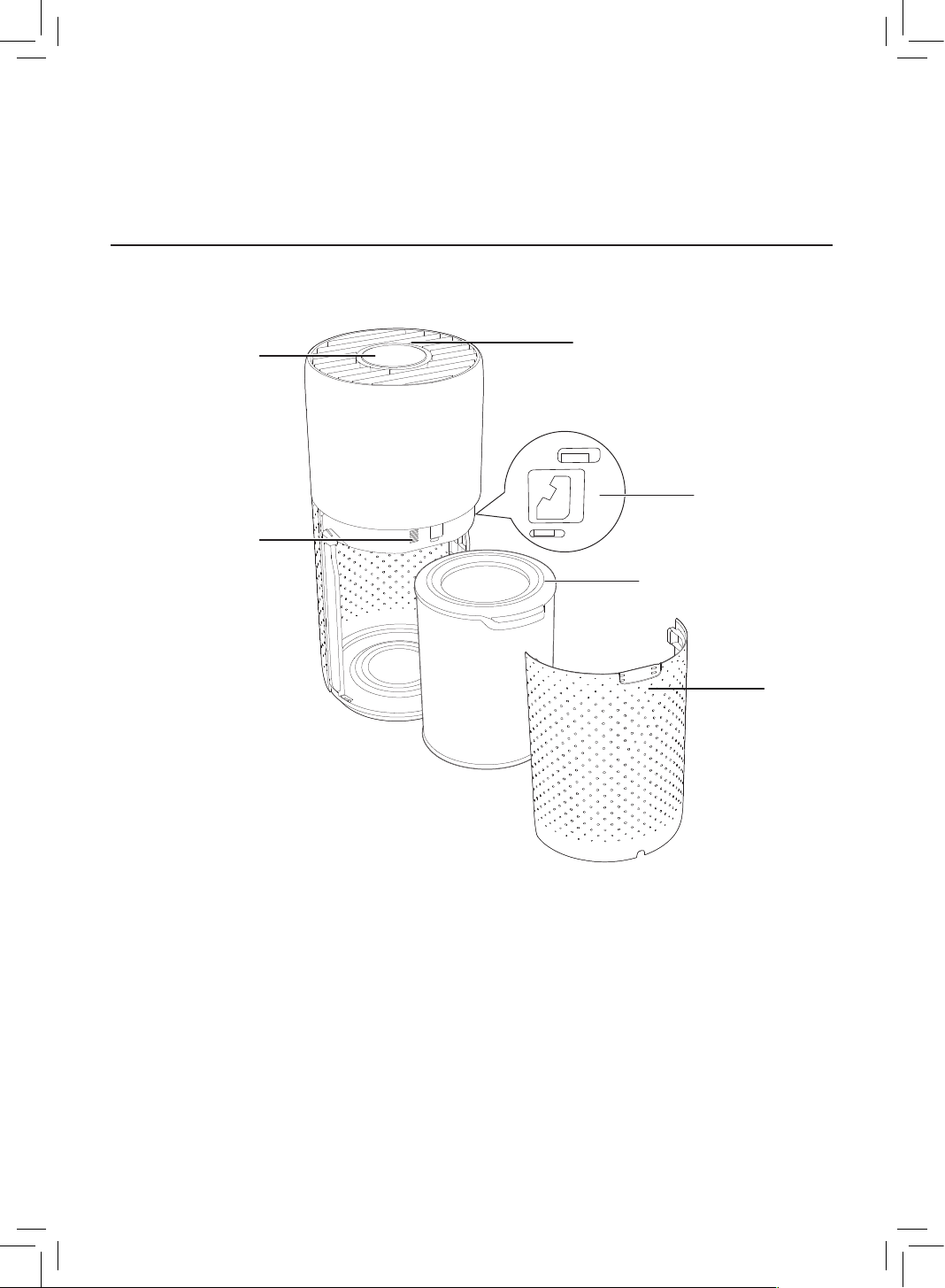
Control panel
Air outlet
Back
cover
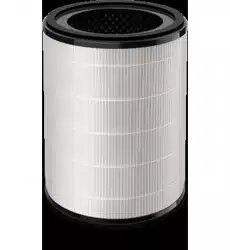
NanoProtect lter Series 3
(FY3430/30)
Particle sensor
Gas sensor
6 EN
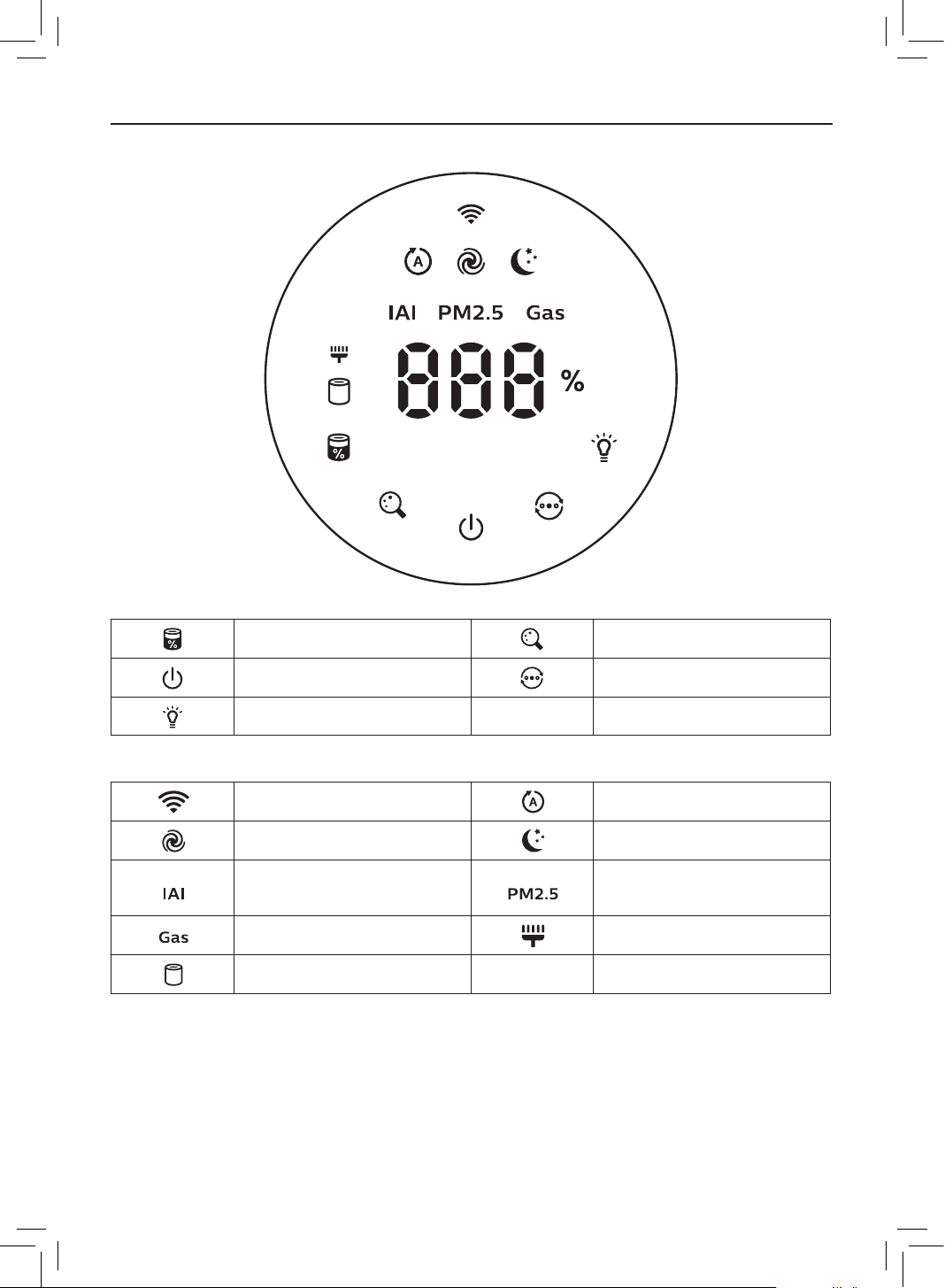
Controls overview
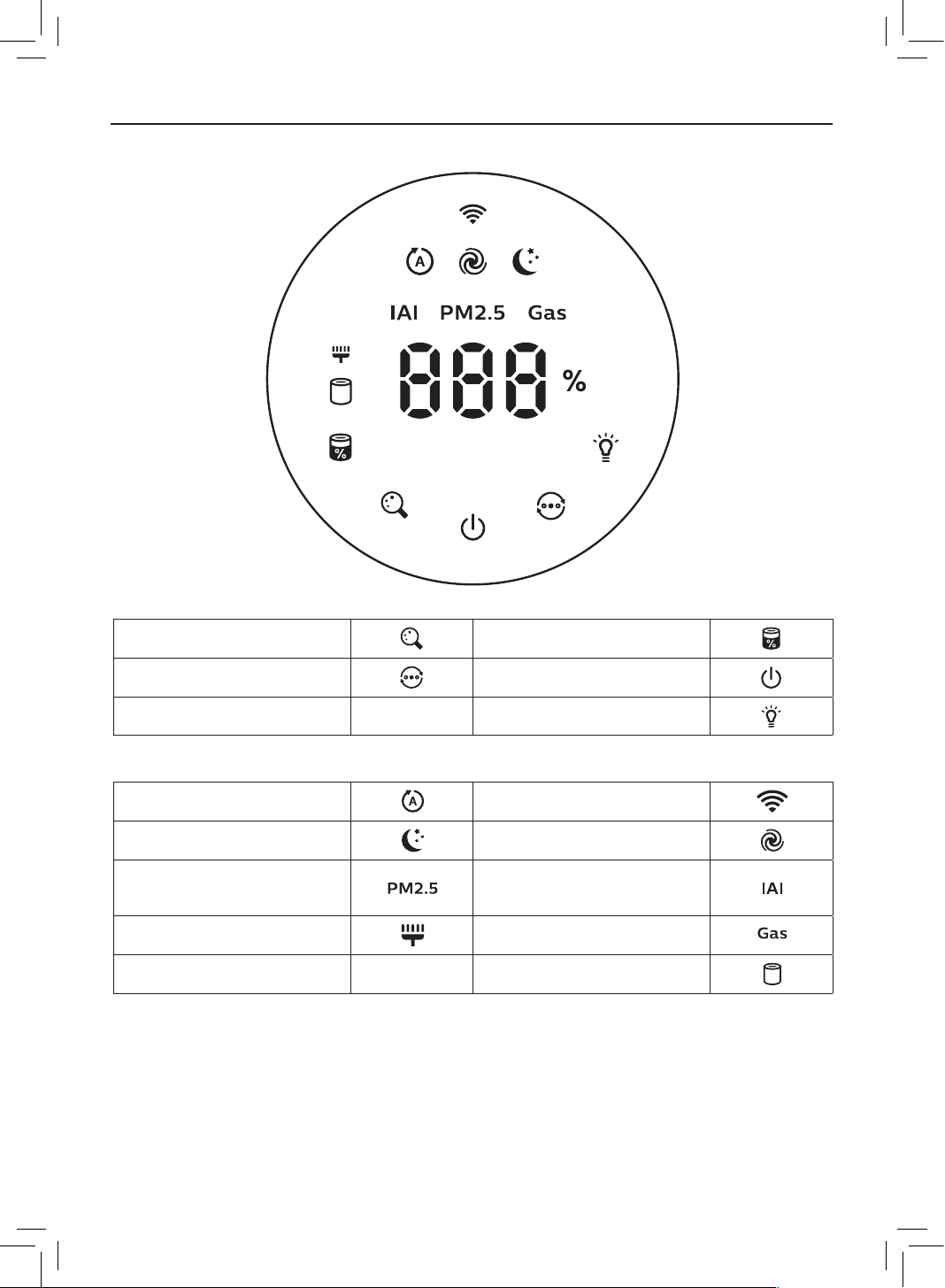
Control buttons
Filter status/reset button Display switch button
Power on/o button Mode switch button
Light on/o button
Display panel
Wi-Fi indicator Auto mode
Turbo mode Sleep mode
Indoor Allergen Index
display
PM2�5 display
Gas pollution display Filter cleaning alert
Filter replacement alert
7EN
3 Getting started
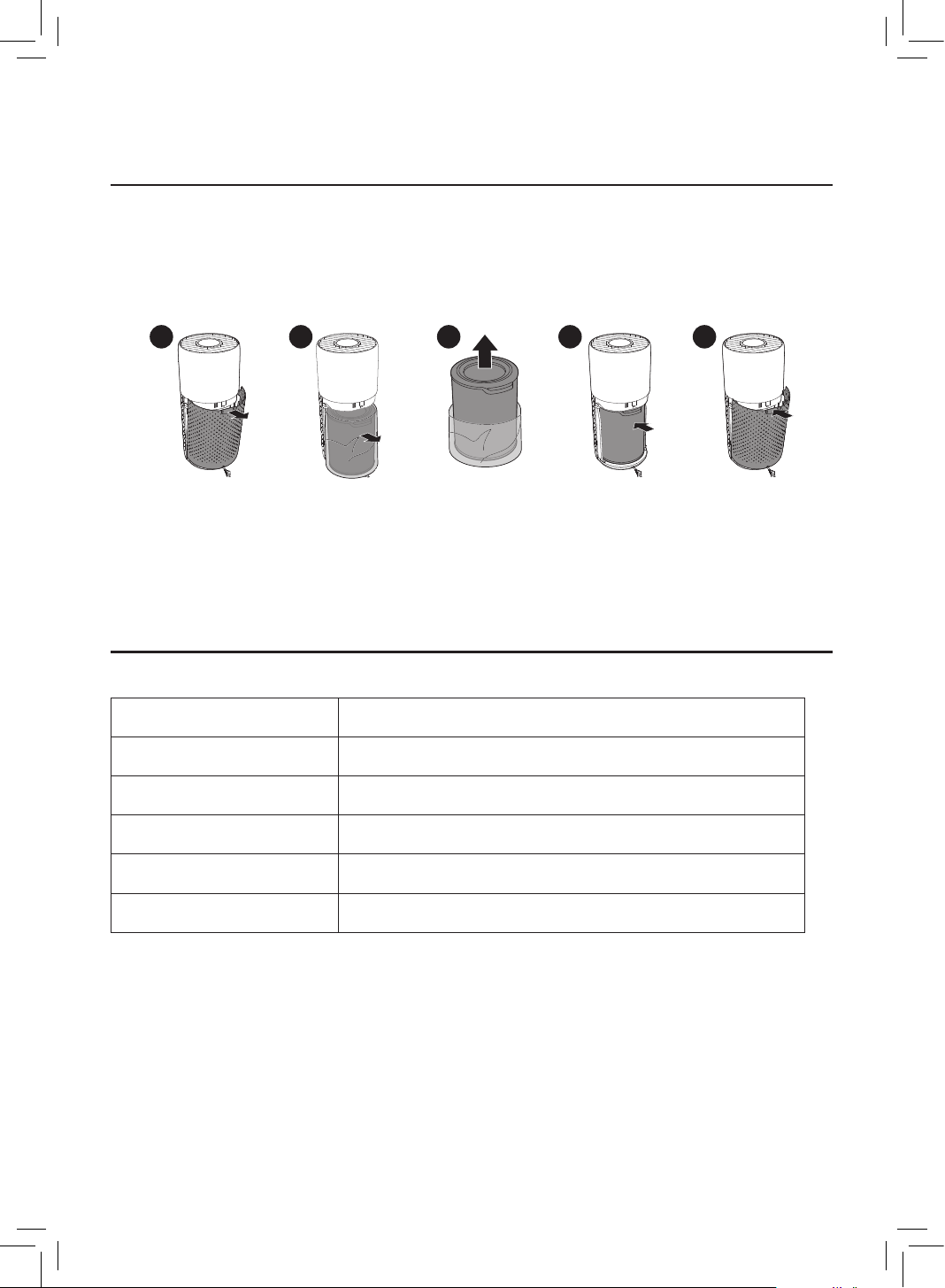
Installing the lter
Remove all packaging of the lter before rst use�
Note: Make sure the air purier is unplugged from the electrical outlet before installing the
lter�
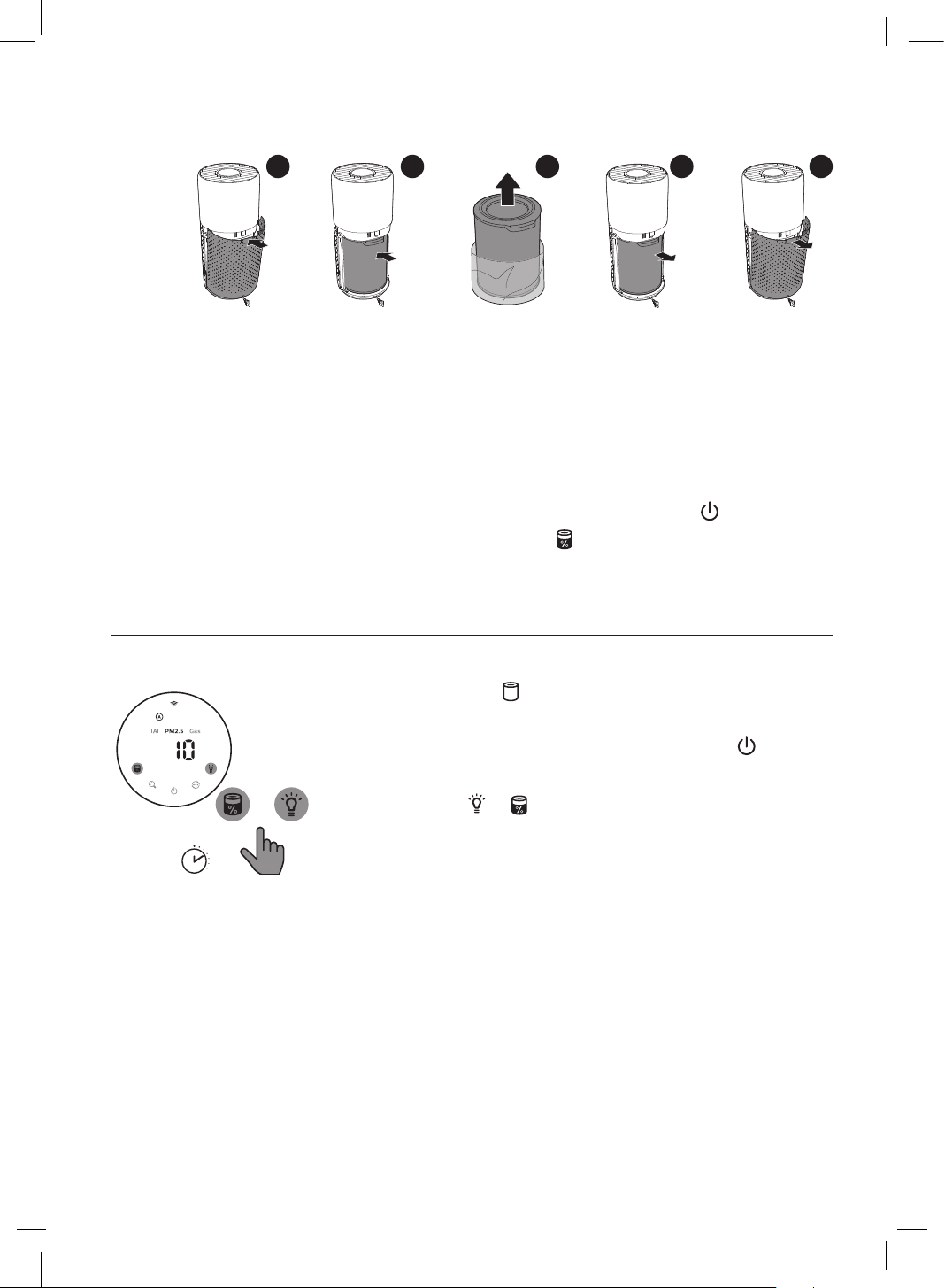
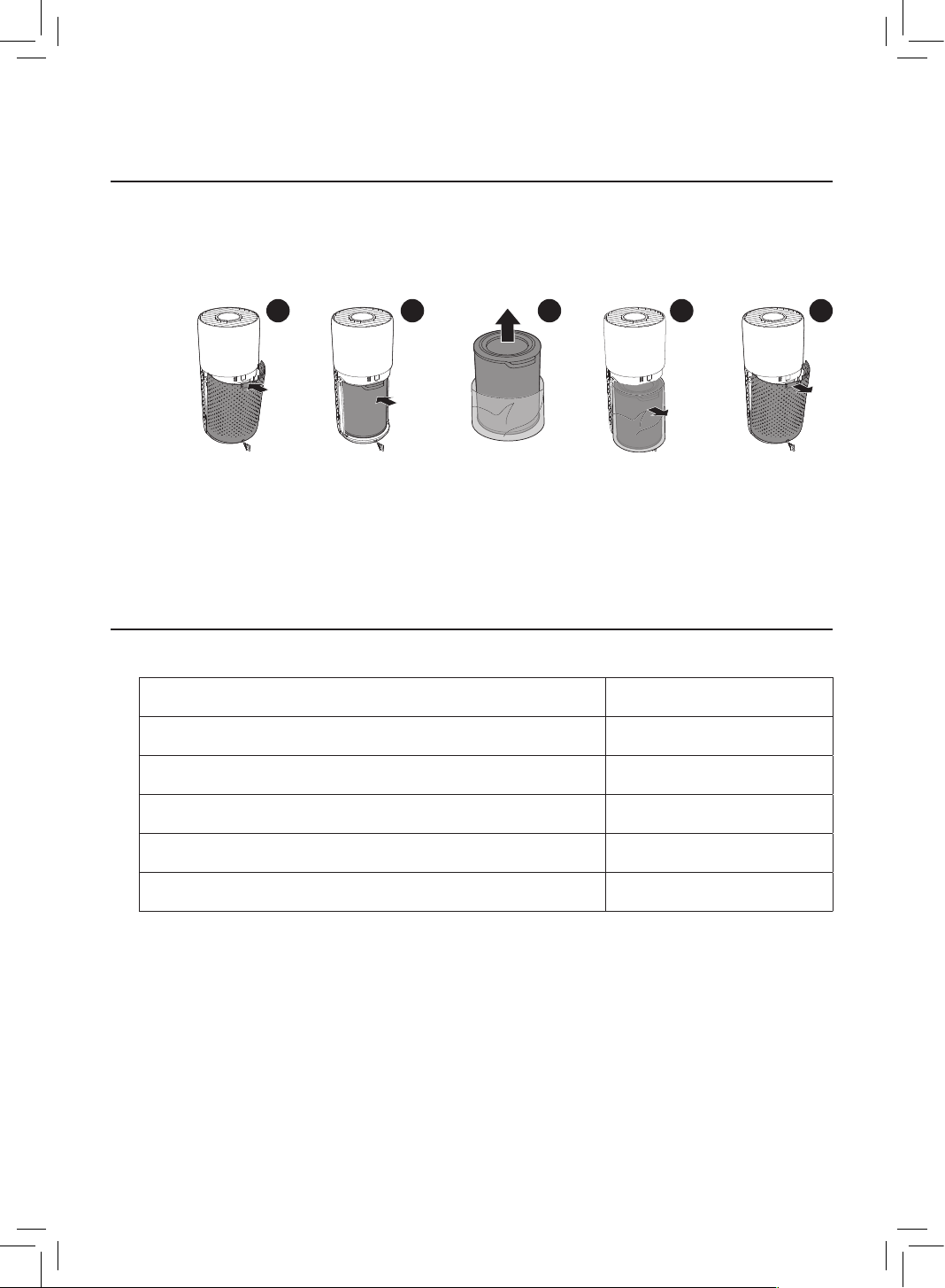
1 2 3 4 5
1 Pull the back cover and remove it from the appliance�
2 Pull the lter from the appliance�
3 Remove all packaging materials of the air purication lter�
4 Put the lter back into the appliance�
5 Reattach the back cover�
Wi-Fi indicator
Wi-Fi icon status Wi-Fi connection status
Blink in orange Connecting to the smartphone
Stable in orange Connected to the smartphone
Blink in white Connecting to the server
Stable in white Connected to the server
O Wi-Fi function disabled
8 EN
Wi-Fi connection
First time connection
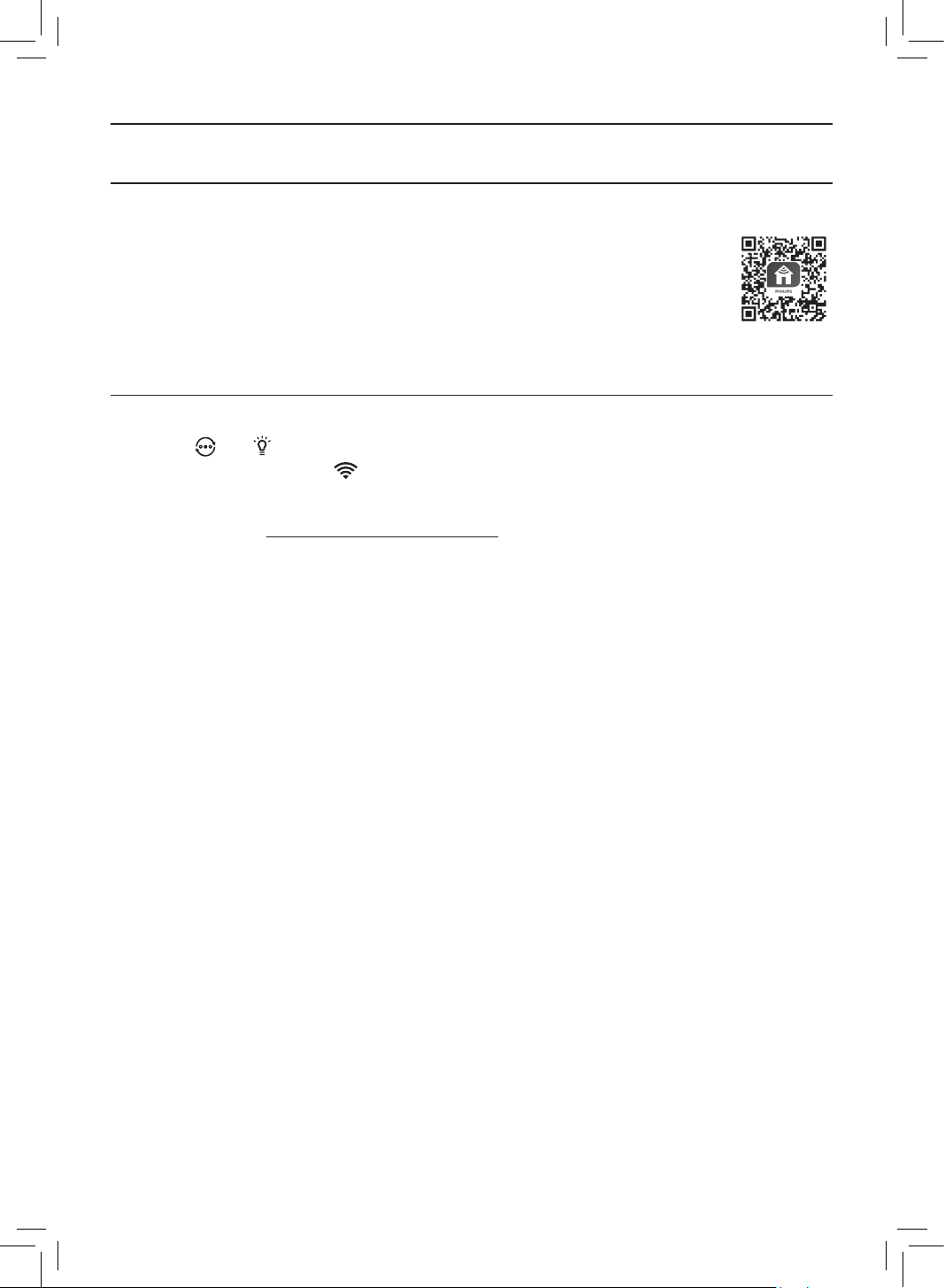
1 Download and install the Philips “Clean Home+” app from the
App Store or Google Play�
2 Connect your smartphone or tablet to your Wi-Fi network�
3 Launch the “Clean Home+” app and click on “Connect a New Device”
or press the “+” button on the top of the screen� Follow the onscreen
instructions to connect the air purier to your network�
Reset the Wi-Fi connection
1 Touch and for 3 seconds until you hear a beep�
» The Wi-Fi indicator blinks orange�
2 Follow the steps 3 in “First time connection” section�
Note: Please check www�philips�com/cleanhome for the latest update of supported
Operation System and devices�
9EN
4 Using the air purifier
Understanding the air quality light
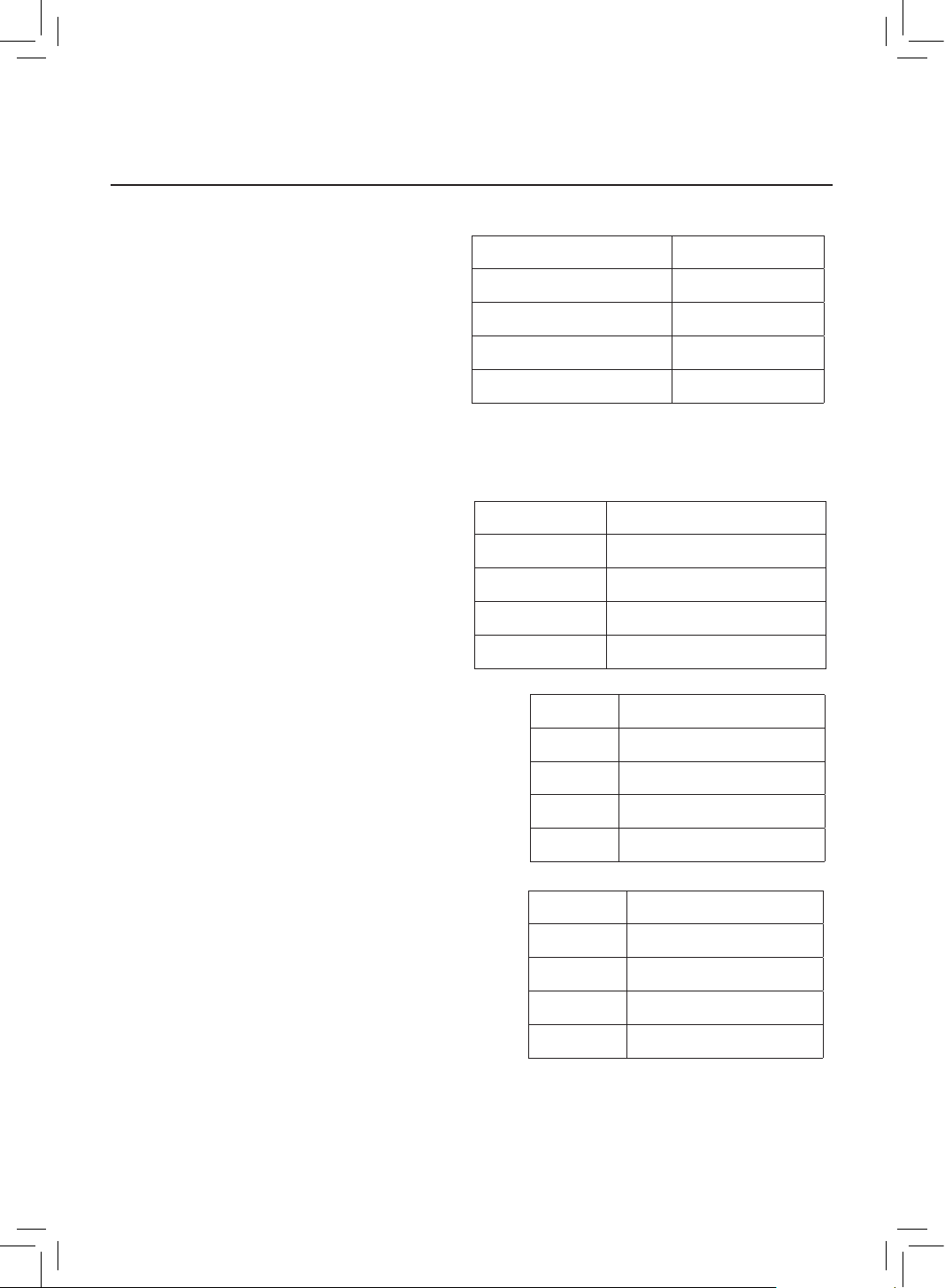
The air quality light automatically goes
on when the air purier is switched on,
and lights up all colors in sequence� After
approximately 30 seconds, the air quality
light becomes stable� The color of the air
quality light is determined by the highest risk
index among PM2�5, IAI and Gas readings�
PM2�5
AeraSense sensing technology accurately detects and quickly responds to even the slightest
particle change in the air� It provides you with reassurance with real-time PM2�5 feedback�
Most of the indoor air pollutants fall under
PM2�5 – which refers to airborne particle
pollutants smaller than 2�5 micrometers�
Common indoor sources of ne particles are
tobacco smoke, cooking, burning candles�
Some airborne bacteria and the smallest
mold spores, pet allergen and dust mite
allergen particles also fall under PM2�5�
IAI
The professional-grade AeraSense sensor detects
the level of indoor air allergen and with numerical
feedback from 1 to 12 the potential risk level of
indoor air allergens can be displayed� 1 indicates
best air quality�
GAS
With an advanced gas sensor, a display ranging from
L1 to L4 shows the level change of potential harmful
gases (incl� VOC, odor, etc�) detected� L1 indicates
best air quality�
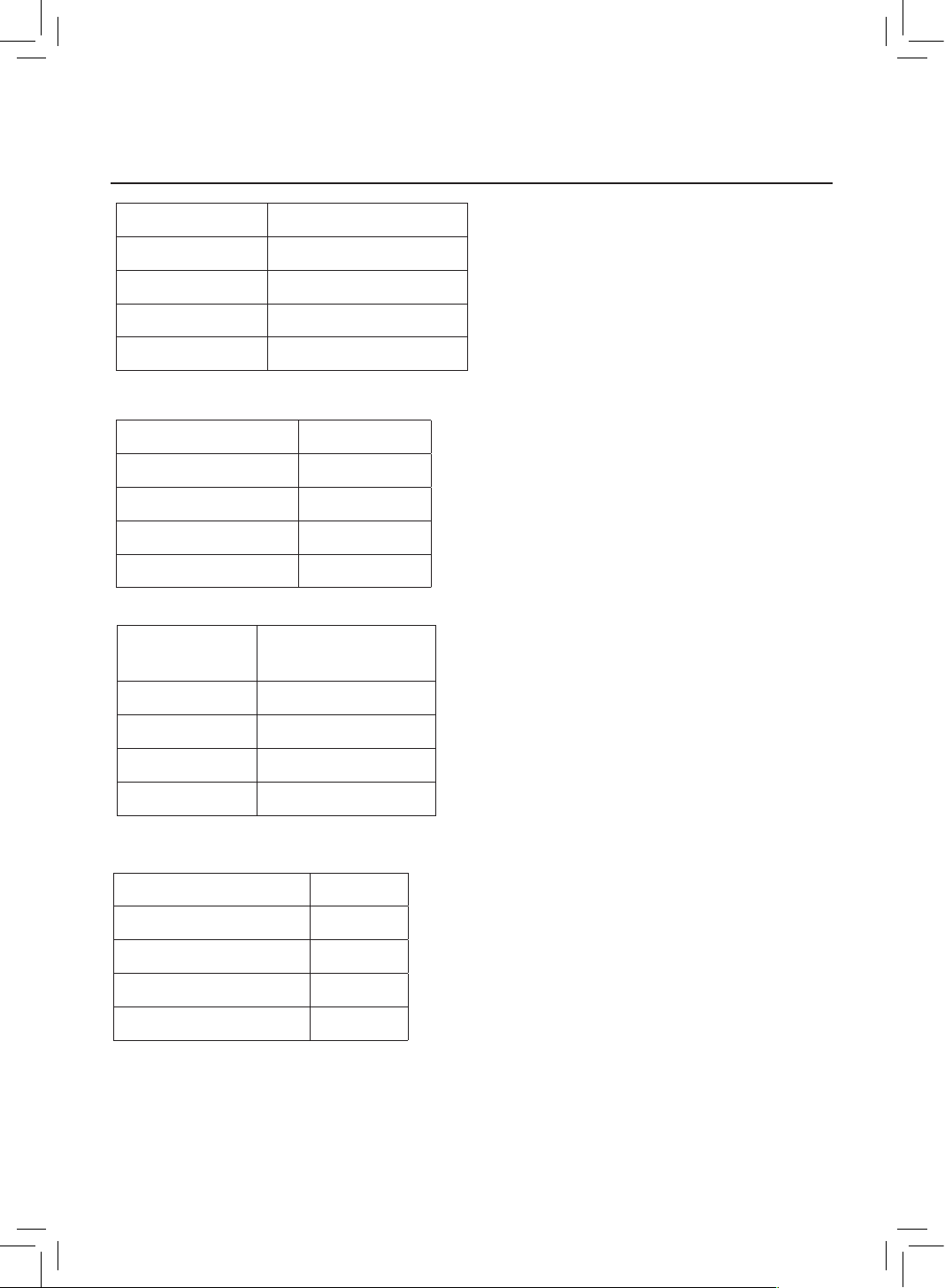
Air quality light color Air quality level
Blue Good
Blue-purple Fair
Purple-red Poor
Red Very poor
PM2�5 level Air quality light color
≤35 Blue
36-75 Blue-purple
76-115 Purple-red
>115 Red
IAI level Air quality light color
1-3 Blue
4-6 Blue-purple
7-9 Purple-red
10-12 Red
Gas level Air quality light color
L1 Blue
L2 Blue-purple
L3 Purple-red
L4 Red
10 EN
Turning on and o
Note:
• For optimum purication performance, close doors and windows�
• Keep curtains away from the air inlet or air outlet�
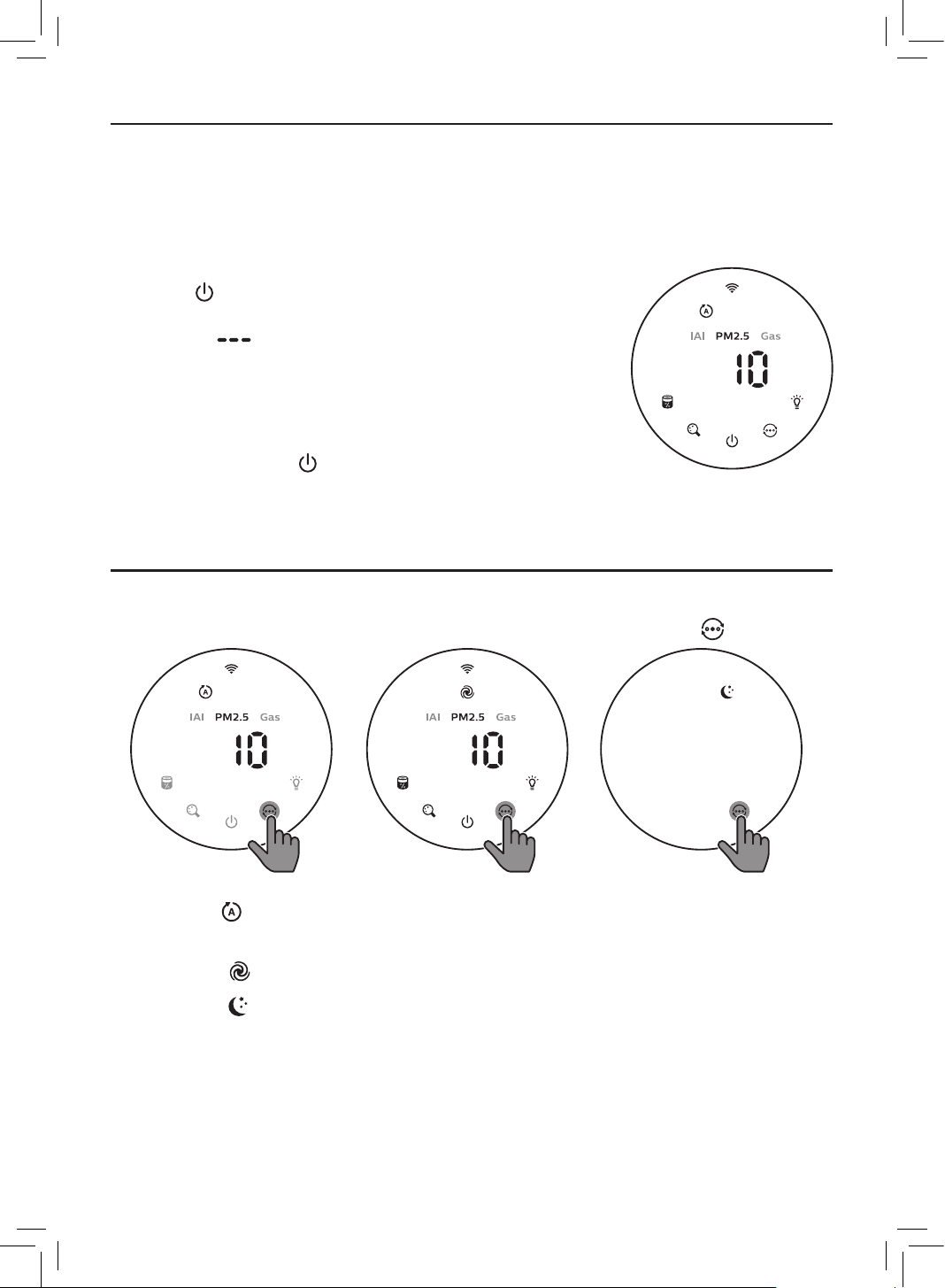
1 Put the plug of the air purier in the power socket�
2 Touch to switch on the air purier�
» The air purier beeps�
» The “ ” displays on the screen during warming up�
Then the air purier shows the PM2�5/IAI/Gas level after
measuring the air quality�
» The air purier operates in the auto mode with PM2�5
displayed on the screen�
3 Touch and hold the button for 3 seconds to switch o the
air purier�
Note: If the air purier stays connected to the electrical outlet after turning OFF, the air
purier will operate under the previous settings when turned ON again�
Changing the mode setting
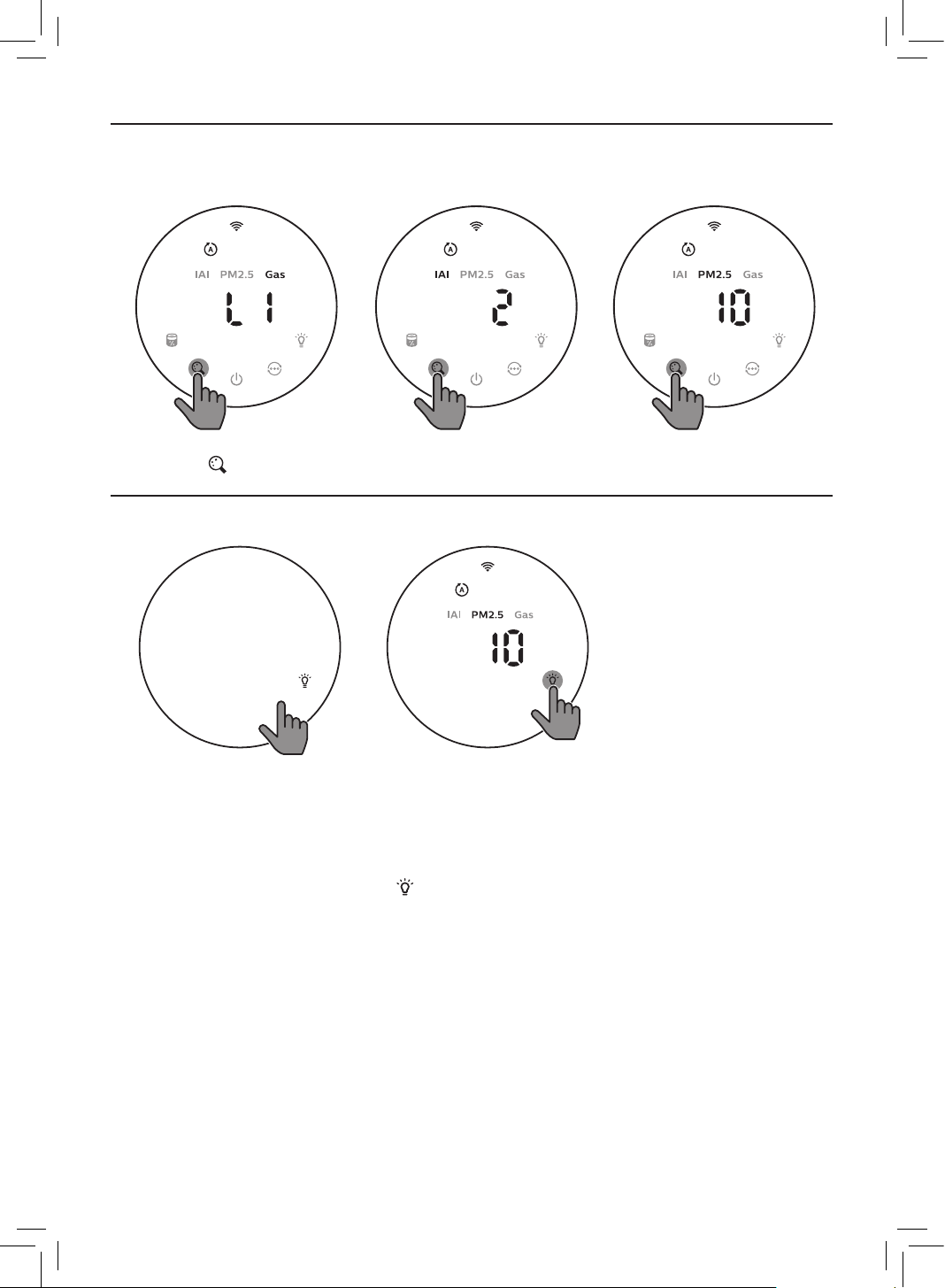
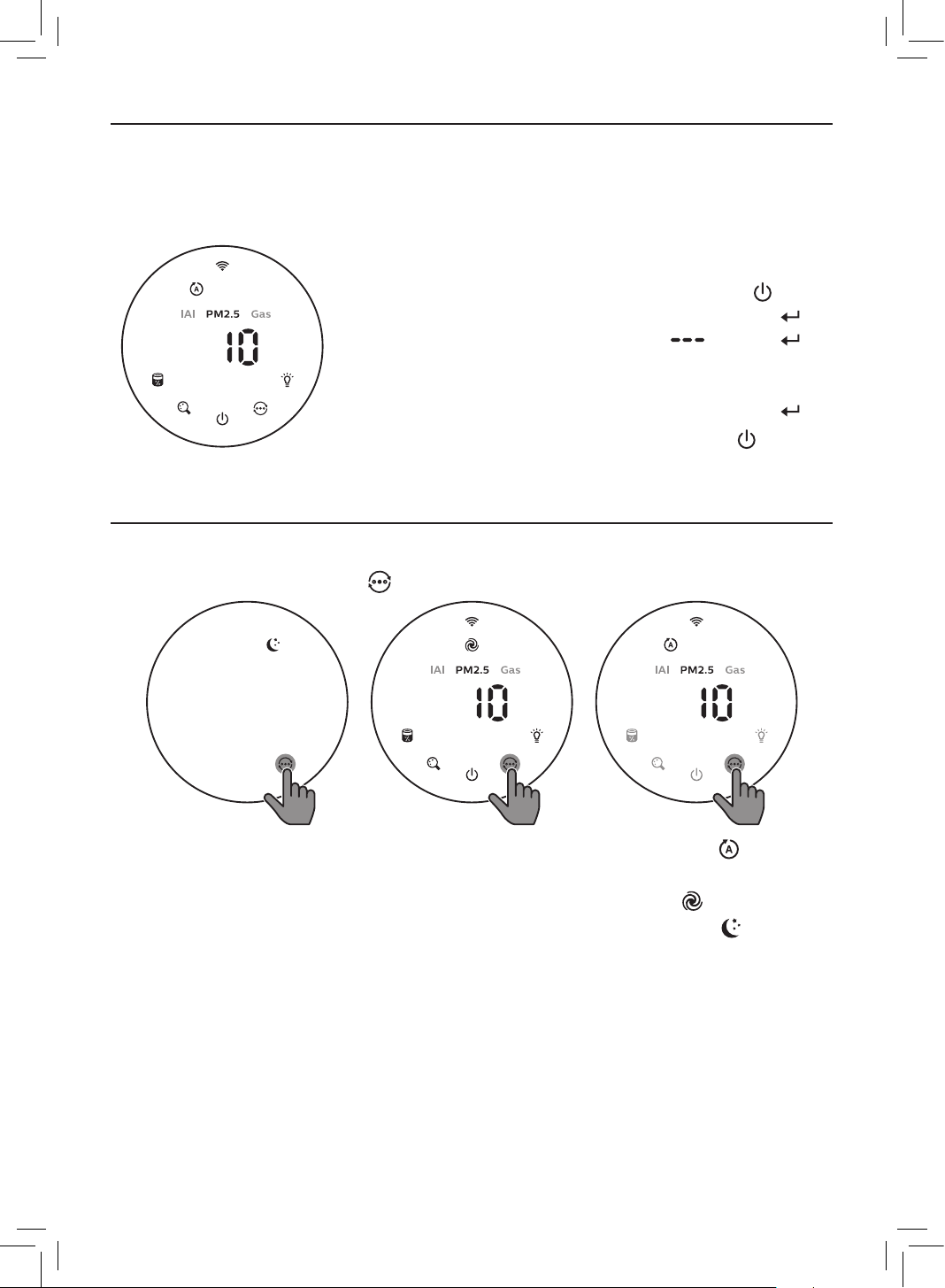
You can choose Auto mode, Turbo mode or the Sleep mode by touching the button�
Auto mode ( ): In Auto mode, the dual-sensor senses the air quality in real-time and the
appliance automatically adjusts the fan speed in accordance with the ambient air quality�
Turbo mode ( ): In Turbo mode, the air purier operates on the highest speed�
Sleep mode ( ): In Sleep mode, the air purier operates quietly at a low speed� After
3 seconds, the screen lights o�
11EN
Switching the display indicator
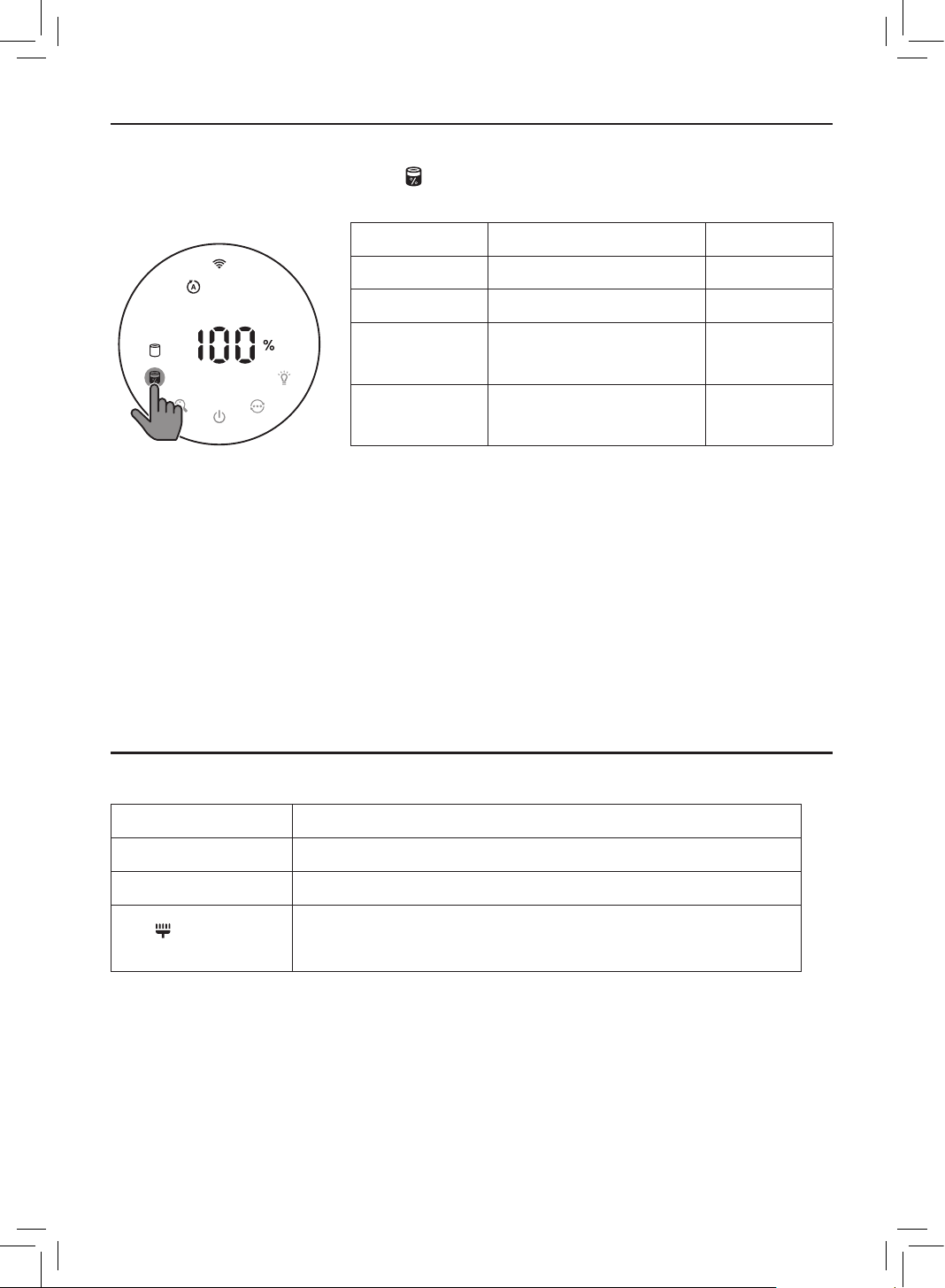
Note: The appliance displays PM2�5 level by default�
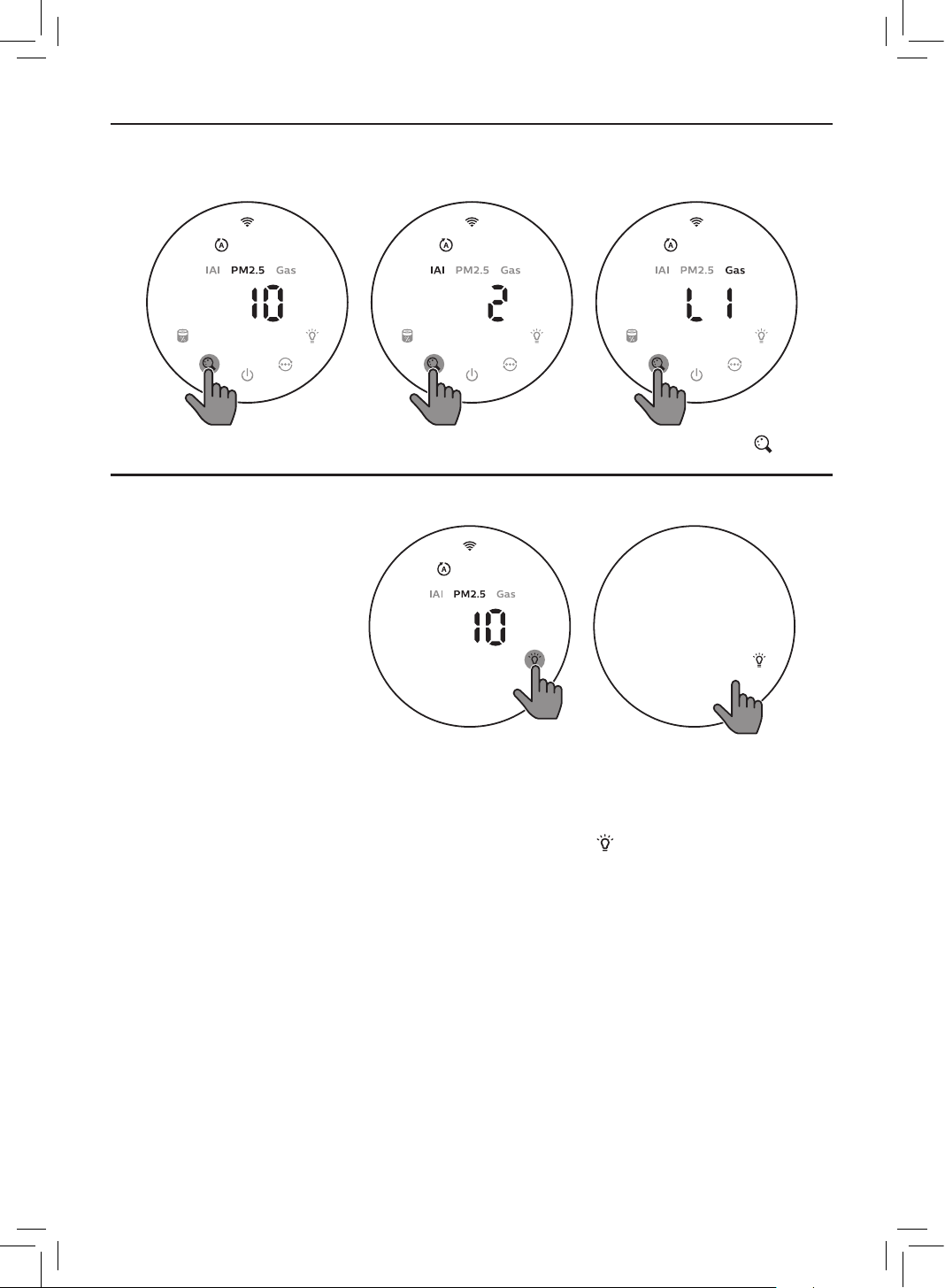
• Touch the button to switch display indicator among PM2�5/Gas/IAI�
Using the light on/o function
With
the light sensor, the control panel can automatically turn on, turn o or dim according to
the ambient light� The control panel will be o or dim when the ambient light is dark� You can
touch any button to wake up all lights� Then, if no further operation, all lights will be o or dim
again to match with the ambient light�
You can touch the light on/o button manually to turn o all lights and the control pa
nel�
Touch any button to wake up all lights�
12 EN
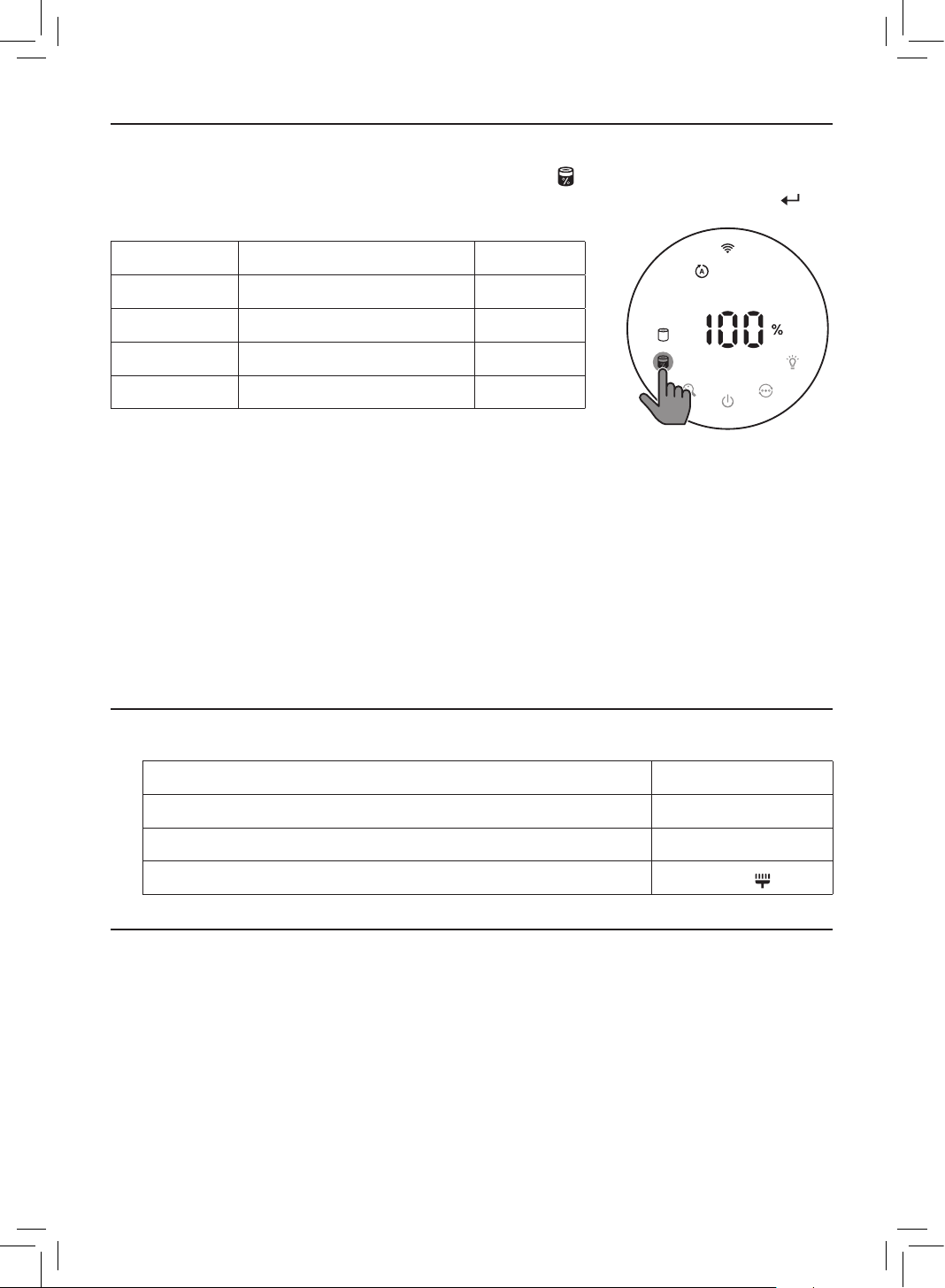
Checking the lter status
• Touch the lter status check/reset button to check the lter service life status�
» The percentage of remaining service life of the lter displays on the screen�
Icon color Filter life indication Display (%)
Blue Optimal service life 16-100
Blue-purple Good service life 9-15
Purple-red
Service life almost
reaches the end
4-8
Red
Service life ends, replace
the lter
0-3
Note: The appliance goes back to normal display if no operations after 3 seconds�
5 Cleaning and maintenance
Note:
• Always unplug the appliance before you clean it�
• Never immerse the appliance in water or any other liquid�
• Never use abrasive, aggressive, or ammable cleaning agents such as bleach or alcohol to
clean any part of the appliance�
• Never use any liquids (including water) to clean the lter�
• Do not attempt to clean the particle sensor and gas sensor with a vacuum cleaner�
Cleaning schedule
Frequency Cleaning method
When necessary Clean the air outlet cover
Every two months Clean the particle sensor with a dry cotton swab
The displays on
the screen�
Clean the surface of the lter
13EN
Cleaning the body of the air purier
Regularly clean the inside and outside of the air purier to prevent dust from collecting�
1 Use a soft, dry cloth to clean both the interior and exterior of the air purier and the air
outlet�
Cleaning the particle sensor
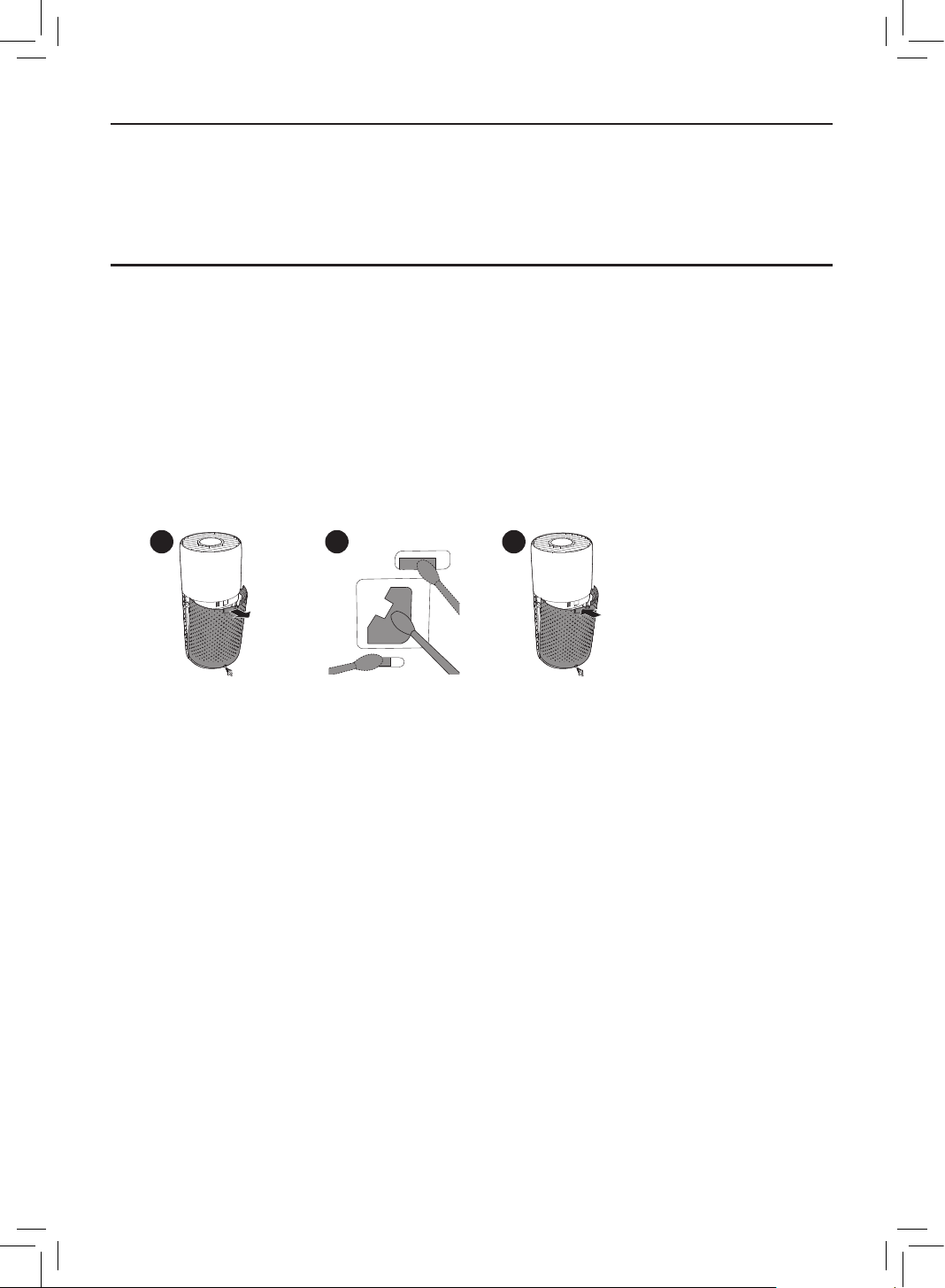
Clean the particle sensor every 2 months for optimal functioning of the appliance�
Note:
• If the air purier is used in a dusty environment, it may need to be cleaned more often�
• If the humidity level in the room is very high, condensation may develop on the particle
sensor and the air quality light may indicate a more poor air quality even though the air
quality is actually good� If this occurs, clean the particle sensor�
• The gas sensor doesn’t need to be cleaned�
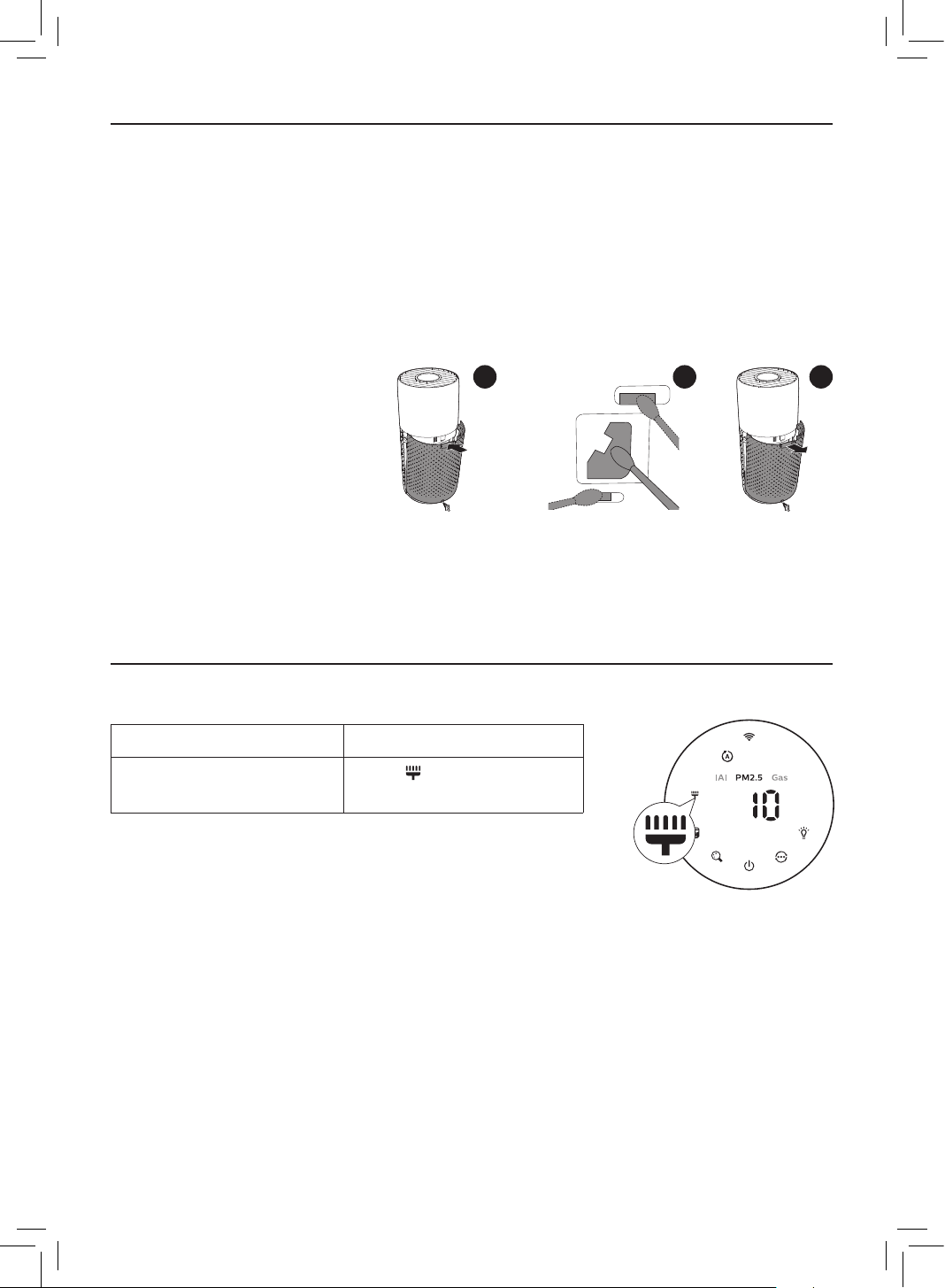
1 Switch o the air purier and unplug from the power socket�
2 3
5
2 Pull the back cover and remove it from the appliance�
3 Clean the particle sensor with a damp cotton swab�
4 Dry all parts thoroughly with a dry cotton swab�
5 Reattach the back cover�
14 EN
Cleaning the surface of the lter
Filter alert light status Action
The lter cleaning alert
displays on the screen
Clean the surface of the
lter with a vacuum cleaner
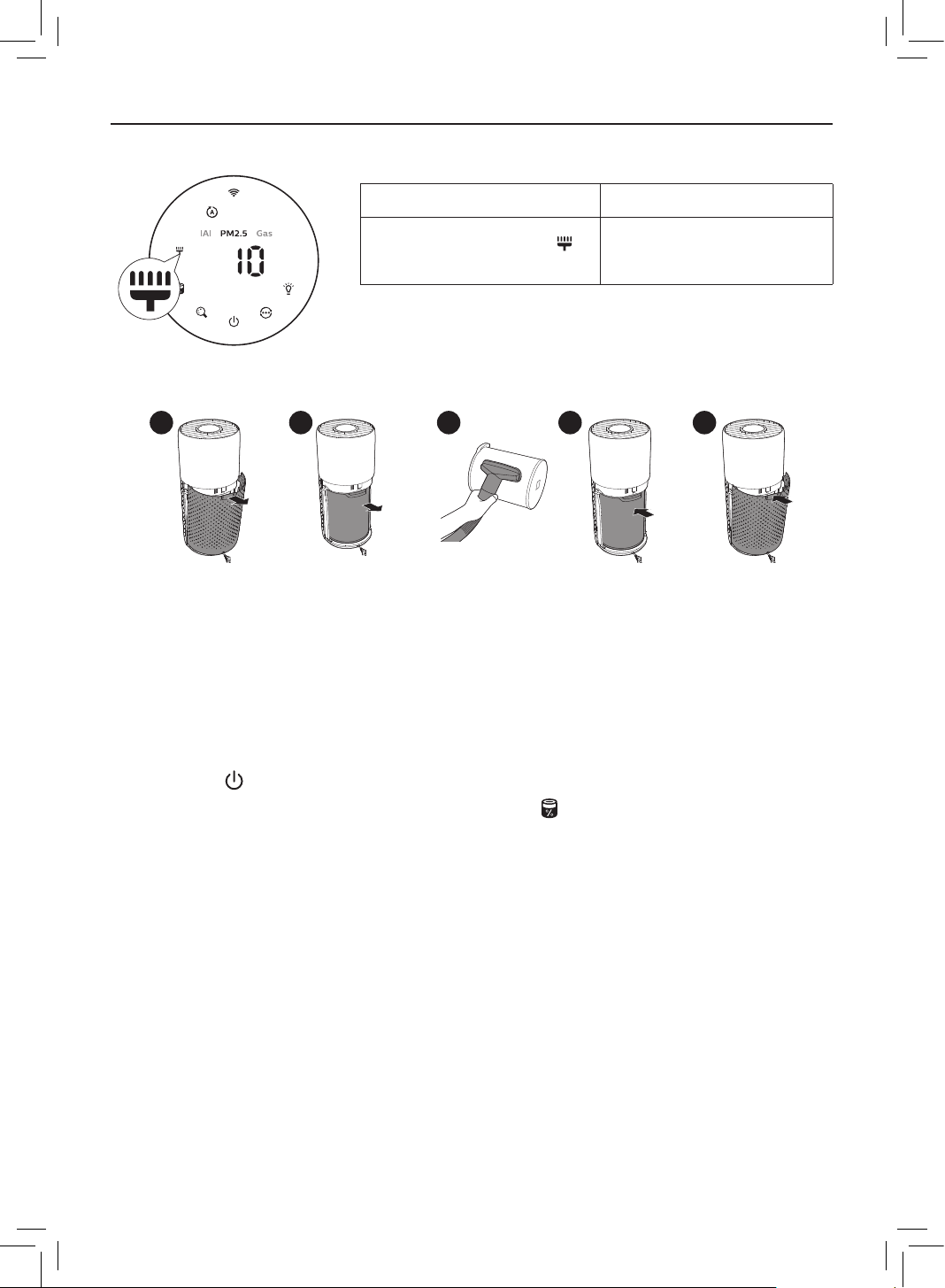
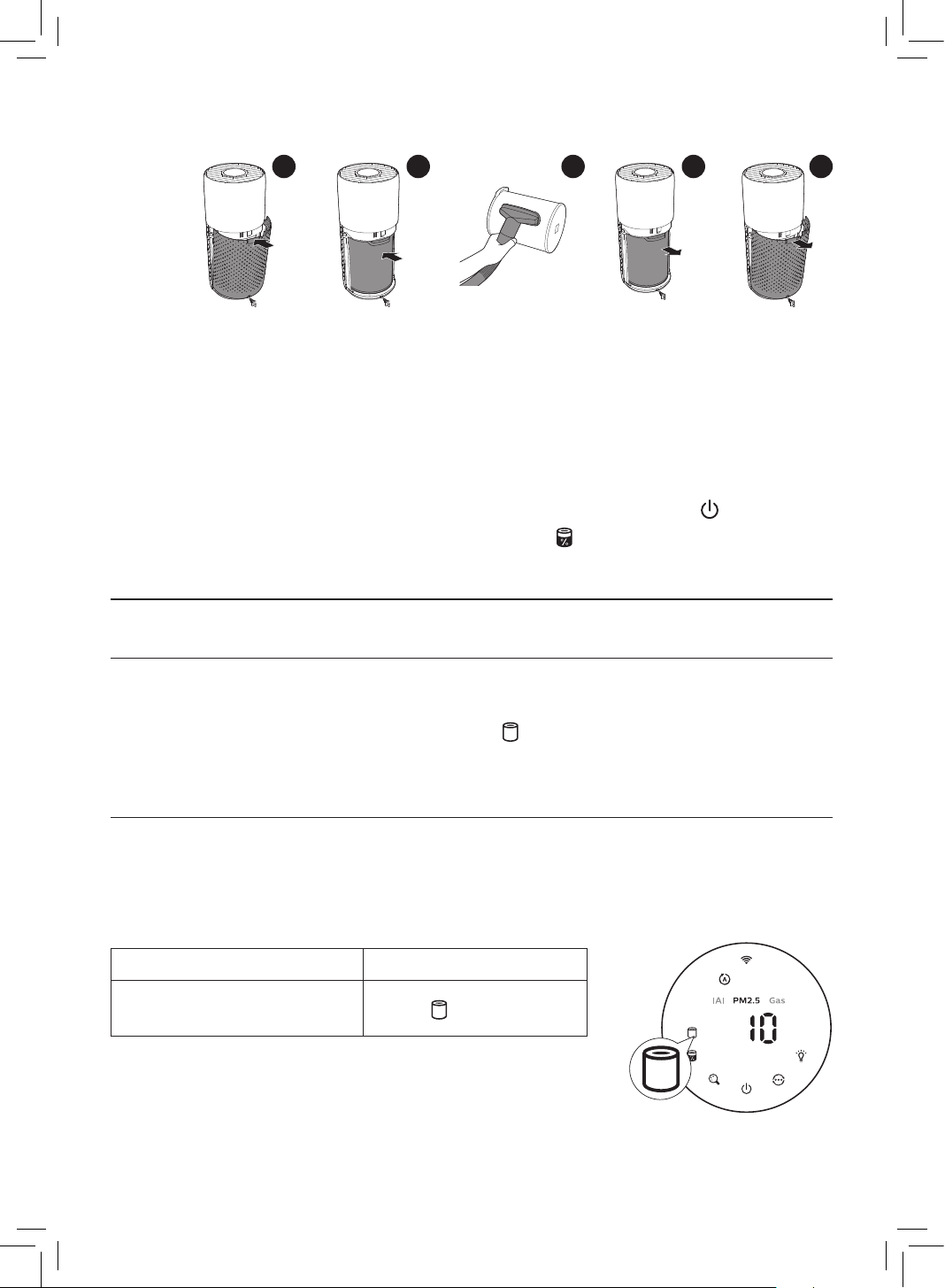
1 Switch o the air purier and unplug from the power socket�
2 3 4 5 6
2 Pull the back cover and remove it from the appliance�
3 Pull the lter from the appliance�
4 Clean the surface of the lter with a vacuum cleaner�
5 Put the lter back into the appliance�
6 Reattach the back cover�
7 Put the plug of the air purier in the power socket�
8 Touch the button to switch on the appliance�
9 Touch and hold the lter status check/reset button for 3 seconds to reset the lter
cleaning time�
10 Wash your hands thoroughly after cleaning the lter�
15EN
Replacing the lter
Understanding the healthy protection lock
This air purier is equipped with a lter replacement indicator to make sure that the air
purication lter is in optimal condition when the air purier is operating� When the lter
need to be replaced, the lter replacement alert lights up red�
If the lter is not replaced in time, the air purier will stop operating and automatically lock to
protect the air quality in the room� Replace the lter as soon as possible�
Replacing the lter
Note:
• The lter is not washable or reusable�
• Always turn o the air purier and unplug from the electrical outlet before replacing the
lters�
Filter alert light status Action
The lter replacement alert
lights up
Replace the NanoProtect
lter Series 3 (FY3430/30)
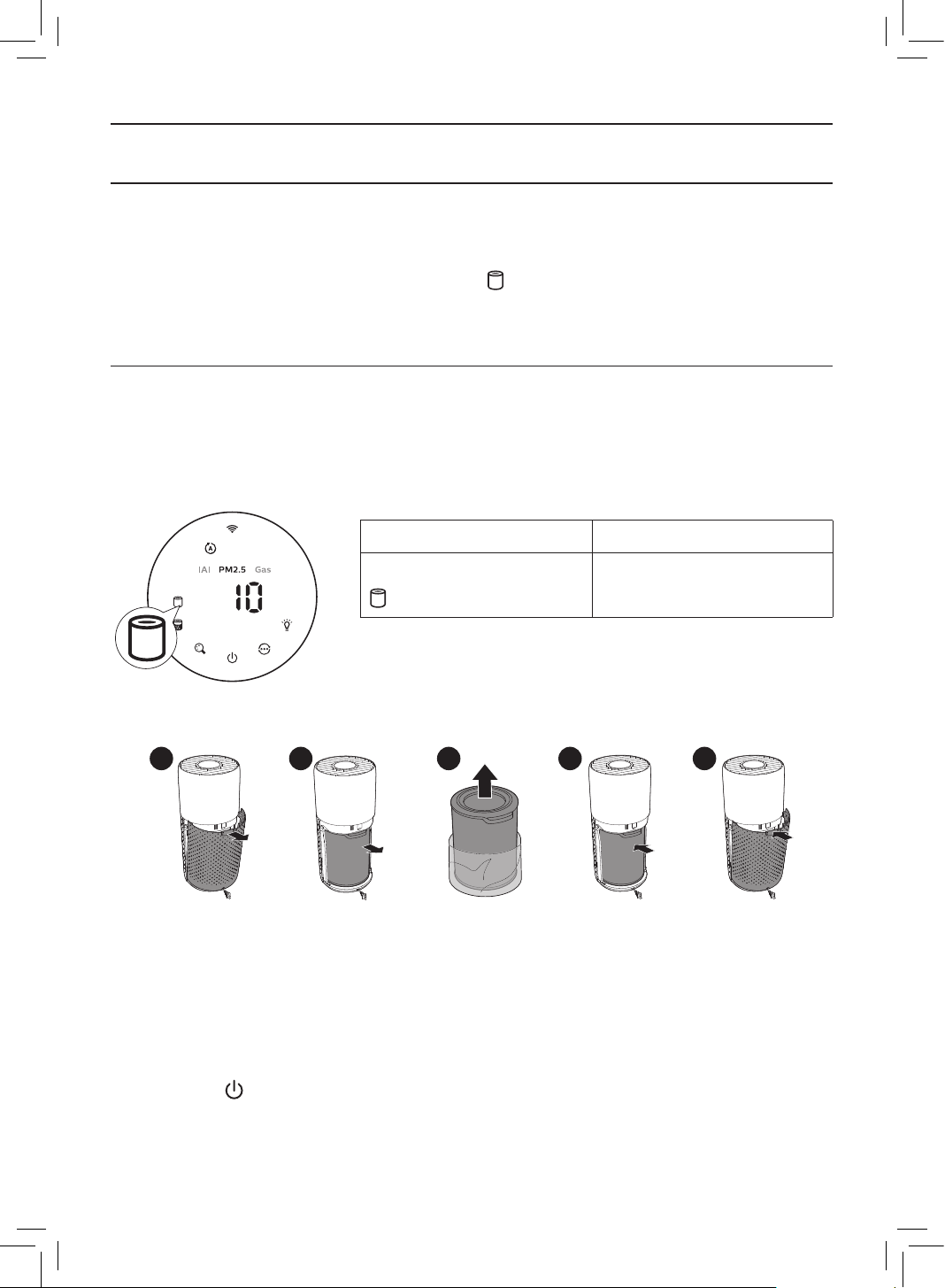
1 Switch o the air purier and unplug from the power socket�
2 3 4 5 6
2 Pull the back cover and remove it from the appliance�
3 Pull the lter from the appliance�
4 Remove all packaging materials of the air purication lter�
5 Put the lter back into the appliance�
6 Reattach the back cover�
7 Put the plug of the air purier in the power socket�
8 Touch the button to switch on the appliance�
16 EN
9 Touch and hold the lter status check/reset button for 3 seconds to reset the lter
lifetime counter�
10 Wash your hands thoroughly after replacing the lter�
Note: Do not smell the lter as it has collected pollutants from the air�
Filter reset
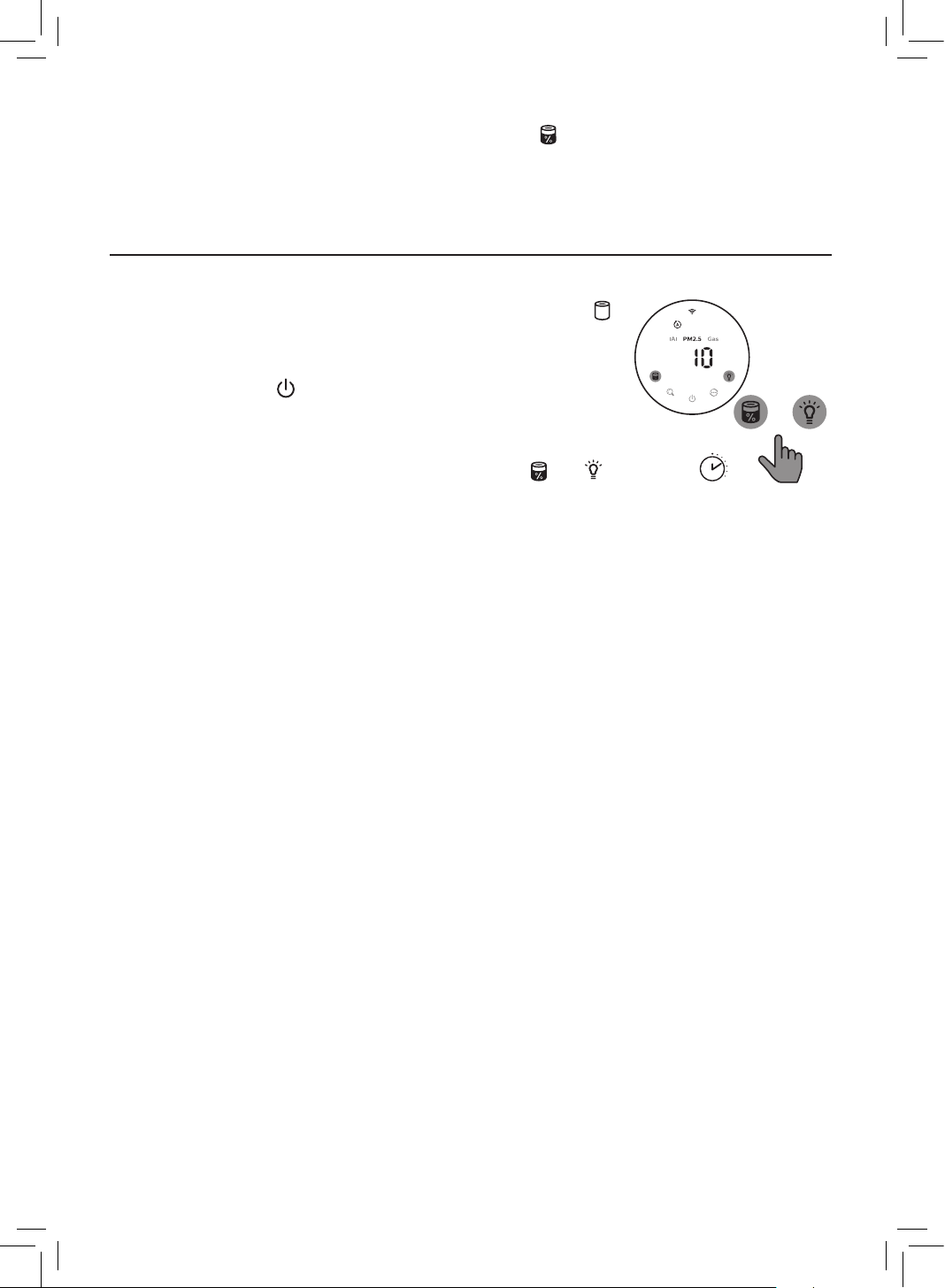
You can replace the lter even before lter replacement alert ( )
displays on the screen� After replacing a lter, you need to reset the
lter lifetime counter manually�
1 Touch the power button for 3 seconds to turn o the
appliance and unplug from power socket�
2 Put the power plug in the power socket�
3 Within 15 seconds after power on, touch and hold and
button for 3 seconds to reset the lter lifetime counter�
6 Storage
1 Turn o the air purier and unplug from the power socket�
2 Clean the air purier, particle sensor and the surface of the lter (see the chapter
“Cleaning and maintenance”)�
3 Let all parts air dry thoroughly before storing�
4 Wrap the lter in air tight plastic bags�
5 Store the air purier, lter in a cool, dry location�
6 Always thoroughly wash hands after handling lters�
3s
+
17EN
7 Troubleshooting
This chapter summarizes the most common problems you could encounter with the
appliance� If you are unable to solve the problem with the information below, contact the
Consumer Care Center in your country�
Problem Possible solution
The appliance does
not work properly�
• The lter replacement alert has been on continuously but you
have not replaced the corresponding lter� As a result, the
appliance is now locked� In this case, replace the lter and long
press to reset the lter lifetime counter�
The airow that
comes out of the air
outlet is signicantly
weaker than before�
• The surface of the lter is dirty� Clean the surface of the lter (see
the chapter “Cleaning and maintenance”)�
The air quality does
not improve, even
though the appliance
has been operating
for a long time�
• Check if the packing material is removed from the lter�
• The lter has not been placed in the appliance� Make sure that
the lter (FY3430/30) is properly installed�
• The particle sensor is wet� The humidity level in your room is high
and causes condensation� Make sure that the particle sensor is
clean and dry (see the chapter “Cleaning and maintenance”)�
• Room size is large or the outdoor air quality is poor�
For optimum purication performance, please close the doors
and windows when operating the air purier�
• There are indoor pollution resources� For instances, smoking,
cooking, incense, perfume or alchohol�
• Filter reaches the end of life� Replace the lter with a new one�
The color of the air
quality light always
stays the same�
• The particle sensor is dirty� Clean the particle sensor (see the
chapter “Cleaning and maintenance”)�
18 EN
Problem Possible solution
The appliance
produces a strange
smell�
• The rst few times you use the appliance, it may produce a plastic
smell� This is normal� However, if the appliance produces a burnt
smell even if removing lters, contact your Philips dealer or an
authorized Philips service center� The lter may produce smell
after being used for a while because of the absorption of indoor
gases� It’s recommended that you reactivate the lter by putting it
in direct sunlight for repeated use� If odor still exists, replace the
lter�
The appliance is extra
loud�
• It's normal if the appliance runs at the Turbo mode�
• In the Auto mode, if the appliance is too loud, maybe the
appliance runs at high speed because air quality becomes worse,
or your personalized setting in App triggers a higher fan speed�
You can choose the Sleep mode, or change the settings in the
App�
• If anything drops into air outlet, it may also cause abnormal loud
sound� Immediate turn o appliance, turn appliance upside down,
to get foreign objectives out of appliance�
• If there is abnormal sound, contact the Consumer Care Center in
your country�
The appliance still
indicates that I need
to replace a lter, but
I already did�
• Perhaps you did not reset the lter lifetime counter� Switch on
the appliance� Then touch and hold the reset button ( ) for
3 seconds�
Error code “E1”
displays on the
screen�
• The motor has malfunctions� Contact the Consumer Care Center in
your country�

19EN
Problem Possible solution
The Wi-Fi setup is
not successful�
• If the router your purier is connected to is dual – band and
currently it is not connecting to a 2�4GHz network, please switch
to another band of the same router (2�4GHz) and try to pair your
purier again� 5GHz networks are not supported�
• Web authentication networks are not supported�
• Check if the purier is within range of the Wi-Fi router� You can try
to locate the air purier closer to the Wi-Fi router�
• Check if the network name is correct� The network name is case-
sensitive�
• Check if the Wi-Fi password is correct� The password is case-
sensitive�
• Retry the setup with the instructions in section “Reset the Wi-Fi
connection”�
• The Wi-Fi connectivity can be interrupted by electromagnetic or other
interferences� Keep the appliance away from other electronic devices
that may cause interferences�
• Check if the mobile device is in airplane mode� Make sure to have
the airplane mode deactivated when connecting to the Wi-Fi
network�
• Consult the help section in the App for extensive and up-to-date
troubleshooting tips�
8 Guarantee and service
If you need information or if you have a problem, please visit the Philips website at
www�philips�com or contact the Philips Consumer Care Center in your country (you can nd
its phone number in the worldwide guarantee leaet)� If there is no Consumer Care Center in
your country, go to your local Philips dealer�
Order parts or accessories
If you have to replace a part or want to purchase an additional part, go to your Philips dealer
or visit www�philips�com/support�
If you have problems obtaining the parts, please contact the Philips Consumer Care Center in
your country (you can nd its phone number in the worldwide guarantee leaet)�
20 AR
ﺔﻠﻜﺸﳌﺍﻞﻤﺘﺤﳌﺍ
ﻞﺤﻟﺍ
ﺏﻮﺟﻭ
ﱃﺇ
ﺸﻳ
ﺯﺎﻬﺠﻟﺍ
ﻝﺍﺰﻳ
ﻻ
ﻦﻣ
ﻢﻏﺮﻟﺍ
ﲆﻋ
،ﱰﻠﻔﻟﺍ
ﻝﺍﺪﺒﺘﺳﺍ
�
ﻪﺘﻟﺪﺒﺘﺳﺍ
ﺪﻗ
ﻲﻨﻧﺃ
• ( )
ﺭﺯ
ﺲﳌﺍ
ﻢﺛ
�
ﺯﺎﻬﺠﻟﺍ
ﻞﻴﻐﺸﺘﺑ
ﻢﻗ
�
ﱰﻠﻔﻟﺍ
ﻙﻼﻬﺘﺳﺍ
ﺓﱰﻓ
ﺩﺍ
ّ
ﺪﻋ
ﻴﻌﺗ
ﺪﻌﺗ
ﻚﻧﺃ
ﻦﻜﻤﳌﺍ
ﻦﻣ
�
ٍ
ﻥﺍﻮﺛ
3
ﺓﺪﳌ
ﺭﺍﺮﻤﺘﺳﺎﺑ
ﲆﻋ
"E1"
ﺄﻄﺨﻟﺍ
ﺰﻣﺭ
ﺽﺮﻋ
ﻢﺘﻳ
�
ﺔﺷﺎﺸﻟﺍ
•�
ﻙﺪﻠﺑ
ﰲ
ﻚﻠﻬﺘﺴﳌﺍ
ﺔﻣﺪﺧ
ﺰﻛﺮ
ﻞﺼﺗﺍ
�
ً
ﻻﺎﻄﻋﺃ
ﻙﺮﺤﳌﺍ
ﻪﺟﺍﻮﻳ
�Wi-Fi
ﺩﺍﺪﻋﺇ
ﺔﻴﻠﻤﻋ
ﺖ
َ
ﻠﺸﻓ
•
ﻕﺎﻄﻨﺑ
ﺔﻜﺒﺸﺑ
ﻞﺼﺘﻣ
ﻏ
ﺎ
ً
ﻴﻟﺎﺣ
ﻮﻫﻭ
ﺝﻭﺩﺰﻣ
ﻕﺎﻄﻧ
ﺍﺫ
ﺀﺍﻮﻬﻟﺍ
ﺔﻴﻘﻨﺗ
ﺯﺎﻬﺟ
ﻪﺑ
ﻞﺼﺘﻳ
ﻱﺬﻟﺍ
ﻪ
ّ
ﺟﻮﳌﺍ
ﻥﺎﻛ
ﺍﺫﺇ
ﻥﺍﺮﻗﺇ
ﻝﻭﺎﺣﻭ
(
ﺰﺗﺮﻫﺎﺠﻴﺟ
2,4
ﻕﺎﻄﻧ
)
ﻪﺴﻔﻧ
ﻪ
ّ
ﺟﻮﳌﺍ
ﲆﻋ
ﺮﺧﺁ
ﻕﺎﻄﻧ
ﱃﺇ
ﻞﻳﺪﺒﺘﻟﺍ
ﻰﺟﻓ
،ﺰﺗﺮﻫﺎﺠﻴﺟ
2,4
�
ﺰﺗﺮﻫﺎﺠﻴﺟ
5
ﻕﺎﻄﻨﺑ
ﺕﺎﻜﺒﺸﻟﺍ
ﻢﻋﺩ
ﻢﺘﻳ
ﻻ
�
ﺍ
ً
ﺩﺪﺠﻣ
ﺀﺍﻮﻬﻟﺍ
ﺔﻴﻘﻨﺗ
ﺯﺎﻬﺟ
•�
ﺐﻳﻮﻟﺍ
ﺔﻗﺩﺎﺼﻣ
ﱃﺇ
ﺝﺎﺘﺤﺗ
ﻲﺘﻟﺍ
ﺕﺎﻜﺒﺸﻟﺍ
ﻢﻋﺩ
ﻢﺘﻳ
ﻻ
•
ﺯﺎﻬﺟ
ﻊﻗﻮﻣ
ﺪﻳﺪﺤﺗ
ﺔﻟﻭﺎﺤﻣ
ﻚﻨﻜ
�Wi-Fi
ﻪ
ّ
ﺟﻮﻣ
ﻕﺎﻄﻧ
ﻦﻤﺿ
ﺀﺍﻮﻬﻟﺍ
ﺔﻴﻘﻨﺗ
ﺯﺎﻬﺟ
ﻥﺎﻛ
ﺍﺫﺇ
ﻣ
ﻖﻘﺤﺗ
�Wi-Fi
ﻪ
ّ
ﺟﻮﻣ
ﻦﻣ
ﺏﺮﻗﻷﺍ
ﺀﺍﻮﻬﻟﺍ
ﺔﻴﻘﻨﺗ
•�
ﻑﺮﺣﻷﺍ
ﺔﻟﺎﺤﻟ
ﺱﺎﺴﺣ
ﺔﻜﺒﺸﻟﺍ
ﻢﺳﺍ
ﻥﺇ
�
ﺎ
ً
ﺤﻴﺤﺻ
ﺔﻜﺒﺸﻟﺍ
ﻢﺳﺍ
ﻥﺎﻛ
ﺍﺫﺇ
ﻣ
ﻖﻘﺤﺗ
•
ﺔﺳﺎﺴﺣ
ﺔﻜﺒﺸﻟﺎﺑ
ﺔﺻﺎﺨﻟﺍ
ﺭﻭﺮﳌﺍ
ﺔﻤﻠﻛ
ﻥﺇ
�
ﺔﺤﻴﺤﺻ
ﺔﻜﺒﺸﻟﺎﺑ
ﺔﺻﺎﺨﻟﺍ
ﺭﻭﺮﳌﺍ
ﺔﻤﻠﻛ
ﺖﻧﺎﻛ
ﺍﺫﺇ
ﻣ
ﻖﻘﺤﺗ
�
ﻑﺮﺣﻷﺍ
ﺔﻟﺎﺤﻟ
•�"Wi-Fi
ﻝﺎﺼﺗﺍ
ﻴﻌﺗ
ﺓﺩﺎﻋﺇ
"
ﻢﺴﻘﻟﺍ
ﰲ
ﺓﺭﻮﻛﺬﳌﺍ
ﺕﺍﺩﺎﺷﺭﻺﻟ
ﺎ
ً
ﻘﻓﻭ
ﺍ
ً
ﺩﺪﺠﻣ
ﺯﺎﻬﺠﻟﺍ
ﺩﺍﺪﻋﺇ
ﻝﻭﺎﺣ
•
ﺀﺎﻘﺑﺇ
ﲆﻋ
ﺹﺮﺣﺍ
�
ﻯﺮﺧﺃ
ﺕﻼﺧﺍﺪﺗ
ﻭﺃ
ﺔﻴﺴﻴﻃﺎﻨﻐﻣﻭﺮﻬﻛ
ﺕﻼﺧﺍﺪﺗ
ﺐﺒﺴﺑ
Wi-Fi
ﻝﺎﺼﺗﺍ
ﻉﺎﻄﻘﻧﺍ
ﻦﻜ
�
ﺕﻼﺧﺍﺪﺗ
ﺐﺒﺴﺗ
ﺪﻗ
ﻲﺘﻟﺍ
ﻯﺮﺧﻷﺍ
ﺔﻴﻧﻭﱰﻜﻟﻹﺍ
ﺓﺰﻬﺟﻷﺍ
ﻦﻋ
ﺍ
ً
ﺪﻴﻌﺑ
ﺯﺎﻬﺠﻟﺍ
•
ﺪﻨﻋ
ﻥﺍﻄﻟﺍ
ﻊﺿﻭ
ﻂﻴﺸﻨﺗ
ﺀﺎﻐﻟﺇ
ﲆﻋ
ﺹﺮﺣﺍ
�
ﻥﺍﻄﻟﺍ
ﻊﺿﻭ
ﰲ
ﻝﻮﻤﺤﳌﺍ
ﺯﺎﻬﺠﻟﺍ
ﻥﺎﻛ
ﺍﺫﺇ
ﻣ
ﻖﻘﺤﺗ
�Wi-Fi
ﺔﻜﺒﺸﺑ
ﻝﺎﺼﺗﻻﺍ
•
ﺀﺎﻄﺧﻷﺍ
ﻑﺎﺸﻜﺘﺳﺍ
ﻝﻮﺣ
ﺔﺛ
ّ
ﺪﺤﻣﻭ
ﺔﻠﻣﺎﺷ
ﺢﺋﺎﺼﻧ
ﲆﻋ
ﻝﻮﺼﺤﻠﻟ
ﻖﻴﺒﻄﺘﻟﺍ
ﰲ
ﺕﻴﻠﻌﺘﻟﺍ
ﻢﺴﻗ
ﻊﺟﺍﺭ
�
ﺎﻬﺣﻼﺻﺇﻭ
ﺔﻣﺪﺨﻟﺍﻭ
ﻥﺎﻤﻀﻟﺍ
8
ﺔﻣﺪﺧ
ﺰﻛﺮ
ﻞﺼﺗﺍ
ﻭﺃ
www�philips�com
ﲆﻋ
ﺐﻳﻭ
ﲆﻋ
Philips
ﻊﻗﻮﻣ
ﺓﺭﺎﻳﺰﺑ
ﻞ
ّ
ﻀﻔﺘﻓ
،ﺔﻠﻜﺸﻣ
ﻚﺘﻬﺟﺍﻭ
ﺍﺫﺇ
ﻭﺃ
ﺕﺎﻣﻮﻠﻌﻣ
ﱃﺇ
ﺖﺠﺘﺣﺍ
ﺍﺫﺇ
ﻚﻠﻬﺘﺴﻤﻠﻟ
ﺔﻣﺪﺧ
ﺰﻛﺮﻣ
ﺩﻮﺟﻭ
ﻡﺪﻋ
ﻝﺎﺣ
ﰲ
�(
ﻲﳌﺎﻌﻟﺍ
ﻥﻀﻟﺍ
ﺐ
ّ
ﻴﺘﻛ
ﰲ
ﻒﺗﺎﻬﻟﺍ
ﻢﻗﺭ
ﲆﻋ
ﺭﻮﺜﻌﻟﺍ
ﻚﻨﻜ
)
ﻙﺪﻠﺑ
ﰲ
Philips
ﺔﻛﴩﻟ
ﻊﺑﺎﺘﻟﺍ
ﻚﻠﻬﺘﺴﳌﺍ
�
ﲇﺤﳌﺍ
Philips
ﺕﺎﺠﺘﻨﻣ
ﻉ
ّ
ﺯﻮﻣ
ﺓﺭﺎﻳﺯ
ﻰﺟﺮﻳ
،ﻙﺪﻠﺑ
ﰲ
ﺕﺎﻘﺤﻠﳌﺍ
ﻭﺃ
ﻊﻄﻘﻟﺍ
ﺐﻠﻃ
ﺓﺭﺎﻳﺰﺑ
ﻞ
ّ
ﻀﻔﺗ
ﻭﺃ
ﻚﻳﺪﻟ
Philips
ﻞﻴﻛﻭ
ﱃﺇ
ﻪ
ّ
ﺟﻮﺘﻓ
،ﺔﻴﻓﺎﺿﺇ
ﺔﻌﻄﻗ
ﺀﺍﴍ
ﰲ
ﺐﻏﺮﺗ
ﺖﻨﻛ
ﺍﺫﺇ
ﻭﺃ
ﺔﻌﻄﻗ
ﻞﻳﺪﺒﺗ
ﱃﺇ
ﺖﺠﺘﺣﺍ
ﺍﺫﺇ
�www�philips�com/support
ﻢﻗﺭ
ﲆﻋ
ﺭﻮﺜﻌﻟﺍ
ﻚﻨﻜ
)
ﻙﺪﻠﺑ
ﰲ
Philips
ﺔﻛﴩﻟ
ﻊﺑﺎﺘﻟﺍ
ﻚﻠﻬﺘﺴﳌﺍ
ﺔﻣﺪﺧ
ﺰﻛﺮ
ﻝﺎﺼﺗﻻﺍ
ﻰﺟﺮ
ُ
ﻳ
،ﻊﻄﻘﻟﺍ
ﲆﻋ
ﻝﻮﺼﺤﻟﺍ
ﰲ
ﺔﺑﻮﻌﺻ
ﺪﺠﺗ
ﺖﻨﻛ
ﺍﺫﺇ
�(
ﺔﻴﳌﺎﻌﻟﺍ
ﻥﻀﻟﺍ
ﺓﴩﻧ
ﰲ
ﻒﺗﺎﻬﻟﺍ
21AR
ﺎﻬﺣﻼﺻﺇﻭ
ﺀﺎﻄﺧﻷﺍ
ﻑﺎﺸﻜﺘﺳﺍ
7
ﻚﻨﻜﻤﻴﻓ
،ﻚﺘﻠﻜﺸﻣ
ﻞﺣ
ﲆﻋ
ﺔﻴﻟﺎﺘﻟﺍ
ﺕﺎﻣﻮﻠﻌﳌﺍ
ﻙﺪﻋﺎﺴﺗ
ﺍﺫﺇ
�
ﺯﺎﻬﺠﻟﺍ
ﻡﺍﺪﺨﺘﺳﺍ
ﺪﻨﻋ
ﺎﻬﻨﻴﻓﺩﺎﺼﺗ
ﺪﻗ
ﻲﺘﻟﺍ
ً
ﺎﻋﻮﻴﺷ
ﻛﻷﺍ
ﻞﻛﺎﺸﳌﺍ
ﻞﺼﻔﻟﺍ
ﺍﺬﻫ
ﺺ
ّ
ﺨﻠﻳ
�
ﻙﺪﻠﺑ
ﰲ
ﻚﻠﻬﺘﺴﳌﺍ
ﺔﻣﺪﺧ
ﺰﻛﺮ
ﻝﺎﺼﺗﻻﺍ
ﺔﻠﻜﺸﳌﺍﻞﻤﺘﺤﳌﺍ
ﻞﺤﻟﺍ
�
ﺐﺠﻳ
ﻛ
ﺯﺎﻬﺠﻟﺍ
ﻞﻤﻌﻳ
ﻻ
•
ﰲ
�
ﺯﺎﻬﺠﻟﺍ
ﻝﺎﻔﻗﺃ
ﻢﺗ
،ﻚﻟﺬﻟ
ﺔﺠﻴﺘﻧ
�
ﺐﺳﺎﻨﳌﺍ
ﱰﻠﻔﻟﺍ
ﻝﺪﺒﺘﺴﺗ
ﻚﻨﻜﻟﻭ
ً
ﺀﺎﻀﻣ
ﱰﻠﻔﻟﺍ
ﻝﺍﺪﺒﺘﺳﺍ
ﺀﻮﺿ
ﻲﻘﺑ
�
ﱰﻠﻔﻟﺍ
ﻙﻼﻬﺘﺳﺍ
ﺓﱰﻓ
ﺩﺍﺪﻋ
ﻴﻌﺗ
ﺓﺩﺎﻋﻹ
ﲆﻋ
ً
ﻻ
ّ
ﻮﻄﻣ
ﻂﻐﺿﺍﻭ
ﱰﻠﻔﻟﺍ
ﻝﺪﺒﺘﺳﺍ
،ﺔﻟﺎﺤﻟﺍ
ﻩﺬﻫ
ﺝﺮﺨﻣ
ﻦﻣ
ﺀﺍﻮﻬﻟﺍ
ﺏﺎﻴﺴﻧﺍ
ﻥﺇ
ﻪﻴﻠﻋ
ﻥﺎﻛ
ﻣ
ﺜﻜﺑ
ﻒﻌﺿﺃ
ﺀﺍﻮﻬﻟﺍ
�
ﻖﺑﺎﺴﻟﺍ
ﰲ
•�("
ﺔﻧﺎﻴﺼﻟﺍﻭ
ﻒﻴﻈﻨﺘﻟﺍ
"
ﻞﺼﻓ
ﻊﺟﺍﺭ
)
ﱰﻠﻔﻟﺍ
ﺢﻄﺳ
ﻒ
ّ
ﻈﻧ
�
ﺦﺴ
ّ
ﺘﻣ
ﱰﻠﻔﻟﺍ
ﺢﻄﺳ
ﺓﺩﻮﺟ
ﰲ
ﻦ
ّ
ﺴﺤﺗ
ﻱﺃ
ﻙﺎﻨﻫ
ﺲﻴﻟ
ﺯﺎﻬﺠﻟﺍ
ﻥﺃ
ﻦﻣ
ﻢﻏﺮﻟﺍ
ﲆﻋ
ﺀﺍﻮﻬﻟﺍ
�
ﺔﻠﻳﻮﻃ
ﺓﱰﻓ
ﺬﻨﻣ
ﻞﻤﻌﻳ
•�
ﱰﻠﻔﻟﺍ
ﻦﻋ
ﻒﻴﻠﻐﺘﻟﺍ
ﺩﺍﻮﻣ
ﺔﻟﺍﺯﺇ
ﺖ
ﺍﺫﺇ
ﻣ
ﻖﻘﺤﺗ
•�
ﺢﻴﺤﺻ
ﻞﻜﺸﺑ
ﺐ
ّ
ﻛﺮﻣ
(FY3430/30)
ﱰﻠﻔﻟﺍ
ﻥﺃ
ﻦﻣ
ﺪﻛﺄﺗ
�
ﺯﺎﻬﺠﻟﺍ
ﰲ
ﱰﻠﻔﻟﺍ
ﻊﺿﻭ
ﻢﺘﻳ
•
ﻦﻣ
ﺪﻛﺄﺗ
�
ﻩﺎﻴﳌﺍ
ﻒﺛﺎﻜﺘﺑ
ﺐ
ّ
ﺒﺴﺘﻳ
ﺎﻣ
،ﺍ
ً
ﺪﺟ
ٍ
ﻝﺎﻋ
ﻚﺘﻓﺮﻏ
ﰲ
ﺔﺑﻮﻃﺮﻟﺍ
ﻯﻮﺘﺴﻣ
ﻥﺇ
�
ﺐﻃﺭ
ﺕﻴﺴﺠﻟﺍ
ﺮﻌﺸﺘﺴﻣ
�("
ﺔﻧﺎﻴﺼﻟﺍﻭ
ﻒﻴﻈﻨﺘﻟﺍ
"
ﻞﺼﻓ
ﻊﺟﺍﺭ
)
ﻑﺎﺟﻭ
ﻒﻴﻈﻧ
ﺕﻴﺴﺠﻟﺍ
ﺮﻌﺸﺘﺴﻣ
ﻥﺃ
• �
ﺔﺌﻳﺩﺭ
ﺝﺭﺎﺨﻟﺍ
ﰲ
ﺀﺍﻮﻬﻟﺍ
ﺓﺩﻮﺟ
ﻭﺃ
ﺔﻌﺳﺍﻭ
ﺔﻓﺮﻐﻟﺍ
ﺔﺣﺎﺴﻣ
�
ﺀﺍﻮﻬﻟﺍ
ﺔﻴﻘﻨﺗ
ﺯﺎﻬﺟ
ﻞﻴﻐﺸﺗ
ﺀﺎﻨﺛﺃ
ﺬﻓﺍﻮﻨﻟﺍﻭ
ﺏﺍﻮﺑﻷﺍ
ﻕﻼﻏﺇ
ﻰﺟﺮ
ُ
ﻳ
،ﺔﻴﻘﻨﺘﻟﺍ
ﺕﺎﺟﺭﺩ
ﴡﻗﺃ
ﻦﻣ
ﺓﺩﺎﻔﺘﺳﻼﻟ
•�
ﻝﻮﺤﻜﻟﺍ
ﻭﺃ
ﺭﻮﻄﻌﻟﺍ
ﻭﺃ
،ﺭﻮﺨﺒﻟﺍ
ﻭﺃ
ﻮﻬﻄﻟﺍ
ﻭﺃ
ﺧﺪﺘﻟﺍ
ﻞﺜﻣ
�
ﺙ
ّ
ﻮﻠﺗ
ﺭﺩﺎﺼﻣ
ﲆﻋ
ﺔﻴﻠﺧﺍﺪﻟﺍ
ﻦﻛﺎﻣﻷﺍ
ﻱﻮﺘﺤﺗ
•�
ﺪﻳﺪﺟ
ﺮﺧﺂﺑ
ﱰﻠﻔﻟﺍ
ﻝﺪﺒﺘﺳﺍ
�
ﻪﺘﻴﺣﻼﺻ
ﺔﻳﺎﻬﻧ
ﱰﻠﻔﻟﺍ
ﻎﻠﺑ
ﻮﻫ
ﺀﺍﻮﻬﻟﺍ
ﺓﺩﻮﺟ
ﺀﻮﺿ
ﻥﻮﻟ
ﻥﺇ
�
ﻪﺴﻔﻧ
ﺎ
ً
ﺍﺩ
•�("
ﺔﻧﺎﻴﺼﻟﺍﻭ
ﻒﻴﻈﻨﺘﻟﺍ
"
ﻞﺼﻓ
ﻊﺟﺍﺭ
)
ﺕﻴﺴﺠﻟﺍ
ﺮﻌﺸﺘﺴﻣ
ﻒ
ّ
ﻈﻧ
�
ﺦﺴ
ّ
ﺘﻣ
ﺕﻴﺴﺠﻟﺍ
ﺮﻌﺸﺘﺴﻣ
�
ﺯﺎﻬﺠﻟﺍ
ﻦﻣ
ﺔﺒﻳﺮﻏ
ﺔﺤﺋﺍﺭ
ﺚﻌﺒﻨﺗ
•
ﻝﺎﺣ
ﰲ
ﻦﻜﻟﻭ
�
ﻲﻌﻴﺒﻃ
ﺮﻣﺃ
ﺍﺬﻫ
�
ﻪﻣﺍﺪﺨﺘﺳﻻ
ﱃﻭﻷﺍ
ﺕﺍﺮﳌﺍ
ﰲ
ﺯﺎﻬﺠﻟﺍ
ﻦﻣ
ﻚﻴﺘﺳﻼﺑ
ﺔﺤﺋﺍﺭ
ﺚﻌﺒﻨﺗ
ﺪﻗ
ﺪﻤﺘﻌﻣ
ﺔﻣﺪﺧ
ﺰﻛﺮﻣ
ﻭﺃ
Philips
ﻞﻴﻛﻮﺑ
ﻞﺼﺗﺎﻓ
،ﺮﺗﻼﻔﻟﺍ
ﺔﻟﺍﺯﺇ
ﺪﻌﺑ
ﻰﺘﺣ
ﺯﺎﻬﺠﻟﺍ
ﻦﻣ
ﻖﻳﺮﺣ
ﺔﺤﺋﺍﺭ
ﺖﺜﻌﺒﻧﺍ
ﺕﺍﺯﺎﻐﻟﺍ
ﺹﺎﺼﺘﻣﺍ
ﺐﺒﺴﺑ
ﺓﺩﺪﺤﻣ
ﺓﱰﻔﻟ
ﻪﻣﺍﺪﺨﺘﺳﺍ
ﺪﻌﺑ
ﱰﻠﻔﻟﺍ
ﻦﻣ
ﺔﺤﺋﺍﺭ
ﺭﺪﺼﺗ
ﺪﻗ
�Philips
ﻦﻣ
�
ﺭﺮﻜﺘﳌﺍ
ﻡﺍﺪﺨﺘﺳﻼﻟ
ﺓﴍﺎﺒﳌﺍ
ﺲﻤﺸﻟﺍ
ﺔﻌﺷﺃ
ﺖﺤﺗ
ﻪﻌﺿﻭ
ﻝﻼﺧ
ﻦﻣ
ﱰﻠﻔﻟﺍ
ﻂﻴﺸﻨﺗ
ﺓﺩﺎﻋﺈﺑ
ﴅﻮﻳ
�
ﺔﻴﻠﺧﺍﺪﻟﺍ
�
ﱰﻠﻔﻟﺍ
ﻞﺒﺘﺳﺎﻓ
،ﺔﺤﺋﺍﺮﻟﺍ
ﺖﻴﻘﺑ
ﺍﺫﺇ
�
ﺎ
ً
ﻳﻮﻗ
ﺎ
ً
ﺗﻮﺻ
ﺯﺎﻬﺠﻟﺍ
ﺭﺪﺼﻳ
•�
ﻯﻮﺼﻘﻟﺍ
ﺔﻋﴪﻟﺍ
ﻊﺿﻮﺑ
ﻞﻤﻌﻳ
ﺯﺎﻬﺠﻟﺍ
ﻥﺎﻛ
ﻥﺇ
ﺎ
ً
ﻴﻌﻴﺒﻃ
ﺕﻮﺼﻟﺍ
ﻥﻮﻜﻳ
•
ﺔﻴﻟﺎﻋ
ﺔﻋﴎ
ﲆﻋ
ﺯﺎﻬﺠﻟﺍ
ﻞﻴﻐﺸﺘﻟ
ﻚﻟﺫ
ﺩﻮﻌﻳ
ﺪﻘﻓ
،ﺎﻘﻠﺘﻟﺍ
ﻊﺿﻮﻟﺍ
ﰲ
ﺍ
ً
ﺪﺟ
ﺎ
ً
ﻴﻟﺎﻋ
ﺯﺎﻬﺠﻟﺍ
ﺕﻮﺻ
ﻥﺎﻛ
ﻝﺎﺣ
ﰲ
ﻞﻴﻐﺸﺘﺑ
ﺐﺒﺴﺗ
ﻖﻴﺒﻄﺘﻟﺍ
ﰲ
ﺺﺼﺨﳌﺍ
ﺩﺍﺪﻋﻹﺍ
ﻥﻷ
ﺎﺭ
ﻭﺃ
،ﺔﻴﻓﺎﺿﺇ
ﺓﺭﻮﺼﺑ
ﺀﺍﻮﻬﻟﺍ
ﺓﺩﻮﺟ
ﺭﻮﻫﺪﺗ
ﺐﺒﺴﺑ
�
ﻖﻴﺒﻄﺘﻟﺍ
ﰲ
ﺕﺍﺩﺍﺪﻋﻹﺍ
ﻴﻐﺗ
ﻭﺃ
ﻥﻮﻜﺴﻟﺍ
ﻊﺿﻭ
ﺭﺎﻴﺘﺧﺍ
ﻚﻨﻜ
�
ﲆﻋﺃ
ﺔﻋﴎ
ﲆﻋ
ﺔﺣﻭﺮﳌﺍ
•
ﻒﻗﻭﺃ
�
ﺐﻳﺮﻏﻭ
ٍ
ﻝﺎﻋ
ﺕﻮﺻ
ﺭﺍﺪﺻﺇ
ﱃﺇ
ﺎ
ً
ﻀﻳﺃ
ﻚﻟﺫ
ﻱ
ّ
ﺩﺆﻳ
ﺪﻗ
،ﺀﺍﻮﻬﻟﺍ
ﺝﺮﺨﻣ
ﰲ
ﺽﺮﻏ
ﻱﺃ
ﻁﻮﻘﺳ
ﻝﺎﺣ
ﰲ
�
ﻪﻨﻣ
ﺐﻳﺮﻏ
ﺽﺮﻏ
ﻱﺃ
ﺔﻟﺍﺯﻹ
ﺐﻘﻋ
ﲆﻋ
ﺎ
ً
ﺳﺃﺭ
ﻪﺒﻠﻗﺍﻭ
ﺭﻮﻔﻟﺍ
ﲆﻋ
ﺯﺎﻬﺠﻟﺍ
ﻞﻴﻐﺸﺗ
•�
ﻙﺪﻠﺑ
ﰲ
ﻚﻠﻬﺘﺴﳌﺍ
ﺔﻣﺪﺧ
ﺰﻛﺮ
ﻞﺼﺗﺍ
،ﺐﻳﺮﻏ
ﺕﻮﺻ
ﻉﺳ
ﻝﺎﺣ
ﰲ
22 AR
1
�
ﺔﻗﺎﻄﻟﺍ
ﺬﺧﺄ ﻣ
ﻦﻋ
ﻪﻠﺼﻓﺍﻭ
ﺀﺍﻮﻬﻟﺍ
ﺔﻴﻘﻨﺗ
ﺯﺎﻬﺟ
ﻞﻴﻐﺸﺗ
ﻒﻗﻭﺃ
23456
2
�
ﺯﺎﻬﺠﻟﺍ
ﻦﻣ
ﻪﺟﺮﺧﺃﻭ
ﺔﻴﻔﻠﺨﻟﺍ
ﺔﻬﺠﻟﺍ
ﺀﺎﻄﻏ
ﻉﺰﻧﺍ
3
�
ﺯﺎﻬﺠﻟﺍ
ﻦﻣ
ﱰﻠﻔﻟﺍ
ﺝ
ِ
ﺮﺧﺃ
4
�
ﺀﺍﻮﻬﻟﺍ
ﺔﻴﻘﻨﺗ
ﱰﻠﻓ
ﻦﻋ
ﻒﻴﻠﻐﺘﻟﺍ
ﺩﺍﻮﻣ
ﻞﻛ
ﻝ
ِ
ﺯﺃ
5
�
ﺯﺎﻬﺠﻟﺍ
ﱃﺇ
ﱰﻠﻔﻟﺍ
ﺪ
ِ
ﻋﺃ
6
�
ﺔﻴﻔﻠﺨﻟﺍ
ﺔﻬﺠﻟﺍ
ﺀﺎﻄﻏ
ﺐﻴﻛﺮﺗ
ﺪ
ِ
ﻋﺃ
7
�
ﺎﺑﺮﻬﻜﻟﺍ
ﺬﺧﺄﳌﺍ
ﰲ
ﺀﺍﻮﻬﻟﺍ
ﺔﻴﻘﻨﺗ
ﺯﺎﻬﺟ
ﺲﺑﺎﻗ
ﻊ
َ
ﺿ
8
�
ﺯﺎﻬﺠﻟﺍ
ﻞﻴﻐﺸﺘﻟ
ﺭﺰﻟﺍ
ﲆﻋ
ﻂﻐﺿﺍ
9
�
ﱰﻠﻔﻟﺍ
ﻙﻼﻬﺘﺳﺍ
ﺓﱰﻓ
ﺩﺍﺪﻋ
ﻴﻌﺗ
ﺓﺩﺎﻋﻹ
ٍ
ﻥﺍﻮﺛ
3
ﺓﺪﳌ
ﺭﺍﺮﻤﺘﺳﺎﺑ
ﱰﻠﻔﻟﺍ
ﺔﻟﺎﺣ
ﻦﻣ
ﻖﻘﺤﺘﻟﺍ
/
ﻴﻌﺗ
ﺓﺩﺎﻋﺇ
ﺭﺯ
ﺲﳌﺍ
10
�
ﱰﻠﻔﻟﺍ
ﻝﺍﺪﺒﺘﺳﺍ
ﺪﻌﺑ
ﺍ
ً
ﺪﻴﺟ
ﻚﻳﺪﻳ
ﻞﺴﻏﺍ
�
ﺀﺍﻮﻬﻟﺍ
ﻦﻣ
ﺔﺛ
ّ
ﻮﻠﻣ
ﺩﺍﻮﻣ
ﲆﻋ
ﻱﻮﺘﺤﻳ
ﻪﻧﺃ
ﱃﺇ
ﺍ
ً
ﺮﻈﻧ
ﱰﻠﻔﻟﺍ
ّ
ﻢﺸﺑ
ﻢﻘﺗ
ﻻ
:
ﺔﻈﺣﻼﻣ
ﱰﻠﻔﻟﺍ
ﻴﻌﺗ
ﺓﺩﺎﻋﺇ
ﱰﻠﻓ
ﻝﺍﺪﺒﺘﺳﺍ
ﺪﻌﺑ
�
ﺔﺷﺎﺸﻟﺍ
ﲆﻋ
(
)
ﱰﻠﻔﻟﺍ
ﻝﺍﺪﺒﺘﺳﺍ
ﻪ
ّ
ﺒﻨﻣ
ﺮﻬﻈﻳ
ﻥﺃ
ﻞﺒﻗ
ﻰﺘﺣ
ﱰﻠﻔﻟﺍ
ﻝﺍﺪﺒﺘﺳﺍ
ﻚﻨﻜ
�
ﺎ
ً
ﻳﻭﺪﻳ
ﱰﻠﻔﻟﺍ
ﻙﻼﻬﺘﺳﺍ
ﺓﱰﻓ
ﺩﺍ
ّ
ﺪﻋ
ﻴﻌﺗ
ﺓﺩﺎﻋﺇ
ﺐﺠﻳ
،ﺩﺪﺤﻣ
1
�
ﺔﻗﺎﻄﻟﺍ
ﺬﺧﺄ ﻣ
ﻦﻋ
ﻪﻠﺼﻓﺍﻭ
،ﺯﺎﻬﺠﻟﺍ
ﻞﻴﻐﺸﺗ
ﻑﺎﻘﻳﻹ
ٍ
ﻥﺍﻮﺛ
3
ﺓﺪﳌ
ﺔﻗﺎﻄﻟﺍ
ﺭﺯ
ﺲﳌﺍ
2
�
ﺔﻗﺎﻄﻟﺍ
ﺬﺧﺄ ﻣ
ﰲ
ﺲﺑﺎﻘﻟﺍ
ﻊ
َ
ﺿ
3
ﻴﻌﺗ
ﺓﺩﺎﻋﻹ
ٍ
ﻥﺍﻮﺛ
3
ﺓﺪﳌ
ﺭﺯﻭ
ﺭﺍﺮﻤﺘﺳﺎﺑ
ﺲﳌﺍ
،ﺯﺎﻬﺠﻟﺍ
ﻞﻴﻐﺸﺗ
ﻦﻣ
ﺔﻴﻧﺎﺛ
15
ﻥﻮﻀﻏ
ﰲ
�
ﱰﻠﻔﻟﺍ
ﻙﻼﻬﺘﺳﺍ
ﺓﱰﻓ
ﺩﺍﺪﻋ
ﻦﻳﺰﺨﺘﻟﺍ
6
1
�
ﺔﻗﺎﻄﻟﺍ
ﺬﺧﺄ ﻣ
ﻦﻋ
ﻪﻠﺼﻓﺍﻭ
ﺀﺍﻮﻬﻟﺍ
ﺔﻴﻘﻨﺗ
ﺯﺎﻬﺟ
ﻞﻴﻐﺸﺗ
ﻒﻗﻭﺃ
2
�("
ﺔﻧﺎﻴﺼﻟﺍﻭ
ﻒﻴﻈﻨﺘﻟﺍ
"
ﻞﺼﻓ
ﻊﺟﺍﺭ
)
ﱰﻠﻔﻟﺍ
ﺢﻄﺳﻭ
ﺕﻴﺴﺠﻟﺍ
ﺮﻌﺸﺘﺴﻣﻭ
ﺀﺍﻮﻬﻟﺍ
ﺔﻴﻘﻨﺗ
ﺯﺎﻬﺟ
ﻒ
ّ
ﻈﻧ
3
�
ﺎﻬﻨﻳﺰﺨﺗ
ﻞﺒﻗ
ﻖﻠﻄﻟﺍ
ﺀﺍﻮﻬﻟﺍ
ﰲ
ﻞﻣﺎﻜﻟﺎﺑ
ّ
ﻒﺠﺘﻟ
ﻊﻄﻘﻟﺍ
ﻞﻛ
ﻉ
َ
ﺩ
4
�
ﺀﺍﻮﻬﻟﺍ
ﻝﻮﺧﺪﻟ
ﺔﻌﻧﺎﻣ
ﺔﻴﻜﻴﺘﺳﻼﺑ
ﺱﺎﻴﻛﺃ
ﰲ
ﱰﻠﻔﻟﺍ
ﺐ
ﱢ
ﺿﻭ
5
�
ﻑﺎﺟﻭ
ﺩﺭﺎﺑ
ﻥﺎﻜﻣ
ﰲ
ﱰﻠﻔﻟﺍﻭ
ﺀﺍﻮﻬﻟﺍ
ﺔﻴﻘﻨﺗ
ﺯﺎﻬﺟ
ﻥ
ّ
ﺰﺧ
6
�
ﺮﺗﻼﻔﻟﺍ
ﻒﻴﻈﻨﺗ
ﺪﻌﺑ
ﺪﻴﺟ
ﻞﻜﺸﺑ
ﺎ
ً
ﺍﺩ
ﻚ
َ
ﻳﺪﻳ
ﻞﺴﻏﺍ
3s
+
23AR
1
�
ﺔﻗﺎﻄﻟﺍ
ﺬﺧﺄ ﻣ
ﻦﻋ
ﻪﻠﺼﻓﺍﻭ
ﺀﺍﻮﻬﻟﺍ
ﺔﻴﻘﻨﺗ
ﺯﺎﻬﺟ
ﻞﻴﻐﺸﺗ
ﻒﻗﻭﺃ
23456
2
�
ﺯﺎﻬﺠﻟﺍ
ﻦﻣ
ﻪﺟﺮﺧﺃﻭ
ﺔﻴﻔﻠﺨﻟﺍ
ﺔﻬﺠﻟﺍ
ﺀﺎﻄﻏ
ﻉﺰﻧﺍ
3
�
ﺯﺎﻬﺠﻟﺍ
ﻦﻣ
ﱰﻠﻔﻟﺍ
ﺝ
ِ
ﺮﺧﺃ
4
�
ﺔﻴﺋﺎﺑﺮﻬﻛ
ﺔﺴﻨﻜﻣ
ﺔﻄﺳﺍﻮﺑ
ﱰﻠﻔﻟﺍ
ﺢﻄﺳ
ﻒ
ّ
ﻈﻧ
5
�
ﺯﺎﻬﺠﻟﺍ
ﱃﺇ
ﱰﻠﻔﻟﺍ
ﺪ
ِ
ﻋﺃ
6
�
ﺔﻴﻔﻠﺨﻟﺍ
ﺔﻬﺠﻟﺍ
ﺀﺎﻄﻏ
ﺐﻴﻛﺮﺗ
ﺪ
ِ
ﻋﺃ
7
�
ﺎﺑﺮﻬﻜﻟﺍ
ﺬﺧﺄﳌﺍ
ﰲ
ﺀﺍﻮﻬﻟﺍ
ﺔﻴﻘﻨﺗ
ﺯﺎﻬﺟ
ﺲﺑﺎﻗ
ﻊ
َ
ﺿ
8
�
ﺯﺎﻬﺠﻟﺍ
ﻞﻴﻐﺸﺘﻟ
ﺭﺰﻟﺍ
ﲆﻋ
ﻂﻐﺿﺍ
9
�
ﱰﻠﻔﻟﺍ
ﻒﻴﻈﻨﺗ
ﺖﻗﻭ
ﻴﻌﺗ
ﺓﺩﺎﻋﻹ
ٍ
ﻥﺍﻮﺛ
3
ﺓﺪﳌ
ﺭﺍﺮﻤﺘﺳﺎﺑ
ﱰﻠﻔﻟﺍ
ﺔﻟﺎﺣ
ﻦﻣ
ﻖﻘﺤﺘﻟﺍ
/
ﻴﻌﺗ
ﺓﺩﺎﻋﺇ
ﺭﺯ
ﺲﳌﺍ
10
�
ﱰﻠﻔﻟﺍ
ﻒﻴﻈﻨﺗ
ﺪﻌﺑ
ﺍ
ً
ﺪﻴﺟ
ﻚﻳﺪﻳ
ﻞﺴﻏﺍ
ﱰﻠﻔﻟﺍ
ﻝﺍﺪﺒﺘﺳﺍ
ﻲﺤﺼﻟﺍ
ﺀﺍﻮﻬﻟﺍ
ﺔﻳﺣ
ﻞﻔﻗ
ﻢﻬﻓ
�
ﻞﻴﻐﺸﺘﻟﺍ
ﺪﻴﻗ
ﺀﺍﻮﻬﻟﺍ
ﺔﻴﻘﻨﺗ
ﺯﺎﻬﺟ
ﻥﻮﻜﻳ
ﺎﻣﺪﻨﻋ
ﺔﻴﻟﺎﺜﻣ
ﺔﻟﺎﺣ
ﰲ
ﺀﺍﻮﻬﻟﺍ
ﺔﻴﻘﻨﺗ
ﱰﻠﻓ
ﻥﺃ
ﻥﻀﻟ
ﱰﻠﻔﻟﺍ
ﻝﺍﺪﺒﺘﺳﺍ
ﴍﺆ
ﺍ
ً
ﺩ
ّ
ﻭﺰﻣ
ﺍﺬﻫ
ﺀﺍﻮﻬﻟﺍ
ﺔﻴﻘﻨﺗ
ﺯﺎﻬﺟ
ﺄﻳ
�
ﺮﻤﺣﻷﺍ
ﻥﻮﻠﻟﺎﺑ
ﱰﻠﻔﻟﺍ
ﻝﺍﺪﺒﺘﺳﺍ
ﻪ
ّ
ﺒﻨﻣ
ﺀﻮﺿ
ﺀﴤﻳ
،ﱰﻠﻔﻟﺍ
ﻝﺍﺪﺒﺘﺳﺍ
ﱃﺇ
ﺔﺟﺎﺤﻟﺍ
ﺪﻨﻋ
ﻝﺪﺒﺘﺳﺍ
�
ﺔﻓﺮﻐﻟﺍ
ﰲ
ﺀﺍﻮﻬﻟﺍ
ﺓﺩﻮﺟ
ﺔﻳﺤﻟ
ﺎ
ً
ﻴﺋﺎﻘﻠﺗ
ﻪﻠﻔﻗ
ﻢﺘﻴﺳﻭ
ﻞﻤﻌﻟﺍ
ﻦﻋ
ﺀﺍﻮﻬﻟﺍ
ﺔﻴﻘﻨﺗ
ﺯﺎﻬﺟ
ﻒ
ّ
ﻗﻮﺘﻴﺴﻓ
،ﺩﺪﺤﳌﺍ
ﺖﻗﻮﻟﺍ
ﰲ
ﱰﻠﻔﻟﺍ
ﻝﺍﺪﺒﺘﺳﺍ
ﻡﺪﻋ
ﻝﺎﺣ
ﰲ
�
ﻦﻜﻤﻣ
ﺖﻗﻭ
ﻉﴎﺃ
ﰲ
ﱰﻠﻔﻟﺍ
ﱰﻠﻔﻟﺍ
ﻝﺍﺪﺒﺘﺳﺍ
:
ﺔﻈﺣﻼﻣ
•�
ﻪﻣﺍﺪﺨﺘﺳﺍ
ﺓﺩﺎﻋﺇ
ﻭﺃ
ﱰﻠﻔﻟﺍ
ﻞﺴﻏ
ﻦﻜ
ﻻ
•�
ﺮﺗﻼﻔﻟﺍ
ﻝﺍﺪﺒﺘﺳﺍ
ﻞﺒﻗ
ﺎﺑﺮﻬﻜﻟﺍ
ﺬﺧﺄﳌﺍ
ﻦﻋ
ﻪﻠﺼﻓﻭ
ﺀﺍﻮﻬﻟﺍ
ﺔﻴﻘﻨﺗ
ﺯﺎﻬﺟ
ﻞﻴﻐﺸﺗ
ﻑﺎﻘﻳﺇ
ﲆﻋ
ﺎًﺍﺩ
ﺹﺮﺣﺍ
ﱰﻠﻔﻟﺎﺑ
ﺹﺎﺨﻟﺍ
ﻪﺒﻨﺘﻟﺍ
ﺀﻮﺿ
ﺔﻟﺎﺣﺀﺍﺮﺟﻹﺍ
ﱰﻠﻔﻟﺍ
ﻝﺍﺪﺒﺘﺳﺍ
ﻪ
ّ
ﺒﻨﻣ
ﺀﴤﻳ
3
ﺔﻠﺴﻠﺴﻟﺍ
ﻦﻣ
NanoProtect
ﱰﻠﻓ
ﺍﺪﺒﺘﺳﺍ
(FY3430/30)
24 AR
ﺕﻴﺴﺠﻟﺍ
ﺮﻌﺸﺘﺴﻣ
ﻒﻴﻈﻨﺗ
�
ﺯﺎﻬﺠﻠﻟ
ﱄﺎﺜﻣ
ﺀﺍﺩﺄﺑ
ﻉﺎﺘﻤﺘﺳﻼﻟ
ﻦﻳ
َ
ﺮﻬﺷ
ﻞﻛ
ﺕﻴﺴﺠﻟﺍ
ﺮﻌﺸﺘﺴﻣ
ﻒ
ّ
ﻈﻧ
:
ﺔﻈﺣﻼﻣ
•�
ﲆﻋﺃ
ﺓﺗﻮﺑ
ﻪﻔﻴﻈﻨﺗ
ﱃﺇ
ﺝﺎﺘﺤﻳ
ﺪﻘﻓ
،ﺭﺎﺒﻐﻟﺎﺑ
ﺔﺌﻴﻠﻣ
ﺔﺌﻴﺑ
ﰲ
ﺀﺍﻮﻬﻟﺍ
ﺔﻴﻘﻨﺗ
ﺯﺎﻬﺟ
ﻡﺍﺪﺨﺘﺳﺍ
ﻝﺎﺣ
ﰲ
•
،ﺩﺃ
ﺀﺍﻮﻫ
ﺓﺩﻮﺟ
ﱃﺇ
ﺀﺍﻮﻬﻟﺍ
ﺓﺩﻮﺟ
ﺀﻮﺿ
ﺸﻳ
ﺪﻗﻭ
،ﺕﻴﺴﺠﻟﺍ
ﺮﻌﺸﺘﺴﻣ
ﲆﻋ
ﻩﺎﻴﳌﺍ
ﻒﺛﺎﻜﺘﺗ
ﺪﻘﻓ
،ﺍ
ً
ﺪﺟ
ﺎ
ً
ﻌﻔﺗﺮﻣ
ﺔﻓﺮﻐﻟﺍ
ﰲ
ﺔﺑﻮﻃﺮﻟﺍ
ﻯﻮﺘﺴﻣ
ﻥﺎﻛ
ﺍﺫﺇ
�
ﺕﻴﺴﺠﻟﺍ
ﺮﻌﺸﺘﺴﻣ
ﻒ
ّ
ﻈﻨﻓ
،ﺔﻟﺎﺤﻟﺍ
ﻲﻫ
ﻩﺬﻫ
ﺖﻧﺎﻛ
ﺍﺫﺇ
�
ﺎ
ً
ﻴﻠﻌﻓ
ﺓﺪﻴﺟ
ﺀﺍﻮﻬﻟﺍ
ﺓﺩﻮﺟ
ﺖﻧﺎﻛ
ﻥﺇﻭ
ﻰﺘﺣ
•�
ﻒﻴﻈﻨﺘﻟﺍ
ﱃﺇ
ﺯﺎﻐﻟﺍ
ﺮﻌﺸﺘﺴﻣ
ﺝﺎﺘﺤﻳ
ﻻ
1
�
ﺔﻗﺎﻄﻟﺍ
ﺬﺧﺄ ﻣ
ﻦﻋ
ﻪﻠﺼﻓﺍﻭ
ﺀﺍﻮﻬﻟﺍ
ﺔﻴﻘﻨﺗ
ﺯﺎﻬﺟ
ﻞﻴﻐﺸﺗ
ﻒﻗﻭﺃ
23
5
2
�
ﺯﺎﻬﺠﻟﺍ
ﻦﻣ
ﻪﺟﺮﺧﺃﻭ
ﺔﻴﻔﻠﺨﻟﺍ
ﺔﻬﺠﻟﺍ
ﺀﺎﻄﻏ
ﻉﺰﻧﺍ
3
�
ﻦﻄﻘﻟﺍ
ﻦﻣ
ﺐﻃﺭ
ﻥﺫﺃ
ﺩﻮﻋ
ﺔﻄﺳﺍﻮﺑ
ﺕﻴﺴﺠﻟﺍ
ﺮﻌﺸﺘﺴﻣ
ﻒ
ّ
ﻈﻧ
4
�
ﻑﺎﺟ
ﻦﻄﻗ
ﺩﻮﻋ
ﺔﻄﺳﺍﻮﺑ
ﺍ
ً
ﺪﻴﺟ
ﻊﻄﻘﻟﺍ
ﻞﻛ
ﻒ
ّ
ﻔﺟ
5
�
ﺔﻴﻔﻠﺨﻟﺍ
ﺔﻬﺠﻟﺍ
ﺀﺎﻄﻏ
ﺐﻴﻛﺮﺗ
ﺪ
ِ
ﻋﺃ
ﱰﻠﻔﻟﺍ
ﺢﻄﺳ
ﻒﻴﻈﻨﺗ
ﱰﻠﻔﻟﺎﺑ
ﺹﺎﺨﻟﺍ
ﻪﺒﻨﺘﻟﺍ
ﺀﻮﺿ
ﺔﻟﺎﺣﺀﺍﺮﺟﻹﺍ
ﲆﻋ
ﱰﻠﻔﻟﺍ
ﻒﻴﻈﻨﺗ
ﻪﻴﺒﻨﺗ
ﺽﺮﻋ
ﻢﺘﻳ
ﺔﺷﺎﺸﻟﺍ
ﺔﻴﺋﺎﺑﺮﻬﻛ
ﺔﺴﻨﻜﻣ
ﺔﻄﺳﺍﻮﺑ
ﱰﻠﻔﻟﺍ
ﺢﻄﺳ
ﻒ
ّ
ﻈﻧ
25AR
ﱰﻠﻔﻟﺍ
ﺔﻟﺎﺣ
ﻦﻣ
ﻖﻘﺤﺘﻟﺍ
•�
ﱰﻠﻔﻟﺍ
ﻡﺍﺪﺨﺘﺳﺍ
ﺓﱰﻓ
ﻦﻣ
ﻖﻘﺤﺘﻠﻟ
ﱰﻠﻔﻟﺍ
ﺔﻟﺎﺣ
ﻦﻣ
ﻖﻘﺤﺘﻟﺍ
/
ﻴﻌﺗ
ﺓﺩﺎﻋﺇ
ﺭﺯ
ﺲﳌﺍ
�
ﺔﺷﺎﺸﻟﺍ
ﲆﻋ
ﺔﻴﻘﺒﺘﳌﺍ
ﱰﻠﻔﻟﺍ
ﻡﺍﺪﺨﺘﺳﺍ
ﺓﱰﻔﻟ
ﺔﻳﻮﺌﳌﺍ
ﺔﺒﺴﻨﻟﺍ
ﺽﺮﻋ
ﻢﺘﻳ
ﺰﻣﺮﻟﺍ
ﻥﻮﻟﱰﻠﻔﻟﺍ
ﻡﺍﺪﺨﺘﺳﺍ
ﺓﱰﻓ
ﴍﺆﻣ
(%)
ﺔﺷﺎﺸﻟﺍ
ﻕﺭﺯﺃﺔﻴﻟﺎﺜﳌﺍ
ﻡﺍﺪﺨﺘﺳﻻﺍ
ﺓﱰﻓ
16-100
ﺍﻮﺟﺭﺃ
-
ﻕﺭﺯﺃﺓﺪﻴﺠﻟﺍ
ﻡﺍﺪﺨﺘﺳﻻﺍ
ﺓﱰﻓ
9-15
ﺮﻤﺣﺃ
-
ﺍﻮﺟﺭﺃﺀﺎﻬﺘﻧﻻﺍ
ﲆﻋ
ﻡﺍﺪﺨﺘﺳﻻﺍ
ﺓﱰﻓ
ﻚﺷﻮﺗ
4-8
ﺮﻤﺣﺃﱰﻠﻔﻟﺍ
ﻝﺍﺪﺒﺘﺳﺍ
ﺐﺠﻳ
،ﻡﺍﺪﺨﺘﺳﻻﺍ
ﺓﱰﻓ
ﺖﻬﺘﻧﺍ
0-3
�
ٍ
ﻥﺍﻮﺛ
3
ﺪﻌﺑ
ﺔﻴﻠﻤﻋ
ﻱﺃ
ﺀﺍﺮﺟﺇ
ﻢﺘﻳ
ﺍﺫﺇ
ﺔﻳﺩﺎﻌﻟﺍ
ﺽﺮﻌﻟﺍ
ﺔﺷﺎﺷ
ﺯﺎﻬﺠﻟﺍ
ﺮﻬﻈﻳ
:
ﺔﻈﺣﻼﻣ
ﺔﻧﺎﻴﺼﻟﺍﻭ
ﻒﻴﻈﻨﺘﻟﺍ
5
:
ﺔﻈﺣﻼﻣ
•�
ﻪﻔﻴﻈﻨﺗ
ﻞﺒﻗ
ﺔﻗﺎﻄﻟﺍ
ﺭﺪﺼﻣ
ﻦﻋ
ﺎ
ً
ﺍﺩ
ﺯﺎﻬﺠﻟﺍ
ﻞﺼﻓﺍ
•�
ﻕﻼﻃﻹﺍ
ﲆﻋ
ﺮﺧﺁ
ﻞﺋﺎﺳ
ﻱﺄﺑ
ﻭﺃ
ﻩﺎﻴﳌﺎﺑ
ﺯﺎﻬﺠﻟﺍ
ﺮﻤﻐﺗ
ﻻ
•�
ﺯﺎﻬﺠﻟﺍ
ﻦﻣ
ﺀﺰﺟ
ﻱﺃ
ﻒﻴﻈﻨﺘﻟ
ﻝﻮﺤﻜﻟﺍ
ﻭﺃ
ﺾﻴﻴﺒﺘﻟﺍ
ﺓﺩﺎﻣ
ﻞﺜﻣ
،ﻝﺎﻌﺘﺷﻼﻟ
ﺔﻠﺑﺎﻗ
ﻭﺃ
ﺔﻳﻮﻗ
ﻭﺃ
ﺔﻄﺷﺎﻛ
ﻒﻴﻈﻨﺗ
ﺩﺍﻮﻣ
ﻱﺃ
ﺍ
ً
ﺪﺑﺃ
ﻡﺪﺨﺘﺴﺗ
ﻻ
•�
ﱰﻠﻔﻟﺍ
ﻒﻴﻈﻨﺘﻟ
ﻕﻼﻃﻹﺍ
ﲆﻋ
(
ﻩﺎﻴﳌﺍ
ﻚﻟﺫ
ﰲ
ﺎ
)
ﻞﺋﺍﻮﺳ
ﻱﺃ
ﻡﺪﺨﺘﺴﺗ
ﻻ
•�
ﺔﻴﺋﺎﺑﺮﻬﻛ
ﺔﺴﻨﻜﻣ
ﺔﻄﺳﺍﻮﺑ
ﺯﺎﻐﻟﺍ
ﺮﻌﺸﺘﺴﻣﻭ
ﺕﻴﺴﺠﻟﺍ
ﺮﻌﺸﺘﺴﻣ
ﻒﻴﻈﻨﺗ
ﻝﻭﺎﺤﺗ
ﻻ
ﻒﻴﻈﻨﺘﻟﺍ
ﻝﻭﺪﺟ
ﺓﺗﻮﻟﺍﻒﻴﻈﻨﺘﻟﺍ
ﺔﻘﻳﺮﻃ
ﺓﺭﻭﴬﻟﺍ
ﺪﻨﻋﺀﺍﻮﻬﻟﺍ
ﺝﺮﺨﻣ
ﺀﺎﻄﻏ
ﻒ
ّ
ﻈﻧ
ﻦﻳ
َ
ﺮﻬﺷ
ﻞﻛ
ﺓﺮﻣﻦﻄﻘﻟﺍ
ﻦﻣ
ﻑﺎﺟ
ﻥﺫﺃ
ﺩﻮﻋ
ﺔﻄﺳﺍﻮﺑ
ﺕﻴﺴﺠﻟﺍ
ﺮﻌﺸﺘﺴﻣ
ﻒ
ّ
ﻈﻧ
�
ﺔﺷﺎﺸﻟﺍ
ﲆﻋ
ﺽﺮﻋ
ﻢﺘﻳ
ﱰﻠﻔﻟﺍ
ﺢﻄﺳ
ﻒﻴﻈﻨﺗ
ﺀﺍﻮﻬﻟﺍ
ﺔﻴﻘﻨﺗ
ﺯﺎﻬﺟ
ﻞﻜﻴﻫ
ﻒﻴﻈﻨﺗ
�
ﺭﺎﺒﻐﻟﺍ
ﻢﻛﺍﺮﺗ
ﻊﻨﳌ
ﺔﻤﻈﺘﻨﻣ
ﺓﺭﻮﺼﺑ
ﺝﺭﺎﺨﻟﺍﻭ
ﻞﺧﺍﺪﻟﺍ
ﻦﻣ
ﺀﺍﻮﻬﻟﺍ
ﺔﻴﻘﻨﺗ
ﺯﺎﻬﺟ
ﻒﻴﻈﻨﺗ
ﺐﺠﻳ
1
�
ﺀﺍﻮﻬﻟﺍ
ﺝﺮﺨﻣﻭ
ﺝﺭﺎﺨﻟﺍﻭ
ﻞﺧﺍﺪﻟﺍ
ﻦﻣ
ﺀﺍﻮﻬﻟﺍ
ﺔﻴﻘﻨﺗ
ﺯﺎﻬﺟ
ﻒﻴﻈﻨﺘﻟ
ﺔﻓﺎﺟﻭ
ﺔﻤﻋﺎﻧ
ﺵﻗ
ﺔﻌﻄﻗ
ﻡﺪﺨﺘﺳﺍ
26 AR
ﺽﺮﻌﻟﺍ
ﻞﻳﺪﺒﺗ
ﴍﺆﻣ
�
ﺔﻴﺿﺍﱰﻓﺍ
ﺓﺭﻮﺼﺑ
PM2�5
ﻯﻮﺘﺴﻣ
ﺯﺎﻬﺠﻟﺍ
ﺽﺮﻌﻳ
:
ﺔﻈﺣﻼﻣ
•�(IAI)
ﻞﺧﺍﺪﻟﺍ
ﰲ
ﺔﻴﺳﺎﺴﺤﻟﺍ
ﺕﺎﺒﺒﺴﻣ
/
ﺯﺎﻐﻟﺍ
/ PM2�5
ﺑ
ﺽﺮﻌﻟﺍ
ﴍﺆﻣ
ﻞﻳﺪﺒﺘﻟ
ﺭﺯ
ﺲﳌﺍ
ﺀﻮﻀﻟﺍ
ﻞﻴﻐﺸﺗ
ﻑﺎﻘﻳﺇ
/
ﻞﻴﻐﺸﺗ
ﺔﻔﻴﻇﻭ
ﻡﺍﺪﺨﺘﺳﺍ
ﺎﻬﻤﻴﺘﻌﺗ
ﻭﺃ
ﻢﻜﺤﺘﻟﺍ
ﺔﺣﻮﻟ
ﻞﻴﻐﺸﺗ
ﻑﺎﻘﻳﺇ
ﻢﺘﻴﺳ
�
ﻂﻴﺤﳌﺍ
ﺀﻮﻀﻠﻟ
ﺎ
ً
ﻘﻓﻭ
ﺎﻬﻤﻴﺘﻌﺗ
ﻭﺃ
ﺎﻬﻠﻴﻐﺸﺗ
ﻑﺎﻘﻳﺇ
ﻭﺃ
ﻢ
ّ
ﻜﺤﺘﻟﺍ
ﺔﺣﻮﻟ
ﻞﻴﻐﺸﺗ
ﻢﺘﻳ
،ﺀﻮﻀﻟﺍ
ﺮﻌﺸﺘﺴﻣ
ﻞﻀﻔﺑ
ﻞﻛ
ﻞﻴﻐﺸﺗ
ﻑﺎﻘﻳﺇ
ﻢﺘﻴﺴﻓ
،ﺔﻴﻓﺎﺿﺇ
ﺔﻴﻠﻤﻋ
ﻱﺃ
ﺀﺍﺮﺟﺇ
ﻢﺘﻳ
ﺍﺫﺇ
،ﱄﺎﺘﻟﺎﺑ
�
ﺀﺍﻮﺿﻷﺍ
ﻞﻛ
ﻞﻴﻐﺸﺘﻟ
ﺭﺯ
ﻱﺃ
ﺲﳌ
ﻚﻨﻜ
�
ً
ﻠﻈﻣ
ﻂﻴﺤﳌﺍ
ﺀﻮﻀﻟﺍ
ﻥﻮﻜﻳ
ﺎﻣﺪﻨﻋ
�
ﻂﻴﺤﳌﺍ
ﺀﻮﻀﻟﺍ
ﻊﻣ
ﺐﺳﺎﻨﺘﺘﻟ
ﺍ
ً
ﺩﺪﺠﻣ
ﺎﻬﺘﻔﺧ
ﻭﺃ
ﺀﺍﻮﺿﻷﺍ
�
ﺀﺍﻮﺿﻷﺍ
ﻞﻛ
ﻞﻴﻐﺸﺘﻟ
ﺭﺯ
ﻱﺃ
ﺲﳌﺍ
�
ﻢﻜﺤﺘﻟﺍ
ﺔﺣﻮﻟﻭ
ﺀﺍﻮﺿﻷﺍ
ﻞﻛ
ﻞﻴﻐﺸﺗ
ﻑﺎﻘﻳﻹ
ﺎ
ً
ﻳﻭﺪﻳ
ﺀﻮﻀﻟﺍ
ﻞﻴﻐﺸﺗ
ﻑﺎﻘﻳﺇ
/
ﻞﻴﻐﺸﺗ
ﺭﺯ
ﺲﳌ
ﻚﻨﻜ
27AR
ﻞﻴﻐﺸﺘﻟﺍ
ﻑﺎﻘﻳﺇﻭ
ﻞﻴﻐﺸﺘﻟﺍ
:
ﺔﻈﺣﻼﻣ
•�
ﺬﻓﺍﻮﻨﻟﺍﻭ
ﺏﺍﻮﺑﻷﺍ
ﻖﻠﻏﺃ
،ﺔﻴﻘﻨﺗ
ﺀﺍﺩﺃ
ﻞﻀﻓﺃ
ﲆﻋ
ﻝﻮﺼﺤﻠﻟ
•�
ﻪﺟﺮﺨﻣ
ﻭﺃ
ﺀﺍﻮﻬﻟﺍ
ﻞﺧﺪﻣ
ﻦﻋ
ﺓﺪﻴﻌﺑ
ﺮﺋﺎﺘﺴﻟﺍ
ِ
ﻖﺑﺃ
1
�
ﺎﺑﺮﻬﻜﻟﺍ
ﺬﺧﺄﳌﺍ
ﰲ
ﺀﺍﻮﻬﻟﺍ
ﺔﻴﻘﻨﺗ
ﺯﺎﻬﺟ
ﺲﺑﺎﻗ
ﻊ
َ
ﺿ
2
�
ﺀﺍﻮﻬﻟﺍ
ﺔﻴﻘﻨﺗ
ﺯﺎﻬﺟ
ﻞﻴﻐﺸﺘﻟ
ﺲﳌﺍ
�
ﺔﻴﺗﻮﺻ
ﺓﺭﺎﺷﺇ
ﺀﺍﻮﻬﻟﺍ
ﺔﻴﻘﻨﺗ
ﺯﺎﻬﺟ
ﺭﺪﺼ
ُ
ﻳ
ﺔﻴﻘﻨﺗ
ﺯﺎﻬﺟ
ﺮﻬﻈﻳ
ﻢﺛ
�
ﺀﺣﻹﺍ
ﺪﻴﻗ
ﺯﺎﻬﺠﻟﺍ
ﻥﻮﻜﻳ
ﺎﻣﺪﻨﻋ
ﺔﺷﺎﺸﻟﺍ
ﲆﻋ
" "
ﺽﺮﻋ
ﻢﺘﻳ
ﺓﺩﻮﺟ
ﺱﺎﻴﻗ
ﺪﻌﺑ
ﺯﺎﻐﻟﺍ
/(IAI)
ﻞﺧﺍﺪﻟﺍ
ﰲ
ﺔﻴﺳﺎﺴﺤﻟﺍ
ﺕﺎﺒﺒﺴﻣ
ﴍﺆﻣ
/PM2�5
ﻯﻮﺘﺴﻣ
ﺀﺍﻮﻬﻟﺍ
�
ﺀﺍﻮﻬﻟﺍ
�
ﺔﺷﺎﺸﻟﺍ
ﲆﻋ
PM2�5
ﻯﻮﺘﺴﻣ
ﺽﺮﻋ
ﻊﻣ
ﺎﻘﻠﺘﻟﺍ
ﻊﺿﻮﻟﺎﺑ
ﺀﺍﻮﻬﻟﺍ
ﺔﻴﻘﻨﺗ
ﺯﺎﻬﺟ
ﻞﻤﻌﻳ
3
�
ﺀﺍﻮﻬﻟﺍ
ﺔﻴﻘﻨﺗ
ﺯﺎﻬﺟ
ﻞﻴﻐﺸﺗ
ﻑﺎﻘﻳﻹ
ٍ
ﻥﺍﻮﺛ
3
ﺓﺪﳌ
ﺭﺍﺮﻤﺘﺳﺎﺑ
ﺭﺯ
ﺲﳌﺍ
ﻪﻠﻴﻐﺸﺗ
ﺪﻨﻋ
ﺔﻘﺑﺎﺴﻟﺍ
ﺕﺍﺩﺍﺪﻋﻺﻟ
ﺎ
ً
ﻘﻓﻭ
ﺀﺍﻮﻬﻟﺍ
ﺔﻴﻘﻨﺗ
ﺯﺎﻬﺟ
ﻞﻤﻌﻴﺴﻓ
،ﻪﻠﻴﻐﺸﺗ
ﻑﺎﻘﻳﺇ
ﺪﻌﺑ
ﺎﺑﺮﻬﻜﻟﺍ
ﺬﺧﺄﳌﺎﺑ
ً
ﻼﺼﺘﻣ
ﺀﺍﻮﻬﻟﺍ
ﺔﻴﻘﻨﺗ
ﺯﺎﻬﺟ
ﻲﻘﺑ
ﺍﺫﺇ
:
ﺔﻈﺣﻼﻣ
�
ﺔﻣﺩﺎﻘﻟﺍ
ﺓﺮﳌﺍ
ﰲ
ﻊﺿﻮﻟﺍ
ﺩﺍﺪﻋﺇ
ﻴﻐﺗ
�
ﺭﺯ
ﺲﳌ
ﻝﻼﺧ
ﻦﻣ
ﻥﻮﻜﺴﻟﺍ
ﻊﺿﻭ
ﻭﺃ
ﻯﻮﺼﻘﻟﺍ
ﺔﻋﴪﻟﺍ
ﻊﺿﻭ
ﻭﺃ
ﺎﻘﻠﺘﻟﺍ
ﻊﺿﻮﻟﺍ
ﺭﺎﻴﺘﺧﺍ
ﻚﻨﻜ
ﺔﺣﻭﺮﳌﺍ
ﺔﻋﴎ
ﺯﺎﻬﺠﻟﺍ
ﻂﺒﻀﻳﻭ
،ﻲﻘﻴﻘﺤﻟﺍ
ﺖﻗﻮﻟﺍ
ﰲ
ﺀﺍﻮﻬﻟﺍ
ﺓﺩﻮﺟ
ﺭﺎﻌﺸﺘﺳﺎﺑ
ﺝﻭﺩﺰﳌﺍ
ﺮﻌﺸﺘﺴﳌﺍ
ﻡﻮﻘﻳ
،ﺎﻘﻠﺘﻟﺍ
ﻊﺿﻮﻟﺍ
ﰲ
:( )
ﺎﻘﻠﺘﻟﺍ
ﻊﺿﻮﻟﺍ
�
ﻂﻴﺤﳌﺍ
ﺀﺍﻮﻬﻟﺍ
ﺓﺩﻮﺟ
ﺐﺴﺤﺑ
ﺎ
ً
ﻴﺋﺎﻘﻠﺗ
�
ﺔﻋﴎ
ﲆﻋﺄﺑ
ﺀﺍﻮﻬﻟﺍ
ﺔﻴﻘﻨﺗ
ﺯﺎﻬﺟ
ﻞﻤﻌﻳ
،ﻯﻮﺼﻘﻟﺍ
ﺔﻋﴪﻟﺍ
ﻊﺿﻭ
ﰲ
:( )
ﻯﻮﺼﻘﻟﺍ
ﺔﻋﴪﻟﺍ
ﻊﺿﻭ
�
ٍ
ﻥﺍﻮﺛ
3
ﺭﻭﺮﻣ
ﺪﻌﺑ
ﺔﺷﺎﺸﻟﺍ
ﺊﻔﻄﻨﺗ
�
ﺔﻴﻧﺪﺘﻣ
ﺔﻋﴪﺑﻭ
ﺖﻤﺼﺑ
ﺀﺍﻮﻬﻟﺍ
ﺔﻴﻘﻨﺗ
ﺯﺎﻬﺟ
ﻞﻤﻌﻳ
،ﻥﻮﻜﺴﻟﺍ
ﻊﺿﻭ
ﰲ
:( )
ﻥﻮﻜﺴﻟﺍ
ﻊﺿﻭ
28 AR
ﺀﺍﻮﻬﻟﺍ
ﺔﻴﻘﻨﺗ
ﺯﺎﻬﺟ
ﻡﺍﺪﺨﺘﺳﺍ
4
ﺀﺍﻮﻬﻟﺍ
ﺓﺩﻮﺟ
ﺀﻮﺿ
ﺀﺍﺭﻭ
ﻰﻨﻌﳌﺍ
ﻢﻬﻓ
ُ
ﺀ
ِ
ﴤﻳﻭ
،ﺀﺍﻮﻬﻟﺍ
ﺔﻴﻘﻨﺗ
ﺯﺎﻬﺟ
ﻞﻴﻐﺸﺗ
ﺪﻨﻋ
ﺎ
ً
ﻴﺋﺎﻘﻠﺗ
ﺀﺍﻮﻬﻟﺍ
ﺓﺩﻮﺟ
ﺀﻮﺿ
ﺀﴤﻳ
ﺓﺩﻮﺟ
ﺀﻮﺿ
ﺀﴤﻳ
،ﺎ
ً
ﺒﻳﺮﻘﺗ
ﺔﻴﻧﺎﺛ
30
ﺭﻭﺮﻣ
ﺪﻌﺑ
�
ﻞﺴﻠﺴﺘﻟﺎﺑ
ﻥﺍﻮﻟﻷﺍ
ﻞﻛ
ﻝﻼﺧ
ﻦﻣ
ﺀﺍﻮﻬﻟﺍ
ﺓﺩﻮﺠﺑ
ﺹﺎﺨﻟﺍ
ﺀﻮﻀﻟﺍ
ﻥﻮﻟ
ﺩﺪﺤ
ُ
ﻳ
�
ﺖﺑﺎﺛ
ﻞﻜﺸﺑ
ﺀﺍﻮﻬﻟﺍ
ﰲ
ﺔﻴﺳﺎﺴﺤﻟﺍ
ﺕﺎﺒﺒﺴﻣﻭ
PM2�5
ﺕﺍﺀﺍﺮﻗ
ﺑ
ﻦﻣ
ﺮﻄﺧ
ﴍﺆﻣ
ﲆﻋﺃ
�
ﺯﺎﻐﻟﺍﻭ
(IAI)
ﻞﺧﺍﺪﻟﺍ
PM2�5
ﺔﻗﺪﺑ
ﺀﺍﻮﻬﻟﺍ
ﺕﻴﺴﺟ
ﰲ
ﻴﻐﺗ
ﺩﺃ
AeraSense
ﺭﺎﻌﺸﺘﺳﻻﺍ
ﺔﻴﻨﻘﺗ
ﻒﺸﻜﺗ
ﺕﺎﻣﻮﻠﻌ
ﻙﺪﻳﻭﺰﺗ
ﻝﻼﺧ
ﻦﻣ
ﻝﺎﺒﻟﺍ
ﺔﺣﺍﺭ
ﻚﻟ
ﻡ
ّ
ﺪﻘﻳ
ﻮﻫﻭ
�
ﺔﻋﴪﺑ
ﻪﻌﻣ
ﻞﻋﺎﻔﺘﺗﻭ
�
ﻲﻘﻴﻘﺤﻟﺍ
ﺖﻗﻮﻟﺍ
ﰲ
PM2�5
ﻝﻮﺣ
ﺩﺍﻮﳌﺍ
ﱃﺇ
ﺸﻳ
ﻮﻫﻭ
،
PM2�5
ﺖﺤﺗ
ﻞﺧﺍﺪﻟﺍ
ﰲ
ﺀﺍﻮﻬﻠﻟ
ﺔﺛ
ّ
ﻮﻠﳌﺍ
ﺩﺍﻮﳌﺍ
ﻢﻈﻌﻣ
ﻊﻘﺗ
ﺔﻴﻠﺧﺍﺪﻟﺍ
ﺭﺩﺎﺼﳌﺍ
ﺎﻣﺃ
�
ﺕﺍﱰﻣﻭﺮﻜﻴﻣ
2,5
ﻦﻣ
ﺮﻐﺻﻷﺍﻭ
ﺀﺍﻮﻬﻟﺍ
ﰲ
ﺔﻟﻮﻤﺤﳌﺍ
ﺔﺛ
ّ
ﻮﻠﳌﺍ
�
ﺔﻗﱰﺤﳌﺍ
ﻉﻮﻤﺸﻟﺍﻭ
ﻮﻬﻄﻟﺍﻭ
ﻥﺎﺧﺪﻟﺍﻭ
ﻎﺒﺘﻟﺍ
ﻲﻬﻓ
ﺓﻐﺼﻟﺍ
ﺕﻴﺴﺠﻠﻟ
ﺔﻌﺋﺎﺸﻟﺍ
ﺔﺒﺒﺴﳌﺍ
ﺩﺍﻮﳌﺍﻭ
ﻦﻔﻌﻟﺍ
ﻢﻴﺛﺍﺮﺟ
ﺮﻐﺻﺃﻭ
ﺀﺍﻮﻬﻟﺍ
ﰲ
ﺔﻟﻮﻤﺤﳌﺍ
ﺎﻳﺘﻜﺒﻟﺍ
ﺾﻌﺑ
ﻥﺇ
ﺭﺎﻴﻌﻣ
ﺖﺤﺗ
ﺎ
ً
ﻀﻳﺃ
ﻊﻘﺗ
ﺭﺎﺒﻐﻟﺍ
ﺚﻋ
ﺕﻴﺴﺟﻭ
ﺔﻔﻴﻟﻷﺍ
ﺕﺎﻧﺍﻮﻴﺤﻟﺍ
ﻦﻣ
ﺔﻴﺳﺎﺴﺤﻠﻟ
�PM2�5
(IAI)
ﻞﺧﺍﺪﻟﺍ
ﰲ
ﺔﻴﺳﺎﺴﺤﻟﺍ
ﺕﺎﺒﺒﺴﻣ
ﴍﺆﻣ
ﺕﺎﺒﺒﺴﻣ
ﻯﻮﺘﺴﻣ
ﻦﻋ
ﻑﱰﺤﳌﺍ
AeraSense
ﺭﺎﻌﺸﺘﺳﻻﺍ
ﺯﺎﻬﺟ
ﻒﺸﻜﻳ
ﻦﻣ
ﻞﻤﺘﺤﳌﺍ
ﺎﻫﺮﻄﺧ
ﻯﻮﺘﺴﻣ
ﺽﺮﻋ
ﻦﻜﻭ
ﻝﺰﻨﳌﺍ
ﻞﺧﺍﺩ
ﺀﺍﻮﻬﻟﺍ
ﰲ
ﺔﻴﺳﺎﺴﺤﻟﺍ
ﺓﺩﻮﺟ
ﻞﻀﻓﺃ
ﱃﺇ
1
ﻢﻗﺭ
ﺸﻳ
�12
ﻭ
1
ﺑ
ﺡﻭﺍﱰﺗ
ﺔﻴﻤﻗﺭ
ﺕﺎﻣﻮﻠﻌﻣ
ﻢﻳﺪﻘﺗ
ﻝﻼﺧ
�
ﺀﺍﻮﻫ
ﺯﺎﻐﻟﺍ
ﻯﻮﺘﺴﻣ
ﱃﺇ
ﺓﺭﺎﺷﻺﻟ
L4
ﱃﺇ
L1
ﻦﻣ
ﻯﻮﺘﺴﳌﺍ
ﺽﺮﻋ
ﻢﺘﻳ
،ﺭﻮﻄﺘﳌﺍ
ﺯﺎﻐﻟﺍ
ﺮﻌﺸﺘﺴﻣ
ﻞﻀﻔﺑ
،ﺔﻬﻳﺮﻜﻟﺍ
ﺡﺍﻭﺮﻟﺍﻭ
،ﺓﺮﻳﺎﻄﺘﳌﺍ
ﺔﻳﻮﻀﻌﻟﺍ
ﺕﺎﺒ
ّ
ﻛﺮﳌﺍ
ﻚﻟﺫ
ﰲ
ﺎ
)
ﺔﻠﻤﺘﺤﳌﺍ
ﺓﺭﺎﻀﻟﺍ
ﺕﺍﺯﺎﻐﻟﺍ
�
ﺀﺍﻮﻫ
ﺓﺩﻮﺟ
ﻞﻀﻓﺃ
ﱃﺇ
L1
ﻢﻗﺭ
ﺸﻳ
�
ﺎﻬﻨﻋ
ﻒﺸﻜﻟﺍ
ﻢﺗ
ﻲﺘﻟﺍ
(
ﺦﻟﺇ
ﺀﺍﻮﻬﻟﺍ
ﺓﺩﻮﺟ
ﺀﻮﺿ
ﻥﻮﻟﺀﺍﻮﻬﻟﺍ
ﺓﺩﻮﺟ
ﻯﻮﺘﺴﻣ
ﻕﺭﺯﺃﺪﻴﺟ
ﺍﻮﺟﺭﺃ
-
ﻕﺭﺯﺃﻝﺪﺘﻌﻣ
ﺮﻤﺣﺃ
-
ﺍﻮﺟﺭﺃﺀﻱﺩﺭ
ﺮﻤﺣﺃﺍ
ً
ﺪﺟ
ﺀﻱﺩﺭ
PM2�5
ﻯﻮﺘﺴﻣ
ﺀﺍﻮﻬﻟﺍ
ﺓﺩﻮﺟ
ﺀﻮﺿ
ﻥﻮﻟ
35
≤
ﻕﺭﺯﺃ
36-75
ﺍﻮﺟﺭﺃ
-
ﻕﺭﺯﺃ
76-115
ﺮﻤﺣﺃ
-
ﺍﻮﺟﺭﺃ
115 <
ﺮﻤﺣﺃ
ﺕﺎﺒﺒﺴﻣ
ﴍﺆﻣ
ﻯﻮﺘﺴﻣ
(IAI)
ﻞﺧﺍﺪﻟﺍ
ﰲ
ﺔﻴﺳﺎﺴﺤﻟﺍ
ﺀﺍﻮﻬﻟﺍ
ﺓﺩﻮﺟ
ﺀﻮﺿ
ﻥﻮﻟ
1-3
ﻕﺭﺯﺃ
4-6
ﺍﻮﺟﺭﺃ
-
ﻕﺭﺯﺃ
7-9
ﺮﻤﺣﺃ
-
ﺍﻮﺟﺭﺃ
10-12
ﺮﻤﺣﺃ
ﺯﺎﻐﻟﺍ
ﻯﻮﺘﺴﻣﺀﺍﻮﻬﻟﺍ
ﺓﺩﻮﺟ
ﺀﻮﺿ
ﻥﻮﻟ
L1
ﻕﺭﺯﺃ
L2
ﺍﻮﺟﺭﺃ
-
ﻕﺭﺯﺃ
L3
ﺮﻤﺣﺃ
-
ﺍﻮﺟﺭﺃ
L4
ﺮﻤﺣﺃ
29AR
Wi-Fi
ﻝﺎﺼﺗﺍ
ﱃﻭﻷﺍ
ﺓﺮﻤﻠﻟ
ﻝﺎﺼﺗﻻﺍ
1
�Google Play
ﻭﺃ
App Store
ﺮﺠﺘﻣ
ﻦﻣ
Philips
ﻦﻣ
"Clean Home+ "
ﻖﻴﺒﻄﺗ
ﻞﻳﺰﻨﺘﺑ
ﻢﻗ
2
�
ﻚﺑ
ﺔﺻﺎﺨﻟﺍ
Wi-Fi
ﺔﻜﺒﺸﺑ
ﻲﺣﻮﻠﻟﺍ
ﺮﺗﻮﻴﺒﻤﻜﻟﺍ
ﻭﺃ
ﺬﻟﺍ
ﻚﻔﺗﺎﻫ
ﻞﻴﺻﻮﺘﺑ
ﻢﻗ
ﻢﺛ
3
�
ﺔﺷﺎﺸﻟﺍ
ﲆﻋﺃ
ﰲ
"+"
ﺭﺯ
ﲆﻋ
ﻂﻐﺿﺍ
ﻭﺃ
"
ﺪﻳﺪﺟ
ﺯﺎﻬﺟ
ﻞﻴﺻﻮﺗ
"
ﻕﻮﻓ
ﺮﻘﻧﺍﻭ
"Clean Home+ "
ﻖﻴﺒﻄﺗ
ﻞ
ّ
ﻐﺷ
�
ﺔﻜﺒﺸﻟﺎﺑ
ﺀﺍﻮﻬﻟﺍ
ﺔﻴﻘﻨﺗ
ﺯﺎﻬﺟ
ﻞﻴﺻﻮﺘﻟ
ﺔﺷﺎﺸﻟﺍ
ﲆﻋ
ﺮﻬﻈﺗ
ﻲﺘﻟﺍ
ﺕﺍﺩﺎﺷﺭﻹﺍ
ﻊﺒﺗﺍ
Wi-Fi
ﻝﺎﺼﺗﺍ
ﻴﻌﺗ
ﺓﺩﺎﻋﺇ
1
�
ﺔﻴﺗﻮﺻ
ﺓﺭﺎﺷﺇ
ﻊﻤﺴﺗ
ﻰﺘﺣ
ٍ
ﻥﺍﻮﺛ
3
ﺓﺪﳌ
ﻭ
ﺲﳌﺍ
�
ﱄﺎﻘﺗﱪﻟﺍ
ﻥﻮﻠﻟﺎﺑ
Wi-Fi
ﴍﺆﻣ
ﺾﻣﻮﻳ
2
�"
ﱃﻭﻷﺍ
ﺓﺮﻤﻠﻟ
ﻝﺎﺼﺗﻻﺍ
"
ﻢﺴﻘﻟﺍ
ﰲ
ﺓﺭﻮﻛﺬﳌﺍ
3
ﻢﻗﺭ
ﺓﻮﻄﺨﻟﺍ
ﻊﺒﺗﺍ
�
ﺓﺪﻤﺘﻌﳌﺍ
ﺓﺰﻬﺟﻷﺍﻭ
ﻞﻴﻐﺸﺘﻟﺍ
ﺔﻤﻈﻧﻷ
ﺚﻳﺪﺤﺗ
ﺮﺧﺁ
ﲆﻋ
ﻝﻮﺼﺤﻠﻟ
www�philips�com/cleanhome
ﲆﻋ
ﻉﻼ
ّ
ﻃﻻﺍ
ﻰﺟﺮﻳ
:
ﺔﻈﺣﻼﻣ
30 AR
ﻡﺍﺪﺨﺘﺳﻻﺍ
ﺀﺪﺑ
3
ﱰﻠﻔﻟﺍ
ﺐﻴﻛﺮﺗ
�
ﻪﻣﺍﺪﺨﺘﺳﺍ
ﻞﺒﻗ
ﱰﻠﻔﻟﺍ
ﻦﻋ
ﻒﻴﻠﻐﺘﻟﺍ
ﻞﻛ
ﻝ
ِ
ﺯﺃ
�
ﱰﻠﻔﻟﺍ
ﺐﻴﻛﺮﺗ
ﻞﺒﻗ
ﺎﺑﺮﻬﻜﻟﺍ
ﺬﺧﺄﳌﺍ
ﻦﻋ
ﺀﺍﻮﻬﻟﺍ
ﺔﻴﻘﻨﺗ
ﺯﺎﻬﺟ
ﻞﺼﻓ
ﻦﻣ
ﺪ
ّ
ﻛﺄﺗ
:
ﺔﻈﺣﻼﻣ
12345
1
�
ﺯﺎﻬﺠﻟﺍ
ﻦﻣ
ﻪﺟﺮﺧﺃﻭ
ﺔﻴﻔﻠﺨﻟﺍ
ﺔﻬﺠﻟﺍ
ﺀﺎﻄﻏ
ﻉﺰﻧﺍ
2
�
ﺯﺎﻬﺠﻟﺍ
ﻦﻣ
ﱰﻠﻔﻟﺍ
ﺝ
ِ
ﺮﺧﺃ
3
�
ﺀﺍﻮﻬﻟﺍ
ﺔﻴﻘﻨﺗ
ﱰﻠﻓ
ﻦﻋ
ﻒﻴﻠﻐﺘﻟﺍ
ﺩﺍﻮﻣ
ﻞﻛ
ﻝ
ِ
ﺯﺃ
4
�
ﺯﺎﻬﺠﻟﺍ
ﱃﺇ
ﱰﻠﻔﻟﺍ
ﺪ
ِ
ﻋﺃ
5
�
ﺔﻴﻔﻠﺨﻟﺍ
ﺔﻬﺠﻟﺍ
ﺀﺎﻄﻏ
ﺐﻴﻛﺮﺗ
ﺪ
ِ
ﻋﺃ
Wi-Fi
ﴍﺆﻣ
Wi-Fi
ﺰﻣﺭ
ﺔﻟﺎﺣ
Wi-Fi
ﻝﺎﺼﺗﺍ
ﺔﻟﺎﺣ
ﱄﺎﻘﺗﱪﻟﺍ
ﻥﻮﻠﻟﺎﺑ
ﺾﻣﻮﻳﺬﻟﺍ
ﻒﺗﺎﻬﻟﺎﺑ
ﻝﺎﺼﺗﻻﺍ
ﻢﺘﻳ
ﱄﺎﻘﺗﱪﻟﺍ
ﻥﻮﻠﻟﺎﺑ
ﺖﺑﺎﺛ
ﺬﻟﺍ
ﻒﺗﺎﻬﻟﺎﺑ
ﻝﺎﺼﺗﻻﺍ
ﻢﺗ
ﺾﻴﺑﻷﺍ
ﻥﻮﻠﻟﺎﺑ
ﺾﻣﻮﻳﻡﺩﺎﺨﻟﺎﺑ
ﻝﺎﺼﺗﻻﺍ
ﻢﺘﻳ
ﺖﺑﺎﺜﻟﺍ
ﺾﻴﺑﻷﺍ
ﻥﻮﻠﻟﺎﺑ
ﺀﴤﻳ
ﻡﺩﺎﺨﻟﺎﺑ
ﻞﺼﺗ
ﻞﻴﻐﺸﺘﻟﺍ
ﻦﻋ
ﻒﻗﻮﺘﻣﺔﻠ
ّ
ﻄﻌﻣ
Wi-Fi
ﺔﻔﻴﻇﻭ
31AR
ﻢﻜﺤﺘﻟﺍ
ﺯﺎﻬﺟ
ﲆﻋ
ﺔﻣﺎﻋ
ﺓﺮﻈﻧ
ﻢ
ّ
ﻜﺤﺘﻟﺍ
ﺭﺍﺭﺯﺃ
ﻴﻌﺘﻟﺍ
ﺓﺩﺎﻋﺇ
/
ﱰﻠﻔﻟﺍ
ﺔﻟﺎﺣ
ﺭﺯﺽﺮﻌﻟﺍ
ﻞﻳﺪﺒﺗ
ﺭﺯ
ﻞﻴﻐﺸﺗ
ﻑﺎﻘﻳﺇ
/
ﻞﻴﻐﺸﺗ
ﺭﺰﻟﺍﻊﺿﻮﻟﺍ
ﻞﻳﺪﺒﺗ
ﺭﺯ
ﺀﻮﻀﻟﺍ
ﻞﻴﻐﺸﺗ
ﻑﺎﻘﻳﺇ
/
ﻞﻴﻐﺸﺗ
ﺭﺯ
ﺽﺮﻌﻟﺍ
ﺔﺣﻮﻟ
Wi-Fi
ﴍﺆﻣ
ﺎﻘﻠﺘﻟﺍ
ﻊﺿﻮﻟﺍ
ﻯﻮﺼﻘﻟﺍ
ﺔﻋﴪﻟﺍ
ﻊﺿﻭﻥﻮﻜﺴﻟﺍ
ﻊﺿﻭ
ﻞﺧﺍﺪﻟﺍ
ﰲ
ﺔﻴﺳﺎﺴﺤﻟﺍ
ﺕﺎﺒﺒﺴﻣ
ﴍﺆﻣ
ﺽﺮﻋ
PM2�5
ﺽﺮﻋ
ﺯﺎﻐﻟﺍ
ﺙ
ّ
ﻮﻠﺗ
ﺽﺮﻋﱰﻠﻔﻟﺍ
ﻒﻴﻈﻨﺘﻟ
ﻪﻴﺒﻨﺗ
ﱰﻠﻔﻟﺍ
ﻝﺍﺪﺒﺘﺳﺍ
ﻪ
ّ
ﺒﻨﻣ
32 AR
ﺀﺍﻮﻬﻟﺍ
ﺔﻴﻘﻨﺗ
ﺯﺎﻬﺟ
2
!Philips
ﰲ
ﻚﺑ
ً
ﺎﺒﺣﺮﻣﻭ
،ﺞﺘﻨﳌﺍ
ﻚﺋﺍﴍ
ﲆﻋ
ﺎﻨﻴﻧﺎﻬﺗ
�www�philips�com/welcome
ﲆﻋ
ﻚﺠﺘﻨﻣ
ﻞ
ّ
ﺠﺳ
،
Philips
ﻪﻣ
ّ
ﺪﻘﺗ
ﻱﺬﻟﺍ
ﻢﻋﺪﻟﺍ
ﻦﻣ
ﻞﻣﺎﻜﻟﺎﺑ
ﺓﺩﺎﻔﺘﺳﻼﻟ
ﺞﺘﻨﳌﺍ
ﻝﻮﺣ
ﺔﻣﺎﻋ
ﺓﺮﻈﻧ
ﻢﻜﺤﺘﻟﺍ
ﺔﺣﻮﻟ
ﺀﺍﻮﻬﻟﺍ
ﺝﺮﺨﻣ
ﺔﻬﺠﻟﺍ
ﺀﺎﻄﻏ
ﺔﻴﻔﻠﺨﻟﺍ
3
ﺔﻠﺴﻠﺴﻟﺍ
NanoProtect
ﱰﻠﻓ
(FY3430/30)
ﺕﻴﺴﺠﻟﺍ
ﺮﻌﺸﺘﺴﻣ
ﺯﺎﻐﻟﺍ
ﺮﻌﺸﺘﺴﻣ
33AR
•
ﻦﻛﺎﻣﻷﺍ
ﰲ
ﻭﺃ
،ﻞﺧﺍﺪﻟﺍ
ﰲ
ﺎ
ً
ﻧﺎﺧﺩ
ﺭﺪﺼﺗ
ﻲﺘﻟﺍ
ﺕﺍﴩﺤﻠﻟ
ﺓﺩﺭﺎﻃ
ﺩﺍﻮﻣ
ﺖﻣﺪﺨﺘﺳﺍ
ﻥﺃ
ﻖﺒﺳ
ﺍﺫﺇ
ﺯﺎﻬﺠﻟﺍ
ﺍﺬﻫ
ﻡﺪﺨﺘﺴﺗ
ﻻ
�
ﺔﻴﺋﺎﻴﻤﻴﻛ
ﺔﻨﺧﺩﺃ
ﻭﺃ
ﻞﻌﺘﺸﻣ
ﺭﻮﺨﺑ
ﻭﺃ
ﺖﻳﺰﻟﺍ
ﻦﻣ
ﺎﻳﺎﻘﺑ
ﲆﻋ
ﻱﻮﺘﺤﺗ
ﻲﺘﻟﺍ
•�
ﺪﻗﺍﻮﳌﺍ
ﻭﺃ
ﺔﺌﻓﺪﺘﻟﺍ
ﺓﺰﻬﺟﺃ
ﻭﺃ
ﺯﺎﻐﻟﺍ
ﲆﻋ
ﻞﻤﻌﺗ
ﻲﺘﻟﺍ
ﺓﺰﻬﺟﻷﺍ
ﻦﻣ
ﺏﺮﻘﻟﺎﺑ
ﺯﺎﻬﺠﻟﺍ
ﻡﺪﺨﺘﺴﺗ
ﻻ
•�
ﻯﺮﺧﺃ
ﺔﻧﺎﻴﺻ
ﺕﺎﻴﻠﻤﻋ
ﺀﺍﺮﺟﺇ
ﻭﺃ
ﱰﻠﻔﻟﺍ
ﻝﺍﺪﺒﺘﺳﺍ
ﻭﺃ
ﻪﻔﻴﻈﻨﺗ
ﻭﺃ
ﻪﻠﻘﻧ
ﺪﻳﺮﺗ
ﺎﻣﺪﻨﻋ
ﺔﻗﺎﻄﻟﺍ
ﺭﺪﺼﻣ
ﻦﻋ
ﺎ
ً
ﺍﺩ
ﺯﺎﻬﺠﻟﺍ
ﻞﺼﻓﺍ
•�
ﺔﻳﺩﺎﻌﻟﺍ
ﻞﻴﻐﺸﺘﻟﺍ
ﺕﻻﺎﺣ
ﻦﻤﺿ
ﻂﻘﻓ
ﱄﺰﻨﳌﺍ
ﻡﺍﺪﺨﺘﺳﻼﻟ
ّ
ﺪﻌﻣ
ﺯﺎﻬﺠﻟﺍ
ﺍﺬﻫ
•
ﺓﺭﺍﺮﺤﻟﺍ
ﺕﺎﺟﺭﺩ
ﺎﻬﻴﻓ
ﻥﻮﻜﺗ
ﻭﺃ
ﺎ
ً
ﻌﻔﺗﺮﻣ
ﺔﺑﻮﻃﺮﻟﺍ
ﻯﻮﺘﺴﻣ
ﺎﻬﻴﻓ
ﻥﻮﻜﻳ
ﻦﻛﺎﻣﺃ
ﰲ
ﻭﺃ
ﺔﺒﻃﺭ
ﻦﻛﺎﻣﺃ
ﰲ
ﺯﺎﻬﺠﻟﺍ
ﻡﺪﺨﺘﺴﺗ
ﻻ
�
ﺓﺭﺍﺮﺤﻟﺍ
ﺔﺟﺭﺩ
ﰲ
ﺓﺒﻛ
ﺕﺎﺒﻠﻘﺗ
ﺪﻬﺸﺗ
ﺔﻓﺮﻏ
ﰲ
ﻭﺃ
ﺦﺒﻄﳌﺍ
ﻭﺃ
ﺽﺎﺣﺮﳌﺍ
ﻭﺃ
ﻡﺤﻟﺍ
ﻞﺜﻣ
،ﺔﻴﻟﺎﻋ
ﺔﻄﻴﺤﳌﺍ
•
ﻝﺎﺣ
ﰲ
ﺭﺍﺬﻧﺇ
ﺯﺎﻬﺠﻛ
ﻪﻣﺍﺪﺨﺘﺳﺍ
ﻦﻜ
ﻻ
�(Rn)
ﻥﻭﺩﺍﺮﻟﺍ
ﺯﺎﻏ
ﻭﺃ
(CO)
ﻥﻮﺑﺮﻜﻟﺍ
ﺪﻴﺴﻛﺃ
ﻱﺩﺎﺣﺃ
ﺯﺎﻬﺠﻟﺍ
ﻞﻳﺰﻳ
ﻻ
�
ﺓﺮﻄﺨﻟﺍ
ﺔﻴﺋﺎﻴﻤﻴﻜﻟﺍ
ﺩﺍﻮﳌﺍﻭ
ﻕﺍﱰﺣﻻﺍ
ﺕﺎﻴﻠﻤﻌﻟ
ﺔﺠﻴﺘﻧ
ﺙﺩﺍﻮﺣ
ﻉﻮﻗﻭ
(EMF)
ﺔﻴﺴﻴﻃﺎﻨﻐﻣﻭﺮﻬﻜﻟﺍ
ﻝﻮﻘﺤﻟﺍ
�
ﺔﻴﺴﻴﻃﺎﻨﻐﻣﻭﺮﻬﻜﻟﺍ
ﻝﻮﻘﺤﻠﻟ
ﺽ
ّ
ﺮﻌﺘﻟﺎﺑ
ﺔﻘ
ّ
ﻠﻌﺘﳌﺍ
ﺔﻘﺒﻄﳌﺍ
ﺔﻤﻈﻧﻷﺍﻭ
ﻳﺎﻌﳌﺍ
ﻞﻛ
ﻊﻣ
ﺍﺬﻫ
Philips
ﺯﺎﻬﺟ
ﻖﻓﺍﻮﺘﻳ
ﺮﻳﻭﺪﺘﻟﺍ
ﺓﺩﺎﻋﺇ
ﺖﻧﺃ
،ﻚﻟﺬﺑ
ﻡﺎﻴﻘﻟﺍ
ﺪﻨﻋ
�
ﻩﺮﻳﻭﺪﺗ
ﺓﺩﺎﻋﻹ
ﻲﻤﺳﺭ
ﻊﻴﻤﺠﺗ
ﺰﻛﺮﻣ
ﱃﺇ
ﻪﻤ
ّ
ﻠﺳ
ﻞﺑ
،ﻪﻠﻤﻋ
ﺓﱰﻓ
ﺀﺎﻬﺘﻧﺍ
ﺪﻨﻋ
ﺔﻳﺩﺎﻌﻟﺍ
ﺔﻴﻟﺰﻨﳌﺍ
ﺕﺎﻳﺎﻔﻨﻟﺍ
ﻊﻣ
ﺞﺘﻨﳌﺍ
ﻦﻣ
ﺺﻠﺨﺘﺗ
ﻻ
�
ﺔﺌﻴﺒﻟﺍ
ﲆﻋ
ﺔﻈﻓﺎﺤﳌﺍ
ﰲ
ﻤﻫﺎﺴﺗ
ﻊﻨﻣ
ﰲ
ﺔﺤﻴﺤﺻ
ﺔﻘﻳﺮﻄﺑ
ﺕﺎﻳﺎﻔﻨﻟﺍ
ﻦﻣ
ﺺﻠﺨﺘﻟﺍ
ﺪﻋﺎﺴﻳ
�
ﺔﻠﺼﻔﻨﻣ
ﺔﻘﻳﺮﻄﺑ
ﺔﻴﺋﺎﺑﺮﻬﻜﻟﺍﻭ
ﺔﻴﻧﻭﱰﻜﻟﻹﺍ
ﺕﺎﺠﺘﻨﳌﺍ
ﻊﻤﺠﻟ
ﻙﺪﻠﺑ
ﰲ
ﺓﺪﻤﺘﻌﳌﺍ
ﻧﺍﻮﻘﻟﺍ
ﻊﺒﺗﺍ
�
ﺹﺎﺨﺷﻷﺍ
ﺔﺤﺻﻭ
ﺔﺌﻴﺒﻟﺍ
ﲆﻋ
ﺔﻴﺒﻠﺴﻟﺍ
ﺐﻗﺍﻮﻌﻟﺍ

34 AR
ﻡﺎﻫ
1
ﺔﻣﻼﺴﻟﺍ
�
ً
ﻼﺒﻘﺘﺴﻣ
ﻪﻴﻟﺇ
ﻉﻮﺟﺮﻠﻟ
ﻪﺑ
ﻆﻔﺘﺣﺍﻭ
ﺯﺎﻬﺠﻟﺍ
ﻡﺍﺪﺨﺘﺳﺍ
ﻞﺒﻗ
ﺔﻳﺎﻨﻌﺑ
ﺍﺬﻫ
ﻡﺪﺨﺘﺴﳌﺍ
ﻞﻴﻟﺩ
ﺃﺮﻗﺍ
ﺮﻄﺧ
•
ﱃﺇ
ﺏ
ّ
ﴪﺘﺗ
ﺎﻬﻋﺪﺗ
ﻻﻭ
،ﺯﺎﻬﺠﻟﺍ
ﻒﻴﻈﻨﺘﻟ
(
ﻝﺎﻌﺘﺷﻼﻟ
ﺔﻠﺑﺎﻗ
)
ﻒﻴﻈﻨﺗ
ﺩﺍﻮﻣ
ﻭﺃ
ﺮﺧﺁ
ﻞﺋﺎﺳ
ﻱﺃ
ﻭﺃ
ﻩﺎﻴﳌﺍ
ﻡﺪﺨﺘﺴﺗ
ﻻ
�
ﻖﻳﺮﺣ
ﺏﻮﺸﻧ
ﻭﺃ
/
ﻭ
ﺔﻴﺋﺎﺑﺮﻬﻛ
ﺔﻣﺪﺻ
ﺙﻭﺪﺣ
ﻱﺩﺎﻔﺘﻟ
ﻚﻟﺫﻭ
،ﺯﺎﻬﺠﻟﺍ
ﻞﺧﺍﺩ
•�
ﺯﺎﻬﺠﻟﺍ
ﻦﻣ
ﺏﺮﻘﻟﺎﺑ
ﺭﻮﻄﻌﻟﺍ
ﻭﺃ
ﺕﺍﴩﺤﻟﺍ
ﺕﺍﺪﻴﺒﻣ
ﻞﺜﻣ
،ﻝﺎﻌﺘﺷﻼﻟ
ﺔﻠﺑﺎﻗ
ﺩﺍﻮﻣ
ﻱﺃ
ﺵﺮﺗ
ﻻ
ﺮﻳﺬﺤﺗ
•�
ﺯﺎﻬﺠﻟﺍ
ﻞﻴﺻﻮﺗ
ﻞﺒﻗ
ﺔﻴﻠﺤﳌﺍ
ﺔﻗﺎﻄﻟﺍ
ﺔﻴﺘﻟﻮﻓ
ﻊﻣ
ﻖﻓﺍﻮﺘﺗ
ﺯﺎﻬﺠﻟﺍ
ﲆﻋ
ﺎﻬﻴﻟﺇ
ﺭﺎﺸﳌﺍ
ﺔﻴﺘﻟﻮﻔﻟﺍ
ﻥﺃ
ﻦﻣ
ﻖﻘﺤﺗ
•
ﻭﺃ
Philips
ﻦﻣ
ﺪﻤﺘﻌﻣ
ﺔﻣﺪﺧ
ﺰﻛﺮﻣ
ﻭﺃ
Philips
ﻞﺒﻗ
ﻦﻣ
ﻪﻟﺍﺪﺒﺘﺳﺍ
ﺐﺠﻴﻓ
،ﺎ
ً
ﻔﻟﺎﺗ
ﺔﻴﺴﻴﺋﺮﻟﺍ
ﺔﻗﺎﻄﻟﺍ
ﻚﻠﺳ
ﻥﺎﻛ
ﺍﺫﺇ
�
ﺮﻄﺧ
ﻱﺃ
ﺐﻨﺠﺘﻟ
ﻠﻫﺆﻣ
ﺹﺎﺨﺷﺃ
•�
ﺎ
ً
ﻔﻟﺎﺗ
ﻪﺴﻔﻧ
ﺯﺎﻬﺠﻟﺍ
ﻭﺃ
ﺔﻗﺎﻄﻟﺍ
ﻚﻠﺳ
ﻭﺃ
ﺲﺑﺎﻘﻟﺍ
ﻥﺎﻛ
ﺍﺫﺇ
ﺯﺎﻬﺠﻟﺍ
ﻡﺪﺨﺘﺴﺗ
ﻻ
•
ﺕﺍﺭﺪﻘﻟﺍ
ﰲ
ﺎ
ً
ﺼﻘﻧ
ﻥﻮﻧﺎﻌﻳ
ﻦﻳﺬﻟﺍ
(
ﻝﺎﻔﻃﻷﺍ
ﻚﻟﺫ
ﰲ
ﺎ
)
ﺩﺍﺮﻓﻷﺍ
ﻞﺒ
ِ
ﻗ
ﻦﻣ
ﻡﺍﺪﺨﺘﺳﻼﻟ
ﺺﺼﺨﻣ
ﻏ
ﺯﺎﻬﺠﻟﺍ
ﺍﺬﻫ
ﻦﻋ
ﻝﻭﺆﺴﻣ
ﺺﺨﺷ
ﻢﻬﻴﻠﻋ
ﻑﴍﺃ
ﺍﺫﺇ
ﻻﺇ
،ﺔﻓﺮﻌﳌﺍ
ﻭﺃ
ﺓﱪﺨﻟﺍ
ﻢﻬﺼﻘﻨﺗ
ﻦﻳﺬﻟﺍ
ﻭﺃ
،ﺔﻴﻠﻘﻌﻟﺍ
ﻭﺃ
ﺔﻴﺴﺤﻟﺍ
ﻭﺃ
،ﺔﻳﺪﺴﺠﻟﺍ
�
ﺯﺎﻬﺠﻟﺍ
ﻡﺍﺪﺨﺘﺳﺎﺑ
ﻖﻠﻌﺘﺗ
ﺕﺍﺩﺎﺷﺭﺇ
ﻢﻫﺎﻄﻋﺃ
ﻭﺃ
ﻢﻬﺘﻣﻼﺳ
• �
ﺯﺎﻬﺠﻟﺎﺑ
ﺚﺒﻌﻟﺍ
ﻝﺎﻔﻃﻸﻟ
ﺯﻮﺠﻳ
ﻻ
•�
ﺔﺒﻗﺍﺮﻣ
ﻥﻭﺩ
ﻦﻣ
ﻪﺘﻧﺎﻴﺻ
ﻭﺃ
ﺯﺎﻬﺠﻟﺍ
ﻒﻴﻈﻨﺗ
ﻝﺎﻔﻃﻸﻟ
ﺯﻮﺠﻳ
ﻻ
•�
ﻪﻠﺧﺪﻣ
ﻡﺎﻣﺃ
ﻭﺃ
ﺀﺍﻮﻬﻟﺍ
ﺝﺮﺨﻣ
ﲆﻋ
ﺽﺍﺮﻏﺃ
ﻊﺿﻭ
ﻝﻼﺧ
ﻦﻣ
،ﻝﺎﺜﳌﺍ
ﻞﻴﺒﺳ
ﲆﻋ
،ﻪﺟﺮﺨﻣﻭ
ﺀﺍﻮﻬﻟﺍ
ﻞﺧﺪﻣ
ّ
ﺪﺴﺑ
ﻢﻘﺗ
ﻻ
•�
ﺀﺍﻮﻬﻟﺍ
ﺝﺮﺨﻣ
ﱪﻋ
ﺯﺎﻬﺠﻟﺍ
ﻞﺧﺍﺩ
ﺔﺒﻳﺮﻏ
ﺽﺍﺮﻏﺃ
ﻱﺃ
ﻁﻮﻘﺳ
ﻡﺪﻋ
ﲆﻋ
ﺹﺮﺣﺍ
ﻪﻴﺒﻨﺗ
•
ﻭﺃ
ﻁﺎ
ّ
ﻔﺷ
ﻡﺍﺪﺨﺘﺳﻻ
ﻭﺃ
ﺔﻴﺋﺎﺑﺮﻬﻜﻟﺍ
ﺔﺴﻨﻜﳌﺍ
ﺔﻄﺳﺍﻮﺑ
ﻱﺩﺎﻌﻟﺍ
ﻒﻴﻈﻨﺘﻠﻟ
ﻭﺃ
ﺔﺒﺳﺎﻨﳌﺍ
ﺔﻳﻮﻬﺘﻠﻟ
ً
ﻼﻳﺪﺑ
ﺯﺎﻬﺠﻟﺍ
ﺍﺬﻫ
ﱪﺘﻌ
ُ
ﻳ
ﻻ
�
ﻮﻬﻄﻟﺍ
ﺀﺎﻨﺛﺃ
ﻂﻔﺷ
ﺔﺣﻭﺮﻣ
•�
ﻲﻘﻓﺃﻭ
ٍ
ﻮﺘﺴﻣﻭ
ﺖﺑﺎﺛﻭ
ﻑﺎﺟ
ﺢﻄﺳ
ﲆﻋ
ﺎ
ً
ﺍﺩ
ﻪﻣﺪﺨﺘﺳﺍﻭ
ﺯﺎﻬﺠﻟﺍ
ﻊ
َ
ﺿ
•�
ﺯﺎﻬﺠﻟﺍ
ﻕﻮﻓ
ﻞﻗﻷﺍ
ﲆﻋ
ﻢﺳ
30
ﻭ
ﺯﺎﻬﺠﻟﺍ
ﻝﻮﺣ
ﻞﻗﻷﺍ
ﲆﻋ
ﻢﺳ
20
ﻎﻠﺒﺗ
ﺔﻴﻟﺎﺧ
ﺔﺣﺎﺴﻣ
ﻙﺮﺗﺍ
•�
ﺯﺎﻬﺠﻟﺍ
ﺢﻄﺳ
ﲆﻋ
ﺽﺮﻏ
ﻱﺃ
ﻊ
َ
ﻀﺗ
ﻻ
�
ﺯﺎﻬﺠﻟﺍ
ﲆﻋ
ﻒ
ِ
ﻘﺗ
ﻭﺃ
ﺲﻠﺠﺗ
ﻻ
•�
ﻪﻴﻠﻋ
ﺔﻔ
ّ
ﺜﻜﳌﺍ
ﻩﺎﻴﳌﺍ
ﻂﻗﺎﺴﺗ
ﻱﺩﺎﻔﺘﻟ
ﻚﻟﺫﻭ
،ﺀﺍﻮﻫ
ﻒ
ّ
ﻴﻜﻣ
ﺖﺤﺗ
ﺓﴍﺎﺒﻣ
ﺯﺎﻬﺠﻟﺍ
ﻊ
َ
ﻀﺗ
ﻻ
•�
ﻯﺮﺧﺃ
ﺮﺗﻼﻓ
ﻱﺃ
ﻡﺪﺨﺘﺴﺗ
ﻻ
�
ﺯﺎﻬﺠﻟﺍ
ﺍﺬﻬﻟ
ﺎ
ً
ﺼﻴﺼﺧ
ﺔﻌ
ّ
ﻨﺼﳌﺍ
Philips
ﻦﻣ
ﺔﻴﻠﺻﻷﺍ
ﺮﺗﻼﻔﻟﺍ
ﻯﻮﺳ
ﻡﺪﺨﺘﺴﺗ
ﻻ
•
ﱰﻠﻔﻟﺍ
ﻡﺪﺨﺘﺴﺗ
ﻻ
�
ﺮﻄﺨﻠﻟ
ﻦﻳﺮﺧﻵﺍ
ﺓﺎﻴﺣ
ﺽﺮﻌﻳ
ﺪﻗ
ﻭﺃ
/
ﻭ
ﺝﻼﻌﻠﻟ
ﺔﻠﺑﺎﻗ
ﻏ
ﺔﻳﴩﺑ
ﺮﻃﺎﺨ
ﱰﻠﻔﻟﺍ
ﻕﺍﱰﺣﺍ
ﺐ
ّ
ﺒﺴﺘﻳ
ﺪﻗ
�
ﺔﻬﺑﺎﺸﻣ
ﺔﻳﺎﻐﻟ
ﻭﺃ
ﺩﻮﻗﻮﻛ
•�
ﺔﺒﻠﺻ
ﻡﺎﺴﺟﺄﺑ
(
ﻪﺟﺮﺨﻣﻭ
ﺀﺍﻮﻬﻟﺍ
ﻞﺧﺪﻣ
ﺹﺎﺧ
ﻞﻜﺸﺑﻭ
)
ﺯﺎﻬﺠﻟﺍ
ﺏﴐ
ﺐﻨﺠﺗ
•�
ﺯﺎﻬﺠﻟﺍ
ﻞ
ّ
ﻄﻌﺗ
ﻭﺃ
ﺔﻳﺪﺴﺟ
ﺔﺑﺎﺻﺇ
ﻱﻷ
ﺽ
ّ
ﺮﻌﺘﻟﺍ
ﻱﺩﺎﻔﺘﻟ
ﻪﺟﺮﺨﻣ
ﻭﺃ
ﺀﺍﻮﻬﻟﺍ
ﻞﺧﺪﻣ
ﰲ
ﺽﺍﺮﻏﺃ
ﻱﺃ
ﻭﺃ
ﻚﻌﺑﺎﺻﺃ
ﻊ
َ
ﻀﺗ
ﻻ

35AR
ﺕﺎﻳﻮﺘﺤﻤﻟﺍ
34 ���������������������������������������������������������������������������������������������������
ﻡﺎﻫ
1
34 ������������������������������������������������������������������������������������������������������������������������������
ﺔﻣﻼﺴﻟﺍ
33 ������������������������������������������������������������������������������������������ (EMF)
ﺔﻴﺴﻴﻃﺎﻨﻐﻣﻭﺮﻬﻜﻟﺍ
ﻝﻮﻘﺤﻟﺍ
33 �����������������������������������������������������������������������������������������������������������������������
ﺮﻳﻭﺪﺘﻟﺍ
ﺓﺩﺎﻋﺇ
32 �����������������������������������������������������������������������������������
ﺀﺍﻮﻬﻟﺍ
ﺔﻴﻘﻨﺗ
ﺯﺎﻬﺟ
2
32 �����������������������������������������������������������������������������������������������������������
ﺞﺘﻨﳌﺍ
ﻝﻮﺣ
ﺔﻣﺎﻋ
ﺓﺮﻈﻧ
31 ���������������������������������������������������������������������������������������������������
ﻢﻜﺤﺘﻟﺍ
ﺯﺎﻬﺟ
ﲆﻋ
ﺔﻣﺎﻋ
ﺓﺮﻈﻧ
30 ��������������������������������������������������������������������������������������
ﻡﺍﺪﺨﺘﺳﻻﺍ
ﺀﺪﺑ
3
30 ������������������������������������������������������������������������������������������������������������������������
ﱰﻠﻔﻟﺍ
ﺐﻴﻛﺮﺗ
30 ��������������������������������������������������������������������������������������������������������������������� Wi-Fi
ﴍﺆﻣ
29 �������������������������������������������������������������������������������������������������������������������� Wi-Fi
ﻝﺎﺼﺗﺍ
28 ������������������������������������������������������������������������
ﺀﺍﻮﻬﻟﺍ
ﺔﻴﻘﻨﺗ
ﺯﺎﻬﺟ
ﻡﺍﺪﺨﺘﺳﺍ
4
28 ��������������������������������������������������������������������������������������������
ﺀﺍﻮﻬﻟﺍ
ﺓﺩﻮﺟ
ﺀﻮﺿ
ﺀﺍﺭﻭ
ﻰﻨﻌﳌﺍ
ﻢﻬﻓ
27 �������������������������������������������������������������������������������������������������������
ﻞﻴﻐﺸﺘﻟﺍ
ﻑﺎﻘﻳﺇﻭ
ﻞﻴﻐﺸﺘﻟﺍ
27 ����������������������������������������������������������������������������������������������������������������
ﻊﺿﻮﻟﺍ
ﺩﺍﺪﻋﺇ
ﻴﻐﺗ
26 ��������������������������������������������������������������������������������������������������������������
ﺽﺮﻌﻟﺍ
ﻞﻳﺪﺒﺗ
ﴍﺆﻣ
26 �����������������������������������������������������������������������������
ﺀﻮﻀﻟﺍ
ﻞﻴﻐﺸﺗ
ﻑﺎﻘﻳﺇ
/
ﻞﻴﻐﺸﺗ
ﺔﻔﻴﻇﻭ
ﻡﺍﺪﺨﺘﺳﺍ
25 ����������������������������������������������������������������������������������������������
ﺀﺍﻮﻬﻟﺍ
ﺔﻴﻘﻨﺗ
ﺯﺎﻬﺟ
ﻞﻜﻴﻫ
ﻒﻴﻈﻨﺗ
25 ����������������������������������������������������������������������������������
ﺔﻧﺎﻴﺼﻟﺍﻭ
ﻒﻴﻈﻨﺘﻟﺍ
5
25 ��������������������������������������������������������������������������������������������������������������������
ﻒﻴﻈﻨﺘﻟﺍ
ﻝﻭﺪﺟ
25 �����������������������������������������������������������������������������������������������������������
ﱰﻠﻔﻟﺍ
ﺔﻟﺎﺣ
ﻦﻣ
ﻖﻘﺤﺘﻟﺍ
24 ����������������������������������������������������������������������������������������������������
ﺕﻴﺴﺠﻟﺍ
ﺮﻌﺸﺘﺴﻣ
ﻒﻴﻈﻨﺗ
24 ���������������������������������������������������������������������������������������������������������������
ﱰﻠﻔﻟﺍ
ﺢﻄﺳ
ﻒﻴﻈﻨﺗ
23 ����������������������������������������������������������������������������������������������������������������������
ﱰﻠﻔﻟﺍ
ﻝﺍﺪﺒﺘﺳﺍ
22 �����������������������������������������������������������������������������������������������������������������
ﱰﻠﻔﻟﺍ
ﻴﻌﺗ
ﺓﺩﺎﻋﺇ
22 ����������������������������������������������������������������������������������������������
ﻦﻳﺰﺨﺘﻟﺍ
6
21 �����������������������������������������������������������������������
ﺎﻬﺣﻼﺻﺇﻭ
ﺀﺎﻄﺧﻷﺍ
ﻑﺎﺸﻜﺘﺳﺍ
7
20 ������������������������������������������������������������������������������������
ﺔﻣﺪﺨﻟﺍﻭ
ﻥﻀﻟﺍ
8
20 ��������������������������������������������������������������������������������������������������������
ﺕﺎﻘﺤﻠﳌﺍ
ﻭﺃ
ﻊﻄﻘﻟﺍ
ﺐﻠﻃ


© 2020 Koninklijke Philips N.V.
All rights reserved
3000 059 30601