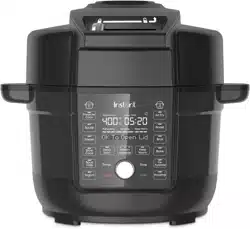

get started
INSTANT POT® DUO™ CRISP
WITH ULTIMATE LID
USER MANUAL

Before using your new Duo Crisp, read all instructions, including the
Safety and Warranty document. Failure to follow the safeguards and
instructions may result in personal injury and/or property damage.
to your new Duo Crisp with Ultimate Lid!
This Instant® Duo Crisp with Ultimate Lid is designed to pressure cook
and air fry using a single lid. It’ll help you cook healthy, delicious meals
more easily and in less time. We hope you fall in love with your Instant
Duo Crisp, and enjoy it in your kitchen for years to come!
Learn all about your Duo Crisp!
Welcome

CONTENTS
What’s in the box 10
Using your Duo Crisp 11
Changing Duo Crisp settings 12
Using the Ultimate Lid 14
Initial set up 18
Pressure Cook + Steam 20
Sauté 23
Slow Cook 25
Sous Vide 27
Yogurt 29
Air Fry 31
Bake + Roast 33
Broil 35
Dehydrate + Proofing 36
Keep Warm 38
Cleaning 39
Trouble shooting 40
Error codes 42
Learn more 43
Warranty 44

2
User Manual
3
User Manual
INSTANT POT®
DUO™ CRISP WITH ULTIMATE LID
Safety Instructions
At Instant, we want you to feel comfortable using our products.
This Instant Pot Duo Crisp was designed with you and
your safety in mind.
Read all instructions before using and only use this appliance as
directed. Failure to follow these Important Safeguards may result
in personal injury and/or property damage and will void your
warranty.
When using electrical appliances, basic safety precautions should
always be followed to reduce the risk of fire, electric shock, personal
injury and/or property damage

3
User Manual
IMPORTANT
SAFEGUARDS
READ ALL INSTRUCTIONS
Placement
DO place the appliance on a countertop only. Always operate the
appliance on a stable, non-combustible, level surface.
DO make sure all parts are dry and free of food debris before placing
the cooking pot on the cooker base.
DO NOT place the appliance on or close to a hot gas or electric
burner, or a heated oven.
DO NOT use the appliance near water or flame.
DO NOT use outdoors. Keep out of direct sunlight.
DO NOT place on anything that may block the vents on the bottom
of the appliance.
General Use
The removable inner cooking pot is extremely hot during use, and
can be extremely heavy when full of ingredients.
DO use oven mitts when handling the inner cooking pot and
removing accessories.
DO place hot accessories on a heat-resistant surface or cooking plate.
DO use care when lifting the cooking pot from the cooker base
to avoid burn injury.
DO use extreme caution when the cooking pot contains hot food, hot
oil or other hot liquids.

4
User Manual
5
User Manual
DO use only the Instant Pot lid that came with this cooker base. Using any
other pressure cooker or air fryer lids may cause personal injury and/or
property damage.
DO NOT use the appliance without the removable inner cooking
pot installed.
DO NOT touch the metal portion of the lid, the appliance’s hot surfaces,
or any accessories during or immediately after cooking because they
will be hot. Only use the side handles for carrying or moving.
DO NOT use this appliance for deep frying with oil.
DO NOT move the appliance while it is in use and use extreme
caution when disposing of hot grease.
DO NOT allow children or persons with reduced physical, sensory
or mental capabilities to operate this appliance. Close supervision
is necessary when any appliance is used by or near children and
persons with reduced physical, sensory or mental capabilities.
Children should not play with this appliance.
DO NOT use the appliance for anything other than household use.
It is not intended for commercial use.
DO NOT leave the appliance unattended while in use.
Pressure Cooking
This appliance cooks under pressure. Allow the appliance to
depressurize naturally or release all excess pressure before opening.
Inappropriate use may result in burns, personal injury and/or property
damage.
DO make sure the appliance is properly closed before operating.
DO check that the steam release valve is installed.
DO use the pressure cooking lid when pressure cooking. For
instructions on how to use the lid, see the User Manual or Getting
Started Guide.

5
User Manual
DO turn the appliance off if steam escapes from the steam release
valve and/or float valve in a steady stream for longer than 3 minutes.
If steam escapes from the sides of the lid, turn the appliance off.
Once steam stops, pressure is released, and the cooker has cooled
carefully make sure the sealing ring is properly installed.
DO check the steam release valve, steam release pipe, anti-block
shield and float valve for clogging before use. For instructions on
how to clean these parts, see the User Manual.
DO NOT attempt to force the lid off the Instant Pot cooker base.
DO NOT move the appliance when it is under pressure.
DO NOT cover or obstruct the steam release valve and/or float valve
with cloth or other objects.
DO NOT attempt to open the appliance until it has depressurized,
and all internal pressure has been released. Attempting to open the
appliance while it is still pressurized may lead to sudden release of
hot contents and may cause burns, personal injury, and/or property
damage.
DO NOT place your face, hands or exposed skin over the steam release
valve or float valve when the appliance is in operation or has residual
pressure, and do not lean over the appliance when removing the lid.
Overfill During Pressure Cooking
Overfilling may cause a risk of clogging the steam release pipe and
developing excess pressure.
DO NOT fill the inner cooking pot over the line labeled ‘PC MAX — 2/3’.
DO NOT fill the inner cooking pot over the line labeled ‘— 1/2’ when
cooking foods that expand during cooking such as rice, dried beans
or dried vegetables.

6
User Manual
7
User Manual
DO be aware that certain foods, such as applesauce, cranberries,
pearl barley, oatmeal or other cereals, split peas, noodles, macaroni,
rhubarb, or spaghetti can foam, froth, sputter, and clog the pressure
release device (steam vent).
DO NOT fill the cooking pot higher than the “1/2” line when cooking
these foods.
DO NOT place oversized foods into the inner cooking pot as they
may cause risk of fire, personal injury and/or property damage.
DO check that sealing ring is properly installed.
Air Frying
When the unit is air frying, hot air is released through the air vents.
Keep your hands and face away from the air vents and take extreme
caution when removing hot accessories from the appliance. Failure
to do so may result in personal injury or property damage.
DO use the included inner cooking pot when air frying.
DO use the lid when air frying. For instructions on how to use the lid,
see the User Manual or Getting Started Guide.
DO NOT place unprotected hands inside the appliance until it has
cooled to room temperature.
DO NOT use a ceramic-coated or stoneware inner pot (such as
CorningWare® stoneware) for air frying.
DO NOT block the vents on the bottom of the cooker base or on the
lid. Leave at least 5” / 13 cm of space around the lid when in use.
DO NOT place the appliance on a hot stove.
DO NOT operate the appliance on or near combustible materials
such as tablecloths and curtains.
DO NOT cover the air vents while air frying. Doing so will prevent
even cooking and may cause damage to the appliance.

7
User Manual
DO NOT place the lid directly on countertop; use the protective
pad provided.
Should the unit emit black smoke when air frying, press Cancel and
unplug the appliance immediately. Wait for smoking to stop before
removing the lid, then clean thoroughly.
Overfill During Air Frying
DO NOT overfill the air fryer basket when air frying. Only fill air
fryer basket as high as the basket handles, and no higher.
DO NOT allow food to contact the heating element.
Accessories
DO use only accessories or attachments authorized by Instant
Brands. The use of parts, accessories or attachments not
recommended by the manufacturer may cause a risk of fire,
personal injury and/or property damage.
DO use only an authorized stainless-steel Instant Pot inner cooking
pot to reduce the risk of pressure leakage.
DO only replace the sealing ring with an authorized Instant Pot
sealing ring to prevent personal injury and damage to the appliance.
DO NOT use the included accessories in a microwave, toaster oven,
convection or conventional oven, or on a ceramic cooktop, electric
coil, gas range or outdoor grill.
Care and Storage
DO let the appliance cool to room temperature before cleaning
or storage.
DO NOT store any materials in the cooker base when not in use.
DO NOT place any combustible materials in the cooker base, such
as paper, cardboard, plastic, Styrofoam or wood.

8
User Manual
Power Cord
A short power-supply cord is used to reduce the risk resulting from it
being grabbed by children, becoming entangled in, or tripping over a
longer cord.
WARNING: Spilled food can cause serious burns. Keep appliance and
cord away from children.
Never drape cord over edge of counter, never use outlet below
counter, and never use with an extension cord.
DO NOT let the power cord touch hot surfaces or open flame,
including the stovetop.
DO NOT use with power converters or adapters, timer switches or
separate remote-control systems.
This appliance has a 3-prong grounding plug. To reduce the risk of
electric shock:
ONLY plug the power cord into a grounded electrical outlet.
DO NOT remove ground.
Electrical Warning
The cooker base contains electrical components that are an
electrical shock hazard. Failure to follow these instructions may
result in electric shock.
To protect against electrical shock:
To disconnect, select Cancel, then remove plug from power source.
Always unplug when not in use, as well as before adding or removing
parts or accessories, and before cleaning. To unplug, grasp the plug
and pull from the outlet. Never pull from the power cord.
DO regularly inspect the appliance and power cord. DO NOT
operate the appliance if the power cord or plug is damaged, or
after the appliance malfunctions or is dropped or damaged in any
manner. For assistance, contact Customer Care by email at
support@instanthome.com.
9
User Manual

DO NOT attempt to repair, replace or modify components of the
appliance, as this may cause electric shock, fire or fire, personal
injury and/or property damage, and will void the warranty.
DO NOT tamper with any of the safety mechanisms, as this may
result in personal injury or property damage.
DO NOT put liquid or food of any kind into cooker base without the
inner cooking pot.
DO NOT immerse power cord, plug or the appliance in water or
other liquid.
DO NOT use the appliance in electrical systems other than
120 V ~ 60 Hz for North America.
SAVE THESE INSTRUCTIONS
9
User Manual
10
User Manual
11
User Manual
WHAT’S IN THE BOX
Duo Crisp
Remember to recycle!
We designed this packaging with sustainability in mind. Please recycle
everything that can be recycled where you live. Be sure to keep this
Guide, along with the Safety and Warranty insert for reference.
Illustrations are for reference only and may differ from the actual product.
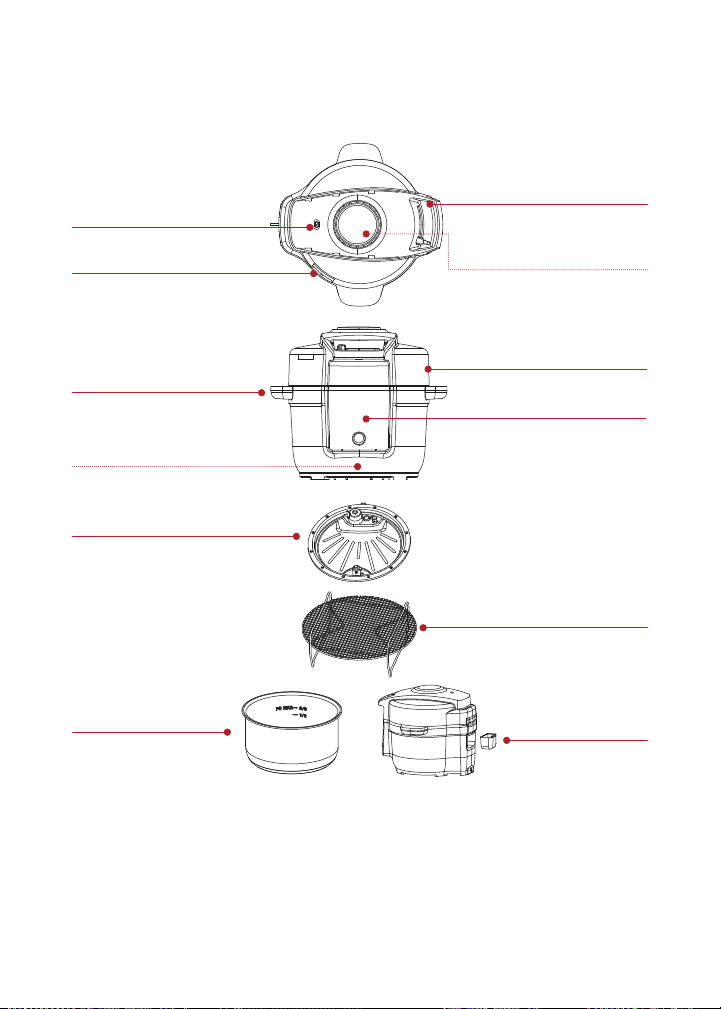
Hot air outlet
Stainless steel
inner cooking pot
Heating element
(under lid)
Lid handle
Steam vent
Cooker base
Cooker handles
Control panel
Pressure cooking cover
Heating element (inside)
Air fry/cooking rack
Condensation
collector
11
User Manual
USING YOUR DUO CRISP
Control panel
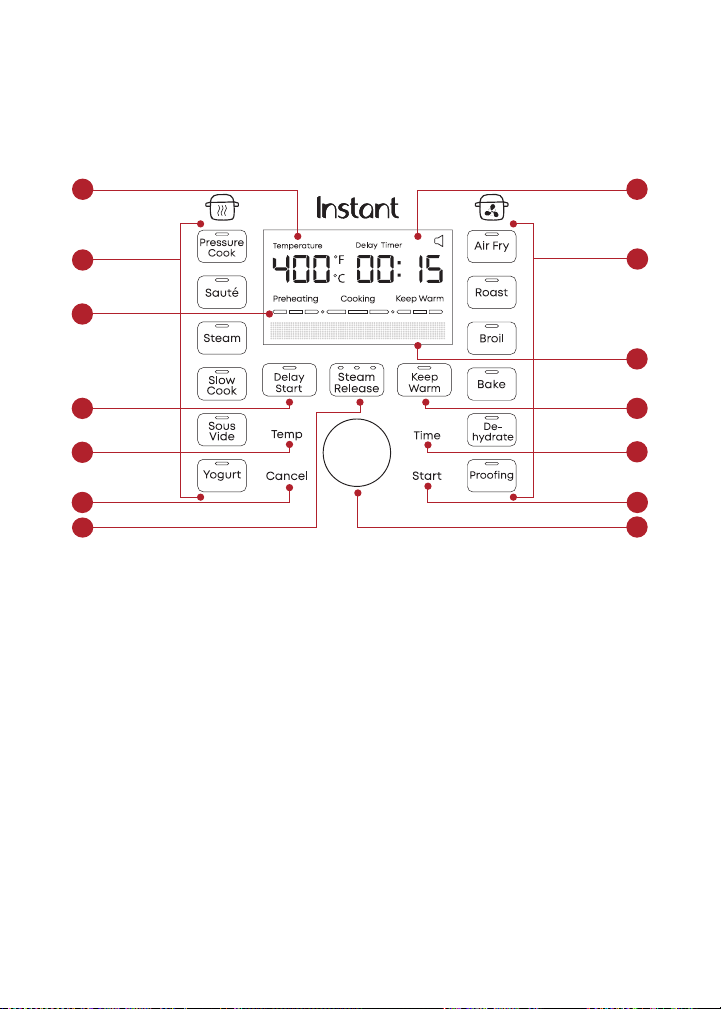
We’ve designed the control panel to be simple to use and easy to read.
Cooking Progress Bar
1. Preheating: cooker is heating to the set temperature. Display shows cooking time.
2. Cooking: cooker has started the smart program. Display counts down cooking time.
3. Keep Warm: turns on automatically after cooking stops. When done, display shows End.
1. Pressure Cooking smart programs
• Light shows the active smart program
2. Air Frying smart programs
• Light shows the active smart program
3. Temperature Display
• Choose Fahrenheit or Celsius
4. Time Display
• Cook time countdown
• Keep Warm count
5. Cooking Progress Bar
6. Message Bar
• Displays status messages
7. Delay Start
• Can also serve as Kitchen Timer
8. Keep Warm
• On or Off
9. Temperature
10. Time
11. Cancel
12. Steam Release Control Button
• Lights show type of steam release
selected
13. Start
14. Control Dial
• Adjust time and temperature
1
78
6
4
3
9
11
14
13
10
12
5
2

12
User Manual
13
User Manual
CHANGING DUO CRISP SETTINGS
Turning sound On/Off
You can choose to have audible cooking alerts on or off.
• When in Ready mode, press and hold the Time and Temperature
buttons for 5 seconds until the display shows Sound On
or Sound Off.
Audible safety alerts (beeps) cannot be turned off.
Choosing temperature scale
You can choose to show cooking temperature in either Fahrenheit
or Celsius.
• When in Standby mode, press and hold the Temp button for
5 seconds until the display shows Temp Unit F or Temp Unit C.
Delay the start of cooking
You can use Delay Start to delay cooking for a minimum of 10 minutes
or a maximum of 24 hours.
4. Select a smart program, adjust the settings as you want, then press
Delay Start.
5. When the time flashes, use the Control Dial to adjust the
delay time.
6. Press Start and the timer counts down.
7. When Delay Start ends, the smart program begins, and the display
shows cooking time.
8. Delay Start is not available with the Air Fry, Sauté, Yogurt,
Sous Vide, Roast, Broil, Bake, Dehydrate, Proofing or Keep Warm
smart programs.

13
User Manual
Set a timer
You can set a cooking timer for a minimum of 1 minute or a maximum
of 1 hour.
1. When in Ready mode, press Delay Start.
2. When the time flashes, use the Control Dial to adjust the
delay time.
3. Press Start and the timer counts down.
4. When the timer ends, the display shows Ready.
Reset Smart Programs to original settings
Reset smart programs
• While in Ready mode, press and hold one smart program button
for over 3 seconds until the smart program button blinks twice.
The smart program’s settings are restored to the factory default setting.
• While in Cooking mode, press and hold the currently-used smart
program button for over 3 seconds until the smart program button
blinks twice.
The smart program’s settings are restored to the factory default setting.
Reset all settings
• While in Ready mode, press and hold the Control Dial for over
3 seconds until the smart program buttons blink 3 times and the
display shows Ready.
All settings are restored to the factory default setting.
14
User Manual
15
User Manual
USING THE ULTIMATE LID
You’ll use the Ultimate Lid for both pressure cooking and air frying, as
well as other types of cooking. Always use the lid that came with this
Instant Pot Duo Crisp cooker base.
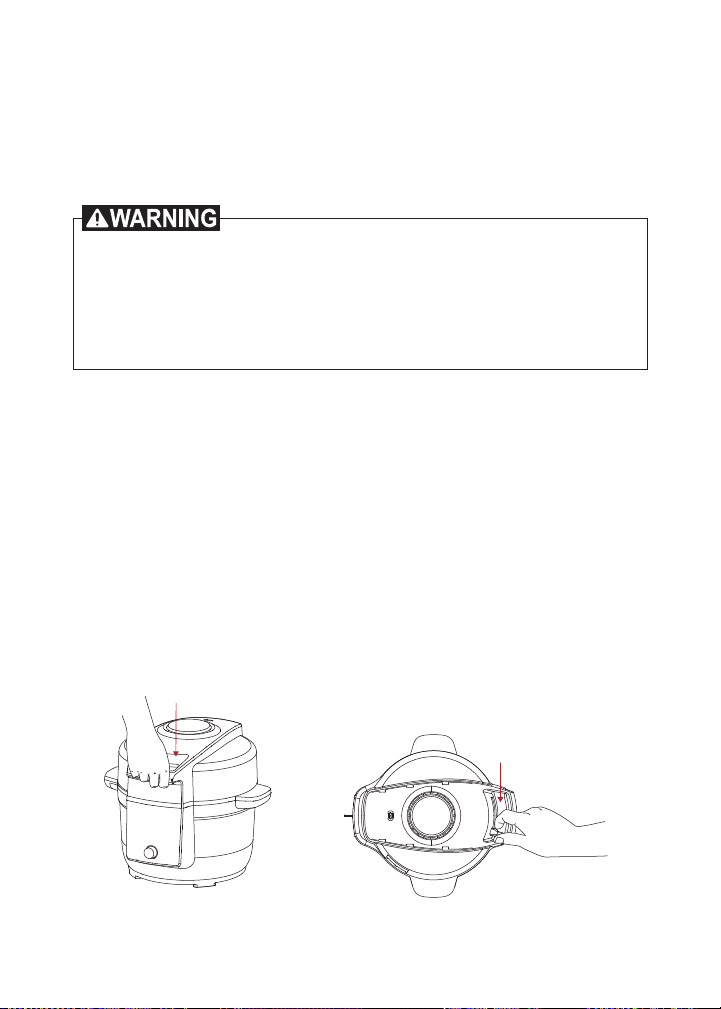
Open the Lid
1. After pressure cooking, be sure to release the steam before
opening. See How to Release Steam on page 9.
2. Turn the Lid Lock Switch to the Unlock position.
3. Use the lid handle to raise the lid from the cooker base.
Close and lock the Lid
For pressure cooking, the lid must be securely locked into place to
prevent steam from escaping.
1. Use the lid handle to lower the lid onto the cooker base, and
press the lid down.
2. For pressure cooking turn the Lid Lock Switch to the Lock position.
Do not open the lid until all pressure is released and the the message
says “Ok to open lid.” Opening the lid before pressure is released,
may result in burns, personal injury and/or property damage. Do not
lean over steam vent. Hot steam may release and result in burns or
personal injury.
15
User Manual
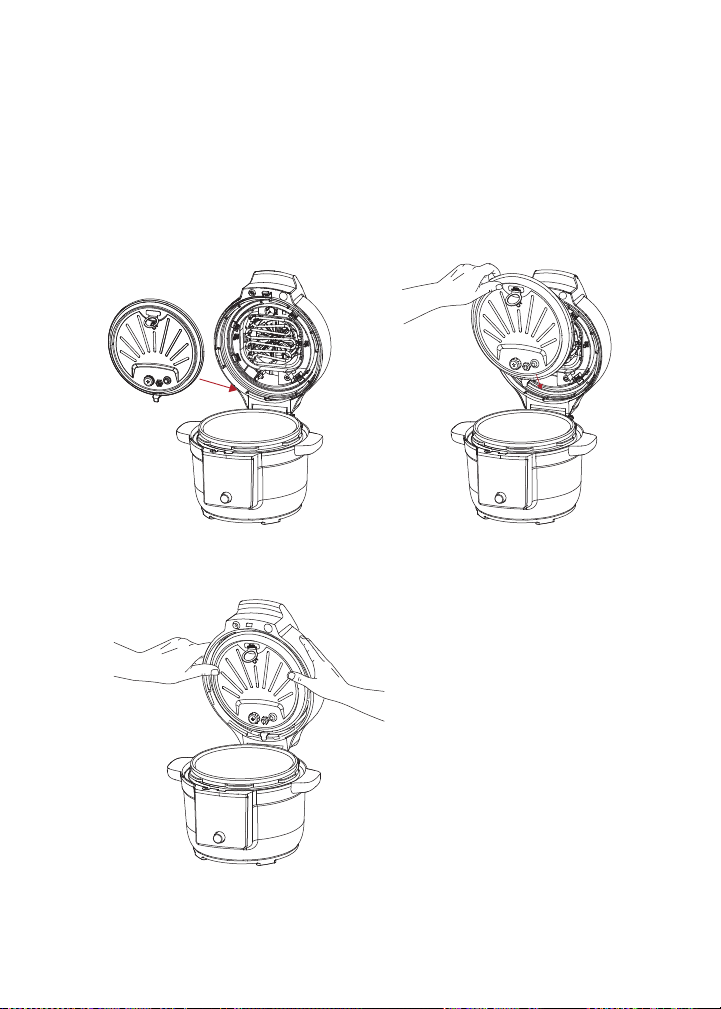
How to use the Pressure Cover
For pressure cooking and other smart programs that use the pressure
cooking functions of the Ultimate Lid, you’ll need to install the Pressure
Cooking Inner Cover.
Install the Pressure Cooking Cover
1. Insert the Pressure Cooking Cover into the slot on the underside of
the Ultimate Lid, bottom first.
2. Push the Pressure Cooking Cover fully into place. When the
Pressure Cooking Cover is in place, you will hear a locking sound.
16
User Manual
17
User Manual
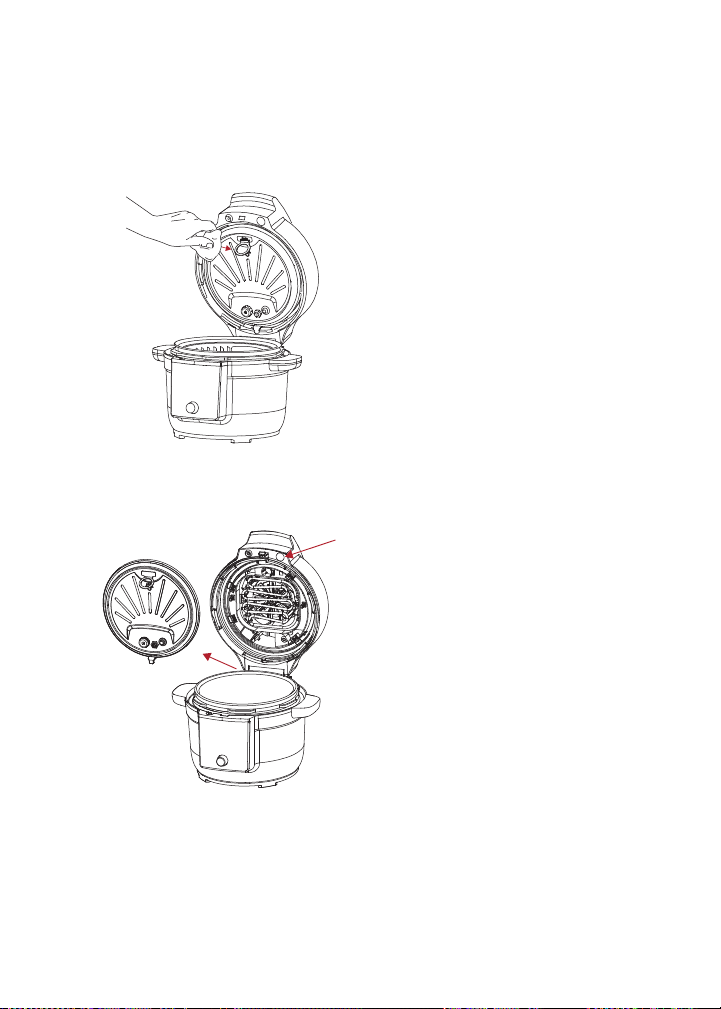
Remove the Pressure Cooking Cover
1. Open the Ultimate Lid, and then grasp the Inner Cover holder loop.
2. Be sure to hold the Pressure Cooking Cover holder loop with a
kitchen cloth or protective gear since it may still be hot.
3. Press the red button on top of the lid, and the Inner Cover
will release.
17
User Manual
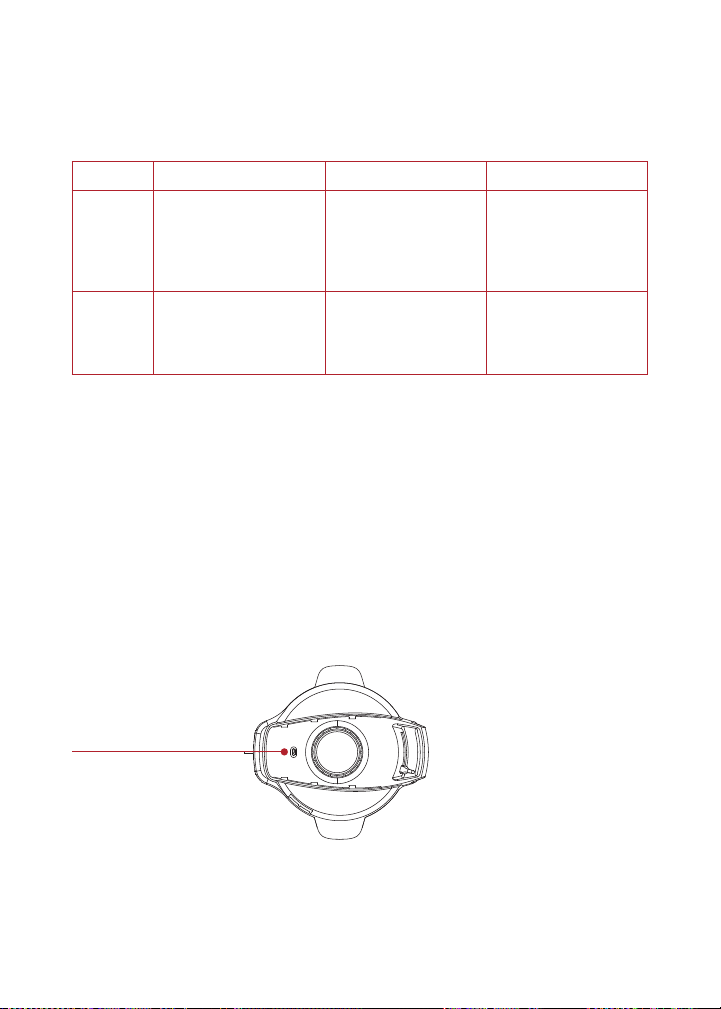
How to release steam
Your Duo Crisp can release steam in 3 different ways. Use the one that
best fits the type of food you’re cooking.
Choose Natural Release Pulse Release Quick Release
How? Releases steam
gradually over time
(up to 40 minutes
or more) after
cooking stops
Releases timed
bursts of steam in
quick puffs after
cooking stops
Quickly releases
steam after you
press the steam
release button
Use for
Foods that can
simmer, like stews,
chili, pasta, oatmeal,
beans and grains
Foods like rice
and grains
Foods that tend
to overcook, like
vegetables and
seafood
How to release steam
1. Press the Steam release on the Front Control Panel to toggle
between Natural Release, Pulse Release and Quick Release.
You can change the steam release type any time: before, during,
or after cooking.
2. When all steam is released the display shows OK to open lid.
3. After steam release, you can use the lid handle to open the lid.
Hot steam releases from the steam vent; do not place your hands or face
near the vent when steam is releasing.
Steam Vent

18
User Manual
19
User Manual
INITIAL SET UP
Clean before use
1. Wash the Inner Cooking Pot with hot water and soap. Rinse and use
a soft cloth to dry the outside. Or you can wash the Inner Cooking
Pot in the dishwasher
2. Wipe the heating element inside the cooker base and the inside
of the Ultimate Lid with a soft cloth to ensure there are no stray
packaging particles.
Using the condensation collector
The condensation collector sits at the back of the cooker base and
accumulates overflow moisture from the condensation rim. It should be
installed before cooking, then emptied and rinsed out after each use.
Remove the condensation collector
• Pull the condensation collector away from the cooker base;
do not pull down.
Note the tabs on the cooker base and the grooves on the
condensation collector.
Install the condensation collector
• Align the grooves on the condensation collector with the tabs on
the back of the cooker base and slide the condensation collector
into place.
Using the Air Fry/Cooking Rack
With a reversable design that has two sides with two different handle
heights, the Air Fry/Cooking Rack is a versatile tool that you can use
for most cooking programs.
• Tall handle side up: air frying, roasting, baking, pressure cooking
and steaming
• Short handle side up: broiling and dehydrating
For smaller foods, that could fall out of the rack area during cooking,
consider using a baking dish that holds the food inside.

19
User Manual
Test run
Before using your new Duo Crisp for the first time, you must perform
a pressure cooking test run to ensure everything is working correctly.
To perform a test run:
1. Follow the instructions for pressure cooking on page 20.
2. Fill the cooking pot with water to the first fill line, but do
not add food.
3. Select Pressure Cook
4. Set the cooking time to 5 minutes.
5. Select Quick Steam Release under the steam button.
6. Press Start.
7. When done, appliance will release steam.
8. After steam is released, message bar will show
Ok to open lid.
9. Wash and dry the inner cooking pot.
Now you’re ready to cook a meal in your Duo Crisp!

20
User Manual
21
User Manual
PRESSURE COOK + STEAM
Both programs use pressurized steam to quickly and evenly cook foods.
Use Pressure Cook for most pressure cooking recipes and use Steam as
you would a regular stovetop steamer, boiling liquid to cook food with
hot steam.
Using liquid for pressure cooking
Pressure cooking requires liquid in the Inner Cooking Pot to produce
the steam needed. For this Duo Crisp, here are the minimum amounts
you’ll need:
Cooking Pot Size Minimum Liquid for Pressure Cooking*
6.5 Quarts/ 6.2 Litres 2 cups (12 oz / 500 mL)
*Unless otherwise specified in recipe.
MUST USE INNER POT
Inner cooking pot must always be used. To prevent personal
injury, do not place food or liquid into cooker base.
DO NOT OVERFILL
Over-filling the Inner Cooking Pot may lead to personal injury
or property damage.
Do not fill the Inner Cooking Pot higher than the PC Max – 2/3
line as indicated in the Inner Cooking Pot.
Do not fill the Inner Cooking Pot higher than the -1/2 line when
cooking foods that expand, such as uncooked beans, applesauce,
oatmeal, barley, and noodles.
DO NOT REMOVE LID WHEN PRESSURE COOKING
Do not open lid when pressure cooking. Removing the lid before
pressure is released may result in burns, personal injury, and/or
property damage.

21
User Manual
Pressure cooking liquids should be water-based, such as broth, stock,
soup or juice. If using canned, condensed, or cream-based soup, add
water as directed above.
Program settings
Choose from these settings for each smart program:
Smart
Program
Temperature Default
Cook Time
Min.
Cook Time
Max.
Cook Time
Pressure Cook Automatically
set
10 minutes
(00:10)
0 minutes
(00:00)
4 hours
(04:00)
Steam Automatically
set
10 minutes
(00:10)
0 minutes
(00:00)
1 hours
(01:00)
How to pressure cook or steam
Prep
Cut, chop, season or marinate your ingredients according to
your recipe.
Preheat
1. Place the Inner Cooking Pot into the cooker base.
2. Add ingredients to the Inner Cooking Pot.
3. Make sure the Pressure Cooking Cover is installed in the
Ultimate Lid.
4. Close the lid on the cooker base and lock it.
See ‘Close and lock the lid’ for full details.
5. Press Pressure Cook or Steam. The indicator light blinks.
6. The default or last-used cooking time displays. To change it, press
Time and turn the Control Dial to change it, then press Control Dial
to select it.

22
User Manual
23
User Manual
7. For the Pressure Cook smart program, Keep Warm is On by default.
If you want to turn it off, press Keep Warm.
8. The default or last-used steam release type is displayed. To change
it, press the Steam Release button as needed to toggle through
the options.
See ‘How to release steam’ for full details.
9. Press Start. The Progress Bar shows Preheating and the Duo Crisp
starts heating. The display shows Preheating.
It can take 10-15 minutes to preheat for cooking. Preheating time can be
longer than 15 minutes for 2/3 max. Frozen foods increase the preheating
time. The cooking time you choose will be the new setting the next time
you use that smart program.
Cook
1. When the pressure is ready, the Duo Crisp starts pressure
cooking. The unit displays Cooking and the cooking timer starts
counting down.
2. When the timer reaches 00:00, cooking stops.
3. When the display shows Ok to Open Lid, you can open the lid.
4. Press Cancel if you want to finish cooking before the timer stops.
Keep Warm
When the Pressure Cook smart program completes and Keep Warm
is turned on, the timer begins counting from 00:00 up to 10 hours
(10:00). If Keep Warm is turned off, the display shows End.

23
User Manual
SAUTÉ
Use Sauté in place of a frying or saucepan. Sautéing can deepen the
flavors of your food, or can simmer, thicken or reduce sauces.
Choose from these settings to sauté:
Default
Temp.
Min.
Temp.
Max.
Temp.
Default
Cook Time
Min.
Cook Time
Max.
Cook Time
Level 1 Level 1 Level 6 30 minutes
(00:30)
1 minute
(00:01)
1 hour
(01:00)
How to sauté
Prep
Cut, chop, season or marinate your ingredients according to
your recipe.
Preheat
1. Place the Inner Cooking Pot into the cooker base.
2. Keep the lid open during the entire Sauté cooking process.
3. Press Sauté. The indicator light blinks.
4. The default or last-used cooking time displays. To change it, press
Time and turn the Control Dial to change it, then press Control Dial
to select it.
5. The default or last-used cooking temperature displays. To change
it, press Temp and turn the Control Dial to change it, then press
Control Dial to select it.
6. Press Start. The Progress Bar shows Preheating and the
Duo Crisp starts heating. The display shows Preheating.

24
User Manual
25
User Manual
Cook
1. When display shows Add Food, add ingredients.
2. The unit displays Cooking.
3. When timer ends, display shows End.
4. Press Cancel if you want to finish cooking before the timer stops.
Deglazing
Deglazing is the process of adding a liquid to a hot pan, releasing all
of the delicious, caramelized pieces stuck to the bottom.
1. Remove food from inner pot.
2. Add water, broth, or wine.
3. Use wooden spoon or silicone spatula to loosen food stuck to
bottom of the Inner Cooking Pot.
Sautéing before Pressure or Slow Cooking
Quite often, you’ll want to sauté foods to brown them before further
cooking them.
1. Sauté ingredients.
2. Press Cancel.
You can deglaze the Inner Cooking Pot now before switching to
Pressure Cook or Slow Cook (see Deglazing).
3. Select the smart program you want to use to cook.

25
User Manual
SLOW COOK
Slow Cook lets you make your favorite simmering and stewing recipes.
This program does not use pressure to cook food.
Choose from these settings for slow cooking:
Default
Temp.
Min.
Temp.
Max.
Temp.
Default
Cook Time
Min.
Cook Time
Max.
Cook Time
High Low High 4 hours
(04:00)
30 minutes
(00:30)
24 hours
(24:00)
How to slow cook
Prep
Cut, chop, season or marinate your ingredients according to
your recipe.
Preheat
1. Place the Inner Cooking Pot into the cooker base.
2. Add ingredients to the Inner Cooking Pot.
3. Make sure the Pressure Cooking Cover is installed in the
Ultimate Lid.
4. Close the lid on the cooker base and lock it.
See ‘Close and lock the lid’ for full details.
5. Press Slow Cook. The indicator light blinks.
6. The default or last-used cooking time displays. To change it, press
Time and turn the Control Dial to change it, then press Control Dial
to select it.
7. The default or last-used cooking temperature displays. To change
it, press Temp and turn the Control Dial to change it, then press
Control Dial to select it.
8. Keep Warm is On by default. If you want to turn it off, press
Keep Warm.

26
User Manual
27
User Manual
9. Press Start. The Progress Bar shows Preheating and the
Duo Crisp starts heating. The display shows Preheating.
10. When the pressure is ready, the Duo Crisp starts slow cooking. The
unit displays Cooking and the cooking timer starts counting down.
11. When the timer reaches 00:00, cooking stops.
12. Press Cancel if you want to finish cooking before the timer stops.
Keep warm
When cooking completes and Keep Warm is turned on, the timer begins
counting from 00:00 up to 10 hours (10:00). If Keep Warm is turned
off, the display shows End.

27
User Manual
SOUS VIDE
Sous Vide cooks food underwater in an air-tight, food-safe bag, for
a long period of time. Food cooks in its own juices and comes out
delicious and very tender. This program does not use pressure to
cook food.
Choose from these settings to sous vide:
Default
Temp.
Min.
Temp.
Max.
Temp.
Default
Cook Time
Min.
Cook Time
Max.
Cook Time
56°C
133°F
25°C
77°F
90°C
194°F
3 hours
(03:00)
30 mins
(00:30)
99 hours,
30 mins
(99:30)
What you need to sous vide
• Tongs
• Food safe, airtight, re-sealable food pouches
OR
• Vacuum sealer and food-safe vacuum bags
How to sous vide
Prep
Cut, chop, season or marinate your ingredients according to your recipe.
Preheat
1. Place the Inner Cooking Pot into the cooker base.
2. Make sure the Pressure Cooking Inner Cover is installed in the
Ultimate Lid.
3. Close the lid on the cooker base and lock it.
See ‘Close and lock the lid’ for full details.
4. Press Sous Vide. The indicator light blinks.
5. The default or last-used cooking time displays. To change it, press
Time and turn the Control Dial to change it, then press Control Dial
to select it.

28
User Manual
29
User Manual
6. The default or last-used cooking temperature displays. To change
it, press Temp and turn the Control Dial to change it, then press
Control Dial to select it.
7. Press Start. The Progress Bar shows Preheating and the
Duo Crisp starts heating. The display shows Preheating.
Cook
1. When display shows Add Food, unlock and open the lid and add
cooking pouch.
2. Reclose and lock the lid. The unit displays Cooking.
3. When timer ends, display shows End.
4. Press Cancel if you want to finish cooking before the timer stops.
Keep warm
When cooking completes and Keep Warm is turned on, the timer begins
counting from 00:00 up to 10 hours (10:00). If Keep Warm is turned off,
the display shows End. Keep warm not available for Sous Vide.
Remove food
When cooking completes, the display shows End. Use the tongs to
carefully remove the cooking pouch.

29
User Manual
YOGURT
You can use your Duo Crisp to easily make delicious, fermented dairy
and non-dairy yogurt.
Choose from these settings for making yogurt:
Pasteurizing
Temperature
Fermenting
Temperature
Pasteurizing
Time
Default
Fermenting
Time
Min
Fermenting
Time
Max
Fermenting
Time
Automatically
set
Automatically
set
Automatically
set
30 minutes
(00:30)
8 hours
(08:00)
6 hours
(06:00)
24 hours
(24:00)
How to make yogurt
Making yogurt is a 3-step process, starting with pasteurizing the milk,
then adding yogurt starter, and finally cooling the yogurt. Be sure to
follow a trusted recipe.
Prep
1. Prepare the ingredients according to your recipe.
2. Place the ingredients into the Inner Cooking Pot.
Pasteurize
1. Place the Inner Cooking Pot into the cooker base.
2. Make sure the Pressure Cooking Cover is installed in the
Ultimate Lid.
3. Close the lid on the cooker base and lock it.
4. See ‘Close and lock the lid’ for full details.
5. Press Yogurt. The indicator light blinks.
6. Press Start. The first Progress Bar displays under Cooking and the
Duo Crisp starts heating. The display shows Step 1. Pasteurize.
7. When pasteurization is done, the Duo Crisp starts cooling down, and
the second Progress Bar displays under Cooking. Open lid to cool
down faster, takes approximately one and half hour. The display
shows Cooling Down.

30
User Manual
31
User Manual
Ferment
1. When the Duo Crisp reaches the correct temperature for
fermentation, the display shows Add Yogurt Starter. Add the
yogurt starter and close lid.
2. You have 30 minutes to add the yogurt starter. If you do nothing,
the Yogurt program will automatically stop.
3. The default or last-used fermenting time displays. To change it,
press Time and turn the Control Dial to change it, then press Time
again to select it.
4. Press Start. The third Progress Bar displays under Cooking. The
display shows Step 2. Ferment.
5. When the fermenting step is finished, the display shows End.
6. Press Cancel if you want to finish cooking before the timer stops.
Cool
1. Allow yogurt to cool.
2. Place in refrigerator for 12–24 hours to develop flavors.
How much to make?
Instant Pot Size Minimum
Milk Volume
Maximum
Milk Volume
6.5 Quarts / 6.2 Liters 4 Cups
(32 oz / 1000 mL)
4 Quarts
(128 oz / 3.8 L)

31
User Manual
AIR FRY
You can air fry all sorts of foods, fresh or frozen, for a crisp finish
without all the oil.
Choose from these settings for air frying:
Default
Temp
Min.
Temp
Max.
Temp
Default
Cook Time
Min.
Cook Time
Max.
Cook Time
204°C
400°F
82°C
180°F
204°C
400°F
18 minutes
(00:18)
1 minute
(00:01)
1 hour
(01:00)
How to air fry
Prep
Prepare the ingredients according to your recipe and have them ready.
Preheat
1. Place the Inner Cooking Pot into the cooker base.
2. Place the Air Fry/Cooking Rack inside the Inner Cooking Pot.
3. Make sure the Pressure Cooking Inner Cover is NOT installed in
the Ultimate Lid.
4. Close the lid on the cooker base.
See ‘How to lock the lid’ for full details.
5. Press Air Fry. The indicator light blinks.
6. The default or last-used cooking time displays. To change it, press
Time and turn the Control Dial to change it, then press Control Dial
to select it.
7. The default or last-used cooking temperature displays. To change
it, press Temp and turn the Control Dial to change it, then press
Control Dial to select it.
8. When the unit displays Add Food, open the lid, add the prepared
food, and close the lid.

32
User Manual
33
User Manual
9. The Duo Crisp starts air frying, and the unit displays Cooking.
10. When the unit displays Turn Food, open the lid, turn the food, and
close the lid.
11. When the timer reaches 00:00, cooking stops.
12. Press Cancel if you want to finish cooking before the timer stops.

33
User Manual
BAKE + ROAST
You can bake foods like breads, cakes and pastries, or roast meats
and vegetables.
Choose from these settings for each smart program:
Smart
Program
Default
Temp.
Min.
Temp.
Max.
Temp.
Default
Cook
Time
Min.
Cook
Time
Max.
Cook
Time
Bake 193°C
365°F
82°C
180°F
204°C
400°F
30 mins
(00:30)
1 min
(00:01)
1 hour
(01:00)
Roast 204°C
380°F
82°C
180°F
204°C
400°F
40 mins
(00:40)
1 min
(00:01)
1 hour
(01:00)
How to bake or roast
Prep
1. Prepare the ingredients according to your recipe.
2. If baking, place the ingredients into an oven-safe baking dish that
fits in the Duo Crisp cooker base.
Leave approximately 1 in / 2.5 cm of space around all sides of the baking
dish to allow heat to circulate evenly.
3. If roasting, place the ingredients into the Air Fry/Cooking Rack.
Cook
1. Place the Inner Cooking Pot into the cooker base, and then place
the Air Fry/Cooking Rack inside the Inner Cooking Pot.
2. Make sure the Pressure Cooking Inner Cover is NOT installed in the
Ultimate Lid.
3. Close the lid on the cooker base.
See ‘How to lock the lid’ for full details.
4. Press Bake or Roast. The indicator light blinks.
5. The default or last-used cooking time displays. To change it, press
Time and turn the Control Dial to change it, then press Control Dial
to select it.

34
User Manual
35
User Manual
6. The default or last-used cooking temperature displays. To change
it, press Temp and turn the Control Dial to change it, then press
Control Dial to select it.
7. Press Start. The Progress Bar shows Preheating and the
Duo Crisp starts heating. The display shows Preheating.
8. When the unit displays Add Food, open the lid, place Air Fry/
Cooking Rack inside the Inner Cooking Pot, and close the lid.
9. The Duo Crisp starts baking/roasting, and the unit displays Cooking
and the cooking timer starts counting down.
10. When the timer reaches 00:00, cooking stops.
11. Press Cancel if you want to finish cooking before the timer stops.

35
User Manual
BROIL
You can broil foods like meats, seafood and vegetables.
Choose from these settings for broiling:
Default
Temp.
Min.
Temp.
Max.
Temp.
Default
Cook Time
Min.
Cook Time
Max.
Cook Time
204°C
400°F
Not
adjustable
Not
adjustable
6 minutes
(00:06)
1 min
(00:01)
40 mins
(00:40)
How to broil
Prep
1. Prepare the ingredients according to your recipe.
2. Place the ingredients into the Air Fry/Cooking Rack.
Cook
1. Place the Inner Cooking Pot into the cooker base.
2. Place the Air Fry/Cooking Rack inside the Inner Cooking Pot.
3. Make sure the Pressure Cooking Inner Cover is NOT installed in the
Ultimate Lid.
4. Close the lid on the cooker base.
See ‘How to lock the lid’ for full details.
5. Press Broil. The indicator light blinks.
6. The default or last-used cooking time displays. To change it, press
Time and turn the Control Dial to change it, then press Control Dial
to select it.
7. Press Start. The Duo Crisp starts broiling, and the unit displays
Cooking and the cooking timer starts counting down.
8. When the timer reaches 00:00, cooking stops.
9. Press Cancel if you want to finish cooking before the timer stops.

36
User Manual
37
User Manual
DEHYDRATE + PROOFING
You can dehydrate foods like fruit and vegetables or proof dough
before baking.
Choose from these settings for each smart program:
Smart
Program
Default
Temp.
Min.
Temp.
Max.
Temp.
Default
Cook
Time
Min.
Cook
Time
Max.
Cook
Time
Dehy-
drate
51°C
125°F
40°C
105°F
73°C
165°F
7 hours
(07:00)
1 hour
(01:00)
72 hours
(72:00)
Proof 25°C
77°F
23°C
75°F
35°C
95°F
1 hour
(01:00)
30 mins
(00:30)
3 hours
(03:00)
How to dehydrate or proof
Prep
1. Prepare the ingredients according to your recipe.
2. Place the ingredients into the Air Fry/Cooking Rack.
Cook
1. Place the Inner Cooking Pot into the cooker base.
2. Place the Air Fry/Cooking Rack inside the Inner Cooking Pot.
3. Make sure the Pressure Cooking Inner Cover is NOT installed in
the Ultimate Lid.
4. Close the lid on the cooker base.
See ‘How to lock the lid’ for full details.
5. Press Dehydrate or Proof. The indicator light blinks.
6. The default or last-used cooking time displays. To change it, press
Time and turn the Control Dial to change it, then press Control Dial
to select it.
7. The default or last-used cooking temperature displays. To change
it, press Temp and turn the Control Dial to change it, then press
Control Dial to select it.

37
User Manual
8. Press Start. The Duo Crisp starts dehydrating/proofing, and the
unit displays Cooking and the cooking timer starts counting down.
9. When the timer reaches 00:00, cooking stops.
10. Press Cancel if you want to finish cooking before the timer stops.

38
User Manual
39
User Manual
KEEP WARM
You can choose to turn Keep Warm on automatically after cooking on
many smart programs. You can also use Keep Warm to reheat food.
Choose from these settings in the Keep Warm smart program:
Default
Temp
Min.
Temp
Max.
Temp
Default
Cook Time
Min.
Cook Time
Max.
Cook Time
None Low
(62°C /
144°F)
High
(77°C /
171°F)
10 hours
(10:00)
10 mins
(00:10)
10 hours
(10:00)
How to reheat
Prep
Place the food to be reheated into the Inner Cooking Pot.
Preheat
1. Place the Inner Cooking Pot into the cooker base.
2. Please make sure to install the pressure cooking cover on the
ultimate lid then close and lock the lid.
See ‘How to lock the lid’ for full details.
3. Choose Keep Warm on the Control Panel. The default or previous
time and temperature settings display.
4. To change the reheating time, press Time, then turn the
Control Dial to select a new reheating time.
5. To change the cooking temperature, press Temperature, then turn
the Control Dial to select a new cooking temperature.
6. Press Start. The Progress Bar shows Keep Warm and the timer
starts counting down.
7. When reheating completes, the display shows End.

39
User Manual
CLEANING
Clean your Instant Duo Crisp after each use. Always unplug the unit
and let all parts cool to room temperature before cleaning. Before use
or storing, make sure all surfaces are dry.
DO NOT immerse power cord, plug or the appliance in water or
other liquid, which may result in electric shock.
Part Cleaning instructions
Accessories
• Air Fry/
Cooking Rack
• Pressure Cooking
Cover
• Condensation
Collector
• Wash after each use
• Hand wash with hot water and mild dish soap or wash
in dishwasher, top rack
• Never use harsh chemical detergents, powders or
scouring pads on accessories
• Empty and rinse condensation collector after
each use
Ultimate Lid • Use a barely-damp cloth to wipe any particles
Inner Cooking Pot • Wash after each use.
• Hand wash with hot water and mild dish soap or wash
in dishwasher*
• Hard water stains may need a vinegar-dampened
sponge and scrubbing to remove
• For tough or burned food residue, soak in hot water
for a few hours before cleaning
• Dry all exterior surfaces before placing in cooker base
Power cord • Use a barely-damp cloth to wipe any particles off cord
Cooker base • Wipe the inside of the cooker base as well as the
condensation rim with a barely-damp cloth, and allow
to air dry
• Clean the outside of the cooker base and the control
panel with a soft, barely-damp cloth or sponge
*Some discoloration may occur after machine washing, but this will not affect
the cooker’s safety or performance.

40
User Manual
41
User Manual
TROUBLE SHOOTING
Problem Cause Solution
Display remains blank
after connecting the
power cord
Bad power connection
or no power
Inspect power cord
for damage. If damage
is noticed, contact
Consumer Care.
Check outlet to ensure it
is powered.
Cooker’s electrical
fuse has blown
Contact Consumer Care.
Steam leaks from side
of lid
Lid not closed
properly
Open, then close lid.
Inner cooking pot rim
may be misshapen
Check for deformation
and contact Consumer
Care.
Difficulty closing lid Contents in cooker
are still hot
Press Steam Release on
the Control Panel, then
lower lid onto cooker base
and wait for steam and
temperature to reduce
before attempting to close
the lid.
Difficulty opening lid Pressure inside the
cooker
Release pressure
according to recipe; only
open lid after the display
shows “OK to open lid”.
Inner pot is stuck to lid
when cooker is open
Cooling of inner pot
may create suction,
causing inner pot to
adhere to the lid
To release the vacuum,
press Steam Release on
the Control Panel and wait
for food content inside
inner pot to cool down.
Too little liquid in the
inner pot
Check for scorching on
bottom of inner pot. Add
thin, water-based liquid to
the inner pot: 1 1/2 cups
(12 oz / 375 mL)

41
User Manual
Problem Cause Solution
Minor steam leaking/
hissing from steam
release valve during
cook cycle
Lid not set to Lock
position
Check Lid Lock to ensure
it’s set to Lock.
Cooker is regulating
excess pressure
This is normal; no action
required.
Steam gushes from
steam release valve
when quick release
button is in Seal position
Not enough liquid in
the inner pot
Add thin, water-based
liquid to the inner pot: 1
1/2 cups (12 oz / 375 mL)
Pressure sensor
control failure
Contact Consumer Care.
Occasional clicking or
light cracking sound
The sound of power
switching and
expanding pressure
board when changing
temperatures
This is normal; no action
needed.
Bottom of the cooking
pot is wet
Wipe exterior surfaces of
inner pot. Ensure heating
element is dry before
inserting inner pot into
cooker base.

42
User Manual
43
User Manual
ERROR CODES
If the control panel displays an error code from this list, there is an
issue with the Duo Crisp with Ultimate Lid. Here are the actions you
should take to fix the problem.
Code Cause Solution
C1, C3 Faulty sensor Contact Consumer Care.
C4 Faulty control panel
connection
Contact Consumer Care.
C6 Fault pressure switch Contact Consumer Care.
C7 Loss of pressure Cancel cooking, turn the cooker
off, then turn the cooker back
on to try to reset. If this doesn’t
solve the problem, contact
Consumer Care.
Food burn High temperature detected
at bottom of inner pot;
cooker stops to avoid
overheating
Turn the cooker off, release
pressure according to the recipe,
and check the bottom of the
cooking pot for food deposits;
clear the deposits if possible and
restart cooking.
PrSE Pressure has accumulated
during a non-pressure
cooking program
Cancel cooking and set Steam
Release to Vent. Once steam is
released, restart cooking.

43
User Manual
Product specifications
Model Volume Wattage Power Weight Dimensions
SLCO65000 6.5 Quarts /
6.2 Litres 1500
watts
120V ~
60Hz
10.6 kg /
23.32 lbs
in: 15.5 x 15.4 x 13.4
cm: 39.4 x 39.2 x 34
LEARN MORE
There’s a whole world of Instant Duo Crips with Ultimate Lid
information and help just waiting for you. Here are some of the most
helpful resources.
Register your product
Instanthome.com/register
Contact Consumer Care
In the Instant Brand Connect app
Instanthome.com/customer-care-center
support@instanthome.com
Instant Brands Connect App with 1000+ recipes
Instanthome.com
iOS and Android app stores
Cooking charts and more recipes
Instanthome.com
How-to videos, tips and more
Instanthome.com
Replacement parts and accessories
Instanthome.com
Join the community

44
User Manual
45
User Manual
WARRANTY
One (1) Year Limited Warranty
This One (1) Year Limited Warranty applies to purchases made from authorized retailers
of Instant Brands LLC (“Instant Brands”) by the original appliance owner and is not
transferable. Proof of original purchase date and, if requested by Instant Brands, return
of your appliance, is required to obtain service under this Limited Warranty. Provided the
appliance was used in accordance with the use & care instructions, Instant Brands will,
in its sole and exclusive discretion, either: (i) repair defects in materials or workmanship;
or (ii) replace the appliance. In the event that your appliance is replaced, the Limited
Warranty on the replacement appliance will expire twelve (12) months from the date of
receipt. Failure to register your product will not reduce your warranty rights. The liability
of Instant Brands, if any, for any allegedly defective appliance or part will not exceed the
purchase price of a comparable replacement appliance.
What is not covered by this warranty?
• Products purchased, used, or operated outside of the United States and Canada.
• Products that have been modified or attempted to be modified.
• Damage resulting from accident, alteration, misuse, abuse, neglect, unreasonable
use, use contrary to the operating instructions, normal wear and tear, commercial
use, improper assembly, disassembly, failure to provide reasonable and necessary
maintenance, fire, flood, acts of God, or repair by anyone unless directed by an
Instant Brands representative.
• Use of unauthorized parts and accessories.
• Incidental and consequential damages.
• The cost of repair or replacement under these excluded circumstances.
EXCEPT AS EXPRESSLY PROVIDED HEREIN AND TO THE EXTENT PERMITTED BY
APPLICABLE LAW, INSTANT BRANDS MAKES NO WARRANTIES, CONDITIONS OR
REPRESENTATIONS, EXPRESS OR IMPLIED, BY STATUTE, USAGE, CUSTOM OF TRADE
OR OTHERWISE WITH RESPECT TO THE APPLIANCES OR PARTS COVERED BY THIS
WARRANTY, INCLUDING BUT NOT LIMITED TO, WARRANTIES, CONDITIONS, OR
REPRESENTATIONS OF WORKMANSHIP, MERCHANTABILITY, MERCHANTABLE QUALITY,
FITNESS FOR A PARTICULAR PURPOSE OR DURABILITY.

45
User Manual
Some states or provinces do not allow for: (1) the exclusion of implied warranties of
merchantability or fitness; (2) limitations on how long an implied warranty lasts; and/or
(3) the exclusion or limitation of incidental or consequential damages; so these
limitations may not apply to you. In these states and provinces, you have only the implied
warranties that are expressly required to be provided in accordance with applicable
law. The limitations of warranties, liability, and remedies apply to the maximum extent
permitted by law. This limited warranty gives you specific legal rights, and you may also
have other rights which vary from state to state or province to province.
Product Registration
Please visit www.instanthome.com/register to register your new Instant Brands
appliance. Failure to register your product will not diminish your warranty rights. You
will be asked to provide the store name, date of purchase, model number (found on the
back of your appliance) and serial number (found on the bottom of your appliance) along
with your name and email address. The registration will enable us to keep you up to date
with product developments, recipes and contact you in the unlikely event of a product
safety notification. By registering, you acknowledge that you have read and understand
the instructions for use, and warnings set forth in the accompanying instructions.
Warranty Service
To obtain warranty service, please contact our Consumer Care Department by email
to support@instanthome.com. You can also create a support ticket online at
www.instanthome.com. If we are unable to resolve the problem, you may be asked to
send your appliance to the Service Department for quality inspection. Instant Brands
is not responsible for shipping costs related to warranty service. When returning your
appliance, please include your name, mailing address, email address, phone number,
and proof of the original purchase date as well as a description of the problem you are
encountering with the appliance.

Distributed by Instant Brands LLC
3025 Highland Parkway, Suite 700
Downers Grove, IL 60515 U.S.
instanthome.com
© 2022 Instant Brands LLC
140-0068-01-0102
INSTANT and INSTANT POT
are registered trademarks of
Instant Brands Holdings Inc.