NOTE:
Please read all instructions
carefully before using this
product
Table of Contents
Safety Notice
Hardware Pack
Assembly Instruction
Parts List
Warranty
Ordering Parts
Model
AMZ-587R
Retain This
Manual for
Reference
190626
ASSEMBLY &
OWNER'S
MANUAL
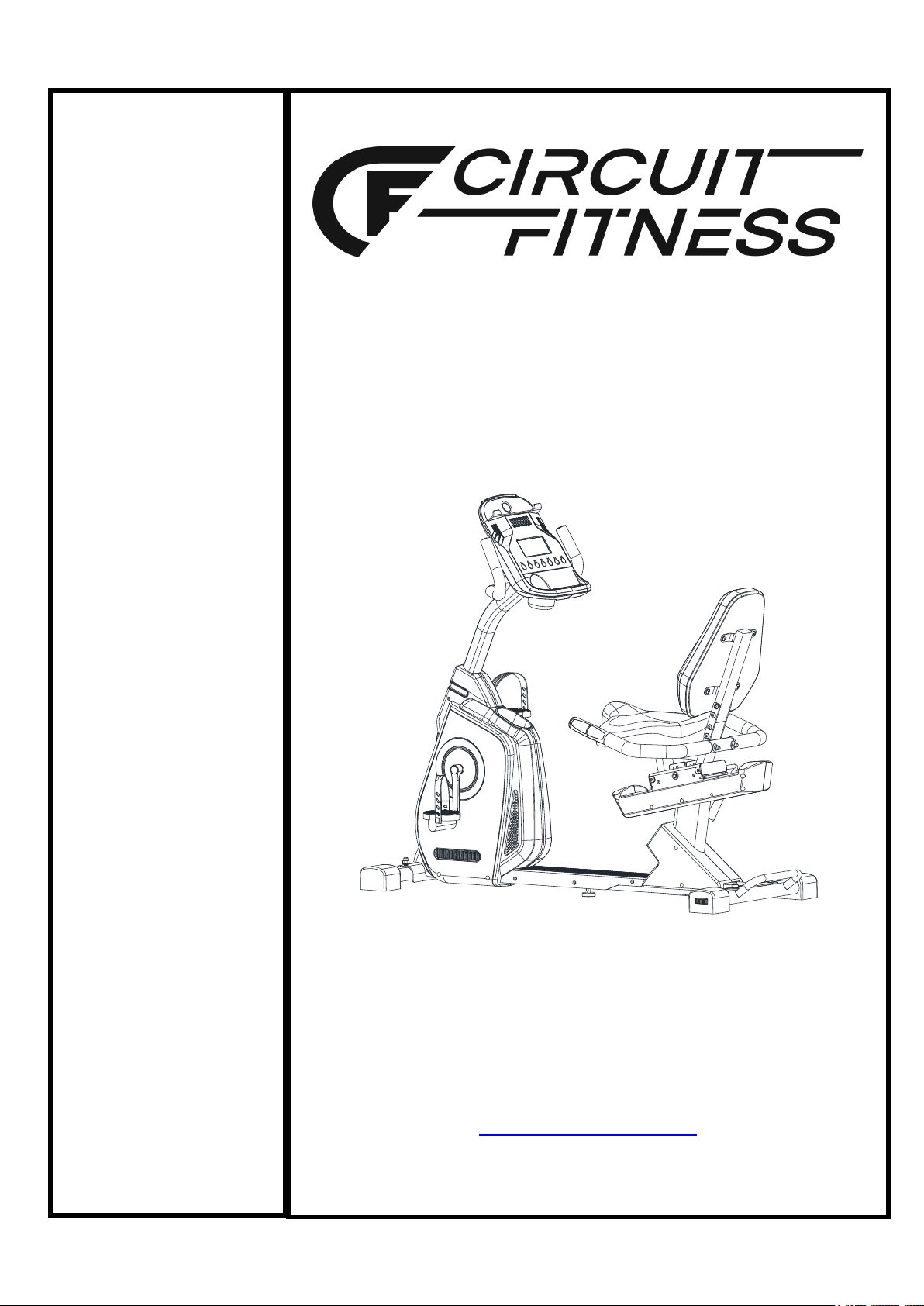
Magnetic Resistance
Recumbent Bike
AMZ-587R
IMPEX
®
INC.
2801 S. Towne Ave, Pomona, CA 91766
Tel: (800) 999-8899 Fax: (626) 961-9966
www.marcypro.com
1
© IMPEX INC. www.marcypro.com
TABLE OF CONTENTS
BEFORE YOU BEGIN
Thank you for selecting the CIRCUIT FITNESS Magnetic Resistance Recumbent Bike
AMZ-587R by IMPEX
®
INC. For your safety and benefit, read this manual carefully
before using the bike. As a manufacturer, we are committed to provide you complete
customer satisfaction. If you have any questions, or find there are missing or damaged
parts, we guarantee you complete satisfaction through direct assistance from our
factory. To avoid unnecessary delays, please call our TOLL-FREE customer service
number. Our Customer Service Agents will provide immediate assistance to you.
BEFORE YOU BEGIN
1
IMPORTANT SAFETY NOTICES
2
WARNING LABEL PLACEMENT
3
HARDWARE PACK
4
COMPONENT FOR ASSEMBLY
5
IMPORTANT ASSEMBLY INSTRUCTION
6
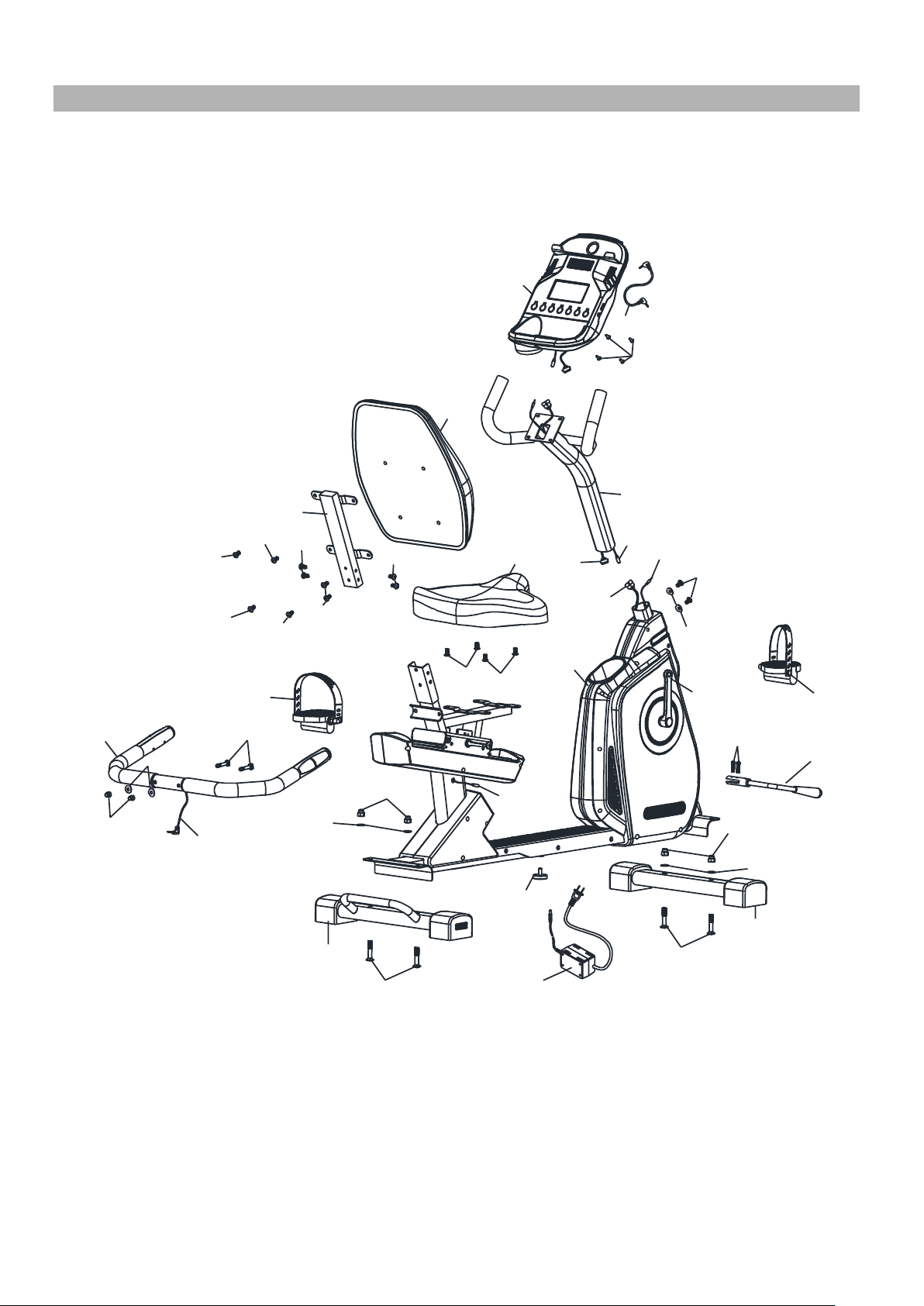
EXPLODED DIAGRAM
16
PARTS LIST
17
CARE AND MAINTENANCE, WEIGHT CAPACITY & DIMS.
18
COMPUTER
19
EXERCISE GUIDELINES
20
WARRANTY
26
ORDERING PARTS
26
Toll-Free Customer Service Number
1-800-999-8899
Mon. - Fri. 9 a.m. - 5 p.m. PST
www.marcypro.com

2
© IMPEX INC. www.marcypro.com
IMPORTANT SAFETY NOTICE
PRECAUTIONS
This exercise machine is built for optimum safety. However, certain precautions apply
whenever you operate a piece of exercise equipment. Be sure to read the entire manual
before you assemble or operate your machine. In particular, note the following safety
precautions:
1. Keep children and pets away from the machine at all times. DO NOT leave
children unattended in the same room with the machine.
2. Only one person at a time should use the machine.
3. If the user experiences dizziness, nausea, chest pain, or any other abnormal
symptoms, STOP the workout at once. CONSULT A PHYSICIAN IMMEDIATELY.
4. Position the machine on a clear, leveled surface. DO NOT use the machine near
water or outdoors.
5. Keep hands away from all moving parts.
6. Always wear appropriate workout clothing when exercising. DO NOT wear robes or
other clothing that could become caught in the machine. Running or aerobic shoes
are also required when using the machine.
7. Use the machine only for its intended use as described in this manual. DO NOT use
attachments not recommended by the manufacturer.
8. Do not place any sharp object around the machine.
9. Disabled person should not use the machine without a qualified person or physician in
attendance.
10. Before using the machine to exercise, always do stretching exercises to properly
warm up.
11. Never operate the machine if the machine is not functioning properly.
12. Read all warnings posted on the exercise bike.
13. Inspect the exercise bike for worn or loose component prior to use. Tighten/replace
any loose or wore components prior to use.
14. Care should be taken in mounting or dismounting the exercise bike.
15. This exercise bike is for consumer and home use only.
WARNING: BEFORE BEGINNING ANY EXERCISE PROGRAM, CONSULT YOUR
PHYSICIAN. THIS IS ESPECIALLY IMPORTANT FOR INDIVIDUALS OVER THE AGE
OF 35 OR PERSONS WITH PRE-EXISTING HEALTH PROBLEMS. READ ALL
INSTRUCTIONS BEFORE USING ANY FITNESS EQUIPMENT. IMPEX INC. ASSUMES
NO RESPONSIBILITY FOR PERSONAL INJURY OR PROPERTY DAMAGE
SUSTAINED BY OR THROUGH THE USE OF THIS PRODUCT.
SAVE THESE INSTRUCTIONS.
3
© IMPEX INC. www.marcypro.com
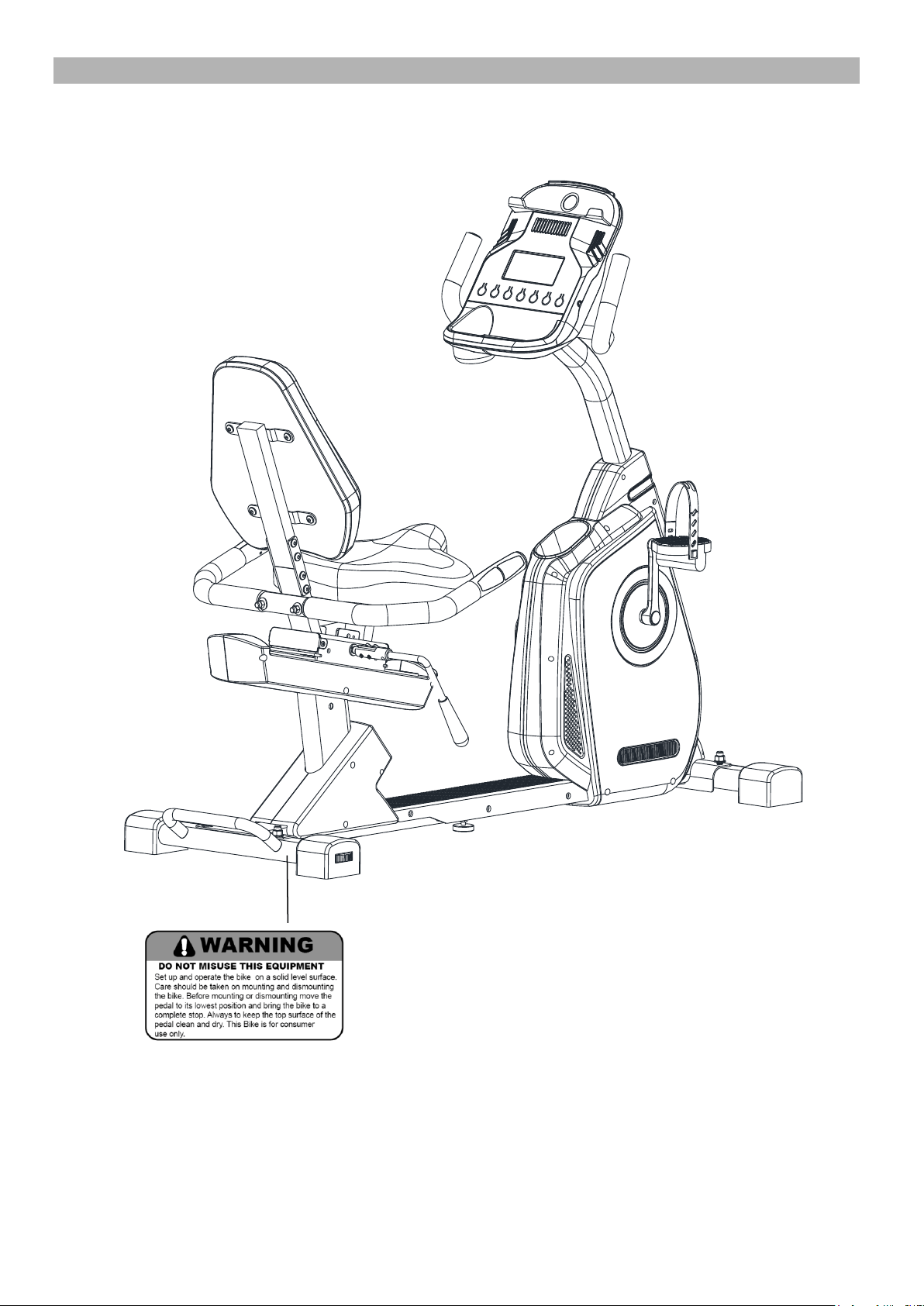
WARNING LABEL PLACEMENT
The Warning Labels shown here has been placed on the Rear Stabilizer.
If the labels are missing or illegible, please call customer service at 1-800-999-8899 for
replacement. Apply the labels in location shown.
4
© IMPEX INC. www.marcypro.com
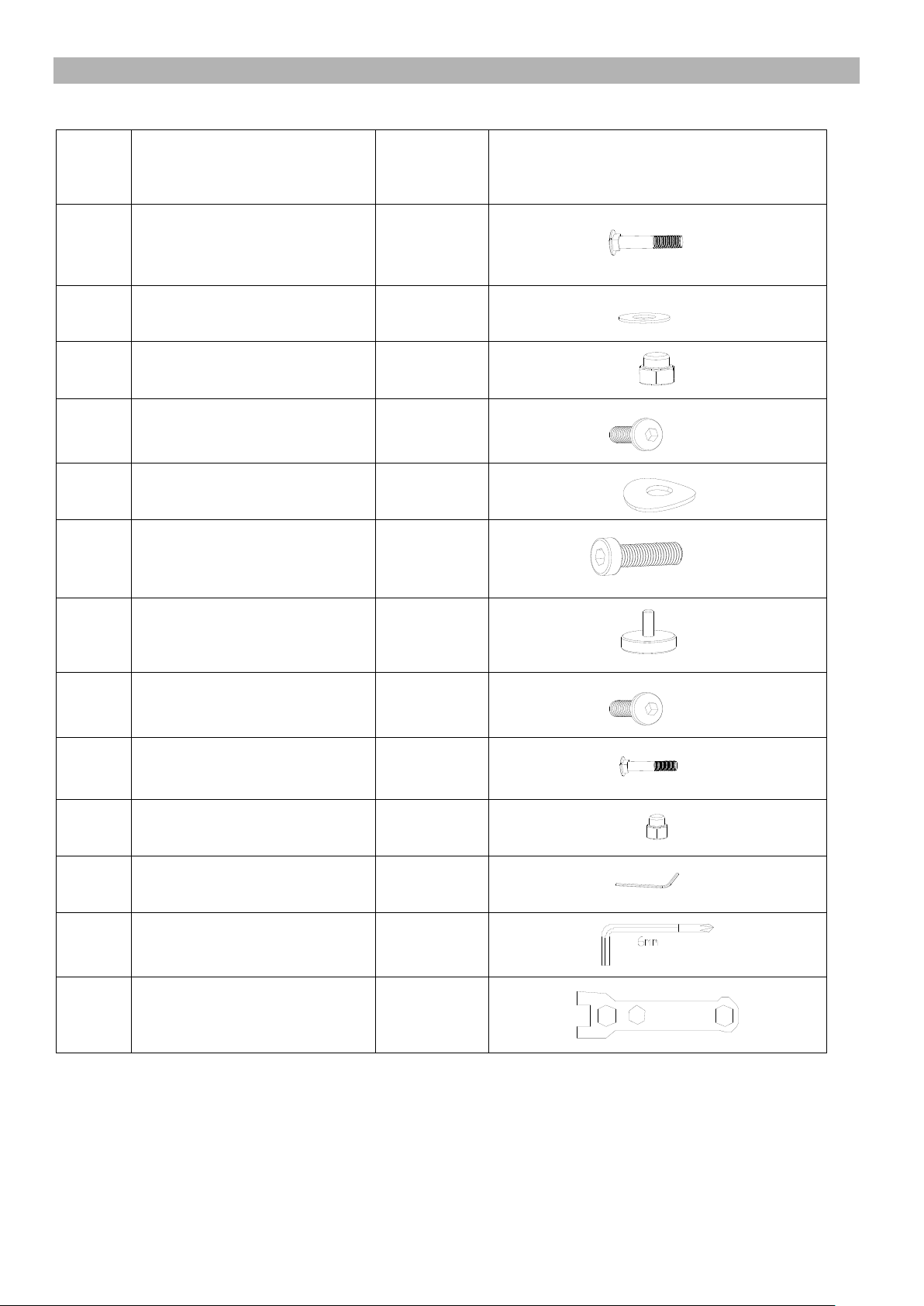
HARDWARE PACK
NOTE: The following parts are not drawn to scale. Please use your own ruler to measure the size.
NO.
DESCRIPTION
Qty
Drawings
4
M10 x 2⅛” Carriage Bolt
4
5
Flat Washer
4
6
Hex Nut M10
4
21
Allen bolt M8 x 1”
2
22
Curved washer
4
23
M5 x 1” Round head bolt
2
24
Stopper
1
26
Allen Bolt M8 x ⅝”
16
27
M8 x 2” Carriage Bolt
2
28
Hex nut M8
2
Allen key L4
1
Allen key L6
1
Box Wrench
1
5
© IMPEX INC. www.marcypro.com
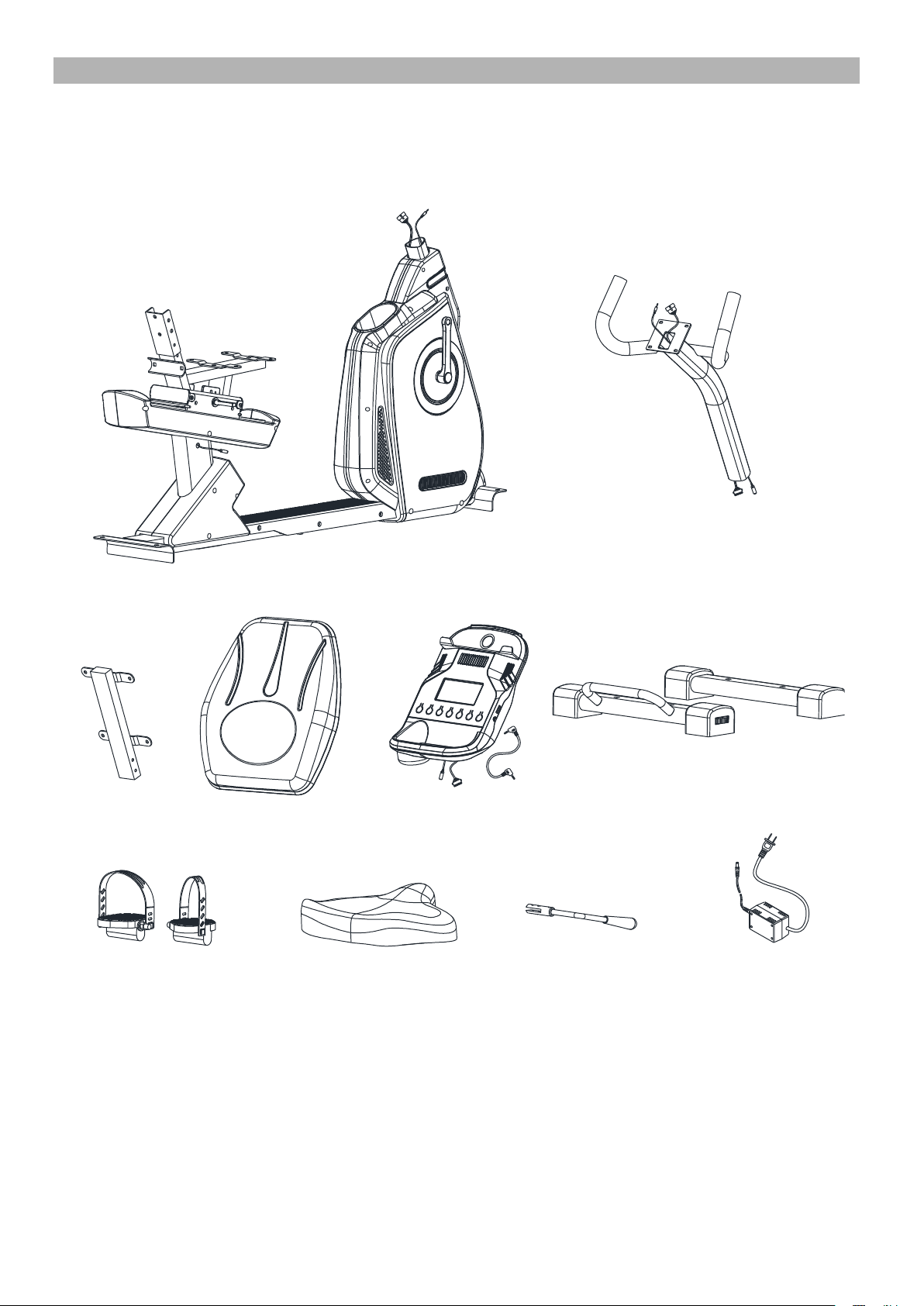
COMPONENTS FOR ASSEMBLY
NO.1 NO.7
NO.15 NO.14 NO.8
NO.2/3
NO.10/11
NO.13
NO.16 NO.30
6
© IMPEX INC. www.marcypro.com
ASSEMBLY INSTRUCTION
• Tools Required for Assembling the Machine: One Crossing Wrench and Allen
Wrench, provided by manufacturer.
• NOTE: It is strongly recommended that two or more people assemble this machine to
avoid possible injury.
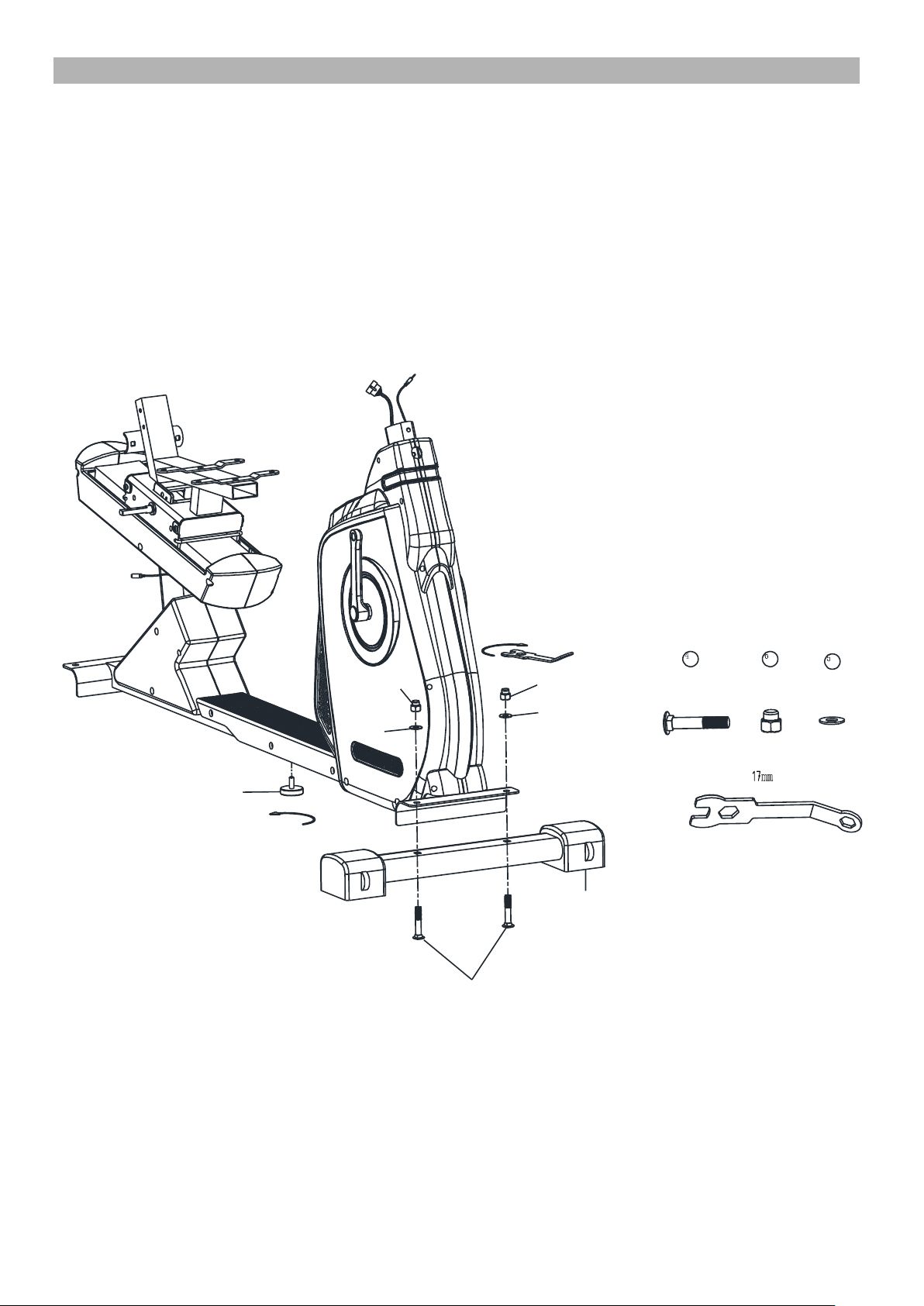
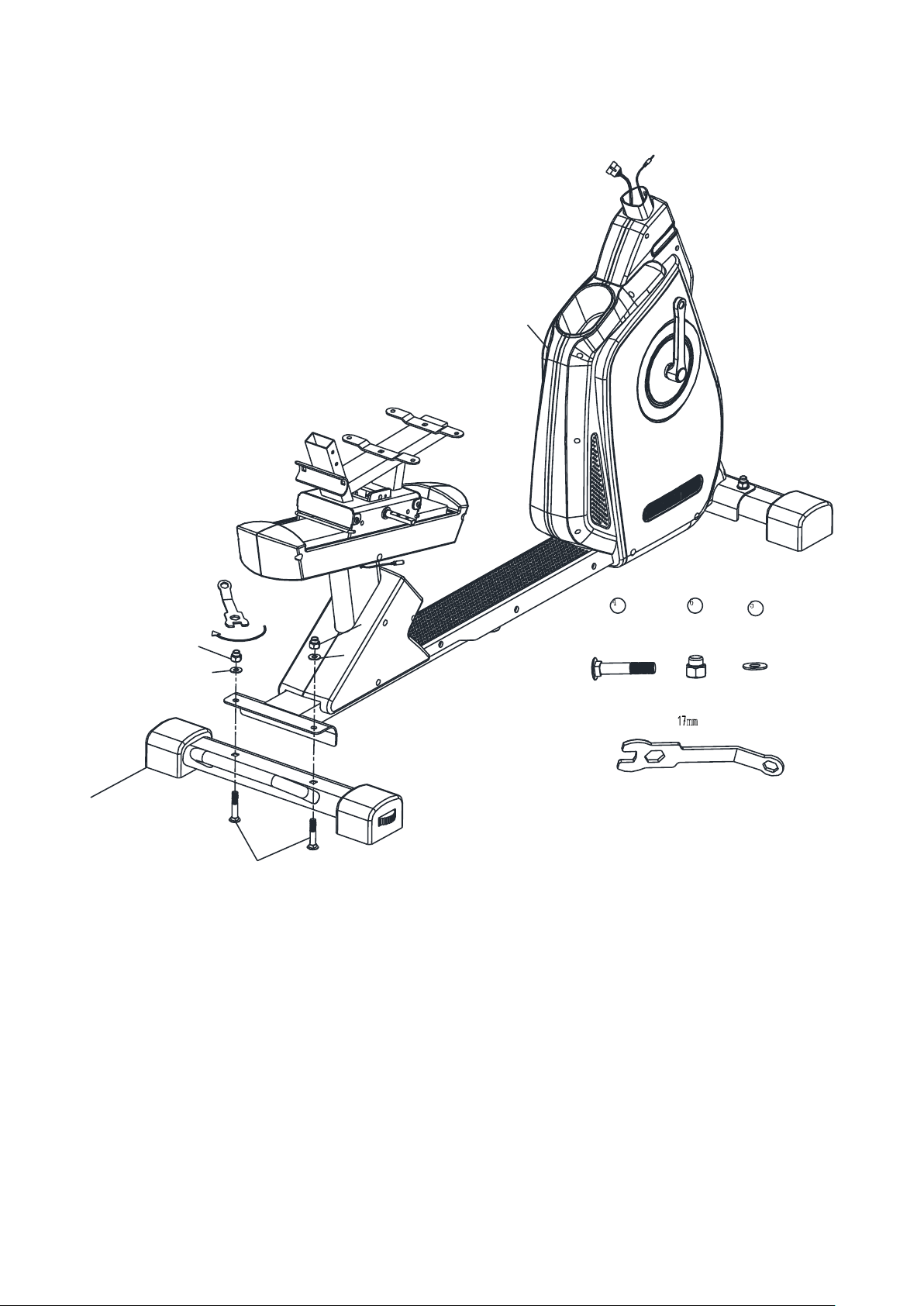
STEP 1
1. Attach the Front Stabilizer (#3) with Carriage Bolts (#4), Flat Washers (#5) and Hex Nuts (#6)
to the Main Frame (#1).
2. Thread the Stopper (#24) into the Sliding Frame from the bottom.
24
4
5
5
6
6
3
2X
2X
2X
7
© IMPEX INC. www.marcypro.com
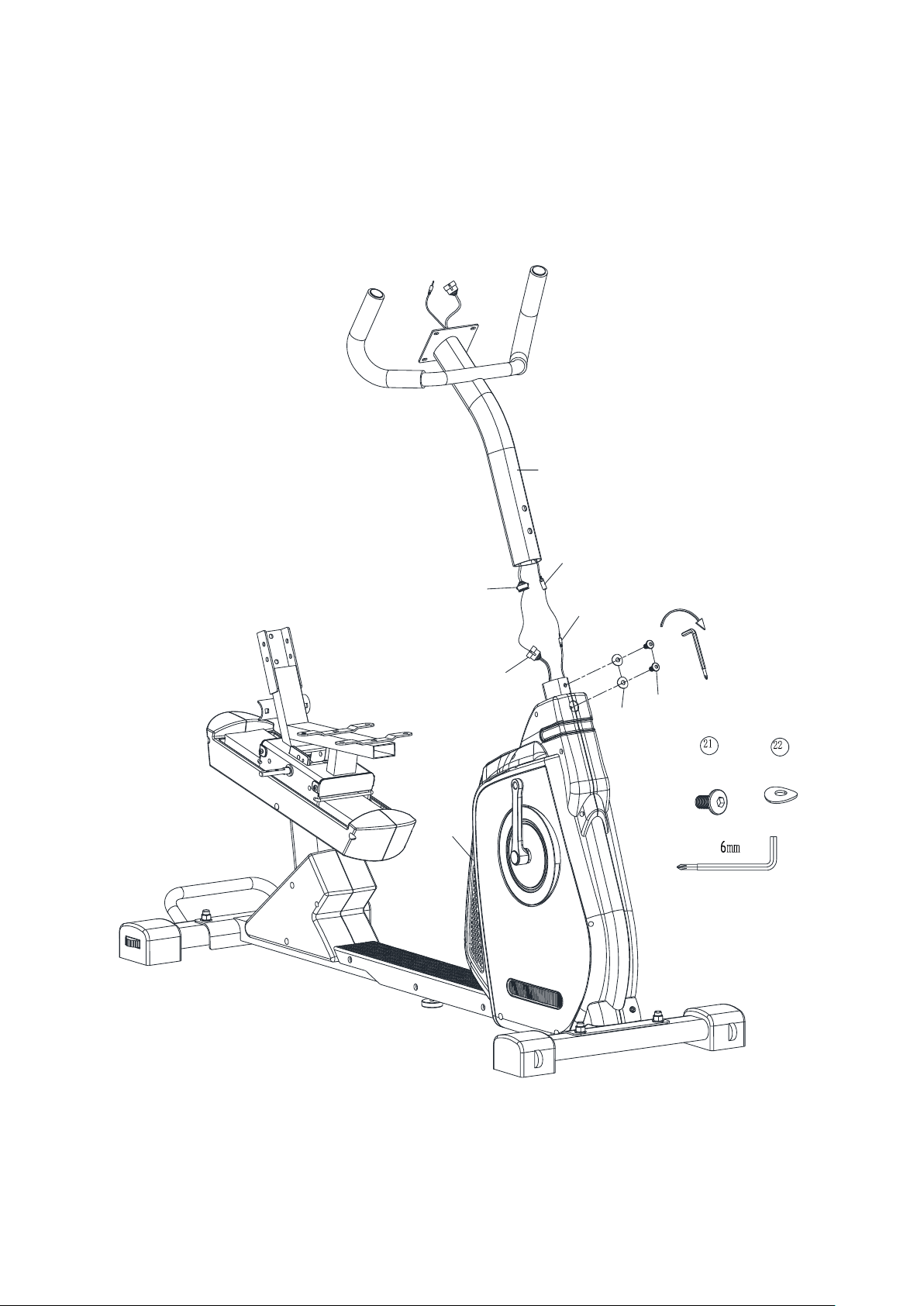
STEP 2
Attach the Rear Stabilizer (#2) with Carriage Bolts (#4), Flat Washers (#5) and Hex Nuts (#6) to
the Main Frame.
2X
2X
2X
1
4
5
5
6
6
2
8
© IMPEX INC. www.marcypro.com
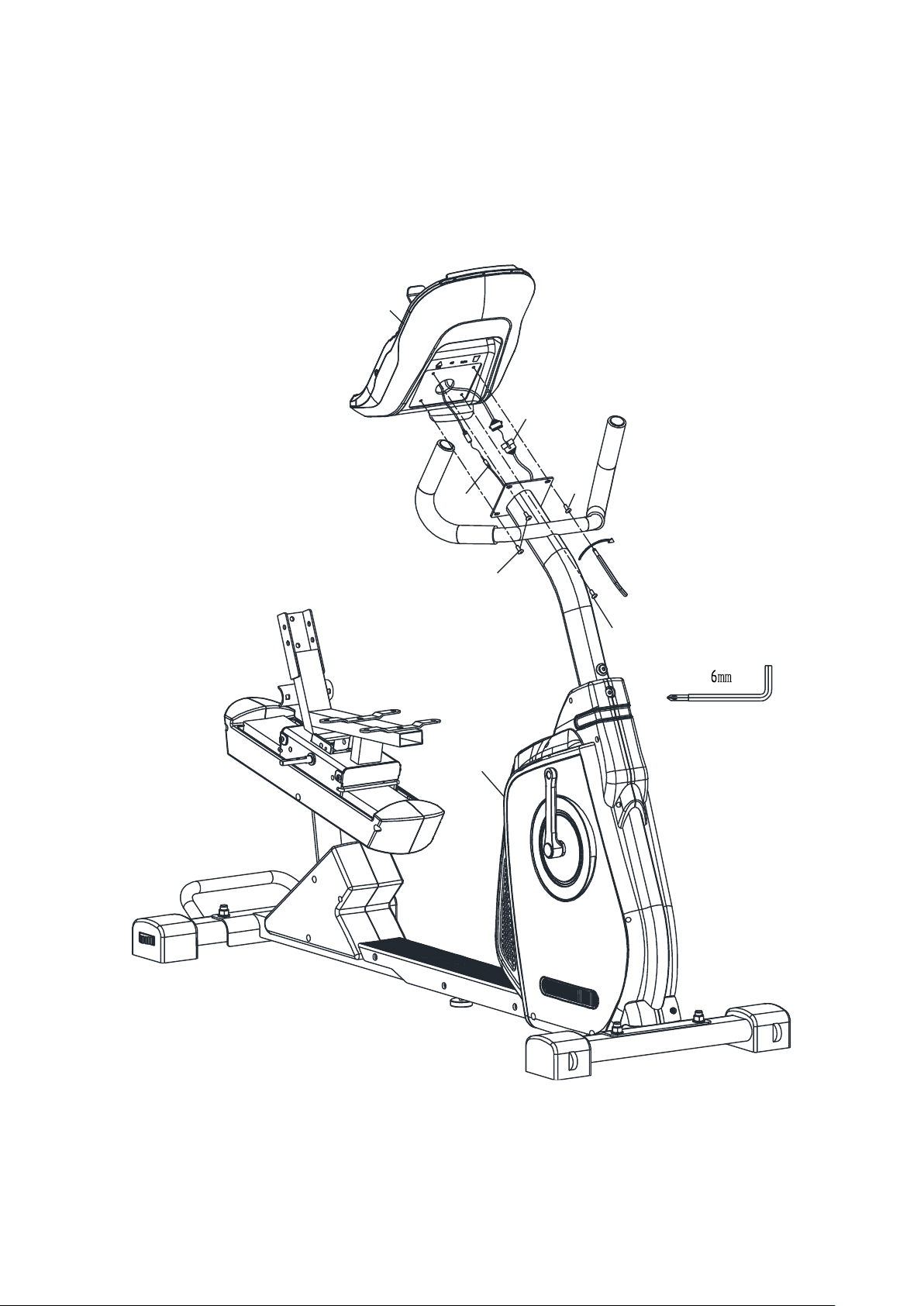
STEP 3
1. Connect Middle computer wire (#17) to the Lower computer wire (#18).
2. Connect Front extension hand pulse wire (#19) with Middle extension hand pulse wire (#20).
3. Attach the Front Post (#7)to the Main Frame, secure with Allen Bolts (#21) and Curved
washers (#22).
4X
4X
19
17
20
18
21
22
1
7
9
© IMPEX INC. www.marcypro.com
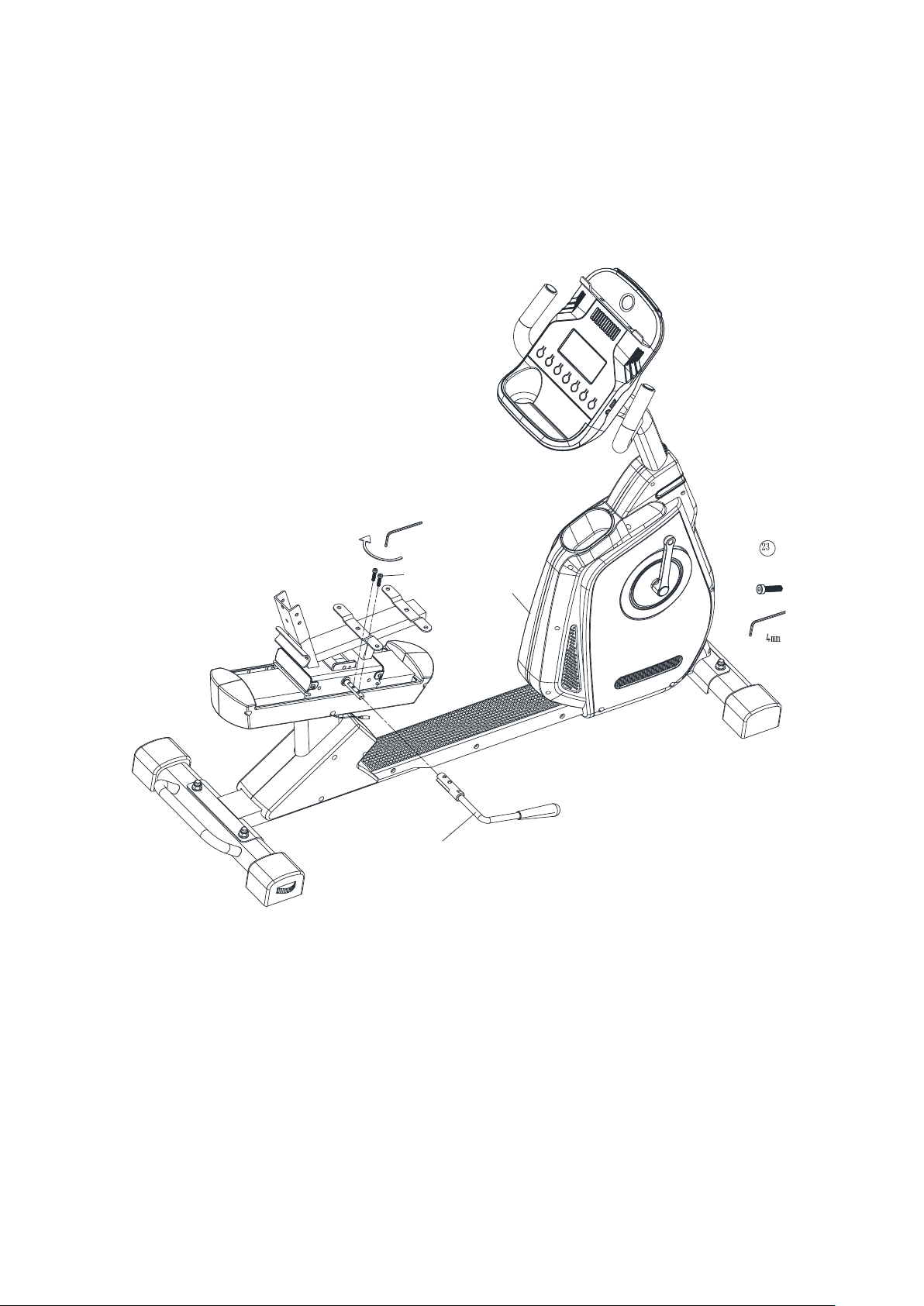
STEP 4
1. Connect the hand pulse wire (#19) to the computer, and computer wire (#17) to the computer.
2. Secure the computer (#8) to the Front post with Screws (pre-assembled on the Computer)
(#9) .
8
19
17
9
9
9
1
10
© IMPEX INC. www.marcypro.com
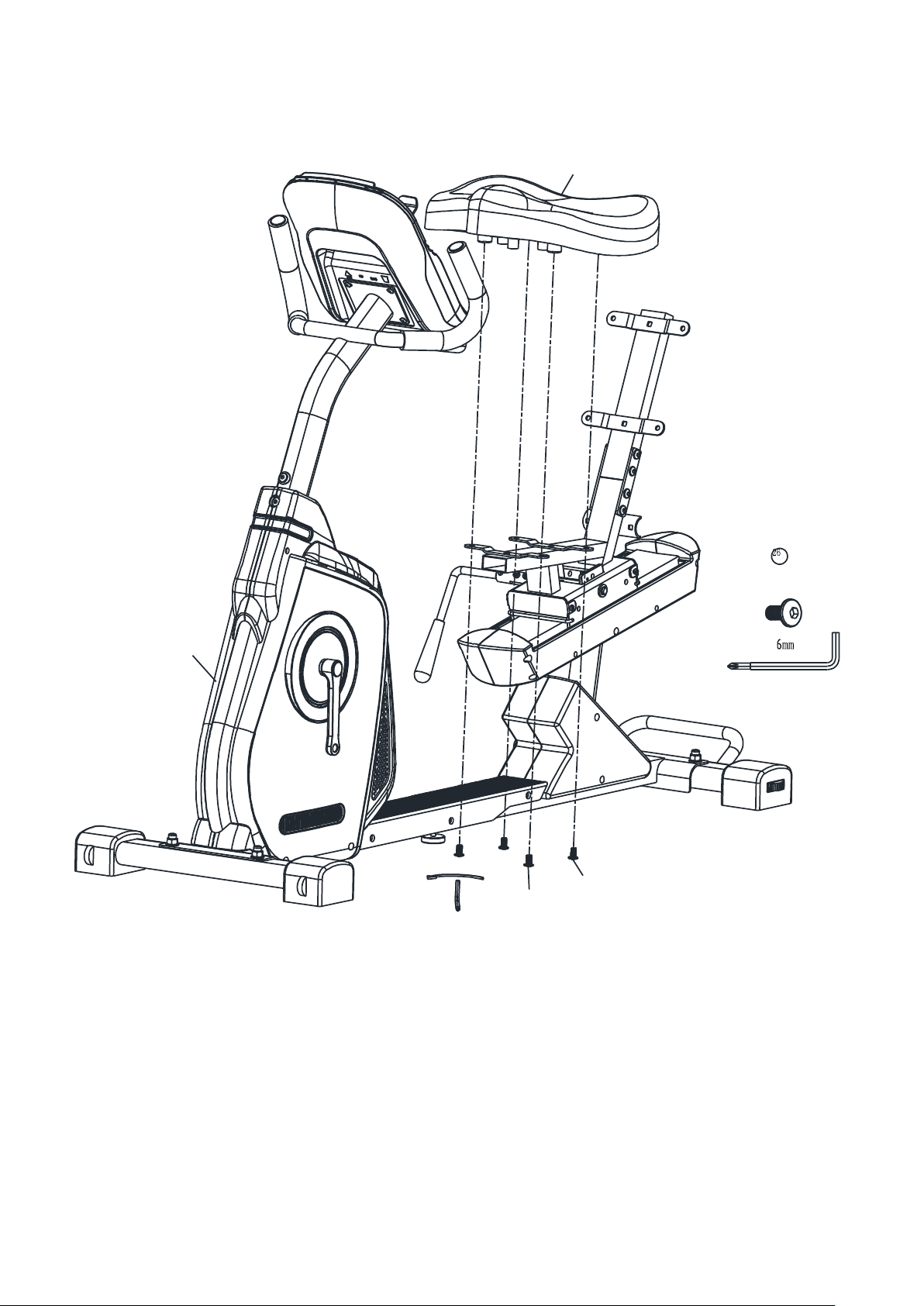
STEP 5
Secure the Quick Release handle (#16) with Round Bolts (#23) to the Rear Sliding Frame.
16
23
1
2X
11
© IMPEX INC. www.marcypro.com
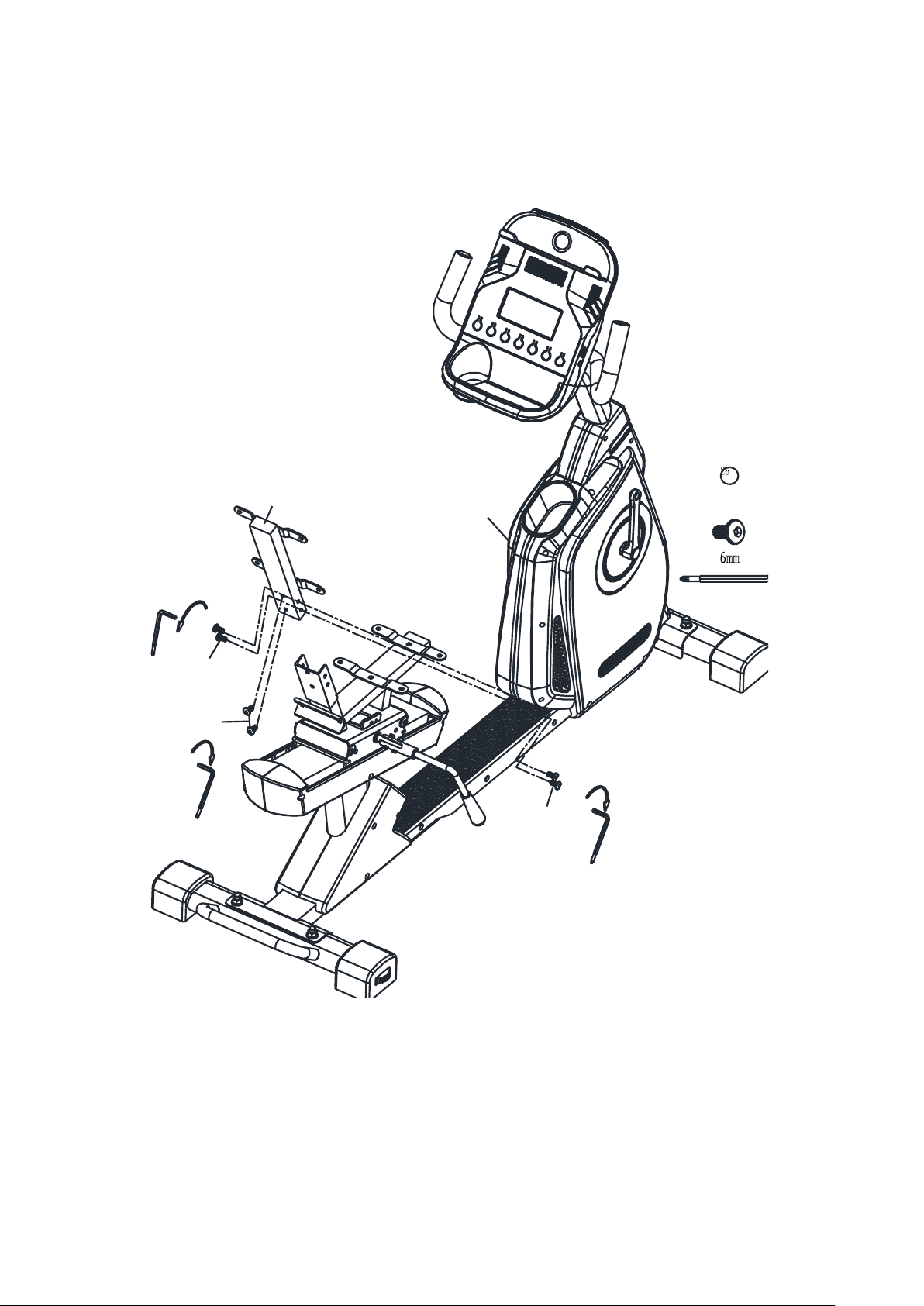
STEP 6
Secure the Seat Pad (#13) to the Main Frame with Allen Bolts (#26).
13
26
26
1
4X
12
© IMPEX INC. www.marcypro.com
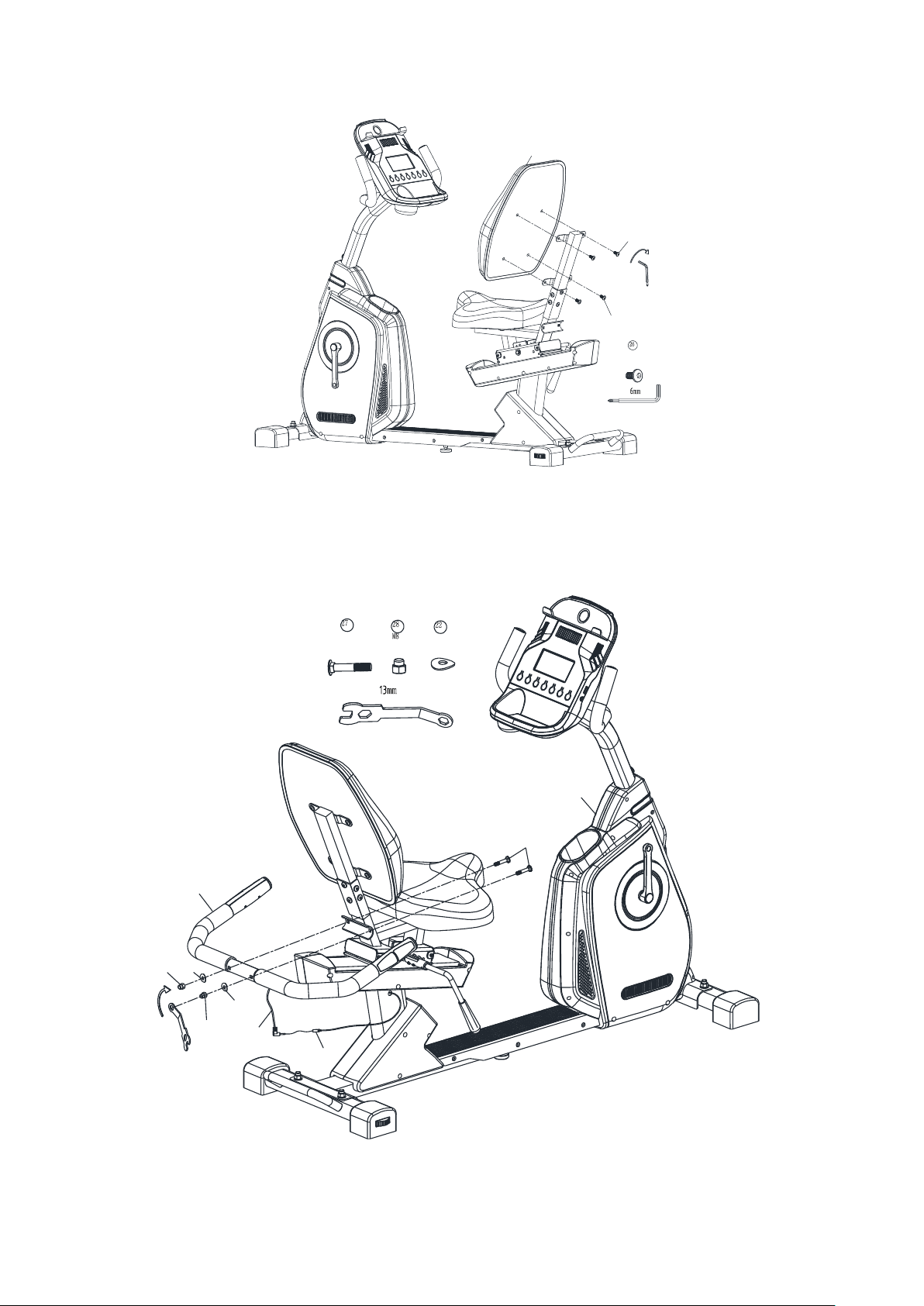
STEP 7
Insert the Backrest Support(#15) to the Rear Sliding Frame, secure with Allen Bolt (#26).
15
26
26
6X
1
26
13
© IMPEX INC. www.marcypro.com
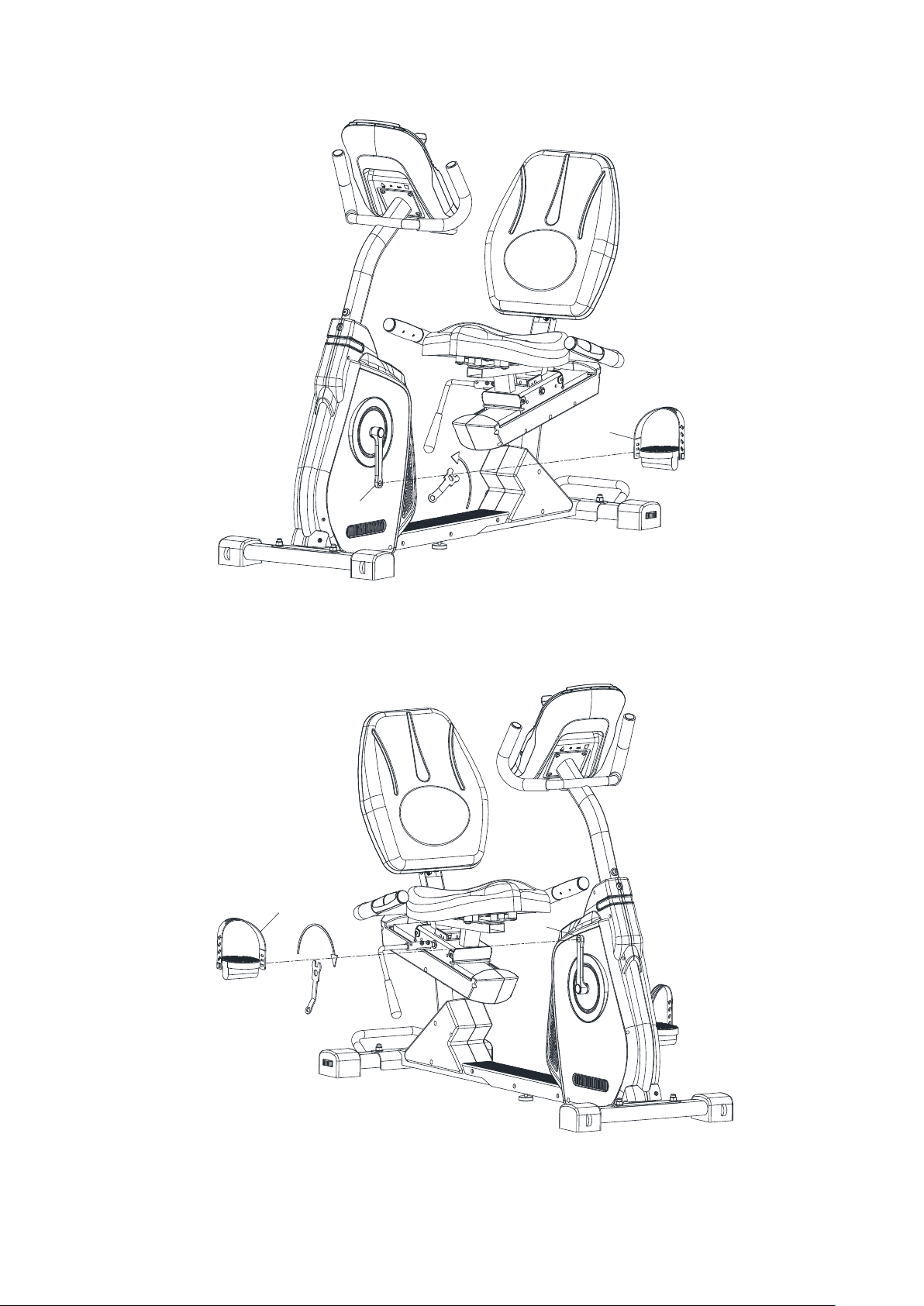
STEP 8
Attach the Backrest board (#14) to the Back Support with Allen Bolts (#26).
STEP 9
1. Secure the Handlebar (#12) to the back of the Seat with Curved washers (#22) and Hex Nuts
(#28).
2. Connect Hand pulse wire (#20) to the Hand pulse wire (#29) on the Handlebar (#29).
14
26
26
4X
29
20
28
28
22
22
12
27
2X
2X
2X
1
14
© IMPEX INC. www.marcypro.com
STEP 10
Thread the Left Pedal (#11) to the Left Crank(#25L)
STEP 11
Thread the Right Pedal (#10) to the Right Crank (#25R)
11
25L
L
10
25R
R
15
© IMPEX INC. www.marcypro.com
STEP 12
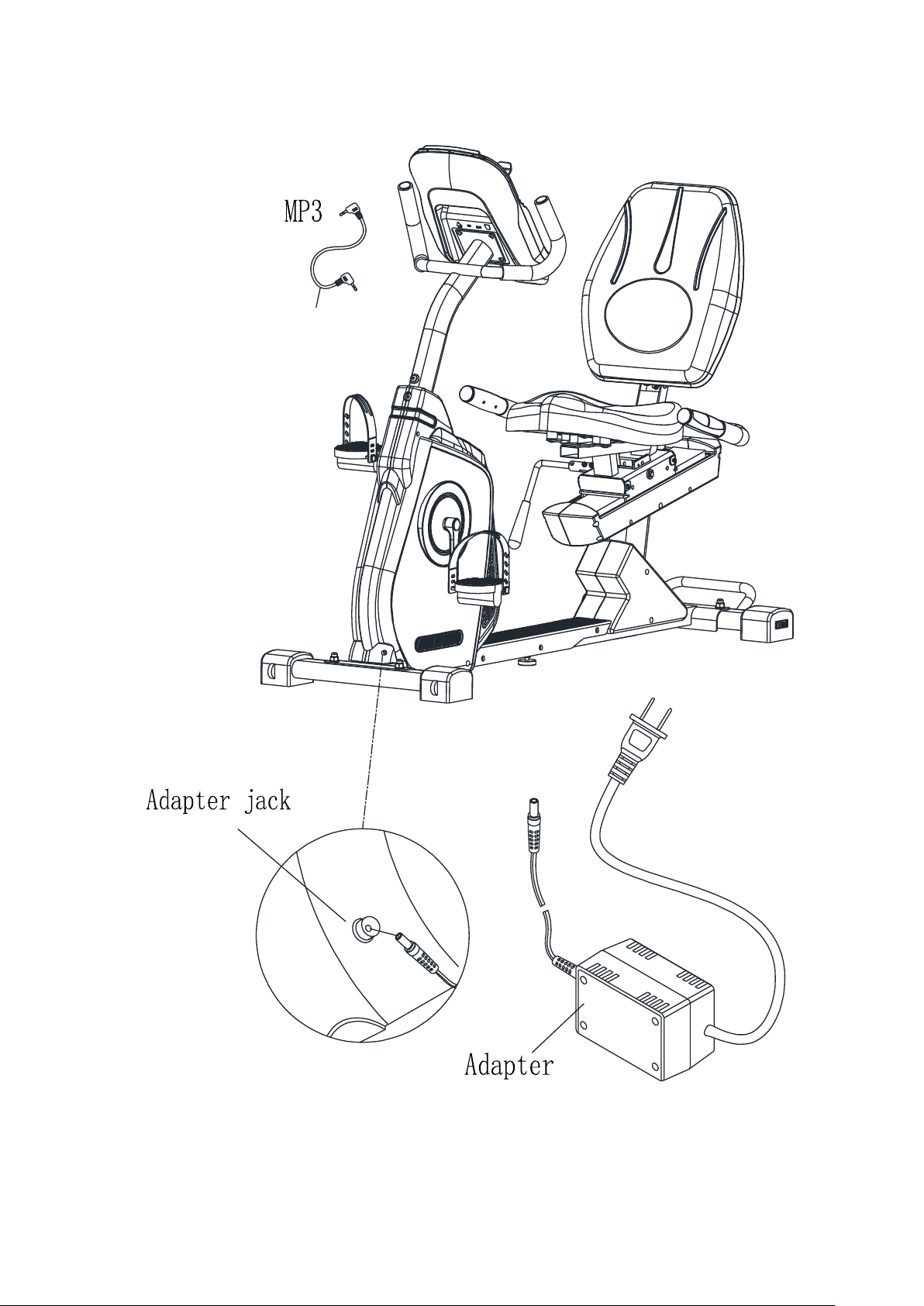
Insert the Adapter to the inlet in the Chain Cover, and the Auxiliary Line to the computer.
31
16
© IMPEX INC. www.marcypro.com
EXPLODED DIAGRAM
1
2
3
4
4
5
6
6
5
7
8
9
19
17
20
18
21
22
22
23
20
26
26
26
26
26
26
26
26
27
28
29
25R
10
11
12
13
14
15
16
26
30
31
24
17
© IMPEX INC. www.marcypro.com
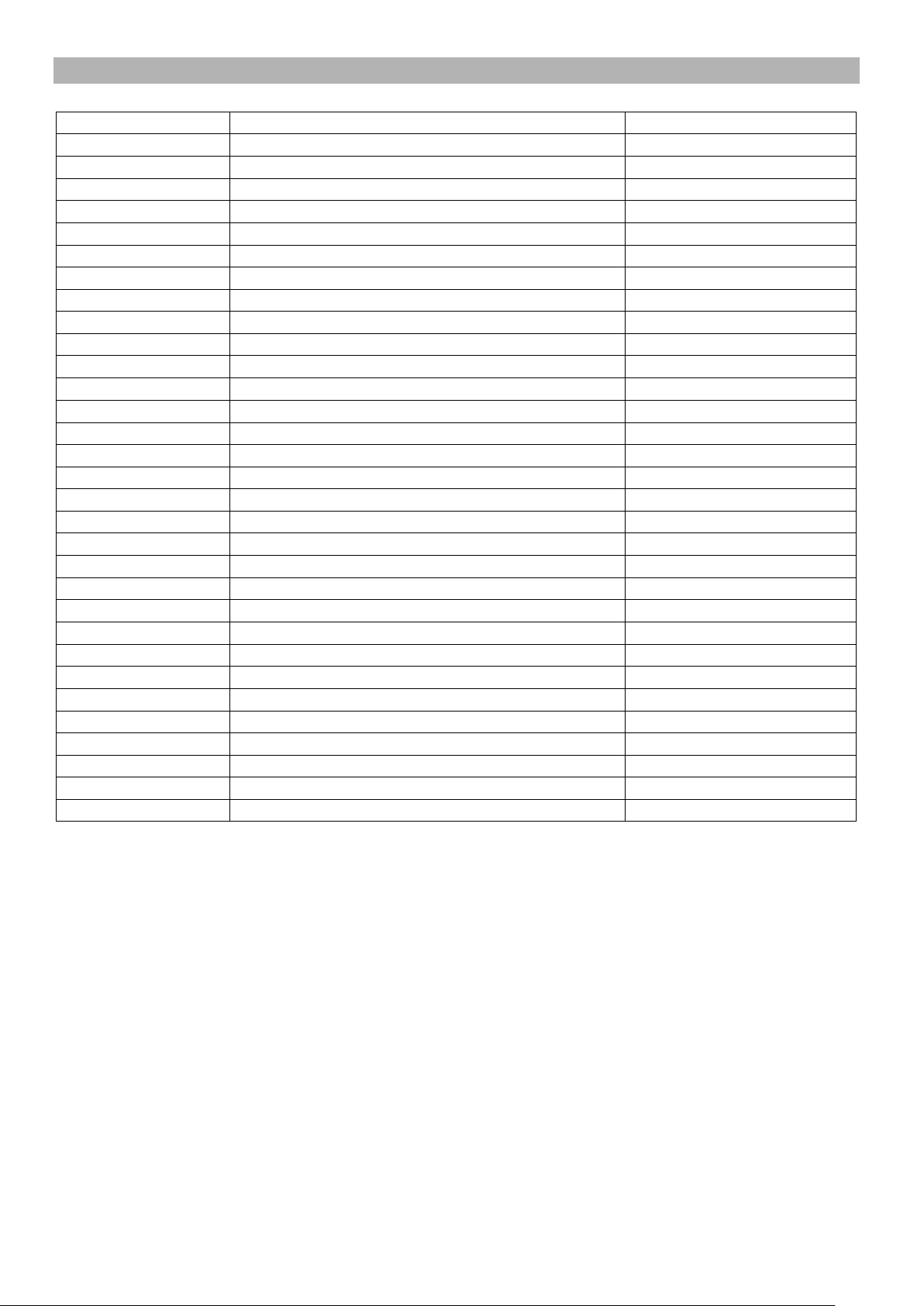
AMZ-587R PARTS LIST
ITEM NO.
DESCRIPTION
QTY
1
Main Frame
1
2
Rear Stabilizer
1
3
Front Stabilizer
1
4
Carriage Bolt M10 x 2⅛”
4
5
Flat Washer
4
6
Hex Nut M10
4
7
Front Post
1
8
Computer
4
9
Screw for computer
4
10
Pedal (Right)
1
11
Pedal (Left)
1
12
Handlebar
1
13
Seat Pad
1
14
Backrest Board
1
15
Backrest Support
1
16
Quick release handle
1
17
Middle computer wire
1
18
Lower computer wire
1
19
Front extension hand pulse wire
1
20
Middle extension hand pulse wire
1
21
Allen bolt M8 x 1”
2
22
Curved washer
4
23
Round Bolt M5 x 1”
2
24
Stopper
1
25
Crank
2
26
Allen Bolt M8 x ⅝”
16
27
Carriage Bolt M8 x 2”
2
28
Hex Nut M8
2
29
Hand Pulse Wire
1
30
Adapter
1/1
31
Auxiliary Line
1
18
© IMPEX INC. www.marcypro.com
CARE, MAINTENANCE AND STORAGE
1. Inspect and tighten all parts each time you use the machine. Replace any worn parts
immediately.
2. This machine can be cleaned using a damp cloth and mild non-abrasive detergent. Do not
use solvents.
3. Store the rower IN-DOOR. Excess moisture and water would cause rust on the frame.
4. The rower shall be placed at least 24 inches away from the wall or/and any other object such
as furniture to provide safe access to and passage around the machine.
5. To avoid possible injury, the help of two or more people are needed when moving the
machine around.
6. Disposal Instructions – The equipment can be safely disassembled and disposed without
unreasonable hazards. Call your local recycle agency regarding details of recycling.
7. The maximum user weight is 300 lbs.
8. Assembled Dimension (L x W x H): 55” x 24.8” x 48.5”
OPERATING NOTES
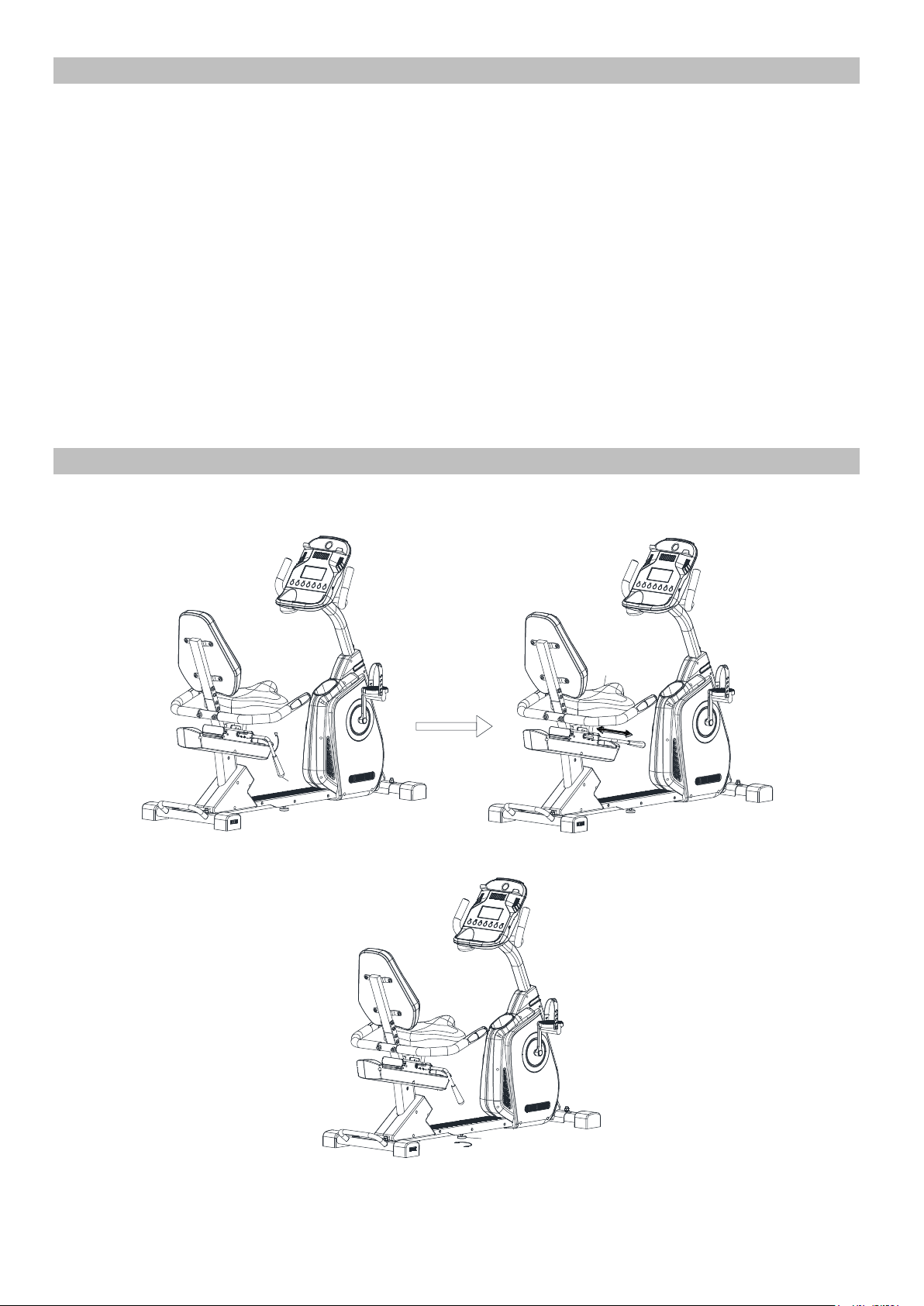
1.Adjustment of the Seat position. Pull up on the Quick Release Handle to adjust
forward/backward. Push down to lock the seat into position.
2.Thread the Stopper (#24) to ensure the bike is level.
16
13
24
19
© IMPEX INC. www.marcypro.com
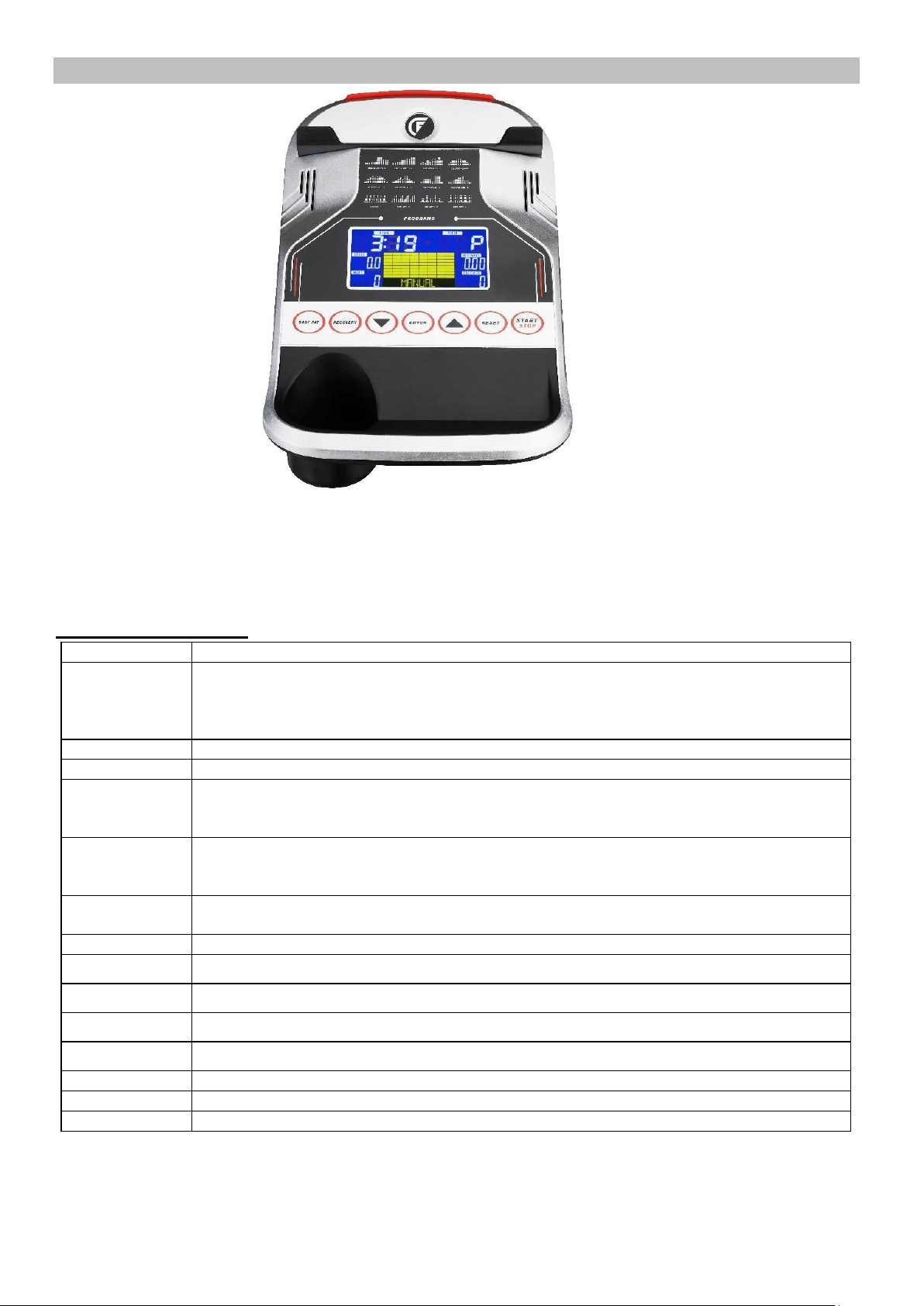
COMPUTER
DISPLAY FUNCTIONS
ITEM
DESCRIPTION
TIME
Count up – With no preset target (time), Time will count up from 00:00 to maximum 99:59 with each
increment being 1 second.
Count down - If training with preset Time, Time will count down from preset to 00:00.
Each preset increment or decrement is 1 second between 00:00 to 99:00.
SPEED
Displays current training speed. Maximum speed is 99.9 KM/H or ML/H.
RPM
Displays the Rotation Per Minute. Display range 0~15~999
DISTANCE
Accumulates total distance from 0.00 up to 99.99 Miles. The user may preset target distance by using
UP/DOWN button.
Each preset increment or decrement is 0.1 mile between 0.00 to 99.90.
CALORIES
Accumulates calories consumption during training from 0 to maximum 9999 calories.
(This data is a only for reference for comparison of different exercise sessions and SHOULD NOT be
used in medical treatment.)
PULSE
User may set up target pulse from 0 - 30 to 230; and computer buzzer will beep when actual heart rate
is over the target value during workout.
WATTS
Display current workout watts. Display range 0~999.
MANUAL
Manual mode workout.
BEGINNER
4 PROGRAM selection.
ADVANCE
4 PROGRAM selection.
SPORTY
4 PROGRAM selection.
CARDIO
Target HR training mode.
WATT PROGRAM
WATT constant training mode.
USB Port
Power only, does not provide data transfer. Use to charge your mobile devices.
20
© IMPEX INC. www.marcypro.com
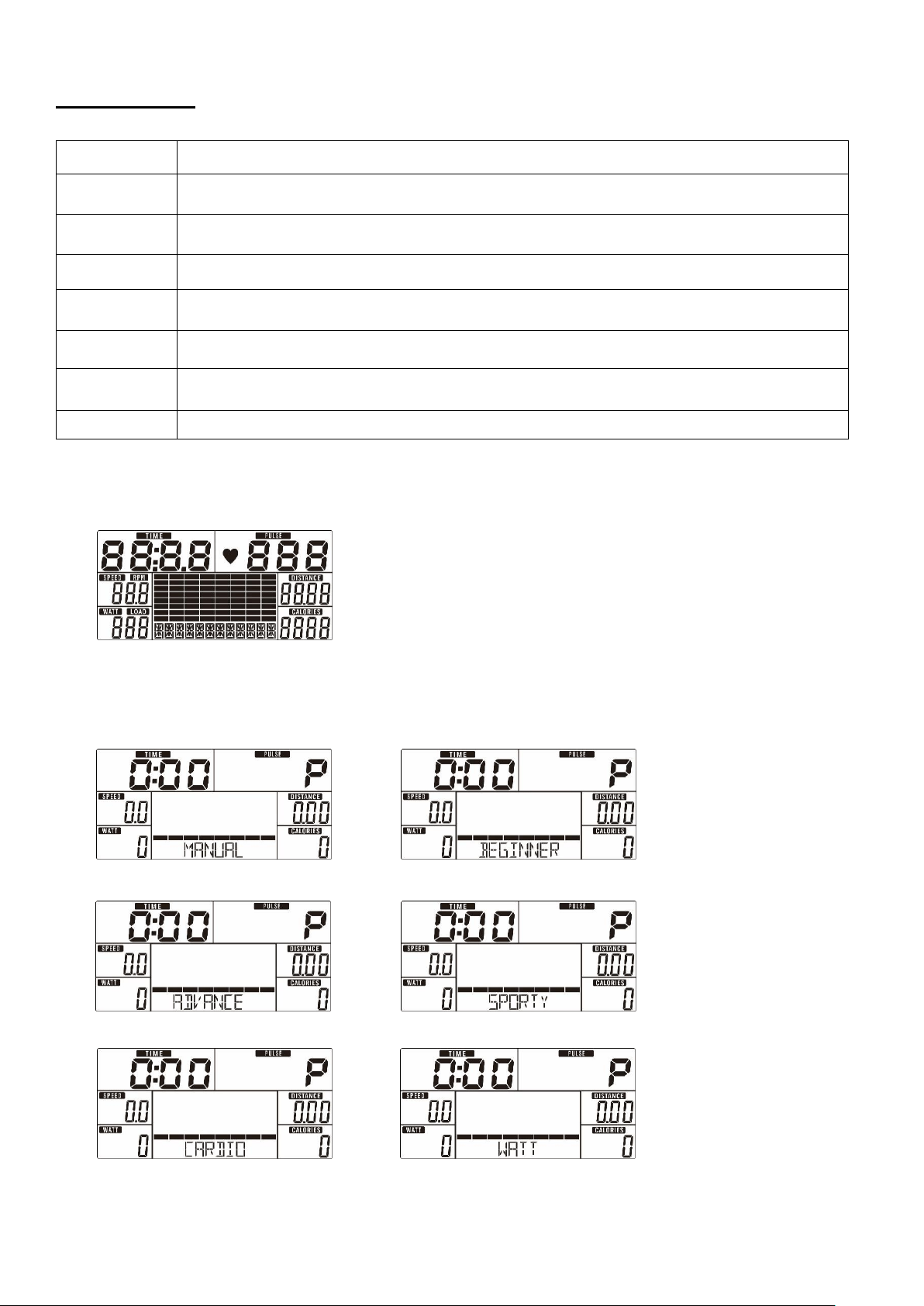
KEY FUNCTION
OPERATION:
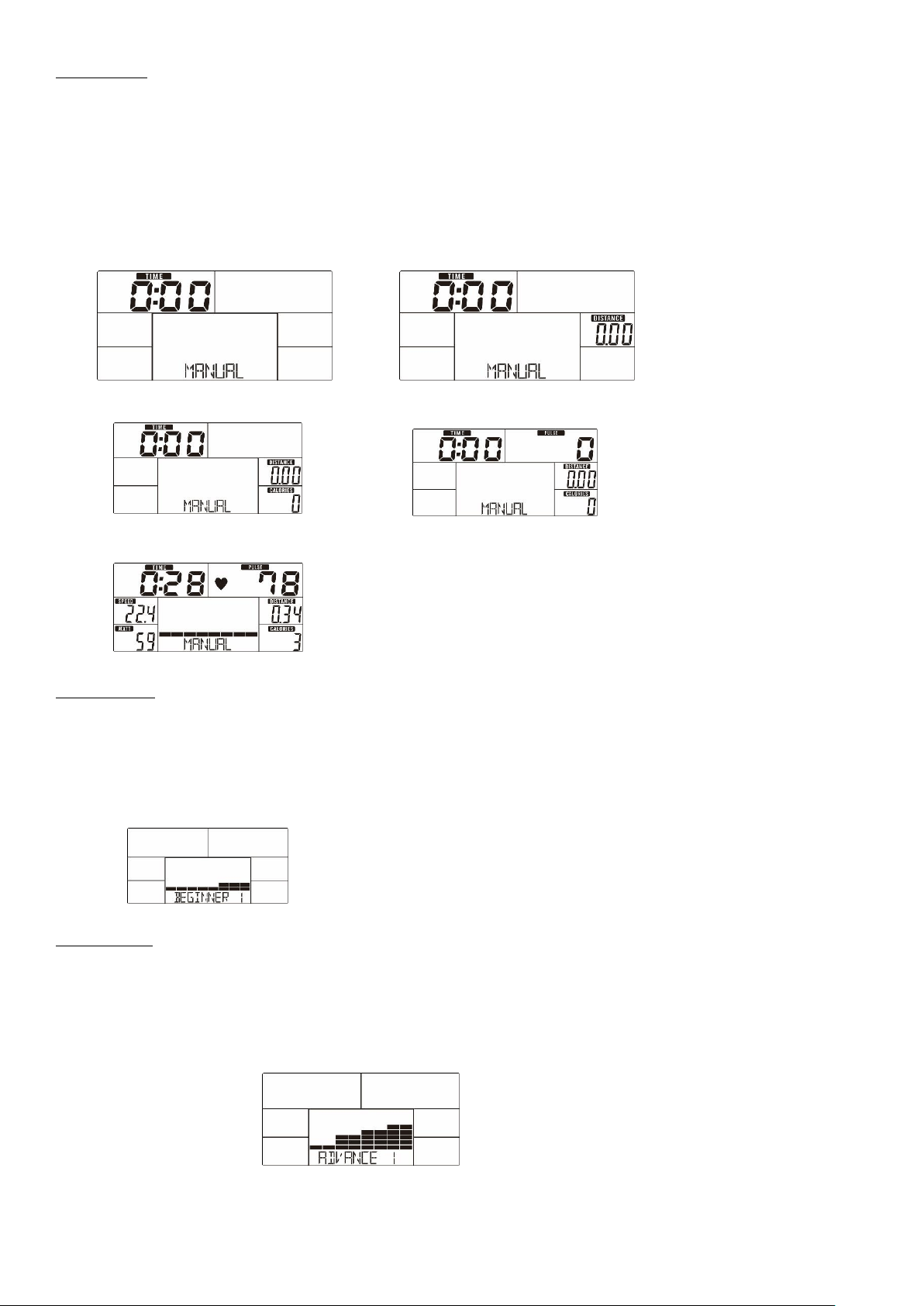
POWER ON
Plug in power supply, computer will power on and display all segments on LCD for 2 seconds (Drawing 1).
Drawing 1
WORKOUT SELECTION
Use UP or DOWN Arrow to select workout: Manual (Drawing 2)→ Beginner(Drawing 3) → Advance (Drawing 4) →
Sporty(Drawing 5) → Cardio(Drawing 6) → Watt(Drawing 7)
Drawing 2 Drawing 3
Drawing 4 Drawing 5
Drawing 6 Drawing 7
ITEM
DESCRIPTION
Up Arrow
Increase resistance level
Setting selection.
Down Arrow
Decrease resistance level
Setting selection.
Mode / Enter
Confirm setting or selection.
Reset
Press and hold for 2 seconds, computer will reboot and start from user setting.
Exit to main menu during preset workout value or stop mode.
Start/ Stop
Start or Stop workout.
Recovery
Test heart rate recovery status.
Body fat
In stop mode, press it for body fat measurement.
21
© IMPEX INC. www.marcypro.com
Manual Mode
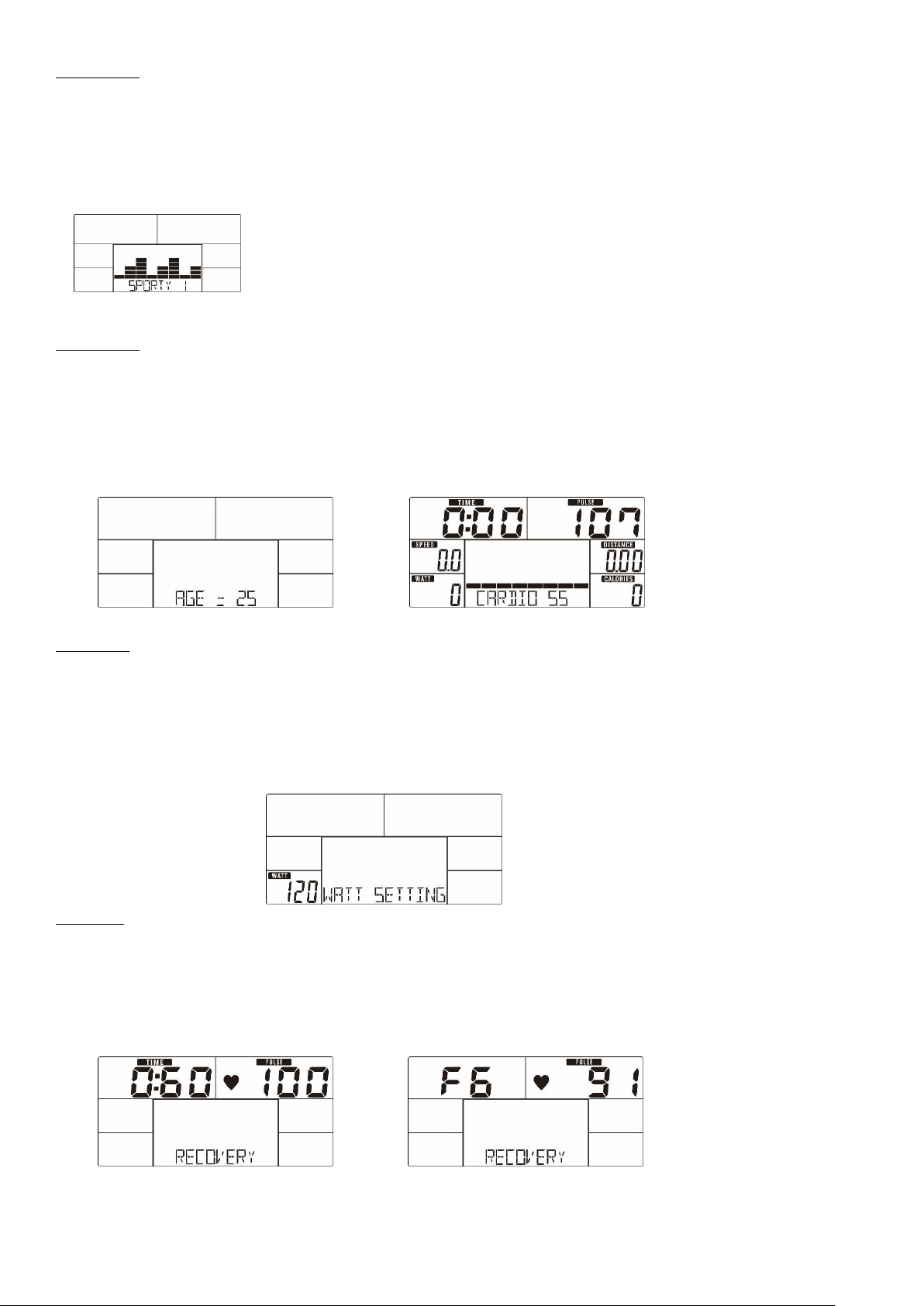
Press START in main menu may start workout in manual mode.
1. Use UP or DOWN Arrow to select workout program, choose Manual and press MODE / ENTER.
2. Use UP or DOWN Arrow to set TIME (Drawing 8), DISTANCE (Drawing 9), CALORIES (Drawing 10), PULSE (Drawing 11) and
press MODE / ENTER to confirm.
3. Press START/STOP keys to start workout. Use UP or DOWN Arrow to adjust load level. Load level is displayed in WATT
window. If no adjustment is made for 3 seconds, it will switch to display WATT (Drawing 12).
4. Press START/STOP keys to pause workout. Press RESET to exit to main menu.
Drawing 8 Drawing 9
Drawing 10 Drawing 11
Drawing 12
Beginner Mode
1. Use UP or DOWN Arrow to select workout program, choose Beginner mode and press MODE / ENTER.
2. Use UP or DOWN Arrow to select Beginner program 1~4 (Drawing 13) and press MODE / ENTER.
3. Use UP or DOWN Arrow to set TIME.
4. Press START/STOP key to start workout. Use UP or DOWN Arrow to adjust load level.
5. Press START/STOP key to pause workout. Use RESET to exit to main menu.
Drawing 13
Advance Mode
1. Use UP or DOWN Arrow to select workout program, choose Advance mode and press MODE / ENTER.
2. Use UP or DOWN Arrow to select Advance program 1~4 (Drawing 14) and press MODE / ENTER.
3. Use UP or DOWN Arrow to set TIME.
4. Press START/STOP key to start workout. Use UP or DOWN Arrow to adjust load level.
5. Press START/STOP key to pause workout. Use RESET to exit to main menu.
Drawing 14
22
© IMPEX INC. www.marcypro.com
Sporty Mode
1. Use UP or DOWN Arrow to select workout program, choose Sporty mode and press MODE / ENTER.
2. Use UP or DOWN Arrow to select Sporty program 1~4 (Drawing 15) and press MODE / ENTER.
3. Use UP or DOWN Arrow to set TIME.
4. Press START/STOP key to start workout. Use UP or DOWN Arrow to adjust load level.
5. Press START/STOP key to pause workout. Use RESET to exit to main menu.
Drawing 15
Cardio Mode
1. Use UP or DOWN Arrow to select workout program, choose H.R.C. and press MODE / ENTER.
2. Use UP or DOWN Arrow to set Age (Drawing 16).
3. Use UP or DOWN Arrow to select 55% (Drawing 17).75%.90% or TAG (TARGET H.R.) (default: 100).
4. Use UP or DOWN Arrow to set workout TIME.
5. Press START/STOP key to start or stop workout. Use RESET to exit to main menu.
Drawing 16 Drawing 17
Watt Mode
1. Use UP or DOWN Arrow to select workout program, choose WATT and press MODE / ENTER.
2. Use UP or DOWN Arrow to set WATT target. (default: 120, Drawing 18)
3. Use UP or DOWN Arrow to set TIME.
4. Press START/STOP key to start workout. Use UP or DOWN Arrow to adjust Watt level.
5. Press START/STOP key to pause workout. Use RESET to exit to main menu.
Drawing 18
RECOVERY
After exercising for a period, keep holding on hand grips or wearing chest strap and press RECOVERY key. All function display
will stop except “TIME” starts counting down from 00:60 to 00:00 (Drawing 19). Screen will display your heart rate recovery
status with the F1, F2…. to F6. F1 is the best, F6 is the worst (Drawing 20). User may keep exercising to improve the heart rate
recovery status. (Press the RECOVERY button again to return the main display.)
Drawing 19 Drawing 20
23
© IMPEX INC. www.marcypro.com
BODY FAT
1. In STOP mode, press the BODY FAT key to start body fat measurement.
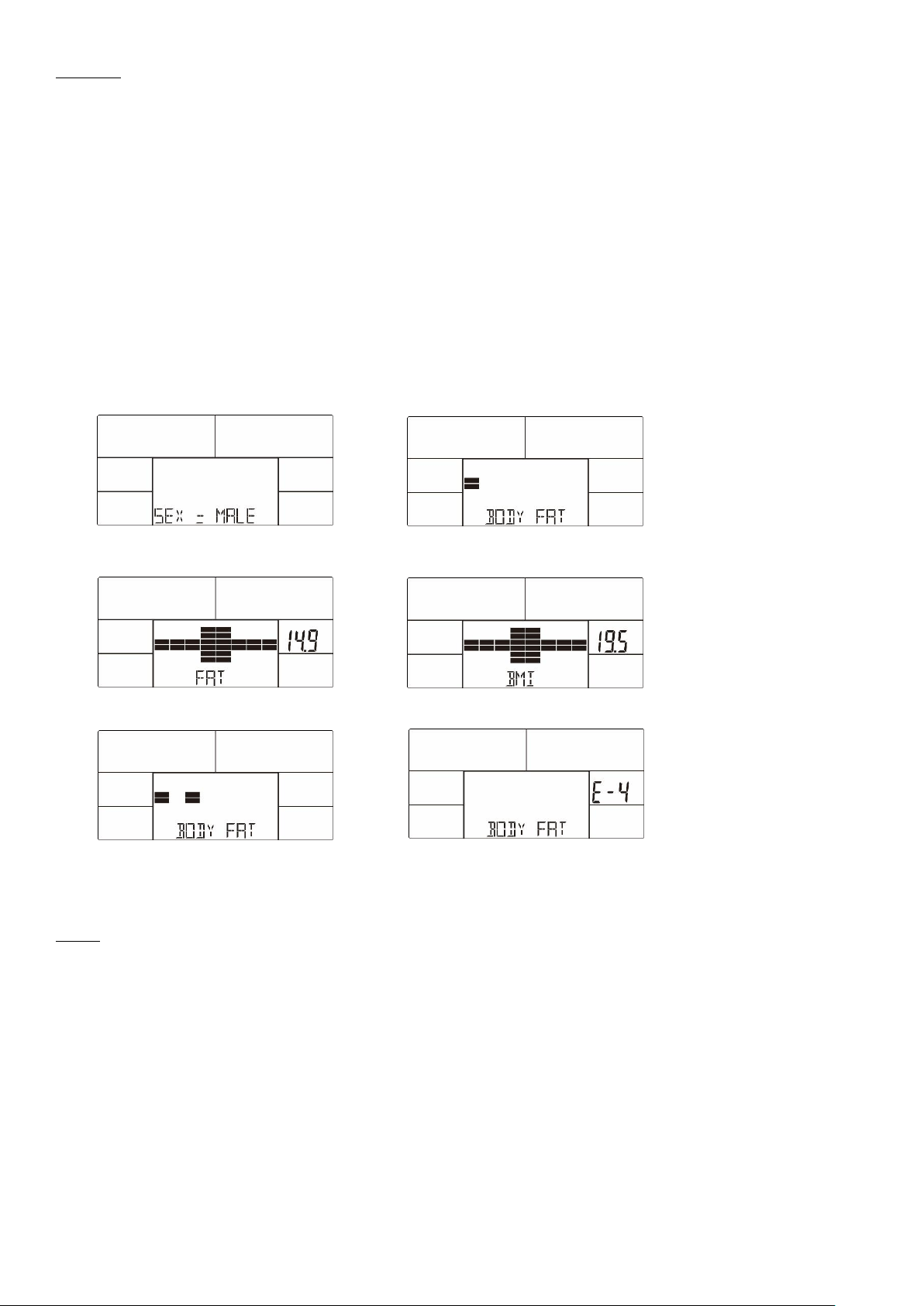
2. Console will remind to input user GENDER (Drawing 21), AGE, HEIGHT, WEIGHT, then begin to measure.
3. During measuring, users have to hold both hands on the hand grips. And the LCD will display “= ” “= = ” (Drawing 22)for 8
seconds until computer finish measuring.
4. LCD will display BODY FAT advice symbol, BODY FAT percentage (Drawing 23), BMI (Drawing 24) for 30 seconds.
5. Error message:
*The LCD displays “= = ” “ = =” (Drawing 25)–means not hand the grip or wear chest strap correctly.
E-1–There is no heart rate signal input detected.
*E-4–Occurs when FAT% is below 5 or exceeds 50 and BMI result is below 5 or exceeds 50 (Drawing 26).
Drawing 21 Drawing 22
Drawing 23 Drawing 24
Drawing 25 Drawing 26
Noted:
1. After 4 minutes without pedaling or pulse input, console will enter into power saving mode. Press any key may wake the
console up.
2. When computer act abnormal, please plug out the adaptor and plug in again.
EXERCISE GUIDELINES
Using your RECUMBENT BIKE
will provide you with several benefits, it will improve your physical
fitness, tone muscle and in conjunction with calorie controlled diet help you lose weight.
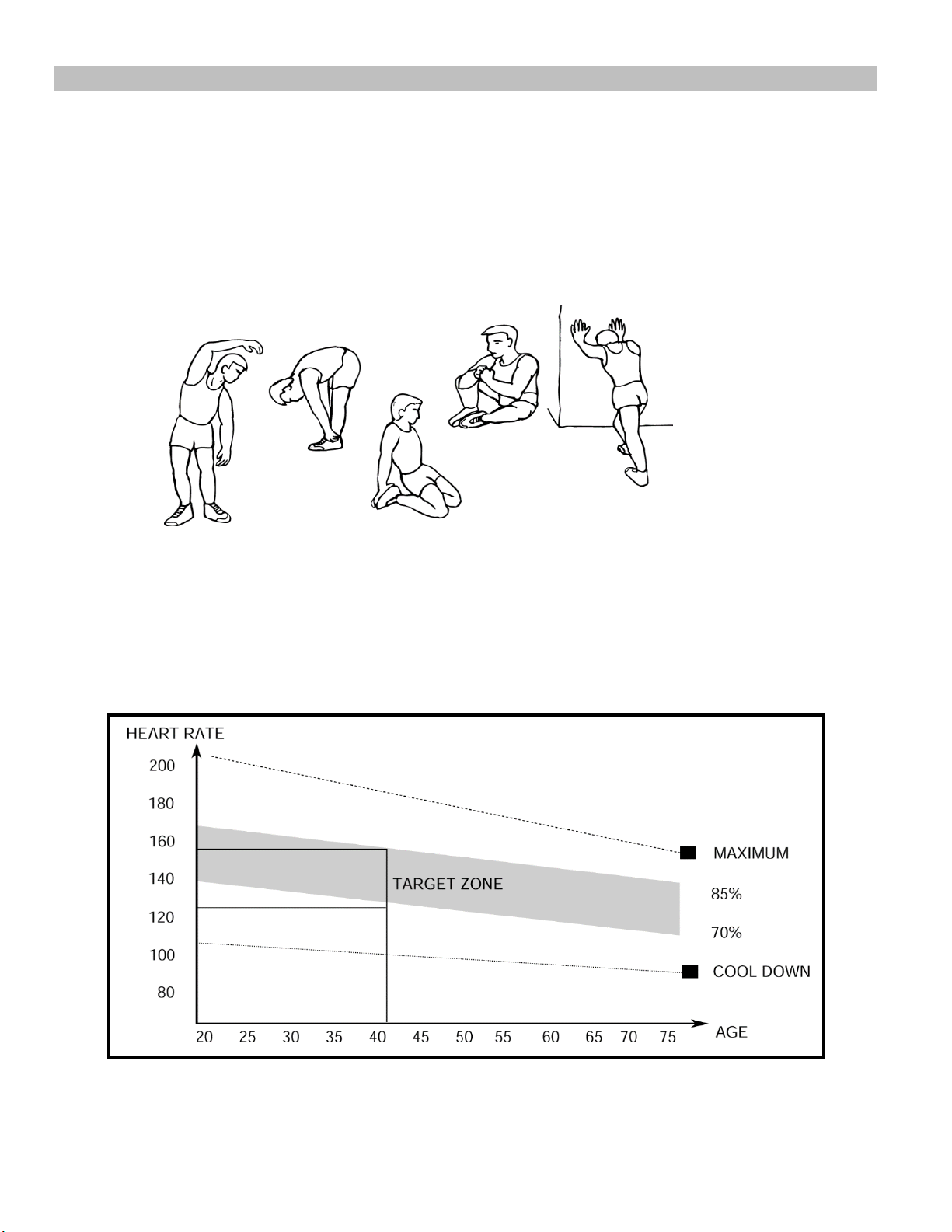
1. The Warm Up Phase
This stage helps get the blood flowing around the body and the muscles working properly. It will
also reduce the risk of cramp and muscle injury. It is advisable to do a few stretching exercises as
shown below. Each stretch should be held for approximately 30 seconds, do not force or jerk your
muscles into a stretch - if it hurts, STOP.
2. The Exercise Phase
This is the stage where you put the effort in. After regular use, the muscles in your legs will become
more flexible. Work to your targeted heart rate but it is very important to maintain a steady tempo
throughout. The rate of work should be sufficient to raise your heartbeat into the target zone shown
on the graph below.
SIDE BENDS OUTER THIGH
INNER THIGH
FORWARD
BENDS
CALF / ACHILLES

This stage should last for a minimum of 12 minutes though most people start at about 15-20
minutes
3. The Cool Down Phase
This stage is to let your Cardio-vascular System and muscles wind down. This is a repeat of the
warm up exercise e.g. reduce your tempo, continue for approximately 5 minutes. The stretching
exercises should now be repeated, again remembering not to force or jerk your muscles into the
stretch.
As you get fitter you may need to train longer and harder. It is advisable to train at least three times
a week, and if possible space your workouts evenly throughout the week.
MUSCLE TONING
To tone muscle while on your MAGNETIC BIKE you will need to have the resistance set quite
high. This will put more strain on our leg muscles and may mean you cannot train for as long as
you would like. If you are also trying to improve your fitness you need to alter your training
program. You should train as normal during the warm up and cool down phases, but towards the
end of the exercise phase you should increase resistance making your legs work harder. You will
have to reduce your speed to keep your heart rate in the target zone.
WEIGHT LOSS
The important factor here is the amount of effort you put in. The harder and longer you work
the more calories you will burn. Effectively this is the same as if you were training to
improve your fitness, the difference is the goal.

IMPEX
®
INC.
LIMITED WARRANTY
IMPEX Inc. ("IMPEX
®
") warrants this product to be free from defects in workmanship and material, under normal use
and service conditions, for a period of two years on the Frame from the date of purchase. This warranty extends only
to the original purchaser. IMPEX's obligation under this Warranty is limited to replacing or repairing, at IMPEX's option.
All returns must be pre-authorized by IMPEX. Pre-authorization may be obtained by calling IMPEX Customer Service
Department at 1-800-999-8899. All freights for products return to IMPEX must be prepaid by the customer. This warranty
does not extend to any product or damage to a product caused by or attributable to freight damage, abuse, misuse,
improper or abnormal usage or repairs not provided by an IMPEX authorized service center or for products used for
commercial or rental purposes. No other warranty beyond that specifically set forth above is authorized by IMPEX.
IMPEX is not responsible or liable for indirect, special or consequential damages arising out of or in connection with the
use or performance of the product or other damages with respect to any economic loss, loss of property, loss of revenues
or profits, loss of enjoyments or use, costs of removal, installation or other consequential damages or whatsoever natures.
Some states do not allow the exclusion or limitation of incidental or consequential damages. Accordingly, the above
limitation may not apply to you.
The warranty extended hereunder is in lieu of any and all other warranties and any implied warranties of merchantability
or fitness for a particular purpose is limited in its scope and duration to the terms set forth herein. Some states do not
allow limitations on how long an implied warranty lasts. Accordingly, the above limitation may not apply to you.
This warranty gives you specific legal right. You may also have other rights which vary from state to state. Register
on-line www.marcypro.com
IMPEX
®
INC.
2801 S. Towne Ave.
Pomona, CA 91766
ORDERING REPLACEMENT PARTS
Replacement parts can be ordered by calling our Customer Service Department toll-free at 1-800-999-8899 during our
regular business hours: Monday through Friday, 9 am until 5 pm Pacific standard time.
When ordering replacement part, always give the following information.
1. Model
2. Description of Parts
3. Part Number
4. Date of Purchase