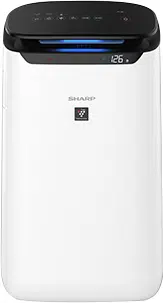
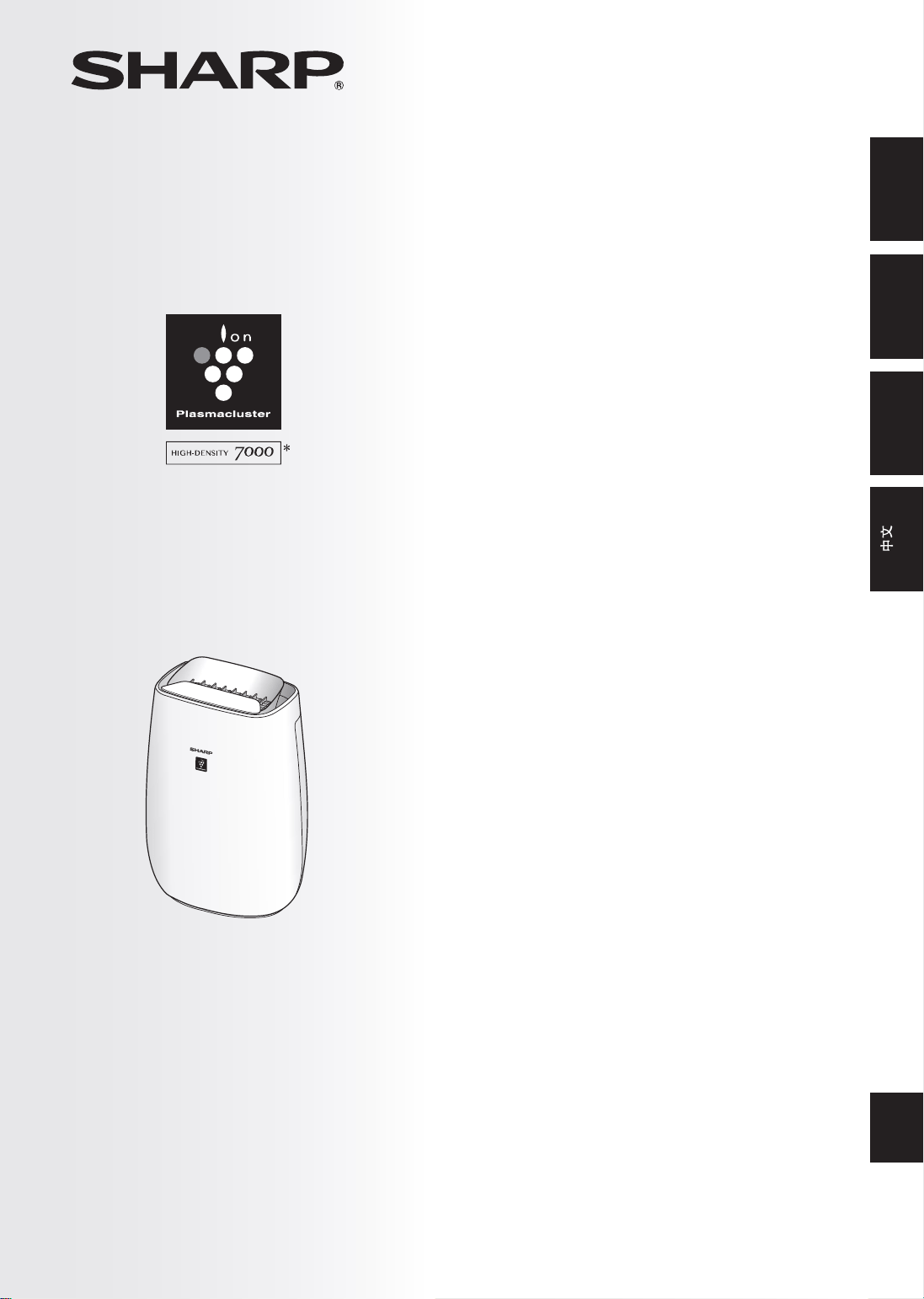
FP-J50
“Plasmacluster” and “Device of a cluster of grapes”
are registered trademarks of Sharp Corporation in
Japan, Philippines and elsewhere.
* The number in this technology mark indicates an
approximate number of ions supplied into air of 1 cm
3
,
which is measured around the center of a room applicable
floor area (at 1.2 m height above the floor) when the
product is placed close to a wall at the MED mode setting.
AIR PURIFIER
OPERATION MANUAL
ENGLISHMALAYSIA
PEMBERSIH UDARA
BUKU PANDUAN OPERASI
HƯỚNGDẪNSỬDỤNG
MÁYLỌCKHÔNGKHÍ
TIẾNGVIỆT
空气净化器使用说明书
Intellectual property rights
for this product
FP-J50_EN.indd 1 2020/08/31 14:28:37

Thank you for purchasing this SHARP Air Purifier.
Please read this manual carefully before using the
product.
This manual should be kept in a safe place for
handy reference.
IMPORTANTSAFETYINSTRUCTIONS ............... 2
PART NAMES ........................................................ 4
FILTER INSTALLATION ........................................ 5
OPERATION .......................................................... 6
CAREANDMAINTENANCE ................................. 8
REPLACEMENT .................................................... 9
TROUBLESHOOTING ......................................... 10
SPECIFICATIONS ................................................ 11
Wi-FiSETTINGS .................................................. 12
TROUBLESHOOTINGOFTHEWi-FiFUNCTION
..... 15
CONTENTS
UniqueCombinationofAirTreatment
Technologies
TripleFiltrationSystem+Plasmacluster
TRAPS DUST*
Pre-Filter traps dust and other large airborne
particles.
DECREASESODORS
Deodorizing filter absorbs many common
household odors.
REDUCESPOLLEN&MOLD*
HEPA filter traps 99.97% of particles as small as
0.3 microns.
FRESHENS
Plasmacluster treats the air similar to the way
nature cleans the environment by emitting a
balance of positive and negative ions.
* When air is drawn through the filter system.
Sensor Technology continuously monitors air
quality, and automatically adjusting operation
based on detected air purity.
Wi-FiFUNCTION
• Confirm that condition of air quality of the
room (PM2.5, dust, odor).
• Control the product through smartphones as
remote control.
• Propose optimal timing for filter exchange.
FEATURES
ENGLISH
FP-J50_EN.indd 2 2020/08/31 14:28:37
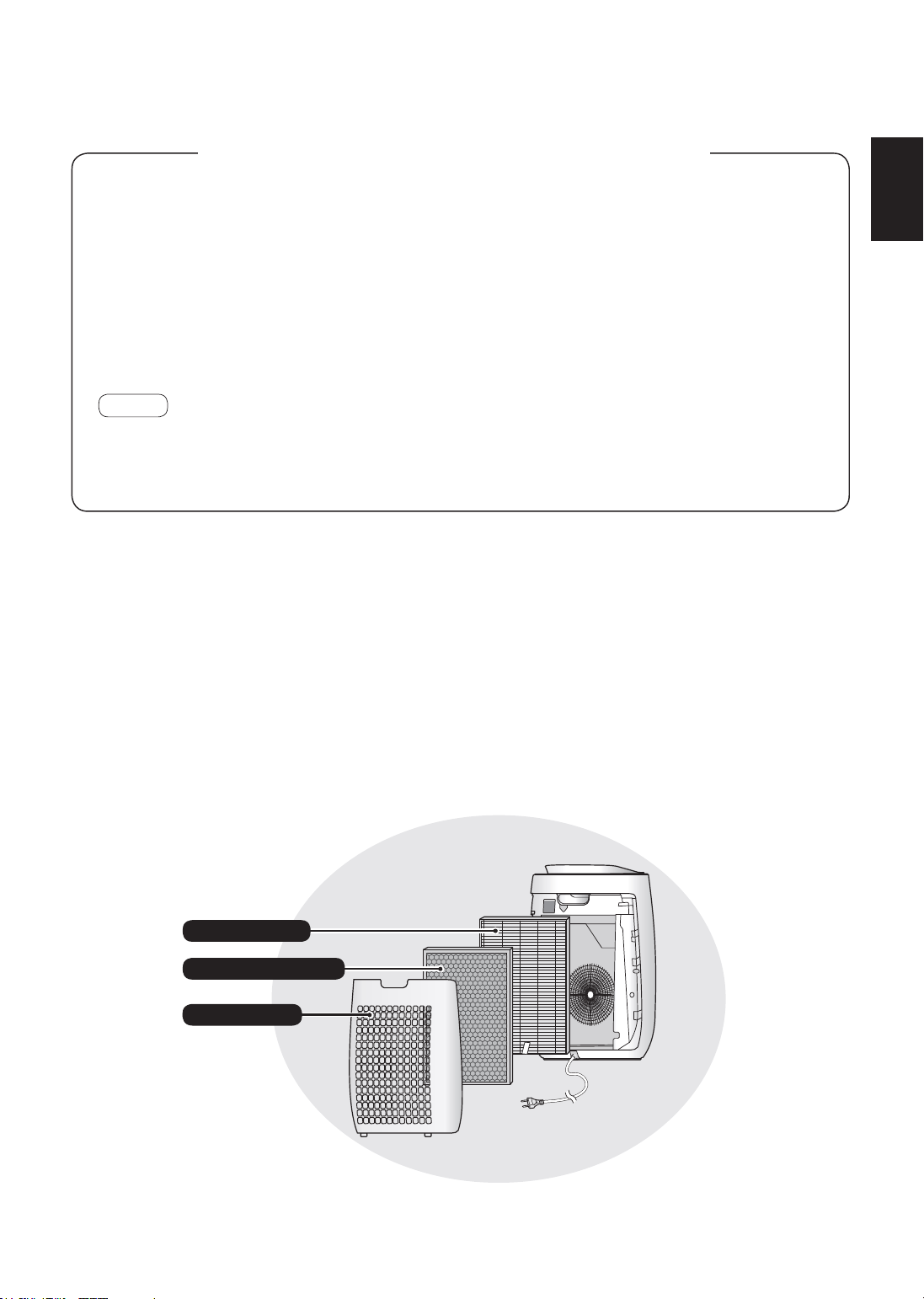
The air purifier draws in room air through the air inlet, circulates it through a Pre-Filter, a
Deodorizing Filter and a HEPA Filter inside the main unit, and then discharges it through the air
outlet. The HEPA Filter can remove 99.97 % of dust particles as small as 0.3 microns that pass
through the filter and also helps absorb odors. The Deodorizing Filter gradually absorbs odors as
they pass through the filter.
Some odors absorbed by the filters will break down over time, causing additional odors.
Depending on usage conditions, and especially if the main unit is used in environments
significantly more severe than a normal household, these odors may become noticeable sooner
than expected. If these odors persist, the filters should be replaced.
NOTE
• The air purifier is designed to remove air-suspended dust and the odors.
The air purifier is not designed to remove harmful gases such as carbon monoxide contained in cigarette
smoke.
The air purifier may not completely remove an odor if the source of the odor is still present.
PleasereadbeforeoperatingyournewAirPurifier
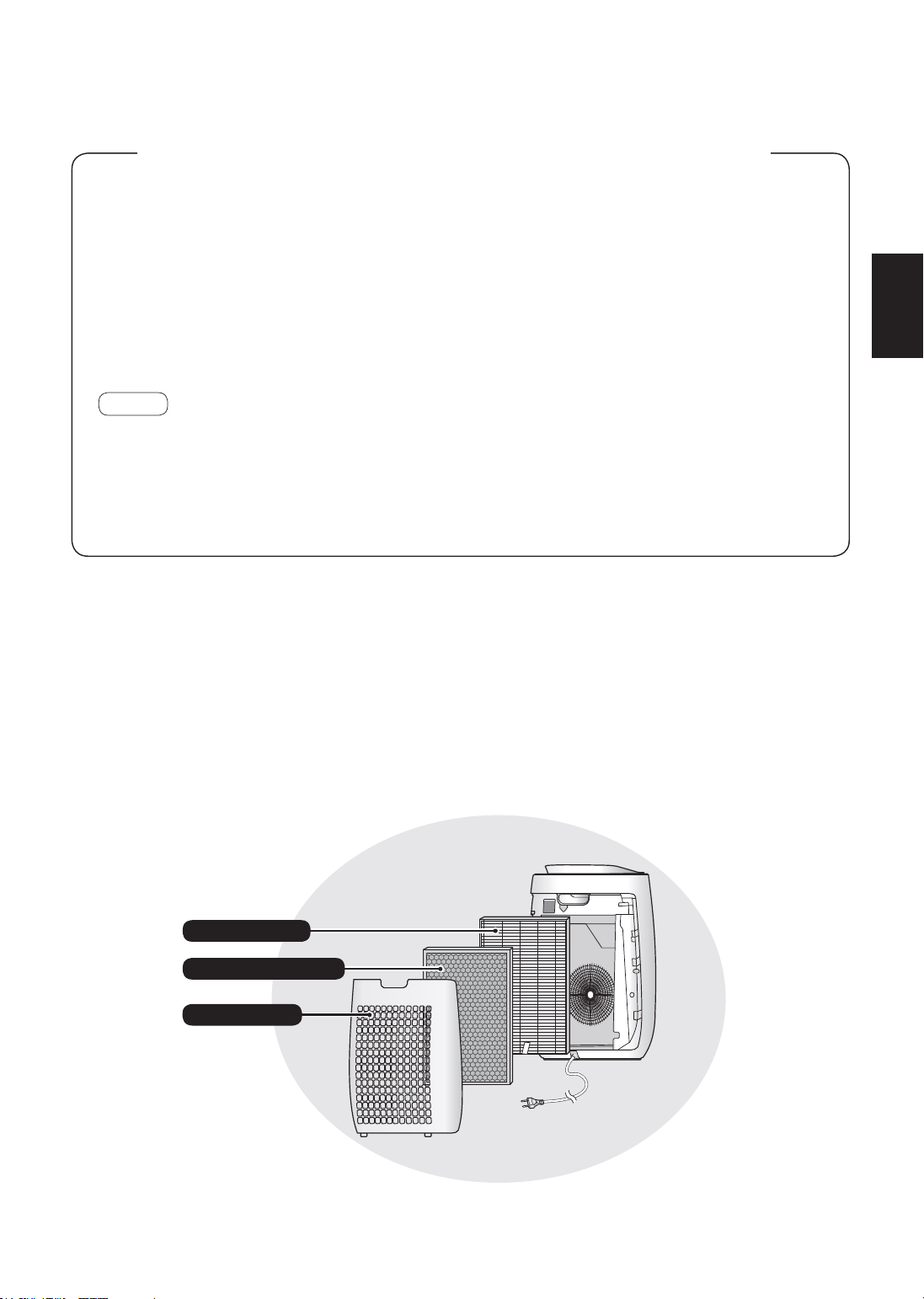
HEPA Filter
Pre-Filter
Deodorizing Filter
EN-1
ENGLISH
FP-J50_EN.indd 1 2020/08/31 14:28:37

EN-2
IMPORTANT SAFETY INSTRUCTIONS
Alwaysfollowbasicsafetyprecautions
whenusingelectricalappliances,
includingthefollowing:
WARNING
– Always observe the
following to reduce the risk of electrical
shock, fire, or injury:
• Read all instructions before using the
main unit.
• Use only a 220 - 240 volt outlet.
• This appliance is not intended for use
bypersons(includingchildren)with
reducedphysical,sensoryormental
capabilities,orlackofexperience
andknowledge,unlesstheyhave
beengivensupervisionorinstruction
concerninguseoftheappliancebya
personresponsiblefortheirsafety.
Childrenshouldbesupervisedto
ensuretheydonotplaywiththe
appliance.
• Ifthepowercordisdamaged,itmust
bereplacedbythemanufacturer,its
serviceagent,aSharpauthorized
ServiceCenterorsimilarlyqualified
personsinordertoavoidahazard.
ContactthenearestServiceCenterfor
anyproblems,adjustments,orrepairs.
• Donotrepairordisassemblethemain
unityourself.
• Besuretoremovethepowerplug,
beforeperformingmaintenance,when
removingandattachingandreplacing
thefilterandwhennotusingfora
longtime.Failuretodosocancause
a short circuit resulting in electrical
shockorfire.
• Do not use the main unit if the power cord
or plug is damaged or if the connection to
the wall outlet is loose.
• Periodically remove dust from the plug.
• Do not insert fingers or foreign objects
into the air inlet or air outlet.
• When removing the power plug, always
hold the plug and never pull on the cord.
Failure to do so can cause a short circuit
resulting in electrical shock or fire.
• Be careful not to damage the power cord.
Failure to do so can cause electric shock,
heat generation, or fire.
• Do not remove the plug when your hands
are wet.
• Do not use this main unit near gas
appliances or fireplaces. When the main
unit is operated with gas appliances in
sameroom,Ventilatearoomperiodically,
otherwise it may cause Carbon monoxide
poisoning.
• Do not operate the main unit in rooms
where aerosol insecticides are present.
Do not operate the main unit in rooms
where there is oily residue, incense,
sparks from lit cigarettes, or chemical
fumes in the air.
• Keep the main unit away from water.
Do not operate the main unit in places
where it may get wet, such as a
bathroom.
• Do not expose the main unit to water.
Doing so can cause a short circuit or
electrical shock.
• Be cautious when cleaning the main unit.
Strong corrosive cleansers can damage
the exterior.
NOTE
– What to do if the main unit
interfereswithradioorTVreception
If the air purifier interferes with radio or
television reception, try one or more of the
following measures:
• Adjust or reposition the receiving
antenna.
• Increase the distance between the main
unitandtheradioorTV.
• Connect the equipment into an outlet on
a circuit different from that of the radio or
TVreceiver.
• Consult the dealer or a qualified radio or
TVtechnician.
FP-J50_EN.indd 2 2020/08/31 14:28:38

EN-3
ENGLISH
CAUTIONSCONCERNING
OPERATION
• Do not block the air inlet or air outlet.
• Do not place the main unit near or on
hot objects, such as stoves or heaters,
or where it may come into contact with
steam.
• Always operate the main unit in an
upright position.
• Do not move the main unit when it is in
operation.
• When moving the main unit, use the
handle on the back of the main unit.
• If the main unit is on easily damaged
flooring, an uneven surface, or thick-piled
carpet, lift it up when moving.
• Do not operate the main unit without the
filters properly installed.
• Do not wash and reuse the HEPA filter
and the Deodorizing filter.
Doing so will not improve filter
performance and can also cause electric
shock or operating malfunctions.
• Clean the exterior with a soft cloth only.
Do not use volatile fluids or detergents.
The main unit surface may be damaged
or cracked with Benzine, paint thinner or
polishing powder. In addition, the sensors
may malfunction as a result.
• Do not scrub the Back Panel hard during
its maintenance.
INSTALLATIONGUIDELINES
• Avoid locations where the sensors are
exposed to direct wind.
Doing so can cause the main unit to
malfunction.
• Avoid locations where furniture, fabrics,
or other objects can come in contact with
the main unit and interfere with the intake
and outtake of air.
• Avoid locations where the main unit
is exposed to condensation or drastic
changes in temperature. Appropriate
room temperature is between 0 – 35 ºC.
• Place the main unit on a level and stable
surface with sufficient air circulation.
When placed on heavy carpet, the main
unit may vibrate slightly.
• Avoid locations that generate grease or
oily smoke.
Doing so can cause the main unit exterior
to crack and the sensors to malfunction.
• The dust collecting ability of the main
unit is effective even when the main unit
is as close to 3 cm from the wall, the
surrounding walls and floor may get dirty.
Please place the main unit at a distance
from the wall.
The wall directly behind the air outlet may
become dirty over time. When using the
main unit for an extended period of time
at the same location, periodically clean
the walls adjacent to it.
FILTERGUIDELINES
• Follow the instructions in this manual for
proper filter care and maintenance.
(Page 8)
FP-J50_EN.indd 3 2020/08/31 14:28:38

EN-4
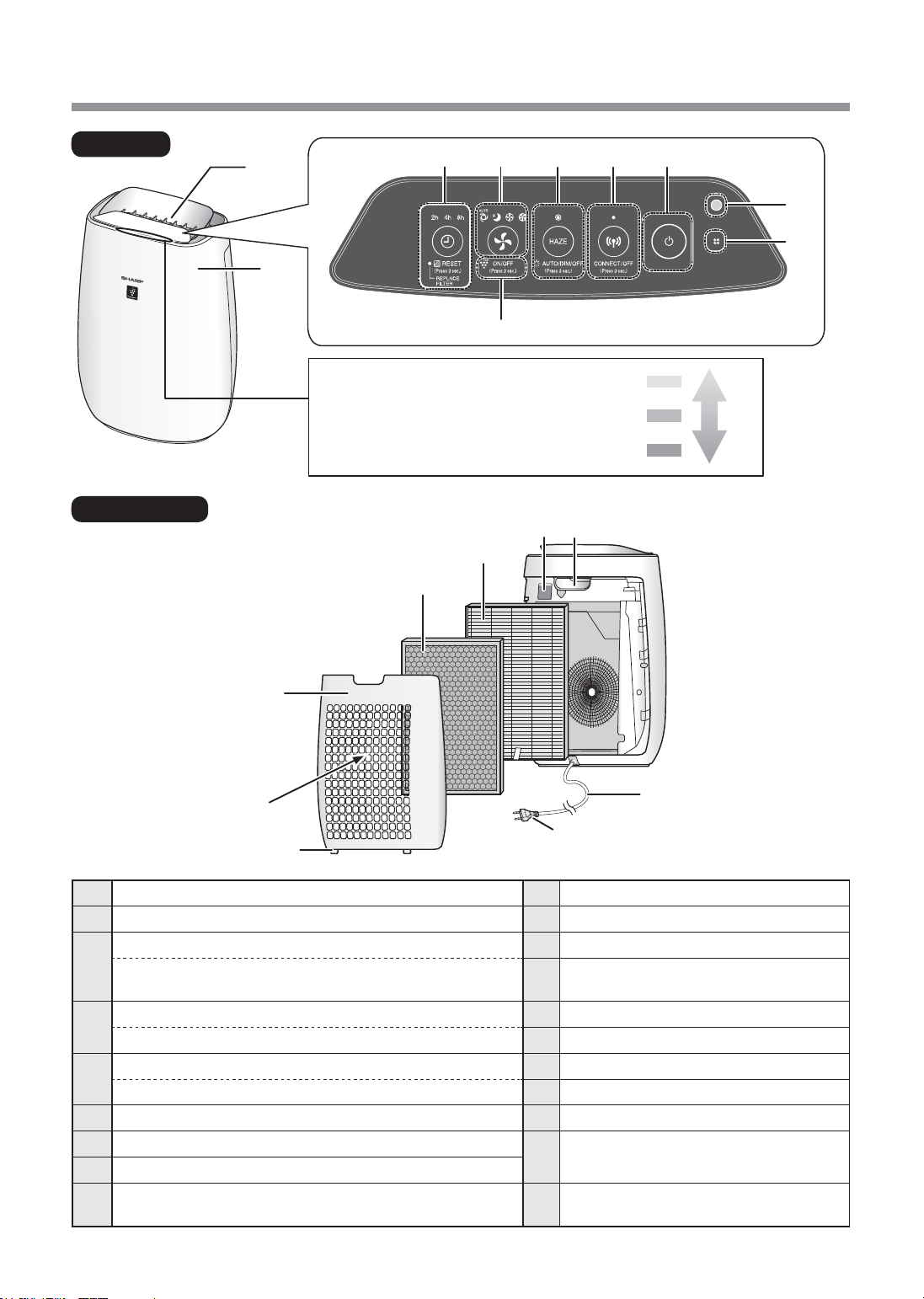
PART NAMES
20
19
2
1
FRONT
BACK
18
14
15
11
1213
16
17
CleanlinessMonitor
Indicates the air purity of the room
in 5 levels with color changes.
Yellow
Red
Blue
Impure
Clean
9
8
3
4 5 6
7
10
1
Main Unit
10
PlasmaclusterIonLight(blue)
2
Air Outlet
11
CleanlinessMonitor
3
OFFTIMERButton,IndicatorLight(white)
12
Handle
(Press3sec.)FilterResetButton,
FilterReplacementIndicatorLight(orange)
13
SensitiveDustSensor(Internal) /
Sensor Filter
4
MODEButton,IndicatorLight(white)
14
HEPA Filter
(Press3sec.)PlasmaclusterIonON/OFFButton
15
Deodorizing Filter
5
HAZEButton,IndicatorLight(white)
16
BackPanel(Pre-Filter)
(Press3sec.)LightControlButton
17
Air Inlet
6
Wi-FiButton,IndicatorLight(white)
18
BottomTabs
7
POWER ON/OFF Button
19
Plug
(Shape of plug depends on country.)
8
Light Sensor
9
Sensor (Internal)
Odor / Temperature / Humidity
20
PowerCord
FP-J50_EN.indd 4 2020/08/31 14:28:38

EN-5
ENGLISH
FILTER INSTALLATION
Tomaintainthequalityofthefilter,itisinstalledinthemainunitandpackedinplasticbag.Be
suretoremovetheplasticbagfromthefilterbeforeusingthemainunit.
•Donotoperatethemainunitwithoutthe
filter.
Alwaysbesuretoremovethe
powerplugfromthewalloutlet.
1
RemovetheBackPanel
Pull
2
Removetheplasticbagfromthe
Filter.
3
PlacetheFilterwithinthemainunit.
Do not install the filter backwards or the main
unit will not operate properly.
HEPA
Filter
Deodorizing
Filter
Tag
4
InstalltheBackPanel.
Click
FP-J50_EN.indd 5 2020/08/31 14:28:39
EN-6
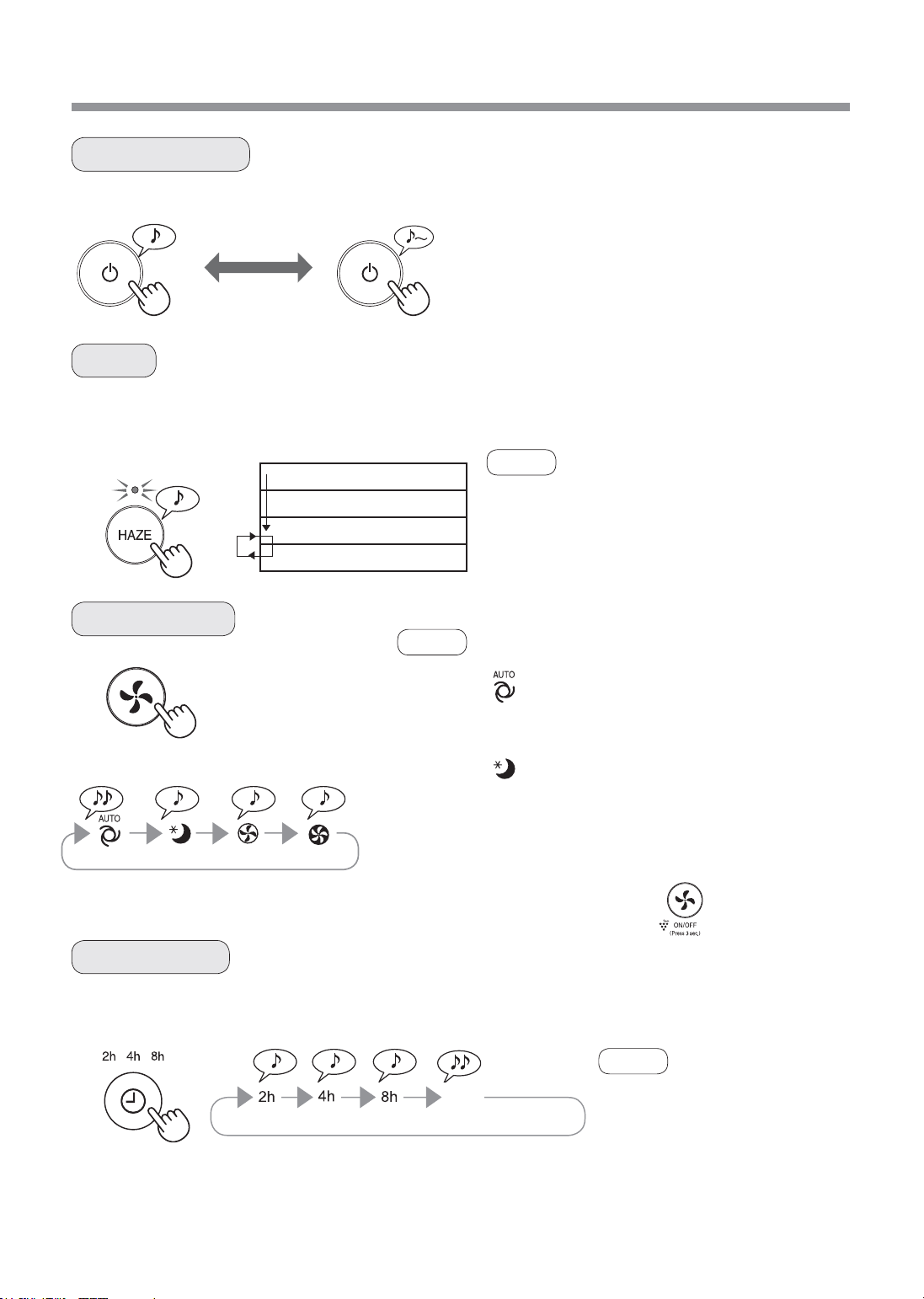
OPERATION
SLEEP MED MAXAUTO
The main unit operates at HIGH fan speed for 60 minutes and then alternates between Low and High level for 20
minutes each.
START STOP
• Select the desired fan speed.
• When the main unit starts operation, the operation
starts in the previous mode it was operated in.
10 minutes: Max High fan level
50 minutes: High fan level
20 minutes: Low fan level
20 minutes: High fan level
• The Plasmacluster Ion cannot be turned “OFF”.
• It is possible to switch this mode to another while
operating.
However, the HAZE mode will not function after
switching mode.
• You can also set the timer in
designated App.
If the timer has already been set
in designated App, all TIMER
indicator lights of the product turn
on. You cannot set the timer in the
product.
Select the length of time you want, with the main unit on. The main unit automatically stops once the selected time
is reached.
START/STOP
HAZE
FAN SPEED
OFF TIMER
NOTE
NOTE
NOTE
(with the main unit ON)
2hour 4hour 8hour CANCELLATION
AUTO
SLEEP
The fan speed is automatically controlled depending on the 3 detection.
(Dust / Odor / Light)
The main unit will operate very quietly, and the fan speed is
automatically switched depending on the amount of impurities in the air
and room brightness.
Cleanliness Monitor / Plasmacluster Ion Light go off automatically.
Even though the indicator is off, Plasmacluster Ion is dispersed into air
unless Plasmacluster Ion is turned off by .
OFF
FP-J50_EN.indd 6 2020/08/31 14:28:40
EN-7
ENGLISH
1
(with the main unit OFF)
2
Sensitivedustsensor/Odorsensor Light sensor
3
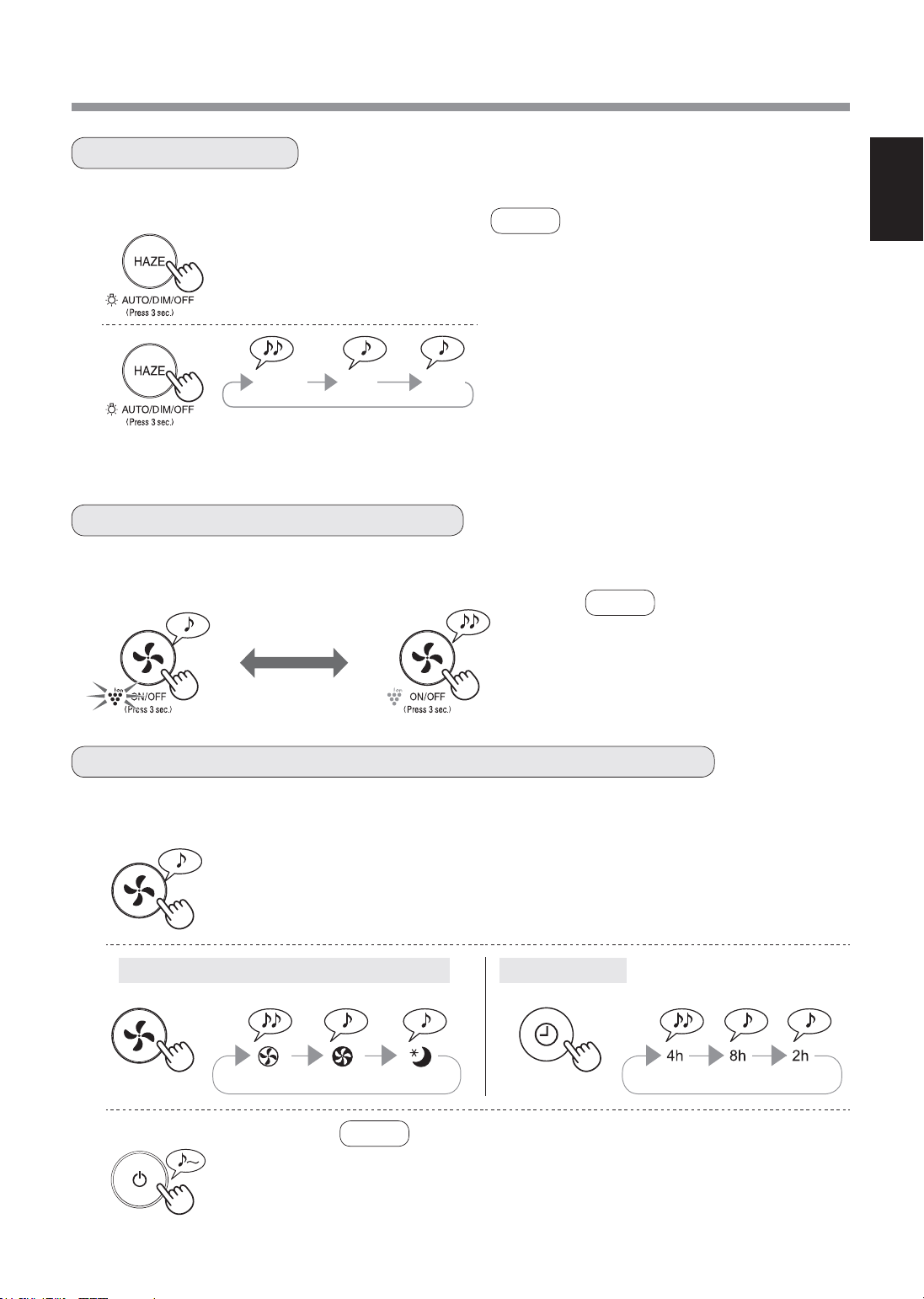
You can set the Cleanliness Monitor / Plasmacluster Ion Light to OFF when they are lighting up.
When Plasmacluster Ion is ON, the Plasmacluster Ion Light will turn on. (blue)
OFF
more than 3 sec.
LIGHTCONTROL
PLASMACLUSTERIONON/OFF
ADJUSTMENTOFSENSORDETECTIONSENSITIVITY
ON
more than 3 sec.
(with the main unit ON)
• When the main unit starts operation,
the operation starts in the previous
mode it was operated in.
1
(with the main unit ON)
NOTE
• If the HAZE Button is not pushed within 8 seconds,
the setting will be saved automatically.
• When the main unit starts operation, the operation
starts in the previous mode it was operated in.
2
AUTO
Light automatically switches ON or OFF based on
room brightness.
Room is bright: light is ON
Room is dark: light is OFF
OFF
When set to “OFF”, the “DIM” light illuminates for
8 seconds after operation starts and then the light
turns off.
more than 3 sec.
AUTO
DIM
OFF
NOTE
NOTE
You can change the sensitivity of the Sensitive dust sensor / Odor sensor and the Light sensor .
more than 3 sec.
Standard High Low Standard High Low
• If the power ON/OFF Button is not pushed within 8 seconds of
adjusting sensor sensitivity, the setting will be saved automatically.
• The sensor sensitivity setting will be saved even if the main unit is
unplugged.
FP-J50_EN.indd 7 2020/08/31 14:28:41
EN-8
CARE AND MAINTENANCE
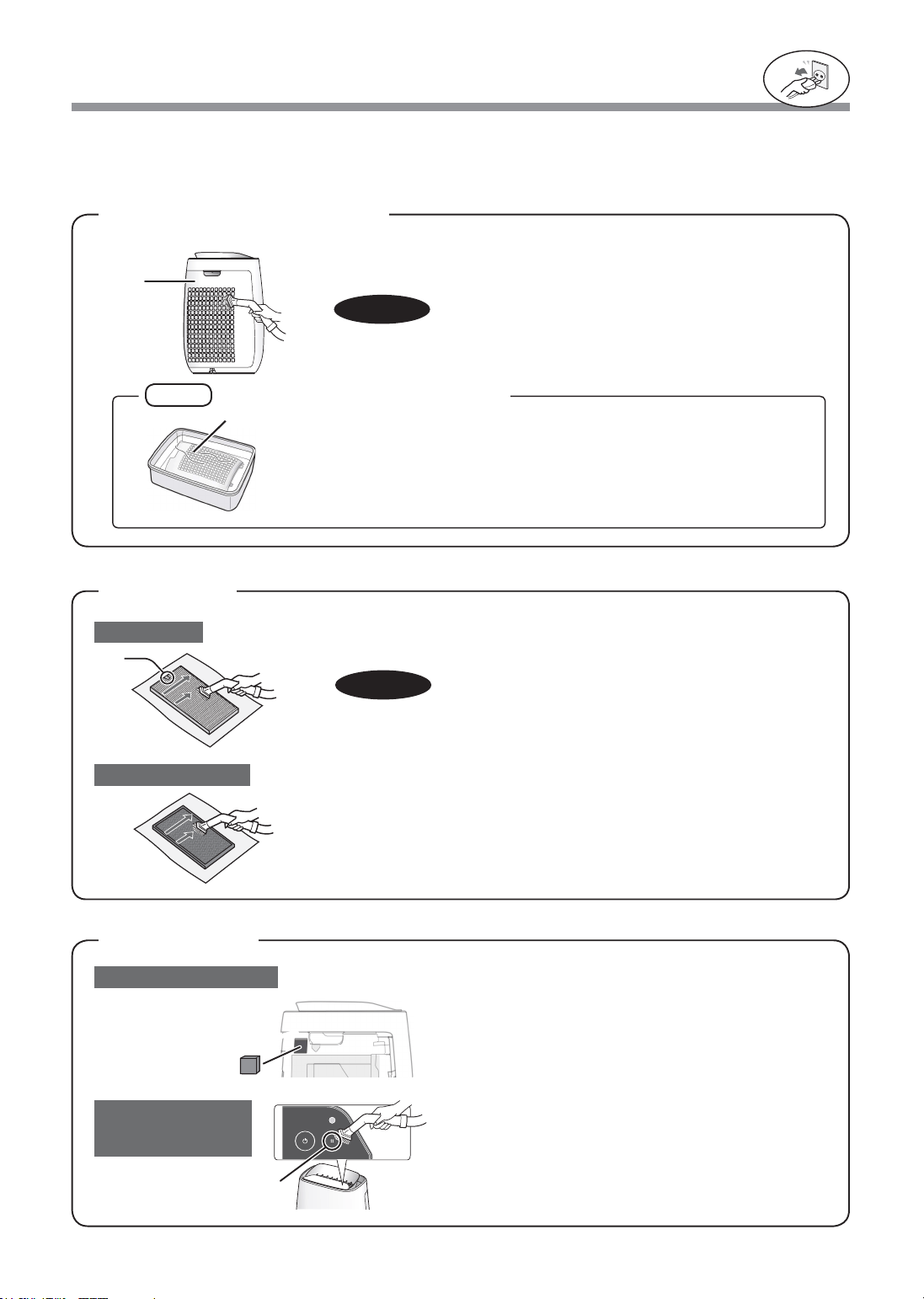
Gently remove dust from the back panel, using a vacuum cleaner
attachment or similar tool.
BACKPANEL
(Pre-filter)
Tomaintainoptimumperformanceofthisairpurifier,pleasecleanthemainunitincludingthefilterperiodically.
Besuretodisconnectthepowercordfromthewalloutletbeforeperforminganymaintenance.
NOTE
Alwaysbesuretoremovethe
powerplugfromthewalloutlet.
1. Remove the Back Panel.
2. Remove the Sensor Filter.
3. If it is very dirty, wash it with water and dry it thoroughly.
Sensor filter
Do not apply excessive pressure, when scrubbing the back panel.
Gently remove dust from the sensor,
using a vacuum cleaner attachment or similar tool.
Tag
HEPA Filter
Sensitivedustsensor
Sensor
(Odor / Temperature /
Humidity)
Deodorizing Filter
CAUTION
Gently remove dust from HEPA Filter and Deodorizing Filter with a
vacuum cleaner attachment or similar tool.
Do not wash in water and dry in the sun.
The filters are fragile, be careful not to apply too much force.
Back
Panel
Sensor
Back Panel
CAUTION
FILTERS
SENSORS
Howtocleanhardtoremovedirt
1. Add a small amount of kitchen detergent to water and soak for about
10 minutes.
2. Rinse off the kitchen detergent with clean water.
3. Completely dry the filter in a well-ventilated area.
• HEPA Filter
Apply the maintenance only on the side with the tag.
Do not clean the opposite side; otherwise, the filter will be damaged.
• Deodorizing Filter
The maintenance can be applied to the both sides.
FP-J50_EN.indd 8 2020/08/31 14:28:42
EN-9
ENGLISH
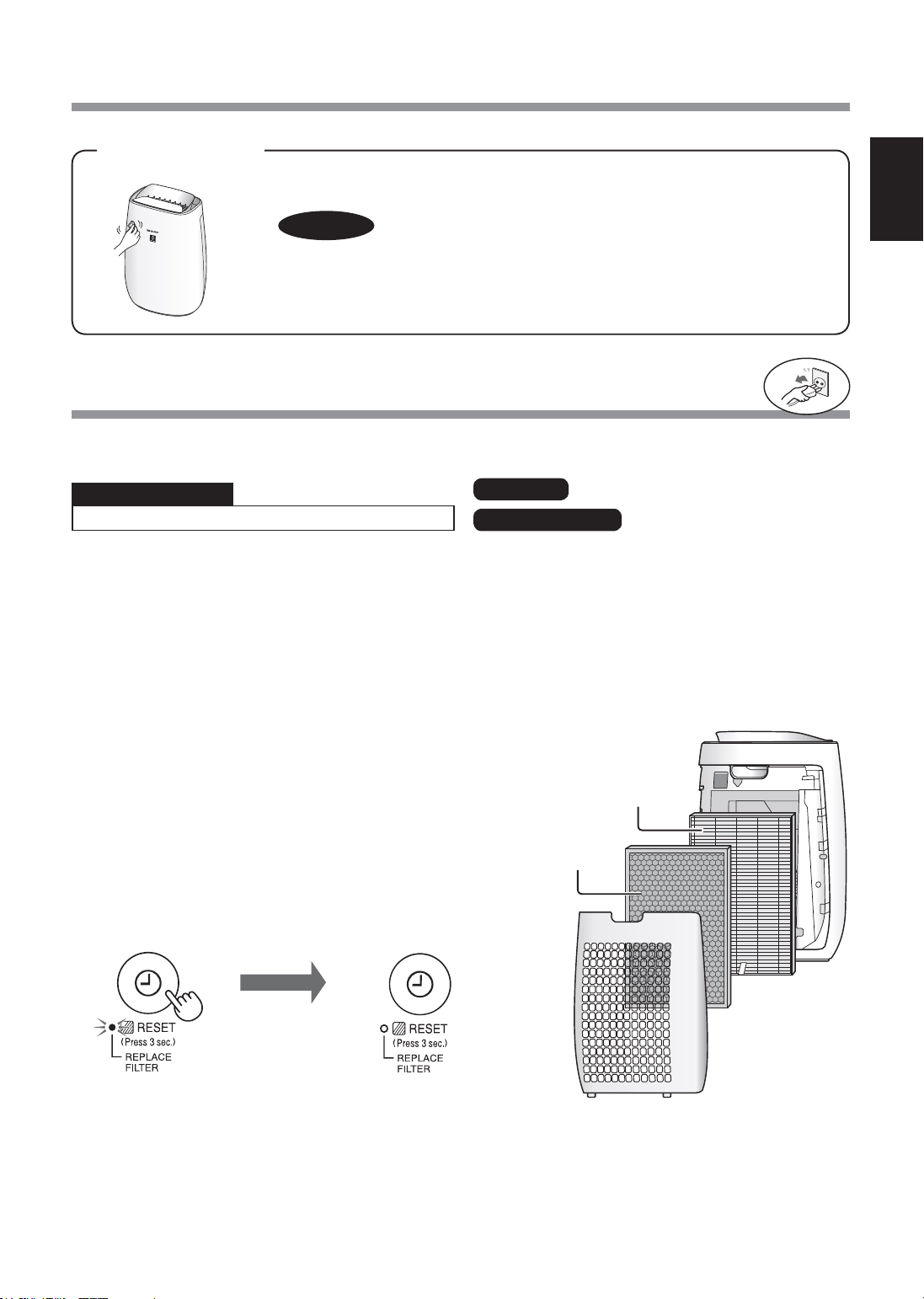
REPLACEMENT
HEPA Filter
Deodorizing Filter
MAIN UNIT
Disposal of Filters
Please dispose of the replaced filter according to the local disposal laws and regulations.
Replacementtiming
Filter
FilterReplacementIndicatorLight
Replace the filter according to the instructions provided with the
replacement filter.
After the exchange, insert the plug in socket and press the
POWER ON/OFF button, and OFF TIMER button 3 seconds.
Model : FZ-F50HFE
Model : FZ-F50DFE
Life of Filters
The filter life and replacement period are based on the condition of smoking 5 cigarettes per day and the dust
collection power is reduced by half compared with that of new filter.
Filter life varies depending on the room environment, usage, and location of the main unit.
We recommend to replace the filter more frequently if the product is used in a condition significantly severer than
normal household use.
* When the filter replacement is needed soon, the Filter Replacement Indicator Light will turn on.
The filter life is derived by calculating the amount of dust with the Sensitive dust sensor.
HEPA Filter materials:
• Polypropylene
• Polyethylene
Deodorizing Filter materials:
• Polypropylene • Polyester
• Activated carbon
Wipewithadry,softcloth
For stubborn stains or dirt, use a soft cloth dampenedwithwarmwater.
HEPA
Filter
Deodorizing
Filter
CAUTION
•Donotusevolatilefluids
Benzine, paint thinner, polishing powder, etc., may damage the surface.
• Do not use detergents
Detergent ingredients may damage the main unit.
When the Filter Replacement Indicator Light turns on*
• HEPA Filter : About 2 years after opening
• Deodorizing Filter : About 2 years after opening
Alwaysbesuretoremovethe
powerplugfromthewalloutlet.
Goes off
more than
3 sec.
FP-J50_EN.indd 9 2020/08/31 14:28:42
EN-10
TROUBLESHOOTING
SYMPTOM REMEDY (not a malfunction)
Odors and smoke are not removed.
• Replace the filters if they appear to be heavily soiled. (Page 9)
The Cleanliness Monitor illuminates blue
even when the air is impure.
• The air could be impure at the time the main unit was plugged in.
Unplug the main unit, wait one minute, and plug the main unit in again.
The Cleanliness Monitor illuminates
orange or red even when the air is clean.
• Sensor operation is affected if the dust sensor openings are dirty or
clogged. Gently clean the dust sensor openings. (Page 8)
A clicking or ticking sound is heard from
the main unit.
• Clicking or ticking sounds may be audible when the main unit is
generating ions.
The discharged air has an odor.
• Check to see if the filters are heavily soiled.
• Clean or replace the filters.
The main unit does not operate properly
when cigarette smoke is in the air.
• Is the main unit installed in a location that is difficult for the sensor to
detect cigarette smoke?
• Is the Sensitive dust sensor opening blocked or clogged?
(In this case, clean the opening.) (Page 8)
The Cleanliness Monitor is turned off.
• Check to see if the Lights OFF Mode selected.
Press for 3 seconds to light On. (Page 7)
• Check to see if the SLEEP mode is selected.
The Cleanliness Monitor / Plasmacluster Ion Light are turned off
automatically after the SLEEP mode is selected.
Smell from a new unit and/or filter.
• Immediately after removing the plastic bag, a slight odor may occur.
This odor is not harmful for filter performance or human exposure.
The Cleanliness Monitor lights change
color frequently.
• The Cleanliness Monitor automatically changes color when the
Sensitive dust sensor and Odor sensor detect impurities.
If you are concerned about the change, you can change sensor
sensitivity. (Page 7)
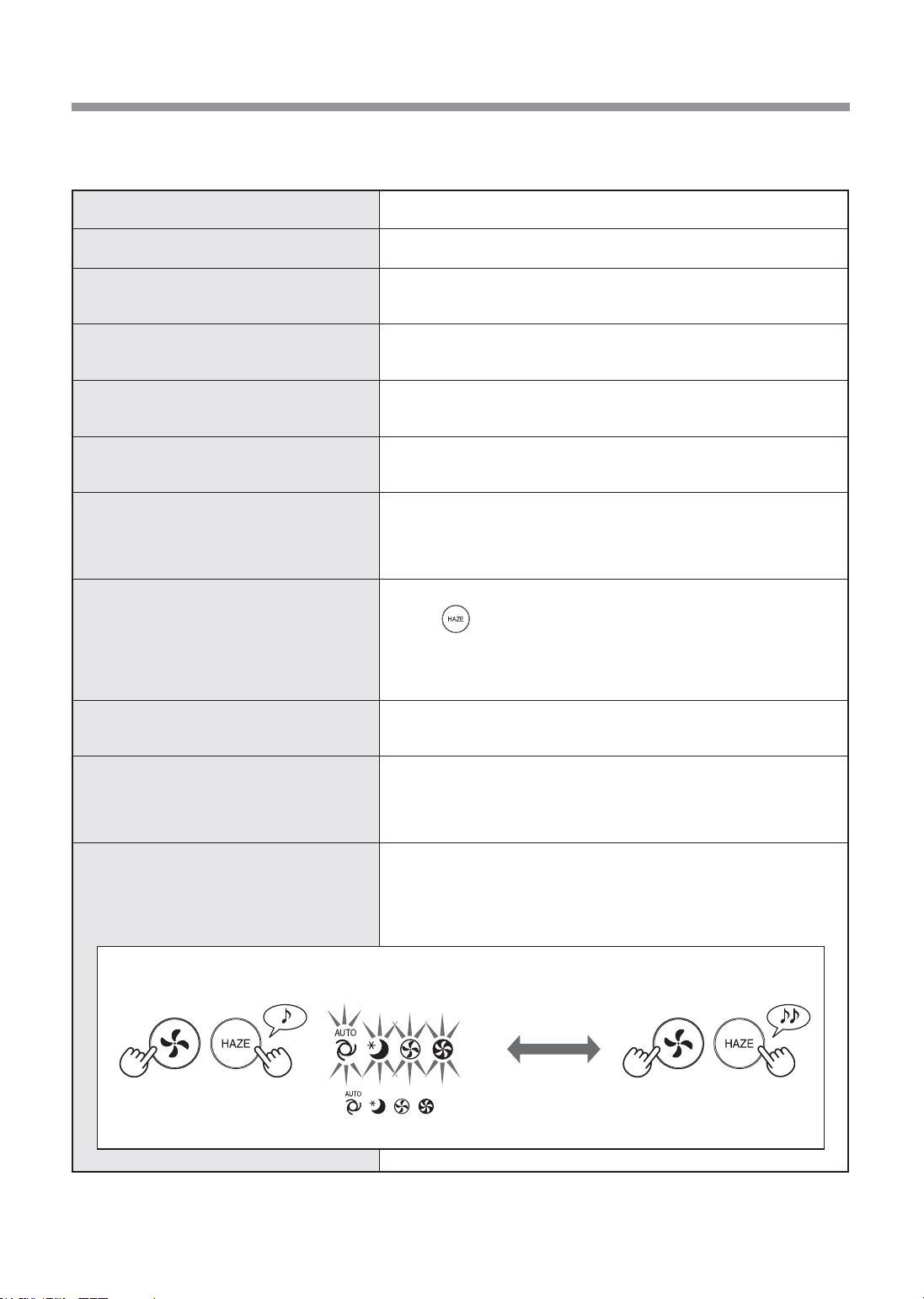
AUTO RESTART
After a power failure, automatically
resume the operation when the power
recovers.
• Even when the plug is unplugged or the breaker is thrown during the
operation, the operation resumes at the previous operation mode and
settings if the power recovers.
Before calling for service, please review the Troubleshooting list below, since the problem may not be a main unit
malfunction.
ON (default) OFF
(with the main unit OFF) (with the main unit OFF)
If the , , , lamp Lights up
for 8 seconds, the setting is completed.
( simultaneously for
more than 3 sec.)
( simultaneously for
more than 3 sec.)
FP-J50_EN.indd 10 2020/08/31 14:28:43
EN-11
ENGLISH
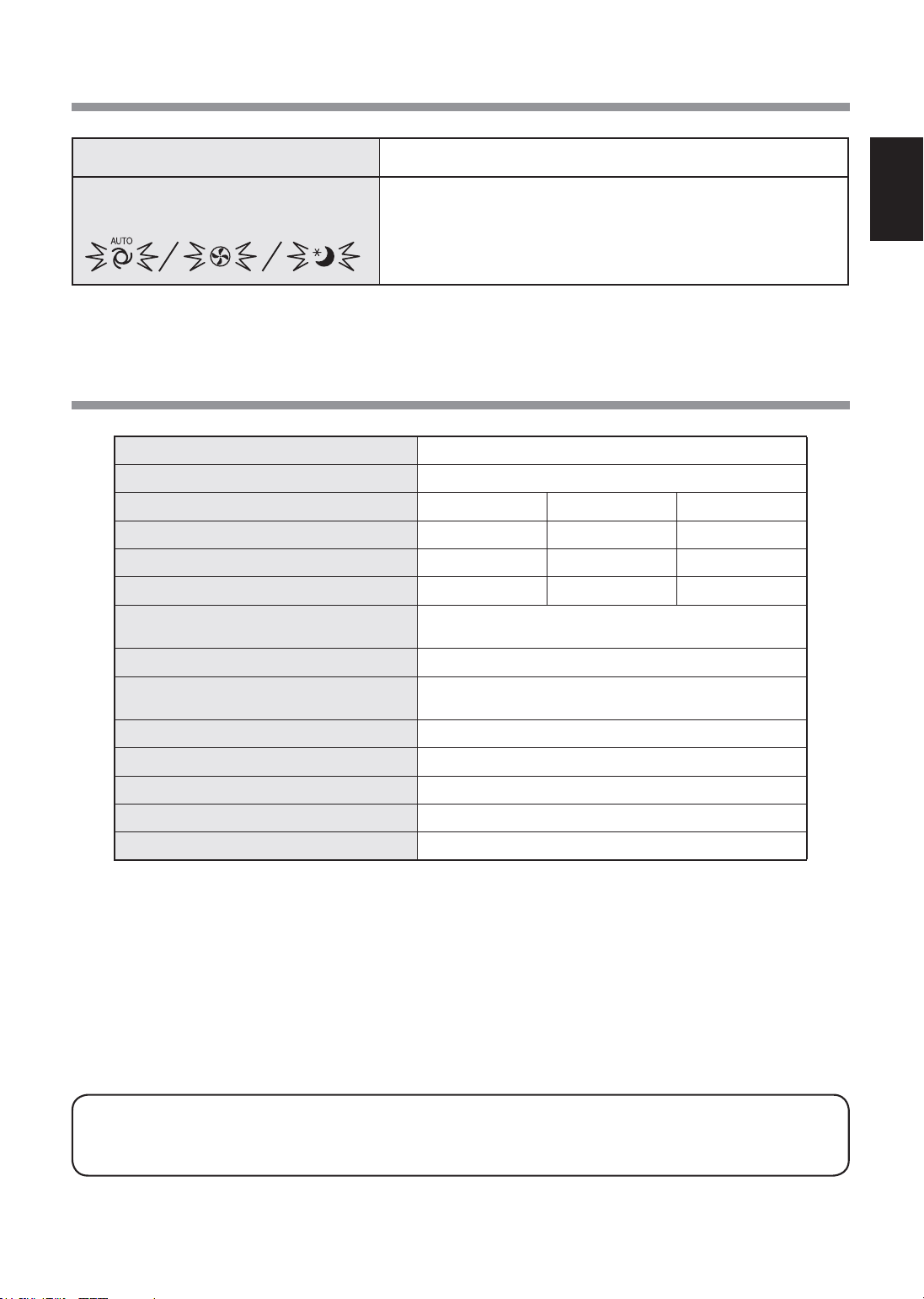
Model FP-J50
Power supply
220-240V50-60Hz
Fan speed Adjustment
MAX MED SLEEP*
2
Fan Speed (m
3
/hour)
306 186 48 ~ 120
Noise Level (dBA)*
1
51 39 15 ~ 30
Rated Power (W)
39 14 4.5 ~ 7.5
Standby Power (W)
1.6 (When Wi-Fi adapter is ON.)
1.2 (When Wi-Fi adapter is OFF.)
Recommended Room Size (m
2
)*
3
~ 40
High density Plasmacluster ion
recommended room size (m
2
)*
4
~ 23
Filter type
HEPA*
5
/ Deodorizing
Sensors Sensitive Dust / Odor / Temperature / Humidity / Light
Cord Length (m) 2.0
Dimensions (mm) 390 (W) x 270 (D) x 583 (H)
Weight (kg) 6.4
*1 • Noise level is measured based on the JEM 1467 standard of the Japan Electrical Manufacturers’ Association.
*2 • The fan speed is automatically switched depending on the amount of impurities in the air and room brightness.
*3 • The recommended room size is appropriate for operating the main unit of maximum fan speed.
• The recommended room size is an area in which a given amount of dust particles can be removed in 30 minutes
(according to JEM1467).
*4 • Room size in which approximately 7000 ions per cubic centimeter can be measured in the center of the room when
the main unit is placed next to a wall, is running at MED mode settings, and is at a height of approximately 1.2
meters from the floor.
*5 • The filter removes more than 99.97% of particles at least 0.3 microns in size (according to JEM1467).
StandbyPower
When the main unit’s power plug is inserted in a wall outlet it consumes standby power
in order to operate electrical circuits. To conserve energy, unplug the power cord when
the main unit is not in use.
SYMPTOM REMEDY (not a malfunction)
One of the following indicator lights is
flashing.
• Unplug the main unit, wait one minute, and then plug the main unit in
again.
SPECIFICATIONS
FP-J50_EN.indd 11 2020/08/31 14:28:43
EN-12
Wi-Fi SETTINGS
WARNING
In case of remote operation from outside, you
may not be able to check air purifier current
condition or the area around it and the situation
concerning anyone possibly staying there, so
please adequately confirm safety before use.
• Make sure the electric plug is fully inserted into a
power socket, and there is no dust on the plug or
in the socket hole. (It may cause heat, combustion,
fire, etc., due to poor contact or contact failure)
• Make sure beforehand that although there are
some wind changes, no negative impact will occur
to the environment inside the room. (such as..
whether there is anything flying easily in the wind)
Because the wind may cause something to fall
down, resulting in fires, wounds, defacement of
household belongings.
CAUTIONFORUSE
• Agreement with “Terms of Service” is needed to
use App.
• App will be periodically revised because of version
upgrade.
• Screens and illustrations in this book are for
explanation, there are some differences to the real
product.
• In case of bad connection, it is expected that
smartphone is unavailable to control or the
operation is not reflected to the smartphone.
• Locking smartphone display is recommended to
avoid wrong operation.
• Although the App is free, communications
expenses for download of dedicated App and
operation with smartphone or tablet are customer’s
obligation.
CAUTIONFORWi-Fi
Cautionforusageaboutelectricalwave
• In case of the usage at the following place, the
operation cannot be guaranteed : Near Bluetooth
®
wireless communications device using the same
frequency(2.4GHz) as this product or specified
low power wireless device. Also in the place like
magnetic field of the device such as microwave
oven, or the place with static electricity or the
place radio disturbance is occurred, it may not be
available temporarily due to weak electrical wave.
• Wireless connection and performance cannot be
guaranteed for all routers or housing environment.
At the following places, it is likely electrical wave
cannot reach or is disconnected: Inside of the
building made with concrete, reinforcing steel or
metal / near the obstruction / near the wireless
communications device applying the same
frequency.
• Wi-Fi of this product corresponds to channel 1~13.
It’s not available to communicate with the routers
set up to other channels.
Cautionforpersonalinformation
(relatedtoSecurity)
• Using Wi-Fi device has the possibility of
interception as long as using electrical wave
regardless of secret code setting.
• Wi-Fi has the advantage of free LAN connection
in the service area because of the communication
between this product and the router applying
electrical wave. On the other side, intercept of
communication or unfair intrusion are likely to
occur because electrical wave reaches everywhere
in the certain area through the obstructions (e.g.
walls).
• Do not connect to the device or network without
App to authority.
• The Wi-Fi function of this product should be
initialized in case of disposal or handover to a third
person.
• The Wi-Fi function of the unit should be initialized
in case of handover from a third person to avoid
illegal access of outsider.
Please check everything necessary to connect
the air purifier to a Wi-Fi network.
•
Internet
•
Wi-Fiaccesspoint(Router)
The recommended encryption method is WPA2
(AES).
•
Portableterminaldevicessuchas
smartphones,tablets,etc.
Supported OS (as of November 2020)
smartphones / tablets of Android 4.1 or later
iPhones, iPod touch, iPads of iOS 9 or later
•
Wi-Fi
: IEEE802.11b/g/n
•
Frequency range
: 2.4GHz frequency band
TRADEMARKS
• “Wi-Fi
®
” is a registered trademark of Wi-Fi Alliance
®
.
• “Android” is the trademark of Google Inc.
• “iPhone”, “iPod touch”, “iPad” are the registered
trademarks or trademarks of Apple Inc.
• The other company names, corporate names, product
names mentioned in the handling instructions are
trademarks and registered trademarks of each company.
SAFETYPRECAUTIONS
NECESSARYENVIRONMENT
SPECIFICATIONS
FP-J50_EN.indd 12 2020/08/31 14:28:43

EN-13
ENGLISH
1.
Tap “Register” for the air purifier you
wouldliketoregister.
2.
FollowinstructionsontheApp.
(
XX-XXXX
)
• If the Wi-Fi Indicator lights up after the
notification sound, the connection is
successfully completed.
Light up
Theinitialsettingsarecompleted.
1
INSTALLATION OF THE APP
2
CONNECTIONOFTHEAIR
PURIFIER AND A ROUTER
3
CONNECTIONBETWEEN
THE AIR
PURIFIER AND A SMARTPHONE
1.
Install designated App in your
smartphone.
• The App can be downloaded from
the below transmission service.
Android: Google Play
iOS: App Store
https://cboard.cloudlabs.sharp.co.jp/smartapp_asean/download/air/
2.
Connectyoursmartphonetothe
routerandstarttheApp.
FollowinstructionsontheApp.
i.
Confirm“TermsofService”.
ii.
InputtheSHARPID.
• In case of not having a SHARP ID, please
register a new SHARP ID.
iii.
Inputanameforyoursmartphone.
1.
Tap “ ”atthe“Home”screen,
andselect“RegisterDevice”=>
“Connectionwitharouter”.
NOTE
• If you have stealth settings or MAC filtering
settings on the router, please cancel them.
• The product network ID is displayed as
“AP-SHARP-XX” (where XX is a 2-digit number
below the product MAC address).
2.
FollowinstructionsontheApp.
Tap“REGISTER”.
• If the Wi-Fi Indicator lights up after the
notification sound, the connection is
successfully completed.
Light up
• If you do not see the screen above, tap “ ”
at the “Home” screen, and select “Register
Device” => “Already connected with a router”.
FLOWOFINITIALSETTINGS
FP-J50_EN.indd 13 2020/08/31 14:28:43
EN-14
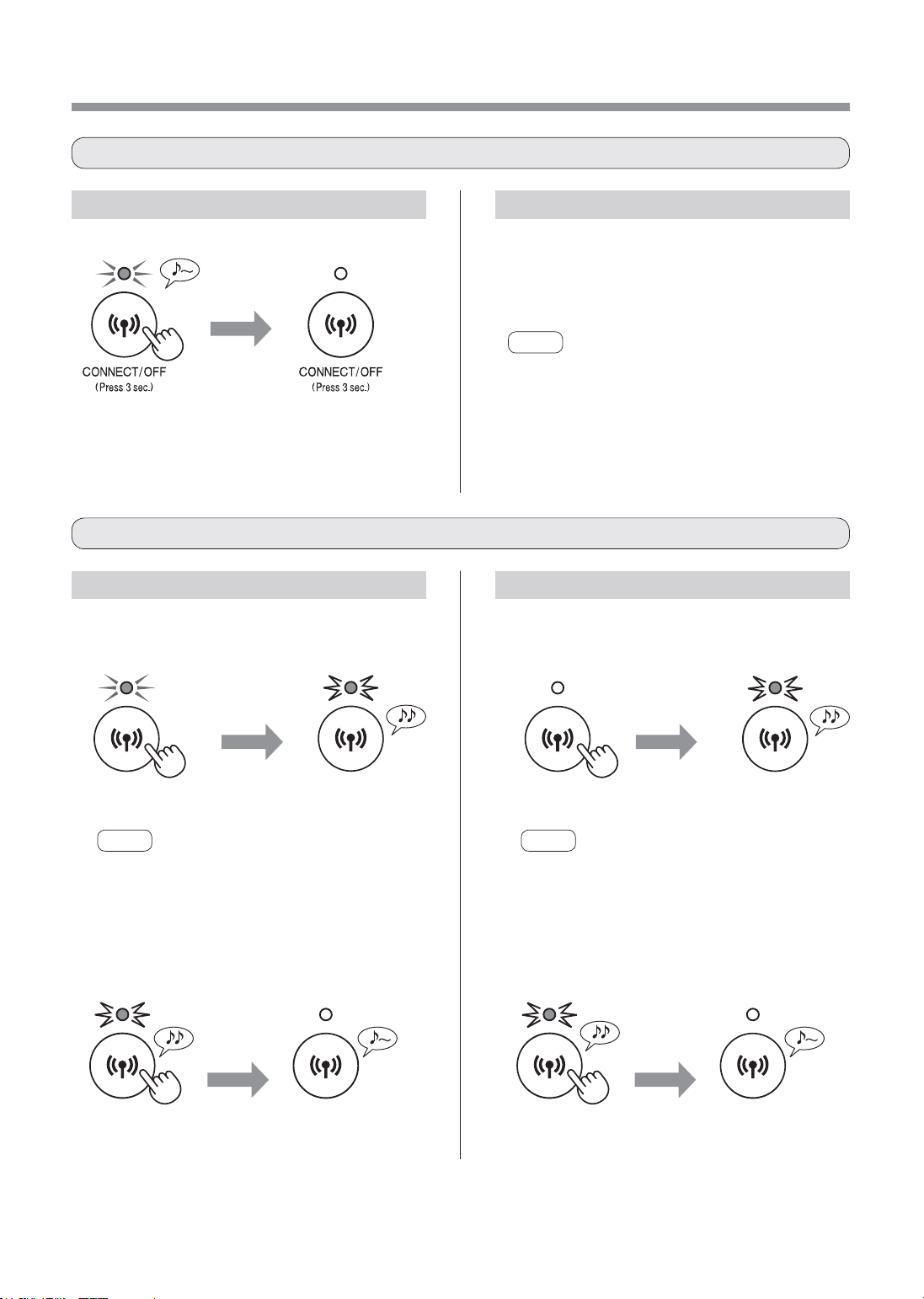
HowtoinitializefromWi-FiON.
Wi-Fi SETTINGS
Refer to page 13 and set up the
connectionwiththerouteragain.
• If the product is already registered to your
smartphone, you do not need to register again.
NOTE
• You can also press the Wi-Fi button for 3 seconds
or more to turn Wi-Fi on again. A few moments after
you press the button, the beep sounds 4 times.
After a while, the Wi-Fi indicator light turns on and
the Wi-Fi connection is completed. (In this case, Wi-
Fi connection with the router will be automatically
restored.)
more than
8 sec.
Blink
NOTE
About 3 seconds after pressing the button, a long
beep sounds and the Wi-Fi indicator light turns off, but
keep pressing the button.
more than
8 sec.
Blink
NOTE
About 3 seconds after pressing the button, a short
beep sounds and the Wi-Fi indicator light blinks, but
keep pressing the button.
more than
3 sec.
more than
3 sec.
2.PresstheWi-Fibuttonagainwithin
2minutesformorethan3seconds.
After a
while
After a
while
Goes off Goes off
Initialization
setting
completed
Initialization
setting
completed
HowtosetWi-FiON/OFFaftercompletingtheinitialsettings
HowtoinitializeWi-Fifunction
Goes off
more than
3 sec.
HowtoturnoffWi-Fi. HowtoturnonWi-Fiagain.
HowtoinitializefromWi-FiOFF.
1.PresstheWi-Fibuttonformorethan
8seconds.
1.PresstheWi-Fibuttonformorethan
8seconds.
2.PresstheWi-Fibuttonagainwithin
2minutesformorethan3seconds.
Blink
Blink
FP-J50_EN.indd 14 2020/08/31 14:28:44
EN-15
ENGLISH
TROUBLESHOOTING OF THE Wi-Fi FUNCTION
Problem Itemstocheck
Wi-Fi connection of the
air purifier and the router
cannot be performed.
• Check the specifications of the router in use.
• Adjust the router and antenna direction, move the router and antenna closer, and
so on. After that, reswitch to turn on the router and perform the initial settings
again.
The connection between
the air purifier and your
smartphone cannot be
established.
• Are the air purifier and your smartphone connecting to the same router?
Connect the air purifier and your smartphone to the same router. If you still cannot
connect, try connecting your smartphone to the 2.4GHz band of the router.
• Is the total number of smartphones being in use exceeding the maximum number
for registration on one air purifier?
The maximum number of smartphones that can be registered on one air purifier
is 10.
• Is the total number of products (air conditioners, air purifiers, etc.) to be registered
with one smartphone exceeding the maximum designated number?
The maximum number of products to be registered with one smartphone is 30.
Remote operation from
a smartphone cannot be
performed.
• Is the Wi-Fi indicator light of the air purifier on?
If the Wi-Fi indicator light is off, connect the air purifier to the router again.
(Page 13)
• Have the connection between the air purifier and your smartphone been
completed?
Set up the connection between the air purifier and your smartphone. (Page 13)
When changing the
router
• It is necessary to reconnect the air purifier to the router.
1. Hold down the Wi-Fi button for 3 seconds to stop the Wi-Fi function.
2. Perform “Flow of initial settings : 2 Connection of the air purifier and a router”.
(Page 13)
When changing the
smartphone
1. Delete the registration of the old smartphone from designated App.
2. Use the new smartphone to perform “Flow of initial settings :
1 Installation of the App, and
3 Connection between the air purifier and a smartphone”. (Page 13)
When going to dispose
or hand over the air
purifier
• Perform the following steps, to prevent leak of personal information.
1. Delete the registration of the air purifier from designated App.
2. Initialize the Wi-Fi function of the air purifier. (Page 14)
In case of being handed
over from a third party
• To prevent unauthorized access from a third party, initialize the Wi-Fi function of
the air purifier. (Page 14)
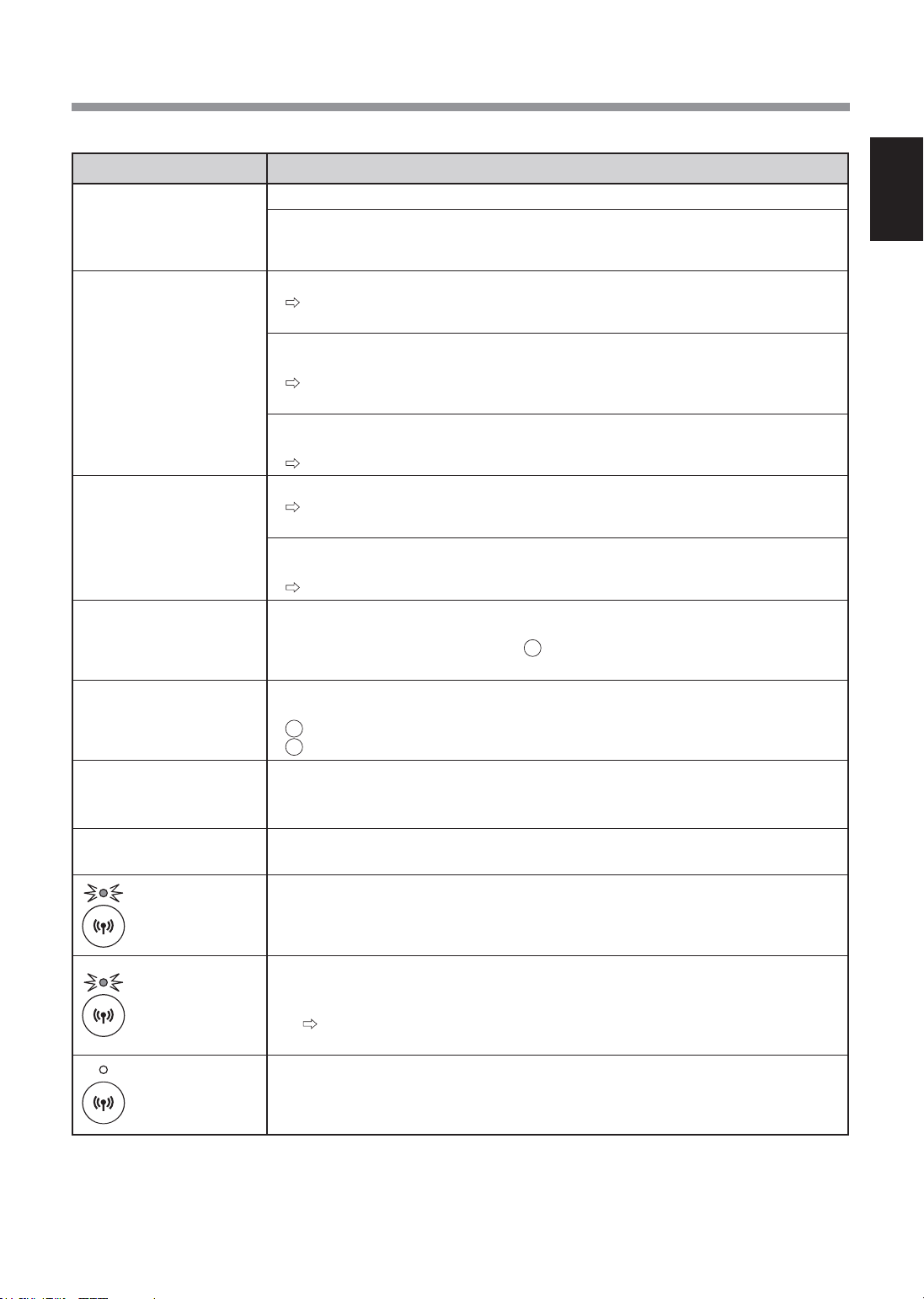
Blink slowly
• It is one of the following status.
A. The Wi-Fi connection of the air purifier and a router is in setup.
B. The connection of the air purifier and a smartphone is in setup.
C. The software for the Wi-Fi function in the air purifier is being updated.
Blink fast
• Network error. Check the following.
A. Check the network status of the router.
B. After power off the air purifier, check the Internet status.
If there are no problems with A and B, power off the air purifier. After a while,
connect the air purifier to the router again. (Page 13)
Goes off
• The air purifier cannot connect to the router. Check the following.
A. Is the power plug correctly connected?
B. Has the Wi-Fi function been stopped? Connect the air purifier to the router
again. (Page 13)
Please check the following details, before enquiring or requesting for repairs.
FP-J50_EN.indd 15 2020/08/31 14:28:44

Terima kasih kerana membeli Pembersih Udara
SHARP ini.
Sila baca manual ini dengan teliti sebelum
menggunakan produknya.
Manual ini hendaklah disimpan di tempat yang
selamat untuk rujukan pada masa akan datang.
ARAHAN KESELAMATAN PENTING ................... 2
NAMA BAHAGIAN ................................................ 4
PEMASANGAN PENAPIS ..................................... 5
OPERASI ............................................................... 6
PENJAGAAN DAN PENYELENGGARAAN ......... 8
PENGGANTIAN ..................................................... 9
PENYELESAIAN MASALAH ............................... 10
SPESIFIKASI ....................................................... 11
TETAPAN Wi-Fi ................................................... 12
PENYELESAIAN MASALAH FUNGSI Wi-Fi
............. 15
ISI KANDUNGAN
Gabungan Unik Teknologi Rawatan Udara
Sistem Penapisan Tiga Serangkai +
Plasmacluster
MEMERANGKAP HABUK*
Prapenapis memerangkap habuk dan zarah-
zarah besar yang lain dalam udara.
MENGURANGKAN BAU
Penapis Penyahbau menyerap banyak bau
biasa yang terdapat di rumah.
MENGURANGKAN DEBUNGA & KULAPUK*
Penapis HEPA memerangkap 99.97% zarah
sekecil 0.3 mikron.
MENYEGARKAN
Plasmacluster merawat udara dengan
cara yang sama bagaimana alam semula
jadi membersihkan alam sekitar dengan
mengeluarkan ion positif dan negatif dalam
nisbah yang seimbang.
* Apabila udara dialirkan keluar melalui sistem
penapisan.
Teknologi Penderia terus memantau kualiti
udara, dan melaraskan operasi secara
automatik berdasarkan ketulenan udara yang
dikesan.
FUNGSI Wi-Fi
• Sahkan bahawa keadaan kualiti udara bilik
(PM2.5, habuk, bau).
• Mengawal produk melalui telefon pintar
sebagai alat kawalan jauh.
• Mencadangkan masa yang optimum untuk
penukaran penapis.
CIRI-CIRI
MALAYSIA
FP-J50_MS.indd 2 2020/08/31 11:13:25
Pembersih udara menyedut udara dalam bilik melalui salur masuk udara, mengalirkannya
melalui Prapenapis, Penapis Penyahbau dan Penapis HEPA di dalam unit utama, kemudian
mengeluarkannya melalui salur keluar udara. Penapis HEPA boleh menyingkirkan 99.97 % habuk
sekecil 0.3 mikron yang dapat melalui penapis dan juga membantu menyerap bau. Penapis
Penyahbau menyerap bau sedikit demi sedikit semasa udara mengalir melalui penapis.
Sesetengah bau yang diserap oleh penapis, lama-kelamaan boleh terurai dan menyebabkan
bau semakin kuat. Bergantung pada keadaan penggunaan, dan terutama sekali jika unit utama
digunakan dalam persekitaran yang jauh lebih teruk berbanding kediaman biasa, bau ini mungkin
menjadi kuat lebih cepat daripada jangkaan. Jika bau ini berlarutan, gantikan penapis.
NOTA
• Pembersih udara direka untuk menyingkirkan habuk yang terampai di udara dan bau yang
disebabkannya.
Pembersih udara tidak direka untuk menyingkirkan gas-gas berbahaya seperti karbon monoksida yang
terkandung dalam asap rokok.
Pembersih udara ini mungkin tidak dapat menghapuskan bau sepenuhnya jika sumber bau masih ada di
situ.
Sila baca sebelum mengendalikan Pembersih Udara baru anda
Penapis HEPA
Prapenapis
Penapis Penyahbau
MS-1
MALAYSIA
FP-J50_MS.indd 1 2020/08/31 11:13:25

MS-2
ARAHAN KESELAMATAN PENTING
Sentiasa ikuti langkah keselamatan asas
semasa menggunakan perkakas elektrik,
termasuk yang berikut:
AMARAN
– Sentiasa perhatikan
perkara yang berikut untuk mengurangkan
risiko kejutan elektrik, kebakaran atau
kecederaan:
• Baca semua arahan sebelum
menggunakan unit utama ini.
• Hanya gunakan salur keluar 220 - 240 volt.
• Perkakas ini tidak direka untuk
digunakan oleh mereka (termasuk
kanak-kanak) yang cacat tubuh badan,
cacat deria atau mental, mahupun
mereka yang kurang berpengalaman
dan pengetahuan, kecuali jika mereka
diberikan penyeliaan atau arahan yang
betul tentang penggunaan perkakas
ini oleh orang yang bertanggungjawab
atas keselamatan mereka.
Kanak-kanak hendaklah diawasi bagi
memastikan mereka tidak bermain
dengan perkakas ini.
• Jika kord kuasa rosak, ia mesti
digantikan oleh pengilang, wakil
servis, Pusat Servis Sharp yang sah
atau individu yang berkelayakan bagi
mengelakkan bahaya. Sila hubungi Pusat
Servis yang berdekatan bagi sebarang
masalah, pelarasan atau pembaikan.
• Jangan baiki atau menanggalkan unit
utama dengan sendiri.
• Pastikan anda menanggalkan
palam sebelum menjalankan
penyelenggaraan, apabila
menanggalkan, memasang dan
menggantikan penapis serta apabila
tidak menggunakannya untuk masa
yang lama. Kegagalan melakukan
sedemikian akan menyebabkan litar
pintas berlaku yang mengakibatkan
kejutan elektrik atau kebakaran.
• Jangan gunakan unit utama ini jika kord
kuasa atau palamnya rosak atau jika
sambungan ke salur keluar dinding longgar.
• Dari semasa ke semasa buang habuk
yang melekat pada palam.
• Jangan masukkan jari atau objek asing ke
dalam salur masuk atau salur keluar udara.
• Sentiasa pegang palam dan jangan
sesekali tarik kordnya apabila hendak
menanggalkan palam kuasa.
Kegagalan melakukan sedemikian akan
menyebabkan litar pintas berlaku yang
mengakibatkan kejutan elektrik atau
kebakaran.
• Berhati-hati agar kord kuasa tidak rosak.
Jika tidak, boleh menyebabkan kejutan
elektrik, terlebih panas atau kebakaran.
• Jangan tanggalkan palam dengan tangan
yang basah.
• Jangan gunakan unit utama ini
berhampiran perkakas yang menggunakan
gas atau tempat berdiang. Apabila unit
utama beroperasi dengan peralatan gas
di dalam bilik yang sama, Alihkan udara
bilik secara tetap, jika tidak bilik mungkin
dicemari dengan Karbon monoksida.
• Jangan kendalikan unit utama ini
di dalam bilik yang menggunakan
penyembur pembunuh serangga. Jangan
kendalikan unit utama ini di dalam bilik
yang udaranya berminyak, berbau asap,
terdapat nyalaan api daripada rokok yang
dinyalakan, atau wasap kimia di udara.
• Pastikan unit utama jauh dari air.
Jangan kendalikan unit utama di tempat
yang basah seperti bilik mandi.
• Jangan dedahkan unit utama kepada air.
Berbuat demikian boleh menyebabkan
litar pintas atau kejutan elektrik.
• Sila berhati-hati semasa membersihkan unit
utama ini. Bahan pencuci yang kuat mengakis
boleh merosakkan bahagian luar unit.
NOTA
–
Apa harus dilakukan jika unit utama
mengganggu penerimaan radio atau TV
Jika pembersih udara mengganggu
penerimaan radio atau televisyen, cuba
salah satu daripada langkah-langkah berikut:
• Laraskan atau ubah kedudukan antena
penerima.
• Jauhkan unit utama dari radio atau TV.
• Sambungkan peralatan ke dalam salur keluar
pada litar yang berbeza yang bersambung
dengan penerima radio atau TV.
• Rujuk wakil penjual atau juruteknik radio
atau TV yang berkelayakan.
FP-J50_MS.indd 2 2020/08/31 11:13:25

MS-3
MALAYSIA
AMARAN BERKAITAN OPERASI
• Jangan halang salur masuk atau salur
keluar udara.
• Jangan letak unit utama ini berdekatan
atau pada objek panas, seperti dapur
atau pemanas, ataupun yang boleh
terkena wap air.
• Sentiasa kendalikan unit utama dalam
kedudukan menegak.
• Jangan alihkan unit utama semasa ia
sedang beroperasi.
• Apabila mengalihkan unit utama, gunakan
pemegang di bahagian belakang unit
utama.
• Jika unit utama terletak di atas lantai
yang mudah rosak, permukaan lantai
yang tidak rata atau permaidani yang
tebal, angkat unit utama ini semasa
mengalihkannya.
• Jangan gunakan unit utama jika penapis
tidak dipasang dengan betul.
• Jangan cuci dan guna semula penapis
HEPA serta penapis Penyahbau.
Berbuat demikian tidak akan
meningkatkan prestasi penapis dan juga
boleh menyebabkan kejutan elektrik atau
kegagalan operasi.
• Bersihkan bahagian luarnya dengan kain
lembut sahaja.
Jangan gunakan cecair yang mudah
meruap atau bahan pencuci.
Permukaan unit utama boleh rosak atau
merekah apabila menggunakan Benzena,
pencair cat atau serbuk penggilap. Selain
itu, ia boleh mengakibatkan penderia
rosak.
• Jangan sental Panel Belakang dengan
kuat semasa menyelenggaranya.
GARIS PANDUAN PEMASANGAN
• Elakkan lokasi yang boleh menyebabkan
penderia terdedah terus kepada angin.
Berbuat demikian boleh menyebabkan
unit utama rosak.
• Elakkan lokasi yang boleh menyebabkan
perabot, kain atau objek lain terkena unit
utama dan mengganggu penyedutan dan
pengeluaran udara.
• Elakkan lokasi yang boleh menyebabkan
unit utama terdedah kepada
pemeluwapan atau perubahan suhu yang
mendadak. Suhu bilik yang sesuai adalah
antara 0 – 35 °C.
• Letakkan unit utama di atas permukaan
yang rata dan stabil dengan peredaran
udara yang mencukupi.
Apabila diletakkan di atas permaidani
yang tebal, unit utama mungkin akan
bergetar sedikit.
• Elakkan lokasi yang mengeluarkan asap
yang bergris atau berminyak.
Berbuat demikian boleh menyebabkan
bahagian luar unit utama merekah dan
penderia rosak.
• Keupayaan unit utama mengumpul habuk
berkesan apabila unit utama berada
hampir 3 cm dari dinding, sekitar dinding
dan lantai yang kotor. Sila letakkan unit
utama jauh dari dinding.
Dinding yang berada betul-betul di
belakang salur keluar udara lama-
kelamaan mungkin akan menjadi kotor.
Jika anda menggunakan unit utama
di tempat yang sama untuk tempoh
yang lama, bersihkan dinding yang
bersebelahan dengannya dari semasa ke
semasa.
GARIS PANDUAN PENAPIS
• Ikuti arahan dalam manual ini untuk
penjagaan dan penyelenggaraan penapis
yang betul.
(halaman 8)
FP-J50_MS.indd 3 2020/08/31 11:13:25
MS-4
NAMA BAHAGIAN
20
19
2
1
DEPAN
BELAKANG
18
14
15
11
1213
16
17
Pemantau Kebersihan
Menunjukkan kebersihan udara
bilik mengikut 5 tahap dengan
perubahan warna.
Kuning
Merah
Biru
Kotor
Bersih
9
8
3
4 5 6
7
10
1
Unit Utama
10
Lampu Penunjuk Ion Plasmacluster (biru)
2
Salur Keluar Udara
11
Pemantau Kebersihan
3
Butang PEMASA OFF, Lampu Penunjuk (putih)
12
Pemegang
<Tekan 3 saat> Butang Tetap Semula Penapis,
Lampu Penunjuk Penggantian Penapis (jingga)
13
Penderia habuk sensitif (Dalaman) /
Penapis Penderia Bau
4
Butang MOD, Lampu Penunjuk (putih)
14
Penapis HEPA
<Tekan 3 saat> Butang Ion Plasmacluster ON/OFF
15
Penapis Penyahbau
5
Butang HAZE, Lampu Penunjuk (putih)
16
Panel Belakang (Prapenapis)
<Tekan 3 saat> Butang Kawalan LAMPU
17
Salur Masuk Udara
6
Butang Wi-Fi, Lampu Penunjuk (putih)
18
Tab bawah
7
Butang POWER ON/OFF
19
Palam (Bentuk palam bergantung pada
negara.)
8
Lampu Penderia
9
Penderia (Dalaman)
Bau / Suhu / Kelembapan
20
Kord Kuasa
FP-J50_MS.indd 4 2020/08/31 11:13:26
MS-5
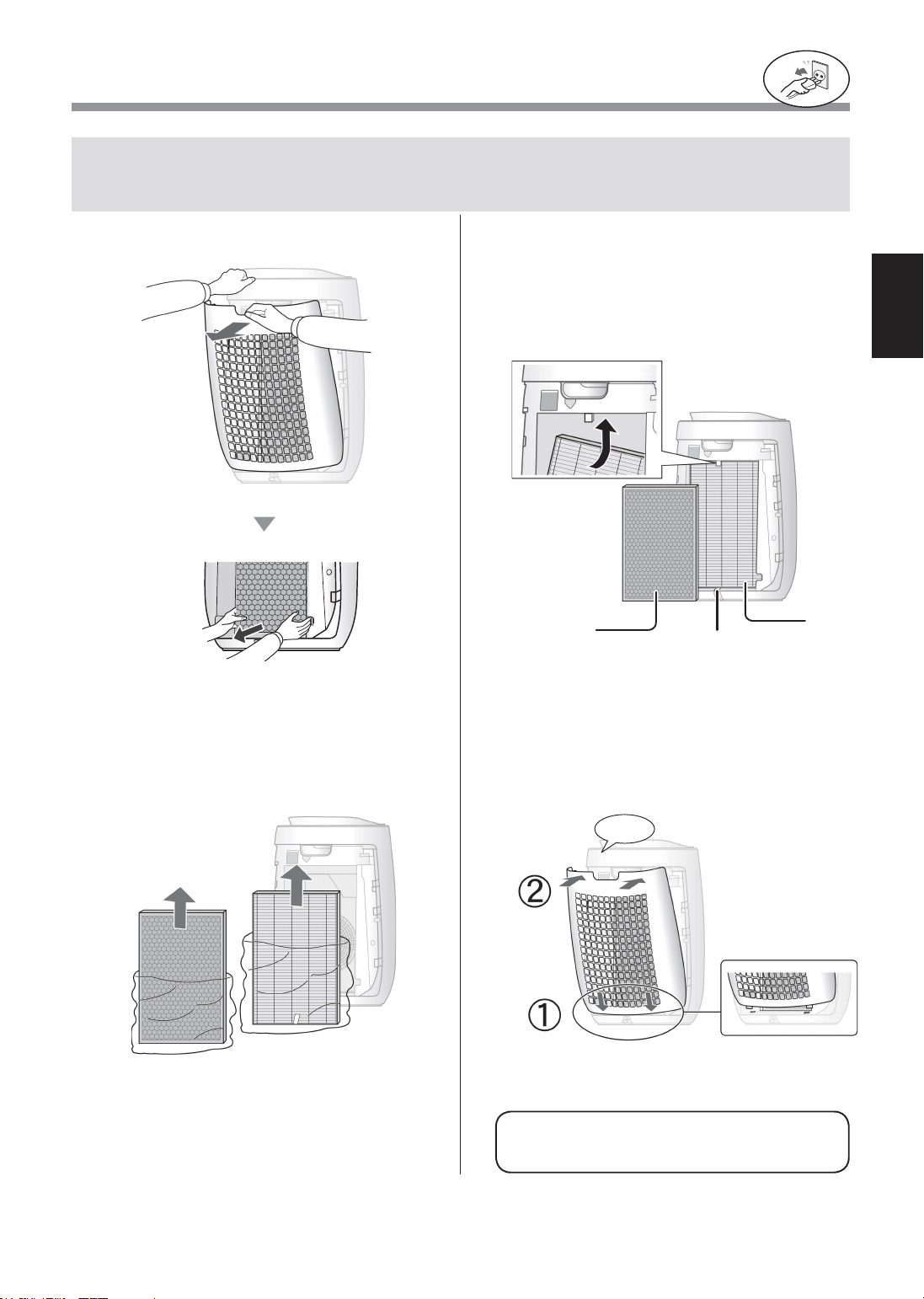
MALAYSIA
PEMASANGAN PENAPIS
Untuk mengekalkan kualiti penapis, ia dipasang di unit utama utama dan dibungkus di dalam
beg plastik. Pastikan anda mengeluarkan penapis daripada beg plastik sebelum menggunakan
unit utama ini.
• Jangan kendalikan unit utama ini tanpa
penapisnya.
Pastikan anda menanggalkan
palam kuasa dari soket dinding.
1
Tanggalkan Panel Belakang.
Tarik
2
Tanggalkan beg plastik daripada
Penapis.
3
Pasang Penapis dengan urutan yang
betul seperti ang ditunjukkan.
Jangan pasang penapis terbalik, jika tidak unit
utama ini tidak akan beroperasi dengan betul.
Penapis
HEPA
Penapis
Penyahbau
Label
4
Pasang Panel Belakang.
klik
FP-J50_MS.indd 5 2020/08/31 11:13:26
MS-6
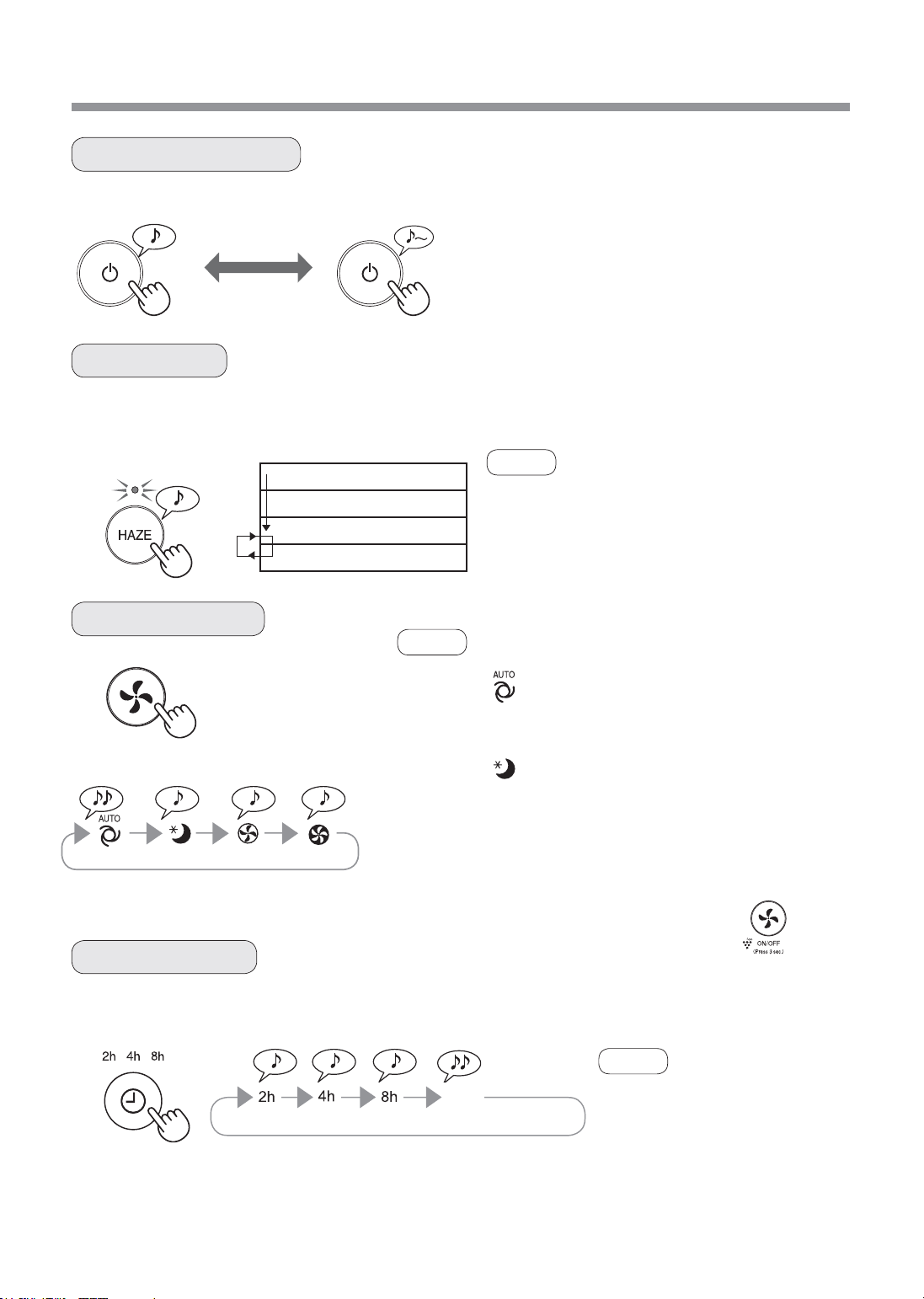
OPERASI
SLEEP MED MAXAUTO
Unit utama ini beroperasi pada kelajuan kipas yang tinggi selama 60 minit, kemudian ia akan berselang-seli antara
tahap Rendah dan Tinggi selama 20 minit setiap satunya.
MULA BERHENTI
• Pilih kelajuan kipas yang diingini.
• Apabila unit utama mula beroperasi, operasi
bermula pada mod sebelumnya yang telah
dikendalikan.
10 minit:
Tahap kipas tinggi maksimum
50 minit: Tahap kipas tinggi
20 minit: Tahap kipas rendah
20 minit: Tahap kipas tinggi
• Plasmacluster Ion tidak boleh ditukar kepada “OFF”.
• Mod ini boleh ditukar kepada mod lain semasa
beroperasi.
Walau bagaimanapun, mod HAZE tidak berfungsi
selepas bertukar mod.
• Anda juga boleh menetapkan
pemasa dalam Aplikasi khusus.
Jika pemasa telah pun ditetapkan
dalam Aplikasi khusus, semua
petunjuk lampu TIMER produk
dihidupkan. Anda tidak boleh
menetapkan pemasa pada produk.
Pilih jangka masa yang anda ingini, semasa unit utama dihidupkan. Unit utama berhenti secara automatik setelah
sampai masa yang dipilih.
MULA/BERHENTI
MOD HAZE
MEMILIH MOD
PEMASA OFF
NOTA
NOTA
NOTA
(semasa unit utama ON)
2 jam 4 jam 8 jam Pembatalan
AUTO
SLEEP
Kelajuan kipas dikawal secara automatik bergantung pada 3
pengesanan. (Habuk / bau / Lampu)
Unit utama ini akan beroperasi secara sangat tenang, dan kelajuan
kipas akan ditukar secara automatik bergantung pada jumlah bendasing
dalam udara dan kecerahan bilik.
Pemantau Kebersihan / Lampu Ion Plasmacluster dimatikan secara
automatik.
Walaupun penunjuk dimatikan, ia tetap melepaskan ion Plasmacluster
ke udara kecuali jika Ion Plasmacluster dimatikan oleh .
OFF
FP-J50_MS.indd 6 2020/08/31 11:13:27
MS-7
MALAYSIA
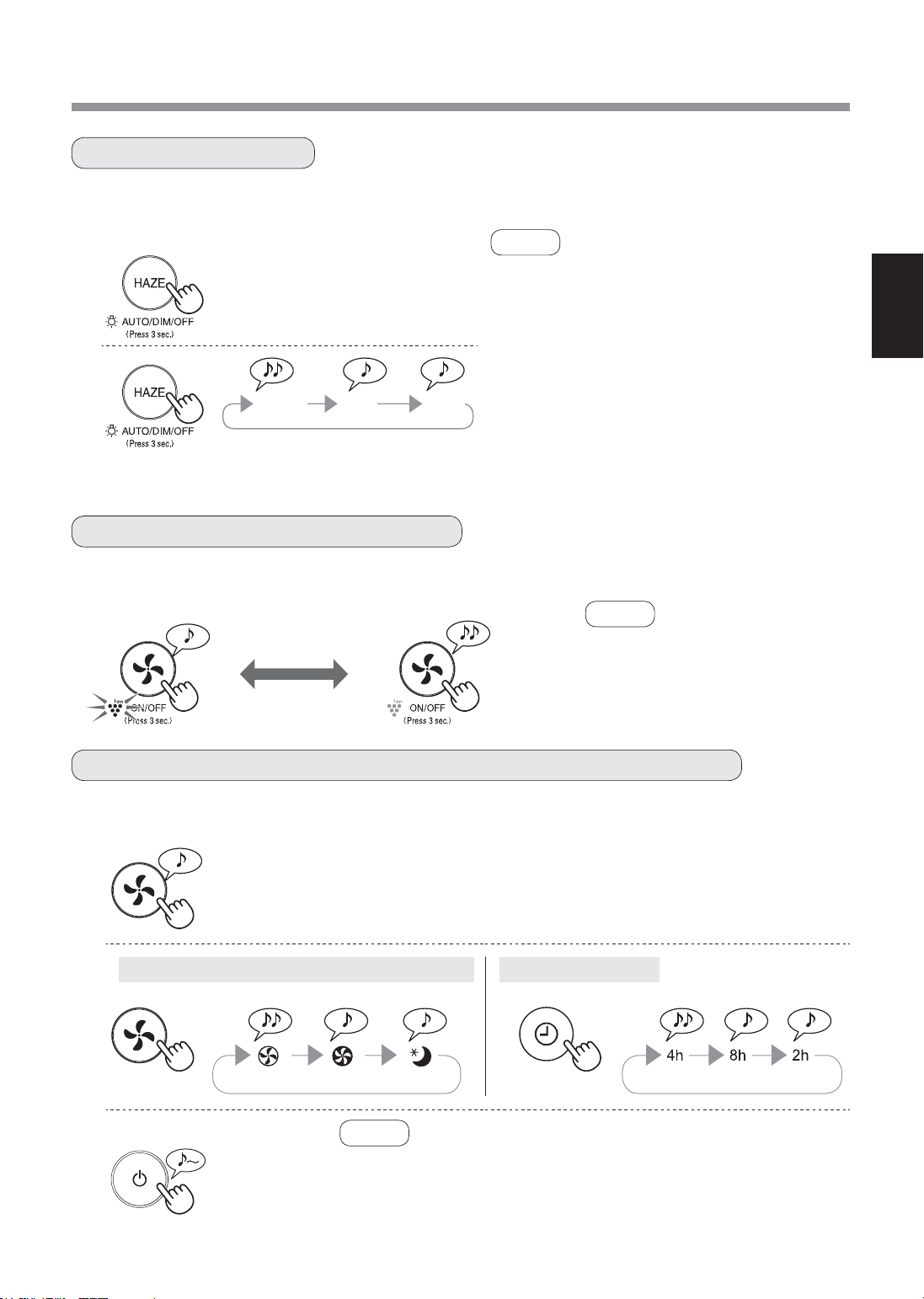
1
(semasa unit utama OFF)
2
Penderia habuk sensitif / Penderia Bau Lampu Penderia
3
Anda boleh menetapkan Pemantau Kebersihan / Lampu Penunjuk Ion Plasmacluster kepada OFF apabila mereka
menyala.
Apabila Ion Plasmacluster ditetapkan kepada ON, Lampu Penunjuk Ion Plasmacluster akan menyala. (biru)
OFF
lebih daripada 3 saat.
KAWALAN LAMPU
ON/OFF ION PLASMACLUSTER
PELARASAN KESENSITIFAN PENGESANAN PENDERIA
ON
lebih daripada 3 saat.
(semasa unit utama ON)
• Apabila unit utama mula beroperasi,
operasi bermula pada mod
sebelumnya yang telah dikendalikan.
1
(semasa unit utama ON)
NOTA
• Jika butang HAZE tidak ditolak dalam masa 8 saat,
tetapan akan disimpan secara automatik.
• Apabila unit utama mula beroperasi, operasi
bermula pada mod sebelumnya yang telah
dikendalikan.
2
AUTO
Lampu bertukar kepada ON atau OFF secara
automatik mengikut kecerahan bilik.
Bilik cerah: lampu ON
Bilik gelap: lampu OFF
OFF
Apabila ditetapkan kepada “OFF”, lampu
“DIM” menyala selama 8 saat selepas operasi
bermula dan kemudian lampu ditutupkan.
lebih daripada 3 saat.
AUTO
DIM
OFF
NOTA
NOTA
Anda boleh menukar sensitiviti Penderia habuk sensitif / penderia Bau dan penderia Lampu.
lebih daripada 3 saat.
Standard Tinggi Rendah Standard Tinggi Rendah
• Jika Butang POWER ON/OFF tidak ditekan dalam masa 8 saat
selepas melaraskan kesensitifan penderia, tetapan itu akan
disimpan secara automatik.
• Tetapan kesensitifan penderia akan disimpan walaupun jika palam
unit utama dicabut.
FP-J50_MS.indd 7 2020/08/31 11:13:28
MS-8
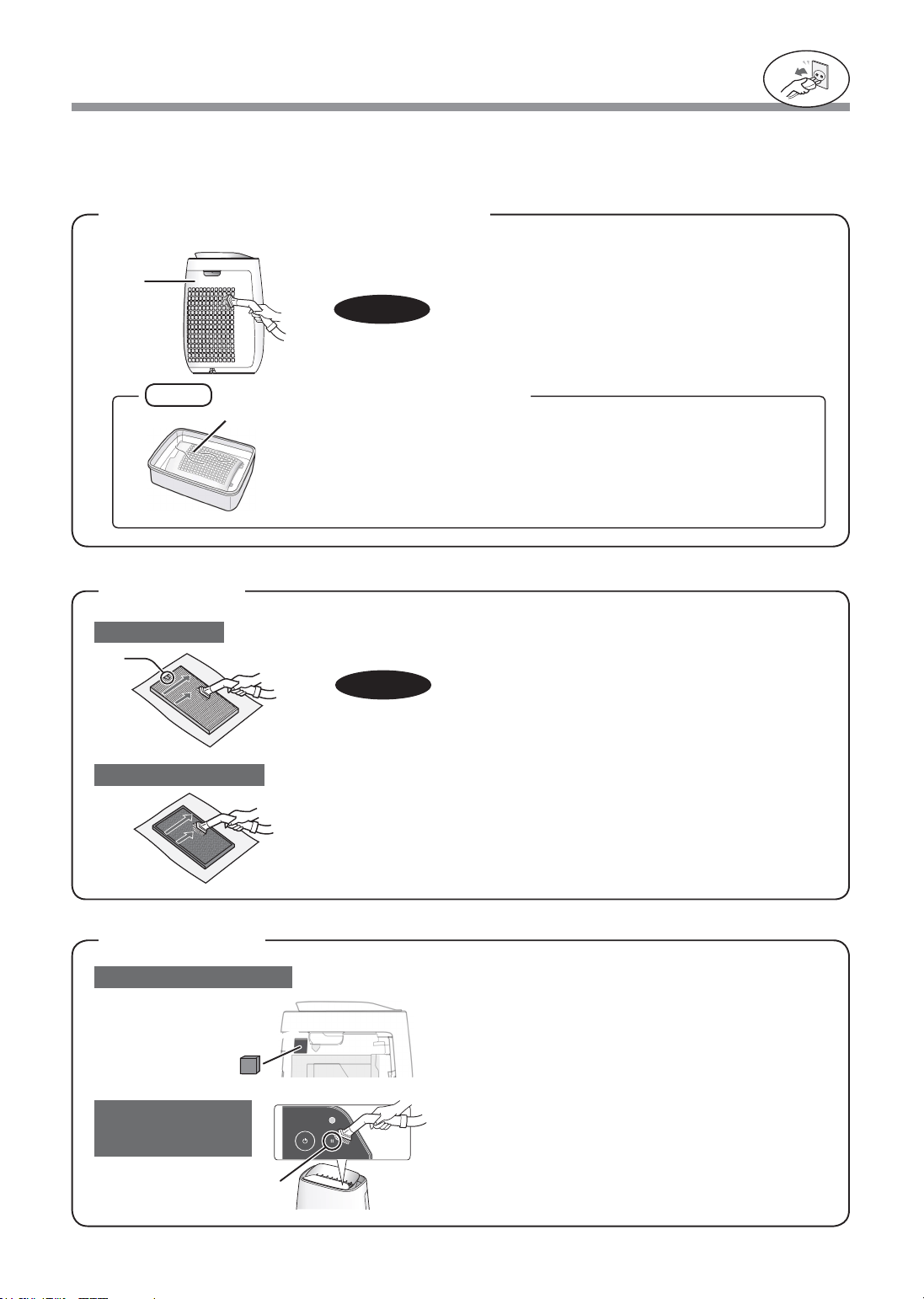
PENJAGAAN DAN PENYELENGGARAAN
Buang habuk daripada panel belakang dengan lembut, menggunakan
hujung pembersih hampagas atau alat yang serupa.
PANEL BELAKANG
(Prapenapis)
Untuk mengekalkan prestasi optimum alat pembersih udara ini, sila bersihkan Unit Utama ini termasuk
penapisnya secara berkala.
Pastikan anda mencabut kord kuasa dari soket dinding sebelum menjalankan sebarang kerja penyelenggaraan.
NOTA
Pastikan anda menanggalkan
palam kuasa dari soket dinding.
1. Tanggalkan Panel Belakang.
2. Tanggalkan Penapis Penderia.
3. Jika ia sangat kotor, basuh ia dengan air dan keringkan
sepenuhnya.
Penapis Penderia
Jangan dikenakan tekanan secara berlebihan apabila menyental panel
belakang.
Buang habuk daripada penderia dengan lembut,
menggunakan hujung pembersih hampagas atau alat
yang serupa.
Label
Penapis HEPA
Penderia habuk sensitif
Penderia
(Bau / Suhu /
Kelembapan)
Penapis Penyahbau
AWAS
Buang habuk daripada Penapis HEPA dan Penapis Penyahbau dengan perlahan-
lahan dengan menggunakan hujung pembersih hampagas atau alat yang serupa.
Jangan basuh dalam air dan keringkan di bawah sinar matahari.
Penapis mudah rosak, berhati-hati supaya tidak dikenakan daya tekanan
secara berlebihan.
Panel
Belakang
Penderia
Panel Belakang
AWAS
PENAPIS
PENDERIA
Cara membersihkan bagi kotoran degil
1. Campurkan sedikit bahan pencuci pinggan dengan air dan rendam
selama 10 minit.
2. Bilas bahan pencuci pinggan itu dengan air bersih.
3. Keringkan sepenuhnya penapis di kawasan yang mempunyai
pengaliran udara yang baik.
• Penapis HEPA
Jalankan penyelenggaraan pada bahagian berlabel sahaja.
Jangan bersihkan bahagian yang bertentangan, jika tidak penapis akan
rosak.
• Penapis Penyahbau
Penyelenggaraan boleh dibuat pada kedua-dua belahnya.
FP-J50_MS.indd 8 2020/08/31 11:13:28
MS-9
MALAYSIA
PENGGANTIAN
Penapis HEPA
Penapis Penyahbau
UNIT UTAMA
Pembuangan Penapis
Sila buang penapis terpakai mengikut undang-undang dan peraturan pembuangan tempatan.
Masa penggantian
Penapis
Lampu Penunjuk Penggantian Penapis
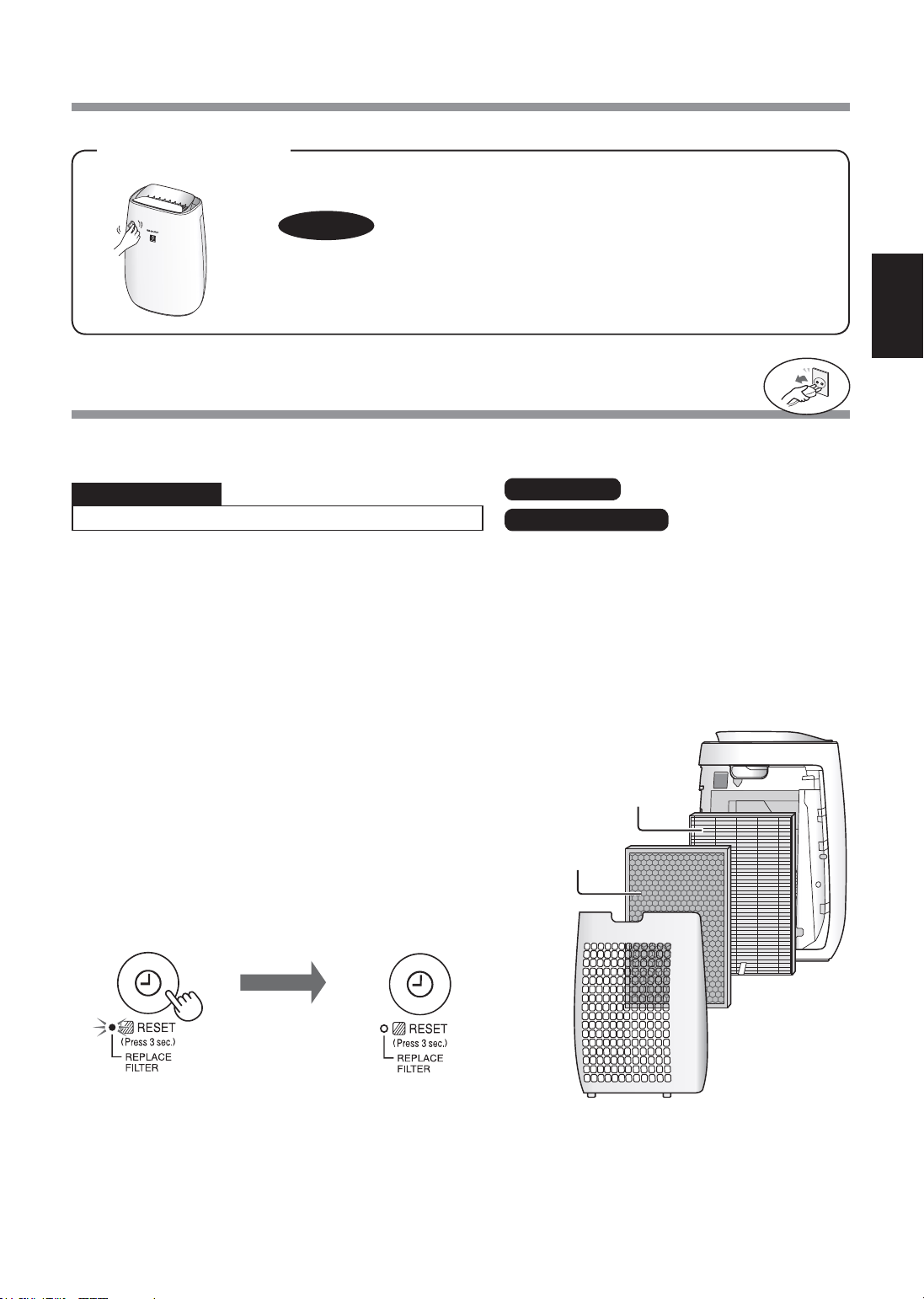
Gantikan penapis mengikut arahan yang disediakan dengan
penapis gantian.
Selepas pertukaran, masukkan palam ke dalam soket dan
tekan butang POWER ON/OFF, dan butang PEMASA OFF
selama 3 saat.
Model : FZ-F50HFE
Model : FZ-F50DFE
Jangka Hayat Penapis
Jangka hayat dan tempoh penggantian penapis adalah berdasarkan keadaan di mana rokok dihisap 5 batang
sehari dan kuasa pengumpulan habuk berkurangan setengah daripada kuasa penapis baru.
Jangka hayat penapis berbeza-beza bergantung pada persekitaran bilik, penggunaan dan lokasi unit utama ini.
Kami mengesyorkan agar anda menggantikan penapis dengan lebih kerap jika produk ini digunakan dalam
keadaan yang jauh lebih teruk daripada penggunaan biasa di rumah.
* Apabila penapis perlu diganti, petunjuk Lampu Penunjuk Penggantian Penapis akan dihidupkan.
Jangka hayat penapis ditentukan dengan mengira jumlah habuk yang terkumpul dengan menggunakan penderia
habuk Sensitif.
Bahan Penapis HEPA :
• Polipropilena
• Polietilena
Bahan Penapis Penyahbau :
• Polipropilena • Poliester
• Karbon diaktifkan
Lap dengan kain lembut yang kering.
Untuk kesan atau kotoran degil, gunakan kain lembut yang dilembapkan dengan air suam.
Penapis
HEPA
Penapis
Penyahbau
AWAS
• Jangan gunakan cecair mudah meruap
Benzena, pencair cat, serbuk penggilap dan sebagainya boleh merosakkan permukaannya.
• Jangan gunakan bahan pencuci
Bahan-bahan dalam bahan pencuci boleh merosakkan unit utama ini.
Semasa Lampu Penunjuk Penggantian Penapis menyala*
• Penapis HEPA : Lebih kurang 2 tahun selepas dibuka
• Penapis Penyahbau : Lebih kurang 2 tahun selepas dibuka
Pastikan anda menanggalkan
palam kuasa dari soket dinding.
Terpadam
lebih
daripada
3 saat.
FP-J50_MS.indd 9 2020/08/31 11:13:28
MS-10
PENYELESAIAN MASALAH
TANDA CARA MEMULIHKAN (bukan kepincangan tugas)
Bau dan asap gagal dihapuskan.
• Ganti penapis jika ia kelihatan sangat kotor. (halaman 9)
Pemantau Kebersihan akan menyalakan
lampu hijau walaupun jika udara kotor.
• Udara mungkin kotor pada masa unit dihidupkan.
Matikan unit, cabut palamnya, tunggu seminit dan pasang semula
palamnya.
Pemantau Kebersihan akan menyalakan
lampu jingga atau merah apabila udara
bersih.
• Operasi penderia akan terjejas jika bukaan penderia habuk kotor atau
tersumbat. Bersihkan bukaan penderia habuk dengan perlahan-lahan.
(halaman 8)
Bunyi ‘klik’ atau ‘tik’ kedengaran dari unit
utama.
• Bunyi ‘klik’ atau ‘tik’ mungkin kedengaran jika unit sedang menjana ion.
Udara yang dihembuskan berbau.
• Periksa jika penapis sangat kotor.
• Bersihkan atau ganti penapis.
Unit utama ini tidak beroperasi dengan
betul apabila terdapat asap rokok dalam
udara.
• Adakah unit ini dipasang di lokasi yang menyebabkan penderianya
sukar mengesan asap rokok?
• Adakah bukaan penderia habuk sensitif tersekat atau tersumbat?
(Dalam kes ini, bersihkan bukaannya.) (halaman 8)
Pemantau Kebersihan dimatikan.
• Periksa untuk memastikan Mod Lights OFF dipilih.
Tekan selama 3 saat untuk menyalakan lampu. (halaman 7)
• Periksa untuk memastikan Mod SLEEP dipilih.
Pemantau Kebersihan / Lampu Penunjuk Ion Plasmacluster dimatikan
secara automatik selepas mod SLEEP dipilih.
Bau dari unit baharu dan/atau penapis.
• Sebaik sahaja menanggalkan beg plastik, anda mungkin terhidu
sedikit bau. Bau ini tidak menjejaskan prestasi penapis atau berbahaya
kepada manusia.
Pemantau Kebersihan bertukar warna
dengan kerap.
• Pemantau Kebersihan bertukar warna secara automatik apabila
penderia habuk (sensitif) dan penderia bau* mengesan kekotoran.
Jika anda mengambil berat tentang perubahan tersebut,
anda boleh ubah sensitiviti penderia. (halaman 7)
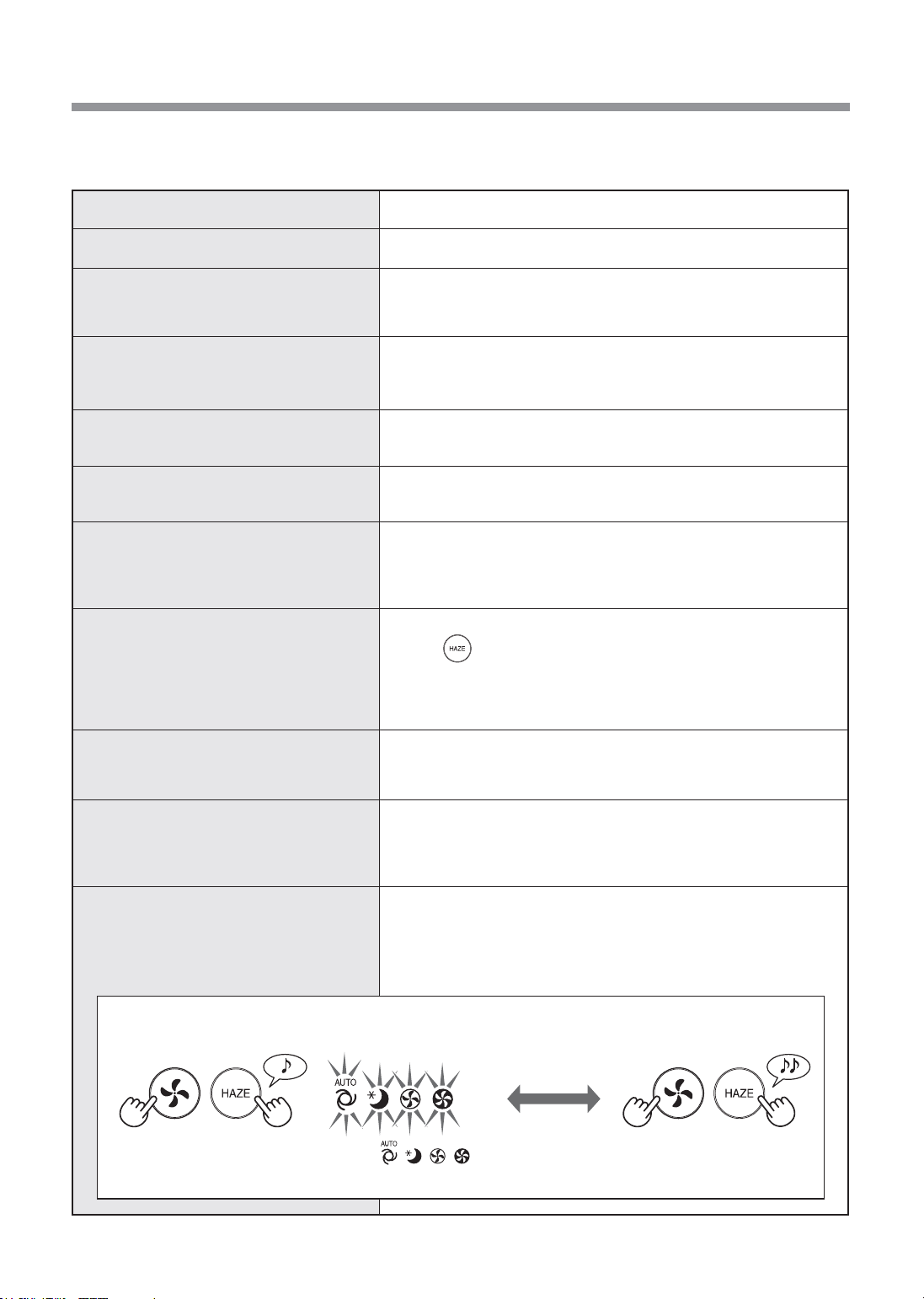
MULA SEMULA AUTO
Jika bekalan elektrik terputus, unit ini
akan menyambung semula operasi
secara automatik selepas bekalan elektrik
kembali pulih.
• Walaupun semasa palam dicabut atau bekalan elektrik terputus
semasa operasi, operasi akan disambung semula pada mod operasi
dan tetapan sebelumnya apabila bekalan kuasa pulih.
Sebelum menghubungi wakil servis, sila semak carta Pengenalpastian dan Penyelesaian Masalah di bawah. Ini
kerana masalah anda itu mungkin bukan disebabkan oleh kegagalan unit untuk berfungsi.
ON (lalai) OFF
(semasa unit utama OFF) (semasa unit utama OFF)
Jika lampu , , , Menyala
selama 8 saat, tetapan sudah lengkap.
( secara serentak
selama lebih 3 saat.)
( secara serentak
selama lebih 3 saat.)
FP-J50_MS.indd 10 2020/08/31 11:13:29
MS-11
MALAYSIA
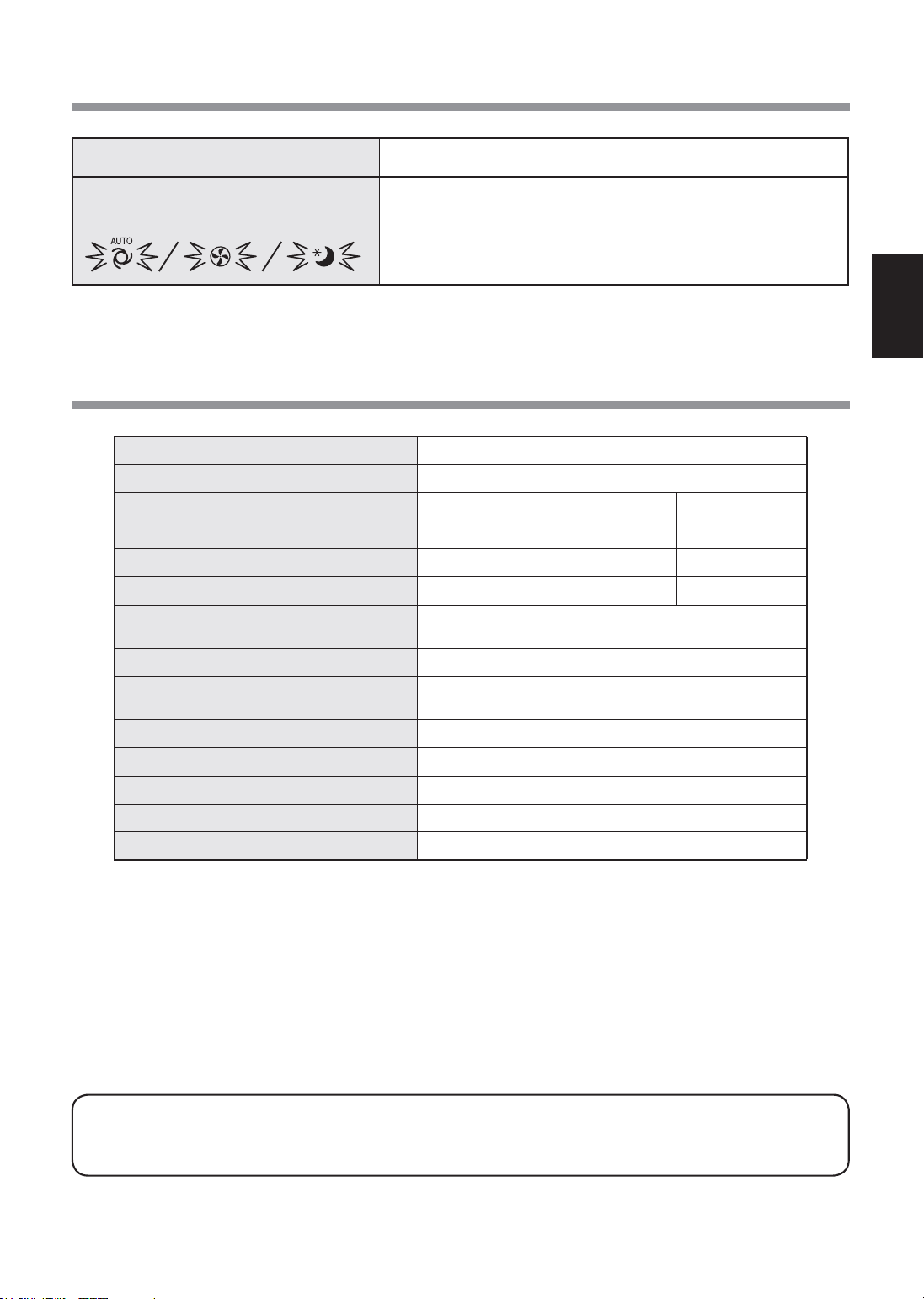
Model FP-J50
Bekalan kuasa
220 - 240 V 50 - 60 Hz
Pelarasan Kelajuan Kipas
MAX MED SLEEP*
2
Kelajuan Kipas (m
3
/jam)
306 186 48 ~ 120
Paras Hingar (dBA)*
1
51 39 15 ~ 30
Kuasa Terkadar (W)
39 14 4.5 ~ 7.5
Kuasa Tunggu Sedia (W)
1.6 (Apabila penyesuai Wi-Fi pada kedudukan ON.)
1.2 (Apabila penyesuai Wi-Fi pada kedudukan OFF.)
Saiz Bilik Disyorkan (m
2
)*
3
~ 40
Saiz bilik cadangan ion Plasmacluster
berketumpatan tinggi (m
2
)*
4
~ 23
Jenis penapis
HEPA*
5
/ Penyahbau
Penderia Habuk sensitif / Bau / Suhu / Kelembapan / Lampu
Panjang kord (m) 2.0
Ukuran (mm) 390 (L) x 270 (D) x 583 (T)
Berat (kg) 6.4
*1 • Tahap hingar diukur berdasarkan standard JEM 1467 Persatuan Pengilang Elektrikal Jepun.
*2 • Kelajuan kipas akan ditukar secara automatik bergantung pada jumlah bendasing dalam udara dan kecerahan bilik.
*3 • Saiz bilik disyorkan adalah sesuai untuk mengendalikan unit utama pada kelajuan kipas maksimum.
• Saiz bilik yang disyorkan ialah ruang dengan jumlah zarah habuk yang dapat disingkirkan dalam masa 30 minit
(selaras dengan JEM1467).
*4 • Saiz bilik di mana lebih kurang 7000 ion boleh diukur per sentimeter padu di tengah-tengah bilik (pada
ketinggian lebih kurang 1.2 meter dari lantai). apabila produk ini diletakkan di sebelah dinding dan beroperasi
pada kedudukan operasi MED.
*5 • Penapis ini menanggalkan lebih daripada 99.97% partikel yang bersaiz sekurang-kurangnya 0.3 mikron (selaras
dengan JEM1467).
Kuasa Tunggu
Sedia
Apabila palam kuasa unit utama dipasang pada soket dinding, ia menggunakan kuasa
tunggu sedia untuk mengendalikan litar elektrik. Bagi menjimatkan tenaga, tanggalkan
kord kuasa jika unit utama tidak digunakan.
TANDA CARA MEMULIHKAN (bukan kepincangan tugas)
Salah satu daripada petunjuk lampu
berikut berkelip.
• Matikan unit, cabut palamnya, tunggu seminit dan kemudian pasang
semula palamnya.
SPESIFIKASI
FP-J50_MS.indd 11 2020/08/31 11:13:29

MS-12
TETAPAN Wi-Fi
AMARAN
Dalam kes operasi jauh dari luar, anda mungkin
tidak dapat memeriksa keadaan semasa
pembersih udara atau kawasan di sekitarnya
dan situasi tentang sesiapa yang mungkin
tinggal di kawasan itu, jadi pastikan anda telah
mengesahkan keselamatan dengan secukupnya
sebelum menggunakan pembersih udara.
• Pastikan palam elektrik dimasukkan sepenuhnya
ke dalam soket kuasa, dan tiada habuk melekat
pada palam atau di dalam lubang soket. (Habuk
boleh menyebabkan haba, pembakaran,
kebakaran, dll., disebabkan lekapan yang lemah
atau kegagalan lekapan)
• Pastikan terlebih dahulu tiada kesan negatif
akan terjadi kepada persekitaran di dalam bilik
walaupun berlaku beberapa perubahan angin.
(contohnya.. sama ada terdapat sesuatu yang
mudah terbang ditiup angin) Hal ini kerana angin
boleh menyebabkan sesuatu benda terjatuh,
menyebabkan kebakaran, kecederaan serta
kerosakan harta benda di dalam rumah.
PERINGATAN PENGGUNAAN
• Persetujuan dengan “Terma Perkhidmatan”
diperlukan untuk menggunakan aplikasi ini.
• Aplikasi akan disemak secara berkala untuk apa-
apa naik taraf versi.
• Skrin dan ilustrasi dalam buku ini adalah untuk
penerangan sahaja, terdapat beberapa perbezaan
pada produk sebenar.
• Sekiranya sambungan tidak berapa baik, kawalan
menggunakan telefon pintar mungkin tidak dapat
dilakukan atau operasi mungkin tidak dapat dilihat
pada telefon pintar.
• Anda disarankan mengunci paparan telefon pintar
bagi mengelak operasi yang tidak betul berlaku.
• Sungguhpun aplikasi adalah percuma, pelanggan
bertanggungjawab terhadap perbelanjaan
komunikasi untuk memuat turun aplikasi khusus
dan melaksanakan operasi menggunakan telefon
pintar atau tablet.
PERINGATAN UNTUK Wi-Fi
Peringatan penggunaan tentang gelombang
elektrik
• Sekiranya digunakan di tempat-tempat berikut,
kelancaran operasinya tidak dapat dijamin:
Berhampiran peranti komunikasi wayarles
Bluetooth
®
menggunakan frekuensi yang sama
(2.4GHz) dengan produk ini atau peranti wayarles
kuasa rendah yang tertentu. Juga di tempat yang
mengandungi medan magnet peranti seperti
ketuhar gelombang mikro, atau tempat berlakunya
elektrik statik atau gangguan radio. Tempat
sebegini mempunyai gelombang elektrik yang
lemah dan boleh menyebabkan aplikasi tidak
tersedia buat sementara waktu.
• Sambungan dan prestasi wayarles tidak dapat dijamin
untuk semua penghala atau persekitaran rumah.
Gelombang elektrik mungkin tidak dapat dicapai atau
terputus sambungan di tempat-tempat berikut: Di dalam
bangunan yang dibuat daripada konkrit, keluli atau logam
yang diperkukuh / berhampiran halangan / berhampiran
peranti komunikasi wayarles yang menggunakan
frekuensi yang sama.
• Wi-Fi produk ini adalah sepadan dengan saluran
1 ~ 13. Ia tidak tersedia untuk berkomunikasi
dengan penghala yang disediakan bagi saluran lain.
Peringatan untuk maklumat peribadi
(berkaitan dengan Keselamatan)
• Pintasan data ketika menggunakan peranti Wi-
Fi boleh berlaku selagi anda menggunakan
gelombang elektrik tanpa mengira kod rahsia yang
telah ditetapkan.
• Wi-Fi mempunyai kelebihan sambungan LAN percuma
di kawasan perkhidmatan kerana komunikasi antara
produk ini dan penghala adalah melalui gelombang
elektrik. Pada bahagian lain, pintasan komunikasi atau
gangguan boleh berlaku kerana gelombang elektrik
menjangkaui pelbagai kawasan tertentu melalui
halangan (contohnya dinding).
• Jangan sambungkannya ke peranti atau rangkaian
tanpa membuat permohonan kepada pihak berkuasa.
• Fungsi Wi-Fi produk ini hendaklah diawalkan
sekiranya berlaku pelupusan atau penyerahan
kepada orang ketiga.
• Fungsi Wi-Fi unit ini hendaklah diawalkan
sekiranya berlaku penyerahan kepada orang
ketiga untuk mengelakkan akses tidak sah oleh
pihak luar.
Sila periksa semua yang diperlukan untuk
menyambungkan pembersih udara ke
rangkaian Wi-Fi.
•
Internet
•
Titik akses Wi-Fi (Penghala)
Kaedah penyulitan yang disyorkan adalah WPA2
(AES).
•
Peranti terminal mudah alih seperti telefon
pintar, tablet, dll.
OS yang disokong (sehingga November 2020)
telefon pintar/tablet Android 4.1 atau lebih baru
iPhone, iPod touch, iPad iOS 9 atau lebih baru
•
Wi-Fi
: IEEE802.11b/g/n
•
Julat frekuensi
: Jalur frekuensi 2.4GHz
TANDA DAGANGAN
• “Wi-Fi
®
” adalah tanda dagangan berdaftar Wi-Fi Alliance
®
.
• "Android" ialah tanda dagangan Google Inc.
• "iPhone", "iPod touch", "iPad" adalah tanda dagangan
berdaftar atau tanda dagangan Apple Inc.
• Nama syarikat lain, nama korporat, nama produk yang
disebut dalam arahan pengendalian adalah tanda
dagangan dan tanda dagangan berdaftar syarikat
masing-masing.
LANGKAH KESELAMATAN
PERSEKITARAN YANG DIPERLUKAN
SPESIFIKASI
FP-J50_MS.indd 12 2020/08/31 11:13:29
MS-13
MALAYSIA
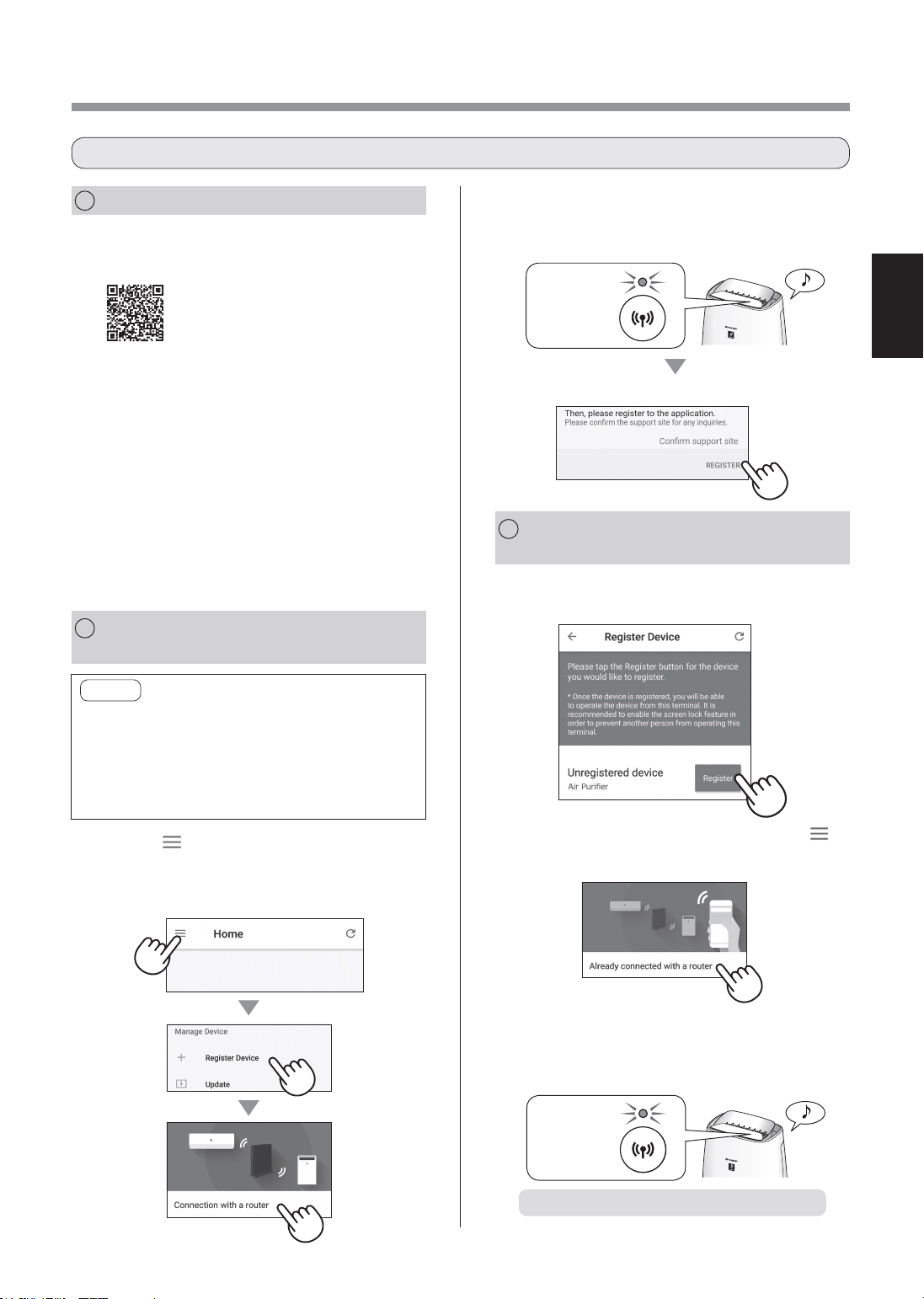
1.
Ketik "Daftar" untuk pembersih
udara yang anda ingin daftarkan.
2.
Ikuti arahan pada Aplikasi.
(
XX-XXXX
)
• Jika Penunjuk Wi-Fi menyala setelah bunyi
pemberitahuan, sambungan berjaya
diselesaikan.
Menyala
Tetapan awal selesai.
1
PEMASANGAN APLIKASI
2
SAMBUNGAN PEMBERSIH
UDARA DAN PENGHALA
3
SAMBUNGAN ANTARA
PEMBERSIH
UDARA DAN TELEFON PINTAR
1.
Pasang Aplikasi Ditetapkan di telefon
pintar anda.
• Aplikasi boleh dimuat turun
daripada perkhidmatan
penghantaran di bawah.
Android: Google Play
iOS: App Store
https://cboard.cloudlabs.sharp.co.jp/smartapp_asean/download/air/
2.
Sambungkan telefon pintar anda ke
penghala dan mulakan Aplikasi.
Ikuti arahan pada Aplikasi.
i.
Sahkan "Terma Perkhidmatan".
ii.
Masukkan SHARP ID.
• Jika tidak mempunyai SHARP ID, sila
daftarkan SHARP ID baru.
iii.
Masukkan nama untuk telefon pintar
anda.
1.
Ketik “ ” pada skrin “Halaman
Utama”, dan pilih “Daftar Peranti” =>
“Sambungan dengan penghala”.
NOTA
• Jika anda mempunyai tetapan senyap atau
tetapan penapisan MAC pada penghala, sila
batalkan.
• ID rangkaian produk dipaparkan sebagai
“AP-SHARP-XX” (di mana XX adalah nombor 2
digit di bawah alamat produk MAC).
2.
Ikuti arahan pada Aplikasi.
Ketik "Daftar".
• Jika Penunjuk Wi-Fi menyala setelah bunyi
pemberitahuan, sambungan berjaya
diselesaikan.
Menyala
• Jika Anda tidak melihat skrin di atas, ketik “ ” di
skrin “Halaman Utama”, dan pilih “Daftar Peranti”
=> “Sudah dihubungkan dengan penghala”.
ALIRAN TETAPAN AWAL
FP-J50_MS.indd 13 2020/08/31 11:13:30
MS-14
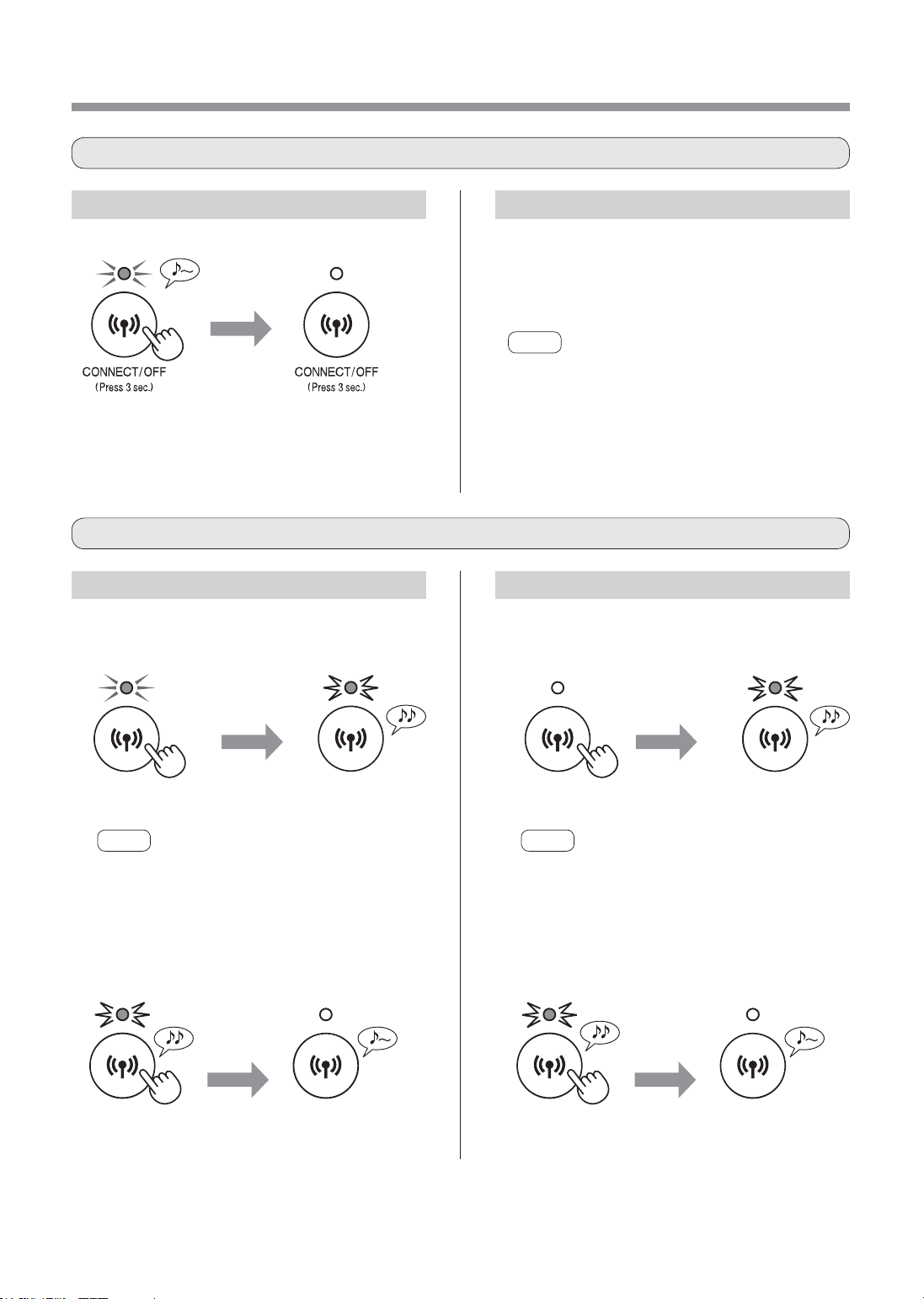
Cara memulakan dari kedudukan Wi-Fi ON.
TETAPAN Wi-Fi
Rujuk halaman 13 dan tetapkan
semula sambungan dengan penghala.
• Sekiranya produk sudah didaftarkan ke telefon
pintar anda, anda tidak perlu mendaftar lagi.
NOTA
• Anda juga boleh menekan butang Wi-Fi selama
3 saat atau lebih untuk menghidupkan Wi-Fi
semula. Selepas seketika anda menekan butang
tersebut, anda akan mendengar bunyi bip 4 kali.
Selepas seketika, lampu petunjuk Wi-Fi dihidupkan
dan sambungan Wi-Fi selesai. (Dalam situasi ini,
sambungan Wi-Fi dengan penghala akan dipulihkan
secara automatik.)
lebih
daripada
8 saat.
Berkelip
NOTA
Selepas menekan butang kira-kira 3 saat, bunyi bip
yang panjang dapat didengari dan petunjuk lampu Wi-
Fi dimatikan tetapi teruskan menekan butang.
lebih
daripada
8 saat.
Berkelip
NOTA
Selepas menekan butang kira-kira 3 saat, bunyi bip
yang pendek dapat didengari dan petunjuk lampu Wi-
Fi berkelip tetapi teruskan menekan butang.
lebih
daripada
3 saat.
lebih
daripada
3 saat.
2. Tekan butang Wi-Fi semula dalam
masa 2 minit selama lebih dari 3 saat.
Selepas
seketika
Selepas
seketika
Dimatikan secara Dimatikan secara
Tetapan
permulaan
selesai
Tetapan
permulaan
selesai
Cara menetapkan ON / OFF Wi-Fi setelah menyelesaikan tetapan awal
Cara memulakan fungsi Wi-Fi
Dimatikan secara
lebih
daripada
3 saat.
Cara untuk mematikan Wi-Fi.
Cara untuk mematikan Wi-Fi semula.
Cara memulakan dari kedudukan Wi-Fi OFF.
1. Tekan butang Wi-Fi lebih dari 8 saat. 1. Tekan butang Wi-Fi lebih dari 8 saat.
2. Tekan butang Wi-Fi semula dalam
masa 2 minit selama lebih dari 3 saat.
Berkelip
Berkelip
FP-J50_MS.indd 14 2020/08/31 11:13:30
MS-15
MALAYSIA
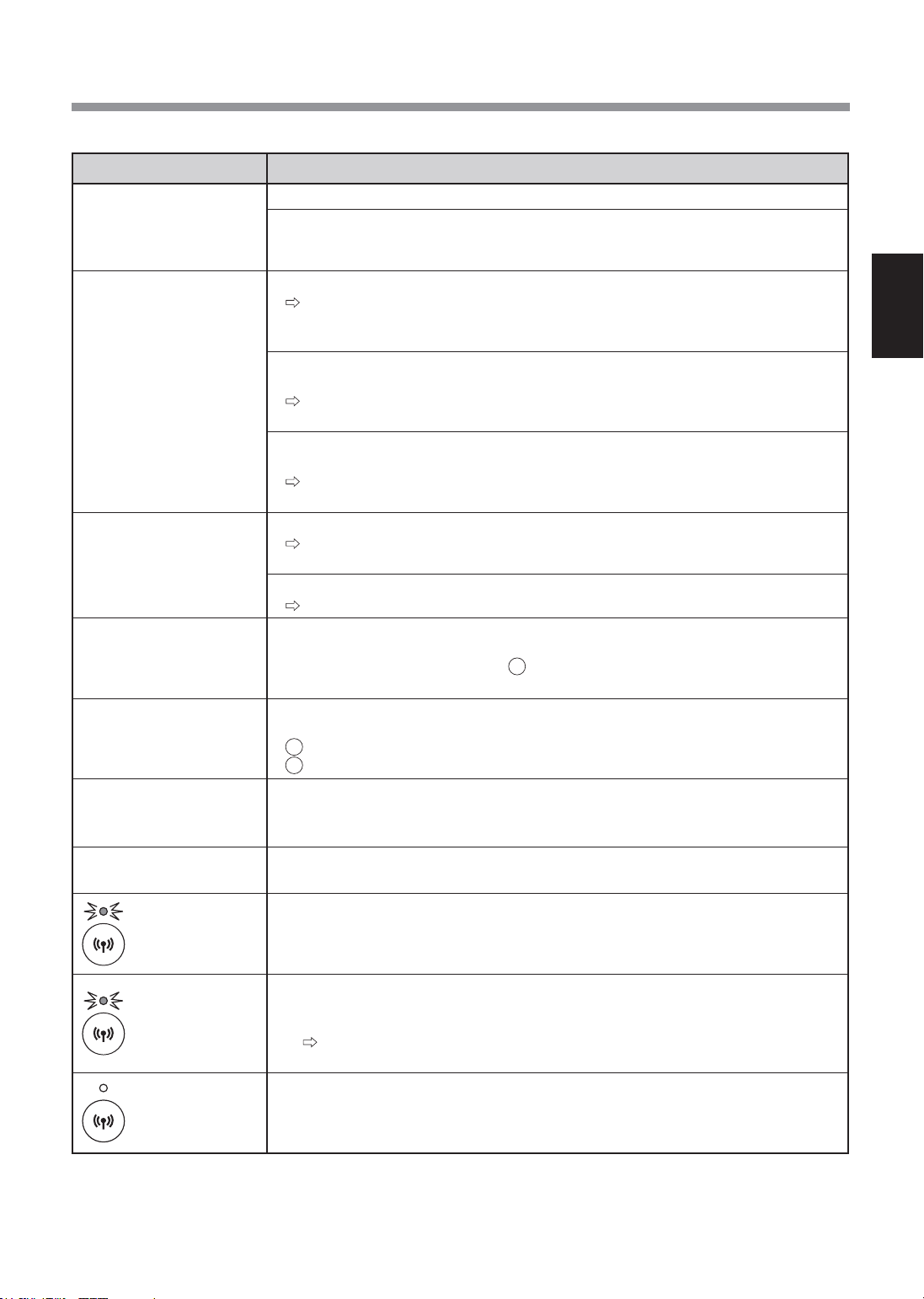
PENYELESAIAN MASALAH FUNGSI Wi-Fi
Masalah Item untuk diperiksa
Sambungan Wi-Fi
pembersih udara dan
penghala tidak dapat
dilakukan.
• Periksa spesifikasi penghala yang sedang digunakan.
• Sesuaikan arah penghala dan antena, gerakkan penghala dan antena lebih dekat,
dan sebagianya. Selepas itu, ubah semula untuk menghidupkan penghala dan
lakukan semula tetapan awal.
Sambungan antara
pembersih udara dan
telefon pintar anda tidak
dapat dilakukan.
• Adakah pembersih udara dan telefon pintar anda bersambung ke penghala yang sama?
Sambungkan pembersih udara dan telefon pintar anda pada penghala yang
sama. Jika anda masih tidak dapat menyambung, cuba sambungkan telefon
pintar anda ke jalur penghala 2.4GHz.
• Adakah jumlah telefon pintar yang sedang digunakan melebihi bilangan maksimum
untuk pendaftaran pada satu pembersih udara?
Bilangan maksimum telefon pintar yang boleh didaftarkan pada satu pembersih
udara ialah 10.
• Adakah jumlah produk (pendingin dingin, pembersih udara, dll.) yang didaftarkan
dengan satu telefon pintar melebihi bilangan maksimum yang ditetapkan?
Bilangan maksimum produk yang boleh didaftarkan dengan satu telefon pintar
ialah 30.
Operasi jauh dari telefon
pintar tidak boleh
dilakukan.
• Adakah Penunjuk Wi-Fi pembersih udara menyala?
Jika Penunjuk Wi-Fi terpadam, sambungkan pembersih udara pada penghala
sekali lagi. (halaman 13)
• Adakah sambungan antara pembersih udara dan telefon pintar anda telah diselesaikan?
Sediakan sambungan antara pembersih udara dan telefon pintar anda. (halaman 13)
Apabila menukar
penghala
• Pembersih udara perlu disambungkan semula pada penghala.
1. Tekan dan tahan butang "Wi-Fi" selama 3 saat untuk menghentikan fungsi Wi-Fi.
2. Lakukan “Aliran tetapan awal: 2 Sambungan pembersih udara dan penghala".
(halaman 13)
Apabila menukar telefon
pintar
1. Padam pendaftaran telefon pintar lama daripada Aplikasi ditetapkan.
2. Gunakan telefon pintar baru untuk melakukan “Aliran tetapan awal:
1 Pemasangan Aplikasi, dan
3 Sambungan antara pembersih udara dan telefon pintar". (halaman 13)
Apabila hendak membuang
atau menyerahkan
pembersih udara
• Lakukan langkah berikut, untuk mengelakkan kebocoran maklumat peribadi.
1. Padam pendaftaran pembersih udara daripada Aplikasi ditetapkan.
2. Mulakan fungsi Wi-Fi untuk pembersih udara. (halaman 14)
Jika menerima daripada
pihak ketiga
• Untuk mencegah akses tidak diizinkan daripada pihak ketiga, mulakan fungsi Wi-Fi
pembersih udara. (halaman 14)
Berkelip perlahan
• Ia adalah salah satu status berikut.
A. Sambungan Wi-Fi pembersih udara dan penghala sedang disediakan.
B. Sambungan pembersih udara dan telefon pintar sedang disediakan.
C. Perisian untuk fungsi Wi-Fi dalam pembersih udara sedang dikemas kini.
Berkelip pantas
• Ralat rangkaian. Periksa perkara berikut.
A. Periksa status rangkaian penghala.
B. Selepas mematikan pembersih udara, periksa status Internet.
Jika tiada masalah dengan A dan B, matikan pembersih udara. Selepas seketika,
sambungkan pembersih udara kepada penghala semula. (halaman 13)
Terpadam
• Pembersih udara tidak dapat bersambung ke penghala. Periksa perkara berikut.
A. Adakah palam kuasa disambungkan dengan betul?
B. Adakah fungsi Wi-Fi dihentikan? Sambungkan pembersih udara kepada
penghala semula. (halaman 13)
Sila periksa butiran berikut, sebelum bertanya atau meminta perkhidmatan pembaikan.
FP-J50_MS.indd 15 2020/08/31 11:13:30

Cảmơnquýkháchhàngđãmuamáylọckhôngkhí
SHARP.
Vuilòngđọckỹsáchhướngdẫnsửdụngnàytrước
khisửdụngsảnphẩm.
Cấtgiữsáchhướngdẫnsửdụngnàyởnơithuận
tiệnđểthamkhảovềsau.
CÁCHƯỚNGDẪNQUAN
TRỌNGVỀANTOÀN ............................................ 2
TÊNCÁCBỘPHẬN .............................................. 4
LẮPĐẶTBỘLỌC ................................................. 5
VẬNHÀNH ............................................................. 6
VỆSINHVÀBẢODƯỠNG ................................... 8
THAYTHẾ .............................................................. 9
XỬLÝSỰCỐ ...................................................... 10
THÔNGSỐKỸTHUẬT ....................................... 11
CÀIĐẶTWi-Fi ..................................................... 12
XỬLÝSỰCỐCHỨCNĂNGWi-Fi
.......................... 15
NỘIDUNG
Kếthợpđộcđáocáccôngnghệxửlýkhôngkhí
Hệthốnglọc3lớp+Plasmacluster
HÚTBỤI*
Bộlọcsơcấphútbụivàcáchạtlớnkháclơ
lửngtrongkhôngkhí.
KHỬMÙI
Bộlọckhửmùihútnhiềumùithôngthường
trongnhà.
GIẢMPHẤNHOA&NẤMMỐC*
BộlọcHEPAhút99,97%hạtcócỡnhỏ0,3
micro.
LÀMMÁTKHÔNGKHÍ
Plasmaclusterxửlýkhôngkhítươngtựnhư
cáchthiênnhiênlàmsạchmôitrườngbằng
cáchtạorasựcânbằngcáciondươngvàion
âm.
*Khikhíđượchútquahệthốngbộlọc.
Côngnghệcảmbiếnliêntụcgiámsátchất
lượngkhôngkhí,vàtựđộngđiềuchỉnhvận
hànhdựatrênđộsạchcủakhôngkhíđược
pháthiện.
CHỨCNĂNGWi-Fi
• Xácnhậnrằngđiềukiệnchấtlượngkhôngkhí
trongphòng(PM2,5,Bụi,Mùi).
• Điềukhiểnsảnphẩmquađiệnthoạithông
minhlàmđiềukhiểntừxa.
• Đềxuấtthờigiantốiưuđểtraođổibộlọc.
CÁCTÍNHNĂNG
TIẾNGVIỆT
FP-J50_VI.indd 2 2020/08/27 13:59:19
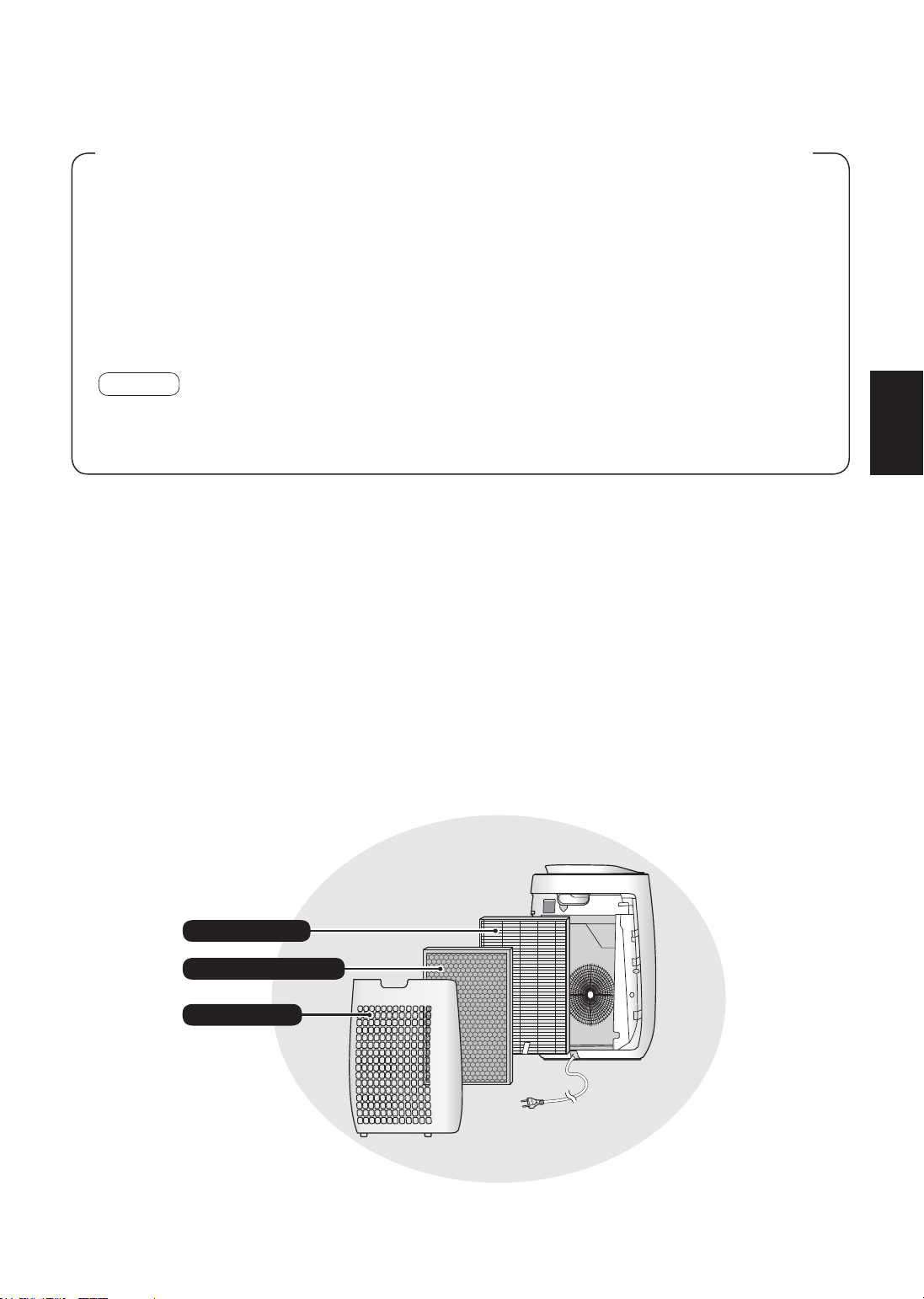
Máylọckhôngkhíhútvàophòngkhôngkhítừcửanạpkhôngkhí,dẫnkhôngkhíquamộtbộ
lọctrước,bộlọckhửmùivàbộlọcHEPAbêntrongthânmáy,sauđóxảkhôngkhíquacửaxả
khôngkhí.BộlọcHEPAcóthểloạibỏ99,97%hạtbụicókíchcỡnhỏ0,3microđiquabộlọcvà
cũngcóchứcnănghútmùi.Bộlọckhửmùitừtừhútcácmùikhichúngđiquabộlọc.
Mộtsốmùicóthểbámvàobộlọcvàsẽpháttánngượclạiphònglàmchomùitrongphòng
nặnghơntheothờigian.Dựatrênđiềukiệnsửdụng,vàđặcbiệtnếuthânmáyđượcsửdụng
trongmôitrườngkhắcnghiệtsovớisửdụngtronggiađìnhthôngthường,cácmùinàycóthểtrở
lạisớmhơnsovớidựkiến.Nếuvẫncònmùi,hãythaythếbộlọc.
LƯUÝ
• Máylọckhôngkhíđượcthiếtkếđểloạibỏbụilơlửngtrongkhôngkhívàmùi.
Máylọckhôngkhíkhôngđượcthiếtkếđểloạibỏcáckhíđộchạinhưcarbonmonoxitcótrongkhóithuốclá.
Máylọckhôngkhícóthểkhôngloạibỏhoàntoànmùinếunguồngốcgâymùivẫntồntại.
Vuilòngđọckỹhướngdẫnsửdụngtrướckhivậnhànhmáylọckhôngkhímới
BộlọcHEPA
Bộlọcsơcấp
Bộlọckhửmùi
VI-1
TIẾNGVIỆT
FP-J50_VI.indd 1 2020/08/27 13:59:19

VI-2
CÁCHƯỚNGDẪNQUANTRỌNGVỀANTOÀN
Luôntuântheocácquytắcantoàncơ
bảnkhisửdụngthiếtbị,baogồmcác
điềusau:
CẢNHBÁO
–Luôntuânthủcácđiều
sauđểgiảmnguycơgâyrađiệngiật,hỏa
hoạnhoặcthươngtích:
•Đọctấtcảcáchướngdẫntrướckhisử
dụngthânmáy.
•Chỉdùngvớinguồnđiện220-240V.
•Thiếtbịnàykhôngdànhchonhững
người(kểcảtrẻem)cóthểchất,giác
quanhoặctinhthầnyếuhoặcnhững
ngườithiếukinhnghiệmvàhiểubiết
sửdụng,trừkhicóngườibảohộan
toànhướngdẫnhoặcgiámsáthọ
cáchsửdụngthiếtbị.
Trẻemcầnđượcgiámsátđểchắc
chắnchúngkhôngđùanghịchvới
thiếtbị.
•Nếudâynguồnhỏng,phảiđượcnhà
sảnxuất,trungtâmdịchvụhoặc
trungtâmbảohànhủyquyềncủa
Sharphoặcngườicóchuyênmôn
tươngtựthaythếđểtránhgâynguy
hiểm.Hãyliênlạcvớitrungtâmbảo
hànhủyquyềngầnnhấtđểđượcphục
vụkhicósựcố,điềuchỉnh,hoặcsửa
chữa.
•Khôngtựsửachữahoặctháothiếtbị.
•Đảmbảorútphíchđiệnkhithựchiện
bảodưỡng,khitháovàgắnvàthay
thếbộlọcvàkhikhôngsửdụngtrong
thờigiandài.Nếukhônglàmvậycó
thểgâyđoảnmạchdẫnđếnđiệngiật
hoặchỏahoạn.
•Khôngsửdụngthânmáynếudâynguồn
hayphíchcắmbịhưhỏnghoặcnếukết
nốicủaổcắmbịlỏng.
•Thườngxuyênlàmsạchbụiởphích
cắm.
•Khôngđưangóntayhoặccácvậtlạvào
cáccửathukhíhoặccửakhíra.
•Hãycầmvàophíchcắmkhirútdây,
khôngđượckéosợidây.
Nếukhônglàmvậycóthểgâyđoản
mạchdẫnđếnđiệngiậthoặchỏahoạn.
•Cẩnthậnkhônglàmhỏngdâynguồn.
Nếukhônglàmvậycóthểgâyđoản
mạchdẫnđếnđiệngiậthoặchỏahoạn.
•Khôngrútphíchcắmkhitayướt.
•Khôngsửdụngthânmáygầncácthiếtbị
gahoặclòsưởi.Khivậnhànhthiếtbịvới
thiếtbịgatrongcùngphòng,thônggió
phòngđịnhkỳ,nếukhôngcóthểgâyngộ
độckhícarbonmonoxide.
•Khôngvậnhànhthânmáytrongphòng
sửdụngbìnhxịtcôntrùng.Khôngvận
hànhthânmáytrongphòngcócặndầu,
khóihương,tialửatừthuốclá,hoặchóa
chấttrongkhôngkhí.
•Đểthânmáytránhxanước.
Khôngvậnhànhthânmáyởnhữngnơi
ẩmướt,nhưphòngtắm.
•Khôngđểthânmáytiếpxúcvớinước.
Làmvậycóthểgâyđoảnmạchhoặc
điệngiật.
•Hãycẩnthậnkhivệsinhthânmáy.Chất
tẩyrửahoạttínhmạnhcóthểlàmhỏng
lớpvỏngoài.
LƯUÝ
–Làmgìkhithânmáygâynhiễu
sóngđàihoặcTV
Nếumáylọckhôngkhínhiễusóngvớiđài
hoặcTV,hãythửmộthoặcnhiềuphương
phápsau:
•Chỉnhhoặcđặtlạivịtrícủaăngtenthu
sóng.
•Tăngkhoảngcáchgiữathânmáyvàđài
hoặcTV.
•Kếtnốithiếtbịvớimộtổcắmkhácmạch
điệnvớiổcắmcủathiếtbịnhậntínhiệu
đàihoặcTV.
•Thamkhảoýkiếnđạilýhoặckỹthuật
viênđàihoặcTVcóchuyênmôn.
FP-J50_VI.indd 2 2020/08/27 13:59:19

VI-3
TIẾNGVIỆT
CÁCCHÚÝVẬNHÀNH
•Khôngchặncửakhívàovà/hoặcra.
•Khôngđượcđểthânmáygầnhoặctrên
cácvậtnóngnhưlòhoặcthiếtbịđốt
nóng,hoặcnơicóthểtiếpxúcvớihơi
nước.
•Luônvậnhànhthânmáytheohướng
thẳngđứng.
•Khôngtháothânmáykhiđangvậnhành.
•Khidichuyểnthiếtbị,sửdụngtaycầmở
mặtsaucủathiếtbị.
•Nếuthânmáyđặtởtrênsàndễbịhư
hỏng,trênbềmặtkhôngbằngphẳng,
hoặcthảmdày,hãynângthânmáylên
khitháo.
•Khôngvậnhànhthânmáymàkhôngcó
bộlọcđượclắpđúng.
•KhôngrửahoặcdùnglạibộlọcHEPAvà
bộlọckhửmùi.
Làmvậysẽkhôngcảithiệnđượchiệu
quảbộlọcvàcóthểgâyđiệngiậthoặc
hỏngkhivậnhành.
•Chỉdùngkhănmềmđểvệsinhvỏngoài.
Khôngsửdụngdungdịchhoặcchấttẩy
rửadễbayhơi.
Bềmặtthânmáycóthểbịhưhỏnghoặc
nứtvỡdoétxăng,sơnmỏnghơnhoặc
bộtđánhbóng.Ngoàira,cóthểgâyhỏng
cảmbiến.
•Khôngchùimạnhlênpanôsautrongkhi
bảodưỡng.
HƯỚNGDẪNLẮPĐẶT
•Tránhnhữngnơimàbộcảmbiếntiếp
xúctrựctiếpvớigió.
Làmvậycóthểkhiếnthânmáybịhỏng.
•Tránhnhữngnơiđồnộithất,vảihoặc
cácvậtdụngkháccóthểtiếpxúcvới
thânmáyvàgâytrởngạichoviệchútvà
thoátkhí.
•Tránhnhữngnơithânmáycóthểđọng
sươnghoặcthayđổinhiệtđộnhanh
chóng.Nhiệtđộphòngthíchhợplà
0–35ºC.
•Đặtthânmáytrênbềmặtbằngphẳng
vớikhôngkhílưuthôngđầyđủ.
Khiđặtởtrênthảmdày,thânmáycóthể
bịrungnhẹ.
•Tránhnhữngnơiphátradầumỡhoặc
khóidầu.
Làmvậycóthểkhiếnvỏngoàithânmáy
bịnứtvỡvàhỏngcảmbiến.
•Hiệusuấthútbụicủathânmáygầnnhư
khôngthayđổingaycảkhithânmáyđặt
cáchtường3cm,tuynhiêntườngvàsàn
nhàxungquanhcóthểbịbẩn.Hãyđặt
thânmáycáchxatường.
Phầntườngngayđằngsaucửakhíra
cóthểluônbịbẩn.Khisửdụngthânmáy
trongthờigiandàiởcùng1vịtrí,vệsinh
thườngxuyênkhuvựctườngliềnkềsản
phẩm.
HƯỚNGDẪNSỬDỤNGBỘLỌC
•Thựchiệncáchướngdẫntrongsách
hướngdẫnnàyđểchămsócvàbảo
dưỡngbộlọcđúngcách.
(Trang8)
FP-J50_VI.indd 3 2020/08/27 13:59:19
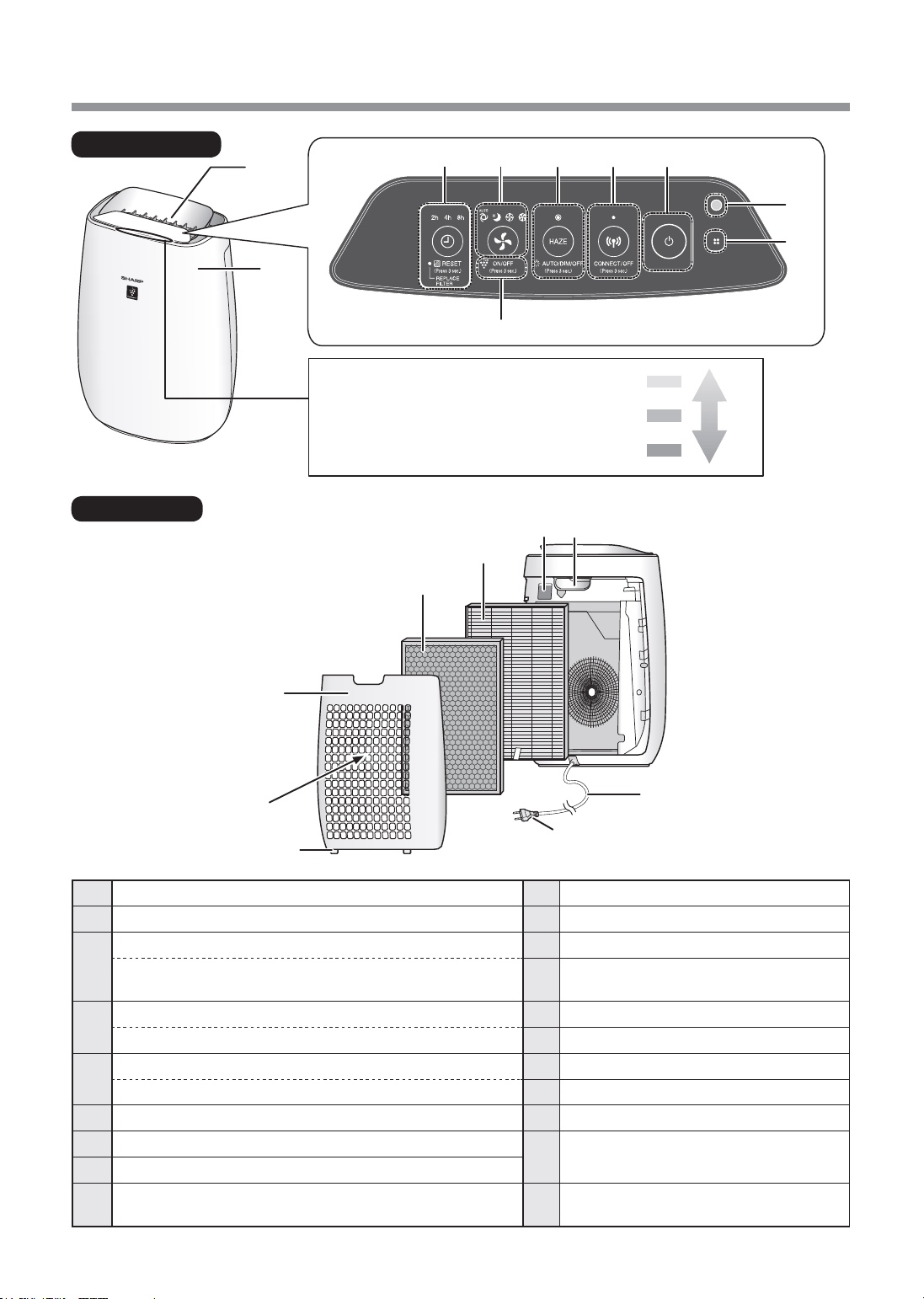
VI-4
TÊNCÁCBỘPHẬN
20
19
2
1
MẶTTRƯỚC
MẶTSAU
18
14
15
11
1213
16
17
Mànhìnhgiámsátđộsạch
Chỉthịđộsạchcủakhôngkhítrong
phòngở5mứctheothayđổimàu
sắc.
Màuvàng
Màuđỏ
Xanhdương
Không
sạch
Sạch
9
8
3
4 5 6
7
10
1
Thânmáy
10
ĐènbáoPlasmaclusterIon(xanhdương)
2
Cửakhíra
11
Mànhìnhgiámsátđộsạch
3
NútOFFTIMER(hẹngiờtắt),Đènbáo(trắng)
12
Taycầm
(Ấn3giây)Nútđặtlạibộlọc,
Đènbáothaythếbộlọc(màucam)
13
Cảmbiếnbụinhạy(Trong) /
Bộlọccảmbiến
4
NútMODE(CHẾĐỘ),Đènbáo(trắng)
14
BộlọcHEPA
(Ấn3giây)NútON/OFF(bật/tắt)PlasmaclusterIon
15
Bộlọckhửmùi
5
NútHAZE(sươngmờ),Đènbáo(trắng)
16
Panôsau(Bộlọcsơcấp)
(Ấn3giây)NútĐiềukhiểnđèn
17
Cửakhívào
6
NútWi-Fi,Đènbáo(trắng)
18
Cácvấuởđáy
7
NútPOWERON/OFF(bật/tắtnguồn)
19
Phíchcắm(Hìnhdạngcủaphíchcắm
tùythuộcvàotừngquốcgia.)
8
Cảmbiếnánhsáng
9
Cảmbiến(Trong)
Mùi/Nhiệtđộ/Độẩm
20
Dâynguồn
FP-J50_VI.indd 4 2020/08/27 13:59:19
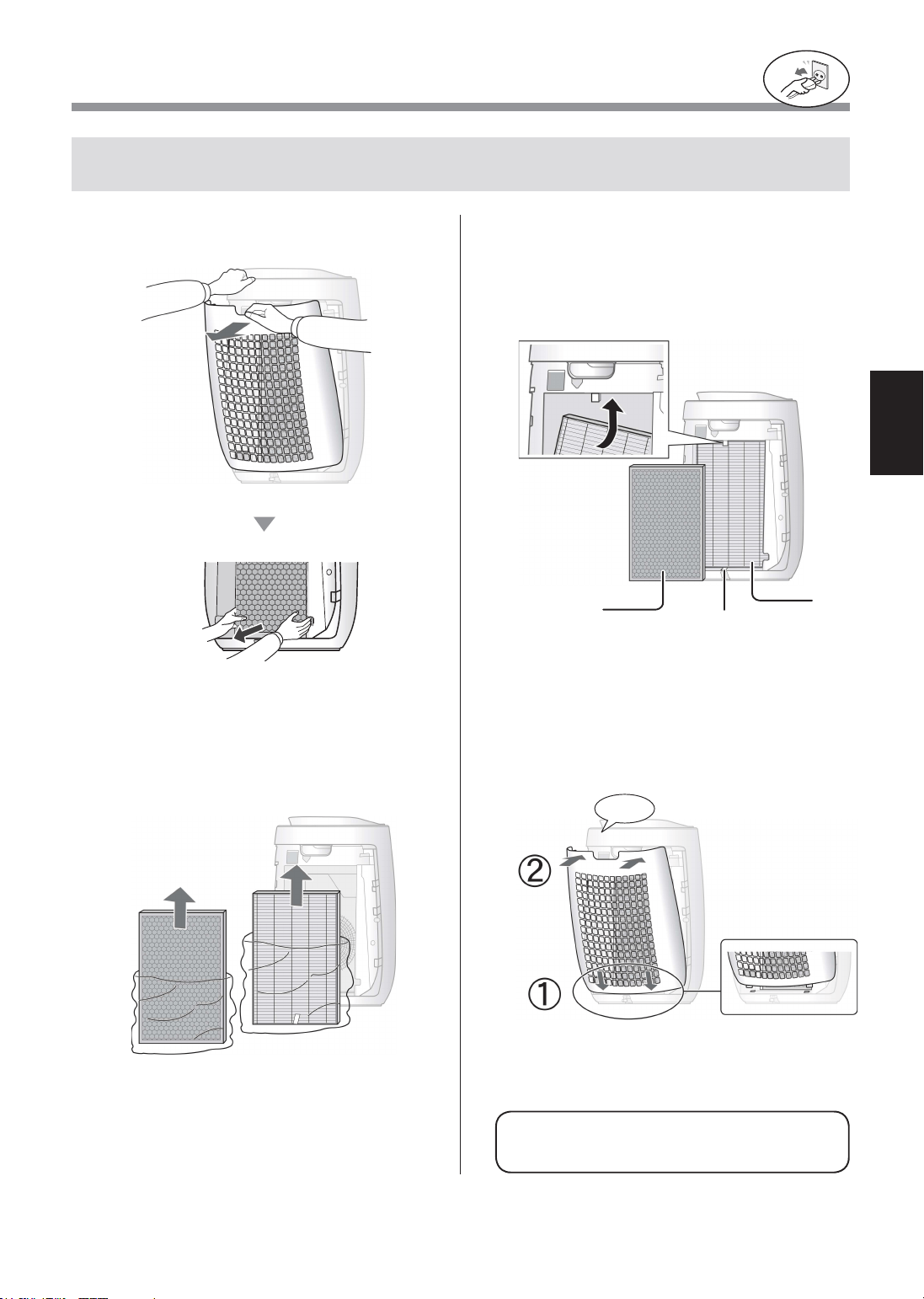
VI-5
TIẾNGVIỆT
LẮPĐẶTBỘLỌC
Đểđảmbảochấtlượngbộlọc,cácbộphậnđãđượclắpđặtsẵntrongthânmáyvàđóngtrong
túinhựa.Đảmbảotháotúinhựarakhỏibộlọctrướckhisửdụngthânmáy.
•Khôngvậnhànhthiếtbịmàkhôngcóbộ
lọc.
Hãychắcchắnđãrútphích
cắmrakhỏiổđiện.
1
TháoPanôsau.
Kéo
2
Tháotúinhựarakhỏibộlọc.
3
Đặtbộlọcvàotrongthânmáy.
Khônglắpbộlọcngượcnếukhôngthânmáy
sẽkhônghoạtđộngđúng.
Bộlọc
HEPA
Bộlọc
khửmùi
Nhãn
4
LắpPanôsau.
Nhấnvào
FP-J50_VI.indd 5 2020/08/27 13:59:20
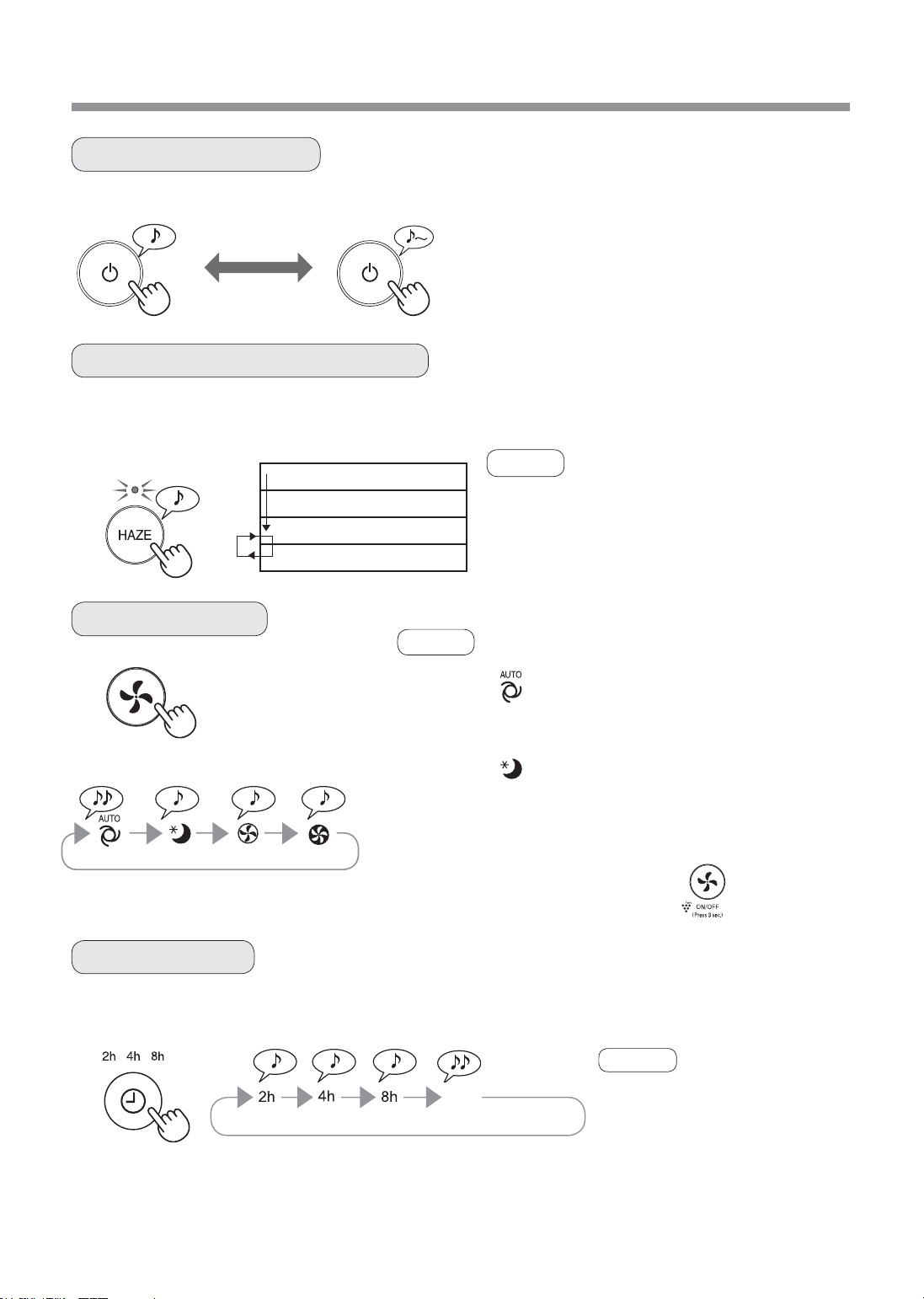
VI-6
VẬNHÀNH
NGỦ TRUNGBÌNH TỐIĐATỰĐỘNG
ThânmáyvậnhànhởtốcđộquạtCAOkhoảng60phútvàsauđóluânchuyểngiữamứcthấpvàcaocứsaumỗi
20phút.
KHỞIĐỘNG DỪNG
• Chọntốcđộquạtmongmuốn.
• Khithânmáybắtđầuvậnhành,máysẽvẫnchạyở
chếđộvậnhànhtrướcđó.
10phút:Mứcquạtcaotốiđa
50phút:Mứcquạtcao
20phút:Mứcquạtthấp
20phút:Mứcquạtcao
• PlasmaclusterIonkhôngthểchuyểnsang”OFF”
(tắt).
• Cóthểđổichếđộnàysangchếđộkháckhiđang
vậnhành.
Tuynhiên,chếđộHAZEsẽkhônghoạtđộngsau
khiđổichếđộ.
• Bạncũngcóthểcàiđặthẹngiờ
trongỨngdụngchỉđịnh.
Nếuđãcàiđặtsẵnhẹngiờtrong
Ứngdụngchỉđịnh,toànbộđèn
báoHẸNGIỜcủasảnphẩmsáng.
Bạnkhôngthểcàiđặthẹngiờ
trongsảnphẩm.
Chọnđộdàithờigianmongmuốnkhithânmáyđãđượcbật.Thânmáytựđộngdừngkhitớithờigianđãchọn.
KHỞIĐỘNG/DỪNG
CHẾĐỘHAZE(SƯƠNGMỜ)
TỐCĐỘQUẠT
HẸNGIỜTẮT
LƯUÝ
LƯUÝ
LƯUÝ
(khiBẬTthânmáy)
2giờ 4giờ 8giờ HỦY
TỰĐỘNG
NGỦ
Tốcđộquạtđượcđiềukhiểntựđộngdựatrên3pháthiện.
(Bụi/Mùi/Sáng)
Thânmáysẽhoạtđộngrấtêmvàtốcđộquạtđượctựđộngchuyểnđổi
tùytheolượngtạpchấttrongkhôngkhívàđộsángcủaphòng.
ĐènbáoPlasmaclusterIon/Mànhìnhgiámsátđộsạchtựđộngtắt.
Ngaycảkhiđènbáotắt,PlasmaclusterIonvẫnđượcpháttánvàotrong
khôngkhítrừkhitắtPlasmaclusterIonbằng .
TẮT
FP-J50_VI.indd 6 2020/08/27 13:59:21
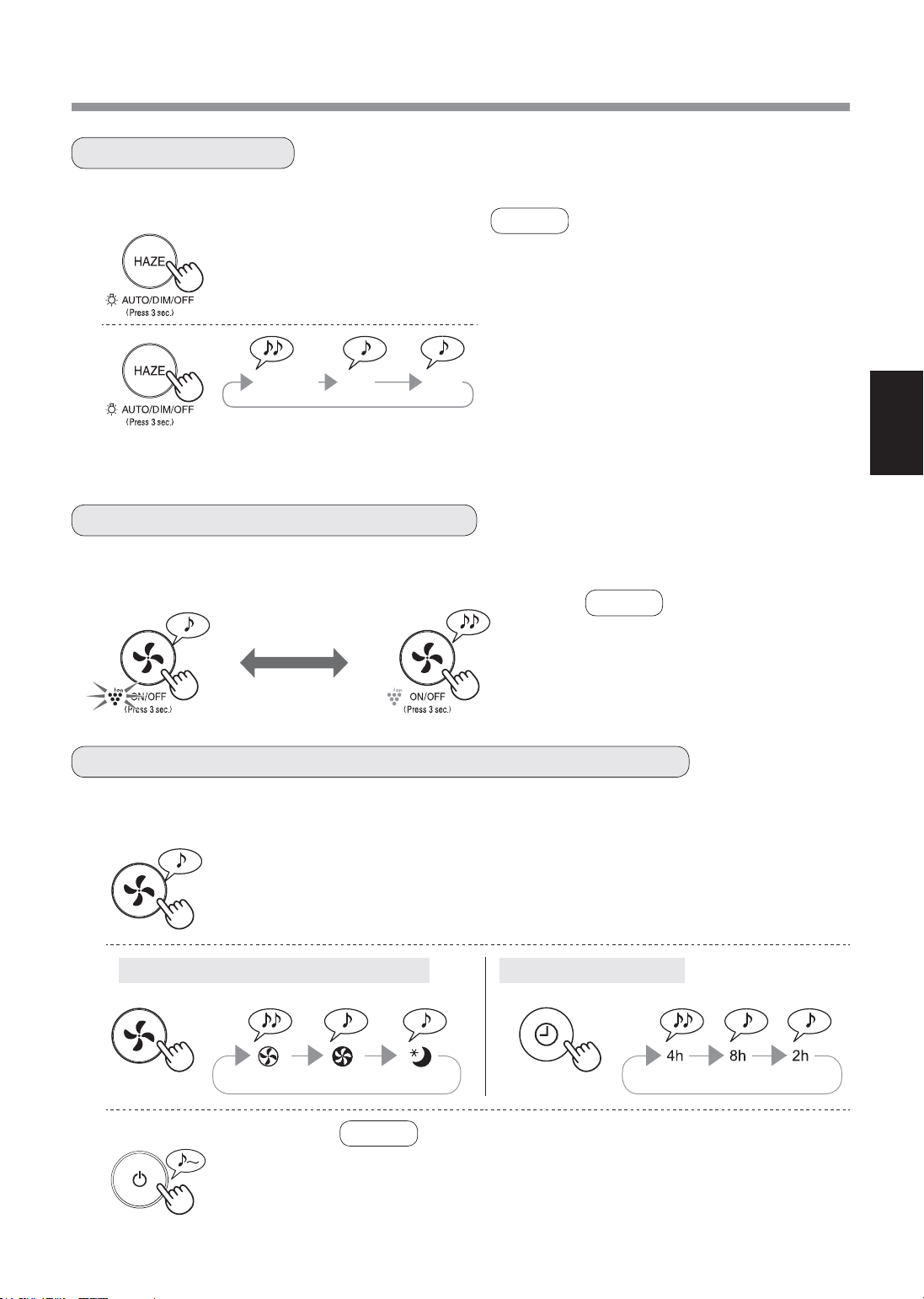
VI-7
TIẾNGVIỆT
1
(khiTẮTthânmáy)
2
Cảmbiếnbụinhạy/Cảmbiếnmùi Cảmbiếnánhsáng
3
BạncóthểthiếtlậpTẮTmànhìnhgiámsátđộsạch/đènbáoPlasmaclusterIonkhichúngđangsáng.
KhiBẬTchứcnăngPlasmaclusterIon,đènbáoPlasmaclusterIonsẽsáng.(xanhdương)
TẮT
trên3giây
ĐIỀUKHIỂNĐÈN
BẬT/TẮTPLASMACLUSTERION
ĐIỀUCHỈNHĐỘNHẠYĐẦUDÒCỦABỘCẢMBIẾN
BẬT
trên3giây
(khiBẬTthânmáy)
• Khithânmáybắtđầuvậnhành,
máysẽvẫnchạyởchếđộvậnhành
trướcđó.
1
(khiBẬTthânmáy)
LƯUÝ
• NếukhôngấnnútHAZE(sươngmờ)trongvòng8
giây,thiếtlậpsẽđượctựđộnglưu.
• Khithânmáybắtđầuvậnhành,máysẽvẫnchạy
ởchếđộvậnhànhtrướcđó.
2
TỰĐỘNG
ĐèntựđộngchuyểnON(bật)hoặcOFF(tắt),dựa
trênđộsángcủaphòng.
Phòngđangsáng:đènBẬT
Phòngđangtối:đènTẮT
TẮT
Khiđặtvề“OFF”(tắt),đèn“DIM”(mờ)sángtrong
8giâysaukhimáybắtđầuvậnhànhvàsauđó
đènsẽtắt.
trên3giây
TỰĐỘNG
MỜ
TẮT
LƯUÝ
LƯUÝ
Bạncóthểthayđổiđộnhạycủacảmbiếnbụinhạy/cảmbiếnmùivàcảmbiếnánhsáng.
trên3giây
Tiêuchuẩn Cao Thấp Tiêuchuẩn Cao Thấp
• NếukhôngấnnútPOWERON/OFF(bật/tắtnguồn)trongvòng
8giâykểtừkhiđiềuchỉnhđộnhạycủabộcảmbiến,thiếtlậpsẽ
đượctựđộnglưu.
• Thiếtlậpđộnhạycủacảmbiếnsẽđượclưungaycảkhithânmáy
đãđượcrútphíchcắmđiện.
FP-J50_VI.indd 7 2020/08/27 13:59:22
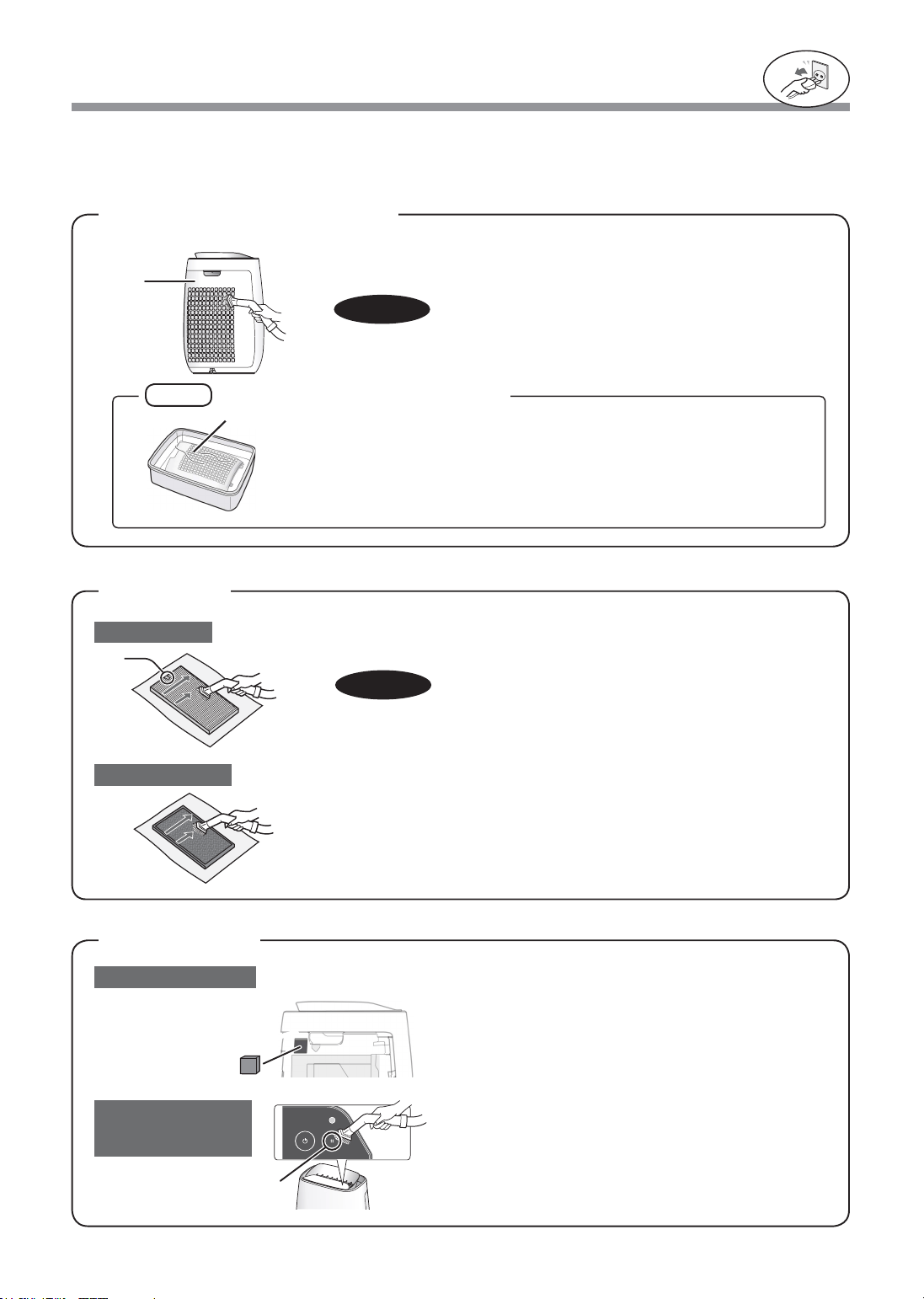
VI-8
VỆSINHVÀBẢODƯỠNG
Nhẹnhàngloạibỏbụibẩnrakhỏipanôsaubằngcáchsửdụngmộtmáy
hútbụihoặcdụngcụtươngtự.
PANÔSAU
(Bộlọcsơcấp)
Đểtốiưuhiệuquảlàmviệccủamáylọckhôngkhí,hãylàmsạchđịnhkỳthânmáybaogồmcảbộlọc.
Đảmbảorútphíchcắmđiệnrakhỏiổcắmđiệntrướckhithựchiệnbấtcứcôngviệcbảodưỡngnào.
LƯUÝ
Hãychắcchắnđãrútphích
cắmrakhỏiổđiện.
1.TháoPanôsau.
2.Tháobộlọccảmbiến.
3.
Nếubộlọcbẩn,cóthểrửabằngnướcvàđểkhôhoàntoàn.
Bộlọccảmbiến
Khôngdùnglựcquámạnhkhicọpanôsau.
Nhẹnhàngloạibỏbụibẩnrakhỏicảmbiếnbằngcách
sửdụngmộtmáyhútbụihoặcdụngcụtươngtự.
Nhãn
BộlọcHEPA
Cảmbiếnbụinhạy
Cảmbiến
(Mùi/Nhiệtđộ/
Độẩm)
Bộlọckhửmùi
CHÚÝ
NhẹnhàngloạibỏbụibẩnởbộlọcHEPAvàbộlọckhửmùibằngmáy
hútbụihoặcbằngdụngcụtươngtự.
KhôngRỬAbằngnướcvàPHƠIKHÔdướiánhnắngmặttrời.
Cácbộlọcdễvỡ,nêncẩnthậnkhôngtácđộngquánhiềulực.
Panô
sau
Cảmbiến
Panôsau
CHÚÝ
BỘLỌC
CẢMBIẾN
Cáchloạibỏvếtbẩncứngđầu
1.Thêmmộtlượngchấttẩyrửadùngchonhàbếpvàonướcvàngâm
khoảng10phút.
2.Rửasạchchấttẩyrửanàybằngnướcsạch.
3.Đểbộlọckhôhoàntoànởnơithôngthoáng.
•BộlọcHEPA
Chỉbảodưỡngmặtcónhãn.
Khôngvệsinhmặtđốidiện;nếukhông,bộlọcsẽbịhỏng.
•Bộlọckhửmùi
Cóthểbảodưỡngcảhaimặt.
FP-J50_VI.indd 8 2020/08/27 13:59:22

VI-9
TIẾNGVIỆT
THAYTHẾ
BộlọcHEPA
Bộlọckhửmùi
THÂNMÁY
Thảibỏbộlọc
Vuilòngthảibỏbộlọctheođúngquyđịnhvàluậtthảibỏcủađịaphương.
Thờigianthaythế
Bộlọc
Đènbáothaythếbộlọc
Thaythếbộlọctheocácchỉdẫnthaythếbộlọc.
Saukhithay,cắmphíchcắmvàoổcắmđiệnvàấnnút
POWERON/OFF,vànútOFFTIMERtrong3giây.
Model:FZ-F50HFE
Model:FZ-F50DFE
Tuổithọbộlọc
Tuổithọbộlọcvàthờigianthaythếphụthuộcvàođiềukiệnhút5điếuthuốclámỗingàyvàhiệusuấthútbụibị
giảmđimộtnửasovớihiệusuấtcủabộlọcmới.
Tuổithọbộlọcthayđổitheomôitrườngcủaphòng,cáchsửdụngvàvịtríđặtthânmáy.
Chúngtôikhuyếncáothaythếbộlọcthườngxuyênhơnnếusảnphẩmđượcsửdụngtrongnhiềubụibẩnhơnso
vớisửdụngthôngthườngtronggiađình.
*Khicầnthaybộlọcsớm,đènbáothaythếbộlọcsẽsáng.
Tuổithọbộlọcđượctínhdựavàolượngbụiđođượctừcảmbiếnbụinhạy.
VậtliệubộlọcHEPA:
•Polypropylene
•Polyethylene
Vậtliệubộlọckhửmùi:
•Polypropylene•Polyester
•Thanhoạttính
Lauchùib�nggiẻkhôvàmềm
Hãydùnggiẻkhôvàmềmthấmướtđểlauchùicácvếtbẩncứng.
đầu.
Bộlọc
HEPA
Bộlọckhử
mùi
CHÚÝ
•Khôngsửdụngdungdịchdễbayhơi
Benzen,dungmôiphasơn,bộtđánhbóng,v.vcóthểlàmhưhạibềmặtthiếtbị.
•Khôngsửdụngchấttẩyrửa
Thànhphầnchấttẩyrửacóthểlàmhưhạithânmáy.
Khiđènbáothaythếbộlọcbật*
• BộlọcHEPA:Khoảng2nămsaukhimởra
• Bộlọckhửmùi:Khoảng2nămsaukhimởra
Hãychắcchắnđãrútphích
cắmrakhỏiổđiện.
Tắt
trên3
giây
FP-J50_VI.indd 9 2020/08/27 13:59:22
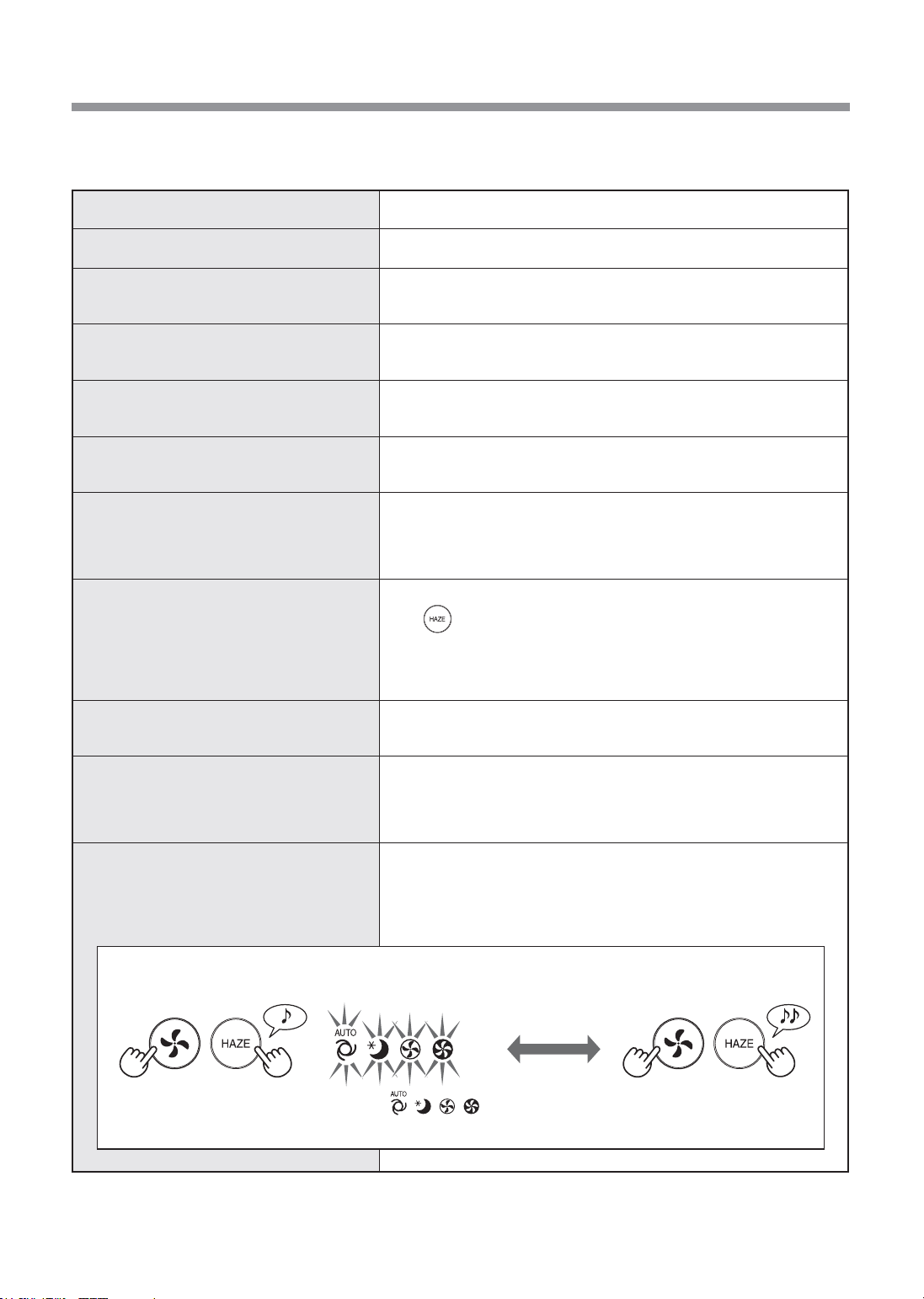
VI-10
XỬLÝSỰCỐ
HIỆNTƯỢNG KHẮCPHỤC(khôngphảilàhưhỏng)
Khôngthểloạibỏmùivàkhóithuốc.
• Thaythếbộlọcnếuchúngquábẩn.(Trang9)
Mànhìnhgiámsátđộsạchsángmàuxanh
dươngngaycảkhikhôngkhíkhôngsạch.
• Khôngkhícóthểnhiễmbẩntạithờiđiểmthiếtbịđượccắmnguồn.
Rútphíchcắm,đợi1phút,sauđócắmlạithânmáy.
Mànhìnhgiámsátđộsạchsángmàu
camhoặcđỏngaycảkhikhôngkhísạch.
• Hoạtđộngcủacảmbiếnbịảnhhưởngnếucáckhehởcủabộcảmbiếnbụi
bịbẩnhoặctắc.Nhẹnhànglausạchcáckhehởbộcảmbiếnbụi.(Trang8)
Thânmáyphátratiếngkêuláchtách
hoặctíchtắc.
• Cóthểnghethấytiếngkêuláchtáchhoặctíchtắckhithânmáyđang
tạoraion.
Khôngkhíxảracómùi.
• Hãykiểmtraxembộlọccóquábẩnhaykhông.
• Vệsinhhoặcthaythếbộlọc.
Thânmáykhônghoạtđộngđúngkhicó
khóithuốclátrongkhôngkhí.
• Bộcảmbiếncókhópháthiệnramùikhóithuốcládovịtrílắpđặtcủa
thânmáykhông?
• Khehởbộcảmbiếnbụicóbịchặnhoặctắckhông?
(Trongtrườnghợpnày,vệsinhkhehở.)(Trang8)
Mànhìnhgiámsátđộsạchtắt.
• KiểmtraxemcóphảiđãchọnchếđộTẮTđènkhông.
Ấn trong3giâyđểđènsáng.(Trang7)
• KiểmtraxemcóchọnchếđộNGỦkhông.
Mànhìnhgiámsátđộsạch/đènbáoPlasmaclusterIontựđộngtắtsau
khichọnchếđộNGỦ.
Mùitừthiếtbịvà/hoặcbộlọcmới.
• Ngaysaukhitháotúinhựa,sẽcómùinhẹthoátra.Mùinàykhôngảnh
hưởngtớihiệusuấtlọchoặcgâyhạikhitiếpxúcvớiconngười.
Ánhsángmànhìnhgiámsátđộsạchđổi
màuthườngxuyên.
• Mànhìnhkiểmsoátđộsạchtựđộngđổimàukhicảmbiếnbụinhạyvà
cảmbiếnmùipháthiệnratạpchất.
Nếubạnlolắngvềsựthayđổi,bạncóthểthayđổiđộnhạycảmbiến.
(Trang7)
TỰĐỘNGKHỞIĐỘNGLẠI
Saukhimấtđiện,thiếtbịtựđộngkhôi
phụclạivậnhànhkhicóđiệnlại.
• Ngaycảkhirútphíchcắmhoặcngắtcầudaokhiđangvậnhành,thiết
bịsẽkhôiphụclạichếđộvậnhànhvàcàiđặttrướcđónếucóđiệntrở
lại.
Trướckhigọibảohành,hãyxemlạicácbảngxửlýsựcốsauđây,cóthểcácsựcốkhôngphảilàhưhỏng.
BẬT(mặcđịnh) TẮT
(khiTẮTthânmáy) (khiTẮTthânmáy)
Nếucácđèn,,,sángkhoảng
8giây,càiđặthoàntất.
(liêntụctrongkhoảng
hơn3giây)
(liêntụctrongkhoảng
hơn3giây)
FP-J50_VI.indd 10 2020/08/27 13:59:23
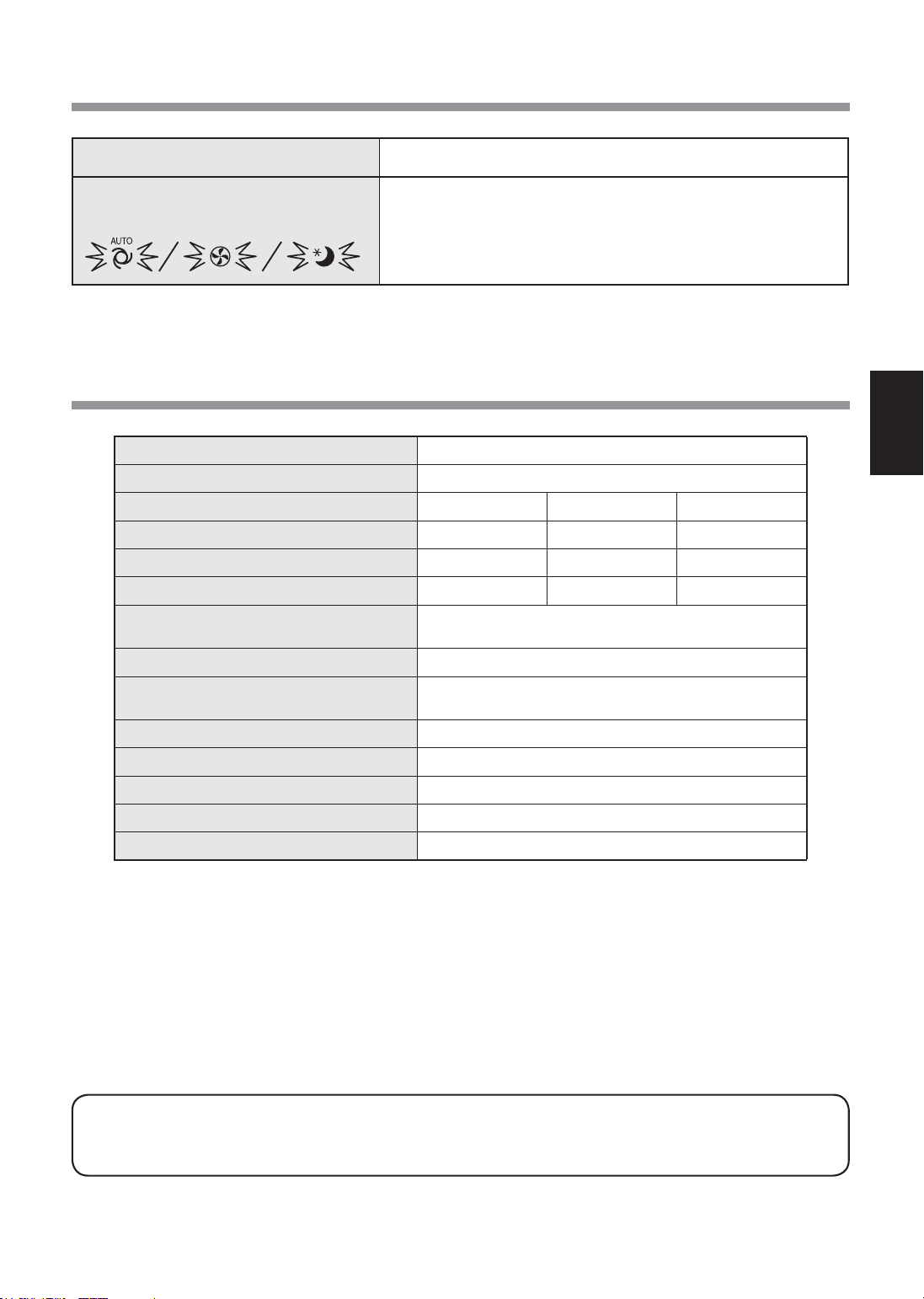
VI-11
TIẾNGVIỆT
Model FP-J50
Nguồnđiện
220-240V50-60Hz
Điềuchỉnhtốcđộquạt
TỐIĐA TRUNGBÌNH NGỦ*
2
Tốcđộquạt(m
3
/giờ)
306 186 48~120
Mứcđộồn(dBA)*
1
51 39 15~30
Côngsuấtdanhđịnh(W)
39 14 4,5~7,5
Chếđộchờ(W)
1,6(KhibộđiềuhợpWi-FiBẬT.)
1,2(KhibộđiềuhợpWi-FiTẮT.)
Diệntíchphòngkhuyếnnghị(m
2
)*
3
~40
Diệntíchphòngkhuyếnnghịcho
PlasmaclusterIonmậtđộcao(m
2
)*
4
~23
Loạibộlọc
HEPA*
5
/Khửmùi
Cảmbiến Bụinhạy/Mùi/Nhiệtđộ/Độẩm/Ánhsáng
Chiềudàidâynguồn(m) 2,0
Kíchthước(mm) 390(Rộng)x270(Sâu)x583(Cao)
Khốilượng(kg) 6,4
*1•MứcđộồnđượcđodựatrêntiêuchuẩnJEM1467củaHiệphộicácnhàsảnxuấtđiệntửNhậtBản.
*2•Tốcđộquạtđượcchuyểnđổitựđộngtùytheolượngtạpchấttrongkhôngkhívàđộsángcủaphòng.
*3•Kíchcỡphòngđượckhuyếncáophùhợpđểvậnhànhthânmáyvớitốcđộquạttốiđa.
•Kíchcỡphòngđượckhuyếncáolàmộtdiệntíchmàcóthểloạibỏmộtlượnghạtbụinhấtđịnhtrong30phút.(theo
JEM1467).
*4•DiệntíchphòngmàmậtđộIonđạtđượcxấpxỉ7000iontrênmộtcentimetkhốitạitrungtâmphòngkhithânmáy
đượcđặtcạnhtường,vàvậnhànhởcôngsuấtTRUNGBÌNH,vàởđộcaokhoảng1,2métsovớisàn.
*5•Bộlọcloạibỏtrên99,97%cáchạtcókíchthướcítnhất0,3micron.(theoJEM1467).
Chếđộchờ
Khiđãcắmphíchđiệncủathânmáyvàoổtrêntường,thiếtbịsẽtiêuthụđiệnởchế
độchờđểhoạtđộngcácmạchđiện.Đểtiếtkiệmđiện,hãyrútdâynguồnkhikhôngsử
dụngthânmáy.
HIỆNTƯỢNG KHẮCPHỤC(khôngphảilàhưhỏng)
Mộttrongsốđènbáosauđangnhấp
nháy.
• Rútphíchcắm,đợi1phút,vàsauđócắmlạithânmáy.
THÔNGSỐKỸTHUẬT
FP-J50_VI.indd 11 2020/08/27 13:59:23
VI-12
CÀIĐẶTWi-Fi
CẢNHBÁO
Trongtrườnghợpvậnhànhtừxatừphía
ngoài,bạncóthểsẽkhôngkiểmtrađượctình
trạnghiệntạicủamáylọckhôngkhíhoặckhu
vựcxungquanhvàtìnhtrạngliênquantớibất
kỳaiđangđứngởđó,hãyxácnhậnđầyđủ
mứcantoàntrướckhisửdụng.
• Đảmbảođãcắmđầyđủphíchđiệnvàoổđiện,
vàkhôngcóbụitrênphíchhoặclỗổcắm.(Cóthể
gâynóng,cháy,hỏahoạn,v.vdotiếpxúckém
hoặckhôngtiếpxúc)
• Đảmbảotrướcrằngchodùcóthayđổivềgió,sẽ
khôngcóảnhhưởngtiêucựcnàotớimôitrường
trongphòng.(như..chodùcóbấtcứthứgìdễbay
tronggió)
Bởivìgiócóthểkhiếnđồvậtrơixuống,gâyra
hỏahoạn,thươngtật,làmhỏngđồgiadụng.
THẬNTRỌNGKHISỬDỤNG
• Cầnphảichấpthuận"ĐiềukhoảnDịchvụ"đểcó
thểsửdụngỨngdụng.
• Ứngdụngsẽđượcsửađổiđịnhkỳdonângcấp
phiênbản.
• Mànhìnhvàhìnhảnhminhhọatrongsáchnàychỉ
mangtínhchấtgiảithích,cóthểkhácsovớisản
phẩmthựctế.
• Trongtrườnghợpkếtnốikém,cóthểdođiện
thoạithôngminhkhôngthểkiểmsoáthoặcvận
hànhkhôngđượcphảnánhtớiđiệnthoạithông
minh.
• Nênkhóamànhìnhđiệnthoạithôngminhđể
tránhvậnhànhkhôngđúng.
• MặcdùỨngdụnglàmiễnphí,nhưngkháchhàng
sẽphảitrảphíkếtnốiđểtảiỨngdụngchuyên
dụngvàvậnhànhvớiđiệnthoạithôngminhhoặc
máytínhbảng.
LƯUÝVỀWi-Fi
Thậntrọngkhisửdụngsóngđiện
• Trongtrườnghợpsửdụngởnhữngnơisau,vận
hànhcóthểkhôngđượcđảmbảo:Gầnthiếtbị
liênlạckhôngdâyBluetooth®sửdụngcùngtần
số(2,4GHz)vớisảnphẩmnàyhoặcthiếtbịkhông
dâynănglượngthấpđượcchỉđịnh.Đồngthời
ởnhữngnơicóthiếtbịtừtrườngnhưlòvisóng,
hoặcnơicóđiệntĩnhhoặcnơixảyranhiễusóng
vôtuyến,vậnhànhcóthểtạmthờikhôngkhả
dụngdosóngđiệnyếu.
• Khôngđảmbảohiệusuấtvàkếtnốikhôngdây
chotấtcảrouterhoặcmôitrườngnhàở.Ởnhững
nơisau,cóthểkhôngcóhoặckhôngkếtnốisóng
điện:Bêntrongtòanhàbằngbêtông,cốtthép
hoặckimloại/gầnchướngngạivật/gầnthiếtbị
kếtnốikhôngdâysửdụngcùngtầnsố.
• MạngWi-Ficủathiếtbịnàytươngứngvớikênh
1~13.Khôngkhảdụngđểkếtnốivớirouterđã
đượccàichocáckênhkhác.
Cẩntrọngvớithôngtincánhân(liên
quantớiBảomật)
• ViệcsửdụngthiếtbịWi-Ficóthểbịchặnnếu
dùngsóngđiệnngaycảkhicàiđặtmậtmã.
• MạngWi-FicóưuđiểmlàkếtnốimạngLANmiễn
phítrongvùngdịchvụbởivìkếtnốigiữasản
phẩmnàyvàroutersửdụngsóngđiện.Mặtkhác,
cóthểxảyratìnhtrạngchặnkếtnốihoặcxâm
phạmtráiphépdosóngđiệncóthểxuyênquavật
cản(vídụ:tường)đểtớimọinơitrongkhuvực.
• Khôngkếtnốivớithiếtbịhoặcmạnglướikhichưa
cóquyềnsửdụng.
• NênkhởitạochứcnăngWi-Ficủasảnphẩmnày
trongtrườnghợphủyhoặcgiaolạichobênthứ
ba.
• NênkhởitạochứcnăngWi-Ficủathiếtbịtrong
trườnghợpgiaolạichobênthứbađểtránhngười
ngoàitruycậptráiphép.
Hãykiểmtramọithứcầnthiếtđểkếtnốimáy
lọckhôngkhívớimạngWi-Fi.
•
Internet
•
ĐiểmtruycậpWi-Fi(Router)
PhươngphápmãhóađượckhuyếnnghịlàWPA2
(AES).
•
Thiếtbịđầucuốidiđộngnhưđiệnthoại
thôngminh,máytínhbảng,v.v.
Hệđiềuhànhhỗtrợ(tínhtớitháng11năm2020)
điệnthoạithôngminh/máytínhbảngAndroid
4.1hoặccaohơn
iPhones,iPodtouch,iPadsiOS9hoặccaohơn
•
Wi-Fi
:IEEE802.11b/g/n
•
Dảitần
Dảitần2,4GHz
THƯƠNGHIỆU
• “Wi-Fi
®
”làthươnghiệuđãđăngkýcủaWi-FiAlliance
®
.
• “Android”làthươnghiệucủaGoogleInc.
• “iPhone”,“iPodtouch”,“iPad”làthươnghiệuđãđăngký
hoặcthươnghiệucủaAppleInc.
• Têncôngty,doanhnghiệp,sảnphẩmkhácnêutrong
hướngdẫnsửdụnglàthươnghiệuvàthươnghiệuđã
đăngkýcủamỗicôngty.
LƯUÝVỀANTOÀN
MÔITRƯỜNGCẦNTHIẾT
THÔNGSỐKỸTHUẬT
FP-J50_VI.indd 12 2020/08/27 13:59:23
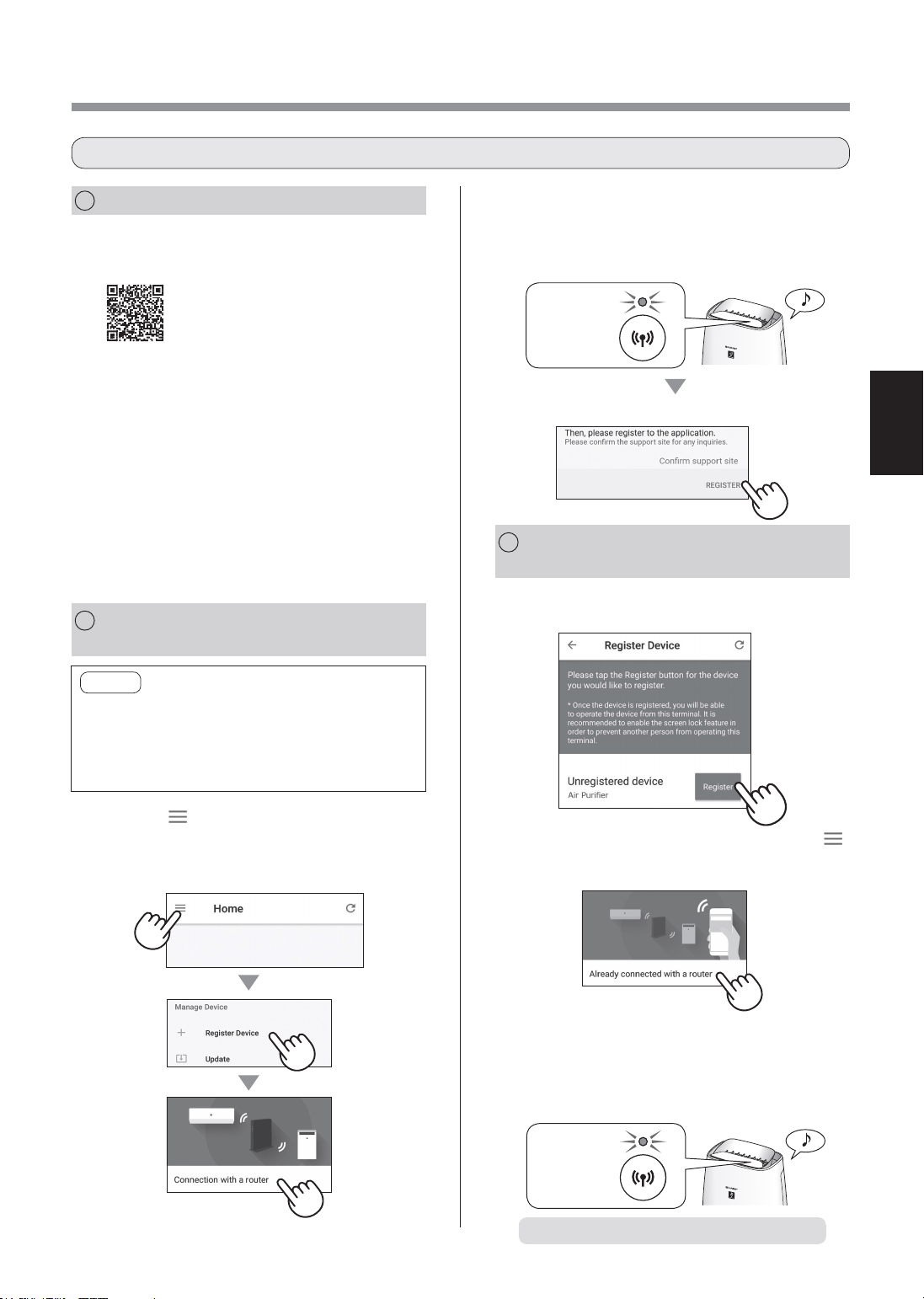
VI-13
TIẾNGVIỆT
1.
Chạm"Đăngký"chomáylọckhông
khíbạnmuốnđăngký.
2.
ThựchiệntheohướngdẫntrênỨng
dụng.
(
XX-XXXX
)
• NếuđènbáoWi-Fisángsaukhicóâmthanh
thôngbáo,kếtnốiđãhoàntấtthànhcông.
Sánglên
Đãhoàntấtcáccàiđặtbanđầu.
1
CÀIĐẶTỨNGDỤNG
2
KẾTNỐIMÁYLỌC
KHÔNGKHÍ
VÀROUTER
3
KẾTNỐIGIỮAMÁYLỌC
KHÔNG
KHÍVÀĐIỆNTHOẠITHÔNGMINH
1.
CàiđặtỨngdụngchỉđịnhtrongđiện
thoạithôngminhcủabạn.
•CóthểtảiỨngdụngtừdịchvụ
dướiđây.
Android:GooglePlay
iOS:AppStore
https://cboard.cloudlabs.sharp.co.jp/smartapp_asean/download/air/
2.
Kếtnốiđiệnthoạithôngminhcủa
bạnvớiroutervàkhởiđộngỨng
dụng.
ThựchiệntheohướngdẫntrênỨng
dụng.
i.
Xácnhận“Điềukhoảndịchvụ”.
ii.
NhậpmãSHARPID.
•TrongtrườnghợpkhôngcómãSHARPID,
hãyđăngkýmãSHARPIDmới.
iii.
Nhậptênđiệnthoạithôngminhcủabạn.
1.
Chạm“ ”tạimànhình“Trang
chủ”,vàchọn“Đăngkýthiếtbị”=>
“Kếtnốivớirouter”.
LƯUÝ
• NếubạncócàiđặtẩnhoặccàiđặtlọcMAC
trênrouter,hủycáccàiđặtnày.
• MãIDmạngcủathiếtbịhiểnthị
“AP-SHARP-XX”(trongđóXXlàsốcó2chữsố
dướiđịachỉMACcủathiếtbị).
2.
ThựchiệntheohướngdẫntrênỨng
dụng.
Chạm“ĐĂNGKÝ”.
• NếuđènbáoWi-Fisángsaukhicóâmthanh
thôngbáo,kếtnốiđãhoàntấtthànhcông.
Sánglên
• Nếubạnkhôngthấymànhìnhởtrên,chạm“ ”
tạimànhình“Trangchủ”,vàchọn“ĐăngkýThiết
bị”=>“Đãkếtnốivớirouter”.
SƠĐỒCÀIĐẶTBANĐẦU
FP-J50_VI.indd 13 2020/08/27 13:59:24
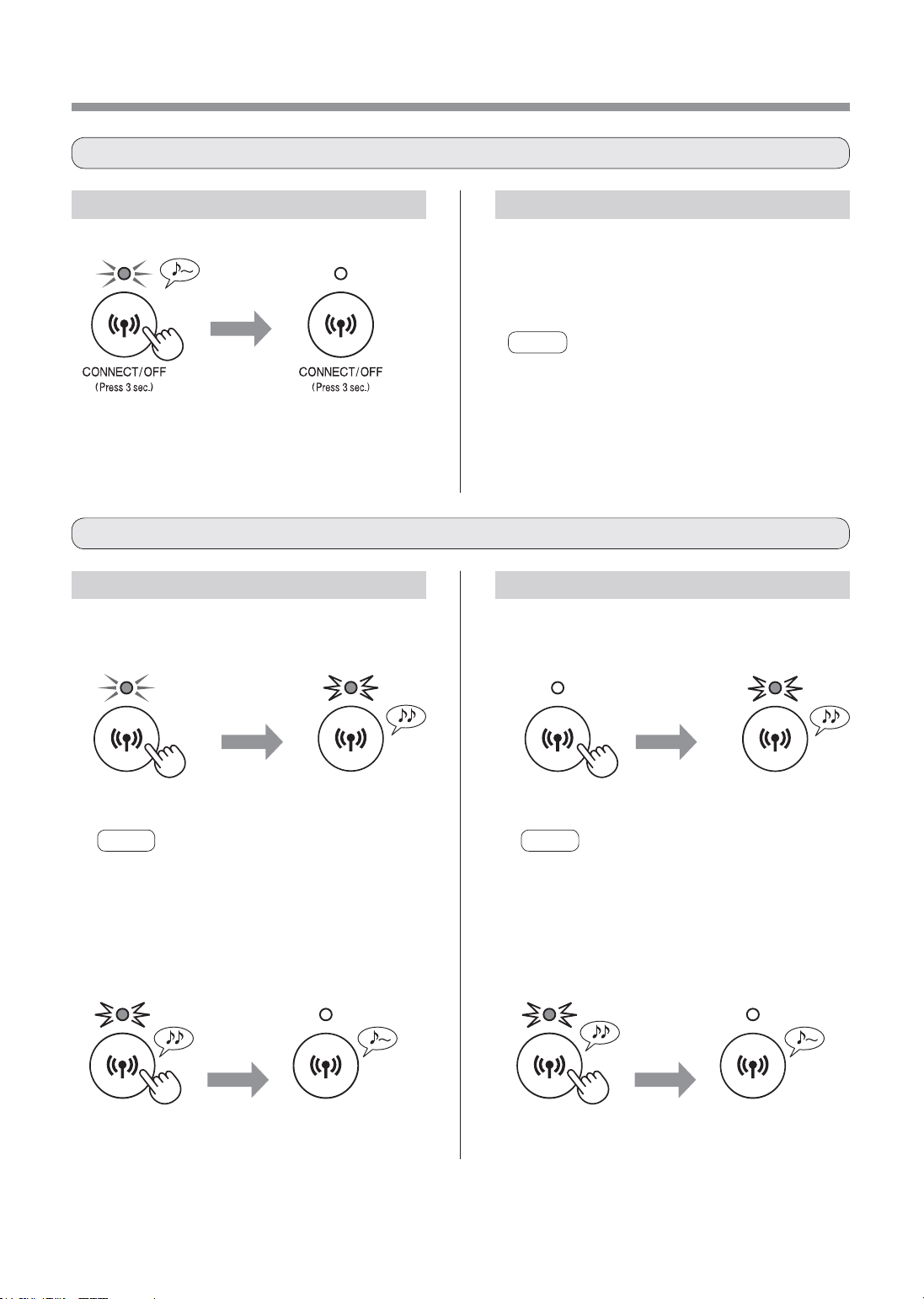
VI-14
CáchkhởitạotừWi-FiBẬT.
CÀIĐẶTWi-Fi
Thamkhảotrang13vàcàiđặtkết
nốilạivớirouter.
• Nếuthiếtbịđãđượcđăngkývớiđiệnthoạithông
minhcủabạn,bạnkhôngcầnđăngkýlại.
LƯUÝ
• BạncũngcóthểấnnútWi-Fitrongítnhất3giâyđể
bậtlạiWi-Fi.Mộtlúcsaukhiấnnút,tiếpbípphátra
4lần.Saumộtlúc,đènbáoWi-Fisángvàkếtnối
Wi-Fihoàntất.(Trongtrườnghợpnày,kếtnốiWi-Fi
vớiroutersẽđượctựđộngkhôiphụclại.)
trên8
giây
Nhấp
nháy
LƯUÝ
Khoảng3giâysaukhiấnnút,sẽcótiếpbípdàiphát
ravàđènbáoWi-Fitắt,nhưnggiữấnnút.
trên8
giây
Nhấp
nháy
LƯUÝ
Khoảng3giâysaukhiấnnút,sẽcótiếpbípngắn
phátravàđènbáoWi-Finhấpnháy,nhưnggiữấn
nút.
trên3giây trên3giây
2.ẤnlạinútWi-Fitrongvòng2phút
tronghơn3giây.
Saumột
lúc
Saumột
lúc
Tắt Tắt
Hoàntất
càiđặtkhởi
tạo
Hoàntất
càiđặtkhởi
tạo
CáchcàiđặtBẬT/TẮTWi-Fisaukhihoàntấtcáccàiđặtbanđầu
CáchkhởitạochứcnăngWi-Fi
Tắt
trên3giây
CáchtắtWi-Fi. CáchbậtlạiWi-Fi.
CáchkhởitạotừWi-FiTẮT.
1.ẤnnútWi-Fitronghơn8giây. 1.ẤnnútWi-Fitronghơn8giây.
2.ẤnlạinútWi-Fitrongvòng2phút
tronghơn3giây.
Nhấp
nháy
Nhấp
nháy
FP-J50_VI.indd 14 2020/08/27 13:59:24
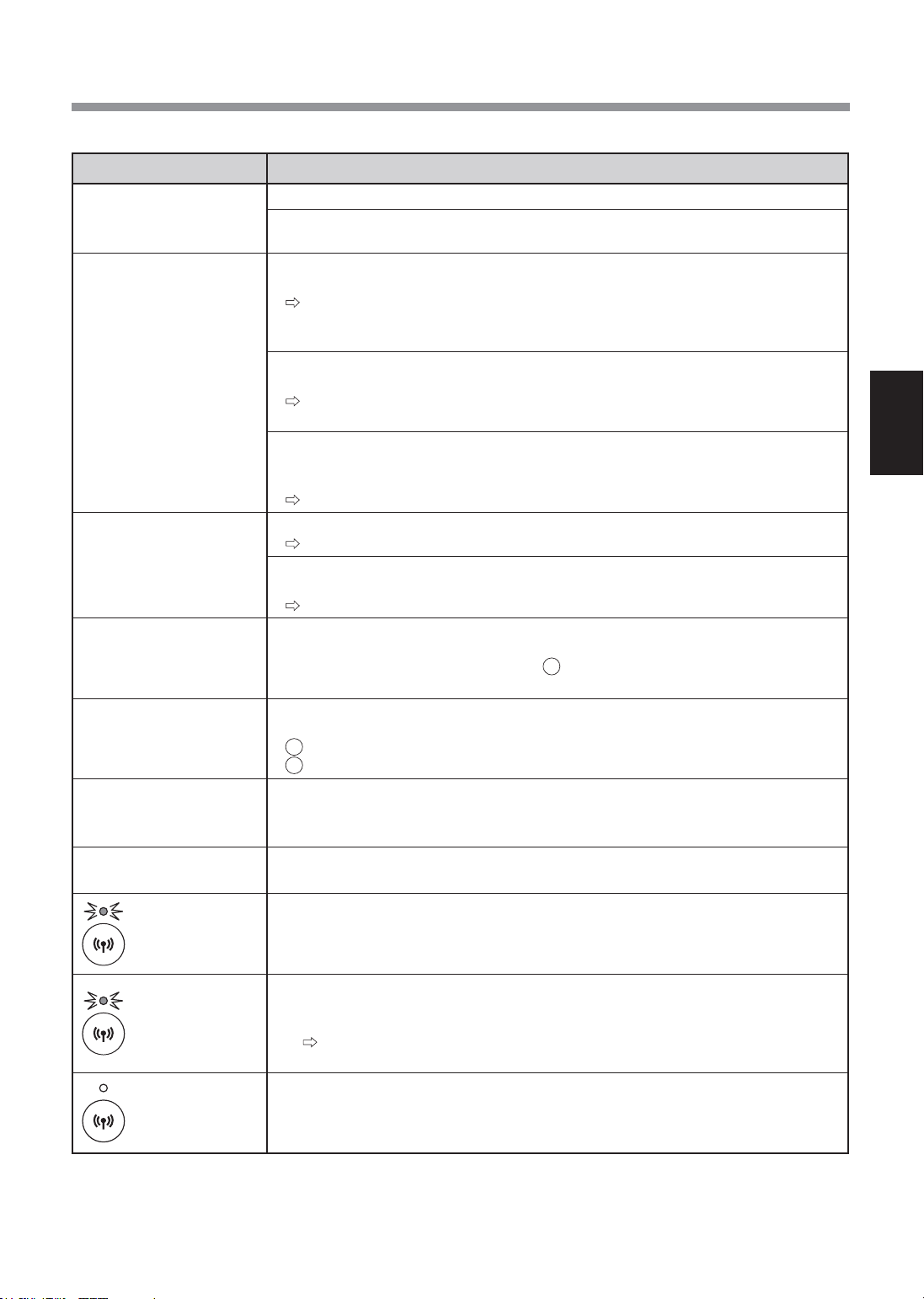
VI-15
TIẾNGVIỆT
XỬLÝSỰCỐCHỨCNĂNGWi-Fi
Sựcố Mụckiểmtra
Khôngthểthựchiệnkết
nốiWi-Ficủamáylọc
khôngkhívàrouter.
• Kiểmtrathôngsốkỹthuậtcủarouterđangdùng.
• Điềuchỉnhhướngroutervàăng-ten,dichuyểnroutervàăng-tengầnhơn,v.v.Sau
đó,chuyểnsangbậtroutervàthựchiệnlạicáccàiđặtbanđầu.
Khôngthểthiếtlậpkết
nốigiữamáylọckhông
khívàđiệnthoạithông
minh.
• Cóphảimáylọckhôngkhívàđiệnthoạithôngminhđangkếtnốivớicùngrouter
haykhông?
Kếtnốimáylọckhôngkhívàđiệnthoạithôngminhvớicùngrouter.Nếuvẫn
khôngthểkếtnối,thửkếtnốiđiệnthoạithôngminhvớidảitần2,4Ghzcủa
router.
• Cóphảitổngsốđiệnthoạithôngminhđangdùngvượtsốlượngtốiđađăngký
trênmộtmáylọckhôngkhíhaykhông?
Sốlượngđiệnthoạithôngminhtốiđacóthểđăngkýtrênmộtmáylọckhông
khílà10.
• Cóphảitổngsốsảnphẩm(máyđiềuhòakhôngkhí,máylọckhôngkhí,v.v)đã
đăngkývớimộtđiệnthoạithôngminhvượtquásốlượngtốiđachophéphay
không?
Sốlượngsảnphẩmtốiđađăngkývớimộtđiệnthoạithôngminhlà30.
Khôngthểthựchiệnvận
hànhtừxatừđiệnthoại
thôngminh.
• CóphảiđènbáoWi-Ficủamáylọckhôngkhíđangbậthaykhông?
NếuđènbáoWi-Fitắt,kếtnốilạimáylọckhôngkhívớirouter.(Trang13)
• Cóphảikếtnốigiữamáylọckhôngkhívàđiệnthoạithôngminhđãhoàntấthay
không?
Thiếtlậpkếtnốigiữamáylọckhôngkhívàđiệnthoạithôngminh.(Trang13)
Khithayđổirouter
• Cầnphảikếtnốilạimáylọckhôngkhívớirouter.
1.Ấnnút"Wi-Fi"trong3giâyđểdừngchứcnăngWi-Fi.
2.Thựchiện“Sơđồcàiđặtbanđầu:2Kếtnốimáylọckhôngkhívàrouter”.
(Trang13)
Khithayđổiđiệnthoại
thôngminh
1.XóađăngkýđiệnthoạithôngminhcũtừỨngdụngchỉđịnh.
2.Sửdụngđiệnthoạithôngminhmớiđểthựchiện"Sơđồcàiđặtbanđầu:
1CàiđặtỨngdụng,và
3Kếtnốigiữamáylọckhôngkhívàđiệnthoạithôngminh”.(Trang13)
Khixửlýhoặcgiaolại
máylọckhôngkhí
• Thựchiệncácbướcsau,đểtránhròrỉthôngtincánhân.
1.XóađăngkýmáylọckhôngkhítừỨngdụngchỉđịnh.
2.KhởitạochứcnăngWi-Ficủamáylọckhôngkhí.(Trang14)
Trongtrườnghợpđược
bàngiaolạitừbênthứba
• Đểtránhbênthứbatruycậptráiphép,khởitạochứcnăngWi-Ficủamáylọc
khôngkhí.(Trang14)
Nhấpnháychậm
• Đâylàmộttrongcáctrạngtháisau.
A.KếtnốiWi-Ficủamáylọckhôngkhívàrouterđangtrongquátrìnhthiếtlập.
B.Kếtnốimáylọckhôngkhívàđiệnthoạithôngminhđangthiếtlập.
C.PhầnmềmchứcnăngWi-Fitrongmáylọckhôngkhíđangđượccậpnhật.
Nhấpnháynhanh
• Lỗimạng.Kiểmtraphầndướiđây.
A.Kiểmtratrạngtháimạngcủarouter.
B.Saukhitắtnguồnmáylọckhôngkhí,kiểmtratrạngtháiInternet.
NếukhôngcóvấnđềgìvớiAvàB,tắtnguồnmáylọckhôngkhí.Saumột
lúc,kếtnốilạimáylọckhôngkhívớirouter.(Trang13)
Tắt
• Máylọckhôngkhíkhôngthểkếtnốivớirouter.Kiểmtraphầndướiđây.
A.Phíchcắmđiệncóđangđượckếtnốiđúngcáchkhông?
B.HastheWi-Fifunctionbeenstopped?Kếtnốilạimáylọckhôngkhívớirouter.
(Trang13)
Vuilòngkiểmtracácchitiếtsautrướckhiđềnghịhoặcyêucầusửachữa.
FP-J50_VI.indd 15 2020/08/27 13:59:25

感谢您购买SHARP空气净化器。
使用本产品之前, 请仔细阅读本手册。
请妥善保管本手册, 以便随时查阅。
重要安全事项 ................................................................... 2
各部分名称 ....................................................................... 4
安装过滤网 ....................................................................... 5
操作 ................................................................................... 6
保养与维护 ....................................................................... 8
更换 ................................................................................... 9
维修前的检查事项 ........................................................10
规格 .................................................................................11
Wi-Fi设置 ......................................................................12
Wi-Fi功能故障排除
.........................................................15
目录
独特空气处理技术组合
三层过滤系统+净离子群
吸附灰尘 *
前置过滤网吸附灰尘和空气中的其他较大颗粒。
减少异味
祛味过滤网能吸收多种常见家居异味。
减少花粉和霉菌 *
HEPA过滤网能吸附99.97%的小至0.3微米的
颗粒。
净化空气
通过采用类似自然界清洁环境的方式, 净离子
群释放平衡的正负离子来清洁空气。
*通过过滤网系统吸入空气时。
传感器技术会持续监控空气质量, 根据所探测
的空气纯度, 自动调整操作。
Wi-Fi功能
•确认室内空气质量状况 (PM2.5、 灰尘、 异
味)。
•通过智能手机对本产品进行遥控。
•推荐更换过滤网的最佳时机。
特点
中文
FP-J50_CS.indd 2 2020/08/28 10:00:57
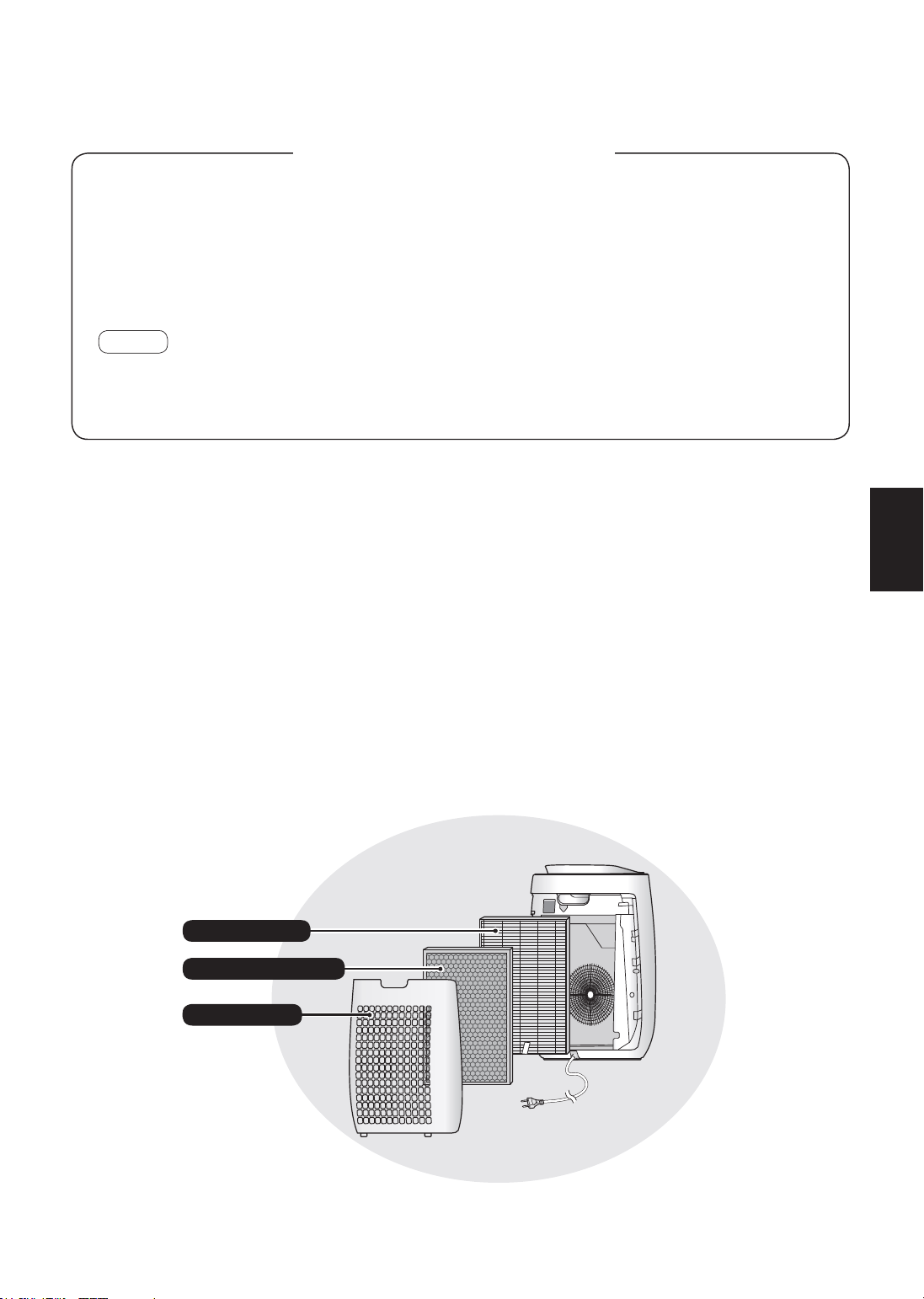
空气净化器通过吸气口吸入室内空气, 使其流经主机内的前置过滤网、 祛味过滤网和HEPA过滤
网, 然后通过出风口释放空气。 颗粒经过时, HEPA过滤网可去除99.97%的小至0.3微米的
颗粒, 还能帮助吸收异味。 空气流经时, 祛味过滤网逐渐吸收异味。
随时间推移, 过滤网吸收的部分异味可能会分解, 造成其他异味。 根据使用环境的差异, 尤其
是在极端环境 (较通常的家居使用环境远为恶劣) 中使用主机时, 这些异味会在比预期更短的
时间内变得更为强烈。 如果仍存在这些异味, 请更换过滤网。
注意
• 空气净化器设计用于清除空气中悬浮的灰尘和异味,
但不能清除有害气体, 例如香烟烟雾中含有的一氧化碳。
如果异味源一直存在, 空气净化器可能无法完全清除异味。
请在使用全新空气净化器前阅读
HEPA过滤网
前置过滤网
祛味过滤网
ZH-1
中文
FP-J50_CS.indd 1 2020/08/28 10:00:57

ZH-2
重要安全事项
使用电器设备时, 务必遵守基本安全预防
措施, 包括以下各方面 :
警告
–为了减少触电、 火灾或受伤等风
险, 务必遵守以下要求 :
•请于使用主机前阅读所有指引。
•仅使用220-240伏电源插座。
• 本设备不适合身体、 感官或精神能力欠
佳或缺乏经验常识的人士 (包括儿童)
使用, 除非负责其安全的人员就本设备
的使用给予相关监督和指导。
儿童应受到适当的监管, 以确保不会将
本设备当作玩具。
• 如果电源线损坏, 必须由制造商、 其服
务代理、 夏普核准的服务中心或具有同
等资格的人员负责更换, 以免发生危险。
当需要调校、 维修或出现问题时, 请与
最近的服务中心联系。
• 请勿自行维修或拆解本产品的主机。
• 进行保养、 拆装及更换过滤网及长期不
用时, 务必拔下电源插头。 否则会造成
短路,进而引发触电或火灾。
•如果电源线或插头已损坏, 或墙上的电
源插座已松脱, 请勿使用主机。
•定期清除电源插头上的灰尘。
•请勿将手指或异物插入吸气口或出风口。
•当移除电源插头时, 必须紧握插头, 不
要拉扯电线。
否则会造成短路,进而引发触电或火灾。
•注意不要损坏电源线。
否则会引发触电、 发热或火灾。
•切勿以湿手移除电源插头。
•切勿于燃气设备或壁炉附近使用主机。 当
将主机用于内有燃气器具的同一室内时,
应定时给房间通风, 否则可能造成一氧
化碳中毒。
•在房间使用喷雾杀虫剂时, 请勿使用本
机。 房间内有油渣、 烧香、 点烟或空
气中有化学气味时, 也不要使用本机。
•请保持主机远离水源。
亦不要在浴室等可能被淋湿的地方使用本
机。
•请勿使主机接触水源。 否则会造成短路
或触电。
•清洁主机时请小心。 强力腐蚀性清洁剂
可能会损坏机件外部。
注意
–如果主机对收音机或电视的接收造
成干扰
如果本空气净化器对收音机或电视的接收造
成干扰, 请尝试下列一项或多项措施 :
•调整或重新放置接收天线。
•加大主机与收音机或电视之间的距离。
•将本设备的电源与收音机或电视接收器的
电源连接到不同的插座上。
•咨询经销商或专业的收音机或电视技术人
员。
FP-J50_CS.indd 2 2020/08/28 10:00:57

ZH-3
中文
操作的注意事项
•切勿堵塞吸气口或出风口。
•请勿将主机靠近或放在在热源物体上 (如
炉灶或暖炉或可能接触到蒸气的地方)。
•对主机进行操作时, 务必使其处于直立
状态。
•当主机处于运行状态时, 切勿移动主机。
•移动主机时, 请使用主机背面的把手。
•如果主机放置在容易损坏的地面、 不平
整的表面或厚地毯上, 挪动时先将其提
起。
•请勿在未正确安装过滤网的情况下操作主
机。
•请勿清洗和重复使用HEPA过滤网和祛味
过滤网。
否则无法改善过滤网的使用效果, 还会
引发触电或操作故障。
•仅可使用柔软的布对本机外部进行清洁。
请勿使用挥发性液体或清洁剂。
轻质汽油、 涂料稀释剂或抛光粉会导致
主机表面受损或龟裂。 此外, 还会引发
传感器故障。
•清洁过程中, 请勿用力擦洗后面板。
安装指南
•请勿安装在传感器直接对住风口的地方。
否则会导致主机出现故障。
•避免在有可能与家具、 织物或其他物品
接触的位置使用主机, 否则可能无法保
证吸气口或吹出口的通畅。
•请勿安装在由于温度剧烈变化而导致主机
直接暴露于冷凝环境的地方。 适宜的室
温为0–35° C。
•将主机放置在稳固的地面上, 确保良好
的通风条件。
放置在厚地毯上时, 主机可能出现微微
振动。
•避免放置在产生油脂或含油烟雾的地方。
否则会导致主机表面裂开以及传感器发生
故障。
•即使主机与墙壁的距离只有3厘米, 除
尘功能也能使用, 但周围的墙壁和地板
可能会变脏。 请将主机远离墙壁放置。
否则经过一段时间后, 正对出风口后方
的墙壁可能会变脏。 在相同位置长期使
用主机时, 请定期清洁附近的墙壁。
过滤网指南
•遵照本手册中的指示, 正确保养和清洁
过滤网。
(第8 页)
FP-J50_CS.indd 3 2020/08/28 10:00:57
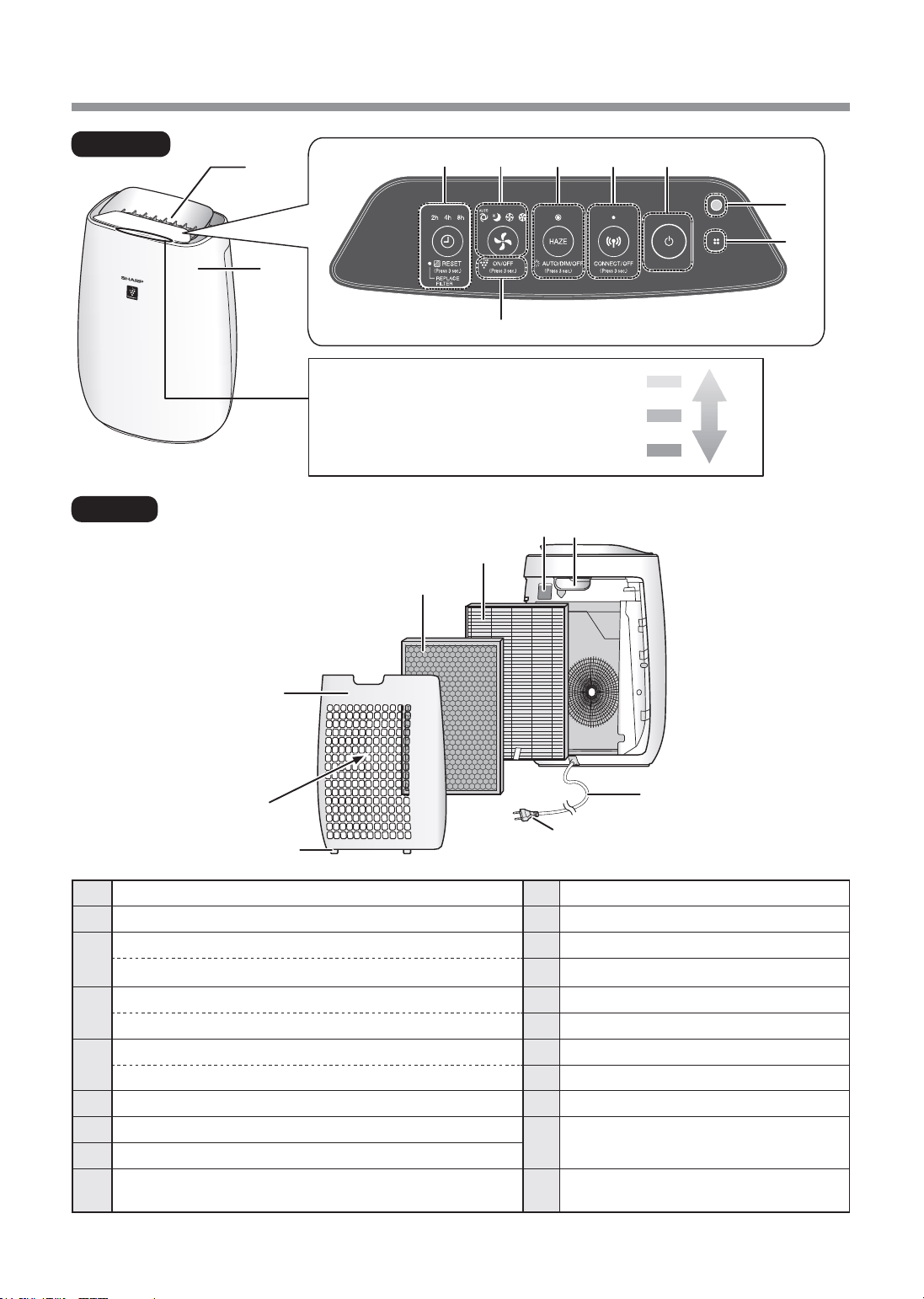
ZH-4
各部分名称
20
19
2
1
前面
背面
18
14
15
11
1213
16
17
清洁度侦测器
它指示室内的空气纯度用5个级别
颜色变化。
黄色
红色
蓝色
脏
干净
9
8
3
4 5 6
7
10
1
主机
10
净离子群指示灯 (蓝色)
2
出风口
11
清洁度侦测器
3
关机定时按钮、 指示灯 (白色)
12
手柄
(按住3秒钟) 过滤器重置按钮, 过滤网更换指示灯 (橙色)
13
灵敏灰尘传感器 ( 内部 ) / 传感器过滤网
4
模式按钮、 指示灯 (白色)
14
HEPA过滤网
(按住3秒钟) 净离子群开 / 关按钮
15
祛味过滤网
5
烟霾模式按钮、 指示灯 (白色)
16
后面板(前置过滤网)
(按住3秒钟) 灯光控制按钮
17
吸气口
6
烟霾模式按钮、 指示灯 (白色)
18
底部凸部
7
电源开 / 关按钮
19
电源插头
(插座形状根据国家提供)
8
光线传感器
9
传感器
( 内部 )
异味/温度/湿度
20
电源线
FP-J50_CS.indd 4 2020/08/28 10:00:58
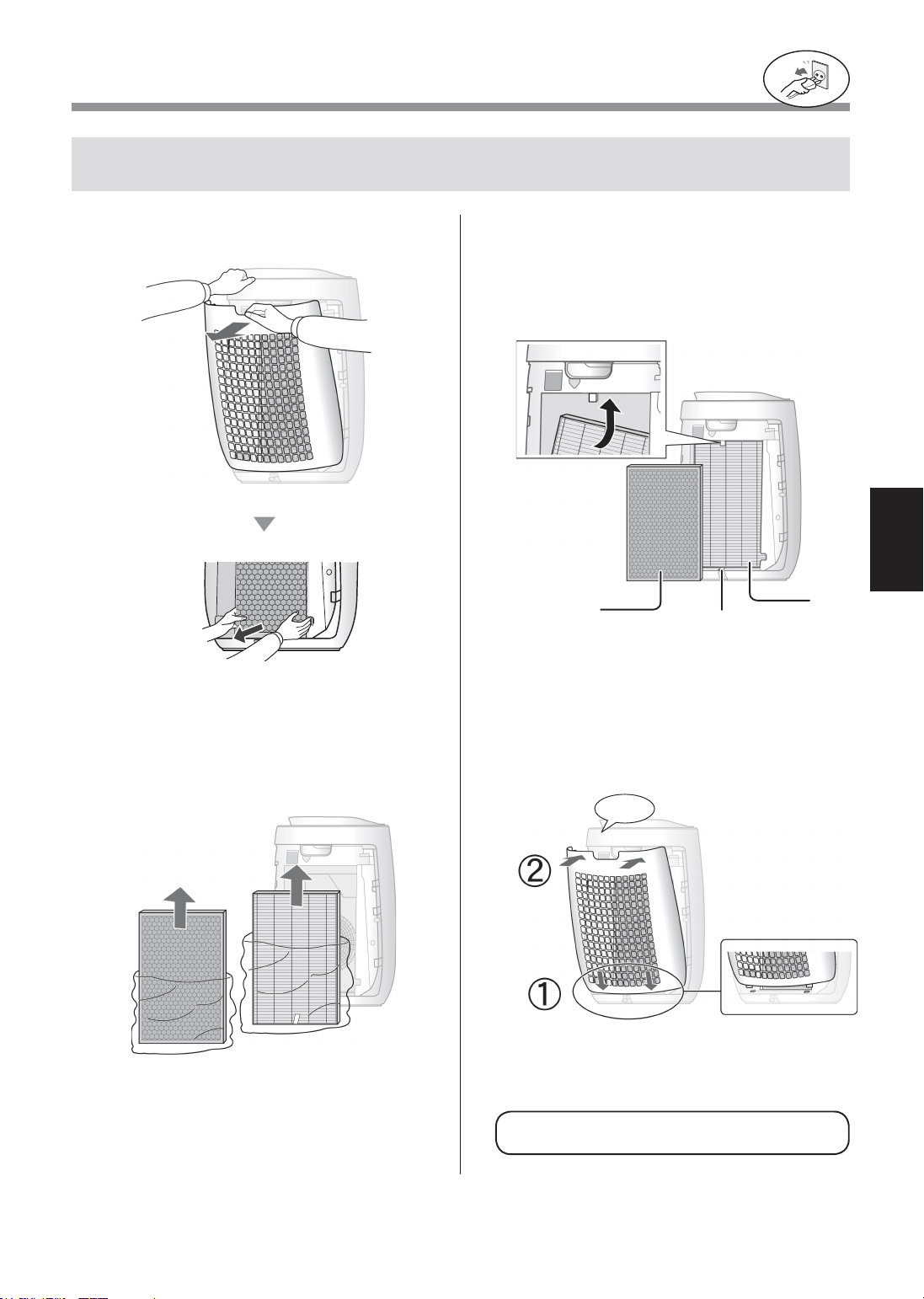
ZH-5
中文
安装过滤网
为确保过滤网的质量, 过滤网以塑料袋包装并安装在主机内。 使用主机之前, 务必将过滤网上的塑
料袋取下。
•请勿在未有装上过滤网的情况下操作本设备。
务必将电源插头从墙上的电源插座
上拔出。
1
取下后面板。
拉
2
从塑料袋中取出过滤网。
3
将过滤网放进主机内。
切勿以反方向安装过滤网, 否则将影响主机的
正常操作。
HEPA
过滤网
祛味
过滤网
标签
4
安装后面板。
喀哒声
FP-J50_CS.indd 5 2020/08/28 10:00:59
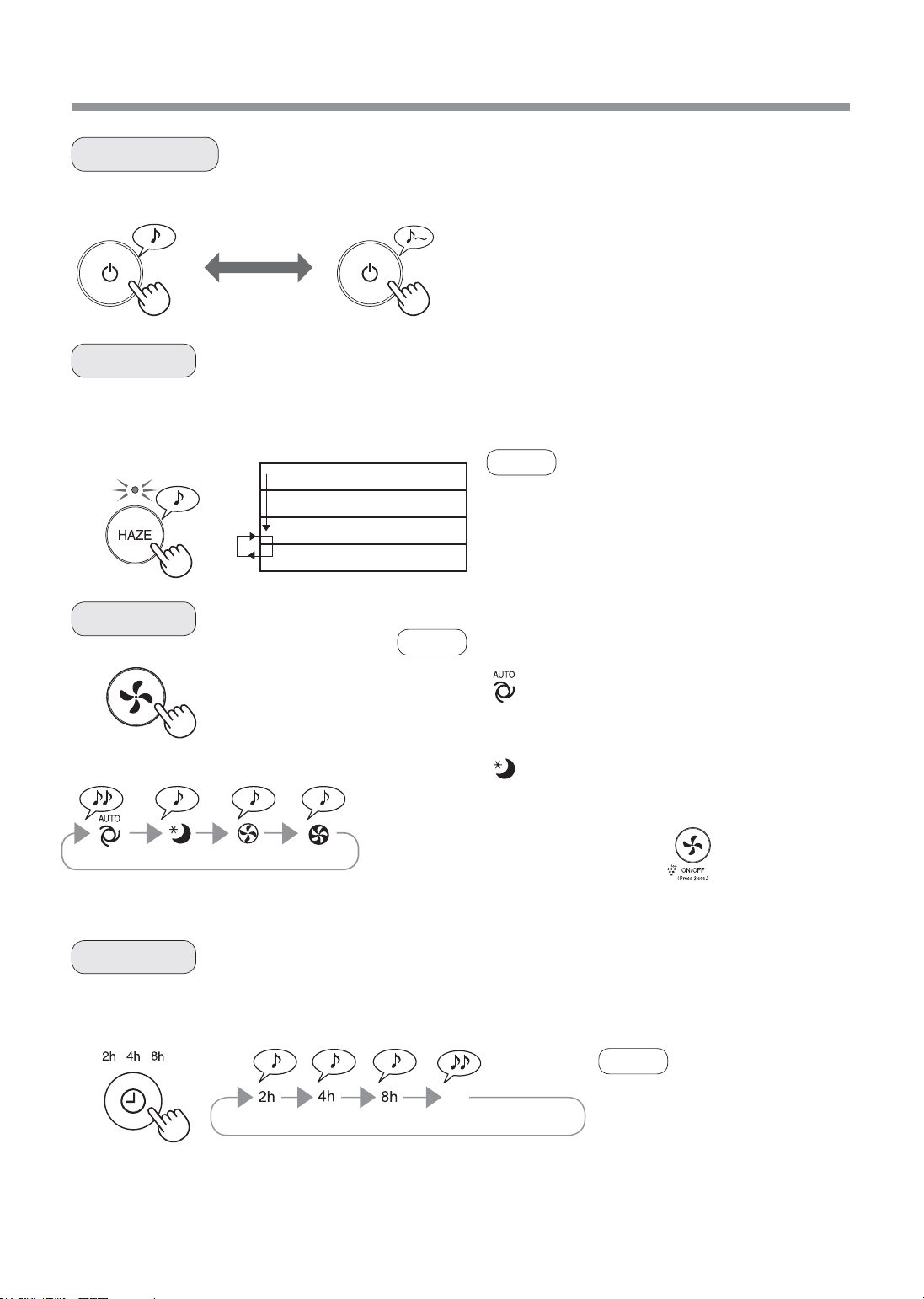
ZH-6
操作
睡眠模式 中等 最大自动模式
主机会以高风速运行60分钟, 然后在小风速和大风速之间交替运行各20分钟。
开始 停止
•选择所需风速。
•当主机开始启动时, 按之前的运行模式开始运转。
10分钟
:
最大风量
50分钟 : 大风量
20分钟 : 最小风量
20分钟 : 大风量
•净离子群无法 “关闭”。
•运行过程中可从此模式切换为其他模式。
但是, 切换后烟雾模式将无法正常工作。
•您也可以在专用App上设置计时
器。
如果已在专用App中设定了计时,
则产品的计时器指示灯将会亮起。
您无法在产品上设置计时器。
选择想要开启主机的时间长度。 到达所选定的时间后, 主机会自动停机。
开始 / 停止
烟雾模式
选择模式
关机定时
注意
注意
注意
(主机开启)
2小时 4小时 8小时 取消
自动模式
睡眠模式
根据以下3种探测信息自动控制风速 : (灰尘 / 异味 / 光线)
主机将非常安静地运转,且风速根据空气中杂质的量和室内亮度自动切换。
清洁度侦测器 / 净离子群指示灯自动关闭。
即使指示灯已熄灭, 但如果没有通过长按 来关闭净离子群, 仍
会有净离子群扩散到空气中。
关
FP-J50_CS.indd 6 2020/08/28 10:01:00
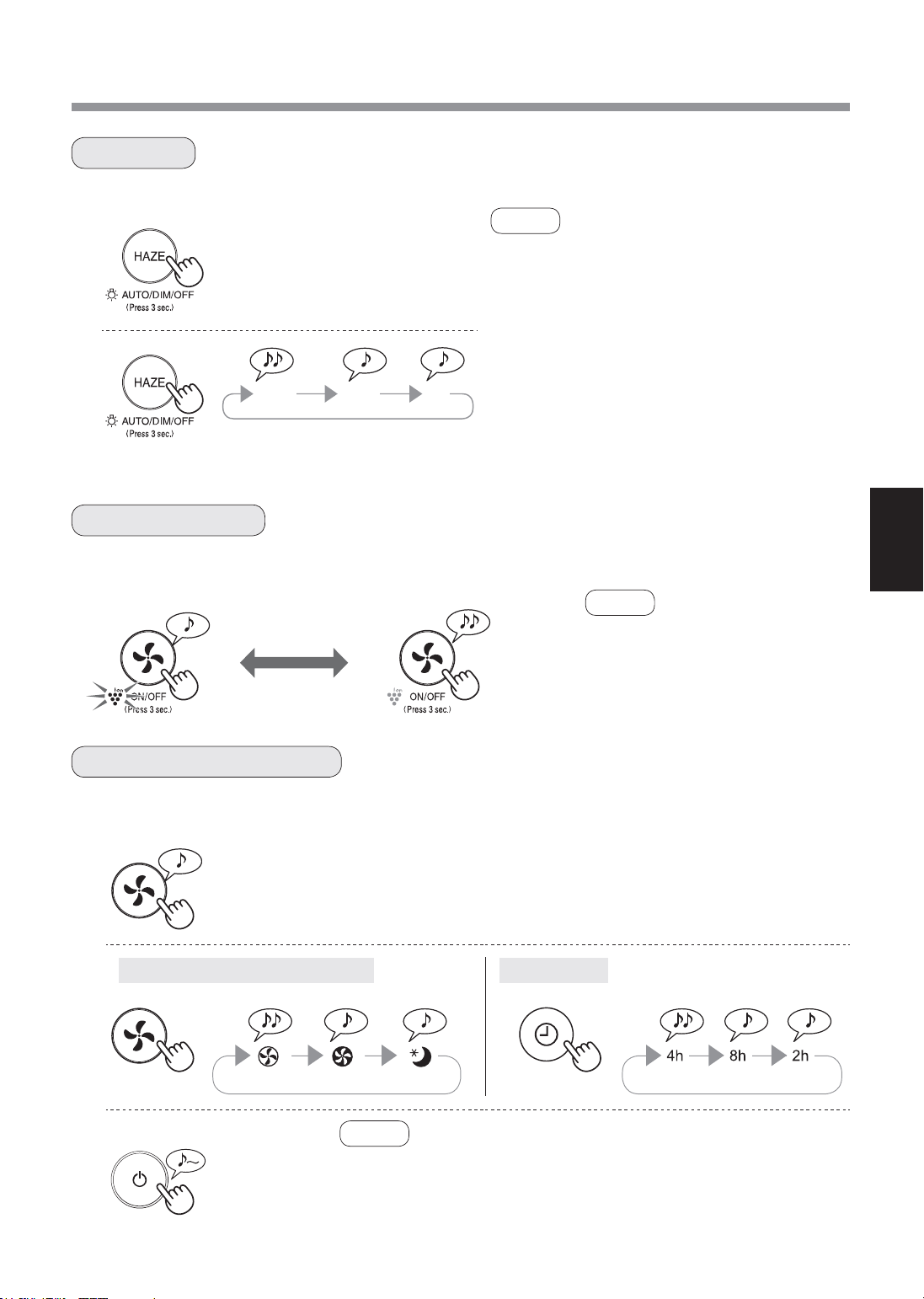
ZH-7
中文
1
(主机关闭)
2
灵敏灰尘传感器/ 异味传感器 光线传感器
3
在清洁度侦测器 / 净离子群指示灯亮起时, 您可将其设置为关闭。
当净离子群已开启, 净离子群指示灯将会亮起。 (蓝色)
关
3秒以上
灯光控制
净离子群开 / 关
调整传感器探测灵敏度
开
3秒以上
(主机开启)
•当主机开始启动时, 按之前的运行
模式开始运转。
1
(主机开启)
注意
•如果未在8秒钟内按下烟霾按钮, 设置将自动被保
存。
•当主机开始启动时, 按之前的运行模式开始运转。
2
自动
灯光根据室内亮度自动开或关。
室内光线亮 : 灯开启
室内光线暗 : 灯关闭
关
设置为 “关” 时,开始运转后,“暗光” 灯亮起8秒,
然后熄灭。
3秒以上
自动
暗光
关
注意
注意
灵敏灰尘传感器 / 异味传感器和光线传感器的灵敏度可以更改。
3秒以上
标准 高 低 标准 高 低
•如果调整传感器灵敏度后未在8秒钟内按下电源开 / 关按钮, 设置
将自动被保存。
•即使拔出主机电源插头, 也会保存传感器灵敏度设置。
FP-J50_CS.indd 7 2020/08/28 10:01:01
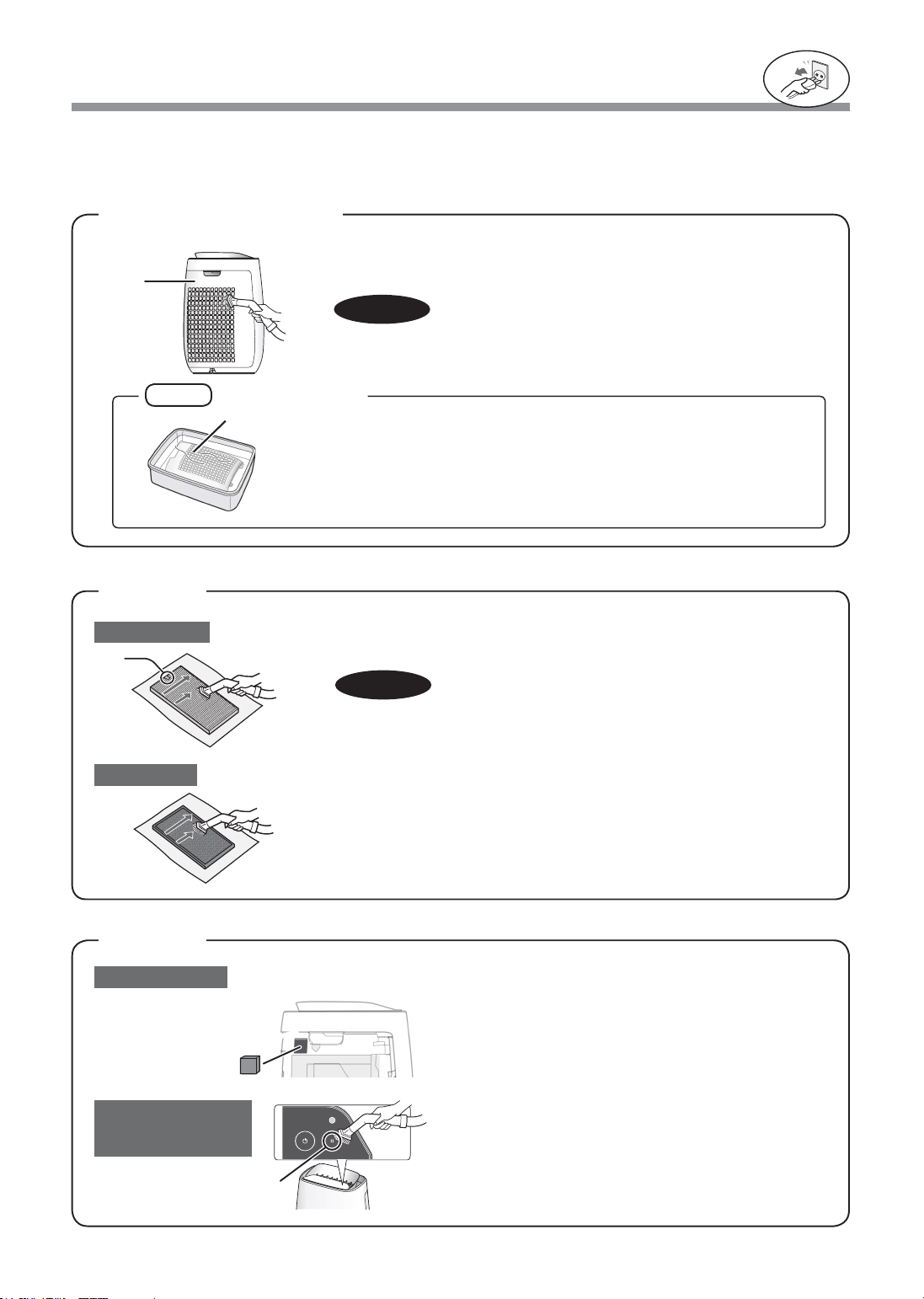
ZH-8
保养与维护
用吸尘器附件或类似工具轻轻地清除后面板的灰尘。
后面板
(前置过滤网)
为了保持空气净化器的最佳性能, 请定期清洁主机 (包括过滤网)。
在进行任何维修之前, 请确保电源插头已从墙壁电源插座上拔除。
注意
务必将电源插头从墙上的电源插座
上拔出。
1. 取下后面板。
2. 取下传感器过滤网。
3. 如果它非常脏, 请用水清洗并晾干。
传感器过滤网
擦洗后面板时, 请勿用力过度。
用吸尘器附件或类似工具轻轻地清除传感器的灰尘。
标签
HEPA过滤网
灵敏灰尘传感器
传感器
( 异味/温度/湿度 )
祛味过滤网
注意
用吸尘器附件或类似工具轻轻地清除HEPA过滤网和祛味过滤网上的灰
尘。
请勿用水冲洗及在太阳下晒干。
过滤网较脆弱, 请小心不要太过用力。
后面板
传感器
后面板
注意
过滤网
传感器
如何清洁顽固污渍
1.在水中滴几滴中性洗涤剂, 将后面板浸泡10分钟左右。
2. 用干净的水冲洗掉中性洗涤剂。
3. 在通风良好的地方晾干过滤网。
•HEPA过滤网
只可清洁贴有标签的一面。
请勿清洁另外一面。 否则, 过滤网将会损坏。
•祛味过滤网
可在两边进行维护。
FP-J50_CS.indd 8 2020/08/28 10:01:01
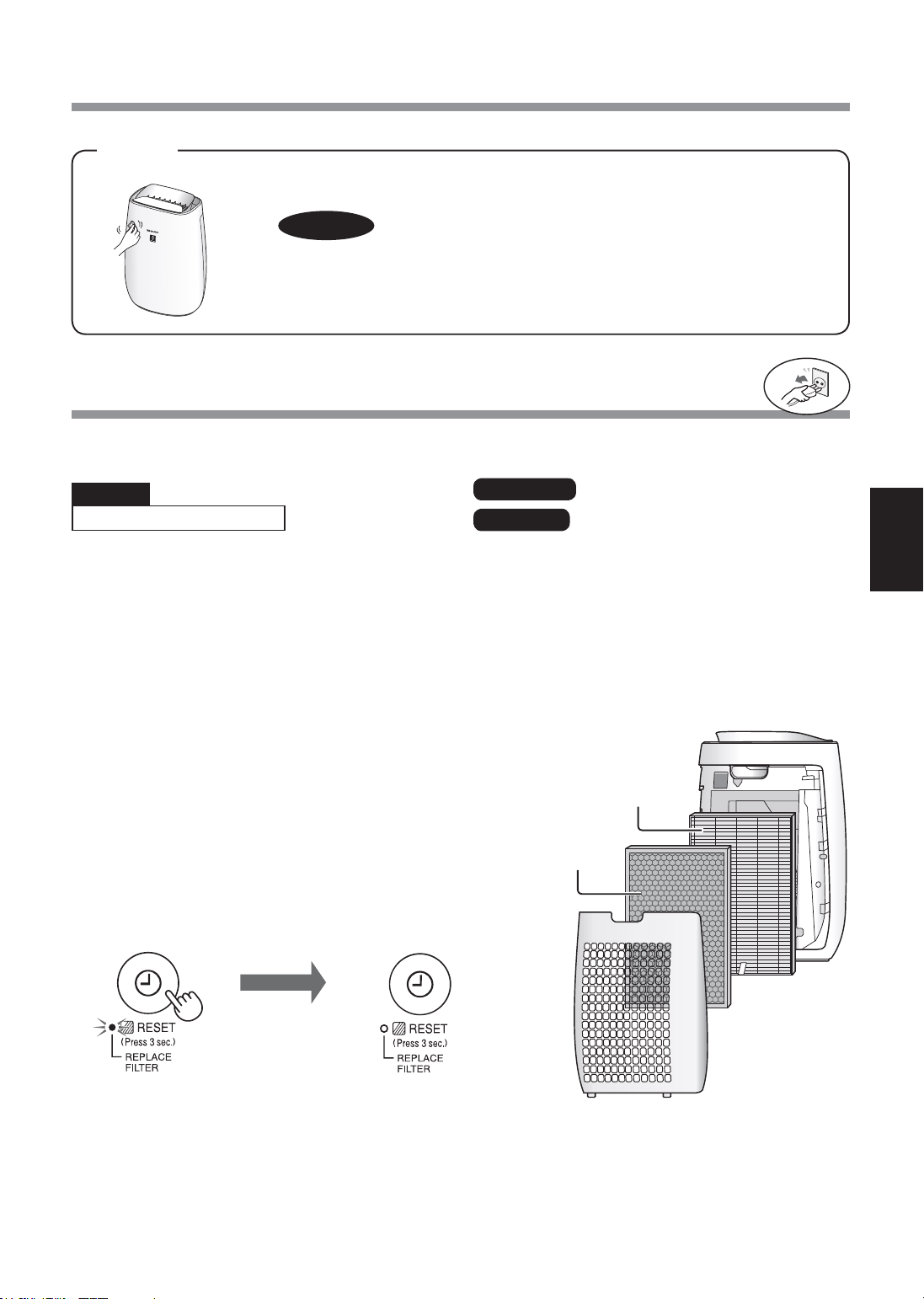
ZH-9
中文
更换
HEPA过滤网
祛味过滤网
主机
弃置过滤网
请按照当地法律和法规来处理已使用的过滤网。
更换时间
过滤网
过滤网更换指示灯
按照更换用的过滤网随附的说明更换过滤网。
在更换后, 将插头插入插座, 并按电源开关按钮, 然后按
关机定时按钮3秒。
型号 : FZ-F50HFE
型号 : FZ-F50DFE
过滤网的使用寿命
过滤网使用寿命及更换时间取决于使用环境。 对比新的过滤网, 一个每天吸烟 5 支的环境中, 过滤网的集尘能力
将会减半。
过滤网使用寿命取决于房间环境、 使用时间长短及主机的位置而定。
我们建议在比正常家庭显着恶劣的使用环境下应更频密地更换过滤网。
*当即将需要更换过滤网时, 过滤网更换指示灯将会亮起。
过滤网的寿命可通过使用灵敏灰尘传感器计算出粉尘量而得出。
HEPA过滤网材料 :
•聚丙烯
•聚乙烯
祛味过滤网材料 :
•聚丙烯•聚酯
•活性炭
用柔软干布擦拭
对于顽固污渍或灰尘, 使用一块以温水浸泡过的软布擦拭。
HEPA
过滤网
祛味过滤网
注意
• 请勿使用挥发性液体
挥发油、 油漆稀释剂及抛光粉等均有可能损坏主机表面。
• 请勿使用洗涤剂
清洁剂成分可能会损坏主机。
当过滤网更换指示灯亮起时 *
• HEPA过滤网: 开封后约2年
• 祛味过滤网: 开封后约2年
务必将电源插头从墙上的电源插座
上拔出。
关闭状态
3秒以上
FP-J50_CS.indd 9 2020/08/28 10:01:02
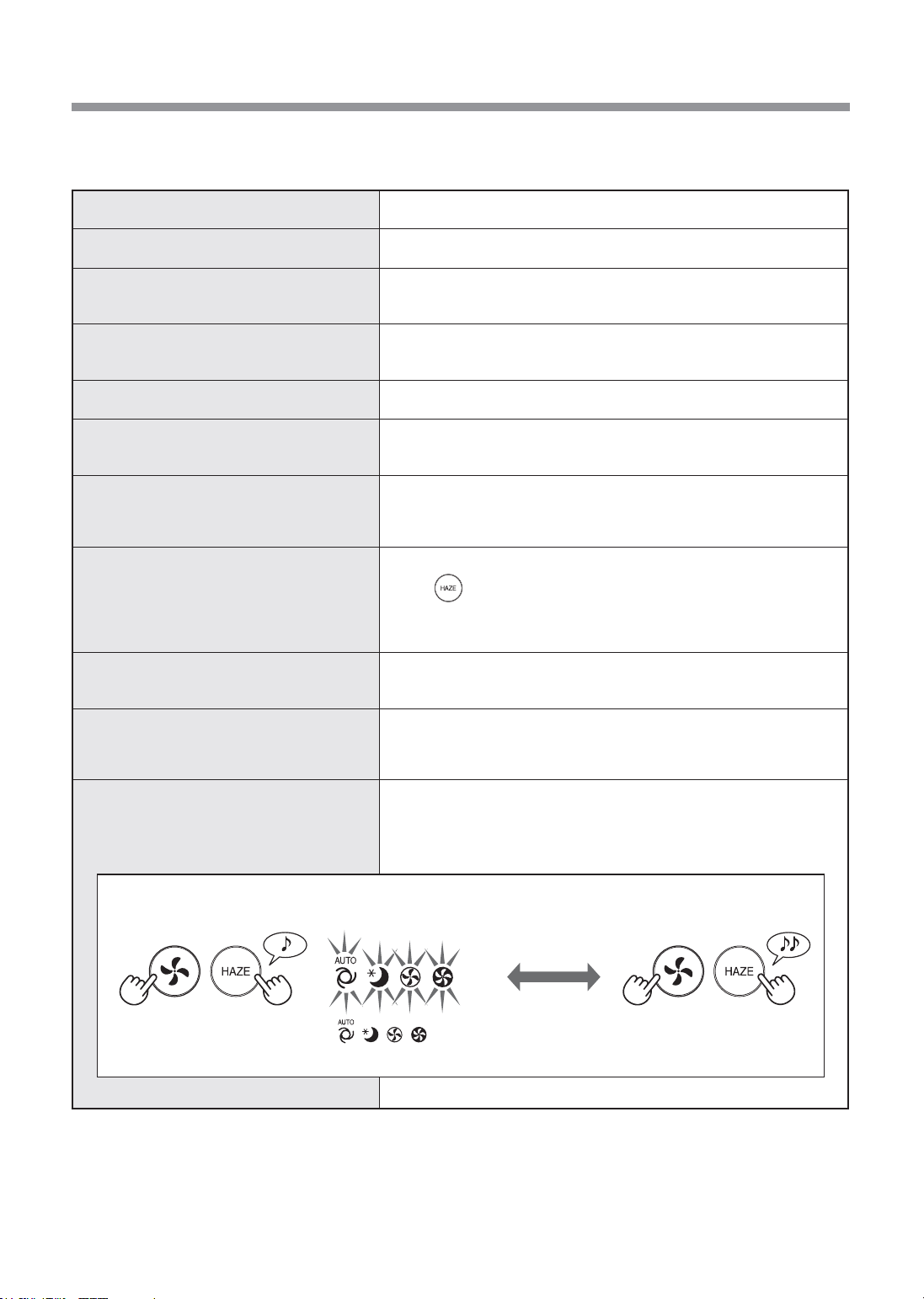
ZH-10
维修前的检查事项
症状 补救措施 (并非故障)
不能去除异味和烟雾。
• 过滤网已充满污垢, 请更换过滤网。 (第9页)
即使在空气不洁净时, 清洁度侦测器指示
灯也亮起为蓝色。
• 主机接通电源时, 空气可能不洁净。
拔下主机电源插头, 等待一分钟, 再重新插入主机插头。
即使在空气洁净时, 清洁度侦测器指示灯
也亮起为橙色或红色。
• 如果灰尘传感器开口不干净或阻塞, 传感器运行会受到影响。 轻轻清
洁灰尘传感器开口。 (第8 页)
主机发出喀嚓或滴答的声音。
• 当主机正在释放离子时, 可能会发出喀嚓或滴答的声音。
排放的空气有异味。
• 检查过滤网是否已充满污垢。
• 清洁或更换过滤网。
空气中有香烟烟雾时, 主机不能正常运
行。
• 主机是否安置在传感器难以探测到香烟烟雾的位置?
• 灵敏灰尘传感器开口是否阻塞或堵塞?
(如果是, 请清洁开口。) (第8页)
清洁度侦测器指示灯熄灭。
• 检查是否选择了灯光熄灭模式。
长按 3秒钟点亮显示灯。 (第7页)
• 检查是否选择了睡眠模式。
选择睡眠模式后, 清洁度侦测器 / 净离子群指示灯自动熄灭。
新机器和 / 或新过滤网的气味。
• 拆掉塑料袋后, 可能会短暂出现轻微异味。 这种异味不影响过滤网过
滤性能, 人与之接触也无害。
清洁度侦测器指示灯频繁改变颜色。
• 当灵敏灰尘传感器和异味传感器检测到杂质时, 清洁度侦测器指示灯会
自动改变颜色。
如果无需频繁改变颜色, 可更改传感器的灵敏度。 (第7页)
自动记忆功能
断电后, 电源恢复时自动恢复运行。
• 运行过程中电源插头拔出或是断路器发生故障时, 在恢复供电之后,
设备按之前的操作模式和设置继续运行。
拨打服务电话之前, 请查看下方疑难解答表格, 因为出现的问题可能不是主机故障。
开 (默认) 关
(主机关闭) (主机关闭)
如果、、、指示灯持续亮起8秒钟,
设定完成。
(同时触按3秒以上 ) (同时触按3秒以上 )
FP-J50_CS.indd 10 2020/08/28 10:01:02
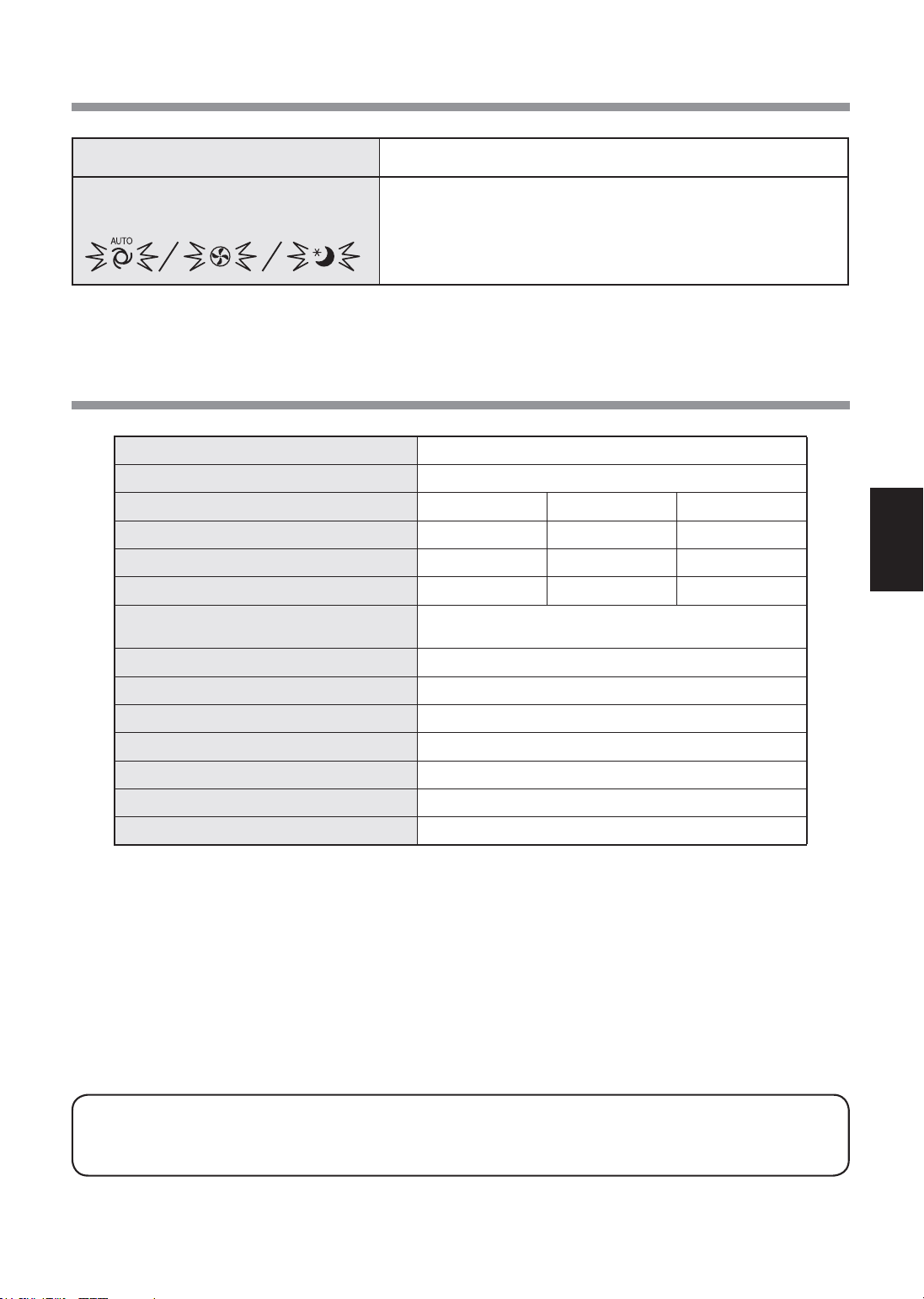
ZH-11
中文
型号 FP-J50
电源供应
220-240伏50-60赫兹
风速调节
最大 中等
睡眠模式 *
2
风速 (立方米 / 小时)
306 186 48~120
噪音级(dBA)*
1
51 39 15~30
额定功率(W)
39 14 4.5~7.5
备用耗电量(W)
1.6( 当Wi-Fi适配器打开时。 )
1.2( 当Wi-Fi适配器关闭时。 )
建议房间面积 (平方米 )*
3
~40
高密度离子簇建议房间面积( 平方米 )*
4
~23
过滤网类型
HEPA*
5
/祛味
传感器 灵敏灰尘/异味/温度/湿度/光线
电源线长度 (米) 2.0
尺寸 (毫米) 390 (宽) ×270 (深) ×583 (高)
重量 (千克) 6.4
*1•噪声级根据日本电器生产商联合会的JEM1467标准测定。
*2•风速根据空气中杂质的量和室内的亮度自动切换。
*3•建议房间面积是指在强风模式下运行主机的最合适的房间面积。
•建议房间面积是指在30分钟内能去除固定灰尘颗粒的区域。 ( 符合JEM1467).
*4•当主机被放置在靠墙位置、 以MED (中等) 模式运行, 且距离地面约1.2米高时, 在房间中央能够检测到每立
方厘米空气中约含7000个离子。
*5•过滤网可去除多于99.97%的0.3微米及以上大小的颗粒物 ( 符合JEM1467).
备用耗电量
当主机的电源插头插入插座时, 主机会产生备用耗电量, 来运行电路。 为了节约用电,
请于不使用主机时拔除电源接线。
症状 补救措施 (并非故障)
以下指示灯之一闪烁。
• 拔下主机电源插头, 等待一分钟, 再重新插入主机插头。
规格
FP-J50_CS.indd 11 2020/08/28 10:01:02
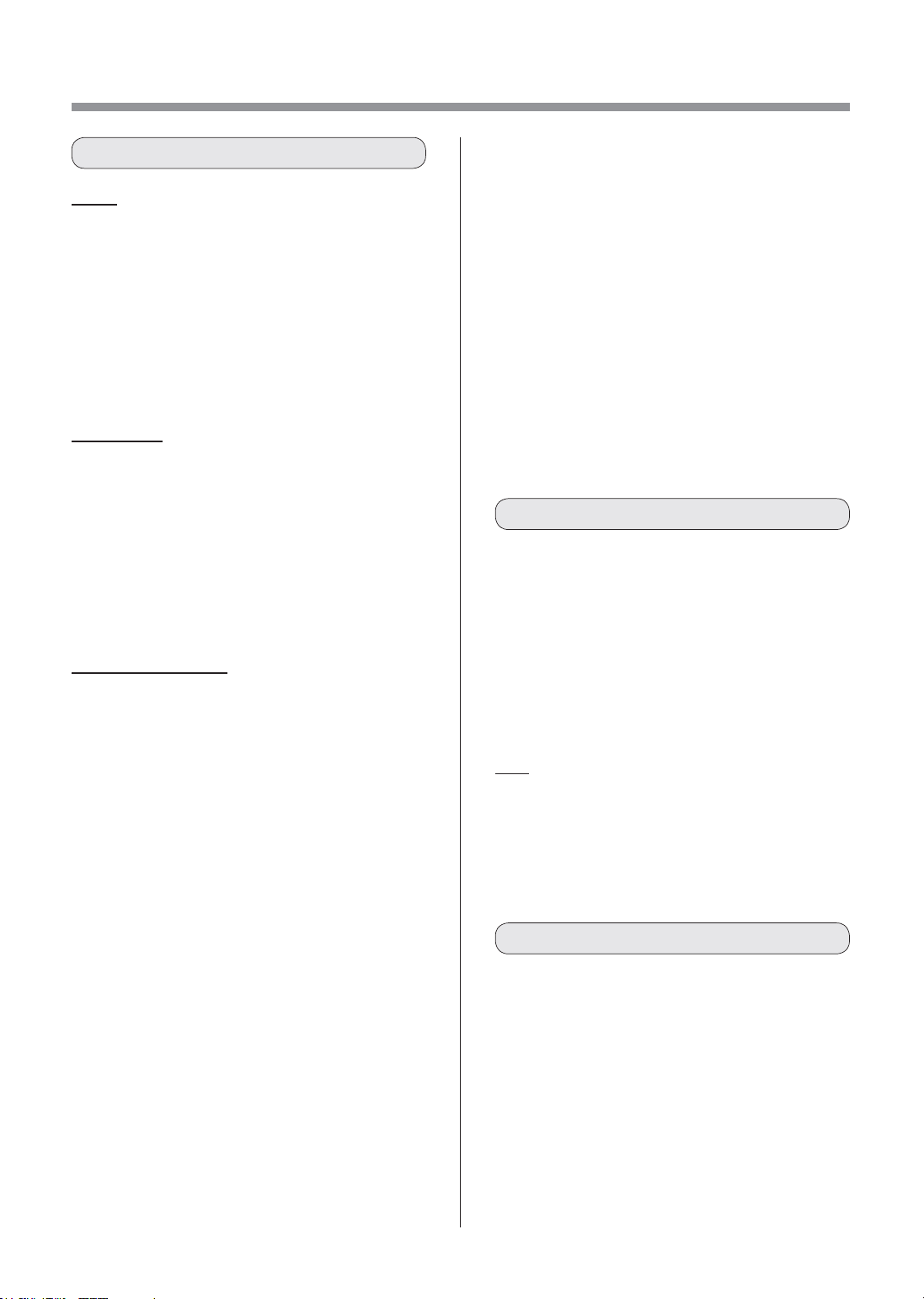
ZH-12
Wi-Fi设置
警告
如果在离家时进行远程操作, 因无法检查空气
净化器及其周边以及其他在家人员的情况, 请
在使用前充分进行安全确认。
• 务必使电源插头完全插入电源插座, 并且插头或
插座孔中没有灰尘。 (接触不良或接触故障可能
会导致发热、 燃烧、 起火等)
• 务必事先确认风流的变化是否会影响室内的环境。
(比如 ...... 风中是否有任何易飞的东西)
因为风会让东西掉下来, 导致火灾、 损伤、 家
居物品的污损。
使用注意
• 使用App, 需要先同意 “服务条款”。
• App会因为版本升级而定期性地修改。
• 本手册中的画面和插图仅供参考, 其与真实产品
存在一定差异。
• 如果连接不良, 智能手机可能无法对空调进行控
制, 或运行状态可能无法反映到智能手机上。
• 建议锁定智能手机显示屏以避免错误操作。
• 尽管该应用程序是免费的, 但下载专用应用程序
和使用智能手机或平板电脑操作的通信费用则由客
户承担。
Wi-Fi使用注意
关于电波使用的注意事项
• 如果在以下地方使用, 则无法保证该操作 : 使用
与本产品相同的频率 (2.4GHz) 或指定的低功耗
无线设备靠近蓝牙
®
(Bluetooth®) 无线通信
设备。 此外, 在诸如微波炉等设备的磁场之类的
地方, 或者发生静电或地方无线电干扰的地方,
由于电波较弱, 可能暂时无法使用。
•不能保证所有路由器或居室环境均能实现无线连接
和性能。 在以下场地, 电波可能无法到达或无法
连接 : 在混凝土、 钢筋或金属建造的建筑物内 /
靠近障碍物 / 靠近使用相同频率的无线通讯装置。
•本产品的Wi-Fi的对应信道为1~13。 本产品无法
与设置到其他信道的路由器进行通信。
注意 (与安全有关的) 个人信息
•不管密码设置如何, 只要使用电波, 使用Wi-Fi
设备有可能被拦截。
•由于该产品与路由器间应用电波通信, 在服务区
内, Wi-Fi可享用免费局域网连接。 另一方面,
电波通过障碍物 (如墙) 到达某一区域的任何地
方, 因此可能发生通信拦截或不正当侵入。
•在没有App权限的情况下, 请不要进行设备或网
络连接。
•本产品的Wi-Fi功能应在产品废弃或转让给第三人
时进行初始化。
•当从第三人处转让获得本产品时, 请将Wi-Fi功能
进行初始化, 以避免他人非法访问。
请检查将空气净化器连接到Wi-Fi网络所需的一
切。
•
互联网
•
Wi-Fi接入点 (路由器)
推荐的加密方法是WPA2(AES)。
•
便携式终端设备, 例如智能手机、 平板电脑
等。
支持的操作系统 (截至2020年11月)
Android4.1或更高版本的智能手机 / 平板电脑
iOS9或更高版本的iPhone、 iPodtouch、 iPads
•
Wi-Fi
:IEEE802.11b/g/n
•
频率范围
:2.4GHz频带
商标
• “Wi-Fi
®
” 是Wi-Fi联盟
®
的注册商标。
• “Android” 是谷歌公司的商标。
• “iPhone”、 “iPodtouch” 和 “iPad” 是苹果公司的注册
商标或商标。
• 操作说明中提及的其他公司名称、 企业名称、 产品名
称均为各公司的商标和注册商标。
安全预防措施
必要环境
规格
FP-J50_CS.indd 12 2020/08/28 10:01:02
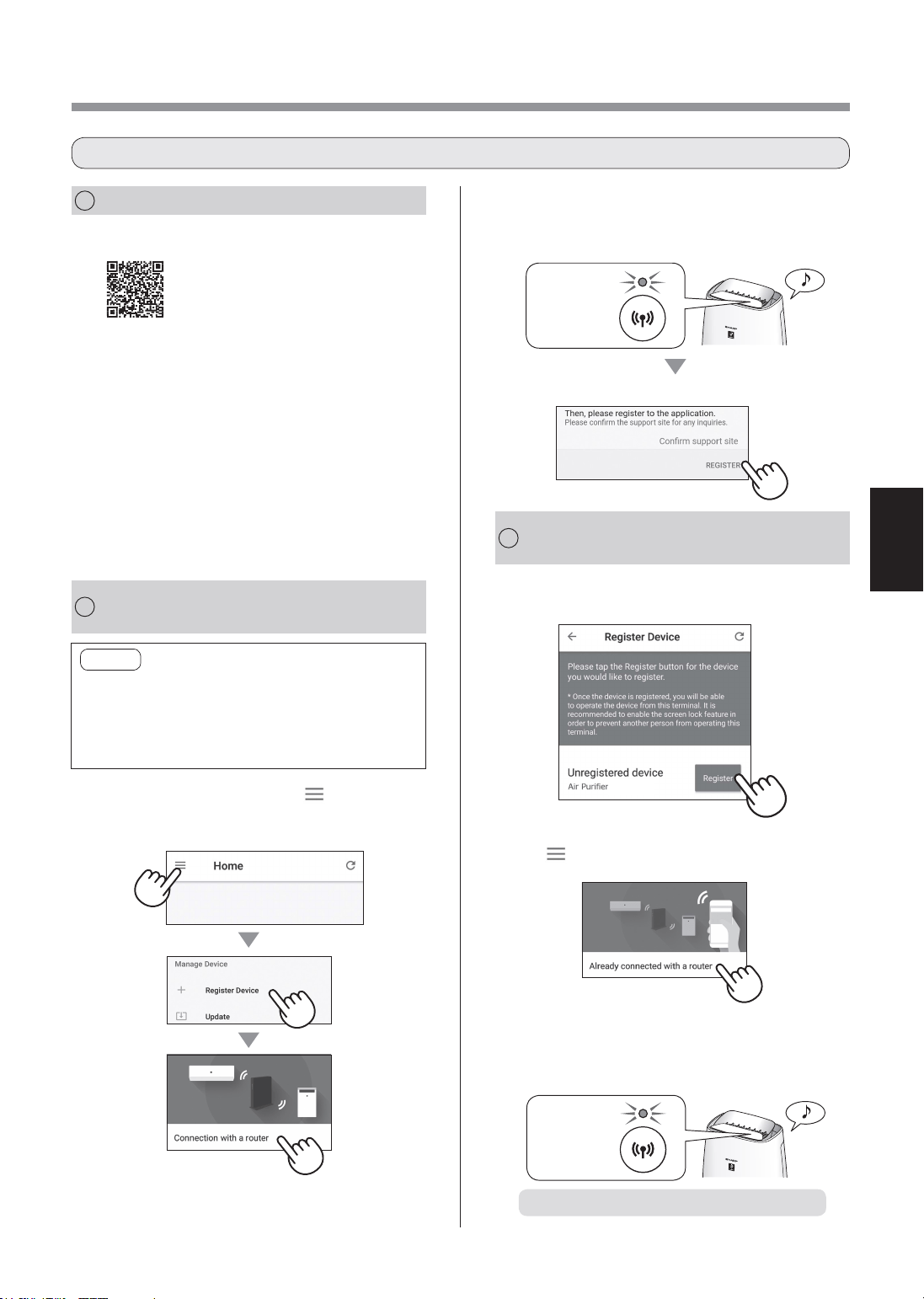
ZH-13
中文
1.
点击“注册”查看您要注册的空气净化
器。
2.
按照App上的说明进行操作。
(
XX-XXXX
)
•如果在听到通知声后Wi-Fi指示灯变亮, 则
说明已连接成功。
变亮
初始设置已完成。
1
APP的安装
2
空气净化器和
路由器的连接
3
空气净化器与
智能手机之间的连接
1.
在智能手机中安装指定App。
•该App可以从以下传输服务平台
下载。
Android:GooglePlay
iOS:App商城
https://cboard.cloudlabs.sharp.co.jp/smartapp_asean/download/air/
2.
将您的智能手机与路由器连接,然后启
动App。
按照App上的说明进行操作。
i.
确认 “使用条款”。
ii.
输入SHARPID。
•如果没有SHARPID, 则请注册一个新的
SHARPID。
iii.
请输入您的智能手机名称。
1.
点击“主页”屏幕上的“ ”,选择“
设备注册”=>“与路由器连接”。
注意
•如果您的路由器上有隐身设置或MAC过滤设
置, 请取消这些设置。
•产品网络ID显示为“AP-SHARP-XX”(其中XX
是产品MAC地址下的2位数字)。
2.
按照App上的说明进行操作。
点击“注册”。
•如果在听到通知声后Wi-Fi指示灯变亮, 则
说明已连接成功。
变亮
•如未看到上方屏幕, 请点击 “主页” 屏幕上的
“ ”, 然后选择 “设备注册”=> “已与路由
器连接”。
初始设置流程
FP-J50_CS.indd 13 2020/08/28 10:01:03
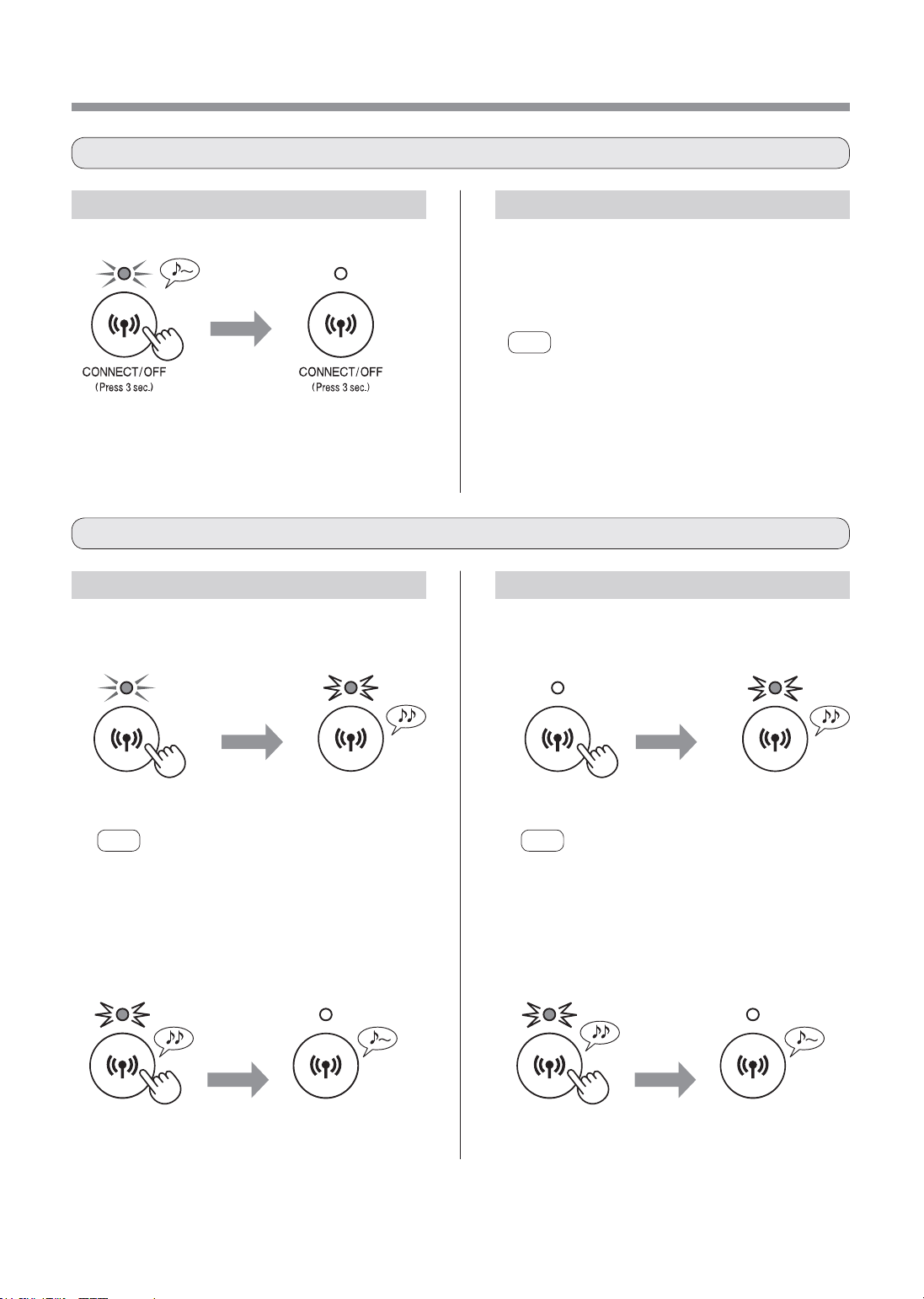
ZH-14
如何在Wi-Fi已打开的情况下初始化
Wi-Fi设置
请参考第13页并再次建立与路由器的
连接。
• 如果已使用智能手机完成产品注册, 则无需再次注
册。
注意
• 您可按住Wi-Fi按钮3秒或更久不放, 来再次启动
Wi-Fi功能。 按下该按钮片刻之后, 会响起4次提
示音。 之后, Wi-Fi指示灯将会亮起, Wi-Fi连接
便已完成。 ( 在这种情况下, 与路由器的Wi-Fi连
接将自动恢复。 )
8秒以上
闪烁
注意
按住此按钮3秒后, 将会响起一声长提示音, 然后
Wi-Fi指示灯会熄灭, 但此时应继续按住按钮不放。
8秒以上
闪烁
注意
按住此按钮3秒后, 将会响起一声短提示音, 然后
Wi-Fi指示灯会闪烁, 但此时应继续按住按钮不放。
3秒以上 3秒以上
2.在之后2分钟内再次按住Wi-Fi按钮不
放超过3秒。
稍等片
刻之后
稍等片
刻之后
关闭状态 关闭状态
初始化设置
完成
初始化设置
完成
完成初始设置后如何设置Wi-Fi开 / 关
如何初始化Wi-Fi功能
关闭状态
3秒以上
如何关闭Wi-Fi。 如何再次打开Wi-Fi。
如何在Wi-Fi已关闭的情况下初始化
1.按住Wi-Fi按钮不放超过8秒。 1.按住Wi-Fi按钮不放超过8秒。
2.在之后2分钟内再次按住Wi-Fi按钮
不放超过3秒。
闪烁
闪烁
FP-J50_CS.indd 14 2020/08/28 10:01:04
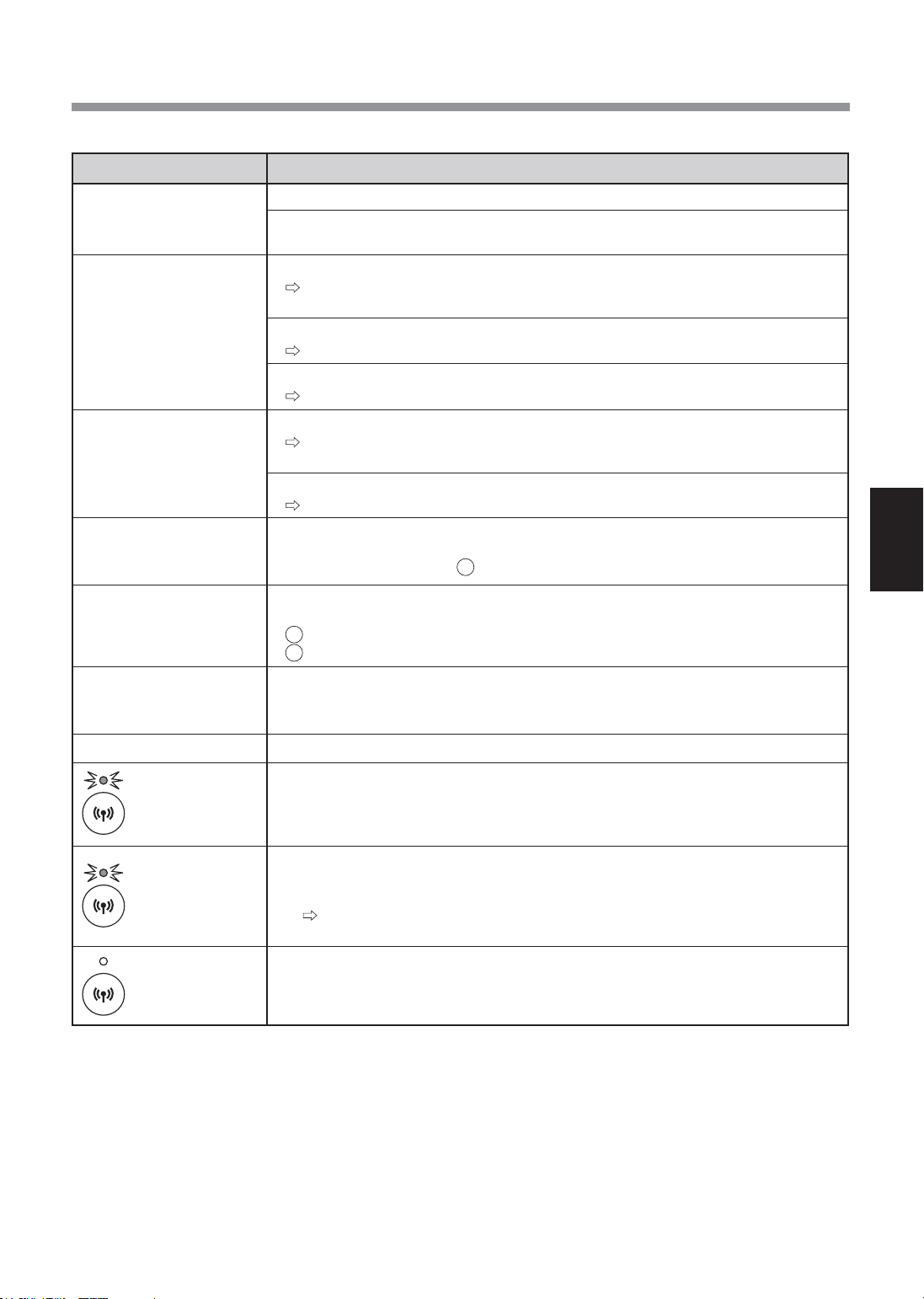
ZH-15
中文
Wi-Fi功能故障排除
问题 需检查的项目
空气净化器和路由器的
Wi-Fi连接无法进行。
•查看所用路由器的规格。
•调整路由器和天线方向、 将路由器和天线移至近处等措施。 之后, 重新开启路由
器并再次执行初始设置。
空气净化器和您的智能手
机之间无法建立连接。
•空气净化器和您的智能手机是否连接到同一台路由器?
将空气净化器和您的智能手机连接到同一台路由器。 如果仍然无法连接, 请尝
试将智能手机连接到路由器的2.4GHz频段。
•智能手机的使用总数是否超过了在一台空气净化器上注册的最大数量?
在同一台空气净化器上注册的智能手机数量最多为10部。
•使用一部智能手机注册的产品(空调,空气净化器等)总数是否超过最大指定数量?
同一部智能手机可注册的产品数量最多为30台。
无法执行智能手机的远程
操作。
•空气净化器的Wi-Fi指示灯是否点亮?
如果Wi-Fi指示灯未亮起, 请将空气净化器再次连接到路由器。
(第13 页)
•空气净化器和您的智能手机之间的连接是否已完成?
请设置空气净化器和您的智能手机之间的连接。 (第13页)
当更换路由器时
•必须将空气净化器重新连接到路由器。
1.按下 Wi-Fi 按钮3秒, 以停用Wi-Fi功能。
2.执行 “初始设置流程 : 2连接空气净化器和路由器”。 (第13页)
当更换智能手机时
1.从指定的App中删除旧智能手机的注册。
2.使用新智能手机执行 “初始设置流程 :
1安装App以及
3连接空气净化器和智能手机”。 (第13页)
何时处理或移交空气净化
器
•执行以下步骤, 以防止个人信息泄露。
1.从指定的App中删除空气净化器的注册。
2.初始化空气净化器的Wi-Fi功能。 (第14 页)
如果是从第三方转让所得
•为避免他人未经授权的访问, 应初始化空气净化器的Wi-Fi功能。 (第14 页)
缓慢地闪烁
•可能处于以下任一状态。
A.空气净化器与路由器的Wi-Fi连接正在设定中。
B.空气净化器与智能手机的连接正在设定中。
C.空气净化器中用于Wi-Fi功能的软件正在更新。
快速闪烁
•网络错误。 请确认以下两项。
A.请确认路由器的网络状态。
B.将空气净化器关闭后, 检查互联网状态。
如果A和B均无问题, 则将空气净化器关闭。 将空气净化器关闭后, 检查
互联网状态。 (第13 页)
关闭状态
•空气净化器不能连接至路由器。 请确认以下两项。
A. 电源插头是否连接正确?
B.Wi-Fi功能是否已停用?将空气净化器再次连接到路由器。 (第13 页)
在咨询或要求维修之前, 请查看以下详细信息。
FP-J50_CS.indd 15 2020/08/28 10:01:04

Intellectual property rights for this product
■Softwarestructure
Software installed in this product is structured with multiple independent
software components, each of them has our or third-party's copyright.
■Softwareofourdevelopmentandfreesoftware
Among the software components of this product, for software we
developed or created and incidental documents has our copyright. And
they are protected
by copyright law, international regulation and other related laws.
Also this product uses software components distributed as free software
with third-party's copyright.
■Obligationoflicenseindication
Some software components installed in this product are required to indicate
the license by those copyright holders.
License indications of such software components are as below:
●Expat
Copyright (c) 1998, 1999, 2000 Thai Open Source Software Center Ltd and Clark
Cooper
Copyright (c) 2001, 2002, 2003, 2004, 2005, 2006 Expat maintainers.
Permission is hereby granted, free of charge, to any person obtaining a copy of
this software and associated documentation files (the "Software"), to deal in the
Software without restriction, including without limitation the rights to use, copy,
modify, merge, publish, distribute, sublicense, and/or sell copies of the Software,
and to permit persons to whom the Software is furnished to do so, subject to the
following conditions:
The above copyright notice and this permission notice shall be included in all
copies or substantial portions of the Software.
THESOFTWAREISPROVIDED"ASIS",WITHOUTWARRANTYOFANYKIND,
EXPRESS OR IMPLIED, INCLUDING BUT NOT LIMITED TO THE WARRANTIES
OF MERCHANTABILITY, FITNESS FOR A PARTICULAR PURPOSE AND
NONINFRINGEMENT.INNOEVENTSHALLTHEAUTHORSORCOPYRIGHT
HOLDERS BE LIABLE FOR ANY CLAIM, DAMAGES OR OTHER LIABILITY,
WHETHER IN AN ACTION OF CONTRACT, TORT OR OTHERWISE, ARISING
FROM, OUT OF OR IN CONNECTION WITH THE SOFTWARE OR THE USE OR
OTHER DEALINGS IN THE SOFTWARE.
●Wslay
The MIT License
Copyright (c) 2011, 2012 Tatsuhiro Tsujikawa
Permission is hereby granted, free of charge, to any person obtaining a copy of
this software and associated documentation files (the "Software"), to deal in the
Software without restriction, including without limitation the rights to use, copy,
modify, merge, publish, distribute, sublicense, and/or sell copies of the Software,
and to permit persons to whom the Software is furnished to do so, subject to the
following conditions:
The above copyright notice and this permission notice shall be included in all
copies or substantial portions of the Software.
THESOFTWAREISPROVIDED"ASIS",WITHOUTWARRANTYOFANYKIND,
EXPRESS OR IMPLIED, INCLUDING BUT NOT LIMITED TO THE WARRANTIES
OF MERCHANTABILITY, FITNESS FOR A PARTICULAR PURPOSE AND
NONINFRINGEMENT.INNOEVENTSHALLTHEAUTHORSORCOPYRIGHT
HOLDERS BE LIABLE FOR ANY CLAIM, DAMAGES OR OTHER LIABILITY,
WHETHER IN AN ACTION OF CONTRACT,TORT OR OTHERWISE, ARISING
FROM, OUT OF OR IN CONNECTION WITH THE SOFTWARE OR THE USE OR
OTHER DEALINGS IN THE SOFTWARE.
●libFLAC
Copyright (C) 2000-2009 Josh Coalson
Copyright (C) 2011-2014 Xiph.Org Foundation
Redistribution and use in source and binary forms, with or without modification, are
permitted provided that the following conditions are met:
- Redistributions of source code must retain the above copyright notice, this list of
conditions and the following disclaimer.
- Redistributions in binary form must reproduce the above copyright notice, this
list of conditions and the following disclaimer in the documentation and/or other
materials provided with the distribution.
- Neither the name of the Xiph.org Foundation nor the names of its contributors
may be used to endorse or promote products derived from this software without
specific prior written permission.
THISSOFTWAREISPROVIDEDBYTHECOPYRIGHTHOLDERSAND
CONTRIBUTORS ``AS IS'' AND ANY EXPRESS OR IMPLIED WARRANTIES,
INCLUDING, BUT NOT LIMITED TO, THE IMPLIED WARRANTIES OF
MERCHANTABILITY AND FITNESS FOR A PARTICULAR PURPOSE ARE
DISCLAIMED.INNOEVENTSHALLTHEFOUNDATIONORCONTRIBUTORS
BE LIABLE FOR ANY DIRECT, INDIRECT, INCIDENTAL, SPECIAL, EXEMPLARY,
OR CONSEQUENTIAL DAMAGES (INCLUDING, BUT NOT LIMITED TO,
PROCUREMENTOFSUBSTITUTEGOODSORSERVICES;LOSSOFUSE,
DATA,ORPROFITS;ORBUSINESSINTERRUPTION)HOWEVERCAUSED
AND ON ANY THEORY OF LIABILITY, WHETHER IN CONTRACT, STRICT
LIABILITY, OR TORT (INCLUDING NEGLIGENCE OR OTHERWISE) ARISING IN
ANYWAYOUTOFTHEUSEOFTHISSOFTWARE,EVENIFADVISEDOFTHE
POSSIBILITY OF SUCH DAMAGE.
●Iw-IP
Copyright (c) 2001, 2002 Swedish Institute of Computer Science.
All rights reserved.
Redistribution and use in source and binary forms, with or without modification, are
permitted provided that the following conditions are met:
1. Redistributions of source code must retain the above copyright notice, this list of
conditions and the following disclaimer.
2. Redistributions in binary form must reproduce the above copyright notice, this
list of conditions and the following disclaimer in the documentation and/or other
materials provided with the distribution.
3. The name of the author may not be used to endorse or promote products
derived from this software without specific prior written permission.
THISSOFTWAREISPROVIDEDBYTHEAUTHOR``ASIS''ANDANYEXPRESS
OR IMPLIED WARRANTIES, INCLUDING, BUT NOT LIMITED TO, THE IMPLIED
WARRANTIES OF MERCHANTABILITY AND FITNESS FOR A PARTICULAR
PURPOSEAREDISCLAIMED.INNOEVENTSHALLTHEAUTHORBE
LIABLE FOR ANY DIRECT, INDIRECT, INCIDENTAL, SPECIAL, EXEMPLARY,
OR CONSEQUENTIAL DAMAGES(INCLUDING, BUT NOT LIMITED TO,
PROCUREMENTOFSUBSTITUTEGOODSORSERVICES;LOSSOFUSE,
DATA,ORPROFITS;ORBUSINESSINTERRUPTION)HOWEVERCAUSED
AND ON ANY THEORY OF LIABILITY, WHETHER IN CONTRACT, STRICT
LIABILITY, OR TORT (INCLUDING NEGLIGENCE OR OTHERWISE) ARISING IN
ANYWAYOUTOFTHEUSEOFTHISSOFTWARE,EVENIFADVISEDOFTHE
POSSIBILITY OF SUCH DAMAGE.
This file is part of the lwIP TCP/IP stack.
Author: Adam Dunkels <adam@sics.se>
●JSMN
Copyright (c) 2010 Serge A. Zaitsev
Permission is hereby granted, free of charge, to any person obtaining a copy of
this software and associated documentation files (the "Software"), to deal in the
Software without restriction, including without limitation the rights to use, copy,
modify, merge, publish, distribute, sublicense, and/or sell copies of the Software,
and to permit persons to whom the Software is furnished to do so, subject to the
following conditions:
The above copyright notice and this permission notice shall be included in all
copies or substantial portions of the Software.
THESOFTWAREISPROVIDED"ASIS",WITHOUTWARRANTYOFANYKIND,
EXPRESS OR IMPLIED, INCLUDING BUT NOT LIMITED TO THE WARRANTIES
OF MERCHANTABILITY, FITNESS FOR A PARTICULAR PURPOSE AND
NONINFRINGEMENT.INNOEVENTSHALLTHEAUTHORSORCOPYRIGHT
HOLDERS BE LIABLE FOR ANY CLAIM, DAMAGES OR OTHER LIABILITY,
WHETHER IN AN ACTION OF CONTRACT, TORT OR OTHERWISE, ARISING
FROM, OUT OF OR IN CONNECTION WITH THE SOFTWARE OR THE USE OR
OTHER DEALINGS IN THE SOFTWARE.
●mbedTLS
Copyright (C) 2006-2015, ARM Limited, All Rights Reserved
LicensedundertheApacheLicense,Version2.0(the"License");
you may not use this file except in compliance with the License.
You may obtain a copy of the License at
http://www.apache.org/licenses/LICENSE-2.0
Unless required by applicable law or agreed to in writing, software distributed under
the License is distributed on an "AS IS" BASIS, WITHOUT WARRANTIES OR
CONDITIONS OF ANY KIND, either express or implied. See the License for the
specific language governing permissions and limitations under the License.
●wpasupplicant
Copyright (c) 2003-2017, Jouni Malinen <[email protected]> and contributors
All Rights Reserved.
Redistribution and use in source and binary forms, with or without modification, are
permitted provided that the following conditions are met:
1. Redistributions of source code must retain the above copyright notice, this list of
conditions and the following disclaimer.
2. Redistributions in binary form must reproduce the above copyright notice, this
list of conditions and the following disclaimer in the documentation and/or other
materials provided with the distribution.
3. Neither the name(s) of the above-listed copyright holder(s) nor the names of
its contributors may be used to endorse or promote products derived from this
software without specific prior written permission.
THISSOFTWAREISPROVIDEDBYTHECOPYRIGHTHOLDERSAND
CONTRIBUTORS "AS IS" AND ANY EXPRESS OR IMPLIED WARRANTIES,
INCLUDING, BUT NOT LIMITED TO, THE IMPLIED WARRANTIES OF
MERCHANTABILITY AND FITNESS FOR A PARTICULAR PURPOSE
AREDISCLAIMED.INNOEVENTSHALLTHECOPYRIGHTOWNEROR
CONTRIBUTORS BE LIABLE FOR ANY DIRECT, INDIRECT, INCIDENTAL,
SPECIAL, EXEMPLARY, OR CONSEQUENTIAL DAMAGES (INCLUDING, BUT
NOTLIMITEDTO,PROCUREMENTOFSUBSTITUTEGOODSORSERVICES;
LOSS OF USE, DATA, OR PROFITS; OR BUSINESS INTERRUPTION)
HOWEVERCAUSEDANDONANYTHEORYOFLIABILITY,WHETHERIN
CONTRACT, STRICT LIABILITY, OR TORT (INCLUDING NEGLIGENCE OR
OTHERWISE) ARISING IN ANY WAY OUT OF THE USE OF THIS SOFTWARE,
EVENIFADVISEDOFTHEPOSSIBILITYOFSUCHDAMAGE.
●newLib
(1) Red Hat Incorporated
i
FP-J50_EN.indd 1 2020/08/31 14:28:44

Copyright (c) 1994-2009 Red Hat, Inc. All rights reserved.
This copyrighted material is made available to anyone wishing to use, modify,
copy, or redistribute it subject to the terms and conditions of the BSD License.
This program is distributed in the hope that it will be useful, but WITHOUT
ANY WARRANTY expressed or implied, including the implied warranties of
MERCHANTABILITY or FITNESS FOR A PARTICULAR PURPOSE. A copy of this
license is available at
http://www.opensource.org/licenses. Any Red Hat trademarks that are incorporated
in the source code or documentation are not subject to the BSD License and may
only be used or replicated with the express permission of Red Hat, Inc.
(2) University of California, Berkeley
Copyright (c) 1981-2000 The Regents of the University of California.
All rights reserved.
Redistribution and use in source and binary forms, with or without modification, are
permitted provided that the following conditions are met:
* Redistributions of source code must retain the above copyright notice, this list
of conditions and the following disclaimer.
* Redistributions in binary form must reproduce the above copyright notice, this
list of conditions and the following disclaimer in the documentation and/or other
materials provided with the distribution.
* Neither the name of the University nor the names of its contributors may be
used to endorse or promote products derived from this software without specific
prior written permission.
THISSOFTWAREISPROVIDEDBYTHECOPYRIGHTHOLDERSAND
CONTRIBUTORS "AS IS" AND ANY EXPRESS OR IMPLIED WARRANTIES,
INCLUDING, BUT NOT LIMITED TO, THE IMPLIED WARRANTIES OF
MERCHANTABILITY AND FITNESS FOR A PARTICULAR PURPOSE
AREDISCLAIMED.INNOEVENTSHALLTHECOPYRIGHTOWNEROR
CONTRIBUTORS BE LIABLE FOR ANY DIRECT, INDIRECT, INCIDENTAL,
SPECIAL, EXEMPLARY, OR CONSEQUENTIAL DAMAGES (INCLUDING, BUT
NOTLIMITEDTO,PROCUREMENTOFSUBSTITUTEGOODSORSERVICES;
LOSS OF USE, DATA, OR PROFITS; OR BUSINESS INTERRUPTION)
HOWEVERCAUSEDANDONANYTHEORYOFLIABILITY,WHETHERIN
CONTRACT, STRICT LIABILITY, OR TORT (INCLUDING NEGLIGENCE OR
OTHERWISE) ARISING IN ANY WAY OUT OF THE USE OF THIS SOFTWARE,
EVENIFADVISEDOFTHEPOSSIBILITYOFSUCHDAMAGE.
(3) David M. Gay (AT&T 1991, Lucent 1998)
The author of this software is David M. Gay.
Copyright (c) 1991 by AT&T.
Permission to use, copy, modify, and distribute this software for any purpose
without fee is hereby granted, provided that this entire notice is included in all
copies of any software which is or includes a copy or modification of this software
and in all copies of the supporting documentation for such software.
THISSOFTWAREISBEINGPROVIDED"ASIS",WITHOUTANYEXPRESSOR
IMPLIED WARRANTY. IN PARTICULAR, NEITHER THE AUTHOR NOR AT&T
MAKES ANY REPRESENTATION OR WARRANTY OF ANY KIND CONCERNING
THE MERCHANTABILITY OF THIS SOFTWARE OR ITS FITNESS FOR ANY
PARTICULAR PURPOSE.
-------------------------------------------------------------------
The author of this software is David M. Gay.
Copyright (C) 1998-2001 by Lucent Technologies
All Rights Reserved
Permission to use, copy, modify, and distribute this software and its documentation
for any purpose and without fee is hereby granted, provided that the above
copyright notice appear in all copies and that both that the copyright notice and this
permission notice and warranty disclaimer appear in supporting documentation, and
that the name of Lucent or any of its entities not be used in advertising or publicity
pertaining to distribution of the software without specific, written prior permission.
LUCENT DISCLAIMS ALL WARRANTIES WITH REGARD TO THIS SOFTWARE,
INCLUDING ALL IMPLIED WARRANTIES OF MERCHANTABILITY AND
FITNESS.INNOEVENTSHALLLUCENTORANYOFITSENTITIESBE
LIABLE FOR ANY SPECIAL, INDIRECT OR CONSEQUENTIAL DAMAGES OR
ANYDAMAGESWHATSOEVERRESULTINGFROMLOSSOFUSE,DATAOR
PROFITS, WHETHER IN AN ACTION OF CONTRACT, NEGLIGENCE OR OTHER
TORTIOUS ACTION, ARISING OUT OF OR IN CONNECTION WITH THE USE
OR PERFORMANCE OF THIS SOFTWARE.
(4) Advanced Micro Devices
Copyright 1989, 1990 Advanced Micro Devices, Inc.
This software is the property of Advanced Micro Devices, Inc (AMD) which
specifically grants the user the right to modify, use and distribute this software
provided this notice is not removed or altered. All other rights are reserved by AMD.
AMD MAKES NO WARRANTY OF ANY KIND, EXPRESS OR IMPLIED, WITH
REGARDTOTHISSOFTWARE.INNOEVENTSHALLAMDBELIABLEFOR
INCIDENTAL OR CONSEQUENTIAL DAMAGES IN CONNECTION WITH OR
ARISING FROM THE FURNISHING, PERFORMANCE, OR USE OF THIS
SOFTWARE.
So that all may benefit from your experience, please report any problems or
suggestions about this software to the 29K Technical Support Center at 800-29-29-
AMD (800-292-9263) in the USA, or 0800-89-1131 in the UK, or 0031-11-1129 in
Japan, toll free. The direct dial number is 512-462-4118.
Advanced Micro Devices, Inc.
29K Support Products
Mail Stop 573
5900 E. Ben White Blvd.
Austin, TX 78741
800-292-9263
(7) Sun Microsystems
Copyright (C) 1993 by Sun Microsystems, Inc. All rights reserved.
Developed at SunPro, a Sun Microsystems, Inc. business. Permission to use, copy,
modify, and distribute this software is freely granted, provided that this notice is
preserved.
(8) Hewlett Packard
(c) Copyright 1986 HEWLETT-PACKARD COMPANY
To anyone who acknowledges that this file is provided "AS IS" without any express
or implied warranty:
permission to use, copy, modify, and distribute this file for any purpose is hereby
granted without fee, provided that the above copyright notice and this notice
appears in all copies, and that the name of Hewlett-Packard Company not be used
in advertising or publicity pertaining to distribution of the software without specific,
written prior permission. Hewlett-Packard Company makes no representations
about the suitability of this software for any purpose.
(9) Hans-Peter Nilsson
Copyright (C) 2001 Hans-Peter Nilsson
Permission to use, copy, modify, and distribute this software is freely granted,
provided that the above copyright notice, this notice and the following disclaimer
are preserved with no changes.
THISSOFTWAREISPROVIDED``ASIS''ANDWITHOUTANYEXPRESSOR
IMPLIED WARRANTIES, INCLUDING, WITHOUT LIMITATION, THE IMPLIED
WARRANTIES OF MERCHANTABILITY AND FITNESS FOR A PARTICULAR
PURPOSE.
(11) Christopher G. Demetriou
Copyright (c) 2001 Christopher G. Demetriou
All rights reserved.
Redistribution and use in source and binary forms, with or without modification, are
permitted provided that the following conditions are met:
1. Redistributions of source code must retain the above copyright notice, this list of
conditions and the following disclaimer.
2. Redistributions in binary form must reproduce the above copyright notice, this
list of conditions and the following disclaimer in the documentation and/or other
materials provided with the distribution.
3. The name of the author may not be used to endorse or promote products derived
from this software without specific prior written permission.
THISSOFTWAREISPROVIDEDBYTHEAUTHOR``ASIS''ANDANYEXPRESS
OR IMPLIED WARRANTIES, INCLUDING, BUT NOT LIMITED TO, THE IMPLIED
WARRANTIES OF MERCHANTABILITY AND FITNESS FOR A PARTICULAR
PURPOSEAREDISCLAIMED.INNOEVENTSHALLTHEAUTHORBE
LIABLE FOR ANY DIRECT, INDIRECT, INCIDENTAL, SPECIAL, EXEMPLARY,
OR CONSEQUENTIAL DAMAGES (INCLUDING, BUT NOT LIMITED TO,
PROCUREMENTOFSUBSTITUTEGOODSORSERVICES;LOSSOFUSE,
DATA,ORPROFITS;ORBUSINESSINTERRUPTION)HOWEVERCAUSED
AND ON ANY THEORY OF LIABILITY, WHETHER IN CONTRACT, STRICT
LIABILITY, OR TORT (INCLUDING NEGLIGENCE OR OTHERWISE) ARISING IN
ANYWAYOUTOFTHEUSEOFTHISSOFTWARE,EVENIFADVISEDOFTHE
POSSIBILITY OF SUCH DAMAGE.
(12) SuperH, Inc.
Copyright 2002 SuperH, Inc. All rights reserved
This software is the property of SuperH, Inc (SuperH) which specifically grants the
user the right to modify, use and distribute this software provided this notice is not
removed or altered. All other rights are reserved by SuperH.
SUPERH MAKES NO WARRANTY OF ANY KIND, EXPRESS OR IMPLIED, WITH
REGARDTOTHISSOFTWARE.INNOEVENTSHALLSUPERHBELIABLE
FOR INDIRECT, SPECIAL, INCIDENTAL OR CONSEQUENTIAL DAMAGES IN
CONNECTION WITH OR ARISING FROM THE FURNISHING, PERFORMANCE,
OR USE OF THIS SOFTWARE.
So that all may benefit from your experience, please report any problems or
suggestions about this software to the SuperH Support Center via e-mail at
SuperH, Inc.
405 River Oaks Parkway
San Jose
CA 95134
USA
(13) Royal Institute of Technology
Copyright (c) 1999 Kungliga Tekniska Högskolan
(Royal Institute of Technology, Stockholm, Sweden).
All rights reserved.
ii
FP-J50_EN.indd 2 2020/08/31 14:28:45

Intellectual property rights for this product
Redistribution and use in source and binary forms, with or without modification, are
permitted provided that the following conditions are met:
1. Redistributions of source code must retain the above copyright notice, this list of
conditions and the following disclaimer.
2. Redistributions in binary form must reproduce the above copyright notice, this
list of conditions and the following disclaimer in the documentation and/or other
materials provided with the distribution.
3. Neither the name of KTH nor the names of its contributors may be used to
endorse or promote products derived from this software without specific prior
written permission.
THISSOFTWAREISPROVIDEDBYKTHANDITSCONTRIBUTORS``AS
IS'' AND ANY EXPRESS OR IMPLIED WARRANTIES, INCLUDING, BUT NOT
LIMITED TO, THE IMPLIED WARRANTIES OF MERCHANTABILITY AND
FITNESSFORAPARTICULARPURPOSEAREDISCLAIMED.INNOEVENT
SHALL KTH OR ITS CONTRIBUTORS BE LIABLE FOR ANY DIRECT, INDIRECT,
INCIDENTAL, SPECIAL, EXEMPLARY, OR CONSEQUENTIAL DAMAGES
(INCLUDING, BUT NOT LIMITED TO, PROCUREMENT OF SUBSTITUTE
GOODSORSERVICES;LOSSOFUSE,DATA,ORPROFITS;ORBUSINESS
INTERRUPTION)HOWEVERCAUSEDANDONANYTHEORYOFLIABILITY,
WHETHER IN CONTRACT, STRICT LIABILITY, OR TORT (INCLUDING
NEGLIGENCE OR OTHERWISE) ARISING IN ANY WAY OUT OF THE USE
OFTHISSOFTWARE,EVENIFADVISEDOFTHEPOSSIBILITYOFSUCH
DAMAGE.
(14) Alexey Zelkin
Copyright (c) 2000, 2001 Alexey Zelkin <[email protected]>
All rights reserved.
Redistribution and use in source and binary forms, with or without modification, are
permitted provided that the following conditions are met:
1. Redistributions of source code must retain the above copyright notice, this list of
conditions and the following disclaimer.
2. Redistributions in binary form must reproduce the above copyright notice, this
list of conditions and the following disclaimer in the documentation and/or other
materials provided with the distribution.
THISSOFTWAREISPROVIDEDBYTHEAUTHORANDCONTRIBUTORS
``AS IS'' AND ANY EXPRESS OR IMPLIED WARRANTIES, INCLUDING, BUT
NOT LIMITED TO, THE IMPLIED WARRANTIES OF MERCHANTABILITY AND
FITNESSFORAPARTICULARPURPOSEAREDISCLAIMED.INNOEVENT
SHALL THE AUTHOR OR CONTRIBUTORS BE LIABLE FOR ANY DIRECT,
INDIRECT, INCIDENTAL, SPECIAL, EXEMPLARY, OR CONSEQUENTIAL
DAMAGES (INCLUDING, BUT NOT LIMITED TO, PROCUREMENT OF
SUBSTITUTEGOODSORSERVICES;LOSSOFUSE,DATA,ORPROFITS;OR
BUSINESSINTERRUPTION)HOWEVERCAUSEDANDONANYTHEORYOF
LIABILITY, WHETHER IN CONTRACT, STRICT LIABILITY, OR TORT (INCLUDING
NEGLIGENCE OR OTHERWISE) ARISING IN ANY WAY OUT OF THE USE
OFTHISSOFTWARE,EVENIFADVISEDOFTHEPOSSIBILITYOFSUCH
DAMAGE.
(15) Andrey A. Chernov
Copyright (C) 1997 by Andrey A. Chernov, Moscow, Russia.
All rights reserved.
Redistribution and use in source and binary forms, with or without modification, are
permitted provided that the following conditions are met:
1. Redistributions of source code must retain the above copyright notice, this list of
conditions and the following disclaimer.
2. Redistributions in binary form must reproduce the above copyright notice, this
list of conditions and the following disclaimer in the documentation and/or other
materials provided with the distribution.
THISSOFTWAREISPROVIDEDBYTHEAUTHOR``ASIS''ANDANYEXPRESS
OR IMPLIED WARRANTIES, INCLUDING, BUT NOT LIMITED TO, THE IMPLIED
WARRANTIES OF MERCHANTABILITY AND FITNESS FOR A PARTICULAR
PURPOSEAREDISCLAIMED.INNOEVENTSHALLTHEREGENTSOR
CONTRIBUTORS BE LIABLE FOR ANY DIRECT, INDIRECT, INCIDENTAL,
SPECIAL, EXEMPLARY, OR CONSEQUENTIAL DAMAGES (INCLUDING, BUT
NOTLIMITEDTO,PROCUREMENTOFSUBSTITUTEGOODSORSERVICES;
LOSS OF USE, DATA, OR PROFITS; OR BUSINESS INTERRUPTION)
HOWEVERCAUSEDANDONANYTHEORYOFLIABILITY,WHETHERIN
CONTRACT, STRICT LIABILITY, OR TORT (INCLUDING NEGLIGENCE OR
OTHERWISE) ARISING IN ANY WAY OUT OF THE USE OF THIS SOFTWARE,
EVENIFADVISEDOFTHEPOSSIBILITYOFSUCHDAMAGE.
(16) FreeBSD
Copyright (c) 1997-2002 FreeBSD Project.
All rights reserved.
Redistribution and use in source and binary forms, with or without modification, are
permitted provided that the following conditions are met:
1. Redistributions of source code must retain the above copyright notice, this list of
conditions and the following disclaimer.
2. Redistributions in binary form must reproduce the above copyright notice, this
list of conditions and the following disclaimer in the documentation and/or other
materials provided with the distribution.
THISSOFTWAREISPROVIDEDBYTHEAUTHORANDCONTRIBUTORS
``AS IS'' AND ANY EXPRESS OR IMPLIED WARRANTIES, INCLUDING, BUT
NOT LIMITED TO, THE IMPLIED WARRANTIES OF MERCHANTABILITY AND
FITNESSFORAPARTICULARPURPOSEAREDISCLAIMED.INNOEVENT
SHALL THE AUTHOR OR CONTRIBUTORS BE LIABLE FOR ANY DIRECT,
INDIRECT, INCIDENTAL, SPECIAL, EXEMPLARY, OR CONSEQUENTIAL
DAMAGES (INCLUDING, BUT NOT LIMITED TO, PROCUREMENT OF
SUBSTITUTEGOODSORSERVICES;LOSSOFUSE,DATA,ORPROFITS;OR
BUSINESSINTERRUPTION)HOWEVERCAUSEDANDONANYTHEORYOF
LIABILITY, WHETHER IN CONTRACT, STRICT LIABILITY, OR TORT (INCLUDING
NEGLIGENCE OR OTHERWISE) ARISING IN ANY WAY OUT OF THE USE
OFTHISSOFTWARE,EVENIFADVISEDOFTHEPOSSIBILITYOFSUCH
DAMAGE.
(17) S. L. Moshier
Author: S. L. Moshier.
Copyright (c) 1984,2000 S.L. Moshier
Permission to use, copy, modify, and distribute this software for any purpose
without fee is hereby granted, provided that this entire notice is included in all
copies of any software which is or includes a copy or modification of this software
and in all copies of the supporting documentation for such software.
THISSOFTWAREISBEINGPROVIDED"ASIS",WITHOUTANYEXPRESS
OR IMPLIED WARRANTY. IN PARTICULAR, THE AUTHOR MAKES NO
REPRESENTATION OR WARRANTY OF ANY KIND CONCERNING THE
MERCHANTABILITY OF THIS SOFTWARE OR ITS FITNESS FOR ANY
PARTICULAR PURPOSE.
(18) Citrus Project
Copyright (c)1999 Citrus Project,
All rights reserved.
Redistribution and use in source and binary forms, with or without modification, are
permitted provided that the following conditions are met:
1. Redistributions of source code must retain the above copyright notice, this list of
conditions and the following disclaimer.
2. Redistributions in binary form must reproduce the above copyright notice, this
list of conditions and the following disclaimer in the documentation and/or other
materials provided with the distribution.
THISSOFTWAREISPROVIDEDBYTHEAUTHORANDCONTRIBUTORS
``AS IS'' AND ANY EXPRESS OR IMPLIED WARRANTIES, INCLUDING, BUT
NOT LIMITED TO, THE IMPLIED WARRANTIES OF MERCHANTABILITY AND
FITNESSFORAPARTICULARPURPOSEAREDISCLAIMED.INNOEVENT
SHALL THE AUTHOR OR CONTRIBUTORS BE LIABLE FOR ANY DIRECT,
INDIRECT, INCIDENTAL, SPECIAL, EXEMPLARY, OR CONSEQUENTIAL
DAMAGES (INCLUDING, BUT NOT LIMITED TO, PROCUREMENT OF
SUBSTITUTEGOODSORSERVICES;LOSSOFUSE,DATA,ORPROFITS;OR
BUSINESSINTERRUPTION)HOWEVERCAUSEDANDONANYTHEORYOF
LIABILITY, WHETHER IN CONTRACT, STRICT LIABILITY, OR TORT (INCLUDING
NEGLIGENCE OR OTHERWISE) ARISING IN ANY WAY OUT OF THE USE
OFTHISSOFTWARE,EVENIFADVISEDOFTHEPOSSIBILITYOFSUCH
DAMAGE.
(19) Todd C. Miller
Copyright (c) 1998 Todd C. Miller <T[email protected]>
All rights reserved.
Redistribution and use in source and binary forms, with or without modification, are
permitted provided that the following conditions are met:
1. Redistributions of source code must retain the above copyright notice, this list of
conditions and the following disclaimer.
2. Redistributions in binary form must reproduce the above copyright notice, this
list of conditions and the following disclaimer in the documentation and/or other
materials provided with the distribution.
3. The name of the author may not be used to endorse or promote products derived
from this software without specific prior written permission.
THISSOFTWAREISPROVIDED``ASIS''ANDANYEXPRESSORIMPLIED
WARRANTIES, INCLUDING, BUT NOT LIMITED TO, THE IMPLIED
WARRANTIES OF MERCHANTABILITY AND FITNESS FOR A PARTICULAR
PURPOSEAREDISCLAIMED.INNOEVENTSHALLTHEAUTHORBE
LIABLE FOR ANY DIRECT, INDIRECT, INCIDENTAL, SPECIAL, EXEMPLARY,
OR CONSEQUENTIAL DAMAGES (INCLUDING, BUT NOT LIMITED TO,
PROCUREMENTOFSUBSTITUTEGOODSORSERVICES;LOSSOFUSE,
DATA,ORPROFITS;ORBUSINESSINTERRUPTION)HOWEVERCAUSED
AND ON ANY THEORY OF LIABILITY, WHETHER IN CONTRACT, STRICT
LIABILITY, OR TORT (INCLUDING NEGLIGENCE OR OTHERWISE) ARISING IN
ANYWAYOUTOFTHEUSEOFTHISSOFTWARE,EVENIFADVISEDOFTHE
POSSIBILITY OF SUCH DAMAGE.
(26) Mike Barcroft
Copyright (c) 2001 Mike Barcroft <[email protected]>
All rights reserved.
Redistribution and use in source and binary forms, with or without modification, are
permitted provided that the following conditions are met:
1. Redistributions of source code must retain the above copyright notice, this list of
conditions and the following disclaimer.
2. Redistributions in binary form must reproduce the above copyright notice, this
list of conditions and the following disclaimer in the documentation and/or other
materials provided with the distribution.
THISSOFTWAREISPROVIDEDBYTHEAUTHORANDCONTRIBUTORS
``AS IS'' AND ANY EXPRESS OR IMPLIED WARRANTIES, INCLUDING, BUT
NOT LIMITED TO, THE IMPLIED WARRANTIES OF MERCHANTABILITY AND
FITNESSFORAPARTICULARPURPOSEAREDISCLAIMED.INNOEVENT
SHALL THE AUTHOR OR CONTRIBUTORS BE LIABLE FOR ANY DIRECT,
INDIRECT, INCIDENTAL, SPECIAL, EXEMPLARY, OR CONSEQUENTIAL
DAMAGES (INCLUDING, BUT NOT LIMITED TO, PROCUREMENT OF
SUBSTITUTEGOODSORSERVICES;LOSSOFUSE,DATA,ORPROFITS;OR
iii
FP-J50_EN.indd 3 2020/08/31 14:28:45

BUSINESSINTERRUPTION)HOWEVERCAUSEDANDONANYTHEORYOF
LIABILITY, WHETHER IN CONTRACT, STRICT LIABILITY, OR TORT (INCLUDING
NEGLIGENCE OR OTHERWISE) ARISING IN ANY WAY OUT OF THE USE
OFTHISSOFTWARE,EVENIFADVISEDOFTHEPOSSIBILITYOFSUCH
DAMAGE.
(35) - ARM Ltd (arm and thumb variant targets only)
Copyright (c) 2009 ARM Ltd
All rights reserved.
Redistribution and use in source and binary forms, with or without modification, are
permitted provided that the following conditions are met:
1. Redistributions of source code must retain the above copyright notice, this list of
conditions and the following disclaimer.
2. Redistributions in binary form must reproduce the above copyright notice, this
list of conditions and the following disclaimer in the documentation and/or other
materials provided with the distribution.
3. The name of the company may not be used to endorse or promote products
derived from this software without specific prior written permission.
THISSOFTWAREISPROVIDEDBYARMLTD``ASIS''ANDANYEXPRESSOR
IMPLIED WARRANTIES, INCLUDING, BUT NOT LIMITED TO, THE IMPLIED
WARRANTIES OF MERCHANTABILITY AND FITNESS FOR A PARTICULAR
PURPOSEAREDISCLAIMED.INNOEVENTSHALLARMLTDBELIABLE
FOR ANY DIRECT, INDIRECT, INCIDENTAL, SPECIAL, EXEMPLARY,
OR CONSEQUENTIAL DAMAGES (INCLUDING, BUT NOT LIMITED TO,
PROCUREMENTOFSUBSTITUTEGOODSORSERVICES;LOSSOFUSE,
DATA,ORPROFITS;ORBUSINESSINTERRUPTION)HOWEVERCAUSED
AND ON ANY THEORY OF LIABILITY, WHETHER IN CONTRACT, STRICT
LIABILITY, OR TORT (INCLUDING NEGLIGENCE OR OTHERWISE) ARISING IN
ANYWAYOUTOFTHEUSEOFTHISSOFTWARE,EVENIFADVISEDOFTHE
POSSIBILITY OF SUCH DAMAGE.
(41) Ed Schouten - Free BSD
Copyright (c) 2008 Ed Schouten <[email protected]>
All rights reserved.
Redistribution and use in source and binary forms, with or without modification, are
permitted provided that the following conditions are met:
1. Redistributions of source code must retain the above copyright notice, this list of
conditions and the following disclaimer.
2. Redistributions in binary form must reproduce the above copyright notice, this
list of conditions and the following disclaimer in the documentation and/or other
materials provided with the distribution.
THISSOFTWAREISPROVIDEDBYTHEAUTHORANDCONTRIBUTORS
``AS IS'' AND ANY EXPRESS OR IMPLIED WARRANTIES, INCLUDING, BUT
NOT LIMITED TO, THE IMPLIED WARRANTIES OF MERCHANTABILITY AND
FITNESSFORAPARTICULARPURPOSEAREDISCLAIMED.INNOEVENT
SHALL THE AUTHOR OR CONTRIBUTORS BE LIABLE FOR ANY DIRECT,
INDIRECT, INCIDENTAL, SPECIAL, EXEMPLARY, OR CONSEQUENTIAL
DAMAGES (INCLUDING, BUT NOT LIMITED TO, PROCUREMENT OF
SUBSTITUTEGOODSORSERVICES;LOSSOFUSE,DATA,ORPROFITS;OR
BUSINESSINTERRUPTION)HOWEVERCAUSEDANDONANYTHEORYOF
LIABILITY, WHETHER IN CONTRACT, STRICT LIABILITY, OR TORT (INCLUDING
NEGLIGENCE OR OTHERWISE) ARISING IN ANY WAY OUT OF THE USE
OFTHISSOFTWARE,EVENIFADVISEDOFTHEPOSSIBILITYOFSUCH
DAMAGE.
●libgloss
(1) Red Hat Incorporated
Copyright (c) 1994-2009 Red Hat, Inc. All rights reserved.
This copyrighted material is made available to anyone wishing to use, modify,
copy, or redistribute it subject to the terms and conditions of the BSD License. This
program is distributed in the hope that it will be useful,
but WITHOUT ANY WARRANTY expressed or implied, including the implied
warranties of MERCHANTABILITY or FITNESS FOR A PARTICULAR PURPOSE.
A copy of this license is available at http://www.opensource.org/licenses. Any Red
Hat trademarks that are incorporated in the source code or documentation are not
subject to the BSD License and may only be used or replicated with the express
permission of Red Hat, Inc.
.
(2) University of California, Berkeley
Copyright (c) 1981-2000 The Regents of the University of California.
All rights reserved.
Redistribution and use in source and binary forms, with or without modification,
are permitted provided that the following conditions are met:
* Redistributions of source code must retain the above copyright notice, this list
of conditions and the following disclaimer.
* Redistributions in binary form must reproduce the above copyright notice, this
list of conditions and the following disclaimer in the documentation and/or other
materials provided with the distribution.
* Neither the name of the University nor the names of its contributors may be
used to endorse or promote products derived from this software without specific
prior written permission.
THISSOFTWAREISPROVIDEDBYTHECOPYRIGHTHOLDERSAND
CONTRIBUTORS "AS IS" AND ANY EXPRESS OR IMPLIED WARRANTIES,
INCLUDING, BUT NOT LIMITED TO, THE IMPLIED WARRANTIES OF
MERCHANTABILITY AND FITNESS FOR A PARTICULAR PURPOSE
AREDISCLAIMED.INNOEVENTSHALLTHECOPYRIGHTOWNEROR
CONTRIBUTORS BE LIABLE FOR ANY DIRECT, INDIRECT, INCIDENTAL,
SPECIAL, EXEMPLARY, OR CONSEQUENTIAL DAMAGES (INCLUDING, BUT
NOTLIMITEDTO,PROCUREMENTOFSUBSTITUTEGOODSORSERVICES;
LOSS OF USE, DATA, OR PROFITS; OR BUSINESS INTERRUPTION)
HOWEVERCAUSEDANDONANYTHEORYOFLIABILITY,WHETHERIN
CONTRACT, STRICT LIABILITY, OR TORT (INCLUDING NEGLIGENCE OR
OTHERWISE) ARISING IN ANY WAY OUT OF THE USE OF THIS SOFTWARE,
EVENIFADVISEDOFTHEPOSSIBILITYOFSUCHDAMAGE.
(3) DJ Delorie
Copyright (C) 1993 DJ Delorie
All rights reserved.
Redistribution, modification, and use in source and binary forms is permitted
provided that the above copyright notice and following paragraph are duplicated in
all such forms.
This file is distributed WITHOUT ANY WARRANTY; without even the implied
warranty of MERCHANTABILITY or FITNESS FOR A PARTICULAR PURPOSE.
(4) (formerly GPL for fr30)
The GPL is no longer applicable to the fr30 platform. The piece of code (syscalls.c)
referencing the GPL has been officially relicensed.
(5) Advanced Micro Devices
Copyright 1989, 1990 Advanced Micro Devices, Inc.
This software is the property of Advanced Micro Devices, Inc (AMD) which
specifically grants the user the right to modify, use and distribute this software
provided this notice is not removed or altered. All other rights are reserved by AMD.
AMD MAKES NO WARRANTY OF ANY KIND, EXPRESS OR IMPLIED, WITH
REGARDTOTHISSOFTWARE.INNOEVENTSHALLAMDBELIABLEFOR
INCIDENTAL OR CONSEQUENTIAL DAMAGES IN CONNECTION WITH OR
ARISING FROM THE FURNISHING, PERFORMANCE, OR USE OF THIS
SOFTWARE.
So that all may benefit from your experience, please report any problems or
suggestions about this software to the 29K Technical Support Center at
800-29-29-AMD (800-292-9263) in the USA, or 0800-89-1131 in the UK,
or 0031-11-1129 in Japan, toll free. The direct dial number is 512-462-4118.
Advanced Micro Devices, Inc.
29K Support Products
Mail Stop 573
5900 E. Ben White Blvd.
Austin, TX 78741
800-292-9263
(8) Sun Microsystems
Copyright (C) 1993 by Sun Microsystems, Inc. All rights reserved.
Developed at SunPro, a Sun Microsystems, Inc. business.
Permission to use, copy, modify, and distribute this software is freely granted,
provided that this notice is preserved.
(9) Hewlett Packard
(c) Copyright 1986 HEWLETT-PACKARD COMPANY
To anyone who acknowledges that this file is provided "AS IS" without any express
or implied warranty:
permission to use, copy, modify, and distribute this file for any purpose is hereby
granted without fee, provided that the above copyright notice and this notice
appears in all copies, and that the name of Hewlett-Packard Company not be used
in advertising or publicity pertaining to distribution of the software without specific,
written prior permission. Hewlett-Packard Company makes no representations
about the suitability of this software for any purpose.
(10) Hans-Peter Nilsson
Copyright (C) 2001 Hans-Peter Nilsson
Permission to use, copy, modify, and distribute this software is freely granted,
provided that the above copyright notice, this notice and the following disclaimer
are preserved with no changes.
THISSOFTWAREISPROVIDED``ASIS''ANDWITHOUTANYEXPRESSOR
IMPLIED WARRANTIES, INCLUDING, WITHOUT LIMITATION, THE IMPLIED
WARRANTIES OF MERCHANTABILITY AND FITNESS FOR A PARTICULAR
PURPOSE.
(14) - National Semiconductor Corporation
Copyright (c) 2004 National Semiconductor Corporation
The authors hereby grant permission to use, copy, modify, distribute, and license
this software and its documentation for any purpose, provided that existing
copyright notices are retained in all copies and that this notice is included
verbatim in any distributions. No written agreement, license, or royalty fee is
required for any of the authorized uses.
Modifications to this software may be copyrighted by their authors and need not
follow the licensing terms described here, provided that the new terms are clearly
indicated on the first page of each file where they apply.
iv
FP-J50_EN.indd 4 2020/08/31 14:28:45

MEMO
FP-J50_EN.indd 22 2020/08/31 14:28:45

MEMO
FP-J50_EN.indd 23 2020/08/31 14:28:45

TINS-B337KKRZ 20J-
1
OSAKA,JAPAN
SHARPCORPORATION
FP-J50_EN.indd 24 2020/08/31 14:28:45