vvvvw.GEAppliances.com
S_fety Instructions ........ 2-5
Operating Instructions
Clock and Timer ............ 14
Controls .................... 6
Oven ................... 12, 13
Sabbath Feature ......... 10, 11
Self-Cleaning Oven ....... 17, 18
Special Features ............ 7-9
Thermostat ................. 16
Timed Baking and Roasting...15
Care and Cleaning
Broiler Pan and Grid ......... 20
Control Panel ............... 20
Glass Surfaces ............... 20
Heating Element ............ 18
Lift-Off oven Door .......... 19
Lightbulb .................. 21
Painted Surfaces ............ 20
Shelves ..................... 20
Stainless Steel Surfaces ....... 21
Troubleshooting Tips ...22-24
Consumer Support
Consumer Support...Back Cover
Product Registration ..... 25, 26
Warranty ................... 27
Write the modeland serial
numbershere:
Model #
Serial #
You can find them on a label
on the front of the lower oven
behind the oven door.
JKP15
JTP15
164D4290P039 49-80081 05-01 JR
IMPORTANTSAFETYINFORMATION.
READALLINSTRUCTIONSBEFOREUSING.
A WARNING!
Foryoursafety,theinformationin thismanualmustbefollowedtominimizetheriskoffireor
explosion,electricshock,orto preventpropertydamage,personalinju_ orlossoflife.
IMPORTANTSAFETYNOTICE
TheCaliforniaSafe DrinkingWaterand ToxicEnfarcementAct requiresthe GovernorofCaliforniato
publisha listofsubstancesknowntothe state tocausecancer,birthdefectsorotherreproductive
harm,andrequiresbusinessesto warn customersofpotentialexposure tosuchsubstances.
Thefiberglassinsulationinself-cleanovensgivesoffa verysmallamountof carbonmonoxideduring
the cleaningcycle.Exposurecanbeminimizedbyventingwithanopenv_ndowor usinga ventilation
fanorhood.
IMPORTANT"Thehealth ofsomebirds is extremelysensitiveto the fumesgiven off
duringthe self-cleaning cycle of anyoven.Move birdsto another weftventilated room.
2
ww_.GF_Applianc_com
SAFETYPRECAUTIONS
Whenusingelectn'calappliances,basicsafety precautionsshouldbefollowed,includingthefollowing:
n Use this appliance only for its intended
purpose as described in this Owner's
Manual.
[] Be sure your appliance is properly installed
and grounded by a qualified technician in
accordance with the provided installation
instructions.
HIDo not attempt to repair or replace any
part of your oven unless it is specifically
recommended in this manual. All other
servicing should be referred to a qualified
technician.
m Have the installer show you the location of
the circuit breaker or fuse. Mark it for easy
reference.
n Before performing any service, disconnect
the oven power supply at the household
distribution panel by removing the fuse or
switching off the circuit breaker.
[] Do not leave children alone---children
should not be left alone or unattended in
an area where an appliance is in use. They
should never be allowed to sit or stand on
any part of the appliance.
[] Do not allow anyone to climb, stand or
hang on the door. They could damage the
oven, or cause severe personal injury.
[] Be sure the oven is securely installed in a
cabinet that is firmly attached to the house
structure. Never allow anyone to climb, sit,
stand or hang on the oven door.
[] Never leave the oven door open when you
are not watching the oven.
[] Always keep combustible wall covering,
curtains or drapes a safe distance from
your oven.
[] Always keep dish towels, dish cloths, pot
holders and other linens a safe distance
from your oven.
[] Always keep wooden and plastic utensils
and canned food a safe distance away from
your oven.
[] Teach children not to play with the
controls or any other part of the oven.
[] [axge scratches or impacts to glass doors
can lead to broken or shattered glass.
3
IMPORTANTSAFETYINFORMATION.
READALLINSTRUCTIONSBEFOREUSING.
A WARNING!
SAFETYPRECAUTIONS
• Do not store flammable materials in
an oven.
• CAUTION:Items of interest to
children should not be stored in cabinets
above an oven; children climbing on the
oven to reach items could be seriously
injured.
• Never wear loose-fitting or hanging
garments while using the appliance. Be
careful when reaching for items stored in
cabinets over the oven. Flammable
material could be ignited if brought in
contact with hot surfaces or heating
elements and may cause severe burns.
• Use only dry pot holders-moist or damp
pot holders on hot surfaces may result in
burns from steam. Do not let pot holders
touch hot heating elements. Do not use a
towel or other bulky cloth.
[] For your safety, never use your appliance
for wanning or heating the room.
[] Do not let cooking grease or other
flammable materials accumulate in
or near the oven.
[] Do not use water on grease fires. Never pick
up a flaming pan. Turn the controls off.
Flame in the oven can be smothered
completely by closing the oven door and
turning the oven offor by using a multi-
purpose dry chemical or foam-type fire
extinguisher.
• Never leave jars or cans of fat drippings in
or near your oven.
[] Do not store or use combustible materials,
gasoline or other flammable vapors and
liquids in the vicinity of this or any other
appliance.
[] Stand away from the oven when opening
the oven door. Hot air or steam which
escapes can cause burns to hands, face
and/or eyes.
• Do not heat unopened food containers.
Pressure could build up and the container
could burst, causing an injury.
• Keep the oven vent unobswucted.
• Keep the oven free from grease buildup.
• Place the oven shelf in the desired position
while the oven is cool. Ifshelves must be
handled when hot, do not let pot holder
contact the heating elements.
• When using cooking or roasting bags in the
oven, follow the manufacturer's directions.
• Do not touch the heating elements or the
interior surface of the oven. These surfaces
maybe hot enough to burn even though
they are dark in color. During and after
use, do not touch, or let clothing or other
flammable materials contact any interior
area of the oven; allow suffident time for
cooling first.
Potentially hot surfaces indude oven vent
openings, surfaces near the openings,
crevices around the oven door, the edges
of the window and metal trim parts above
the door.
REMEMBER:The inside surface of the oven
may be hot when the door is opened.
4

www.eF_A.ppl#ances+com
m Pulling out the shelf to the stop-lock is a
convenience in lifting heavy foods. It is also
a precaution against bmrns from touching
hot surfaces of the door or oven walls.
I1Do not use the oven to dry newspapers.
If overheated, they can catch on fire.
[] Do not use the oven for a storage area.
Items stored in an oven can ignite.
[] Do not leave paper products, cooking
utensils or food in the oven when not
in use.
[] After broiling, always take the broiler pan
out of the oven and dean it. Leftover
grease in the broiler pan can catch fire
next time you use the pan.
• Clean onlyparts listed in this Owner's
Manual.
[] Do not use aluminum foil to line oven
bottoms, except as suggested in this
manual. Improper installation of
aluminum foil may result in a risk
of electric shock or fire.
li
COOKMEATANDPOULTRYTHOROUGHLY...
Cookmeatandpoultrythoroughlff--meattoat leastan/NTERNALtemperatureof 160°F.andpoultry
toat leastan/NTERNALtemperatureof 180°£Cookingtothesetemperaturesusua//yprotectsagainst
fondbomeillness.
SELF-CLEANINGOVEN
[] Do not dean the door gasket. The door
gasket is essential for a good seal. Care
should be taken not to rub, damage or
move the gasket.
[] Do not use oven cleaners. No commercial
oven cleaner or oven liner protective
coating of any kind should be used in or
around any part of the oven. Residue from
oven cleaners will damage the inside of the
oven when the self-clean cycle is used.
[] Before serf-cleaning the oven, remove the
broiler pan, grid and other cook•are.
[] Be sure to wipe up excess spillage before
starting the self-cleaning operation.
n if the serf-cleaning mode malfunctions,
turn the oven off and disconnect the power
supply. Have it serviced by a qualified
technician.
i EADANDFOLLOWTHISSAFETYINFORMATIONCAREFULLY.
SAVETHESEINSTRUCTIONS
5
Usingthe ovencontrols.
Throughoutthismanual, features and appearance may vary fromyourmodel
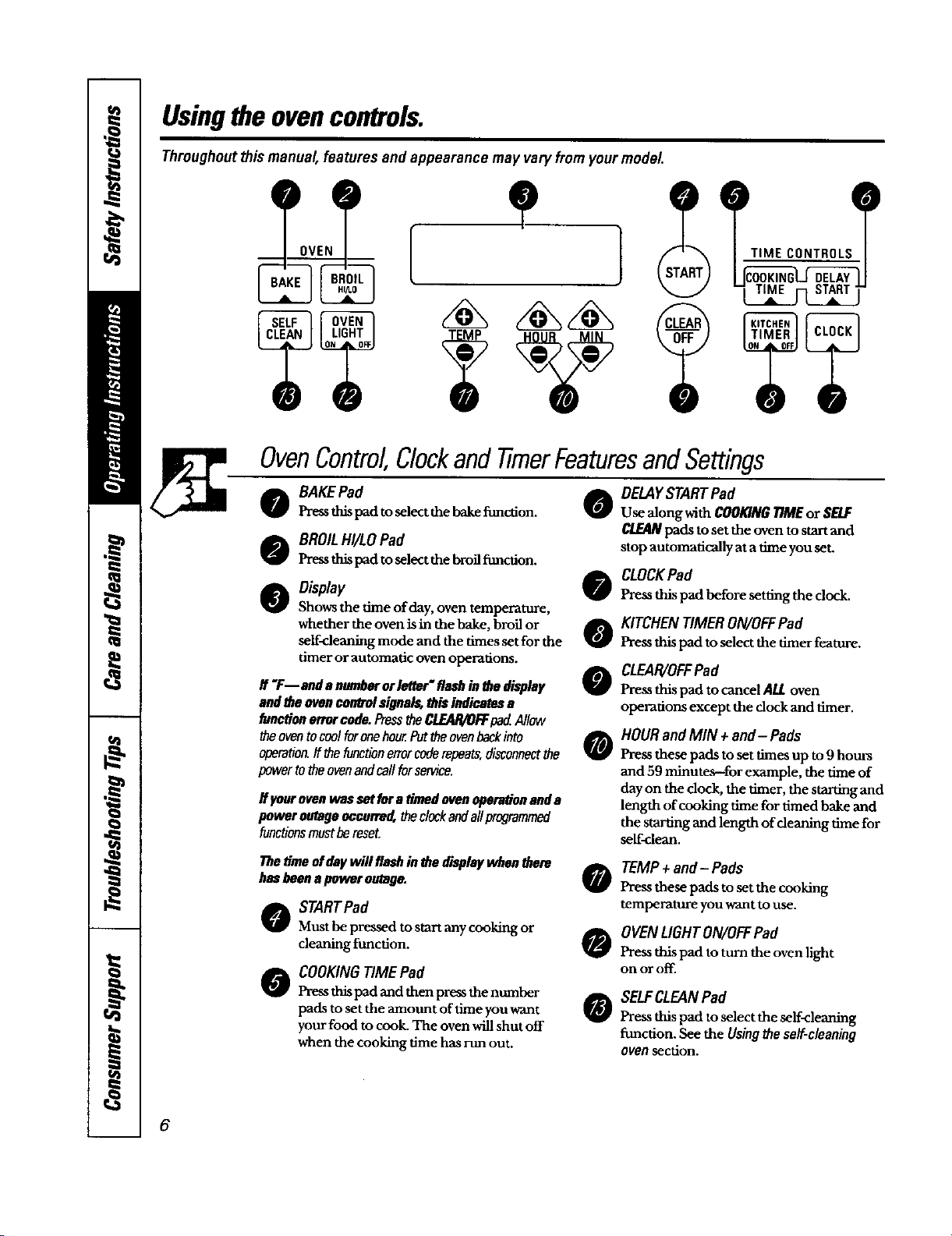
OvenControl,ClockandtimerFeaturesandSettings
o BAKEPad
Press thispad toselect the bake function. 0
o BROILHI/LOPad
Pressthispad toselectthebroil_mction.
O Obplay
Shows the time of day, oven temperature,
whether the oven is in the bake, broil or
self-cleaning mode and the times set for the
timer or automatic oven operations.
If "F--ondanumberorletter"flashinthedisplay
andtheovencorWJ'olsignals,this indicatesa
functionerrorcode.PresstheCLEAR/OFFpadAllow
theoventocoolforonehour.Furtheovenbackinto
operation,ff thefunctionerrorcoderepeats,disconnectthe
powertotheovenandcallforservice.
if ycarovenwassetfura Omndevenopera#onanda
poweroutagenccarre_ theclockandallprogrammed
functionsmustbereset.
e
o
o
o
DELAYSTART Pad
Use along with COOKINGTIMEor SELF
CLEANpads to set the oven to start and
stop automatically at a time you set.
CLOCKPad
Pressthispad before setting the clock.
KITCHENTIMERON/OFFPad
Press this pad to select the timer feature.
CLEAR/OFFPad
Press this pad to cancel ALLoven
operations except the clock and timer.
HOUR and MIN + and-Pads
Press these pads to set times up to9 hours
and 59 minutes--for example, the time of
day on the dock, the timer, the starting and
length of cooking time for timed bake and
the starting and length of cleaning time for
self-clean.
Thetimeofdaywillflashin thedisplaywhenthere
hasbeenapoweroutage.
STARTPad
Must be pressed to start any cooking or
cleaning ftmction.
COOKING TIME Pad
Press this pad and then press the number
pads to set the mount of time you want
your food to cook. The oven will shut off
when the cooking time has run out.
0
0
0
TEMP+ and- Pads
Press these pads to set the cooking
temperature you want to use.
OVENLIGHTON/OFFPad
Pressthis pad to turn the oven light
on or off.
SELFCLEANPad
Press this pad to select the self<leaning
function. See the Usingthe se/f-c/eaning
ovensection.
6
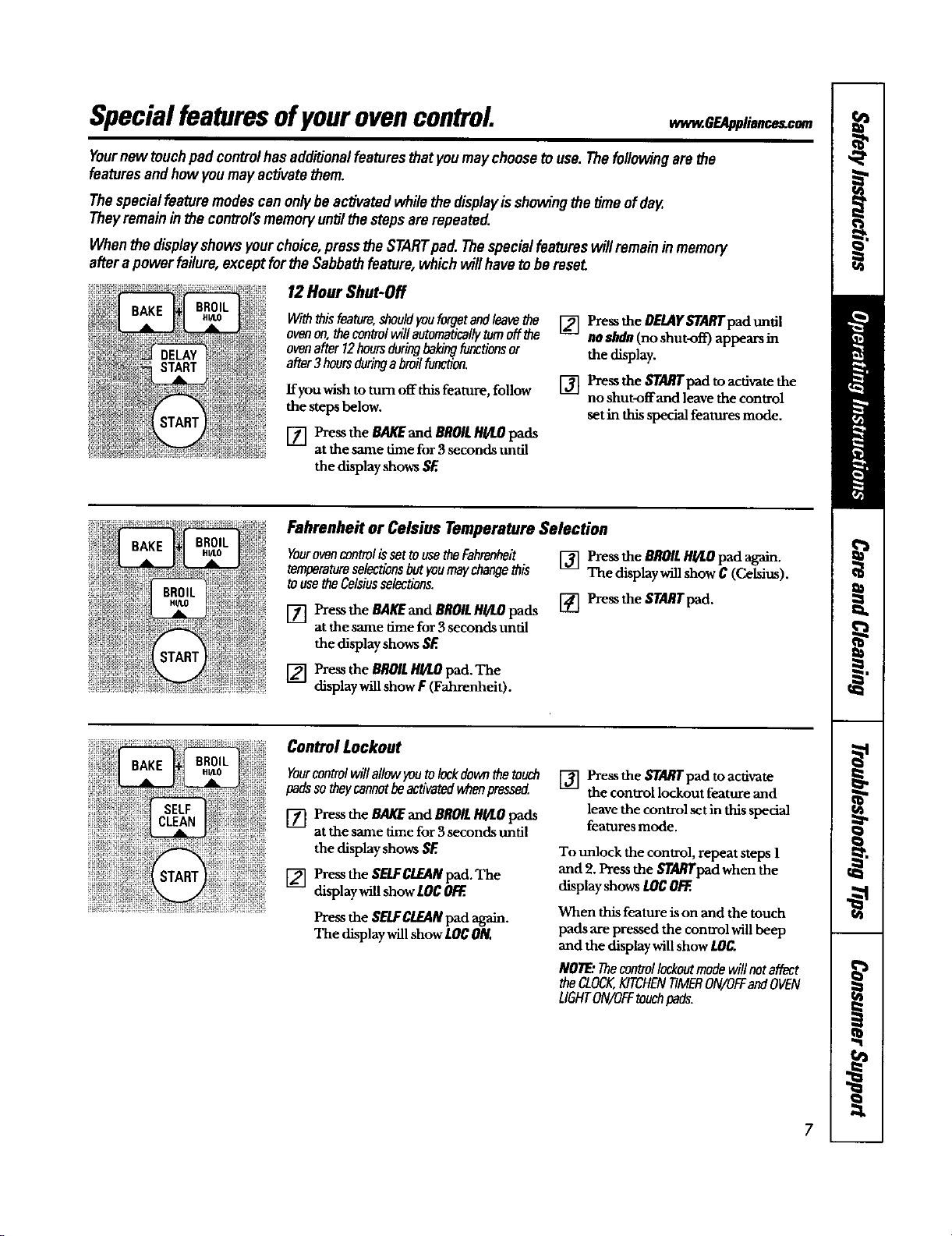
Specialfeaturesofyourovencontrol
Yournew touchpad controlhasadd_onal featuresthatyou maychoosetouse. Thefollowingarethe
featuresandhow youmay activatethem.
Thespecialfeaturemodescanonlybeactivatedwhilethe displayisshowingthetime ofday.
Theyremain in the control'smemory untilthe stepsarerepeated.
Whenthe displayshows yourchoice,pressthe STARTpad.Thespecialfeatureswillremain inmemory
afterapower failure,except forthe Sabbathfeature, whichwill haveto bemseL
12Hour Shut-Off
Withthisfeature,shouldyouforgetand/eavathe
ovenon,thecontrolwillautomaticallyturnoffthe
ovenafter12hoursduringbakingfunctionsor
after3hoursduringabroilfunction.
ffyou wish to turn off this feature, follow
the steps below.
[] Pressthe eAKEand BROILHgLOpads
at the same time for3 seconds until
the displayshows SF.
[] Press the DELAYSTARTpad until
no ahdn(no shut-off) appears in
the display.
[] Pressthe STARTpad toacdvate the
no shut-offand leave the control
set in thisspecial features mode.
Fahrenheit or Celsius Temperature Selection
Yourovencontrolisset tousetheFahrenheit
temparatumselectionsbut youmaychangethis
tousetheCelsiusselections.
[] Press the BAKEand BROILHI/LOpads
at the same time for 3 seconds until
the display shows SF.
[] Pressthe BROILHI/I.Opad affam.
The displaywill show C (CeMm).
[] Pzessthe STARTpad.
[] Pressthe BROILHI/LOpad. The
display willshow F (Fahrenheit).
Control Lockout
Yourcontrolwill allowyoutolockdownthe touch
padsso theycannotbeactivatedwhenpressed
[] Pressthe BAKEand BROILHI/LO pads
at the same time for 3 seconds until
the display shows SE
[] Press the SELFCLEANpad. The
display will show LOC OFF..
Pressthe SELFCLEANpad again.
The display will show LOCON.
[] Pressthe STARTpad toactivate
the control lockout feature and
leave the control set in this special
features mode.
To unlock the control, repeat steps 1
and 2. Press the STA/O'pad when the
display shows tOC OFF..
When this feature is on and the touch
pads are pressed the control will beep
and the display will show LOC.
NOTE:Thecontrollockoutmodewill notaffect
the CLOCK,KITCHENTIMERON/OFFandOVEN
LIGHTON/OFFtouchpads.
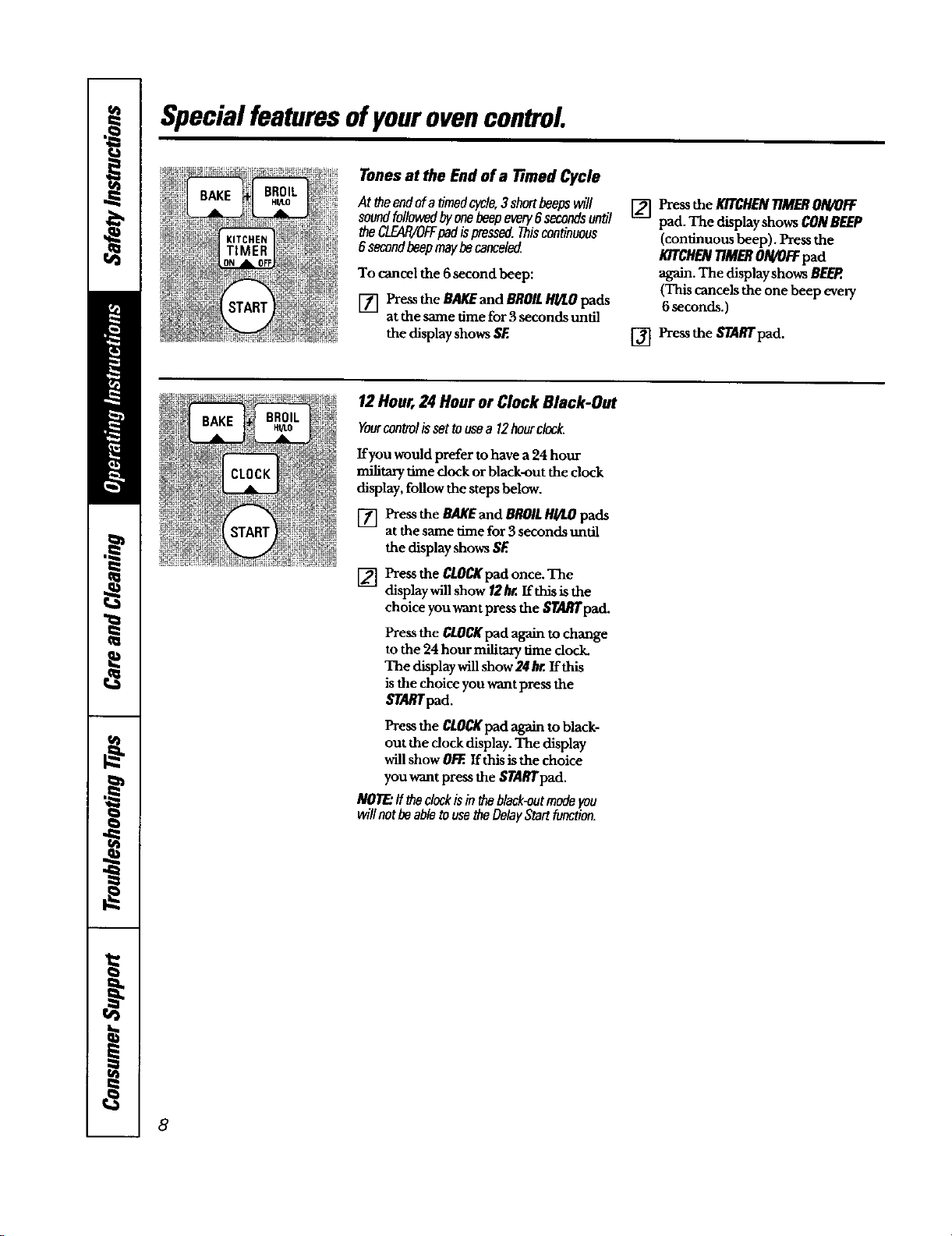
Specialfeaturesofyourovencontrol
Tones at the End of a Timed Cycle
At theendofa timedcycle,3 shortbeepswill
soundfollowedbyonebeepevery8 secondsuntil
theCLEAIVOFFpad ispressed.Thiscontinuous
6secondbeepmaybecanceled
To cancel the 6 second beep:
[] Pressthe BAKEand BROILHI/LOpads
at the same time for 3 seconds until
the displayshows SF.
[] Pressthe KITCHENTIMERON/OFF
pad. The displayshows CONBEEP
(continuous beep). Pressthe
K/TCHENT/MERON/0FFpad
again. The displayshows BEEP.
(This cancels the one beep every
6seconds.)
[] Pressthe STARTpad.
12 Hour, 24 Hour or Clock Black-Out
Yourcontrolissettousea 12hourclock.
If you would prefer to have a 24 hour
military time dock or black-out the clock
display, follow the steps below.
[] Press the BAKEand BROILHI/LOpads
atthe same time for3 seconds until
the display shows SF.
[] Press the CLOCKpadonce. The
display will show/2 hr. If this is the
choice you want press the _/'A/_pad.
Press the CLOCKpad again to change
to the 24 hour mili_ry time dock.
The display will show 24 hr. If this
is the choice you want press the
$7_lTpad.
Press the CLOCKpad again toblack-
out the clock display. The display
will show O/:EIf this is the choice
you want press the $TARTpad.
NOTE:If theclockisinff_ black-entmodeyou
willnotbeabletousetheDelayStartfunction.
8
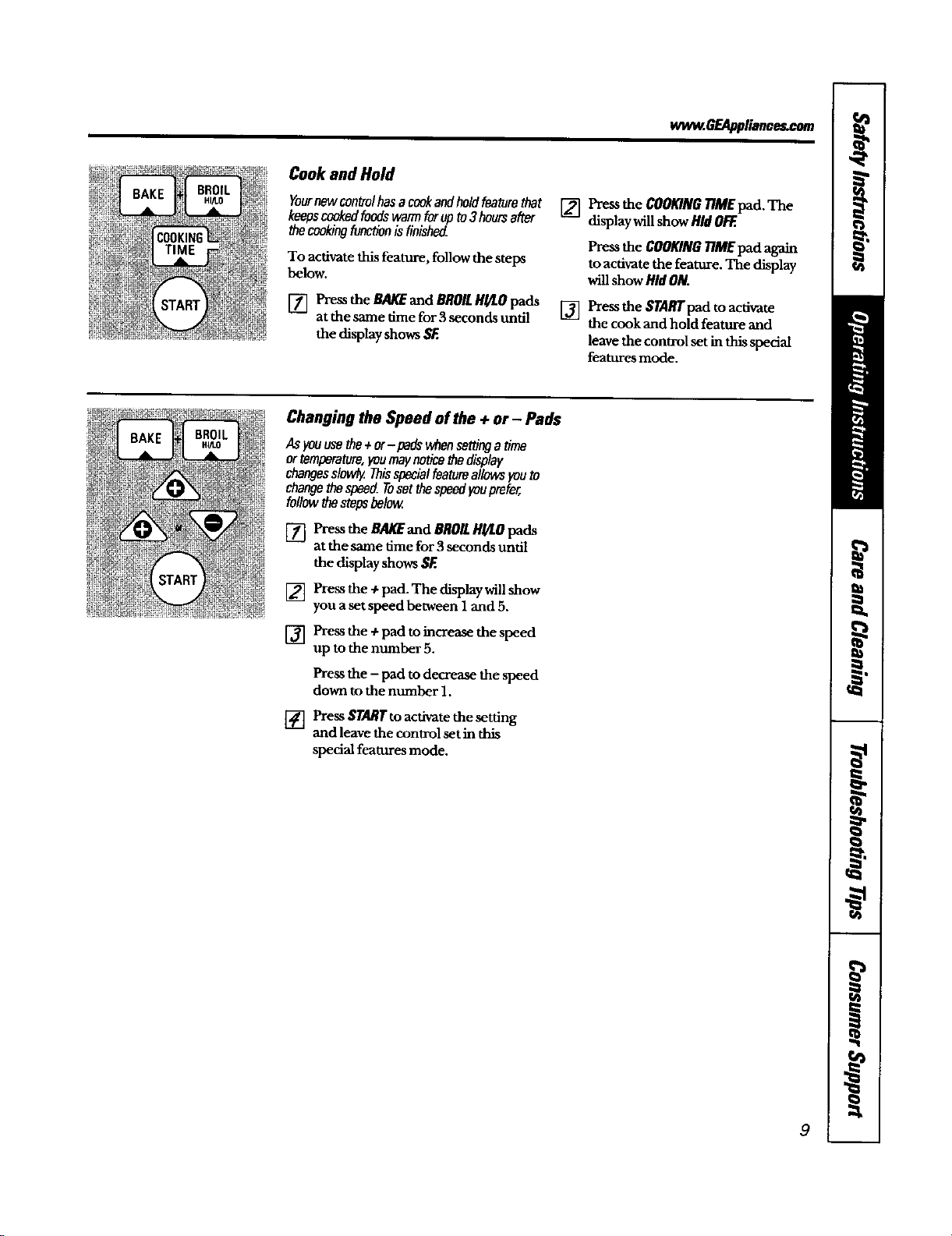
ww_.BEAppllance_com
Cook and Hold
Yournewcontrolhasa cookandholdfeaturethat
keepscookedfoodswarmforupto3hoursafter
thecookingf_ontionisfinished.
To activate this feature, follow the steps
below.
[] Pressthe BAKEand BROILHULOpads
at the same time for 3seconds undl
the displayshows SF.
[] Pressthe COOKING77MEpad. The
display willshow HidOl_.
Pressthe COOKING77MEpad again
to activate the feature. The display
will show HidON.
[] Pressthe $TARIrPad t° acdvate
the cook and hold feature and
leave the conu-ol setin this special
features mode.
R'rART
Changing the Speed of the + or - Pads
AsFouusetha+or-pads whansettingatime
ortemperature,youmaynoticethedisplay
changesslowly.Thisspecia/featureallowsyouto
changethespeed.Tusetthespeedyouprefer,
followthestopsbelow
[] Pressthe BAKEand BROILHI/LOpads
at the same time for 3seconds until
the displayshows SF.
[]
[]
Press the ÷ pad. The display will show
you a set speed between 1 and 5.
Press the + pad to increase the speed
up to the number 5,
Press the - pad to decrease the speed
down to the number 1.
[] Press STARTto activate the setdng
and leave the control set in this
special features mode.
9
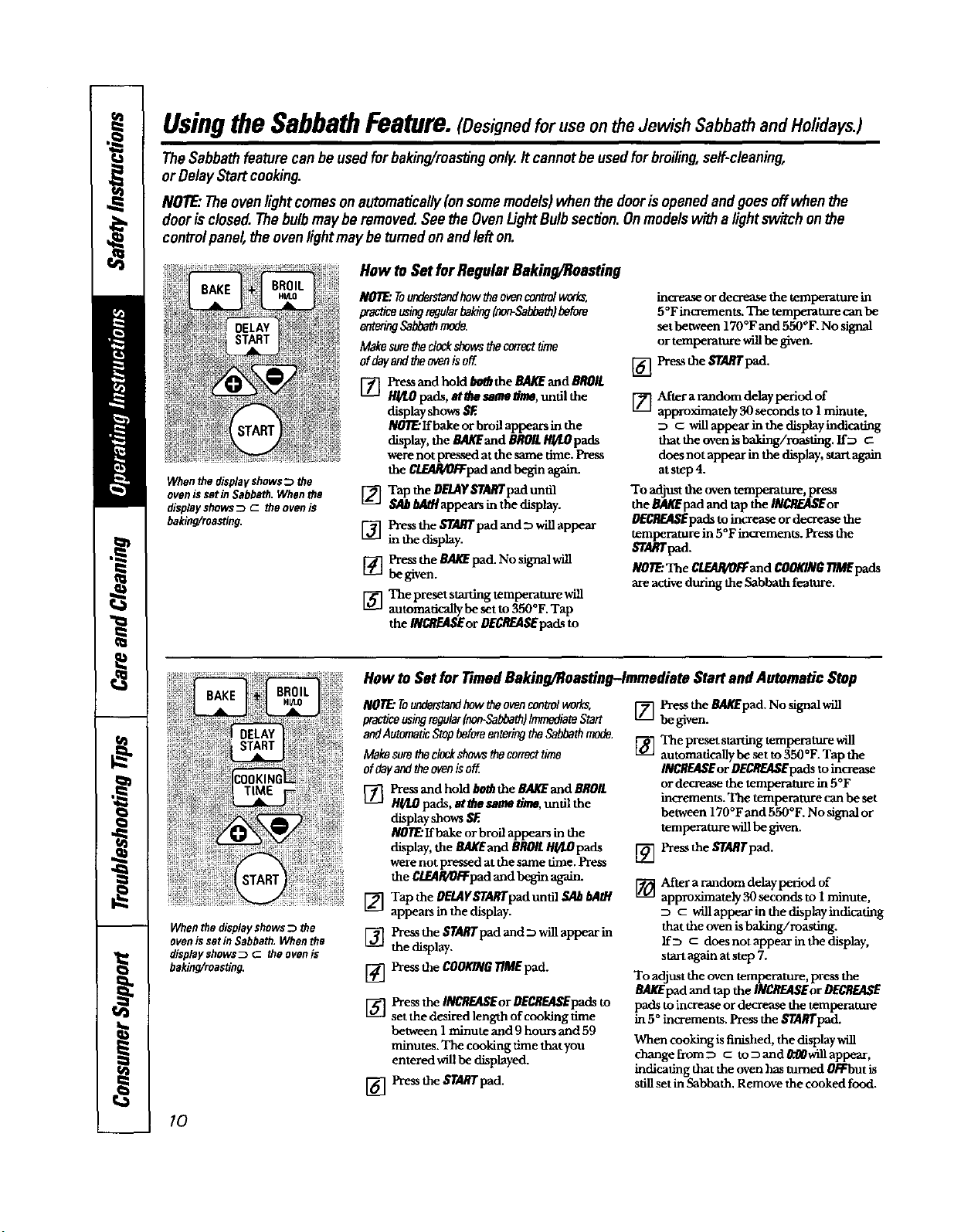
UsingtheSabbathFeature.(Designedfor use on theJewish Sabbathand Holidays.)
TheSabbathfeaturecanbe usedfor baking/reastingonlg.It cannotbe usedforbroiling,self-cleaning,
or DelayStartcooking.
NOTE."Theovenlightcomesonautomatically(onsomemodels)whenthe doorisopenedandgoesoffwhen the
doorisclosed.Thebulbmaybe removed.See the OvenUghtBulbsection.Onmodelswitha lightswitch onthe
controlpanel,the ovenlightmaybe turnedon andlefton.
Whenthe displayshows_ the
ovenissetin Sabbath.Whenthe
displayshowsD c theovenis
baking/roas_ng,
How toSet for Regular Baking/Roasting
NOTE:Tounderstandhew theovencontrolworks,
practice usingregularbakingInon-Sabbeth)before
sn_ng Sabbathmode.
Make surethedockshowsthecorrect time
of dayandtheovenia off
[] Press and hold bo_ the BAg£ and BROIL
H_,O pads, at #m sameffme,until the
display shows $£
NOTF.:If bake or broil appears in the
display,the BAKEand BROILR//tOpads
werenotpressed atthe same time.Press
the C/.Bl&t_pad and begin again.
[] Tap the DELAY_fAffrpad until
_ appears in the display.
[] Press the START pad and D will appear
inthedisplay.
[] Press the aAlff pad. No signal will
be given.
The preset starting temperature will
automadcally be set to 350°F. Tap
the INCREASEor BECRF-ASEpads to
incaxraseor decrease the temperature in
5°Fincrements, The tempemtore can be
set between 170°F and 550°F. No signal
or temperature will be given.
[_ Pressthe STARTpad.
[___]After a random delay Period of
approximately 30 seconds to 1 minute,
_ willappear in the display indicating
that the oven is baking/roasting, ff_
does not appear in the display, start again
at step 4.
To adjust the oven temperature, press
the BA/_pad and tap the INCeEASEor
DECREASEpadstoincreaseor decrease the
temperature in 5°F increments. Pressthe
ffgdUffpad.
NO1F2The CLEAR/OFFand COOKINOllME pads
are active during the Sabbath feature.
Whenthe displayshowsD the
ovenissetinSabbath.Whenthe
displayshowsD C theovenis
baking/roasting.
How to Set for rimed Baking/1/oasting-lmmediata Start and Automatic Step
NOTE."Tounderstandhew theovencontrolworks,
practiceusingregular(non-Sabbath)ImmediateStart []
andAutomaticStopbeforeentering theSabbathmode.
Makesuretheclockshows tbe correct time []
of dayandthe ovenis off
[_ PressandholdboffztheBAl(EandeROlL
H_.O pads, atthe same time, undl the
display shows SF.
N0_ If bake or broil appears in the
display, the BAKEand BROILHY/.Opads
were not pressed at the same dine. Press
Lg-2
the C/._R/OFFpad and begin again.
[_] Tap the OEMYSTARTpad und] SA_ b/lOt
appears in the display.
['_Pzess the STARTpad and D will appear in
the display.
[_] Press the COOKINGTIME pad.
[]
[]
Press the II_REASEor DECREASEpadsto
set the desired length of cooking dme
between I minute and 9 hours and 59
minutes. The cooking time that you
entered will be displayed.
Pressthe STARTpad.
Press the BagEpad. No signal will
be given.
The preset starting temperature will
automadcaUy be set to 350°F. Tap the
INCREASEor DECREASEpadsto increase
or decrease the temperature in 5°F
increments. The temperature can be set
between 170°F and 550°F. No signal or
temperature will be given.
Press the Sl'ARTpad.
[_-_ After a random delay pedod of
approximately 30 seconds to 1 minute,
c willappear inthe displayindicadng
that the oven is baking/roasdrtg.
If D c does not appear in the display,
start again at step 7.
To adjust the oven temperature, press the
BAKEpad and lap the INCREAISEor DECREASE
pads to increase or decrease the temperature
in 5 ° increments. Press the STARTpad.
When cooking is finished, the display will
change from D c toDand0:flOwillappeaf,
indicating that the oven has turned 0Rrbut is
sdll set in Sabbath. Remove the cooked food.
I0
wwvzGEAppliance_com
How toExit the SabbathFeature
[] Press the CLF_AP,/OFFpad.
[] If the oven is cooking, wait
for a random delay period of
approximately 30 seconds to 1
minute, until only D is in the display.
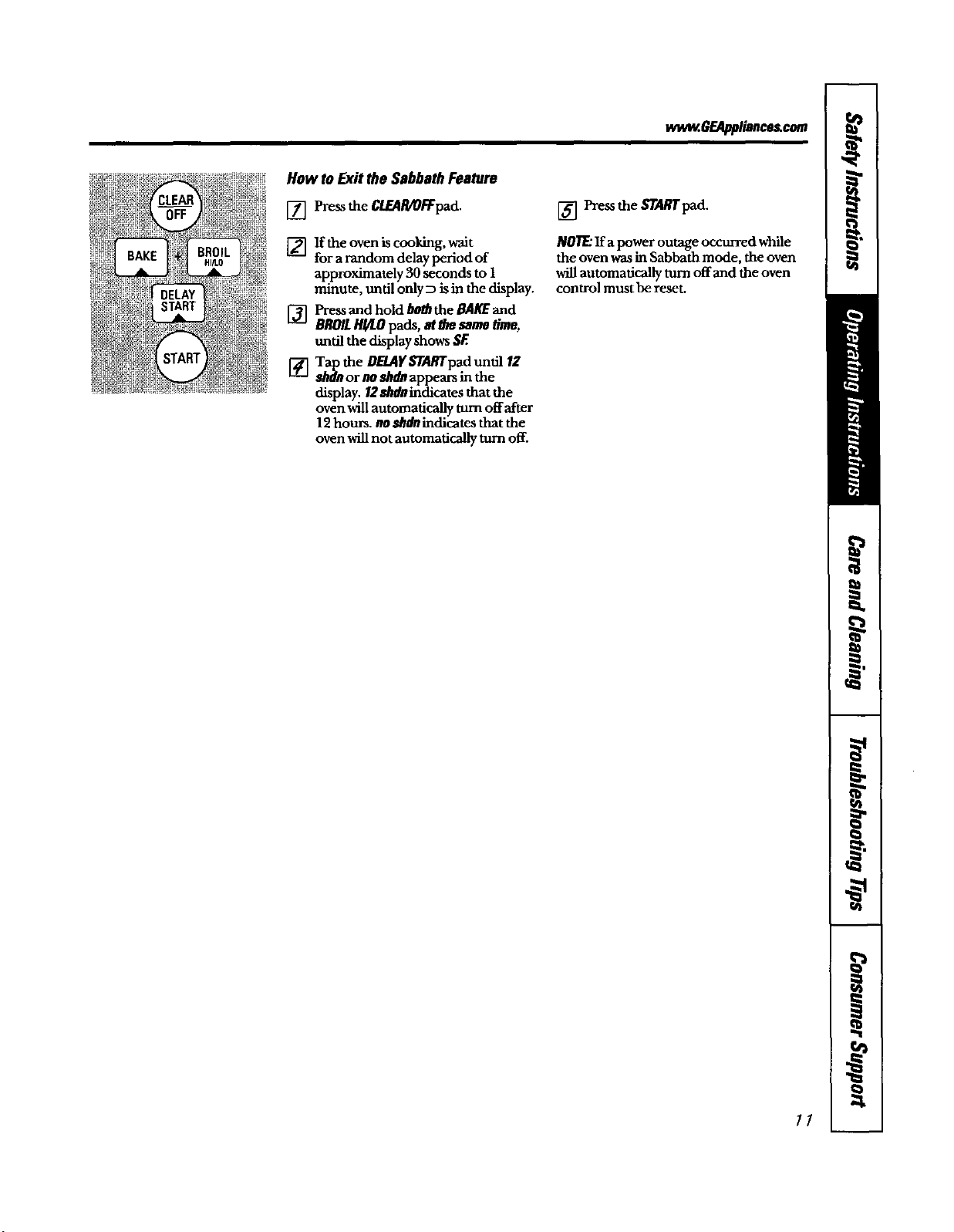
[] Press and hold/w_ the BA/_ and
BROILH!/LOpads, at a'_ same dine,
until the display shows SE
['4-] Tap the DE_YSTARTpad until 12
_dMnor no shdn appears in the
display. I2 shdn indicates that the
oven will automatically turn offafter
12 hours, no MIdn indicatJes that the
oven will not automatically turn off.
[] Press the STA#Tpad.
NOllE:Ifapoweroutage occurredwhile
the ovenwasin Sabbathmode, theoven
willautomaticallyturn offand the oven
controlmust bereset.
//
Usingthe oven.
Toavoidpossiblebums,place theshelvesin the desiredposfdonbeforeyouturn the ovenon.
Beforeyoubegin...
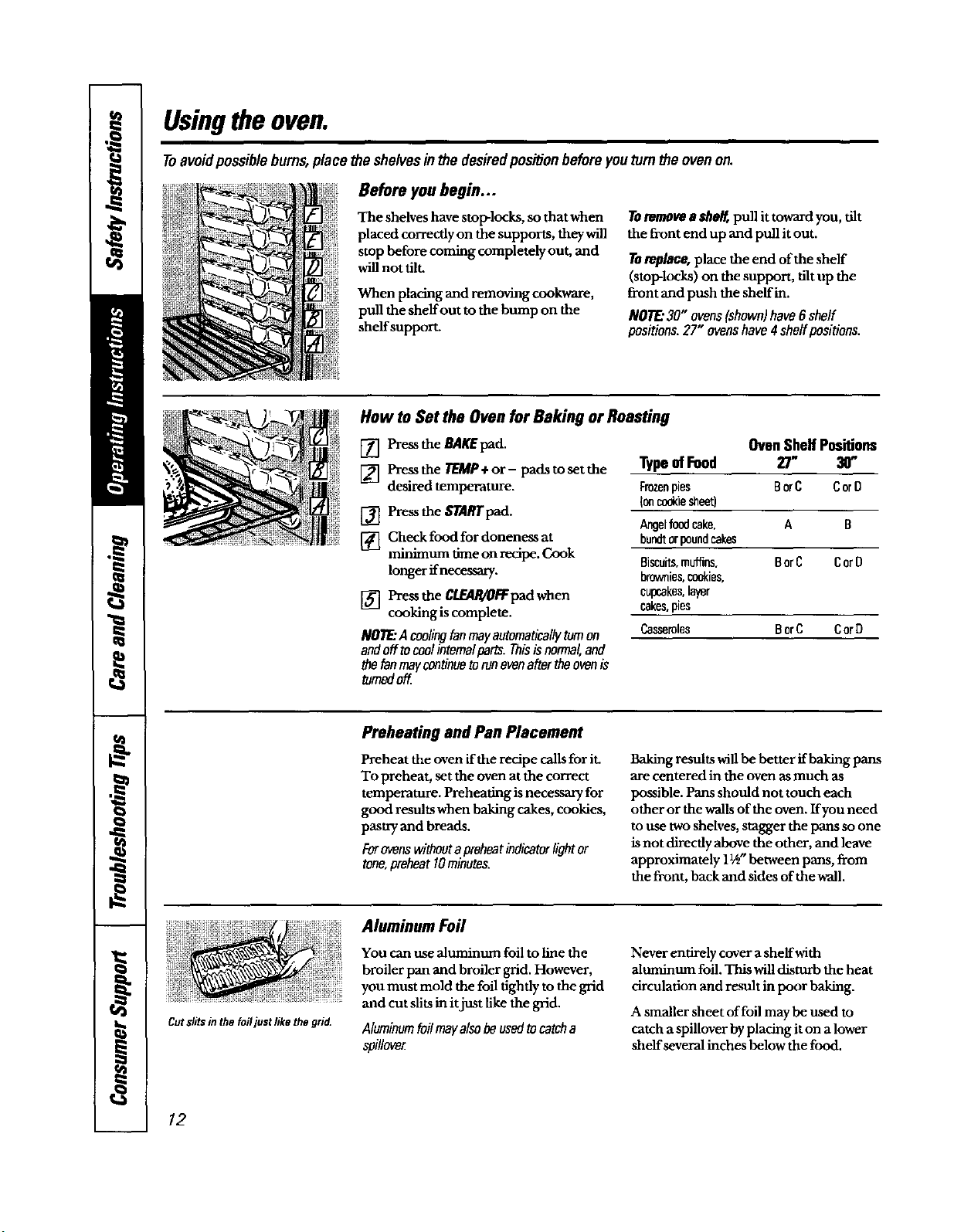
The shelves have stop-locks, so that when
placed correctly on the supports, they will
stop before coming completely out, and
will not tilt.
When placing and removing cookware,
pull the shelf out tothe bump on the
shelf support.
Toremove a eheg pull it toward you, tilt
the front end up and pull it out.
Toreplace,place the end of the shelf
(stop-locks) on the support, tilt up the
front and push the shelf in.
NOTE."30" ovens(shown)have6shelf
positions.27"ovenshave4 shelfpositions.
How to Set the Oven for Baking or Roasting
[] Press the BAKEpad.
[] Press the TEMP+ or - padstosetthe
desired temperature.
[] Pressthe STARTpad.
[] Check food for doneness at
minimum time on recipe. Cook
longer if necessary.
[] Press the CL_R/OFFpad when
cooking is complete.
NOllE"Acoolingtanmayautomaticallytomon
andofftocoolinternalparts.Thisisnormal,and
thetanmaycontinuetorunevenaftertheovenis
tomedoff
Oven Shelf Positions
Type ofFood 27" 30"
F_ pies BorC CorD
{oncookiesheet)
Angelfoodcake, A B
bundtorpoundcakes
Biscuits,muffins. BorC CorO
brownies,coddes,
cupcakes,layer
cakes,pies
Casseroles BorC CorD
Preheating and Pan Placement
Preheat the oven if the recipe calls for it.
To preheat, set the oven at the correct
temperature. Preheating is necessary for
good results when baking cakes, cookies,
pastry and breads,
Forovenswithoutapreheatindicatorlightor
tone,preheat 10minutes.
Baking results will be better if baking pans
are centered in the oven as much as
possible. Pans should not touch each
other or the walls of the oven. If you need
to use two shelves, stagger the pans so one
is not directly above the other, and leave
approximately 11/_-between pans, from
the front, back and sides of the wall.
Cutsli_sin the foiljust like the grid.
Aluminum Foil
You can use aluminum foil to line the
broiler pan and broiler grid. However,
you must mold the foil tightly to the grid
and cut slits in it just like the grid.
Aluminumfoilmayalsobeusedtocatcha
spillove_
Never entirely cover asheifwith
aluminum foil. This willdisturb the heat
circuladon and result in poor baking.
A smaller sheet of foil may be used to
catch a spillover by placing it on a lower
shelf several inches below the food.
12
wv,_.6F.Applionce_com
Leavethedooropento the broil
stopposi_on,Thedoorstaysopen
byitaeff,yetthe propertemperature
ismaintainedin theoven.
How to Set the Oven for Broiling
[] Place the meat orfish on the broiler
grid in the broiler pan.
[] Follow suggested shelf positions in
the BroilingGuide.
ffyourovenisconnectedto208volts,raresteaks
maybebroiledbypreheatingthebroilerand
positioningtheovensheffonepositionhigher
[] Pressthe BROILH_tOpad once for
HIBroil.
To change to LOBroil,press the
BROILIR/LOpad again.
[] Pressthe STARTpad.
[] When broiling isfinished, press the
CLEAR/OR:pad.
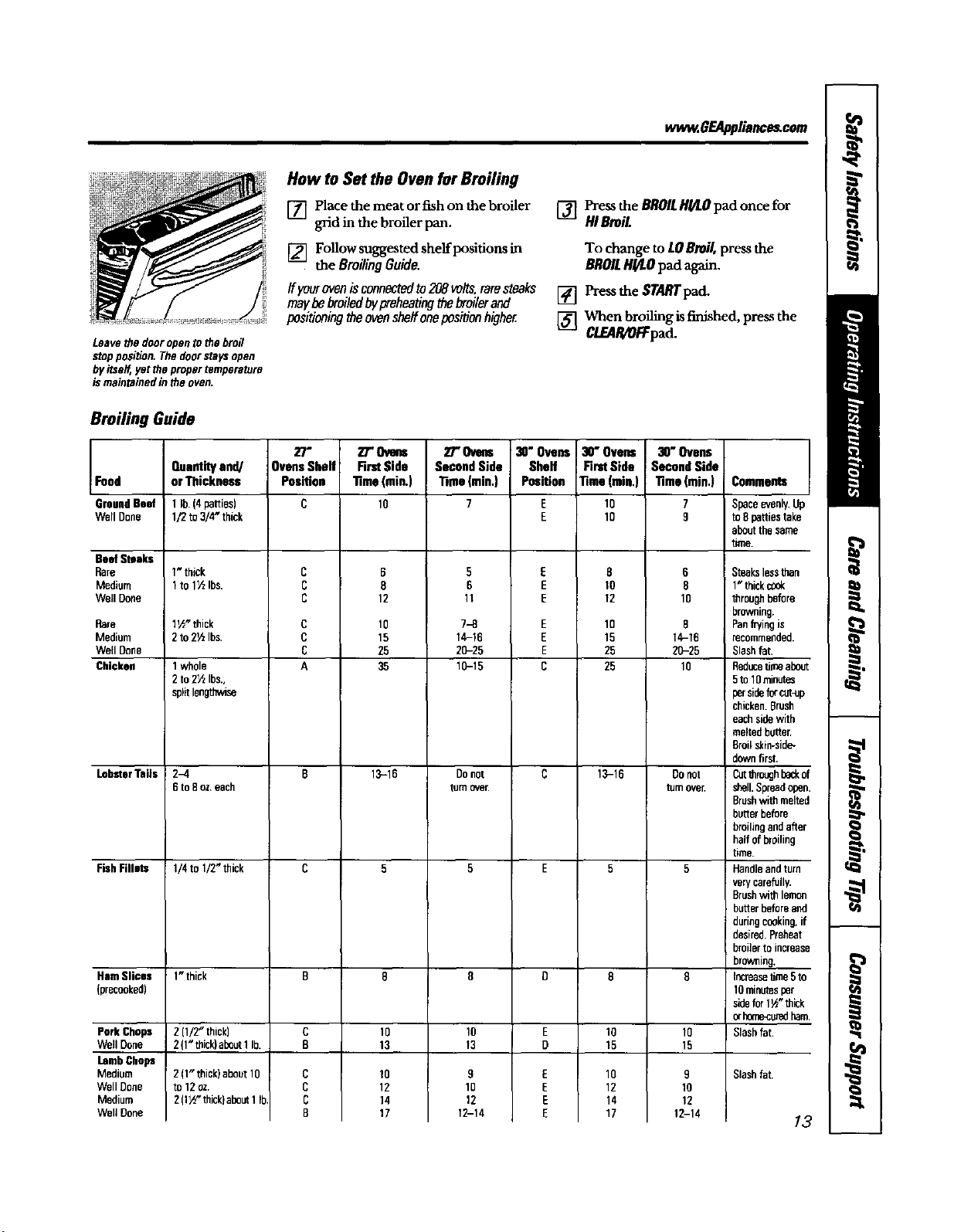
Broiling Guide
Food
GroundBeef
Well Done
Beef Steaks
Rare
Medium
Well Done
RDre
Medium
Well Done
Chicken
Lobster Tails
FishFillet=
HamSlices
(precooked)
PorkChaps
WellDone
LambChops
Medium
WellDone
Medium
WellDone
Quantityand/
orThickness
1 lb. (4 patties)
1/2 to 3/4" thick
Wthick
1to 1½Ibs.
1_" thick
2to2½1be.
1 whole
2 to 2½ Ibs.,
spiltlengthwise
2-4
6 to8oz.each
1/4 to 1/2" thick
1" thick
2(1/2"thick)
2(1"thick)about1lb.
2 (1" thick) about 10
to 12 oz.
2 (1_ thick)about1Ib
27 m
Ovens Shelf
Position
C
c
c
c
c
c
c
A
c
c
c
B
2T"Ovms
FirstSide
Time(rain.)
10
6
8
12
10
15
25
35
13-18
10
13
10
12
14
17
2T Ovens
SecondSide
l_me(min.)
7
5
6
11
7-8
14-16
20-25
10-15
Donot
turnover.
10
13
8
10
12
12-14
30"Ovens
Shelf
Position
E
E
E
E
E
E
E
E
C
E
D
30" Ovens
First Side
Time (rain,)
10
10
8
10
12
10
15
25
25
13-16
lO
15
10
12
14
17
I 30"Ovens
! SecondSide
Time(rain.)
6
8
10
8
14-16
2O-25
10
DOnot
turnover.
10
15
9
10
12
12-14
Comments
Spaceevenly.Up
to8 pattiestake
aboutthesame
time.
Steakslessthan
1" thickc_ok
throughbefore
browning.
Panf_fingis
recommended.
Slashfat
Reducetimeabout
5to 10minutes
sideforcut-up
chicken.Brush
eachsidewith
meltedbutter.
Broilskin-side-
downfirst.
I OJtthrouQhh_k of
: shell.Spreadopen.
Brushwithmelted
butterbefore
hroilingandafter
halfof broiling
time.
Handleandturn
verycarefully.
Brushwithlemon
butterbeforeand
duringcooking,if
desired.Preheat
I broilerto increase
browning.
Increasetime5to
10minutesper
sidefor 1½"thick
orborr_curedham.
Slashfat.
Slashfat.
13
Usingtheclockandtimer.
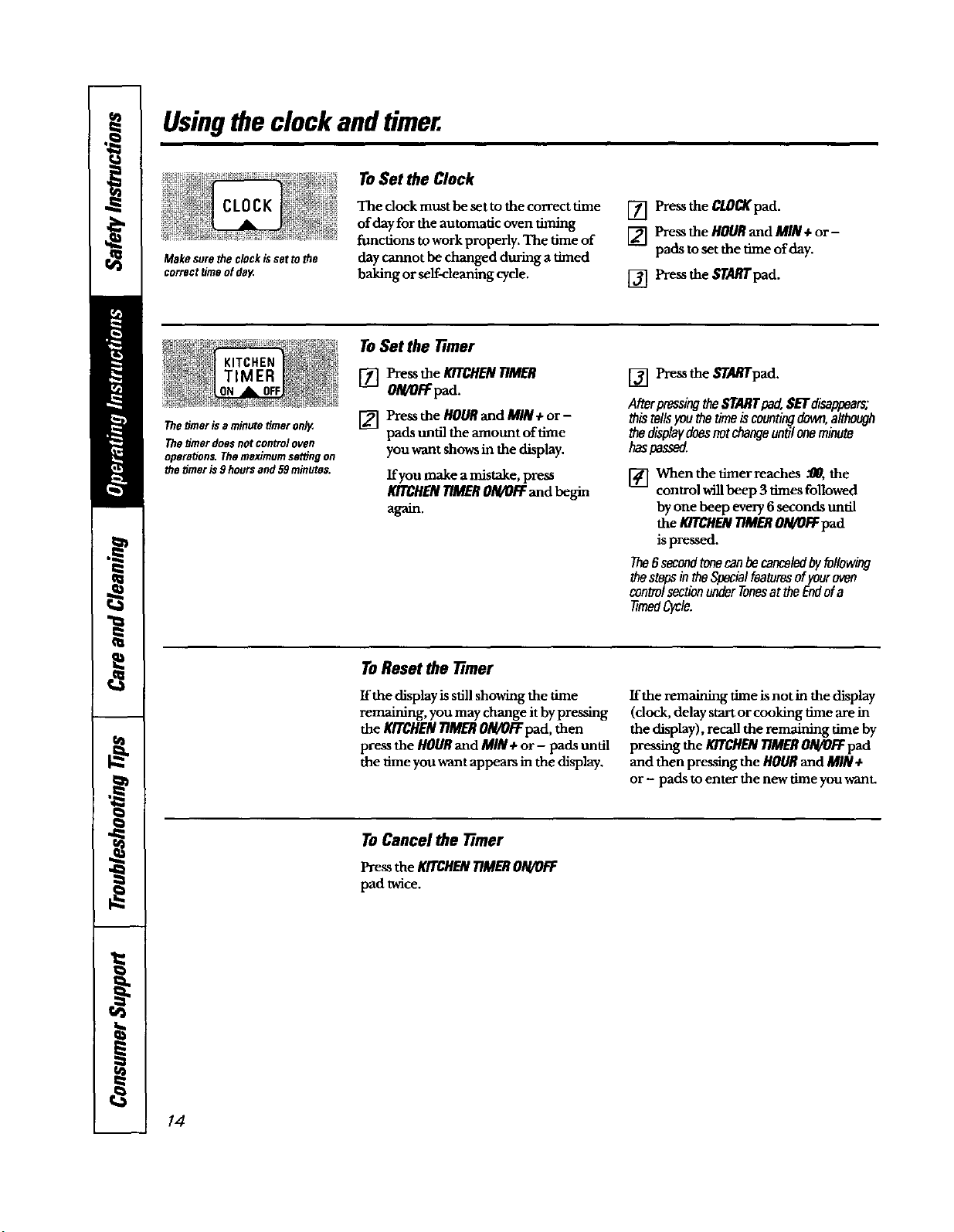
Makesurethe clockissettothe
correcttimeofdeg
To Set the Clack
The dock must be set to the correct time
of day for the automatic oven timing
functions to work properly. The time of
day cannot be changed during atimed
baking or serf-cleaning cycle.
[] Pressthe CLOCKpad.
[] Pressthe HOURand MIN+or-
pads to set the time ofday.
[] Pressthe _rAffr pad.
Thetimer is aminute timeronly,
Thetimer doesnotcontroloven
operations.Themaximumserdngon
the timeris9hoursand 59minutes.
ToSet the 77mar
[] Pressthe KITCHENTIMER
ON/OFFpad.
[] Press the HOURand MIN +or-
pads until the amount of time
you want shows in the display.
If you make amistake, press
KITCHENTIMERON/OFFand beon
a_n.
[] Pressthe STARTpad.
AfterpressingtheSTARTpad,$ETdisappears;
thistellsyouthetimeiscountingdown,although
thedisplaydoesnotchangeuntiloneminute
haspassed.
When the timer reaches .'00,the
control willbeep 3 times followed
by one beep every 6seconds until
the KITCHENTIMERO/g/OFFpad
is pressed.
The6 secondtonecanbecanceledbyfollowing
thestepsintheSpecialfeaturesofFouroven
controlsectionunderTonesattheEndofa
timedCycle.
ToReset the Timer
If the display is still showing the time
remaining, you may change it by pressing
the Kr_HEN TIMERO/gtOFFpad, then
press the HOURand MIN+or - pads until
the time you want appears in the display.
If the remaining time isnot inthe display
(dock, delay start or cooking time are in
the display),recall the remaining time by
pressing the MTCHENTIMERON/OFFpad
and then press'ragthe HOURand MIN+
or- pads to enter the new time you want.
To Cancel the 7-tmer
Pressthe KITCHENTIMERON/OFF
pad twice.
14
Usingthetimedbakingandmastingfeatures. ,m6EA lia,.,c.
NOTE."Foodsthat spoileasily-suchasmilk eggs,fish,stuffings, poultryandpork-shouldnot beallowedtositfor
morethan I hourbeforeor aftercooking.Roomtemperaturepromotesthegrowthofharmfulbacteria.Besurethat
the ovenfight isoffbecauseheatfromthe bulbwillspeedharmfulbacteriagrowth.
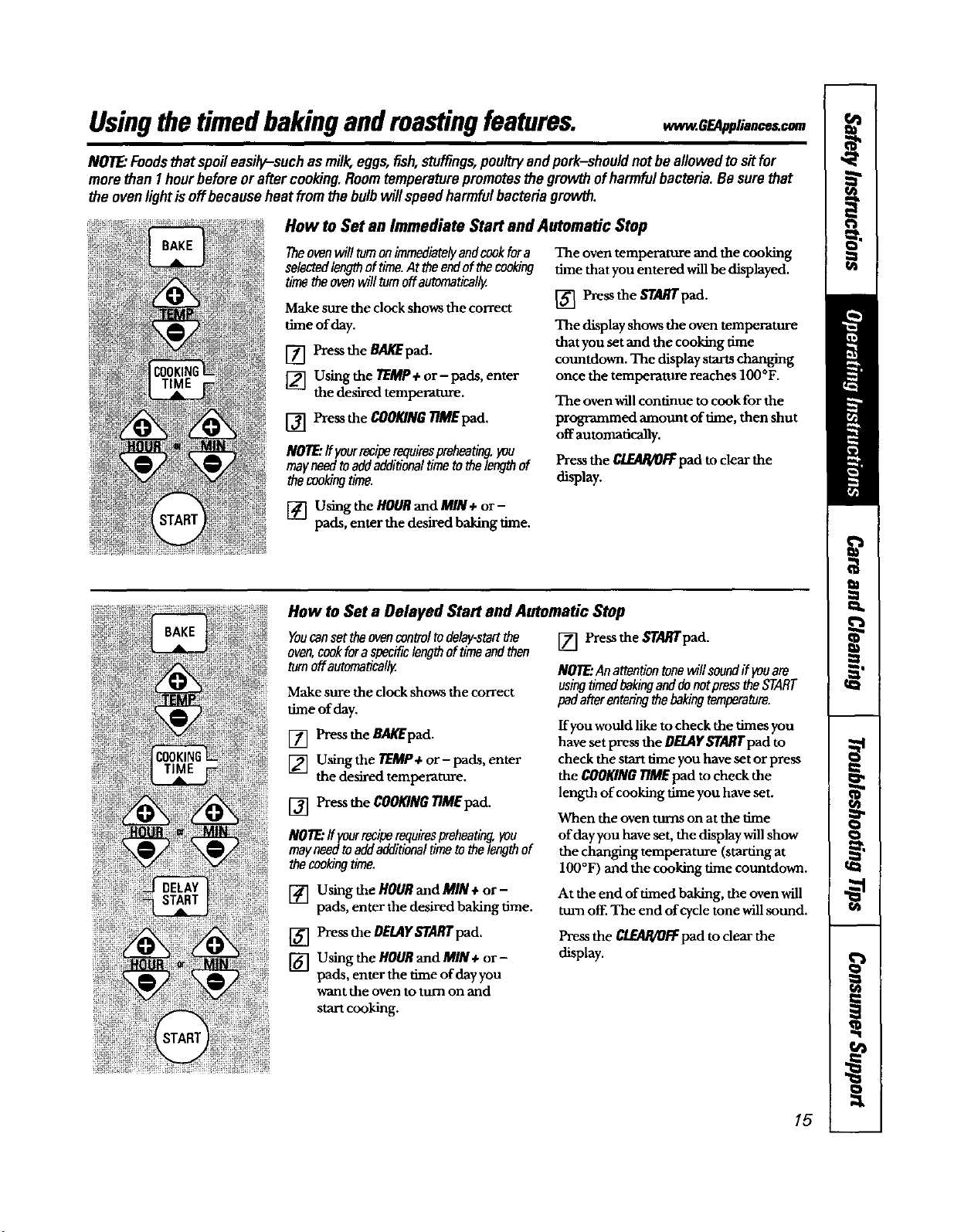
How to Set an Immediate Start and Automatic Stop
Theovenwilltamonimmediatelyandcookfora
selectedlengthoftime.At theendofthecooking
timetheovenwilltamoffautomaticallg
Make sure the clock shows the correct
time of day.
[] Pressthe BA/_ pad.
[] Usingthe TEMP+or- pads, enter
the desired temperature.
[] Press the COOKINGTIMEpad,
NOTE"Ifyourreciperequirespreheating,you
mayneedtoaddadditionaltimetothelenothof
thecookingtime.
The oven temperature and the cooking
time that you entered will be displayed.
[] Press the SFARTpad.
The display shows the oven temperature
that you set and the cooking m-he
countdown. The display starts changing
once the temperature reaches IO0°F.
The oven will continue to cook for the
programmed amount of thne, then shut
off automatically.
Press the C/.EABAOFFpad to clear the
display.
[] Using the HOURand MIN ÷ or-
pads, enter the desired baking time.
How to Set a Delayed Start and Automatic Stop
Youcanset theovencontroltodelay-startthe
oven,cookforaspecificlengthoftimeandthen
tomoff automaticallz
Make sure the clock shows the correct
time of day.
[] Press the B_d_pad.
[] Usingthe TEMP+ or- pads, enter
the desired temperature.
[] Pre._ the COOKINGTIME pad.
NOTE."If yourreciperequirespreheating,you
mayneedtoaddadditionaltimeto thelengthof
thecookingtime.
[] Using the HOURand MIN+ or-
pads, enter the desired baking time.
[] Pressthe OfLAY STARr pad.
[] Using the HOURand MIN+ or-
pads, enter the time of day you
want the oven to turn on and
[] Press the STARFpad.
NOTE:AnattentiontonewillsoundIf youam
usingtimedbakingadddonotpresstheSTART
padafterenteringthebaking_mperature.
If you would like to check the times you
have set press the DF,LAYST_qTpad to
check the start time you have set or press
the COOKINGTIME pad to check the
length of cooking time you have set.
When the oven turns on at the time
of day you have set, the display willshow
the changing temperature (staring at
IO0°F) and the cooking time countdown.
At the end of timed baking, the oven will
turn off. The end of cycle tone will sound.
Press the C/EAR/OFFpad to dear the
display.
start cooking.
15
Adjust the oventhermostat--Do it yourself!
Youmayfindthatyournewoven cooksdifferentlythan the oneitreplaced.Useyournew ovenfora few
weeksto becomemorefamiliarwithit.If yousoftthink yournew ovenistoo hotor toocold,youcanadjust
thethermostat yourself
Do notusethermometers, suchas thosefoundingrocerystores,to checkthe temperatureserdngofyouroven.
Thesethermometers may vary 20-40 degrees.
NOTE.-This adjustmentvvillnot affectthe broilingorthe self-cleaningtemperatures.Theadjustmentwillbe
retained inmemoryaftera powerfailure.
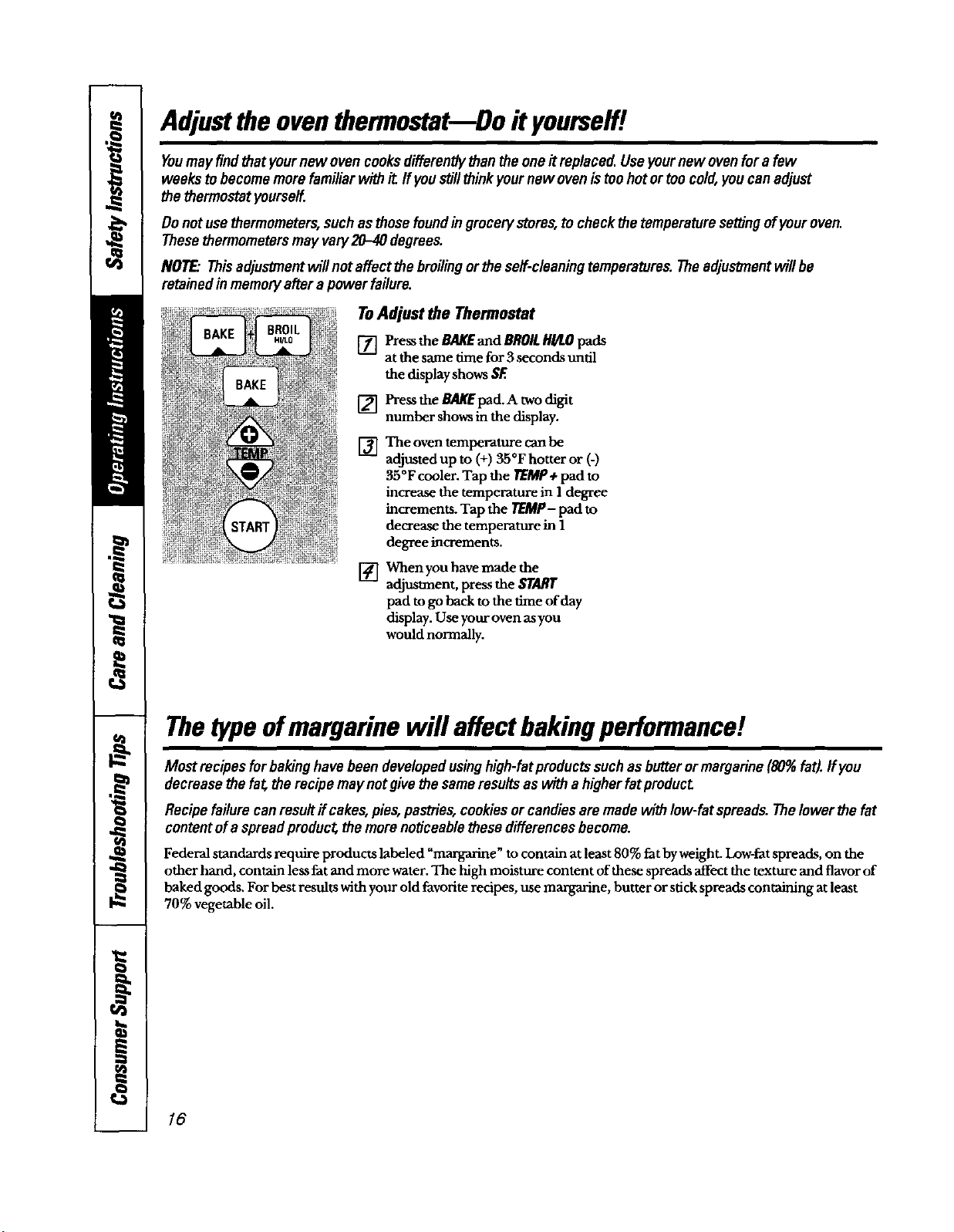
ToAdjust the Thermostat
[] Pressthe BAKEand BROILHI/LOpads
atthe same time for3seconds until
the displayshows SF.
[]
[]
Press the BAgEpad. A two digit
number shows in the display.
The oven temperature can be
adjusted up to (+) 35°F hotter or (-)
35°Fcooler. Tap the TEMP+ pad to
increase the temperature in 1 degree
increments. Tap the rOlCP- pad to
decrease the temperature in 1
degree increments.
[] When you have made the
adjustment, press the START
pad to go backto the time of day
display. Use your oven asyou
would normally.
Thetype ofmargarine will affect bakingperformance!
Most recipesforbakinghavebeendevelopedusinghigh-fatpreductssuchas butteror margarine(80%fat).IfYou
decreasethe fat therecipemay notgivethe sameresultsas witha higherfatproduct
Recipefailurecanresuit if cakes,pies,pastries,cookiesor candiesaremadewithlow-fatspreads.TheIowerthe fat
contentofa spread product the morenoticeablethese differencesbecome.
Federal standards l_equire products labeled "margarine" to contain at least 80% fat by weight. Low-fat spreads, on the
other hand, contain less fat and more water. The high moisture content of these spreads affect the texture and flavor of
baked goods. For best results with your old favorite recipes, use mmgarine, butter or stick spreads containing at least
70% vegetable oil.
/6
Usingtheself-cleaning even.
The oven doormustbe closed and all controlsmustbe set correctly for the cycle to workproperly.
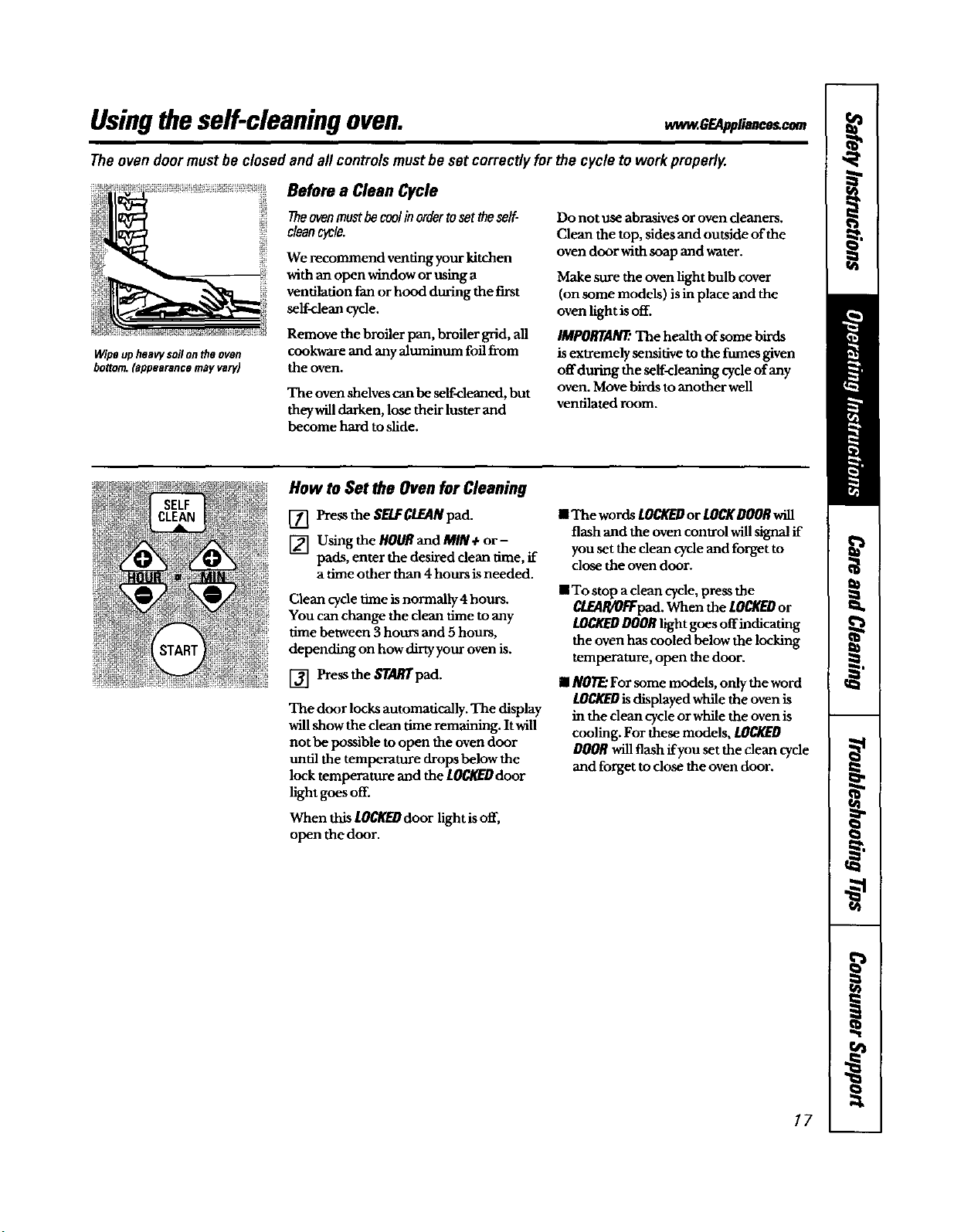
Wipeupheaw soilonthe oven
bonom.(appearancemayvary)
Before a Clean Cycle
Theovenmustbecoolinordertosettheself-
cleancycle.
We recommend venting your kitchen
with an open window or using a
ventilation fan or hood during the first
self-dean c/de.
Remove the broiler pan, broiler grid, all
cookware and any aluminum foil from
the oven.
The oven shelves can be serf-cleaned, but
theywill darken, lose their luster and
become hard to slide.
Do not use abrasives oroven cleaners.
Clean the top, sides and outside of the
oven door with soap and water.
Make sure the oven light bulb cover
(on some models) is in place and the
oven light is off.
IMPORTANT:The health of some birds
is extremely sensitive mthe fumes given
offduring the self-cleaning cycle of any
oven. Move birds toanother well
ventilated room.
How to Set the Oven for Cleaning
[] Press the SELFCLEANpad.
[] Using the HOURand MIN+ or-
pads, enter the desired clean time, if
a time other than 4hours isneeded.
Clean cycle time is normally 4 hours.
You can change the dean time to any
time between 3 hours and 5 hours,
depending on how dirty your oven is.
[] Press the START pad.
The door locks automatically. The display
will show the clean time remaining. It will
not be possible to open the oven door
until the temperature drops below the
lock temperature and the IOCI_U door
light goes off.
When this LOCKEDdoor light is off,
open the door.
• The words LOCKEDor LOCKDOORwill
flash and the oven control will signal ff
you set the clean cycle and forget to
close the oven door.
• To stop a clean cycle, press the
CLEAR!Or"Fpad.When the LOCKEDor
LOCI_D DOORlight goes offindicating
the oven has cooled below the locking
temperature, open the door.
II NOTE:For some models, only the word
LOCKEDisdisplayed while the oven is
in the dean cycle orwhile the oven is
cooling. For these models, LOCKED
DOORwill flash ffyou set the clean cycle
and forget to close the oven door.
17
Usingtheself-cleaning oven.
The oven doormustbe closedandall controlsmustbe set correctly for the cycle towork properly.
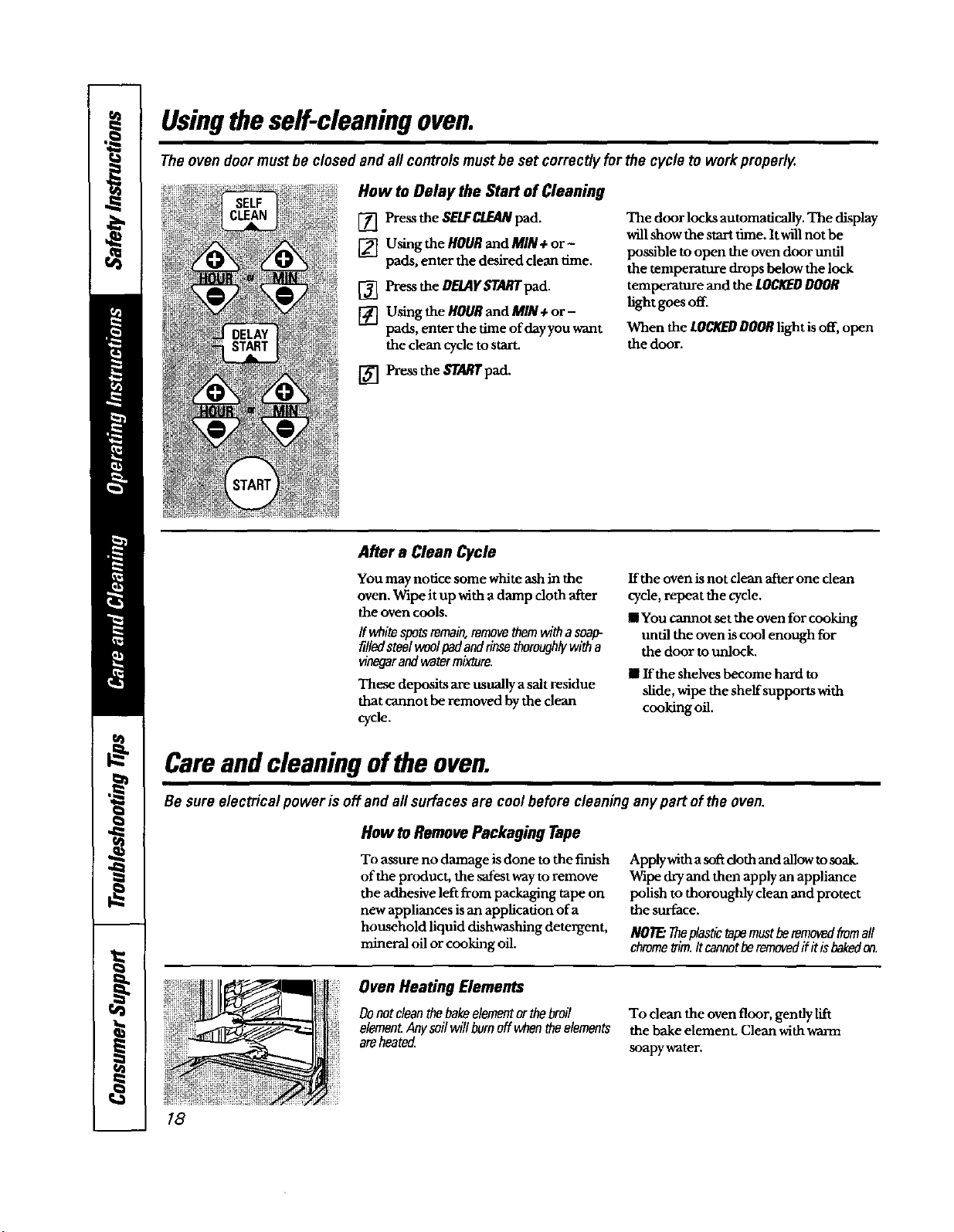
How to Delay the Start of Cleaning
[] Press the SELFCLEANpad.
[] Using the HOUR and MIN + or -
pads, enter the desired clean time.
[] Press the DELAYSTART pad.
[] Using the HOURand MIN ÷ or-
pads, enter the time of day you want
the clean cycle to starL
The door locks automatically. The display
will show the start time. It will notbe
passible to open the oven door until
the temperature drops below the lock
temperature and the LOCI_D DOOR
light goes off.
When the LOCKEDDOORlight is off, open
the door.
[] Press the _rgL_'pad.
After a Clean Cycle
You may notice some white ash in the
oven. Wipe it up with a damp cloth after
the oven cools.
ff whitespotsremain,removethemwitha soap-
filledsteelwoolpadandrinsethomughiywith a
vinegarand watermixture.
These deposits are usually a salt residue
that cannot be removed by the clean
cycle.
If the oven is not clean after one dean
cycle, repeat the cycle.
II You cannot set the oven for cooking
until the oven is cool enough for
the door to unlock.
II If the shelves become hard to
slide, wipe the shelf supports with
cooking oil.
Careand cleaning ofthe oven.
Be sure electrical power is off and all surfaces are cool beforecleaning anypart of the oven.
18
How toRemove Packaging Tape
To assure no damage is done to the finish
of the product, the safest way to remove
the adhesive left from packaging tape on
new appliances is an application of a
household liquid dishwashing detergent,
mineral oil or cooking oil.
Apply with a soft doth and allow to soak.
Wipe dry and then apply an appliance
polish to thoroughly clean and protect
the surface.
NOTE."TheMastictapemustberemovedfromaft
chrometrim.Itcannotberemovedflit isbakedon.
Oven Heating Elements
Donotcleanthebakeelementorthebroil
elementAnysoilwillburnoff whentheelements
areheated
To dean the oven floor, gently lift
the bake elemenL Clean with warm
soapy water.
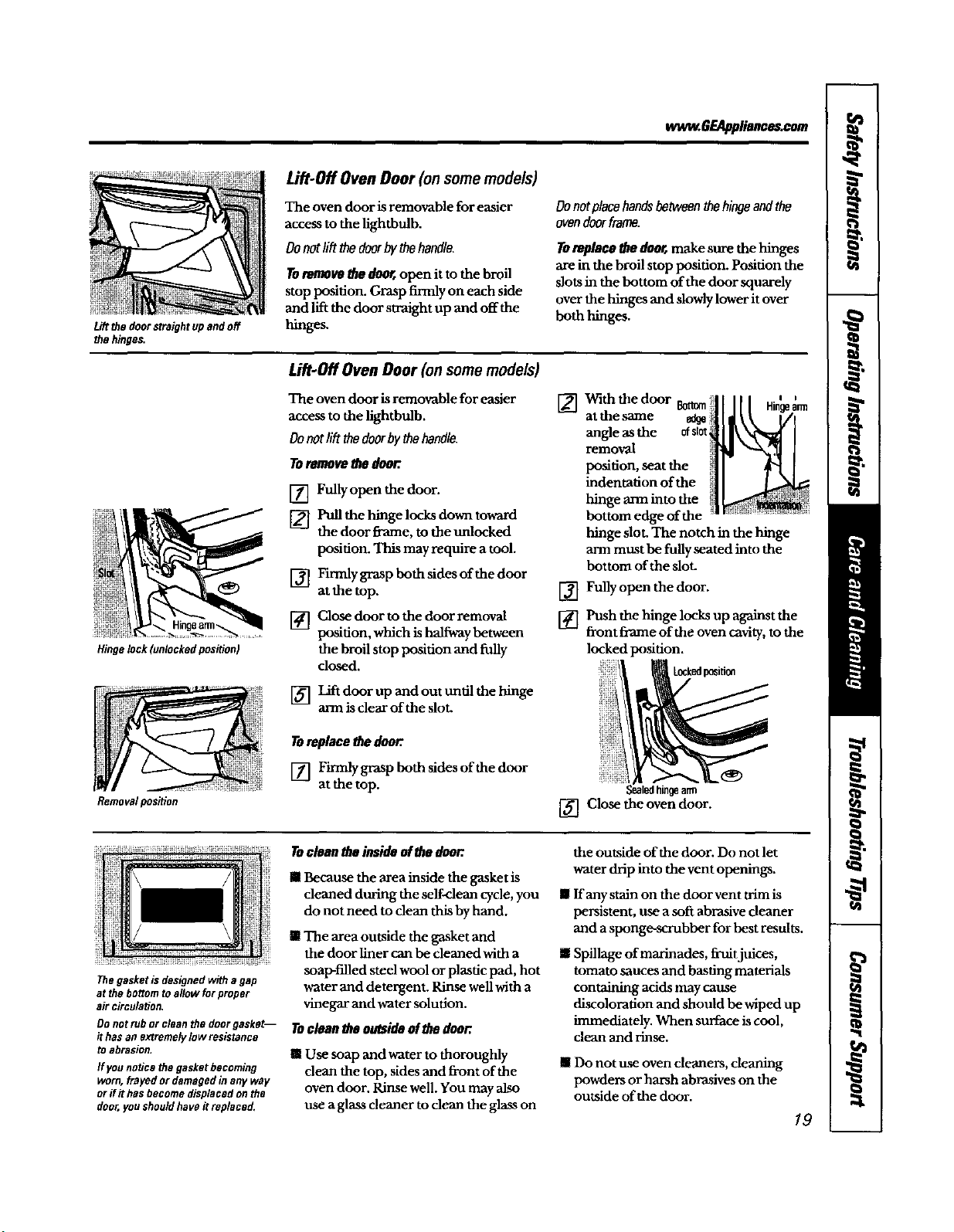
Liftthedoorstraightupandoff
the hinges.
ww_.GEApplieooe_oom
Lift-Off Oven Door (on some models)
The oven door is removable for easier
access to the lighthulb.
Donotlilt_e doorbythehandle.
Toremove _ door,open it to the broil
stop position. Grasp firmly on each side
and lift the door straight up and off the
hinges.
Donotplacehandsbetweenthehingeandthe
ovendoorframe.
Toreplacethedoor,,make sure the hinges
are in the broil stop position. Position the
slots in the bottom of the door squarely
over the hinges and slowlylower it over
both hinges.
Hinge lock (unlocked position)
Removalpos_on
Lift-Off Oven Door (on some models)
The oven door is removable for easier
access to the lightbulb.
Oonotlift thedoorby_.ehand/e.
Toremovethe door.
[] Fully open the door.
[] Pull the hinge locks down toward
the door flame, to the unlocked
position. This may require a tool.
[] F'muly grasp both sides of the door
at the top.
Close door to the door removal
position, which is halfway between
the broil stop posidon and fully
dosed.
[] Lift door up and out until the hinge
arm is clear of the slot.
Toreplace thedoor.
[] Firmly grasp both sides of the door
at the top.
[]
[]
[]
With the door Bottom
at the same
angle as the ofslot
removal
position, seat the
indentation of the
hinge arm into the
bottom edge of the
hinge slot. The notch in the hinge
ann must be fully seated into the
bottom of the slot.
Fully open the door.
Push the hinge locks up against the
front flame of the oven cavity, to the
locked position.
[] Close the oven door.
Thegasketisdesignedwith agap
at thebottomto allowforproper
air circulation.
Do not rub or clean the doer gasket--
it has an extremely low resistance
to abrasion.
Ifyounoticethegasketbecoming
worn,frayedor damagedinany way
orif it hasbecomedisplacedon the
door,youshouldhaveitreplaced.
Tocleantheinsideofthedoor.
in Because the area inside the gasket is
cleaned during the self-clean cycle, you
do not need to dean thisby hand.
ill The area outside the gasket and
the door liner can be cleaned with a
soap-filled steel wool or plasdc pad, hot
water and detergent. Rinse well with a
vinegar and water solution.
Toclean theoutsideof the door.
! Use soap and water to thoroughly
dean the top, sides and front of the
oven door. Rinse well. You may also
use a glass cleaner to clean the glass on
the outside of the door. Do not let
water drip into the vent openings.
II ffany stain on the door vent trim is
persistent, use a soft abrasive cleaner
and a sponge-scrubber for best results.
II Spillage of marinades, fruitjuices,
tomato sauces and basting materials
containing acidsmay cause
discoloration and should be wiped up
immediately. When surface iscool,
clean and rinse.
! Do not use oven cleaners, cleaning
powders or harsh abrasives on the
outside of the door.
19
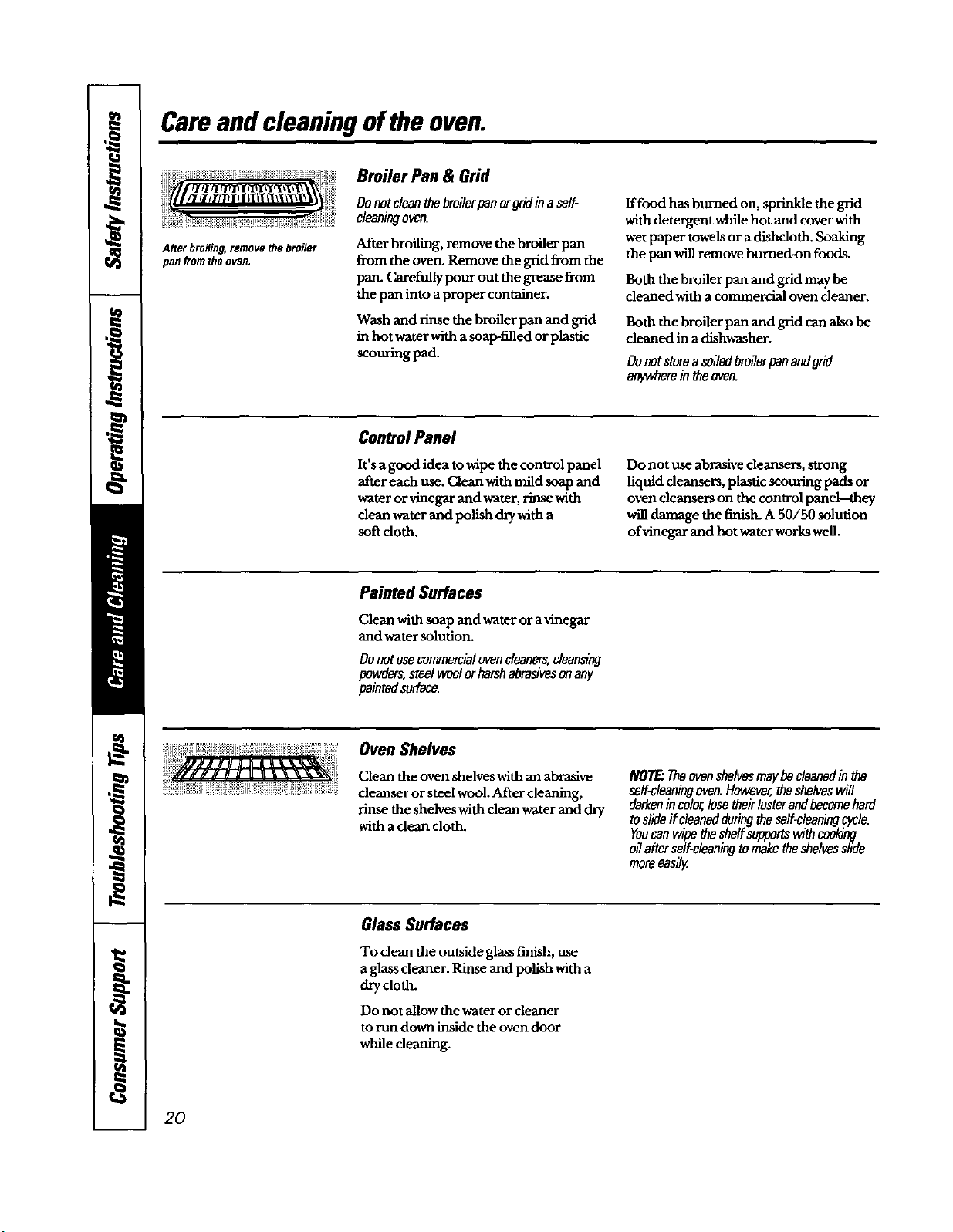
Careand cleaning ofthe oven.
Afterbroiling,removethe broiler
pan fromthe oven.
Broiler Pan & Grid
Donotcleanthebroilerpanorgridinaself-
cleaningoven.
After broiling, remove the broiler pan
from the oven. Remove the grid fi-omthe
pan. Carefully pour out the grease _om
the pan into aproper container.
Wash and rinse the bI_fler pan and grid
in hot water with a soap-filled or plastic
scouring pad.
Iffood has burned on, sprinkle the grid
with detergent while hot and cover with
wet paper towels or a dishcloth. Soaking
the pan will remove burned-on foods.
Both the broiler pan and grid maybe
cleaned with acommercial oven cleaner.
Both the broiler pan and grid canalso be
cleaned in a dishwasher.
Donotstoreasoiledbroilerpanandgrid
anywhereintheoven.
Control Panel
It's a good idea towipe the control panel
after each use. Cleanwith mild soap and
water orvinegar and water, rinsewith
dean water and polish dry with a
soft doth.
Do not use abrasivecleansers, strong
liquid deansers, plastic scouring pads or
oven demlsers on the control panel-they
willdamage the finish. A 50/50 solution
ofvinegar and hot water works well.
PaintedSurfaces
Clean with soap and water or a vinegar
and water solution.
Donotusecommercialovencleaners,cleansing
powders,steel woolorharshabrasivesonany
paintedsurface,
Oven Shelves
Clean the oven shelves with an abrasive
cleanser or steel wool.After cleaning,
rinse the shelves with clean water and _'y
with a clean cloth.
NOTE."Theovenshelvesmaybecleanedinthe
self-cleaningoven.However,theshelveswill
darkenincolor,losetheirlusterandbecomehard
toslideif cleanedduringtheself-cleaningcycle.
Youcanwipethesheffsupportswithcool_ng
oilafterself-cleaningtomaketheshelvesslide
mareeasily.
Glass Surfaces
To clean the outside glassfinish, use
a glasscleaner. Rinse and polish with a
drycloth.
Do not allow the water or cleaner
to run down inside the oven door
while cleaning.
20
ww_.GEAppliance_com
Stainless Steel Surfaces (onsomemodels)
Denotuseasteel-woolpod,"it willscratch
thesurface.
To clean the stainless-steel surface, use a
hot, damp cloth with a mild detergent
suitable for stainless-steel surfaces. Use a
clean, hot, damp cloth to remove soap.
Dry with a dry, clean cloth.
If food soil remains, try a general
kitchen cleaner, such as Fantastik ®,
Simple Green*, or Formula 409 ° .
For hard-to-clean soil, use a standard
stainless-steel cleaner, such as Bon-Ami*
or Calneo e.
Apply cleaner with a damp sponge.
Use aclean, hot, damp cloth to remove
cleaner. Dry with adry, clean cloth.
Alwaysscrub lightly in the direction of
the grain.
After cleaning, use a stainless-steel
polish, such as Stainless Steel Magic*,
Revere Copper and Stainless Steel
Cleaner*, or WenolAll Purpose Metal
Polish °. Follow the product instructions
for deaning the stainless-steel surface.
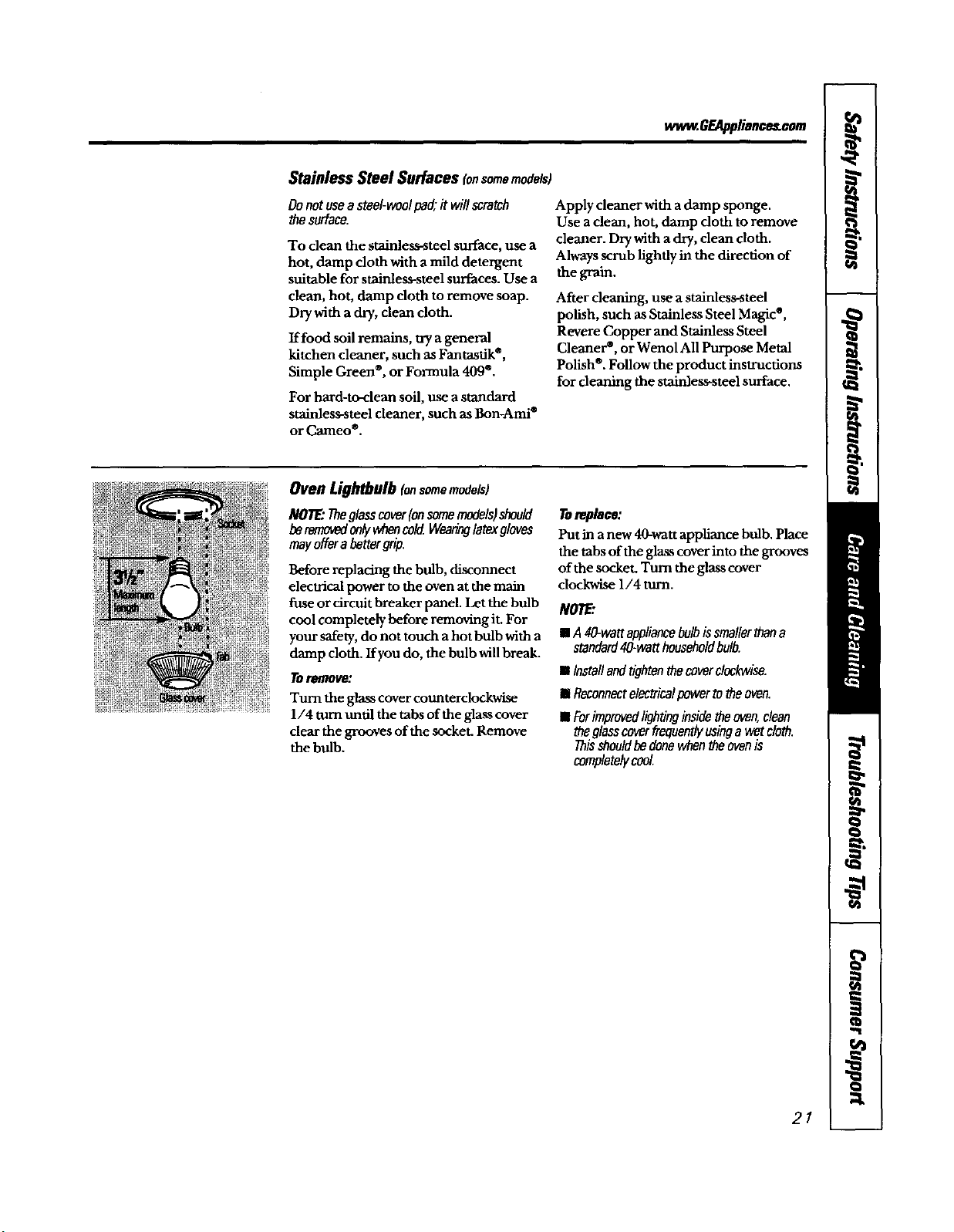
Oven Lightbulb Io,somemodels)
NOTE:Theglasscover(onsomemodels)should
beremovedonlywhencokLWearinglatexgloves
mayofferabettergrip.
Before replacing the bulb, disconnect
electrical power to the oven at the main
fuse or circuit breaker panel. Let the bulb
cool completely before removing it. For
your safety, do not touch ahot bulb with a
damp cloth. Ifyou do, the bulb willbreak.
tlmlOlfl_:
Turn the glass cover counterclockwise
l/4 turn until the tabs of the glass cover
clear the grooves of the socket. Remove
the bulb.
Toreplace:
Putin a new 40-wattappliance bulb. Place
the tabsof the glasscoverintothe grooves
of the socket. Turn the glasscover
clockwise 1/4 turn.
NOTE'.
= A 40-wattappliancebulbissmallerthana
standard40-wetthouseholdbulb.
II Inctaflandtightenthecoverclockwise.
I Reconnectelectricalpowertotheoven.
• Forimprovedlightinginsidetheoven,clean
theglasscoverfrequentlyusinga wetcloth.
Thisshneldbedonewhentheovenis
completelycool.
21

BeforeYouCallForService...
Troubleshootingtips
Savetime andmoney/.Reviewthechartson thefollowing
pagesfirstand youmaynotneed tocall forsennce
What ToDo
_ _ You forgot to enter a • Press the BAKE pad and destred temperature or the
eJ_l_ _ _ bake temperature or SElF CLEAN pad and desired clean dme.
_r de/Jr lffm'f deanlng time.
r-_d de_ _ lallm Oven conmolsimproperly set • See the Usmg_heovensecdon
m'mlJ jlc_ldy Shelf posidon is incorrect . See the Usingtheovensecdnn,
or the shelf is not leveL
Incorrect ¢ookware or • See the Usingthe ovensecuon.
cookware of imFtoper
sJzebeinguse_
Oven thermostat • See the Adjust the oven thermostat--Do it yourself/
needs adjustment, secuon.
r-a_wt Door not open to the • Seethe Usingthe ovensection,
/h'lff/prop_ broil stop position as
recormnended.
Oven controls hnproperly set. • Make sure you press the BROILHI/I.O pad.
Improper shelf • See the BroilingGuide.
position being used.
Food being cooked • Use the broiling pan and grid that came with your oven.
in a hot pan. Make sure it Iscool
Cookware not suited • Use the brodmg pan and grid that came with your oven.
for broiling.
Aluminum foil used on the * See the Usingthe ovensection
the bro'ding pan and grid has
not been fitted properly and
slit as recommended.
In some areas the power • Preheat the broil element for 10 minutes
(voltage)maybelow.
• Broil for the longest period of ume recommended in
the Broiling Guide.
_ A fuse in your home • Replace the fuse or reset the circuit breaker
do _WtWa_ maybe blown or the
circuit breaker tripped.
Oven controls improperly•eL. * See the Using the clock and tlmersection.
_ Ii!_ Lighthu_ is looseor dofeOive. • Tighten or replace the bulb.
_ Pad operating light is broken. • Call for sexvlce.
22
wwvz.GF-Al_lience_com
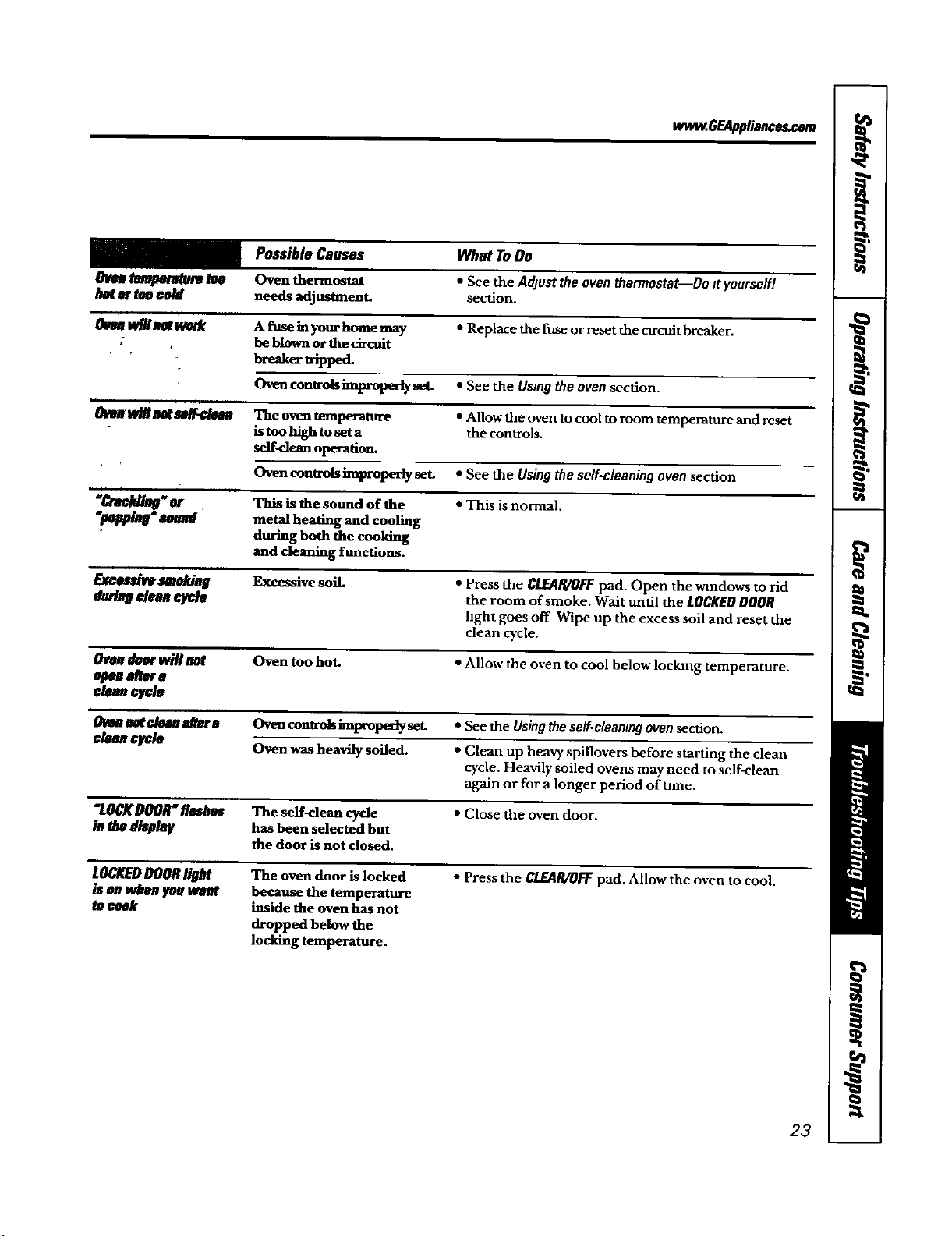
Possible Causes What ToDo
_ _ Oven thermostat • Seethe Adjusttheoventhermostat--Do Ityourseff!
_ tVO¢o/d needs adjustment, section.
tt'_/_ _ A fuse hiyour home may • Replace the fuse or resetthe ctrcuit breaker.
be blownor the circuit
breakertrippe t
Ovencontrolshnproperlyset. • Seethe Usingtheovensection.
ir
tldHmt se/I.¢t_ The oventemperatm'e • Allow the oven to cool toroom temperature and reset
is too high to set a the controls.
se]f-dean operation.
Ovencontrolsimproperlyset. • See the Usingtheself.cleaningovensection
"€_¢k/i_er , This is the sound of the • This is normal.
"_ _ metal heating and cooling
during both the cooldng
and cleaning functions.
E_c_mm/tieg Excessive soil. • Press the CLEAR/OFFpad. Open the windows to rid
Mnn _ the room of smoke. Wait until the LOCKEDDOOR
hght goes off Wipe up the excess soil and reset the
clean cycle.
_K wi//_ Oven too hot. • Allow the oven to cool below Ioclung temperature.
op_m_m
c/ean_le
OVenI_ €lemla4Wra C_encontrolshnWop_y set. • See the Usingtheself.cleaningovensection.
C/tuLleU_/e Oven was heavily soiled. • Clean up heavy spiUovers before starting the clean
cycle. Heavily soiled ovens may need to self-clean
again or for a longer period of Ume.
"LOCKDOOR"flash_ The serf-dean cycle • Close the oven door.
hithe di_/ay has been selected but
the door is not closed.
LOI_'DDOORIIBM The oven door is locked o press the CLE4P./OFFpad. Allowtheoventocool.
/_ OnW/WOJ_eWR'_ because the temperature
cook inside the oven has not
dropped below the
locking temperature.
23
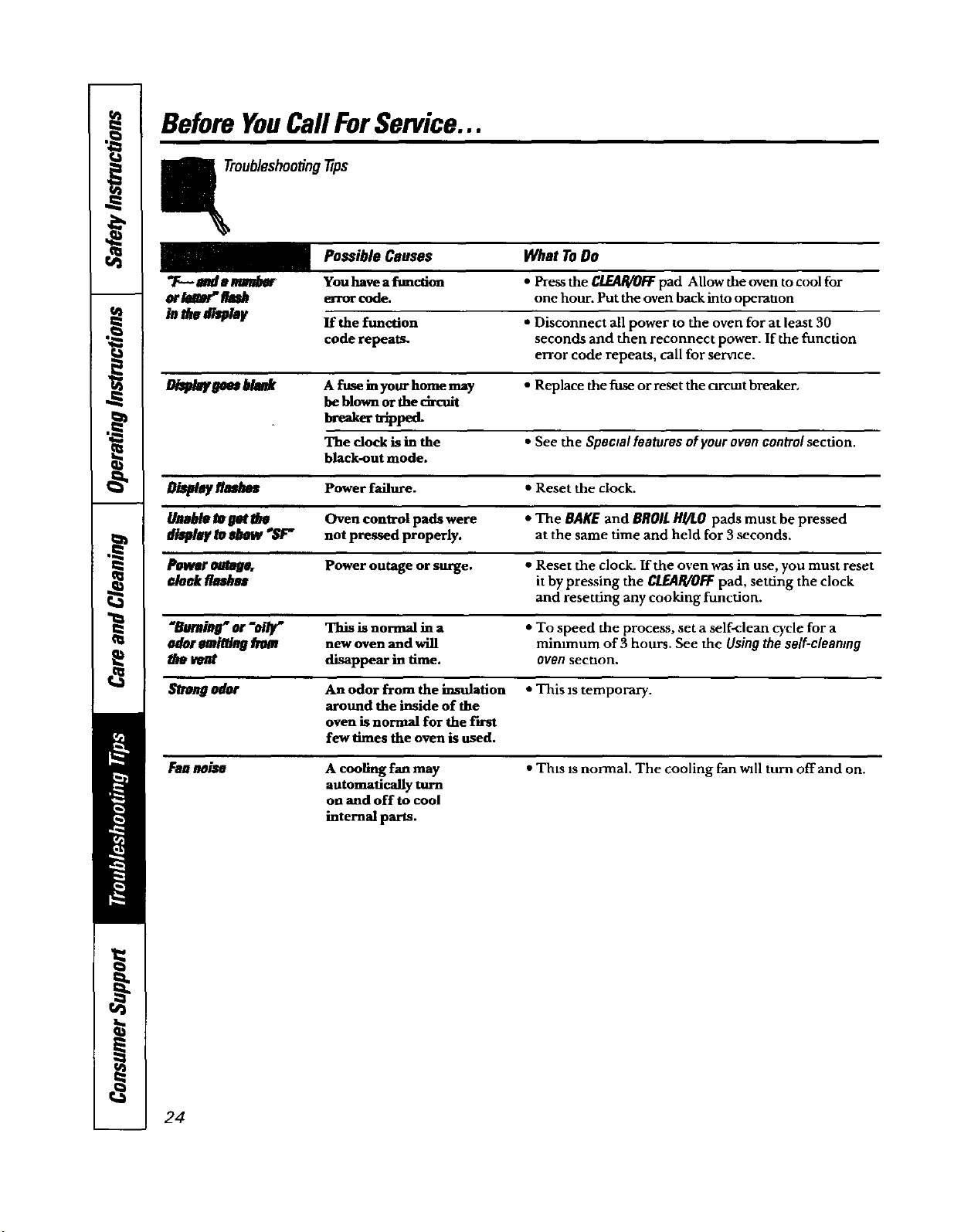
BeforeYouCallForService...
oubleshootJngtips
Possible Causes What To Do
'T---*a_a _ You have a function • Press the CLEAR/O/::Fpad Allow the oven to cool for
or/tl_" AI_ e_rorcode. one hour. Putthe oven backinto operauon
ia Me aq_/mlt If the function • Disconnect all power to the oven for at least 30
code repeats, seconds and then reconnect power. If the funcdon
error code repeats, call for sernce.
1_€/_ _ A fuse ha your home may • Replace the fuse or reset the orcmt breaker.
be blown ar the ch-cuit
h_,er _pp_
The dock is hathe • See the Spectal features of your oven control section.
black-out mode.
J_w/_ f/_ Power failure. • Reset the clock.
_mb/e Io I;1#'tile Oven control pads were * The BAgE and BROIl HI/I.O pads must be pressed
di_lt _ _ _ not pressed properly, at the same time and held for 3 seconds.
Pott_ _ Power outage or surge. • Reset the clock. If the oven was in use, you must reset
¢/a_//mthss it by pressing the CLEAR/OFFpad, setdng the clock
and resetting any cooking function.
_/rn]l_" or "oi/y" This is normal in a • To speed the process, set a self-clean cycle for a
odor ss_ti_ _ new oven and will minimum of 3 hours. See the Using the self-cleaning
the vent disappear ha time. oven secuon.
odor An odor from the insulation • This zstemporary.
around the inside of the
oven is normal for the first
few times the oven is used.
Fanneiss
A cooling fan may
automatically turn
on and off to cool
internal parts.
•Thts zsnormal. The cooling fan will turn offand on.
24
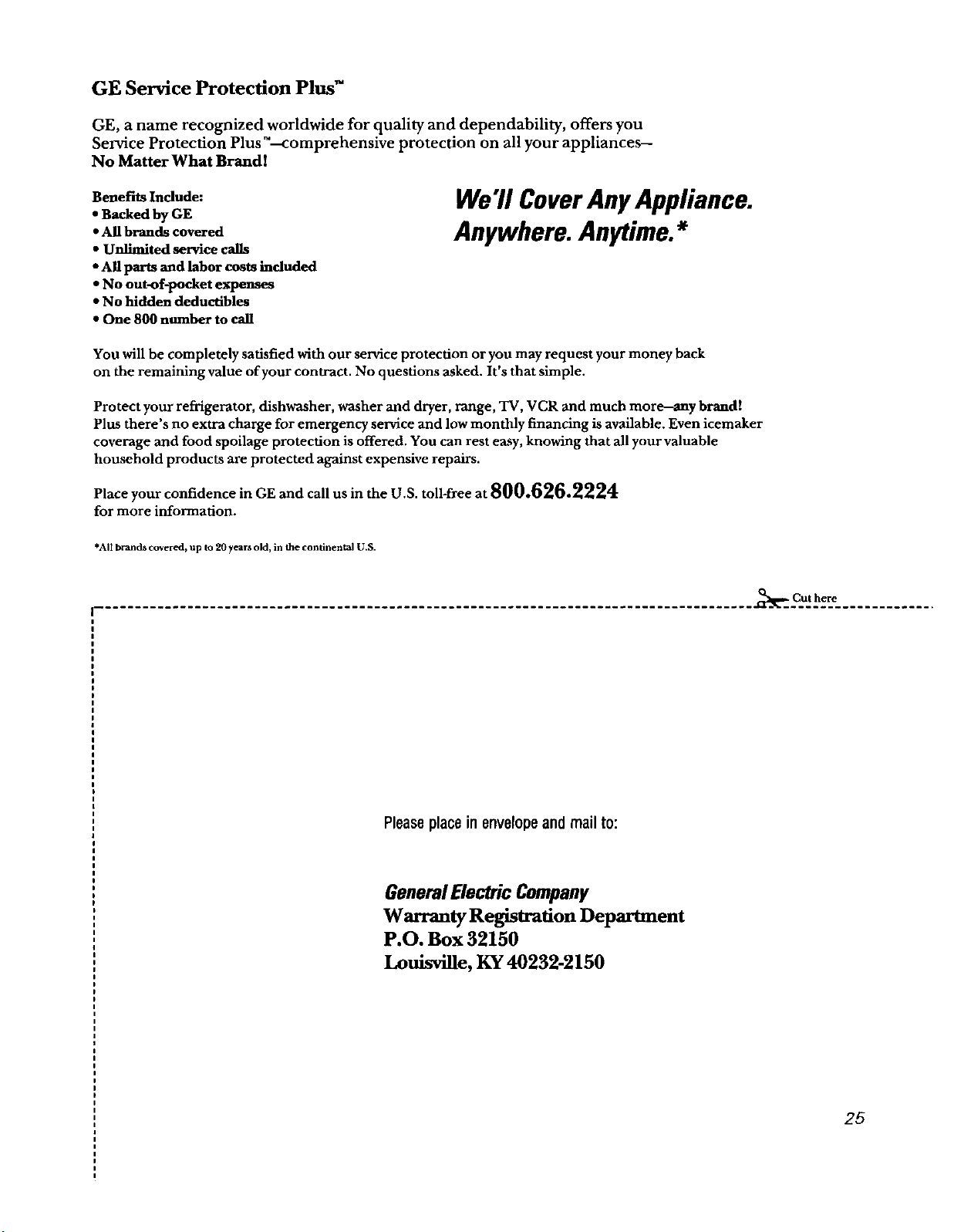
GE Service Protection Plus TM
GE, a name recognized worldwide for quality and dependability, offers you
Selwice Protection Plus _--comprehensive protection on all your appliances--
No Matter What BrandI
Benefits Include:
• Backed by GE
• All brands covered
• UnfimiU_d service calls
• All parts and labor costs included
• No out-of-pocket expenses
• No hidden deductibles
• One 800 number to call
We'll CoverAny Appliance.
Anywhere. Anytime.*
You will be completely satisfied with our service protection or you may request your money back
on the remaining value of your contract. No questions asked. It's that simple.
Protect your refrigerator, dishwasher, washer and dryer, range, TV, VCR and much more--any brand!
Plus there's no extra charge for emergency service and low monthly financing is available. Even icemaker
coverage and food spoilage protection is offered. You can rest easy, knowing that all your valuable
household products are protected against expensive repairs.
Place your confidence in GE and call us in the U.S. toll-free at 800.626.2224
for more information.
*All brands covered, up to 20 years old, in the continental U.S.
_Cut here
Pleaseplacein envelopeand mail to:
GeneralElectric Company
Warranty Registration Department
P.O. Box 32150
Louisville, KY 40232-2150
2g
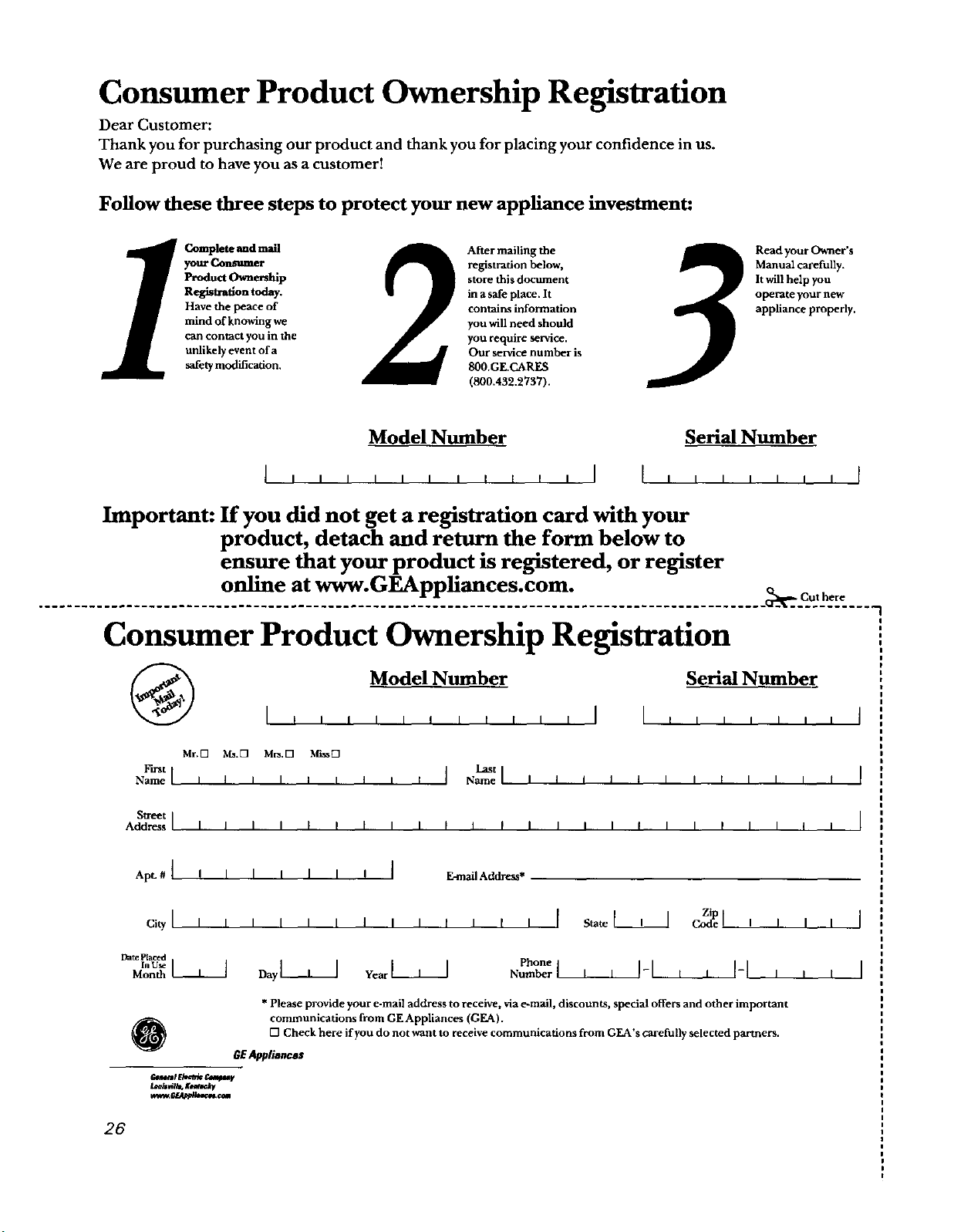
Consumer Product Ownership Registration
Dear Customer:
Thank you for purchasing our product and thank you for placing your confidence in us.
We are proud to have you as a customer!
Follow these three steps to protect your new appliance investment:
CompletelindmaU 2 After mailing the
your Confiner registration below,
Product Ownership store this document
Registration today, in a safe place. It
Have the peace of contains information
mind of knowing we you will need should
can contact you in the you require service.
unlikely event of a Our service number is
safety modification. 800.GE.CARES
(800.432.2737).
3
Read your Owner's
Manual carefully.
It will help you
operate your new
appliance properly.
Model Number
Serial Number
I,,,,,,,,,,,I I,,,,,,,t
Important: If you did not get a registration card with your
product, detach and return the form below to
ensure that your product is registered, or register
online at www.GEAppliances.com.
Cut here
Consumer Product Ownership Registration
Model Number Serial Number
I,,,,,, , , , , , I I , , , , , ,
Mr.O _.D M_.D _D
_t _t
N_el IIIll
Namelllllllllll I
I[llll
Stleet I
Address I I I I I I I I I I [ I [ I I I I I I I I I I I I
I
I
I
ApL # { ! I I I I I ! [ E.mall Address*
ci_I , , , i , , i , , , , , [ S_,eL_ _e ,
Date Prated
Phone
No_ber_____-I , , t l
@
* Please provide your e-mail address to receive, via e-mall, discounts, special offers and other important
communications from GE Appliances (GEA).
[] Check here if you do not want to receive communications from GEA's carefully selected partners.
GEAppliances
_t _U,rtrlc e._t_ v
26
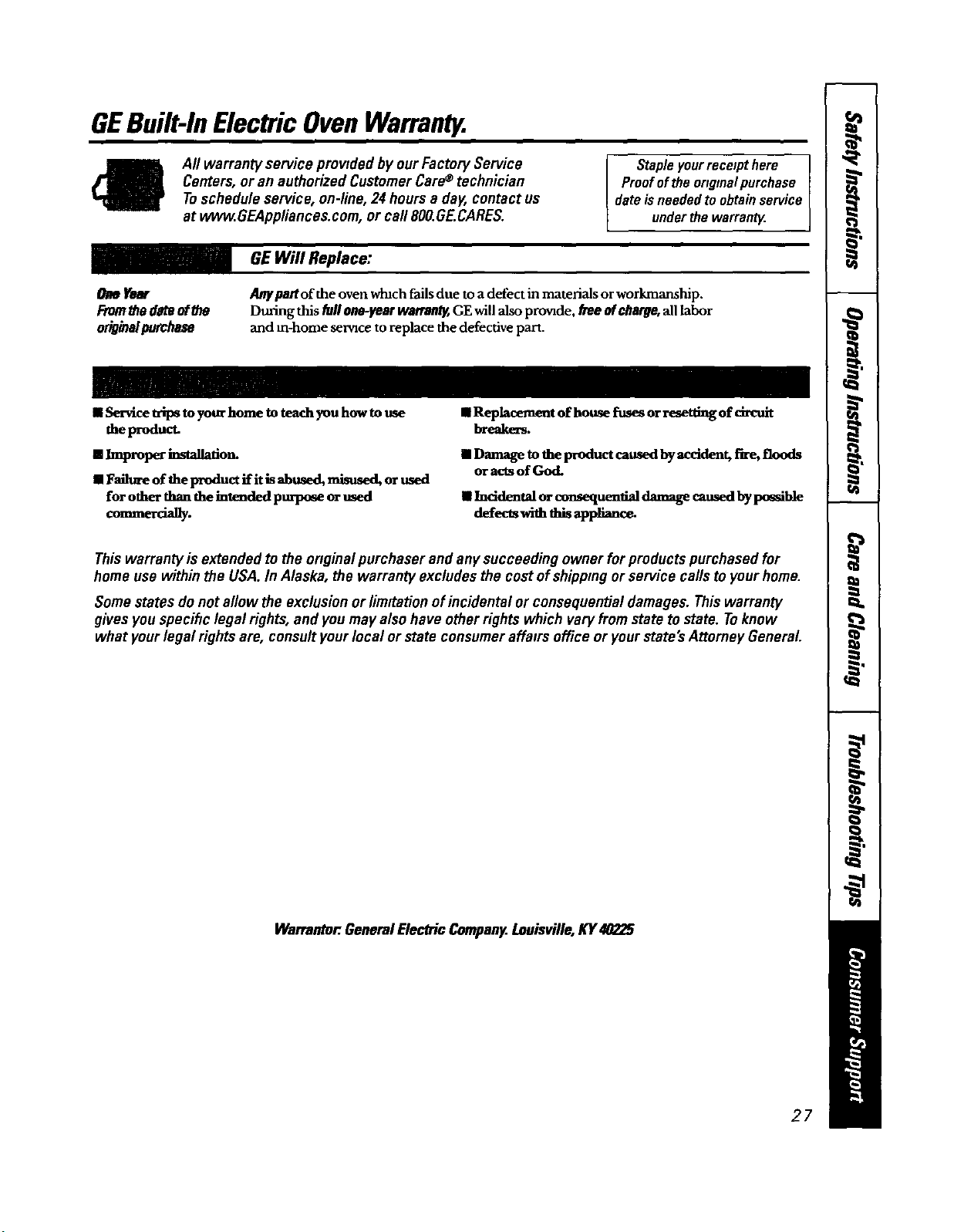
GEBuilt-InElectricOvenWarranty.
All warranty service prowdedby ourFactoryService
Centers,or an authorizedCustomerCare®technician
Toschedule service, on-line,24 hours a day, contact us
at ww_.GEAppliances.com, or call 800.GE.CARES.
Stapleyourreceipthere
Proofofthe originalpurchase
dateisneededtoobtainservice
underthewarranW.
GEWill Replace:
OmYear
From_e d_teofU_
odoa a/purchase
Any pantof the oven wtuch fails due to a defect in materials or workmanship.
During this fullone-year warrantBGE will also pro'nde, free Mcharge, all labor
and m-home servzce to replace the defective part.
IIService trips toyotwhome to teachyou how to use
the product.
[] Improper h_talladon_
IIFaihwe of the product if it is abused, misused, orused
for other thanthe intended p_ orused
comme.a y.
• Replacement of house fuses orresetting of circuit
breaker_
II Damage to the product caused by accident, fire, floods
or acts of God.
• Inddental or consequential damage caused bypossible
defects with this appliance.
Thiswarrantyis extended tothe originalpurchaserand any succeedingowner for productspurchasedfor
home use within the USA.In Alaska, thewarranty excludes the cost ofshippingor service callsto yourhome.
Somestates do not allow the exclusionor limitationof incidental or consequentialdamages.Thiswarranty
gives youspecihclegal rights,and you may also have otherrightswhich vary fromstate tostate. Toknow
what yourlegal rights are, consultyourlocal or state consumeraffatrsoffice or yourstate'sAttorney General.
Warrantor.GeneralElectricCompany.Louisville,KY40225
27

ConsumerSupport.
GEAppliancesWebsite wwvgGEAppliances.com
Have aquestion orneed assistance with your appliance? Try the GEAppliances Website 24 hours a day,
any day ofthe year! For greater convenience and faster service, you can now download Owner's Manuals,
order parts, catalogs, or even schedule serviceon-line. You canalso "Ask Our Team of Experts""
your questions, and so much more...
ScheduleService
vvvvw.GEAppliances.com
Expert GE repair service is only one step away fi'om your door. Get on-line and _hedule your service at
your convenience 24 hours any day of the year! Or call 800.GE.CARES (800.432.2787) during normal
business hours.
RealLifeDesignStudio vvww.GEAppliances.com
GE supports the Universal Design concept--products, services and environments that can be used by
people of all ages, sizes and capabilities. We recognize the need to design for a wide range of physical and
mental abilities and impairments. For details of GE's Universal Design applications, including kitchen
design ideas for people with disabilities, check out our Website today. For the hearing impaired, please call
800.TDD.GEAC (800.833.4S22).
ExtendedWarranties
ww_.GEAppliances.com
Purchase a GE extended warranty and learn about special discounts that are available while your warranty
is still in effect. You can purchase it on-line anytime, or call 800,626.2224 during normal business hours.
GE Consumer Home Services will still be there after your warranty expires.
PartsandAccessories
wvvvv.GEAppliances.com
Individuals qualified to service their own appliances can have parts or accessories sent directly to their homes
(VISA, MasterCard and Discover cards are accepted). Order on-line today, 24 hours every day or by phone at
800.626.2002 dttring normal business hours.
Instructionscontainedinthismanualcoverprocedurestobeperformedbyanyuser.Otherservicinggenerally
shouldbereferredtoqualifiedcotvicopetsonual.Cautionmustbeexercise_sinceimproperservicingmaycause
unsafeoperation.
ContactUs
vvww.GEAppliances.com
Ifyou are not satisfied with the service you receive from GE, contact us on our Website with all the details
including your phone number, or write to: General Manager, Cmtomer Reladous
GEAppliances, Appliance Park
Louisville, KY 40225
RegisterYourAppliance
vvvv_.GEAppliances.com
Register your new appliance ondine.--at your convenience! Timely product registration will allow for
enhanced communication and prompt service under the terms of your warranty, should the need arise.
You may also mail in the pre-printed registration card included in the packing material, or detach and
use the form in this Owner's Manual.
Printed inthe UnitedStates