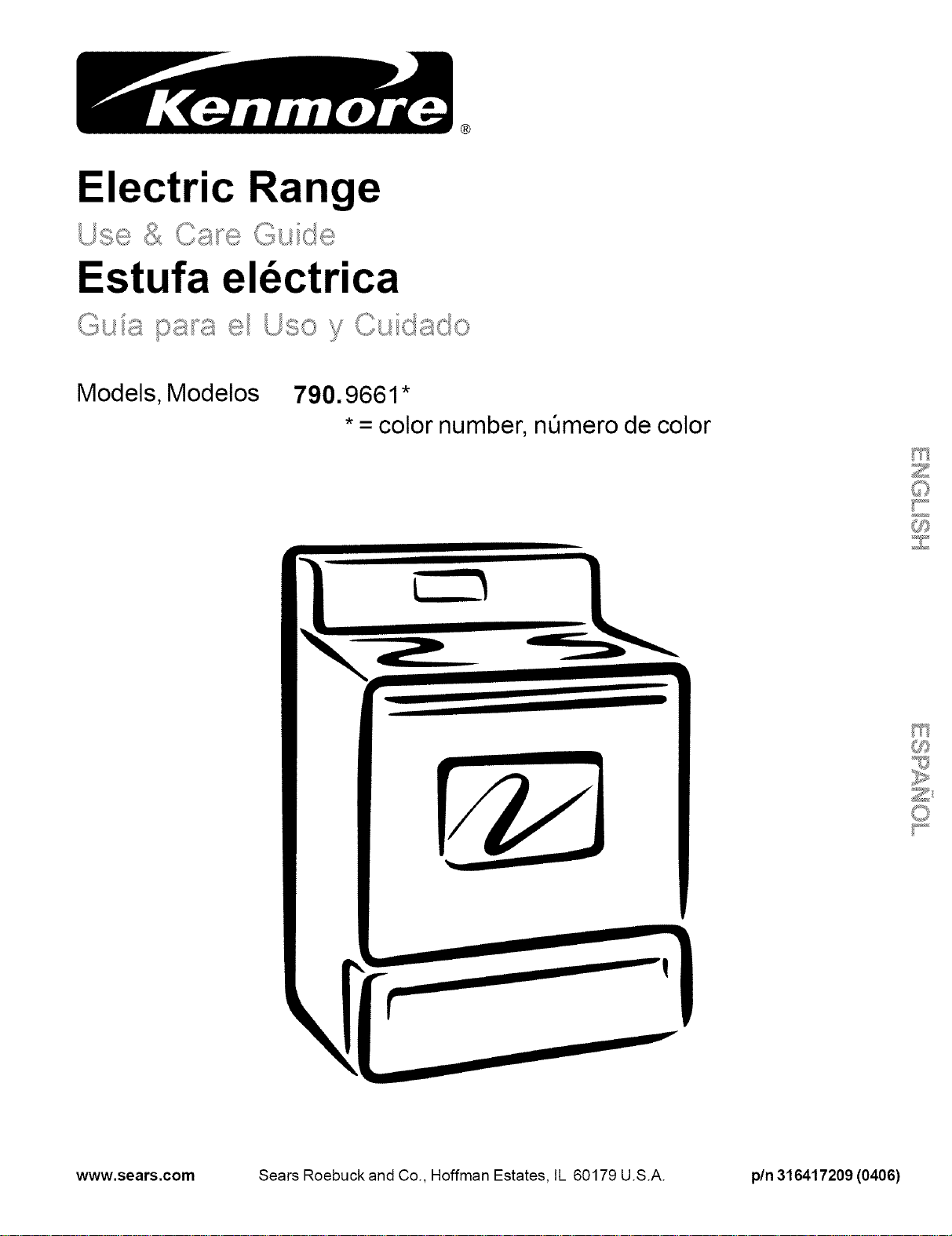
Electric Range
Estufa el_ctrica
Models, Modelos 790.9661 *
• = color number, nQmero de color
C_
www.sears.com Sears Roebuck and Co., Hoffman Estates, IL 60179 U.S.A. pin 316417209 (0406)
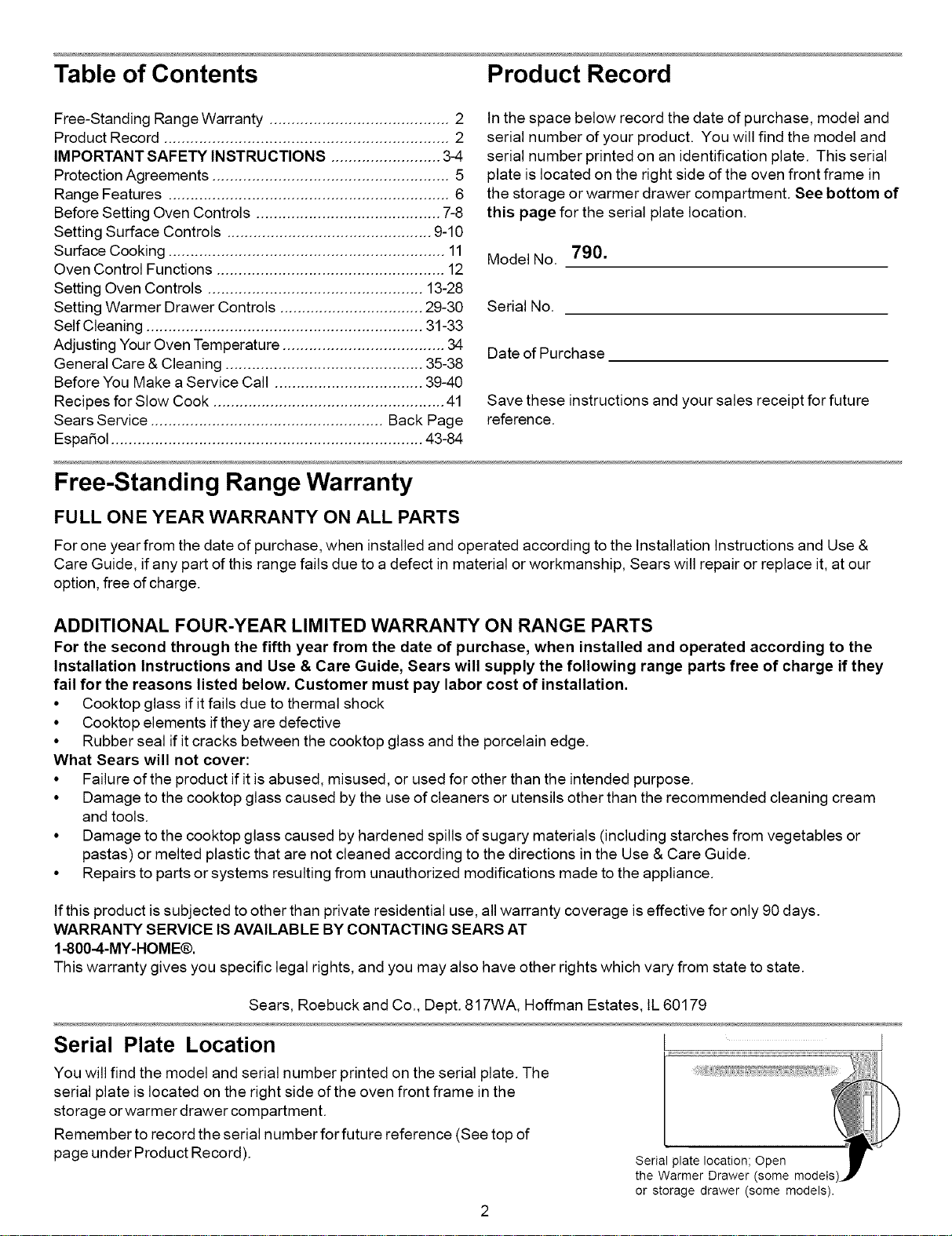
Table of Contents Product Record
Free-Standing Range Warranty ......................................... 2
Product Record ................................................................. 2
IMPORTANT SAFETY INSTRUCTIONS ......................... 3-4
Protection Agreements ...................................................... 5
Range Features ................................................................ 6
Before Setting Oven Controls .......................................... 7-8
Setting Surface Controls ............................................... 9-10
Surface Cooking ............................................................... 11
Oven Control Functions .................................................... 12
Setting Oven Controls ................................................. 13-28
Setting Warmer Drawer Controls ................................. 29-30
Self Cleaning ............................................................... 31-33
Adjusting Your Oven Temperature ..................................... 34
General Care & Cleaning ............................................. 35-38
Before You Make a Service Call .................................. 39-40
Recipes for Slow Cook ..................................................... 41
Sears Service ..................................................... Back Page
Espa5ol ....................................................................... 43-84
Free-Standing Range Warranty
In the space below record the date of purchase, model and
serial number of your product. You will find the model and
serial number printed on an identification plate. This serial
plate is located on the right side of the oven front frame in
the storage or warmer drawer compartment. See bottom of
this page for the serial plate location.
Model No. 790.
Serial No.
Date of Purchase
Save these instructions and your sales receipt for future
reference.
FULL ONE YEAR WARRANTY ON ALL PARTS
For one year from the date of purchase, when installed and operated according to the Installation Instructions and Use &
Care Guide, if any part of this range fails due to a defect in material or workmanship, Sears will repair or replace it, at our
option, free of charge.
ADDITIONAL FOUR-YEAR LIMITED WARRANTY ON RANGE PARTS
For the second through the fifth year from the date of purchase, when installed and operated according to the
Installation Instructions and Use & Care Guide, Sears will supply the following range parts free of charge if they
fail for the reasons listed below. Customer must pay labor cost of installation.
• Cooktop glass if it fails due to thermal shock
• Cooktop elements if they are defective
• Rubber seal if it cracks between the cooktop glass and the porcelain edge.
What Sears will not cover:
• Failure of the product if it is abused, misused, or used for other than the intended purpose.
• Damage to the cooktop glass caused by the use of cleaners or utensils other than the recommended cleaning cream
and tools.
• Damage to the cooktop glass caused by hardened spills of sugary materials (including starches from vegetables or
pastas) or melted plastic that are not cleaned according to the directions in the Use & Care Guide.
• Repairs to parts or systems resulting from unauthorized modifications made to the appliance.
If this product is subjected to other than private residential use, all warranty coverage is effective for only 90 days.
WARRANTY SERVICE IS AVAILABLE BY CONTACTING SEARS AT
1-800-4-MY-HOME®.
This warranty gives you specific legal rights, and you may also have other rights which vary from state to state.
Sears, Roebuck and Co., Dept. 817WA, Hoffman Estates, IL 60179
Serial Plate Location J
.................................................................................i
You will find the model and serial number printed on the serial plate. The
serial plate is located on the right side of the oven front frame in the
storage or warmer drawer compartment.
Remember to record the serial number for future reference (See top of
page under Product Record).
Serial plate location; Open
the Warmer Drawer (some models
or storage drawer (some models).
Important Safety Instructions
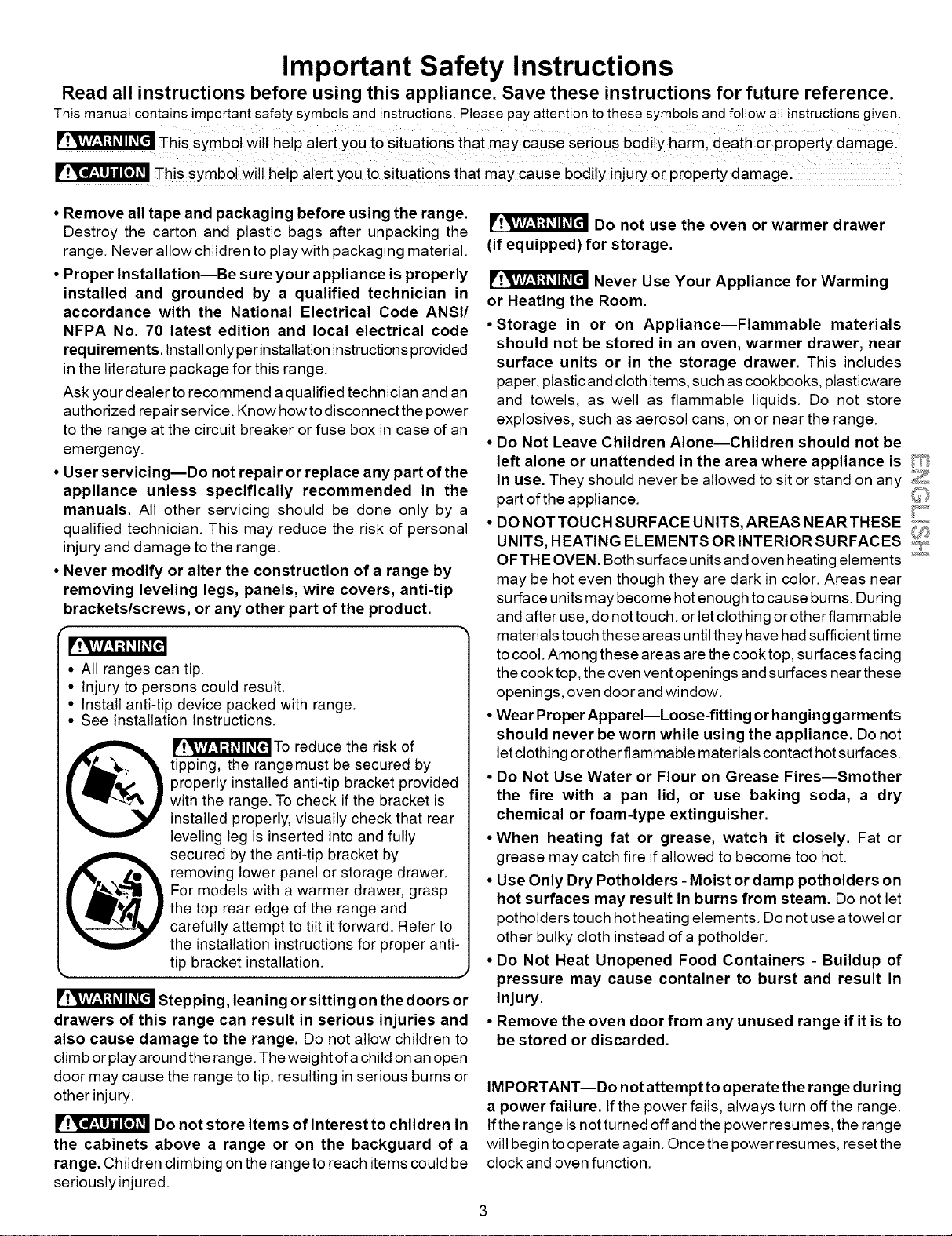
Read all instructions before using this appliance. Save these instructions for future reference.
This manual contains important safety symbols and instructions. Please pay attention to these symbols and follow all instructions given.
This SymbOl Will help alert you to situations that maY caUse serioUs bodily harml death or pioperty damage.
This symbol will he!p alert you to situations that may Cause bodi!y injury or property damage.
• Remove all tape and packaging before using the range.
Destroy the carton and plastic bags after unpacking the
range. Never allow children to play with packaging material.
• Proper Installation--Be sure your appliance is properly
installed and grounded by a qualified technician in
accordance with the National Electrical Code ANSI/
NFPA No. 70 latest edition and local electrical code
requirements. Install only perinstallation instructions provided
in the literature package for this range.
Ask your dealer to recommend a qualified technician and an
authorized repair service. Know how to disconnect the power
to the range at the circuit breaker or fuse box in case of an
emergency.
• User servicing--Do not repair or replace any part of the
appliance unless specifically recommended in the
manuals. All other servicing should be done only by a
qualified technician. This may reduce the risk of personal
injury and damage to the range.
• Never modify or alter the construction of a range by
removing leveling legs, panels, wire covers, anti-tip
brackets/screws, or any other part of the product.
• All ranges can tip.
• Injury to persons could result.
• Install anti-tip device packed with range.
• See Installation Instructions.
@ [P'!,V_,l_,lr,t#ll_.[_To reduce the risk of
tipping, the rangemust be secured by
properly installed anti-tip bracket provided
with the range. To check if the bracket is
installed properly, visually check that rear
leveling leg is inserted into and fully
secured by the anti-tip bracket by
removing lower panel or storage drawer.
For models with a warmer drawer, grasp
the top rear edge of the range and
carefully attempt to tilt it forward. Refer to
the installation instructions for proper anti-
tip bracket installation.
• J
Stepping, leaning or sitting on the doors or
drawers of this range can result in serious injuries and
also cause damage to the range. Do not allow children to
climb or play around the range. The weight ofa child on an open
door may cause the range to tip, resulting in serious burns or
other injury.
Do not store items of interest to children in
the cabinets above a range or on the backguard of a
range. Children climbing on the range to reach items could be
seriously injured.
Do not use the oven or warmer drawer
(if equipped) for storage.
Never Use Your Appliance for Warming
or Heating the Room.
• Storage in or on Appliance--Flammable materials
should not be stored in an oven, warmer drawer, near
surface units or in the storage drawer. This includes
paper, plastic and cloth items, such as cookbooks, plasticware
and towels, as well as flammable liquids. Do not store
explosives, such as aerosol cans, on or near the range.
• Do Not Leave Children Alone--Children should not be
left alone or unattended in the area where appliance is _t_
in use. They should never be allowed to sit or stand on any
part of the appliance.
_9
• DO NOTTOUCH SURFACE UNITS, AREAS NEAR THESE _.....
UNITS, HEATING ELEMENTSORINTERIORSURFACES ,,_,_
OF THE OVEN. Both surface units and oven heating elements _''_....
may be hot even though they are dark in color. Areas near
surface units may become hot enough to cause burns. During
and after use, do not touch, or let clothing or otherflammable
materials touch these areas until they have had sufficient time
to cool. Among these areas are the cook top, surfaces facing
the cook top, the oven vent openings and surfaces near these
openings, oven door and window.
•Wear Proper Apparel--Loose-fitting or hanging garments
should never be worn while using the appliance. Do not
let clothing or otherflammable materials contact hotsurfaces.
• Do Not Use Water or Flour on Grease Fires--Smother
the fire with a pan lid, or use baking soda, a dry
chemical or foam-type extinguisher.
•When heating fat or grease, watch it closely. Fat or
grease may catch fire if allowed to become too hot.
• Use Only Dry Potholders - Moist or damp potholders on
hot surfaces may result in burns from steam. Do not let
potholders touch hot heating elements. Do not use a towel or
other bulky cloth instead ofa potholder.
• Do Not Heat Unopened Food Containers - Buildup of
pressure may cause container to burst and result in
injury.
• Remove the oven door from any unused range if it is to
be stored or discarded.
IMPORTANT--Do not attempt to operate the range during
a power failure. If the power fails, always turn off the range.
If the range is not turned offand the power resumes, the range
will begin to operate again. Once the power resumes, reset the
clock and oven function.
Important Safety Instructions
IMPORTANT INSTRUCTIONS FOR USING YOUR
COOKTOP
• Know which knob controls each surface heating unit. Place a
pan of food on the unit before turning it on, and turn the unit off
before removing the pan.
• Use Proper Pan Size--This appliance is equipped with one or
more surface units of different sizes. Select utensils having flat
bottoms large enough to cover the surface unit heating element.
The use of undersized utensils will expose a portion of the
heating element to direct contact and may result in ignition of
clothing. Proper relationship of utensil to element will also
improve efficiency.
• Utensil Handles Should Be Turned Inward and Not Extend Over
Adjacent Surface Elements--To reduce the risk of burns, ignition
of flammable materials, and spillage due to unintentional contact
with the utensil, the handle of the utensil should be positioned so
that it is turned inward, and does not extend over adjacent surface
units.
• Never Leave Surface Elements Unattended at High Heat
Settings--Boilovers cause smoking and greasy spillovers that
may ignite, or a pan that has boiled dry may melt.
• Do Not Immerse or Soak Removable Heating Elements--
Heating elements should never be immersed in water. Heating
elements clean themselves during normal operation.
• Glazed Cooking Utensils--Only certain types of glass, glass/
ceramic, ceramic, earthenware, or other glazed utensils are
suitable for cook top service without breaking due to the sudden
change in temperature. Check the manufacturer's
recommendations for cook top use.
• When flaming foods under a ventilating hood, turn the fan on.
IMPORTANT INSTRUCTIONS FOR USING YOUR
OVEN
• Use Care When Opening Oven Door or Warmer Drawer (if
equipped)--Stand to the side of the range when opening the door
of a hot oven. Let hot air or steam escape before you remove or
replace food in the oven.
• Keep Oven Vent Ducts Unobstructed. The oven vent is located
under the left rear surface element if your model is equipped with
coil elements. The oven vent is located below the backguard for
models equipped with ceramic-glass cook tops. Touching the
surfaces in this area when the oven is operating may cause
severe burns. Also, do not place plastic or heat-sensitive items
on or near the oven vent. These items could melt or ignite.
• Placement of Oven Racks. Always place oven racks in desired
location while oven is cool. If rack must be moved while oven is
hot use extreme caution. Use potholders and grasp the rack with
both hands to reposition. Do not let potholders contact the hot
heating elements in the oven. Remove all utensils from the rack
before moving.
• Do not use the broiler pan without its insert. The broiler pan and
its insert allow dripping fat to drain and be kept away from the high
heat of the broiler.
• Do not cover the broiler insert with aluminum foil. Exposed fat
and grease could ignite.
• Protective Liners--Do not use aluminum foil to line the oven
bottom. Only use aluminum foil as recommended in this manual.
Improper installation of these liners may result in risk of electric
shock, or fire.
SELF CLEANING OVENS
• Clean in the self-cleaning cycle only the parts listed in this Use & Care Manual. Before self cleaning the oven, remove the broiler
pan and any utensils or foods from the oven.
• Do Not Use Oven Cleaners--No commercial oven cleaner or oven liner protective coating of any kind should be used in or around
any part of the oven.
• Do Not Clean Door Gasket--The door gasket is essential for a good seal. Care should be taken not to rub, damage or move the gasket.
•The health of some birds is extremely sensitive to the fumes given off during the self-cleaning cycle of any range. Move birds to another
well-ventilated room.
IMPORTANT INSTRUCTIONS FOR CLEANING YOUR RANGE
• Clean the range regularly to keep all parts free of grease that could catch fire. Pay particular attention to the area underneath each
surface element. Do not allow grease to accumulate.
• Kitchen cleaners and aerosols---Always follow the manufacturer's recommended directions for use. Be aware that excess
residue from cleaners and aerosols may ignite causing damage and injury.
• Clean Ventilating Hoods Frequently--Grease should not be allowed to accumulate on the hood or filter. Follow manufacturer's
instructions for cleaning.
FOR CERAMIC-GLASS COOK TOP MODELS
• Do Not Cook on Broken Cook Top--If cook top should break, cleaning solutions and spillovers may penetrate the broken cook top
and create a risk of electric shock. Contact a qualified technician immediately.
• Clean Cook Top with Caution--if a wet sponge or cloth is used to wipe spills on a hot cooking area, be careful to avoid a steam burn.
Some cleaners can produce noxious fumes if applied to a hot surface.
Important Safety Notice
The California Safe Drinking Water and Toxic Enforcement Act requires the Governor of California to publish a list ofsubstances
known to the state to cause cancer, birth defects or other reproductive harm, and requires businesses to warn customers of
potential exposure to such substances.
PROTECTION AGREEMENTS
In the U.S.A.
Master Protection Agreements
Congratulations on making a smart purchase. Your
new Kenmore ® product is designed and manufactured
for years of dependable operation. But like all products,
it may require preventive maintenance or repair from
time to time. That's when having a Master Protection
Agreement can save you money and aggravation.
Purchase a Master Protection Agreement now and
protect yourseff from unexpected hassle and
expense,
The Master Protection Agreement also helps extend
the life of your new product. Here's what's included in
the Agreement:
F4 Expert service by our 12,000 professional repair
specialists
[] Unlimited service and no charge for parts and
labor on all covered repairs
[] "No-lemon" guarantee- replacement
of your covered product if four or more product
failures occur within twelve months
[] Product replacement if your covered product
can't be fixed
[] Annual Preventive Maintenance Check at your
request - no extra charge
[] Fast help by phone - phone support from a Sears
technician on products requiring in-home repair, plus
convenient repair scheduling
[] Power surge protection against electrical
damage due to power fluctuations
[] Rental reimbursement if repair of your covered
product takes longer than promised
Once you purchase the Agreement, a simple phone
call is all that it takes for you to schedule service. You
can call anytime day or night, or schedule a service
appointment online.
Sears has over 12,000 professional repair specialists,
who have access to over 4.5 million quality parts and
accessories. That's the kind of professionalism you
can count on to help prolong the life of your new
purchase for years to come. Purchase your Master
Protection Agreement today!
Some limitations and exclusions apply.
For prices and additional information call
1-800-827-6655.
In Canada
Maintenance Agreements
Your purchase has added value because you
can depend on Sears HomeOentral®for service.
With over 2400 Service Technicians and more than a
million parts and accessories, we have the tools,
parts, knowledge and skills to ensure our pledge:
We Service What We Sell.
Your Kenmore ®product is designed, manufactured
and tested to provide years of dependable operation.
But like all products, it may require service from time to
time. The Sears Maintenance Agreement offers you an
outstanding service program, affordably priced.
The Sears Maintenance Agreement:
* Is your way to buy tomorrow's service at today's
price
• Eliminates repair bills resulting from normal wear
and tear
• Provides phone support from a Sears technician on
products requiring in-home repair
• Even if you don't need repairs, provides an annual
Preventive Maintenance Check, at your request, to
ensure that your product is in proper running condition.
Some limitations apply. For more information
about Sears Canada Maintenance Agreements,
call 1-800-361-6665
Sears Installation Service
For Sears professional installation of home
appliances, garage door openers, water heaters,
and other major home items, in the U.S.A. call
1-800-4-MY-HOME®
REV.030509
Range Features
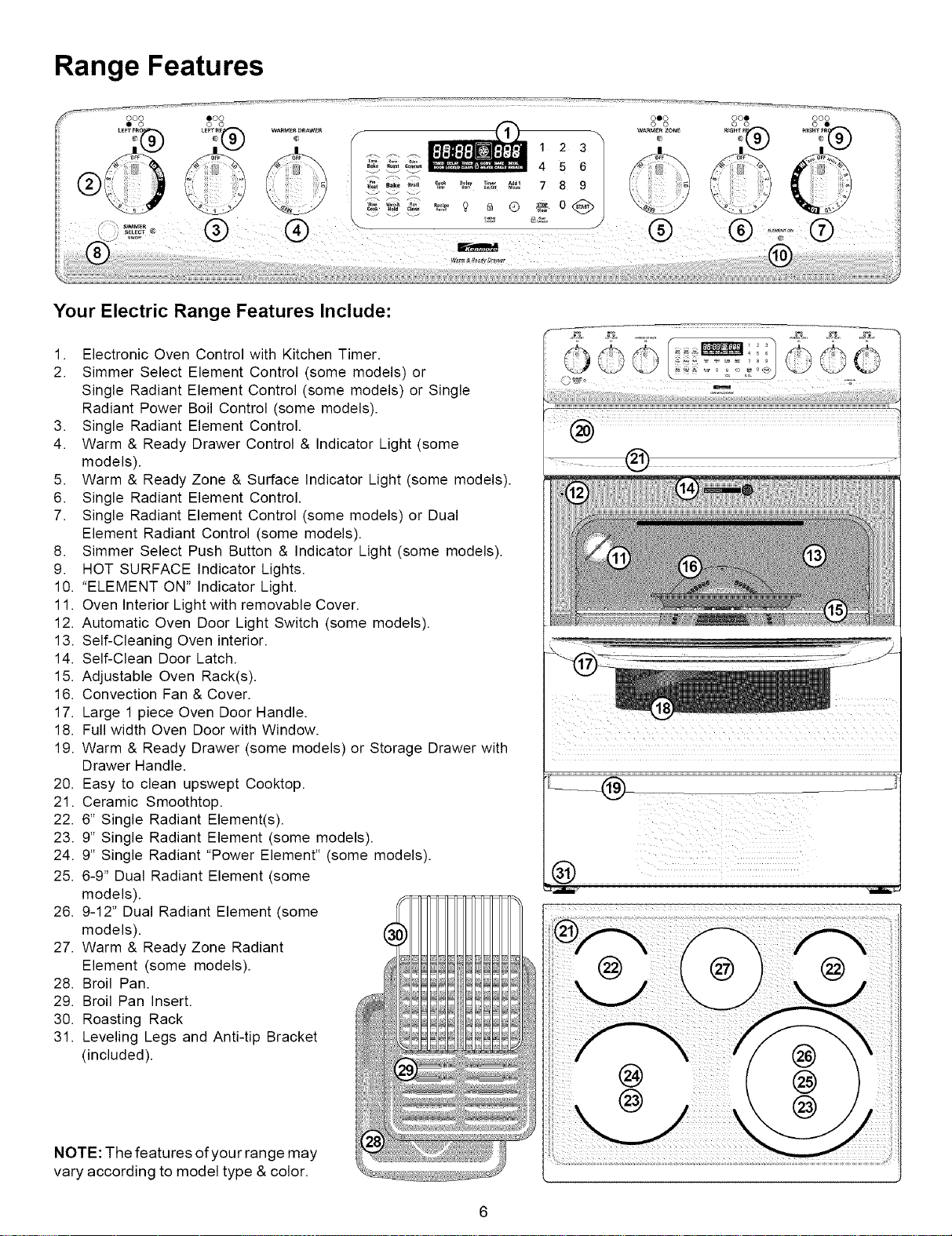
Your Electric Range Features Include:
1. Electronic Oven Control with Kitchen Timer.
2. Simmer Select Element Control (some models) or
Single Radiant Element Control (some models) or Single
Radiant Power Boil Control (some models).
3. Single Radiant Element Control.
4. Warm & Ready Drawer Control & Indicator Light (some
models).
5. Warm & Ready Zone & Surface Indicator Light (some models).
6. Single Radiant Element Control.
7. Single Radiant Element Control (some models) or Dual
Element Radiant Control (some models).
8. Simmer Select Push Button & Indicator Light (some models).
9. HOT SURFACE Indicator Lights.
10. "ELEMENT ON" Indicator Light.
11. Oven Interior Light with removable Cover.
12. Automatic Oven Door Light Switch (some models).
13. Self-Cleaning Oven interior.
14. Self-Clean Door Latch.
15. Adjustable Oven Rack(s).
16. Convection Fan & Cover.
17. Large 1 piece Oven Door Handle.
18. Full width Oven Door with Window.
19. Warm & Ready Drawer (some models) or Storage Drawer with
Drawer Handle.
20. Easy to clean upswept Cooktop.
21. Ceramic Smoothtop.
22. 6" Single Radiant Element(s).
23. 9" Single Radiant Element (some models).
24. 9" Single Radiant "Power Element" (some models).
25. 6-9" Dual Radiant Element (some
models).
26. 9-12" Dual Radiant Element (some
models).
27. Warm & Ready Zone Radiant
Element (some models).
28. Broil Pan.
29. Broil Pan Insert.
30. Roasting Rack
31. Leveling Legs and Anti-tip Bracket
(included).
NOTE: The features of your range may
vary according to model type & color.
00
0
Before Setting Oven Controls
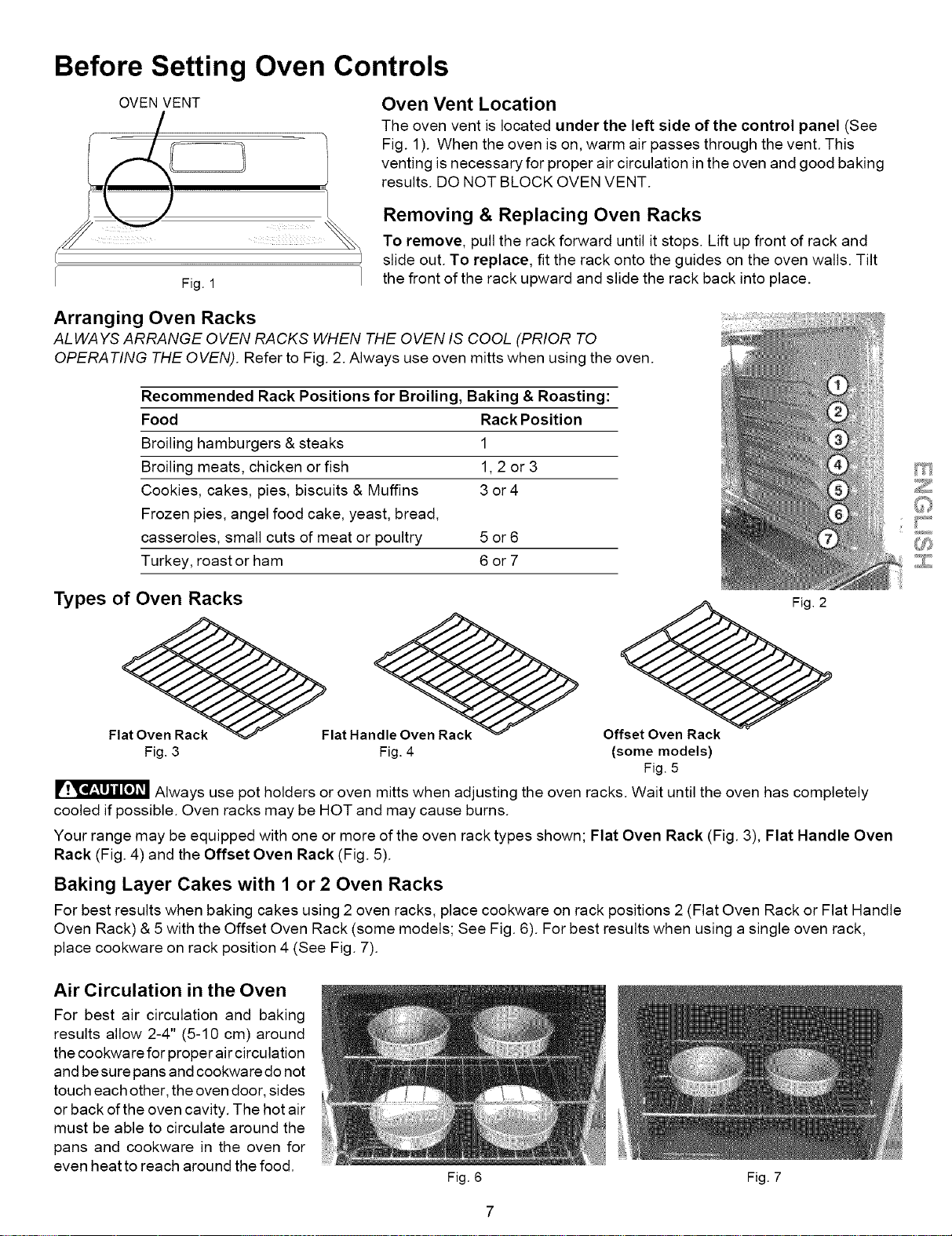
OVEN VENT
Oven Vent Location
The oven vent is located under the left side of the control panel (See
Fig. 1). When the oven is on, warm air passes through the vent. This
venting is necessary for proper air circulation in the oven and good baking
results. DO NOT BLOCK OVEN VENT.
Fig. 1
Removing & Replacing Oven Racks
To remove, pull the rack forward until it stops. Lift up front of rack and
slide out. To replace, fit the rack onto the guides on the oven walls. Tilt
the front of the rack upward and slide the rack back into place.
Arranging Oven Racks
ALWAYS ARRANGE OVEN RACKS WHEN THE OVEN IS COOL (PRIOR TO
OPERATING THE OVEN). Refer to Fig. 2. Always use oven mitts when using the oven.
Recommended Rack Positions for Broiling, Baking & Roasting:
Food Rack Position
Broiling hamburgers & steaks 1
Broiling meats, chicken or fish 1,2 or 3
Cookies, cakes, pies, biscuits & Muffins 3 or4
Frozen pies, angel food cake, yeast, bread,
casseroles, small cuts of meat or poultry 5 or 6
Turkey, roast or ham 6 or 7
Types of Oven Racks
Fl_Flat Han_ack
Fig. 3 Fig. 4
__ Fig._
Offset Oven Rack
(some models)
Fig. 5
Always use pot holders or oven mitts when adjusting the oven racks. Wait until the oven has completely
cooled if possible. Oven racks may be HOT and may cause burns.
Your range may be equipped with one or more of the oven rack types shown; Flat Oven Rack (Fig. 3), Flat Handle Oven
Rack (Fig. 4) and the Offset Oven Rack (Fig. 5).
Baking Layer Cakes with 1 or 2 Oven Racks
For best results when baking cakes using 2 oven racks, place cookware on rack positions 2 (Flat Oven Rack or Flat Handle
Oven Rack) & 5 with the Offset Oven Rack (some models; See Fig. 6). For best results when using a single oven rack,
place cookware on rack position 4 (See Fig. 7).
Air Circulation in the Oven
For best air circulation and baking
results allow 2-4" (5-10 cm) around
the cookware for proper air circulation
and be sure pans and cookware do not
touch each other, the oven door, sides
or back of the oven cavity. The hot air
must be able to circulate around the
pans and cookware in the oven for
even heat to reach around the food.
Fig. 6 Fig. 7
Before Setting Oven Controls (cont'd)
About the Ceramic Glass Cooktop
The ceramic cooktop has radiant surface elements located below the surface of the glass. The design of the ceramic
cooktop outlines the area ofthe surface element underneath. Be sure to match the pan size with the diameter ofthe
element outline on the cooktop. Heat istransferred up through the surface of the cooktop to the cookware. Only flat-
bottomed cookware should be used.
The type and size of cookware, the number of surface elements in use and their settings, are all factors that will affect the
amount of heat that will spread to areas beyond the surface elements. The areas surrounding the elements may become
hot enough to cause burns.
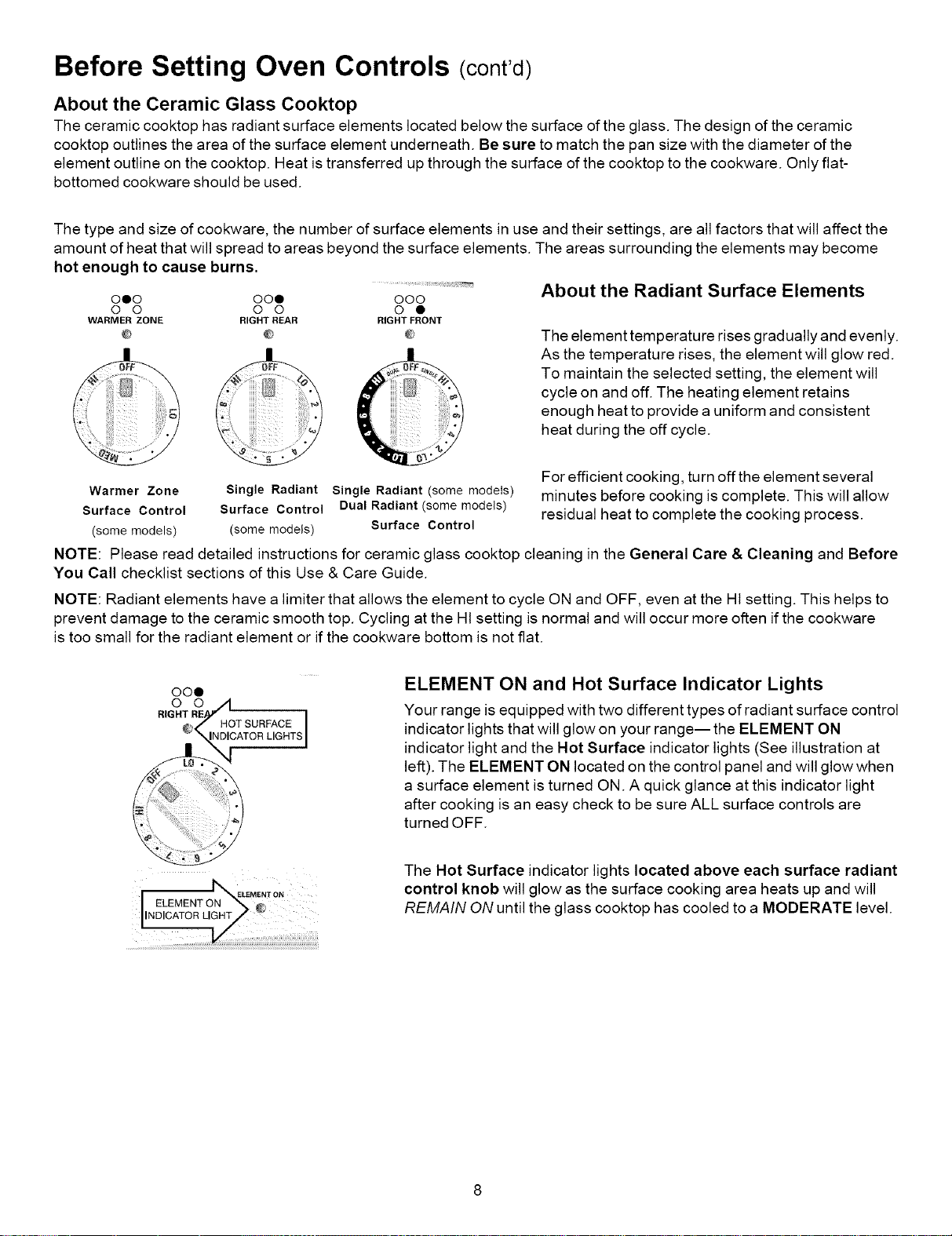
000 000 OOO
O O O O O •
WARMER ZONE RIGHT REAR RIGHT FRONT
@ @ @
Warmer Zone
Surface Control
(some models)
Single Radiant
Surface Control
(some models)
Single Radiant (some models)
Dual Radiant (some models)
Surface Control
About the Radiant Surface Elements
The element temperature rises gradually and evenly.
As the temperature rises, the element will glow red.
To maintain the selected setting, the element will
cycle on and off. The heating element retains
enough heat to provide a uniform and consistent
heat during the off cycle.
For efficient cooking, turn off the element several
minutes before cooking is complete. This will allow
residual heat to complete the cooking process.
NOTE: Please read detailed instructions for ceramic glass cooktop cleaning in the General Care & Cleaning and Before
You Call checklist sections of this Use & Care Guide.
NOTE: Radiant elements have a limiter that allows the element to cycle ON and OFF, even at the HI setting. This helps to
prevent damage to the ceramic smooth top. Cycling at the Ht setting is normal and will occur more often if the cookware
is too small for the radiant element or if the cookware bottom is not flat.
OO0
0 0
RIGHT
HOT SURFACE I
INDICATOR LIGHTS]
ELEMENT ON and Hot Surface Indicator Lights
Your range is equipped with two different types of radiant surface control
indicator lights that will glow on your range-- the ELEMENT ON
indicator light and the Hot Surface indicator lights (See illustration at
left). The ELEMENT ON located on the control panel and will glow when
a surface element is turned ON. A quick glance at this indicator light
after cooking is an easy check to be sure ALL surface controls are
turned OFF.
The Hot Surface indicator lights located above each surface radiant
control knob will glow as the surface cooking area heats up and will
REMAIN ON until the glass cooktop has cooled to a MODERATE level.
Setting Surface Controls
To Operate Single Radiant Surface Elements (all models)
To Operate a Single Radiant Element:
1. Place correctly sized cookware on the radiant surface element.
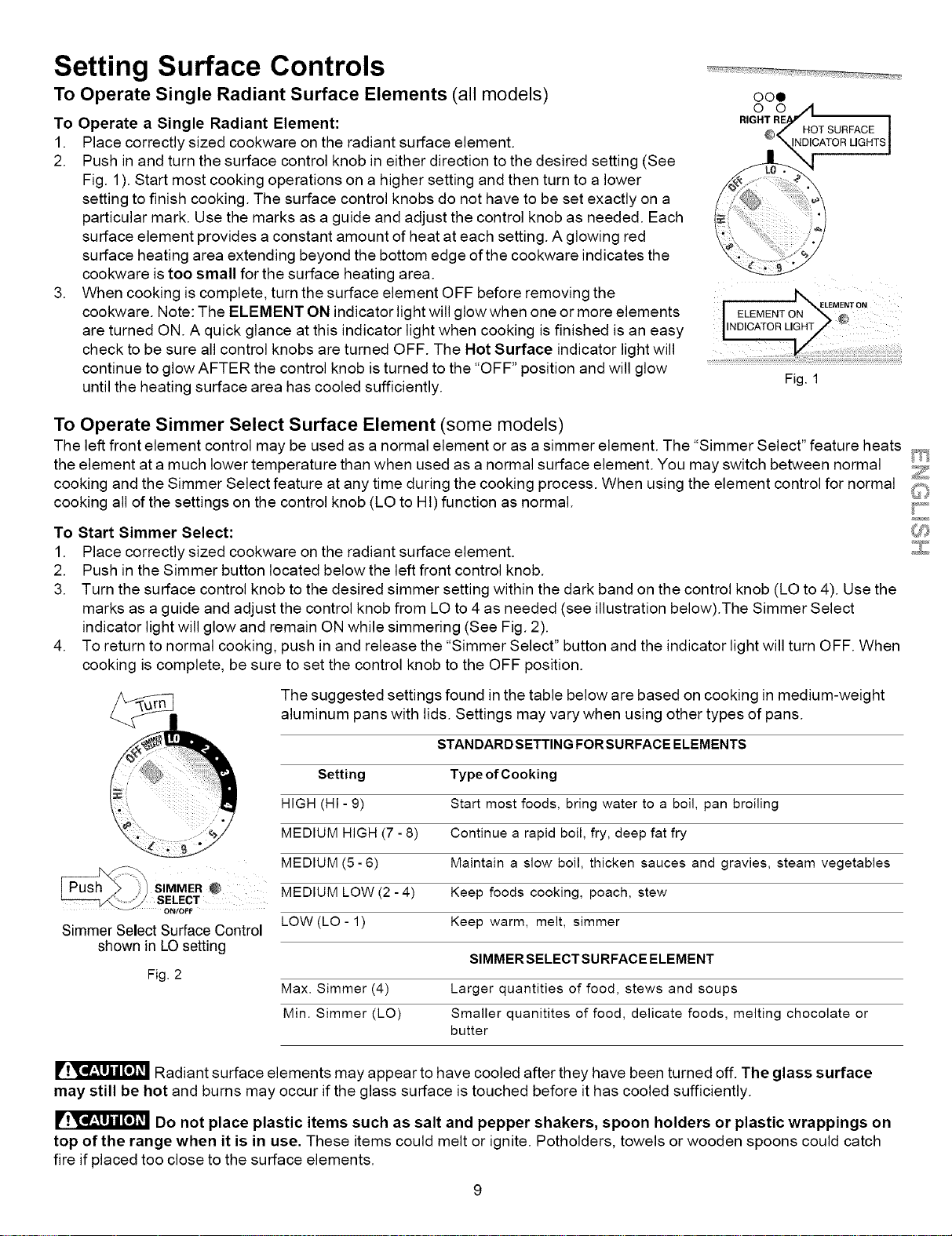
2. Push in and turn the surface control knob in either direction to the desired setting (See
Fig. 1). Start most cooking operations on a higher setting and then turn to a lower
setting to finish cooking. The surface control knobs do not have to be set exactly on a
particular mark. Use the marks as a guide and adjust the control knob as needed. Each
surface element provides a constant amount of heat at each setting. A glowing red
surface heating area extending beyond the bottom edge of the cookware indicates the
cookware is too small for the surface heating area.
3. When cooking is complete, turn the surface element OFF before removing the
cookware. Note: The ELEMENT ON indicator light will glow when one or more elements
are turned ON. A quick glance at this indicator light when cooking is finished is an easy
check to be sure all control knobs are turned OFF. The Hot Surface indicator light will
continue to glow AFTER the control knob is turned to the "OFF" position and will glow
until the heating surface area has cooled sufficiently.
oo0
Fig. 1
To Operate Simmer Select Surface Element (some models)
The left front element control may be used as a normal element or as a simmer element. The "Simmer Select" feature heats _4_;
the element at a much lower temperature than when used as a normal surface element. You may switch between normal _
cooking and the Simmer Select feature at any time during the cooking process. When using the element control for normal C}
cooking all of the settings on the control knob (LO to HI) function as normal. [_,
To Start Simmer Select: C_
1. Place correctly sized cookware on the radiant surface element.
2. Push in the Simmer button located below the left front control knob.
3. Turn the surface control knob to the desired simmer setting within the dark band on the control knob (LO to 4). Use the
marks as a guide and adjust the control knob from LO to 4 as needed (see illustration below).The Simmer Select
indicator light will glow and remain ON while simmering (See Fig. 2).
4. To return to normal cooking, push in and release the "Simmer Select" button and the indicator light will turn OFF. When
cooking is complete, be sure to set the control knob to the OFF position.
The suggested settings found in the table below are based on cooking in medium-weight
aluminum pans with lids. Settings may vary when using other types of pans.
STANDARD SETTING FORSURFACE ELEMENTS
Setting Type of Cooking
HIGH (HI - 9) Start most foods, bring water to a boil, pan broiling
MEDIUM HIGH (7 - 8) Continue a rapid boil, fry, deep fat fry
MEDIUM (5- 6) Maintain a slow boil, thicken sauces and gravies, steam vegetables
MEDIUM LOW (2- 4) Keep foods cooking, poach, stew
LOW (LO - 1) Keep warm, melt, simmer
SIMMERSELECTSURFACE ELEMENT
Max. Simmer (4) Larger quantities of food, stews and soups
Min. Simmer (LO) Smaller quanitites of food, delicate foods, melting chocolate or
butter
SIMMER @
SELECT
ON/OFF
Simmer Select Surface Control
shown in LO setting
Fig. 2
Radiant surface elements may appear to have cooled after they have been turned off. The glass surface
may still be hot and burns may occur if the glass surface is touched before it has cooled sufficiently.
Do not place plastic items such as salt and pepper shakers, spoon holders or plastic wrappings on
top of the range when it is in use. These items could melt or ignite. Potholders, towels or wooden spoons could catch
fire if placed too close to the surface elements.
Setting Surface Controls
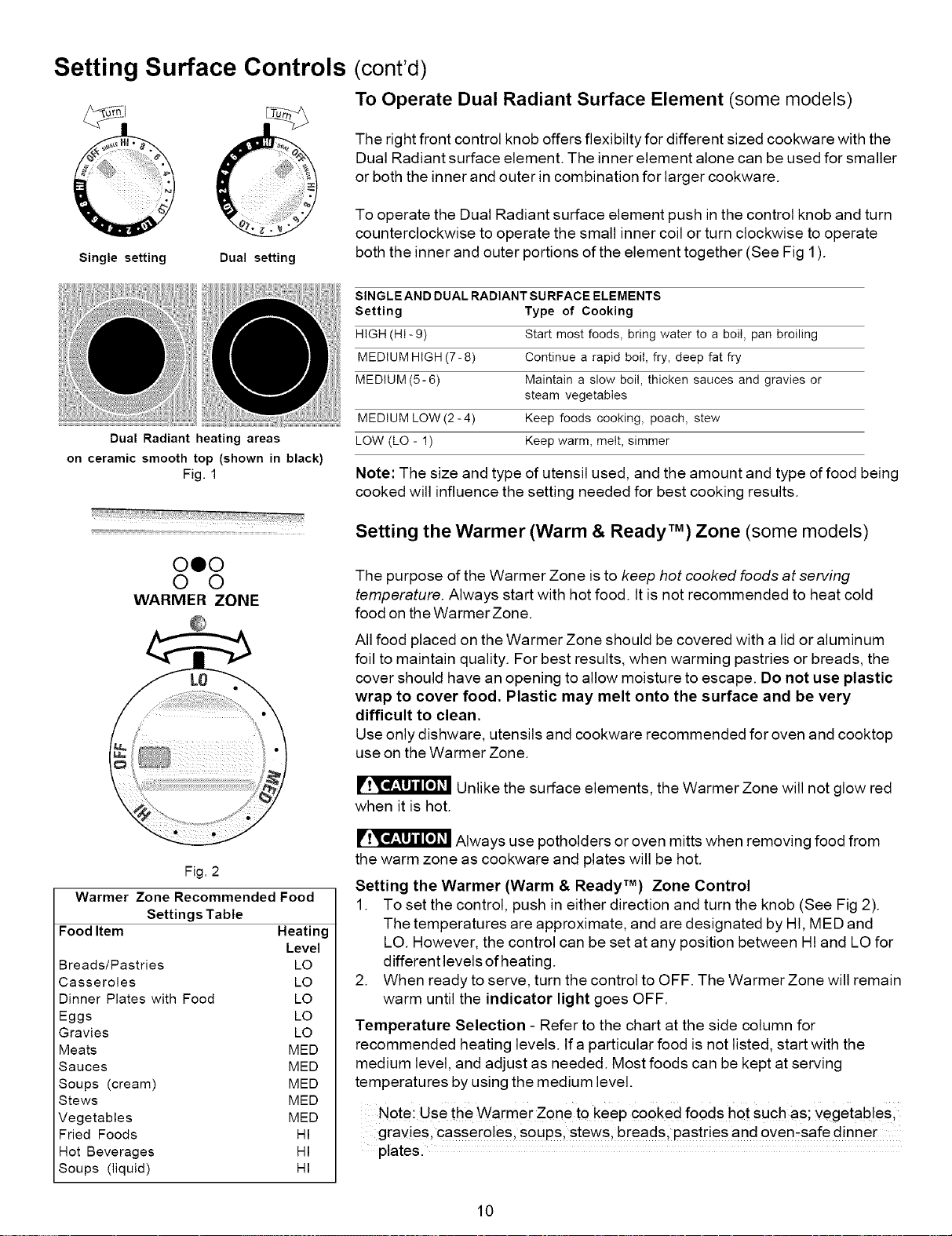
Single setting Dual setting
Dual Radiant heating areas
on ceramic smooth top (shown in black)
Fig. 1
ooo
o o
WARMER ZONE
Fig. 2
Warmer Zone Recommended Food
Settings Table
Food Item Heating
Level
Breads/Pastries LO
Casseroles LO
Dinner Plates with Food LO
Eggs LO
Gravies LO
Meats MED
Sauces MED
Soups (cream) MED
Stews MED
Vegetables MED
Fried Foods HI
Hot Beverages HI
Soups (liquid) HI
(cont'd)
To Operate Dual Radiant Surface Element (some models)
The right front control knob offers flexibilty for different sized cookware with the
Dual Radiant surface element. The inner element alone can be used for smaller
or both the inner and outer in combination for larger cookware.
To operate the Dual Radiant surface element push in the control knob and turn
counterclockwise to operate the small inner coil or turn clockwise to operate
both the inner and outer portions of the element together (See Fig 1).
SINGLEAND DUAL RADIANT SURFACE ELEMENTS
Setting Type of Cooking
HIGH (HI-9) Start most foods, bring water to a boil, pan broiling
MEDIUM HIGH (7-8) Continue a rapid boil, fry, deep fat fry
MEDIUM (5-6) Maintain a slow boil, thicken sauces and gravies or
steam vegetables
MEDIUM LOW (2- 4) Keep foods cooking, poach, stew
LOW (LO - 1) Keep warm, melt, simmer
Note: The size and type of utensil used, and the amount and type of food being
cooked will influence the setting needed for best cooking results.
Setting the Warmer (Warm & Ready TM) Zone (some models)
The purpose of the Warmer Zone is to keep hot cooked foods at serving
temperature. Always start with hot food. It is not recommended to heat cold
food on the Warmer Zone.
All food placed on the Warmer Zone should be covered with a lid or aluminum
foil to maintain quality. For best results, when warming pastries or breads, the
cover should have an opening to allow moisture to escape. Do not use plastic
wrap to cover food. Plastic may melt onto the surface and be very
difficult to clean.
Use only dishware, utensils and cookware recommended for oven and cooktop
use on the Warmer Zone.
Unlike the surface elements, the Warmer Zone will not glow red
when it is hot.
Always use potholders or oven mitts when removing food from
the warm zone as cookware and plates will be hot.
Setting the Warmer (Warm & Ready TM) Zone Control
1. To set the control, push in either direction and turn the knob (See Fig 2).
The temperatures are approximate, and are designated by HI, MED and
LO. However, the control can be set at any position between HI and LO for
different levels of heating.
2. When ready to serve, turn the control to OFF. The Warmer Zone will remain
warm until the indicator light goes OFF.
Temperature Selection - Refer to the chart at the side column for
recommended heating levels. If a particular food is not listed, start with the
medium level, and adjust as needed. Most foods can be kept at serving
temperatures by using the medium level.
Note i use the Warmer Zone to keep cooked foods hot such as; vegetab!esl
gravies, casseroles, soups, stews, breadsl pastries and oven-safe dinner
plates.
10
Surface Cooking
To Set the Cooktop Lockout Feature
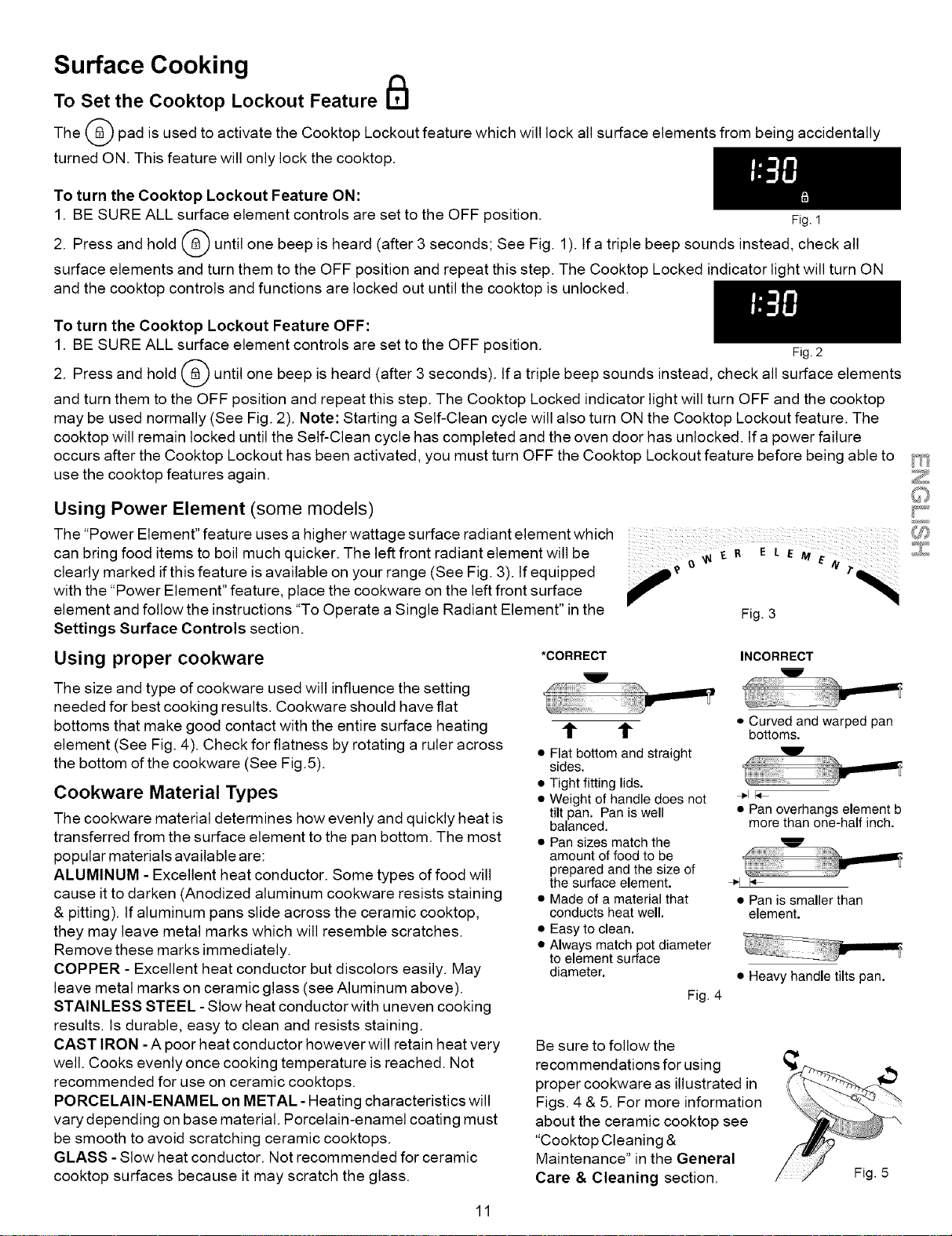
The (_) pad is used to activate the Cooktop Lockout feature which will lock all surface elements from being accidentally
turned ON. This feature will only lock the cooktop.
To turn the Cooktop Lockout Feature ON:
1. BE SURE ALL surface element controls are set to the OFF position. Fig.1
2. Press and hold _ until one beep is heard (after 3 seconds; See Fig. 1). If a triple beep sounds instead, check all
surface elements and turn them to the OFF position and repeat this step. The Cooktop Locked indicator light will turn ON
and the cooktop controls and functions are locked out until the cooktop is unlocked.
To turn the Cooktop Lockout Feature OFF:
1. BE SURE ALL surface element controls are set to the OFF position. Fig.2
2. Press and hold (_ until one beep is heard (after 3 seconds), lfa triple beep sounds instead, check all surface elements
and turn them to the OFF position and repeat this step. The Cooktop Locked indicator light will turn OFF and the cooktop
may be used normally (See Fig. 2). Note: Starting a Self-Clean cycle will also turn ON the Cooktop Lockout feature. The
cooktop will remain locked until the Self-Clean cycle has completed and the oven door has unlocked. Ifa power failure
occurs after the Cooktop Lockout has been activated, you must turn OFF the Cooktop Lockout feature before being able to
use the cooktop features again.
Using Power Element (some models)
The "Power Element" feature uses a higher wattage surface radiant element which
can bring food items to boil much quicker. The left front radiant element will be e _ R
clearly marked if this feature is available on your range (See Fig. 3). If equipped _ e
with the "Power Element" feature, place the cookware on the left front surface
element and follow the instructions "To Operate a Single Radiant Element" in the
Settings Surface Controls section.
Using proper cookware
The size and type of cookware used will influence the setting
needed for best cooking results. Cookware should have flat
bottoms that make good contact with the entire surface heating
element (See Fig. 4). Check for flatness by rotating a ruler across
the bottom of the cookware (See Fig.5).
Cookware Material Types
The cookware material determines how evenly and quickly heat is
transferred from the surface element to the pan bottom. The most
popular materials available are:
ALUMINUM - Excellent heat conductor. Some types of food will
cause it to darken (Anodized aluminum cookware resists staining
& pitting). If aluminum pans slide across the ceramic cooktop,
they may leave metal marks which will resemble scratches.
Remove these marks immediately.
COPPER - Excellent heat conductor but discolors easily. May
leave metal marks on ceramic glass (see Aluminum above).
STAINLESS STEEL - Slow heat conductor with uneven cooking
results, ts durable, easy to clean and resists staining.
CAST IRON -A poor heat conductor however will retain heat very
well. Cooks evenly once cooking temperature is reached. Not
recommended for use on ceramic cooktops.
PORCELAIN-ENAMEL on METAL - Heating characteristics will
vary depending on base material. Porcelain-enamel coating must
be smooth to avoid scratching ceramic cooktops.
GLASS - Slow heat conductor. Not recommended for ceramic
cooktop surfaces because it may scratch the glass.
*CORRECT
• Flat bottom and straight
sides.
• Tight fitting lids.
• Weight of handle does not
tilt pan. Pan is well
balanced.
• Pan sizes match the
amount of food to be
prepared and the size of
the surface element.
• Made of a material that
conducts heat well.
• Easy to clean.
• Always match pot diameter
to element surface
diameter,
Fig. 4
INCORRECT
!_ii!!!!!!!iii_
I u
• Curved and warped pan
bottoms.
!!!iii!!!!i!i!i_
_;_e,'- U
4_.1 I'_
• Pan overhangs element b
more than one-half inch.
÷1 I_-
• Pan is smaller than
element.
• Heavy handle tilts pan.
Be sure to follow the
recommendations for using
proper cookware as illustrated in
Figs. 4 & 5. For more information
about the ceramic cooktop see
"Cooktop Cleaning &
Maintenance" in the General
Care & Cleaning section.
Fig. 5
11
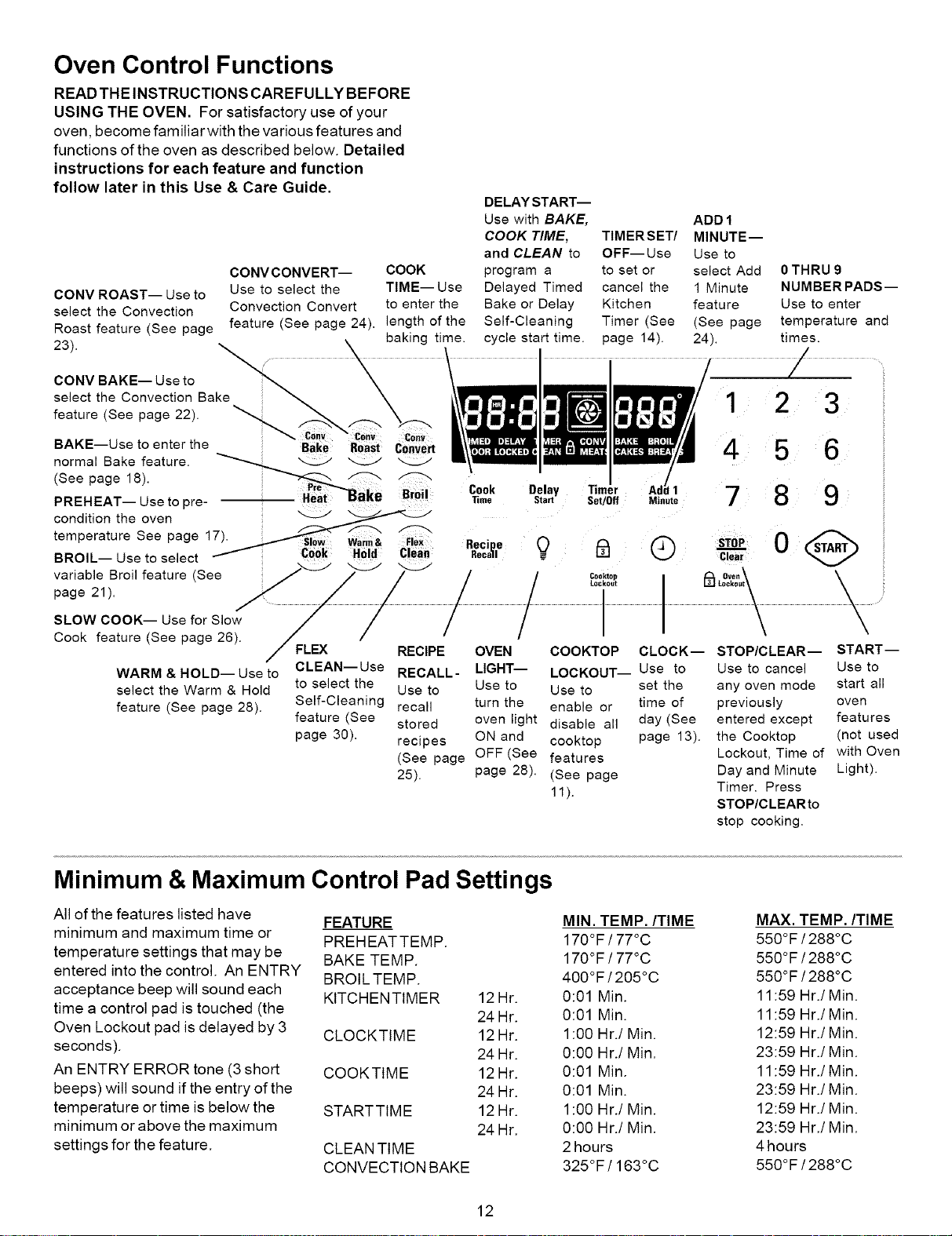
Oven Control Functions
READ THE INSTRUCTIONS CAREFULLY BEFORE
USING THE OVEN. For satisfactory use of your
oven, become familiar with the various features and
functions of the oven as described below. Detailed
instructions for each feature and function
follow later in this Use & Care Guide.
CONVCONVERT-- COOK
CONV ROAST-- Use to Use to select the TIME-- Use
select the Convection Convection Convert to enter the
feature (See page 24). length of the
Roast feature (See page
23)• baking time.
CONV BAKE-- Use to
select the Convection Bake
feature (See page 22). _ _,,,_._..,,,,
Coov
BAKE--Use to enter the Bake Roast cOnVert
normal Bake feature.
(See page 18).
PREHEAT-- Use to pre-
condition the oven _
temperature See page 17_ __
' _ _ Slow Warm& Flex
BROIL-- Use to select _ Cook Hold Clean
DELAY START--
Use with BAKE, ADD 1
COOK TIME, TIMERSET/ MINUTE--
and CLEAN to OFF--Use Use to
program a to set or select Add
Delayed Timed cancel the 1 Minute
Bake or Delay Kitchen feature
Self-Cleaning Timer (See (See page
cycle start time. page 14). 24).
0 THRU 9
NUMBER PADS--
Use to enter
temperature and
times.
1 2 3
4 5 6
Cook
_me
Recipe
Recall
Delay
Start Set/Off
1
Minute 789
® s,0, 0 @
clea_.
variable Broil feature (See ; _ / / / / _#t_ i_L_[_&\ \
page21) \\ \ / / I t_
SLOW COOK-- Use for Slow / / // / \ \
Cook feature (See page 26). _/ -- / ,
/ FLEX RECIPE OVEN COOKTOP CLOCK-- STOP/CLEAR-- START--
CLEAN--Use RECALL- LIGHT-- LOCKOUT-- Use to Use to cancel Use to
WARM & HOLD-- Use to
select the Warm & Hold
feature (See page 28).
to select the Use to Use to Use to set the any oven mode start all
Self-Cleaning recall turn the enable or time of previously oven
feature (See stored oven light disable all day (See entered except features
page 30). recipes ON and cooktop page 13). the Cooktop (not used
(See page OFF (See features Lockout, Time of with Oven
25). page 28). (See page Day and Minute Light).
11). Timer. Press
STOP/CLEARto
stop cooking.
Minimum & Maximum Control Pad Settings
All of the features listed have
minimum and maximum time or
temperature settings that may be
entered into the control. An ENTRY
acceptance beep will sound each
time a control pad is touched (the
Oven Lockout pad is delayed by 3
seconds).
An ENTRY ERROR tone (3 short
beeps) will sound if the entry of the
temperature or time is below the
minimum or above the maximum
settings for the feature.
FEATURE
PREHEATTEMP.
BAKE TEMP.
BROIL TEMP.
KITCHENTIMER
CLOCKTIME
COOKTIME
STARTTIME
CLEAN TIME
CONVECTION BAKE
12Hr.
24 Hr.
12Hr.
24 Hr.
12Hr.
24 Hr.
12Hr.
24 Hr.
MIN. TEMP./TIME MAX. TEMP./TIME
170°F / 77°C 550°F /288°C
170°F / 77°C 550°F /288°C
400°F / 205°C 550°F /288°C
0:01 Min. 11:59 Hr./Min.
0:01 Min. 11:59 Hr./Min.
1:00 Hr./Min. 12:59 Hr./Min.
0:00 Hr./Min. 23:59 Hr./Min.
0:01 Min. 11:59 Hr./Min.
0:01 Min. 23:59 Hr./Min.
1:00 Hr./Min. 12:59 Hr./Min.
0:00 Hr./Min. 23:59 Hr./Min.
2 hours 4 hours
325°F/163°C 550°F /288°C
12
Setting Oven Controls
• Setting the Clock
• Changing between 12 or24 hour
display
cony Cony COnY
Bake Roast convert
Bake Bioil Cook Delay Timer Add1
Time Start Set/0ff Minute
sibw warm& Recipe Q _ Q
Cook HOld clear Recall -
Cooktop
Lockout
1 2 3
4 5 6
7 8 9
0(@>
STOP
Oven
_ lockout
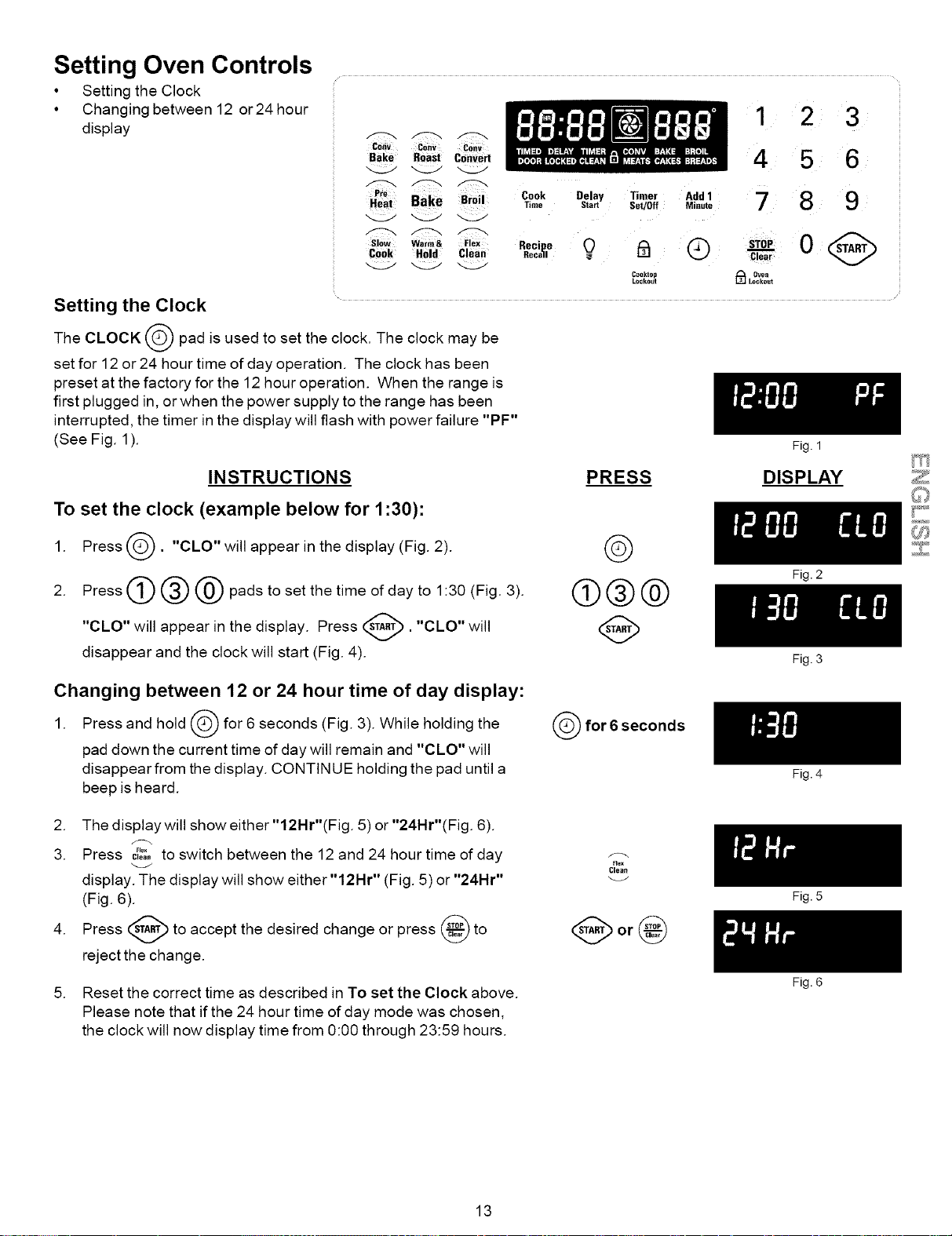
Setting the Clock
The CLOCK _ pad is used to set the clock. The clock may be
set for 12 or 24 hour time of day operation. The clock has been
preset at the factory for the 12 hour operation. When the range is
first plugged in, or when the power supply to the range has been
interrupted, the timer in the display will flash with power failure "PF"
(See Fig. 1).
Fig. 1
INSTRUCTIONS PRESS DISPLAY
To set the clock (example below for 1:30):
1. Press(_). "CLO" will appear in the display (Fig. 2). (_
2. Press(_)@@padstosetthetimeofdayto l:3O(Fig. 3). (_@@
"CLO" will appear in the display. Press _. "CLO" will (_)
disappear and the clock will start (Fig. 4).
Changing between 12 or 24 hour time of day display:
1. Press and hold _ for 6 seconds (Fig. 3). While holding the
pad down the current time of day will remain and "CLO" will
disappear from the display. CONTINUE holding the pad until a
beep is heard.
(_for6seconds
2. The display will show either"12Hr"(Fig. 5) or "24Hr"(Fig. 6).
3. Press c_o,,.... to switch between the12 and 24 hour time of day
display. The display will show either "12Hr" (Fig. 5) or "24Hr"
(Fig. 6).
4. Press _ to accept the desired change or press _ to
reject the change.
f_
Flex
Clean
5. Reset the correct time as described in To set the Clock above.
Please note that if the 24 hour time of day mode was chosen,
the clock will now display time from O:OOthrough 23:59 hours.
13
Fig. 2
Fig. 3
Fig. 4
Fig. 5
Fig. 6
Setting Oven Controls
• Continuous Bake or Twelve Hour Energy Saving Mode
• Kitchen Timer
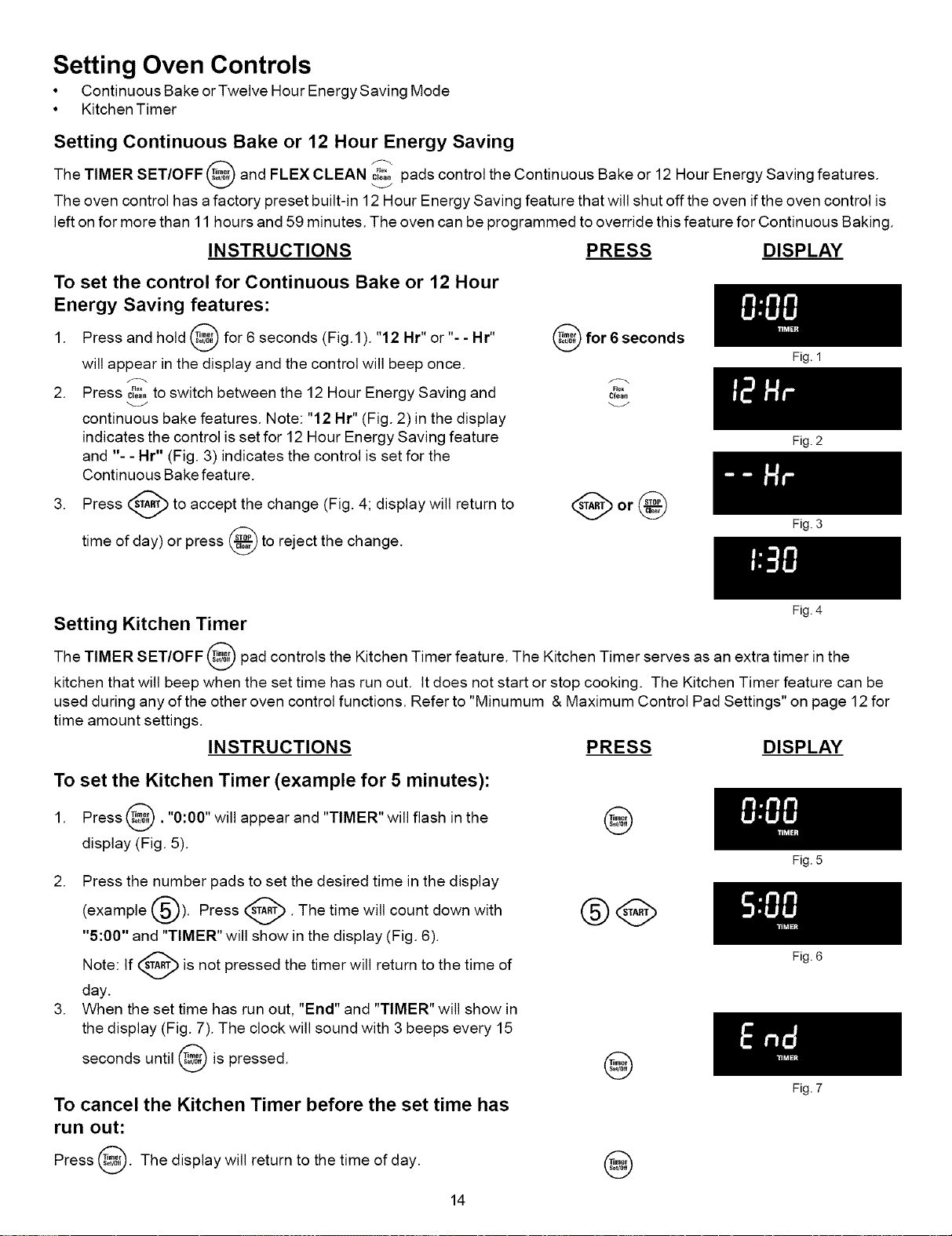
Setting Continuous Bake or 12 Hour Energy Saving
The TIMER SET/OFF and FLEX CLEAN c_o...... pads control the Continuous Bake or 12 Hour Energy Saving features.
The oven control has a factory preset built-in 12 Hour Energy Saving feature that will shut off the oven ifthe oven control is
left on for more than 11 hours and 59 minutes. The oven can be programmed to override this feature for Continuous Baking.
INSTRUCTIONS PRESS DISPLAY
To set the control for Continuous Bake or 12 Hour
Energy Saving features:
1. Press and hold _ for 6 seconds (Fig.1). "12 Hr" or % - Hr"
will appear in the display and the control will beep once.
2. Press c_o...... to switch between the 12 Hour Energy Saving and
continuous bake features. Note: "12 Hr" (Fig. 2) in the display
indicates the control is set for 12 Hour Energy Saving feature
and "- - Hr" (Fig. 3) indicates the control is set for the
Continuous Bake feature.
3. Press (_ to accept the change (Fig. 4; display will return to
day) or press _ to reject the change.
time of
for 6 seconds
Flex
Clean
Fig. 1
Fig. 2
Fig. 3
Fig. 4
Setting Kitchen Timer
The TIMER SET/OFF @ pad controls the Kitchen Timer feature. The Kitchen Timer serves as an extra timer in the
kitchen that will beep when the set time has run out. It does not start or stop cooking. The Kitchen Timer feature can be
used during any ofthe other oven control functions. Refer to "Minumum & Maximum Control Pad Settings" on page 12 for
time amount settings.
INSTRUCTIONS PRESS DISPLAY
To set the Kitchen Timer (example for 5 minutes):
1. Press _. "0:00" will appear and "TIMER" will flash in the
display (Fig. 5).
@
2. Press the number pads to set the desired time in the display
_-'-_). Press _. The time will count down with
(example
"5:00" and "TIMER" will show in the display (Fig. 6).
Note: If _ is not pressed the timer will return to the time of
V
day.
3. When the set time has run out, "End" and "TIMER" will show in
the display (Fig. 7). The clock will sound with 3 beeps every 15
seconds until _ is
pressed.
@
To cancel the Kitchen Timer before the set time has
run out:
Press 8. The display will return to the time of
day.
@
14
Fig. 5
Fig. 6
Fig. 7
Setting Oven Controls
• Oven Lockout
• Temperature Display
Setting Oven Lockout Feature
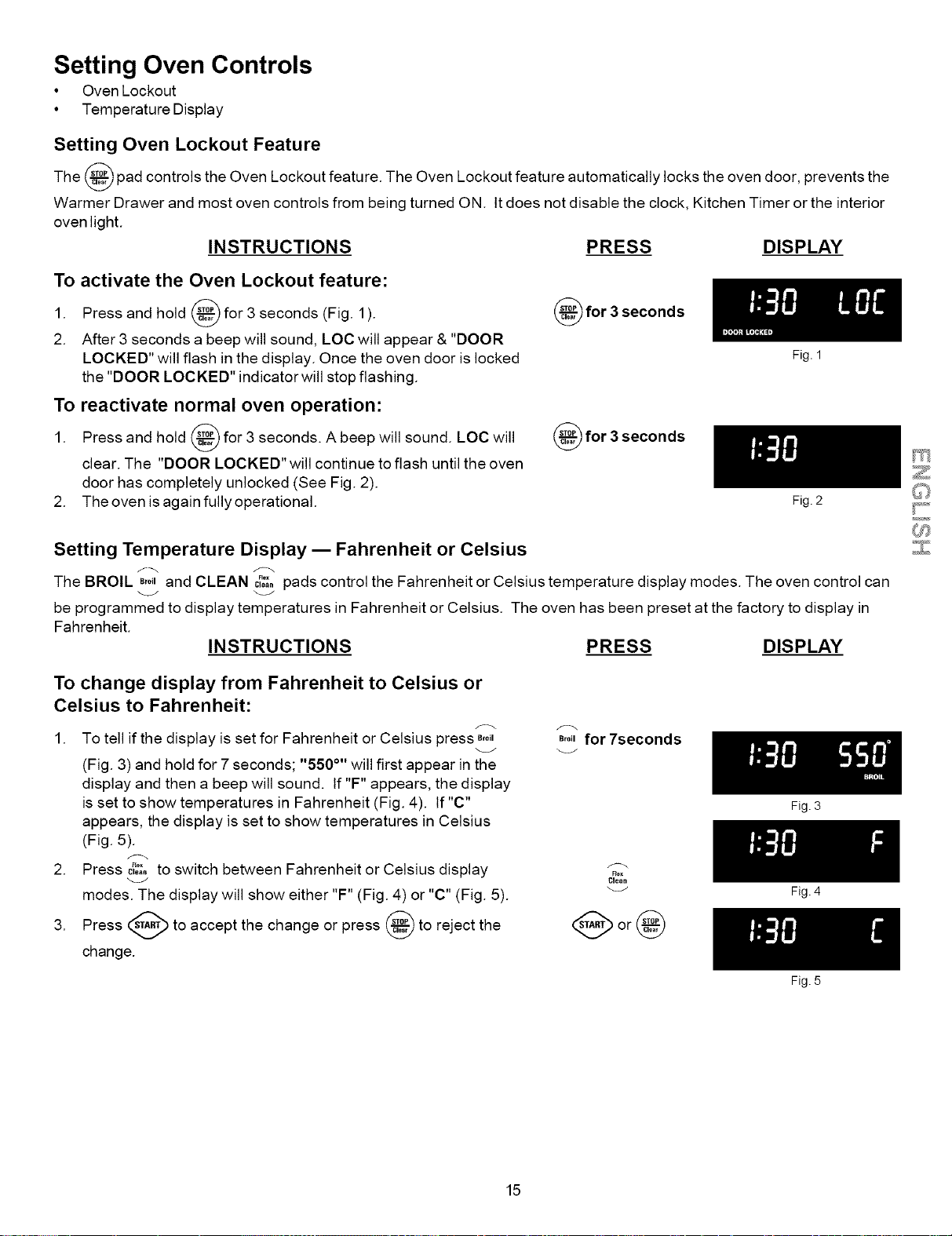
The _ pad controls the Oven Lockout feature. The Oven Lockout feature automatically locks the oven door, prevents the
Warmer Drawer and most oven controls from being turned ON. It does not disable the clock, Kitchen Timer or the interior
oven light.
INSTRUCTIONS PRESS DISPLAY
To activate the Oven Lockout feature:
1. Press and hold _ for 3 seconds (Fig. 1
).
2. After 3 seconds a beep will sound, LOC will appear & "DOOR
LOCKED" will flash in the display. Once the oven door is locked
the "DOOR LOCKED" indicator will stop flashing.
To reactivate normal oven operation:
1. Press and hold _ for 3 seconds. A beep will sound. LOC will
clear. The "DOOR LOCKED" will continue to flash until the oven
door has completely unlocked (See Fig. 2).
2. The oven isagain fully operational.
_for 3 seconds
_for 3 seconds
Setting Temperature Display m Fahrenheit or Celsius
Fig. 1
Fig. 2
The BROIL _,o,and CLEAN Cloa..... pads control the Fahrenheit or Celsius temperature display modes. The oven control can
be programmed to display temperatures in Fahrenheit or Celsius. The oven has been preset at the factory to display in
Fahrenheit.
INSTRUCTIONS PRESS DISPLAY
To change display from Fahrenheit to Celsius or
Celsius to Fahrenheit:
1. To tell if the display is set for Fahrenheit or Celsius press _,o,
(Fig. 3) and hold for 7 seconds; "550 °'' will first appear in the
display and then a beep will sound. If "F" appears, the display
is set to show temperatures in Fahrenheit (Fig. 4). If "C"
appears, the display is set to show temperatures in Celsius
(Fig. 5).
f_
2. Press c_,a,'xto switch between Fahrenheit or Celsius display
modes. The display will show either "F" (Fig. 4) or "C" (Fig. 5).
3. Press _ to accept the change or press _ to reject the
change.
e,o_for 7seconds
Rex
Clean
Fig. 3
Fig. 4
Fig. 5
15
Setting Oven Controls
• Silent Control Operation
CO,V C_nV €ony
Bake Raast convert
]F=i,e
Heat Bake Broil Cook Delay Timer Add 1
Time Start Set/Off Minute
Slow War_& Flex Recipe Q I_l Q
COok H01d Clean Recall
Cooktop
Lockout
123
456
789
o@
STO_...._P
clear
Oven
J_ Lockout
Setting Silent Control Operation
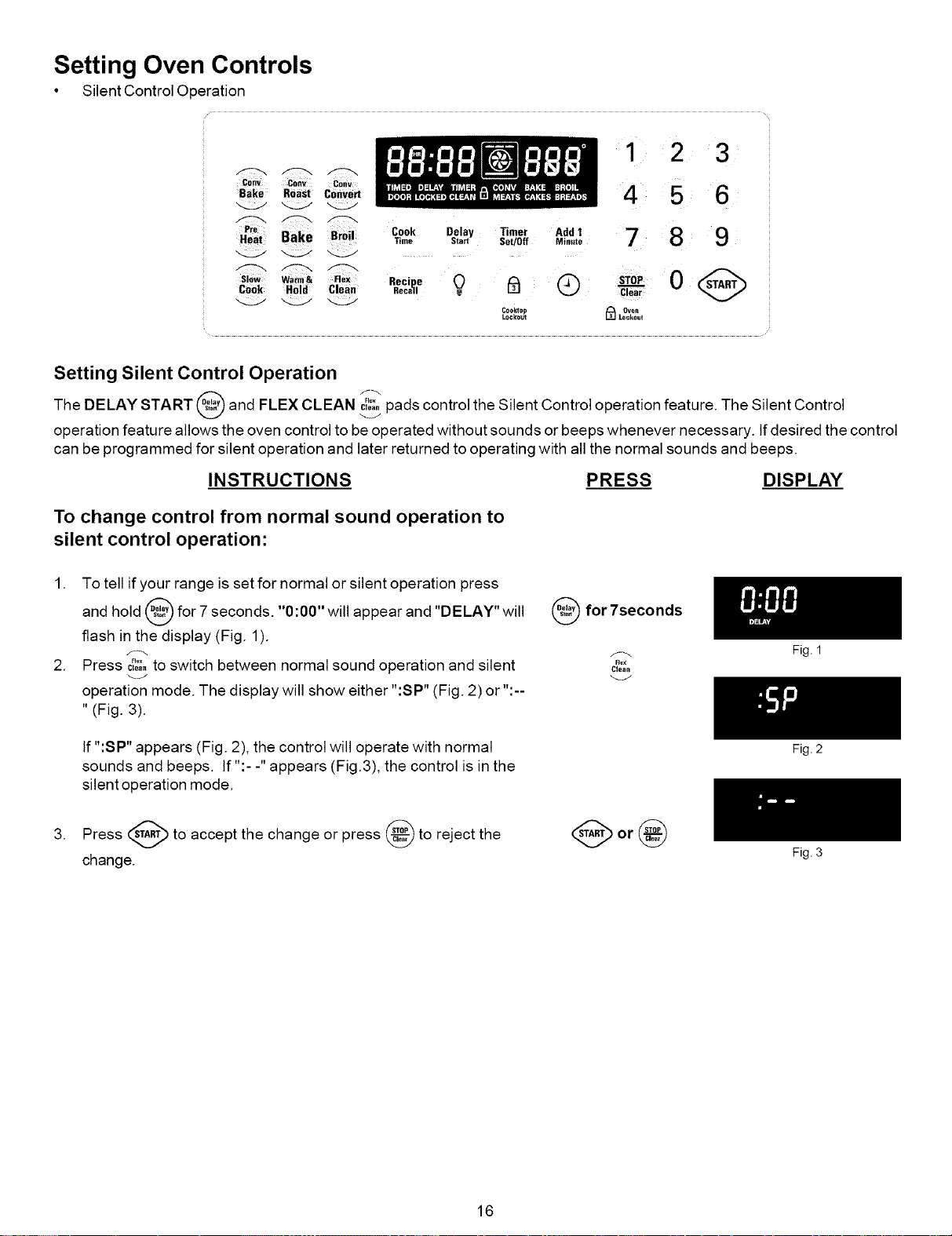
The DELAY START and FLEX CLEAN _ pads control the Silent Control operation feature. The Silent Control
operation feature allows the oven control to be operated without sounds or beeps whenever necessary. If desired the control
can be programmed for silent operation and later returned to operating with all the normal sounds and beeps.
INSTRUCTIONS PRESS DISPLAY
To change control from normal sound operation to
silent control operation:
1. To tell if your range is set for normal or silent operation press
and hold _ for 7 seconds. "0:00" will appear and "DELAY" will
v
flash in the display (Fig. 1).
2. Press c_o,,.... to switch between normal sound operation and silent
operation mode. The display will show either "'SP" (Fig. 2) or "'--
" (Fig. 3).
If ":SP" appears (Fig. 2), the control will operate with normal
sounds and beeps. If ":- -" appears (Fig.3), the control is in the
silent operation mode.
for 7seconds
Flex
Clean
A
3. Press (,_A,T/)to accept the change or press (_9 to reject the
change.
16
Fig. 1
Fig. 2
Fig. 3
Setting Oven Controls
• Preheat for Electric Ranges
Setting Preheat
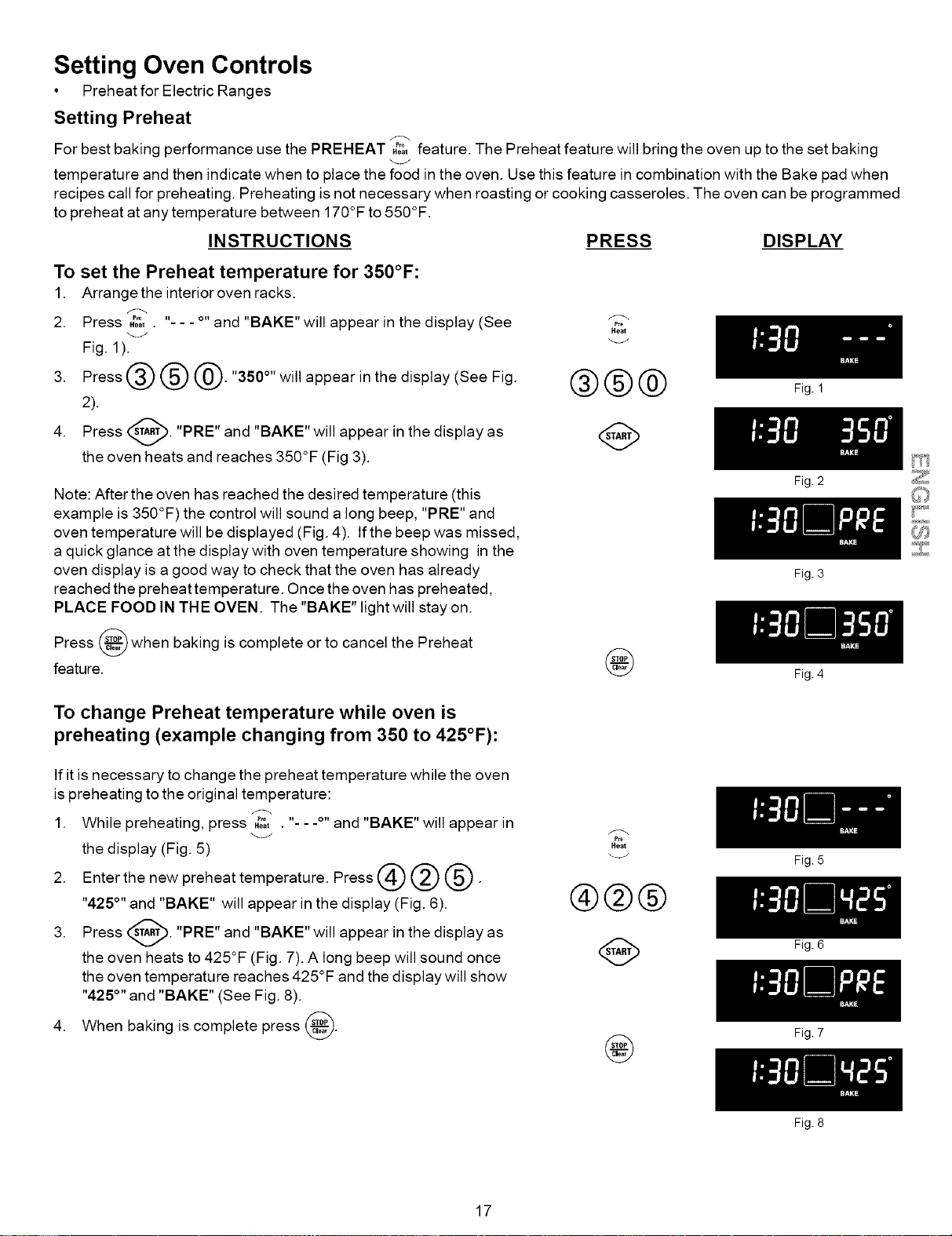
For best baking performance use the PREHEAT H%feature. The Preheat feature will bring the oven up to the set baking
temperature and then indicate when to place the food in the oven. Use this feature in combination with the Bake pad when
recipes call for preheating. Preheating is not necessary when roasting or cooking casseroles. The oven can be programmed
to preheat at any temperature between 170°F to 550°F.
INSTRUCTIONS PRESS DISPLAY
To set the Preheat temperature for 350°F:
1. Arrange the interior oven racks.
2. Press Ho=........ -- - and "BAKE"will appear in the display (See _i_
_j Heat
Fig. 1). _J
3. Press @ @ @. "350°" will appear in the display (See Fig. @@@
2).
4. Press _. "PRE" and "BAKE" will appear in the display as
v
the oven heats and reaches 350°F (Fig 3).
Note: After the oven has reached the desired temperature (this
example is 350°F) the control will sound a long beep, "PRE" and
oven temperature will be displayed (Fig. 4). If the beep was missed,
a quick glance at the display with oven temperature showing in the
oven display is a good way to check that the oven has already
reached the preheat temperature. Once the oven has preheated,
PLACE FOOD IN THE OVEN. The "BAKE" light will stay on.
Press @ when baking is complete or to cancel the Preheat
feature.
@
To change Preheat temperature while oven is
preheating (example changing from 350 to 425°F):
If it is necessary to change the preheat temperature while the oven
is preheating to the original temperature:
1. While preheating, press ,_;_t. "- - .o,,and "BAKE" will appear in
the display (Fig. 5)
2. Enter the new preheat temperature. Press @ @ @.
"425°" and "BAKE" will appear in the display (Fig. 6).
3. Press _'_. "PRE" and "BAKE" will appear in the display
as
the oven heats to 425°F (Fig. 7). A long beep will sound once
the oven temperature reaches 425°F and the display will show
"425°" and "BAKE" (See Fig. 8).
baking is complete press @.
4. When
f_
P_e
Heat
®@@
@
@
17
Fig. !
Fig. 2
Fig. 3
Fig. 4
Fig. 5
Fig. 6
Fig. 7
Fig. 8
Setting Oven Controls
• Bake
c0ev Cehv co,v
Bake Roast convert
Pro
Beat Bake Broi! Cook Delay Timer Add 1
Time Start Set/0ff Minute
Slew Warm& Flex Recipe 0 _ @
Cook Hold Clean Recall .
Cookmp
Lockout
1 2 3
45 6
789
0
clear
Oven
_ Lockout
Setting Bake
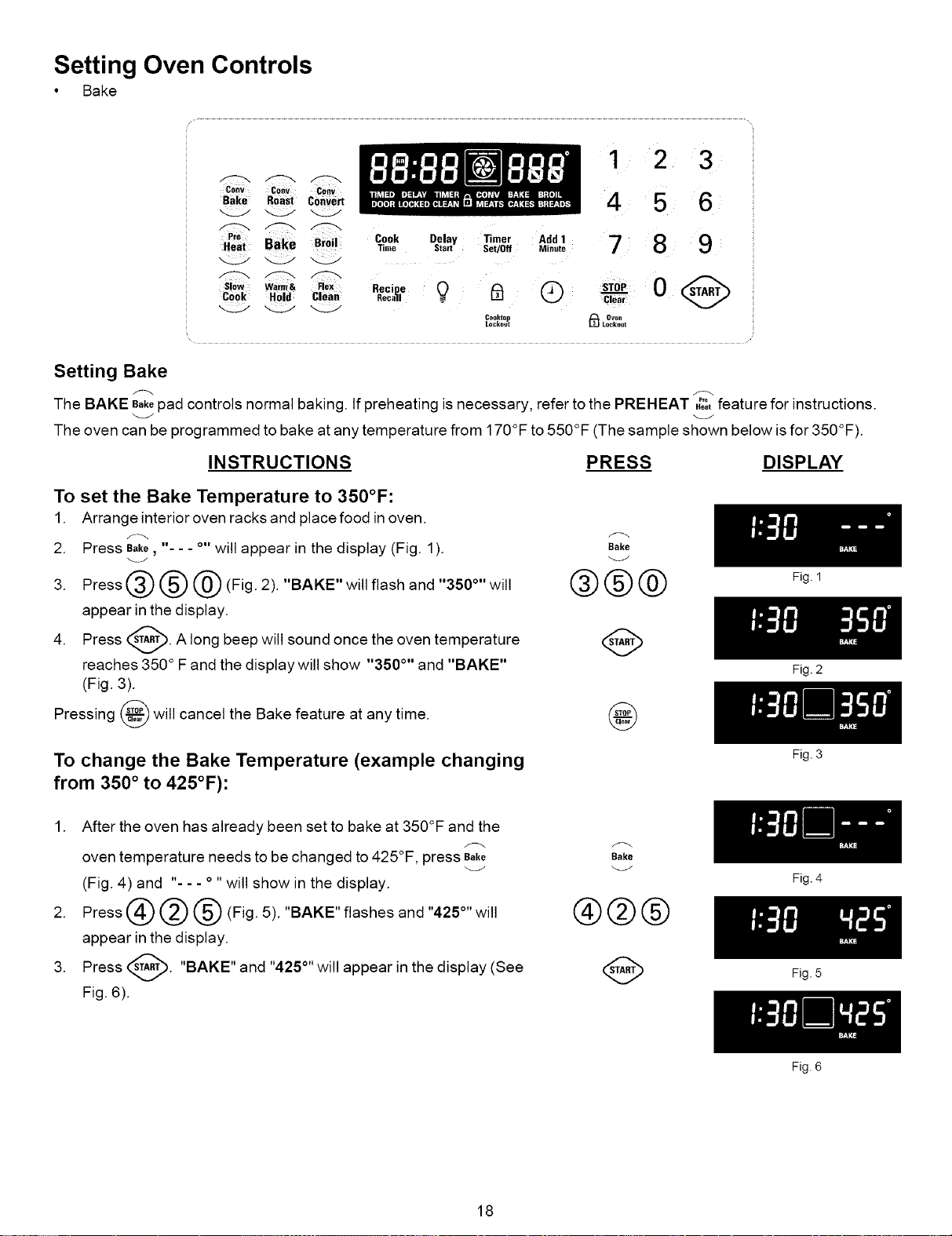
The BAKE Bakepad controls normal baking. If preheating is necessary, refer to the PREHEAT .o_tP'° feature for instructions.
The oven can be programmed to bake at any temperature from 170°F to 550°F (The sample shown below isfor 350°F).
INSTRUCTIONS PRESS DISPLAY
To set the Bake Temperature to 350°F:
1. Arrange interior oven racks and place food in oven.
2. Press Bake, - - - °" will appear in the display (Fig. 1).
3. Press @ @ @ (Fig. 2). "BAKE" will flash and "350°" will
appear in the display.
4. Press _. A long beep will sound once the
oven
temperature
reaches 350 ° F and the display will show "350 °'' and "BAKE"
(Fig. 3).
will cancel the Bake feature at any time.
Pressing
"<33/
Bake
®®®
@
To change the Bake Temperature (example changing
from 350 ° to 425°F):
1. After the oven has already been set to bake at 350°F and the
oven temperature needs to be changed to 425°F, press Bake
(Fig. 4) and "- - - ° " will show in the display.
2. Press @ @ @ (Fig. 5). "BAKE" flashes and "425°" will
appear in the display.
3. Press _. "BAKE" and "425°"will appear in the
display (See
Fig. 6).
Bake
®@@
18
Fig. 1
Fig. 2
Fig. 3
Fig. 4
Fig. 5
Fig. 6
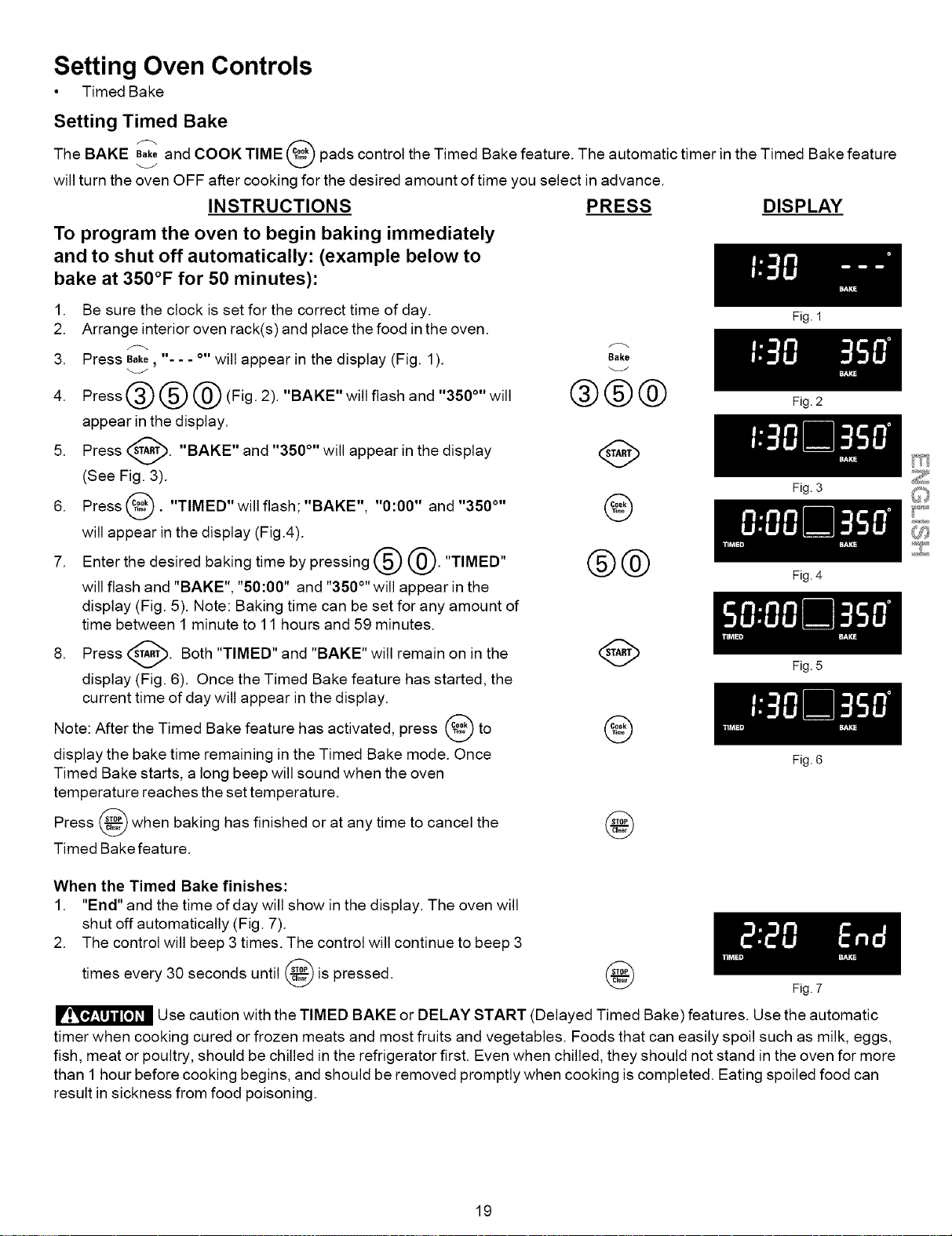
Setting Oven Controls
• Timed Bake
Setting Timed Bake
The BAKE Bakeand COOK TIME pads control the Timed Bake feature. The automatic timer in the Timed Bake feature
will turn the oven OFF after cooking for the desired amount of time you select in advance.
INSTRUCTIONS PRESS DISPLAY
To program the oven to begin baking immediately
and to shut off automatically: (example below to
bake at 350°F for 50 minutes):
1. Be sure the clock is set for the correct time of day.
2. Arrange interior oven rack(s) and place the food in the oven.
3. Press Bake, - - - o,,will appear in the display (Fig. 1).
4. Press @ @ @ (Fig. 2). "BAKE" will flash and "350°" will
appear in the display.
5. Press _----_. "BAKE" and "350 °'' will appear in the display
(See Fig. 3).
6. Press _. "TIMED" will flash; "BAKE", "0:00" and "350 °''
will appear in the display (Fig.4).
7. Enter the desired baking time by pressing @ @. "TIMED"
will flash and "BAKE", "50:00" and "350°''will appear in the
display (Fig. 5). Note: Baking time can be set for any amount of
time between 1 minute to 11 hours and 59 minutes.
8. Press _--_. Both "TIMED" and "BAKE" will remain on in the
display (Fig. 6). Once the Timed Bake feature has started, the
current time of day will appear in the display.
Note: After the Timed Bake feature has activated, press _ to
display the bake time remaining in the Timed Bake mode. Once
Timed Bake starts, a long beep will sound when the oven
temperature reaches the set temperature.
Press _ when baking has finished or at any time to cancel the
v
Timed Bake feature.
Bake
®®®
@
®@
@
@
When the Timed Bake finishes:
1. "End" and the time of day will show in the display. The oven will
shut off automatically (Fig. 7).
2. The control will beep 3 times. The control will continue to beep 3
times every 30 seconds until @ is pressed.
@
Fig. 1
Fig. 2
Fig. 3
Fig. 4
Fig. 5
Fig. 6
Fig. 7
Use caution with the TIMED BAKE or DELAY START (Delayed Timed Bake) features. Use the automatic
timer when cooking cured or frozen meats and most fruits and vegetables. Foods that can easily spoil such as milk, eggs,
fish, meat or poultry, should be chilled in the refrigerator first. Even when chilled, they should not stand in the oven for more
than 1 hour before cooking begins, and should be removed promptly when cooking is completed. Eating spoiled food can
result in sickness from food poisoning.
19
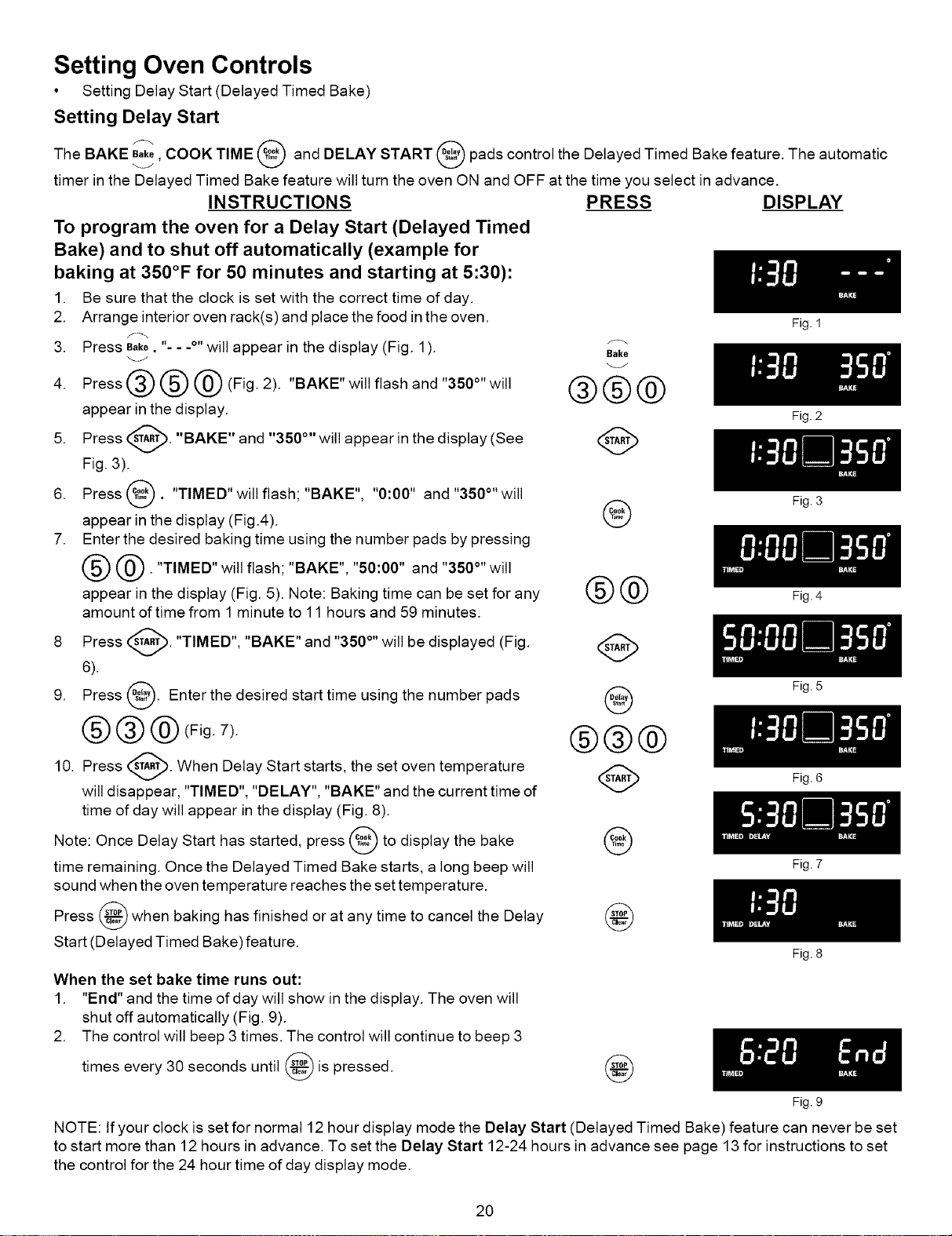
Setting Oven Controls
• Setting Delay Start (Delayed Timed Bake)
Setting Delay Start
The BAKE e_ke,COOK TIME and DELAY START pads control the Delayed Timed Bake feature. The automatic
timer in the Delayed Timed Bake feature will turn the oven ON and OFF at the time you select in advance.
INSTRUCTIONS PRESS DISPLAY
To program the oven for a Delay Start (Delayed Timed
Bake) and to shut off automatically (example for
baking at 350°F for 50 minutes and starting at 5:30):
1. Be sure that the clock is set with the correct time of day.
2. Arrange interior oven rack(s) and place the food in the oven.
3. Press Bake. "- - .o,,will appear in the display (Fig. 1).
4. Press@@@(Fig. 2). "BAKE" will flash and "350°" will
appear in the display.
5. Press _. "BAKE" and "350 °'' will appear in the
display (See
Fig. 3).
6. Press _. "TIMED" will flash; "BAKE", "0:00" and "350°" will
appear in the display (Fig.4).
7. Enter the desired baking time using the number pads by pressing
@. "TIMED" will flash; "BAKE", "50:00" and "350 °"will
appear in the display (Fig. 5). Note: Baking time can be set for any
amount of time from 1 minute to 11 hours and 59 minutes.
F_
Bake
®®®
@
®@
A
8 Press _. "TIMED", "BAKE" and "350°" will be displayed (Fig.
v
6).
9. Press @. Enter the desired start time using the number pads
@@@(Fig. Z). @@@
10. Press STA_. When Delay Start starts, the set oven temperature
will disappear, "TIMED", "DELAY", "BAKE" and the current time of
time of day will appear in the display (Fig. 8).
Note: Once Delay Start has started, press _ to display the bake
time remaining. Once the Delayed Timed Bake starts, a long beep will
sound when the oven temperature reaches the set temperature.
Press _ when baking has finished or at any time to cancel the Delay
Start (Delayed Timed Bake)feature.
When the set bake time runs out:
1. "End" and the time of day will show in the display. The oven will
shut off automatically (Fig. 9).
2. The control will beep 3 times. The control will continue to beep 3
times every 30 seconds until _ is
pressed.
@
Fig. 1
Fig. 2
Fig. 3
Fig. 4
Fig. 5
Fig. 6
Fig. 7
Fig. 8
Fig. 9
NOTE: If your clock is set for normal 12 hour display mode the Delay Start (Delayed Timed Bake) feature can never be set
to start more than 12 hours in advance. To set the Delay Start 12-24 hours in advance see page 13 for instructions to set
the control for the 24 hour time of day display mode.
20
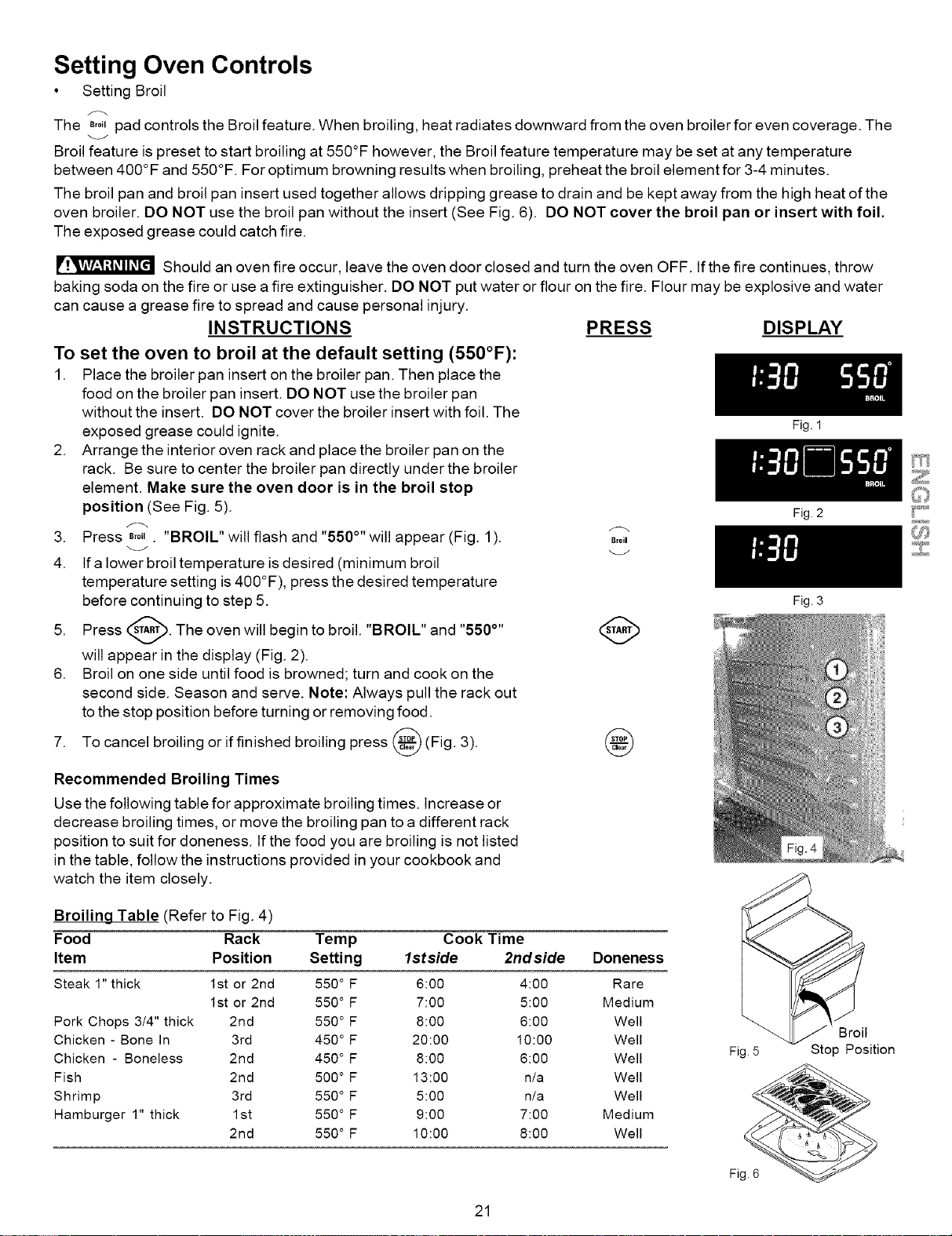
Setting Oven Controls
• Setting Broil
The B,o,pad controls the Broil feature. When broiling, heat radiates downward from the oven broiler for even coverage. The
Broil feature is preset to start broiling at 550°F however, the Broil feature temperature may be set at any temperature
between 400 °F and 550°F. For optimum browning results when broiling, preheat the broil element for 3-4 minutes.
The broil pan and broil pan insert used together allows dripping grease to drain and be kept away from the high heat of the
oven broiler. DO NOT use the broil pan without the insert (See Fig. 6). DO NOT cover the broil pan or insert with foil.
The exposed grease could catch fire.
Should an oven fire occur, leave the oven door closed and turn the oven OFF. If the fire continues, throw
baking soda on the fire or use a fire extinguisher. DO NOT put water or flour on the fire. Flour may be explosive and water
can cause a grease fire to spread and cause personal injury.
INSTRUCTIONS
To set the oven to broil at the default setting (550°F):
1. Place the broiler pan insert on the broiler pan. Then place the
food on the broiler pan insert. DO NOT use the broiler pan
without the insert. DO NOT cover the broiler insert with foil. The
exposed grease could ignite.
2. Arrange the interior oven rack and place the broiler pan on the
rack. Be sure to center the broiler pan directly under the broiler
element. Make sure the oven door is in the broil stop
position (See Fig. 5).
3. Press B,o,. "BROIL" will flash and "550°'' will appear (Fig. 1).
_J
4. If a lower broil temperature is desired (minimum broil
temperature setting is 400°F), press the desired temperature
before continuing to step 5.
5. Press _. The oven will begin to broil. "BROIL" and "550°''
will appear in the display (Fig. 2).
6. Broil on one side until food is browned; turn and cook on the
second side. Season and serve. Note: Always pull the rack out
to the stop position before turning or removing food.
broiling or if finished broiling press @ (Fig. 3).
7. To cancel
PRESS DISPLAY
Broil
@
Recommended Broiling Times
Use the following table for approximate broiling times. Increase or
decrease broiling times, or move the broiling pan to a different rack
position to suit for aloneness, tf the food you are broiling is not listed
in the table, follow the instructions provided in your cookbook and
watch the item closely.
Fig. 1
Fig. 2
Fig. 3
Broiling Table (Refer to Fig. 4)
Food Rack Temp Cook Time
Item Position Setting lstside 2ndside Doneness
Steak 1" thick 1st or 2rid 550° F 6:00 4:00 Rare
1st or 2rid 550° F 7:00 5:00 Medium
Pork Chops 3/4" thick 2nd 550 ° F 8:00 6:00 Well
Chicken - Bone In 3rd 450 ° F 20:00 10:00 Well
Chicken - Boneless 2nd 450 ° F 8:00 6:00 Well
Fish 2nd 500° F 13:00 n/a Well
Shrimp 3rd 550 ° F 5:00 n/a Well
Hamburger 1" thick 1st 550° F 9:00 7:00 Medium
2nd 550° F 10:00 8:00 Well
Broil
Fig.5 Stop Position
21
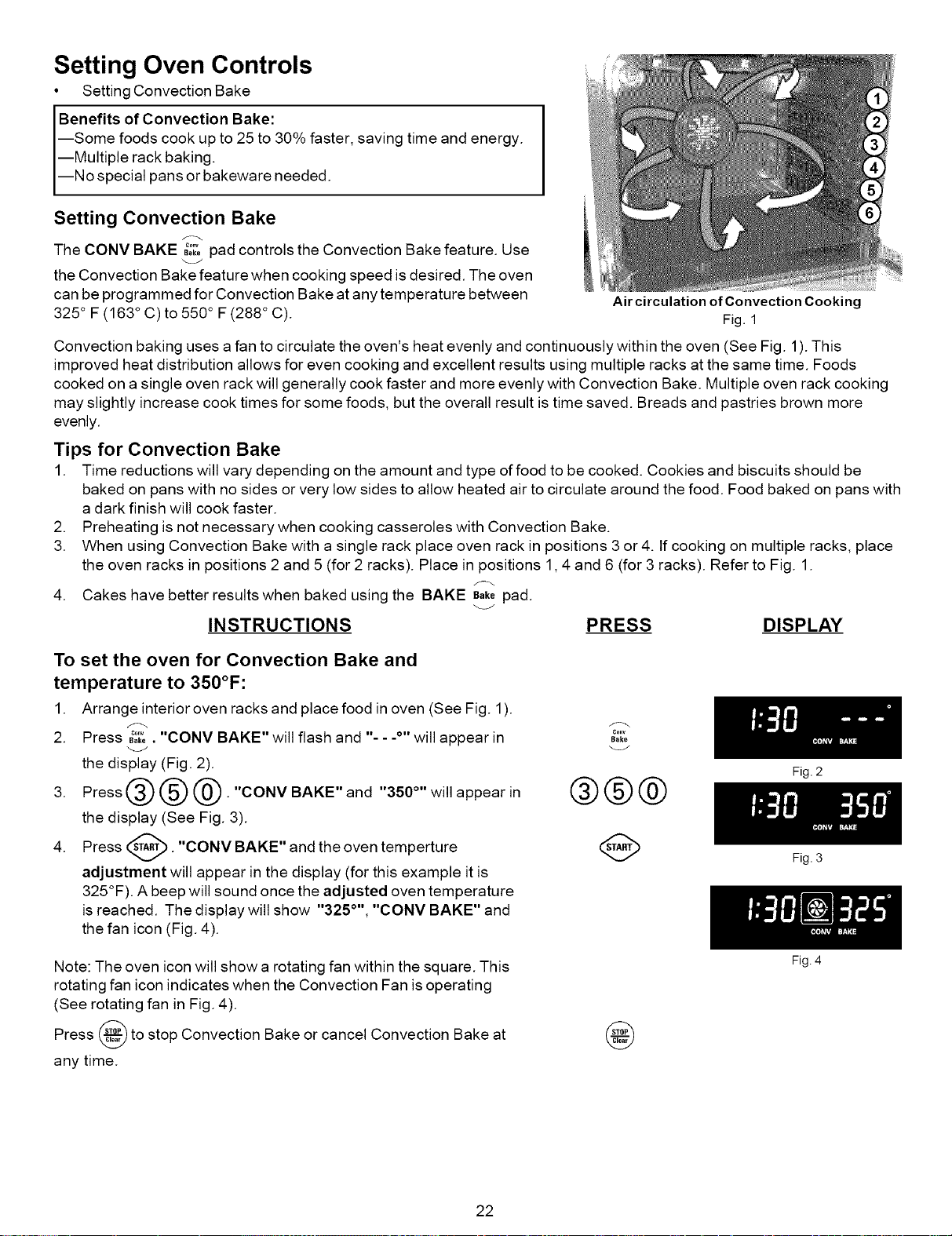
Setting Oven Controls
• Setting Convection Bake
Benefits of Convection Bake:
--Some foods cook up to 25 to 30% faster, saving time and energy.
--Multiple rack baking.
--No special pans or bakeware needed.
Setting Convection Bake
The CONV BAKE _°k°.... pad controls the Convection Bake feature. Use
the Convection Bake feature when cooking speed is desired. The oven
can be programmed for Convection Bake at any temperature between
325 ° F (163 ° C) to 550 ° F(288 ° C).
Air circulation of Convection Cooking
Fig. 1
Convection baking uses a fan to circulate the oven's heat evenly and continuously within the oven (See Fig. 1).This
improved heat distribution allows for even cooking and excellent results using multiple racks at the same time. Foods
cooked on a single oven rack will generally cook faster and more evenly with Convection Bake. Multiple oven rack cooking
may slightly increase cook times for some foods, but the overall result is time saved. Breads and pastries brown more
evenly.
Tips for Convection Bake
1. Time reductions will vary depending on the amount and type of food to be cooked. Cookies and biscuits should be
baked on pans with no sides or very low sides to allow heated air to circulate around the food. Food baked on pans with
a dark finish will cook faster.
2. Preheating is not necessary when cooking casseroles with Convection Bake.
3. When using Convection Bake with a single rack place oven rack in positions 3 or 4. tf cooking on multiple racks, place
the oven racks in positions 2 and 5 (for 2 racks). Place in positions 1,4 and 6 (for 3 racks). Refer to Fig. 1.
4. Cakes have better results when baked using the BAKE Bakepad.
INSTRUCTIONS PRESS DISPLAY
To set the oven for Convection Bake and
temperature to 350°F:
1. Arrange interior oven racks and place food in oven (See Fig. 1).
2. Press ,.,0....... CONV BAKE" will flash and "-. .o,,will appear in
the display (Fig. 2).
3. Press _ (_) @. "CONV BAKE" and "350 °'' will appear in
the display (See Fig. 3).
4. Press _. "CONV BAKE" and the
oven
temperture
adjustment will appear in the display (for this example it is
325°F). A beep will sound once the adjusted oven temperature
is reached. The display will show "325 °'', "CONV BAKE" and
the fan icon (Fig. 4).
¢o.v
Bake
®®@
Note: The oven icon will show a rotating fan within the square. This
rotating fan icon indicates when the Convection Fan is operating
(See rotating fan in Fig. 4).
Press _ to stop Convection Bake or cancel Convection Bake at
any time.
@
22
Fig. 2
Fig. 3
Fig. 4
Setting Oven Controls
• Setting Convection Roast
Setting Convection Roast
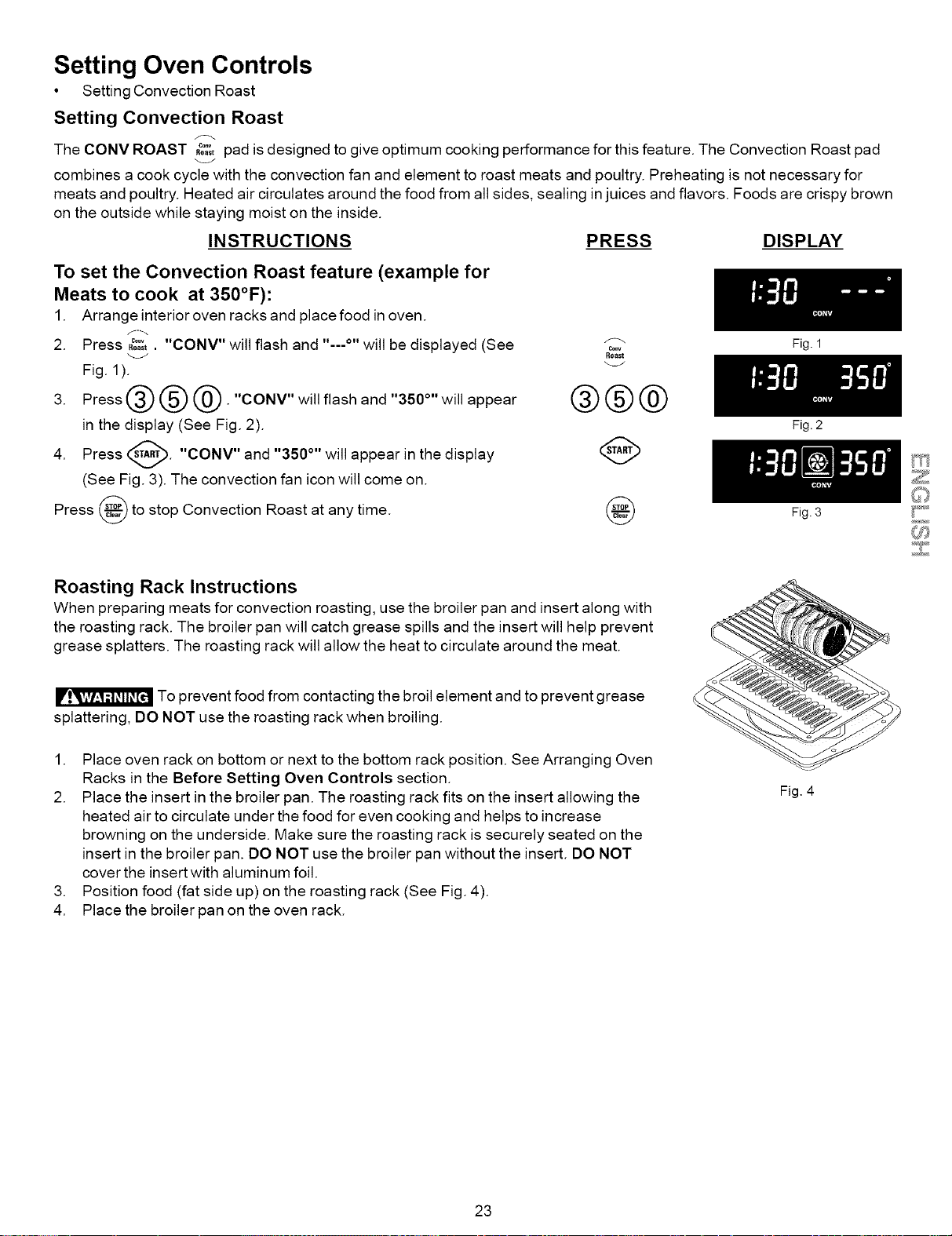
The CONV ROAST ,_;;;,pad is designed to give optimum cooking performance for this feature. The Convection Roast pad
combines a cook cycle with the convection fan and element to roast meats and poultry. Preheating is not necessary for
meats and poultry. Heated air circulates around the food from all sides, sealing in juices and flavors. Foods are crispy brown
on the outside while staying moist on the inside.
INSTRUCTIONS PRESS DISPLAY
To set the Convection Roast feature (example for
Meats to cook at 350°F):
1. Arrange interior oven racks and place food in oven.
2. Press ,_;%. "CONV" will flash and ,,...o,, will be displayed (See
Fig. 1).
3. Press @ @ @. "CONV" will flash and "350 °'' will appear
in the display (See Fig. 2).
4. Press _. "CONV" and "350 °'' will appear in the
display
(See Fig. 3). The convection fan icon will come on.
Press _ to stop Convection Roast at any time.
®®@
Fig. 2
Fig. 3
Roasting Rack Instructions
When preparing meats for convection roasting, use the broiler pan and insert along with
the roasting rack. The broiler pan will catch grease spills and the insert will help prevent
grease splatters. The roasting rack will allow the heat to circulate around the meat.
To prevent food from contacting the broil element and to prevent grease
splattering, DO NOT use the roasting rack when broiling.
1. Place oven rack on bottom or next to the bottom rack position. See Arranging Oven
Racks in the Before Setting Oven Controls section.
2. Place the insert in the broiler pan. The roasting rack fits on the insert allowing the
heated air to circulate under the food for even cooking and helps to increase
browning on the underside. Make sure the roasting rack is securely seated on the
insert in the broiler pan. DO NOT use the broiler pan without the insert. DO NOT
cover the insert with aluminum foil.
3. Position food (fat side up) on the roasting rack (See Fig. 4).
4. Place the broiler pan on the oven rack.
Fig. 4
23
Setting Oven Controls
• Setting Convection Convert Feature
• Setting Add 1 Minute Feature
To set the Convection Convert feature
F_
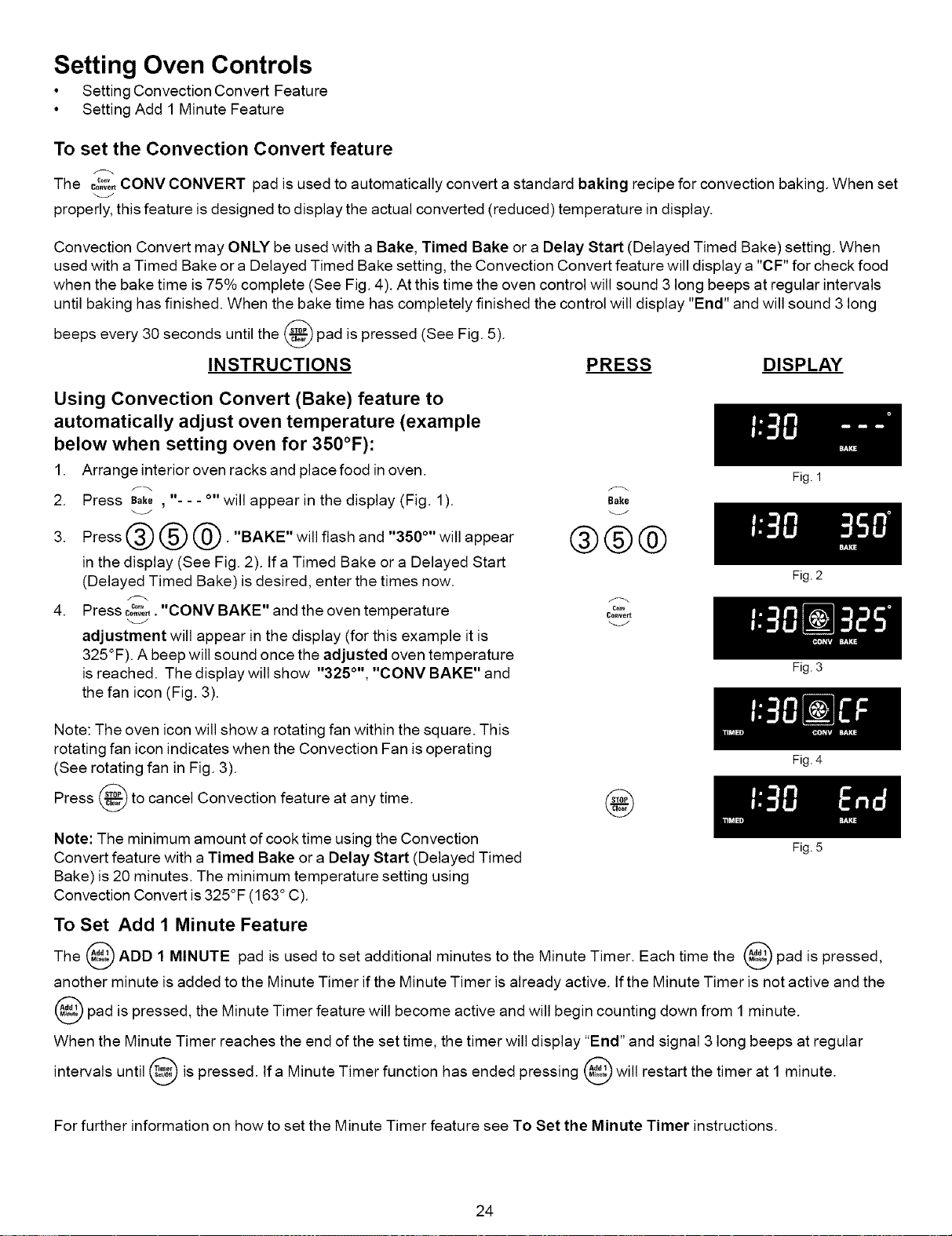
The co_3_,CONV CONVERT pad is used to automatically convert a standard baking recipe for convection baking. When set
properly, this feature is designed to display the actual converted (reduced) temperature in display.
Convection Convert may ONLY be used with a Bake, Timed Bake or a Delay Start (Delayed Timed Bake) setting. When
used with a Timed Bake or a Delayed Timed Bake setting, the Convection Convert feature will display a "CF" for check food
when the bake time is 75% complete (See Fig. 4). At this time the oven control will sound 3 long beeps at regular intervals
until baking has finished. When the bake time has completely finished the control will display "End" and will sound 3 long
beeps every 30 seconds until the _ pad is pressed (See Fig. 5).
INSTRUCTIONS PRESS DISPLAY
Using Convection Convert (Bake) feature to
automatically adjust oven temperature (example
below when setting oven for 350°F):
1. Arrange interior oven racks and place food in oven.
2. Press Bake, "- - - °" will appear in the display (Fig. 1).
3. Press @ @ @. "BAKE" will flash and "350 °'' will appear
in the display (See Fig. 2). If a Timed Bake or a Delayed Start
(Delayed Timed Bake) is desired, enter the times now.
4. Press c_,. "CONV BAKE" and the oven temperature
adjustment will appear in the display (for this example it is
325°F). A beep will sound once the adjusted oven temperature
is reached. The display will show "325 °'', "CONV BAKE" and
the fan icon (Fig. 3).
Bake
_J
®®®
Conve_
Note: The oven icon will show a rotating fan within the square. This
rotating fan icon indicates when the Convection Fan is operating
(See rotating fan in Fig. 3).
Press _ to cancel Convection feature at any time.
@
Note: The minimum amount of cook time using the Convection
Convert feature with a Timed Bake or a Delay Start (Delayed Timed
Bake) is 20 minutes. The minimum temperature setting using
Convection Convert is 325°F (163 ° C).
Fig. 1
Fig. 2
Fig. 3
Fig. 4
Fig. 5
To Set Add 1 Minute Feature
The @ ADD 1 MINUTE pad is used toset additional minutes to the Minute Timer. Each time the @ pad is pressed,
another minute is added to the Minute Timer if the Minute Timer is already active, tf the Minute Timer is not active and the
pad is pressed, the Minute Timer feature will become active and will begin counting down from 1 minute.
When the Minute Timer reaches the end of the set time, the timer will display "End" and signal 3 long beeps at regular
intervals until _ is pressed. If a Minute Timer function has ended pressing _ will restart the timer at 1 minute.
For further information on how to set the Minute Timer feature see To Set the Minute Timer instructions.
24
Setting Oven Controls
• Setting the Recipe Recall Feature
To Set the Recipe Recall Feature
R_pe
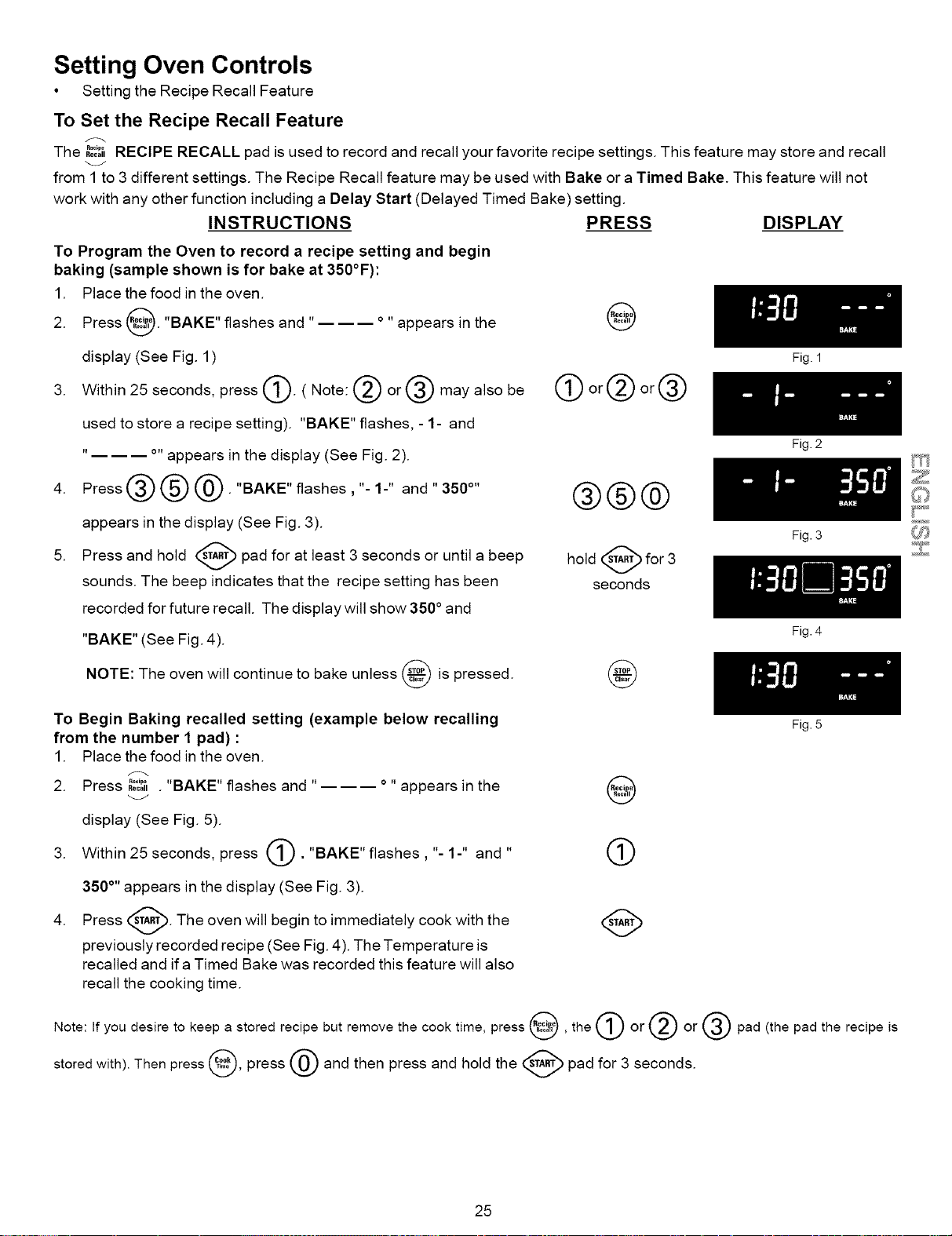
The ,oo_,RECIPE RECALL pad is used to record and recall your favorite recipe settings. This feature may store and recall
from 1 to 3 different settings. The Recipe Recall feature may be used with Bake or a Timed Bake. This feature will not
work with any other function including a Delay Start (Delayed Timed Bake) setting.
INSTRUCTIONS
To Program the Oven to record a recipe setting and begin
baking (sample shown is for bake at 350°F):
1. Place the food in the oven.
2. Press _. "BAKE" flashes and ..... appears in the
display (See Fig. 1)
3. Within 25 seconds, press _. ( Note: _ or @ may also be
used to store a recipe setting). "BAKE" flashes, - 1- and
..... appears in the display (See Fig. 2).
4. Press@@@."BAKE"flashes,"-1-" and"350 °''
appears in the display (See Fig. 3).
5. Press and hold _ pad for at least 3 seconds or until
a
beep
y
sounds. The beep indicates that the recipe setting has been
recorded for future recall. The display will show 350 ° and
"BAKE" (See Fig. 4).
NOTE: The oven will continue to bake unless _ is
pressed.
PRESS DISPLAY
@
orQ or@ []
@@@
hold _ for 3
seconds
@
To Begin Baking recalled setting (example below recalling
from the number I pad) :
1. Place the food in the oven.
2. Press ,ecall........ . BAKE" flashes and "
.
°" appears in the
display (See Fig. 5).
Within 25 seconds, press (_. "BAKE" flashes, "- 1-" and
,#
350 °" appears in the display (See Fig. 3).
Press _. The oven will begin to immediately cook with the
previously recorded recipe (See Fig. 4). The Temperature is
recalled and ifa Timed Bake was recorded this feature will also
recall the cooking time.
Fig. 1
Fig. 2
Fig. 3
Fig. 4
Fig. 5
@
®
Note: If you desire to keep a stored recipe but remove the cook time, press _, the (_)or (_ or @ pad (the pad the recipe is
stored with). Then press _, press @ and then press and hold the _ pad for 3 seconds.
25
Setting Oven Controls
• Setting the Slow Cook Feature
Setting the Slow Cook Feature
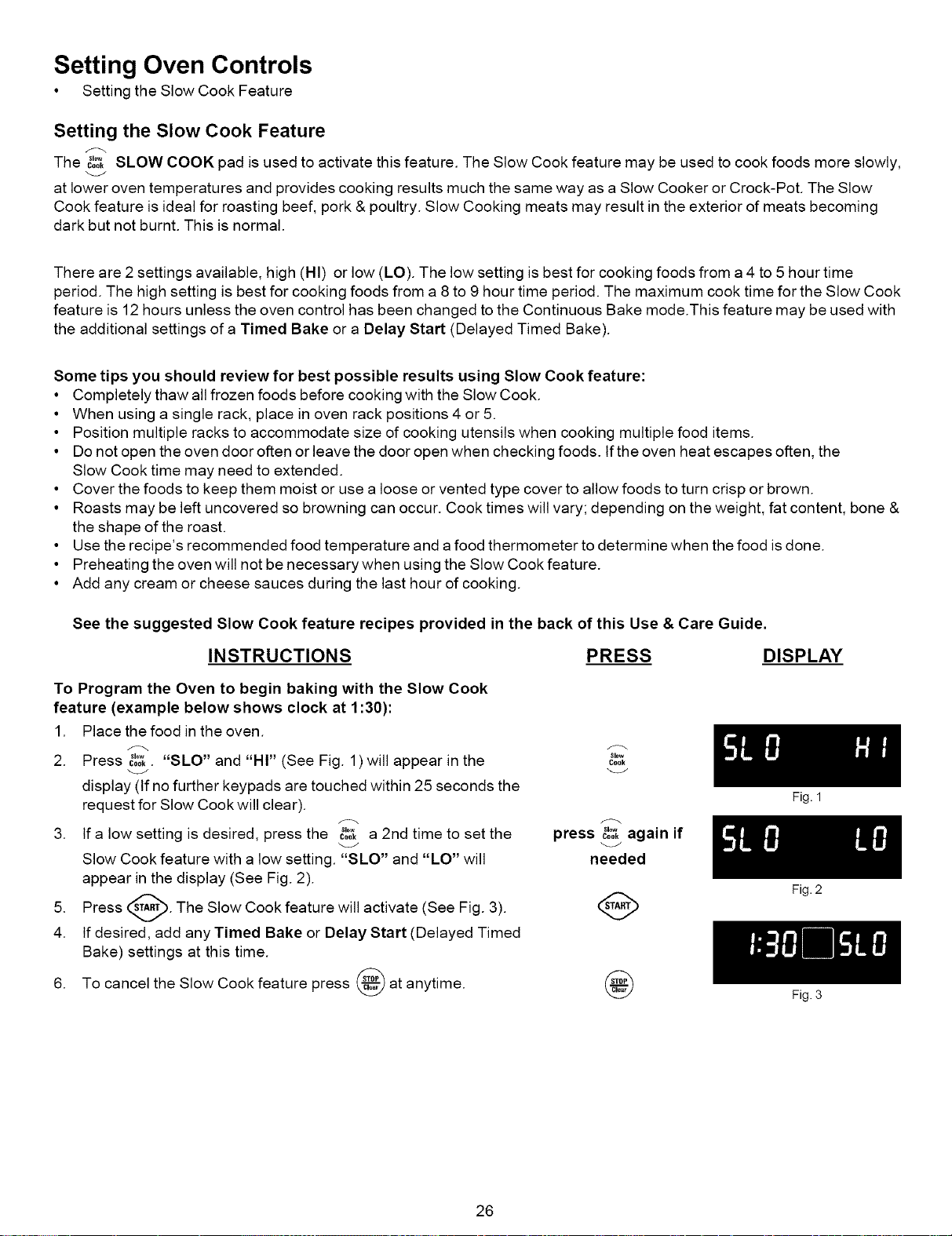
The _",_ SLOW COOK pad is used to activate this feature. The Slow Cook feature may be used to cook foods more slowly,
at lower oven temperatures and provides cooking results much the same way as a Slow Cooker or Crock-Pot. The Slow
Cook feature is ideal for roasting beef, pork & poultry. Slow Cooking meats may result in the exterior of meats becoming
dark but not burnt. This is normal.
There are 2 settings available, high (HI) or low (LO). The low setting is best for cooking foods from a 4 to 5 hour time
period. The high setting is best for cooking foods from a 8 to 9 hour time period. The maximum cook time for the Slow Cook
feature is 12 hours unless the oven control has been changed to the Continuous Bake mode.This feature may be used with
the additional settings of a Timed Bake or a Delay Start (Delayed Timed Bake).
Some tips you should review for best possible results using Slow Cook feature:
• Completely thaw all frozen foods before cooking with the Slow Cook.
• When using a single rack, place in oven rack positions 4 or 5.
• Position multiple racks to accommodate size of cooking utensils when cooking multiple food items.
• Do not open the oven door often or leave the door open when checking foods. If the oven heat escapes often, the
Slow Cook time may need to extended.
• Cover the foods to keep them moist or use a loose or vented type cover to allow foods to turn crisp or brown.
• Roasts may be left uncovered so browning can occur. Cook times will vary; depending on the weight, fat content, bone &
the shape of the roast.
• Use the recipe's recommended food temperature and a food thermometer to determine when the food is done.
• Preheating the oven will not be necessary when using the Slow Cook feature.
• Add any cream or cheese sauces during the last hour of cooking.
See the suggested Slow Cook feature recipes provided in the back of this Use & Care Guide.
INSTRUCTIONS PRESS DISPLAY
To Program the Oven to begin baking with the Slow Cook
feature (example below shows clock at 1:30):
1. Place the food in the oven.
2. Press s,.... SLO"
c0o,. and "HI" (See Fig. 1) will appear in the
display (If no further keypads are touched within 25 seconds the
request for Slow Cook will clear).
3. If a low setting is desired, press the coo,.... a 2nd time to set the
Slow Cook feature with a low setting. "SLO" and "LO" will
appear in the display (See Fig. 2).
5. Press _. The Slow Cook feature will activate
(See Fig. 3).
4. If desired, add any Timed Bake or Delay Start (Delayed Timed
Bake) settings at this time.
6. To cancel the Slow Cook feature press _ at anytime.
Slew
Coek
press _'°*cookagain if
needed
Fig. 1
26
Fig. 2
Fig. 3
Setting Oven Controls
• Setting the Sabbath Day Feature
To Set the Sabbath Feature (for use on the Jewish Sabbath & Holidays)
The @ COOK TIME and @ DELAY START pads are used to set the Sabbath feature. The Sabbath feature can only be
used with the B,kepad. The oven temperature may be set higher or lower after setting the Sabbath feature (the oven
temperature adjustment feature should be used only during Jewish Holidays), however the display will not visibly change
and no audible tones will be provided when a change occurs. Once the oven is properly set using Bake with the Sabbath
feature active, the oven will remain continuously ON until cancelled. This will override the factory preset 12-Hour Energy
Saving feature. If the oven light is needed during the Sabbath, press _0 before activating the Sabbath feature. Once the
oven light is turned ON and the Sabbath feature is active, the oven light will remain ON until the Sabbath feature is turned
OFF. If the oven light needs to be OFF, be sure to turn the oven light OFF before activating the Sabbath feature.
IMPORTANT NOTES: It is not advised to attempt to activate any other program feature except BAKE while the Sabbath
feature is active. ONLY the following key pads will function correctly with the Sabbath feature: 0-9 number pads, Bake
_& _. ALL OTHER KEYPADS should not be used once the Sabbath feature is activated.
INSTRUCTIONS PRESS DISPLAY
To Program the Oven for 350°F, Begin Baking Immediately
and activate the Sabbath feature:
1. Be sure that the clock is set with the correct time of day.
2. Arrange the oven racks and place the food in the oven.
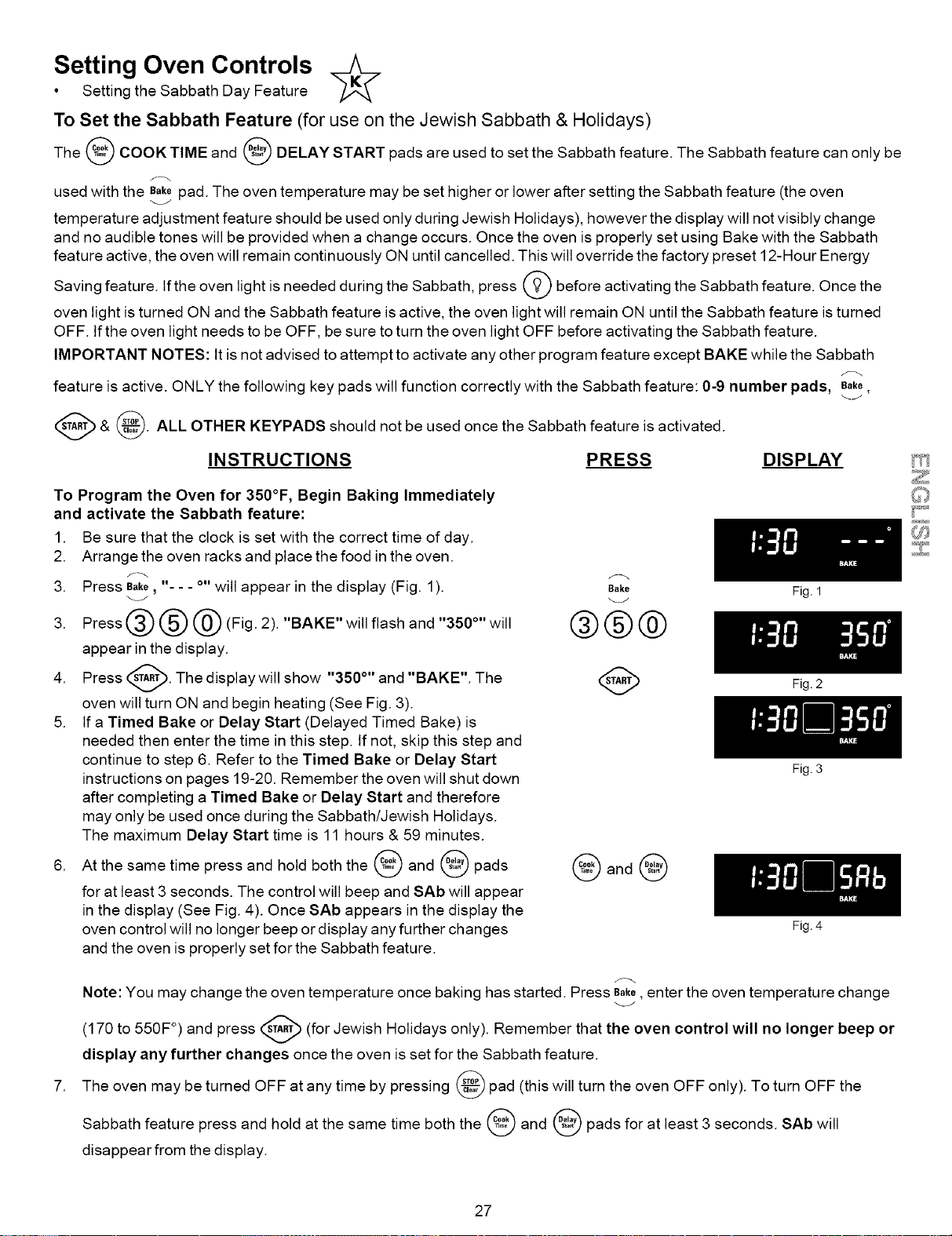
3. Press B_ke, - - - o,,will appear in the display (Fig. 1).
3. Press @ @ @ (Fig. 2). "BAKE" will flash and "350°" will
appear in the display.
4. Press _. The display will show "350 °'' and "BAKE". The
v
oven will turn ON and begin heating (See Fig. 3).
5. If a Timed Bake or Delay Start (Delayed Timed Bake) is
needed then enter the time in this step. If not, skip this step and
continue to step 6. Refer to the Timed Bake or Delay Start
instructions on pages 19-20. Remember the oven will shut down
after completing a Timed Bake or Delay Start and therefore
may only be used once during the Sabbath/Jewish Holidays.
The maximum Delay Start time is 11 hours & 59 minutes.
6. At the same time press and hold both the _ and _ pads
for at least 3 seconds. The control will beep and SAb will appear
in the display (See Fig. 4). Once SAb appears in the display the
oven control will no longer beep or display any further changes
and the oven is properly set for the Sabbath feature.
Bake
®®®
Fig. 1
@and
Fig. 2
Fig. 3
Fig. 4
Note: You may change the oven temperature once baking has started. Press Bake,enter the oven temperature change
(170 to 550F °) and press (_ (for Jewish Holidays only). Remember that the oven control will no longer beep or
display any further changes once the oven is set for the Sabbath feature.
The oven may be turned OFF at any time by pressing _ pad (this will turn the oven OFF only). To turn OFF the
Sabbath feature press and hold at the same time both the @ and @ pads for at least 3 seconds. SAb will
disappear from the display.
27
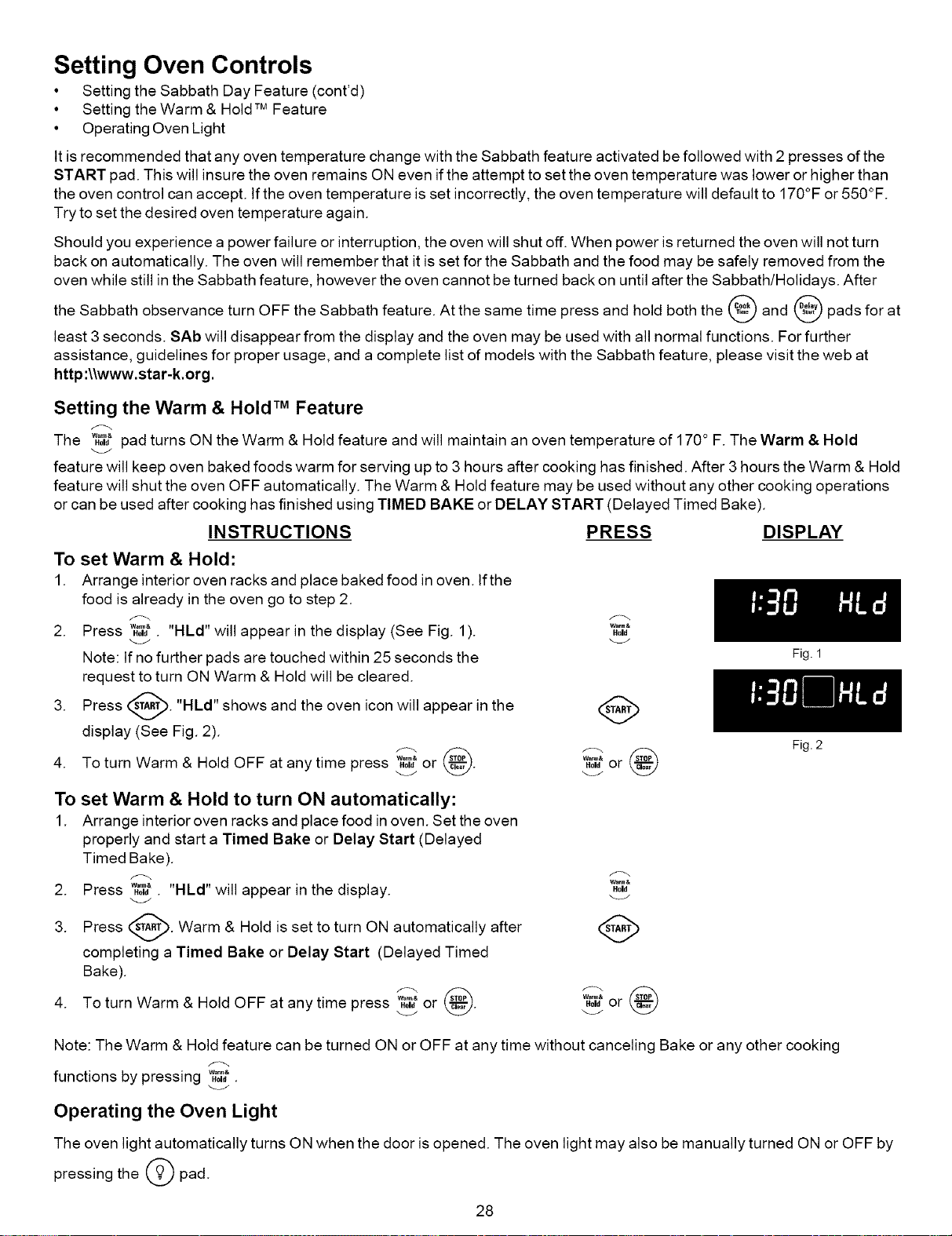
Setting Oven Controls
• Setting the Sabbath Day Feature (cont'd)
• Setting the Warm & Hold TM Feature
• Operating Oven Light
It is recommended that any oven temperature change with the Sabbath feature activated be followed with 2 presses of the
START pad. This will insure the oven remains ON even if the attempt to set the oven temperature was lower or higher than
the oven control can accept. If the oven temperature is set incorrectly, the oven temperature will default to 170°F or 550°F.
Try to set the desired oven temperature again.
Should you experience a power failure or interruption, the oven will shut off. When power is returned the oven will not turn
back on automatically. The oven will remember that it is set for the Sabbath and the food may be safely removed from the
oven while still in the Sabbath feature, however the oven cannot be turned back on until after the Sabbath/Holidays. After
the Sabbath observance turn OFF the Sabbath feature. At the same time press and hold both the @ and @ pads for at
least 3 seconds. SAb will disappear from the display and the oven may be used with all normal functions. For further
assistance, guidelines for proper usage, and a complete list of models with the Sabbath feature, please visit the web at
http :\\www.star-k.org.
Setting the Warm & Hold TM Feature
The w_?pad turns ON the Warm & Hold feature and will maintain an oven temperature of 170° F. The Warm & Hold
feature will keep oven baked foods warm for serving up to 3 hours after cooking has finished. After 3 hours the Warm & Hold
feature will shut the oven OFF automatically. The Warm & Hold feature may be used without any other cooking operations
or can be used after cooking has finished using TIMED BAKE or DELAY START (Delayed Timed Bake).
INSTRUCTIONS PRESS DISPLAY
To set Warm & Hold:
1. Arrange interior oven racks and place baked food in oven. If the
food is already in the oven go to step 2.
2. Press w¢_,t."HLd" will appear in the display (See Fig. 1).
Note: If no further pads are touched within 25 seconds the
request to turn ON Warm & Hold will be cleared.
3. Press _'_. "HLd" shows and the oven icon will appear in the
display (See Fig. 2).
r-. @
4. To turn Warm & Hold OFF at any time press w_7_or .
Warm&
Hold
Warn,&
Hold or
To set Warm & Hold to turn ON automatically:
1. Arrange interior oven racks and place food in oven. Set the oven
properly and start a Timed Bake or Delay Start (Delayed
Timed Bake).
2. Press w_,t. "HLd" will appear in the display.
3. Press _--_. Warm & Hold is set to turn ON automatically after
completing a Timed Bake or Delay Start (Delayed Timed
Bake).
4. To turn Warm & Hold OFF at any time press '_"_"or .
Wa_&
Hold
wa_&
Hold or
Fig. 1
Fig. 2
Note: The Warm & Hold feature can be turned ON or OFF at any time without canceling Bake or any other cooking
functions by pressing ....
Hold .
Operating the Oven Light
The oven light automatically turns ON when the door is opened. The oven light may also be manually turned ON or OFF by
pressing the _O pad.
28
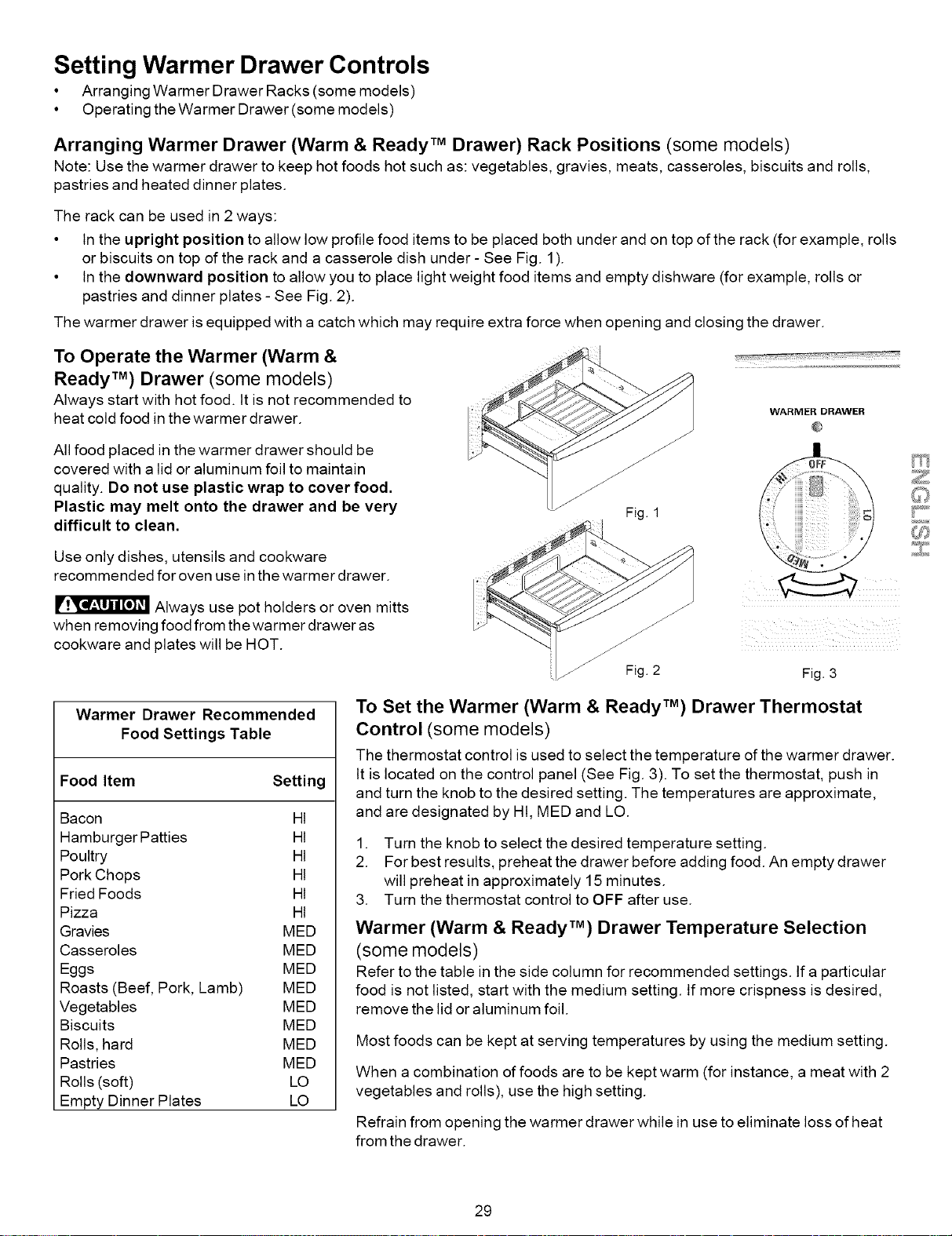
Setting Warmer Drawer Controls
• Arranging Warmer Drawer Racks (some models)
• Operating the Warmer Drawer (some models)
Arranging Warmer Drawer (Warm & Ready TM Drawer) Rack Positions (some models)
Note: Use the warmer drawer to keep hot foods hot such as: vegetables, gravies, meats, casseroles, biscuits and rolls,
pastries and heated dinner plates.
The rack can be used in 2 ways:
• In the upright position to allow low profile food items to be placed both under and on top of the rack (for example, rolls
or biscuits on top of the rack and a casserole dish under - See Fig. 1).
• In the downward position to allow you to place light weight food items and empty dishware (for example, rolls or
pastries and dinner plates - See Fig. 2).
The warmer drawer is equipped with a catch which may require extra force when opening and closing the drawer.
To Operate the Warmer (Warm &
Ready TM) Drawer (some models)
Always start with hot food. It is not recommended to
heat cold food in the warmer drawer.
All food placed in the warmer drawer should be
covered with a lid or aluminum foil to maintain
quality. Do not use plastic wrap to cover food.
Plastic may melt onto the drawer and be very
difficult to clean.
WARMER DRAWER
Use only dishes, utensils and cookware
recommended for oven use in the warmer drawer.
Always use pot holders or oven mitts
when removing food from the warmer drawer as
cookware and plates will be HOT.
Fig. 3
Warmer Drawer Recommended
Food Settings Table
Food Item Setting
Bacon HI
Hamburger Patties HI
Poultry HI
Pork Chops HI
Fried Foods HI
Pizza HI
Gravies MED
Casseroles MED
Eggs MED
Roasts (Beef, Pork, Lamb) MED
Vegetables MED
Biscuits MED
Rolls, hard MED
Pastries MED
Rolls (soft) LO
Empty Dinner Plates LO
To Set the Warmer (Warm & Ready TM) Drawer Thermostat
Control (some models)
The thermostat controlis used toselect the temperature ofthe warmer drawer.
It is located on the control panel (See Fig. 3). To set the thermostat, push in
and turn the knob tothe desired setting. The temperatures are approximate,
and are designated by HI, MED and LO.
1. Turn the knob to select the desired temperature setting.
2. For best results, preheat the drawer before adding food. An empty drawer
will preheat in approximately 15 minutes.
3. Turn the thermostat control to OFF after use.
Warmer (Warm & Ready TM) Drawer Temperature Selection
(some models)
Refer to the table in the side column for recommended settings. If a particular
food is not listed, start with the medium setting. If more crispness is desired,
remove the lid or aluminum foil.
Most foods can be kept at serving temperatures by using the medium setting.
When a combination of foods are to be kept warm (for instance, a meat with 2
vegetables and rolls), use the high setting.
Refrain from opening the warmer drawer while in use to eliminate loss of heat
from the drawer.
(,
29
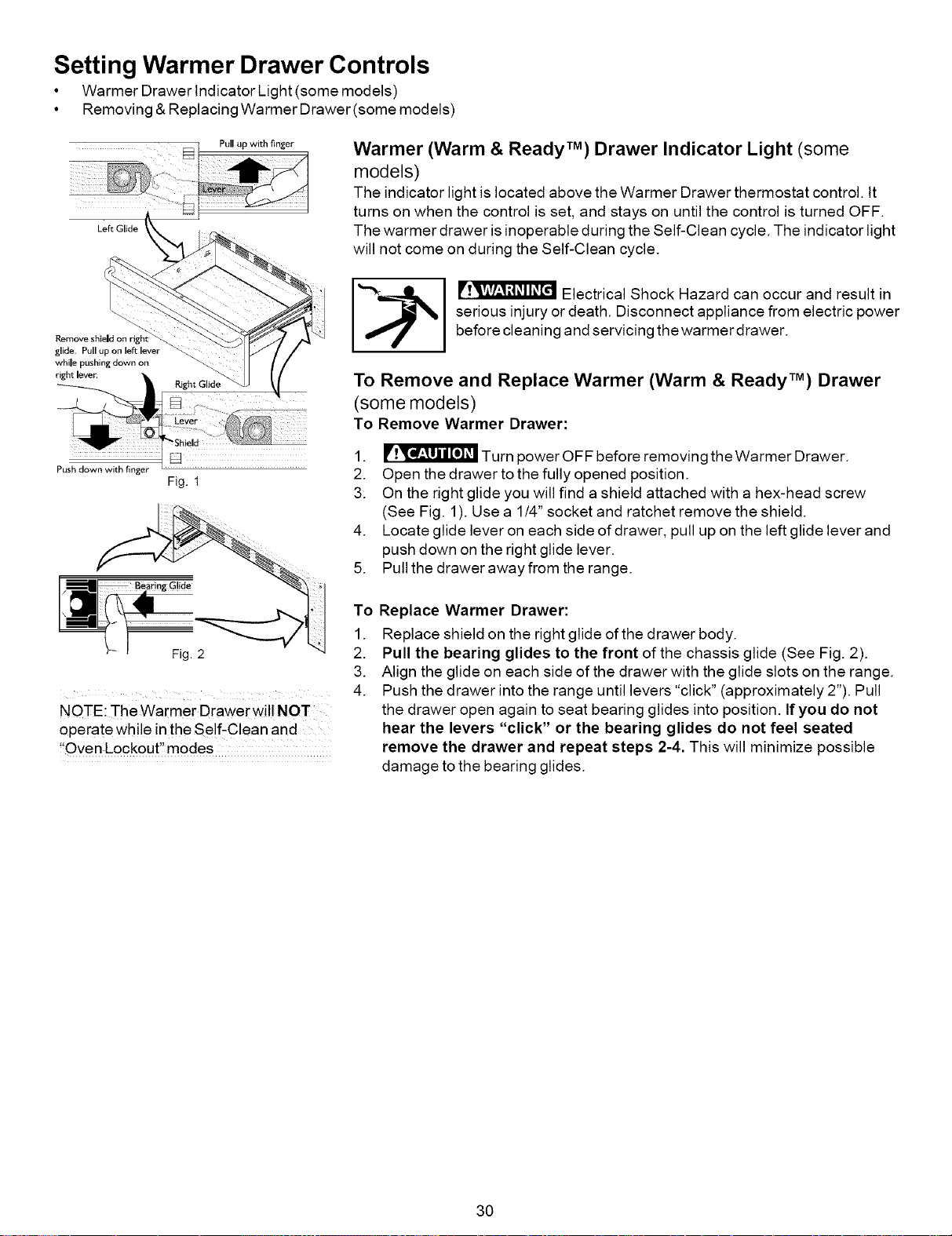
Setting Warmer Drawer Controls
• Warmer Drawer Indicator Light (some models)
• Removing &Replacing Warmer Drawer(some models)
Left Glide
Pull up with finger
Warmer (Warm & Ready TM) Drawer Indicator Light (some
models)
The indicator light is located above the Warmer Drawer thermostat control. It
turns on when the control is set, and stays on until the control is turned OFF.
The warmer drawer is inoperable during the Self-Clean cycle. The indicator light
will not come on during the Self-Clean cycle.
Remove shield on righ
glide. Pull up on left lever
while pushing down on
right lever.
Push down with finger
Fig. 1
NOTE: The Warmer Drawer will NOT
operate while inthe Se!f,C!ean and
!!Oven Lockout" modes
"_-_ I _ Electrical Shock Hazard can occur and result in
serious injury or death. Disconnect appliance from electric power
before cleaning and servicing the warmer drawer.
To Remove and Replace Warmer (Warm & Ready TM) Drawer
(some models)
To Remove Warmer Drawer:
1. _ Turn power OFF before removing theWarmer Drawer.
2. Open the drawer to the fully opened position.
3. On the right glide you will find a shield attached with a hex-head screw
(See Fig. 1). Use a 1/4" socket and ratchet remove the shield.
4. Locate glide lever on each side of drawer, pull up on the left glide lever and
push down on the right glide lever.
5. Pull the drawer away from the range.
To Replace Warmer Drawer:
1. Replace shield on the right glide of the drawer body.
2. Pull the bearing glides to the front of the chassis glide (See Fig. 2).
3. Align the glide on each side of the drawer with the glide slots on the range.
4. Push the drawer into the range until levers "click" (approximately 2"). Pull
the drawer open again to seat bearing glides into position. If you do not
hear the levers "click" or the bearing glides do not feel seated
remove the drawer and repeat steps 2-4. This will minimize possible
damage to the bearing glides.
30
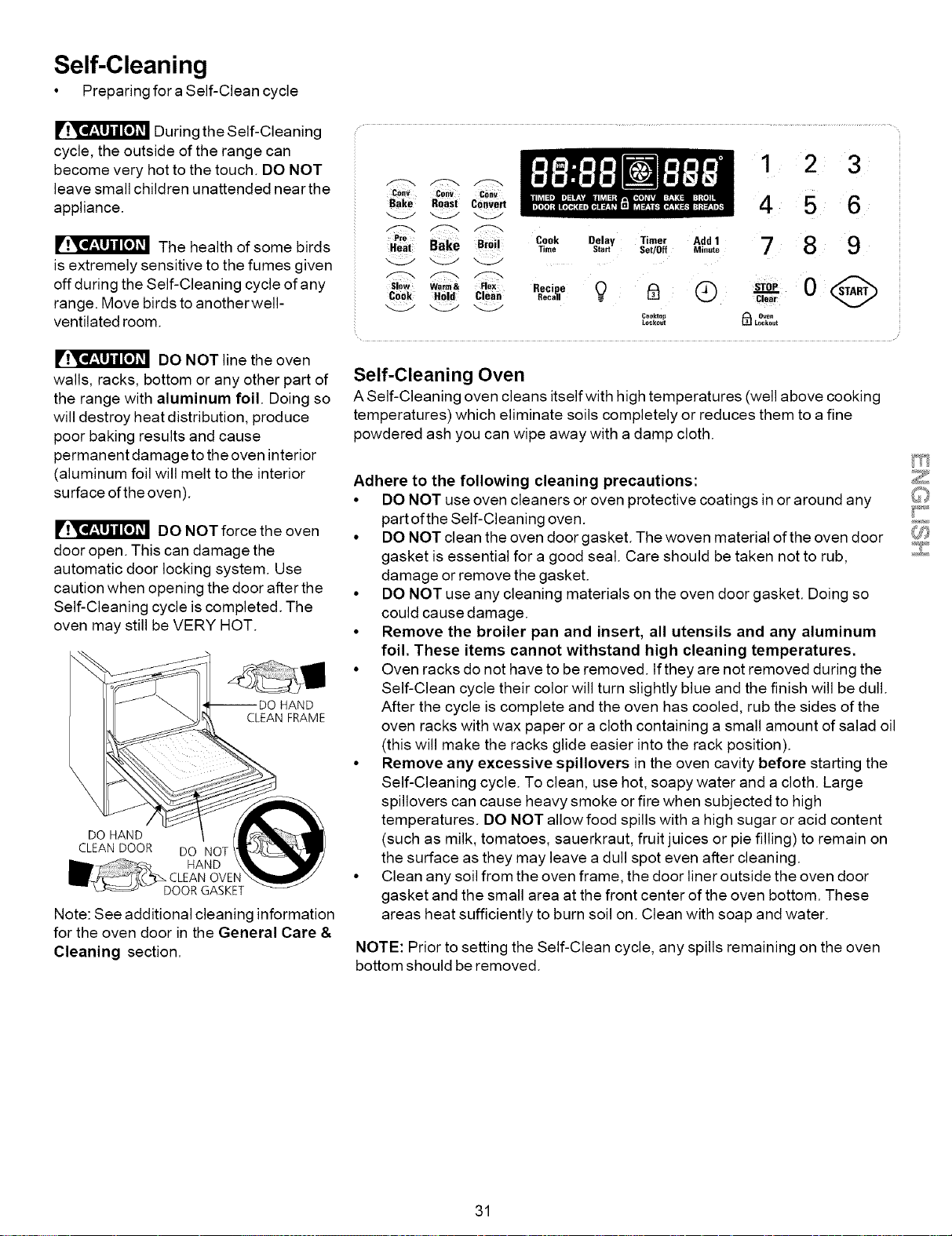
Self-Cleaning
• Preparing fora Self-Clean cycle
During the Self-Cleaning
cycle, the outside of the range can
become very hot to the touch. DO NOT
leave small children unattended near the
appliance.
The health of some birds
is extremely sensitive to the fumes given
off during the Self-Cleaning cycle of any
range. Move birds to anotherwell-
ventilated room.
DO NOT line the oven
walls, racks, bottom or any other part of
the range with aluminum foil. Doing so
will destroy heat distribution, produce
poor baking results and cause
permanent damage to the oven interior
(aluminum foil will melt to the interior
surface of the oven).
DO NOT force the oven
door open. This can damage the
automatic door locking system. Use
caution when opening the door after the
Self-Cleaning cycle is completed. The
oven may still be VERY HOT.
HAND
CLEAN FRAME
DO HAND
CLEAN DOOR DO NOT
HAND
OVEN
DOOR GASKET
Note: See additional cleaning information
for the oven door in the General Care &
Cleaning section.
CO"v Cony Cony
Bake RoaSt convert
Bake BiO;i
Cook Held Clean
Cook Delay Timer Add 1
Time Start Set/Off Mi.ute
Recipe 0 I_ Q
Recall
Cooktop
Lockout
1 2 3
4 5 6
7 8 9
v
Oven
_ Lockout
Self-Cleaning Oven
A Self-Cleaning oven cleans itself with high temperatures (well above cooking
temperatures) which eliminate soils completely or reduces them to a fine
powdered ash you can wipe away with a damp cloth.
Adhere to the following cleaning precautions:
• DO NOT use oven cleaners or oven protective coatings in or around any
part of the Self-Cleaning oven.
• DO NOT clean the oven door gasket. The woven material of the oven door
gasket is essential for a good seal. Care should be taken not to rub,
damage or remove the gasket.
• DO NOT use any cleaning materials on the oven door gasket. Doing so
could cause damage.
• Remove the broiler pan and insert, all utensils and any aluminum
foil. These items cannot withstand high cleaning temperatures.
• Oven racks do not have to be removed. If they are not removed during the
Self-Clean cycle their color will turn slightly blue and the finish will be dull.
After the cycle is complete and the oven has cooled, rub the sides of the
oven racks with wax paper or a cloth containing a small amount of salad oil
(this will make the racks glide easier into the rack position).
• Remove any excessive spillovers in the oven cavity before starting the
Self-Cleaning cycle. To clean, use hot, soapy water and a cloth. Large
spillovers can cause heavy smoke or fire when subjected to high
temperatures. DO NOT allow food spills with a high sugar or acid content
(such as milk, tomatoes, sauerkraut, fruit juices or pie filling) to remain on
the surface as they may leave a dull spot even after cleaning.
• Clean any soil from the oven frame, the door liner outside the oven door
gasket and the small area at the front center of the oven bottom. These
areas heat sufficiently to burn soil on. Clean with soap and water.
NOTE: Prior to setting the Self-Clean cycle, any spills remaining on the oven
bottom should be removed.
31
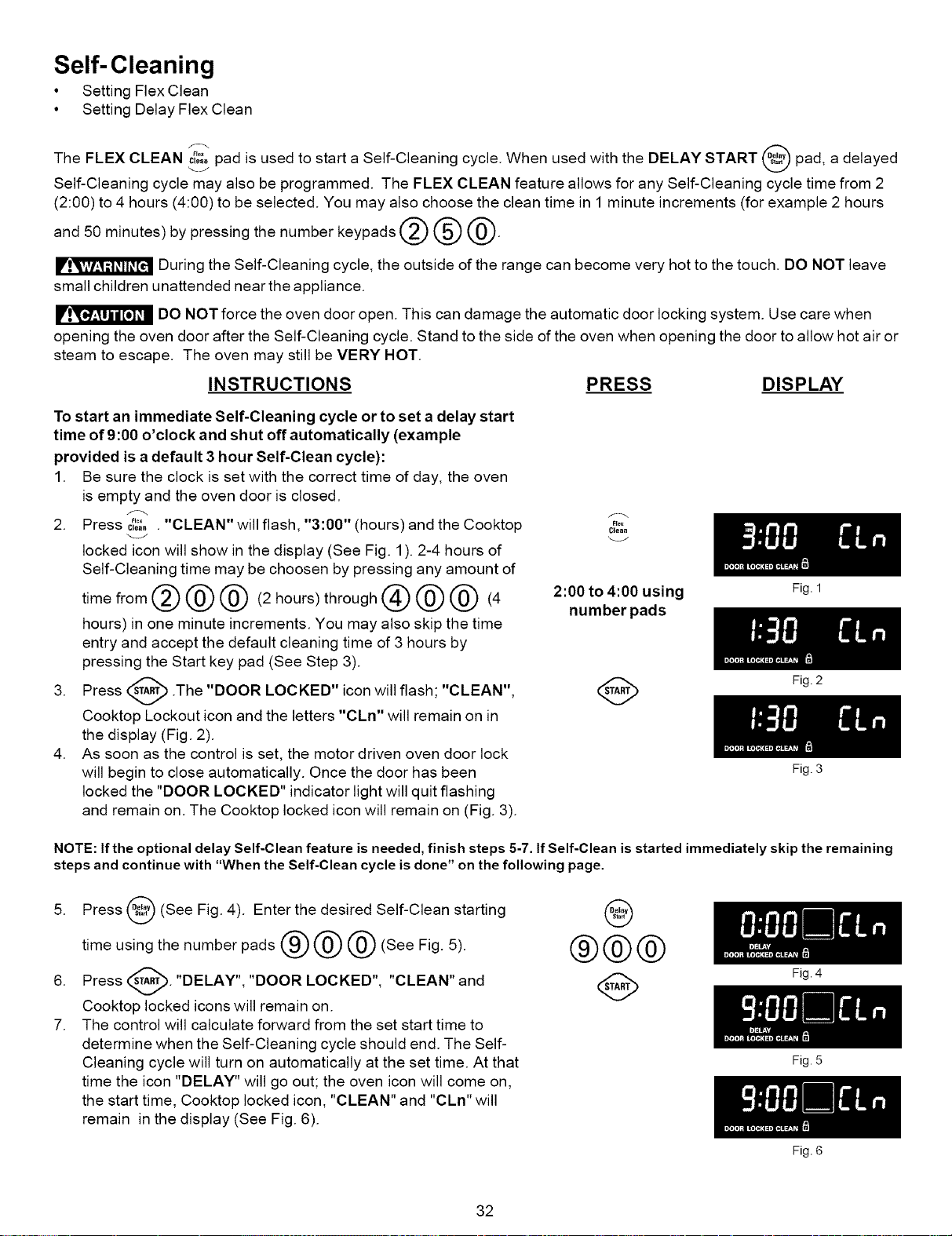
Self-Cleaning
• Setting Flex Clean
• Setting Delay Flex Clean
The FLEX CLEAN ....
c_..pad is used to start a Self-Cleaning cycle. When used with the DELAY START pad, a delayed
Self-Cleaning cycle may also be programmed. The FLEX CLEAN feature allows for any Self-Cleaning cycle time from 2
(2:00) to 4 hours (4:00) to be selected. You may also choose the clean time in 1 minute increments (for example 2 hours
and 50 minutes)by pressing the number keypads _ @ @.
During the Self-Cleaning cycle, the outside of the range can become very hot to the touch. DO NOT leave
small children unattended near the appliance.
DO NOT force the oven door open. This can damage the automatic door locking system. Use care when
opening the oven door after the Self-Cleaning cycle. Stand to the side of the oven when opening the door to allow hot air or
steam to escape. The oven may still be VERY HOT.
INSTRUCTIONS PRESS DISPLAY
To start an immediate Self-Cleaning cycle orto set a delay start
time of 9:00 o'clock and shut off automatically (example
provided is a default 3 hour Self-Clean cycle):
1. Be sure the clock is set with the correct time of day, the oven
is empty and the oven door is closed.
2. Press c;"_,. "CLEAN" will flash, "3:00" (hours) and the Cooktop
locked icon will show in the display (See Fig. 1). 2-4 hours of
Self-Cleaning time may be choosen by pressing any amount of
timefrom@@@ (2hours)through@@@ (4
hours) in one minute increments. You may also skip the time
entry and accept the default cleaning time of 3 hours by
pressing the Start key pad (See Step 3).
3. Press _ .The "DOOR LOCKED" icon will
flash; "CLEAN",
Cooktop Lockout icon and the letters "CLn" will remain on in
the display (Fig. 2).
4. As soon as the control is set, the motor driven oven door lock
will begin to close automatically. Once the door has been
locked the "DOOR LOCKED" indicator light will quit flashing
and remain on. The Cooktop locked icon will remain on (Fig. 3).
F_ex
Clean
2:00 to 4:00 using Fig.1
number pads
(_ Fig. 2
Fig. 3
NOTE: If the optional delay Self-Clean feature is needed, finish steps 5-7. If Self-Clean is started immediately skip the remaining
steps and continue with "When the Self-Clean cycle is done" on the following page.
5. Press _#_ (See Fig. 4). Enter the desired Self-Clean
starting
v
time using the number pads @ @ @ (See Fig. 5).
6. Press _. "DELAY", "DOOR LOCKED", "CLEAN" and
Cooktop locked icons will remain on.
7. The control will calculate forward from the set start time to
determine when the Self-Cleaning cycle should end. The Self-
Cleaning cycle will turn on automatically at the set time. At that
time the icon "DELAY" will go out; the oven icon will come on,
the start time, Cooktop locked icon, "CLEAN" and "CLn" will
remain in the display (See Fig. 6).
@
®@@
32
Fig. 4
Fig. 5
Fig. 6
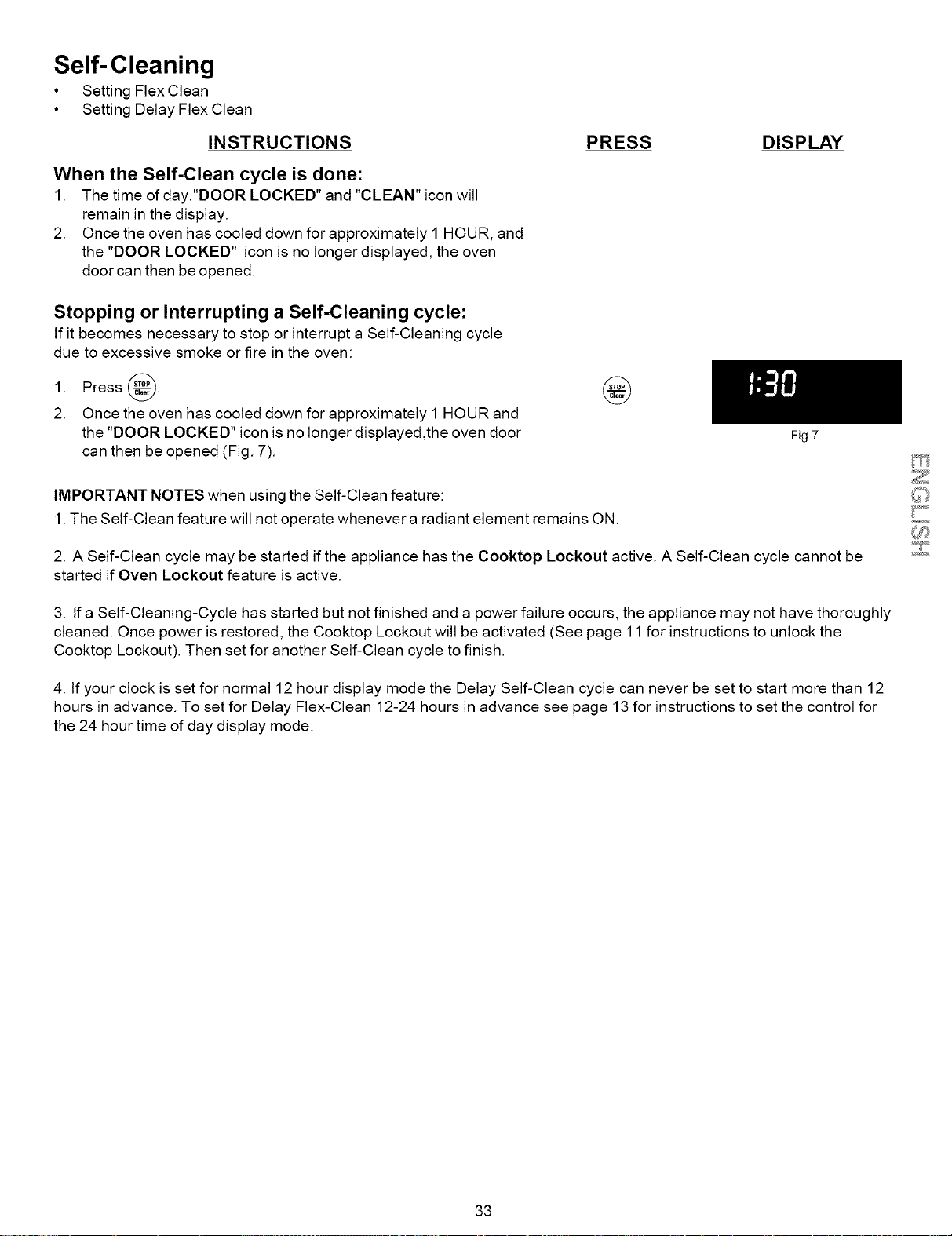
Self-Cleaning
• Setting Flex Clean
• Setting Delay Flex Clean
INSTRUCTIONS
When the Self-Clean cycle is done:
1. The time of day,"DOOR LOCKED" and "CLEAN" icon will
remain in the display.
2. Once the oven has cooled down for approximately 1HOUR, and
the "DOOR LOCKED" icon is no longer displayed, the oven
door can then be opened.
PRESS DISPLAY
Stopping or Interrupting a Self-Cleaning cycle:
If it becomes necessary to stop or interrupt a Self-Cleaning cycle
due to excessive smoke or fire in the oven:
1. Press_.
2. Once the oven has cooled down for approximately 1HOUR and
the "DOOR LOCKED" icon is no longer displayed ,the oven door
can then be opened (Fig. 7).
IMPORTANT NOTES when using the Self-Clean feature:
1.The Self-Clean feature will not operate whenever a radiant element remains ON.
Fig.7
2. A Self-Clean cycle may be started if the appliance has the Cooktop Lockout active. A Self-Clean cycle cannot be
started if Oven Lockout feature is active.
3. If a Self-Cleaning-Cycle has started but not finished and a power failure occurs, the appliance may not have thoroughly
cleaned. Once power is restored, the Cooktop Lockout will be activated (See page 11 for instructions to unlock the
Cooktop Lockout). Then set for another Self-Clean cycle to finish.
4. If your clock is set for normal 12 hour display mode the Delay Self-Clean cycle can never be set to start more than 12
hours in advance. To set for Delay Flex-Clean 12-24 hours in advance see page 13 for instructions to set the control for
the 24 hour time of day display mode.
33
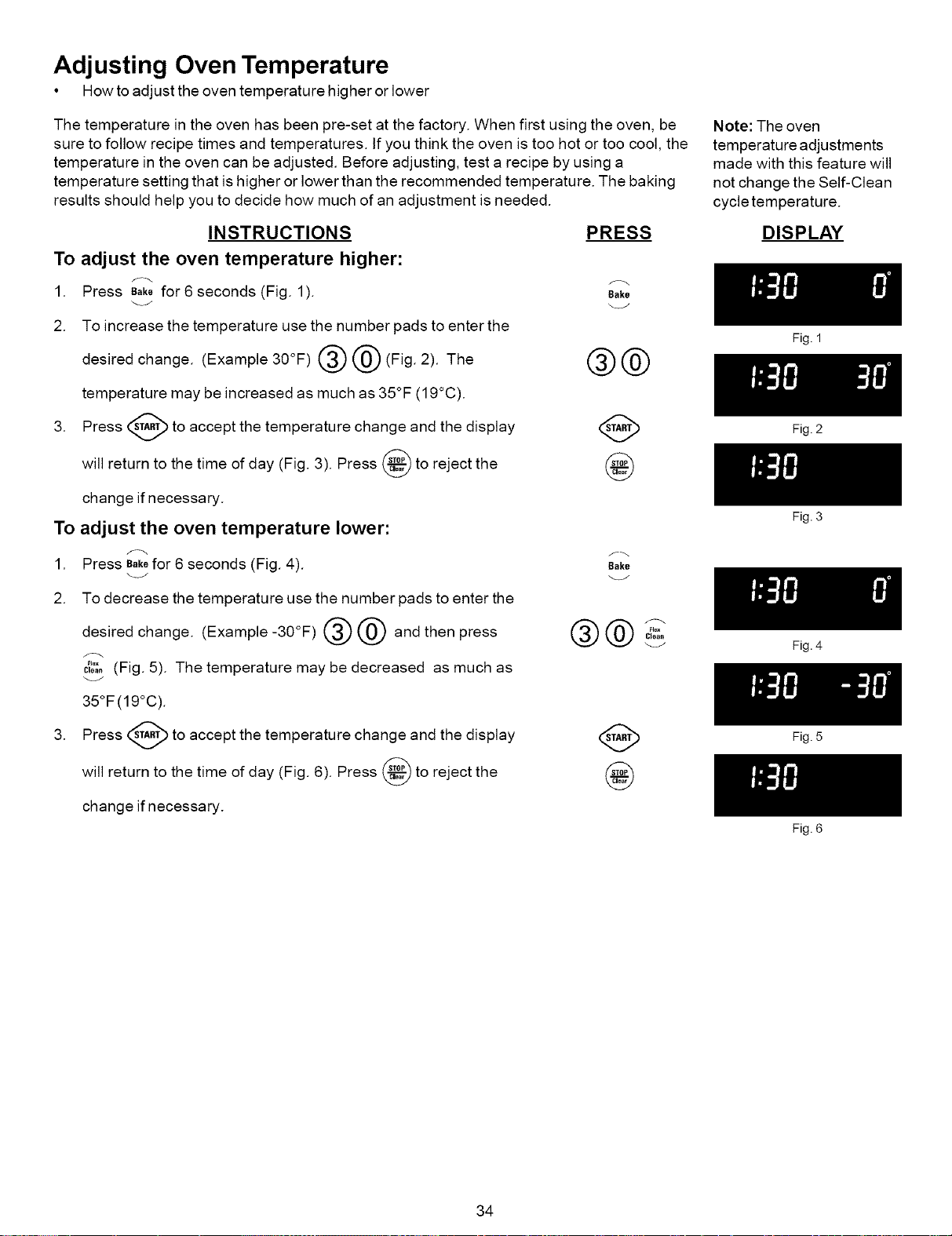
Adjusting Oven Temperature
• How to adjust the oven temperature higher or lower
The temperature in the oven has been pre-set at the factory. When first using the oven, be
sure to follow recipe times and temperatures. If you think the oven is too hot or too cool, the
temperature in the oven can be adjusted. Before adjusting, test a recipe by using a
temperature setting that is higher or lower than the recommended temperature. The baking
results should help you to decide how much of an adjustment is needed.
INSTRUCTIONS PRESS
To adjust the oven temperature higher:
1. Press Bak_for 6 seconds (Fig. 1). Bake
2. To increase the temperature use the number pads to enter the
desired change. (example30°g)@@(gig. 2). The @@
temperature may be increased as much as 35°F (19°C).
3. Press (_ to accept the temperature change and the display
will return to the time of day (Fig. 3). Press _ to reject the
change if necessary.
To adjust the oven temperature lower:
f_ f_
1. Press Bakefor 6 seconds (Fig. 4). Bak_
2. To decrease the temperature use the number pads to enter the
®@ ®@ r.
desired change. (Example -30°F) and then press "°"
61ea_
_J
cI_';.(Fig. 5). The temperature may be decreased as much as
35°F(19°C).
3. Press _ to accept the temperature change and the display
will return to the time of day (Fig. 6). Press _ to reject the
change if necessary.
Note: The oven
temperature adjustments
made with this feature will
not change the Self-Clean
cycle temperature.
DISPLAY
34
Fig. 1
Fig. 2
Fig. 3
Fig. 4
Fig. 5
Fig. 6
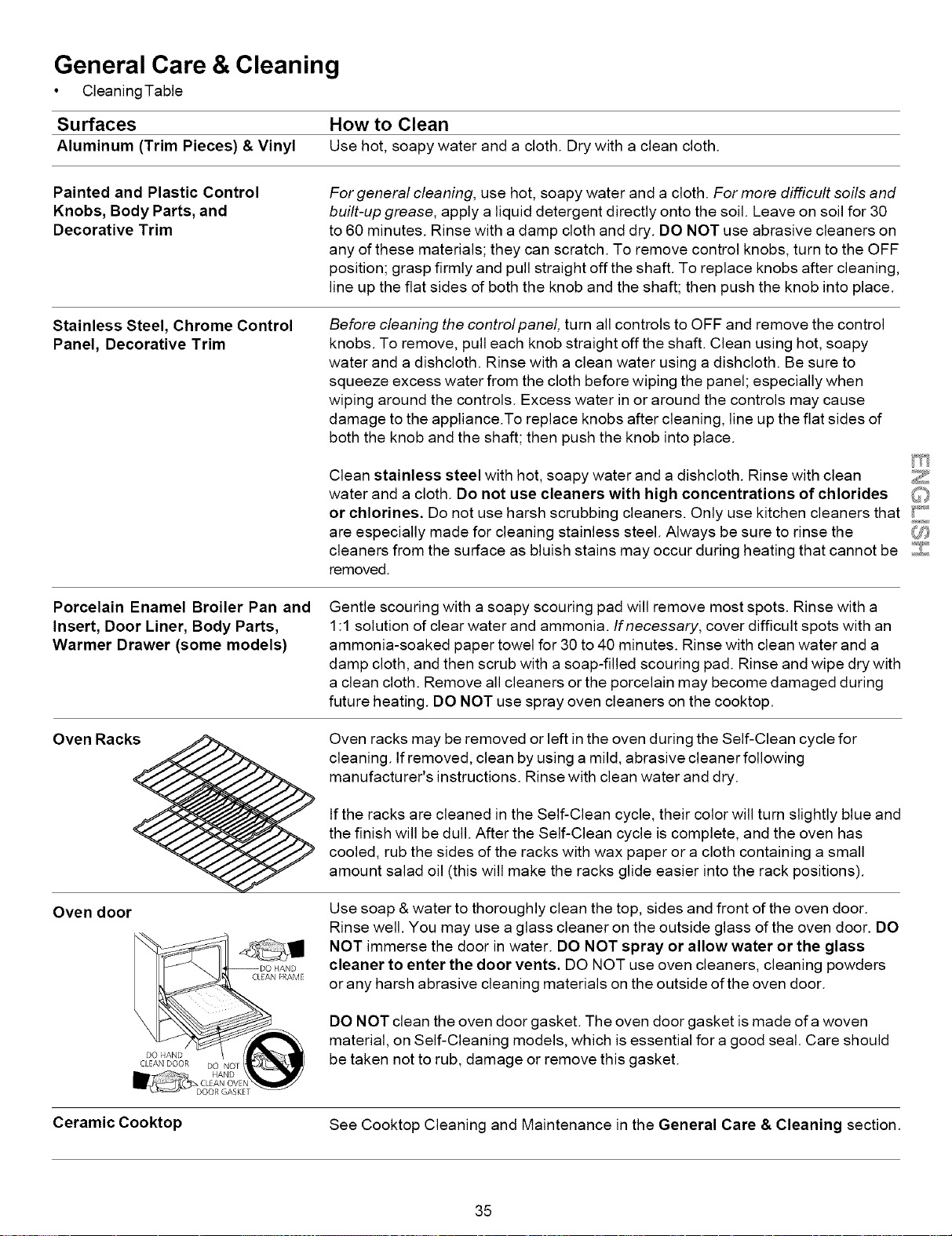
General Care & Cleaning
• Cleaning Table
Surfaces How to Clean
Aluminum (Trim Pieces) & Vinyl Use hot, soapy water and a cloth. Dry with a clean cloth.
Painted and Plastic Control
Knobs, Body Parts, and
Decorative Trim
For general cleaning, use hot, soapy water and a cloth. For more difficult soils and
built-up grease, apply a liquid detergent directly onto the soil. Leave on soil for 30
to 60 minutes. Rinse with a damp cloth and dry. DO NOT use abrasive cleaners on
any of these materials; they can scratch. To remove control knobs, turn to the OFF
position; grasp firmly and pull straight offthe shaft. To replace knobs after cleaning,
line up the flat sides of both the knob and the shaft; then push the knob into place.
Stainless Steel, Chrome Control
Panel, Decorative Trim
Before cleaning the controlpanel, turn all controls to OFF and remove the control
knobs. To remove, pull each knob straight off the shaft. Clean using hot, soapy
water and a dishcloth. Rinse with a clean water using a dishcloth. Be sure to
squeeze excess water from the cloth before wiping the panel; especially when
wiping around the controls. Excess water in or around the controls may cause
damage to the appliance.To replace knobs after cleaning, line up the flat sides of
both the knob and the shaft; then push the knob into place.
Clean stainless steel with hot, soapy water and a dishcloth. Rinse with clean
water and a cloth. Do not use cleaners with high concentrations of chlorides
or chlorines. Do not use harsh scrubbing cleaners. Only use kitchen cleaners that _°
are especially made for cleaning stainless steel. Always be sure to rinse the _
cleaners from the surface as bluish stains may occur during heating that cannot be _J/J_'_1....
removed.
Porcelain Enamel Broiler Pan and
Insert, Door Liner, Body Parts,
Warmer Drawer (some models)
Gentle scouring with a soapy scouring pad will remove most spots. Rinse with a
1:1 solution of clear water and ammonia. If necessary, cover difficult spots with an
ammonia-soaked paper towel for 30 to 40 minutes. Rinse with clean water and a
damp cloth, and then scrub with a soap-filled scouring pad. Rinse and wipe dry with
a clean cloth. Remove all cleaners or the porcelain may become damaged during
future heating. DO NOT use spray oven cleaners on the cooktop.
Oven door
Oven racks may be removed or left in the oven during the Self-Clean cycle for
cleaning, tf removed, clean by using a mild, abrasive cleaner following
manufacturer's instructions. Rinse with clean water and dry.
If the racks are cleaned in the Self-Clean cycle, their color will turn slightly blue and
the finish will be dull. After the Self-Clean cycle is complete, and the oven has
cooled, rub the sides of the racks with wax paper or a cloth containing a small
amount salad oil (this will make the racks glide easier into the rack positions).
Use soap & water to thoroughly clean the top, sides and front of the oven door.
Rinse well. You may use a glass cleaner on the outside glass of the oven door. DO
NOT immerse the door in water. DO NOT spray or allow water or the glass
cleaner to enter the door vents. DO NOT use oven cleaners, cleaning powders
orany harsh abrasive cleaning materials on the outside of the oven door.
DO NOT clean the oven door gasket. The oven door gasket is made of a woven
material, on Self-Cleaning models, which is essential for a good seal. Care should
be taken not to rub, damage or remove this gasket.
Ceramic Cooktop See Cooktop Cleaning and Maintenance in the General Care & Cleaning section.
35
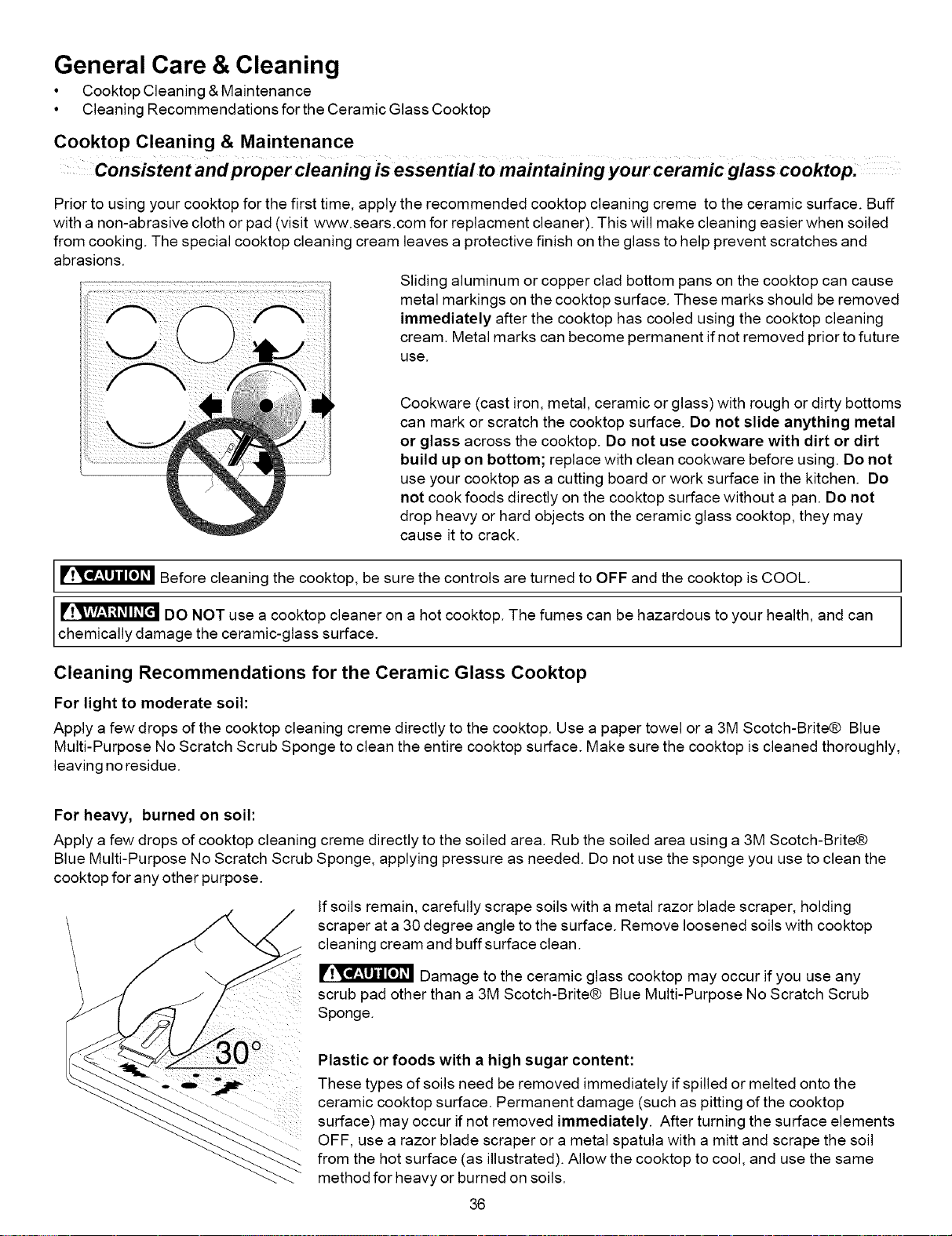
General Care & Cleaning
• Cooktop Cleaning & Maintenance
• Cleaning Recommendations for the Ceramic Glass Cooktop
Cooktop Cleaning & Maintenance
Consistent and proper Cleaning is essential to maintaining your Ceramic glass cooktop:
Prior to using your cooktop for the first time, apply the recommended cooktop cleaning creme to the ceramic surface. Buff
with a non-abrasive cloth or pad (visit www.sears.com for replacment cleaner). This will make cleaning easier when soiled
from cooking. The special cooktop cleaning cream leaves a protective finish on the glass to help prevent scratches and
abrasions.
Sliding aluminum or copper clad bottom pans on the cooktop can cause
metal markings on the cooktop surface. These marks should be removed
immediately after the cooktop has cooled using the cooktop cleaning
cream. Metal marks can become permanent if not removed prior to future
use.
Cookware (cast iron, metal, ceramic or glass) with rough or dirty bottoms
can mark or scratch the cooktop surface. Do not slide anything metal
or glass across the cooktop. Do not use cookware with dirt or dirt
build up on bottom; replace with clean cookware before using. Do not
use your cooktop as a cutting board or work surface in the kitchen. Do
not cook foods directly on the cooktop surface without a pan. Do not
drop heavy or hard objects on the ceramic glass cooktop, they may
cause it to crack.
Before cleaning the cooktop, be sure the controls are turned to OFF and the cooktop is COOL.
DO NOT use a cooktop cleaner on a hot cooktop. The fumes can be hazardous to your health, and can
chemically damage the ceramic-glass surface.
Cleaning Recommendations for the Ceramic Glass Cooktop
For light to moderate soil:
Apply a few drops of the cooktop cleaning creme directly to the cooktop. Use a paper towel or a 3M Scotch-Brite® Blue
Multi-Purpose No Scratch Scrub Sponge to clean the entire cooktop surface. Make sure the cooktop is cleaned thoroughly,
leaving no residue.
For heavy, burned on soil:
Apply a few drops of cooktop cleaning creme directly to the soiled area. Rub the soiled area using a 3M Scotch-Brite®
Blue Multi-Purpose No Scratch Scrub Sponge, applying pressure as needed. Do not use the sponge you use to clean the
cooktop for any other purpose.
If soils remain, carefully scrape soils with a metal razor blade scraper, holding
scraper at a 30 degree angle to the surface. Remove loosened soils with cooktop
cleaning cream and buffsurface clean.
Damage to the ceramic glass cooktop may occur if you use any
scrub pad other than a 3M Scotch-Brite® Blue Multi-Purpose No Scratch Scrub
Sponge.
Plastic or foods with a high sugar content:
These types of soils need be removed immediately if spilled or melted onto the
ceramic cooktop surface. Permanent damage (such as pitting of the cooktop
surface) may occur if not removed immediately. After turning the surface elements
OFF, use a razor blade scraper or a metal spatula with a mitt and scrape the soil
from the hot surface (as illustrated). Allow the cooktop to cool, and use the same
method for heavy or burned on soils.
36
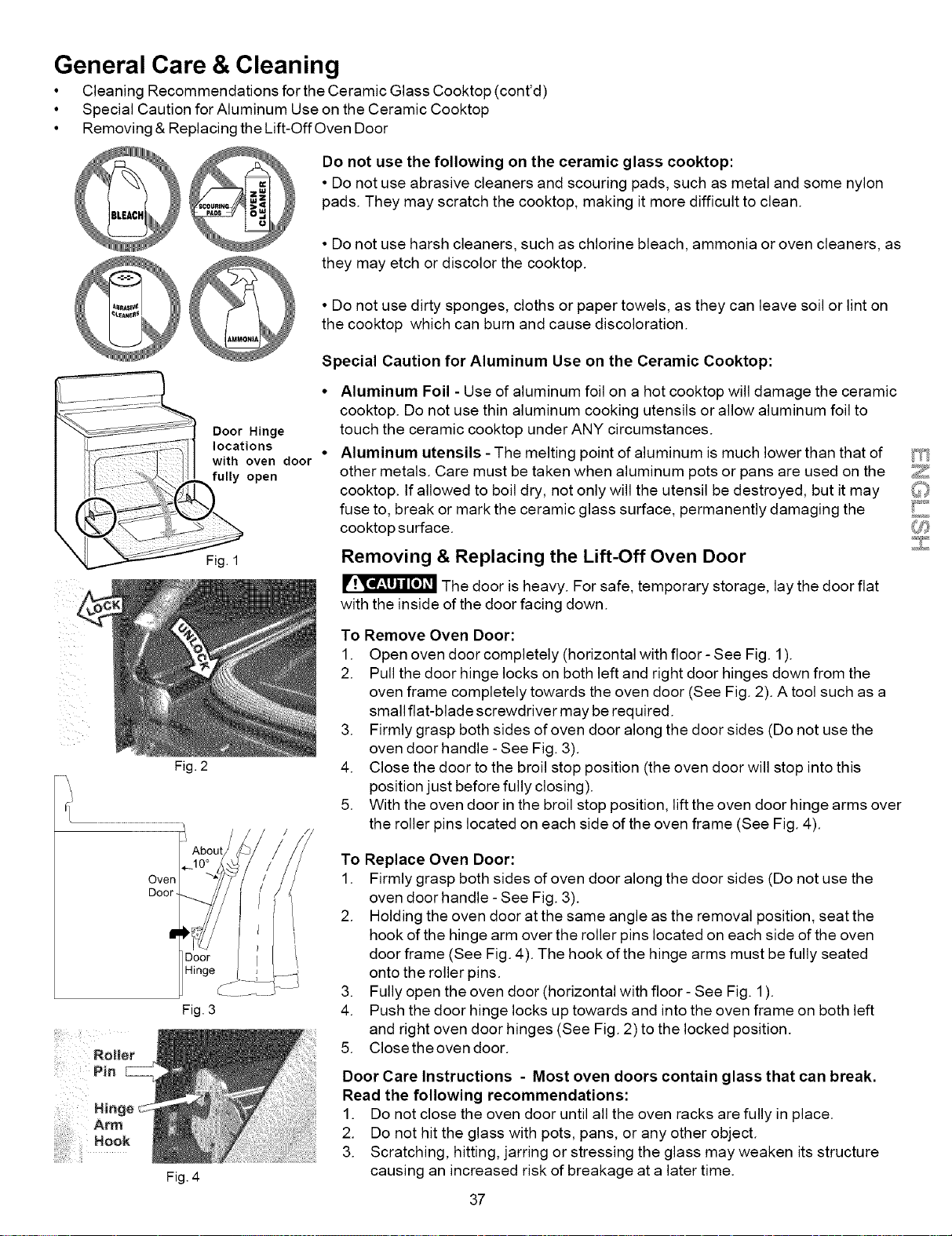
General Care & Cleaning
• Cleaning Recommendations for the Ceramic Glass Cooktop (cont'd)
• Special Caution for Aluminum Use on the Ceramic Cooktop
• Removinc & Replacing the Lift-Off Oven Door
)_ o not use the following on the ceramic glass cooktop:
• Do not use abrasive cleaners and scouring pads, such as metal and some nylon
pads. They may scratch the cooktop, making it more difficult to clean.
• Do not use harsh cleaners, such as chlorine bleach, ammonia or oven cleaners, as
Q@ they may etch or discolor the cooktop.
• Do not use dirty sponges, cloths or paper towels, as they can leave soil or lint on
the cooktop which can burn and cause discoloration.
Special Caution for Aluminum Use on the Ceramic Cooktop:
Door Hinge
locations
with oven door
fully open
Fig. 1
Fig. 2
Fig. 3
Aluminum Foil - Use of aluminum foil on a hot cooktop will damage the ceramic
cooktop. Do not use thin aluminum cooking utensils or allow aluminum foil to
touch the ceramic cooktop under ANY circumstances.
Aluminum utensils - The melting point of aluminum is much lower than that of
other metals. Care must be taken when aluminum pots or pans are used on the
cooktop. If allowed to boil dry, not only will the utensil be destroyed, but it may
fuse to, break or mark the ceramic glass surface, permanently damaging the
cooktop surface.
Removing & Replacing the Lift-Off Oven Door
The door is heavy. For safe, temporary storage, lay the door flat
with the inside of the door facing down.
To Remove Oven Door:
1. Open oven door completely (horizontal with floor- See Fig. 1).
2. Pull the door hinge locks on both left and right door hinges down from the
oven frame completely towards the oven door (See Fig. 2). A tool such as a
small flat-blade screwdriver may be required.
3. Firmly grasp both sides of oven door along the door sides (Do not use the
oven door handle - See Fig. 3).
4. Close the door to the broil stop position (the oven door will stop into this
position just before fully closing).
5. With the oven door in the broil stop position, lift the oven door hinge arms over
the roller pins located on each side of the oven frame (See Fig. 4).
Oven
Door.
Fig. 4
To Replace Oven Door:
1. Firmly grasp both sides of oven door along the door sides (Do not use the
oven door handle - See Fig. 3).
2. Holding the oven door at the same angle as the removal position, seat the
hook of the hinge arm over the roller pins located on each side of the oven
door frame (See Fig. 4). The hook of the hinge arms must be fully seated
onto the roller pins.
3. Fully open the oven door (horizontal with floor- See Fig. 1).
4. Push the door hinge locks up towards and into the oven frame on both left
and right oven door hinges (See Fig. 2) to the locked position.
5. Close the oven door.
Door Care Instructions - Most oven doors contain glass that can break.
Read the following recommendations:
1. Do not close the oven door until all the oven racks are fully in place.
2. Do not hit the glass with pots, pans, or any other object.
3. Scratching, hitting, jarring or stressing the glass may weaken its structure
causing an increased risk of breakage at a later time.
37
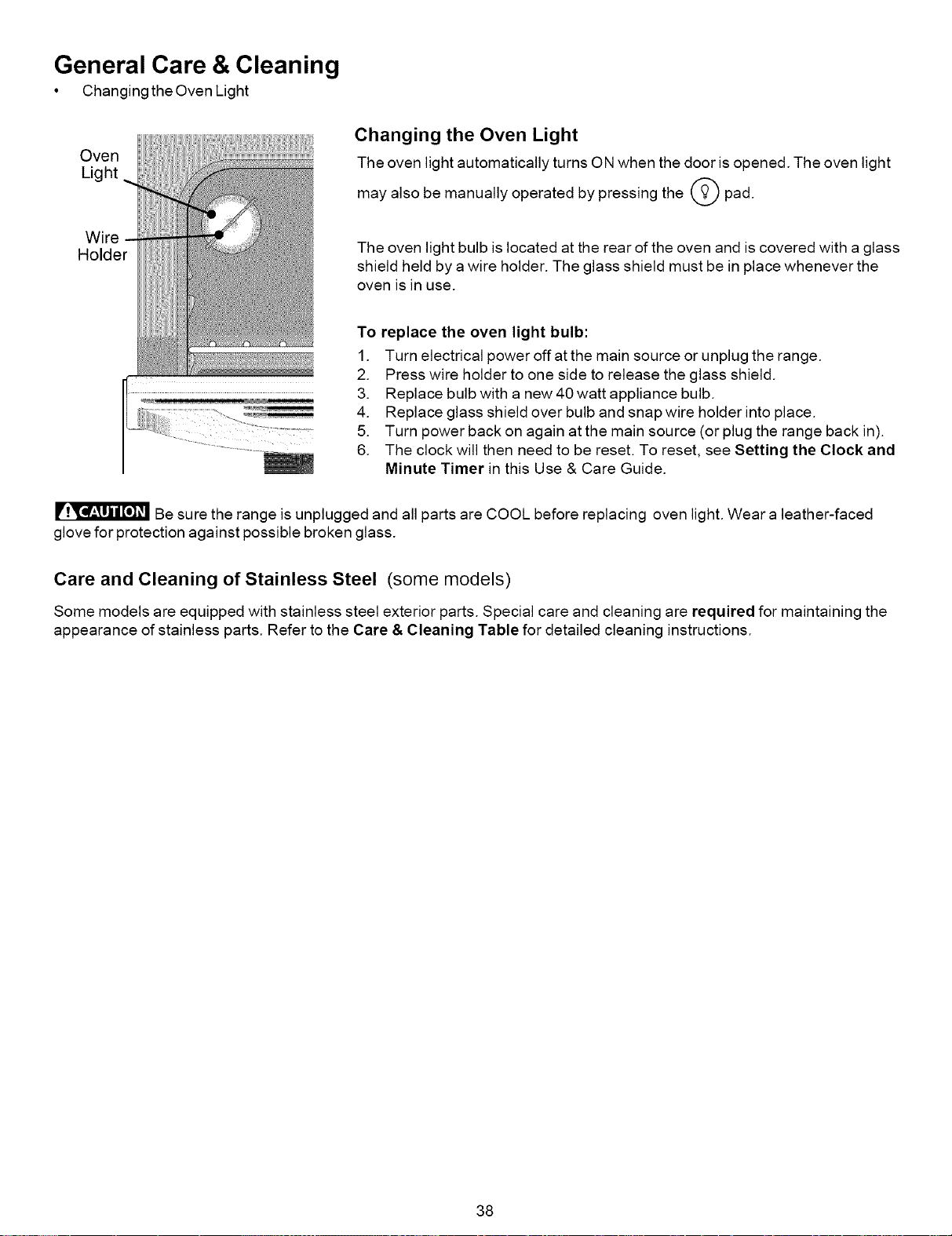
General Care & Cleaning
• Changingthe Oven Light
Oven
Light
Wire
Holder
Changing the Oven Light
The oven light automatically turns ON when the door is opened. The oven light
may also be manually operated by pressing the _ pad.
The oven light bulb is located at the rear of the oven and is covered with a glass
shield held by a wire holder. The glass shield must be in place whenever the
oven is in use.
To replace the oven light bulb:
1. Turn electrical power off at the main source or unplug the range.
2. Press wire holder to one side to release the glass shield.
3. Replace bulb with a new 40 watt appliance bulb.
4. Replace glass shield over bulb and snap wire holder into place.
5. Turn power back on again at the main source (or plug the range back in).
6. The clock will then need to be reset. To reset, see Setting the Clock and
Minute Timer in this Use & Care Guide.
Be sure the range is unplugged and all parts are COOL before replacing oven light. Wear a leather-faced
glove for protection against possible broken glass.
Care and Cleaning of Stainless Steel (some models)
Some models are equipped with stainless steel exterior parts. Special care and cleaning are required for maintaining the
appearance of stainless parts. Refer to the Care & Cleaning Table for detailed cleaning instructions.
38
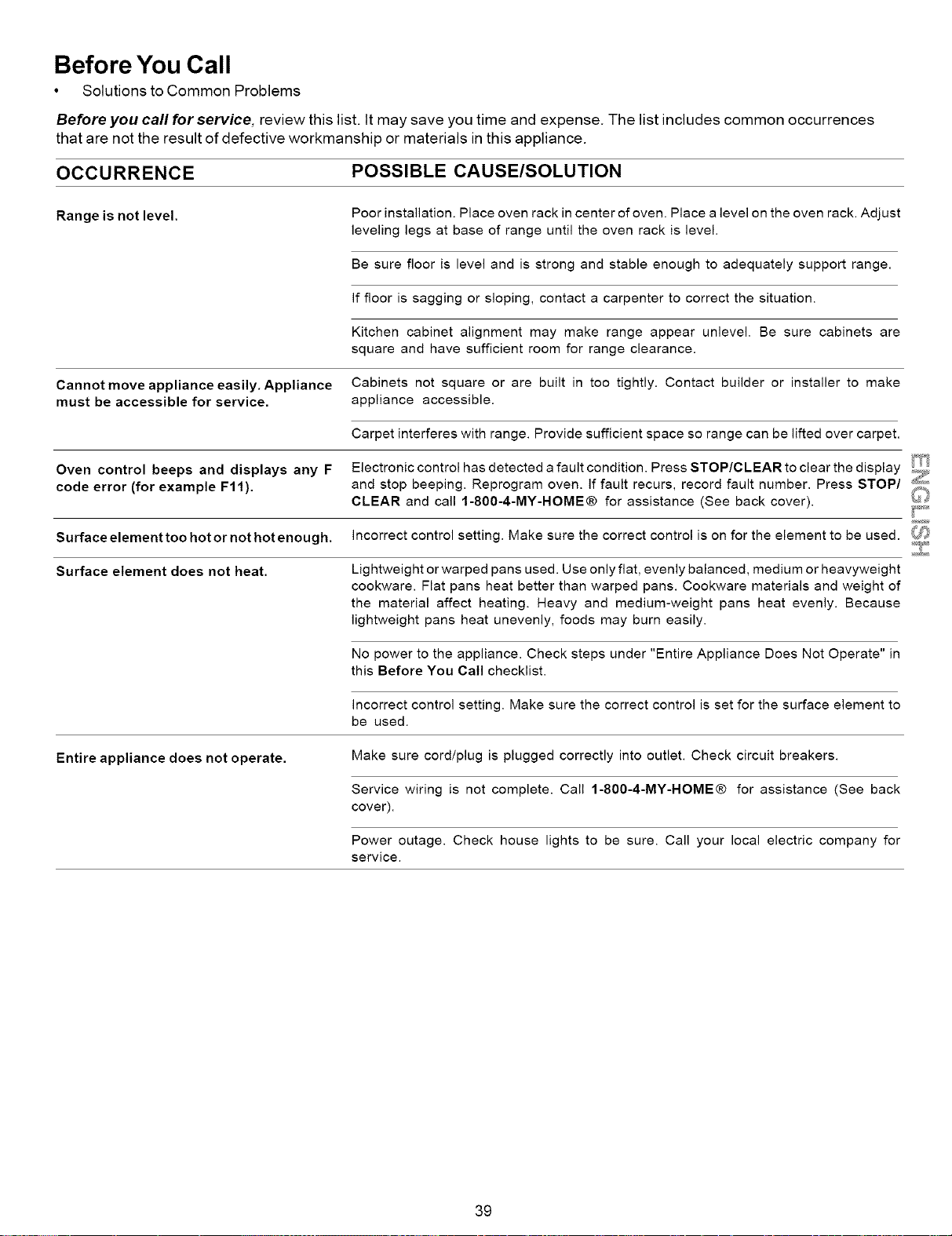
Before You Call
• Solutions to Common Problems
Before you call for service, review this list. It may save you time and expense. The list includes common occurrences
that are not the result of defective workmanship or materials in this appliance.
OCCURRENCE
Range is not level.
Cannot move appliance easily. Appliance
must be accessible for service.
Oven control beeps and displays any F
code error (for example F11).
Surface element too hot or not hot enough.
Surface element does not heat.
Entire appliance does not operate.
POSSIBLE CAUSE/SOLUTION
Poor installation. Place oven rack in center of oven. Place a level on the oven rack. Adjust
leveling legs at base of range until the oven rack is level.
Be sure floor is level and is strong and stable enough to adequately support range.
if floor is sagging or sloping, contact a carpenter to correct the situation.
Kitchen cabinet alignment may make range appear unlevel. Be sure cabinets are
square and have sufficient room for range clearance.
Cabinets not square or are built in too tightly. Contact builder or installer to make
appliance accessible.
Carpet interferes with range. Provide sufficient space so range can be lifted over carpet.
Electronic control has detected a fault condition. Press STOP/CLEAR to clear the display _,_.
and stop beeping. Reprogram oven. If fault recurs, record fault number. Press STOP/ _
CLEAR and call 1-800-4-MY-HOME® for assistance (See back cover), l_i_
incorrect control setting. Make sure the correct control is on for the element to be used. _7'_
Lightweight or warped pans used. Use only flat, evenly balanced, medium or heavyweight
cookware. Flat pans heat better than warped pans. Cookware materials and weight of
the material affect heating. Heavy and medium-weight pans heat evenly. Because
lightweight pans heat unevenly, foods may burn easily.
No power to the appliance. Check steps under "Entire Appliance Does Not Operate" in
this Before You Call checklist.
incorrect control setting. Make sure the correct control is set for the surface element to
be used.
Make sure cord/plug is plugged correctly into outlet. Check circuit breakers.
Service wiring is not complete. Call 1-800-4-MY-HOME® for assistance (See back
cover).
Power outage. Check house lights to be sure. Call your local electric company for
service.
39
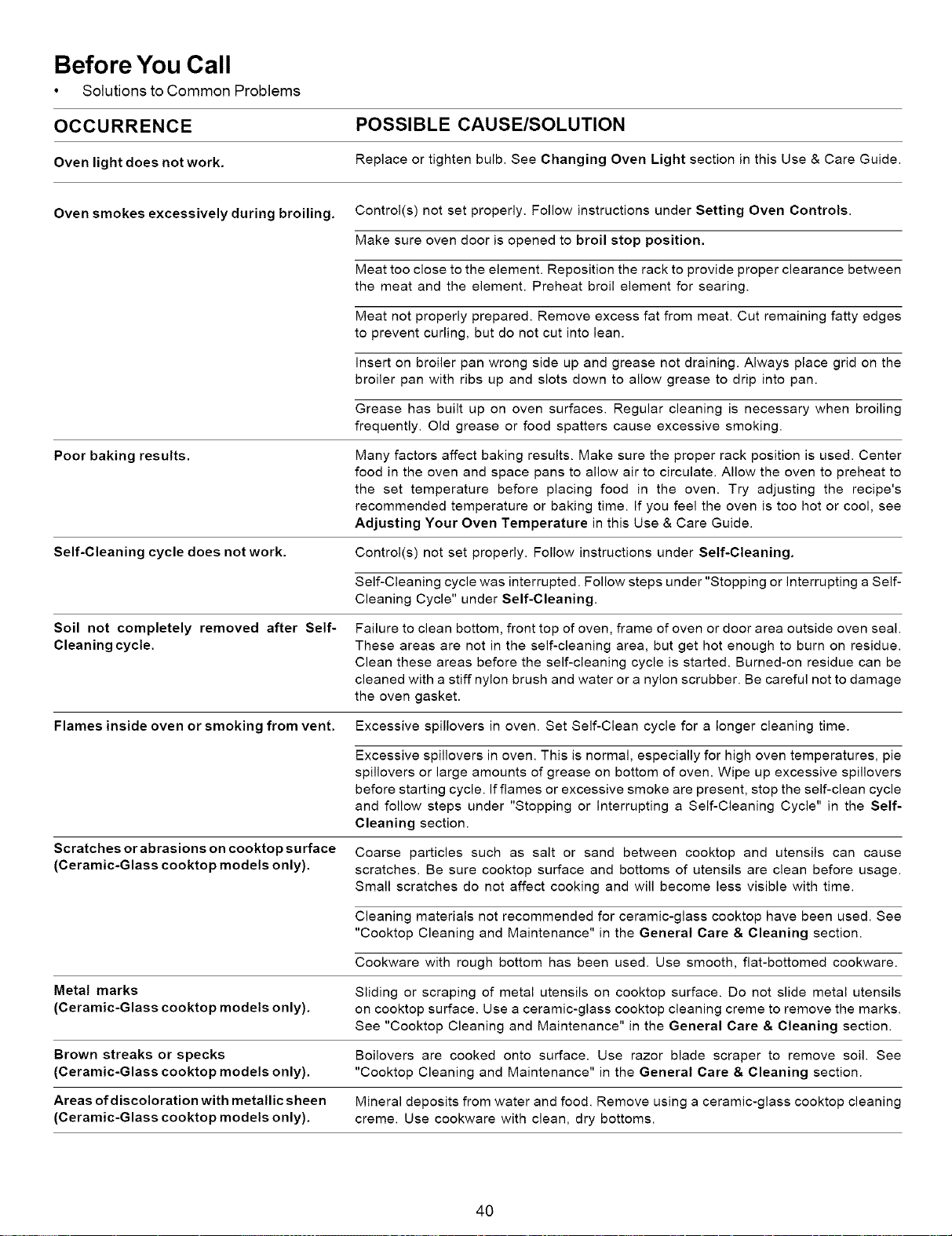
Before You Call
• Solutions to Common Problems
OCCURRENCE POSSIBLE CAUSE/SOLUTION
Oven light does notwork. Replace or tighten bulb. See Changing Oven Light section in this Use & Care Guide.
Oven smokes excessively during broiling. Control(s) not set properly. Follow instructions under Setting Oven Controls.
Make sure oven door is opened to broil stop position.
Meat too close to the element. Reposition the rack to provide proper clearance between
the meat and the element. Preheat broil element for searing.
Meat not properly prepared. Remove excess fat from meat. Cut remaining fatty edges
to prevent curling, but do not cut into lean.
insert on broiler pan wrong side up and grease not draining. Always place grid on the
broiler pan with ribs up and slots down to allow grease to drip into pan.
Grease has built up on oven surfaces. Regular cleaning is necessary when broiling
frequently. Old grease or food spatters cause excessive smoking.
Poor baking results.
Many factors affect baking results. Make sure the proper rack position is used. Center
food in the oven and space pans to allow air to circulate. Allow the oven to preheat to
the set temperature before placing food in the oven. Try adjusting the recipe's
recommended temperature or baking time. If you feel the oven is too hot or cool, see
Adjusting Your Oven Temperature in this Use & Care Guide.
Self-Cleaning cycle does not work. Control(s) not set properly. Follow instructions under Self-Cleaning.
Self-Cleaning cycle was interrupted. Follow steps under "Stopping or interrupting a Self-
Cleaning Cycle" under Self-Cleaning
Soil not completely removed after Self-
Cleaning cycle.
Failure to clean bottom, front top of oven, frame of oven or door area outside oven seal.
These areas are not in the self-cleaning area, but get hot enough to burn on residue.
Clean these areas before the self-cleaning cycle is started. Burned-on residue can be
cleaned with a stiff nylon brush and water or a nylon scrubber. Be careful not to damage
the oven gasket.
Flames inside oven or smoking from vent. Excessive spillovers in oven. Set Self-Clean cycle for a longer cleaning time.
Scratches or abrasions on cooktop surface
(Ceramic-Glass cooktop models only).
Excessive spillovers in oven. This is normal, especially for high oven temperatures, pie
spillovers or large amounts of grease on bottom of oven. Wipe up excessive spillovers
before starting cycle. If flames or excessive smoke are present, stop the self-clean cycle
and follow steps under "Stopping or Interrupting a Self-Cleaning Cycle" in the Self-
Cleaning section.
Coarse particles such as salt or sand between cooktop and utensils can cause
scratches. Be sure cooktop surface and bottoms of utensils are clean before usage.
Small scratches do not affect cooking and will become less visible with time.
Cleaning materials not recommended for ceramic-glass cooktop have been used. See
"Cooktop Cleaning and Maintenance" in the General Care & Cleaning section.
Cookware with rough bottom has been used. Use smooth, flat-bottomed cookware.
Metal marks
(Ceramic-Glass cooktop models only).
Sliding or scraping of metal utensils on cooktop surface. Do not slide metal utensils
on cooktop surface. Use a ceramic-glass cooktop cleaning creme to remove the marks.
See "Cooktop Cleaning and Maintenance" in the General Care & Cleaning section.
Brown streaks or specks Boilovers are cooked onto surface. Use razor blade scraper to remove soil. See
(Ceramic-Glass cooktop models only). "Cooktop Cleaning and Maintenance" in the General Care & Cleaning section.
Areas ofdiscoloration with metallic sheen Mineral deposits from water and food. Remove using a ceramic-glass cooktop cleaning
(Ceramic-Glass cooktop models only), creme. Use cookware with clean, dry bottoms.
4O
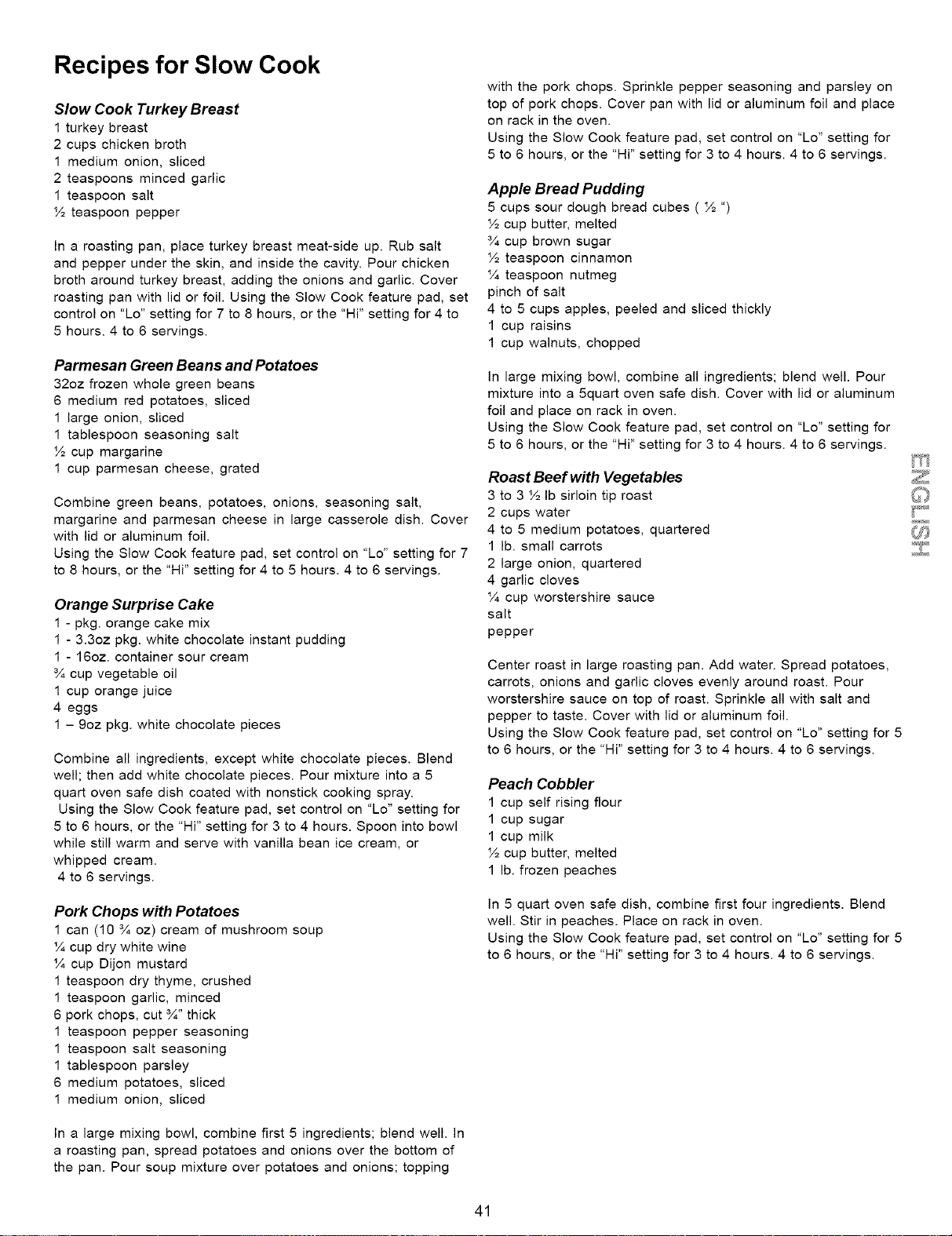
Recipes for Slow Cook
Slow Cook Turkey Breast
1 turkey breast
2 cups chicken broth
1 medium onion, sliced
2 teaspoons minced garlic
1 teaspoon salt
½ teaspoon pepper
In a roasting pan, place turkey breast meat-side up. Rub salt
and pepper under the skin, and inside the cavity. Pour chicken
broth around turkey breast, adding the onions and garlic. Cover
roasting pan with lid or foil. Using the Slow Cook feature pad, set
control on "Lo" setting for 7 to 8 hours, or the "Hi" setting for 4 to
5 hours. 4 to 6 servings.
Parmesan Green Beans and Potatoes
32oz frozen whole green beans
6 medium red potatoes, sliced
1 large onion, sliced
1 tablespoon seasoning salt
½ cup margarine
1 cup parmesan cheese, grated
Combine green beans, potatoes, onions, seasoning salt,
margarine and parmesan cheese in large casserole dish. Cover
with lid or aluminum foil.
Using the Slow Cook feature pad, set control on "Lo" setting for 7
to 8 hours, or the "Hi" setting for 4 to 5 hours. 4 to 6 servings.
Orange Surprise Cake
1 - pkg. orange cake mix
1 - 3.3oz pkg. white chocolate instant pudding
1 - 16oz. container sour cream
¾ cup vegetable oil
1 cup orange juice
4 eggs
1 - 9oz pkg. white chocolate pieces
Combine all ingredients, except white chocolate pieces. Blend
well; then add white chocolate pieces. Pour mixture into a 5
quart oven safe dish coated with nonstick cooking spray.
Using the Slow Cook feature pad, set control on "Lo" setting for
5 to 6 hours, or the "Hi" setting for 3 to 4 hours. Spoon into bowl
while still warm and serve with vanilla bean ice cream, or
whipped cream.
4 to 6 servings.
Pork Chops with Potatoes
1 can (10 ¾ oz) cream of mushroom soup
¼ cup dry white wine
¼ cup Dijon mustard
1 teaspoon dry thyme, crushed
1 teaspoon garlic, minced
6 pork chops, cut ¾" thick
1 teaspoon pepper seasoning
1 teaspoon salt seasoning
1 tablespoon parsley
6 medium potatoes, sliced
1 medium onion, sliced
In a large mixing bowl, combine first 5 ingredients; blend well. In
a roasting pan, spread potatoes and onions over the bottom of
the pan. Pour soup mixture over potatoes and onions; topping
with the pork chops. Sprinkle pepper seasoning and parsley on
top of pork chops. Cover pan with lid or aluminum foil and place
on rack in the oven.
Using the Slow Cook feature pad, set control on "Lo" setting for
5 to 6 hours, or the "Hi" setting for 3 to 4 hours. 4 to 6 servings.
Apple Bread Pudding
5 cups sour dough bread cubes ( ½ ")
½ cup butter, melted
¾ cup brown sugar
½ teaspoon cinnamon
¼ teaspoon nutmeg
pinch of salt
4 to 5 cups apples, peeled and sliced thickly
1 cup raisins
1 cup walnuts, chopped
In large mixing bowl, combine all ingredients; blend well. Pour
mixture into a 5quart oven safe dish. Cover with lid or aluminum
foil and place on rack in oven.
Using the Slow Cook feature pad, set control on "Lo" setting for
5 to 6 hours, or the "Hi" setting for 3 to 4 hours. 4 to 6 servings.
Roast Beef with Vegetables
3 to 3 ½ Ib sirloin tip roast
2 cups water
4 to 5 medium potatoes, quartered
1 lb. small carrots
2 large onion, quartered
4 garlic cloves
¼ cup worstershire sauce
salt
pepper
Center roast in large roasting pan. Add water. Spread potatoes,
carrots, onions and garlic cloves evenly around roast. Pour
worstershire sauce on top of roast. Sprinkle all with salt and
pepper to taste. Cover with lid or aluminum foil.
Using the Slow Cook feature pad, set control on "Lo" setting for 5
to 6 hours, or the "Hi" setting for 3 to 4 hours. 4 to 6 servings.
Peach Cobbler
1 cup self rising flour
1 cup sugar
1 cup milk
½ cup butter, melted
1 lb. frozen peaches
In 5 quart oven safe dish, combine first four ingredients. Blend
well. Stir in peaches. Place on rack in oven.
Using the Slow Cook feature pad, set control on "Lo" setting for 5
to 6 hours, or the "Hi" setting for 3 to 4 hours. 4 to 6 servings.
41
Your Home
For repair-in your home-of all major brand appliances,
lawn and garden equipment, or heating and cooling systems,
no matter who made it, no matter who sold it!
For the replacement parts, accessories and
owner's manuals that you need to do-it-yourself.
For Sears professional installation of home appliances
and items like garage door openers and water heaters.
1-800-4-MY-HOME ® (1-800-469-4663)
Call anytime, day or night (U.S.A. and Canada)
www.sears.com www.sears.ca
Our Home
For repair of carry-in items like vacuums, lawn equipment,
and electronics, call or go on-line for the location of your nearest
Sears Parts & Repair Center.
1-800-488-1222
Call anytime, day or night (U.S.A. only)
www,sears,com
To purchase a protection agreement (U.S.A.)
or maintenance agreement (Canada) on a product serviced by Sears:
1-800-827-6655 (U.S.A.) 1-800-361-6665 (Canada)
Para pedir servicio de reparaci6n
a domicilio, y para ordenar piezas:
1-888-SU-HOGAR sM
(1-888-784-6427)
Au Canada pour service en fran£ais:
1-800-LE-FOYER Mc
(1-800-533-6937)
www.sears.ca
SEARS
TM
® Registered Trademark / Trademark / SMService Mark of Sears, Roebuck and Co.
TM
® Marca Registrada / Marca de F&brica / aMMarca de Servicio de Sears, Roebuck and Co.
MC MD
Marque de commerce / Marque d_pos6e de Sears, Roebuck and Co. © Sears, Roebuck and Co.