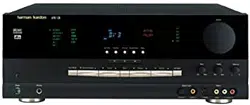
arman/ ardon°
Power for the Digital Revolution:
AVR
AUDIO/VIDEO
OWNER'S
125
RECEIVER
MANUAL
harman/kardon AVR12S
© ®
I
®®9
re= L-_b-.
I
I I
AVR 125 AUDIO/VIDEO RECEIVER
3 Introduction
4 SafetyInformation
4 Unpacking
5 Front-PanelControls
7 Front-PanelInformationDisplay
9 Rear-PanelConnections
11 RemoteControlFunctions
14 InstallationandConnections
14 SystemInstallation
14 AudioEquipmentConnections
14 VideoEquipmentConnections
15 PowerConnections
16 SystemConfiguration
16 SpeakerSelectionandPlacement
17 SystemSetup
17 SpeakerSetup
18 Configuring_e SurroundOff(Stereo)Modes
18 Stereo-Direct(Bypass)Mode
18 Stereo-DigitalMode
18 OutputLevelAdjustment
19 DelaySettings
20 AdditionalInputAdjustments
21 Operation
21 BasicOperation
21 SourceSelection
21 VolumeControl
22 SurroundModeChart
23 SurroundModeSelection
23 DigitalAudioPlayback
23 Selectinga DigitalSource
24 DigitalStatusIndicators
24 NightMode
25 TunerOperation
25 TapeRecording
25 OutputLevelTrimAdjustment
26 6-ChannelDirectInput
26 DisplayBrightness
27 ProgrammingtheRemote
27 DirectCodeEntry
27 AutoSearchMehod
27 CodeReadout
28 MacroProgramming
28 ProgrammedDeviceFunctions
28 Punch-ThroughProgramming
29 VolumePunch-Through
29 ChannelControlPunch-Through
29 TransportControlPunch-Through
29 Resettingthe RemoteMemory
31 FunctionList
33 SetupCodeTables
42 TroubleshootingGuide
42 ProcessorReset
43 TechnicalSpecifications
TypographicalConventions
_n}rderto he_p_Duuseth_smanualwltiathe remotecontrolfronbuane_con_o_san(]rear-oane_connections
cer_a_rconventionshavebeenuse(],
EXAMPLE I:)o1(]_pe) in(]lcatesa sDecificremotecon_roor fronbuaneleu_mn,orrear-Darlel
connection_ack
E XA 11PL E - (OCR_pe n(]lcamsa messagethatis VISIDleon mefront-oanelnformationdisplay
[] - (numberin _.s(]uare_in(]lcatesa sDecificfront-panelcon[rol
O - (numberin a circle in(]lcatesa rear-oanelconnection
O - (numberinanova in(]icarusa UU[[Onorin(]lca_oron theremora
[] - liedern a s(]uareindicatesan indicatorinthefront-oanelinformation(]lspla_
INTRODUCTION
Thankyoufor choosing HarmanKardon®!With Descriptionand Features
theourchaseof a HarmanKardonAVR125 youare TheAVR125 is amongthe mostversatileandmulti-
aeout_ooeglnmanyyears}f listeningenjoyment,The featuredAN receiversavauaele,incorporatinga Wide
AVR125 hasbeencustom-designea_oprovideal _ne rangeof listeningODUOnS,In additionto DolbyDigital
exammen_anddetailof moviesoundtracksandever_ andDTSdecodingfor digitalsources,a eroaa;holce
nuanceof musicalselections,OnboardDolby®*Dig[al of analogsurroundmodesareavallaoleforusewith
• OnboardDolby®*Digitaland DTS®*Decoding
UsingCrystal®*ChipTechnology
• HarmanKardon'sExclusiveLogic7®*and
VMAx_ Modes
• DolbyLaboratories'Latest ProLogic®* II
anaDTS®*decodingauowsyouto takeadvantageof sourcesSUChasCD,VCRTVbroadcastsandthe
a_gtalsoundtracksfromthelatestDVDreleasesand AVR125's ownFM/AMtuner,Alongwiththe latest
DigitalTelevisionbroadcasts, [ cloyProLogic®*IIdecodingtechnology,Dolby3
StereoandcustomHallandTheatermodes,on,
WI-e complexdigitalsysmmsarehardat work ^!imln HarmanKardonreceiversofferLogc 7®*to createa •
meAVR125 to makeall of thishappen,hoOkUDand wlaer,moreenvelcp_ngfieldenwronmemandmore
oDeratlonareslmme,Color-keyedconnectionsanda 3efinedfly-oversandcans,AnotherHarmanKardon
programmaeleremoracontrolmaketheAVR125 exclusiveisVMAx®* whichusespropne_aryDrocess-
easj to use,Toobtainthemaximumenjoymen_from ng_ocrea_ean open,spacioussoundfieldevenwhen •
yournewreceiver,weurgeyou_o_aKea fewminutes ony twofrontspeakersareavailable,
to readthroughthismanual,Thiswillensurethatcon-
nectlons_ospeakers,sourceplaybackunitsanaother Inadditionto providinga widerangeof listening
exmrnaaevlDeSaremaaeproperly,In aaaltlOn,afes
m_numsspentlearningthefunctionsof thevarious
controlsWillenaeleyouto takeadvantageof allBe
powerTheAVR125 s aele_oaenver
' yOUhaveanyquesuons aDOUI 711S3roauc[, ItS nstal-
oo_ons,the AVR125 is easyto configureso thatit
orovidesthebestresultswithyourspeakersandsse-
sificlistening-roorrenvironment,A Stereo-Direct
moaebypasses_nealgl[alprocessorto preserveallof
:hesubtletiesof olderanalogtwo-channelmamnals
whilebaSSmanagement,avaliaDiein:hesurroundana
DecodingTechnology
• Stereo-DirectModefor Two-ChannelSources
BypassesDSPProcessingto Preservethe
Integrityof Analog Materials
Stereo-DigitalMode for ProgrammableBass
Managementof Low FrequenciesBetween
MainSpeakersandSubwoofer
Front-PanelDigital Inputsfor EasyConnection
to PortableDigital Devicesandthe Latest
VideoGameConsoles
• Multiple Digital Inputsand Outputs
• 6-ChannelDirect Input for UseWith DVD-
Audio Players.Other ProductsWith Internal
SurroundDecodersor ExternalSurround
Decoders
• Color-CodedInput,Outputand Speaker
TerminalsComplyWiththe Latest CEA
auonor Is cseratlon,pleasesontactyourretaileror Stereo-Dig[almodes,irrprovesyouraemtl_o
customns_auer,Theyareyourees_localsourcesof tailorthesoundto suit!ourroomacousticsor _asm,
'nformation,
TOTHEUSER
ThiseauiDmenthasbeentestedandfoundto comply
withthelimitsfor a ClassBdigitaladvice,pursuant_o
Part15 of theFCCRules,These_m_mareaes_jnea
_oprovidereasonablepromc_onagainstinterference
n a residentialarea,Thisdevicegeneramsanauses
radiofrequencyenergyandifnot ns_aueaandused
n accordancewiththeinstructions,itmaycause
nterferenceto radioorTVreceDuon,
f thisunitdoescausenterferencewithTVor radio
reception,youcan_ryto correcttheinterferenceb_
oneor moreof the followincmeasures:
A, Reorientor relocatetherecelwng_ntenna,
B,IncreasetheseparationDe_weertheeauiDmem
andthereceiver,
C, Plug_neeauiDmemintoa differentoutletso that
s no_on thesamecircuitasthe receiver.
f necessary,consultthedealeror an exoanencea
radio/TVtechnicianforadditionalsuggestions,
CAUTION:
Changesormodificationsto thiseauiDmen_no_
expresslyapprovedDyharmanconsumergroup
for comollanDecouldvoidtheuser'sau_orl__o
oDerate thiS eaulDment
Standardsfor EasyInstallation
Fortheultimateinflexibility,theAVR125features
;onnectionsforfourvideodevices,allw_thbothcom-
oositeandS-VideonDum,naua_ngthefront-Dane
nouts,TwoadditionalaudionDU[SareavauaDle_no
_o_aof sixdig[alInDU[SmaketheAVR125 capableof
handlingallthe lamstalglta audiosources,CoaxanD
Op_lDalalgKalaudiooutputsarealsoavailablefor aireD[
DonneD_lOn_oalgl[alreDorders,A videorecording
OUtDUtanda s_x-channer out maketheAVR125
virtuallyfuture-prootwitheverythingneeded_o
accommoaamtomorrowsnewformatsrighton board,
TheAVR125's powerfulamplifierusestraditional
HarmanKardonhian-Durren_ul[rawldeDandWldth
designmcnno_ogles
HarmanRaraoninventeaBe high-fidelityreceiver
almostfiftyyearsago,Withstate-of-the-artcircuitry
andtime-honoredcircuitdesigns,theAVR125 is one
if the finestreceiverseveroffered_, HarmanKardon,
Pour le CANADA
CORDEDECONNEXIONCAATTENTION:
POUREVITERLESCHOCSELECTRIQUES,INTRO-
DUIRELA LAMELA PLUSLARGEDELA FICHE
DANSLA BORNECORRESPONDANTEDELA PRISE
ETPOUSSERJUSQU'AUFOND,
For CANADA
ACPOWERCORDCONNECTIONCAUTION:
TOPREVENTELECTRICSHOCK,MATCHWIDE
BLADEOFPLUGTOW DESLOT,FULLYNSERT,
CAUTION
CAUTION: To reduce the risk
of electric shock,
do not remove cover (or back).
No user-serviceable parts inside.
Refer servicing to
qualified service personnel.
,_ The lightning flash with arrowhead symbol,
within an equilateral triangle, is intended to
alert the user to the presence of uninsulated
"dangerous voltage" within the product's
enclosure that may be of sufficient magnitude to constitute a
risk of electric shock to persons.
,_ The exclamation eoint within an eauilateral
triangle is intended to alert the user to the
presence of important operating ana
maintenance (servicing) instructions in the
literature accompanying me appliance.
SAFETY INFORMATION
Important Safety Information InstallationLocation • Reonemor relocamthe receivingantenna.
• ToensureproberoDera[ionanoto avoloTneDo[en- • Increasethe seoara[ionoe_weenmeequipmentand
VerifyLine VoltageBeforeUse :ialforsafetyhazards,placetheuniton a firmand receiver.
YourAVR125 hasbeenoeslgnedfor usewith120- levelsurface.Whenplacingthe uniton ashelf De
oItACcurrent.Connectionto a inevoltageotherthan sertainthattheshelfandanj mou%nghardwaJ'e • Connectthe eouiDmemintoan CUtleron a clrcuK
differentfromthatto whichthereceiveris connected.
matforwhich[ is imenaeocancreama safeband sanSUDDOr_theweightofthe DroaucL
firehazard_nomaydamagetheunlL • M_kecertainthatoroDerspaces orovloea0o7 • Consultthe dealeror an exeenenceoradio/TVtech-
aboveandbelowtheunitfor ventilation.Ifthis nclanfor helo
' youhaveanyquestionsaboutthevoltagerequlremenm
oroouc[w Denstalleaina caDine[oromer Ths oevJcecorralleswith Part15 of the FCCRules.
foryourspecificmodel,oraboutmelinevoltageinyout
enclosedarea makeDetrainthatthereissufficient Caerations SUeectto thefollowingtwoconoKions:
area.contactyoursellingDealerbeforepluggingtheunit
'n[oa wal ouuet, airmovementwithinthe cabinet.Undersomecir- _ls dewcemaynot causeharmfu nterference
Dumstancesafan mayDerequired aria 2 miDoevlcemustacceotinterferencereceived
Do NotUseExtensionCords • Eo notolacetheunitdwectlyon a carpemosurface, nc_uaJnginterferencethatmat causeungeslreo
Toavoidsafet',hazards,useonlyme Dowercoro oDeratlor
• Avoidinstallationr extremebhot or COldlocations.
a_[acneuto yourunit.Wedo notrecommendthat
oran areathatISe>aoseoto olrec[sunlightor NOTE:Changesor modificationsma_causehis
extensioncordsbeusedwiththisoroauc_Aswireal
heatlr_ equlpmenL unitto fai to compl}WithPart15 of the FCCRules
electricaldevices,dOnotrur DowerCOrdSunoerrugs
or cardedorplaceheaw objectson them.Bamaceg • Avoidmoistor humid Dcatlon& aNoma_volotne usersaumorl[y_ooDeramme
eauDmem,
powercordsshouldbereDlaceaimmediatelyDyan • Donotobstructthe ventilationslotson thetcDof
aumonzedservicecenterwitha cordmeeungfactory Tneunit,or placeobjectsalrec[i}overthem.
sDecifications. Unpacking
Cleaning
Thecar[orandsn_pplngmatenalsused_opromc_your
Handlethe AC PowerCordGently Whenmeunitgetsa_r?,wipe_tw_t aclean,soft dry
Whenalsconnecmgme DowercordfromanACout- cloth."necessary,wipeit withasoftclot dampened newreceiveraunngshipmentwerespeciallydesigned
to cushion_fromshockandvibration.Wesuggem
et.alwayspUllme plug,neverDUllthecord.If youao withmildsoap,_water,thena freshclot w_thclean
Thatyousavethecar_onandpackingmaterialsforuse
notintendto usetheunitfor anyconmaeramelengl_ water.Wipedryimmediatelywithadr_cloth.NEVER
of timed_sconnec[mep_ugfromtheACoutlet usebenzeneaerosolcleaners,dinner._ICOhOIoranj n snippingif youmoveor snoulameuniteverneed
omervolatileoeanlngagent.Donotuseabrasive reDam
Do NotOpenthe Cabinet cleanersastheymaydamagethefinishof metalData,
-a minimizethe sizeof the cartonin s_orage,youmay
Thereareno user-servlceaDlecomponentsinsidethis A olasprayingnsectlcldeneartheunit
product.Openingthe cabinetmaypresentashock wishto flattenit. Thisisdonebycarefullyslittingme
hazard,andan_modificationto me productWillvoid Moving the Unit tare seamsonthe bottomandcollapsingthe car_cn.
Othercardboardinsertsma'.Deshred inme same
yourguarantee."wamroranymetaloDJecIsucnasa Beforemovingme unl_Decertainto disconnectan_
manner.PackingmaterialsmatcannotDecollaosea
paperCUD.w_reor a Stanleacclaen[a,fallsinsidethe nmrconnec[ioncordswit omercomDonenm,and
unKdisconnectit fromthe AC Dowersourceimmeal- makecertainma_you disconnecttheunitfrorr me shouldDesavedalongwiththecartonin a plasticbag.
a_el,_,andconsultanaumorlzeaservicestauon. ACoutlet. _youao notwish_osavethepackagincmamrlalS.
CATVor AntennaGrounding ImportantInformationfor the User pleasenotethatthecroonandothersectionsof the
' ar outsideantennaor cablesystemis connecma_c ThiseaulDmenthasbeentestedandfoundto comply shippingpromotionarerec'.slable.Pleaserespectme
thisoroauc[Decertainthatit s groundedso asToDrO- wirethe limitsfora Class-BalgKaldevice,pursuan__o envlronmemanddiscardthosemamrlalSat a COd,
laesomeprojectionaga_ns_voKagesurgesands[auc Part15 of the FCCRules.The milsare ]eslgneato recyclingcenmr.
charges.Section810 of theNationaElectricalCode. orovlaereasonableprotecuonagainstharmfulinterfer- Athis timeyouShOUldremovetheDromcweDlaSIIC
ANSI/NFPANo,70-1984, providesinformationwith enceina residentialins_allauon,Thisequlpmemgener- filmfromthe front-lane lens,Leavingthe filminmace
respectto propergroundingof themastandsupporting ads,usesandcanradiateradio-frequencyenerg_ana,if _
ay affecttheperformanceif yourremo_econtrol,
s_uc[ure,grounalngofthe lead-inwireto anantenna not ns[aHeaanausedn accordancewiththeinstruc
dischargeunit,sizeof _rounalngconductorsiocauon 1ions,maj causeharmfulinterferenceto radiocom-
of antennadischargeunit connection_ogrounding municatlon,However,thereisn( guaranteethatharm-
elec_roaesandreauirementsofthegroundingelectrode, fu interferenceNIIInOToccurIr a oar[iCUlarinstallation.
' thiseauiDmenTacescauseharmfuinterferenceto
NOTETO CATVSYSTEMINSTALLER:Thisreminder raaloormlevlslonreception,whichcan Deaemrm_nea
is orovlaeato callthe CATV(CableTV)system byturningme equipmentoffandon theusers
'nstaiiers aFe%onto ar[icie820-4Cof the NECthat encouragedto tr_m correctme nterferenceb; one
providesguidelinesfor propergroundingana,inoar- or moreofthe followingmeasures
iicuiar,_DecifiesthatthecaDiegroundShallbe con-
nectedto thegrounalngsysten-ofme bUildingas
ClOSe[o me oointof cableentryaspossible
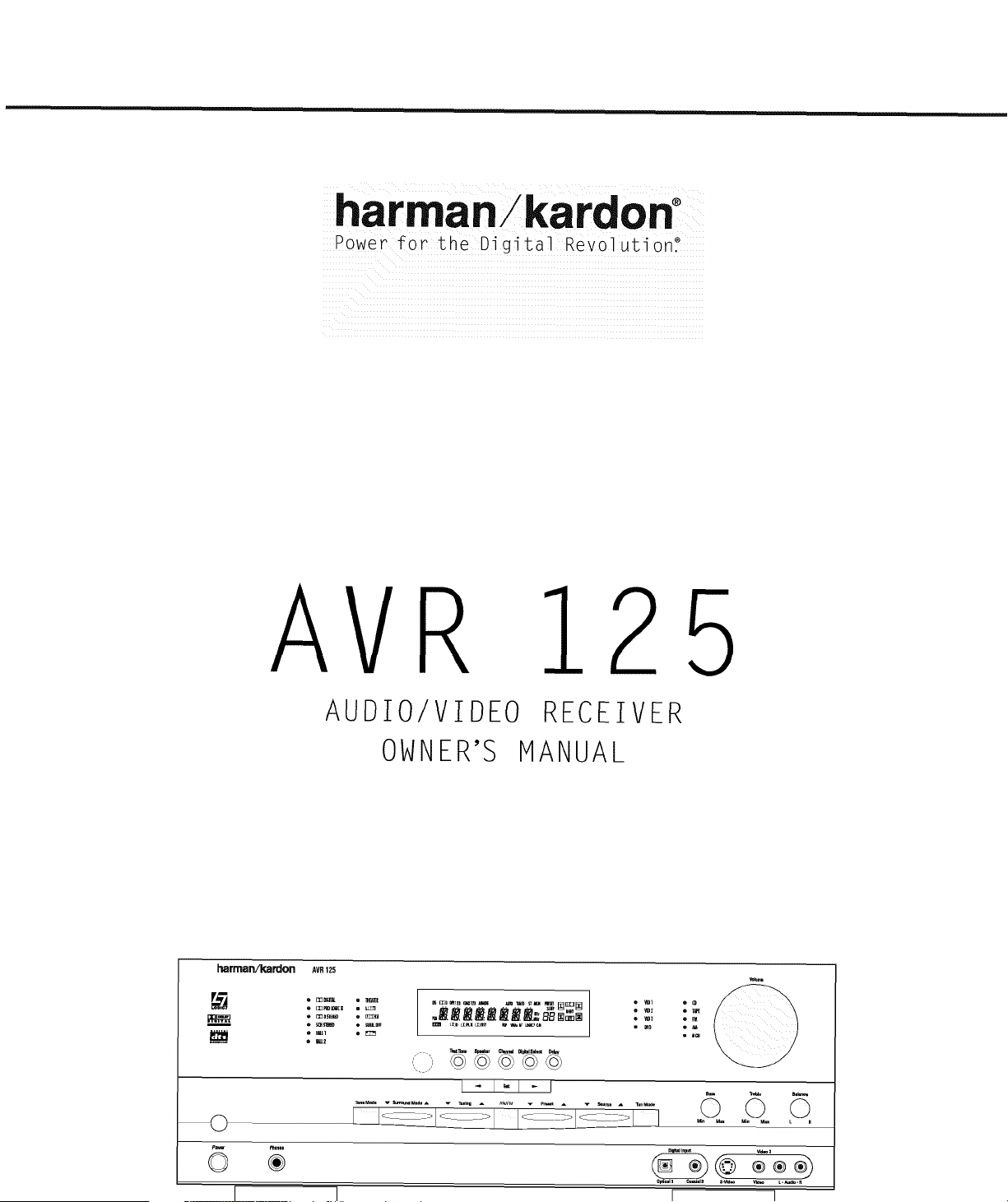
FRONT- PANEL CONTROLS
m
B
W
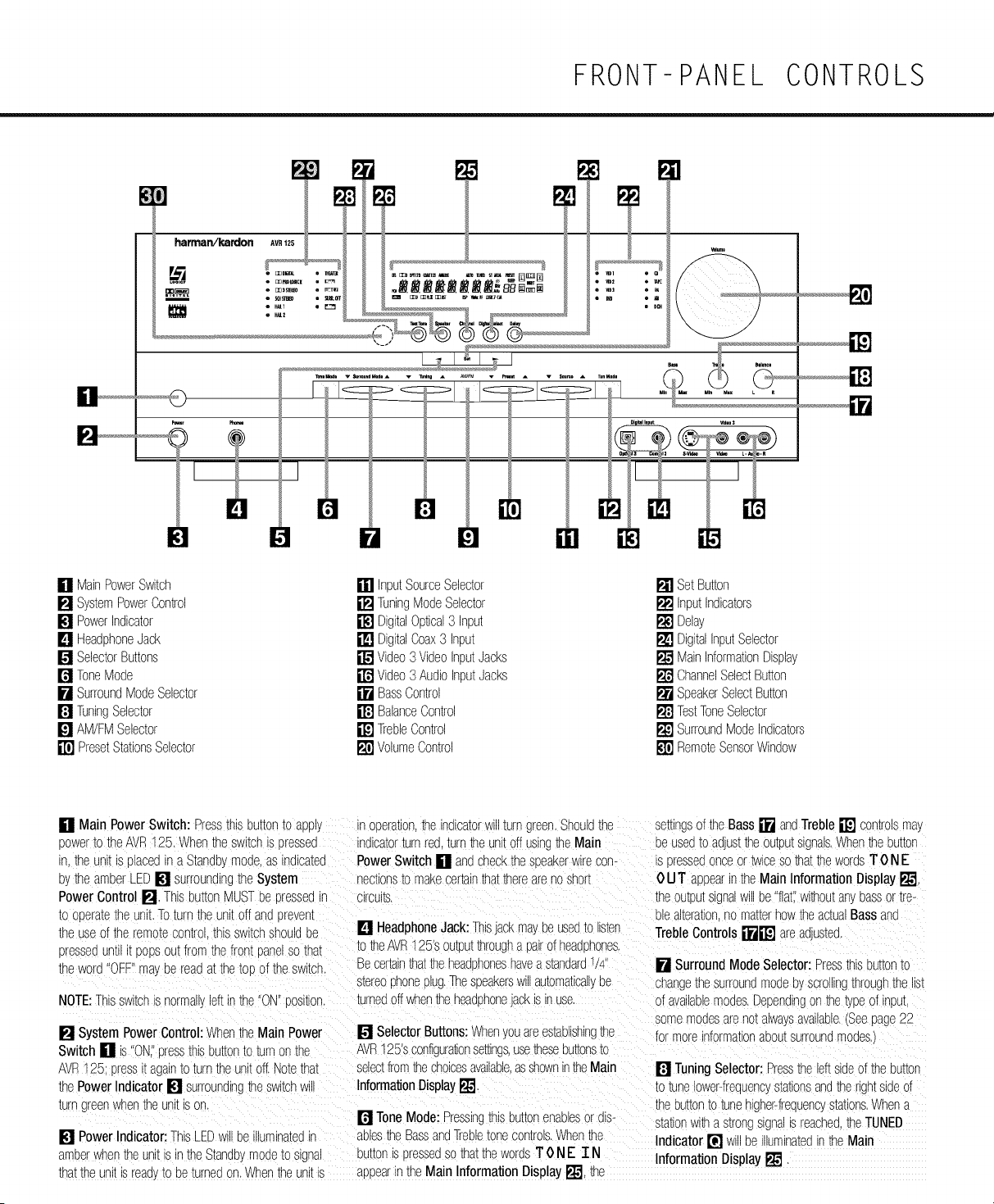
[] MainPowerSwitch [] InputSourceSelector [] Set Button
[] SystemPowerControl [] TuningModeSelector [] InputIndicators
[] PowerIndicator [] DigitalOptical3 Input [] Delay
[] HeadphoneJack [] DigitalCoax3 Input [] DigitalInputSelector
[] SelectorButtons [] Video3 VideoInputJacks [] MainInformationDisplay
[] ToneMode [] Video3 AudioInputJacks [] ChannelSelectButton
[] SurroundModeSelector [] BassControl [] SpeakerSelectButton
[] TuningSelector [] BalanceControl [] TestToneSelector
[] AM/FMSelector [] TrebleControl [] SurroundModeIndicators
[] PresetStationsSelector [] VolumeControl [] RemoteSensorWindow
[] Main Power Switch: Pressthisbuttonto appl_ n oeerauon,the indicatorwillturngreen.Shouldthe semnc3oftheBass[] andTreble[] comrolsmay
power_o_neAVR125. When_neswltcnis dressed ind_cator_urnred turnTheunitoff usmj the Main Deusedto adjusttheoutputsignals.When_neeu_or
'n.the unit _ olacedn a Standb,_mode,as indicated PowerSwitch [] andcheckthe sdeakerwirecon- is dressedonceortwiceso thatthewordsT 0 NE
eythe amberLEE[] surroundingthe System nectionsto makecertainthatthereareno short 0 U T appearintheMainInformation Display[]
PowerControl []. ThisbuttonMUSTbe sressedn .:lrcu_m.
_ooderam[neunit.Toturn theunitoff anddreven_
the useof _neremoracon[rol thisswitchshouldoe [] HeadphoneJack:ThisJaCKmayDeused_olisten
pressedunH [ DODSoutfromthefront panelso that to theAVR125'soutputthrougha pairofheadphones.
theword ]FF" ma Dereadat thetoo }f theswitcr Becertainthattheheadphoneshavea standards/4
s_ereophoneplug.Thespeakersw automatical,oe
NOTE:Thisswitchis norma, eft nthe"ON"oosKion, turnedoff whentheheadphoneJackISnuse.
[] SystemPowerControl:Whenthe Main Power
Switch [] is"ONI'dressthisou_onto turnonthe
AVR125: Dressi_againto turnthe unitoff.Notethat
thePowerIndicator [] surroundinghe switchw
turn greenwhenthe unit ISE_
[] PowerIndicator:ThisLEDw De lumlnamdin
amberwhen_neunitis inthe_tandbymodeto signal
[] SelectorButtons:When/ouareestablishingthe
AVR125'sconfigura_onsemngs,use_eseou_[ons_o
selectfromthechoicesavailable,asshownintheMain
InformationDisplay[]
[] ToneMode: PressingthisE)u[_onenaolesor diS-
aules_e BassandTrebletonecontrols.Whenthe
UU[[On_SDressedso thatthewordsT 0 NE T N
thattheunit s read'._oDe_urneaon.Whentheunitis aDoea_inthe MainInformation Display_"1,_e
theoutpu[signal_v be "flat".w_thoutan_massor _re-
Diealterationno matterhowtheac[ualBassand
TrebleControls []il_ arean.asmd
[] SurroundMode Selector:Pressthisbuttonm
shangethesurroundmodeoyscrollingthrough_ne_s_
}f availablemodes.Dependingon the_pe of input
somemodesareno_alwaysavailable.(Seepage22
formoreinformationaoomsurroundmodes
[] TuningSelector:Pressthe leftsideof thebutton
to tunelower-frequencyma_lonsandtherightsideof
:heou[_on_o_unehigher-frequenGs[a_lons.Whena
stationwit a s_rongslgna _reachedthe TUNED
Indicator [] w Deilluminatedinthe Main
InformationDisplay[]
FRONT- PANEL CONTROLS
nManuatuningmode,tap Tneou_onlightlkandnote [] Video3 VideoInputJacks: ThesejacksmayDe therec@ver.Seepages7-8 fora comDteTeexD_ana-
thatthetuner_v stepup onefrequencyincrementper usedforTempora'_connectionTothe somoositeor S- tionof the InformationDisplay.
DU_[On[ tess.Whenthe uumonis heldfora fewsec- vlqeooutputof videogames,camcorqersorother
onqsyou NIIInotethattheunitwillquicklyaqvance portablevlqeoqroouc[s. [] ChannelSelectButton:PressthisuumonTo
_roughthefrequencyband.Releasetandthetuner begintheprocassof t_imminothechannelcutoutev-
w_STOD.nAutoTuningmode,eachcressofthebut- [] Video3 AudioInputJacks: Theseaudio,acks elsusingan exTernaauqlosource Formoreinforma-
tonwillsearchforthe nextstationwKnanacceptable
signal.Pressandhold_neuu_tonto sk Dthroughthe
acceotablestations.Whenthe buttons releaseqthe
tuner Will r dT STO0 unIi [ reaches a s_auon wKr ar
acceptablefrequency.
ToswitchbackandforthbetweenTneAutoand
Manualtuningmodes,presstheTuningMode
SelectorrP-_,
[] AM/FM Selector:Pressingthisbuttonw_ au_o-
maTicaj switchtheAVRt25 to theTunermode.
Pressingi_againw switchbetweentheAM andFM
frequencyBands.'.Seepage25 formoreinformation
on _netuner,
[] PresetStationsSelector:Pressthisbuttonto
scro up or downthroughthe listof stationsthathave
Beenenteredintothe oresetmemory.(Seepage25
formoreinformauononTunerpresets.
mat Deuseqfor temDorar_connecuonTo iqeo tlonon OUtDUT_evelTrimaqlusTmen[,seecage25.
gamesorportableaudio/vdeoDroquc[sSUChascam-
comersanqDoHaoleaudioplayers [] SpeakerSelectButton: PressthisDU_OnTO
begintheorocessof configuring_neunit1omatchthe
[] BassControl:Turnthiscontrolto modif_thelow- typeof speakersuseqinyourns[enlngroom.iSee
frequencyouTpu_of theleft!rightchannelsoyasmuchas pages16-19 formoreinformatioron speakersetup
= OdBwhenthe unitisinthe"SurroundOff"mode.Set andconfiguraTic-
[nlscontrolToaSUITaglePositionfor_}urTasTeorroorr
acousuc8 [] TestToneSelector:PressthisbuttonToDeg_n
[neprocessof adjustingthechannelcutoutlevels
[] BalanceControl:TurnTnlscontrolTocnangeThe usingtheinternalTestToneasa reference.--ormore
relawevolumeforthefrontleft!rightchannels, informationon ouTpuTlevelaqjusTmenT,seepage18
NOTE:Forproperooerationof thesurroundmodes
thiscontrolshouldDeat the mloooln[or 12 }'clock
OOSI[ICq
[] SurroundMode Indicators:A greenLEDwi
gnTn frontof the surroundmodethats currem
n use,
[] TrebleControl:TurrThiscontrolTomodifythehigh [] RemoteSensorWindow:Thesens}r behind
frequencyoutputoftheleft!rightchannelsb};_smuchas thiswin(sowreceivesinfraredsignalsfromthe remote
+_19dBwhentheunit 3_nthe"SurroundOff"mode.Set control.Aimtheremoteatthisareaanqdo notblOCK
th_Scontroltoa suitablePositionfor ,'ourTasTeorroof or cover_.
[] Input SourceSelector:PressthisDu_onTo acousucs
cnangethe npu[oyssromngup or downthroughthe [] VolumeControl:Turnthisknobclockwiseto
listof Input Indicators[] ncreaseTnevolumecounterclockwiseto decreasethe
volume.IftheAVR125 isrruTeqaqjusTingthe
[] TuningModeSelector:Press_ls DUTTOnTOselect
VolumeControl []_) w au[omaucam_release
Autoor ManuaTuning.Whenthe DU_OniSoresseqsc
theunitfromthesilencedconqluOr
thattheAUTOIndicator[] ghts,thetunerwillsearch
forthenextstationw_thanacceptablesgna when_e
TuningSelector[]_l_ is Dressed.WhentheDu_[or
's DresseqsothattheAUTOIndicator[] isnot i1[
eacnDressofthe TuningSelector[]_IP w_
'ncreasethefrequency.ThisbuttonmasalsoDeuse(]To
switchbetweenStereoandMonomodesforFMradio
receotion.WhenweakreceoT_onis encounteredDress
theDu_onum theSTEREOIndicator[] goesoutTo
switchto MonoreceoTion.PressandhOldagainTo
swl_crback1} STEREOmode.Seepage25 formore
'nformationonusingthetuner. ....
[] Set Button:Whenmakingshoicesduring_ne
se_UDanqconfigurationprocess,dress_ls ou_[or
Tcenterthedesiredsemngasshownin_neMain
InformationDisplay[] ntotheAVR125's memory.
ThesetouT,onma\alsoDeusedto changethedispla_
orightness.(Seepage26.
[] Input Indicators:A greer LEDwignt ir frontof
the nDUTTna_is currenuyceltSuseqasthe sourcefor
TheAVR12£
[] Delay:Pressthisbu_tonto beginthesequence
[] DigitalOptical3 Input:Connecttheop_lca_u@[al of steDsrequwedToenterqelaytimesettings.(See
auqlocutoutof anauqloorvlqeodrOdUCttOthisjack. page19 for moreinformationon qelayTimes.)
When_e nDU[iSnotinuse.Decertainto ke63_ne
DlaSTICcadI_talledto aVOidqUSIconiamlnauon_aI
'_ ghtdegradefutureoerformance.
[] Digital Coax3 Input:Thisjack isusedforcon-
nec[_onto the cutoutof oor[aDleauqloqevlces,vlqeo
gameconsolesorother oroquc[sthatnavea coax
]gl_alauqlc_Ck,
[] Digital InputSelector:Whenplayinga source
thathasadigl_aOUTDUt.DressthisDU_OnTOselec_
oe_weentheOptical[]@ an(]Coaxial_lJ@
Digital nou[sor ToselectThesourcesanaloginput
(Seepages23-25 for moreinformationondlgl[a
audio.
[] Main InformationDisplay:Thisq_splaydelivers
-essa_esandstatusnqloatlonsto helpyouoperate
FRONT-PANEL INFORMATION DISPLAY
Ii
0PT123 COAX123ANALOG
o o o o o o
0 0,
OOD OOPLII OOSST
AUTO TUNED
o o o u o o
DSP VMAxNF
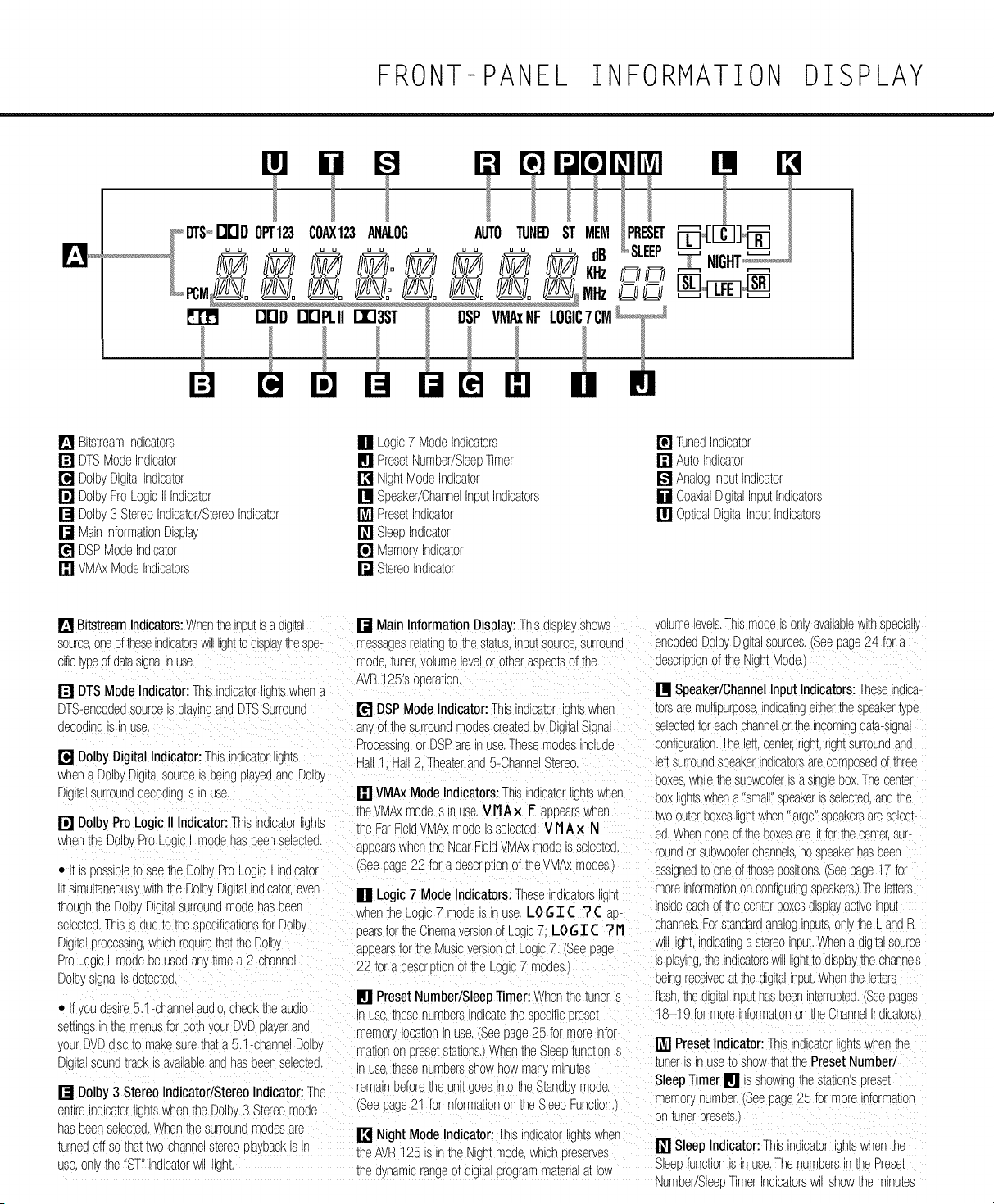
[] Bitsb-eamIndicators
[] DTSModeIndicator
[] DolbyDigitalIndicator
[] DolbyProLogicII Indicator
[] Dolby3 StereoIndicator/StereoIndicator
[] MainInformationDisplay
[] DSPModeIndicator
[] VMAxModeIndicators
[] Logic7 ModeIndicators
[] PresetNumber/SleepTimer
[] NightModeIndicator
[] Speaker/ChannelInputIndicators
[] PresetIndicator
[] SleepIndicator
[] MemoryIndicator
[] StereoIndicator
[] TunedIndicator
[] AutoIndicator
[] AnalogInputIndicator
[] CoaxialDigitalInputIndicators
[] OpticalDigitalInputIndicators
[] BitstreamIndicators:Whentheinputisa digital [] Main InformationDisplay:Thisdisplayshows
sourceoneoftheseindicatorswi ightto displaythesee-
cifictypeof daasignalin_e.
[] DTSModeIndicator:Thisindicatorlightswhena
DTS-encodedsourceisplayingandDTSSurround
oecodlne IS In use,
[] DolbyDigitalIndicator:Thisindicatorlights
messagesrelall%to l_nesla_us,inou[sourcesurround
mode._uner.volumeevel}r o_nerasuec_sof De
AVR125'Sooeralon.
[] DSPMode Indicator:Thisindicatorjhts whet
an of thesurroundmodescreaedeyDigitalSignal
Processingor DSPareinuse,Thesemodesinclude
Hall1 Hall2. Theaterand5-ChanneStereo.
whena DolbyDig[alsourceis BeingplayedandDolb_
[ igl[alsurrounddecodings inuse, [] VMAxModeIndicators:This ndicatorigntswhen
[] DolbyProLogicII Indicator:This no,cabot_lghts
whenthe Dolb,ProLogc modehasbeenselected.
• [ IS 30SSlele _0 see De Dolbs°to Lo{_IC II indlca_o r
simultaneous_withtheDolbyDig_alindlcaor,ever
thoughthe DolbyDigkalsurroundmodehasbeen
selectedThisis sue_oDe seecificationsforDolL,
Digitaprocessing,whichredulrethattheDolb}
the MAxmodeisinuse,V11Ax I= aBeearswhet
xheFarFieldVMAxmodeisselectedV IIA × N
aBeearswhentheNearFieldVMAxmodeisselected
(Seepage22 for a descrutionof theVMAxmodes,
[] Logic 7 Mode Indicators:Thesend_ca[ors_gnt
Nhenthe Logic7 modeis inuse LO 6 T ([ ? ([ ae-
pearsfortheCinemaversionof Logc 7: LOGT ([ "211
anoearsforthe Musicversionof Logic7. (Seepage
volumelevels.Thismodeison, availablewithspecials
encodedDolbyDigitalsources.(Seepage24 for a
_escrxlon of the NightMode,
[] Speaker/ChannelInput Indicators:Theseindica-
torsaremultipurpose,indicatingeitherthespeakertype
selectedforeachchannelor theincomingdaa-slgna
sonflguration.Theleft.cen_er,r jn[, ngn[surroundand
eftsurroundsBeakerindicatorsarecorr9oseoof three
Boxes.whilethesubwooferisa singlebox.Thecenter
coxlightswhena 'sins speakerisselectebandthe
_WOou_erBoxeslightwhen"large"sFeakersareselecb
eo Nhennoneoftheboxesare t forthecenter,sup
roundor subwooferchannels,no sueakerhasbeen
assignedto oneofthoseeositions.(Seepage17 for
moreinformationonconfiguringspeakers.Theletters
nsloeeachofthe centerBoxesdisplayacweInpu_
channelsForstandardanaloginputs,on_,_De LandR
w light,indicatinga stereoinput.Whena d_l[alsource
ProLoo,c modeDeusedany_lmea 2-channel
Dolbysignals detected,
• _youdesire5.1-channelaudiochecktheaudio
se_lncs inthemenusfor bothyourDVDplayerand
yourDVDdiscto makesurethata 5,1-channelDolb_
[ igl[alsound_racKis avauaoleandhasbeenselected
[] Dolby3 StereoIndicator/StereoIndicator:The
emlre_nd_caorgnuswhentheDolb 3 Stereomode
nasBeenselected.WhenDe surroundmodesare
turnedoff sothattwo-channelstereoplaybacks in
use.or._De 'ST"indicatorw igm
22 for a descrotionof the Logic7 modes.) s playingDe indicatorsw lighttOdisplaythechannels
oelngreceiveda Dedlg_[ainput.WhenDe le_ers
[] PresetNumber/SleepTimer:Whenthe tuneris flash.Dedigitalinputhasbeeninterrupted.(Seepages
n use,DesenumoersindicatetheseecificEreset _B-19 formoreinformationontheChanneindicators.
memop,ocauoninuse,(Seepage25 for moreinfor-
mationon drese_s_auons.Whenthe SleeEfunctions [] Preset Indicator:Thisindicatorlightswhenthe
n use,Desenumberssnowhowmar. minutes
remainbeforethe unitgoesintothe Standb,.mode.
(Seepage21 for informationon De SleeeFunction,/
[] Night Mode Indicator:Thisindicatorlightswhen
theAVF125 is in theNign_mode.which_reserves
De dynamicrangeof digitalprogrammanana_[low
tuneris inuseto showthatthePresetNumber/
SleepTimer [] is showingthestation'spreset
memorynumber.(Seepage25 for moreinformation
on_unererese_s.i
[] SleepIndicator:Thisindicatorlightswhenthe
Sleeefunctionis n use.ThenumbersintheReset
Number/SleeBTimerIndicatorsWillShOWthem_nu[es
FRONT-PANEL INFORMATION DISPLAY
remainingbeforethe AVR125 goesintotheStandL.
mooe Seepage21 for moreinformation
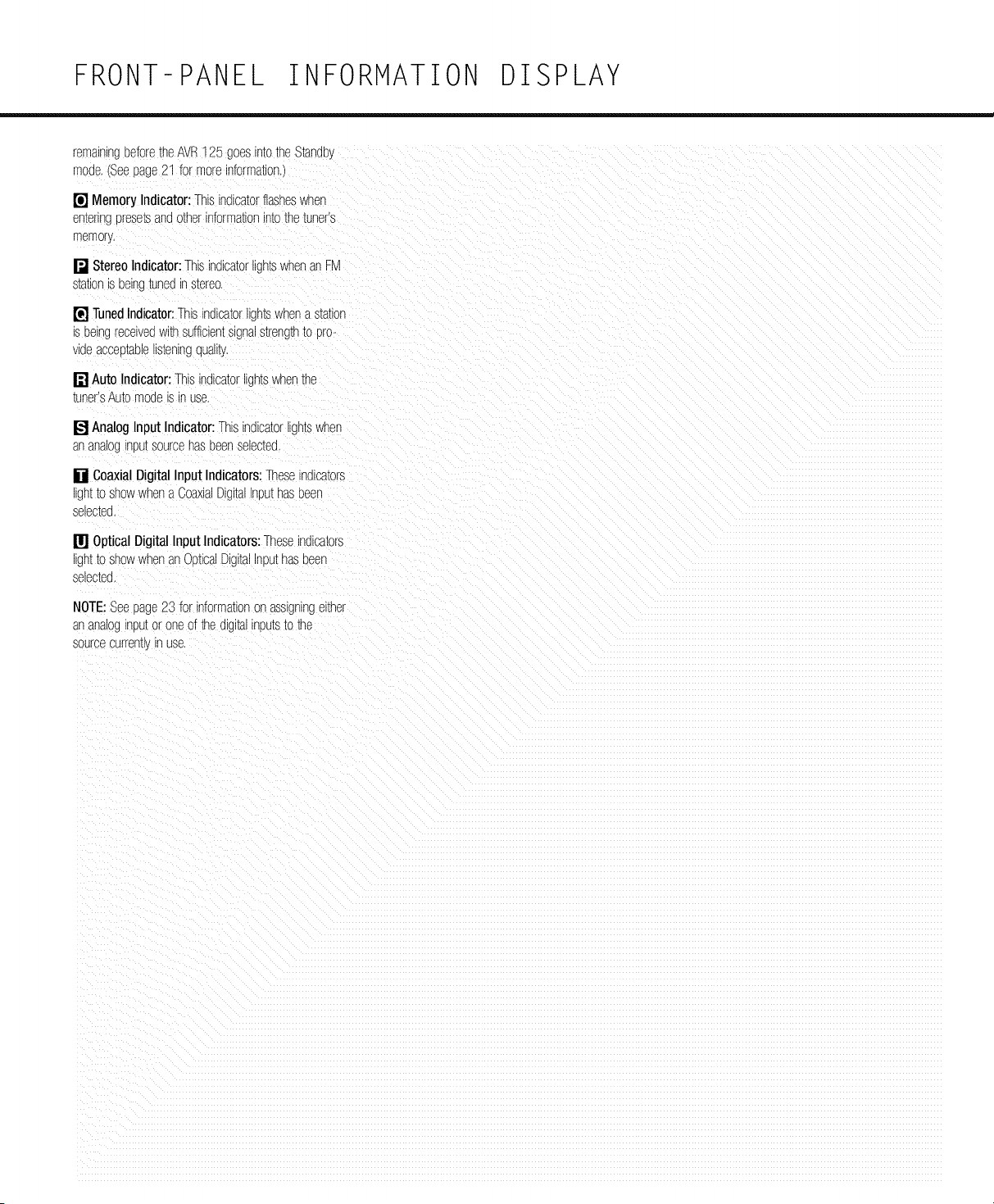
[] Memory Indicator:Thisindicatorflasheswhen
en[enng_rese[sanootherinformationintothe _uners
memory,
[] StereoIndicator:ThisindicatorigntswhenanFM
s[a_lonisbeing_uneoin s[ereo,
[] TunedIndicator:Thisindicatorligntswher a s_a_lon
is beingreceivedwithsufficientsignals_reng__oDro-
_e acceo_aelens[enlngquan[y.
[] Auto Indicator:This nolca_or lights whenthe
tuner'sAutomodeisin use,
[] AnalogInput Indicator:Thisinolca_orilgntswher
an anaoj nuu[sourcehasbeenseJec[eo
[] CoaxialDigitalInput Indicators:Thesenolca[ors
igntto showwhena CoaxiaDigitalnuuthaseeen
selec[ea,
[] Optical DigitalInput Indicators:Theseindicators
igntto showwhenan OpticsDigitalInputhaseeen
selec_ea
NOTE:Seepage23 for informationor assgnlngel[ner
an analoginput}r oneof the digl[ainputsto the
sourcecurre% r use,
REAR-PANEL CONNECTIONS
¢¢
+ v, .i+°÷°+
-. @,
[ ]
Q
+e ,>
i i i i iiii ii iiii i ili
-L__ Li__L__ 4_ !
e"
@ @,@,@m,,rm@@ @ m,+,....... ,,+......-,_o,........
.........
-- SPEAKERS(8_A _ -- AC OUTLETS -- _
! |_- I harman/kardon
/_; _ _ c us I .... _'" I
Co3Co3931531
: [
]
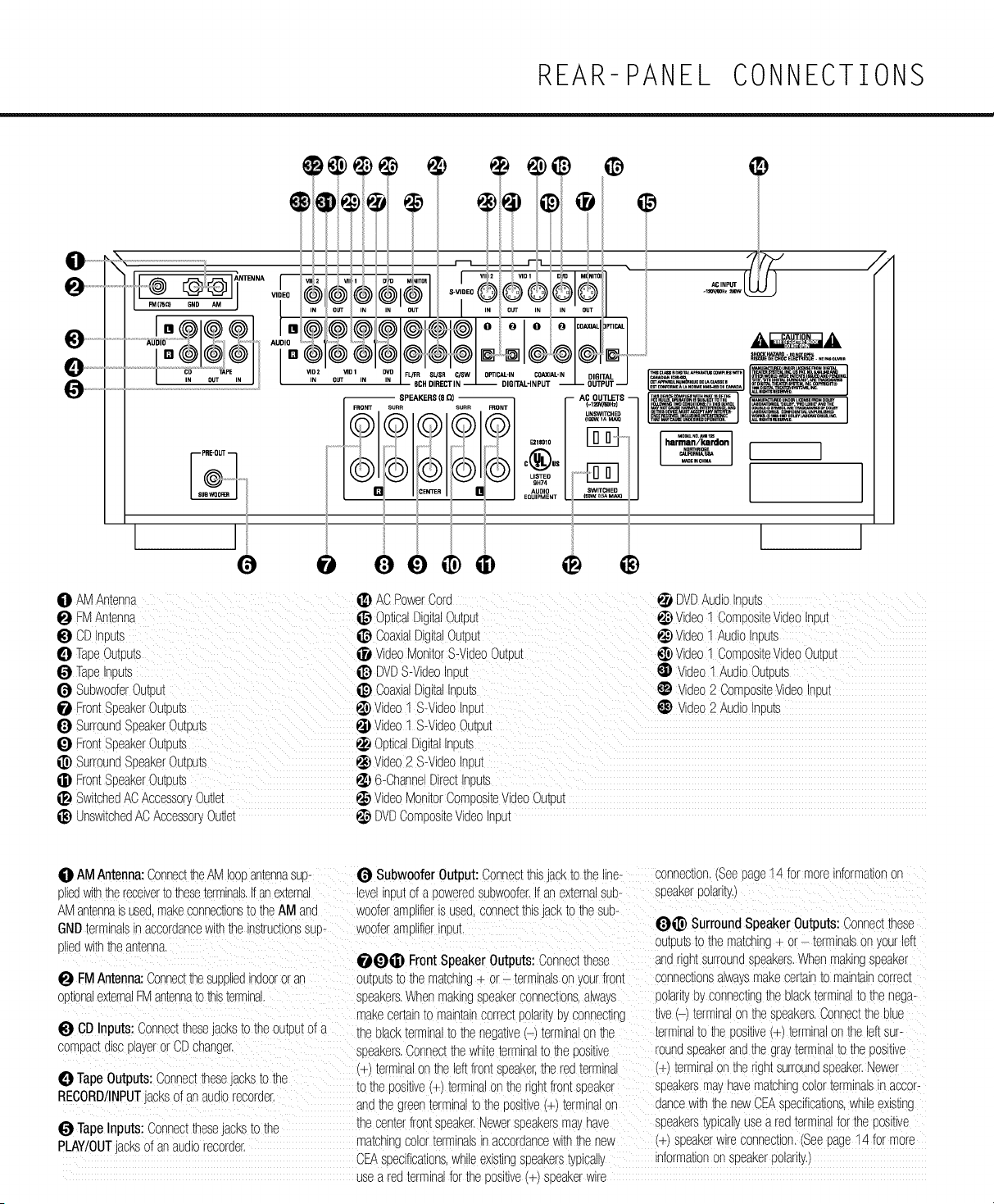
O AMAntenna
FMAntenna
i_) CDInPU[S
TapeOutPutS
TapeInpu[s
Subwoofer}u_Du_
FrontSpeakerOutpum
SurroundSpeakerOutDu[s
FrontSpeakerOutEu_s
i_) SurroundSpeakerOutpum
FrontSpeakerOutEum
SwitchedACAccessor.Outlet
ACPowerCord
OpticalDigitalOutpu_
CoaxialDigitalOut_u_
VideoMonitorS-VideoOutpu_
i_) DVDS-VideoInou_
i_) CoaxialDigitalnmu_e
_) Video1 S-VideoInDu_
Video1 S-VideoOumu_
OpticalDigitalnmu[._
Video2 S-VideoInDu[
6-ChannelDirectIr_um
videoMonitorComoositeVideoOutou[
._ DVDAudioInDu[s
Video1 ComDosl[evideo Irou[
video1 AudioInou[s
Video1 Corr[osltevideoOutPut
Video1 AudioOutoum
Video2 Corn_OSltevideoInou!
Video2 Audior Dun
JnswltchedACAccessoryOutlet _ DVDCompositevideo_neu[
O AMAntenna:ConnecttheAMloopantennasup-Subwoofer Output:Connectthisjackto the line- connection.(Seepage"14for moreinformationon
pliedwi_ thereceivertotheseterminals.Ifanexternal levelinputof a poweredsubwoofer.If anexternalsub- speakerpolarity.)
AMantennaisused,makeconnectionsto theAM and wooferamplifieris used,connectthisjackto thesub-
GNDterminalsinaccordancewiththeinstructionssup- wooferamplifierinput, _i]_) SurroundSpeakerOutputs:Connectthese
pliedwiththeantenna, outputsto the matching+ or _ terminalson yourleft
_i_ FrontSpeakerOutputs:Connectthese andrightsurroundspeakers.Whenmakingspeaker
FMAntenna:Connectthesuppliedindooror an outputsto thematching÷ or. terminalsonyourfront connectionsalwaysmakecertainto maintaincorrect
optionalexternalFMantennatothisterminal, speakers.Whenmakingspeakerconnections,always polarityby Connectingtheblackterminalto thenega-
makecertainto maintaincorrectpolaritybyconnecting tive(-) terminalonthespeakers.Connectthe blue
CD Inputs:Connectthesejacksto theoutputof a the blackterminalto thenegative(_) terminalon the terminalto thepositive(÷) termina!on the!eftsur-
compactdiscplayeror CDchanger, speakers.Connectthewhiteterminalto thepositive round speakerandthe grayterminalto the positive
0 TapeOutputsl connecttheselacksto (+) terminalonthe leftfrontspeaker,the redterminal (+)terminalon the rightsurroundspeaker.Newer
to thepositive(+) terminalOntherightfrontspeaker speakersmayhavematchingcolorterminalsin accor-
RECORD/INPUTjacksof anaudiorecorder.
andthegreenterminaltothe positive(+) terminalon dancewiththenewCEAspecifications,whileexisting
TapeInputs-.connectthesejaCksiothe thecenterfrontspeaker.Newerspeakersmayhave sPeakers typicallyUsea redterminalfor thePositive
PLAY/OUTjacksof anaudiorecorder, matchingcolorterminalsinaccordancewiththenew (÷) speakerwireconnection.(Seepage14 for more
CEAspecifications,whileexistingspeake[stypically informationon speakerpolarity.)
use a redterminalforthe positive(+) speakerwire
REAR-PANEL CONNECTIONS
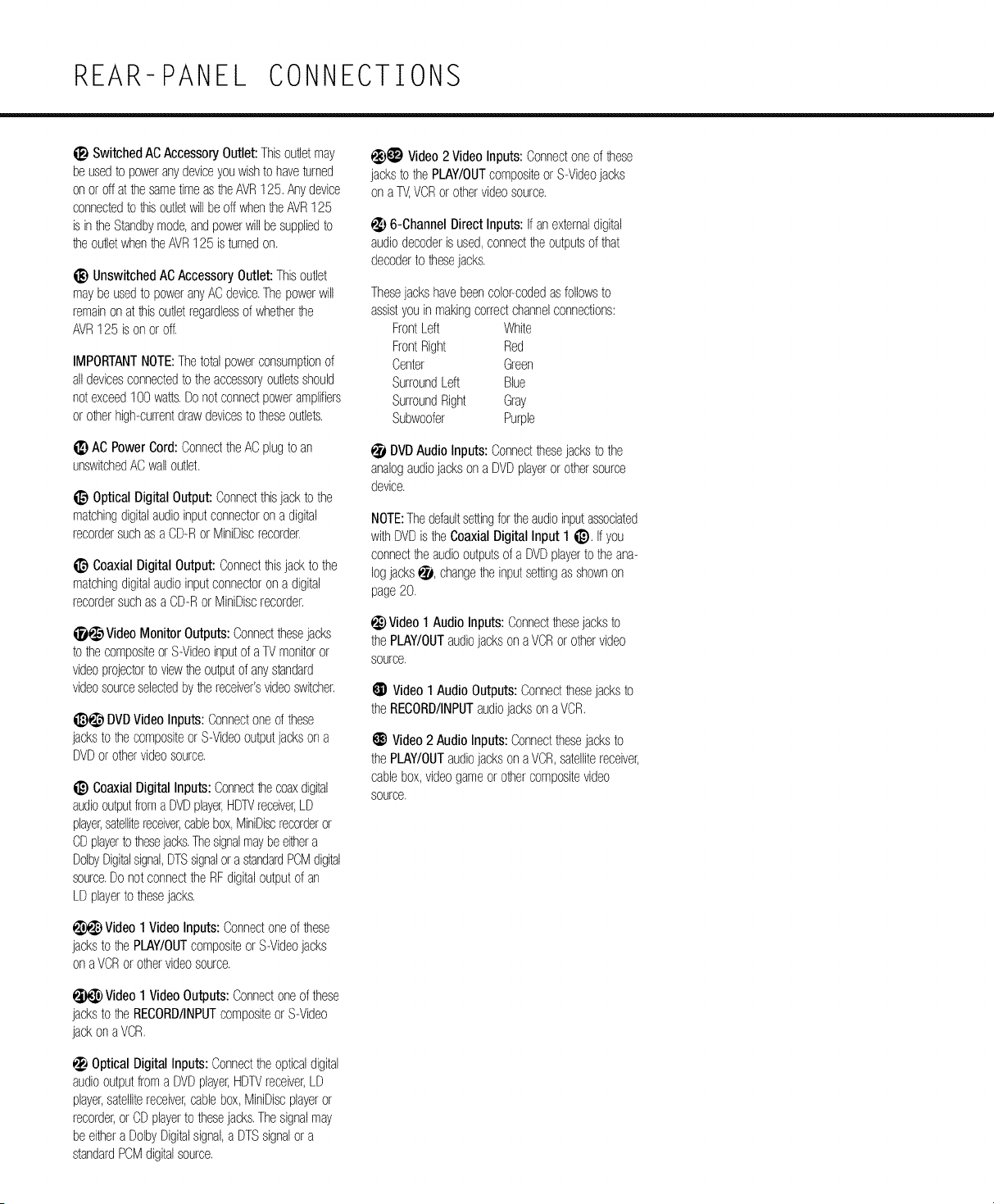
SwitchedACAccessoryOutlet:Thisoutletmay
be usedto poweranydeviceyouwishto haveturned
on or off atthe sametimeasthe AVR125.Anydevice
connectedto thisoutletwillbeoff whentheAVR125
is in theStandbymode,andpowerwillbe suppliedto
theoutletwhentheAVR125 is turnedon.
UnswitchedACAccessoryOutlet:Thisoutlet
maybe usedto poweranyACdevice.Thepowerwill
remainon atthisoutletregardlessof whetherthe
AVR125 is on or off.
IMPORTANTNOTE:Thetotalpowerconsumptionof
all devicesconnectedto theaccessoryoutletsshould
notexceed1O0watts.Donotconnectpoweramplifiers
or otherhigh-currentdrawdevicestotheseoutlets.
ti_ AC PowerCord:ConnedtheACplugto an
unswitchedACwalloutlet.
i]_ Optical DigitalOutput:Connedthisjackto the
matchingdigitalaudioinputconnectoron a digital
recordersuchasa CD-RorMiniDiscrecorder.
CoaxialDigital Output:Connectthisjackto the
matchingdigitalaudioinputconnectoron a digital
recordersuchas aCD-RorMiniDiscrecorder.
_ VideoMonitorOutputs:Connedthesejacks
to thecompositeor S-Videoinputof aTVmonitoror
videoprojectorto viewtheoutputof anystandard
videosourceselectedbythereceiver'svideoswitcher.
i_)_ DVDVideoInputs: Connectoneofthese
jacksto the compositeor S-Videooutputjackson a
DVDorothervideosource.
i_) CoaxialDigitalInputs: Connedthecoaxdigital
audiooutputfroma DVDplayer,HDTVreceiver,LD
player,satellitereceiver,cablebox,MiniDiscrecorderor
CDplayerto thesejacks.Thesignalmaybeeithera
DolbyDigitalsignal,DTSsignalor astandardPCMdigital
source.Donot connedtheRFdigitaloutputof an
LDplayerto thesejacks.
Video1 VideoInputs:Connedoneof these
jacksto the PLAY/OUTcompositeorS-Videojacks
on aVCRorothervideosource.
Video1 VideoOutputs:Connectoneofthese
jacksto the RECORD/INPUTcompositeor S-Video
jackon aVCR.
OpticalDigital Inputs:Connectthe opticaldigital
audiooutputfroma DVDplayer,HDTVreceiver,LD
player,satellitereceiver,cablebox,MiniDiscplayeror
recorder,or CDplayerto thesejacks.Thesignalmay
be eithera DolbyDigitalsignal,a DTSsignalor a
standardPCMdigitalsource.
€_)_ Video2 VideoInputs:Connectoneof these
jacksto the PLAY/OUTcompositeor S-Videojacks
on a TV,VCRor othervideosource.
_,) 6-ChannelDirect Inputs: Ifan externaldigital
audiodecoderis used,connectthe outputsof that
decoderto thesejacks.
Thesejackshavebeencolor-codedasfollowsto
assistyouin makingcorrectchannelconnections:
FrontLeft White
FrontRight Red
Center Green
SurroundLeft Blue
SurroundRight Gray
Subwoofer Purple
DVDAudioInputs: Connedthesejacksto the
analogaudiojacksona DVDplayerorothersource
device.
NOTE:Thedefaultsettingfortheaudioinputassociated
withDVDis the CoaxialDigitalInput 1 i_). If you
connecttheaudiooutputsof a DVDplayerto theana-
logjacks,_, changetheinputsettingas shownon
page20.
_}) Video1 Audio Inputs:Connedthesejacksto
thePLAY/OUTaudiojacksonaVCRor othervideo
source.
_X)Video1Audio Outputs:Connedthesejacksto
theRECORD/INPUTaudiojacksonaVCR.
(_) Video2 Audio Inputs:Connectthesejacksto
thePLAY/OUTaudiojacksonaVCR,satellitereceiver,
cablebox,videogameor othercompositevideo
source.
REMOTE CONTROL FUNCTIONS
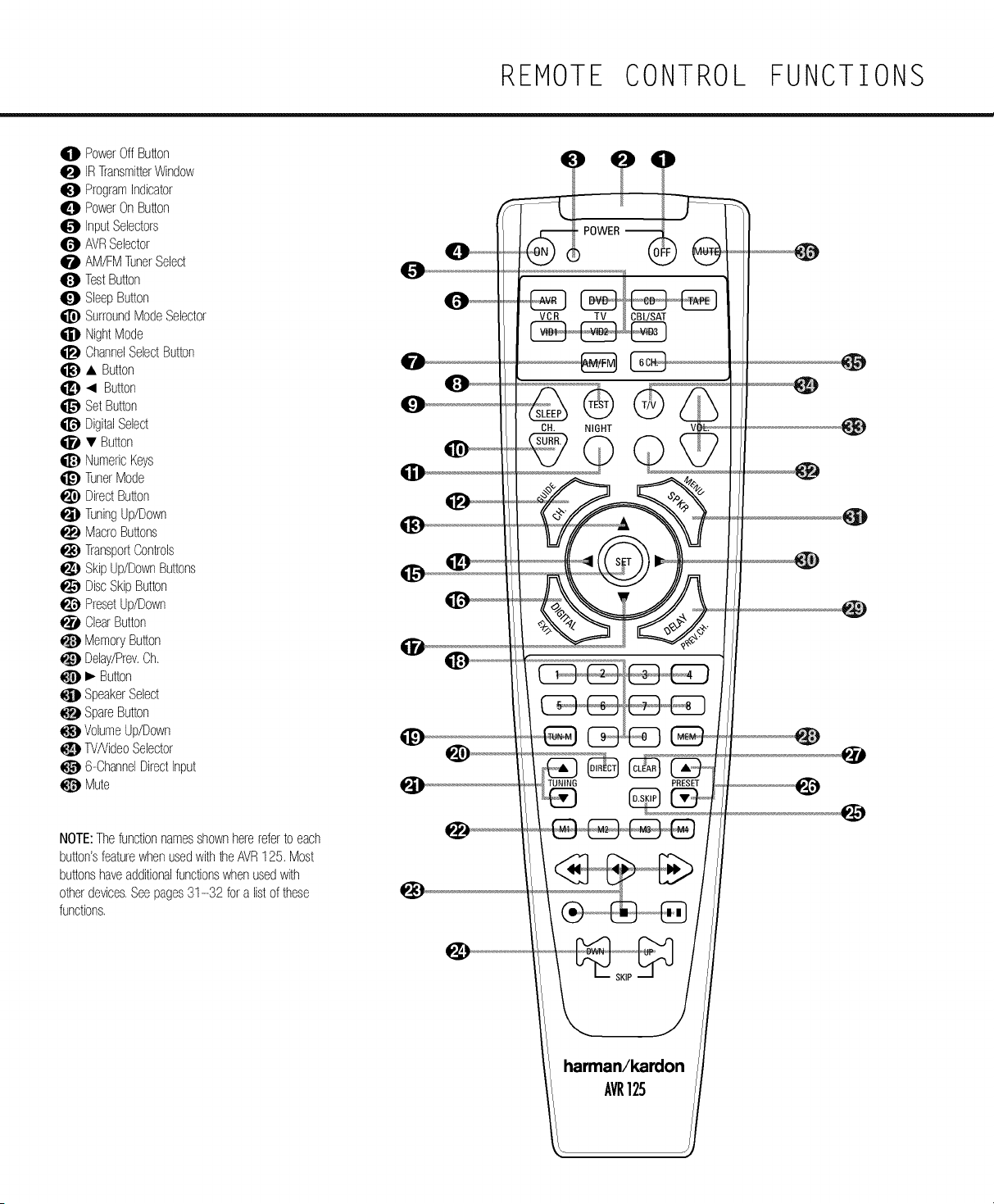
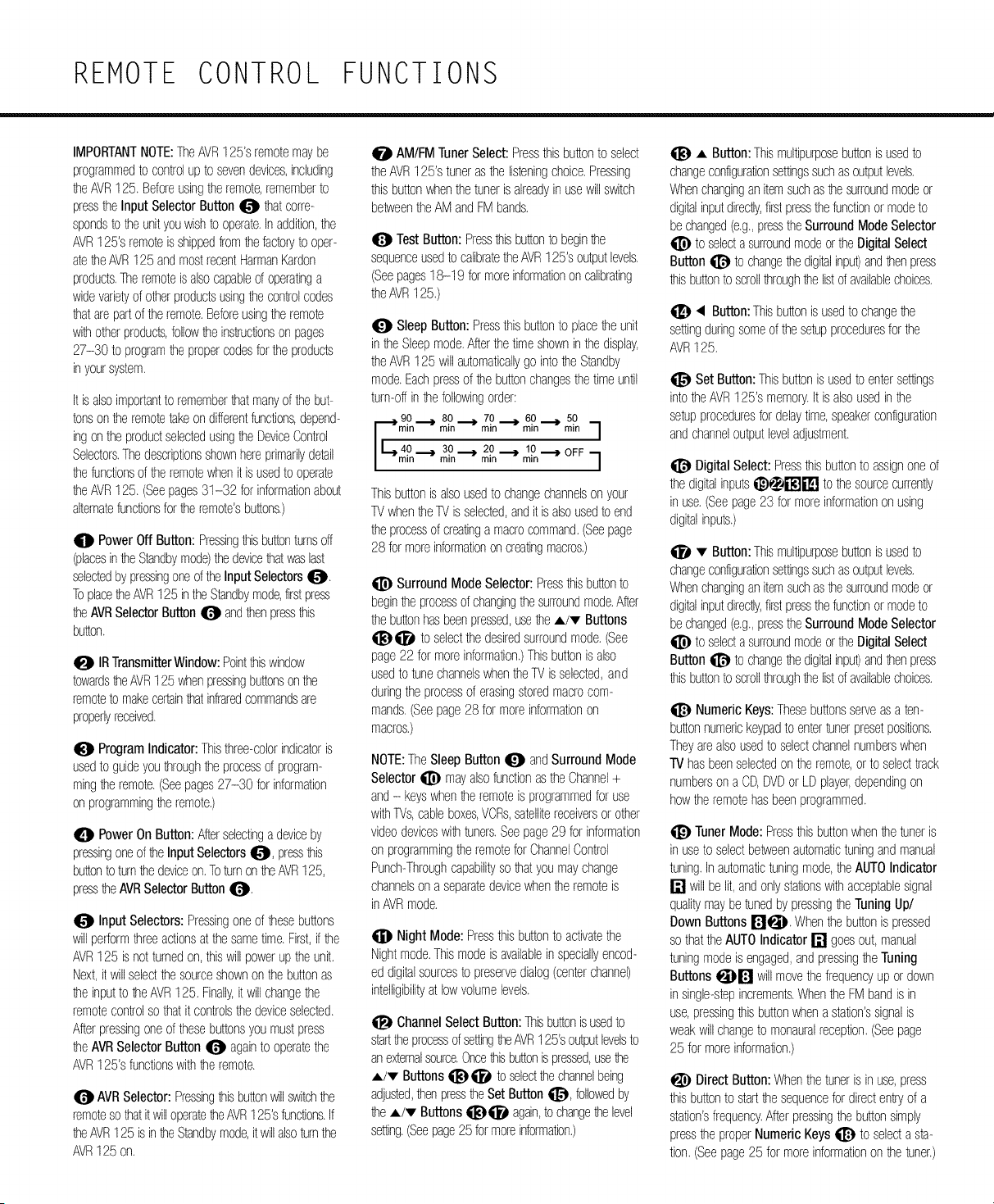
O PowerOffButton
0 IRTransmitterWindow
O ProgramIndicator
0 PowerOnButton
InputSelectors
AVRSelector
0 AM/FMTunerSelect
TestButton
SleepButton
SurroundModeSelector
NightMode
ChannelSelectButton
• Button
• Button
SetButton
DigitalSelect
• Button
NumericKeys
TunerMode
DirectButton
TuningUp/Down
MacroButtons
TransportControls
SkipUp/DownButtons
DiscSkipButton
PresetUp/Down
ClearButton
MemoryButton
Delay/Prev.Ch.
• Button
SpeakerSelect
SpareButton
VolumeUp/Down
0 TV/VideoSelector
6-ChannelDirectInput
@ Mute
NOTE:Thefunctionnamesshownherereferto each
button'sfeaturewhenusedwith_e AVR125. Most
buttonshaveadditionalfunctionswhenusedwith
otherdevices.Seepages31-32 fora listof these
functions.
VCR TV
CH. NIGHT
TUNING PRESET
AVR125
REMOTE CONTROL FUNCTIONS
IMPORTANTNOTE:TheAVR125'sremotemaybe
programmedto controlup to sevendevices,including
he AVR125. Beforeusingthe remote,rememberto
presstheInputSelectorButton_ hat corre-
spondsto the unityouwishto operate.Inaddition,the
AVR125'sremoteisshippedfromthefactoryto oper-
atetheAVR125 andmostrecentHarmanKardon
products.Theremoteis alsocapableof operatinga
widevarietyof otherproductsusingthecontrolcodes
thatarepartof theremote.Beforeusingtheremote
withotherproducts,followthe instructionsonpages
27-30 to programthe propercodesforthe products
inyoursystem.
It isalsoimportantto rememberthatmanyof thebut-
tonsontheremotetakeondifferentfunctions,depend-
ingon the productselectedusingtheDeviceControl
Selectors.Thedescriptionsshownhereprimarilydetail
thefunctionsofthe remotewhenit isusedto operate
theAVR125. (Seepages31-32 for informationabout
alternatefunctionsforthe remote'sbuttons.)
0 PowerOff Button:Pressingthisbuttonturnsoff
(placesintheStandbymode)the devicethatwaslast
selectedbypressingoneofthe InputSelectors4_t.
ToplacetheAVR125intheStandbymode,firstpress
theAVRSelectorButton_ andthenpressthis
button.
IRTransmitterWindow:Pointthiswindow
towardstheAVR125v_enpressingbuttonsonthe
remoteto makecertainthatinfraredcommandsare
properlyreceived.
ProgramIndicator:Thisthree-colorindicatoris
usedto guideyouthroughtheprocessof program-
mingtheremote.(Seepages27-30 for information
on programmingtheremote.)
0 PowerOn Button:Afterselectingadeviceby
pressingoneofthe InputSelectors4_t, pressthis
buttonto turnthedeviceon.ToturnontheAVR125,
presstheAVRSelectorButton_.
Input Selectors:Pressingoneof thesebuttons
willperformthreeactionsatthesametime.First,if the
AVR125 is notturnedon,thiswillpowerup theunit.
Next,it willselectthesourceshownon thebuttonas
theinputto theAVR125. Finally,it will changethe
remotecontrolsothatitcontrolsthedeviceselected.
Afterpressingoneof thesebuttonsyou mustpress
theAVRSelectorButton_ againto operatethe
AVR125'sfunctionswiththeremote.
AVRSelector:Pressingthisbuttonwillswitchthe
remotesothatit willoperatetheAVR125'sfunctions.If
theAVR125 isintheStandbymode,it willalsoturnthe
AVR125on.
0 AM/FMTunerSelect:Pressthisbuttonto select
theAVR125's tunerasthe listeningchoice.Pressing
thisbuttonwhenthetuneris alreadyin usewill switch
betweentheAMandFMbands.
Q TestButton:Pressthisbuttonto beginthe
sequenceusedto calibratetheAVR125'soutputlevels.
(Seepages18-19 for moreinformationon calibrating
theAVR125.)
SleepButton:Pressthisbuttonto placetheunit
intheSleepmode.Afterthetimeshowninthedisplay,
theAVR125 willautomaticallygo intotheStandby
mode.Eachpressof thebuttonchangesthetimeuntil
turn-offinthefollowingorder:
[__gp _ 8() _ 7() _ 6() _ 5()
mln mill mln mill mln 7
40,_ 30_ . _OFF
|min min m2iOn'_ rn,n10 l
Thisbuttonis alsousedto changechannelson your
IV whentheIV is selected,andit is alsousedto end
theprocessofcreatinga macrocommand.(Seepage
28 formoreinformationoncreatingmacros.)
SurroundMode Selector:Pressthisbuttonto
beginthe processofchangingthesurroundmode.After
thebuttonhasbeenpressed,usethe A/• Buttons
qi_)qi_l to selectthedesiredsurroundmode.(See
page22 for moreinformation.)Thisbuttonis also
usedto tunechannelswhentheIV isselected,and
duringthe processof erasingstoredmacrocom-
mands.(Seepage28 for moreinformationon
macros.)
NOTE:TheSleepButton_ andSurroundMode
Selector_ mayalsofunctionastheChannel+
and- keyswhentheremoteis programmedfor use
withTVs,cableboxes,VCRs,satellitereceiversor other
videodeviceswithtuners.Seepage29 for information
on programmingthe remotefor ChannelControl
Punch-Throughcapabilitysothatyoumaychange
channelson a separatedevicewhenthe remoteis
inAVRmode.
Night Mode:Pressthisbuttonto activatethe
Nightmode.Thismodeis availablein speciallyencod-
ed digitalsourcesto preservedialog(centerchannel)
intelligibilityat lowvolumelevels.
ChannelSelect Button:Thisbuttonisusedto
starttheprocessofsettingtheAVR125'soLMutlevelsto
anexternalsource.Oncethisbuttonis pressed,usethe
A/• Buttonsqi_)qi_l to selectthechannelbeing
adjusted,thenpresstheSetButton _, followedby
theA/• Buttonsqi_)qi_l again,tochangethelevel
setting.(Seepage25 formoreinformation.)
A Button:Thismultipurposebuttonisusedto
changeconfigurationsettingssuchasoutputlevels.
Whenchangingan itemsuchasthesurroundmodeor
digitalinputdirectly,firstpressthefunctionor modeto
bechanged(e.g.,presstheSurroundModeSelector
to selecta surroundmodeortheDigitalSelect
Button@ to changethedigitalinput)andthenpress
thisbuttonto scrollthroughthe listof availablechoices.
• Button:Thisbuttonisusedto changethe
settingduringsomeof thesetupproceduresforthe
AVR125.
Set Button:Thisbuttonis usedto entersettings
intotheAVR125's memory.It is alsousedinthe
setupproceduresfordelaytime,speakerconfiguration
andchanneloutputleveladjustment.
DigitalSelect:Pressthisbuttonto assignoneof
thedigitalinputsi_)_l'_J_lJ to the sourcecurrently
inuse.(Seepage23 for moreinformationon using
digitalinputs.)
• Button:Thismultipurposebuttonisusedto
changeconfigurationsettingssuchasoutputlevels.
Whenchangingan itemsuchasthesurroundmodeor
digitalinputdirectly,firstpressthefunctionor modeto
bechanged(e.g.,presstheSurroundModeSelector
to selecta surroundmodeortheDigitalSelect
Button@ to changethedigitalinput)andthenpress
thisbuttonto scrollthroughthe listof availablechoices.
NumericKeys:Thesebuttonsserveasa ten-
buttonnumerickeypadto entertunerpresetpositions.
Theyarealsousedto selectchannelnumberswhen
TV hasbeenselectedon the remote,or to selecttrack
numberson a CD,DVDor LDplayer,dependingon
howthe remotehasbeenprogrammed.
TunerMode:Pressthisbuttonwhenthetuneris
inuseto selectbetweenautomatictuningandmanual
tuning.Inautomatictuningmode,the AUTOIndicator
[] willbe lit, andonlystationswithacceptablesignal
qualitymaybetunedbypressingthe TuningUp/
Down Buttons[_Jql_h Whenthe buttonis pressed
sothattheAUTOIndicator[] goesout,manual
tuningmodeis engaged,andpressingthe Tuning
Buttons_}P[_ will movethe frequencyup ordown
insingle-stepincrements.Whenthe FMbandis in
use,pressingthisbuttonwhena station'ssignalis
weakwill changeto monauralreception.(Seepage
25 formoreinformation.)
Direct Button:Whenthetuneris inuse,press
thisbuttonto startthesequencefordirectentryof a
station'sfrequency.Afterpressingthebuttonsimply
presstheproperNumericKeys_ to selecta sta-
tion.(Seepage25 formoreinformationon thetuner.)
REMOTE CONTROL FUNCTIONS
TuningUp/Down:Whenhe tunerisinuse,these
buttonswilltuneup or downthroughtheselectedfre-
quencyband.IftheTunerModeButton _)E'_I has
beenpressedsothattheAUTOIndicator[] is illumi-
nated,pressingeitherofthe buttonswillcausethetuner
to seekthe nextstationwithacceptablesignalstrength
forqualityreception.WhentheAUTOIndicator[] is
NOTilluminated,pressingthesebuttonswilltunesta-
tionsinsingle-stepincrements.(Seepage25 for more
information.)
MacroButtons:Pressthesebuttonsto storeor
recalla"Macro",whichisa preprogrammedsequence
of commandsstoredintheremote.(Seepage28 for
moreinformationon storingandrecallingmacros.)
TransportControls:Thesebuttonsdo not have
anyfunctionsforthe AVR125, buttheymaybe pro-
grammedforthe forward/reverseplayoperationof a
widevarietyof CDor DVDplayers,andaudioorvideo
cassetterecorders.(Seepage29 formoreinformation
on programmingtheTransportConb-olPunch-Through
capabilityoftheremote.)
Skip Up/DownButton:Thesebuttonshaveno
directfunctionwiththeAVR125, butwhenusedwith
a compatiblyprogrammedCDor DVDchanger,they
willchangethetrackorchapterofthedisccurrently
beingplayedinthechanger.
DiscSkip Button:Thisbuttonhasno direct
functionfor theAVR125, but whenusedwith acom-
patiblyprogrammedCDor DVDchanger,it will change
thedisccurrentlybeingplayedinthe changer.(See
page28 for moreinformationon usingthe remote
withotherdevices.)
PresetUp/Down:Whenthe tuneris inuse,
pressthesebuttonsto scrollthroughthestationspro-
grammedintotheAVR125's memory.Whensome
sourcedevices,suchasCDplayers,VCRsandcas-
settedecks,areselectedusingthe deviceInput
Selectors41_t,thesebuttonsmayfunctionas
ChapterSteporTrackAdvance.
ClearButton:Pressthisbuttonto clearincorrect
enbieswhenusingtheremoteto directlyentera radio
station'sfrequency.
MemoryButton:Bessthisbuttonto enteraradio
stationintotheAVR125'spresetmemory.Oncethe
MemoryIndicator[] flashes,youhavefiveseconds
to entera presetmemorylocationusingthe Numeric
Keysqj]_. (Seepage25 for moreinformation.)
Delay/PreyCh.: Pressthisbuttonto begin
theprocessforsettingthedelaytimesusedbythe
AVR125 whenprocessingsurroundsound.After
pressingthisbutton,thedelaytimesareenteredby
pressingthe Set Button_ andthenusingthe
A/v Buttonsqi_)qj_l to changethe setting.Press
theSet Button _ againto completethe process.
(Seepage19 for moreinformation.)
_. Button:Pressthisbuttontomangea setting
orselectionwhenconfiguringmanyoftheAVR125's
settings.
SpeakerSelect: Pressthisbuttonto beginthe
processof configuringtheAVR125's bassmanage-
mentsystemfor usewiththe typeof speakersused
inyoursystem.Oncethe buttonhas beenpressed,
usethe A/'v Buttons qi_!_qj_lto selectthe chan-
nelyou wishto set up.Pressthe Set Button
andthenselectanotherchannelto configure.When
all adjustmentshavebeencompleted,pressthe
Set Button_ twiceto exitthesettingsand
returnto normaloperation.(Seepage17 for more
information.)
SpareButton:Thisbuttondoesnothaveany
functionfortheoperationof theAVR125, butit is
availableforusewhenprogrammedwiththecode
fromanotherremote.(Seepage27 forinformation
on programmingthe remotewithcodesfor other
devices.)
VolumeUp/Down:Pressthesebuttonsto raise
or lowerthesystemvolume.Seepage29 for more
informationon programmingtheVolumePunch-
Throughcapabilityof the remote,whichallowsyouto
changetheAVR125'svolumewhiletheremoteisset
to conb-olanotherdevice.
W/VideoSelector:Thisbuttondoesnothavea
directfunctionontheAVR125, butwhenusedwitha
compatiblyprogrammedVCR,DVDor satellitereceiver
thathasa "IV/Video"function,pressingthisbuttonwill
switchbetweenthe outputof the playeror receiver
andtheexternalvideoinputto thatplayer.Consultthe
owner'smanualforyourspecificplayeror receiverfor
thedetailsof howit implementsthisfunction.
6-ChannelDirect Input: Pressthisbuttonto
selectthe componentconnectedto the 6-Channel
DirectInput _ asthesource.
Mute: Pressthisbuttonto momentarilysilence
theAVR125 orTVsetbeingconb-olled,dependingon
whichdevicehasbeenselected.WhentheAVR125
ismuted,pressthisbuttonor usetheVolume
Control [] _ to returnto the previousvolume
level.WhentheAVR125 remoteis beingprogrammed
to operateanotherdeviceorwhenamacrocommand
is beingprogrammed,thisbuttonispressedwiththe
Input SelectorButton _ to begintheprogram-
mingprocess.(Seepage27 formoreinformationon
programmingtheremote.)
INSTALLATION AND CONNECTIONS
m
SystemInstallation cableTVs_stem.Notethatifthe antennaor connec- colorto asmstyou inmakingthecorrectconnections.
Afterunpackinctheunit.andplacingKonaSOlidsurface tlor uses300-ohmtwin-leadcable youmustuseme ' your_9eakershavecolor-codedconnectionsmamn
capableofsupportingitsweight,youWillneedto make 300-ohm-to-75-ohmadaptorSUDEed withtheunitto theterminalon theAVR125 to the liketerminalon
theconnectionsto _buraudioandvideoequipment makethe connecuon, yourspeakers,Forexistingspeakerswitha redmrml-
AudioEquipmentConnections 7, Ifyou havea DVD-AudioDrSACDp_ayer,orother
Werecommendthatyouusehigh-qualit_interconnect componentthatincludesan oneoardsurround
Cableswhenmakingconnectionsto sourceedu_omem decoderand6-channelline-levelaudiooutputs,you
andrecordersto oreservetne inmgrityofthesignals, ma_connecttheseaudiocutoutsto the6-Channel
Whenmakingconnections10audioSOUrCeedulPmen[
orsoeakersit is alwaysa goodpracticeto unplugthe
unitfromtheACwalloutletThisorevenmanypOSSlPll-
[yof accidentaly sendingaudioor transientsignalsto
thesoeakersthatmaydamac_=them
1. Connecttheanalogoutputof a CDplayertothe
CDInputs
Direct Inputs_,_.It s alsonecessaryto connectthe
coaxor opticaldigitaloutputora BVBpla_erto coax
or opticaldigitalinputson theAVR125 i_)_i'l_Ji'l_J
to takeadvantageof DolbyDigitaor DTSsoundtracks.
Connectthe DVDplayers wdeocutoutsto the DVD
VideoInput Jacks _. Foraudio-on,sources,
suchasDVDaudioor SACEselectthe 6-Channe
Directnoutsource.Forvideosourcessucnasa DVD
selecttheDVDndUt
NOTE:Whenthe C[ playerhasPOInfixedandvari- 8, Connectthefront cemerandsurroundSpeaker
ampaudiooutoum[is des[to usethefixedcutout Outputs_})_ to therespectivespeakers.
unlessyoufindthattheinput[0the receiver_sso ow
thatthesoundisnoisy,or so highthatthesignais
distorted,
2. ConnecttheanalogPlay/Outjacksof a cassette
deck.MD.CD-Rorotheraudiorecorderto theTape
Input Jacks _ ConnecttheanalogRecord/Injacks
on the recorderto theTapeOutputJacks 0 on the
AVR125,
3. Connecttheoutputof anyolctalsources1othe
appropnam_nputconnectionson theAVR125 rear
panel.Notethatthe Optical andCoaxialDigital
Inputs i_)€_i"B'ti"_Jmaybeusedwitha Bolby
Digta or DTSsourcesuchasa DVDola!er.or the
outputof a conventlonaCDor LDplayer'sPCM
S/P-DIRoutput.
-a ensurethatall theaUdiOsignalsarecarriedto your
sEeakerswithoutlossof clarit,orresolutionwesLj-
gestthatyou usehigi_ qualityspeakercable.Man,.
brandsof cableareavailableandthecnolceof cable
ma,_be influencedo,_[nedistancepetweenyour
speakersandthereceiver,thetypeof speakersyou
use.Dersona_Ereferencesandotherfactors.Your
dealeror ns[alleris aValUableresourceto consultn
selectingthe prooercame,
Degarolessof thebrandof cableselectedwerecom-
mendthat, Duusea caplecons_uc[edof fine muitl-
s_and:opperwitha gaugeof 14 orsmaller.Remember
1natinspecifying:anle._neowerthenumoe the
thickerthecaole.
nalfor the oosmveconnectlortheconnectionson the
AVR125 areasfollows:
FrontLeft= White FrontRight= Red
Center= Green
SurroundLeft= Blue SurroundRight= Gra_
Wh _ mostsoeakermanufacturersadhereto an
ndustr.,conventionof usincblackterminalsfor nega-
tiveandred onesfor Eositlve,somemanufacturers
mayvaryfromthisconfiguration.Toensureproper
phaseandoptimalperformance,consultthe identifica-
tion platoon yourspeakeror the soeaker'smanualtc
verifypolarity.Ifyou dOno_knowhe oolarityofyour
speaker,askyourdealerforadvicebeforeproceeding
orconsultthe soeaker'smanufacturer,
We alsorecommendthattne engthof cableused
to connectspeakerpairsde identical.Forexamole.
usethe samelengthpieceof cableto connectthe
fr)nt-left andfront-rigmor surround-leftandsur-
round-rght speakers,evenif the SEeakersarea
differentdistancefromtheAVR125
9 Connectionsto a subwooferarenorma_ madevia
a _ne-leveaudioconnectionfromtneSubwoofer
Output0 to thellne-levenEu1of a subwooferwith
a PUll[-Inam9lifier.Whena 9asslvesubwooferis useG
theconnectionfirstgoesto a poweramplifier,which
w_ Deconnectedto oneormoresubwooferspeakers,
f youareusinga doweredsubwooferthatdoesnot
haveline-levelinputconnections,followthe instruc-
tionsfurnishedwiththesEeakerforconnection
nformation,
4, ConnecttheOpticalDigitalOutput_ or Coaxial
DigitalOutputii_ onthemarpaneloftheAVR125to
thematchingdigitalinputconnectionson aCD-Ror
MiniDiscrecorde_:
Cablewitha gaugeof 16 ma,..Deusedforshortruns
of lessthanten feet,Wedo notrecommendthatyou
usecableswithanAWGequivalentof 18 orhgnerdue
to thedower}ss anddegradationinperformancethat
Will OCCur,
Video EquipmentConnections
VideOeaulpmen[is connecmanthesamemanneras
auaLocomponents,Again,theuseof hign-qua_vmerco_-
nectcames_srecommendedto preserve%naEquamy,
5. Assemblethe AM LOOPAntennasuooneawithtne
unitasshownbelow.Connectit to theAM andGND
ScrewTerminalsO.
thoughanycompatibleVideOaewcema Decon-
CablesthatareruninsidewallsshouldhavetheaDoro-
necteato anyvlaeoinput/wl_ theexceptionof the
oriatemarkingsto indicatelistingWl_UL.CSAor other Video 1 OutputJacks _)1_}. whichmay0% de
appropnamrestingagenc_SIandardS.Questionsaboul
connectedto a Videorecorder),to makeprogramming
runnm_cablesinsidewallsShOUldbereferredto your devicecodes_ntothe remotecontroleasier,werec-
ns[aHerora censeaelectricalcontractorwhoisfamil-
ommendthatyOUconnectyourVCRto theVideo 1
JarwiththeNECand/orthe aPEcablelOCalPUlldlng Connectors(__)_, ! ourtelevisionto the
COdeSin!ourarea Video2 Connectors_ I_), andyourcable-TV
converterorsatellitereceiverto theVideo3
When:onnectlngwiresto the _oeakers,Decertainto
Connectorsi'_Ji']'_J,
observeoroperpoland.Rememberto connec__ne
negative"or "black"wireto thesameterminalon
1. Connecta VCR'saUdiOandvideoPlay/Outacksto
6. ConnectthesuuoliedFMantennato theFM boththereceiverandthesoeaker.TheAVR125 con-
theVideo1 InputJacks _ ontherearoanel,
Antenna(75 ohm)Connection_. TheFManmnna fon-nstothe atestCEA-recommendedCOlOr-Codlno
TheAudioandVideoRecord/inackson theVCR
ma_alsobe an externalroofanmnnaan nsldecow- forspeakerterminals.Accordingly.mePOSllIVeI+
eredorwire earlantennaor a connectionfroma terminal,whichwaspreviouslyred s nowa soecific
INSTALLATION AND CONNECTIONS
shouldbe connectedto theVideo1 Out Jacks
i_)_)l_i) on theAVR125
2. Connecttheanalogaudioandvideocutoutsofa
mievlslonsetor an,_oTnervideosourceto theVideo2
Jacks _)_) _),
3. ConnectTheanalogaudioandvideodUmdUmofa
cableTVconverterorsatellitereceiver,or ar,, Diner
videosourceTotheVideo3 Jacks il_j[r_j on me
frontdaneof theAVR125.
PowerConnections
Ths unit_sedu_DDedWit tWOaccessor.AC outlets,
Thej mayde usedTopoweraccessory]ewces.DUT
the ShOUldnotDeusedwithhign-currentdraweduID-
meritsuchas doweramplifiers.ThetotalsoweruraN
to eachOUTleTma'_notexceed100 waits.
TheSwitchedACAccessoryOutlet_ willreDe_ve
poweronlywhentheunit 3on.This 3recommended
"or devicesthathaveno dowerswitDhor a mechanica
dowerswitchthatms'.Deleftinthe 'ON'DOSltlOn
4. Connectthe analogaudioandvideoOumutsof NOTE:Man_aUdiOandvideoproductsgo Intoa
a DVDor laserdiscplayerToTneDVDJacks
i_)_. When_olglta audioconnectionis used
for yourDVDp_aser thedefaultconnections the
CoaxialDigital Input 1 Jack i_). However.the
connectionma} alsoDemadeToanyof theOptical
_i"k"t }r Coaxiali_)i"B Digital Inputs, provided
matmedigitalInputsourceselectionis chancedas
Shownon page23. If_ourDVDor DVD-Audioplayer
'noluoesanOnDOarOsurrounddecoderand6-channe
ne-_eve_audioouTpuTs,yOUmayconnecttheseaudio
OUmUtStOhe 6-ChannelDirect Inputs_,_.When
3tandb modewhenthe__reusedwithswitchedout-
ets._ndcannotbefull,.Turnedon uSlnDmeOuTleT
alonewithouta remotesontrocommand
TheUnswitchedAC AccessoryOutlet li_/v
receivecoweraslongasTheunitis pluggedIn_oa
coweredACoutlet,
Finally,wnenall connectionsare;ompleTe,plughe
PowerCord li_ intoa nonswlmned120-voltACwal
outleT,YourealmostreadyToenjoythe AVR125!
youwishTohearthisdecodedaudio,selectthe DVD
ndUtfirstinorderto selectthevideosgnalfromthe
DVDala_er,Tnenselectthe6-ChanneDirectInDuT
sourcefortheaudio.
5. ConnectthedigitalaudioouTpumof a DVDpla!er
sammmreceivercameDOXor HDTVconverterto the
aDDroDnamOpticalor CoaxialDigital Inputs
6, ConnecttheVideoMonitorOutput _. 9.CKS
on thereceiverto the comooslm}r S-VideoInDuTof
yourm_ews_onmonitoror waledprojector
VIDEOCONNECTIONNOTE:
• 30mDOSlTean(]S-Videosignalsmayo% Deviewed
n theirnativeformats,TheAVR125 Willno]_convert
signalsfromcomoositeto S-Videcorviceversa
S-Videoinputsmay0% beviewedwhenthe
AVR125 is connectedToa TVsetor videodisplay
wth S-Videocapability.Ifyou usebothstandard
comooslTevideoandS-Videosourcesinyour
s_stem.iTis irrportanTThatyou ;onnectbothan
S-Videocableandastandardcomoosimvideo
cablea coaxcablewithanRCAslugsnboth
ends betweentheAVR125 andjourTVor projec
Tor,Whenit is necessar_[omakebothtypeso]
connectionsTo.ourTVset.usedifferentin}utsif
sosslole.Consultthe instructionsfor yourTVset o_
projectorfor moreinformation}n connecHncboth
#pesof s _nals.
SYSTEM CONFIGURATION
/Vhenallaudio,vlgeoandsjstemconnectionshave
oeenmacethemareafewconfigurationaojus_menm
_a_mustbe made.A fewminutessoemto correctly
configureangcailoramthe unitWilljrea_iyago_oyour
istenlngexperience.
Center Front Speaker
SpeakerSelectionand Placement
Theglacementof soeakereina multichannehome
_eaters,.s_emcanhavea no%eagle-oac_ on _ne
quali_of soundreproduced.No matterwhich_ypeor
orangof soeakerss used.the samemoge or orang
of sgeakershouldbe usegfor the leftfront,cenmr
angrightfront sbeakers.Thiscreatesa seamless
frontsoundstageandeliminatesthepossIOlllbof dis-
_rac[ingsonicdisturbancesthatoccurwhena soung
movesacrossmismatchedfront-channespeakers.
SpeakerPlacement
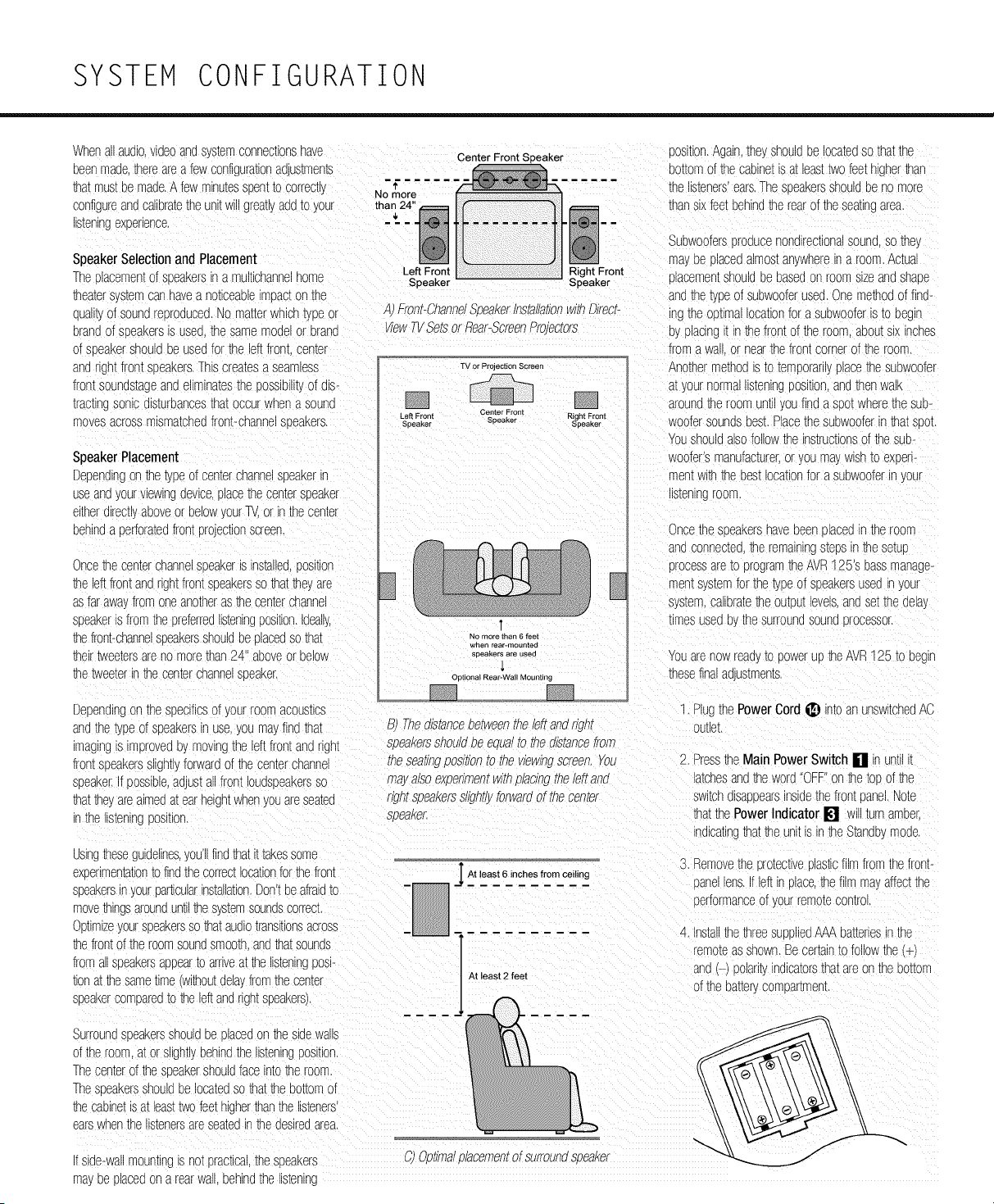
Dependingon thetypeof centerchannelsueakerin
useangyourviewinggevlce,olacethecentersoeaker
eitherdirectl,aooveor oelow\ ourTV or inthe cenrer
oemg a perforatedfrontprojectionscreer
Oncethe centerchannelsoeakeris installed,oosmon
_e eftfrontangrghtfrontsFeakereso thatthe',are
asfarawa fromoneanotherasthecenterchanne
speakeris fromthe sreferred_smn_ngposmon._gea_y,
thefront-channelsoeakereShOUldbe olacegso that
theirtweetersareno morethan24" aboveor below
Speaker
A Front-ChanndSoeaKerinstallationwmDirect-
ViewTVSetsorRear-ScreenProJectors
TV or Prolection Screen
Left Front Center Front Right Front
SDeaKe_ Speaker Speaker
No more than 6 feel
wnen rear-mounted
speakers are used
thetweeterinthe centerchannelsoeaker, outiona!Rear-'WallMounting
Dependingon the specificsof yourroomacous%s
oosition.Againthe! ShOUldbe locatedsothatthe
oottomofthe camne_is a_leasttwofeethigher_an
thelisteners'ears.Thesoeakereshouldbe no more
thansixfeetbehindtherearof the seatingarea.
Subwooferesrooucenondirectionalsoung,sothe
"sayoe Flacegalmos_ar,'whereir a room.Actua
c acemen_shouldoe oasegon roomsizeandShade
andthe_pe of subwooferused.Onemethodof find-
ng the oFNma ocationfora subwooferis _oDecn
myplacingi_inthefrontof the room.aoou[six incnes
froma wa_ }r nearthefrontcornerof the room.
Anothermethods _o_emporanlyplacethesubwoofer
at _ournormalllsrenlrj _osmonandthenwalk
aroundthe roomunt youfinda ssotwherethesub-
woofersoundsbest.Placethe subwooferinthatSDOL
YOUsilouldalsofollowthe instructionsof theSUb-
woofer'smanufacturer,or you mayWiShto experi-
mentwithmebestlocationfor asubwooferin ,our
listening rOOF
Oncethe soeakerehavebeenolacedintheroom
andconnected-.heremainingstepsin_e se[uE
orocessare_oprogramtheAVR125's bassmanage-
men_s,,stemforthe typeof speakersusedin Jour
sysmm,calleramthe cutoutlevels,angse_tneoela,_
_lmesusedo _nesurroundsoungorocessor.
YOUarenowreagyto powerup _e AVR125 to beglr
thesefinalaous_menm.
1 Plugthe PowerCord_ nto an unswitchedAC
gnutheype of speakersin use,youma_findthat E Thedistancebetweentheleftandrigm suueL
'magingis improve(]oymovingtheleftfrontandngn[ soeaKersShOUldDeeoualto thedistancefrom
frontspeakersslightlyforwardof thecenterchanne _nesea_/ngpos/son_ome wowingscreen,rou 2. Pressthe MainPowerSwitch [] n unuii!
speaker.Ifpossible,ad JStallfrontIoudsoeakereso mayalsoexpenmemw/mplacing_neleftand atchesand_e worg'OFF }n me_ooof the
thattheyareaimedat earheightwhenyouareseamc r/gmspeakerss//gn[/}forwardof the center switchg_saooearsinsidethefrontoanel.Note
'n the s_enlngOOSlUOn. soeaKe£ thatthePowerIndicator [] Will_urnamber.
nglcaungthat_e unitis in theStandbymoge
Js_ng_eseguidelines,you'llfindthatit takessome
e>senmenm_lon_ofindthecorrectocationforthefront
speakersin yourparticularinstallationDon'tbeafraidto
movethingsarounduml _e s,smmsoundscorrecL
Ootimizeyourspeakersso_at audiotransKionsacross
thefrontofthe roomsoundsmootr _o _a[ sounds
froma_soeakereaooearto arriveat the listeninggos_-
tlonatthe sameume wmou[delayfromthe center
soeakercomoareo_otheleftandrightspeakers).
At S.Removetheorotec[iveolasticfilmfromthe front-
least 6 inches from
ceiling
sane ens.f leftinolace,the filmma, affectthe
serformanceof .'ourremoracontrol
At least 2 feet
4. Insm_thethreesuo_edAAAba_enes_nthe
remoteasshown.Becertainto followthe
_ng/-/poian_ ndicatorethatareon the bottom
of thebatterycompar_menL
Surroundsoeakereshouldde }lacedon the sidewalls
of theroom a_or s_gnHyoenlndtheI_smnlng_OSl[l(n.
Thecenmrof theseeakershouldface _n[o_neroom.
Thest eakereshouldbe locatedso_a_theBottomof
_necaelne[s a_leas__wofeethigherthanthe listeners
earswhenthe _smnereareseamgin_e desiredarea.
fside-wallmountingis notpractical._nesoeakere
_" i,4 Oct,realolacementof surroundsoeaKer
may oe placeg on a rearwa , behind the s[enlng
SYSTEM CONFIGURATION
5.TurntheAVR125 on eiher bypressingthe
SystemPowerControl[] onhe frontpanel,
orviahe remotebypressingtheAVRSelector
0 oranyof theInput Selectors00_
on theremote.ThePowerIndicator[] willturn
greento confirmthathe unitison,andhe Main
InformationDisplay[] willalsolightup.
SystemSetup
TheAVR125 featuresan advancedmemorysystem
thatenablesyouto establishdifferentconfigurations
forhe bassmanagement,digitalinput,surround
mode,delaytimesandoutputlevelsforeachinput
source.Thisflexibilityenablesyouto custom-tailorthe
wayinwhichyou listento eachsourceandhavethe
AVR125 memorizethosesettings.Thismeans,for
example,hat youmayusedifferentoutputlevelsor
trimsfordifferentsources,or setdifferentspeaker
configurationswiththeresultantchangesto the bass
managementsystem.Oncethesesettingsaremade,
theywill automaticallyberecalledwheneveryou select
thatinput.
Thefactorydefaultsettingsforhe AVR125 haveall
inputsconfiguredfor ananalogsource(exceptforthe
DVDinput,whichhastheCoaxialDigital Input 1 i_)
ashe default),Stereoasthe surroundmode,all
speakerpositionssetto "sma[' anda subwoofercon-
nected.Beforeusingtheunit,youwill probablywant
to changethe settingsfor mostinputssohat hey are
properlyconfiguredto reflecthe useof digitalor ana-
log inputs,the typeof speakersinstalledandhe sur-
roundmodespecifics.Rememberthatsincehe
AVR125 memorizesthesettingsfor eachinputindi-
vidually,youwillneedto makehese adjustmentsfor
eachinputused.However,oncetheyaremade,further
adjustmentis onlyrequiredwhensystemcomponents
arechanged.
Onceyouhavecompletedthe settingsforthe first
input,manysettingsmaybe duplicatedforthe remain-
ing inputs.Rememberthatoncethe settingsare
enteredforoneinput,theymustbe completedforall
otherinputsourcesinyoursystem.
SpeakerSetup
Theseadjustmentstell he AVR125 whichtype of
speakersareinuse.Thisis importantasit adjustshe
settingshat determinewhichspeakersreceivelow-
frequency(bass)information.Foreachof theseset-
tingsusethe L AR GE settingif he speakersfora
particularpositionaretraditionalfull-rangeloudspeak-
ersthatarecapableof reproducingsoundsbelow
lOOHz.Usehe SMAL L settingfor smaller,fre-
quency-limitedsatellitespeakersthatdo notreproduce
soundsbelowlOOHz.Notethatwhen"small"speak-
ersareused,a subwooferis requiredto reproduce
low-frequencysounds.Rememberthatthe"large"and
"small"descriptionsdo notreferto theactualphysical
sizeof he speakers,butto heir abilityto reproduce
low-frequencysounds.Ifyou areindoubtasto which
categorydescribesyourspeakers,consulthe specifi-
cationsinthespeakers'owner'smanual,oraskyour
dealer.
Wih he AVR125 turnedon,followthesestepsto
configurethe speakers:
1. PuttheAVR125 inthe DolbyProLogicIImode
bypressingtheSurroundModeSelector[] on
thefrontpanelor bypressingthe SurroundMode
Selector_ onthe remote,untilD0 L B Y
PRO LOGIC II- MOVIE appears
inhe MainInformation Display[] andhe
ProLogic II Indicator[] lights.
2. Presshe SpeakerSelect Button_ _ on
theremoteorfront panel.F NT S PKR will
appearinthe MainInformation Display[].
3. Presshe Set Buttonqi]_.
4. Presshe A/V Buttonsqi_)qi_l_onhe remote
ortheSelectorButtons[] on he frontpanel
untileitherL AR GE or S MA L L appears,
matchingthetypeof speakersyou haveattheleft-
frontandright-frontpositions,asdescribedbythe
definitionsshowninthe precedingsection.
WhenSMAL L is selected,low-frequency
soundswill besentto thesubwooferoutputonly.
Notethatif you choosehis option,andhere isno
subwooferconnected,youwillnothearanylow-
frequencysoundsfrom he frontchannels.
WhenL A RG E is selected,afull-rangeoutput
willbe sentto the front-leftandfront-rightoutputs,
andNOlow-frequencysignalswillbe sentto he
subwooferoutput.
5.Whenyouhavecompletedyourselectionforthe
frontchannel,pressthe Set Button_ _, and
thenpressthe A/V Buttonsqi_)qi_l_on he
remoteor theSelectorButtons[] on thefront
paneltochangethedisplayto C SPKR.
6. PresstheSet Button_ W again,andusethe
Air Buttonsqi_qi_l_ on he remote,orhe
SelectorButtons[] on he frontpanel,to select
theoptionthatbestdescribesyoursystembased
onthe speakerdefinitionsshowninthe preceding
section.
WhenC SMAL L isselected,low-frequency
center-channelsoundswillbe sentto thesub-
wooferoutputonly.Notethatif youchoosethis
optionandthereis no subwooferconnected,you
willnothearanylow-frequencysoundsfromhe
centerchannelspeaker.
WhenC L A RGE isselected,a full-rangeoutput
willbe sentto the centerspeakeroutput,andNO
center-channellow-frequencyinformationwill be
sentto the subwooferoutput.
NOTE:IfyouchooseLogic7 ashe surround
modeforhe particularinputsourceforwhichyou
areconfiguringyourspeakers,theAVR125 will not
maketheLARGEoptionavailableforthecenter
speaker.Thisis dueto he requirementsof Logic7
processing,anddoesnotindicatea problemwih
yourreceiver.
WhenC N0 NE isselected,no signalswill be
sentto the centepchanneloutput.
7. Whenyou havecompletedyourselectionforhe
centerchannel,pressthe Set Button _ _,
andthenpressthe 4/_ Buttons_ _ onthe
remoteor theSelectorButtons[] on the front
panelto changethedisplayto SR SPKR.
8. Presshe Set Button_ _ again,andthen
usethe A/V Buttonsqi_qi_l_ on theremoteor
he SelectorButtons [] onthe frontpanelto
selectthe optionthatbestdescribesyoursystem
basedon he speakerdefinitionsshowninhe
precedingsection.
WhenS R S MA L L isselected,low-frequency
surround-channelsoundswillbesentto the sub-
wooferoutputonly.Notethatif youchoosehis
optionandhere isno subwooferconnected,you
willnothearanylow-frequencysoundsfromthe
surroundspeaker.
WhenS R L AR GE isselected,a full-rangeout-
putwillbe sentto thesurround-channeloutputs,
andNOsurround-channelsignalswill be sentto
he subwooferoutput.
WhenS R N 0 N E is selected,surroundsound
informationwillbe splitbetweenthefront-leftand
front-rightoutputs.Notethatfor optimalperform-
ancewhenno surroundspeakersareinuse,he
Dolby3 Stereomodeshouldbe usedinsteadof
DolbyProLogicII.
9. Whenyouhavecompletedyourselectionfor the
surroundchannel,presstheSet Button _ _,
andthenpressA/V Buttons qi_)qi_l_onthe
remoteor theSelectorButtons[] on he front
panelto changethedisplayto S- W SPKR.
10. Pressthe Set Button_ _, andthenpress
he A/V Buttonsqi_)qi_l_on theremoteorhe
SelectorButtons[] on thefrontpanelto select
he optionthatbestdescribesyoursystem.
Thechoicesavailableforhe subwooferpositionwill
dependonthesettingsfortheoherspeakers,particu-
larlythefrontleft!rightpositions.
Ifthe frontleft!rightspeakersaresetto SMAL L,
he subwooferwillautomaticallybesetto SU B,
whichis the"ON"position.
SYSTEM CONFIGURATION
Ifthe frontleft!rightspeakemaresetto L A RGE,
threeoptionsareavailable:
• Ifno subwooferisconnectedto theAVR125,
pressthe A/V Buttonsqi_)_ on theremote
so thatSW N0 NE appearsinthe Main
InformationDisplayI-ii. Whenthisoptionis
selected,all bassinformationwillbe routedto the
frontlefVright"main"speakers.
• Ifa subwooferisconnectedto theAVR125, you
havetheoptionto havethefrontlefVright"main"
speakersreproducebassfrequenciesatall times,
andhavethesubwooferoperateonlywhenthe
AVR125 isbeingusedwitha digitalsourcethat
containsa dedicatedLow-FrequencyEffects,or
LFE,soundtrack.Thisallowsyouto usebothyour
mainandsubwooferspeakersto takeadvantage
of thespecialbasscreatedforcertainmovies.
PressA/V Buttons qi_)_ ontheremote
so thatSW (LF E) appearsinthe Main
InformationDisplayI-ii.
• Ifa subwooferisconnectedandyouwishto useit
for bassreproductionin conjunctionwiththemain
frontlefVrightspeakers,regardlessofthe typeof
programsourceor surroundmodeyou arelisten-
ingto, presstheA/V Buttons qi_)_ onthe
remotesothatL / R+ L F E appearsinthe
MainInformationDisplayI-ii. Whenthisoption
isselected,a "complete"feedwillbe sentto the
frontlefVright"main"speakers,andthesubwoofer
willreceivebassfrequenciesbelowlOOHz.
11.Whenall speakerselectionshavebeenmade,
pressthe Set Button_ _ to returnto
normaloperation.
Configuringthe SurroundOff
(Stereo)Modes
Forsuperiorreproductionof two-channelprogram
materials,theAVR125 offerstwoStereomodes:an
analogStereo-Directmodethatbypassesthe digital
signalprocessingcircuitryfora completelyanalogsig-
nalpaththatpreservesthe purityof the originalsignal,
anda digitalmodethatiscapableof providingbass
managementfor optimaldistributionof the lowfre-
quenciesbetweensmallerspeakersanda subwoofer.
Stereo-Direct(Bypass)Mode
WhentheanalogStereo-Directmodeis selectedby
pressingtheSurroundMode SelectorI_1_ until
SURROUND OFF- STEREO scrolls
acrosstheMain InformationDisplay[] andthe
SurroundModeIndicator [] for %rroundOffis lit,
theAVR125 willpasstheanalogsourcematerial
directlythroughto the frontleftandrightspeakers,
bypassingthedigitalprocessingcircuitry.
Inthismode,thefront leftandrightspeakerswillauto-
maticallybe configuredasLARGE, anditwillnotbe
possibleto configurethesespeakersasS MA L L
Youmayconfigurethe subwooferas 0 N or 0 F F
bypressingtheSpeakerSelectButton []
untilS - W SP KR appearsintheMainInformation
Display[]. PresstheA/V Buttons qi_)_ or
theSelectorButtons[] to selectthe desired
option,andthe Set ButtonF:i"l_ to enterthe
selection.
Stereo-DigitalMode
Ifyourfrontleftandrightspeakersarenotcapableof
handlingafull-rangeinput,youmaypreferto take
advantageof theAVR125's bassmanagementcapa-
bility.Whenlisteninginthe Stereomode,pressthe
SurroundMode Selector_i_ untilS UR -
R 0 UN D 0 F F - A / D M0 D E scrollsacross
theMain InformationDisplay [], theSurround
ModeIndicator [] for SurroundOffis litandboth
theStereoIndicator[] andtheDSPMode
Indicator[] arelit. Inthismode,the analoginputwill
beconvertedto digitalandroutedto the digitalsignal
processorfor bassmanagementprocessingbeforeit
isconvertedbackto analogandoutputto thefront
leftandrightspeakers.
Toconfigureyourfrontleftandrightspeakersin this
mode,pressthe SpeakerSelectButton[]_
untilF N T SP KR appearsinthe MainInformation
Display[], andthenpresstheSet Button F:i"l_.
Pressthe A/V Buttonsqi_)_ or theSelector
Buttons[] untileitherL A RG E or S MA L L
appears,matchingthetypeof speakersyouhaveat
thefront-leftandfront-rightpositions,asdescribed
on page17.
WhenSMAL L is selected,low-frequencysounds
willbesentto the subwooferoutputonly,andthesub-
wooferspeakerwillautomaticallybeconfiguredas
0 N. Ifyouchoosethe SMAL L configurationand
thereis no subwooferconnected,youwillnot hearany
low-frequencysounds.
WhenL A RG E is selected,afull-rangeoutputwill
besentto thefront-leftandfront-rightspeakers,and
NOlow-frequencysignalswillbesenttothe sub-
wooferoutput.
Output Level Adjustment
Outputleveladjustmentis a keypartof theconfigura-
tion processforanysurroundsoundproduct.It is par-
ticularlyimportantfora DolbyDigitalreceiversuchas
theAVR125, ascorrectoutputlevelswillensurethat
you hearsoundtracksintheirproperplacewiththe
properdirectionalityandintensity.
IMPORTANTNOTE:Listenersareoftenconfused
abouttheoperationof the surroundchannels.While
someassumethatsoundshouldalwaysbecoming
from eachspeaker,mostof the timetherewill be little
orno soundinthesurroundchannels.Thisis because
theyareonlyusedwhena moviedirectoror sound
mixerspecificallyplacessoundthereto create
ambience,a specialeffectorto continueactionfrom
thefrontof the roomto the rear.Whenthe outputlev-
elsareproperlyset,it is normalfor surroundspeakers
to operateonlyoccasionally.Artificiallyincreasingthe
volumeto the rearspeakersmaydestroythe illusion
of anenvelopingsoundfieldthatduplicatestheway
you hearsoundina movietheateror concerthall.
Beforebeginningtheadjustmentprocess,makecer-
tainthatallspeakerconnectionshavebeenproperly
made.Thesystemvolumeshouldbesetto the level
thatyouwilluseduringa typicallisteningsession.
Finally,makecertainthattheBalanceControl[] is
setto thecenter"12 o'clock"position.
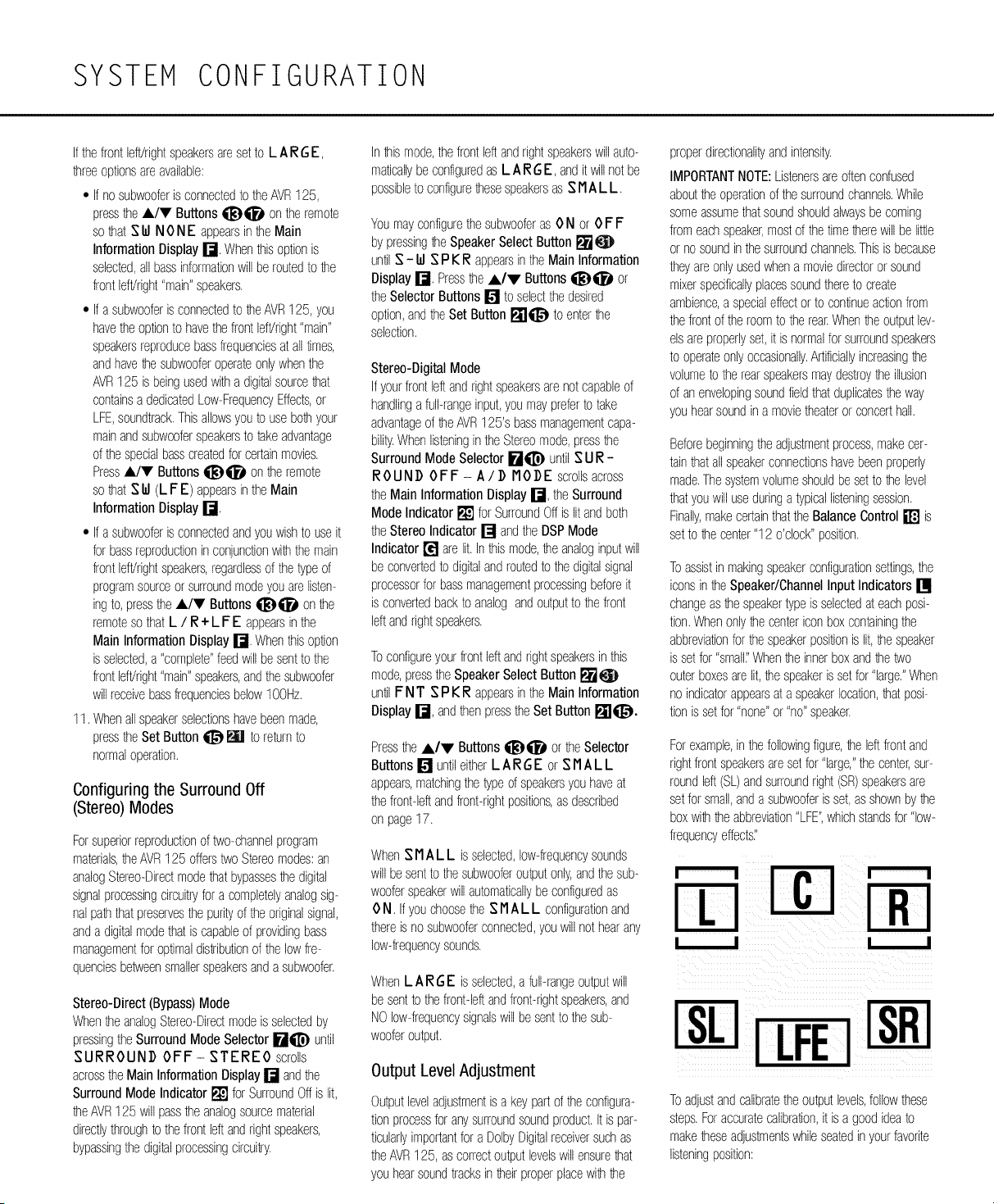
Toassistinmakingspeakerconfigurationsettings,the
iconsin theSpeaker/ChannelInput Indicators[]
changeasthespeakertypeis selectedat eachposi-
tion.Whenonlythe centericonboxcontainingthe
abbreviationforthespeakerpositionis lit,the speaker
is setfor "sma['Whenthe innerboxandthetwo
outerboxesarelit, thespeakeris setfor"large."When
no indicatorappearsat a speakerlocation,thatposi-
tion is setfor "none"or "no"speaker.
Forexample,inthefollowingfigure,the leftfrontand
rightfrontspeakersaresetfor "large,"the center,sur-
roundleft(SL)andsurroundright(SR)speakersare
setforsmall,anda subwooferis set,asshownbythe
boxwiththeabbreviation"LFE",whichstandsfor"low-
frequencyeffects,"
[LFEi
Toadjustandcalibratetheoutputlevels,followthese
steps.Foraccuratecalibration,it isa goodideato
maketheseadjustmentswhileseatedin yourfavorite
listeningposition:
SYSTEM CONFIGURATION
-. PuttheAVR125 inthe DolbyProLogicii moae
cy pressingtheSurroundMode Selector[]
on Defront panel,orcy pressingDe Surround
ModeSelector_ onthe remoteunt
DOLBY PRO LOGIC II-MOVIE
scrollsacrosstheMainInformationDisplay[]
andtheProLogic II IndicatorsIll[] light. ButtonO onthe remoteto comcletethe
0utcut _eve_aajus[memumngthetesttone_snot
aojus[mem.
available_nthe StereomodesHoweve_n De
DelaySettings
Stereo-Digitalmode.you may_rlmtheoutcut
Dueto thedifferentdistancesbetweenthefront-chart-
leVelSusingprogrammaterial,asaescrlceaon
page25, ne SEeakersandDe listeningposKioncomparedto
:nesurrounasceakersandthe istenlngposmon.De
2. PresstheTest Button O on the remote,
amoumof timeittakesfor soundto reach,ourears
T ES T F L Od B will accearintheMain fromthefont orsurrounaspeakersmaydiffer.YOU
InformationDisplay[] ariathe e_ersF L
ma,comcensateforthisdifferencethroughthe useof
NOTE:Thesubwooferout[ut levelisnot Jela}for thecenterchanne measureDe als[ance
aajusmcleusingthetesttone.TochangeDe fromthe creferredllsmnlngpositioninthe centerof
subwooferevel followDe SmCSfor0utcu[ Leve theroomto boththecenterchannels[ eakerand
TrimAajustmenton page25, eithertheleftor rlgntsFeaKer,
6. WhenyouhaveaajusmaDe outputso thatall Ifthe distancesareeoua_no furtherao;us[memis
channelshavethesameleve,cresstheTest recJlreaandthecenteraeia'_shouldce setto zero,If
Dedistanceto thefrontspeakers_sg-eaterthanthe
sistanceto tnecenmrspeaker,youmaywishtOrepo
sltlonthespeakersbymovingthefront-leftandfront-
rightspeakerscloserto the is[enlngposl[_onorthe
senmrsceakerfurtherawa,fromDe istenlngcositlon.
f reposl[ionlngof thesceakersis not posslcle,adjust
themnmraelaytime,aaalngonemllnseconaof center
cnannelaelayforever_footCloserto thelistening
3osKionDe centersceakeris thanthefrontsceaker,
willflashonceeachsecona,
3.Thetestnoisewi _mmealamlyceglnto clrculam sificsceakerclacemen[anaacousticconamonsr
amongthe s9eakersir a clockwiserotation yourlisteningroomorhometheater.
pausingateachpositionforthreeseconds,As Thefactorysemngs accrocriateformostrooms cut
De testnoiserotates.De sceakerEosiuonWillce
someinstallationscreateanuncommondistance
shownn the Main InformationDisplay[] betweenthefont andsurroundsoeakersthatmar
NOTE:Thisisa goodtimeto verifycat De musethe arnvaof font-channelsoundsto cecome
thedelaysettingsto adjustthesmlngto tailorthe sce- Forexamcle,f thefront-leftandfront-rightspeakers
ire eacn10 feetfromthe _smn_ngposKioranaDe
semercnannelspeakeris eightfeetaway.thedelayis
figureaas 10-8=2. suggestingan OCtlmalcenter
]ela',of twomilliseconds.
Tosetthedelastimes,followthesesteEs:
". PuttheAVR125 in theDolbyProLogicII-
sbeakershavebeenpropenyconnected.Asthe disconnectedfromsurrouna-cnannelsounas.
_es[noisecirculates,istento makecertainthat Toresj,nchronizethefrontandsurroundchannels,fol-
thesoundcomesfromthesceakerDOSIU0n 0Wthesesmcs:
shownin theMainInformationDisplay.Ifthe
1. MeasureDe a_stancefromthelistening/viewing
soundfroma sceakerlocationdoesNOTmatch
cositionto thefrontsceakers.
theCOSl[ionnalcateanthe display,turnthe
AVR125 off usincthe Main PowerSwitch []
andcheckthespeakerw_nngto makecertain
thateachsdeaker_sconnectedto the correct
ou[cu[terminal,
4.Aftercheckingfor sceakerclacement,letthe_est
2. Measurethe alstancefromthe stoning/viewing
C0SKIOD t0 the surround sceakers.
3. Subtractthedistancetothesurroundsseakem
fromthed_stanceto thefrontsoeakers.
MoviesmoaecypressingDe SurroundMode
Selector[] onthe frontcanelor cypressingthe
SurroundMode Selector_ onDe remora
unlDOLBY PRO LOGIC II- MOVIE
accearsn the MainInformationDisplay[] ana
theProLogic II Indicator[] ugntsup,
2, PressDe DelayButton _ _ ontheremote
orfrontcanekThewordsS R D EL AY wi
accearintheMain InformationDisplay []
3, PresstheSet Button _
cressDe _ Buttons qi_!_qi_i_onDe
roundsceakersarefivefeetaway,De optima
remoteorthe SelectorButtons[] on thefront delaytimeisfiguredas10-5=5, ThusinDIS
cane_foreachchannelto ceglnto cnncthemt( example,the dela!timeforDolbyDigitalshould
thesamelevel.Notethatwhenoneof the but- besetat fivemilliSeconds.
ionsis oushed,thetest noisearculauonw
b.Whensemngthedelaytimeforthe ProLogic
causeonthe channelbeingaojusmato giveyou
timeto maketheacustment.Wher yourelease modes,taketheresultof thesubtractiorano
De cu_ontnecirculationWillresumeafter15 add15 to obtaintheoptimaldelaytime,For
figurecalculamausingtheformulaenteredacove
accears in De display,
5. If onlyanalogsourcesWillce usec no acustmen[
_sneededfor thecenterchanneldelaj inthat
case cresstheSet Button _ _ to enterthe
surrounddelaysettingsintotheAVR125's mem-
ory.However,if you N ce usingalgl[alsources
andthecalculationsoutlinedaboveindicatethat
seconas,
5.Continueto adjusttheindividualsceakersunti
they_11havethesamevolume.Notethatacust-
-ents ShOUldce madewm DeA/V Buttons
_i_Dqi_l_onthe remoteortheSelector
Buttons[] on thefrontpanelonly.NOTthe
mainvolumecontrols.Ther cresstheSet
Button_ _1 to memorizethe change,If_oL
areusinga soundcressure(SPL/meterfor cre-
clse evelaajus[men[,setDe volumesothatDe
-eter reads75dB.C-WeignungSicw.
examole,if thefront_beakersare10 feetawa,
andthesurroundsoeakersarefivefeetawa,_, thecenterchanneldelayrequiresananjustmen[
theoctlma ]elaytime s figuredas continuewiththefollowingstecs
" }-5+15=20. Thus._nthisexaFrc e.the 6. Beforesettingthecenterchanneldela_time.make
ProLogic delayshouldbe setat20 ...... certaincat adigitalsourcehasbeenselected.
seconds. 7 Selectthe DolbyDigitalmodebypressingeither
NOTE:TheTheaterandHallmodesusea fixed,non- the SurroundModeSelector[] on thefront
aajusmcleaelaytime. canelor theSurroundMode Selector_ on
theremoteunu DOLBY DIGITAL
TheDolbyDigkalmodealsoinauaesaseearamseF
t_ngforthe centerchanneldela, modesincethedis- accears_ De Main InformationDisplay []
:rein natureof thesesignalsmakesthelocationof the
:entercnannelsceakermorecritical.TocalculateDe
a. Whensemngtnedelaytimefor the Dolb_
noiseclrculamandlistento seewhichchannel_ Digitalsurroundmode.the opumalaela}_lmeis 4. Adjustthedelaybmebypressingthe_/V
soundlouderthantheothers.Usin_thefrontleft theresultof thatsubtraction.Forexamom,if the Buttons li_D_i_i_on theremoteortheSelector
F L inthe display)sceakerasa reference frontsEeakersare10 feetawa andthesur- Buttons[] on thefrontcaneluntilthe delaytime
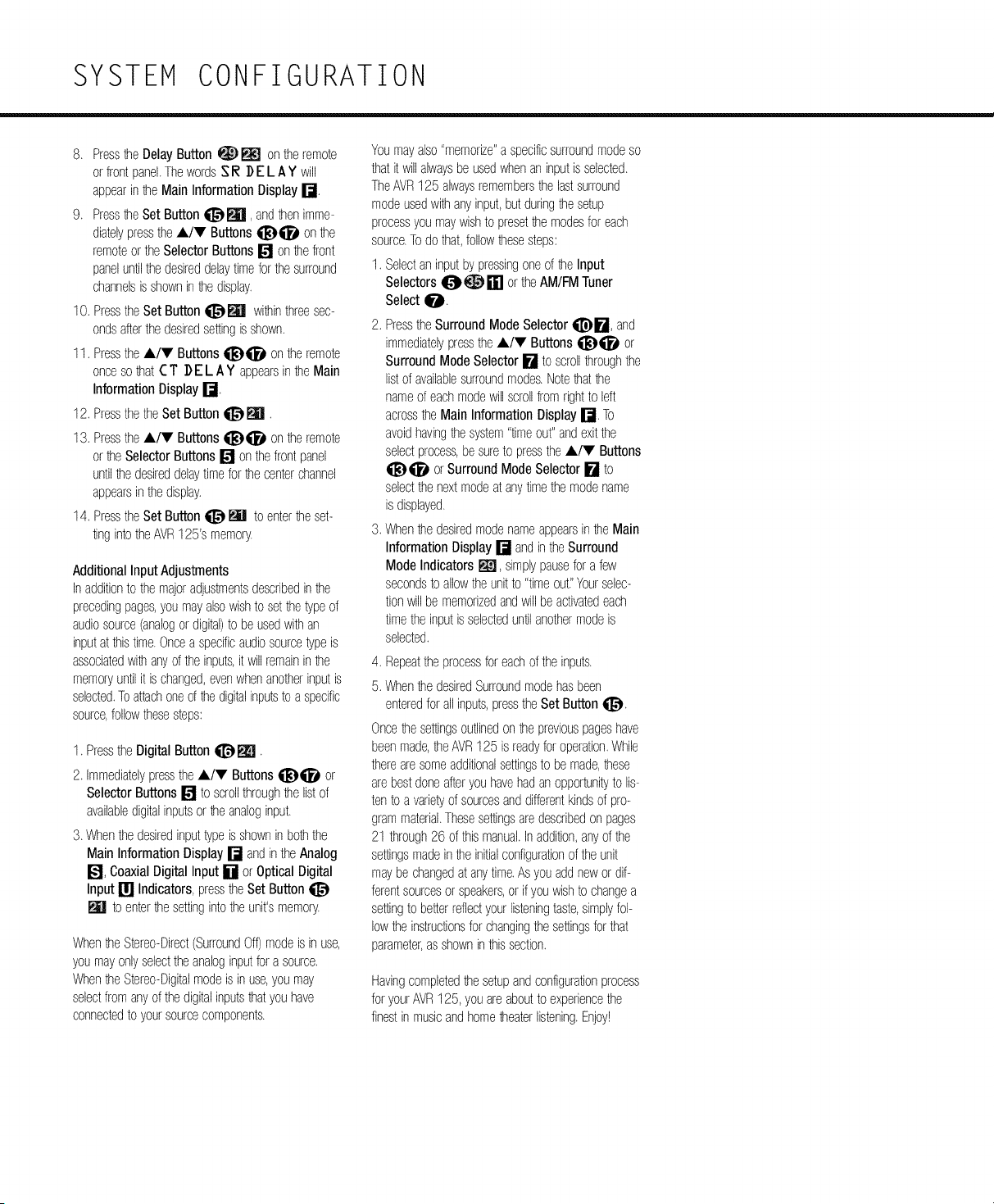
SYSTEM CONFIGURATION
8. Pressthe DelayButton _ _ on theremote
or frontpanel.ThewordsSI_ ]) E L A ¥ will
appearinthe Main InformationDisplayr-J.
9. Pressthe set Buttonqi]_, andthenimme-
diatelypresstheA/V Buttons qi_)qi_l_on the
remoteorthe SelectorButtons[] on thefront
paneluntilthedesireddelaytimeforthe surround
channelsis showninthedisplay.
10. Pressthe Set Buttonqi]_m withinthreesec-
ondsafterthedesiredsettingisshown.
11. Pressthe A/V Buttons qi_)qi_l_on theremote
onceso that([ T ]) EL AY appearsinthe Main
InformationDisplayr-J.
12. Pressthe theSet Button _ _.
13. Pressthe A/V Buttons qi_)qi_l_on theremote
or theSelectorButtons [] onthe frontpanel
untilthe desireddelaytimeforthecenterchannel
appearsinthedisplay.
14. Pressthe Set Button_ _ to enterthe set-
ting intotheAVR125's memory.
AdditionalInput Adjustments
In additionto the majoradjustmentsdescribedinthe
precedingpages,you mayalsowishto setthe typeof
audiosource(analogordigital)to be usedwithan
inputatthistime.Oncea specificaudiosourcetype is
associatedwithanyoftheinputs,it willremainin the
memoryuntilit is changed,evenwhenanotherinputis
selected.Toattachoneof thedigitalinputsto a specific
source,followthesesteps:
1. PresstheDigital Buttonqi_m.
2. Immediatelypressthe A/V Buttonsqi_qi_l_ or
SelectorButtons[] to scrollthroughthelistof
availabledigitalinputsor theanaloginput.
3. Whenthedesiredinputtypeis showninboththe
Main InformationDisplay[] andinthe Analog
[/:_J,CoaxialDigital Input [] or Optical Digital
Input [] Indicators,presstheSetButton
W to enterthesettingintotheunits memory.
WhentheStereo-Direct(SurroundOff)modeis in use,
youmayonlyselecttheanaloginputfora source.
WhentheStereo-Digitalmodeisin use,youmay
selectfrom anyof the digitalinputsthatyouhave
connectedto yoursourcecomponents.
Youmayalso"memorize"a specificsurroundmodeso
thatit willalwaysbeusedwhenan inputisselected.
TheAVR125 alwaysremembersthe lastsurround
modeusedwithanyinput,but duringthesetup
processyou maywishto presetthe modesfor each
source.Todo that,followthesesteps:
1. Selectan inputby pressingoneof the Input
Selectors_ _ [] or theAM/FMTuner
Selectqi_D.
2. PresstheSurround ModeSelectorql]_E_, and
immediatelypressthe A/V Buttons qi_)qi_l_or
SurroundMode Selector[] to scrollthroughthe
listof availablesurroundmodes.Notethatthe
nameof eachmodewill scrollfrom rightto left
acrosstheMain InformationDisplay[]. To
avoidhavingthesystem"timeout"andexitthe
selectprocess,be sureto presstheA/V Buttons
qi_qi_l_ or SurroundMode Selector[] to
selectthenextmodeatanytimethemodename
is displayed.
3. Whenthe desiredmodenameappearsinthe Main
Information Display[] andinthe Surround
Mode Indicators m, simplypausefor a few
secondsto allowtheunitto "timeout_'Yourselec-
tionwill be memorizedandwillbeactivatedeach
timetheinputisselecteduntilanothermodeis
selected.
4. Repeatthe processforeachofthe inputs.
5. Whenthe desiredSurroundmodehasbeen
enteredforall inputs,presstheSetButtonqi]_.
Oncethesettingsoutlinedonthepreviouspageshave
beenmade,theAVR125 is readyfor operation.While
therearesomeadditionalsettingsto be made,these
arebestdoneafteryouhavehadanopportunityto lis-
tento a varietyof sourcesanddifferentkindsof pro-
grammaterial.Thesesettingsaredescribedon pages
21 through26 of thismanual.Inaddition,anyof the
settingsmadeinthe initialconfigurationofthe unit
maybe changedat anytime.Asyouaddnewor dif-
ferentsourcesor speakers,or if youwishto changea
settingto betterreflectyourlisteningtaste,simplyfol-
lowtheinstructionsforchangingthe settingsforthat
parameter,asshowninthissection.
Havingcompletedthesetupandconfigurationprocess
for yourAVR125,you areaboutto experiencethe
finestinmusicandhometheaterlistening.Enjoy!
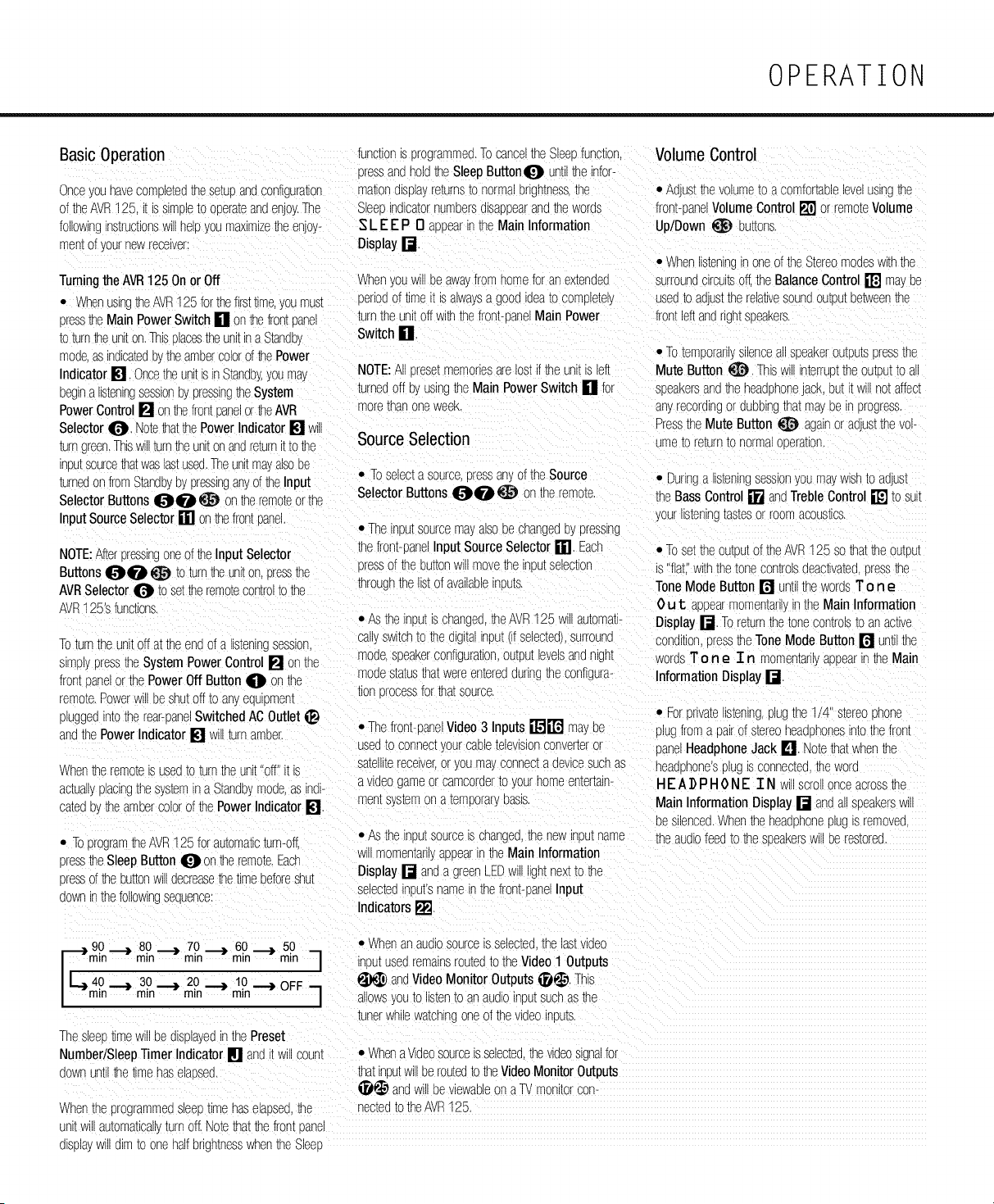
OPERATION
Basic Operation
Onceyounavecomoletedthesetupandconfiguration
of theAVR125. i_is slmE)_e_ooE)era_eandenjoy.The
followingns_rucuonswmhepyou maximize_e enjoy-
men_of yournewreceiver
_uncuonis programmed.TocanceltheSleeofunction. Volume Control
tressandholdhe SleepButton_l_ untilthe infor-
mationdisplayrevns _onormaorghtnessthe • AdJUS_TheVOlUme_oacomfortableleVelusing_e
SleeoindicatornumE)ersalsaE)E)eararia_e woras front-E)anelVolumeControl[] orremo_eVolume
Up/Down _ E)u_ons.
SLEEP 0 aE)E)earin_neMainInformation
Displayr-J
Turningthe AVR125On orOff When/ou wluDeawayfromhomefor anextended
• WhenusingtheAVR125forthefirsttime,youmust E)eriodof timeit is alwaysa gooa_aea_ocompletely
presstheMain PowerSwitch[] on _e frontDane turntheunitoff withthefront-saneMain Power
toturntheuniton.Thisolacestheunitina Standb,. Switch []
moa6asina_ca_eaE)theambercolorof thePower
Indicator[] Oncetheunit s inStandby,youmas NOTE:A E)resetmemoriesarelostif theunitis left
• Whens_enlngn oneof the Stereomodeswiththe
surrounacircuitsoft.theBalanceControl [] ma!.De
used_oanJSttherelawesounaowE)u_between_ne
frontleftandrightsseakers.
• Toten-ooraruysilenceallsE)eakeroutE)utsDresstne
Mute Button _. ThisA n_erruE)ttheoutE)u__oa
E)eglna ns_enlngsessionby pressingtheSystem turnedoff E)yusingthe Main PowerSwitch [] for soeakersandtheheadphoneJACK,but it willnotaffect
PowerControl[] onthefrontoanelor theAVB morethar oneweek.
Selector_lP. NotethatthePowerIndicator[]
_urngreenThiswillturntheunitonandre_urn[ tothe Source Selection
inE)utsourcethatwas_stused.TheunitmayalsoDe
turnedon fromStandbybypressinganyof theInput • TOse_ec_a sourceE)ressanyofthe Source • Duringa listeningsessionyoumaywishto adjusI
SelectorButtons_lDqi_D_ onthe remoteor _ne SelectorButtons_ID_i_D_ on the remote, the BassControl[] anaTrebleControl[] _osul_
InputSourceSelector[] on thefrontE)ane. yourns[ening_as_esor roomacoustics.
• Thein[u_sourcema,.alsobe cnanyeaE)ypressing
NOTE:AfterE)ress_ngoneof theInput Selector thefront-panelInput SourceSelector[]. Eacl_
Etessof the buttonN move_neirE)u[selection
Buttons_l_i_ _ to turntheuniton.E)ressthe
AVRSelector0 to settheremotecontrolto the
AVR125'sfunctions.
Toturnthe unitoffat theendof a s_enlncsession.
s_mplypresstheSystemPowerControl[] on the
frontE)anelor thePowerOff ButtonO on the
throuonthe listofavallaE)leIndU[S.
• ASthe nputis changed,theAVR125 wi automati-
cal, switch_o_nedigitalinput(ifselected),surround
mode.sE)eakerconfiguration,output_evelsandnight
odestatus_na_wereenteredaunngtheconfigura-
tion srocessforthatsource.
remote.Powerwill beshutoff to anyequl_men_
pluggedin_o_nerear-saneSwitchedACOutlet _ • Thefront-caneVideo3 Inputs_J[r_lj mayE)e
andthePowerIndicator [] Will_urnamE)er.
usea_oconnec[/ourcaE)letelevisionconver[eror
sa[elll[ereceiver,or youma_connecta devicesuchas
When_e remo_eis usea_o_urnthe unit"oft [ is
avlaeogameor camcoraer_o,'ourhomeentertain-
ac[uauypacingthe systemna Standb',mode.asine
men_s,,s_en-on a_emporarsE)as_s.
ca_eaE),_theamuercolorof thePower Indicator[]
• TcprogramtheAVR125forautomaticturn-oft.
• AS the IRE)U[ source IS cnanoed,thenew nE)ut name
_nyrecoralngorauE)E)lng_na_mayDeinprogress.
Press_neMute Button_ againoraajustthe vc-
ume _.0return to norma oDerauon,
• Toset thecutoutoftheAVR125 so_a_theou_E)u_
s "flat withthetonecontrolsdeactivated.Dressthe
ToneModeButton [] un[i the wordsT o n e
0 u 1: aE)E)ea_"momen_an,inthe MainInformation
Display[] Toreturnthetonecontrols_oanacwe
conaKioncressthe ToneModeButton [] untilthe
_vorasT o n e T n momen_any appearinthe Main
Information Display[].
• Foranva[eus_enlng,plugthe1/4" stereoonone
plugfroma pairof stereoheadE)honesintothefront
panelHeadphoneJack [] Notethatwhenthe
headphone'splugs connec[ea_newora
HEADPHONE IN _ scrOllonceacrossthe
MainInformationDisplay[] anaansE)eakerswl
be silenced.Whentheheadphoneplugis removea.
theaudiofeed_othesE)eaKersWillDeres_orea.
presstheSleepButton 0 onthe remote.Each wulmomen[aruyaE)E)earinthe Main Information
pressoftheE)u[[onwl ]ecreasethetimebeforeshut Display [] anda greenLEDwi gn_nextto the
selectedinou[snameinthefront-panelInput
downn thefollowingsequence
Indicators[].
F___90 ._) 80 _ 70 _ 60 _ 50 • Nhenan aUdiOsourceISselected,the as[VideO
rain rnin rain rain rnin --I inputusedremainsroutedto theVideoI
Outputs
40 ,_) 30 ,_} 20 ,_) 10 ,_) OFF _ _ andVideoMonitor Outputs_. This
/
I °rain min min min / allowsyouto listento anaudioinEut suchasthe
tunerwhilewatchingoneofthevideoinE)u_s.
ThesleeE)_lmeWillE)ealsplayedinthePreset
Number/SleepTimer Indicator[] _nait w coun_ • Whenavideosourceisselectedthewaeosignalfo_
downuntilthetimehaselaE)sea, thatinE)u[w be routedtothe VideoMonitorOutputs
_ andwillbeviewableon a TVmonitorco_-
Whenthe programmeasleeFtimehaselaE)sea,the neckedto theAVR125.
unKwl _.u[oma[ical.turnoff. Notethatthefrontoane_
alspla_w aimto onehalfbrightnesswhentheSleeE
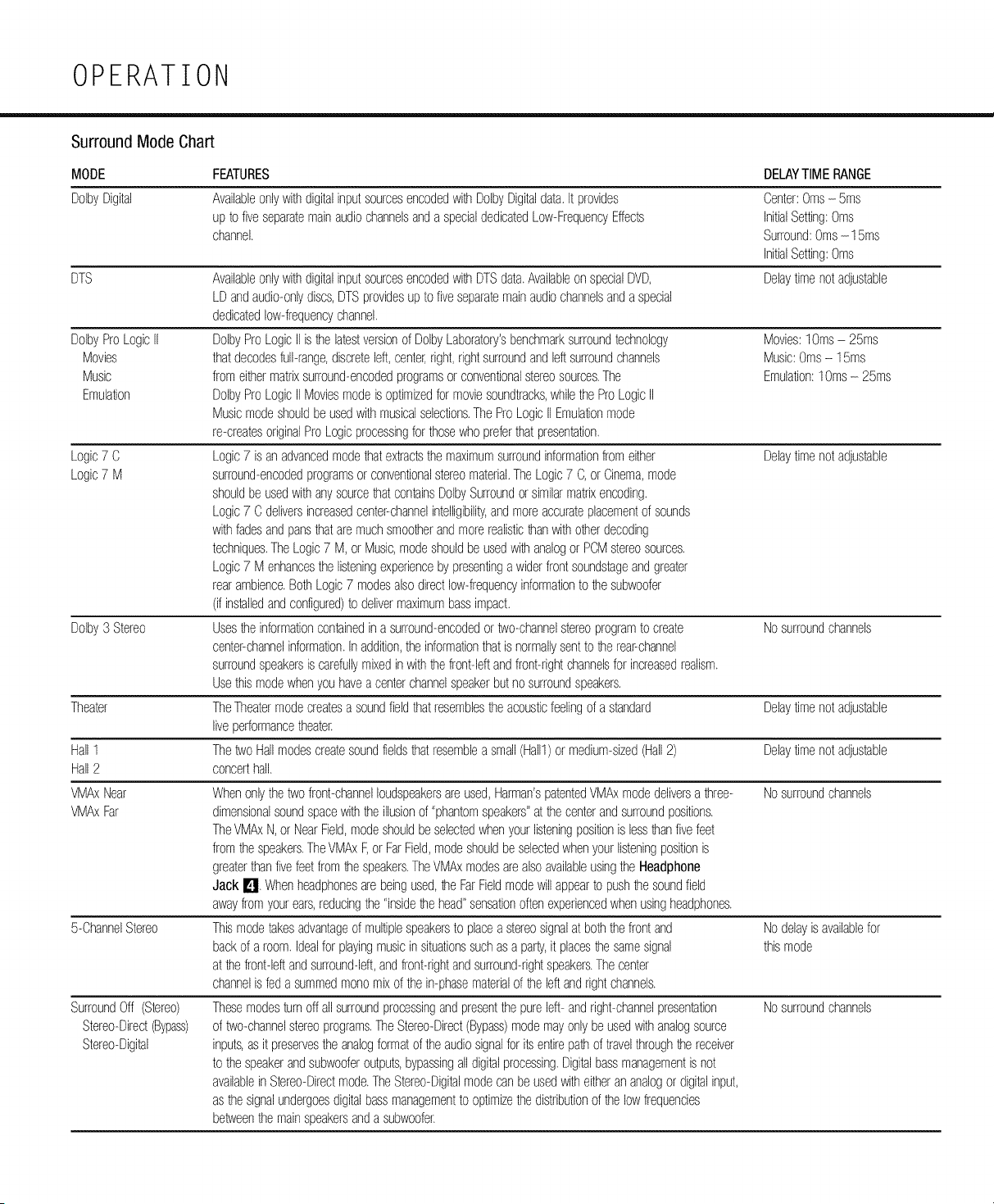
OPERATION
m
Surround Mode Chart
MODE
DolbyDigital
DolbyProLogicII
Movies
Music
Emulation
Logic7 C
Logic7 M
FEATURES DELAYTIMERANGE
5-ChannelStereo
SurroundOff (Stereo)
Stereo-Direct(Bypass)
Stereo-Digital
AvailableonlywithdigitalinputsourcesencodedwithDolbyDigitaldata.It provides
upto fiveseparatemainaudiochannelsanda specialdedicatedLow-FrequencyEffects
channel.
Center:Oms- 5ms
InitialSetting:Oms
Surround:Oms- 15ms
InitialSetting:Oms
DelaytimenotadjustableDTS AvailableonlywithdigitalinputsourcesencodedwithDTSdata.Availableon specialDVD,
LDandaudio-onlydiscs,DTSprovidesupto fiveseparatemainaudiochannelsanda special
dedicatedlow-frequencychannel.
DolbyProLogicII isthelatestversionof DolbyLaboratory'sbenchmarksurroundtechnology
thatdecodesfull-range,discreteleft,center,right,rightsurroundandleftsurroundchannels
from eithermatrixsurround-encodedprogramsorconventionalstereosources.The
DolbyProLogicII Moviesmodeisoptimizedformoviesoundtracks,whilethe ProLogicII
Musicmodeshouldbe usedwithmusicalselections.The ProLogicIIEmulationmode
re-createsoriginalProLogicprocessingforthosewhopreferthatpresentation.
Logic7 is an advancedmodethatextractsthemaximumsurroundinformationfrom either
surround-encodedprogramsor conventionalstereomaterial.TheLogic7 C,or Cinema,mode
shouldbe usedwithanysourcethatcontainsDolbySurroundor similarmatrixencoding.
Logic7 C deliversincreasedcenter-channelintelligibility,andmoreaccurateplacementof sounds
withfadesandpansthataremuchsmootherandmorerealisticthanwithotherdecoding
techniques.TheLogic7 M, or Music,modeshouldbe usedwithanalogor PCMstereosources.
Logic7 M enhancesthe listeningexperiencebypresentinga widerfrontsoundstageandgreater
rearambience.BothLogic7 modesalsodirectlow-frequencyinformationto thesubwoofer
(if installedandconfigured)to delivermaximumbassimpact.
Dolby3 Stereo Usestheinformationcontainedina surround-encodedortwo-channelstereoprogramto create Nosurroundchannels
centepchannelinformation.Inaddition,the informationthatisnormallysentto the rear-channel
surroundspeakersis carefullymixedinwiththefront-leftandfront-rightchannelsfor increasedrealism.
Usethismodewhenyou havea centerchannelspeakerbutno surroundspeakers.
Theater TheTheatermodecreatesa soundfieldthatresemblestheacousticfeelingof a standard Delaytimenotadjustable
liveperformancetheater.
Hall1 ThetwoHallmodescreatesoundfieldsthatresemblea small(Hall1)ormedium-sized(Hall2) Delaytimenotadjustable
Hall2 concerthall.
VMAxNear Whenonlythe twofront-channelloudspeakersareused,Harman'spatentedVMAxmodedeliversa three- Nosurroundchannels
VMAxFar dimensionalsoundspacewiththeillusionof "phantomspeakers"atthecenterandsurroundpositions.
TheVMAxN,or NearField,modeshouldbe selectedwhenyourlisteningpositionis lessthanfivefeet
fromthespeakers.TheVMAxF,or FarField,modeshouldbeselectedwhenyourlisteningpositionis
greaterthanfivefeetfromthespeakers.TheVMAxmodesarealsoavailableusingtheHeadphone
Jack I_lJ.Whenheadphonesarebeingused,theFarFieldmodewillappearto pushthe soundfield
awayfromyourears,reducingthe "insidethehead"sensationoftenexperiencedwhenusingheadphones.
Thismodetakesadvantageof multiplespeakersto placea stereosignalat boththefrontand
backof aroom.Idealfor playingmusicin situationssuchasa par_,it placesthesamesignal
atthefront-leftandsurround-left,andfront-rightandsurround-rightspeakers.Thecenter
channelis fed a summedmonomixof the in-phasematerialof the leftandrightchannels.
Thesemodesturnoff all surroundprocessingandpresentthe pureleft-andright-channelpresentation
of two-channelstereoprograms.TheStereo-Direct(Bypass)modemayonlybe usedwithanalogsource
inputs,asit preservestheanalogformatofthe audiosignalforits entirepathof travelthroughthereceiver
to thespeakerandsubwooferoutputs,bypassingall digitalprocessing.Digitalbassmanagementisnot
availablein Stereo-Directmode.TheStereo-Digitalmodecanbeusedwitheitherananalogor digitalinput,
asthe signalundergoesdigitalbassmanagementto optimizethedistributionof the lowfrequencies
betweenthemainspeakersanda subwoofer.
Movies:lOms- 25ms
Music:Oms- 15ms
Emulation:lOms - 25ms
Delaytimenotadjustable
Nodelayis availablefor
thismode
Nosurroundchannels
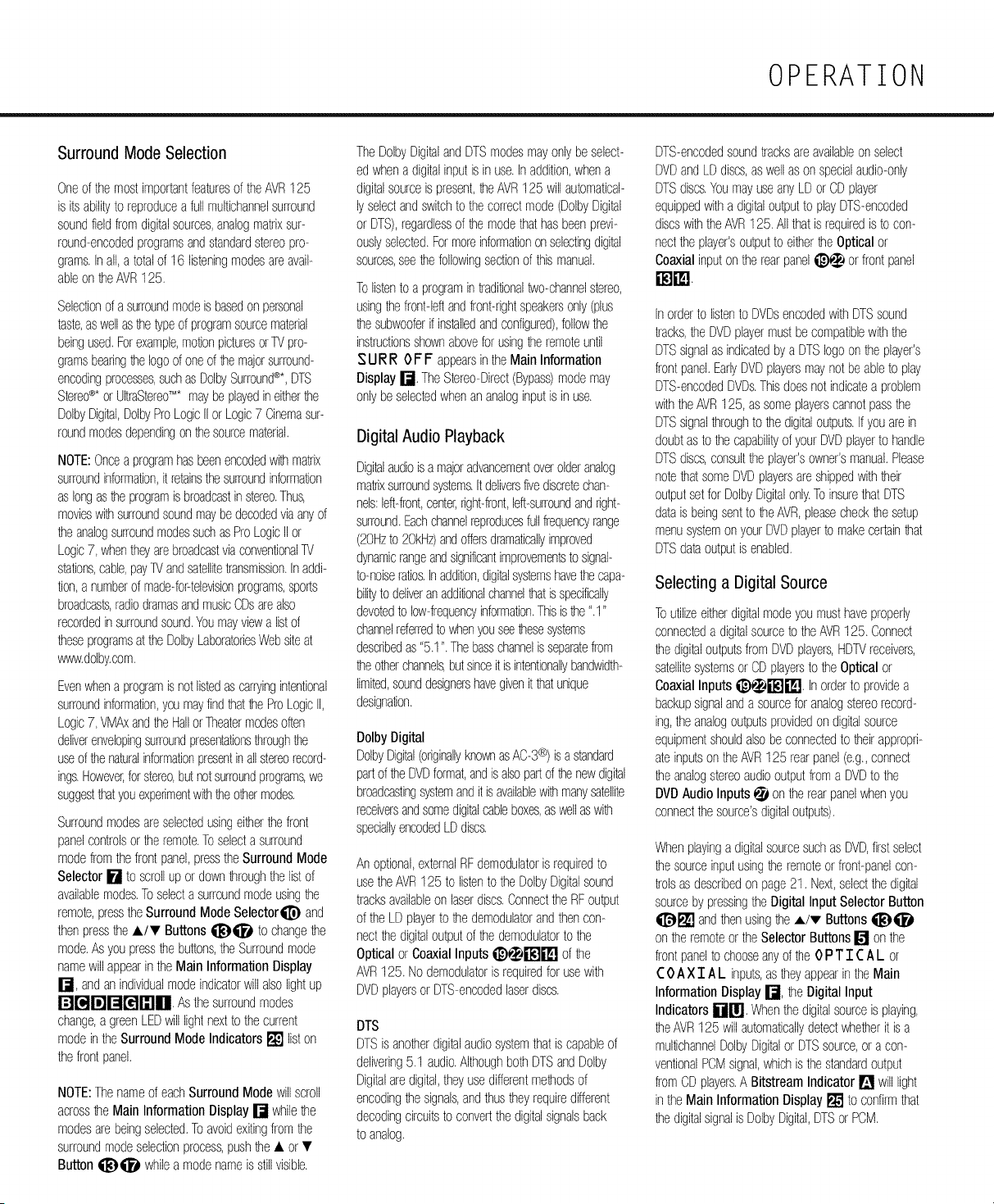
OPERATION
Surround Mode Selection
Oneofthe mostimportantfeaturesof theAVR125
is its abilityto reproducea fullmultichannelsurround
soundfieldfromdigitalsources,analogmatrixsur-
round-encodedprogramsandstandardstereopro-
grams.Inall,a totalof 16 listeningmodesareavail-
ableon he AVR125.
Selectionof asurroundmodeis basedon pemonal
taste,aswellashe typeof programsoumematerial
beingused.Forexample,motionpicturesorTVpro-
gramsbearinghe logoof oneof he majorsurround-
encodingprocesses,suchasDolbySurround®*,DTS
Stereo®*orUltraStereo'M*maybeplayedineitherthe
DolbyDigital,DolbyProLogicIIor Logic7 Cinemasur-
roundmodesdependingon he sourcematerial.
NOTE:Oncea programhasbeenencodedwih matrix
surroundinformation,it retainsthesurroundinformation
aslongastheprogramisbroadcastinstereo.Thus,
movieswih surroundsoundmaybedecodedviaanyof
he analogsurroundmodessuchasProLogicIIor
Logic7, whentheyarebroadcastviaconventionalTV
stations,cable,payTVandsatellitetransmission.Inaddi-
tion,a numberof made-for-televisionprograms,sports
broadcasts,radiodramasandmusicCDsarealso
recordedinsurroundsound.Youmayviewa listof
heseprogramsatthe DolbyLaboratoriesWebsiteat
www.dolby.com.
Evenwhena programisnot listedascarryingintentional
surroundinformation,youmayfindhat he ProLogicII,
Logic7, VMAxandhe HallorTheatermodesoften
deliverenvelopingsurroundpresentationsthroughthe
useof thenaturalinformationpresentinallstereorecord-
ings.However,forstereo,bL_notsurroundprograms,we
suggestthatyouexperimentwiththeothermodes.
Surroundmodesareselectedusingeiher thefront
panelcontrolsorhe remote.Toselecta surround
modefromthefrontpanel,presstheSurroundMode
Selector[] to scrollup ordownhroughthe listof
availablemodes.Toselectasurroundmodeusinghe
remote,presstheSurroundMode Selectorql]_and
thenpressthe A/T Buttonsqi_)qi_) to changehe
mode.Asyou pressthebuttons,theSurroundmode
namewillappearin theMain InformationDisplay
r-J, andanindividualmodeindicatorwillalsolightup
r_['_Jr_Jr_r_[n[]. Asthesurroundmodes
change,agreenLEDwilllightnextto thecurrent
modeintheSurround ModeIndicators[] liston
thefrontpanel.
NOTE:Thenameof eachSurroundModewill scroll
acrosshe MainInformationDisplay[] whilethe
modesarebeingselected.Toavoidexitingfromthe
surroundmodeselectionprocess,pushhe • or •
Buttonqi_)qi_) whilea modenameis stillvisible.
TheDolbyDigitalandDTSmodesmayonlybe select-
ed whenadigitalinputisin use.Inaddition,whena
digitalsourceis present,he AVR125 willautomatical-
lyselectandswitchto thecorrectmode(DolbyDigital
or DTS),regardlessof he modethathasbeenprevi-
ouslyselected.Formoreinformationonselectingdigital
sources,seehe followingsectionof thismanual.
Tolistento a programin traditionaltwo-channelstereo,
usinghe front-leftandfront-rightspeakersonly(plus
he subwooferif installedandconfigured),followthe
instructionsshownaboveforusingthe remoteuntil
SURR OFF appearsintheMain Information
Display[]. TheStereo-Direct(Bypass)modemay
onlybe selectedwhenananaloginputis inuse.
Digital Audio Playback
Digitalaudioisa majoradvancementoverolderanalog
matrixsurroundsystems.Itdeliversfivediscretechan-
nels:left-front,center,right-front,left-surroundandright-
surround.Eachchannelreproducesfullfrequencyrange
(20Hzto 20kHz)andoffersdramaticallyimproved
dynamicrangeandsignificantimprovementsto signal-
to-noiseratios.Inaddition,digitalsystemshavethecapa-
bilityto deliveranadditionalchannelhat isspecifically
devotedto low-frequencyinformation.Thisishe ".1"
channelreferredto v_enyouseehesesystems
describedas"5.1". Thebasschannelisseparatefrom
he oherchannels,butsinceit is intentionallybandwidth-
limited,sounddesignershavegivenit hat unique
designation.
DolbyDigital
DolbyDigital(originallyknownasAC-3®) isa standard
partof he DVDformat,andisalsopartofhe newdigital
broadcastingsystemandit isavailablewih manysatellite
receiversandsomedigitalcableboxes,aswellaswih
speciallyencodedLDdiscs.
An optional,externalRFdemodulatoris requiredto
usetheAVR125to listento the DolbyDigitalsound
tracksavailableon laserdiscs.ConnecttheRFoutput
of theLD playerto he demodulatorandthencon-
nectthedigitaloutputof the demodulatorto the
Optical or CoaxialInputsi_)_i'l_'ti'l_lJ of the
AVR125. Nodemodulatoris requiredfor usewith
DVDplayersor DTS-encodedlaserdiscs.
DTS
DTSis anoherdigitalaudiosystemthatiscapableof
delivering5.1 audio.AlthoughbothDTSandDolby
Digitalaredigital,theyusedifferentmehodsof
encodinghe signals,andthustheyrequiredifferent
decodingcircuitsto convertthedigitalsignalsback
to analog.
DTS-encodedsoundtracksareavailableon select
DVDandLDdiscs,aswellason specialaudio-only
DTSdiscs.YoumayuseanyLDor CDplayer
equippedwitha digitaloutputto playDTS-encoded
discswih theAVR125. Allthatis requiredis to con-
nectthe player'soutputto eiher he Optical or
Coaxialinputontherearpaneli_)_ or frontpanel
Inorderto listento DVDsencodedwithDTSsound
tracks,the DVDplayermustbecompatiblewiththe
DTSsignalas indicatedbya DTSlogoontheplayer's
frontpanel.EarlyDVDplayersmaynot beableto play
DTS-encodedDVDs.Thisdoesnotindicatea problem
withtheAVR125, assomeplayerscannotpassthe
DTSsignalthroughto he digitaloutputs.Ifyouarein
doubtasto he capabilityof yourDVDplayerto handle
DTSdiscs,consulttheplayer'sowner'smanual.Please
notehat someDVDplayersareshippedwiththeir
outputsetforDolbyDigitalonly.ToinsurethatDTS
datais beingsentto he AVR,pleasecheckhe setup
menusystemon yourDVDplayerto makecertainhat
DTSdataoutputis enabled.
Selecting a Digital Source
Toutilizeeitherdigitalmodeyoumusthaveproperly
connecteda digitalsourceto theAVR125. Connect
he digitaloutputsfromDVDplayers,HDTVreceivers,
satellitesystemsor CDplayersto he Opticalor
CoaxialInputs i_)_i'l_'ti'l_lJ.Inorderto providea
backupsignalanda sourceforanalogstereorecord-
ing,theanalogoutputsprovidedon digitalsource
equipmentshouldalsobeconnectedto heir appropri-
ateinputson theAVR125 rearpanel(e.g.,connect
he analogstereoaudiooutputfrom a DVDto the
DVDAudio Inputs_ on therearpanelwhenyou
connectthesource'sdigitaloutputs).
Whenplayingadigitalsourcesuchas DVD,firstselect
he sourceinputusinghe remoteor front-panelcon-
troisas describedon page21. Next,selectthedigital
sourceby pressingtheDigital Input SelectorButton
qi_! andthenusingthe,A/v Buttons qi_)qi_)
onhe remoteor theSelectorButtons[] on the
frontpanelto chooseanyofthe0 P1"I C AL or
C0 AX I AL inputs,ashey appearinthe Main
InformationDisplay[], theDigital Input
Indicators[][]. Whenthedigitalsourceisplaying,
he AVR125 willautomaticallydetectwheher it is a
multichannelDolbyDigitalor DTSsource,ora con-
ventionalPCMsignal,whichisthe standardoutput
fromCDplayers.A Bitstream Indicator[] will light
inthe Main InformationDisplay[] to confirmthat
he digitalsignalis DolbyDigital,DTSorPCM
OPERATION
DigitalStatus Indicators definition,a 96/24 sgnalmayDesuppllea0% viaa
Whent alg[al sourceis playing,theAVR125 senses alglm nDUL
_ne_ e of ul_s_eamaam_na_s present,using_nls
'nformationthecorrectsurroundmodewillautomati- Inadditionto the bitstrean"inalca[ors,theAVF125
Calljbeselected.Forexample.DTSbitstreamsNU "eaturesa setof uniquecnanneHnDu[nalca_orsthat
causetheunl[to swKcnto DTSaecoglng,andDolby tellyouhowmanychannelsof digitalinformationare
Dig[al Dim[reamswl enableDolbyDigitaldecoalng oeingrecelveaand/orwhetherthealgl[alslgnais
Nhen_neunitsensesPCMdatatom CDsor LDs.you _nmn'uDma.
mayselec[ant of the standardsurroundmouessuch
Night Mode
A specialfeatureof DolbyDigitalisthe Nigh_mode,
wbchenablesDolbyDigitalinpu_sources_oDeplayea
backwithfulldialcguein[elllglOlll_whilereducingthe
minimumpeaklevelb!.]/_ to ]/3. ThisDrevenm
aorup_lycudtransitionsfromols[urelngo_ers wl[nou_
................. of the digitalsource.TheNight
-oae isavailableonlywhenDolbyDigitalsignalswith
sDeclaaa_aarebeingplayea.
asDolbyProLogicIIor LogC7. Sincetherangeof TheseindicatorsaretheL/C/R/SL/SR/LFEle_[ersthat
avallaolesun'ounamouesis aeDendentonthe typeof areinsidethe centerboxesof the Speaker/Channel TheNightmodemaybeengagedwhena DolL,
aigKalaa_athatis oresem_e AVR125 usesa /ane[y Input Indicators[] in thefrontDaneMain DigitalDVDis playingbypressingtheNight Mode
of indicatorsto let ou knowwhattypeof signais InformationDisplay[] Whenastandardanaloc Button_ on_neremora.NextDressthe ,a,/v
present,Thisw_ helpyOU_0unaers_anathecnolce signalis inuse.orlythe 'L"and"R"indicatorsw Buttonsli_ to selecteitherthe mlaglerangeor
of modes ight.ts analogsignalsnaveonlyleftandrightchart- maximum-corrsressionversionsof the Nightmode.To
nels respecwely. _urn_neNijht modeoff,pressthe A/v Buttons
Nhena alg[al sources playing,a Bitstream qi_qi_il_untilthe messageintheMain Information
Indicator[] willlign_to showwhichtype if signalis Digitalsignals,however,mayhavetwo.fiveor sixsep- Display[] reaas]) - R 0 f f. WI-anthe Night
playing aratechannels,aepena_ngon theprogramma[anal, moaeisacwe.theNightMode Indicator [] w
meme[noaof transmissionandthewaj inwnlclli[ also {_nT
]): Whenthe DOLBYD indicatorghts.a Dolby wasencoded,Whena agKalslgna s playing,_e let-
Dig[al olm_rean'is oelngreceived.Depenalngon the tersintheseindicatorsWll in[ inresponse_o_e IMPORTANTNOTESONDIGITALPLAYBACK:
se_ungsonthe sourceplayeranaspecificsurrouna specificsignalbeingrecelvea,i_is -eormn__onora _ When_nealgKalpla_backsources smDDeaor in a
'nformationandnumberof channelsonthedisc.a thatalthoujh DolbyDigital,for examFe. isreferredto PauseFastForwardorChapterSearchmode,_ne
numberof surroundmouesareqossible.Fordiscs asa "5.1" sTsmm,no_all DolbyDigitalDVDsor pro- aid[alaualoaa-,aWillmomenmruystop,tna the
Wl[hfu 5.1 aualo,onlythe DolbyDigitalandVMAx gramsareencodedwith5.1 channels.Thusi[ is cnanne[ qsKionle_ersnslaetheSpeaker/
mouesareavailable,Whenthe DolbyDigitalsignalis someumesnormalfora DVDwitl-a DolbyDigital ChannelInput Indicators[] N flashThisis
on, rwo-cnannel,youmayalsoselectfromtheLocc 7 soundtrackto triggeronl_me4: ana"R"indicators, normalana Icesno[ nalcama oroblemwitheither
Cinema!Music.Hal 1/2.Theater.DolbyProLogic theAVR125 orthesourcemacnlne.TheAVR125
MoviesMusicor Emulationor Doltsj3 Stereomodes. NOTE:Man',DVDdiscsarerecordedwithboth"5.1" w re[urn_oalgi[aip_aybackassoonas_neaam_s
NhentheAVR125sensesa 2,0-channelDob. ana"2.0"versionsof thesamesound-track,When
Dig_m_signal.]neunKWl au_omaucallyselectDolby playinga DVD.alwaysbe certainto checkthetypeof
ProLocc as_e surrounaprocessingmoae,tna mamrlalon thedisc.Mostdiscsshowthis nformation
boththeDolbyDigital [] andDolbyProLogicII n theformof a listing}r sonin thebackof thedisc
[] surrouna-modeina_ca[orswl ght inaccordance acket.Whena discdoesoffermumblesouna_rack
with_nereaulremenmof Dolb_Laooramnes choicesyou mayhaveto makesomeadjus_menm_c
tvailableandwhenthe machine_sn as_anaara
plasmoae.
2.AlthOL_ntheAVR125 wmaecogevlr_uaBal DVE
swesCDsandHDTVsources,i[ s possiblethat
somefuturedigitalsourcesmayno_Decompa_lDi6
withtheAVR125
yourDVDplayer(usuauywiththe "AudioSelect"button
]) T._: Whenthe DTSindicatorlignm,a DTSbitstream or ina menuscreenon the alsc _osenaafu 5.1 3. Notethatno_all ]lgKallyencoaeaprogramscon[air
is beingreceived.Whenthe unitsensesthistypeof feedto theAVR125. It is alsopossibleforthe typeof full5.1-channelaudio.Consultthe programgulae
aam.or._theDTSmodema_Deusea. signalfeed_ocnangeduringthe courseof a DVD thataccompaniesthe DVDor laserdiscto deter-
playback.Insomecasesthe previewsof specialmare-
minewhich_pe of audiohasbeenrecordedon the
PC 11:Whenthe PCMna_ca[orlight&asmnaara rlalWillOP_Derecoraeain2.0 aualc Williethemalr disc.TheAVR125 Willautomaticallysensethe type
PulseCodeModulation.or PCM.s gnal s Delnc "ea_ureis avauaulein5,1 audio.As longasyourDVD sf digitalsurroundencoa_nguseaanaagjus[to
received.Thisisthetypeof diglm_aua_ouseauy con- playerissetfor 6-channeloutDu_theAVR125 w accommoaamm
e%onalcon-Dac_alscarialaseraiscrecoralngs au_oma_lca.._sensechangesto the bitstreamand
Nhena PCMbitstreamis Dresen_.a_mouesexcept channelcountandreflectthemin thesena_camrs. 4. Whena alg[alsources playing,you mayno_De
DolbyDigtal andDTSareavailable, IDle_0selectsomeofthe analogsurrounamoues
ThelettersuseduytheSpeaker/ChannelInput suchasDolbyProLogicII, Dolb_3 Stereo.Hall.
Whena hign-resolu_lon96kHz/24-bitPCMsigna_is Indicators[] alsoflashto indicatewhena bitstream Theateror Logic7.
aemcmathe nameof thecurrentsourceinDu[foI- hasbeeninterru_ma.Thiswi happenwhena die[a
5. Whena DolbyDigitalor DTSsourceis olaylna[
oweaDV9I-,K. forexamole.])V]) / 91-,K WillDe Irou_sourceisselecmabeforethe playbacks_arm,or
olsplayeain theMain InformationDisplay []. This whena dig[alsourcesuchasa DVDis caused.The s not qOSSlDleIOmakean analogrecoralngusing
typeof programmamrla_canbe foundon speclaB flashinoina_ca_omremlnayouthattheplaybackhas
markeddiscs_na_wererecoraequsinga highersam- stoDDeddUetOthe aosenceof a digKalsignalanano_
piingratethanthe44kHzor 48kHztypicallyuse(]on througnan_faultof theAVR125.Thisis norma ana
compactdiscs,TheStereo-Digital(SurroundO_ the dgKaplaybackwillresumeoncetheplaybad s
moaeWillDeavailable_oprocessa 96/24 signal.The startedac-]in
theTape_ _ndVideoI AudioOutputs_,
However.the algl_alsignalswmDesassedthrough
to theOptical_ andCoaxial_) DigitalAudio
Outputs
Stereo-Analog moaeWillnot De availablesince, Dy
OPERATION
PCMAudioPlayback
PCM PulseCodeModulatioristhenoncorrDressed
] gl_alaudioSys[emusedfor comdac[DISCSandlaser
discs,Thedig[alclrcuKsn theAVR125 arecanableof
hgn-quau_algltal4o-_nalocdecoding,andthej ma_
Desonnecteaalrectly_othedigitalaudiooutputofyoui
CDor LDplayer
2 PresstheAM/FMTunerSelectButton0 or umlnaedandflashinthe Main Information
AM/FM BandSelector[] againto switch Display_-'-'_,
betweenAM andFMsothatthedesiredfrequency
2,Withinfiveseconds,9ressthe Numeric Keys
Dana is selected,
correspondingto thelocationwhereyouwiShtO
3. PresstheTuningModeButton[] _ _oselec! storethisstation'sfrequenc!Onceenmreathe
_nuaor aumrnauc_un_ng erese[numberw _uoear_n_nePreset
Number/SleepTime DisplayIll,
inautomatic_unincmode.theAUTOIndicator[]
Connectionsm_yDemadeto eitherthereap3ane
Opticalor CoaxialInputsi_)_ orthefront-oanel _s umlnamon theMain InformationDisplay[] 3, R@eatthe processaftertuninganya@monals[a-
Opticalor CoaxialDigitalInputsi"l_Ji'l_lJ. _nathe _unerWillsloponly_.tthosestationsthat tlons_oDeorese_.
_vea s_gnas[rongenougn_obe receivedwff
Tc stento a PCMdig_m_source,firstselecttheirgutfor _ccep_aD_equaw. RecallingPresetStations
thedesiredsource',e.g.CD),Next.pressthe Digital • Tomanua selecta stationprewou%entereain the
InputSelector[]@ andthenusetheA/V WhentheAUTOIndicator[] is not illuminated xese[memory,DresstheNumericKeys _ that
Buttonsqi_)qi_) ontheremoteor theSelector _netuneris n a manualmoaeanaWillS[Odatearl corres[ona_othe aesireas_atlons memon
Buttons[] on thefrontpanel,untilthe desiredchoice frequencyincrementintheseiecteaDana. ocauon
appearsintheMain InformationDisplay[] 4. Toselec[stations,cressthe TuningSelector • Tomanuay tunethroughthelistof storedorese_
Whena PCMsourceis playingthe POMIndicator Button[]q_). WhentheAUTOIndicator[] is s[atlonsoneoy one.9ressme PresetStations
[] wight, DuringPCMplayback,youma_seiec[ SelectorButtonsi'_J_ onthe fronteanelor
an_surroundmodeexceD_DolbyDigtalor DTS, remora.
f a 96kHz/24-bitPCMsigna s aemc[ecthename
of thecurrentsourceiroutfollowedby =1I.,K for
examole])V ]) / _1I.,K. wl DealsDlatedinthe
Main Information Display[]. Youmayselectthe
Stereo-Digl[aSurroundOffimodeto processthiS
typeof signa.
lumlnamaDressthebuttonandthenrelease_o
causethetunerto searchforthenexthignes[-or
owest-frequenc!s_auonthathasanacceD_aDm
signal.WhentuningFMstationsin theAutomode
:ne_unerWillselec[on_stereostations.Tctune_o
:henextstauonDressthe buttonagain.Ifthe
StereoIndicator[] s not umlnama.Dresstne
TuningModeButton i'_l_ to activatethe
manuamode.and_aDthe TuningSelector
Button[]_) to advanceonefrequencyncre-
menta_a time,or DressandhOldI[tOiocama SDe
PlajbackfromPCMsourcesma aso benefitfromthe
Logic7 Mode.Whenplayingbacka surround-encoded
sificstation.Whenthe TUNEDIndicator[] ghts,
PCMsourcesucnasan LEor surrounaoencoaeaCD
-hestauonis propenytunedandShOUldDeheard Whena a gl[alaudiorecorderisconnecma_ome
usethe Logic7 C or Cinemamode,Wi-_r oiayinc withclarity, Optical_ or Coaxiali_) DigitalAudioOutputs,
[ruestoredrecoralnas,usethe LCglC7 M or Music youmayrecordthealgl[alsgnalusinga CD-F
modefor a wgetsounds[ageandincreasedrear-
channeambience,
Tape Recording
r normaldEera_lon,the audioor VideOsource
se_ecmaforlisteningthroughtheAVR125 s sen[_o
therecordcutouts,ThLsmeansthatanyprogramyou
a_ewamnlngor ustenlng_oma_Derecordedsimply
oyplacingmacnlnesconnectedtothe OUtOU[Sfor
TapeOutputs0 }r Video1 OutputsI_)_) n
theRecordmode,
• Pleasemake cer[aln that/ou are aware of an_
ccpyrlgnt resthc[ionson any maerla you cc py,
UnauthorizedauDiicauonof copyrighted materialsis
PrOhibitedOyfederallaw
Output Level Trim Adjustment
/orma oumu_leveadjustmentfor_neAVR125
es[auusheausingthetest_oneas oumneaon pages
"8 and19. Insomecases,however._tma_Deaesir
aDie_oadjusttheCutoutleve_susr _ programmatenal
suchasa testdisc or a selec[ion_/ouarefamiliarwith.
NOTE:Whena Logic7 modeis Inusewitha Dolb_
Dgital2.0 dgltalinpu[source,thatmoderatherthar
LCgic7. W_DeUSedO'_theAVRaftertheagila Dll-
s_reams Imerruptedforan_reasonsuchasstopping
orpausingthe dgKaplayback,Note,also,thatLogic7
'_ notavallaD_ withalgltalplaybackunlessalwo-
channeDim[reami_in use. NOTE:Whenthe FMreceDuonof a stationisweak
Tuner Operation au_o ]Uall_NIIIDencreaseaDyswl[cningto Mon¢
sue bypressinghe TuningMode Button []_
TheAVR125'stuneris capableof tuningAM FMand un[i theStereoIndicator[] goesout,This_ aso
:M Stereobroadcaststations.StationsmayDe[unea ....................... mode.
manuauy,ortheymaybe storedasfavomestauorere-
PresetTuning
sereandrecaed froma 30-Dosmormemory,
Jslngthe remote,uoto 30 stationsmayDestored_r
theAVRt 25's memoryforeasyreca_usingthefront
Station Selection
sanecontrolsorthe remote.
1, Presshe AM/FMTunerSelectButton _i_ c
theremo[eto selectthetunerasan nDut,The
o entera stationintothe memory,firsttunethe sta-
_unerma,Deselectedfromthefront pane_Dy
eitheruressirg theInputSourceSelector[] lion usngme s_epsOU[llneaabove.Then
untilthetuneris activeor oypressingtheAM/FM , Pressthe MemoryButton _ ontheremora.
BandSelector [], No_e_na_neMemoryIndicator[] w De
5. Stationsma,.aso De_unedd_rec[__ne@erauto- MiniDiscorother_glmlrecordingsys[em.
-a_lcor manua_uningmodeDypressingme
Direct Button _, andthenpressing_ne NOTESONRECORDING:
NumericKeys _ thatcorresoonato thesta- • TheAVR125 convermanaognDumto a PCM
on'sfrequency.The ]eslreastationw aummatl algltasignal,enablingyou[o record_nematerla
ca / DetuneD._you pressan incorrectuu_on on a 3Dor MDrecorderconnec[eato oneofthe
whileenteringa directfrequency,presstheClear AVR125's DigitalAudioOutputs_li_. Thedigital
Button_ _ostar_over. recordermus_Decomoatiblewiththeoumu_sgna
%r example,the PCMdgita inputfroma 3Dplayer
-ay be recordedona CD-Ror MiniDisc.uu_Dolb_
Digi[alor DTSsignasmayno_.
OPERATION
Additionally,meoutpu__eve_forthesubwoofercan Whenthe6-ChannelDirectinpu__sin use,you may
onlyDeaajusteousingthis[ roceaure, no_selec_a surrounamoaeastheexternaldecoder
ae_ermlnesprocessing,in aaal[ion,thereisno sigma
Toadjuslltheou[pu_eve_susingprogrammaterial,firs1 attherecordoumumwhenthe6-ChannelDirectinou_
setthereferencevolumeforthefront-leftandfront-
IS In US6
rightchannelsusingtheVolumeControl[] I_).
Memory Backup
}ncethe referenceleve hasbeenset. Dress_ne
ChannelSelect Buttonli_)[] arianorathat F L Thisuroauc_is eau_uueawitha memorybackup
L E VE L w aooearinthe Main Information systemthat_reservesthe systemconfiguration
DisplayI-_1.Tochangeme evel.firstcresstheSet informationana_uneraresetsif theunit s acclaen_al
Button ii1_1_1, aria_nenusetheSelectorButtons unpluggeaor suujecma_oa poweroumge.This
[] or the A/V Buttonsli_)li_) to raiseorlower memoBWilllaSIfor approxlmamlsoneweek,after
whiCht_meal nformationmustbe reenmrea.
TheevekDONOTusethe volumecon_roastnlsw
almrthereferencesetting. DisplayBrightness
}ncethe changehasbeenmad6 cresstheSet Tr_AVR125's Main InformationDisplay_ s
Button Ii1_1_'1ana_en DresstheSelector setat a defaultunghtnessthatissufficientforviewing
Buttons[] or _neA/v Buttonsli_)_ _oselec[ ina normalj t room.However.n somehometheater
_e nextoumu_cnanneliocauonthatyouwBnto ins[allatlons,youmaywishto occasional,lowerthe
adjust.Toadjus[_qesubwooferlevel sresstne erlgntnessof the displa,_or turn _off compleml!
SelectorButtons[] or theA/T Buttonsli_)li_i) Tochangethed_splaybrightness,pressanaholdthe
untilSW LEVEL appearsin_neMain Set Button [] on thefrontpanelfor threeseconas
InformationDisplay[] untilthe message_ntheMainInformationDisplay
[] readsVF ]) F UL L Withinfiveseconds.[ tess
Pressthe Set Button_ [] when_nenameof _ne IheSelectorButtons[] on thefrontpanelum the
desiredchannelappearsin theMain Information
aeslrea]lsplaybrightnessevelisshown.At thatooin_.
Display[], ma followthe instructionssnowneanle_ [ tesstheSetButton[] _galnm enmrthesetting.
_oaajusttheleve WhenF UL L aoDearsin meMain Information
Repeatthe uroceaureasneeaeaun_lallchannels Display[], the displayisa_i_snormalorlon[hess.
requiringaajustmenthavebeenset.Whena _ajus_- WhenH AL F auuears,thea_spla_s at halfthe nor-
mentshavebeenmaaeananofurtheradjus_menm
aremadeforfiveseconastheAVR125 will returnm
norma ooeratlor
NOTES:
,, Theou_pu_leve_smayDeseparamlstrimmedforeach
algKal8naanalogsurrounamoae._youw8nto havedif-
ferenttrimlevelsforasoecificmode.selectthatmode
ana_en followthe ps[ruc_oPs_n_e sacsshownearlier:
malon_htnesslevel.When0 I=P"appears,allof the
indicatorsintheMain Information Display[] N
go dark.Note,however,thatthegreerLEDsforthe
Input Indicators _ andtheSurroundMode
Indicators_, asWellasT_ePowerIndicator []
w_ _wa;sremain__orem_nayoutnattheAVR125
sst lurneaon,
Oncethedesiredbrian[nesslevelisselecma.._
remainineffectun_ [ is char_eaagainor untilthe
• _nStereo-Digital(SurroundOff)mode,onlythe unl[is_urneaoff,
front-left,front-rign[anasubwooferchannelsmayDe
_nmmea.i_isnotoosmbleto trimtheou[ou[levelsIn
Stereo-Directmode.sincethatmoaebypasses_e
agl[alclrcul[ryuseaforoutnu[-level_rlmmlng.
6-Channel Direct Input
TheAVR225 iseauIDEedforfutureexpansion
_rougnthe useof oouonal,exmrnalaaa)tersfor
formatsthattheAVR225 mayno[Decapablec"
processing.Whenanadaptors connectedto the
6-ChannelDirect Inputs _,,_,youmayse_ec[[ oy
pressingthe6-Oh Direct Input Selector_. The
6-ChannelDirectinpu[mayalsoDeselec[eaoy
pressingtheInput SourceSelectorButton [] on
thefrontcaneum b ¢ H 91 R E C T aooearsq
_qeMain InformationDisplay[] anaa g eenLEE
ignmnextto 6 CHinthe Input Indicators[].
PROGRAMMING THE REMOTE
Programming the Remote
TheAVR125 is equippedwitha powerfulremote
controlthatwill controlboththe receiver'sfunctions
andmostpopularbrandsof audioandvideoequip-
ment,includingCDplayers,cassettedecks,TVsets,
cableboxes,VCRs,satellitereceiversandotherhome
theaterequipment.Oncethe AVR125's remoteis
programmedwiththecodesfortheproductsyouown,
it is possibleto eliminatemostotherremotesand
replacethemwiththe convenienceof a single,univer-
salremotecontrol.
Asshippedfromthefactory,the remoteisfullypro-
gmmmedfor allAVR125 functions,aswellasthoseof
mostHarmanKardonCDchangers,DVDplayers,CD
recorders,CDplayersandcassettedecks.Inaddition,
byfollowingoneofthe methodsbelow,you maypro-
gramthe remoteto operatea widerangeof devices
fromothermanufacturers.
Direct Code Entry
Thismethodisthe easiestwayto programyour
remoteto workwithdifferentproducts.
1. Usethe tablesinthefollowingpagesto determine
thethree-digitcodeor codesthatmatchboththe
producttypeprintedon the remoteabovethe
InputSelector_ (e.g.,VCR,TV),andthe
specificbrandname.Ifthereis morethanone
numberfor a brand,makenoteof the different
choices.
2. Turnon theunityouwishto programintothe
AVR125 remote.
3. PressandholdboththeInput Selector_ for
theproductyouwishto control(e.g.,VCR,TV)and
theMute Button _ atthe sametime.When
theProgramIndicator_ turnsamberand
beginsflashing,andtheInput Selector_ turns
red,releasethebuttons.It isimportantthatyou
beginthenextstepwithin20 seconds.
4. PointtheAVR125'sremotetowardstheunitto be
programmedandenterthefirstthree-digitcode
numberusingthe NumericKeys_. The
ProgramIndicator_ willchangeto a flashing
greento indicatethata codehasbeenentered.
Ifthe unitturnsoff,thecorrectcodehasbeen
entered.PresstheInput Selector_ again,and
notethattheredlightwillflashthreetimesbefore
goingdarkto confirmtheentry.
5. Ifthe deviceto be programmedin doesNOTturn
off,continueto enterthree-digitcodenumbers
untilthe equipmentturnsoff.Atthispoint,the cor-
rectcodehasbeenentered.PresstheInput
Selector_ againandnotethattheredlight
underthe InputSelector0 willflashthree
timesbeforegoingdarkto confirmtheentry.
6.
Tryaftof thefunctionson theremoteto makecer-
tainthattheproductoperatesproperly.Keepin
mindthatmanymanufacturersusea numberof
differentcombinationsof codes,soit is agood
ideato makecertainthatnotonlythe powercon-
trol,butthevolume,channelandtransportcontrols
workastheyshould.Iffunctionsdo notwork
properly,youmayneedto usea differentremote
code.
7.
Ifa codecannotbe enteredto turnthe unit off,if
thecodeforyourproductdoesnotappearinthe
tablesinthismanual,or if notall functionsoper-
ateproperly,try programmingthe remotewith
theAutoSearchMethod.
Auto SearchMethod
Ifthe unityouwishto includeintheAVR125'sremote
isnot listedinthe codetablesinthismanualor if the
codedoesnotseemto operateproperly,youmaywish
to programthecorrectcodeusingtheAutoSearch
methodthatfollows:
1.Turnontheunitthatyouwishto includeinthe
AVR125 remote.
2. Pressthe InputSelector_ forthetypeof
productto beentered(e.g.,VCR,TV)andthe
Mute Button _ atthesametime.Holdboth
buttonsuntiltheredlightunderthe InputSelector
stayslitandtheProgramIndicator
turnsamberandbeginsflashing.Notethatthenext
stepmusttakeplacewhiletheredlightis on,and
it mustbeginwithin20 secondsafterthelight
appears.
3. PointtheAVR125remotetowardtheunitto be
programmedandpresseitherthe• or • Button
qi_)q[_).TheProgramIndicator_ will
changeto aflashinggreento indicatethata code
hasbeenentered.Eachpresswillsendoutathree-
digitcodefromtheremote'sbuilt-indatabase.When
theunitbeingprogrammedturnsoff,releasethe•
or• Buttonqi_)q[_), asthatisyourindication
thatthecorrectcodeis inuse.
4. Pressthe InputSelector41_ID,andnotethatthe
redlightundertheInputSelectorwillflashthree
timesbeforegoingdarkto confirmtheentry.
5. Tryallof thefunctionsontheremoteto makecer-
tainthattheproductoperates.Keepinmindthat
manymanufacturersusea numberof different
combinationsof codes,andit isa goodideato
makecertainthatnotonlythe powercontrol
works,butalsothatthevolume,channeland
transportcontrolsfunctionproperly.If allfunctions
do notworkproperly,youmayneedtoAuto-
Searchfora differentcode,orentera codeviathe
DirectCodeEntrymethod.
CodeReadout
Whenthe codehasbeenenteredusingtheAuto
Searchmethod,it isalwaysa goodideatofind outthe
exactcodesothatit maybe easilyreenteredif neces-
sary.Youmayalsoreadthe codesto verifywhich
devicehasbeenprogrammedto a specificControl
Selectorbutton.
1.
Pressandhold boththe Input Selector_ for
thedeviceforwhichyouwishto findthe code
andtheMute Button _ at thesametime.
NotethattheProgramIndicator _ willinitally
turn amber.Releasethebuttonsandbeginthe
nextstepwithin20 seconds.
2. ResstheSet Button _). TheProgram
Indicator_ willthenblinkgreenin a sequence
thatcorrespondsto thethree-digitcode,witha one-
secondpausebetweendigits.Countthenumberof
blinksbetweenpausestodeterminethedigitofthe
code.Oneblinkisthenumber1, twoblinksindicate
thenumber2, andsoforth,v_ile10 blinksareused
to indicatea"01'
Example:Oneblink,followedbya one-secondpause,
followedbysixblinks,followedby aone-second
pause,followedby10 blinksindicatesthatthecode
hasbeensetto 160.
Forfuturereference,entertheSetupCodesforthe
equipmentinyoursystemhere:
DVD CD
VID1/VCR VID2/TV
VID3/CBL/SAT
VID TAPE
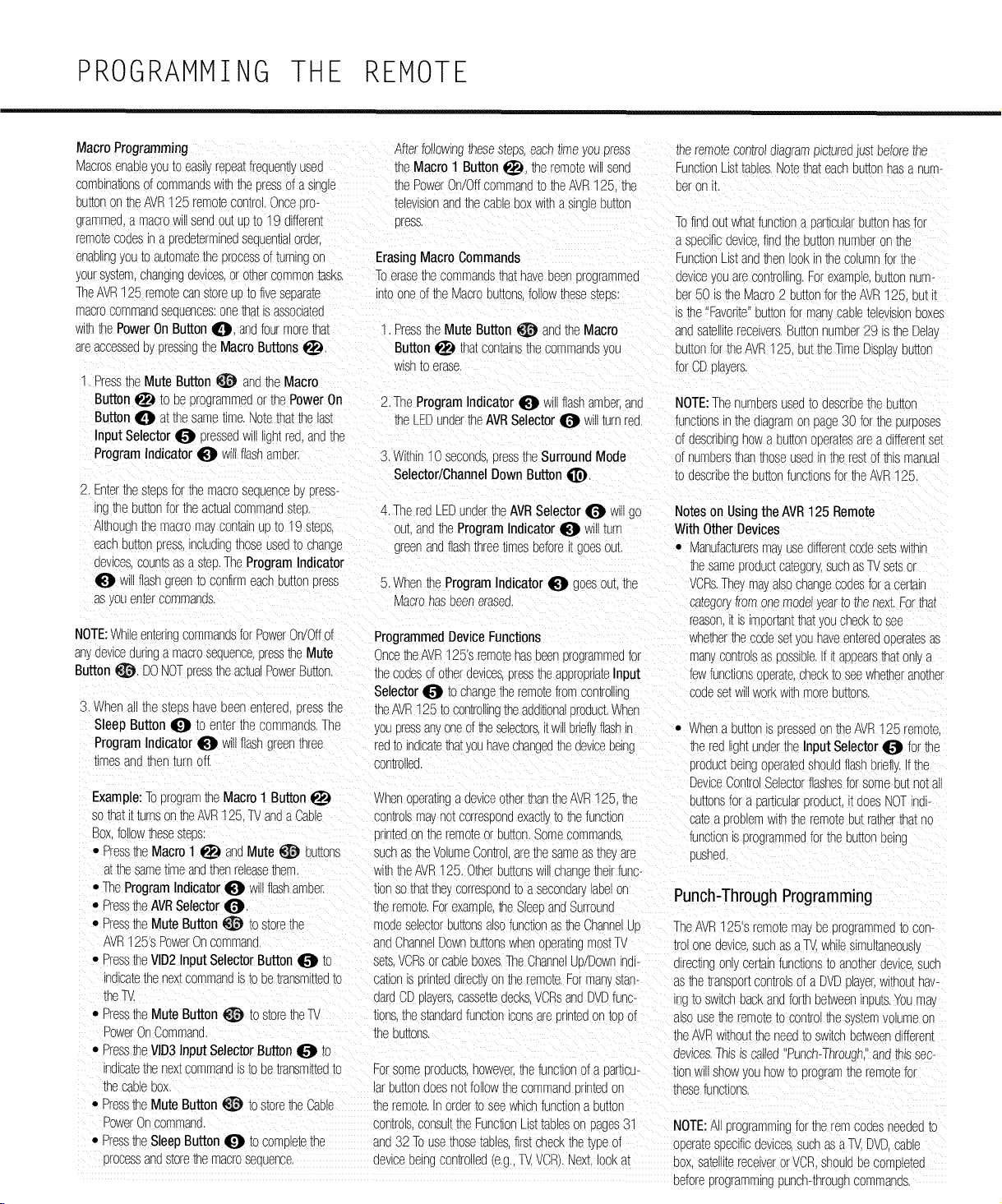
PROGRAMMING THE REMOTE
MacroProgramming
Macrosenableyouto easilyrepeatfrequem}used
comelnat3nsof commandswiththeDressof a sino_e
buttonon theAVR125 remotecon_rcI.Once[ ro-
grammea,a macroWillsendourUDtO19 different
remotecodesIn a oreaetermlneaseauen[lalorder.
Afterfollowingtnesesmos.eacht@e youpress the remoracontroa_agramp£[ureoJustbeforethe
theMacro 1 Button I_, theremoteN sets FunctionLISImules.Notethateachbuttonhasa num-
thePowerOn/Offcommand_o_e AVR125 Ene peron i_
televisionandthecableboxwitha singleout,or
cress. -D findoutwha_functiona 3articularou_onhasfor
a specificdevicefindtheUU_[OnnumDeron the
enaollngyouto automatathe orocessofturningon ErasingMacroCommands %nc[ionLIStandthenlookinthe columnfor_ne
yoursystem,changingdevicesor othercommontasks. Toerasethe sommanas_nathavebeenprogrammed aewceyouarecontrolling.Forexample,out[ornum-
TheAVR125 remoracanstoreUDtofiveseoara_e intooneof theMacroou_onsfollowthesesteus bet50 istheMacro2 buttonfortheAVR125. DU[_
macrocommandseouences:oneNat isassoclaea s the 'Favorite'out,orforman_caolemlewsorDoxes
WINthe PowerOn ButtonI_i, andfourmorethat ". PresstheMute Button _ andtheMacro andsamlnmreceivers.Buttonnumber2° s the Del@
areaccessedeypressingtheMacroButtons_I. Button_ thatcontainsthecommands/ou buttonfortheAVR125, buttheTimeDispw cut[on
wishto erase, forCDplayers,
1, Pressthe Mute Button_ andthe Macro
Button_ to be programmedor thePowerOn 2, TheProgramIndicator I_ willflashameerand NOTE:ThenumoersUSedtO Jescribethe uu[[on
Button0 atthesametime.Notethatthelast theLEDundertheAVRSelector0 willturnred, functionsinthesagramon page30 fortheDUmOSeS
Input Selector0 pressedwill lign_red,andthe of describinghowa Du_onCoera_esarea differentset
ProgramIndicator_ willflashamoer, 3,Within10 seconds,Dressthe SurroundMode 3f numbersthanthoseusedinthe restof _ls manual
Selector/ChannelDownButton _, to describethe Du_onfunctionsfortheAVR125
2 Enterthe s[eosforthe macrosequenceoy press-
inat__ buttonfor theactuacommandsmu, 4, Thered LEDunderthe AVRSelector_ willgo Noteson Usingthe AVR125 Remote
Althoughthe macromaycontainUDto 19 steDs OUr,andtheProgramIndicator I_I Will_urn With Other Devices
eachsu_[oncress,includingthoseused_ocnange greenandflashthreetimesbeforeit goesoul • Manufacturersmayusedifferentcodese_swithin
dewces,coumsasa stuD.TheProgramIndicator thesameuroauc[ca_egor!suchasTVsetsor
I_I will flashgreen_oconfirmeachburrerDress 5. Whenthe ProgramIndicatorI_I g}es our,the VCRs.Theymayalsocnangecodesfora cer[aln
asyouenmrcommands Macrohasoeeneras@ camgor_Iromonemodel/earm thenext.Forthat
reason_is irroortantthat! oucheckto see
NOTE:Whileenterirg commandsfcr PowerOn/Offof ProgrammedDeviceFunctions Nhetherthe :odese_/ounaveenteredcEdramsas
anyaewceduringa macrosequenceDresstheMute OncetheAVR125's remotehasbeenprogrammedfor manycon[ro_sas possible,Ifi[ anoearsthat0% a
Button_, DONOTcresstheactuaPowerButton, the codesof otherdevices,DresstheappropriateInput fewfunctionscberate,checkto seewhetheranother
Selector_ to changetheremotefromcontrolling codese[wl Horkwithmorebuttons,
3. Whenall the steoshavebeenenmreG[ ressthe theAVR125to controllingtheadditionaloroduct.Whet
Sleep Button _ to enterthecommands.The youpressan,_oneoftheselectors,it willbrieflflashin • Whena DU[_OnSoresseaon theAVR125 remote
ProgramIndicatorI_I w flashgreenthree redto _ndlcatethatyouhaveshanged_nedeviceoelng the redilgntunderthe Input Selector_ for the
rimesandthenturnoff. son,roiled Droauc_oelngooeratedshouldflashbriefl/.Ifthe
DeviceControlSelectorflashesforsorte put notall
Example:Toprogramthe Macro1 Button_ Whenopera[_nga deviceotherthantheAVR125. _e buttonsfora Dar[icularDroaucLI acesNOTind
so thatt turnson theAVR125 11/andaCable son_olsmayno_correspondexacuyto thefunction cama oroolerrwin theremotebutratherthatno
Box followthesestess orintedontheremoteorbutton.Somecommands., functionisprogrammedfortheou[_onoelng
• Sress_neMacro 1 _ andMute _ Du_ons SUCIastheVolumeContro.arethesameasthe_8_e OUShed
atthesame_lmean(]thenrelease_err w_ththeAVR125. OtherbuttonsWillChangetheirfuno
• TheProgramIndicator0 willflashamber, tlonsothatthessorresEonaToa secondary_Deor Punch-Through Programming
• PresstheAVRSelectorI_t. theremote.Forexamde,theSleeoandSurrounc
• Press_e Mute Button_ to s[orethe modeselec[orDu_onsalsofunctionasmeChannelJD TheAVR125'sremoramayDeprogrammedto con-
AVRt25's PowerOncommand, andChanneDownbuttonswhenopera_ngmostTV tro_oneaewcesuchasaT_ whilesmuitaneous,
• PresstheVlD2InputSelectorButton_ to se[s.VCRsor cableboxes.TheChannelUdDownr/all- ]lrectlngonlycertainfunctionsto anotherdevlc6SUCh
in]lcatethenex_commandis_oDetrarksmmea_o so,ionis printedalrec[l_or the remote.Forman man- asthe trans_ortcontrolsof a DVDola_er,withouthav
theW. lardCDplayers,casse[mdecksVCRsandDVDfurs- ngto switchbackandfor_ betweennDu[s.YOUma_
• PresstheMute Button _ to store_e W lions,thestandardfunctionsonsareDrln_eaon_oDof alsousethe remoteto con[roi_nesysmmvolumeon
PowerOnCommand, _neDu_ons,
• PresstheVID3InputSelectorButton_ _c
nalca_ethenex_commandIstc Detrarsmit_ea_o Forsomeoroauc8,however,the functionofa oar_icu-
meCableDO^, ar buttondoesnotfollowthe commandDrin_eaon
• Pressthe MuteButton _ to storetheCable the remote,inorderto seewhichfunctiona OU[IOn
DowerOncommand, controlsconsultthe FunctionLIS[_aDleson pages31
• PresstheSleepButton_ to com_le_etne anD32 Tousethosetables,firstcheckthetypeof
orocessandstorethemacroseauence, deviceoelngcondonedle._.,TV,VCRI.Next,lookat
theAVRwithouttheneedto switd-betweenJifferent
devices.Thisis called"Punch-Through.andm_ssec-
tionwillshowyouhOWtOprogramthe remotefor
thesefunctions.
NOTE:A programmingforthe rem soaesneededtc
oDeramsEecificdevicessucr asaTV.DVDcame
cox sa[elll[ereceiverorVCR.shouldDecomole[ea
beforeprogrammingpunch-throughcommanas,
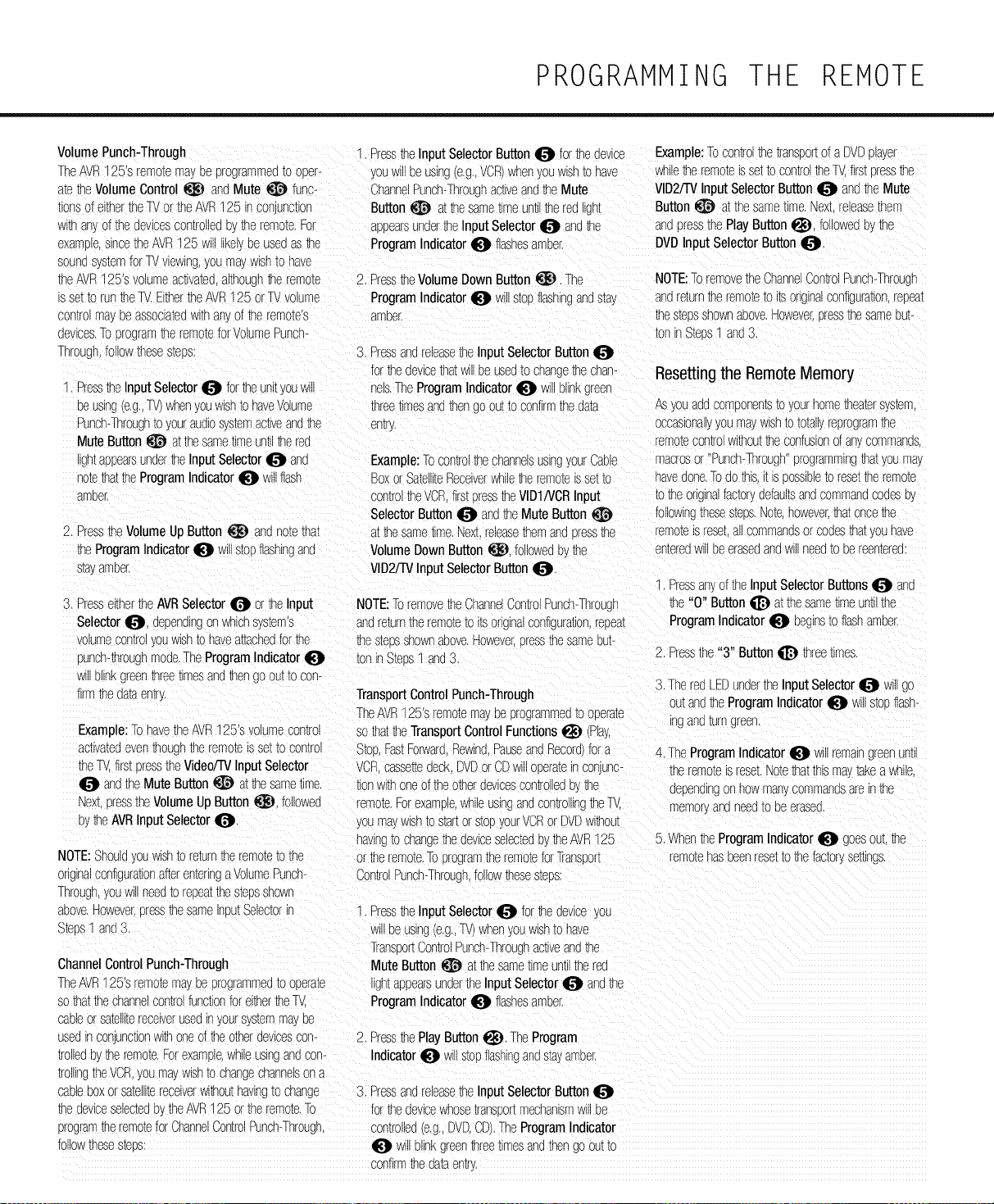
PROGRAMMING THE REMOTE
VolumePunch-Through
TheAVR125's remotemayee programmea_odeer-
amtheVolumeControl _ andMute _ func-
lionsof eithertheTVortheAVR125 inconunction
HIthat. Dfthedevicescontrolledt, theremote.For
examele,sincetheAVR125 m like, ee use(]asthe
sounasysmmfor TVviewing,you maywishto have
theAVR125's volumeactivated,althougitheremote 2. Press_neVolumeDownButton_. The
s se_to runtheTV.EithertheAVR125 orTVvolume ProgramIndicator_ willstopflashingandstay
con_romat Deassoaa_e(]withar. ofthe remote's ameer.
devices.To orogramthe remoteforVolumePunch-
Throuah followthesestems: 3, PressandreleasetheInput SelectorButton
forthedevicethatwillbeusedto changethecnan-
1, PresstheInputSelector_ fortheunK_ouw ............... Indicator_ willblinkgreen
eeusing(e.g.,TV)whenyouwishto haveVolume threetimesandthengo outto confirmthedata
Punch-Throughto youraudiosystemac[iveandbe entry,
MuteButton@ atthesametimeun_ltherea
ghtappeamunaertheInputSelector_ ana
r }mthattheProgramIndicator0 w flash
_meer,
2, Press_e VolumeUpButton _ an(]nora_na_
_neProgramIndicator0 willstopflashingan(]
sta'.ameer,
, PresstheInput SelectorButton_ forthedevice Example:Tocontrolthe transeortof a DVDplayer
youw eeusing(e.g.,VCR)whenyouwishto have whiletheremoteisse__ocontroltheT_ firstDressthe
ChannelPunch-ThroughacuveandtheMute VID2/TVInputSelectorButton_ andthe Mute
Button_ a_thesame_lmeun_therea jht Button_ at thesametime,Nextreleasethem
appearsundertheInputSelector_ an(]the _napressthePlayButton_, followedbythe
ProgramIndicator_ flashesameer. DVDInputSelectorButton
Example:TocontrolthechannelsusingyourCable
Boxor SatelliteReceiverwhiletheremoteissetto
controltheVCR,firstoresstheVlD1/VCRInput
SelectorButton_ andtheMute Button
at thesametime,Nexl re_easethemanaDressthe
VolumeDownButton _. followede! the
VlD2/TVInputSelectorButton
3, PresseithertheAVRSelector_ or theInput NOTE:Toremovethe ChannelControlPunch-Throug_
Selector_), dependingonwhichsystems
.olumecon[toyouwishto haveattachedforthe
punch-thmughmode,TheProgramIndicator
w blinkgreenthree_lmesandthen1oou[_ocon-
firmthedataentry
Example:TohavetneAVR125'svolumecontro
acwam(]eventhoughtheremoteis se[_ocontrol
theT.. firstcresstheVideo/TVInput Selector
andtheMuteButton _ atthesametime,
Nex_DresstheVolumeUpButton_), followed
bythe AVRInput Selectori[_),
NOTE:Should;dewish_ore[urntheremoteto the
originalconfigurationafterenteringaVolumePunch-
Thmugn,youwillneea_oreeeatthesteesShOWn
aeove,Howeve_eressthe sameineutSelectoriF
3tees_ _nd3,
ChannelControlPunch-Through
TheAVR125's remotema,ee programme(]_ooperam
sothatthechannelcontrolfunctionfor eitherthel_
caeleor sa_em_ereceiverusean yoursystemmayDe
use(]Inconunctionwithoneof theotherdevicescon-
_OlleaeytheremoraForexample,whileusingan(]con-
[rOllingtheVCR,youmat wishto changeChannelsona
NOTE:ToremovetheChannelControlPunch-Throu(]h
anare[urntheremoteto itsorginalconfiguration,repea_
thestagsshownabove,HoweveI(]tessthesameeu[-
:onn Stems1 an(]3
Resettingthe Remote Memory
Asyouaaacomponenmto yourhometheatersysmm
occasionallyyou ma,,WIShtOtotallyreprogramthe
remoracontrolwithouttheconfusiorof ay._comman(]s,
macrosor "Punch-Through"programmingthatyoumay
havedone.Todothis.I[is _OSSleleto resm_neremora
totheoriginalfactorydefaultsanacommanacoaese,.
followir_mesestops,Note.however,thatonce_ne
remoraisrese[all commanasorco(]estha_youhave
en[erea Will eeeraseaanaWillneea_oeeteen,ere(i:
PressanyoftheInputSelectorButtons_ ana
_ne"0" Button_ a_tnesame_meunt_the
anare_urnthe remo_e_oimorginalconfiguration,repea_ ProgramIndicator_ eegnsto flashamber.
thestudsshownaeove,However.cressthesameeu[-
_oninStees1 and3, 2, Pressthe "3" Button_ threetimes.
3,TheredLEEundertheInputSelector_ willgo
TransportControlPunch-Througl_
ou_andtheProgramIndicator_ willstopflash-
TheAVR125'sremotema! eeprogramme(]_ooeera_e
ingana_urngreen
sothattheTransportControlFunctions_ (Play,
Stop.FastForward.Rewind.PauseandRecordfora
VCRcassettedeck,DVDorCDWilloperaminconjunc-
tionwithoneofthe otherdevicescontrollede_the
remote,Forexample,whileusinganacontrolll%tileTV.
youma_w_Sh_0s[ar_orstopyourVCRor DVDwithout
having_ocnangetheaevlceselecma07theAVR1%
4, TheProgramIndicator_ wulremaingreenunu
theremoteisreset.Notethatthismavtakeawhile,
aependlngon hOWman_commanasareinthe
-emor_ananeeato Deerase(],
5, WhentheProgramIndicator_ goesou[,the
orthe remote,ToprogramtheremoraforTransoor_ remotehasbeenresettothe factorysemngs,
ControlPunch-ThrouDh,followthesesteos:
PresstheInput Selector_ br theaevlceyOL
w_Deuslr] (e,g,,TV)whenyouwishtOhave
TranseortControPunch-Throughacuveanathe
Mute Button _ atthe sametimeuntiltherea
_htappearsunaerthe InputSelector_ anathe
ProgramIndicator_ flashesamber,
2, PressthePlayButton_), TheProgram
Indicator_ willstopflashinganasm_amee
cableboxorsatellitereceiverwithouthavingto change 3, PressandreleasetheInput SelectorButton
thedeviceselectedb',theAVR125 ortheremote,To fortheaewcewhose_ranseor[mechanismwillbe
programtheremoteforChannelControlPunch-Through, con[rol_e(](e.g,,DVD,CD),TheProgramIndicator
follow_nesesmes: _ willblinkgreenthreeumesana_nengo ou[_o
confirmthedataent_,
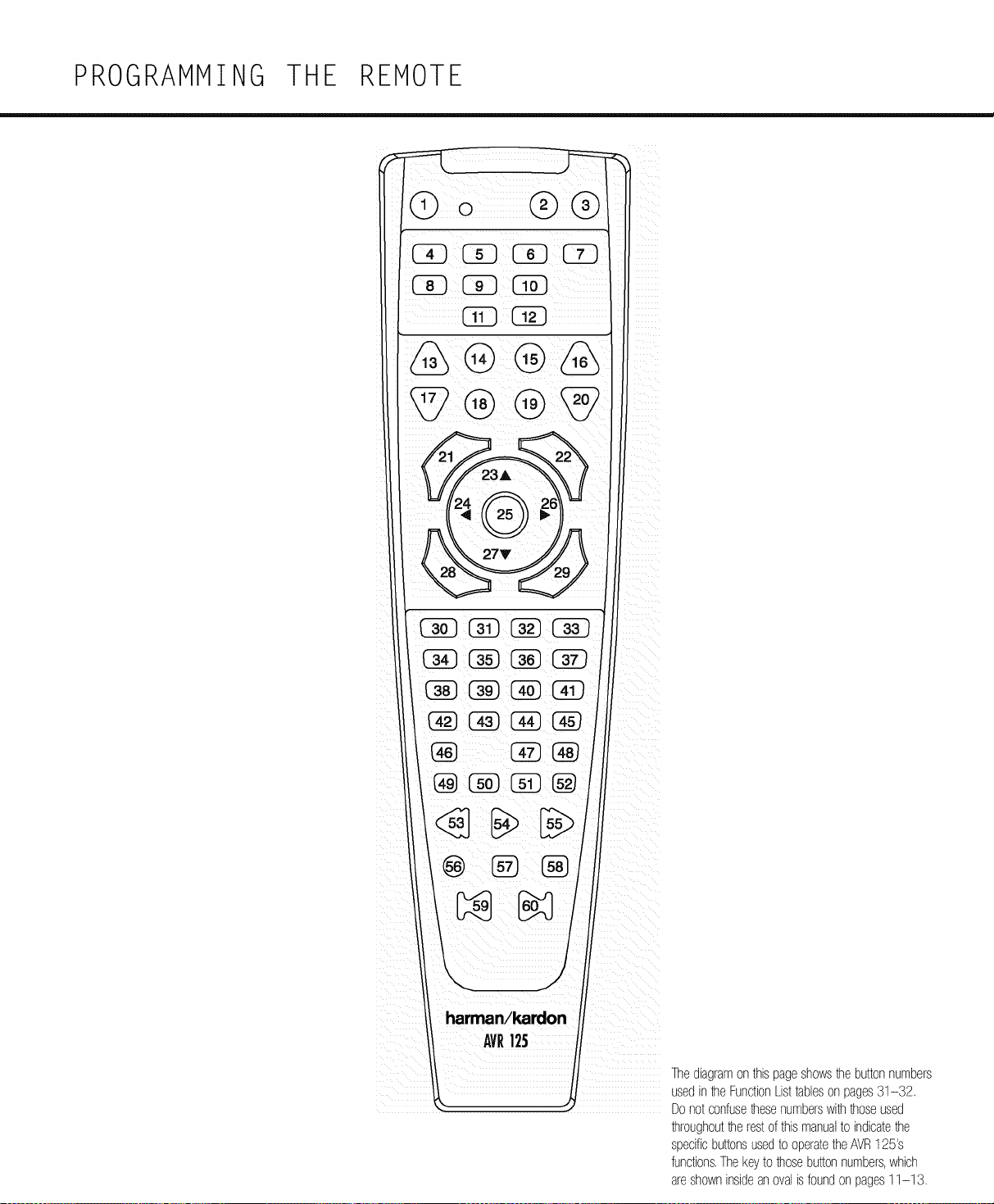
PROGRAMMING THE REMOTE
harman/kardon
AVR125
Thediagramonthispageshows1hebuttonnumbem
usedin1heFunctionListtableson pages31-32.
Donotconfuselhesenumberswith1hoseused
lhroughoutthe restofthismanualto indicatethe
specificbuttonsusedto operatetheAVR125's
functions.Thekeyto 1hosebuttonnumbers,which
areshowninsidean ovalisfoundon pages11-13.
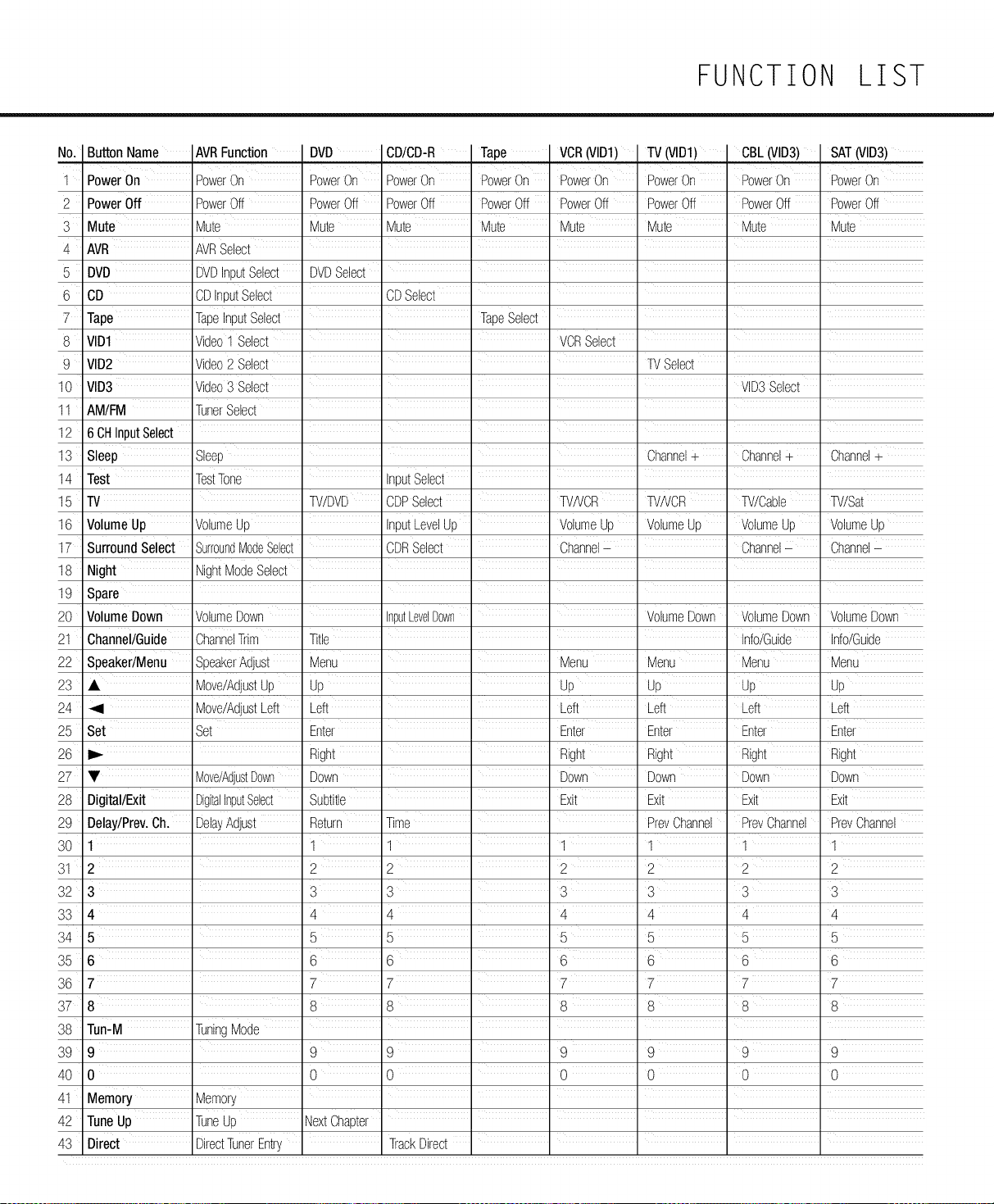
FUNCTION LIST
No. Button Name AVRFunction DVD CD/CD-R Tape VCR(VID1) TV(VID1) CBL(VID3) SAT(VID3)
i
1 PowerOn PowerOn PowerOn PowerOn PowerOn PowerOn PowerOn PowerOn PowerOn
2 PowerOff PowerOff PowerOff PowerOff PowerOff PowerOff PowerOff PowerOff PowerOff
3 Mute Mute Mute Mute Mute Mute Mute Mute Mute
4 AVR AVRSelect
5 DVD DVDInputSelect DVDSelect _ _ _ _
6 CD CDInputSelect CDSelect _ _ _ _
7 Tape TapeInputSelect TapeSelect
8 rID1 Video1 Select VCRSelect
9 VID2 Video2 Select TVSelect
10 VID3 Video3 Select VID3Select
11 AM/FM TunerSelect ......
12 6 CHInputSelect
13 Sleep Sleep ' ' ' Channel+ Channel+ Channel+
14 Test TestTone
15 TV TV/DVD CDPSelect TVNCR TVNCR W/Cable W/Sat
16 VolumeUp VolumeUp InputLevelUp VolumeUp VolumeUp VolumeUp VolumeUp
17 SurroundSelect SurroundModeSelect CDRSelect Channel- _ Channel- Channel-
18
19
>0
_2
_3
>4
_5
Night NightModeSelect ......
Spare
VolumeDown
Channel/Guide ChannelTrim
Speaker/Menu SpeakerAdjust
• Move/AdjustUp
Move/AdjustLeft
Set Set
VolumeDown inputLevelDown ' ' VolumeDown ' VolumeDown
Title ' ' Info/Guide
Menu Menu Menu Menu
Up Up Up Up
Left Left Left Left
Enter " " Enter Enter Enter
_6
_7 • Move/AdjustDown
>8 Digital/Exit DigitalInputSelect
P9 Delay/Prey.Ch. DelayAdjust
30 1
31 2
32 3
33 4
34 5
35 6
36 7
37 8
38
39
30
31
32
33
VolumeDown
Info/Guide
Menu
Up
Left
Enter
Right Right
Down Down
Subtitle t t Exit
Return Time
1 1 _ 1
2 2 2
3 3 3
4 14 i 4
5 5 5
Right Right Right
Down Down Down
Exit Exit Exit
PrevChannel PrevChannel PreyChannel
1 1 1
2 2 2
3 3 3
4 4 4
5 5 5
6 t6 t '6 '6 6
7 7 7 7
8 8 8 8 8
Tun-M TuningMode
9 9 9 i 9 9 9 9
0 0 0 0 0 0 0
Memory
TuneUp TuneUp NextChapter .....
Direct DirectTunerEntry TrackDirect
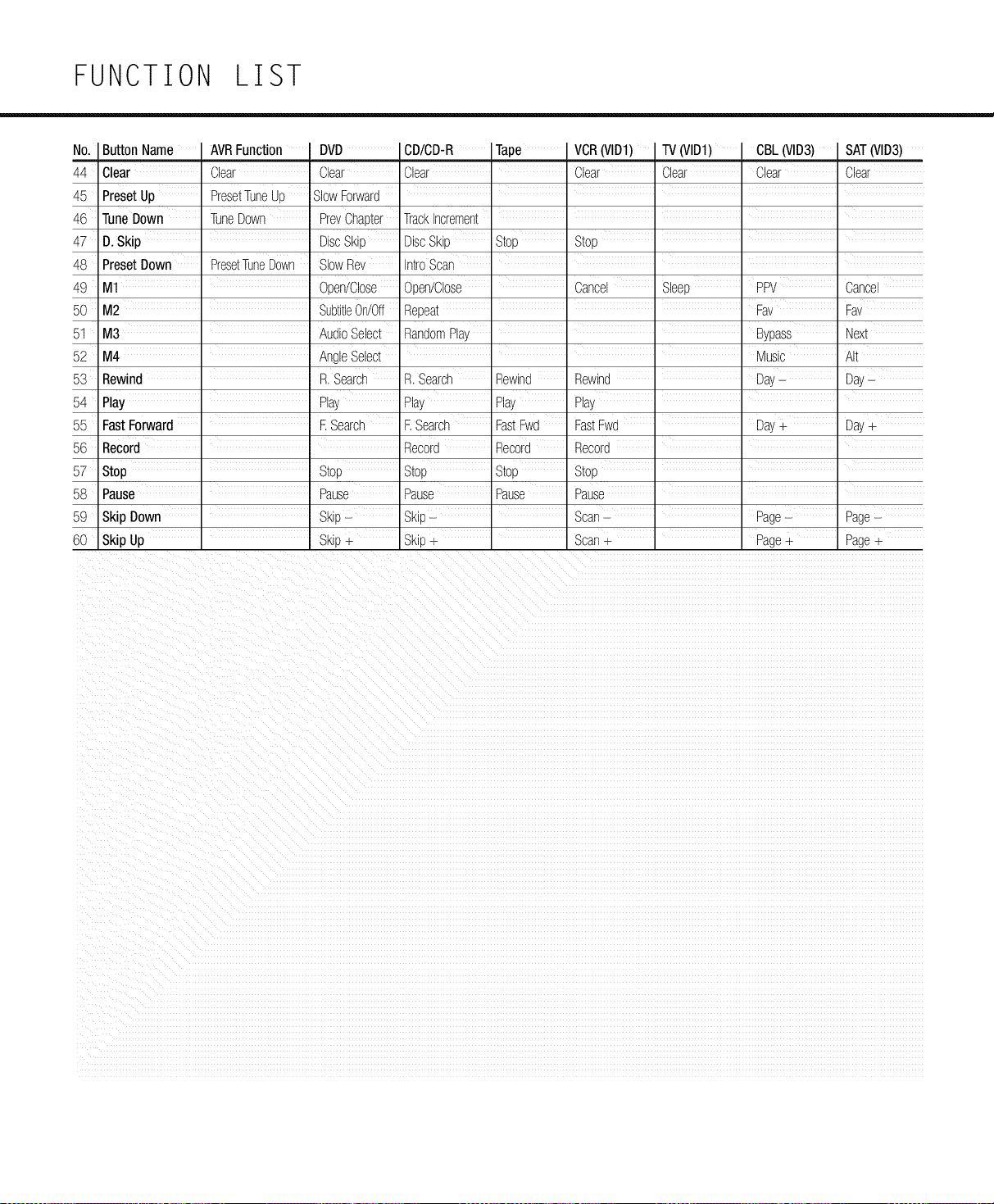
FUNCTION LIST
No. ButtonName AVRFunction
44 Clear Clear
45 PresetUp PresetTuneUp
46 TuneDown TuneDown
47 D.Skip
48 PresetDown PresetTuneDown
49 M1
50 M2
51 M3 i
52 M4
53 Rewind
54 Play
55 FastForward
DVD CD/CD-R Tape VCR(VID1) TV(VID1) CBL(VID3) SAT(VID3)
Clear Clear Clear Clear Clear Clear
SlowForward
PrevChapter TrackIncrement
DiscSkip DiscSkip Stop Stop
SlowRev IntroScan
Open/Close Open/Close _ Cancel Sleep PPV Cancel
SubtWeOn/Off Repeat Fav Fav
AudioSelect RandomPlay Bypass Next
AngleSelect ' I I I ' Music AIt
R. Search R.Search Rewind Rewind Day- Day-
Play Play Play Play
R Search F.Search FastFwd FastFwd Day+ Day+
56 Record Record Record Record
57 Stop _ Stop Stop Stop Stop
58 Pause Pause Pause Pause Pause
59 Skip Down Skip- Skip- _ Scan- Page- Page-
60 Skip Up Skip+ Skip+ _ Scan+ _ Page+ Page+
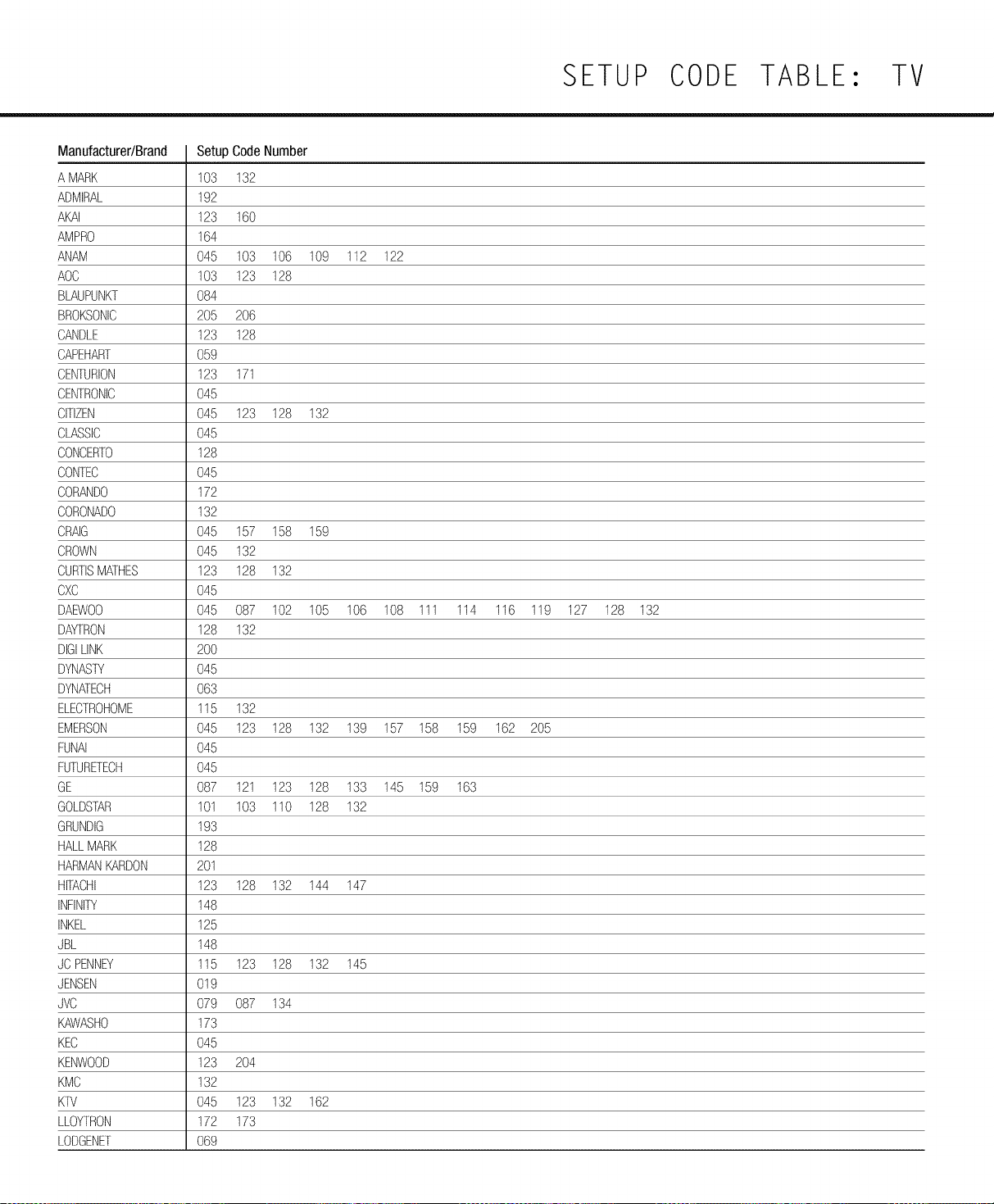
SETUP CODE TABLE: TV
Manufacturer/Brand
A MARK
ADMIRAL
AKAI
AMPRO
ANAM
AOC
BLAUPUNKT
BROKSONIC
CANDLE
CAPEHART
CENTURION
CENTRONIC
CITIZEN
CLASSIC
CONCERTO
CONTEC
CORANDO
CORONADO
CRAIG
CROWN
CURTISMATHES
CXC
DAEWO0
DAYTRON
DIGILINK
DYNASTY
DYNATECH
ELECTROHOME
EMERSON
FUNAI
FUTURETECH
GE
GOLDSTAR
GRUNDIG
HALLMARK
HARMANKARDON
HITACHI
INFINITY
INKEL
JBL
JC PENNEY
JENSEN
JVC
KAWASHO
KEC
KENWOOD
KMC
KTV
LLOYTRON
LODGENET
Setup CodeNumber
103 132
192
123 160
164
045 103 106 109 112 122
103 123 128
084
205 206
123 128
059
123 171
045
045 123 128 132
O45
128
O45
172
132
045 157 158 159
045 132
123 128 132
045
045 087 102 105 106 108 111 114 116 119 127 128 132
128 132
2OO
O45
O63
115 132
045 123 128 132 139 157 158 159 162 205
O45
O45
087 121 123 128 133 145 159 163
101 103 110 128 132
193
128
201
123 128 132 144 147
148
125
148
115 123 128 132 145
019
079 087 134
173
O45
123 204
132
045 123 132 162
172 173
O69
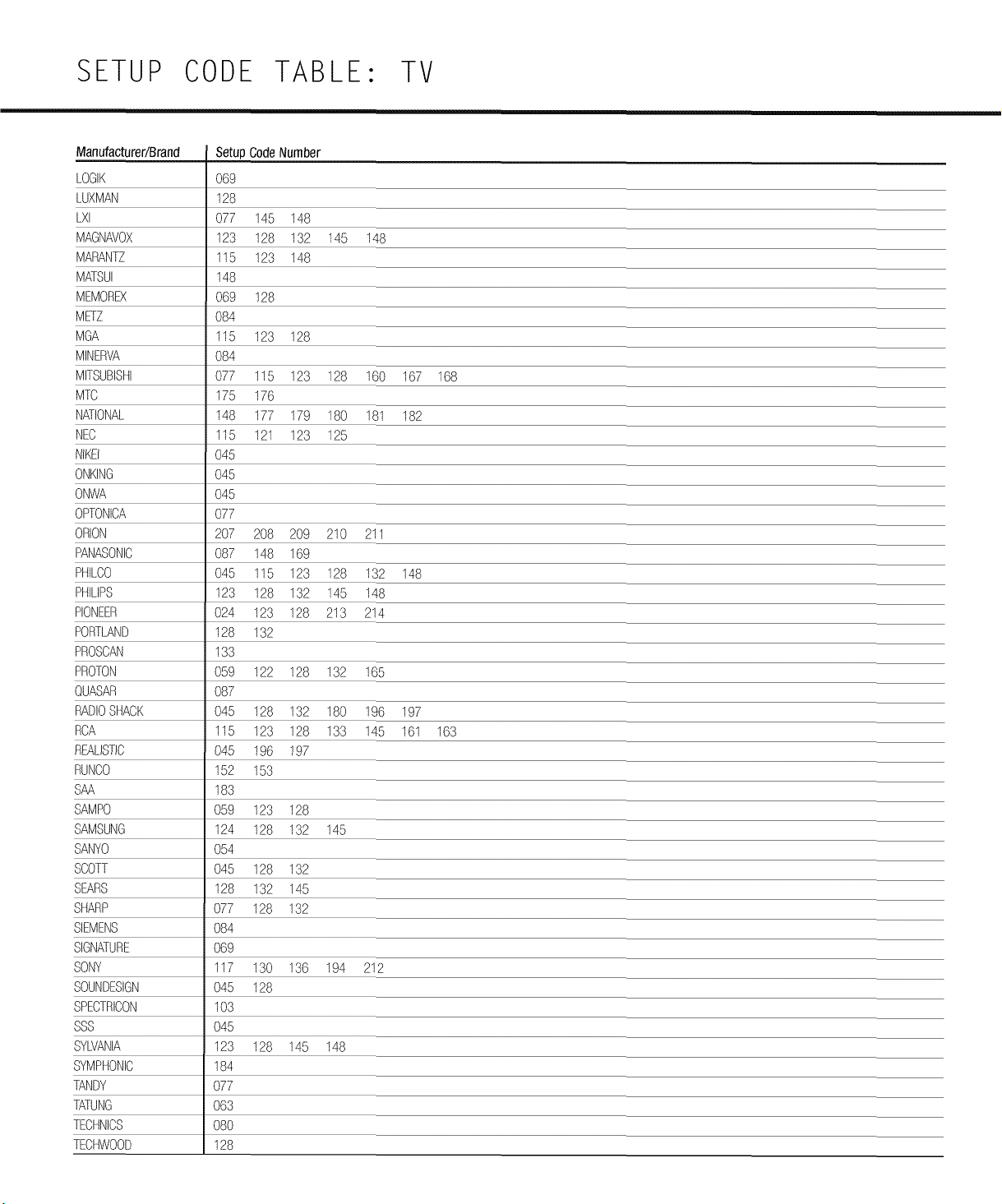
SETUP CODE TABLE: TV
Manufacturer/Brand SetupCodeNumber
LOGIK O69
LUXMAN 128
L×I 077 145 148
MAGNAVOX 123 128 132 145 148
MARANTZ 115 123 148
MATSUI 148
MEMOREX 069 128
METZ 084
MGA 115 123 28
MINERVA 084
MITSUBISHI 077 115 23 128 160 167 168
MTC 175 176
NATIONAL 148 177 79 180 181 182
NEC 115 121 23 125
NtK£ 045
ONKING 045
ONWA O45
OPTONICA O77
ORION 207 208 209 210 211
PANASONIC 087 148 169
PHILCO 045 115 123 128 132 148
PHILIPS 123 128 132 145 148
PIONEER 024 123 128 213 214
PORTLAND 128 132
PROSCAN 133
PROTON 059 122 128 132 165
QUASAR O87
RADIOSHACK 045 128 132 180 196 197
RCA 115 123 128 133 145 161 163
REALISTIC 045 196 197
RUNCO 152 153
SAA 183
SAMPO 059 123 128
SAMSUNG 124 128 132 145
SANYO 054
SCOTT 045 128 132
SEARS 128 132 145
SHARP 077 128 132
SIEMENS 084
SIGNATURE 069
SONY 117 130 136 194 212
SOUNDESIGN 045 128
SPECTRICON 103
SSS O45
SYLVANIA 123 128 145 148
SYMPHONIC 184
TANDY 077
TATUNG 063
TECHNICS 080
TECHWOOD 128
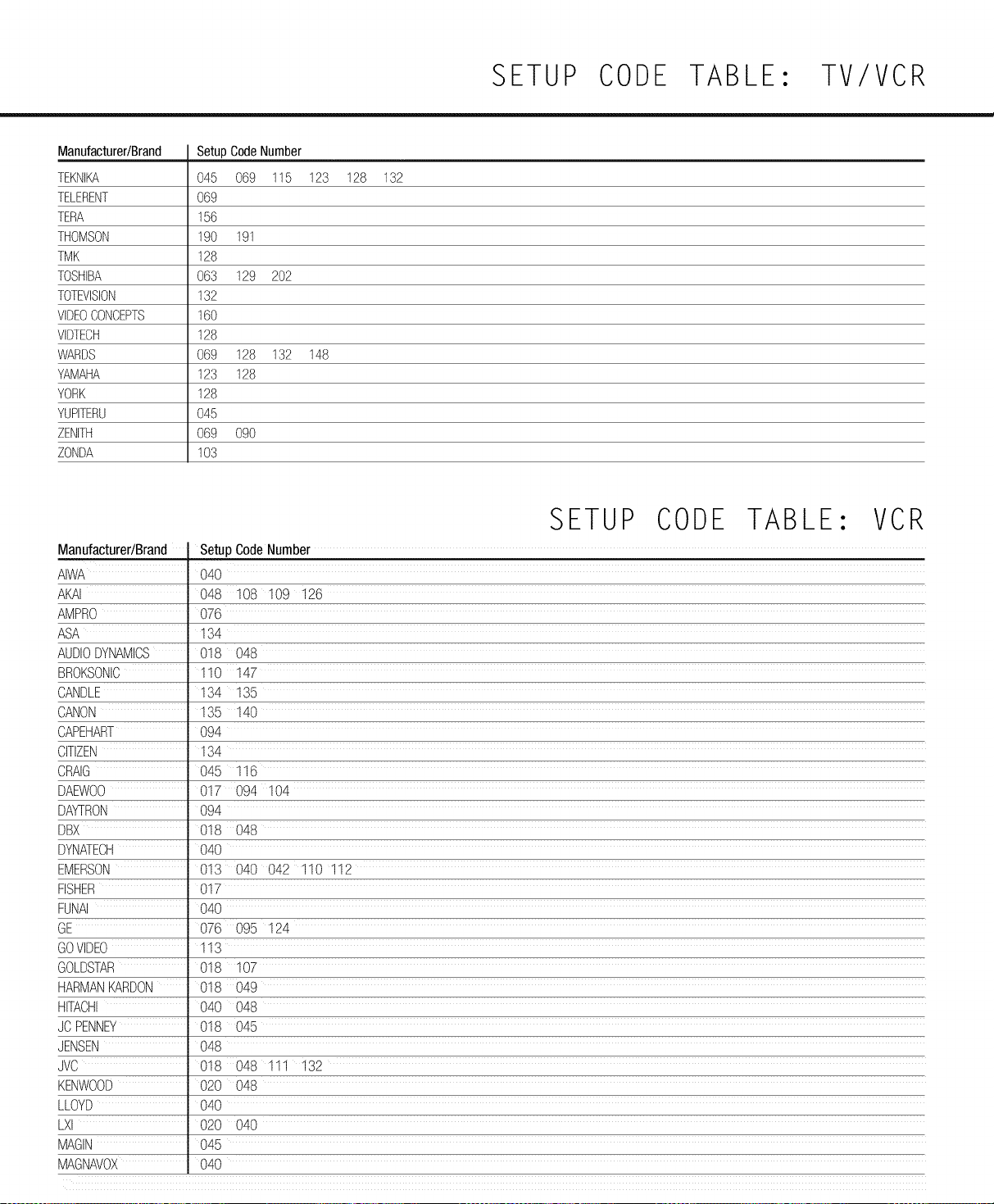
SETUP CODE TABLE: TV/VCR
Manufacturer/Brand
TEKNIKA
TELERENT
TERA
THOMSON
TMK
TOSHIBA
TOTEVISION
VIDEOCONCEPTS
VIDTECH
WARDS
YAMAHA
YORK
YUPITERU
ZENITH
ZONDA
SetupCodeNumber
045 069 115 123 128 132
O69
156
190 191
128
O63 129 2O2
132
160
128
069 128 132 148
123 128
128
O45
069 090
103
SETUP CODE TABLE: VCR
Manufacturer/Brand Setup CodeNumber
AIWA 040
AKAI 048 108 109 126
AMPRO 076
ASA 134
AUDIODYNAMICS 018 048
BROKSONIC 110 147
CANDLE 134 135
CANON 135 140
CAPEHART 094
CITIZEN 134
CRAIG 045 116
DAEWO0 017 094 104
DAYTRON 094
DBX 018 048
DYNATECH 040
EMERSON 013 040 042 110 112
FISHER 017
FUNAI 040
GE 076 095 124
GOVIDEO 113
GOLDSTAR 018 107
HARMANKARDON 018 049
HITACHI 040 048
JC PENNEY 018 045
JENSEN 048
JVC 018 048 111 132
KENWOOD 020 048
LLOYD 040
LXI 020 040
MAGIN 045
MAGNAVOX 040
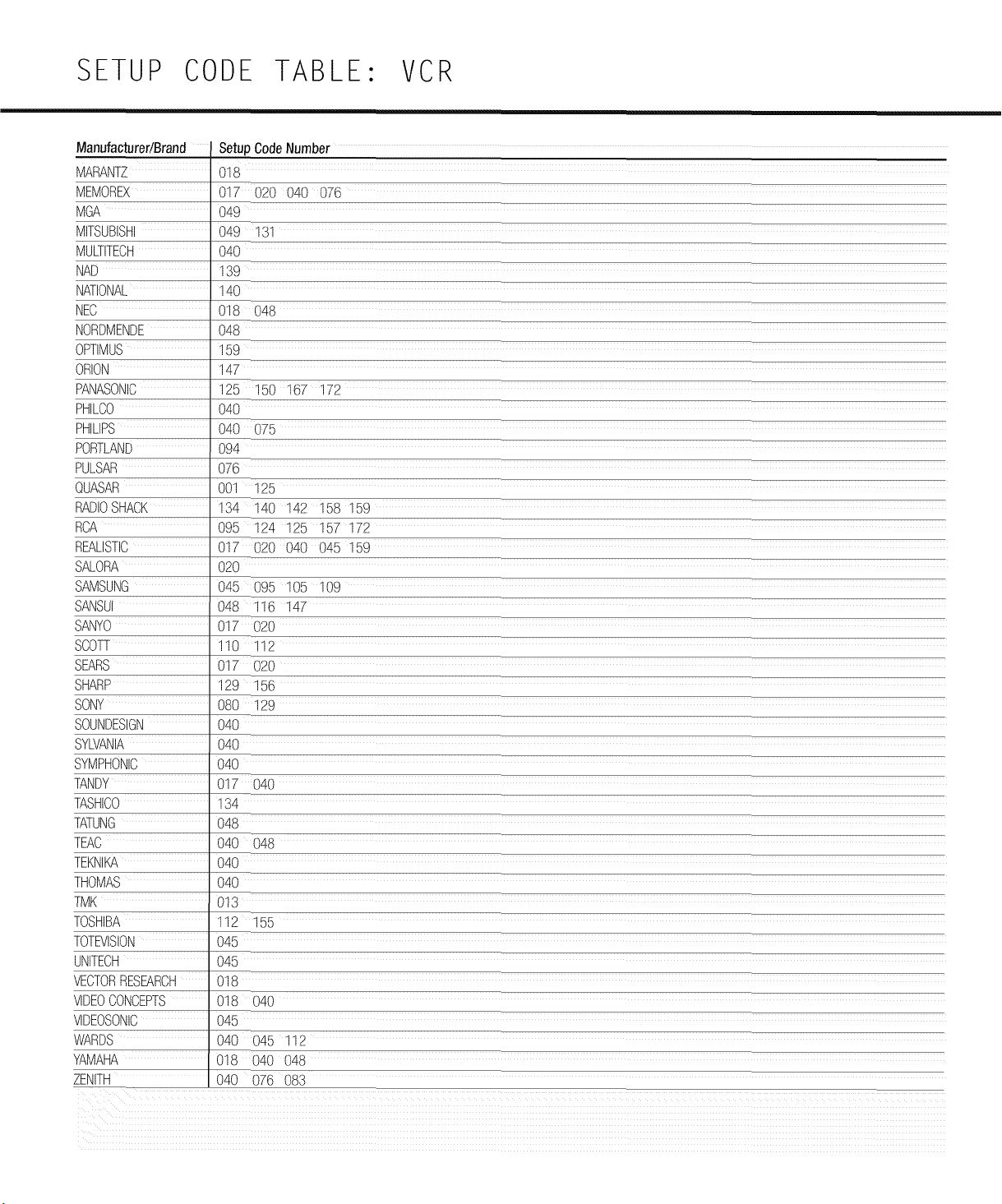
SETUP CODE TABLE: VCR
Manufacturer/Brand SetupCode Number
MARANTZ 018
MEMOREX 017 020 040 076
MGA 049
MITSUBISHI 049 131
MULTITECH 040
NAD 139
NATIONAL 140
NEC 018 048
NORDMENDE 048
OPTIMUS 159
ORION 147
PANASONIC 125 150 167 172
PHILCO 040
PHILIPS 040 075
PORTLAND 094
PULSAR 076
QUASAR 001 125
RADIOSHACK 134 140 142 158 159
RCA 095 124 125 157 172
REALISTIC 017 020 040 045 159
SALORA 020
SAMSUNG 045 095 105 109
SANSUI 048 116 147
SANYO 017 020
SCOTT 110 112
SEARS 017 020
SHARP 129 156
SONY 080 129
SOUNDESIGN 040
SYLVANIA 040
SYMPHONIC 040
TANDY 017 040
TASHICO 134
TATJNG 048
TEAC 040 }48
TEKNIKA 040
THOMAS 040
TMI4 013
TOSHIBA "12 155
TOTEVISION 045
JNITECH 045
VECTORRESEARCH 018
VIDEOCONCEPTS 018 040
VIDEOSONIC 045
WARDS 040 045 112
YAMAHA 018 040 048
ZENITH 040 07E 083
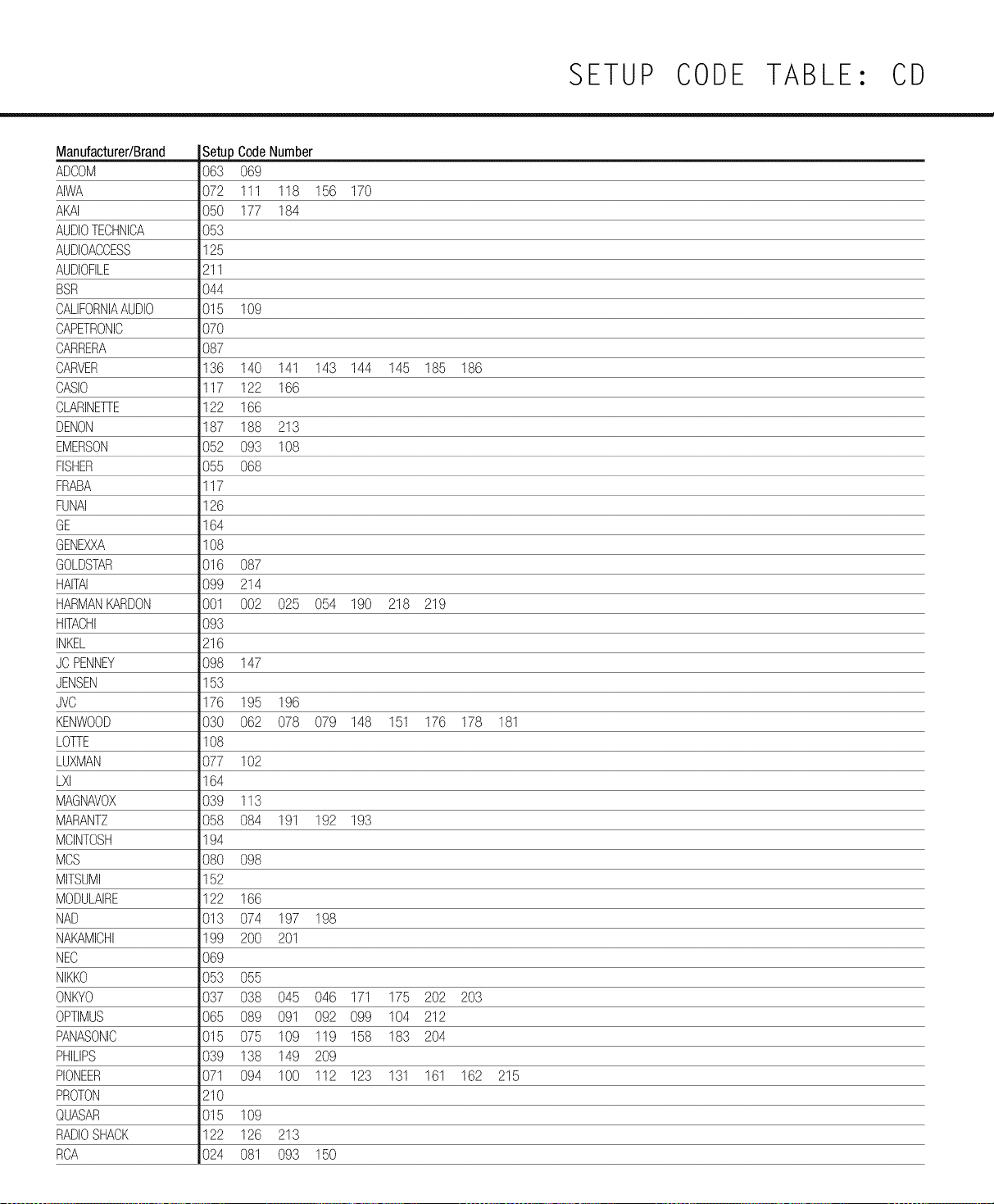
SETUP CODE TABLE: CD
Manufacturer/Brand
ADCOM
AIWA
AKAI
AUDIOTECHNICA
AUDIOACCESS
AUDIOFILE
BSR
CALIFORNIAAUDIO
CAPETRONIC
CARRERA
CARVER
CASIO
CLARINETTE
DENON
EMERSON
FISHER
FRABA
FUNAI
GE
GENEXXA
GOLDSTAR
HAITAI
HARMANKARDON
HITACHI
INKEL
JC PENNEY
JENSEN
JVC
KENWOOD
LOTTE
LUXMAN
LXI
MAGNAVOX
MARANTZ
MCINTOSH
MCS
MITSUMI
MODULAIRE
NAD
NAKAMICHI
NEC
NIKKO
ONKYO
OPTIMUS
PANASONIC
PHILIPS
PIONEER
PROTON
QUASAR
RADIOSHACK
RCA
CodeNumber
063 069
072 111 118 156 170
050 177 184
053
125
211
044
015 109
O7O
O87
136 140 141 143 144 145 185 186
117 122 166
122 166
187 188 213
052 093 108
055 068
117
126
164
108
016 087
099 214
001 002 025 054 190 218 219
093
216
098 147
153
176 195 196
030 062 078 079 148 151 176 178 181
108
077 102
164
039 113
058 084 191 192 193
194
080 098
152
122 166
013 074 197 198
199 200 201
069
053 055
037 038 045 046 171 175 202 203
065 089 091 092 099 104 212
015 075 109 119 158 183 204
039 138 149 209
071 094 100 112 123 131 161 162 215
210
015 109
122 126 213
024 081 093 150
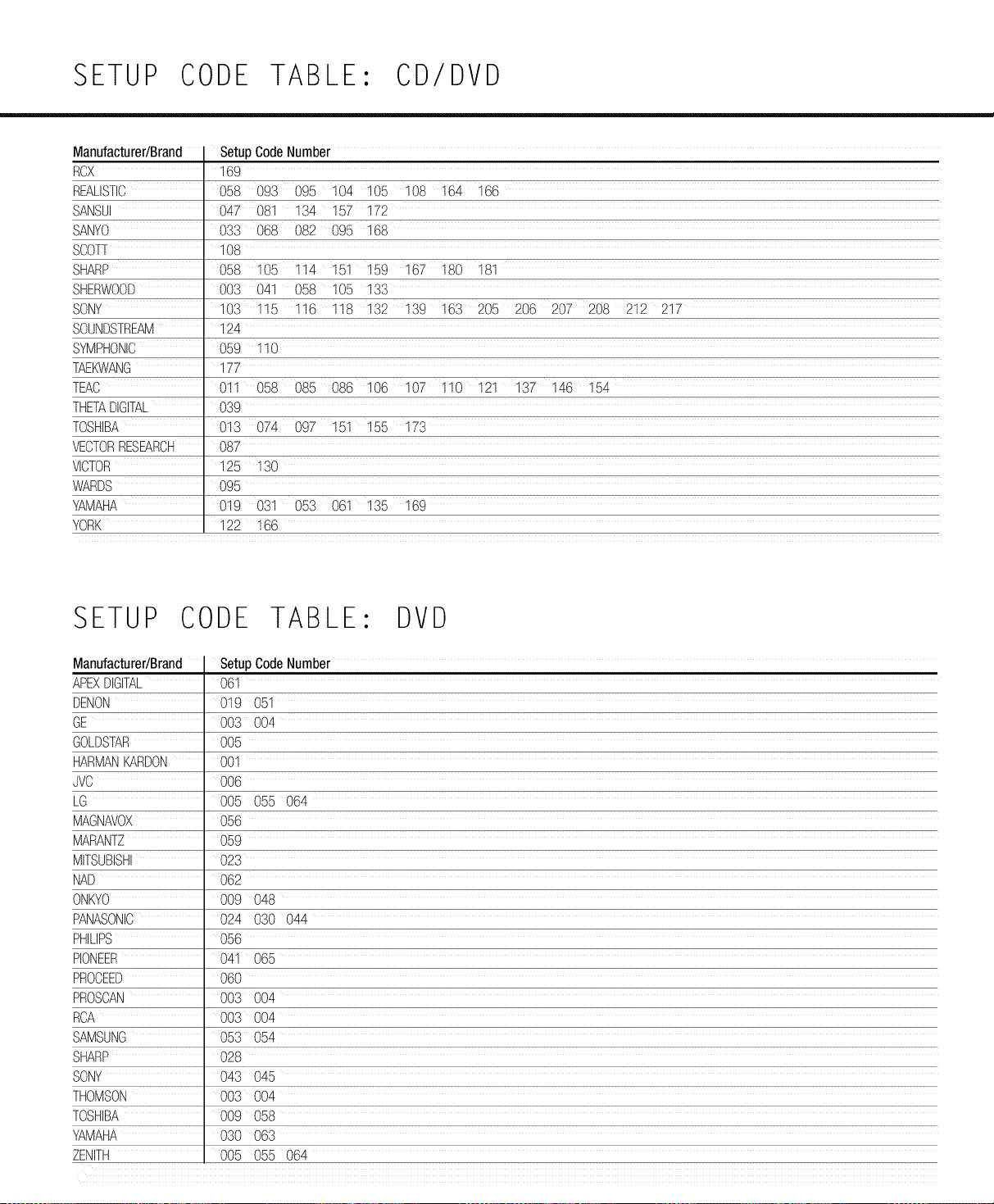
SETUP CODE TABLE: CD/DVD
ManufacturertBrand
RCX
REALISTIC
SANSUI
SANYO
SCOTT
SHARP
SHERWOOD
SONY
SOUNDSTREAM
SYMPHONIC
TAEKWANG
TEAC
THETADIGITAL
TOSHIBA
VECTORRESEARCH
VICTOR
WARDS
YAMAHA
YORK
Setup CodeNumber
169
058 093 095 104 105 108 164 i66
047081 i34 i57 i72
033 068 082 095 168
108
058 105 114 151 159 167 180 i81
003 041 058 i05 133
103 115 116 118 132 139 163 205 206 207 208 212 217
124
059 110
177
011 058 085 086 106 107 110 121 137 146 154
039
013 074 097 151 155 173
087
125 130
095
019 031 053 061 135 169
122 166
SETUP CODE TABLE: DVD
Manufacturer/Brand
APEXDIGITAL
DENON
GE
GOLDSTAR
HARMANKARDON
JVC
LG
MAGNAVOX
MARANTZ
MITSUBISHI
NAD
ONKYO
PANASONIC
PHILIPS
PIONEER
PROCEED
PROSCAN
RCA
SAMSUNG
SHARP
SONY
THOMSON
TOSHIBA
YAMAHA
ZENITH
Setup CodeNumber
061
019 051
003 004
OO5
CO1
OO6
005 055 064
O56
O59
023
062
009 048
024 030 044
056
041 065
060
003 004
003 004
053 054
028
043 045
003 004
009 058
030 063
005 055 064
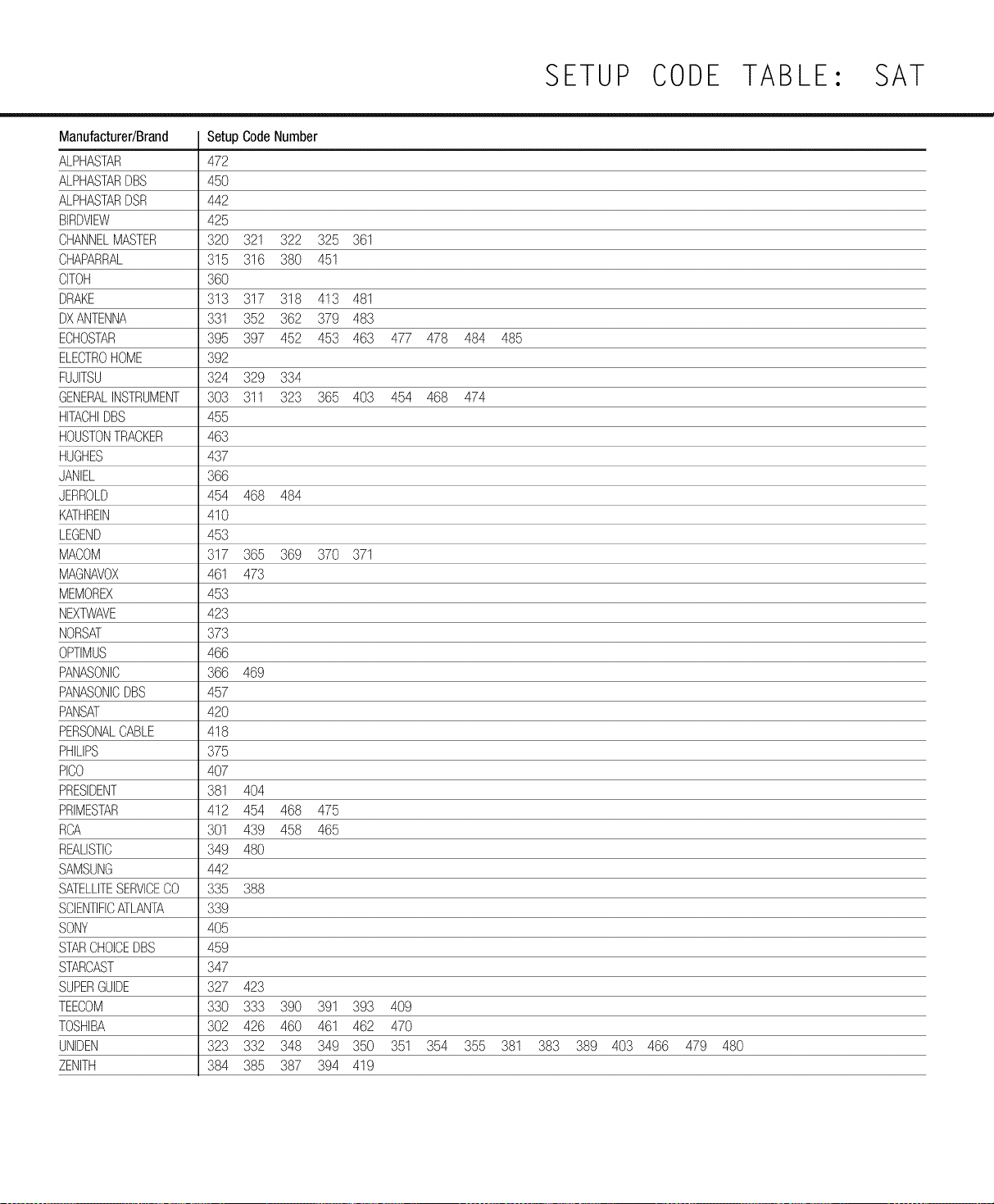
SETUP CODE TABLE: SAT
Manufacturer/Brand
ALPHASTAR
ALPHASTARDBS
ALPHASTARDSR
BIRDVIEW
CHANNELMASTER
CHAPARRAL
CITOH
DRAKE
DXANTENNA
ECHOSTAR
ELECTROHOME
FUJITSU
GENERALINSTRUMENT
HITACHIDBS
HOUSTONTRACKER
HUGHES
JANIEL
JERROLD
KATHREIN
LEGEND
MACOM
MAGNAVOX
MEMOREX
NEXTWAVE
NORSAT
OPTIMUS
PANASONIC
PANASONICDBS
PANSAT
PERSONALCABLE
PHILIPS
PICO
PRESIDENT
PRIMESTAR
ROA
REALISTIC
SAMSUNG
SATELLITESERVICECO
SCIENTIFICATLANTA
SONY
STARCHOICEDBS
STARCAST
SUPERGUIDE
TEECOM
TOSHIBA
UNIDEN
ZENITH
Setup CodeNumber
472
450
442
425
320 321 322 325 361
315 316 380 451
360
313 317 318 413 481
331 352 362 379 483
395 397 452 453 463 477 478 484 485
392
324 329 334
303 311 323 365 403 454 468 474
455
463
437
366
454 468 484
410
453
317 365 369 370 371
461 473
453
423
373
466
366 469
457
420
418
375
407
381 404
412 454 468 475
301 439 458 465
349 480
442
335 388
339
405
459
347
327 423
330 333 390 391 393 409
302 426 460 461 462 470
323 332 348 349 350 351 354 355 381 383 389 403 466 479 480
384 385 387 394 419
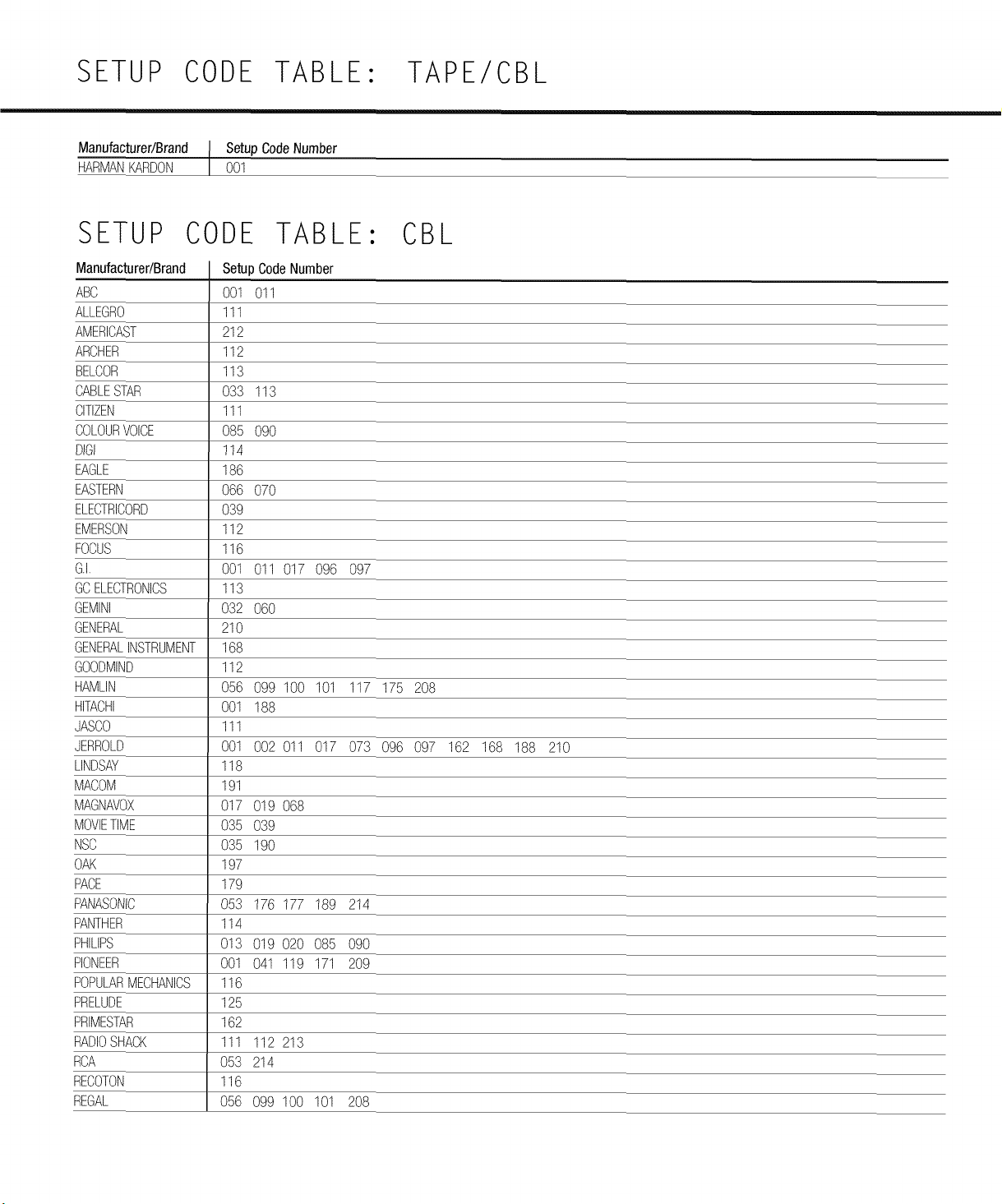
SETUP CODE TABLE: TAPE/CBL
Manufacturer/Brand Setup CodeNumber
HARMANKARDON 001
SETUP CODE TABLE: CBL
Manufacturer/Brand
ABC
ALLEGRO
AMERICAST
ARCHER
BELCOR
CABLESTAR
CITIZEN
COLOURVOICE
OlGI
EAGLE
EASTERN
ELECTRICORD
EMERSON
FOCUS
G.I.
GCELECTRONICS
GEMINI
GENERAL
GENERALINSTRUMENT
GOODMIND
HAMLIN
HITACHI
JASCO
JERROLD
LINDSAY
MACOM
MAGNAVOX
MOVIETIME
NSC
OAK
PACE
PANASONIC
PANTHER
PHILIPS
PIONEER
POPULARMECHANICS
PRELUDE
PRIMESTAR
RADIOSHACK
RCA
RECOTON
REGAL
Setup CodeNumber
001 011
111
212
112
113
033 113
111
085 090
114
186
066 070
039
112
116
001 011 017 096 097
113
032 060
210
168
112
056 099 100 101 117 175 208
001 188
111
001 002 011 017 073 096 097 162 168 188 210
118
191
017 019 068
035 039
035 190
197
179
053 176 177 189 214
114
013 019 020 085 090
001 041 119 171 209
116
125
162
111 112 213
053 214
116
056 099 100 101 208
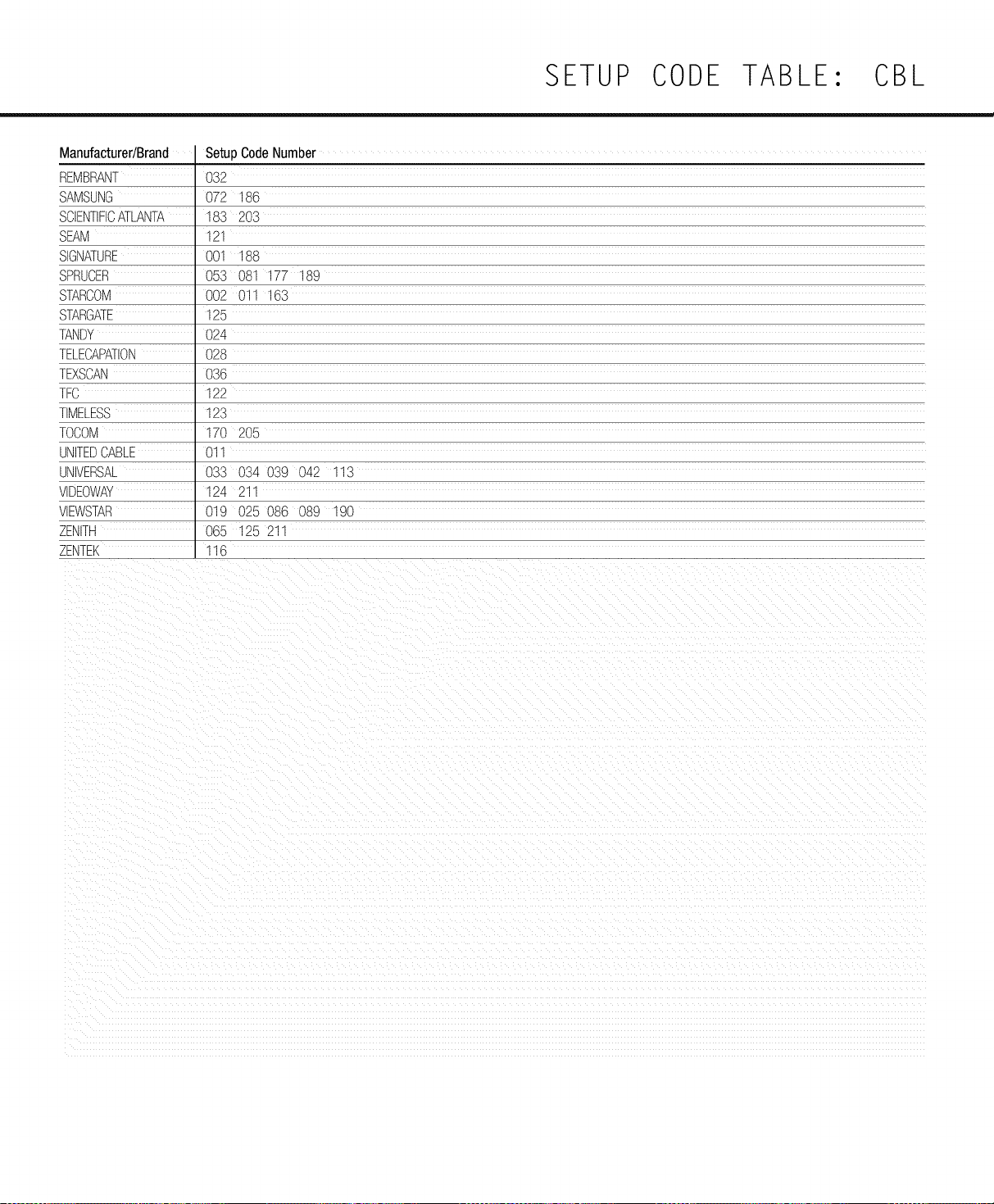
SETUP CODE TABLE: CBL
Manufacturer/Brand
REMBRANT
SAMSUNG
SCIENTIFICATLANTA
SEAM
SIGNATURE
SPRUCER
STARCOM
STARGATE
TANDY
TELECAPATION
TEXSCAN
TFC
TIMELESS
TOCOM
UNfrEECABLE
UNIVERSAL
VIDE)WAY
VlEWSTAr_
ZENITH
ZENTEK
Setup CodeNumber
O32
072 186
183 203
121
001 188
053 081 177 189
002 011 163
125
024
028
036
122
123
170 205
01
033 034 039 042 113
124 211
019 025 08C 089 190
065 125 211
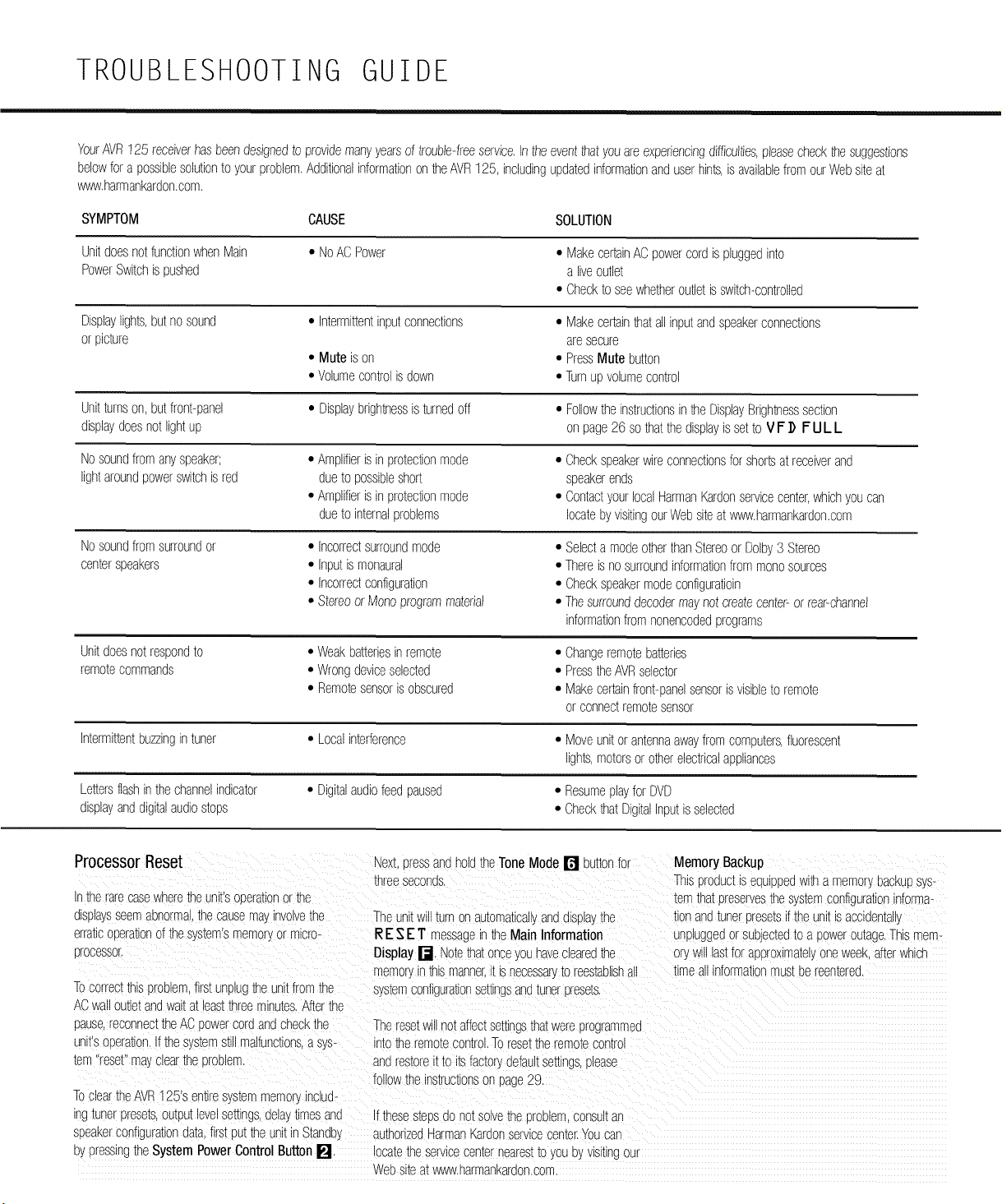
TROUBLESHOOTING GUIDE
YourAVR125 receiverhasbeendesignedto providemanyyearsof trouble-freeservice.Intheevent_hatyouareexperiencingdifficulties,pleasecheck_hesuggestions
belowfor a possiblesolutionto yourproblem.Additionalinformationon he AVR125, includingupdatedinformationanduserhints,is availablefromourWebsiteat
www.harmankardon.com.
SYMPTOM CAUSE SOLUTION
UnitdoesnotfunctionwhenMain
PowerSwitchis pushed
• NoACPower
• MakecertainAC powercordispluggedinto
a liveoutlet
• Checkto seewhetheroutletis switch-controlled
Displaylights,butno sound
or picture
Unitturnson,butfront-panel
displaydoesnotlightup
Nosoundfromanyspeaker;
lightaroundpowerswitchis red
Nosoundfromsurroundor
centerspeakers
Unitdoesnotrespondto
remotecommands
• Intermittentinputconnections
• Mute is on
• Volumecontrolis down
• Displaybrightnessis turnedoff
• Amplifieris inprotectionmode
dueto possibleshort
• Amplifieris inprotectionmode
dueto internalproblems
• Incorrectsurroundmode
• Inputis monaural
• Incorrectconfiguration
• Stereoor Monoprogrammaterial
• Weakbatteriesinremote
• Wrongdeviceselected
• Remotesensoris obscured
• Makecertainhat allinputandspeakerconnections
aresecure
• PressMute button
• Turnupvolumecontrol
• Followtheinstructionsin he DisplayBrightnesssection
on page26 sothatthedisplayis setto VI= ]) I= UL L
• Checkspeakerwireconnectionsforshortsatreceiverand
speakerends
• ContactyourlocalHarmanKardonservicecenter,whichyou can
locatebyvisitingourWebsiteat www.harmankardon.com
• Selecta modeotherthanStereoor Dolby3 Stereo
• Thereis nosurroundinformationfrom monosources
• Checkspeakermodeconfiguratioin
• Thesurrounddecodermaynotcreatecenter-or rear-channel
informationfromnonencodedprograms
• Changeremotebatteries
• PresstheAVRselector
• Makecertainfront-panelsensoris visibleto remote
orconnectremotesensor
Intermittentbuzzingintuner • Localinterference • Moveunitor antennaawayfrom computers,fluorescent
lights,motorsor oher elecNcalappliances
Lettersflashin thechannelindicator • Digitalaudiofeedpaused • Resumeplayfor DVD
displayanddigitalaudiostops • Checkhat DigitalInputis selected
Processor Reset _ex_,DressanaholdtheToneMode [] buttonfor
:hreeseconds.
inthe rarecasewheremeunKsooeratlonor the
]lsplaysseemaonormathecauseme,.nvolvethe TheunitWillturnon awomatlcallyano(]lSpla_the
erraticoperationof thesystems memor',ormicro- I_ES E1" rr?ssageinme Main Information
orocessor, Display[_. Notethatoncejou haveclearedme
mem% ntnismanner.[_snecessar,toreestablishm
MemoryBackup
Ths urouuc[is eouiDDeowitha memoryoackupsys-
mmthatoreservesthe systemconfigurationinforma+
_onanozuneroresetsif the un__sacc_(]er[ai,
unplugge(]or suojecm(]_oa poweroumge,Thismem-
or,.willlastfor aDorommamlyoneweek,afterwhicf
timeallinformator mus[Dereemere(],
Tocorrecttnisoroblem,first unplugtheunitfromthe sysmmconfigurationsettingsan(]_unerpresem,
AC wal ou[letan(]wail:el:_eas_mreeminwes,Afterthe
pause,reconnec_theACDowercordandcheckthe Theresetwillnotaffectsemngs_na_wereprogrammed
unitsc Deration,Ifthe sjs_emstillmalfunctions+a sys- intothe remotecontrol,Toresettheremotecontrol
mm resev ma_.cleartheDroolem, andrestoreitto itsfactor_,defaultsettings,olease
followthe instructionsor page29,
TocleartneAVR125's entiresjsIem memorynclu(]-
'ng_unerpresem,ou[ou_levelsewn_s,delay_lmesa_(] f thesesteos(]ono_SOlVemeDroolemconsui_an
speakerconfigurationdata,first(]u[meunKinStandb', authorizedHermanmar(]onservicecenter,Youcan
uypressingtheSystem PowerControlButtonP"], locatetheservicecenterneares__oyou uyVlSlUNgOUI
Websiteat www,harmankar(]on,cc_,
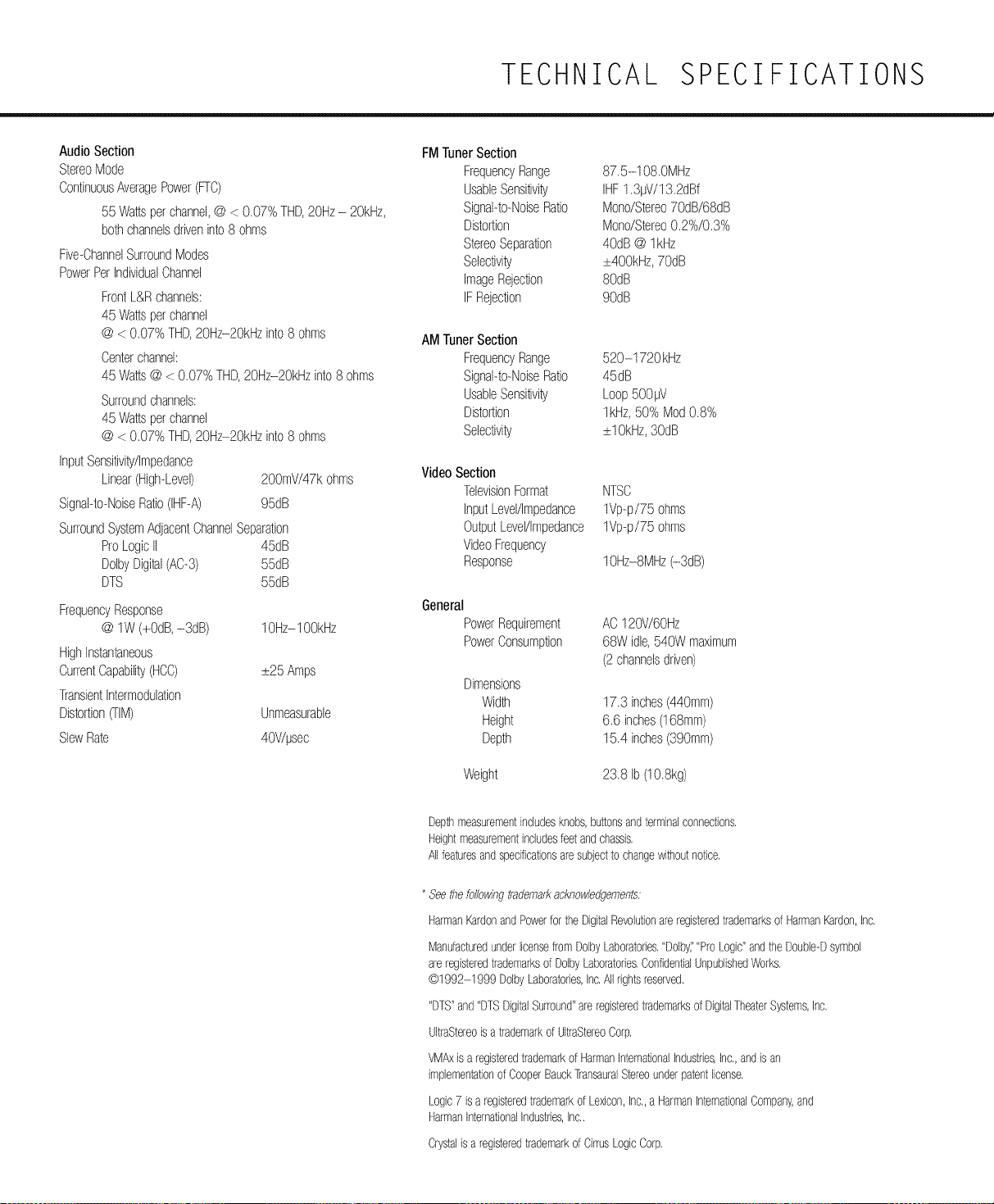
TECHNICAL SPECIFICATIONS
AudioSection
StereoMode
ContinuousAveragePower(Fro)
55 Wattsperchannel,@ < 0.07%THD,20Hz- 20kHz,
bothchannelsdriveninto8 ohms
Five-ChannelSurroundModes
PowerPerIndividualChannel
FrontL&Rchannels:
45 Wattsperchannel
@ < 0.07%THD,20Hz-2OkHzinto8 ohms
Centerchannel:
45 Watts@ < 0.07% THD,20Hz-2OkHzinto8 ohms
Surroundchannels:
45 Wattsperchannel
@ < 0.07%THD,20Hz-2OkHzinto8 ohms
InputSensitivity/Impedance
Linear(High-Level) 200mV/47kohms
Signal-to-NoiseRatio(IHF-A) 95dB
SurroundSystemAdjacentChannelSeparation
ProLogicII 45dB
DolbyDigital(AC-3) 55dB
DTS 55dB
FrequencyResponse
@ lW (+ODD,-3dB) lOHz-lOOkHz
HighInstantaneous
CurrentCapability(HCC) _+25Amps
TransientIntermodulation
Distortion(TIM) Unmeasurable
SlewRate 40V/!Jsec
FMTunerSection
FrequencyRange 87.5-108.0MHz
UsableSensitivity IHF1.3!JV/13.2dBf
Signal-to-NoiseRatio Mono/Stereo70dB/68dB
Distortion Mono/Stereo0.2%/0.3%
StereoSeparation 4OdD@ lkHz
Selectivity _+400kHz,7OdD
ImageRejection 8OdD
IFRejection 9OdD
AMTunerSection
FrequencyRange 520-1720 kHz
Signal-to-NoiseRatio 45dB
UsableSensitivity Loop500!JV
Distortion lkHz, 50% Mod0.8%
Selectivity _+lOkHz,3OdD
VideoSection
TelevisionFormat NTSC
InputLevel/Impedance 1Vp-p/75 ohms
OutputLevel/Impedance 1Vp-p/75 ohms
VideoFrequency
Response IOHz-aMHz(-3dB)
General
PowerRequirement
PowerConsumption
AC120V/6OHz
68Widle,540W maximum
(2channelsdriven)
Dimensions
Widlh 17.3 inches(440mm)
Height 6.6 inches(168mm)
Depth 15.4 inches(390mm)
Weight 23.8 Ib (lO.akg)
Depthmeasurementincludesknobs,buttonsandterminalconnections,
Heightmeasurementincludesfeetandchassis,
Allfeaturesandspecificationsaresubjectto changewithoutnotice,
* Seethefo//owingtrademarkacknowledgements:
HarmanKardonandPowerforthe DigitalRevolutionare registeredtrademarksof HarmanKardon,Inc,
ManufacturedunderlicensefromDolbyLaboratories,"Dolbyi'"ProLogic"andthe Double-Dsymbol
are registeredtrademarksof DolbyLaboratories,ConfidentialUnpublishedWorks,
@1992-1999 DolbyLaboratories,Inc,All rightsreserved,
"DTS"and"DTSDigitalSurround"are registeredtrademarksof DigitalTheaterSystems,Inc,
UltraStereois a trademarkof UltraStereoCorp,
VMAxis a registeredtrademarkof HarmanInternationalIndustries,Inc,,andis an
implementationof CooperBauckTransauralStereounderpatentlicense,
Logic7 is a registeredtrademarkof Lexicon,Inc,,a HarmanInternationalCompany,and
HarmanInternationalIndustries,Inc,,
Crystalis a registeredtrademarkof CirrusLogicCorp,

harman/kardon ®
H A HarmanInternationalCompany
250 CrosswaysParkDrive,Woodbury,NewYork11797
vwvw.harmankardon.com
© 2002 HarmanKardon,Incorporated
PartNo,: OQX1A778Z