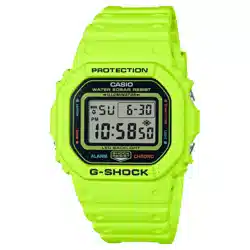
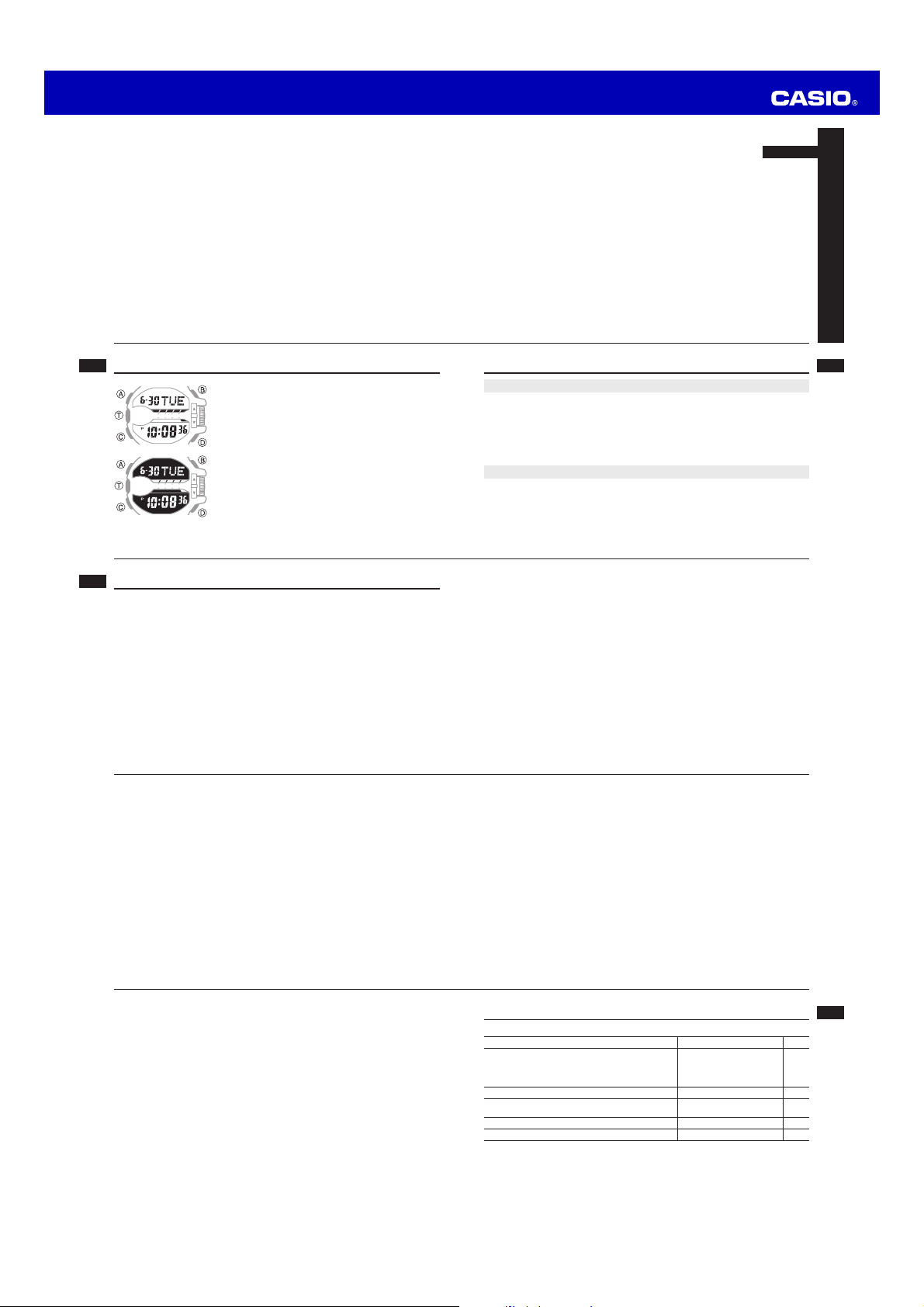
Operation Guide 5398
E-9
Mode Reference Guide
The mode you should select depends on what you want to do.
To do this: Enter this mode: See:
• View the current date in the Home City
• Confi gure Home City and daylight saving time (DST)
settings
• Confi gure time and date settings
Timekeeping Mode E-17
Use the stopwatch to measure elapsed time Stopwatch Mode E-25
View the current time in one of 48 cities
(31 time zones) around the globe
World Time Mode E-29
Set an alarm time Alarm Mode E-33
Use the countdown timer Countdown Timer Mode
E-37
E-8
E-7
Adjusting Hand Positions . . . . . . . . . . . . . . . . . . . . . . . . . . . . . . . . . . . . . . . . . E-47
Button Operation Tone . . . . . . . . . . . . . . . . . . . . . . . . . . . . . . . . . . . . . . . . . . . E-49
To turn the button operation tone on and off . . . . . . . . . . . . . . . . . . . . . . . . . E-49
Troubleshooting . . . . . . . . . . . . . . . . . . . . . . . . . . . . . . . . . . . . . . . . . . . . . . . . . E-51
Main Indicators . . . . . . . . . . . . . . . . . . . . . . . . . . . . . . . . . . . . . . . . . . . . . . . . . E-52
Specifi cations. . . . . . . . . . . . . . . . . . . . . . . . . . . . . . . . . . . . . . . . . . . . . . . . . . . E-54
Operating Precautions . . . . . . . . . . . . . . . . . . . . . . . . . . . . . . . . . . . . . . . . . . . E-56
User Maintenance . . . . . . . . . . . . . . . . . . . . . . . . . . . . . . . . . . . . . . . . . . . . . . . E-66
E-6
To set an alarm time . . . . . . . . . . . . . . . . . . . . . . . . . . . . . . . . . . . . . . . . . . . E-34
To test the alarm . . . . . . . . . . . . . . . . . . . . . . . . . . . . . . . . . . . . . . . . . . . . . . E-35
To turn an alarm and the Hourly Time Signal on and off . . . . . . . . . . . . . . . . . E-36
To stop the alarm . . . . . . . . . . . . . . . . . . . . . . . . . . . . . . . . . . . . . . . . . . . . . E-36
Countdown Timer . . . . . . . . . . . . . . . . . . . . . . . . . . . . . . . . . . . . . . . . . . . . . . . E-37
To enter the Countdown Timer Mode . . . . . . . . . . . . . . . . . . . . . . . . . . . . . . . E-37
To confi gure the countdown timer . . . . . . . . . . . . . . . . . . . . . . . . . . . . . . . . . E-38
To perform a countdown timer operation . . . . . . . . . . . . . . . . . . . . . . . . . . . . E-38
To stop the alarm . . . . . . . . . . . . . . . . . . . . . . . . . . . . . . . . . . . . . . . . . . . . . E-40
Illumination . . . . . . . . . . . . . . . . . . . . . . . . . . . . . . . . . . . . . . . . . . . . . . . . . . . . . E-41
To turn on illumination manually . . . . . . . . . . . . . . . . . . . . . . . . . . . . . . . . . . . E-41
To change the illumination duration . . . . . . . . . . . . . . . . . . . . . . . . . . . . . . . . E-42
To enable or disable the auto light switch . . . . . . . . . . . . . . . . . . . . . . . . . . . . E-45
E-5
Using the Stopwatch . . . . . . . . . . . . . . . . . . . . . . . . . . . . . . . . . . . . . . . . . . . . . E-25
To enter the Stopwatch Mode . . . . . . . . . . . . . . . . . . . . . . . . . . . . . . . . . . . . E-25
To perform an elapsed time operation . . . . . . . . . . . . . . . . . . . . . . . . . . . . . . E-26
To pause at a split time . . . . . . . . . . . . . . . . . . . . . . . . . . . . . . . . . . . . . . . . . E-26
To measure two fi nishes . . . . . . . . . . . . . . . . . . . . . . . . . . . . . . . . . . . . . . . . E-26
To use Auto-Start . . . . . . . . . . . . . . . . . . . . . . . . . . . . . . . . . . . . . . . . . . . . . E-28
Checking the Current Time in a Different Time Zone . . . . . . . . . . . . . . . . . . . E-29
To enter the World Time Mode. . . . . . . . . . . . . . . . . . . . . . . . . . . . . . . . . . . . E-30
To view the time in another time zone . . . . . . . . . . . . . . . . . . . . . . . . . . . . . . E-30
To specify standard time or daylight saving time (DST) for a city . . . . . . . . . . . E-31
To swap your Home City and World Time City . . . . . . . . . . . . . . . . . . . . . . . . E-32
Using the Alarm . . . . . . . . . . . . . . . . . . . . . . . . . . . . . . . . . . . . . . . . . . . . . . . . . E-33
To enter the Alarm Mode . . . . . . . . . . . . . . . . . . . . . . . . . . . . . . . . . . . . . . . . E-34
E-4
Contents
About This Manual . . . . . . . . . . . . . . . . . . . . . . . . . . . . . . . . . . . . . . . . . . . . . . . . E-2
Things to check before using the watch . . . . . . . . . . . . . . . . . . . . . . . . . . . . . . E-3
Mode Reference Guide . . . . . . . . . . . . . . . . . . . . . . . . . . . . . . . . . . . . . . . . . . . . E-9
Timekeeping . . . . . . . . . . . . . . . . . . . . . . . . . . . . . . . . . . . . . . . . . . . . . . . . . . . . E-17
Confi guring Home City Settings . . . . . . . . . . . . . . . . . . . . . . . . . . . . . . . . . . . .E-18
To confi gure Home City settings . . . . . . . . . . . . . . . . . . . . . . . . . . . . . . . . . . E-18
To change the Daylight Saving Time (summer time) setting . . . . . . . . . . . . . . E-20
Adjusting the Digital Time and Date Settings . . . . . . . . . . . . . . . . . . . . . . . . . E-21
To confi gure the digital time and date settings . . . . . . . . . . . . . . . . . . . . . . . . E-21
E-3
Things to check before using the watch
1. Check the Home City and the daylight saving time (DST) setting.
Use the procedure under “To confi gure Home City settings” (page E-18) to confi gure
your Home City and daylight saving time settings.
Important!
• Proper World Time Mode data depend on correct Home City, time, and date
settings in the Timekeeping Mode. Make sure you configure these settings
correctly.
2. Set the current time.
• See “Adjusting the Digital Time and Date Settings” (page E-21).
The watch is now ready for use.
E-2
About This Manual
• Depending on the model of your watch, display text
appears either as dark fi gures on a light background, or
light fi gures on a dark background. All sample displays
in this manual are shown using dark fi gures on a light
background.
• Button operations are indicated using the letters shown
in the illustration.
• Note that the product illustrations in this manual are
intended for reference only, and so the actual product
may appear somewhat different than depicted by an
illustration.
E-1
ENGLISH
Congratulations upon your selection of this CASIO watch.
To ensure that this watch provides you with the years of service for which it is
designed, carefully read and follow the instructions in this manual, especially the
information under “Operating Precautions” and “User Maintenance”.
Be sure to keep all user documentation handy for future reference.
MA1404-A
© 2014 CASIO COMPUTER CO., LTD.

Operation Guide 5398
E-19
3. After the setting is the way you want, press A to return to the Timekeeping
Mode.
Note
• After you specify a city code, the watch will use UTC* offsets in the World Time
Mode to calculate the current time for other time zones based on the current time
in your Home City.
* Coordinated Universal Time, the world-wide scientifi c standard of timekeeping.
The reference point for UTC is Greenwich, England.
E-18
Confi guring Home City Settings
There are two Home City settings: actually selecting the Home City, and selecting
either standard time or daylight saving time (DST).
To confi gure Home City settings
1. In the Timekeeping Mode, hold down A until the
fl ashing Hold indicator disappears from the display
and the currently selected city code appears on the
right side of the upper display.
• This indicates the city code setting mode.
2. Rotate the rotary switch to scroll through city codes on
the digital display until the one you want to use as your
Home City is displayed.
• For details about city codes, see the “City Code
Table” at the back of this manual.
City Code
E-17
Timekeeping
Use the Timekeeping Mode to set and view the current time and date.
Hour
Month-Day
Minute
Day of week
Second
Hour : Minute
PM indicator
Countdown Timer hand
E-16
Note
• Watch button functions are the same regardless of whether the hands are moved
out of the way or at their normal positions.
• Changing to another mode will cause the hands to move back to their normal
positions.
• The hands also will move back to their normal positions automatically if no
operation is performed for about one hour.
E-15
1. While holding down B, press C.
• This will cause the hour and minute hands to move to a location where they do
not block your view of the digital display.
Example: When the current time is 8:23
Flashes while the hands are moved out of the way.
2. Holding down B again as you press C will cause the hands to return to their
normal positions (normal timekeeping).
E-14
• Quickly rotating the rotary switch three times in either direction will start high-speed
movement (hand movement or displayed setting scrolling) in the corresponding
direction (forward or back). To stop a high-speed operation, rotate the rotary
switch in the direction opposite that of the current high-speed movement, or press
any button.
Moving the Hands Out of the Way for Better Viewing
You can use the procedure below to temporarily move the hour and minute hands
out of the way to better view what is on the display.
• This operation can be performed in any mode. In the case of a setting mode
(setting fl
ashing on the screen), the hands will move out of the way automatically,
even if you do not perform the below operation.
E-13
Rotary switch Operations
Important!
• With this watch, you do not need to pull out the rotary switch before
rotating it. Pulling on the rotary switch can damage the watch and
cause malfunction.
• To protect against unintended operation, nothing happens for the fi
rst rotary
switch rotation. Continue rotating the rotary switch until the desired operation
is performed. If you do not perform any rotary switch operation for about three
minutes, you will need to rotate the rotary switch as described above before it
operates again.
• Note that the result of a rotary switch operation depends on the mode the watch is
in when you perform it.
• You can use rotary switch rotation to perform the operations described below.
− Timekeeping: Enter the Countdown Timer Mode
(when the countdown timer is stopped and reset to all zeros)
− World Time:
Change the World Time City
− Alarm: Scroll through the available alarm screens
E-12
General Functions (All Modes)
The functions and operations described in this section can be used in all modes.
• Auto Return Features
The watch will automatically return to the Timekeeping Mode if you do not perform
any operation for a certain amount of time, as described below.
Mode Approximate Elapsed Time
Alarm
3 minutes
Time or other setting mode
(information fl ashing on the display)
Countdown Timer Mode
(entered from the Timekeeping Mode by
rotating the rotary switch)
10 seconds
E-11
C
Alarm Mode
Countdown Timer
Mode
World Time Mode
C
C
• If the timer in the Countdown Timer Mode is stopped and reset to the countdown
start time, you can also go directly from the Timekeeping mode to the Countdown
Timer Mode by rotating the rotary switch or pressing T. For more information,
see “Directly Entering the Countdown Timer Mode from the Timekeeping Mode”
(page E-40).
E-10
Selecting a Mode
• Press C to cycle between the modes as shown below.
• To return to the Timekeeping Mode from any other mode, hold down C for about
two seconds.
• In any mode (except a setting mode), press B to illuminate the display.
Timekeeping Mode Stopwatch Mode
CC

Operation Guide 5398
E-29
Checking the Current Time in a Different Time Zone
You can use the World Time Mode to view the current
time in one of 31 time zones (48 cities) around the globe.
The city that is currently selected in the World Time
Mode is called the “World Time City”.
• The hour and minute hands indicate information for the
currently selected Home City.
• When you enter the World Time Mode, the currently
selected city code and city name scroll once across
the digital display. After that, the city code remains
displayed. This same scrolling operation is also
performed whenever you change the World Time City to
a different city or when you press T.
World Time City information
E-28
To use Auto-Start
1. While the stopwatch screen is showing all zeros in
the Stopwatch Mode, rotate the rotary switch to set
the number of countdown seconds (or STW for no
countdown).
2. Press T to start the countdown.
• When the countdown reaches zero, a tone sounds
and a stopwatch timing operation starts automatically.
• Pressing T while the Auto-Start countdown is in
progress immediately starts the stopwatch.
Countdown seconds
E-27
Note
• The Stopwatch Mode can indicate elapsed time up to 23hours, 59minutes,
59seconds.
• Once started, stopwatch timing continues until you press T to stop it, even if
you exit the Stopwatch Mode to another mode and even if timing reaches the
stopwatch limit defi ned above.
• Exiting the Stopwatch Mode while a split time is frozen on the display clears the
split time and returns to elapsed time measurement.
Auto-Start
With Auto-Start, you can confi gure the stopwatch to perform a countdown and start
elapsed time measurement automatically when the countdown reaches zero.
• Set a countdown length in the range of one to 60 seconds before using Auto-Start.
• Auto-Start is disabled automatically after the stopwatch elapsed time operation it
started is complete.
• If you do not want to use a countdown, select STW for the countdown value.
• During the fi nal three seconds of the countdown, a beeper sounds with each
second.
E-26
To perform an elapsed time operation
T
T T T D
Start Stop (Resume) (Stop) Reset
To pause at a split time
T
D D T D
Start Split
(SPL displayed)
Split release Stop Reset
To measure two fi nishes
T
D T D D
Start Split
(SPL displayed)
First runner fi nishes.
Display time of fi rst
runner.
Stop
Second runner
fi nishes.
Split release
Display time of
second runner.
Reset
E-25
Using the Stopwatch
The stopwatch measures elapsed time, split times, and
two fi nishes.
• The display range of the stopwatch is 23 hours,
59minutes, 59.99 seconds.
To enter the Stopwatch Mode
Use C to select the Stopwatch Mode as shown on
page E-10.
Seconds
Minutes
1/100 Second
Hours
E-24
Note
• Resetting the seconds to 00 while the current count is in the range of 30 to 59
causes the minutes to be increased by 1.
• While the “Minute (and hour)” setting is selected above, the hour setting will change
automatically whenever you move the minute setting past midnight.
• The watch’s built-in full automatic calendar makes allowances for different month
lengths and leap years. Once you set the date, there should be no reason to
change it except after you have the watch’s battery replaced.
• The day of the week changes automatically when the date changes.
E-23
3. When the timekeeping setting you want to change is fl ashing, perform the
operation described below.
Screen To do this: Do this:
Toggle between 12-hour (12H) and 24-hour
(24H) timekeeping
Rotate the rotary switch.
Reset the seconds to 00
Press D.
Change the hour or minute
Rotate the rotary switch.
Change the year
Change the month or day
4. Press A to exit the setting mode.
E-22
2. Press C to move the fl ashing in the sequence shown below to select the other
settings.
City Code
(page E-18)
C
DST
(page E-20)
C
12/24-Hour Format
C
Seconds
C
C
Minute
(and hour)
C
Illumination Duration
(page E-41)
Hour
(only)
C
C
Button Operation Tone On/Off
(page E-49)
C
Month/Day
C
Year
E-21
Adjusting the Digital Time and Date Settings
Use the procedure below to adjust the digital time and date settings.
To confi gure the digital time and date settings
1. In the Timekeeping Mode, hold down A until the
fl ashing Hold indicator disappears from the display
and the currently selected city code appears on the
right side of the upper display.
• This indicates the city code setting mode.
E-20
To change the Daylight Saving Time (summer time) setting
1. In the Timekeeping Mode, hold down A until the
fl ashing Hold indicator disappears from the display
and the currently selected city code appears on the
right side of the upper display.
• This indicates the city code setting mode.
2. Press C to display the DST setting mode.
3. Rotate the rotary switch to toggle between Daylight
Saving Time (
ON) and Standard Time (OFF).
• Note that you cannot switch between daylight saving
time and standard time while UTC is selected as your
Home City.
4.
After the setting is the way you want, press A to
return to the Timekeeping Mode.
• The DST indicator appears to indicate that Daylight
Saving Time is turned on.
DST indicator
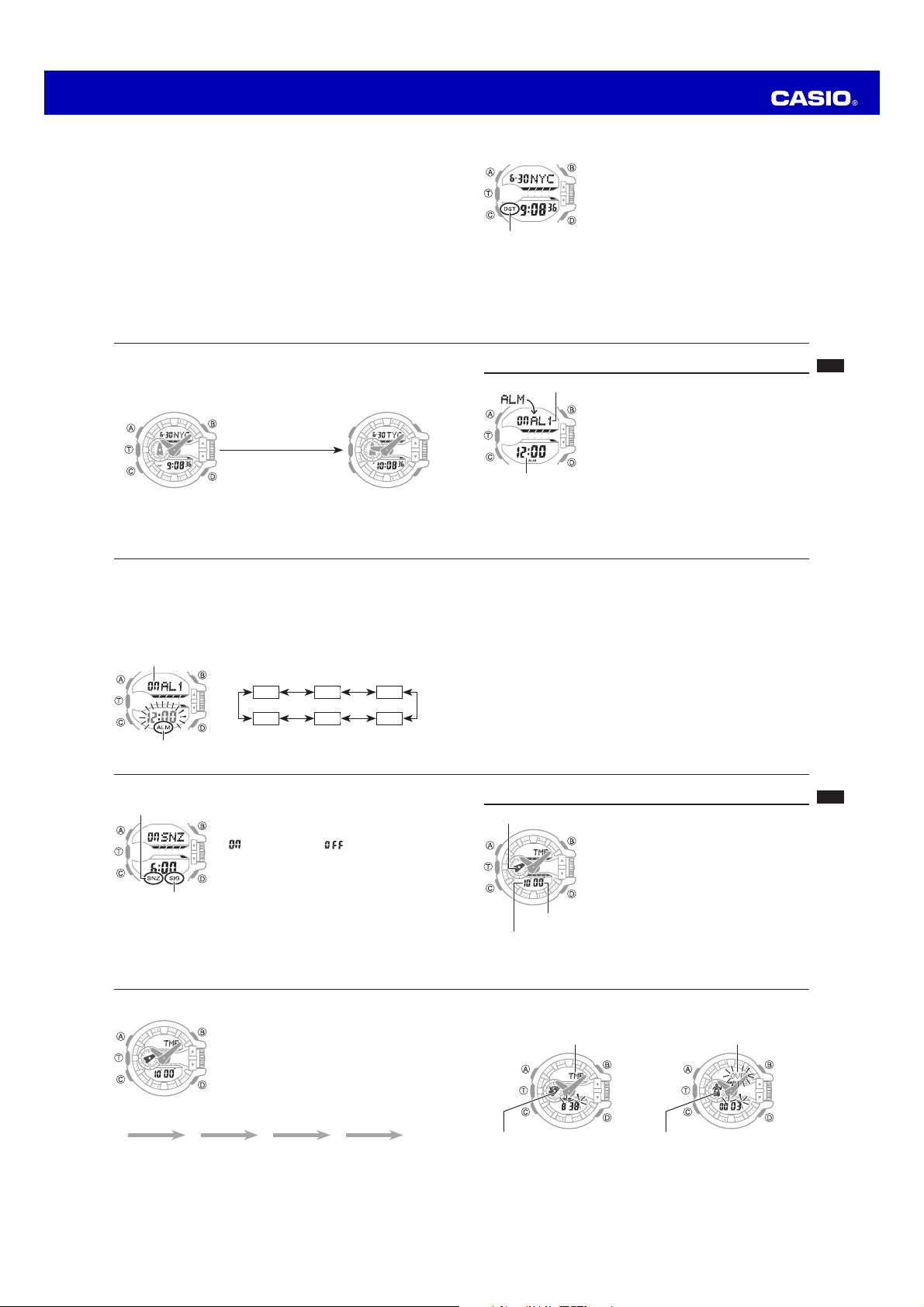
Operation Guide 5398
E-39
Countdown in Progress
Display: TMR
Timer hand:
Indicates remaining time.
Rotates counterclockwise.
Countdown Complete
Display: OVER
Timer hand:
Indicates elapsed time.
Rotates clockwise.
E-38
To confi gure the countdown timer
1. Rotate the rotary switch to adjust the minutes setting.
• If a countdown timer operation is in progress, press
T to stop it and then press D to reset to the current
starting time.
• If a countdown timer operation is paused, press D to
reset to the current starting time.
To perform a countdown timer operation
T
T T T D
Start Stop (Resume) (Stop) Reset
E-37
Countdown Timer
The countdown timer can be set within a range of
one minute to 60minutes. An alarm sounds when
the countdown reaches zero. When the end of the
countdown is reached, the timer starts to count up and
continues timing up to 60minutes.
To enter the Countdown Timer Mode
Use C to select the Countdown Timer Mode as shown
on page E-11.
Minutes
Timer hand
Seconds
E-36
To turn an alarm and the Hourly Time Signal on and off
In the Alarm Mode, rotate the rotary switch to select an
alarm or the Hourly Time Signal.
• When the alarm you want or the Hourly Time Signal
is displayed, press T to toggle it between on
(“
” displayed) and off (“ ” displayed).
• The alarm on indicator (when any alarm is on), snooze
alarm indicator (when the snooze alarm is on), and the
Hourly Time Signal on indicator (when the Hourly Time
Signal is on) are shown on the display in all modes.
To stop the alarm
Press any button.
Hourly time signal
on indicator
Snooze alarm on indicator
E-35
2. Hold down A for about two seconds until the alarm time starts to fl ash. This is
the setting mode.
3. Press C to move the fl ashing to the setting you want to change.
• When both the hour and minute setting is fl ashing: the hour setting will change
automatically as you change the minute setting in the next step.
• When just the hour setting is fl ashing: just the hour setting will change in the
next step.
4. Rotate the rotary switch to change the currently fl ashing setting.
• When setting the alarm time using the 12-hour format, take care to set the time
correctly as a.m. (no indicator) or p.m. (P indicator).
5. Press A to exit the setting mode.
To test the alarm
In the Alarm Mode, hold down T to sound the alarm.
E-34
To enter the Alarm Mode
Use C to select the Alarm Mode as shown on page E-11.
• The snooze alarm screen is indicated by SNZ, while the other alarm screens are
numbered
AL1 through AL4. The Hourly Time Signal screen is indicated by SIG.
• When you enter the Alarm Mode, the data you were viewing when you last exited
the mode appears fi
rst.
To set an alarm time
1. In the Alarm Mode, rotate the rotary switch to scroll
through the alarm screens until the one whose setting
you want to change is displayed.
AL1 AL3AL2
SNZSIG AL4
Alarm indicator
Alarm ON/OFF indicator
E-33
Using the Alarm
You can set fi ve independent daily alarms. When a daily
alarm is turned on, an alarm tone will sound for about
10seconds each day when the time in the Timekeeping
Mode reaches the preset alarm time. One of the alarms
is a snooze alarm, while the other four are one-time
alarms. The snooze alarm operation will repeat every fi ve
minutes, up to seven times.
You can also turn on an Hourly Time Signal, which will
cause the watch to beep twice every hour on the hour.
Alarm number
Alarm time (Hour : Minute)
E-32
To swap your Home City and World Time City
In the World Time Mode, hold down T for at least three seconds.
This will swap your Home City and World Time City.
Example: To swap the Home City (TYO) and World Time City (NYC)
T, at least 3 seconds
World Time City (NYC) time New World Time City (TYO)
E-31
To specify standard time or daylight saving time (DST) for a city
1. In the World Time Mode, rotate the rotary switch to
display the city code (time zone) whose Standard
Time/Daylight Saving Time setting you want to change.
2. Hold down A for about two seconds.
• This toggles the city code you selected in step1
between Daylight Saving Time (DST indicator
displayed) and standard time (DST
indicator not
displayed).
• Note that you cannot switch between standard time/
daylight saving time (DST) while UTC is selected as
the World Time City.
• The standard time/daylight saving time (DST) setting
affects only the currently displayed city. Other cities
are not affected.
DST indicator
E-30
To enter the World Time Mode
Use C to select the World Time Mode as shown on page E-11.
To view the time in another time zone
In the World Time Mode, rotate the rotary switch to change the city code setting.
• To display the UTC city code (differential 0), hold down D.

Operation Guide 5398
E-49
Button Operation Tone
You can turn the button operation tone on or off as
desired.
• Even if you turn off the button operation tone, the
stopwatch countdown tone, alarms, the Hourly Time
Signal, and other beepers all operate normally.
To turn the button operation tone on and off
1.
In the Timekeeping Mode, hold down A until the
fl ashing Hold indicator disappears from the display
and the currently selected city code appears on the
right side of the upper display.
2. Press C eight times to display the button operation
tone On/Off screen (page E-22).
The screen will show either KEY
or MUTE.
E-48
3. Press C.
• This enters the hour and minute hand adjustment
mode.
• Press C again* to enter the timer hand adjustment
mode.
* Nothing will happen if you press C while the hands
are moving.
4. If the hour and minute hands are not at 12o’clock,
rotate the rotary switch to adjust them until they are.
5. Press A to return to the Timekeeping Mode.
Check to make sure that the time indicated by the
hands matches the time on the digital display. If the
times don’t match, perform the correction procedure
above again.
Hour hand and minute hand
E-47
Adjusting Hand Positions
The watch hands can go out of alignment with the time on the digital display if it
is exposed to strong magnetism or impact. If this happens, you should adjust the
hand positions.
Important!
• You do not need to perform the operation below as long as the analog hands
indicate the same time as the digital display.
1. Hold down A for about fi ve seconds until
Sub
appears.
• This indicates the timer hand adjustment mode.
2. If the timer hand is not at 12 o’clock, rotate the rotary
switch to adjust it until it is.
Timer hand
E-46
Auto light switch precautions
• Illumination may not turn on if the face of the watch is more than
15degrees above or below parallel. Make sure that the back of
your hand is parallel to the ground.
• Leaving auto light enabled can run down the watch's battery due
to frequent display illumination.
• Static electricity or magnetic force can interfere with proper
operation of the auto light switch. If illumination does not turn on,
try moving the watch back to the starting position (parallel with
the ground) and then tilt it back towards your face again. If this
does not work, drop your arm all the way down so it hangs at
your side, and then bring it back up again.
• You may notice a very faint clicking sound coming from the watch when it is
shaken back and forth. This sound is caused by mechanical operation of the auto
light switch, and does not indicate a problem with the watch.
• To protect against running down the battery, auto light switch operation
automatically disables approximately six hours after you enable it.
E-45
To enable or disable the auto light switch
In the Timekeeping Mode, hold down B for at least three
seconds to toggle the auto light switch between enabled
(LT displayed) and disabled (LT not displayed).
• The auto light switch enabled indicator (LT) is displayed
in all modes while the auto light switch is enabled.
Illumination Precautions
• The LED that provides illumination loses power after
very long use.
• Illumination may be hard to see when viewed under
direct sunlight.
• Illumination turns off automatically whenever an alarm
sounds.
• Frequent use of illumination runs down the battery.
Auto light switch enabled
indicator
E-44
• When you are wearing the watch, make sure that its auto light switch is
disabled before riding on a bicycle or operating a motorcycle or any other
motor vehicle. Sudden and unintended operation of the auto light switch
can create a distraction, which can result in a traffi c accident and serious
personal injury.
Note
• The auto light switch is always disabled, regardless of its on/off setting, when any
one of the following conditions exists.
While an alarm is sounding
While a hand shift operation is in progress
E-43
About the Auto Light Switch
Enabling the auto light switch causes illumination to
turn on, whenever you position your wrist as described
below in any mode.
Moving the watch to a position that is parallel to the
ground and then tilting it towards you more than
40degrees causes illumination to turn on.
Warning!
• Always make sure you are in a safe place whenever you are reading the
display of the watch using the auto light switch. Be especially careful when
running or engaged in any other activity that can result in accident or
injury. Also take care that sudden illumination by the auto light switch does
not startle or distract others around you.
More than
40°
Wear the watch on the
outside of your wrist
E-42
To change the illumination duration
1. In the Timekeeping Mode, hold down A until the fl ashing Hold indicator
disappears from the display and the currently selected city code appears on the
right side of the upper display.
2. Press C nine times to display the illumination duration setting screen.
• The current illumination duration setting (1 or 3) will be fl ashing in the middle
display.
• See the sequence in step 2 of the procedure under “To confi gure the digital time
and date settings” (page E-21) for information about how to scroll through setting
screens.
3.
Rotate the rotary switch to toggle the illumination duration between three
seconds (3displayed) and 1.5seconds (1displayed).
4. After all the settings are the way you want, press A to exit the setting screen.
E-41
Illumination
The display of the watch is illuminated for easy reading in the dark. The watch’s
auto light switch turns on illumination automatically when you angle the watch
towards your face.
• The auto light switch must be turned on (page E-45) for it to operate.
To turn on illumination manually
Press B in any mode to illuminate the display.
• You can use the procedure below to select either 1.5 seconds or three seconds as
the illumination duration.
• The above operation turns on illumination regardless of the current auto light switch
setting.
E-40
• Before starting a countdown timer operation, check to make sure that a
countdown operation is not in progress (indicated by the seconds counting down).
If it is, press T to stop it and then D to reset to the countdown start time.
To stop the alarm
Press any button.
Directly Entering the Countdown Timer Mode from the Timekeeping Mode
• While the Countdown Timer is stopped and reset to the countdown start time, you
can use the operations below to directly enter the Countdown Timer Mode from
the Timekeeping Mode.
− In the Timekeeping Mode, rotate the rotary switch. If you do not change the
Countdown Timer start time setting within about 10 seconds, the watch will
automatically return to the Timekeeping Mode.
− In the Timekeeping Mode, press T. This will enter the Countdown Timer Mode
and start a countdown operation from the currently set start time.

Operation Guide 5398
L-3
City
Code
City name
UTC Offset/
GMT Differential
DXB DUBAI +4
KBL KABUL +4.5
KHI KARACHI +5
DEL DELHI +5.5
KTM KATHMANDU +5.75
DAC DHAKA +6
RGN YANGON +6.5
BKK BANGKOK +7
SIN SINGAPORE
+8
HKG HONG KONG
BJS BEIJING
TPE TAIPEI
SEL SEOUL
+9
TYO TOKYO
ADL ADELAIDE +9.5
GUM GUAM
+10
SYD SYDNEY
City
Code
City name
UTC Offset/
GMT Differential
NOU NOUMEA +11
WLG WELLINGTON +12
* As of December 2013, the offi cial UTC
offset for Moscow, Russia (MOW) has
been changed from +3 to +4, but this
watch still uses an offset of +3 (the old
offset) for MOW. Because of this, you
should leave the summer time setting
turned on (which advances the time
by one hour) for the MOW time.
x
This table shows the city codes of
this watch.
x
The rules governing global times
(UTC offset and GMT differential) and
summer time are determined by each
individual country.
L-2
City Code Table
City
Code
City name
UTC Offset/
GMT Differential
PPG PAGO PAGO –11
HNL HONOLULU –10
ANC ANCHORAGE –9
YVR VANCOUVER
–8
LAX LOS ANGELES
YEA EDMONTON
–7
DEN DENVER
MEX MEXICO CITY
–6
CHI CHICAGO
NYC NEW YORK –5
SCL SANTIAGO
–4
YHZ HALIFAX
YYT ST. JOHN’S –3.5
RIO
RIO DE JANEIRO
–3
FEN
F. DE NORONHA
–2
City
Code
City name
UTC Offset/
GMT Differential
RAI PRAIA –1
UTC
0LIS LISBON
LON LONDON
MAD MADRID
+1
PAR PARIS
ROM ROME
BER BERLIN
STO STOCKHOLM
ATH ATHENS
+2CAI CAIRO
JRS JERUSALEM
MOW* MOSCOW
+3
JED JEDDAH
THR TEHRAN +3.5
L-1
City Code Table
E-55
Alarms: 5 Daily alarms (four one-time alarms; one snooze alarm); Hourly time signal
Countdown Timer:
Measuring unit: 1 second
Countdown range: 60 minutes
Countdown start time setting range: 1 to 60 minutes (1-minute increments)
Elapsed time: 60 minutes
Illumination: LED (light-emitting diode); Selectable illumination duration
(approximately 1.5 seconds or 3 seconds); Auto Light Switch
Other: Button operation tone on/off; Moving the Hands to View the Digital Display
Power Supply: Two silver oxide batteries (Type: SR927W)
Approximate battery operating time: 3 years under the following conditions:
• 1 illumination operation (1.5 seconds) per day
• Alarm: 10 seconds/day
Frequent use of illumination runs down the battery.
E-54
Specifi cations
Accuracy at normal temperature: ±15 seconds a month
Digital Timekeeping: Hour, minutes, seconds, p.m. (P), month, day, day of the
week
Time format: 12-hour and 24-hour
Calendar system: Full Auto-calendar pre-programmed from the year 2000 to 2099
Other: Home City code (can be assigned one of 48 city codes);
Standard Time/Daylight Saving Time (summer time)
Analog Timekeeping: Hour, minutes (hand moves every 20seconds)
Stopwatch:
Measuring unit: 1/100 second
Measuring capacity: 23:59' 59.99"
Measuring modes: Elapsed time, split time, two fi nishes, Auto Start
World Time: 48 cities (31 time zones)
Other: Daylight Saving Time/Standard Time; Home City/World Time City
switching
E-53
Graphic
The graphic fl ashes in each mode as described below.
Mode Flashing
Timekeeping
Seconds of current timeWorld Time Mode
Alarm Mode
Stopwatch Mode 1/10 seconds of elapsed time measurement
Countdown Timer Mode Seconds of countdown
• The graphic also fl ashes immediately after you change from one mode to another.
E-52
Main Indicators
Number Name See
1
1
Mute indicator E-49
2
2
Auto light switch enabled
indicator
E-45
3
3
Hands shifted indicator E-15
4
4
DST indicator E-20, E-31
5
5
PM indicator E-17
6
6
Snooze alarm on indicator E-36
7
7
Alarm indicator E-34
8
8
Hourly time signal on indicator E-36
9
9
Graphic E-53
E-51
Troubleshooting
Time Setting
■ The current time setting is off by hours.
Your Home City setting may be wrong (page E-18). Check your Home City setting and
correct it, if necessary.
■ The current time setting is off by one hour.
You may need to change your Home City’s standard time/daylight saving time
(DST) setting. Use the procedure under “Adjusting the Digital Time and Date
Settings” (page E-21) to change the standard time/daylight saving time (DST) setting.
World Time Mode
■ The time for my World Time City is off in the World Time Mode.
This could be due to incorrect switching between standard time and daylight saving
time. See “To specify standard time or daylight saving time (DST) for a city” (page E-31)
for more information.
E-50
3. Rotate the rotary switch to toggle the setting between KEY (ON) and MUTE
(OFF).
4. After all the settings are the way you want, press A to exit the setting screen.