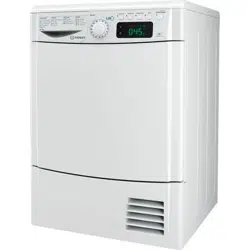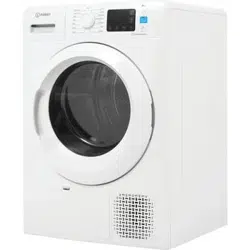
THANK YOU FOR BUYING AN INDESIT PRODUCT.
In order to receive a more complete assistance, please
register your product on www.indesit.eu/register
Policies, standard documentation, ordering of spare parts and additional product information can be
found by:
• Visiting our website docs.indesit.eu and parts-selfservice.whirlpool.com
• Using QR Code
• Alternatively, contact our After-sales Service (See phone number in the warranty booklet). When
contacting our After-sales Service, please state the codes provided on your product’s identi cation plate.
EN
Quick guide
Before using the appliance carefully read the Safety
Instructions.
xxxxxxxxxxxx
xxxx
FIRST TIME USE
Make sure that the water tank is correctly inserted. Make sure
that the drain hose on the back of the dryer is properly xed,
either to the dryers's water tank or to the domestic sewage
system.
The dryer must be installed in a room with a temperature
ranging between 5°C and 35°C to ensure proper operation.
Before you use your dryer ensure that it has been in a upright
position for at least 6 hours.
DAILY USE
Doing this will keep your machine working at its BEST:
- remember to empty your water tank after each drying cycle.
- remember to clean your lters after each drying cycle.
Refer to the Care & Maintenance section.
1. Plug the dryer into the power supply socket.
2. Open the door and load garments; always refer to instructions on
clothing labels and the max loads indicated in the programme
section. Empty pockets. Make sure garments do not get caught
between the door and/or the door lter. Do not load items that are
dripping wet. Do not tumble dry large, very bulky items.
3. Close the door.
4. Press the "On/O" button.
5. Select the most suitable programme
for the type of fabric in that
load.
6. Select the options, if necessary.
7. Press the "
Start/Pause"
button to begin drying.
8. At the end of the drying cycle, a buzzer will beep. An indicator on
the control panel signals the end of the cycle. Pull the load out
immediately to prevent the formation of creases on laundry.
9. Turn the machine o by pressing the "On/O" button, open the
door and pull the clothing out. If the machine is not switched o
manually, after about a quarter of an hour from the end of the
cycle , the appliance turns o automatically to save energy.
Note that some programme/option accords with "Crease Care"
system. This means that for some hours, after the end of the
drying cycle, the drum rotates at regular intervals to prevent the
formation of creases.
In case of power failure, it is necessary to press the "Start/Pause"
button to restart the cycle.
CARE LABEL
Always check the care labels, especially when placing garments in
the tumble dryer for the rst time. Below are the most commonly
used symbols:
May be tumble dried.
Do not tumble dry.
Tumble dry – high heat.
Tumble dry – low heat.
PUSH & GO
This function serves to start a cycle, after machine switching on,
without enabling any further button an/or knob (the programme
PUSH & GO will be deactivated instead).
It is always necessary to follow the points 1, 2, and 3 concerning
the daily use.
To start the cycle PUSH & GO, keep the button pressed. The light on
signals that the cycle is started. The cycle is suitable for cotton and
synthetic textiles. Max. load 4 kg. (Cycle duration 100’).
If the door is opened during the cycle, to restart it, close the door and
press the button START/PAUSE. This programme does not allow to set
other options.
OPENING OF THE DOOR DURING THE CYCLE
Laundry can be checked while the drying cycle runs and any
garments already dry can be removed, while drying continues for
the remaining items. After closing the door, press the "Start/Pause"
button to resume machine operation.
Keep the door closed until the cycle end to save time and energy.
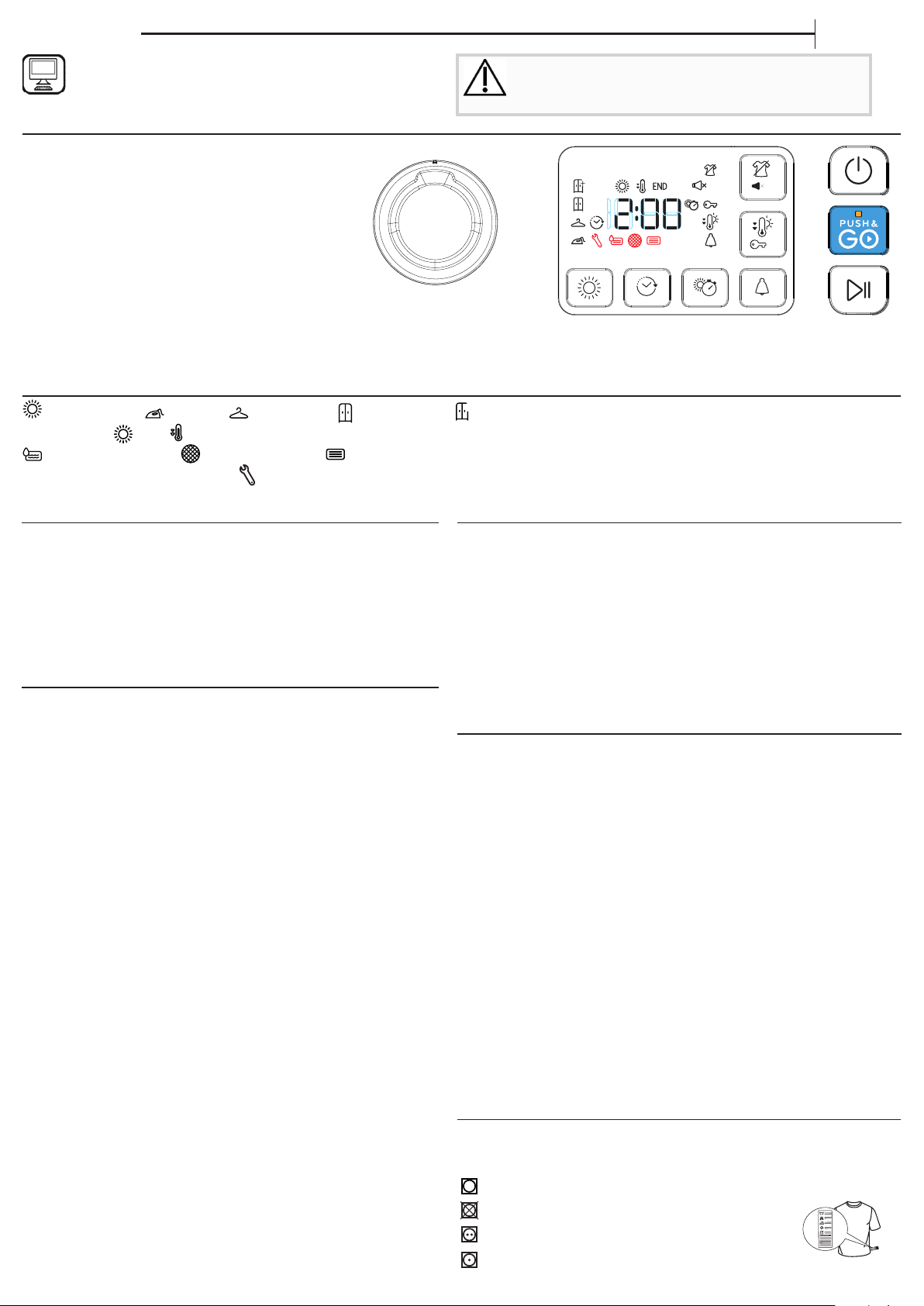
CONTROL PANEL
1 ON/OFF button (hold for Reset)
2 Programme selection knob
3 Start/Pause
4 Push & Go
Options buttons*
5 Dryness level
6 Start delay
7 Timed drying
8 Cycle end
9 Light drying (hold for Key Lock)
10 Crease care ( hold for Mute)
*Note: some models may have the wording in full instead of the icons.
INDICATORS
Dryness level: Iron dry - Hanger dry - Cupboard dry -
+
Extra dry -
Cycle phase: Dry - Cool tumble - END End of cycle -
Empty water tank - Clean door lter - Clean bottom lter
Refer to Troubleshooting section: Failure call After-sales Service -
DEMO
Demo mode
start delay
1
3
2
4
10
8
9
5 67
DEMO
3’’
3’’
OPTIONS
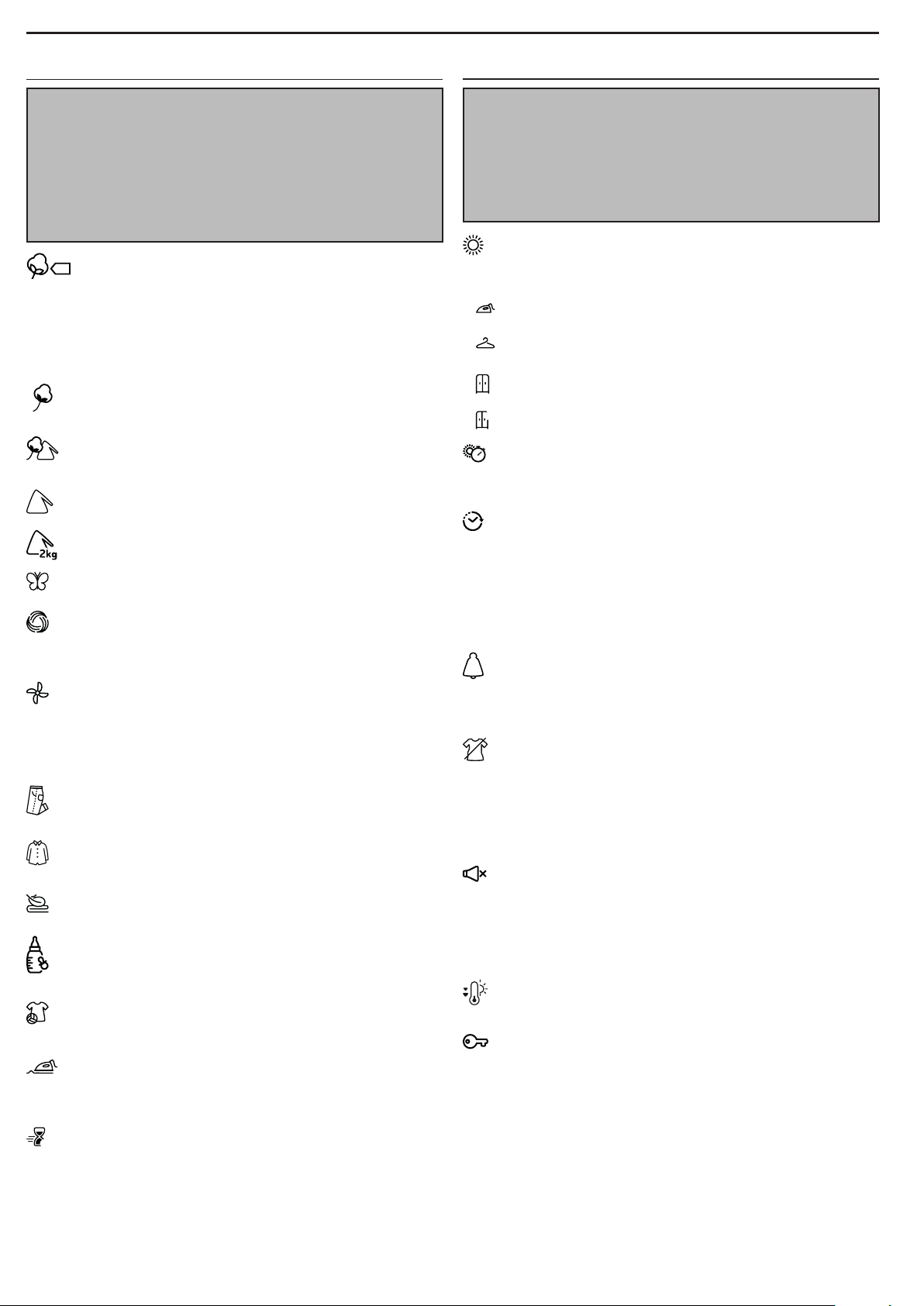
These buttons allow you to personalise the selected programme
according to personal requirements.
Not all options are available for all programmes. Some options
may be incompatible with ones you have previously set; if so,
you will be alerted by the buzzer and/or blinking indicators.
If the option is available, the option indicator will stay on. The
programme may retain some options selected in previous drying
cycles.
Dryness level
Press the related button several times to obtain a dierent
level of residual moisture on garments. An indicator signals the
level being selected.
Iron Dry: very delicate drying. Items will be more easily
ironed immediately after the cycle.
Hanger dry: a level intended for delicate garments ready to
be hanged.
Cupboard dry: the garments are ready to be folded and put
away.
+
Extra dry: used for garments to be worn at the end of the
cycle.
Timed drying
This option is to manually set the drying time. Press the
corresponding button to set the required time for drying. An
indicator on the control panel signals the time being selected.
Start delay
This option is for delaying the start of the cycle. Press the
corresponding button several times to nd the required delay.
Once the max time is reached, the option is reset by pressing
the button again. An indicator on the control panel signals the
time being selected. After pressing the "Start/Pause" button, the
machine signals the time remaining to the start of the cycle. If the
door is opened, press the "Start/Pause" button once the door has
been closed.
Cycle end
This option activates a prolonged buzzer at the end of the
cycle. Enable it if you are not sure to hear the normal sound at the
end of the cycle. This option remains in memory if selected in the
previous drying.
Crease care
This option add a crease treatment at the end of the cycle by
means of a periodic rotation of the drum (duration up to 10 hours).
It is particularly suitable when it is not possible to remove the
laundry as soon as the drying ends. If this option is used together
with the Start Delay, the crease treatment is added also in the
Start Delay phase. This option remains in memory if selected in
the previous drying.
Mute
This option turns o all sounds of control panel. Only
warnings remain active.
• to activate the option, keep the button pressed until the
indicator goes on.
• to disable the option, keep the button pressed until the indicator
goes o.
Light dry
Enables a more gentle treatment of the laundry by reducing
the drying temperature.
Key lock
This option makes all machine controls inaccesible, except
the button On/O. When the machine is on:
• to activate the option, keep the button pressed until the
indicator goes on.
• to disable the option, keep the button pressed until the indicator
goes o.
This option remains in memory if selected in the previous drying.
*MAX LOAD 8 Kg (Dry load)
PROGRAMMES
The duration of these programs will depend on the size of the
load, types of textiles, the spin speed used in your washer and
any extra options selected. In machines equipped with display,
the duration of the cycles is shown on the control panel. The
remaining time is constantly checked and adjusted during the
drying cycle to show the best possible estimate.
Option to use - If all your loads on Automatic Cycles are
consistently less dry or more dry than you would like, you may
increase or decrease the dryness level using the specic option.
Eco kg Max*
This is the most ecient programme in terms of energy
consumption and is suitable for drying normal wet
cotton laundry. The values on the Energy Label are based on this
programme.
NOTE: For optimal energy eciency this cycle by default is set up to
"Cupboard Dry" level. For a higher dryness level we suggest using
the Cotton cycle.
Cotton kg Max*
Cycle suitable for drying all types of cotton, ready to be
placed in the cupboard.
Mixed kg 4
This programme is ideal for drying cotton and synthetic
fabrics together.
Synthetics kg 4
For drying laundry made of synthetic bres.
Mini synthetics kg 2
Eco-drying of small laundry loads.
Delicates kg 2
For drying delicate laundry requiring a gentle treatment.
Wool kg 1
Programme for drying wool clothing. It is advisable to turn
the garments inside out before drying. Leave to dry naturally the
heaviest edges that are still damp.
Refresh
A short programme suitable for refreshing bres and
garments by means of fresh air. Do not use with garments
that are still wet. It can be used on with any load size but is
more eective with small loads. The cycle duration is about 20
minutes.
Jeans kg 3
For drying cotton jeans-wear and garments made of robust
cotton, like denim, such as trousers and jackets.
Shirts kg 3
This is a programme for Shirts made from cotton or cotton
blend/synthetics.
Duvet
Programme intended to dry bulky garments, as single duvet.
Baby kg 2
A programme intended to dry garments and linen of
new-born babies (cotton and chenille), as well as delicate
garments. Do not dry garments having plastic covering.
Sport kg 4
For drying sports garments made of synthetics or cotton
blends.
Smart iron
This cycle relaxes bres, thus making ironing and folding
easier. Suitable for small load of damp or dry cotton and cotton
blend fabrics. Not for wet items.
45’
Xpress 45' kg 1
This is a quick timed programme, ideal for drying garments
spun at high speed in the washing machine, e.g. the shirts used
in a working week.

THANK YOU FOR BUYING AN INDESIT PRODUCT.
In order to receive a more complete assistance, please
register your product on www.indesit.eu/register
Policies, standard documentation, ordering of spare parts and additional product information can be
found by:
• Visiting our website docs.indesit.eu and parts-selfservice.whirlpool.com
• Using QR Code
• Alternatively, contact our After-sales Service (See phone number in the warranty booklet). When
contacting our After-sales Service, please state the codes provided on your product’s identi cation plate.
THANK YOU FOR BUYING A WHIRLPOOL PRODUCT.
In order to receive a more complete assistance, please register
your product on www.whirlpool.com.hk
You can download the user manual by:
• Visiting our website
www.whirlpool.com.hk
• Alternatively, contact our After-sales Service (See phone number in the warranty booklet). When
contacting our After-sales Service, please state the codes provided on your product’s identi cation plate.
EN
Quick guide
Before using the appliance carefully read the Safety
Instructions.
xxxxxxxxxxxx
xxxx
Power consumption
o-mode (Po) - Watts 0.50
left-on mode (Pl) - Watts 2.00
Programmes Kg kWh Minutes
Eco*
8 1.42 165
Eco
4 0.78 96
Synthetics 4 0.94 113
* This is the reference programme for the energy label and suitable to
dry normal wet cotton laundry. This is the most ecient programme
in terms of energy consumption for drying wet cotton laundry.
(Standard/Default starting conguration).
Cleaning the tumble dryer
• The external metal, plastic and rubber parts can be cleaned
with a damp cloth.
• Clean the front air intake grille regularly (every 6 months) with
a vacuum cleaner to remove any lint, u or dust deposits.
Furthermore, remove any lint deposits from the lters area,
using a vacuum cleaner every so often.
• Do not use solvents or abrasives.
TRANSPORT AND HANDLING
Never lift the dryer by holding it at the worktop.
1. Unplug the dryer.
2. Remove the water from the water tank completely.
3. Make sure that door and water tank are properly closed.
4. If the drain hose is connected to your drainage system,
re-connect it to the back of the dryer (see "Installation" section
in the Safety Instruction guide).
AB
1
4
2
3
C
CARE AND MAINTENANCE
WARNING: unplug the dryer during the cleaning and
maintenance procedures.
Emptying the water tank after each cycle (see Fig. A).
Pull the container out of the dryer and empty it into a sink or other
suitable drain, then place it back properly. Do not use the dryer
without having inserted the container back in place.
Cleaning the door lter after each cycle (see Fig. B).
Pull the lter out and clean it by removing the lint from the lter
surface under running water or using a vacuum cleaner. For
optimal performance, dry up all the lters before inserting them
back in place. Do not use the dryer without having reinserted
the lter in place.
Remove the door lter as described below:
1. Open the door and pull upwards.
2. Open the lter and remove lint from all its parts. Replace it
correctly. Ensure it is completely inserted ush with the dryer seal.
Cleaning the bottom lter when the relevant indicator
turns on (see Fig. C).
Pull the lter out and remove the lint from its surface by washing
it under runing water or by using a vacuum cleaner. However, it
is advisable to clean this lter after each cycle to optimise drying
performance. Do not use the dryer without having inserted
the lter in place rst.
Remove the bottom lter as described below:
1. Open the lower door.
2. Take the handle and pull the lower lter out.
3. Open the rear side of the lter and remove the lint from the
inner surface of the mesh.
4. Clean the bottom lter chamber avoiding the direct contact
with the ns.
5. Close the rear side of the lower lter and place it back by
checking it is perfectly integrated in place.
6. Lower the lter handle and close the bottom door.
7. Make sure the air intake is free.
The lters are essential parts for drying. They are intended
to collect the lint formed during drying process. In case
of clogged lters, the air ow inside the dryer would be
seriously aected: the drying times would be longer, the
energy consumption would increase and the dryer could be
damaged. If these procedures are not carried out properly,
the dryer may not start.
Heat Pump System
The heat pump contains uorinated greenhouse gases,
contained in a hermetically sealed unit. This sealed unit contains
0.43 kg of the R134a gas. GWP = 1430 (1 t CO).
PRODUCT DESCRIPTION
1. Water Tank
2. Air Intake
3. Bottom lter
4. Door lter
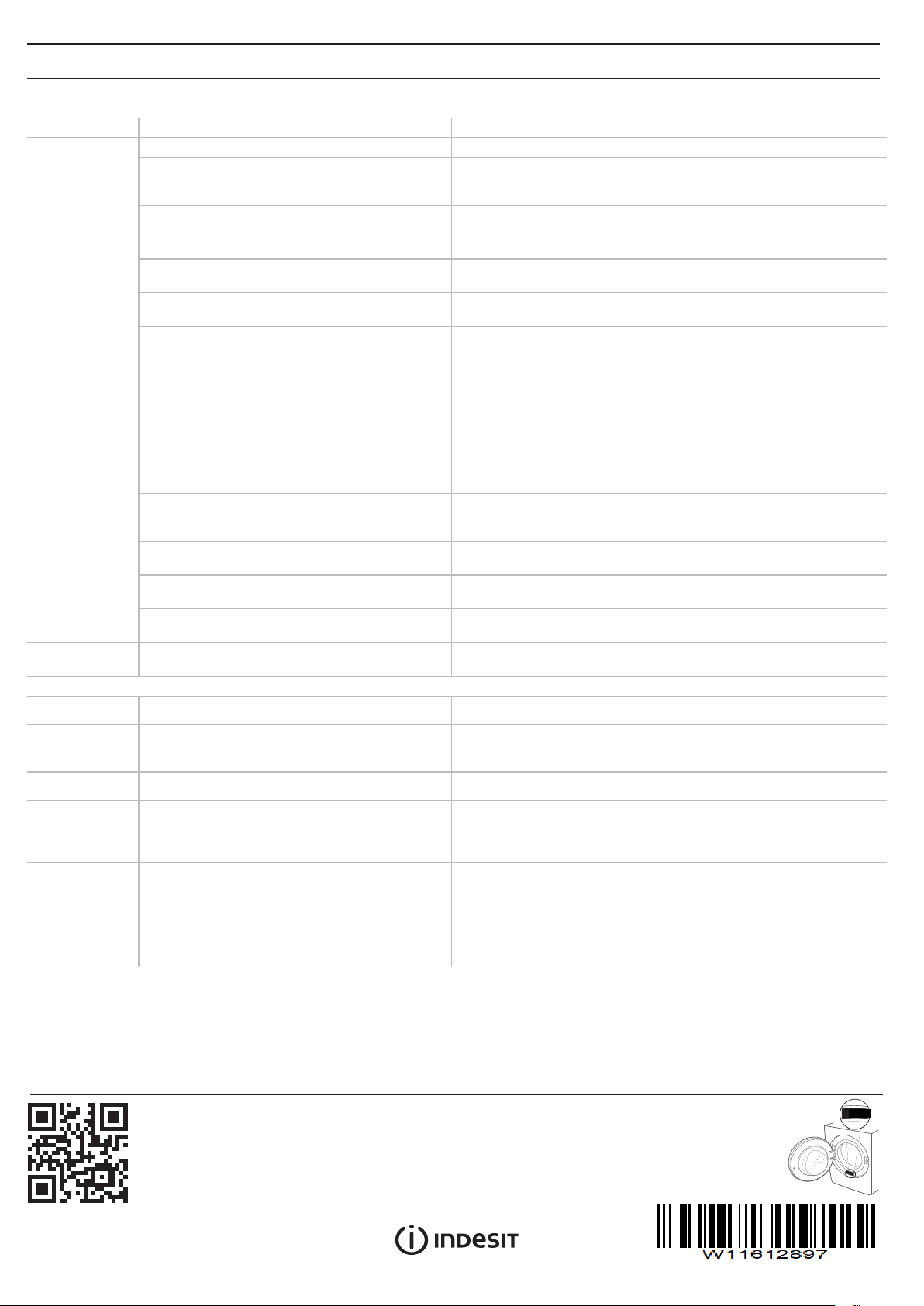
TROUBLESHOOTING EN
Before contacting the After-sales Service, refer to the table below. Often the malfunctions are minor and can be solved in few
minutes.
Malfunction
Possible cause
Solution
The tumble
dryer does not
turn on.
The plug is not inserted into the socket.
Insert the plug into the socket.
The plug is faulty.
Try to plug another appliance in the same socket. Do not use
connecting electrical devices to the socket, such as adapters or
extensions.
A power failure occurred.
Wait for the power supply to be restored and switch the fuse on again
if necessary.
The tumble
dryer does not
start.
The door has not been closed properly.
Close the door.
A time delay was set to the start of the cycle.
For machines equipped with this function: wait for the set delay to
end or switch the machine o to reset it. Refer to the Options section.
The "Start/Pause" button was not pressed in
order to start the programme.
Press the "Start/Pause" button.
The Key Lock function was enabled (for machines
equipped with this option).
Refer to the Options section. If Key Lock was selected, disable it.
Switching the machine o will not disable this option.
Garments are
wet at cycle
completion.
Small load.
The automatic programme has not sensed the required nal moisture
so that the dryer completes the programme and stops. If this happens
simply select an additional short period of drying or select Extra Dry
option if available.
Large loads or heavier fabrics.
Dryness levels can be modi ed to the speci c dryness desired.
Extra Dry is recommended for ready to wear items.
The drying
times are very
long.
An appropriate maintenance was not carried out.
Refer to the Care & Maintenace section and perform the operations
described.
The programme, the time and/or the drying level
set are not suitable for the type and the amount
of load inserted into the dryer.
Refer to Programmes and Options sections to fi nd the
programme and options most suitable for the type of load.
The garments are too wet.
Carry out a washing cycle with higher spin speed to remove as much
water as possible.
The dryer may be overloaded.
Refer to the Programmes section to check the max load for each
programme.
Room temperature.
The drying time may be longer if the room temperature falls outside
the 14–30°C range.
The programme
did not end.
A power failure occurred might have occurred.
In case of power failure, it is necessary to press the "Start/
Pause" button to restart the cycle.
Lights on or ashing
Water tank The water tank is full.
Empty the water tank. Refer to the Care & Maintenance section.
Door lter
Failure of the air ow necessary for machine
operation.
Clean the door lter and check whether air intake is free. Carrying
out these operations improperly may cause damages. Refer to Care &
Maintenance section.
Bottom lter* The bottom lter requires cleaning. Clean the bottom lter. Refer to Care & Maintenance section.
DEMO
The cycle lasts
few minutes.
The dryer is in DEMO mode. The DEMO indicator
is on.
Disable the DEMO mode. The following actions must be carried out in
sequence, without breaks. Switch the machine on and then switch it o
again. Press the Start/Pause button until the buzzer is heard. Switch the
machine on again. The “DEMO” indicator ashes and then turns o .
The presence
of wrench
symbol signals a
malfunction.
The machine sensors detected a failure.
Switch the dryer o and unplug it. Open the door immediately and
pull laundry out, to allow the heat to dissipate. Wait for about 15
minutes. Reconnect the dryer to the power supply, load the laundry
and restart the drying cycle. If the problem still occurs, contact
the After-Sales Service Centre and communicate the letters and
digits ashing on the display.
For instance: F3 and E2.
*Note: some models are auto-cleaning and not equipped with bottom lter. Please refer to the Care & Maintenance section.
04/2022
THANK YOU FOR BUYING AN INDESIT PRODUCT.
In order to receive a more complete assistance, please
register your product on www.indesit.eu/register
Policies, standard documentation, ordering of spare parts and additional product information can be
found by:
• Visiting our website docs.indesit.eu and parts-selfservice.whirlpool.com
• Using QR Code
• Alternatively, contact our After-sales Service (See phone number in the warranty booklet). When
contacting our After-sales Service, please state the codes provided on your product’s identi cation plate.
EN
Quick guide
Before using the appliance carefully read the Safety
Instructions.
xxxxxxxxxxxx
xxxx