E209
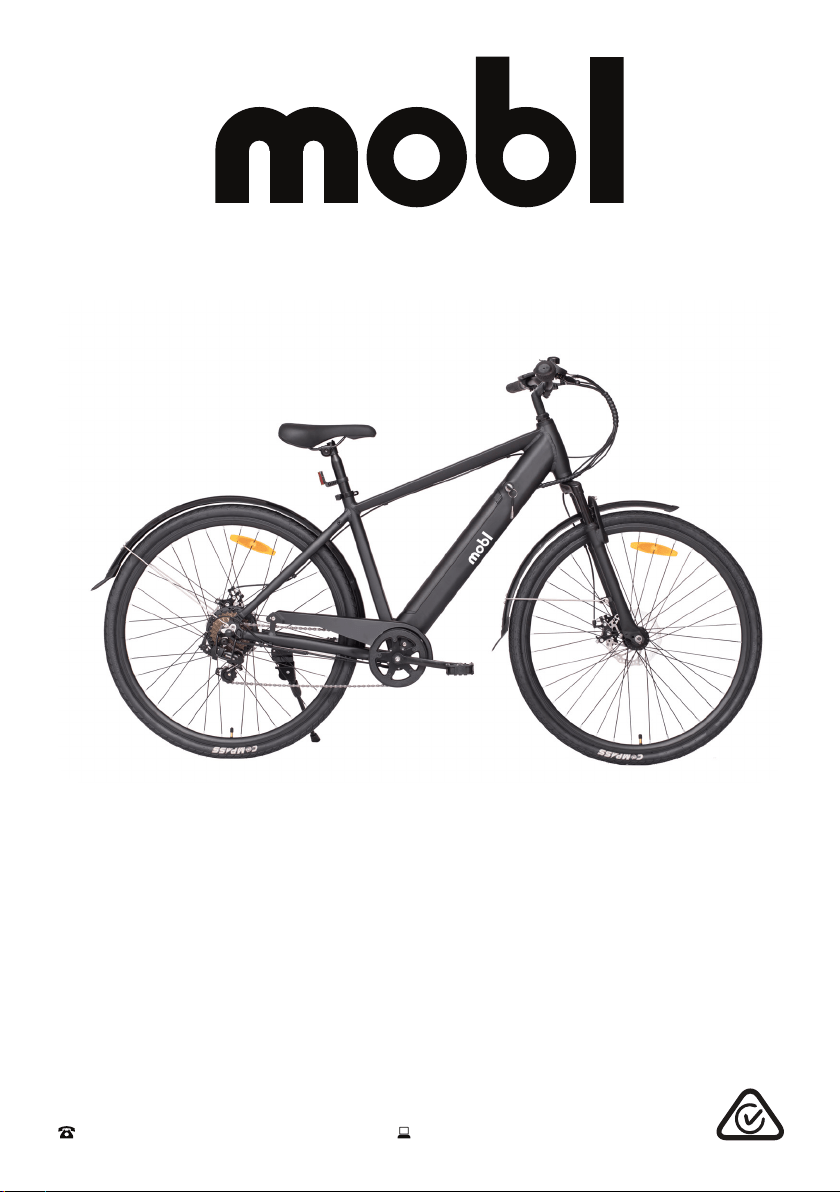
Model Number MOBL-CTY
USER MANUAL
After Sales Support
(AU) 1300 886 649 (NZ) 0800 836 761 | tempo.org/support
E-City Bike
2
After Sales Support
(AU) 1300 886 649 (NZ) 0800 836 761 | tempo.org/support
Welcome
Welcome to your new MOBL bicycle!
As part of our brand philosophy, all of our products are manufactured to
the highest standards of performance and safety. This product includes a
comprehensive 1 Year Warranty, as part of our commitment to ensuring an
excellent user experience.
For more information on
this bike, including detailed
assembly instructions, please
scan the QR code:

3
After Sales Support
(AU) 1300 886 649 (NZ) 0800 836 761 | tempo.org/support
02 Welcome
03 Contents
04 General Safety Instructions
07 Product Overview
08 Getting Started
09 Assembly
15 Battery Charging
17 Instructions
19 FAQs and Troubleshooting Guide
20 Other Useful Information
Contents

4
After Sales Support
(AU) 1300 886 649 (NZ) 0800 836 761 | tempo.org/support
General Safety Instructions
WARNING: Read and follow all safety warnings before riding!
• Local traffic laws: Some state and local traffic laws may require that your
bicycle be equipped with a warning device, such as a horn or bell and a light,
if the bicycle is to be ridden after dark. When you are riding on the road, make
sure that you are always visible to other vehicles. Please respect the road rules
in all circumstances.
• Intended use: This bicycle should only be used for personal recreational
purposes, and not for commercial activities, trade or competition. Do not use
this bike for stunts. Do not use the bicycle for anything other than its intended
purpose, and only use it as described in this manual. Improper use may affect
the warranty.
• Protective equipment: Always wear proper protective equipment, such as an
Australian standards-approved helmet, elbow pads, knee pads, long sleeve
shirt, gloves, long pants.
• Wet weather warning: Slow down your speed when riding in rainy and snowy
conditions and in slippery areas. Increase your braking distance to ensure
safety. Use the rear brake lever FIRST, then the front brake lever.
• Kickstand: The kickstand is designed to support the bicycle only, NOT the rider.
• Always double-check your bike before riding it (tighten the handlebars and
stem, check the saddle, wheels and brakes, etc.). We strongly recommend
that significant mechanical repairs are carried out by a skilled bicycle
mechanic.
• Height adjustment: Adjust the seat height and handlebar height appropriately:
the rider must be able to straddle the bicycle with at least 2.5 cm clearance
above the horizontal bar when standing. Please refer to the assembly section for
details.
• Check the tyre pressure: The tyre pressure range of this E-bike is 345–550 kPa
(50–80 psi), which is marked on the tyre. Please ensure that the tyre pressure is
within this range to avoid accidents (1psi = 6.895 kPa).
IMPORTANT SAFETY INSTRUCTIONS
READ CAREFULLY AND KEEP FOR FUTURE REFERENCE
Read this manual thoroughly before first use, even if you are familiar with this type
of product. The safety precautions enclosed herein reduce the risk of injury and
product damage. Keep the manual in a safe place for future reference, along with
the completed warranty card, purchase receipt and carton. If applicable, pass these
instructions on to the next owner of the e-bike.
Always follow basic safety precautions and accident prevention measures
when riding a bike (or e-bike), including the following:

5
After Sales Support
(AU) 1300 886 649 (NZ) 0800 836 761 | tempo.org/support
General Safety Instructions (Cont.)
• Children below 14 years old should not play with the product.
DO NOT LET CHILDREN INFLATE TYRES. Charging, cleaning and
maintenance should not be performed by children without adult supervision.
• Recommended torque requirements in Newton metres (N·m) for the following:
(A) Stem: 30 N·m
(B) Front Wheel: 15-25 N·m
(C) Pedal: 35-40 N·m
• Maximum rider weight: 100 kg (including rear carrier 15 kg loading; excluding
the bicycle weight)
• This bike is intended to be used on urban roads. It is not intended for use on
unpaved ground or for off-road use. Failure to follow these warnings could result
in a fall or accident and permanently and irreversibly damage the condition of
your power-assisted bicycle.
• Night-time operation: We do NOT recommend riding your bike at night. If you
have an emergency that makes it necessary to ride at right, have proper lights
and reflectors. Do NOT ride at night without a headlight, taillight, a white front
reflector, a red rear reflector and yellow wheel reflectors.
• On and off-road operation: Avoid the following hazards: drain grates, potholes,
ruts, soft road edges, gravel and leaves, especially when they are wet.
• Maintenance schedule: We strongly recommend to establish and respect a
periodic maintenance schedule, which will be determined by the frequency and
length of your rides, your style of riding, as well as the terrain on which you most
often ride.
• E-bike maintenance: Before maintenance or cleaning, make sure the e-bike is
disconnected from the charger.
WARNING: Never leave the battery charging without supervision!
• Before first use: The battery is 60% pre-charged. As it is a smart lithium
battery, no special action needs to be taken when first charging. We provide a
dedicated smart charger with a charge protection function.
• Appropriate environment: Do not use the e-bike (battery) in the rain, in a
waterlogged area or in temperatures outside the appropriate temperature range
from -10°C to 50°C. The best temperature range is between 0°C and 40°C, too
cold or too hot temperatures will affect the battery efficiency and life.
• Charging the battery: Only charge the battery in a well-ventilated area. Do not
expose the battery to heat or charge it in direct sunlight or in the rain.

6
After Sales Support
(AU) 1300 886 649 (NZ) 0800 836 761 | tempo.org/support
General Safety Instructions (Cont.)
• Do not disassemble or modify the battery. Do not connect the (+) and (-)
connections of the battery with a metal object. Do not expose the battery to
liquids. Do not short-circuit the positive (+) and negative (-) battery terminals.
• Disconnect after use: Do not leave the battery charger plugged into the
power outlet while not in use.
• Infrequent use: In the event of non-use, infrequent use or storage, please
recharge the battery at least every month to ensure that it will work properly, and
keep it in a dry and cool environment. Prolonged storage of an empty battery
may damage the battery.
• Do not let the battery run out of power completely, otherwise it will damage
the battery. The best charge-discharge is 20%–80%.
• Battery storage: Do not store or leave the battery near fire. Do not immerse it in
water or acidic liquids. Do not allow it to get wet.
• Battery replacement: If the battery needs to be replaced, please contact our
after sales support centre to purchase a spare battery.
• Battery removal and disposal: The battery must be removed and discarded
before disposal of the bike. Please ensure that the battery is disconnected from
the charger and power supply before removing it from the bike. Dispose of the
battery safely and responsibly after the service life of the product.
WARNING: Handle the battery charger with care!
• Only use the charger supplied with this e-bike to charge the battery.
Do not charge the battery with any other (or universal) charger, doing so will void
the warranty. Do not use this charger to charge any other appliance.
• Indoor charging only: The charger must only be used indoors.
• Power cord: Never pull the external flexible cord of the battery charger to
disconnect the charger. The external flexible cord of the battery charger cannot
be replaced. If the cord is damaged, the charger shall be scrapped.
7
After Sales Support
(AU) 1300 886 649 (NZ) 0800 836 761 | tempo.org/support
Product Overview
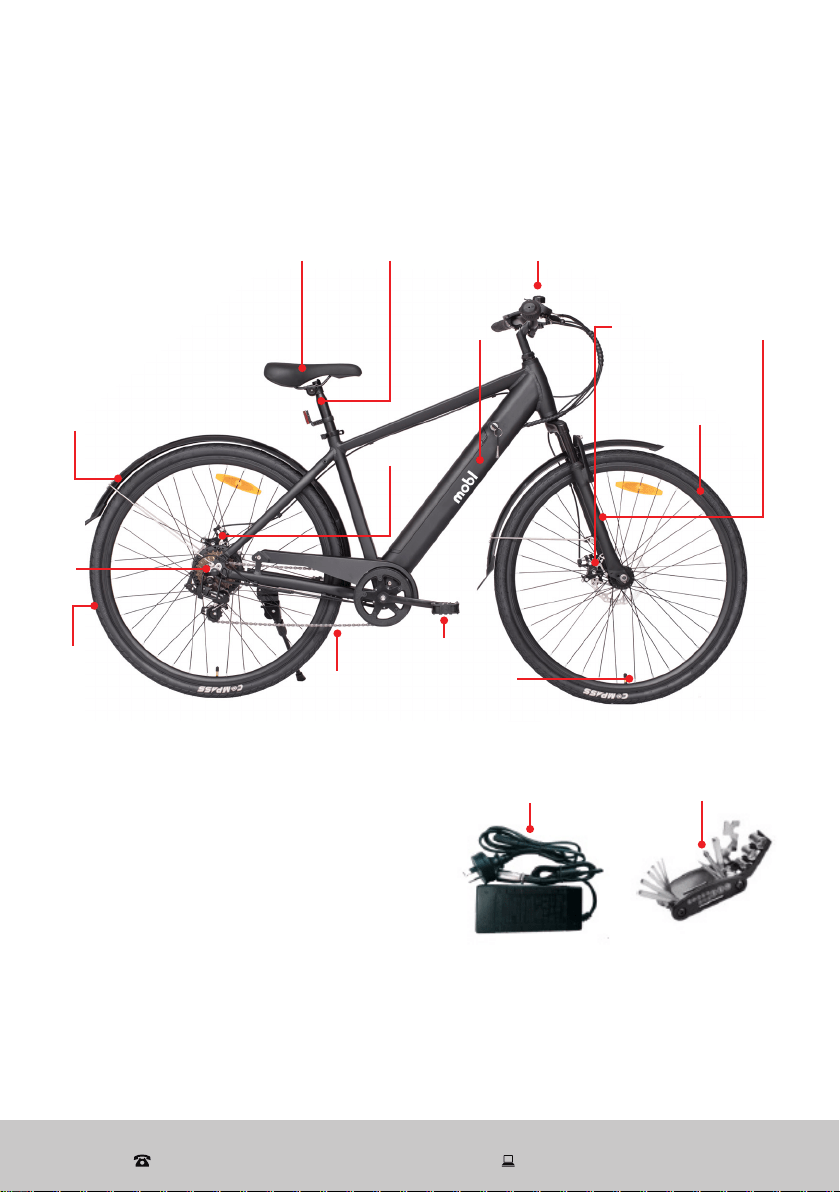
B Other inclusions
Battery charger
Multipurpose tool
C Documentation (not pictured)
Instruction manual
Warranty certificate
Battery
charger
Multipurpose
tool
NOTE: Due to continued product improvement, images and illustrations in this manual
may vary slightly from the product purchased. All images in this manual are for reference
purposes only. Parts are not necessarily pictured to scale. The colour(s) of the bike may
differ from those pictured.
Scope of delivery
A Electric bicycle
Saddle Seat post
Fender/
mudguard
Chain
Handlebar with grips
and display
Front
tyre
Rear brake
ForkBattery
Spokes
Front
brake
Rear
tyre
Motor
Pedal
8
After Sales Support
(AU) 1300 886 649 (NZ) 0800 836 761 | tempo.org/support
Getting Started
Before first use
• Unpack the e-bike, making sure to remove all parts from the packaging carton.
The carton staples may be sharp, take care that you do not hurt yourself when
reaching into the carton to remove parts.
• Packaging materials: Keep the original packaging materials in a safe place.
It will help prevent any damage if the product needs to be transported in the
future, and you can use it to store the e-bike when it is not in use. In the event
that the carton is to be disposed of, please recycle it where possible.
• Unwrap all parts carefully. If you are using a retractable utility knife or scissors
when unwrapping the parts, take care that you do not scratch the metal parts
of the bike or pierce the tyres. Remove the plastic covers from the front wheel
nuts, base of the fork and stem pillar.
Plastic wrapping can be a suffocation hazard for babies and young children, so
ensure all packaging and protective materials are out of children's reach and
disposed of safely.
Key removal: The e-bike comes with two keys which are attached to the brake
cables. Please ensure you remove the keys and keep them in a safe place, a key
is required for locking the battery in place and unlocking it.
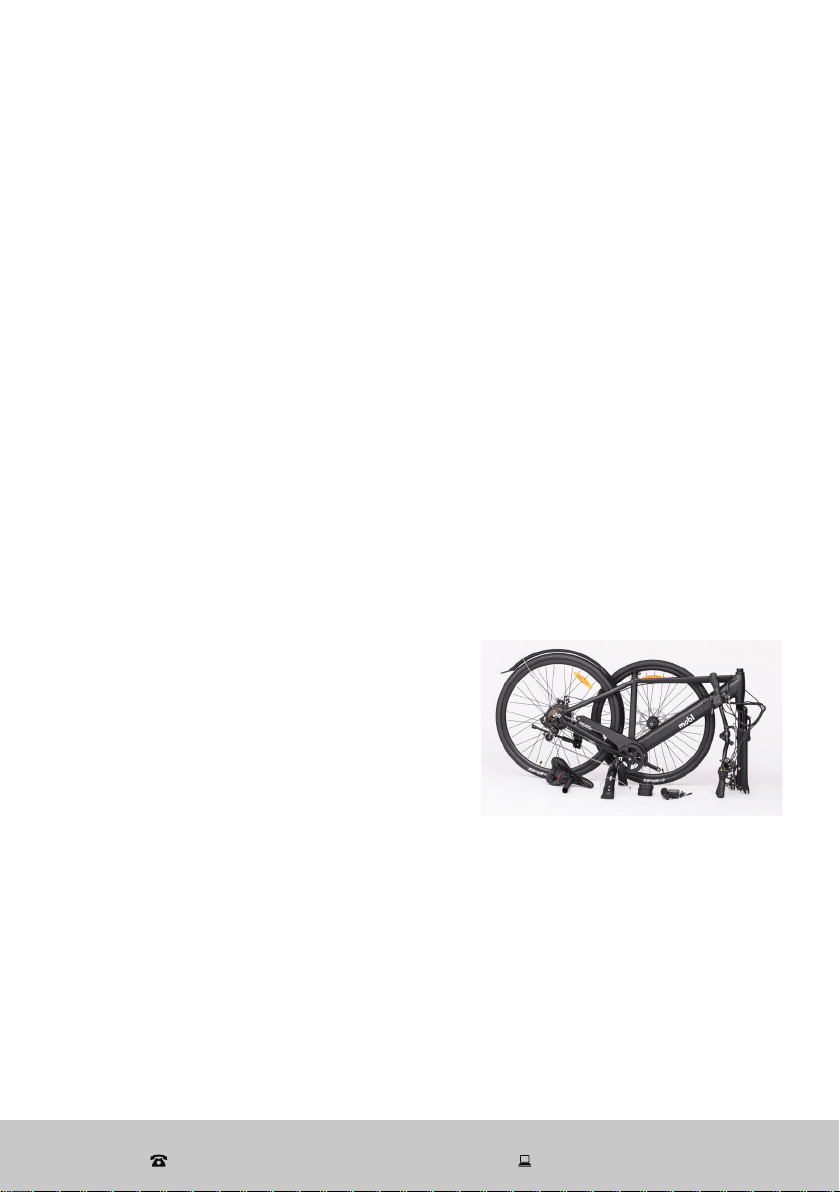
• Assembly requirements: The e-bike comes partially assembled (as pictured)
and requires full assembly by a professional
bicycle mechanic or competent person. The
stem needs to be assembled with an M6
Allen wrench (35-45 N·m) and the pedals
with an M15 Allen wrench (35-40 N·m).
Other torque requirements for the different
part assemblies are listed on page 5.
A multipurpose tool with other tools required
for assembly is supplied.
• Inspect the cord and plug of the battery charger for damage or wear before
each use. Do not use the charger if it is not working or if its cord is damaged. In
case of damage, please contact our after sales support centre.
• Read all instructions in this manual and make sure you understand all
warnings. To familiarise yourself with all the parts and operating principles of the
e-bike, please refer to the Product Overview and the remaining sections in this
manual. Also pay attention to the safety instructions on the previous pages.
9
After Sales Support
(AU) 1300 886 649 (NZ) 0800 836 761 | tempo.org/support
Assembly
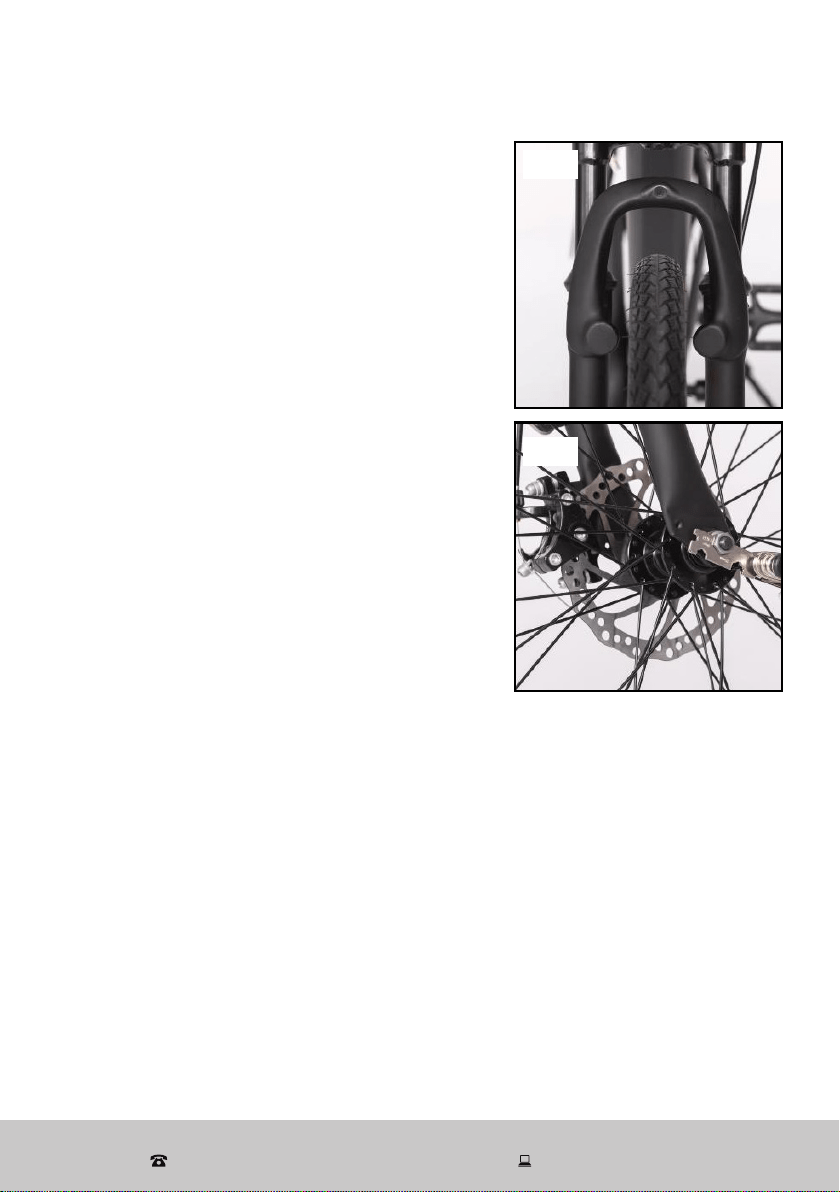
Step 1: front wheel assembly
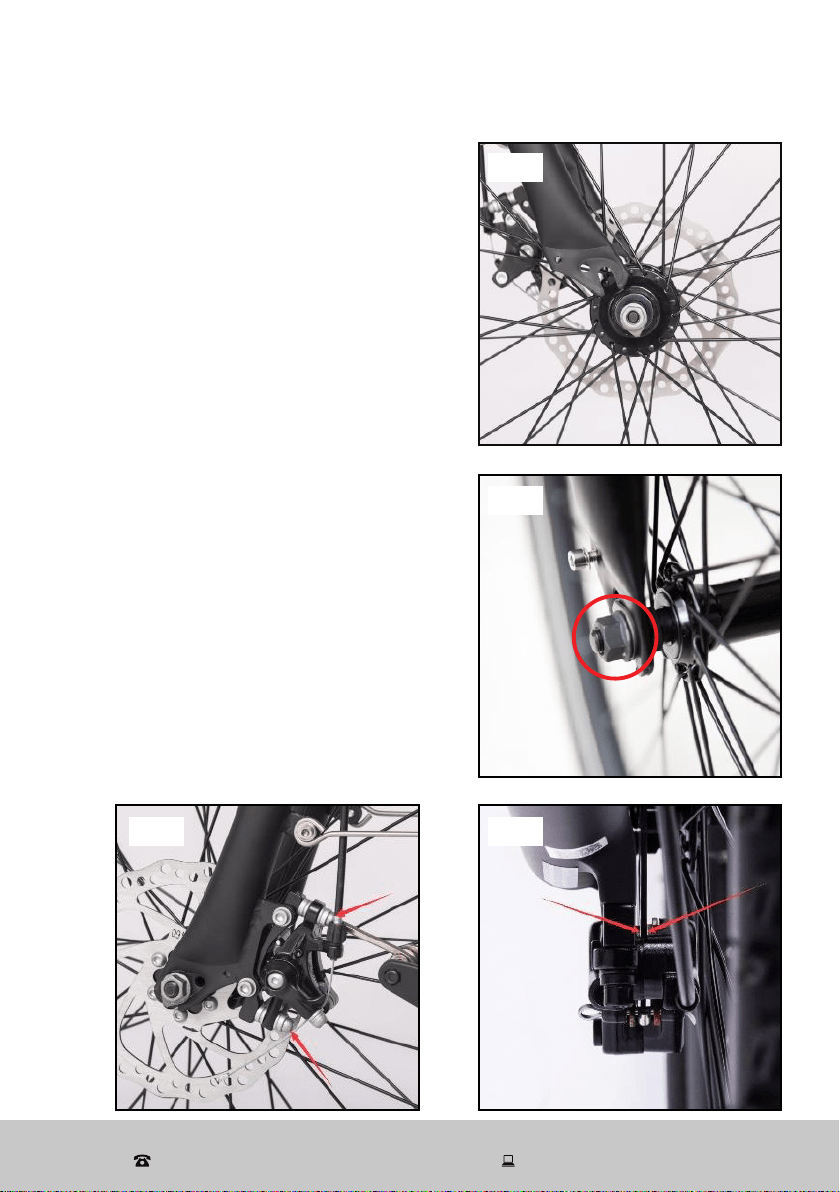
1. Turn the fork until the fork plate points to
the front of the bicycle.
2. If the brake cable is closed, undo it, then
insert the wheel into the fork (Fig. 1).
3. Install an axle nut to each side of the axle
(Fig. 2).
4. Ensure the brake disc is in the middle
of the brake caliper (Fig. 3). It is very
important that this is positioned correctly,
in order for the front brake to work
properly.
5. If the caliper touches the brake disc when
the wheel moves (see note), slightly loosen
the screws holding the caliper to the frame
of the bike, using the M5 allen key
(Fig. 4). Very gently shift the caliper by
hand until it is centered around the disc
(see previous step). Hold the caliper in
place as you tighten the screws. Double
check that the caliper screws have been
correctly tightened before riding.
NOTE: The front disc brake has been
pre-adjusted; only make alterations to the
caliper's position when the disc brake pad
touches the rotor.
Fig. 1
Fig. 2
Fig. 3Fig. 4
10
After Sales Support
(AU) 1300 886 649 (NZ) 0800 836 761 | tempo.org/support
Assembly (Cont.)
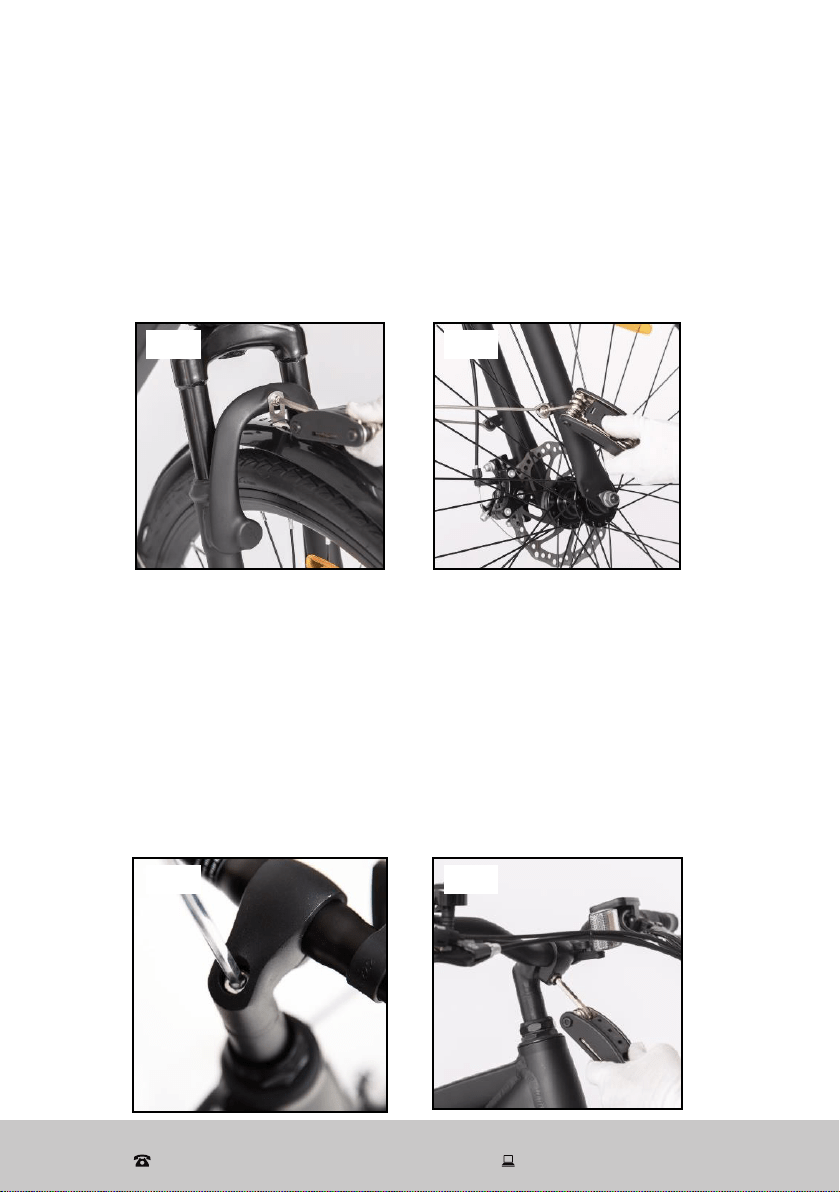
6. Tighten the axle nuts by hand. Make sure there
is an equal distance between each fork tube
and the wheel (Fig. 5). Then use a wrench and
securely tighten the axle nuts (Fig. 6).
As per the Australian/New Zealand standard,
the left brake lever controls the rear brake and
the right brake lever controls the front brake. To
achieve the maximum amount of stopping power,
please use both brakes.
Fig. 5
Fig. 6
11
After Sales Support
(AU) 1300 886 649 (NZ) 0800 836 761 | tempo.org/support
Assembly (Cont.)
Step 2: front fender (mudguard) assembly
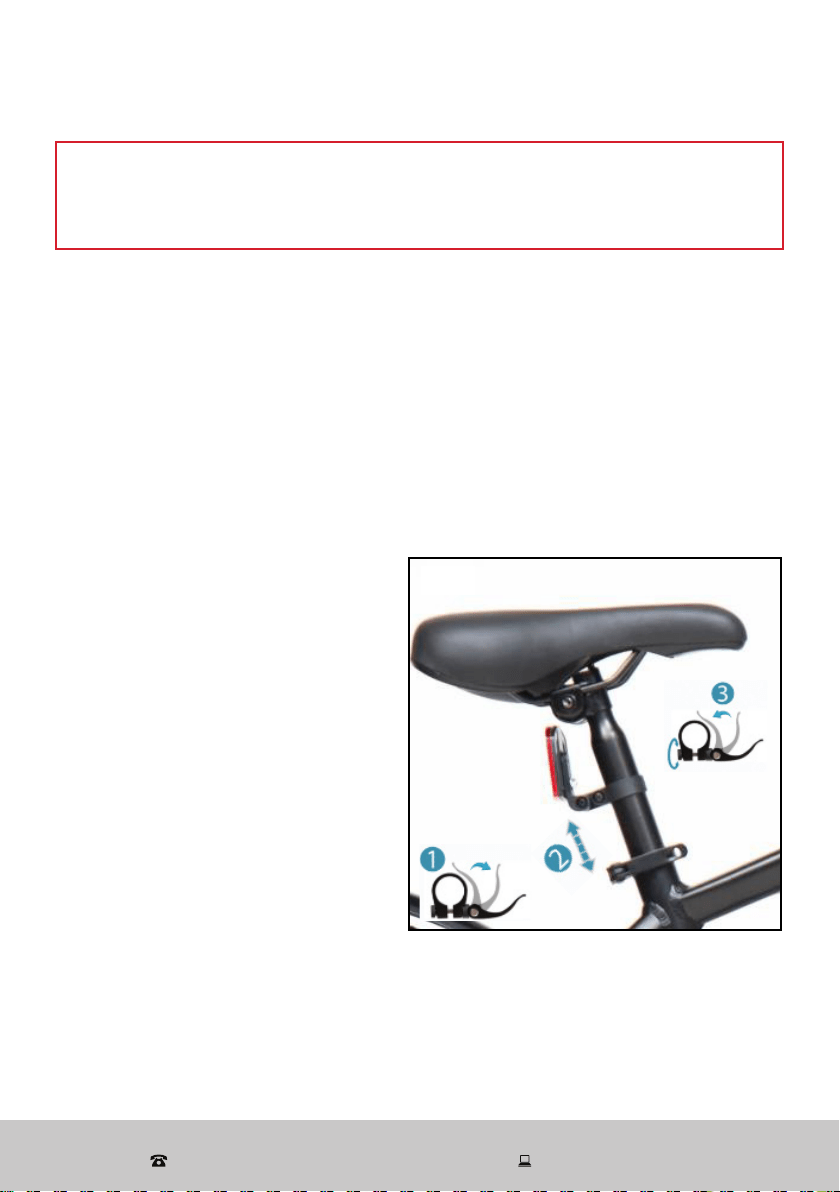
1. Attach the fender hanger on the fork crown, using a tool to tighten the screw
from the front (washer against the bike part) (Fig. 7).
2. Adjust the fender position to ensure there is an equal distance between each
fork tube. Tighten the screws at each fork tube (Fig. 8).
NOTE: If the fender is touching the tyre, please loosen the bolt slightly.
Step 3: stem and handlebar assembly
1. Insert the stem pillar into the fork tube up to the minimum insertion line indicated
on the stem pillar.
2. Face the handlebar stem forward, directly in line with the front wheel. Then tighten
both stem pillar bolts to a torque requirement of or 17–19 N·m (12–15 ft.lb.) (Fig.
9).
3. The handlebar is semi-assembled on the stem. Loosen the clamp bolts, adjust the
handlebar position, then tighten the clamp bolts to 17–19 N·m (15 ft.lb.) (Fig. 10).
WARNING: If you can move it forward or backward, the clamp bolts are not tight
enough.
Fig. 7 Fig. 8
Fig. 9 Fig. 10
12
After Sales Support
(AU) 1300 886 649 (NZ) 0800 836 761 | tempo.org/support
Step 4: saddle assembly
The saddle is pre-assembled to the seat post.
1. Loosen the seat clamp, then insert the seat post into the bicycle frame, making
sure that the minimum insertion mark on the seat post is completely inserted
into the frame and not visible.
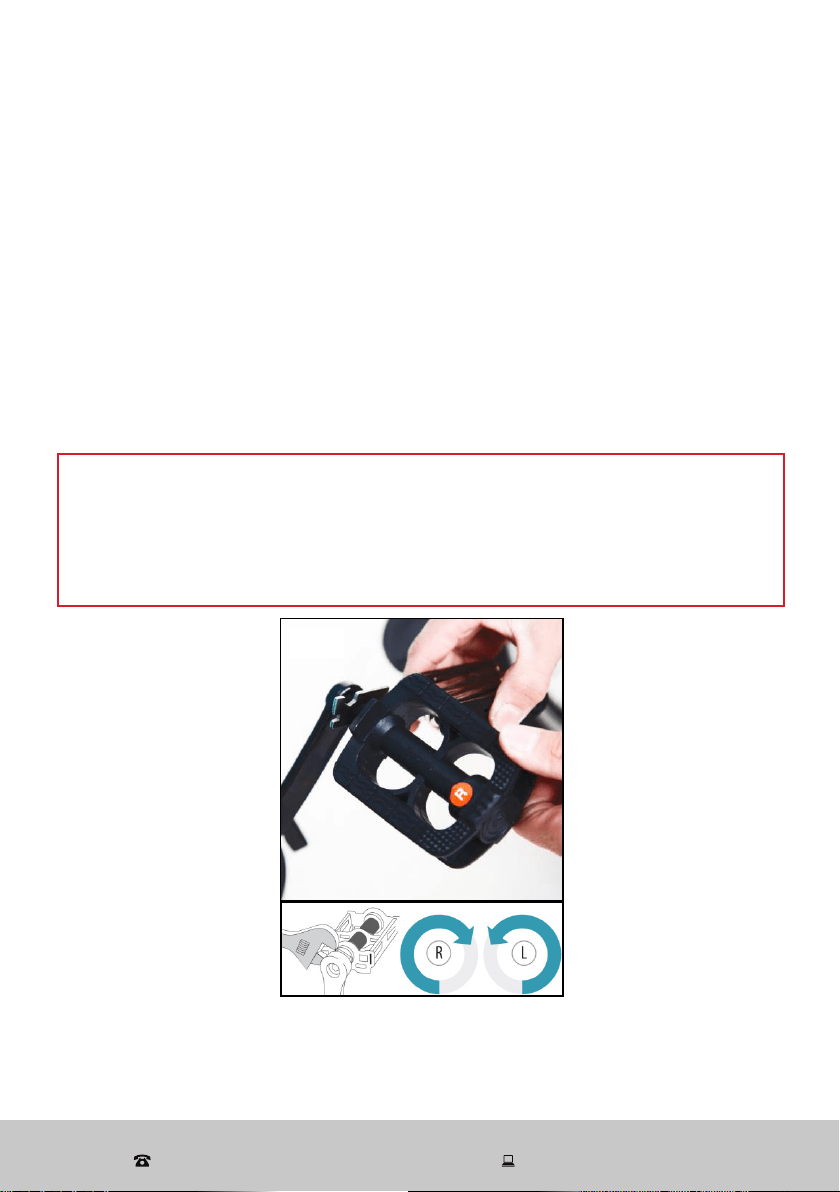
2. Tighten the quick release (QR) seat post binder bolt securely at the desired
height. Turning the tension adjustment nut clockwise while keeping the cam
lever from rotating increases the clamping force. Turning it anticlockwise while
keeping the cam lever from rotating reduces the clamping force (Fig. 11). Less
than half a turn of the tension adjustment nut can make the difference between
safe clamping force and unsafe clamping force.
Assembly (Cont.)
WARNING!
Make sure you do not overtighten the stem pillar bolt, which could damage the
handlebar stem pillar assembly and result in possible injury to the rider.
3. Adjust the seat angle so that the
top of the seat is parallel to the
ground or comfortable to the rider.
4. Close the seat clamp.
NOTE: Test the seat to pedal
distance by having the rider sit on
the seat. When the rider’s leg is
slightly bent, the ball of the foot
should rest on the pedal when it is
in its lowest position. If it does not,
adjust the seat height as necessary.
Check for tightness by attempting
to twist the seat. If the seat is loose,
be sure to tighten the clamp nut and
binder bolt nut securely.
Fig. 11
13
After Sales Support
(AU) 1300 886 649 (NZ) 0800 836 761 | tempo.org/support
Assembly (Cont.)
Step 5: pedal assembly
1. Look for the letters “R” or “L” stamped on the pedal spindle.
2. Thread the pedal marked “R” into the crank arm on the chain side of the bike.
Turn the pedal spindle in a clockwise direction. Securely tighten the pedal spindle
(Fig. 12).
3. Thread the pedal marked “L” into the crank arm on the left side of the bike.
Turn the pedal spindle in an anticlockwise direction. Securely tighten the pedal
spindle.
Torque requirements: 20–26 N·m (18–20 ft.lb.).
NOTE: Both pedals should be tightened towards the front of the bicycle.
Start each pedal spindle by hand to avoid stripping the threads.
WARNING!
• For safe operation, the pedal spindle must be securely tightened against the
crank arm.
• Always replace damaged pedals, and always wear shoes or sneakers when
riding a bicycle.
Fig. 12
14
After Sales Support
(AU) 1300 886 649 (NZ) 0800 836 761 | tempo.org/support
Assembly (Cont.)
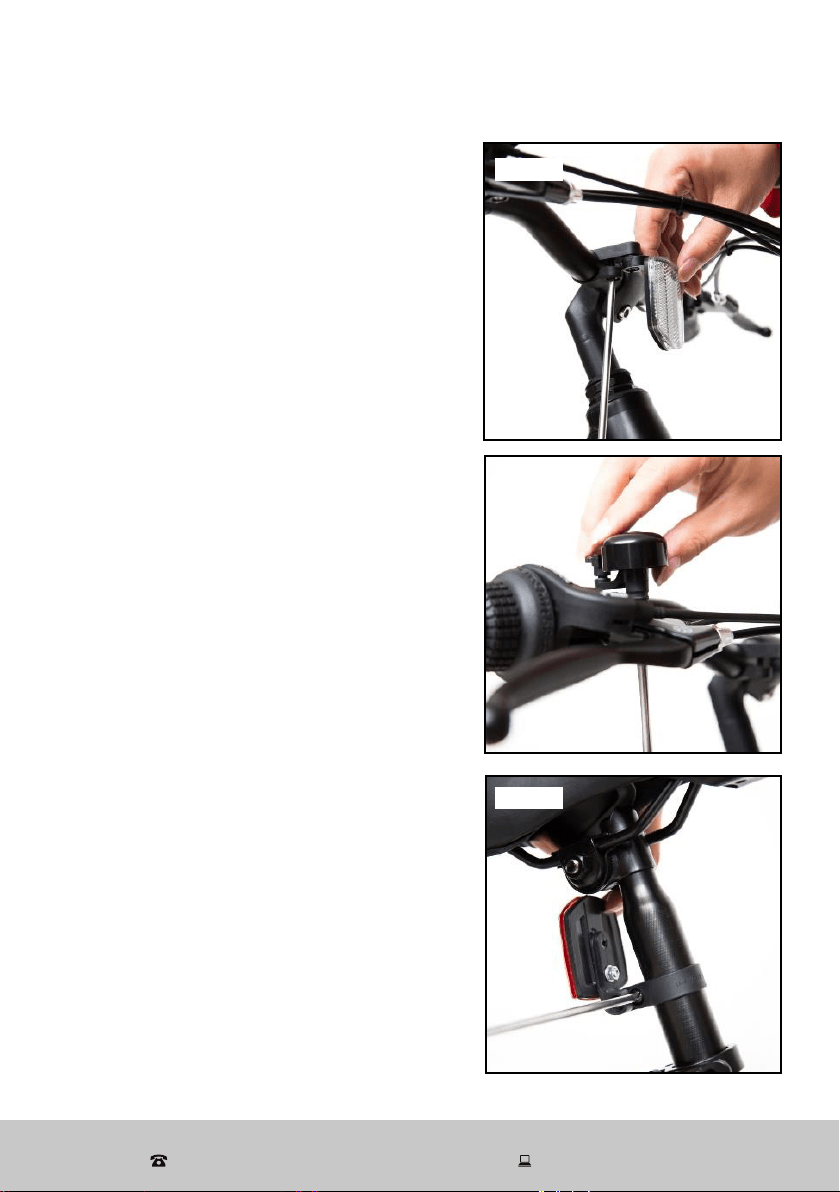
Step 6: reflector assembly
Front reflector (white) and bell
1. Remove the clamp screw from the reflector
(or bell) bracket (Fig. 13).
2. Push open the bracket 'loop' and slide it
onto the handlebar. (If there is a sizing insert
included with the bracket, make sure it is
inside the clamp loop before mounting.)
3. Put the reflector (or bell) bracket on an
appropriate position on the handlebar
(Fig. 14).
4. Tighten the clamp screw securely.
CAUTION: Be sure the reflector is in the same
longitudinal plane as the bicycle (horizontal
to the ground). If the reflector is aimed up or
down, oncoming headlights may not reflect
properly in the reflector. If the reflector is not
horizontal to the ground, loosen the clamp
screw and readjust the angle.
Rear reflector (red)
1. The rear reflector is mounted on the seat
post. Put the rear reflector in the correct
position by loosening the screws of the rear
reflector bracket (Fig. 15).
2. Make sure the rear reflector is vertical to the
ground and points straight back.
3. Make sure there are at least 3 inches
(>7.5 cm) of clear space between the top of
the seat and the top of the red rear reflector.
CAUTION: It is important to check and adjust
the position of the reflectors as you assemble
your bike. The reflectors must always be
vertical (perpendicular to the ground) and
pointed towards the front and rear of the bike.
Fig. 12Fig. 13
Fig. 14
Fig. 15
15
After Sales Support
(AU) 1300 886 649 (NZ) 0800 836 761 | tempo.org/support
Battery Charging
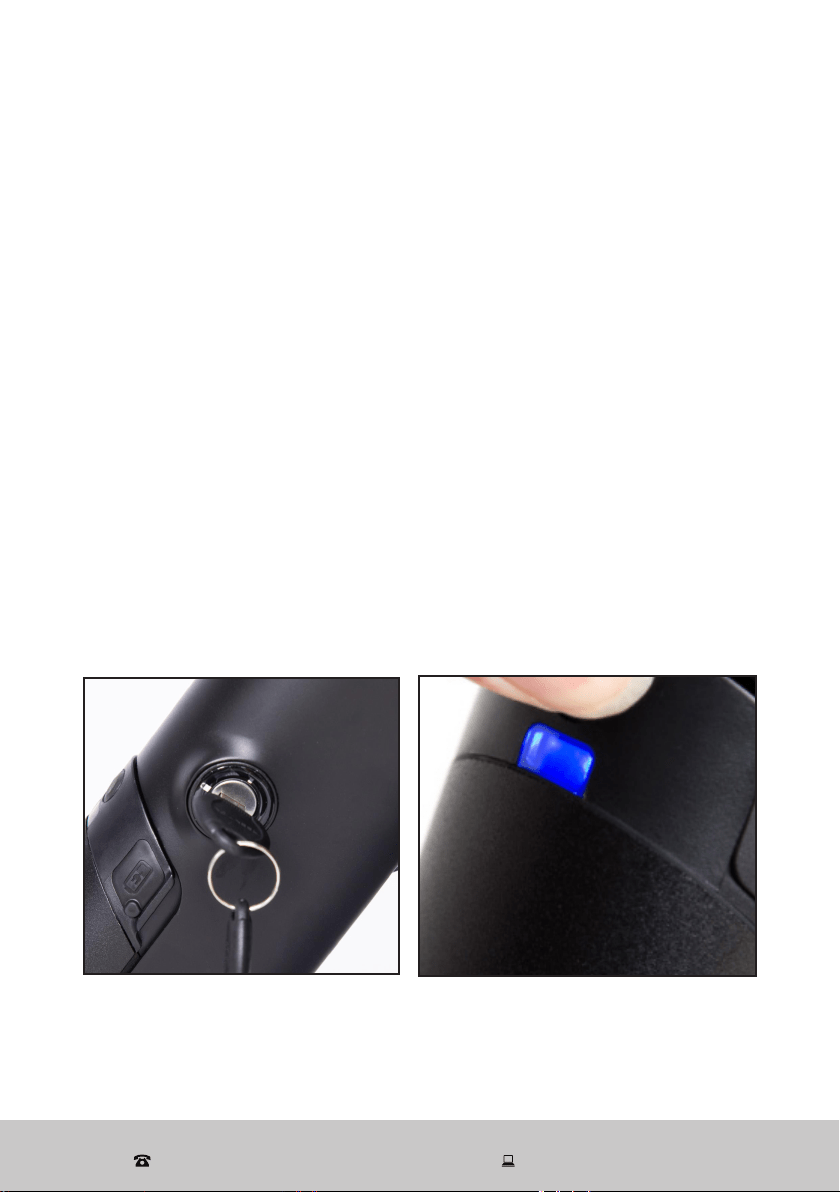
Battery
The e-bike comes with a removable lithium battery installed on the down tube
of the bike. Also supplied is a key (and duplicate), attached to the brake cables,
which you should have removed earlier in the assembly process. The key is
required for locking the battery in place or unlocking it for removal of the battery.
1. You can charge the battery while it is attached to or removed from the e-bike.
CAUTION: If you want to charge the battery while it is attached to the bike,
make sure the bike is switched off.
2. To remove the battery, turn the key to the "UNLOCK" position and the battery
will be ejected (Fig. 16).
3. To attach the battery, place it in its space on the down tube and press firmly until
it clicks securely in place. Then turn the key to the “LOCK” position to lock the
battery. (When the key is in this position, you can pull it out.)
4. To show the battery status, press the button on the battery. The LED light will
illuminate to show the battery status (Fig. 17):
Blue: Approximately 75%–100% battery charge
Green: Approximately 25%–75% battery charge
Red: Approximately 0%–25% battery charge
Red flashing: Empty battery, charge immediately
Fig. 16 Fig. 17
16
After Sales Support
(AU) 1300 886 649 (NZ) 0800 836 761 | tempo.org/support
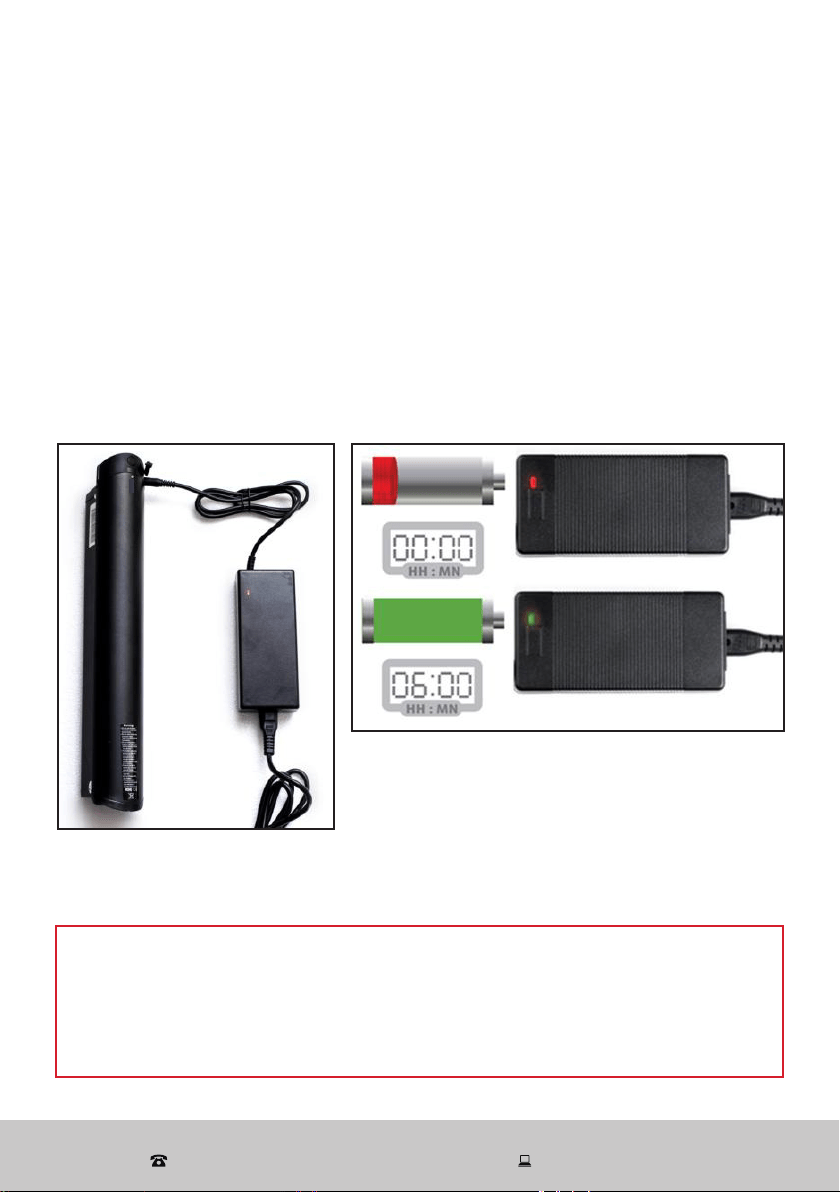
Charger
The e-bike comes with a smart charger for easy charging.
1. Insert the AC plug into an appropriate electrical outlet.
2. Open the battery cover and insert the DC connector into the battery (Fig. 18).
3. When the battery is charging, the charging light illuminates red (Fig. 19).
4. When the battery is about 80% charged, the charging light turns green. At this
stage, please charge it for about one more hour, then it will be fully (100%)
charged and the charger will automatically stop charging (Fig. 19).
A full charge (from 0% charge to 100%) takes approximately 6 hours.
Battery Charging (Cont.)
WARNING!
• Only use the charger supplied with this e-bike to charge the battery.
Do not charge the battery with any other (or universal) charger, doing so will
void the warranty. Do not use this charger to charge any other appliance.
• Do not leave the battery charging unsupervised.
Fig. 18
Fig. 19
17
After Sales Support
(AU) 1300 886 649 (NZ) 0800 836 761 | tempo.org/support
Instructions
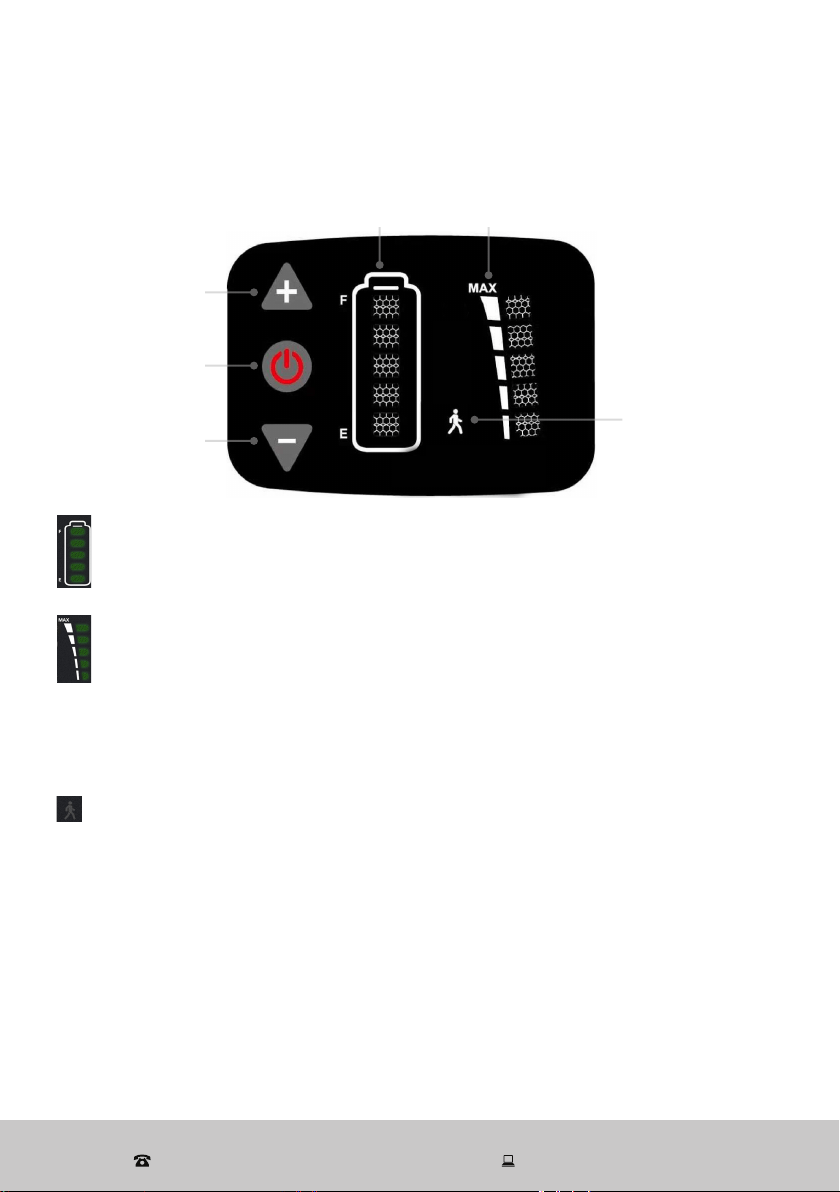
The e-bike's control panel, located on the left side of the handlebar, lets you turn
on the bike for electric power, select riding modes and check the battery status.
Battery
status
Pedal assis-
tance level
PLUS / increase
MINUS / decrease
POWER
6km/h EV mode
indicator
Battery status
Shows the battery status from full to empty.
The last LED will flash when the battery needs to be charged.
Pedal assistance level
Shows the pedal assistance level from 1 to 5.
1 (low) ..................1 LED light .............. up to 10 km/h
2 (medium low) .... 2 LED lights ............. up to 13 km/h
3 (medium) ..........3 LED lights ............. up to 17 km/h
4 (medium high) ..3 LED lights ............. up to 21 km/h
5 (high) ................. 5 LED lights ............. up to 25 km/h
6km/h EV mode
Shows when 6 km/h EV mode is in use.
18
After Sales Support
(AU) 1300 886 649 (NZ) 0800 836 761 | tempo.org/support
Operation
Turning on/off
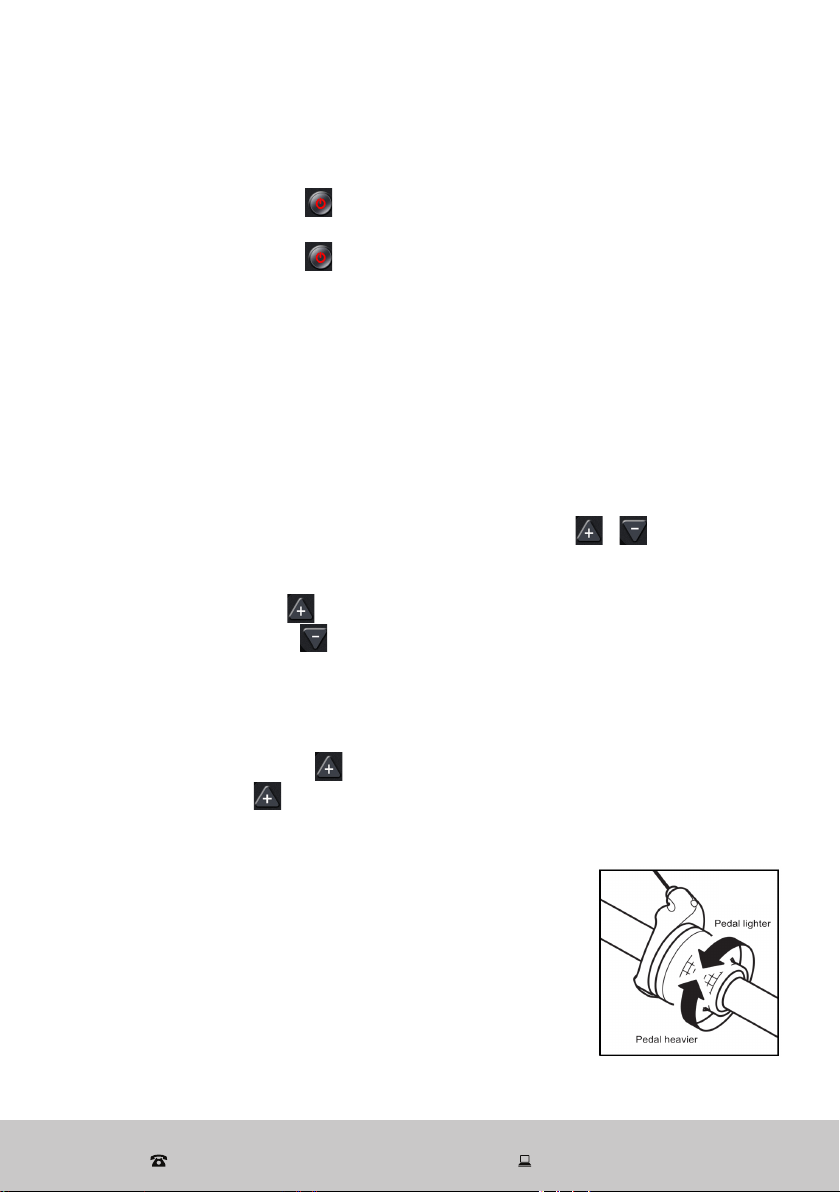
• Long-press the POWER [ ] button to turn on the e-bike (display). The display
will show the approximate battery status and pedal assistance modes.
• Long-press the POWER [ ] button to turn off the e-bike (display). It will turn
off automatically if there is no operation for 10 minutes since switching on.
Electric-assisted mode (pedal assistance)
Power assistance is triggered when you pedal forward and it stops when you stop
pedalling. In other words, power assistance happens as long as you pedal. You
do not need to pedal hard, just apply a light force to the pedals continuously to
maintain the current flow. When you apply one of the brakes, power assistance will
stop automatically, allowing the e-bike to slow down and stop. Power assistance
will turn itself off when the e-bike has reached the maximum speed of 25 km/h.
You must turn on the battery to use the e-bike in electric-assisted mode. Once
the e-bike is powered on, you can use the PLUS / MINUS [ / ] buttons to
change the pedal assistance level from the five levels available. The indicators will
change with the level selected.
• Short-press the PLUS [ ] button to shift up.
• Short-press the MINUS [ ] button to shift down.
Using 6km/h EV mode
Once the e-bike is powered on, you can switch to 6 km/h EV mode to gain initial
speed before riding the e-bike.
• Press and hold the PLUS [ ] button to enter 6 km/h EV mode.
• Release the PLUS [ ] button to exit 6 km/h EV mode.
Instructions (Cont.)
Pedal speed changing
The e-bike is equipped with a Shimano 7-speed system
with the shifter located at the right side of the handlebar.
• Turn the shifter to get a different tooth ratio in order to
change the pedal speed (Fig. 20).
Fig. 20
19
After Sales Support
(AU) 1300 886 649 (NZ) 0800 836 761 | tempo.org/support
FAQs and Troubleshooting Guide
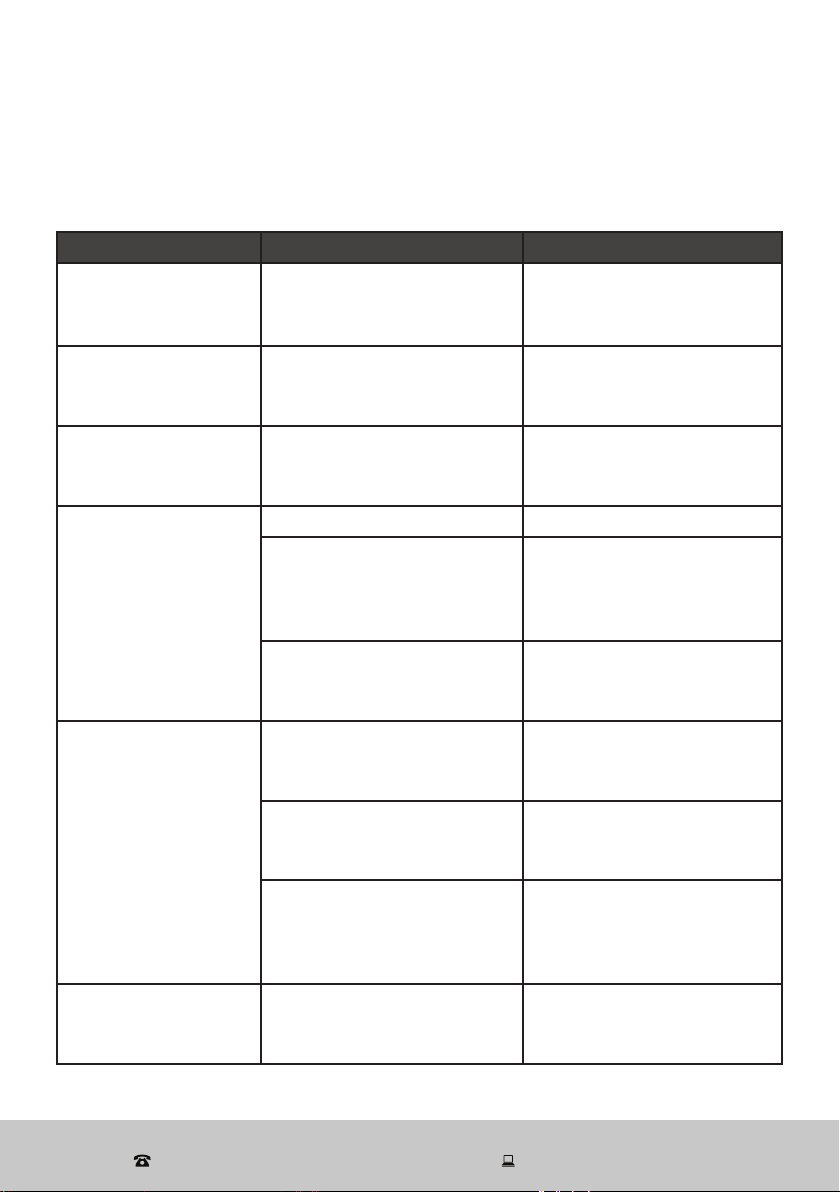
If you experience problems with your e-bike, check in the table below for
solutions to common problems. If the problem persists after checking the
suggested solutions, please contact our after sales support centre for advice.
Problems Possible cause Solution
When turned on, the
indicator light won’t
turn on.
The battery is completely
discharged.
Charge the battery.
The motor won’t
work, the display
won’t turn on.
The electric cable which
connects the battery is
loose.
Contact our after sales
support centre for a
service.
There is no electric
power to the bike.
The fuse has burnt out.
Contact our after sales
support centre for a
service.
The travelling
distance has been
reduced.
Insufficient battery capacity. Charge the battery fully.
The battery is getting old
and needs replacement.
Replace the battery. Spare
batteries are available for
purchase from our after
sales support centre.
Braking frequently, riding
uphill or running against the
wind continuously.
Use more pedalling.
The indicator light
does not illuminate
when charging.
The connecting cable is
becoming loose.
Insert the charging
connector firmly into the
socket.
The fuse has burnt out.
Contact our after sales
support centre for a
service.
The charger is damaged.
Replace the charger. Spare
chargers are available for
purchase from our after
sales support centre.
Other issues
Problems with electrical
components.
Contact our after sales
support centre for a
service.
20
After Sales Support
(AU) 1300 886 649 (NZ) 0800 836 761 | tempo.org/support
Other Useful Information
Cleaning and care
WARNING!
Clean the e-bike properly and maintain it in good working condition. The
warranty will not apply in case of corrosion due to lack of maintenance.
• After every ride, wash your bike with soapy water (liquid dish soap is
recommended for its ability to remove grease without damaging the bike),
but do not wash any electrical parts. Avoid using high-pressure washers.
Always dry your bike with a soft cloth in order to avoid rust and corrosion. While
carefully drying your entire bike, you will also be able to inspect all the different
parts and detect any potential problems.
• Lubrication is an important part of maintenance of electric vehicles. The
front axle, middle axle flywheel, front fork shock absorber pivot and other
components should be scrubbed with an appropriate lubricating oil every six
months.
• Check the chain tension after every ride. The correct chain tension is 8036N.
The bike has a freewheel, so you can check the chain tension by spinning the
pedals backwards. The chain needs to be as tight as possible without creating
friction that will waste energy and wear the chain and cogs prematurely.
Professional bike mechanics are required to carry out the following steps:
• To adjust the rear wheel's position, loosen one side and push the rim between
the chain stays to one side to move the loose end of the axle a short distance
back or forward. Retighten the nut. Loosen the other side and ease the rim in
the other direction so the rear wheel is once again straight in the frame.
• Test again and repeat the process, moving the rear wheel a short distance
forward or back until the tension is in the target zone. You need to test by
spinning the pedals because neither cogwheel will be a perfect circle so the
chain tension will vary as the cranks spin. Once the chain tension is acceptable,
tighten both nuts fully.
• During the whole process please pay attention to the motor cable, do not
damage or loosen the cable.

21
After Sales Support
(AU) 1300 886 649 (NZ) 0800 836 761 | tempo.org/support
Other Useful Information (Cont.)
Storage
When it is not in use, store the e-bike in a cool, dry place, protected from dust,
high humidity and frequent temperature changes, and out of reach of children.
For prolonged storage we recommend using the original carton for the bike and
storing the battery separately. Please ensure the battery is at least partially charged
as prolonged storage of an empty battery may damage the battery.
Service and repair
WARNING: Replace worn parts! As with all mechanical components, the bicycle
is subjected to wear and high stresses. Different materials and components may
react to wear or stress fatigue in different ways. If the design life of a component
has been exceeded, it may suddenly fail, possibly causing injuries to the rider. Any
form of crack, scratch or change of colouring in highly stressed areas indicates
that the life of the component has been reached and it should be replaced.
After riding the bike for a long time, the efficiency of the liner may be reduced.
Please ensure you adjust or replace the inner and outer lining of the disc brake
when this occurs.
Spare parts
Our after sales support centre stocks spare batteries and chargers for the e-bike.
To purchase a spare part or book a service, please contact our after sales support
centre on 1300 886 649 or via tempo.org/support.
22
After Sales Support
(AU) 1300 886 649 (NZ) 0800 836 761 | tempo.org/support
Other Useful Information (Cont.)
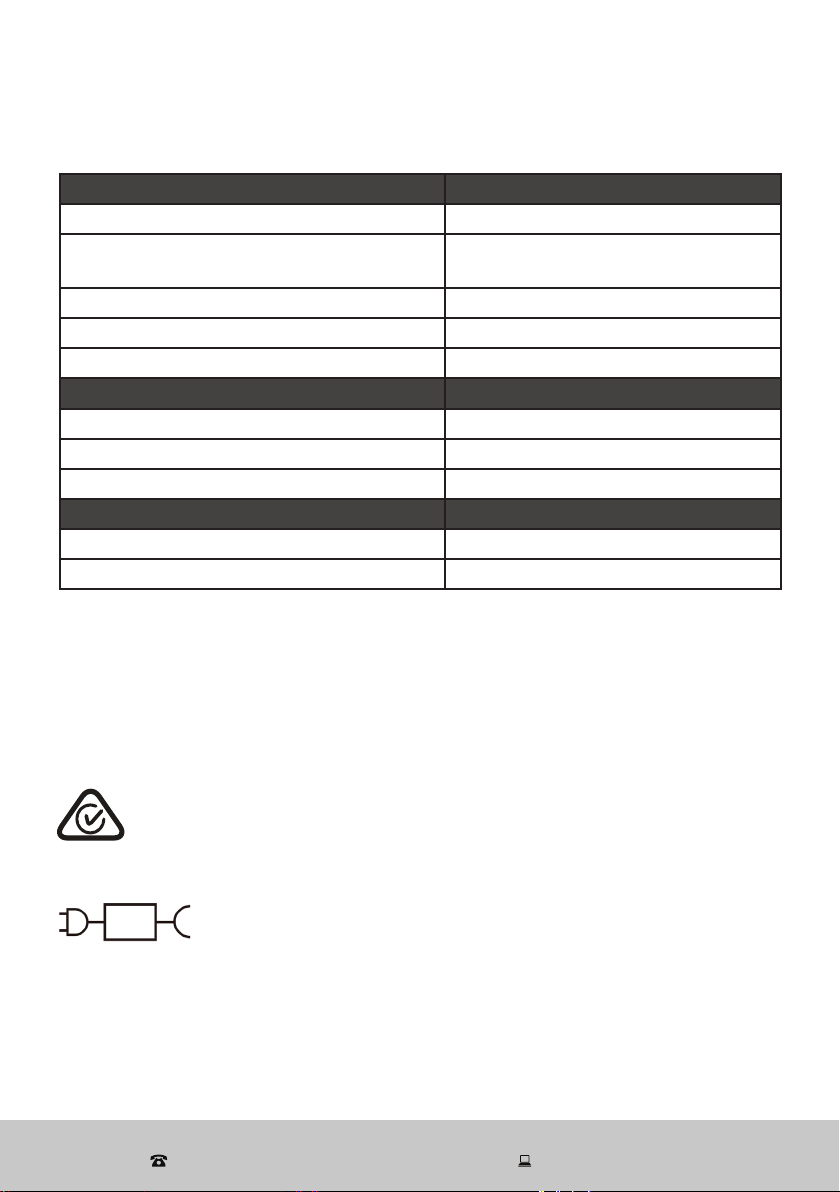
* EPAC = electrically power-assisted cycles
This marking indicates only to charge the battery for the Electric
City Bicycle with the supplied battery charger with the model
number XVE-4200150.
Compliance
This appliance has been fully tested and meets all requirements as set out by
standard AS 15194.
The RCM Mark (Regulatory Compliance Mark) indicates that the product
complies with the relevant guidelines of the ACMA as well as corresponding
government requirements for the safety of electrical devices.
E209
Technical specifications
E-City Bike Model number MOBL-CTY
EPAC cut-off speed 25 km/h
Mass of EPAC in the most usual configuration
(weight)
21.6 kg
Electric motor max. continuous rated power 250 W
Max. permissible total weight 121.6 kg (bicycle + rider + luggage)
Dimensions (assembled) 1820 x 695 x 1105 mm
Rechargeable li-ion battery 10INR19/66-3 Model number FP-MY367R5
Rated voltage 36 V
Rated capacity 7.5 Ah, 270 Wh
Dimensions and net weight 43 x 6.4 x 7.7 cm, 2.1 kg
Battery charger Model number XVE-4200150
Output 42 V 1.5 A
Charging time (from 0% to 100%) 5–6 hrs
23
After Sales Support
(AU) 1300 886 649 (NZ) 0800 836 761 | tempo.org/support
Responsible disposal
Packaging materials are recyclable. Please dispose of them
responsibly for recycling.
At the end of its working life, do not throw this appliance out
with your household waste. Electrical and electronic products
contain substances that can have a detrimental effect on the
environment and human health if disposed of inappropriately.
Observe any local regulations regarding the disposal of
electrical consumer goods and dispose of it appropriately for
recycling.
Contact your local authorities for advice on recycling facilities
in your area. Or find recycling scheme services listed on Planet
Ark’s website at www.recyclingnearyou.com.au, or call Planet
Ark on 1300 733 712.
Other Useful Information (Cont.)

24
After Sales Support
(AU) 1300 886 649 (NZ) 0800 836 761 | tempo.org/support
Warranty returns
Should you for any reason need to return this product for a warranty
claim, make sure to include all accessories with the product.
Product does not work?
If you encounter problems with this product, or if it fails to perform to your
expectations, make sure to contact our After Sales Support Centre on
(AU) 1300 886 649 or (NZ) 0800 836 761 for advice.
Distributed by Tempo (Aust) Pty Ltd ABN 70 106 100 252
PO BOX 132, Frenchs Forest NSW 1640, Australia
Customer Helpline:
(AU) 1300 886 649 (NZ) 0800 836 761
tempo.org/support
For an electronic copy of this manual, please contact our after sales support centre.
IM Version No: V1.0 Issue: October 2022